

Are you looking for a WordPress event plugin to create event listings, display an event calendar, manage registrations, or sell tickets? WP Event Manager is an established WordPress event management plugin worth considering.
But with so many event calendars and registration plugins available today, is WP Event Manager still a good choice in 2026? In this updated WP Event Manager review, we’ll look at its features, free vs premium, event registration, recurring events, pricing, ease of use, pros, cons, and alternatives.
Editor’s note: I published this blog post in 2019. However, I recently used this plugin and tested its current version.
Disclosure: We get a commission when you buy a product via our affiliate link at no additional cost.
Quick Verdict: Is WP Event Manager Worth It?
Yes, WP Event Manager is worth considering if you need more than a basic WordPress event calendar.
It is suitable for websites that need to publish and organize multiple events, allow event submissions or registrations, display events in different formats, manage recurring events, or extend the website with ticketing and other event-management functionality.
The main advantage is its extensible approach: you can start with the free WordPress plugin and add premium functionality when your event-management requirements become more advanced. However, it may be more functionality than you need if your requirement is a simple calendar to show your events.
My Assessment
| Category | My Assessment |
| Listings | Excellent |
| Calendar | Very good |
| Management | Excellent |
| Registration | Very good |
| Events | Very good |
| Ticketing | Very good |
| Ease of use | Very good |
| Extensibility | Excellent |
Best For: Websites that need event listings plus registration, ticketing, recurring events or other event-management features.
Consider An Alternative If: You only want a lightweight calendar and don’t need event-management functionality.
WP Event Manager – Quick Intro
WP Event Manager is a WordPress event management plugin to create, organize and display events from within WordPress. It supports different types of events, including in-person, virtual and hybrid events.
Its current WordPress.org listing highlights event creation and management, event calendars, recurring events, event registration and ticket selling with QR-code functionality.
Rather than treating an event as simply a date displayed on a calendar, WP Event Manager provides tools for building a more complete event-management system.
It is an excellent tool to conduct Conferences, Workshops, Seminars, Webinars, Meetups, Training programs, and events that require registration and ticket sales.
How To Use This WordPress Event Plugin?
You have to download the latest version of WP Event Manager from the WordPress plugin repository.
Or Go to WordPress Dashboard > Plugins > Add New
Search WP Event Manager > Install Now > Activate
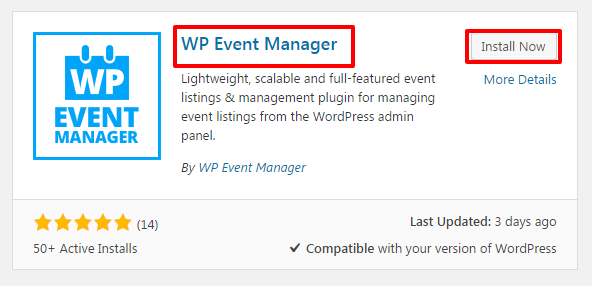
WP Event Manager is the best WordPress events plugin that has uncomplicated settings for creating and managing the events with no trouble.
Let’s see how it works!
Step 1: After activating this best WordPress event plugin, you will get the setup wizard like this
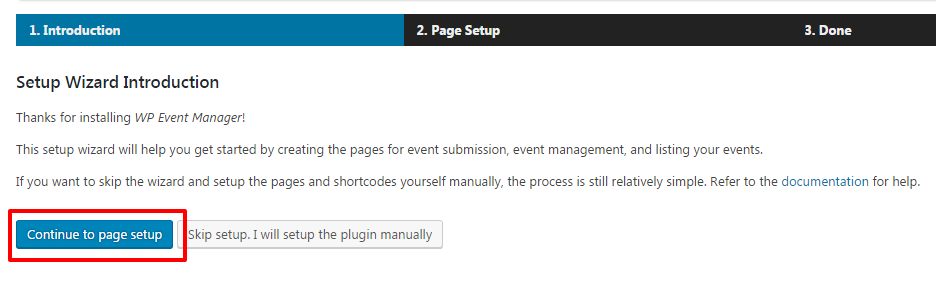
Step 2: You may click “Continue to Page Setup” to create the essential pages like
1. Post an event – Submission form for your visitors for posting their events to your site (if you don’t want to accept event submission, skip creating this page by unticking the option)
2. Event Dashboard – This page is also for the event submitting users to edit and manage their events. (If you are going to handle the events, don’t create this page)
3. Events – Your site audience can browse and filter the events through this page
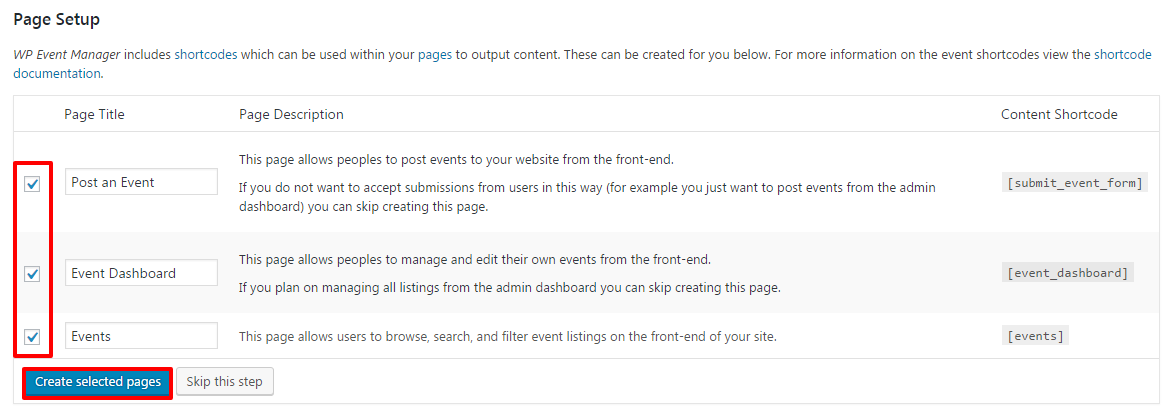

Step 3: Click Create Selected Pages; Now, you will get all the selected pages!
Note: If you skip this step by not creating all the pages, then you will have to create the pages manually by adding the shortcodes.
Let’s see how to create the pages manually!
Create the pages and enter the corresponding shortcodes as given in the below image!
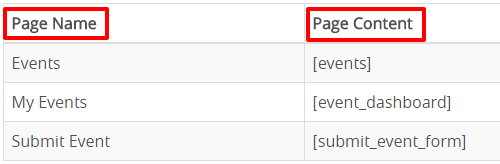
Go to Dashboard > Pages > Add New
Enter the Title & Shortcode and hit Publish
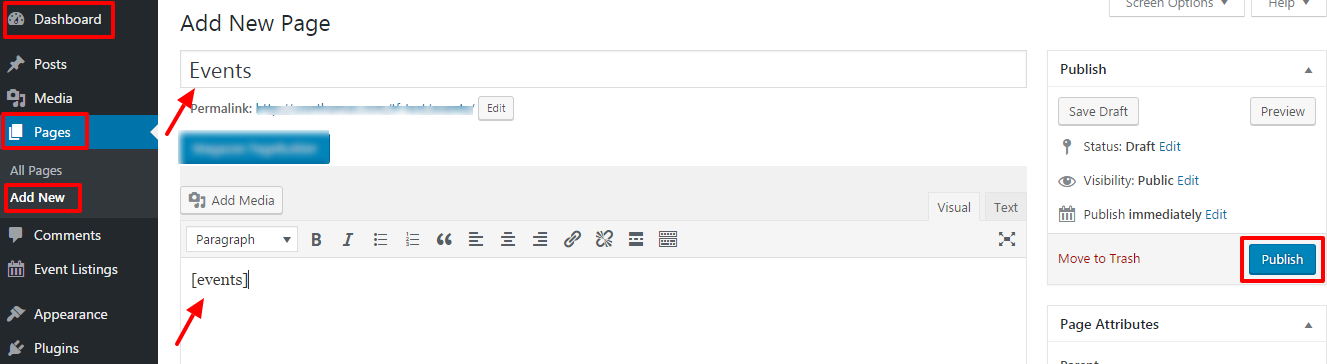
Similarly, you have to create the event dashboard and submit event pages if required.
Now, look at the general settings choices of the WP Event Manager!
Step 4: Go to Dashboard > Event Listings > Add New (We are adding the event at the back-end; front-end submission form is also available)
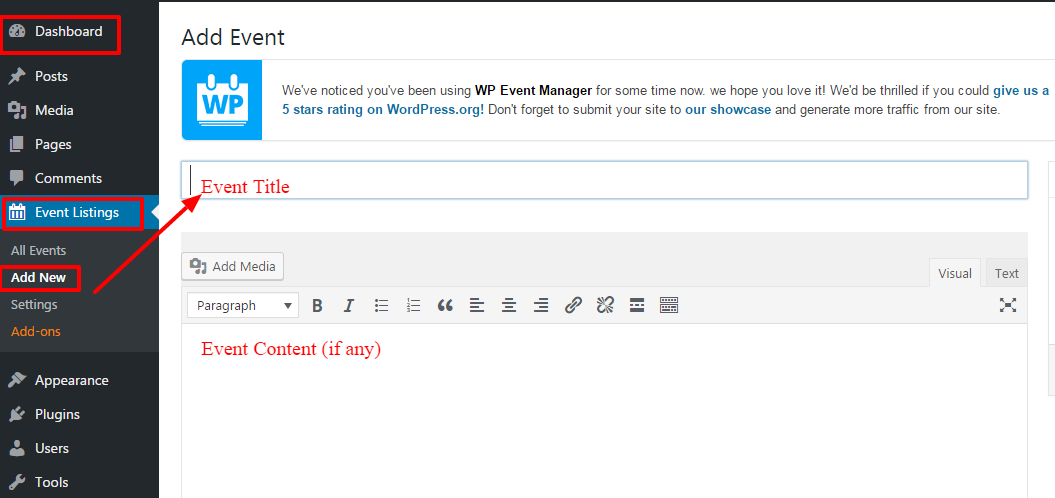
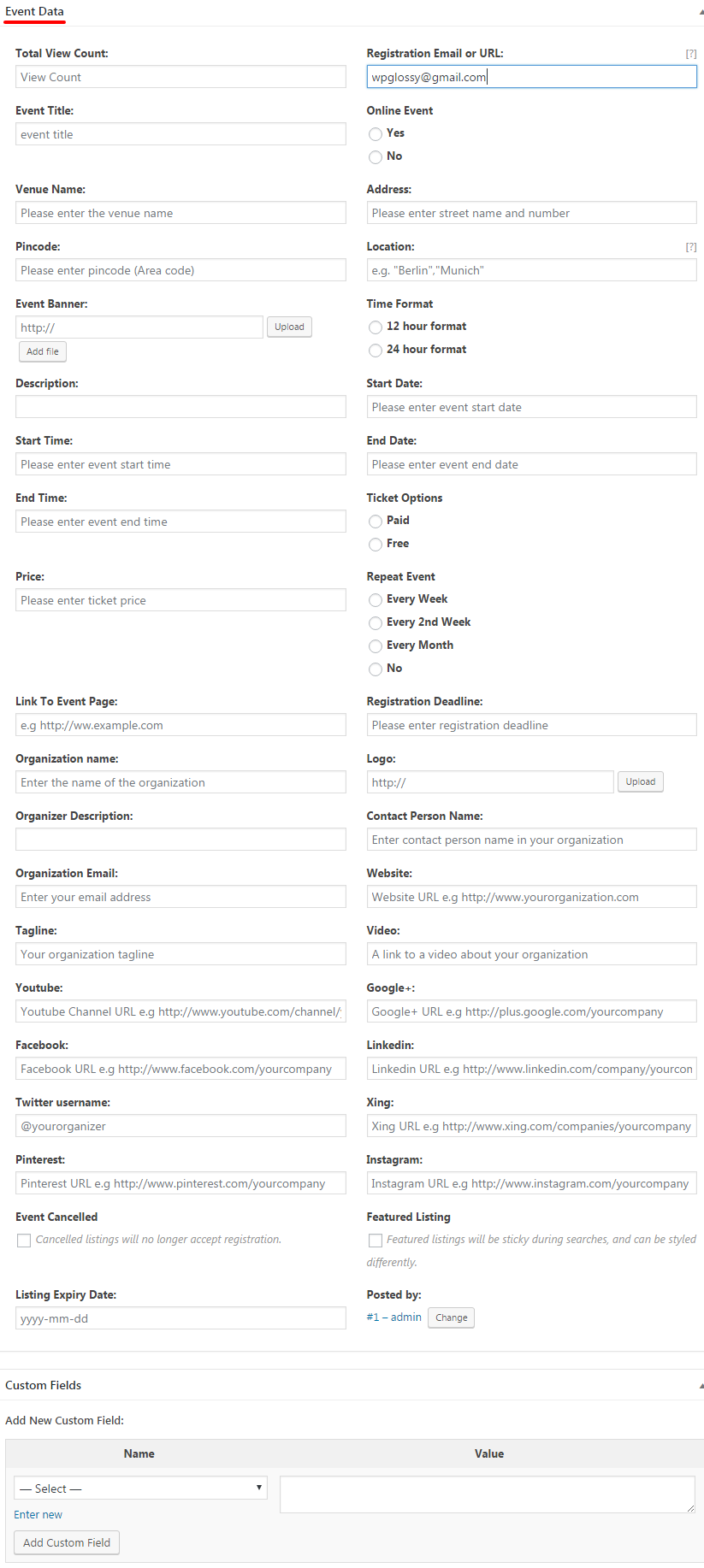
After entering the Title and content for the event, just scroll down the page to the wide customization options to enter the event data.
Fill in the event details as shown below and hit Publish
Step 5: Dashboard > Event Listings > Settings
The general setting of this WordPress event plugin free has 3 sections.
1. Event Listings
2. Event Submissions
3. Pages
You have to customize each section as per your requirements!
You can set up the Categories, Type of event, Ticket prices, Date format and filter type for category & event for the event listings.
Look at the customization options for Event Listings; make your preferences and click Save Changes.
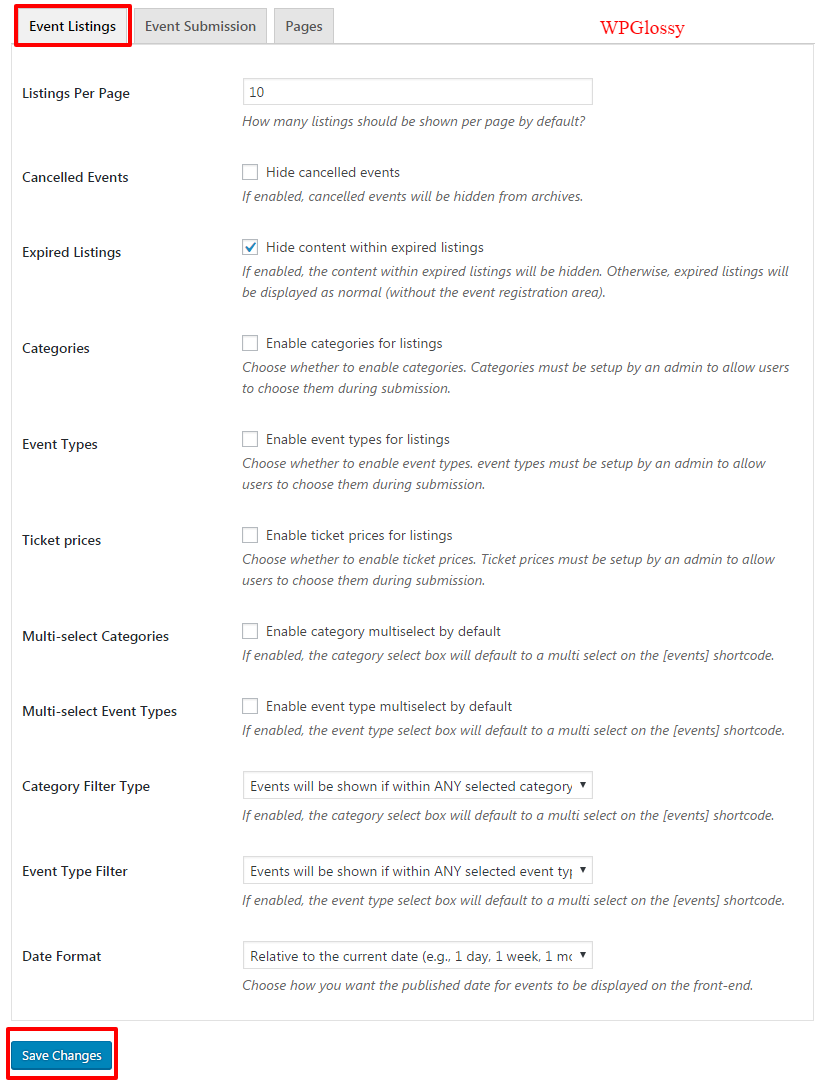
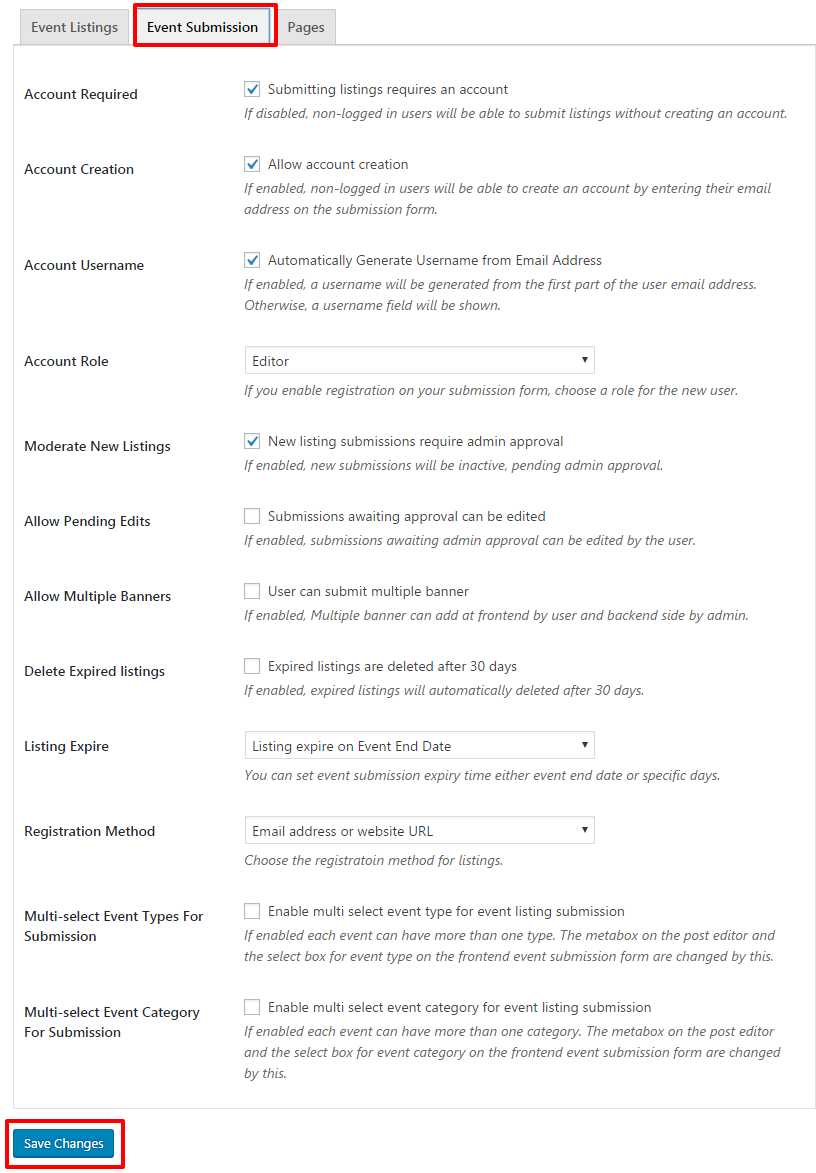
After completing the Event listings, move to the next tab Event Submission, enter the particulars and click Save Changes.
You can control almost everything in the event submission by the users through the vast setting options like Account details, Account role, Allow banners, Moderate the new listings, Method of registration, Event ending date and much more!
Next, you have to do the Pages settings by adding them (shown in the image below)
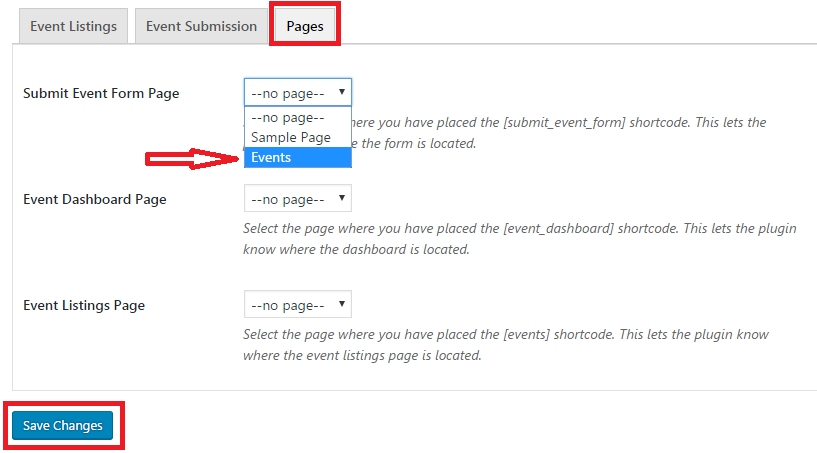
Once you have done letting the plugin know where the pages are located, hit Save Changes.
Exciting Features OF WP Event Manager I Mostly Admire
You should know the key features of this WordPress event plugin so you can make full use of its benefits!
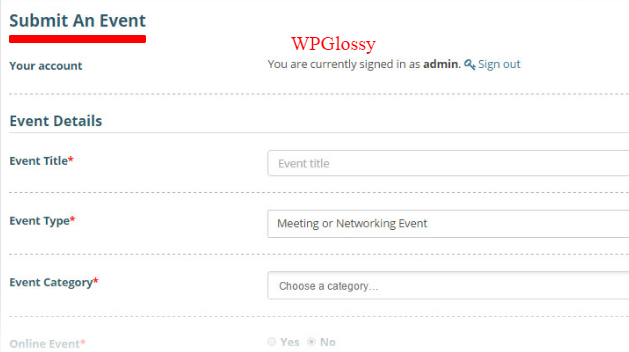
1. Front-end Event Submission Form
The handy submission form for the events is available in the front end settings. In most of the WordPress event plugins, this is a premium feature.
Besides, you will like the design and user-friendly features of this form to collect all the required data from your visitors.
2. Preview Of Event Submission
Before publishing the events, you can view their listing through the Preview option which is the exact replica of the event that they register. So, you can edit as per your needs.
3. Precise Layouts
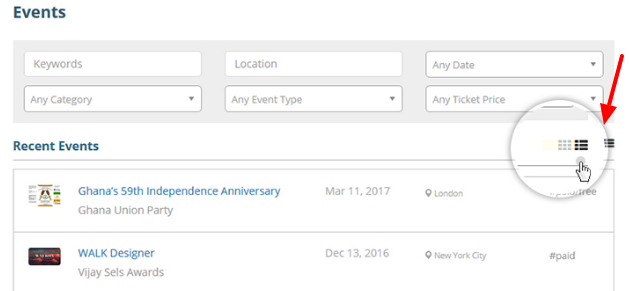
WP Event Manager offers 2 layout designs for listing events!
Box Layout – You can list out the events in a logical way through the Grid View of box layout.
So, your site visitors will get a chance to see a huge number of listings without scrolling and they will easily get into the details of the events in just a click.
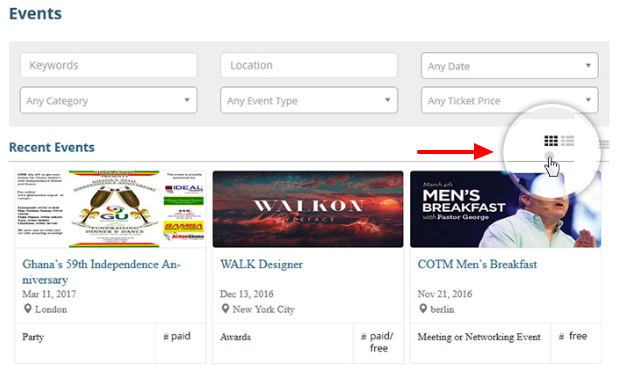
Line Layout – If you don’t want to distract your readers with the vast information, opt for this line layout to show the event listings in line format.
Here, all the events will get listed one after the other. It will help your audience to find out the particulars that they exactly look for!
4. Event Dashboard
Managing events is more important! This event extension for WordPress provides an intuitive Dashboard where you can control all the listed events on your site.
5. Easy-to-use Admin Interface
The Admin interface of this WordPress event plugin with the map is handy, well-organized and straightforward as well. You don’t need to tweak the code for any purpose, instead, handle the functions like Edit, Cancelled, Approve, Mark, Preview etc.
6. Include Event Category & Event Type
If you have a plan to use your WordPress site to list out the variety of events, then you can add “Event Categories” and “Event Type” options through the backend settings.
Make sure that you have enabled the options “Categories” and “Event Types” in the general settings of Event Listings as shown below!
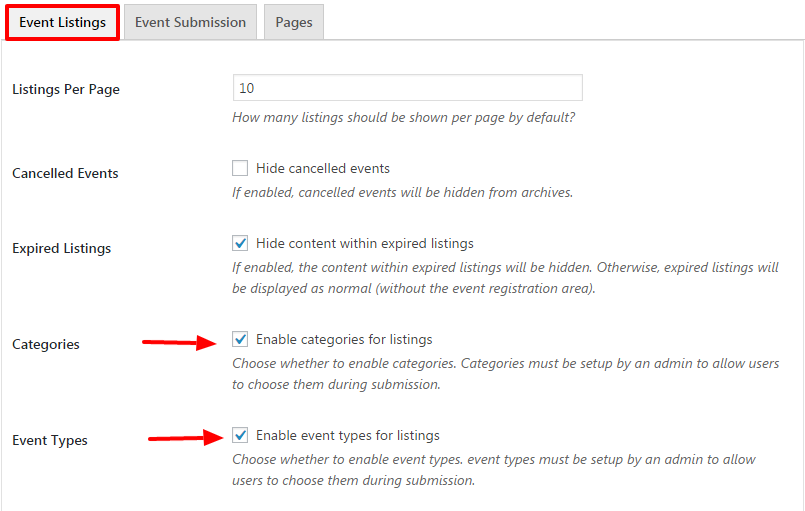
After you enable these options, you will get them in the Dashboard to add the event type and event categories for user convenience.
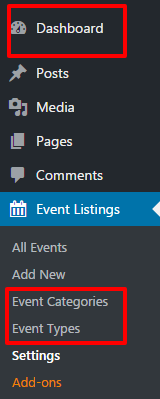
Just click on the options and add the New event category & New Event Type for a better user experience as they could sort out the events by category and type.
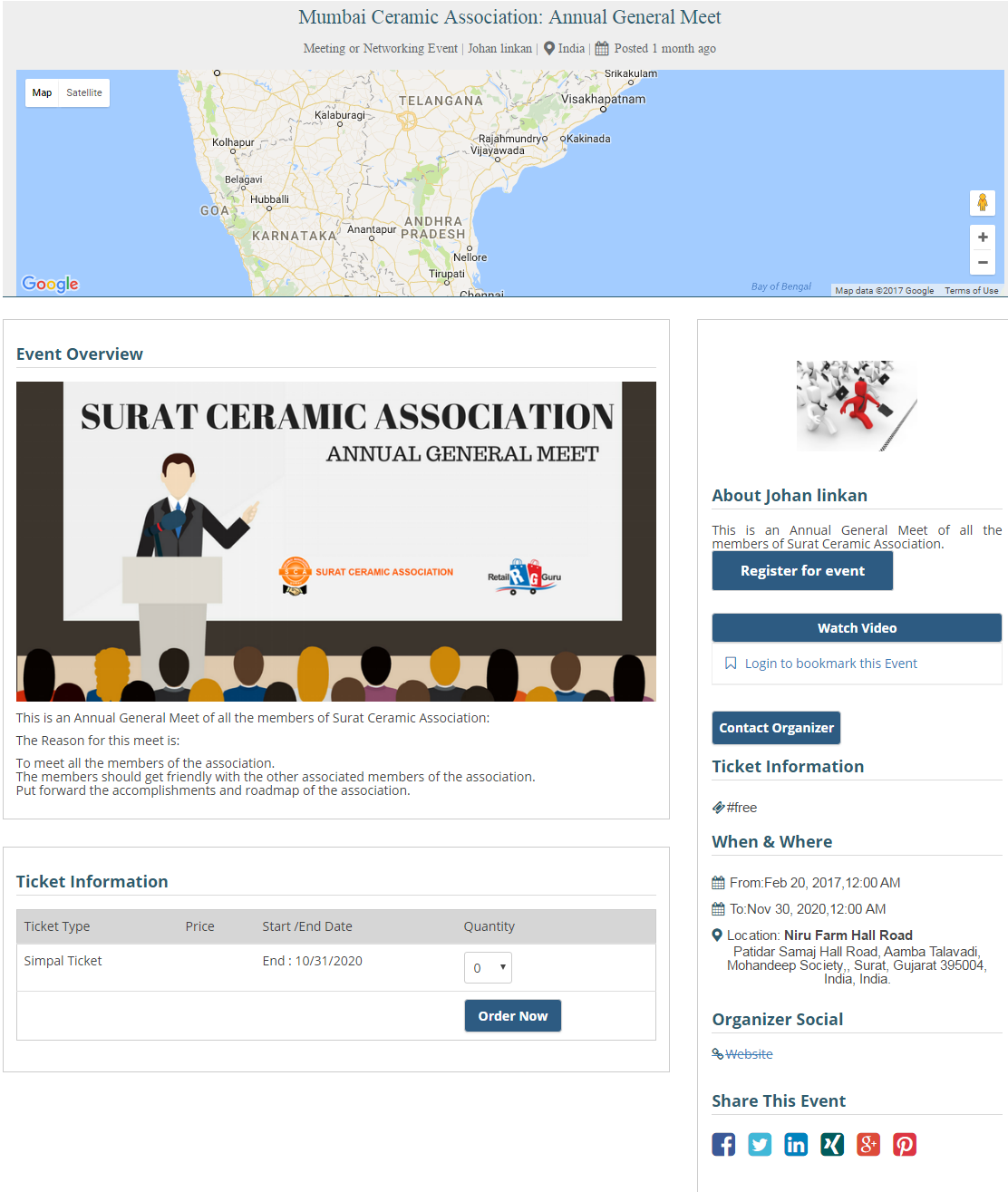
7. Single Event Page
You can create a single page for a particular event with all the details like Event title, type, location, Google Maps, description, social share buttons, Ticket Information, and the contact details of the organizer.
What Has Changed?
WP Event Manager plugin has evolved considerably since my original 2019 article.
The current WordPress.org listing shows version 3.4.1, released on 2026. Recent releases include fixes for event categories and types, frontend filtering, date selection, event views and other stability issues.
| Free Version | Pro Version | |
| Basic event listings | ✅ | ✅ |
| Frontend event submission | ✅ | ✅ |
| Search & categories | ✅ | ✅ |
| Calendar | ❌ | ✅ |
| Recurring events | ❌ | ✅ |
| Event registration | ❌ | ✅ |
| Sell tickets | ❌ | ✅ |
| Attendee management | ❌ | ✅ |
| WooCommerce/payment features | ❌ | ✅ |
Pricing Plans
WP Event Manager has 4 different pricing plans!
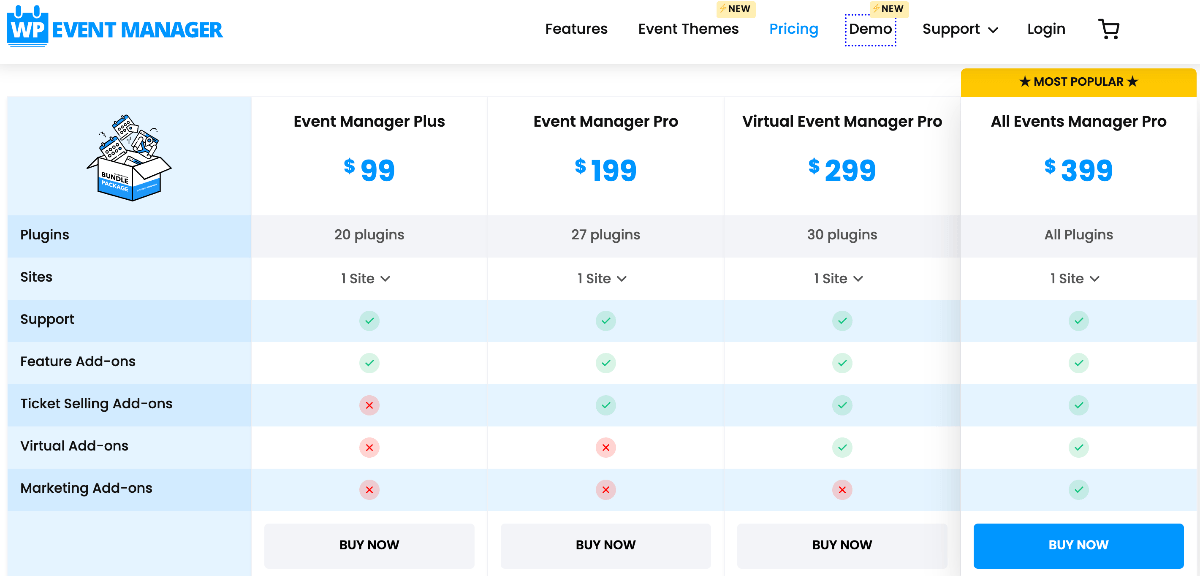
If you only need one specific feature, this plugin sells individual add-ons, so buying a full Pro bundle may not be necessary for every user.
Pros
- Free core plugin available
- Event listings and calendar functionality
- Recurring-event functionality
- Registration functionality
- Ticketing ecosystem
- QR-code ticketing functionality
- Extensible through add-ons
- Suitable for in-person, virtual and hybrid events
- Regular Updates
Cons
- Advanced functionality requires paid extensions
- available options can make the system more complex
- Pricing needs to be evaluated based on the extensions your website actually requires
Wrapping Up
WP Event Manager is a great option for WordPress websites that need a complete event-management workflow rather than a simple calendar.
Its free starting point makes it relatively easy to evaluate, while its extension-based ecosystem gives growing websites room to add functionality.
Its current feature set is aimed at websites that need to create, publish, organize and manage events, with additional functionality for registrations, recurring events and ticketing.
However, you should calculate the total cost before purchasing premium extensions. If you only need a basic calendar, you may be better served by a simpler plugin.
Frequently Asked Questions
Does WP Event Manager work with WooCommerce?
WooCommerce-related ticketing functionality is part of the WP Event Manager ecosystem. Check the current extension documentation before purchasing to confirm exactly which WooCommerce features and integrations are included in the plan you need.
What are the best WP Event Manager alternatives?
Potential alternatives include The Events Calendar, Sugar Calendar, Modern Events Calendar, Eventin and Events Manager. The best alternative depends on whether you prioritize a simple calendar, registration, recurring events, ticketing or a broader event-management system.
Is WP Event Manager better than The Events Calendar?
Neither should be considered universally better. Compare the features, pricing, workflow, extensions and support you actually need. A good choice for one event website may be the wrong choice for another.



Great article Nirmala. WordPress is really awesome to create almost any kind of website that includes an event site. Thanks for sharing. Keep up the good work.