IPA
1st
Semester, 2007-2008
Internet 1
Ch. 16
XML
attasr@ipa.edu.sa
09/30/15 © Reem Al-Attas 2
Introduction
 XML (Extensible Markup Language)
 Derived from Standard Generalized Markup
Language (SGML)
 Open technology for electronic data exchange and
storage
 Create other markup languages to describe data in
structured manner
09/30/15 © Reem Al-Attas 3
Introduction
XML documents
 Contain only data, not formatting instructions
 Highly portable
 XML parser
 Support Document Object Model or Simple API
XML
 Document Type Definition (DTD, schema)
 XML document can reference another that defines proper
structure
XML-based markup languages
 XML vocabularies
09/30/15 © Reem Al-Attas 4
Structuring Data
 XML declaration
 Value version
 Indicates the XML version to which the document conforms
 Root element
 Element that encompasses every other elements
 Container element
 Any element contains other elements
 Child elements
 Elements inside a container element
 Empty element flag
 Does not contain any text
 DTD documents
 End with .dtd extension
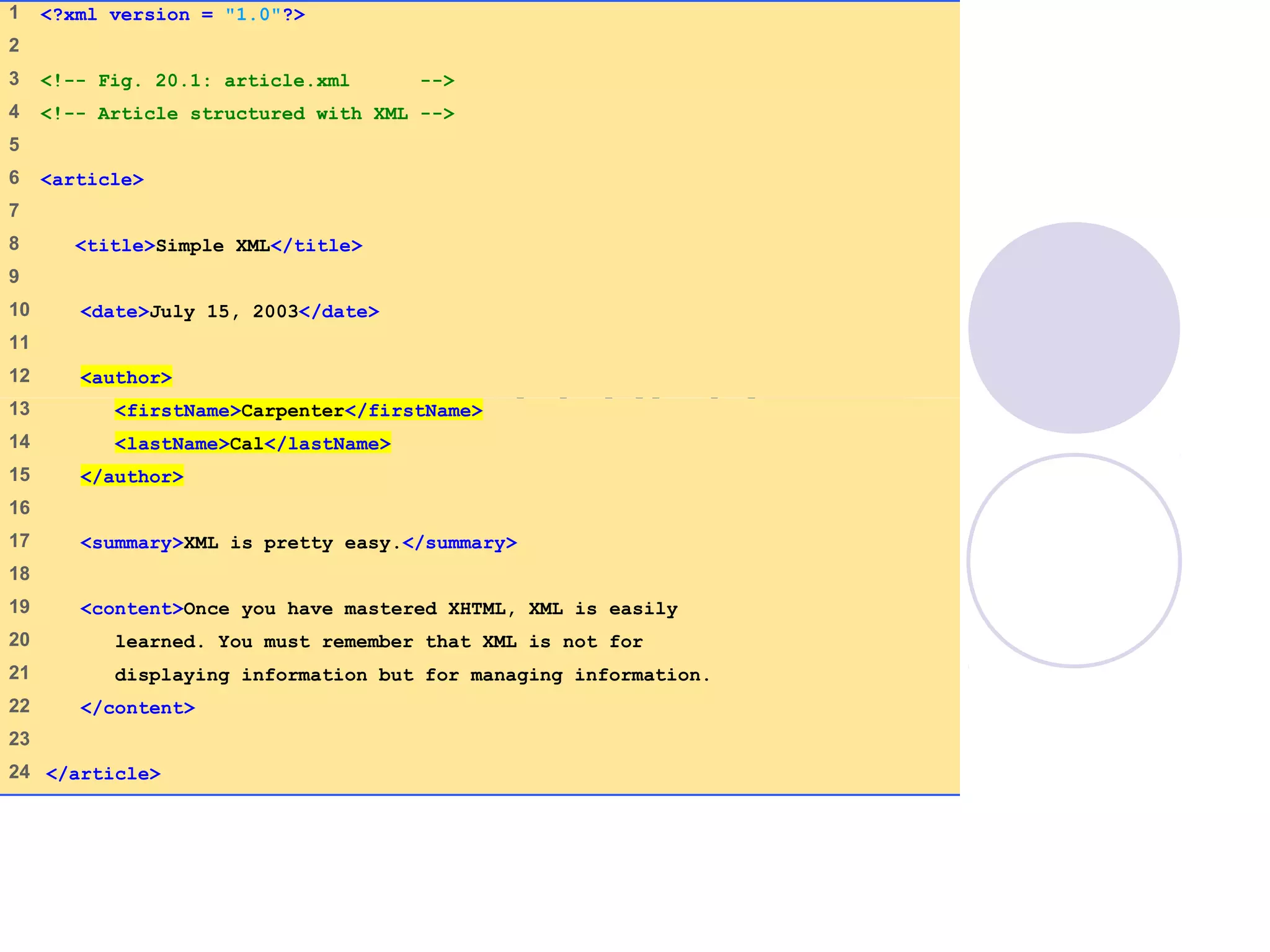
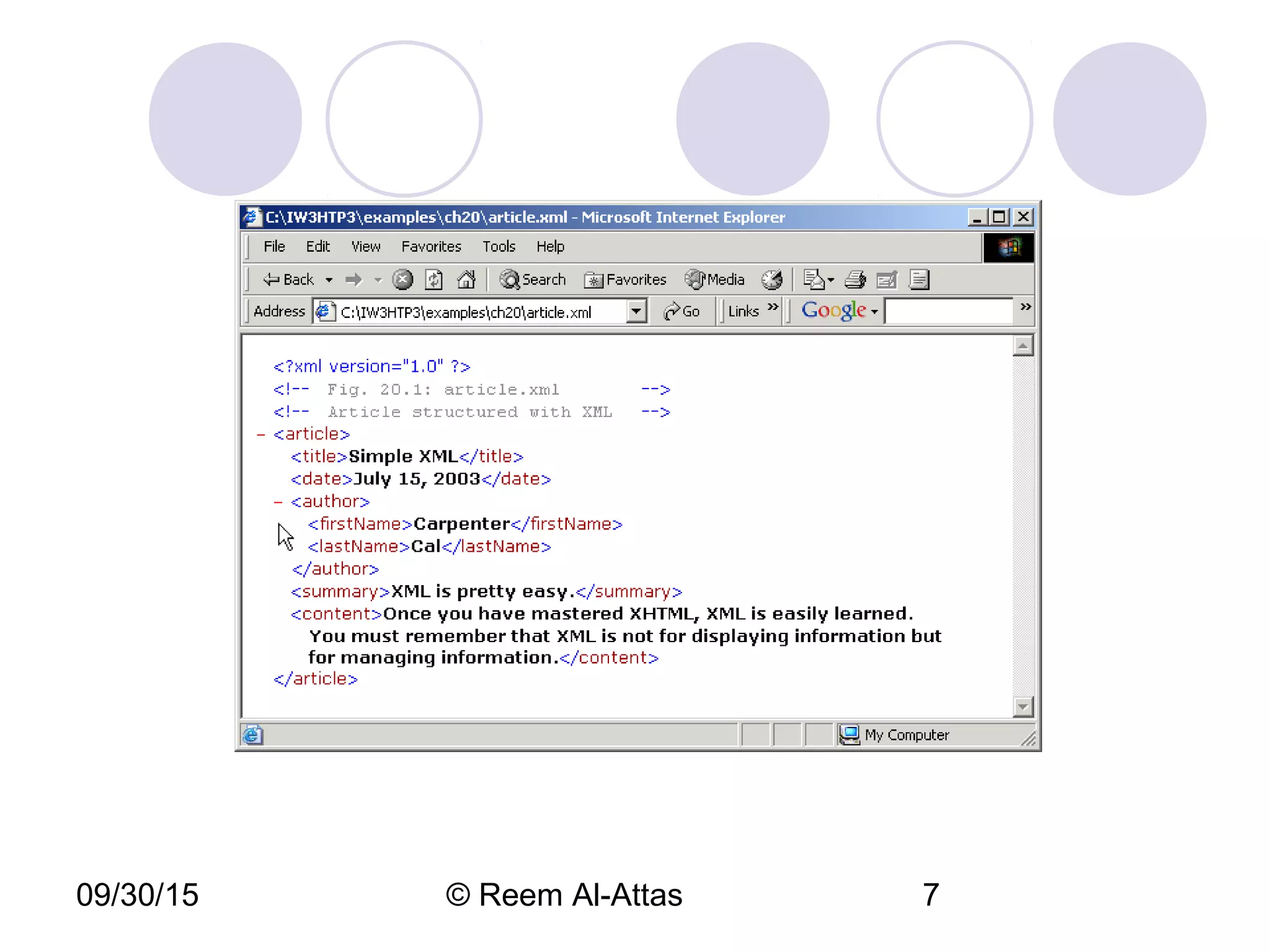
article.xml
(1 of 1)
1 <?xml version = "1.0"?>
2
3 <!-- Fig. 20.1: article.xml -->
4 <!-- Article structured with XML -->
5
6 <article>
7
8 <title>Simple XML</title>
9
10 <date>July 15, 2003</date>
11
12 <author>
13 <firstName>Carpenter</firstName>
14 <lastName>Cal</lastName>
15 </author>
16
17 <summary>XML is pretty easy.</summary>
18
19 <content>Once you have mastered XHTML, XML is easily
20 learned. You must remember that XML is not for
21 displaying information but for managing information.
22 </content>
23
24 </article>
09/30/15 © Reem Al-Attas 6
09/30/15 © Reem Al-Attas 7
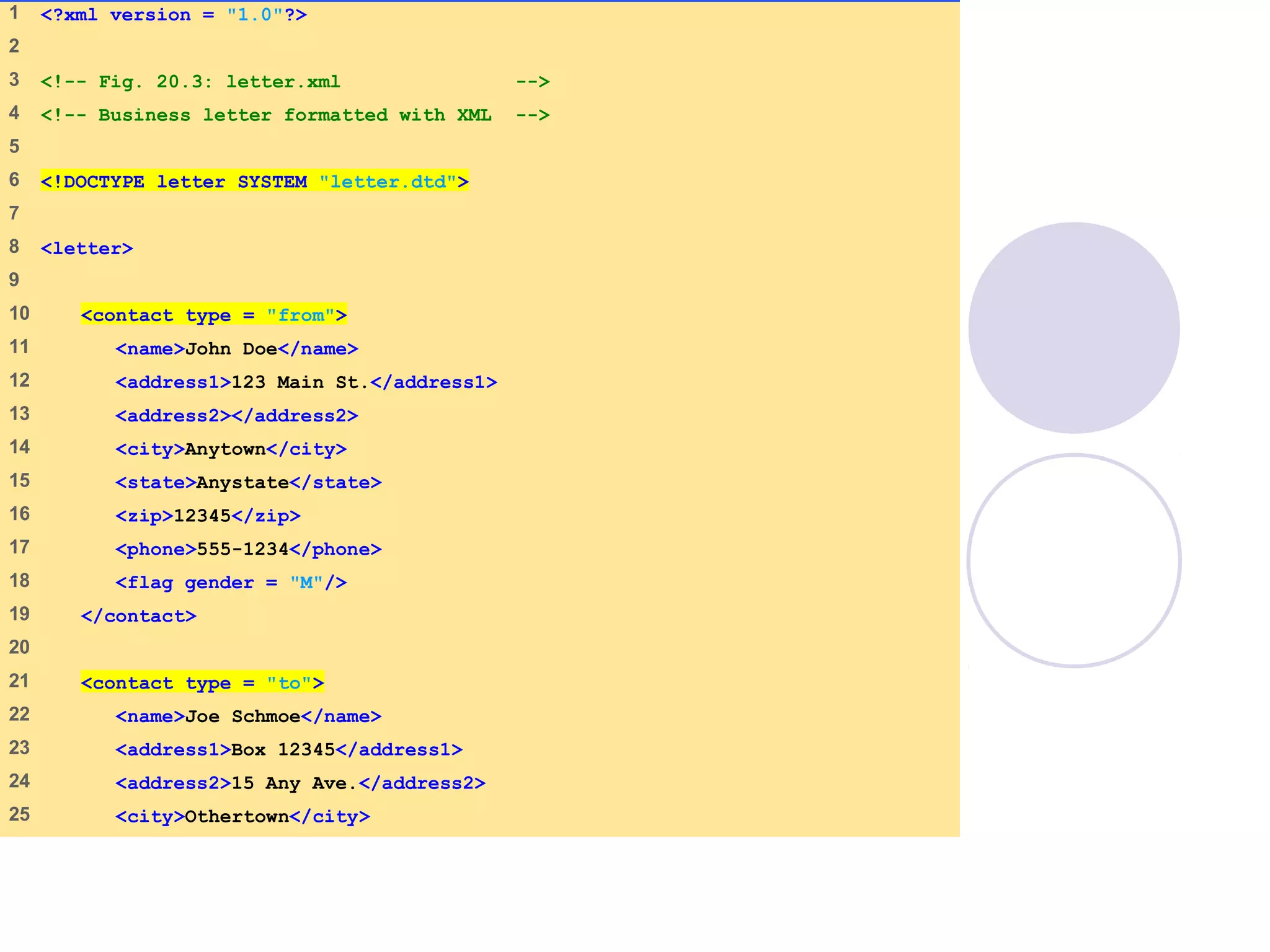
letter.xml
(1 of 2)
1 <?xml version = "1.0"?>
2
3 <!-- Fig. 20.3: letter.xml -->
4 <!-- Business letter formatted with XML -->
5
6 <!DOCTYPE letter SYSTEM "letter.dtd">
7
8 <letter>
9
10 <contact type = "from">
11 <name>John Doe</name>
12 <address1>123 Main St.</address1>
13 <address2></address2>
14 <city>Anytown</city>
15 <state>Anystate</state>
16 <zip>12345</zip>
17 <phone>555-1234</phone>
18 <flag gender = "M"/>
19 </contact>
20
21 <contact type = "to">
22 <name>Joe Schmoe</name>
23 <address1>Box 12345</address1>
24 <address2>15 Any Ave.</address2>
25 <city>Othertown</city>
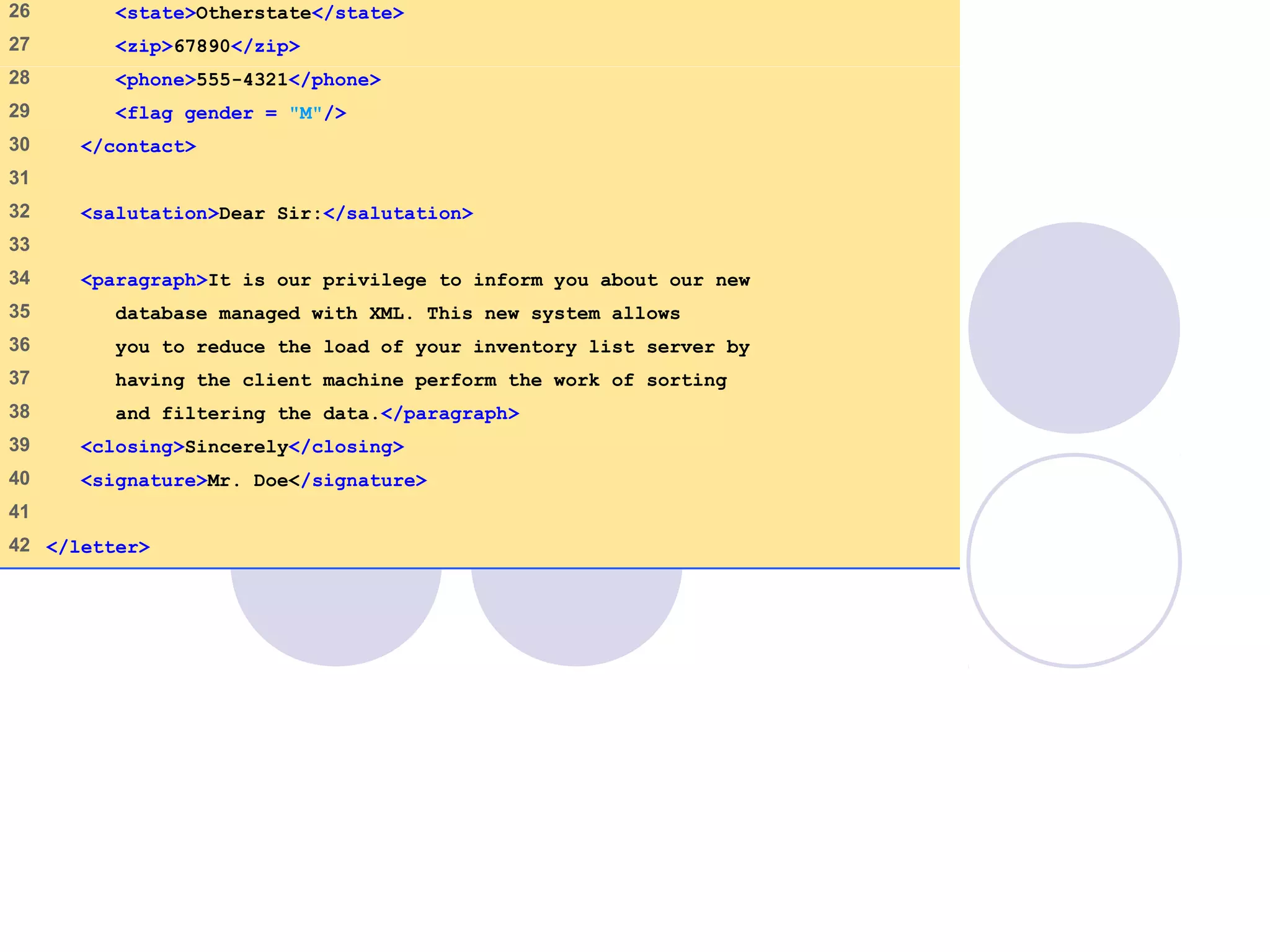
letter.xml
(2 of 2)
26 <state>Otherstate</state>
27 <zip>67890</zip>
28 <phone>555-4321</phone>
29 <flag gender = "M"/>
30 </contact>
31
32 <salutation>Dear Sir:</salutation>
33
34 <paragraph>It is our privilege to inform you about our new
35 database managed with XML. This new system allows
36 you to reduce the load of your inventory list server by
37 having the client machine perform the work of sorting
38 and filtering the data.</paragraph>
39 <closing>Sincerely</closing>
40 <signature>Mr. Doe</signature>
41
42 </letter>
09/30/15 © Reem Al-Attas 10
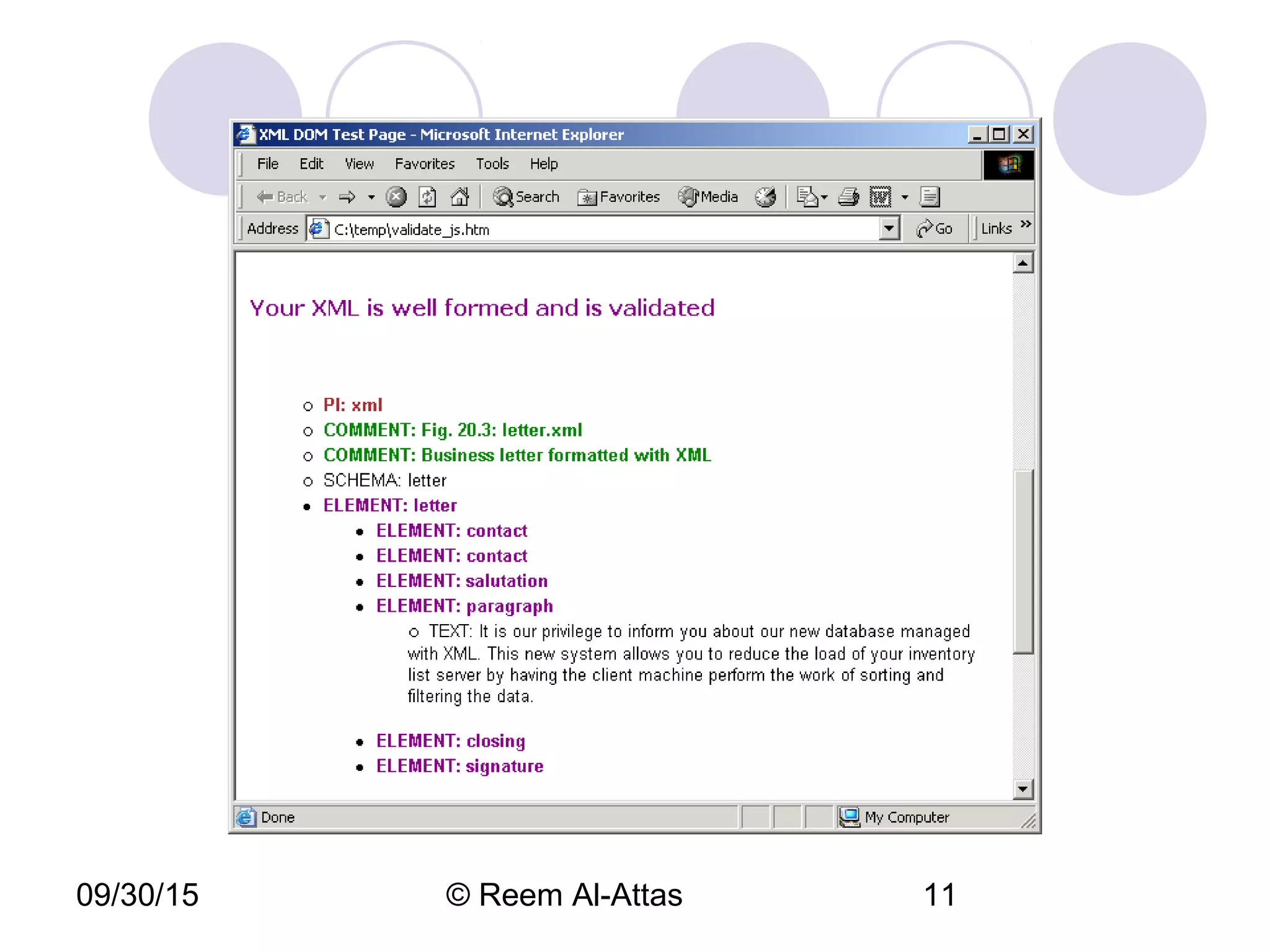
09/30/15 © Reem Al-Attas 11
09/30/15 © Reem Al-Attas 12
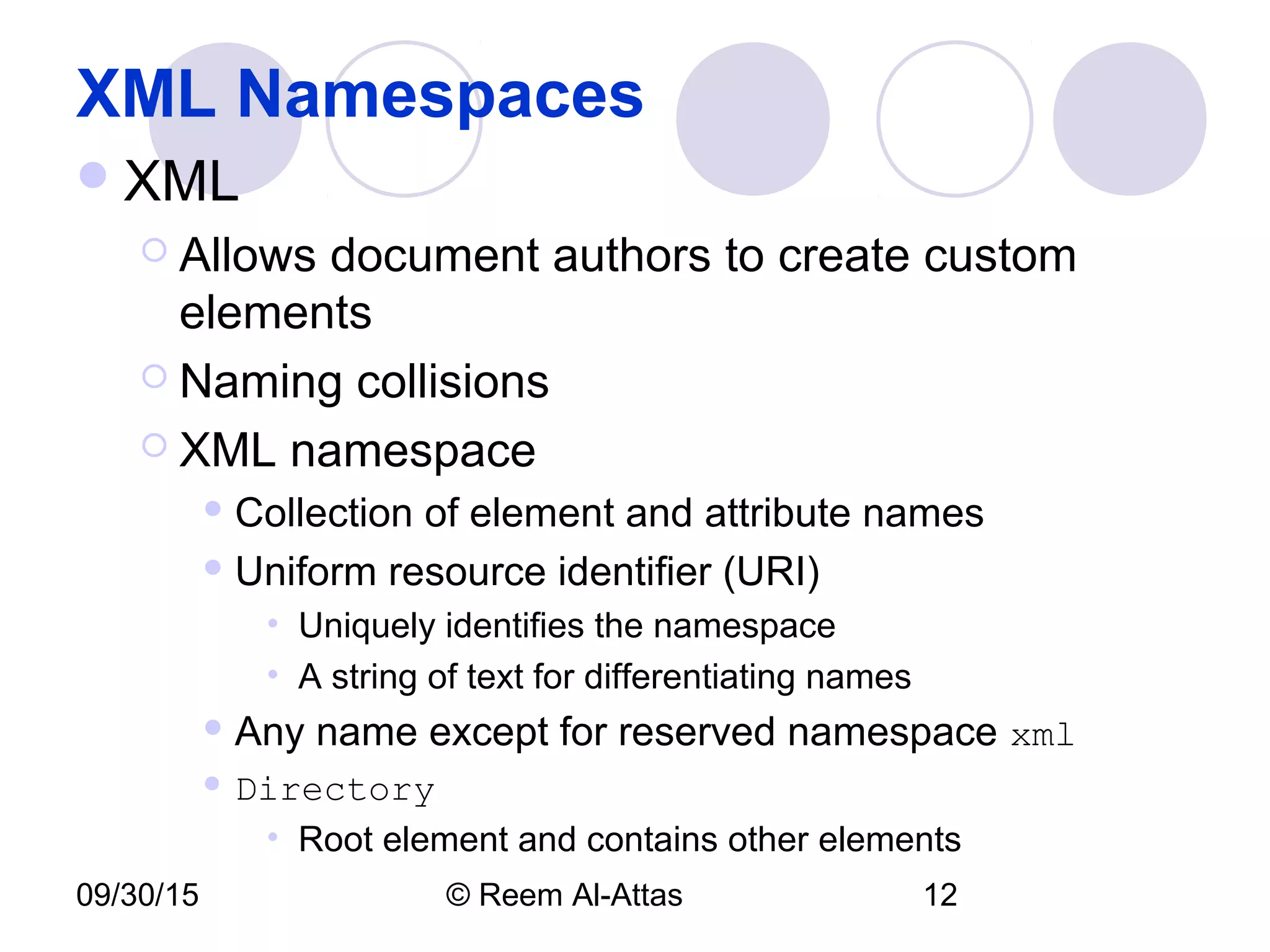
XML Namespaces
XML
 Allows document authors to create custom
elements
 Naming collisions
 XML namespace
 Collection of element and attribute names
 Uniform resource identifier (URI)
• Uniquely identifies the namespace
• A string of text for differentiating names
 Any name except for reserved namespace xml
 Directory
• Root element and contains other elements
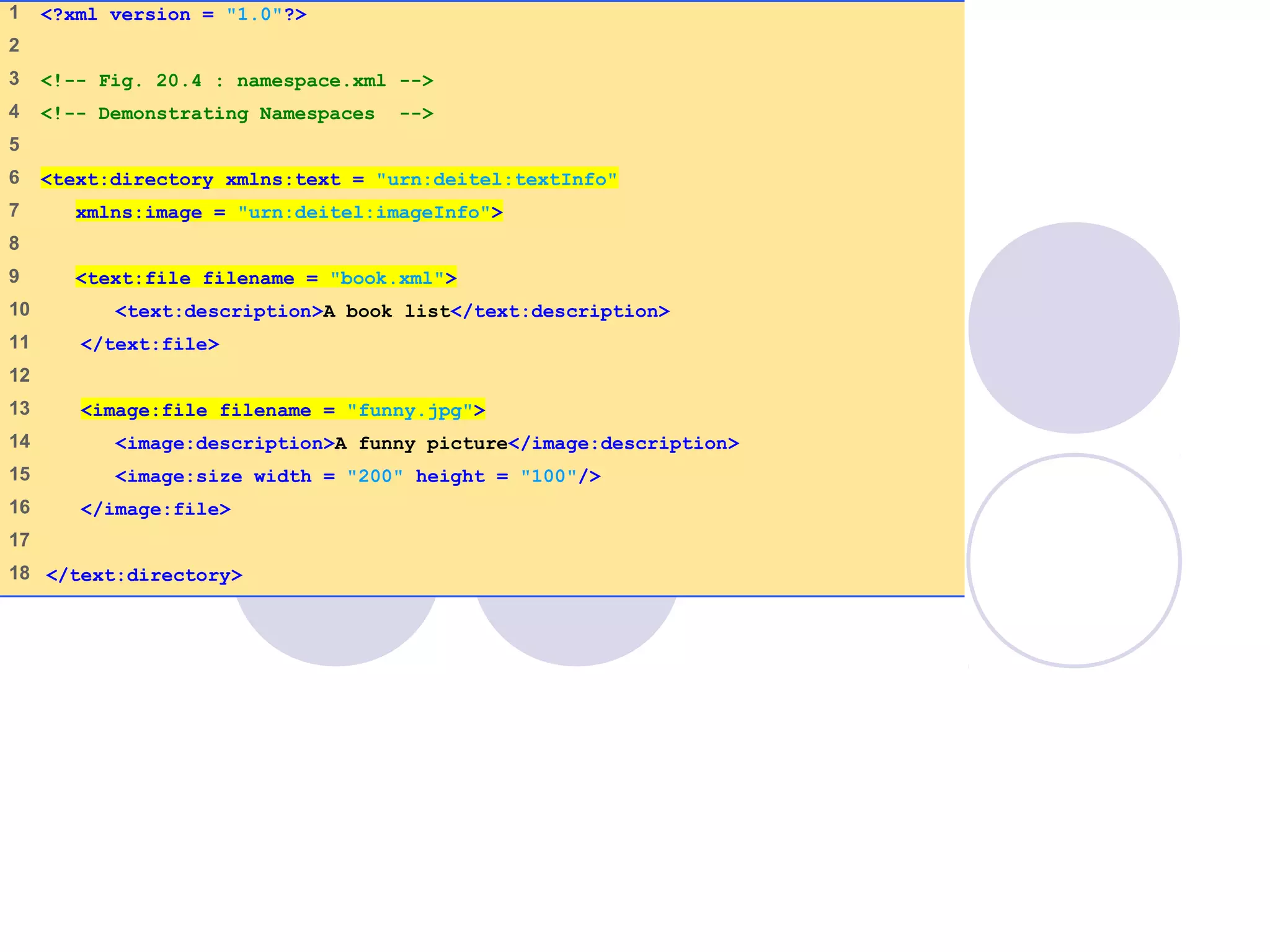
namespace.xml
(1 of 1)
1 <?xml version = "1.0"?>
2
3 <!-- Fig. 20.4 : namespace.xml -->
4 <!-- Demonstrating Namespaces -->
5
6 <text:directory xmlns:text = "urn:deitel:textInfo"
7 xmlns:image = "urn:deitel:imageInfo">
8
9 <text:file filename = "book.xml">
10 <text:description>A book list</text:description>
11 </text:file>
12
13 <image:file filename = "funny.jpg">
14 <image:description>A funny picture</image:description>
15 <image:size width = "200" height = "100"/>
16 </image:file>
17
18 </text:directory>
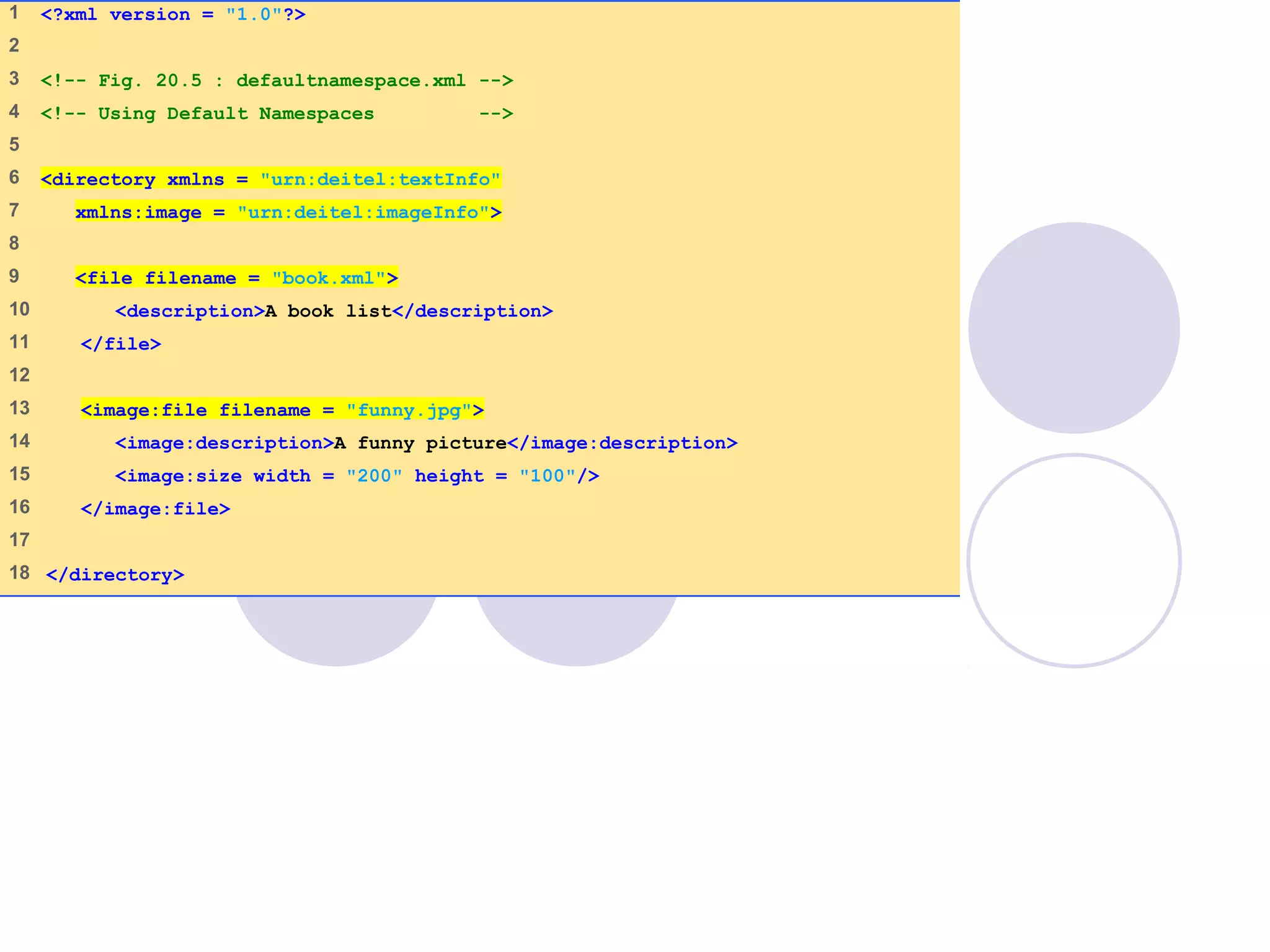
defaultnamespace
.xml
(1 of 1)
1 <?xml version = "1.0"?>
2
3 <!-- Fig. 20.5 : defaultnamespace.xml -->
4 <!-- Using Default Namespaces -->
5
6 <directory xmlns = "urn:deitel:textInfo"
7 xmlns:image = "urn:deitel:imageInfo">
8
9 <file filename = "book.xml">
10 <description>A book list</description>
11 </file>
12
13 <image:file filename = "funny.jpg">
14 <image:description>A funny picture</image:description>
15 <image:size width = "200" height = "100"/>
16 </image:file>
17
18 </directory>
09/30/15 © Reem Al-Attas 15
Document Type Definitions (DTDs)
and Schemas
Two types of documents for specifying
XML document structure
 Document Type Definition (DTDs)
 Schemas
09/30/15 © Reem Al-Attas 16
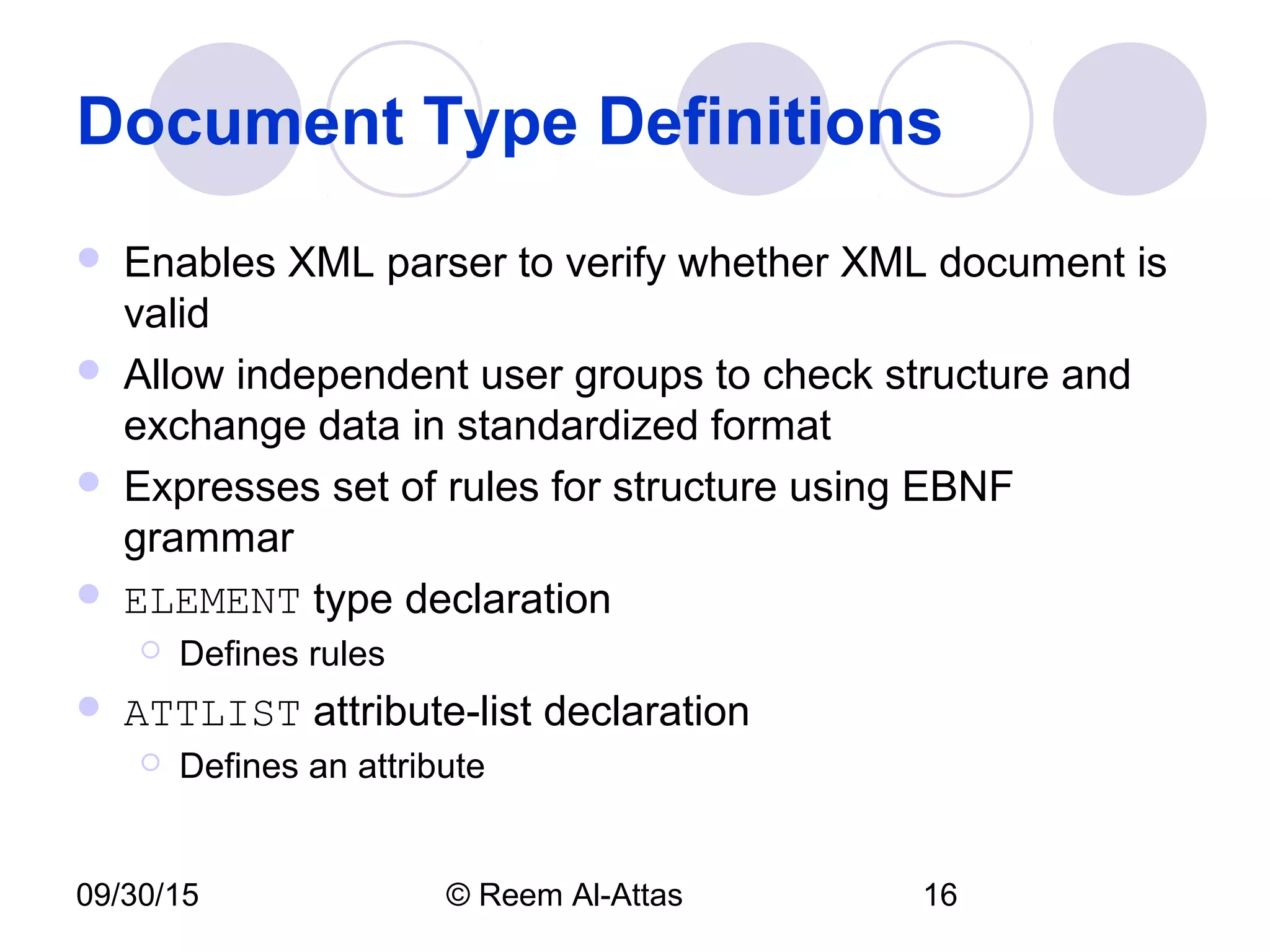
Document Type Definitions
 Enables XML parser to verify whether XML document is
valid
 Allow independent user groups to check structure and
exchange data in standardized format
 Expresses set of rules for structure using EBNF
grammar
 ELEMENT type declaration
 Defines rules
 ATTLIST attribute-list declaration
 Defines an attribute
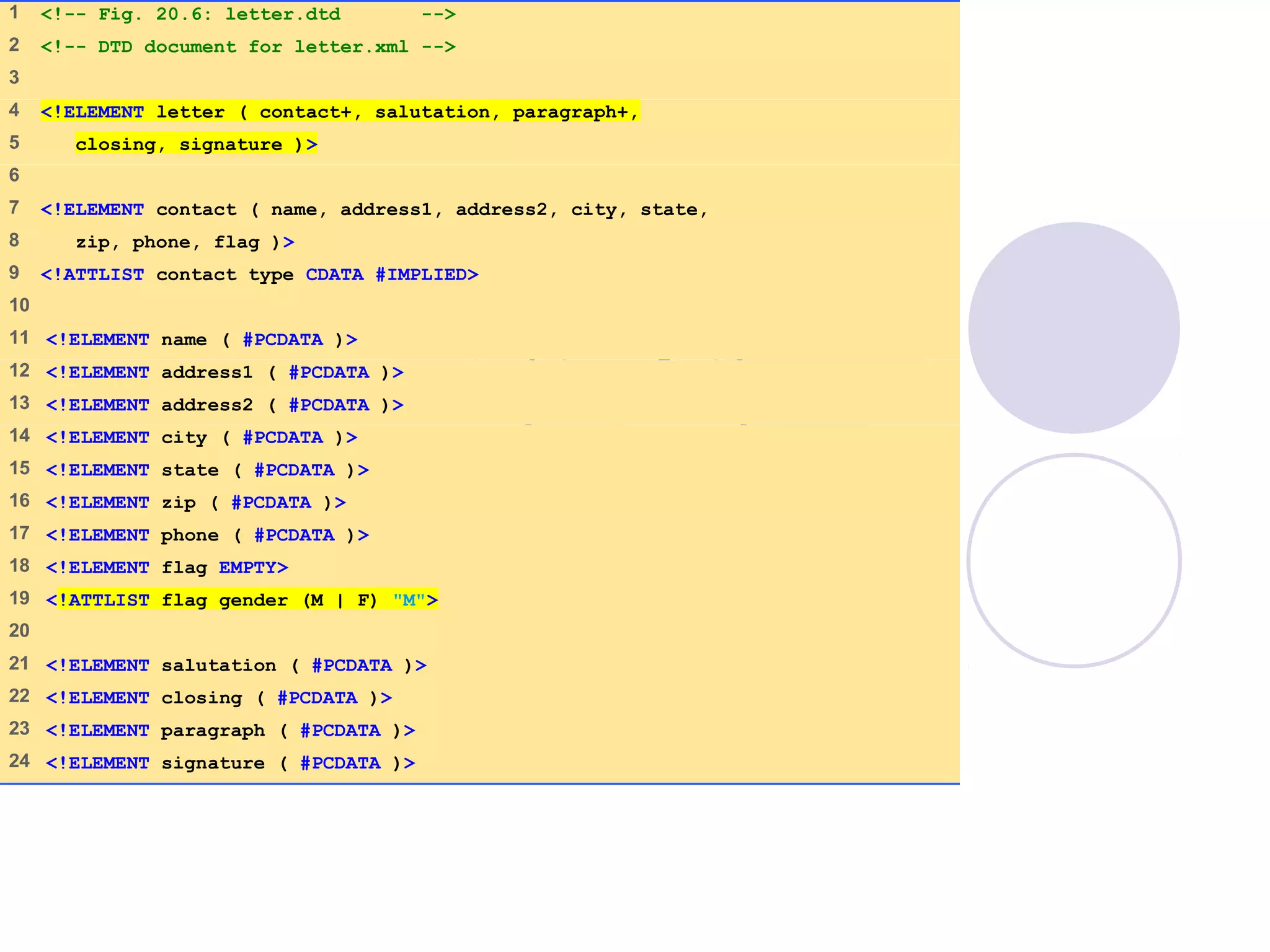
letter.dtd
(1 of 1)
1 <!-- Fig. 20.6: letter.dtd -->
2 <!-- DTD document for letter.xml -->
3
4 <!ELEMENT letter ( contact+, salutation, paragraph+,
5 closing, signature )>
6
7 <!ELEMENT contact ( name, address1, address2, city, state,
8 zip, phone, flag )>
9 <!ATTLIST contact type CDATA #IMPLIED>
10
11 <!ELEMENT name ( #PCDATA )>
12 <!ELEMENT address1 ( #PCDATA )>
13 <!ELEMENT address2 ( #PCDATA )>
14 <!ELEMENT city ( #PCDATA )>
15 <!ELEMENT state ( #PCDATA )>
16 <!ELEMENT zip ( #PCDATA )>
17 <!ELEMENT phone ( #PCDATA )>
18 <!ELEMENT flag EMPTY>
19 <!ATTLIST flag gender (M | F) "M">
20
21 <!ELEMENT salutation ( #PCDATA )>
22 <!ELEMENT closing ( #PCDATA )>
23 <!ELEMENT paragraph ( #PCDATA )>
24 <!ELEMENT signature ( #PCDATA )>
09/30/15 © Reem Al-Attas 18
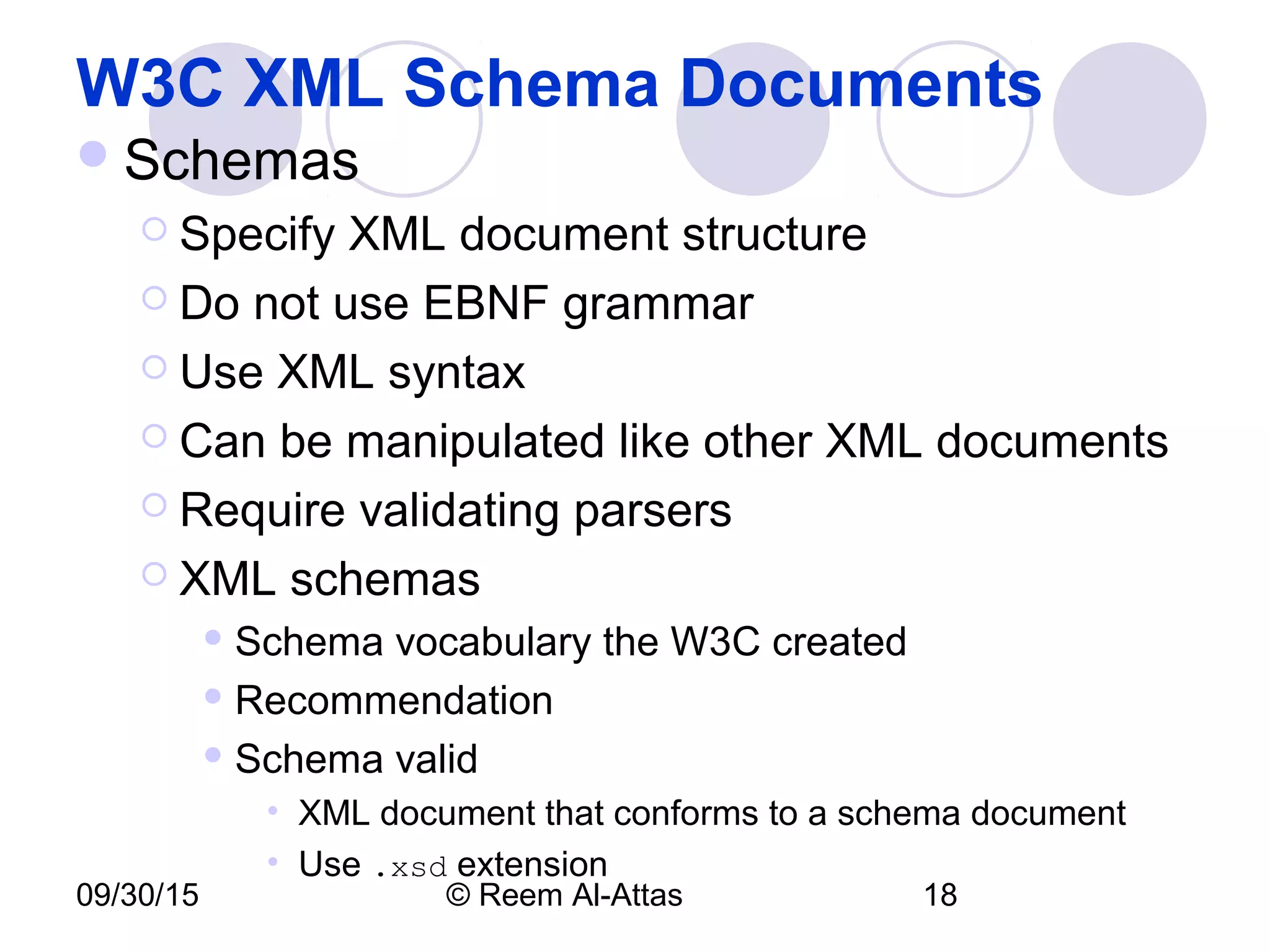
W3C XML Schema Documents
Schemas
 Specify XML document structure
 Do not use EBNF grammar
 Use XML syntax
 Can be manipulated like other XML documents
 Require validating parsers
 XML schemas
 Schema vocabulary the W3C created
 Recommendation
 Schema valid
• XML document that conforms to a schema document
• Use .xsd extension
09/30/15 © Reem Al-Attas 19
W3C XML Schema Documents
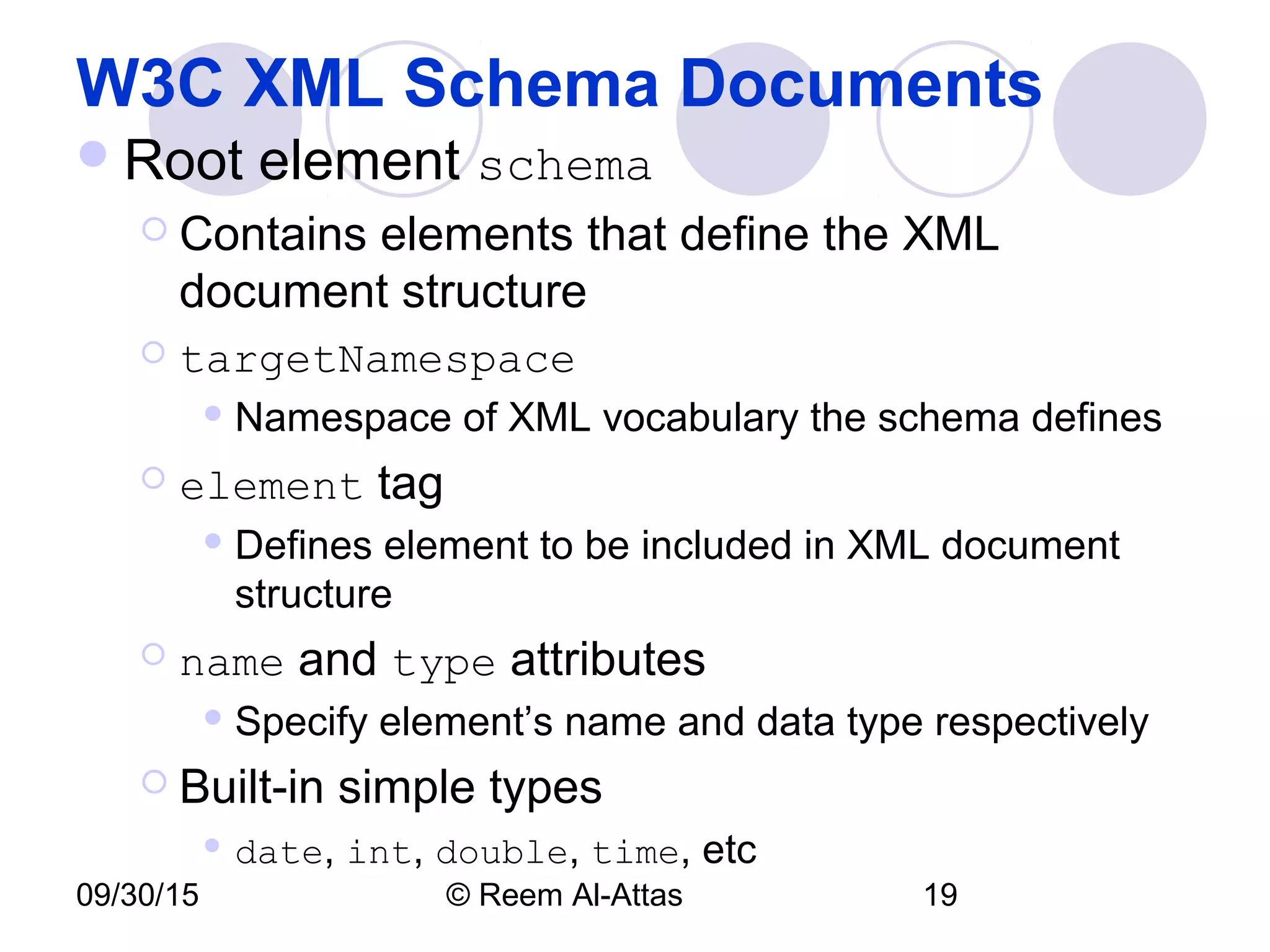
Root element schema
 Contains elements that define the XML
document structure
 targetNamespace
 Namespace of XML vocabulary the schema defines
 element tag
 Defines element to be included in XML document
structure
 name and type attributes
 Specify element’s name and data type respectively
 Built-in simple types
 date, int, double, time, etc
09/30/15 © Reem Al-Attas 20
W3C XML Schema Documents
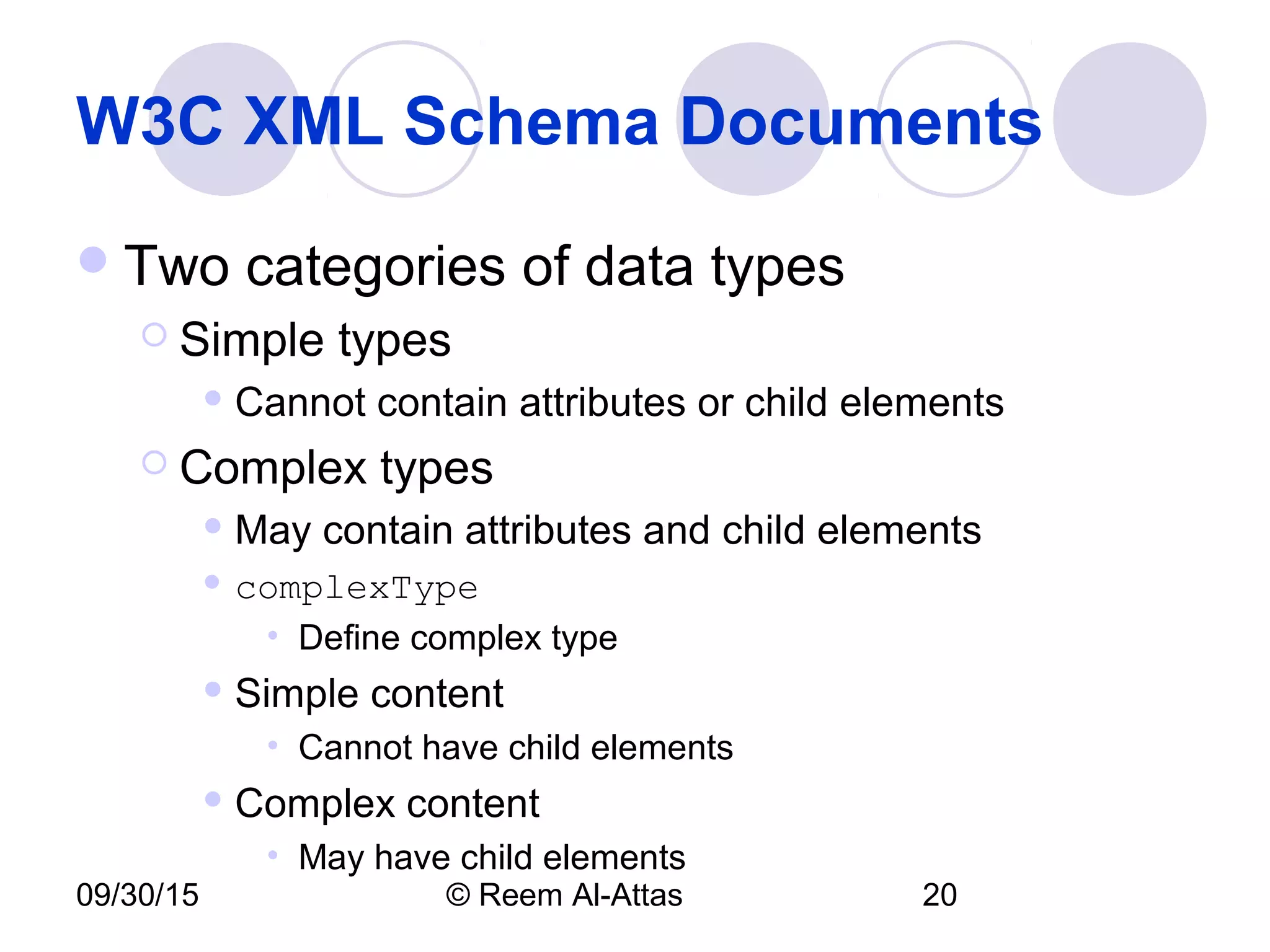
Two categories of data types
 Simple types
 Cannot contain attributes or child elements
 Complex types
 May contain attributes and child elements
 complexType
• Define complex type
 Simple content
• Cannot have child elements
 Complex content
• May have child elements
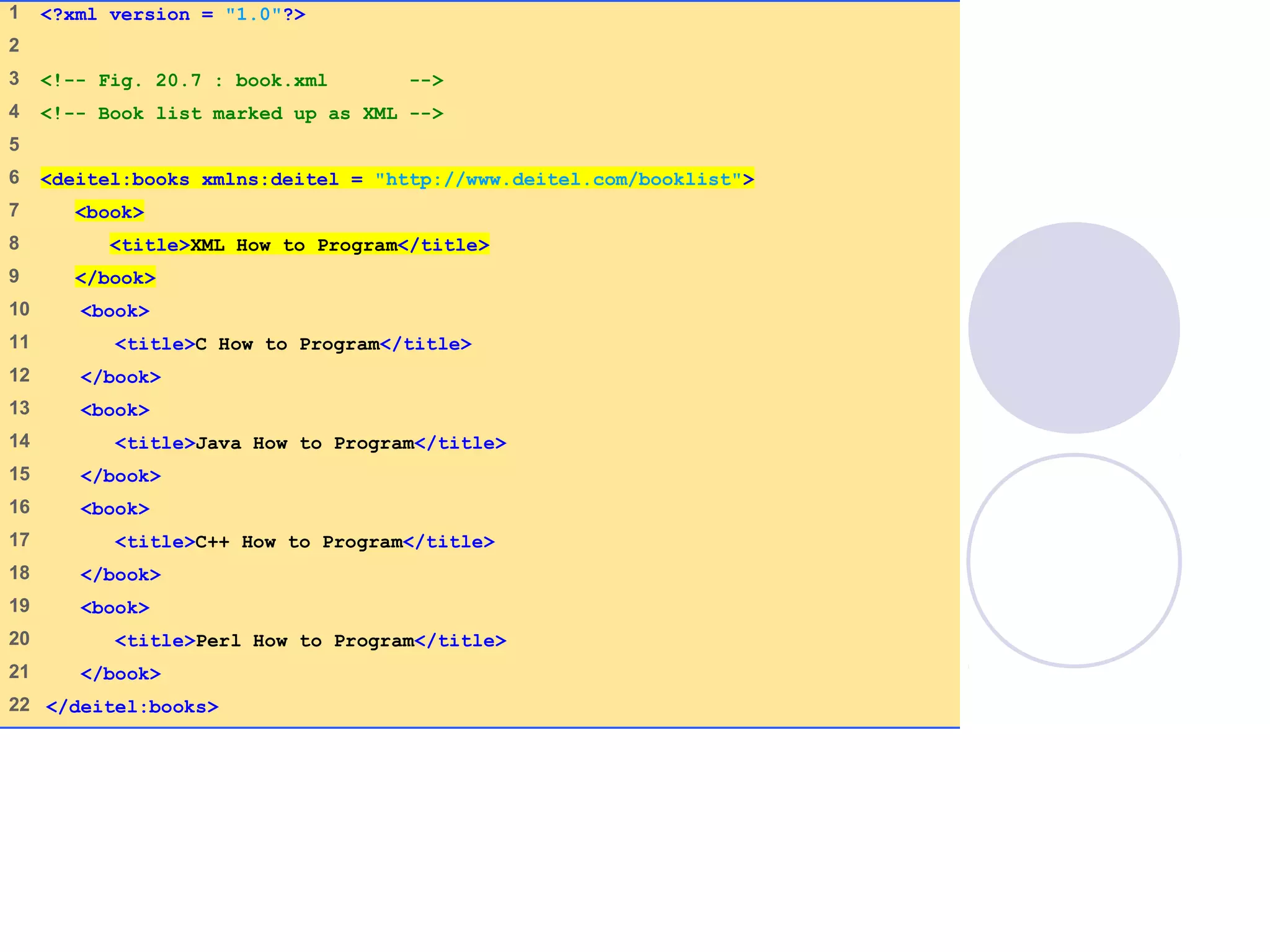
book.xml
(1 of 1)
1 <?xml version = "1.0"?>
2
3 <!-- Fig. 20.7 : book.xml -->
4 <!-- Book list marked up as XML -->
5
6 <deitel:books xmlns:deitel = "http://www.deitel.com/booklist">
7 <book>
8 <title>XML How to Program</title>
9 </book>
10 <book>
11 <title>C How to Program</title>
12 </book>
13 <book>
14 <title>Java How to Program</title>
15 </book>
16 <book>
17 <title>C++ How to Program</title>
18 </book>
19 <book>
20 <title>Perl How to Program</title>
21 </book>
22 </deitel:books>
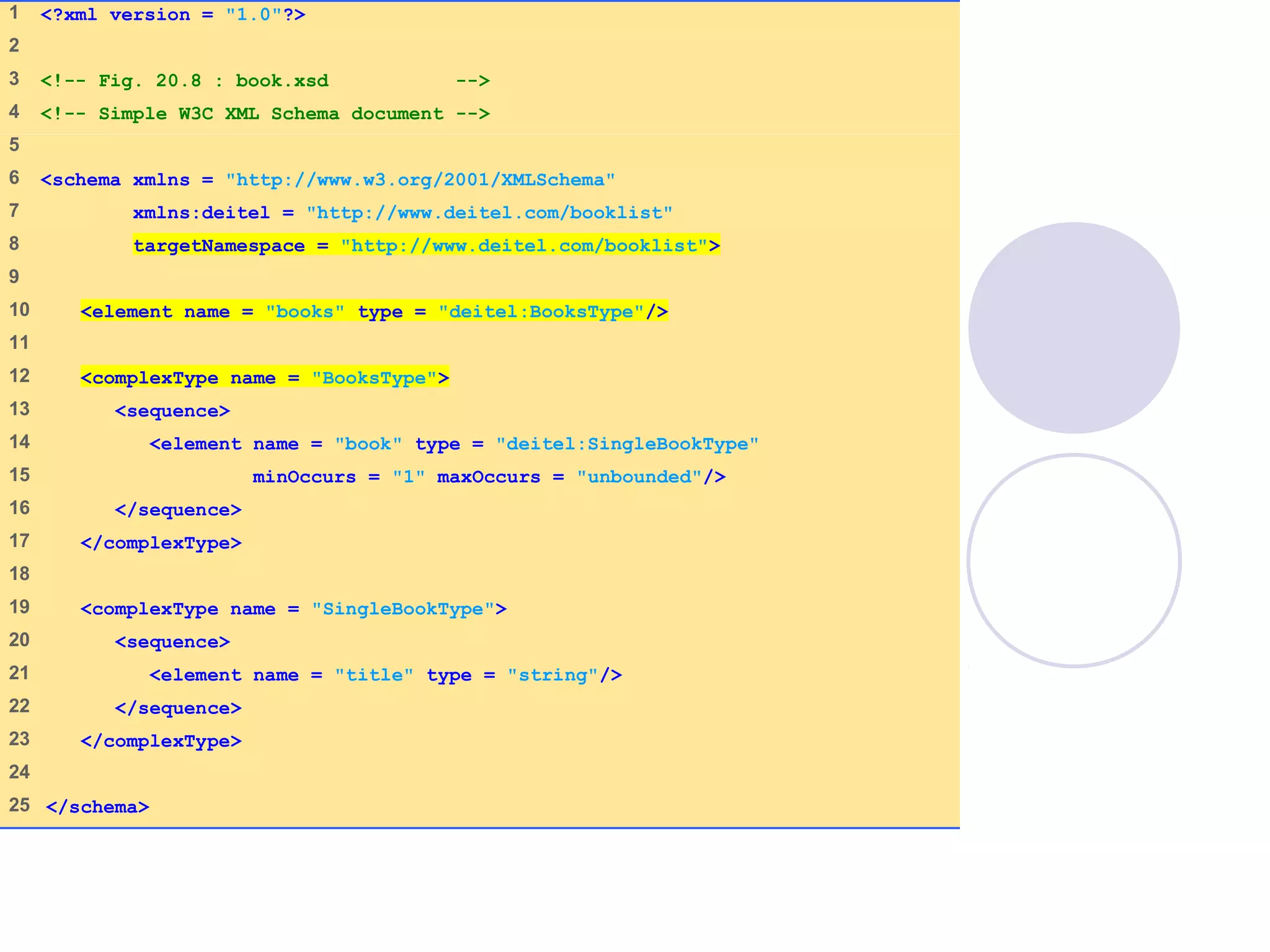
book.xsd
(1 of 1)
1 <?xml version = "1.0"?>
2
3 <!-- Fig. 20.8 : book.xsd -->
4 <!-- Simple W3C XML Schema document -->
5
6 <schema xmlns = "http://www.w3.org/2001/XMLSchema"
7 xmlns:deitel = "http://www.deitel.com/booklist"
8 targetNamespace = "http://www.deitel.com/booklist">
9
10 <element name = "books" type = "deitel:BooksType"/>
11
12 <complexType name = "BooksType">
13 <sequence>
14 <element name = "book" type = "deitel:SingleBookType"
15 minOccurs = "1" maxOccurs = "unbounded"/>
16 </sequence>
17 </complexType>
18
19 <complexType name = "SingleBookType">
20 <sequence>
21 <element name = "title" type = "string"/>
22 </sequence>
23 </complexType>
24
25 </schema>
09/30/15 © Reem Al-Attas 23
Target: file:///usr/local/XSV/xsvlog/@11038.1uploaded
(Real name: C:IW3HTP3examplesch 20book.xsd)
docElt: {http://www.w3.org/2001/XMLSchema}schema
Validation was strict, starting with type [Anonymous]
The schema(s) used for schema-validation had no errors
No schema-validity problems were found in the target
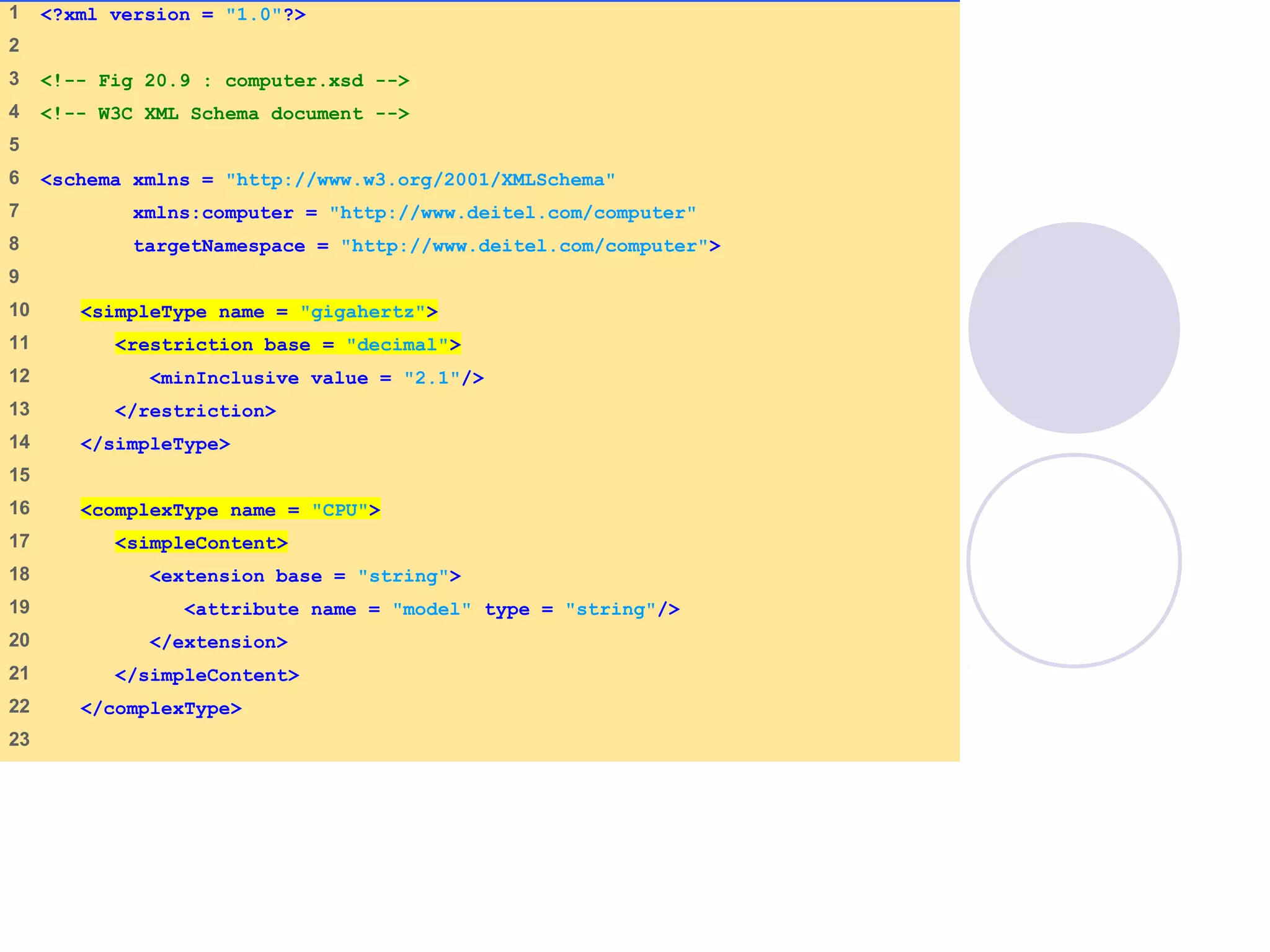
computer.xsd
(1 of 2)
1 <?xml version = "1.0"?>
2
3 <!-- Fig 20.9 : computer.xsd -->
4 <!-- W3C XML Schema document -->
5
6 <schema xmlns = "http://www.w3.org/2001/XMLSchema"
7 xmlns:computer = "http://www.deitel.com/computer"
8 targetNamespace = "http://www.deitel.com/computer">
9
10 <simpleType name = "gigahertz">
11 <restriction base = "decimal">
12 <minInclusive value = "2.1"/>
13 </restriction>
14 </simpleType>
15
16 <complexType name = "CPU">
17 <simpleContent>
18 <extension base = "string">
19 <attribute name = "model" type = "string"/>
20 </extension>
21 </simpleContent>
22 </complexType>
23
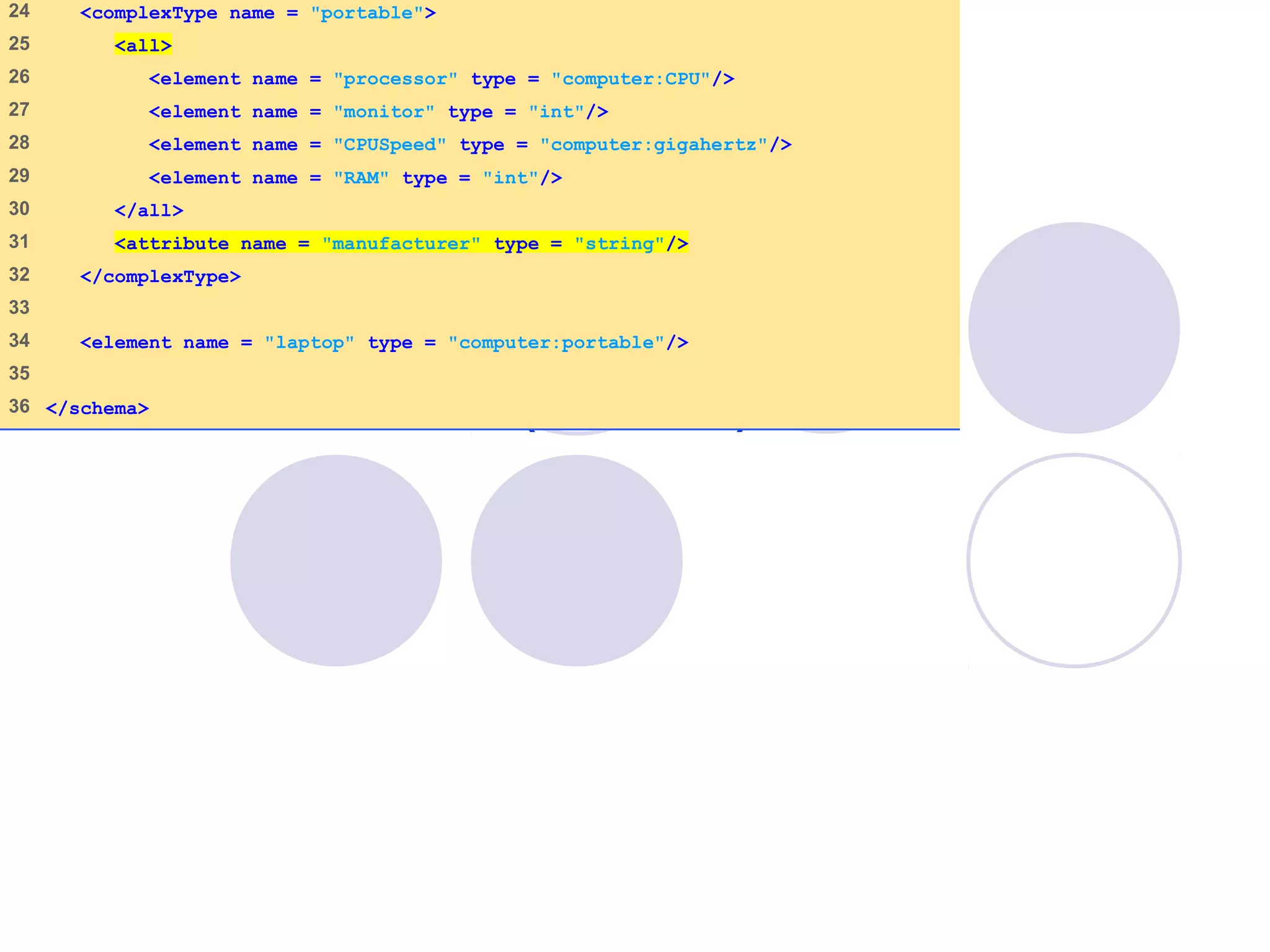
computer.xsd
(2 of 2)
24 <complexType name = "portable">
25 <all>
26 <element name = "processor" type = "computer:CPU"/>
27 <element name = "monitor" type = "int"/>
28 <element name = "CPUSpeed" type = "computer:gigahertz"/>
29 <element name = "RAM" type = "int"/>
30 </all>
31 <attribute name = "manufacturer" type = "string"/>
32 </complexType>
33
34 <element name = "laptop" type = "computer:portable"/>
35
36 </schema>
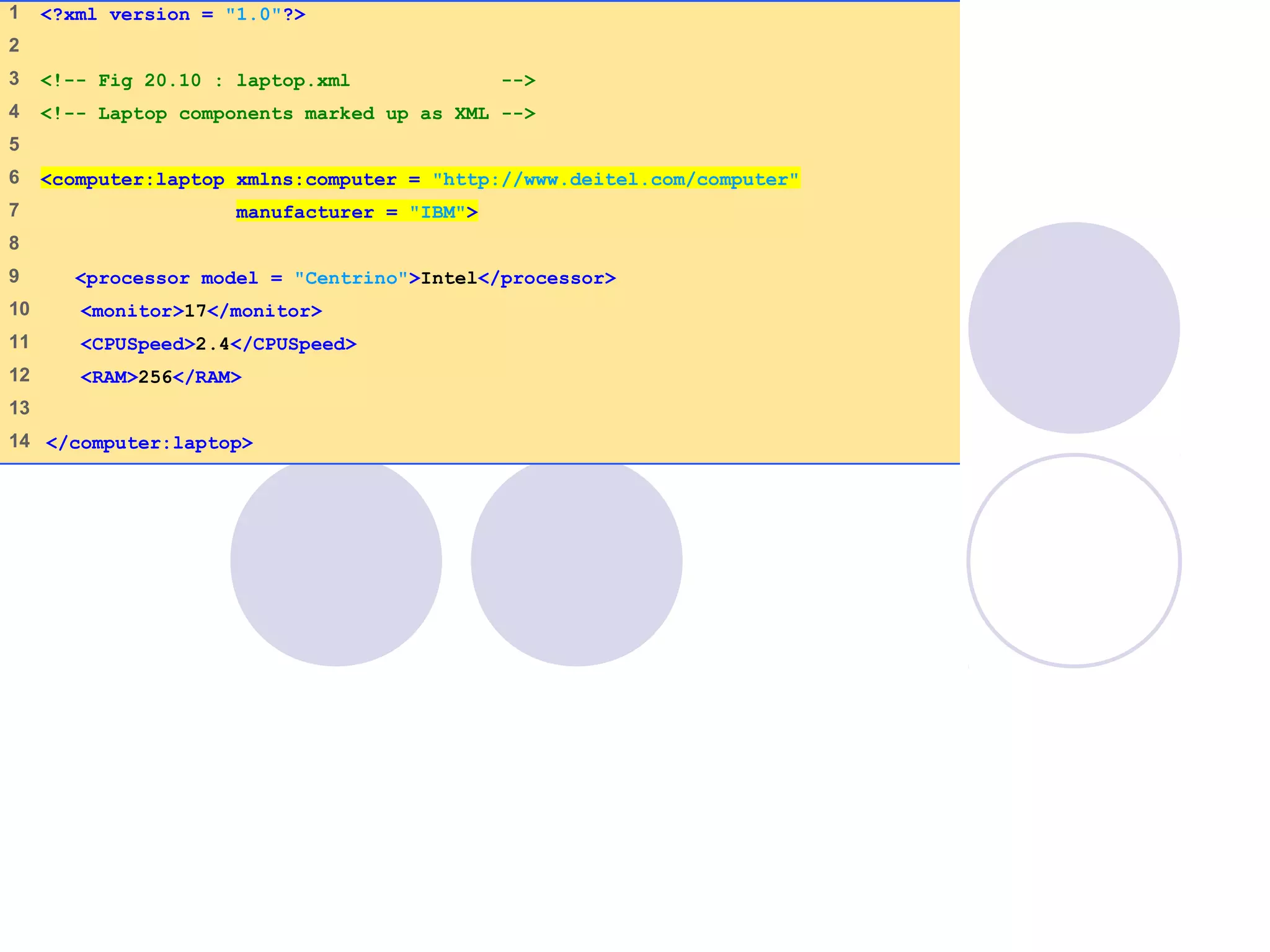
laptop.xml
(1 of 1)
1 <?xml version = "1.0"?>
2
3 <!-- Fig 20.10 : laptop.xml -->
4 <!-- Laptop components marked up as XML -->
5
6 <computer:laptop xmlns:computer = "http://www.deitel.com/computer"
7 manufacturer = "IBM">
8
9 <processor model = "Centrino">Intel</processor>
10 <monitor>17</monitor>
11 <CPUSpeed>2.4</CPUSpeed>
12 <RAM>256</RAM>
13
14 </computer:laptop>
09/30/15 © Reem Al-Attas 27
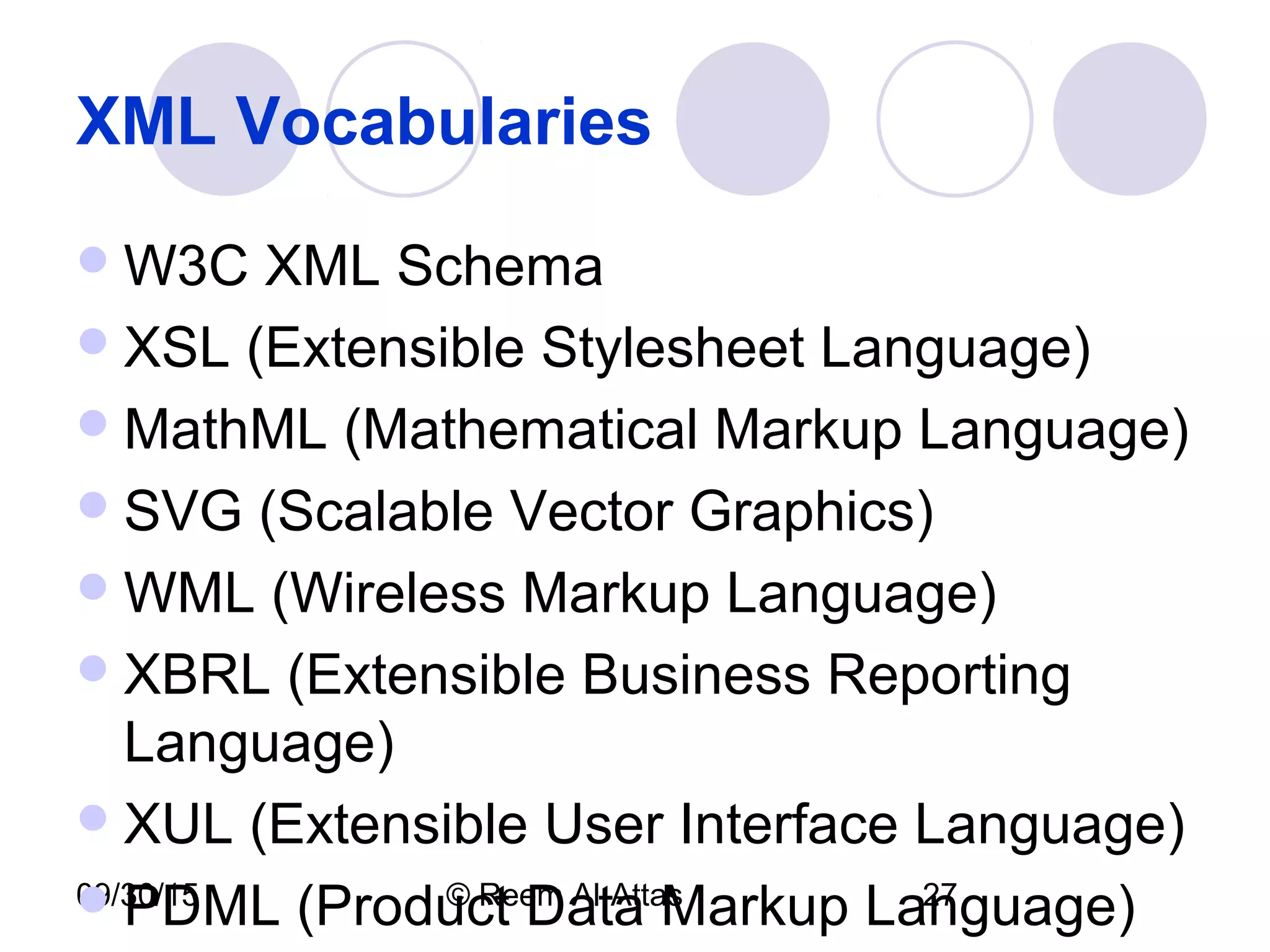
XML Vocabularies
W3C XML Schema
XSL (Extensible Stylesheet Language)
MathML (Mathematical Markup Language)
SVG (Scalable Vector Graphics)
WML (Wireless Markup Language)
XBRL (Extensible Business Reporting
Language)
XUL (Extensible User Interface Language)
PDML (Product Data Markup Language)
09/30/15 © Reem Al-Attas 28
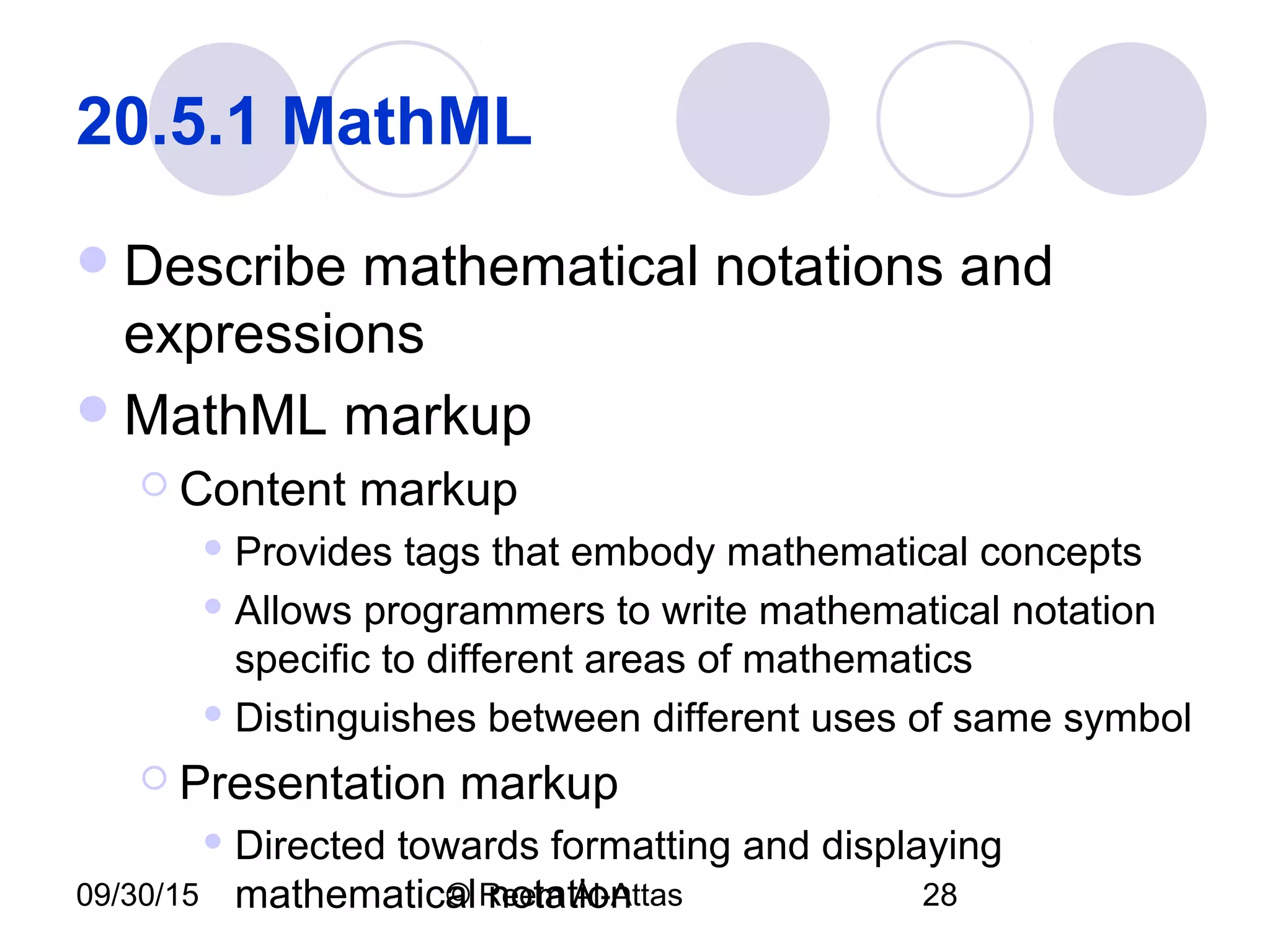
20.5.1 MathML
Describe mathematical notations and
expressions
MathML markup
 Content markup
 Provides tags that embody mathematical concepts
 Allows programmers to write mathematical notation
specific to different areas of mathematics
 Distinguishes between different uses of same symbol
 Presentation markup
 Directed towards formatting and displaying
mathematical notation
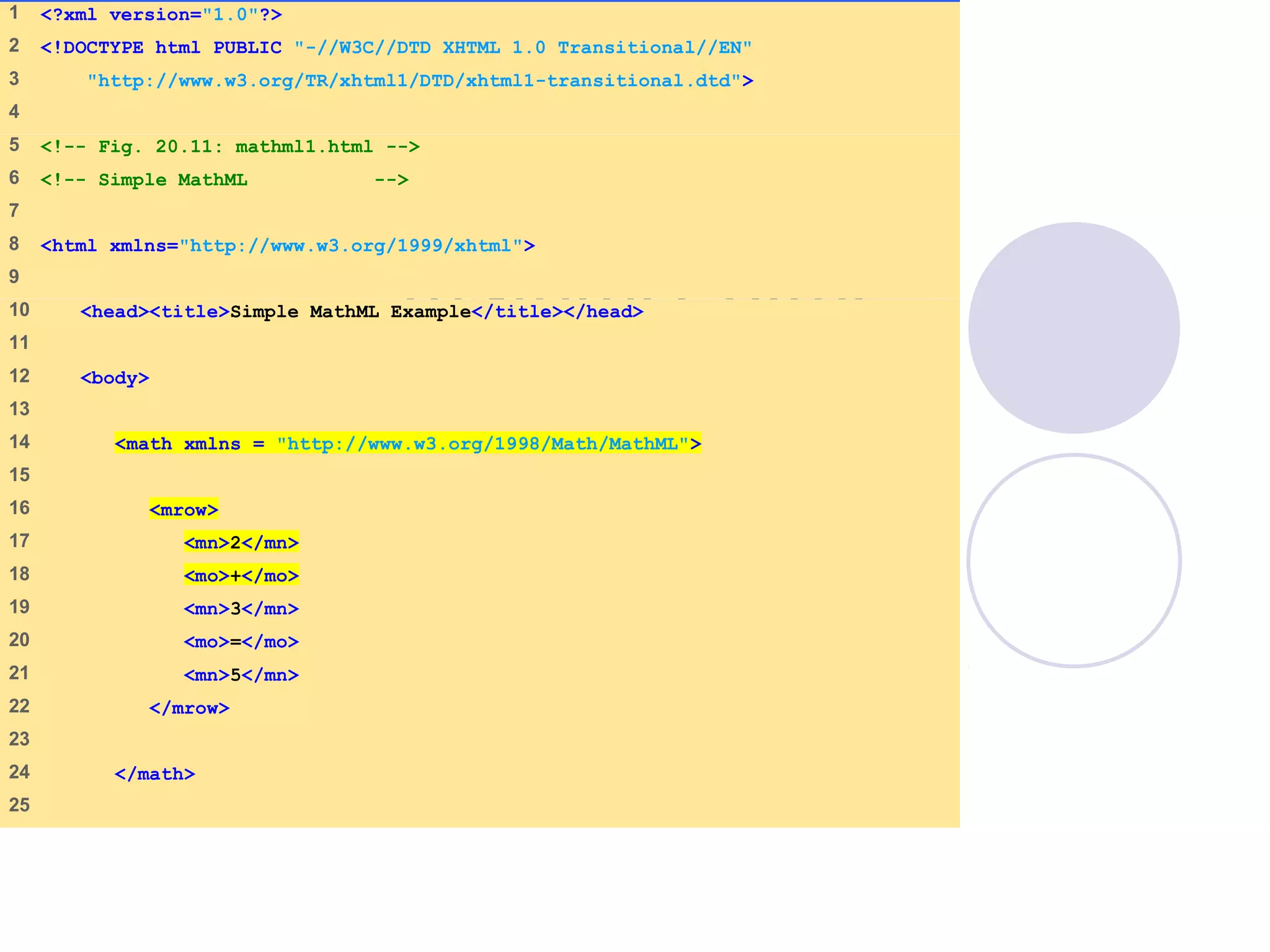
mathml1.html
(1 of 2)
1 <?xml version="1.0"?>
2 <!DOCTYPE html PUBLIC "-//W3C//DTD XHTML 1.0 Transitional//EN"
3 "http://www.w3.org/TR/xhtml1/DTD/xhtml1-transitional.dtd">
4
5 <!-- Fig. 20.11: mathml1.html -->
6 <!-- Simple MathML -->
7
8 <html xmlns="http://www.w3.org/1999/xhtml">
9
10 <head><title>Simple MathML Example</title></head>
11
12 <body>
13
14 <math xmlns = "http://www.w3.org/1998/Math/MathML">
15
16 <mrow>
17 <mn>2</mn>
18 <mo>+</mo>
19 <mn>3</mn>
20 <mo>=</mo>
21 <mn>5</mn>
22 </mrow>
23
24 </math>
25
mathml1.html
(2 of 2)
26 </body>
27 </html>
MathML displayed in the Amaya browser. [Courtesy of World Wide Web Consortium (W3C).]
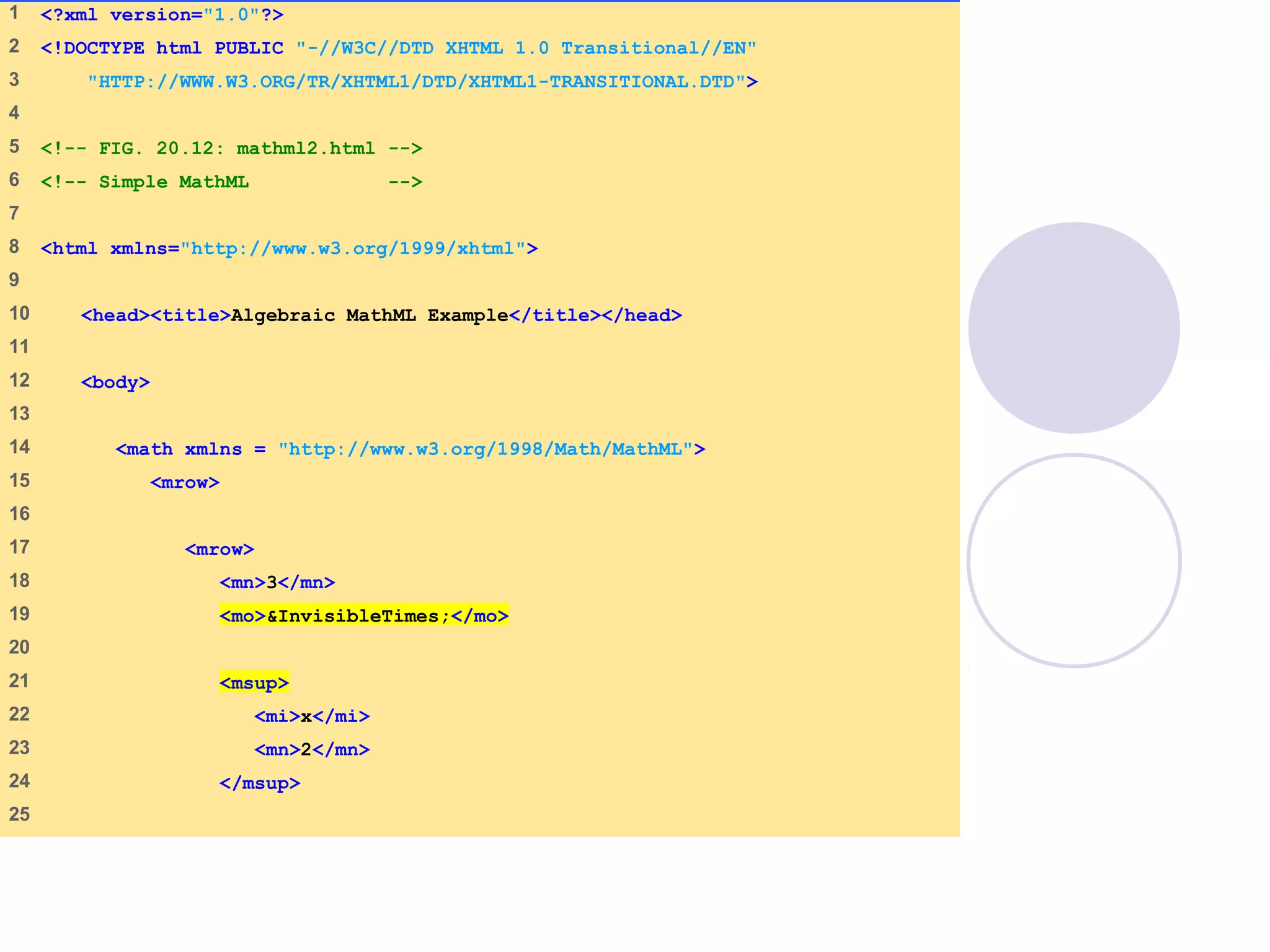
mathml2.html
(1 of 2)
1 <?xml version="1.0"?>
2 <!DOCTYPE html PUBLIC "-//W3C//DTD XHTML 1.0 Transitional//EN"
3 "HTTP://WWW.W3.ORG/TR/XHTML1/DTD/XHTML1-TRANSITIONAL.DTD">
4
5 <!-- FIG. 20.12: mathml2.html -->
6 <!-- Simple MathML -->
7
8 <html xmlns="http://www.w3.org/1999/xhtml">
9
10 <head><title>Algebraic MathML Example</title></head>
11
12 <body>
13
14 <math xmlns = "http://www.w3.org/1998/Math/MathML">
15 <mrow>
16
17 <mrow>
18 <mn>3</mn>
19 <mo>&InvisibleTimes;</mo>
20
21 <msup>
22 <mi>x</mi>
23 <mn>2</mn>
24 </msup>
25
mathml2.html
(2 of 2)
26 </mrow>
27
28 <mo>+</mo>
29 <mi>x</mi>
30 <mo>-</mo>
31
32 <mfrac>
33 <mn>2</mn>
34 <mi>x</mi>
35 </mfrac>
36
37 <mo>=</mo>
38 <mn>0</mn>
39
40 </mrow>
41 </math>
42
43 </body>
44 </html>
MathML displayed in the Amaya browser. [Courtesy of World Wide Web Consortium (W3C).]
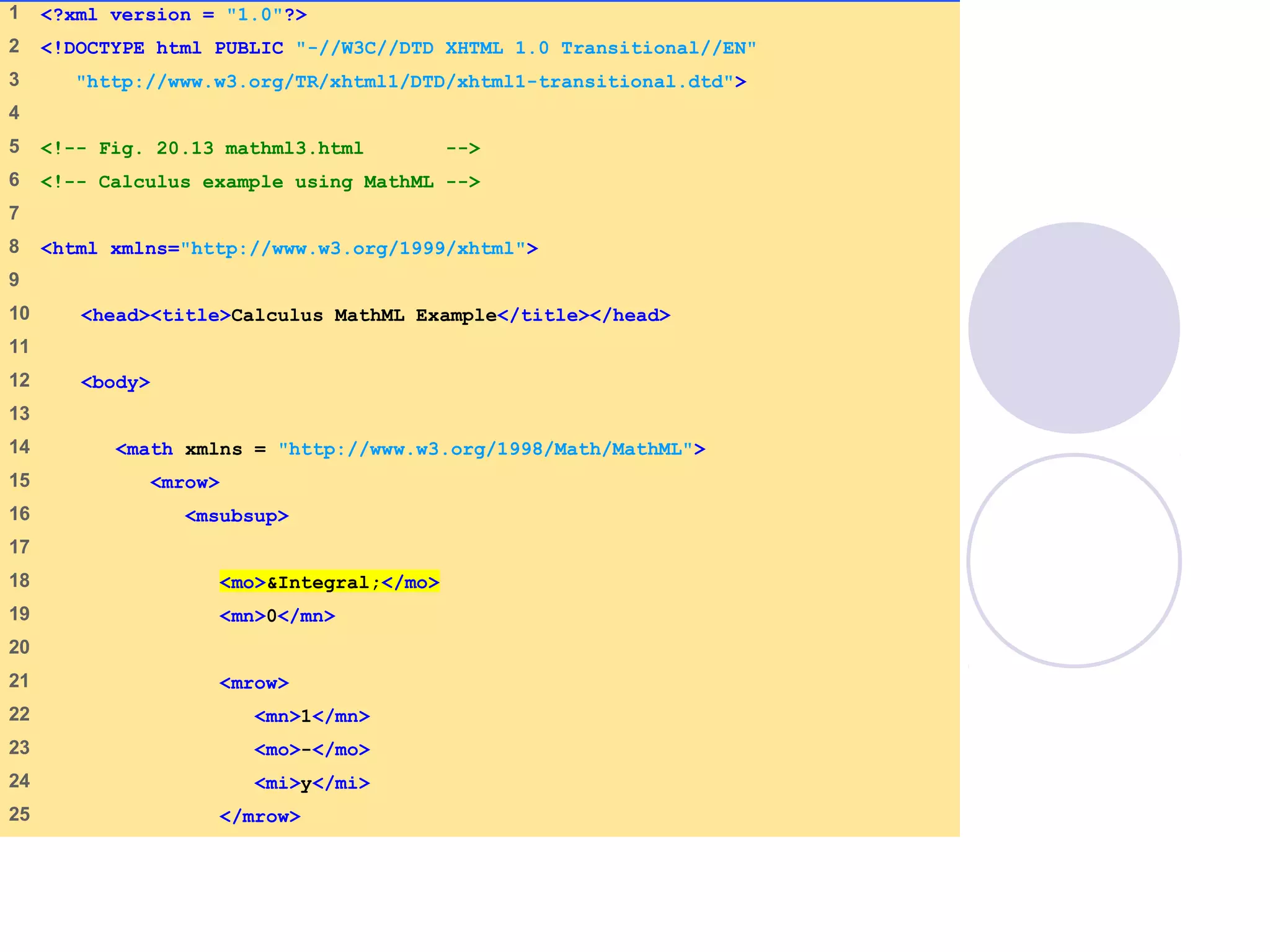
mathml3.html
(1 of 3)
1 <?xml version = "1.0"?>
2 <!DOCTYPE html PUBLIC "-//W3C//DTD XHTML 1.0 Transitional//EN"
3 "http://www.w3.org/TR/xhtml1/DTD/xhtml1-transitional.dtd">
4
5 <!-- Fig. 20.13 mathml3.html -->
6 <!-- Calculus example using MathML -->
7
8 <html xmlns="http://www.w3.org/1999/xhtml">
9
10 <head><title>Calculus MathML Example</title></head>
11
12 <body>
13
14 <math xmlns = "http://www.w3.org/1998/Math/MathML">
15 <mrow>
16 <msubsup>
17
18 <mo>&Integral;</mo>
19 <mn>0</mn>
20
21 <mrow>
22 <mn>1</mn>
23 <mo>-</mo>
24 <mi>y</mi>
25 </mrow>
mathml3.html
(2 of 3)
26
27 </msubsup>
28
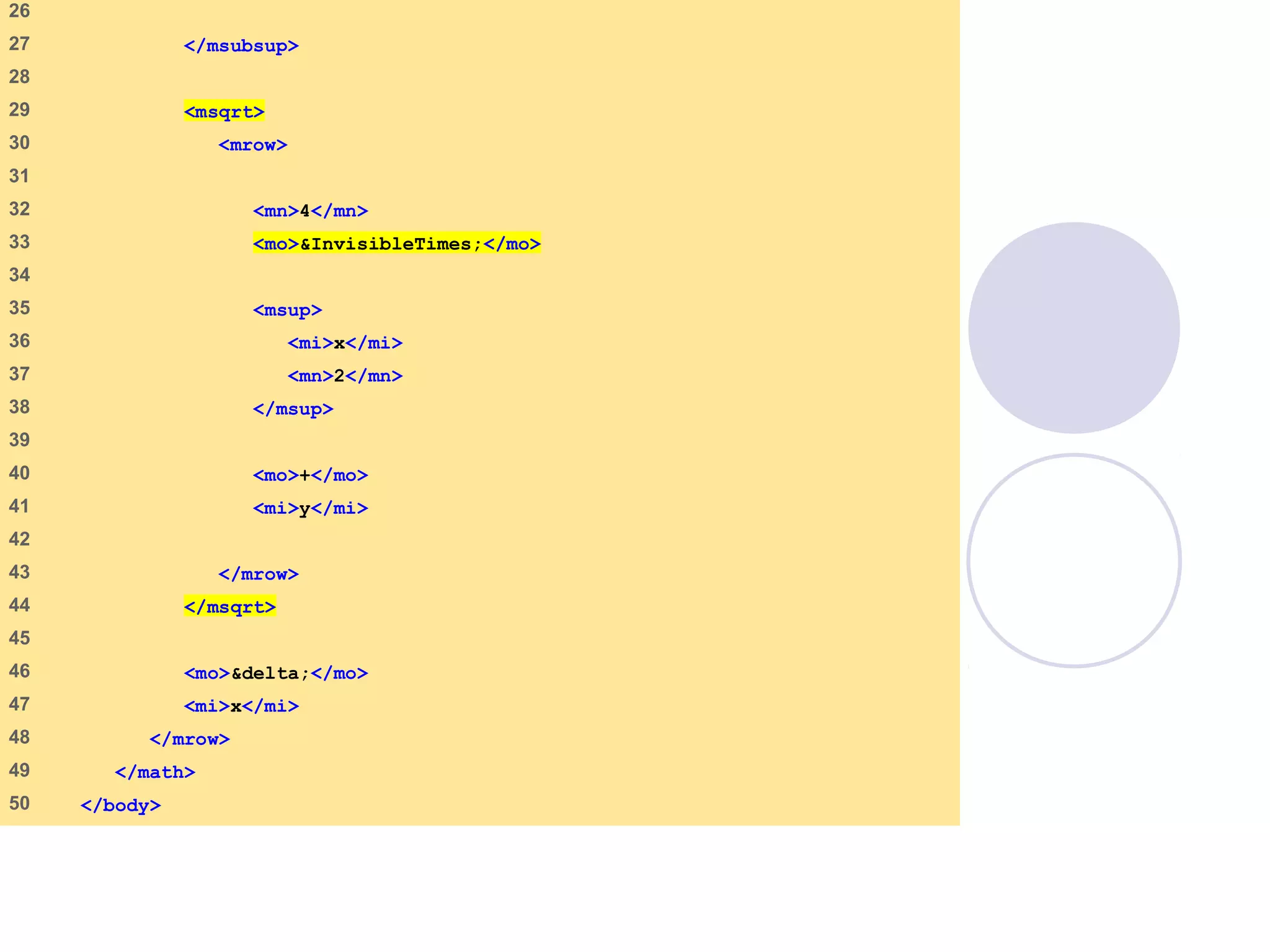
29 <msqrt>
30 <mrow>
31
32 <mn>4</mn>
33 <mo>&InvisibleTimes;</mo>
34
35 <msup>
36 <mi>x</mi>
37 <mn>2</mn>
38 </msup>
39
40 <mo>+</mo>
41 <mi>y</mi>
42
43 </mrow>
44 </msqrt>
45
46 <mo>&delta;</mo>
47 <mi>x</mi>
48 </mrow>
49 </math>
50 </body>
mathml3.html
(3 of 3)
51 </html>
Integral
symbol
Delta
symbol
MathML displayed in the Amaya browser. [Courtesy of World Wide Web Consortium (W3C).]
09/30/15 © Reem Al-Attas 36
20.5.2 Chemical Markup Language
(CML)
XML vocabulary for representing
molecular and chemical information
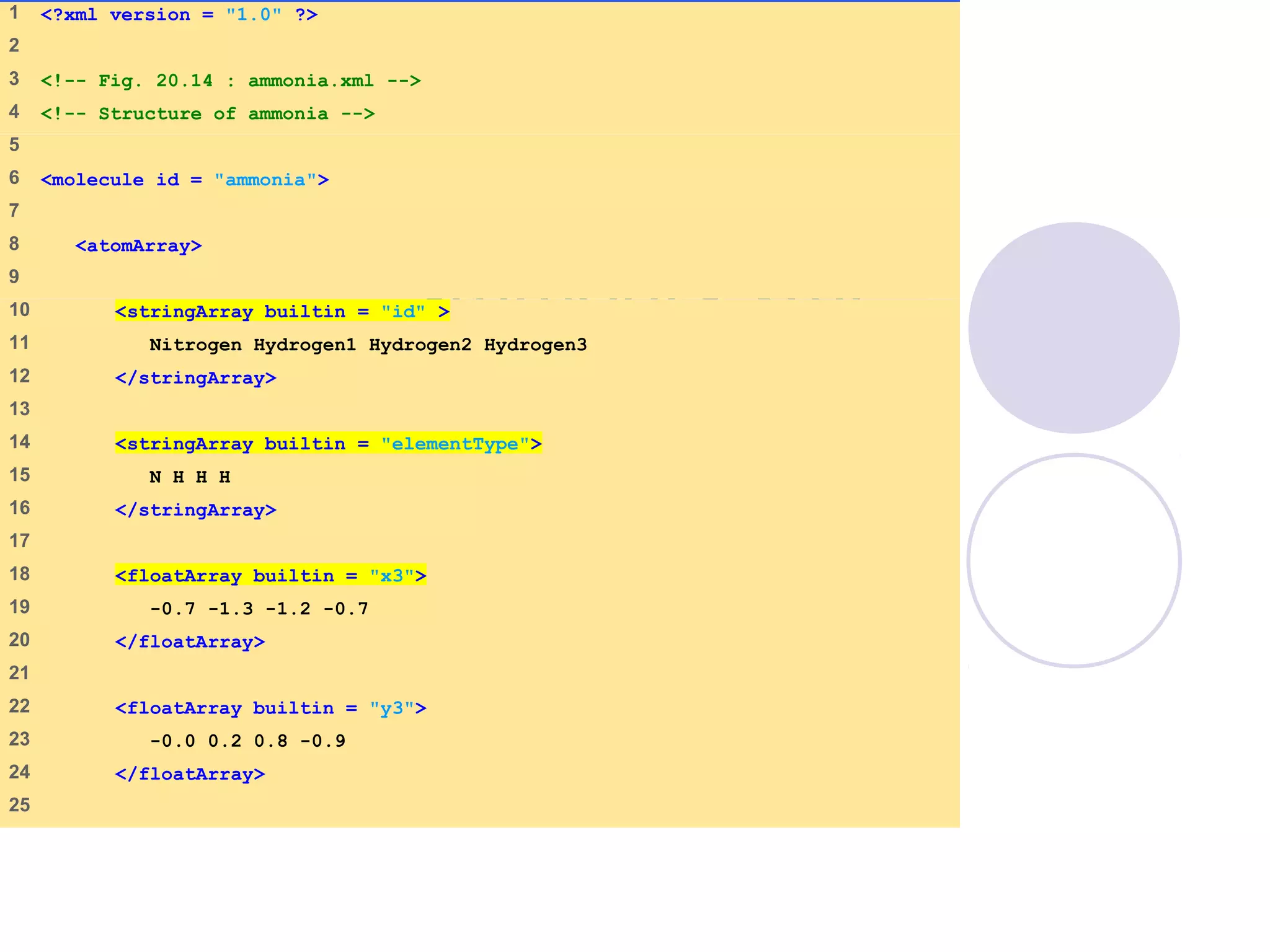
ammonia.xml
(1 of 2)
1 <?xml version = "1.0" ?>
2
3 <!-- Fig. 20.14 : ammonia.xml -->
4 <!-- Structure of ammonia -->
5
6 <molecule id = "ammonia">
7
8 <atomArray>
9
10 <stringArray builtin = "id" >
11 Nitrogen Hydrogen1 Hydrogen2 Hydrogen3
12 </stringArray>
13
14 <stringArray builtin = "elementType">
15 N H H H
16 </stringArray>
17
18 <floatArray builtin = "x3">
19 -0.7 -1.3 -1.2 -0.7
20 </floatArray>
21
22 <floatArray builtin = "y3">
23 -0.0 0.2 0.8 -0.9
24 </floatArray>
25
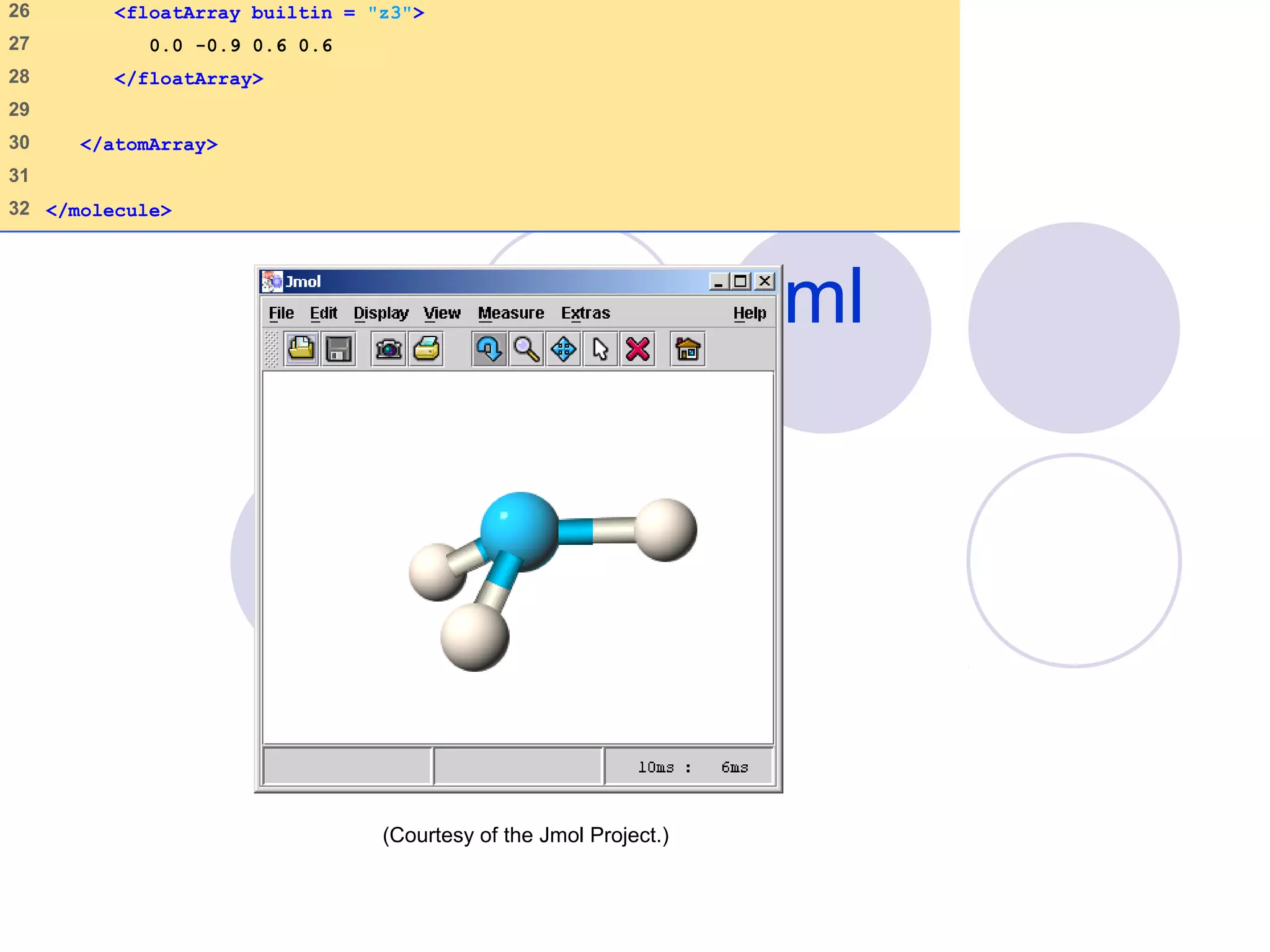
ammonia.xml
2 of 2
26 <floatArray builtin = "z3">
27 0.0 -0.9 0.6 0.6
28 </floatArray>
29
30 </atomArray>
31
32 </molecule>
(Courtesy of the Jmol Project.)
09/30/15 © Reem Al-Attas 39
20.5.3 MusicXML
Music distribution
Simplifies exchange of musical scores
over Internet
Developed by Recordare
Mark up all type of music
DTD
 Less powerful than Schema
 Simpler to program
Relies heavily on elements rather than
09/30/15 © Reem Al-Attas 40
20.5.3 MusicXML
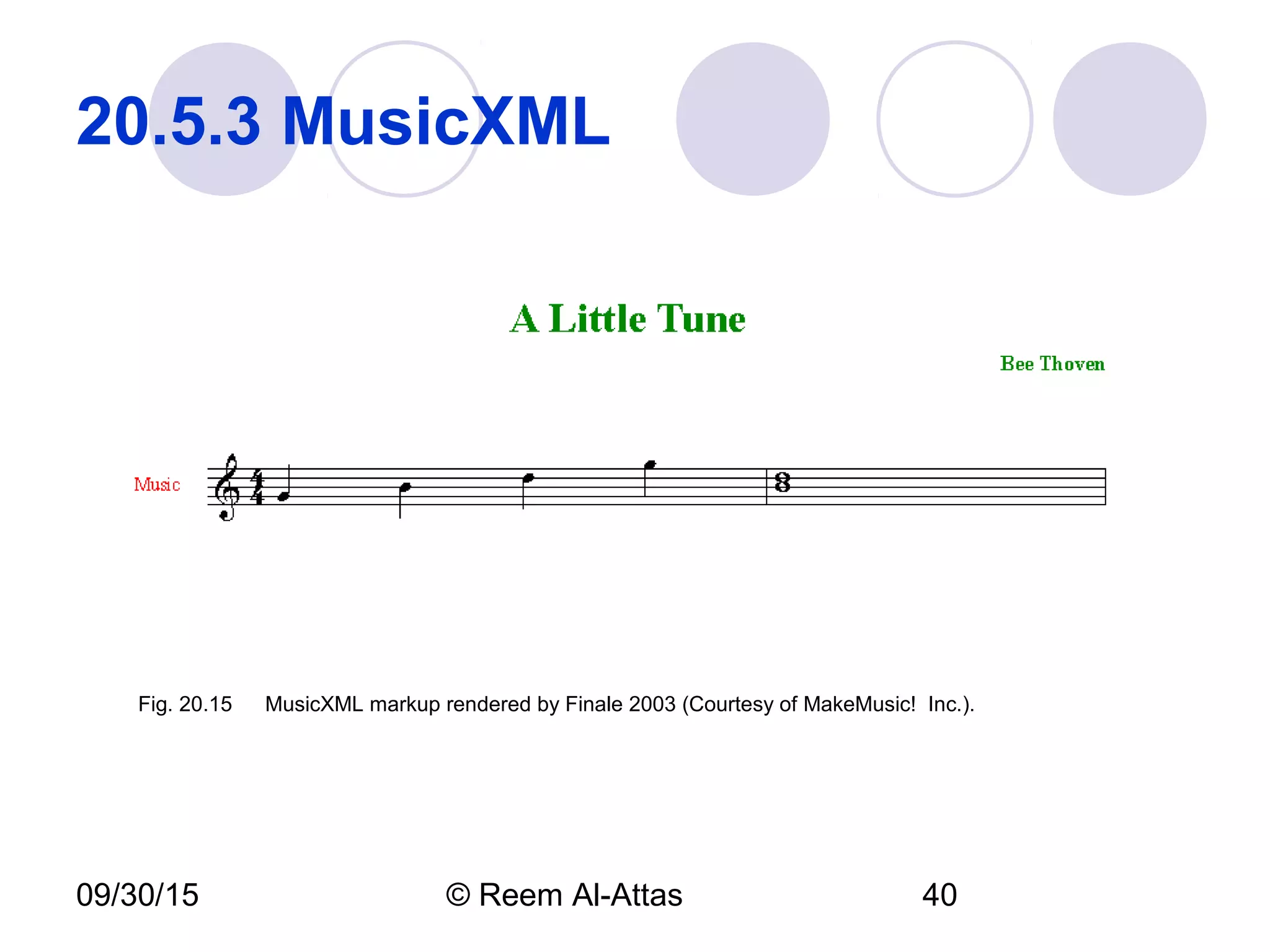
Fig. 20.15 MusicXML markup rendered by Finale 2003 (Courtesy of MakeMusic! Inc.).
09/30/15 © Reem Al-Attas 41
20.5.4 RSS 
RDF Site summary
Popular and simple XML format designed
to share headlines and Web content
between Web sites
RSS file
 RSS feed
 Container rss element
 Denotes the RSS version
 Container channel elements
 Descriptive tags
 Item elements
•
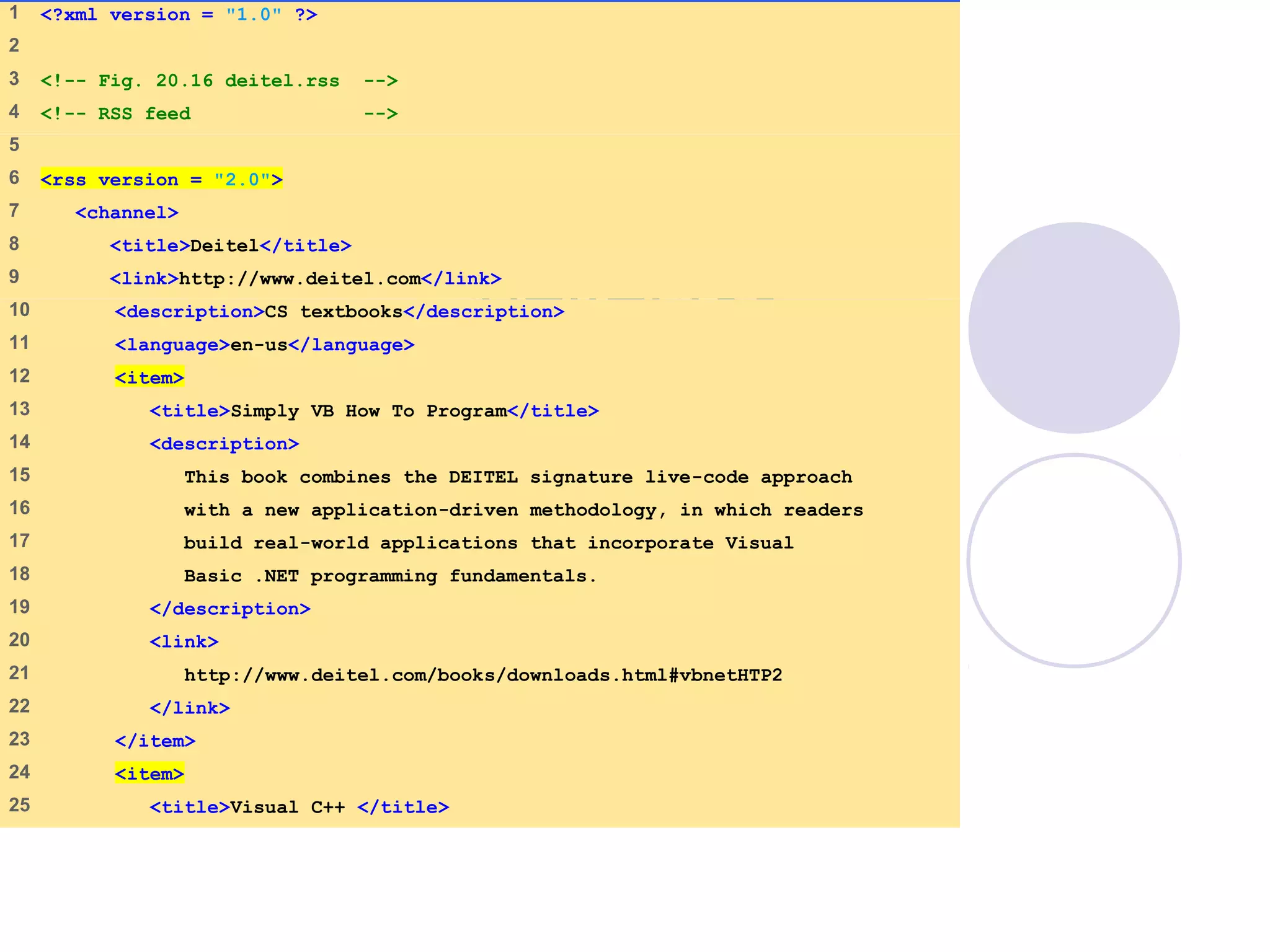
deitel.rss
(1 of 2)
1    <?xml version = "1.0" ?>
2    
3    <!-- Fig. 20.16 deitel.rss -->
4    <!-- RSS feed -->
5    
6    <rss version = "2.0">
7     <channel>
8     <title>Deitel</title>
9     <link>http://www.deitel.com</link>
10    <description>CS textbooks</description>
11    <language>en-us</language>
12    <item>
13    <title>Simply VB How To Program</title>
14    <description>
15    This book combines the DEITEL signature live-code approach
16    with a new application-driven methodology, in which readers
17    build real-world applications that incorporate Visual
18    Basic .NET programming fundamentals.
19    </description>
20    <link>
21    http://www.deitel.com/books/downloads.html#vbnetHTP2
22    </link>
23    </item>
24    <item>
25    <title>Visual C++ </title>
deitel.rss
(2 of 2)
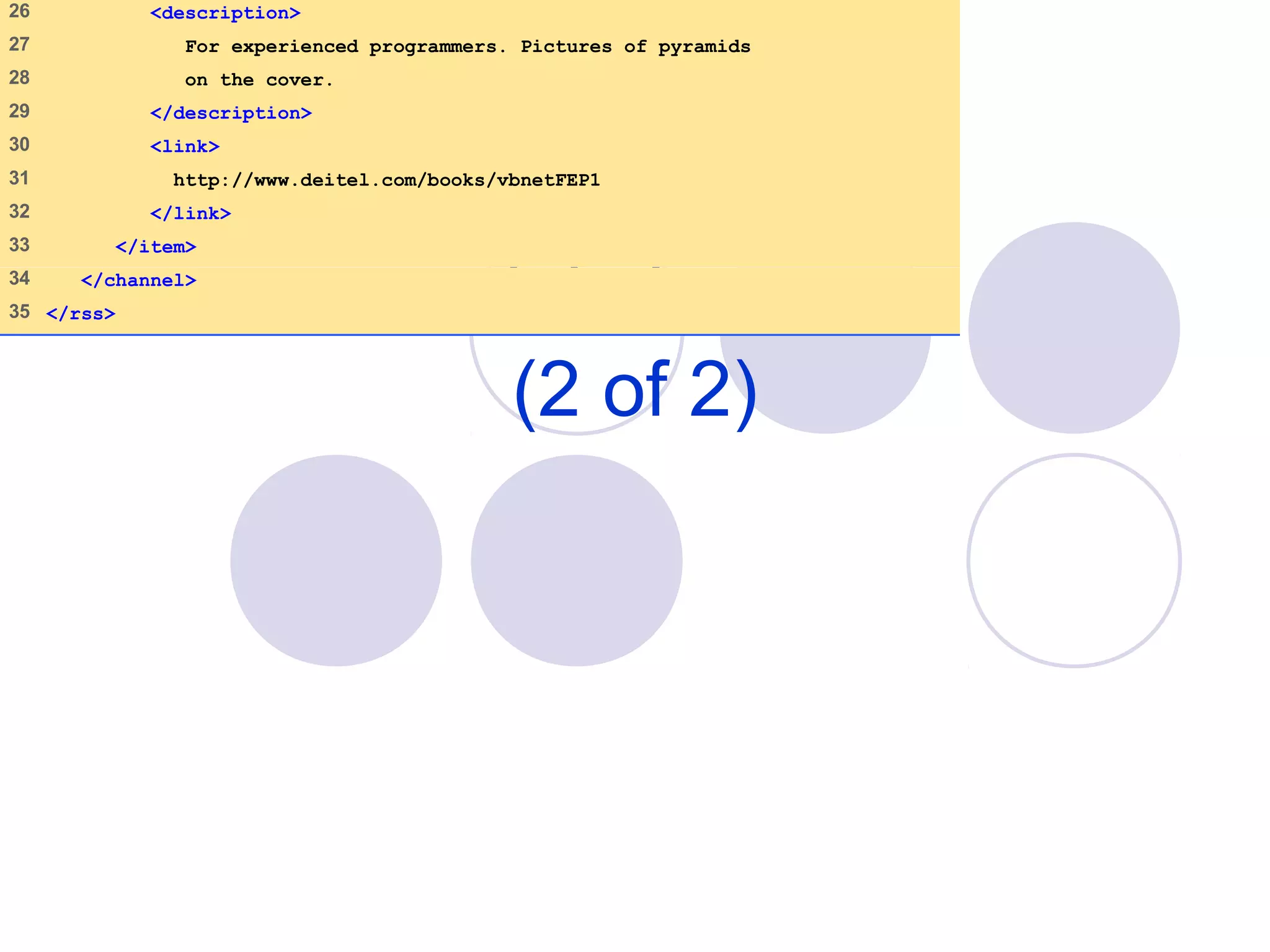
26    <description>
27    For experienced programmers. Pictures of pyramids
28    on the cover.
29    </description>
30    <link>
31    http://www.deitel.com/books/vbnetFEP1
32    </link>
33    </item>
34    </channel>
35   </rss>
09/30/15 © Reem Al-Attas 44
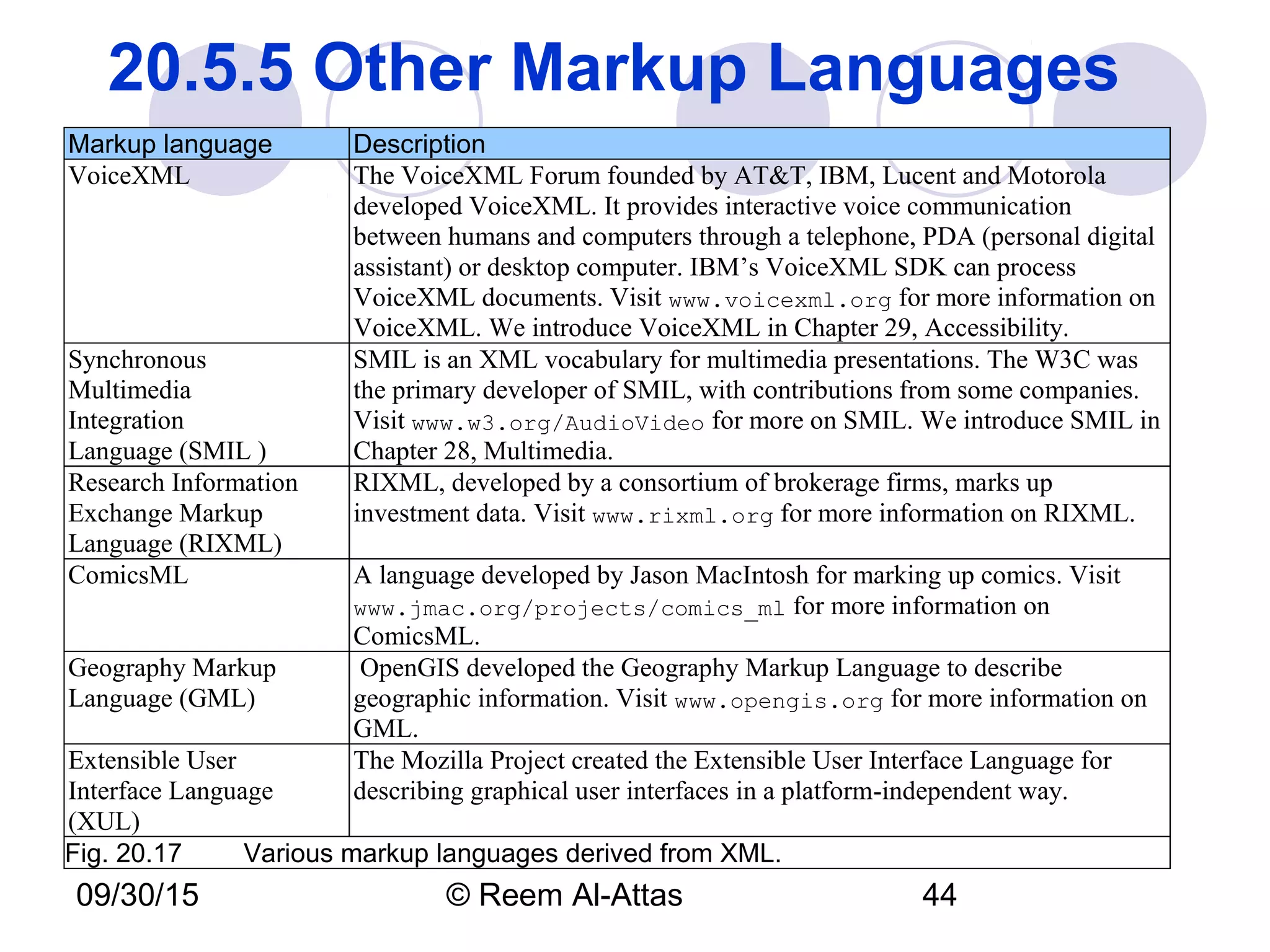
20.5.5 Other Markup Languages 
Markup language Description
VoiceXML The VoiceXML Forum founded by AT&T, IBM, Lucent and Motorola
developed VoiceXML. It provides interactive voice communication
between humans and computers through a telephone, PDA (personal digital
assistant) or desktop computer. IBM’s VoiceXML SDK can process
VoiceXML documents. Visit www.voicexml.org for more information on
VoiceXML. We introduce VoiceXML in Chapter 29, Accessibility.
Synchronous
Multimedia
Integration
Language (SMIL )
SMIL is an XML vocabulary for multimedia presentations. The W3C was
the primary developer of SMIL, with contributions from some companies.
Visit www.w3.org/AudioVideo for more on SMIL. We introduce SMIL in
Chapter 28, Multimedia.
Research Information
Exchange Markup
Language (RIXML)
RIXML, developed by a consortium of brokerage firms, marks up
investment data. Visit www.rixml.org for more information on RIXML.
ComicsML A language developed by Jason MacIntosh for marking up comics. Visit
www.jmac.org/projects/comics_ml for more information on
ComicsML.
Geography Markup
Language (GML)
OpenGIS developed the Geography Markup Language to describe
geographic information. Visit www.opengis.org for more information on
GML.
Extensible User
Interface Language
(XUL)
The Mozilla Project created the Extensible User Interface Language for
describing graphical user interfaces in a platform-independent way.
Fig. 20.17   Various markup languages derived from XML.
09/30/15 © Reem Al-Attas 45
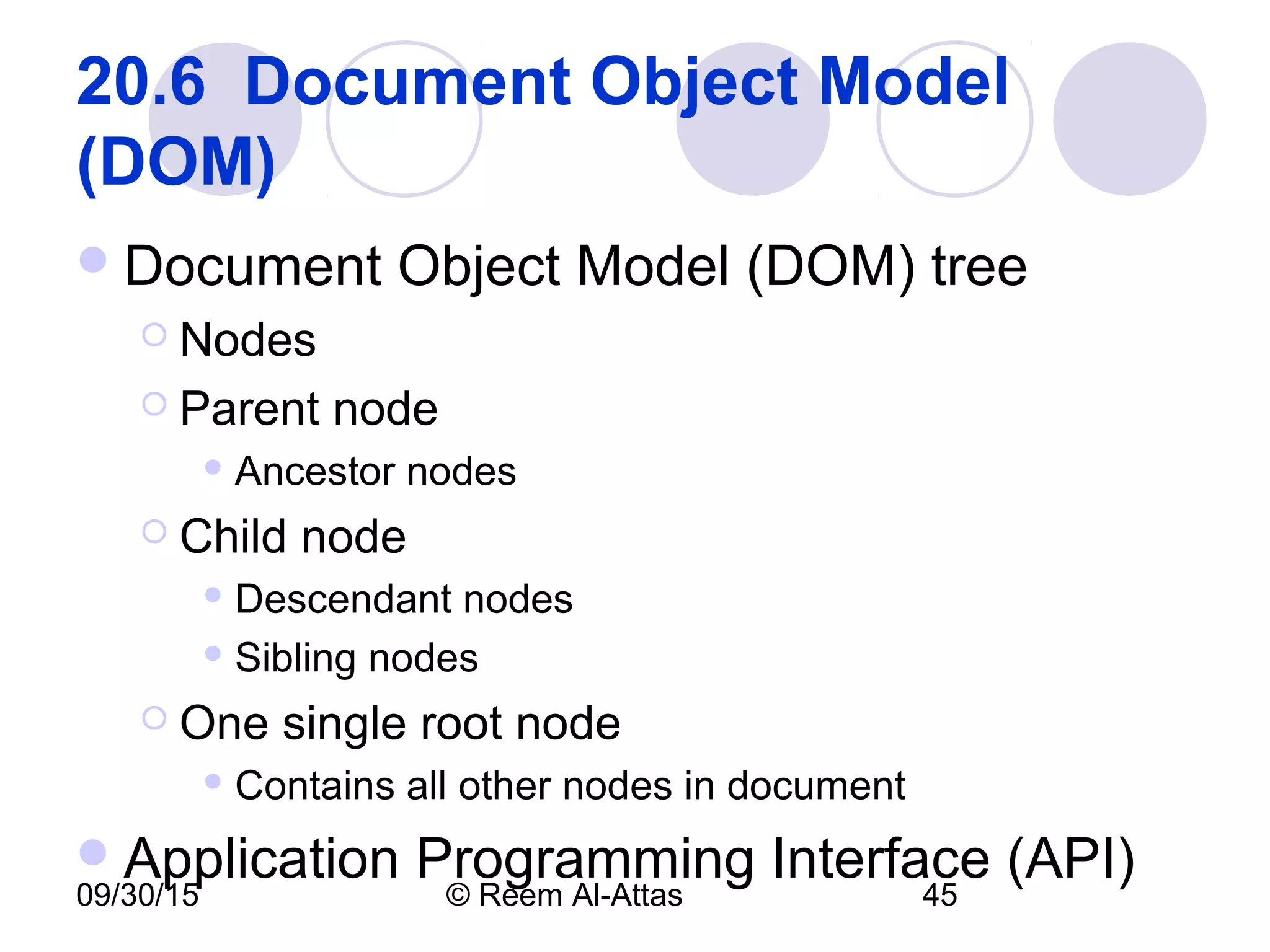
20.6  Document Object Model 
(DOM) 
Document Object Model (DOM) tree
 Nodes
 Parent node
 Ancestor nodes
 Child node
 Descendant nodes
 Sibling nodes
 One single root node
 Contains all other nodes in document
Application Programming Interface (API)
09/30/15 © Reem Al-Attas 46
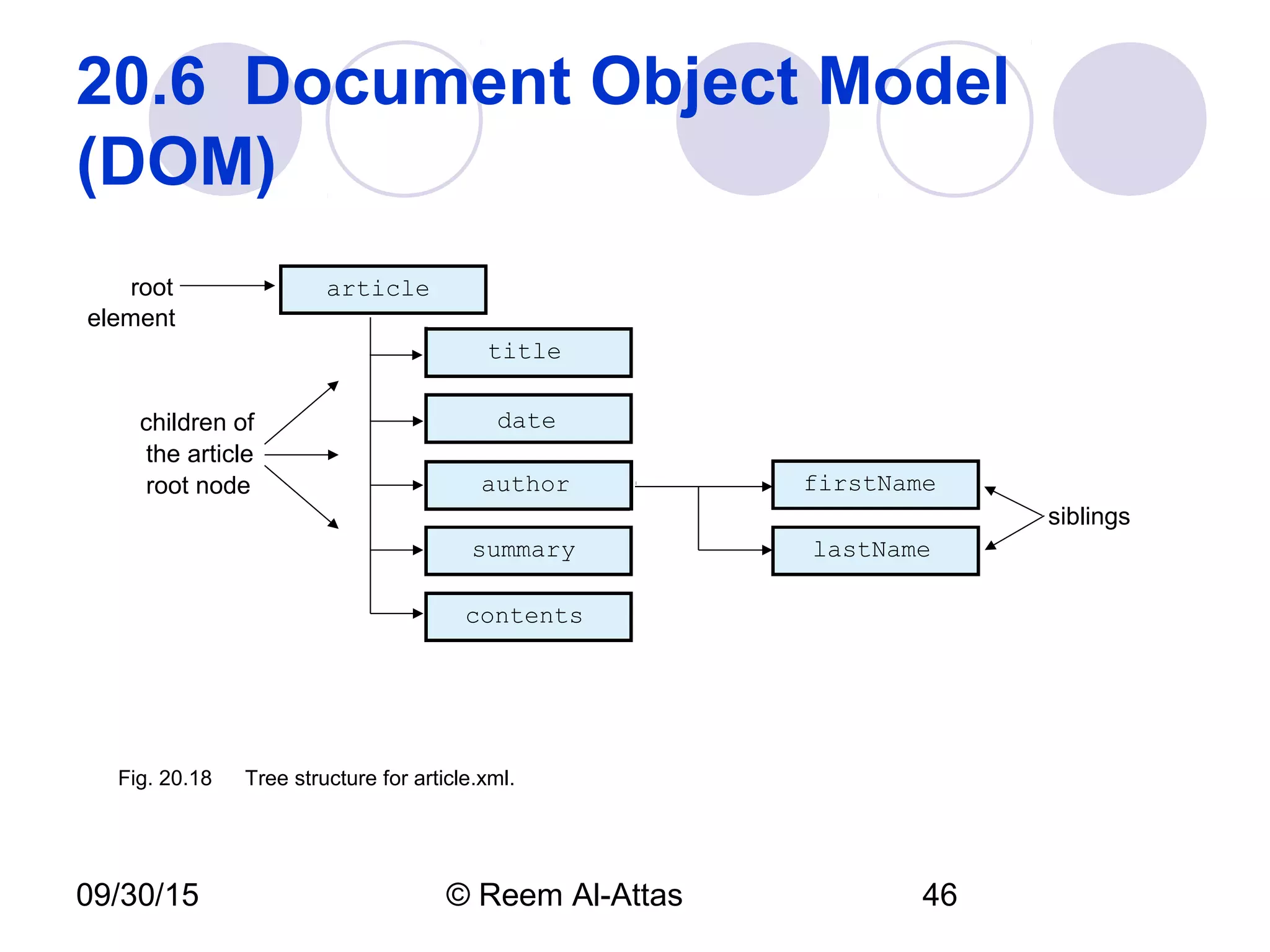
20.6  Document Object Model 
(DOM)
firstName
lastName
contents
summary
author
date
title
article
children of
the article
root node
siblings
root
element
Fig. 20.18 Tree structure for article.xml.
09/30/15 © Reem Al-Attas 47
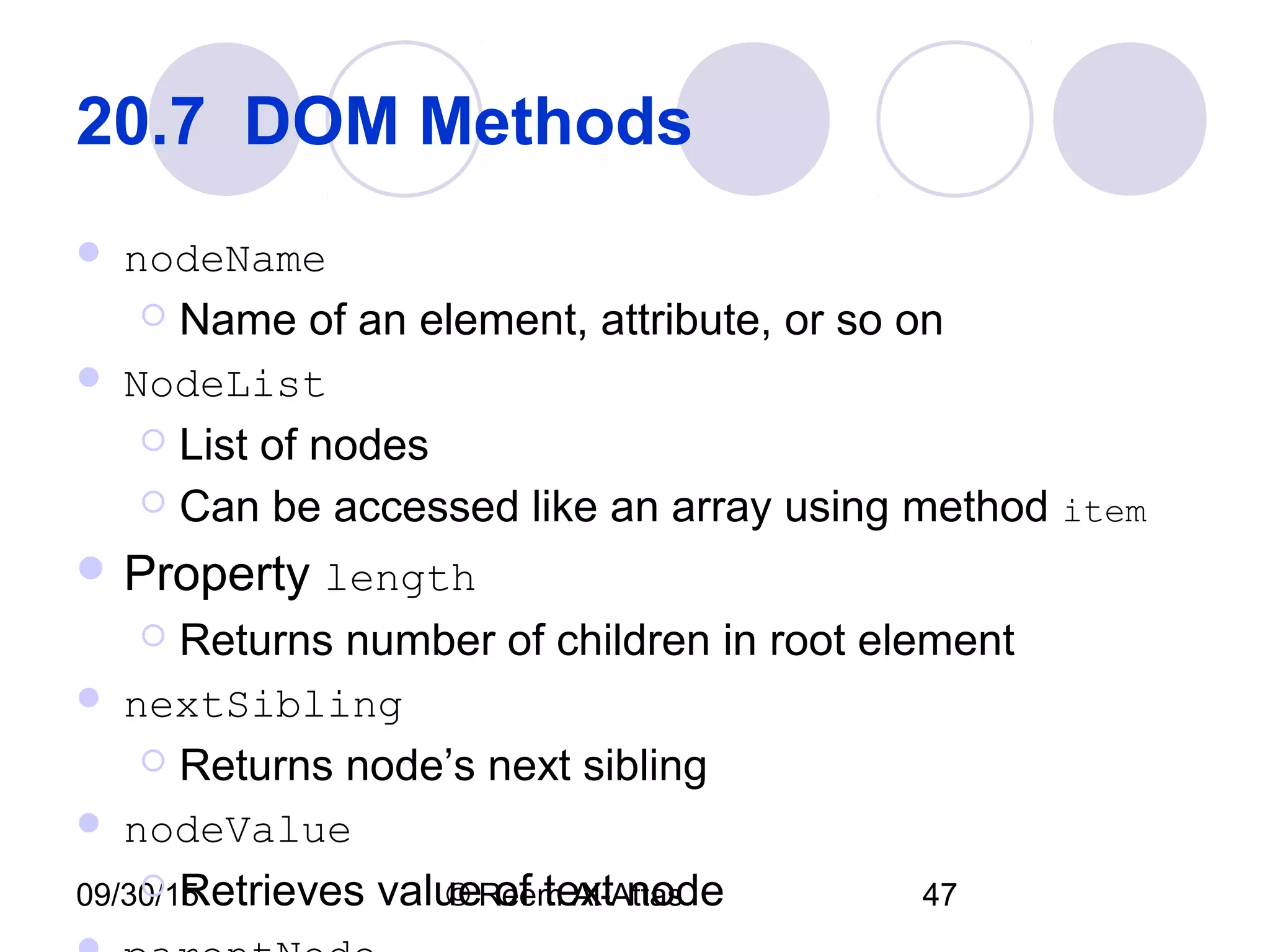
20.7  DOM Methods 
 nodeName
 Name of an element, attribute, or so on
 NodeList
 List of nodes
 Can be accessed like an array using method item
 Property length
 Returns number of children in root element
 nextSibling
 Returns node’s next sibling
 nodeValue
 Retrieves value of text node
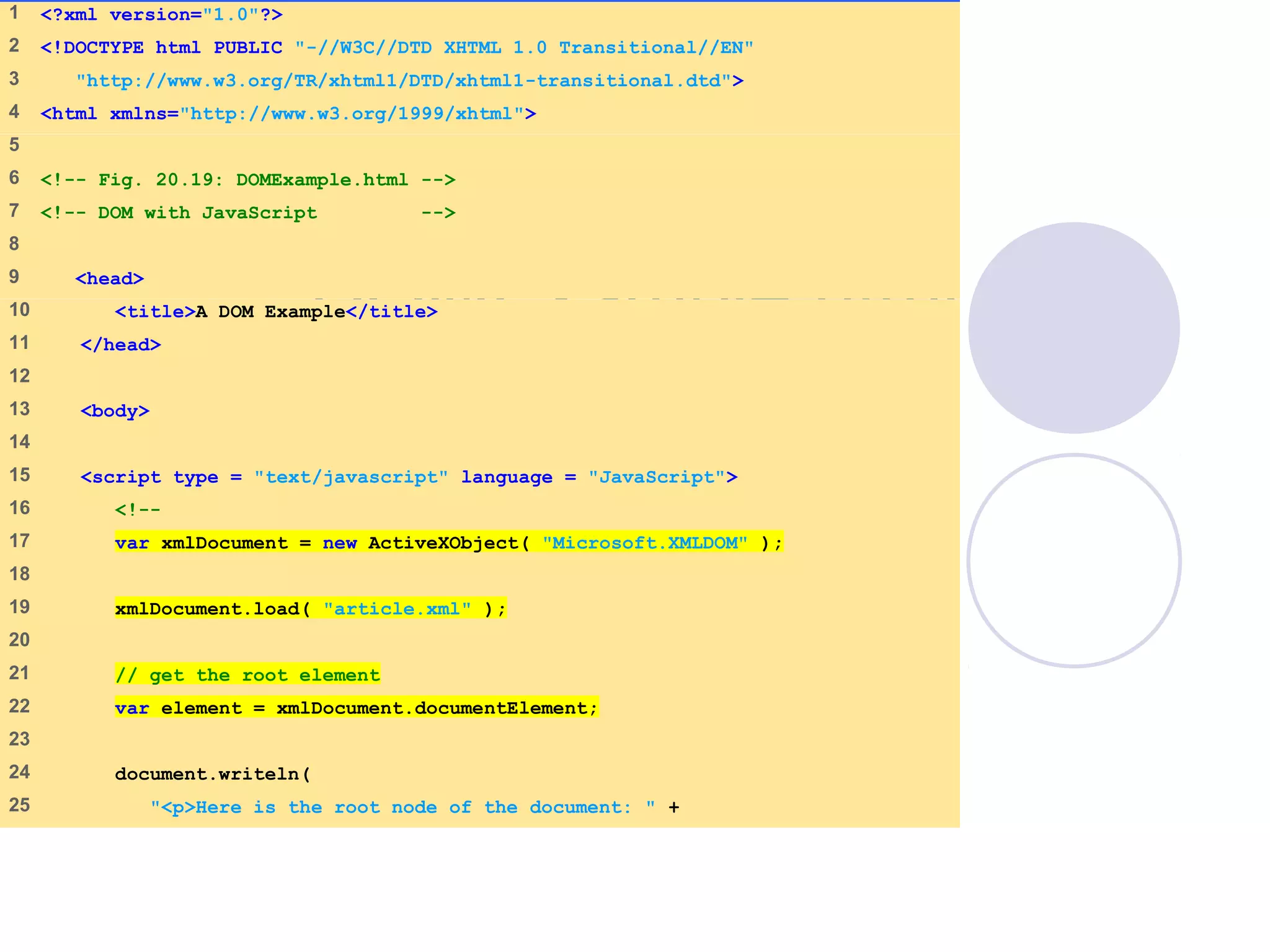
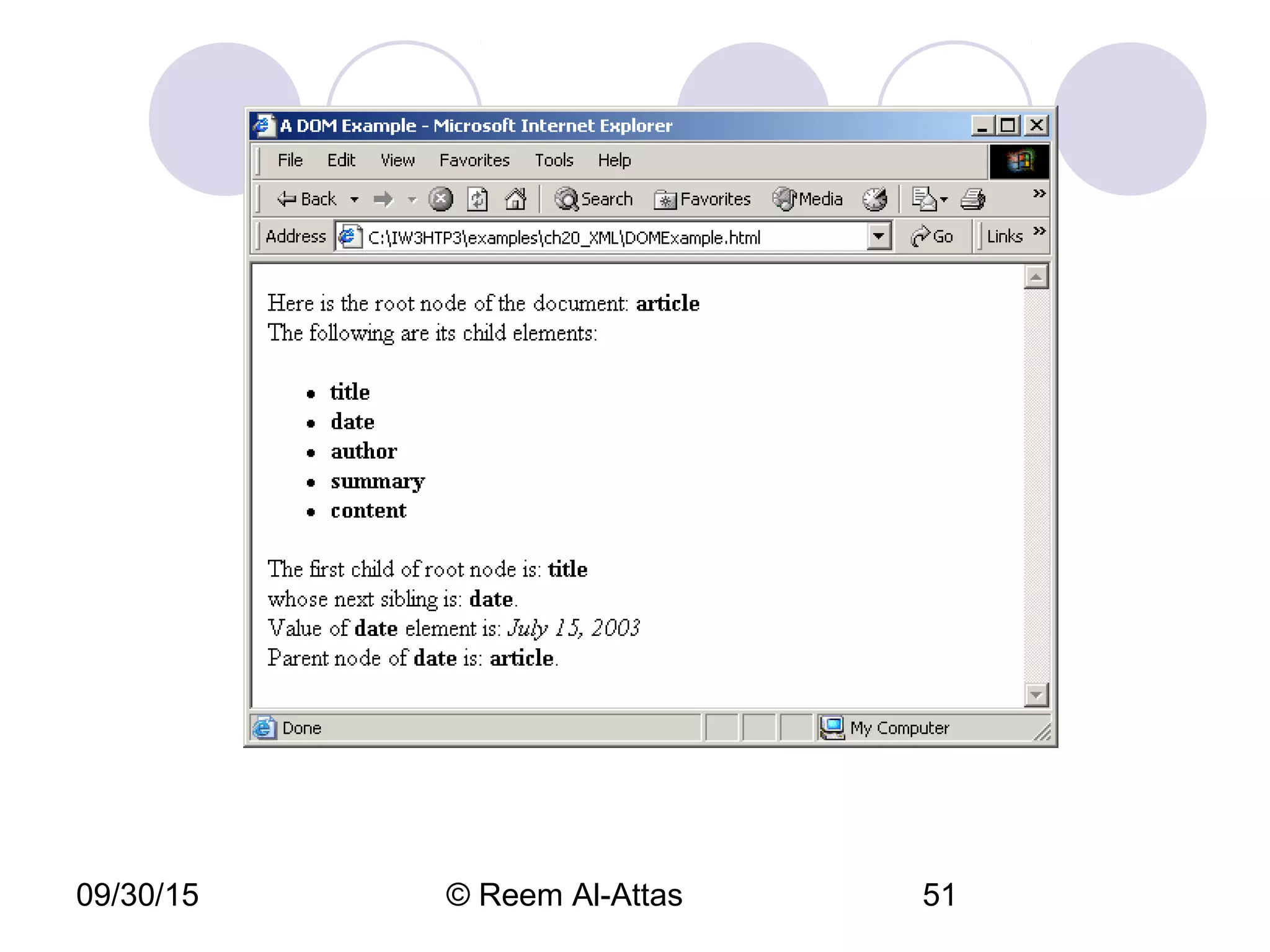
DOMExample.html
(1 of 3)
1    <?xml version="1.0"?>
2    <!DOCTYPE html PUBLIC "-//W3C//DTD XHTML 1.0 Transitional//EN"
3     "http://www.w3.org/TR/xhtml1/DTD/xhtml1-transitional.dtd">
4    <html xmlns="http://www.w3.org/1999/xhtml">
5    
6    <!-- Fig. 20.19: DOMExample.html -->
7    <!-- DOM with JavaScript -->
8    
9     <head>
10    <title>A DOM Example</title>
11    </head>
12   
13    <body>
14   
15    <script type = "text/javascript" language = "JavaScript">
16    <!--
17    var xmlDocument = new ActiveXObject( "Microsoft.XMLDOM" );
18   
19    xmlDocument.load( "article.xml" );
20   
21    // get the root element
22    var element = xmlDocument.documentElement;
23   
24    document.writeln(
25    "<p>Here is the root node of the document: " +
DOMExample.html
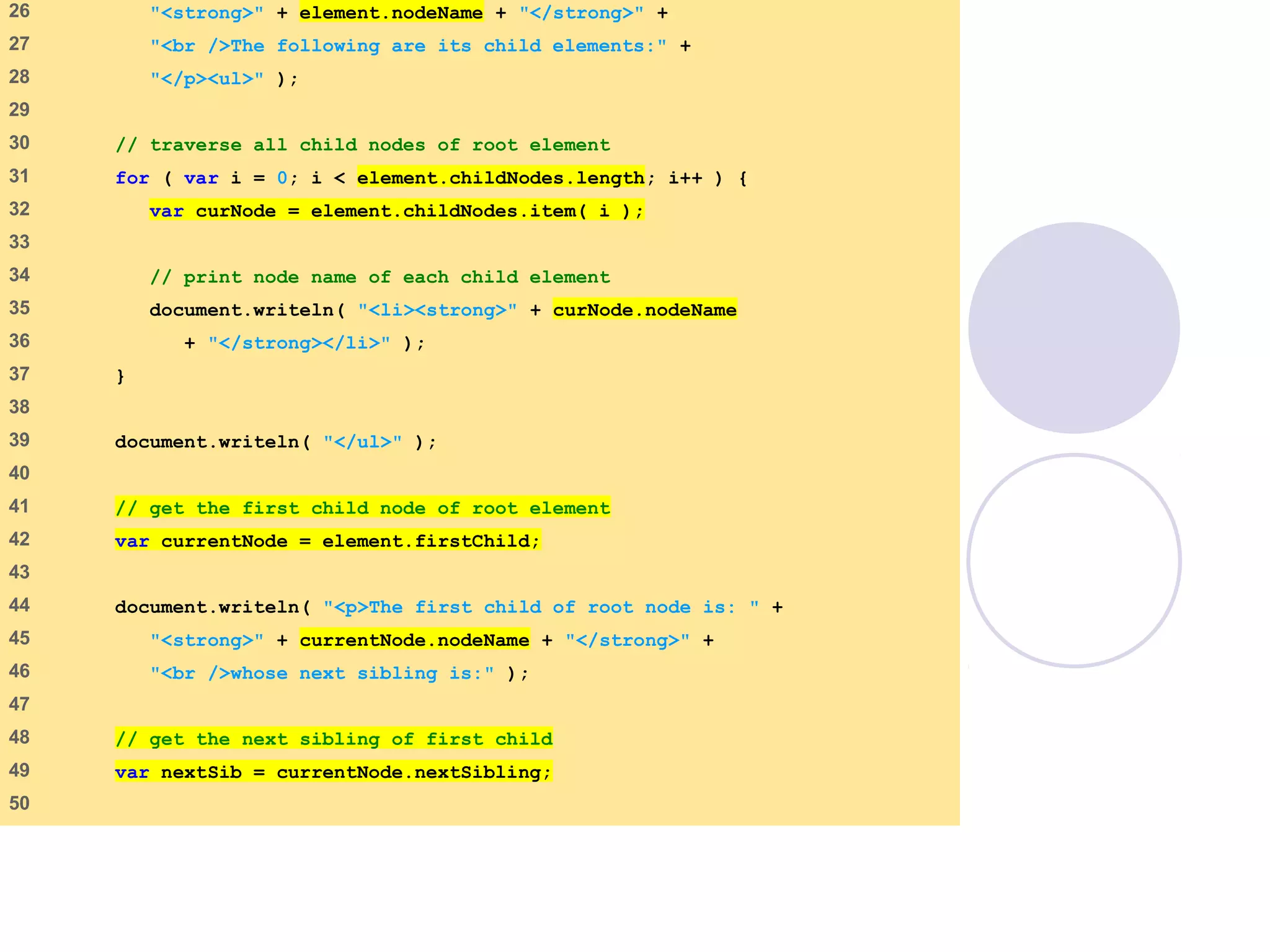
(2 of 3)
26    "<strong>" + element.nodeName + "</strong>" +
27    "<br />The following are its child elements:" +
28    "</p><ul>" );
29   
30    // traverse all child nodes of root element
31    for ( var i = 0; i < element.childNodes.length; i++ ) {
32    var curNode = element.childNodes.item( i );
33   
34    // print node name of each child element
35    document.writeln( "<li><strong>" + curNode.nodeName
36    + "</strong></li>" );
37    }
38   
39    document.writeln( "</ul>" );
40   
41    // get the first child node of root element
42    var currentNode = element.firstChild;
43   
44    document.writeln( "<p>The first child of root node is: " +
45    "<strong>" + currentNode.nodeName + "</strong>" +
46    "<br />whose next sibling is:" );
47   
48    // get the next sibling of first child
49    var nextSib = currentNode.nextSibling;
50   
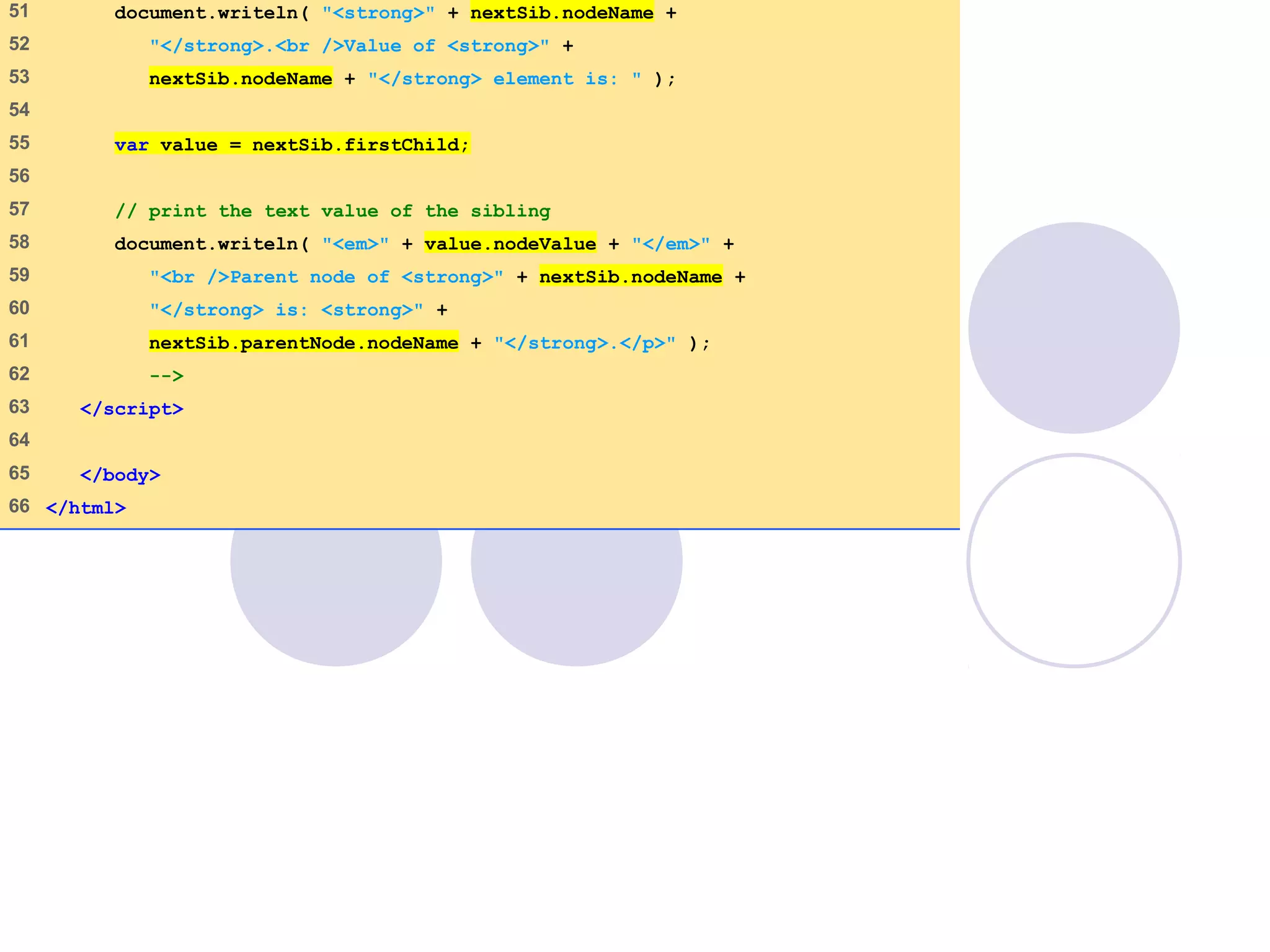
DOMExample.html
(3 of 3)
51    document.writeln( "<strong>" + nextSib.nodeName +
52    "</strong>.<br />Value of <strong>" +
53    nextSib.nodeName + "</strong> element is: " );
54   
55    var value = nextSib.firstChild;
56   
57    // print the text value of the sibling
58    document.writeln( "<em>" + value.nodeValue + "</em>" +
59    "<br />Parent node of <strong>" + nextSib.nodeName +
60    "</strong> is: <strong>" +
61    nextSib.parentNode.nodeName + "</strong>.</p>" );
62    -->
63    </script>
64   
65    </body>
66   </html>
09/30/15 © Reem Al-Attas 51
09/30/15 © Reem Al-Attas 52
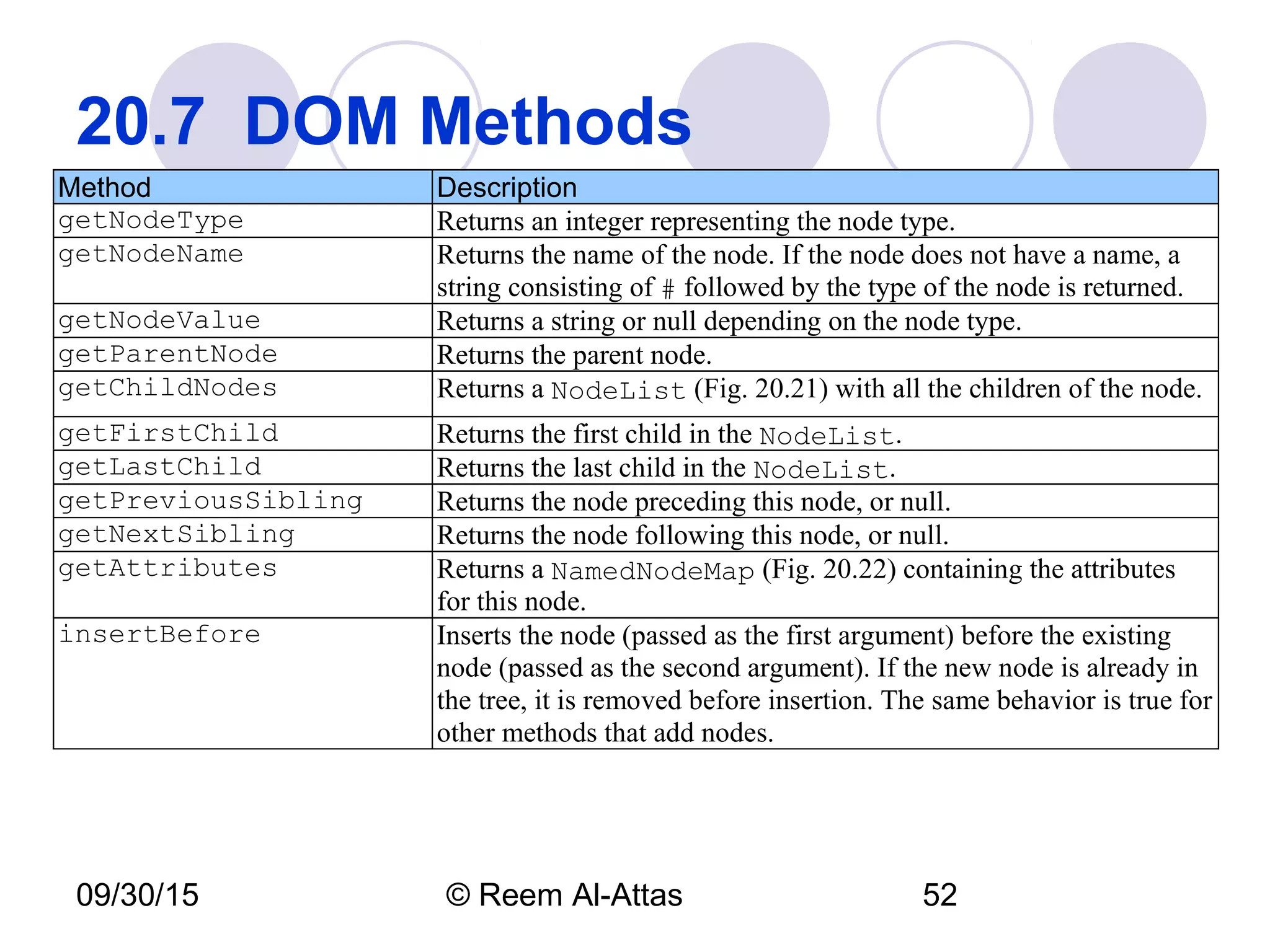
20.7  DOM Methods
Method Description
getNodeType Returns an integer representing the node type.
getNodeName Returns the name of the node. If the node does not have a name, a
string consisting of # followed by the type of the node is returned.
getNodeValue Returns a string or null depending on the node type.
getParentNode Returns the parent node.
getChildNodes Returns a NodeList (Fig. 20.21) with all the children of the node.
getFirstChild Returns the first child in the NodeList.
getLastChild Returns the last child in the NodeList.
getPreviousSibling Returns the node preceding this node, or null.
getNextSibling Returns the node following this node, or null.
getAttributes Returns a NamedNodeMap (Fig. 20.22) containing the attributes
for this node.
insertBefore Inserts the node (passed as the first argument) before the existing
node (passed as the second argument). If the new node is already in
the tree, it is removed before insertion. The same behavior is true for
other methods that add nodes.
09/30/15 © Reem Al-Attas 53
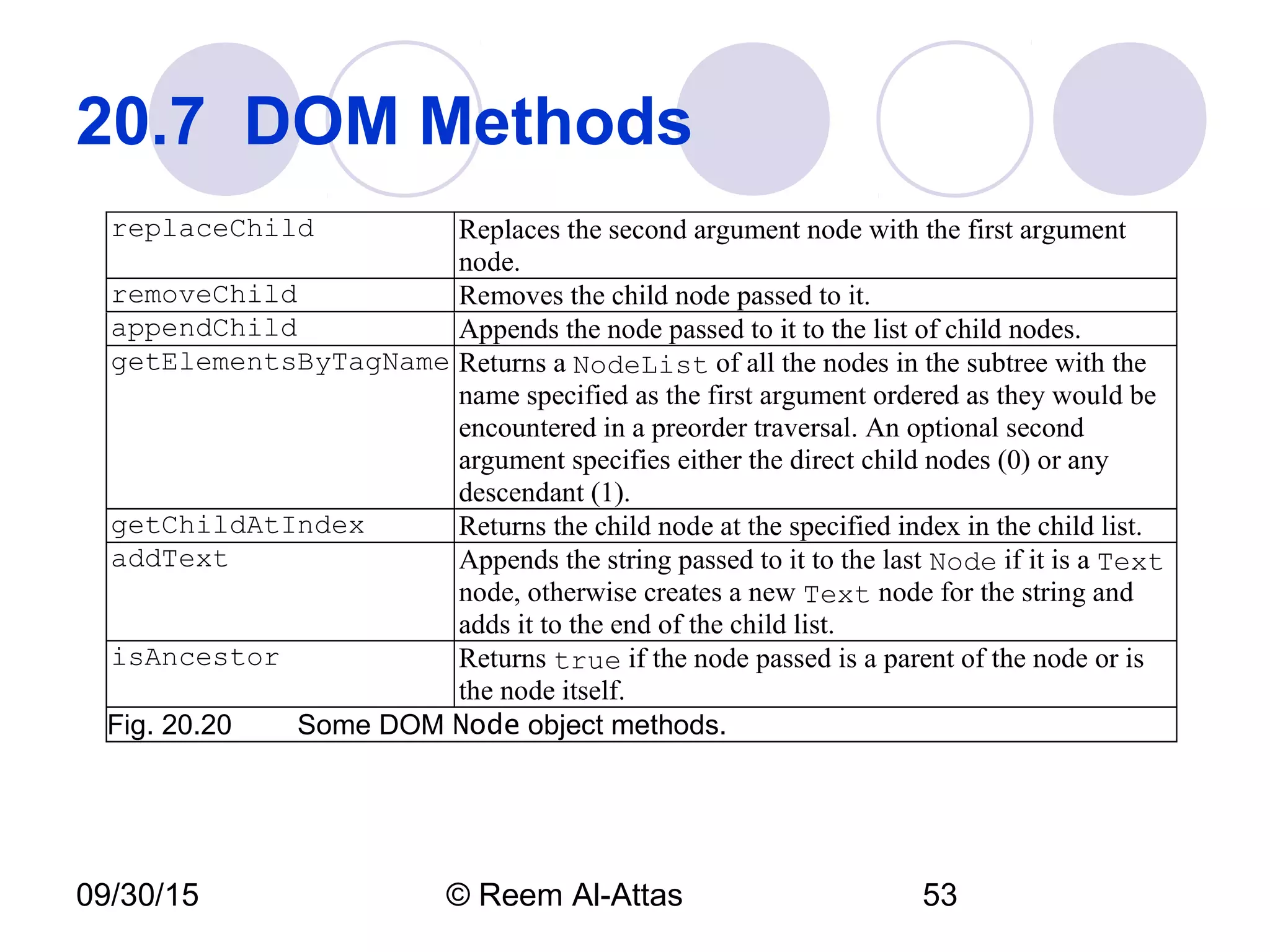
20.7  DOM Methods
replaceChild Replaces the second argument node with the first argument
node.
removeChild Removes the child node passed to it.
appendChild Appends the node passed to it to the list of child nodes.
getElementsByTagName Returns a NodeList of all the nodes in the subtree with the
name specified as the first argument ordered as they would be
encountered in a preorder traversal. An optional second
argument specifies either the direct child nodes (0) or any
descendant (1).
getChildAtIndex Returns the child node at the specified index in the child list.
addText Appends the string passed to it to the last Node if it is a Text
node, otherwise creates a new Text node for the string and
adds it to the end of the child list.
isAncestor Returns true if the node passed is a parent of the node or is
the node itself.
Fig. 20.20  Some DOM Node object methods.
09/30/15 © Reem Al-Attas 54
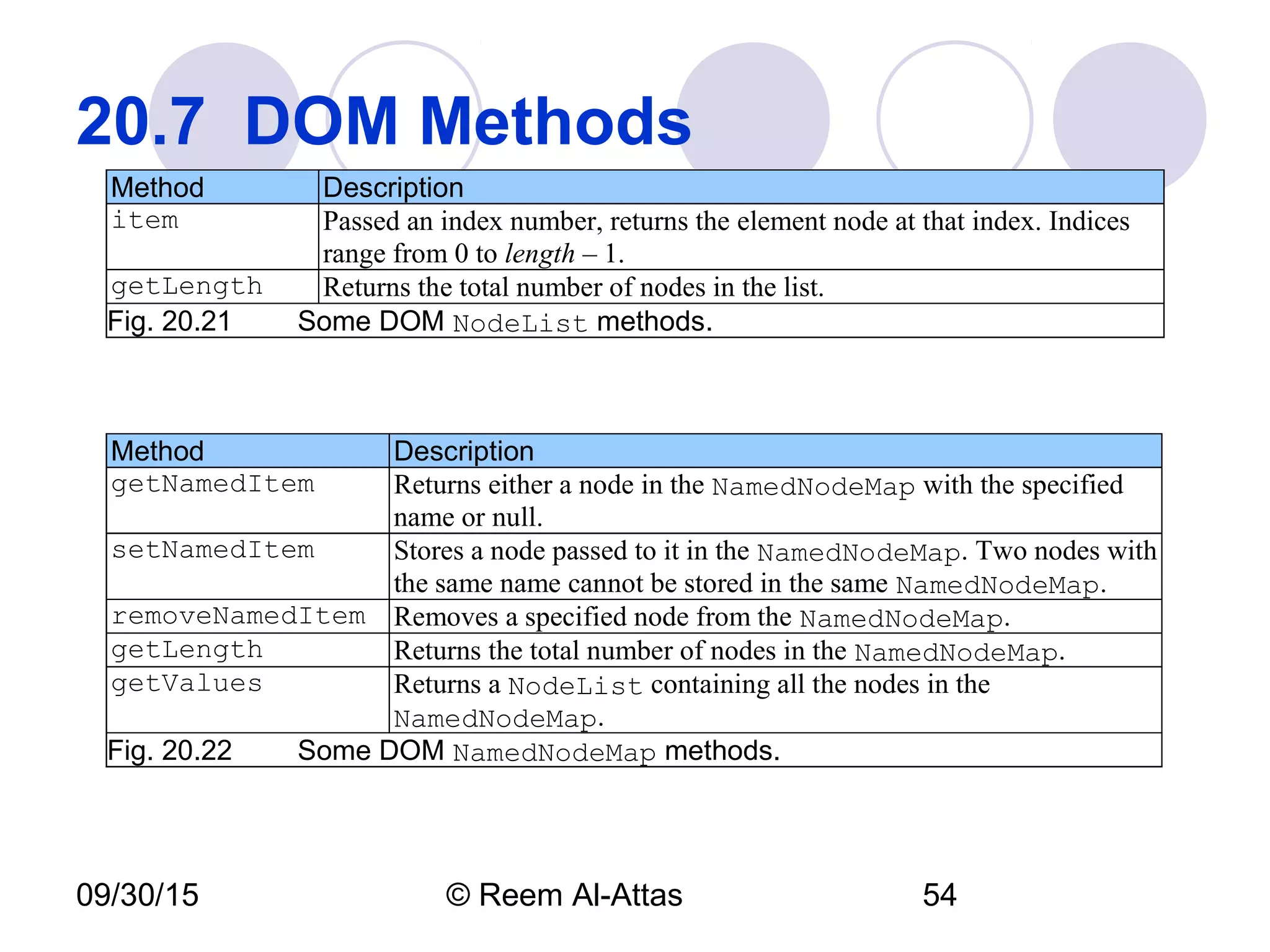
20.7  DOM Methods
Method Description
item Passed an index number, returns the element node at that index. Indices
range from 0 to length – 1.
getLength Returns the total number of nodes in the list.
Fig. 20.21  Some DOM NodeList methods.
Method Description
getNamedItem Returns either a node in the NamedNodeMap with the specified
name or null.
setNamedItem Stores a node passed to it in the NamedNodeMap. Two nodes with
the same name cannot be stored in the same NamedNodeMap.
removeNamedItem Removes a specified node from the NamedNodeMap.
getLength Returns the total number of nodes in the NamedNodeMap.
getValues Returns a NodeList containing all the nodes in the
NamedNodeMap.
Fig. 20.22   Some DOM NamedNodeMap methods.
09/30/15 © Reem Al-Attas 55
20.7  DOM Methods
Method Description
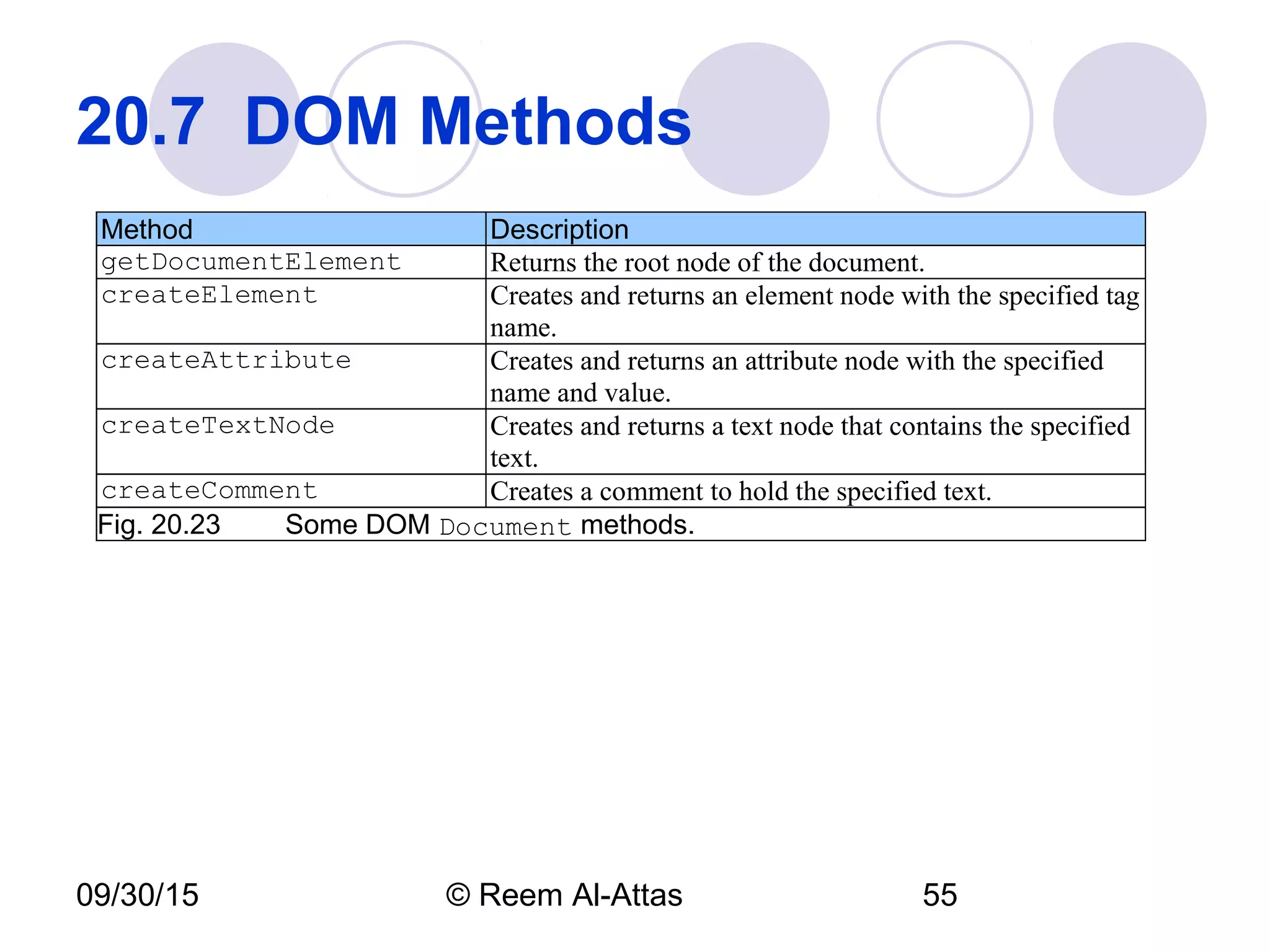
getDocumentElement Returns the root node of the document.
createElement Creates and returns an element node with the specified tag
name.
createAttribute Creates and returns an attribute node with the specified
name and value.
createTextNode Creates and returns a text node that contains the specified
text.
createComment Creates a comment to hold the specified text.
Fig. 20.23   Some DOM Document methods.
09/30/15 © Reem Al-Attas 56
20.7  DOM MethodsMethod Description
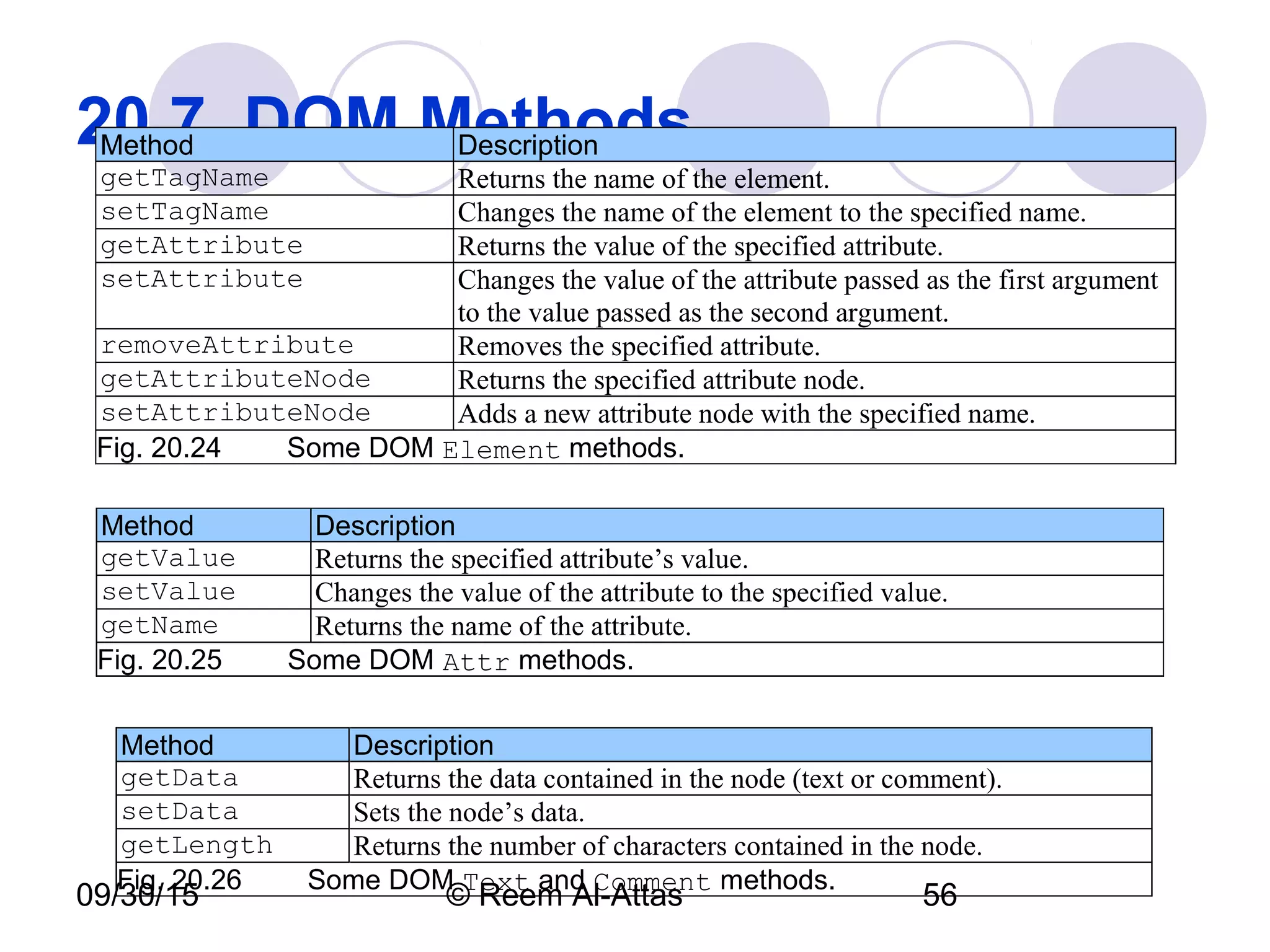
getTagName Returns the name of the element.
setTagName Changes the name of the element to the specified name.
getAttribute Returns the value of the specified attribute.
setAttribute Changes the value of the attribute passed as the first argument
to the value passed as the second argument.
removeAttribute Removes the specified attribute.
getAttributeNode Returns the specified attribute node.
setAttributeNode Adds a new attribute node with the specified name.
Fig. 20.24   Some DOM Element methods.
Method Description
getValue Returns the specified attribute’s value.
setValue Changes the value of the attribute to the specified value.
getName Returns the name of the attribute.
Fig. 20.25   Some DOM Attr methods.
Method Description
getData Returns the data contained in the node (text or comment).
setData Sets the node’s data.
getLength Returns the number of characters contained in the node.
Fig. 20.26   Some DOM Text and Comment methods.
09/30/15 © Reem Al-Attas 57
20.8  Simple API for XML (SAX) 
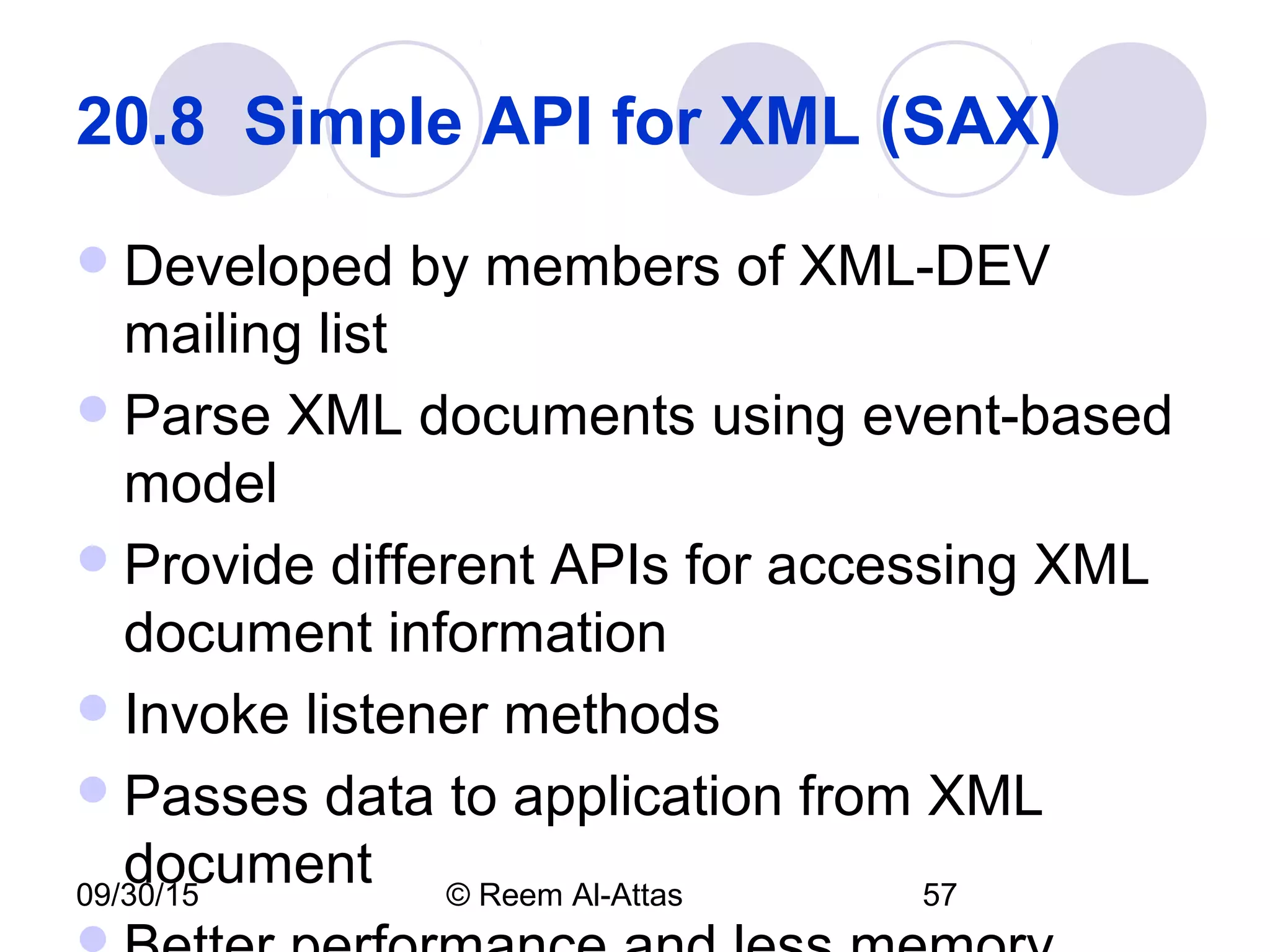
Developed by members of XML-DEV
mailing list
Parse XML documents using event-based
model
Provide different APIs for accessing XML
document information
Invoke listener methods
Passes data to application from XML
document
09/30/15 © Reem Al-Attas 58
20.9  Extensible Stylesheet 
Language (XSL) 
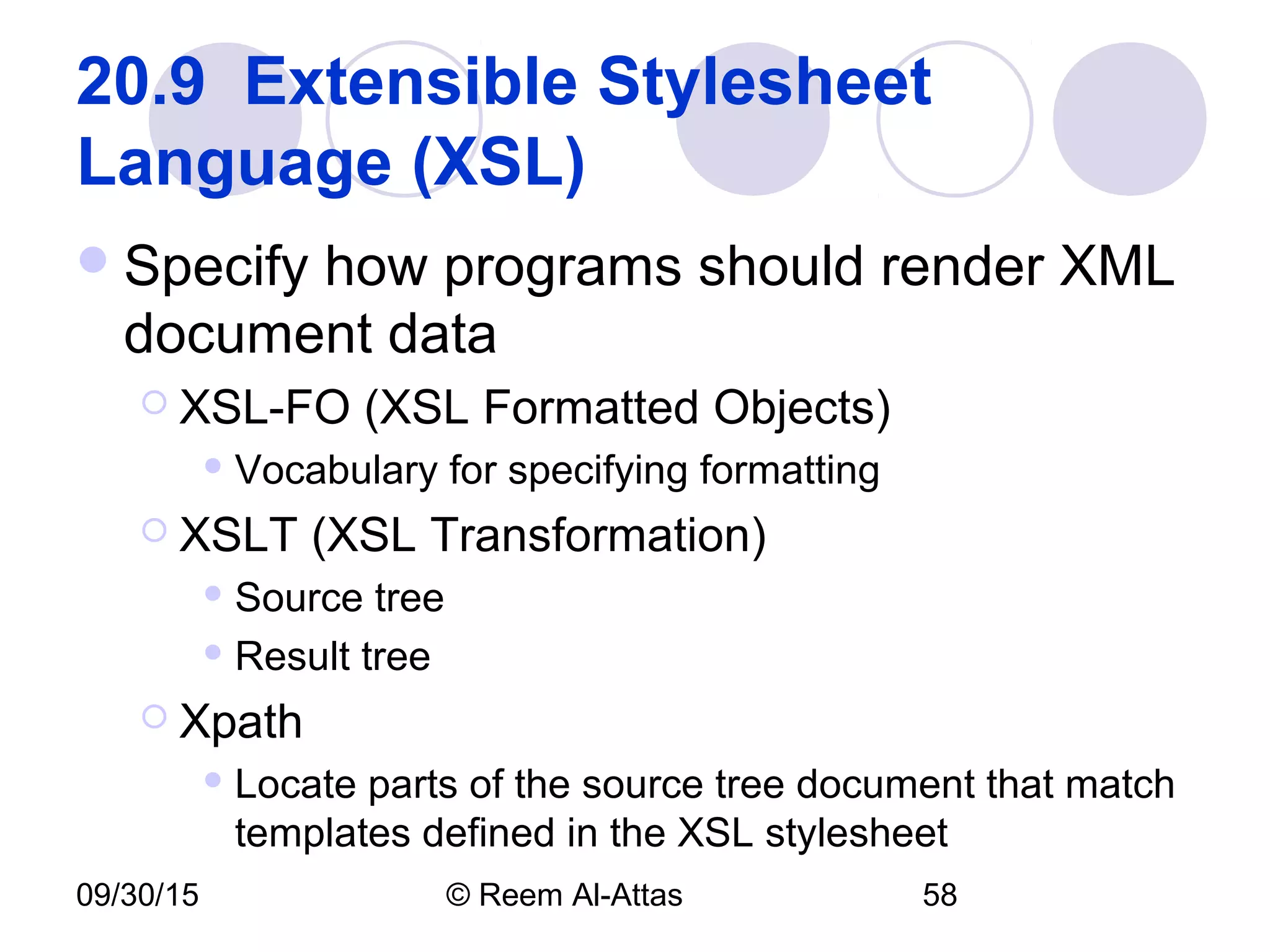
Specify how programs should render XML
document data
 XSL-FO (XSL Formatted Objects)
 Vocabulary for specifying formatting
 XSLT (XSL Transformation)
 Source tree
 Result tree
 Xpath
 Locate parts of the source tree document that match
templates defined in the XSL stylesheet
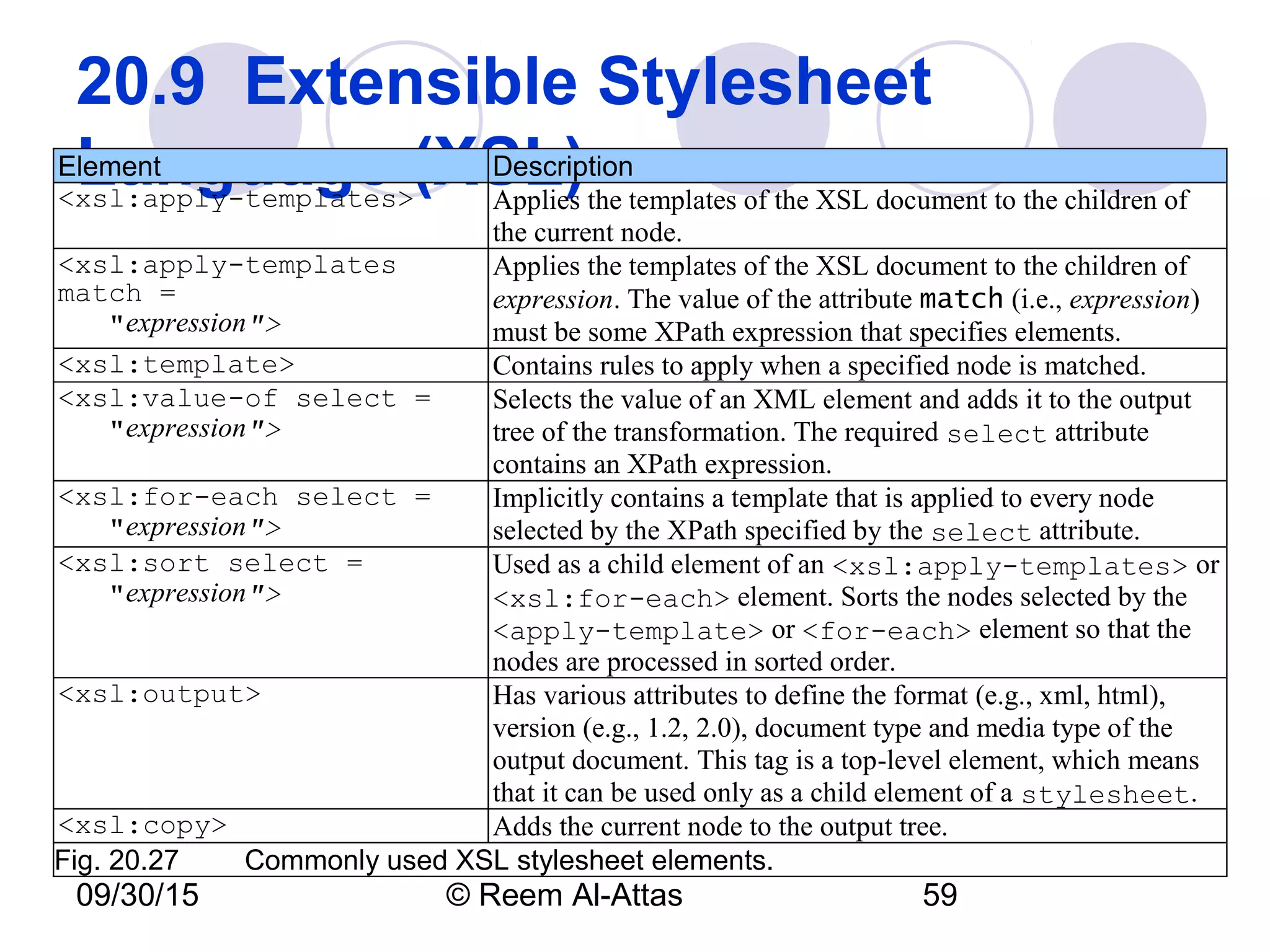
09/30/15 © Reem Al-Attas 59
20.9  Extensible Stylesheet 
Language (XSL)Element Description
<xsl:apply-templates> Applies the templates of the XSL document to the children of
the current node.
<xsl:apply-templates
match =
"expression">
Applies the templates of the XSL document to the children of
expression. The value of the attribute match (i.e., expression)
must be some XPath expression that specifies elements.
<xsl:template> Contains rules to apply when a specified node is matched.
<xsl:value-of select =
"expression">
Selects the value of an XML element and adds it to the output
tree of the transformation. The required select attribute
contains an XPath expression.
<xsl:for-each select =
"expression">
Implicitly contains a template that is applied to every node
selected by the XPath specified by the select attribute.
<xsl:sort select =
"expression">
Used as a child element of an <xsl:apply-templates> or
<xsl:for-each> element. Sorts the nodes selected by the
<apply-template> or <for-each> element so that the
nodes are processed in sorted order.
<xsl:output> Has various attributes to define the format (e.g., xml, html),
version (e.g., 1.2, 2.0), document type and media type of the
output document. This tag is a top-level element, which means
that it can be used only as a child element of a stylesheet.
<xsl:copy> Adds the current node to the output tree.
Fig. 20.27  Commonly used XSL stylesheet elements.
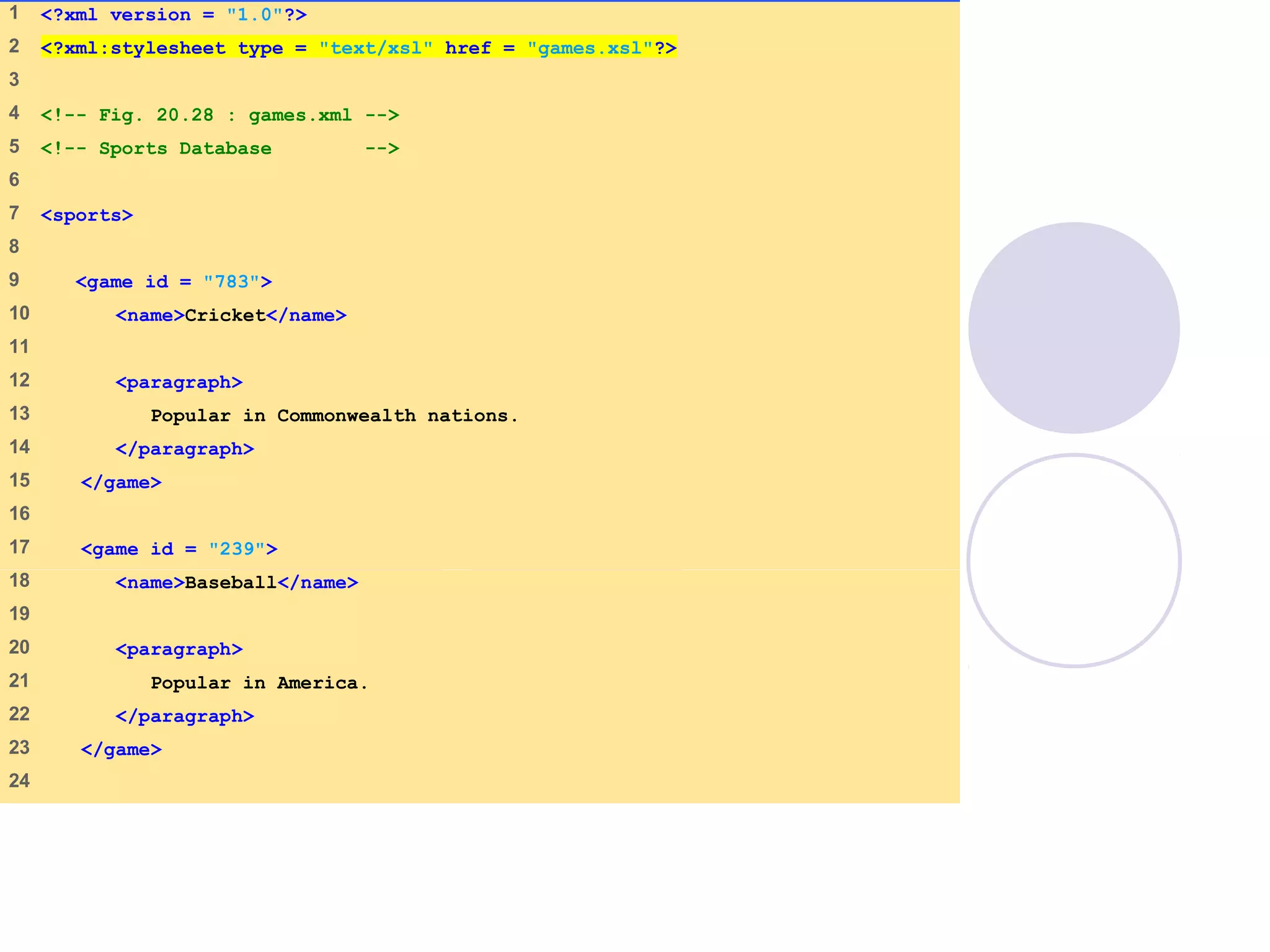
games.xml
(1 of 2)
1    <?xml version = "1.0"?>
2    <?xml:stylesheet type = "text/xsl" href = "games.xsl"?>
3    
4    <!-- Fig. 20.28 : games.xml -->
5    <!-- Sports Database -->
6    
7    <sports>
8    
9     <game id = "783">
10    <name>Cricket</name>
11   
12    <paragraph>
13    Popular in Commonwealth nations.
14    </paragraph>
15    </game>
16   
17    <game id = "239">
18    <name>Baseball</name>
19   
20    <paragraph>
21    Popular in America.
22    </paragraph>
23    </game>
24   
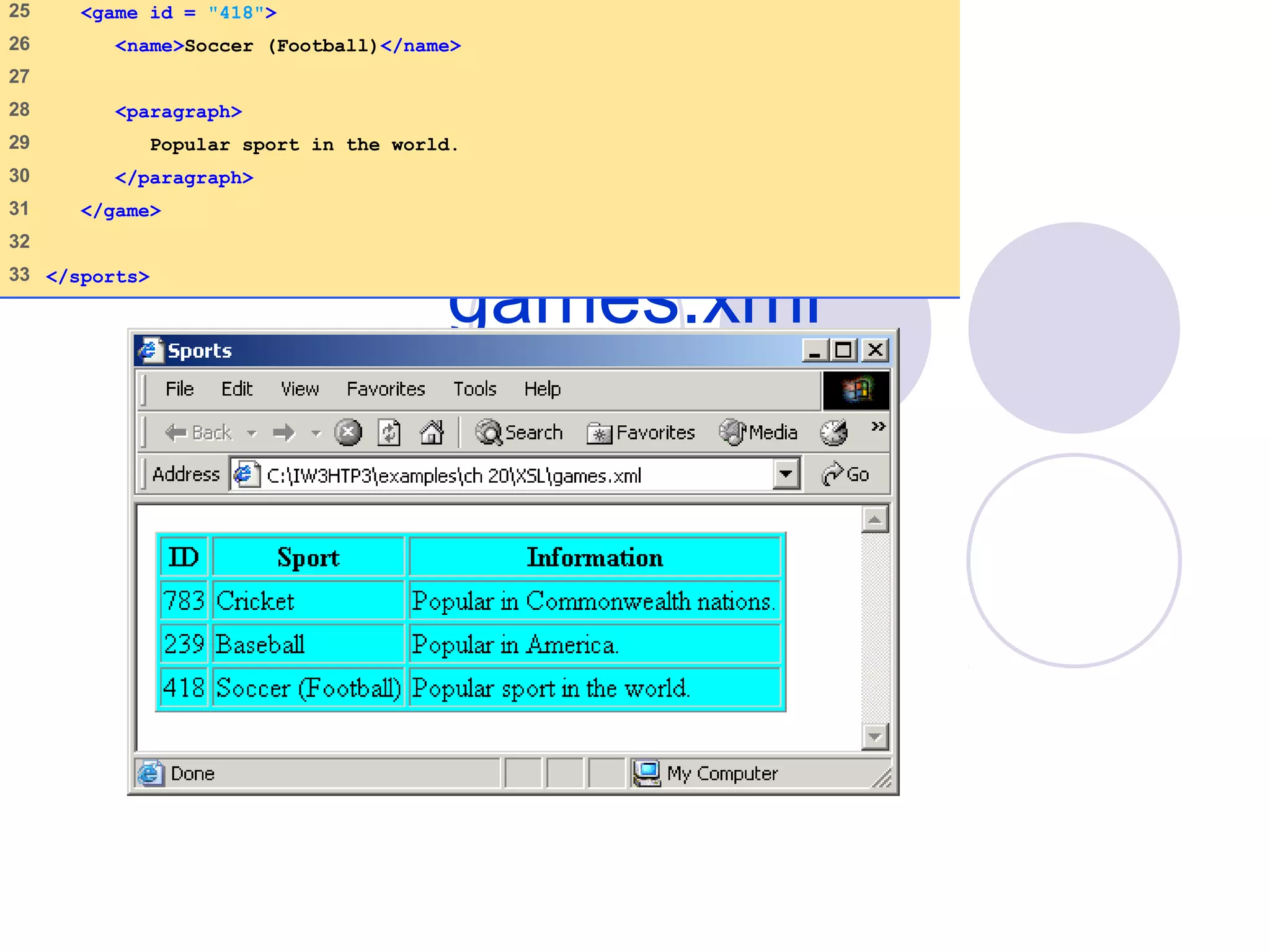
games.xml
(2 of 2)
25 <game id = "418">
26 <name>Soccer (Football)</name>
27
28 <paragraph>
29 Popular sport in the world.
30 </paragraph>
31 </game>
32
33 </sports>
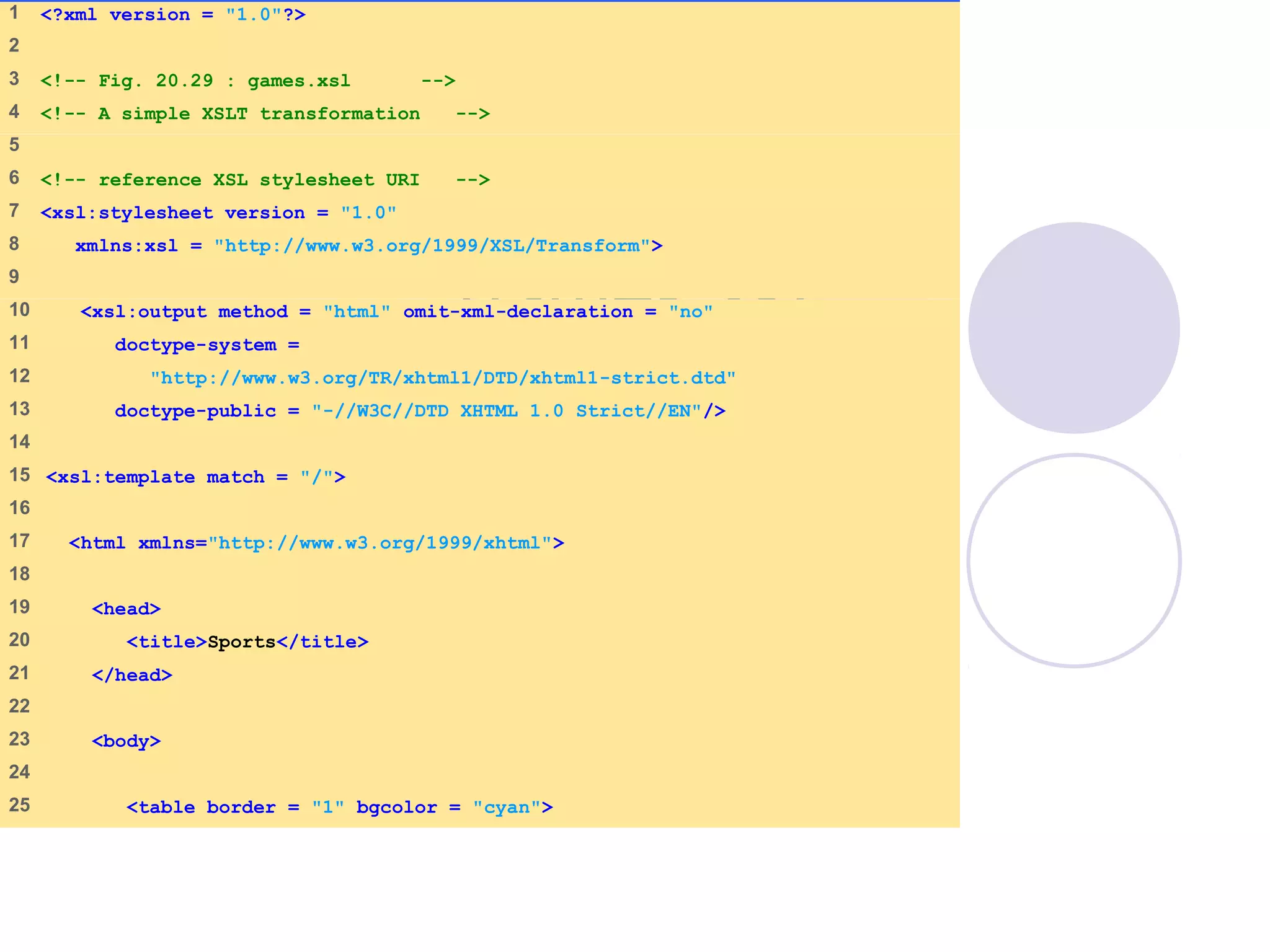
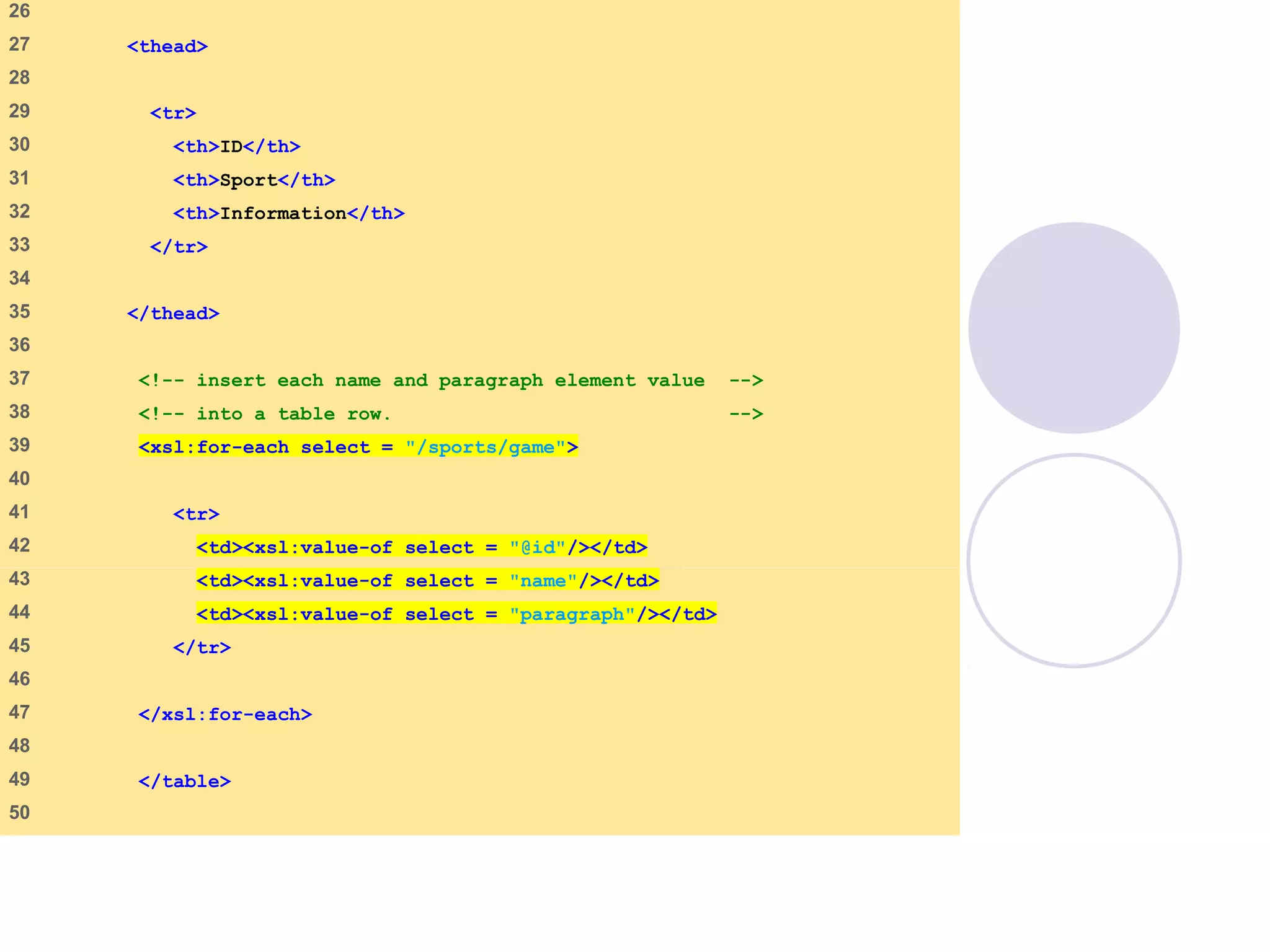
games.xsl
(1 of 3)
1 <?xml version = "1.0"?>
2
3 <!-- Fig. 20.29 : games.xsl -->
4 <!-- A simple XSLT transformation -->
5
6 <!-- reference XSL stylesheet URI -->
7 <xsl:stylesheet version = "1.0"
8 xmlns:xsl = "http://www.w3.org/1999/XSL/Transform">
9
10 <xsl:output method = "html" omit-xml-declaration = "no"
11 doctype-system =
12 "http://www.w3.org/TR/xhtml1/DTD/xhtml1-strict.dtd"
13 doctype-public = "-//W3C//DTD XHTML 1.0 Strict//EN"/>
14
15 <xsl:template match = "/">
16
17 <html xmlns="http://www.w3.org/1999/xhtml">
18
19 <head>
20 <title>Sports</title>
21 </head>
22
23 <body>
24
25 <table border = "1" bgcolor = "cyan">
games.xsl
(2 of 3)
26
27 <thead>
28
29 <tr>
30 <th>ID</th>
31 <th>Sport</th>
32 <th>Information</th>
33 </tr>
34
35 </thead>
36
37 <!-- insert each name and paragraph element value -->
38 <!-- into a table row. -->
39 <xsl:for-each select = "/sports/game">
40
41 <tr>
42 <td><xsl:value-of select = "@id"/></td>
43 <td><xsl:value-of select = "name"/></td>
44 <td><xsl:value-of select = "paragraph"/></td>
45 </tr>
46
47 </xsl:for-each>
48
49 </table>
50
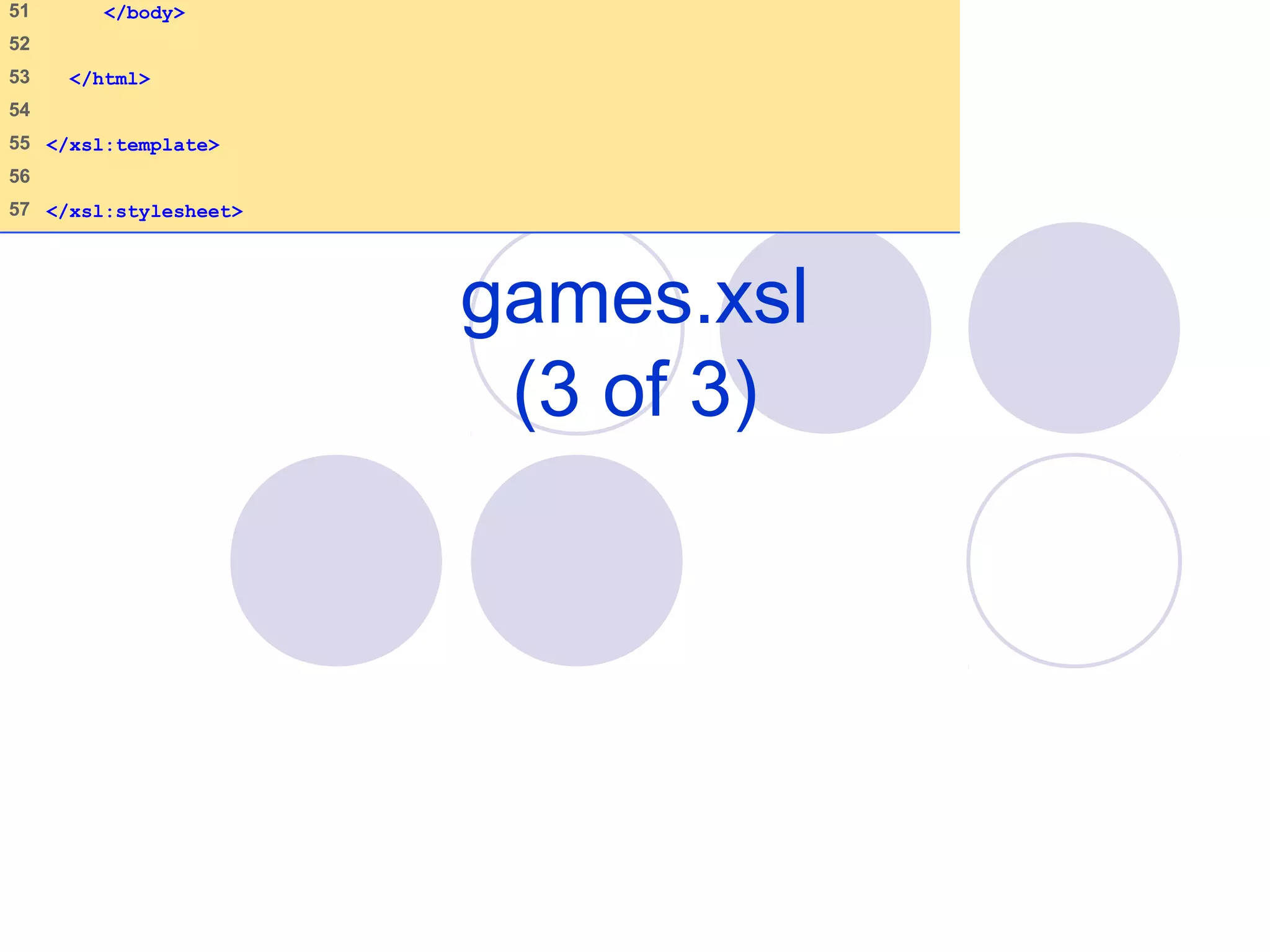
games.xsl
(3 of 3)
51 </body>
52
53 </html>
54
55 </xsl:template>
56
57 </xsl:stylesheet>
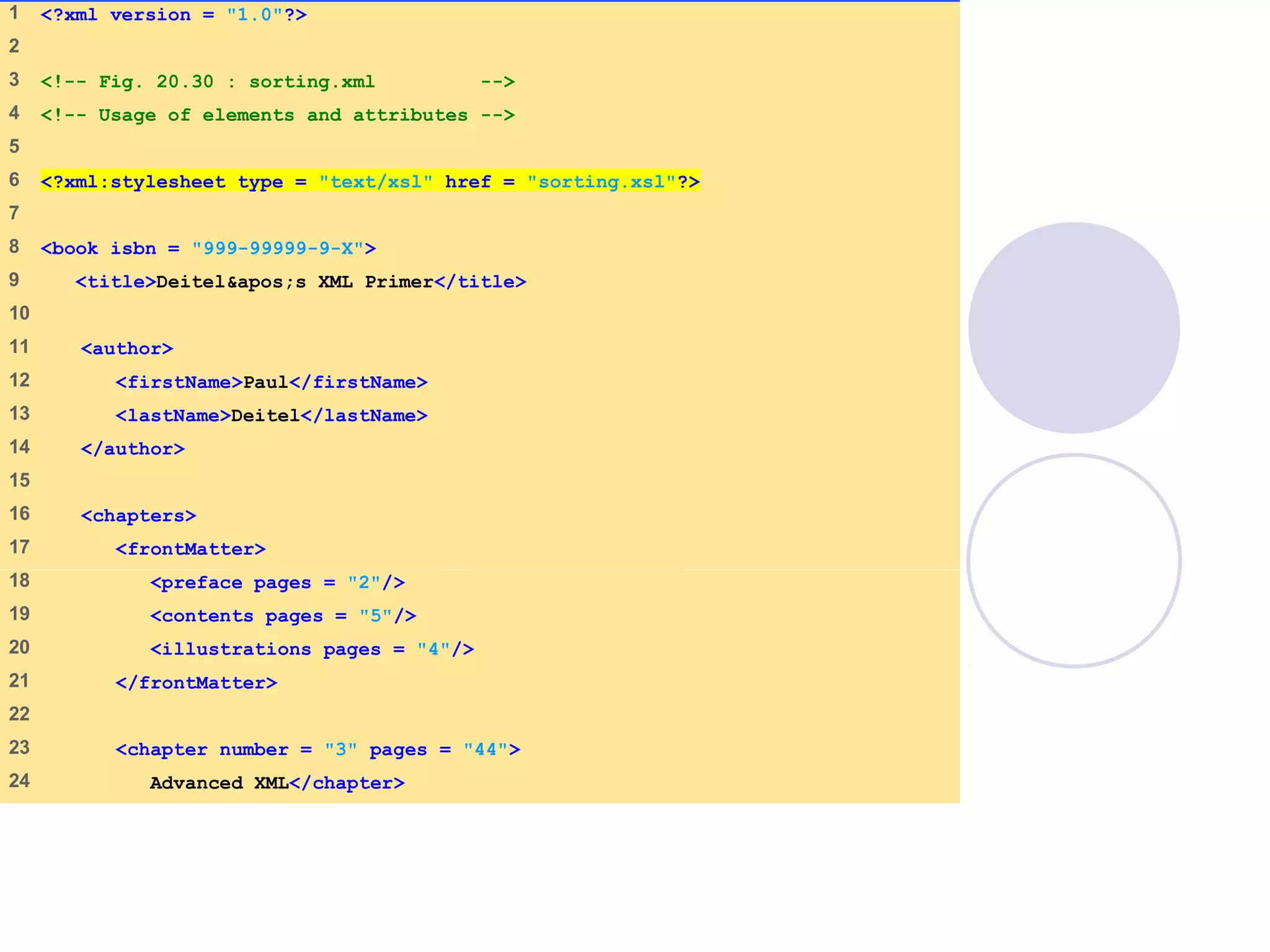
sorting.html
(1 of 2)
1 <?xml version = "1.0"?>
2
3 <!-- Fig. 20.30 : sorting.xml -->
4 <!-- Usage of elements and attributes -->
5
6 <?xml:stylesheet type = "text/xsl" href = "sorting.xsl"?>
7
8 <book isbn = "999-99999-9-X">
9 <title>Deitel&apos;s XML Primer</title>
10
11 <author>
12 <firstName>Paul</firstName>
13 <lastName>Deitel</lastName>
14 </author>
15
16 <chapters>
17 <frontMatter>
18 <preface pages = "2"/>
19 <contents pages = "5"/>
20 <illustrations pages = "4"/>
21 </frontMatter>
22
23 <chapter number = "3" pages = "44">
24 Advanced XML</chapter>
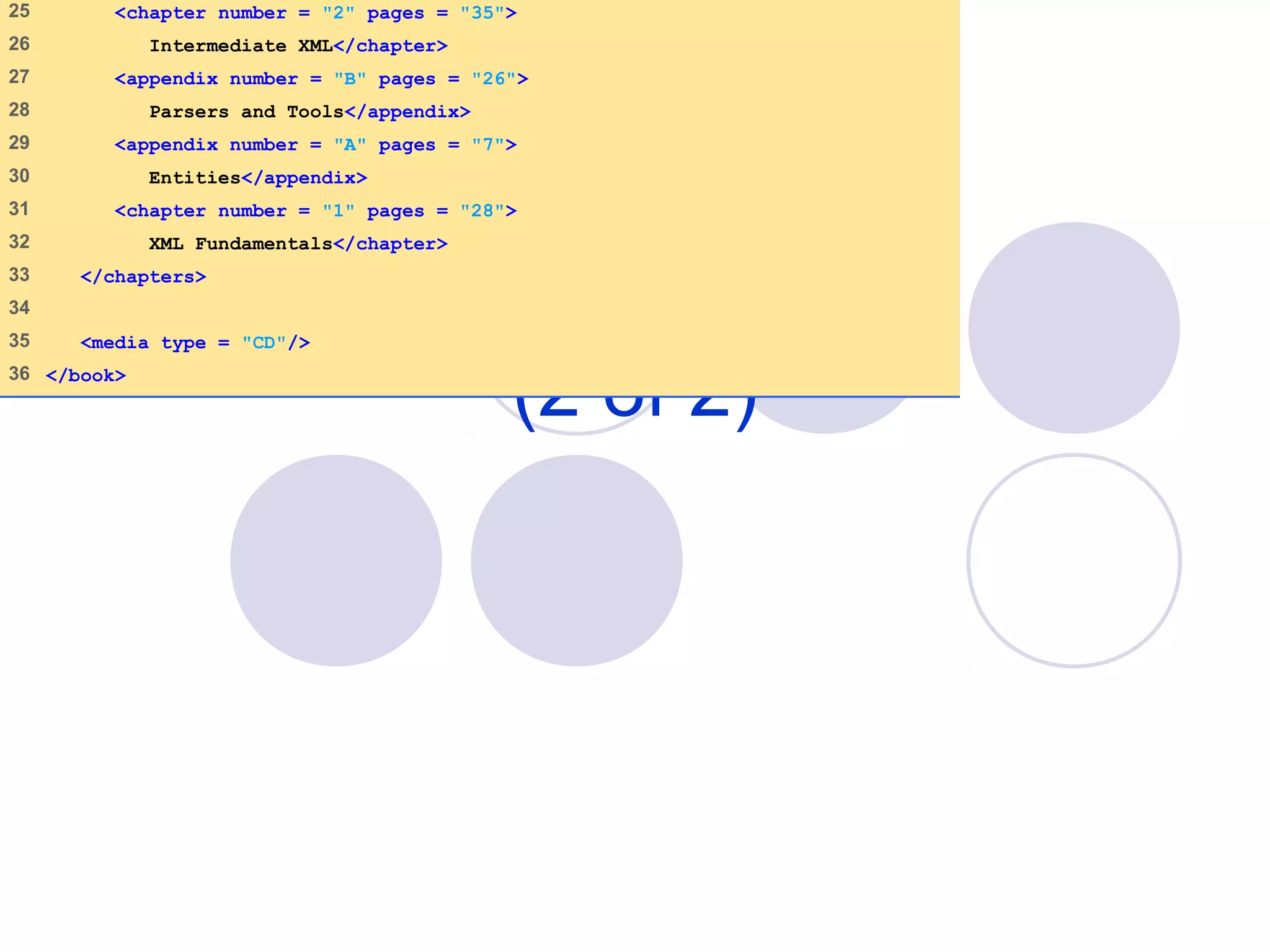
sorting.html
(2 of 2)
25 <chapter number = "2" pages = "35">
26 Intermediate XML</chapter>
27 <appendix number = "B" pages = "26">
28 Parsers and Tools</appendix>
29 <appendix number = "A" pages = "7">
30 Entities</appendix>
31 <chapter number = "1" pages = "28">
32 XML Fundamentals</chapter>
33 </chapters>
34
35 <media type = "CD"/>
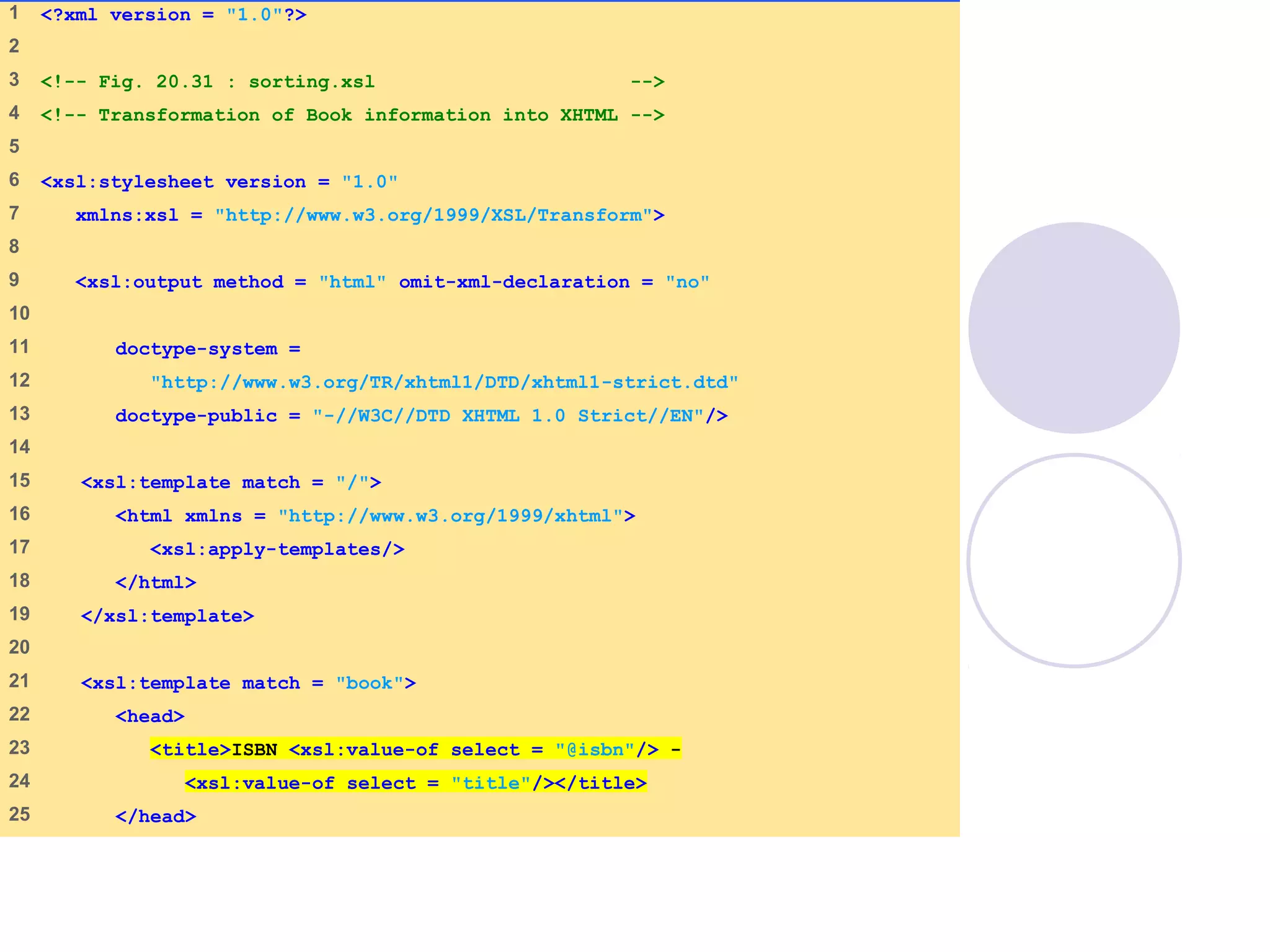
36 </book>
sorting.xsl
(1 of 4)
1 <?xml version = "1.0"?>
2
3 <!-- Fig. 20.31 : sorting.xsl -->
4 <!-- Transformation of Book information into XHTML -->
5
6 <xsl:stylesheet version = "1.0"
7 xmlns:xsl = "http://www.w3.org/1999/XSL/Transform">
8
9 <xsl:output method = "html" omit-xml-declaration = "no"
10
11 doctype-system =
12 "http://www.w3.org/TR/xhtml1/DTD/xhtml1-strict.dtd"
13 doctype-public = "-//W3C//DTD XHTML 1.0 Strict//EN"/>
14
15 <xsl:template match = "/">
16 <html xmlns = "http://www.w3.org/1999/xhtml">
17 <xsl:apply-templates/>
18 </html>
19 </xsl:template>
20
21 <xsl:template match = "book">
22 <head>
23 <title>ISBN <xsl:value-of select = "@isbn"/> -
24 <xsl:value-of select = "title"/></title>
25 </head>
sorting.xsl
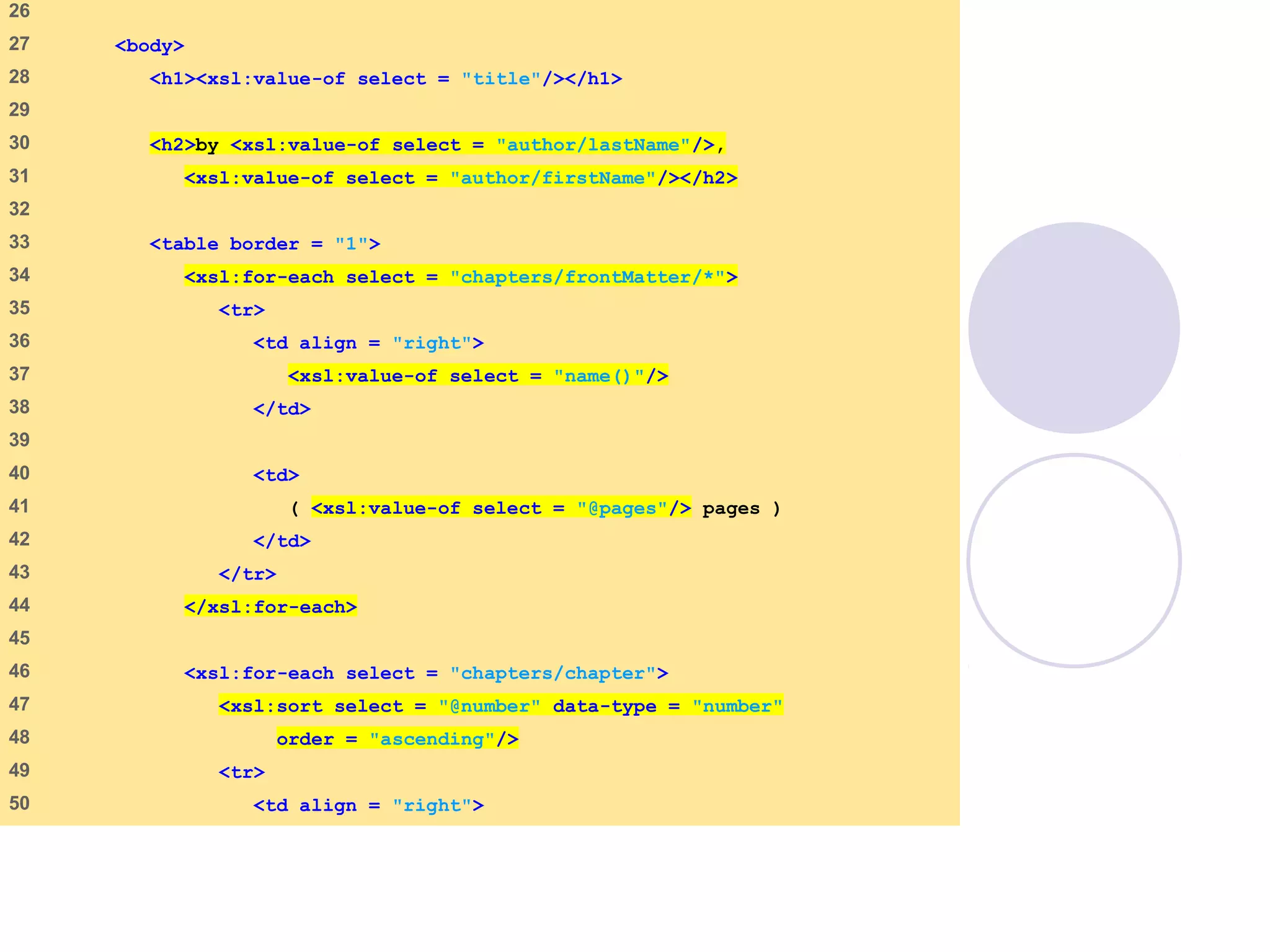
(2 of 4)
26
27 <body>
28 <h1><xsl:value-of select = "title"/></h1>
29
30 <h2>by <xsl:value-of select = "author/lastName"/>,
31 <xsl:value-of select = "author/firstName"/></h2>
32
33 <table border = "1">
34 <xsl:for-each select = "chapters/frontMatter/*">
35 <tr>
36 <td align = "right">
37 <xsl:value-of select = "name()"/>
38 </td>
39
40 <td>
41 ( <xsl:value-of select = "@pages"/> pages )
42 </td>
43 </tr>
44 </xsl:for-each>
45
46 <xsl:for-each select = "chapters/chapter">
47 <xsl:sort select = "@number" data-type = "number"
48 order = "ascending"/>
49 <tr>
50 <td align = "right">
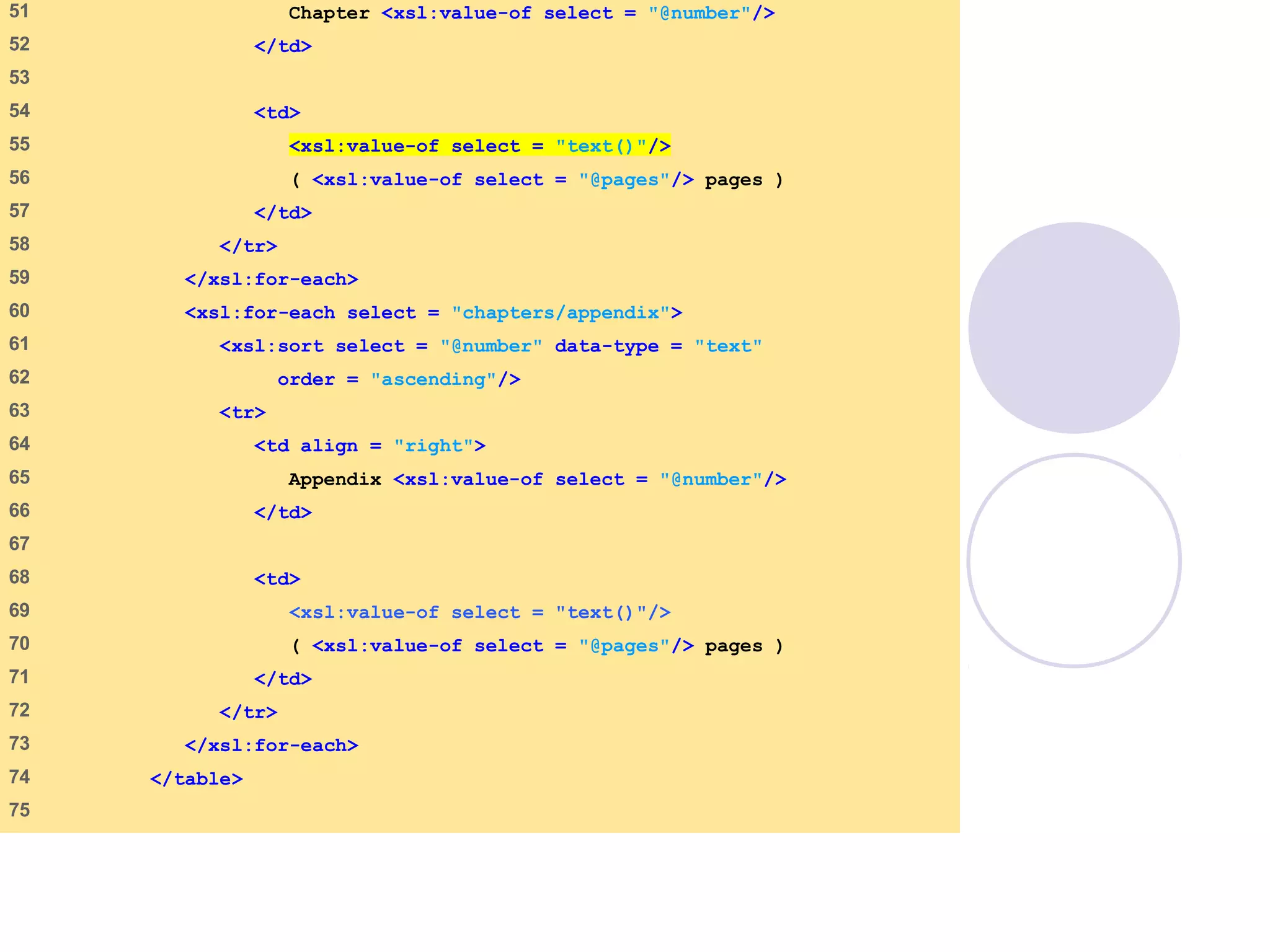
sorting.xsl
(3 of 4)
51 Chapter <xsl:value-of select = "@number"/>
52 </td>
53
54 <td>
55 <xsl:value-of select = "text()"/>
56 ( <xsl:value-of select = "@pages"/> pages )
57 </td>
58 </tr>
59 </xsl:for-each>
60 <xsl:for-each select = "chapters/appendix">
61 <xsl:sort select = "@number" data-type = "text"
62 order = "ascending"/>
63 <tr>
64 <td align = "right">
65 Appendix <xsl:value-of select = "@number"/>
66 </td>
67
68 <td>
69 <xsl:value-of select = "text()"/>
70 ( <xsl:value-of select = "@pages"/> pages )
71 </td>
72 </tr>
73 </xsl:for-each>
74 </table>
75
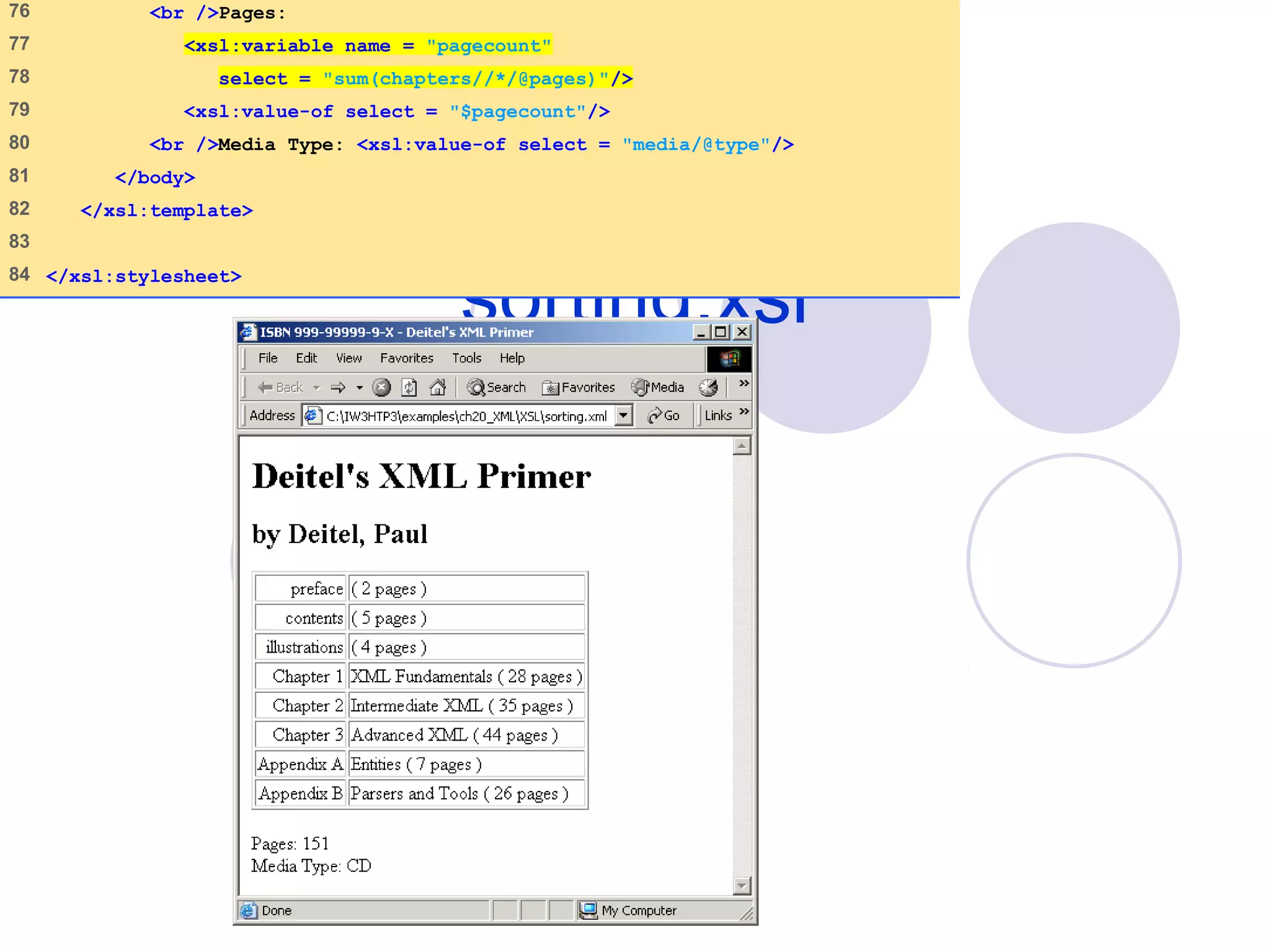
sorting.xsl
(4 of 4)
76 <br />Pages:
77 <xsl:variable name = "pagecount"
78 select = "sum(chapters//*/@pages)"/>
79 <xsl:value-of select = "$pagecount"/>
80 <br />Media Type: <xsl:value-of select = "media/@type"/>
81 </body>
82 </xsl:template>
83
84 </xsl:stylesheet>
09/30/15 © Reem Al-Attas 71
20.10 Simple Object Access
Protocol (SOAP)
 Developed by IBM, Lotus Development
Corporation, Microsoft, DevelopMentor, and
Userland Software
 XML-based protocol
 Allows applications to communicate over
Internet
 SOAP message
 Envelope
 A structure describes a method call
 Body
 Request
09/30/15 © Reem Al-Attas 72
20.11 Web Services
Standards
 XML
 SOAP
 Web Services Description Language (WSDL)
 Universal Description, Discovery and
Integration (UDDI)
 Modular programming
 Modularization
• Less error prone and promotes software reuse
09/30/15 © Reem Al-Attas 73
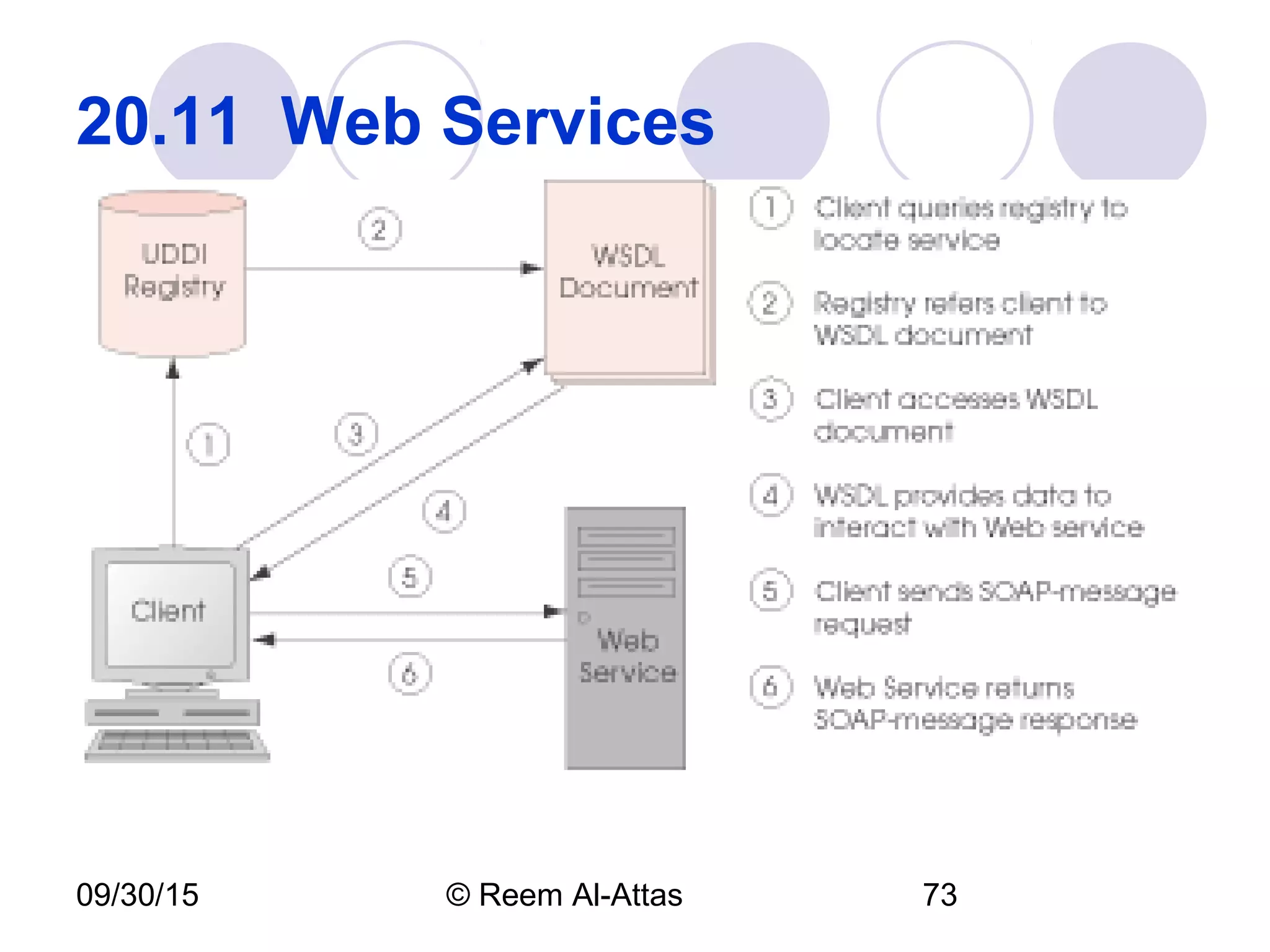
20.11 Web Services
09/30/15 © Reem Al-Attas 74
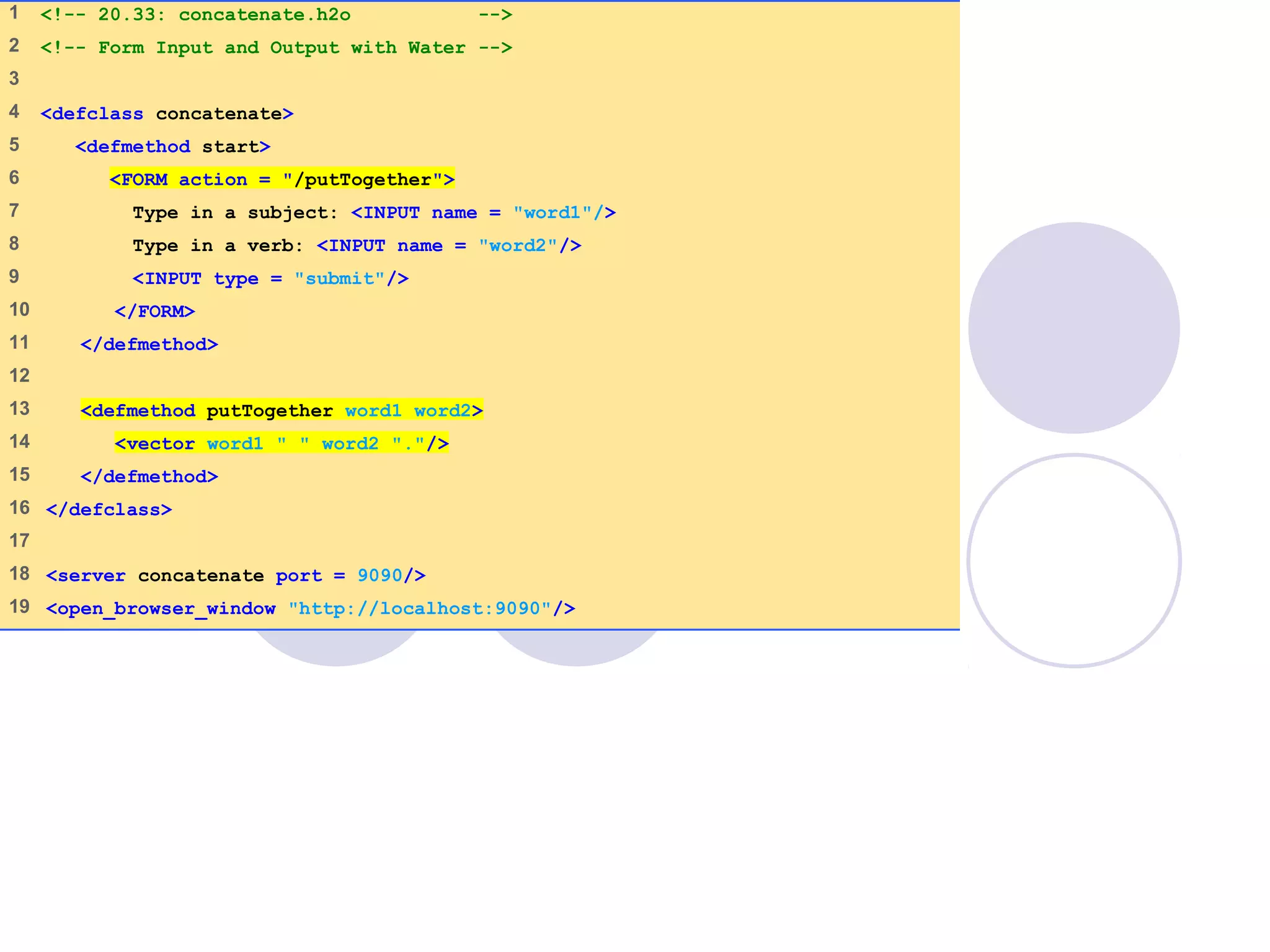
20.12 Water XML-Based
Programming Language
Simplifies XML and Web services
programming
Represents all objects and data as XML
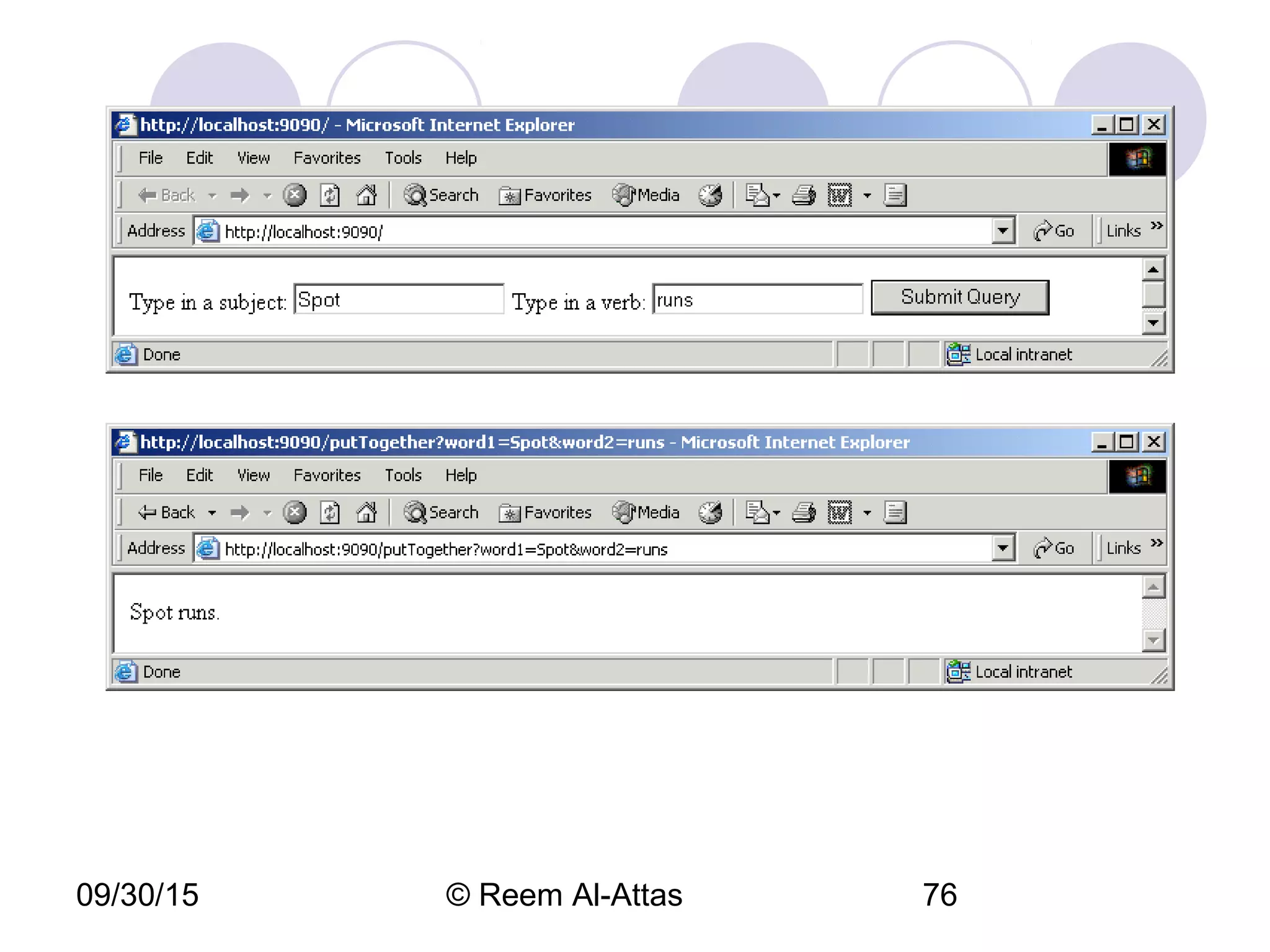
concatenate.h2o
1 of 1
1 <!-- 20.33: concatenate.h2o -->
2 <!-- Form Input and Output with Water -->
3
4 <defclass concatenate>
5 <defmethod start>
6 <FORM action = "/putTogether">
7 Type in a subject: <INPUT name = "word1"/>
8 Type in a verb: <INPUT name = "word2"/>
9 <INPUT type = "submit"/>
10 </FORM>
11 </defmethod>
12
13 <defmethod putTogether word1 word2>
14 <vector word1 " " word2 "."/>
15 </defmethod>
16 </defclass>
17
18 <server concatenate port = 9090/>
19 <open_browser_window "http://localhost:9090"/>
09/30/15 © Reem Al-Attas 76
09/30/15 © Reem Al-Attas 77
Assignment 11
 1) Exercise # 14.6. Due Date for A # 11:
 Next Monday before
your lecture.

XML - EXtensible Markup Language

  • 1.
  • 2.
    09/30/15 © ReemAl-Attas 2 Introduction  XML (Extensible Markup Language)  Derived from Standard Generalized Markup Language (SGML)  Open technology for electronic data exchange and storage  Create other markup languages to describe data in structured manner
  • 3.
    09/30/15 © ReemAl-Attas 3 Introduction XML documents  Contain only data, not formatting instructions  Highly portable  XML parser  Support Document Object Model or Simple API XML  Document Type Definition (DTD, schema)  XML document can reference another that defines proper structure XML-based markup languages  XML vocabularies
  • 4.
    09/30/15 © ReemAl-Attas 4 Structuring Data  XML declaration  Value version  Indicates the XML version to which the document conforms  Root element  Element that encompasses every other elements  Container element  Any element contains other elements  Child elements  Elements inside a container element  Empty element flag  Does not contain any text  DTD documents  End with .dtd extension
  • 5.
    article.xml (1 of 1) 1<?xml version = "1.0"?> 2 3 <!-- Fig. 20.1: article.xml --> 4 <!-- Article structured with XML --> 5 6 <article> 7 8 <title>Simple XML</title> 9 10 <date>July 15, 2003</date> 11 12 <author> 13 <firstName>Carpenter</firstName> 14 <lastName>Cal</lastName> 15 </author> 16 17 <summary>XML is pretty easy.</summary> 18 19 <content>Once you have mastered XHTML, XML is easily 20 learned. You must remember that XML is not for 21 displaying information but for managing information. 22 </content> 23 24 </article>
  • 6.
    09/30/15 © ReemAl-Attas 6
  • 7.
    09/30/15 © ReemAl-Attas 7
  • 8.
    letter.xml (1 of 2) 1<?xml version = "1.0"?> 2 3 <!-- Fig. 20.3: letter.xml --> 4 <!-- Business letter formatted with XML --> 5 6 <!DOCTYPE letter SYSTEM "letter.dtd"> 7 8 <letter> 9 10 <contact type = "from"> 11 <name>John Doe</name> 12 <address1>123 Main St.</address1> 13 <address2></address2> 14 <city>Anytown</city> 15 <state>Anystate</state> 16 <zip>12345</zip> 17 <phone>555-1234</phone> 18 <flag gender = "M"/> 19 </contact> 20 21 <contact type = "to"> 22 <name>Joe Schmoe</name> 23 <address1>Box 12345</address1> 24 <address2>15 Any Ave.</address2> 25 <city>Othertown</city>
  • 9.
    letter.xml (2 of 2) 26<state>Otherstate</state> 27 <zip>67890</zip> 28 <phone>555-4321</phone> 29 <flag gender = "M"/> 30 </contact> 31 32 <salutation>Dear Sir:</salutation> 33 34 <paragraph>It is our privilege to inform you about our new 35 database managed with XML. This new system allows 36 you to reduce the load of your inventory list server by 37 having the client machine perform the work of sorting 38 and filtering the data.</paragraph> 39 <closing>Sincerely</closing> 40 <signature>Mr. Doe</signature> 41 42 </letter>
  • 10.
    09/30/15 © ReemAl-Attas 10
  • 11.
    09/30/15 © ReemAl-Attas 11
  • 12.
    09/30/15 © ReemAl-Attas 12 XML Namespaces XML  Allows document authors to create custom elements  Naming collisions  XML namespace  Collection of element and attribute names  Uniform resource identifier (URI) • Uniquely identifies the namespace • A string of text for differentiating names  Any name except for reserved namespace xml  Directory • Root element and contains other elements
  • 13.
    namespace.xml (1 of 1) 1<?xml version = "1.0"?> 2 3 <!-- Fig. 20.4 : namespace.xml --> 4 <!-- Demonstrating Namespaces --> 5 6 <text:directory xmlns:text = "urn:deitel:textInfo" 7 xmlns:image = "urn:deitel:imageInfo"> 8 9 <text:file filename = "book.xml"> 10 <text:description>A book list</text:description> 11 </text:file> 12 13 <image:file filename = "funny.jpg"> 14 <image:description>A funny picture</image:description> 15 <image:size width = "200" height = "100"/> 16 </image:file> 17 18 </text:directory>
  • 14.
    defaultnamespace .xml (1 of 1) 1<?xml version = "1.0"?> 2 3 <!-- Fig. 20.5 : defaultnamespace.xml --> 4 <!-- Using Default Namespaces --> 5 6 <directory xmlns = "urn:deitel:textInfo" 7 xmlns:image = "urn:deitel:imageInfo"> 8 9 <file filename = "book.xml"> 10 <description>A book list</description> 11 </file> 12 13 <image:file filename = "funny.jpg"> 14 <image:description>A funny picture</image:description> 15 <image:size width = "200" height = "100"/> 16 </image:file> 17 18 </directory>
  • 15.
    09/30/15 © ReemAl-Attas 15 Document Type Definitions (DTDs) and Schemas Two types of documents for specifying XML document structure  Document Type Definition (DTDs)  Schemas
  • 16.
    09/30/15 © ReemAl-Attas 16 Document Type Definitions  Enables XML parser to verify whether XML document is valid  Allow independent user groups to check structure and exchange data in standardized format  Expresses set of rules for structure using EBNF grammar  ELEMENT type declaration  Defines rules  ATTLIST attribute-list declaration  Defines an attribute
  • 17.
    letter.dtd (1 of 1) 1<!-- Fig. 20.6: letter.dtd --> 2 <!-- DTD document for letter.xml --> 3 4 <!ELEMENT letter ( contact+, salutation, paragraph+, 5 closing, signature )> 6 7 <!ELEMENT contact ( name, address1, address2, city, state, 8 zip, phone, flag )> 9 <!ATTLIST contact type CDATA #IMPLIED> 10 11 <!ELEMENT name ( #PCDATA )> 12 <!ELEMENT address1 ( #PCDATA )> 13 <!ELEMENT address2 ( #PCDATA )> 14 <!ELEMENT city ( #PCDATA )> 15 <!ELEMENT state ( #PCDATA )> 16 <!ELEMENT zip ( #PCDATA )> 17 <!ELEMENT phone ( #PCDATA )> 18 <!ELEMENT flag EMPTY> 19 <!ATTLIST flag gender (M | F) "M"> 20 21 <!ELEMENT salutation ( #PCDATA )> 22 <!ELEMENT closing ( #PCDATA )> 23 <!ELEMENT paragraph ( #PCDATA )> 24 <!ELEMENT signature ( #PCDATA )>
  • 18.
    09/30/15 © ReemAl-Attas 18 W3C XML Schema Documents Schemas  Specify XML document structure  Do not use EBNF grammar  Use XML syntax  Can be manipulated like other XML documents  Require validating parsers  XML schemas  Schema vocabulary the W3C created  Recommendation  Schema valid • XML document that conforms to a schema document • Use .xsd extension
  • 19.
    09/30/15 © ReemAl-Attas 19 W3C XML Schema Documents Root element schema  Contains elements that define the XML document structure  targetNamespace  Namespace of XML vocabulary the schema defines  element tag  Defines element to be included in XML document structure  name and type attributes  Specify element’s name and data type respectively  Built-in simple types  date, int, double, time, etc
  • 20.
    09/30/15 © ReemAl-Attas 20 W3C XML Schema Documents Two categories of data types  Simple types  Cannot contain attributes or child elements  Complex types  May contain attributes and child elements  complexType • Define complex type  Simple content • Cannot have child elements  Complex content • May have child elements
  • 21.
    book.xml (1 of 1) 1<?xml version = "1.0"?> 2 3 <!-- Fig. 20.7 : book.xml --> 4 <!-- Book list marked up as XML --> 5 6 <deitel:books xmlns:deitel = "http://www.deitel.com/booklist"> 7 <book> 8 <title>XML How to Program</title> 9 </book> 10 <book> 11 <title>C How to Program</title> 12 </book> 13 <book> 14 <title>Java How to Program</title> 15 </book> 16 <book> 17 <title>C++ How to Program</title> 18 </book> 19 <book> 20 <title>Perl How to Program</title> 21 </book> 22 </deitel:books>
  • 22.
    book.xsd (1 of 1) 1<?xml version = "1.0"?> 2 3 <!-- Fig. 20.8 : book.xsd --> 4 <!-- Simple W3C XML Schema document --> 5 6 <schema xmlns = "http://www.w3.org/2001/XMLSchema" 7 xmlns:deitel = "http://www.deitel.com/booklist" 8 targetNamespace = "http://www.deitel.com/booklist"> 9 10 <element name = "books" type = "deitel:BooksType"/> 11 12 <complexType name = "BooksType"> 13 <sequence> 14 <element name = "book" type = "deitel:SingleBookType" 15 minOccurs = "1" maxOccurs = "unbounded"/> 16 </sequence> 17 </complexType> 18 19 <complexType name = "SingleBookType"> 20 <sequence> 21 <element name = "title" type = "string"/> 22 </sequence> 23 </complexType> 24 25 </schema>
  • 23.
    09/30/15 © ReemAl-Attas 23 Target: file:///usr/local/XSV/xsvlog/@11038.1uploaded (Real name: C:IW3HTP3examplesch 20book.xsd) docElt: {http://www.w3.org/2001/XMLSchema}schema Validation was strict, starting with type [Anonymous] The schema(s) used for schema-validation had no errors No schema-validity problems were found in the target
  • 24.
    computer.xsd (1 of 2) 1<?xml version = "1.0"?> 2 3 <!-- Fig 20.9 : computer.xsd --> 4 <!-- W3C XML Schema document --> 5 6 <schema xmlns = "http://www.w3.org/2001/XMLSchema" 7 xmlns:computer = "http://www.deitel.com/computer" 8 targetNamespace = "http://www.deitel.com/computer"> 9 10 <simpleType name = "gigahertz"> 11 <restriction base = "decimal"> 12 <minInclusive value = "2.1"/> 13 </restriction> 14 </simpleType> 15 16 <complexType name = "CPU"> 17 <simpleContent> 18 <extension base = "string"> 19 <attribute name = "model" type = "string"/> 20 </extension> 21 </simpleContent> 22 </complexType> 23
  • 25.
    computer.xsd (2 of 2) 24<complexType name = "portable"> 25 <all> 26 <element name = "processor" type = "computer:CPU"/> 27 <element name = "monitor" type = "int"/> 28 <element name = "CPUSpeed" type = "computer:gigahertz"/> 29 <element name = "RAM" type = "int"/> 30 </all> 31 <attribute name = "manufacturer" type = "string"/> 32 </complexType> 33 34 <element name = "laptop" type = "computer:portable"/> 35 36 </schema>
  • 26.
    laptop.xml (1 of 1) 1<?xml version = "1.0"?> 2 3 <!-- Fig 20.10 : laptop.xml --> 4 <!-- Laptop components marked up as XML --> 5 6 <computer:laptop xmlns:computer = "http://www.deitel.com/computer" 7 manufacturer = "IBM"> 8 9 <processor model = "Centrino">Intel</processor> 10 <monitor>17</monitor> 11 <CPUSpeed>2.4</CPUSpeed> 12 <RAM>256</RAM> 13 14 </computer:laptop>
  • 27.
    09/30/15 © ReemAl-Attas 27 XML Vocabularies W3C XML Schema XSL (Extensible Stylesheet Language) MathML (Mathematical Markup Language) SVG (Scalable Vector Graphics) WML (Wireless Markup Language) XBRL (Extensible Business Reporting Language) XUL (Extensible User Interface Language) PDML (Product Data Markup Language)
  • 28.
    09/30/15 © ReemAl-Attas 28 20.5.1 MathML Describe mathematical notations and expressions MathML markup  Content markup  Provides tags that embody mathematical concepts  Allows programmers to write mathematical notation specific to different areas of mathematics  Distinguishes between different uses of same symbol  Presentation markup  Directed towards formatting and displaying mathematical notation
  • 29.
    mathml1.html (1 of 2) 1<?xml version="1.0"?> 2 <!DOCTYPE html PUBLIC "-//W3C//DTD XHTML 1.0 Transitional//EN" 3 "http://www.w3.org/TR/xhtml1/DTD/xhtml1-transitional.dtd"> 4 5 <!-- Fig. 20.11: mathml1.html --> 6 <!-- Simple MathML --> 7 8 <html xmlns="http://www.w3.org/1999/xhtml"> 9 10 <head><title>Simple MathML Example</title></head> 11 12 <body> 13 14 <math xmlns = "http://www.w3.org/1998/Math/MathML"> 15 16 <mrow> 17 <mn>2</mn> 18 <mo>+</mo> 19 <mn>3</mn> 20 <mo>=</mo> 21 <mn>5</mn> 22 </mrow> 23 24 </math> 25
  • 30.
    mathml1.html (2 of 2) 26</body> 27 </html> MathML displayed in the Amaya browser. [Courtesy of World Wide Web Consortium (W3C).]
  • 31.
    mathml2.html (1 of 2) 1<?xml version="1.0"?> 2 <!DOCTYPE html PUBLIC "-//W3C//DTD XHTML 1.0 Transitional//EN" 3 "HTTP://WWW.W3.ORG/TR/XHTML1/DTD/XHTML1-TRANSITIONAL.DTD"> 4 5 <!-- FIG. 20.12: mathml2.html --> 6 <!-- Simple MathML --> 7 8 <html xmlns="http://www.w3.org/1999/xhtml"> 9 10 <head><title>Algebraic MathML Example</title></head> 11 12 <body> 13 14 <math xmlns = "http://www.w3.org/1998/Math/MathML"> 15 <mrow> 16 17 <mrow> 18 <mn>3</mn> 19 <mo>&InvisibleTimes;</mo> 20 21 <msup> 22 <mi>x</mi> 23 <mn>2</mn> 24 </msup> 25
  • 32.
    mathml2.html (2 of 2) 26</mrow> 27 28 <mo>+</mo> 29 <mi>x</mi> 30 <mo>-</mo> 31 32 <mfrac> 33 <mn>2</mn> 34 <mi>x</mi> 35 </mfrac> 36 37 <mo>=</mo> 38 <mn>0</mn> 39 40 </mrow> 41 </math> 42 43 </body> 44 </html> MathML displayed in the Amaya browser. [Courtesy of World Wide Web Consortium (W3C).]
  • 33.
    mathml3.html (1 of 3) 1<?xml version = "1.0"?> 2 <!DOCTYPE html PUBLIC "-//W3C//DTD XHTML 1.0 Transitional//EN" 3 "http://www.w3.org/TR/xhtml1/DTD/xhtml1-transitional.dtd"> 4 5 <!-- Fig. 20.13 mathml3.html --> 6 <!-- Calculus example using MathML --> 7 8 <html xmlns="http://www.w3.org/1999/xhtml"> 9 10 <head><title>Calculus MathML Example</title></head> 11 12 <body> 13 14 <math xmlns = "http://www.w3.org/1998/Math/MathML"> 15 <mrow> 16 <msubsup> 17 18 <mo>&Integral;</mo> 19 <mn>0</mn> 20 21 <mrow> 22 <mn>1</mn> 23 <mo>-</mo> 24 <mi>y</mi> 25 </mrow>
  • 34.
    mathml3.html (2 of 3) 26 27</msubsup> 28 29 <msqrt> 30 <mrow> 31 32 <mn>4</mn> 33 <mo>&InvisibleTimes;</mo> 34 35 <msup> 36 <mi>x</mi> 37 <mn>2</mn> 38 </msup> 39 40 <mo>+</mo> 41 <mi>y</mi> 42 43 </mrow> 44 </msqrt> 45 46 <mo>&delta;</mo> 47 <mi>x</mi> 48 </mrow> 49 </math> 50 </body>
  • 35.
    mathml3.html (3 of 3) 51</html> Integral symbol Delta symbol MathML displayed in the Amaya browser. [Courtesy of World Wide Web Consortium (W3C).]
  • 36.
    09/30/15 © ReemAl-Attas 36 20.5.2 Chemical Markup Language (CML) XML vocabulary for representing molecular and chemical information
  • 37.
    ammonia.xml (1 of 2) 1<?xml version = "1.0" ?> 2 3 <!-- Fig. 20.14 : ammonia.xml --> 4 <!-- Structure of ammonia --> 5 6 <molecule id = "ammonia"> 7 8 <atomArray> 9 10 <stringArray builtin = "id" > 11 Nitrogen Hydrogen1 Hydrogen2 Hydrogen3 12 </stringArray> 13 14 <stringArray builtin = "elementType"> 15 N H H H 16 </stringArray> 17 18 <floatArray builtin = "x3"> 19 -0.7 -1.3 -1.2 -0.7 20 </floatArray> 21 22 <floatArray builtin = "y3"> 23 -0.0 0.2 0.8 -0.9 24 </floatArray> 25
  • 38.
    ammonia.xml 2 of 2 26<floatArray builtin = "z3"> 27 0.0 -0.9 0.6 0.6 28 </floatArray> 29 30 </atomArray> 31 32 </molecule> (Courtesy of the Jmol Project.)
  • 39.
    09/30/15 © ReemAl-Attas 39 20.5.3 MusicXML Music distribution Simplifies exchange of musical scores over Internet Developed by Recordare Mark up all type of music DTD  Less powerful than Schema  Simpler to program Relies heavily on elements rather than
  • 40.
    09/30/15 © ReemAl-Attas 40 20.5.3 MusicXML Fig. 20.15 MusicXML markup rendered by Finale 2003 (Courtesy of MakeMusic! Inc.).
  • 41.
    09/30/15 © ReemAl-Attas 41 20.5.4 RSS  RDF Site summary Popular and simple XML format designed to share headlines and Web content between Web sites RSS file  RSS feed  Container rss element  Denotes the RSS version  Container channel elements  Descriptive tags  Item elements •
  • 42.
    deitel.rss (1 of 2) 1    <?xmlversion = "1.0" ?> 2     3    <!-- Fig. 20.16 deitel.rss --> 4    <!-- RSS feed --> 5     6    <rss version = "2.0"> 7     <channel> 8     <title>Deitel</title> 9     <link>http://www.deitel.com</link> 10    <description>CS textbooks</description> 11    <language>en-us</language> 12    <item> 13    <title>Simply VB How To Program</title> 14    <description> 15    This book combines the DEITEL signature live-code approach 16    with a new application-driven methodology, in which readers 17    build real-world applications that incorporate Visual 18    Basic .NET programming fundamentals. 19    </description> 20    <link> 21    http://www.deitel.com/books/downloads.html#vbnetHTP2 22    </link> 23    </item> 24    <item> 25    <title>Visual C++ </title>
  • 43.
    deitel.rss (2 of 2) 26   <description> 27    For experienced programmers. Pictures of pyramids 28    on the cover. 29    </description> 30    <link> 31    http://www.deitel.com/books/vbnetFEP1 32    </link> 33    </item> 34    </channel> 35   </rss>
  • 44.
    09/30/15 © ReemAl-Attas 44 20.5.5 Other Markup Languages  Markup language Description VoiceXML The VoiceXML Forum founded by AT&T, IBM, Lucent and Motorola developed VoiceXML. It provides interactive voice communication between humans and computers through a telephone, PDA (personal digital assistant) or desktop computer. IBM’s VoiceXML SDK can process VoiceXML documents. Visit www.voicexml.org for more information on VoiceXML. We introduce VoiceXML in Chapter 29, Accessibility. Synchronous Multimedia Integration Language (SMIL ) SMIL is an XML vocabulary for multimedia presentations. The W3C was the primary developer of SMIL, with contributions from some companies. Visit www.w3.org/AudioVideo for more on SMIL. We introduce SMIL in Chapter 28, Multimedia. Research Information Exchange Markup Language (RIXML) RIXML, developed by a consortium of brokerage firms, marks up investment data. Visit www.rixml.org for more information on RIXML. ComicsML A language developed by Jason MacIntosh for marking up comics. Visit www.jmac.org/projects/comics_ml for more information on ComicsML. Geography Markup Language (GML) OpenGIS developed the Geography Markup Language to describe geographic information. Visit www.opengis.org for more information on GML. Extensible User Interface Language (XUL) The Mozilla Project created the Extensible User Interface Language for describing graphical user interfaces in a platform-independent way. Fig. 20.17   Various markup languages derived from XML.
  • 45.
    09/30/15 © ReemAl-Attas 45 20.6  Document Object Model  (DOM)  Document Object Model (DOM) tree  Nodes  Parent node  Ancestor nodes  Child node  Descendant nodes  Sibling nodes  One single root node  Contains all other nodes in document Application Programming Interface (API)
  • 46.
    09/30/15 © ReemAl-Attas 46 20.6  Document Object Model  (DOM) firstName lastName contents summary author date title article children of the article root node siblings root element Fig. 20.18 Tree structure for article.xml.
  • 47.
    09/30/15 © ReemAl-Attas 47 20.7  DOM Methods   nodeName  Name of an element, attribute, or so on  NodeList  List of nodes  Can be accessed like an array using method item  Property length  Returns number of children in root element  nextSibling  Returns node’s next sibling  nodeValue  Retrieves value of text node
  • 48.
    DOMExample.html (1 of 3) 1    <?xmlversion="1.0"?> 2    <!DOCTYPE html PUBLIC "-//W3C//DTD XHTML 1.0 Transitional//EN" 3     "http://www.w3.org/TR/xhtml1/DTD/xhtml1-transitional.dtd"> 4    <html xmlns="http://www.w3.org/1999/xhtml"> 5     6    <!-- Fig. 20.19: DOMExample.html --> 7    <!-- DOM with JavaScript --> 8     9     <head> 10    <title>A DOM Example</title> 11    </head> 12    13    <body> 14    15    <script type = "text/javascript" language = "JavaScript"> 16    <!-- 17    var xmlDocument = new ActiveXObject( "Microsoft.XMLDOM" ); 18    19    xmlDocument.load( "article.xml" ); 20    21    // get the root element 22    var element = xmlDocument.documentElement; 23    24    document.writeln( 25    "<p>Here is the root node of the document: " +
  • 49.
    DOMExample.html (2 of 3) 26   "<strong>" + element.nodeName + "</strong>" + 27    "<br />The following are its child elements:" + 28    "</p><ul>" ); 29    30    // traverse all child nodes of root element 31    for ( var i = 0; i < element.childNodes.length; i++ ) { 32    var curNode = element.childNodes.item( i ); 33    34    // print node name of each child element 35    document.writeln( "<li><strong>" + curNode.nodeName 36    + "</strong></li>" ); 37    } 38    39    document.writeln( "</ul>" ); 40    41    // get the first child node of root element 42    var currentNode = element.firstChild; 43    44    document.writeln( "<p>The first child of root node is: " + 45    "<strong>" + currentNode.nodeName + "</strong>" + 46    "<br />whose next sibling is:" ); 47    48    // get the next sibling of first child 49    var nextSib = currentNode.nextSibling; 50   
  • 50.
    DOMExample.html (3 of 3) 51   document.writeln( "<strong>" + nextSib.nodeName + 52    "</strong>.<br />Value of <strong>" + 53    nextSib.nodeName + "</strong> element is: " ); 54    55    var value = nextSib.firstChild; 56    57    // print the text value of the sibling 58    document.writeln( "<em>" + value.nodeValue + "</em>" + 59    "<br />Parent node of <strong>" + nextSib.nodeName + 60    "</strong> is: <strong>" + 61    nextSib.parentNode.nodeName + "</strong>.</p>" ); 62    --> 63    </script> 64    65    </body> 66   </html>
  • 51.
    09/30/15 © ReemAl-Attas 51
  • 52.
    09/30/15 © ReemAl-Attas 52 20.7  DOM Methods Method Description getNodeType Returns an integer representing the node type. getNodeName Returns the name of the node. If the node does not have a name, a string consisting of # followed by the type of the node is returned. getNodeValue Returns a string or null depending on the node type. getParentNode Returns the parent node. getChildNodes Returns a NodeList (Fig. 20.21) with all the children of the node. getFirstChild Returns the first child in the NodeList. getLastChild Returns the last child in the NodeList. getPreviousSibling Returns the node preceding this node, or null. getNextSibling Returns the node following this node, or null. getAttributes Returns a NamedNodeMap (Fig. 20.22) containing the attributes for this node. insertBefore Inserts the node (passed as the first argument) before the existing node (passed as the second argument). If the new node is already in the tree, it is removed before insertion. The same behavior is true for other methods that add nodes.
  • 53.
    09/30/15 © ReemAl-Attas 53 20.7  DOM Methods replaceChild Replaces the second argument node with the first argument node. removeChild Removes the child node passed to it. appendChild Appends the node passed to it to the list of child nodes. getElementsByTagName Returns a NodeList of all the nodes in the subtree with the name specified as the first argument ordered as they would be encountered in a preorder traversal. An optional second argument specifies either the direct child nodes (0) or any descendant (1). getChildAtIndex Returns the child node at the specified index in the child list. addText Appends the string passed to it to the last Node if it is a Text node, otherwise creates a new Text node for the string and adds it to the end of the child list. isAncestor Returns true if the node passed is a parent of the node or is the node itself. Fig. 20.20  Some DOM Node object methods.
  • 54.
    09/30/15 © ReemAl-Attas 54 20.7  DOM Methods Method Description item Passed an index number, returns the element node at that index. Indices range from 0 to length – 1. getLength Returns the total number of nodes in the list. Fig. 20.21  Some DOM NodeList methods. Method Description getNamedItem Returns either a node in the NamedNodeMap with the specified name or null. setNamedItem Stores a node passed to it in the NamedNodeMap. Two nodes with the same name cannot be stored in the same NamedNodeMap. removeNamedItem Removes a specified node from the NamedNodeMap. getLength Returns the total number of nodes in the NamedNodeMap. getValues Returns a NodeList containing all the nodes in the NamedNodeMap. Fig. 20.22   Some DOM NamedNodeMap methods.
  • 55.
    09/30/15 © ReemAl-Attas 55 20.7  DOM Methods Method Description getDocumentElement Returns the root node of the document. createElement Creates and returns an element node with the specified tag name. createAttribute Creates and returns an attribute node with the specified name and value. createTextNode Creates and returns a text node that contains the specified text. createComment Creates a comment to hold the specified text. Fig. 20.23   Some DOM Document methods.
  • 56.
    09/30/15 © ReemAl-Attas 56 20.7  DOM MethodsMethod Description getTagName Returns the name of the element. setTagName Changes the name of the element to the specified name. getAttribute Returns the value of the specified attribute. setAttribute Changes the value of the attribute passed as the first argument to the value passed as the second argument. removeAttribute Removes the specified attribute. getAttributeNode Returns the specified attribute node. setAttributeNode Adds a new attribute node with the specified name. Fig. 20.24   Some DOM Element methods. Method Description getValue Returns the specified attribute’s value. setValue Changes the value of the attribute to the specified value. getName Returns the name of the attribute. Fig. 20.25   Some DOM Attr methods. Method Description getData Returns the data contained in the node (text or comment). setData Sets the node’s data. getLength Returns the number of characters contained in the node. Fig. 20.26   Some DOM Text and Comment methods.
  • 57.
    09/30/15 © ReemAl-Attas 57 20.8  Simple API for XML (SAX)  Developed by members of XML-DEV mailing list Parse XML documents using event-based model Provide different APIs for accessing XML document information Invoke listener methods Passes data to application from XML document
  • 58.
    09/30/15 © ReemAl-Attas 58 20.9  Extensible Stylesheet  Language (XSL)  Specify how programs should render XML document data  XSL-FO (XSL Formatted Objects)  Vocabulary for specifying formatting  XSLT (XSL Transformation)  Source tree  Result tree  Xpath  Locate parts of the source tree document that match templates defined in the XSL stylesheet
  • 59.
    09/30/15 © ReemAl-Attas 59 20.9  Extensible Stylesheet  Language (XSL)Element Description <xsl:apply-templates> Applies the templates of the XSL document to the children of the current node. <xsl:apply-templates match = "expression"> Applies the templates of the XSL document to the children of expression. The value of the attribute match (i.e., expression) must be some XPath expression that specifies elements. <xsl:template> Contains rules to apply when a specified node is matched. <xsl:value-of select = "expression"> Selects the value of an XML element and adds it to the output tree of the transformation. The required select attribute contains an XPath expression. <xsl:for-each select = "expression"> Implicitly contains a template that is applied to every node selected by the XPath specified by the select attribute. <xsl:sort select = "expression"> Used as a child element of an <xsl:apply-templates> or <xsl:for-each> element. Sorts the nodes selected by the <apply-template> or <for-each> element so that the nodes are processed in sorted order. <xsl:output> Has various attributes to define the format (e.g., xml, html), version (e.g., 1.2, 2.0), document type and media type of the output document. This tag is a top-level element, which means that it can be used only as a child element of a stylesheet. <xsl:copy> Adds the current node to the output tree. Fig. 20.27  Commonly used XSL stylesheet elements.
  • 60.
    games.xml (1 of 2) 1    <?xmlversion = "1.0"?> 2    <?xml:stylesheet type = "text/xsl" href = "games.xsl"?> 3     4    <!-- Fig. 20.28 : games.xml --> 5    <!-- Sports Database --> 6     7    <sports> 8     9     <game id = "783"> 10    <name>Cricket</name> 11    12    <paragraph> 13    Popular in Commonwealth nations. 14    </paragraph> 15    </game> 16    17    <game id = "239"> 18    <name>Baseball</name> 19    20    <paragraph> 21    Popular in America. 22    </paragraph> 23    </game> 24   
  • 61.
    games.xml (2 of 2) 25<game id = "418"> 26 <name>Soccer (Football)</name> 27 28 <paragraph> 29 Popular sport in the world. 30 </paragraph> 31 </game> 32 33 </sports>
  • 62.
    games.xsl (1 of 3) 1<?xml version = "1.0"?> 2 3 <!-- Fig. 20.29 : games.xsl --> 4 <!-- A simple XSLT transformation --> 5 6 <!-- reference XSL stylesheet URI --> 7 <xsl:stylesheet version = "1.0" 8 xmlns:xsl = "http://www.w3.org/1999/XSL/Transform"> 9 10 <xsl:output method = "html" omit-xml-declaration = "no" 11 doctype-system = 12 "http://www.w3.org/TR/xhtml1/DTD/xhtml1-strict.dtd" 13 doctype-public = "-//W3C//DTD XHTML 1.0 Strict//EN"/> 14 15 <xsl:template match = "/"> 16 17 <html xmlns="http://www.w3.org/1999/xhtml"> 18 19 <head> 20 <title>Sports</title> 21 </head> 22 23 <body> 24 25 <table border = "1" bgcolor = "cyan">
  • 63.
    games.xsl (2 of 3) 26 27<thead> 28 29 <tr> 30 <th>ID</th> 31 <th>Sport</th> 32 <th>Information</th> 33 </tr> 34 35 </thead> 36 37 <!-- insert each name and paragraph element value --> 38 <!-- into a table row. --> 39 <xsl:for-each select = "/sports/game"> 40 41 <tr> 42 <td><xsl:value-of select = "@id"/></td> 43 <td><xsl:value-of select = "name"/></td> 44 <td><xsl:value-of select = "paragraph"/></td> 45 </tr> 46 47 </xsl:for-each> 48 49 </table> 50
  • 64.
    games.xsl (3 of 3) 51</body> 52 53 </html> 54 55 </xsl:template> 56 57 </xsl:stylesheet>
  • 65.
    sorting.html (1 of 2) 1<?xml version = "1.0"?> 2 3 <!-- Fig. 20.30 : sorting.xml --> 4 <!-- Usage of elements and attributes --> 5 6 <?xml:stylesheet type = "text/xsl" href = "sorting.xsl"?> 7 8 <book isbn = "999-99999-9-X"> 9 <title>Deitel&apos;s XML Primer</title> 10 11 <author> 12 <firstName>Paul</firstName> 13 <lastName>Deitel</lastName> 14 </author> 15 16 <chapters> 17 <frontMatter> 18 <preface pages = "2"/> 19 <contents pages = "5"/> 20 <illustrations pages = "4"/> 21 </frontMatter> 22 23 <chapter number = "3" pages = "44"> 24 Advanced XML</chapter>
  • 66.
    sorting.html (2 of 2) 25<chapter number = "2" pages = "35"> 26 Intermediate XML</chapter> 27 <appendix number = "B" pages = "26"> 28 Parsers and Tools</appendix> 29 <appendix number = "A" pages = "7"> 30 Entities</appendix> 31 <chapter number = "1" pages = "28"> 32 XML Fundamentals</chapter> 33 </chapters> 34 35 <media type = "CD"/> 36 </book>
  • 67.
    sorting.xsl (1 of 4) 1<?xml version = "1.0"?> 2 3 <!-- Fig. 20.31 : sorting.xsl --> 4 <!-- Transformation of Book information into XHTML --> 5 6 <xsl:stylesheet version = "1.0" 7 xmlns:xsl = "http://www.w3.org/1999/XSL/Transform"> 8 9 <xsl:output method = "html" omit-xml-declaration = "no" 10 11 doctype-system = 12 "http://www.w3.org/TR/xhtml1/DTD/xhtml1-strict.dtd" 13 doctype-public = "-//W3C//DTD XHTML 1.0 Strict//EN"/> 14 15 <xsl:template match = "/"> 16 <html xmlns = "http://www.w3.org/1999/xhtml"> 17 <xsl:apply-templates/> 18 </html> 19 </xsl:template> 20 21 <xsl:template match = "book"> 22 <head> 23 <title>ISBN <xsl:value-of select = "@isbn"/> - 24 <xsl:value-of select = "title"/></title> 25 </head>
  • 68.
    sorting.xsl (2 of 4) 26 27<body> 28 <h1><xsl:value-of select = "title"/></h1> 29 30 <h2>by <xsl:value-of select = "author/lastName"/>, 31 <xsl:value-of select = "author/firstName"/></h2> 32 33 <table border = "1"> 34 <xsl:for-each select = "chapters/frontMatter/*"> 35 <tr> 36 <td align = "right"> 37 <xsl:value-of select = "name()"/> 38 </td> 39 40 <td> 41 ( <xsl:value-of select = "@pages"/> pages ) 42 </td> 43 </tr> 44 </xsl:for-each> 45 46 <xsl:for-each select = "chapters/chapter"> 47 <xsl:sort select = "@number" data-type = "number" 48 order = "ascending"/> 49 <tr> 50 <td align = "right">
  • 69.
    sorting.xsl (3 of 4) 51Chapter <xsl:value-of select = "@number"/> 52 </td> 53 54 <td> 55 <xsl:value-of select = "text()"/> 56 ( <xsl:value-of select = "@pages"/> pages ) 57 </td> 58 </tr> 59 </xsl:for-each> 60 <xsl:for-each select = "chapters/appendix"> 61 <xsl:sort select = "@number" data-type = "text" 62 order = "ascending"/> 63 <tr> 64 <td align = "right"> 65 Appendix <xsl:value-of select = "@number"/> 66 </td> 67 68 <td> 69 <xsl:value-of select = "text()"/> 70 ( <xsl:value-of select = "@pages"/> pages ) 71 </td> 72 </tr> 73 </xsl:for-each> 74 </table> 75
  • 70.
    sorting.xsl (4 of 4) 76<br />Pages: 77 <xsl:variable name = "pagecount" 78 select = "sum(chapters//*/@pages)"/> 79 <xsl:value-of select = "$pagecount"/> 80 <br />Media Type: <xsl:value-of select = "media/@type"/> 81 </body> 82 </xsl:template> 83 84 </xsl:stylesheet>
  • 71.
    09/30/15 © ReemAl-Attas 71 20.10 Simple Object Access Protocol (SOAP)  Developed by IBM, Lotus Development Corporation, Microsoft, DevelopMentor, and Userland Software  XML-based protocol  Allows applications to communicate over Internet  SOAP message  Envelope  A structure describes a method call  Body  Request
  • 72.
    09/30/15 © ReemAl-Attas 72 20.11 Web Services Standards  XML  SOAP  Web Services Description Language (WSDL)  Universal Description, Discovery and Integration (UDDI)  Modular programming  Modularization • Less error prone and promotes software reuse
  • 73.
    09/30/15 © ReemAl-Attas 73 20.11 Web Services
  • 74.
    09/30/15 © ReemAl-Attas 74 20.12 Water XML-Based Programming Language Simplifies XML and Web services programming Represents all objects and data as XML
  • 75.
    concatenate.h2o 1 of 1 1<!-- 20.33: concatenate.h2o --> 2 <!-- Form Input and Output with Water --> 3 4 <defclass concatenate> 5 <defmethod start> 6 <FORM action = "/putTogether"> 7 Type in a subject: <INPUT name = "word1"/> 8 Type in a verb: <INPUT name = "word2"/> 9 <INPUT type = "submit"/> 10 </FORM> 11 </defmethod> 12 13 <defmethod putTogether word1 word2> 14 <vector word1 " " word2 "."/> 15 </defmethod> 16 </defclass> 17 18 <server concatenate port = 9090/> 19 <open_browser_window "http://localhost:9090"/>
  • 76.
    09/30/15 © ReemAl-Attas 76
  • 77.
    09/30/15 © ReemAl-Attas 77 Assignment 11  1) Exercise # 14.6. Due Date for A # 11:  Next Monday before your lecture.