Computer Networks
COSC-2104
Course Instructor: Dr. Madiha Amjad
Madiha.amjad@kfueit.edu.pk
Lecture 1: Introduction
Institute of Information Technology
Khawaja Fareed University of Engineering and
Technology (KFUEIT)
Agenda







Course Details
Data communication and networking
Communication Model
Data Flow
Computer Networks
Topology
Types of networks
Course Information

‒
‒

‒
‒

‒
Instructor: Dr. Madiha Amjad
Ph.D. IT from National University of Sciences and Technology (NUST), Islamabad
MS from University of Engineering and Technology (UET), Lahore
Lecture Timing
Wed 10:55p:m-12:10p:m
Thursday 12:30 p:m-02:00 p:m
Office Hours
Thursday 2:30 a:m-4:00 p:m (Or by appointment)
Course Learning Objectives (CLOs)
1.
2.
3.
4.
Understand the fundamental principles of communication and
networking.
Explain the services and functions provided by each layer in the
internet protocol stack.
Identify various internet working devices and protocols, and their
functions in a network.
Analyze working and performance of key technologies, algorithms and
protocols.
Pedagogy




Lectures
Quiz and assignments
Project/Presentation
Labs
Student Evaluation Criteria
Attendance (75 % attendance is mandatory) 5%
Workshop / Assignments/Case study 5%
Surprise Test/Sudden Test, Quizzes 5%
Semester Project/Presentation 10%
Mid Term Paper 25%
Final Term paper 50%
Total 100%
Reference Books
1.
2.
3.
Data communication and networking by Behrouz A. Forouzan, McGraw
-Hill Science, Edition 5 (Course Book)
Computer Networks by Andrew Tanenebaum
Data and computer communication by William Stalling, 9th Edition
(Course Book)
Student Responsibilities 




Students must attend class, 75% attendance is mandatory
Cellular Phones and Beeper must be Turned off
Do not talk to your friends during lecture
Students are also responsible for doing all assigned work on time
1-1 DATA COMMUNICATIONS
 The word data refers to information presented in whatever form is
agreed upon by the parties creating and using the data. Data
communications are the exchange of data between two devices via
some form of transmission medium such as a wire cable.
1.9
1.
2.
3.
4.
Characters of Data Communication System
Delivery: - Deliver data to the correct destination
Accuracy :- System must deliver data accurately with out
modification.
Timeliness:- System must deliver data in a timely manner
Jitter:- Variation in packet arrival time.
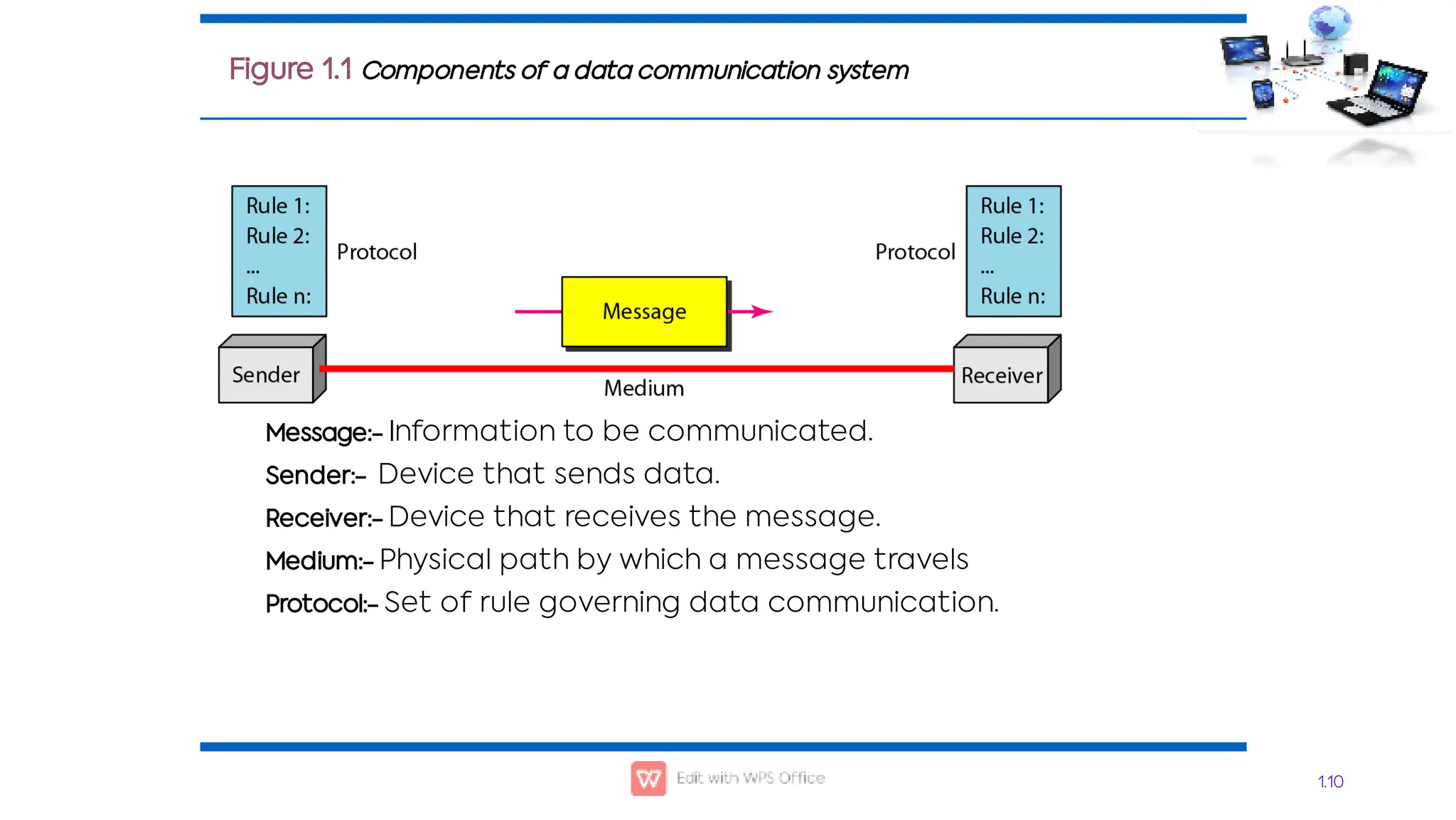
Message:- Information to be communicated.
Sender:- Device that sends data.
Receiver:- Device that receives the message.
Medium:- Physical path by which a message travels
Protocol:- Set of rule governing data communication.
1.10
Figure 1.1 Components of a data communication system
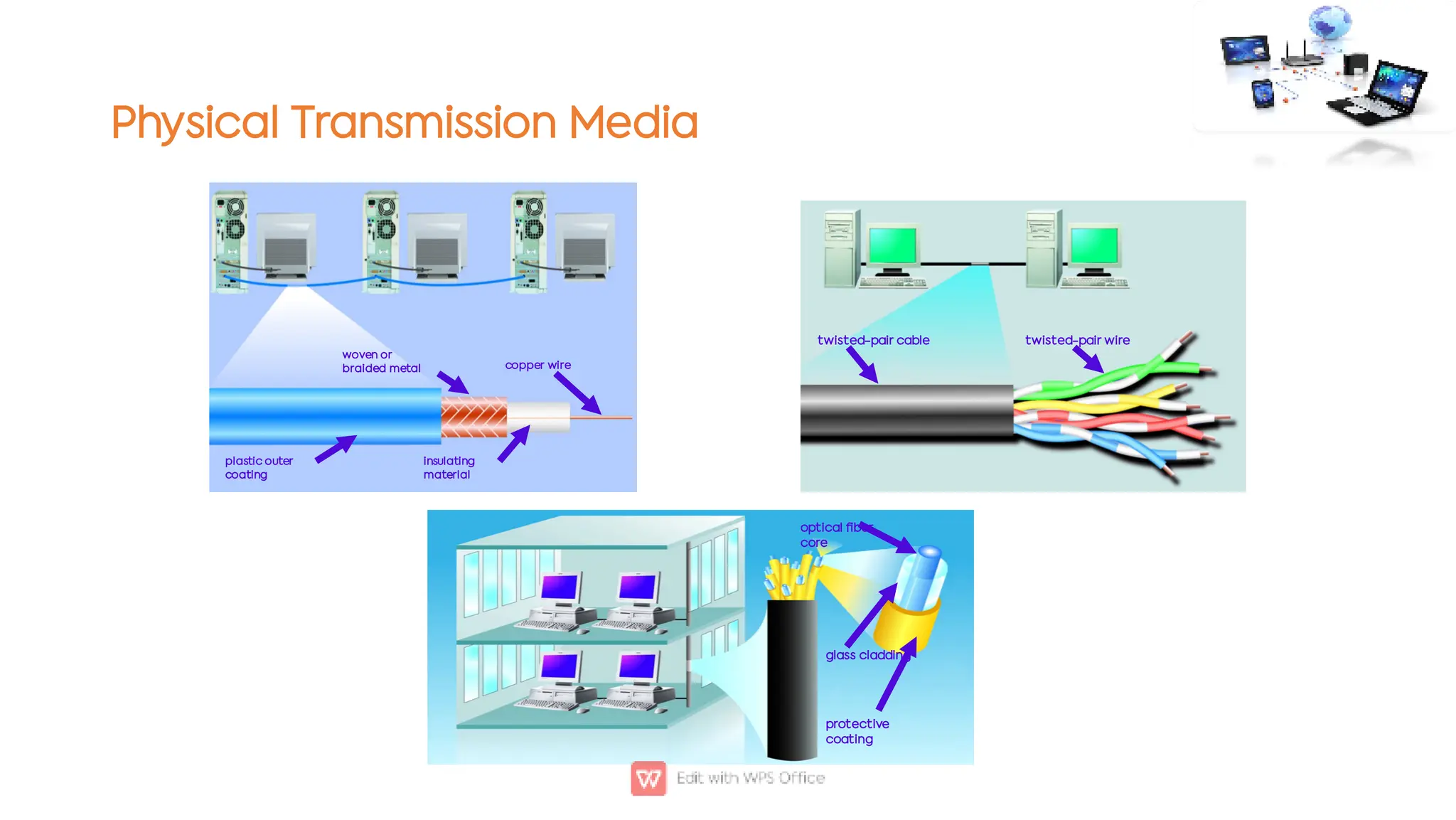
Physical Transmission Media
plastic outer
coating
woven or
braided metal
insulating
material
copper wire
twisted-pair cable twisted-pair wire
protective
coating
glass cladding
optical fiber
core
Wireless Transmission Media

‒
‒
‒

‒

‒
‒
‒

‒
‒
‒
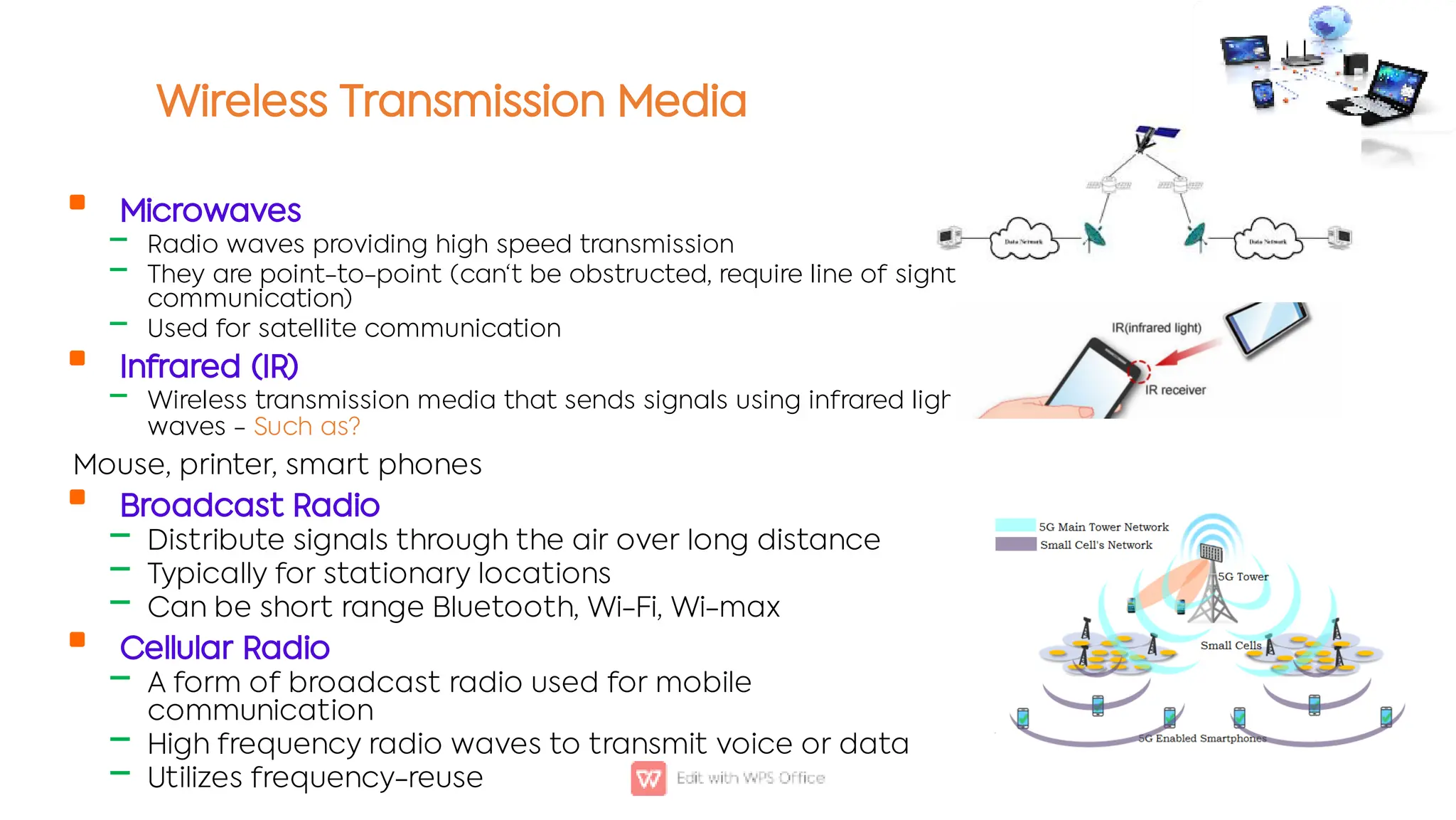
Microwaves
Radio waves providing high speed transmission
They are point-to-point (can't be obstructed, require line of sight
communication)
Used for satellite communication
Infrared (IR)
Wireless transmission media that sends signals using infrared light-
waves - Such as?
Mouse, printer, smart phones
Broadcast Radio
Distribute signals through the air over long distance
Typically for stationary locations
Can be short range Bluetooth, Wi-Fi, Wi-max
Cellular Radio
A form of broadcast radio used for mobile
communication
High frequency radio waves to transmit voice or data
Utilizes frequency-reuse
PROTOCOLS

‒
‒
‒
A protocol is synonymous with rule. It consists of a set of rules that
govern data communications. It determines what is communicated,
how it is communicated and when it is communicated. The key
elements of a protocol are syntax, semantics and timing
Syntax
Semantics
Timing
Elements of a Protocol

‒
‒

‒
‒

‒
‒
Syntax
Structure or format of the data
Indicates how to read the bits - field delineation
Semantics
Interprets the meaning of the bits
Knows which fields define what action
Timing
When data should be sent and what
Speed at which data should be sent or speed at which it is being received.
Communication Software (Protocols)

‒
‒
‒
‒
‒
‒
Examples of applications (Layer 7) take advantage of the transport (Layer 4) services of
TCP and UDP
Hypertext Transfer Protocol (HTTP): A client/server application that uses TCP for transport to
retrieve HTML pages.
Domain Name Service (DNS): A name-to-address translation application that uses both TCP
and UDP transport.
Telnet: A virtual terminal application that uses TCP for transport.
File Transport Protocol (FTP): A file transfer application that uses TCP for transport.
Trivial File Transfer Protocol (TFTP): A file transfer application that uses UDP for transport.
Border Gateway Protocol (BGP): An exterior gateway routing protocol that uses TCP for
transport. BGP is used to exchange routing information for the Internet and is the protocol used
between service providers.
1.16
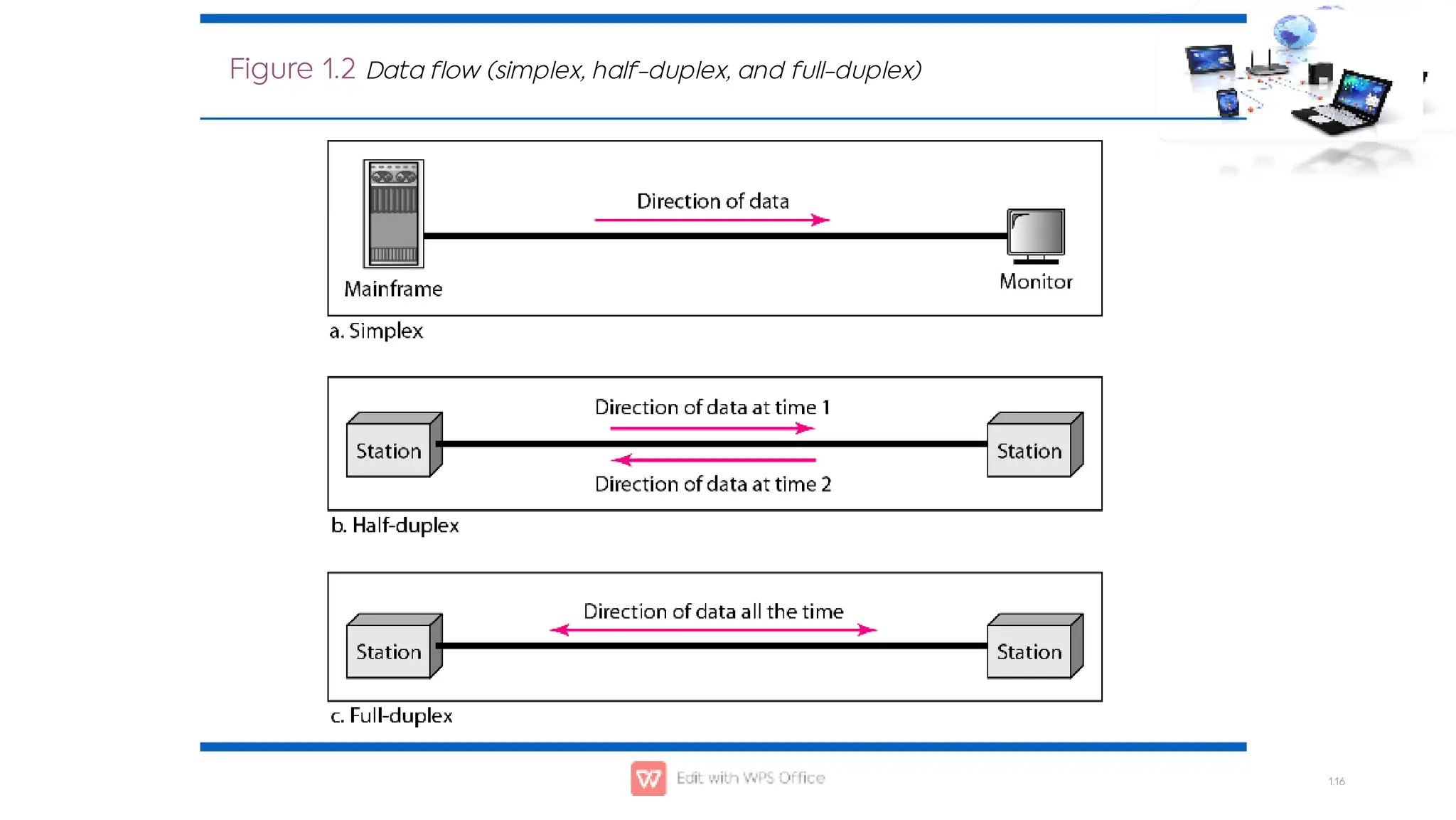
Figure 1.2 Data flow (simplex, half-duplex, and full-duplex)
NETWORKS
 A network is a set of devices (often referred to as nodes) connected by
communication links. A node can be a computer, printer, or any other
device capable of sending and/or receiving data generated by other
nodes on the network. A link can be a cable, air, optical fiber, or any
medium which can transport a signal carrying information.
1.17



Network Criteria
Physical Structures
Categories of Networks
Topics discussed in this section:
1.18
Network Criteria

‒
‒

‒
‒

‒
•
•
Performance
Depends on Network Elements
Measured in terms of Delay and Throughput
Reliability
Failure rate of network components
Measured in terms of availability/robustness
Security
Data protection against corruption/loss of data due to:
Errors
Malicious users
1.19
Physical Structures

‒
‒

‒
‒
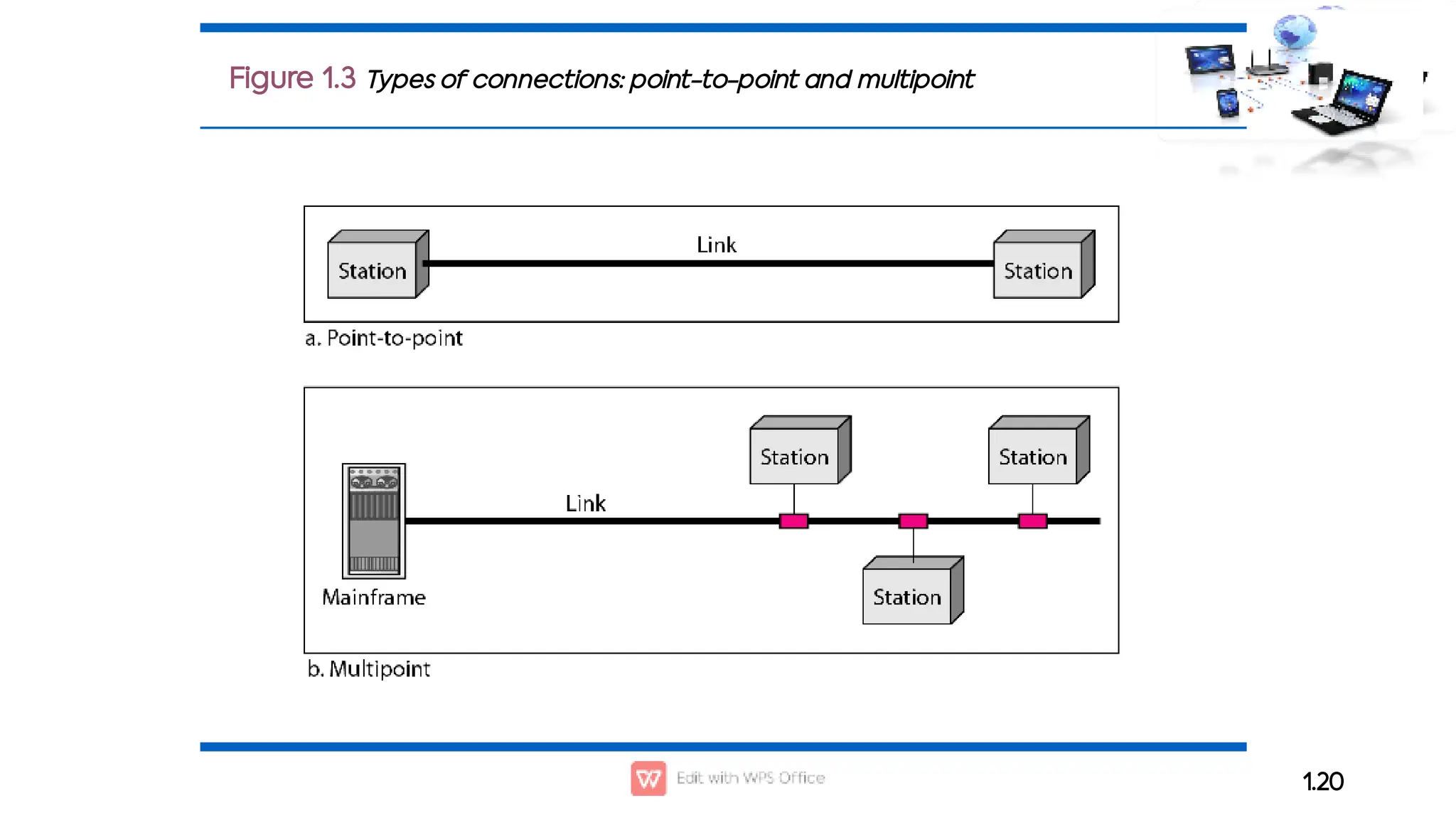
Type of Connection
Point to Point - single transmitter and receiver
Multipoint - multiple recipients of single transmission
Physical Topology
Connection of devices
Type of transmission - unicast, mulitcast, broadcast
1.20
Figure 1.3 Types of connections: point-to-point and multipoint
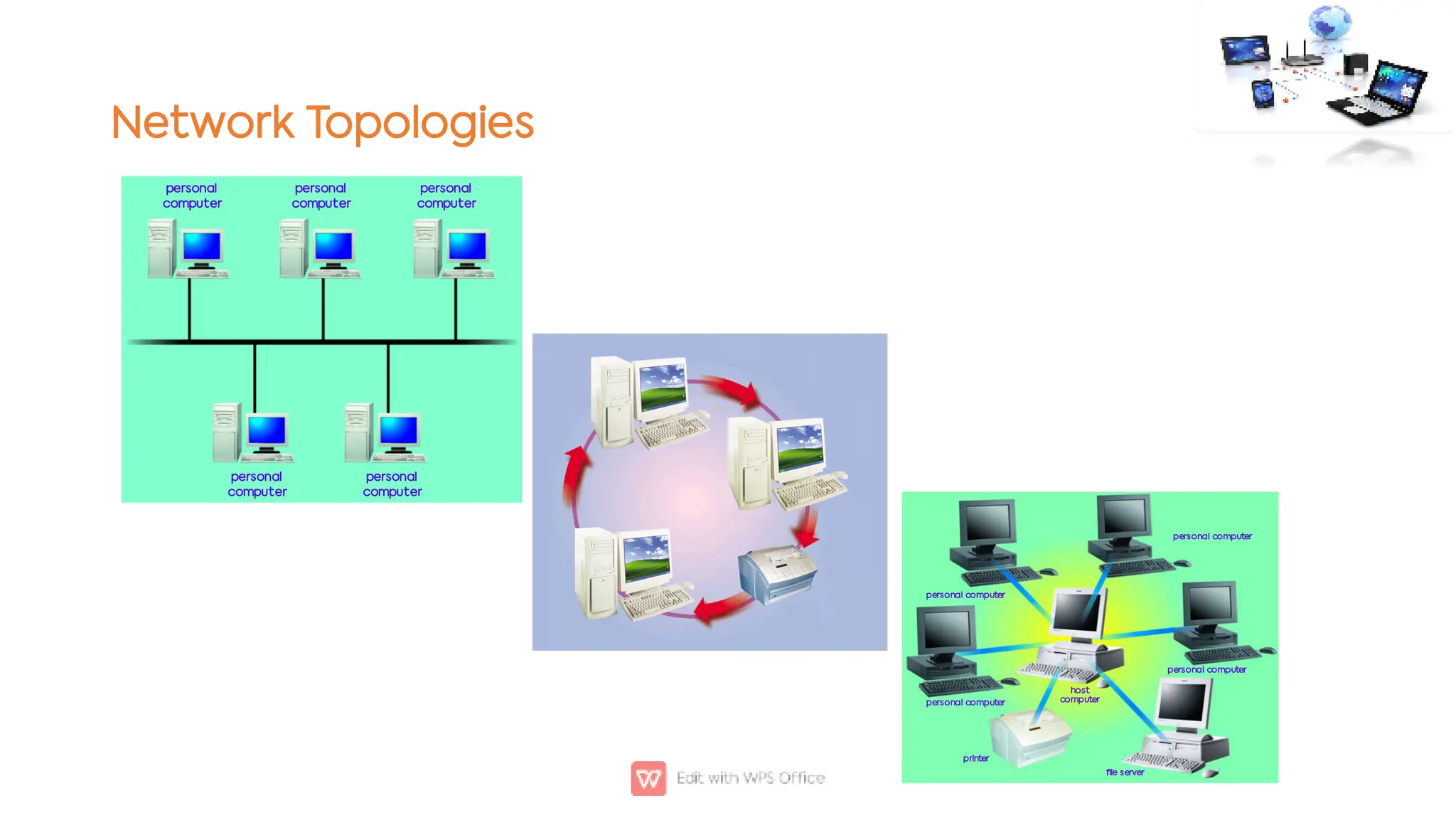
Network Topologies
personal
computer
personal
computer
personal
computer
personal
computer
personal
computer
host
computer
printer
file server
personal computer
personal computer
personal computer
personal computer
Network coverage

‒
‒
•
•
•
•

‒
‒

‒
‒
•
‒
•
Local Area Networks:
Used for small networks (school, home, office)
Examples and configurations:
Wireless LAN or Switched LAN
ATM LAN, Frame Ethernet LAN
Peer-2-PEER: connecting several computers together (10)
Client/Server: The serves shares its resources between different clients
Metropolitan Area Network
Backbone network connecting all LANs
Can cover a city or the entire country
Wide Area Network
Typically between cities and countries
Technology:
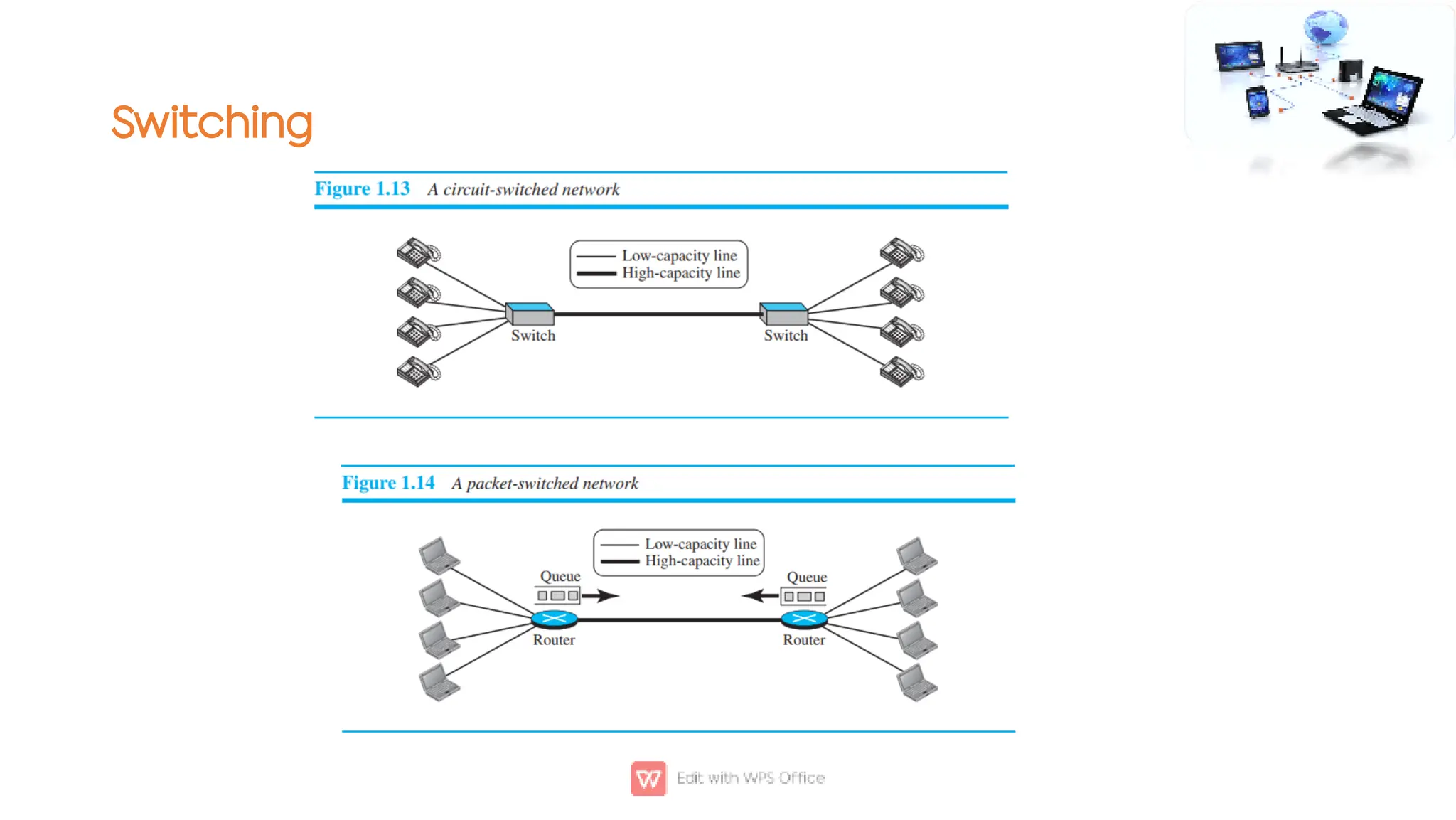
Circuit Switch, Packet Switch, Frame Relay, ATM
Examples:
Internet P2P: Networks with the same network software can be connected together (Napster)
Switching
Network Examples

‒
‒
‒

‒
‒
•

‒
‒
‒
‒

‒
IEEE 802.15.4
Low-rate wireless personal area networks (LR-WPANs)
Bases for e ZigBee, WirelessHART, and MiWi specification
Also used for 6LoWPAN and standard Internet protocols to build a Wireless Embedded Internet (WEI)
Intranets
Used for private networks
May implement a firewall
Hardware and software that restricts access to data and information on a network
Home networks
Ethernet
Phone line
HomeRF (radio frequency- waves)
Intelligent home network
Vehicle-to-Vehicle (car2Car) - http://www.car-to-car.org/
A wireless LAN based communication system to guarantee European-wide inter-vehicle operability
Car2Car Technology: http://www.youtube.com/watch?v=8tFUsN3ZgR4
Emerging Technologies

‒


‒


‒

‒
‒
‒
m-Cash
Pay using your cell phone
Scan-free shopping using Radio frequency identification
VeriChip
Implanted computer chip in the body!
RFID
Wearable computer technology
Implanting a cell phone is in your tooth!
Power over Ethernet (PoE)
Transferring electrical power, along with data, to remote devices over standard category 5 cable
in an Ethernet network
PoE Plus (802.3at) provides more available power
Power over fiber?
Emerging Technologies

‒
‒
‒

‒
‒
‒
‒
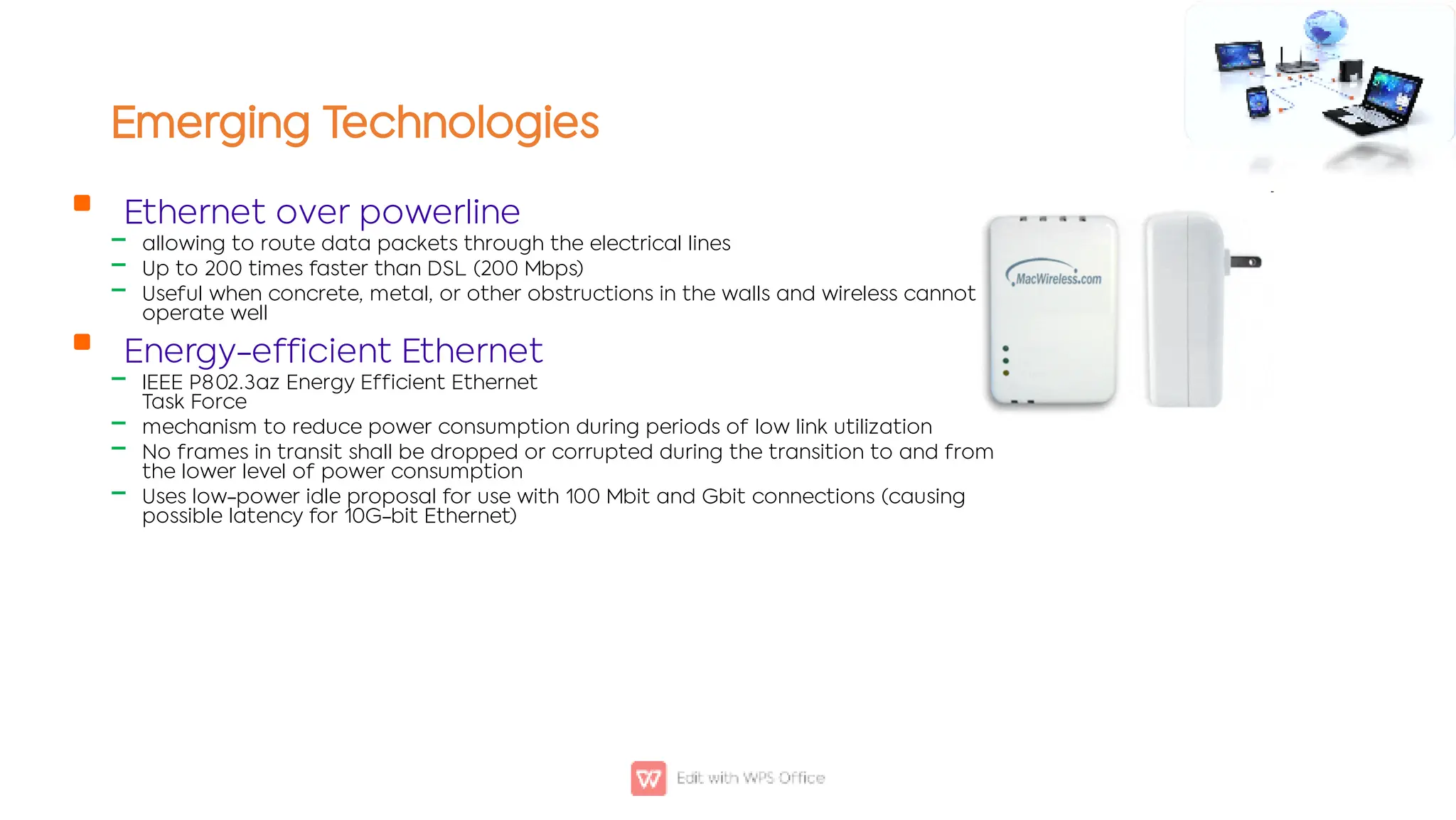
Ethernet over powerline
allowing to route data packets through the electrical lines
Up to 200 times faster than DSL (200 Mbps)
Useful when concrete, metal, or other obstructions in the walls and wireless cannot
operate well
Energy-efficient Ethernet
IEEE P802.3az Energy Efficient Ethernet
Task Force
mechanism to reduce power consumption during periods of low link utilization
No frames in transit shall be dropped or corrupted during the transition to and from
the lower level of power consumption
Uses low-power idle proposal for use with 100 Mbit and Gbit connections (causing
possible latency for 10G-bit Ethernet)
Summary



Data communication and networking
Communication
Networks
Home Assignment






Explore applications of Zigbee, Bluetooth, IrDa, RFID
Write two applications along with the frequency range, coverage
range and data rate of each technology mentioned above.
Make a .pdf file of your work
Name file with your registration number for example CS1811109
Assignments must be uploaded on LMS (for this assignment just send it
in email)
Copied material will be marked zero

Week1- basic Introduction to computer networks .pdf

  • 1.
    Computer Networks COSC-2104 Course Instructor:Dr. Madiha Amjad Madiha.amjad@kfueit.edu.pk Lecture 1: Introduction Institute of Information Technology Khawaja Fareed University of Engineering and Technology (KFUEIT)
  • 2.
    Agenda        Course Details Data communicationand networking Communication Model Data Flow Computer Networks Topology Types of networks
  • 3.
    Course Information  ‒ ‒  ‒ ‒  ‒ Instructor: Dr.Madiha Amjad Ph.D. IT from National University of Sciences and Technology (NUST), Islamabad MS from University of Engineering and Technology (UET), Lahore Lecture Timing Wed 10:55p:m-12:10p:m Thursday 12:30 p:m-02:00 p:m Office Hours Thursday 2:30 a:m-4:00 p:m (Or by appointment)
  • 4.
    Course Learning Objectives(CLOs) 1. 2. 3. 4. Understand the fundamental principles of communication and networking. Explain the services and functions provided by each layer in the internet protocol stack. Identify various internet working devices and protocols, and their functions in a network. Analyze working and performance of key technologies, algorithms and protocols.
  • 5.
  • 6.
    Student Evaluation Criteria Attendance(75 % attendance is mandatory) 5% Workshop / Assignments/Case study 5% Surprise Test/Sudden Test, Quizzes 5% Semester Project/Presentation 10% Mid Term Paper 25% Final Term paper 50% Total 100%
  • 7.
    Reference Books 1. 2. 3. Data communicationand networking by Behrouz A. Forouzan, McGraw -Hill Science, Edition 5 (Course Book) Computer Networks by Andrew Tanenebaum Data and computer communication by William Stalling, 9th Edition (Course Book)
  • 8.
    Student Responsibilities     Studentsmust attend class, 75% attendance is mandatory Cellular Phones and Beeper must be Turned off Do not talk to your friends during lecture Students are also responsible for doing all assigned work on time
  • 9.
    1-1 DATA COMMUNICATIONS The word data refers to information presented in whatever form is agreed upon by the parties creating and using the data. Data communications are the exchange of data between two devices via some form of transmission medium such as a wire cable. 1.9 1. 2. 3. 4. Characters of Data Communication System Delivery: - Deliver data to the correct destination Accuracy :- System must deliver data accurately with out modification. Timeliness:- System must deliver data in a timely manner Jitter:- Variation in packet arrival time.
  • 10.
    Message:- Information tobe communicated. Sender:- Device that sends data. Receiver:- Device that receives the message. Medium:- Physical path by which a message travels Protocol:- Set of rule governing data communication. 1.10 Figure 1.1 Components of a data communication system
  • 11.
    Physical Transmission Media plasticouter coating woven or braided metal insulating material copper wire twisted-pair cable twisted-pair wire protective coating glass cladding optical fiber core
  • 12.
    Wireless Transmission Media  ‒ ‒ ‒  ‒  ‒ ‒ ‒  ‒ ‒ ‒ Microwaves Radiowaves providing high speed transmission They are point-to-point (can't be obstructed, require line of sight communication) Used for satellite communication Infrared (IR) Wireless transmission media that sends signals using infrared light- waves - Such as? Mouse, printer, smart phones Broadcast Radio Distribute signals through the air over long distance Typically for stationary locations Can be short range Bluetooth, Wi-Fi, Wi-max Cellular Radio A form of broadcast radio used for mobile communication High frequency radio waves to transmit voice or data Utilizes frequency-reuse
  • 13.
    PROTOCOLS  ‒ ‒ ‒ A protocol issynonymous with rule. It consists of a set of rules that govern data communications. It determines what is communicated, how it is communicated and when it is communicated. The key elements of a protocol are syntax, semantics and timing Syntax Semantics Timing
  • 14.
    Elements of aProtocol  ‒ ‒  ‒ ‒  ‒ ‒ Syntax Structure or format of the data Indicates how to read the bits - field delineation Semantics Interprets the meaning of the bits Knows which fields define what action Timing When data should be sent and what Speed at which data should be sent or speed at which it is being received.
  • 15.
    Communication Software (Protocols)  ‒ ‒ ‒ ‒ ‒ ‒ Examplesof applications (Layer 7) take advantage of the transport (Layer 4) services of TCP and UDP Hypertext Transfer Protocol (HTTP): A client/server application that uses TCP for transport to retrieve HTML pages. Domain Name Service (DNS): A name-to-address translation application that uses both TCP and UDP transport. Telnet: A virtual terminal application that uses TCP for transport. File Transport Protocol (FTP): A file transfer application that uses TCP for transport. Trivial File Transfer Protocol (TFTP): A file transfer application that uses UDP for transport. Border Gateway Protocol (BGP): An exterior gateway routing protocol that uses TCP for transport. BGP is used to exchange routing information for the Internet and is the protocol used between service providers.
  • 16.
    1.16 Figure 1.2 Dataflow (simplex, half-duplex, and full-duplex)
  • 17.
    NETWORKS  A networkis a set of devices (often referred to as nodes) connected by communication links. A node can be a computer, printer, or any other device capable of sending and/or receiving data generated by other nodes on the network. A link can be a cable, air, optical fiber, or any medium which can transport a signal carrying information. 1.17    Network Criteria Physical Structures Categories of Networks Topics discussed in this section:
  • 18.
    1.18 Network Criteria  ‒ ‒  ‒ ‒  ‒ • • Performance Depends onNetwork Elements Measured in terms of Delay and Throughput Reliability Failure rate of network components Measured in terms of availability/robustness Security Data protection against corruption/loss of data due to: Errors Malicious users
  • 19.
    1.19 Physical Structures  ‒ ‒  ‒ ‒ Type ofConnection Point to Point - single transmitter and receiver Multipoint - multiple recipients of single transmission Physical Topology Connection of devices Type of transmission - unicast, mulitcast, broadcast
  • 20.
    1.20 Figure 1.3 Typesof connections: point-to-point and multipoint
  • 21.
  • 22.
    Network coverage  ‒ ‒ • • • •  ‒ ‒  ‒ ‒ • ‒ • Local AreaNetworks: Used for small networks (school, home, office) Examples and configurations: Wireless LAN or Switched LAN ATM LAN, Frame Ethernet LAN Peer-2-PEER: connecting several computers together (10) Client/Server: The serves shares its resources between different clients Metropolitan Area Network Backbone network connecting all LANs Can cover a city or the entire country Wide Area Network Typically between cities and countries Technology: Circuit Switch, Packet Switch, Frame Relay, ATM Examples: Internet P2P: Networks with the same network software can be connected together (Napster)
  • 23.
  • 24.
    Network Examples  ‒ ‒ ‒  ‒ ‒ •  ‒ ‒ ‒ ‒  ‒ IEEE 802.15.4 Low-ratewireless personal area networks (LR-WPANs) Bases for e ZigBee, WirelessHART, and MiWi specification Also used for 6LoWPAN and standard Internet protocols to build a Wireless Embedded Internet (WEI) Intranets Used for private networks May implement a firewall Hardware and software that restricts access to data and information on a network Home networks Ethernet Phone line HomeRF (radio frequency- waves) Intelligent home network Vehicle-to-Vehicle (car2Car) - http://www.car-to-car.org/ A wireless LAN based communication system to guarantee European-wide inter-vehicle operability Car2Car Technology: http://www.youtube.com/watch?v=8tFUsN3ZgR4
  • 25.
    Emerging Technologies  ‒   ‒   ‒  ‒ ‒ ‒ m-Cash Pay usingyour cell phone Scan-free shopping using Radio frequency identification VeriChip Implanted computer chip in the body! RFID Wearable computer technology Implanting a cell phone is in your tooth! Power over Ethernet (PoE) Transferring electrical power, along with data, to remote devices over standard category 5 cable in an Ethernet network PoE Plus (802.3at) provides more available power Power over fiber?
  • 26.
    Emerging Technologies  ‒ ‒ ‒  ‒ ‒ ‒ ‒ Ethernet overpowerline allowing to route data packets through the electrical lines Up to 200 times faster than DSL (200 Mbps) Useful when concrete, metal, or other obstructions in the walls and wireless cannot operate well Energy-efficient Ethernet IEEE P802.3az Energy Efficient Ethernet Task Force mechanism to reduce power consumption during periods of low link utilization No frames in transit shall be dropped or corrupted during the transition to and from the lower level of power consumption Uses low-power idle proposal for use with 100 Mbit and Gbit connections (causing possible latency for 10G-bit Ethernet)
  • 27.
    Summary    Data communication andnetworking Communication Networks
  • 28.
    Home Assignment       Explore applicationsof Zigbee, Bluetooth, IrDa, RFID Write two applications along with the frequency range, coverage range and data rate of each technology mentioned above. Make a .pdf file of your work Name file with your registration number for example CS1811109 Assignments must be uploaded on LMS (for this assignment just send it in email) Copied material will be marked zero