Theming Drupal           6
       An Introduction to the Basics
                    + some advanced stuff too, but that’s at the end
Before we begin …
          What you need to know:
                  - HTML/XHTML
                          - It helps to know what content is printed where
                  - CSS
                          - Enough to edit rules, changes backgrounds, add images, etc.
                  - Box Model
                          - Margin, border & padding and how they work together
                  -Basic PHP
                          - An understanding of syntax and how PHP functions operate in general

          What you might want to know:
                  - jQuery
                          - For that little extra; Flash® is overkill for an image slideshow
                  - How to setup a Local Development Environment (LAMP)
                  - Version Control
                          - Subversion or GIT are commonly used with Drupal
                  - More PHP?


Presented By: Erik Baldwin      2/12/2013         2
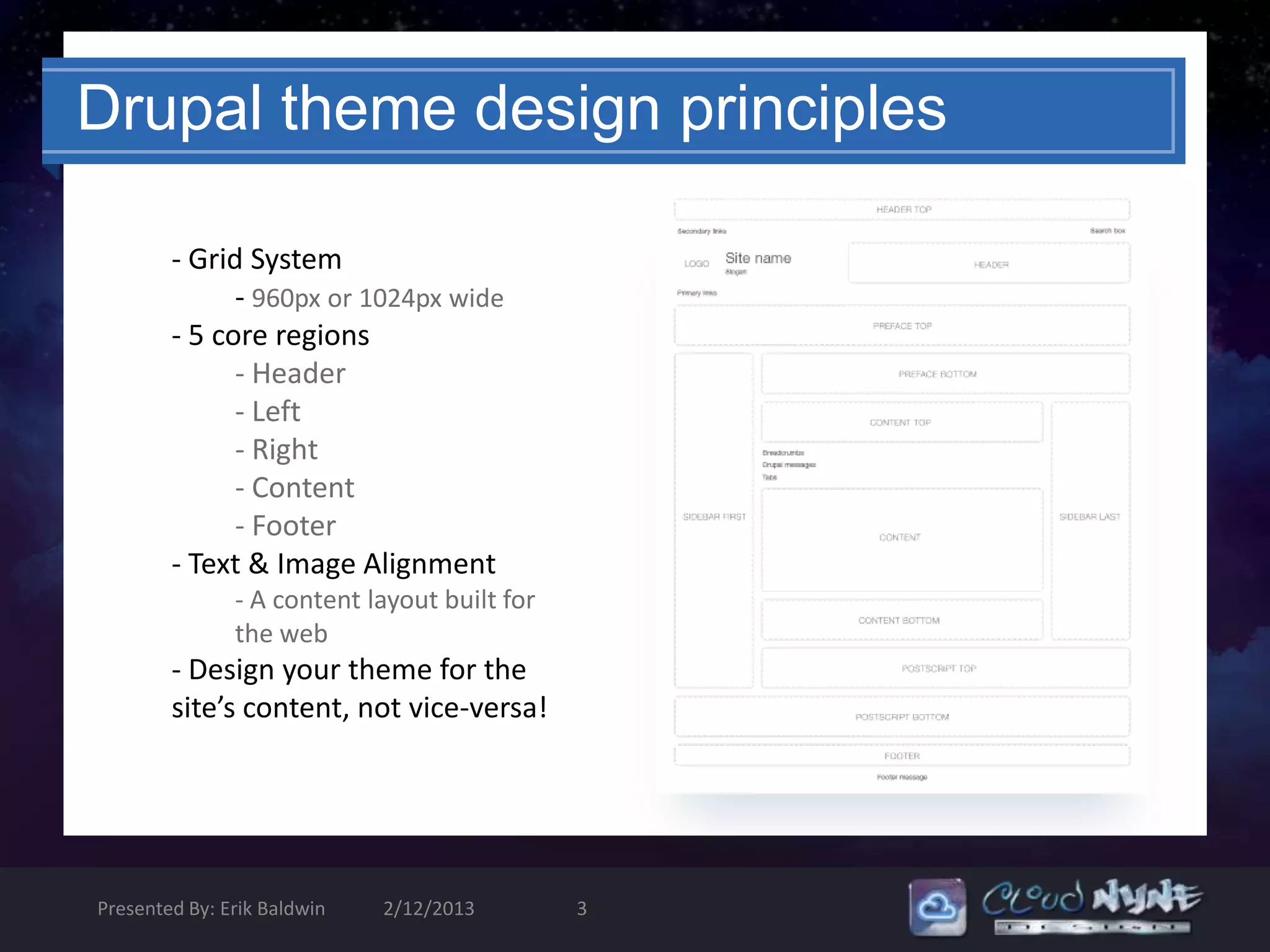
Drupal theme design principles

        - Grid System
              - 960px or 1024px wide
        - 5 core regions
              - Header
              - Left
              - Right
              - Content
              - Footer
        - Text & Image Alignment
               - A content layout built for
               the web
        - Design your theme for the
        site’s content, not vice-versa!


Presented By: Erik Baldwin   2/12/2013        3
Theming Caveats
                                              … ‘cause it can’t always be
                                              easy.
                                                Don’t hack core!

                                                Don’t hack modules!

                                                Don’t hack contrib themes!

                                              The output from all of these is
                                                   THEMABLE!

       Intercept , Override [template.php] & Sub-Theme [foo.tpl.php]

Presented By: Erik Baldwin    2/12/2013   4
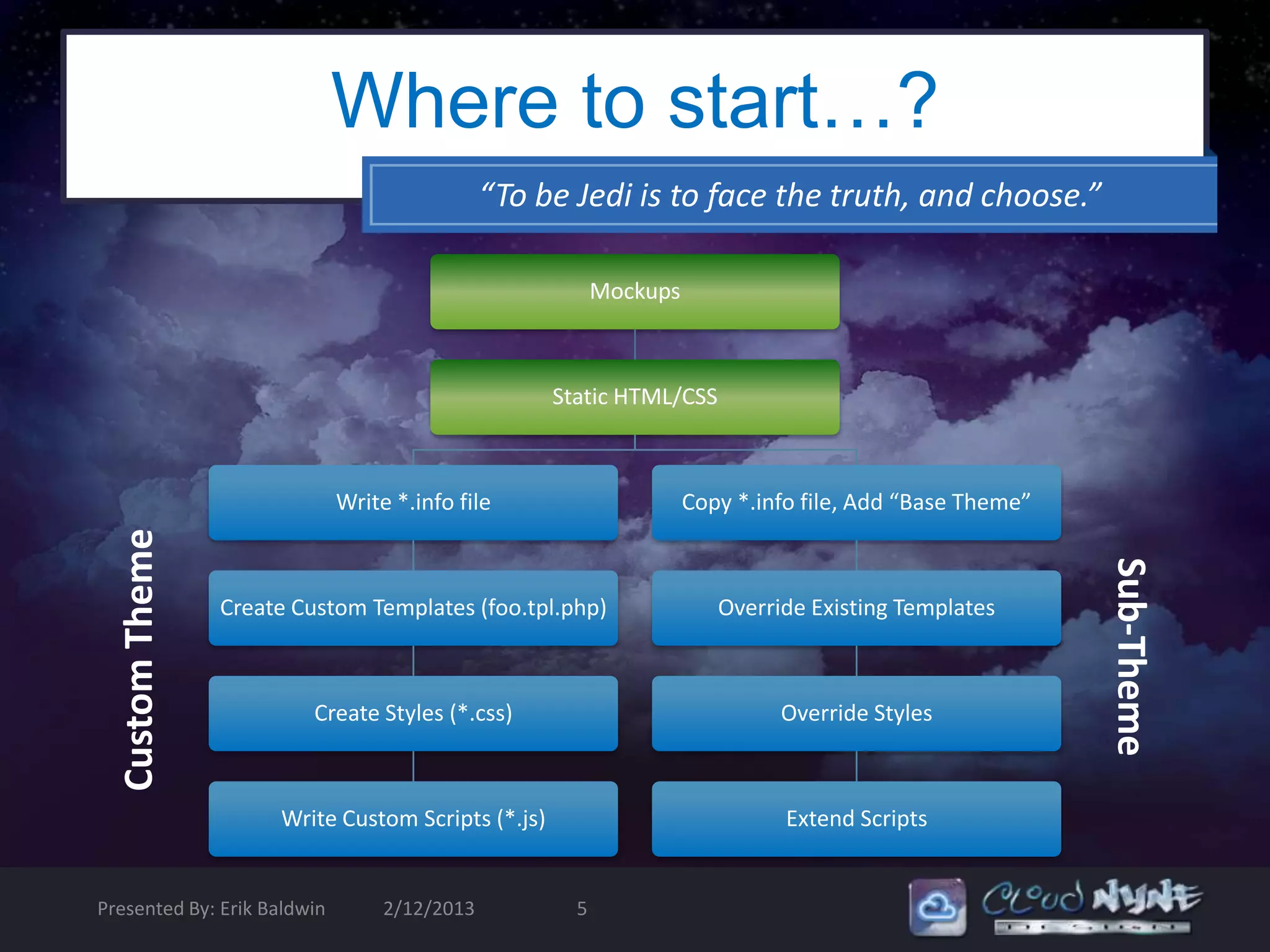
Where to start…?
                                              “To be Jedi is to face the truth, and choose.”

                                                          Mockups


                                                    Static HTML/CSS


                             Write *.info file                      Copy *.info file, Add “Base Theme”
  Custom Theme


                                                                                                         Sub-Theme
                 Create Custom Templates (foo.tpl.php)                 Override Existing Templates


                          Create Styles (*.css)                              Override Styles


                      Write Custom Scripts (*.js)                             Extend Scripts


Presented By: Erik Baldwin        2/12/2013           5
Intro to Theming Drupal 6

      Part I: The anatomy of a theme

      Part II: Basic build from Static HTML & CSS

      Part III: Create a Fusion Sub-Theme (demo)

      Part IV: Tools & Tricks (demo)


Presented By: Erik Baldwin   2/12/2013   6
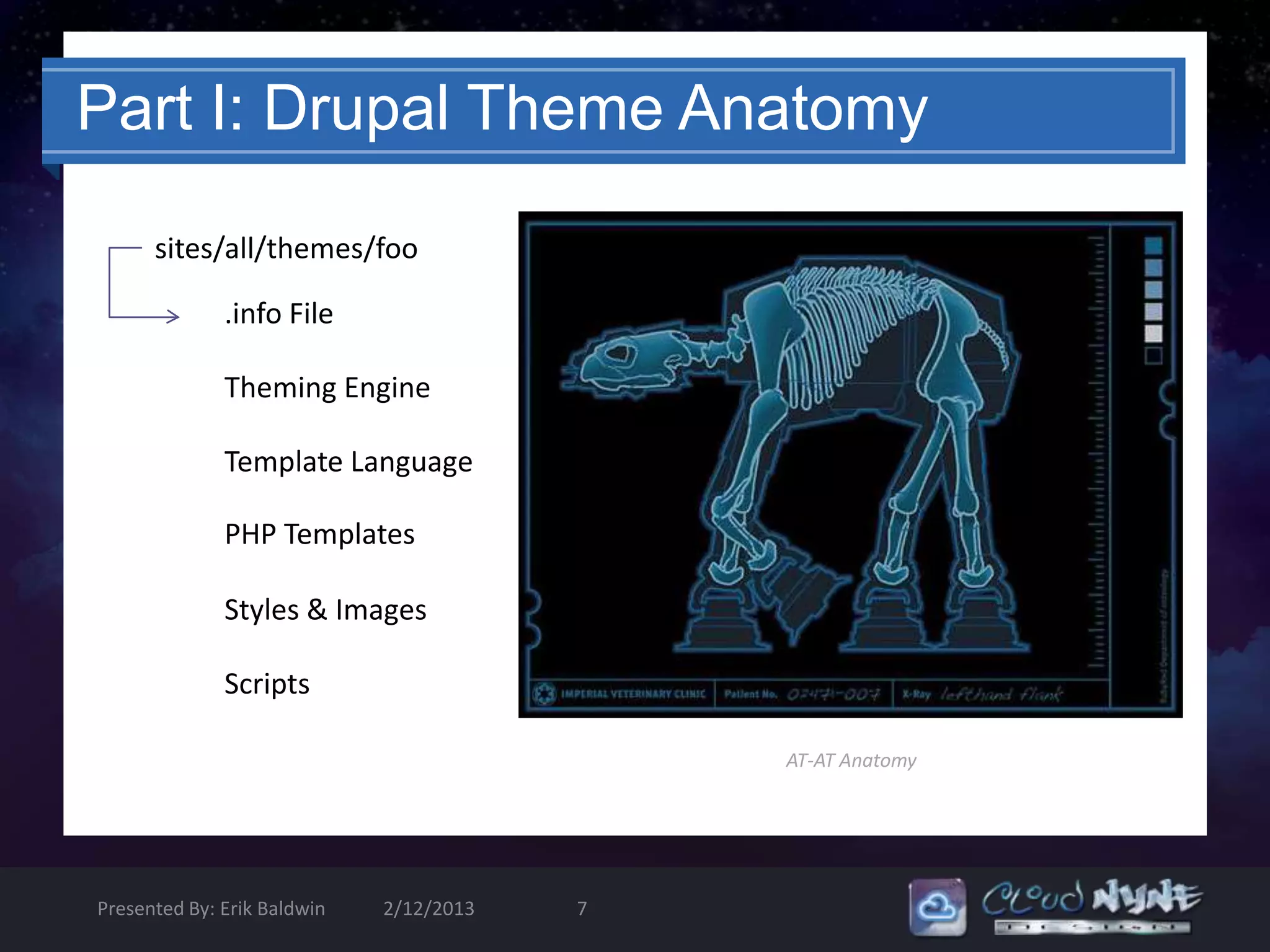
Part I: Drupal Theme Anatomy

      sites/all/themes/foo

              .info File

              Theming Engine

              Template Language

              PHP Templates

              Styles & Images

              Scripts

                                             AT-AT Anatomy


Presented By: Erik Baldwin   2/12/2013   7
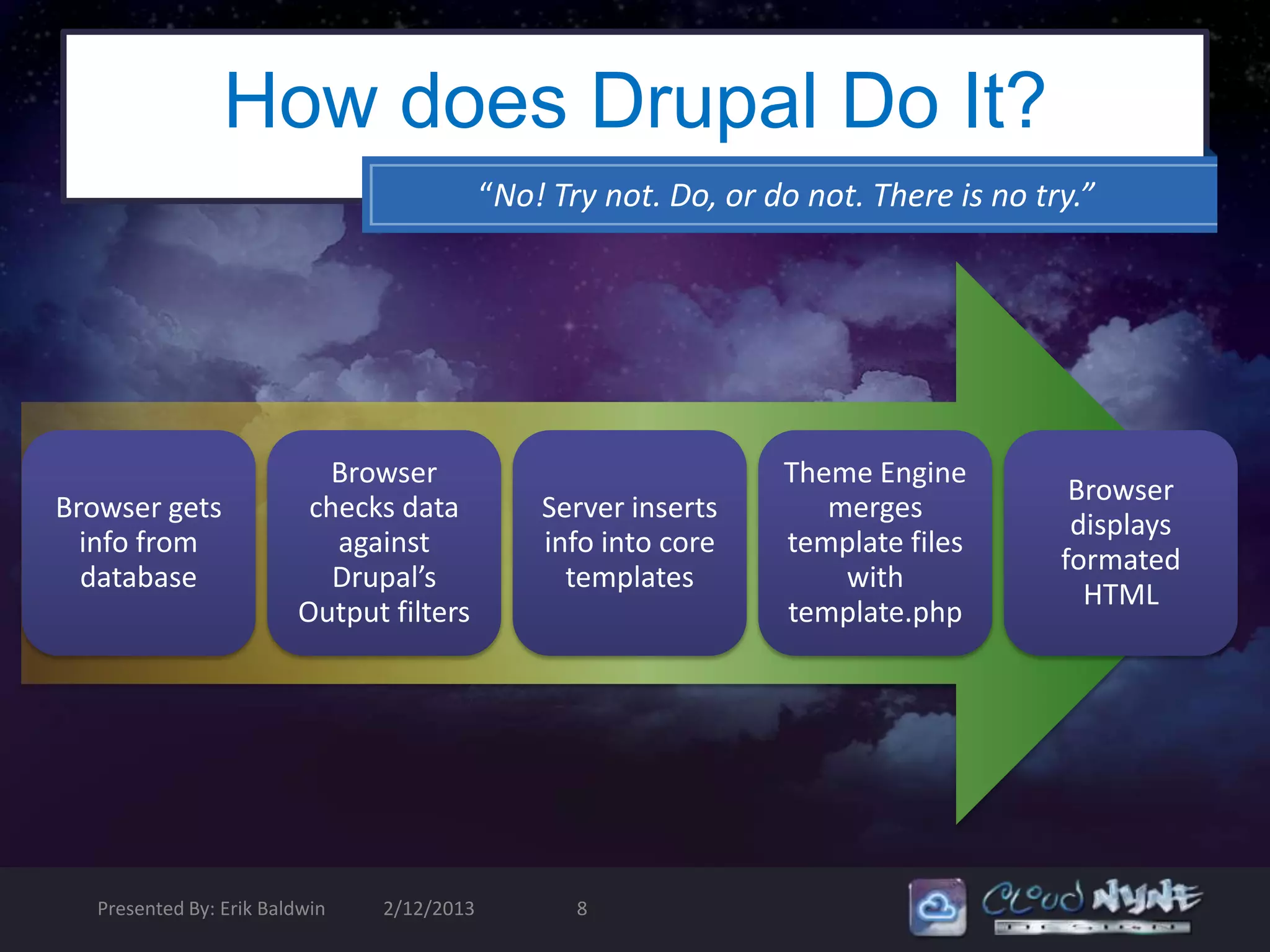
How does Drupal Do It?
                                            “No! Try not. Do, or do not. There is no try.”


                            Browser                               Theme Engine
                                                                                        Browser
Browser gets              checks data           Server inserts       merges
                                                                                        displays
  info from                 against             info into core    template files
                                                                                       formated
  database                  Drupal’s              templates           with
                                                                                         HTML
                         Output filters                           template.php


   Presented By: Erik Baldwin   2/12/2013          8
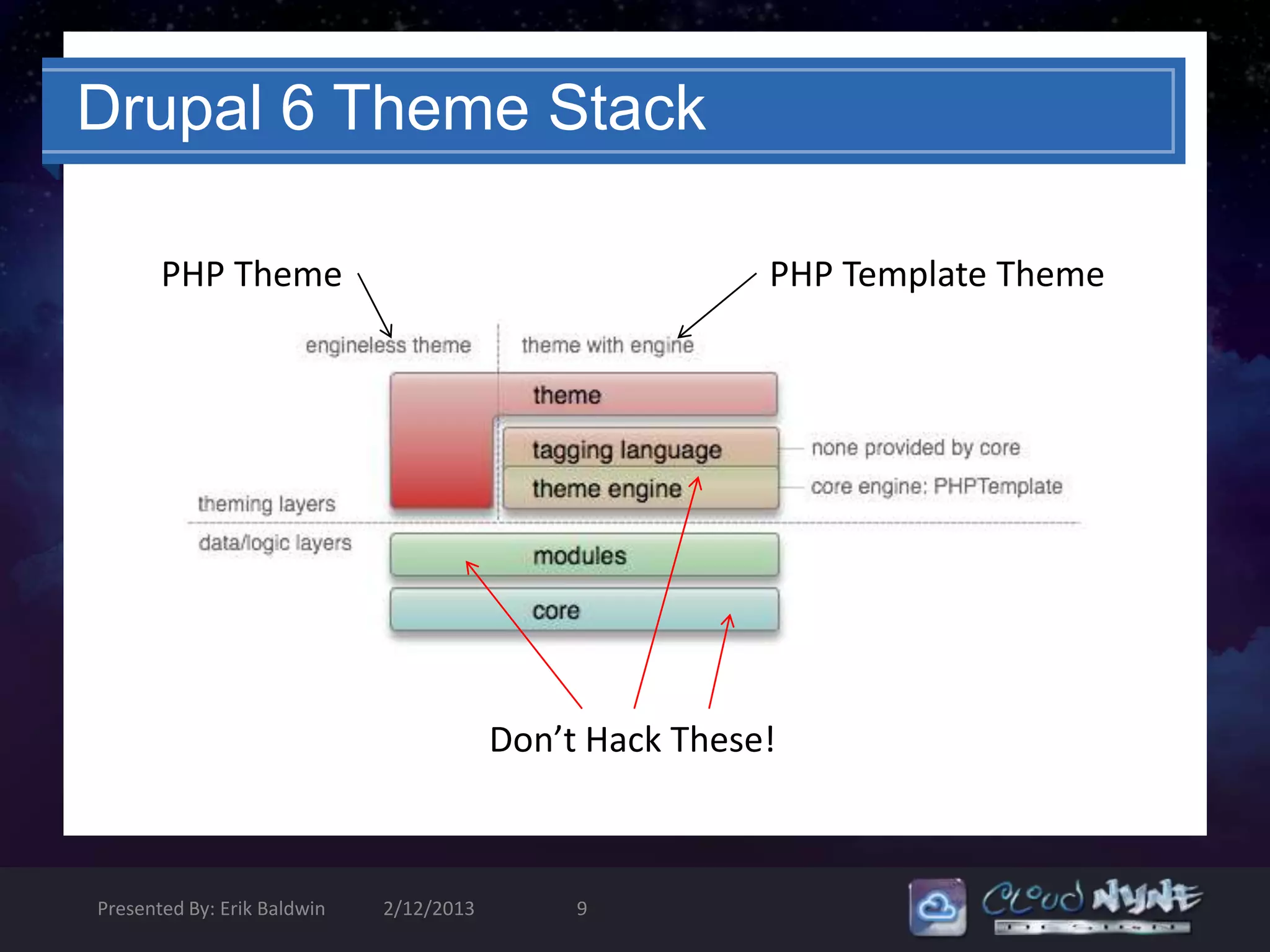
Drupal 6 Theme Stack

       PHP Theme                                         PHP Template Theme


                                         Don’t Hack These!


Presented By: Erik Baldwin   2/12/2013        9
Separating Design & Logic


       • .info file defines your theme
       • More templates = more control over theme
       components
       • phptemplate_variables() are your friends
       • Theme inheritance makes sub theming and
       overriding possible
       • Pure CSS themes are absolutely possible.


Presented By: Erik Baldwin   2/12/2013   10
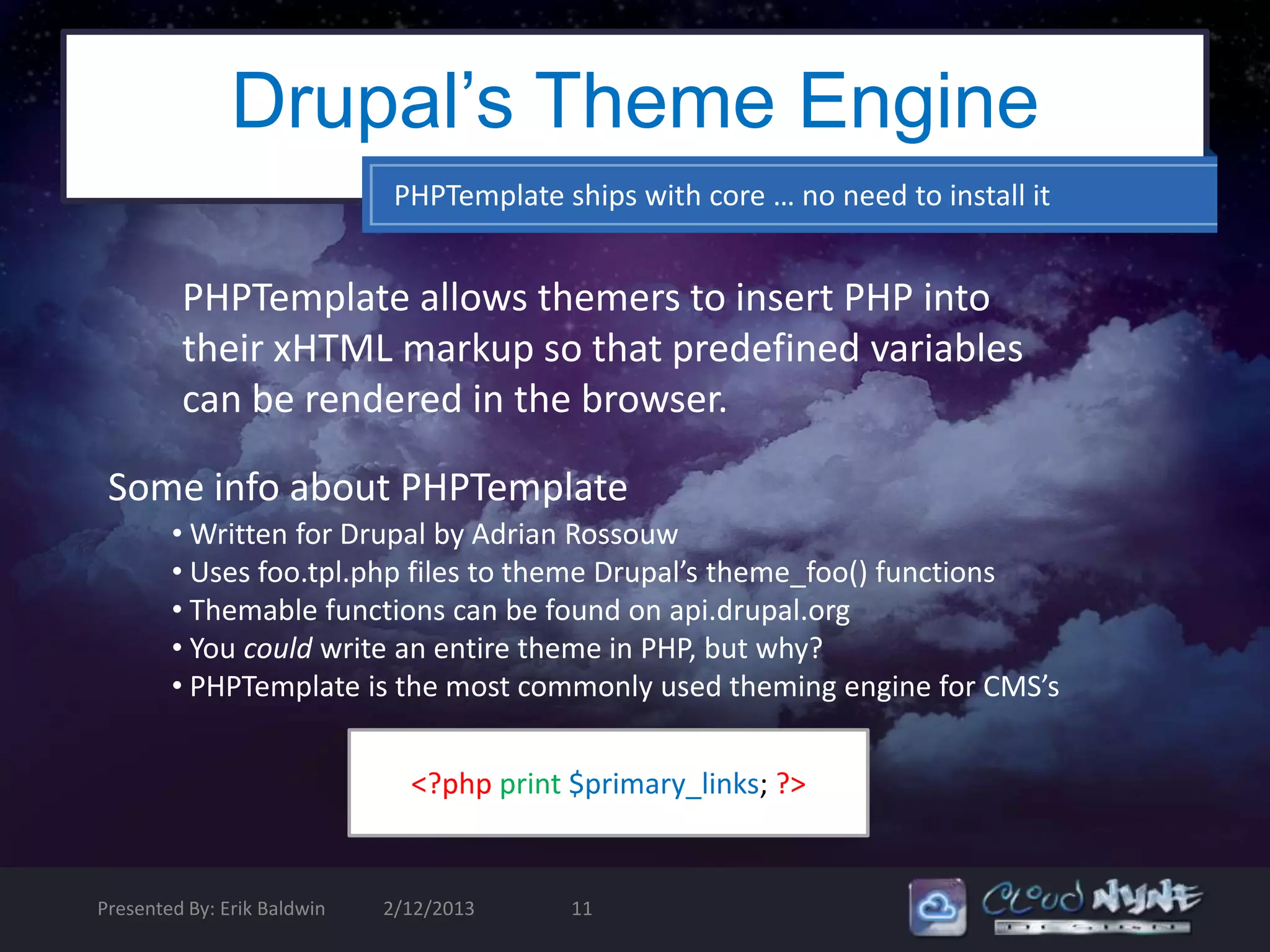
Drupal’s Theme Engine
                              PHPTemplate ships with core … no need to install it


         PHPTemplate allows themers to insert PHP into
         their xHTML markup so that predefined variables
         can be rendered in the browser.

 Some info about PHPTemplate
        • Written for Drupal by Adrian Rossouw
        • Uses foo.tpl.php files to theme Drupal’s theme_foo() functions
        • Themable functions can be found on api.drupal.org
        • You could write an entire theme in PHP, but why?
        • PHPTemplate is the most commonly used theming engine for CMS’s


                               <?php print $primary_links; ?>


Presented By: Erik Baldwin   2/12/2013     11
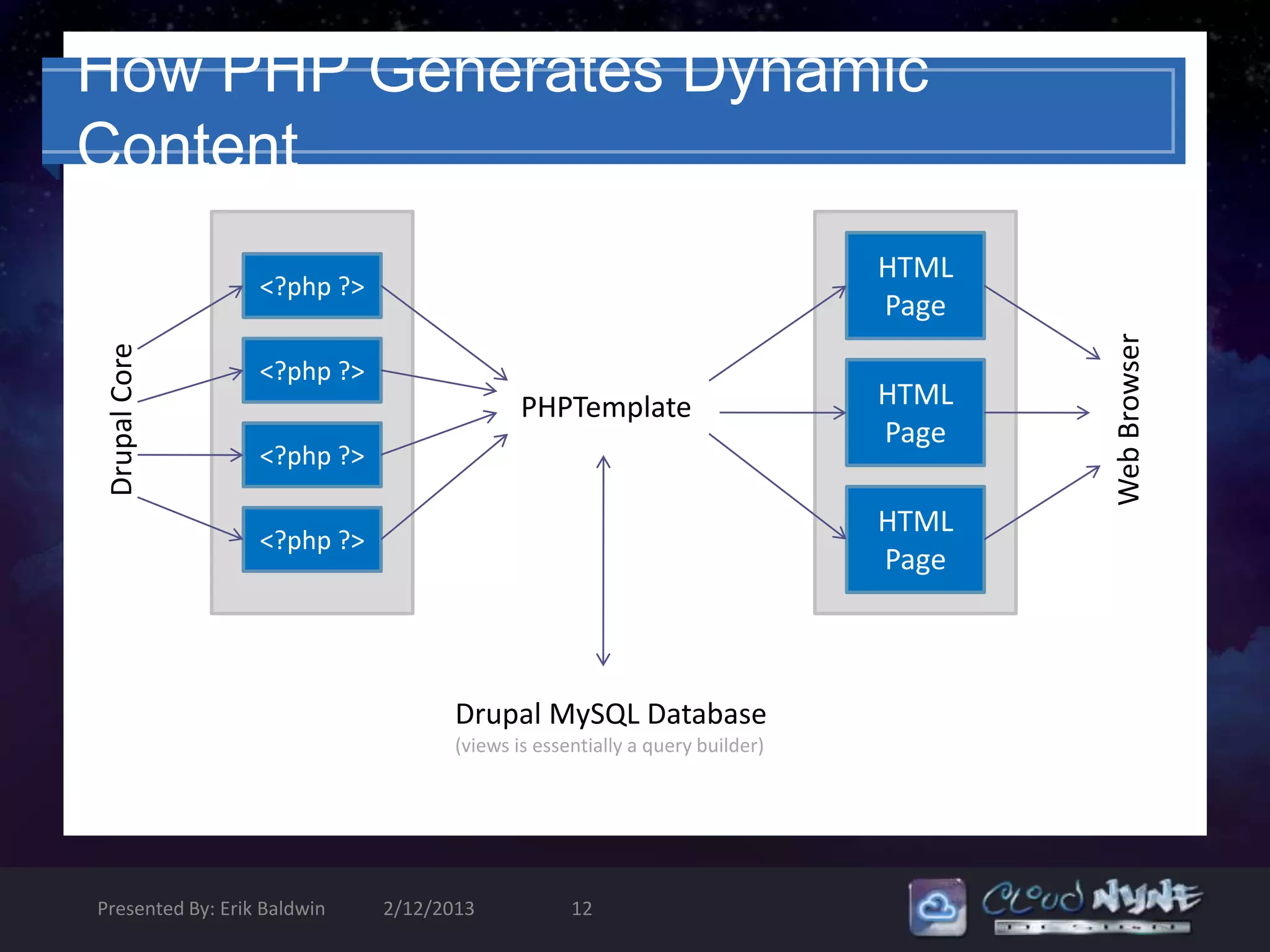
How PHP Generates Dynamic
Content
                                                                             HTML
                  <?php ?>
                                                                             Page


                                                                                    Web Browser
 Drupal Core


                  <?php ?>
                                            PHPTemplate                      HTML
                                                                             Page
                  <?php ?>

                                                                             HTML
                  <?php ?>
                                                                             Page


                                    Drupal MySQL Database
                                    (views is essentially a query builder)


Presented By: Erik Baldwin   2/12/2013            12
Template.php
                                                 What am I supposed to do with this?!


          • Template.php holds the conditional logic and data processing
          required for output

          • It is where you create your preprocessors for generating variables
          before they merge with *.tpl.php file – each individual template
          file (.tpl.php) gets assigned to regions

          • This is also where you override existing theme functions and
          create other raw output customization (example below)

  function theme_name_preprocess_page(&$vars) {
  //override for mission statement to appear on every page, not just <front>
  $vars['mission'] = filter_xss_admin (theme_get_setting('mission'));
  //creates raw output for $foo that can be printed in any *.tpl.php
  $vars[‘foo’] = t(‘FooBar’);}


Presented By: Erik Baldwin   2/12/2013   13
What is a Preprocessor Function
                for?
• Setup variables to be placed within the template
  (.tpl.php) files. Plain theme functions do not
  interact with preprocessors

• Use them whenever overriding CSS and editing
  xHTML markup in Template files just isn’t
  enough!


Presented By: Erik Baldwin   2/12/2013   14
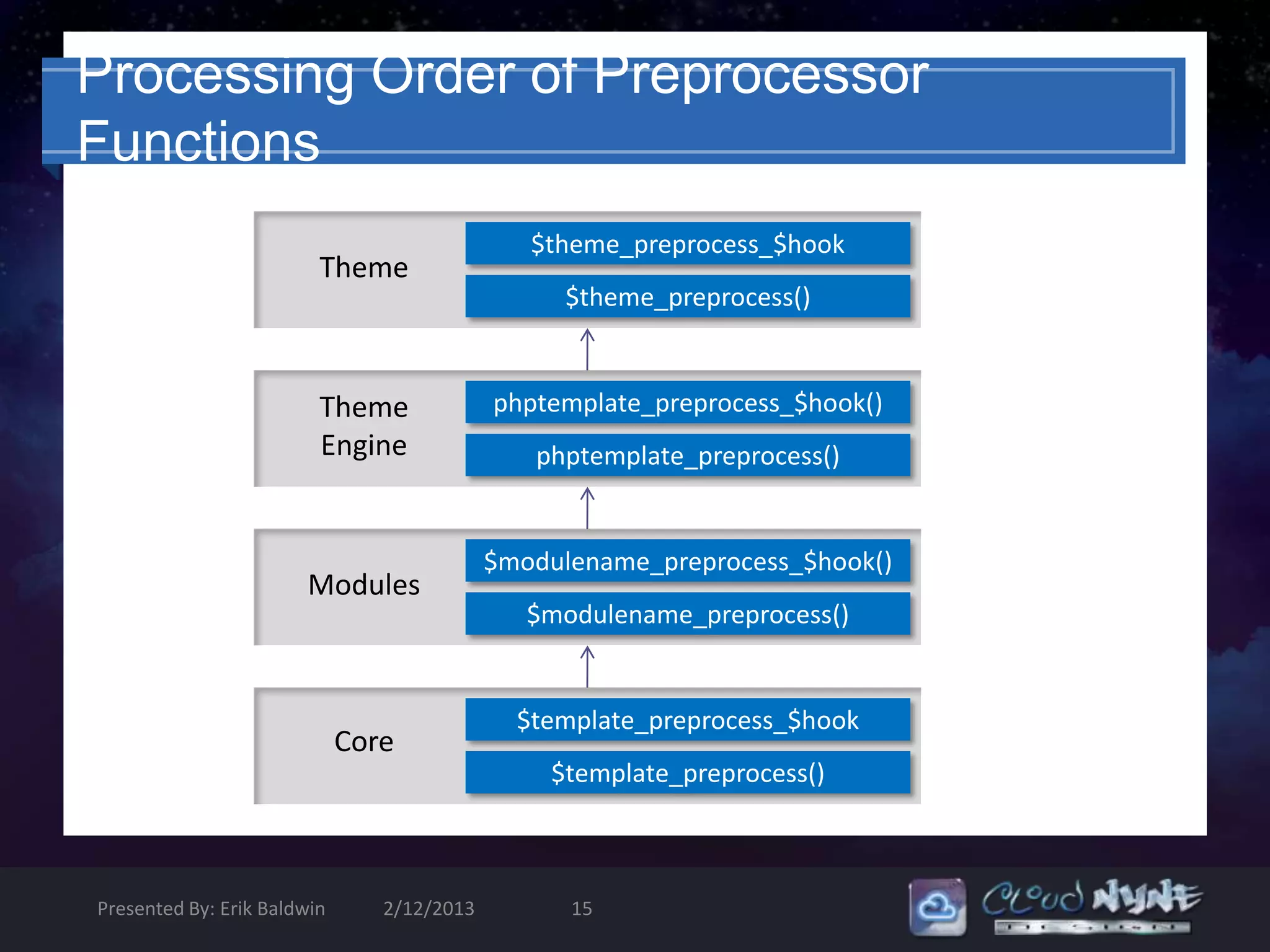
Processing Order of Preprocessor
Functions
                                               $theme_preprocess_$hook
                         Theme
                                                 $theme_preprocess()


                         Theme              phptemplate_preprocess_$hook()
                         Engine                phptemplate_preprocess()


                                            $modulename_preprocess_$hook()
                       Modules
                                               $modulename_preprocess()


                                              $template_preprocess_$hook
                             Core
                                                $template_preprocess()


Presented By: Erik Baldwin      2/12/2013         15
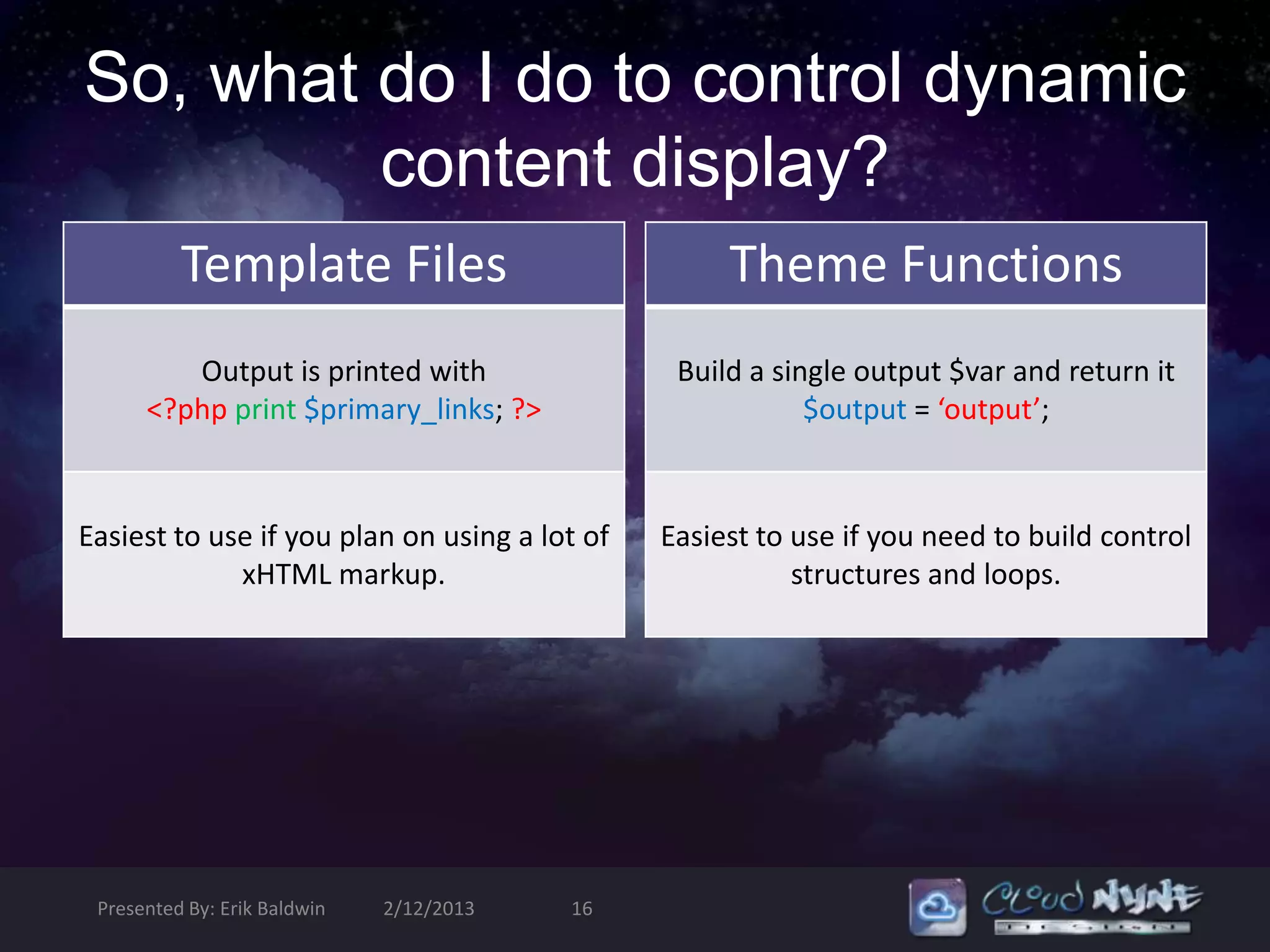
So, what do I do to control dynamic
         content display?
          Template Files                            Theme Functions
         Output is printed with                 Build a single output $var and return it
      <?php print $primary_links; ?>                       $output = ‘output’;


Easiest to use if you plan on using a lot of   Easiest to use if you need to build control
             xHTML markup.                                structures and loops.


 Presented By: Erik Baldwin   2/12/2013   16
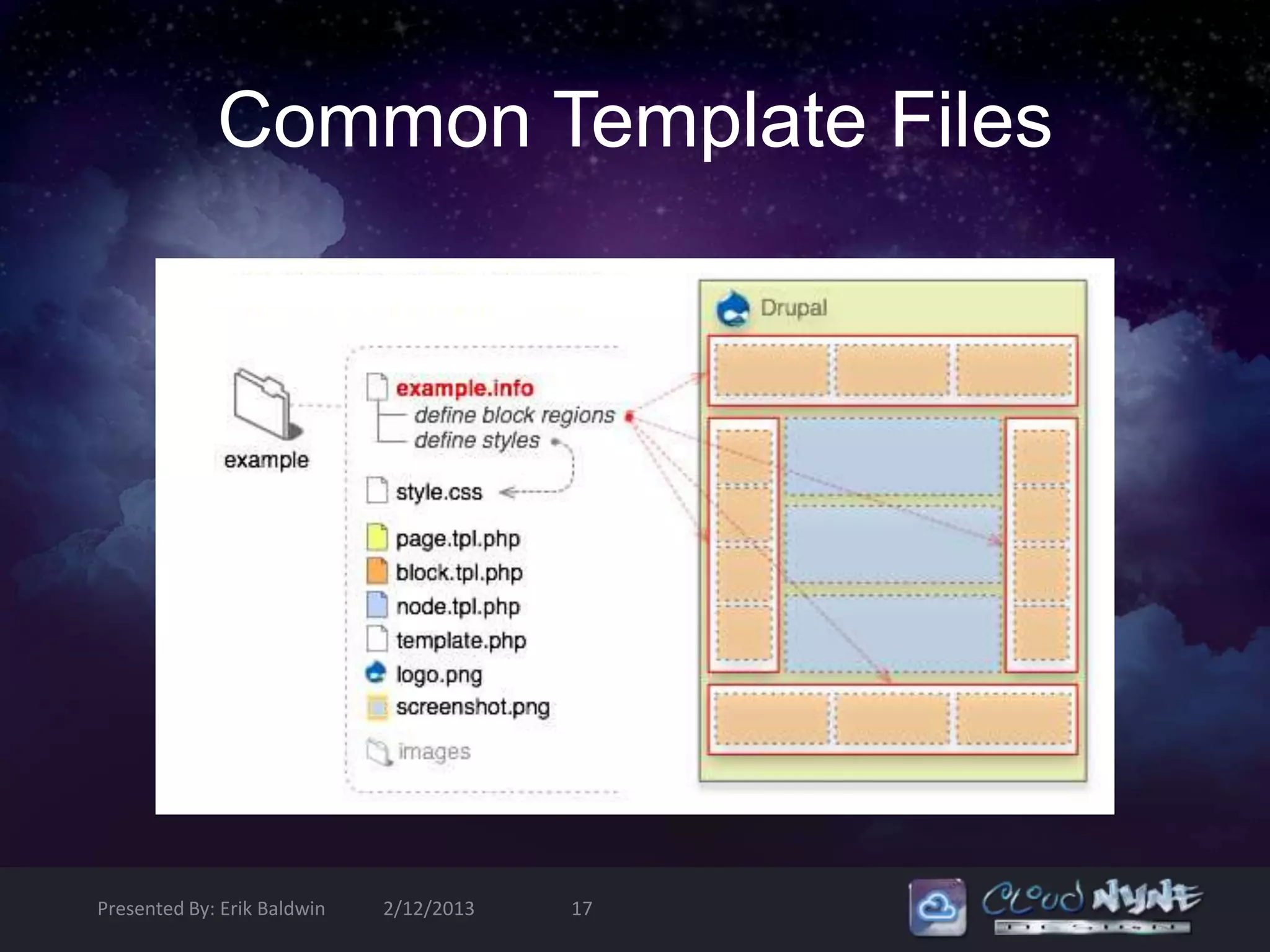
Common Template Files


Presented By: Erik Baldwin   2/12/2013   17
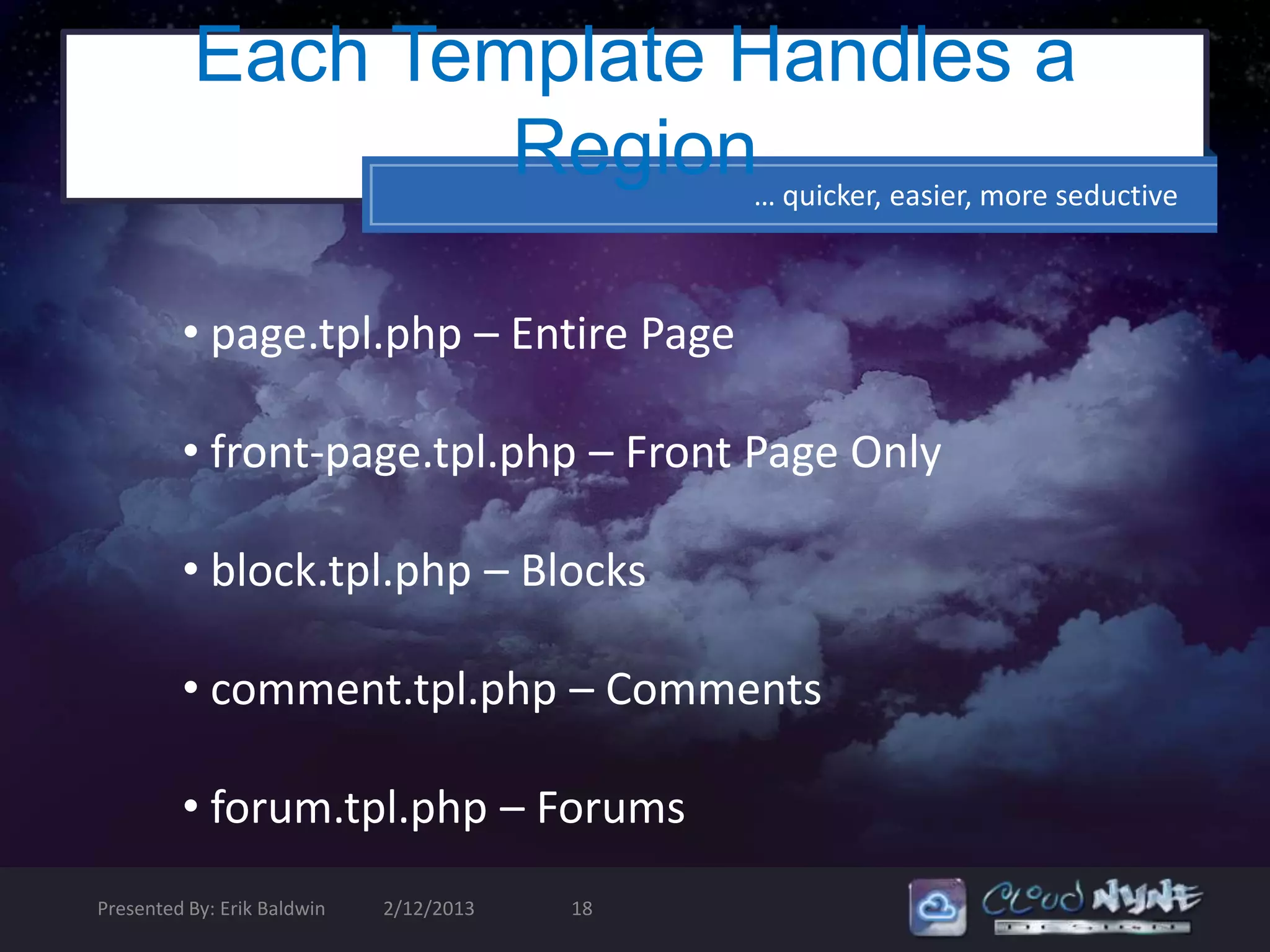
Each Template Handles a
                  Region… quicker, easier, more seductive

         • page.tpl.php – Entire Page

         • front-page.tpl.php – Front Page Only

         • block.tpl.php – Blocks

         • comment.tpl.php – Comments

         • forum.tpl.php – Forums
Presented By: Erik Baldwin   2/12/2013   18
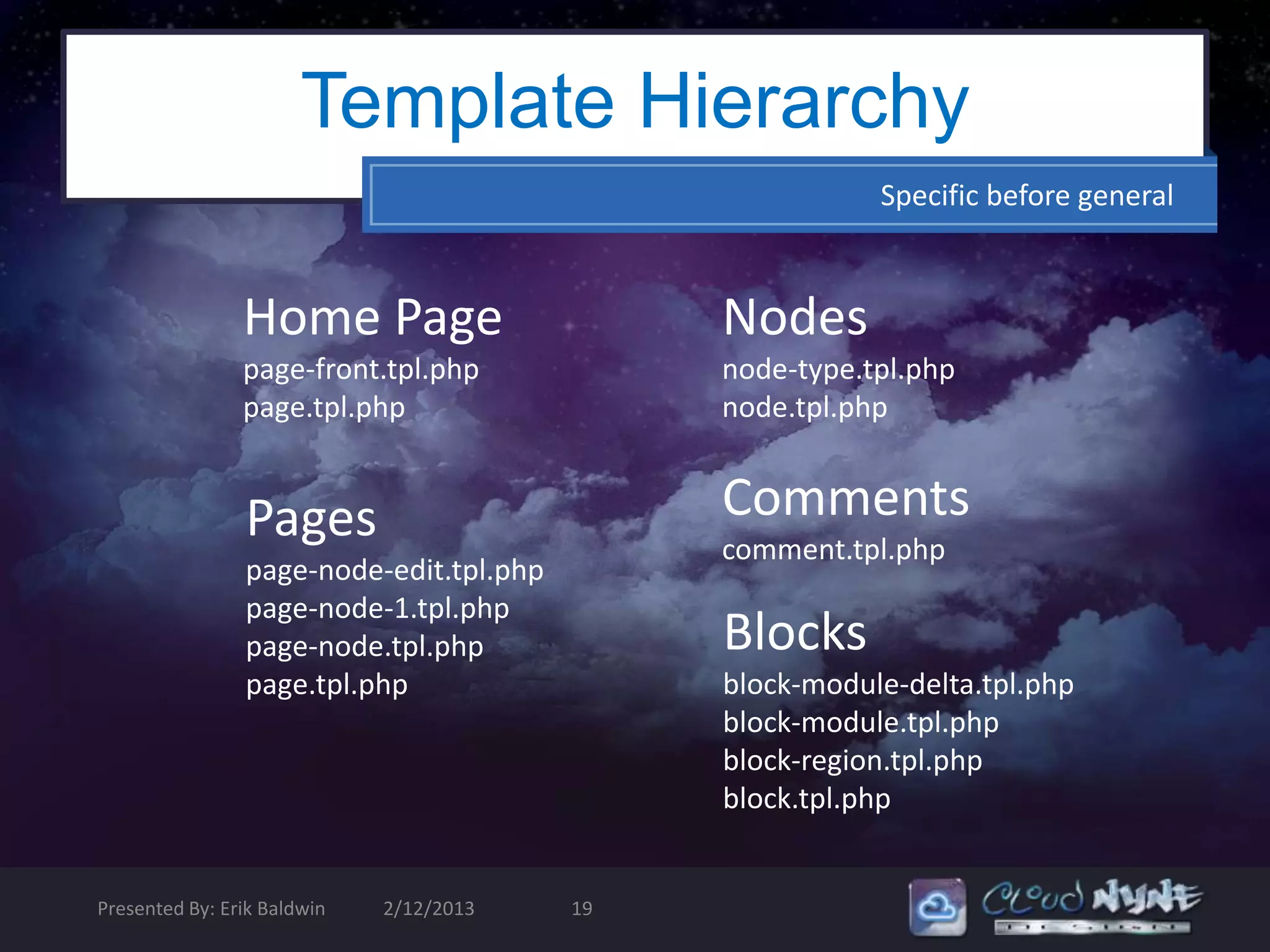
Template Hierarchy
                                                         Specific before general


                Home Page                     Nodes
                page-front.tpl.php            node-type.tpl.php
                page.tpl.php                  node.tpl.php


                Pages                         Comments
                                              comment.tpl.php
                page-node-edit.tpl.php
                page-node-1.tpl.php
                page-node.tpl.php             Blocks
                page.tpl.php                  block-module-delta.tpl.php
                                              block-module.tpl.php
                                              block-region.tpl.php
                                              block.tpl.php


Presented By: Erik Baldwin   2/12/2013   19
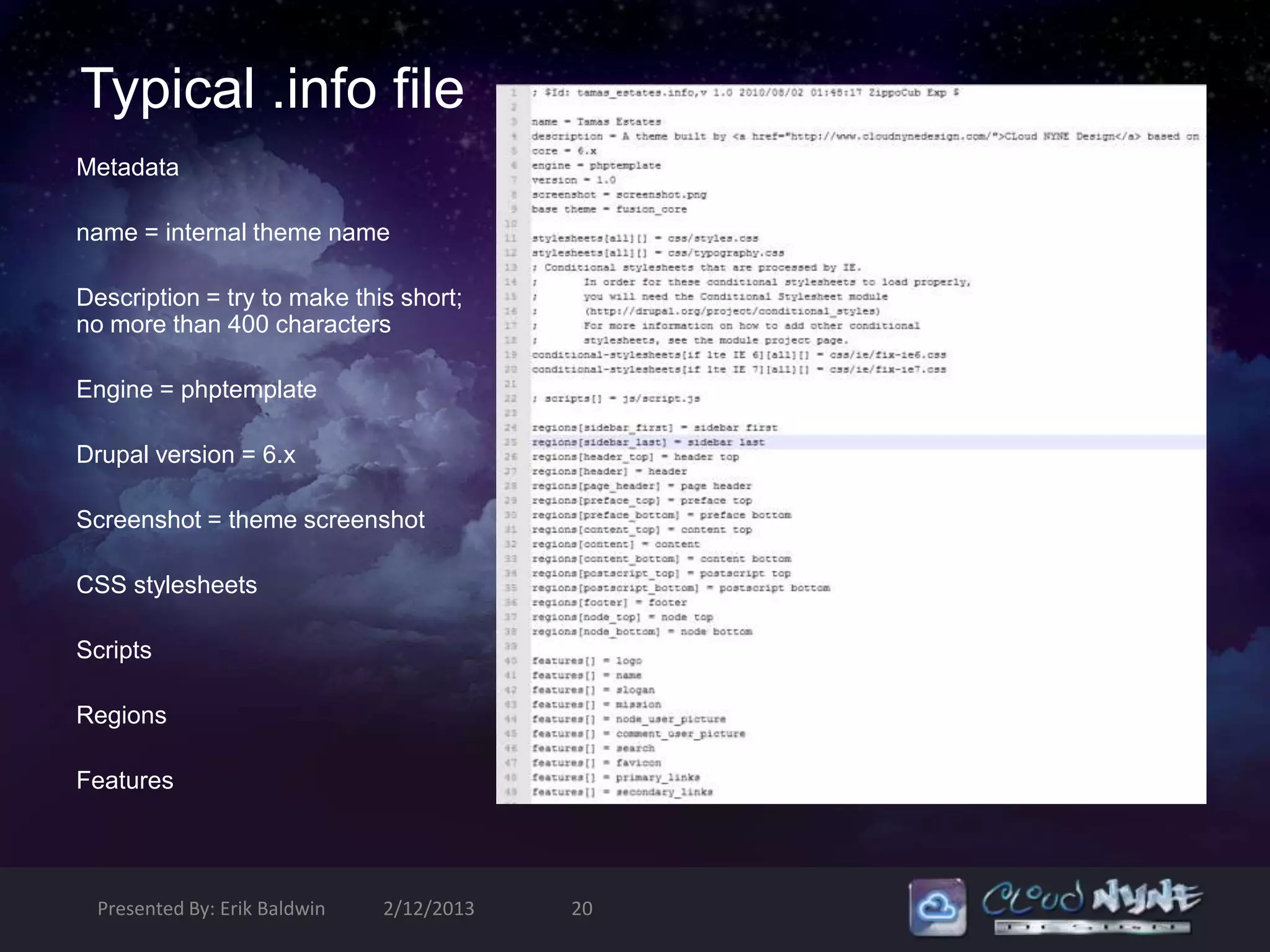
Typical .info file
Metadata

name = internal theme name

Description = try to make this short;
no more than 400 characters

Engine = phptemplate

Drupal version = 6.x

Screenshot = theme screenshot

CSS stylesheets

Scripts

Regions

Features


  Presented By: Erik Baldwin   2/12/2013   20
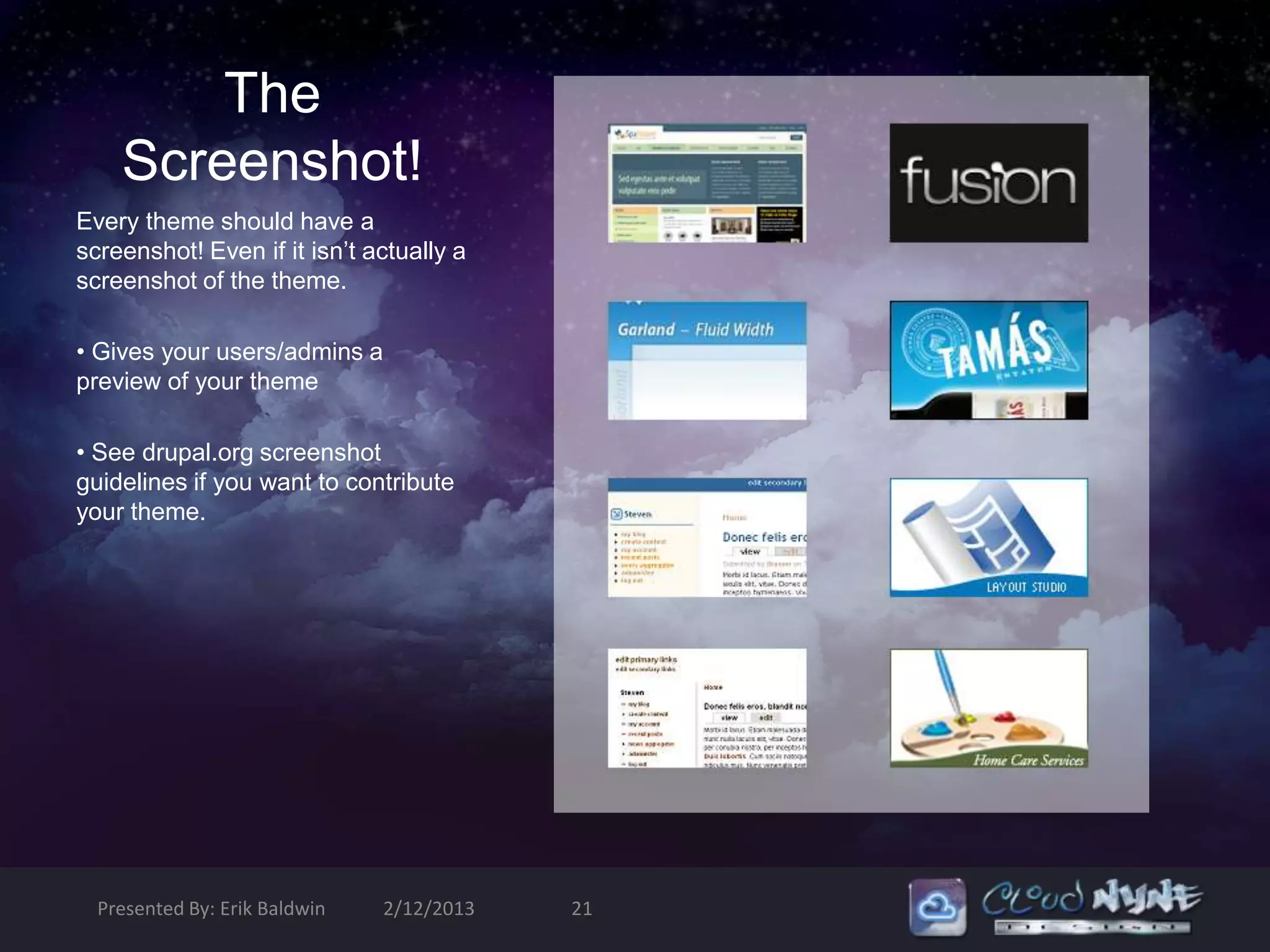
The
    Screenshot!
Every theme should have a
screenshot! Even if it isn’t actually a
screenshot of the theme.

• Gives your users/admins a
preview of your theme

• See drupal.org screenshot
guidelines if you want to contribute
your theme.


  Presented By: Erik Baldwin   2/12/2013   21
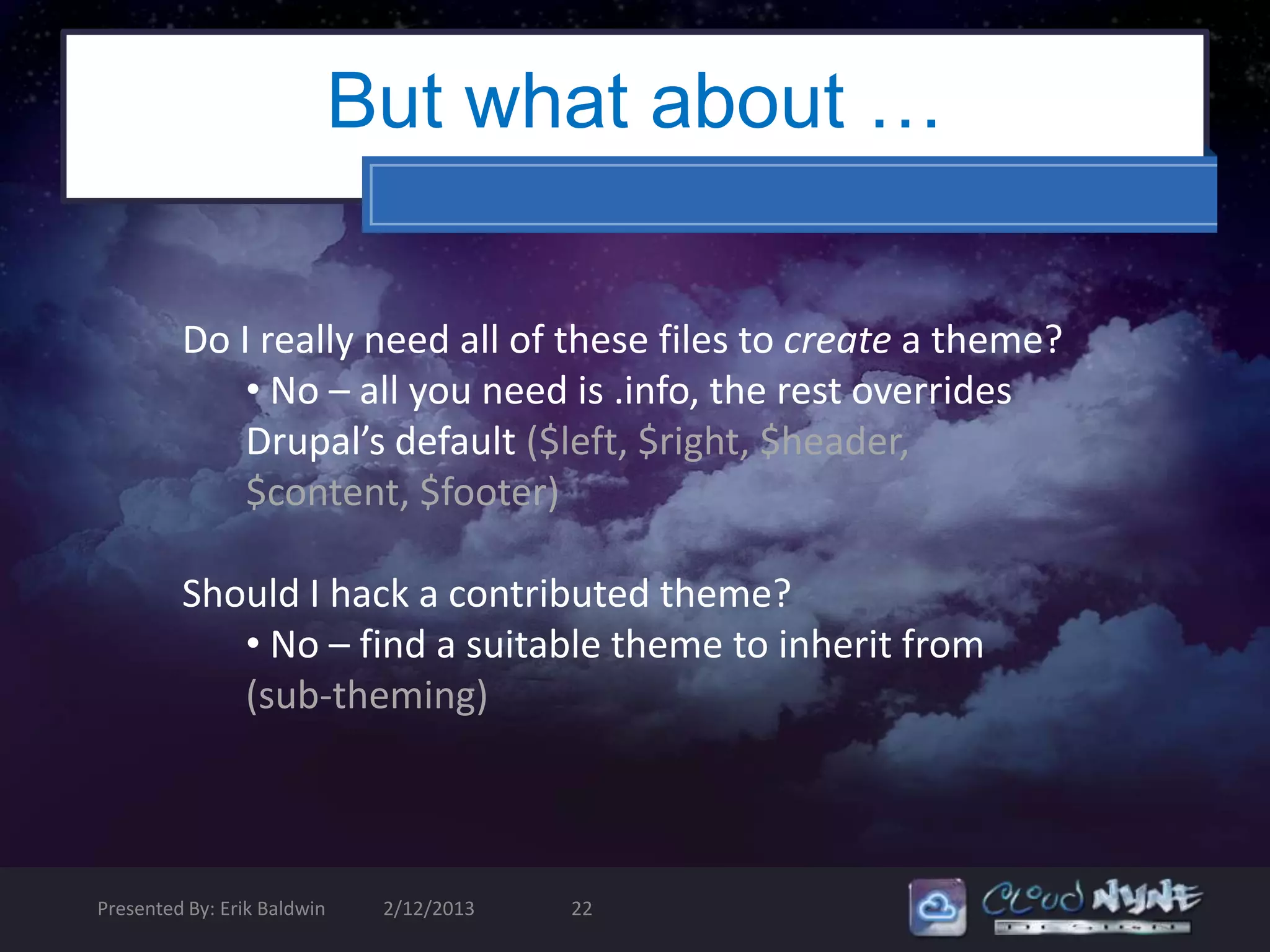
But what about …

         Do I really need all of these files to create a theme?
             • No – all you need is .info, the rest overrides
             Drupal’s default ($left, $right, $header,
             $content, $footer)

         Should I hack a contributed theme?
            • No – find a suitable theme to inherit from
            (sub-theming)


Presented By: Erik Baldwin    2/12/2013   22
Part II: Building a Theme from Static
xHTML/CSS
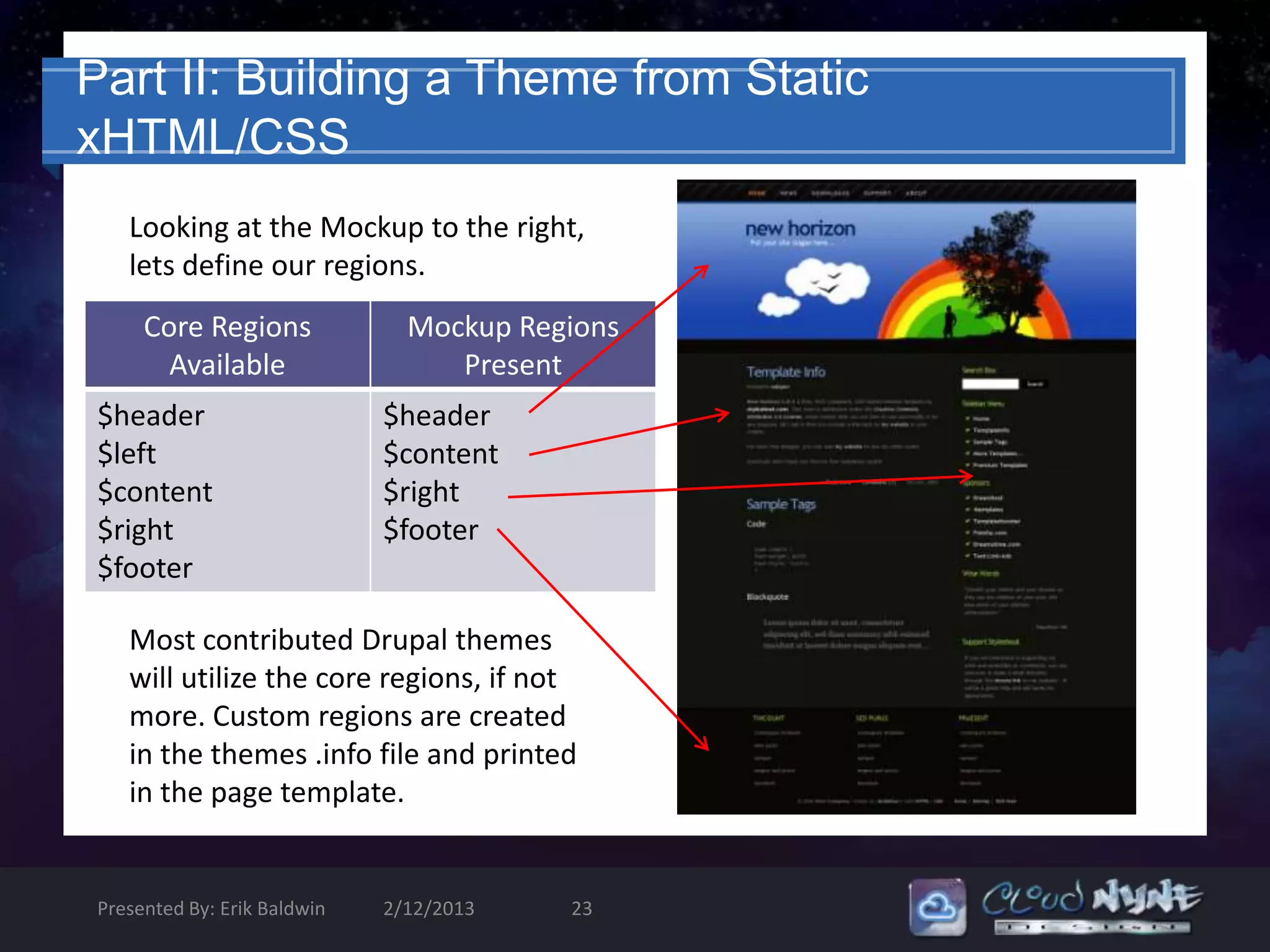
   Looking at the Mockup to the right,
   lets define our regions.
     Core Regions              Mockup Regions
       Available                  Present
$header                      $header
$left                        $content
$content                     $right
$right                       $footer
$footer

   Most contributed Drupal themes
   will utilize the core regions, if not
   more. Custom regions are created
   in the themes .info file and printed
   in the page template.


Presented By: Erik Baldwin   2/12/2013   23
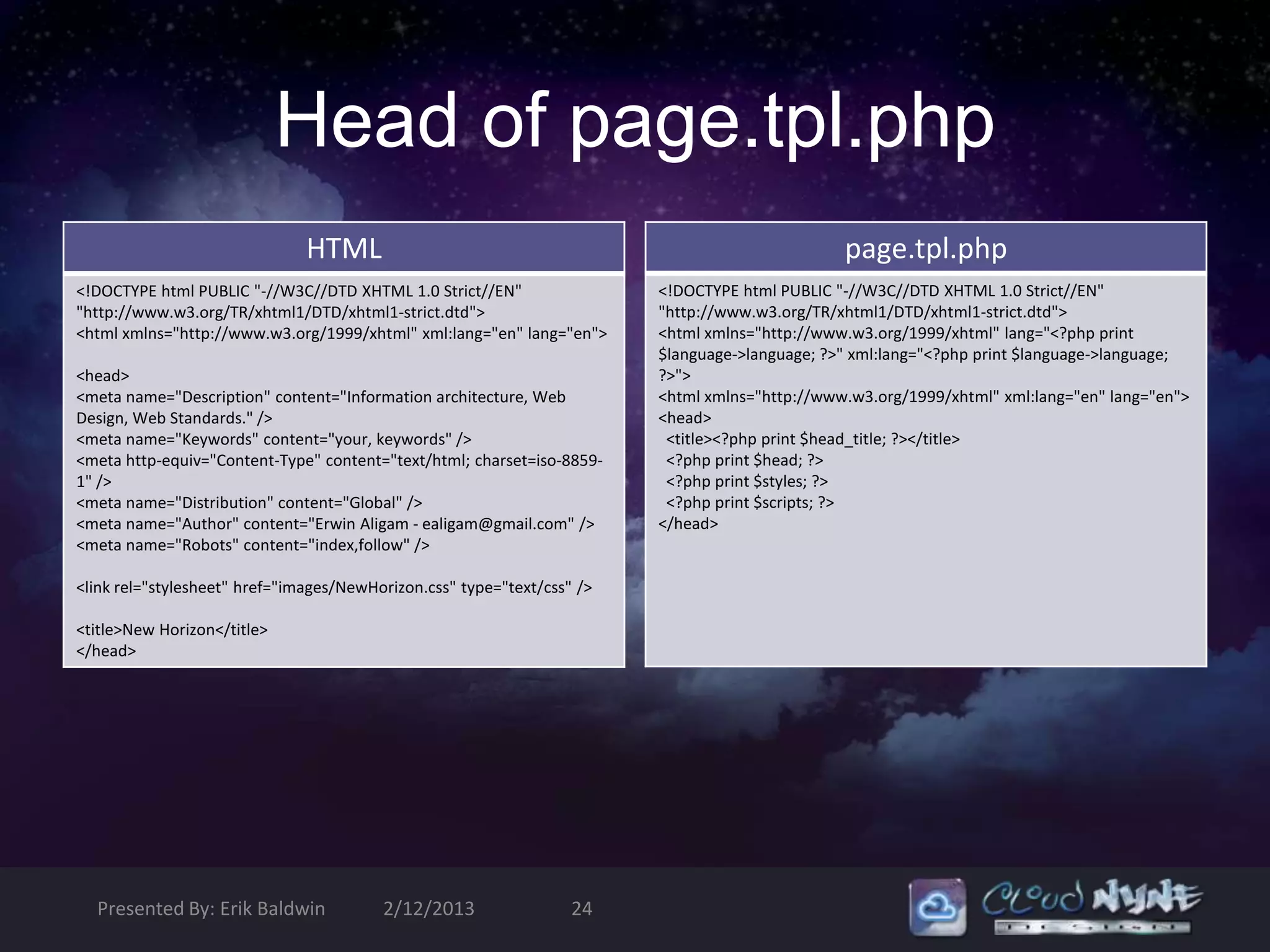
Head of page.tpl.php
                               HTML                                                             page.tpl.php
<!DOCTYPE html PUBLIC "-//W3C//DTD XHTML 1.0 Strict//EN"                 <!DOCTYPE html PUBLIC "-//W3C//DTD XHTML 1.0 Strict//EN"
"http://www.w3.org/TR/xhtml1/DTD/xhtml1-strict.dtd">                     "http://www.w3.org/TR/xhtml1/DTD/xhtml1-strict.dtd">
<html xmlns="http://www.w3.org/1999/xhtml" xml:lang="en" lang="en">      <html xmlns="http://www.w3.org/1999/xhtml" lang="<?php print
                                                                         $language->language; ?>" xml:lang="<?php print $language->language;
<head>                                                                   ?>">
<meta name="Description" content="Information architecture, Web          <html xmlns="http://www.w3.org/1999/xhtml" xml:lang="en" lang="en">
Design, Web Standards." />                                               <head>
<meta name="Keywords" content="your, keywords" />                         <title><?php print $head_title; ?></title>
<meta http-equiv="Content-Type" content="text/html; charset=iso-8859-     <?php print $head; ?>
1" />                                                                     <?php print $styles; ?>
<meta name="Distribution" content="Global" />                             <?php print $scripts; ?>
<meta name="Author" content="Erwin Aligam - ealigam@gmail.com" />        </head>
<meta name="Robots" content="index,follow" />

<link rel="stylesheet" href="images/NewHorizon.css" type="text/css" />

<title>New Horizon</title>
</head>


  Presented By: Erik Baldwin             2/12/2013                 24
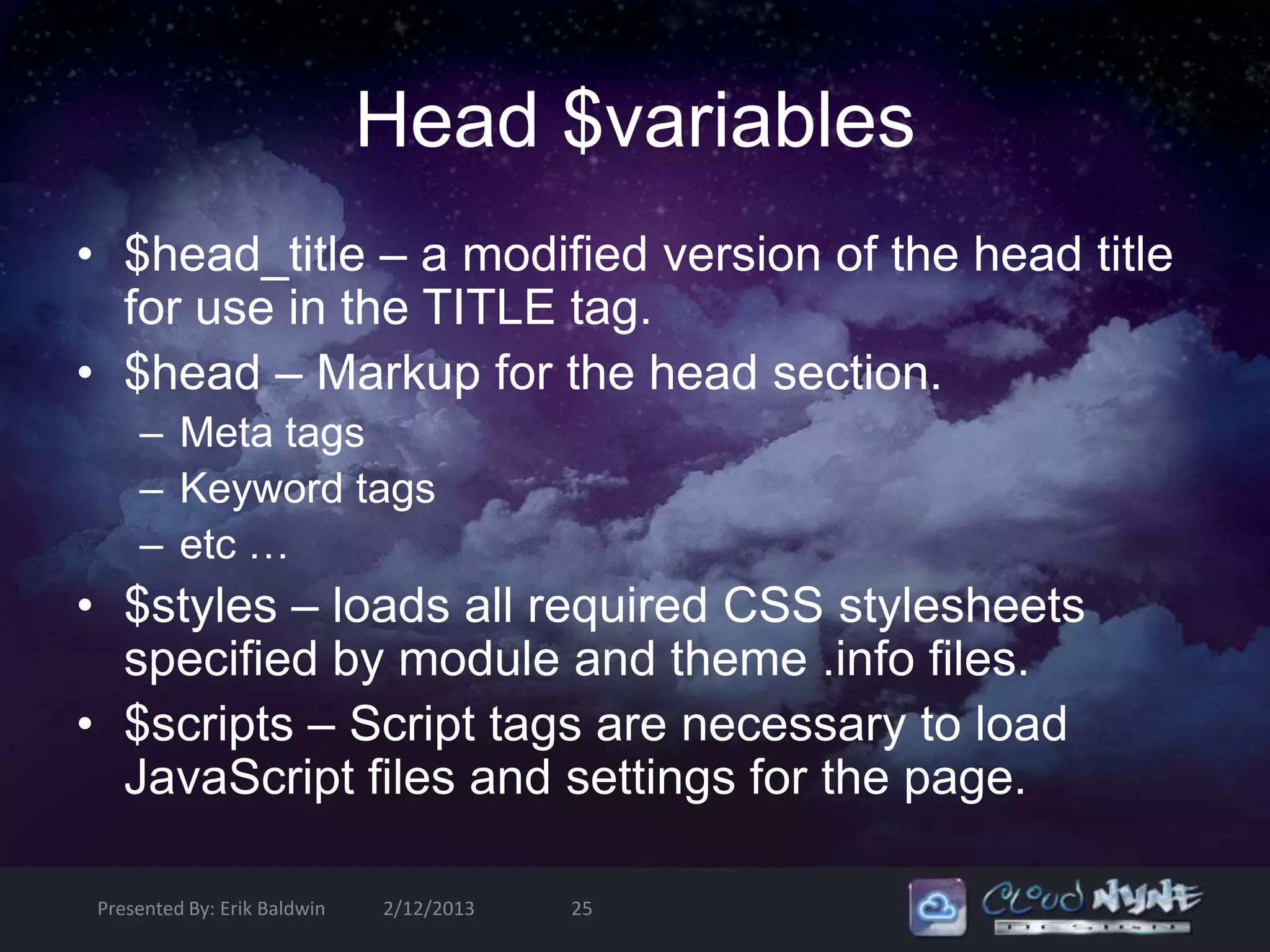
Head $variables
• $head_title – a modified version of the head title
  for use in the TITLE tag.
• $head – Markup for the head section.
    – Meta tags
    – Keyword tags
    – etc …
• $styles – loads all required CSS stylesheets
  specified by module and theme .info files.
• $scripts – Script tags are necessary to load
  JavaScript files and settings for the page.

Presented By: Erik Baldwin   2/12/2013   25
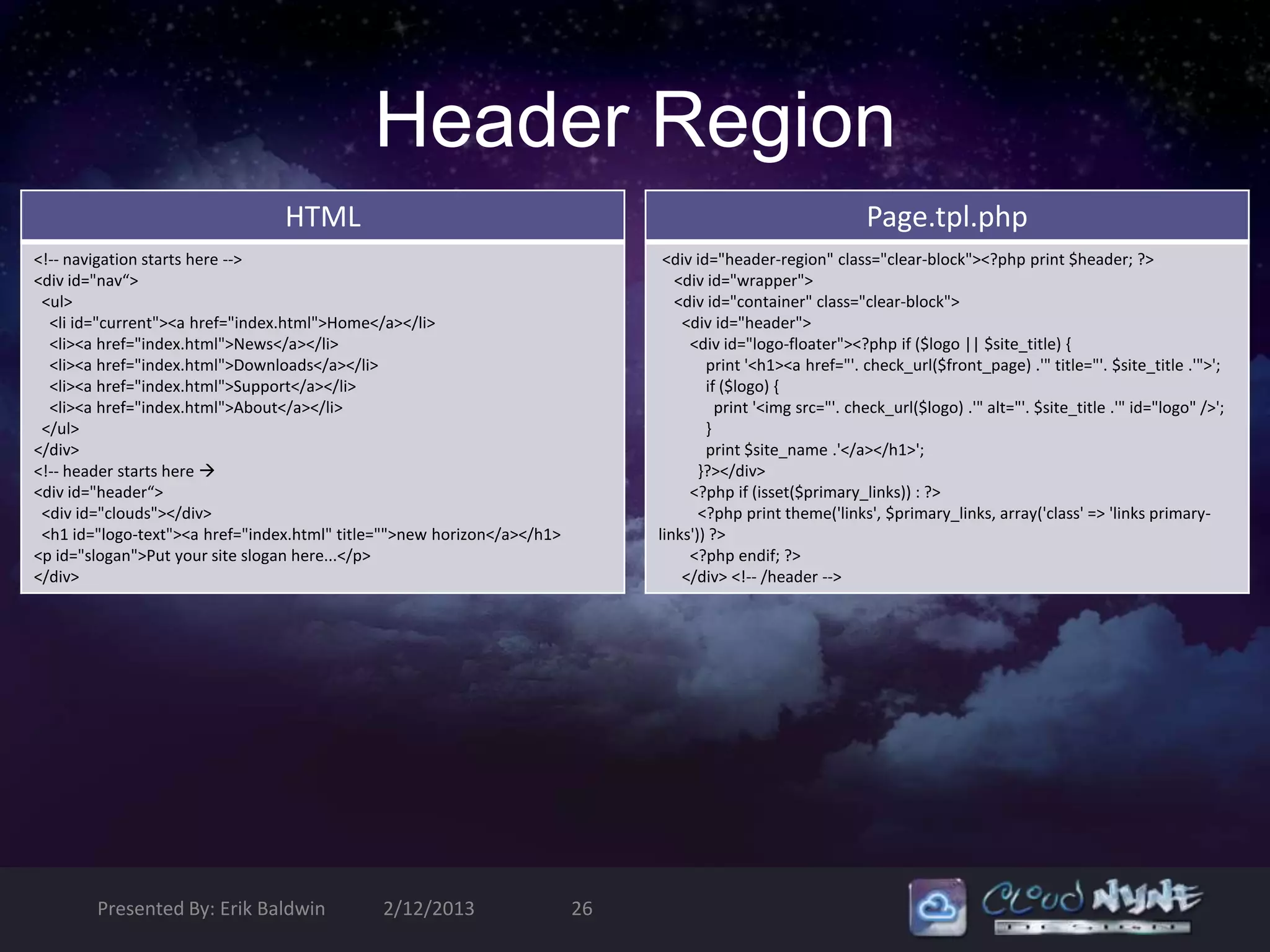
Header Region
                                 HTML                                                                         Page.tpl.php
<!-- navigation starts here -->                                                <div id="header-region" class="clear-block"><?php print $header; ?>
<div id="nav“>                                                                   <div id="wrapper">
 <ul>                                                                            <div id="container" class="clear-block">
  <li id="current"><a href="index.html">Home</a></li>                             <div id="header">
  <li><a href="index.html">News</a></li>                                           <div id="logo-floater"><?php if ($logo || $site_title) {
  <li><a href="index.html">Downloads</a></li>                                         print '<h1><a href="'. check_url($front_page) .'" title="'. $site_title .'">';
  <li><a href="index.html">Support</a></li>                                           if ($logo) {
  <li><a href="index.html">About</a></li>                                               print '<img src="'. check_url($logo) .'" alt="'. $site_title .'" id="logo" />';
 </ul>                                                                                }
</div>                                                                                print $site_name .'</a></h1>';
<!-- header starts here                                                             }?></div>
<div id="header“>                                                                  <?php if (isset($primary_links)) : ?>
 <div id="clouds"></div>                                                             <?php print theme('links', $primary_links, array('class' => 'links primary-
 <h1 id="logo-text"><a href="index.html" title="">new horizon</a></h1>        links')) ?>
<p id="slogan">Put your site slogan here...</p>                                    <?php endif; ?>
</div>                                                                            </div> <!-- /header -->


        Presented By: Erik Baldwin            2/12/2013                  26
Header $Variables
$logo: The path to the linked logo image that is defined in the
theme’s configuration.
$site_name: The name of the site. This value will be empty
when display has been disabled in theme settings
(features[] = name).
$front_page: The URL of the front page. Use this instead of
$base_path to link to the front page. This variable includes the
language domain or prefix.
$primary_links (array): An Array containing the primary
navigation links for the site, if they have been configured.
$secondary_links (array): An array containing secondary
navigation links for the site, if they have been configured.


Presented By: Erik Baldwin   2/12/2013   27
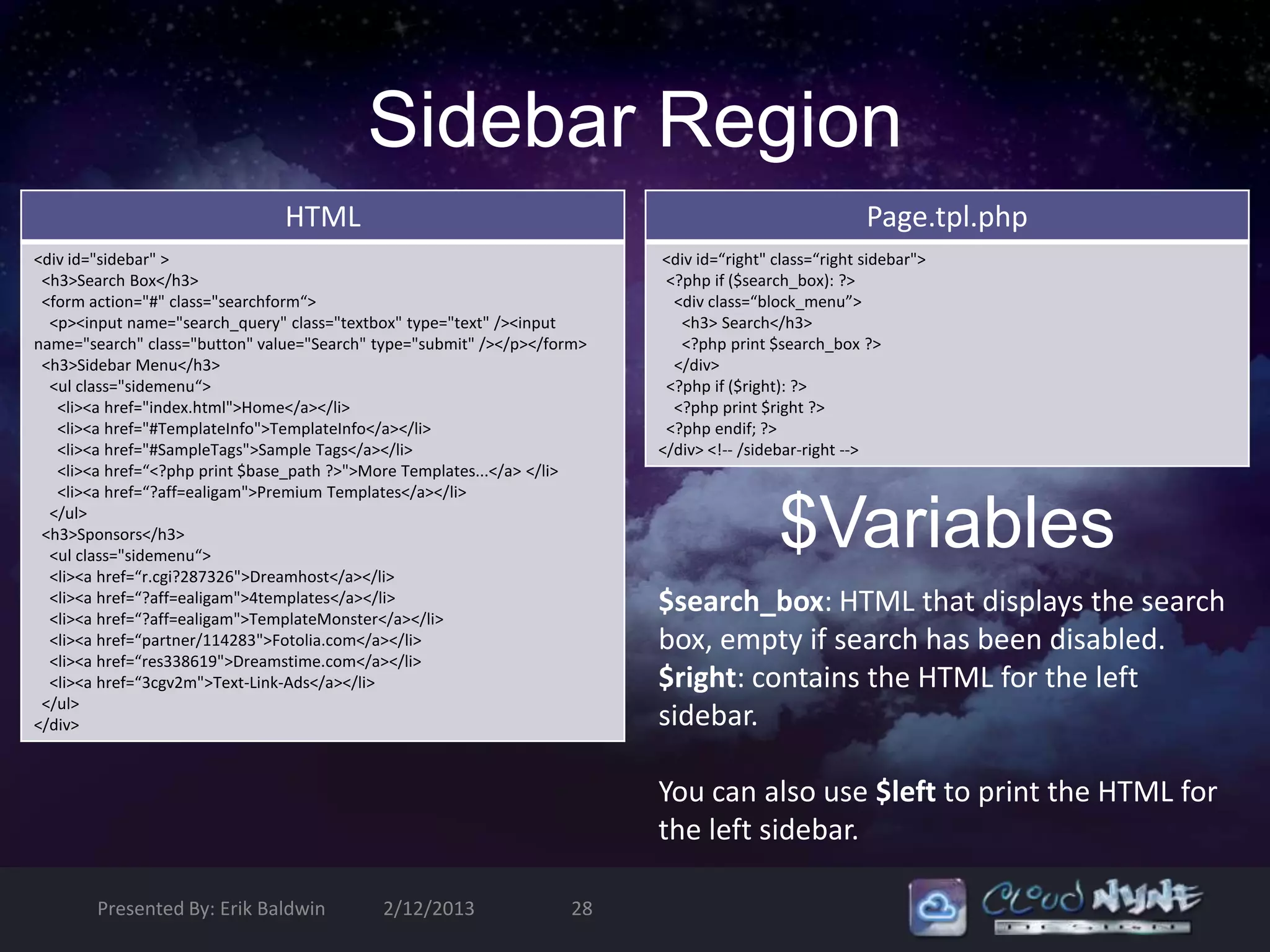
Sidebar Region
                                HTML                                                                   Page.tpl.php
<div id="sidebar" >                                                       <div id=“right" class=“right sidebar">
 <h3>Search Box</h3>                                                       <?php if ($search_box): ?>
 <form action="#" class="searchform“>                                       <div class=“block_menu”>
  <p><input name="search_query" class="textbox" type="text" /><input         <h3> Search</h3>
name="search" class="button" value="Search" type="submit" /></p></form>      <?php print $search_box ?>
 <h3>Sidebar Menu</h3>                                                      </div>
  <ul class="sidemenu“>                                                    <?php if ($right): ?>
   <li><a href="index.html">Home</a></li>                                   <?php print $right ?>
   <li><a href="#TemplateInfo">TemplateInfo</a></li>                       <?php endif; ?>
   <li><a href="#SampleTags">Sample Tags</a></li>                         </div> <!-- /sidebar-right -->
   <li><a href=“<?php print $base_path ?>">More Templates...</a> </li>
   <li><a href=“?aff=ealigam">Premium Templates</a></li>
  </ul>
 <h3>Sponsors</h3>
  <ul class="sidemenu“>
  <li><a href=“r.cgi?287326">Dreamhost</a></li>
                                                                                           $Variables
  <li><a href=“?aff=ealigam">4templates</a></li>
  <li><a href=“?aff=ealigam">TemplateMonster</a></li>
                                                                          $search_box: HTML that displays the search
  <li><a href=“partner/114283">Fotolia.com</a></li>                       box, empty if search has been disabled.
  <li><a href=“res338619">Dreamstime.com</a></li>
  <li><a href=“3cgv2m">Text-Link-Ads</a></li>                             $right: contains the HTML for the left
 </ul>
</div>                                                                    sidebar.

                                                                          You can also use $left to print the HTML for
                                                                          the left sidebar.

        Presented By: Erik Baldwin          2/12/2013               28
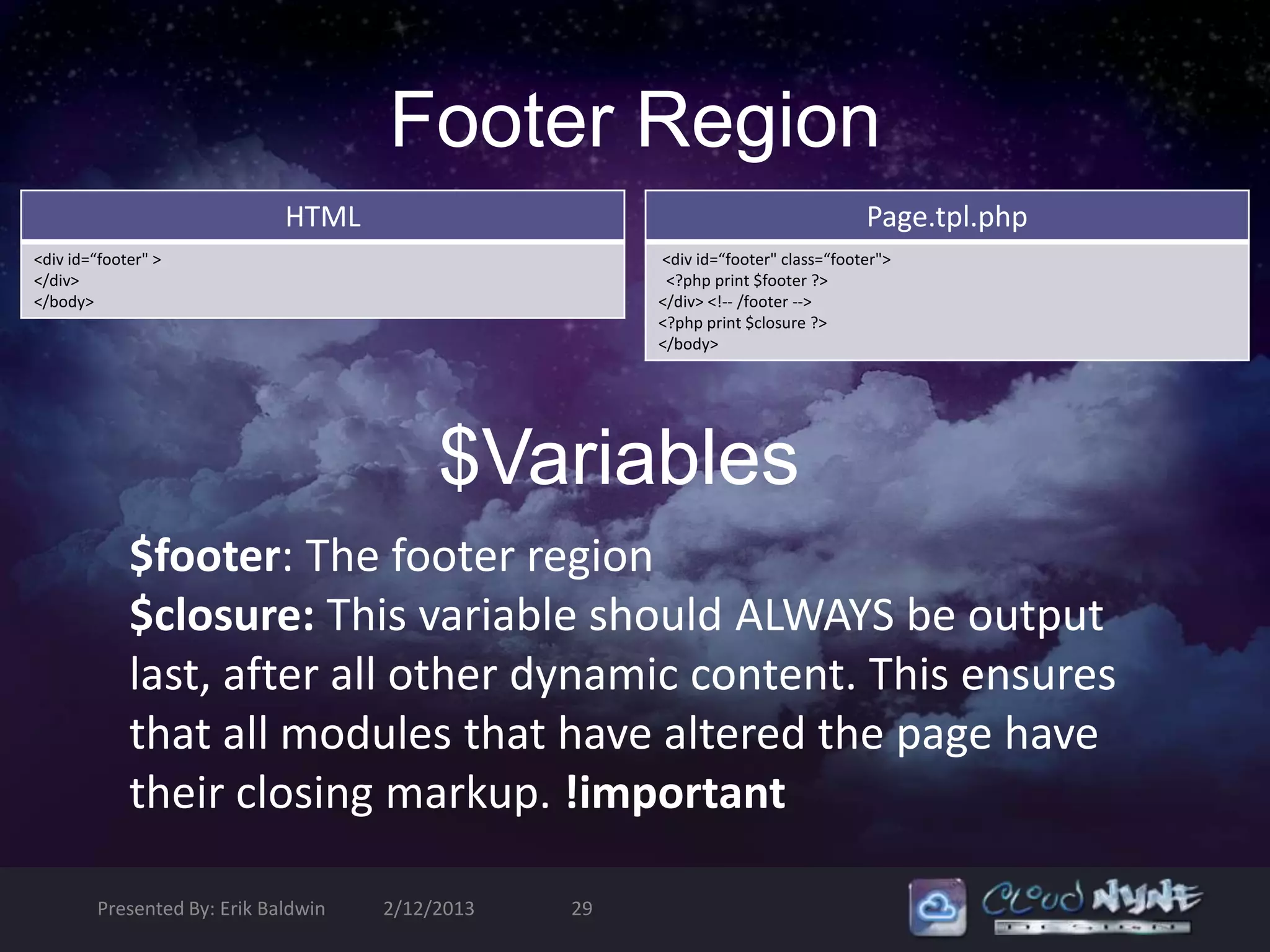
Footer Region
                             HTML                                                 Page.tpl.php
<div id=“footer" >                                    <div id=“footer" class=“footer">
</div>                                                 <?php print $footer ?>
</body>                                               </div> <!-- /footer -->
                                                      <?php print $closure ?>
                                                      </body>


                                          $Variables
             $footer: The footer region
             $closure: This variable should ALWAYS be output
             last, after all other dynamic content. This ensures
             that all modules that have altered the page have
             their closing markup. !important

        Presented By: Erik Baldwin   2/12/2013   29
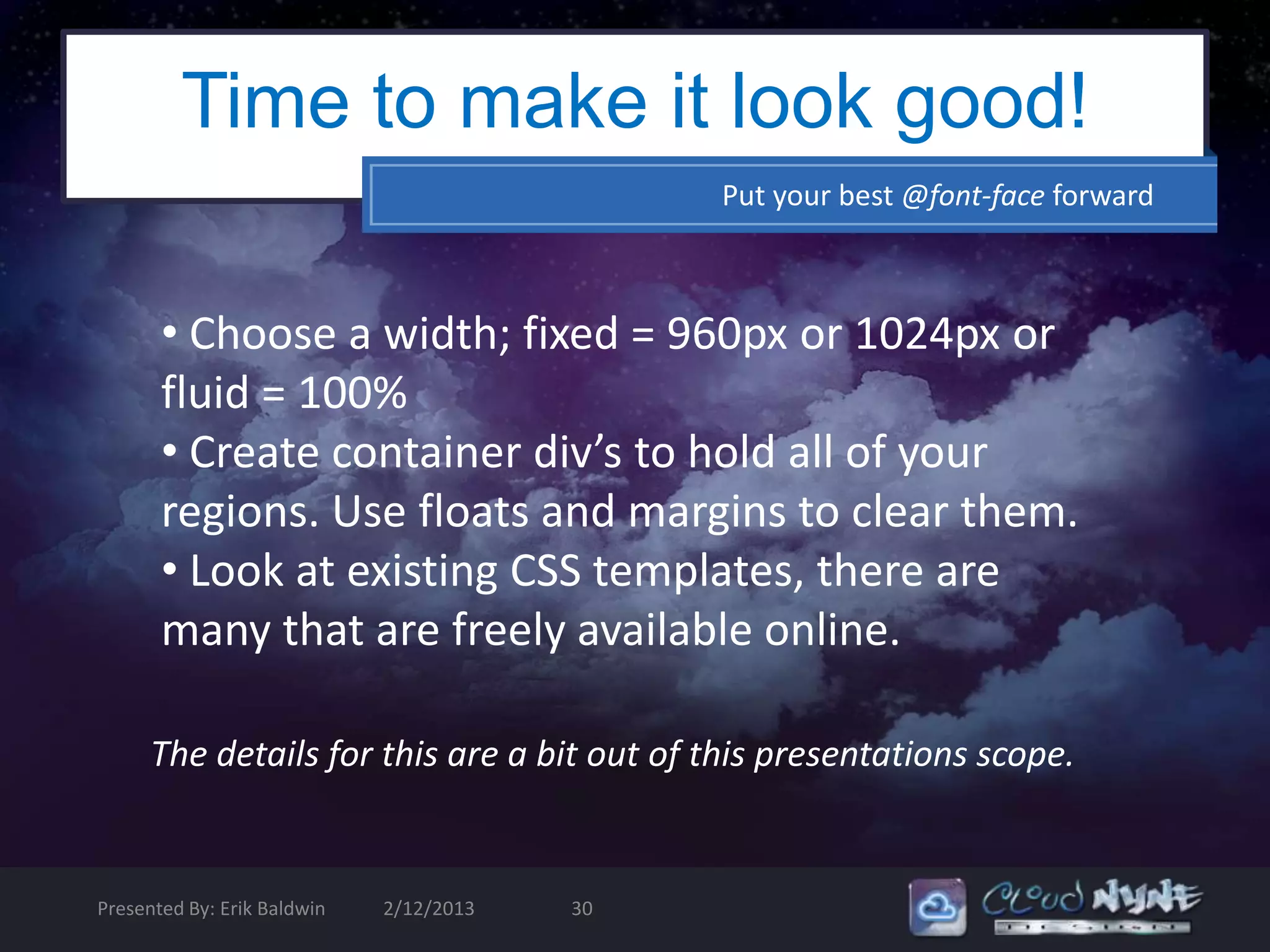
Time to make it look good!
                                              Put your best @font-face forward


       • Choose a width; fixed = 960px or 1024px or
       fluid = 100%
       • Create container div’s to hold all of your
       regions. Use floats and margins to clear them.
       • Look at existing CSS templates, there are
       many that are freely available online.

      The details for this are a bit out of this presentations scope.


Presented By: Erik Baldwin   2/12/2013   30
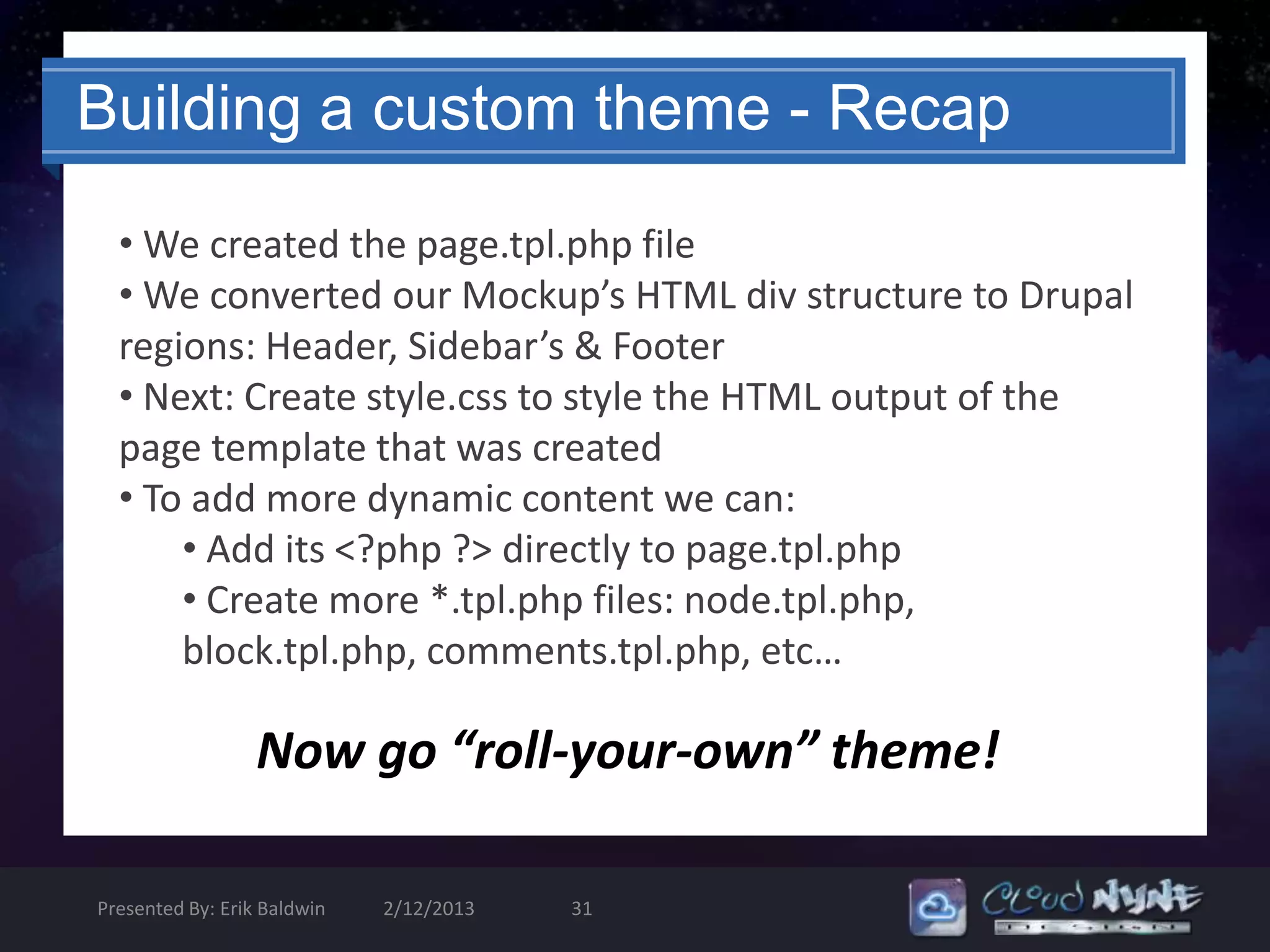
Building a custom theme - Recap

  • We created the page.tpl.php file
  • We converted our Mockup’s HTML div structure to Drupal
  regions: Header, Sidebar’s & Footer
  • Next: Create style.css to style the HTML output of the
  page template that was created
  • To add more dynamic content we can:
      • Add its <?php ?> directly to page.tpl.php
      • Create more *.tpl.php files: node.tpl.php,
      block.tpl.php, comments.tpl.php, etc…

                  Now go “roll-your-own” theme!

Presented By: Erik Baldwin   2/12/2013   31
Isn’t there an Easier method?

         Yes, there is; Create a Sub-theme!
         • Sub-themes allow you to build on existing
         template files, CSS and Scripts
         • You can remove what you don’t need without
         hacking the base theme
         • Create a design from a mockup, just like custom
         theming
         • You can even convert a ::cough:: WordPress theme


Presented By: Erik Baldwin   2/12/2013   32
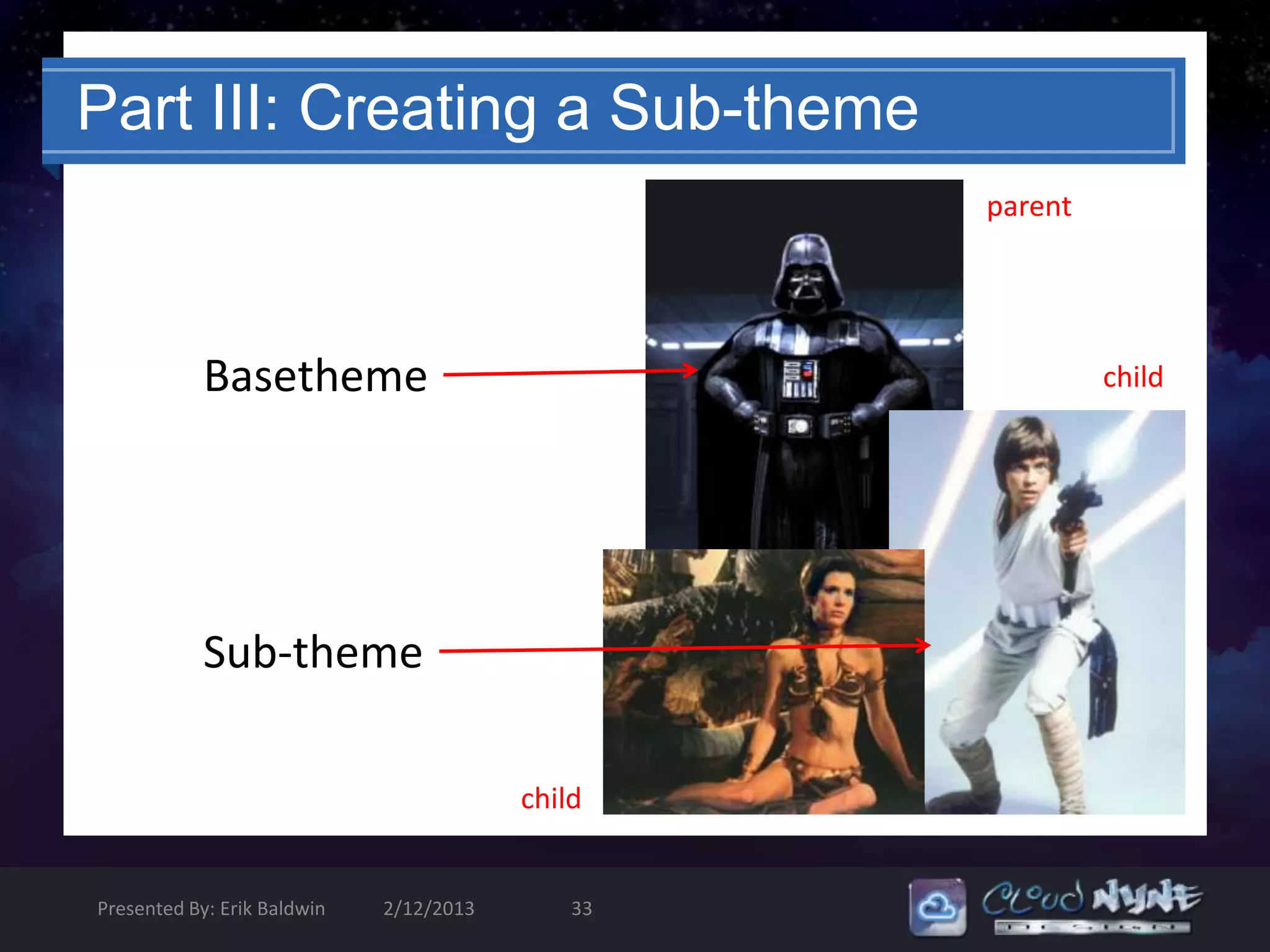
Part III: Creating a Sub-theme
                                                  parent


            Basetheme                                      child


            Sub-theme

                                         child


Presented By: Erik Baldwin   2/12/2013       33
CSS Only Themes
• Core page.tpl.php theme based on your
  choice of contrib/base theme
• The use of well named classes and id’s is
  required to identify areas/regions
• A theme that is built with just an .info file
  will create an ugly site, but with clean
  xHTML that can be manipulated to suit any
  needs

Presented By: Erik Baldwin   2/12/2013   34
Sub-Theming in 7 Steps
                                          “Who's your Jedi master? WHO'S your Jedi Master?”


• Wireframes/Mockups in Photoshop, Illustrator or Fireworks
• Create static CSS files
• Download base theme to sites/all/themes/*base theme
name*
• Create sub theme in sites/all/themes/*sub-theme name*
• Override templates in *foo*.tpl.php
• Add JavaScript and jQuery, if necessary
• Override themable functions in template.php
(sub_theme_name_preprocess_foo{} in template.php)


 Presented By: Erik Baldwin   2/12/2013         35
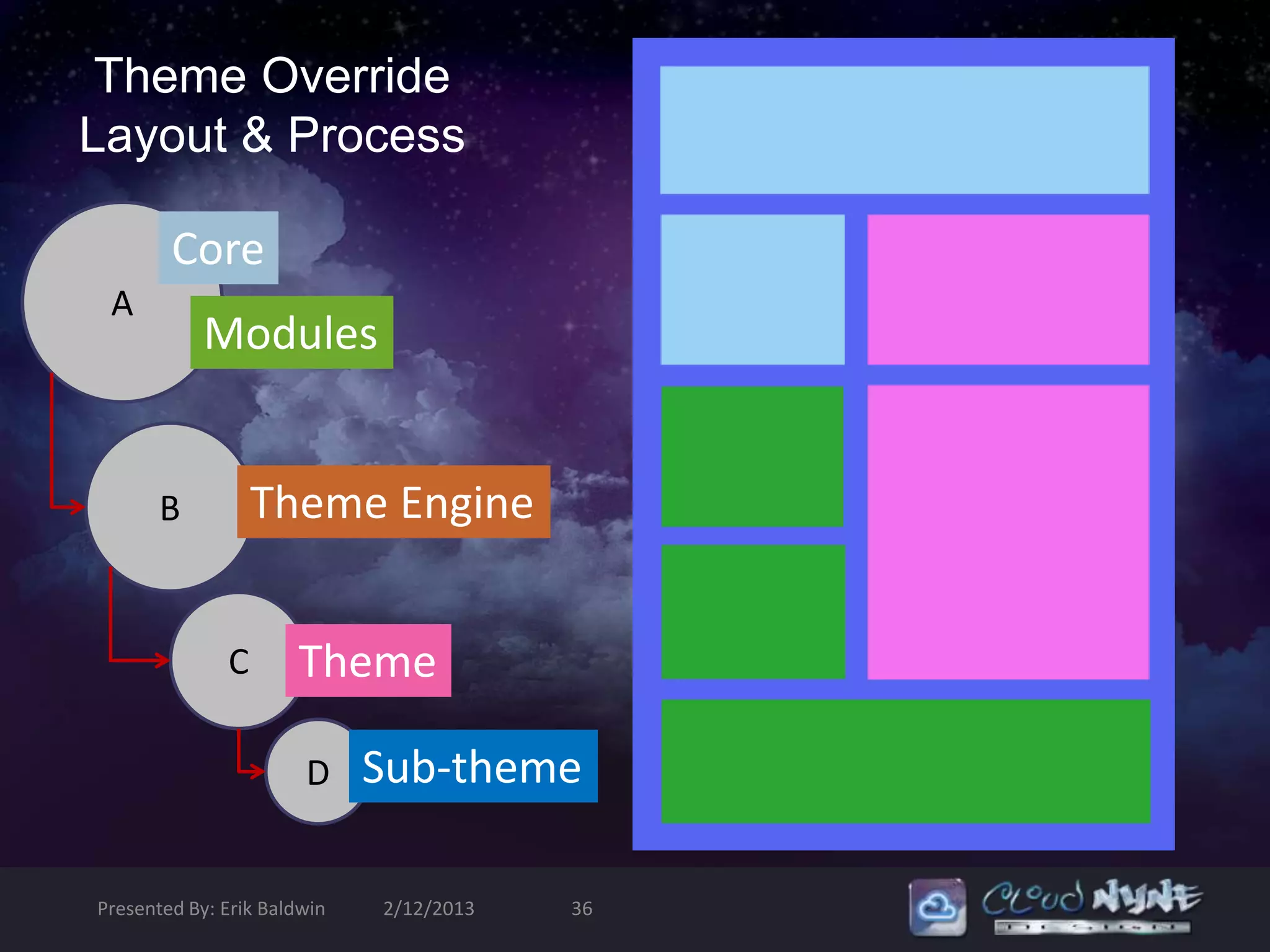
Theme Override
Layout & Process

        Core
 A
            Modules


       B          Theme Engine


              C       Theme

                       D     Sub-theme

Presented By: Erik Baldwin   2/12/2013   36
Theme Inheritance
                                         Because everything is passed down thru generations


• Unless you already have a great understanding of Drupal Theming, you should start
with an existing theme and modify it

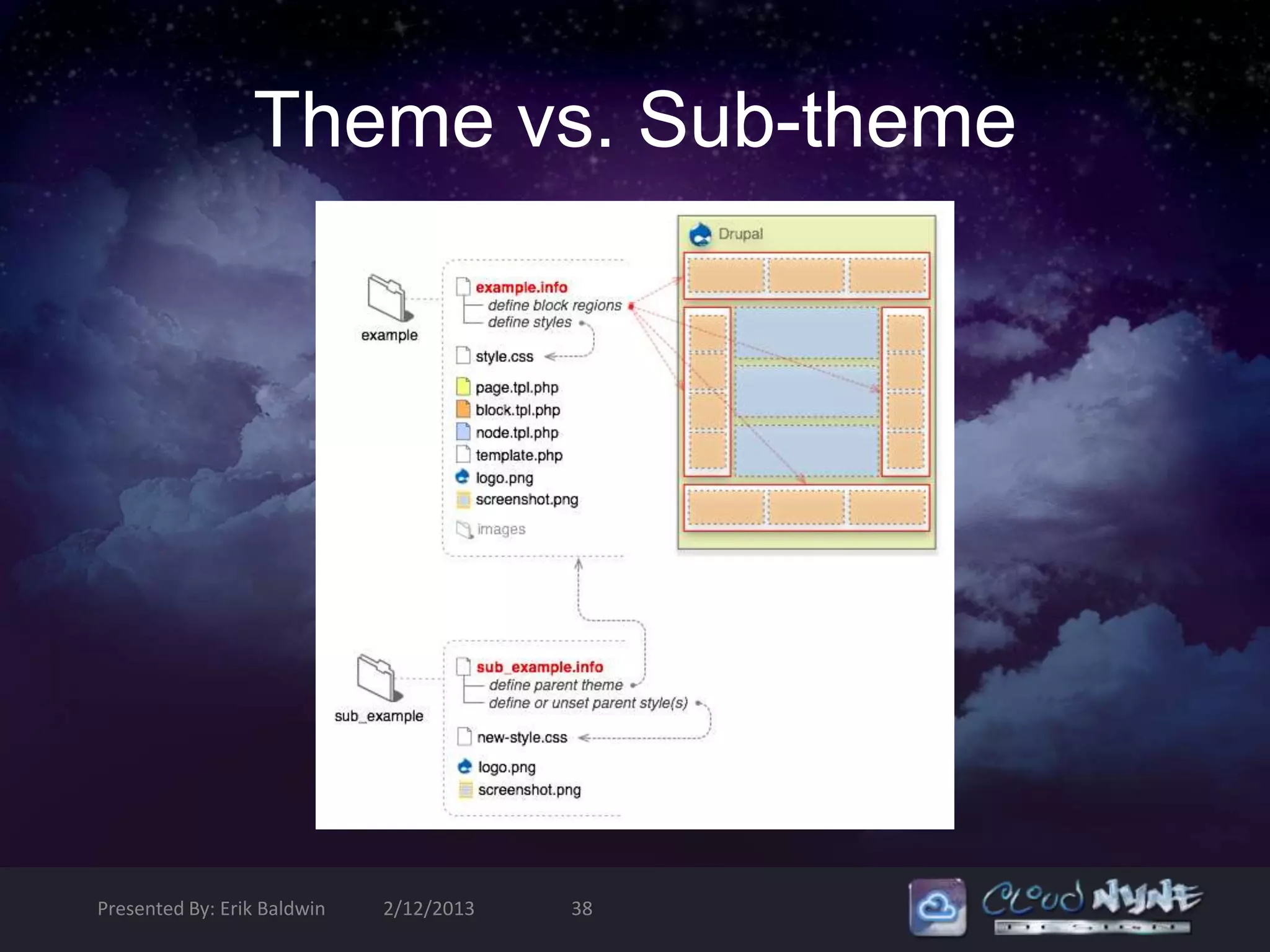
• Sub-themes set their “base theme” in the .info file; the theme which it will directly
inherit it’s templates, styles and scripts from

• All styles, scrips and template.php overrides that are specified in the base theme’s
template.php will be inherited by the sub-theme

• A Sub-theme should NEVER use phptemplate_ functions; instead use
sub_theme_name_

• Building a sub-theme is the safest way to modify an existing theme and still be able
to easily update the base theme that is being modified.


Presented By: Erik Baldwin   2/12/2013        37
Theme vs. Sub-theme


Presented By: Erik Baldwin   2/12/2013   38
Sub-theme basics
                                                 Need-to-know stuff that you NEED to know!


  • Inherits resources from the parent theme

  • Name the “base theme” in the .info file

  • Sub-themes are not required to be in a sub directory of the parent them (This was
  a requirement for Drupal 5)

  • Place your sub-theme in sites/all/themes


Sub-themes are granular, just like a family tree. It just depends on
how far you want/need the legacy to go. As of Drupal 6.17, you can
have grandchild themes and so forth

   Presented By: Erik Baldwin   2/12/2013   39

Theming Drupal 6 - An Introduction to the Basics

  • 1.
    Theming Drupal 6 An Introduction to the Basics + some advanced stuff too, but that’s at the end
  • 2.
    Before we begin… What you need to know: - HTML/XHTML - It helps to know what content is printed where - CSS - Enough to edit rules, changes backgrounds, add images, etc. - Box Model - Margin, border & padding and how they work together -Basic PHP - An understanding of syntax and how PHP functions operate in general What you might want to know: - jQuery - For that little extra; Flash® is overkill for an image slideshow - How to setup a Local Development Environment (LAMP) - Version Control - Subversion or GIT are commonly used with Drupal - More PHP? Presented By: Erik Baldwin 2/12/2013 2
  • 3.
    Drupal theme designprinciples - Grid System - 960px or 1024px wide - 5 core regions - Header - Left - Right - Content - Footer - Text & Image Alignment - A content layout built for the web - Design your theme for the site’s content, not vice-versa! Presented By: Erik Baldwin 2/12/2013 3
  • 4.
    Theming Caveats … ‘cause it can’t always be easy. Don’t hack core! Don’t hack modules! Don’t hack contrib themes! The output from all of these is THEMABLE! Intercept , Override [template.php] & Sub-Theme [foo.tpl.php] Presented By: Erik Baldwin 2/12/2013 4
  • 5.
    Where to start…? “To be Jedi is to face the truth, and choose.” Mockups Static HTML/CSS Write *.info file Copy *.info file, Add “Base Theme” Custom Theme Sub-Theme Create Custom Templates (foo.tpl.php) Override Existing Templates Create Styles (*.css) Override Styles Write Custom Scripts (*.js) Extend Scripts Presented By: Erik Baldwin 2/12/2013 5
  • 6.
    Intro to ThemingDrupal 6 Part I: The anatomy of a theme Part II: Basic build from Static HTML & CSS Part III: Create a Fusion Sub-Theme (demo) Part IV: Tools & Tricks (demo) Presented By: Erik Baldwin 2/12/2013 6
  • 7.
    Part I: DrupalTheme Anatomy sites/all/themes/foo .info File Theming Engine Template Language PHP Templates Styles & Images Scripts AT-AT Anatomy Presented By: Erik Baldwin 2/12/2013 7
  • 8.
    How does DrupalDo It? “No! Try not. Do, or do not. There is no try.” Browser Theme Engine Browser Browser gets checks data Server inserts merges displays info from against info into core template files formated database Drupal’s templates with HTML Output filters template.php Presented By: Erik Baldwin 2/12/2013 8
  • 9.
    Drupal 6 ThemeStack PHP Theme PHP Template Theme Don’t Hack These! Presented By: Erik Baldwin 2/12/2013 9
  • 10.
    Separating Design &Logic • .info file defines your theme • More templates = more control over theme components • phptemplate_variables() are your friends • Theme inheritance makes sub theming and overriding possible • Pure CSS themes are absolutely possible. Presented By: Erik Baldwin 2/12/2013 10
  • 11.
    Drupal’s Theme Engine PHPTemplate ships with core … no need to install it PHPTemplate allows themers to insert PHP into their xHTML markup so that predefined variables can be rendered in the browser. Some info about PHPTemplate • Written for Drupal by Adrian Rossouw • Uses foo.tpl.php files to theme Drupal’s theme_foo() functions • Themable functions can be found on api.drupal.org • You could write an entire theme in PHP, but why? • PHPTemplate is the most commonly used theming engine for CMS’s <?php print $primary_links; ?> Presented By: Erik Baldwin 2/12/2013 11
  • 12.
    How PHP GeneratesDynamic Content HTML <?php ?> Page Web Browser Drupal Core <?php ?> PHPTemplate HTML Page <?php ?> HTML <?php ?> Page Drupal MySQL Database (views is essentially a query builder) Presented By: Erik Baldwin 2/12/2013 12
  • 13.
    Template.php What am I supposed to do with this?! • Template.php holds the conditional logic and data processing required for output • It is where you create your preprocessors for generating variables before they merge with *.tpl.php file – each individual template file (.tpl.php) gets assigned to regions • This is also where you override existing theme functions and create other raw output customization (example below) function theme_name_preprocess_page(&$vars) { //override for mission statement to appear on every page, not just <front> $vars['mission'] = filter_xss_admin (theme_get_setting('mission')); //creates raw output for $foo that can be printed in any *.tpl.php $vars[‘foo’] = t(‘FooBar’);} Presented By: Erik Baldwin 2/12/2013 13
  • 14.
    What is aPreprocessor Function for? • Setup variables to be placed within the template (.tpl.php) files. Plain theme functions do not interact with preprocessors • Use them whenever overriding CSS and editing xHTML markup in Template files just isn’t enough! Presented By: Erik Baldwin 2/12/2013 14
  • 15.
    Processing Order ofPreprocessor Functions $theme_preprocess_$hook Theme $theme_preprocess() Theme phptemplate_preprocess_$hook() Engine phptemplate_preprocess() $modulename_preprocess_$hook() Modules $modulename_preprocess() $template_preprocess_$hook Core $template_preprocess() Presented By: Erik Baldwin 2/12/2013 15
  • 16.
    So, what doI do to control dynamic content display? Template Files Theme Functions Output is printed with Build a single output $var and return it <?php print $primary_links; ?> $output = ‘output’; Easiest to use if you plan on using a lot of Easiest to use if you need to build control xHTML markup. structures and loops. Presented By: Erik Baldwin 2/12/2013 16
  • 17.
    Common Template Files PresentedBy: Erik Baldwin 2/12/2013 17
  • 18.
    Each Template Handlesa Region… quicker, easier, more seductive • page.tpl.php – Entire Page • front-page.tpl.php – Front Page Only • block.tpl.php – Blocks • comment.tpl.php – Comments • forum.tpl.php – Forums Presented By: Erik Baldwin 2/12/2013 18
  • 19.
    Template Hierarchy Specific before general Home Page Nodes page-front.tpl.php node-type.tpl.php page.tpl.php node.tpl.php Pages Comments comment.tpl.php page-node-edit.tpl.php page-node-1.tpl.php page-node.tpl.php Blocks page.tpl.php block-module-delta.tpl.php block-module.tpl.php block-region.tpl.php block.tpl.php Presented By: Erik Baldwin 2/12/2013 19
  • 20.
    Typical .info file Metadata name= internal theme name Description = try to make this short; no more than 400 characters Engine = phptemplate Drupal version = 6.x Screenshot = theme screenshot CSS stylesheets Scripts Regions Features Presented By: Erik Baldwin 2/12/2013 20
  • 21.
    The Screenshot! Every theme should have a screenshot! Even if it isn’t actually a screenshot of the theme. • Gives your users/admins a preview of your theme • See drupal.org screenshot guidelines if you want to contribute your theme. Presented By: Erik Baldwin 2/12/2013 21
  • 22.
    But what about… Do I really need all of these files to create a theme? • No – all you need is .info, the rest overrides Drupal’s default ($left, $right, $header, $content, $footer) Should I hack a contributed theme? • No – find a suitable theme to inherit from (sub-theming) Presented By: Erik Baldwin 2/12/2013 22
  • 23.
    Part II: Buildinga Theme from Static xHTML/CSS Looking at the Mockup to the right, lets define our regions. Core Regions Mockup Regions Available Present $header $header $left $content $content $right $right $footer $footer Most contributed Drupal themes will utilize the core regions, if not more. Custom regions are created in the themes .info file and printed in the page template. Presented By: Erik Baldwin 2/12/2013 23
  • 24.
    Head of page.tpl.php HTML page.tpl.php <!DOCTYPE html PUBLIC "-//W3C//DTD XHTML 1.0 Strict//EN" <!DOCTYPE html PUBLIC "-//W3C//DTD XHTML 1.0 Strict//EN" "http://www.w3.org/TR/xhtml1/DTD/xhtml1-strict.dtd"> "http://www.w3.org/TR/xhtml1/DTD/xhtml1-strict.dtd"> <html xmlns="http://www.w3.org/1999/xhtml" xml:lang="en" lang="en"> <html xmlns="http://www.w3.org/1999/xhtml" lang="<?php print $language->language; ?>" xml:lang="<?php print $language->language; <head> ?>"> <meta name="Description" content="Information architecture, Web <html xmlns="http://www.w3.org/1999/xhtml" xml:lang="en" lang="en"> Design, Web Standards." /> <head> <meta name="Keywords" content="your, keywords" /> <title><?php print $head_title; ?></title> <meta http-equiv="Content-Type" content="text/html; charset=iso-8859- <?php print $head; ?> 1" /> <?php print $styles; ?> <meta name="Distribution" content="Global" /> <?php print $scripts; ?> <meta name="Author" content="Erwin Aligam - ealigam@gmail.com" /> </head> <meta name="Robots" content="index,follow" /> <link rel="stylesheet" href="images/NewHorizon.css" type="text/css" /> <title>New Horizon</title> </head> Presented By: Erik Baldwin 2/12/2013 24
  • 25.
    Head $variables • $head_title– a modified version of the head title for use in the TITLE tag. • $head – Markup for the head section. – Meta tags – Keyword tags – etc … • $styles – loads all required CSS stylesheets specified by module and theme .info files. • $scripts – Script tags are necessary to load JavaScript files and settings for the page. Presented By: Erik Baldwin 2/12/2013 25
  • 26.
    Header Region HTML Page.tpl.php <!-- navigation starts here --> <div id="header-region" class="clear-block"><?php print $header; ?> <div id="nav“> <div id="wrapper"> <ul> <div id="container" class="clear-block"> <li id="current"><a href="index.html">Home</a></li> <div id="header"> <li><a href="index.html">News</a></li> <div id="logo-floater"><?php if ($logo || $site_title) { <li><a href="index.html">Downloads</a></li> print '<h1><a href="'. check_url($front_page) .'" title="'. $site_title .'">'; <li><a href="index.html">Support</a></li> if ($logo) { <li><a href="index.html">About</a></li> print '<img src="'. check_url($logo) .'" alt="'. $site_title .'" id="logo" />'; </ul> } </div> print $site_name .'</a></h1>'; <!-- header starts here  }?></div> <div id="header“> <?php if (isset($primary_links)) : ?> <div id="clouds"></div> <?php print theme('links', $primary_links, array('class' => 'links primary- <h1 id="logo-text"><a href="index.html" title="">new horizon</a></h1> links')) ?> <p id="slogan">Put your site slogan here...</p> <?php endif; ?> </div> </div> <!-- /header --> Presented By: Erik Baldwin 2/12/2013 26
  • 27.
    Header $Variables $logo: Thepath to the linked logo image that is defined in the theme’s configuration. $site_name: The name of the site. This value will be empty when display has been disabled in theme settings (features[] = name). $front_page: The URL of the front page. Use this instead of $base_path to link to the front page. This variable includes the language domain or prefix. $primary_links (array): An Array containing the primary navigation links for the site, if they have been configured. $secondary_links (array): An array containing secondary navigation links for the site, if they have been configured. Presented By: Erik Baldwin 2/12/2013 27
  • 28.
    Sidebar Region HTML Page.tpl.php <div id="sidebar" > <div id=“right" class=“right sidebar"> <h3>Search Box</h3> <?php if ($search_box): ?> <form action="#" class="searchform“> <div class=“block_menu”> <p><input name="search_query" class="textbox" type="text" /><input <h3> Search</h3> name="search" class="button" value="Search" type="submit" /></p></form> <?php print $search_box ?> <h3>Sidebar Menu</h3> </div> <ul class="sidemenu“> <?php if ($right): ?> <li><a href="index.html">Home</a></li> <?php print $right ?> <li><a href="#TemplateInfo">TemplateInfo</a></li> <?php endif; ?> <li><a href="#SampleTags">Sample Tags</a></li> </div> <!-- /sidebar-right --> <li><a href=“<?php print $base_path ?>">More Templates...</a> </li> <li><a href=“?aff=ealigam">Premium Templates</a></li> </ul> <h3>Sponsors</h3> <ul class="sidemenu“> <li><a href=“r.cgi?287326">Dreamhost</a></li> $Variables <li><a href=“?aff=ealigam">4templates</a></li> <li><a href=“?aff=ealigam">TemplateMonster</a></li> $search_box: HTML that displays the search <li><a href=“partner/114283">Fotolia.com</a></li> box, empty if search has been disabled. <li><a href=“res338619">Dreamstime.com</a></li> <li><a href=“3cgv2m">Text-Link-Ads</a></li> $right: contains the HTML for the left </ul> </div> sidebar. You can also use $left to print the HTML for the left sidebar. Presented By: Erik Baldwin 2/12/2013 28
  • 29.
    Footer Region HTML Page.tpl.php <div id=“footer" > <div id=“footer" class=“footer"> </div> <?php print $footer ?> </body> </div> <!-- /footer --> <?php print $closure ?> </body> $Variables $footer: The footer region $closure: This variable should ALWAYS be output last, after all other dynamic content. This ensures that all modules that have altered the page have their closing markup. !important Presented By: Erik Baldwin 2/12/2013 29
  • 30.
    Time to makeit look good! Put your best @font-face forward • Choose a width; fixed = 960px or 1024px or fluid = 100% • Create container div’s to hold all of your regions. Use floats and margins to clear them. • Look at existing CSS templates, there are many that are freely available online. The details for this are a bit out of this presentations scope. Presented By: Erik Baldwin 2/12/2013 30
  • 31.
    Building a customtheme - Recap • We created the page.tpl.php file • We converted our Mockup’s HTML div structure to Drupal regions: Header, Sidebar’s & Footer • Next: Create style.css to style the HTML output of the page template that was created • To add more dynamic content we can: • Add its <?php ?> directly to page.tpl.php • Create more *.tpl.php files: node.tpl.php, block.tpl.php, comments.tpl.php, etc… Now go “roll-your-own” theme! Presented By: Erik Baldwin 2/12/2013 31
  • 32.
    Isn’t there anEasier method? Yes, there is; Create a Sub-theme! • Sub-themes allow you to build on existing template files, CSS and Scripts • You can remove what you don’t need without hacking the base theme • Create a design from a mockup, just like custom theming • You can even convert a ::cough:: WordPress theme Presented By: Erik Baldwin 2/12/2013 32
  • 33.
    Part III: Creatinga Sub-theme parent Basetheme child Sub-theme child Presented By: Erik Baldwin 2/12/2013 33
  • 34.
    CSS Only Themes •Core page.tpl.php theme based on your choice of contrib/base theme • The use of well named classes and id’s is required to identify areas/regions • A theme that is built with just an .info file will create an ugly site, but with clean xHTML that can be manipulated to suit any needs Presented By: Erik Baldwin 2/12/2013 34
  • 35.
    Sub-Theming in 7Steps “Who's your Jedi master? WHO'S your Jedi Master?” • Wireframes/Mockups in Photoshop, Illustrator or Fireworks • Create static CSS files • Download base theme to sites/all/themes/*base theme name* • Create sub theme in sites/all/themes/*sub-theme name* • Override templates in *foo*.tpl.php • Add JavaScript and jQuery, if necessary • Override themable functions in template.php (sub_theme_name_preprocess_foo{} in template.php) Presented By: Erik Baldwin 2/12/2013 35
  • 36.
    Theme Override Layout &Process Core A Modules B Theme Engine C Theme D Sub-theme Presented By: Erik Baldwin 2/12/2013 36
  • 37.
    Theme Inheritance Because everything is passed down thru generations • Unless you already have a great understanding of Drupal Theming, you should start with an existing theme and modify it • Sub-themes set their “base theme” in the .info file; the theme which it will directly inherit it’s templates, styles and scripts from • All styles, scrips and template.php overrides that are specified in the base theme’s template.php will be inherited by the sub-theme • A Sub-theme should NEVER use phptemplate_ functions; instead use sub_theme_name_ • Building a sub-theme is the safest way to modify an existing theme and still be able to easily update the base theme that is being modified. Presented By: Erik Baldwin 2/12/2013 37
  • 38.
    Theme vs. Sub-theme PresentedBy: Erik Baldwin 2/12/2013 38
  • 39.
    Sub-theme basics Need-to-know stuff that you NEED to know! • Inherits resources from the parent theme • Name the “base theme” in the .info file • Sub-themes are not required to be in a sub directory of the parent them (This was a requirement for Drupal 5) • Place your sub-theme in sites/all/themes Sub-themes are granular, just like a family tree. It just depends on how far you want/need the legacy to go. As of Drupal 6.17, you can have grandchild themes and so forth Presented By: Erik Baldwin 2/12/2013 39