Swift & Objective-C
* “Using Swift with Cocoa and Objective-C” / .
Interoperability
Interacting with Objective-C APIs
- (instancetype)init;
- (instancetype)initWithFrame:(CGRect)frame
style:(UITableViewStyle)style;
init() { /* ... */ }
init(frame: CGRect, style: UITableViewStyle) { /* ... */ }
UITableView *myTableView = [[UITableView alloc] initWithFrame:CGRectZero
style:UITableViewStyleGrouped];
let myTableView: UITableView = UITableView(frame: .zero, style: .grouped)
let myTextField = UITextField(frame: CGRect(x: 0.0, y: 0.0,
width: 200.0, height: 40.0))
Initialization
• Objective-C
• Swift
Interacting with Objective-C APIs
UIColor *color = [UIColor colorWithRed:0.5 green:0.0 blue:0.5 alpha:1.0];
let color = UIColor(red: 0.5, green: 0.0, blue: 0.5, alpha: 1.0)
Convenience Initializers
• Objective-C
• Swift
To be used with the same syntax as initializers.
Interacting with Objective-C APIs
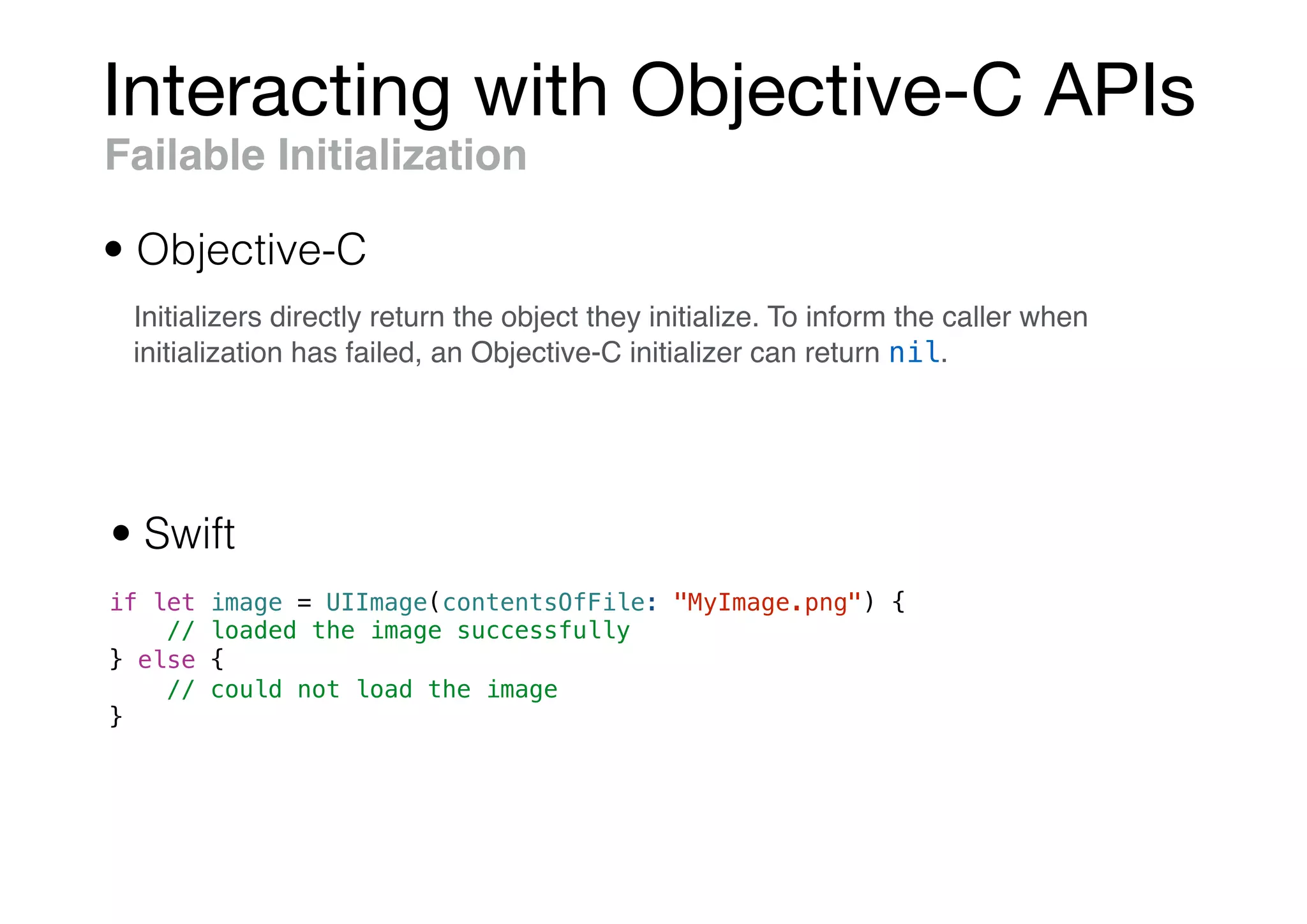
if let image = UIImage(contentsOfFile: "MyImage.png") {
// loaded the image successfully
} else {
// could not load the image
}
Failable Initialization
• Objective-C
• Swift
Initializers directly return the object they initialize. To inform the caller when
initialization has failed, an Objective-C initializer can return nil.
Interacting with Objective-C APIs
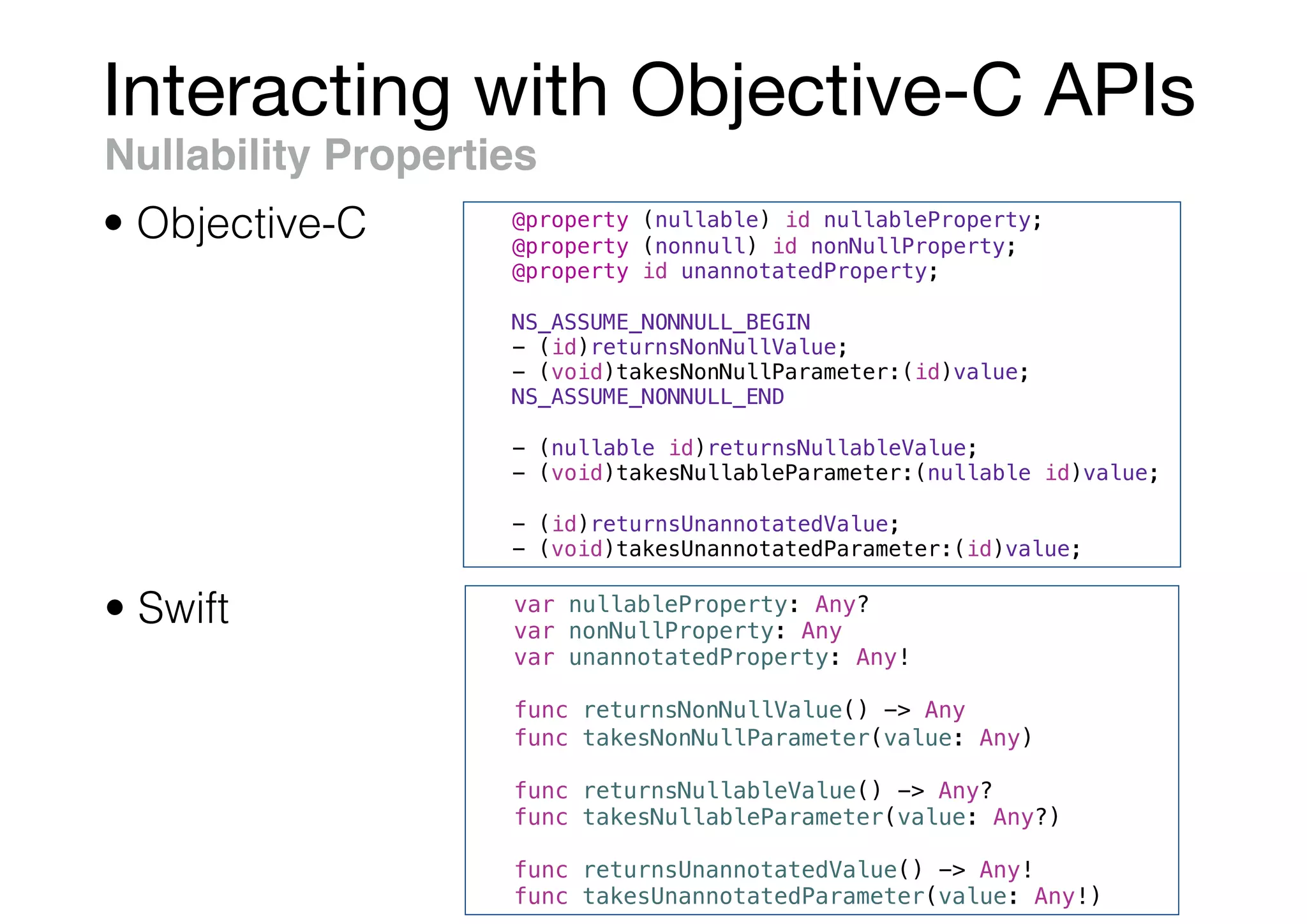
Nullability Properties
• Swift
• Objective-C @property (nullable) id nullableProperty;
@property (nonnull) id nonNullProperty;
@property id unannotatedProperty;
NS_ASSUME_NONNULL_BEGIN
- (id)returnsNonNullValue;
- (void)takesNonNullParameter:(id)value;
NS_ASSUME_NONNULL_END
- (nullable id)returnsNullableValue;
- (void)takesNullableParameter:(nullable id)value;
- (id)returnsUnannotatedValue;
- (void)takesUnannotatedParameter:(id)value;
var nullableProperty: Any?
var nonNullProperty: Any
var unannotatedProperty: Any!
func returnsNonNullValue() -> Any
func takesNonNullParameter(value: Any)
func returnsNullableValue() -> Any?
func takesNullableParameter(value: Any?)
func returnsUnannotatedValue() -> Any!
func takesUnannotatedParameter(value: Any!)
Interacting with Objective-C APIs
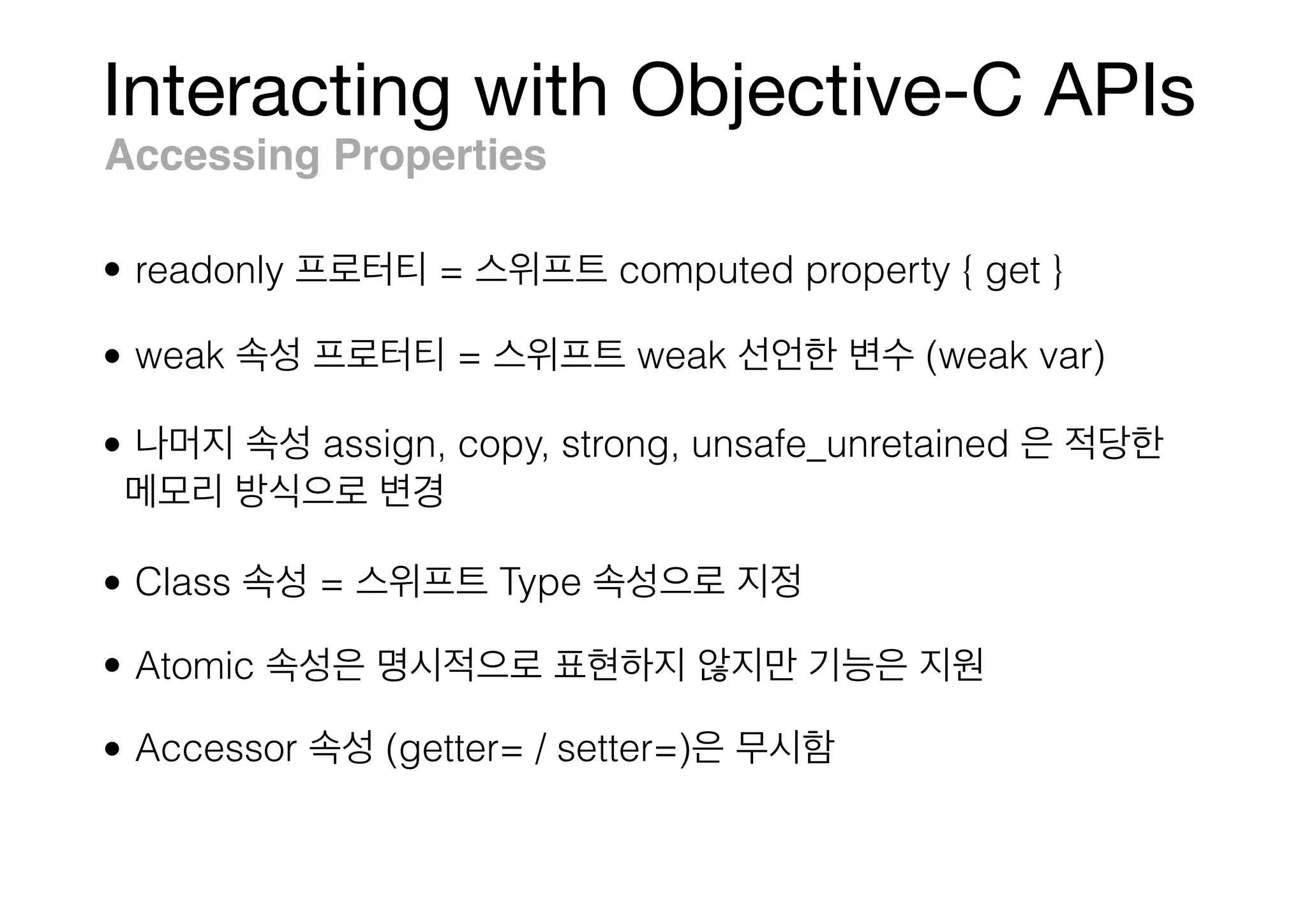
Accessing Properties
• readonly = computed property { get }
• weak = weak (weak var)
• assign, copy, strong, unsafe_unretained
• Class = Type
• Atomic
• Accessor (getter= / setter=)
Interacting with Objective-C APIs
myTableView.insertSubview(mySubview, at: 2)
Working with Methods
• Objective-C
• Swift
[myTableView insertSubview:mySubview atIndex:2];
myTableView.layoutIfNeeded()
Can call Objective-C methods from Swift using dot syntax.
Interacting with Objective-C APIs
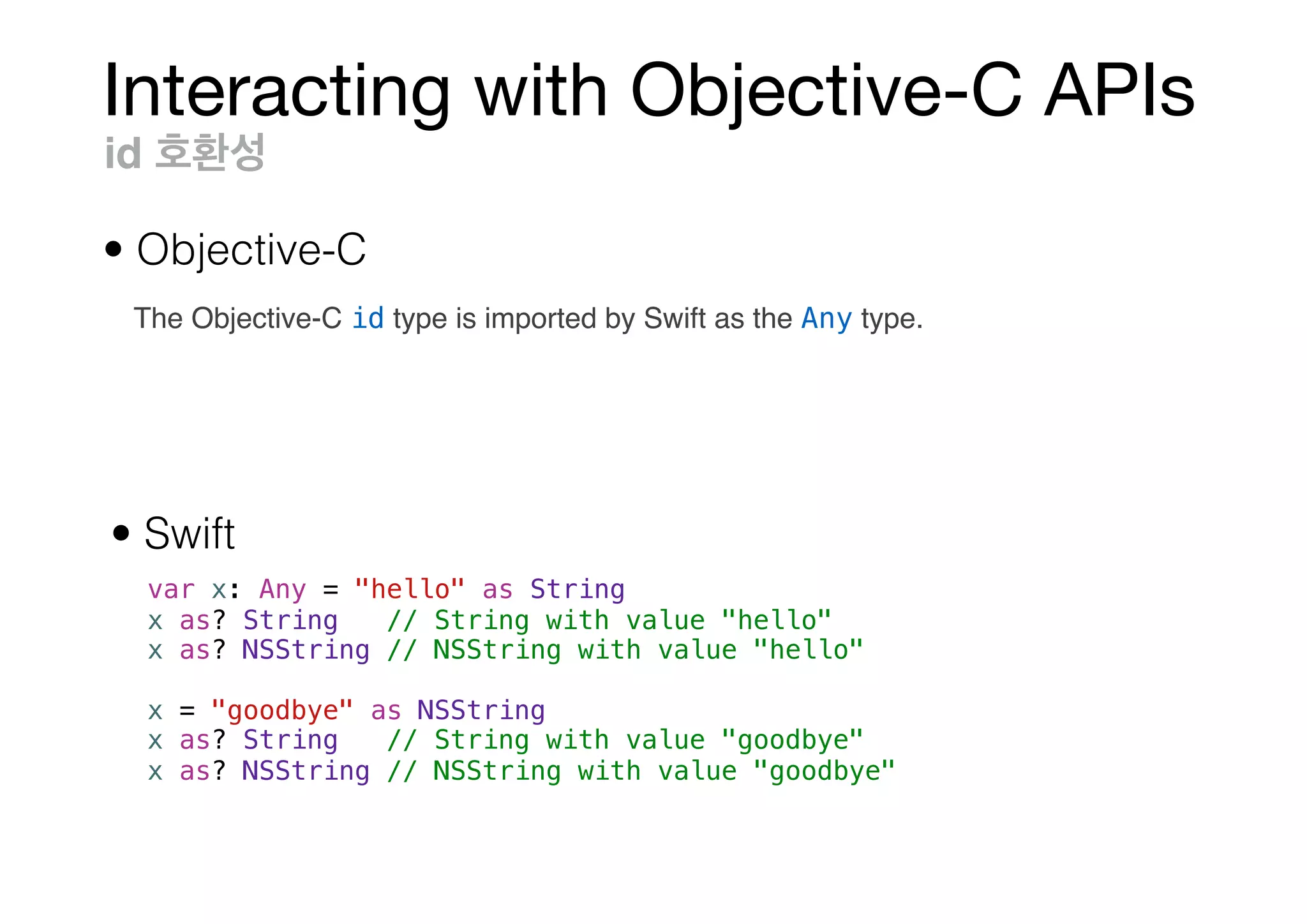
var x: Any = "hello" as String
x as? String // String with value "hello"
x as? NSString // NSString with value "hello"
x = "goodbye" as NSString
x as? String // String with value "goodbye"
x as? NSString // NSString with value "goodbye"
id
• Objective-C
• Swift
The Objective-C id type is imported by Swift as the Any type.
Interacting with Objective-C APIs
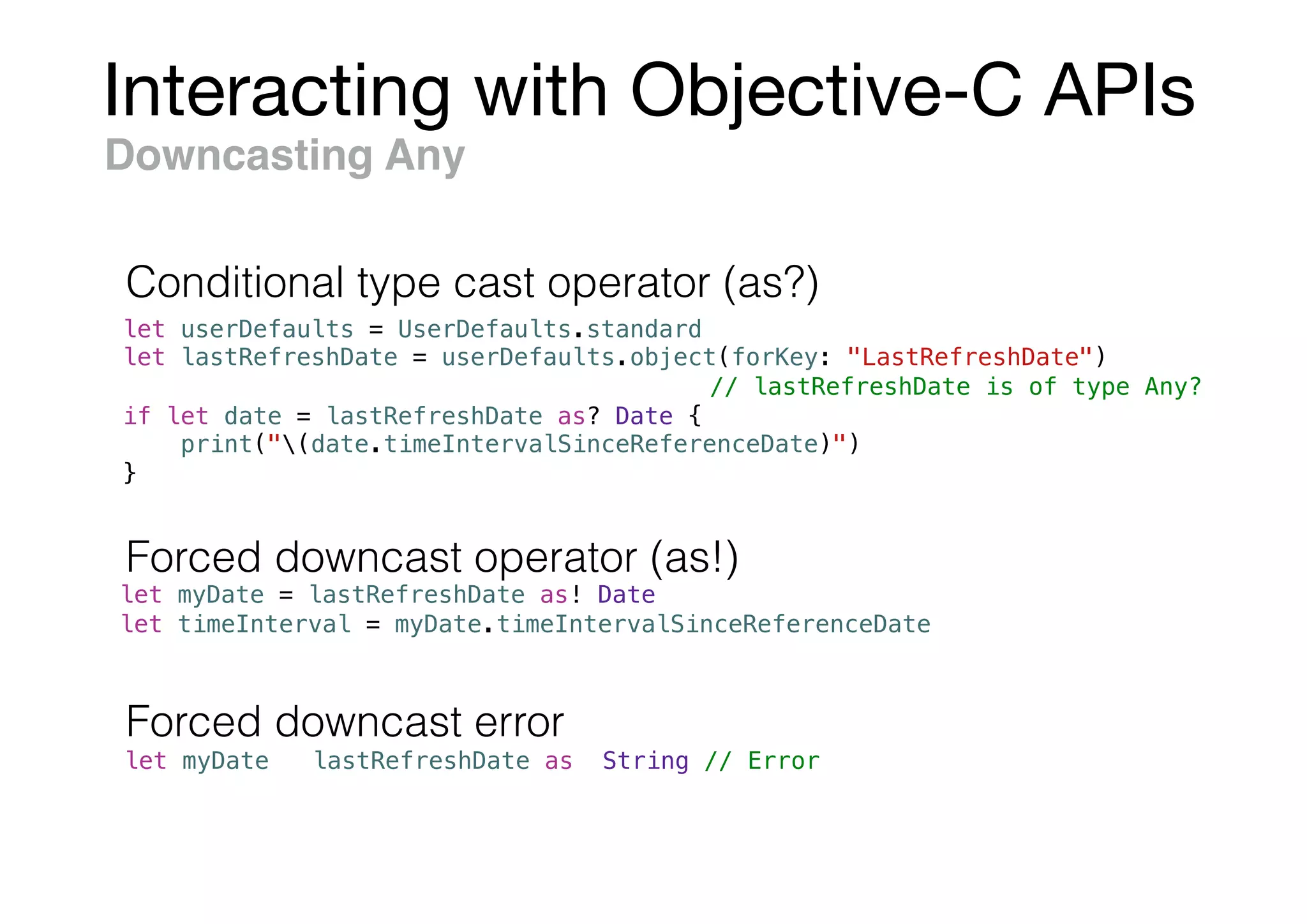
let userDefaults = UserDefaults.standard
let lastRefreshDate = userDefaults.object(forKey: "LastRefreshDate")
// lastRefreshDate is of type Any?
if let date = lastRefreshDate as? Date {
print("(date.timeIntervalSinceReferenceDate)")
}
Downcasting Any
let myDate = lastRefreshDate as! Date
let timeInterval = myDate.timeIntervalSinceReferenceDate
let myDate = lastRefreshDate as! String // Error
Forced downcast operator (as!)
Forced downcast error
Conditional type cast operator (as?)
Interacting with Objective-C APIs
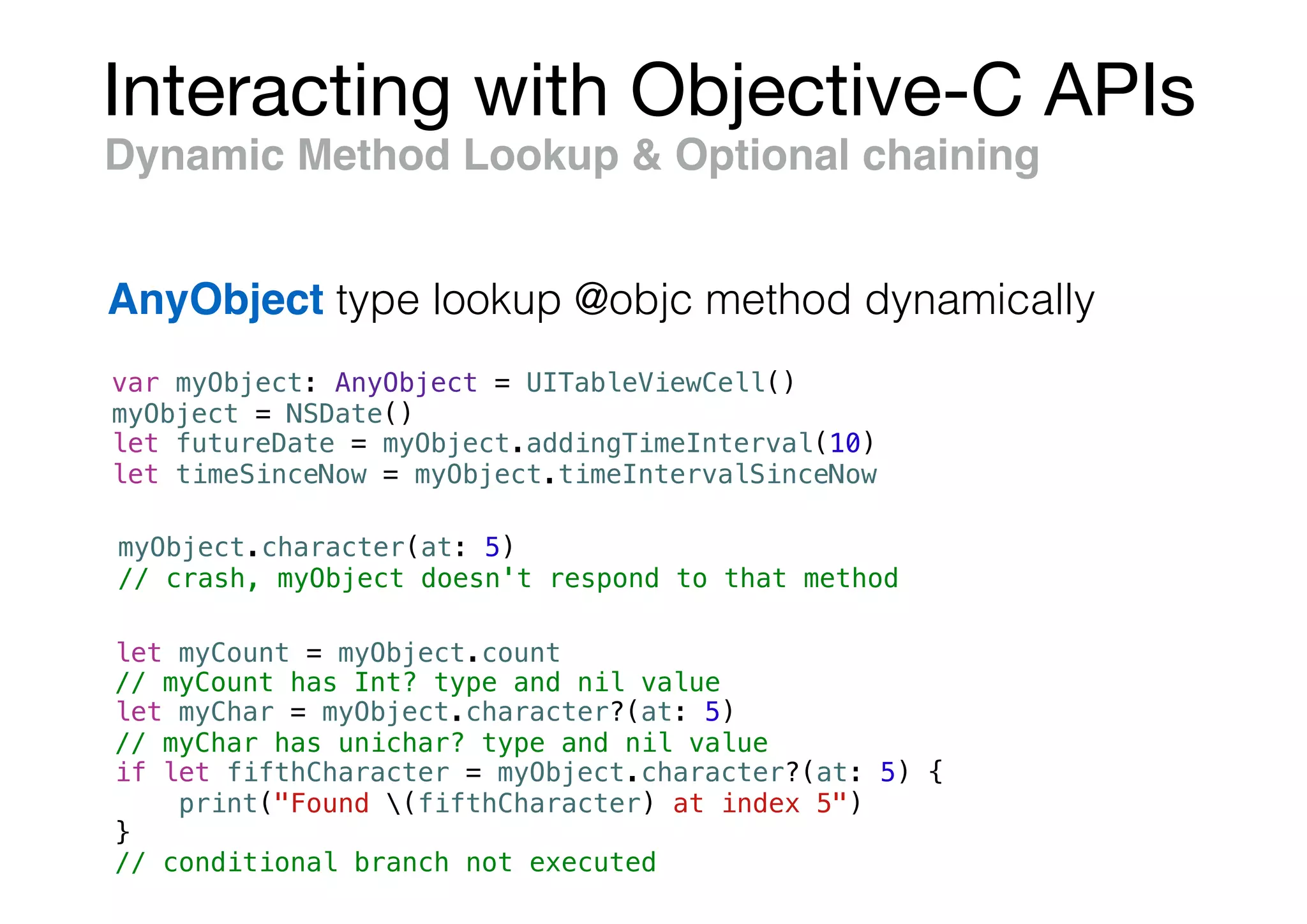
var myObject: AnyObject = UITableViewCell()
myObject = NSDate()
let futureDate = myObject.addingTimeInterval(10)
let timeSinceNow = myObject.timeIntervalSinceNow
Dynamic Method Lookup & Optional chaining
AnyObject type lookup @objc method dynamically
myObject.character(at: 5)
// crash, myObject doesn't respond to that method
let myCount = myObject.count
// myCount has Int? type and nil value
let myChar = myObject.character?(at: 5)
// myChar has unichar? type and nil value
if let fifthCharacter = myObject.character?(at: 5) {
print("Found (fifthCharacter) at index 5")
}
// conditional branch not executed
Interacting with Objective-C APIs
Bridging Optionals to Nonnullable Objects
@implementation OptionalBridging
+ (void)logSomeValue:(nonnull id)valueFromSwift {
if ([valueFromSwift isKindOfClass: [NSNull class]]) {
os_log(OS_LOG_DEFAULT, "Received an NSNull value.");
} else {
os_log(OS_LOG_DEFAULT, "%s", [valueFromSwift UTF8String]);
}
}
@end
let someValue: String? = "Bridge me, please."
let nilValue: String? = nil
OptionalBridging.logSomeValue(someValue as Any) // String
OptionalBridging.logSomeValue(nilValue as Any) // an NSNull value.
Optional nil NSNull ,
Optional unwrapped value [T?] => NSArray<T>
Interacting with Objective-C APIs
Lightweight Generics
@property NSArray<NSDate *> *dates;
@property NSCache<NSObject *, id<NSDiscardableContent>> *cachedData;
@property NSDictionary <NSString *, NSArray<NSLocale *>> *supportedLocales;
var dates: [Date]
var cachedData: NSCache<AnyObject, NSDiscardableContent>
var supportedLocales: [String: [Locale]]
• Objective-C
• Swift
Interacting with Objective-C APIs
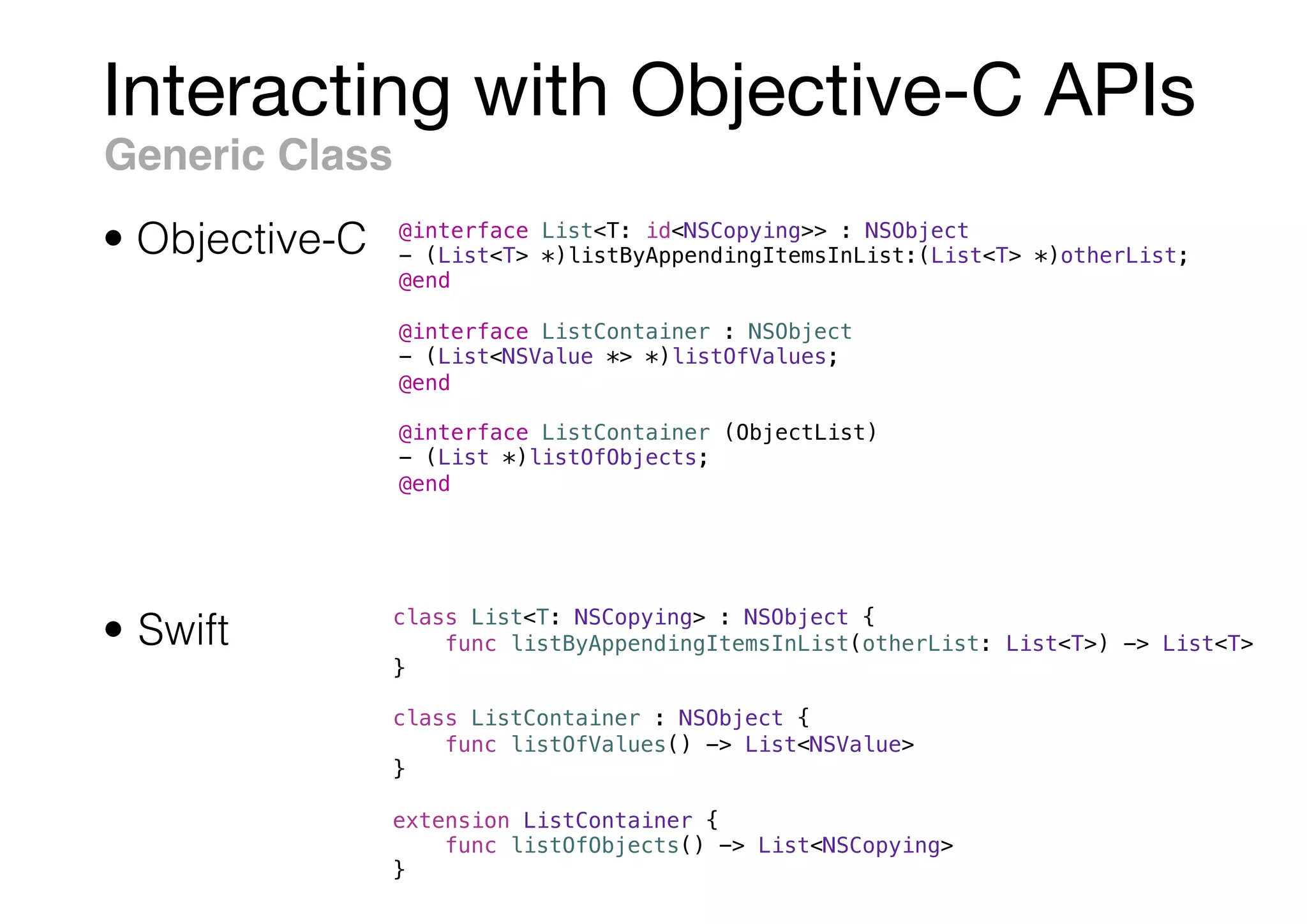
Generic Class
@interface List<T: id<NSCopying>> : NSObject
- (List<T> *)listByAppendingItemsInList:(List<T> *)otherList;
@end
@interface ListContainer : NSObject
- (List<NSValue *> *)listOfValues;
@end
@interface ListContainer (ObjectList)
- (List *)listOfObjects;
@end
• Objective-C
• Swift class List<T: NSCopying> : NSObject {
func listByAppendingItemsInList(otherList: List<T>) -> List<T>
}
class ListContainer : NSObject {
func listOfValues() -> List<NSValue>
}
extension ListContainer {
func listOfObjects() -> List<NSCopying>
}
Interacting with Objective-C APIs
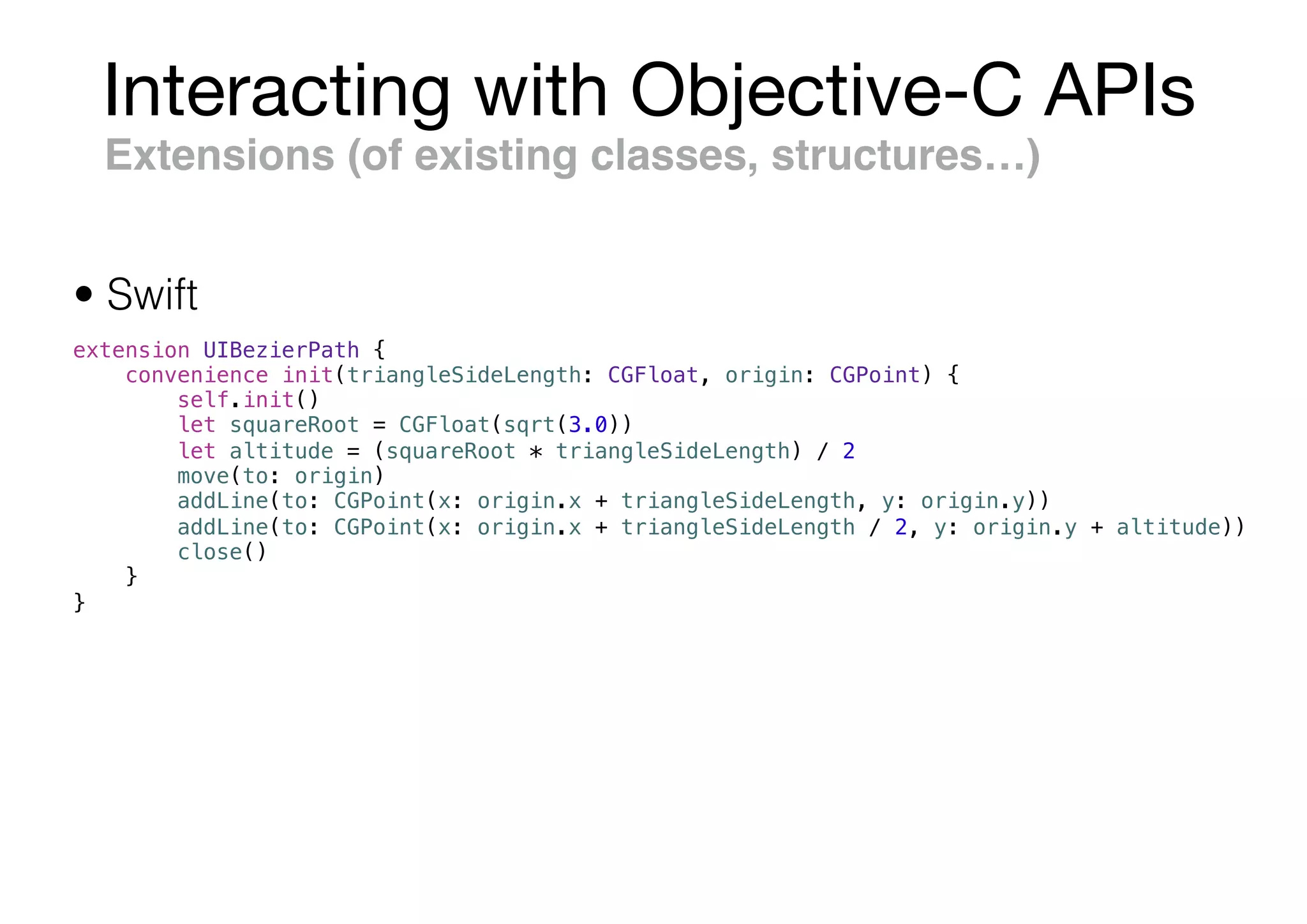
Extensions (of existing classes, structures…)
extension UIBezierPath {
convenience init(triangleSideLength: CGFloat, origin: CGPoint) {
self.init()
let squareRoot = CGFloat(sqrt(3.0))
let altitude = (squareRoot * triangleSideLength) / 2
move(to: origin)
addLine(to: CGPoint(x: origin.x + triangleSideLength, y: origin.y))
addLine(to: CGPoint(x: origin.x + triangleSideLength / 2, y: origin.y + altitude))
close()
}
}
• Swift
Interacting with Objective-C APIs
Closures & Blocks
void (^completionBlock)(NSData *) = ^(NSData *data) {
// ...
}
• Swift
• Objective-C
let completionBlock: (Data) -> Void = { data in
// ...
}
__weak typeof(self) weakSelf = self;
self.block = ^{
__strong typeof(self) strongSelf = weakSelf;
[strongSelf doSomething];
};
self.closure = { [unowned self] in
self.doSomething()
}
Interacting with Objective-C APIs
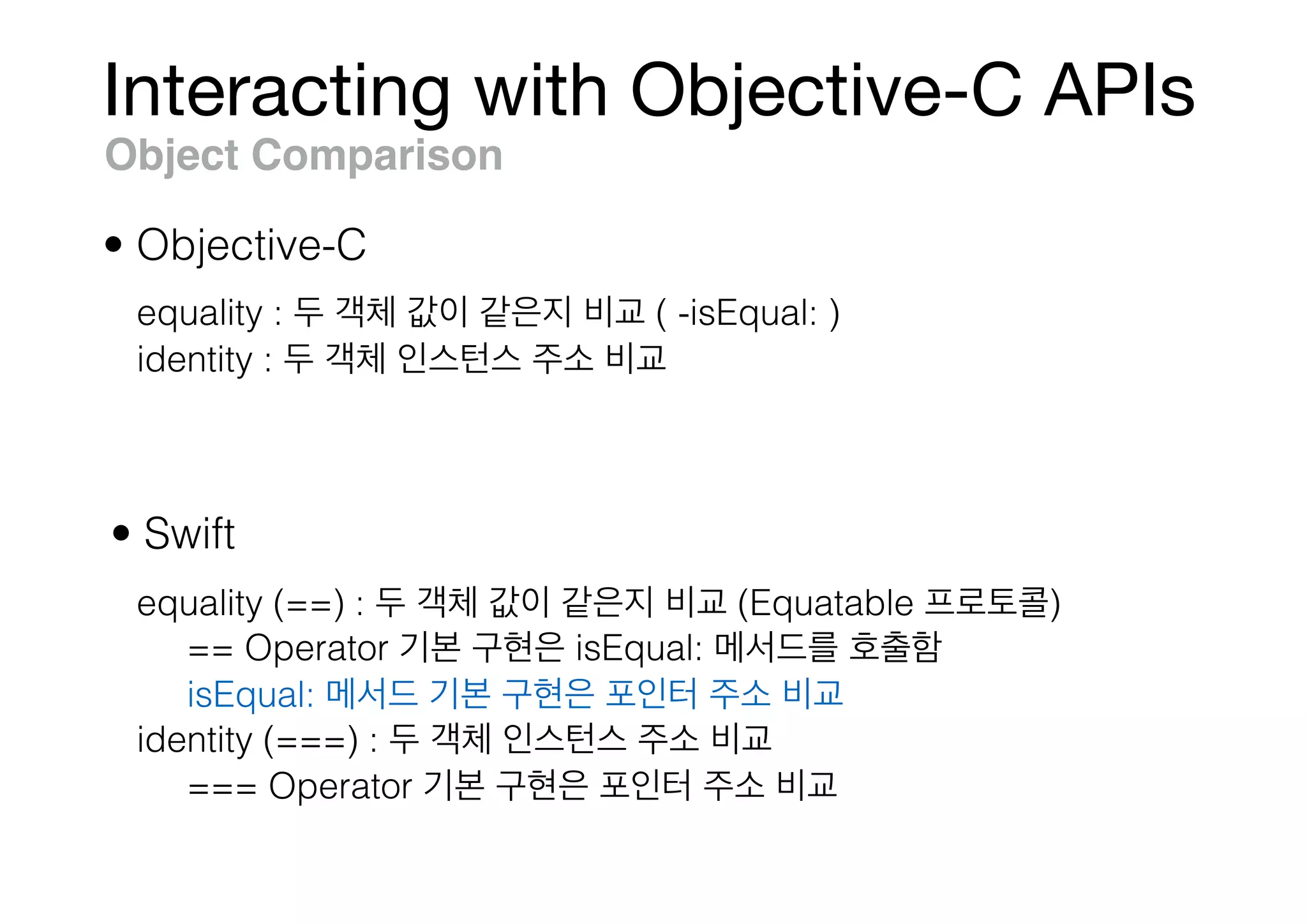
Object Comparison
• Swift
• Objective-C
equality : ( -isEqual: )
identity :
equality (==) : (Equatable )
== Operator isEqual:
isEqual:
identity (===) :
=== Operator
Interacting with Objective-C APIs
Hashing
• Swift
• Objective-C
@property NSDictionary *unqualifiedDictionary;
@property NSDictionary<NSString *, NSDate *> *qualifiedDictionary;
@property NSSet *unqualifiedSet;
@property NSSet<NSString *> *qualifiedSet;
var unqualifiedDictionary: [AnyHashable: Any]
var qualifiedDictionary: [String: Date]
var unqualifiedSet: Set<AnyHashable>
var qualifiedSet: Set<String>
Interacting with Objective-C APIs
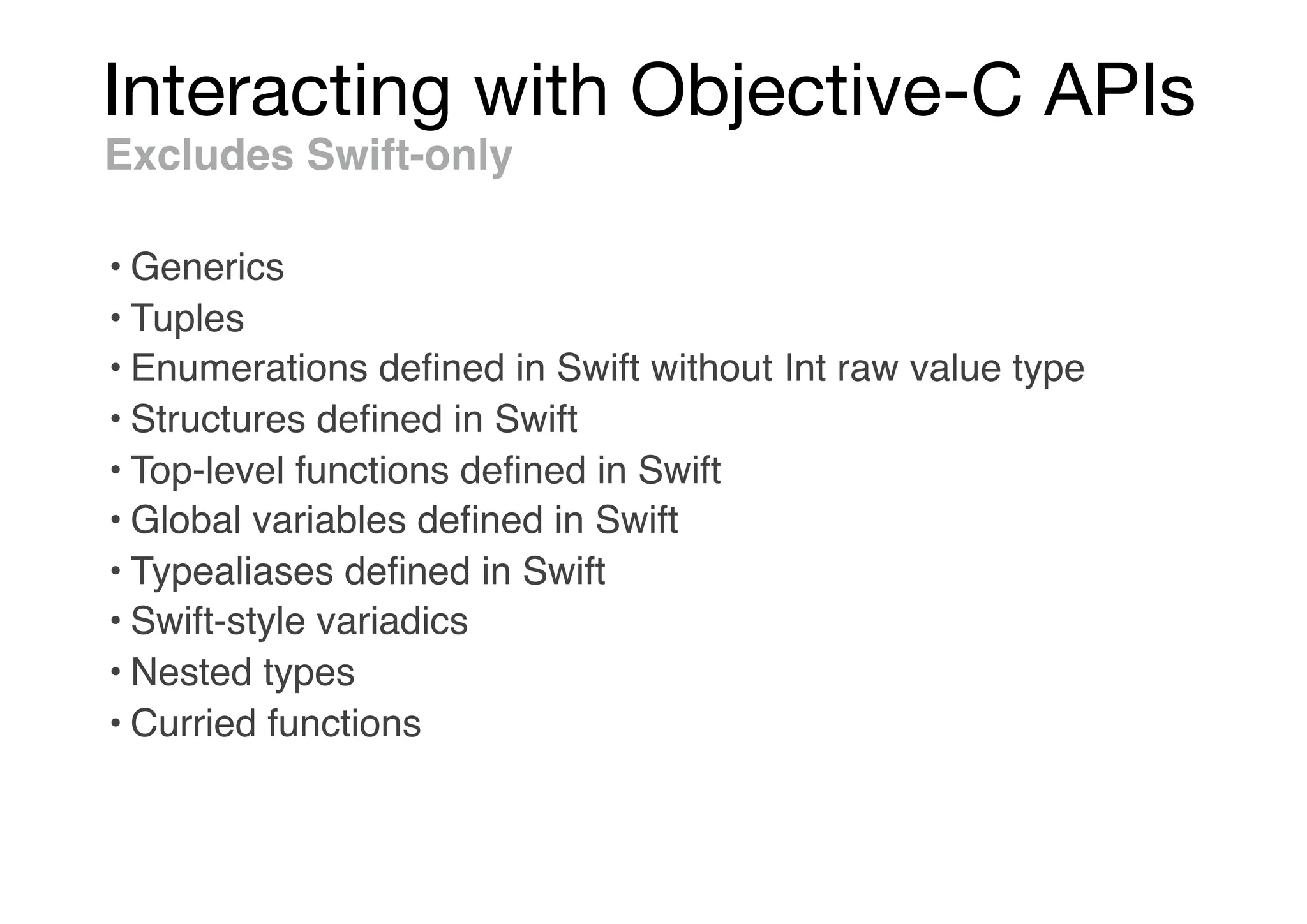
Excludes Swift-only
• Generics
• Tuples
• Enumerations defined in Swift without Int raw value type
• Structures defined in Swift
• Top-level functions defined in Swift
• Global variables defined in Swift
• Typealiases defined in Swift
• Swift-style variadics
• Nested types
• Curried functions
Interacting with Objective-C APIs
Swift Type Compatibility
class Jukebox: NSObject {
var library: Set<String>
var nowPlaying: String?
var isCurrentlyPlaying: Bool {
return nowPlaying != nil
}
class var favoritesPlaylist: [String] {
// return an array of song names
}
init(songs: String...) {
self.library = Set<String>(songs)
}
func playSong(named name: String) throws {
// play song or throw an error if unavailable
}
}
@interface Jukebox : NSObject
@property (nonatomic, strong, nonnull) NSSet<NSString *> *library;
@property (nonatomic, copy, nullable) NSString *nowPlaying;
@property (nonatomic, readonly, getter=isCurrentlyPlaying) BOOL currentlyPlaying;
@property (nonatomic, class, readonly, nonnull) NSArray<NSString *> * favoritesPlaylist;
- (nonnull instancetype)initWithSongs:(NSArray<NSString *> * __nonnull)songs
OBJC_DESIGNATED_INITIALIZER;
- (BOOL)playSong:(NSString * __nonnull)name
error:(NSError * __nullable * __null_unspecified)error;
@end
Interacting with Objective-C APIs
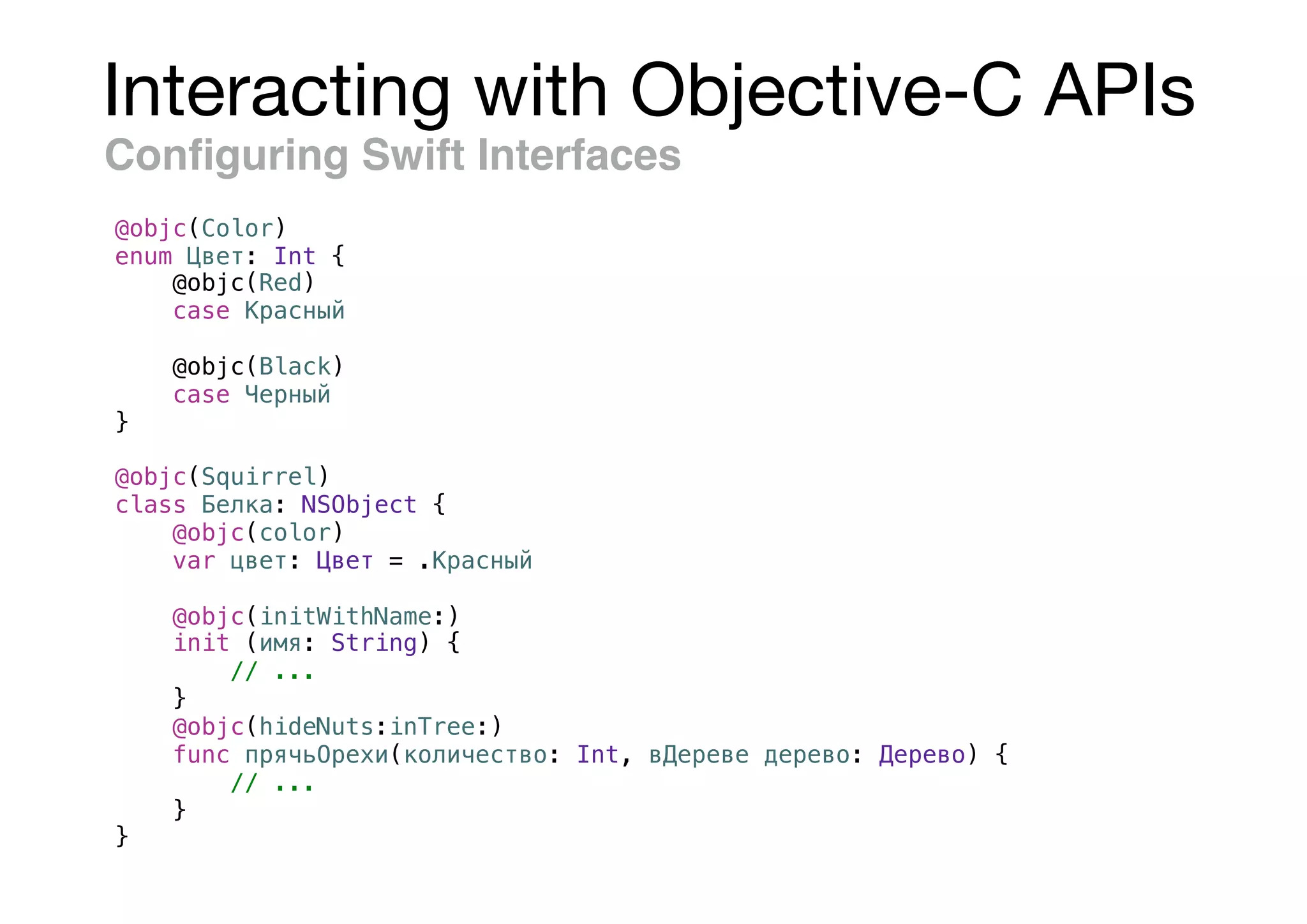
Configuring Swift Interfaces
@objc(Color)
enum Цвет: Int {
@objc(Red)
case Красный
@objc(Black)
case Черный
}
@objc(Squirrel)
class Белка: NSObject {
@objc(color)
var цвет: Цвет = .Красный
@objc(initWithName:)
init (имя: String) {
// ...
}
@objc(hideNuts:inTree:)
func прячьОрехи(количество: Int, вДереве дерево: Дерево) {
// ...
}
}
Interacting with Objective-C APIs
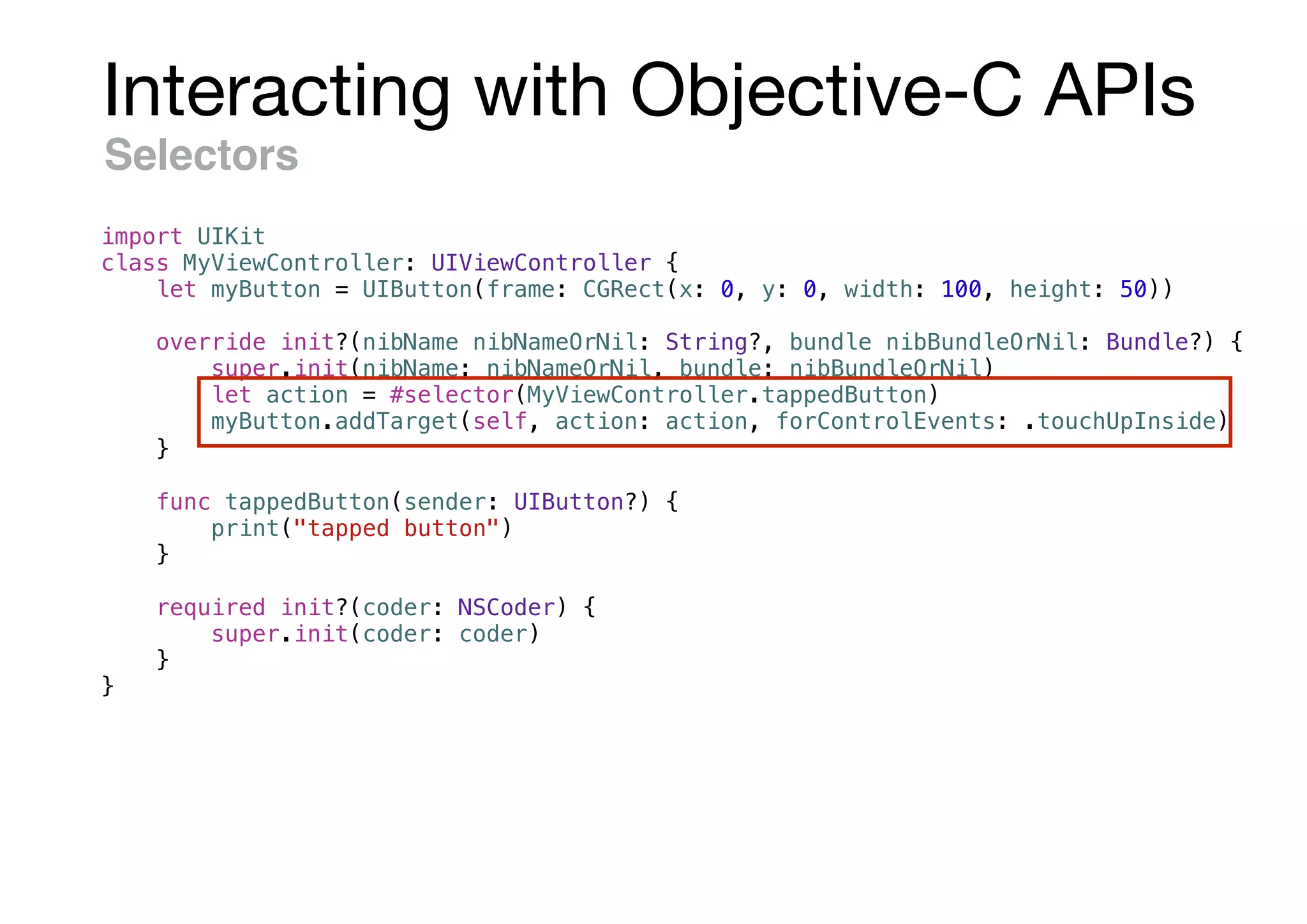
Selectors
import UIKit
class MyViewController: UIViewController {
let myButton = UIButton(frame: CGRect(x: 0, y: 0, width: 100, height: 50))
override init?(nibName nibNameOrNil: String?, bundle nibBundleOrNil: Bundle?) {
super.init(nibName: nibNameOrNil, bundle: nibBundleOrNil)
let action = #selector(MyViewController.tappedButton)
myButton.addTarget(self, action: action, forControlEvents: .touchUpInside)
}
func tappedButton(sender: UIButton?) {
print("tapped button")
}
required init?(coder: NSCoder) {
super.init(coder: coder)
}
}
Interacting with Objective-C APIs
Unsafe Invocation of Objective-C Methods
let string: NSString = "Hello, Cocoa!"
let selector = #selector(NSString.lowercased(with:))
let locale = Locale.current
if let result = string.perform(selector, with: locale) {
print(result.takeUnretainedValue())
}
// Prints "hello, cocoa!"
let array: NSArray = ["delta", "alpha", "zulu"]
// Not a compile-time error because NSDictionary has this selector.
let selector = #selector(NSDictionary.allKeysForObject)
// Raises an exception because NSArray does not respond to this selector.
array.perform(selector)
Perform Selector
Unsafe invocation
Interacting with Objective-C APIs
Keys & Key Paths
class Person: NSObject {
var name: String
var friends: [Person] = []
var bestFriend: Person? = nil
init(name: String) {
self.name = name
}
}
let gabrielle = Person(name: "Gabrielle")
let jim = Person(name: "Jim")
let yuanyuan = Person(name: "Yuanyuan")
gabrielle.friends = [jim, yuanyuan]
gabrielle.bestFriend = yuanyuan
#keyPath(Person.name)
// "name"
gabrielle.value(forKey: #keyPath(Person.name))
// "Gabrielle"
#keyPath(Person.bestFriend.name)
// "bestFriend.name"
gabrielle.value(forKeyPath: #keyPath(Person.bestFriend.name))
// "Yuanyuan"
#keyPath(Person.friends.name)
// "friends.name"
gabrielle.value(forKeyPath: #keyPath(Person.friends.name))
// ["Yuanyuan", "Jim"]
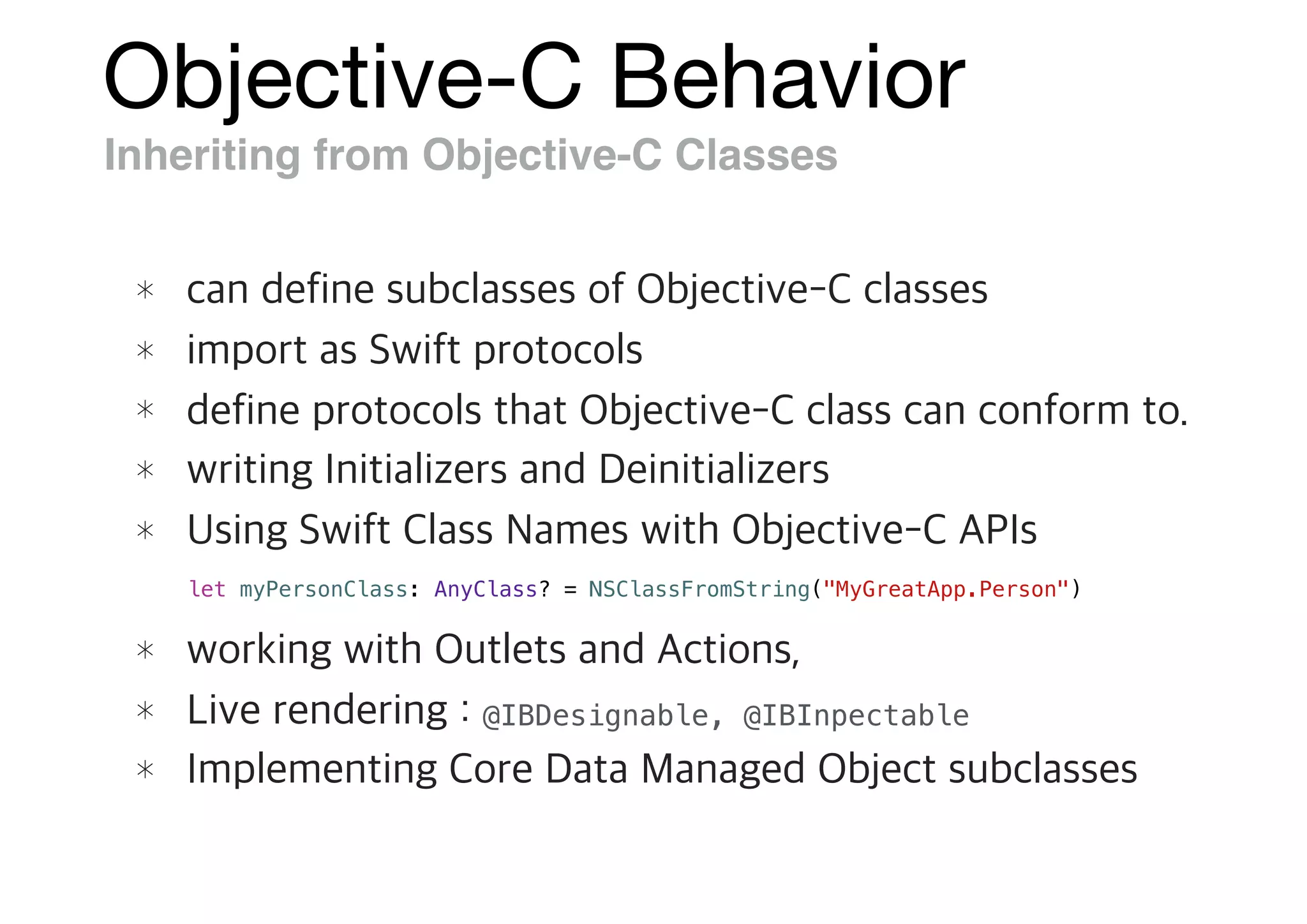
Objective-C Behavior
Inheriting from Objective-C Classes
@IBDesignable, @IBInpectable
let myPersonClass: AnyClass? = NSClassFromString("MyGreatApp.Person")
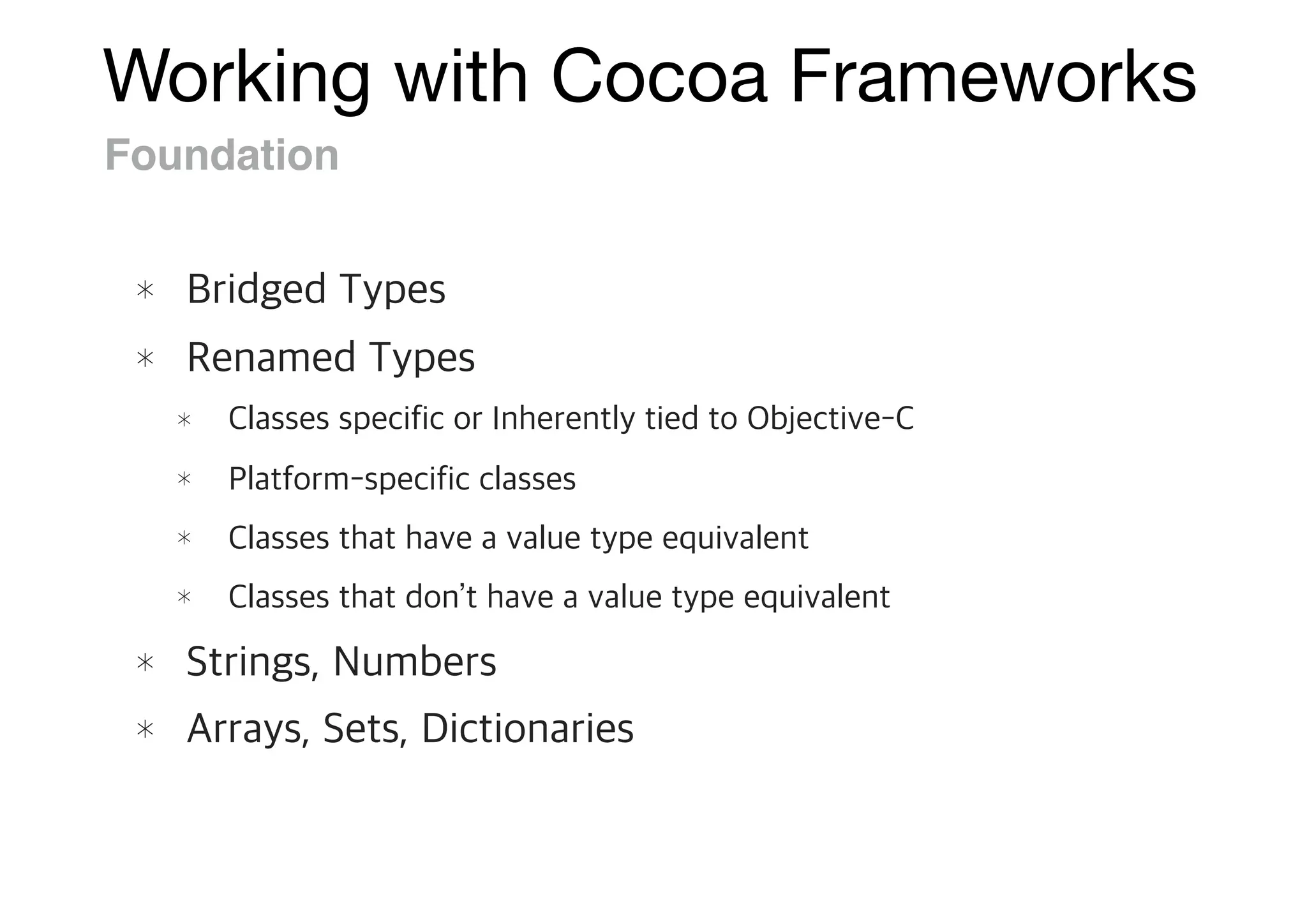
Working with Cocoa Frameworks
Foundation
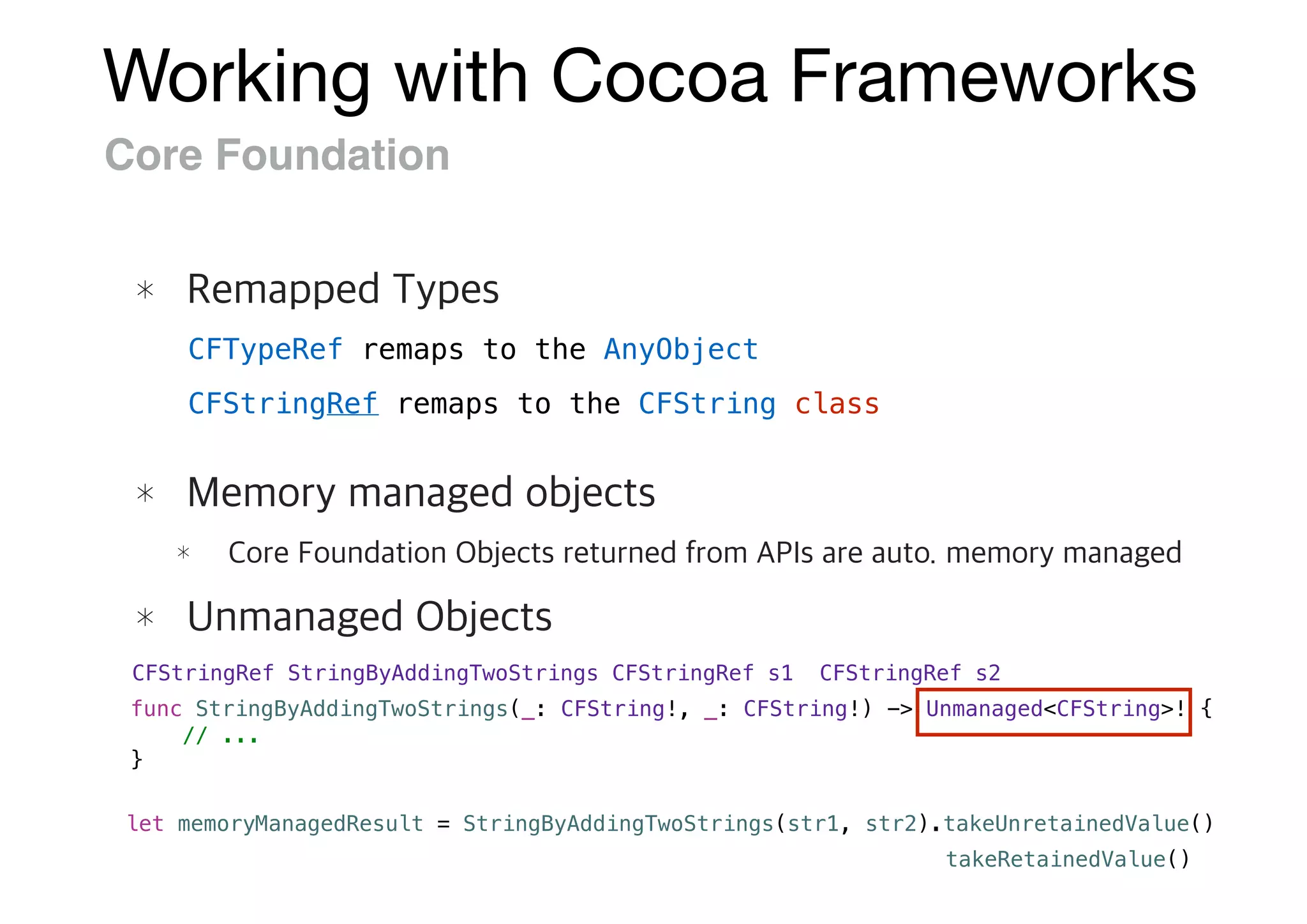
Working with Cocoa Frameworks
Core Foundation
CFStringRef StringByAddingTwoStrings(CFStringRef s1, CFStringRef s2)
func StringByAddingTwoStrings(_: CFString!, _: CFString!) -> Unmanaged<CFString>! {
// ...
}
let memoryManagedResult = StringByAddingTwoStrings(str1, str2).takeUnretainedValue()
CFTypeRef remaps to the AnyObject
CFStringRef remaps to the CFString class
takeRetainedValue()
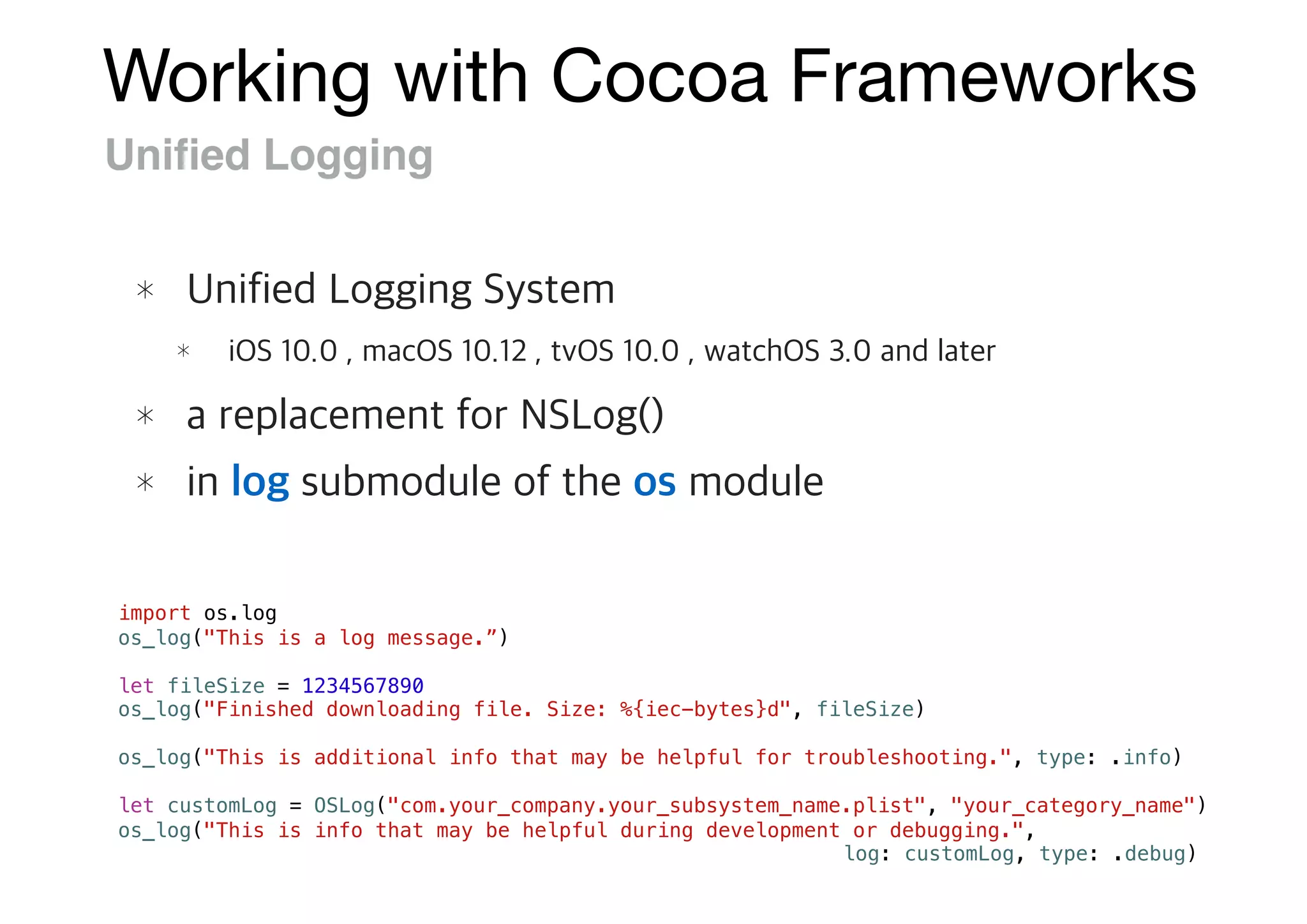
Working with Cocoa Frameworks
Unified Logging
import os.log
os_log("This is a log message.”)
let fileSize = 1234567890
os_log("Finished downloading file. Size: %{iec-bytes}d", fileSize)
os_log("This is additional info that may be helpful for troubleshooting.", type: .info)
let customLog = OSLog("com.your_company.your_subsystem_name.plist", "your_category_name")
os_log("This is info that may be helpful during development or debugging.",
log: customLog, type: .debug)
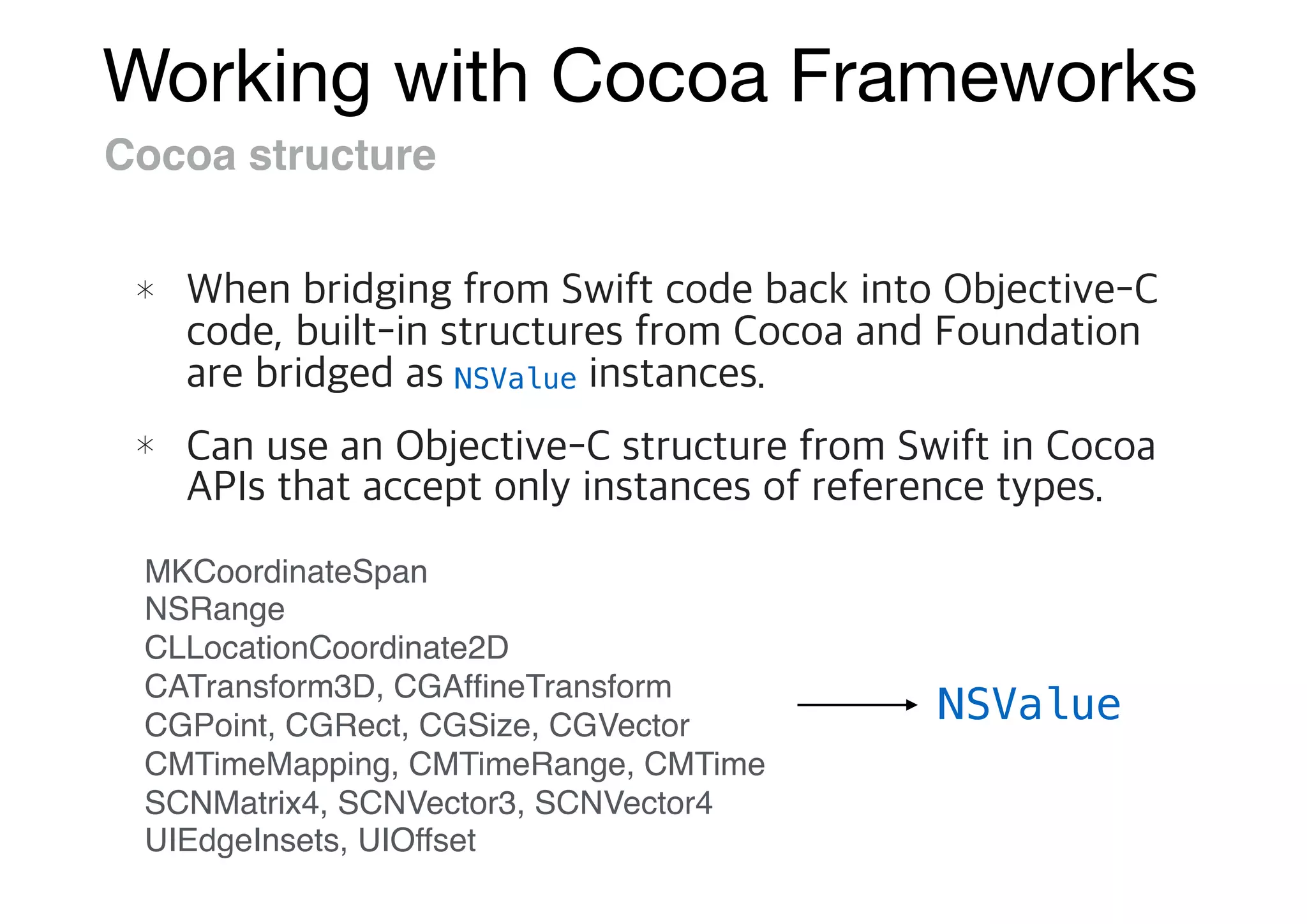
Working with Cocoa Frameworks
Cocoa structure
NSValue
MKCoordinateSpan
NSRange
CLLocationCoordinate2D
CATransform3D, CGAffineTransform
CGPoint, CGRect, CGSize, CGVector
CMTimeMapping, CMTimeRange, CMTime
SCNMatrix4, SCNVector3, SCNVector4
UIEdgeInsets, UIOffset
NSValue
Adopting Cocoa Design Patterns
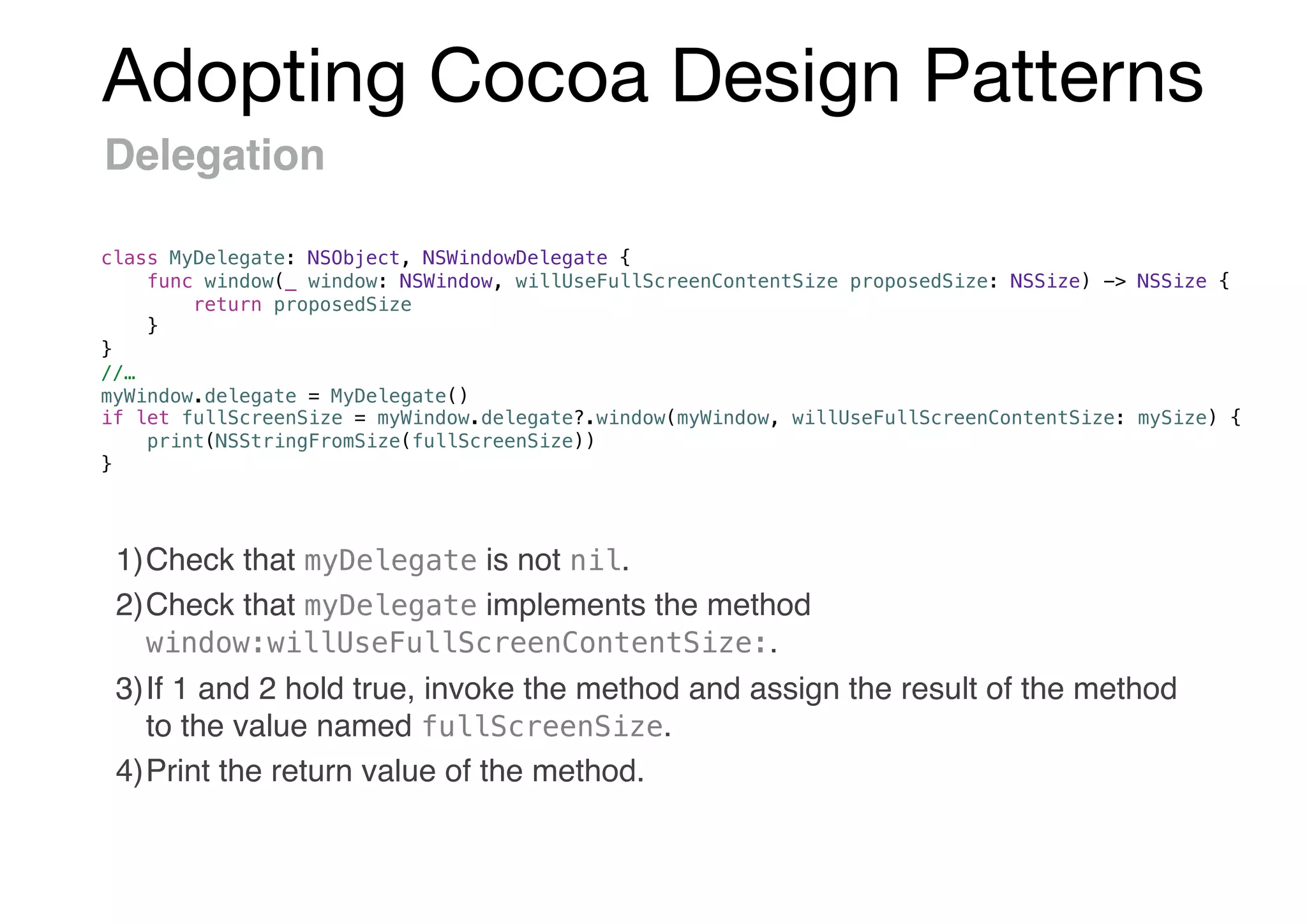
Delegation
1)Check that myDelegate is not nil.
2)Check that myDelegate implements the method
window:willUseFullScreenContentSize:.
3)If 1 and 2 hold true, invoke the method and assign the result of the method
to the value named fullScreenSize.
4)Print the return value of the method.
class MyDelegate: NSObject, NSWindowDelegate {
func window(_ window: NSWindow, willUseFullScreenContentSize proposedSize: NSSize) -> NSSize {
return proposedSize
}
}
//…
myWindow.delegate = MyDelegate()
if let fullScreenSize = myWindow.delegate?.window(myWindow, willUseFullScreenContentSize: mySize) {
print(NSStringFromSize(fullScreenSize))
}
Adopting Cocoa Design Patterns
Lazy Initialization
@property NSXMLDocument *XML;
- (NSXMLDocument *)XML {
if (_XML == nil) {
_XML = [[NSXMLDocument alloc] initWithContentsOfURL:[[Bundle mainBundle]
URLForResource:@"/path/to/resource" withExtension:@"xml"] options:0 error:nil];
}
return _XML;
}
lazy var XML: XMLDocument = try! XMLDocument(contentsOf:
Bundle.main.url(forResource: "document", withExtension: "xml")!, options: 0)
• Objective-C
• Swift
Adopting Cocoa Design Patterns
Lazy property
var pattern: String
lazy var regex: NSRegularExpression = try! NSRegularExpression(pattern: self.pattern,
options: [])
lazy var currencyFormatter: NumberFormatter = {
let formatter = NumberFormatter()
formatter.numberStyle = .currency
formatter.currencySymbol = "¤"
return formatter
}()
• Swift
use self-evaluating closure
Adopting Cocoa Design Patterns
Error Handling
NSFileManager *fileManager = [NSFileManager defaultManager];
NSURL *fromURL = [NSURL fileURLWithPath:@"/path/to/old"];
NSURL *toURL = [NSURL fileURLWithPath:@"/path/to/new"];
NSError *error = nil;
BOOL success = [fileManager moveItemAtURL:fromURL toURL:toURL error:&error];
if (!success) {
NSLog(@"Error: %@", error.domain);
}
• Swift
• Objective-C
let fileManager = FileManager.default
let fromURL = URL(fileURLWithPath: "/path/to/old")
let toURL = URL(fileURLWithPath: "/path/to/new")
do {
try fileManager.moveItem(at: fromURL, to: toURL)
} catch let error as NSError {
print("Error: (error.domain)")
}
Adopting Cocoa Design Patterns
Converting errors to Optional values
• Swift
• Objective-C
NSFileManager *fileManager = [NSFileManager defaultManager];
NSURL *tmpURL = [fileManager URLForDirectory:NSCachesDirectory
inDomain:NSUserDomainMask
appropriateForURL:nil
create:YES
error:nil];
if (tmpURL != nil) {
// ...
}
let fileManager = FileManager.default
if let tmpURL = try? fileManager.url(for: .cachesDirectory, in: .userDomainMask,
appropriateFor: nil, create: true) {
// ...
}
Adopting Cocoa Design Patterns
Throwing error
• Swift
• Objective-C
// an error occurred
if (errorPtr) {
*errorPtr = [NSError errorWithDomain:NSURLErrorDomain
code:NSURLErrorCannotOpenFile
userInfo:nil];
}
// an error occurred
throw NSError(domain: NSURLErrorDomain, code: NSURLErrorCannotOpenFile, userInfo: nil)
Adopting Cocoa Design Patterns
Key-value Observing
KVO with a Swift class inherits from NSObject class
1) Add dynamic modifier to any property
2) Create a global context variable
3) Add an observer for the key-path, override the observeValue() method
and remove the observer in deinit.
class MyObjectToObserve: NSObject {
dynamic var myDate = NSDate()
func updateDate() {
myDate = NSDate()
}
}
private var myContext = 0
class MyObserver: NSObject {
var objectToObserve = MyObjectToObserve()
override init() {
super.init()
objectToObserve.addObserver(self, forKeyPath: #keyPath(MyObjectToObserve.myDate),
options: .new, context: &myContext)
}
override func observeValue(forKeyPath keyPath: String?, of object: Any?, change:
[NSKeyValueChangeKey : Any]?, context: UnsafeMutableRawPointer?) {
if context == &myContext {
if let newValue = change?[.newKey] { print("Date changed: (newValue)”) }
} else {
super.observeValue(forKeyPath: keyPath, of: object, change: change, context: context)
}
}
deinit {
objectToObserve.removeObserver(self, forKeyPath: #keyPath(MyObjectToObserve.myDate),
context: &myContext)
}
}
Adopting Cocoa Design Patterns
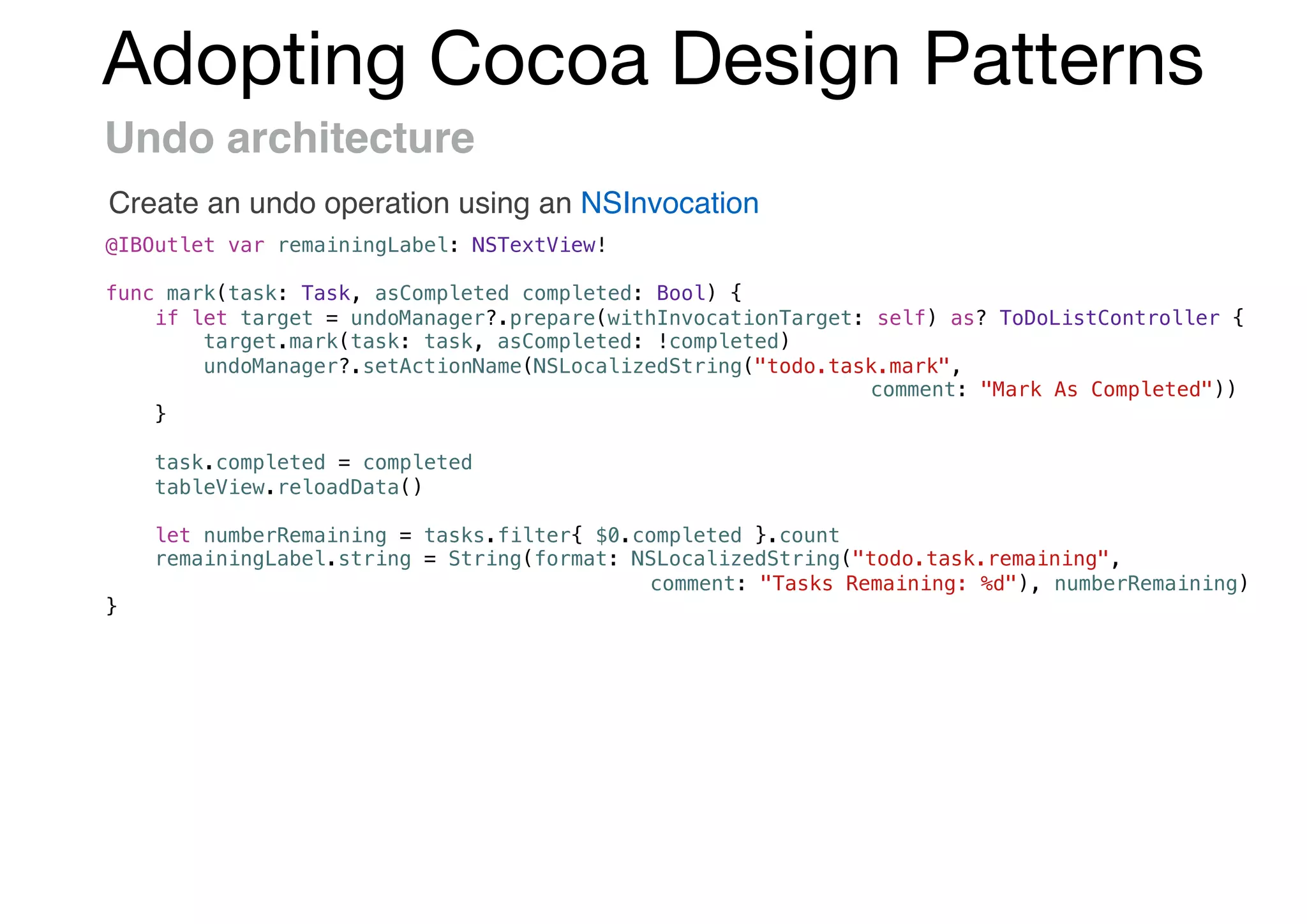
Undo architecture
Create an undo operation using an NSInvocation
@IBOutlet var remainingLabel: NSTextView!
func mark(task: Task, asCompleted completed: Bool) {
if let target = undoManager?.prepare(withInvocationTarget: self) as? ToDoListController {
target.mark(task: task, asCompleted: !completed)
undoManager?.setActionName(NSLocalizedString("todo.task.mark",
comment: "Mark As Completed"))
}
task.completed = completed
tableView.reloadData()
let numberRemaining = tasks.filter{ $0.completed }.count
remainingLabel.string = String(format: NSLocalizedString("todo.task.remaining",
comment: "Tasks Remaining: %d"), numberRemaining)
}
Adopting Cocoa Design Patterns
Singleton
initialization in a call the dispatch_once function
+ (instancetype)sharedInstance {
static id _sharedInstance = nil;
static dispatch_once_t onceToken;
dispatch_once(&onceToken, ^{
_sharedInstance = [[self alloc] init];
});
return _sharedInstance;
}
class Singleton {
static let sharedInstance = Singleton()
}
class Singleton {
static let sharedInstance: Singleton = {
let instance = Singleton()
// setup code
return instance
}()
}
Adopting Cocoa Design Patterns
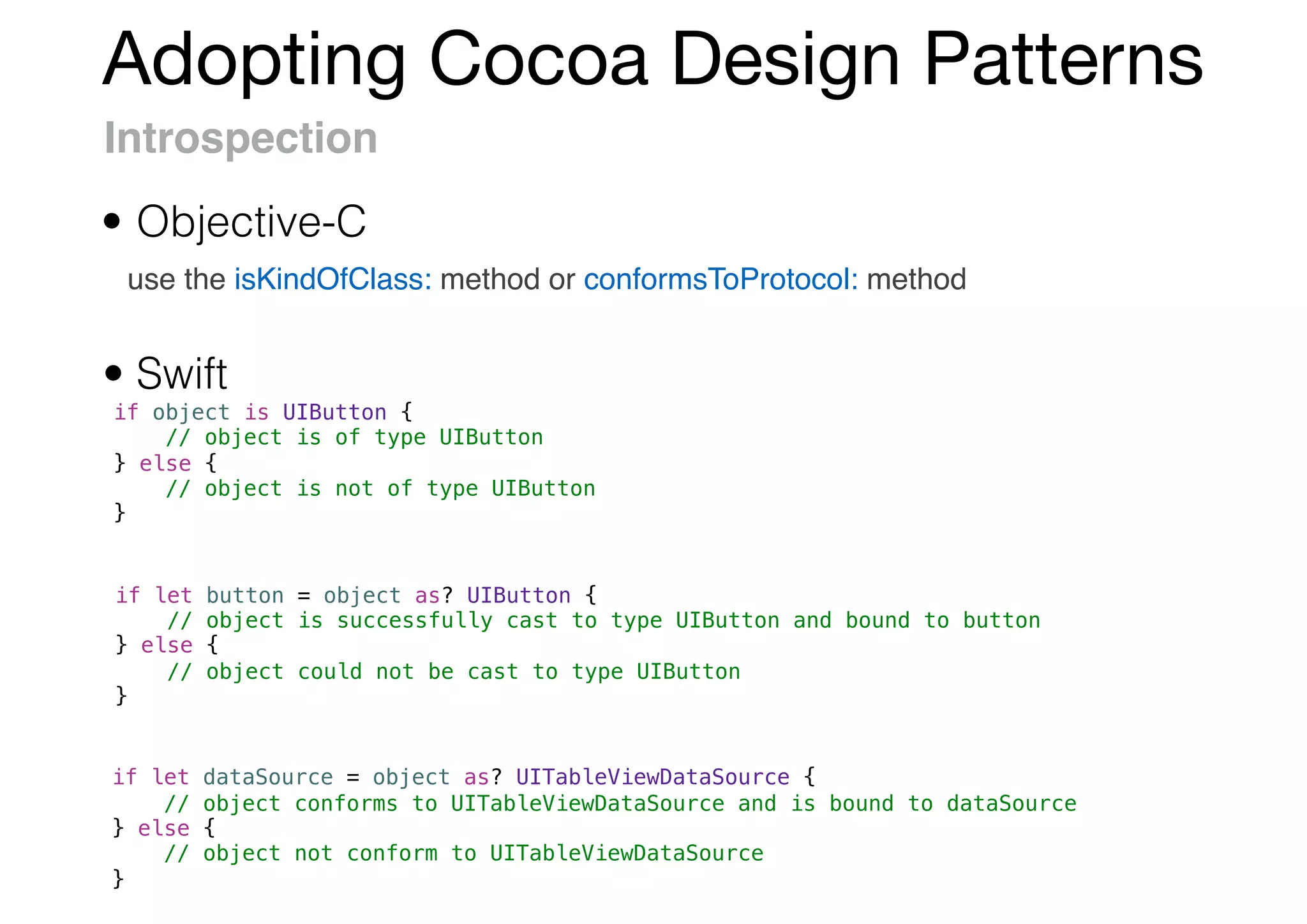
Introspection
use the isKindOfClass: method or conformsToProtocol: method
if object is UIButton {
// object is of type UIButton
} else {
// object is not of type UIButton
}
if let button = object as? UIButton {
// object is successfully cast to type UIButton and bound to button
} else {
// object could not be cast to type UIButton
}
if let dataSource = object as? UITableViewDataSource {
// object conforms to UITableViewDataSource and is bound to dataSource
} else {
// object not conform to UITableViewDataSource
}
• Swift
• Objective-C
Adopting Cocoa Design Patterns
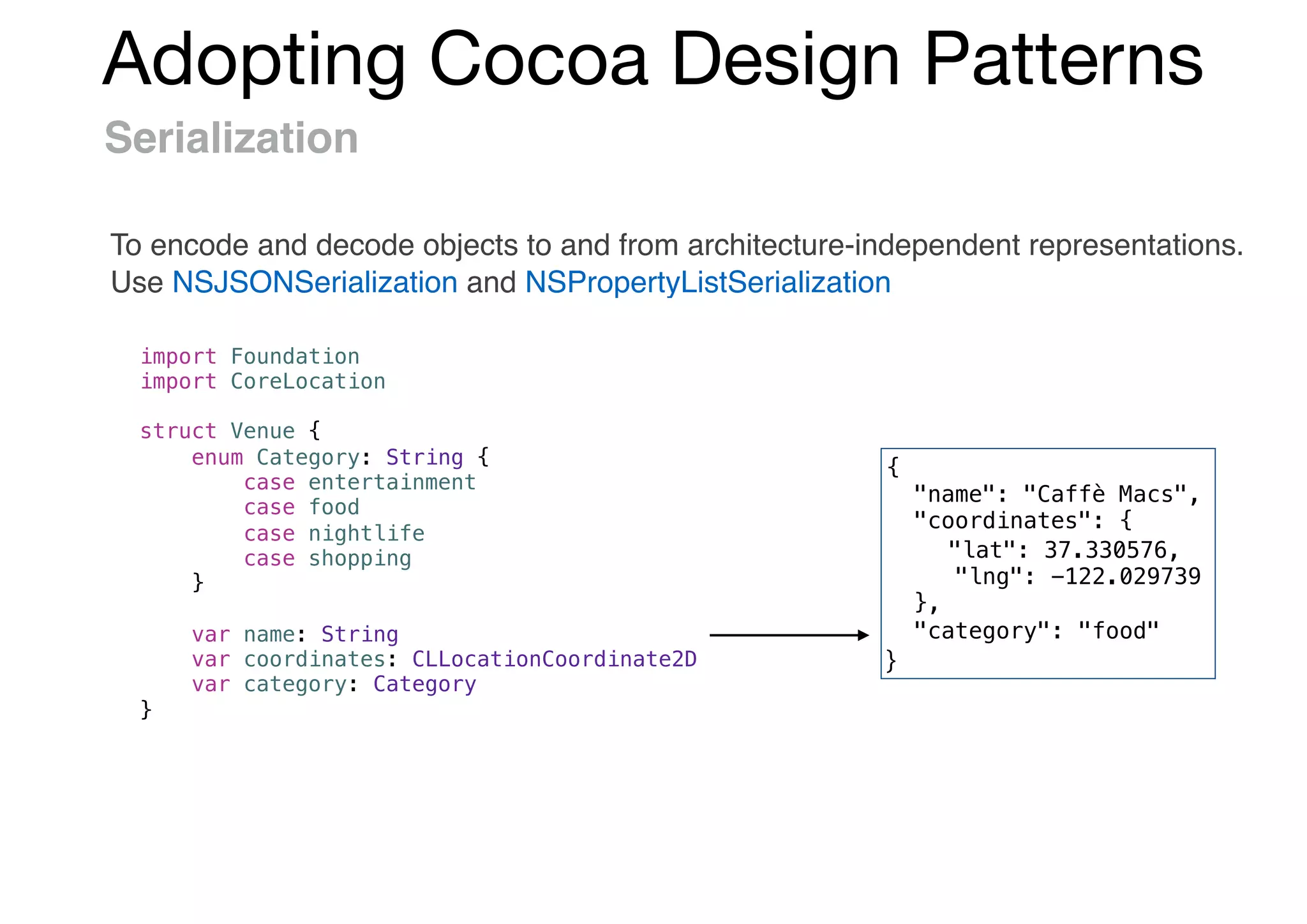
Serialization
To encode and decode objects to and from architecture-independent representations.
Use NSJSONSerialization and NSPropertyListSerialization
import Foundation
import CoreLocation
struct Venue {
enum Category: String {
case entertainment
case food
case nightlife
case shopping
}
var name: String
var coordinates: CLLocationCoordinate2D
var category: Category
}
{
"name": "Caffè Macs",
"coordinates": {
"lat": 37.330576,
"lng": -122.029739
},
"category": "food"
}
Adopting Cocoa Design Patterns
Serialization : Initializer
init?(attributes: [String: Any]) {
guard let name = attributes["name"] as? String,
let coordinates = attributes["coordinates"] as? [String: Double],
let latitude = coordinates["lat"],
let longitude = coordinates["lng"],
let category = Category(rawValue: attributes["category"] as? String ?? "Invalid")
else {
return nil
}
self.name = name
self.coordinates = CLLocationCoordinate2D(latitude: latitude, longitude: longitude)
self.category = category
}
let JSON = "{"name": "Caffè Macs","coordinates": {"lat": 37.330576,"lng": -122.029739},
"category": "food"}"
let data = JSON.data(using: String.Encoding.utf8)!
let attributes = try! JSONSerialization.jsonObject(with: data, options: []) as! [String: Any]
let venue = Venue(attributes: attributes)!
print(venue.name)
// Prints "Caffè Macs"
Initialize with Dictionary<String, Any>
Create a Venue from a JSON representation
Adopting Cocoa Design Patterns
Serialization : Validating
enum ValidationError: Error {
case missing(String)
case invalid(String)
}
init(attributes: [String: Any]) throws {
guard let name = attributes["name"] as? String else {
throw ValidationError.missing("name")
}
guard let coordinates = attributes["coordinates"] as? [String: Double] else {
throw ValidationError.missing("coordinates")
}
guard let latitude = coordinates["lat"],
let longitude = coordinates["lng"]
else {
throw ValidationError.invalid("coordinates")
}
guard let categoryName = attributes["category"] as? String else {
throw ValidationError.missing("category")
}
guard let category = Category(rawValue: categoryName) else {
throw ValidationError.invalid("category")
}
self.name = name
self.coordinates = CLLocationCoordinate2D(latitude: latitude, longitude: longitude)
self.category = category
}
Adopting Cocoa Design Patterns
Localization
use NSLocalizedString, NSLocalizedStringFromTable,
NSLocalizedStringFromTableInBundle, NSLocalizedStringWithDefaultValue
• Objective-C
• Swift
A single function: NSLocalizedString(_:tableName:bundle:value:comment:)
let format = NSLocalizedString("Hello, %@!", comment: "Hello, {given name}!")
let name = "Mei"
let greeting = String(format: format, arguments: [name as CVarArg])
print(greeting)
// Prints "Hello, Mei!"
if let path = Bundle.main.path(forResource: "Localization", ofType: "strings",
inDirectory: nil, forLocalization: "ja"),
let bundle = Bundle(path: path) {
let translation = NSLocalizedString("Hello", bundle: bundle, comment: "")
print(translation)
}
// Prints " "
Adopting Cocoa Design Patterns
API Availability
use respondsToSelector: and instancesRespondToSelector: methods
• Objective-C
• Swift
let locationManager = CLLocationManager()
if #available(iOS 8.0, macOS 10.10, *) {
locationManager.requestWhenInUseAuthorization()
}
if ([CLLocationManager instancesRespondToSelector:@selector(requestWhenInUseAuthorization)]) {
// Method is available for use.
} else {
// Method is not available.
}
let locationManager = CLLocationManager()
guard #available(iOS 8.0, macOS 10.10, *) else { return }
locationManager.requestWhenInUseAuthorization()
Adopting Cocoa Design Patterns
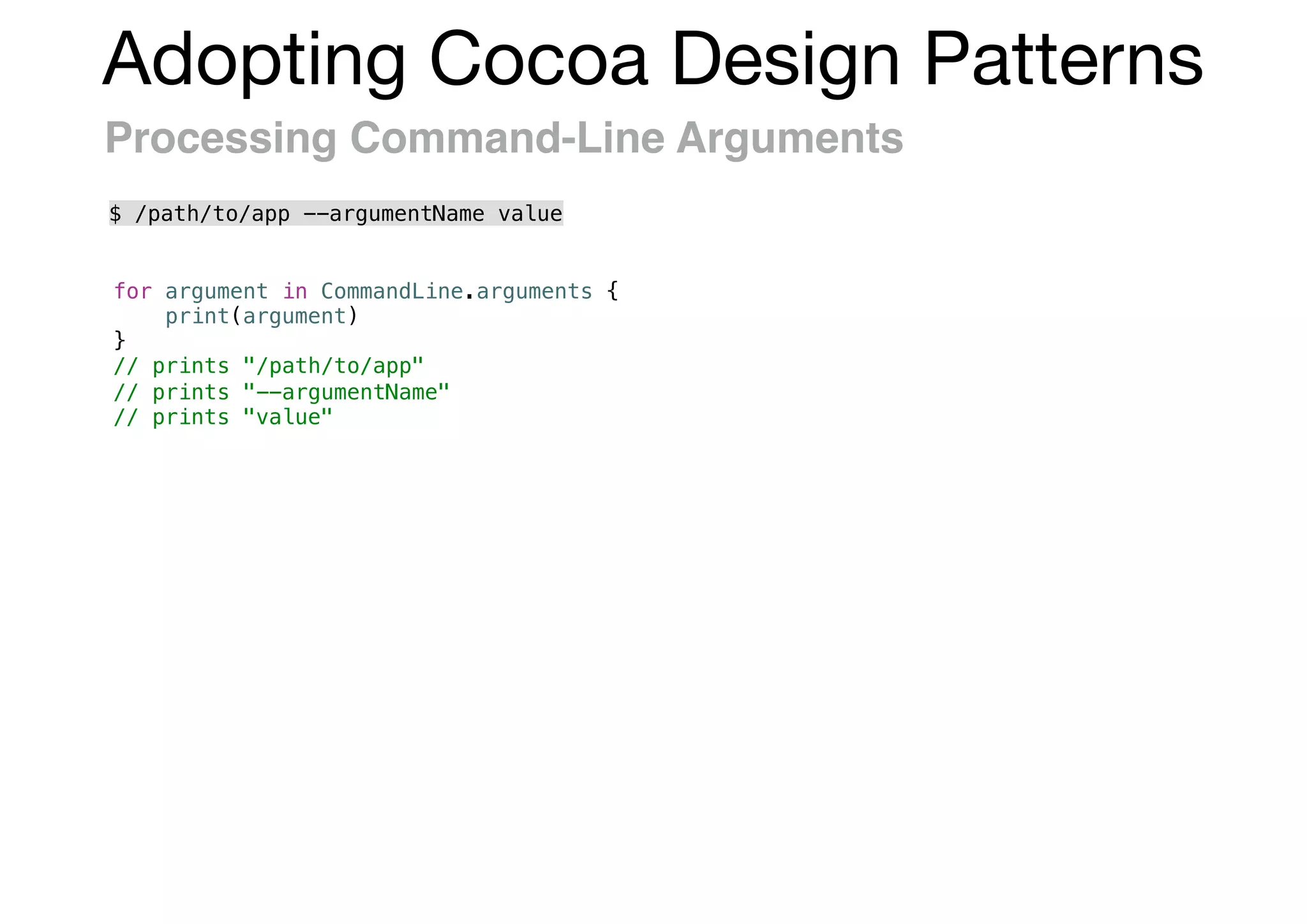
Processing Command-Line Arguments
for argument in CommandLine.arguments {
print(argument)
}
// prints "/path/to/app"
// prints "--argumentName"
// prints "value"
$ /path/to/app --argumentName value
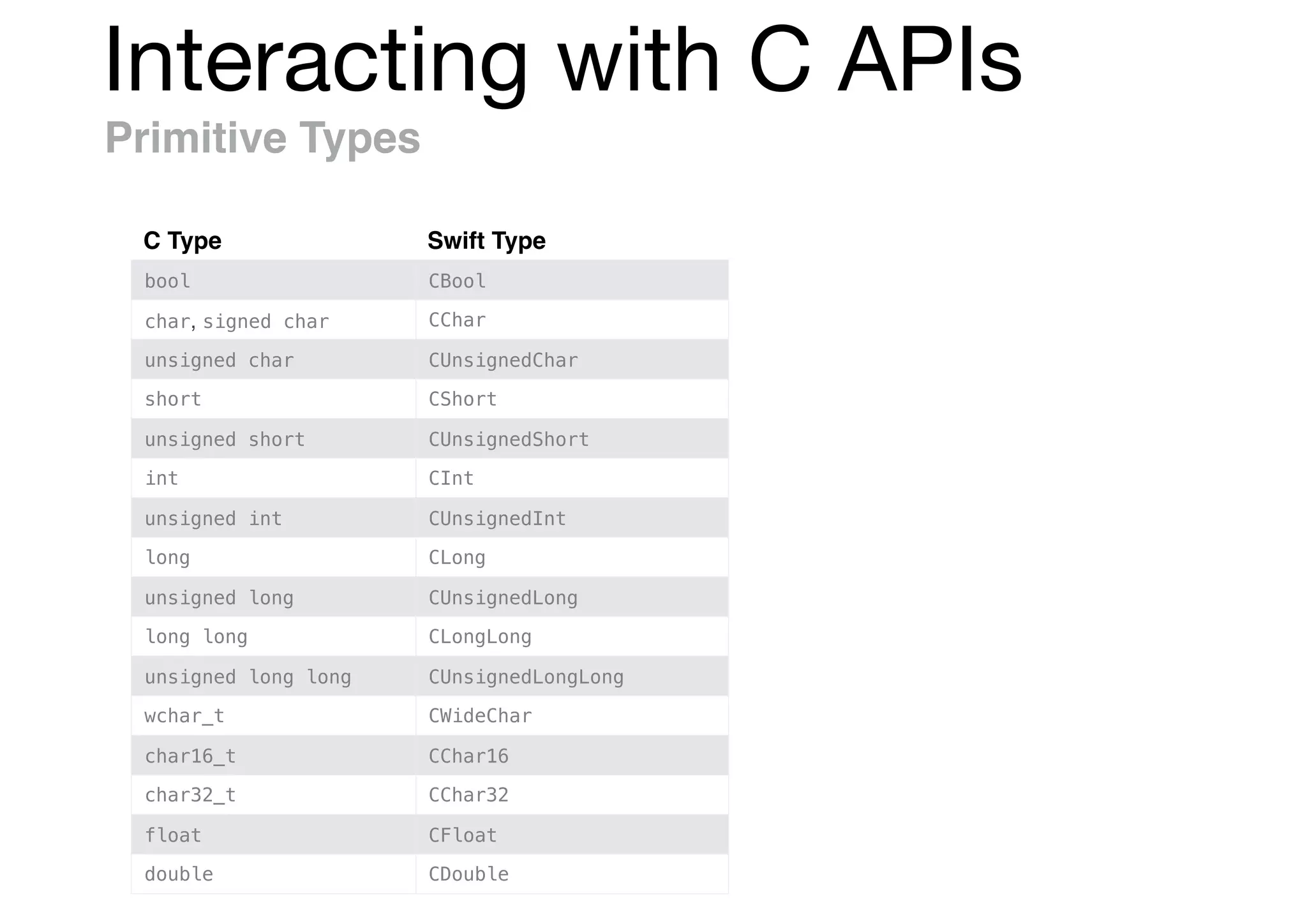
Interacting with C APIs
Primitive Types
C Type Swift Type
bool CBool
char, signed char CChar
unsigned char CUnsignedChar
short CShort
unsigned short CUnsignedShort
int CInt
unsigned int CUnsignedInt
long CLong
unsigned long CUnsignedLong
long long CLongLong
unsigned long long CUnsignedLongLong
wchar_t CWideChar
char16_t CChar16
char32_t CChar32
float CFloat
double CDouble
Interacting with C APIs
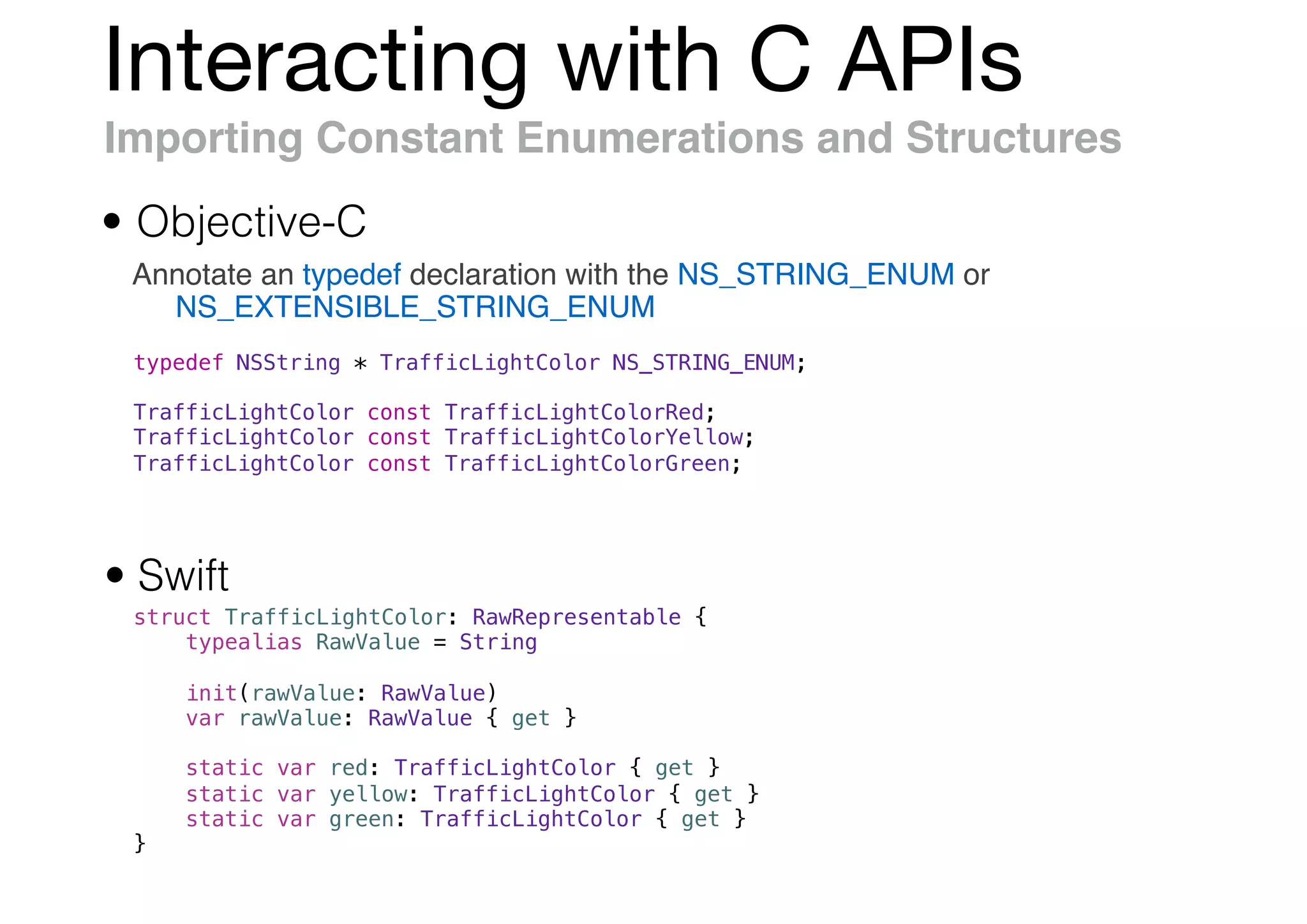
Importing Constant Enumerations and Structures
Annotate an typedef declaration with the NS_STRING_ENUM or
NS_EXTENSIBLE_STRING_ENUM
• Objective-C
• Swift
struct TrafficLightColor: RawRepresentable {
typealias RawValue = String
init(rawValue: RawValue)
var rawValue: RawValue { get }
static var red: TrafficLightColor { get }
static var yellow: TrafficLightColor { get }
static var green: TrafficLightColor { get }
}
typedef NSString * TrafficLightColor NS_STRING_ENUM;
TrafficLightColor const TrafficLightColorRed;
TrafficLightColor const TrafficLightColorYellow;
TrafficLightColor const TrafficLightColorGreen;
Interacting with C APIs
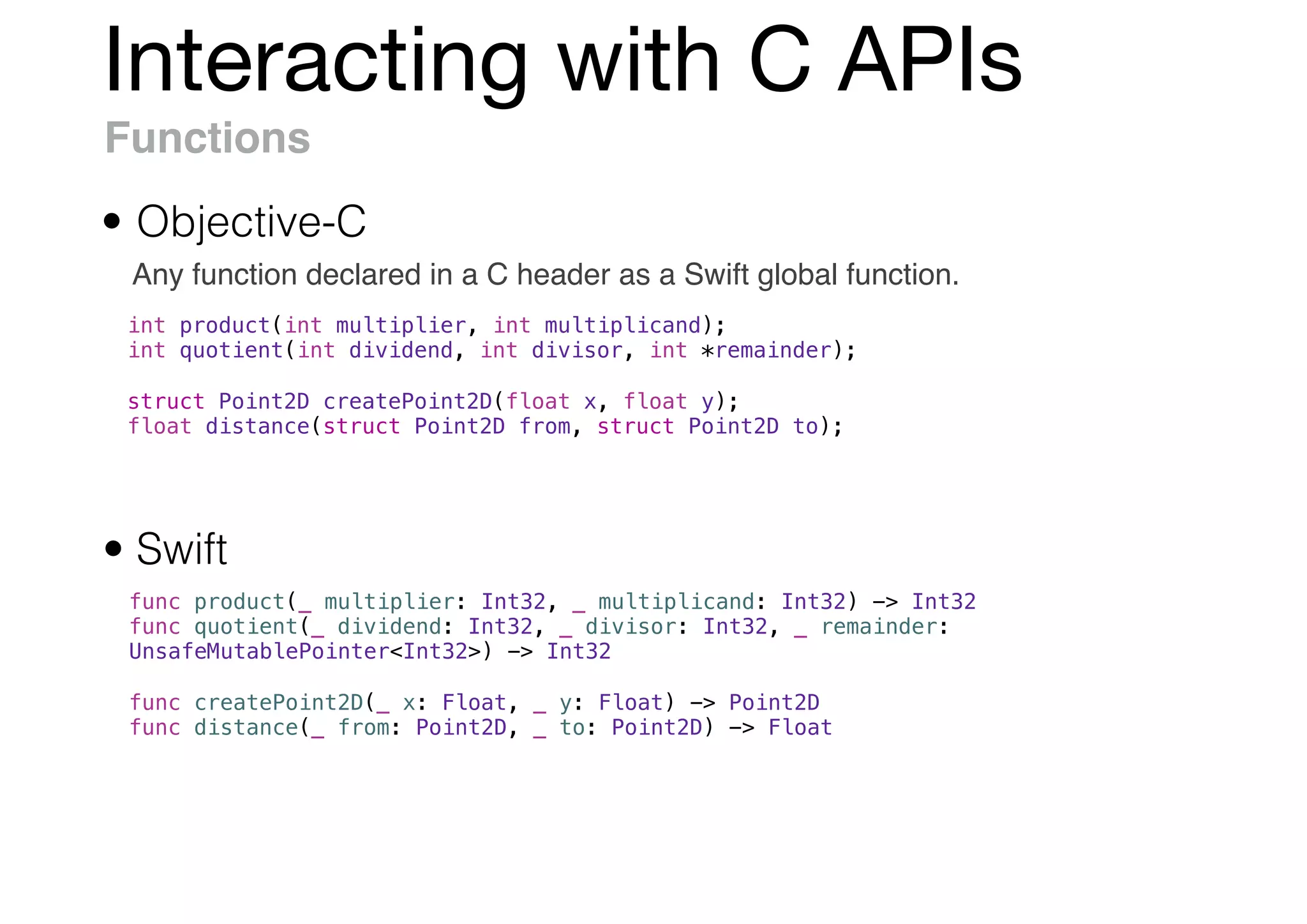
Functions
Any function declared in a C header as a Swift global function.
• Objective-C
• Swift
func product(_ multiplier: Int32, _ multiplicand: Int32) -> Int32
func quotient(_ dividend: Int32, _ divisor: Int32, _ remainder:
UnsafeMutablePointer<Int32>) -> Int32
func createPoint2D(_ x: Float, _ y: Float) -> Point2D
func distance(_ from: Point2D, _ to: Point2D) -> Float
int product(int multiplier, int multiplicand);
int quotient(int dividend, int divisor, int *remainder);
struct Point2D createPoint2D(float x, float y);
float distance(struct Point2D from, struct Point2D to);
Interacting with C APIs
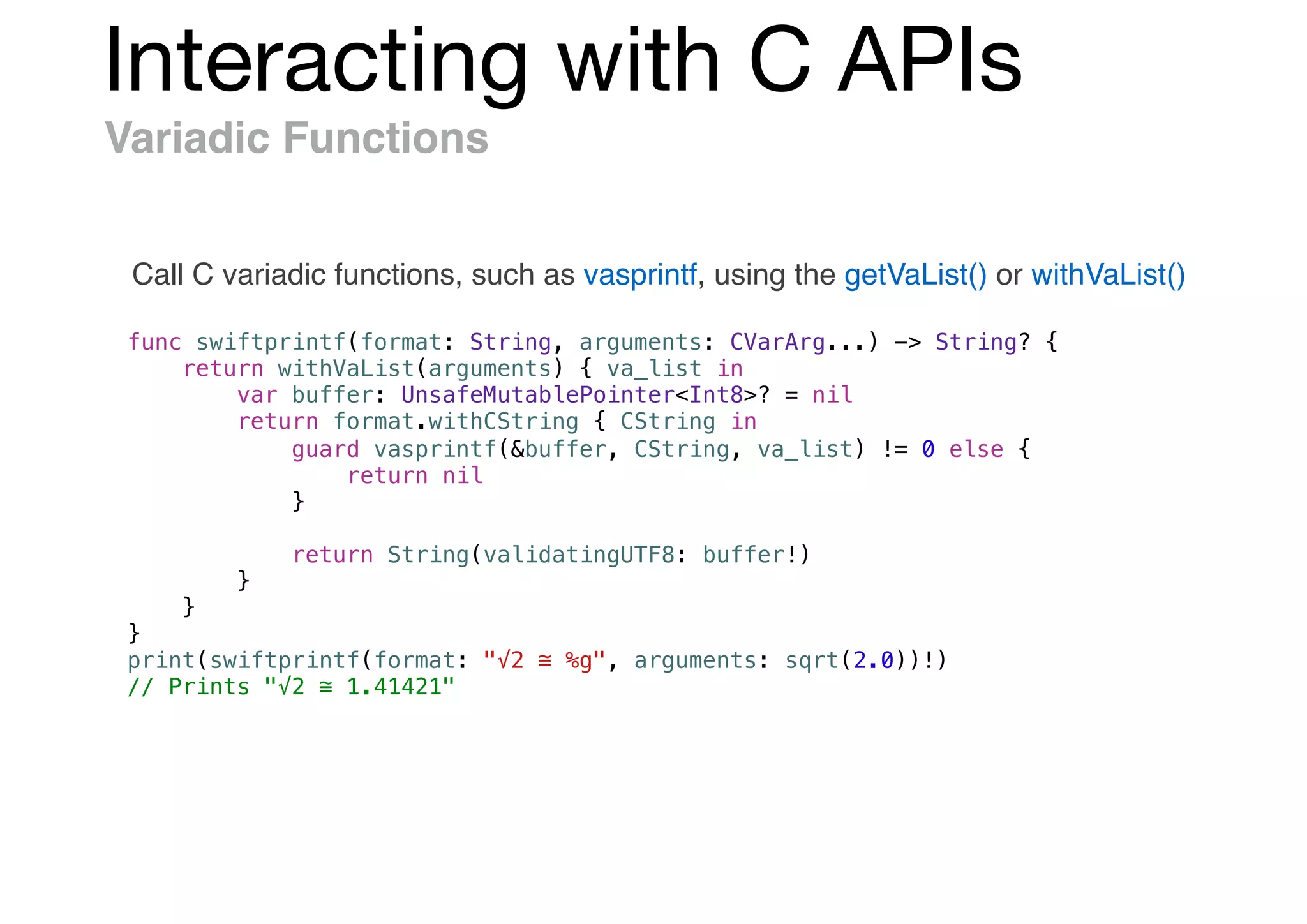
Variadic Functions
Call C variadic functions, such as vasprintf, using the getVaList() or withVaList()
func swiftprintf(format: String, arguments: CVarArg...) -> String? {
return withVaList(arguments) { va_list in
var buffer: UnsafeMutablePointer<Int8>? = nil
return format.withCString { CString in
guard vasprintf(&buffer, CString, va_list) != 0 else {
return nil
}
return String(validatingUTF8: buffer!)
}
}
}
print(swiftprintf(format: "√2 ≅ %g", arguments: sqrt(2.0))!)
// Prints "√2 ≅ 1.41421"
Interacting with C APIs
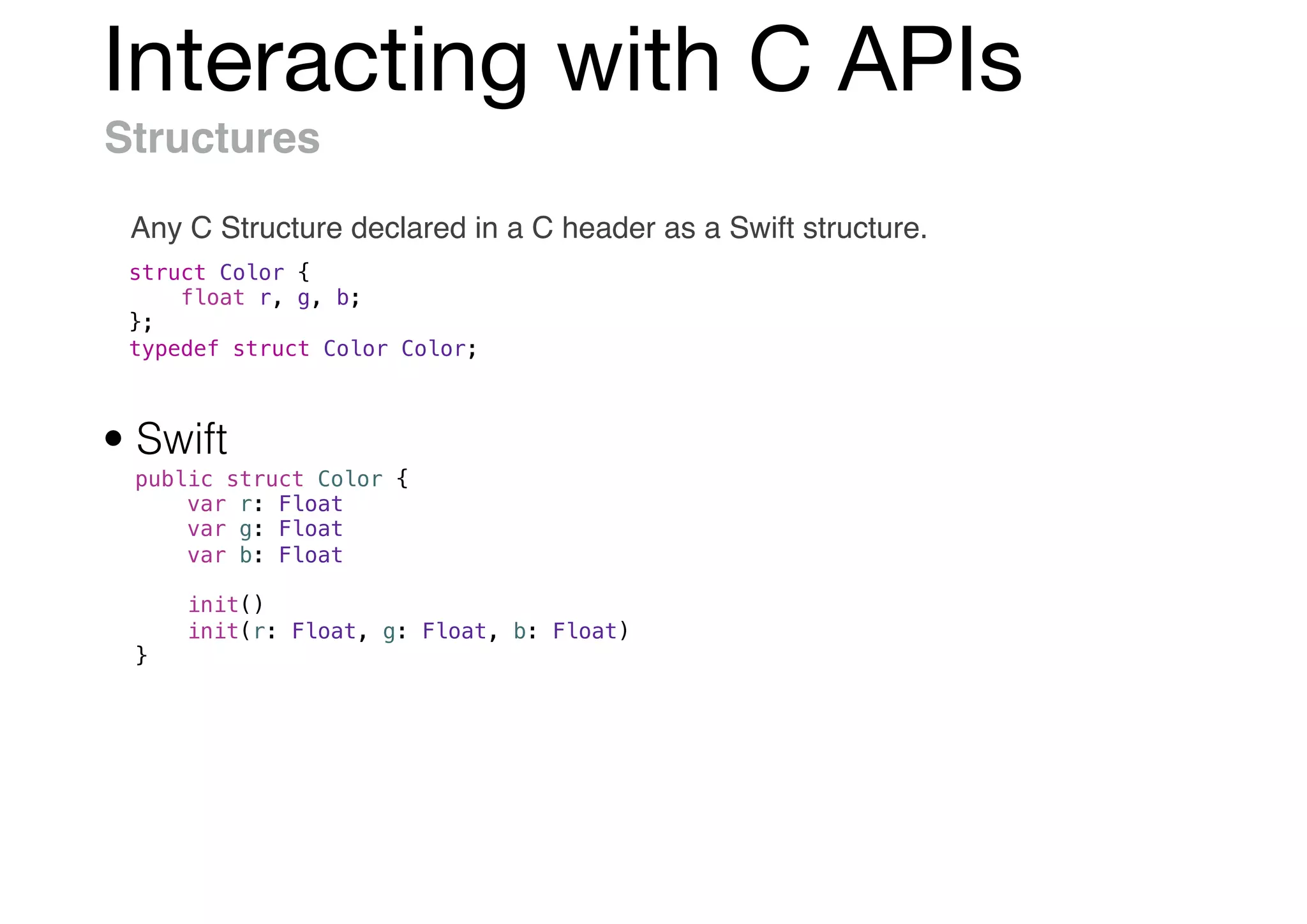
Structures
Any C Structure declared in a C header as a Swift structure.
struct Color {
float r, g, b;
};
typedef struct Color Color;
public struct Color {
var r: Float
var g: Float
var b: Float
init()
init(r: Float, g: Float, b: Float)
}
• Swift
Interacting with C APIs
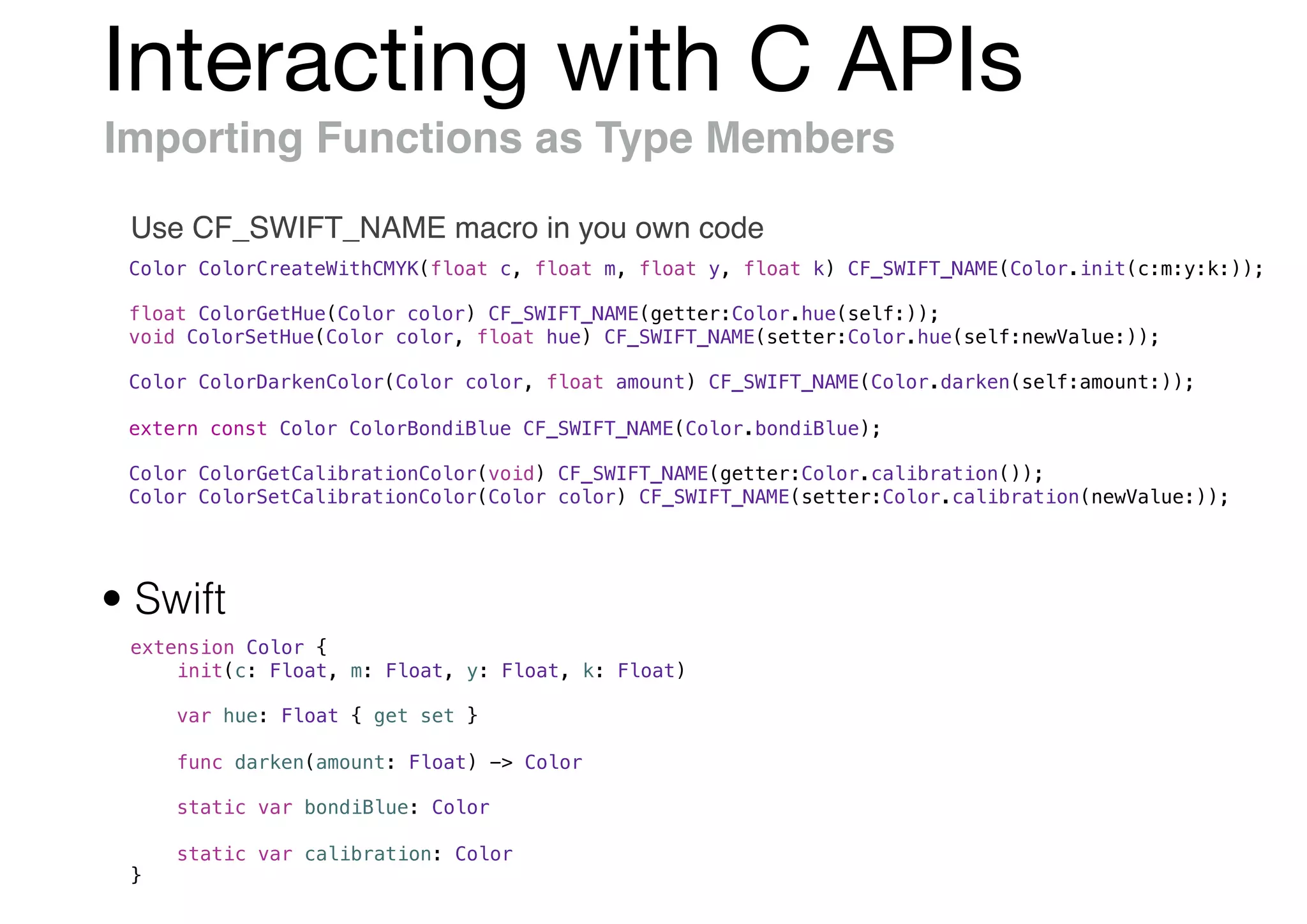
Importing Functions as Type Members
Use CF_SWIFT_NAME macro in you own code
Color ColorCreateWithCMYK(float c, float m, float y, float k) CF_SWIFT_NAME(Color.init(c:m:y:k:));
float ColorGetHue(Color color) CF_SWIFT_NAME(getter:Color.hue(self:));
void ColorSetHue(Color color, float hue) CF_SWIFT_NAME(setter:Color.hue(self:newValue:));
Color ColorDarkenColor(Color color, float amount) CF_SWIFT_NAME(Color.darken(self:amount:));
extern const Color ColorBondiBlue CF_SWIFT_NAME(Color.bondiBlue);
Color ColorGetCalibrationColor(void) CF_SWIFT_NAME(getter:Color.calibration());
Color ColorSetCalibrationColor(Color color) CF_SWIFT_NAME(setter:Color.calibration(newValue:));
extension Color {
init(c: Float, m: Float, y: Float, k: Float)
var hue: Float { get set }
func darken(amount: Float) -> Color
static var bondiBlue: Color
static var calibration: Color
}
• Swift
Interacting with C APIs
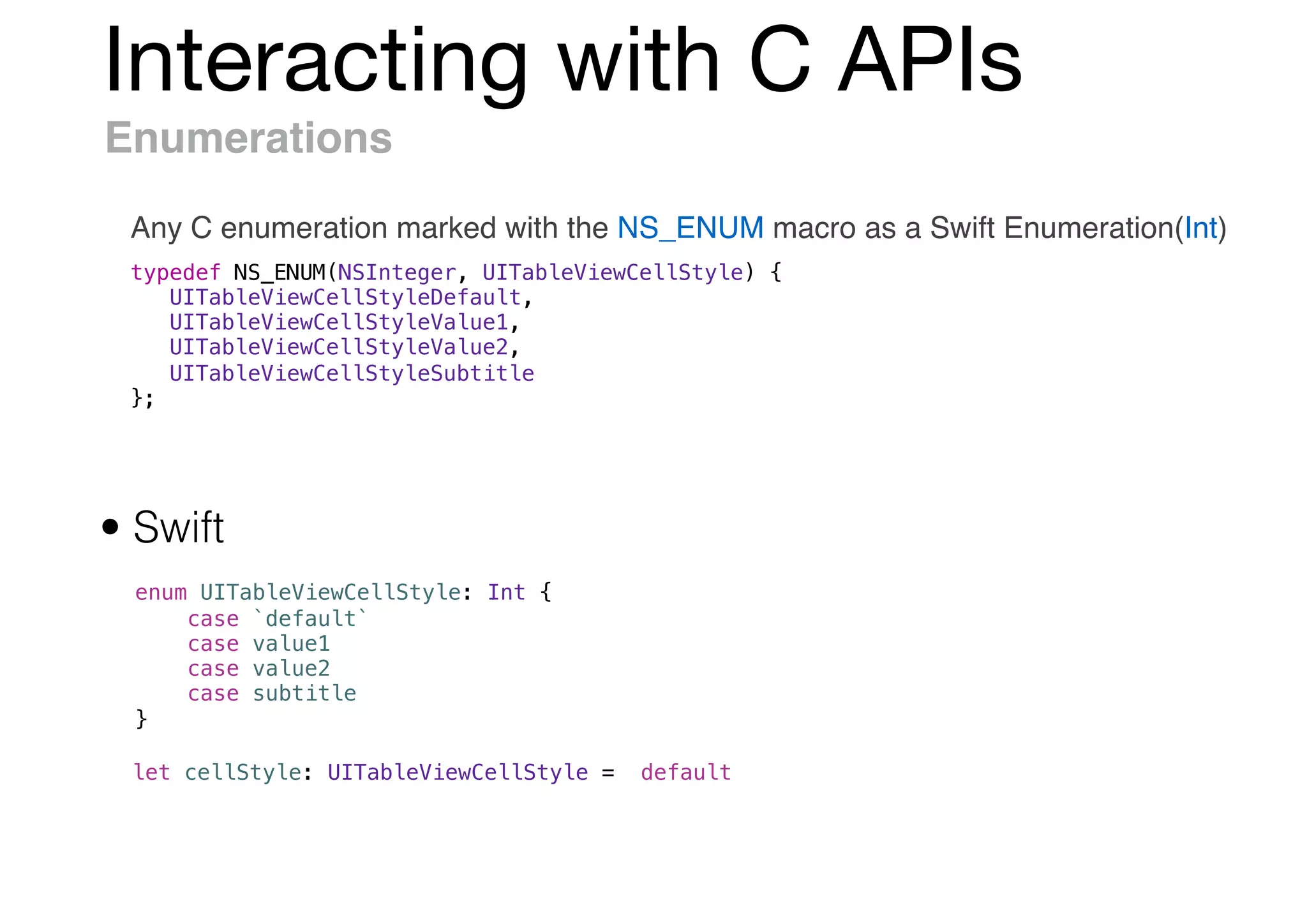
Enumerations
Any C enumeration marked with the NS_ENUM macro as a Swift Enumeration(Int)
typedef NS_ENUM(NSInteger, UITableViewCellStyle) {
UITableViewCellStyleDefault,
UITableViewCellStyleValue1,
UITableViewCellStyleValue2,
UITableViewCellStyleSubtitle
};
enum UITableViewCellStyle: Int {
case `default`
case value1
case value2
case subtitle
}
• Swift
let cellStyle: UITableViewCellStyle = .default
Interacting with C APIs
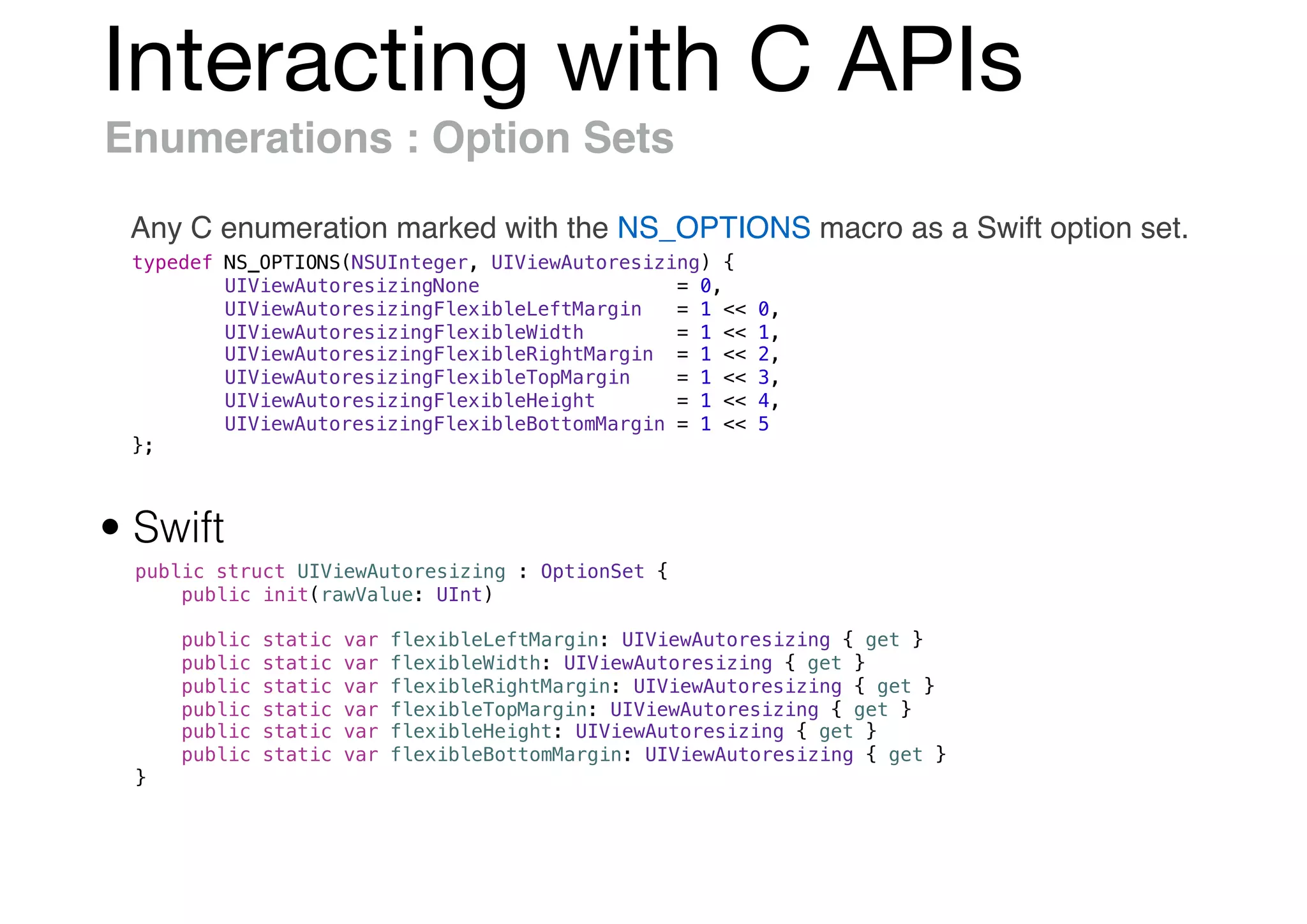
Enumerations : Option Sets
Any C enumeration marked with the NS_OPTIONS macro as a Swift option set.
typedef NS_OPTIONS(NSUInteger, UIViewAutoresizing) {
UIViewAutoresizingNone = 0,
UIViewAutoresizingFlexibleLeftMargin = 1 << 0,
UIViewAutoresizingFlexibleWidth = 1 << 1,
UIViewAutoresizingFlexibleRightMargin = 1 << 2,
UIViewAutoresizingFlexibleTopMargin = 1 << 3,
UIViewAutoresizingFlexibleHeight = 1 << 4,
UIViewAutoresizingFlexibleBottomMargin = 1 << 5
};
public struct UIViewAutoresizing : OptionSet {
public init(rawValue: UInt)
public static var flexibleLeftMargin: UIViewAutoresizing { get }
public static var flexibleWidth: UIViewAutoresizing { get }
public static var flexibleRightMargin: UIViewAutoresizing { get }
public static var flexibleTopMargin: UIViewAutoresizing { get }
public static var flexibleHeight: UIViewAutoresizing { get }
public static var flexibleBottomMargin: UIViewAutoresizing { get }
}
• Swift
Interacting with C APIs
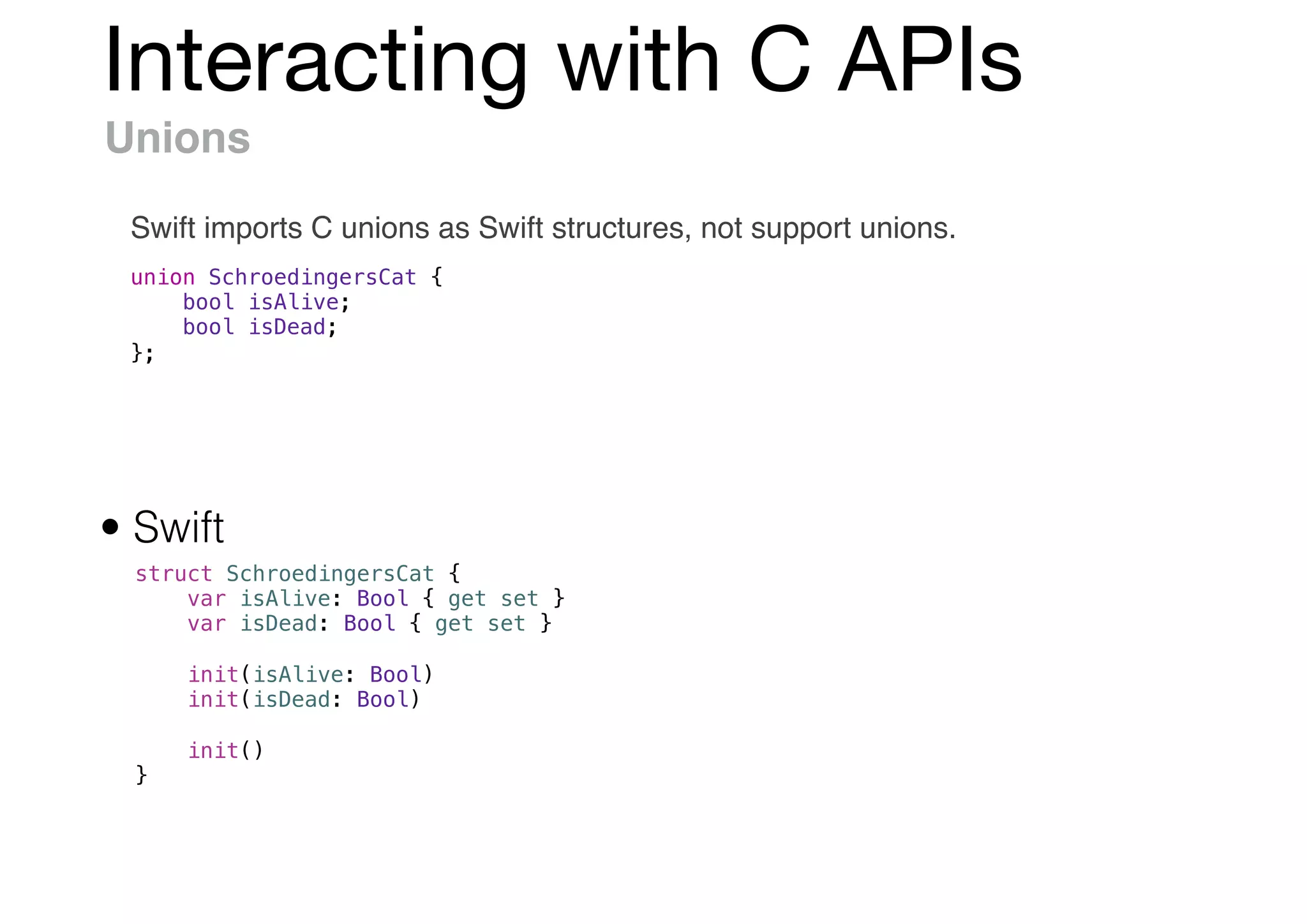
Unions
Swift imports C unions as Swift structures, not support unions.
union SchroedingersCat {
bool isAlive;
bool isDead;
};
struct SchroedingersCat {
var isAlive: Bool { get set }
var isDead: Bool { get set }
init(isAlive: Bool)
init(isDead: Bool)
init()
}
• Swift
Interacting with C APIs
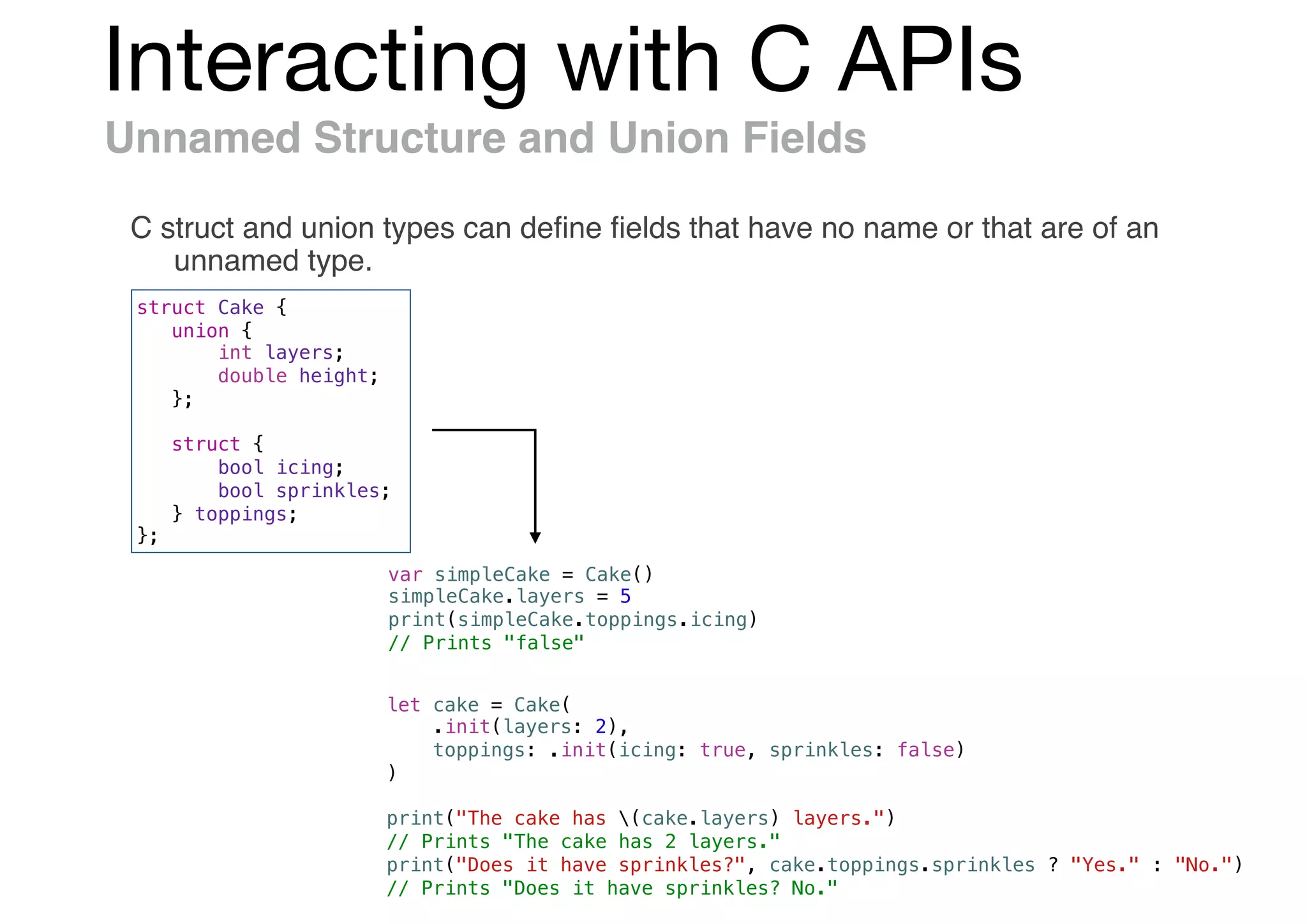
Unnamed Structure and Union Fields
C struct and union types can define fields that have no name or that are of an
unnamed type.
struct Cake {
union {
int layers;
double height;
};
struct {
bool icing;
bool sprinkles;
} toppings;
};
var simpleCake = Cake()
simpleCake.layers = 5
print(simpleCake.toppings.icing)
// Prints "false"
let cake = Cake(
.init(layers: 2),
toppings: .init(icing: true, sprinkles: false)
)
print("The cake has (cake.layers) layers.")
// Prints "The cake has 2 layers."
print("Does it have sprinkles?", cake.toppings.sprinkles ? "Yes." : "No.")
// Prints "Does it have sprinkles? No."
Interacting with C APIs
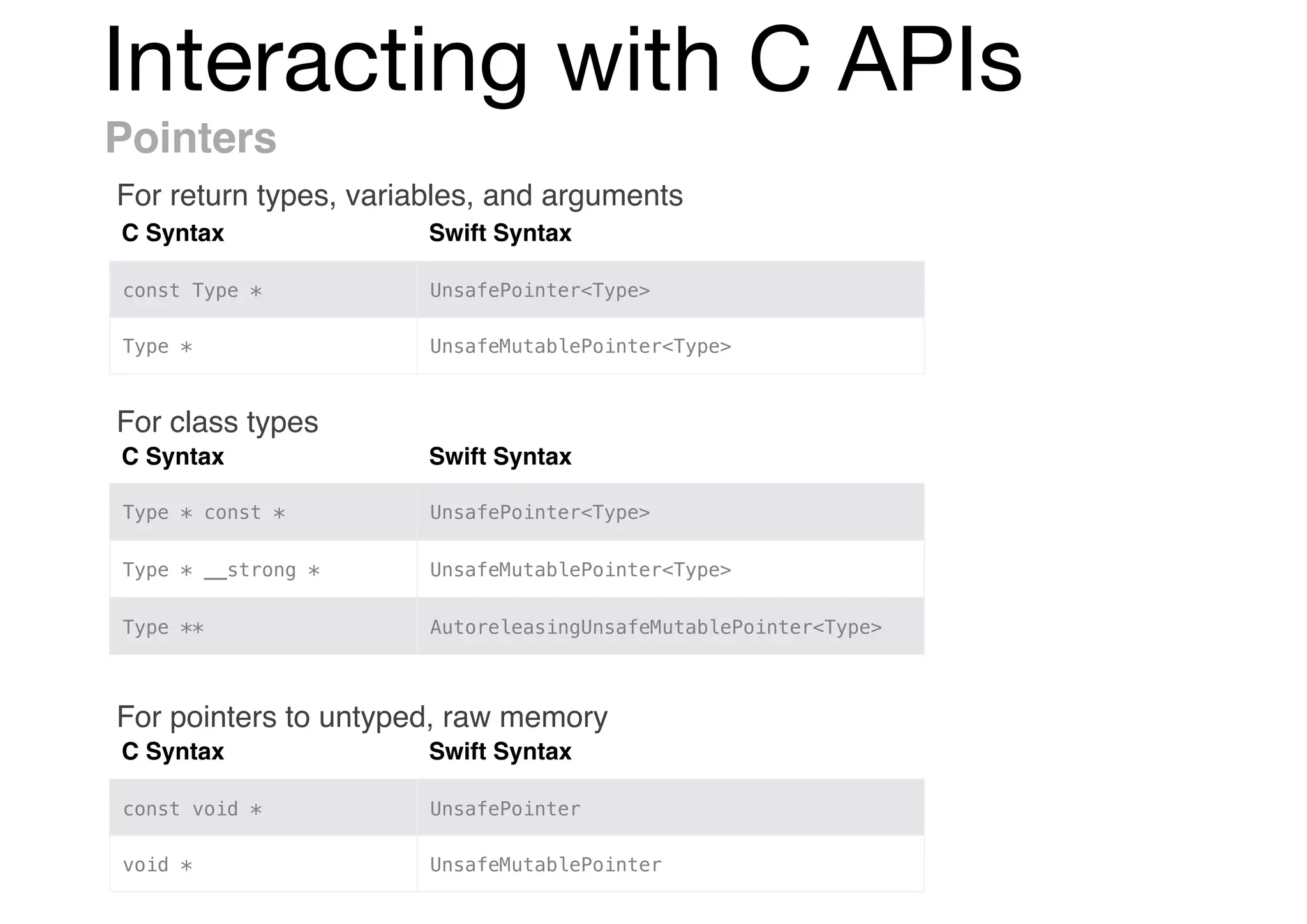
Pointers
C Syntax Swift Syntax
const Type * UnsafePointer<Type>
Type * UnsafeMutablePointer<Type>
C Syntax Swift Syntax
Type * const * UnsafePointer<Type>
Type * __strong * UnsafeMutablePointer<Type>
Type ** AutoreleasingUnsafeMutablePointer<Type>
C Syntax Swift Syntax
const void * UnsafePointer
void * UnsafeMutablePointer
For return types, variables, and arguments
For class types
For pointers to untyped, raw memory
Interacting with C APIs
Constant Pointers
func takesAPointer(_ p: UnsafePointer<Float>) {
// ...
}
var x: Float = 0.0
takesAPointer(&x)
takesAPointer([1.0, 2.0, 3.0])
var x: Float = 0.0, y: Int = 0
takesARawPointer(&x)
takesARawPointer(&y)
takesARawPointer([1.0, 2.0, 3.0] as [Float])
let intArray = [1, 2, 3]
takesARawPointer(intArray)
func takesARawPointer(_ p: UnsafeRawPointer?) {
// ...
}
Interacting with C APIs
Mutable Pointers
func takesAMutablePointer(_ p: UnsafeMutablePointer<Float>) {
// ...
}
var x: Float = 0.0
var a: [Float] = [1.0, 2.0, 3.0]
takesAMutablePointer(&x)
takesAMutablePointer(&a)
var x: Float = 0.0, y: Int = 0
var a: [Float] = [1.0, 2.0, 3.0], b: [Int] = [1, 2, 3]
takesAMutableRawPointer(&x)
takesAMutableRawPointer(&y)
takesAMutableRawPointer(&a)
takesAMutableRawPointer(&b)
func takesAMutableRawPointer(_ p: UnsafeMutableRawPointer?) {
// ...
}
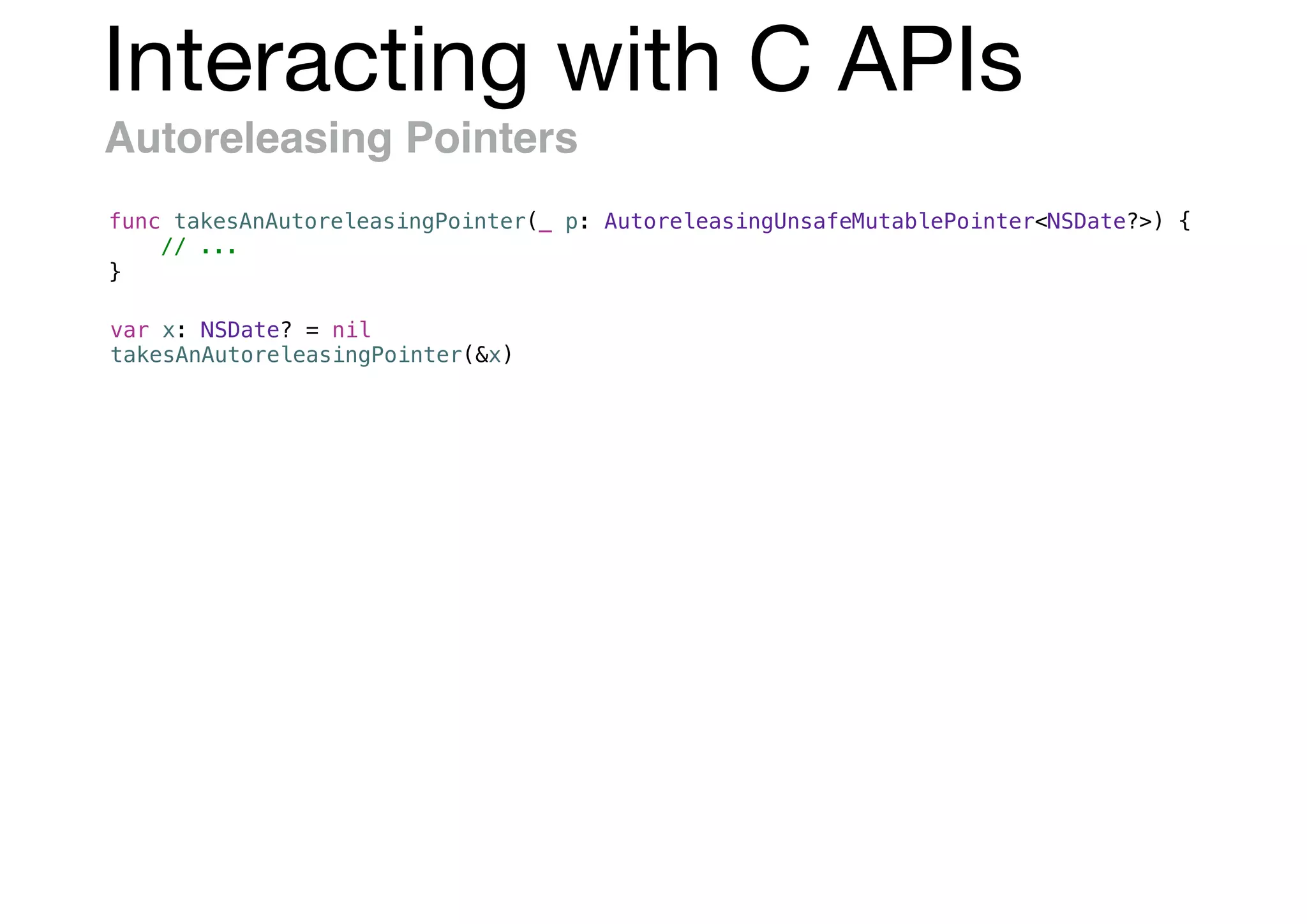
Interacting with C APIs
Autoreleasing Pointers
func takesAnAutoreleasingPointer(_ p: AutoreleasingUnsafeMutablePointer<NSDate?>) {
// ...
}
var x: NSDate? = nil
takesAnAutoreleasingPointer(&x)
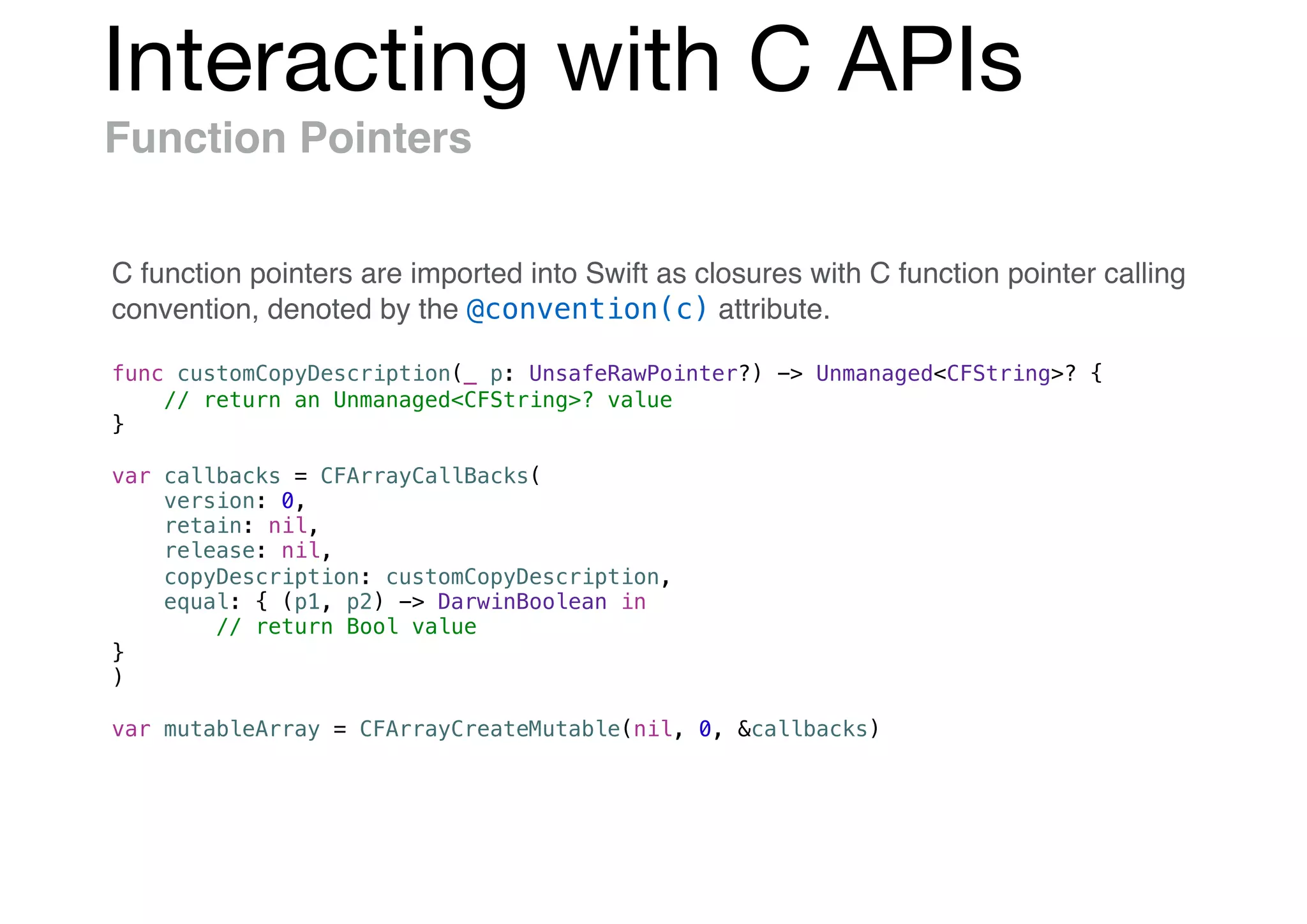
Interacting with C APIs
Function Pointers
func customCopyDescription(_ p: UnsafeRawPointer?) -> Unmanaged<CFString>? {
// return an Unmanaged<CFString>? value
}
var callbacks = CFArrayCallBacks(
version: 0,
retain: nil,
release: nil,
copyDescription: customCopyDescription,
equal: { (p1, p2) -> DarwinBoolean in
// return Bool value
}
)
var mutableArray = CFArrayCreateMutable(nil, 0, &callbacks)
C function pointers are imported into Swift as closures with C function pointer calling
convention, denoted by the @convention(c) attribute.
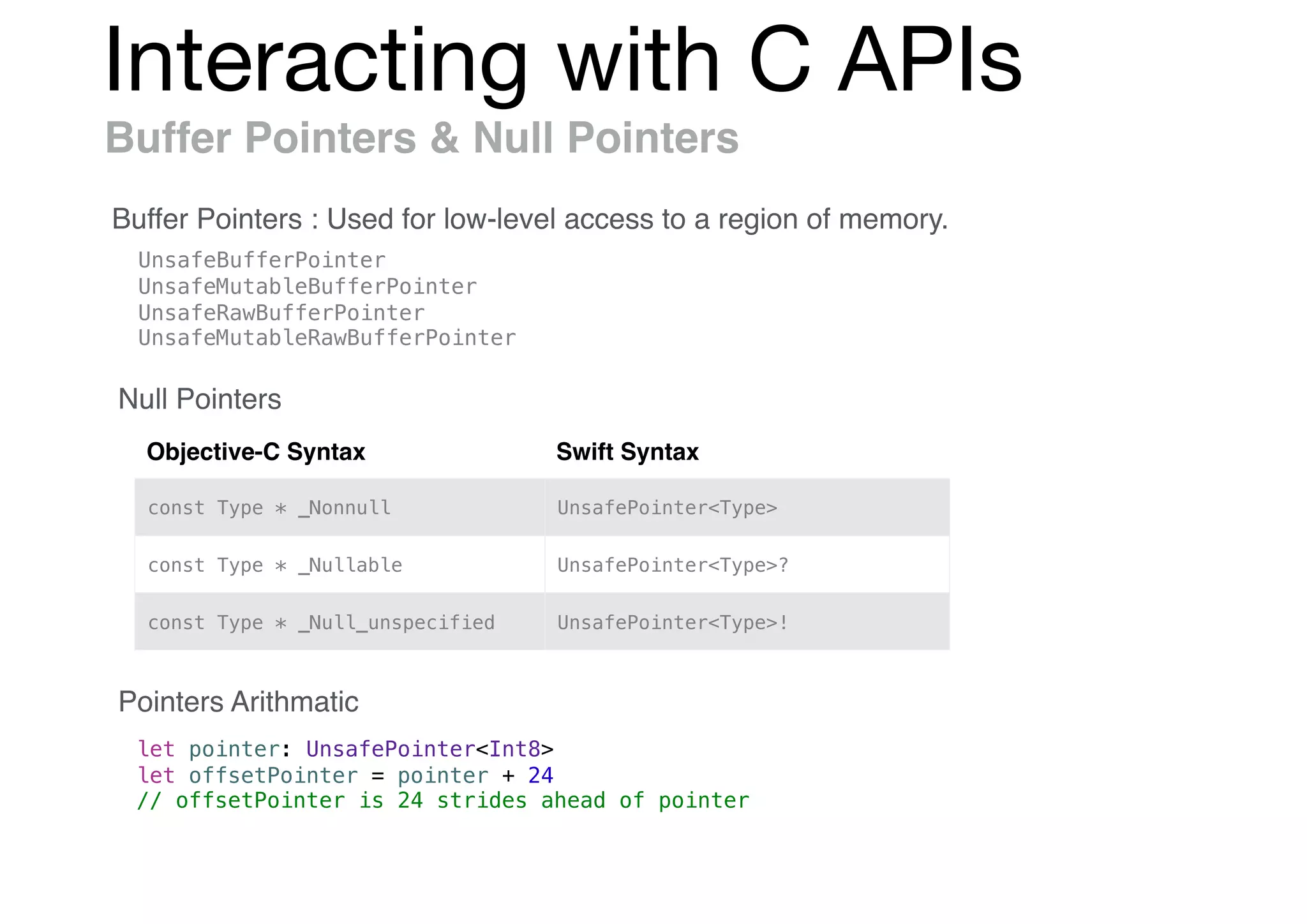
Interacting with C APIs
Buffer Pointers & Null Pointers
Buffer Pointers : Used for low-level access to a region of memory.
UnsafeBufferPointer
UnsafeMutableBufferPointer
UnsafeRawBufferPointer
UnsafeMutableRawBufferPointer
Objective-C Syntax Swift Syntax
const Type * _Nonnull UnsafePointer<Type>
const Type * _Nullable UnsafePointer<Type>?
const Type * _Null_unspecified UnsafePointer<Type>!
Null Pointers
Pointers Arithmatic
let pointer: UnsafePointer<Int8>
let offsetPointer = pointer + 24
// offsetPointer is 24 strides ahead of pointer
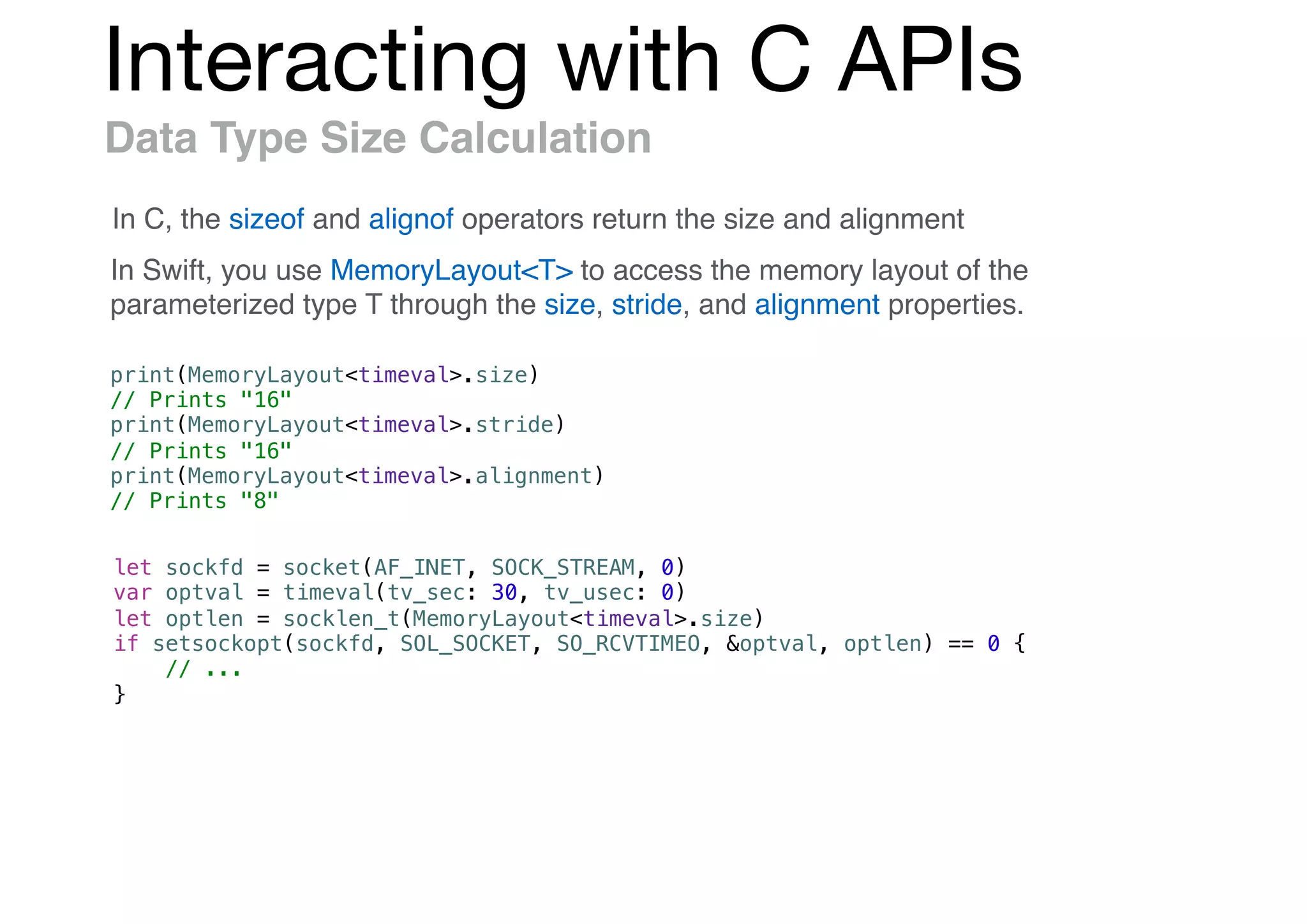
Interacting with C APIs
Data Type Size Calculation
In C, the sizeof and alignof operators return the size and alignment
In Swift, you use MemoryLayout<T> to access the memory layout of the
parameterized type T through the size, stride, and alignment properties.
print(MemoryLayout<timeval>.size)
// Prints "16"
print(MemoryLayout<timeval>.stride)
// Prints "16"
print(MemoryLayout<timeval>.alignment)
// Prints "8"
let sockfd = socket(AF_INET, SOCK_STREAM, 0)
var optval = timeval(tv_sec: 30, tv_usec: 0)
let optlen = socklen_t(MemoryLayout<timeval>.size)
if setsockopt(sockfd, SOL_SOCKET, SO_RCVTIMEO, &optval, optlen) == 0 {
// ...
}
Interacting with C APIs
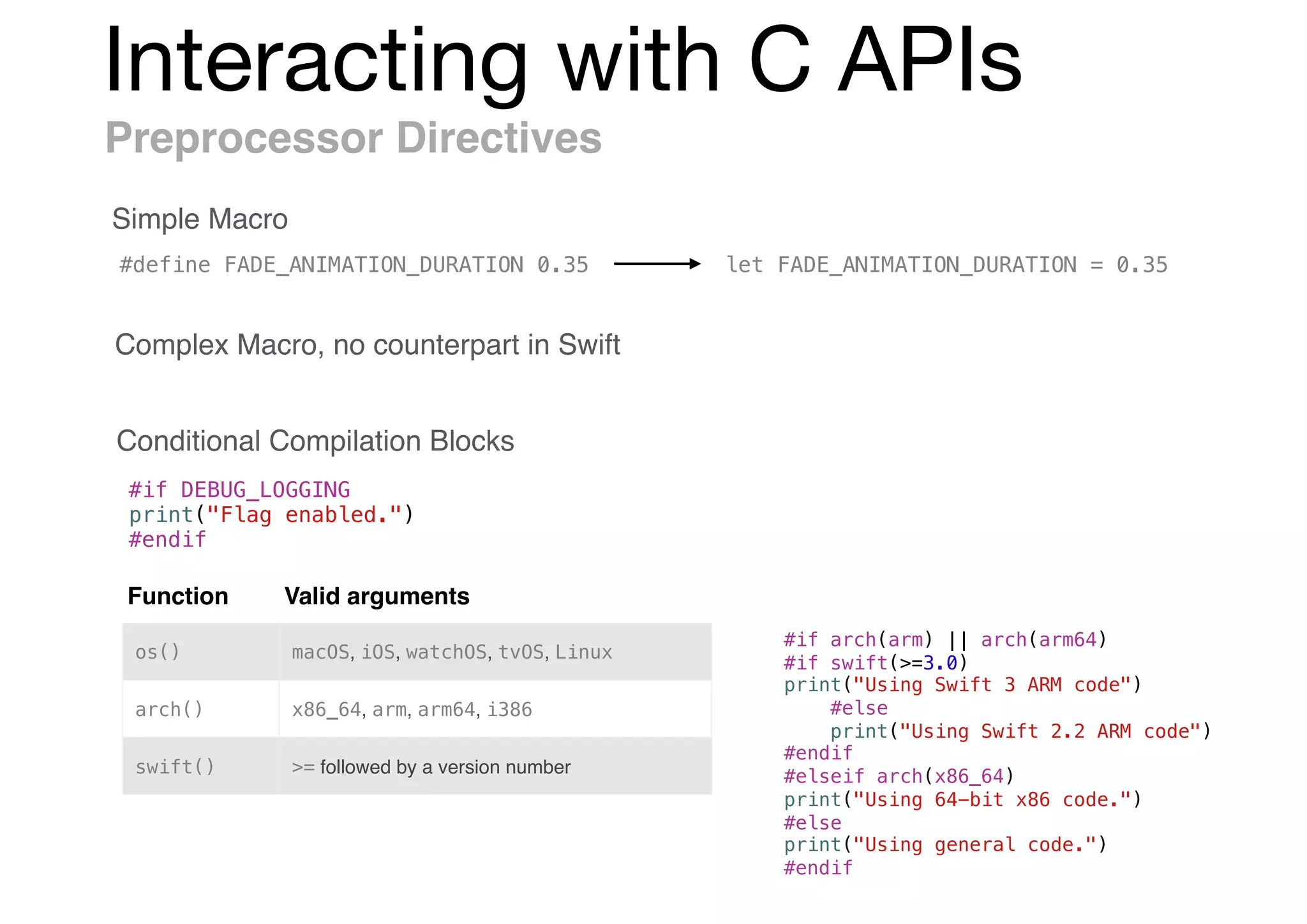
Preprocessor Directives
Simple Macro
Complex Macro, no counterpart in Swift
Conditional Compilation Blocks
#if DEBUG_LOGGING
print("Flag enabled.")
#endif
#define FADE_ANIMATION_DURATION 0.35 let FADE_ANIMATION_DURATION = 0.35
Function Valid arguments
os() macOS, iOS, watchOS, tvOS, Linux
arch() x86_64, arm, arm64, i386
swift() >= followed by a version number
#if arch(arm) || arch(arm64)
#if swift(>=3.0)
print("Using Swift 3 ARM code")
#else
print("Using Swift 2.2 ARM code")
#endif
#elseif arch(x86_64)
print("Using 64-bit x86 code.")
#else
print("Using general code.")
#endif
Mix & Match
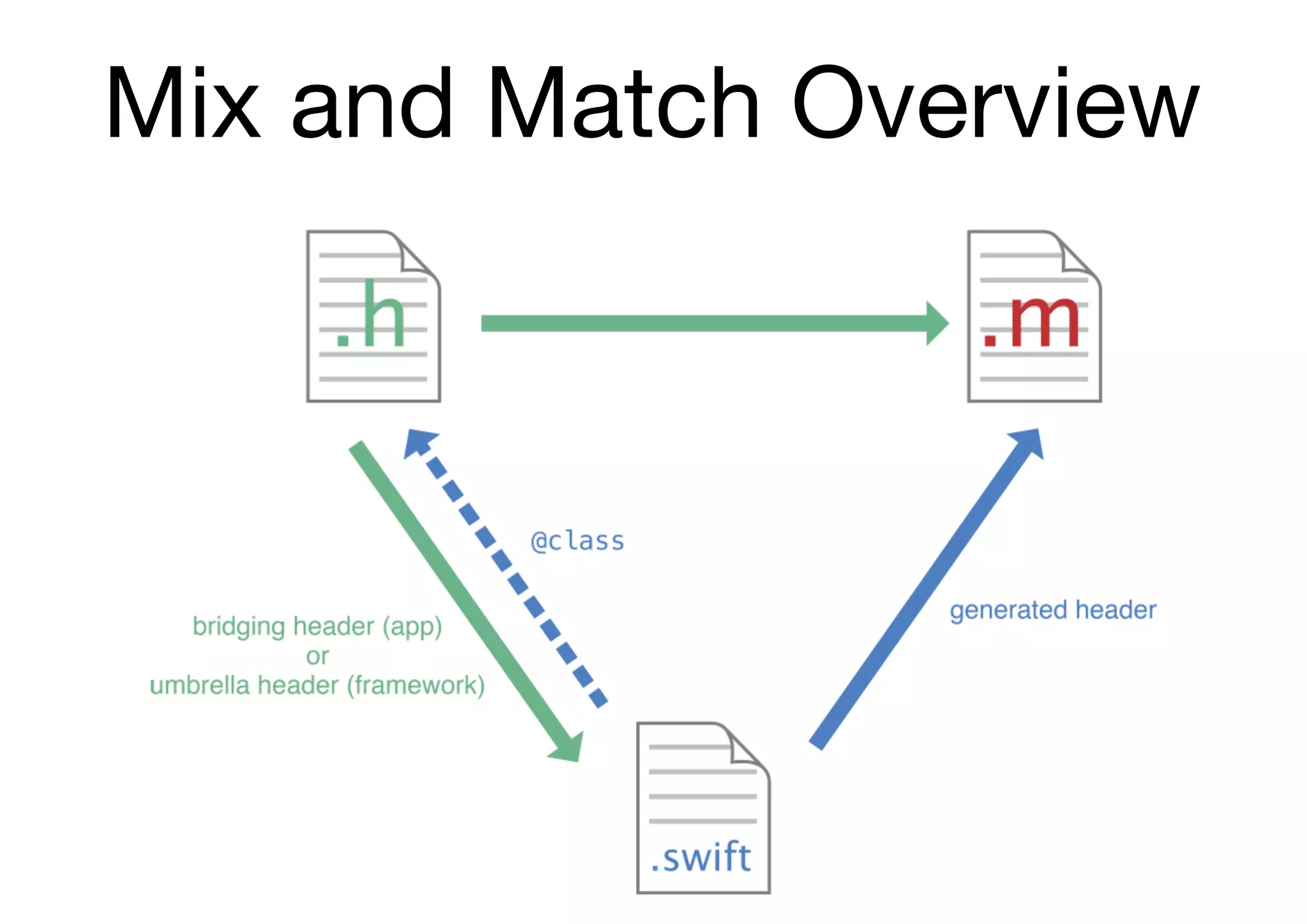
Mix and Match Overview
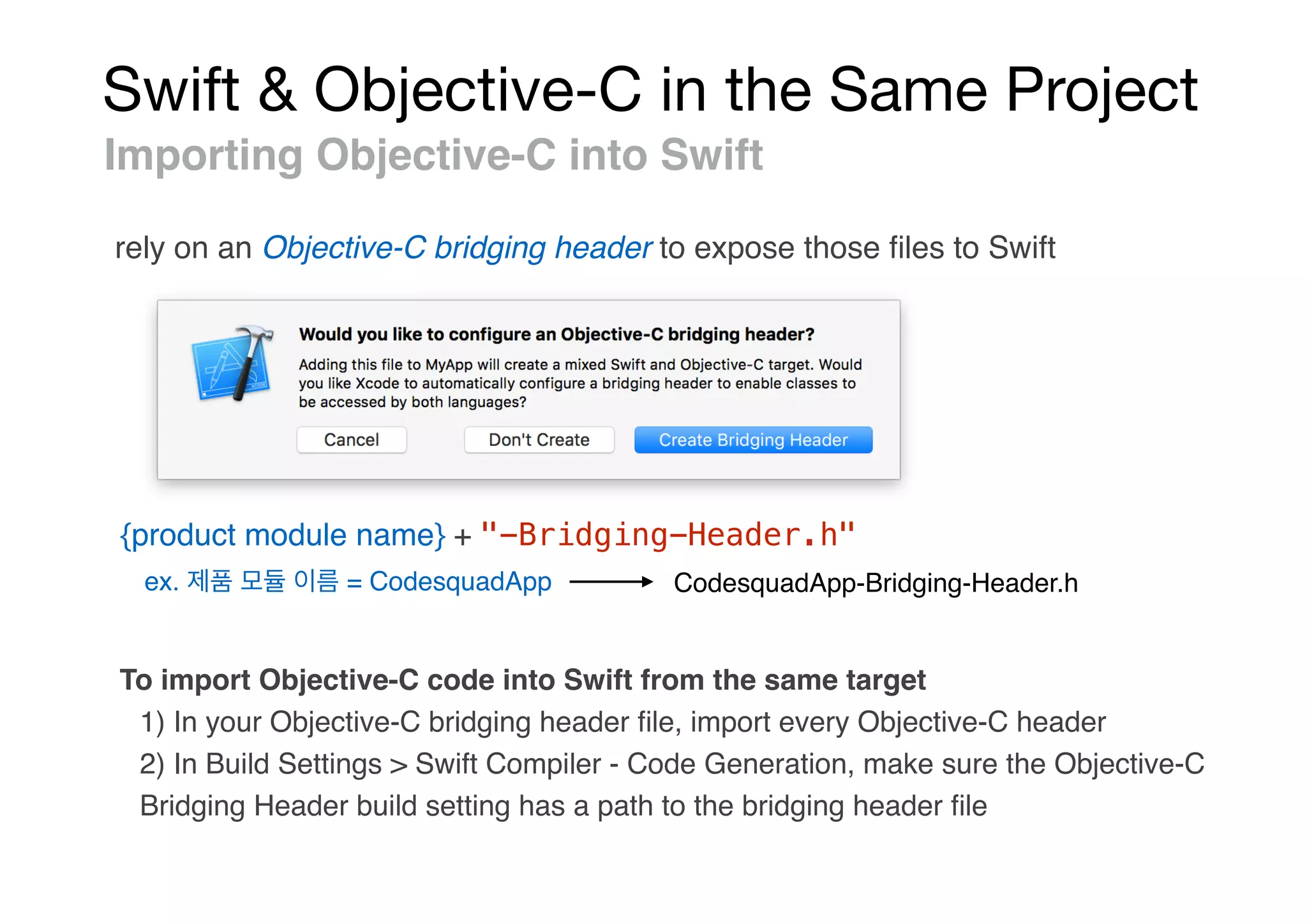
Swift & Objective-C in the Same Project
Importing Objective-C into Swift
rely on an Objective-C bridging header to expose those files to Swift
{product module name} + "-Bridging-Header.h"
ex. = CodesquadApp CodesquadApp-Bridging-Header.h
To import Objective-C code into Swift from the same target
1) In your Objective-C bridging header file, import every Objective-C header
2) In Build Settings > Swift Compiler - Code Generation, make sure the Objective-C
Bridging Header build setting has a path to the bridging header file
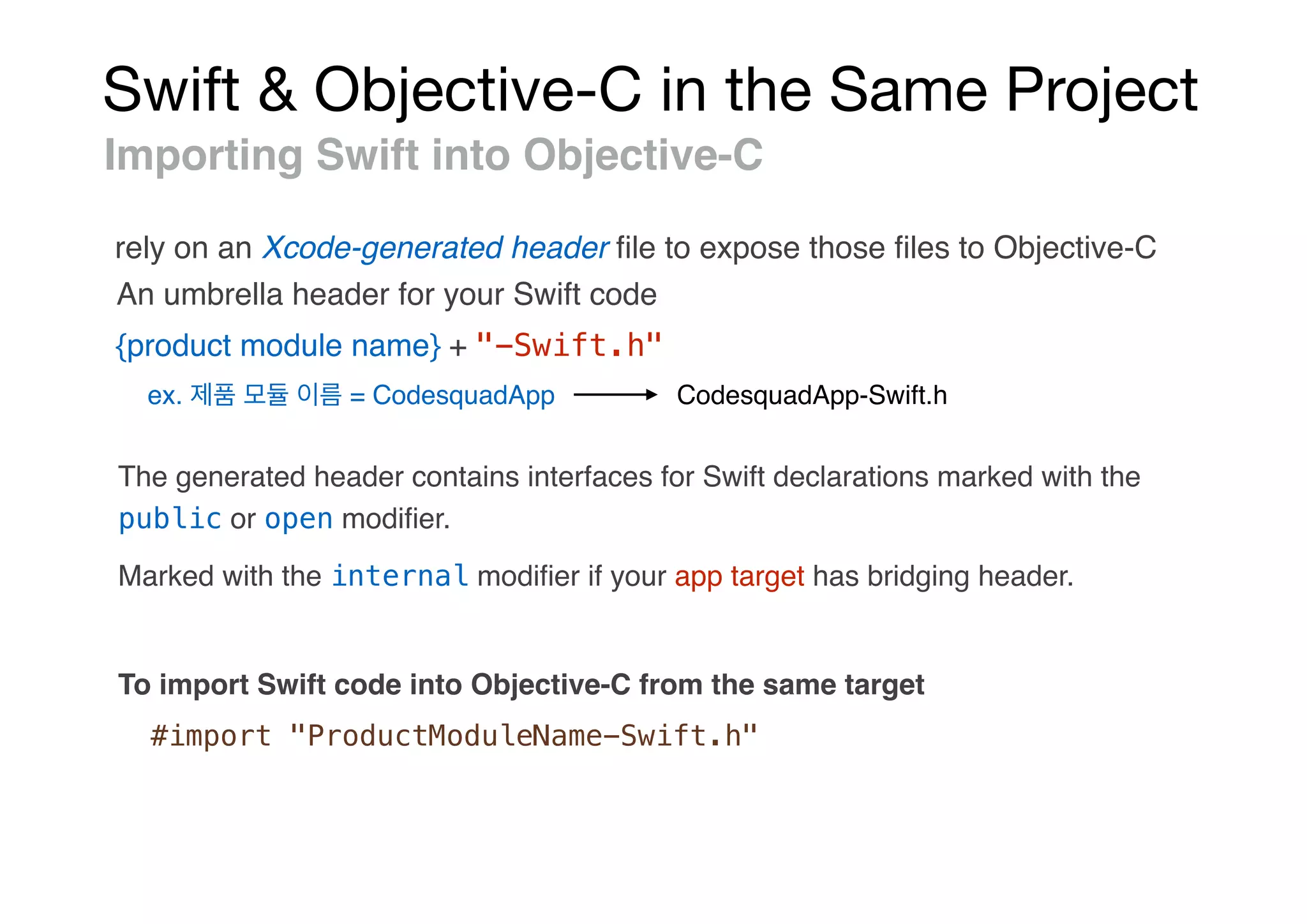
Swift & Objective-C in the Same Project
Importing Swift into Objective-C
rely on an Xcode-generated header file to expose those files to Objective-C
{product module name} + "-Swift.h"
ex. = CodesquadApp CodesquadApp-Swift.h
The generated header contains interfaces for Swift declarations marked with the
public or open modifier.
An umbrella header for your Swift code
Marked with the internal modifier if your app target has bridging header.
To import Swift code into Objective-C from the same target
#import "ProductModuleName-Swift.h"
Swift & Objective-C in the Same Project
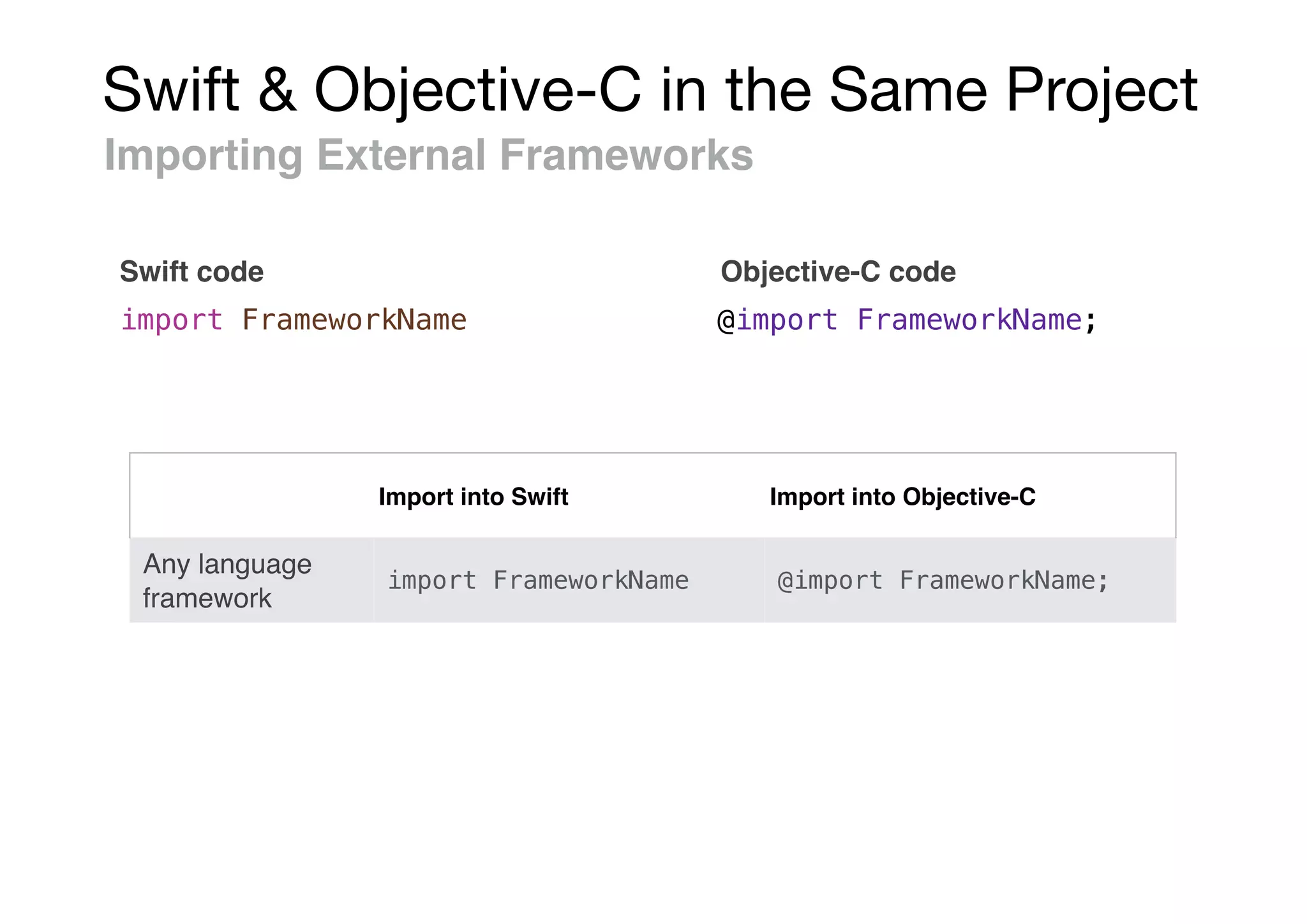
Importing External Frameworks
Swift code
import FrameworkName @import FrameworkName;
Objective-C code
Import into Swift Import into Objective-C
Any language
framework
import FrameworkName @import FrameworkName;
Swift & Objective-C in the Same Project
Using Swift from Objective-C
Swift class
MySwiftClass *swiftObject = [[MySwiftClass alloc] init];
[swiftObject swiftMethod];
// MyObjcClass.h
@class MySwiftClass;
@protocol MySwiftProtocol;
@interface MyObjcClass : NSObject
- (MySwiftClass *)returnSwiftClassInstance;
- (id <MySwiftProtocol>)returnInstanceAdoptingSwiftProtocol;
// ...
@end
Referencing a Swift Class or Protocol in an Objective-C Header
Swift & Objective-C in the Same Project
Using Swift from Objective-C
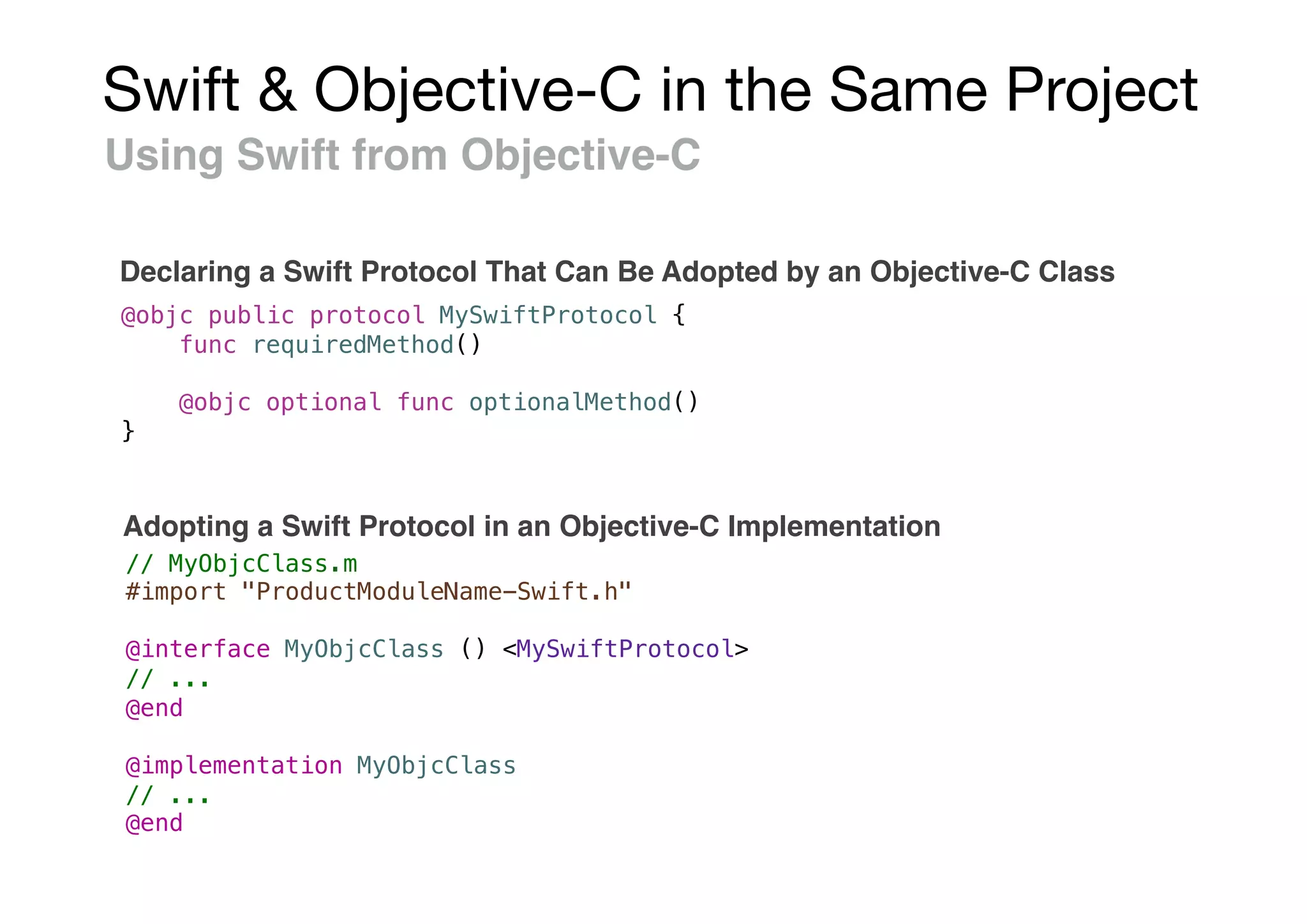
Declaring a Swift Protocol That Can Be Adopted by an Objective-C Class
@objc public protocol MySwiftProtocol {
func requiredMethod()
@objc optional func optionalMethod()
}
// MyObjcClass.m
#import "ProductModuleName-Swift.h"
@interface MyObjcClass () <MySwiftProtocol>
// ...
@end
@implementation MyObjcClass
// ...
@end
Adopting a Swift Protocol in an Objective-C Implementation
Swift & Objective-C in the Same Project
Using Swift from Objective-C
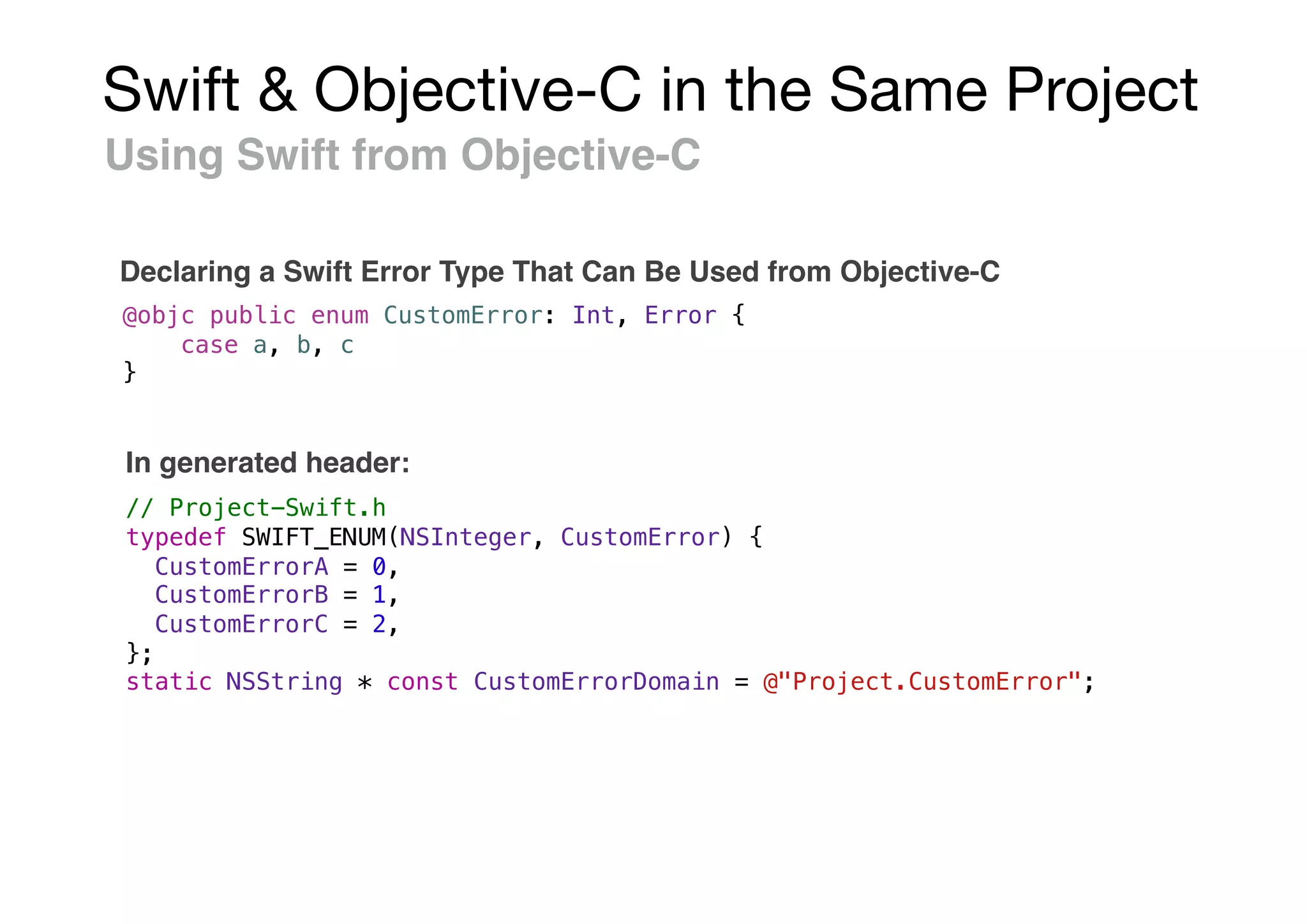
Declaring a Swift Error Type That Can Be Used from Objective-C
@objc public enum CustomError: Int, Error {
case a, b, c
}
// Project-Swift.h
typedef SWIFT_ENUM(NSInteger, CustomError) {
CustomErrorA = 0,
CustomErrorB = 1,
CustomErrorC = 2,
};
static NSString * const CustomErrorDomain = @"Project.CustomError";
In generated header:
Swift & Objective-C in the Same Project
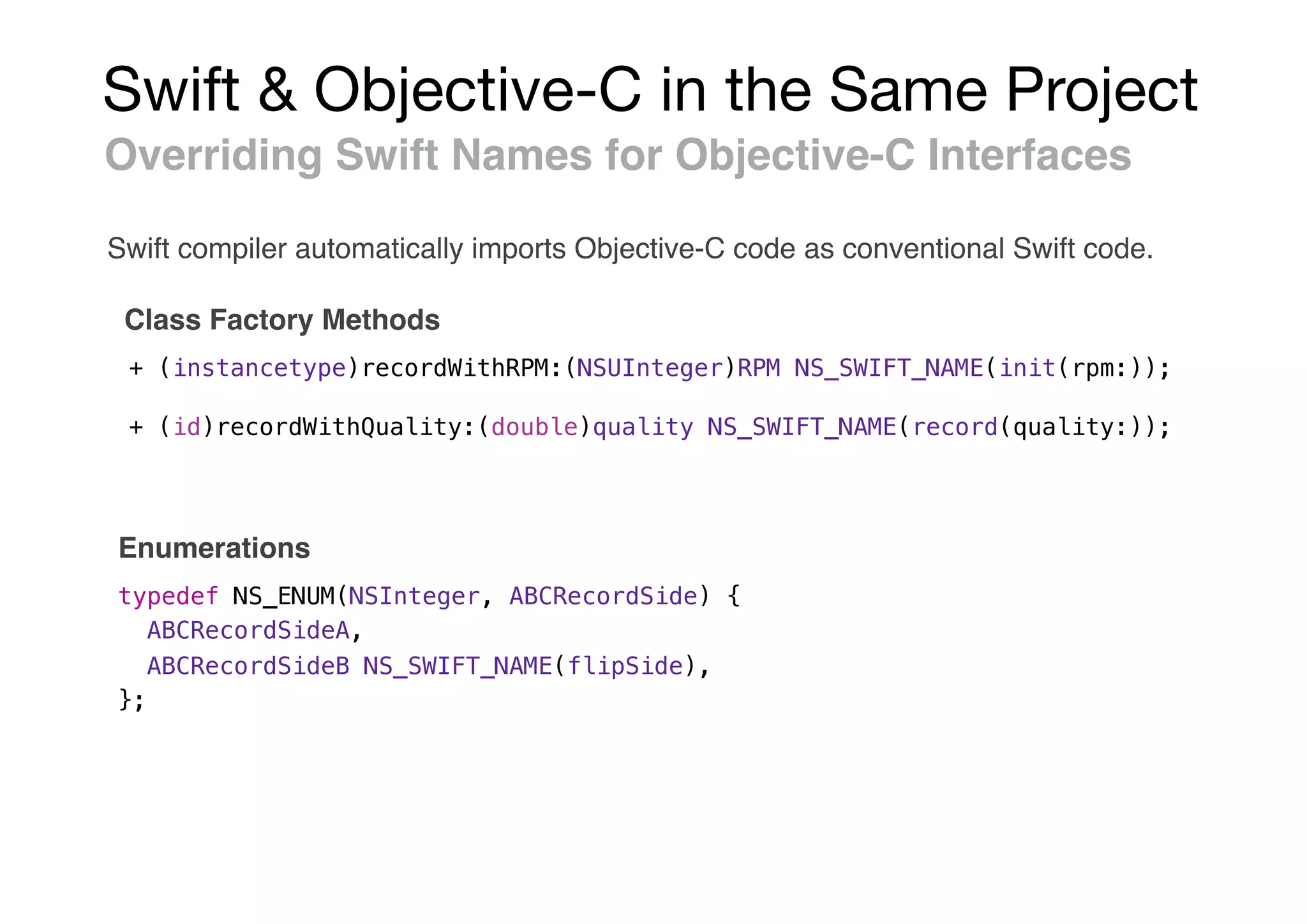
Overriding Swift Names for Objective-C Interfaces
Class Factory Methods
+ (instancetype)recordWithRPM:(NSUInteger)RPM NS_SWIFT_NAME(init(rpm:));
+ (id)recordWithQuality:(double)quality NS_SWIFT_NAME(record(quality:));
typedef NS_ENUM(NSInteger, ABCRecordSide) {
ABCRecordSideA,
ABCRecordSideB NS_SWIFT_NAME(flipSide),
};
Enumerations
Swift compiler automatically imports Objective-C code as conventional Swift code.
Swift & Objective-C in the Same Project
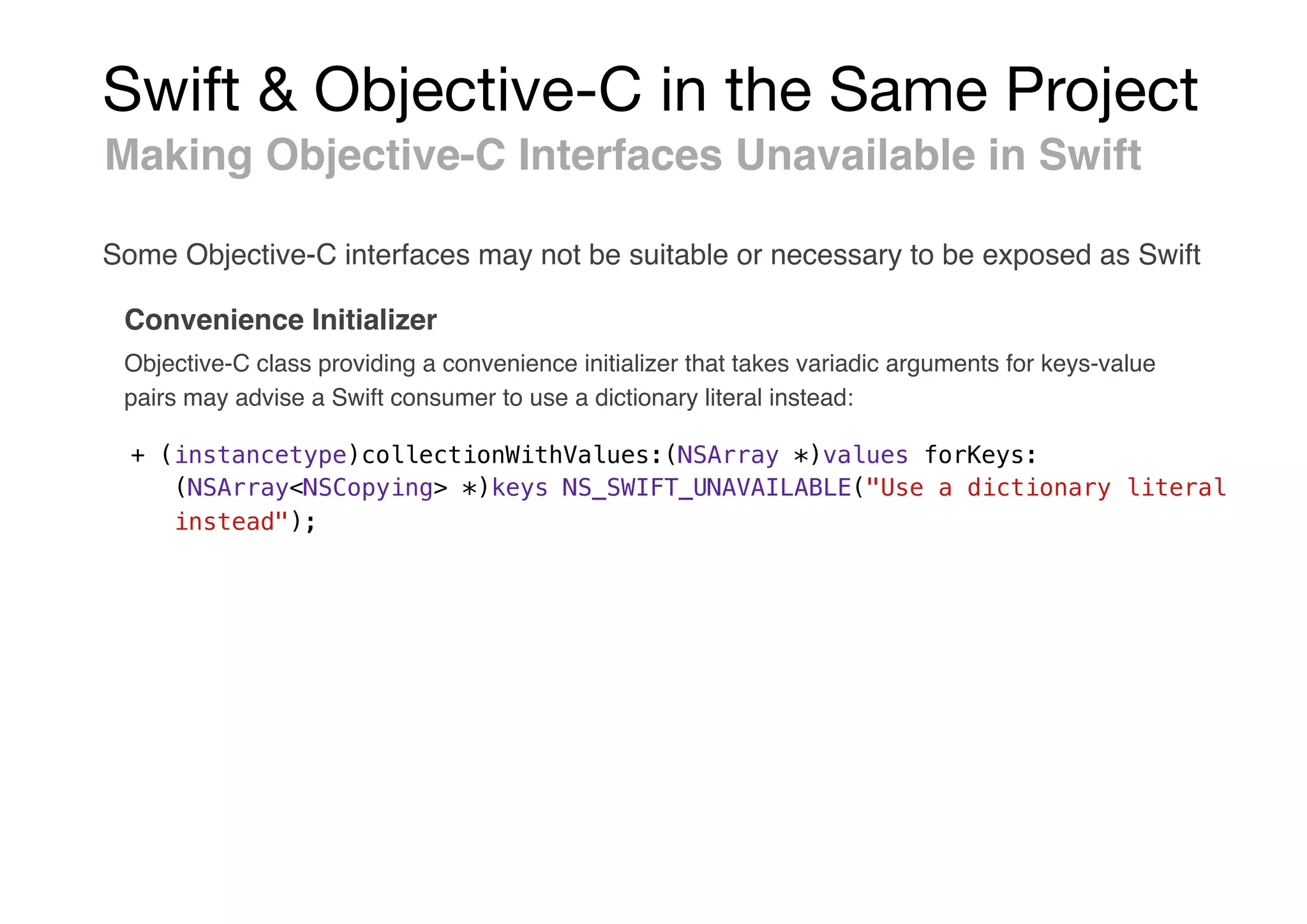
Making Objective-C Interfaces Unavailable in Swift
Convenience Initializer
+ (instancetype)collectionWithValues:(NSArray *)values forKeys:
(NSArray<NSCopying> *)keys NS_SWIFT_UNAVAILABLE("Use a dictionary literal
instead");
Some Objective-C interfaces may not be suitable or necessary to be exposed as Swift
Objective-C class providing a convenience initializer that takes variadic arguments for keys-value
pairs may advise a Swift consumer to use a dictionary literal instead:
Swift & Objective-C in the Same Project
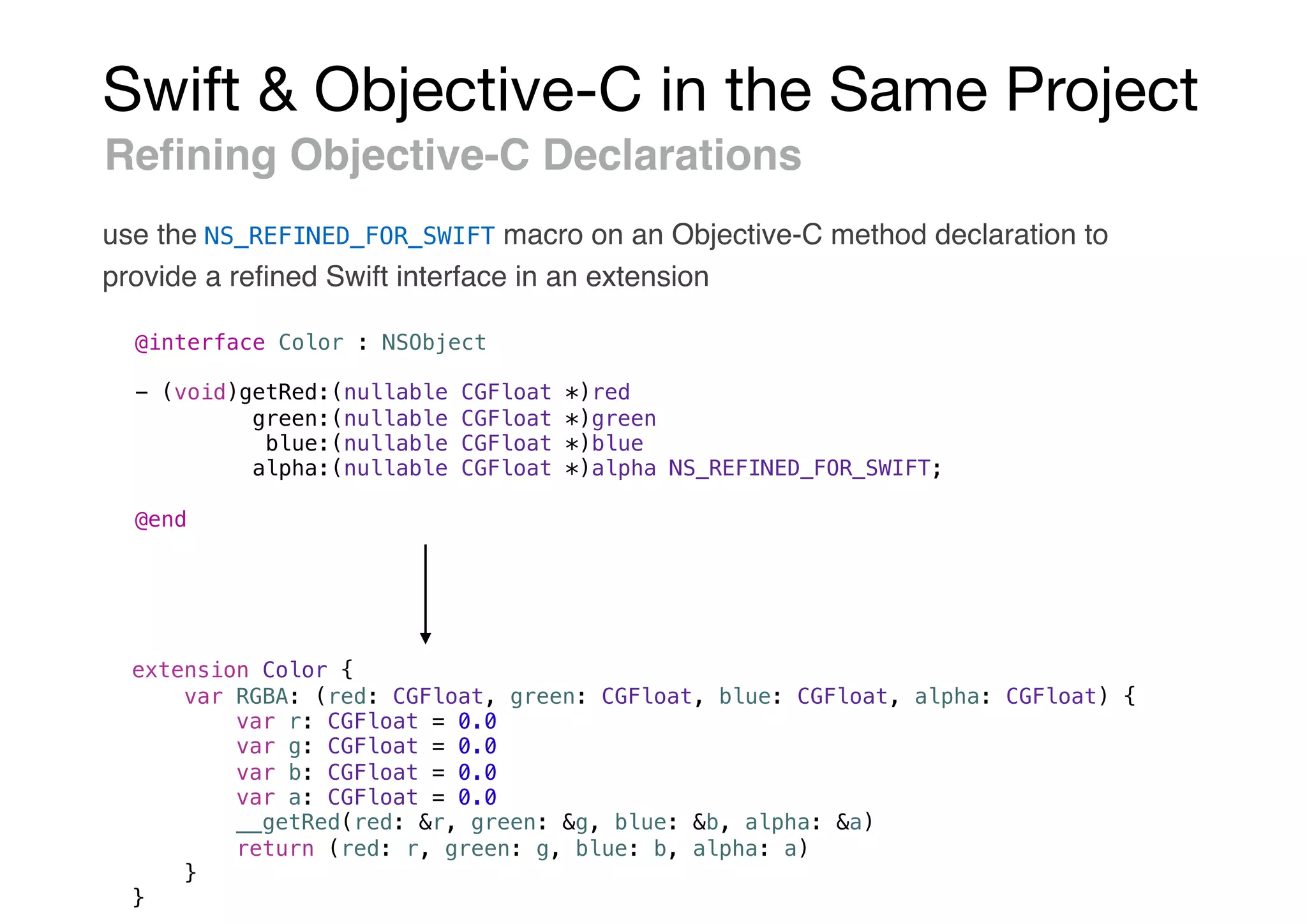
Refining Objective-C Declarations
use the NS_REFINED_FOR_SWIFT macro on an Objective-C method declaration to
provide a refined Swift interface in an extension
@interface Color : NSObject
- (void)getRed:(nullable CGFloat *)red
green:(nullable CGFloat *)green
blue:(nullable CGFloat *)blue
alpha:(nullable CGFloat *)alpha NS_REFINED_FOR_SWIFT;
@end
extension Color {
var RGBA: (red: CGFloat, green: CGFloat, blue: CGFloat, alpha: CGFloat) {
var r: CGFloat = 0.0
var g: CGFloat = 0.0
var b: CGFloat = 0.0
var a: CGFloat = 0.0
__getRed(red: &r, green: &g, blue: &b, alpha: &a)
return (red: r, green: g, blue: b, alpha: a)
}
}
Swift & Objective-C in the Same Project
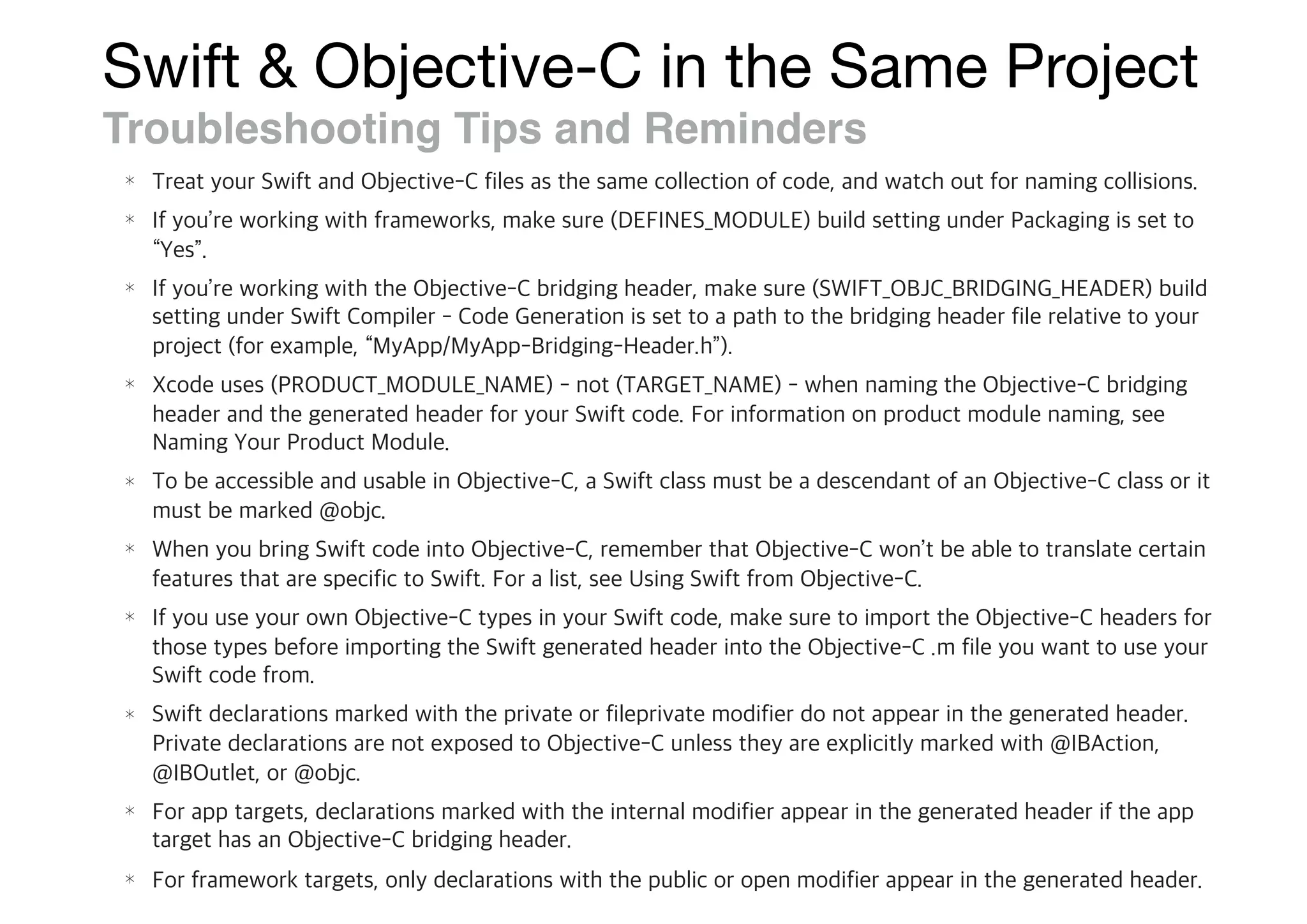
Troubleshooting Tips and Reminders

Swift와 Objective-C를 함께 쓰는 방법

  • 1.
  • 2.
    * “Using Swiftwith Cocoa and Objective-C” / .
  • 3.
  • 4.
    Interacting with Objective-CAPIs - (instancetype)init; - (instancetype)initWithFrame:(CGRect)frame style:(UITableViewStyle)style; init() { /* ... */ } init(frame: CGRect, style: UITableViewStyle) { /* ... */ } UITableView *myTableView = [[UITableView alloc] initWithFrame:CGRectZero style:UITableViewStyleGrouped]; let myTableView: UITableView = UITableView(frame: .zero, style: .grouped) let myTextField = UITextField(frame: CGRect(x: 0.0, y: 0.0, width: 200.0, height: 40.0)) Initialization • Objective-C • Swift
  • 5.
    Interacting with Objective-CAPIs UIColor *color = [UIColor colorWithRed:0.5 green:0.0 blue:0.5 alpha:1.0]; let color = UIColor(red: 0.5, green: 0.0, blue: 0.5, alpha: 1.0) Convenience Initializers • Objective-C • Swift To be used with the same syntax as initializers.
  • 6.
    Interacting with Objective-CAPIs if let image = UIImage(contentsOfFile: "MyImage.png") { // loaded the image successfully } else { // could not load the image } Failable Initialization • Objective-C • Swift Initializers directly return the object they initialize. To inform the caller when initialization has failed, an Objective-C initializer can return nil.
  • 7.
    Interacting with Objective-CAPIs Nullability Properties • Swift • Objective-C @property (nullable) id nullableProperty; @property (nonnull) id nonNullProperty; @property id unannotatedProperty; NS_ASSUME_NONNULL_BEGIN - (id)returnsNonNullValue; - (void)takesNonNullParameter:(id)value; NS_ASSUME_NONNULL_END - (nullable id)returnsNullableValue; - (void)takesNullableParameter:(nullable id)value; - (id)returnsUnannotatedValue; - (void)takesUnannotatedParameter:(id)value; var nullableProperty: Any? var nonNullProperty: Any var unannotatedProperty: Any! func returnsNonNullValue() -> Any func takesNonNullParameter(value: Any) func returnsNullableValue() -> Any? func takesNullableParameter(value: Any?) func returnsUnannotatedValue() -> Any! func takesUnannotatedParameter(value: Any!)
  • 8.
    Interacting with Objective-CAPIs Accessing Properties • readonly = computed property { get } • weak = weak (weak var) • assign, copy, strong, unsafe_unretained • Class = Type • Atomic • Accessor (getter= / setter=)
  • 9.
    Interacting with Objective-CAPIs myTableView.insertSubview(mySubview, at: 2) Working with Methods • Objective-C • Swift [myTableView insertSubview:mySubview atIndex:2]; myTableView.layoutIfNeeded() Can call Objective-C methods from Swift using dot syntax.
  • 10.
    Interacting with Objective-CAPIs var x: Any = "hello" as String x as? String // String with value "hello" x as? NSString // NSString with value "hello" x = "goodbye" as NSString x as? String // String with value "goodbye" x as? NSString // NSString with value "goodbye" id • Objective-C • Swift The Objective-C id type is imported by Swift as the Any type.
  • 11.
    Interacting with Objective-CAPIs let userDefaults = UserDefaults.standard let lastRefreshDate = userDefaults.object(forKey: "LastRefreshDate") // lastRefreshDate is of type Any? if let date = lastRefreshDate as? Date { print("(date.timeIntervalSinceReferenceDate)") } Downcasting Any let myDate = lastRefreshDate as! Date let timeInterval = myDate.timeIntervalSinceReferenceDate let myDate = lastRefreshDate as! String // Error Forced downcast operator (as!) Forced downcast error Conditional type cast operator (as?)
  • 12.
    Interacting with Objective-CAPIs var myObject: AnyObject = UITableViewCell() myObject = NSDate() let futureDate = myObject.addingTimeInterval(10) let timeSinceNow = myObject.timeIntervalSinceNow Dynamic Method Lookup & Optional chaining AnyObject type lookup @objc method dynamically myObject.character(at: 5) // crash, myObject doesn't respond to that method let myCount = myObject.count // myCount has Int? type and nil value let myChar = myObject.character?(at: 5) // myChar has unichar? type and nil value if let fifthCharacter = myObject.character?(at: 5) { print("Found (fifthCharacter) at index 5") } // conditional branch not executed
  • 13.
    Interacting with Objective-CAPIs Bridging Optionals to Nonnullable Objects @implementation OptionalBridging + (void)logSomeValue:(nonnull id)valueFromSwift { if ([valueFromSwift isKindOfClass: [NSNull class]]) { os_log(OS_LOG_DEFAULT, "Received an NSNull value."); } else { os_log(OS_LOG_DEFAULT, "%s", [valueFromSwift UTF8String]); } } @end let someValue: String? = "Bridge me, please." let nilValue: String? = nil OptionalBridging.logSomeValue(someValue as Any) // String OptionalBridging.logSomeValue(nilValue as Any) // an NSNull value. Optional nil NSNull , Optional unwrapped value [T?] => NSArray<T>
  • 14.
    Interacting with Objective-CAPIs Lightweight Generics @property NSArray<NSDate *> *dates; @property NSCache<NSObject *, id<NSDiscardableContent>> *cachedData; @property NSDictionary <NSString *, NSArray<NSLocale *>> *supportedLocales; var dates: [Date] var cachedData: NSCache<AnyObject, NSDiscardableContent> var supportedLocales: [String: [Locale]] • Objective-C • Swift
  • 15.
    Interacting with Objective-CAPIs Generic Class @interface List<T: id<NSCopying>> : NSObject - (List<T> *)listByAppendingItemsInList:(List<T> *)otherList; @end @interface ListContainer : NSObject - (List<NSValue *> *)listOfValues; @end @interface ListContainer (ObjectList) - (List *)listOfObjects; @end • Objective-C • Swift class List<T: NSCopying> : NSObject { func listByAppendingItemsInList(otherList: List<T>) -> List<T> } class ListContainer : NSObject { func listOfValues() -> List<NSValue> } extension ListContainer { func listOfObjects() -> List<NSCopying> }
  • 16.
    Interacting with Objective-CAPIs Extensions (of existing classes, structures…) extension UIBezierPath { convenience init(triangleSideLength: CGFloat, origin: CGPoint) { self.init() let squareRoot = CGFloat(sqrt(3.0)) let altitude = (squareRoot * triangleSideLength) / 2 move(to: origin) addLine(to: CGPoint(x: origin.x + triangleSideLength, y: origin.y)) addLine(to: CGPoint(x: origin.x + triangleSideLength / 2, y: origin.y + altitude)) close() } } • Swift
  • 17.
    Interacting with Objective-CAPIs Closures & Blocks void (^completionBlock)(NSData *) = ^(NSData *data) { // ... } • Swift • Objective-C let completionBlock: (Data) -> Void = { data in // ... } __weak typeof(self) weakSelf = self; self.block = ^{ __strong typeof(self) strongSelf = weakSelf; [strongSelf doSomething]; }; self.closure = { [unowned self] in self.doSomething() }
  • 18.
    Interacting with Objective-CAPIs Object Comparison • Swift • Objective-C equality : ( -isEqual: ) identity : equality (==) : (Equatable ) == Operator isEqual: isEqual: identity (===) : === Operator
  • 19.
    Interacting with Objective-CAPIs Hashing • Swift • Objective-C @property NSDictionary *unqualifiedDictionary; @property NSDictionary<NSString *, NSDate *> *qualifiedDictionary; @property NSSet *unqualifiedSet; @property NSSet<NSString *> *qualifiedSet; var unqualifiedDictionary: [AnyHashable: Any] var qualifiedDictionary: [String: Date] var unqualifiedSet: Set<AnyHashable> var qualifiedSet: Set<String>
  • 20.
    Interacting with Objective-CAPIs Excludes Swift-only • Generics • Tuples • Enumerations defined in Swift without Int raw value type • Structures defined in Swift • Top-level functions defined in Swift • Global variables defined in Swift • Typealiases defined in Swift • Swift-style variadics • Nested types • Curried functions
  • 21.
    Interacting with Objective-CAPIs Swift Type Compatibility class Jukebox: NSObject { var library: Set<String> var nowPlaying: String? var isCurrentlyPlaying: Bool { return nowPlaying != nil } class var favoritesPlaylist: [String] { // return an array of song names } init(songs: String...) { self.library = Set<String>(songs) } func playSong(named name: String) throws { // play song or throw an error if unavailable } } @interface Jukebox : NSObject @property (nonatomic, strong, nonnull) NSSet<NSString *> *library; @property (nonatomic, copy, nullable) NSString *nowPlaying; @property (nonatomic, readonly, getter=isCurrentlyPlaying) BOOL currentlyPlaying; @property (nonatomic, class, readonly, nonnull) NSArray<NSString *> * favoritesPlaylist; - (nonnull instancetype)initWithSongs:(NSArray<NSString *> * __nonnull)songs OBJC_DESIGNATED_INITIALIZER; - (BOOL)playSong:(NSString * __nonnull)name error:(NSError * __nullable * __null_unspecified)error; @end
  • 22.
    Interacting with Objective-CAPIs Configuring Swift Interfaces @objc(Color) enum Цвет: Int { @objc(Red) case Красный @objc(Black) case Черный } @objc(Squirrel) class Белка: NSObject { @objc(color) var цвет: Цвет = .Красный @objc(initWithName:) init (имя: String) { // ... } @objc(hideNuts:inTree:) func прячьОрехи(количество: Int, вДереве дерево: Дерево) { // ... } }
  • 23.
    Interacting with Objective-CAPIs Selectors import UIKit class MyViewController: UIViewController { let myButton = UIButton(frame: CGRect(x: 0, y: 0, width: 100, height: 50)) override init?(nibName nibNameOrNil: String?, bundle nibBundleOrNil: Bundle?) { super.init(nibName: nibNameOrNil, bundle: nibBundleOrNil) let action = #selector(MyViewController.tappedButton) myButton.addTarget(self, action: action, forControlEvents: .touchUpInside) } func tappedButton(sender: UIButton?) { print("tapped button") } required init?(coder: NSCoder) { super.init(coder: coder) } }
  • 24.
    Interacting with Objective-CAPIs Unsafe Invocation of Objective-C Methods let string: NSString = "Hello, Cocoa!" let selector = #selector(NSString.lowercased(with:)) let locale = Locale.current if let result = string.perform(selector, with: locale) { print(result.takeUnretainedValue()) } // Prints "hello, cocoa!" let array: NSArray = ["delta", "alpha", "zulu"] // Not a compile-time error because NSDictionary has this selector. let selector = #selector(NSDictionary.allKeysForObject) // Raises an exception because NSArray does not respond to this selector. array.perform(selector) Perform Selector Unsafe invocation
  • 25.
    Interacting with Objective-CAPIs Keys & Key Paths class Person: NSObject { var name: String var friends: [Person] = [] var bestFriend: Person? = nil init(name: String) { self.name = name } } let gabrielle = Person(name: "Gabrielle") let jim = Person(name: "Jim") let yuanyuan = Person(name: "Yuanyuan") gabrielle.friends = [jim, yuanyuan] gabrielle.bestFriend = yuanyuan #keyPath(Person.name) // "name" gabrielle.value(forKey: #keyPath(Person.name)) // "Gabrielle" #keyPath(Person.bestFriend.name) // "bestFriend.name" gabrielle.value(forKeyPath: #keyPath(Person.bestFriend.name)) // "Yuanyuan" #keyPath(Person.friends.name) // "friends.name" gabrielle.value(forKeyPath: #keyPath(Person.friends.name)) // ["Yuanyuan", "Jim"]
  • 26.
    Objective-C Behavior Inheriting fromObjective-C Classes @IBDesignable, @IBInpectable let myPersonClass: AnyClass? = NSClassFromString("MyGreatApp.Person")
  • 27.
    Working with CocoaFrameworks Foundation
  • 28.
    Working with CocoaFrameworks Core Foundation CFStringRef StringByAddingTwoStrings(CFStringRef s1, CFStringRef s2) func StringByAddingTwoStrings(_: CFString!, _: CFString!) -> Unmanaged<CFString>! { // ... } let memoryManagedResult = StringByAddingTwoStrings(str1, str2).takeUnretainedValue() CFTypeRef remaps to the AnyObject CFStringRef remaps to the CFString class takeRetainedValue()
  • 29.
    Working with CocoaFrameworks Unified Logging import os.log os_log("This is a log message.”) let fileSize = 1234567890 os_log("Finished downloading file. Size: %{iec-bytes}d", fileSize) os_log("This is additional info that may be helpful for troubleshooting.", type: .info) let customLog = OSLog("com.your_company.your_subsystem_name.plist", "your_category_name") os_log("This is info that may be helpful during development or debugging.", log: customLog, type: .debug)
  • 30.
    Working with CocoaFrameworks Cocoa structure NSValue MKCoordinateSpan NSRange CLLocationCoordinate2D CATransform3D, CGAffineTransform CGPoint, CGRect, CGSize, CGVector CMTimeMapping, CMTimeRange, CMTime SCNMatrix4, SCNVector3, SCNVector4 UIEdgeInsets, UIOffset NSValue
  • 31.
    Adopting Cocoa DesignPatterns Delegation 1)Check that myDelegate is not nil. 2)Check that myDelegate implements the method window:willUseFullScreenContentSize:. 3)If 1 and 2 hold true, invoke the method and assign the result of the method to the value named fullScreenSize. 4)Print the return value of the method. class MyDelegate: NSObject, NSWindowDelegate { func window(_ window: NSWindow, willUseFullScreenContentSize proposedSize: NSSize) -> NSSize { return proposedSize } } //… myWindow.delegate = MyDelegate() if let fullScreenSize = myWindow.delegate?.window(myWindow, willUseFullScreenContentSize: mySize) { print(NSStringFromSize(fullScreenSize)) }
  • 32.
    Adopting Cocoa DesignPatterns Lazy Initialization @property NSXMLDocument *XML; - (NSXMLDocument *)XML { if (_XML == nil) { _XML = [[NSXMLDocument alloc] initWithContentsOfURL:[[Bundle mainBundle] URLForResource:@"/path/to/resource" withExtension:@"xml"] options:0 error:nil]; } return _XML; } lazy var XML: XMLDocument = try! XMLDocument(contentsOf: Bundle.main.url(forResource: "document", withExtension: "xml")!, options: 0) • Objective-C • Swift
  • 33.
    Adopting Cocoa DesignPatterns Lazy property var pattern: String lazy var regex: NSRegularExpression = try! NSRegularExpression(pattern: self.pattern, options: []) lazy var currencyFormatter: NumberFormatter = { let formatter = NumberFormatter() formatter.numberStyle = .currency formatter.currencySymbol = "¤" return formatter }() • Swift use self-evaluating closure
  • 34.
    Adopting Cocoa DesignPatterns Error Handling NSFileManager *fileManager = [NSFileManager defaultManager]; NSURL *fromURL = [NSURL fileURLWithPath:@"/path/to/old"]; NSURL *toURL = [NSURL fileURLWithPath:@"/path/to/new"]; NSError *error = nil; BOOL success = [fileManager moveItemAtURL:fromURL toURL:toURL error:&error]; if (!success) { NSLog(@"Error: %@", error.domain); } • Swift • Objective-C let fileManager = FileManager.default let fromURL = URL(fileURLWithPath: "/path/to/old") let toURL = URL(fileURLWithPath: "/path/to/new") do { try fileManager.moveItem(at: fromURL, to: toURL) } catch let error as NSError { print("Error: (error.domain)") }
  • 35.
    Adopting Cocoa DesignPatterns Converting errors to Optional values • Swift • Objective-C NSFileManager *fileManager = [NSFileManager defaultManager]; NSURL *tmpURL = [fileManager URLForDirectory:NSCachesDirectory inDomain:NSUserDomainMask appropriateForURL:nil create:YES error:nil]; if (tmpURL != nil) { // ... } let fileManager = FileManager.default if let tmpURL = try? fileManager.url(for: .cachesDirectory, in: .userDomainMask, appropriateFor: nil, create: true) { // ... }
  • 36.
    Adopting Cocoa DesignPatterns Throwing error • Swift • Objective-C // an error occurred if (errorPtr) { *errorPtr = [NSError errorWithDomain:NSURLErrorDomain code:NSURLErrorCannotOpenFile userInfo:nil]; } // an error occurred throw NSError(domain: NSURLErrorDomain, code: NSURLErrorCannotOpenFile, userInfo: nil)
  • 37.
    Adopting Cocoa DesignPatterns Key-value Observing KVO with a Swift class inherits from NSObject class 1) Add dynamic modifier to any property 2) Create a global context variable 3) Add an observer for the key-path, override the observeValue() method and remove the observer in deinit. class MyObjectToObserve: NSObject { dynamic var myDate = NSDate() func updateDate() { myDate = NSDate() } } private var myContext = 0 class MyObserver: NSObject { var objectToObserve = MyObjectToObserve() override init() { super.init() objectToObserve.addObserver(self, forKeyPath: #keyPath(MyObjectToObserve.myDate), options: .new, context: &myContext) } override func observeValue(forKeyPath keyPath: String?, of object: Any?, change: [NSKeyValueChangeKey : Any]?, context: UnsafeMutableRawPointer?) { if context == &myContext { if let newValue = change?[.newKey] { print("Date changed: (newValue)”) } } else { super.observeValue(forKeyPath: keyPath, of: object, change: change, context: context) } } deinit { objectToObserve.removeObserver(self, forKeyPath: #keyPath(MyObjectToObserve.myDate), context: &myContext) } }
  • 38.
    Adopting Cocoa DesignPatterns Undo architecture Create an undo operation using an NSInvocation @IBOutlet var remainingLabel: NSTextView! func mark(task: Task, asCompleted completed: Bool) { if let target = undoManager?.prepare(withInvocationTarget: self) as? ToDoListController { target.mark(task: task, asCompleted: !completed) undoManager?.setActionName(NSLocalizedString("todo.task.mark", comment: "Mark As Completed")) } task.completed = completed tableView.reloadData() let numberRemaining = tasks.filter{ $0.completed }.count remainingLabel.string = String(format: NSLocalizedString("todo.task.remaining", comment: "Tasks Remaining: %d"), numberRemaining) }
  • 39.
    Adopting Cocoa DesignPatterns Singleton initialization in a call the dispatch_once function + (instancetype)sharedInstance { static id _sharedInstance = nil; static dispatch_once_t onceToken; dispatch_once(&onceToken, ^{ _sharedInstance = [[self alloc] init]; }); return _sharedInstance; } class Singleton { static let sharedInstance = Singleton() } class Singleton { static let sharedInstance: Singleton = { let instance = Singleton() // setup code return instance }() }
  • 40.
    Adopting Cocoa DesignPatterns Introspection use the isKindOfClass: method or conformsToProtocol: method if object is UIButton { // object is of type UIButton } else { // object is not of type UIButton } if let button = object as? UIButton { // object is successfully cast to type UIButton and bound to button } else { // object could not be cast to type UIButton } if let dataSource = object as? UITableViewDataSource { // object conforms to UITableViewDataSource and is bound to dataSource } else { // object not conform to UITableViewDataSource } • Swift • Objective-C
  • 41.
    Adopting Cocoa DesignPatterns Serialization To encode and decode objects to and from architecture-independent representations. Use NSJSONSerialization and NSPropertyListSerialization import Foundation import CoreLocation struct Venue { enum Category: String { case entertainment case food case nightlife case shopping } var name: String var coordinates: CLLocationCoordinate2D var category: Category } { "name": "Caffè Macs", "coordinates": { "lat": 37.330576, "lng": -122.029739 }, "category": "food" }
  • 42.
    Adopting Cocoa DesignPatterns Serialization : Initializer init?(attributes: [String: Any]) { guard let name = attributes["name"] as? String, let coordinates = attributes["coordinates"] as? [String: Double], let latitude = coordinates["lat"], let longitude = coordinates["lng"], let category = Category(rawValue: attributes["category"] as? String ?? "Invalid") else { return nil } self.name = name self.coordinates = CLLocationCoordinate2D(latitude: latitude, longitude: longitude) self.category = category } let JSON = "{"name": "Caffè Macs","coordinates": {"lat": 37.330576,"lng": -122.029739}, "category": "food"}" let data = JSON.data(using: String.Encoding.utf8)! let attributes = try! JSONSerialization.jsonObject(with: data, options: []) as! [String: Any] let venue = Venue(attributes: attributes)! print(venue.name) // Prints "Caffè Macs" Initialize with Dictionary<String, Any> Create a Venue from a JSON representation
  • 43.
    Adopting Cocoa DesignPatterns Serialization : Validating enum ValidationError: Error { case missing(String) case invalid(String) } init(attributes: [String: Any]) throws { guard let name = attributes["name"] as? String else { throw ValidationError.missing("name") } guard let coordinates = attributes["coordinates"] as? [String: Double] else { throw ValidationError.missing("coordinates") } guard let latitude = coordinates["lat"], let longitude = coordinates["lng"] else { throw ValidationError.invalid("coordinates") } guard let categoryName = attributes["category"] as? String else { throw ValidationError.missing("category") } guard let category = Category(rawValue: categoryName) else { throw ValidationError.invalid("category") } self.name = name self.coordinates = CLLocationCoordinate2D(latitude: latitude, longitude: longitude) self.category = category }
  • 44.
    Adopting Cocoa DesignPatterns Localization use NSLocalizedString, NSLocalizedStringFromTable, NSLocalizedStringFromTableInBundle, NSLocalizedStringWithDefaultValue • Objective-C • Swift A single function: NSLocalizedString(_:tableName:bundle:value:comment:) let format = NSLocalizedString("Hello, %@!", comment: "Hello, {given name}!") let name = "Mei" let greeting = String(format: format, arguments: [name as CVarArg]) print(greeting) // Prints "Hello, Mei!" if let path = Bundle.main.path(forResource: "Localization", ofType: "strings", inDirectory: nil, forLocalization: "ja"), let bundle = Bundle(path: path) { let translation = NSLocalizedString("Hello", bundle: bundle, comment: "") print(translation) } // Prints " "
  • 45.
    Adopting Cocoa DesignPatterns API Availability use respondsToSelector: and instancesRespondToSelector: methods • Objective-C • Swift let locationManager = CLLocationManager() if #available(iOS 8.0, macOS 10.10, *) { locationManager.requestWhenInUseAuthorization() } if ([CLLocationManager instancesRespondToSelector:@selector(requestWhenInUseAuthorization)]) { // Method is available for use. } else { // Method is not available. } let locationManager = CLLocationManager() guard #available(iOS 8.0, macOS 10.10, *) else { return } locationManager.requestWhenInUseAuthorization()
  • 46.
    Adopting Cocoa DesignPatterns Processing Command-Line Arguments for argument in CommandLine.arguments { print(argument) } // prints "/path/to/app" // prints "--argumentName" // prints "value" $ /path/to/app --argumentName value
  • 47.
    Interacting with CAPIs Primitive Types C Type Swift Type bool CBool char, signed char CChar unsigned char CUnsignedChar short CShort unsigned short CUnsignedShort int CInt unsigned int CUnsignedInt long CLong unsigned long CUnsignedLong long long CLongLong unsigned long long CUnsignedLongLong wchar_t CWideChar char16_t CChar16 char32_t CChar32 float CFloat double CDouble
  • 48.
    Interacting with CAPIs Importing Constant Enumerations and Structures Annotate an typedef declaration with the NS_STRING_ENUM or NS_EXTENSIBLE_STRING_ENUM • Objective-C • Swift struct TrafficLightColor: RawRepresentable { typealias RawValue = String init(rawValue: RawValue) var rawValue: RawValue { get } static var red: TrafficLightColor { get } static var yellow: TrafficLightColor { get } static var green: TrafficLightColor { get } } typedef NSString * TrafficLightColor NS_STRING_ENUM; TrafficLightColor const TrafficLightColorRed; TrafficLightColor const TrafficLightColorYellow; TrafficLightColor const TrafficLightColorGreen;
  • 49.
    Interacting with CAPIs Functions Any function declared in a C header as a Swift global function. • Objective-C • Swift func product(_ multiplier: Int32, _ multiplicand: Int32) -> Int32 func quotient(_ dividend: Int32, _ divisor: Int32, _ remainder: UnsafeMutablePointer<Int32>) -> Int32 func createPoint2D(_ x: Float, _ y: Float) -> Point2D func distance(_ from: Point2D, _ to: Point2D) -> Float int product(int multiplier, int multiplicand); int quotient(int dividend, int divisor, int *remainder); struct Point2D createPoint2D(float x, float y); float distance(struct Point2D from, struct Point2D to);
  • 50.
    Interacting with CAPIs Variadic Functions Call C variadic functions, such as vasprintf, using the getVaList() or withVaList() func swiftprintf(format: String, arguments: CVarArg...) -> String? { return withVaList(arguments) { va_list in var buffer: UnsafeMutablePointer<Int8>? = nil return format.withCString { CString in guard vasprintf(&buffer, CString, va_list) != 0 else { return nil } return String(validatingUTF8: buffer!) } } } print(swiftprintf(format: "√2 ≅ %g", arguments: sqrt(2.0))!) // Prints "√2 ≅ 1.41421"
  • 51.
    Interacting with CAPIs Structures Any C Structure declared in a C header as a Swift structure. struct Color { float r, g, b; }; typedef struct Color Color; public struct Color { var r: Float var g: Float var b: Float init() init(r: Float, g: Float, b: Float) } • Swift
  • 52.
    Interacting with CAPIs Importing Functions as Type Members Use CF_SWIFT_NAME macro in you own code Color ColorCreateWithCMYK(float c, float m, float y, float k) CF_SWIFT_NAME(Color.init(c:m:y:k:)); float ColorGetHue(Color color) CF_SWIFT_NAME(getter:Color.hue(self:)); void ColorSetHue(Color color, float hue) CF_SWIFT_NAME(setter:Color.hue(self:newValue:)); Color ColorDarkenColor(Color color, float amount) CF_SWIFT_NAME(Color.darken(self:amount:)); extern const Color ColorBondiBlue CF_SWIFT_NAME(Color.bondiBlue); Color ColorGetCalibrationColor(void) CF_SWIFT_NAME(getter:Color.calibration()); Color ColorSetCalibrationColor(Color color) CF_SWIFT_NAME(setter:Color.calibration(newValue:)); extension Color { init(c: Float, m: Float, y: Float, k: Float) var hue: Float { get set } func darken(amount: Float) -> Color static var bondiBlue: Color static var calibration: Color } • Swift
  • 53.
    Interacting with CAPIs Enumerations Any C enumeration marked with the NS_ENUM macro as a Swift Enumeration(Int) typedef NS_ENUM(NSInteger, UITableViewCellStyle) { UITableViewCellStyleDefault, UITableViewCellStyleValue1, UITableViewCellStyleValue2, UITableViewCellStyleSubtitle }; enum UITableViewCellStyle: Int { case `default` case value1 case value2 case subtitle } • Swift let cellStyle: UITableViewCellStyle = .default
  • 54.
    Interacting with CAPIs Enumerations : Option Sets Any C enumeration marked with the NS_OPTIONS macro as a Swift option set. typedef NS_OPTIONS(NSUInteger, UIViewAutoresizing) { UIViewAutoresizingNone = 0, UIViewAutoresizingFlexibleLeftMargin = 1 << 0, UIViewAutoresizingFlexibleWidth = 1 << 1, UIViewAutoresizingFlexibleRightMargin = 1 << 2, UIViewAutoresizingFlexibleTopMargin = 1 << 3, UIViewAutoresizingFlexibleHeight = 1 << 4, UIViewAutoresizingFlexibleBottomMargin = 1 << 5 }; public struct UIViewAutoresizing : OptionSet { public init(rawValue: UInt) public static var flexibleLeftMargin: UIViewAutoresizing { get } public static var flexibleWidth: UIViewAutoresizing { get } public static var flexibleRightMargin: UIViewAutoresizing { get } public static var flexibleTopMargin: UIViewAutoresizing { get } public static var flexibleHeight: UIViewAutoresizing { get } public static var flexibleBottomMargin: UIViewAutoresizing { get } } • Swift
  • 55.
    Interacting with CAPIs Unions Swift imports C unions as Swift structures, not support unions. union SchroedingersCat { bool isAlive; bool isDead; }; struct SchroedingersCat { var isAlive: Bool { get set } var isDead: Bool { get set } init(isAlive: Bool) init(isDead: Bool) init() } • Swift
  • 56.
    Interacting with CAPIs Unnamed Structure and Union Fields C struct and union types can define fields that have no name or that are of an unnamed type. struct Cake { union { int layers; double height; }; struct { bool icing; bool sprinkles; } toppings; }; var simpleCake = Cake() simpleCake.layers = 5 print(simpleCake.toppings.icing) // Prints "false" let cake = Cake( .init(layers: 2), toppings: .init(icing: true, sprinkles: false) ) print("The cake has (cake.layers) layers.") // Prints "The cake has 2 layers." print("Does it have sprinkles?", cake.toppings.sprinkles ? "Yes." : "No.") // Prints "Does it have sprinkles? No."
  • 57.
    Interacting with CAPIs Pointers C Syntax Swift Syntax const Type * UnsafePointer<Type> Type * UnsafeMutablePointer<Type> C Syntax Swift Syntax Type * const * UnsafePointer<Type> Type * __strong * UnsafeMutablePointer<Type> Type ** AutoreleasingUnsafeMutablePointer<Type> C Syntax Swift Syntax const void * UnsafePointer void * UnsafeMutablePointer For return types, variables, and arguments For class types For pointers to untyped, raw memory
  • 58.
    Interacting with CAPIs Constant Pointers func takesAPointer(_ p: UnsafePointer<Float>) { // ... } var x: Float = 0.0 takesAPointer(&x) takesAPointer([1.0, 2.0, 3.0]) var x: Float = 0.0, y: Int = 0 takesARawPointer(&x) takesARawPointer(&y) takesARawPointer([1.0, 2.0, 3.0] as [Float]) let intArray = [1, 2, 3] takesARawPointer(intArray) func takesARawPointer(_ p: UnsafeRawPointer?) { // ... }
  • 59.
    Interacting with CAPIs Mutable Pointers func takesAMutablePointer(_ p: UnsafeMutablePointer<Float>) { // ... } var x: Float = 0.0 var a: [Float] = [1.0, 2.0, 3.0] takesAMutablePointer(&x) takesAMutablePointer(&a) var x: Float = 0.0, y: Int = 0 var a: [Float] = [1.0, 2.0, 3.0], b: [Int] = [1, 2, 3] takesAMutableRawPointer(&x) takesAMutableRawPointer(&y) takesAMutableRawPointer(&a) takesAMutableRawPointer(&b) func takesAMutableRawPointer(_ p: UnsafeMutableRawPointer?) { // ... }
  • 60.
    Interacting with CAPIs Autoreleasing Pointers func takesAnAutoreleasingPointer(_ p: AutoreleasingUnsafeMutablePointer<NSDate?>) { // ... } var x: NSDate? = nil takesAnAutoreleasingPointer(&x)
  • 61.
    Interacting with CAPIs Function Pointers func customCopyDescription(_ p: UnsafeRawPointer?) -> Unmanaged<CFString>? { // return an Unmanaged<CFString>? value } var callbacks = CFArrayCallBacks( version: 0, retain: nil, release: nil, copyDescription: customCopyDescription, equal: { (p1, p2) -> DarwinBoolean in // return Bool value } ) var mutableArray = CFArrayCreateMutable(nil, 0, &callbacks) C function pointers are imported into Swift as closures with C function pointer calling convention, denoted by the @convention(c) attribute.
  • 62.
    Interacting with CAPIs Buffer Pointers & Null Pointers Buffer Pointers : Used for low-level access to a region of memory. UnsafeBufferPointer UnsafeMutableBufferPointer UnsafeRawBufferPointer UnsafeMutableRawBufferPointer Objective-C Syntax Swift Syntax const Type * _Nonnull UnsafePointer<Type> const Type * _Nullable UnsafePointer<Type>? const Type * _Null_unspecified UnsafePointer<Type>! Null Pointers Pointers Arithmatic let pointer: UnsafePointer<Int8> let offsetPointer = pointer + 24 // offsetPointer is 24 strides ahead of pointer
  • 63.
    Interacting with CAPIs Data Type Size Calculation In C, the sizeof and alignof operators return the size and alignment In Swift, you use MemoryLayout<T> to access the memory layout of the parameterized type T through the size, stride, and alignment properties. print(MemoryLayout<timeval>.size) // Prints "16" print(MemoryLayout<timeval>.stride) // Prints "16" print(MemoryLayout<timeval>.alignment) // Prints "8" let sockfd = socket(AF_INET, SOCK_STREAM, 0) var optval = timeval(tv_sec: 30, tv_usec: 0) let optlen = socklen_t(MemoryLayout<timeval>.size) if setsockopt(sockfd, SOL_SOCKET, SO_RCVTIMEO, &optval, optlen) == 0 { // ... }
  • 64.
    Interacting with CAPIs Preprocessor Directives Simple Macro Complex Macro, no counterpart in Swift Conditional Compilation Blocks #if DEBUG_LOGGING print("Flag enabled.") #endif #define FADE_ANIMATION_DURATION 0.35 let FADE_ANIMATION_DURATION = 0.35 Function Valid arguments os() macOS, iOS, watchOS, tvOS, Linux arch() x86_64, arm, arm64, i386 swift() >= followed by a version number #if arch(arm) || arch(arm64) #if swift(>=3.0) print("Using Swift 3 ARM code") #else print("Using Swift 2.2 ARM code") #endif #elseif arch(x86_64) print("Using 64-bit x86 code.") #else print("Using general code.") #endif
  • 65.
  • 66.
    Mix and MatchOverview
  • 67.
    Swift & Objective-Cin the Same Project Importing Objective-C into Swift rely on an Objective-C bridging header to expose those files to Swift {product module name} + "-Bridging-Header.h" ex. = CodesquadApp CodesquadApp-Bridging-Header.h To import Objective-C code into Swift from the same target 1) In your Objective-C bridging header file, import every Objective-C header 2) In Build Settings > Swift Compiler - Code Generation, make sure the Objective-C Bridging Header build setting has a path to the bridging header file
  • 68.
    Swift & Objective-Cin the Same Project Importing Swift into Objective-C rely on an Xcode-generated header file to expose those files to Objective-C {product module name} + "-Swift.h" ex. = CodesquadApp CodesquadApp-Swift.h The generated header contains interfaces for Swift declarations marked with the public or open modifier. An umbrella header for your Swift code Marked with the internal modifier if your app target has bridging header. To import Swift code into Objective-C from the same target #import "ProductModuleName-Swift.h"
  • 69.
    Swift & Objective-Cin the Same Project Importing External Frameworks Swift code import FrameworkName @import FrameworkName; Objective-C code Import into Swift Import into Objective-C Any language framework import FrameworkName @import FrameworkName;
  • 70.
    Swift & Objective-Cin the Same Project Using Swift from Objective-C Swift class MySwiftClass *swiftObject = [[MySwiftClass alloc] init]; [swiftObject swiftMethod]; // MyObjcClass.h @class MySwiftClass; @protocol MySwiftProtocol; @interface MyObjcClass : NSObject - (MySwiftClass *)returnSwiftClassInstance; - (id <MySwiftProtocol>)returnInstanceAdoptingSwiftProtocol; // ... @end Referencing a Swift Class or Protocol in an Objective-C Header
  • 71.
    Swift & Objective-Cin the Same Project Using Swift from Objective-C Declaring a Swift Protocol That Can Be Adopted by an Objective-C Class @objc public protocol MySwiftProtocol { func requiredMethod() @objc optional func optionalMethod() } // MyObjcClass.m #import "ProductModuleName-Swift.h" @interface MyObjcClass () <MySwiftProtocol> // ... @end @implementation MyObjcClass // ... @end Adopting a Swift Protocol in an Objective-C Implementation
  • 72.
    Swift & Objective-Cin the Same Project Using Swift from Objective-C Declaring a Swift Error Type That Can Be Used from Objective-C @objc public enum CustomError: Int, Error { case a, b, c } // Project-Swift.h typedef SWIFT_ENUM(NSInteger, CustomError) { CustomErrorA = 0, CustomErrorB = 1, CustomErrorC = 2, }; static NSString * const CustomErrorDomain = @"Project.CustomError"; In generated header:
  • 73.
    Swift & Objective-Cin the Same Project Overriding Swift Names for Objective-C Interfaces Class Factory Methods + (instancetype)recordWithRPM:(NSUInteger)RPM NS_SWIFT_NAME(init(rpm:)); + (id)recordWithQuality:(double)quality NS_SWIFT_NAME(record(quality:)); typedef NS_ENUM(NSInteger, ABCRecordSide) { ABCRecordSideA, ABCRecordSideB NS_SWIFT_NAME(flipSide), }; Enumerations Swift compiler automatically imports Objective-C code as conventional Swift code.
  • 74.
    Swift & Objective-Cin the Same Project Making Objective-C Interfaces Unavailable in Swift Convenience Initializer + (instancetype)collectionWithValues:(NSArray *)values forKeys: (NSArray<NSCopying> *)keys NS_SWIFT_UNAVAILABLE("Use a dictionary literal instead"); Some Objective-C interfaces may not be suitable or necessary to be exposed as Swift Objective-C class providing a convenience initializer that takes variadic arguments for keys-value pairs may advise a Swift consumer to use a dictionary literal instead:
  • 75.
    Swift & Objective-Cin the Same Project Refining Objective-C Declarations use the NS_REFINED_FOR_SWIFT macro on an Objective-C method declaration to provide a refined Swift interface in an extension @interface Color : NSObject - (void)getRed:(nullable CGFloat *)red green:(nullable CGFloat *)green blue:(nullable CGFloat *)blue alpha:(nullable CGFloat *)alpha NS_REFINED_FOR_SWIFT; @end extension Color { var RGBA: (red: CGFloat, green: CGFloat, blue: CGFloat, alpha: CGFloat) { var r: CGFloat = 0.0 var g: CGFloat = 0.0 var b: CGFloat = 0.0 var a: CGFloat = 0.0 __getRed(red: &r, green: &g, blue: &b, alpha: &a) return (red: r, green: g, blue: b, alpha: a) } }
  • 76.
    Swift & Objective-Cin the Same Project Troubleshooting Tips and Reminders