Socket Programming
Jignesh Patel
Palanivel Rathinam
connecting processes
Overview
• Introduction to Sockets
• A generic Client-Server application
• Programming Client-Server in C
• Programming Client-Server in Java
• References
Introduction to Sockets
• Why Sockets?
– Used for Interprocess communication.
• The Client-Server model
– Most interprocess communication uses client-server model
– Client & Server are two processes that wants to communicate with each
other
– The Client process connects to the Server process, to make a request for
information/services own by the Server.
– Once the connection is established between Client process and Server
process, they can start sending / receiving information.
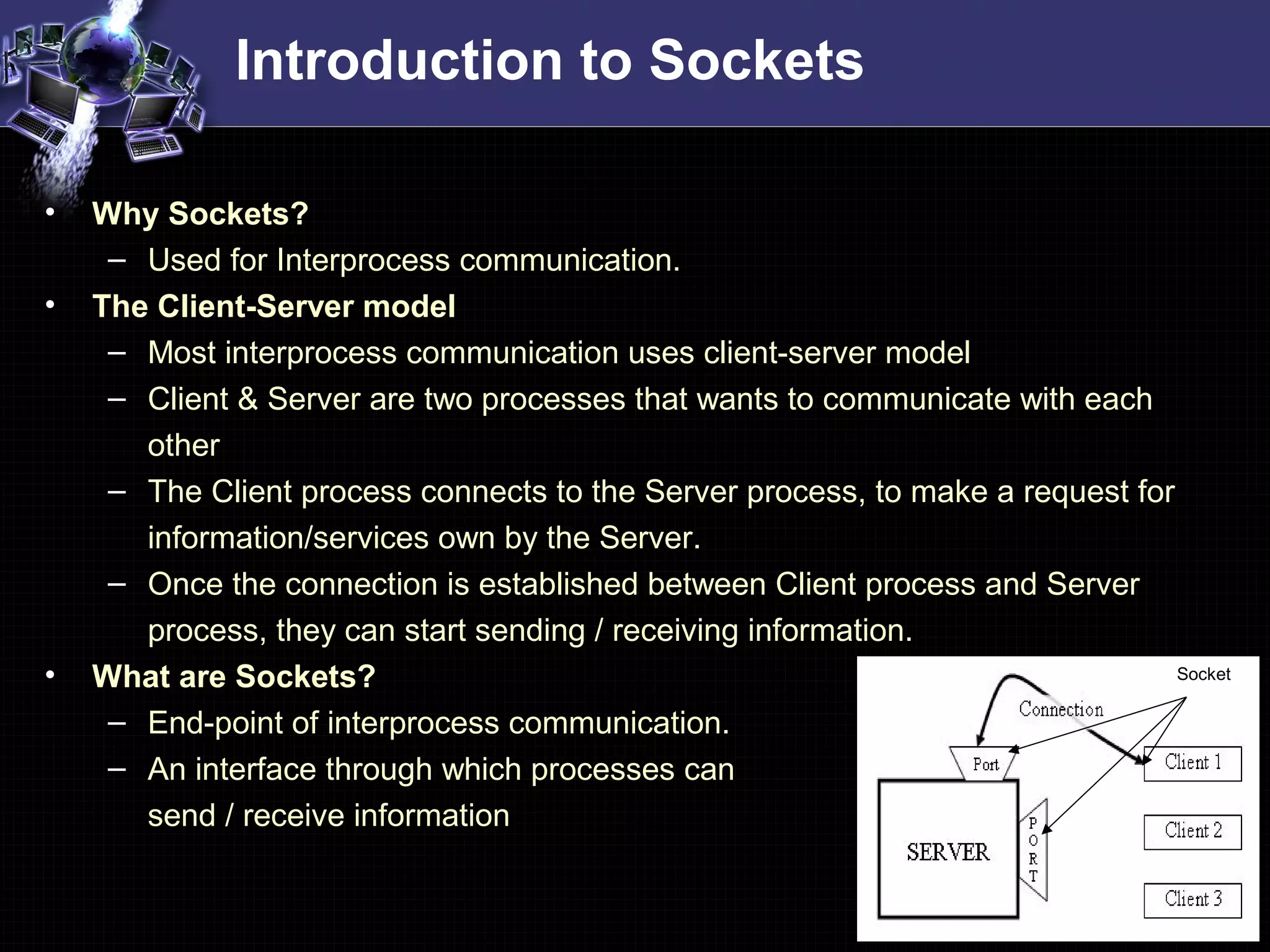
• What are Sockets?
– End-point of interprocess communication.
– An interface through which processes can
send / receive information
Socket
Introduction to Sockets
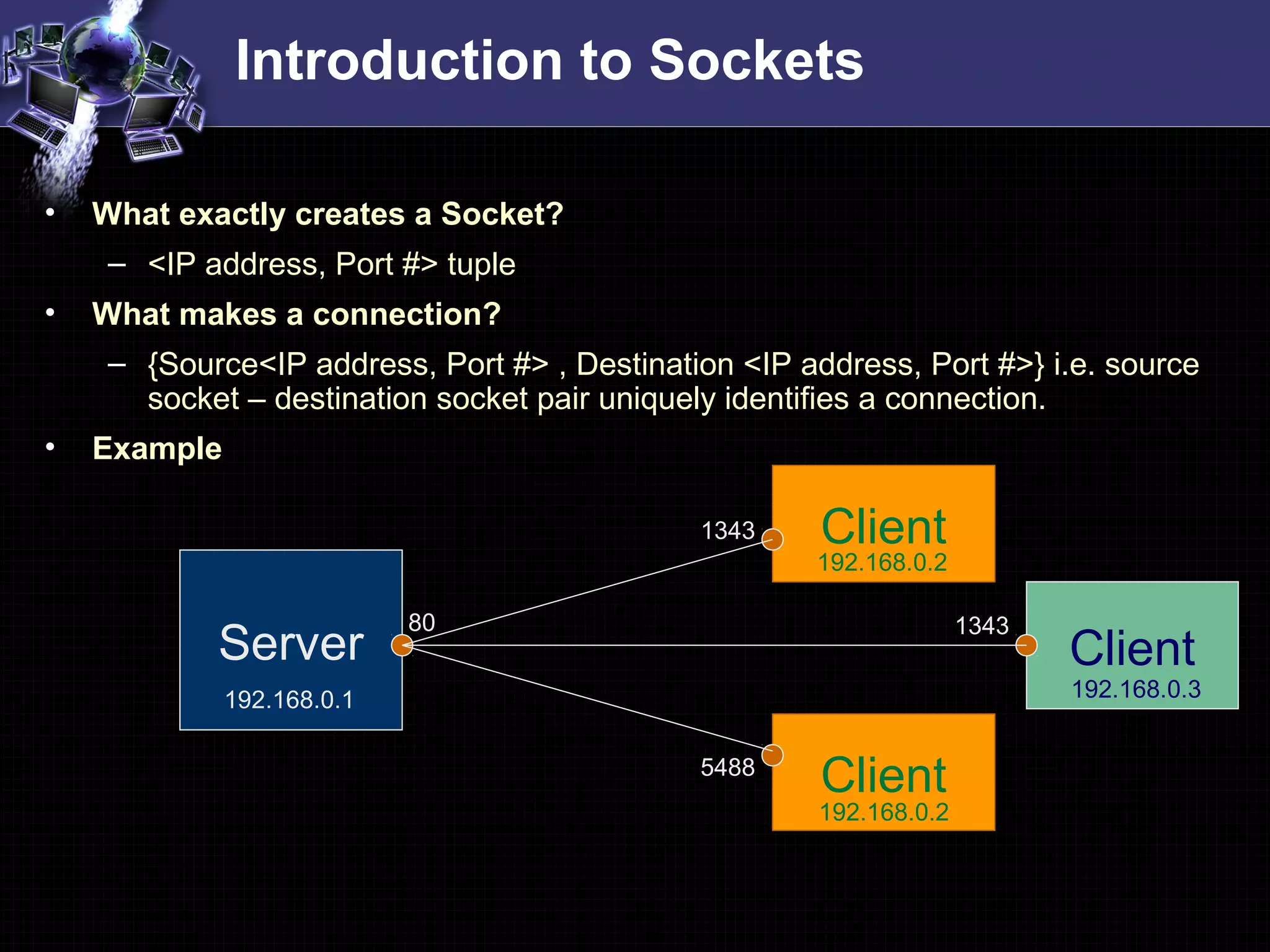
• What exactly creates a Socket?
– <IP address, Port #> tuple
• What makes a connection?
– {Source<IP address, Port #> , Destination <IP address, Port #>} i.e. source
socket – destination socket pair uniquely identifies a connection.
• Example
Server
Client
Client
192.168.0.1
192.168.0.2
192.168.0.2
80
1343
5488
Client
192.168.0.3
1343
Introduction to Sockets
• Socket Types
– STREAM – uses TCP which is reliable, stream oriented protocol
– DATAGRAM – uses UDP which is unreliable, message oriented protocol
– RAW – provides RAW data transfer directly over IP protocol (no transport
layer)
• Sockets can use
– “unicast” ( for a particular IP address destination)
– “multicast” ( a set of destinations – 224.x.x.x)
– “broadcast” (direct and limited)
– “Loopback” address i.e. 127.x.x.x
A generic Client-Server application
A generic TCP application
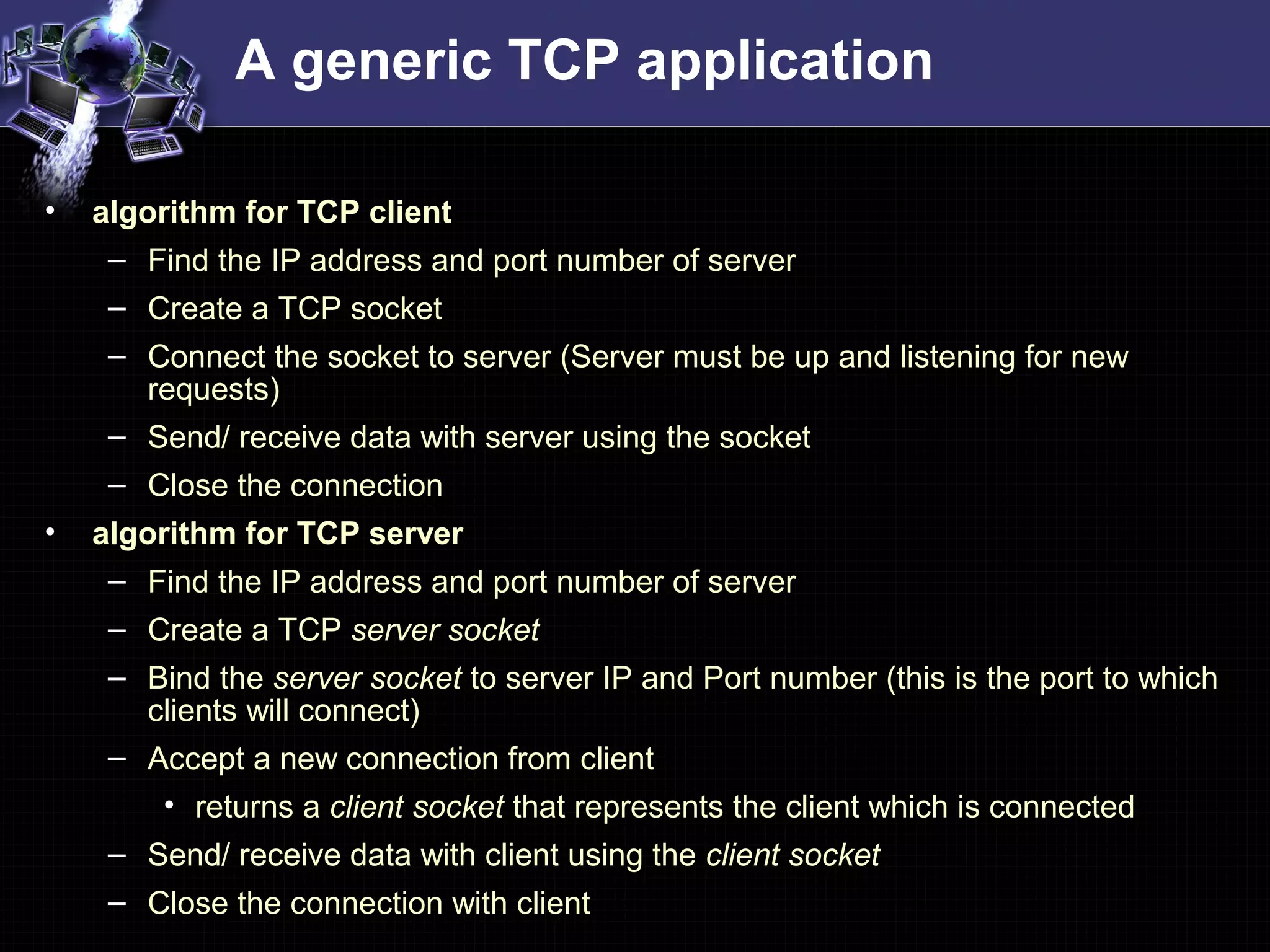
• algorithm for TCP client
– Find the IP address and port number of server
– Create a TCP socket
– Connect the socket to server (Server must be up and listening for new
requests)
– Send/ receive data with server using the socket
– Close the connection
• algorithm for TCP server
– Find the IP address and port number of server
– Create a TCP server socket
– Bind the server socket to server IP and Port number (this is the port to which
clients will connect)
– Accept a new connection from client
• returns a client socket that represents the client which is connected
– Send/ receive data with client using the client socket
– Close the connection with client
A generic UDP application
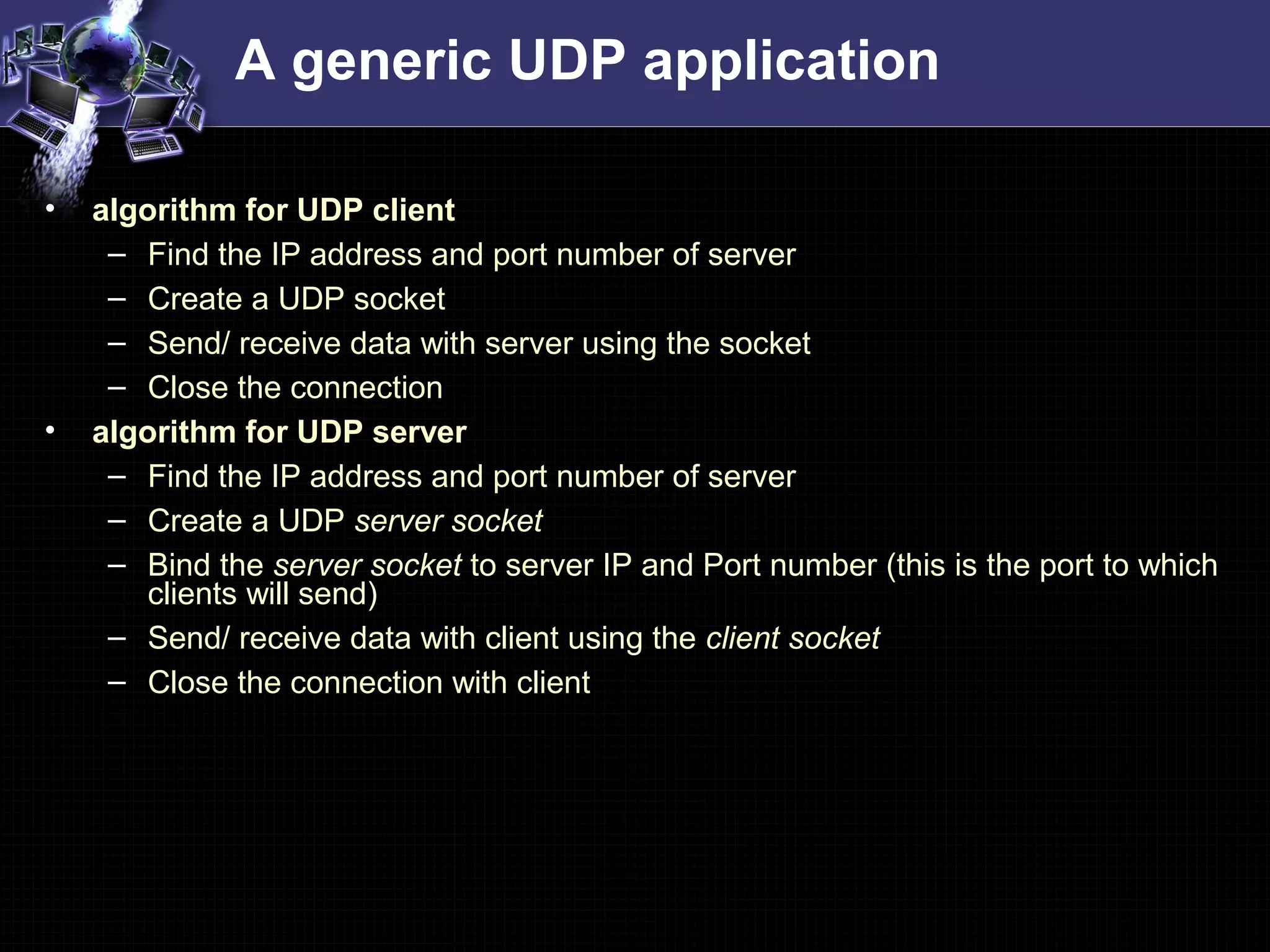
• algorithm for UDP client
– Find the IP address and port number of server
– Create a UDP socket
– Send/ receive data with server using the socket
– Close the connection
• algorithm for UDP server
– Find the IP address and port number of server
– Create a UDP server socket
– Bind the server socket to server IP and Port number (this is the port to which
clients will send)
– Send/ receive data with client using the client socket
– Close the connection with client
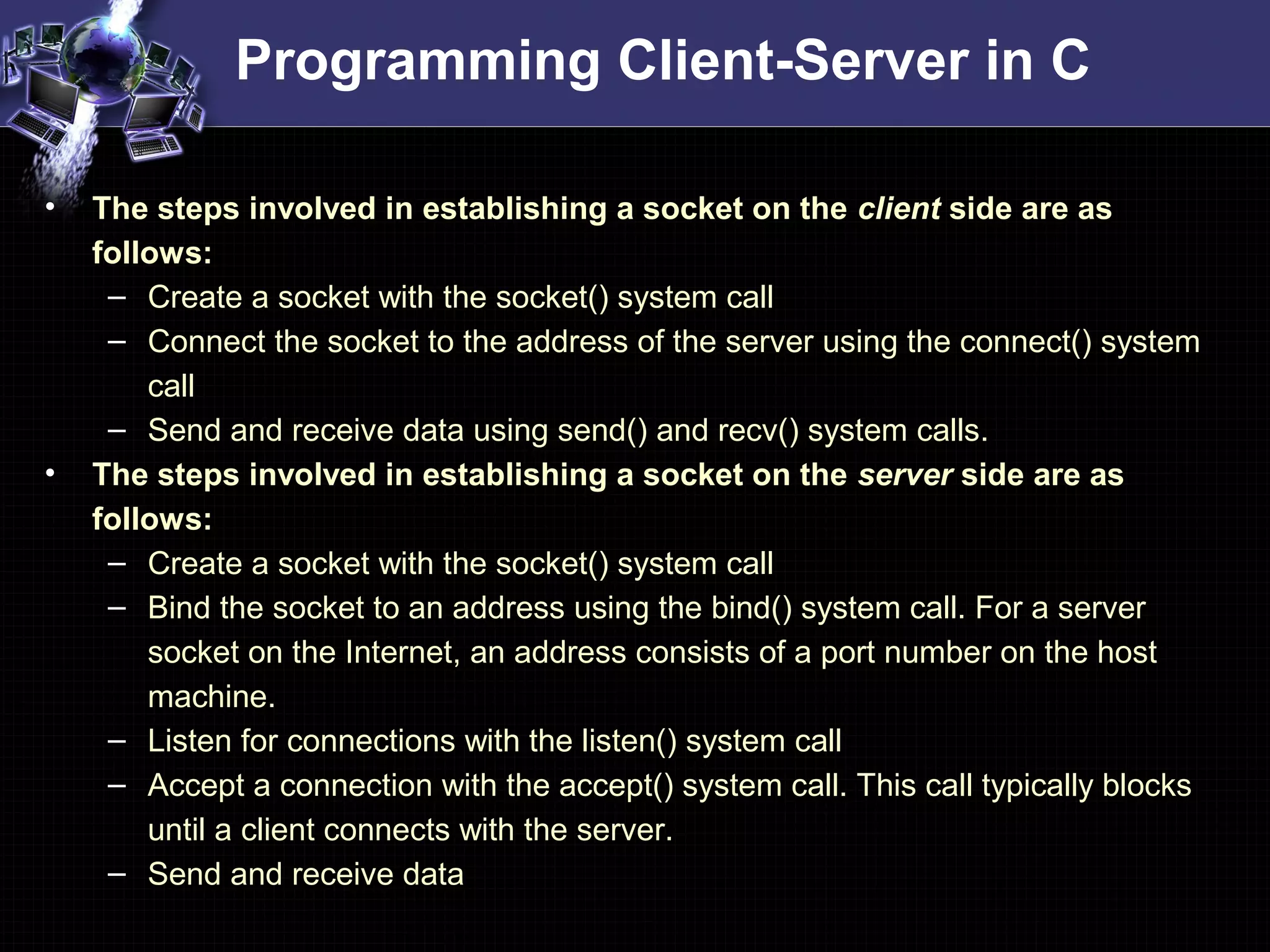
Programming Client-Server in C
• The steps involved in establishing a socket on the client side are as
follows:
– Create a socket with the socket() system call
– Connect the socket to the address of the server using the connect() system
call
– Send and receive data using send() and recv() system calls.
• The steps involved in establishing a socket on the server side are as
follows:
– Create a socket with the socket() system call
– Bind the socket to an address using the bind() system call. For a server
socket on the Internet, an address consists of a port number on the host
machine.
– Listen for connections with the listen() system call
– Accept a connection with the accept() system call. This call typically blocks
until a client connects with the server.
– Send and receive data
Programming TCP Client in C
#include <stdio.h>
#include <sys/types.h>
#include <sys/socket.h>
#include <netinet/in.h>
#include <netdb.h>
void error(char *msg){ perror(msg); exit(0);}
int main(int argc, char *argv[]){
int sockfd, portno, n;
struct sockaddr_in serv_addr;
struct hostent *server;
char buffer[256];
if (argc < 3) {
fprintf(stderr,"usage %s hostname portn", argv[0]);
exit(0);
}
portno = atoi(argv[2]);
sockfd = socket(AF_INET, SOCK_STREAM, IPPROTO_TCP);
if (sockfd < 0) error("ERROR opening socket");
/* a structure to contain an internet address
defined in the include file <netinet/in.h> */
struct sockaddr_in {
short sin_family; /* should be AF_INET */
u_short sin_port;
struct in_addr sin_addr;
char sin_zero[8]; /* not used, must be zero
*/
};
struct in_addr {
unsigned long s_addr;
};
Client.c
Programming TCP Client in C
#include <stdio.h>
#include <sys/types.h>
#include <sys/socket.h>
#include <netinet/in.h>
#include <netdb.h>
void error(char *msg){ perror(msg); exit(0);}
int main(int argc, char *argv[]){
int sockfd, portno, n;
struct sockaddr_in serv_addr;
struct hostent *server;
char buffer[256];
if (argc < 3) {
fprintf(stderr,"usage %s hostname portn", argv[0]);
exit(0);
}
portno = atoi(argv[2]);
sockfd = socket(AF_INET, SOCK_STREAM, IPPROTO_TCP);
if (sockfd < 0) error("ERROR opening socket");
Client.c Socket System Call – create an end point for
communication
#include <sys/types.h>
#include <sys/socket.h>
int socket(int domain, int type, int protocol);
Returns a descriptor
domain: selects protocol family
e.g. PF_IPX, PF_X25, PF_APPLETALK
type: specifies communication semantics
e.g. SOCK_DGRAM, SOCK_RAW
protocol: specifies a particular protocol to be used
e.g. IPPROTO_UDP, IPPROTO_ICMP
Programming TCP Client in C
server = gethostbyname(argv[1]);
if (server == NULL) { fprintf(stderr,"ERROR, no such hostn"); exit(0); }
bzero((char *) &serv_addr, sizeof(serv_addr));
serv_addr.sin_family = AF_INET;
bcopy((char *)server->h_addr, (char *)&serv_addr.sin_addr.s_addr
, server->h_length);
serv_addr.sin_port = htons(portno);
if (connect(sockfd,&serv_addr,sizeof(serv_addr)) < 0)
error("ERROR connecting");
printf("Please enter the message: ");
bzero(buffer,256); fgets(buffer,255,stdin);
n = send(sockfd,buffer,strlen(buffer),0);
if (n < 0) error("ERROR writing to socket");
bzero(buffer,256);
n = recv(sockfd,buffer,255,0);
if (n < 0)
error("ERROR reading from socket");
printf("%sn",buffer);
close(sockfd);
return 0;
}
Client.c
Connect System Call – initiates a connection on
a socket
#include <sys/types.h>
#include <sys/socket.h>
int connect( int sockfd,
const struct sockaddr *serv_addr,
socklen_t addrlen);
Returns 0 on success
sockfd: descriptor that must refer to a socket
serv_addr: address to which we want to connect
addrlen: length of serv_addr
Programming TCP Client in C
server = gethostbyname(argv[1]);
if (server == NULL) { fprintf(stderr,"ERROR, no such hostn"); exit(0); }
bzero((char *) &serv_addr, sizeof(serv_addr));
serv_addr.sin_family = AF_INET;
bcopy((char *)server->h_addr, (char *)&serv_addr.sin_addr.s_addr
, server->h_length);
serv_addr.sin_port = htons(portno);
if (connect(sockfd,&serv_addr,sizeof(serv_addr)) < 0)
error("ERROR connecting");
printf("Please enter the message: ");
bzero(buffer,256); fgets(buffer,255,stdin);
n = send(sockfd,buffer,strlen(buffer),0);
if (n < 0) error("ERROR writing to socket");
bzero(buffer,256);
n = recv(sockfd,buffer,255,0);
if (n < 0)
error("ERROR reading from socket");
printf("%sn",buffer);
close(sockfd);
return 0;
}
Client.c
Send System Call – send a message to a
socket
#include <sys/types.h>
#include <sys/socket.h>
int send( int s, const void *msg, size_t len,
int flags);
Returns number of characters sent on success
s: descriptor that must refer to a socket in
connected state
msg: data that we want to send
len: length of data
flags: use default 0. MSG_OOB, MSG_DONTWAIT
Programming TCP Client in C
server = gethostbyname(argv[1]);
if (server == NULL) { fprintf(stderr,"ERROR, no such hostn"); exit(0); }
bzero((char *) &serv_addr, sizeof(serv_addr));
serv_addr.sin_family = AF_INET;
bcopy((char *)server->h_addr, (char *)&serv_addr.sin_addr.s_addr
, server->h_length);
serv_addr.sin_port = htons(portno);
if (connect(sockfd,&serv_addr,sizeof(serv_addr)) < 0)
error("ERROR connecting");
printf("Please enter the message: ");
bzero(buffer,256); fgets(buffer,255,stdin);
n = send(sockfd,buffer,strlen(buffer),0);
if (n < 0) error("ERROR writing to socket");
bzero(buffer,256);
n = recv(sockfd,buffer,255,0);
if (n < 0)
error("ERROR reading from socket");
printf("%sn",buffer);
close(sockfd);
return 0;
}
Client.c
Recv System Call – receive a message from a
socket
#include <sys/types.h>
#include <sys/socket.h>
int recv( int s, const void *buff, size_t len,
int flags);
Returns number of bytes received on success
s: descriptor that must refer to a socket in
connected state
buff: data that we want to receive
len: length of data
flags: use default 0. MSG_OOB, MSG_DONTWAIT
Programming TCP Client in C
server = gethostbyname(argv[1]);
if (server == NULL) { fprintf(stderr,"ERROR, no such hostn"); exit(0); }
bzero((char *) &serv_addr, sizeof(serv_addr));
serv_addr.sin_family = AF_INET;
bcopy((char *)server->h_addr, (char *)&serv_addr.sin_addr.s_addr
, server->h_length);
serv_addr.sin_port = htons(portno);
if (connect(sockfd,&serv_addr,sizeof(serv_addr)) < 0)
error("ERROR connecting");
printf("Please enter the message: ");
bzero(buffer,256); fgets(buffer,255,stdin);
n = send(sockfd,buffer,strlen(buffer),0);
if (n < 0) error("ERROR writing to socket");
bzero(buffer,256);
n = recv(sockfd,buffer,255,0);
if (n < 0)
error("ERROR reading from socket");
printf("%sn",buffer);
close(sockfd);
return 0;
}
Client.c
Close System Call – close a socket descriptor
#include <unistd.h>
int close( int s);
Returns 0 on success
s: descriptor to be closed
Programming TCP Server in C
#include <stdio.h>
#include <sys/types.h>
#include <sys/socket.h>
#include <netinet/in.h>
void error(char *msg){ perror(msg); exit(0);}
int main(int argc, char *argv[]){
int sockfd, newsockfd, portno, clilen;
char buffer[256];
struct sockaddr_in serv_addr, cli_addr;
int n;
if (argc < 2) { fprintf(stderr,"ERROR, no port providedn"); exit(1); }
sockfd = socket(AF_INET, SOCK_STREAM, 0);
if (sockfd < 0) error("ERROR opening socket");
bzero((char *) &serv_addr, sizeof(serv_addr));
portno = atoi(argv[1]);
serv_addr.sin_family = AF_INET;
serv_addr.sin_addr.s_addr = INADDR_ANY;
serv_addr.sin_port = htons(portno);
Server.c
Programming TCP Server in C
if (bind(sockfd, (struct sockaddr *) &serv_addr, sizeof(serv_addr)) < 0)
error("ERROR on binding");
listen(sockfd,5);
clilen = sizeof(cli_addr);
newsockfd = accept(sockfd, (struct sockaddr *) &cli_addr, &clilen);
if (newsockfd < 0) error("ERROR on accept");
bzero(buffer,256);
n = recv(newsockfd,buffer,255,0);
if (n < 0) error("ERROR reading from socket");
printf("Here is the message: %sn",buffer);
n = send(newsockfd,"I got your message",18,0);
if (n < 0) error("ERROR writing to socket");
close(newsockfd);
close(sockfd);
return 0;
}
Server.c
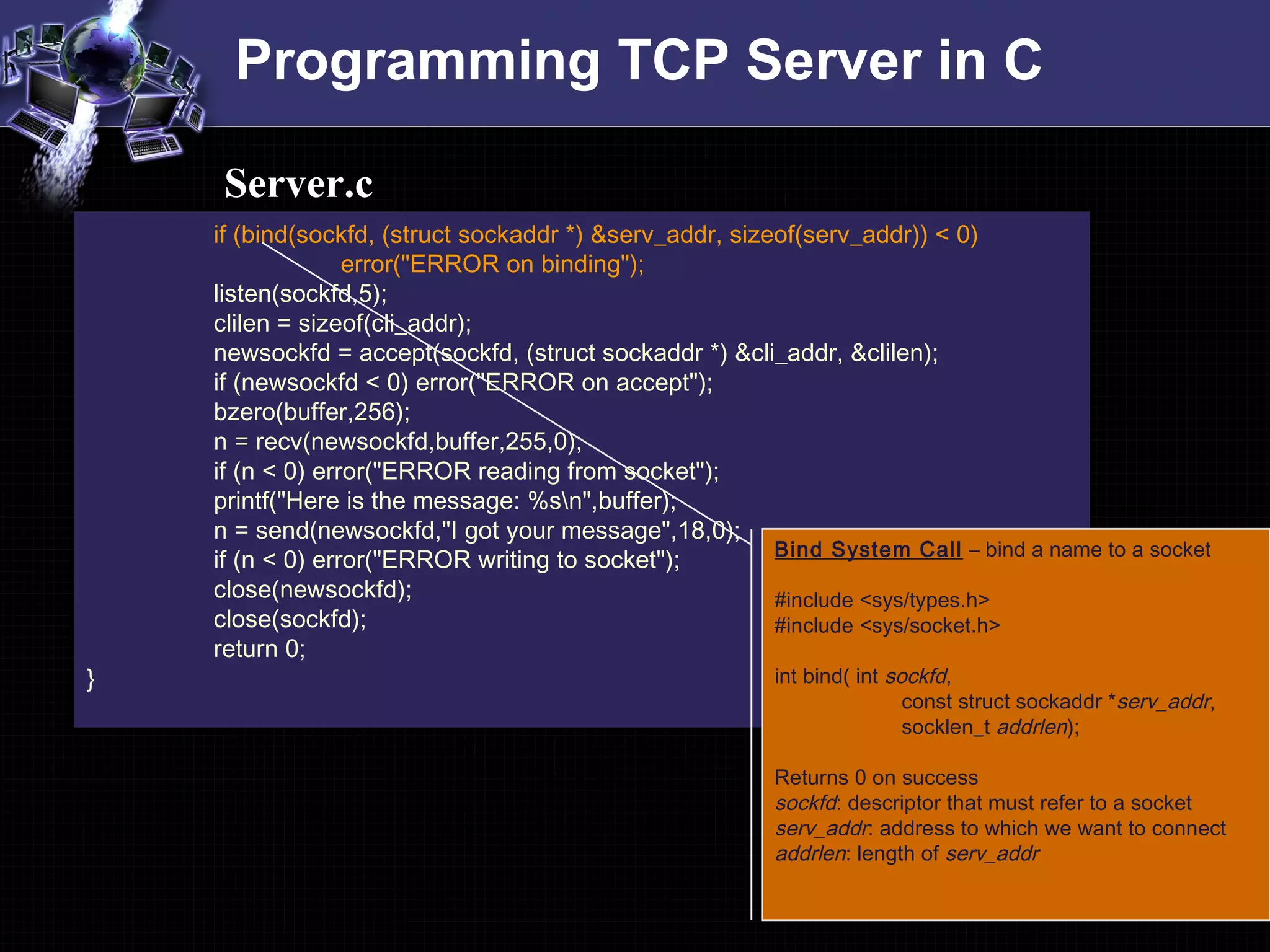
Bind System Call – bind a name to a socket
#include <sys/types.h>
#include <sys/socket.h>
int bind( int sockfd,
const struct sockaddr *serv_addr,
socklen_t addrlen);
Returns 0 on success
sockfd: descriptor that must refer to a socket
serv_addr: address to which we want to connect
addrlen: length of serv_addr
Programming TCP Server in C
if (bind(sockfd, (struct sockaddr *) &serv_addr, sizeof(serv_addr)) < 0)
error("ERROR on binding");
listen(sockfd,5);
clilen = sizeof(cli_addr);
newsockfd = accept(sockfd, (struct sockaddr *) &cli_addr, &clilen);
if (newsockfd < 0) error("ERROR on accept");
bzero(buffer,256);
n = recv(newsockfd,buffer,255,0);
if (n < 0) error("ERROR reading from socket");
printf("Here is the message: %sn",buffer);
n = send(newsockfd,"I got your message",18,0);
if (n < 0) error("ERROR writing to socket");
close(newsockfd);
close(sockfd);
return 0;
}
Server.c
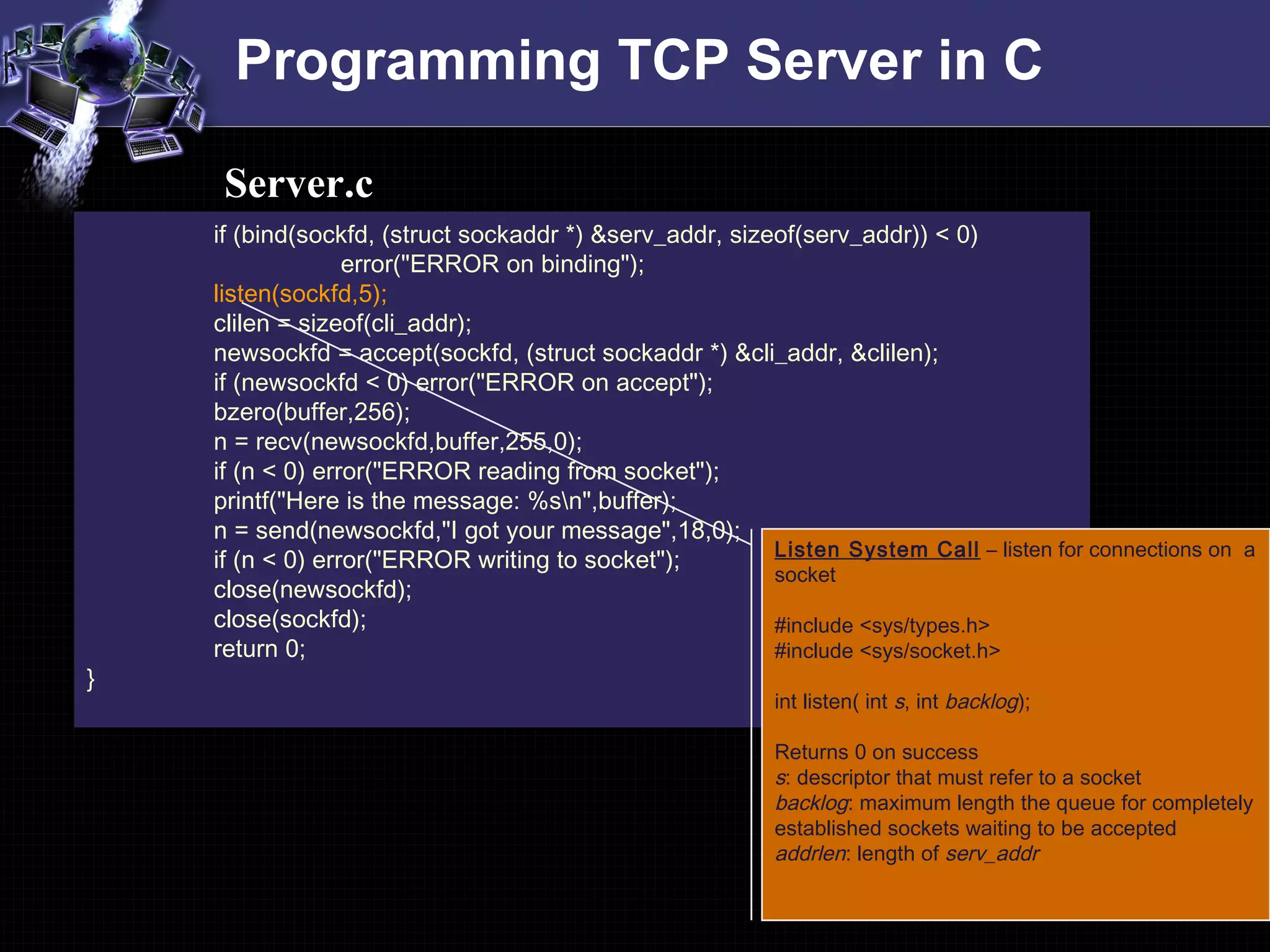
Listen System Call – listen for connections on a
socket
#include <sys/types.h>
#include <sys/socket.h>
int listen( int s, int backlog);
Returns 0 on success
s: descriptor that must refer to a socket
backlog: maximum length the queue for completely
established sockets waiting to be accepted
addrlen: length of serv_addr
Programming TCP Server in C
if (bind(sockfd, (struct sockaddr *) &serv_addr, sizeof(serv_addr)) < 0)
error("ERROR on binding");
listen(sockfd,5);
clilen = sizeof(cli_addr);
newsockfd = accept(sockfd, (struct sockaddr *) &cli_addr, &clilen);
if (newsockfd < 0) error("ERROR on accept");
bzero(buffer,256);
n = recv(newsockfd,buffer,255,0);
if (n < 0) error("ERROR reading from socket");
printf("Here is the message: %sn",buffer);
n = send(newsockfd,"I got your message",18,0);
if (n < 0) error("ERROR writing to socket");
close(newsockfd);
close(sockfd);
return 0;
}
Server.c
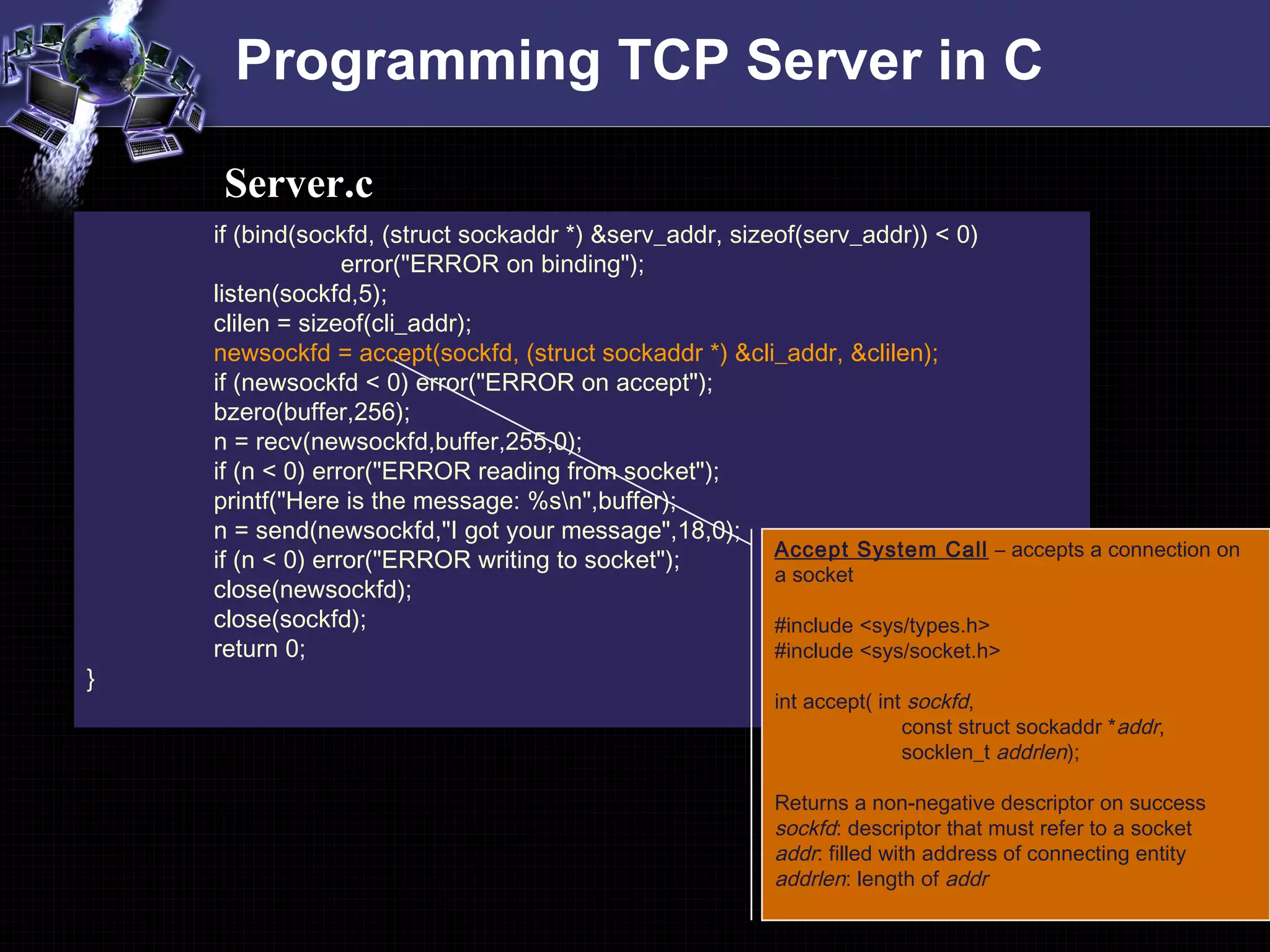
Accept System Call – accepts a connection on
a socket
#include <sys/types.h>
#include <sys/socket.h>
int accept( int sockfd,
const struct sockaddr *addr,
socklen_t addrlen);
Returns a non-negative descriptor on success
sockfd: descriptor that must refer to a socket
addr: filled with address of connecting entity
addrlen: length of addr
Programming UDP Client in C
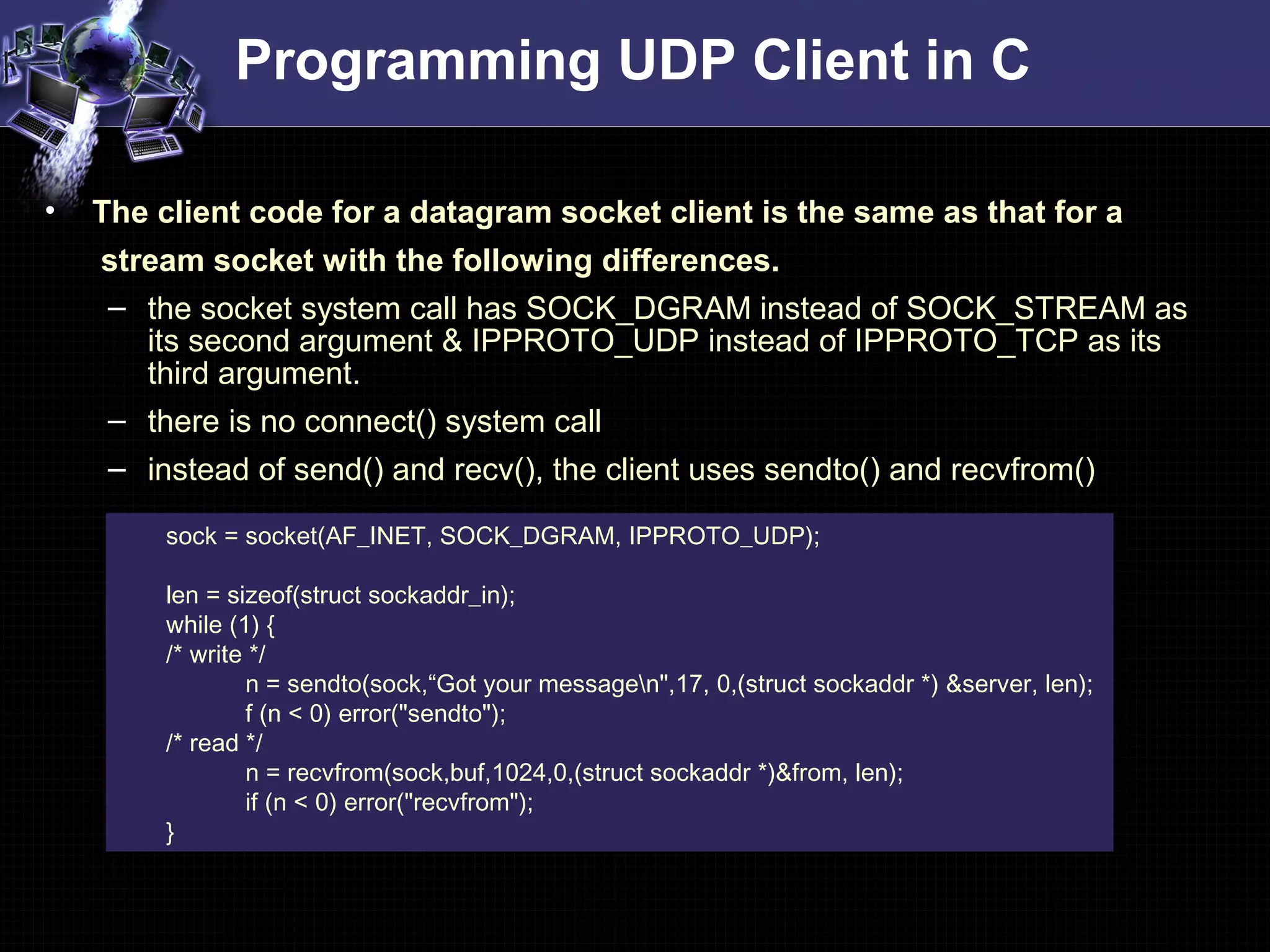
• The client code for a datagram socket client is the same as that for a
stream socket with the following differences.
– the socket system call has SOCK_DGRAM instead of SOCK_STREAM as
its second argument & IPPROTO_UDP instead of IPPROTO_TCP as its
third argument.
– there is no connect() system call
– instead of send() and recv(), the client uses sendto() and recvfrom()
sock = socket(AF_INET, SOCK_DGRAM, IPPROTO_UDP);
len = sizeof(struct sockaddr_in);
while (1) {
/* write */
n = sendto(sock,“Got your messagen",17, 0,(struct sockaddr *) &server, len);
f (n < 0) error("sendto");
/* read */
n = recvfrom(sock,buf,1024,0,(struct sockaddr *)&from, len);
if (n < 0) error("recvfrom");
}
Programming UDP Server in C
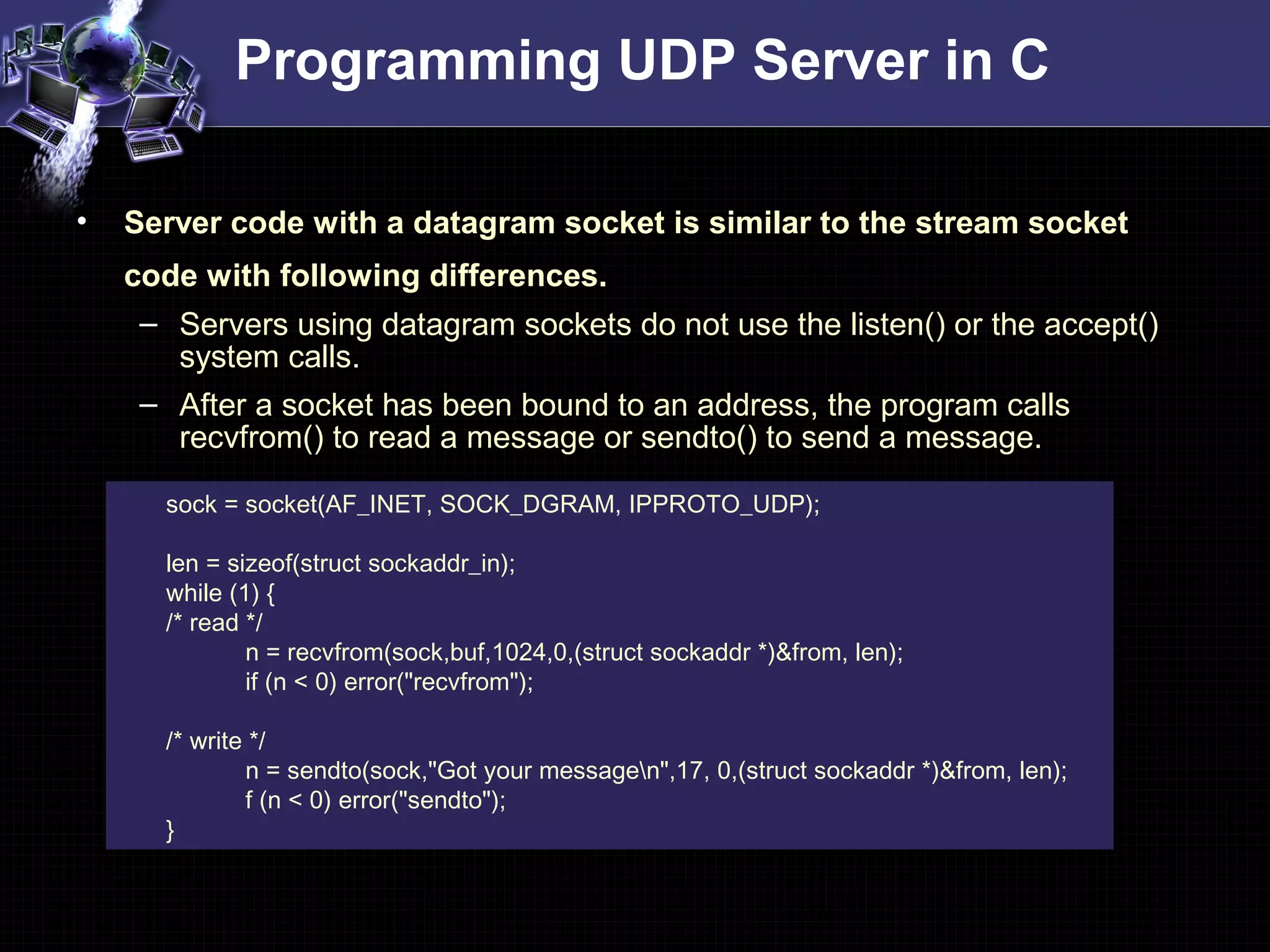
sock = socket(AF_INET, SOCK_DGRAM, IPPROTO_UDP);
len = sizeof(struct sockaddr_in);
while (1) {
/* read */
n = recvfrom(sock,buf,1024,0,(struct sockaddr *)&from, len);
if (n < 0) error("recvfrom");
/* write */
n = sendto(sock,"Got your messagen",17, 0,(struct sockaddr *)&from, len);
f (n < 0) error("sendto");
}
• Server code with a datagram socket is similar to the stream socket
code with following differences.
– Servers using datagram sockets do not use the listen() or the accept()
system calls.
– After a socket has been bound to an address, the program calls
recvfrom() to read a message or sendto() to send a message.
Programming Client-Server in C
#include <winsock.h>
…..
void main(int argc,char *argv[]){
WSADATA wsda; // if this doesn’t work
// WSAData wsda; // then try this
WSAStartup(0x0101,&wsda);
…..
WSACleanup();
closesocket(sockfd);
}
• In case of Windows Everything in the code is same as described
previously except the following differences
– You have to tell your compiler to link in the Winsock library, usually
called wsock32.lib or winsock32.lib
– On Visual C++, this can be done through the Project menu, under
Settings.... Click the Link tab, and look for the box titled "Object/library
modules". Add "wsock32.lib" to that list.
– On Visual Studio .NET, add “wsock32.lib” under Project menu, Properties
-> Linker -> Input -> Additional Dependencies
Programming Client-Server in Java
Programming TCP Client-Server in Java
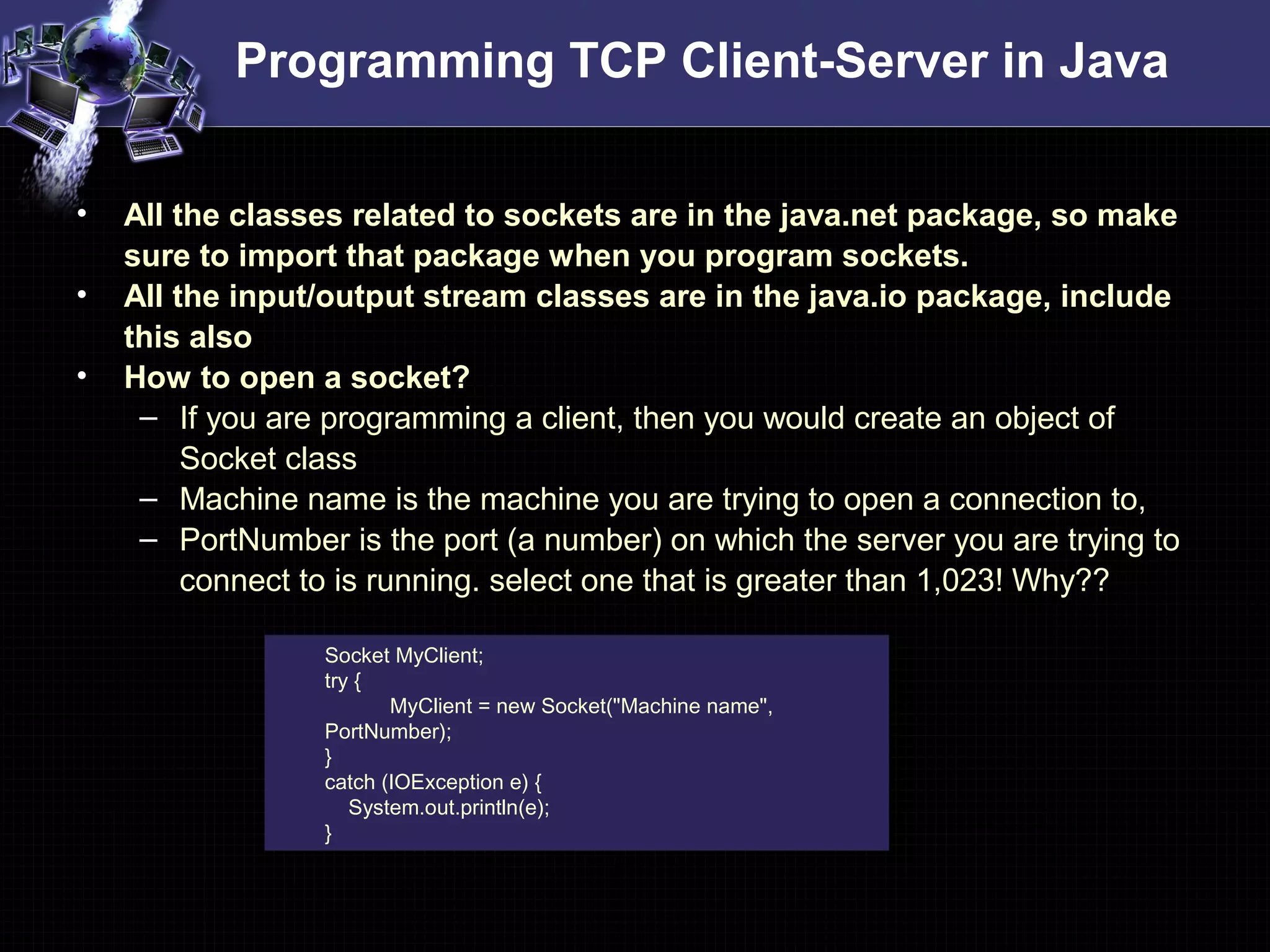
• All the classes related to sockets are in the java.net package, so make
sure to import that package when you program sockets.
• All the input/output stream classes are in the java.io package, include
this also
• How to open a socket?
– If you are programming a client, then you would create an object of
Socket class
– Machine name is the machine you are trying to open a connection to,
– PortNumber is the port (a number) on which the server you are trying to
connect to is running. select one that is greater than 1,023! Why??
Socket MyClient;
try {
MyClient = new Socket("Machine name",
PortNumber);
}
catch (IOException e) {
System.out.println(e);
}
Programming TCP Client-Server in Java
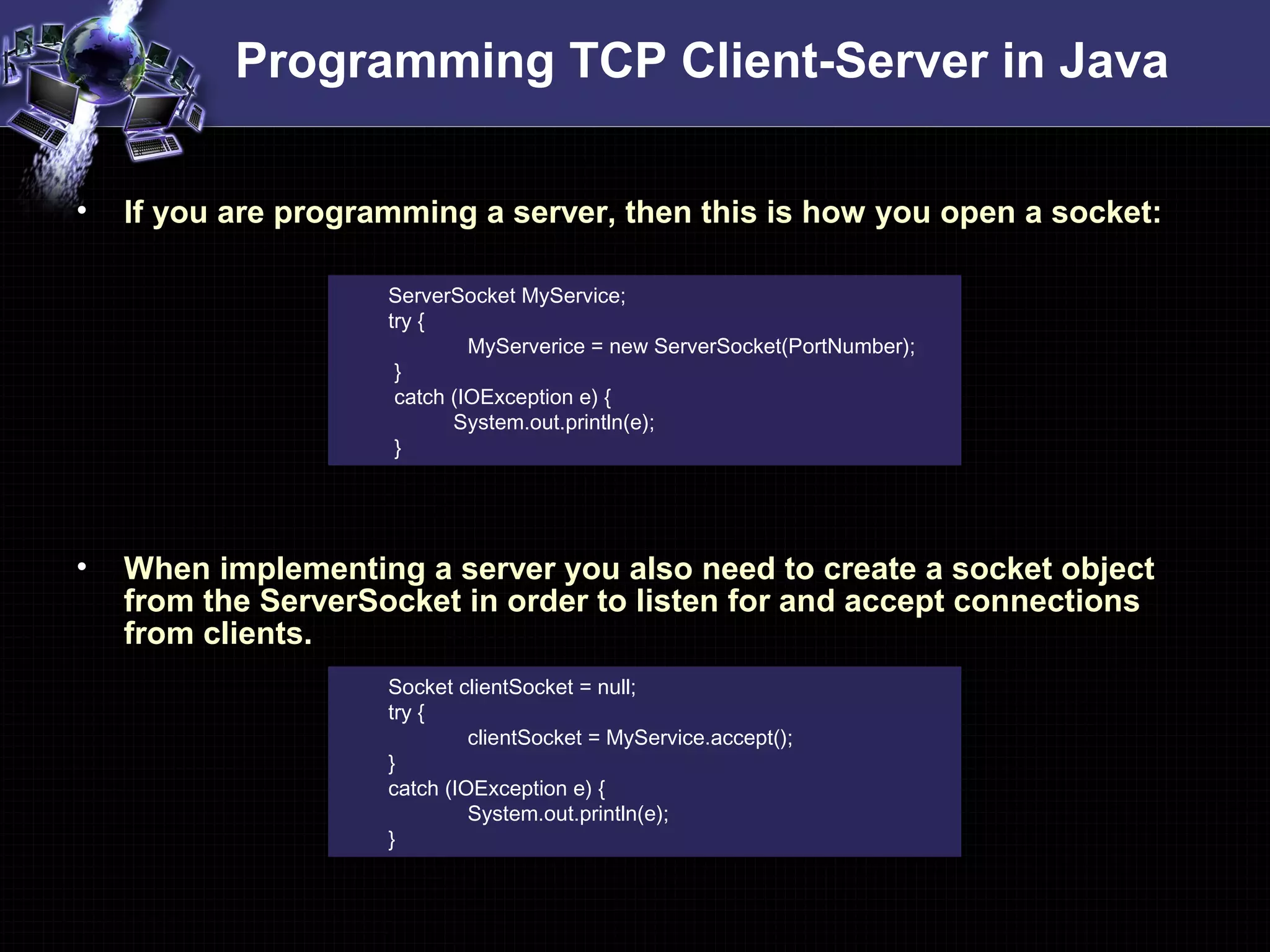
• If you are programming a server, then this is how you open a socket:
• When implementing a server you also need to create a socket object
from the ServerSocket in order to listen for and accept connections
from clients.
ServerSocket MyService;
try {
MyServerice = new ServerSocket(PortNumber);
}
catch (IOException e) {
System.out.println(e);
}
Socket clientSocket = null;
try {
clientSocket = MyService.accept();
}
catch (IOException e) {
System.out.println(e);
}
Programming TCP Client-Server in Java
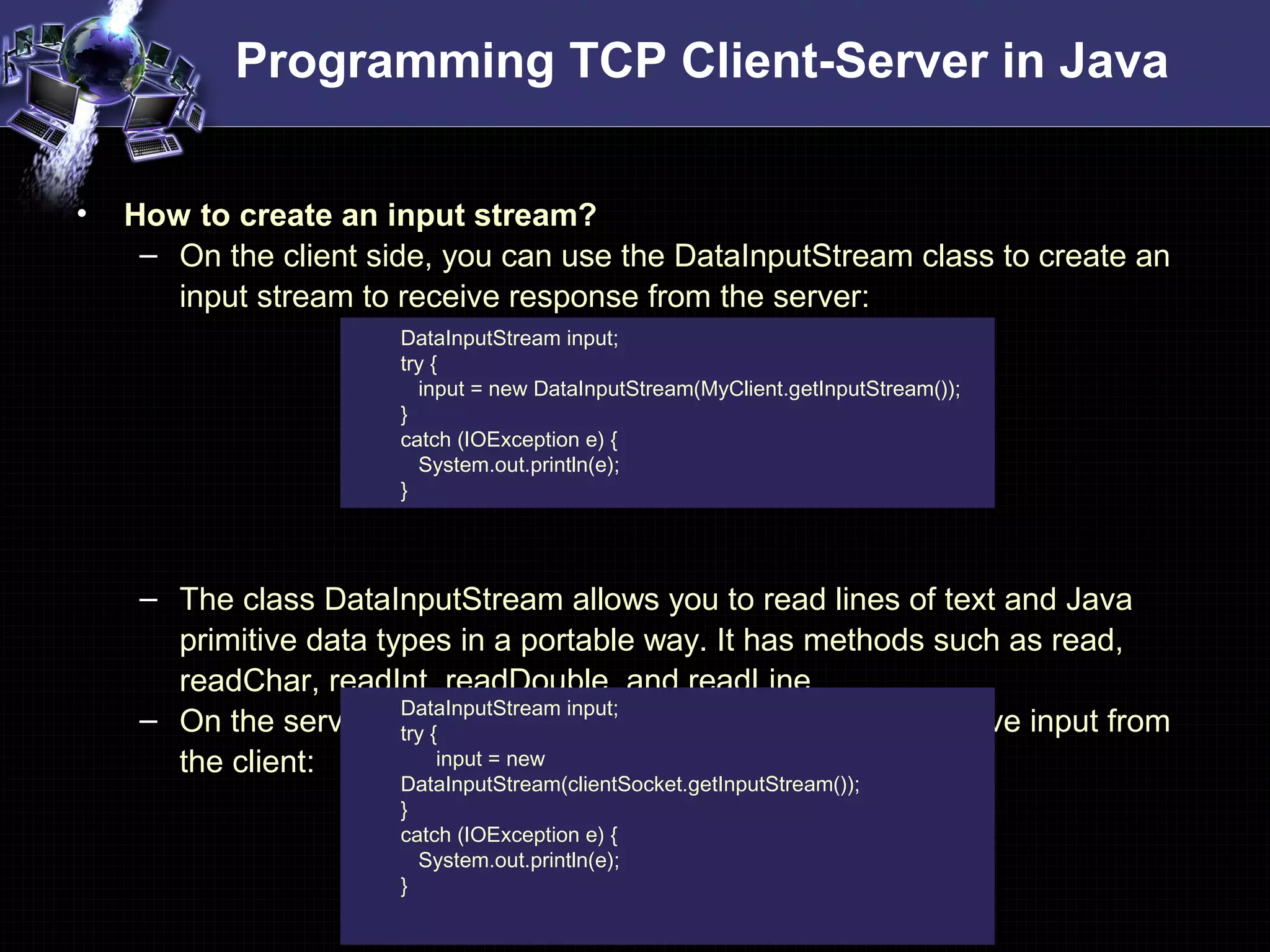
• How to create an input stream?
– On the client side, you can use the DataInputStream class to create an
input stream to receive response from the server:
– The class DataInputStream allows you to read lines of text and Java
primitive data types in a portable way. It has methods such as read,
readChar, readInt, readDouble, and readLine,.
– On the server side, you can use DataInputStream to receive input from
the client:
DataInputStream input;
try {
input = new DataInputStream(MyClient.getInputStream());
}
catch (IOException e) {
System.out.println(e);
}
DataInputStream input;
try {
input = new
DataInputStream(clientSocket.getInputStream());
}
catch (IOException e) {
System.out.println(e);
}
Programming TCP Client-Server in Java
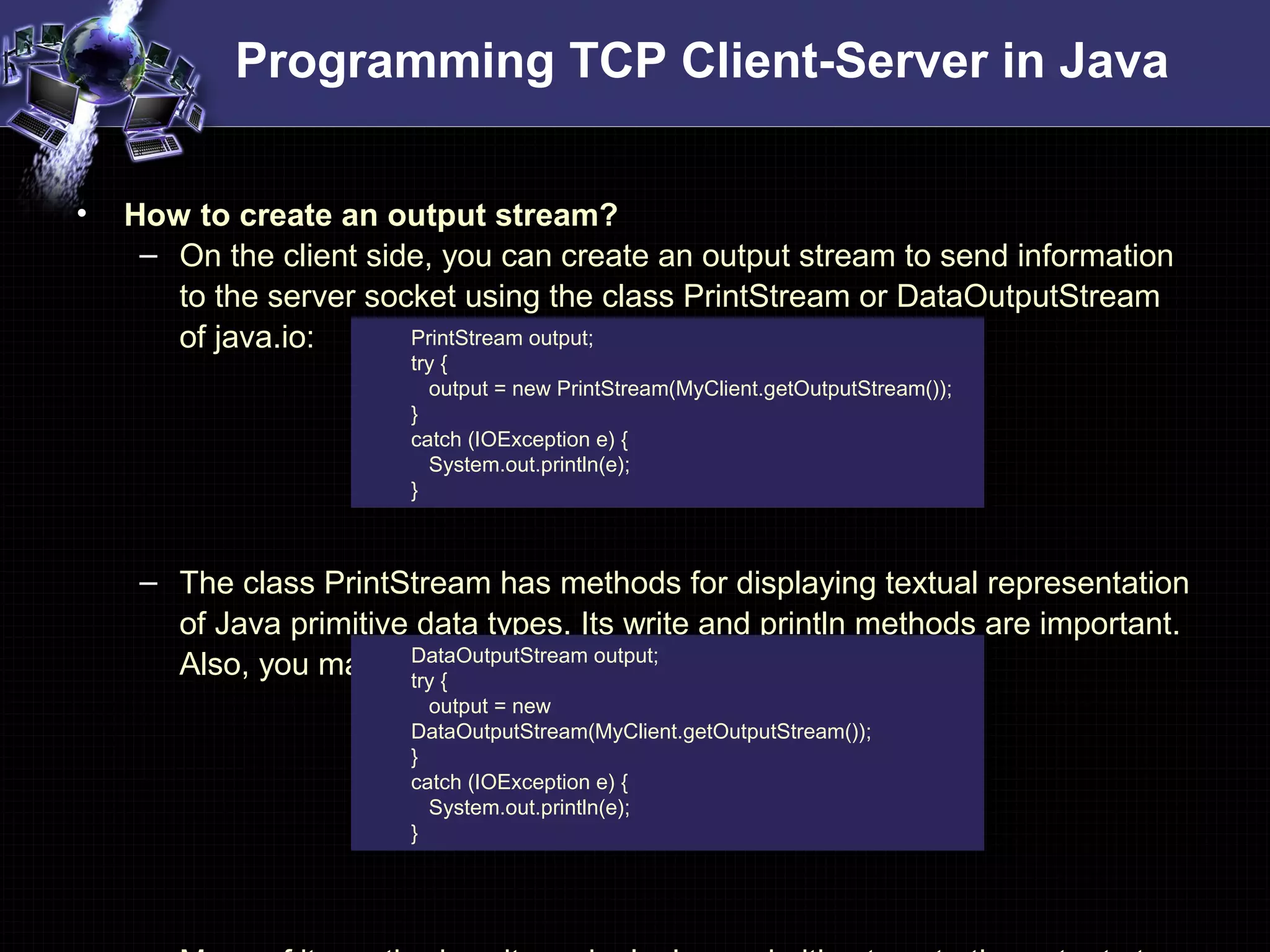
• How to create an output stream?
– On the client side, you can create an output stream to send information
to the server socket using the class PrintStream or DataOutputStream
of java.io:
– The class PrintStream has methods for displaying textual representation
of Java primitive data types. Its write and println methods are important.
Also, you may want to use the DataOutputStream:
PrintStream output;
try {
output = new PrintStream(MyClient.getOutputStream());
}
catch (IOException e) {
System.out.println(e);
}
DataOutputStream output;
try {
output = new
DataOutputStream(MyClient.getOutputStream());
}
catch (IOException e) {
System.out.println(e);
}
Programming TCP Client-Server in Java
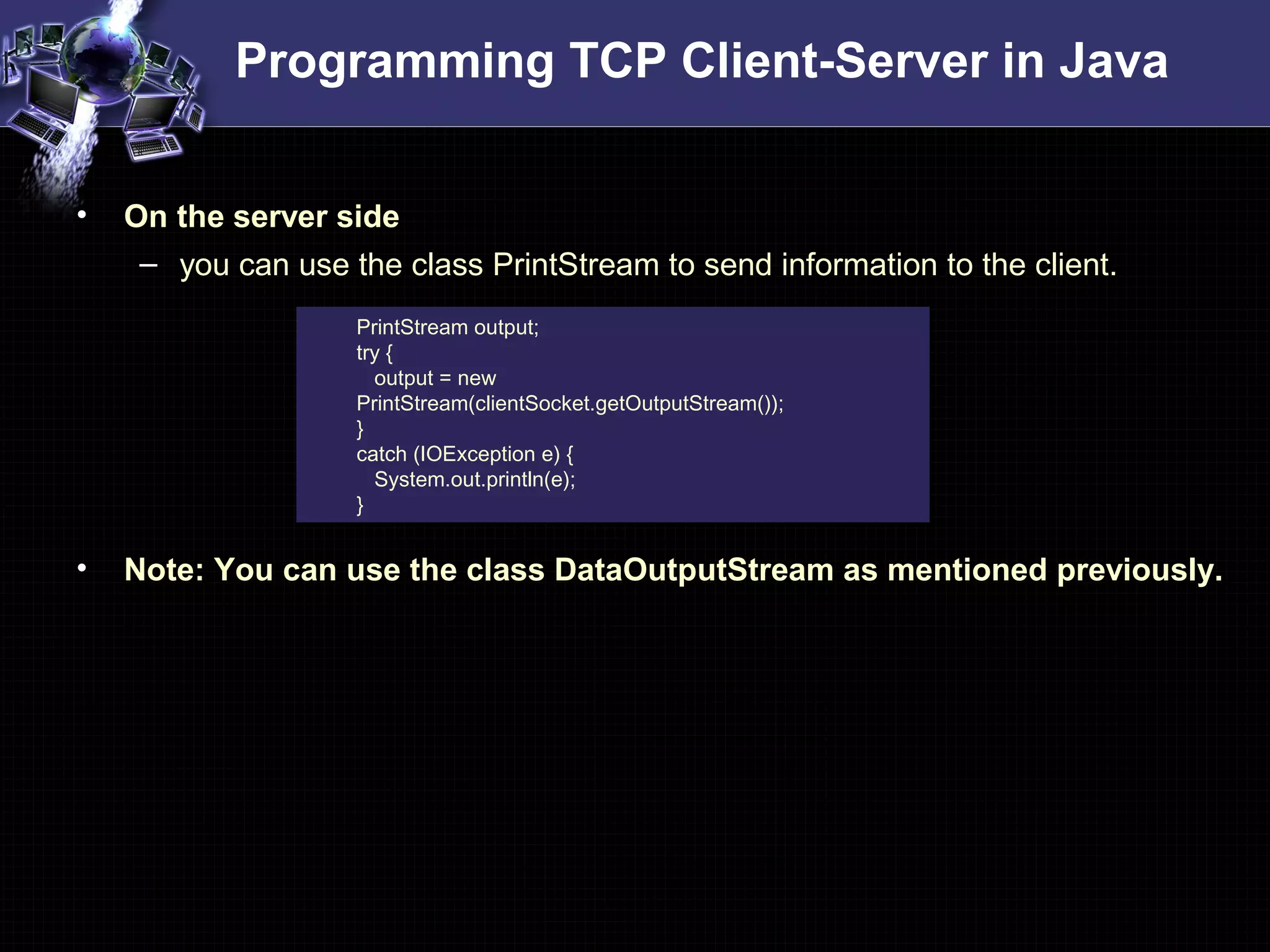
• On the server side
– you can use the class PrintStream to send information to the client.
• Note: You can use the class DataOutputStream as mentioned previously.
PrintStream output;
try {
output = new
PrintStream(clientSocket.getOutputStream());
}
catch (IOException e) {
System.out.println(e);
}
Programming TCP Client-Server in Java
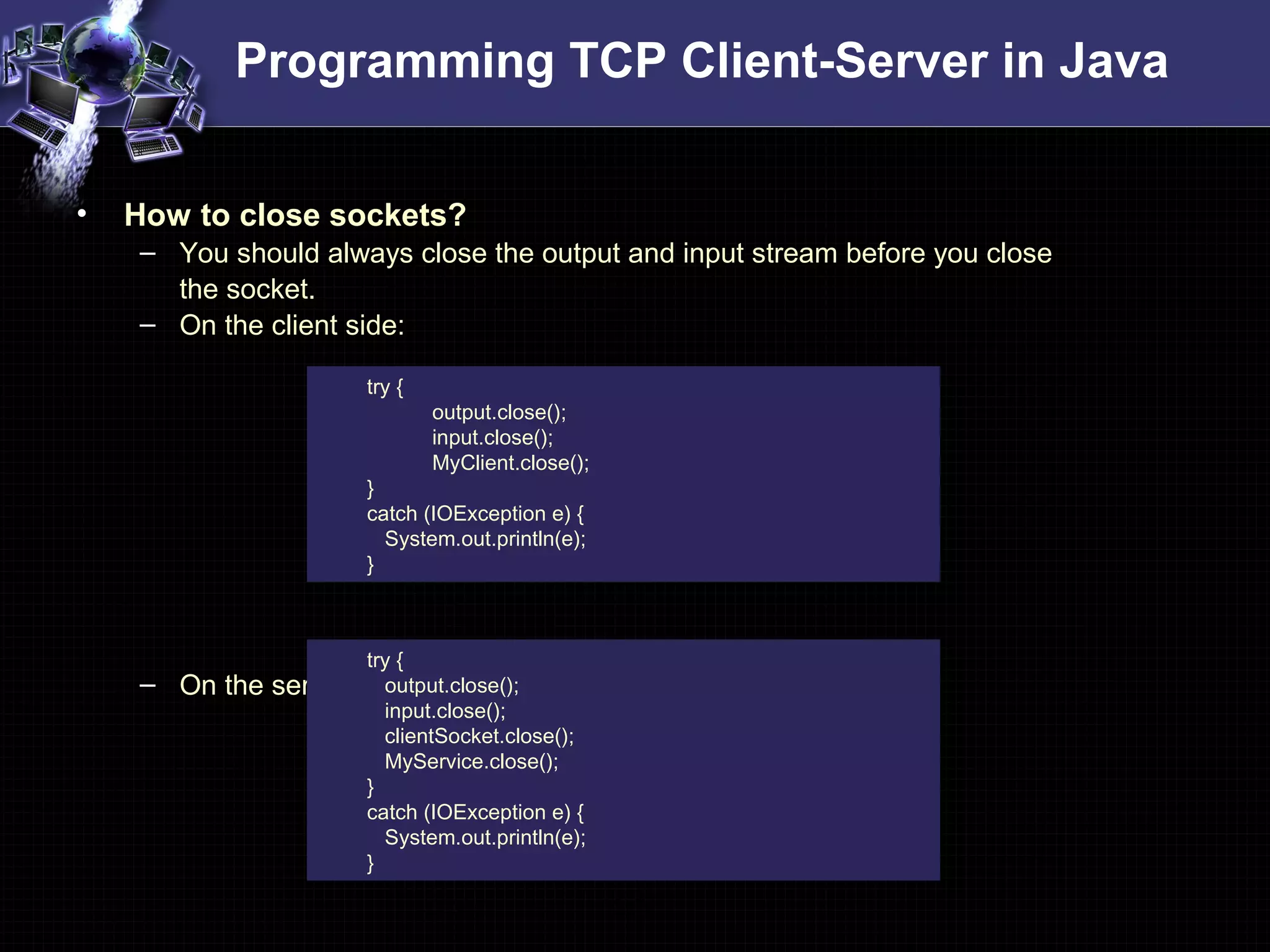
• How to close sockets?
– You should always close the output and input stream before you close
the socket.
– On the client side:
– On the server side:
try {
output.close();
input.close();
MyClient.close();
}
catch (IOException e) {
System.out.println(e);
}
try {
output.close();
input.close();
clientSocket.close();
MyService.close();
}
catch (IOException e) {
System.out.println(e);
}
Programming UDP Client-Server in Java
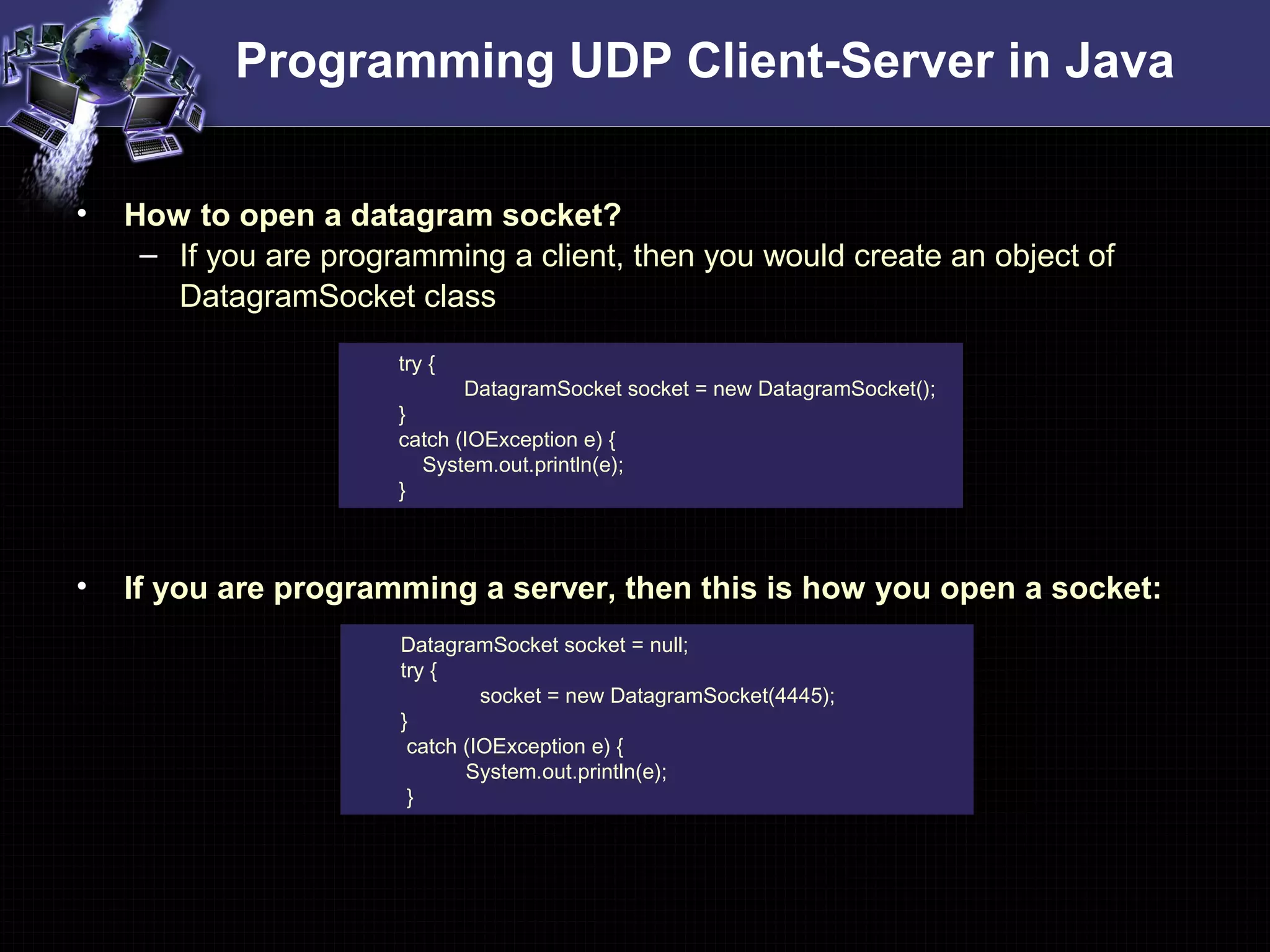
• How to open a datagram socket?
– If you are programming a client, then you would create an object of
DatagramSocket class
• If you are programming a server, then this is how you open a socket:
try {
DatagramSocket socket = new DatagramSocket();
}
catch (IOException e) {
System.out.println(e);
}
DatagramSocket socket = null;
try {
socket = new DatagramSocket(4445);
}
catch (IOException e) {
System.out.println(e);
}
Programming UDP Client-Server in Java
• How to send/receive on Datagram sockets?
– On the client side, you can use the DatagramPacket class
– To send data
– To receive data
byte[] buf = new byte[256];
InetAddress address = InetAddress.getByName(args[0]);
DatagramPacket packet = new DatagramPacket(buf,
buf.length, address, 4445);
socket.send(packet);
packet = new DatagramPacket(buf, buf.length);
socket.receive(packet);
String received = new String(packet.getData());
System.out.println(“Received from server: " + received);
Programming UDP Client-Server in Java
• How to send/receive on Datagram sockets?
– On the Server side, you can use the DatagramPacket class
– To receive data
• To send data
• How to close a Datagram socket?
byte[] buf = new byte[256];
DatagramPacket packet = new DatagramPacket(buf,
buf.length);
socket.receive(packet);
InetAddress address = packet.getAddress();
int port = packet.getPort();
packet = new DatagramPacket(buf, buf.length, address, port);
socket.send(packet);
socket.close();
References
• Man pages in Linux
Accesssible through following command
– man 2 <system_call_name>
– E.g. man 2 socket
• “Unix network programming” by Richard Stevens
• Beej’s guide to Network Programming
http://beej.us/guide/bgnet/
• The Java Tutorial – Custom Networking
http://java.sun.com/docs/books/tutorial/networking/
• Lecture notes of cs423 from Dr. Bob Cotter
http://www.sce.umkc.edu/~cotterr/cs423_fs05/cs423_fs05_lectures.html

Socket programming-tutorial-sk

  • 1.
    Socket Programming Jignesh Patel PalanivelRathinam connecting processes
  • 2.
    Overview • Introduction toSockets • A generic Client-Server application • Programming Client-Server in C • Programming Client-Server in Java • References
  • 3.
  • 4.
    Introduction to Sockets •Why Sockets? – Used for Interprocess communication. • The Client-Server model – Most interprocess communication uses client-server model – Client & Server are two processes that wants to communicate with each other – The Client process connects to the Server process, to make a request for information/services own by the Server. – Once the connection is established between Client process and Server process, they can start sending / receiving information. • What are Sockets? – End-point of interprocess communication. – An interface through which processes can send / receive information Socket
  • 5.
    Introduction to Sockets •What exactly creates a Socket? – <IP address, Port #> tuple • What makes a connection? – {Source<IP address, Port #> , Destination <IP address, Port #>} i.e. source socket – destination socket pair uniquely identifies a connection. • Example Server Client Client 192.168.0.1 192.168.0.2 192.168.0.2 80 1343 5488 Client 192.168.0.3 1343
  • 6.
    Introduction to Sockets •Socket Types – STREAM – uses TCP which is reliable, stream oriented protocol – DATAGRAM – uses UDP which is unreliable, message oriented protocol – RAW – provides RAW data transfer directly over IP protocol (no transport layer) • Sockets can use – “unicast” ( for a particular IP address destination) – “multicast” ( a set of destinations – 224.x.x.x) – “broadcast” (direct and limited) – “Loopback” address i.e. 127.x.x.x
  • 7.
  • 8.
    A generic TCPapplication • algorithm for TCP client – Find the IP address and port number of server – Create a TCP socket – Connect the socket to server (Server must be up and listening for new requests) – Send/ receive data with server using the socket – Close the connection • algorithm for TCP server – Find the IP address and port number of server – Create a TCP server socket – Bind the server socket to server IP and Port number (this is the port to which clients will connect) – Accept a new connection from client • returns a client socket that represents the client which is connected – Send/ receive data with client using the client socket – Close the connection with client
  • 9.
    A generic UDPapplication • algorithm for UDP client – Find the IP address and port number of server – Create a UDP socket – Send/ receive data with server using the socket – Close the connection • algorithm for UDP server – Find the IP address and port number of server – Create a UDP server socket – Bind the server socket to server IP and Port number (this is the port to which clients will send) – Send/ receive data with client using the client socket – Close the connection with client
  • 10.
  • 11.
    Programming Client-Server inC • The steps involved in establishing a socket on the client side are as follows: – Create a socket with the socket() system call – Connect the socket to the address of the server using the connect() system call – Send and receive data using send() and recv() system calls. • The steps involved in establishing a socket on the server side are as follows: – Create a socket with the socket() system call – Bind the socket to an address using the bind() system call. For a server socket on the Internet, an address consists of a port number on the host machine. – Listen for connections with the listen() system call – Accept a connection with the accept() system call. This call typically blocks until a client connects with the server. – Send and receive data
  • 12.
    Programming TCP Clientin C #include <stdio.h> #include <sys/types.h> #include <sys/socket.h> #include <netinet/in.h> #include <netdb.h> void error(char *msg){ perror(msg); exit(0);} int main(int argc, char *argv[]){ int sockfd, portno, n; struct sockaddr_in serv_addr; struct hostent *server; char buffer[256]; if (argc < 3) { fprintf(stderr,"usage %s hostname portn", argv[0]); exit(0); } portno = atoi(argv[2]); sockfd = socket(AF_INET, SOCK_STREAM, IPPROTO_TCP); if (sockfd < 0) error("ERROR opening socket"); /* a structure to contain an internet address defined in the include file <netinet/in.h> */ struct sockaddr_in { short sin_family; /* should be AF_INET */ u_short sin_port; struct in_addr sin_addr; char sin_zero[8]; /* not used, must be zero */ }; struct in_addr { unsigned long s_addr; }; Client.c
  • 13.
    Programming TCP Clientin C #include <stdio.h> #include <sys/types.h> #include <sys/socket.h> #include <netinet/in.h> #include <netdb.h> void error(char *msg){ perror(msg); exit(0);} int main(int argc, char *argv[]){ int sockfd, portno, n; struct sockaddr_in serv_addr; struct hostent *server; char buffer[256]; if (argc < 3) { fprintf(stderr,"usage %s hostname portn", argv[0]); exit(0); } portno = atoi(argv[2]); sockfd = socket(AF_INET, SOCK_STREAM, IPPROTO_TCP); if (sockfd < 0) error("ERROR opening socket"); Client.c Socket System Call – create an end point for communication #include <sys/types.h> #include <sys/socket.h> int socket(int domain, int type, int protocol); Returns a descriptor domain: selects protocol family e.g. PF_IPX, PF_X25, PF_APPLETALK type: specifies communication semantics e.g. SOCK_DGRAM, SOCK_RAW protocol: specifies a particular protocol to be used e.g. IPPROTO_UDP, IPPROTO_ICMP
  • 14.
    Programming TCP Clientin C server = gethostbyname(argv[1]); if (server == NULL) { fprintf(stderr,"ERROR, no such hostn"); exit(0); } bzero((char *) &serv_addr, sizeof(serv_addr)); serv_addr.sin_family = AF_INET; bcopy((char *)server->h_addr, (char *)&serv_addr.sin_addr.s_addr , server->h_length); serv_addr.sin_port = htons(portno); if (connect(sockfd,&serv_addr,sizeof(serv_addr)) < 0) error("ERROR connecting"); printf("Please enter the message: "); bzero(buffer,256); fgets(buffer,255,stdin); n = send(sockfd,buffer,strlen(buffer),0); if (n < 0) error("ERROR writing to socket"); bzero(buffer,256); n = recv(sockfd,buffer,255,0); if (n < 0) error("ERROR reading from socket"); printf("%sn",buffer); close(sockfd); return 0; } Client.c Connect System Call – initiates a connection on a socket #include <sys/types.h> #include <sys/socket.h> int connect( int sockfd, const struct sockaddr *serv_addr, socklen_t addrlen); Returns 0 on success sockfd: descriptor that must refer to a socket serv_addr: address to which we want to connect addrlen: length of serv_addr
  • 15.
    Programming TCP Clientin C server = gethostbyname(argv[1]); if (server == NULL) { fprintf(stderr,"ERROR, no such hostn"); exit(0); } bzero((char *) &serv_addr, sizeof(serv_addr)); serv_addr.sin_family = AF_INET; bcopy((char *)server->h_addr, (char *)&serv_addr.sin_addr.s_addr , server->h_length); serv_addr.sin_port = htons(portno); if (connect(sockfd,&serv_addr,sizeof(serv_addr)) < 0) error("ERROR connecting"); printf("Please enter the message: "); bzero(buffer,256); fgets(buffer,255,stdin); n = send(sockfd,buffer,strlen(buffer),0); if (n < 0) error("ERROR writing to socket"); bzero(buffer,256); n = recv(sockfd,buffer,255,0); if (n < 0) error("ERROR reading from socket"); printf("%sn",buffer); close(sockfd); return 0; } Client.c Send System Call – send a message to a socket #include <sys/types.h> #include <sys/socket.h> int send( int s, const void *msg, size_t len, int flags); Returns number of characters sent on success s: descriptor that must refer to a socket in connected state msg: data that we want to send len: length of data flags: use default 0. MSG_OOB, MSG_DONTWAIT
  • 16.
    Programming TCP Clientin C server = gethostbyname(argv[1]); if (server == NULL) { fprintf(stderr,"ERROR, no such hostn"); exit(0); } bzero((char *) &serv_addr, sizeof(serv_addr)); serv_addr.sin_family = AF_INET; bcopy((char *)server->h_addr, (char *)&serv_addr.sin_addr.s_addr , server->h_length); serv_addr.sin_port = htons(portno); if (connect(sockfd,&serv_addr,sizeof(serv_addr)) < 0) error("ERROR connecting"); printf("Please enter the message: "); bzero(buffer,256); fgets(buffer,255,stdin); n = send(sockfd,buffer,strlen(buffer),0); if (n < 0) error("ERROR writing to socket"); bzero(buffer,256); n = recv(sockfd,buffer,255,0); if (n < 0) error("ERROR reading from socket"); printf("%sn",buffer); close(sockfd); return 0; } Client.c Recv System Call – receive a message from a socket #include <sys/types.h> #include <sys/socket.h> int recv( int s, const void *buff, size_t len, int flags); Returns number of bytes received on success s: descriptor that must refer to a socket in connected state buff: data that we want to receive len: length of data flags: use default 0. MSG_OOB, MSG_DONTWAIT
  • 17.
    Programming TCP Clientin C server = gethostbyname(argv[1]); if (server == NULL) { fprintf(stderr,"ERROR, no such hostn"); exit(0); } bzero((char *) &serv_addr, sizeof(serv_addr)); serv_addr.sin_family = AF_INET; bcopy((char *)server->h_addr, (char *)&serv_addr.sin_addr.s_addr , server->h_length); serv_addr.sin_port = htons(portno); if (connect(sockfd,&serv_addr,sizeof(serv_addr)) < 0) error("ERROR connecting"); printf("Please enter the message: "); bzero(buffer,256); fgets(buffer,255,stdin); n = send(sockfd,buffer,strlen(buffer),0); if (n < 0) error("ERROR writing to socket"); bzero(buffer,256); n = recv(sockfd,buffer,255,0); if (n < 0) error("ERROR reading from socket"); printf("%sn",buffer); close(sockfd); return 0; } Client.c Close System Call – close a socket descriptor #include <unistd.h> int close( int s); Returns 0 on success s: descriptor to be closed
  • 18.
    Programming TCP Serverin C #include <stdio.h> #include <sys/types.h> #include <sys/socket.h> #include <netinet/in.h> void error(char *msg){ perror(msg); exit(0);} int main(int argc, char *argv[]){ int sockfd, newsockfd, portno, clilen; char buffer[256]; struct sockaddr_in serv_addr, cli_addr; int n; if (argc < 2) { fprintf(stderr,"ERROR, no port providedn"); exit(1); } sockfd = socket(AF_INET, SOCK_STREAM, 0); if (sockfd < 0) error("ERROR opening socket"); bzero((char *) &serv_addr, sizeof(serv_addr)); portno = atoi(argv[1]); serv_addr.sin_family = AF_INET; serv_addr.sin_addr.s_addr = INADDR_ANY; serv_addr.sin_port = htons(portno); Server.c
  • 19.
    Programming TCP Serverin C if (bind(sockfd, (struct sockaddr *) &serv_addr, sizeof(serv_addr)) < 0) error("ERROR on binding"); listen(sockfd,5); clilen = sizeof(cli_addr); newsockfd = accept(sockfd, (struct sockaddr *) &cli_addr, &clilen); if (newsockfd < 0) error("ERROR on accept"); bzero(buffer,256); n = recv(newsockfd,buffer,255,0); if (n < 0) error("ERROR reading from socket"); printf("Here is the message: %sn",buffer); n = send(newsockfd,"I got your message",18,0); if (n < 0) error("ERROR writing to socket"); close(newsockfd); close(sockfd); return 0; } Server.c Bind System Call – bind a name to a socket #include <sys/types.h> #include <sys/socket.h> int bind( int sockfd, const struct sockaddr *serv_addr, socklen_t addrlen); Returns 0 on success sockfd: descriptor that must refer to a socket serv_addr: address to which we want to connect addrlen: length of serv_addr
  • 20.
    Programming TCP Serverin C if (bind(sockfd, (struct sockaddr *) &serv_addr, sizeof(serv_addr)) < 0) error("ERROR on binding"); listen(sockfd,5); clilen = sizeof(cli_addr); newsockfd = accept(sockfd, (struct sockaddr *) &cli_addr, &clilen); if (newsockfd < 0) error("ERROR on accept"); bzero(buffer,256); n = recv(newsockfd,buffer,255,0); if (n < 0) error("ERROR reading from socket"); printf("Here is the message: %sn",buffer); n = send(newsockfd,"I got your message",18,0); if (n < 0) error("ERROR writing to socket"); close(newsockfd); close(sockfd); return 0; } Server.c Listen System Call – listen for connections on a socket #include <sys/types.h> #include <sys/socket.h> int listen( int s, int backlog); Returns 0 on success s: descriptor that must refer to a socket backlog: maximum length the queue for completely established sockets waiting to be accepted addrlen: length of serv_addr
  • 21.
    Programming TCP Serverin C if (bind(sockfd, (struct sockaddr *) &serv_addr, sizeof(serv_addr)) < 0) error("ERROR on binding"); listen(sockfd,5); clilen = sizeof(cli_addr); newsockfd = accept(sockfd, (struct sockaddr *) &cli_addr, &clilen); if (newsockfd < 0) error("ERROR on accept"); bzero(buffer,256); n = recv(newsockfd,buffer,255,0); if (n < 0) error("ERROR reading from socket"); printf("Here is the message: %sn",buffer); n = send(newsockfd,"I got your message",18,0); if (n < 0) error("ERROR writing to socket"); close(newsockfd); close(sockfd); return 0; } Server.c Accept System Call – accepts a connection on a socket #include <sys/types.h> #include <sys/socket.h> int accept( int sockfd, const struct sockaddr *addr, socklen_t addrlen); Returns a non-negative descriptor on success sockfd: descriptor that must refer to a socket addr: filled with address of connecting entity addrlen: length of addr
  • 22.
    Programming UDP Clientin C • The client code for a datagram socket client is the same as that for a stream socket with the following differences. – the socket system call has SOCK_DGRAM instead of SOCK_STREAM as its second argument & IPPROTO_UDP instead of IPPROTO_TCP as its third argument. – there is no connect() system call – instead of send() and recv(), the client uses sendto() and recvfrom() sock = socket(AF_INET, SOCK_DGRAM, IPPROTO_UDP); len = sizeof(struct sockaddr_in); while (1) { /* write */ n = sendto(sock,“Got your messagen",17, 0,(struct sockaddr *) &server, len); f (n < 0) error("sendto"); /* read */ n = recvfrom(sock,buf,1024,0,(struct sockaddr *)&from, len); if (n < 0) error("recvfrom"); }
  • 23.
    Programming UDP Serverin C sock = socket(AF_INET, SOCK_DGRAM, IPPROTO_UDP); len = sizeof(struct sockaddr_in); while (1) { /* read */ n = recvfrom(sock,buf,1024,0,(struct sockaddr *)&from, len); if (n < 0) error("recvfrom"); /* write */ n = sendto(sock,"Got your messagen",17, 0,(struct sockaddr *)&from, len); f (n < 0) error("sendto"); } • Server code with a datagram socket is similar to the stream socket code with following differences. – Servers using datagram sockets do not use the listen() or the accept() system calls. – After a socket has been bound to an address, the program calls recvfrom() to read a message or sendto() to send a message.
  • 24.
    Programming Client-Server inC #include <winsock.h> ….. void main(int argc,char *argv[]){ WSADATA wsda; // if this doesn’t work // WSAData wsda; // then try this WSAStartup(0x0101,&wsda); ….. WSACleanup(); closesocket(sockfd); } • In case of Windows Everything in the code is same as described previously except the following differences – You have to tell your compiler to link in the Winsock library, usually called wsock32.lib or winsock32.lib – On Visual C++, this can be done through the Project menu, under Settings.... Click the Link tab, and look for the box titled "Object/library modules". Add "wsock32.lib" to that list. – On Visual Studio .NET, add “wsock32.lib” under Project menu, Properties -> Linker -> Input -> Additional Dependencies
  • 25.
  • 26.
    Programming TCP Client-Serverin Java • All the classes related to sockets are in the java.net package, so make sure to import that package when you program sockets. • All the input/output stream classes are in the java.io package, include this also • How to open a socket? – If you are programming a client, then you would create an object of Socket class – Machine name is the machine you are trying to open a connection to, – PortNumber is the port (a number) on which the server you are trying to connect to is running. select one that is greater than 1,023! Why?? Socket MyClient; try { MyClient = new Socket("Machine name", PortNumber); } catch (IOException e) { System.out.println(e); }
  • 27.
    Programming TCP Client-Serverin Java • If you are programming a server, then this is how you open a socket: • When implementing a server you also need to create a socket object from the ServerSocket in order to listen for and accept connections from clients. ServerSocket MyService; try { MyServerice = new ServerSocket(PortNumber); } catch (IOException e) { System.out.println(e); } Socket clientSocket = null; try { clientSocket = MyService.accept(); } catch (IOException e) { System.out.println(e); }
  • 28.
    Programming TCP Client-Serverin Java • How to create an input stream? – On the client side, you can use the DataInputStream class to create an input stream to receive response from the server: – The class DataInputStream allows you to read lines of text and Java primitive data types in a portable way. It has methods such as read, readChar, readInt, readDouble, and readLine,. – On the server side, you can use DataInputStream to receive input from the client: DataInputStream input; try { input = new DataInputStream(MyClient.getInputStream()); } catch (IOException e) { System.out.println(e); } DataInputStream input; try { input = new DataInputStream(clientSocket.getInputStream()); } catch (IOException e) { System.out.println(e); }
  • 29.
    Programming TCP Client-Serverin Java • How to create an output stream? – On the client side, you can create an output stream to send information to the server socket using the class PrintStream or DataOutputStream of java.io: – The class PrintStream has methods for displaying textual representation of Java primitive data types. Its write and println methods are important. Also, you may want to use the DataOutputStream: PrintStream output; try { output = new PrintStream(MyClient.getOutputStream()); } catch (IOException e) { System.out.println(e); } DataOutputStream output; try { output = new DataOutputStream(MyClient.getOutputStream()); } catch (IOException e) { System.out.println(e); }
  • 30.
    Programming TCP Client-Serverin Java • On the server side – you can use the class PrintStream to send information to the client. • Note: You can use the class DataOutputStream as mentioned previously. PrintStream output; try { output = new PrintStream(clientSocket.getOutputStream()); } catch (IOException e) { System.out.println(e); }
  • 31.
    Programming TCP Client-Serverin Java • How to close sockets? – You should always close the output and input stream before you close the socket. – On the client side: – On the server side: try { output.close(); input.close(); MyClient.close(); } catch (IOException e) { System.out.println(e); } try { output.close(); input.close(); clientSocket.close(); MyService.close(); } catch (IOException e) { System.out.println(e); }
  • 32.
    Programming UDP Client-Serverin Java • How to open a datagram socket? – If you are programming a client, then you would create an object of DatagramSocket class • If you are programming a server, then this is how you open a socket: try { DatagramSocket socket = new DatagramSocket(); } catch (IOException e) { System.out.println(e); } DatagramSocket socket = null; try { socket = new DatagramSocket(4445); } catch (IOException e) { System.out.println(e); }
  • 33.
    Programming UDP Client-Serverin Java • How to send/receive on Datagram sockets? – On the client side, you can use the DatagramPacket class – To send data – To receive data byte[] buf = new byte[256]; InetAddress address = InetAddress.getByName(args[0]); DatagramPacket packet = new DatagramPacket(buf, buf.length, address, 4445); socket.send(packet); packet = new DatagramPacket(buf, buf.length); socket.receive(packet); String received = new String(packet.getData()); System.out.println(“Received from server: " + received);
  • 34.
    Programming UDP Client-Serverin Java • How to send/receive on Datagram sockets? – On the Server side, you can use the DatagramPacket class – To receive data • To send data • How to close a Datagram socket? byte[] buf = new byte[256]; DatagramPacket packet = new DatagramPacket(buf, buf.length); socket.receive(packet); InetAddress address = packet.getAddress(); int port = packet.getPort(); packet = new DatagramPacket(buf, buf.length, address, port); socket.send(packet); socket.close();
  • 35.
    References • Man pagesin Linux Accesssible through following command – man 2 <system_call_name> – E.g. man 2 socket • “Unix network programming” by Richard Stevens • Beej’s guide to Network Programming http://beej.us/guide/bgnet/ • The Java Tutorial – Custom Networking http://java.sun.com/docs/books/tutorial/networking/ • Lecture notes of cs423 from Dr. Bob Cotter http://www.sce.umkc.edu/~cotterr/cs423_fs05/cs423_fs05_lectures.html