Lec. #8: Working with Web Services – Part 1
Mobile Applications Development 2
SECOND SEMESTER OF THE ACADEMIC YEAR 2020/2021
Web Services & API
2
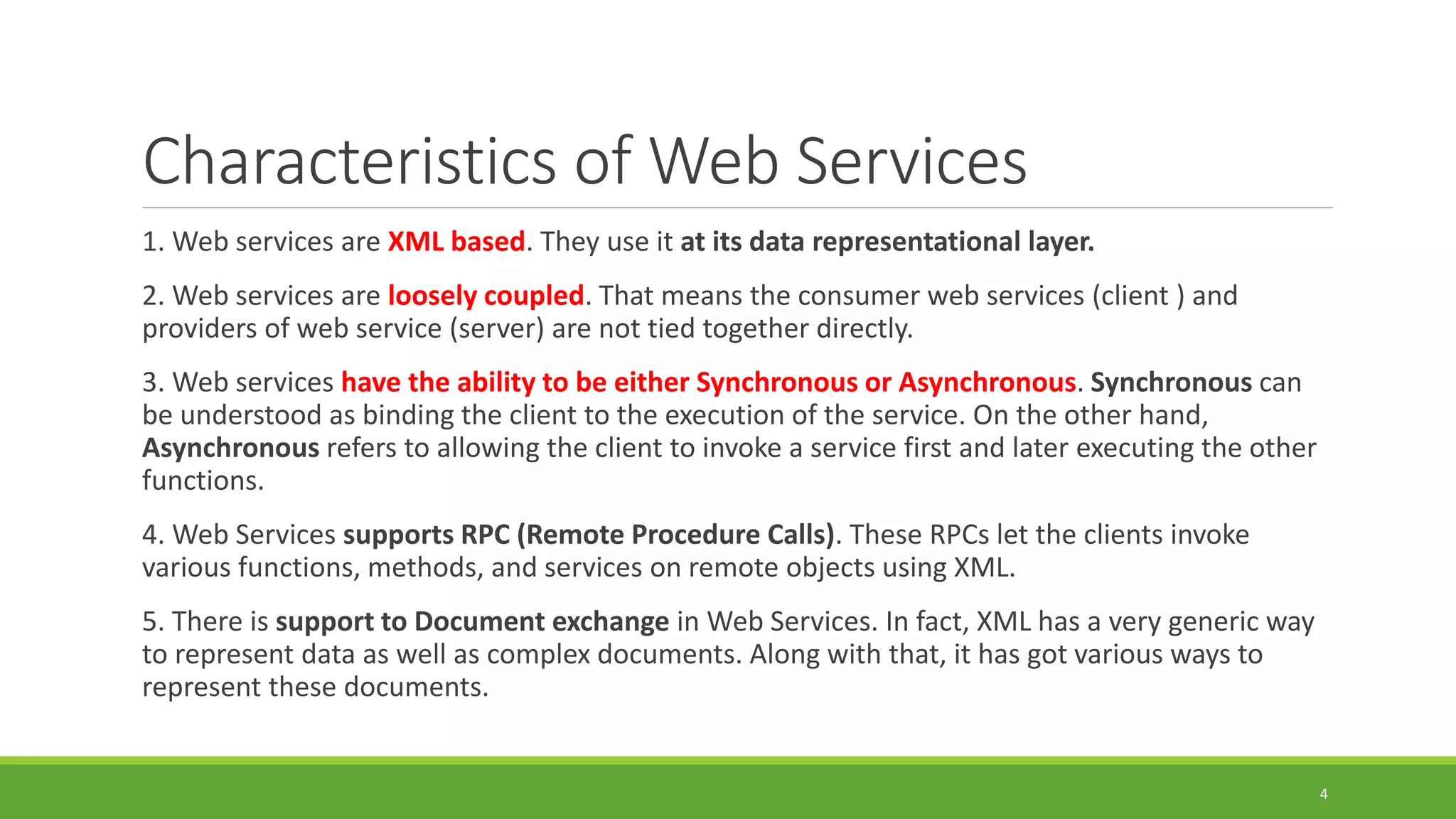
Request
Response
What are Web Services?
 A web service is a collection of open protocols and standards (http, xml, json …etc.) used for
exchanging data between applications or systems through web technology.
 It is required to provide interoperability.
 Software applications written in various programming languages and running on various
platforms can use web services to exchange data over computer networks like the Internet in a
manner similar to inter-process communication on a single computer.
 Example: you can consider an android application
interacting with a .NET app using a web service.
 Web services are hosted on servers side
3
Characteristics of Web Services
1. Web services are XML based. They use it at its data representational layer.
2. Web services are loosely coupled. That means the consumer web services (client ) and
providers of web service (server) are not tied together directly.
3. Web services have the ability to be either Synchronous or Asynchronous. Synchronous can
be understood as binding the client to the execution of the service. On the other hand,
Asynchronous refers to allowing the client to invoke a service first and later executing the other
functions.
4. Web Services supports RPC (Remote Procedure Calls). These RPCs let the clients invoke
various functions, methods, and services on remote objects using XML.
5. There is support to Document exchange in Web Services. In fact, XML has a very generic way
to represent data as well as complex documents. Along with that, it has got various ways to
represent these documents.
4
Types of Web Services in Android
1. XML-RPC
It is an XML based protocol for the exchange
of data between a huge range of devices over
the Internet.
2. UDDI
UDDI stands for Universal Descriptive,
Discovery, and Integration. It is an XML- based
standard used for detailing, publishing and
discovering new web services.
3. SOAP
SOAP here stands for Simple Object Access
Protocol. It is an XML based web service protocol
used for the exchange of data or documents over
HTTP (HyperText Transfer Protocol) or
SMTP(Simple Message Transfer Protocol). It
allows the communication of independent
processes that operate on disparate systems.
4. REST
REST is Representational State Transfer. It
provides communication and connectivity
between devices and the Internet.
5
What is API?
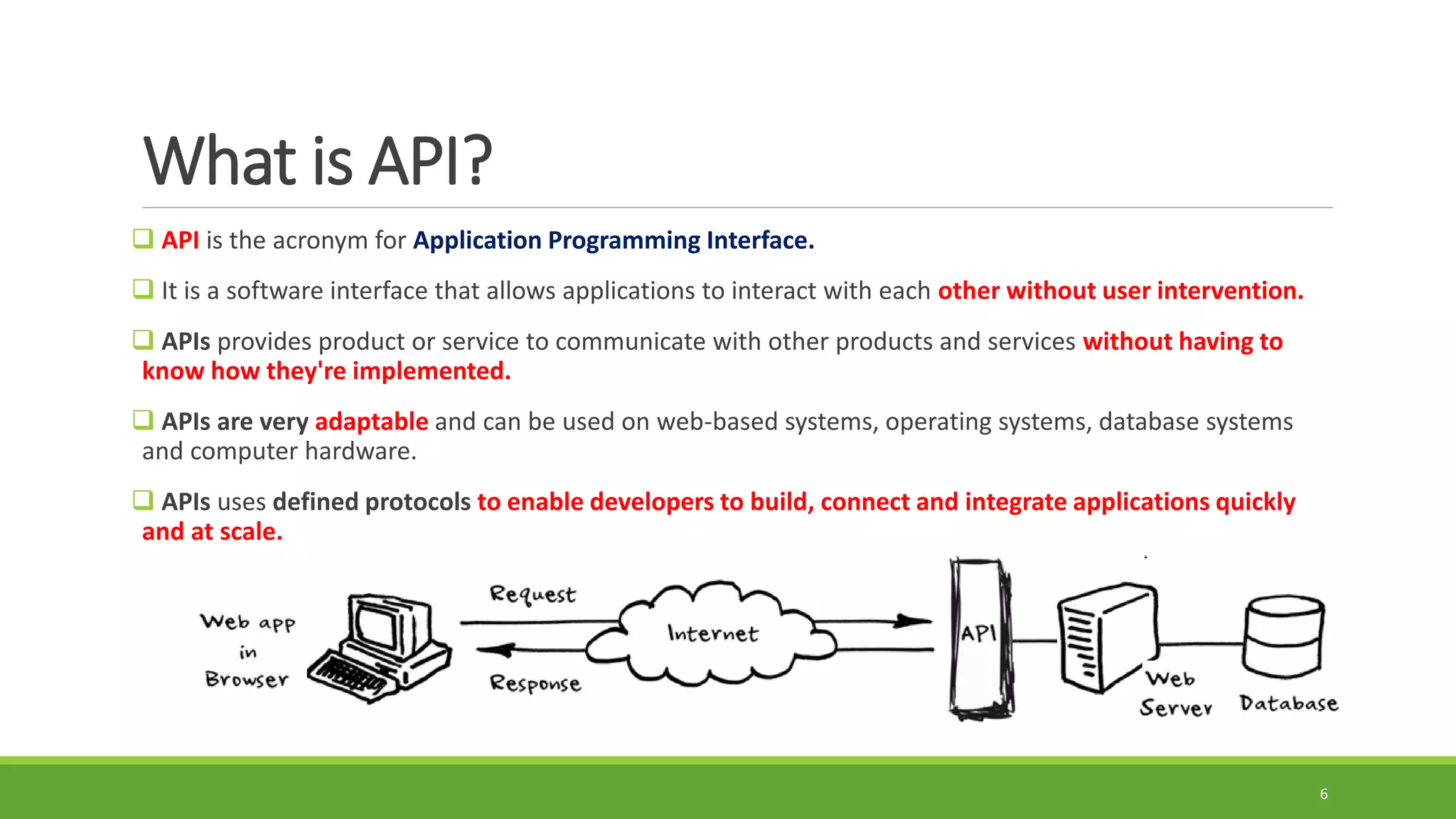
 API is the acronym for Application Programming Interface.
 It is a software interface that allows applications to interact with each other without user intervention.
 APIs provides product or service to communicate with other products and services without having to
know how they're implemented.
 APIs are very adaptable and can be used on web-based systems, operating systems, database systems
and computer hardware.
 APIs uses defined protocols to enable developers to build, connect and integrate applications quickly
and at scale.
6
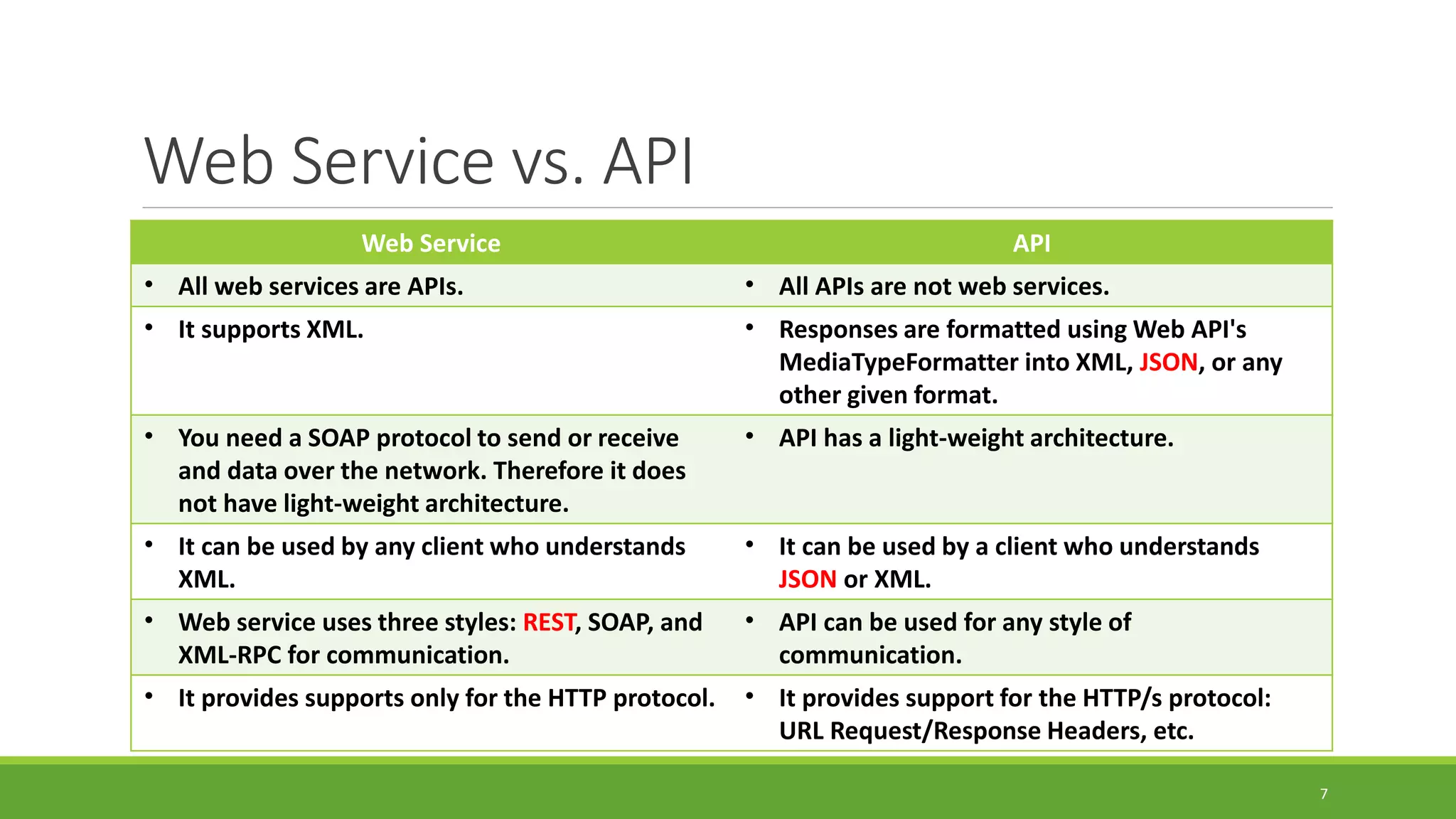
Web Service vs. API
Web Service API
• All web services are APIs. • All APIs are not web services.
• It supports XML. • Responses are formatted using Web API's
MediaTypeFormatter into XML, JSON, or any
other given format.
• You need a SOAP protocol to send or receive
and data over the network. Therefore it does
not have light-weight architecture.
• API has a light-weight architecture.
• It can be used by any client who understands
XML.
• It can be used by a client who understands
JSON or XML.
• Web service uses three styles: REST, SOAP, and
XML-RPC for communication.
• API can be used for any style of
communication.
• It provides supports only for the HTTP protocol. • It provides support for the HTTP/s protocol:
URL Request/Response Headers, etc.
7
API Request Methods
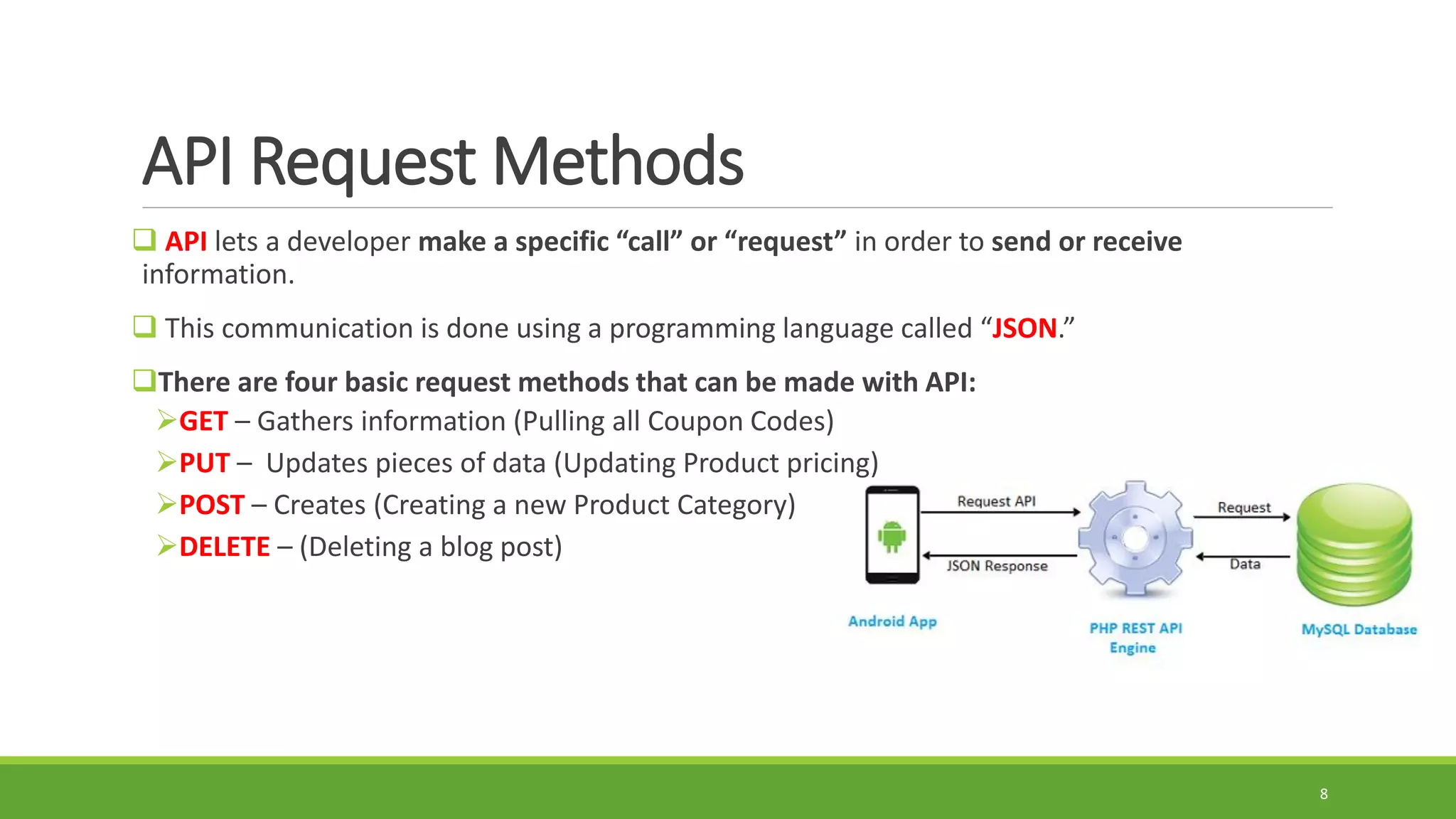
 API lets a developer make a specific “call” or “request” in order to send or receive
information.
 This communication is done using a programming language called “JSON.”
There are four basic request methods that can be made with API:
GET – Gathers information (Pulling all Coupon Codes)
PUT – Updates pieces of data (Updating Product pricing)
POST – Creates (Creating a new Product Category)
DELETE – (Deleting a blog post)
8
What is JSON?
 JSON stands for JavaScript Object Notation.
 JSON is an open standard file format, and data interchange format, that uses human-
readable text to store and transmit data objects consisting of attribute/key–value pairs and
array data types.
 JSON is a very light weight, structured, easy to parse and much human readable text.
 It is best alternative to XML when your android app needs to interchange data with your
server.
 If your app consuming XML data, you can always refer to Android XML Parsing Tutorial.
 In this course, we will work on parsing JSON data format.
9
Components of an API Request
1. Endpoint
There are two key parts to an endpoint that
are used when making an API request:
A) URL:
 It is a base url used for all API Requests.
 Example: https://api.bigcommerce.com/stores/
 This may look like a regular URL but if you
plug this into a web browser, you will receive a
404 error message.
B) PATH:
The path will vary depending on what you are
trying to accomplish.
You can find a list of available paths by visiting
the developer documentation of the used API.
Example: /{store_hash}/v3/catalog/products.
 {store_hash} is a variable.
Complete Endpoint
https://api.bigcommerce.com/stores/{store_hash}/v3/catalog/products
10
Components of an API Request Cont.
2. Header
Headers provide information to the client and server.
Example: Auth Token, Client ID, Content Type like “application/json”
3. Method
Methods are the actions taken when sending a request. And they are GET, PUT, POST, and
DELETE.
4. Data/Body
It is information that will be either sent to or returned by a server.
11
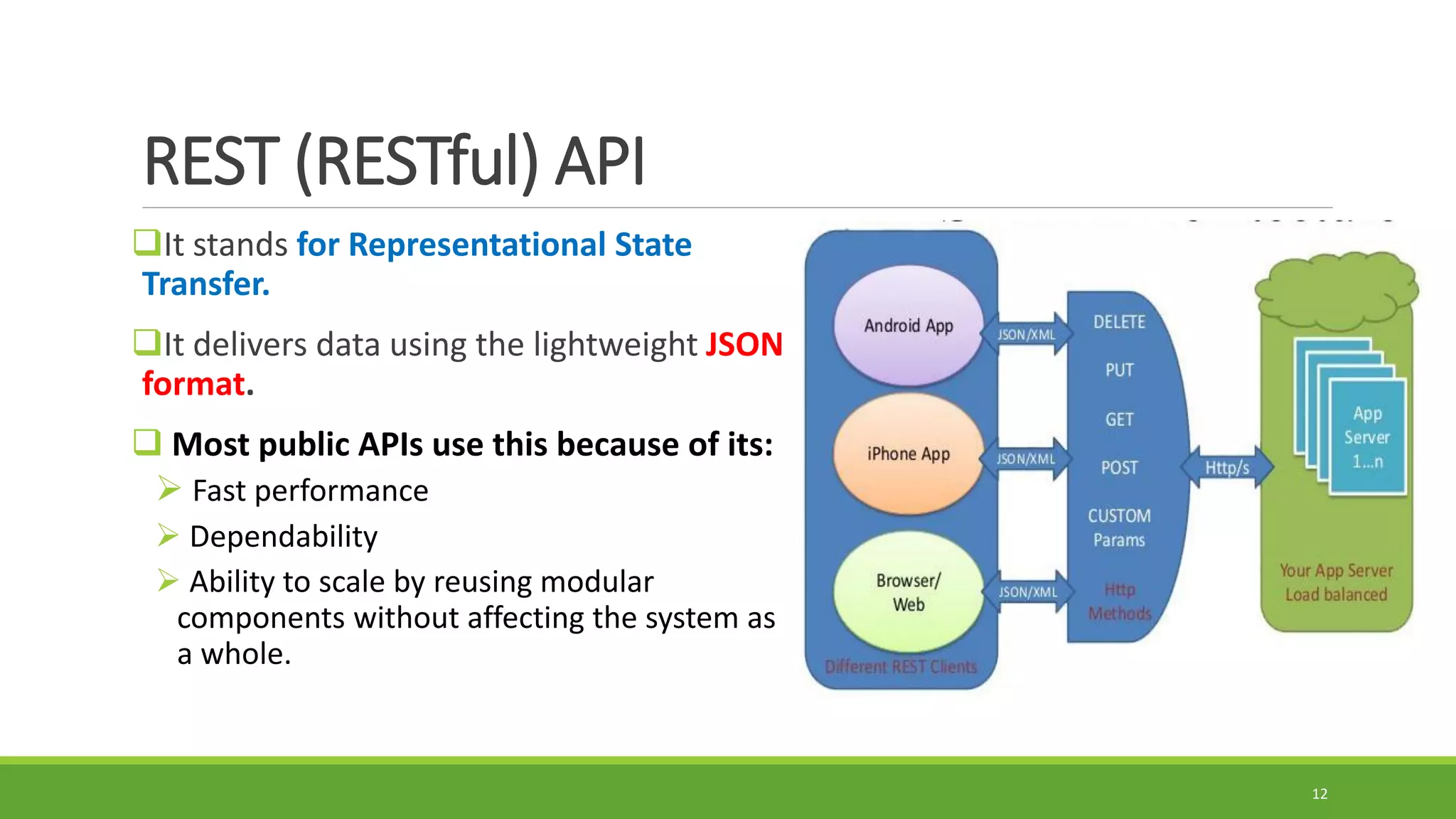
REST (RESTful) API
It stands for Representational State
Transfer.
It delivers data using the lightweight JSON
format.
 Most public APIs use this because of its:
 Fast performance
 Dependability
 Ability to scale by reusing modular
components without affecting the system as
a whole.
12
JSON Formats (Object, Arrary)
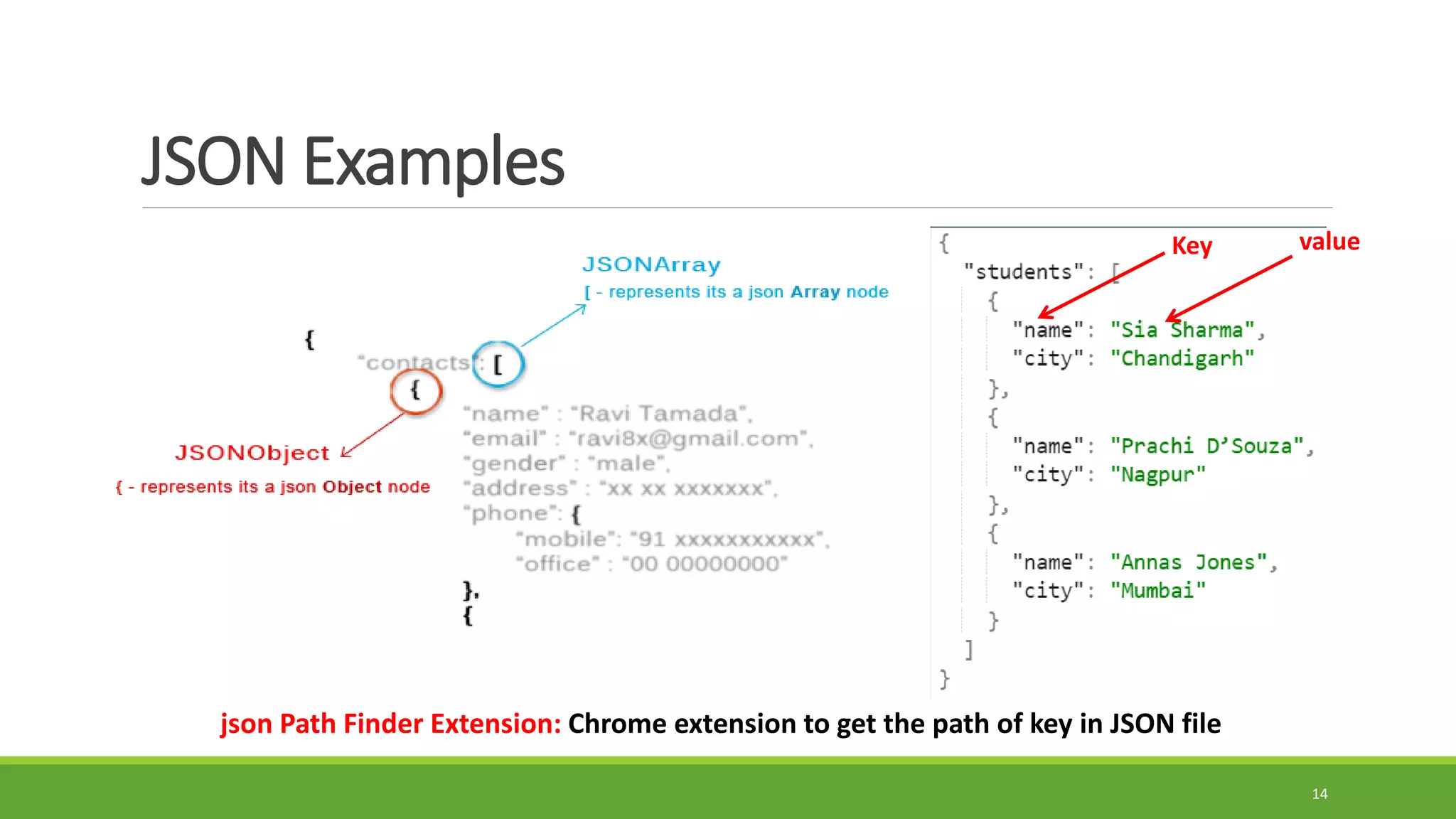
 JSON uses two types of brackets that are as follows:
[]: To declare the elements of Array in JSON, they’re written in square brackets.
{}: To create JSON objects, the elements are written in curly brackets.
There are free online JSON parser such as:
https://jsonformatter.org/json-parser
http://json.parser.online.fr/
 JSON has the following types of structures:
JSON Objects: The elements inside the curly brackets {} are known as Objects.
JSON Array: A list of values/objects in [], known as Arrays.
JSON Key-Value: This data is stored as a pair of keys and values.
13
JSON Examples
14
Key value
json Path Finder Extension: Chrome extension to get the path of key in JSON file
How to Test API?
15
Developer Tools to test API
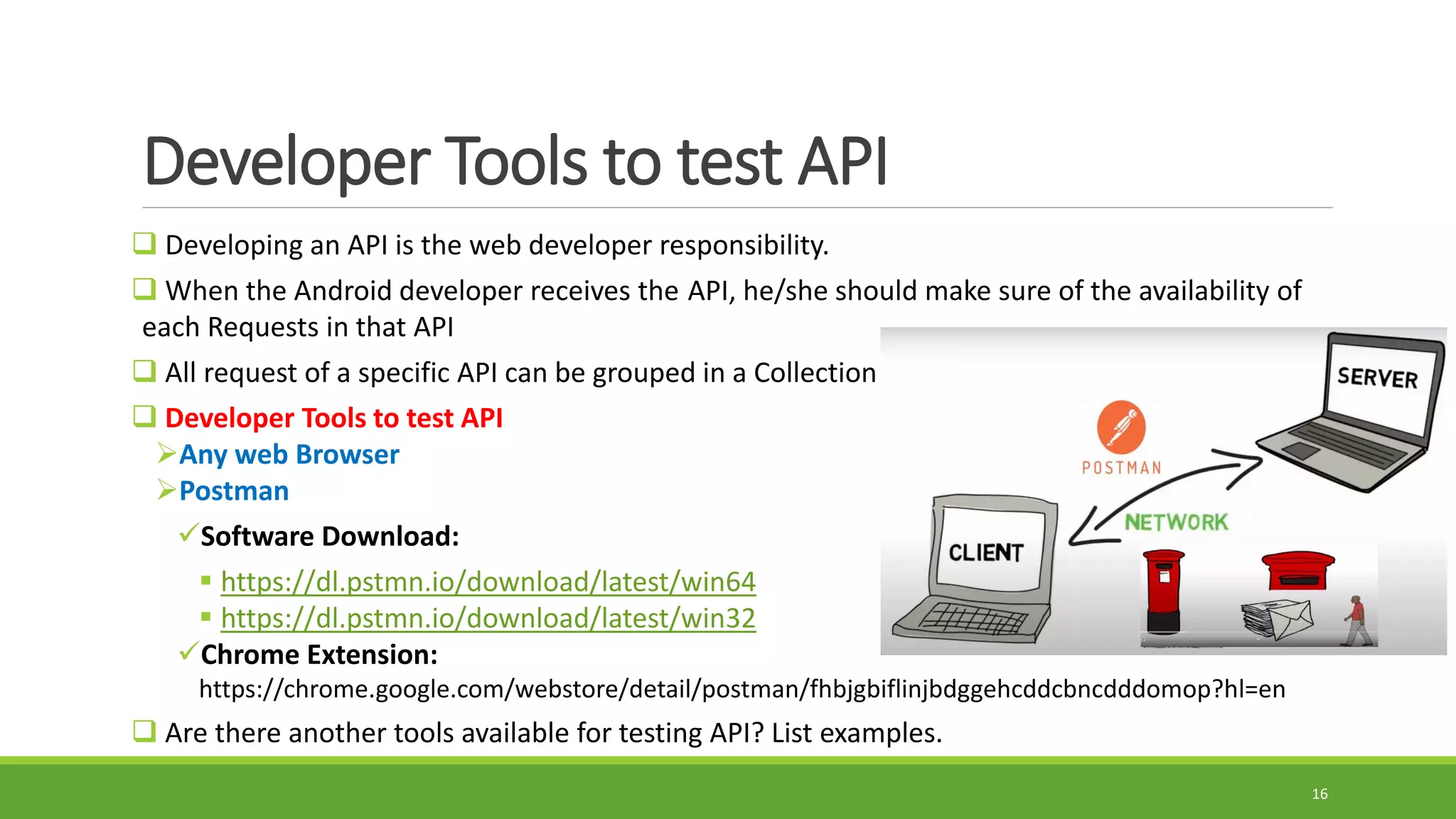
 Developing an API is the web developer responsibility.
 When the Android developer receives the API, he/she should make sure of the availability of
each Requests in that API
 All request of a specific API can be grouped in a Collection
 Developer Tools to test API
Any web Browser
Postman
Software Download:
 https://dl.pstmn.io/download/latest/win64
 https://dl.pstmn.io/download/latest/win32
Chrome Extension:
https://chrome.google.com/webstore/detail/postman/fhbjgbiflinjbdggehcddcbncdddomop?hl=en
 Are there another tools available for testing API? List examples.
16
Testing API using
web browser
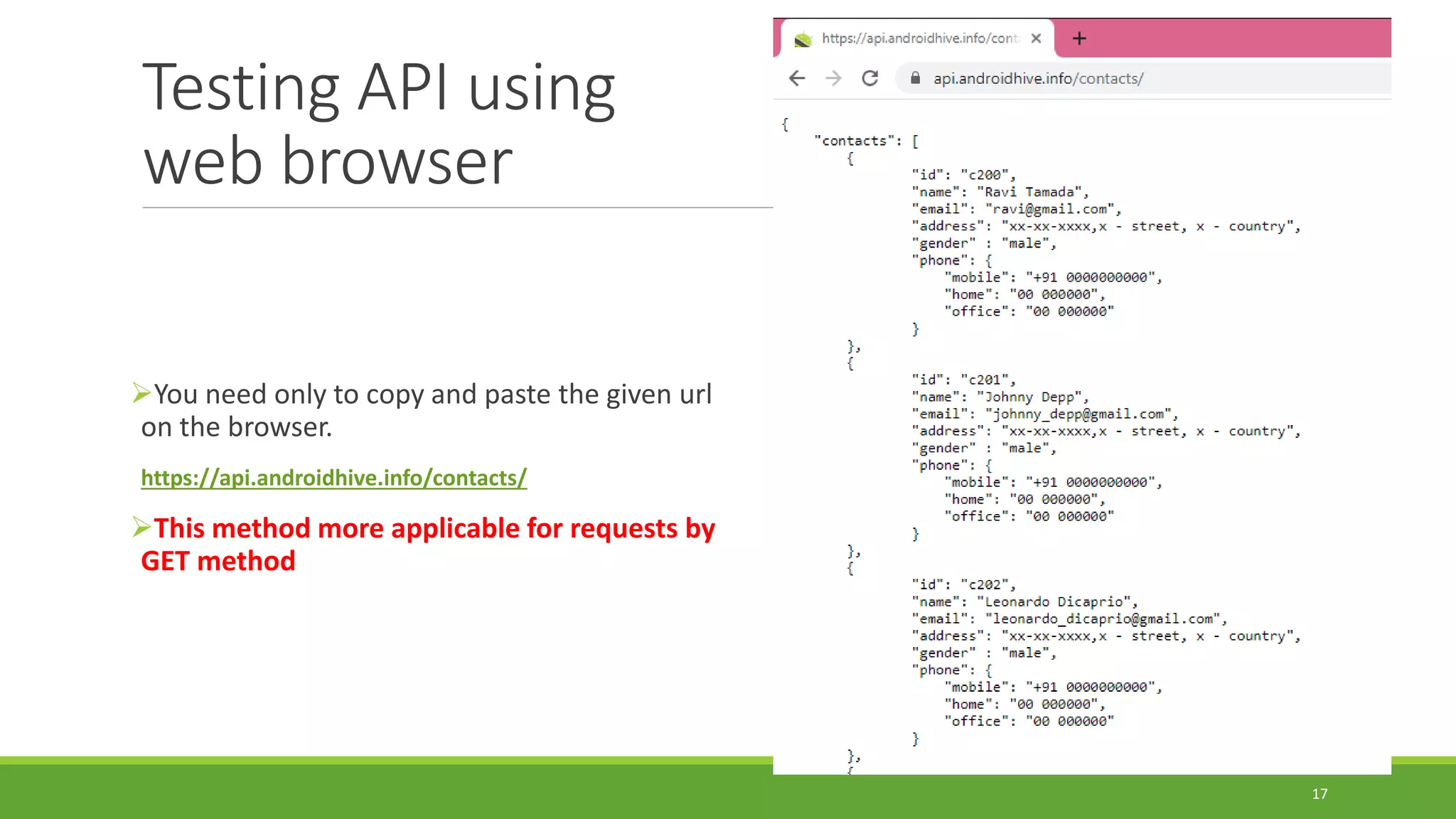
You need only to copy and paste the given url
on the browser.
https://api.androidhive.info/contacts/
This method more applicable for requests by
GET method
17
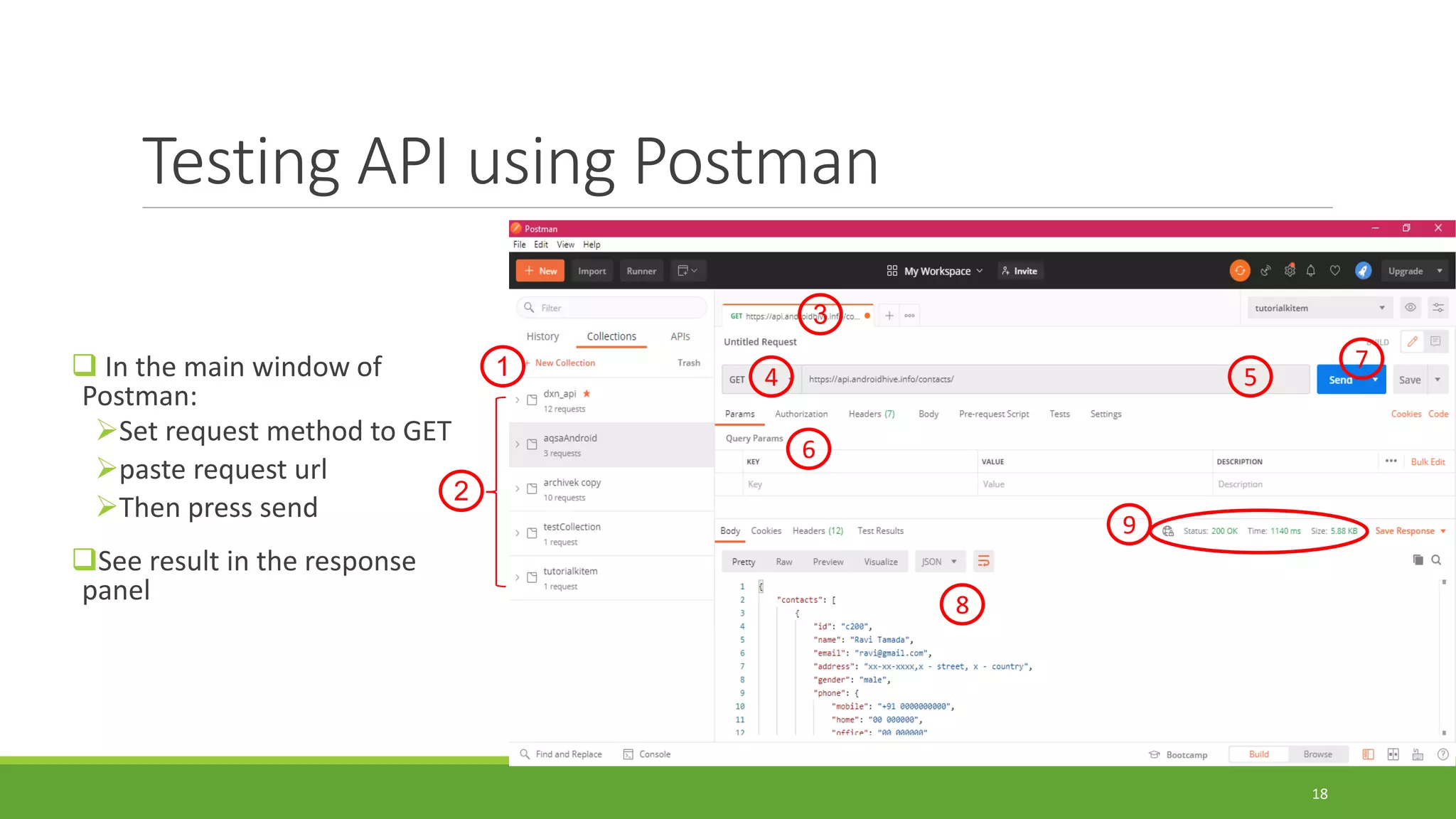
Testing API using Postman
 In the main window of
Postman:
Set request method to GET
paste request url
Then press send
See result in the response
panel
18
5
7
6
4
3
1
2
8
9
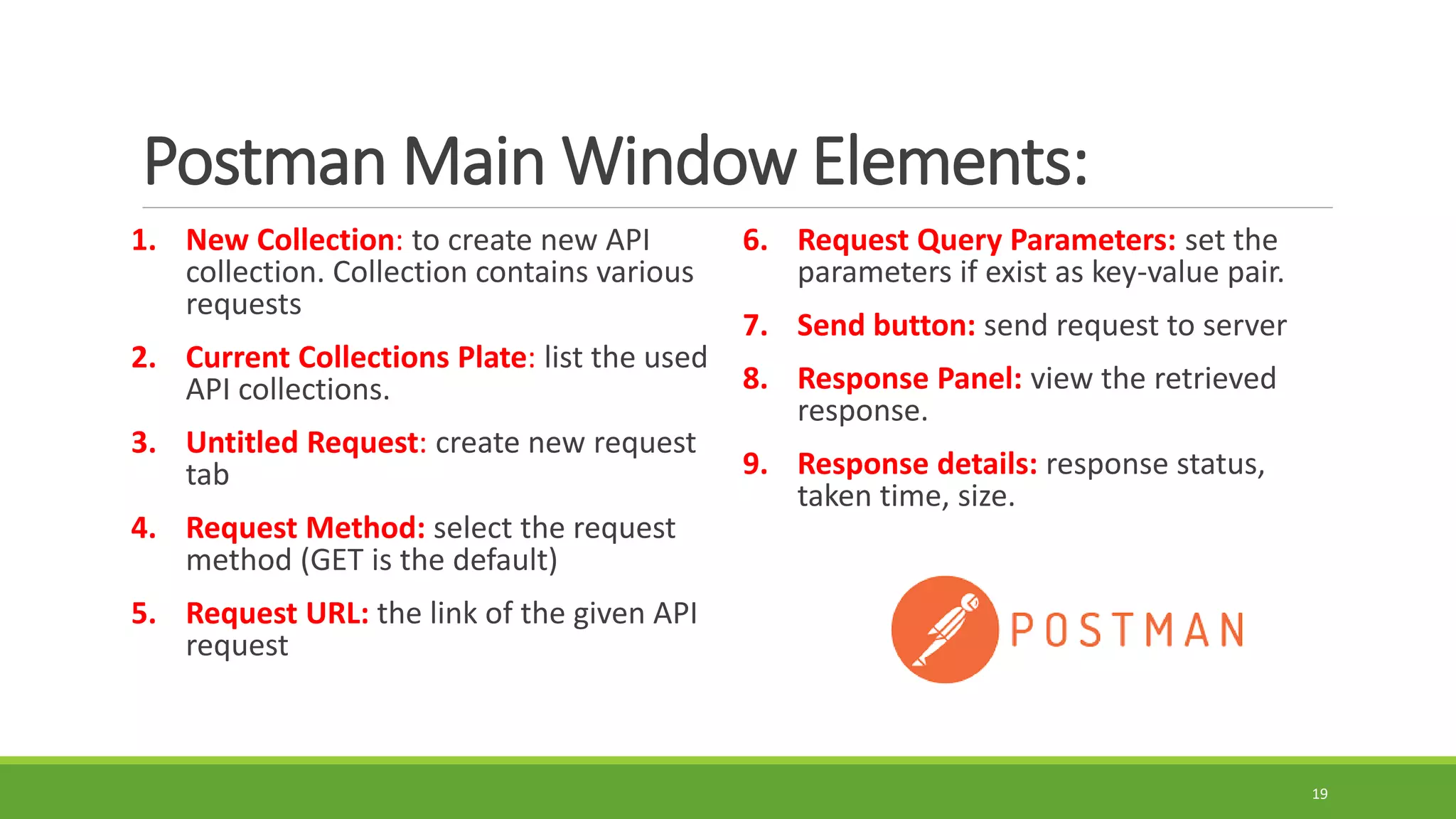
Postman Main Window Elements:
1. New Collection: to create new API
collection. Collection contains various
requests
2. Current Collections Plate: list the used
API collections.
3. Untitled Request: create new request
tab
4. Request Method: select the request
method (GET is the default)
5. Request URL: the link of the given API
request
6. Request Query Parameters: set the
parameters if exist as key-value pair.
7. Send button: send request to server
8. Response Panel: view the retrieved
response.
9. Response details: response status,
taken time, size.
19
Fake API
Whenever you start working on a new project, you might need to consume an API.
But that API might not be written yet, or you don’t want to hit the real thing while developing
the app.
Therefore, you can create a fake API to use it for local development, build prototypes, testing
or any other related tasks.
There are fake APIs free, and paid.
We are going to use MockAPI service to create fake API or use there demo API.
 https://mockapi.io/projects
Or you can look for another fake API generator using GOOGLE. Mention them.
20
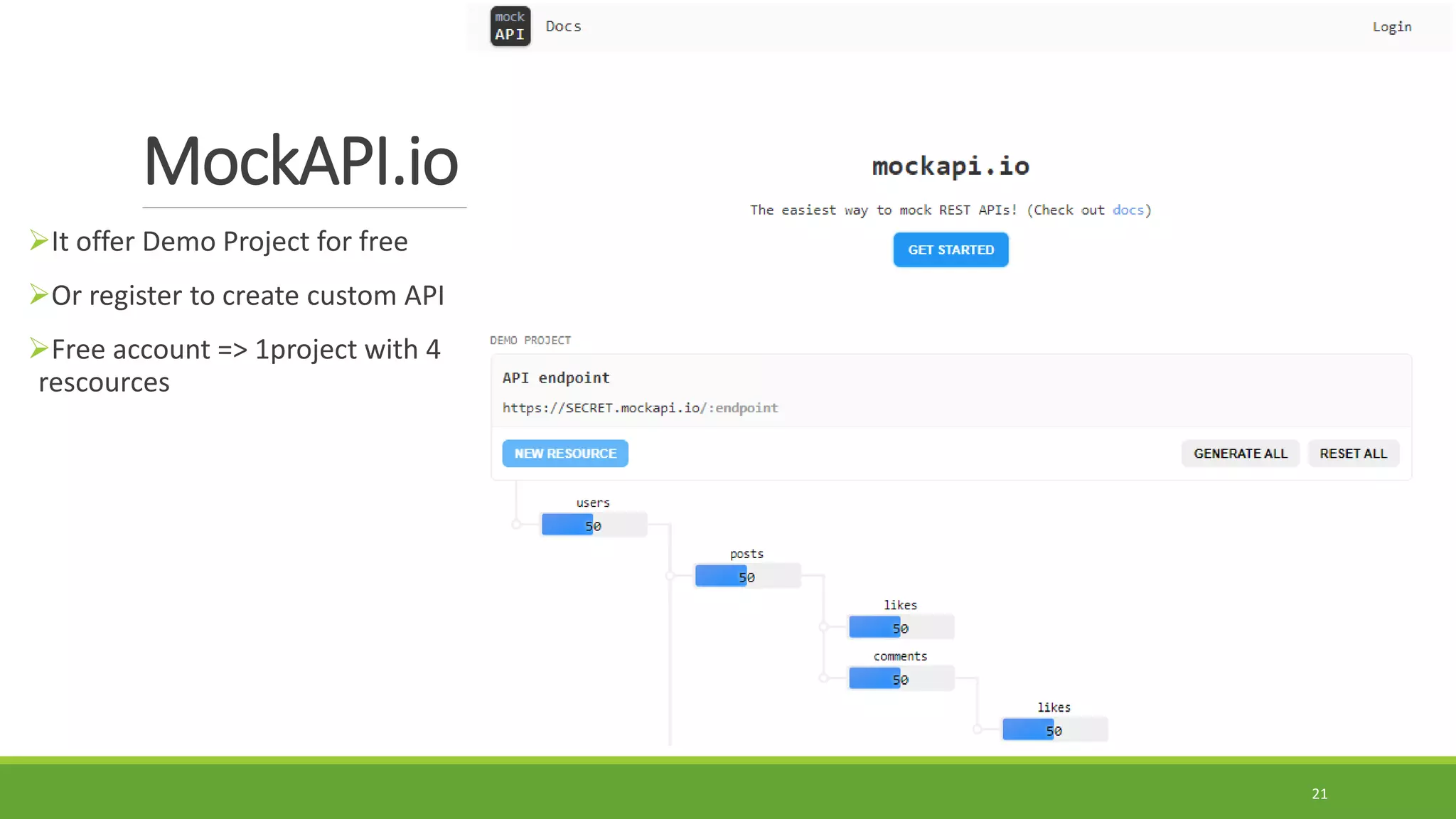
MockAPI.io
It offer Demo Project for free
Or register to create custom API
Free account => 1project with 4
rescources
21
Let’s Practice
Step 1: Create Fake API
Step 2: Test the created fake API using Postman.
22

Session 8 Android Web Services - Part 1.pdf

  • 1.
    Lec. #8: Workingwith Web Services – Part 1 Mobile Applications Development 2 SECOND SEMESTER OF THE ACADEMIC YEAR 2020/2021
  • 2.
  • 3.
    Request Response What are WebServices?  A web service is a collection of open protocols and standards (http, xml, json …etc.) used for exchanging data between applications or systems through web technology.  It is required to provide interoperability.  Software applications written in various programming languages and running on various platforms can use web services to exchange data over computer networks like the Internet in a manner similar to inter-process communication on a single computer.  Example: you can consider an android application interacting with a .NET app using a web service.  Web services are hosted on servers side 3
  • 4.
    Characteristics of WebServices 1. Web services are XML based. They use it at its data representational layer. 2. Web services are loosely coupled. That means the consumer web services (client ) and providers of web service (server) are not tied together directly. 3. Web services have the ability to be either Synchronous or Asynchronous. Synchronous can be understood as binding the client to the execution of the service. On the other hand, Asynchronous refers to allowing the client to invoke a service first and later executing the other functions. 4. Web Services supports RPC (Remote Procedure Calls). These RPCs let the clients invoke various functions, methods, and services on remote objects using XML. 5. There is support to Document exchange in Web Services. In fact, XML has a very generic way to represent data as well as complex documents. Along with that, it has got various ways to represent these documents. 4
  • 5.
    Types of WebServices in Android 1. XML-RPC It is an XML based protocol for the exchange of data between a huge range of devices over the Internet. 2. UDDI UDDI stands for Universal Descriptive, Discovery, and Integration. It is an XML- based standard used for detailing, publishing and discovering new web services. 3. SOAP SOAP here stands for Simple Object Access Protocol. It is an XML based web service protocol used for the exchange of data or documents over HTTP (HyperText Transfer Protocol) or SMTP(Simple Message Transfer Protocol). It allows the communication of independent processes that operate on disparate systems. 4. REST REST is Representational State Transfer. It provides communication and connectivity between devices and the Internet. 5
  • 6.
    What is API? API is the acronym for Application Programming Interface.  It is a software interface that allows applications to interact with each other without user intervention.  APIs provides product or service to communicate with other products and services without having to know how they're implemented.  APIs are very adaptable and can be used on web-based systems, operating systems, database systems and computer hardware.  APIs uses defined protocols to enable developers to build, connect and integrate applications quickly and at scale. 6
  • 7.
    Web Service vs.API Web Service API • All web services are APIs. • All APIs are not web services. • It supports XML. • Responses are formatted using Web API's MediaTypeFormatter into XML, JSON, or any other given format. • You need a SOAP protocol to send or receive and data over the network. Therefore it does not have light-weight architecture. • API has a light-weight architecture. • It can be used by any client who understands XML. • It can be used by a client who understands JSON or XML. • Web service uses three styles: REST, SOAP, and XML-RPC for communication. • API can be used for any style of communication. • It provides supports only for the HTTP protocol. • It provides support for the HTTP/s protocol: URL Request/Response Headers, etc. 7
  • 8.
    API Request Methods API lets a developer make a specific “call” or “request” in order to send or receive information.  This communication is done using a programming language called “JSON.” There are four basic request methods that can be made with API: GET – Gathers information (Pulling all Coupon Codes) PUT – Updates pieces of data (Updating Product pricing) POST – Creates (Creating a new Product Category) DELETE – (Deleting a blog post) 8
  • 9.
    What is JSON? JSON stands for JavaScript Object Notation.  JSON is an open standard file format, and data interchange format, that uses human- readable text to store and transmit data objects consisting of attribute/key–value pairs and array data types.  JSON is a very light weight, structured, easy to parse and much human readable text.  It is best alternative to XML when your android app needs to interchange data with your server.  If your app consuming XML data, you can always refer to Android XML Parsing Tutorial.  In this course, we will work on parsing JSON data format. 9
  • 10.
    Components of anAPI Request 1. Endpoint There are two key parts to an endpoint that are used when making an API request: A) URL:  It is a base url used for all API Requests.  Example: https://api.bigcommerce.com/stores/  This may look like a regular URL but if you plug this into a web browser, you will receive a 404 error message. B) PATH: The path will vary depending on what you are trying to accomplish. You can find a list of available paths by visiting the developer documentation of the used API. Example: /{store_hash}/v3/catalog/products.  {store_hash} is a variable. Complete Endpoint https://api.bigcommerce.com/stores/{store_hash}/v3/catalog/products 10
  • 11.
    Components of anAPI Request Cont. 2. Header Headers provide information to the client and server. Example: Auth Token, Client ID, Content Type like “application/json” 3. Method Methods are the actions taken when sending a request. And they are GET, PUT, POST, and DELETE. 4. Data/Body It is information that will be either sent to or returned by a server. 11
  • 12.
    REST (RESTful) API Itstands for Representational State Transfer. It delivers data using the lightweight JSON format.  Most public APIs use this because of its:  Fast performance  Dependability  Ability to scale by reusing modular components without affecting the system as a whole. 12
  • 13.
    JSON Formats (Object,Arrary)  JSON uses two types of brackets that are as follows: []: To declare the elements of Array in JSON, they’re written in square brackets. {}: To create JSON objects, the elements are written in curly brackets. There are free online JSON parser such as: https://jsonformatter.org/json-parser http://json.parser.online.fr/  JSON has the following types of structures: JSON Objects: The elements inside the curly brackets {} are known as Objects. JSON Array: A list of values/objects in [], known as Arrays. JSON Key-Value: This data is stored as a pair of keys and values. 13
  • 14.
    JSON Examples 14 Key value jsonPath Finder Extension: Chrome extension to get the path of key in JSON file
  • 15.
    How to TestAPI? 15
  • 16.
    Developer Tools totest API  Developing an API is the web developer responsibility.  When the Android developer receives the API, he/she should make sure of the availability of each Requests in that API  All request of a specific API can be grouped in a Collection  Developer Tools to test API Any web Browser Postman Software Download:  https://dl.pstmn.io/download/latest/win64  https://dl.pstmn.io/download/latest/win32 Chrome Extension: https://chrome.google.com/webstore/detail/postman/fhbjgbiflinjbdggehcddcbncdddomop?hl=en  Are there another tools available for testing API? List examples. 16
  • 17.
    Testing API using webbrowser You need only to copy and paste the given url on the browser. https://api.androidhive.info/contacts/ This method more applicable for requests by GET method 17
  • 18.
    Testing API usingPostman  In the main window of Postman: Set request method to GET paste request url Then press send See result in the response panel 18 5 7 6 4 3 1 2 8 9
  • 19.
    Postman Main WindowElements: 1. New Collection: to create new API collection. Collection contains various requests 2. Current Collections Plate: list the used API collections. 3. Untitled Request: create new request tab 4. Request Method: select the request method (GET is the default) 5. Request URL: the link of the given API request 6. Request Query Parameters: set the parameters if exist as key-value pair. 7. Send button: send request to server 8. Response Panel: view the retrieved response. 9. Response details: response status, taken time, size. 19
  • 20.
    Fake API Whenever youstart working on a new project, you might need to consume an API. But that API might not be written yet, or you don’t want to hit the real thing while developing the app. Therefore, you can create a fake API to use it for local development, build prototypes, testing or any other related tasks. There are fake APIs free, and paid. We are going to use MockAPI service to create fake API or use there demo API.  https://mockapi.io/projects Or you can look for another fake API generator using GOOGLE. Mention them. 20
  • 21.
    MockAPI.io It offer DemoProject for free Or register to create custom API Free account => 1project with 4 rescources 21
  • 22.
    Let’s Practice Step 1:Create Fake API Step 2: Test the created fake API using Postman. 22