
Screaming Fast JSON parsing
Karthik Ramgopal
Who am I?
Engineer
Mobile Infrastructure lead
Former engineer on Flagship and Pulse app teams
Obsessed about performance
Connect with me: https://www.linkedin.com/in/karthikrg/
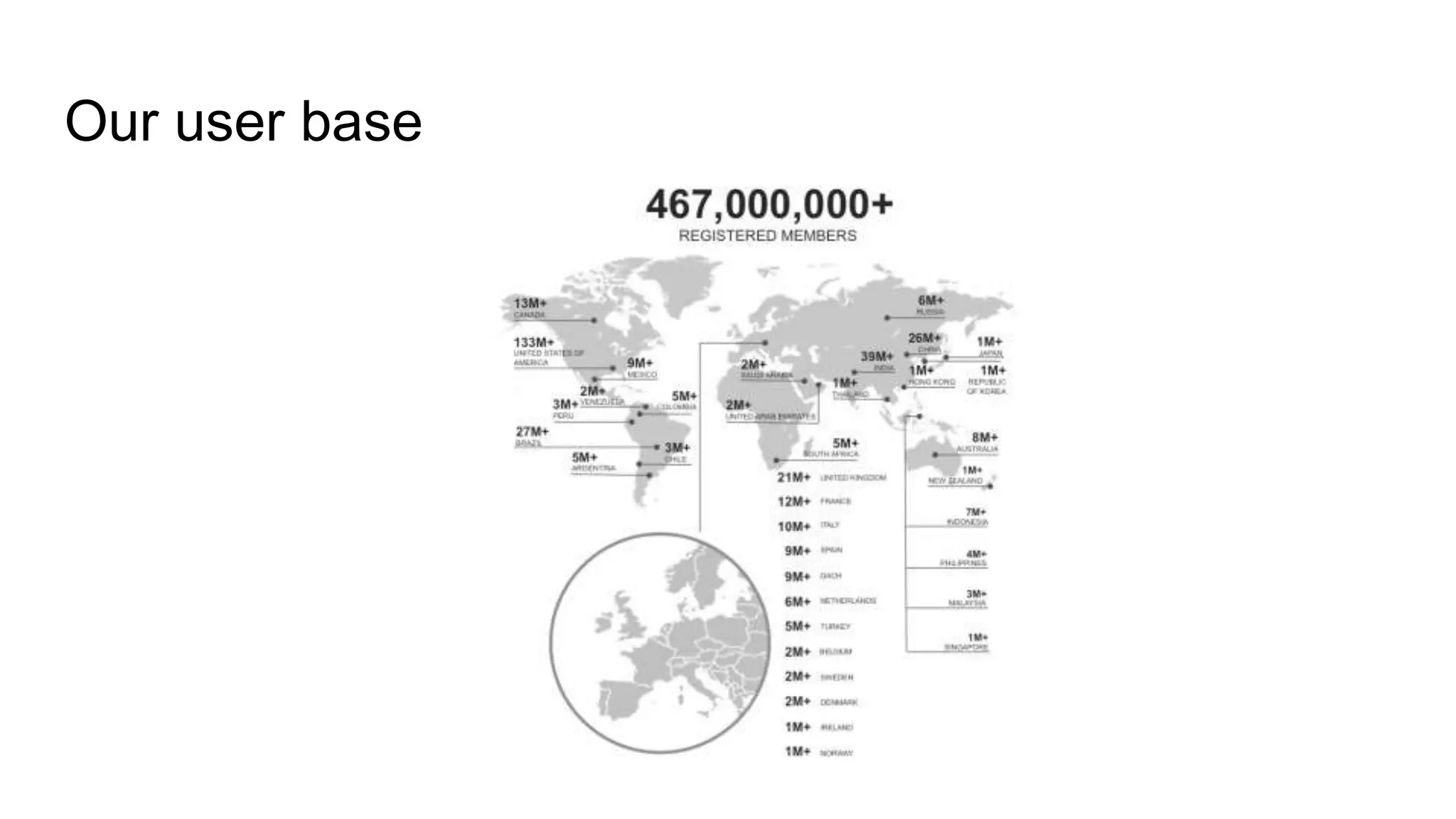
Our user base
LinkedIn’s Android app family
Job Search
Lookup
Pulse
Slideshare
Sales Navigator
Lynda
Recruiter
Students
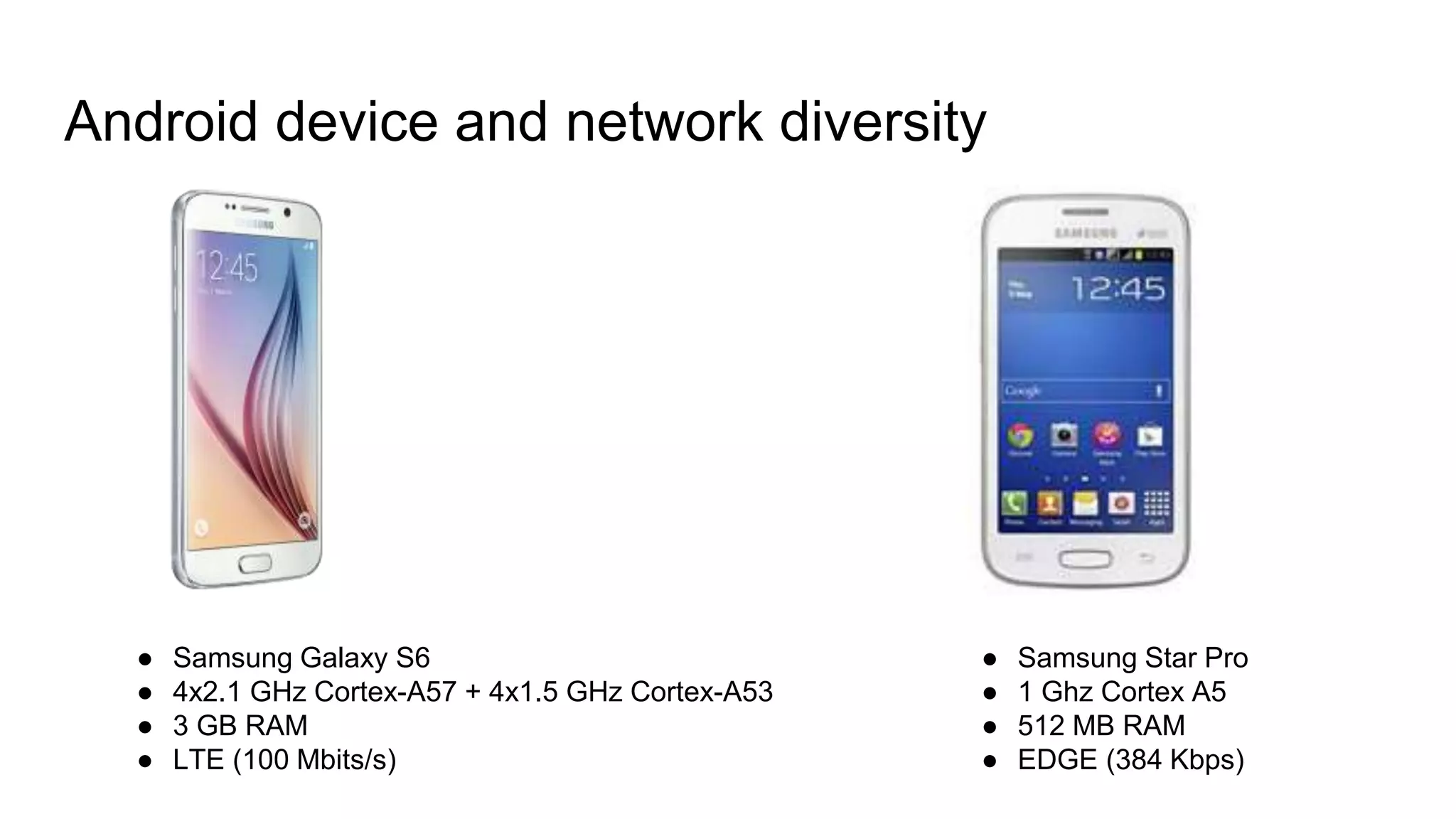
Android device and network diversity
● Samsung Galaxy S6
● 4x2.1 GHz Cortex-A57 + 4x1.5 GHz Cortex-A53
● 3 GB RAM
● LTE (100 Mbits/s)
● Samsung Star Pro
● 1 Ghz Cortex A5
● 512 MB RAM
● EDGE (384 Kbps)
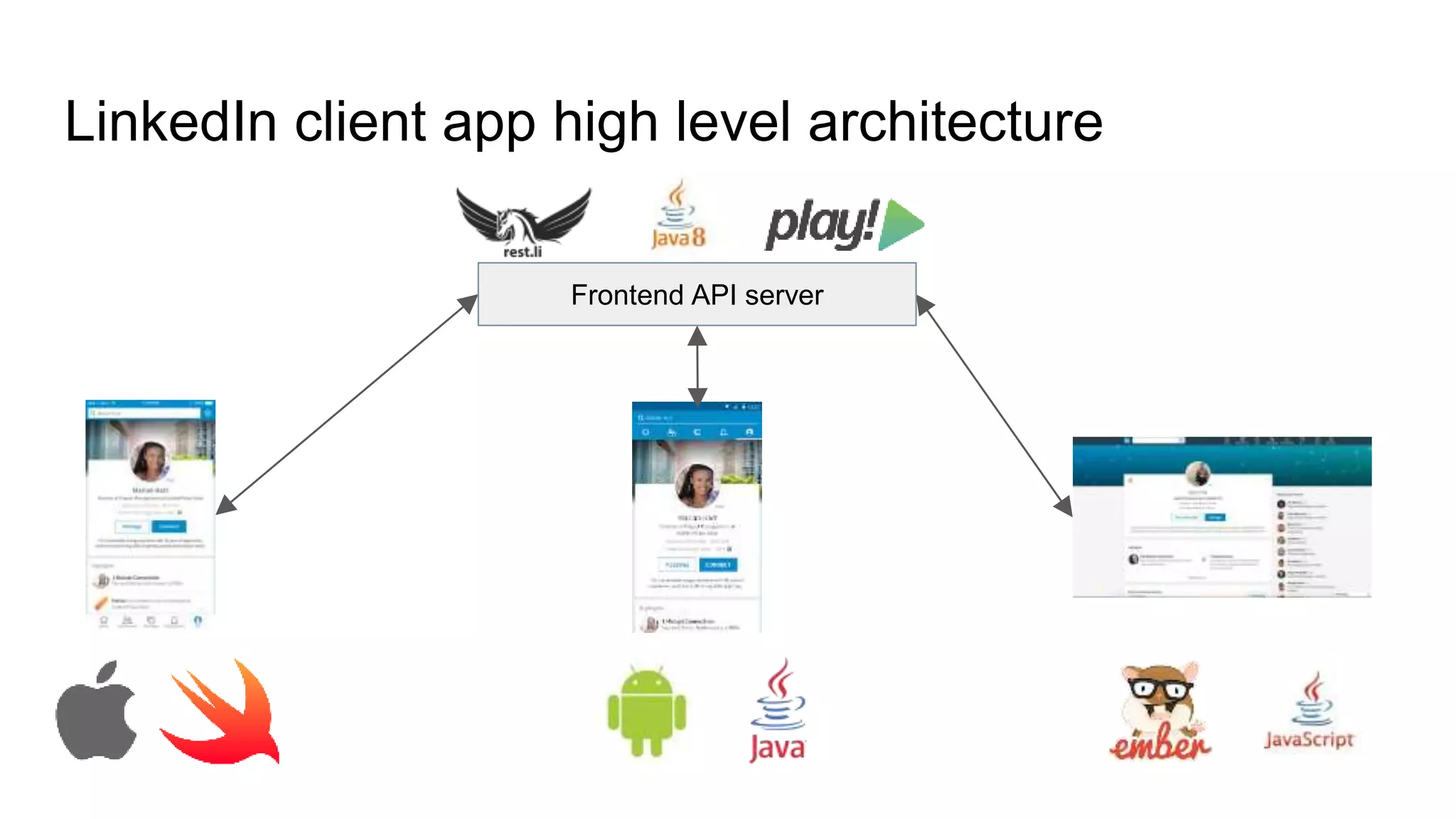
LinkedIn client app high level architecture
Frontend API server
LinkedIn uses JSON to talk between apps and server
What is JSON?
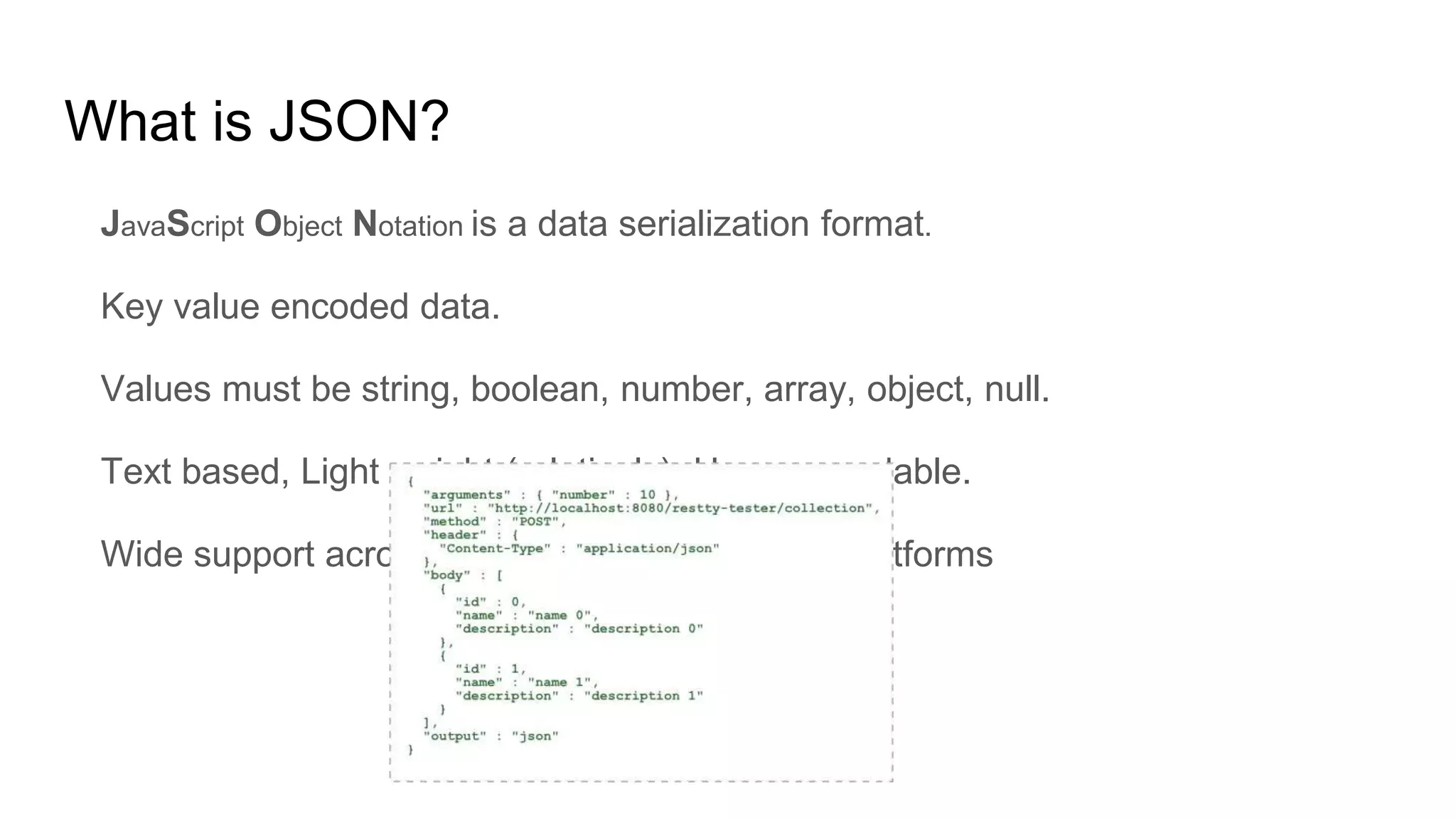
JavaScript Object Notation is a data serialization format.
Key value encoded data.
Values must be string, boolean, number, array, object, null.
Text based, Light weight (relatively), Human readable.
Wide support across programming languages/platforms
What else is out there?
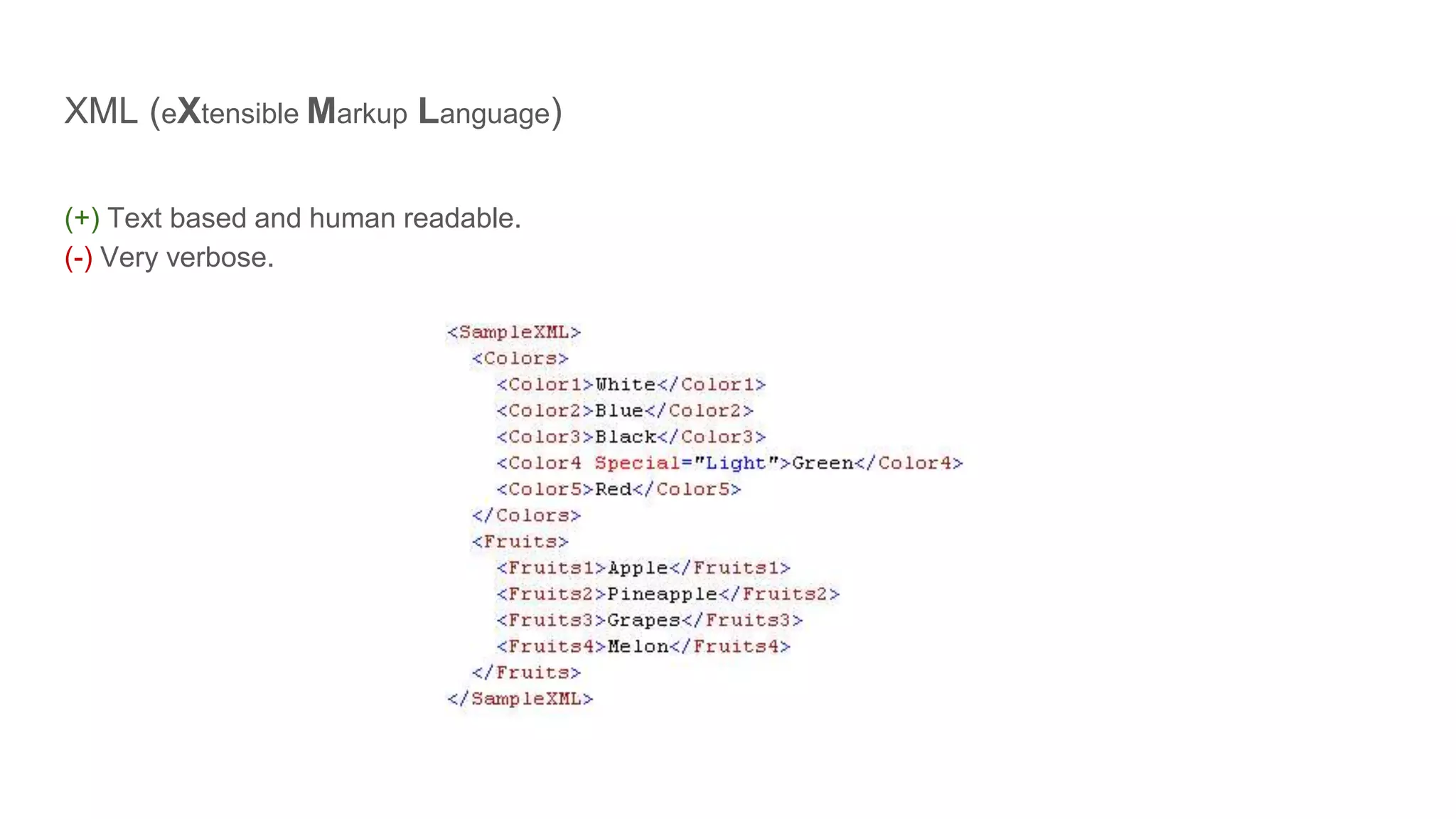
XML (eXtensible Markup Language)
(+) Text based and human readable.
(-) Very verbose.
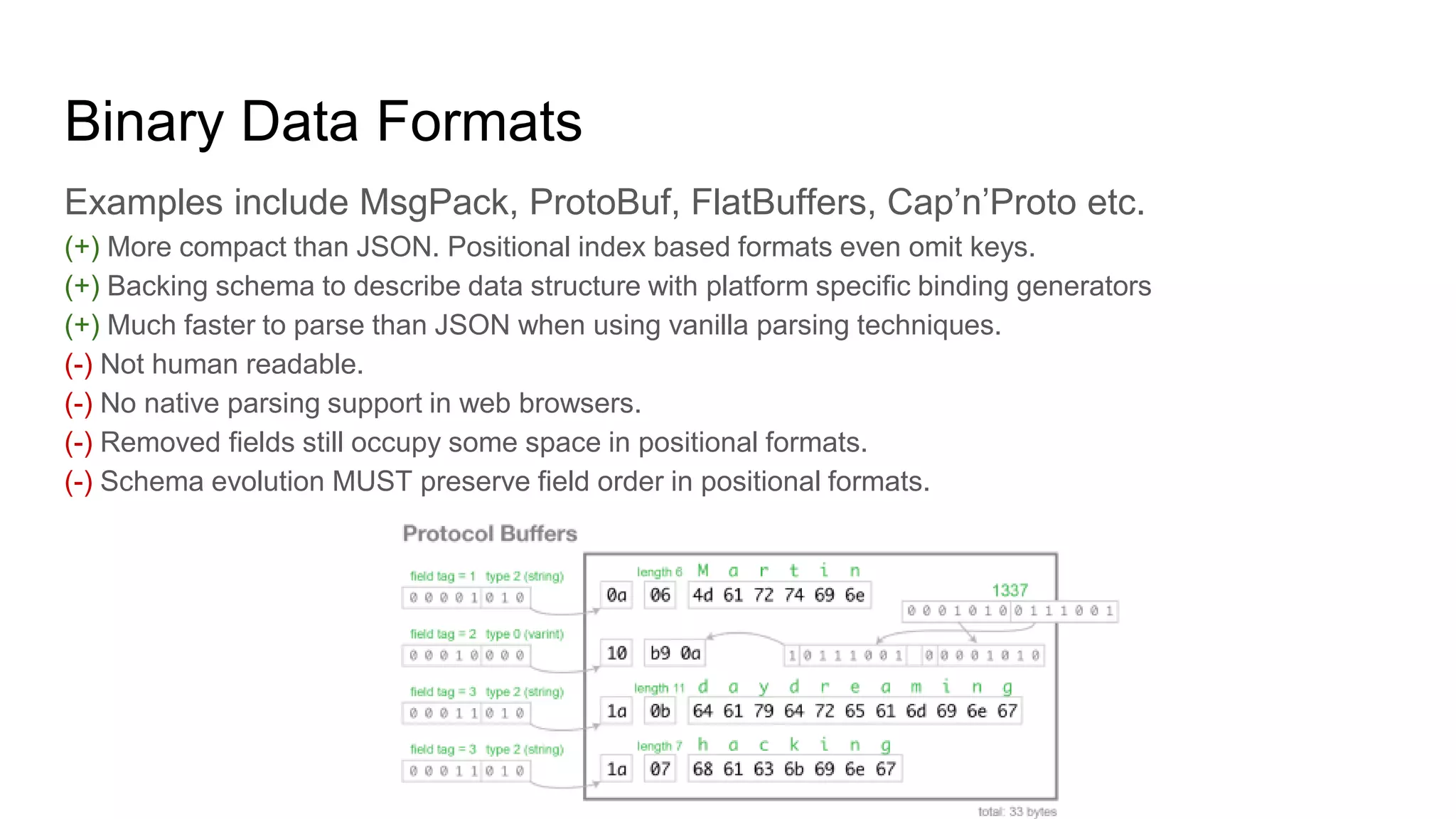
Binary Data Formats
Examples include MsgPack, ProtoBuf, FlatBuffers, Cap’n’Proto etc.
(+) More compact than JSON. Positional index based formats even omit keys.
(+) Backing schema to describe data structure with platform specific binding generators
(+) Much faster to parse than JSON when using vanilla parsing techniques.
(-) Not human readable.
(-) No native parsing support in web browsers.
(-) Removed fields still occupy some space in positional formats.
(-) Schema evolution MUST preserve field order in positional formats.
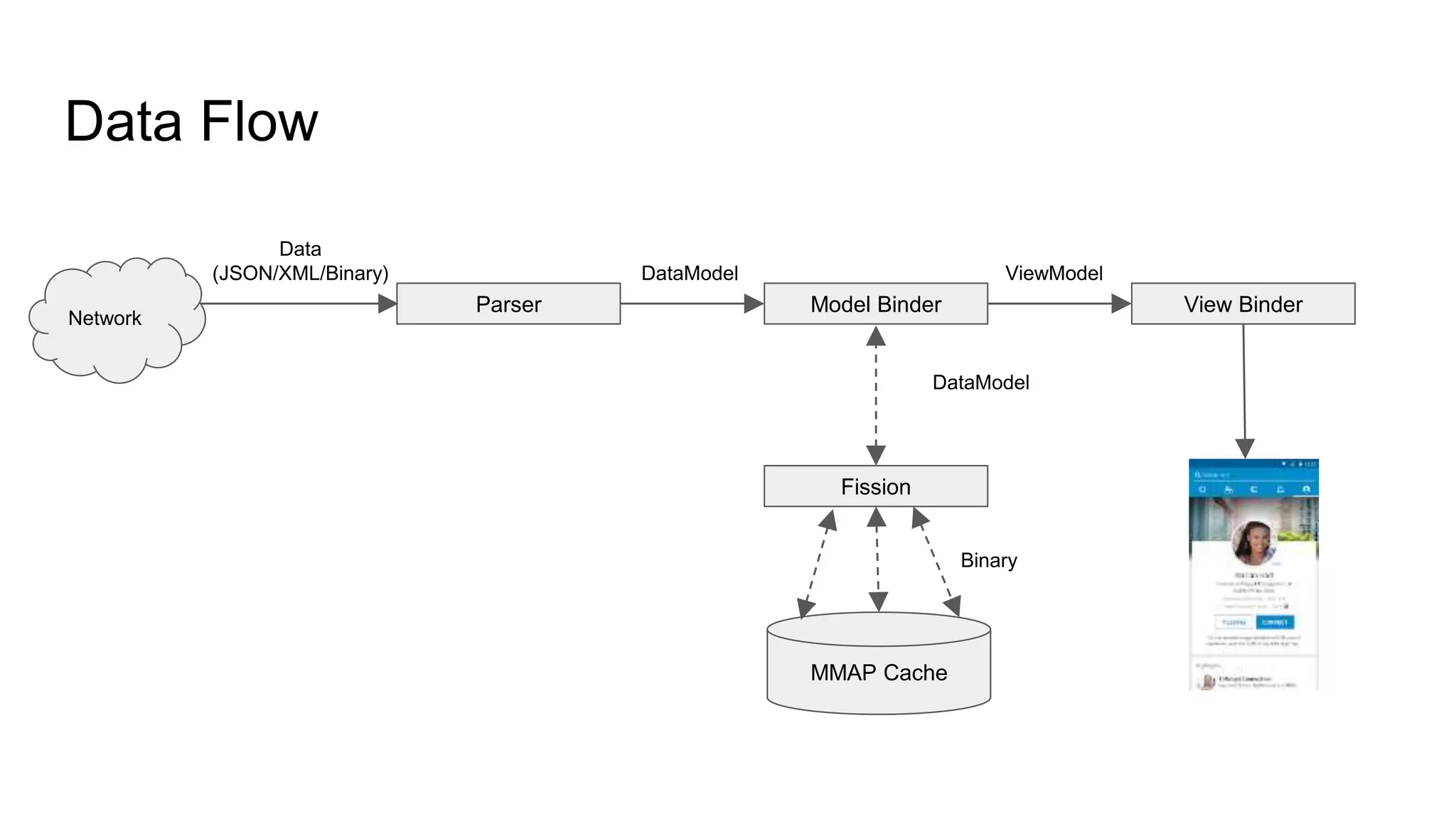
Data Flow
Parser Model Binder View Binder
Data
(JSON/XML/Binary) DataModel ViewModel
Network
Fission
DataModel
MMAP Cache
Binary
What affects JSON parsing performance?
CPU
Validating structure and tokenizing.
Large number of branches causing pipeline stalls.
Memory
Large number of small allocs on the heap
Causes memory churn slowing down the allocator
Garbage collection pauses
Types of JSON parsers
Who controls the flow of parsed data to the consumer?
Pull parser (Consumer controls)
Push parser (Parser controls)
How many times is the data processed?
Once (traditional parsers)
Twice (index overlay parsers)
How is the data processed?
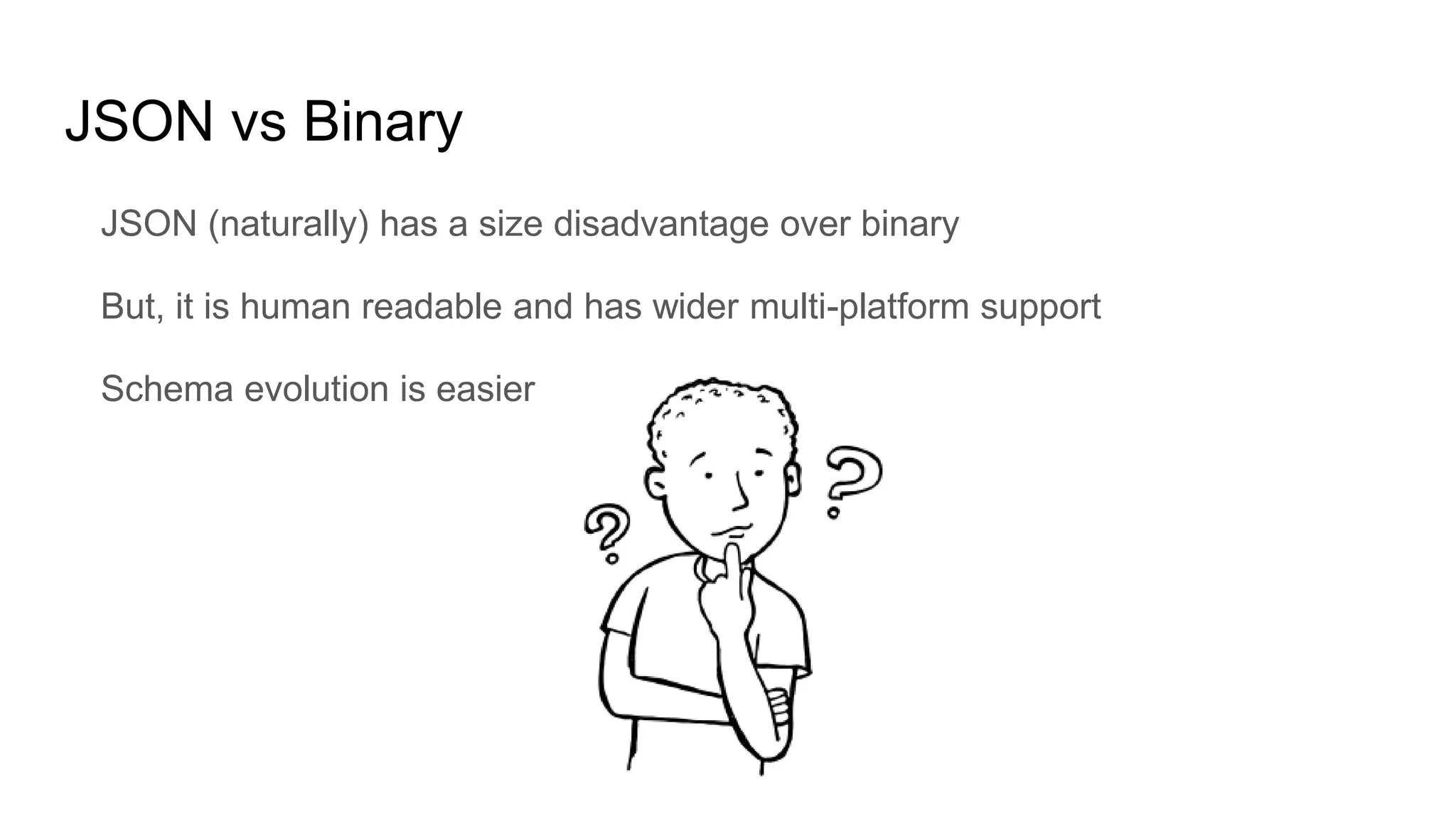
JSON vs Binary
JSON (naturally) has a size disadvantage over binary
But, it is human readable and has wider multi-platform support
Schema evolution is easier
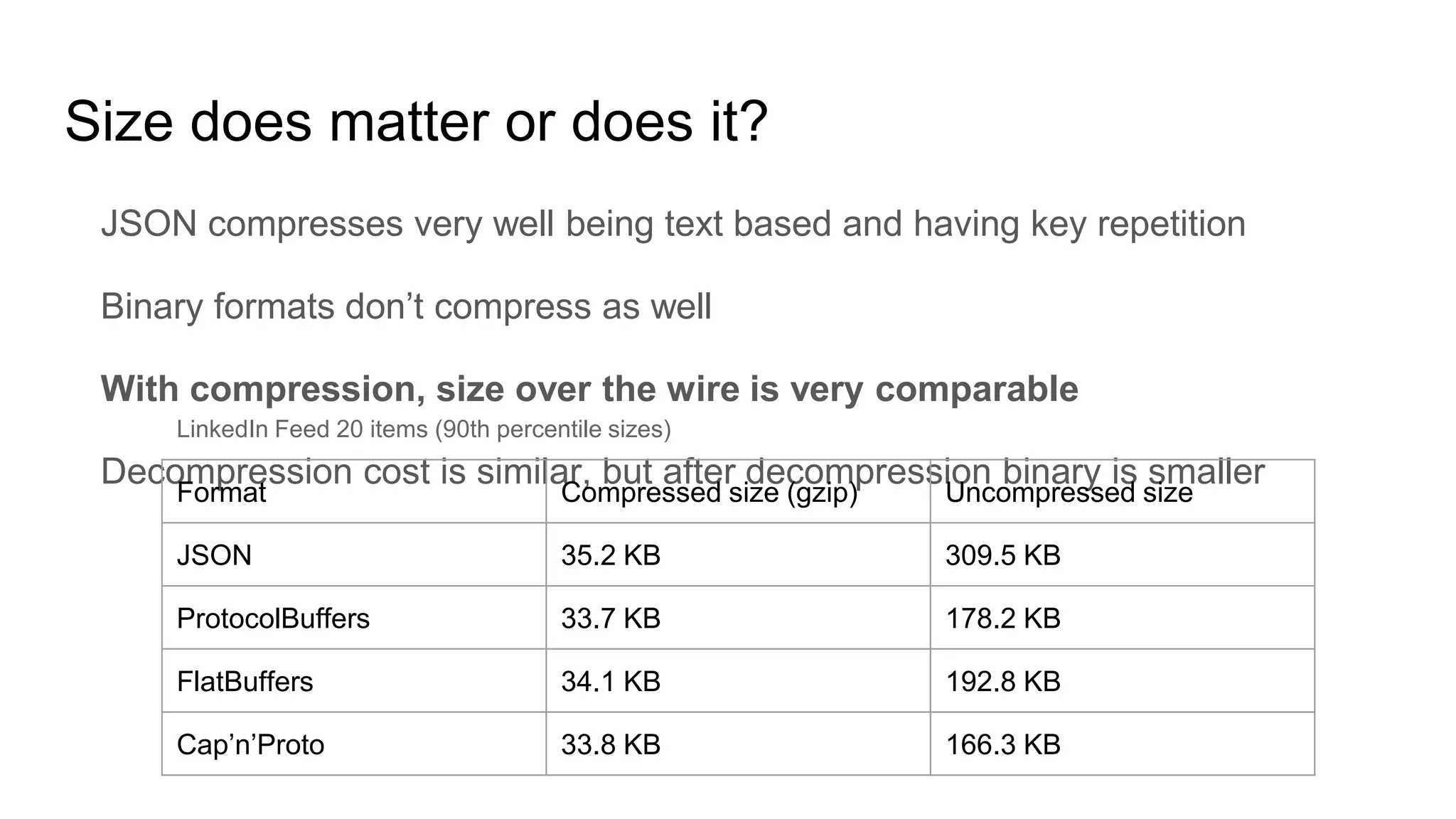
Size does matter or does it?
JSON compresses very well being text based and having key repetition
Binary formats don’t compress as well
With compression, size over the wire is very comparable
Decompression cost is similar, but after decompression binary is smaller
Format Compressed size (gzip) Uncompressed size
JSON 35.2 KB 309.5 KB
ProtocolBuffers 33.7 KB 178.2 KB
FlatBuffers 34.1 KB 192.8 KB
Cap’n’Proto 33.8 KB 166.3 KB
LinkedIn Feed 20 items (90th percentile sizes)
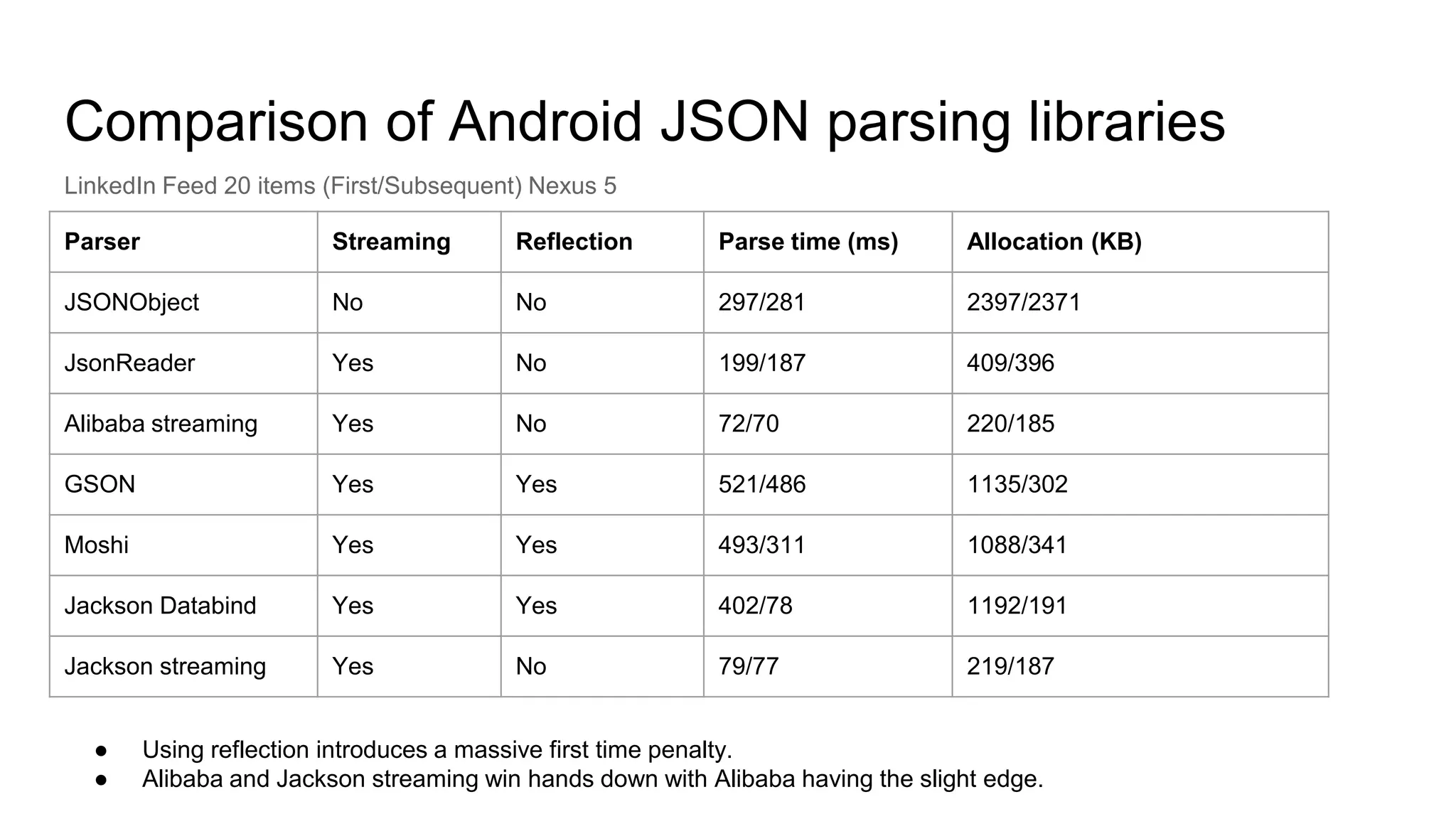
Comparison of Android JSON parsing libraries
Parser Streaming Reflection Parse time (ms) Allocation (KB)
JSONObject No No 297/281 2397/2371
JsonReader Yes No 199/187 409/396
Alibaba streaming Yes No 72/70 220/185
GSON Yes Yes 521/486 1135/302
Moshi Yes Yes 493/311 1088/341
Jackson Databind Yes Yes 402/78 1192/191
Jackson streaming Yes No 79/77 219/187
LinkedIn Feed 20 items (First/Subsequent) Nexus 5
● Using reflection introduces a massive first time penalty.
● Alibaba and Jackson streaming win hands down with Alibaba having the slight edge.
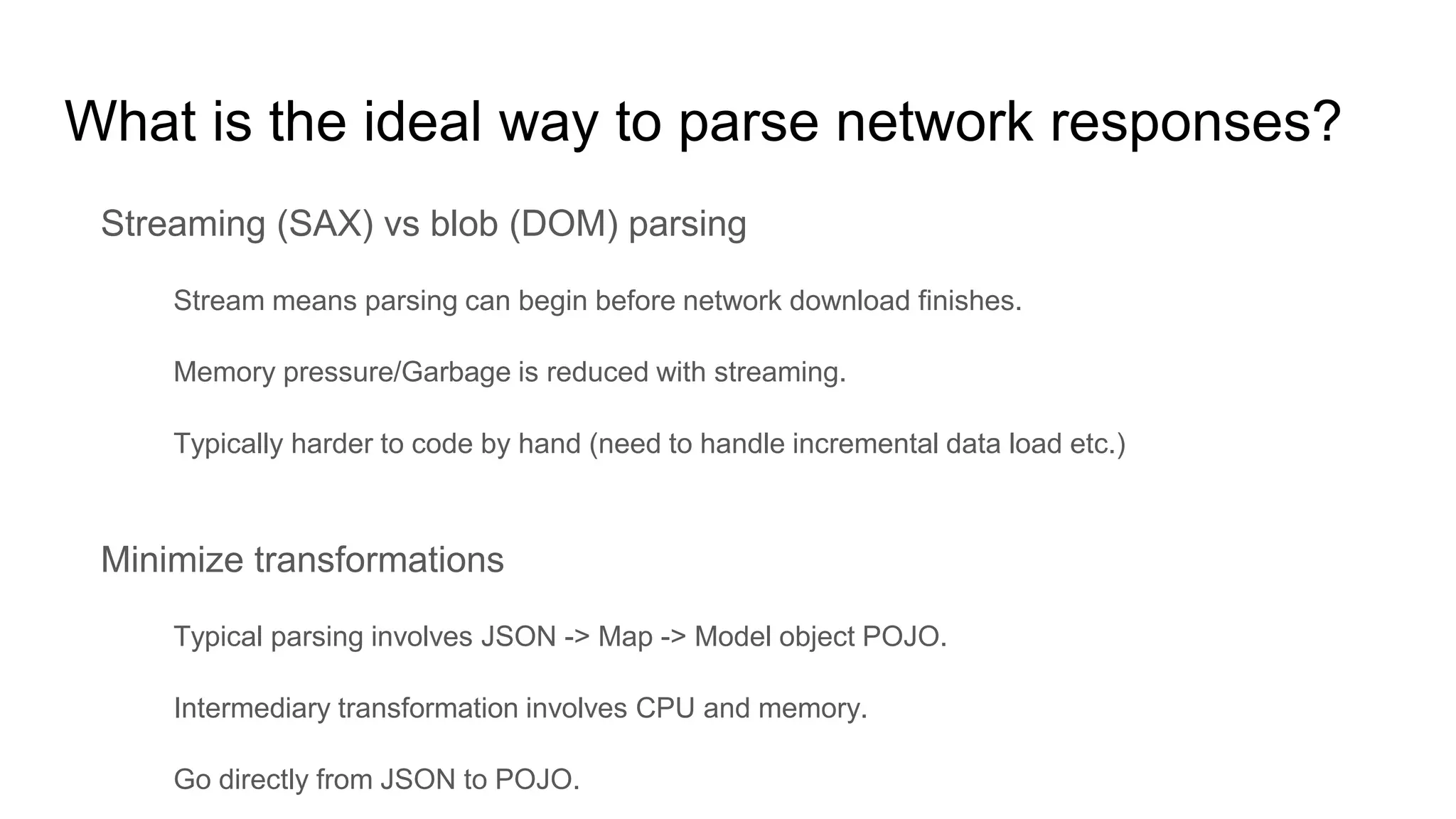
What is the ideal way to parse network responses?
Streaming (SAX) vs blob (DOM) parsing
Stream means parsing can begin before network download finishes.
Memory pressure/Garbage is reduced with streaming.
Typically harder to code by hand (need to handle incremental data load etc.)
Minimize transformations
Typical parsing involves JSON -> Map -> Model object POJO.
Intermediary transformation involves CPU and memory.
Go directly from JSON to POJO.
Android specific code generation considerations
Prefer fields instead of methods for accessors on POJO.
65k method count limit pre Android L
Virtual function execution penalty
Use primitive types wherever possible
int instead of Integer for example
Boxed values are allocated on the heap and result in unnecessary memory churn
Generate compact code
Surely someone must have figured all this out?
Yes! Open source codegenerating JSON parsers based on Jackson streaming.
Instagram JSON parser
LoganSquare (Uses a teeny bit of reflection)
How does the generated code look?
{
“numConnections” : 20,
“name”: “John”
}
profile.json
Profile build(JsonParser parser) {
String name;
int numConnections;
parser.startRecord(); // Consumes ‘{’
while (parser.hasMoreFields()) {
String field = parser.getText();
parser.startField(); // Consumes ‘:’
if (“numConnections”.equals(field)) {
numConnections = parser.getInteger();
} else if (“name”.equals(field)) {
name = parser.getText();
} else {
parser.skipField();
}
}
return new Profile(numConnections, name);
}
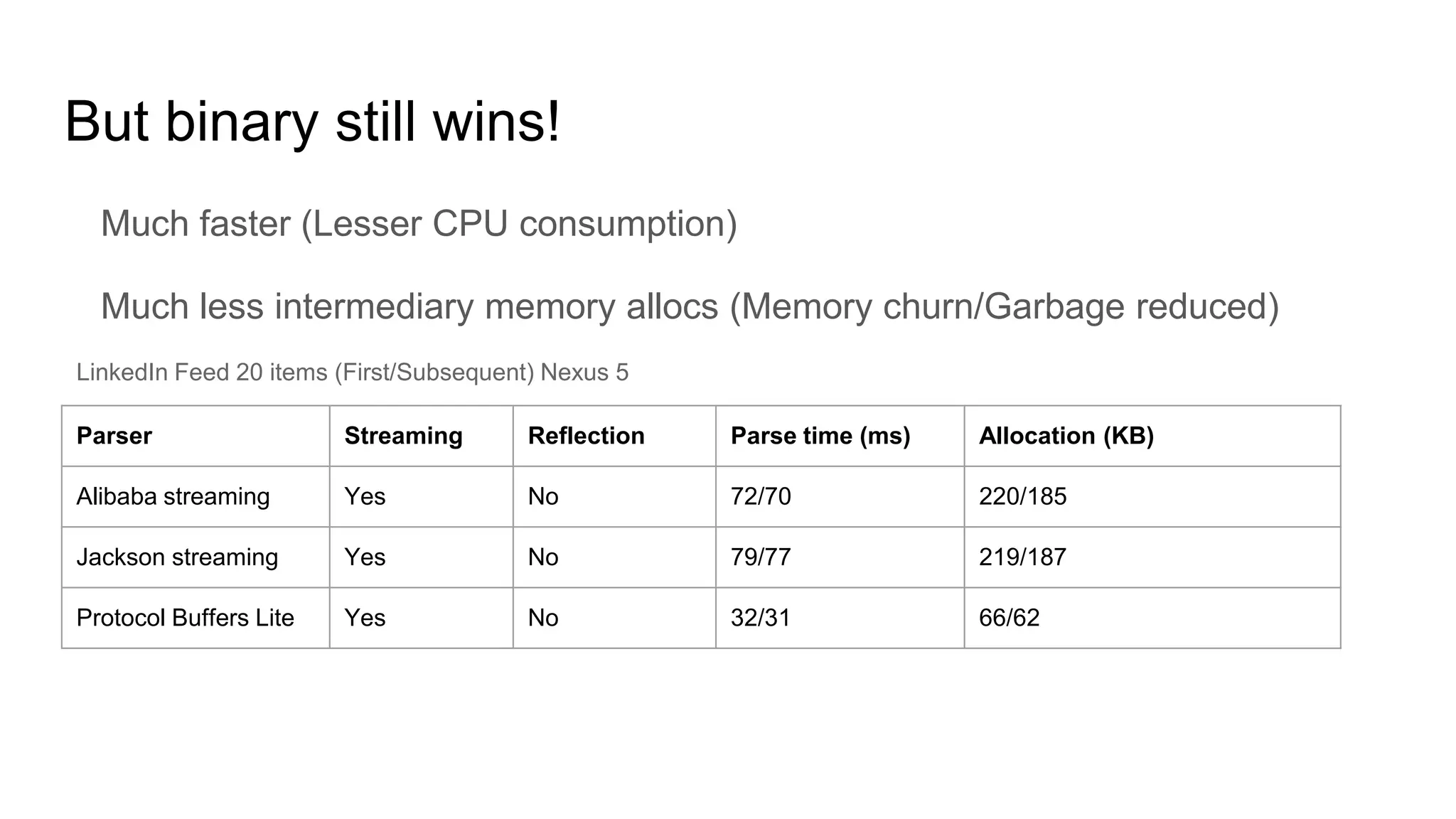
But binary still wins!
Much faster (Lesser CPU consumption)
Much less intermediary memory allocs (Memory churn/Garbage reduced)
Parser Streaming Reflection Parse time (ms) Allocation (KB)
Alibaba streaming Yes No 72/70 220/185
Jackson streaming Yes No 79/77 219/187
Protocol Buffers Lite Yes No 32/31 66/62
LinkedIn Feed 20 items (First/Subsequent) Nexus 5
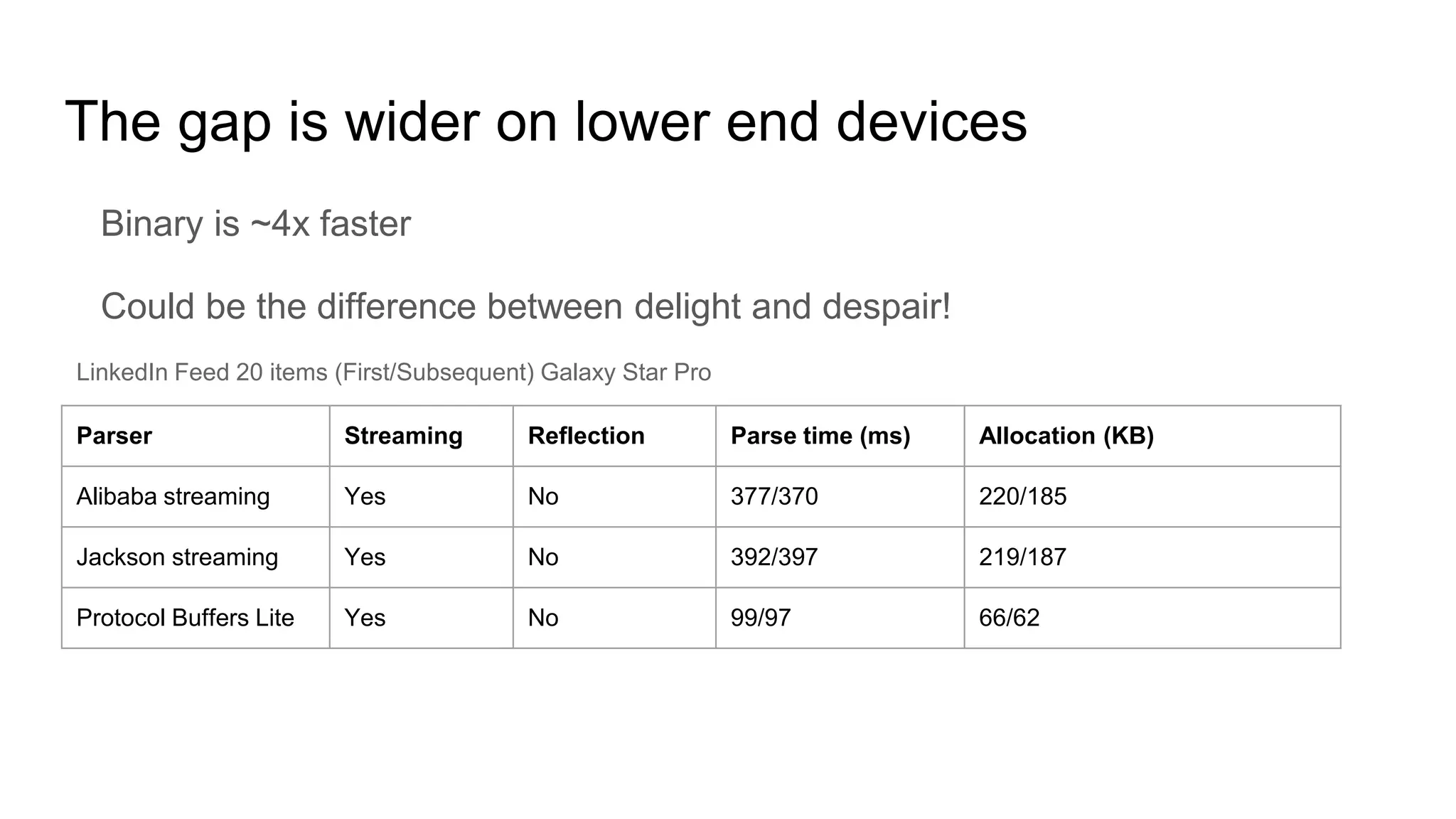
The gap is wider on lower end devices
Binary is ~4x faster
Could be the difference between delight and despair!
Parser Streaming Reflection Parse time (ms) Allocation (KB)
Alibaba streaming Yes No 377/370 220/185
Jackson streaming Yes No 392/397 219/187
Protocol Buffers Lite Yes No 99/97 66/62
LinkedIn Feed 20 items (First/Subsequent) Galaxy Star Pro
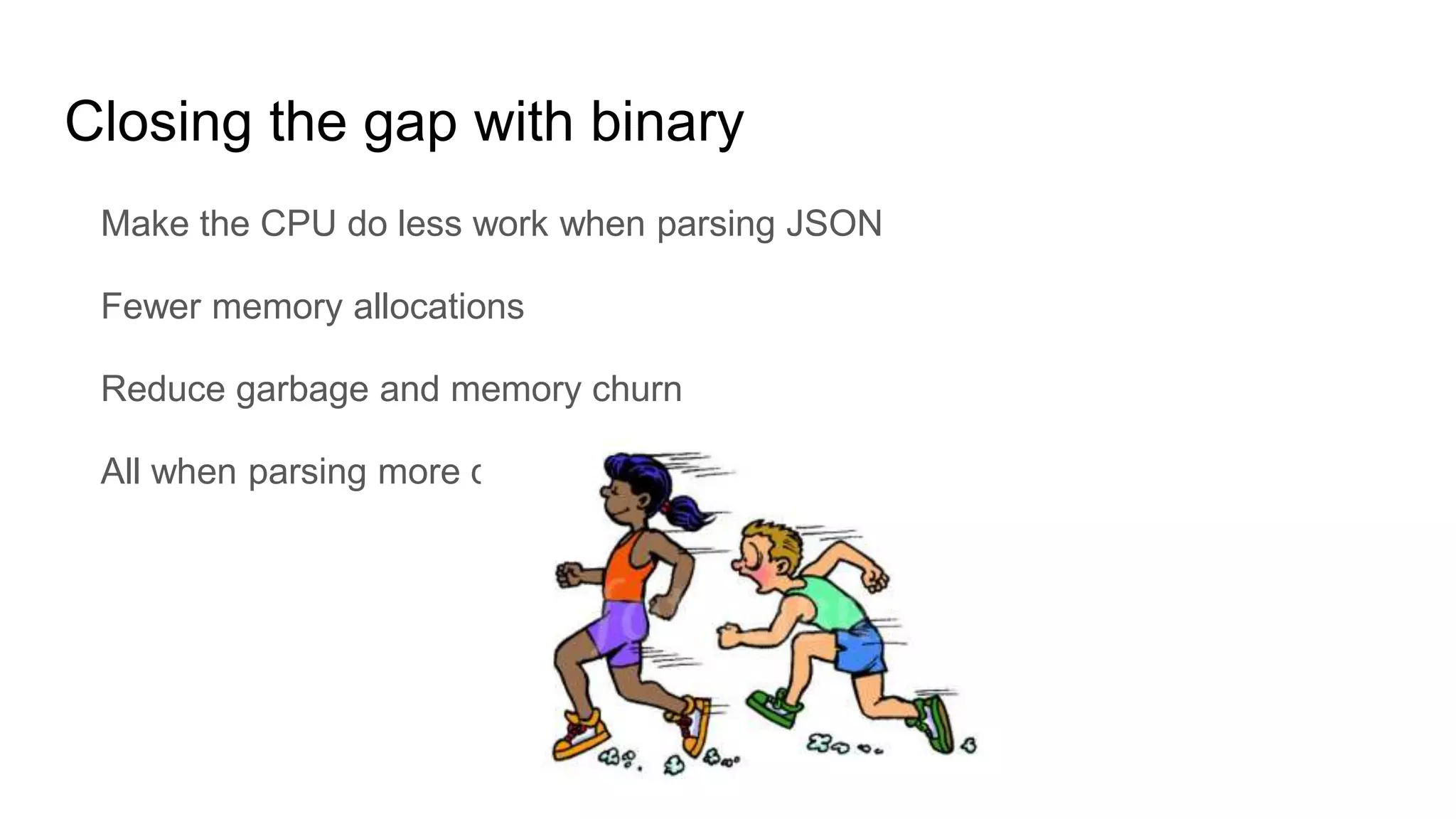
Closing the gap with binary
Make the CPU do less work when parsing JSON
Fewer memory allocations
Reduce garbage and memory churn
All when parsing more data
Don’t pay for what you don’t use
The hunt for inefficiencies: JSON keys
Positional binary formats achieve compaction and faster parsing since they
don’t serialize keys, and use position based encoding.
Parsing keys involves the following
Allocating key strings.
Comparing key strings with known “keys” to figure out which field to match
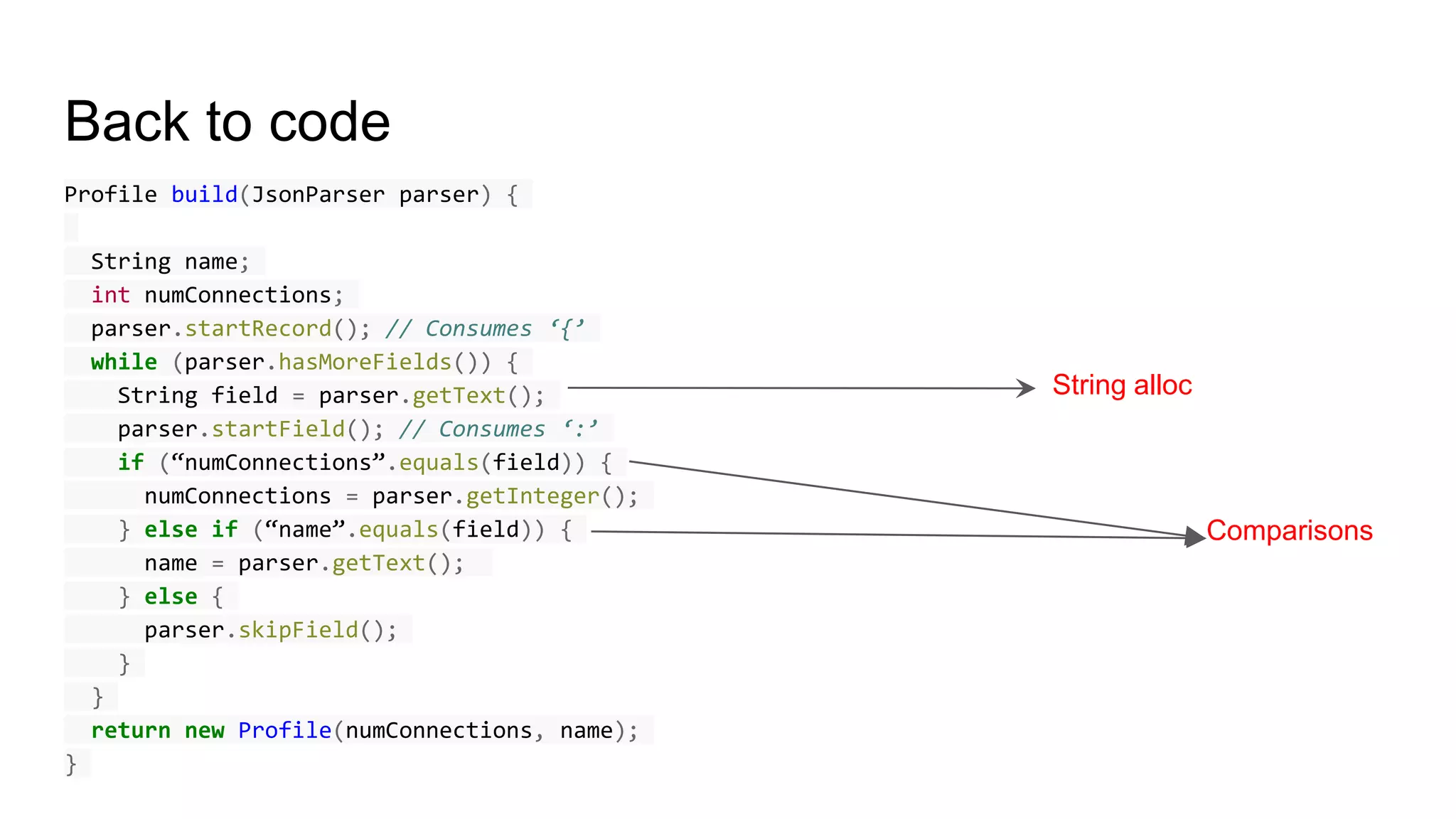
Back to code
Profile build(JsonParser parser) {
String name;
int numConnections;
parser.startRecord(); // Consumes ‘{’
while (parser.hasMoreFields()) {
String field = parser.getText();
parser.startField(); // Consumes ‘:’
if (“numConnections”.equals(field)) {
numConnections = parser.getInteger();
} else if (“name”.equals(field)) {
name = parser.getText();
} else {
parser.skipField();
}
}
return new Profile(numConnections, name);
}
String alloc
Comparisons
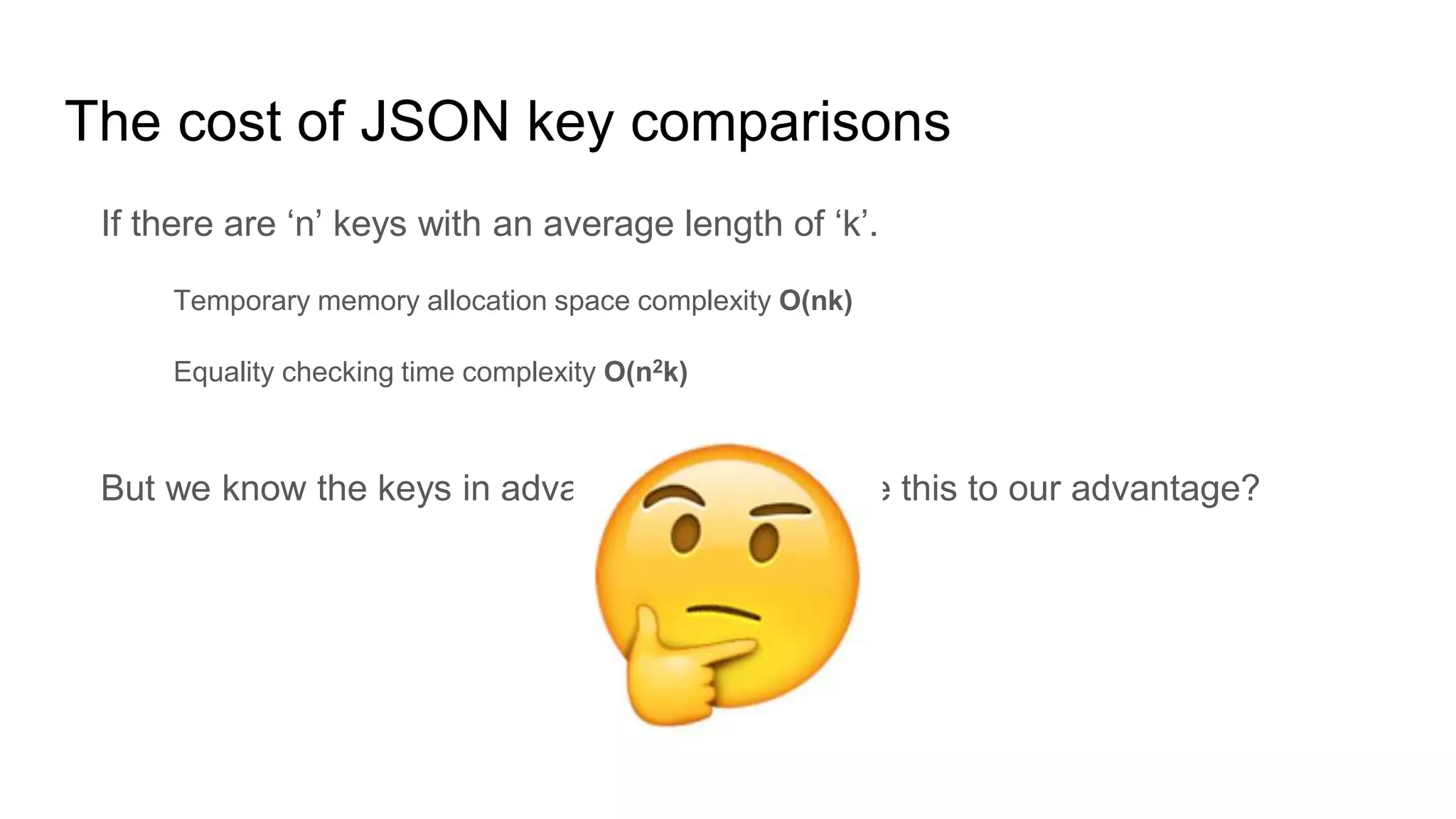
The cost of JSON key comparisons
If there are ‘n’ keys with an average length of ‘k’.
Temporary memory allocation space complexity O(nk)
Equality checking time complexity O(n2k)
But we know the keys in advance, so can we use this to our advantage?
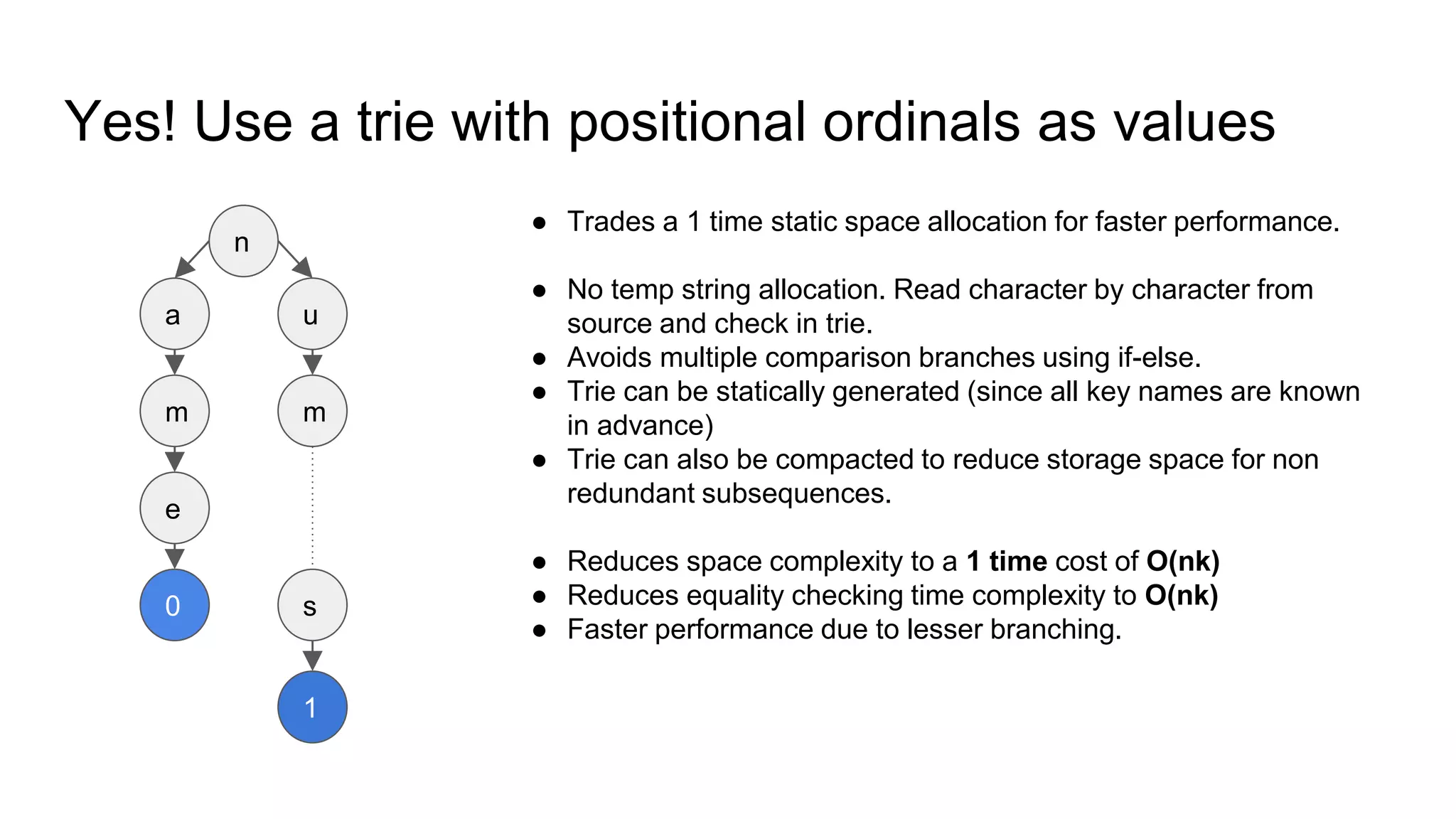
Yes! Use a trie with positional ordinals as values
n
a
m
e
u
m
s
1
0
● Trades a 1 time static space allocation for faster performance.
● No temp string allocation. Read character by character from
source and check in trie.
● Avoids multiple comparison branches using if-else.
● Trie can be statically generated (since all key names are known
in advance)
● Trie can also be compacted to reduce storage space for non
redundant subsequences.
● Reduces space complexity to a 1 time cost of O(nk)
● Reduces equality checking time complexity to O(nk)
● Faster performance due to lesser branching.
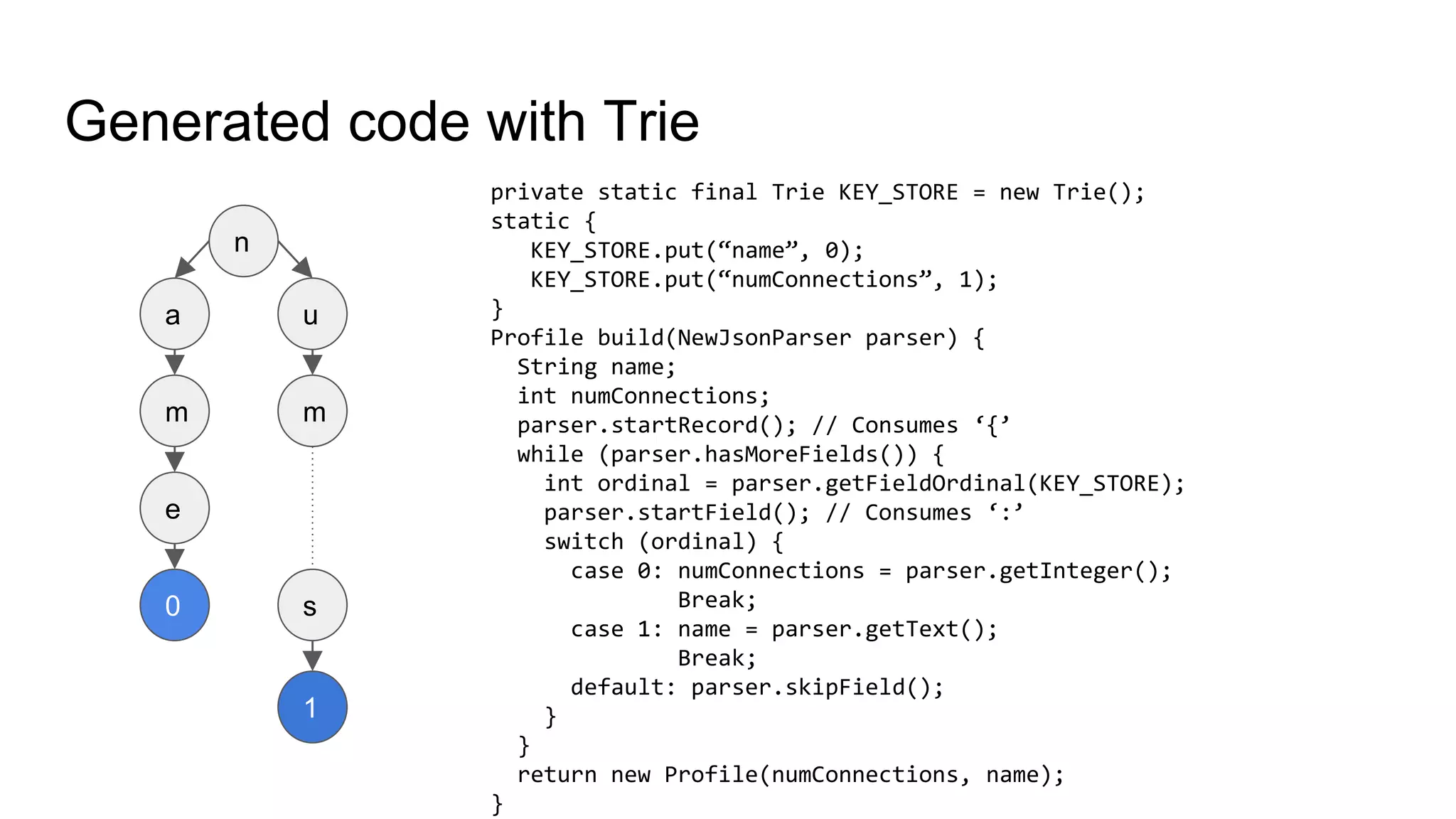
Generated code with Trie
n
a
m
e
u
m
s
1
0
private static final Trie KEY_STORE = new Trie();
static {
KEY_STORE.put(“name”, 0);
KEY_STORE.put(“numConnections”, 1);
}
Profile build(NewJsonParser parser) {
String name;
int numConnections;
parser.startRecord(); // Consumes ‘{’
while (parser.hasMoreFields()) {
int ordinal = parser.getFieldOrdinal(KEY_STORE);
parser.startField(); // Consumes ‘:’
switch (ordinal) {
case 0: numConnections = parser.getInteger();
Break;
case 1: name = parser.getText();
Break;
default: parser.skipField();
}
}
return new Profile(numConnections, name);
}
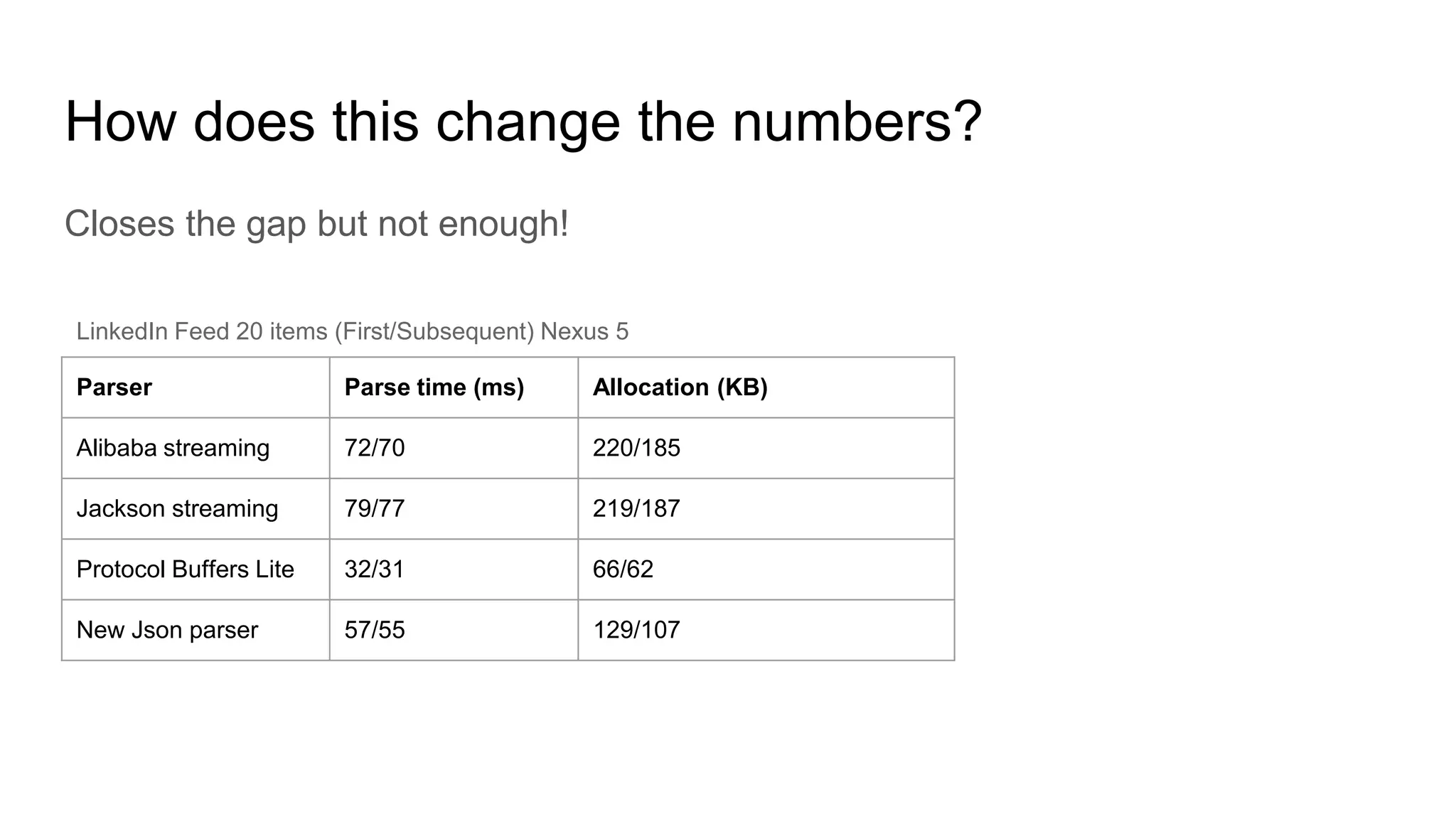
How does this change the numbers?
Closes the gap but not enough!
Parser Parse time (ms) Allocation (KB)
Alibaba streaming 72/70 220/185
Jackson streaming 79/77 219/187
Protocol Buffers Lite 32/31 66/62
New Json parser 57/55 129/107
LinkedIn Feed 20 items (First/Subsequent) Nexus 5
Expoiting prior knowledge of value types
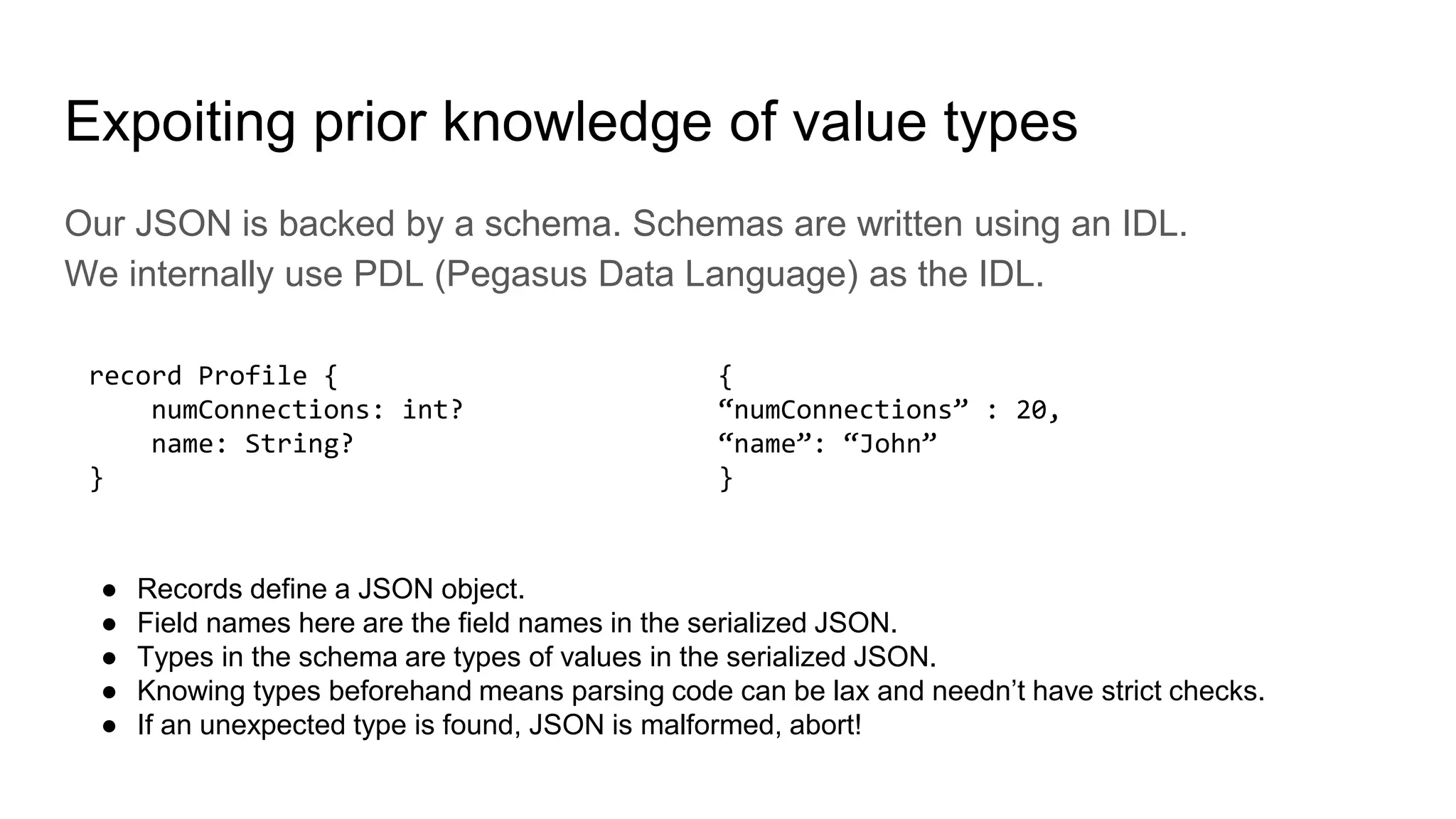
Our JSON is backed by a schema. Schemas are written using an IDL.
We internally use PDL (Pegasus Data Language) as the IDL.
record Profile {
numConnections: int?
name: String?
}
● Records define a JSON object.
● Field names here are the field names in the serialized JSON.
● Types in the schema are types of values in the serialized JSON.
● Knowing types beforehand means parsing code can be lax and needn’t have strict checks.
● If an unexpected type is found, JSON is malformed, abort!
{
“numConnections” : 20,
“name”: “John”
}
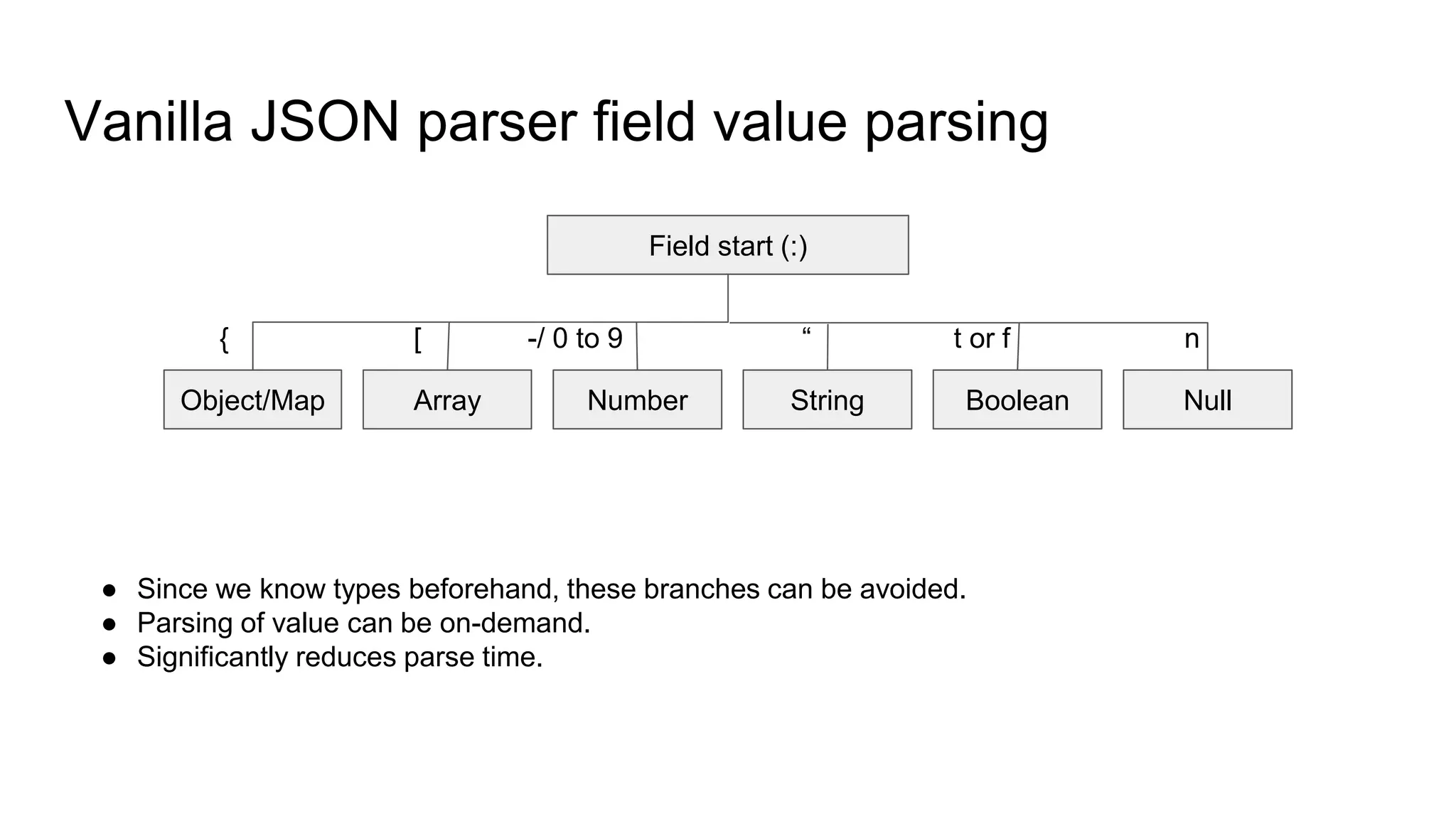
Vanilla JSON parser field value parsing
Field start (:)
Object/Map Array Number BooleanString Null
{ [ -/ 0 to 9 “ t or f n
● Since we know types beforehand, these branches can be avoided.
● Parsing of value can be on-demand.
● Significantly reduces parse time.
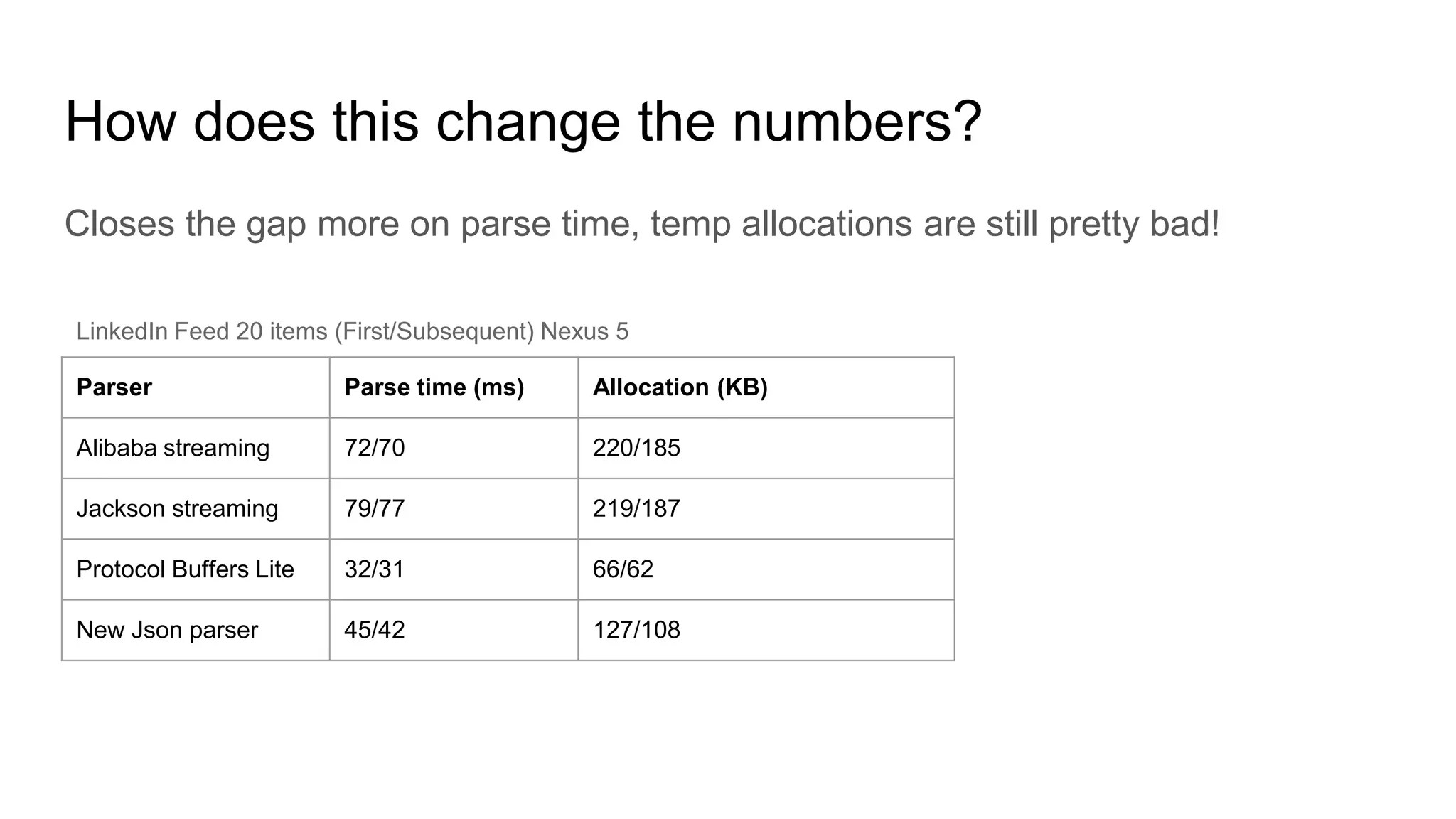
How does this change the numbers?
Closes the gap more on parse time, temp allocations are still pretty bad!
Parser Parse time (ms) Allocation (KB)
Alibaba streaming 72/70 220/185
Jackson streaming 79/77 219/187
Protocol Buffers Lite 32/31 66/62
New Json parser 45/42 127/108
LinkedIn Feed 20 items (First/Subsequent) Nexus 5
All obvious issues seem fixed. What else?
Sometimes profiling is the only answer to find hotspots.
Data arrives as a UTF-8 byte stream over the network not as chars.
LinkedIn app payloads are massively String heavy.
Profiling showed some CPU and allocation hotspots
Converting bytes to chars using Java’s built-in decoder.
Reading strings.
Converting bytes to chars?
Another transformation.
Temporary memory allocs for decoding buffers etc.
Most JSON tokens are ASCII, can use just 1 byte for them instead of 2
Surprise! Jackson, Alibaba etc. do have separate UTF-8 stream parsers.
We adopt a Jackson-like optimized approach when decoding UTF-8 strings.
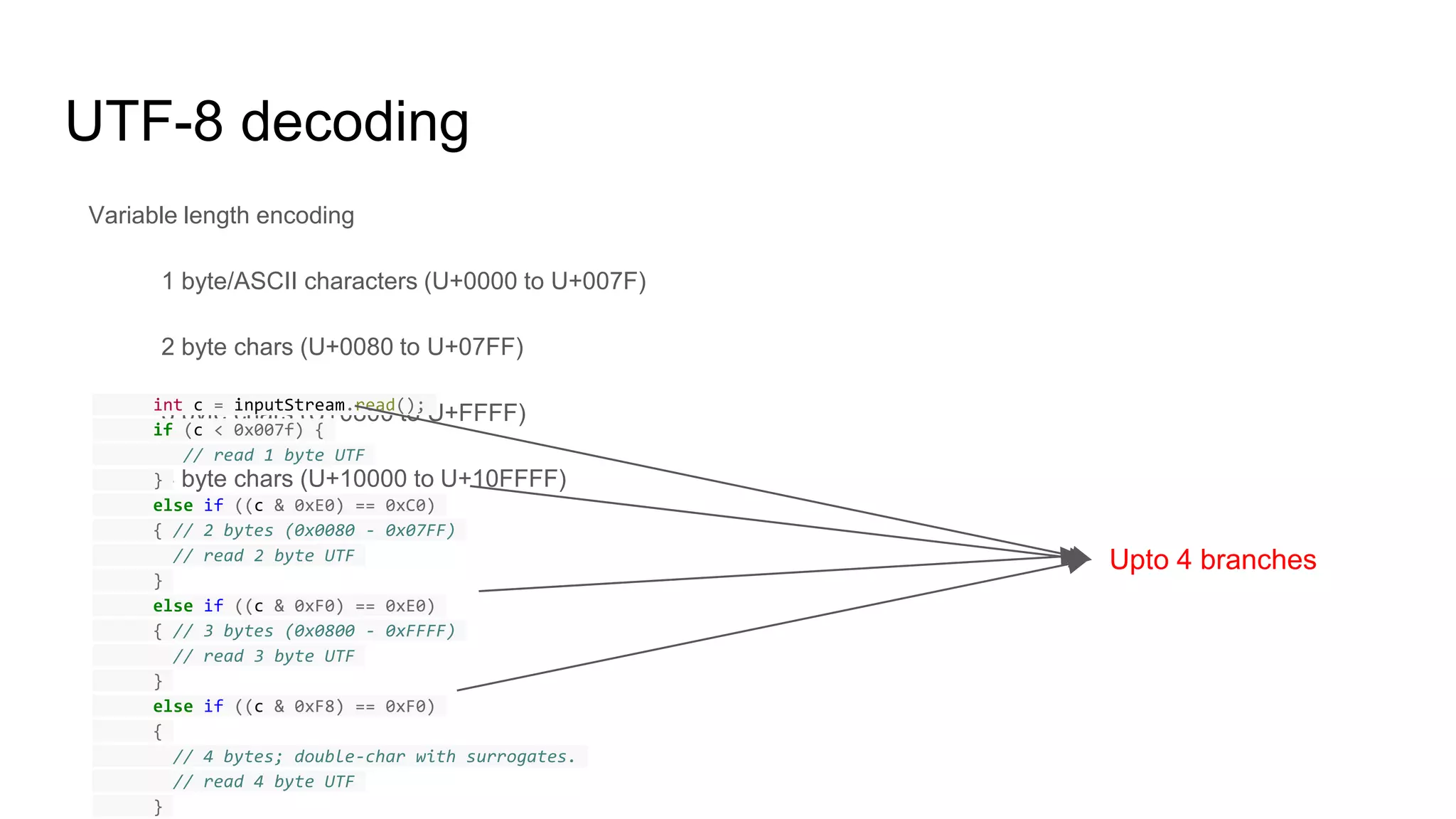
UTF-8 decoding
Variable length encoding
1 byte/ASCII characters (U+0000 to U+007F)
2 byte chars (U+0080 to U+07FF)
3 byte chars (U+0800 to U+FFFF)
4 byte chars (U+10000 to U+10FFFF)
int c = inputStream.read();
if (c < 0x007f) {
// read 1 byte UTF
}
else if ((c & 0xE0) == 0xC0)
{ // 2 bytes (0x0080 - 0x07FF)
// read 2 byte UTF
}
else if ((c & 0xF0) == 0xE0)
{ // 3 bytes (0x0800 - 0xFFFF)
// read 3 byte UTF
}
else if ((c & 0xF8) == 0xF0)
{
// 4 bytes; double-char with surrogates.
// read 4 byte UTF
}
Upto 4 branches
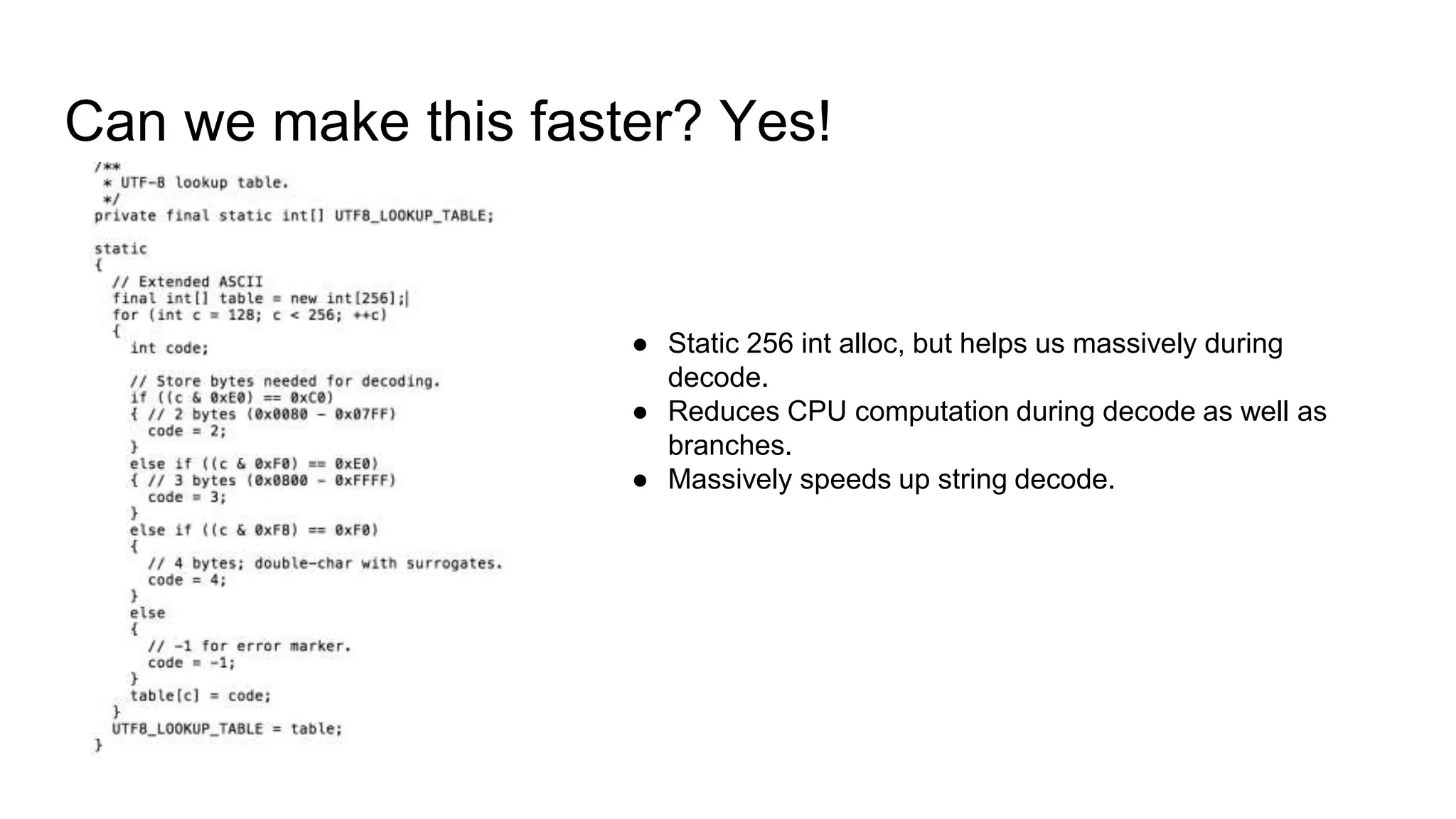
Can we make this faster? Yes!
● Static 256 int alloc, but helps us massively during
decode.
● Reduces CPU computation during decode as well as
branches.
● Massively speeds up string decode.
UTF-8 decoding revised
int c = inputStream.read();
switch (UTF_8_LOOKUP_TABLE[c]) {
case 0: // read 1 byte char;
break;
case 2: // read 2 byte char;
break;
case 3: // read 3 byte char;
break;
case 4: // read 4 byte char;
break;
default: // handle error;
break;
}
1 branch, 1 comparison computation per char
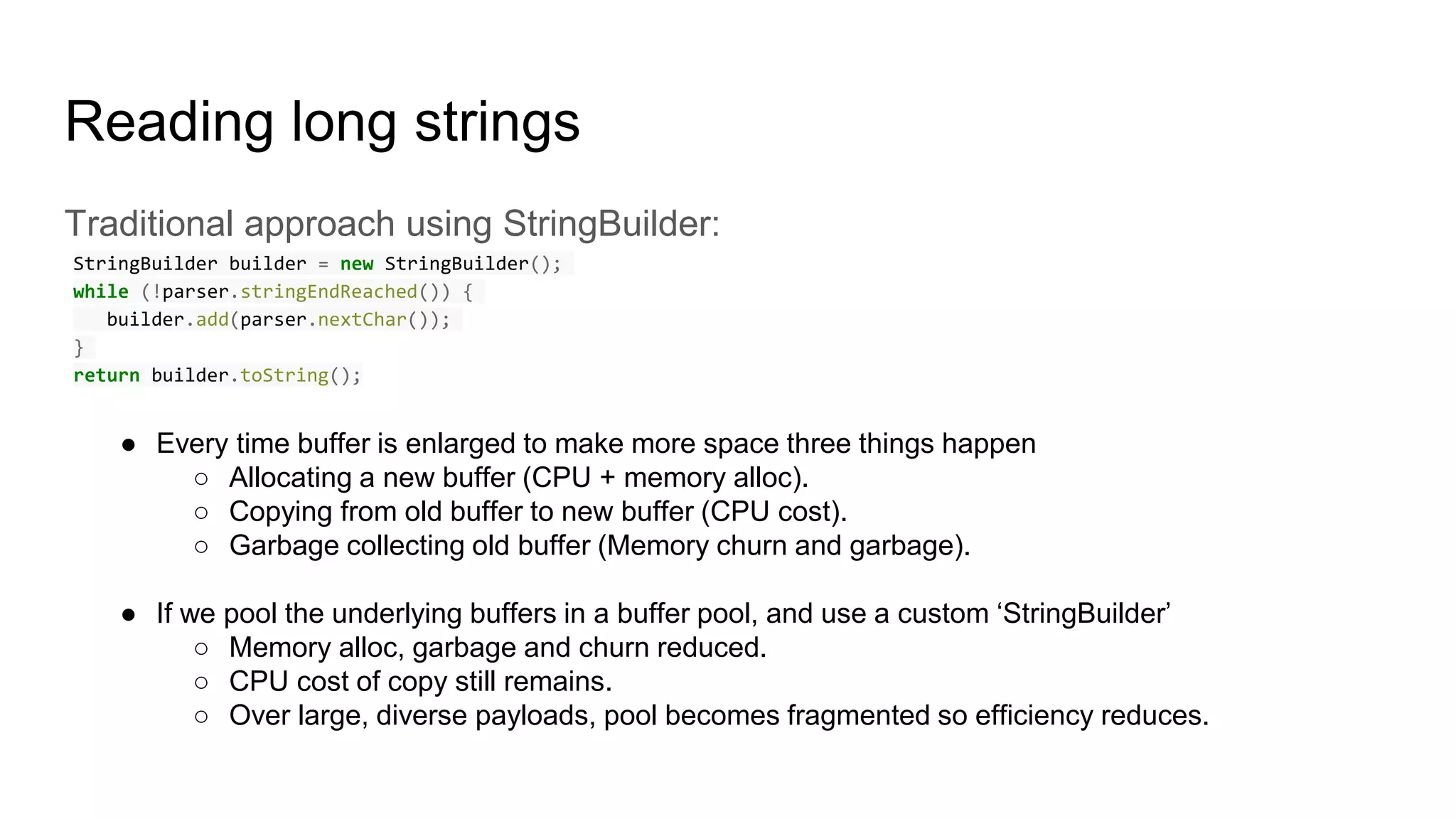
Reading long strings
Traditional approach using StringBuilder:
StringBuilder builder = new StringBuilder();
while (!parser.stringEndReached()) {
builder.add(parser.nextChar());
}
return builder.toString();
● Every time buffer is enlarged to make more space three things happen
○ Allocating a new buffer (CPU + memory alloc).
○ Copying from old buffer to new buffer (CPU cost).
○ Garbage collecting old buffer (Memory churn and garbage).
● If we pool the underlying buffers in a buffer pool, and use a custom ‘StringBuilder’
○ Memory alloc, garbage and churn reduced.
○ CPU cost of copy still remains.
○ Over large, diverse payloads, pool becomes fragmented so efficiency reduces.
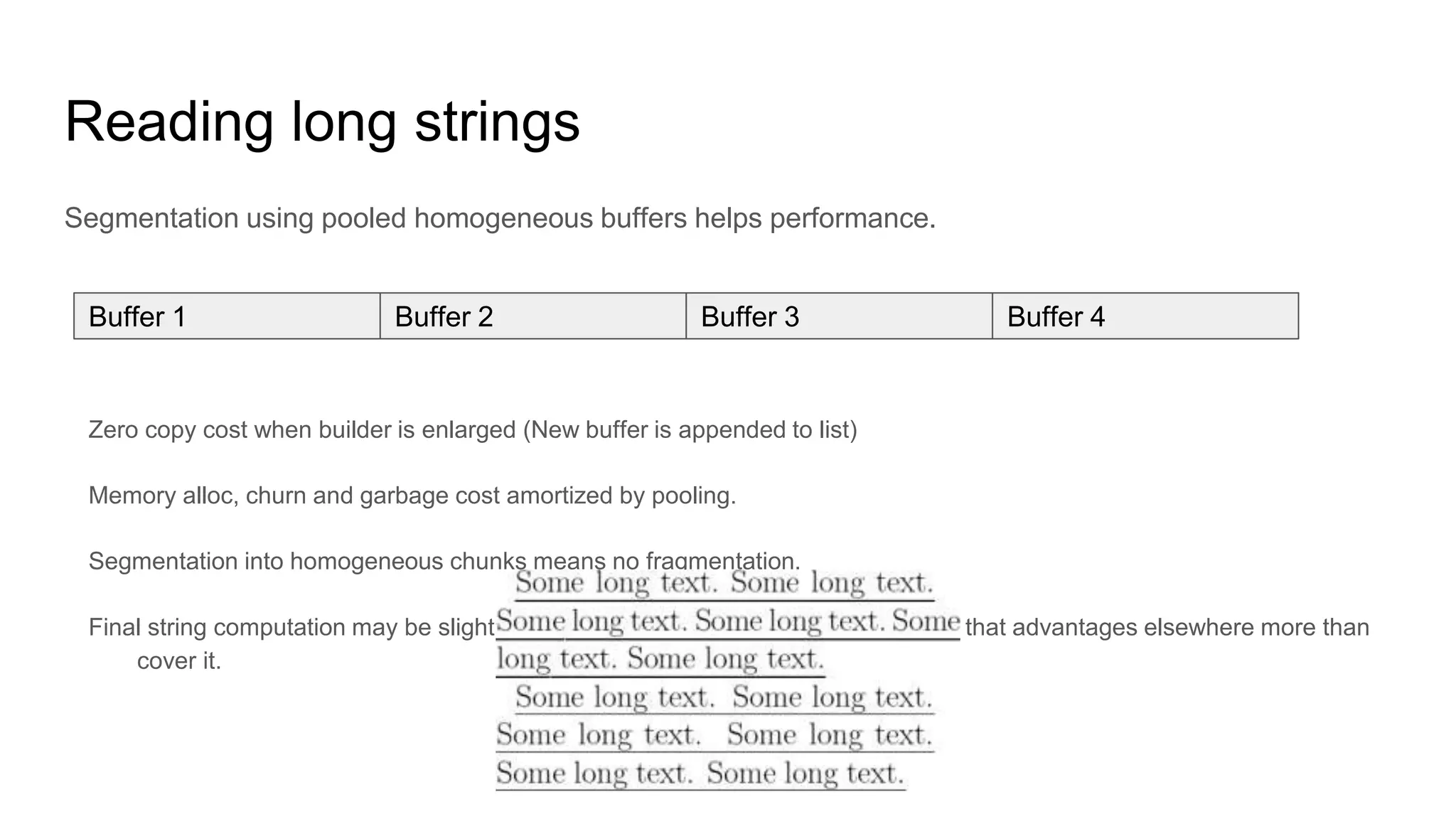
Reading long strings
Segmentation using pooled homogeneous buffers helps performance.
Zero copy cost when builder is enlarged (New buffer is appended to list)
Memory alloc, churn and garbage cost amortized by pooling.
Segmentation into homogeneous chunks means no fragmentation.
Final string computation may be slightly slower, but buffer size is chosen in a way that advantages elsewhere more than
cover it.
Buffer 1 Buffer 2 Buffer 3 Buffer 4
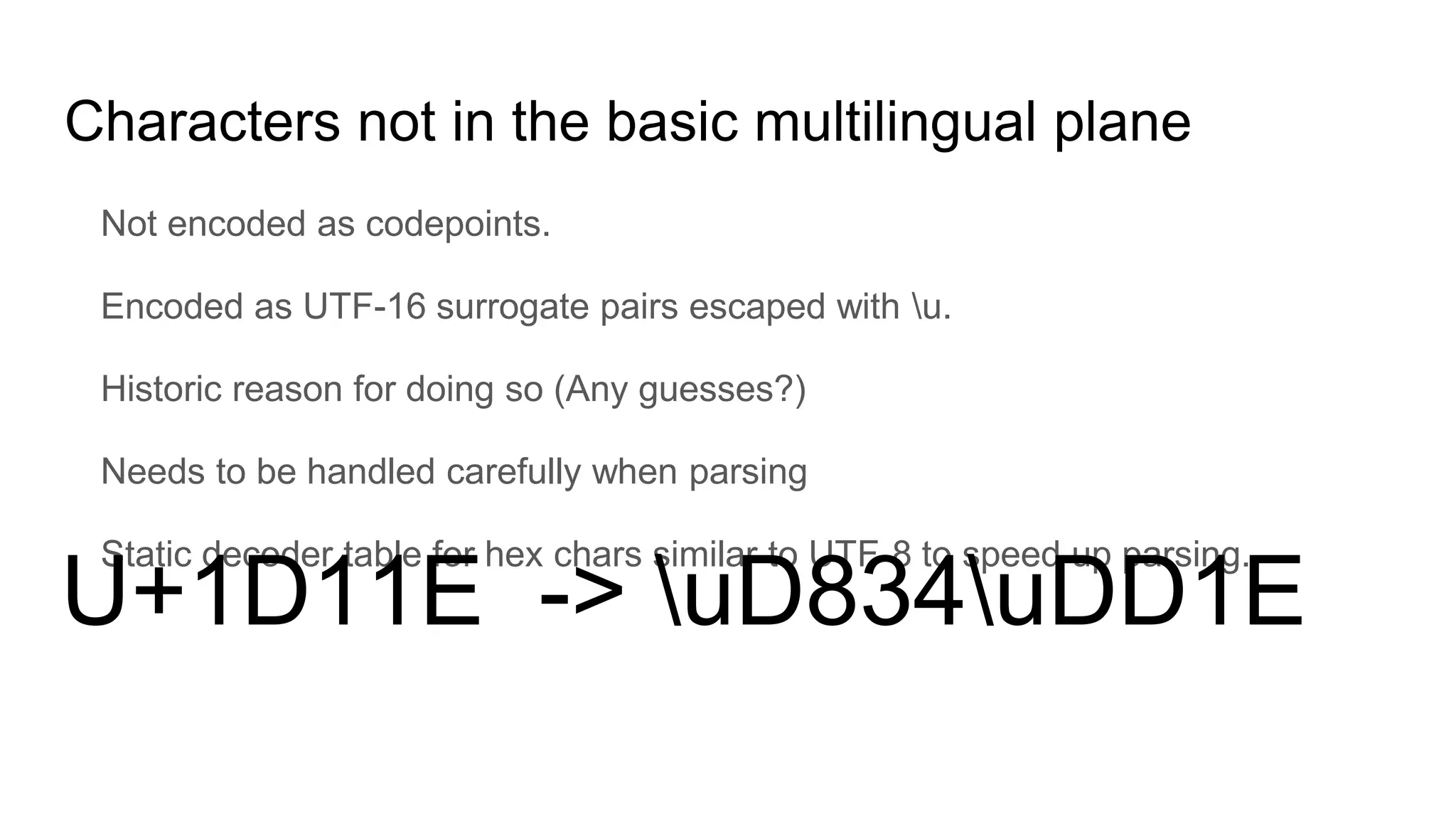
Characters not in the basic multilingual plane
Not encoded as codepoints.
Encoded as UTF-16 surrogate pairs escaped with u.
Historic reason for doing so (Any guesses?)
Needs to be handled carefully when parsing
Static decoder table for hex chars similar to UTF-8 to speed up parsing.
U+1D11E -> uD834uDD1E
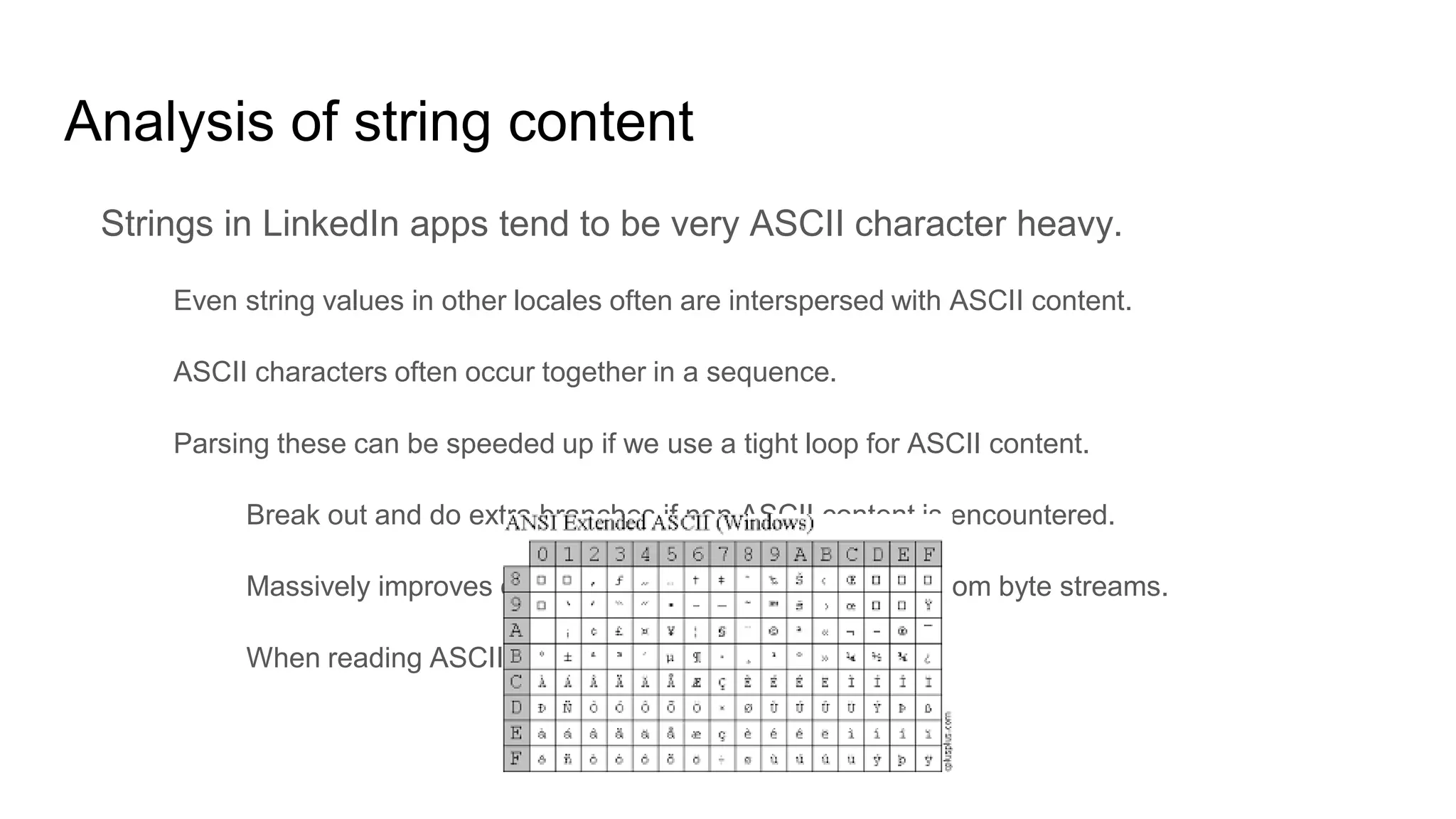
Analysis of string content
Strings in LinkedIn apps tend to be very ASCII character heavy.
Even string values in other locales often are interspersed with ASCII content.
ASCII characters often occur together in a sequence.
Parsing these can be speeded up if we use a tight loop for ASCII content.
Break out and do extra branches if non ASCII content is encountered.
Massively improves overall string parsing performance from byte streams.
When reading ASCII byte is the same as the char.
Whitespaces
JSON sent over the wire is not pretty printed for compaction.
When parsing delimiters, check for delimiter first, before skipping whitespace.
Within whitespaces itself, a plain space has a higher chance of occuring than a
carriage return, line feed or tab.
Tight loop for space characters when skipping whitespace.
After doing all this...
The performance is very comparable!
Parser Parse time (ms) Allocation (KB)
Alibaba streaming 72/70 220/185
Jackson streaming 79/77 219/187
Protocol Buffers Lite 32/31 66/62
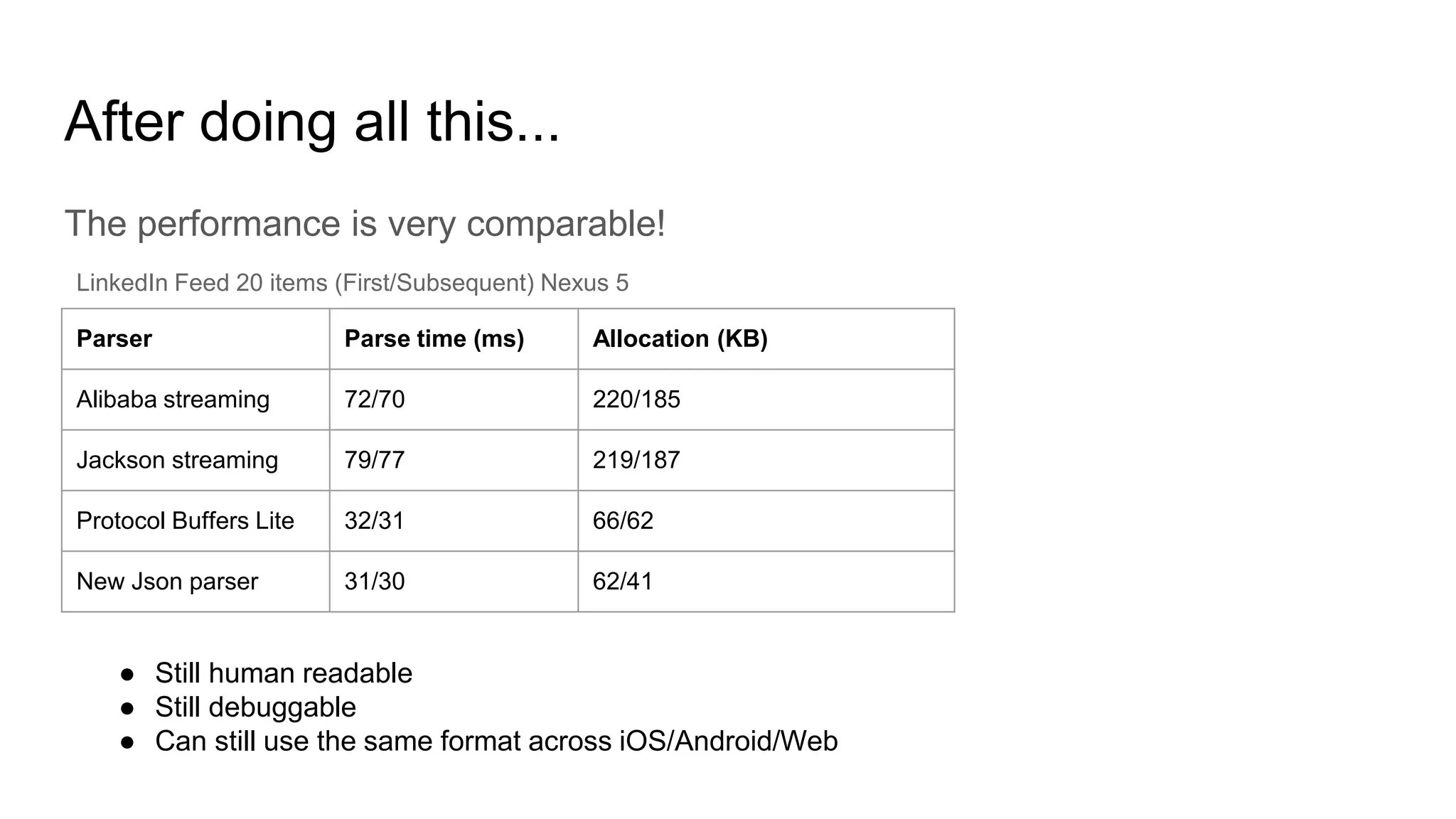
New Json parser 31/30 62/41
LinkedIn Feed 20 items (First/Subsequent) Nexus 5
● Still human readable
● Still debuggable
● Can still use the same format across iOS/Android/Web
And on low end devices...
The improvements are more profound!
Parser Parse time (ms) Allocation (KB)
Alibaba streaming 377/370 220/185
Jackson streaming 392/397 219/187
Protocol Buffers Lite 99/97 66/62
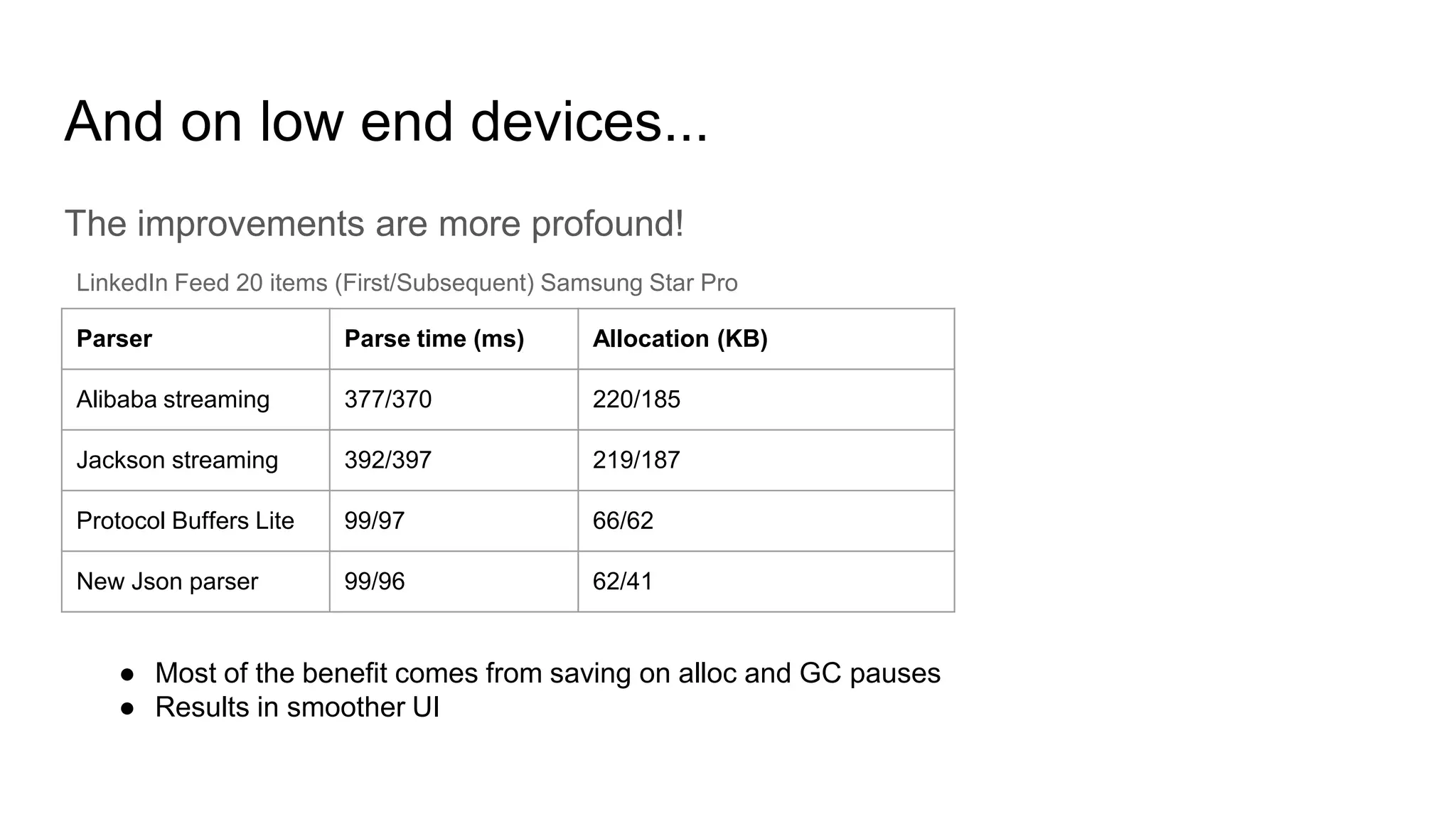
New Json parser 99/96 62/41
LinkedIn Feed 20 items (First/Subsequent) Samsung Star Pro
● Most of the benefit comes from saving on alloc and GC pauses
● Results in smoother UI
Zero Garbage!
This new parser is Zero garbage.
It does not allocate any transient memory beyond the POJOs it creates as the result of parse.
All intermittent allocs like buffers are pooled.
Pools are homogeneous as much as possible to limit fragmentation.
Pool capacities/buffer sizes are tuned based on device and network.
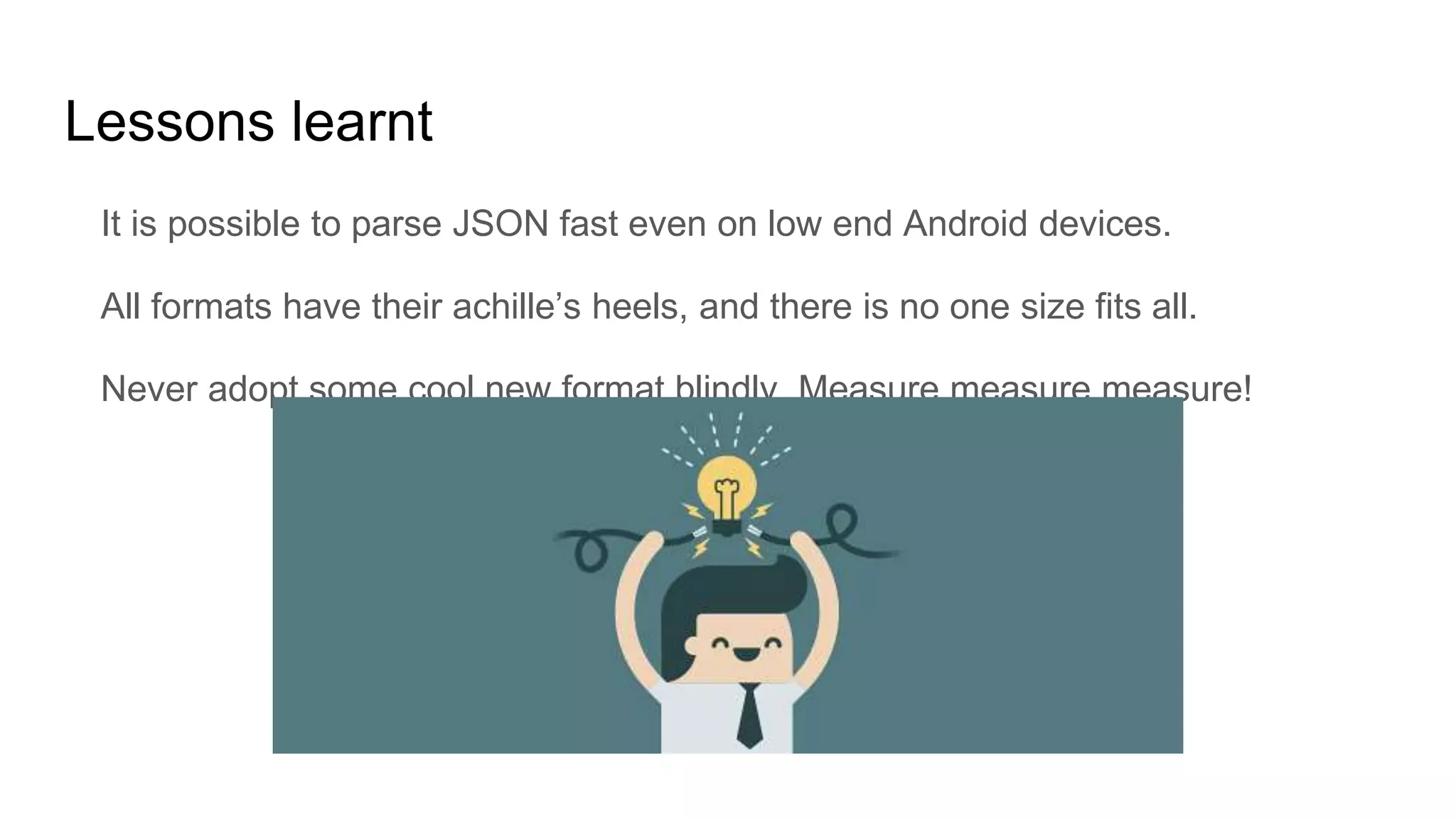
Lessons learnt
It is possible to parse JSON fast even on low end Android devices.
All formats have their achille’s heels, and there is no one size fits all.
Never adopt some cool new format blindly. Measure measure measure!
What’s next?
Similar parser + codegen for iOS in Obj-C
Open source both as part of Rest.li mobile optimized bindings.
Targeted for Q4 2017
Questions?

Screaming fast json parsing on Android

  • 1.
    Screaming Fast JSONparsing Karthik Ramgopal
  • 2.
    Who am I? Engineer MobileInfrastructure lead Former engineer on Flagship and Pulse app teams Obsessed about performance Connect with me: https://www.linkedin.com/in/karthikrg/
  • 3.
  • 4.
    LinkedIn’s Android appfamily Job Search Lookup Pulse Slideshare Sales Navigator Lynda Recruiter Students
  • 5.
    Android device andnetwork diversity ● Samsung Galaxy S6 ● 4x2.1 GHz Cortex-A57 + 4x1.5 GHz Cortex-A53 ● 3 GB RAM ● LTE (100 Mbits/s) ● Samsung Star Pro ● 1 Ghz Cortex A5 ● 512 MB RAM ● EDGE (384 Kbps)
  • 6.
    LinkedIn client apphigh level architecture Frontend API server
  • 7.
    LinkedIn uses JSONto talk between apps and server
  • 8.
    What is JSON? JavaScriptObject Notation is a data serialization format. Key value encoded data. Values must be string, boolean, number, array, object, null. Text based, Light weight (relatively), Human readable. Wide support across programming languages/platforms
  • 9.
    What else isout there?
  • 10.
    XML (eXtensible MarkupLanguage) (+) Text based and human readable. (-) Very verbose.
  • 11.
    Binary Data Formats Examplesinclude MsgPack, ProtoBuf, FlatBuffers, Cap’n’Proto etc. (+) More compact than JSON. Positional index based formats even omit keys. (+) Backing schema to describe data structure with platform specific binding generators (+) Much faster to parse than JSON when using vanilla parsing techniques. (-) Not human readable. (-) No native parsing support in web browsers. (-) Removed fields still occupy some space in positional formats. (-) Schema evolution MUST preserve field order in positional formats.
  • 12.
    Data Flow Parser ModelBinder View Binder Data (JSON/XML/Binary) DataModel ViewModel Network Fission DataModel MMAP Cache Binary
  • 13.
    What affects JSONparsing performance? CPU Validating structure and tokenizing. Large number of branches causing pipeline stalls. Memory Large number of small allocs on the heap Causes memory churn slowing down the allocator Garbage collection pauses
  • 14.
    Types of JSONparsers Who controls the flow of parsed data to the consumer? Pull parser (Consumer controls) Push parser (Parser controls) How many times is the data processed? Once (traditional parsers) Twice (index overlay parsers) How is the data processed?
  • 15.
    JSON vs Binary JSON(naturally) has a size disadvantage over binary But, it is human readable and has wider multi-platform support Schema evolution is easier
  • 16.
    Size does matteror does it? JSON compresses very well being text based and having key repetition Binary formats don’t compress as well With compression, size over the wire is very comparable Decompression cost is similar, but after decompression binary is smaller Format Compressed size (gzip) Uncompressed size JSON 35.2 KB 309.5 KB ProtocolBuffers 33.7 KB 178.2 KB FlatBuffers 34.1 KB 192.8 KB Cap’n’Proto 33.8 KB 166.3 KB LinkedIn Feed 20 items (90th percentile sizes)
  • 17.
    Comparison of AndroidJSON parsing libraries Parser Streaming Reflection Parse time (ms) Allocation (KB) JSONObject No No 297/281 2397/2371 JsonReader Yes No 199/187 409/396 Alibaba streaming Yes No 72/70 220/185 GSON Yes Yes 521/486 1135/302 Moshi Yes Yes 493/311 1088/341 Jackson Databind Yes Yes 402/78 1192/191 Jackson streaming Yes No 79/77 219/187 LinkedIn Feed 20 items (First/Subsequent) Nexus 5 ● Using reflection introduces a massive first time penalty. ● Alibaba and Jackson streaming win hands down with Alibaba having the slight edge.
  • 18.
    What is theideal way to parse network responses? Streaming (SAX) vs blob (DOM) parsing Stream means parsing can begin before network download finishes. Memory pressure/Garbage is reduced with streaming. Typically harder to code by hand (need to handle incremental data load etc.) Minimize transformations Typical parsing involves JSON -> Map -> Model object POJO. Intermediary transformation involves CPU and memory. Go directly from JSON to POJO.
  • 19.
    Android specific codegeneration considerations Prefer fields instead of methods for accessors on POJO. 65k method count limit pre Android L Virtual function execution penalty Use primitive types wherever possible int instead of Integer for example Boxed values are allocated on the heap and result in unnecessary memory churn Generate compact code
  • 20.
    Surely someone musthave figured all this out? Yes! Open source codegenerating JSON parsers based on Jackson streaming. Instagram JSON parser LoganSquare (Uses a teeny bit of reflection)
  • 21.
    How does thegenerated code look? { “numConnections” : 20, “name”: “John” } profile.json Profile build(JsonParser parser) { String name; int numConnections; parser.startRecord(); // Consumes ‘{’ while (parser.hasMoreFields()) { String field = parser.getText(); parser.startField(); // Consumes ‘:’ if (“numConnections”.equals(field)) { numConnections = parser.getInteger(); } else if (“name”.equals(field)) { name = parser.getText(); } else { parser.skipField(); } } return new Profile(numConnections, name); }
  • 22.
    But binary stillwins! Much faster (Lesser CPU consumption) Much less intermediary memory allocs (Memory churn/Garbage reduced) Parser Streaming Reflection Parse time (ms) Allocation (KB) Alibaba streaming Yes No 72/70 220/185 Jackson streaming Yes No 79/77 219/187 Protocol Buffers Lite Yes No 32/31 66/62 LinkedIn Feed 20 items (First/Subsequent) Nexus 5
  • 23.
    The gap iswider on lower end devices Binary is ~4x faster Could be the difference between delight and despair! Parser Streaming Reflection Parse time (ms) Allocation (KB) Alibaba streaming Yes No 377/370 220/185 Jackson streaming Yes No 392/397 219/187 Protocol Buffers Lite Yes No 99/97 66/62 LinkedIn Feed 20 items (First/Subsequent) Galaxy Star Pro
  • 24.
    Closing the gapwith binary Make the CPU do less work when parsing JSON Fewer memory allocations Reduce garbage and memory churn All when parsing more data
  • 25.
    Don’t pay forwhat you don’t use
  • 26.
    The hunt forinefficiencies: JSON keys Positional binary formats achieve compaction and faster parsing since they don’t serialize keys, and use position based encoding. Parsing keys involves the following Allocating key strings. Comparing key strings with known “keys” to figure out which field to match
  • 27.
    Back to code Profilebuild(JsonParser parser) { String name; int numConnections; parser.startRecord(); // Consumes ‘{’ while (parser.hasMoreFields()) { String field = parser.getText(); parser.startField(); // Consumes ‘:’ if (“numConnections”.equals(field)) { numConnections = parser.getInteger(); } else if (“name”.equals(field)) { name = parser.getText(); } else { parser.skipField(); } } return new Profile(numConnections, name); } String alloc Comparisons
  • 28.
    The cost ofJSON key comparisons If there are ‘n’ keys with an average length of ‘k’. Temporary memory allocation space complexity O(nk) Equality checking time complexity O(n2k) But we know the keys in advance, so can we use this to our advantage?
  • 29.
    Yes! Use atrie with positional ordinals as values n a m e u m s 1 0 ● Trades a 1 time static space allocation for faster performance. ● No temp string allocation. Read character by character from source and check in trie. ● Avoids multiple comparison branches using if-else. ● Trie can be statically generated (since all key names are known in advance) ● Trie can also be compacted to reduce storage space for non redundant subsequences. ● Reduces space complexity to a 1 time cost of O(nk) ● Reduces equality checking time complexity to O(nk) ● Faster performance due to lesser branching.
  • 30.
    Generated code withTrie n a m e u m s 1 0 private static final Trie KEY_STORE = new Trie(); static { KEY_STORE.put(“name”, 0); KEY_STORE.put(“numConnections”, 1); } Profile build(NewJsonParser parser) { String name; int numConnections; parser.startRecord(); // Consumes ‘{’ while (parser.hasMoreFields()) { int ordinal = parser.getFieldOrdinal(KEY_STORE); parser.startField(); // Consumes ‘:’ switch (ordinal) { case 0: numConnections = parser.getInteger(); Break; case 1: name = parser.getText(); Break; default: parser.skipField(); } } return new Profile(numConnections, name); }
  • 31.
    How does thischange the numbers? Closes the gap but not enough! Parser Parse time (ms) Allocation (KB) Alibaba streaming 72/70 220/185 Jackson streaming 79/77 219/187 Protocol Buffers Lite 32/31 66/62 New Json parser 57/55 129/107 LinkedIn Feed 20 items (First/Subsequent) Nexus 5
  • 32.
    Expoiting prior knowledgeof value types Our JSON is backed by a schema. Schemas are written using an IDL. We internally use PDL (Pegasus Data Language) as the IDL. record Profile { numConnections: int? name: String? } ● Records define a JSON object. ● Field names here are the field names in the serialized JSON. ● Types in the schema are types of values in the serialized JSON. ● Knowing types beforehand means parsing code can be lax and needn’t have strict checks. ● If an unexpected type is found, JSON is malformed, abort! { “numConnections” : 20, “name”: “John” }
  • 33.
    Vanilla JSON parserfield value parsing Field start (:) Object/Map Array Number BooleanString Null { [ -/ 0 to 9 “ t or f n ● Since we know types beforehand, these branches can be avoided. ● Parsing of value can be on-demand. ● Significantly reduces parse time.
  • 34.
    How does thischange the numbers? Closes the gap more on parse time, temp allocations are still pretty bad! Parser Parse time (ms) Allocation (KB) Alibaba streaming 72/70 220/185 Jackson streaming 79/77 219/187 Protocol Buffers Lite 32/31 66/62 New Json parser 45/42 127/108 LinkedIn Feed 20 items (First/Subsequent) Nexus 5
  • 35.
    All obvious issuesseem fixed. What else? Sometimes profiling is the only answer to find hotspots. Data arrives as a UTF-8 byte stream over the network not as chars. LinkedIn app payloads are massively String heavy. Profiling showed some CPU and allocation hotspots Converting bytes to chars using Java’s built-in decoder. Reading strings.
  • 36.
    Converting bytes tochars? Another transformation. Temporary memory allocs for decoding buffers etc. Most JSON tokens are ASCII, can use just 1 byte for them instead of 2 Surprise! Jackson, Alibaba etc. do have separate UTF-8 stream parsers. We adopt a Jackson-like optimized approach when decoding UTF-8 strings.
  • 37.
    UTF-8 decoding Variable lengthencoding 1 byte/ASCII characters (U+0000 to U+007F) 2 byte chars (U+0080 to U+07FF) 3 byte chars (U+0800 to U+FFFF) 4 byte chars (U+10000 to U+10FFFF) int c = inputStream.read(); if (c < 0x007f) { // read 1 byte UTF } else if ((c & 0xE0) == 0xC0) { // 2 bytes (0x0080 - 0x07FF) // read 2 byte UTF } else if ((c & 0xF0) == 0xE0) { // 3 bytes (0x0800 - 0xFFFF) // read 3 byte UTF } else if ((c & 0xF8) == 0xF0) { // 4 bytes; double-char with surrogates. // read 4 byte UTF } Upto 4 branches
  • 38.
    Can we makethis faster? Yes! ● Static 256 int alloc, but helps us massively during decode. ● Reduces CPU computation during decode as well as branches. ● Massively speeds up string decode.
  • 39.
    UTF-8 decoding revised intc = inputStream.read(); switch (UTF_8_LOOKUP_TABLE[c]) { case 0: // read 1 byte char; break; case 2: // read 2 byte char; break; case 3: // read 3 byte char; break; case 4: // read 4 byte char; break; default: // handle error; break; } 1 branch, 1 comparison computation per char
  • 40.
    Reading long strings Traditionalapproach using StringBuilder: StringBuilder builder = new StringBuilder(); while (!parser.stringEndReached()) { builder.add(parser.nextChar()); } return builder.toString(); ● Every time buffer is enlarged to make more space three things happen ○ Allocating a new buffer (CPU + memory alloc). ○ Copying from old buffer to new buffer (CPU cost). ○ Garbage collecting old buffer (Memory churn and garbage). ● If we pool the underlying buffers in a buffer pool, and use a custom ‘StringBuilder’ ○ Memory alloc, garbage and churn reduced. ○ CPU cost of copy still remains. ○ Over large, diverse payloads, pool becomes fragmented so efficiency reduces.
  • 41.
    Reading long strings Segmentationusing pooled homogeneous buffers helps performance. Zero copy cost when builder is enlarged (New buffer is appended to list) Memory alloc, churn and garbage cost amortized by pooling. Segmentation into homogeneous chunks means no fragmentation. Final string computation may be slightly slower, but buffer size is chosen in a way that advantages elsewhere more than cover it. Buffer 1 Buffer 2 Buffer 3 Buffer 4
  • 42.
    Characters not inthe basic multilingual plane Not encoded as codepoints. Encoded as UTF-16 surrogate pairs escaped with u. Historic reason for doing so (Any guesses?) Needs to be handled carefully when parsing Static decoder table for hex chars similar to UTF-8 to speed up parsing. U+1D11E -> uD834uDD1E
  • 43.
    Analysis of stringcontent Strings in LinkedIn apps tend to be very ASCII character heavy. Even string values in other locales often are interspersed with ASCII content. ASCII characters often occur together in a sequence. Parsing these can be speeded up if we use a tight loop for ASCII content. Break out and do extra branches if non ASCII content is encountered. Massively improves overall string parsing performance from byte streams. When reading ASCII byte is the same as the char.
  • 44.
    Whitespaces JSON sent overthe wire is not pretty printed for compaction. When parsing delimiters, check for delimiter first, before skipping whitespace. Within whitespaces itself, a plain space has a higher chance of occuring than a carriage return, line feed or tab. Tight loop for space characters when skipping whitespace.
  • 45.
    After doing allthis... The performance is very comparable! Parser Parse time (ms) Allocation (KB) Alibaba streaming 72/70 220/185 Jackson streaming 79/77 219/187 Protocol Buffers Lite 32/31 66/62 New Json parser 31/30 62/41 LinkedIn Feed 20 items (First/Subsequent) Nexus 5 ● Still human readable ● Still debuggable ● Can still use the same format across iOS/Android/Web
  • 46.
    And on lowend devices... The improvements are more profound! Parser Parse time (ms) Allocation (KB) Alibaba streaming 377/370 220/185 Jackson streaming 392/397 219/187 Protocol Buffers Lite 99/97 66/62 New Json parser 99/96 62/41 LinkedIn Feed 20 items (First/Subsequent) Samsung Star Pro ● Most of the benefit comes from saving on alloc and GC pauses ● Results in smoother UI
  • 47.
    Zero Garbage! This newparser is Zero garbage. It does not allocate any transient memory beyond the POJOs it creates as the result of parse. All intermittent allocs like buffers are pooled. Pools are homogeneous as much as possible to limit fragmentation. Pool capacities/buffer sizes are tuned based on device and network.
  • 48.
    Lessons learnt It ispossible to parse JSON fast even on low end Android devices. All formats have their achille’s heels, and there is no one size fits all. Never adopt some cool new format blindly. Measure measure measure!
  • 49.
    What’s next? Similar parser+ codegen for iOS in Obj-C Open source both as part of Rest.li mobile optimized bindings. Targeted for Q4 2017
  • 50.

Editor's Notes

  • #6 Typical of our 90th pc devices in US and India