Scale out your Magento application with 
ElasticBeanstalk
About us 
Cofounder & CTO - 
Bitbull S.r.l. @Bitbull_it 
bitbull-team 
on Github 
kesonno 
on Twitter 
Cofounder - 
Cofounder - 
Corley S.r.l. @CorleyCloud 
UpCloo LTD @UpCloo 
on Github 
on Twitter 
wdalmut 
walterdalmut 
- Internet Of Things! @ Turin [CFP] - 15 Nov 
- CloudComputing @ Turin [CFP ASAP] 
internetof.it 
www.cloudconf.it
ElasticBeanstalk 
Scale your app workers and web apps 
Queue Daemons 
Load balanced web applications 
Mainly for Service Oriented Architecture
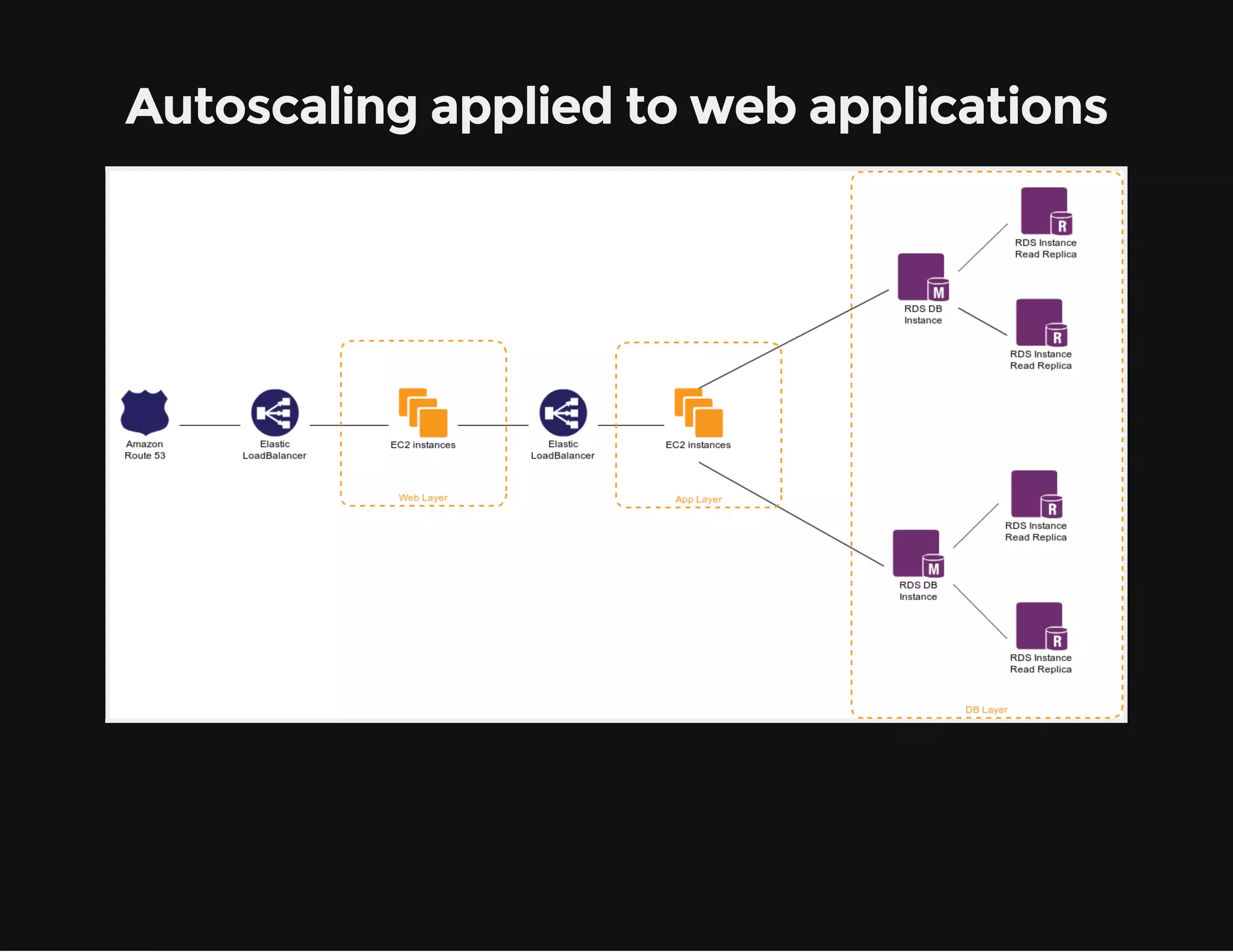
Autoscaling applied to web applications
Autoscaling in practice 
Dynamically added and removed! 
Machine to Machine 
Closed-loop control system
Scale apps is not simple 
How to handle dev/testing/production? (dynamic env) 
How to install/update softwares? (dynamic env) 
How to handle user sessions? (more than one node) 
How to handle/tail logs? (dynamic env) 
How to monitor all instances (dynamic env) 
And more... (all things are moving!)
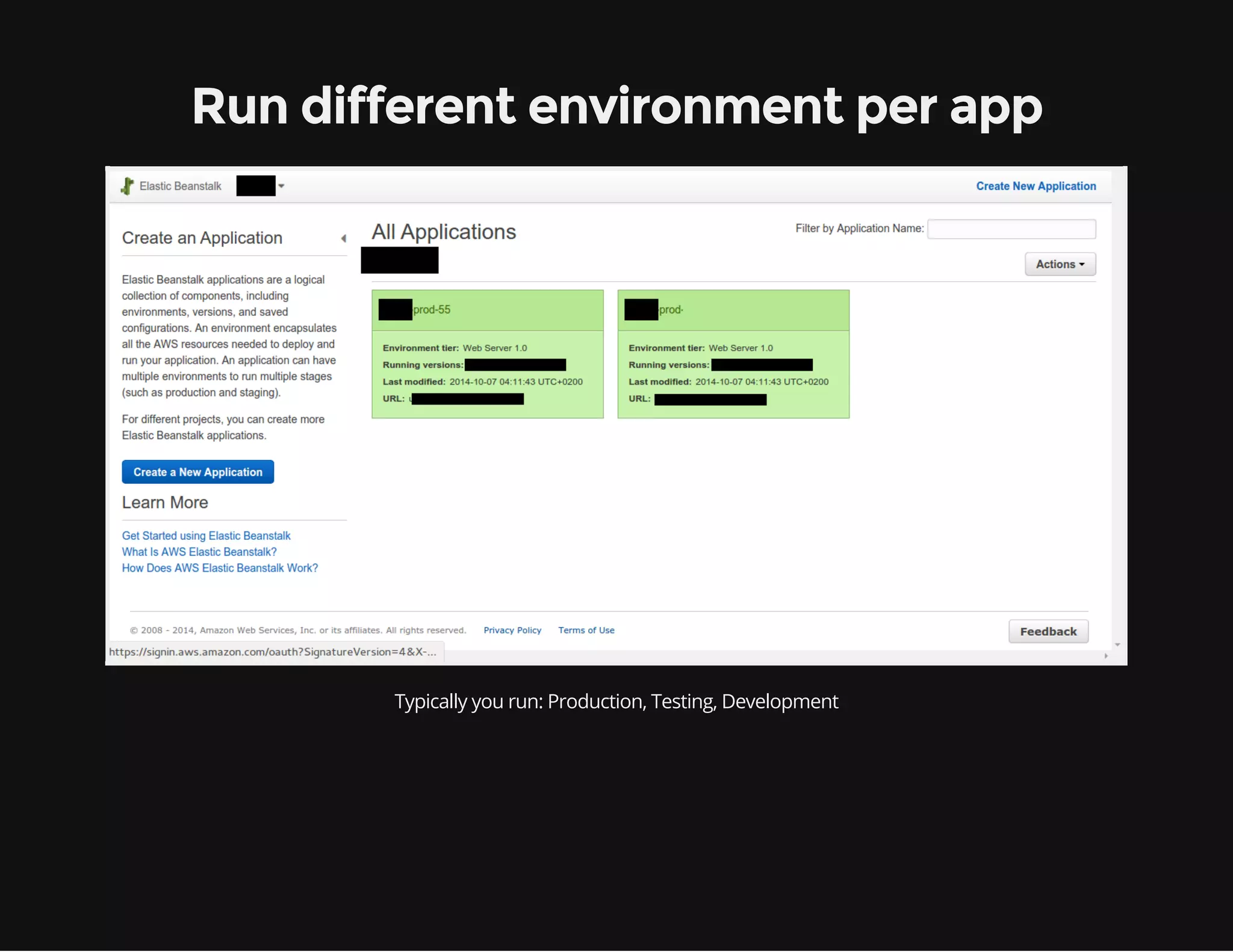
Run different environment per app 
Typically you run: Production, Testing, Development
How to deploy the app? 
ElasticBeanstalk updates app using Git on push 
ElasticBeanstalk updates app using a pre-packaged Zip file 
ElasticBeankstalk offers also API 
Git Push -> Jenkins Build ZIP package -> ElasticBeankstalk Deploy
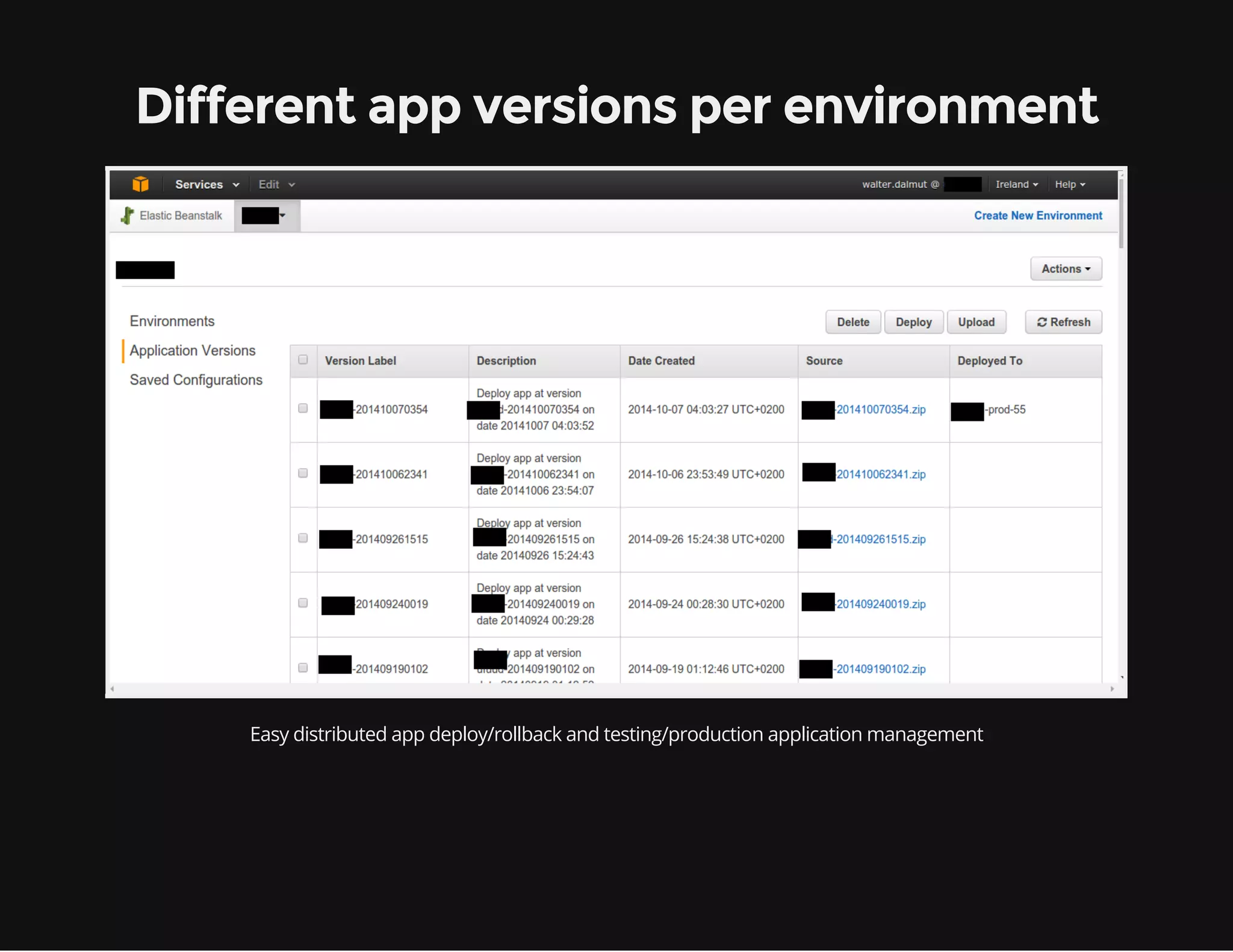
Different app versions per environment 
Easy distributed app deploy/rollback and testing/production application management
Different configuration per environment 
Upgrade your environment and switch your production without downtime
Production Env Swap
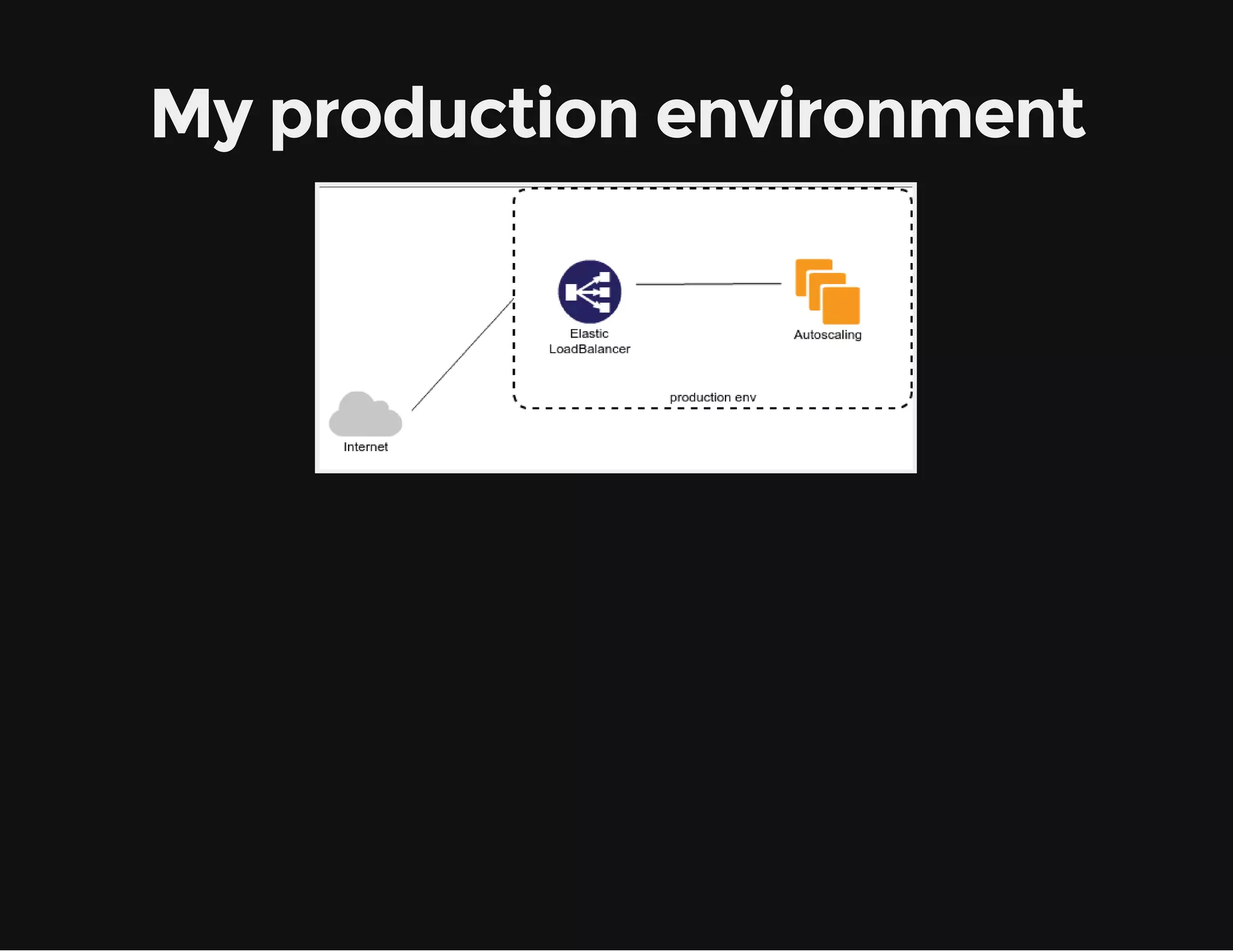
My production environment
Add a new environment
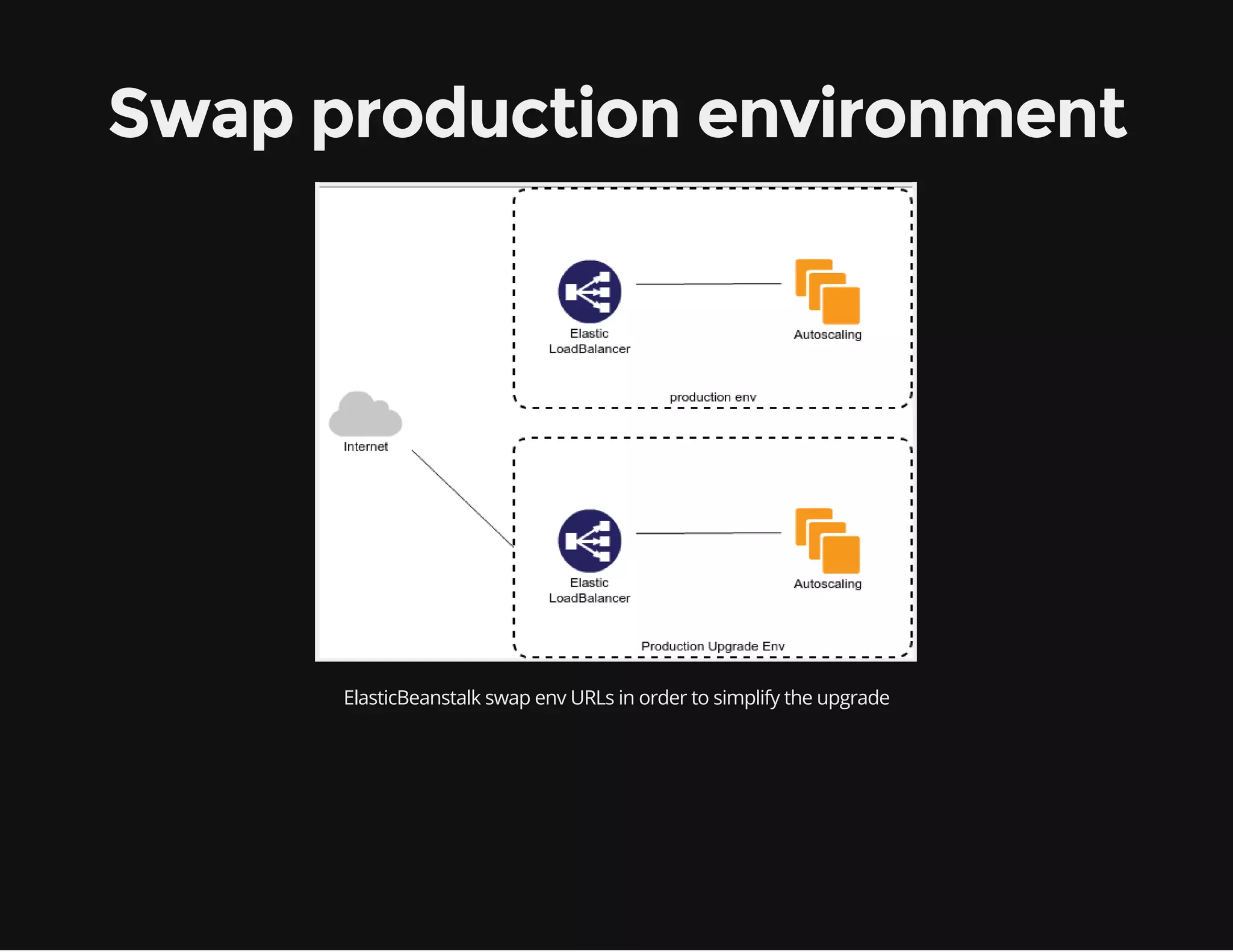
Swap production environment 
ElasticBeanstalk swap env URLs in order to simplify the upgrade
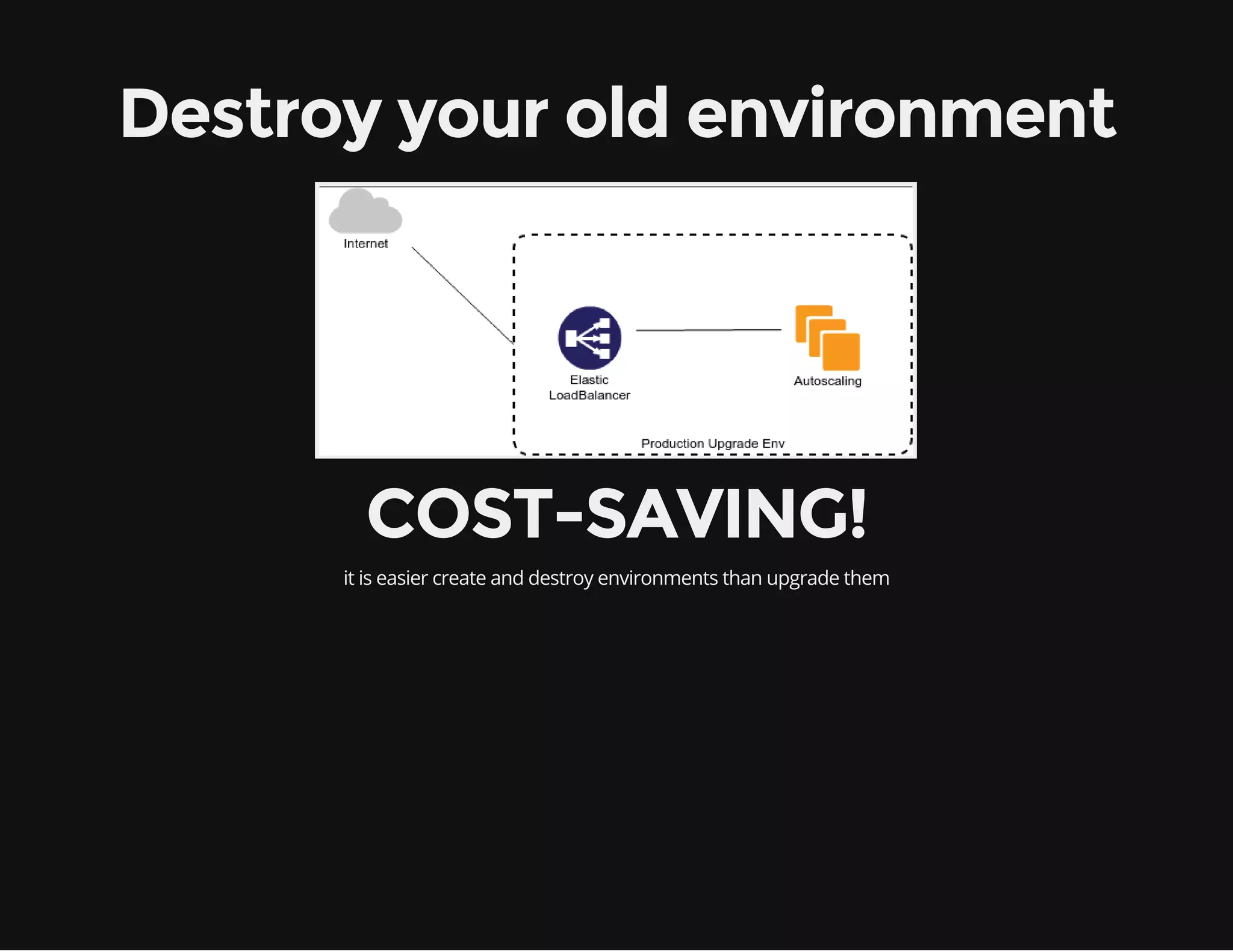
Destroy your old environment 
COST-SAVING! 
it is easier create and destroy environments than upgrade them
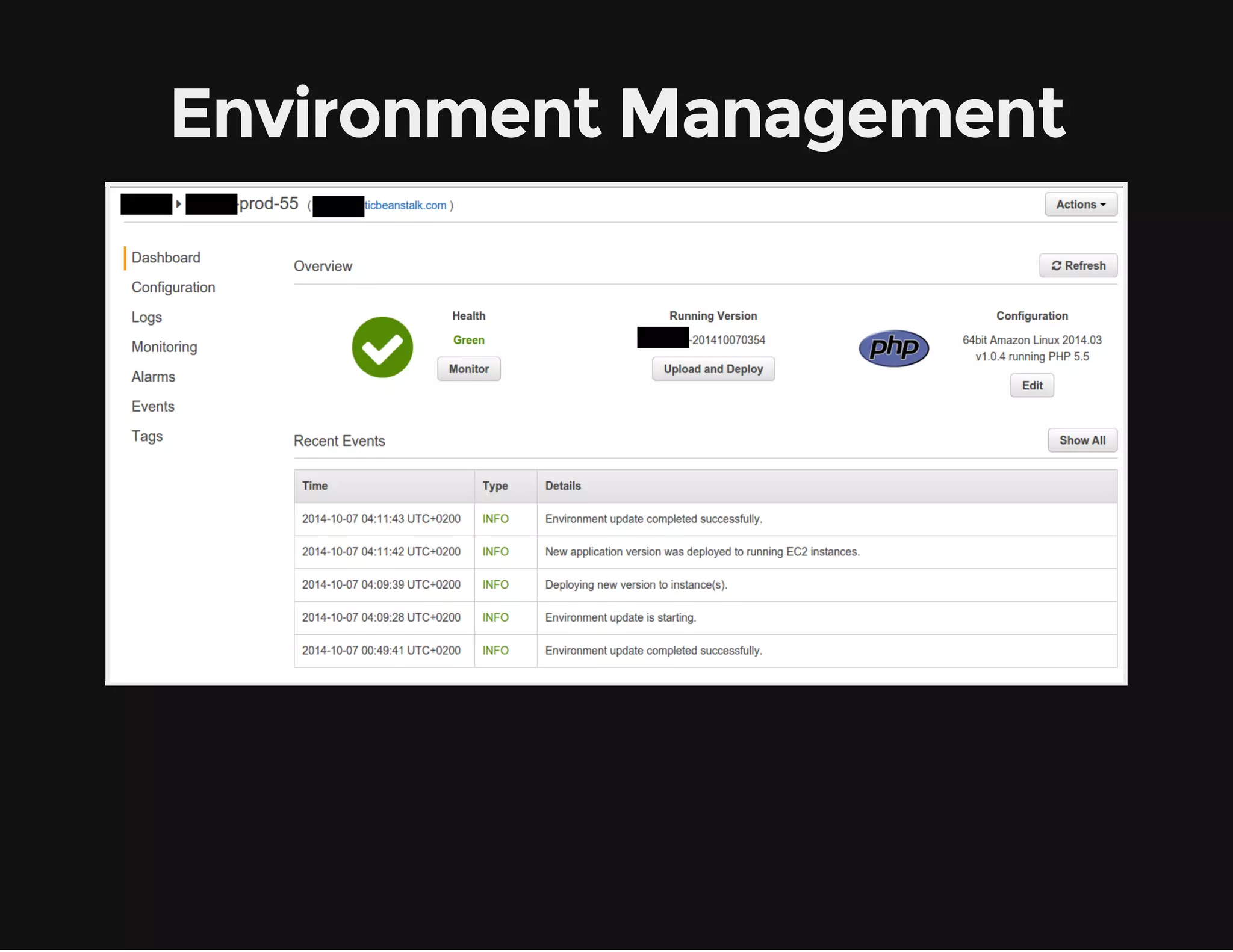
Environment Management
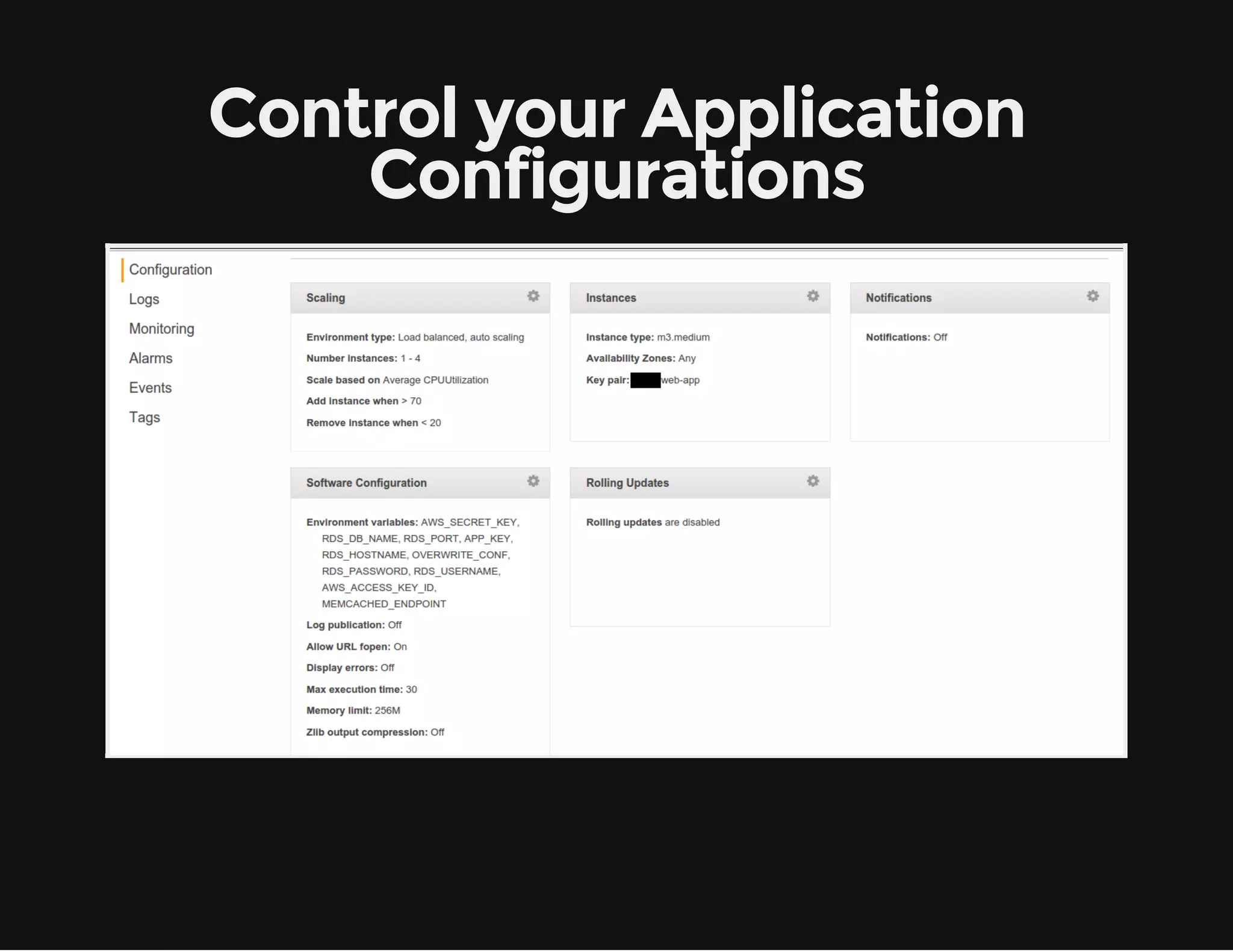
Control your Application 
Configurations
Application variables 
All environment variables are ported to your application in $_SERVER 
You can pass everything like: Memcached and Mysql configurations etc.
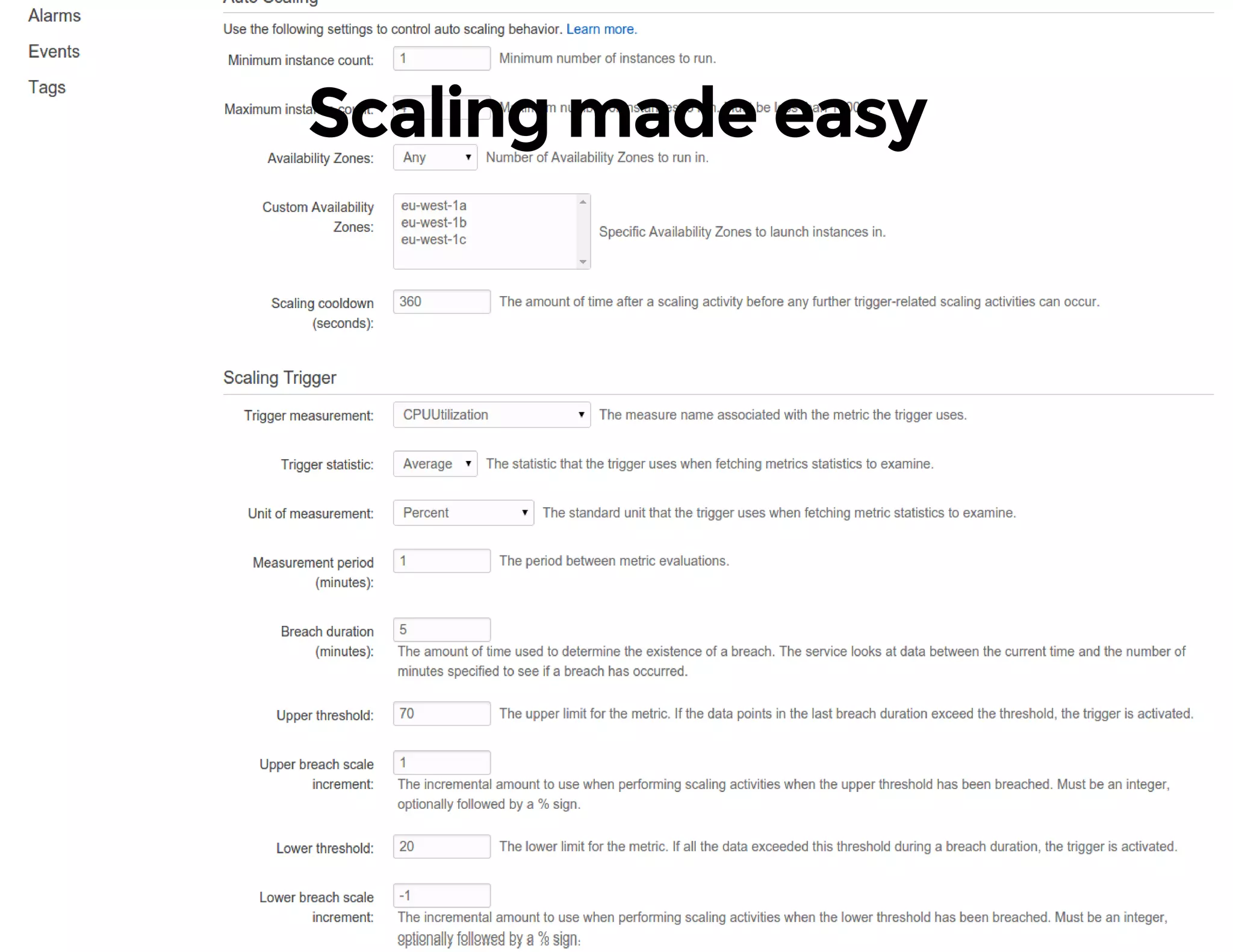
Scaling made easy
We need more customizations! 
Create a folder in your project root with name .ebextensions and 
append your configuration files with extension .config 
ElasticBeanstalk will use them during the application provisioning
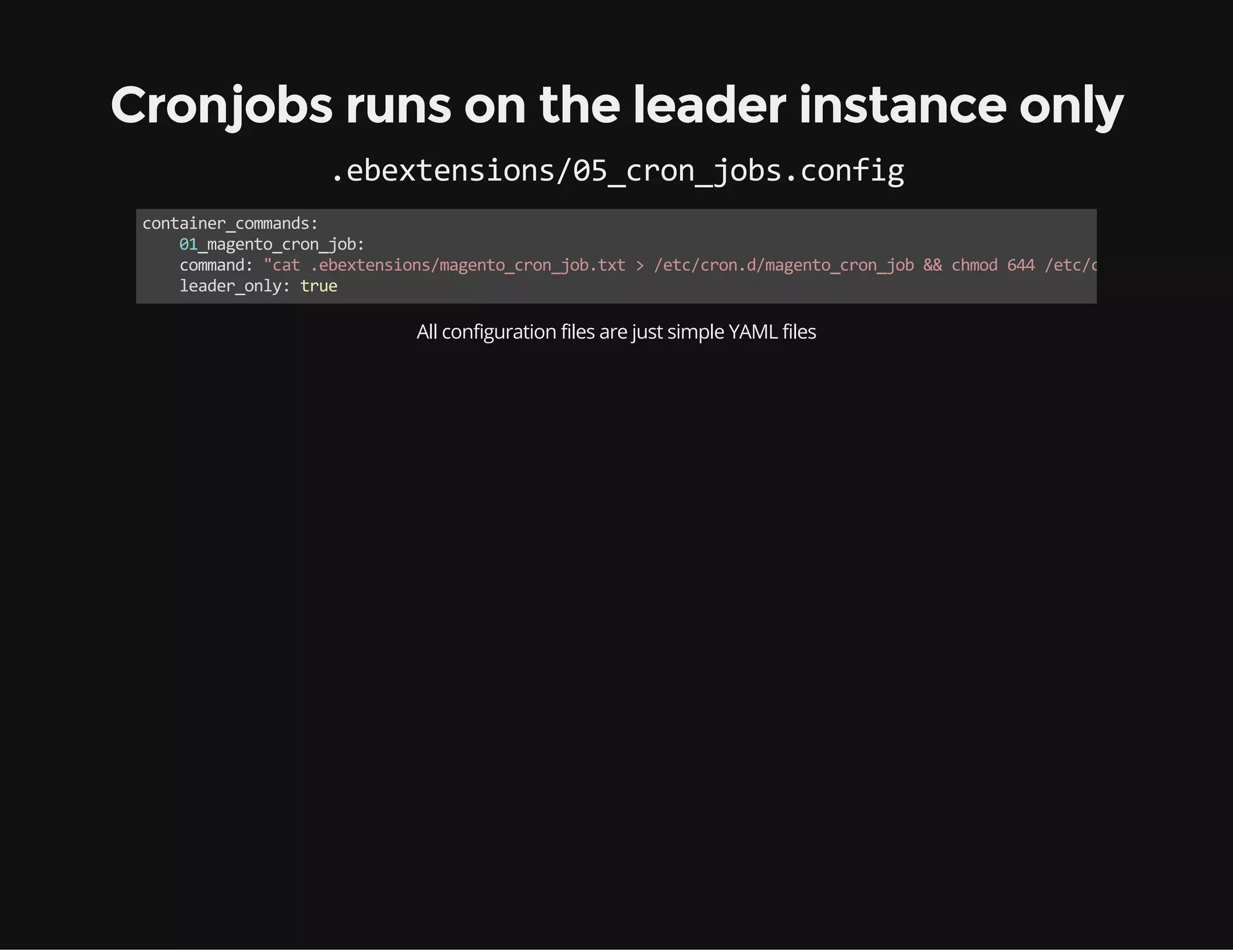
Cronjobs runs on the leader instance only 
.ebextensions/05_cron_jobs.config 
container_commands: 
01_magento_cron_job: 
command: "cat .ebextensions/magento_cron_job.txt > /etc/cron.d/magento_cron_job && chmod 644 /etc/cron.d/magento_cron_leader_only: true 
All configuration files are just simple YAML files
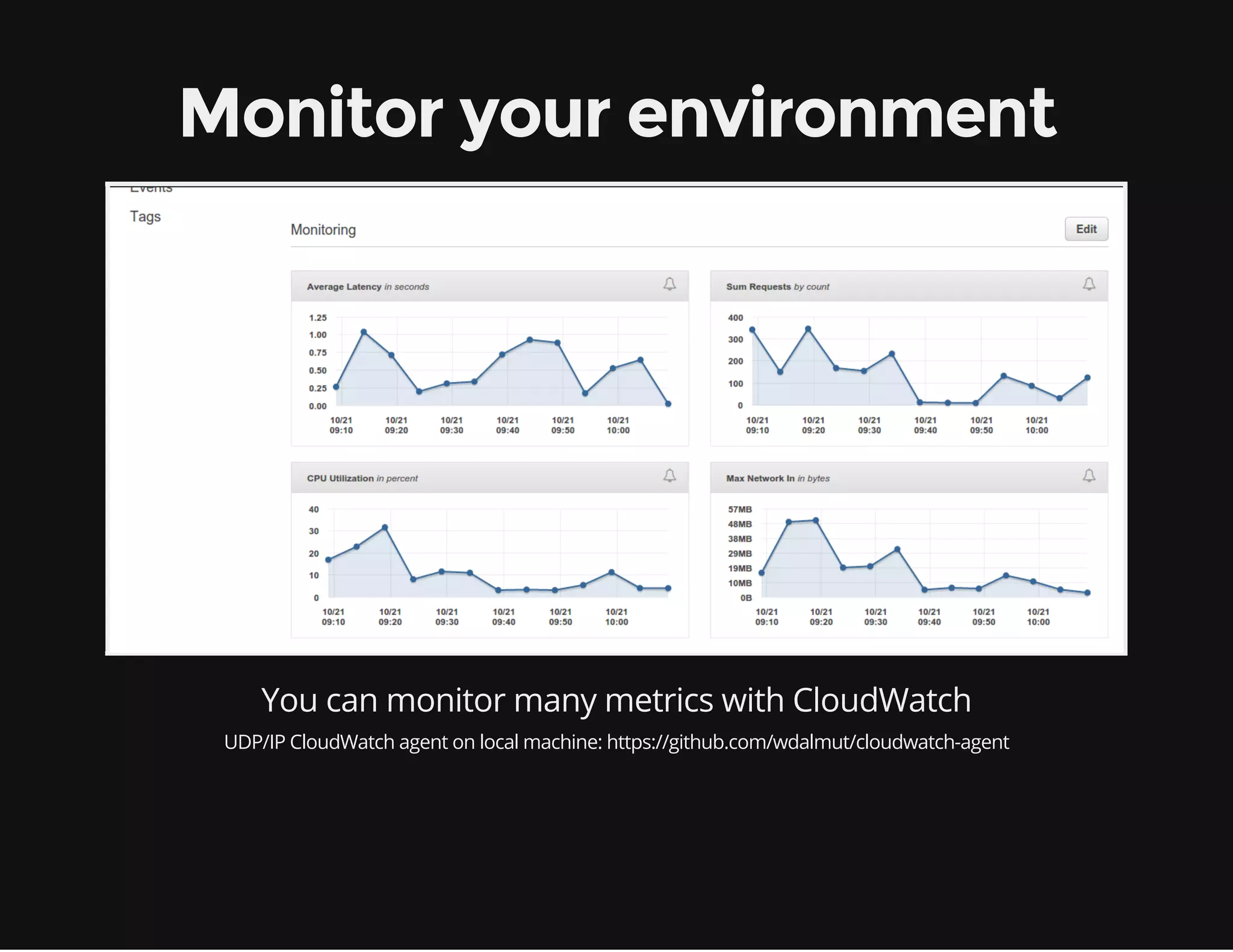
Monitor your environment 
You can monitor many metrics with CloudWatch 
UDP/IP CloudWatch agent on local machine: https://github.com/wdalmut/cloudwatch-agent
What we are missing? 
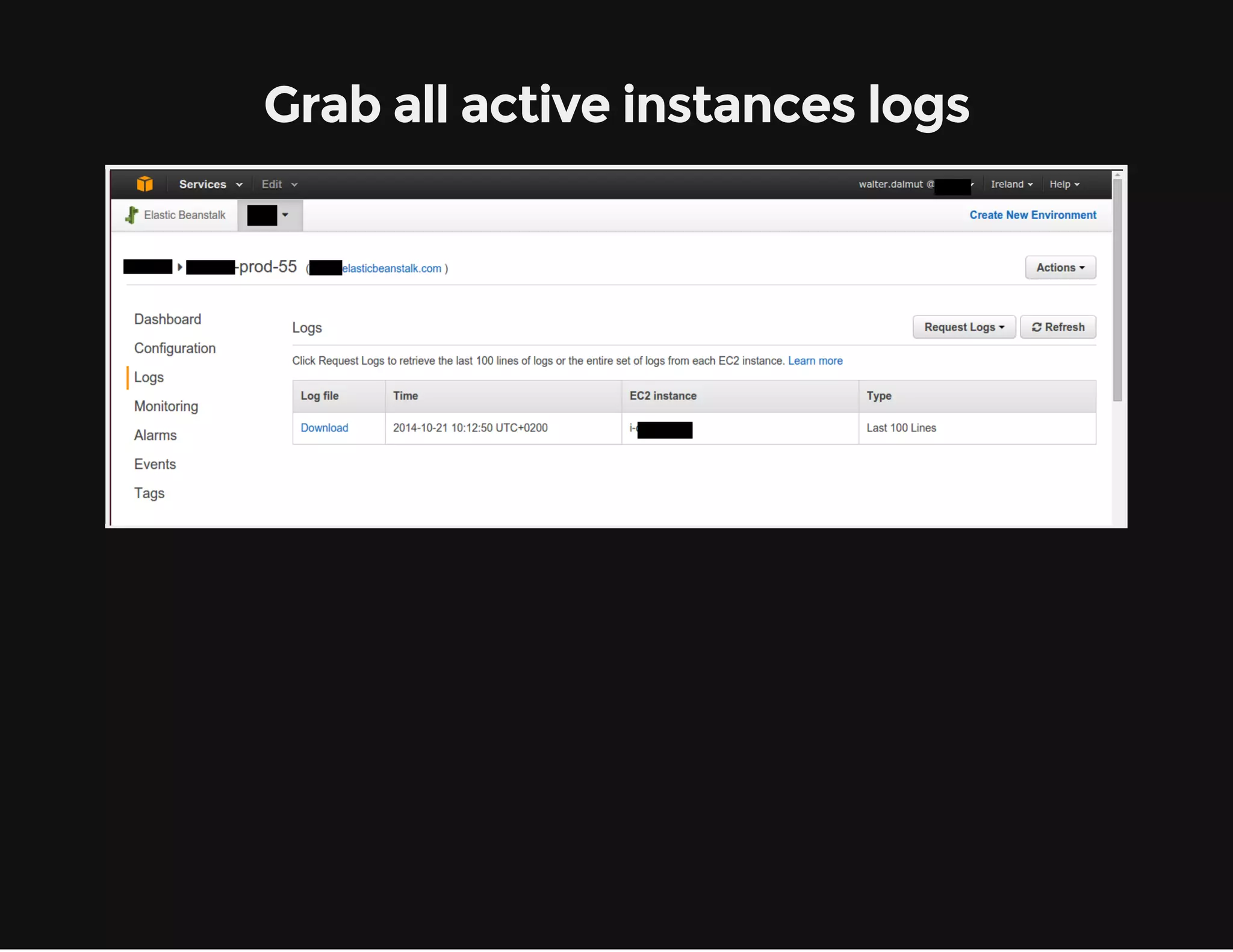
Logs!
Grab all active instances logs
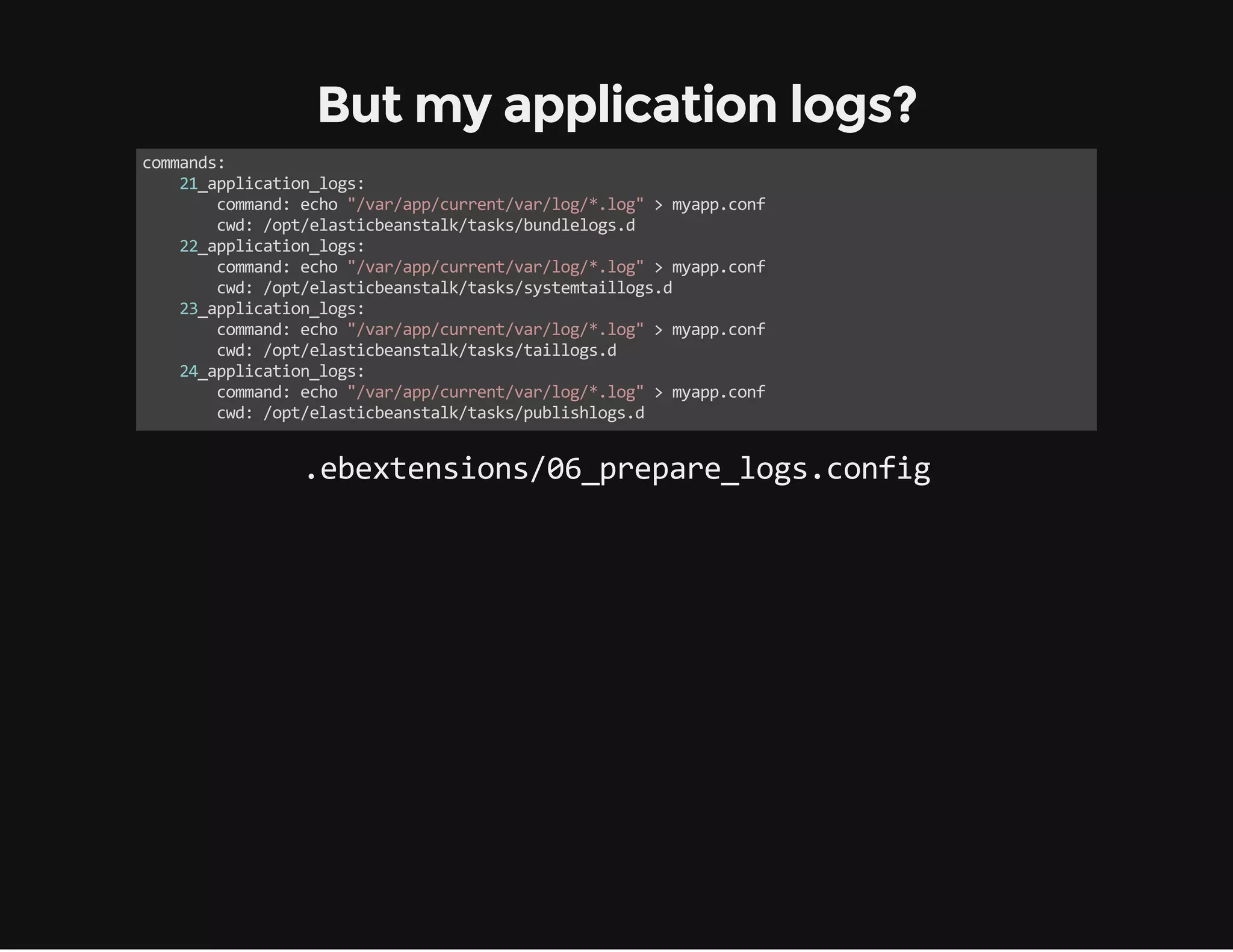
But my application logs? 
commands: 
21_application_logs: 
command: echo "/var/app/current/var/log/*.log" > myapp.conf 
cwd: /opt/elasticbeanstalk/tasks/bundlelogs.d 
22_application_logs: 
command: echo "/var/app/current/var/log/*.log" > myapp.conf 
cwd: /opt/elasticbeanstalk/tasks/systemtaillogs.d 
23_application_logs: 
command: echo "/var/app/current/var/log/*.log" > myapp.conf 
cwd: /opt/elasticbeanstalk/tasks/taillogs.d 
24_application_logs: 
command: echo "/var/app/current/var/log/*.log" > myapp.conf 
cwd: /opt/elasticbeanstalk/tasks/publishlogs.d 
.ebextensions/06_prepare_logs.config
The Magento side
Use Composer for dependencies 
ElasticBeanstalk uses Composer in order to prepare your application 
So, we can use composer hooks in order to connect all env variables to 
our Magento configuration 
http://github.com/magento-hackathon/magento-composer-installer
Composer hooks 
{ 
/** other composer configs **/ 
"scripts": { 
"post‐update‐cmd": [ 
"CorleyDeployMagento::localConf" 
], 
"post‐install‐cmd": [ 
"CorleyDeployMagento::localConf" 
] 
}, 
}
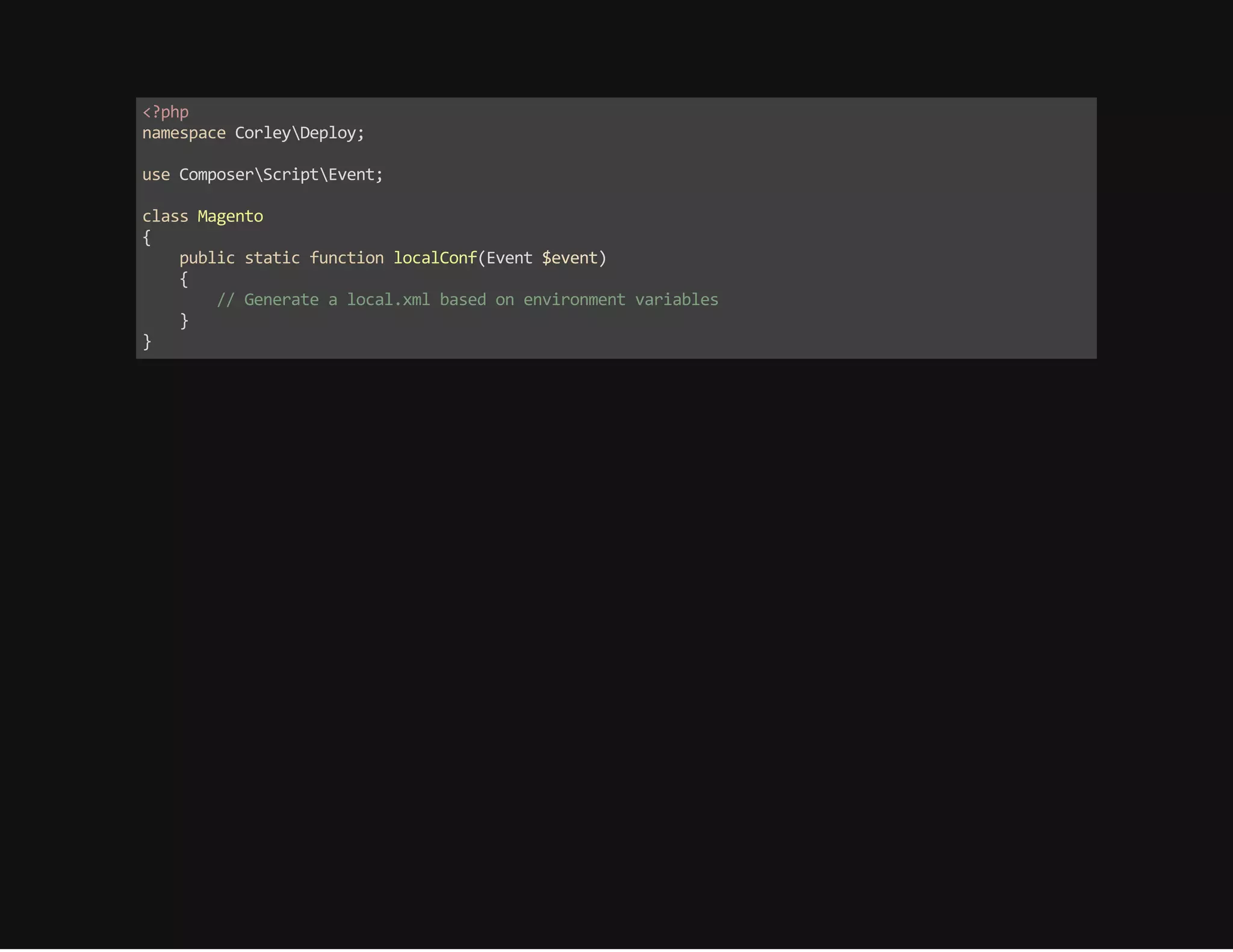
<?php 
namespace CorleyDeploy; 
use ComposerScriptEvent; 
class Magento 
{ 
public static function localConf(Event $event) 
{ 
// Generate a local.xml based on environment variables 
} 
}
The golden rule: 
The filesystem is not reliable
Keep media in a shared location 
ok but, what could we use?
NFS? 
is a single point of failure 
is not at web scale
Amazon S3? 
does not work out-of-the-box 
maybe in future...
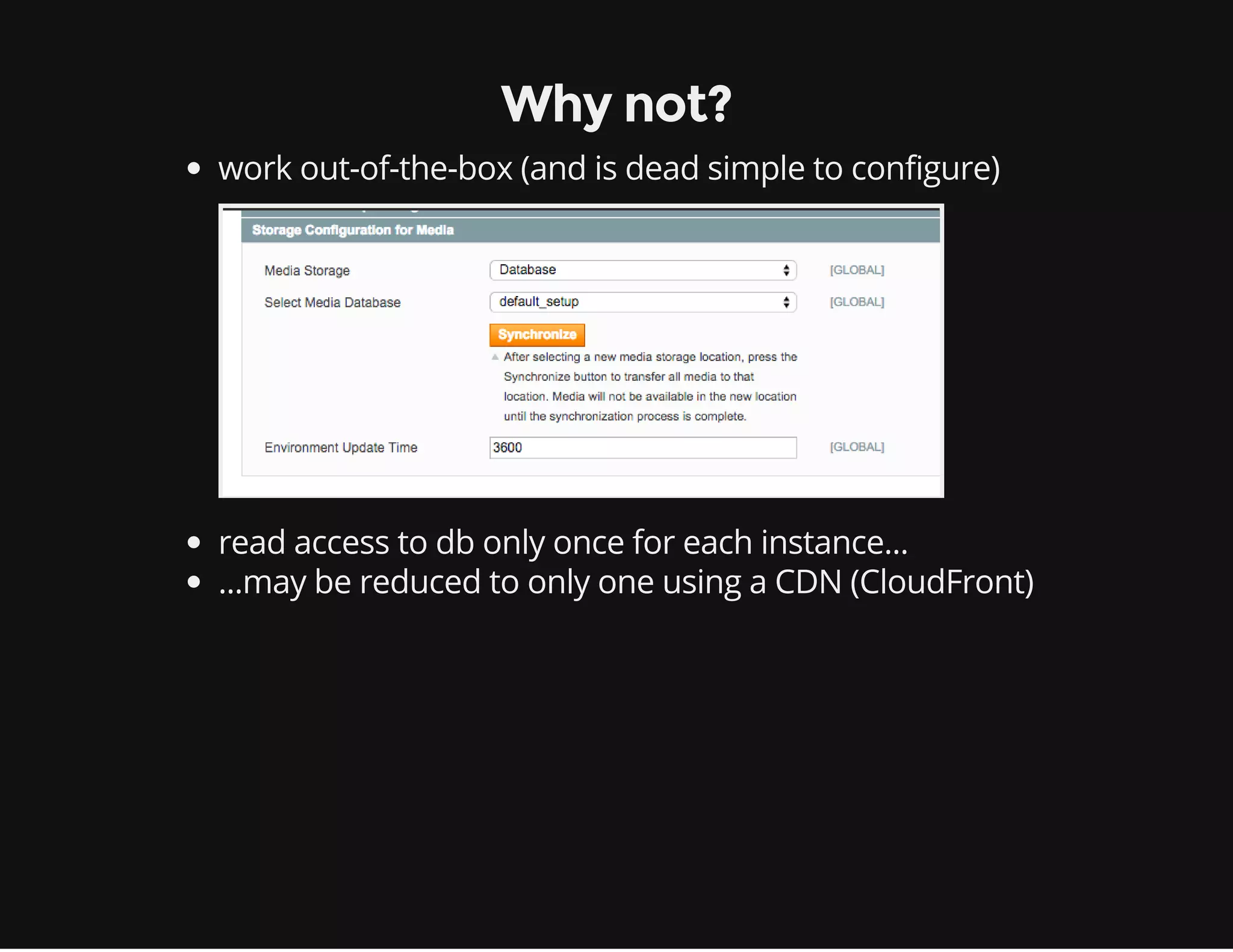
Database?
Why not? 
work out-of-the-box (and is dead simple to configure) 
read access to db only once for each instance... 
...may be reduced to only one using a CDN (CloudFront)
Cache and sessions 
All cache backend and session handlers except "File" are fine 
Best options are Redis and Memcached (both available via Amazon 
ElastiCache)
TO BE DONE 
sitemap.xml 
Exchange data for third-party integration (ERP, CRM etc.) 
Integration with services (eg. bank gateway) that require IPs whitelist 
Use a proxy 
IP reservation 
Store media on Amazon S3 
Use DynamoDB session handler
Thanks for listening 
Any question?

Scale your Magento app with Elastic Beanstalk

  • 1.
    Scale out yourMagento application with ElasticBeanstalk
  • 2.
    About us Cofounder& CTO - Bitbull S.r.l. @Bitbull_it bitbull-team on Github kesonno on Twitter Cofounder - Cofounder - Corley S.r.l. @CorleyCloud UpCloo LTD @UpCloo on Github on Twitter wdalmut walterdalmut - Internet Of Things! @ Turin [CFP] - 15 Nov - CloudComputing @ Turin [CFP ASAP] internetof.it www.cloudconf.it
  • 3.
    ElasticBeanstalk Scale yourapp workers and web apps Queue Daemons Load balanced web applications Mainly for Service Oriented Architecture
  • 4.
    Autoscaling applied toweb applications
  • 5.
    Autoscaling in practice Dynamically added and removed! Machine to Machine Closed-loop control system
  • 6.
    Scale apps isnot simple How to handle dev/testing/production? (dynamic env) How to install/update softwares? (dynamic env) How to handle user sessions? (more than one node) How to handle/tail logs? (dynamic env) How to monitor all instances (dynamic env) And more... (all things are moving!)
  • 7.
    Run different environmentper app Typically you run: Production, Testing, Development
  • 8.
    How to deploythe app? ElasticBeanstalk updates app using Git on push ElasticBeanstalk updates app using a pre-packaged Zip file ElasticBeankstalk offers also API Git Push -> Jenkins Build ZIP package -> ElasticBeankstalk Deploy
  • 9.
    Different app versionsper environment Easy distributed app deploy/rollback and testing/production application management
  • 10.
    Different configuration perenvironment Upgrade your environment and switch your production without downtime
  • 11.
  • 12.
  • 13.
    Add a newenvironment
  • 14.
    Swap production environment ElasticBeanstalk swap env URLs in order to simplify the upgrade
  • 15.
    Destroy your oldenvironment COST-SAVING! it is easier create and destroy environments than upgrade them
  • 16.
  • 17.
    Control your Application Configurations
  • 18.
    Application variables Allenvironment variables are ported to your application in $_SERVER You can pass everything like: Memcached and Mysql configurations etc.
  • 19.
  • 20.
    We need morecustomizations! Create a folder in your project root with name .ebextensions and append your configuration files with extension .config ElasticBeanstalk will use them during the application provisioning
  • 21.
    Cronjobs runs onthe leader instance only .ebextensions/05_cron_jobs.config container_commands: 01_magento_cron_job: command: "cat .ebextensions/magento_cron_job.txt > /etc/cron.d/magento_cron_job && chmod 644 /etc/cron.d/magento_cron_leader_only: true All configuration files are just simple YAML files
  • 22.
    Monitor your environment You can monitor many metrics with CloudWatch UDP/IP CloudWatch agent on local machine: https://github.com/wdalmut/cloudwatch-agent
  • 23.
    What we aremissing? Logs!
  • 24.
    Grab all activeinstances logs
  • 25.
    But my applicationlogs? commands: 21_application_logs: command: echo "/var/app/current/var/log/*.log" > myapp.conf cwd: /opt/elasticbeanstalk/tasks/bundlelogs.d 22_application_logs: command: echo "/var/app/current/var/log/*.log" > myapp.conf cwd: /opt/elasticbeanstalk/tasks/systemtaillogs.d 23_application_logs: command: echo "/var/app/current/var/log/*.log" > myapp.conf cwd: /opt/elasticbeanstalk/tasks/taillogs.d 24_application_logs: command: echo "/var/app/current/var/log/*.log" > myapp.conf cwd: /opt/elasticbeanstalk/tasks/publishlogs.d .ebextensions/06_prepare_logs.config
  • 26.
  • 27.
    Use Composer fordependencies ElasticBeanstalk uses Composer in order to prepare your application So, we can use composer hooks in order to connect all env variables to our Magento configuration http://github.com/magento-hackathon/magento-composer-installer
  • 28.
    Composer hooks { /** other composer configs **/ "scripts": { "post‐update‐cmd": [ "CorleyDeployMagento::localConf" ], "post‐install‐cmd": [ "CorleyDeployMagento::localConf" ] }, }
  • 29.
    <?php namespace CorleyDeploy; use ComposerScriptEvent; class Magento { public static function localConf(Event $event) { // Generate a local.xml based on environment variables } }
  • 30.
    The golden rule: The filesystem is not reliable
  • 31.
    Keep media ina shared location ok but, what could we use?
  • 32.
    NFS? is asingle point of failure is not at web scale
  • 33.
    Amazon S3? doesnot work out-of-the-box maybe in future...
  • 34.
  • 35.
    Why not? workout-of-the-box (and is dead simple to configure) read access to db only once for each instance... ...may be reduced to only one using a CDN (CloudFront)
  • 36.
    Cache and sessions All cache backend and session handlers except "File" are fine Best options are Redis and Memcached (both available via Amazon ElastiCache)
  • 37.
    TO BE DONE sitemap.xml Exchange data for third-party integration (ERP, CRM etc.) Integration with services (eg. bank gateway) that require IPs whitelist Use a proxy IP reservation Store media on Amazon S3 Use DynamoDB session handler
  • 38.
    Thanks for listening Any question?