Running a program Compiling A program, called a  compiler , translates the source code into machine code The CPU then executes the machine code C, FORTRAN, Pascal, COBOL, BASIC Interpreting A program, called an  interpreter,  reads the source code and executes the instructions BASIC, LISP, Perl, Python
Java Code Execution Compiler (javac) translates source code (.java file) to byte code (.class file) Byte code is machine independent Byte code is interpreted by the Java run-time program program (java), the IDE (BlueJ), the appletviewer, or the web browser. The program can be compiled on one machine and interpreted on another.
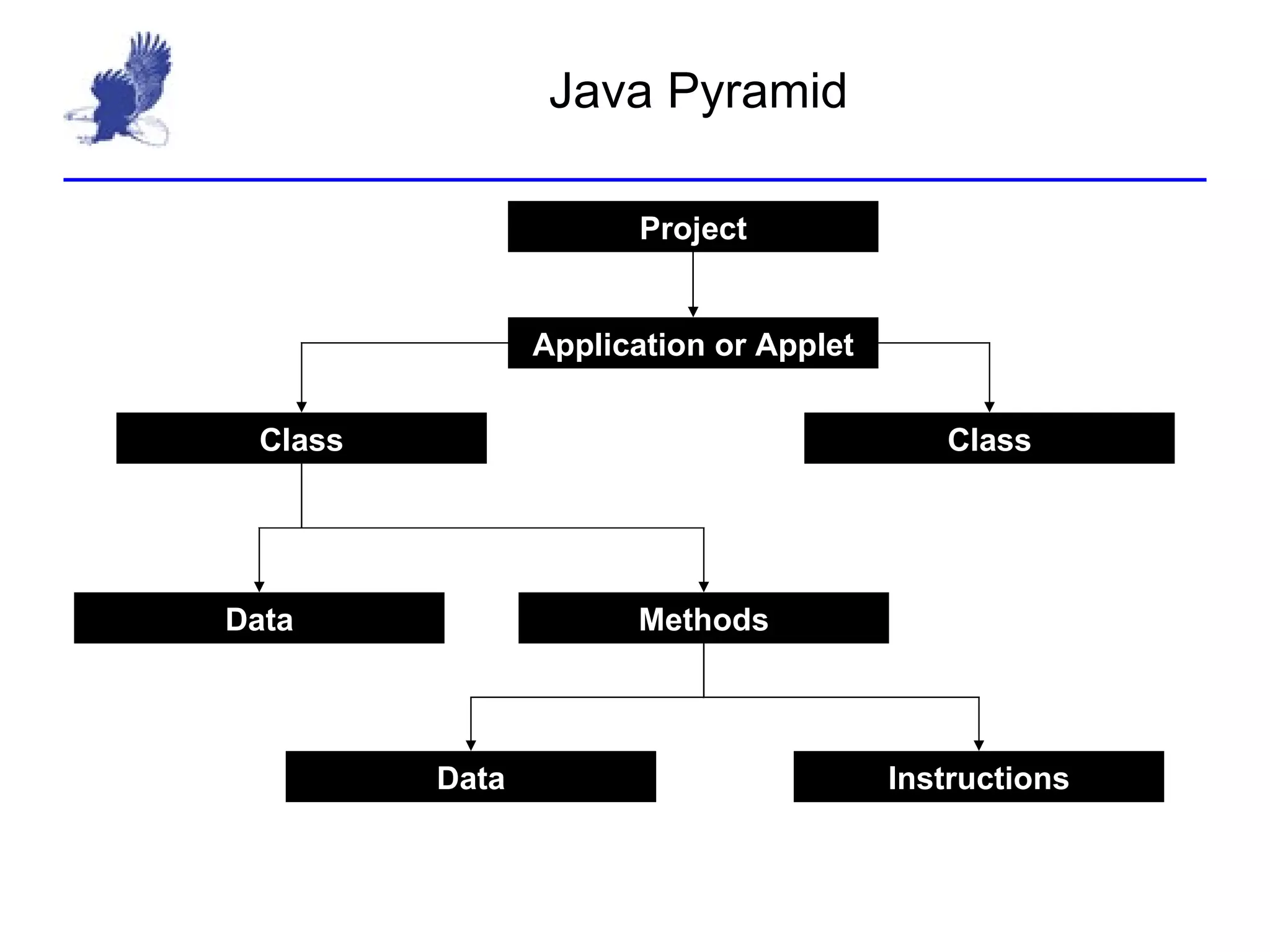
Java Pyramid Application or Applet Class Class Project Data Methods Data Instructions
Java Development JDK 1.6.20 SE Development Kit (JDK) http:// java.sun.com/javase/downloads/index.jsp Includes compiler, interpreter, and libraries BlueJ Version 3 IDE (Integrated Development Environment) Tools for designing, developing, and testing Java software. http:// bluej.org
Hello, world!! Class Methods main Comments javadocs Blocks
Classes and Objects A class is a  definition  of a (complex) data type An object is an  instantiation  of a class A Java program is a set of interacting objects Everything in Java is an object
Special method: main Methods A collection of data and  instructions Has a specific purpose public static void main(String args) The start of a Java  application It must belong to a class (We will cover  applets  after we’ve covered objects and classes)
Comments Notes to other readers of your software (including your teacher and yourself). Ignored by the machine. Two formats: “/*” starts a comment, ‘*/’ finishes it. These comments can span multiple lines. ‘//’ starts the comment, EOL (end-of-line) finishes it. Comments can be inserted anywhere, but there are some common locations.
Blocks A section of code; a set of instructions or statements. A block starts with ‘{‘, and ends with ‘}’ Blocks are written for: Method definitions Class definitions Loops  ‘then’ and ‘else’ bodies Blocks also define scope for variables.
Lab 0: Hello, world
Lab 0 debrief: What have we discovered? We created an  application  called  Hello The software was created in a folder in  My Documents  also called  Hello The folder has a file called  Hello.java  containing: A Class called  Hello The  main  method, the applications starting point. The compiler creates a file called  Hello.class  containing the program’s byte code. We were able to do everything using BlueJ

R:\ap java\class slides\chapter 1\1 2 java development

  • 1.
    Running a programCompiling A program, called a compiler , translates the source code into machine code The CPU then executes the machine code C, FORTRAN, Pascal, COBOL, BASIC Interpreting A program, called an interpreter, reads the source code and executes the instructions BASIC, LISP, Perl, Python
  • 2.
    Java Code ExecutionCompiler (javac) translates source code (.java file) to byte code (.class file) Byte code is machine independent Byte code is interpreted by the Java run-time program program (java), the IDE (BlueJ), the appletviewer, or the web browser. The program can be compiled on one machine and interpreted on another.
  • 3.
    Java Pyramid Applicationor Applet Class Class Project Data Methods Data Instructions
  • 4.
    Java Development JDK1.6.20 SE Development Kit (JDK) http:// java.sun.com/javase/downloads/index.jsp Includes compiler, interpreter, and libraries BlueJ Version 3 IDE (Integrated Development Environment) Tools for designing, developing, and testing Java software. http:// bluej.org
  • 5.
    Hello, world!! ClassMethods main Comments javadocs Blocks
  • 6.
    Classes and ObjectsA class is a definition of a (complex) data type An object is an instantiation of a class A Java program is a set of interacting objects Everything in Java is an object
  • 7.
    Special method: mainMethods A collection of data and instructions Has a specific purpose public static void main(String args) The start of a Java application It must belong to a class (We will cover applets after we’ve covered objects and classes)
  • 8.
    Comments Notes toother readers of your software (including your teacher and yourself). Ignored by the machine. Two formats: “/*” starts a comment, ‘*/’ finishes it. These comments can span multiple lines. ‘//’ starts the comment, EOL (end-of-line) finishes it. Comments can be inserted anywhere, but there are some common locations.
  • 9.
    Blocks A sectionof code; a set of instructions or statements. A block starts with ‘{‘, and ends with ‘}’ Blocks are written for: Method definitions Class definitions Loops ‘then’ and ‘else’ bodies Blocks also define scope for variables.
  • 10.
  • 11.
    Lab 0 debrief:What have we discovered? We created an application called Hello The software was created in a folder in My Documents also called Hello The folder has a file called Hello.java containing: A Class called Hello The main method, the applications starting point. The compiler creates a file called Hello.class containing the program’s byte code. We were able to do everything using BlueJ