Python as number
                                crunching glue

                                     Jiahao Chen
                                    jiahao@mit.edu
                                     @mitpostdoc
                                   theochem.mit.edu

                                          1
Thursday, September 22, 2011
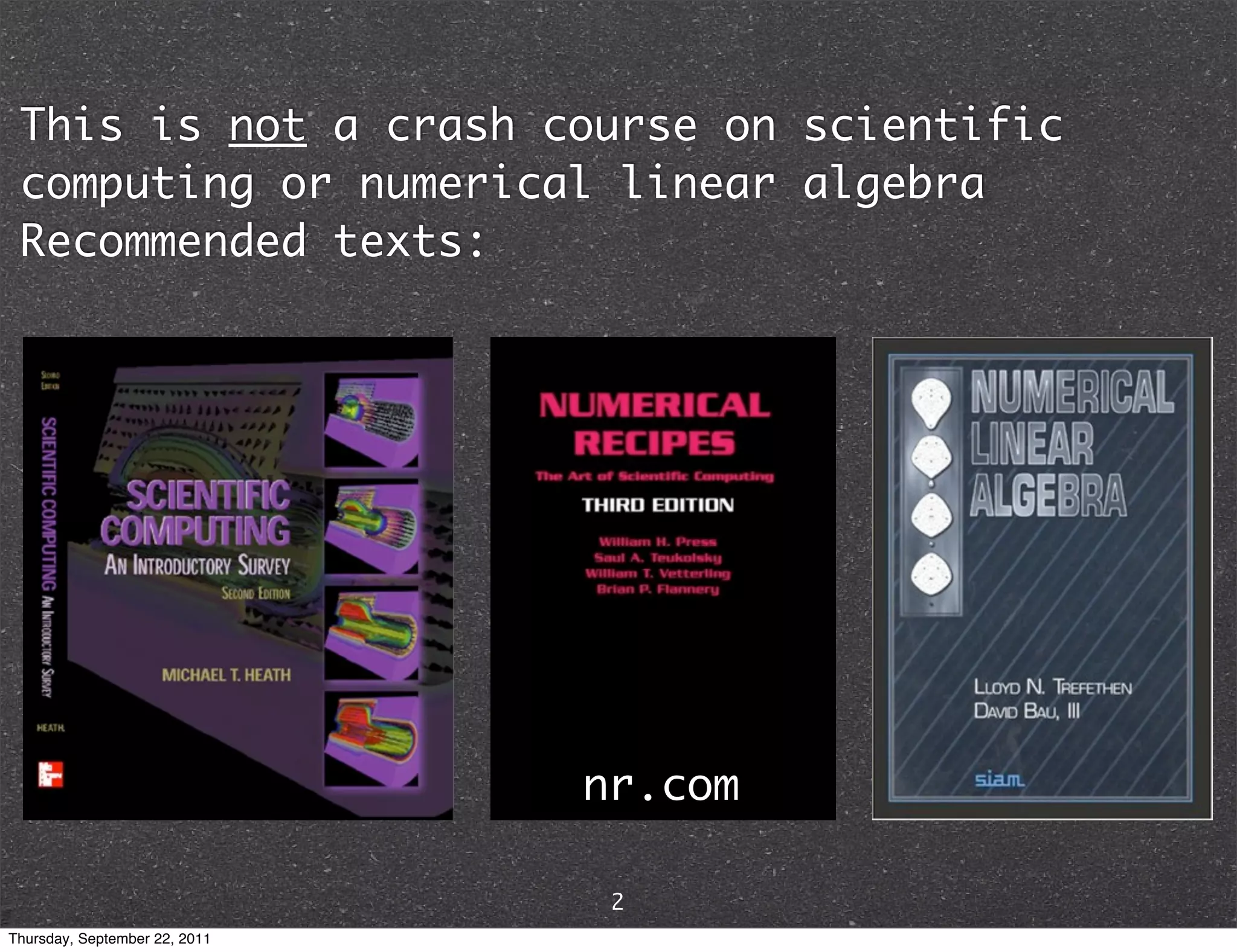
This is not a crash course on scientific
 computing or numerical linear algebra
 Recommended texts:


                               nr.com

                                2
Thursday, September 22, 2011
NumPy and SciPy
      How to say:

                          NumPy: no official pronunciation

                          SciPy: “sigh pie”


                                         3
Thursday, September 22, 2011
NumPy and SciPy
      How to say:

                          NumPy: no official pronunciation

                          SciPy: “sigh pie”
      Where to get:

                          scipy.org, numpy.scipy.org

                          You might already have it

                          Otherwise, have fun installing it ;)
                                         3
Thursday, September 22, 2011
You may already know how to use numpy/
      scipy!

      Similar to Matlab, Octave, Scilab, R.

      see:
      http://mathesaurus.sourceforge.net/

      In many cases, Matlab/Octave/Scilab code
      can be translated easily to use numpy
      +scipy+matplotlib.

      Other interfaces exist: e.g. mlabwrap lets
      you wrap Python around Matlab.
                               4
Thursday, September 22, 2011
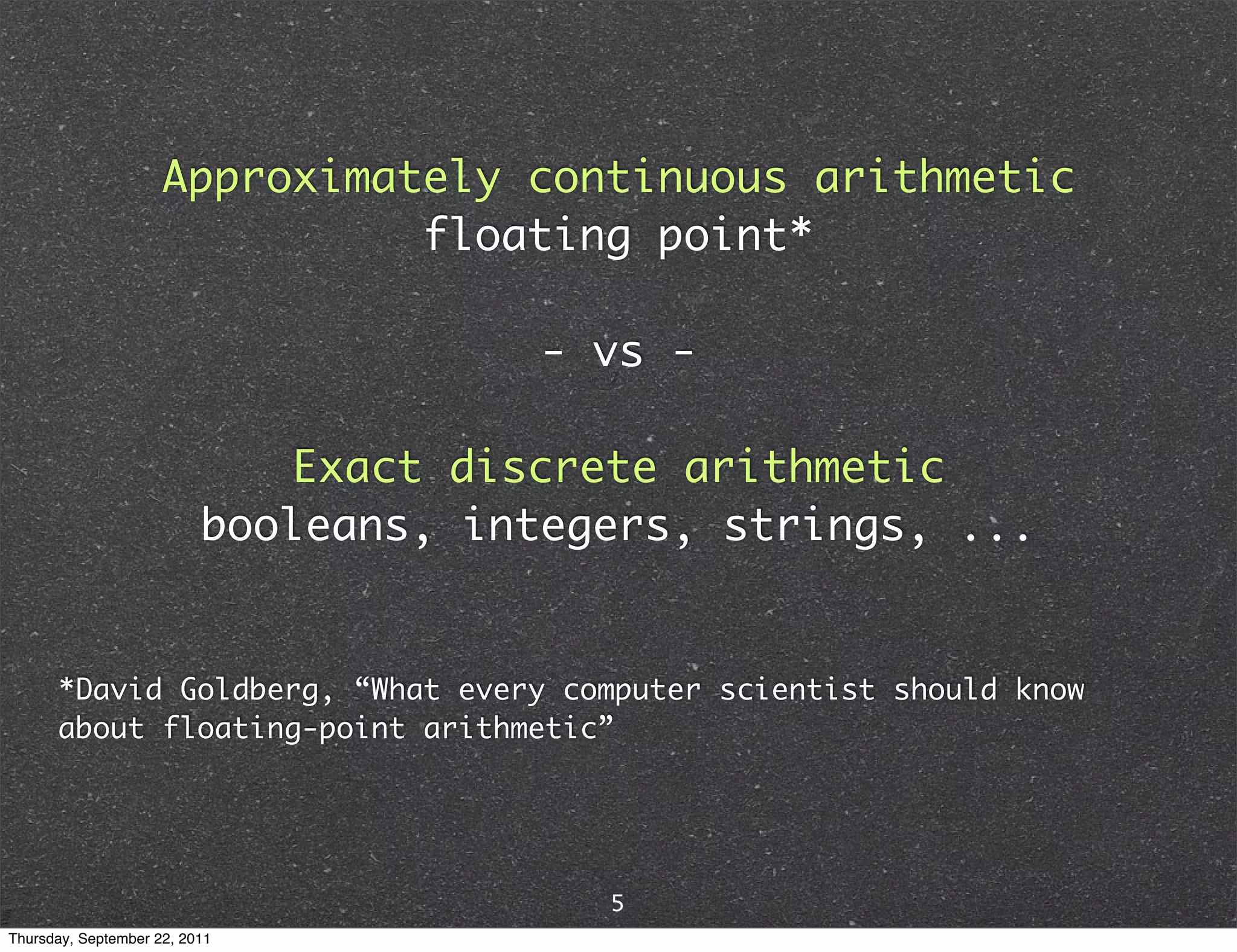
Approximately continuous arithmetic
                               floating point*

                                       - vs -

                             Exact discrete arithmetic
                          booleans, integers, strings, ...


      *David Goldberg, “What every computer scientist should know
      about floating-point arithmetic”


                                         5
Thursday, September 22, 2011
Using numpy can make code cleaner

                                               import numpy as np
               a = range(10000000)             a = np.arange(10000000)
               b = range(10000000)             b = np.arange(10000000)
               c = []                          c = a + b

               for i in range(len(a)):
                   c.append(a[i] + b[i])


  What’s different??


                                           6
Thursday, September 22, 2011
What’s different?creates                      list of          creates ndarray of
                                    dynamically typed int      statically typed int
                                                   import numpy as np
               a = range(10000000)                 a = np.arange(10000000)
               b = range(10000000)                 b = np.arange(10000000)
               c = [] #a+b is concatenation        c = a + b #vectorized addition

               for i in range(len(a)):
                   c.append(a[i] + b[i])


  Using numpy can save lots of time

                               7.050s                       0.333s       (21x)
  a convenient interface to compiled C/Fortran
  libraries: BLAS, LAPACK, FFTW, UMFPACK,...

                                               7
Thursday, September 22, 2011
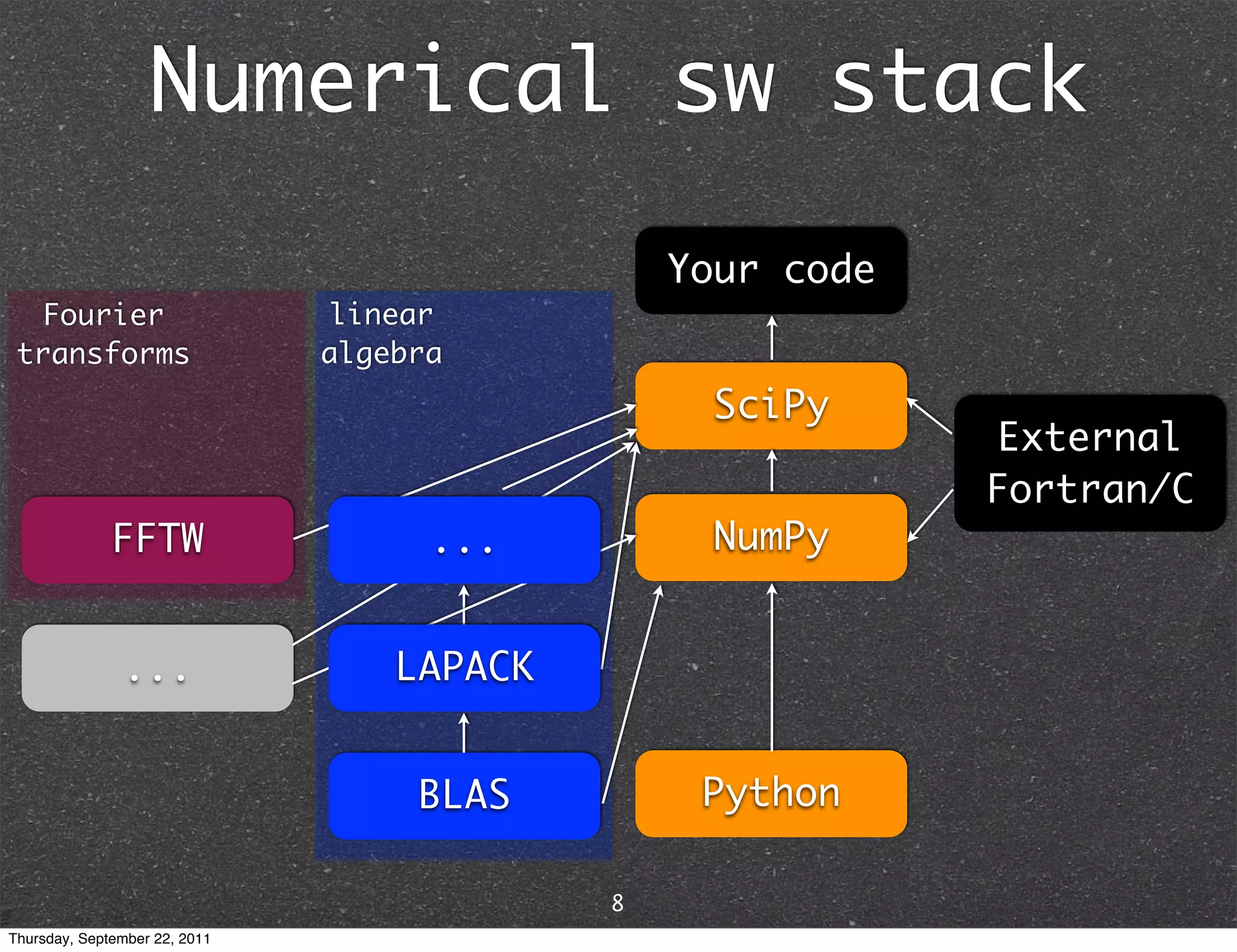
Numerical sw stack
                                                Your code
  Fourier                      linear
 transforms                    algebra
                                                  SciPy
                                                            External
                                                            Fortran/C
              FFTW                   ...          NumPy


               ...                 LAPACK


                                    BLAS         Python

                                            8
Thursday, September 22, 2011
“One thing that graduate students eventually
 learn is that you can hide just about
 anything in a NxN matrix... (for sufficiently
 large N)” - anonymous string theorist


                               9
Thursday, September 22, 2011
“One thing that graduate students eventually
 learn is that you can hide just about
 anything in a NxN matrix... (for sufficiently
 large N)” - anonymous string theorist

 If your data can be put into a matrix/vector,
 numpy/scipy can help you!


                               9
Thursday, September 22, 2011
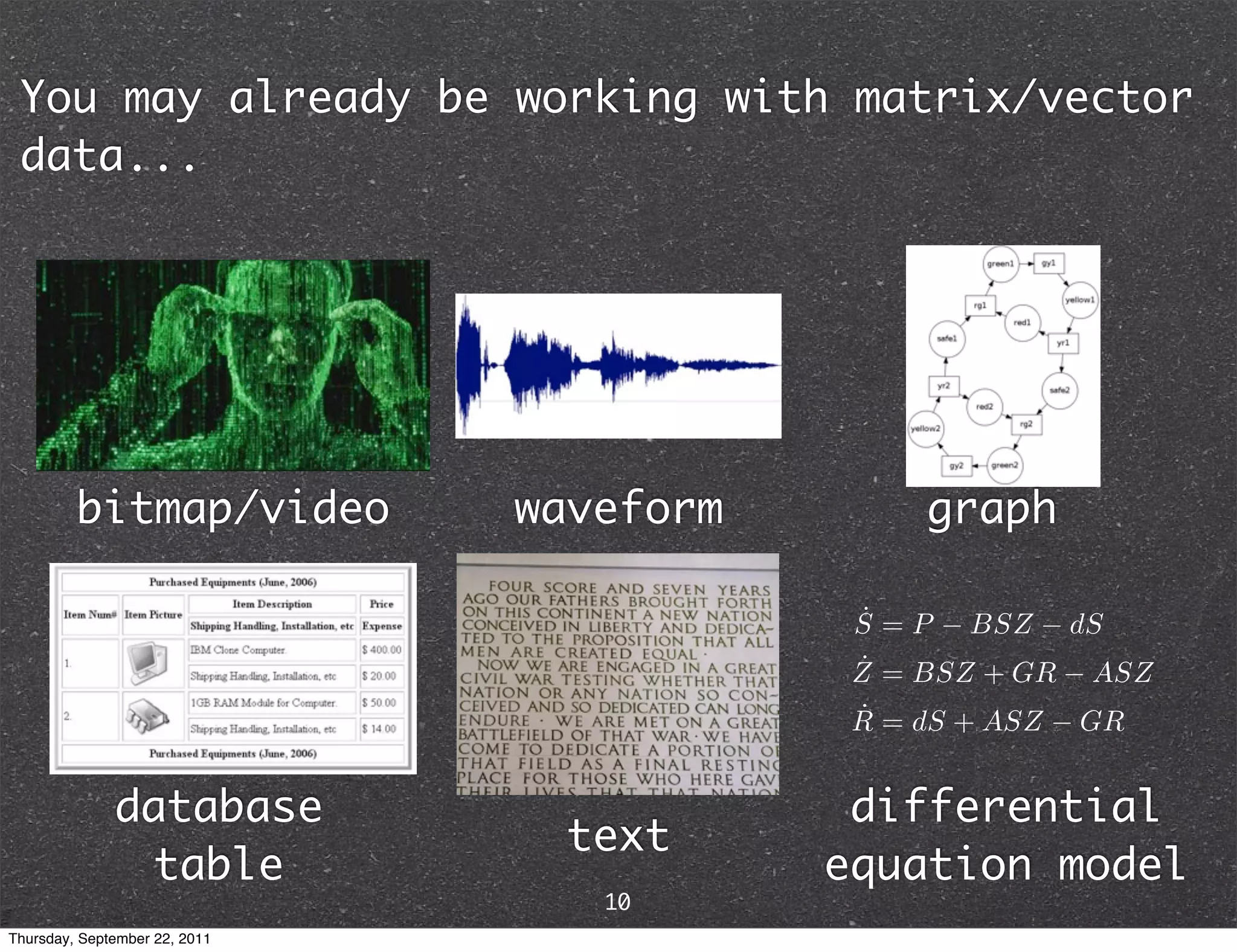
You may already be working with matrix/vector
 data...


         bitmap/video          waveform      graph


              database                     differential
                                 text
               table                      equation model
                                  10
Thursday, September 22, 2011
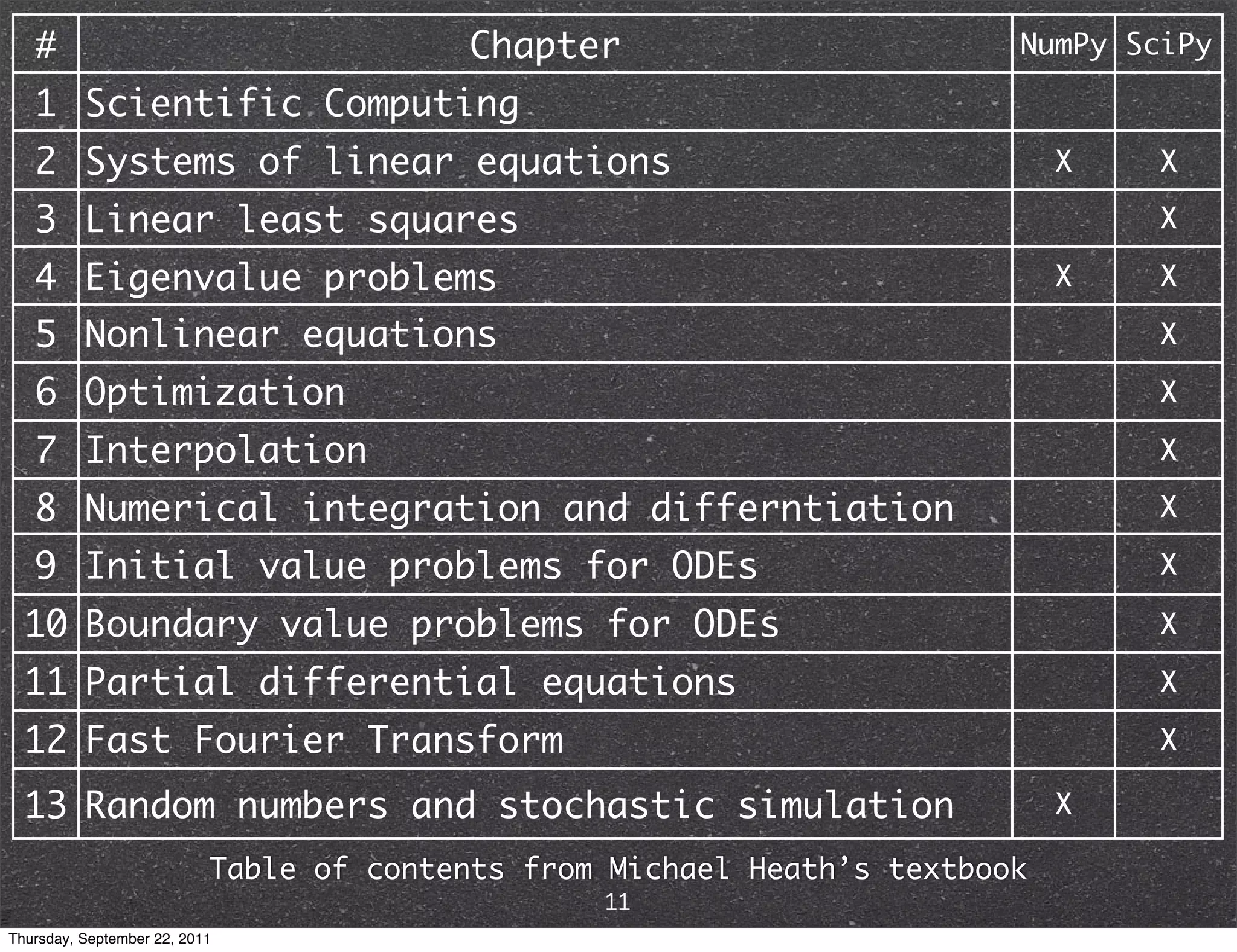
#                                     Chapter                         NumPy SciPy

   1 Scientific Computing
   2 Systems of linear equations                                             X   X

   3 Linear least squares                                                        X

   4 Eigenvalue problems                                                     X   X

   5 Nonlinear equations                                                         X

   6 Optimization                                                                X

   7 Interpolation                                                               X

   8 Numerical integration and differntiation                                    X

   9 Initial value problems for ODEs                                             X

  10 Boundary value problems for ODEs                                            X

  11 Partial differential equations                                              X

  12 Fast Fourier Transform                                                      X

  13 Random numbers and stochastic simulation                                X

                           Table of contents from Michael Heath’s textbook
                                                 11
Thursday, September 22, 2011
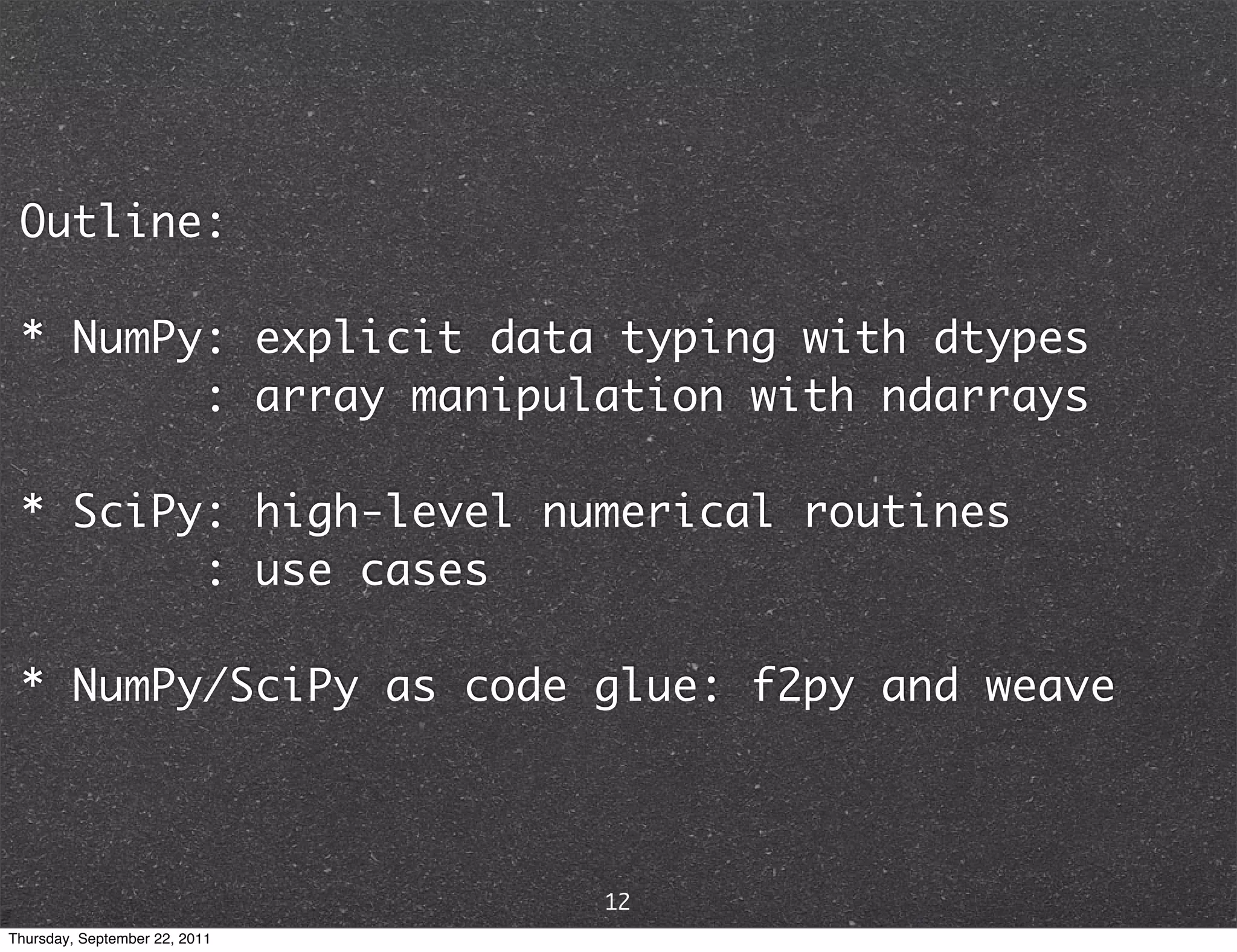
Outline:

 * NumPy: explicit data typing with dtypes
        : array manipulation with ndarrays

 * SciPy: high-level numerical routines
        : use cases

 * NumPy/SciPy as code glue: f2py and weave


                               12
Thursday, September 22, 2011
The most fundamental object in NumPy is the
 ndarray (N-dimensional array)

                               v[:]           vector
                               M[:,:]         matrix
                               x[:,:,...,:]   higher order tensor

 unlike built-in Python data types,
 ndarrays are designed for
 homogeneous, explicitly typed data


                                              13
Thursday, September 22, 2011
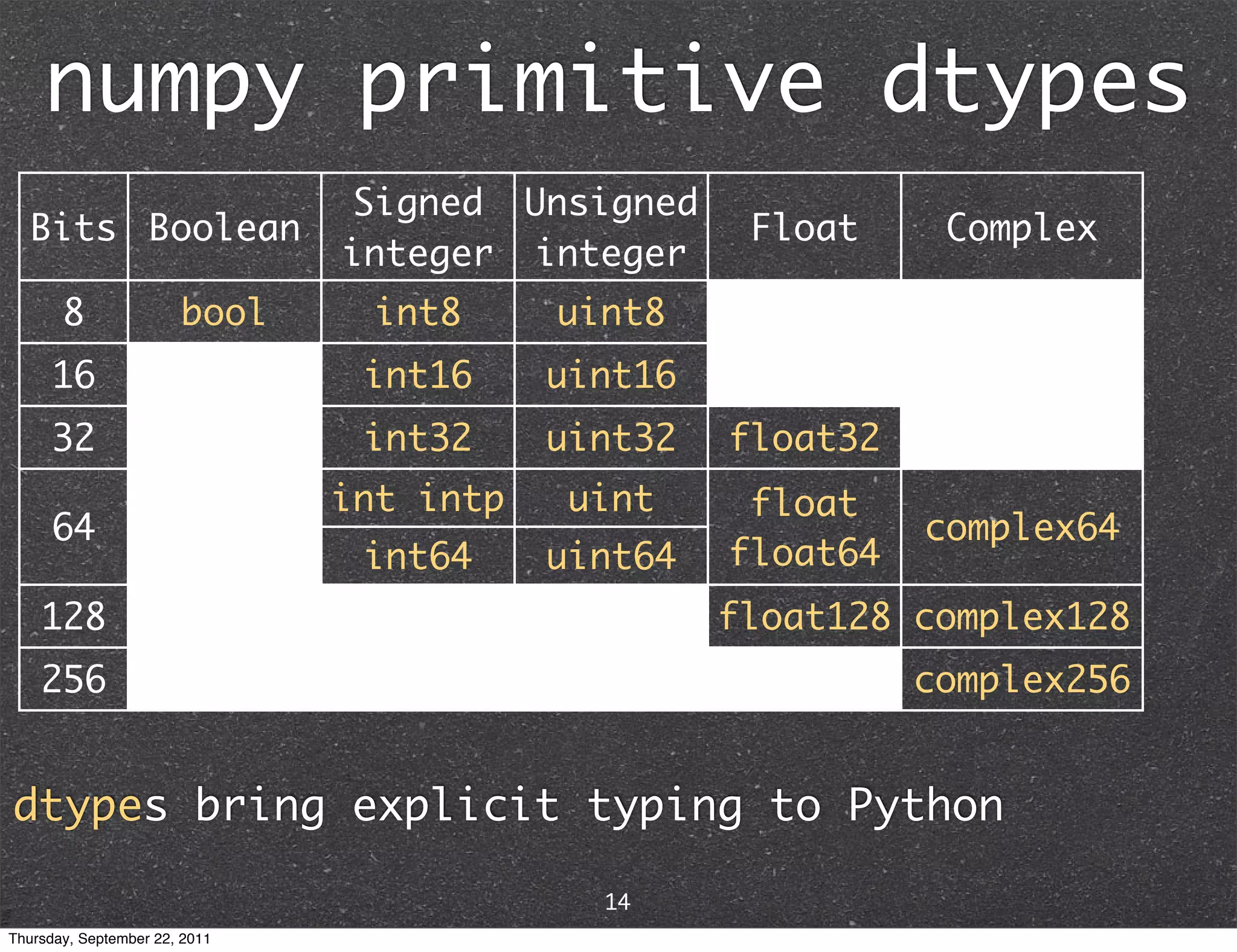
numpy primitive dtypes
                               Signed Unsigned
   Bits Boolean                                     Float     Complex
                               integer integer
       8               bool      int8     uint8
      16                        int16     uint16
      32                        int32     uint32   float32
                               int intp    uint     float
      64                                                     complex64
                                int64     uint64   float64
    128                                            float128 complex128
    256                                                      complex256


dtypes bring explicit typing to Python

                                            14
Thursday, September 22, 2011
Structured array: ndarray of data structure

      >>> mol = np.zeros(3, dtype=('uint8, 3float64'))
      >>> mol[0] = 8, (-0.464, 0.177, 0.0)
      >>> mol[1] = 1, (-0.464, 1.137, 0.0)
      >>> mol[2] = 1, (0.441, -0.143, 0.0)
      >>> mol
      array([(8, [-0.46400000000000002, 0.17699999999999999, 0.0]),
              (1, [-0.46400000000000002, 1.137, 0.0]),
              (1, [0.441, -0.14299999999999999, 0.0])],
            dtype=[('f0', '|u1'), ('f1', '<f8', (3,))])


  Recarray: ndarray of data structure
            with named fields (record)
          >>> mol = np.array(mol,
              dtype={'atomicnum':('uint8',0), 'coords':('3float64',1)})
          >>> mol['atomicnum']
          array([8, 1, 1], dtype=uint8)

                                        15
Thursday, September 22, 2011
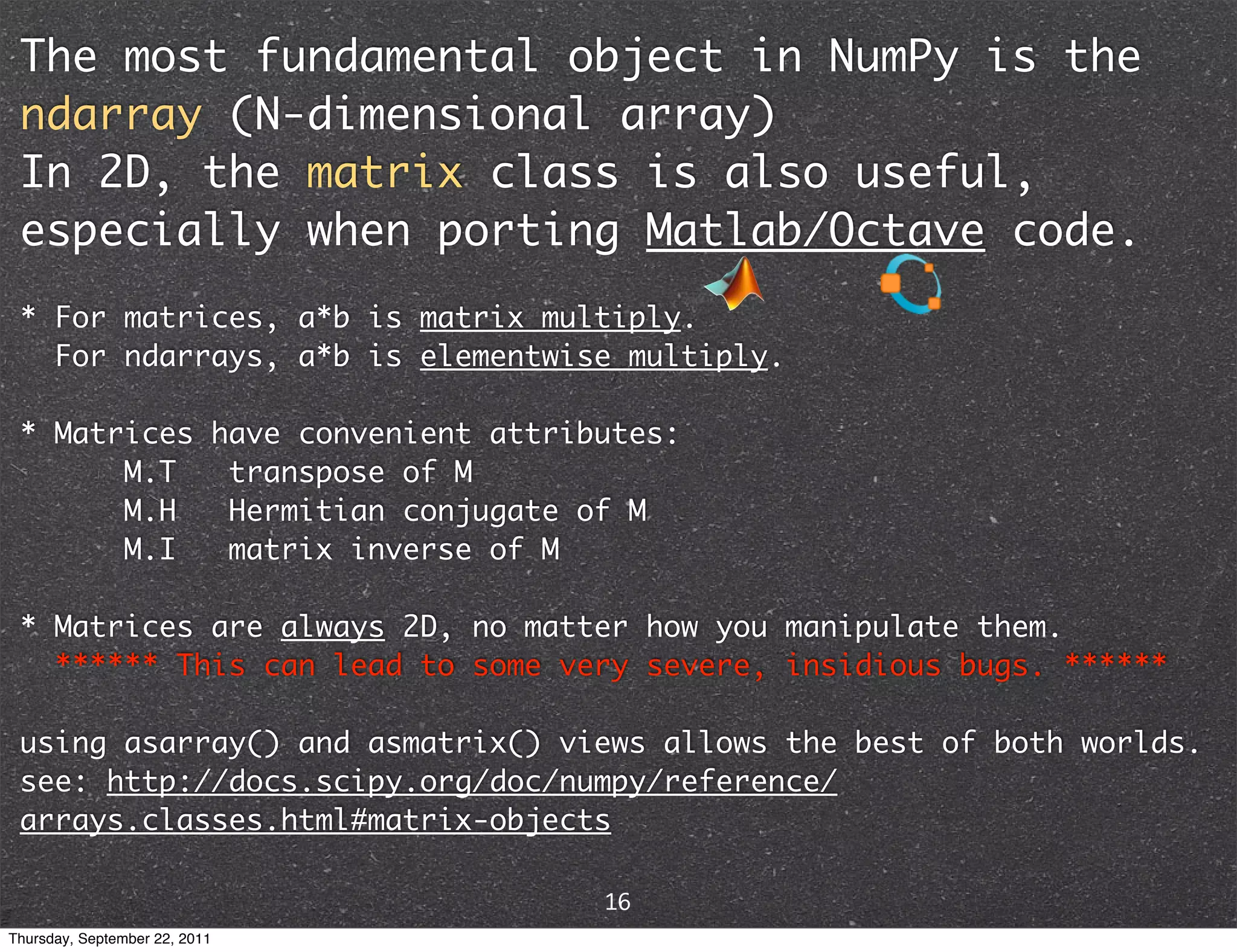
The most fundamental object in NumPy is the
 ndarray (N-dimensional array)
 In 2D, the matrix class is also useful,
 especially when porting Matlab/Octave code.
 * For matrices, a*b is matrix multiply.
   For ndarrays, a*b is elementwise multiply.

 * Matrices have convenient attributes:
       M.T   transpose of M
       M.H   Hermitian conjugate of M
       M.I   matrix inverse of M

 * Matrices are always 2D, no matter how you manipulate them.
   ****** This can lead to some very severe, insidious bugs. ******

 using asarray() and asmatrix() views allows the best of both worlds.
 see: http://docs.scipy.org/doc/numpy/reference/
 arrays.classes.html#matrix-objects

                                  16
Thursday, September 22, 2011
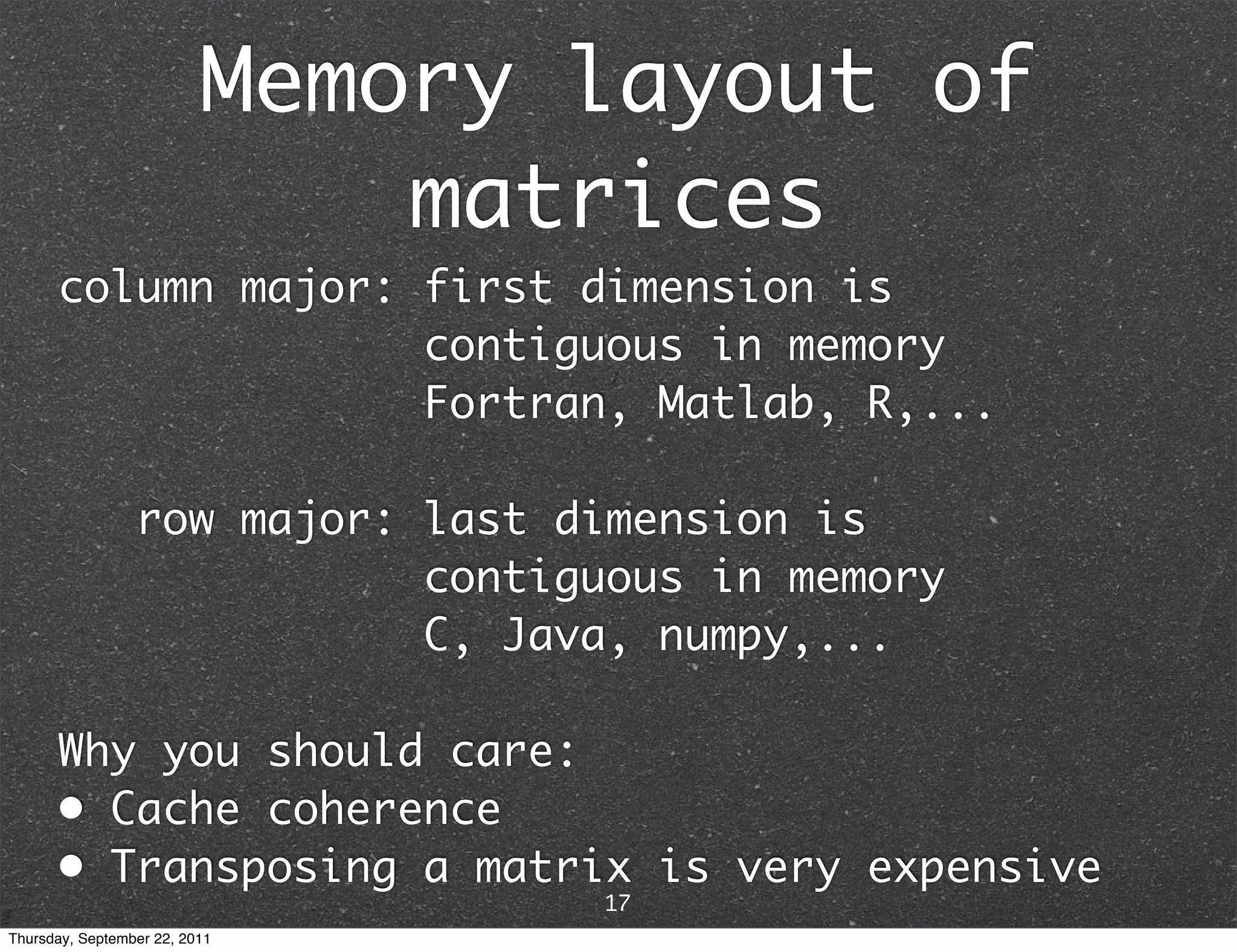
Memory layout of
                              matrices
      column major: first dimension is
                    contiguous in memory
                    Fortran, Matlab, R,...

                 row major: last dimension is
                            contiguous in memory
                            C, Java, numpy,...

      Why you should care:
      • Cache coherence
      • Transposing a matrix is very expensive
                                  17
Thursday, September 22, 2011
Creating ndarrays
 • from Python iterable: lists, tuples,...
 e.g. array([1, 2, 3]) == asarray((1, 2, 3))
 • from intrinsic functions
 empty() allocates memory only
 zeros() initializes to 0
 ones() initializes to 1
 arange() creates a uniform range
 rand() initializes to uniform random
 randn() initializes to standard normal random
 ...
 • from binary representation in string/buffer
 • from file on disk
                               18
Thursday, September 22, 2011
Generating ndarrays
      fromfunction() creates an ndarray whose
      entries are functions of its indices

      e.g. the Hilbert matrix

                                                              1..n
      >>> np.fromfunction(lambda i,j: 1./(i+j+1), (4,4))
      array([[ 1.        , 0.5        , 0.33333333, 0.25       ],
             [ 0.5       , 0.33333333, 0.25        , 0.2       ],
             [ 0.33333333, 0.25       , 0.2        , 0.16666667],
             [ 0.25      , 0.2        , 0.16666667, 0.14285714]])


                                    19
Thursday, September 22, 2011
Generating ndarrays
      arange(): like range() but accepts floats
      >>> import numpy as np
      >>> np.arange(2, 2.5, 0.1)
      array([ 2. , 2.1, 2.2, 2.3, 2.4])

      linspace(): creates array with specified
      number of elements, spaced equally between
      the specified beginning and ending.
      >>> np.linspace(2.0, 2.4, 5)
      array([ 2. , 2.1, 2.2, 2.3, 2.4])


                               20
Thursday, September 22, 2011
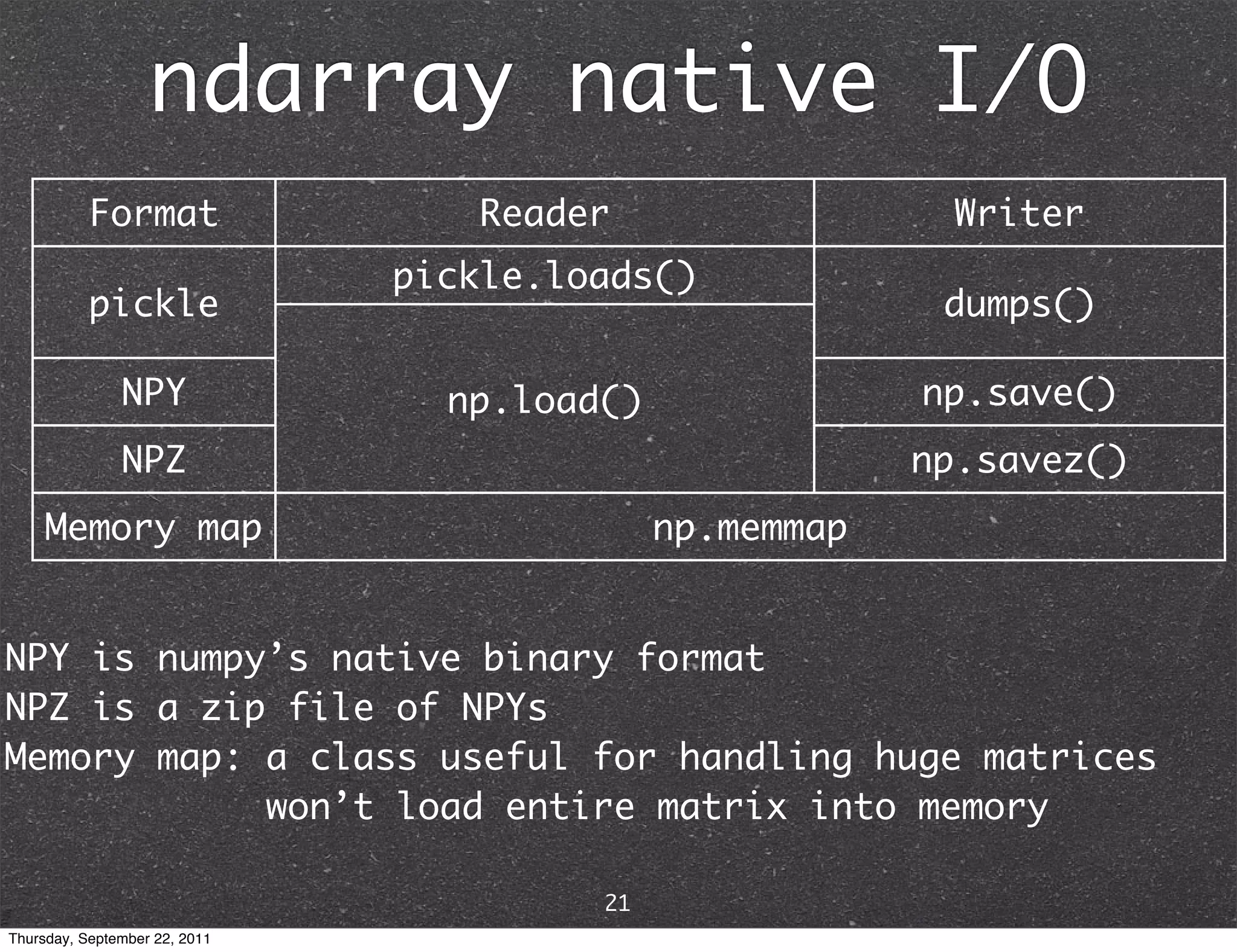
ndarray native I/O
           Format                  Reader                  Writer
                               pickle.loads()
           pickle                                         dumps()

               NPY               np.load()               np.save()
               NPZ                                       np.savez()
     Memory map                              np.memmap


NPY is numpy’s native binary format
NPZ is a zip file of NPYs
Memory map: a class useful for handling huge matrices
            won’t load entire matrix into memory

                                        21
Thursday, September 22, 2011
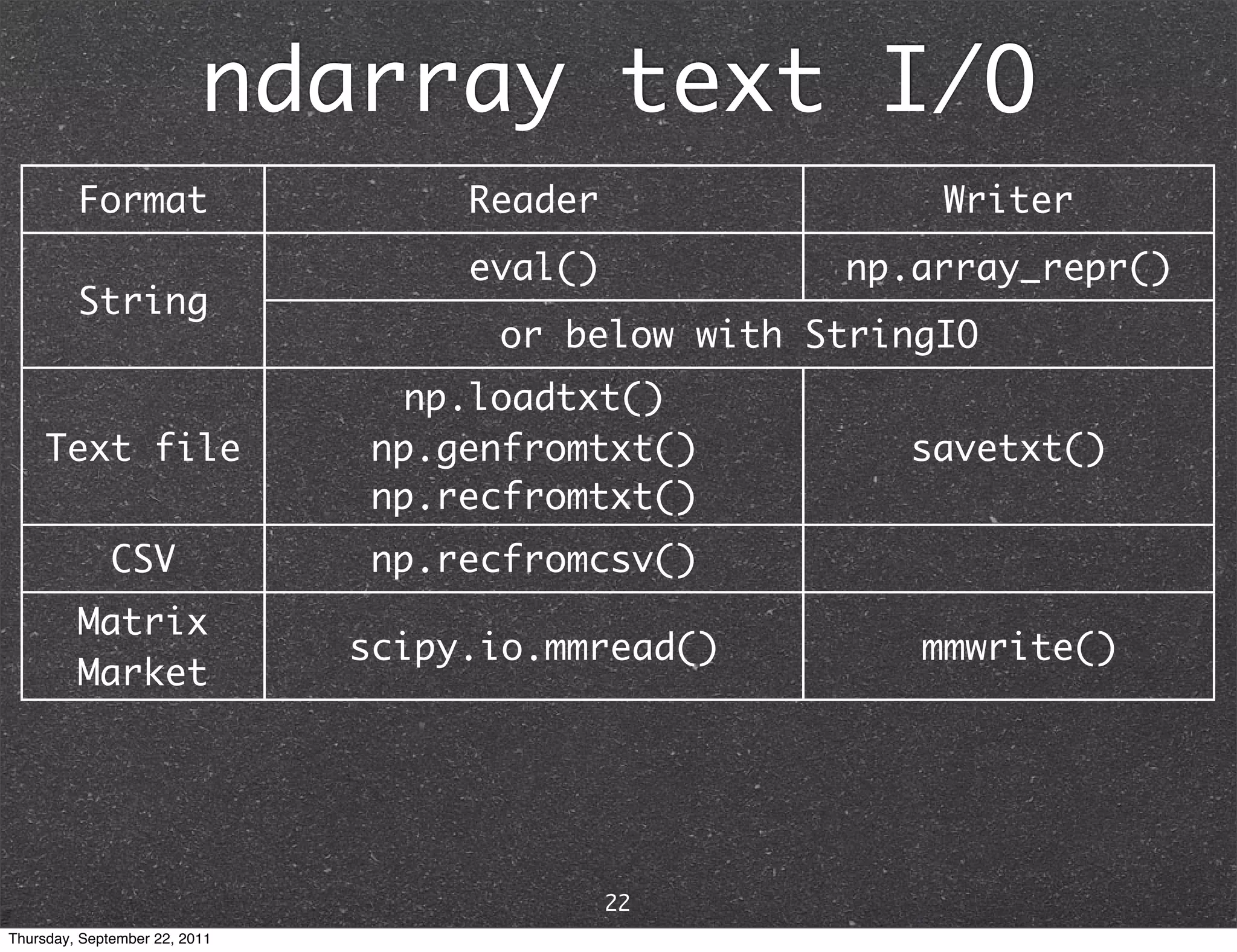
ndarray text I/O
         Format                     Reader               Writer
                                    eval()          np.array_repr()
         String
                                     or below with StringIO
                                 np.loadtxt()
     Text file                  np.genfromtxt()        savetxt()
                                np.recfromtxt()
              CSV               np.recfromcsv()
         Matrix
                               scipy.io.mmread()        mmwrite()
         Market


                                             22
Thursday, September 22, 2011
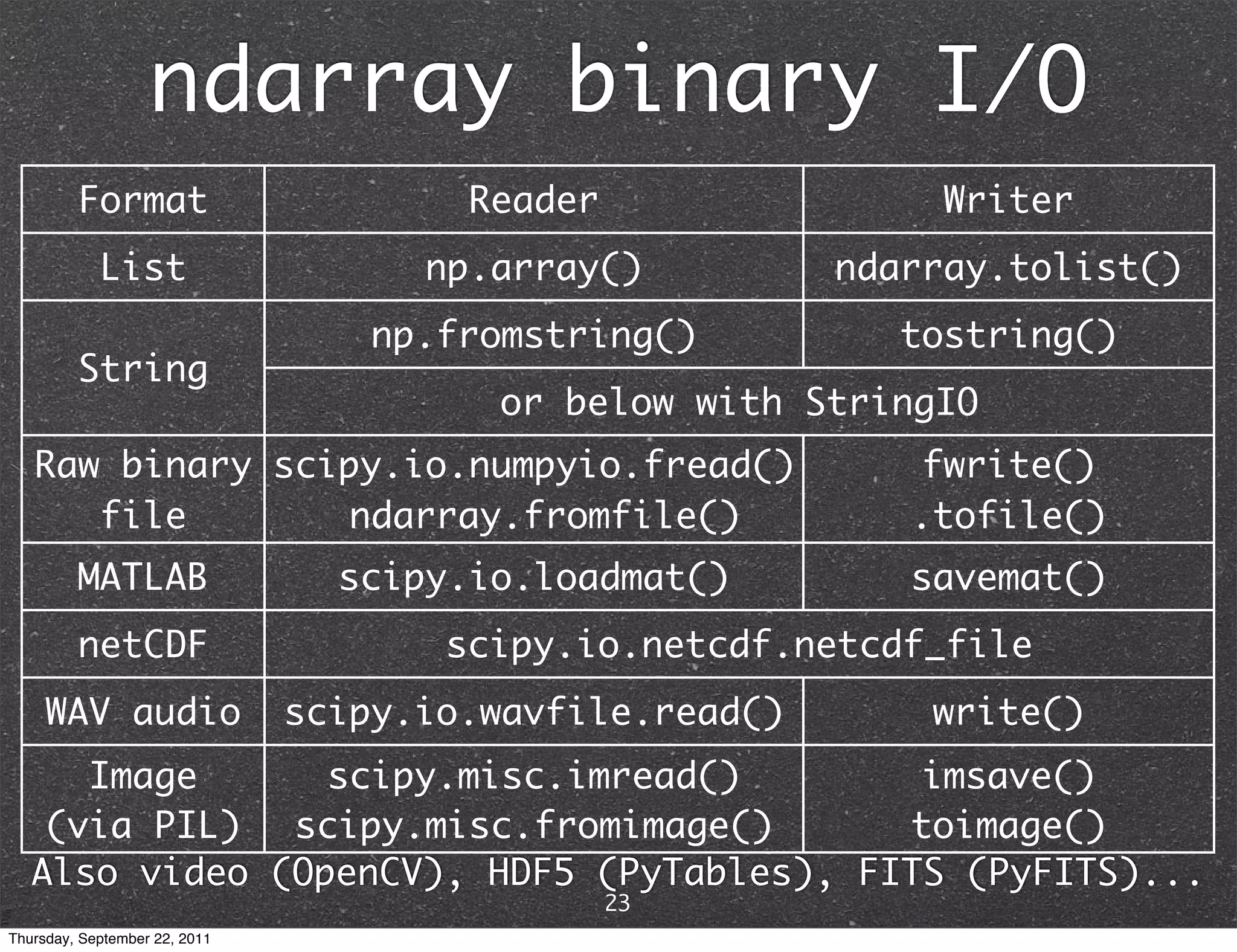
ndarray binary I/O
         Format                        Reader                 Writer
            List                     np.array()          ndarray.tolist()
                                   np.fromstring()          tostring()
         String
                                        or below with StringIO
   Raw binary scipy.io.numpyio.fread()                      fwrite()
      file       ndarray.fromfile()                         .tofile()
         MATLAB                  scipy.io.loadmat()         savemat()
         netCDF                       scipy.io.netcdf.netcdf_file
     WAV audio                 scipy.io.wavfile.read()       write()
      Image      scipy.misc.imread()        imsave()
    (via PIL) scipy.misc.fromimage()       toimage()
   Also video (OpenCV), HDF5 (PyTables), FITS (PyFITS)...
                                                23
Thursday, September 22, 2011
Indexing
      >>> x = np.arange(12).reshape(3,4); x
      array([[ 0, 1, 2, 3],
             [ 4, 5, 6, 7],
             [ 8, 9, 10, 11]])
      >>> x[1,2]
      6
      >>> x[2,-1]              row, then column
      11
      >>> x[0][2]
      2
      >>> x[(2,2)] #tuple
      10
      >>> x[:1]     #slices return views, not copies
      array([[0, 1, 2, 3]])
      >>> x[::2,1:4:2]
      array([[ 1, 3],
             [ 9, 11]])


                                     24
Thursday, September 22, 2011
Fancy indexing
      >>> x = np.arange(12).reshape(3,4); x
      array([[ 0, 1, 2, 3],
              [ 4, 5, 6, 7],
              [ 8, 9, 10, 11]])
      >>> x[(2,2)]
                              array index
      10
      >>> x[np.array([2,2])] #same as x[[2,2]]
      array([[ 8, 9, 10, 11],
              [ 8, 9, 10, 11]])
      >>> x[np.array([1,0]), np.array([2,1])]
      array([6, 1])
      >>> x[x>8]              Boolean mask
      array([ 9, 10, 11])
      >>> x>8
      array([[False, False, False, False],
              [False, False, False, False],
              [False, True, True, True]], dtype=bool)


                                     25
Thursday, September 22, 2011
Fancy indexing II
      >>> y = np.arange(1*2*3*4).reshape(1,2,3,4); y
      array([[[[ 0, 1, 2, 3],
               [ 4, 5, 6, 7],
               [ 8, 9, 10, 11]],

                          [[12, 13, 14, 15],
                           [16, 17, 18, 19],
                           [20, 21, 22, 23]]]])

      >>> y[0, Ellipsis, 0] # == y[0, ..., 0] == [0,:,:,0]
      array([[ 0, 4, 8],
             [12, 16, 20]])
      >>> y[0, 0, 0, slice(2,4)] # == y[(0, 0, 0, 2:4)]
      array([2, 3])


                                                  26
Thursday, September 22, 2011
Broadcasting
        What happens when you multiply ndarrays of
                  different dimensions?

  Case I: trailing dimensions match
      >>> x #.shape = (3,4)
      array([[ 0, 1, 2, 3],
                                                  >>> y * x
             [ 4, 5, 6, 7],
                                                  array([[[[ 0,      1,   4,   9],
             [ 8, 9, 10, 11]])
                                                            [ 16,   25, 36, 49],
      >>> y #.shape = (1,2,3,4)
                                                            [ 64,   81, 100, 121]],
      array([[[[ 0, 1, 2, 3],
               [ 4, 5, 6, 7],
                                                          [[ 0, 13, 28, 45],
               [ 8, 9, 10, 11]],
                                                           [ 64, 85, 108, 133],
                                                           [160, 189, 220, 253]]]])
                          [[12, 13, 14, 15],
                           [16, 17, 18, 19],
                           [20, 21, 22, 23]]]])

                                                  27
Thursday, September 22, 2011
Broadcasting
        What happens when you multiply ndarrays of
                  different dimensions?

  Case II: trailing dimension is 1
                                       >>> b.shape =   4,1
                                       >>> a + b
      >>> a = np.arange(4); a          array([[3, 4,   5,    6],
      array([0, 1, 2, 3])                     [2, 3,   4,    5],
      >>> b = np.arange(4)[::-1]; b           [1, 2,   3,    4],
      array([3, 2, 1, 0])                     [0, 1,   2,    3]])
      >>> a + b
      array([3, 3, 3, 3])
                                       >>> b.shape = 1,4
                                       >>> a + b
                                       array([[3, 3, 3, 3]])


                                      28
Thursday, September 22, 2011
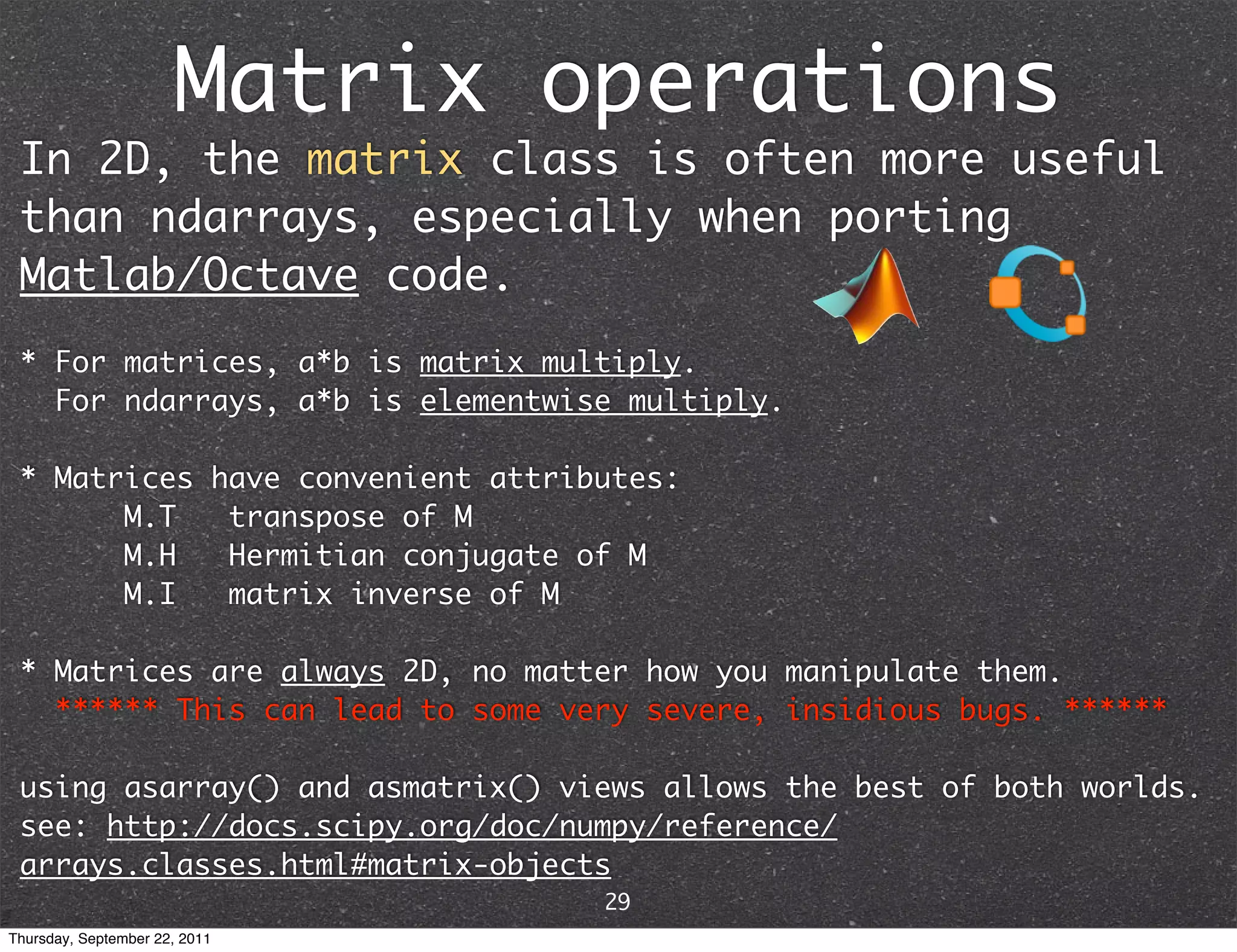
Matrix operations
 In 2D, the matrix class is often more useful
 than ndarrays, especially when porting
 Matlab/Octave code.
 * For matrices, a*b is matrix multiply.
   For ndarrays, a*b is elementwise multiply.

 * Matrices have convenient attributes:
       M.T   transpose of M
       M.H   Hermitian conjugate of M
       M.I   matrix inverse of M

 * Matrices are always 2D, no matter how you manipulate them.
   ****** This can lead to some very severe, insidious bugs. ******

 using asarray() and asmatrix() views allows the best of both worlds.
 see: http://docs.scipy.org/doc/numpy/reference/
 arrays.classes.html#matrix-objects
                                  29
Thursday, September 22, 2011
Matrix functions
      You can apply a function elementwise to a
      matrix...
      >>> from numpy import array, exp
      >>> X = array([[1, 1], [1, 0]])
      >>> exp(X)
      array([[ 2.71828183, 2.71828183],
             [ 2.71828183, 1.]])


      ...or a matrix version of that function
      >>> from scipy.linalg import expm
      >>> expm(X)
      array([[ 2.71828183, 7.3890561 ],
             [ 1.        , 2.71828183]])


      other functions in scipy.linalg.matfuncs
                                    30
Thursday, September 22, 2011
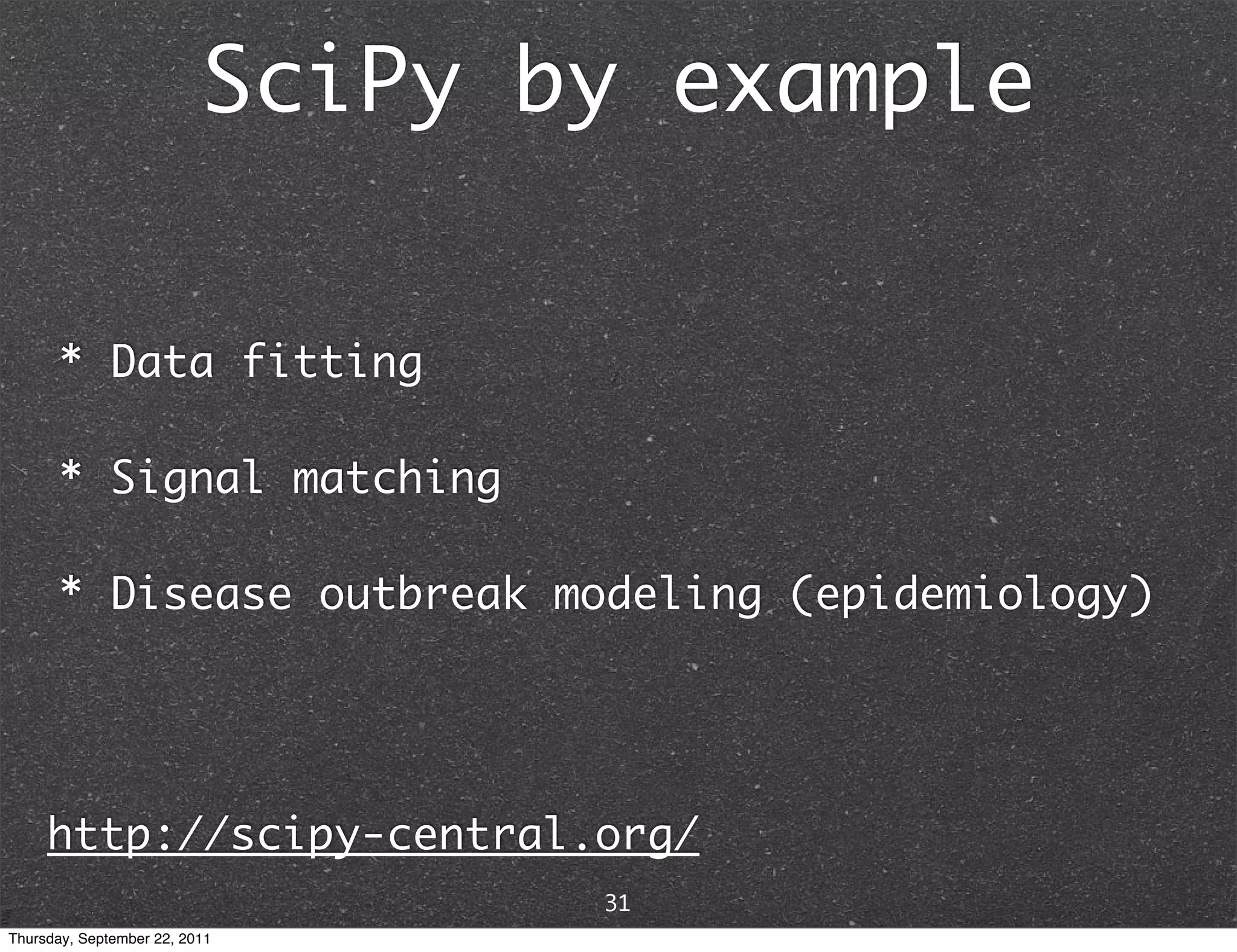
SciPy by example


      * Data fitting

      * Signal matching

      * Disease outbreak modeling (epidemiology)


     http://scipy-central.org/
                                 31
Thursday, September 22, 2011
Least-squares curve fitting
                               from scipy import *
    fit data to model          from scipy.optimize import leastsq
                               from matplotlib.pyplot import plot

                               #Make up data x(t) with Gaussian noise
                               num_points = 150
                               t = linspace(5, 8, num_points)
                               x = 11.86*cos(2*pi/0.81*t-1.32) + 0.64*t
                                    +4*((0.5-rand(num_points))*
                                     exp(2*rand(num_points)**2))

                               # Target function
                               model = lambda p, x: 
                                       p[0]*cos(2*pi/p[1]*x+p[2]) + p[3]*x
                               # Distance to the target function
                               error = lambda p, x, y: model(p, x) - y
                               # Initial guess for the parameters
                               p0 = [-15., 0.8, 0., -1.]
                               p1, _ = leastsq(error, p0, args=(t, x))

                               t2 = linspace(t.min(), t.max(), 100)
                               plot(t, x, "ro", t2, model(p1, t2), "b-")
                               raw_input()

                               32
Thursday, September 22, 2011
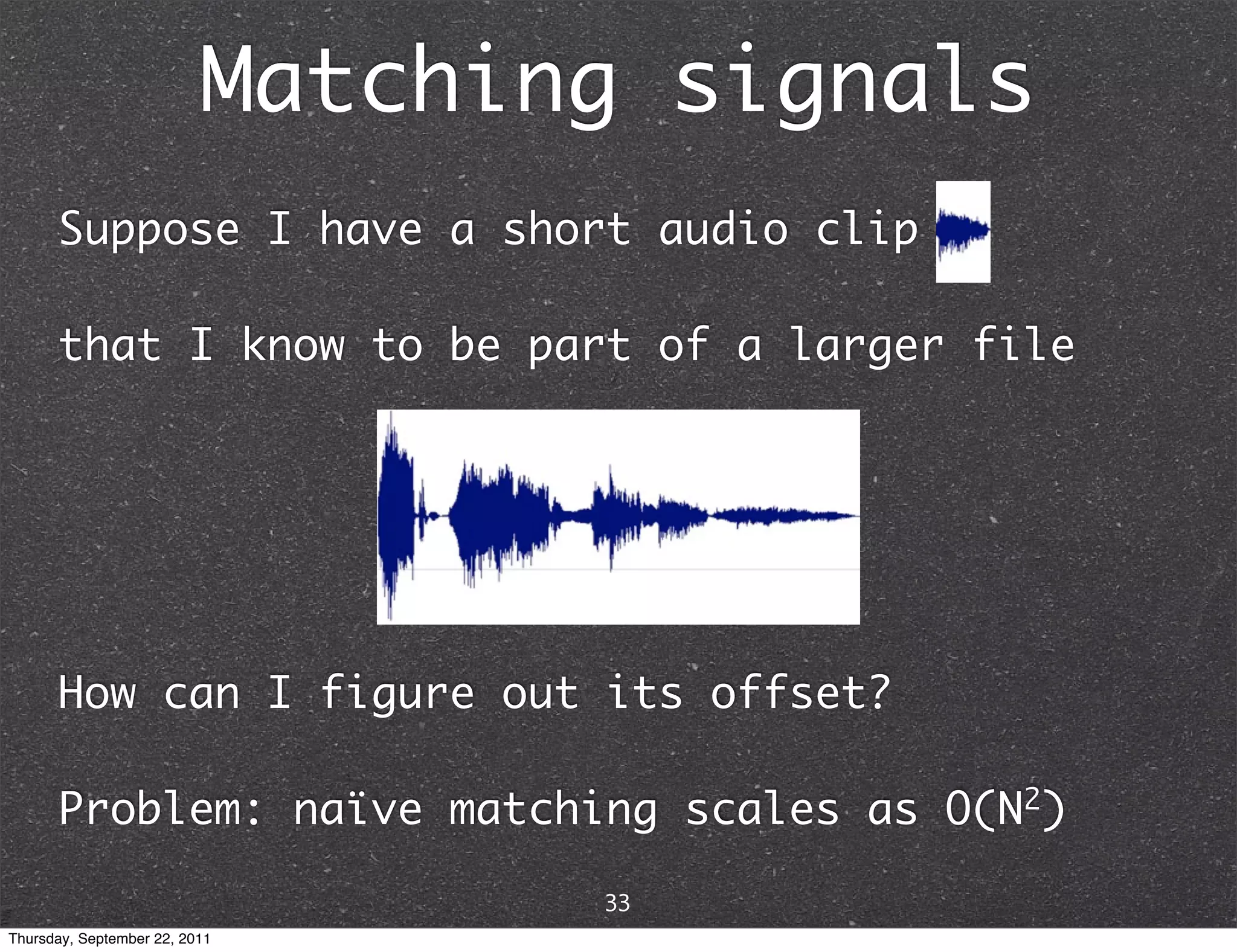
Matching signals
      Suppose I have a short audio clip

      that I know to be part of a larger file


      How can I figure out its offset?

      Problem: naïve matching scales as O(N2)

                                 33
Thursday, September 22, 2011
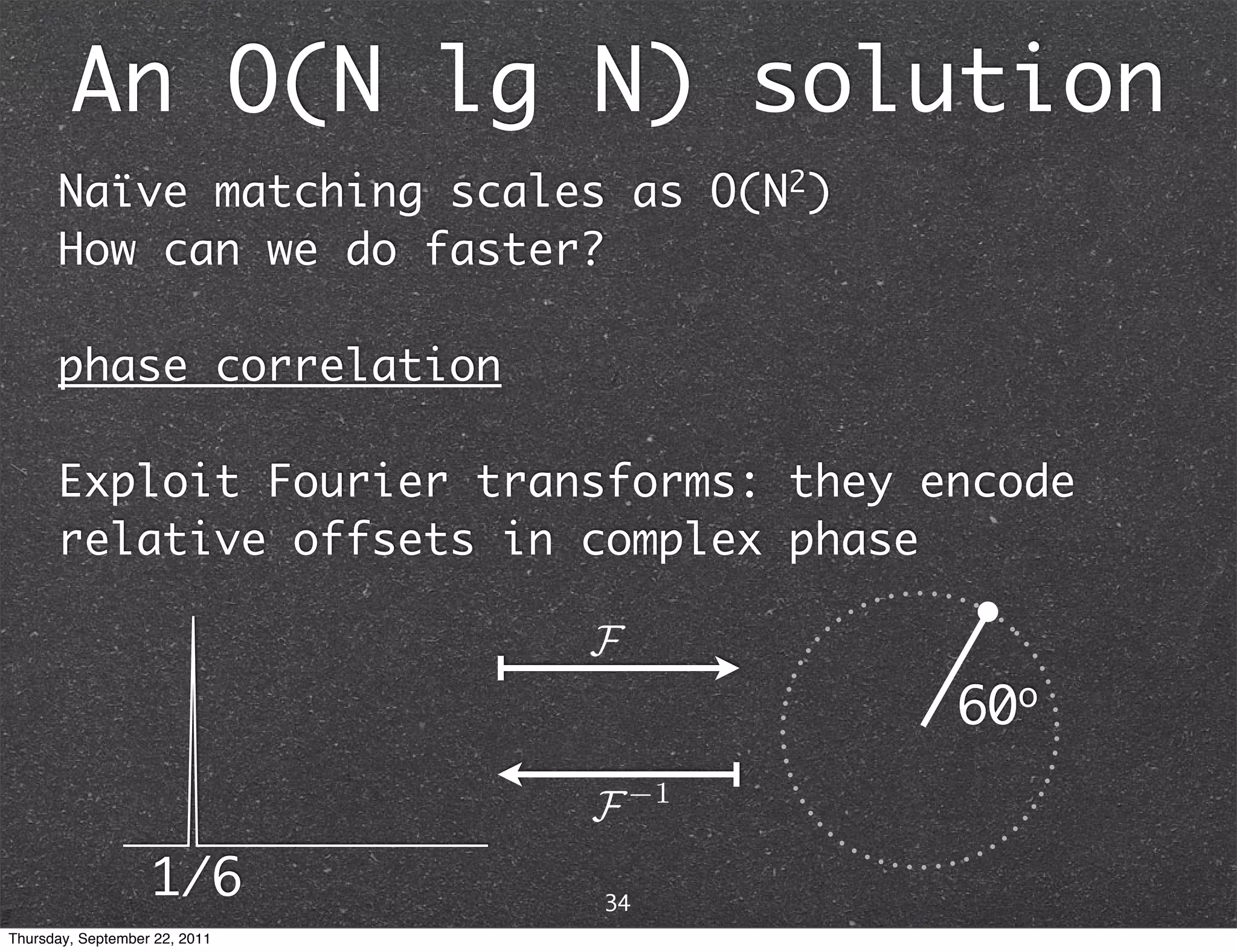
An O(N lg N) solution
      Naïve matching scales as O(N2)
      How can we do faster?

      phase correlation

      Exploit Fourier transforms: they encode
      relative offsets in complex phase


                                        60o


                   1/6         34
Thursday, September 22, 2011
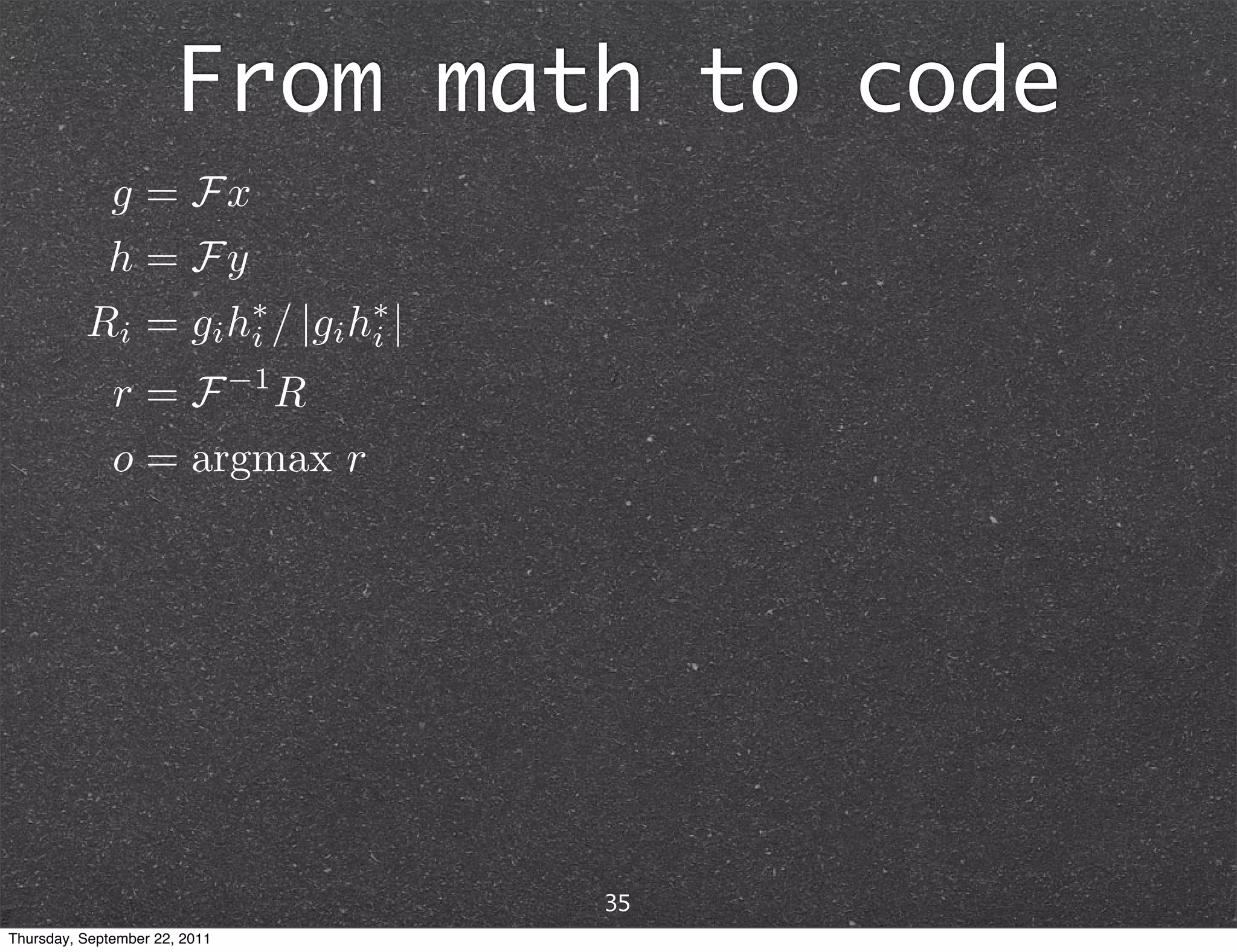
From math to code


                               35
Thursday, September 22, 2011
From math to code
                               import numpy

                               #Make up some data
                               N = 30000
                               idx = 24700
                               size = 300
                               data = numpy.random.rand(N)
                               frag_pad = numpy.zeros(N)
                               frag = data[idx:idx+size]
                               frag_pad[:size] = frag

                               #Compute phase correlation
                               data_ft = numpy.fft.rfft(data)
                               frag_ft = numpy.fft.rfft(frag_pad)
                               phase = data_ft * numpy.conj(frag_ft)
                               phase /= abs(phase)
                               cross_correlation = numpy.fft.irfft(phase)
                               offset = numpy.argmax(cross_correlation)

                               print 'Input offset: %d, computed: %d' % (idx, offset)
                               from matplotlib.pyplot import plot
                               plot(cross_correlation)
                               raw_input() #Pause

                                     35
Thursday, September 22, 2011
From math to code
                               import numpy

                               #Make up some data
                               N = 30000
                               idx = 24700
                               size = 300
                               data = numpy.random.rand(N)
                               frag_pad = numpy.zeros(N)
                               frag = data[idx:idx+size]
                               frag_pad[:size] = frag

                               #Compute phase correlation
                               data_ft = numpy.fft.rfft(data)
                               frag_ft = numpy.fft.rfft(frag_pad)
                               phase = data_ft * numpy.conj(frag_ft)
                               phase /= abs(phase)
                               cross_correlation = numpy.fft.irfft(phase)
                               offset = numpy.argmax(cross_correlation)

                               print 'Input offset: %d, computed: %d' % (idx, offset)
                               from matplotlib.pyplot import plot
                               plot(cross_correlation)
                               raw_input() #Pause

                                     35
Thursday, September 22, 2011
Modeling a zombie apocalypse


    http://blogs.cdc.gov/publichealthmatters/2011/05/preparedness-101-
                            zombie-apocalypse/

                                    36
Thursday, September 22, 2011
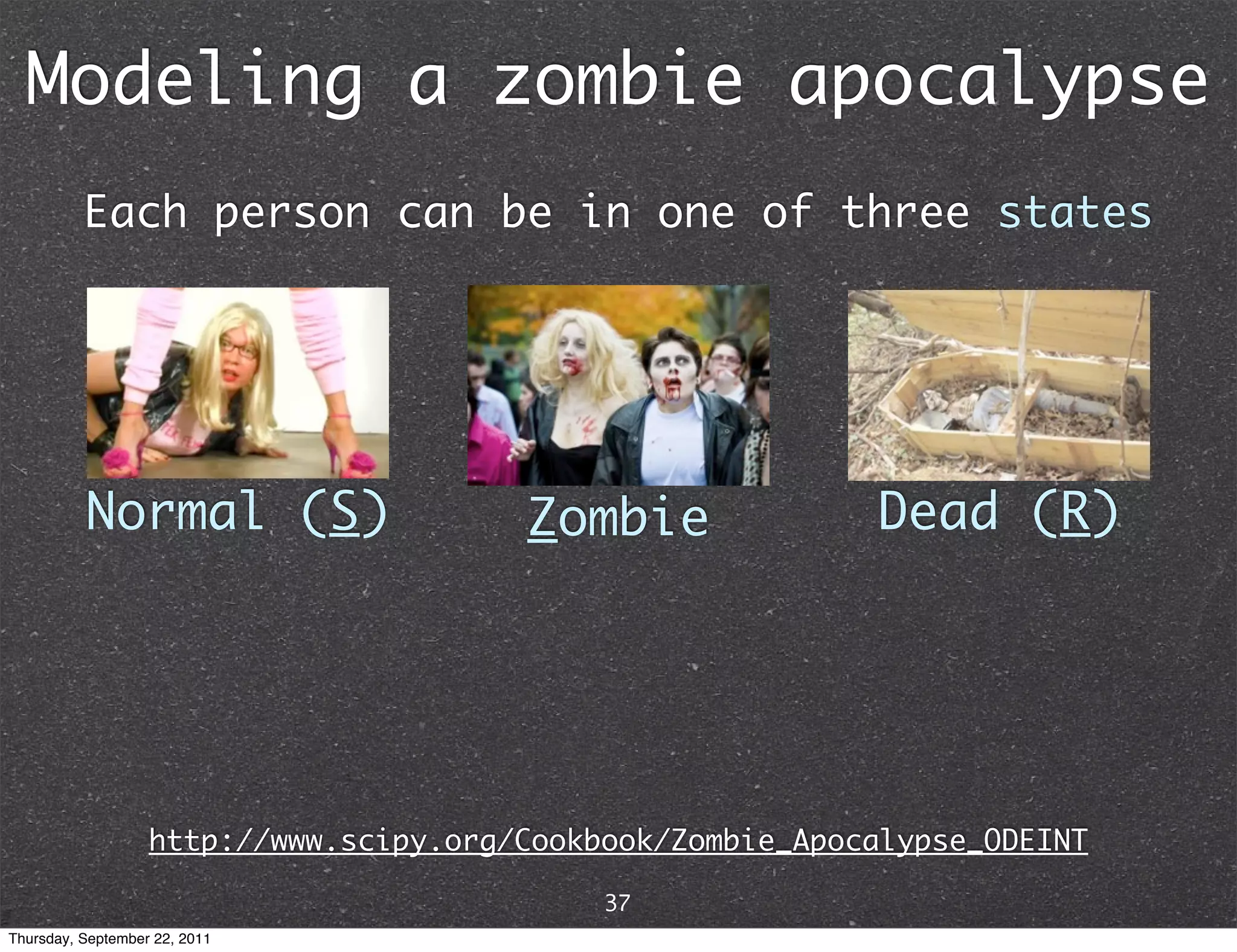
Modeling a zombie apocalypse
          Each person can be in one of three states


          Normal (S)                    Zombie              Dead (R)


                   http://www.scipy.org/Cookbook/Zombie_Apocalypse_ODEINT

                                             37
Thursday, September 22, 2011
Modeling a zombie apocalypse
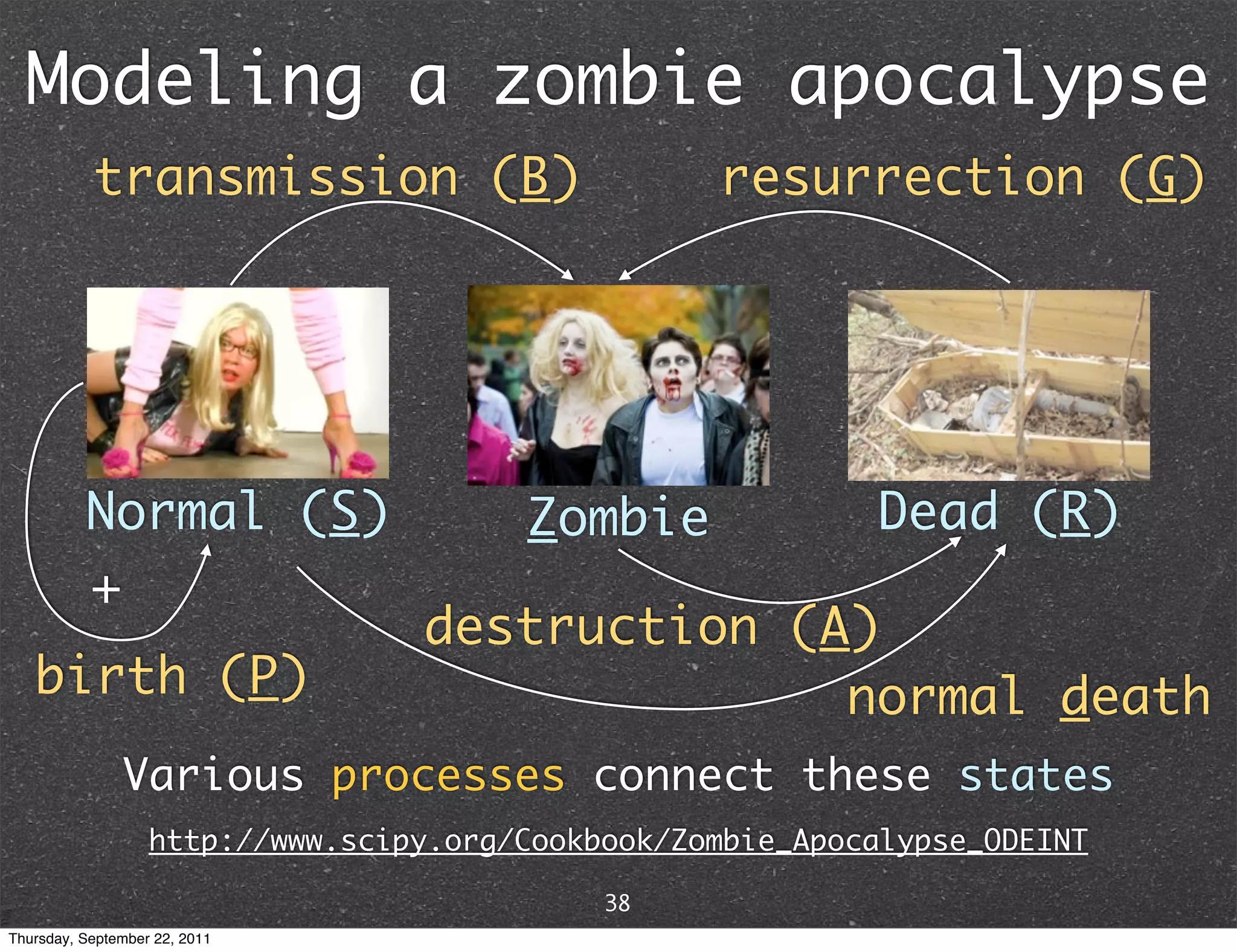
           transmission (B)                        resurrection (G)


          Normal (S)                    Zombie              Dead (R)
          +
                                  destruction (A)
   birth (P)                                    normal death
               Various processes connect these states
                   http://www.scipy.org/Cookbook/Zombie_Apocalypse_ODEINT

                                             38
Thursday, September 22, 2011
From math to code
                    B                  G            from numpy import linspace
                                                    from scipy.integrate import odeint

                                                    P =   0        # birth rate
                                                    d =   0.0001 # natural death rate
               S               Z           R        B =   0.0095 # transmission rate
      +                            A                G =   0.0001 # resurrection rate
                                                    A =   0.0001 # destruction rate
          r                            d            def   f(y, t):
                                                          Si, Zi, Ri = y
                                                          return [P - B*Si*Zi - d*Si,
                                                                   B*Si*Zi + G*Ri - A*Si*Zi,
                                                                   d*Si + A*Si*Zi - G*Ri]

                                                    y0 = [500, 0, 0] # initial conditions
                                                    t = linspace(0, 5., 1000)    # time grid

                                                    soln = odeint(f, y0, t) # solve ODE
                                                    S, Z, R = soln[:, :].T


                   http://www.scipy.org/Cookbook/Zombie_Apocalypse_ODEINT

                                               39
Thursday, September 22, 2011
Using external code
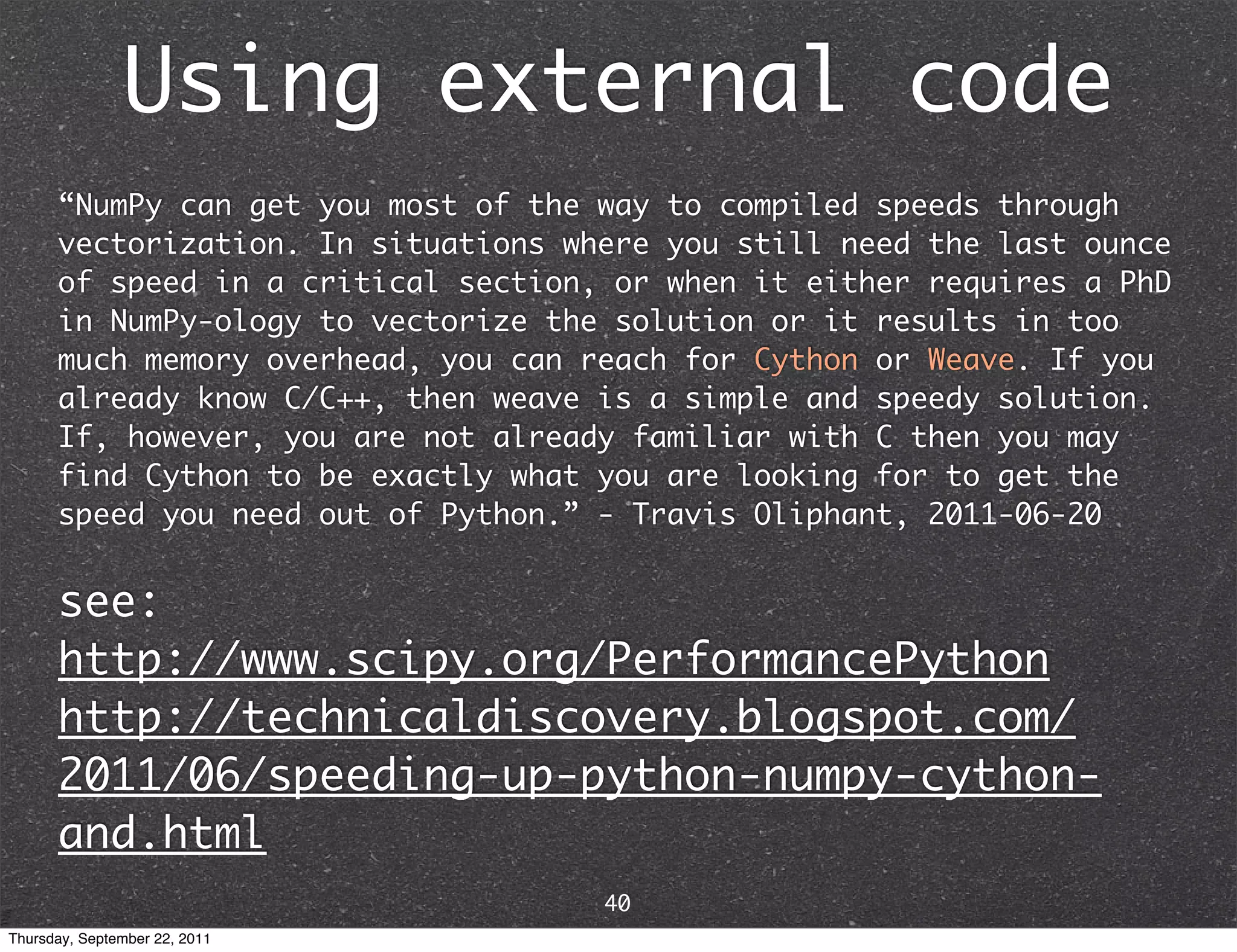
      “NumPy can get you most of the way to compiled speeds through
      vectorization. In situations where you still need the last ounce
      of speed in a critical section, or when it either requires a PhD
      in NumPy-ology to vectorize the solution or it results in too
      much memory overhead, you can reach for Cython or Weave. If you
      already know C/C++, then weave is a simple and speedy solution.
      If, however, you are not already familiar with C then you may
      find Cython to be exactly what you are looking for to get the
      speed you need out of Python.” - Travis Oliphant, 2011-06-20


      see:
      http://www.scipy.org/PerformancePython
      http://technicaldiscovery.blogspot.com/
      2011/06/speeding-up-python-numpy-cython-
      and.html
                                     40
Thursday, September 22, 2011
Python as code glue
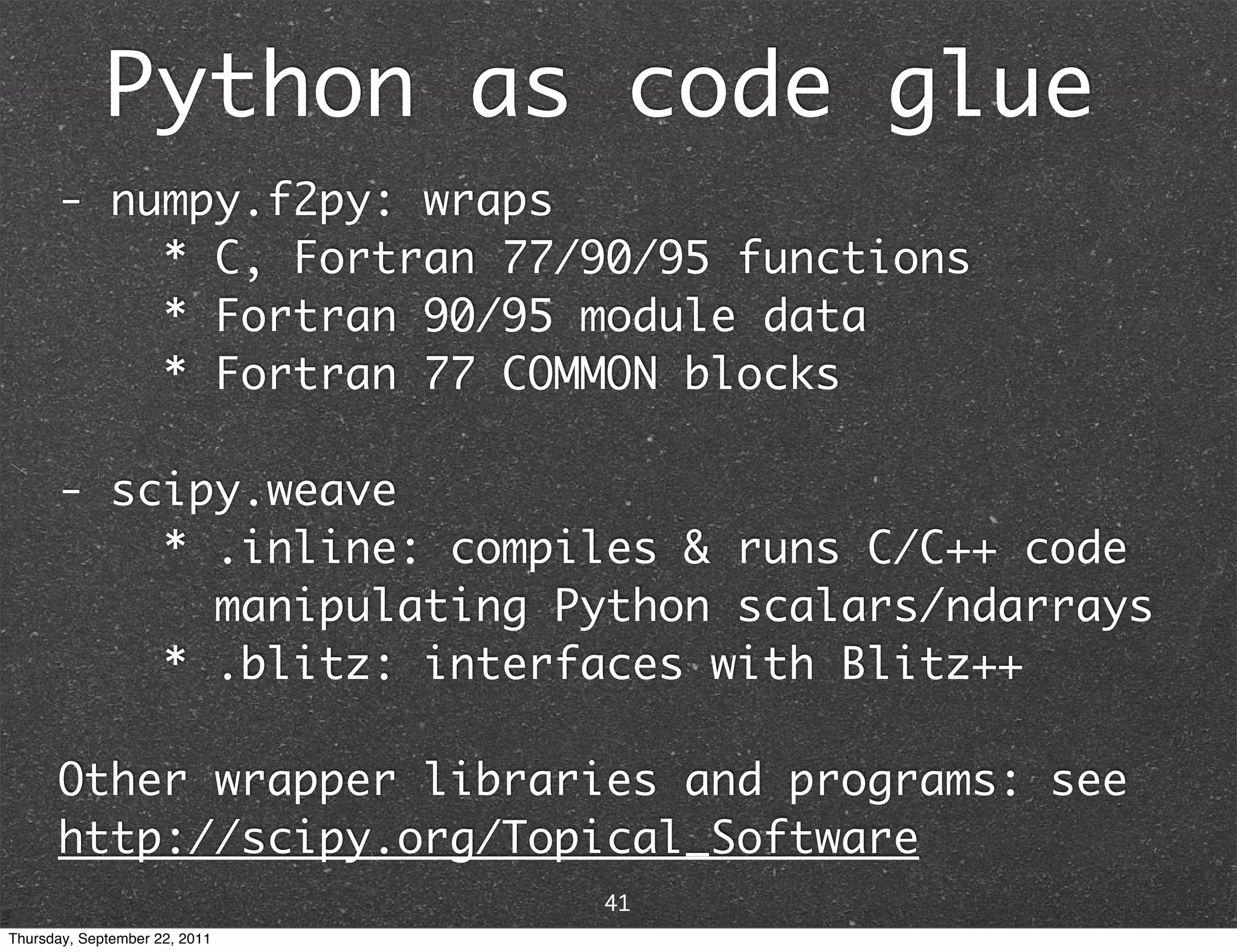
      - numpy.f2py: wraps
          * C, Fortran 77/90/95 functions
          * Fortran 90/95 module data
          * Fortran 77 COMMON blocks

      - scipy.weave
          * .inline: compiles & runs C/C++ code
            manipulating Python scalars/ndarrays
          * .blitz: interfaces with Blitz++

      Other wrapper libraries and programs: see
      http://scipy.org/Topical_Software
                               41
Thursday, September 22, 2011
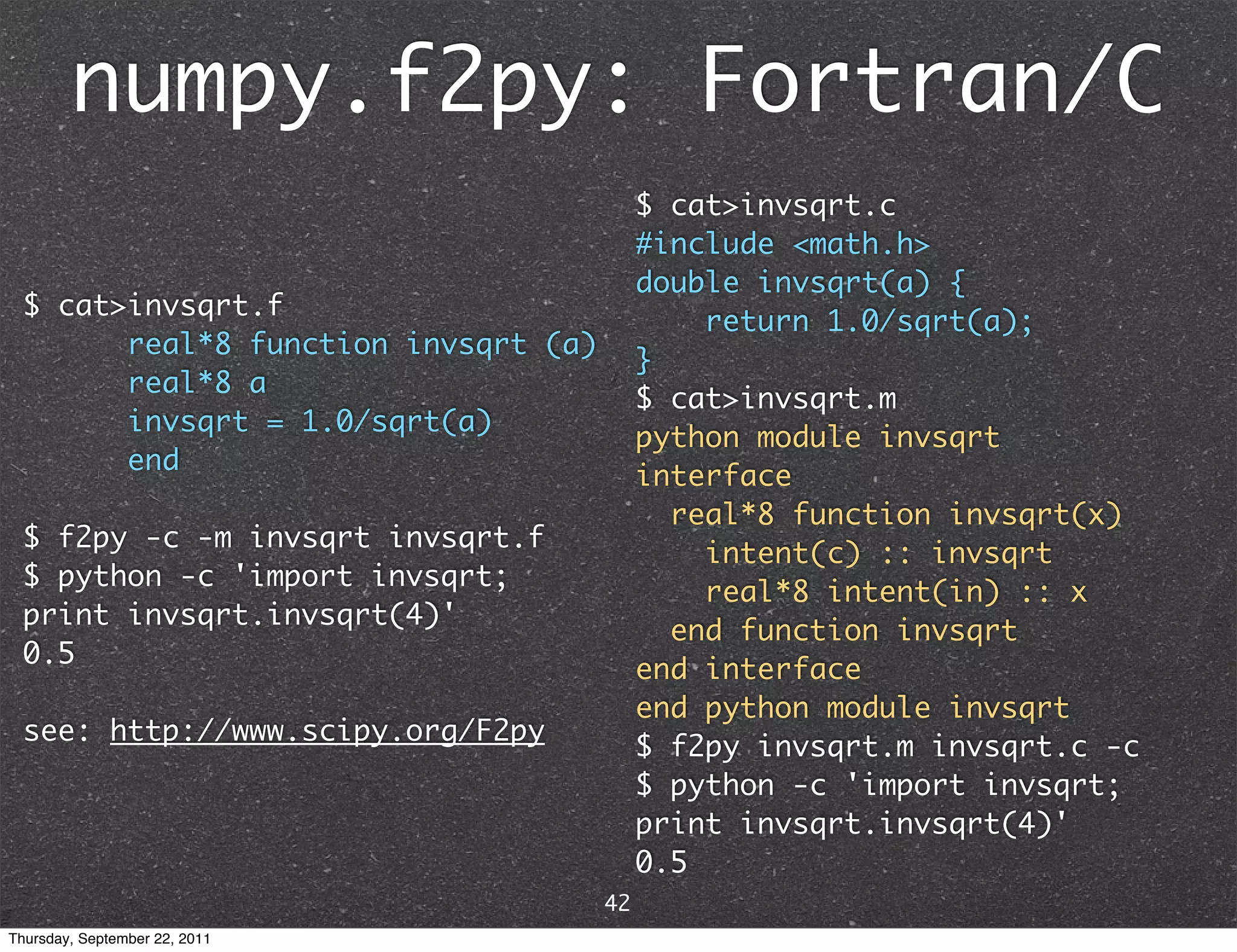
numpy.f2py: Fortran/C
                                           $ cat>invsqrt.c
                                           #include <math.h>
                                           double invsqrt(a) {
  $ cat>invsqrt.f
                                               return 1.0/sqrt(a);
        real*8 function invsqrt (a)
                                           }
        real*8 a
                                           $ cat>invsqrt.m
        invsqrt = 1.0/sqrt(a)
                                           python module invsqrt
        end
                                           interface
                                             real*8 function invsqrt(x)
  $ f2py -c -m invsqrt invsqrt.f
                                               intent(c) :: invsqrt
  $ python -c 'import invsqrt;
                                               real*8 intent(in) :: x
  print invsqrt.invsqrt(4)'
                                             end function invsqrt
  0.5
                                           end interface
                                           end python module invsqrt
  see: http://www.scipy.org/F2py
                                           $ f2py invsqrt.m invsqrt.c -c
                                           $ python -c 'import invsqrt;
                                           print invsqrt.invsqrt(4)'
                                           0.5
                                      42
Thursday, September 22, 2011
scipy.weave.inline
    python                                     on-the-fly
         scipy                 distutils       compiled
           weave                 core          C/C++
                                               program
                      inline       Extension

      >>> from scipy.weave import inline
      >>> x = 4.0
      >>> inline('return_val = 1./sqrt(x));',
      ['x'])
      0.5

      see: https://github.com/scipy/scipy/blob/
      master/scipy/weave/doc/tutorial.txt
                                    43
Thursday, September 22, 2011
scipy.weave.blitz
      Uses the Blitz++ numerical library for C++
      Converts between ndarrays and Blitz arrays
      >>> # Computes five-point average using numpy and weave.blitz
      >>> import numpy import empty
      >>> from scipy.weave import blitz
      >>> a = numpy.zeros((4096,4096)); c = numpy.zeros((4096, 4096))
      >>> b = numpy.random.randn(4096,4096)
      >>> c[1:-1,1:-1] = (b[1:-1,1:-1] + b[2:,1:-1] + b[:-2,1:-1] + b
      [1:-1,2:] + b[1:-1,:-2]) / 5.0
      >>> blitz("a[1:-1,1:-1] = (b[1:-1,1:-1] + b[2:,1:-1] + b
      [:-2,1:-1] + b[1:-1,2:] + b[1:-1,:-2]) / 5.")
      >>> (a == c).all()
      True

      see:
      https://github.com/scipy/scipy/blob/master/scipy/weave/doc/
      tutorial.txt
                                     44
Thursday, September 22, 2011
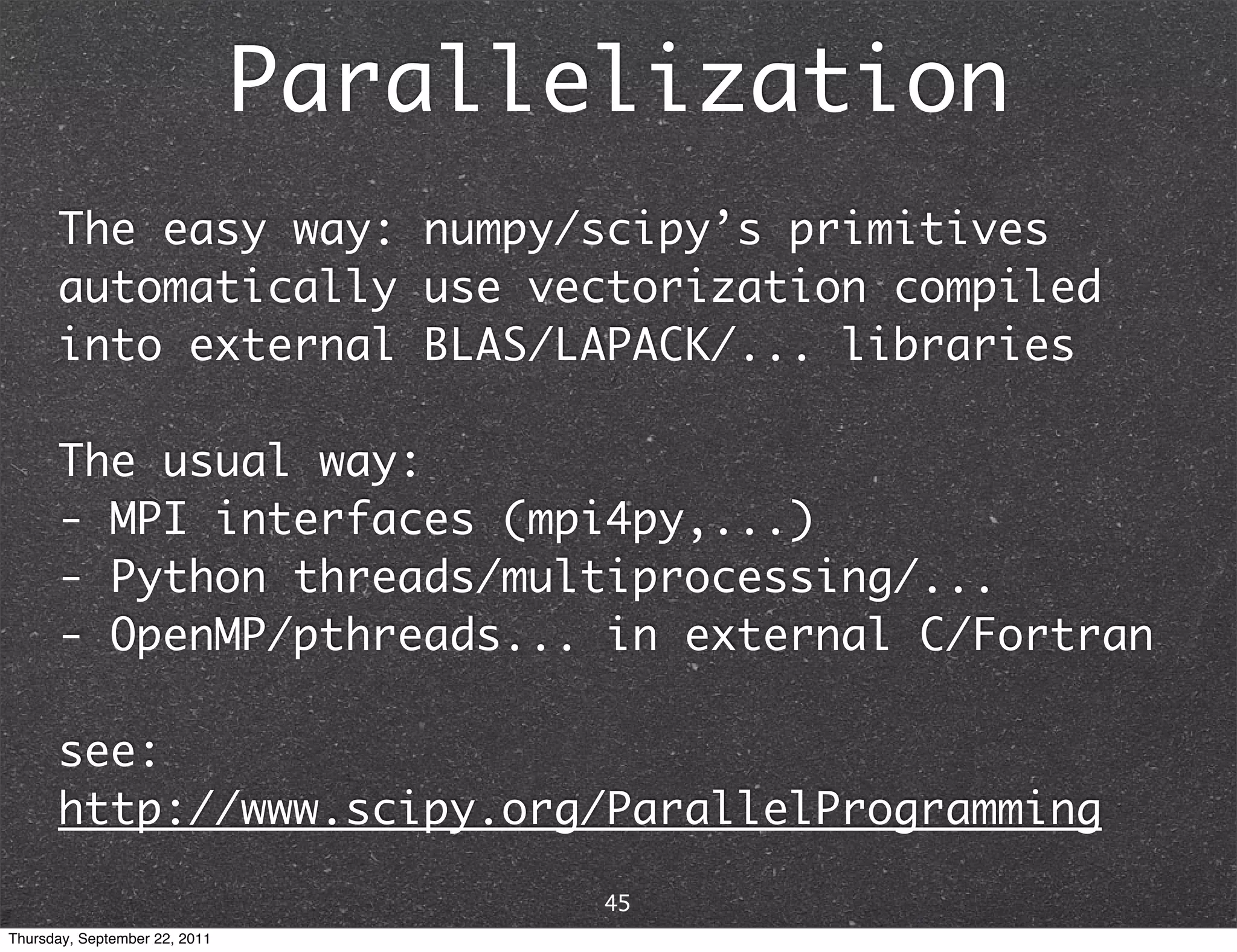
Parallelization
      The easy way: numpy/scipy’s primitives
      automatically use vectorization compiled
      into external BLAS/LAPACK/... libraries

      The usual way:
      - MPI interfaces (mpi4py,...)
      - Python threads/multiprocessing/...
      - OpenMP/pthreads... in external C/Fortran

      see:
      http://www.scipy.org/ParallelProgramming

                                      45
Thursday, September 22, 2011
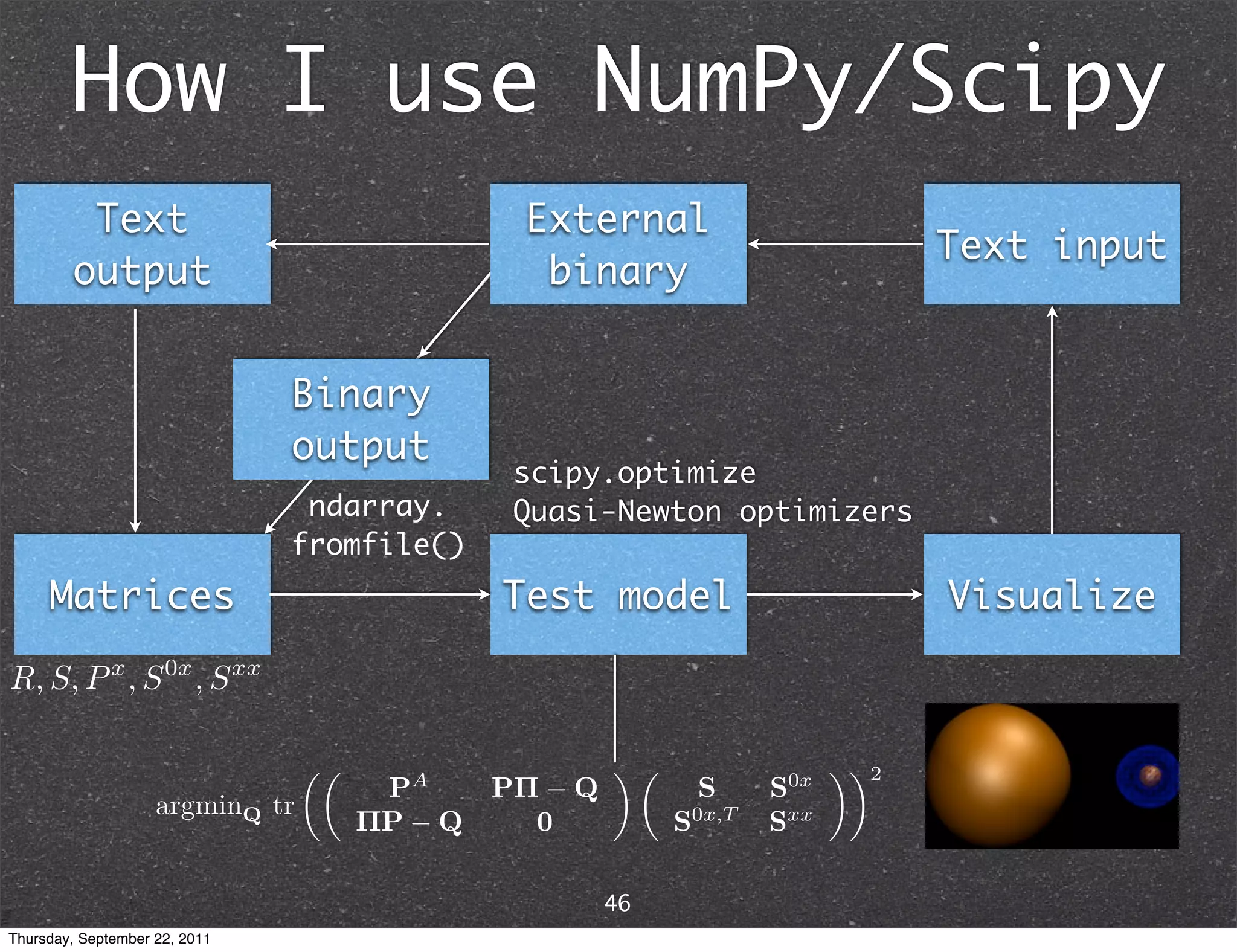
How I use NumPy/Scipy
         Text                                External
                                                                      Text input
        output                                binary


                               Binary
                               output
                                            scipy.optimize
                                ndarray.    Quasi-Newton optimizers
                               fromfile()
     Matrices                               Test model                Visualize


                                                 46
Thursday, September 22, 2011
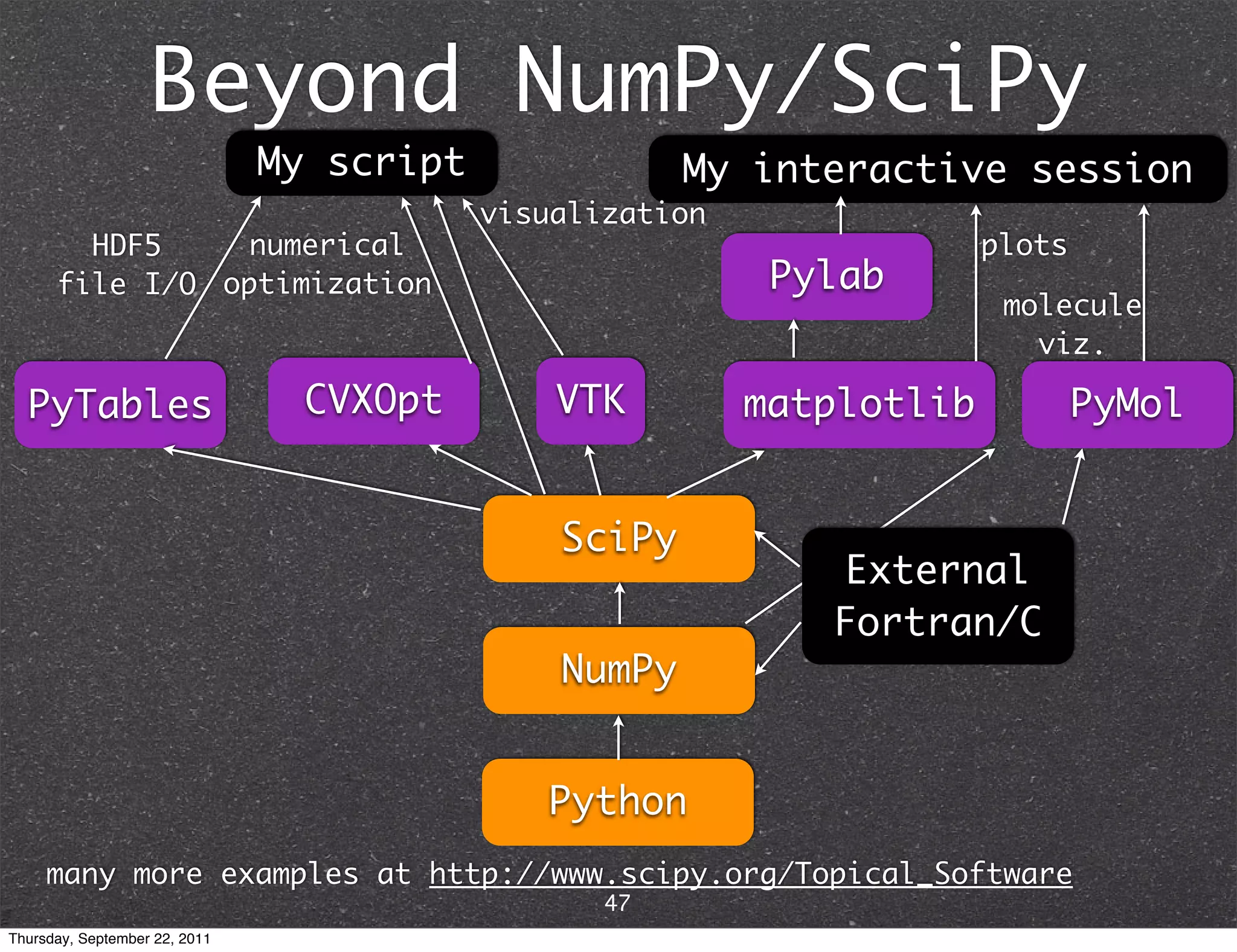
Beyond NumPy/SciPy
                               My script               My interactive session
                                           visualization
        HDF5    numerical                                               plots
      file I/O optimization                                 Pylab
                                                                         molecule
                                                                           viz.

  PyTables                       CVXOpt        VTK         matplotlib           PyMol


                                               SciPy
                                                              External
                                                              Fortran/C
                                               NumPy


                                              Python
     many more examples at http://www.scipy.org/Topical_Software
                                                  47
Thursday, September 22, 2011

Python as number crunching code glue

  • 1.
    Python as number crunching glue Jiahao Chen jiahao@mit.edu @mitpostdoc theochem.mit.edu 1 Thursday, September 22, 2011
  • 2.
    This is nota crash course on scientific computing or numerical linear algebra Recommended texts: nr.com 2 Thursday, September 22, 2011
  • 3.
    NumPy and SciPy How to say: NumPy: no official pronunciation SciPy: “sigh pie” 3 Thursday, September 22, 2011
  • 4.
    NumPy and SciPy How to say: NumPy: no official pronunciation SciPy: “sigh pie” Where to get: scipy.org, numpy.scipy.org You might already have it Otherwise, have fun installing it ;) 3 Thursday, September 22, 2011
  • 5.
    You may alreadyknow how to use numpy/ scipy! Similar to Matlab, Octave, Scilab, R. see: http://mathesaurus.sourceforge.net/ In many cases, Matlab/Octave/Scilab code can be translated easily to use numpy +scipy+matplotlib. Other interfaces exist: e.g. mlabwrap lets you wrap Python around Matlab. 4 Thursday, September 22, 2011
  • 6.
    Approximately continuous arithmetic floating point* - vs - Exact discrete arithmetic booleans, integers, strings, ... *David Goldberg, “What every computer scientist should know about floating-point arithmetic” 5 Thursday, September 22, 2011
  • 7.
    Using numpy canmake code cleaner import numpy as np a = range(10000000) a = np.arange(10000000) b = range(10000000) b = np.arange(10000000) c = [] c = a + b for i in range(len(a)): c.append(a[i] + b[i]) What’s different?? 6 Thursday, September 22, 2011
  • 8.
    What’s different?creates list of creates ndarray of dynamically typed int statically typed int import numpy as np a = range(10000000) a = np.arange(10000000) b = range(10000000) b = np.arange(10000000) c = [] #a+b is concatenation c = a + b #vectorized addition for i in range(len(a)): c.append(a[i] + b[i]) Using numpy can save lots of time 7.050s 0.333s (21x) a convenient interface to compiled C/Fortran libraries: BLAS, LAPACK, FFTW, UMFPACK,... 7 Thursday, September 22, 2011
  • 9.
    Numerical sw stack Your code Fourier linear transforms algebra SciPy External Fortran/C FFTW ... NumPy ... LAPACK BLAS Python 8 Thursday, September 22, 2011
  • 10.
    “One thing thatgraduate students eventually learn is that you can hide just about anything in a NxN matrix... (for sufficiently large N)” - anonymous string theorist 9 Thursday, September 22, 2011
  • 11.
    “One thing thatgraduate students eventually learn is that you can hide just about anything in a NxN matrix... (for sufficiently large N)” - anonymous string theorist If your data can be put into a matrix/vector, numpy/scipy can help you! 9 Thursday, September 22, 2011
  • 12.
    You may alreadybe working with matrix/vector data... bitmap/video waveform graph database differential text table equation model 10 Thursday, September 22, 2011
  • 13.
    # Chapter NumPy SciPy 1 Scientific Computing 2 Systems of linear equations X X 3 Linear least squares X 4 Eigenvalue problems X X 5 Nonlinear equations X 6 Optimization X 7 Interpolation X 8 Numerical integration and differntiation X 9 Initial value problems for ODEs X 10 Boundary value problems for ODEs X 11 Partial differential equations X 12 Fast Fourier Transform X 13 Random numbers and stochastic simulation X Table of contents from Michael Heath’s textbook 11 Thursday, September 22, 2011
  • 14.
    Outline: * NumPy:explicit data typing with dtypes : array manipulation with ndarrays * SciPy: high-level numerical routines : use cases * NumPy/SciPy as code glue: f2py and weave 12 Thursday, September 22, 2011
  • 15.
    The most fundamentalobject in NumPy is the ndarray (N-dimensional array) v[:] vector M[:,:] matrix x[:,:,...,:] higher order tensor unlike built-in Python data types, ndarrays are designed for homogeneous, explicitly typed data 13 Thursday, September 22, 2011
  • 16.
    numpy primitive dtypes Signed Unsigned Bits Boolean Float Complex integer integer 8 bool int8 uint8 16 int16 uint16 32 int32 uint32 float32 int intp uint float 64 complex64 int64 uint64 float64 128 float128 complex128 256 complex256 dtypes bring explicit typing to Python 14 Thursday, September 22, 2011
  • 17.
    Structured array: ndarrayof data structure >>> mol = np.zeros(3, dtype=('uint8, 3float64')) >>> mol[0] = 8, (-0.464, 0.177, 0.0) >>> mol[1] = 1, (-0.464, 1.137, 0.0) >>> mol[2] = 1, (0.441, -0.143, 0.0) >>> mol array([(8, [-0.46400000000000002, 0.17699999999999999, 0.0]), (1, [-0.46400000000000002, 1.137, 0.0]), (1, [0.441, -0.14299999999999999, 0.0])], dtype=[('f0', '|u1'), ('f1', '<f8', (3,))]) Recarray: ndarray of data structure with named fields (record) >>> mol = np.array(mol, dtype={'atomicnum':('uint8',0), 'coords':('3float64',1)}) >>> mol['atomicnum'] array([8, 1, 1], dtype=uint8) 15 Thursday, September 22, 2011
  • 18.
    The most fundamentalobject in NumPy is the ndarray (N-dimensional array) In 2D, the matrix class is also useful, especially when porting Matlab/Octave code. * For matrices, a*b is matrix multiply. For ndarrays, a*b is elementwise multiply. * Matrices have convenient attributes: M.T transpose of M M.H Hermitian conjugate of M M.I matrix inverse of M * Matrices are always 2D, no matter how you manipulate them. ****** This can lead to some very severe, insidious bugs. ****** using asarray() and asmatrix() views allows the best of both worlds. see: http://docs.scipy.org/doc/numpy/reference/ arrays.classes.html#matrix-objects 16 Thursday, September 22, 2011
  • 19.
    Memory layout of matrices column major: first dimension is contiguous in memory Fortran, Matlab, R,... row major: last dimension is contiguous in memory C, Java, numpy,... Why you should care: • Cache coherence • Transposing a matrix is very expensive 17 Thursday, September 22, 2011
  • 20.
    Creating ndarrays •from Python iterable: lists, tuples,... e.g. array([1, 2, 3]) == asarray((1, 2, 3)) • from intrinsic functions empty() allocates memory only zeros() initializes to 0 ones() initializes to 1 arange() creates a uniform range rand() initializes to uniform random randn() initializes to standard normal random ... • from binary representation in string/buffer • from file on disk 18 Thursday, September 22, 2011
  • 21.
    Generating ndarrays fromfunction() creates an ndarray whose entries are functions of its indices e.g. the Hilbert matrix 1..n >>> np.fromfunction(lambda i,j: 1./(i+j+1), (4,4)) array([[ 1. , 0.5 , 0.33333333, 0.25 ], [ 0.5 , 0.33333333, 0.25 , 0.2 ], [ 0.33333333, 0.25 , 0.2 , 0.16666667], [ 0.25 , 0.2 , 0.16666667, 0.14285714]]) 19 Thursday, September 22, 2011
  • 22.
    Generating ndarrays arange(): like range() but accepts floats >>> import numpy as np >>> np.arange(2, 2.5, 0.1) array([ 2. , 2.1, 2.2, 2.3, 2.4]) linspace(): creates array with specified number of elements, spaced equally between the specified beginning and ending. >>> np.linspace(2.0, 2.4, 5) array([ 2. , 2.1, 2.2, 2.3, 2.4]) 20 Thursday, September 22, 2011
  • 23.
    ndarray native I/O Format Reader Writer pickle.loads() pickle dumps() NPY np.load() np.save() NPZ np.savez() Memory map np.memmap NPY is numpy’s native binary format NPZ is a zip file of NPYs Memory map: a class useful for handling huge matrices won’t load entire matrix into memory 21 Thursday, September 22, 2011
  • 24.
    ndarray text I/O Format Reader Writer eval() np.array_repr() String or below with StringIO np.loadtxt() Text file np.genfromtxt() savetxt() np.recfromtxt() CSV np.recfromcsv() Matrix scipy.io.mmread() mmwrite() Market 22 Thursday, September 22, 2011
  • 25.
    ndarray binary I/O Format Reader Writer List np.array() ndarray.tolist() np.fromstring() tostring() String or below with StringIO Raw binary scipy.io.numpyio.fread() fwrite() file ndarray.fromfile() .tofile() MATLAB scipy.io.loadmat() savemat() netCDF scipy.io.netcdf.netcdf_file WAV audio scipy.io.wavfile.read() write() Image scipy.misc.imread() imsave() (via PIL) scipy.misc.fromimage() toimage() Also video (OpenCV), HDF5 (PyTables), FITS (PyFITS)... 23 Thursday, September 22, 2011
  • 26.
    Indexing >>> x = np.arange(12).reshape(3,4); x array([[ 0, 1, 2, 3], [ 4, 5, 6, 7], [ 8, 9, 10, 11]]) >>> x[1,2] 6 >>> x[2,-1] row, then column 11 >>> x[0][2] 2 >>> x[(2,2)] #tuple 10 >>> x[:1] #slices return views, not copies array([[0, 1, 2, 3]]) >>> x[::2,1:4:2] array([[ 1, 3], [ 9, 11]]) 24 Thursday, September 22, 2011
  • 27.
    Fancy indexing >>> x = np.arange(12).reshape(3,4); x array([[ 0, 1, 2, 3], [ 4, 5, 6, 7], [ 8, 9, 10, 11]]) >>> x[(2,2)] array index 10 >>> x[np.array([2,2])] #same as x[[2,2]] array([[ 8, 9, 10, 11], [ 8, 9, 10, 11]]) >>> x[np.array([1,0]), np.array([2,1])] array([6, 1]) >>> x[x>8] Boolean mask array([ 9, 10, 11]) >>> x>8 array([[False, False, False, False], [False, False, False, False], [False, True, True, True]], dtype=bool) 25 Thursday, September 22, 2011
  • 28.
    Fancy indexing II >>> y = np.arange(1*2*3*4).reshape(1,2,3,4); y array([[[[ 0, 1, 2, 3], [ 4, 5, 6, 7], [ 8, 9, 10, 11]], [[12, 13, 14, 15], [16, 17, 18, 19], [20, 21, 22, 23]]]]) >>> y[0, Ellipsis, 0] # == y[0, ..., 0] == [0,:,:,0] array([[ 0, 4, 8], [12, 16, 20]]) >>> y[0, 0, 0, slice(2,4)] # == y[(0, 0, 0, 2:4)] array([2, 3]) 26 Thursday, September 22, 2011
  • 29.
    Broadcasting What happens when you multiply ndarrays of different dimensions? Case I: trailing dimensions match >>> x #.shape = (3,4) array([[ 0, 1, 2, 3], >>> y * x [ 4, 5, 6, 7], array([[[[ 0, 1, 4, 9], [ 8, 9, 10, 11]]) [ 16, 25, 36, 49], >>> y #.shape = (1,2,3,4) [ 64, 81, 100, 121]], array([[[[ 0, 1, 2, 3], [ 4, 5, 6, 7], [[ 0, 13, 28, 45], [ 8, 9, 10, 11]], [ 64, 85, 108, 133], [160, 189, 220, 253]]]]) [[12, 13, 14, 15], [16, 17, 18, 19], [20, 21, 22, 23]]]]) 27 Thursday, September 22, 2011
  • 30.
    Broadcasting What happens when you multiply ndarrays of different dimensions? Case II: trailing dimension is 1 >>> b.shape = 4,1 >>> a + b >>> a = np.arange(4); a array([[3, 4, 5, 6], array([0, 1, 2, 3]) [2, 3, 4, 5], >>> b = np.arange(4)[::-1]; b [1, 2, 3, 4], array([3, 2, 1, 0]) [0, 1, 2, 3]]) >>> a + b array([3, 3, 3, 3]) >>> b.shape = 1,4 >>> a + b array([[3, 3, 3, 3]]) 28 Thursday, September 22, 2011
  • 31.
    Matrix operations In2D, the matrix class is often more useful than ndarrays, especially when porting Matlab/Octave code. * For matrices, a*b is matrix multiply. For ndarrays, a*b is elementwise multiply. * Matrices have convenient attributes: M.T transpose of M M.H Hermitian conjugate of M M.I matrix inverse of M * Matrices are always 2D, no matter how you manipulate them. ****** This can lead to some very severe, insidious bugs. ****** using asarray() and asmatrix() views allows the best of both worlds. see: http://docs.scipy.org/doc/numpy/reference/ arrays.classes.html#matrix-objects 29 Thursday, September 22, 2011
  • 32.
    Matrix functions You can apply a function elementwise to a matrix... >>> from numpy import array, exp >>> X = array([[1, 1], [1, 0]]) >>> exp(X) array([[ 2.71828183, 2.71828183], [ 2.71828183, 1.]]) ...or a matrix version of that function >>> from scipy.linalg import expm >>> expm(X) array([[ 2.71828183, 7.3890561 ], [ 1. , 2.71828183]]) other functions in scipy.linalg.matfuncs 30 Thursday, September 22, 2011
  • 33.
    SciPy by example * Data fitting * Signal matching * Disease outbreak modeling (epidemiology) http://scipy-central.org/ 31 Thursday, September 22, 2011
  • 34.
    Least-squares curve fitting from scipy import * fit data to model from scipy.optimize import leastsq from matplotlib.pyplot import plot #Make up data x(t) with Gaussian noise num_points = 150 t = linspace(5, 8, num_points) x = 11.86*cos(2*pi/0.81*t-1.32) + 0.64*t +4*((0.5-rand(num_points))* exp(2*rand(num_points)**2)) # Target function model = lambda p, x: p[0]*cos(2*pi/p[1]*x+p[2]) + p[3]*x # Distance to the target function error = lambda p, x, y: model(p, x) - y # Initial guess for the parameters p0 = [-15., 0.8, 0., -1.] p1, _ = leastsq(error, p0, args=(t, x)) t2 = linspace(t.min(), t.max(), 100) plot(t, x, "ro", t2, model(p1, t2), "b-") raw_input() 32 Thursday, September 22, 2011
  • 35.
    Matching signals Suppose I have a short audio clip that I know to be part of a larger file How can I figure out its offset? Problem: naïve matching scales as O(N2) 33 Thursday, September 22, 2011
  • 36.
    An O(N lgN) solution Naïve matching scales as O(N2) How can we do faster? phase correlation Exploit Fourier transforms: they encode relative offsets in complex phase 60o 1/6 34 Thursday, September 22, 2011
  • 37.
    From math tocode 35 Thursday, September 22, 2011
  • 38.
    From math tocode import numpy #Make up some data N = 30000 idx = 24700 size = 300 data = numpy.random.rand(N) frag_pad = numpy.zeros(N) frag = data[idx:idx+size] frag_pad[:size] = frag #Compute phase correlation data_ft = numpy.fft.rfft(data) frag_ft = numpy.fft.rfft(frag_pad) phase = data_ft * numpy.conj(frag_ft) phase /= abs(phase) cross_correlation = numpy.fft.irfft(phase) offset = numpy.argmax(cross_correlation) print 'Input offset: %d, computed: %d' % (idx, offset) from matplotlib.pyplot import plot plot(cross_correlation) raw_input() #Pause 35 Thursday, September 22, 2011
  • 39.
    From math tocode import numpy #Make up some data N = 30000 idx = 24700 size = 300 data = numpy.random.rand(N) frag_pad = numpy.zeros(N) frag = data[idx:idx+size] frag_pad[:size] = frag #Compute phase correlation data_ft = numpy.fft.rfft(data) frag_ft = numpy.fft.rfft(frag_pad) phase = data_ft * numpy.conj(frag_ft) phase /= abs(phase) cross_correlation = numpy.fft.irfft(phase) offset = numpy.argmax(cross_correlation) print 'Input offset: %d, computed: %d' % (idx, offset) from matplotlib.pyplot import plot plot(cross_correlation) raw_input() #Pause 35 Thursday, September 22, 2011
  • 40.
    Modeling a zombieapocalypse http://blogs.cdc.gov/publichealthmatters/2011/05/preparedness-101- zombie-apocalypse/ 36 Thursday, September 22, 2011
  • 41.
    Modeling a zombieapocalypse Each person can be in one of three states Normal (S) Zombie Dead (R) http://www.scipy.org/Cookbook/Zombie_Apocalypse_ODEINT 37 Thursday, September 22, 2011
  • 42.
    Modeling a zombieapocalypse transmission (B) resurrection (G) Normal (S) Zombie Dead (R) + destruction (A) birth (P) normal death Various processes connect these states http://www.scipy.org/Cookbook/Zombie_Apocalypse_ODEINT 38 Thursday, September 22, 2011
  • 43.
    From math tocode B G from numpy import linspace from scipy.integrate import odeint P = 0 # birth rate d = 0.0001 # natural death rate S Z R B = 0.0095 # transmission rate + A G = 0.0001 # resurrection rate A = 0.0001 # destruction rate r d def f(y, t): Si, Zi, Ri = y return [P - B*Si*Zi - d*Si, B*Si*Zi + G*Ri - A*Si*Zi, d*Si + A*Si*Zi - G*Ri] y0 = [500, 0, 0] # initial conditions t = linspace(0, 5., 1000) # time grid soln = odeint(f, y0, t) # solve ODE S, Z, R = soln[:, :].T http://www.scipy.org/Cookbook/Zombie_Apocalypse_ODEINT 39 Thursday, September 22, 2011
  • 44.
    Using external code “NumPy can get you most of the way to compiled speeds through vectorization. In situations where you still need the last ounce of speed in a critical section, or when it either requires a PhD in NumPy-ology to vectorize the solution or it results in too much memory overhead, you can reach for Cython or Weave. If you already know C/C++, then weave is a simple and speedy solution. If, however, you are not already familiar with C then you may find Cython to be exactly what you are looking for to get the speed you need out of Python.” - Travis Oliphant, 2011-06-20 see: http://www.scipy.org/PerformancePython http://technicaldiscovery.blogspot.com/ 2011/06/speeding-up-python-numpy-cython- and.html 40 Thursday, September 22, 2011
  • 45.
    Python as codeglue - numpy.f2py: wraps * C, Fortran 77/90/95 functions * Fortran 90/95 module data * Fortran 77 COMMON blocks - scipy.weave * .inline: compiles & runs C/C++ code manipulating Python scalars/ndarrays * .blitz: interfaces with Blitz++ Other wrapper libraries and programs: see http://scipy.org/Topical_Software 41 Thursday, September 22, 2011
  • 46.
    numpy.f2py: Fortran/C $ cat>invsqrt.c #include <math.h> double invsqrt(a) { $ cat>invsqrt.f return 1.0/sqrt(a); real*8 function invsqrt (a) } real*8 a $ cat>invsqrt.m invsqrt = 1.0/sqrt(a) python module invsqrt end interface real*8 function invsqrt(x) $ f2py -c -m invsqrt invsqrt.f intent(c) :: invsqrt $ python -c 'import invsqrt; real*8 intent(in) :: x print invsqrt.invsqrt(4)' end function invsqrt 0.5 end interface end python module invsqrt see: http://www.scipy.org/F2py $ f2py invsqrt.m invsqrt.c -c $ python -c 'import invsqrt; print invsqrt.invsqrt(4)' 0.5 42 Thursday, September 22, 2011
  • 47.
    scipy.weave.inline python on-the-fly scipy distutils compiled weave core C/C++ program inline Extension >>> from scipy.weave import inline >>> x = 4.0 >>> inline('return_val = 1./sqrt(x));', ['x']) 0.5 see: https://github.com/scipy/scipy/blob/ master/scipy/weave/doc/tutorial.txt 43 Thursday, September 22, 2011
  • 48.
    scipy.weave.blitz Uses the Blitz++ numerical library for C++ Converts between ndarrays and Blitz arrays >>> # Computes five-point average using numpy and weave.blitz >>> import numpy import empty >>> from scipy.weave import blitz >>> a = numpy.zeros((4096,4096)); c = numpy.zeros((4096, 4096)) >>> b = numpy.random.randn(4096,4096) >>> c[1:-1,1:-1] = (b[1:-1,1:-1] + b[2:,1:-1] + b[:-2,1:-1] + b [1:-1,2:] + b[1:-1,:-2]) / 5.0 >>> blitz("a[1:-1,1:-1] = (b[1:-1,1:-1] + b[2:,1:-1] + b [:-2,1:-1] + b[1:-1,2:] + b[1:-1,:-2]) / 5.") >>> (a == c).all() True see: https://github.com/scipy/scipy/blob/master/scipy/weave/doc/ tutorial.txt 44 Thursday, September 22, 2011
  • 49.
    Parallelization The easy way: numpy/scipy’s primitives automatically use vectorization compiled into external BLAS/LAPACK/... libraries The usual way: - MPI interfaces (mpi4py,...) - Python threads/multiprocessing/... - OpenMP/pthreads... in external C/Fortran see: http://www.scipy.org/ParallelProgramming 45 Thursday, September 22, 2011
  • 50.
    How I useNumPy/Scipy Text External Text input output binary Binary output scipy.optimize ndarray. Quasi-Newton optimizers fromfile() Matrices Test model Visualize 46 Thursday, September 22, 2011
  • 51.
    Beyond NumPy/SciPy My script My interactive session visualization HDF5 numerical plots file I/O optimization Pylab molecule viz. PyTables CVXOpt VTK matplotlib PyMol SciPy External Fortran/C NumPy Python many more examples at http://www.scipy.org/Topical_Software 47 Thursday, September 22, 2011