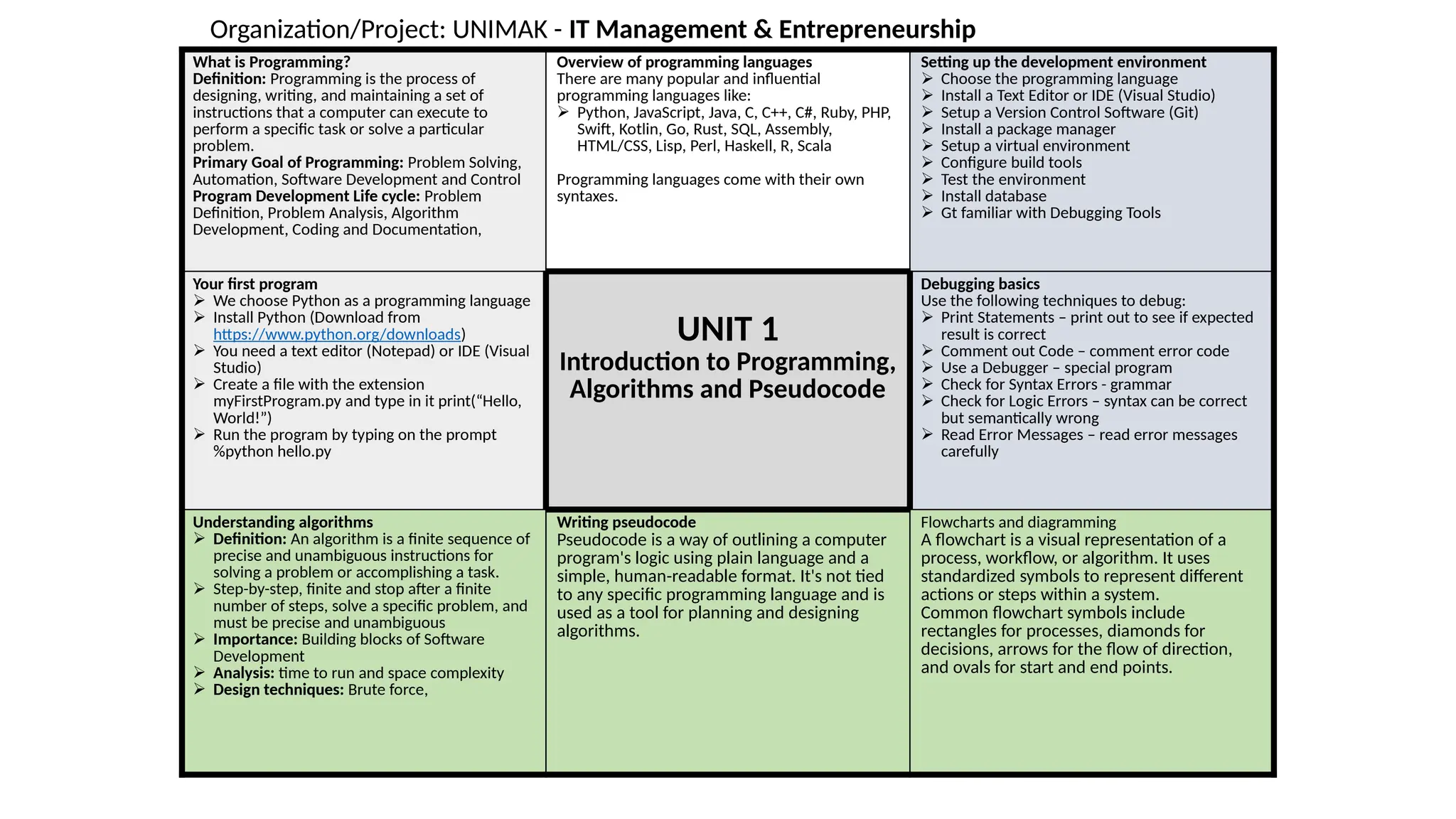
What is Programming?
Definition:Programming is the process of
designing, writing, and maintaining a set of
instructions that a computer can execute to
perform a specific task or solve a particular
problem.
Primary Goal of Programming: Problem Solving,
Automation, Software Development and Control
Program Development Life cycle: Problem
Definition, Problem Analysis, Algorithm
Development, Coding and Documentation,
Overview of programming languages
There are many popular and influential
programming languages like:
Python, JavaScript, Java, C, C++, C#, Ruby, PHP,
Swift, Kotlin, Go, Rust, SQL, Assembly,
HTML/CSS, Lisp, Perl, Haskell, R, Scala
Programming languages come with their own
syntaxes.
Setting up the development environment
Choose the programming language
Install a Text Editor or IDE (Visual Studio)
Setup a Version Control Software (Git)
Install a package manager
Setup a virtual environment
Configure build tools
Test the environment
Install database
Gt familiar with Debugging Tools
Your first program
We choose Python as a programming language
Install Python (Download from
https://www.python.org/downloads)
You need a text editor (Notepad) or IDE (Visual
Studio)
Create a file with the extension
myFirstProgram.py and type in it print(“Hello,
World!”)
Run the program by typing on the prompt
%python hello.py
UNIT 1
Introduction to Programming,
Algorithms and Pseudocode
Debugging basics
Use the following techniques to debug:
Print Statements – print out to see if expected
result is correct
Comment out Code – comment error code
Use a Debugger – special program
Check for Syntax Errors - grammar
Check for Logic Errors – syntax can be correct
but semantically wrong
Read Error Messages – read error messages
carefully
Understanding algorithms
Definition: An algorithm is a finite sequence of
precise and unambiguous instructions for
solving a problem or accomplishing a task.
Step-by-step, finite and stop after a finite
number of steps, solve a specific problem, and
must be precise and unambiguous
Importance: Building blocks of Software
Development
Analysis: time to run and space complexity
Design techniques: Brute force,
Writing pseudocode
Pseudocode is a way of outlining a computer
program's logic using plain language and a
simple, human-readable format. It's not tied
to any specific programming language and is
used as a tool for planning and designing
algorithms.
Flowcharts and diagramming
A flowchart is a visual representation of a
process, workflow, or algorithm. It uses
standardized symbols to represent different
actions or steps within a system.
Common flowchart symbols include
rectangles for processes, diamonds for
decisions, arrows for the flow of direction,
and ovals for start and end points.
Da.
Organization/Project: UNIMAK - IT Management & Entrepreneurship
2.
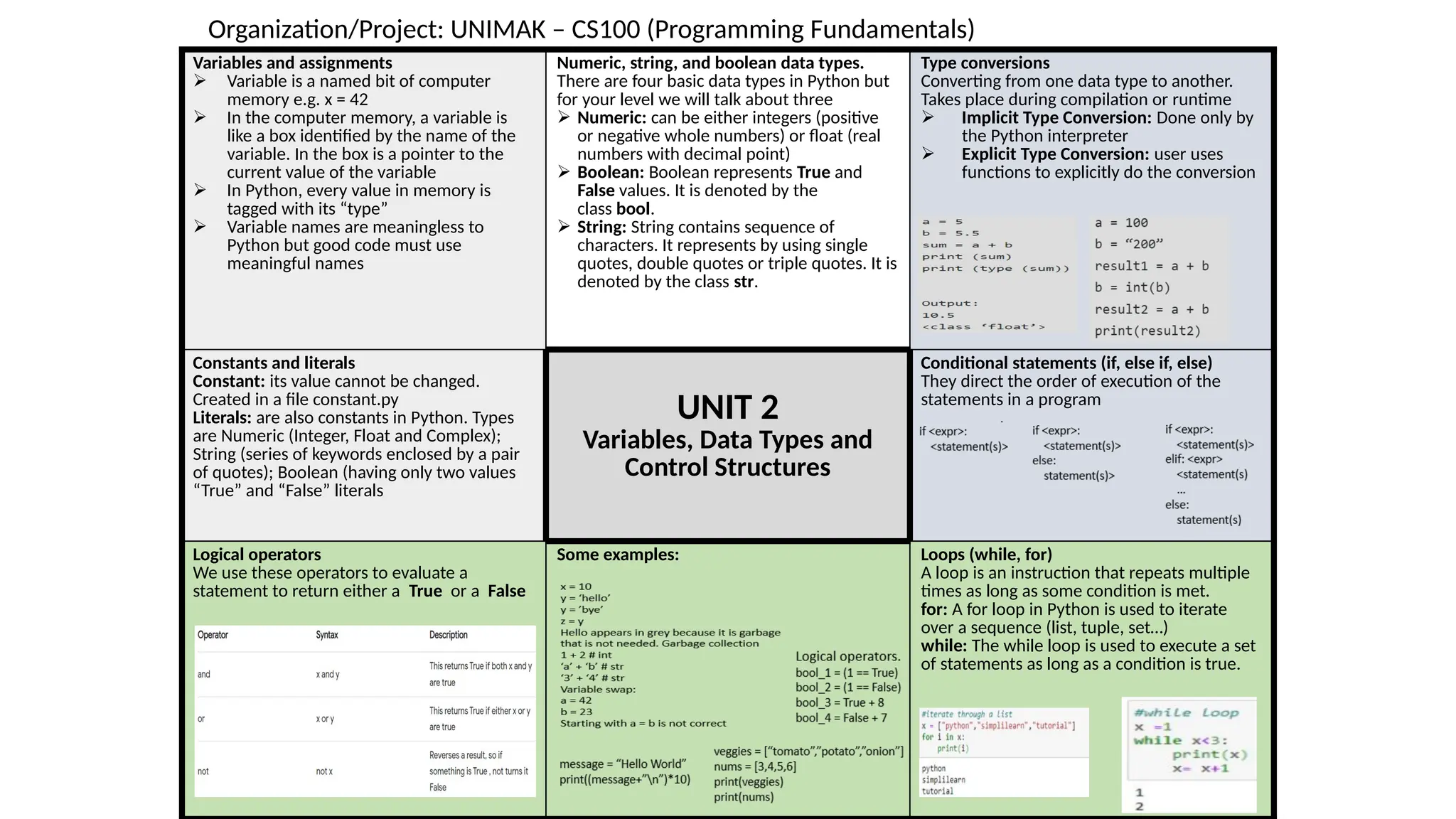
Variables and assignments
Variable is a named bit of computer
memory e.g. x = 42
In the computer memory, a variable is
like a box identified by the name of the
variable. In the box is a pointer to the
current value of the variable
In Python, every value in memory is
tagged with its “type”
Variable names are meaningless to
Python but good code must use
meaningful names
Numeric, string, and boolean data types.
There are four basic data types in Python but
for your level we will talk about three
Numeric: can be either integers (positive
or negative whole numbers) or float (real
numbers with decimal point)
Boolean: Boolean represents True and
False values. It is denoted by the
class bool.
String: String contains sequence of
characters. It represents by using single
quotes, double quotes or triple quotes. It is
denoted by the class str.
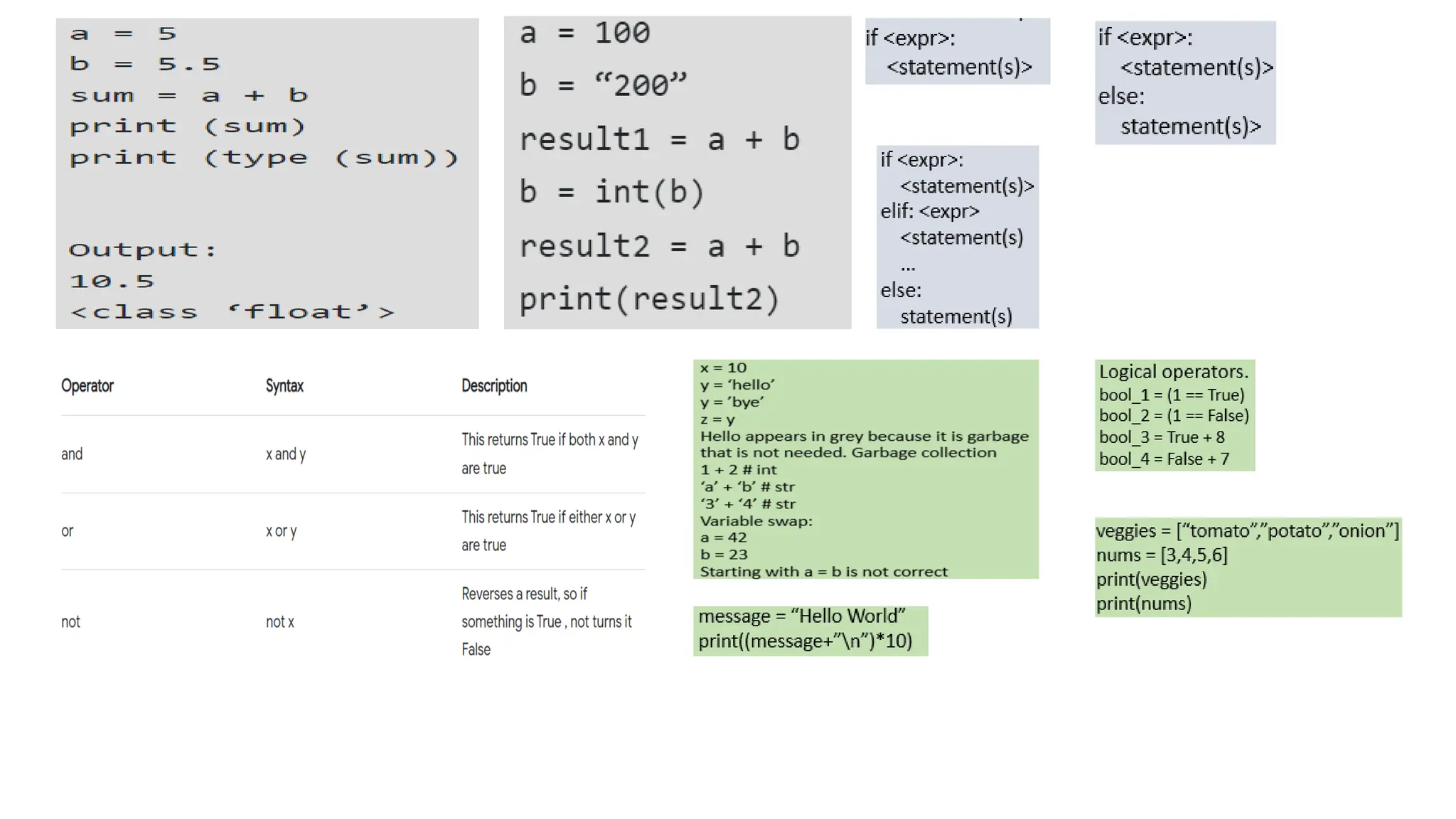
Type conversions
Converting from one data type to another.
Takes place during compilation or runtime
Implicit Type Conversion: Done only by
the Python interpreter
Explicit Type Conversion: user uses
functions to explicitly do the conversion
Constants and literals
Constant: its value cannot be changed.
Created in a file constant.py
Literals: are also constants in Python. Types
are Numeric (Integer, Float and Complex);
String (series of keywords enclosed by a pair
of quotes); Boolean (having only two values
“True” and “False” literals
UNIT 2
Variables, Data Types and
Control Structures
Conditional statements (if, else if, else)
They direct the order of execution of the
statements in a program
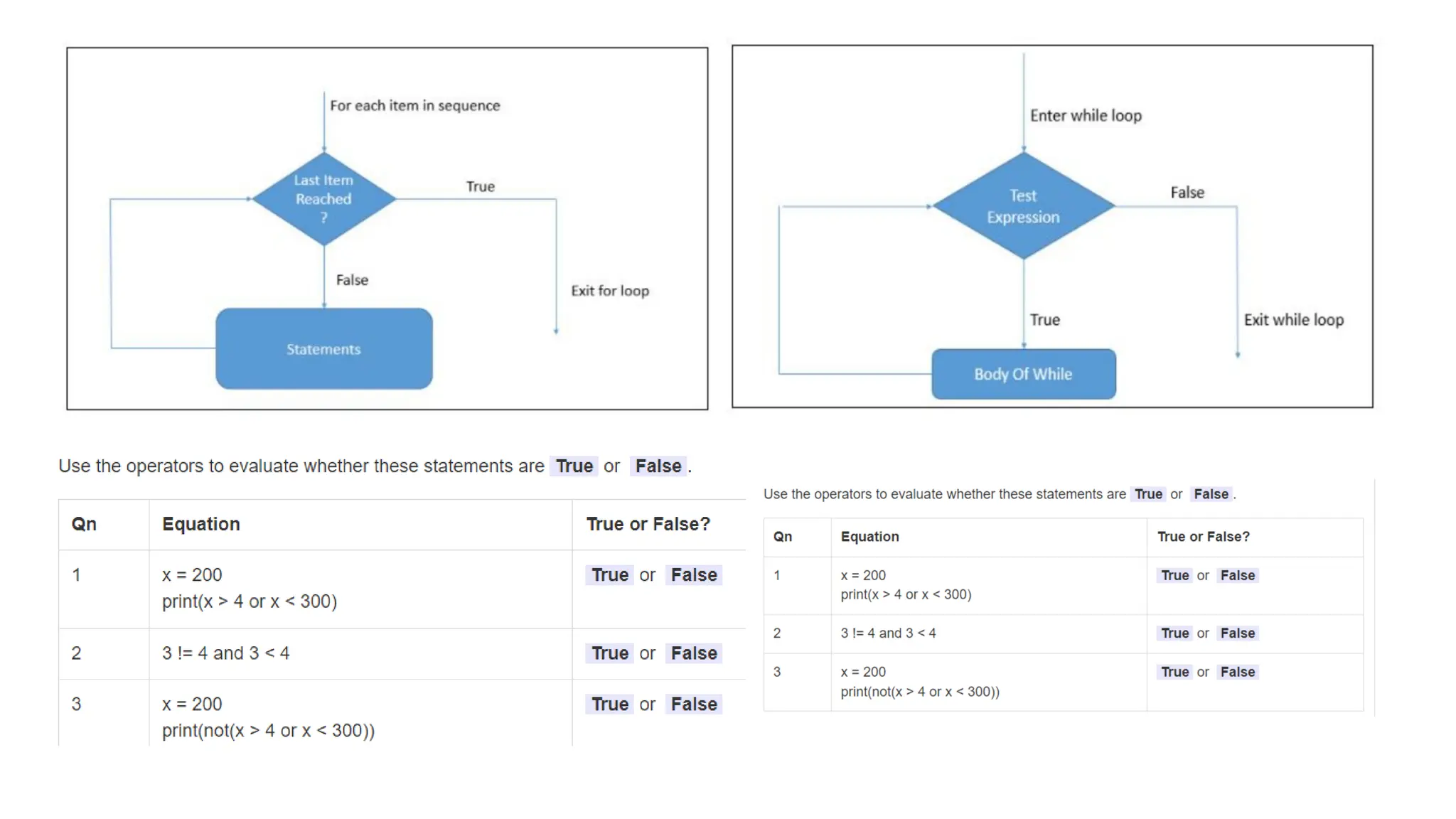
Logical operators
We use these operators to evaluate a
statement to return either a True or a False
Some examples: Loops (while, for)
A loop is an instruction that repeats multiple
times as long as some condition is met.
for: A for loop in Python is used to iterate
over a sequence (list, tuple, set…)
while: The while loop is used to execute a set
of statements as long as a condition is true.
Da.
Organization/Project: UNIMAK – CS100 (Programming Fundamentals)
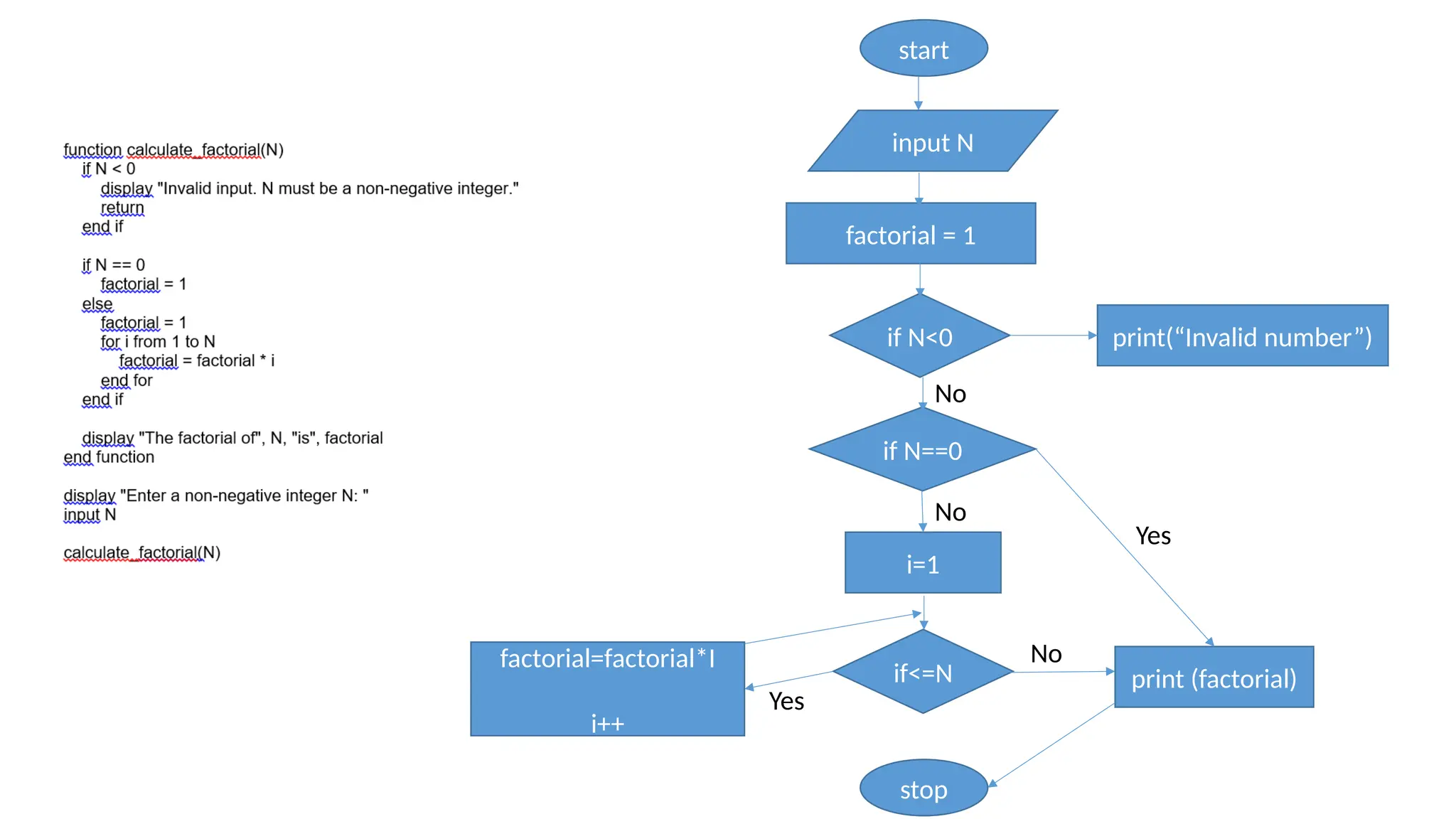
start
factorial = 1
inputN
if N<0
if N==0
i=1
if<=N
stop
factorial=factorial*I
i++
print (factorial)
print(“Invalid number”)
Yes
No
Yes
No
No
6.
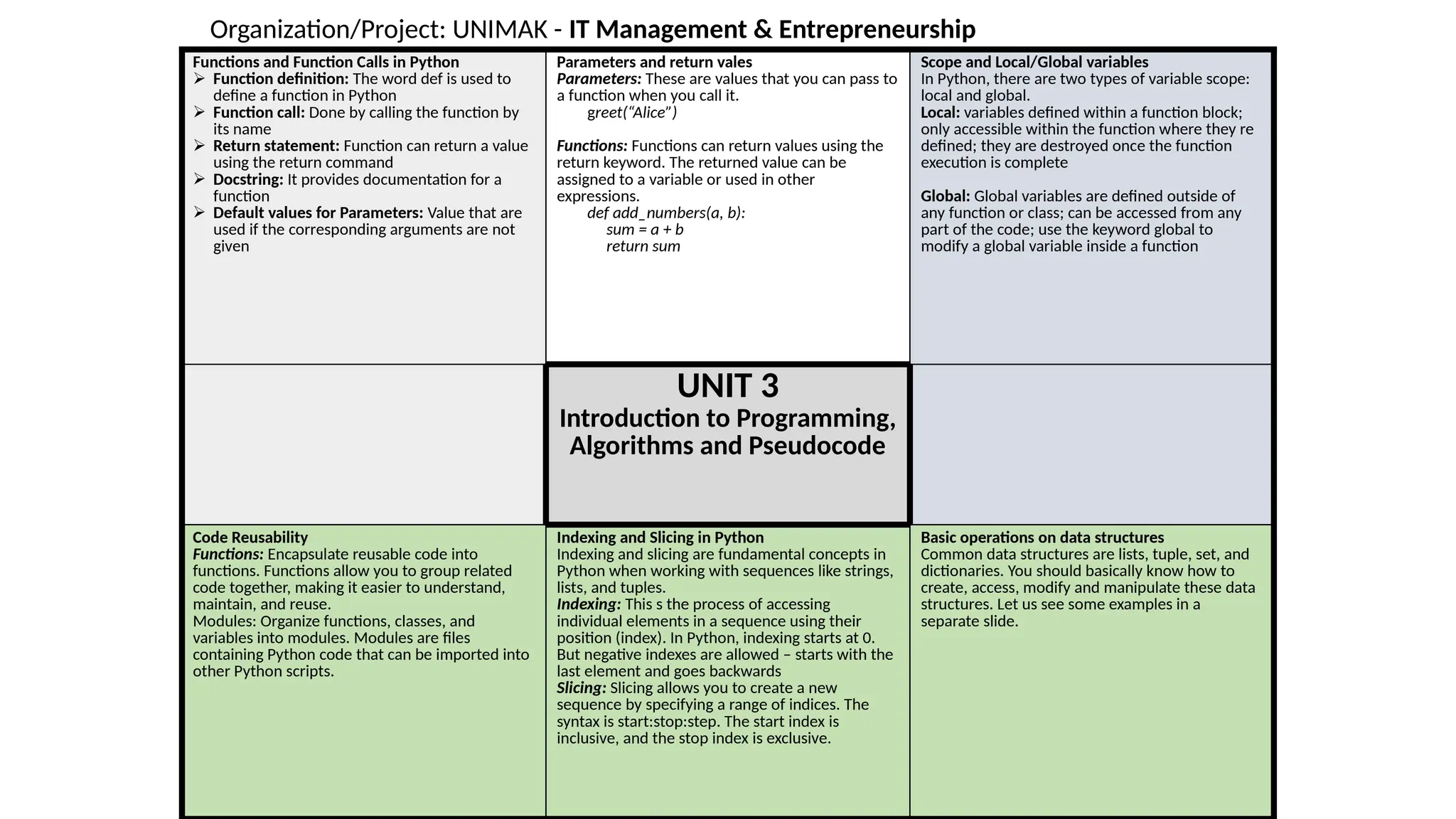
Functions and FunctionCalls in Python
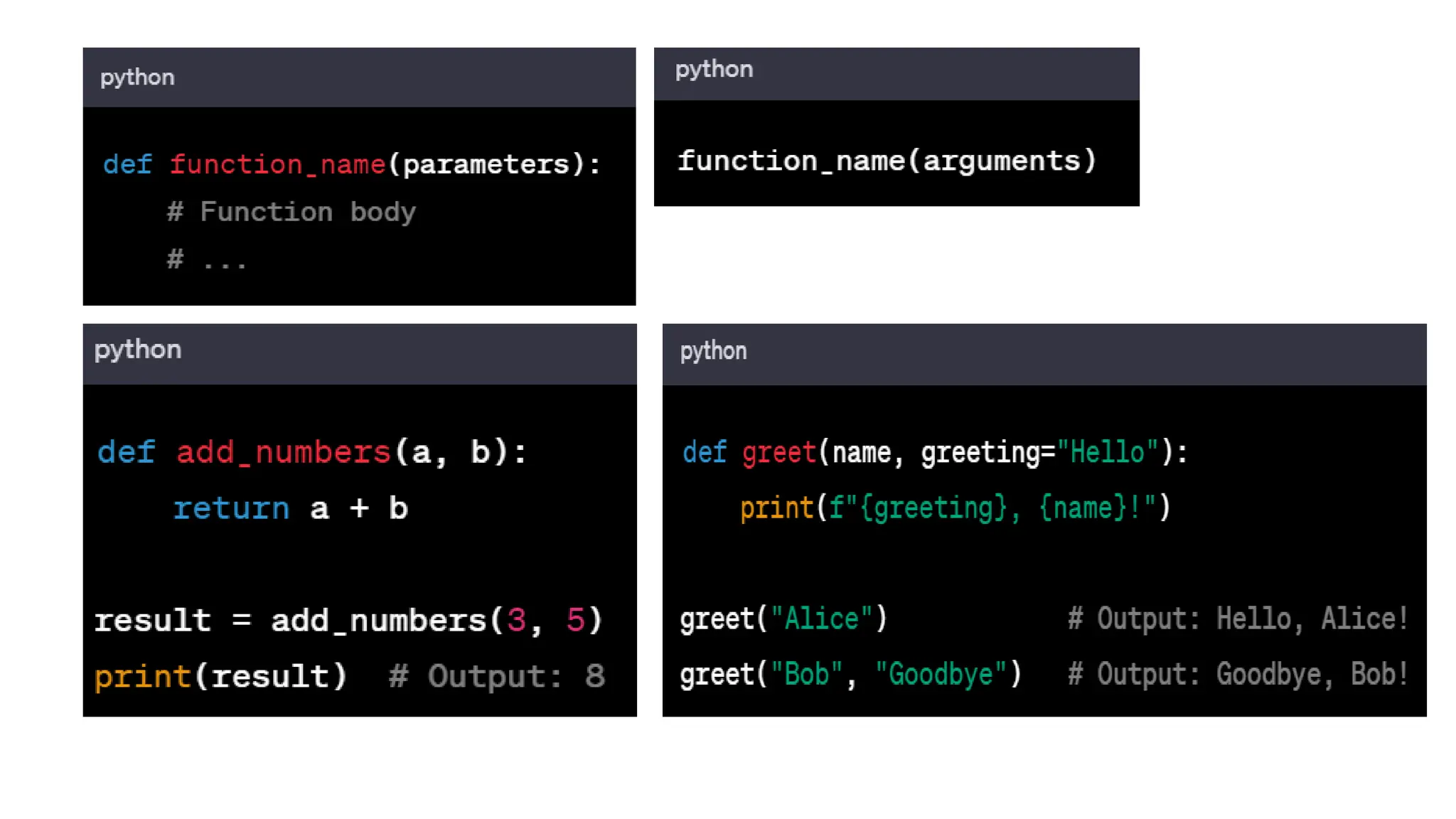
Function definition: The word def is used to
define a function in Python
Function call: Done by calling the function by
its name
Return statement: Function can return a value
using the return command
Docstring: It provides documentation for a
function
Default values for Parameters: Value that are
used if the corresponding arguments are not
given
Parameters and return vales
Parameters: These are values that you can pass to
a function when you call it.
greet(“Alice”)
Functions: Functions can return values using the
return keyword. The returned value can be
assigned to a variable or used in other
expressions.
def add_numbers(a, b):
sum = a + b
return sum
Scope and Local/Global variables
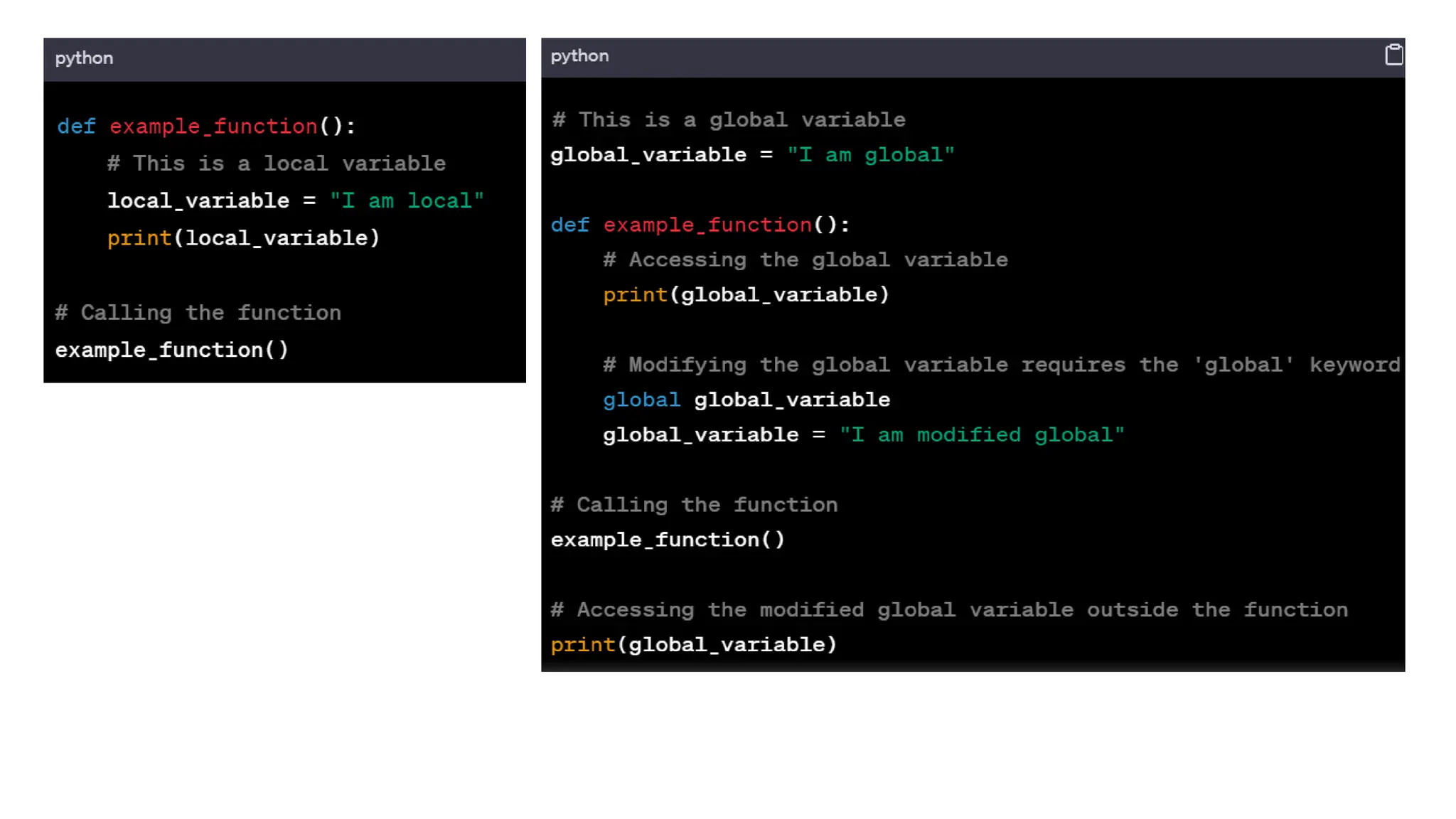
In Python, there are two types of variable scope:
local and global.
Local: variables defined within a function block;
only accessible within the function where they re
defined; they are destroyed once the function
execution is complete
Global: Global variables are defined outside of
any function or class; can be accessed from any
part of the code; use the keyword global to
modify a global variable inside a function
UNIT 3
Introduction to Programming,
Algorithms and Pseudocode
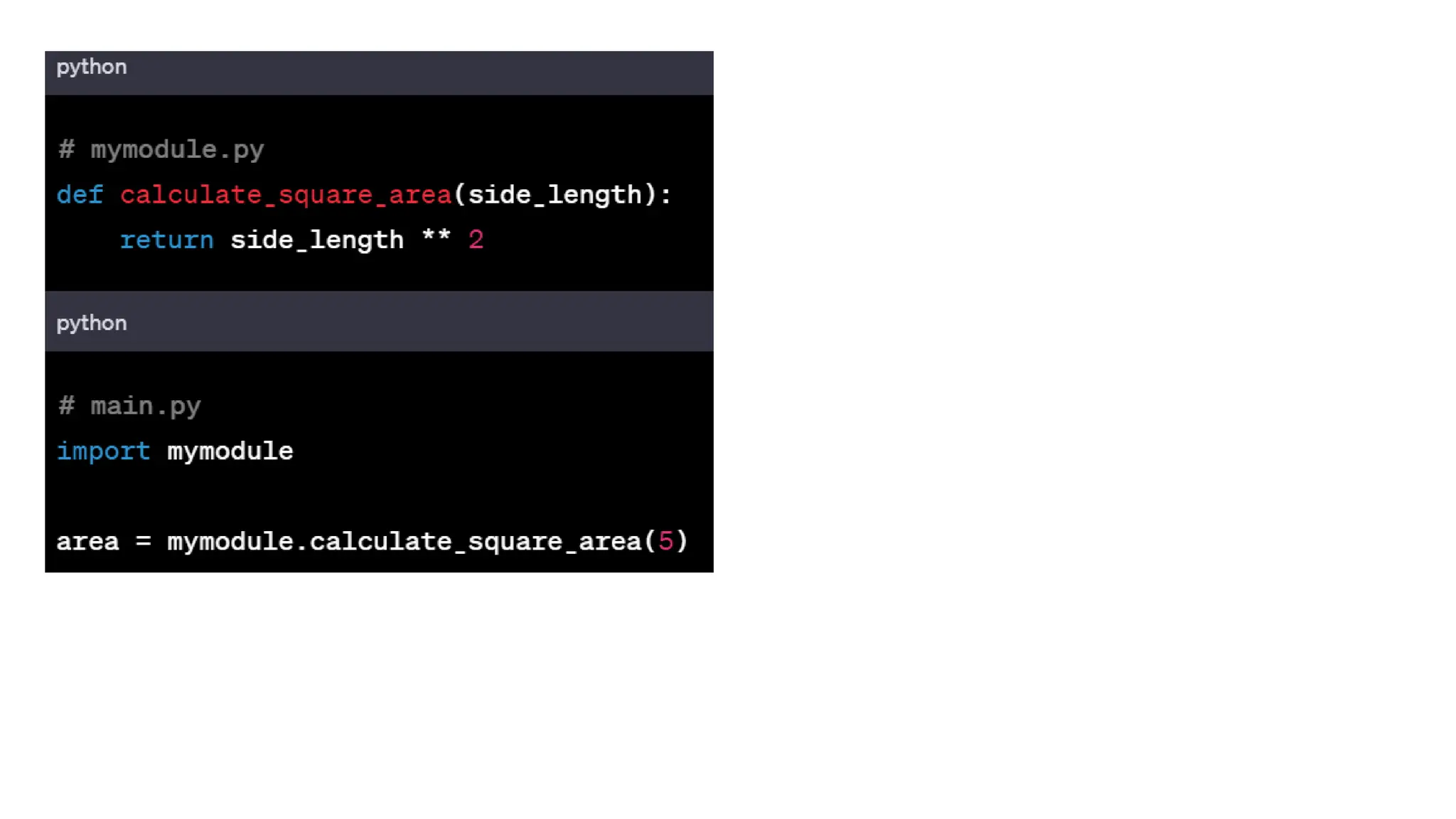
Code Reusability
Functions: Encapsulate reusable code into
functions. Functions allow you to group related
code together, making it easier to understand,
maintain, and reuse.
Modules: Organize functions, classes, and
variables into modules. Modules are files
containing Python code that can be imported into
other Python scripts.
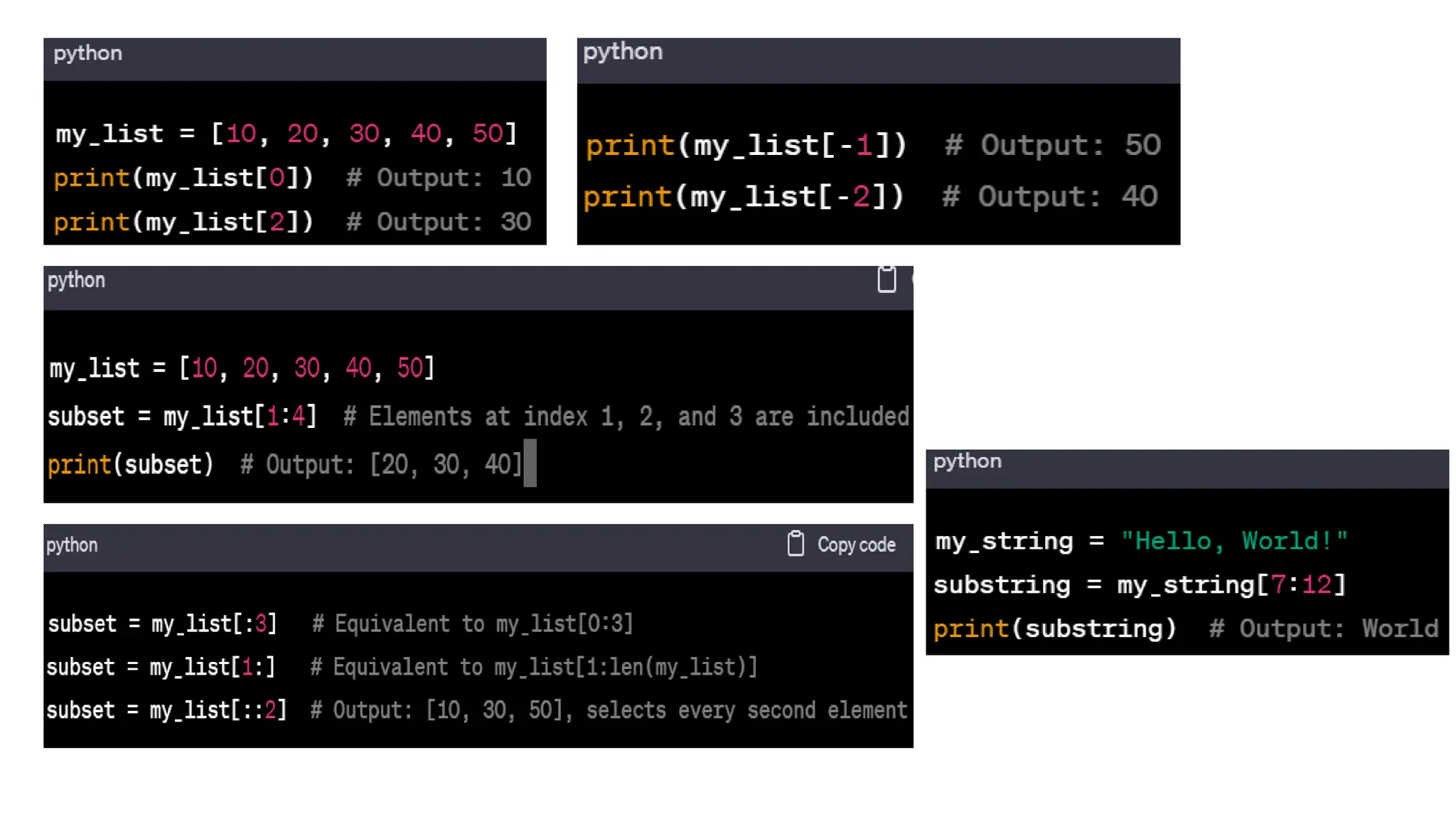
Indexing and Slicing in Python
Indexing and slicing are fundamental concepts in
Python when working with sequences like strings,
lists, and tuples.
Indexing: This s the process of accessing
individual elements in a sequence using their
position (index). In Python, indexing starts at 0.
But negative indexes are allowed – starts with the
last element and goes backwards
Slicing: Slicing allows you to create a new
sequence by specifying a range of indices. The
syntax is start:stop:step. The start index is
inclusive, and the stop index is exclusive.
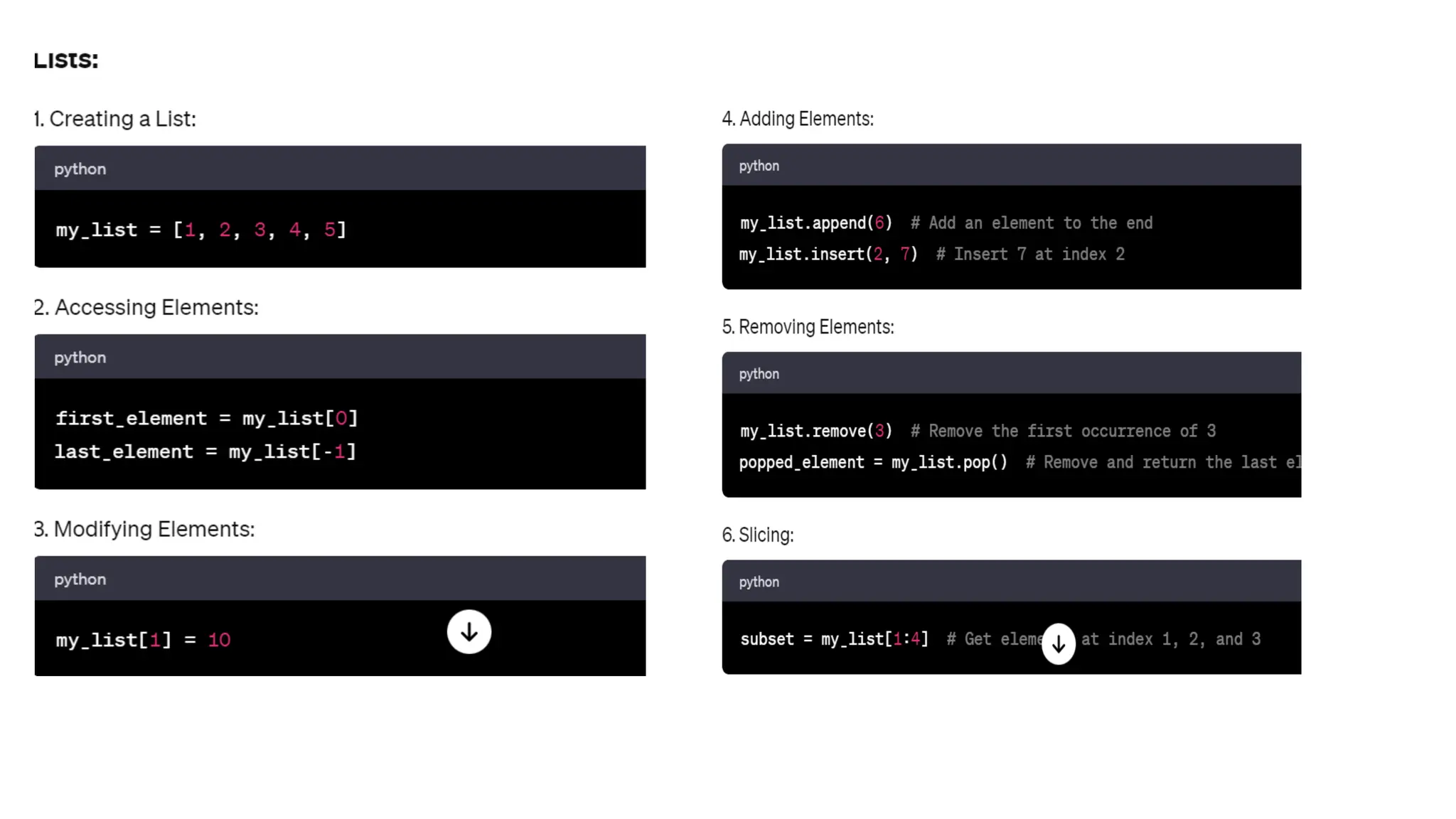
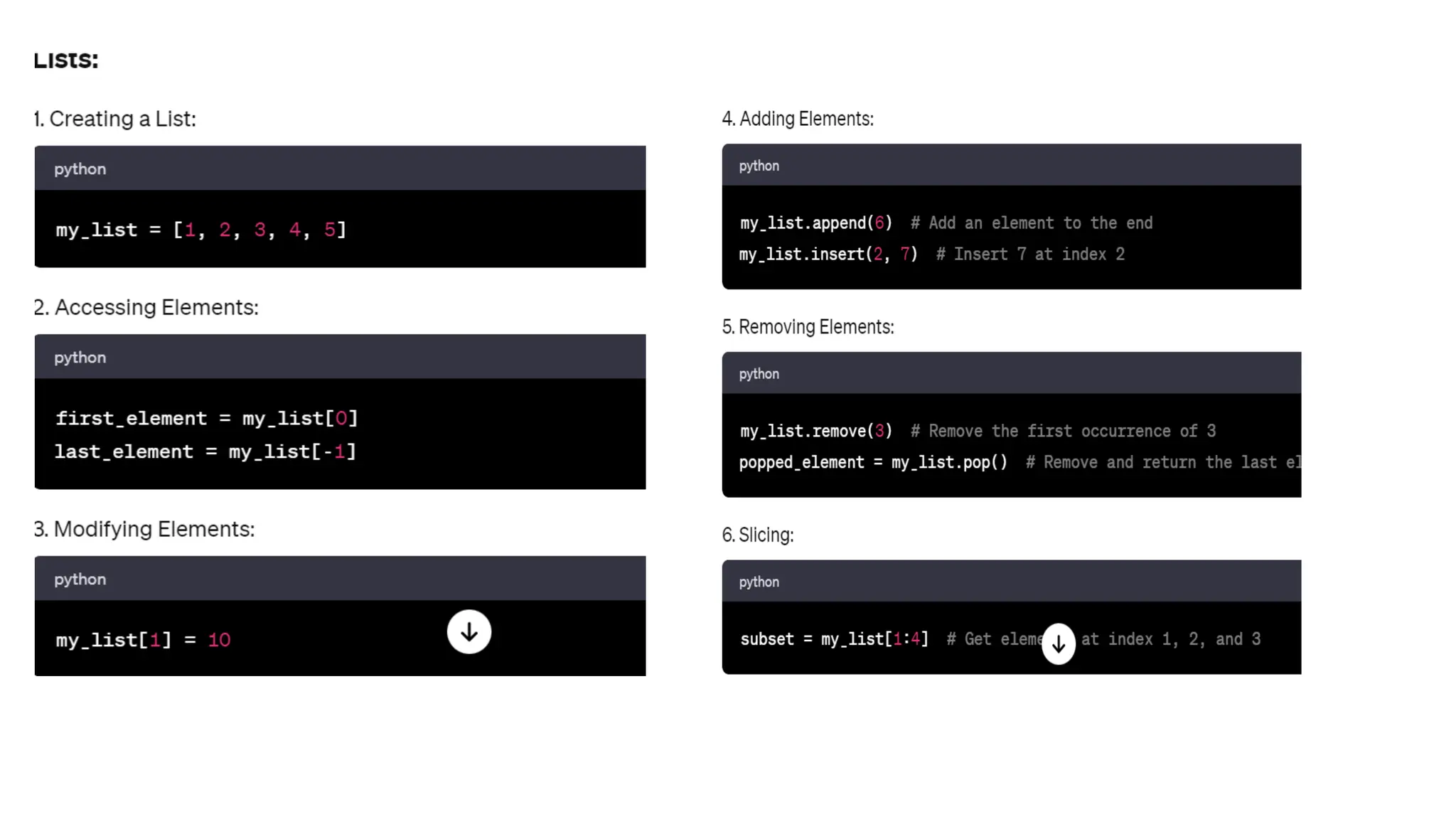
Basic operations on data structures
Common data structures are lists, tuple, set, and
dictionaries. You should basically know how to
create, access, modify and manipulate these data
structures. Let us see some examples in a
separate slide.
Da.
Organization/Project: UNIMAK - IT Management & Entrepreneurship


![C_Program_Yr1[1].pdf for computer science](https://cdn.slidesharecdn.com/ss_thumbnails/cprogramyr11-250625235829-c28b7a89-thumbnail.jpg?width=640&height=640&fit=bounds)
![Knowledge_Society_Participation_With_Real_Image_Notes[1].pptx](https://cdn.slidesharecdn.com/ss_thumbnails/knowledgesocietyparticipationwithrealimagenotes1-250625235459-de3978db-thumbnail.jpg?width=640&height=640&fit=bounds)


