Operating system
Unit-1:
Introduction to Operating System
INTRODUCTION
Objective and characteristics.
Classification Of Operating System.
a) Batch Processing OS
b) Multi-programming OS
c) Multi-processing OS
d) Multi-tasking OS
e) Time-sharing OS
f) Distributed OS
g) Network OS
h) Real-time OS
System calls and services.
Operating system functions:
Classification Of Operating System.
a) Process management
b) Memory management
c) Multi-processing OS
d) Multi-tasking OS
e) Time-sharing OS
f) Distributed OS
g) Network OS
h) Real-time OS
System calls and services.
What is an Operating System?
An Operating System(OS) is a software that manages and control hardware and software resources of a
computing device.
Responsible for managing and controlling all the activities and sharing of computer resources among different
running applications.
It mainly acts a government for your system that has different departments to manage different resources.
Basically, OS is manager of computer system.
Provide interface between user and hardware system.
Examples are Linux, Unix, Windows 11, MS DOS, Android, macOS and iOS.
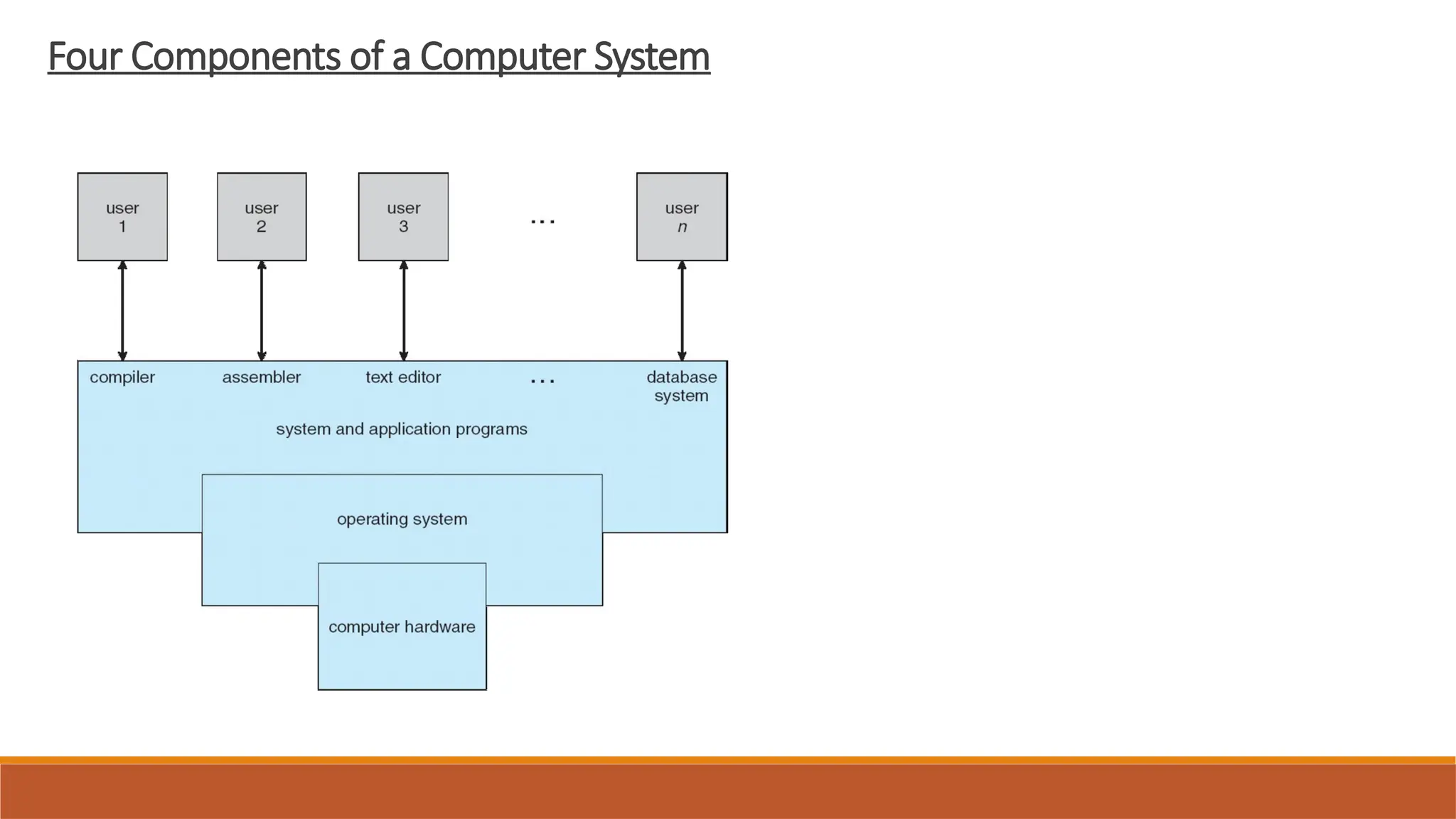
Four Components of a Computer System
OBJECTIVE:
The primary objective of an operating system (OS), is to act as a bridge between the user and
the computer hardware, making the system convenient and efficient to use.
1. User Convenience:
Provides a user-friendly interface for interacting with the computer.
Simplifies the process of running applications and accessing resources.
2. Program Execution:
Provides the environment and necessary services for programs to run effectively.
Manages the execution of multiple programs concurrently.
3. Resource Management:
Efficiently allocates and manages computer resources like CPU, memory, storage, and
input/output devices.
Ensures fair and optimal utilization of these resources.
4. Security:
Protects the system and user data from unauthorized access.
5. Efficiency:
Maximizes the utilization of computer resources to enhance performance.
6. Reliability:
Designed to handle errors and exceptions gracefully.
Characteristics of Operating system
User Interface:
Provides a way for users to interact with the computer system, either through a
graphical interface or a command-line interface.
Concurrency:
Allows multiple programs or tasks to run seemingly simultaneously, improving overall
system efficiency.
Memory Management:
Allocates and deallocates memory to different programs i.e.,managing how memory
is used.
File Management:
Organizes and manages files and directories on storage devices, allowing for easy
access and storage of data.
Device Management:
Controls and coordinates the various hardware devices connected to the computer,
such as printers, keyboards, and storage devices.
Security:
Implements security measures to protect the system and data from unauthorized
access and malicious software.
Process Management:
Manages the execution of different programs and tasks, including scheduling,
allocation, and termination.
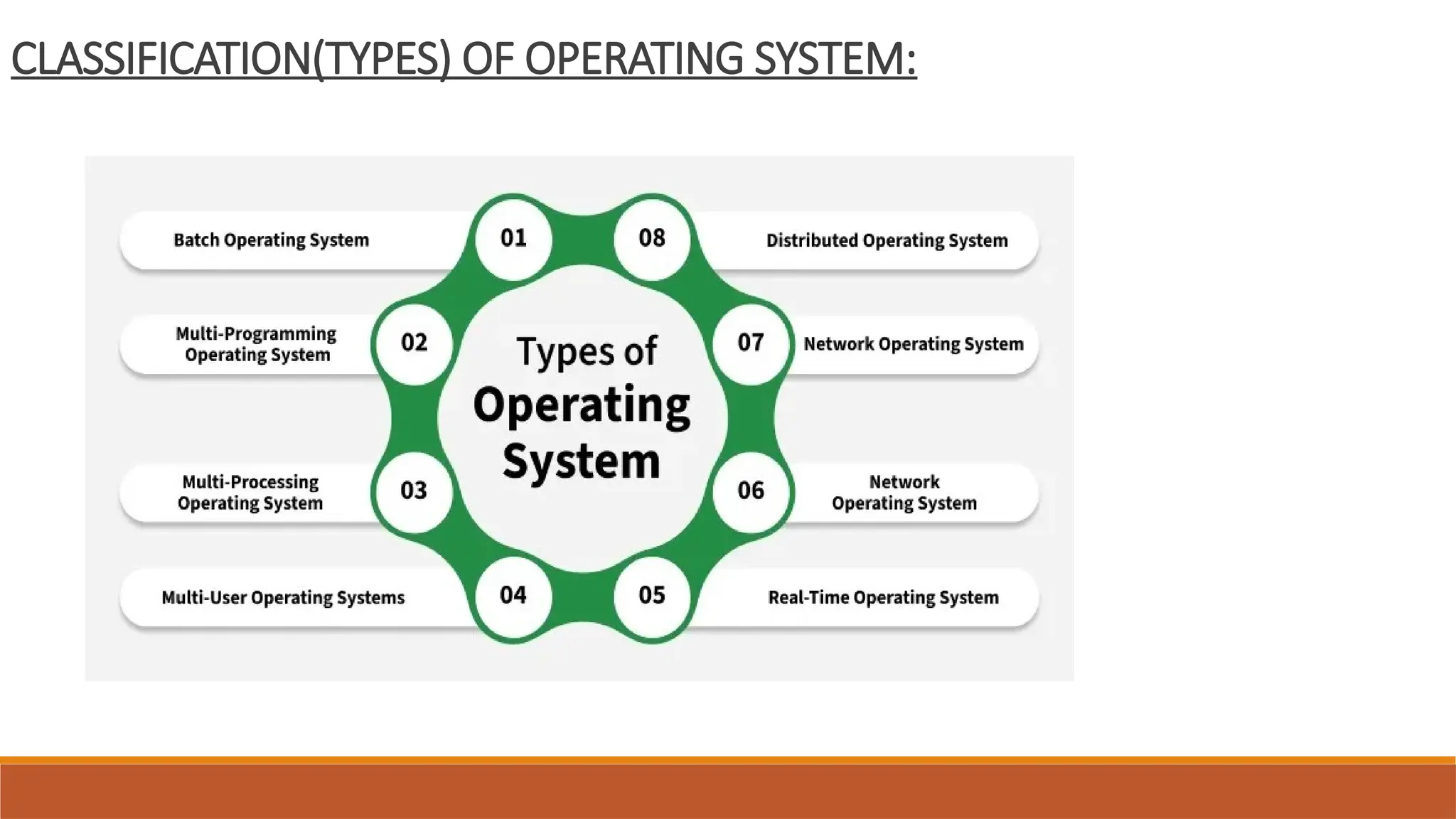
CLASSIFICATION(TYPES) OF OPERATING SYSTEM:
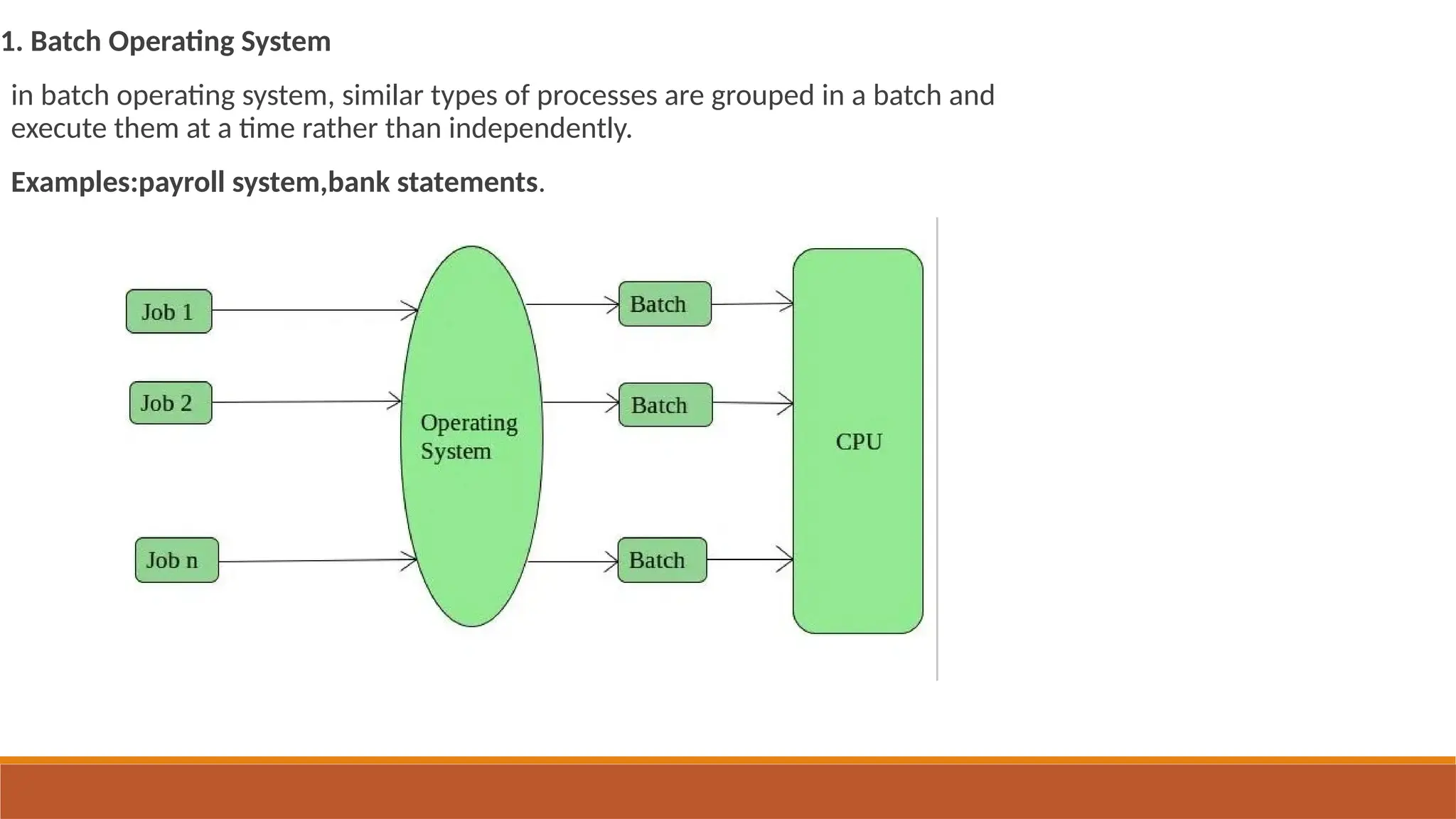
1. Batch Operating System
in batch operating system, similar types of processes are grouped in a batch and
execute them at a time rather than independently.
Examples:payroll system,bank statements.
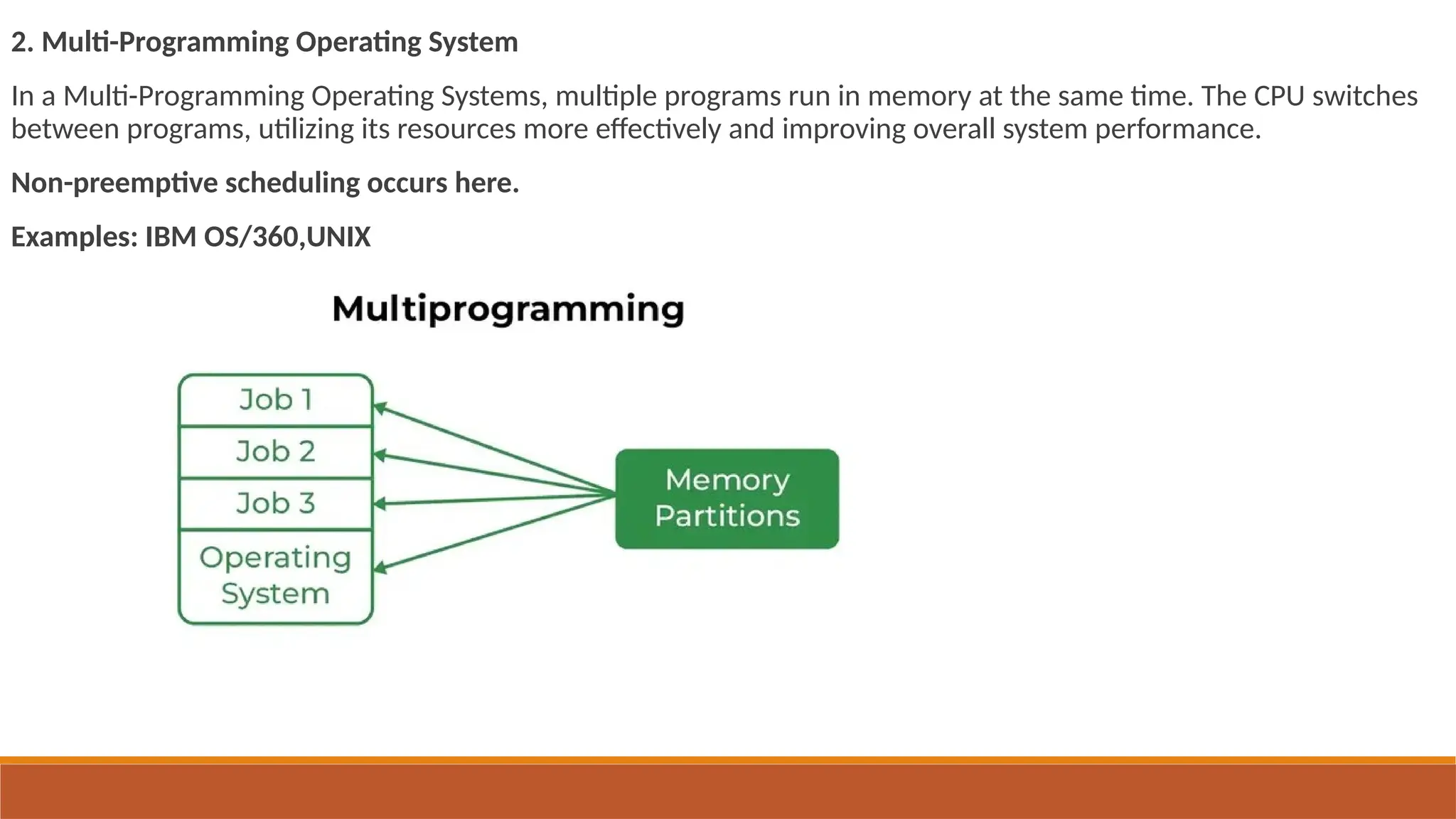
2. Multi-Programming Operating System
In a Multi-Programming Operating Systems, multiple programs run in memory at the same time. The CPU switches
between programs, utilizing its resources more effectively and improving overall system performance.
Non-preemptive scheduling occurs here.
Examples: IBM OS/360,UNIX
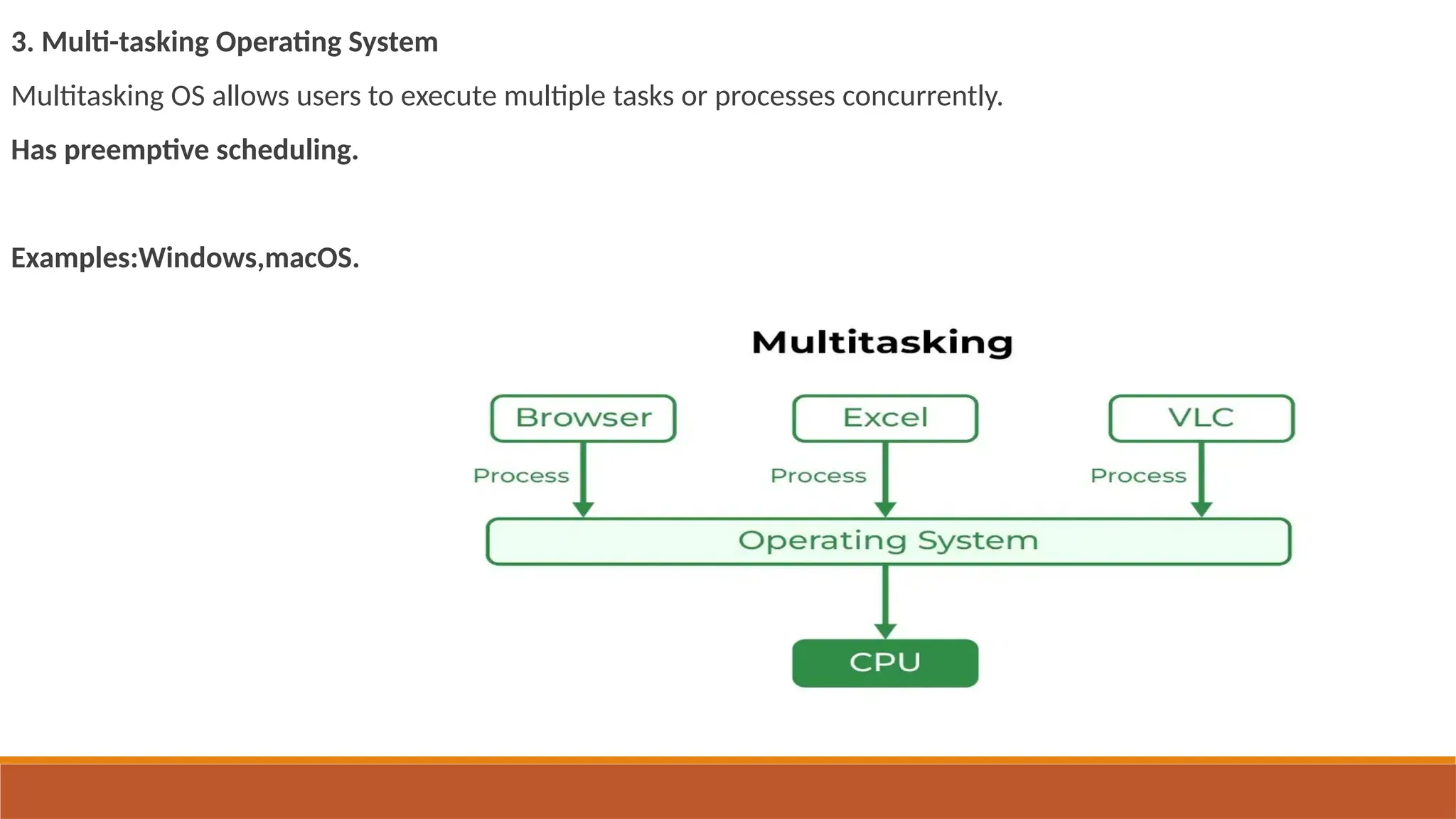
3. Multi-tasking Operating System
Multitasking OS allows users to execute multiple tasks or processes concurrently.
Has preemptive scheduling.
Examples:Windows,macOS.
4. Time-sharing Operating System
Same as multi-tasking operating system.
A time-shared operating system uses CPU scheduling to provide each user with a small portion of a shared
computer at once. A program is loaded into memory and executes, it performs a short period of time . This short
period of time during which the user gets the attention of the CPU is known as time slice, time slot, or quantum.
Use round-robin scheduling
Examples:unix,linux.
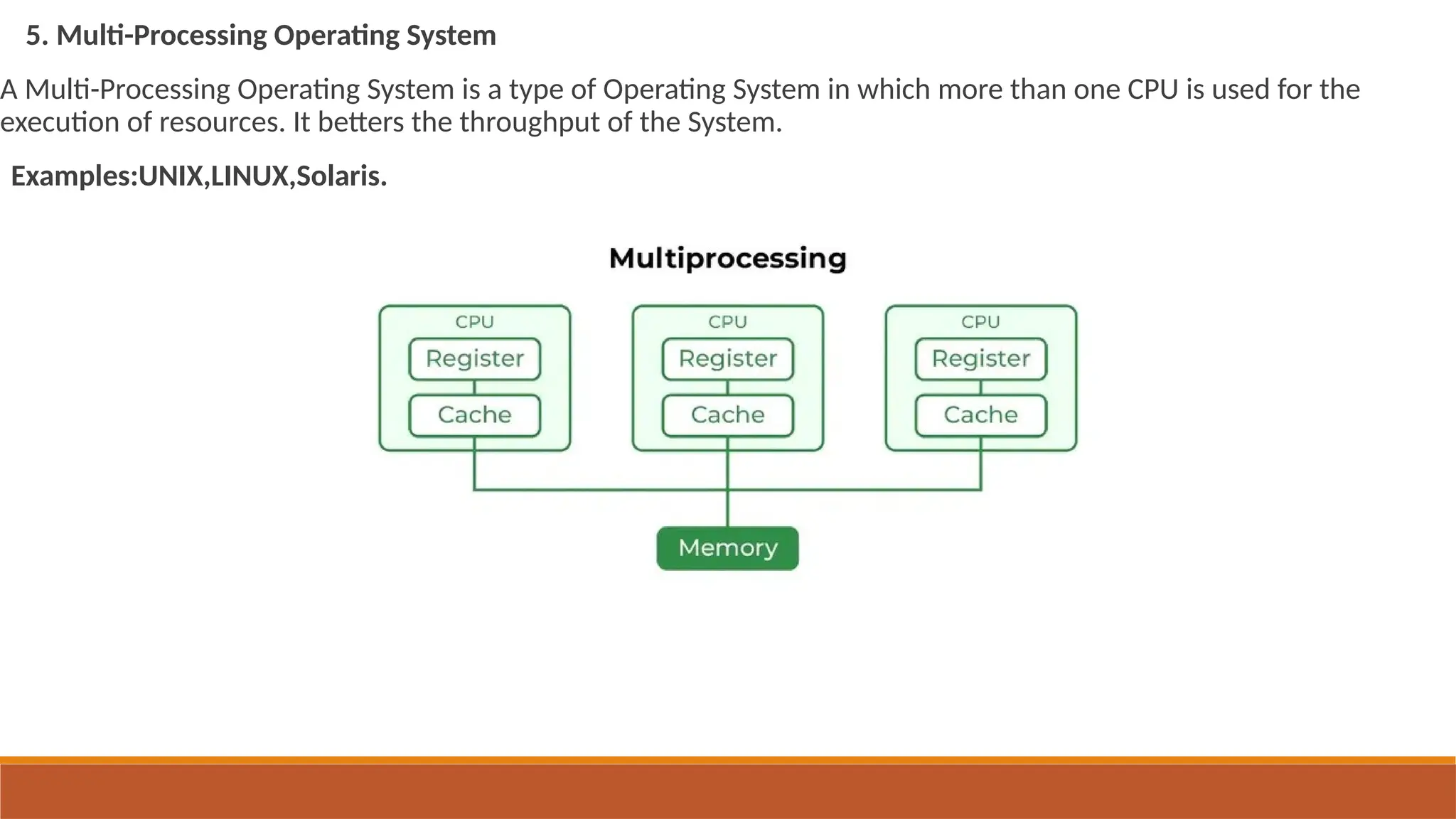
5. Multi-Processing Operating System
A Multi-Processing Operating System is a type of Operating System in which more than one CPU is used for the
execution of resources. It betters the throughput of the System.
Examples:UNIX,LINUX,Solaris.
type of Operating System in which more than one CPU is used for the execution of resources.
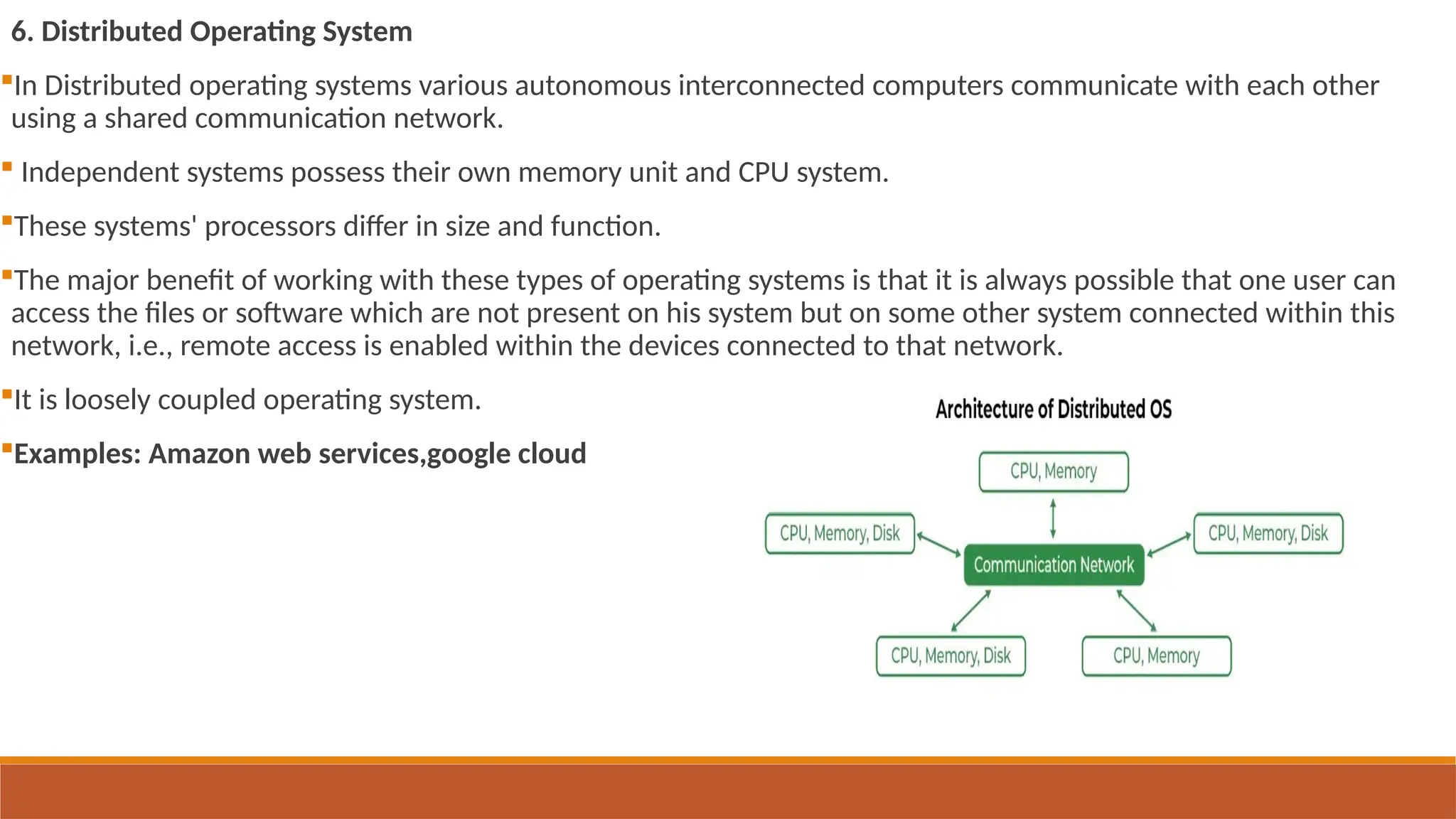
6. Distributed Operating System
In Distributed operating systems various autonomous interconnected computers communicate with each other
using a shared communication network.
 Independent systems possess their own memory unit and CPU system.
These systems' processors differ in size and function.
The major benefit of working with these types of operating systems is that it is always possible that one user can
access the files or software which are not present on his system but on some other system connected within this
network, i.e., remote access is enabled within the devices connected to that network.
It is loosely coupled operating system.
Examples: Amazon web services,google cloud
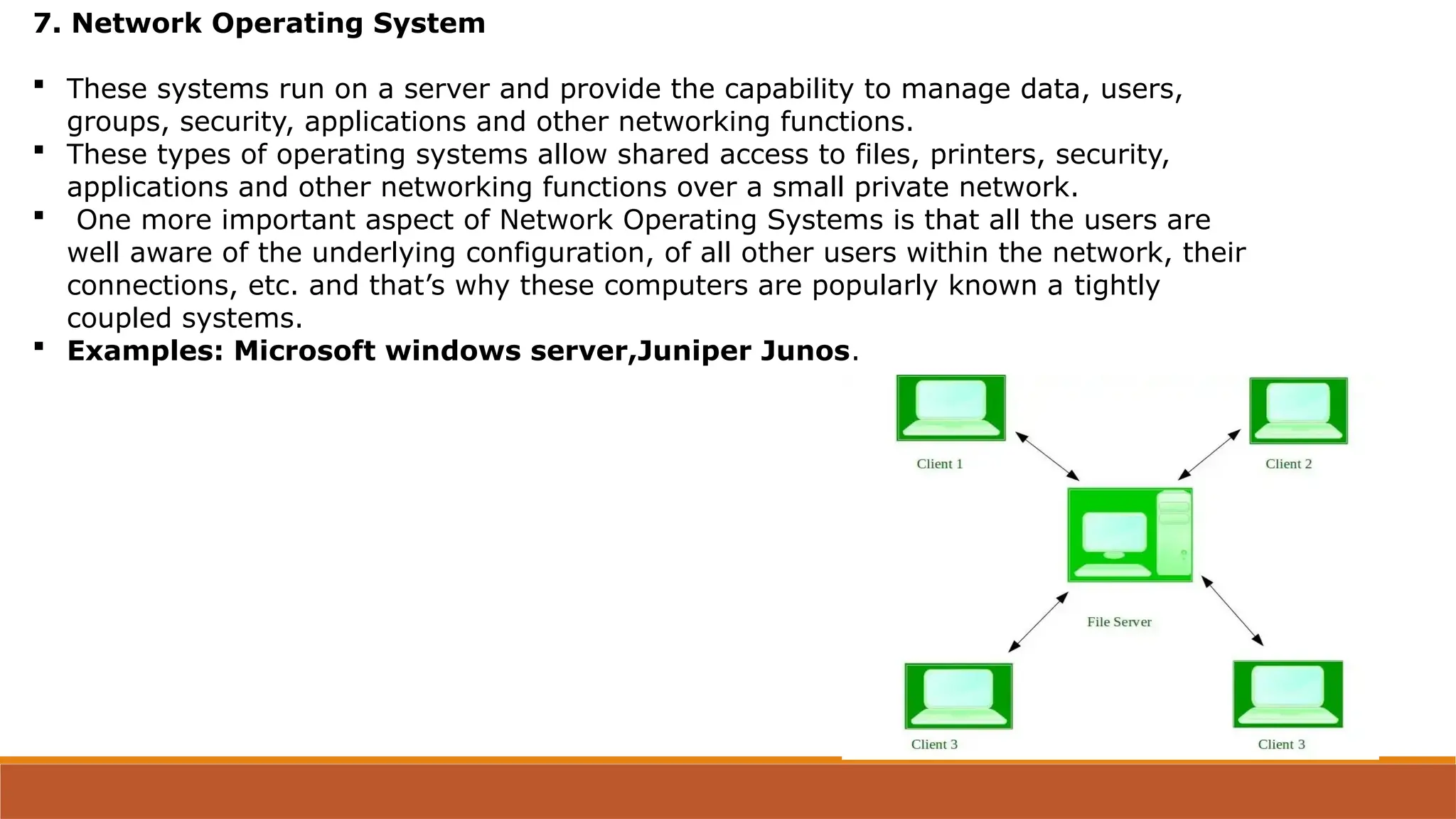
7. Network Operating System
 These systems run on a server and provide the capability to manage data, users,
groups, security, applications and other networking functions.
 These types of operating systems allow shared access to files, printers, security,
applications and other networking functions over a small private network.
 One more important aspect of Network Operating Systems is that all the users are
well aware of the underlying configuration, of all other users within the network, their
connections, etc. and that’s why these computers are popularly known a tightly
coupled systems.
 Examples: Microsoft windows server,Juniper Junos.
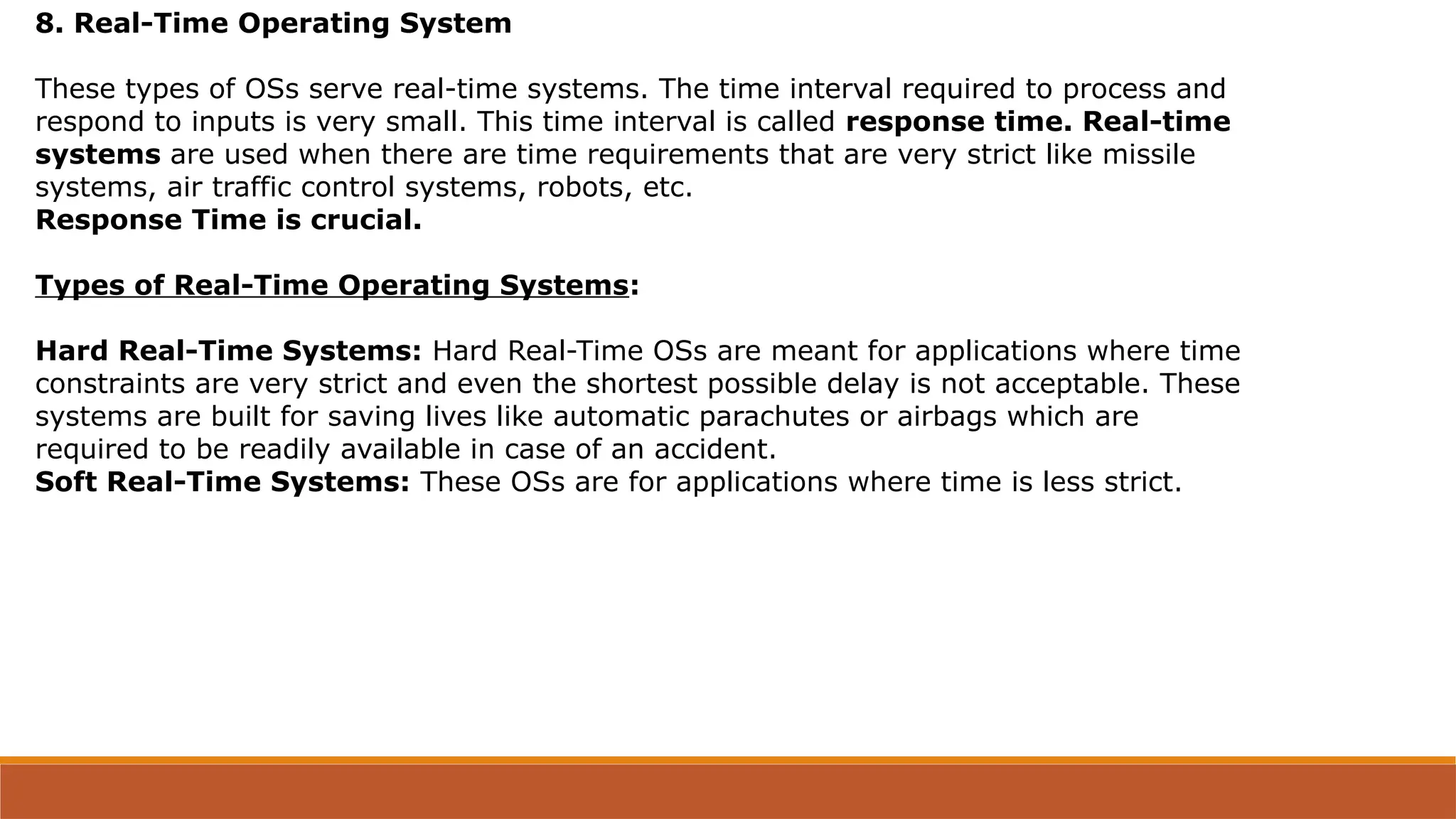
8. Real-Time Operating System
These types of OSs serve real-time systems. The time interval required to process and
respond to inputs is very small. This time interval is called response time. Real-time
systems are used when there are time requirements that are very strict like missile
systems, air traffic control systems, robots, etc.
Response Time is crucial.
Types of Real-Time Operating Systems:
Hard Real-Time Systems: Hard Real-Time OSs are meant for applications where time
constraints are very strict and even the shortest possible delay is not acceptable. These
systems are built for saving lives like automatic parachutes or airbags which are
required to be readily available in case of an accident.
Soft Real-Time Systems: These OSs are for applications where time is less strict.
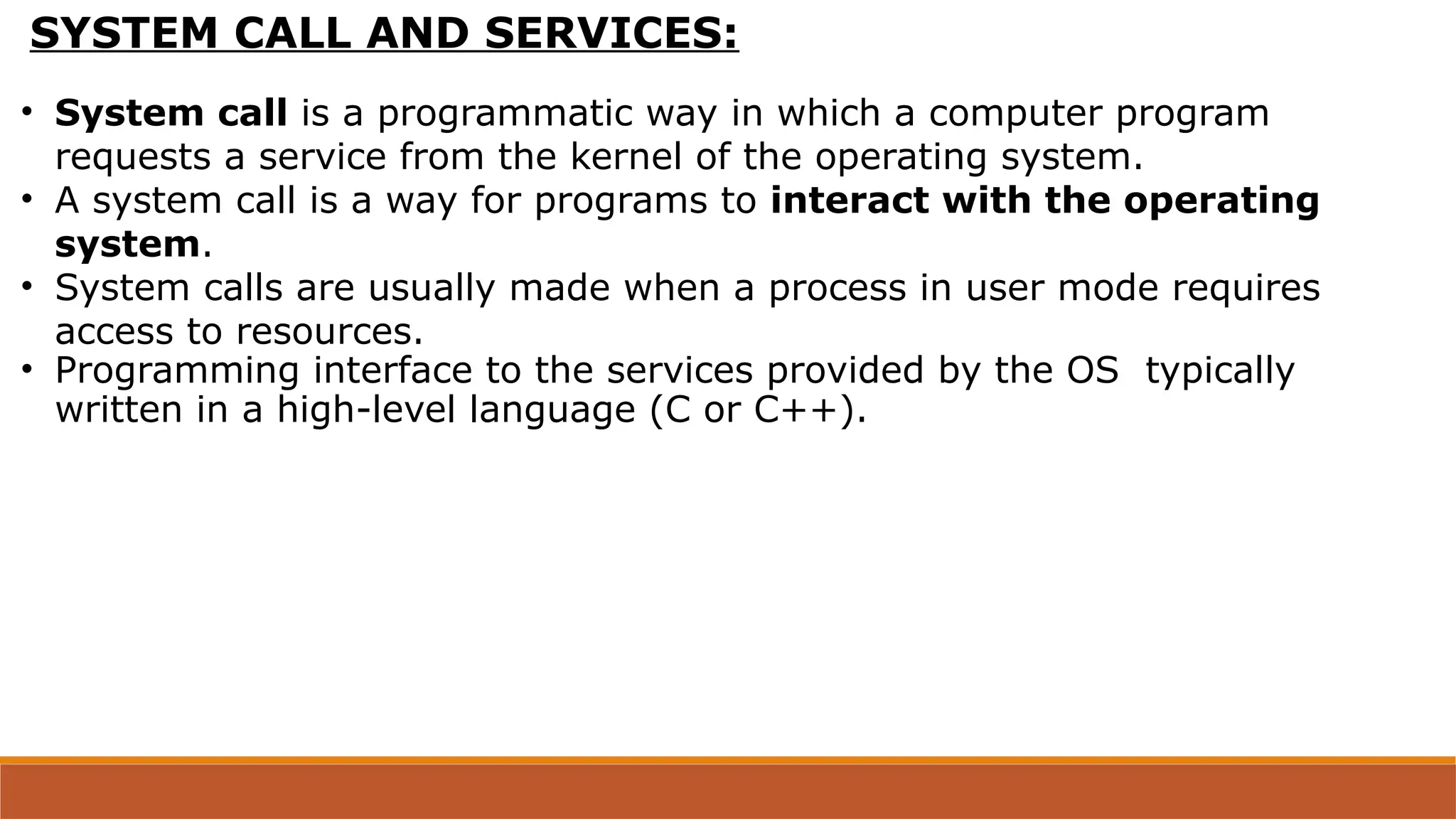
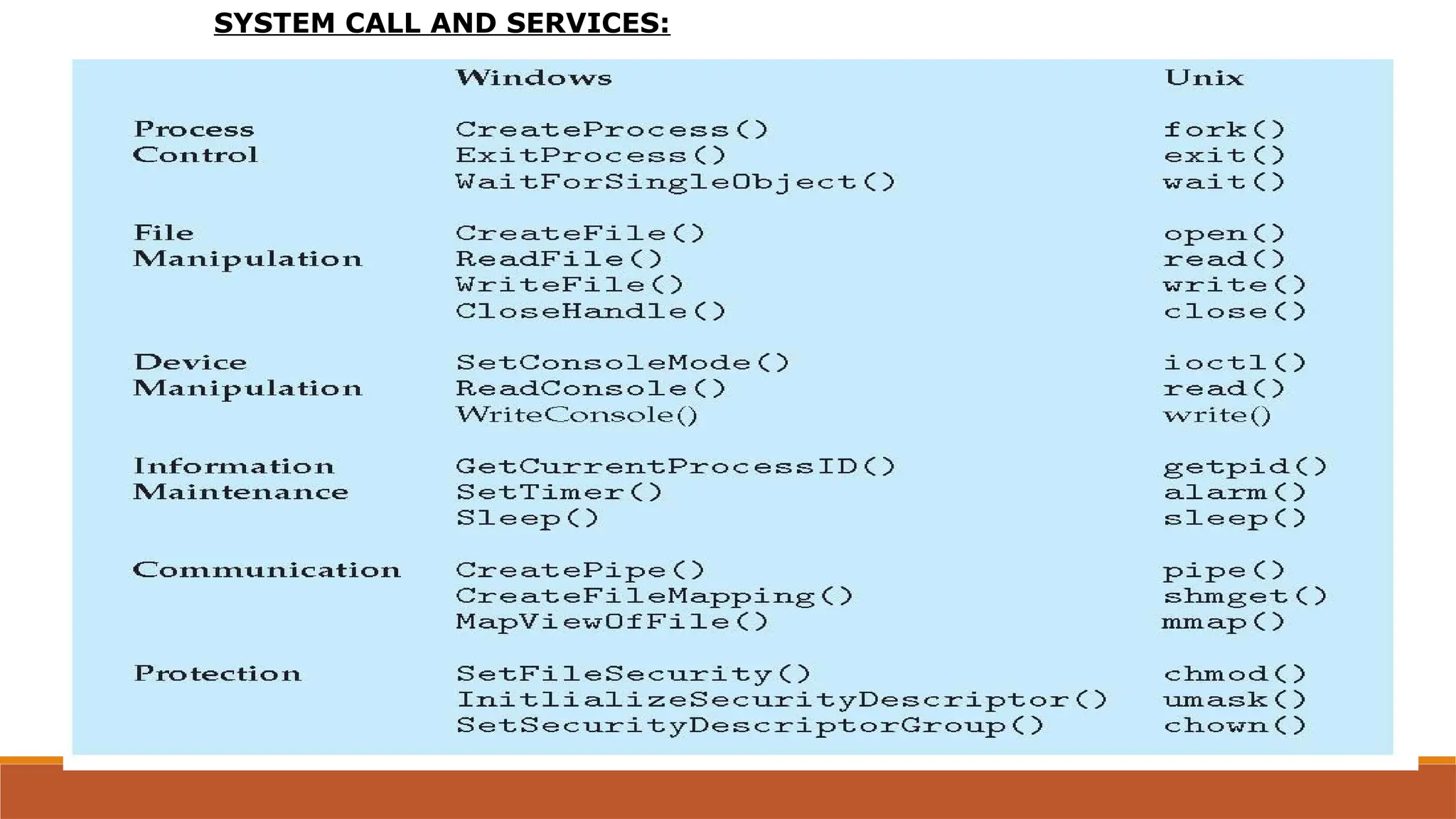
SYSTEM CALL AND SERVICES:
• System call is a programmatic way in which a computer program
requests a service from the kernel of the operating system.
• A system call is a way for programs to interact with the operating
system.
• System calls are usually made when a process in user mode requires
access to resources.
• Programming interface to the services provided by the OS typically
written in a high-level language (C or C++).
SYSTEM CALL AND SERVICES:
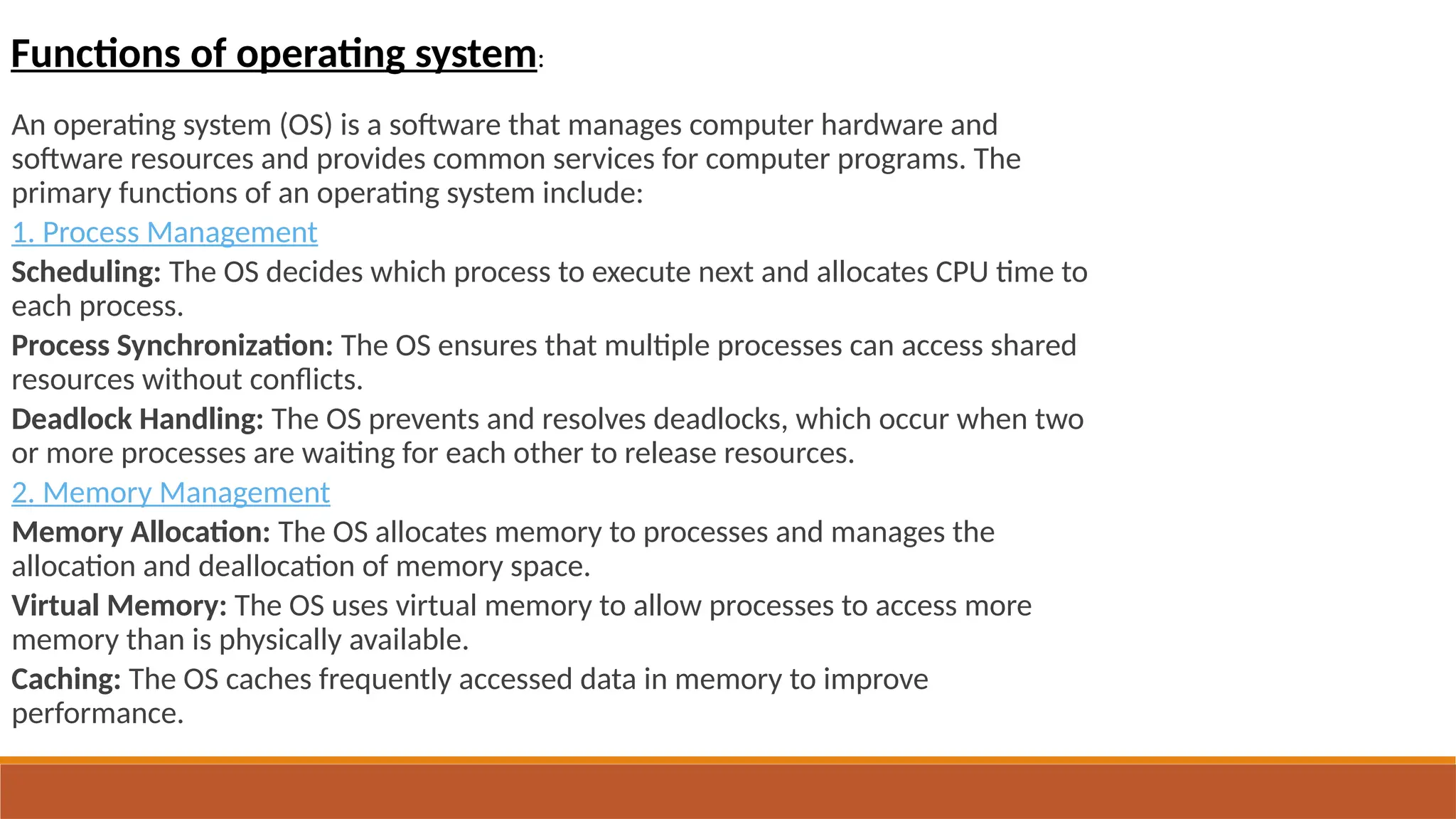
An operating system (OS) is a software that manages computer hardware and
software resources and provides common services for computer programs. The
primary functions of an operating system include:
1. Process Management
Scheduling: The OS decides which process to execute next and allocates CPU time to
each process.
Process Synchronization: The OS ensures that multiple processes can access shared
resources without conflicts.
Deadlock Handling: The OS prevents and resolves deadlocks, which occur when two
or more processes are waiting for each other to release resources.
2. Memory Management
Memory Allocation: The OS allocates memory to processes and manages the
allocation and deallocation of memory space.
Virtual Memory: The OS uses virtual memory to allow processes to access more
memory than is physically available.
Caching: The OS caches frequently accessed data in memory to improve
performance.
Functions of operating system:
3. File Management
File Organization: The OS organizes files into a hierarchical file system, making it easy to
find and access files.
File Access Control: The OS controls access to files and ensures that only authorized
users can access specific files.
Backup and Recovery: The OS provides mechanisms for backing up files and recovering
them in case of system failure.
4. Device Management
Device Drivers: The OS provides device drivers that allow hardware devices to communicate
with the computer.
Device Scheduling: The OS schedules access to devices and ensures that devices are used
efficiently.
Error Handling: The OS handles device errors and ensures that the system continues to function
properly.
5. Protection and Security
User Authentication: The OS provides mechanisms for user authentication, such as
passwords and biometric data.
Access Control: The OS controls access to system resources and ensures that only
authorized users can access specific resources.
STRUCTURES OF OPERATING SYSTEM:
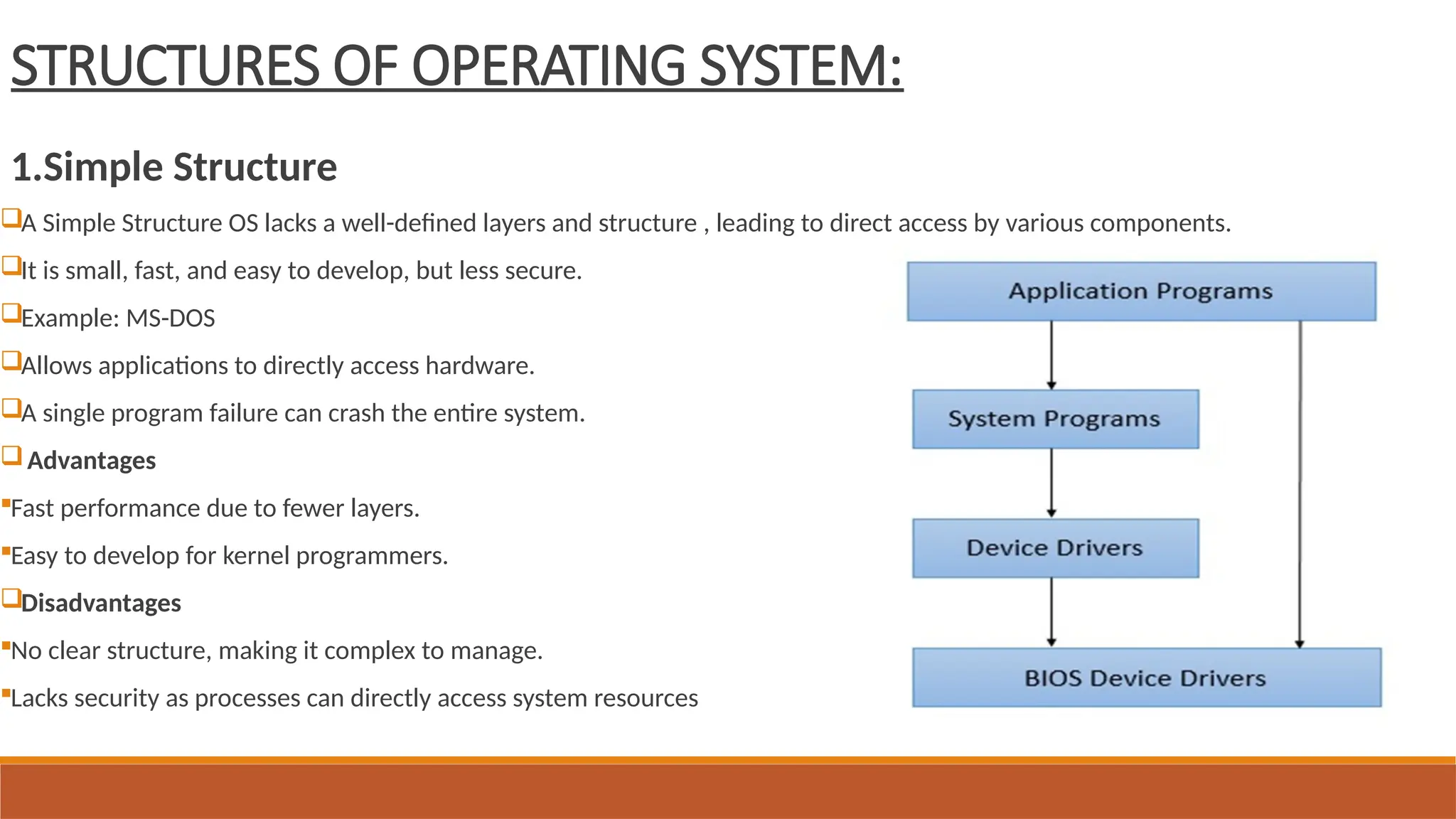
1.Simple Structure
A Simple Structure OS lacks a well-defined layers and structure , leading to direct access by various components.
It is small, fast, and easy to develop, but less secure.
Example: MS-DOS
Allows applications to directly access hardware.
A single program failure can crash the entire system.
Advantages
Fast performance due to fewer layers.
Easy to develop for kernel programmers.
Disadvantages
No clear structure, making it complex to manage.
Lacks security as processes can directly access system resources
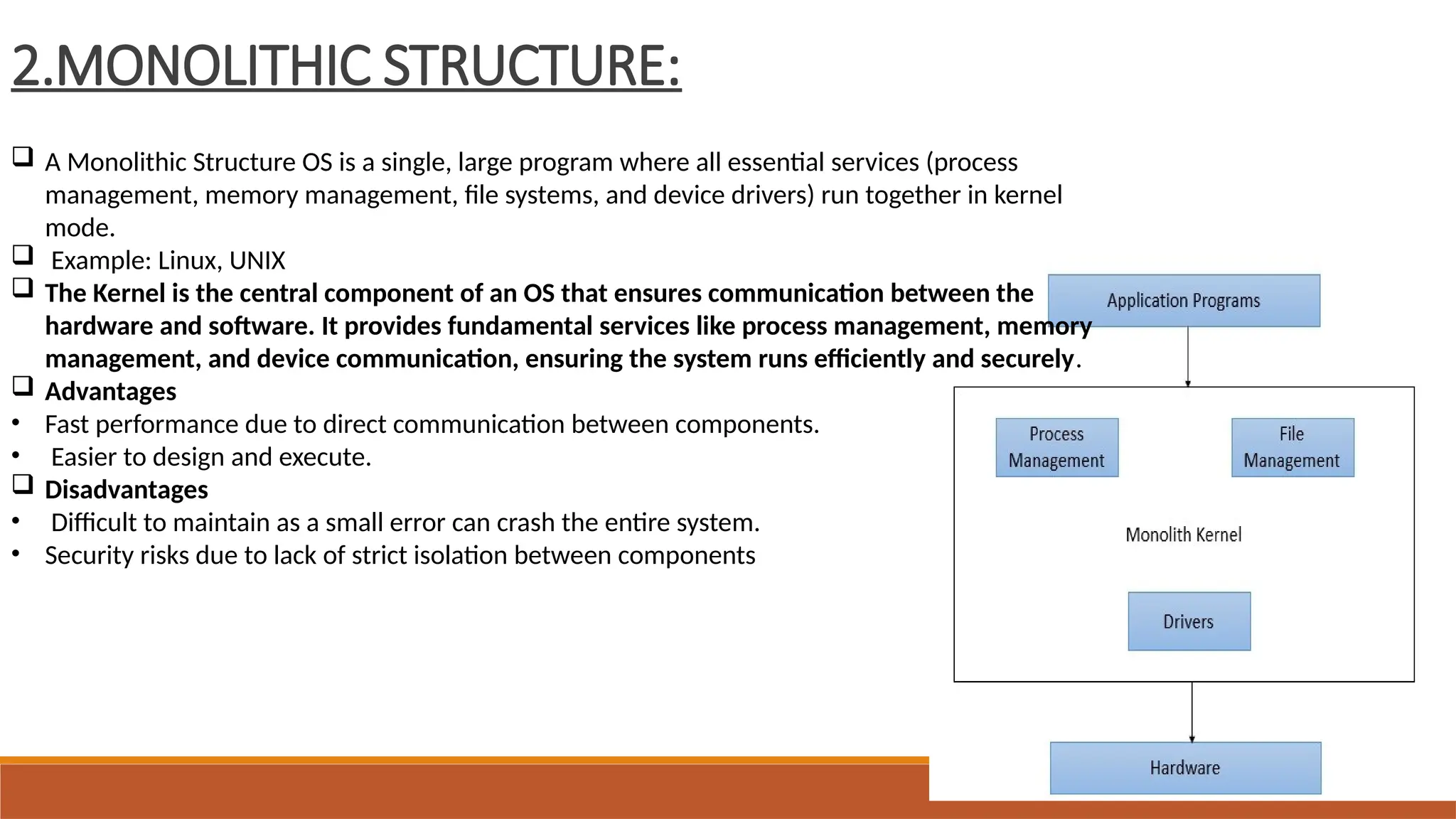
2.MONOLITHIC STRUCTURE:
 A Monolithic Structure OS is a single, large program where all essential services (process
management, memory management, file systems, and device drivers) run together in kernel
mode.
 Example: Linux, UNIX
 The Kernel is the central component of an OS that ensures communication between the
hardware and software. It provides fundamental services like process management, memory
management, and device communication, ensuring the system runs efficiently and securely.
 Advantages
• Fast performance due to direct communication between components.
• Easier to design and execute.
 Disadvantages
• Difficult to maintain as a small error can crash the entire system.
• Security risks due to lack of strict isolation between components
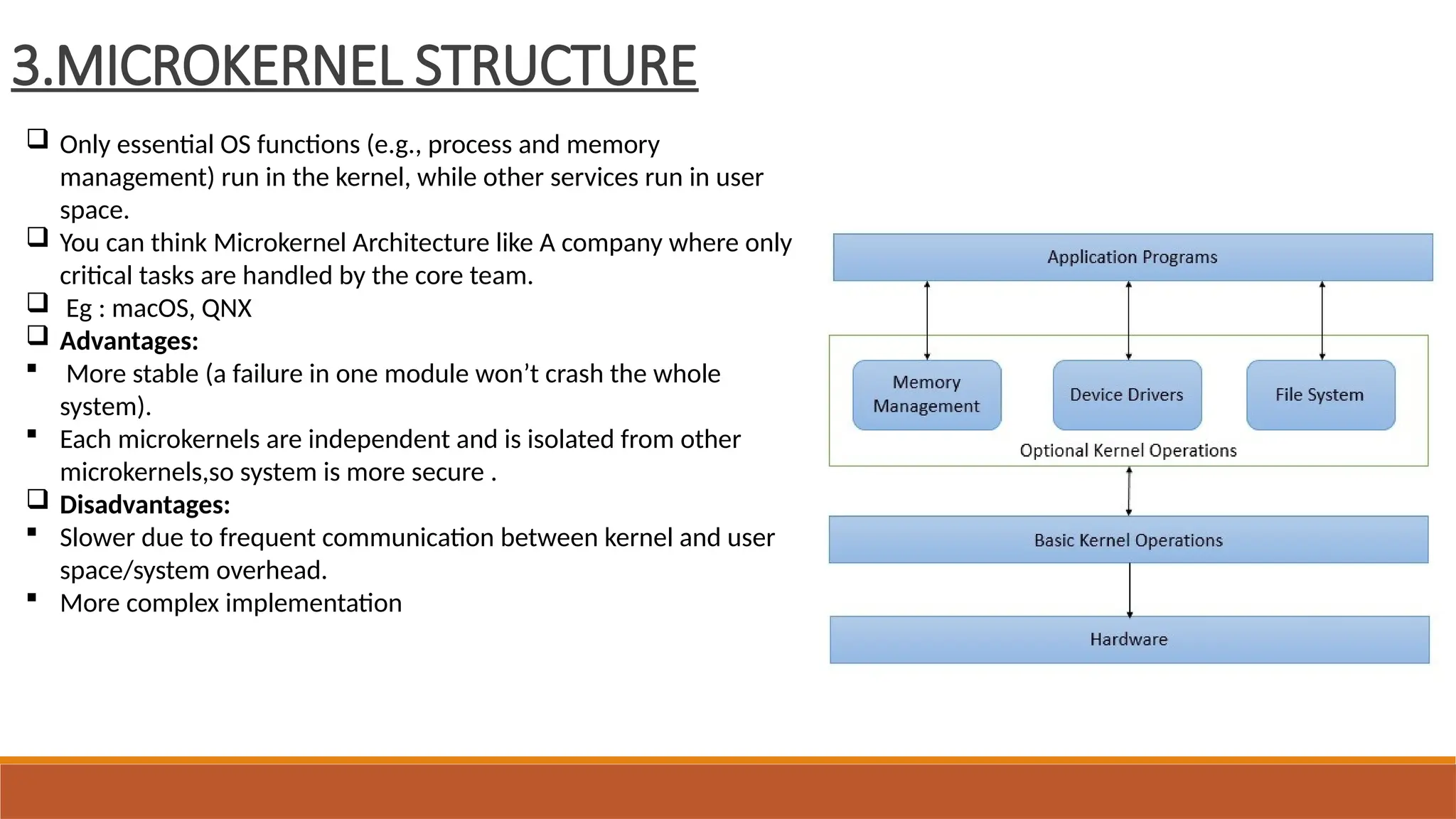
3.MICROKERNEL STRUCTURE
 Only essential OS functions (e.g., process and memory
management) run in the kernel, while other services run in user
space.
 You can think Microkernel Architecture like A company where only
critical tasks are handled by the core team.
 Eg : macOS, QNX
 Advantages:
 More stable (a failure in one module won’t crash the whole
system).
 Each microkernels are independent and is isolated from other
microkernels,so system is more secure .
 Disadvantages:
 Slower due to frequent communication between kernel and user
space/system overhead.
 More complex implementation
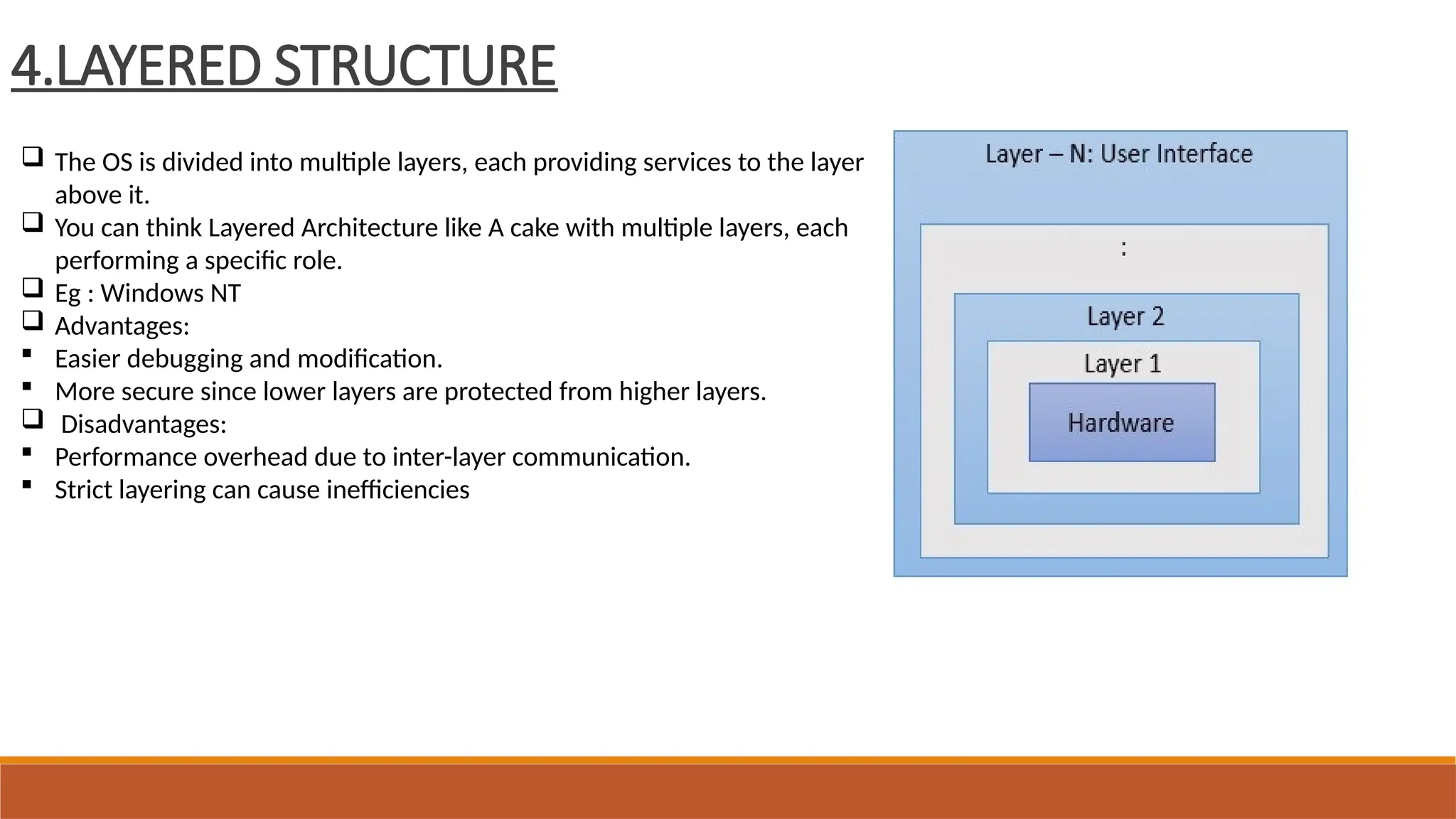
4.LAYERED STRUCTURE
 The OS is divided into multiple layers, each providing services to the layer
above it.
 You can think Layered Architecture like A cake with multiple layers, each
performing a specific role.
 Eg : Windows NT
 Advantages:
 Easier debugging and modification.
 More secure since lower layers are protected from higher layers.
 Disadvantages:
 Performance overhead due to inter-layer communication.
 Strict layering can cause inefficiencies
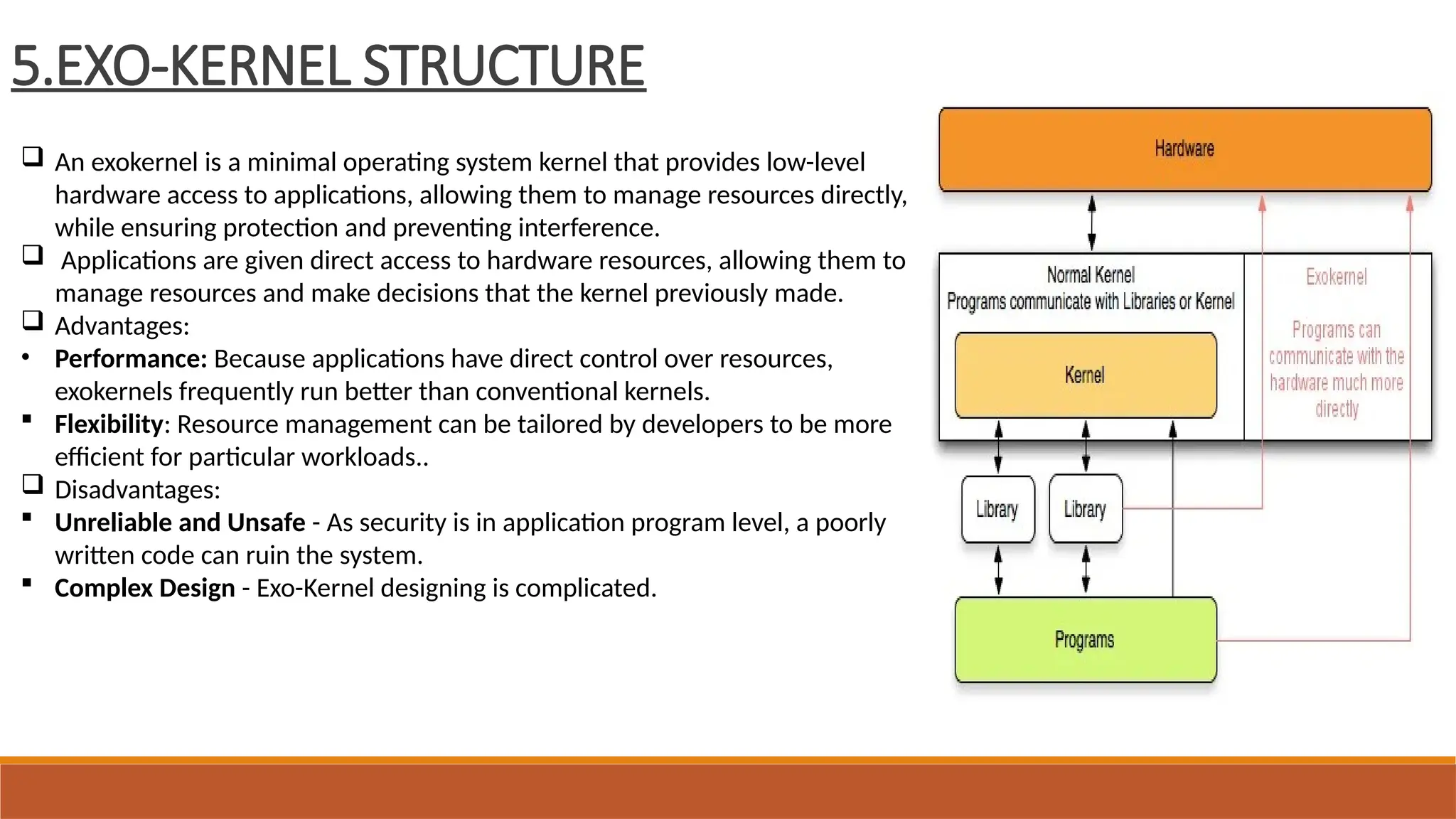
5.EXO-KERNEL STRUCTURE
 An exokernel is a minimal operating system kernel that provides low-level
hardware access to applications, allowing them to manage resources directly,
while ensuring protection and preventing interference.
 Applications are given direct access to hardware resources, allowing them to
manage resources and make decisions that the kernel previously made.
 Advantages:
• Performance: Because applications have direct control over resources,
exokernels frequently run better than conventional kernels.
 Flexibility: Resource management can be tailored by developers to be more
efficient for particular workloads..
 Disadvantages:
 Unreliable and Unsafe - As security is in application program level, a poorly
written code can ruin the system.
 Complex Design - Exo-Kernel designing is complicated.
6.Virtual Machines (VMs)
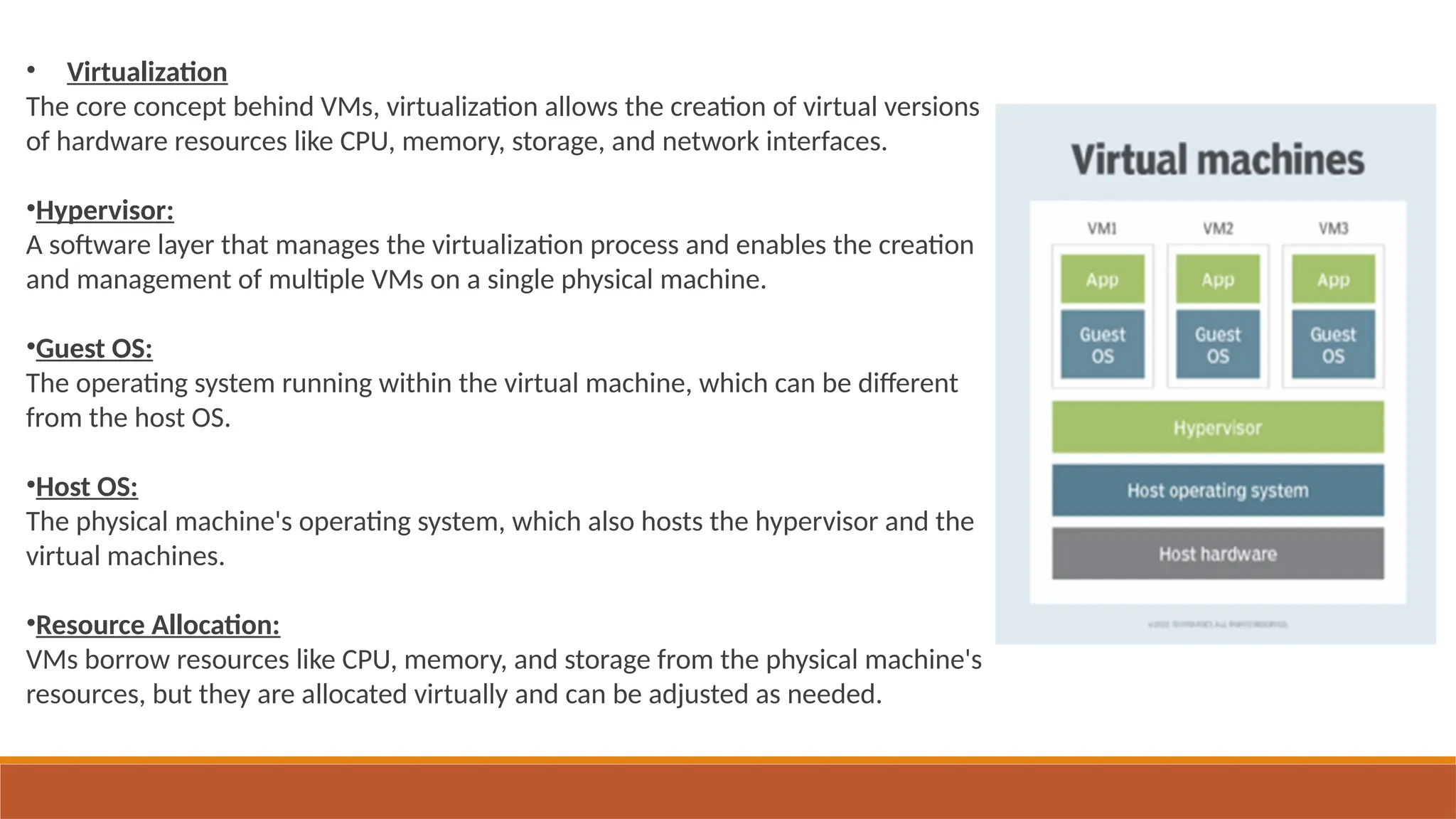
A virtual machine (VM) in an operating system is a software-based emulation of a physical computer that allows
multiple operating systems to run concurrently on a single physical machine. It provides an isolated environment where
you can run different operating systems and applications without affecting the main operating system or other VMs.
 An illustration of it is a virtual box.
Multiple virtual machines can be created on a single physical machine.
Advantages:
Being virtual, functionality are easily accessible, can be customized on need basis.
Being virtual, and no direct hardware access, such systems are highly secured.
Disadvantages:
A virtual structured operating system is less performant as compared to modular structured operating system.
Each virtual component of the machine is to planned carefully as each component is to abstract underlying hardware.
• Virtualization
The core concept behind VMs, virtualization allows the creation of virtual versions
of hardware resources like CPU, memory, storage, and network interfaces.
•Hypervisor:
A software layer that manages the virtualization process and enables the creation
and management of multiple VMs on a single physical machine.
•Guest OS:
The operating system running within the virtual machine, which can be different
from the host OS.
•Host OS:
The physical machine's operating system, which also hosts the hypervisor and the
virtual machines.
•Resource Allocation:
VMs borrow resources like CPU, memory, and storage from the physical machine's
resources, but they are allocated virtually and can be adjusted as needed.
UNIT-1
END

OS_unit1 intro duction to operating syst

  • 1.
  • 2.
  • 3.
    INTRODUCTION Objective and characteristics. ClassificationOf Operating System. a) Batch Processing OS b) Multi-programming OS c) Multi-processing OS d) Multi-tasking OS e) Time-sharing OS f) Distributed OS g) Network OS h) Real-time OS System calls and services.
  • 4.
    Operating system functions: ClassificationOf Operating System. a) Process management b) Memory management c) Multi-processing OS d) Multi-tasking OS e) Time-sharing OS f) Distributed OS g) Network OS h) Real-time OS System calls and services.
  • 5.
    What is anOperating System? An Operating System(OS) is a software that manages and control hardware and software resources of a computing device. Responsible for managing and controlling all the activities and sharing of computer resources among different running applications. It mainly acts a government for your system that has different departments to manage different resources. Basically, OS is manager of computer system. Provide interface between user and hardware system. Examples are Linux, Unix, Windows 11, MS DOS, Android, macOS and iOS.
  • 6.
    Four Components ofa Computer System
  • 7.
    OBJECTIVE: The primary objectiveof an operating system (OS), is to act as a bridge between the user and the computer hardware, making the system convenient and efficient to use. 1. User Convenience: Provides a user-friendly interface for interacting with the computer. Simplifies the process of running applications and accessing resources. 2. Program Execution: Provides the environment and necessary services for programs to run effectively. Manages the execution of multiple programs concurrently. 3. Resource Management: Efficiently allocates and manages computer resources like CPU, memory, storage, and input/output devices. Ensures fair and optimal utilization of these resources.
  • 8.
    4. Security: Protects thesystem and user data from unauthorized access. 5. Efficiency: Maximizes the utilization of computer resources to enhance performance. 6. Reliability: Designed to handle errors and exceptions gracefully.
  • 9.
    Characteristics of Operatingsystem User Interface: Provides a way for users to interact with the computer system, either through a graphical interface or a command-line interface. Concurrency: Allows multiple programs or tasks to run seemingly simultaneously, improving overall system efficiency. Memory Management: Allocates and deallocates memory to different programs i.e.,managing how memory is used. File Management: Organizes and manages files and directories on storage devices, allowing for easy access and storage of data.
  • 10.
    Device Management: Controls andcoordinates the various hardware devices connected to the computer, such as printers, keyboards, and storage devices. Security: Implements security measures to protect the system and data from unauthorized access and malicious software. Process Management: Manages the execution of different programs and tasks, including scheduling, allocation, and termination.
  • 11.
  • 12.
    1. Batch OperatingSystem in batch operating system, similar types of processes are grouped in a batch and execute them at a time rather than independently. Examples:payroll system,bank statements.
  • 13.
    2. Multi-Programming OperatingSystem In a Multi-Programming Operating Systems, multiple programs run in memory at the same time. The CPU switches between programs, utilizing its resources more effectively and improving overall system performance. Non-preemptive scheduling occurs here. Examples: IBM OS/360,UNIX
  • 14.
    3. Multi-tasking OperatingSystem Multitasking OS allows users to execute multiple tasks or processes concurrently. Has preemptive scheduling. Examples:Windows,macOS.
  • 15.
    4. Time-sharing OperatingSystem Same as multi-tasking operating system. A time-shared operating system uses CPU scheduling to provide each user with a small portion of a shared computer at once. A program is loaded into memory and executes, it performs a short period of time . This short period of time during which the user gets the attention of the CPU is known as time slice, time slot, or quantum. Use round-robin scheduling Examples:unix,linux.
  • 16.
    5. Multi-Processing OperatingSystem A Multi-Processing Operating System is a type of Operating System in which more than one CPU is used for the execution of resources. It betters the throughput of the System. Examples:UNIX,LINUX,Solaris. type of Operating System in which more than one CPU is used for the execution of resources.
  • 17.
    6. Distributed OperatingSystem In Distributed operating systems various autonomous interconnected computers communicate with each other using a shared communication network.  Independent systems possess their own memory unit and CPU system. These systems' processors differ in size and function. The major benefit of working with these types of operating systems is that it is always possible that one user can access the files or software which are not present on his system but on some other system connected within this network, i.e., remote access is enabled within the devices connected to that network. It is loosely coupled operating system. Examples: Amazon web services,google cloud
  • 18.
    7. Network OperatingSystem  These systems run on a server and provide the capability to manage data, users, groups, security, applications and other networking functions.  These types of operating systems allow shared access to files, printers, security, applications and other networking functions over a small private network.  One more important aspect of Network Operating Systems is that all the users are well aware of the underlying configuration, of all other users within the network, their connections, etc. and that’s why these computers are popularly known a tightly coupled systems.  Examples: Microsoft windows server,Juniper Junos.
  • 19.
    8. Real-Time OperatingSystem These types of OSs serve real-time systems. The time interval required to process and respond to inputs is very small. This time interval is called response time. Real-time systems are used when there are time requirements that are very strict like missile systems, air traffic control systems, robots, etc. Response Time is crucial. Types of Real-Time Operating Systems: Hard Real-Time Systems: Hard Real-Time OSs are meant for applications where time constraints are very strict and even the shortest possible delay is not acceptable. These systems are built for saving lives like automatic parachutes or airbags which are required to be readily available in case of an accident. Soft Real-Time Systems: These OSs are for applications where time is less strict.
  • 20.
    SYSTEM CALL ANDSERVICES: • System call is a programmatic way in which a computer program requests a service from the kernel of the operating system. • A system call is a way for programs to interact with the operating system. • System calls are usually made when a process in user mode requires access to resources. • Programming interface to the services provided by the OS typically written in a high-level language (C or C++).
  • 21.
    SYSTEM CALL ANDSERVICES:
  • 22.
    An operating system(OS) is a software that manages computer hardware and software resources and provides common services for computer programs. The primary functions of an operating system include: 1. Process Management Scheduling: The OS decides which process to execute next and allocates CPU time to each process. Process Synchronization: The OS ensures that multiple processes can access shared resources without conflicts. Deadlock Handling: The OS prevents and resolves deadlocks, which occur when two or more processes are waiting for each other to release resources. 2. Memory Management Memory Allocation: The OS allocates memory to processes and manages the allocation and deallocation of memory space. Virtual Memory: The OS uses virtual memory to allow processes to access more memory than is physically available. Caching: The OS caches frequently accessed data in memory to improve performance. Functions of operating system:
  • 23.
    3. File Management FileOrganization: The OS organizes files into a hierarchical file system, making it easy to find and access files. File Access Control: The OS controls access to files and ensures that only authorized users can access specific files. Backup and Recovery: The OS provides mechanisms for backing up files and recovering them in case of system failure. 4. Device Management Device Drivers: The OS provides device drivers that allow hardware devices to communicate with the computer. Device Scheduling: The OS schedules access to devices and ensures that devices are used efficiently. Error Handling: The OS handles device errors and ensures that the system continues to function properly.
  • 24.
    5. Protection andSecurity User Authentication: The OS provides mechanisms for user authentication, such as passwords and biometric data. Access Control: The OS controls access to system resources and ensures that only authorized users can access specific resources.
  • 25.
    STRUCTURES OF OPERATINGSYSTEM: 1.Simple Structure A Simple Structure OS lacks a well-defined layers and structure , leading to direct access by various components. It is small, fast, and easy to develop, but less secure. Example: MS-DOS Allows applications to directly access hardware. A single program failure can crash the entire system. Advantages Fast performance due to fewer layers. Easy to develop for kernel programmers. Disadvantages No clear structure, making it complex to manage. Lacks security as processes can directly access system resources
  • 26.
    2.MONOLITHIC STRUCTURE:  AMonolithic Structure OS is a single, large program where all essential services (process management, memory management, file systems, and device drivers) run together in kernel mode.  Example: Linux, UNIX  The Kernel is the central component of an OS that ensures communication between the hardware and software. It provides fundamental services like process management, memory management, and device communication, ensuring the system runs efficiently and securely.  Advantages • Fast performance due to direct communication between components. • Easier to design and execute.  Disadvantages • Difficult to maintain as a small error can crash the entire system. • Security risks due to lack of strict isolation between components
  • 27.
    3.MICROKERNEL STRUCTURE  Onlyessential OS functions (e.g., process and memory management) run in the kernel, while other services run in user space.  You can think Microkernel Architecture like A company where only critical tasks are handled by the core team.  Eg : macOS, QNX  Advantages:  More stable (a failure in one module won’t crash the whole system).  Each microkernels are independent and is isolated from other microkernels,so system is more secure .  Disadvantages:  Slower due to frequent communication between kernel and user space/system overhead.  More complex implementation
  • 28.
    4.LAYERED STRUCTURE  TheOS is divided into multiple layers, each providing services to the layer above it.  You can think Layered Architecture like A cake with multiple layers, each performing a specific role.  Eg : Windows NT  Advantages:  Easier debugging and modification.  More secure since lower layers are protected from higher layers.  Disadvantages:  Performance overhead due to inter-layer communication.  Strict layering can cause inefficiencies
  • 29.
    5.EXO-KERNEL STRUCTURE  Anexokernel is a minimal operating system kernel that provides low-level hardware access to applications, allowing them to manage resources directly, while ensuring protection and preventing interference.  Applications are given direct access to hardware resources, allowing them to manage resources and make decisions that the kernel previously made.  Advantages: • Performance: Because applications have direct control over resources, exokernels frequently run better than conventional kernels.  Flexibility: Resource management can be tailored by developers to be more efficient for particular workloads..  Disadvantages:  Unreliable and Unsafe - As security is in application program level, a poorly written code can ruin the system.  Complex Design - Exo-Kernel designing is complicated.
  • 30.
    6.Virtual Machines (VMs) Avirtual machine (VM) in an operating system is a software-based emulation of a physical computer that allows multiple operating systems to run concurrently on a single physical machine. It provides an isolated environment where you can run different operating systems and applications without affecting the main operating system or other VMs.  An illustration of it is a virtual box. Multiple virtual machines can be created on a single physical machine. Advantages: Being virtual, functionality are easily accessible, can be customized on need basis. Being virtual, and no direct hardware access, such systems are highly secured. Disadvantages: A virtual structured operating system is less performant as compared to modular structured operating system. Each virtual component of the machine is to planned carefully as each component is to abstract underlying hardware.
  • 31.
    • Virtualization The coreconcept behind VMs, virtualization allows the creation of virtual versions of hardware resources like CPU, memory, storage, and network interfaces. •Hypervisor: A software layer that manages the virtualization process and enables the creation and management of multiple VMs on a single physical machine. •Guest OS: The operating system running within the virtual machine, which can be different from the host OS. •Host OS: The physical machine's operating system, which also hosts the hypervisor and the virtual machines. •Resource Allocation: VMs borrow resources like CPU, memory, and storage from the physical machine's resources, but they are allocated virtually and can be adjusted as needed.
  • 32.