Download as PDF, PPTX
![Shape Manipulation (1)
u Changing the shape of an array
• An Array has a shape given by the number of elements along
each axis:
>>> a = np.floor(10*np.random.random((3,4)))
>>> a
array([[ 2., 8., 0., 6.],
[ 4., 5., 1., 1.],
[ 8., 9., 3., 6.]
])
>>> a.shape
(3, 4)
2
numpy.floor
• 소수점 버리고 반올림](https://image.slidesharecdn.com/numpytutorialfinal20160303-160412044708/75/Numpy-tutorial-final-20160303-2-2048.jpg)
![Shape Manipulation (2)
u The shape of an array can be changed with various
commands:
>>> a.ravel() # flatten the array
array([ 2., 8., 0., 6., 4., 5., 1., 1., 8., 9., 3., 6.])
>>> a.shape = (6, 2)
>>> a.T
array([[ 2., 0., 4., 1., 8., 3.],
[ 8., 6., 5., 1., 9., 6.]])
3
2 8
0 6
4 5
1 1
8 9
3 6
2 0 4 1 8 3
8 6 5 1 9 6
2 8 0 6 4 5 1 1 8 9 3 6
a.shape = (6, 2) a.T](https://image.slidesharecdn.com/numpytutorialfinal20160303-160412044708/75/Numpy-tutorial-final-20160303-3-2048.jpg)
![Shape Manipulation (3)
u Stacking together different arrays
4
>>> a = np.array([1,2,3])
>>> a
array([1,2,3])
>>> b = np.array([4,5,6])
>>> b
array([4,5,6])
>>> np.vstack((a,b))
array([[1,2,3],
[4,5,6]])
>>> np.hstack((a,b))
array([1,2,3,4,5,6])](https://image.slidesharecdn.com/numpytutorialfinal20160303-160412044708/75/Numpy-tutorial-final-20160303-4-2048.jpg)
![Shape Manipulation (4)
u Stacking together different arrays
• The function column_stack stacks 1D arrays as columns into a 2D array. It is
equivalent to vstack only for 1D arrays:
5
>>> from numpy import newaxis
>>> np.column_stack((a,b)) # With 2D arrays
array([[ 8., 8., 1., 8.],
[ 0., 0., 0., 4.]])
1 2 3 4 5 6
a b 1 4
2 5
3 6
np.column_stack((a,b))](https://image.slidesharecdn.com/numpytutorialfinal20160303-160412044708/75/Numpy-tutorial-final-20160303-5-2048.jpg)
![Shape Manipulation (5)
u Stacking together different arrays
• The function newaxis add an axis to N-dimensional array
6
>>> a = np.array( [[1,2]
[3,4]])
>>> a[0,newaxis]
array([[1,2]])
>>> a[1,newaxis]
array([[3,4]])
>>> a[:,newaxis,:]
array( [[[1,2]], #shape
[[3,4]]] #(2,1,2)
>>> a[newaxis,:,:]
array( [[[1,2], #shape
[3,4]]]) #(1,2,2)
a[:,newaxis,:]
= a[range(0,1), newaxis, range(0,1)
a
[[1,2],
[3,4]]
a[0]
[1,2]
a[1]
[3,4]
Adding
an axis
Adding
an axis
[[3,4]]
[[1,2]]
a[:,newaxis,:]
array( [ [[1,2]],
[[3,4]] ])](https://image.slidesharecdn.com/numpytutorialfinal20160303-160412044708/75/Numpy-tutorial-final-20160303-6-2048.jpg)
![Shape Manipulation (6)
u Stacking together different arrays
• The function newaxis add an axis to N-dimensional array
7
>>> a = np.array( [[1,2]
[3,4]])
>>> a[0,newaxis]
array([[1,2]])
>>> a[1,newaxis]
array([[3,4]])
>>> a[:,newaxis,:]
array( [[[1,2]], #shape
[[3,4]]] #(2,1,2)
>>> a[newaxis,:,:]
array( [[[1,2], #shape
[3,4]]]) #(1,2,2)
a
[[1,2],
[3,4]]
shape
(2,2)
a
[[[1,2]],
[[3,4]]]
a[:,newaxis,:]
shape
(2,1,2)](https://image.slidesharecdn.com/numpytutorialfinal20160303-160412044708/75/Numpy-tutorial-final-20160303-7-2048.jpg)
![Shape Manipulation (7)
u Stacking together different arrays
• The function column_stack stacks 1D arrays as columns into a 2D array. It is
equivalent to vstack only for 1D arrays:
8
>>> np.column_stack((a[:,newaxis],b[:,newaxis]))
array([[ 4., 2.],
[ 2., 8.]])
>>> np.vstack((a[:,newaxis],b[:,newaxis]))
# The behavior of vstack is different
array([[ 4.],
[ 2.],
[ 2.],
[ 8.]])
4
2
2
8
a[:,newaxis]
b[:,newaxis]
4
2
2
8
np.vstack](https://image.slidesharecdn.com/numpytutorialfinal20160303-160412044708/75/Numpy-tutorial-final-20160303-8-2048.jpg)
![Shape Manipulation (8)
u Splitting one array into several smaller ones
9
>>> a = np.floor(10*np.random.random((2,12)))
>>> a
array([[ 9., 5., 6., 3., 6., 8., 0., 7., 9., 7., 2., 7.],
[ 1., 4., 9., 2., 2., 1., 0., 6., 2., 2., 4., 0.]])
>>> np.hsplit(a,3)
[array([[ 9., 5., 6., 3.],
[ 1., 4., 9., 2.]]), array([[ 6., 8., 0., 7.],
[ 2., 1., 0., 6.]]), array([[ 9., 7., 2., 7.],
[ 2., 2., 4., 0.]])]
9 5 6 3 6 8 0 7 9 7 2 7
1 4 9 2 2 1 0 6 2 2 4 0
9 5 6 3
1 4 9 2
6 8 0 7
2 1 0 6
9 7 2 7
2 2 4 0
Split a into 3](https://image.slidesharecdn.com/numpytutorialfinal20160303-160412044708/75/Numpy-tutorial-final-20160303-9-2048.jpg)
![Shape Manipulation (9)
u Splitting one array into several smaller ones
10
>>> a = np.floor(10*np.random.random((2,12)))
>>> a
array([[ 9., 5., 6., 3., 6., 8., 0., 7., 9., 7., 2., 7.],
[ 1., 4., 9., 2., 2., 1., 0., 6., 2., 2., 4., 0.]])
>>> np.hsplit(a,(3,4))
[array([[ 9., 5., 6.],
[ 1., 4., 9.]]),
array([[ 3.],
[ 2.]]),
array([[ 6., 8., 0., 7., 9., 7., 2., 7.],
[ 2., 1., 0., 6., 2., 2., 4., 0.]])]
9 5 6 3 6 8 0 7 9 7 2 7
1 4 9 2 2 1 0 6 2 2 4 0
9 5 6
1 4 9
3
2
6 8 0 7 9 7 2 7
2 1 0 6 2 2 4 0
# Split a after the third and the fourth column](https://image.slidesharecdn.com/numpytutorialfinal20160303-160412044708/75/Numpy-tutorial-final-20160303-10-2048.jpg)
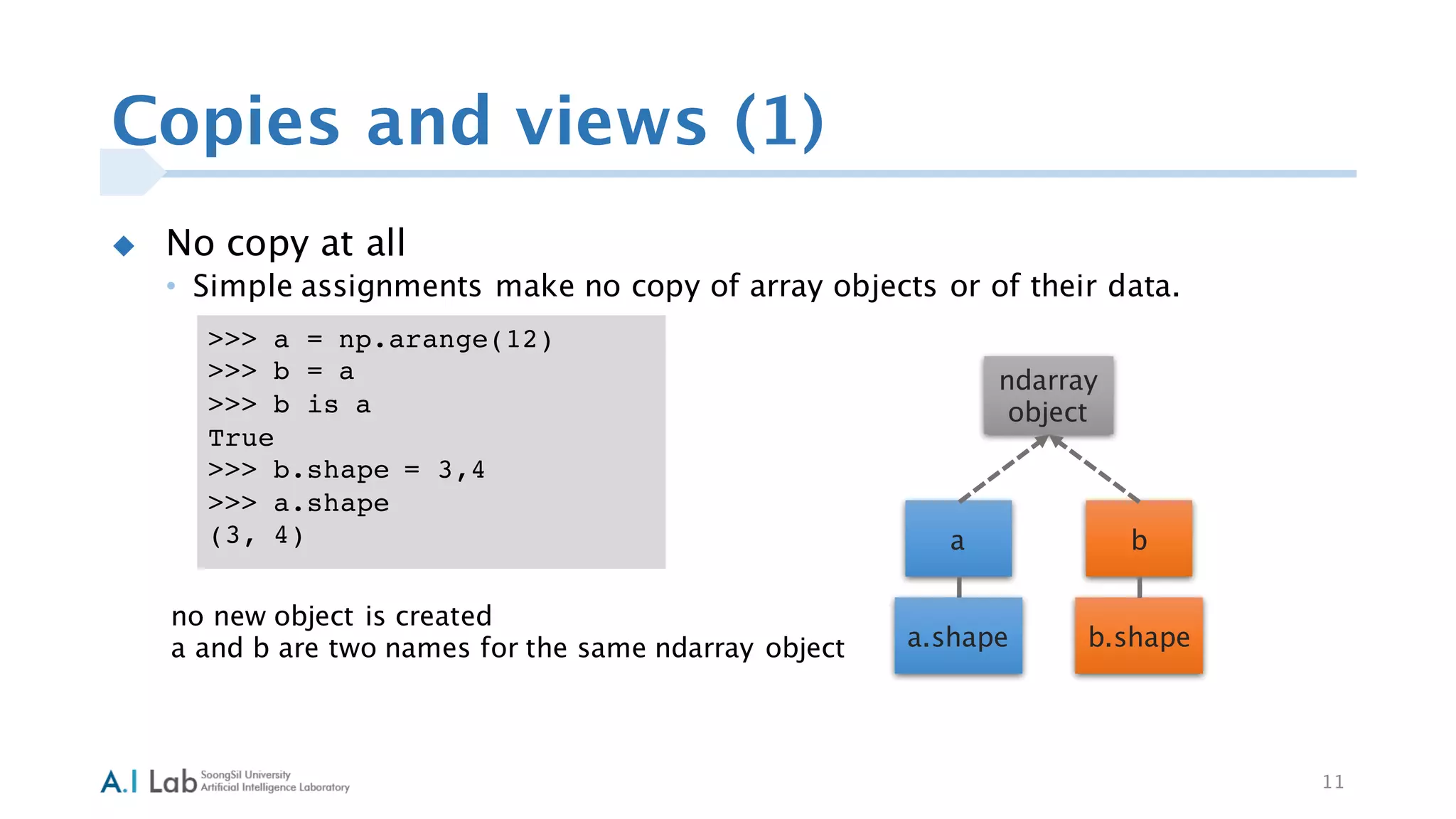

![Copies and views (3)
u View or Shallow Copy
• Different array objects can share the same data. The view method creates a
new array object that looks at the same data.
13
a
a.view
c
c.viewc.base
a.base
ndarray
object1
ndarray
object1’
>>> c = a.view()
>>> c is a
False
>>> c.base is a
True
>>> c.flags.owndata
False
>>>
>>> c.shape = 2,6
>>> a.shape
(3, 4)
>>> c[0,4] = 1234
>>> a
array([[ 0, 1, 2, 3],
[1234, 5, 6, 7],
[ 8, 9, 10, 11]])
data
0 1 2 3
4 5 6 7
8 9 10 11
0 1 2 3 4 5
6 7 8 9 10 11
a c](https://image.slidesharecdn.com/numpytutorialfinal20160303-160412044708/75/Numpy-tutorial-final-20160303-13-2048.jpg)
![Copies and views (4)
u View or Shallow Copy
• Different array objects can share the same data. The view method creates a
new array object that looks at the same data.
14
a
a.view
c
c.viewc.base
a.base
ndarray
object1
ndarray
object1’
ndarray.flags.owndata
• The array owns the memory it uses
or borrows it from another object.
data
>>> c = a.view()
>>> c is a
False
>>> c.base is a
True
>>> c.flags.owndata
False
>>>
>>> c.shape = 2,6
>>> a.shape
(3, 4)
>>> c[0,4] = 1234
>>> a
array([[ 0, 1, 2, 3],
[1234, 5, 6, 7],
[ 8, 9, 10, 11]])](https://image.slidesharecdn.com/numpytutorialfinal20160303-160412044708/75/Numpy-tutorial-final-20160303-14-2048.jpg)
![Copies and views (5)
u View or Shallow Copy
• Different array objects can share the same data. The view method creates a
new array object that looks at the same data.
15
>>> c = a.view()
>>> c is a
False
>>> c.base is a
True
>>> c.flags.owndata
False
>>>
>>> c.shape = 2,6
>>> a.shape
(3, 4)
>>> c[0,4] = 1234
>>> a
array([[ 0, 1, 2, 3],
[1234, 5, 6, 7],
[ 8, 9, 10, 11]])
a
a.view
c
c.viewc.base
a.base
ndarray
object1
ndarray
object1’
data
0 1 2 3
4 5 6 7
8 9 10 11
0 1 2 3 4 5
6 7 8 9 10 11
a c](https://image.slidesharecdn.com/numpytutorialfinal20160303-160412044708/75/Numpy-tutorial-final-20160303-15-2048.jpg)
![Copies and views (6)
u View or Shallow Copy
• Slicing an array returns a view of it:
16
>>> a
array([[ 0, 1, 2, 3],
[1234, 5, 6, 7],
[ 8, 9, 10, 11]])
>>> s = a[ : , 1:3]
>>> s[:] = 10
>>> a
array([[ 0, 10, 10, 3],
[1234, 10, 10, 7],
[ 8, 10, 10, 11]])](https://image.slidesharecdn.com/numpytutorialfinal20160303-160412044708/75/Numpy-tutorial-final-20160303-16-2048.jpg)
![Copies and views (7)
u Deep Copy
• The copy method makes a complete copy of the array and its data.
17
>>> d = a.copy()
>>> d is a
False
>>> d.base is a
False
>>> d[0,0] = 9999
>>> a
array([[ 0, 10, 10, 3],
[1234, 10, 10, 7],
[ 8, 10, 10, 11]])
a
a.shape
d
d.shape
ndarray
object
ndarray
object
# a new array object with new data is created
# d doesn't share anything with a](https://image.slidesharecdn.com/numpytutorialfinal20160303-160412044708/75/Numpy-tutorial-final-20160303-17-2048.jpg)

The document is a tutorial on NumPy, focusing on various techniques for shape manipulation, including changing, stacking, and splitting arrays. It explains practical commands such as ravel, hstack, vstack, and newaxis, and illustrates the behavior of copies and views in NumPy arrays. The tutorial includes code snippets that demonstrate these concepts in action.


