SciPy and NumPy

 Travis Oliphant
   SIAM 2011

    Mar 2, 2011
Magnetic Resonance Elastography                             1997
                        Richard Ehman

                                                 Armando Manduca
   Raja Muthupillai


         2
ρ0 (2πf ) Ui (a, f ) = [Cijkl (a, f ) Uk,l (a, f )],j
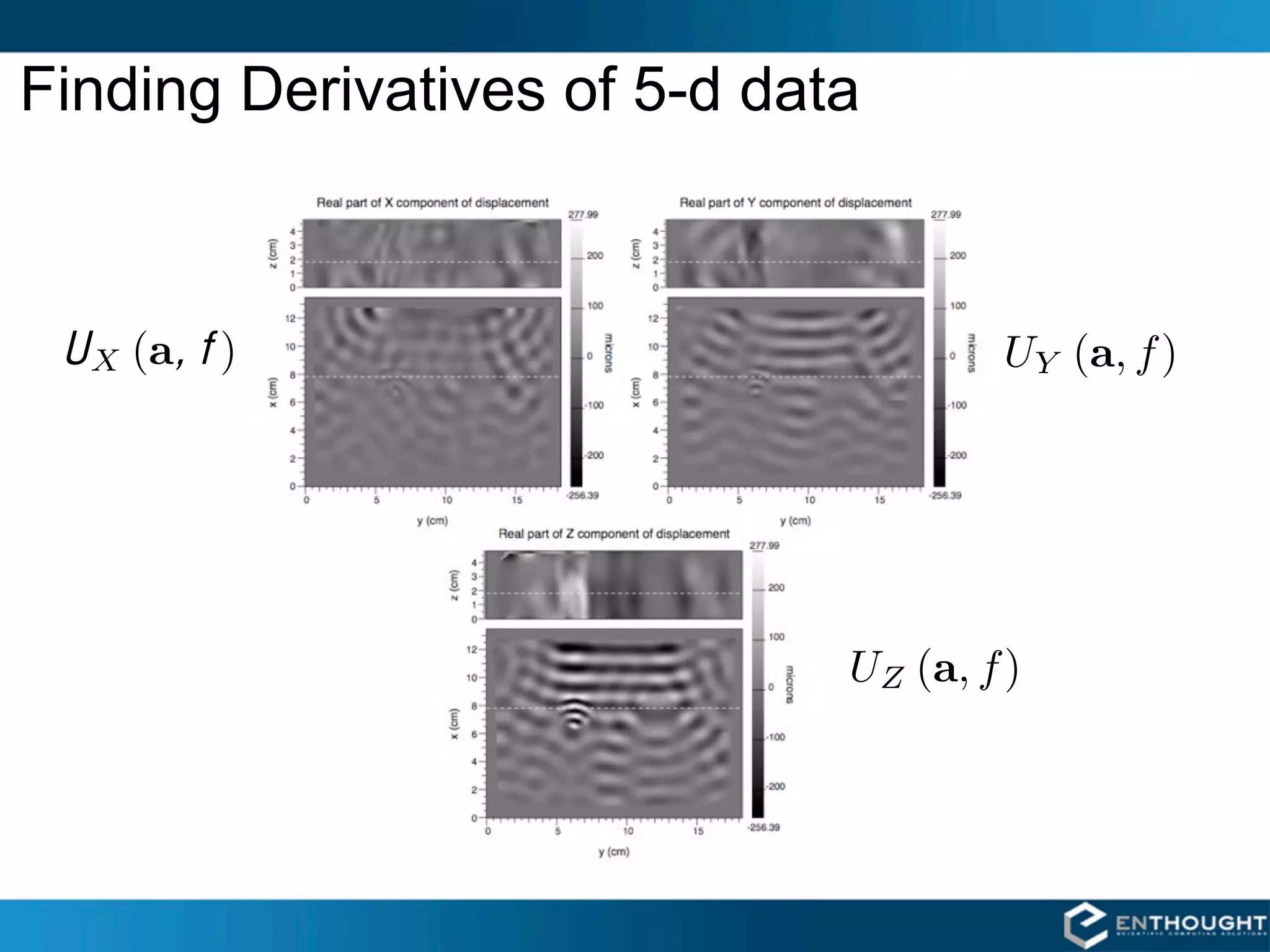
Finding Derivatives of 5-d data


 U X (a, f )                          UY (a, f )


                              UZ (a, f )
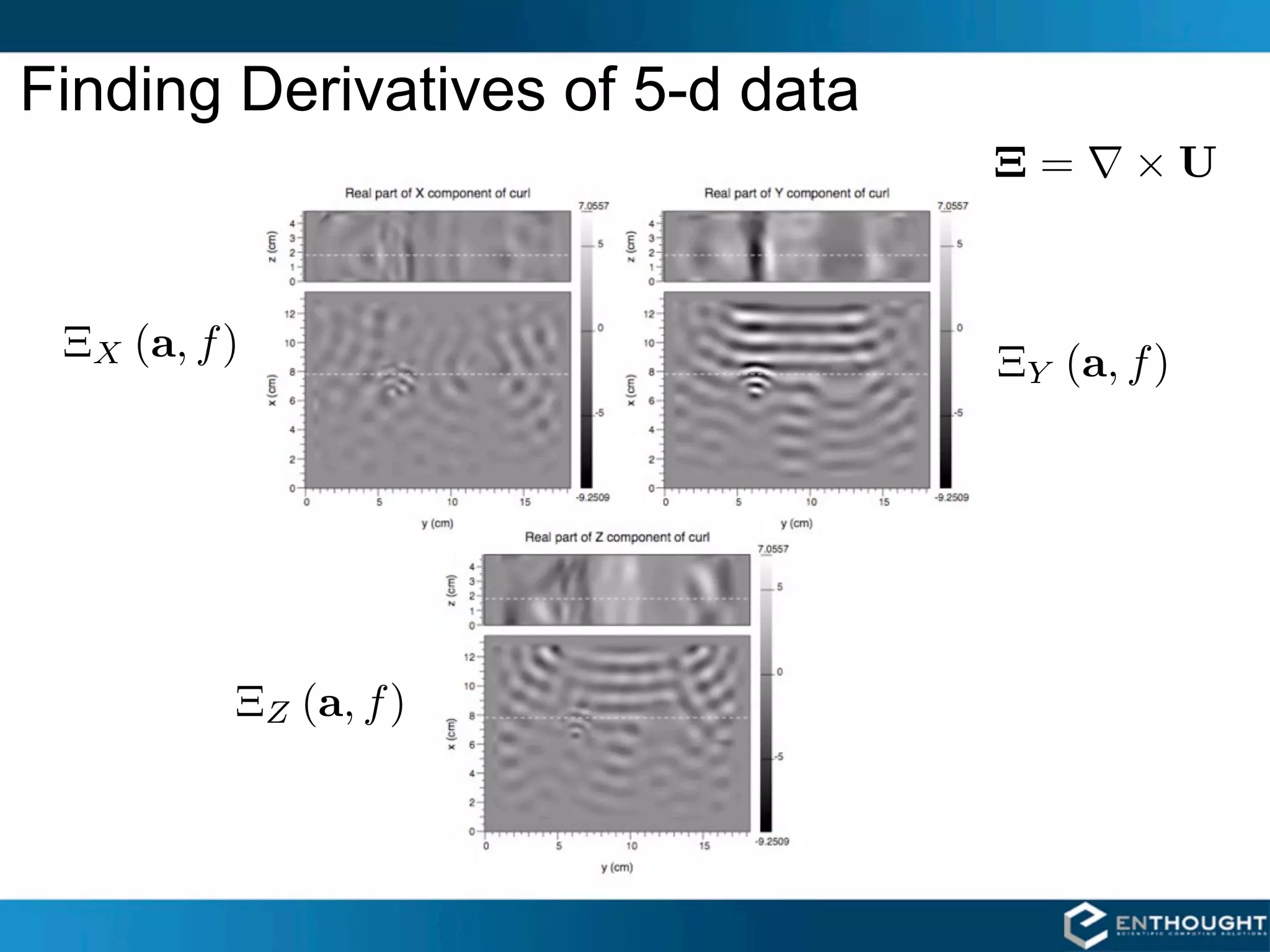
Finding Derivatives of 5-d data
                                  Ξ=     ×U


 ΞX (a, f )                       ΞY (a, f )


          ΞZ (a, f )
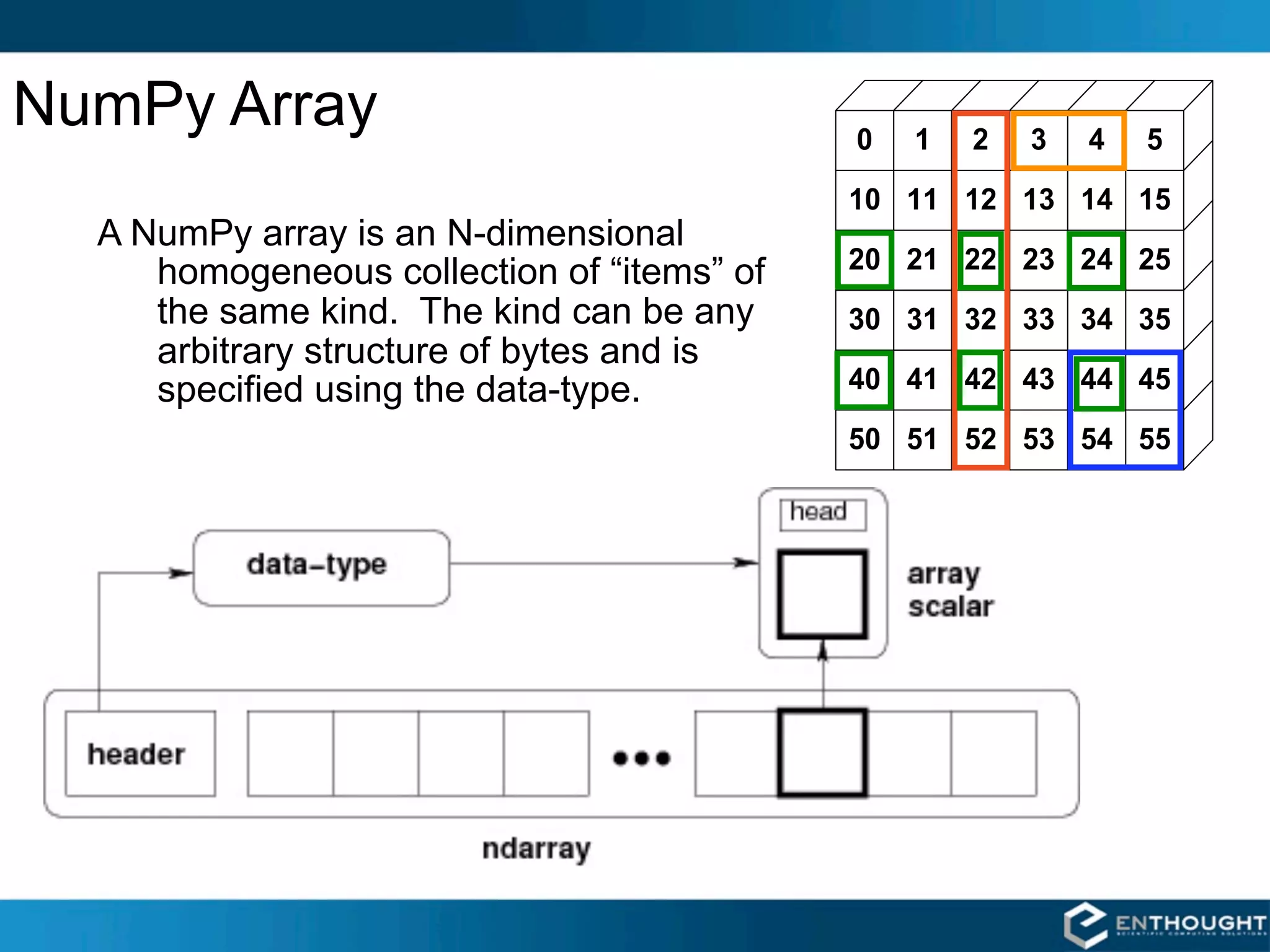
NumPy Array
  A NumPy array is an N-dimensional
     homogeneous collection of “items” of
     the same kind. The kind can be any
     arbitrary structure of bytes and is
     specified using the data-type.
SciPy [ Scientific Algorithms ]
  linalg              stats            interpolate

  cluster         special              maxentropy

    io            fftpack                 odr

 ndimage          sparse                integrate

  signal         optimize                weave

NumPy [ Data Structure Core ]
                  fft         random       linalg

      NDArray                     UFunc
  multi-dimensional             fast array
    array object              math operations

                  Python
SciPy is a
community
Project

A great way to
get involved with
Python
Community effort
 • Chuck Harris                              many, many others --- forgive me!
 • Pauli Virtanen
 • Mark Wiebe
 • David Cournapeau
 • Stefan van der Walt
 • Jarrod Millman
 • Josef Perktold
 • Anne Archibald
 • Dag Sverre Seljebotn
 • Robert Kern
 • Matthew Brett
 • Warren Weckesser
 • Ralf Gommers
 • Joe Harrington --- Documentation effort
 • Andrew Straw --- www.scipy.org
Optimization: Data Fitting
NONLINEAR LEAST SQUARES CURVE FITTING
>>> from scipy.optimize import curve_fit
>>> from scipy.stats import norm
# Define the function to fit.
>>> def function(x, a , b, f, phi):
...     result = a * exp(-b * sin(f * x + phi))
...     return result

# Create a noisy data set.
>>> actual_params = [3, 2, 1, pi/4]
>>> x = linspace(0,2*pi,25)
>>> exact = function(x, *actual_params)
>>> noisy = exact + 0.3*norm.rvs(size=len(x))


# Use curve_fit to estimate the function parameters from the noisy data.
>>> initial_guess = [1,1,1,1]
>>> estimated_params, err_est = curve_fit(function, x, noisy, p0=initial_guess)
>>> estimated_params
array([3.1705, 1.9501, 1.0206, 0.7034])

# err_est is an estimate of the covariance matrix of the estimates
# (i.e. how good of a fit is it)
2D RBF Interpolation
EXAMPLE
>>> from scipy.interpolate import 
...      Rbf
>>> from numpy import hypot, mgrid
>>> from scipy.special import j0
>>> x, y = mgrid[-5:6,-5:6]
>>> z = j0(hypot(x,y))
>>> newfunc = Rbf(x, y, z)
>>> xx, yy = mgrid[-5:5:100j,
                   -5:5:100j]
# xx and yy are both 2-d
# result is evaluated
# element-by-element
>>> zz = newfunc(xx, yy)
>>> from enthought.mayavi import mlab
>>> mlab.surf(x, y, z*5)
>>> mlab.figure()
>>> mlab.surf(xx, yy, zz*5)
>>> mlab.points3d(x,y,z*5,
                  scale_factor=0.5)
Brownian Motion
Brownian motion (Wiener process):
                                                 2
X (t + dt) = X (t) + N 0, σ dt, t, t + dt
where N (a, b, t1 , t2 ) is normal with mean a
and variance b, and independent on
disjoint time intervals.


>>>   from scipy.stats import norm
>>>   x0 = 100.0
>>>   dt = 0.5
>>>   sigma = 1.5
>>>   n = 100
>>>   steps = norm.rvs(size=n,
                 scale=sigma*sqrt(dt))
>>>   steps[0] = x0 # Make i.c. work
>>>   x = steps.cumsum()
>>>   t = linspace(0, (n-1)*dt, n)
>>>   plot(t, x)
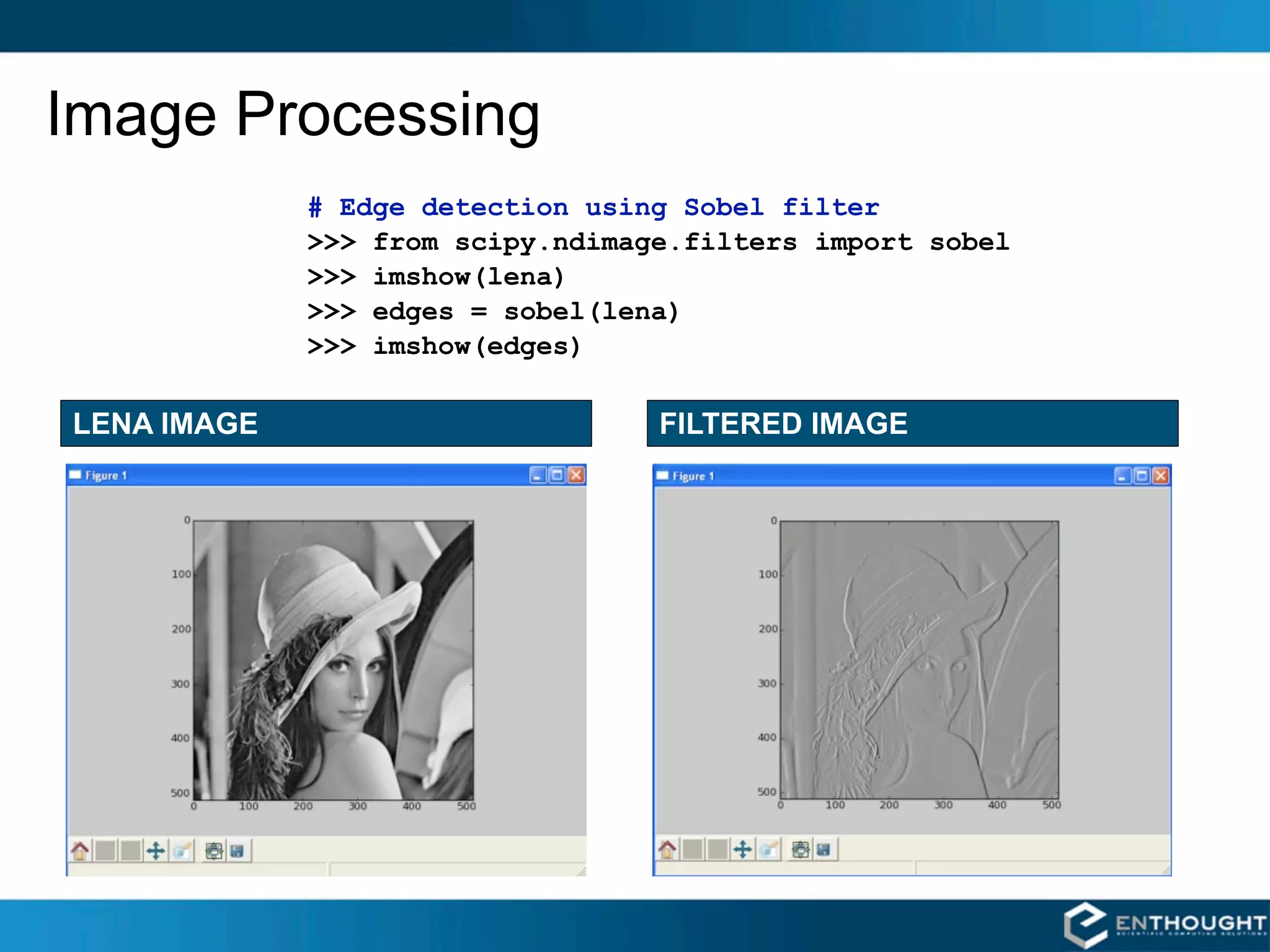
Image Processing
             # Edge detection using Sobel filter
             >>> from scipy.ndimage.filters import sobel
             >>> imshow(lena)
             >>> edges = sobel(lena)
             >>> imshow(edges)

LENA IMAGE                        FILTERED IMAGE
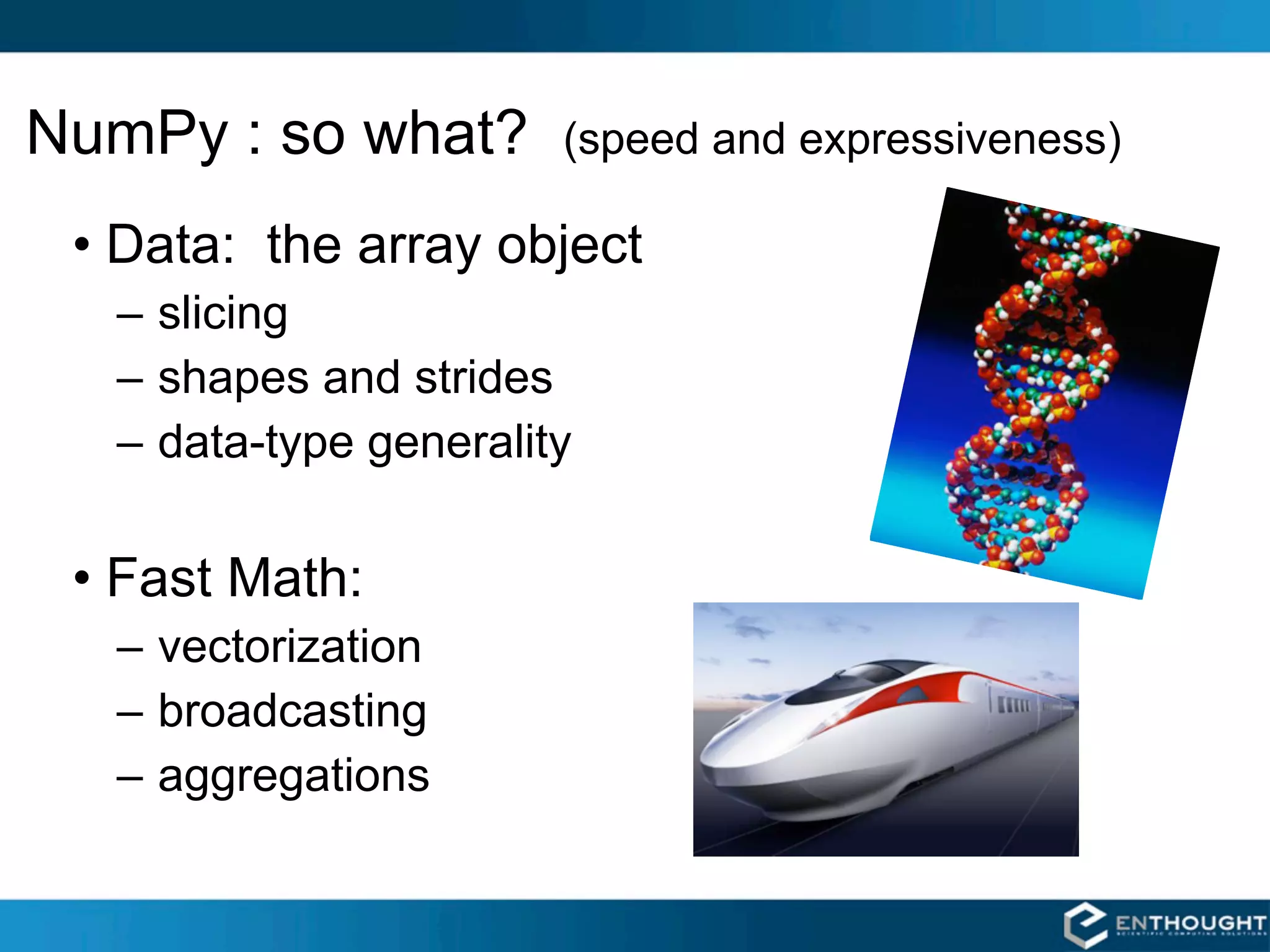
NumPy : so what?       (speed and expressiveness)

 • Data: the array object
  – slicing
  – shapes and strides
  – data-type generality

 • Fast Math:
  – vectorization
  – broadcasting
  – aggregations
Array Slicing
SLICING WORKS MUCH LIKE
STANDARD PYTHON SLICING

>>> a[0,3:5]
array([3, 4])

>>> a[4:,4:]
array([[44, 45],
       [54, 55]])

>>> a[:,2]
array([2,12,22,32,42,52])


STRIDES ARE ALSO POSSIBLE
>>> a[2::2,::2]
array([[20, 22, 24],
       [40, 42, 44]])

                            14
Fancy Indexing in 2-D

>>> a[(0,1,2,3,4),(1,2,3,4,5)]
array([ 1, 12, 23, 34, 45])

>>> a[3:,[0, 2,   5]]
array([[30, 32,   35],
       [40, 42,   45],
       [50, 52,   55]])

>>> mask = array([1,0,1,0,0,1],
                 dtype=bool)
>>> a[mask,2]
array([2,22,52])

                                  Unlike slicing, fancy indexing
                                  creates copies instead of a
                                  view into original array.
Fancy Indexing with Indices
INDEXING BY POSITION
# create an Nx3 colormap
# grayscale map -- R     G  B
>>> cmap = array([[1.0,1.0,1.0],
                  [0.9,0.9,0.9],
                  ...
                  [0.0,0.0,0.0]])
>>> cmap.shape
(10,3)

>>> img = array([[0,10],
                 [5,1 ]])
>>> img.shape
(2,2)

# use the image as an index into
# the colormap
>>> rgb_img = cmap[img]
>>> rgb_img.shape
(2,2,3)


                                    16
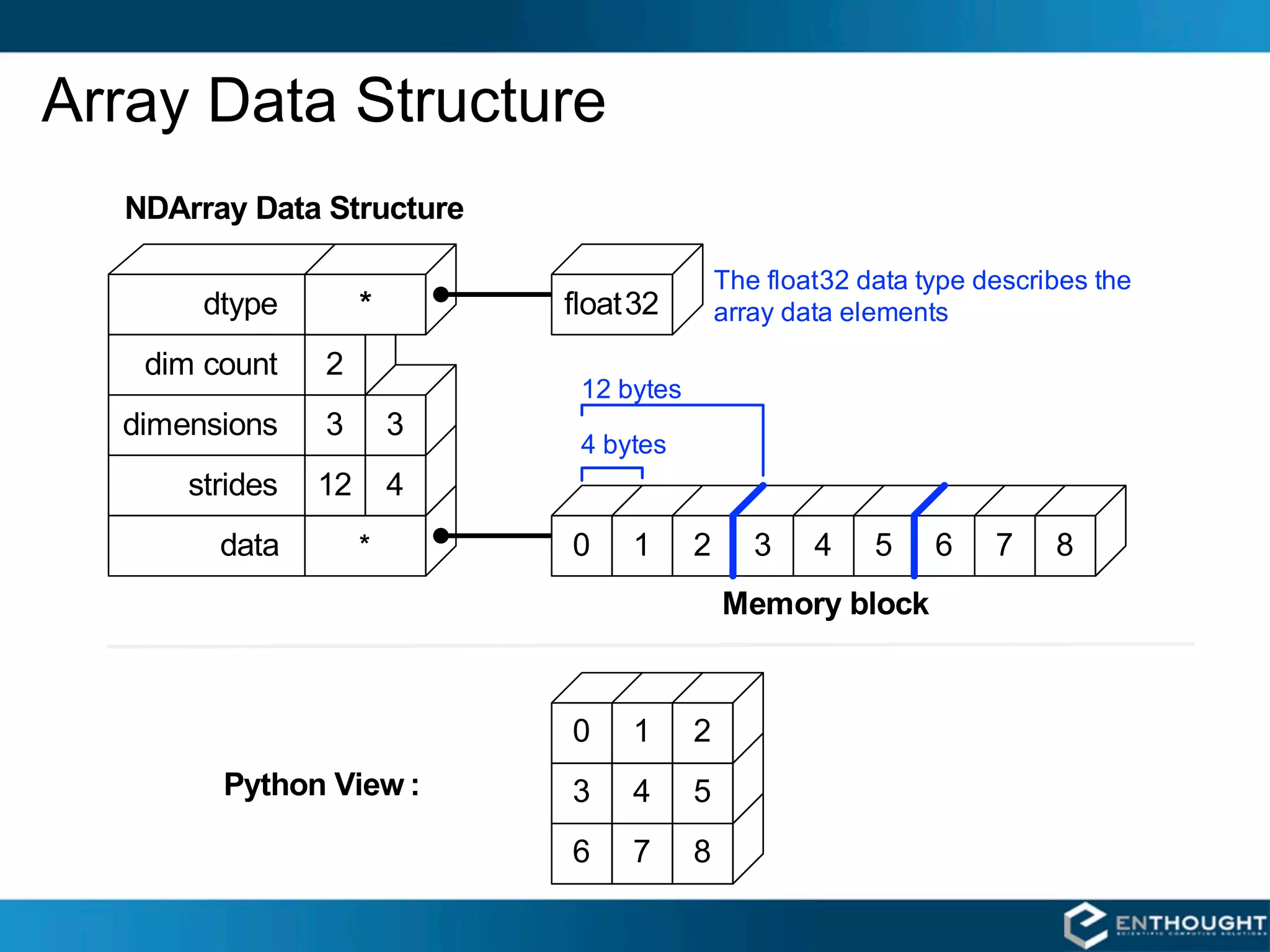
Array Data Structure
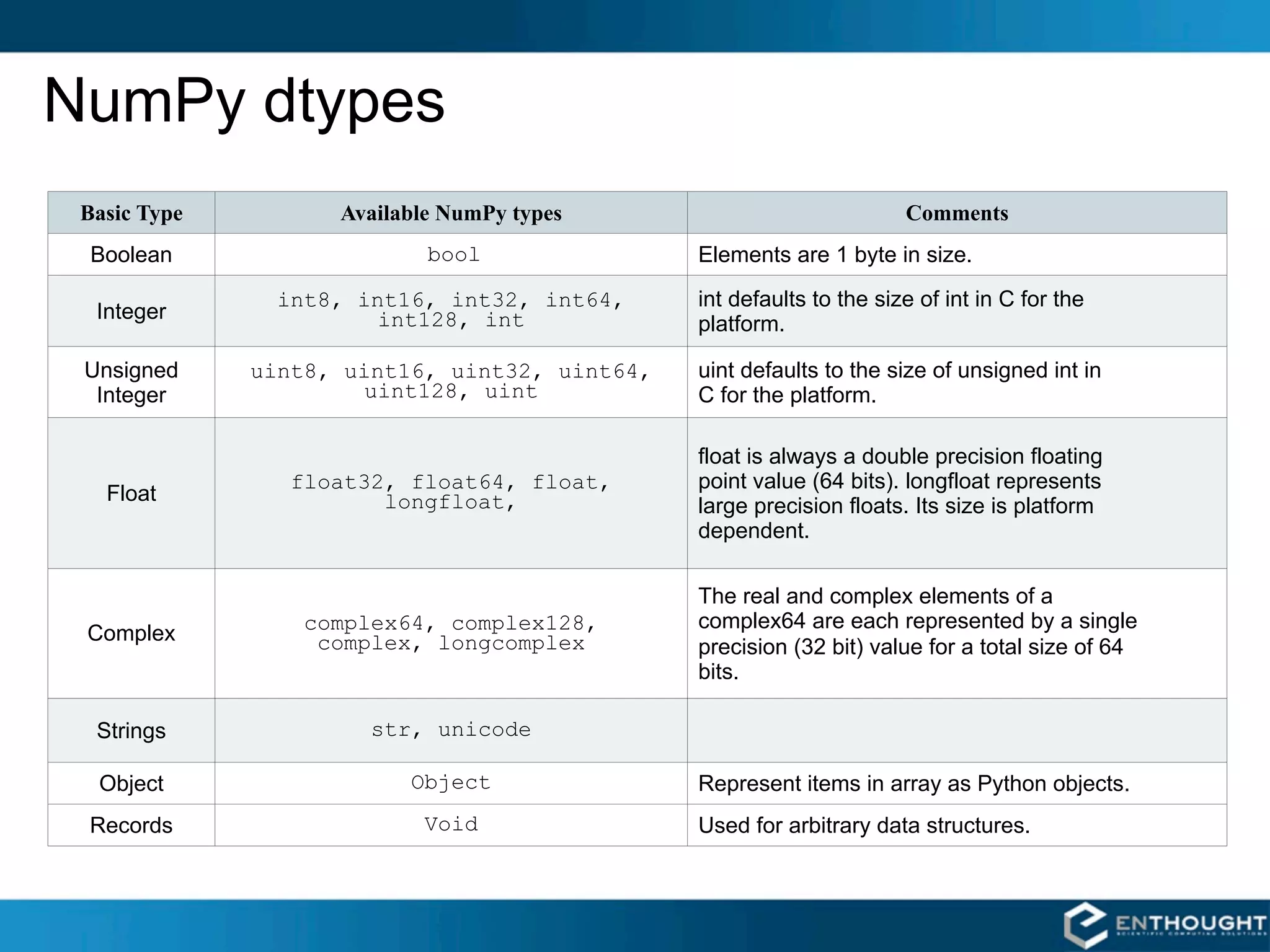
NumPy dtypes
 Basic Type         Available NumPy types                             Comments
  Boolean                   bool               Elements are 1 byte in size.
                int8, int16, int32, int64,     int defaults to the size of int in C for the
  Integer               int128, int            platform.

 Unsigned     uint8, uint16, uint32, uint64,   uint defaults to the size of unsigned int in
  Integer              uint128, uint           C for the platform.

                                               float is always a double precision floating
                 float32, float64, float,      point value (64 bits). longfloat represents
   Float                longfloat,             large precision floats. Its size is platform
                                               dependent.

                                               The real and complex elements of a
                  complex64, complex128,       complex64 are each represented by a single
 Complex           complex, longcomplex        precision (32 bit) value for a total size of 64
                                               bits.

  Strings              str, unicode

  Object                  Object               Represent items in array as Python objects.
 Records                   Void                Used for arbitrary data structures.
“Structured” Arrays
Elements of an array can be            EXAMPLE
any fixed-size data structure!         >>> from numpy import dtype, empty
                                       # structured data format
         name char[10]                 >>> fmt = dtype([('name', 'S10'),
         age int                                         ('age', int),
         weight double                                   ('weight', float)
                                                        ])
                                       >>> a = empty((3,4), dtype=fmt)
 Brad      Jane     John       Fred    >>> a.itemsize
                                       22
 33        25       47         54
                                       >>> a['name'] = [['Brad', … ,'Jill']]
 135.0     105.0    225.0      140.0   >>> a['age'] = [[33, … , 54]]
 Henry     George   Brian      Amy     >>> a['weight'] = [[135, … , 145]]
                                       >>> print a
 29        61       32         27      [[('Brad', 33, 135.0)
 154.0     202.0    137.0      187.0      …
 Ron       Susan    Jennifer   Jill
                                          ('Jill', 54, 145.0)]]
 19        33       18         54
 188.0     135.0    88.0       145.0
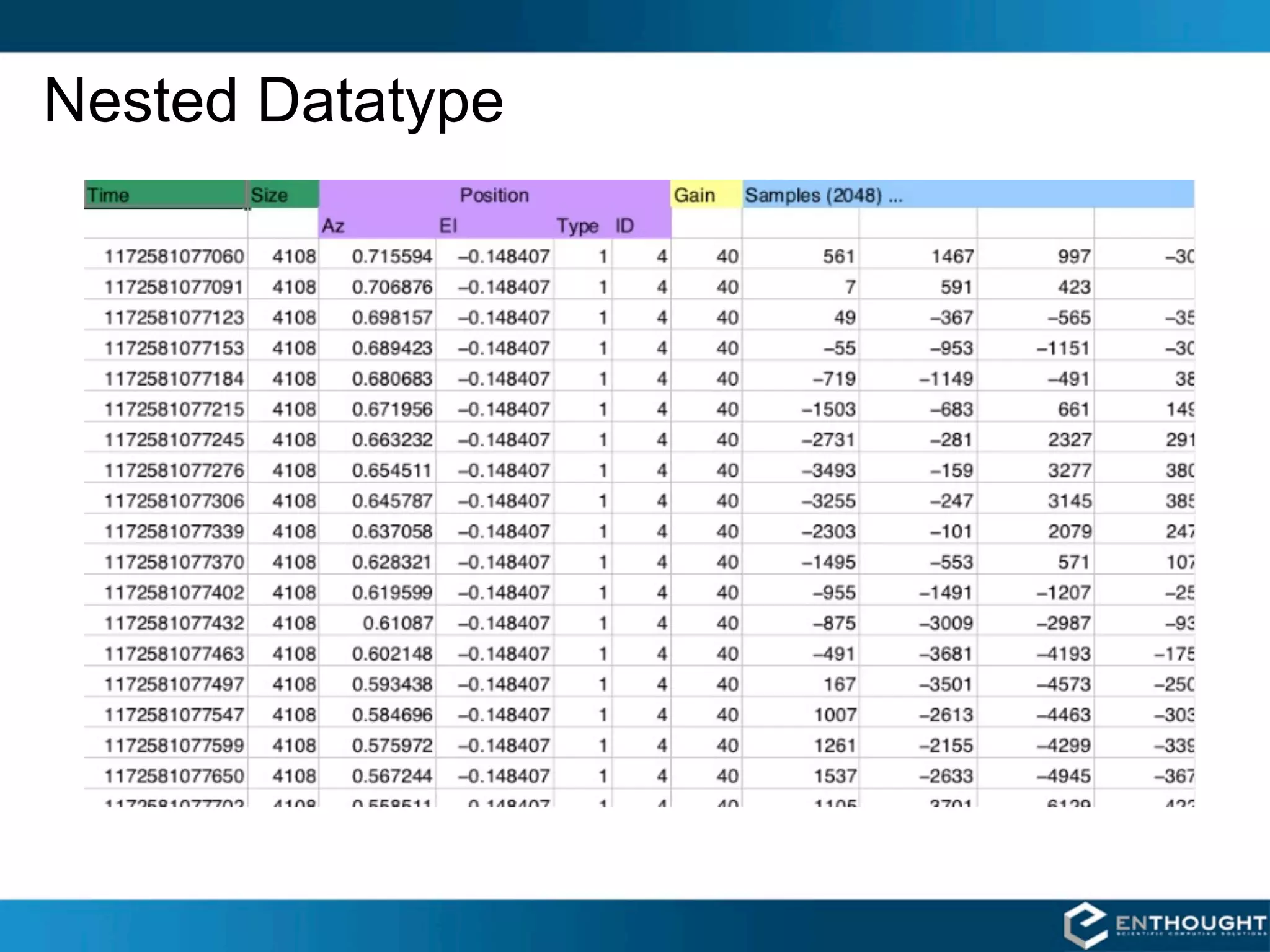
Nested Datatype
Nested Datatype
dt = dtype([('time', uint64),
            ('size', uint32),
            ('position', [('az', float32),
                          ('el', float32),
                          ('region_type', uint8),
                          ('region_ID', uint16)]),
            ('gain', np.uint8),
            ('samples', np.int16, 2048)])


data = np.fromfile(f, dtype=dt)
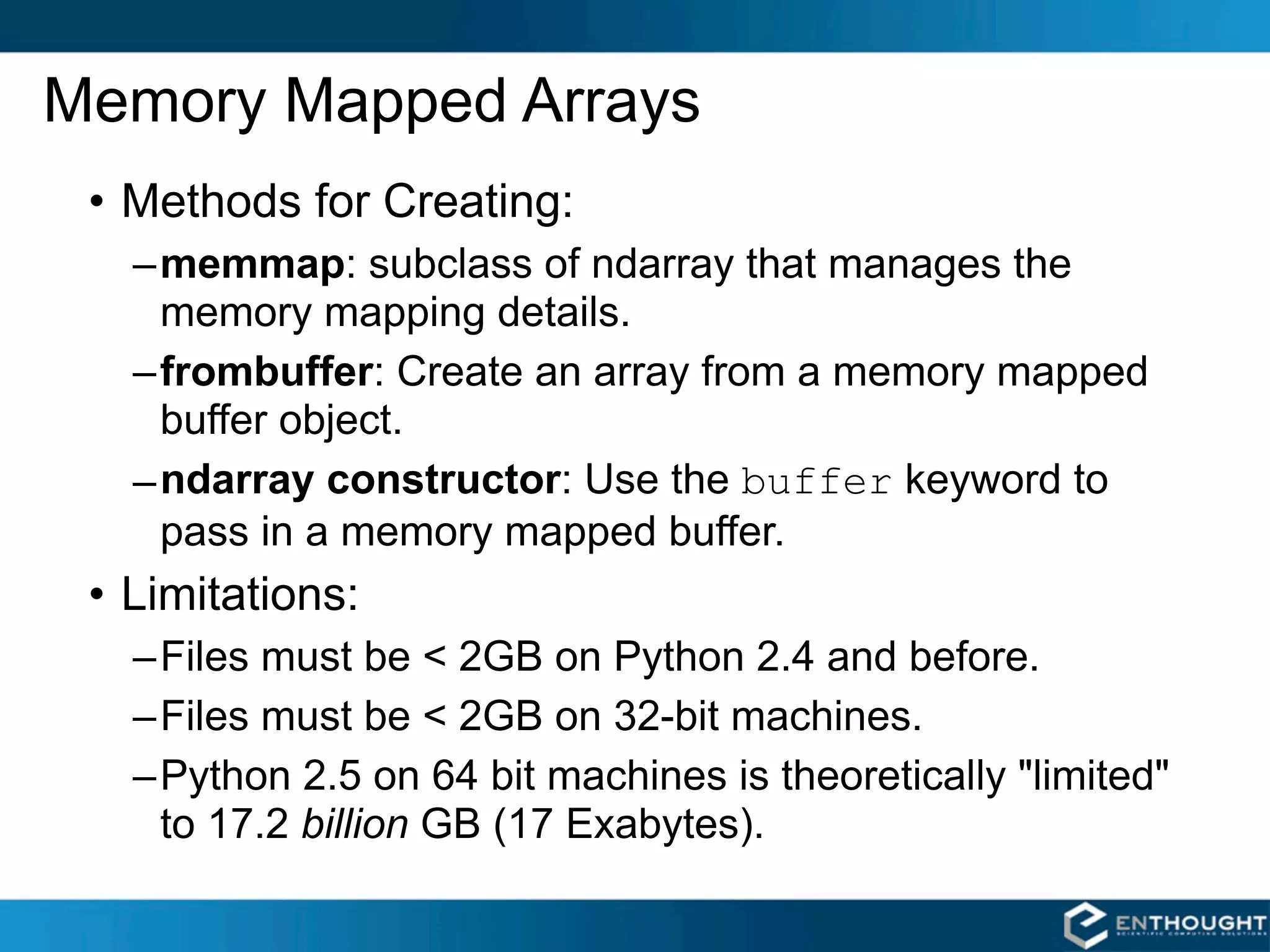
Memory Mapped Arrays
 • Methods for Creating:
   –memmap: subclass of ndarray that manages the
     memory mapping details.
   –frombuffer: Create an array from a memory mapped
     buffer object.
   – ndarray constructor: Use the buffer keyword to
     pass in a memory mapped buffer.
 • Limitations:
   –Files must be < 2GB on Python 2.4 and before.
   –Files must be < 2GB on 32-bit machines.
   –Python 2.5 on 64 bit machines is theoretically "limited"
    to 17.2 billion GB (17 Exabytes).
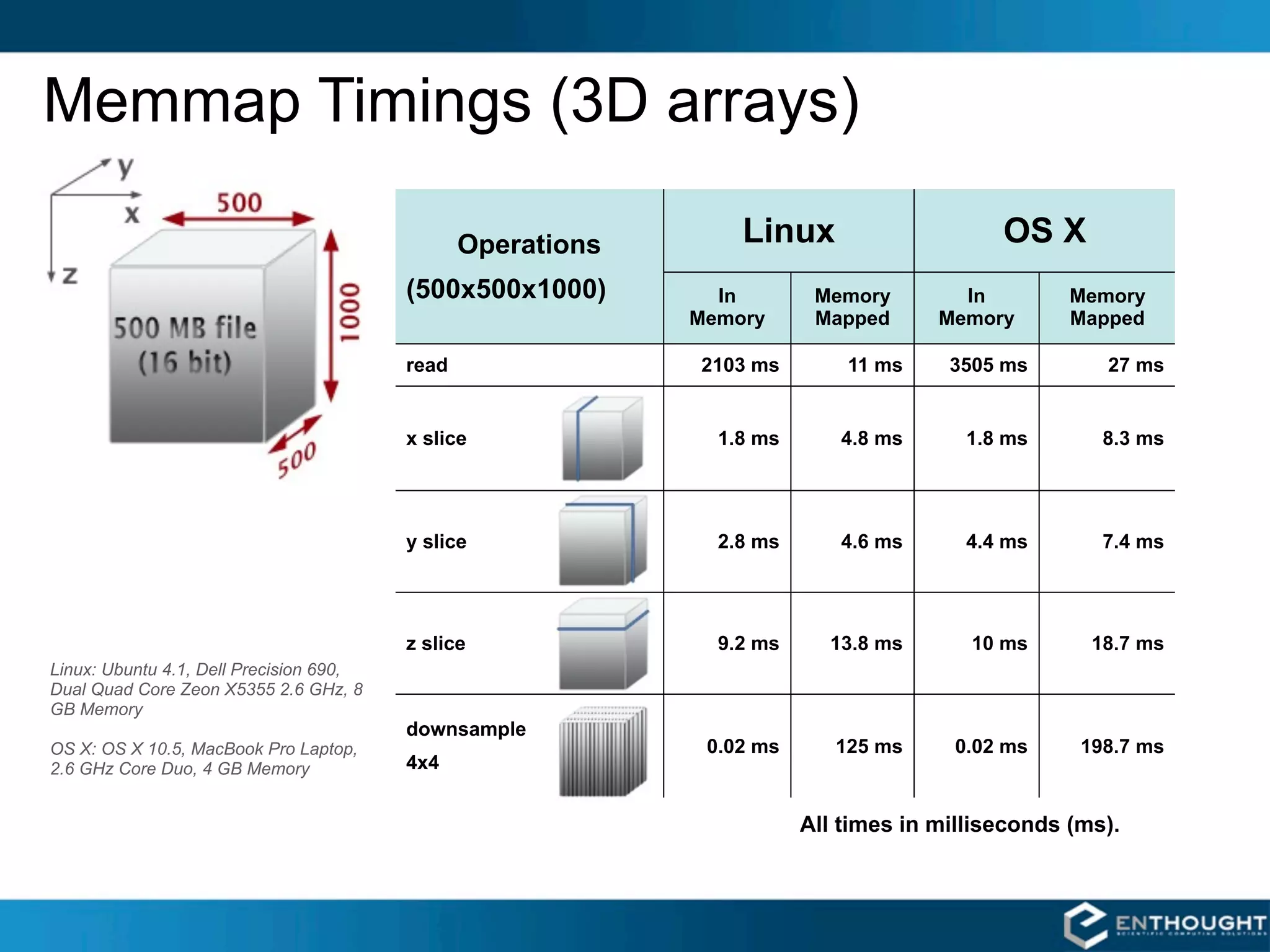
Memmap Timings (3D arrays)

                                                Operations       Linux                     OS X
                                         (500x500x1000)        In        Memory        In         Memory
                                                             Memory      Mapped      Memory       Mapped

                                         read                2103 ms        11 ms     3505 ms        27 ms


                                         x slice               1.8 ms      4.8 ms       1.8 ms       8.3 ms


                                         y slice               2.8 ms      4.6 ms       4.4 ms       7.4 ms


                                         z slice               9.2 ms     13.8 ms       10 ms       18.7 ms
Linux: Ubuntu 4.1, Dell Precision 690,
Dual Quad Core Zeon X5355 2.6 GHz, 8
GB Memory
                                         downsample
OS X: OS X 10.5, MacBook Pro Laptop,                          0.02 ms      125 ms      0.02 ms     198.7 ms
2.6 GHz Core Duo, 4 GB Memory            4x4


                                                                        All times in milliseconds (ms).
Structured Arrays
      char[12]            int64          float32             Elements of array can be any
                                                             fixed-size data structure!
         Name                  Time             Value
  MSFT_profit             10               6.20           Example
  GOOG_profit             12               -1.08         >>> import numpy as np
                                                         >>> fmt = np.dtype([('name', 'S12'),
  MSFT_profit             18               8.40                              ('time', np.int64),
                                                                             ('value', np.float32)])
                                                         >>> vals = [('MSFT_profit', 10, 6.20),
  INTC_profit             25               -0.20                     ('GOOG_profit', 12, -1.08),


                                                                                  …
                                                                         ('INTC_profit', 1000385, -1.05)
                                                                         ('MSFT_profit', 1000390, 5.60)]
  GOOG_profit             1000325         3.20
                                                         >>> arr = np.array(vals, dtype=fmt)
  GOOG_profit             1000350         4.50           # or
                                                         >>> arr = np.fromfile('db.dat', dtype=fmt)
  INTC_profit             1000385         -1.05          # or
                                                         >>> arr = np.memmap('db.dat', dtype=fmt,
                                                                              mode='c')
  MSFT_profit             1000390         5.60


MSFT_profit   10   6.20    GOOG_profit     12    -1.08    INTC_profit   1000385   -1.05   MSFT_profit   1000390   5.60
Mathematical Binary Operators
a + b     add(a,b)           a * b       multiply(a,b)
a - b     subtract(a,b)      a / b       divide(a,b)
a % b     remainder(a,b)     a ** b      power(a,b)

MULTIPLY BY A SCALAR          ADDITION USING AN OPERATOR
                              FUNCTION
>>> a = array((1,2))
>>> a*3.                      >>> add(a,b)
array([3., 6.])               array([4, 6])

ELEMENT BY ELEMENT ADDITION       IN-PLACE OPERATION

                              # Overwrite contents of a.
>>> a = array([1,2])
                              # Saves array creation
>>> b = array([3,4])
                              # overhead.
>>> a + b
                              >>> add(a,b,a) # a += b
array([4, 6])
                              array([4, 6])
                              >>> a
                              array([4, 6])
Comparison and Logical Operators
equal         (==)      not_equal (!=)        greater     (>)
greater_equal (>=)      less       (<)        less_equal (<=)
logical_and             logical_or            logical_xor
logical_not
2-D EXAMPLE
                                         Be careful with if statements
>>> a = array(((1,2,3,4),(2,3,4,5)))     involving numpy arrays. To
>>> b = array(((1,2,5,4),(1,3,4,5)))     test for equality of arrays,
>>> a == b                               don't do:
array([[True, True, False, True],             if a == b:
       [False, True, True, True]])
# functional equivalent                  Rather, do:
>>> equal(a,b)                                if all(a==b):
array([[True, True, False, True],
       [False, True, True, True]])       For floating point,
                                              if allclose(a,b):
                                         is even better.
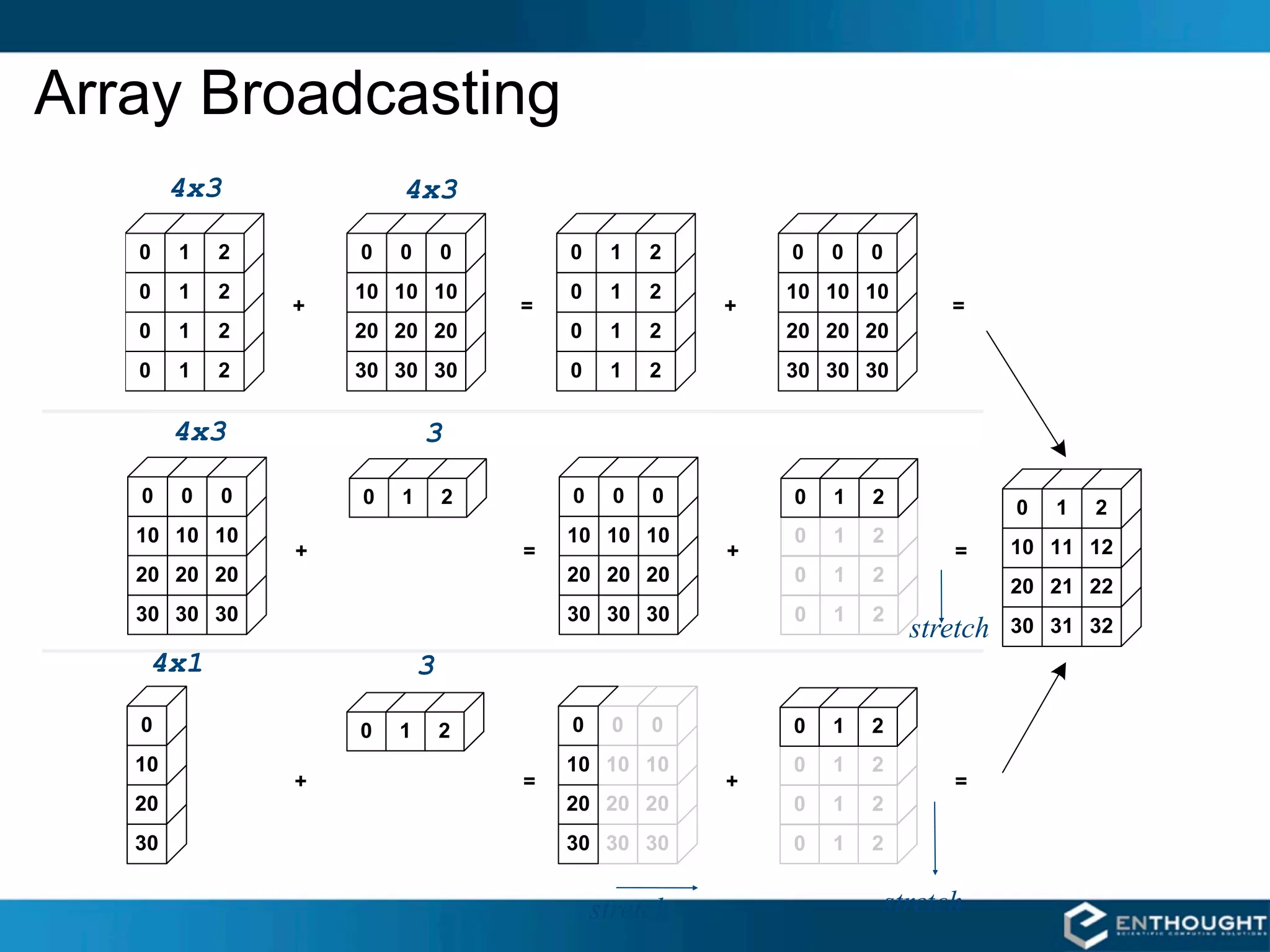
Array Broadcasting
    4x3     4x3


    4x3      3


                                 stretch
   4x1       3


                     stretch   stretch
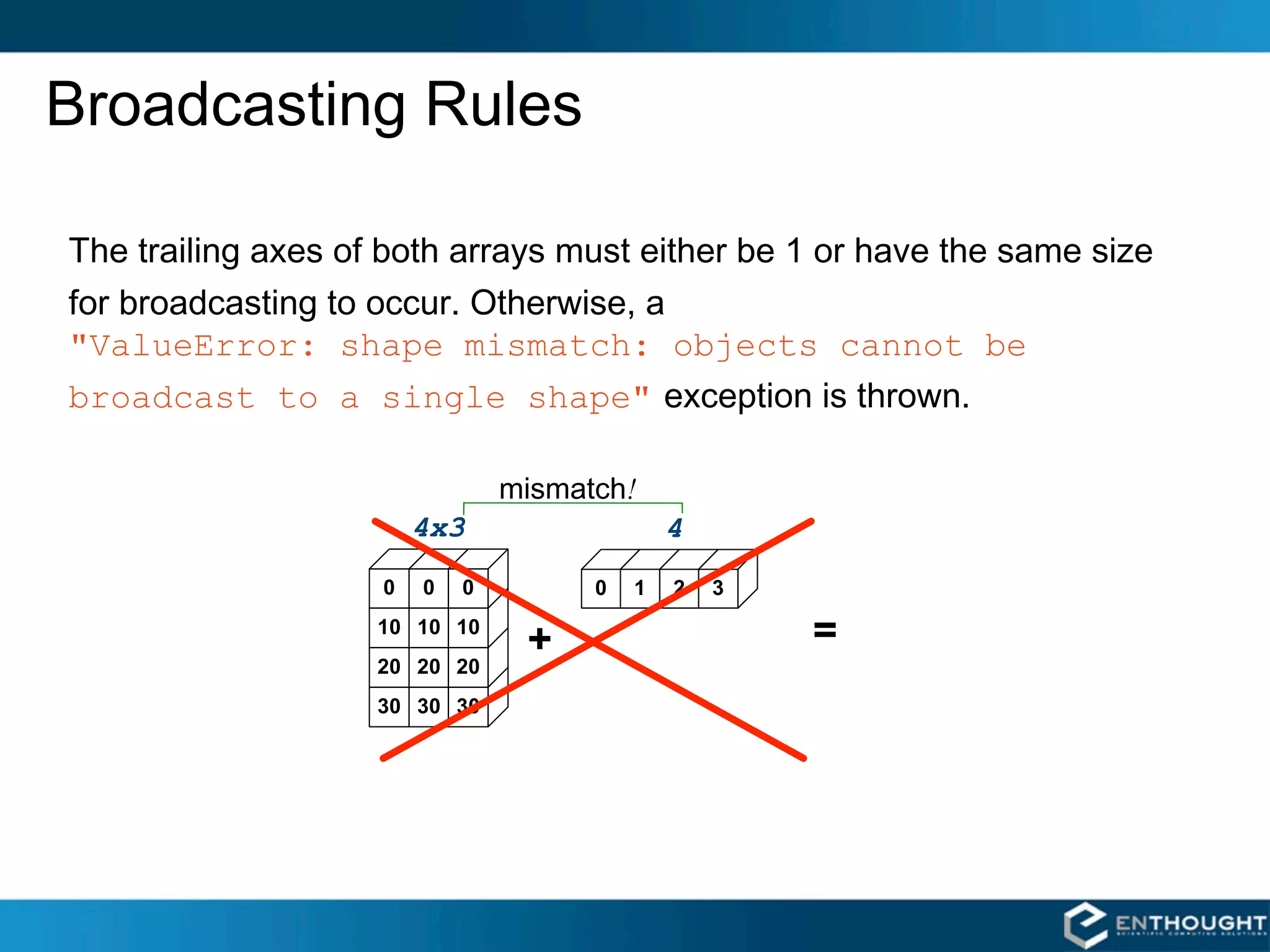
Broadcasting Rules


"ValueError: shape mismatch: objects cannot be
broadcast to a single shape"         


                          !
                4x3           4
Broadcasting in Action


           >>> a = array((0,10,20,30))
           >>> b = array((0,1,2))
           >>> y = a[:, newaxis] + b
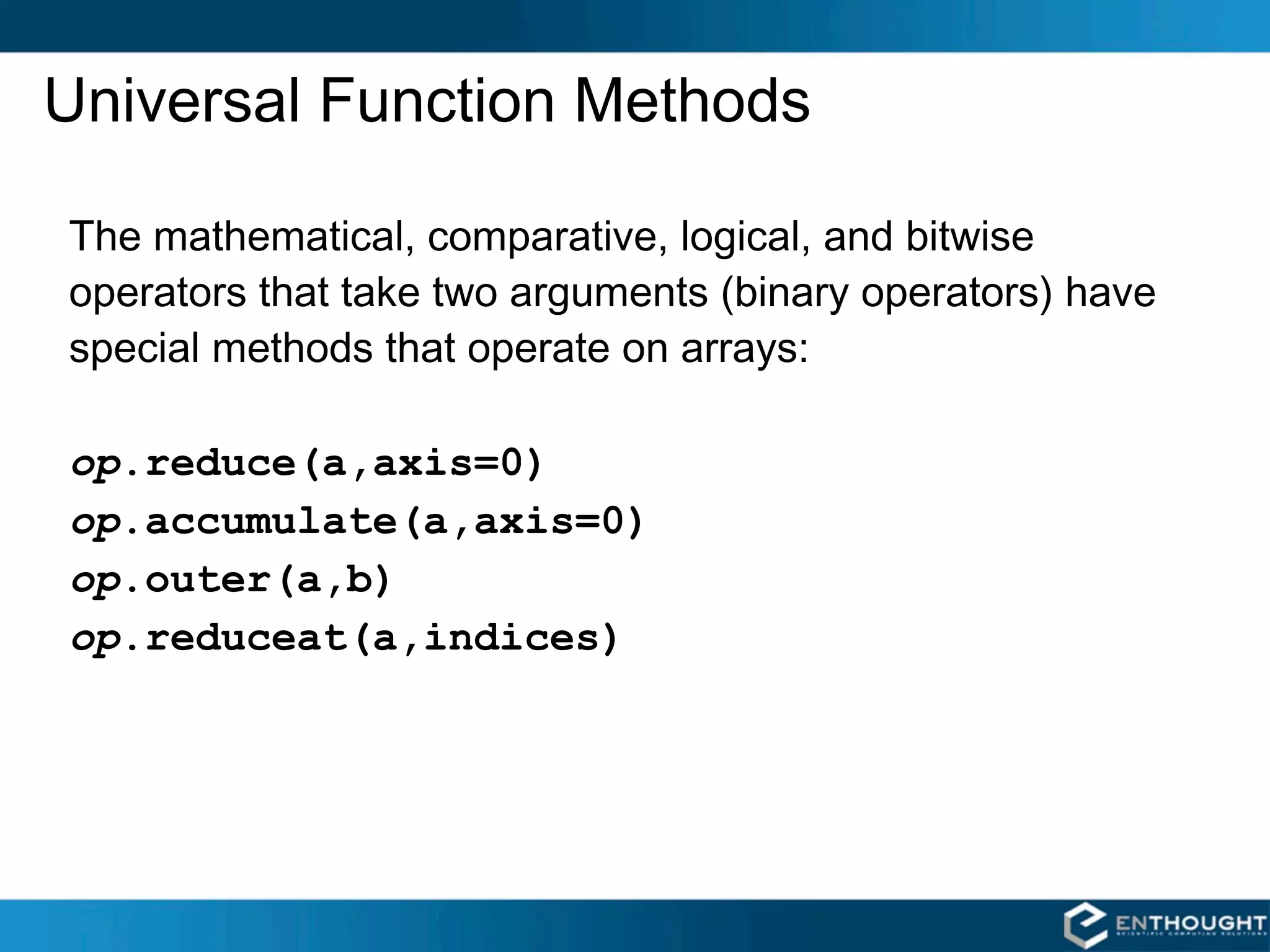
Universal Function Methods


op.reduce(a,axis=0)
op.accumulate(a,axis=0)
op.outer(a,b)
op.reduceat(a,indices)
op.reduce()
For multidimensional arrays, op.reduce(a,axis)applies op to the elements of a
along the specified axis. The resulting array has dimensionality one less than a. The
default value for axis is 0.

SUM COLUMNS BY DEFAULT                         SUMMING UP EACH ROW

>>> add.reduce(a)                             >>> add.reduce(a,1)
array([60, 64, 68])                           array([ 3, 33, 63, 93])
Array Calculation Methods
SUM FUNCTION                      SUM ARRAY METHOD
>>> a = array([[1,2,3],           # a.sum() defaults to adding
               [4,5,6]], float)   # up all values in an array.
                                  >>> a.sum()
# sum() defaults to adding up     21.
# all the values in an array.
>>> sum(a)                        # supply an axis argument to
21.                               # sum along a specific axis
                                  >>> a.sum(axis=0)
# supply the keyword axis to      array([5., 7., 9.])
# sum along the 0th axis
>>> sum(a, axis=0)
array([5., 7., 9.])               PRODUCT
                                  # product along columns
# supply the keyword axis to      >>> a.prod(axis=0)
# sum along the last axis         array([ 4., 10., 18.])
>>> sum(a, axis=-1)
array([6., 15.])                  # functional form
                                  >>> prod(a, axis=0)
                                  array([ 4., 10., 18.])
Min/Max
MIN                              MAX
>>> a = array([2.,3.,0.,1.])     >>> a = array([2.,3.,0.,1.])
>>> a.min(axis=0)                >>> a.max(axis=0)
0.                               3.
# Use NumPy's amin() instead
# of Python's built-in min()
# for speedy operations on
# multi-dimensional arrays.      # functional form
>>> amin(a, axis=0)              >>> amax(a, axis=0)
0.                               3.


ARGMIN                           ARGMAX
# Find index of minimum value.   # Find index of maximum value.
>>> a.argmin(axis=0)             >>> a.argmax(axis=0)
2                                1
# functional form                # functional form
>>> argmin(a, axis=0)            >>> argmax(a, axis=0)
2                                1
Statistics Array Methods
MEAN                              STANDARD DEV./VARIANCE
>>> a = array([[1,2,3],           # Standard Deviation
               [4,5,6]], float)   >>> a.std(axis=0)
                                  array([ 1.5, 1.5, 1.5])
# mean value of each column
>>> a.mean(axis=0)                # variance
array([ 2.5, 3.5, 4.5])           >>> a.var(axis=0)
>>> mean(a, axis=0)               array([2.25, 2.25, 2.25])
array([ 2.5, 3.5, 4.5])           >>> var(a, axis=0)
>>> average(a, axis=0)            array([2.25, 2.25, 2.25])
array([ 2.5, 3.5, 4.5])

# average can also calculate
# a weighted average
>>> average(a, weights=[1,2],
...         axis=0)
array([ 3., 4., 5.])
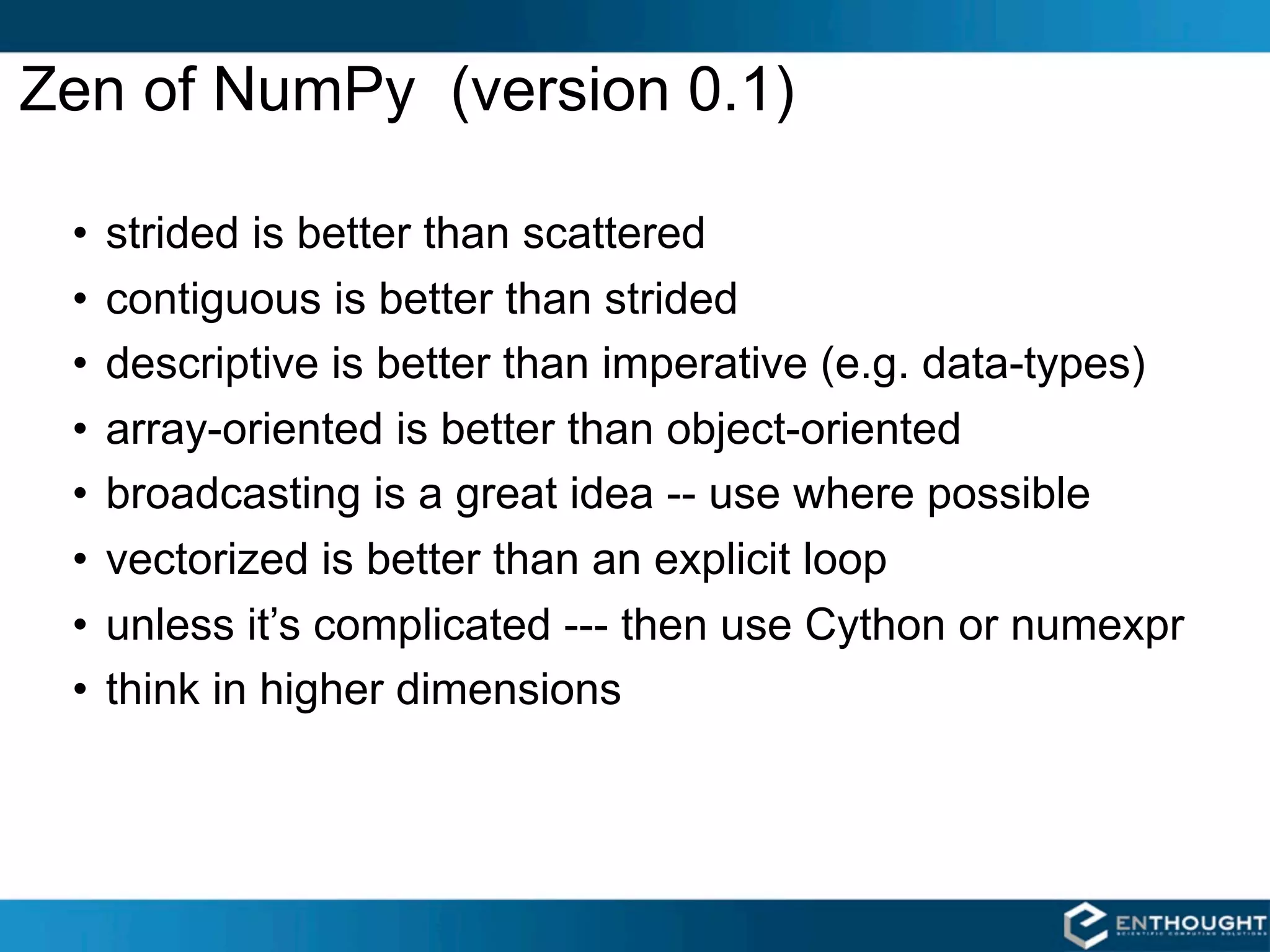
Zen of NumPy (version 0.1)

 •   strided is better than scattered
 •   contiguous is better than strided
 •   descriptive is better than imperative (e.g. data-types)
 •   array-oriented is better than object-oriented
 •   broadcasting is a great idea -- use where possible
 •   vectorized is better than an explicit loop
 •   unless it’s complicated --- then use Cython or numexpr
 •   think in higher dimensions
Recent Developments in NumPy / SciPy
 • Community growth (github)
 • Addition of .NET (IronPython) support
  – NumPy as a core C-library
  – NumPy and SciPy using Cython to build all
   extension modules
  – better tests and bugs closed
 • Re-factoring of the ufunc-implementation as
   iterators (Mark Wiebe)
  – expose the pipeline that was only previously used
   in “worst-case” scenario.
  – first stages of calculation structure refactoring
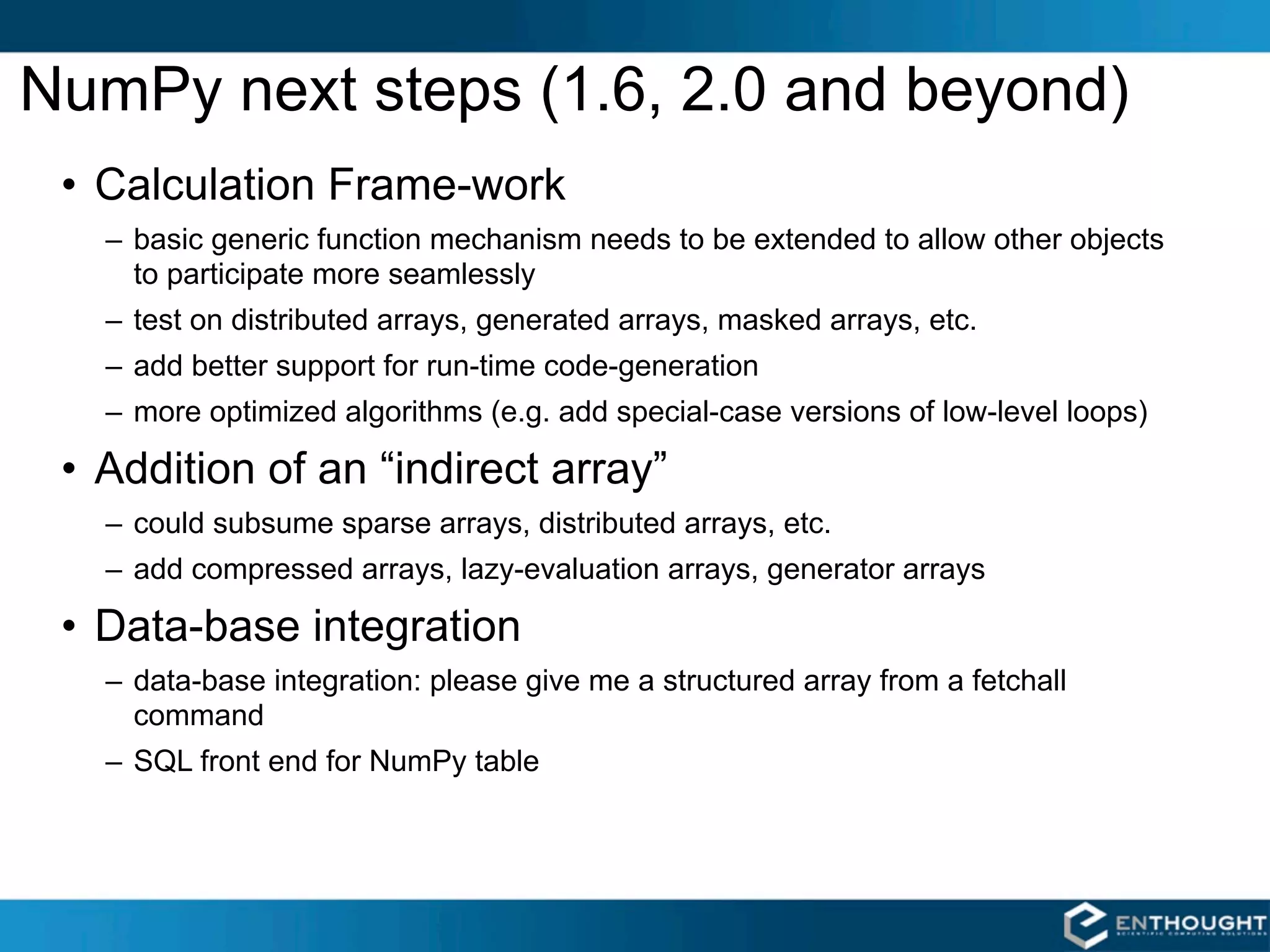
NumPy next steps (1.6, 2.0 and beyond)
 • Calculation Frame-work
   – basic generic function mechanism needs to be extended to allow other objects
     to participate more seamlessly
   – test on distributed arrays, generated arrays, masked arrays, etc.
   – add better support for run-time code-generation
   – more optimized algorithms (e.g. add special-case versions of low-level loops)

 • Addition of an “indirect array”
   – could subsume sparse arrays, distributed arrays, etc.
   – add compressed arrays, lazy-evaluation arrays, generator arrays

 • Data-base integration
   – data-base integration: please give me a structured array from a fetchall
     command
   – SQL front end for NumPy table
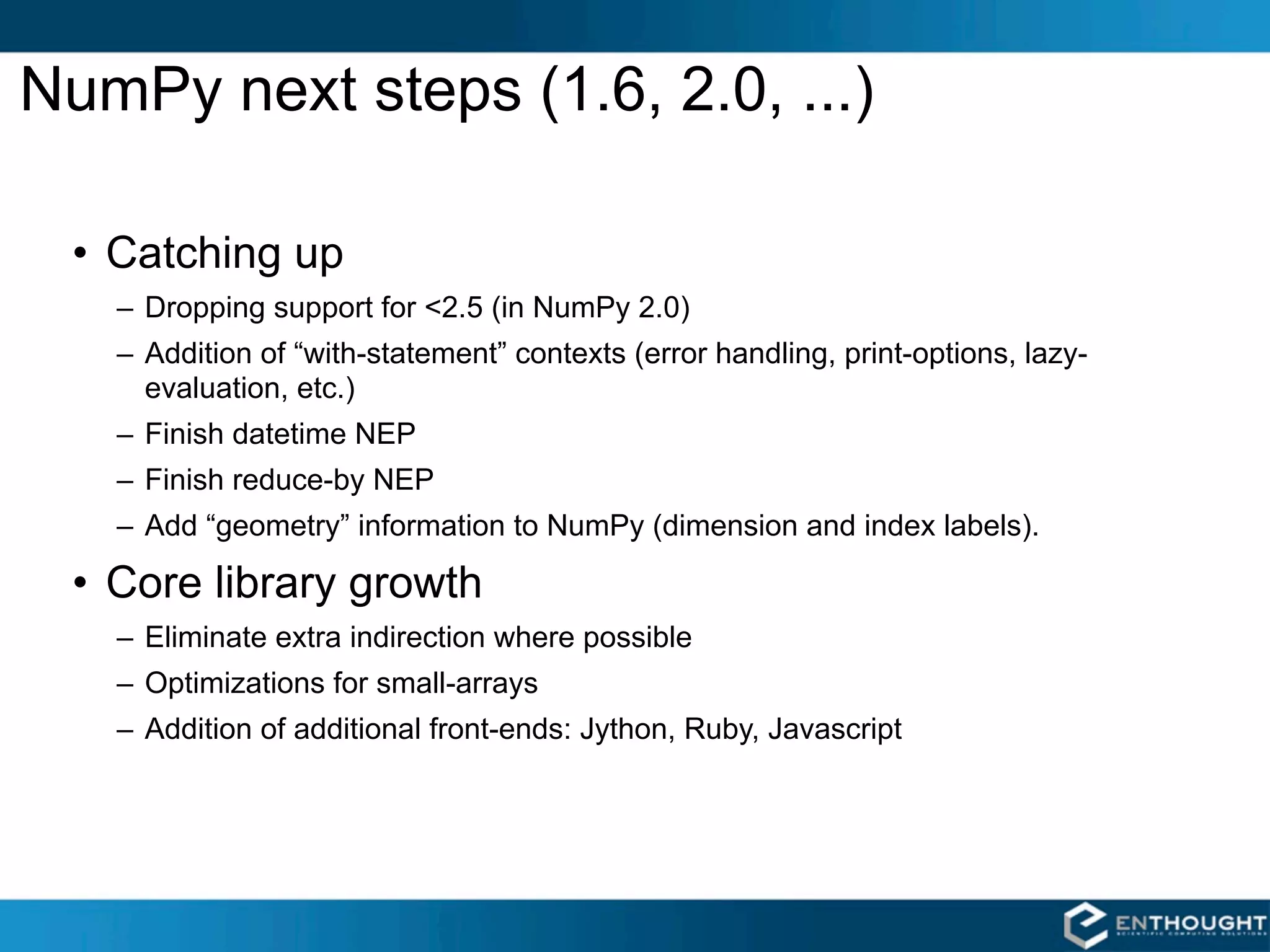
NumPy next steps (1.6, 2.0, ...)

 • Catching up
   – Dropping support for <2.5 (in NumPy 2.0)
   – Addition of “with-statement” contexts (error handling, print-options, lazy-
     evaluation, etc.)
   – Finish datetime NEP
   – Finish reduce-by NEP
   – Add “geometry” information to NumPy (dimension and index labels).

 • Core library growth
   – Eliminate extra indirection where possible
   – Optimizations for small-arrays
   – Addition of additional front-ends: Jython, Ruby, Javascript
SciPy next steps
 • Roadmap generation (move to github)
 • Finish Cython migration
 • Module cleanup continues
 • Lots of work happening...
  –   errorbars in polyfit
  –   spectral algorithms in signal
  –   improvements to ode and sparse
  –   addition of pre-conditioners to sparse
  –   ..., ...

Numpy Talk at SIAM

  • 1.
    SciPy and NumPy Travis Oliphant SIAM 2011 Mar 2, 2011
  • 2.
    Magnetic Resonance Elastography 1997 Richard Ehman Armando Manduca Raja Muthupillai 2 ρ0 (2πf ) Ui (a, f ) = [Cijkl (a, f ) Uk,l (a, f )],j
  • 3.
    Finding Derivatives of5-d data U X (a, f ) UY (a, f ) UZ (a, f )
  • 4.
    Finding Derivatives of5-d data Ξ= ×U ΞX (a, f ) ΞY (a, f ) ΞZ (a, f )
  • 5.
    NumPy Array A NumPy array is an N-dimensional homogeneous collection of “items” of the same kind. The kind can be any arbitrary structure of bytes and is specified using the data-type.
  • 6.
    SciPy [ ScientificAlgorithms ] linalg stats interpolate cluster special maxentropy io fftpack odr ndimage sparse integrate signal optimize weave NumPy [ Data Structure Core ] fft random linalg NDArray UFunc multi-dimensional fast array array object math operations Python
  • 7.
    SciPy is a community Project Agreat way to get involved with Python
  • 8.
    Community effort •Chuck Harris many, many others --- forgive me! • Pauli Virtanen • Mark Wiebe • David Cournapeau • Stefan van der Walt • Jarrod Millman • Josef Perktold • Anne Archibald • Dag Sverre Seljebotn • Robert Kern • Matthew Brett • Warren Weckesser • Ralf Gommers • Joe Harrington --- Documentation effort • Andrew Straw --- www.scipy.org
  • 9.
    Optimization: Data Fitting NONLINEARLEAST SQUARES CURVE FITTING >>> from scipy.optimize import curve_fit >>> from scipy.stats import norm # Define the function to fit. >>> def function(x, a , b, f, phi): ... result = a * exp(-b * sin(f * x + phi)) ... return result # Create a noisy data set. >>> actual_params = [3, 2, 1, pi/4] >>> x = linspace(0,2*pi,25) >>> exact = function(x, *actual_params) >>> noisy = exact + 0.3*norm.rvs(size=len(x)) # Use curve_fit to estimate the function parameters from the noisy data. >>> initial_guess = [1,1,1,1] >>> estimated_params, err_est = curve_fit(function, x, noisy, p0=initial_guess) >>> estimated_params array([3.1705, 1.9501, 1.0206, 0.7034]) # err_est is an estimate of the covariance matrix of the estimates # (i.e. how good of a fit is it)
  • 10.
    2D RBF Interpolation EXAMPLE >>>from scipy.interpolate import ... Rbf >>> from numpy import hypot, mgrid >>> from scipy.special import j0 >>> x, y = mgrid[-5:6,-5:6] >>> z = j0(hypot(x,y)) >>> newfunc = Rbf(x, y, z) >>> xx, yy = mgrid[-5:5:100j, -5:5:100j] # xx and yy are both 2-d # result is evaluated # element-by-element >>> zz = newfunc(xx, yy) >>> from enthought.mayavi import mlab >>> mlab.surf(x, y, z*5) >>> mlab.figure() >>> mlab.surf(xx, yy, zz*5) >>> mlab.points3d(x,y,z*5, scale_factor=0.5)
  • 11.
    Brownian Motion Brownian motion(Wiener process): 2 X (t + dt) = X (t) + N 0, σ dt, t, t + dt where N (a, b, t1 , t2 ) is normal with mean a and variance b, and independent on disjoint time intervals. >>> from scipy.stats import norm >>> x0 = 100.0 >>> dt = 0.5 >>> sigma = 1.5 >>> n = 100 >>> steps = norm.rvs(size=n, scale=sigma*sqrt(dt)) >>> steps[0] = x0 # Make i.c. work >>> x = steps.cumsum() >>> t = linspace(0, (n-1)*dt, n) >>> plot(t, x)
  • 12.
    Image Processing # Edge detection using Sobel filter >>> from scipy.ndimage.filters import sobel >>> imshow(lena) >>> edges = sobel(lena) >>> imshow(edges) LENA IMAGE FILTERED IMAGE
  • 13.
    NumPy : sowhat? (speed and expressiveness) • Data: the array object – slicing – shapes and strides – data-type generality • Fast Math: – vectorization – broadcasting – aggregations
  • 14.
    Array Slicing SLICING WORKSMUCH LIKE STANDARD PYTHON SLICING >>> a[0,3:5] array([3, 4]) >>> a[4:,4:] array([[44, 45], [54, 55]]) >>> a[:,2] array([2,12,22,32,42,52]) STRIDES ARE ALSO POSSIBLE >>> a[2::2,::2] array([[20, 22, 24], [40, 42, 44]]) 14
  • 15.
    Fancy Indexing in2-D >>> a[(0,1,2,3,4),(1,2,3,4,5)] array([ 1, 12, 23, 34, 45]) >>> a[3:,[0, 2, 5]] array([[30, 32, 35], [40, 42, 45], [50, 52, 55]]) >>> mask = array([1,0,1,0,0,1], dtype=bool) >>> a[mask,2] array([2,22,52]) Unlike slicing, fancy indexing creates copies instead of a view into original array.
  • 16.
    Fancy Indexing withIndices INDEXING BY POSITION # create an Nx3 colormap # grayscale map -- R G B >>> cmap = array([[1.0,1.0,1.0], [0.9,0.9,0.9], ... [0.0,0.0,0.0]]) >>> cmap.shape (10,3) >>> img = array([[0,10], [5,1 ]]) >>> img.shape (2,2) # use the image as an index into # the colormap >>> rgb_img = cmap[img] >>> rgb_img.shape (2,2,3) 16
  • 17.
  • 18.
    NumPy dtypes BasicType Available NumPy types Comments Boolean bool Elements are 1 byte in size. int8, int16, int32, int64, int defaults to the size of int in C for the Integer int128, int platform. Unsigned uint8, uint16, uint32, uint64, uint defaults to the size of unsigned int in Integer uint128, uint C for the platform. float is always a double precision floating float32, float64, float, point value (64 bits). longfloat represents Float longfloat, large precision floats. Its size is platform dependent. The real and complex elements of a complex64, complex128, complex64 are each represented by a single Complex complex, longcomplex precision (32 bit) value for a total size of 64 bits. Strings str, unicode Object Object Represent items in array as Python objects. Records Void Used for arbitrary data structures.
  • 19.
    “Structured” Arrays Elements ofan array can be EXAMPLE any fixed-size data structure! >>> from numpy import dtype, empty # structured data format name char[10] >>> fmt = dtype([('name', 'S10'), age int ('age', int), weight double ('weight', float) ]) >>> a = empty((3,4), dtype=fmt) Brad Jane John Fred >>> a.itemsize 22 33 25 47 54 >>> a['name'] = [['Brad', … ,'Jill']] 135.0 105.0 225.0 140.0 >>> a['age'] = [[33, … , 54]] Henry George Brian Amy >>> a['weight'] = [[135, … , 145]] >>> print a 29 61 32 27 [[('Brad', 33, 135.0) 154.0 202.0 137.0 187.0 … Ron Susan Jennifer Jill ('Jill', 54, 145.0)]] 19 33 18 54 188.0 135.0 88.0 145.0
  • 20.
  • 21.
    Nested Datatype dt =dtype([('time', uint64), ('size', uint32), ('position', [('az', float32), ('el', float32), ('region_type', uint8), ('region_ID', uint16)]), ('gain', np.uint8), ('samples', np.int16, 2048)]) data = np.fromfile(f, dtype=dt)
  • 22.
    Memory Mapped Arrays • Methods for Creating: –memmap: subclass of ndarray that manages the memory mapping details. –frombuffer: Create an array from a memory mapped buffer object. – ndarray constructor: Use the buffer keyword to pass in a memory mapped buffer. • Limitations: –Files must be < 2GB on Python 2.4 and before. –Files must be < 2GB on 32-bit machines. –Python 2.5 on 64 bit machines is theoretically "limited" to 17.2 billion GB (17 Exabytes).
  • 23.
    Memmap Timings (3Darrays) Operations Linux OS X (500x500x1000) In Memory In Memory Memory Mapped Memory Mapped read 2103 ms 11 ms 3505 ms 27 ms x slice 1.8 ms 4.8 ms 1.8 ms 8.3 ms y slice 2.8 ms 4.6 ms 4.4 ms 7.4 ms z slice 9.2 ms 13.8 ms 10 ms 18.7 ms Linux: Ubuntu 4.1, Dell Precision 690, Dual Quad Core Zeon X5355 2.6 GHz, 8 GB Memory downsample OS X: OS X 10.5, MacBook Pro Laptop, 0.02 ms 125 ms 0.02 ms 198.7 ms 2.6 GHz Core Duo, 4 GB Memory 4x4 All times in milliseconds (ms).
  • 24.
    Structured Arrays char[12] int64 float32 Elements of array can be any fixed-size data structure! Name Time Value MSFT_profit 10 6.20 Example GOOG_profit 12 -1.08 >>> import numpy as np >>> fmt = np.dtype([('name', 'S12'), MSFT_profit 18 8.40 ('time', np.int64), ('value', np.float32)]) >>> vals = [('MSFT_profit', 10, 6.20), INTC_profit 25 -0.20 ('GOOG_profit', 12, -1.08), … ('INTC_profit', 1000385, -1.05) ('MSFT_profit', 1000390, 5.60)] GOOG_profit 1000325 3.20 >>> arr = np.array(vals, dtype=fmt) GOOG_profit 1000350 4.50 # or >>> arr = np.fromfile('db.dat', dtype=fmt) INTC_profit 1000385 -1.05 # or >>> arr = np.memmap('db.dat', dtype=fmt, mode='c') MSFT_profit 1000390 5.60 MSFT_profit 10 6.20 GOOG_profit 12 -1.08 INTC_profit 1000385 -1.05 MSFT_profit 1000390 5.60
  • 25.
    Mathematical Binary Operators a+ b  add(a,b) a * b  multiply(a,b) a - b  subtract(a,b) a / b  divide(a,b) a % b  remainder(a,b) a ** b  power(a,b) MULTIPLY BY A SCALAR ADDITION USING AN OPERATOR FUNCTION >>> a = array((1,2)) >>> a*3. >>> add(a,b) array([3., 6.]) array([4, 6]) ELEMENT BY ELEMENT ADDITION IN-PLACE OPERATION # Overwrite contents of a. >>> a = array([1,2]) # Saves array creation >>> b = array([3,4]) # overhead. >>> a + b >>> add(a,b,a) # a += b array([4, 6]) array([4, 6]) >>> a array([4, 6])
  • 26.
    Comparison and LogicalOperators equal (==) not_equal (!=) greater (>) greater_equal (>=) less (<) less_equal (<=) logical_and logical_or logical_xor logical_not 2-D EXAMPLE Be careful with if statements >>> a = array(((1,2,3,4),(2,3,4,5))) involving numpy arrays. To >>> b = array(((1,2,5,4),(1,3,4,5))) test for equality of arrays, >>> a == b don't do: array([[True, True, False, True], if a == b: [False, True, True, True]]) # functional equivalent Rather, do: >>> equal(a,b) if all(a==b): array([[True, True, False, True], [False, True, True, True]]) For floating point, if allclose(a,b): is even better.
  • 27.
    Array Broadcasting 4x3 4x3 4x3 3 stretch 4x1 3 stretch stretch
  • 28.
    Broadcasting Rules 


 "ValueError: shape mismatch: objects cannot be broadcast to a single shape" 
 
 ! 4x3 4
  • 29.
    Broadcasting in Action >>> a = array((0,10,20,30)) >>> b = array((0,1,2)) >>> y = a[:, newaxis] + b
  • 30.
    Universal Function Methods 


 op.reduce(a,axis=0) op.accumulate(a,axis=0) op.outer(a,b) op.reduceat(a,indices)
  • 31.
    op.reduce() For multidimensional arrays,op.reduce(a,axis)applies op to the elements of a along the specified axis. The resulting array has dimensionality one less than a. The default value for axis is 0. SUM COLUMNS BY DEFAULT SUMMING UP EACH ROW >>> add.reduce(a) >>> add.reduce(a,1) array([60, 64, 68]) array([ 3, 33, 63, 93])
  • 32.
    Array Calculation Methods SUMFUNCTION SUM ARRAY METHOD >>> a = array([[1,2,3], # a.sum() defaults to adding [4,5,6]], float) # up all values in an array. >>> a.sum() # sum() defaults to adding up 21. # all the values in an array. >>> sum(a) # supply an axis argument to 21. # sum along a specific axis >>> a.sum(axis=0) # supply the keyword axis to array([5., 7., 9.]) # sum along the 0th axis >>> sum(a, axis=0) array([5., 7., 9.]) PRODUCT # product along columns # supply the keyword axis to >>> a.prod(axis=0) # sum along the last axis array([ 4., 10., 18.]) >>> sum(a, axis=-1) array([6., 15.]) # functional form >>> prod(a, axis=0) array([ 4., 10., 18.])
  • 33.
    Min/Max MIN MAX >>> a = array([2.,3.,0.,1.]) >>> a = array([2.,3.,0.,1.]) >>> a.min(axis=0) >>> a.max(axis=0) 0. 3. # Use NumPy's amin() instead # of Python's built-in min() # for speedy operations on # multi-dimensional arrays. # functional form >>> amin(a, axis=0) >>> amax(a, axis=0) 0. 3. ARGMIN ARGMAX # Find index of minimum value. # Find index of maximum value. >>> a.argmin(axis=0) >>> a.argmax(axis=0) 2 1 # functional form # functional form >>> argmin(a, axis=0) >>> argmax(a, axis=0) 2 1
  • 34.
    Statistics Array Methods MEAN STANDARD DEV./VARIANCE >>> a = array([[1,2,3], # Standard Deviation [4,5,6]], float) >>> a.std(axis=0) array([ 1.5, 1.5, 1.5]) # mean value of each column >>> a.mean(axis=0) # variance array([ 2.5, 3.5, 4.5]) >>> a.var(axis=0) >>> mean(a, axis=0) array([2.25, 2.25, 2.25]) array([ 2.5, 3.5, 4.5]) >>> var(a, axis=0) >>> average(a, axis=0) array([2.25, 2.25, 2.25]) array([ 2.5, 3.5, 4.5]) # average can also calculate # a weighted average >>> average(a, weights=[1,2], ... axis=0) array([ 3., 4., 5.])
  • 35.
    Zen of NumPy(version 0.1) • strided is better than scattered • contiguous is better than strided • descriptive is better than imperative (e.g. data-types) • array-oriented is better than object-oriented • broadcasting is a great idea -- use where possible • vectorized is better than an explicit loop • unless it’s complicated --- then use Cython or numexpr • think in higher dimensions
  • 36.
    Recent Developments inNumPy / SciPy • Community growth (github) • Addition of .NET (IronPython) support – NumPy as a core C-library – NumPy and SciPy using Cython to build all extension modules – better tests and bugs closed • Re-factoring of the ufunc-implementation as iterators (Mark Wiebe) – expose the pipeline that was only previously used in “worst-case” scenario. – first stages of calculation structure refactoring
  • 37.
    NumPy next steps(1.6, 2.0 and beyond) • Calculation Frame-work – basic generic function mechanism needs to be extended to allow other objects to participate more seamlessly – test on distributed arrays, generated arrays, masked arrays, etc. – add better support for run-time code-generation – more optimized algorithms (e.g. add special-case versions of low-level loops) • Addition of an “indirect array” – could subsume sparse arrays, distributed arrays, etc. – add compressed arrays, lazy-evaluation arrays, generator arrays • Data-base integration – data-base integration: please give me a structured array from a fetchall command – SQL front end for NumPy table
  • 38.
    NumPy next steps(1.6, 2.0, ...) • Catching up – Dropping support for <2.5 (in NumPy 2.0) – Addition of “with-statement” contexts (error handling, print-options, lazy- evaluation, etc.) – Finish datetime NEP – Finish reduce-by NEP – Add “geometry” information to NumPy (dimension and index labels). • Core library growth – Eliminate extra indirection where possible – Optimizations for small-arrays – Addition of additional front-ends: Jython, Ruby, Javascript
  • 39.
    SciPy next steps • Roadmap generation (move to github) • Finish Cython migration • Module cleanup continues • Lots of work happening... – errorbars in polyfit – spectral algorithms in signal – improvements to ode and sparse – addition of pre-conditioners to sparse – ..., ...

Editor's Notes

  • #2 \n
  • #3 \n
  • #4 \n
  • #5 \n
  • #6 \n
  • #7 \n
  • #8 \n
  • #9 \n
  • #10 \n
  • #11 \n
  • #12 [toc]\nlevel = 2\ntitle = Brownian Motion\n# end config\n
  • #13 \n
  • #14 \n
  • #15 \n
  • #16 \n
  • #17 \n
  • #18 [toc]\nlevel = 2\ntitle = Array Data Structure\n# end config\n
  • #19 \n
  • #20 Good\n1. More efficient because it doesn&amp;#x2019;t force array copies for every operation.\n2. It is often nice to rename the view of an array for manipulation. (A view of the odd and even arrays)\nBad\n1. Can cause unexpected side-effects that are hard to track down.\n2. When you would rather have a copy, it requires some ugliness.\n
  • #21 \n
  • #22 \n
  • #23 [toc]\nlevel = 2\ntitle = Memory Mapped Arrays\n# end config\n
  • #24 \n
  • #25 \n
  • #26 [toc]\nlevel = 2\ntitle = Array Operators\n# end config\n
  • #27 \n
  • #28 [toc]\nlevel = 2\ntitle = Array Broadcasting\n# end config\n
  • #29 \n
  • #30 \n
  • #31 [toc]\nlevel = 2\ntitle = Universal Function Methods\n# end config\n
  • #32 \n
  • #33 [toc]\nlevel = 2\ntitle = Array Calculation Methods\n# end config\n
  • #34 \n
  • #35 \n
  • #36 \n
  • #37 \n
  • #38 \n
  • #39 \n
  • #40 \n