DATA
COMMUNICATIO
N 18CS46
L
A
V
A 1
Module-1
2
2
Objectives
1. Comprehend the transmission technique of digital data between
two or more computers and a computer network that allows
computers to exchange data.
2. Explain with the basics of data communication and various types of
computer networks.
3. Demonstrate Medium Access Control protocols for reliable and
noisy channels.
4. Expose wireless and wired LANs.
Overview of Syllabus
3
Module 1
Introduction: Data Communications,
Networks,
Network
Types,
Internet History, Standards and Administration, Networks Models:
Protocol Layering, TCP/IP Protocol suite, The OSI model,
Introduction to Physical Layer-1: Data and Signals, Digital Signals,
Transmission Impairment, Data Rate limits, Performance.
Module 2
Digital Transmission: Digital to digital conversion (Only Line
coding: Polar, Bipolar and Manchester coding).
(only PCM),
Physical Layer-2: Analog to digital
conversion
Transmission Modes.
Analog Transmission: Digital to analog conversion.
Module 3
Bandwidth Utilization: Multiplexing and Spread Spectrum,
Switching: Introduction, Circuit Switched Networks
and Packet switching.
Error Detection and Correction: Introduction,
Block coding, Cyclic codes, Checksum.
Module 4
Data link control: DLC services, Data link layer protocols, Point to
Point protocol (Framing,Transition phases only).
Media Access control: Random Access, Controlled Access
and
Channelization,
4
Introduction to Data-Link Layer: Introduction,
Link-Layer Addressing, ARP
IPv4 Addressing and subnetting: Classful and CIDR
addressing, DHCP, NAT
Module 5
Wired LANs Ethernet: Ethernet Protocol, Standard Ethernet, Fast
Ethernet, Gigabit Ethernet and 10 Gigabit Ethernet
Wireless LANs: Introduction, IEEE 802.11 Project and Bluetooth.
Other wireless Networks: Cellular Telephony
5
Textbooks
6
1. Behrouz A. Forouzan, Data Communications and
Networking 5E, 5th Edition, Tata McGraw-Hill,2013.
Reference Books:
1. Alberto Leon-Garcia and Indra Widjaja: Communication Networks -
Fundamental Concepts and Key architectures, 2nd Edition Tata McGraw-
Hill, 2004.
2. William Stallings: Data and Computer Communication, 8th Edition,
Pearson Education, 2007.
3. Larry L. Peterson and Bruce S. Davie: Computer Networks – A Systems
Approach, 4th Edition, Elsevier, 2007.
4. Nader F. Mir: Computer and Communication Networks, Pearson
Education, 2007.
Course Outcomes
7
1. Explain the various components of data communication.
2. Explain the fundamentals of digital communication
and switching.
3. Compare and contrast data link layer protocols.
4. Summarize IEEE 802.xx standards
Question Paper Pattern
1.The question paper will have ten questions.
8
2. Each full Question consisting of 20 marks
3. There will be 2 full questions (with a maximum of four sub
questions) from each module.
4. Each full question will have sub questions covering all
the topics under a module.
5. The students will have to answer 5 full questions, selecting one
full question from each module.
INTRODUCTION
9
 The word data refers to information presented in whatever form is
agreed
upon by the parties creating and using the data.
 Communication means sharing of information between two devices
 using some medium such as wire cable (LAN), internet.
 Data communication means exchange of data between two devices
via
some form of transmission medium such as a wire cable.
 Information sharing can be of two types .
 Local Communication : Face to face
 Remote Communication : Takes place over a distance.
 Networking: Two or more devices connected by some
communication link.
Characteristics of data communication system
10
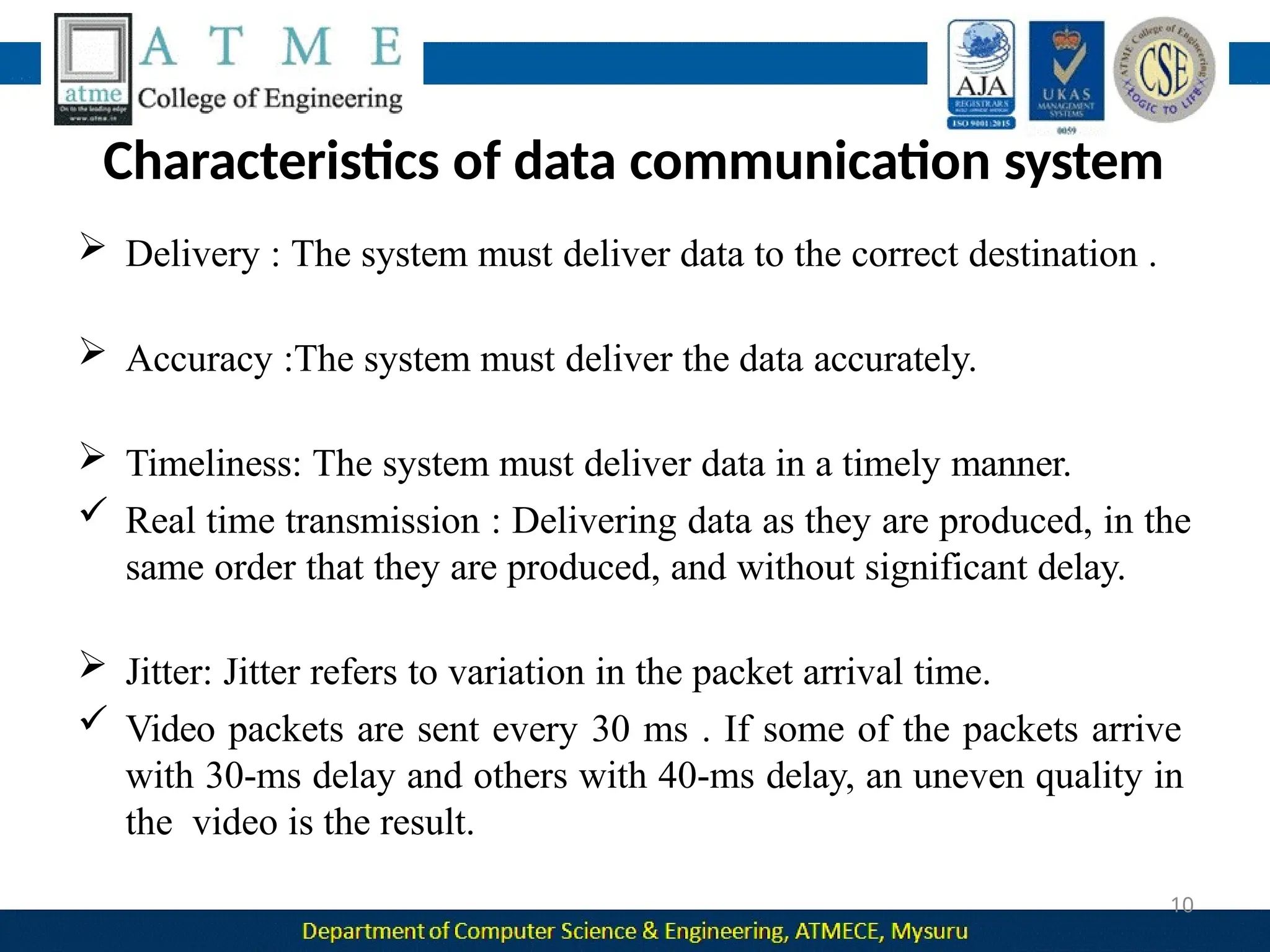
 Delivery : The system must deliver data to the correct destination .
 Accuracy :The system must deliver the data accurately.
 Timeliness: The system must deliver data in a timely manner.
 Real time transmission : Delivering data as they are produced, in the
same order that they are produced, and without significant delay.
 Jitter: Jitter refers to variation in the packet arrival time.
 Video packets are sent every 30 ms . If some of the packets arrive
with 30-ms delay and others with 40-ms delay, an uneven quality in
the video is the result.
Components of data communication
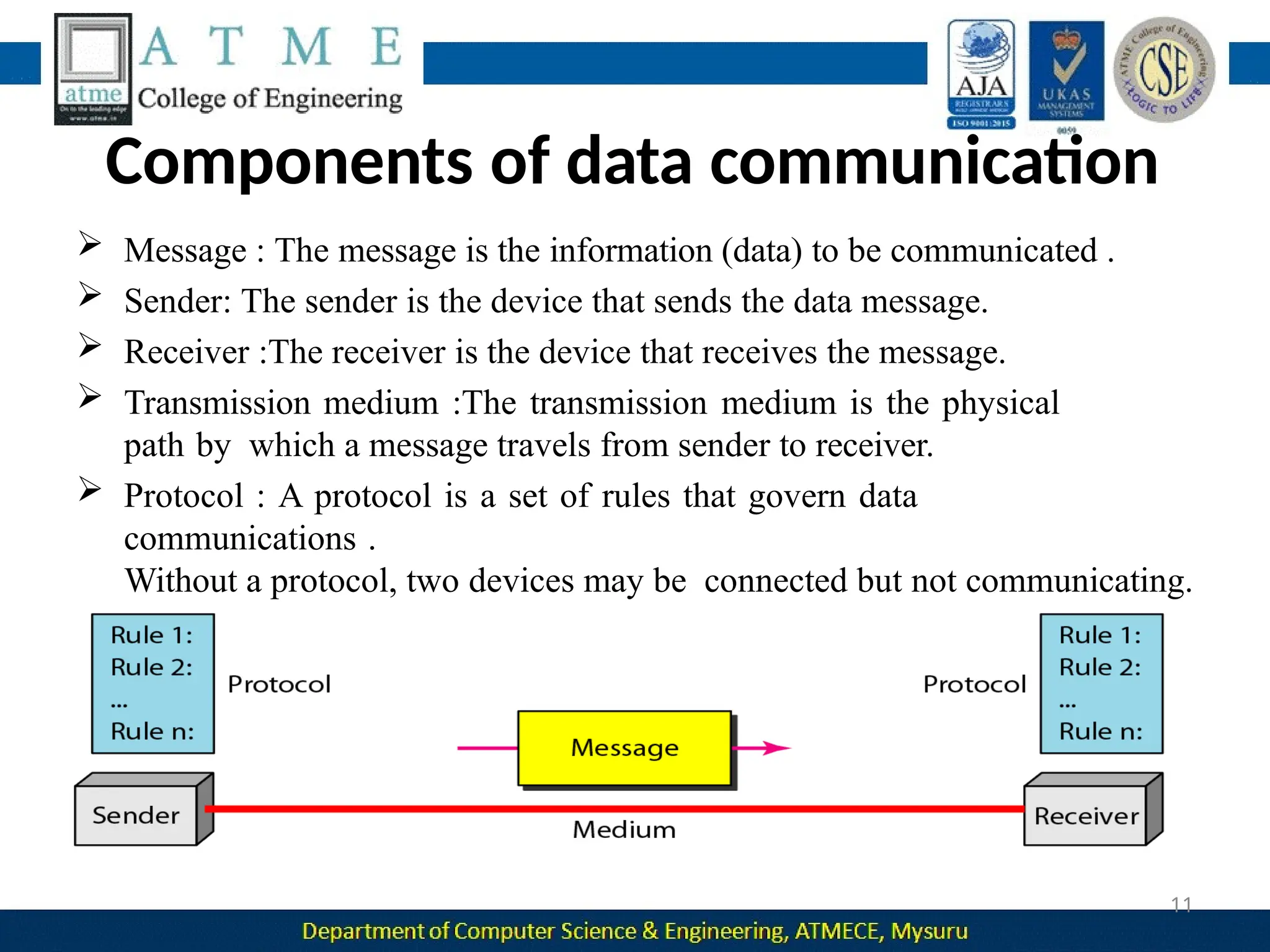
 Message : The message is the information (data) to be communicated .
 Sender: The sender is the device that sends the data message.
 Receiver :The receiver is the device that receives the message.
 Transmission medium :The transmission medium is the physical
path by which a message travels from sender to receiver.
 Protocol : A protocol is a set of rules that govern data
communications .
Without a protocol, two devices may be connected but not communicating.
11
Data Representation
12
 Text: It is represented as a bit pattern, a sequence of bits(0s or 1s).
Each set is called a code, and the process of representing symbols is
called coding.
 Numbers: It is also represented by bit patterns .
 Images: An image is composed of a matrix of pixels where each
pixel is a small dot . After an image is divided into pixels, each pixel
is assigned a bit pattern.
 Audio: It refers to the recording or broadcasting of sound or music.
It is continuous, not discrete.
 Video: Video refers to the recording or broadcasting of a picture or
movie. It can be continuous or discrete.
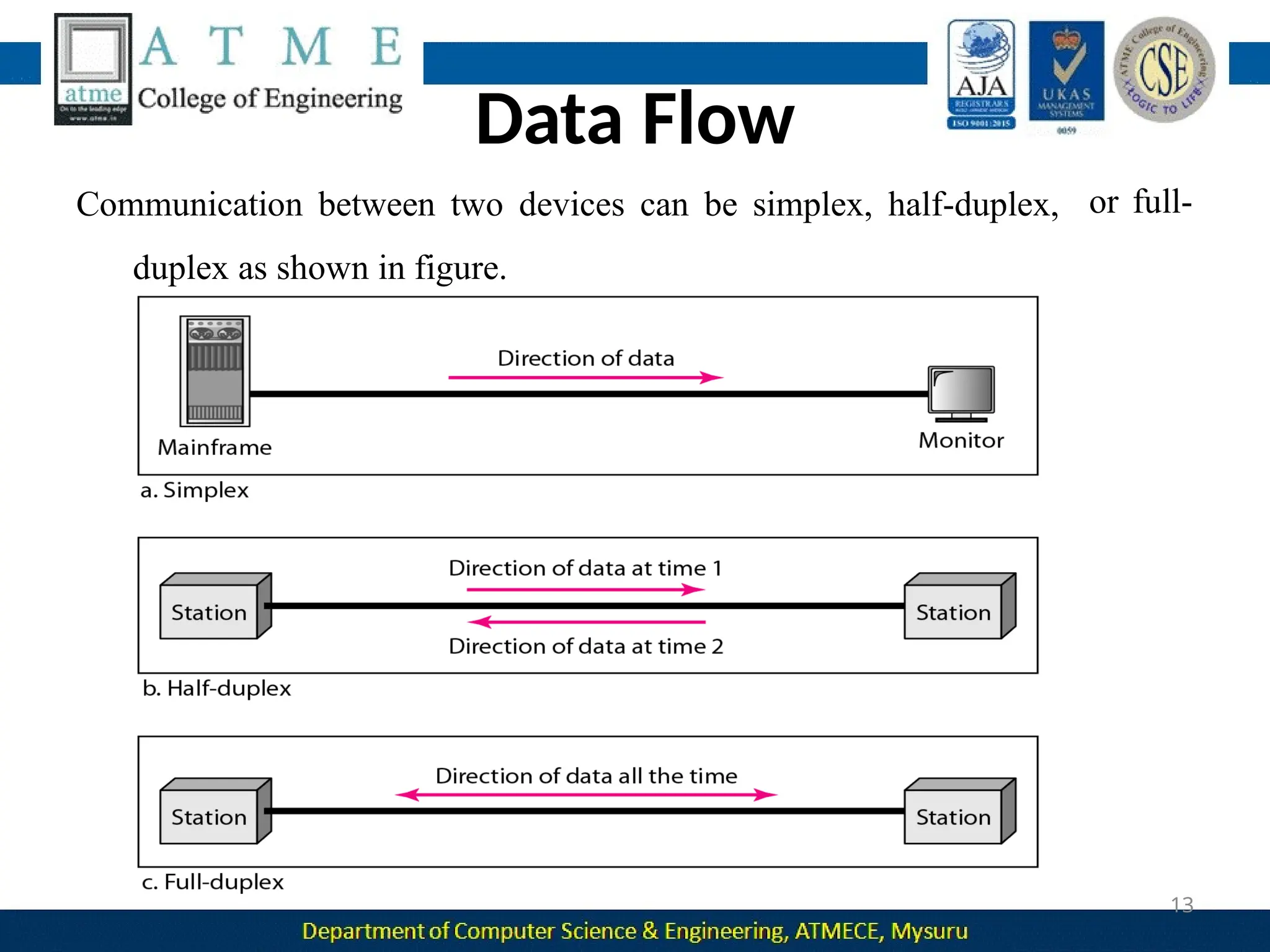
or full-
Data Flow
Communication between two devices can be simplex, half-duplex,
duplex as shown in figure.
13
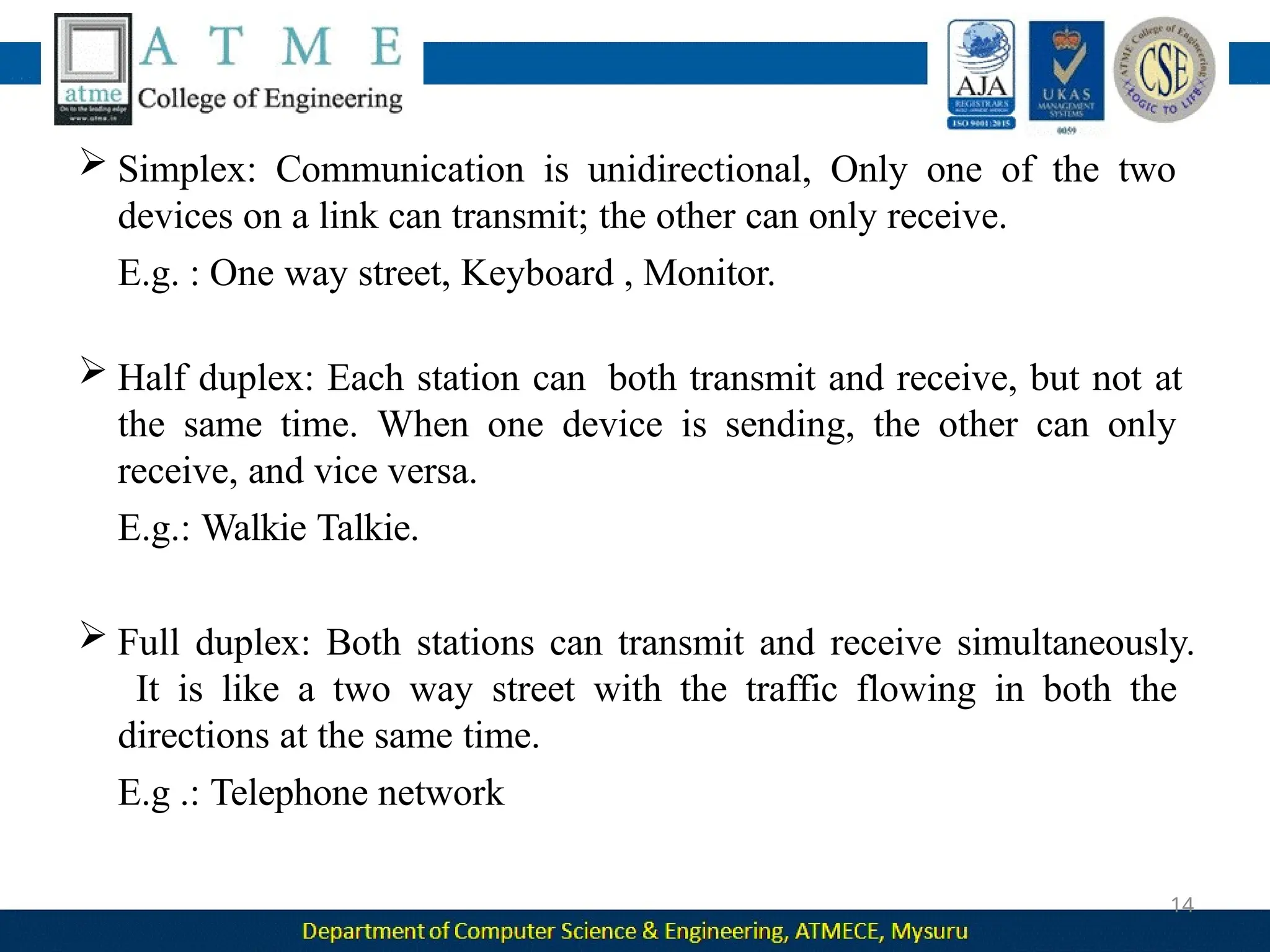
 Simplex: Communication is unidirectional, Only one of the two
devices on a link can transmit; the other can only receive.
E.g. : One way street, Keyboard , Monitor.
 Half duplex: Each station can both transmit and receive, but not at
the same time. When one device is sending, the other can only
receive, and vice versa.
E.g.: Walkie Talkie.
 Full duplex: Both stations can transmit and receive simultaneously.
It is like a two way street with the traffic flowing in both the
directions at the same time.
E.g .: Telephone network
14
Network
s
15
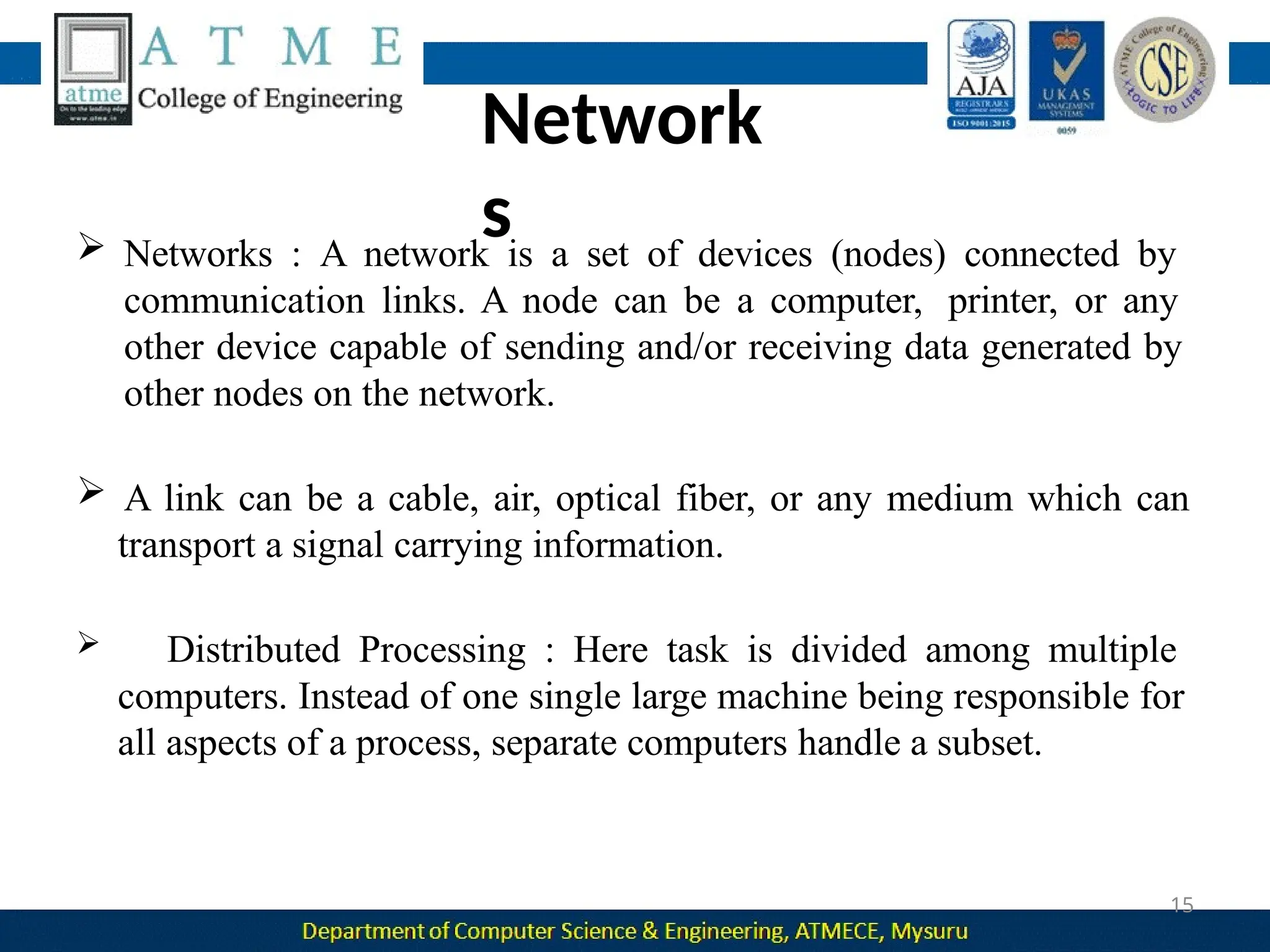
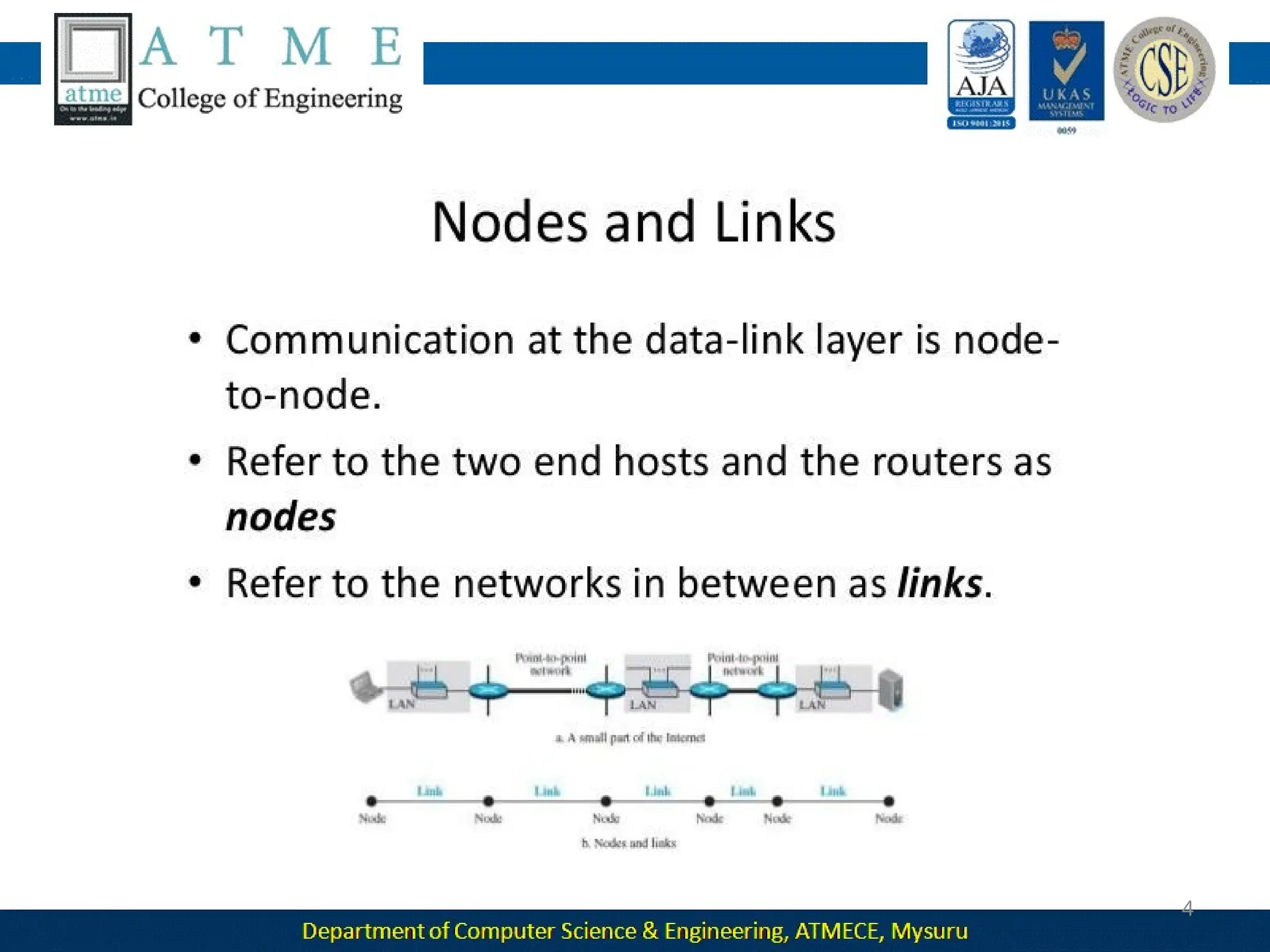
 Networks : A network is a set of devices (nodes) connected by
communication links. A node can be a computer, printer, or any
other device capable of sending and/or receiving data generated by
other nodes on the network.
 A link can be a cable, air, optical fiber, or any medium which can
transport a signal carrying information.
 Distributed Processing : Here task is divided among multiple
computers. Instead of one single large machine being responsible for
all aspects of a process, separate computers handle a subset.
Network Criteria
16
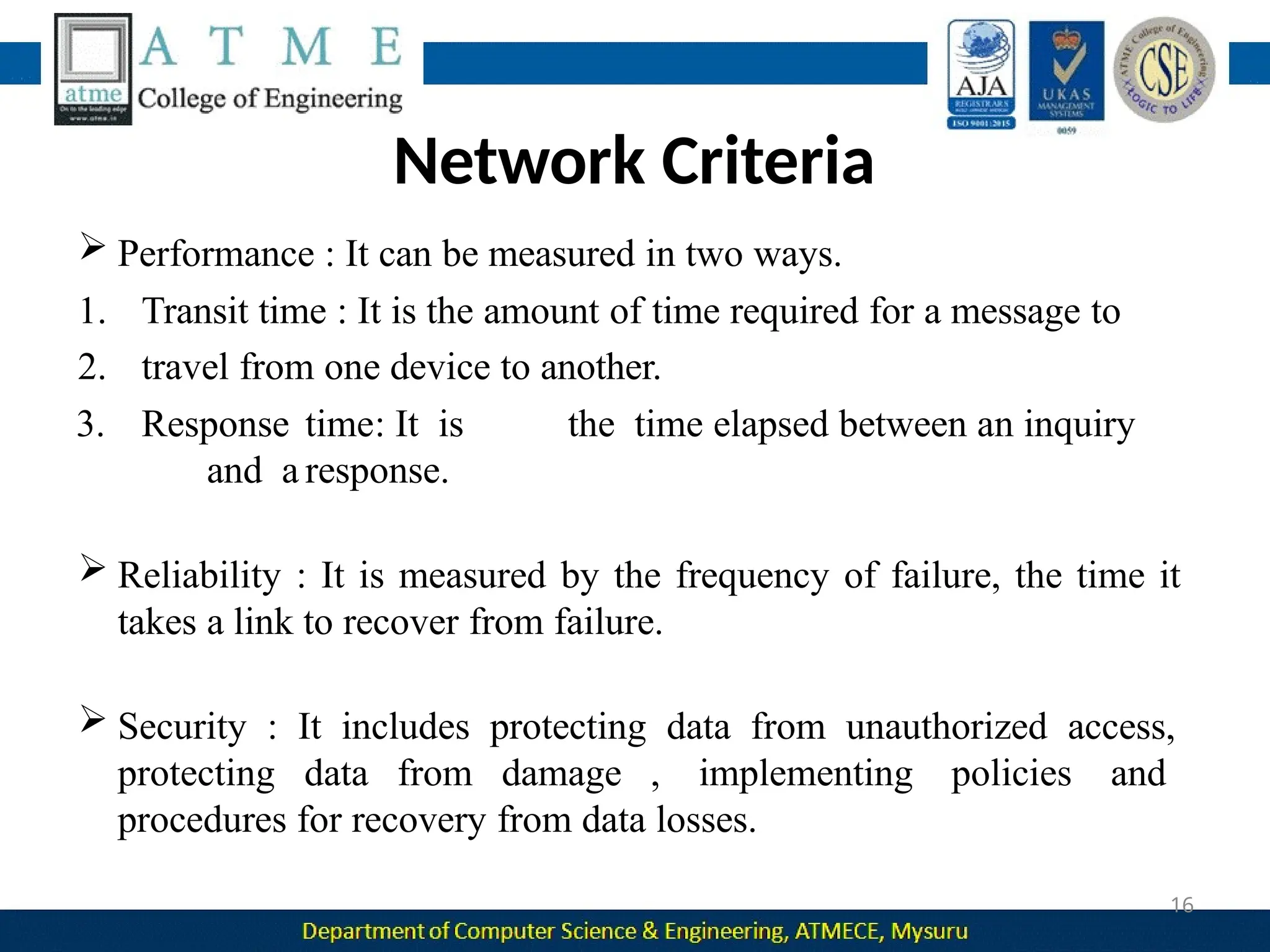
 Performance : It can be measured in two ways.
1. Transit time : It is the amount of time required for a message to
2. travel from one device to another.
3. Response time: It is the time elapsed between an inquiry
and a response.
 Reliability : It is measured by the frequency of failure, the time it
takes a link to recover from failure.
 Security : It includes protecting data from unauthorized access,
protecting data from damage , implementing policies and
procedures for recovery from data losses.
Physical Structures- Type of Connection
17
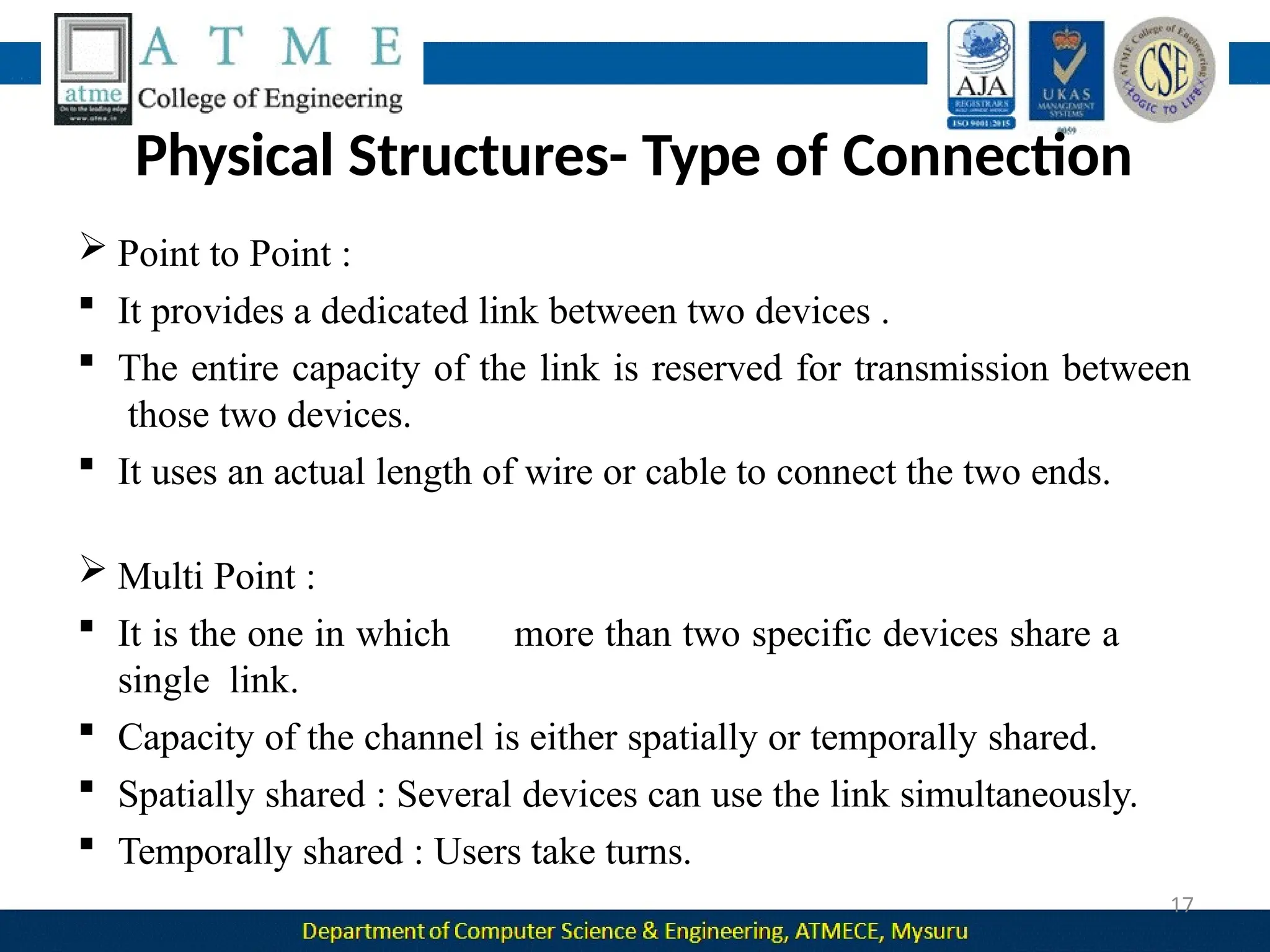
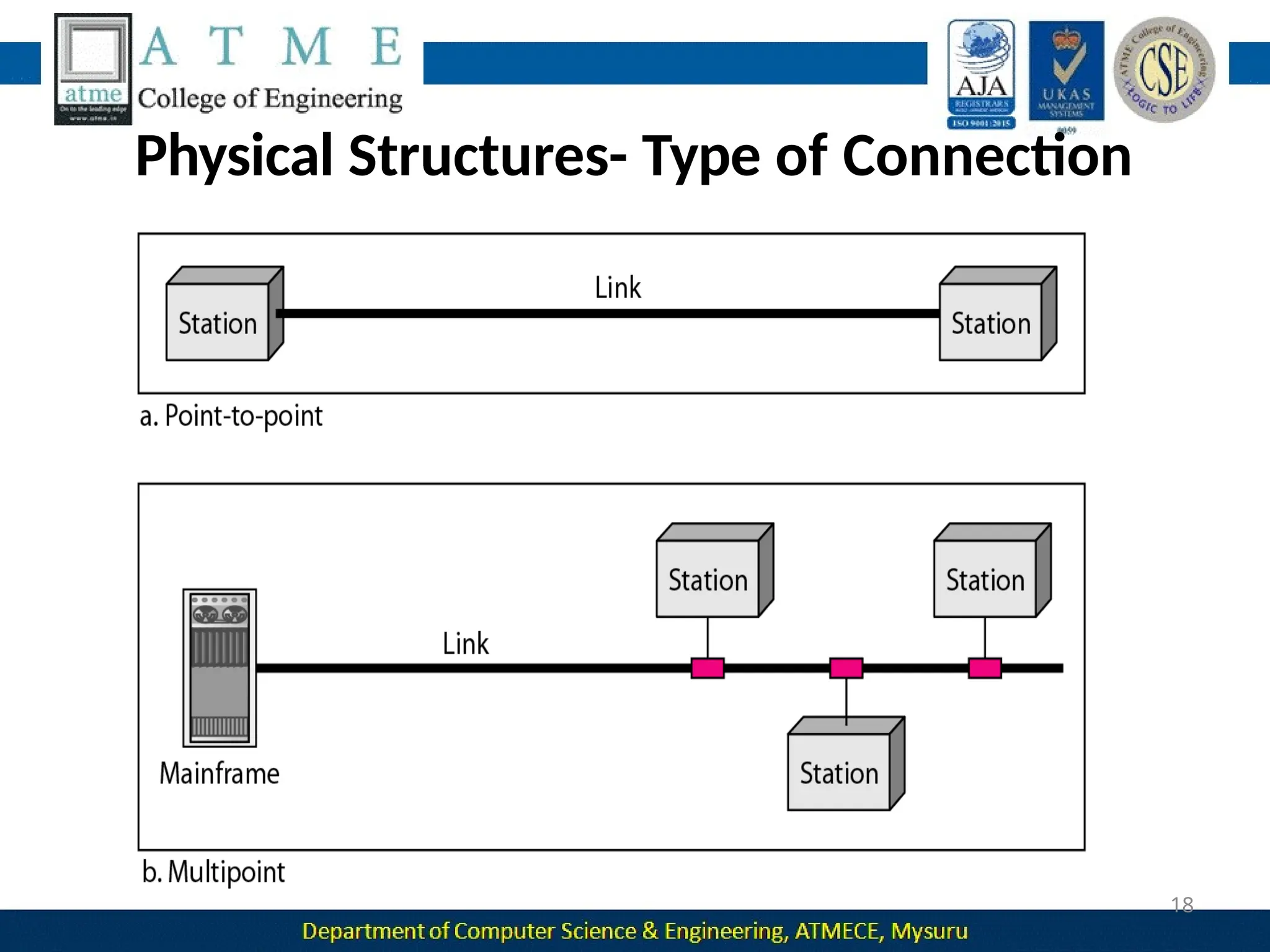
 Point to Point :
 It provides a dedicated link between two devices .
 The entire capacity of the link is reserved for transmission between
those two devices.
 It uses an actual length of wire or cable to connect the two ends.
 Multi Point :
 It is the one in which more than two specific devices share a
single link.
 Capacity of the channel is either spatially or temporally shared.
 Spatially shared : Several devices can use the link simultaneously.
 Temporally shared : Users take turns.
Physical Structures- Type of Connection
18
Physical Topology
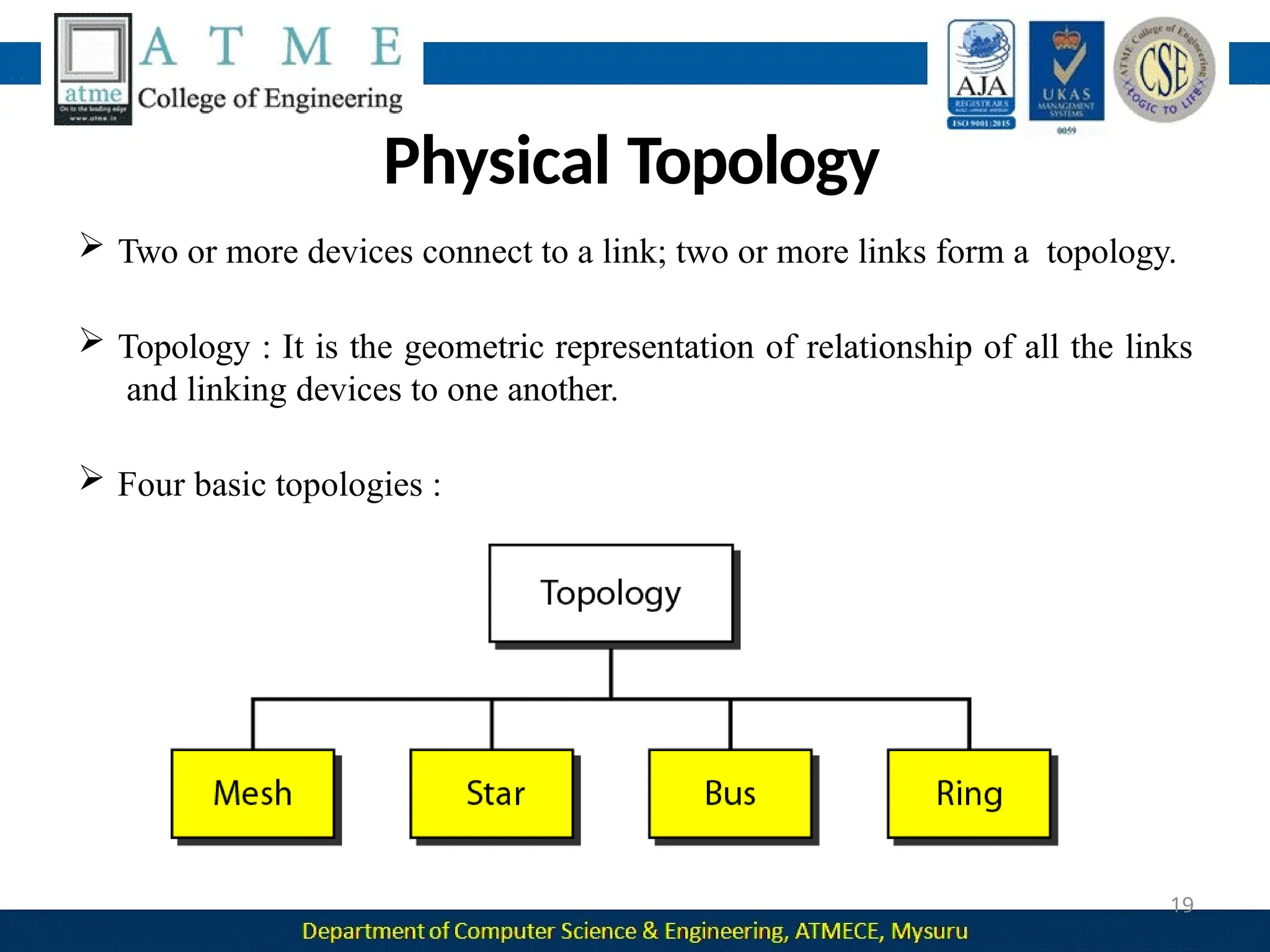
 Two or more devices connect to a link; two or more links form a topology.
 Topology : It is the geometric representation of relationship of all the links
and linking devices to one another.
 Four basic topologies :
19
Mesh Topology
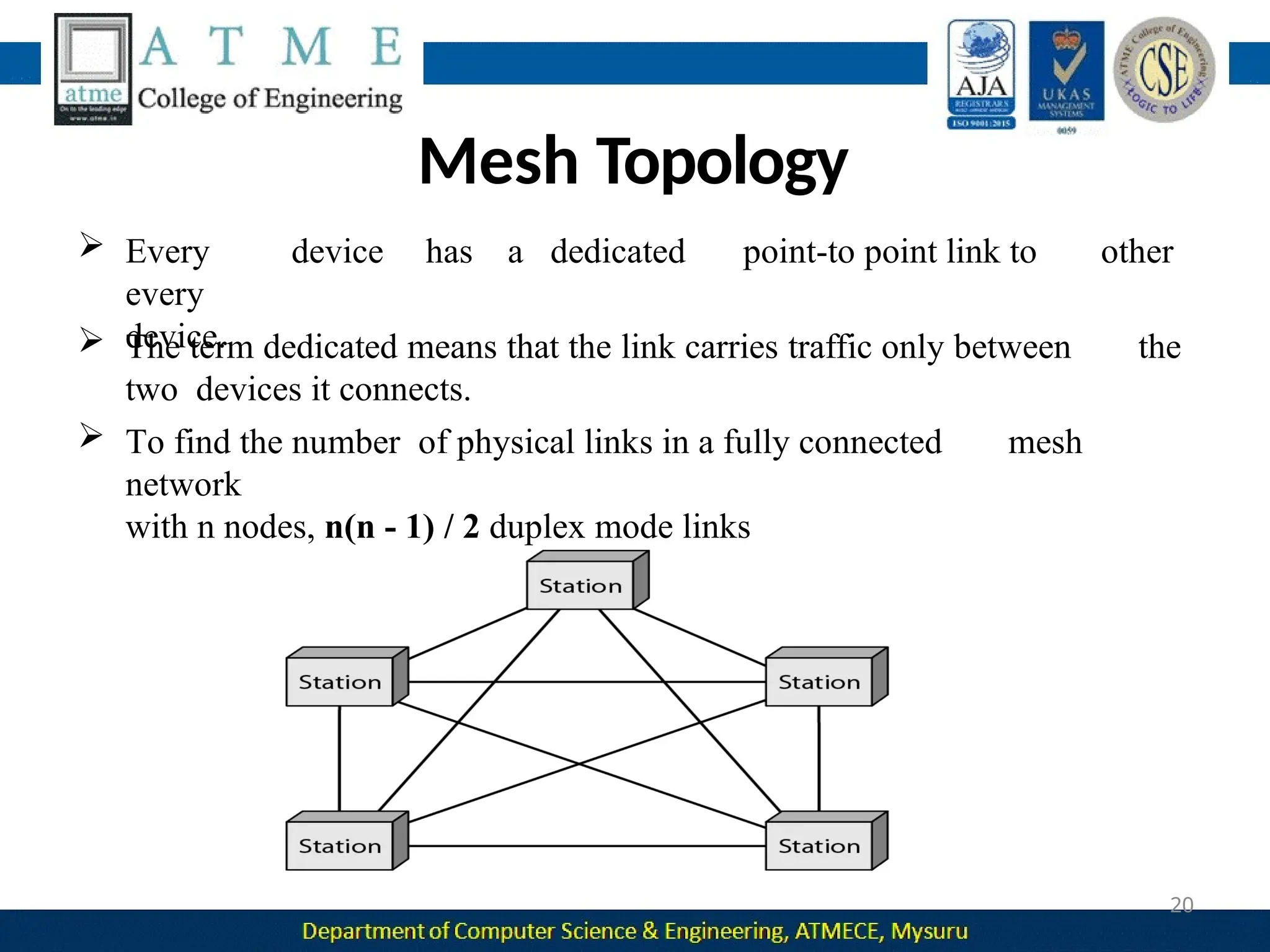
other
 Every device has a dedicated point-to point link to
every
device.
 The term dedicated means that the link carries traffic only between the
two devices it connects.
 To find the number of physical links in a fully connected mesh
network
with n nodes, n(n - 1) / 2 duplex mode links
20
Advantages :
 A mesh topology is robust. If one link becomes unusable, it does not
incapacitate the entire system.
 Point-to-point links make fault identification and fault
isolation easy.
 Privacy or security : When every message travels along a dedicated
line, only the intended recipient sees it.
21
can be prohibitively
Disadvantages :
 Installation and reconnection are difficult.
 The hardware required to connect each link
expensive.
 The sheer bulk of the wiring can be greater than the available space
can accommodate.
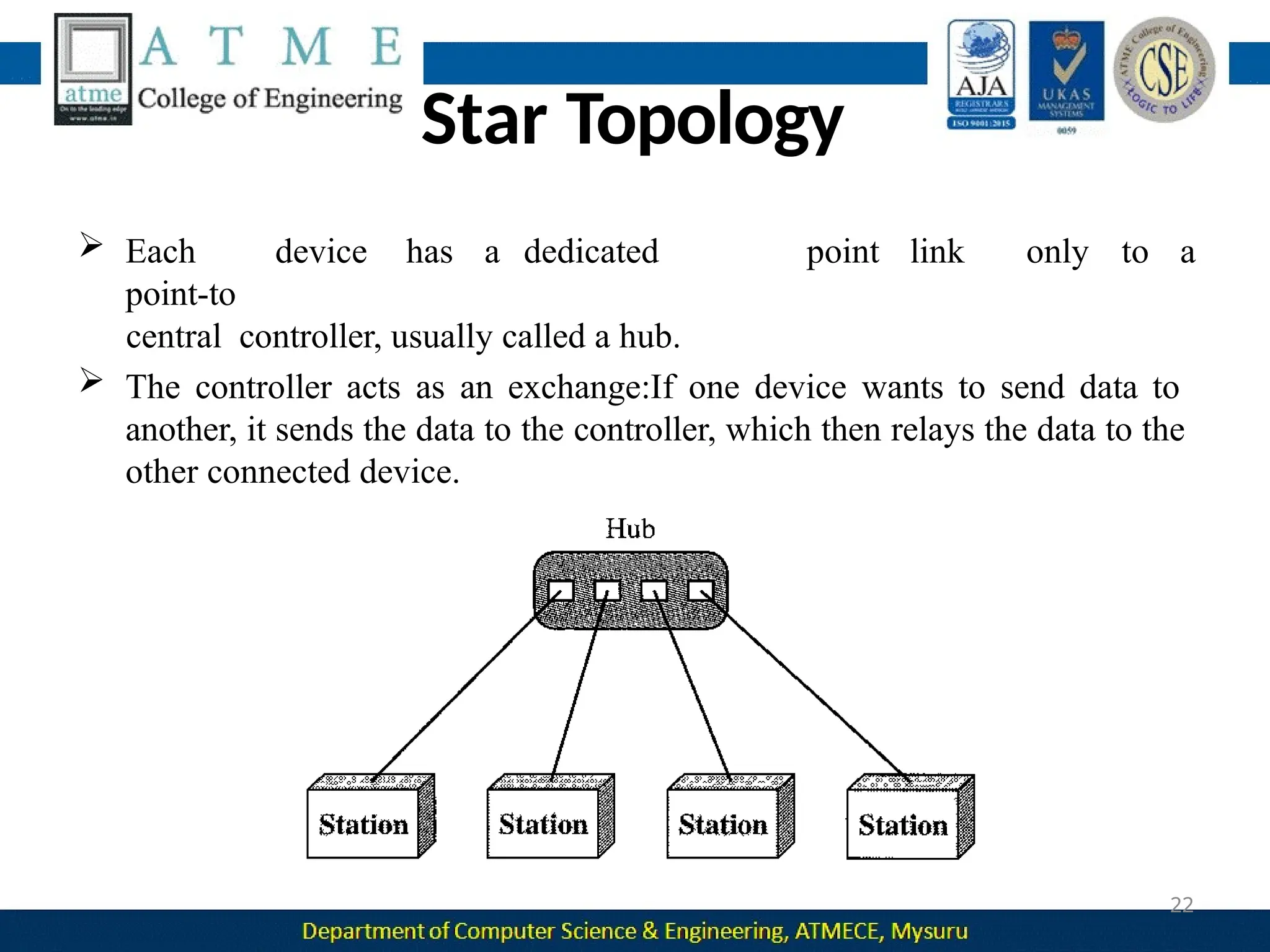
Star Topology
point link only to a
 Each device has a dedicated
point-to
central controller, usually called a hub.
 The controller acts as an exchange:If one device wants to send data to
another, it sends the data to the controller, which then relays the data to the
other connected device.
22
Advantages:
 A star topology is less expensive than a mesh topology. Each device
needs only one link and one I/O port to connect it to any number of
others.
 Easy to install and reconfigure.
 Requires less cabling, less expensive than mesh topology.
 Robustness: If one link fails, only that link is affected. All other
links remain active. As a result fault identification and fault
isolation becomes easy.
Disadvantages :
 Dependency of whole topology on one single point, the hub.
E.g. : LAN
23
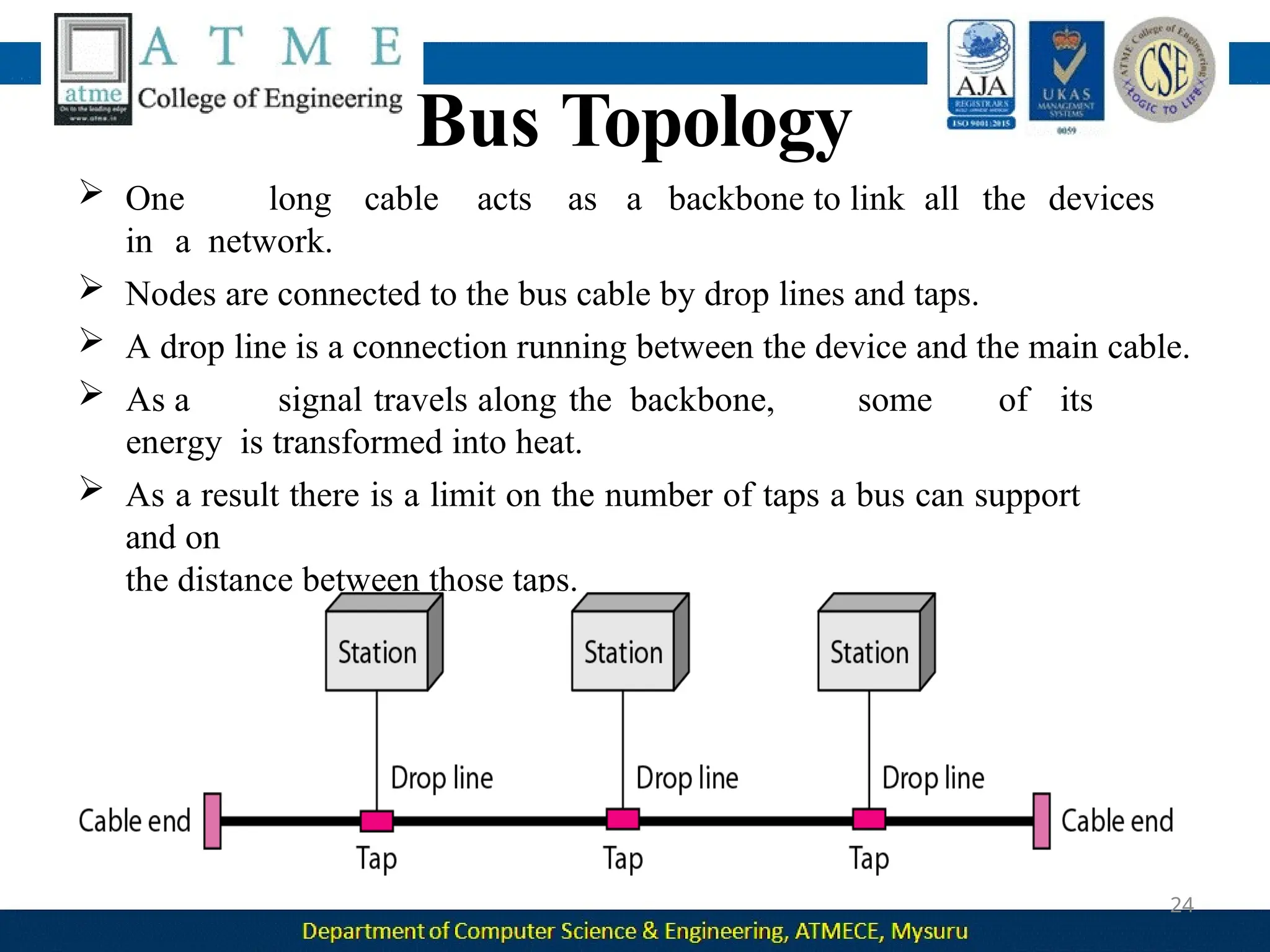
Bus Topology
 One long cable acts as a backbone to link all the devices
in a network.
 Nodes are connected to the bus cable by drop lines and taps.
 A drop line is a connection running between the device and the main cable.
 As a signal travels along the backbone, some of its
energy is transformed into heat.
 As a result there is a limit on the number of taps a bus can support
and on
the distance between those taps.
24
efficient
25
Advantages:
 Ease of installation : Backbone cable can be laid along the most
path, then connected to the nodes and drop lines.
 Signal reflection at the taps can cause degradation in quality. This
degradation can be controlled by limiting the number and spacing of
devices connected to a given length of cable.
 Adding new devices may therefore require modification or replacement
of
the backbone.
 Redundancy is eliminated : Only the backbone cable stretches through
the entire facility.
Disadvantages :
 A bus is usually designed to be optimally efficient at installation. It
 can therefore be difficult to add new devices.
 A fault or break in the bus cable stops all transmission, and the damaged
area reflects signals back in the direction of origin, creating noise in both
directions.
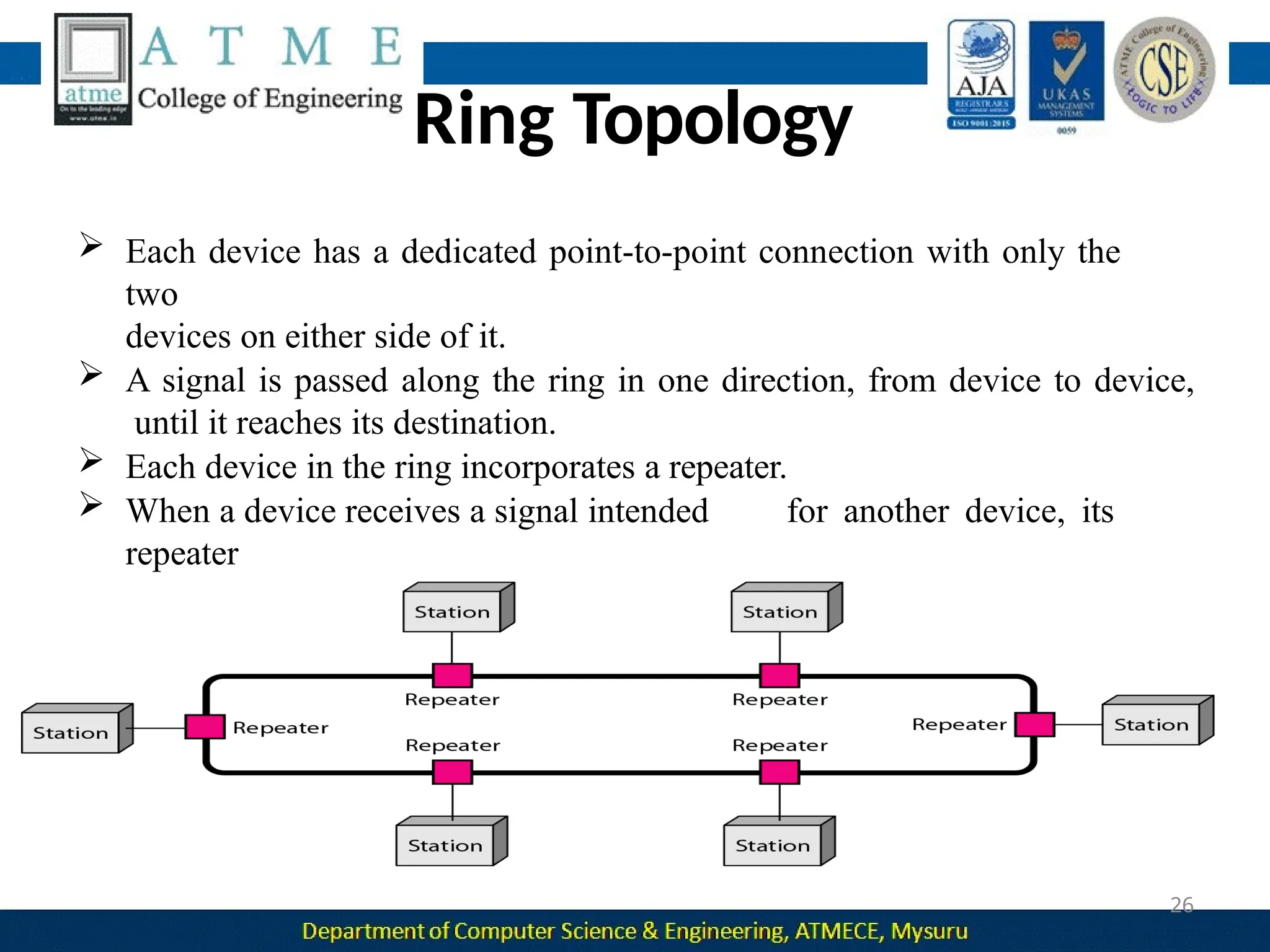
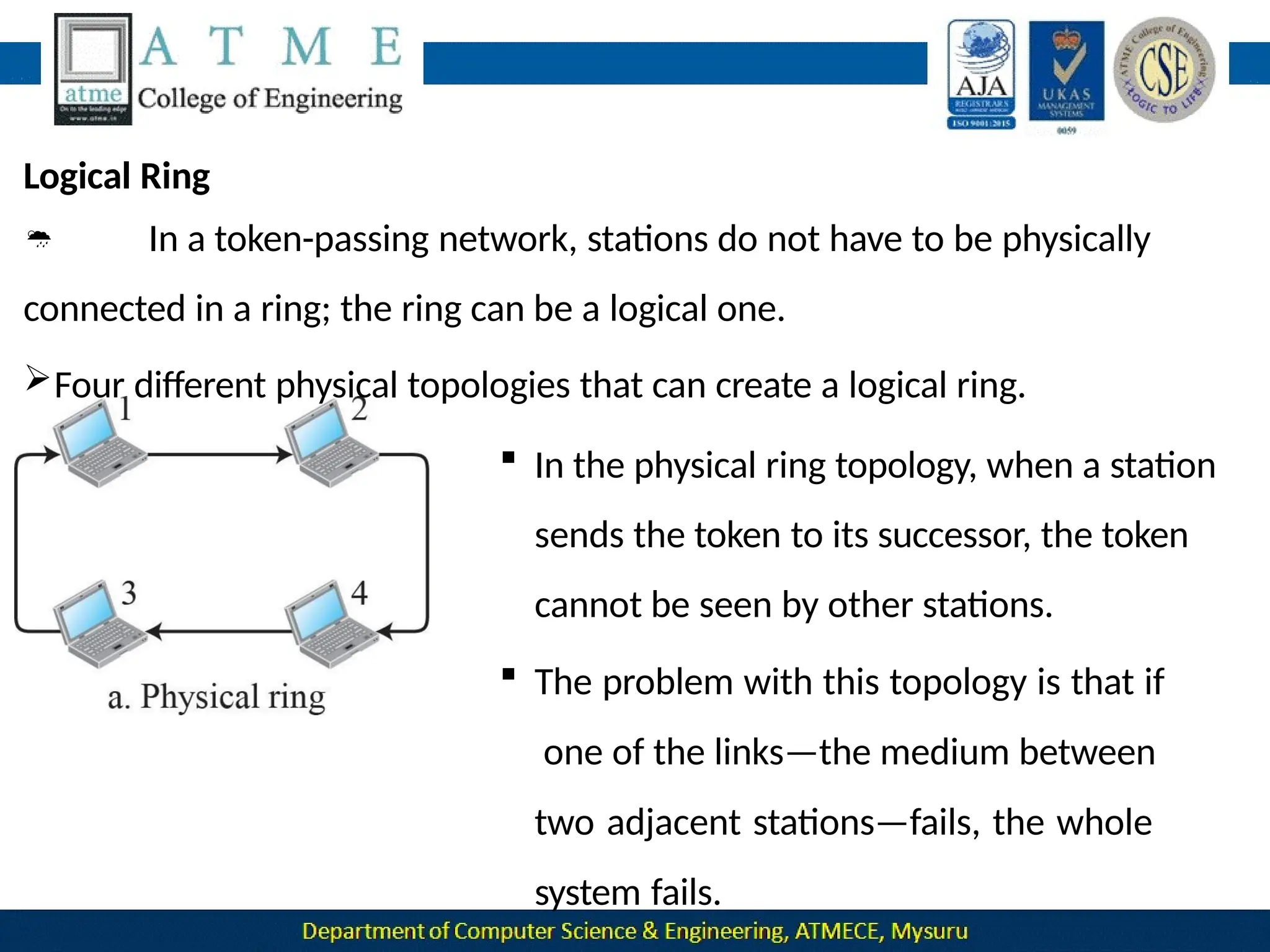
Ring Topology
 Each device has a dedicated point-to-point connection with only the
two
devices on either side of it.
 A signal is passed along the ring in one direction, from device to device,
until it reaches its destination.
 Each device in the ring incorporates a repeater.
 When a device receives a signal intended for another device, its
repeater
regenerates the bits and passes them along.
26
Advantages :
 A ring is
27
relatively
device is
easy
linked to
to install and
only its
immediate
reconfigure. Each
neighbors.
 To add or delete a device requires changing only two connections.
 Fault isolation is simplified. Here, a signal is circulating at all times.
If one device does not receive a signal within a specified period, it
can issue an alarm.
 The alarm alerts the network operator to the problem and its
location.
Disadvantages :
 Unidirectional traffic can be a disadvantage. In a simple ring, a
break in the ring can disable the entire network.
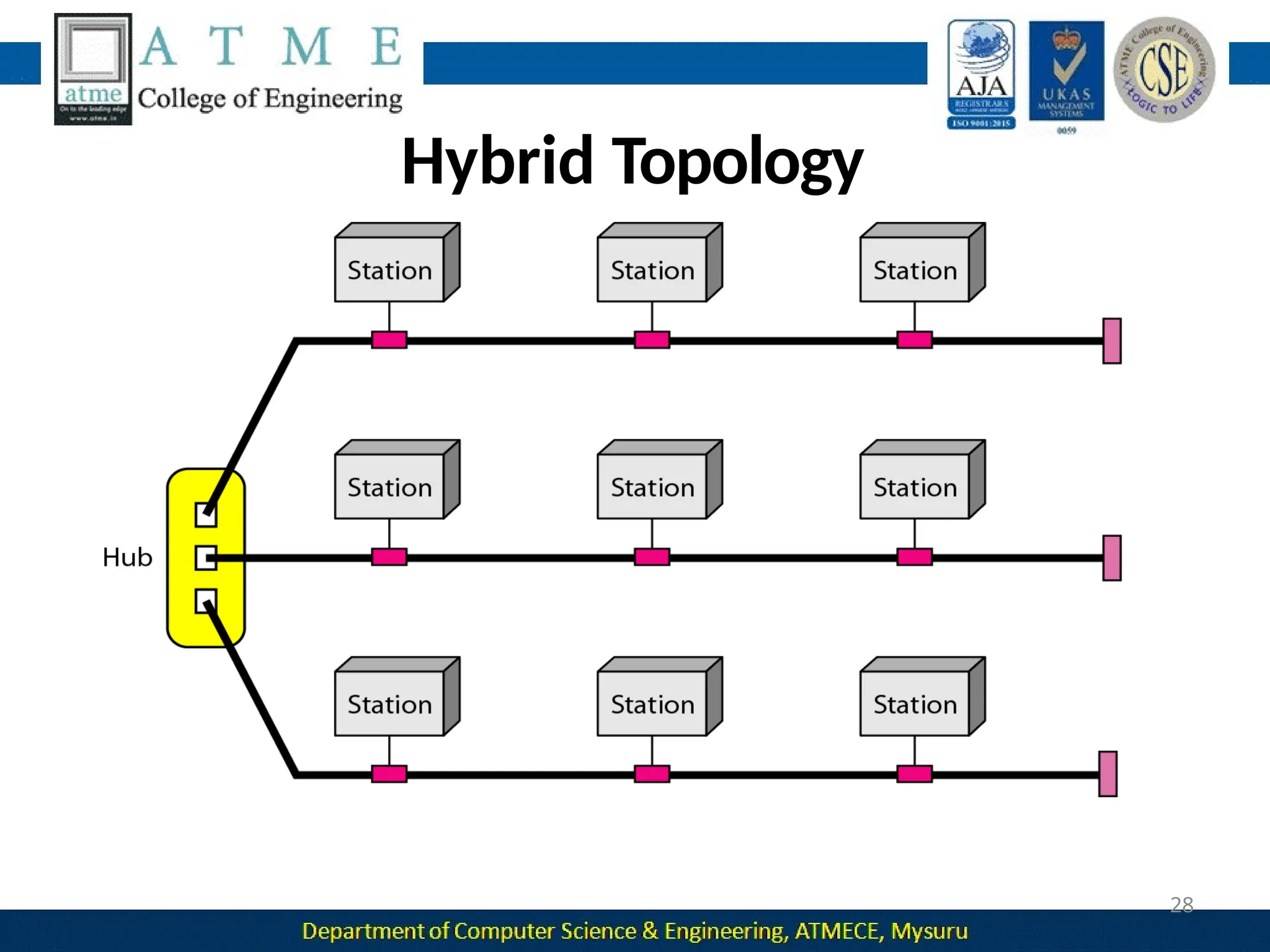
Hybrid Topology
28
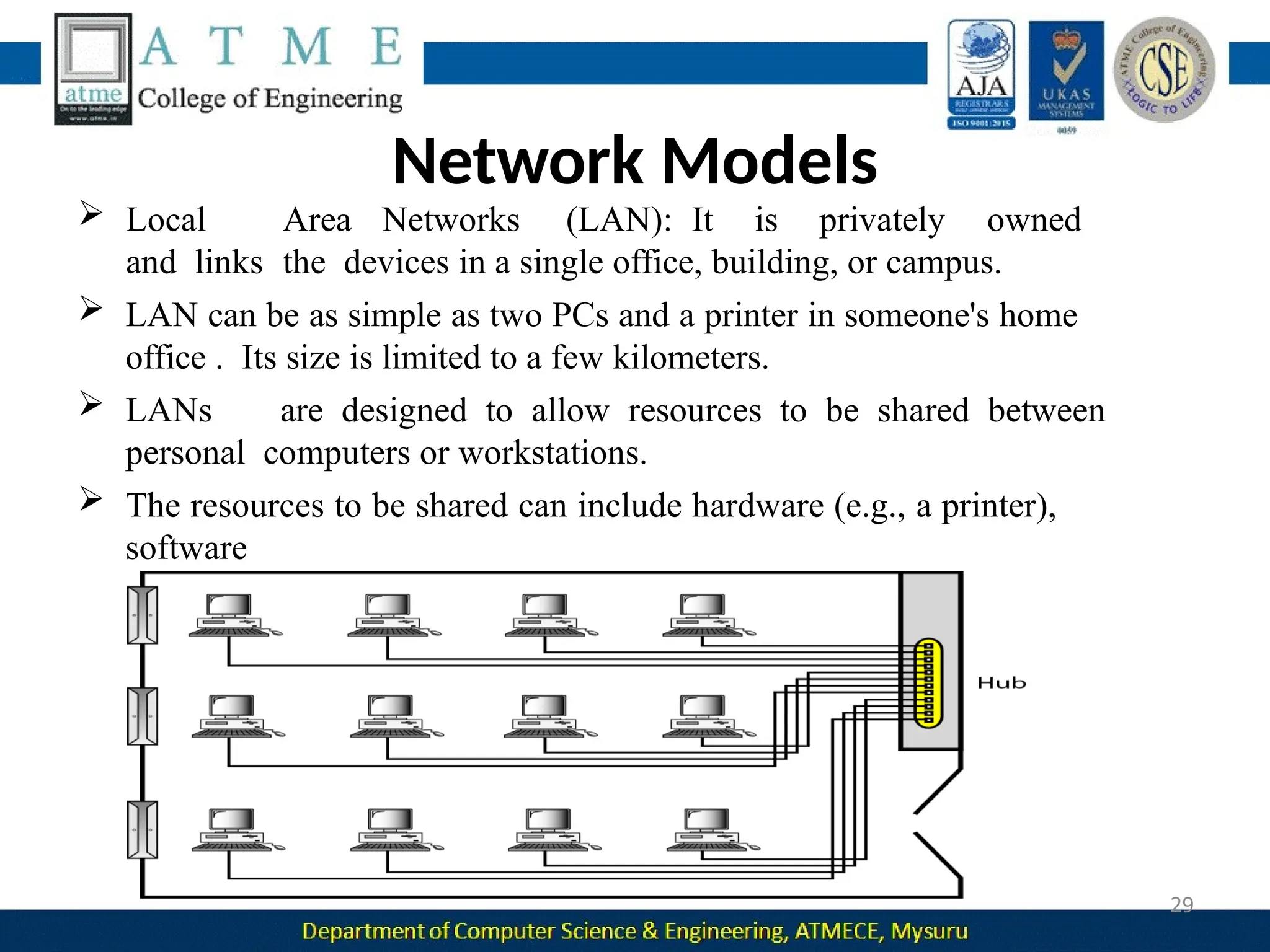
Network Models
 Local Area Networks (LAN): It is privately owned
and links the devices in a single office, building, or campus.
 LAN can be as simple as two PCs and a printer in someone's home
office . Its size is limited to a few kilometers.
 LANs are designed to allow resources to be shared between
personal computers or workstations.
 The resources to be shared can include hardware (e.g., a printer),
software
(e.g., an application program).
29
Network Models
30
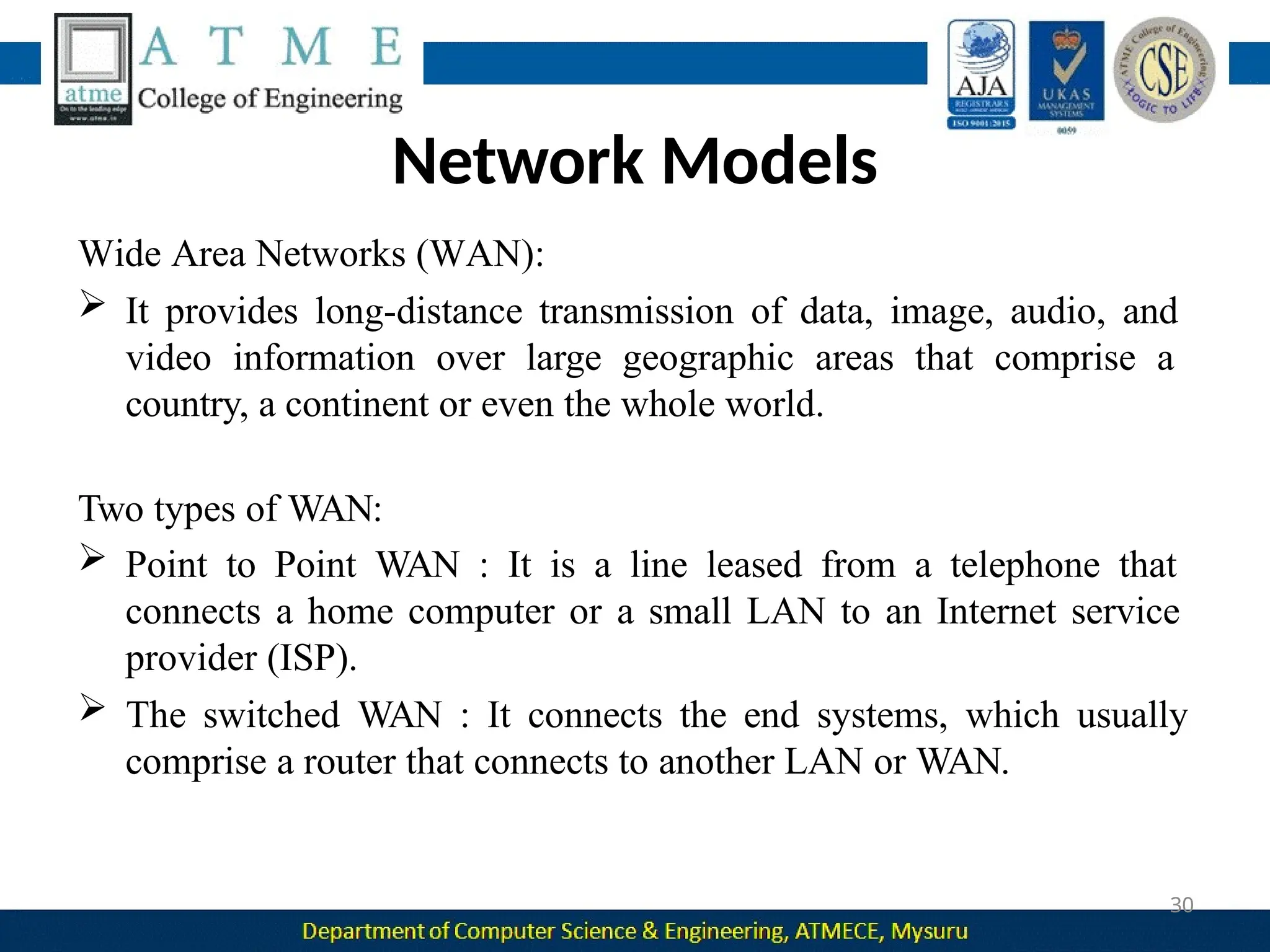
Wide Area Networks (WAN):
 It provides long-distance transmission of data, image, audio, and
video information over large geographic areas that comprise a
country, a continent or even the whole world.
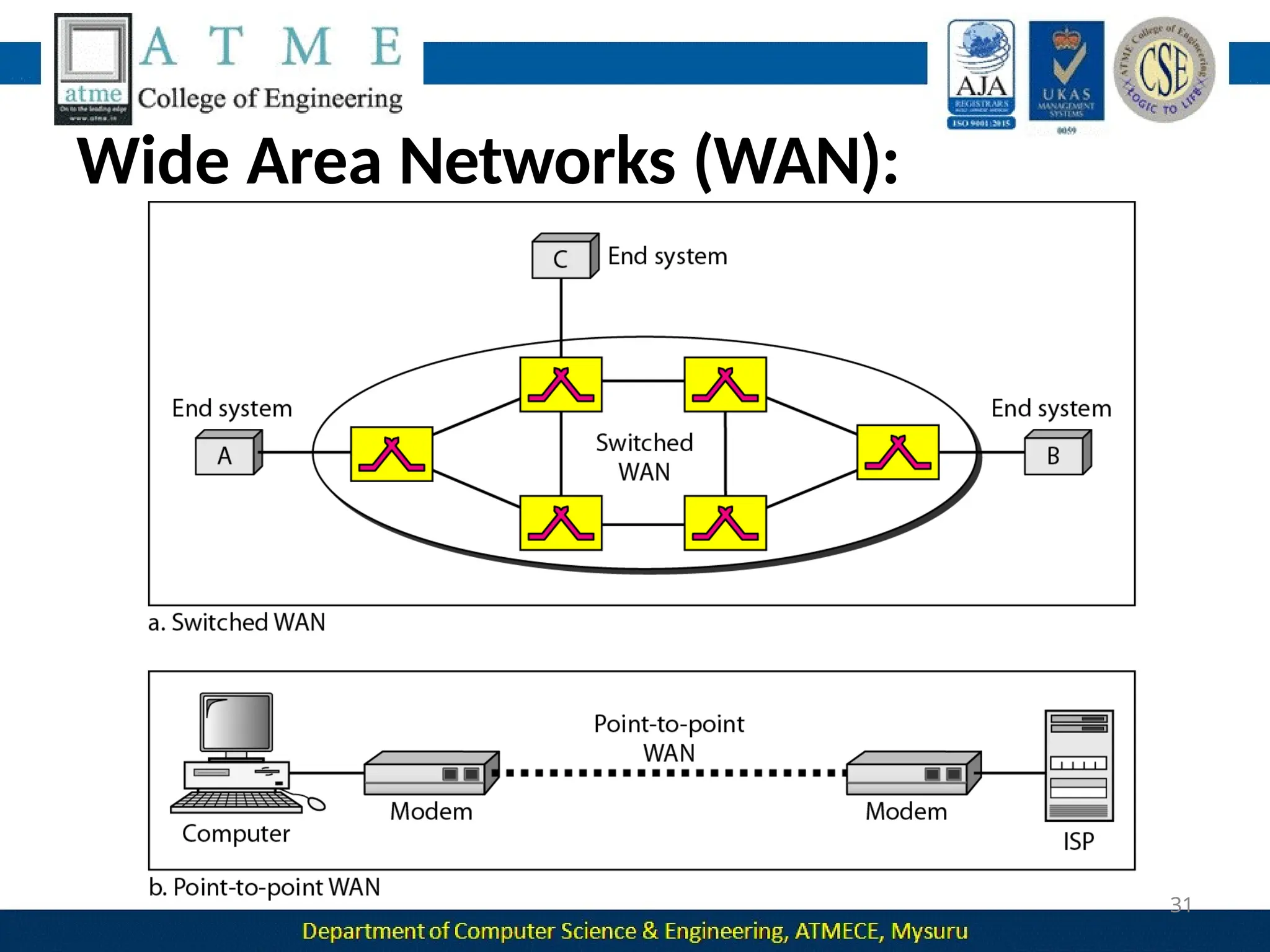
Two types of WAN:
 Point to Point WAN : It is a line leased from a telephone that
connects a home computer or a small LAN to an Internet service
provider (ISP).
 The switched WAN : It connects the end systems, which usually
comprise a router that connects to another LAN or WAN.
Wide Area Networks (WAN):
31
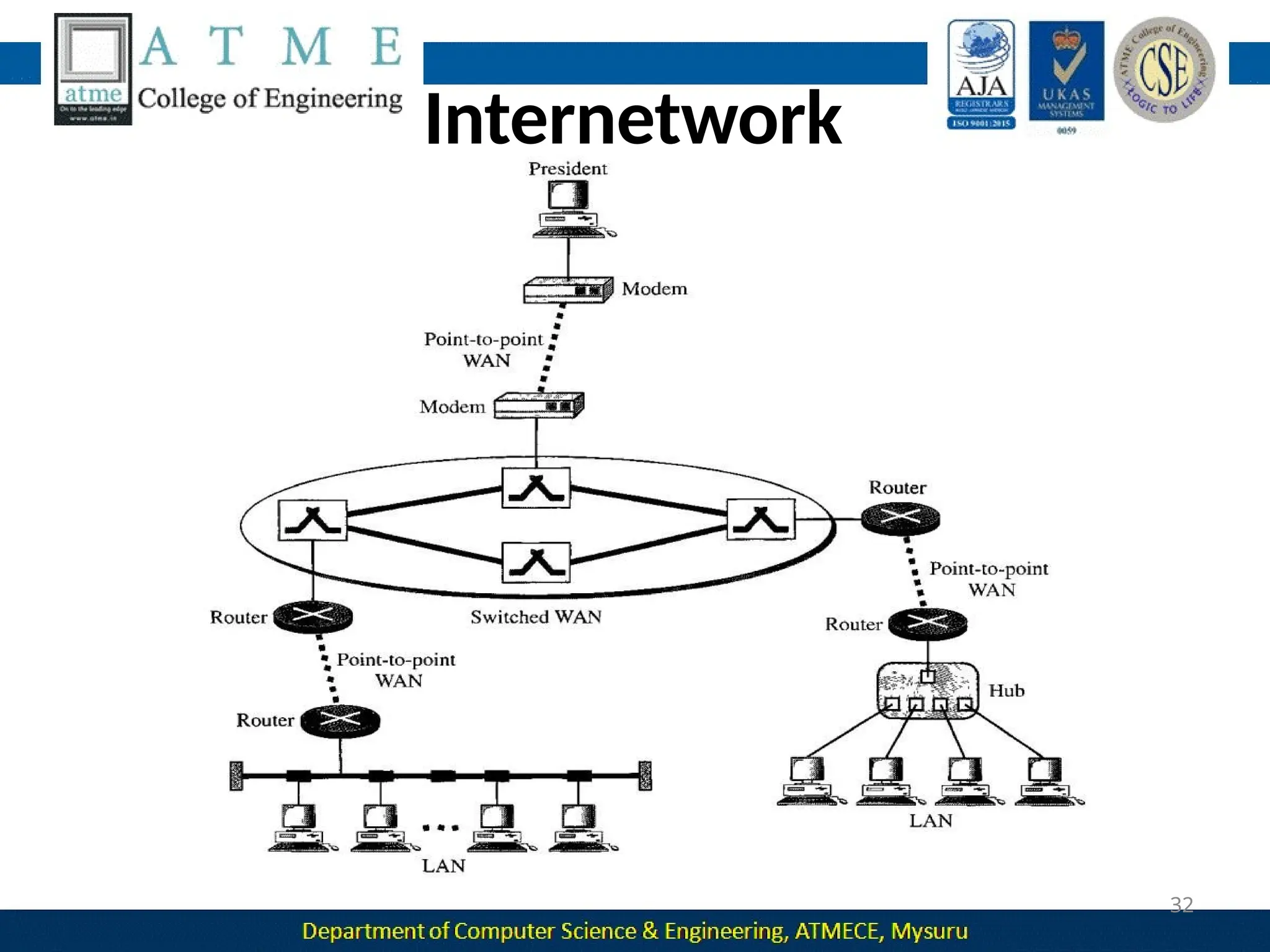
Internetwork
32
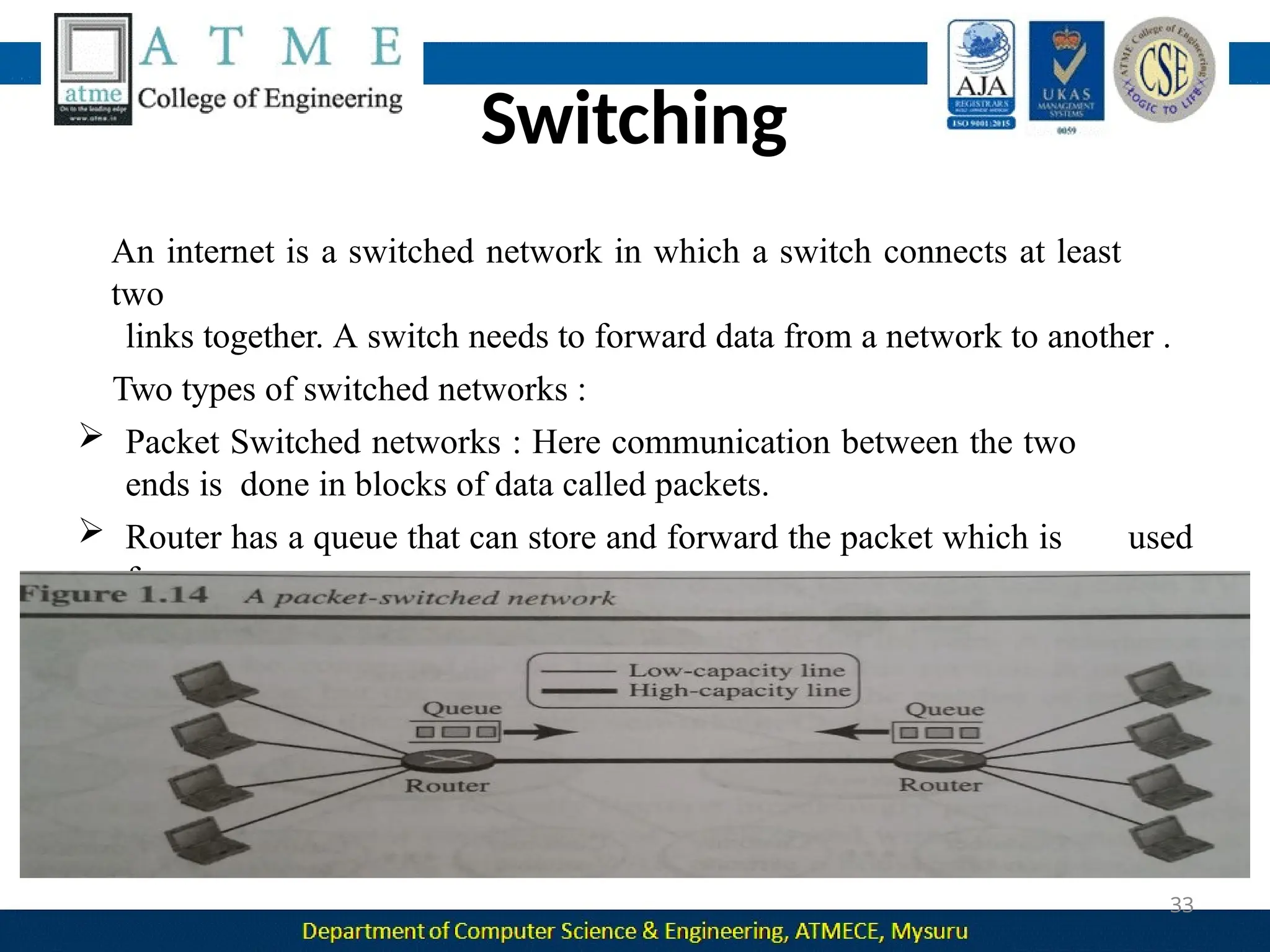
Switching
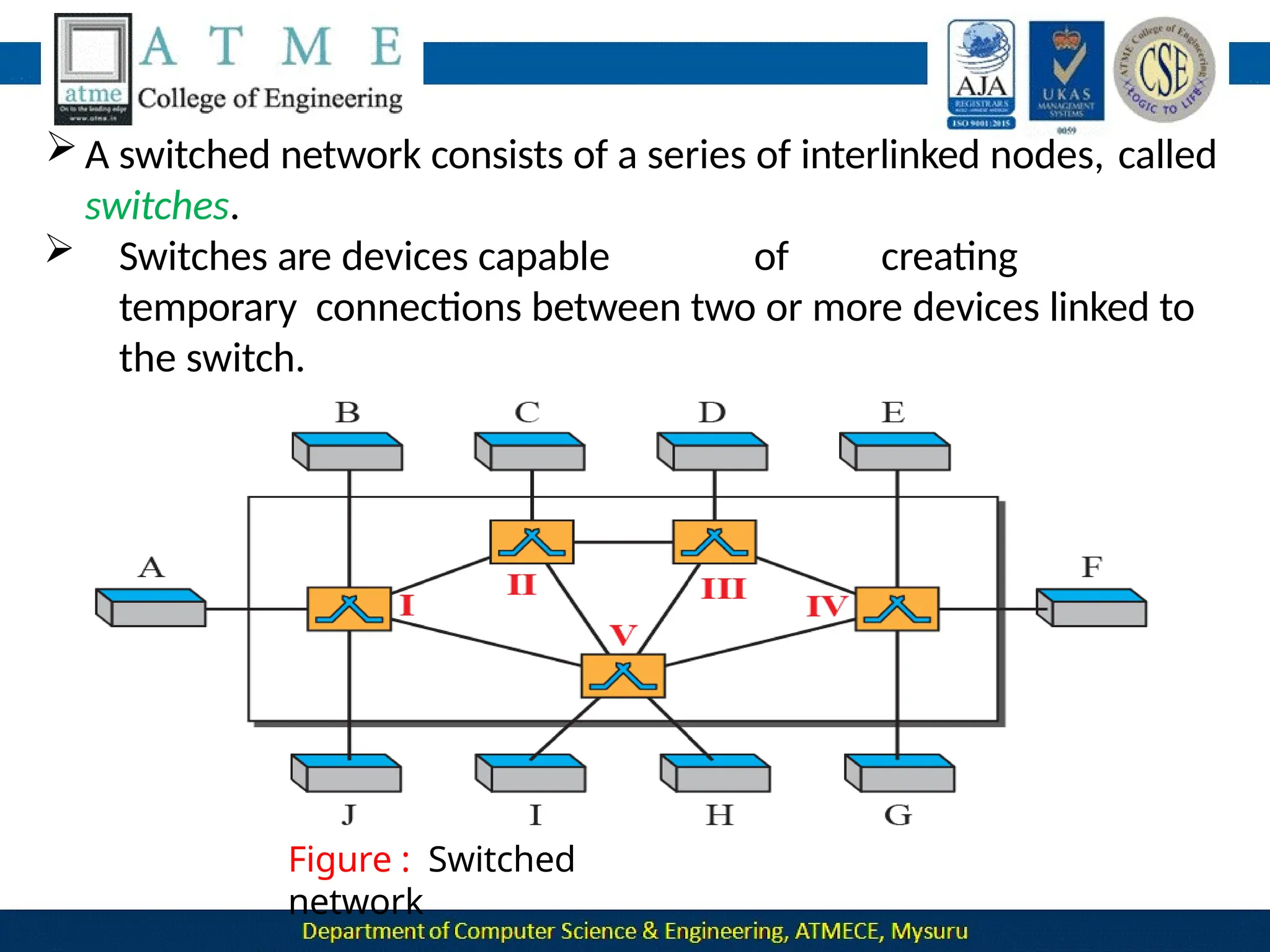
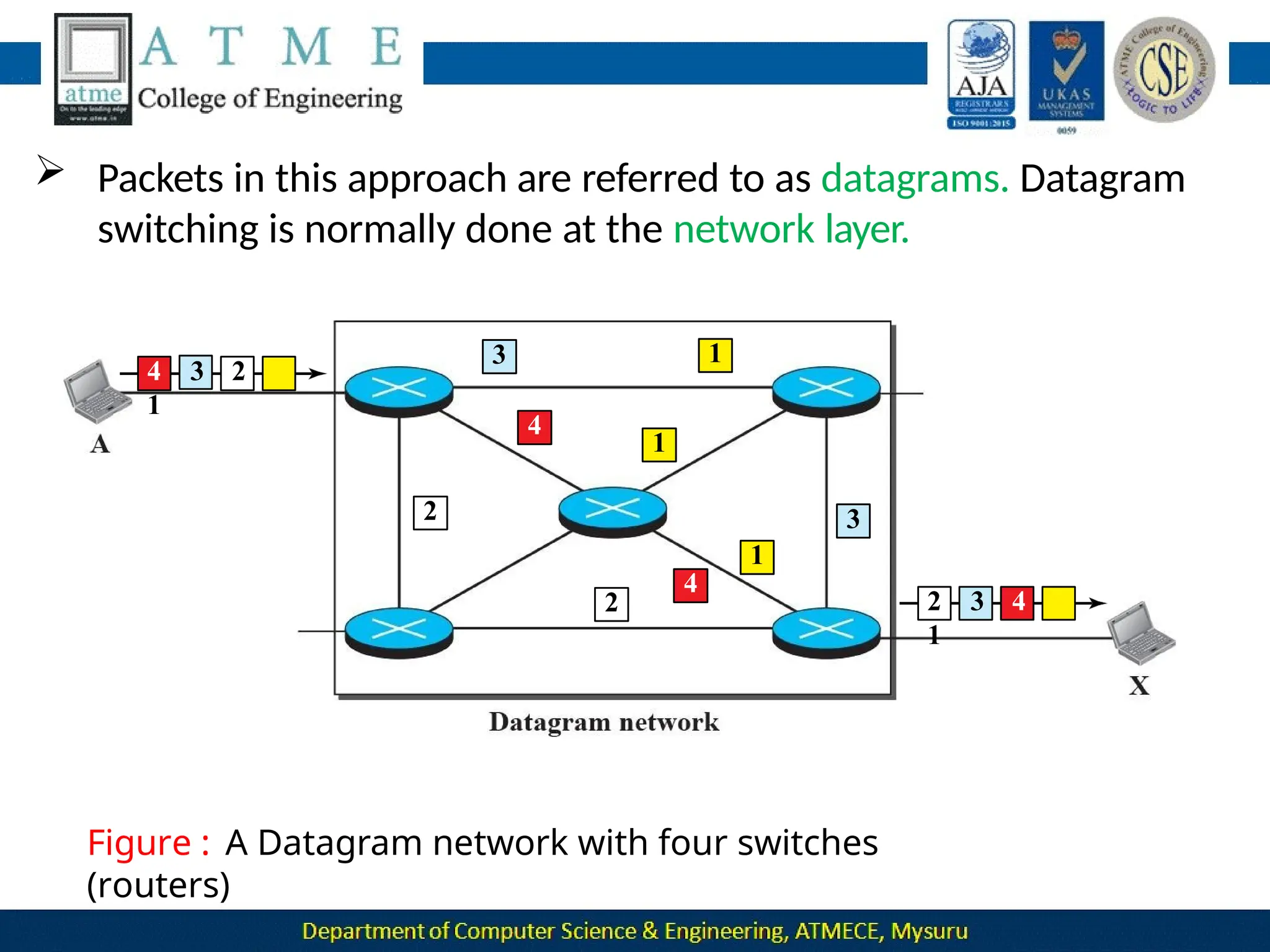
An internet is a switched network in which a switch connects at least
two
links together. A switch needs to forward data from a network to another .
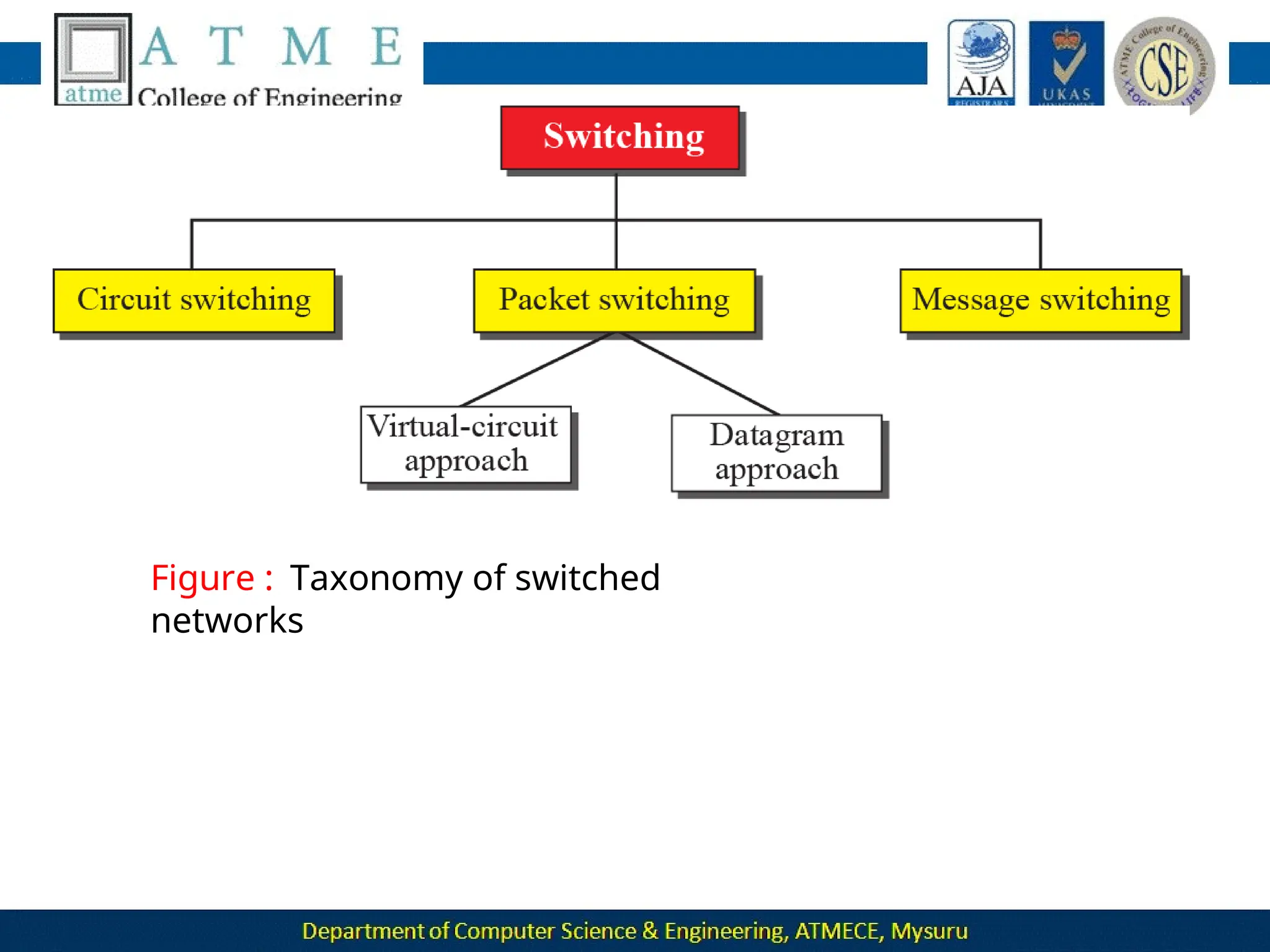
Two types of switched networks :
 Packet Switched networks : Here communication between the two
ends is done in blocks of data called packets.
 Router has a queue that can store and forward the packet which is used
for
longer distance transmission.
33
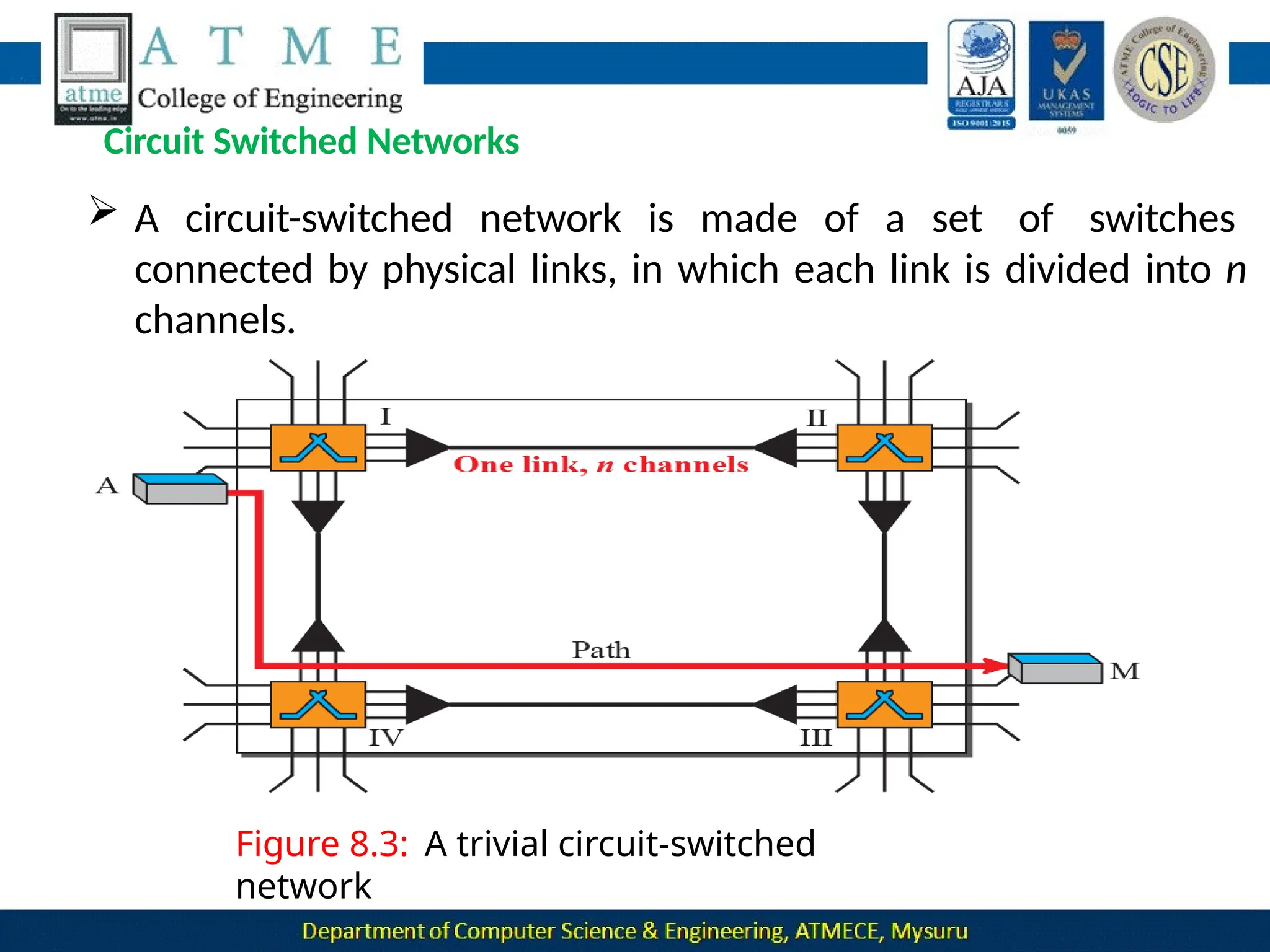
 Circuit Switched networks : Here a dedicated connection called a
circuit is available between two end systems.
 Switches are used to connect end system within a network.
 The thick line connecting two switches is a high capacity
communication line that can handle fo
 ur voice communication at the same time.
34
The Internet
 Backbone networks are large networks owned by companies like
Sprint , Verizon , AT&T and NTT. They are connected through peering
points.
 Provider networks are smaller networks uses the services of the
backbones
for a fee.
 Customer networks that actually use the services provided by the internet.
35
Accessing the Internet
36
Using Telephone Networks
 Dial up Service : To the telephone line add a modem that converts
data to
voice. But it is very slow when line used for internet connection.
 DSL Service : Telephone companies have upgraded their telephone
lines to provide higher speed internet services .
Using Cable Networks
 The cable companies have been upgrading their cable
networks
to provide internet connection.
 But speed varies depending on the number of neighbors that use the
same cable.
Using Wireless Networks
 A household or small business can be connected to the internet through
a wireless LAN.
 Direct Connection to the internet : A large organization can become a
Interne
t
37
 Computer Science Network(CSNET) was a network sponsored by
the National Science Foundation. It is a less expensive network and
the transmission rate was slower.
 National Science Foundation Network(NSFNET) was a backbone
located
rapidly
network that connected five supercomputer centers
throughout the United states . It was not supporting
increased internet traffic.
 Advanced Network Services Network(ANSNET) provides a
high speed internet .
38
Maturity Levels
39
 Proposed standard : It is a specification which is stable, understood
and of sufficient interest to the Internet community.
 Draft standard : A proposed standard is elevated to draft standard
status after at least two successful independent and interoperable
implementations.
 Internet standard : A draft standard reaches internet standard after
demonstrations of successful implementation.
 Historic : They have never passed the necessary maturity levels to
become an internet standard.
 Experimental : It describes work related to an
experimental operation that does not affect the operation of the
internet.
 Informational : It contains general , historical or tutorial information
related to the internet .
Requirement Levels
40
 Required : An RFC is labeled required if it implemented
by all internet systems to achieve minimum conformance.
Eg : IP and ICMP are required protocols
 Recommended : An RFC is labeled recommended if it is not required
for minimum conformance.
Eg : FTP and TELNET are recommended protocols
 Elective : An RFC is labeled elective is not required
and not recommended. However, a system can use it for its own
benefit.
 Limited Use : An RFC is labeled limited use should be used
only in limited situation
Eg: experimental RFCs.
 Not Recommended : An RFC is labeled not recommended is
inappropriate for general use.
Eg:historic RFCs.
Internet
Administration
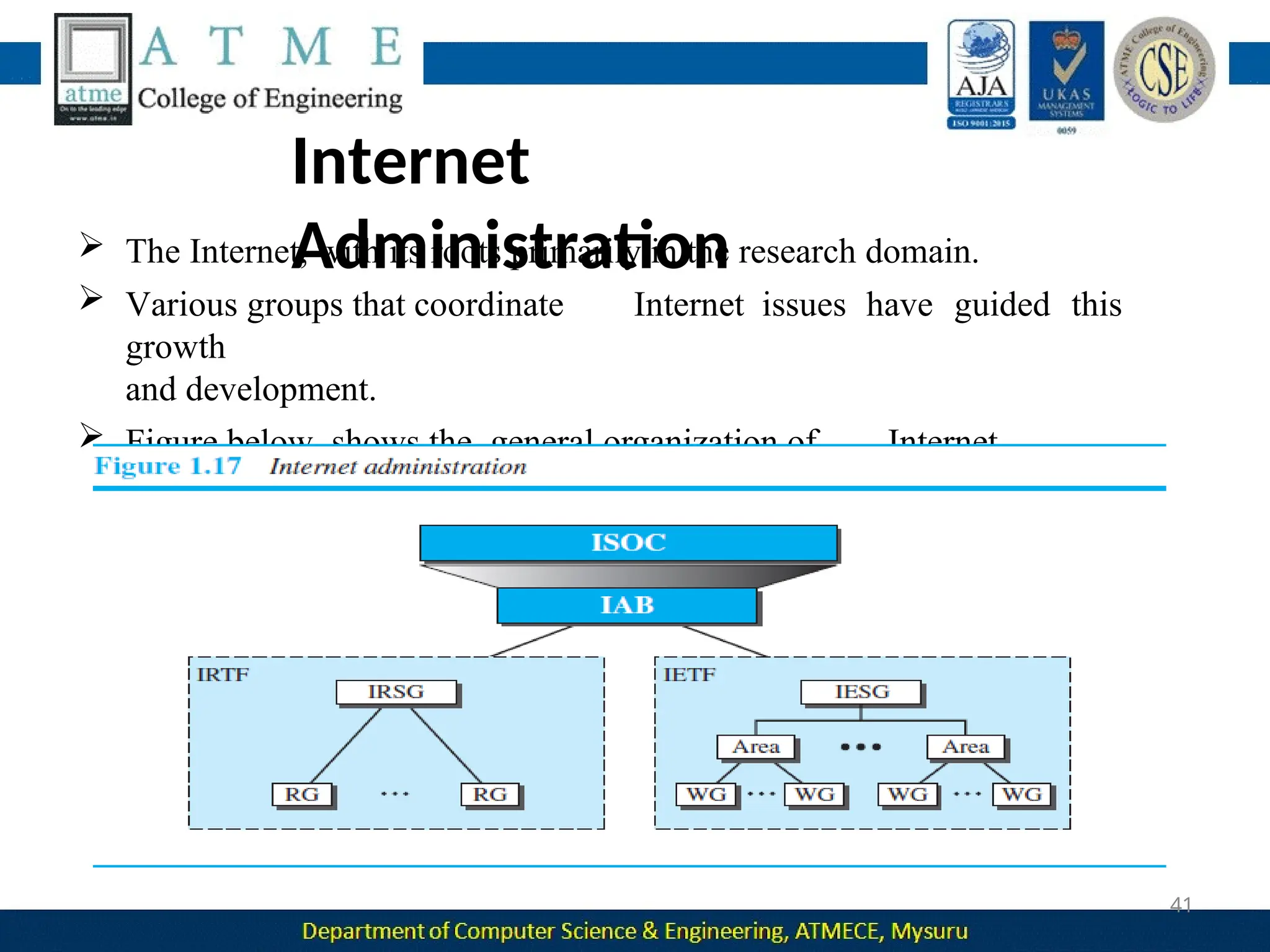
 The Internet, with its roots primarily in the research domain.
 Various groups that coordinate Internet issues have guided this
growth
and development.
 Figure below shows the general organization of Internet
administration
41
Internet Society (ISOC)
 ISOC is an international, nonprofit organization formed in 1992 to
provide support for the Internet standards process.
ISOC accomplishes this through maintaining and supporting other
Internet administrative bodies such as IAB,IETF, IRTF, and IANA .
 Also promotes research and other scholarly activities relating to
 the Internet.
Internet Architecture Board (IAB)
 The IAB is the technical advisor to the ISOC.
 Purposes
 oversee the continuing development of the TCP/IP
 Protocol Suite
 serve in a technical advisory capacity to research members of
the Internet community.
42
1.Internet
43
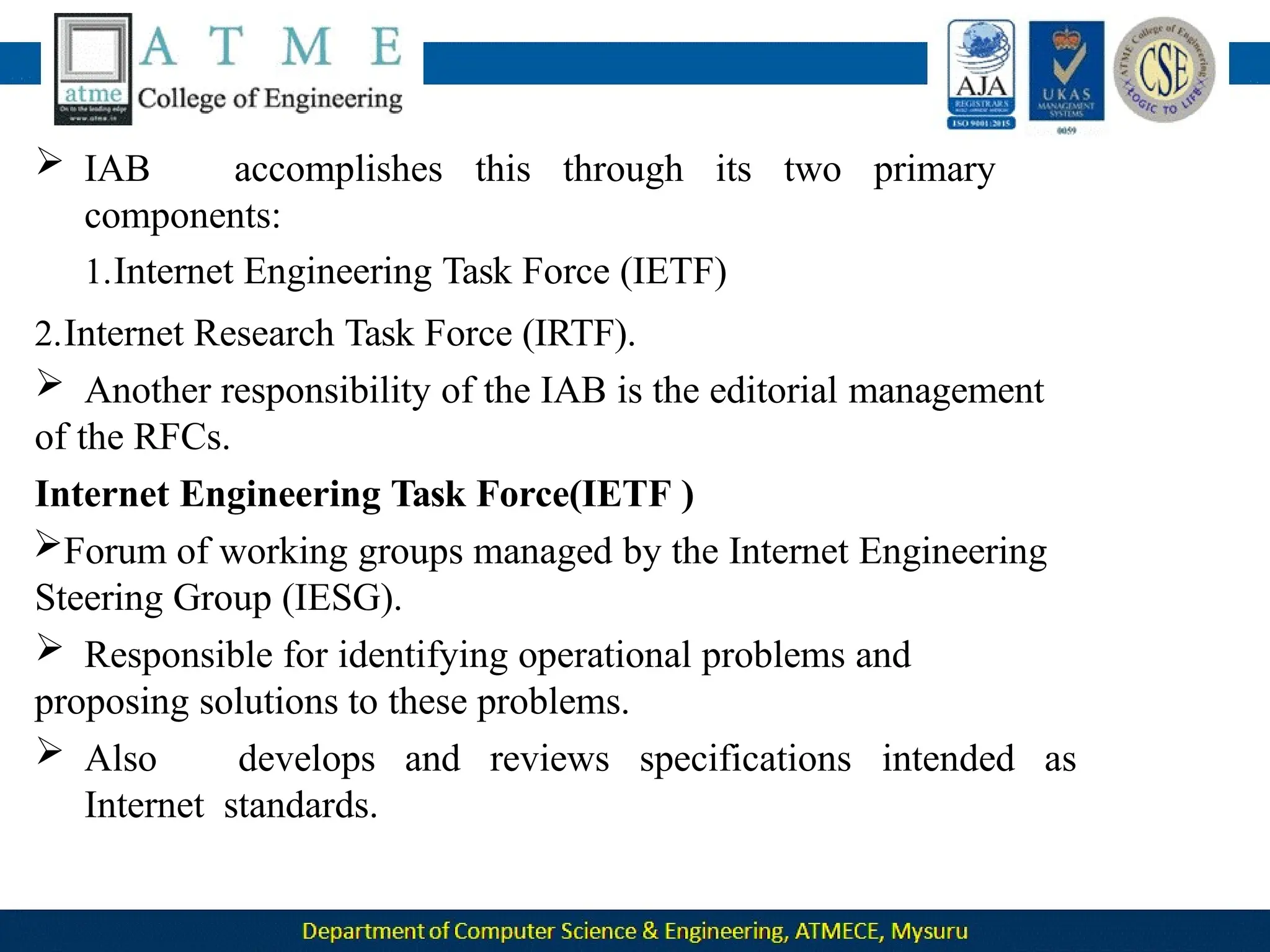
 IAB accomplishes this through its two primary components:
Engineering Task Force (IETF)
2.Internet Research Task Force (IRTF).
 Another responsibility of the IAB is
the editorial management of the RFCs.
Internet Engineering Task Force(IETF )
 Forum of working groups managed
by the Internet Engineering Steering
Group (IESG).
 Responsible for identifying
operational problems and proposing
solutions
to these problems.
 IAB accomplishes this through its two primary
components:
1.Internet Engineering Task Force (IETF)
2.Internet Research Task Force (IRTF).
 Another responsibility of the IAB is the editorial management
of the RFCs.
Internet Engineering Task Force(IETF )
Forum of working groups managed by the Internet Engineering
Steering Group (IESG).
 Responsible for identifying operational problems and
proposing solutions to these problems.
 Also develops and reviews specifications intended as
Internet standards.
Network Models
PROTOCOL LAYERING
Protocol defines the rules that both the sender and receiver and all
to communicate
intermediate devices need to follow to be
able effectively.
When communication is simple- one simple
protocol
When the communication is complex-need
to
divide the
task
between different layers, in which case we need a protocol at each
layer, or protocol layering.
Scenarios
Let us develop two simple scenarios to better understand the need for
protocol layering.
First scenario
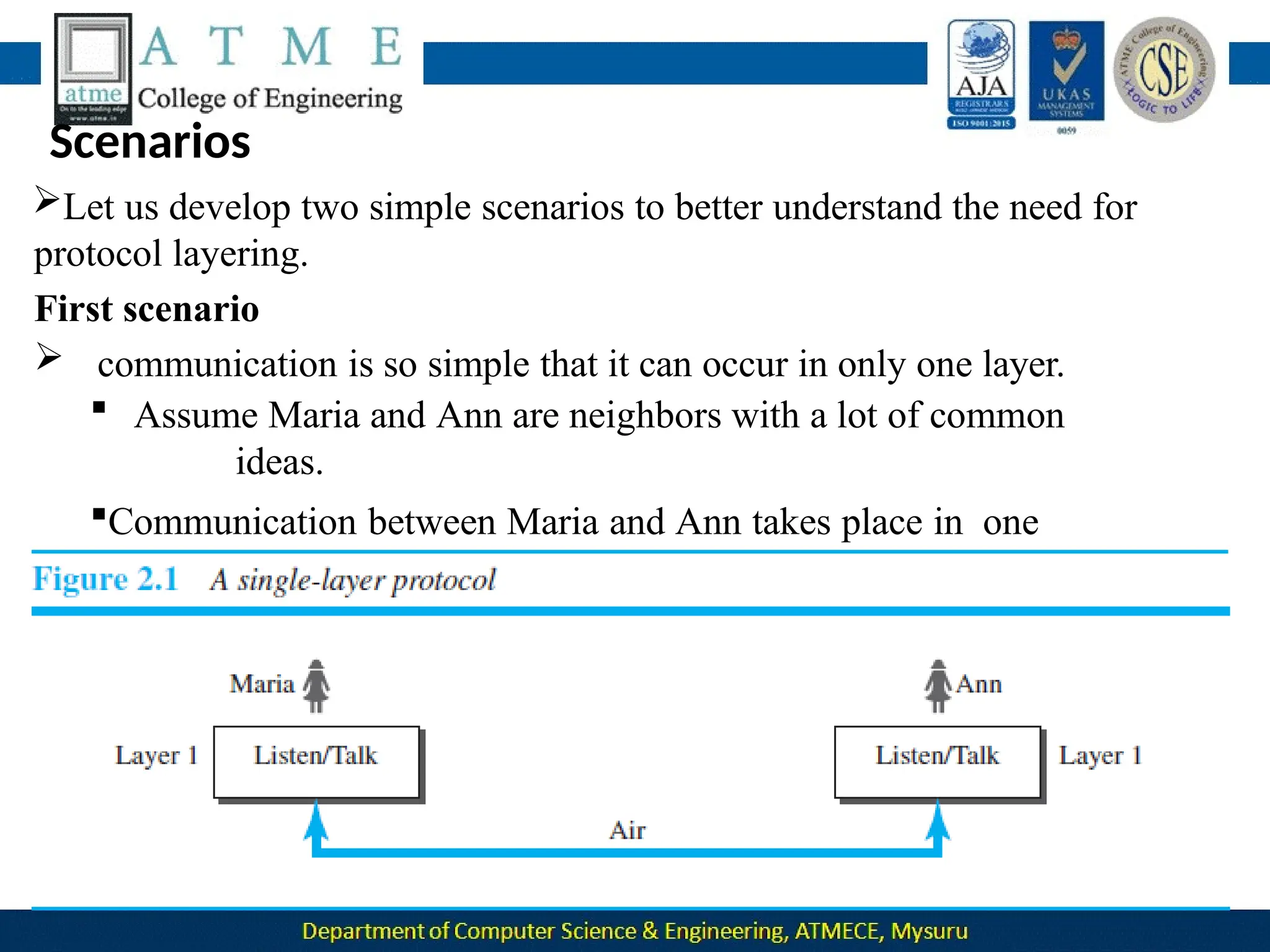
 communication is so simple that it can occur in only one layer.
 Assume Maria and Ann are neighbors with a lot of common
ideas.
Communication between Maria and Ann takes place in one
layer, face to face, in the same language, as shown in Figure.
2.42
Even in this simple scenario, we can see that a set of rules needs to be
followed.
1.Maria and Ann know that they should greet each other when they
meet.
2.They know that they should confine their vocabulary to the level of
their friendship.
3.Each party knows that she should refrain from speaking when the
other
party is speaking.
4.Each party knows that the conversation should be a dialog, not
a
monolog: both should have the opportunity to talk about the issue.
5.They should exchange some nice words when they leave.
Second Scenario
 Assume that Ann is offered a higher-level position in her company, but
needs to move to another branch located in a city very far from Maria.
 The two friends still want to continue their communication and
exchange ideas because they have come up with an innovative project to
start a new business when they both retire.
They decide to continue their conversation using regular mail through
the post office.
 They do not want their ideas to be revealed by other people if the
letters
are intercepted. They agree on an encryption/decryption
technique.
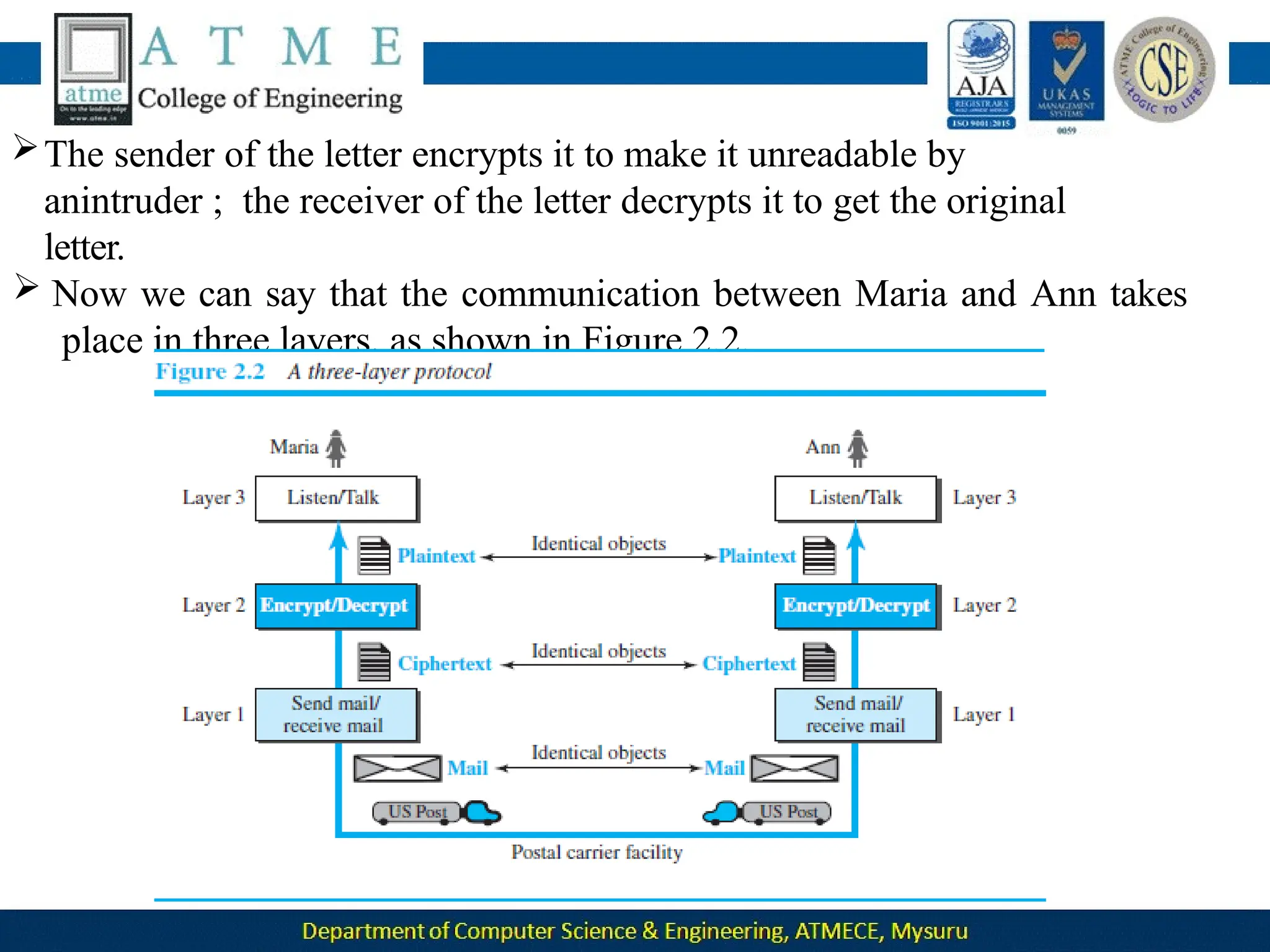
The sender of the letter encrypts it to make it unreadable by
anintruder ; the receiver of the letter decrypts it to get the original
letter.
 Now we can say that the communication between Maria and Ann takes
place in three layers, as shown in Figure 2.2.
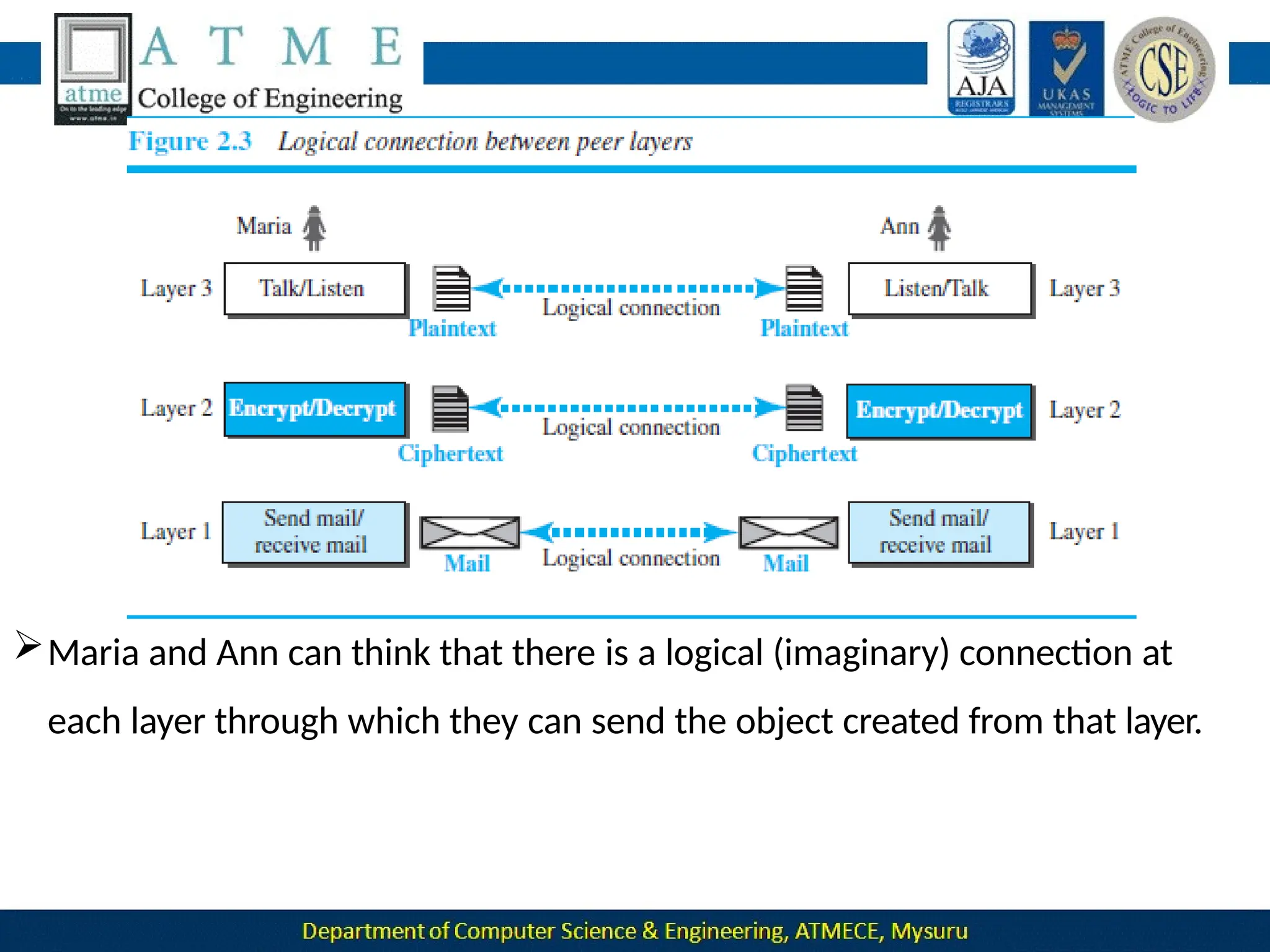
Let us assume that Maria sends the first letter to Ann. At Maria side:
•Maria talks to the machine at the third layer as though the machine is
Ann and is listening to her.
•The third layer machine listens to what Maria says and creates
the
plaintext (a letter in English), which is passed to the second
layer machine.
•The second layer machine takes the plaintext, encrypts it, and creates
the ciphertext, which is passed to the first layer machine.
•The first layer machine, presumably a robot, takes the ciphertext ,
puts it in an envelope, adds the sender and receiver addresses, and
mails
At Ann’s side
•The first layer machine picks up the letter from Ann’s mail box,
recognizing the letter from Maria by the sender address.
•The machine takes out the ciphertext from the envelope and
delivers it
to the second layer machine.
plaintext,
though
•The second layer machine decrypts the message, creates the
and passes the plaintext to the third-layer machine.
•The third layer machine takes the plaintext and reads it as
Maria is speaking.
Protocol layering enables us to divide a complex task into several
smaller and simpler tasks.
 For example, in Figure 2.2, we could have used only one machine to do
the job of all three machines. However, if Maria and Ann decide that the
encryption/ decryption done by the machine is not enough to protect
their secrecy, they would have to change the whole machine.
 In the present situation, they need to change only the second layer
machine; the other two can remain the same. This is referred to as
modularity.
 Modularity in this case means independent layers.
 A layer (module) can be defined as a black box with inputs and outputs,
without concern about how inputs are changed to outputs.
If two machines provide the same outputs when given the same inputs,
they can replace each other.
 For example, Ann and Maria can buy the second layer machine from two
different manufacturers. As long as the two machines create the same
ciphertext from the same plaintext and vice versa, they do the job.
Advantages of protocol layering
 Allows to separate the services from the implementation.
• A layer needs to be able to receive a set of services from the
lower
layer and to give the services to the upper layer; we don’t care about
how
the layer is implemented.
• For example, Maria may decide not to buy the machine (robot)
for the first layer; she can do the job herself. As long as Maria can do the
tasks provided by the first layer, in both directions, the communication
system works.
 Reduces the complexity at the intermediate system
•Communication does not always use only two end systems; there are
intermediate systems that need only some layers, but not all layers.
• If we did not use protocol layering, we would have to make each intermediate
whole system more
system as complex as the end systems, which makes the
expensive.
Two principles of protocol layering
First Principle
The first principle dictates that if we want bidirectional communication, we
need to make each layer so that it is able to perform two opposite tasks,
one in each direction.
 For example, the third layer task is to listen (in one direction) and talk (in
the other direction). The second layer needs to be able to encrypt and
decrypt. The
first layer needs to send and receive mail.
Second
Principle
The second principle that we need to follow in protocol layering is
that the two objects under each layer at both sites should be identical.
For example, the object under layer 3 at both sites should be a
plaintext letter. The object under layer 2 at both sites should be
a
ciphertext letter. The object under layer 1 at both sites should be a
piece of mail.
Logical Connections
Two protocols at the same layer can have a logical Connection
 This means that we have layer-to-layer communication.
Maria and Ann can think that there is a logical (imaginary) connection at
each layer through which they can send the object created from that layer.
TCP/IP PROTOCOL SUITE
 TCP/IP(Transmission Control Protocol/Internet Protocol) suite
used in the Internet today.
It is a hierarchical protocol made up of interactive modules, each of
which provides a specific functionality.
hierarchical means that each upper level protocol is
by the services provided by one or more lower
level
 The
term
supported
protocols.
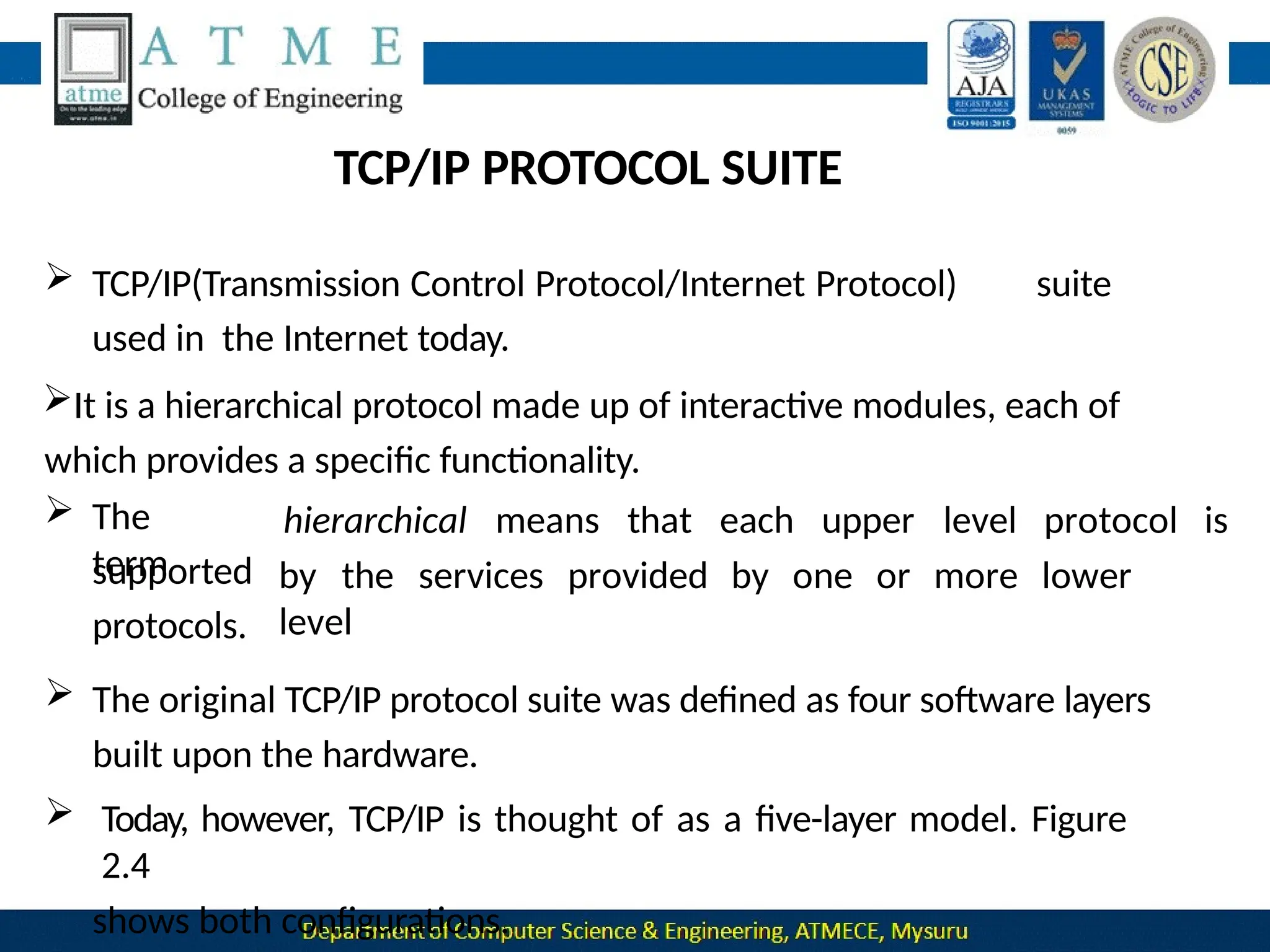
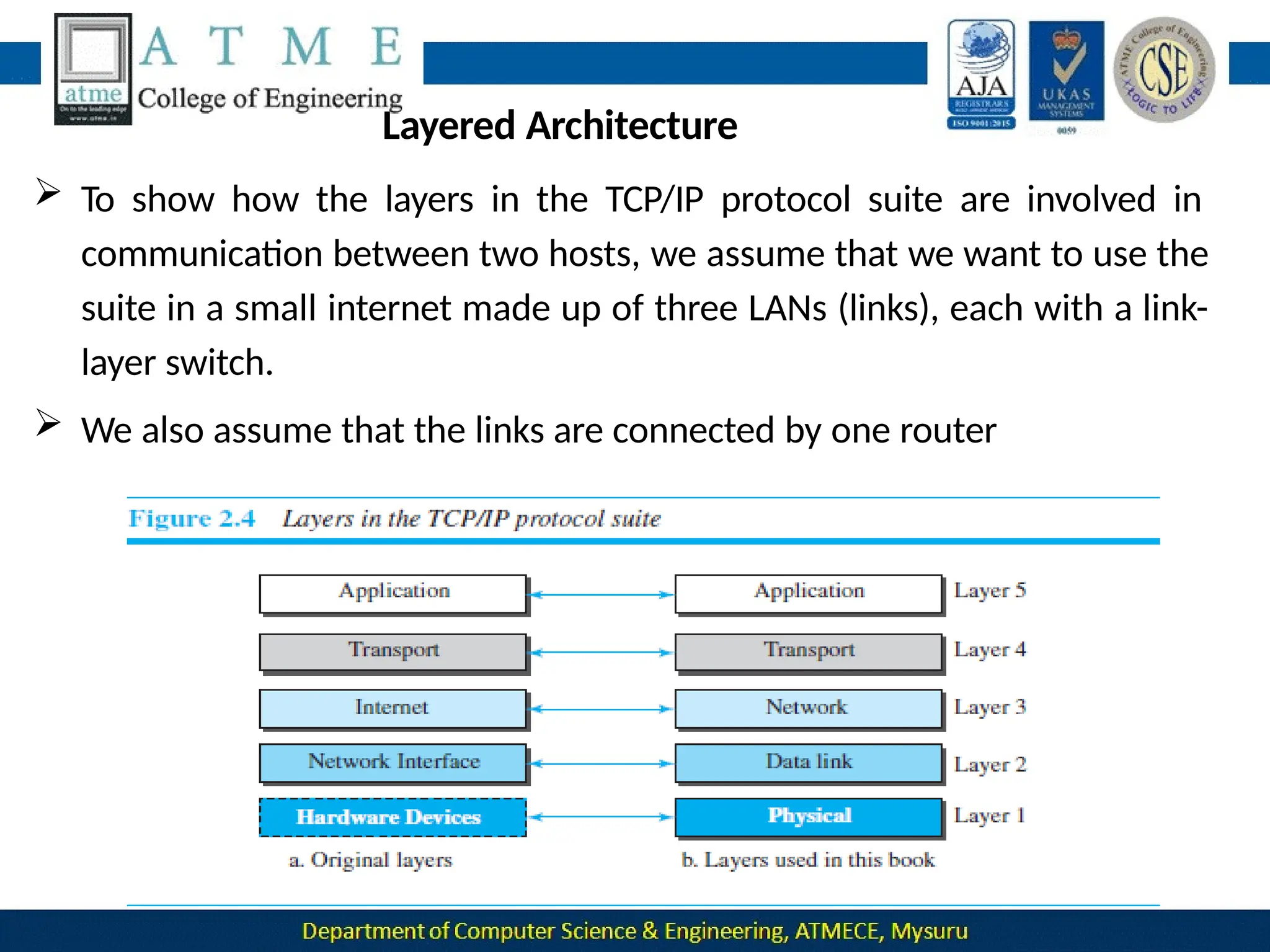
 The original TCP/IP protocol suite was defined as four software layers
built upon the hardware.
 Today, however, TCP/IP is thought of as a five-layer model. Figure
2.4
shows both configurations.
Layered Architecture
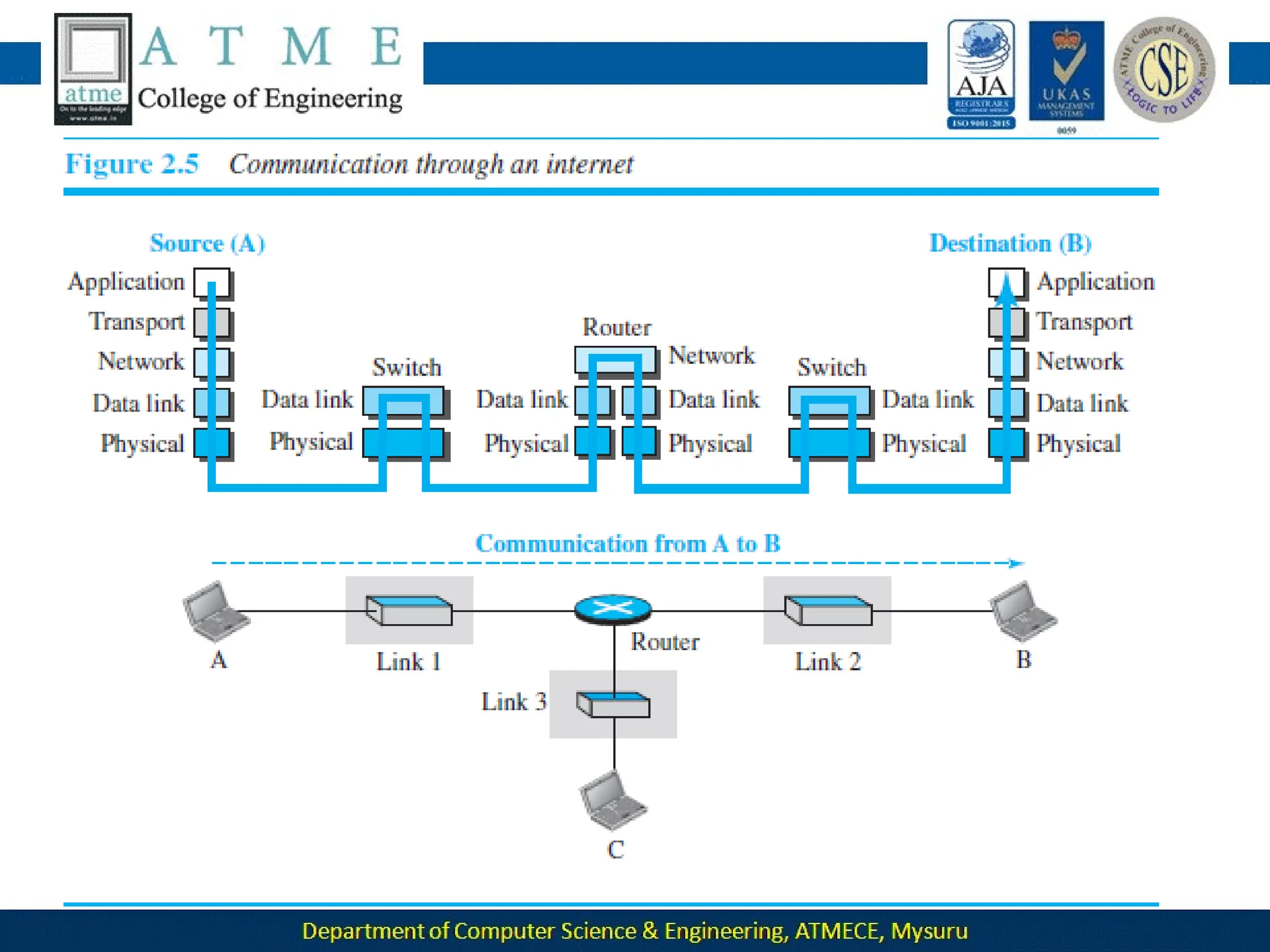
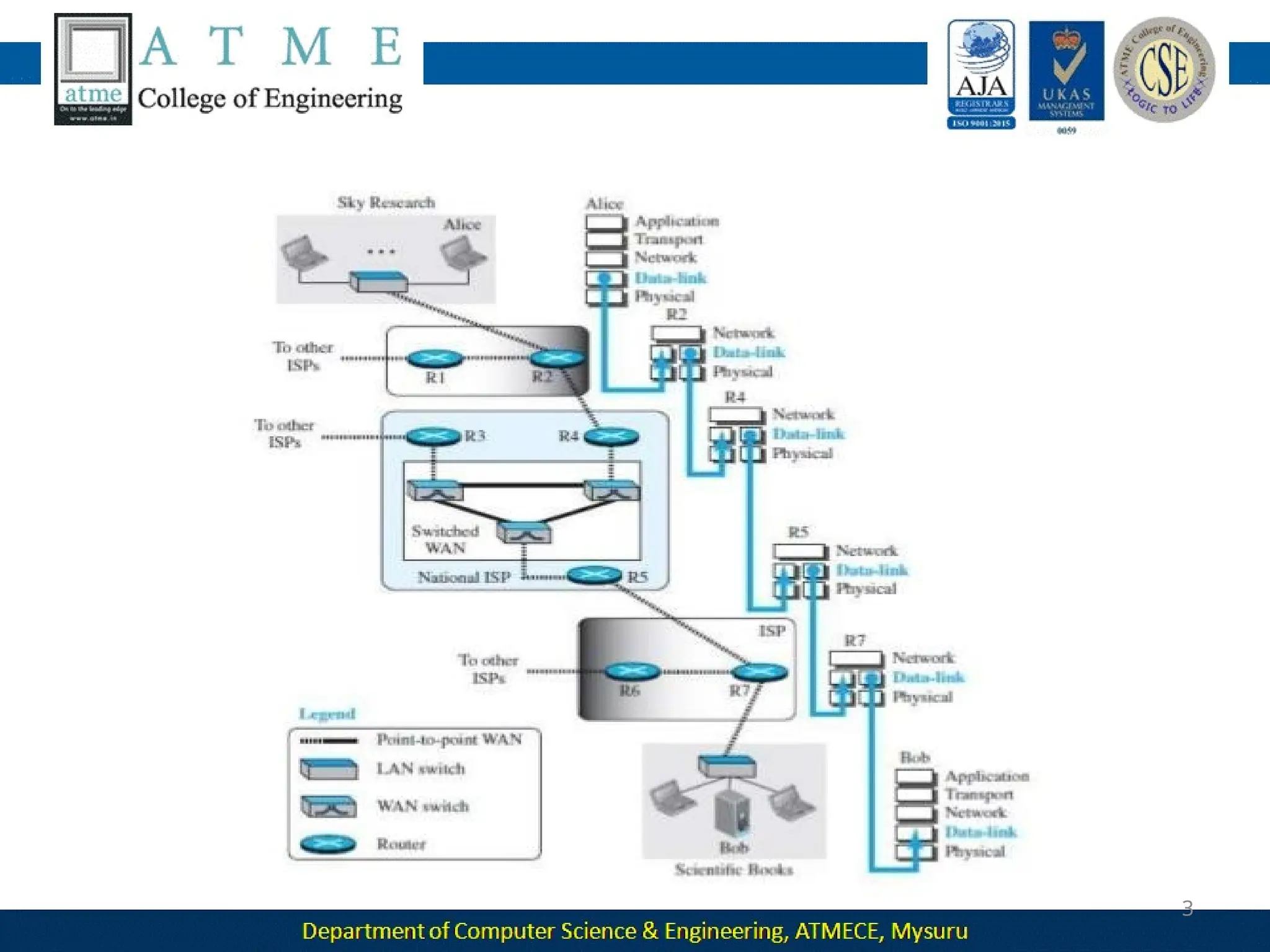
 To show how the layers in the TCP/IP protocol suite are involved in
communication between two hosts, we assume that we want to use the
suite in a small internet made up of three LANs (links), each with a link-
layer switch.
 We also assume that the links are connected by one router
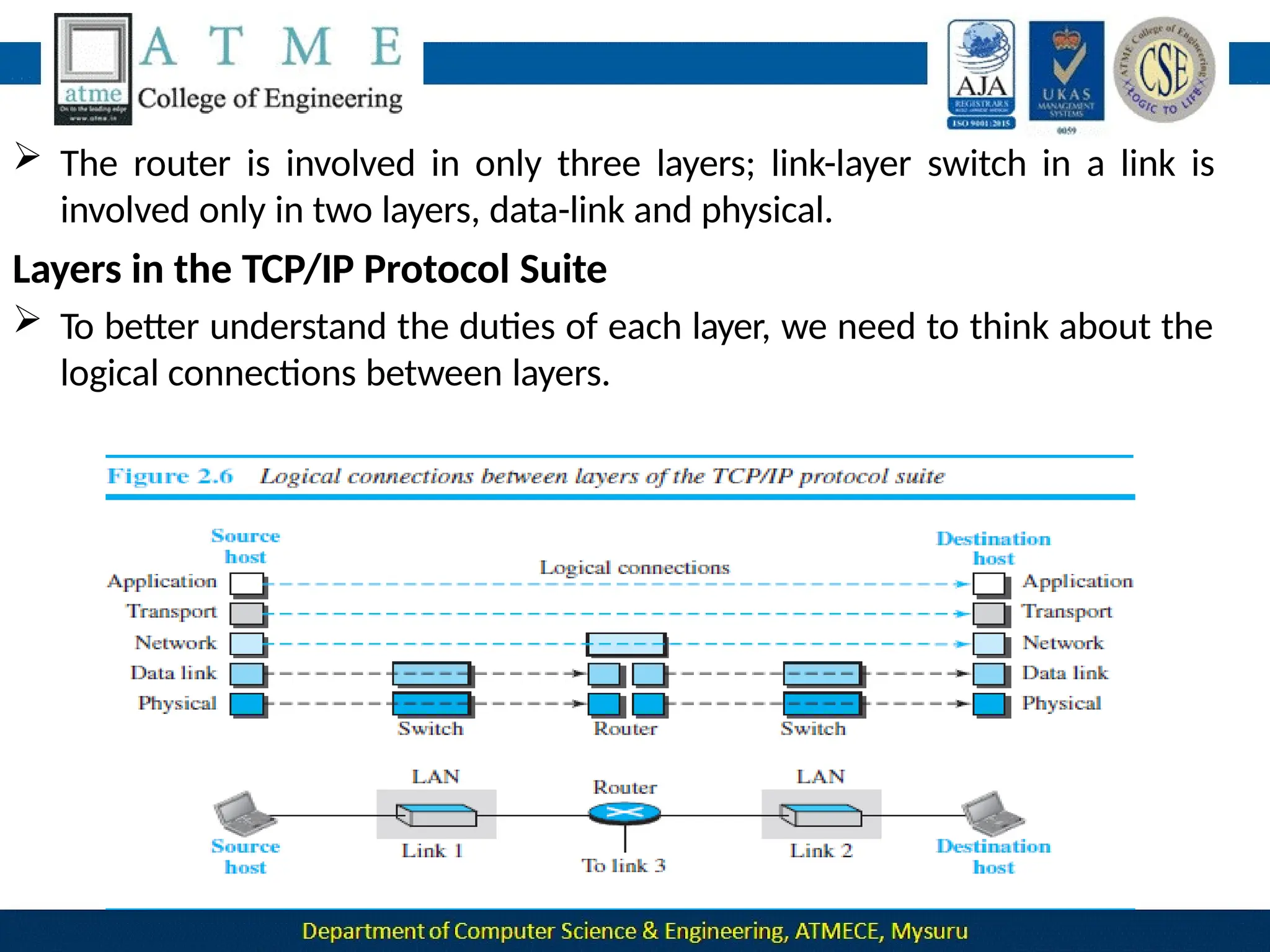
 Let us assume that computer A communicates with computer B.
As the figure shows, we have five communicating devices in this
communication:
1.source host(computer A)
2.The link-layer switch in link 1
3.The router
4.The link-layer switch in link
2,
5.destination host (computer
B).
Each device is involved with a set of layers depending on the role of the
device in the internet.
 The two hosts are involved in all five layers
 The source host needs to create a message in the application layer and
send it down the layers so that it is physically sent to the destination
host.
 The destination host needs to receive the communication at the
physical layer and then deliver it through the other layers to the
 The router is involved in only three layers; link-layer switch in a link is
involved only in two layers, data-link and physical.
Layers in the TCP/IP Protocol Suite
 To better understand the duties of each layer, we need to think about the
logical connections between layers.
 The duty of the application, transport, and network layers is end-to-
end.
 The duty of the data-link and physical layers is hop-to-hop, in which a
hop is a host or router.
 The domain of duty of the top three layers is the internet, and the
domain of duty of the two lower layers is the link.
 Another way of thinking of the logical connections is to think about the
data unit created from each layer.
 In the top three layers, the data unit (packets) should not be
changed by any router or link-layer switch.
 In the bottom two layers, the packet created by the host is changed
only by the routers, not by the link-layer switches.
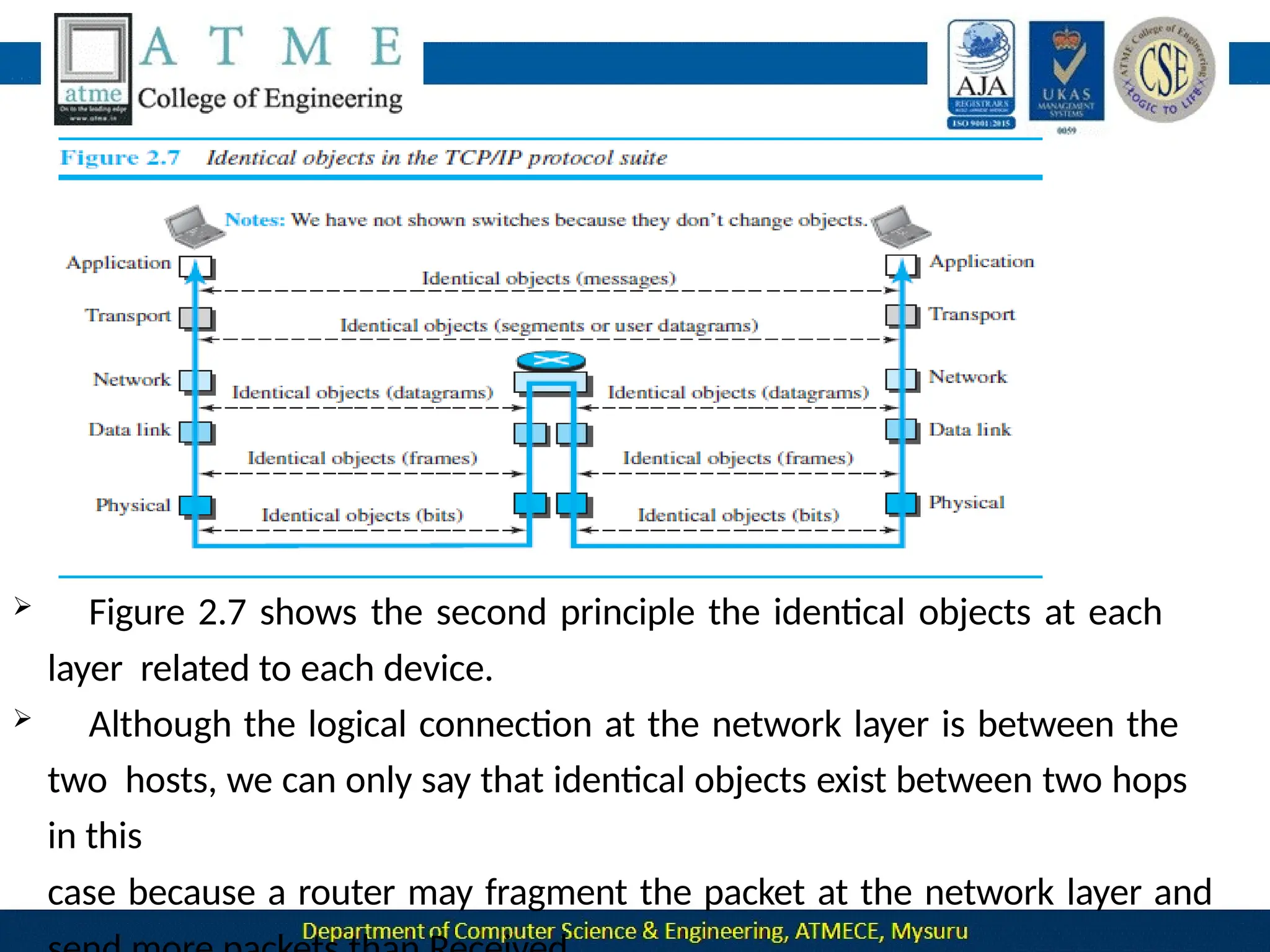
 Figure 2.7 shows the second principle the identical objects at each
layer related to each device.
 Although the logical connection at the network layer is between the
two hosts, we can only say that identical objects exist between two hops
in this
case because a router may fragment the packet at the network layer and
The link between two hops does not change the object.
Description of Each
Layer Physical Layer
The lowest level in the TCP/IP protocol suite, responsible for
carrying individual bits in a frame across the link
Two devices are connected by a transmission medium (cable or air).
The transmission medium does not carry bits; it carries electrical
or
optical signals. So the bits received in a frame from the data-link layer are
transformed and sent through the transmission media
Data-link Layer
 Responsible for taking the datagram and moving it across the link.
 Internet is made up of several links (LANs and WANs) connected by
routers. There may be several overlapping sets of links that a datagram
can travel from the host to the destination.
 The routers are responsible for choosing the best links.when the next
link to travel is determined by the router, the data-link layer is
responsible for taking the datagram and moving it across the link.
 The link can be a wired LAN with a link-layer switch, a wireless LAN, a
wired WAN, or a wireless WAN.
TCP/IP does not define any specific protocol for the data-link layer. It
supports all the standard and proprietary protocols.
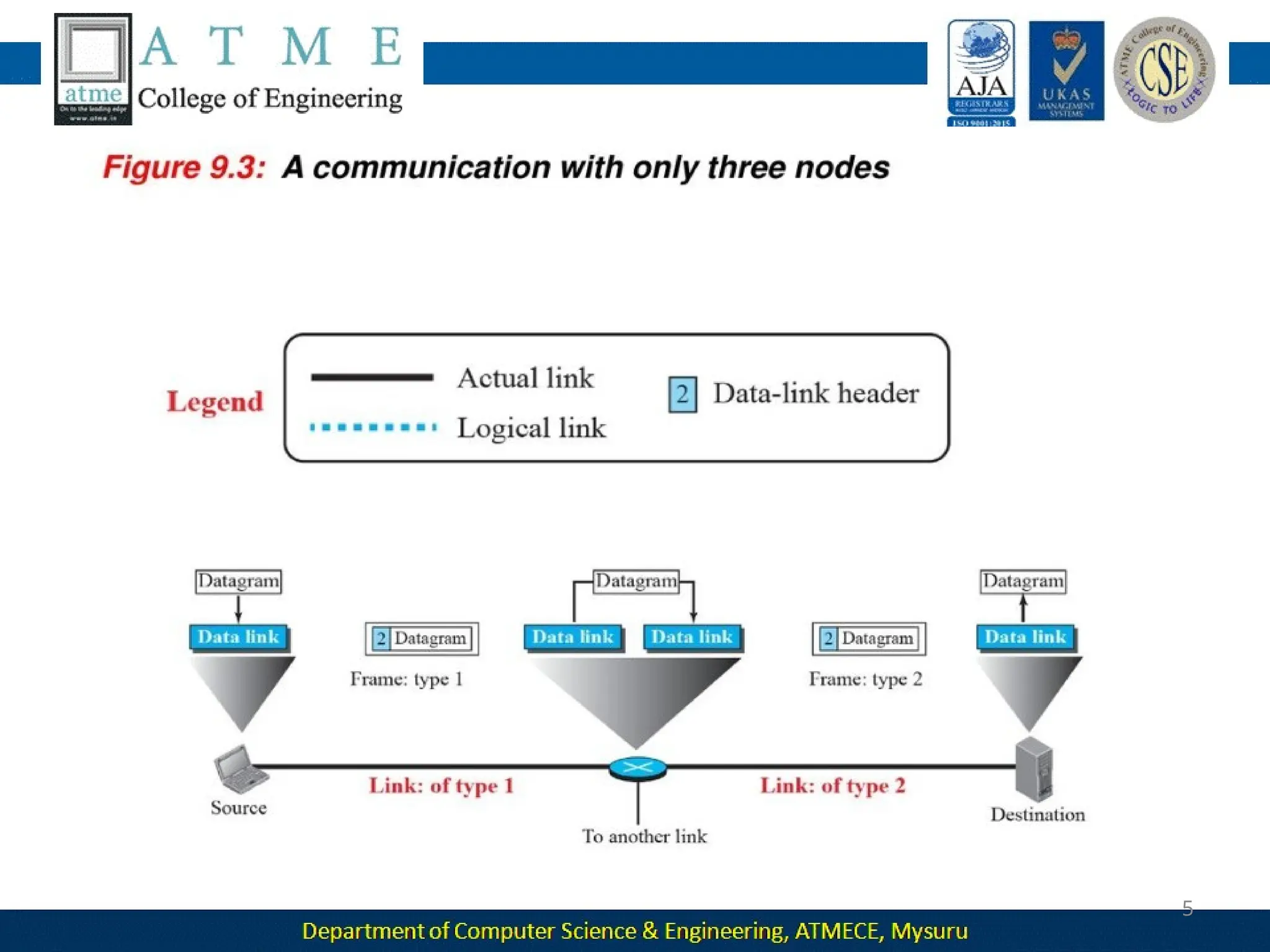
 The data-link layer takes a datagram and encapsulates it in a packet
called a frame.
 Each link-layer protocol may provide a different service. Some link-layer
protocols provide complete error detection and correction, some
provide only error correction
Network Layer
responsible for creating a connection between the source computer and the
destination computer.
Responsible for host-to-host communication and routing the packet
through possible routes.
The network layer in the Internet includes the main protocol, Internet
Protocol (IP),
• Defines the format of the packet, called a datagram at the
network layer.
• defines the format and the structure of addresses used in this
layer.
• responsible for routing a packet from its source to its destination,
which is achieved by each router forwarding the datagram to the next
router in its path.
IP is a connectionless protocol that provides no flow control, no error control,
and no congestion control services. This means that if any of theses services is
required for an application, the application should rely only on the transport-layer
protocol.
The network layer also includes unicast (one-to-one) and
multicast (one-to-many) routing protocols.
 A routing protocol does not take part in but it creates forwarding tables
for routers to help them in the routing process.
The network layer also has some auxiliary protocols that help IP in its
delivery and routing tasks.
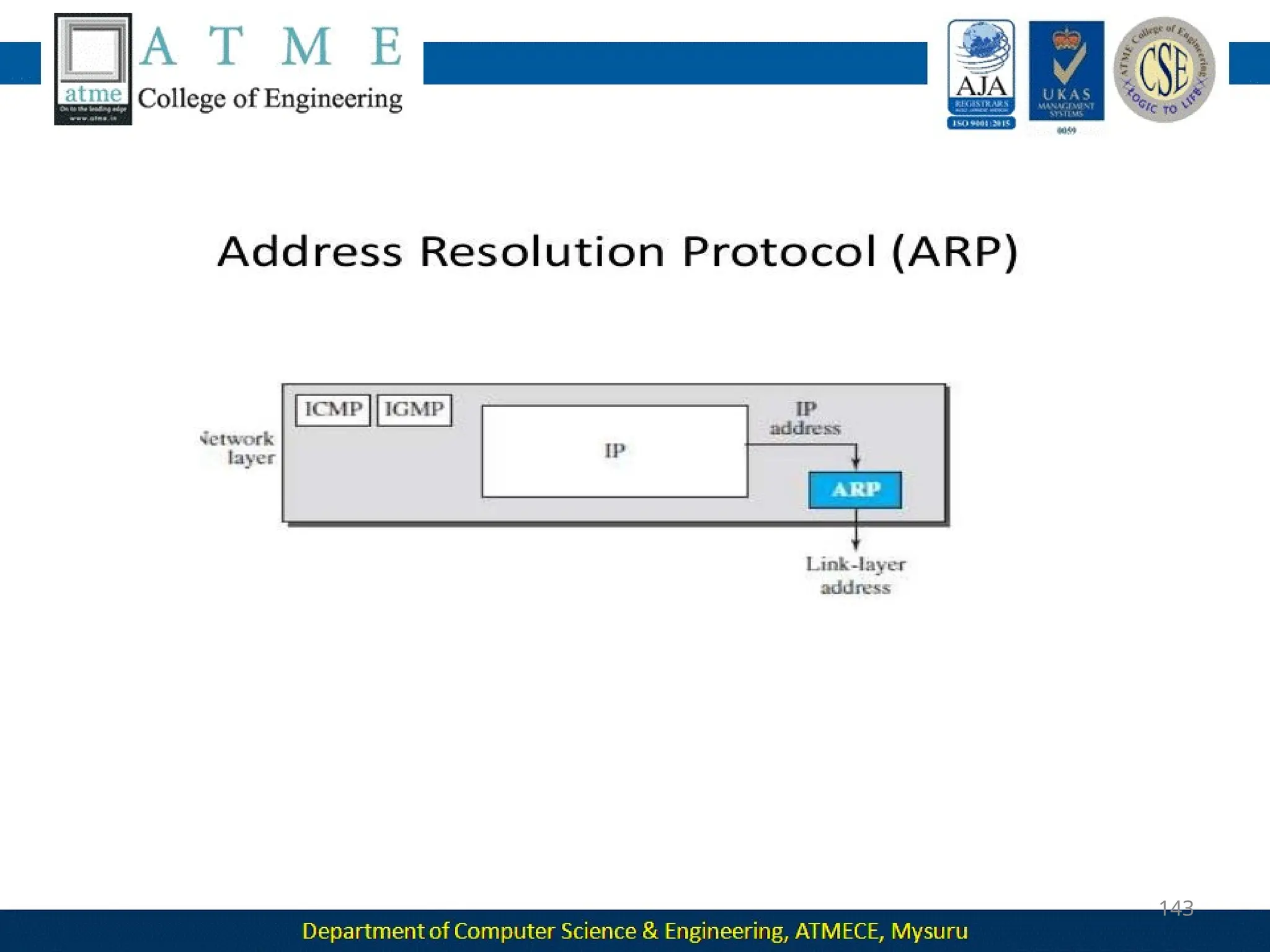
• The Internet Control Message Protocol (ICMP)- helps IP to report
some problems when routing a packet.
•The Internet Group Management Protocol (IGMP)-helps IP in
multitasking.
• The Dynamic Host Configuration Protocol (DHCP)-helps IP to get the
network-layer address for a host.
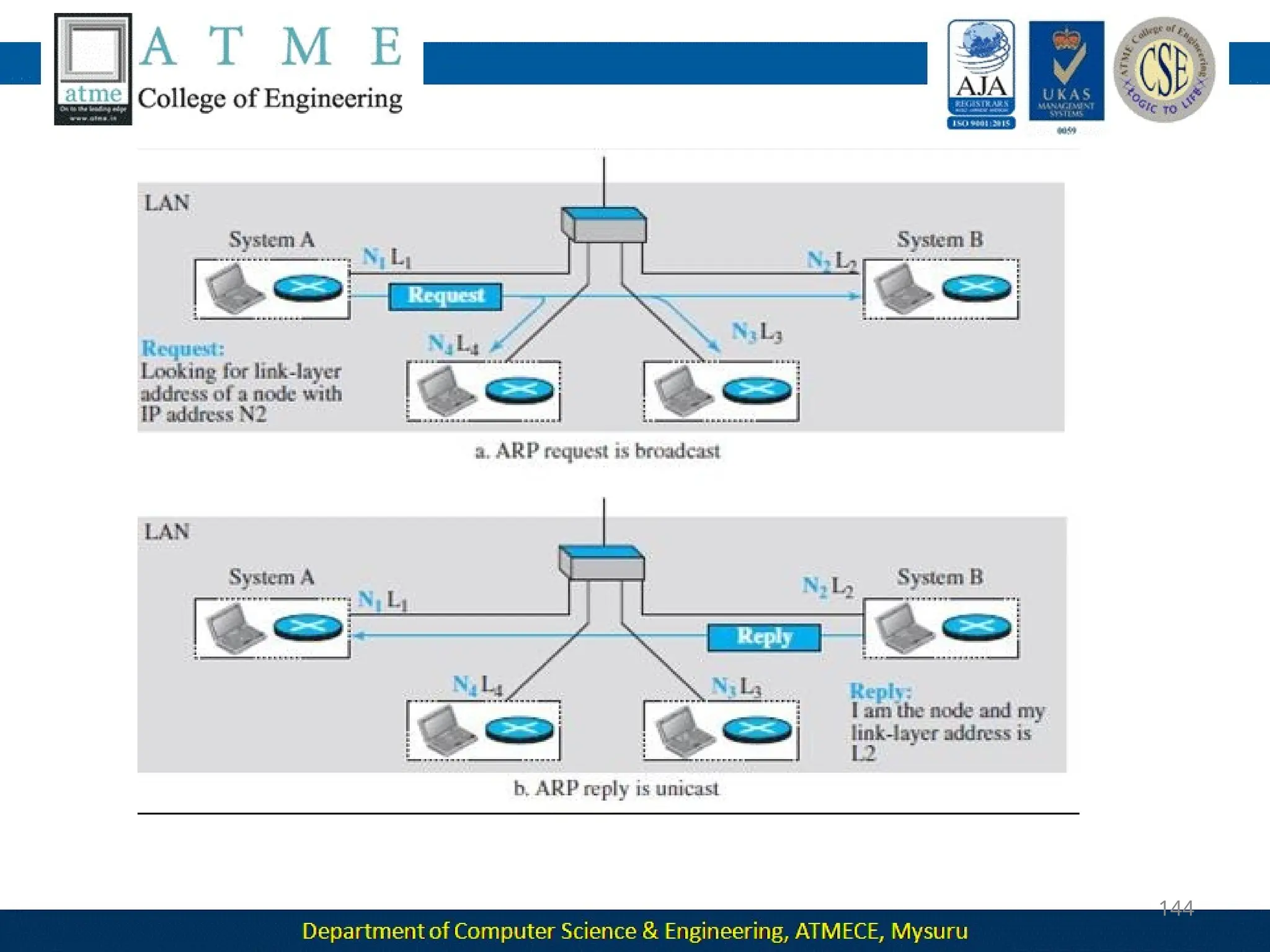
• The Address Resolution Protocol (ARP)-IP to find the link-layer
address of a host or a router when its network-layer address is given.
Transport Layer
Responsible for giving services to the application layer: to get a
message from an application program running on the source host
encapsulates it in a transport layer packet (called a segment or a user
datagram and deliver it to the corresponding application program on
the destination host through the logical connection
The logical connection at the transport layer is also end-to-end.
There are a few transport-layer protocols in the Internet, each
designed for some specific task.
Transmission Control Protocol (TCP)
• connection-oriented protocol that first establishes a logical
connection between transport layers at two hosts before
transferring data.
• creates a logical pipe between two TCPs for transferring a
stream
of bytes.
control
• provides flow control, error control and congestion
User Datagram Protocol (UDP)
•Connectionless protocol that transmits user datagrams without
first creating a logical connection
•each user datagram is an independent entity without being related to
the previous or the next one
• does not provide flow, error, or congestion control
• simplicity, which means small overhead, is attractive to an
application
program that needs to send short messages and cannot
afford the
retransmission of the packets involved in TCP, when a packet
is corrupted or lost.
Stream Control Transmission Protocol (SCTP)
• designed to respond to new applications that are emerging in the
Application Layer
The logical connection between the two application layers is end to-
end.
 The two application layers exchange messages between each other
as though there were a bridge between the two layers.
Communication at the application layer is between two processes
(two programs running at this layer).
 To communicate, a process sends a request to the other process
and receives a response.
Process-to-process communication is the duty of the application
layer.
 The application layer in the Internet includes many predefined
protocols, but a user can also create a pair of processes to be run at
the two hosts.
 The Hypertext Transfer Protocol (HTTP) : accessing the World Wide
Web (WWW).
 The Simple Mail Transfer Protocol (SMTP): e-mail service.
 The File Transfer Protocol (FTP): File Transfer.
 The Terminal Network (TELNET) and Secure Shell (SSH): Remote
login
Protocol (SNMP): to manage the
 The Simple Network Management
Internet at global and local levels.
 The Domain Name System (DNS):
to find the network-layer address
of
a computer.
 The Internet Group Management Protocol (IGMP): to
collect membership in a group.
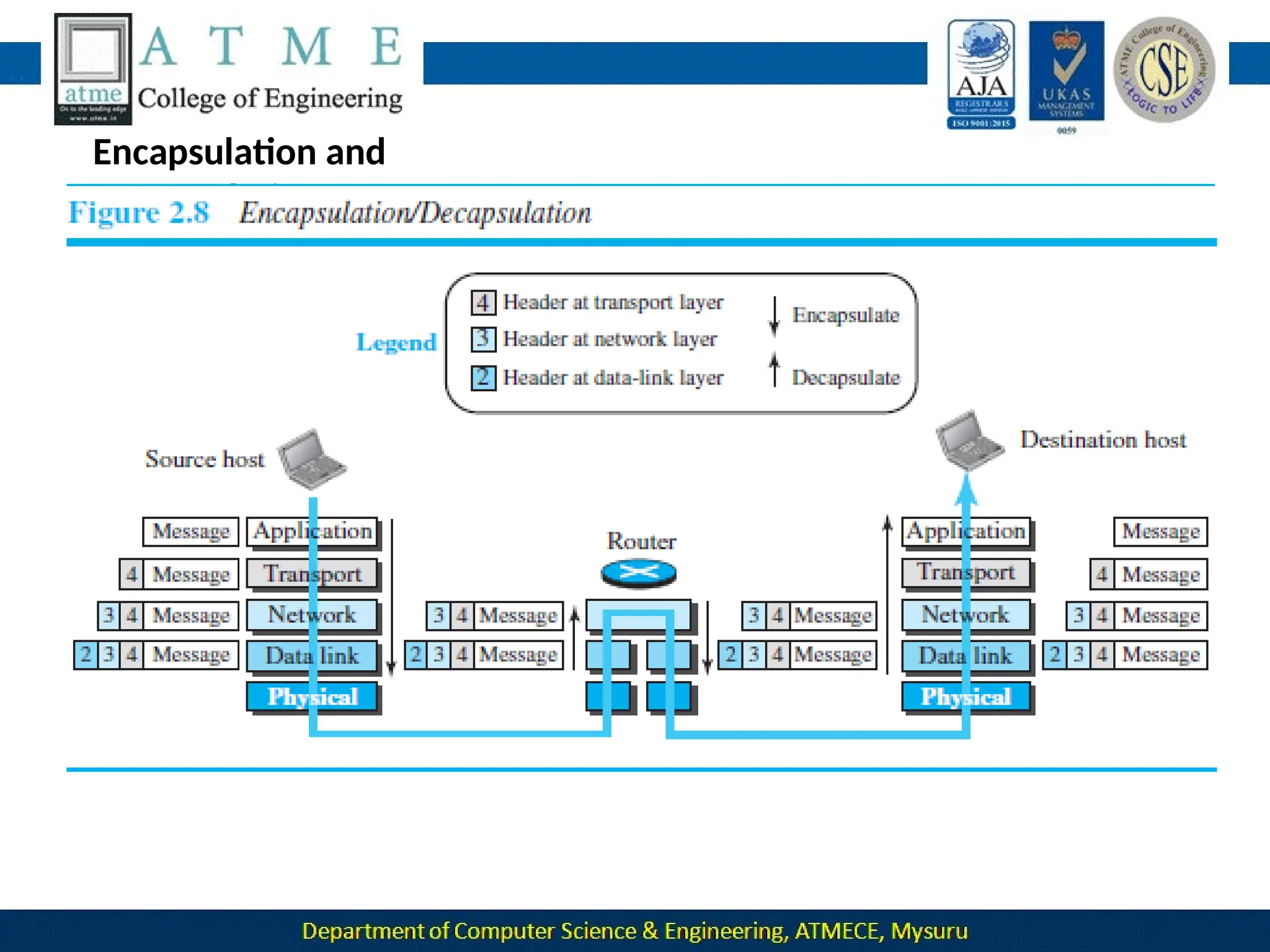
Encapsulation and
Decapsulation
Encapsulation at the Source Host
1. At the application layer, the data to be exchanged is referred to as a
message. It does not contain header or trailer and message is
passed to transport layer.
2. The transport layer takes the message as the payload, the load that
the transport layer should take care of. It adds the transport layer
header to the payload, which contains the identifiers of the source
and destination application programs plus some more information
that is needed for the end-to end delivery of the message, such as
information needed for flow, error control, or congestion control.
The result is the transport-layer packet, which is called the
segment(in TCP) and the user datagram (in UDP). The transport
layer then passes the packet to the network layer.
3. The network layer takes the transport-layer packet as data or
payload and adds its own header to the payload. The header
contains the addresses of the source and destination hosts and
some more information used for error checking of the header,
fragmentation information, and so on. The result is the network-
layer packet, called a datagram. The network layer then passes the
packet to the data-link layer.
4. The data-link layer takes the network-layer packet as data or
payload and adds its own header, which contains the link-layer
addresses of the host or the next hop (the router). The result is the
link-layer packet, which is called a frame. The frame is passed to the
physical layer for transmission.
Decapsulation and Encapsulation at the Router
At the router, we have both decapsulation and encapsulation
because the router is connected to two or more links.
1. After the set of bits are delivered to the data-link layer, this layer
decapsulates the datagram from the frame and passes it to the
network layer.
2. The network layer only inspects the source and destination
addresses in the datagram header and consults its forwarding table
to find the next hop to which the datagram is to be delivered. The
contents of the datagram should not be changed by the network
layer in the router unless there is a need to fragment the datagram
if it is too big to be passed through the next link. The datagram is
then passed to the data-link layer of the next link.
3.The data-link layer of the next link encapsulates the datagram in a
frame and passes it to the physical layer for transmission.
Decapsulation at the Destination Host
 At the destination host, each layer only decapsulates the packet
received, removes the payload, and delivers the payload to the next-
higher layer protocol until the message reaches the application layer.
 decapsulation in the host involves error checking.
Addressing
 we have logical communication between pairs of layers in this model.
Any communication that involves two parties needs two addresses:
source address and destination address.
 Although it looks as if we need five pairs of addresses, one pair per
layer, we normally have only four because the physical layer does not
need addresses; the unit of data exchange at the physical layer is a bit,
which definitely cannot have an address.
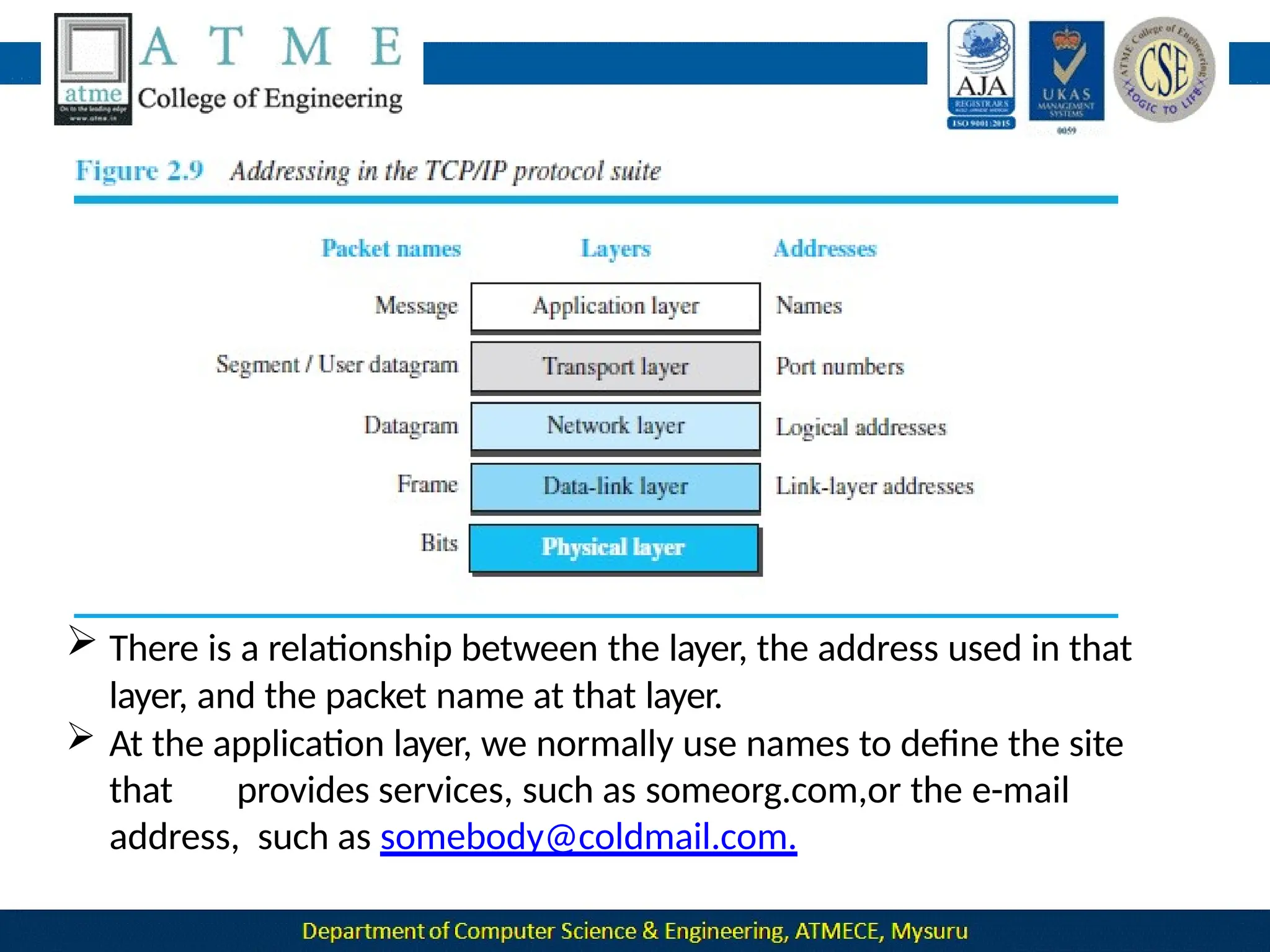
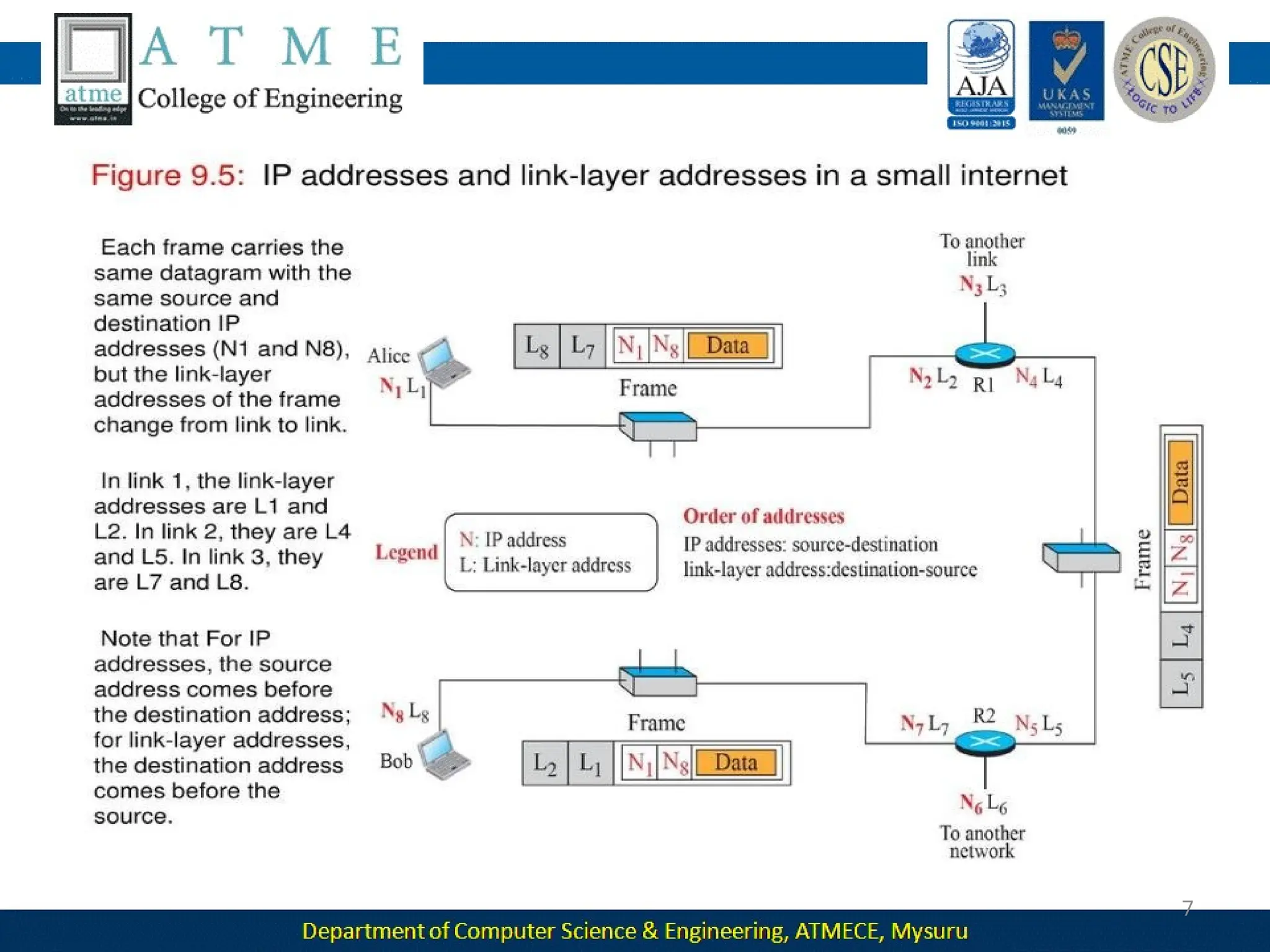
 There is a relationship between the layer, the address used in that
layer, and the packet name at that layer.
 At the application layer, we normally use names to define the site
that provides services, such as someorg.com,or the e-mail
address, such as somebody@coldmail.com.
 At the transport layer, addresses are called port numbers, and these
define the application-layer programs at the source and destination.
 Port numbers are local addresses that distinguish between several
programs running at the same time.
At the network-layer, the addresses are global, with the whole Internet
as the scope.
 A network-layer address uniquely defines the connection of a device to
the Internet.
 The link-layer addresses, sometimes called MAC addresses, are locally
defined addresses, each of which defines a specific host or router in a
network (LAN or WAN).
Multiplexing and Demultiplexing
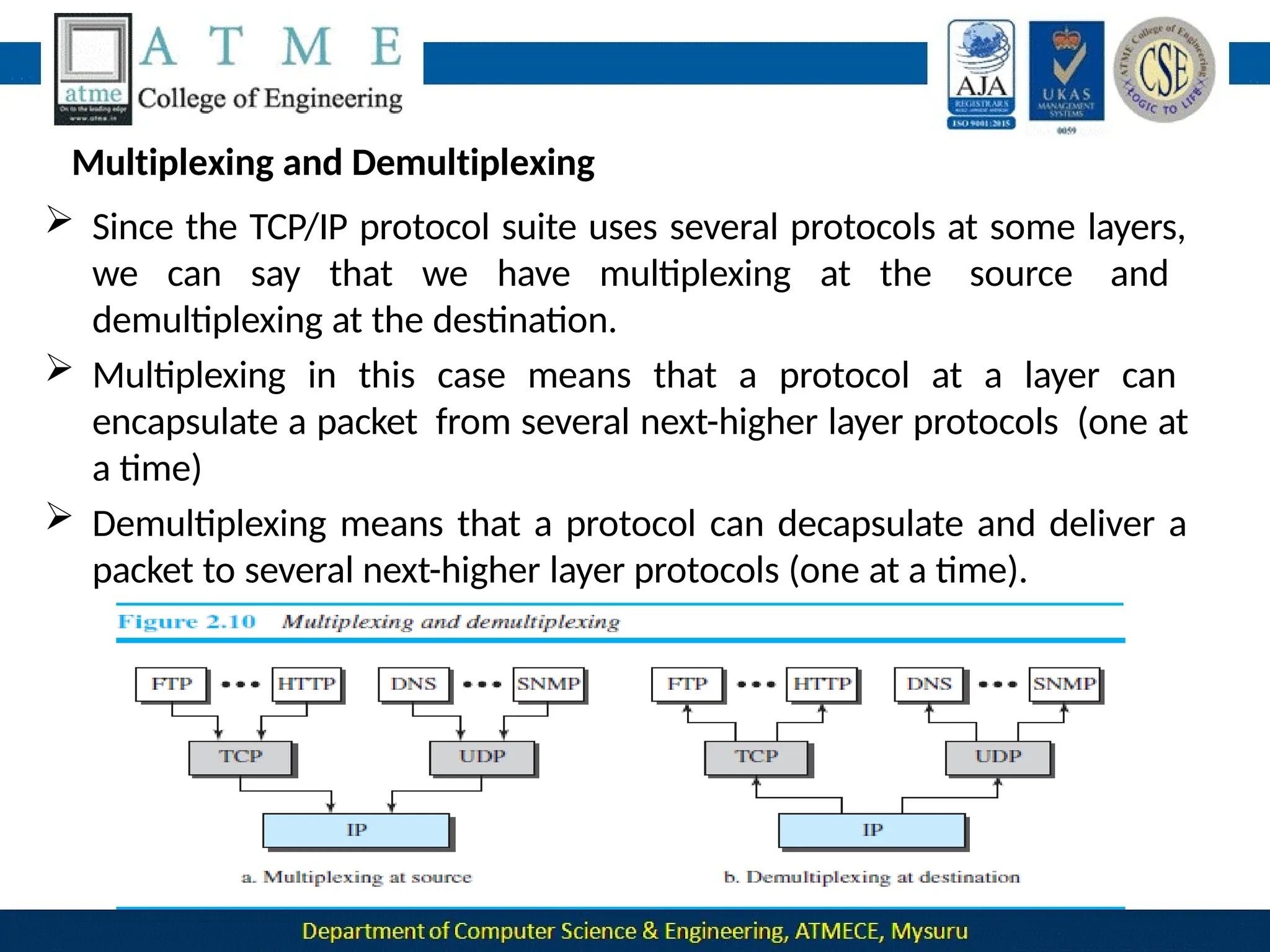
 Since the TCP/IP protocol suite uses several protocols at some layers,
we can say that we have multiplexing at the source and
demultiplexing at the destination.
 Multiplexing in this case means that a protocol at a layer can
encapsulate a packet from several next-higher layer protocols (one at
a time)
 Demultiplexing means that a protocol can decapsulate and deliver a
packet to several next-higher layer protocols (one at a time).
 To be able to multiplex and demultiplex, a protocol needs to have a field
in its header to identify to which protocol the encapsulated packets
belong.
 At the transport layer, either UDP or TCP can accept a message from
several application-layer protocols.
 At the network layer, IP can accept a segment from TCP or a user
datagram from UDP.
 IP can also accept a packet from other protocols such as ICMP, IGMP, and
so on.
At the data-link layer, a frame may carry the payload coming from IP or
other protocols such as ARP
THE OSI MODEL
 The International Organization for Standardization (ISO) is a
multinational body dedicated to worldwide agreement on international
standards.
 An ISO standard that covers all aspects of network communications is
the Open Systems Interconnection (OSI) model. It was first introduced
in the late 1970s.
 ISO is the organization; OSI is the model.
 An open system is a set of protocols that allows any two different
systems to communicate regardless of their underlying architecture.
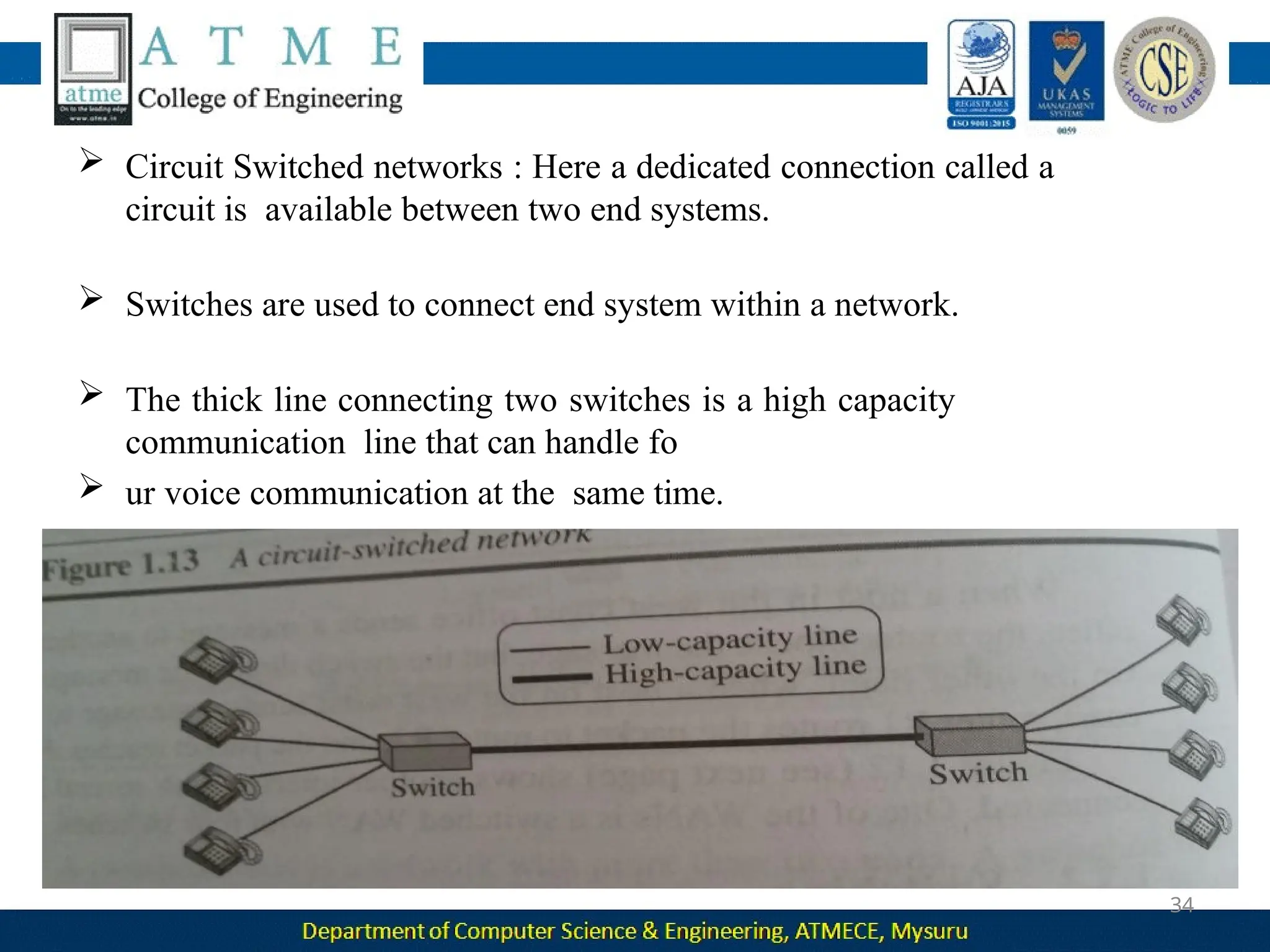
 The purpose of the OSI model is to show how to facilitate
communication between different systems without requiring changes
to the logic of the underlying hardware and software.
 The OSI model is not a protocol; it is a model for understanding and
designing a network architecture that is flexible, robust, and
interoperable.
The OSI model was intended to be the basis for the creation of the
protocols in the OSI stack.
 The OSI model is a layered framework for the design of network
systems that allows communication between all types of computer
systems.
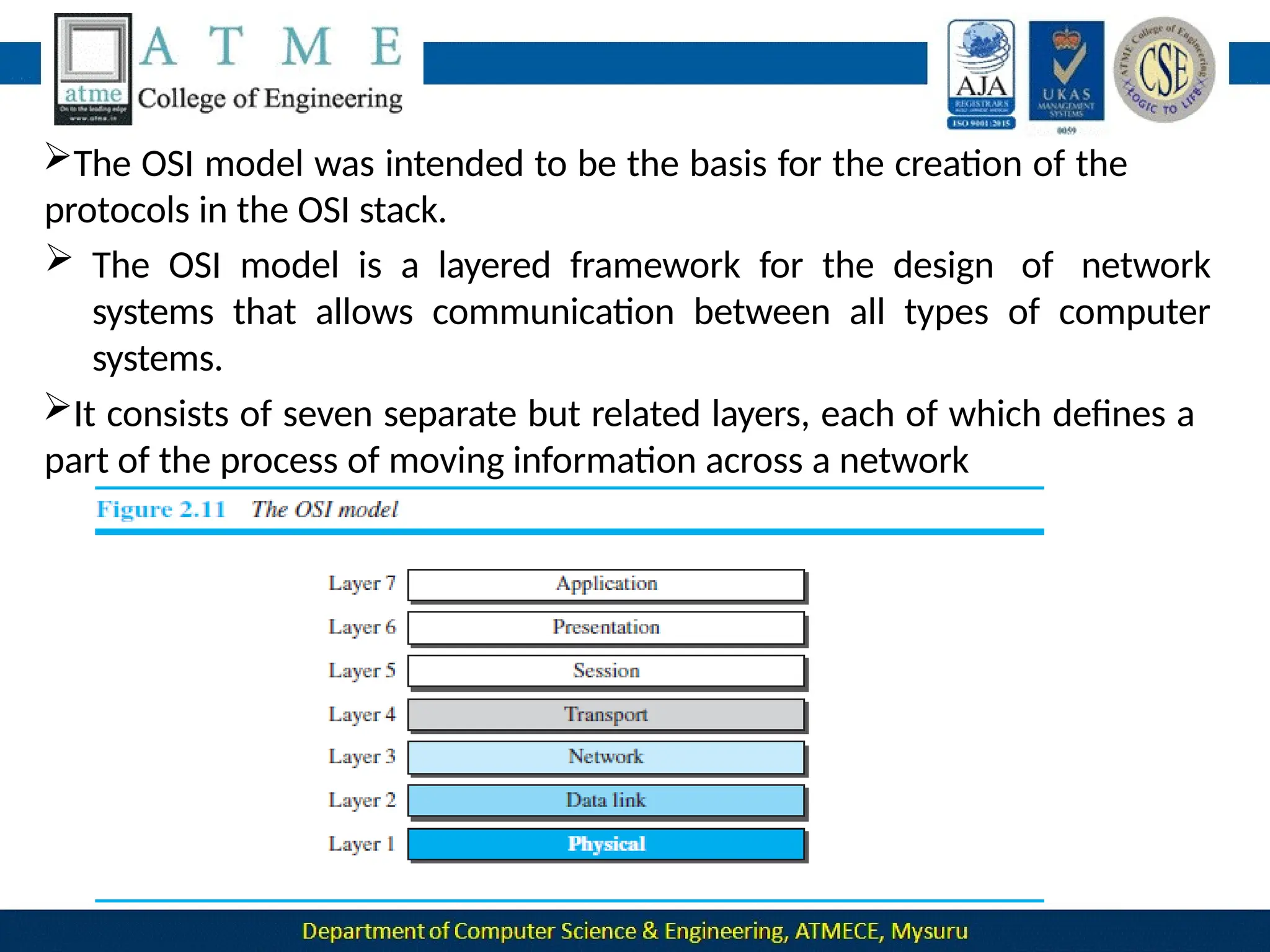
It consists of seven separate but related layers, each of which defines a
part of the process of moving information across a network
OSI versus TCP/IP
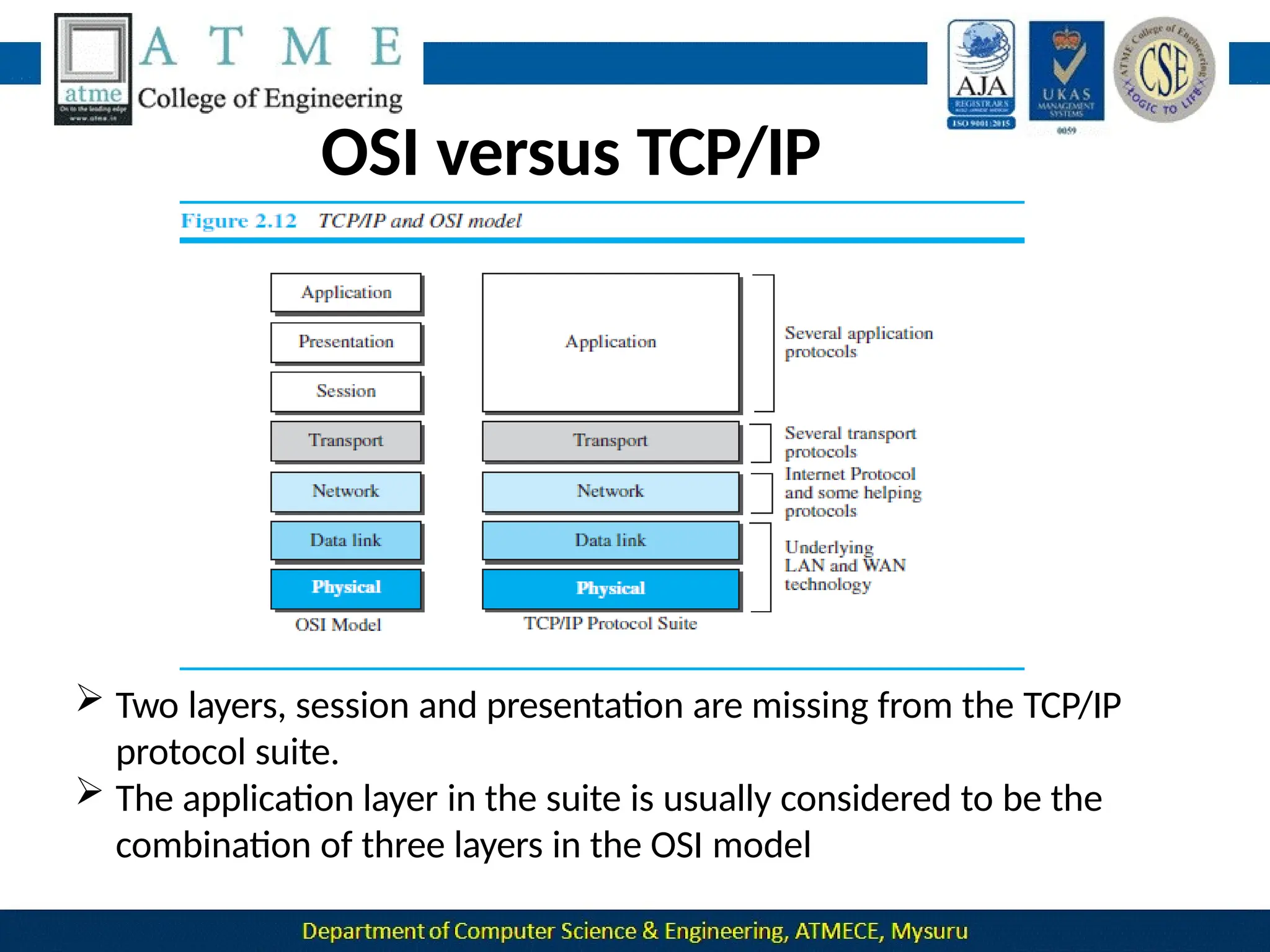
 Two layers, session and presentation are missing from the TCP/IP
protocol suite.
 The application layer in the suite is usually considered to be the
combination of three layers in the OSI model
 TCP/IP has more than one transport-layer protocol. Some of the
functionalities of the session layer are available in some of the
transport-layer protocols.
 The application layer is not only one piece of software. Many
applications can be developed at this layer.
 If some of the functionalities mentioned in the session and
presentation layers are needed for a particular application, they can
be included in the development of that piece of software.
Lack of OSI Model’s Success
 OSI was completed when TCP/IP was fully in place and a lot of time
and money had been spent on the suite; changing it would cost a
lot.
 Some layers in the OSI model were never fully defined.
 For example, although the services provided by the presentation
and the session layers were listed in the document, actual protocols
for these two layers were not fully defined, nor were they fully
described, and the corresponding software was not fully developed.
 when OSI was implemented by an organization in a different
application, it did not show a high enough level of performance to
entice the Internet authority to switch from the TCP/IP protocol
suite to the OSI model.
Physical Layer-
1
Data and Signals
Data need to be transmitted and received, but the media have
to change data to signals. Both data and the signals that
represent them can be either analog or digital in form.
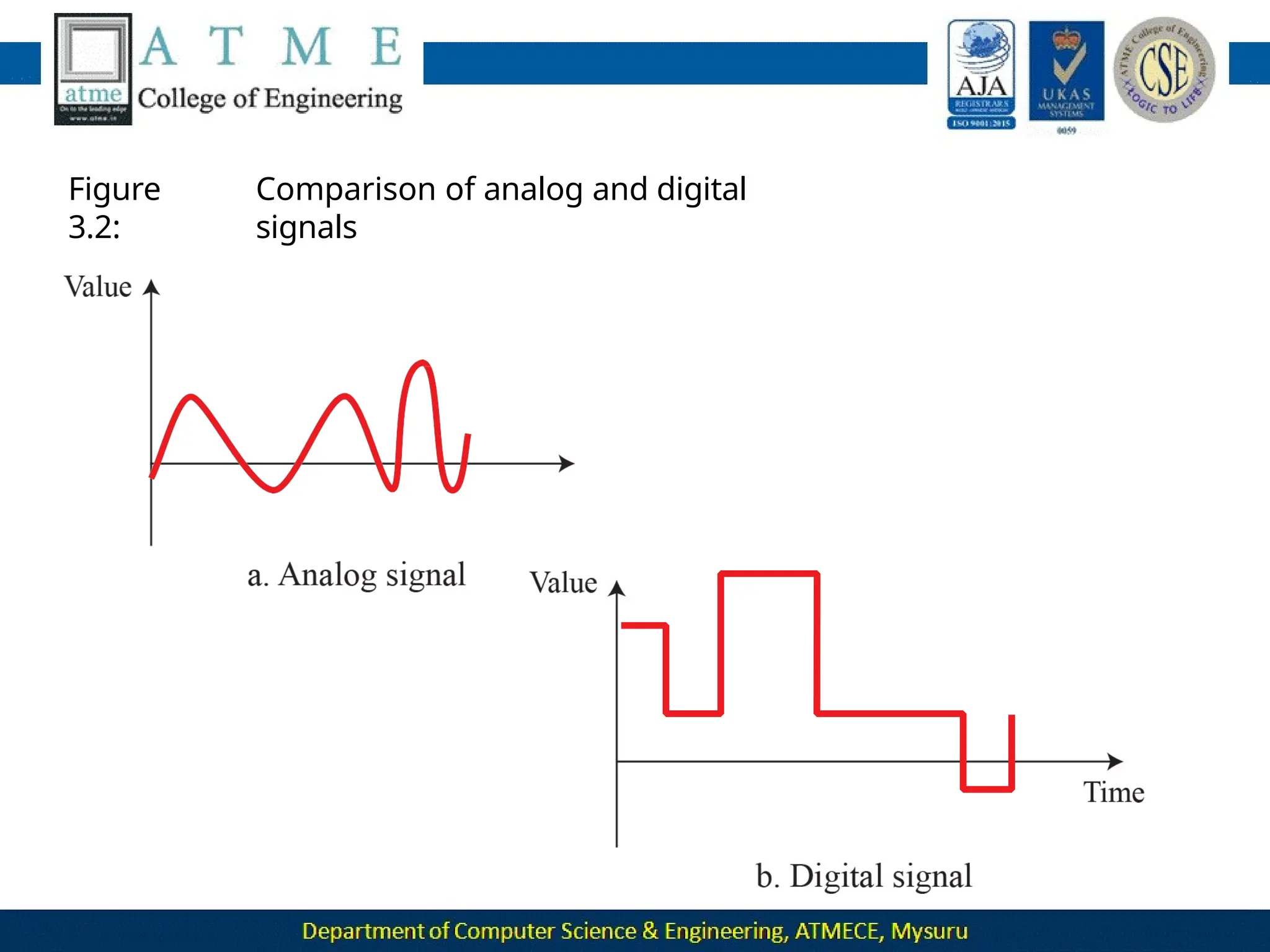
Analog data refers to information that is continuous.
For example, an analog clock that has hour, minute, and second
hands gives information in a continuous form; the movements
of the hands are continuous.
Digital data refers to information that has discrete states. For
example, digital clock that reports the hours and the
minutes will change suddenly from 8:05 to 8:06.
Figure
3.2:
Comparison of analog and digital
signals
Periodic and Nonperiodic
 A periodic signal completes a pattern within a measurable
time frame, called a period, and repeats that pattern over
subsequent identical periods.
 The completion of one full pattern is called a cycle.
 A non periodic signal changes without exhibiting a pattern
or cycle that repeats over time.
 Both analog and digital signals can be periodic or
non periodic.
 In data communication, we commonly use periodic analog
signals and non periodic digital signals.
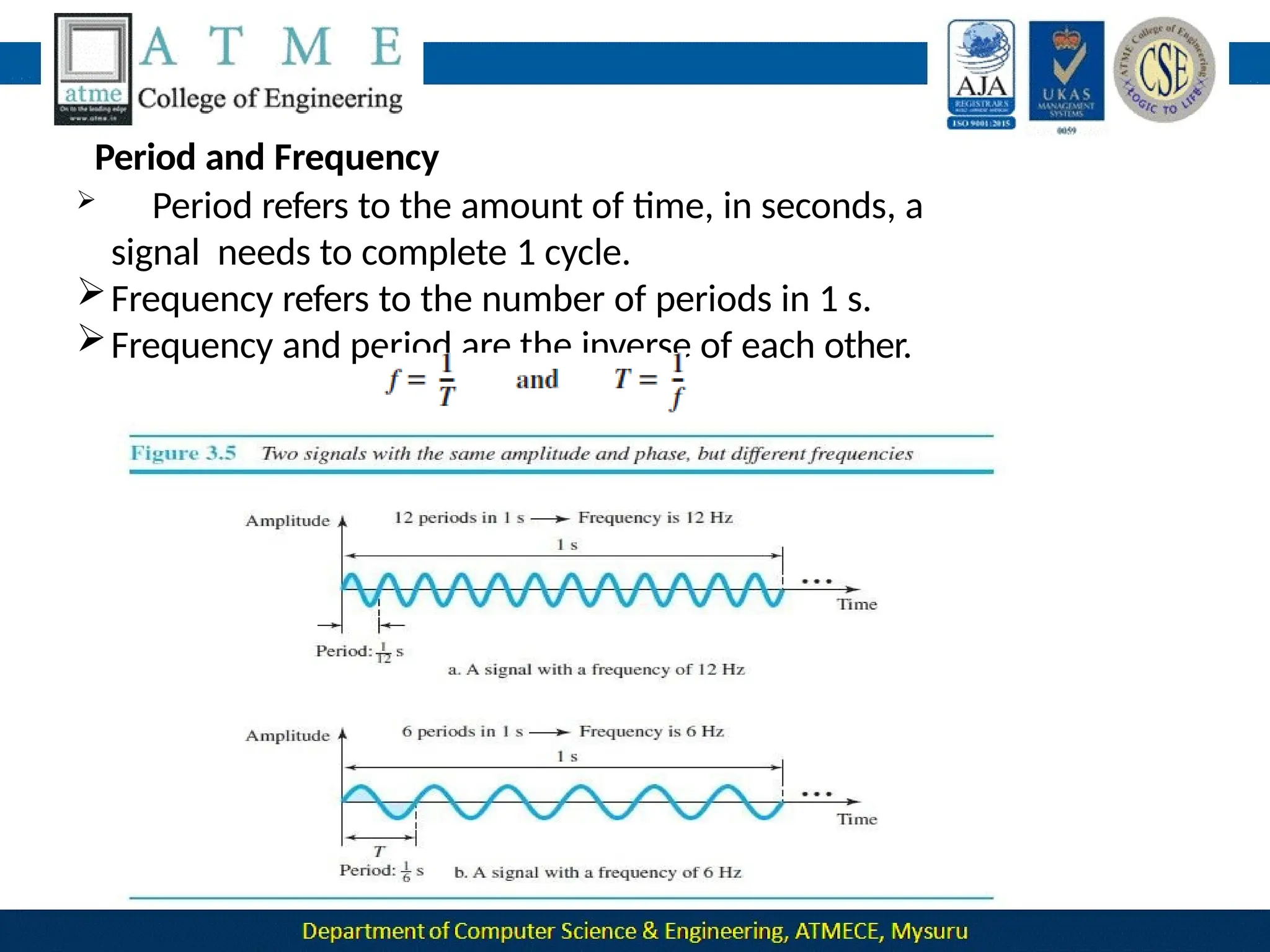
Period and Frequency
 Period refers to the amount of time, in seconds, a
signal needs to complete 1 cycle.
Frequency refers to the number of periods in 1 s.
Frequency and period are the inverse of each other.
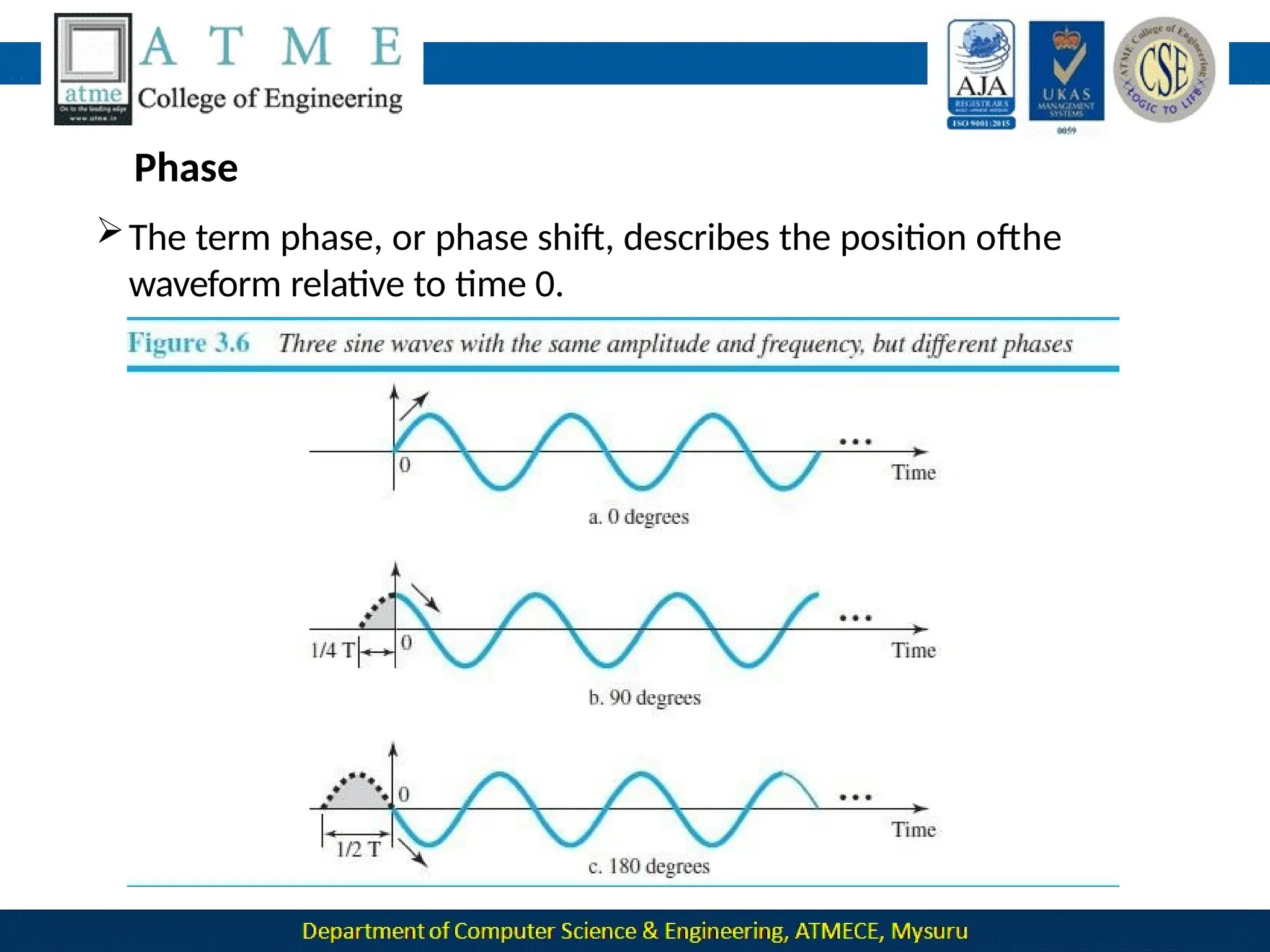
Phase
The term phase, or phase shift, describes the position ofthe
waveform relative to time 0.
•A sine wave with a phase of 90° starts at time 0 with a peak amplitude.
The amplitude is decreasing.
• A sine wave with a phase of 180° starts at time 0 with a zero
amplitude. The amplitude is decreasing.
Another way to look at the phase is in terms of shift or offset. We
can say that
• A sine wave with a phase of 0° is not shifted.
•A sine wave with a phase of 90° is shifted to the left by ¼ cycle
However, note that the signal does not really exist before time 0.
• A sine wave with a phase of 180° is shifted to the left by ½
cycle.
However, note that the signal does not really exist before time
Digital
Signals
 In addition to being represented by an analog signal, information can
also be represented by a digital signal.
 For example, 1 can be encoded as a positive voltage and a 0 as zero
voltage.
 A digital signal can have more than two levels. In this case, we can
send
more than 1 bit for each level.
1. A digital signal has eight levels. How many bits are needed per level?
Calculate the number of bits from the following formula. Each signal
level is represented by 3 bits.
2. A digital signal has nine levels. How many bits are
needed per level?
We calculate the number of bits by using the formula. Each
signal level is represented by 3.17 bits.
2. A digitized voice channel, is made by digitizing a 4-kHz
bandwidth analog voice signal. What is the required bit rate?
Solution: We need to sample the signal at twice the highest
frequency (two samples per hertz). We assume that each
sample requires 8 bits.
Bit Rate
The bit rate is the number of bits sent in 1s, expressed in bits per
second (bps).
Bit Length
The bit length is the distance one bit occupies on the
transmission
medium.
Bit length = propagation speed x bit duration
Transmission of Digital Signals
A digital signal is a composite analog signal with an infinite
bandwidth.
Two approaches of Transmission of Digital
Signals: 1 .Baseband transmission
2.Broadband transmission(using modulation).
Baseband Transmission
Baseband transmission means sending a digital
signal over a
channel without changing the digital signal to an
analog signal.
Baseband transmission requires that we have a low-pass channel, a
channel with a bandwidth that starts from zero.
Baseband transmission of a digital signal that preserves the shape of
the digital signal is possible only if we have a low-pass channel with an
infinite or very wide bandwidth.
In baseband transmission, the required bandwidth is proportional to
the bit rate; if we need to send bits faster, we need more bandwidth.
Broadband Transmission (Using Modulation)
Broadband transmission or modulation means changing the digital
signal to an analog signal for transmission.
Modulation allows us to use a bandpass channel—a channel
witha
bandwidth that does not start from zero.
If the available channel is a bandpass channel, we cannot send
the digital signal directly tothe channel; we need to convert the
digital signal to an analog signal before transmission.
TRANSMISSION IMPAIRMENT
 Signals travel through transmission media, which are not perfect.
 The imperfection causes signal impairment. This means that the signal
at the beginning of the medium is not the same as the signal at the
end of the medium.
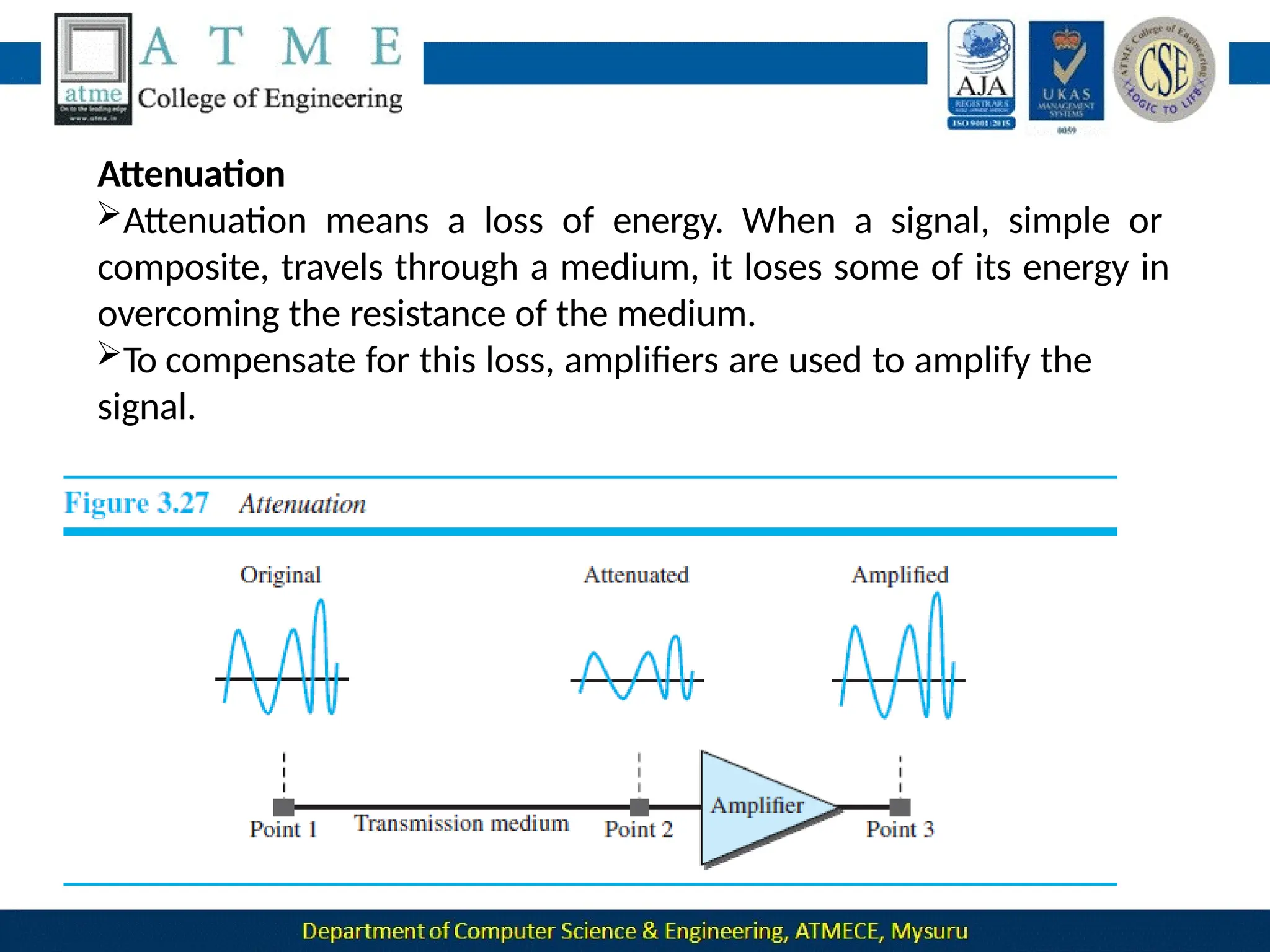
Attenuation
Attenuation means a loss of energy. When a signal, simple or
composite, travels through a medium, it loses some of its energy in
overcoming the resistance of the medium.
To compensate for this loss, amplifiers are used to amplify the
signal.
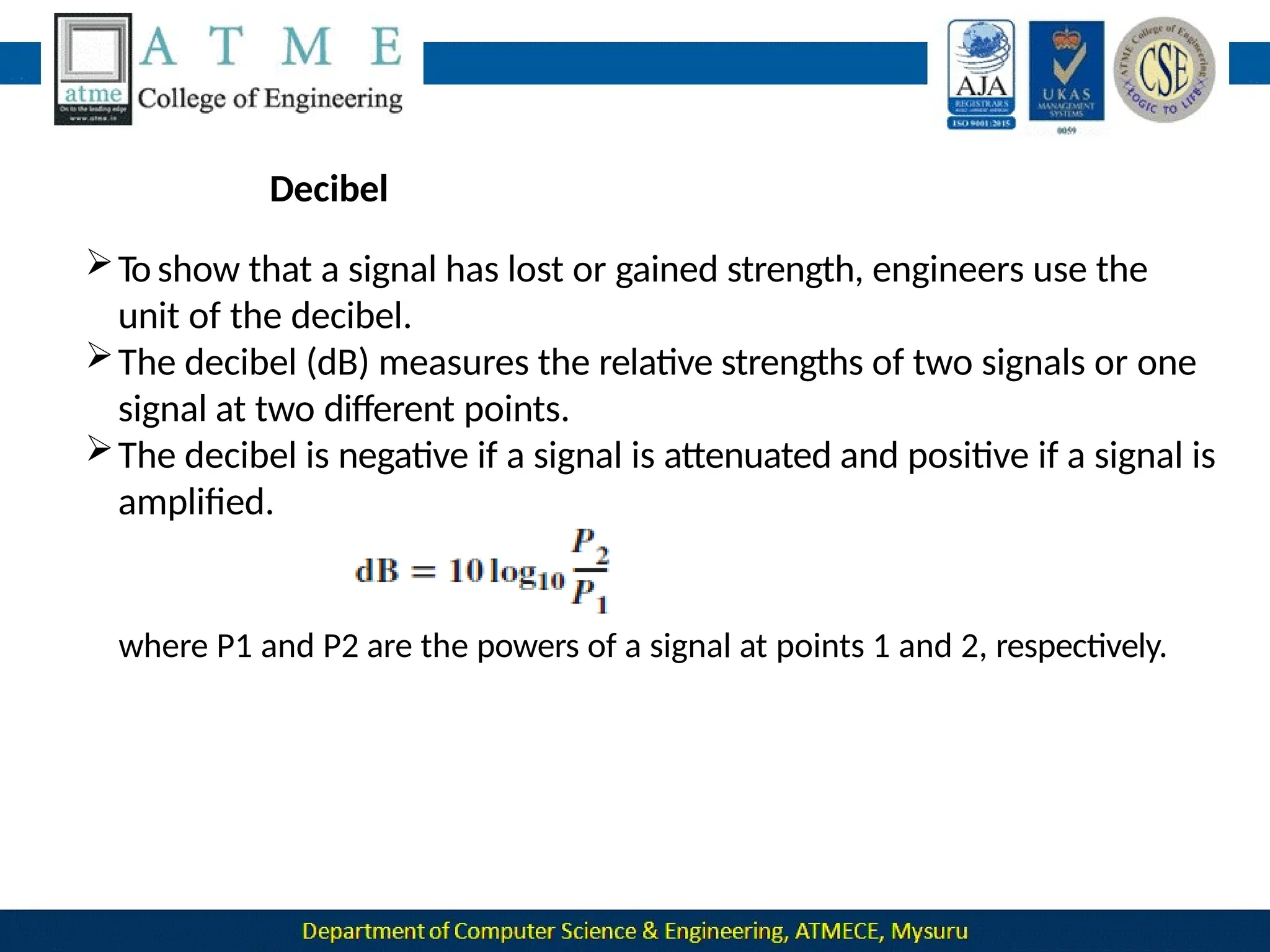
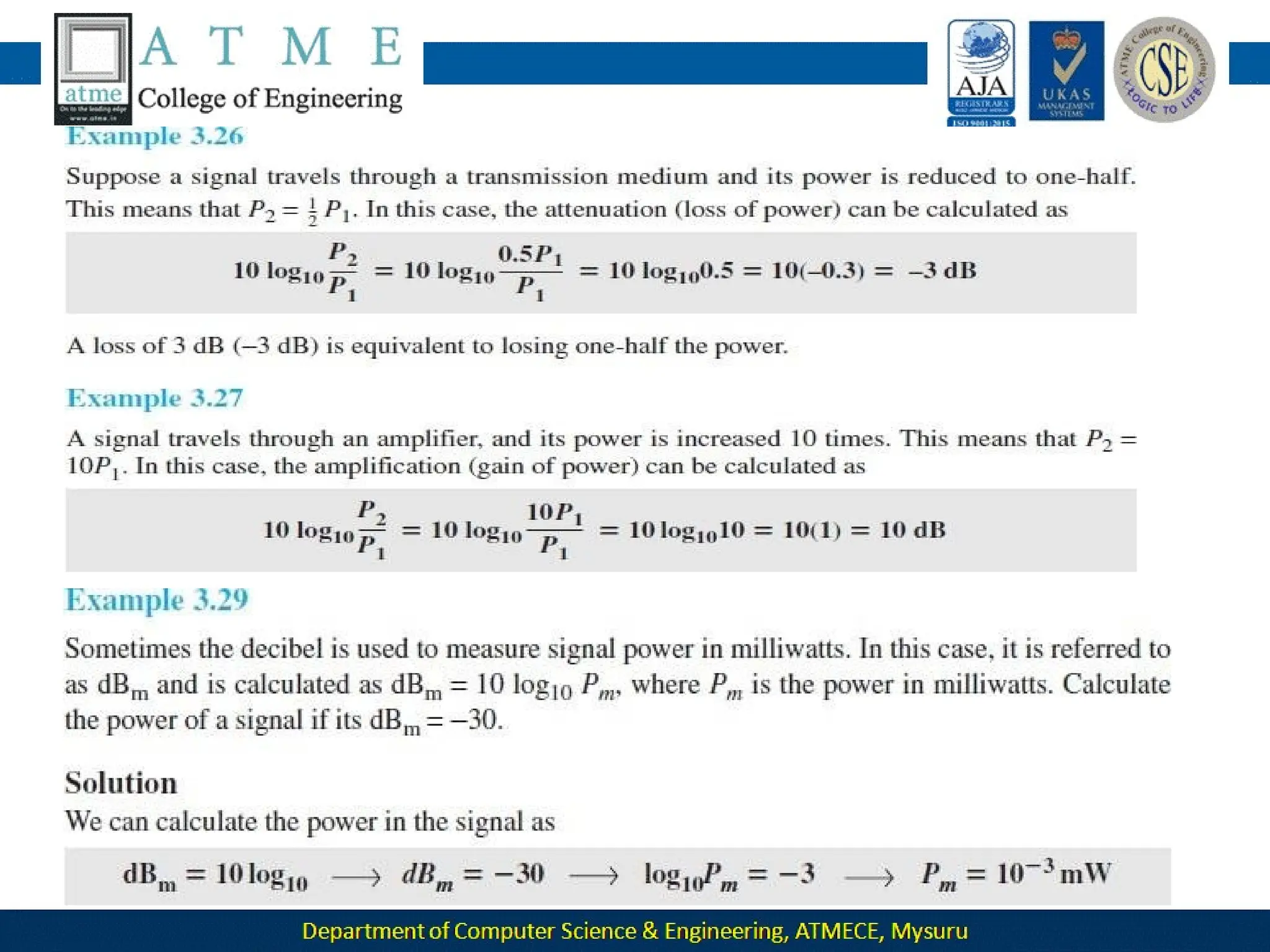
Decibel
To show that a signal has lost or gained strength, engineers use the
unit of the decibel.
The decibel (dB) measures the relative strengths of two signals or one
signal at two different points.
The decibel is negative if a signal is attenuated and positive if a signal is
amplified.
where P1 and P2 are the powers of a signal at points 1 and 2, respectively.
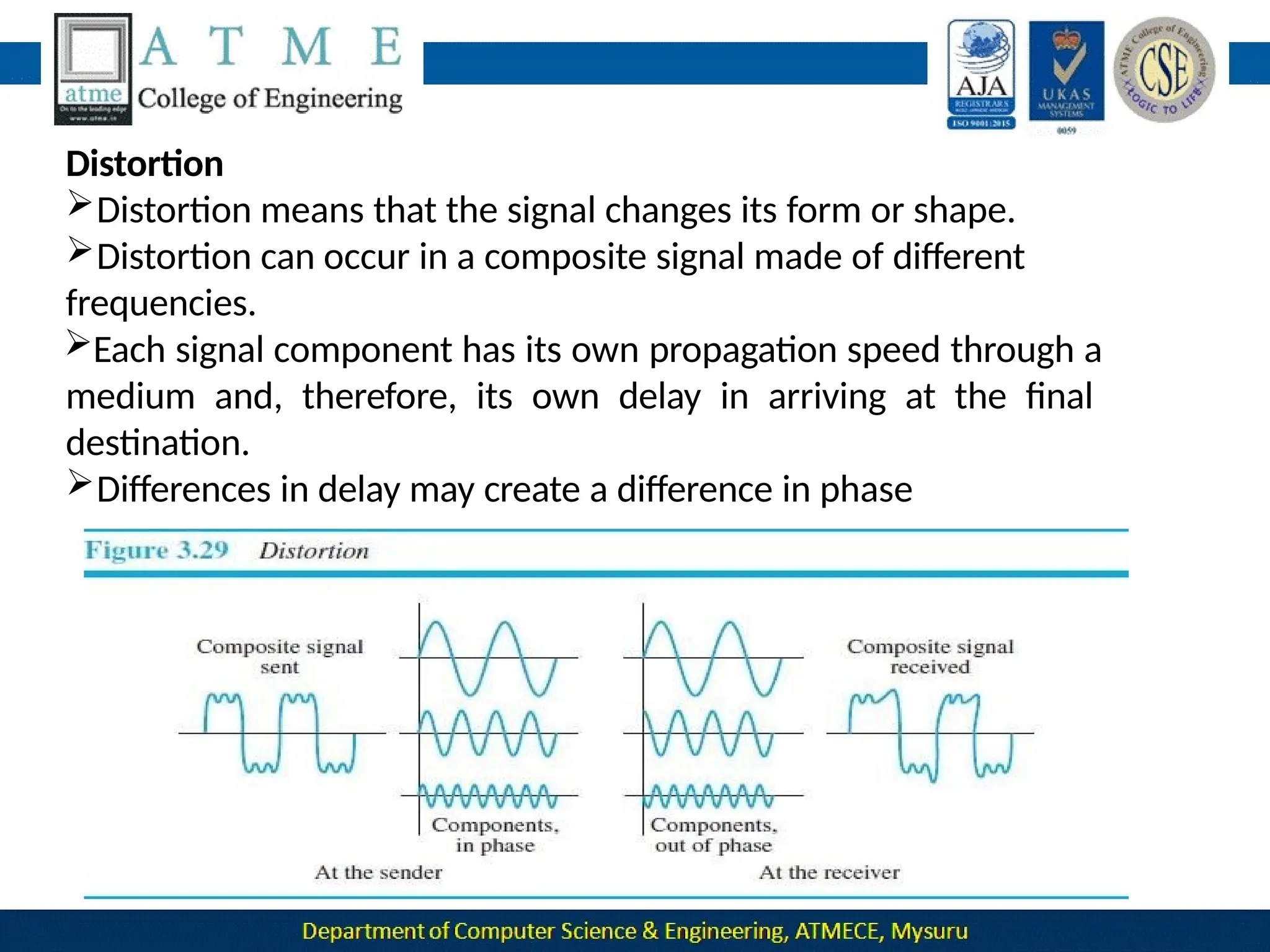
Distortion
Distortion means that the signal changes its form or shape.
Distortion can occur in a composite signal made of different
frequencies.
Each signal component has its own propagation speed through a
medium and, therefore, its own delay in arriving at the final
destination.
Differences in delay may create a difference in phase
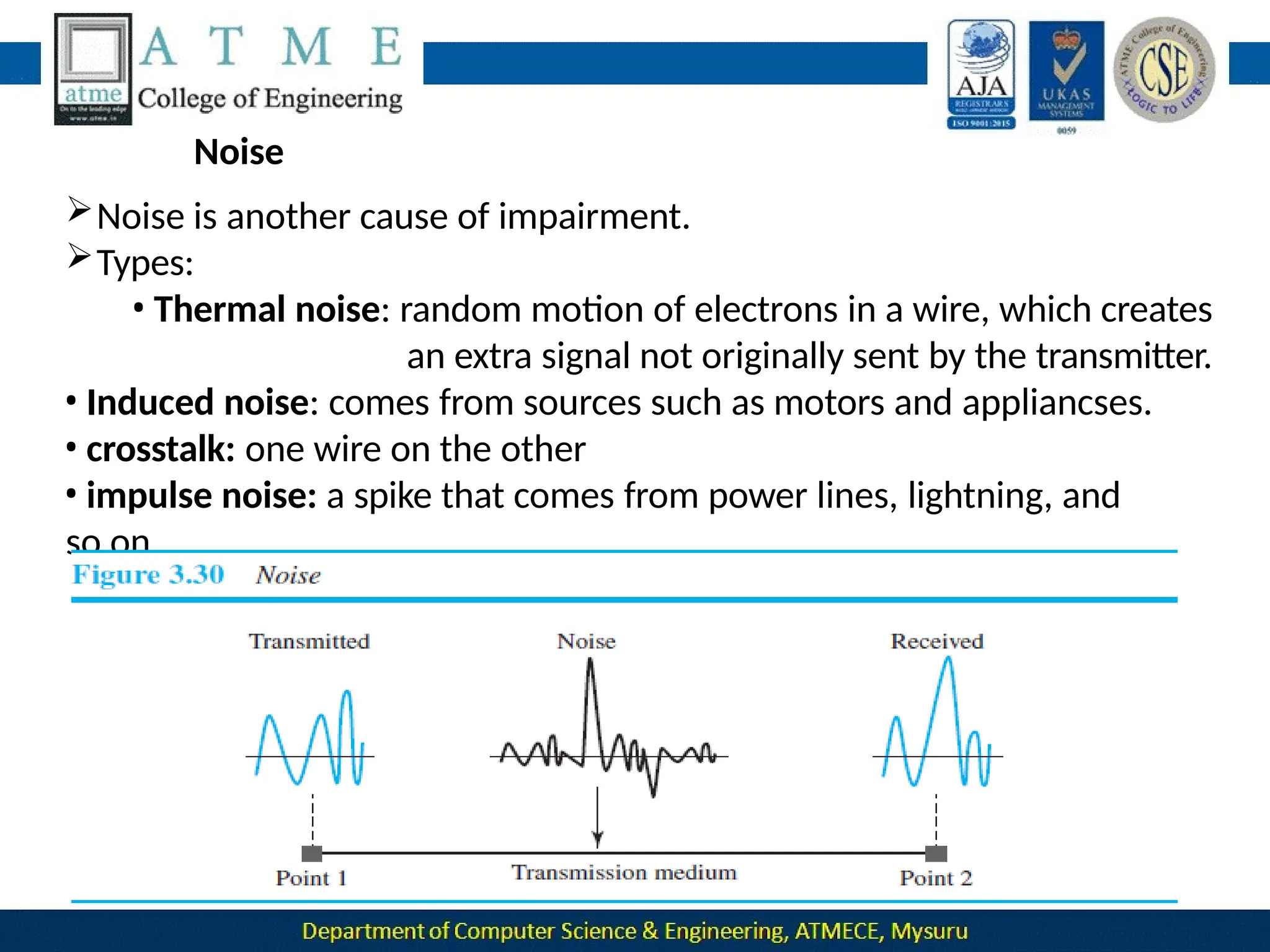
Noise
Noise is another cause of impairment.
Types:
• Thermal noise: random motion of electrons in a wire, which creates
an extra signal not originally sent by the transmitter.
• Induced noise: comes from sources such as motors and appliancses.
• crosstalk: one wire on the other
• impulse noise: a spike that comes from power lines, lightning, and
so on.
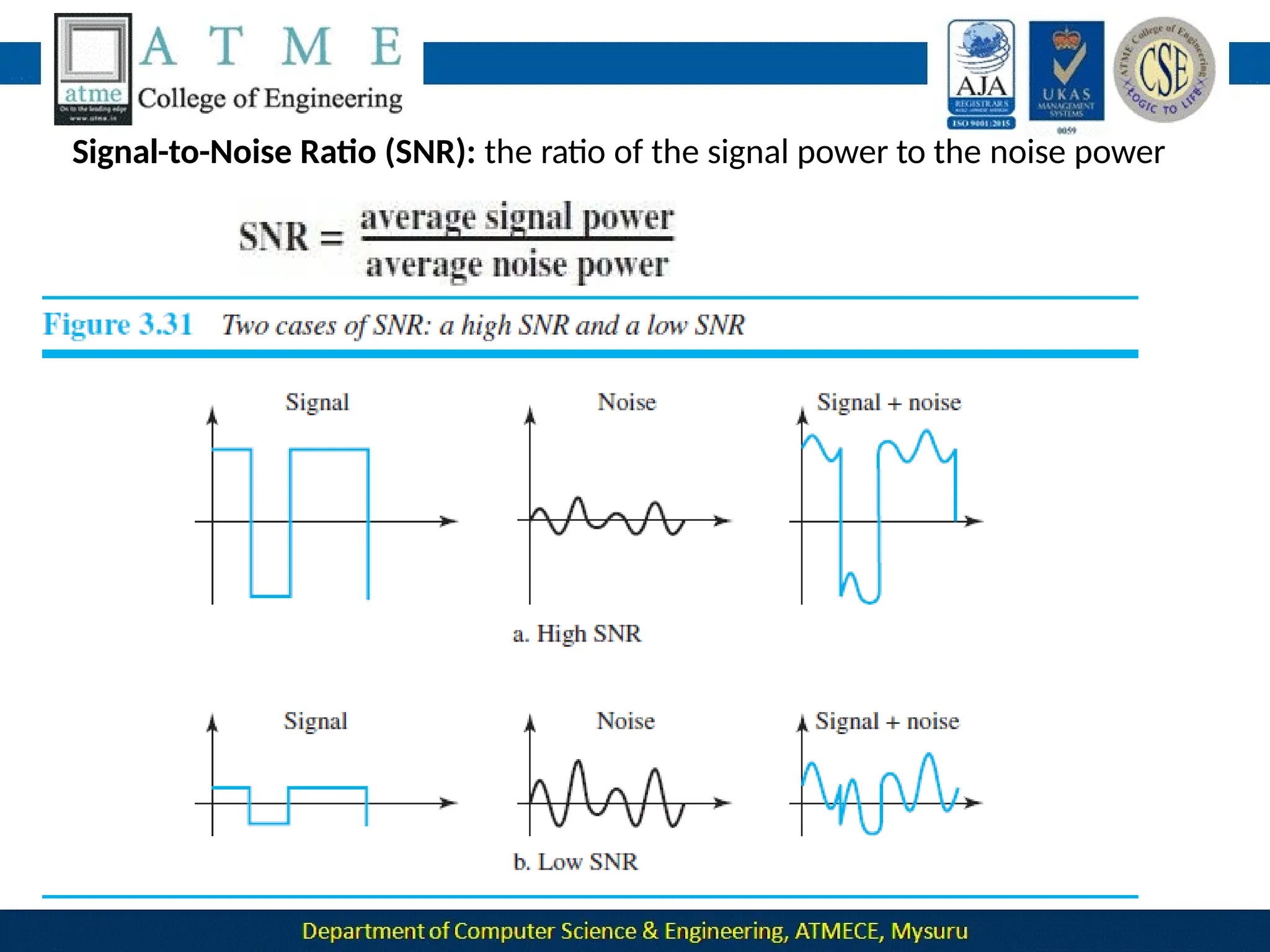
Signal-to-Noise Ratio (SNR): the ratio of the signal power to the noise power
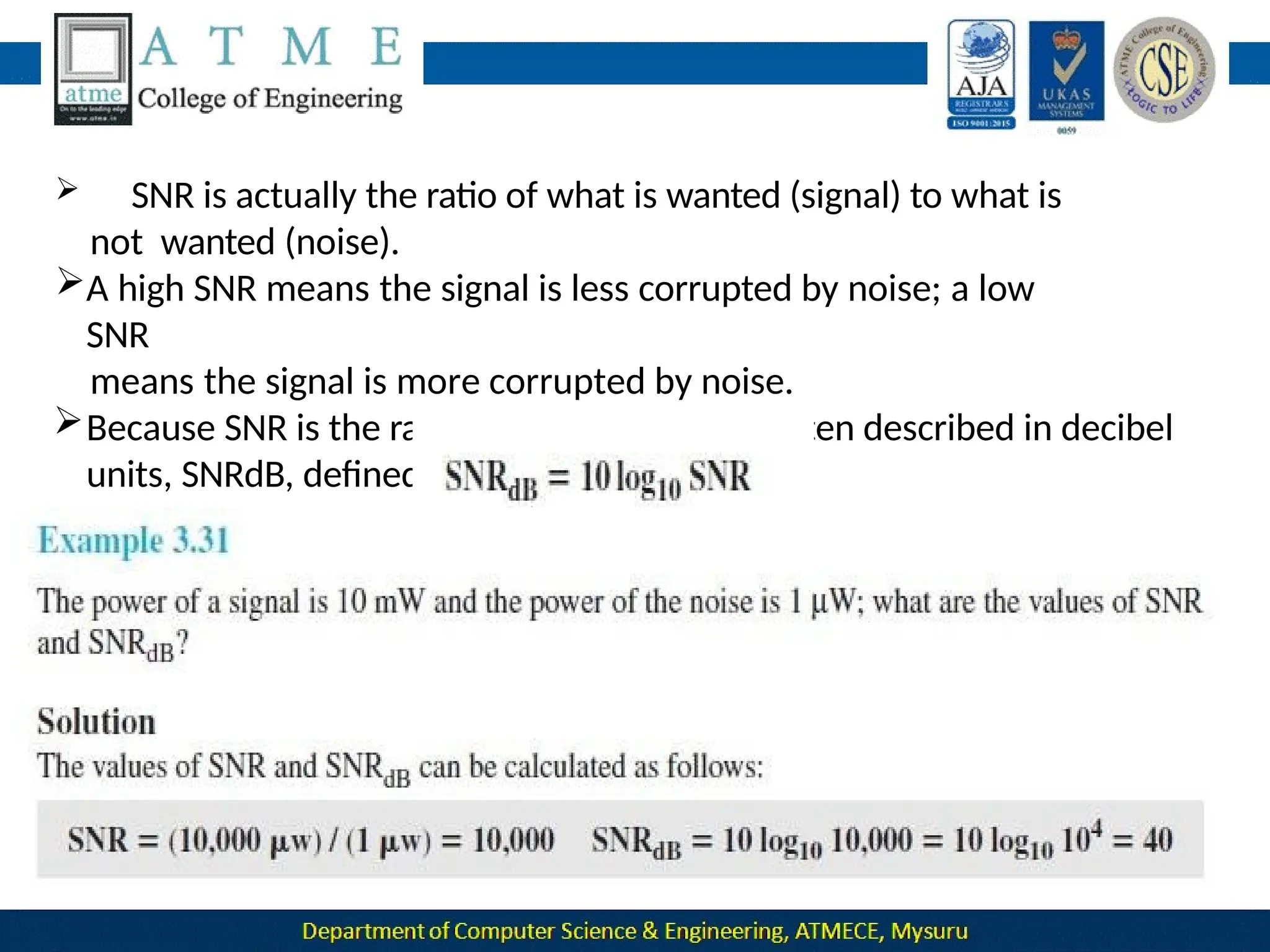
 SNR is actually the ratio of what is wanted (signal) to what is
not wanted (noise).
A high SNR means the signal is less corrupted by noise; a low
SNR
means the signal is more corrupted by noise.
Because SNR is the ratio of two powers, it is often described in decibel
units, SNRdB, defined as
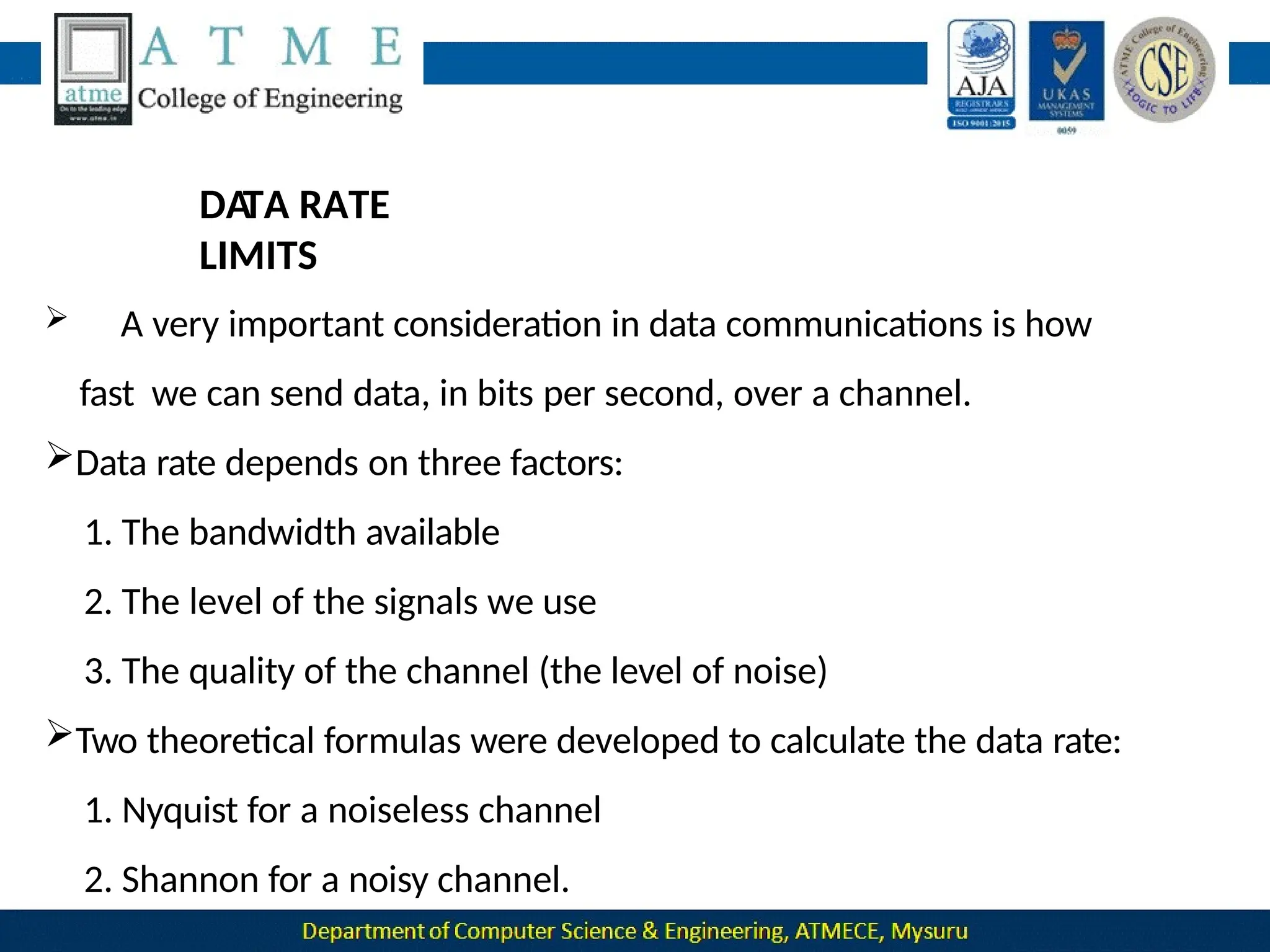
DA
TA RATE
LIMITS
 A very important consideration in data communications is how
fast we can send data, in bits per second, over a channel.
Data rate depends on three factors:
1. The bandwidth available
2. The level of the signals we use
3. The quality of the channel (the level of noise)
Two theoretical formulas were developed to calculate the data rate:
1. Nyquist for a noiseless channel
2. Shannon for a noisy channel.
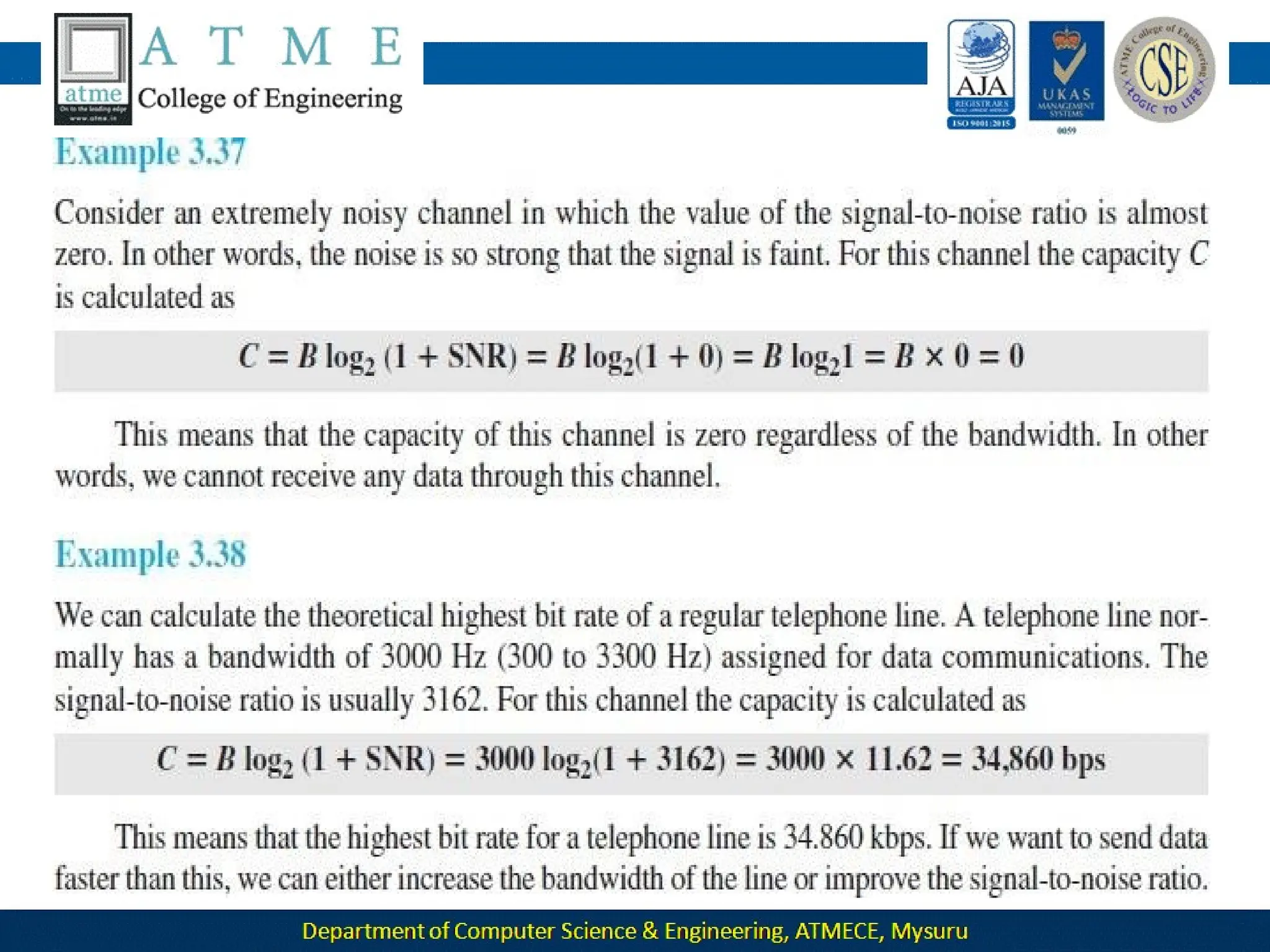
Noiseless Channel: Nyquist Bit
Rate
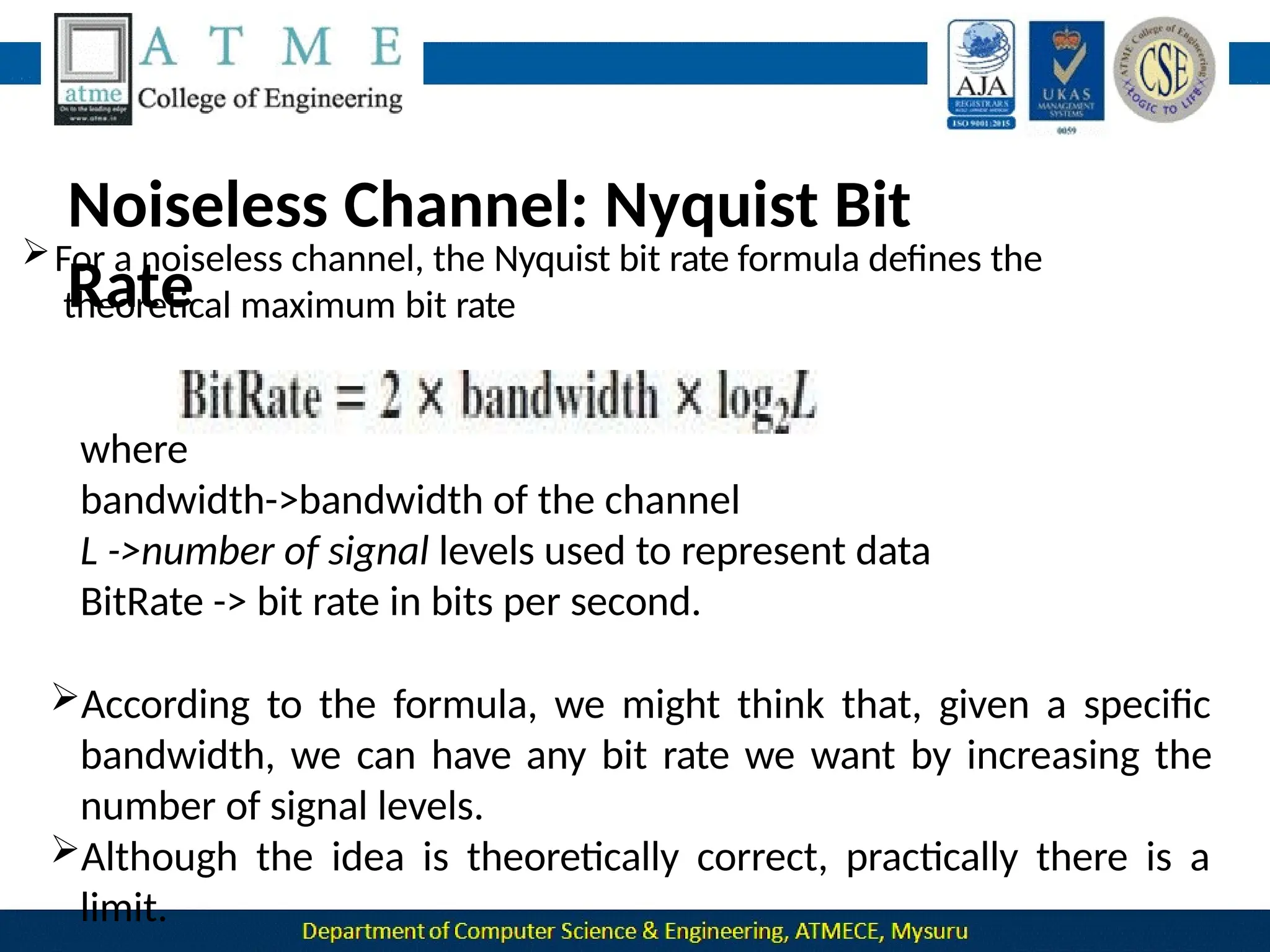
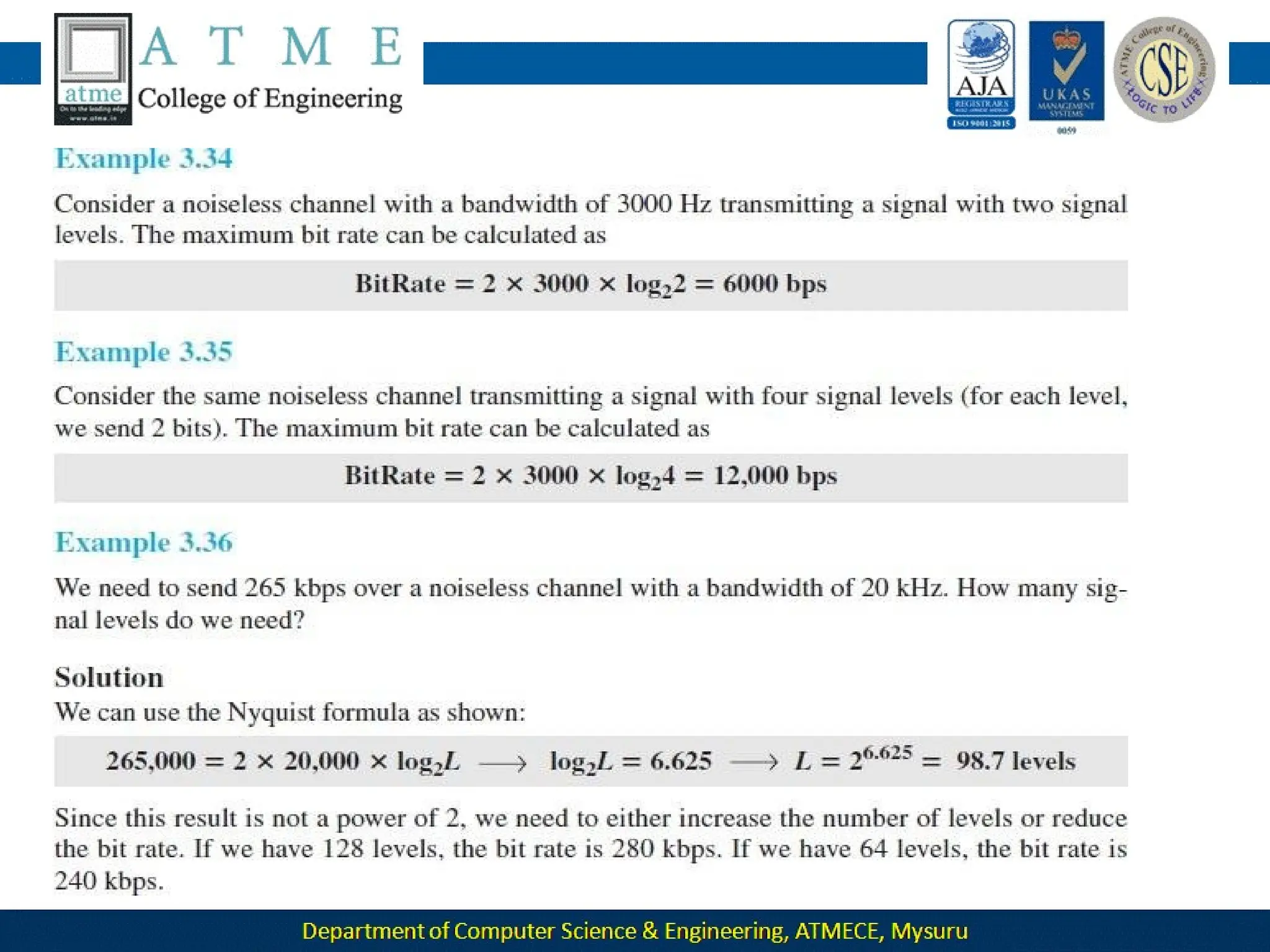
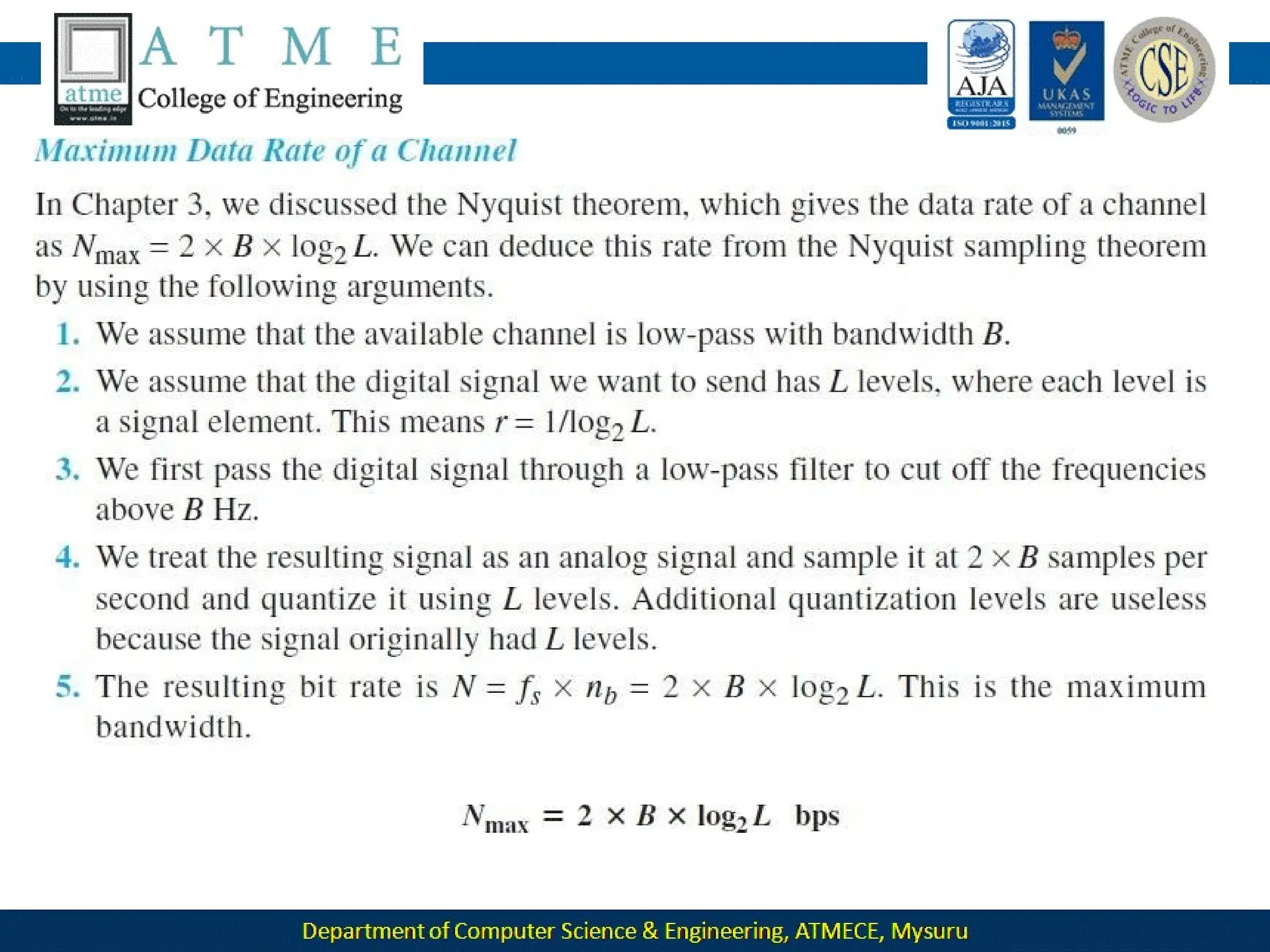
For a noiseless channel, the Nyquist bit rate formula defines the
theoretical maximum bit rate
where
bandwidth->bandwidth of the channel
L ->number of signal levels used to represent data
BitRate -> bit rate in bits per second.
According to the formula, we might think that, given a specific
bandwidth, we can have any bit rate we want by increasing the
number of signal levels.
Although the idea is theoretically correct, practically there is a
limit.
When we increase the number of signal levels, we impose a burden
on the receiver.
If the number of levels in a signal is just 2, the receiver can easily
distinguish between a 0 and a 1.
If the level of a signal is 64, the receiver must be very sophisticated
to distinguish between 64 different levels.
Inother words, increasing the levels of a
signal reducesthe reliability of the system.
Noisy Channel: Shannon Capacity
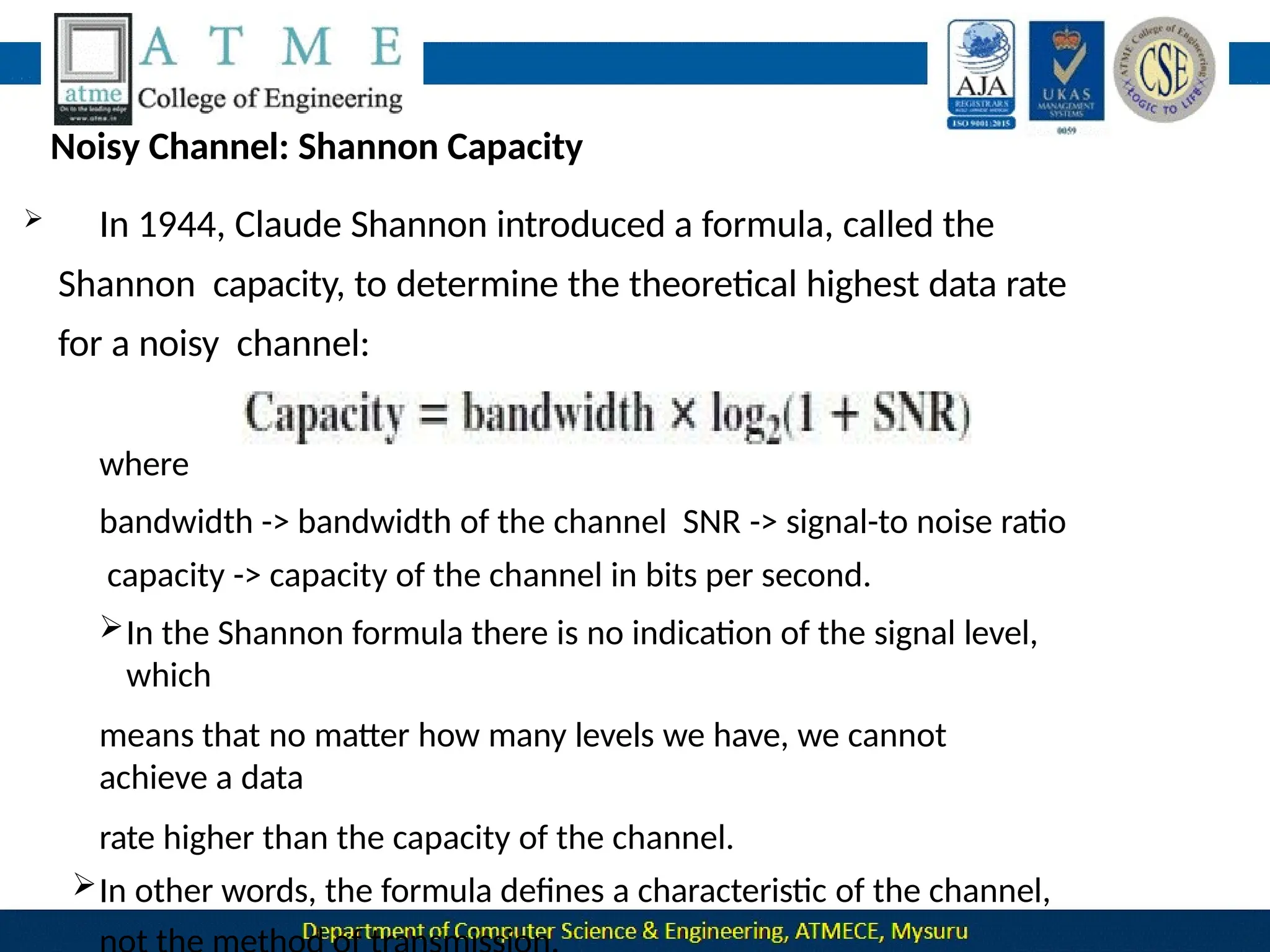
 In 1944, Claude Shannon introduced a formula, called the
Shannon capacity, to determine the theoretical highest data rate
for a noisy channel:
where
bandwidth -> bandwidth of the channel SNR -> signal-to noise ratio
capacity -> capacity of the channel in bits per second.
In the Shannon formula there is no indication of the signal level,
which
means that no matter how many levels we have, we cannot
achieve a data
rate higher than the capacity of the channel.
In other words, the formula defines a characteristic of the channel,
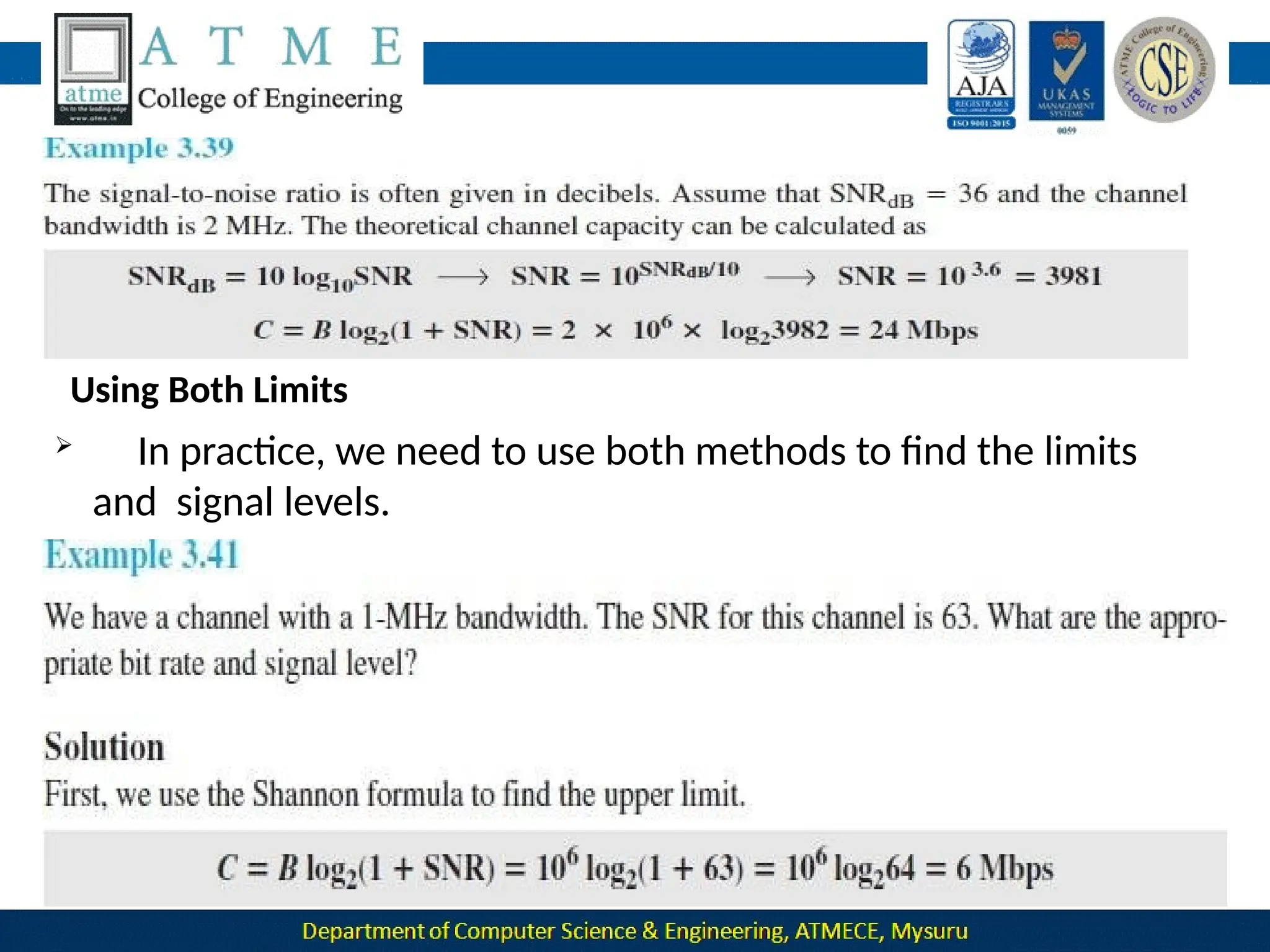
Using Both Limits
 In practice, we need to use both methods to find the limits
and signal levels.
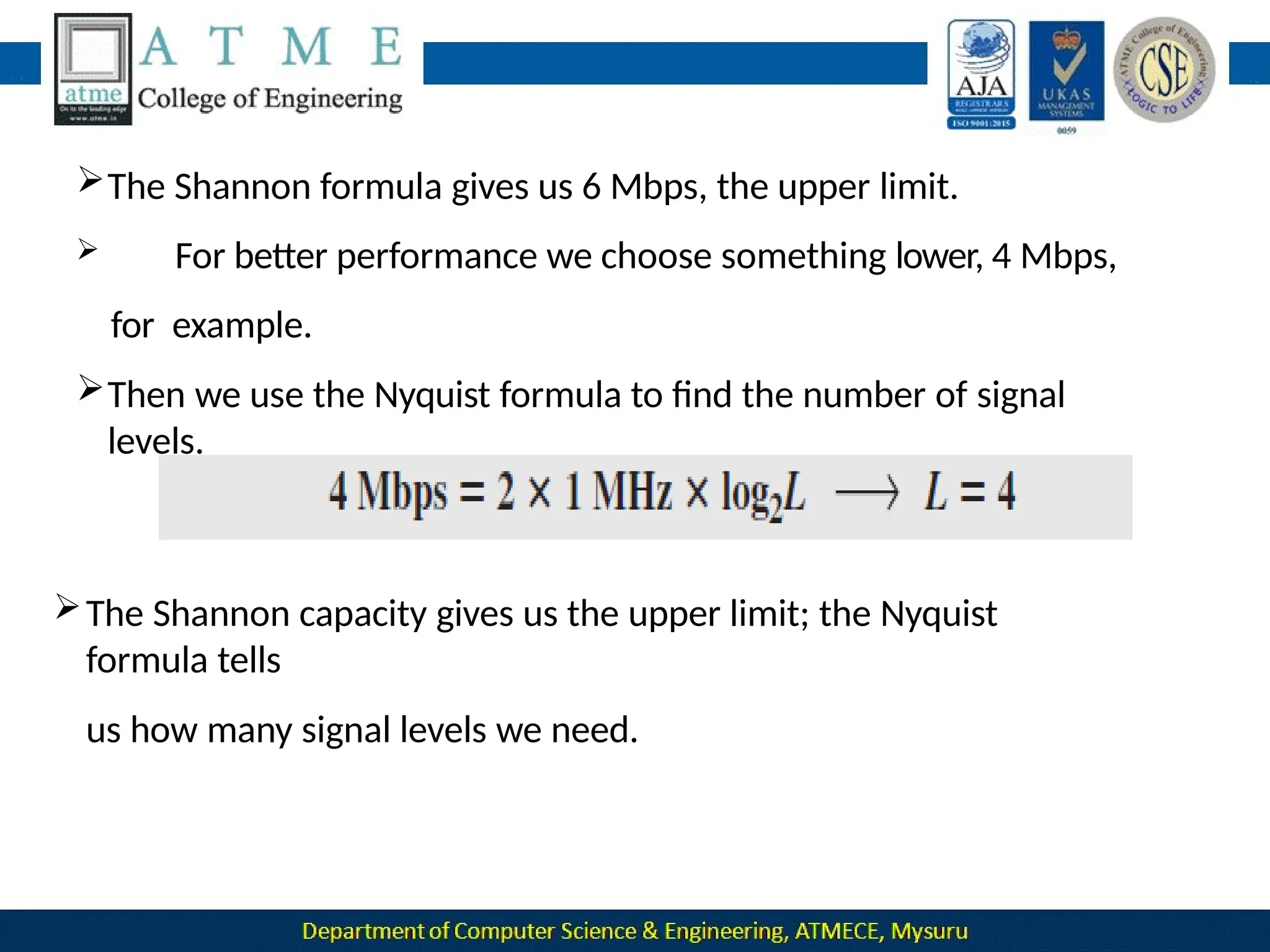
The Shannon formula gives us 6 Mbps, the upper limit.
 For better performance we choose something lower, 4 Mbps,
for example.
Then we use the Nyquist formula to find the number of signal
levels.
The Shannon capacity gives us the upper limit; the Nyquist
formula tells
us how many signal levels we need.
PERFORMANCE
 One important issue in networking is the performance of
the network—how good is it?
The characteristics that measures network performance are:
1. Bandwidth
2. Throughput
3. Latency(Delay)
4. Jitter
1.Bandwidth
In networking, we use the term bandwidth in two contexts.
❑ The first, bandwidth in hertz, refers to the range of frequencies in a
composite signal or the range of frequencies that a channel can pass.
❑ The second, bandwidth in bits per second, refers to the speed of bit transmission
in a channel or link.
❑ Relationship
There is an explicit relationship between the bandwidth in hertz and
bandwidth in bits per second.
Basically, an increase in bandwidth in hertz means an increase in bandwidth
in bits per second.
The relationship depends on baseband transmission
Throughput
The throughput is a measure of how fast we can actually send data
through a network.
Although, at first glance, bandwidth in bits per second and
throughput
seem the same, they are different.
A link may have a bandwidth of B bps, but we can only send T bps
through this link with T always less than B.
 The bandwidth is a potential measurement of a link
The throughput is an actual measurement of how fast we can
send data.
 For example, we may have a link with a bandwidth of 1
Mbps, but the
devices connected to the end of the link may handle only 200
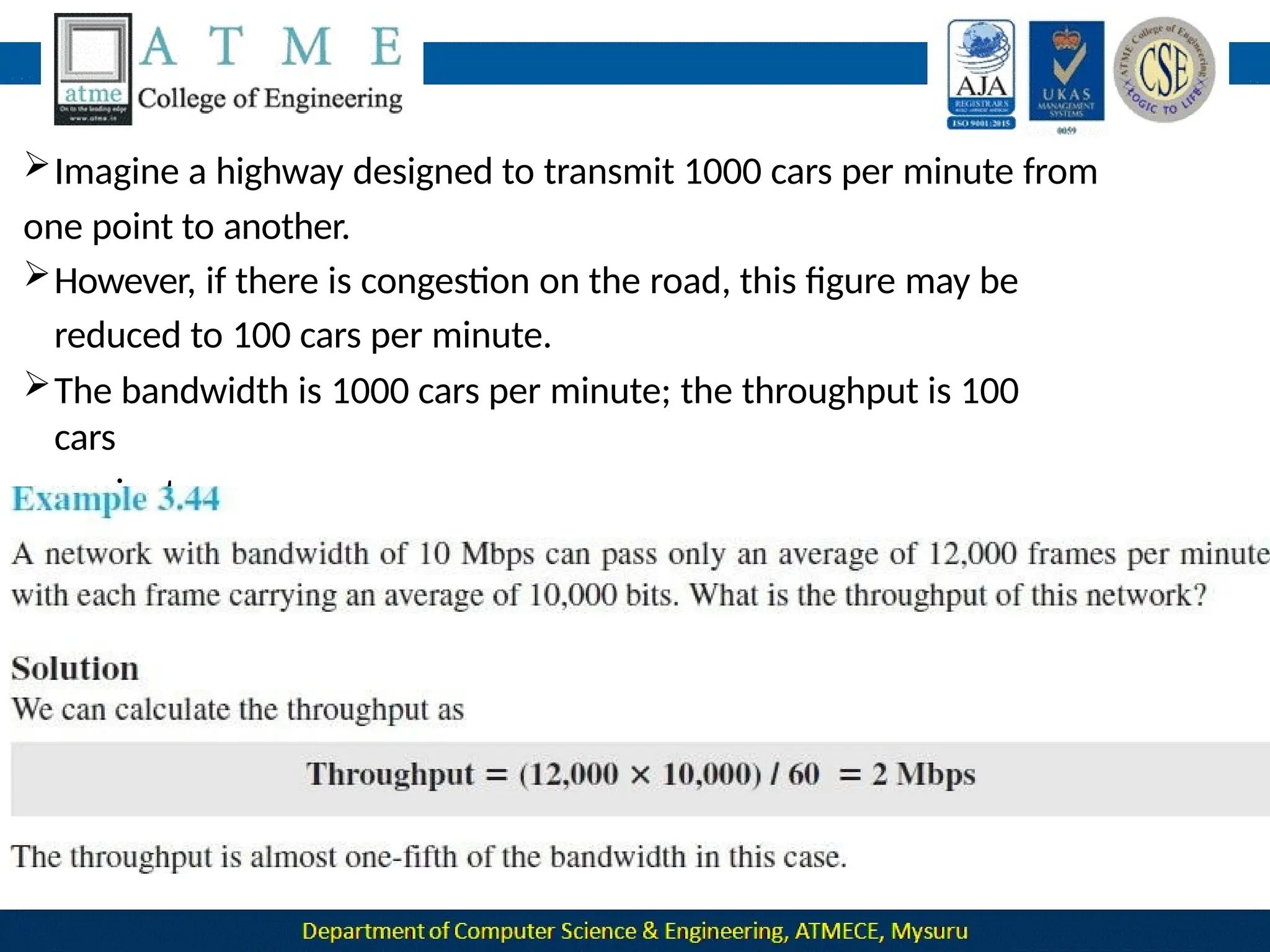
Imagine a highway designed to transmit 1000 cars per minute from
one point to another.
However, if there is congestion on the road, this figure may be
reduced to 100 cars per minute.
The bandwidth is 1000 cars per minute; the throughput is 100
cars
per minute.
Latency (Delay)
The latency or delay defines how long it takes for an entire message to
completely arrive at the destination from the time the first bit is sent out
from the source.
latency is made of four components:
1.Propagation time
2.Transmission time, 3.Queuing time and 4.Processing delay.
Propagation Time
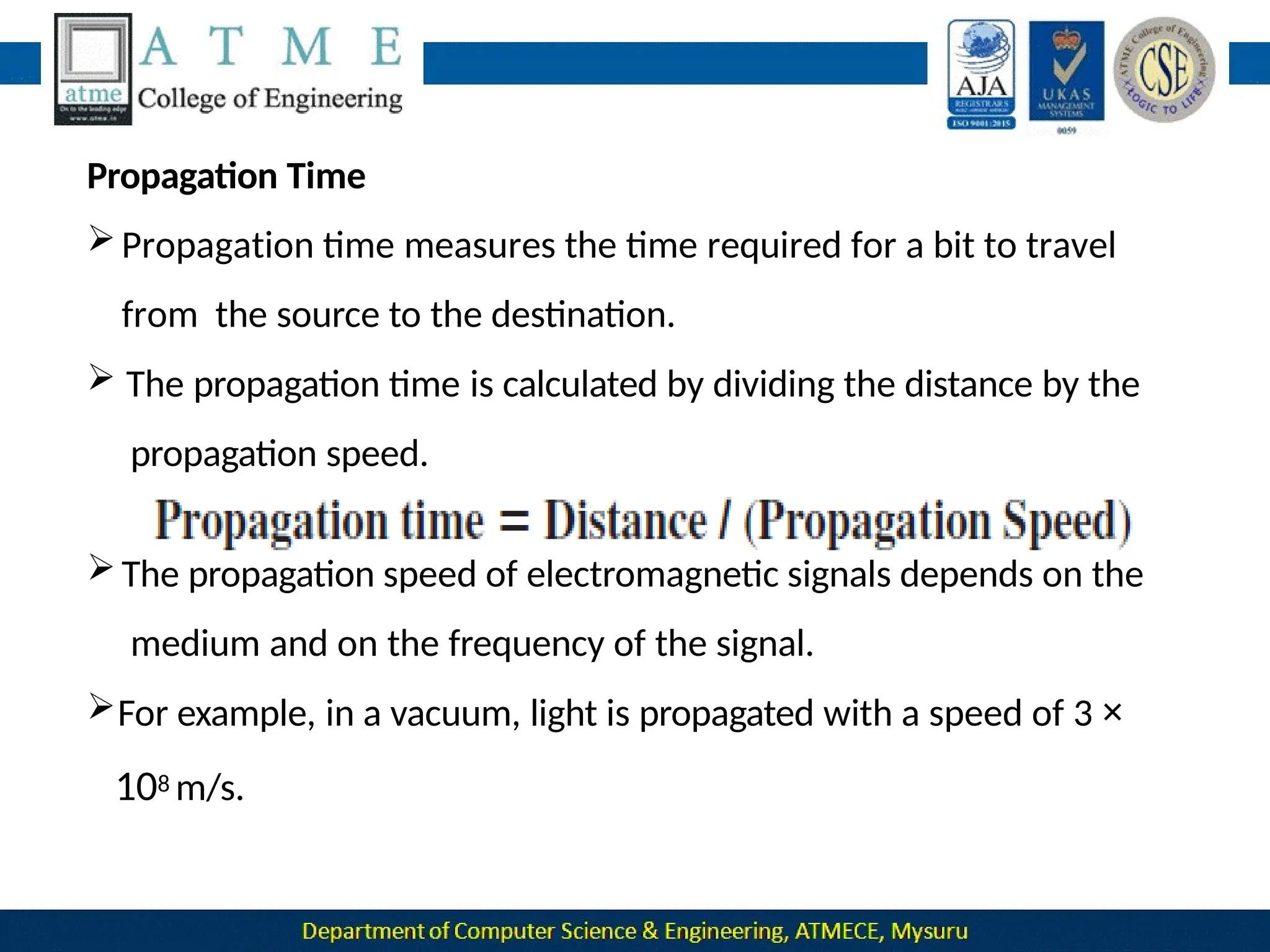
Propagation time measures the time required for a bit to travel
from the source to the destination.
 The propagation time is calculated by dividing the distance by the
propagation speed.
The propagation speed of electromagnetic signals depends on the
medium and on the frequency of the signal.
For example, in a vacuum, light is propagated with a speed of 3 ×
108 m/s.
Transmission Time
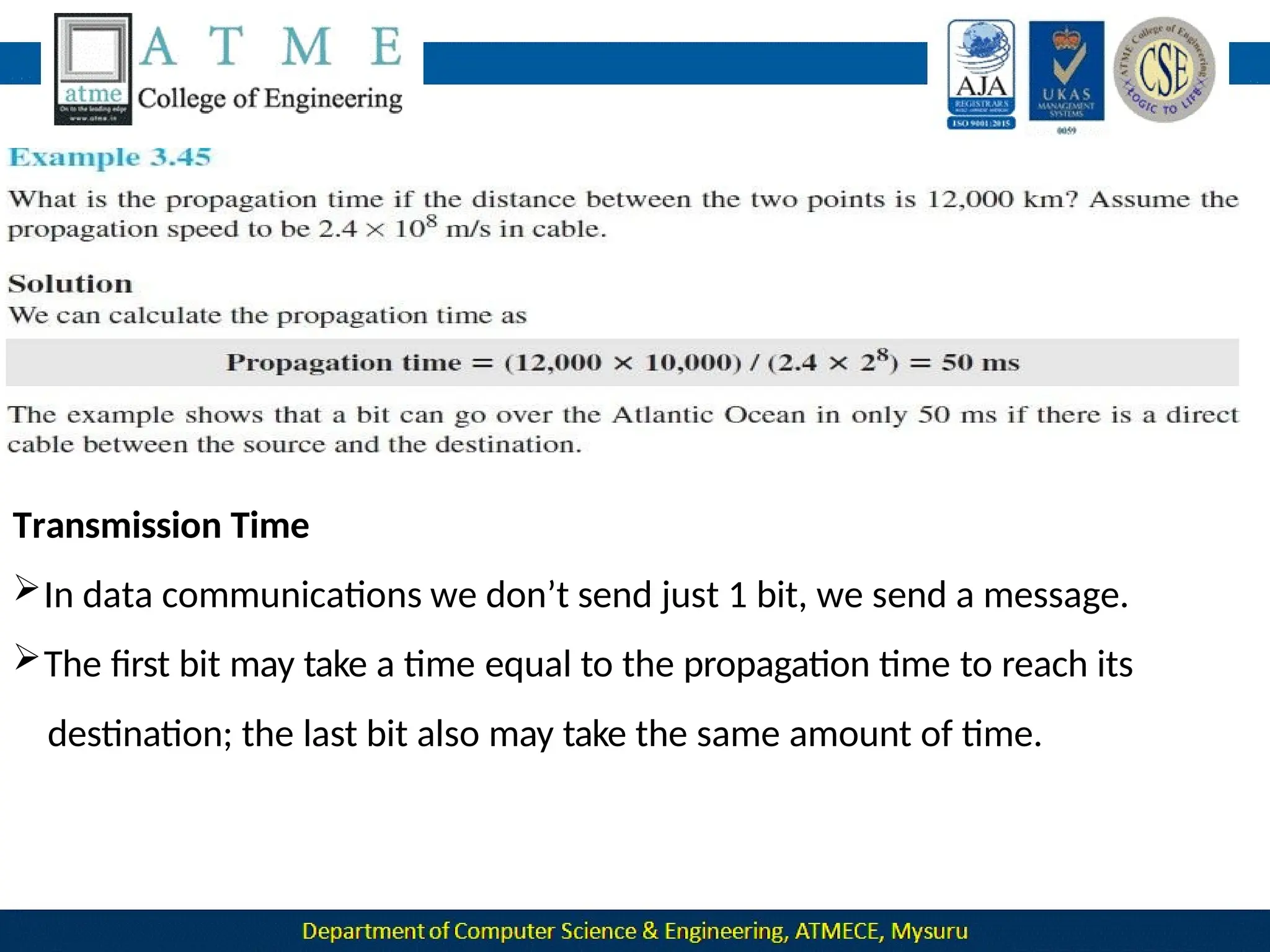
In data communications we don’t send just 1 bit, we send a message.
The first bit may take a time equal to the propagation time to reach its
destination; the last bit also may take the same amount of time.
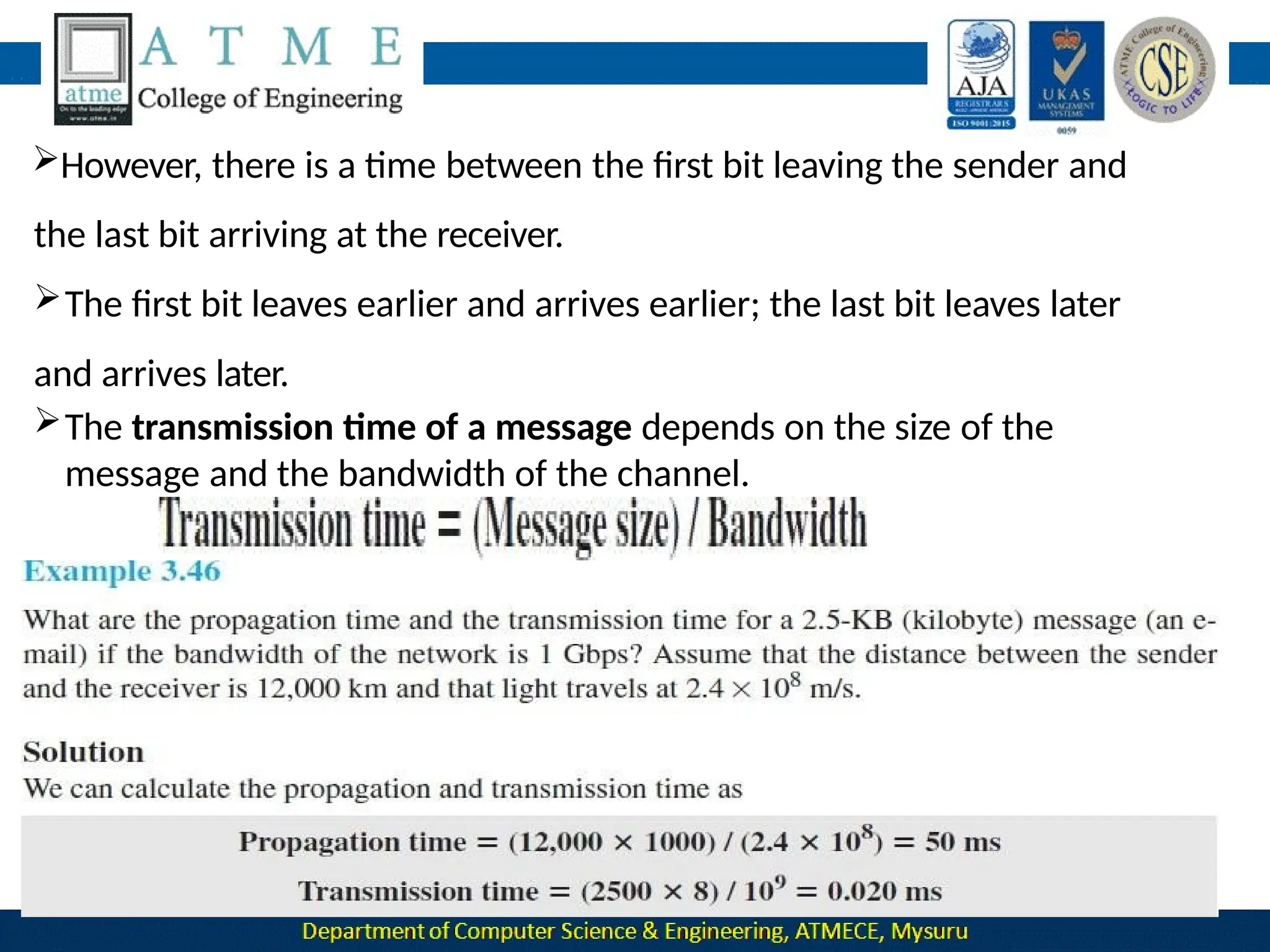
However, there is a time between the first bit leaving the sender and
the last bit arriving at the receiver.
The first bit leaves earlier and arrives earlier; the last bit leaves later
and arrives later.
The transmission time of a message depends on the size of the
message and the bandwidth of the channel.
Queuing Time
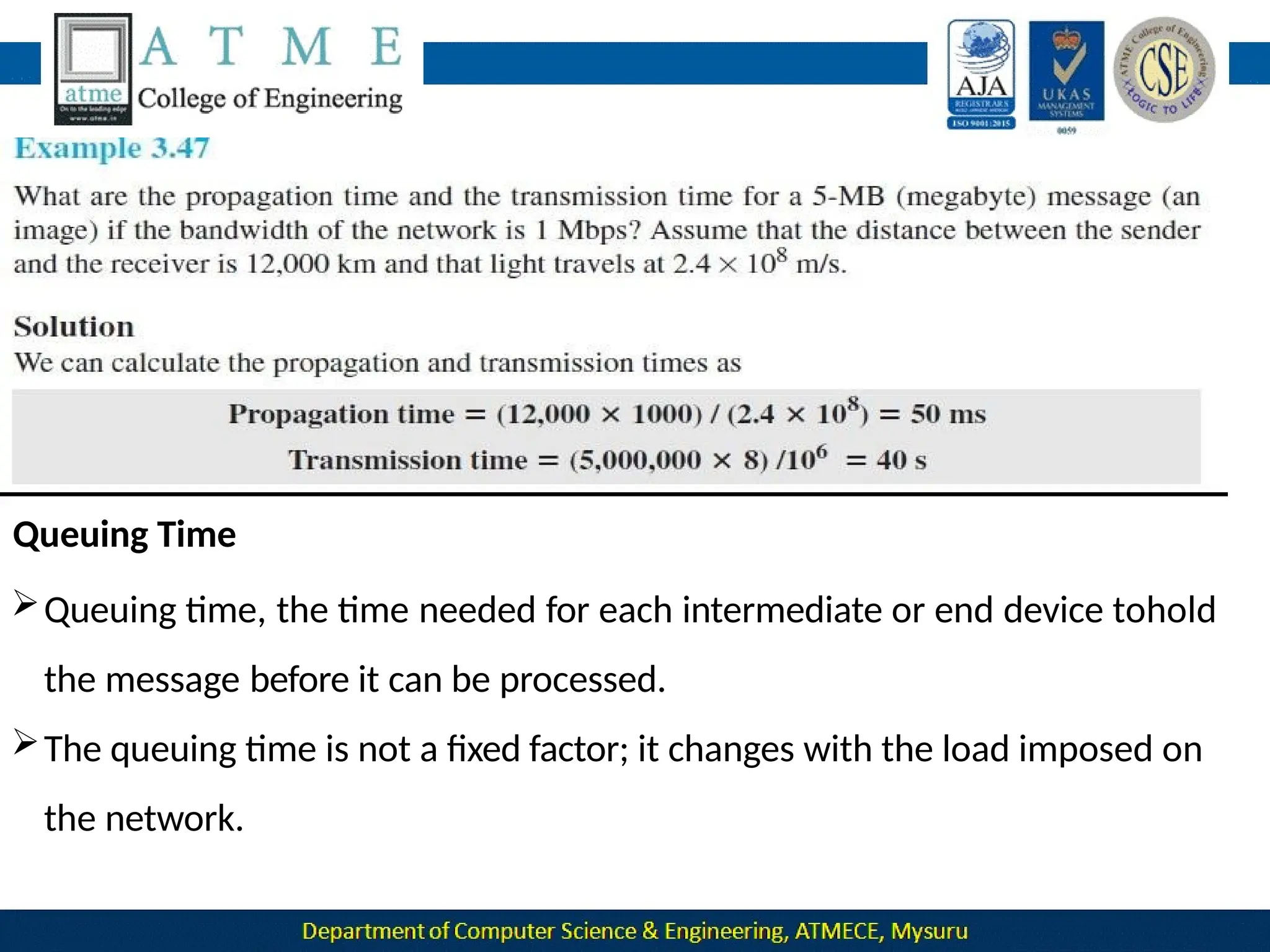
Queuing time, the time needed for each intermediate or end device tohold
the message before it can be processed.
The queuing time is not a fixed factor; it changes with the load imposed on
the network.
 When there is heavy traffic on the network, the queuing time increases.
 An intermediate device, such as a router, queues the arrived
messages and processes them one by one.
 If there are many messages, each message will have to wait.
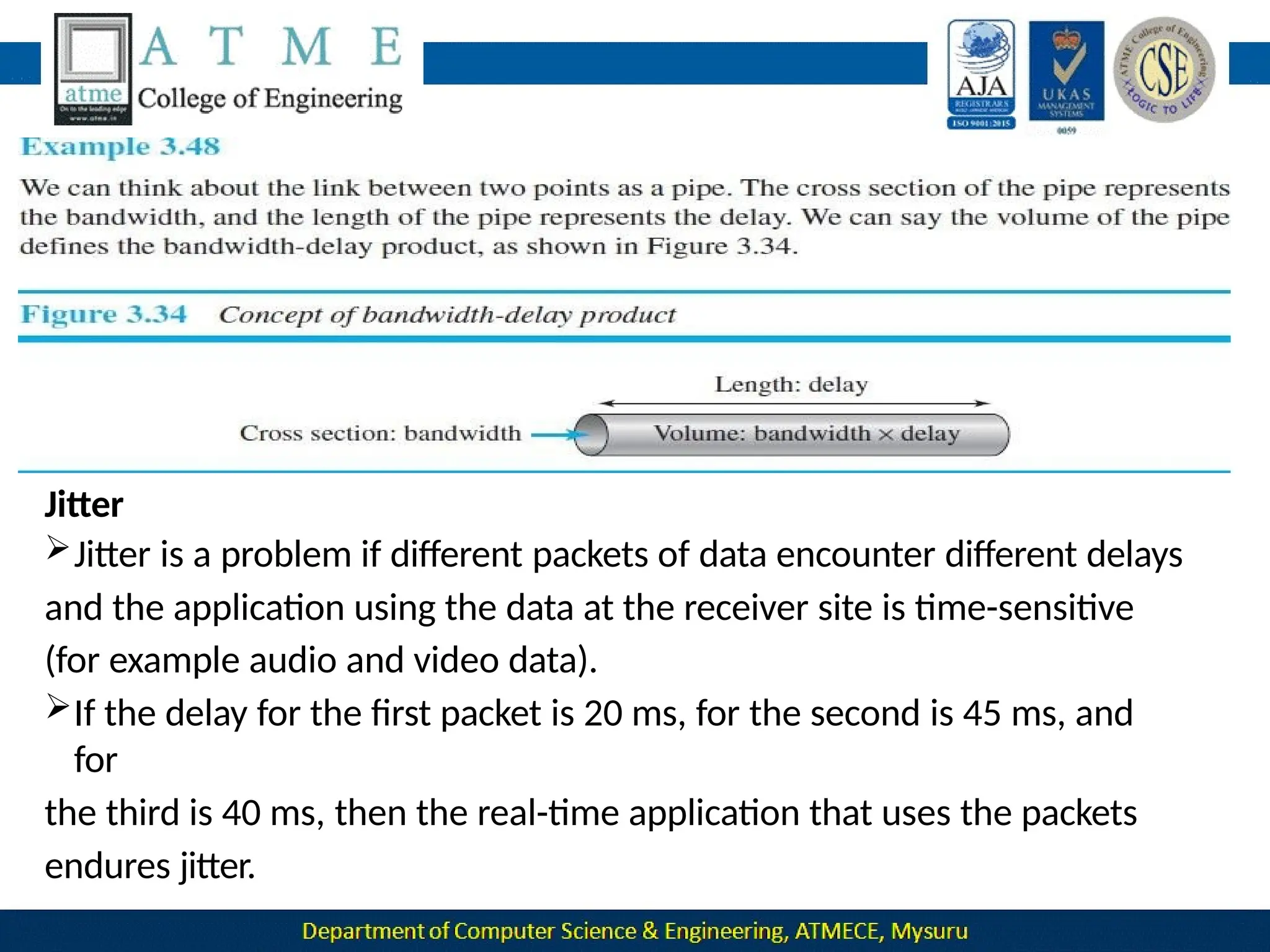
Bandwidth-Delay Product
Bandwidth and delay are two performance metrics of a link.
What is very important in data communications is the product of
the two, the bandwidth-delay product.
 Let us elaborate on this issue, using two hypothetical cases
as examples.
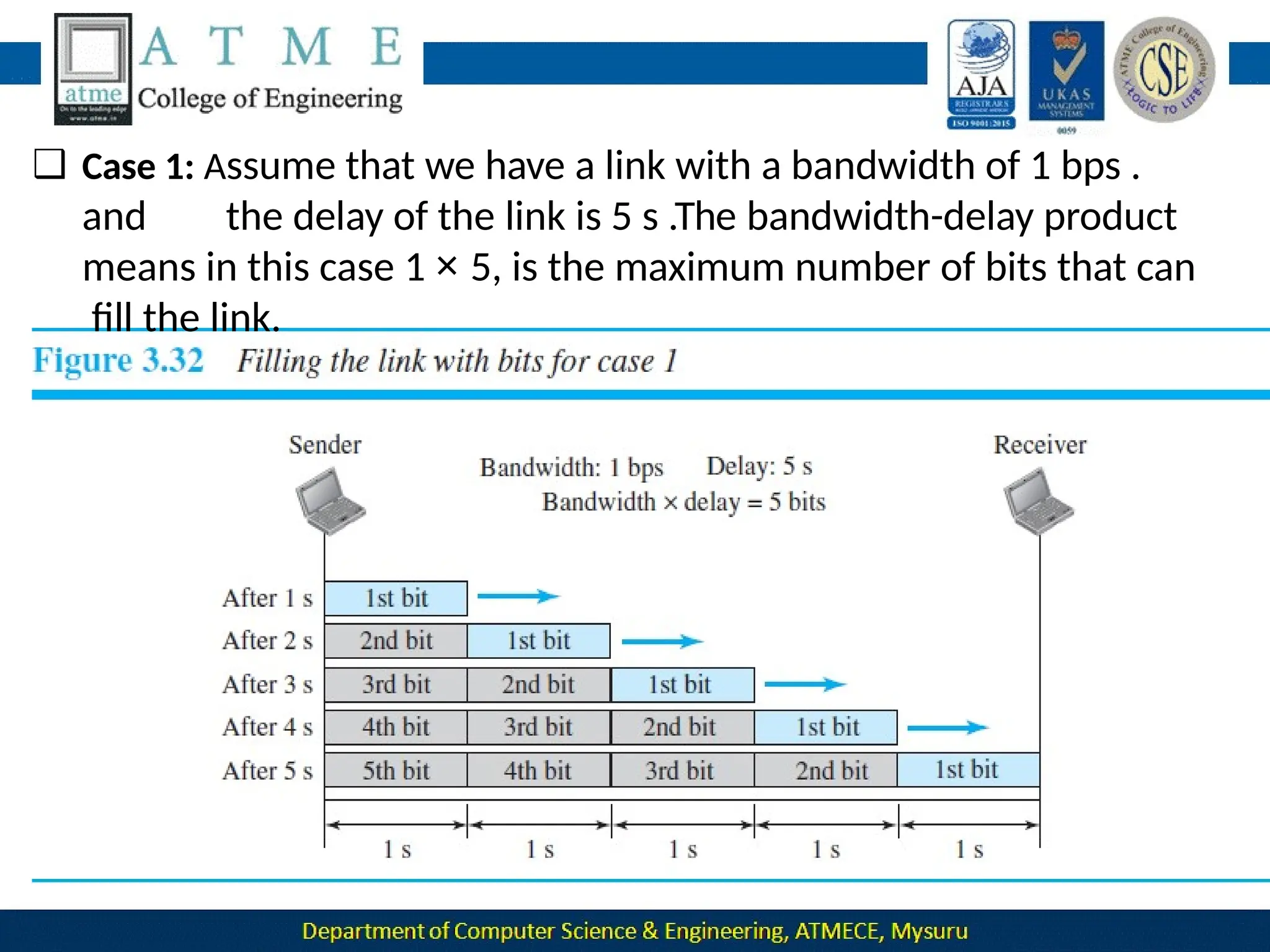
❑ Case 1: Assume that we have a link with a bandwidth of 1 bps .
and the delay of the link is 5 s .The bandwidth-delay product
means in this case 1 × 5, is the maximum number of bits that can
fill the link.
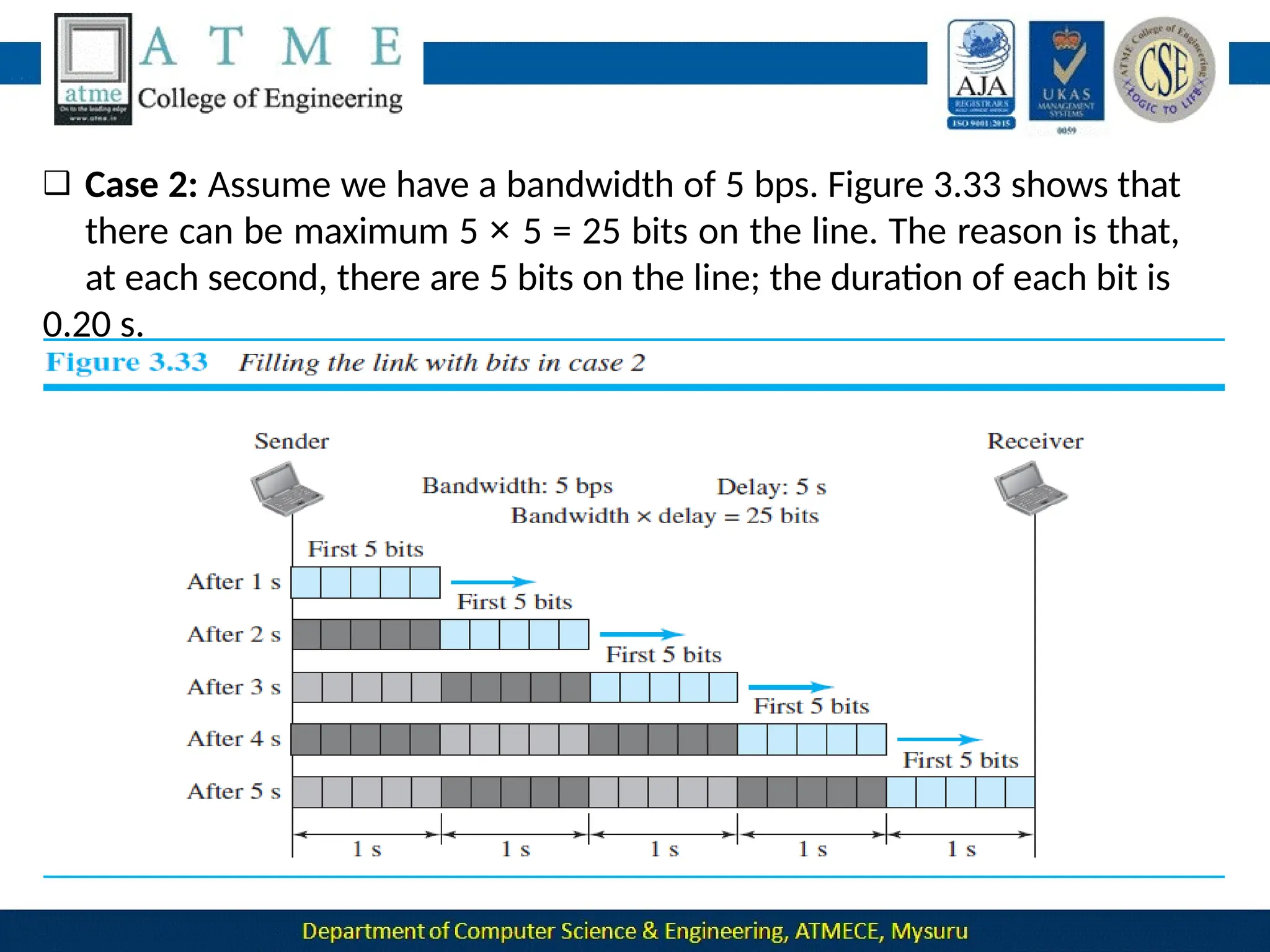
❑ Case 2: Assume we have a bandwidth of 5 bps. Figure 3.33 shows that
there can be maximum 5 × 5 = 25 bits on the line. The reason is that,
at each second, there are 5 bits on the line; the duration of each bit is
0.20 s.
The two cases show that the product of bandwidth and delay is the
number of bits that can fill the link.
This measurement is important if we need to send data in bursts
and
wait for the acknowledgment of each burst before sending the next
one.
To use the maximum capability of the link, we need to make the
size of
our burst 2 times the product of bandwidth and delay; we need
to fill
up the full-duplex channel (two directions).
The sender should send a burst of data of (2 × bandwidth × delay)
bits.
The sender then waits for receiver acknowledgment for part of the
Jitter
Jitter is a problem if different packets of data encounter different delays
and the application using the data at the receiver site is time-sensitive
(for example audio and video data).
If the delay for the first packet is 20 ms, for the second is 45 ms, and
for
the third is 40 ms, then the real-time application that uses the packets
endures jitter.
DATA
COMMUNICATIO
N 18CS46
L
A
V
A 1
Module-2
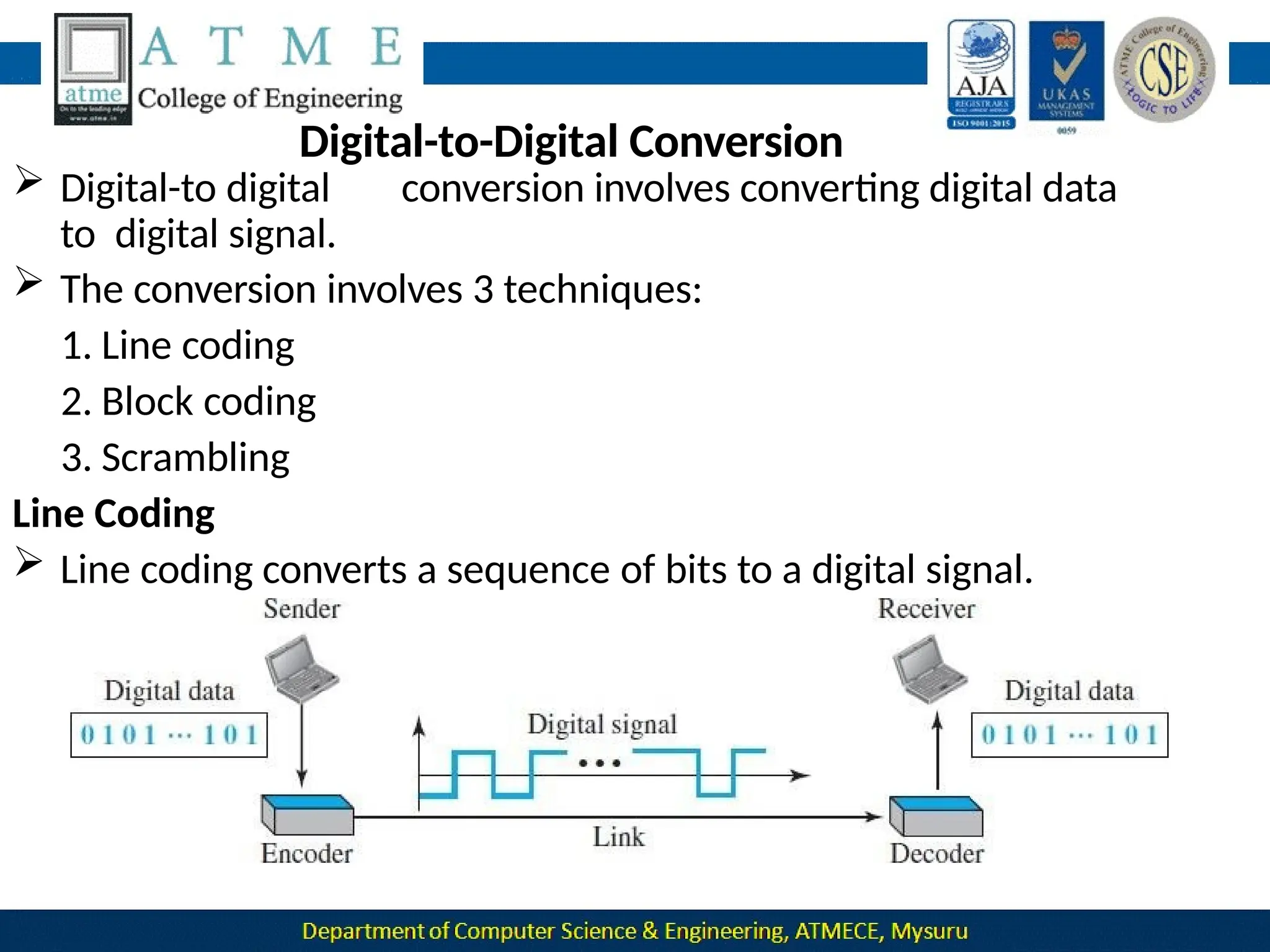
Digital-to-Digital Conversion
 Digital-to digital conversion involves converting digital data
to digital signal.
 The conversion involves 3 techniques:
1. Line coding
2. Block coding
3. Scrambling
Line Coding
 Line coding converts a sequence of bits to a digital signal.
At the sender, digital data are encoded into a digital signal; at the
receiver, the digital data are recreated by decoding the digital signal.
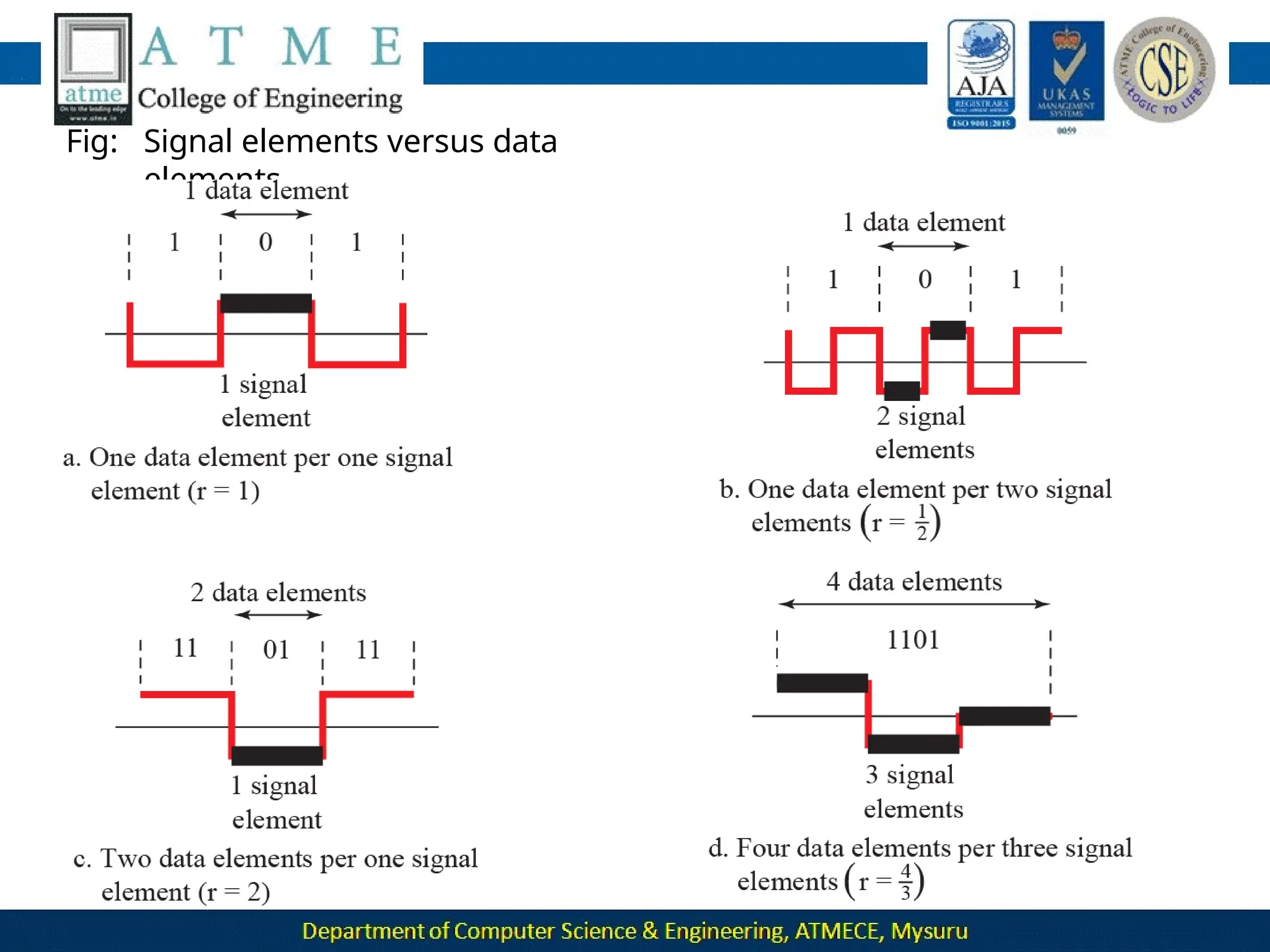
1.Signal Element Versus Data Element
A data element is the smallest entity that can represent a piece of
information: this is the bit.
A signal element is the shortest unit (timewise) of a digital signal.
Data elements are what we need to send; signal elements are what
we can send.
Data elements are being carried; signal elements are the carriers.
We define a ratio r which is the number of data elements carried by
each signal element.
Fig: Signal elements versus data
elements
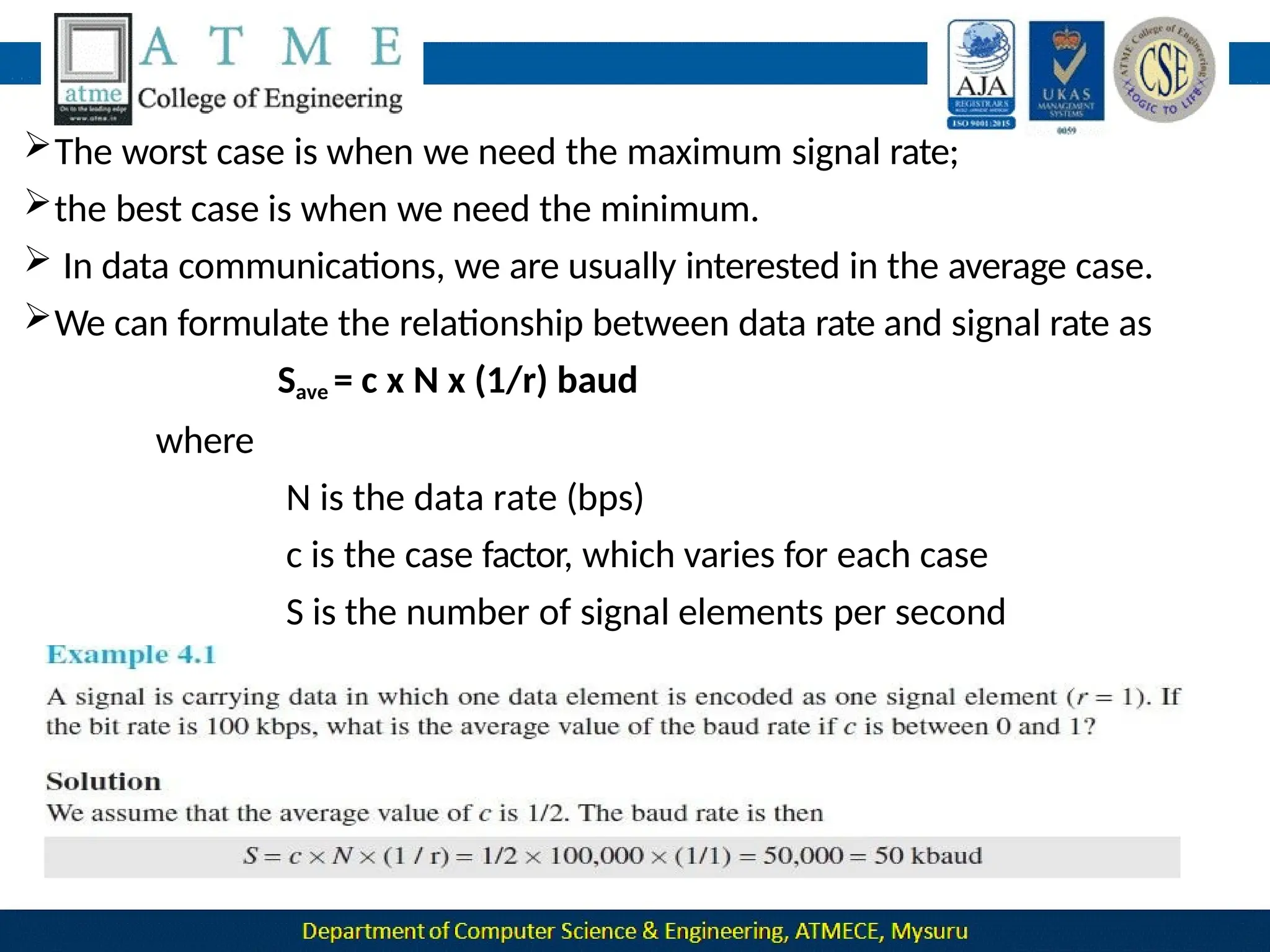
The worst case is when we need the maximum signal rate;
the best case is when we need the minimum.
 In data communications, we are usually interested in the average case.
We can formulate the relationship between data rate and signal rate as
Save = c x N x (1/r) baud
where
N is the data rate (bps)
c is the case factor, which varies for each case
S is the number of signal elements per second
r is number of data elements carried by signal elements
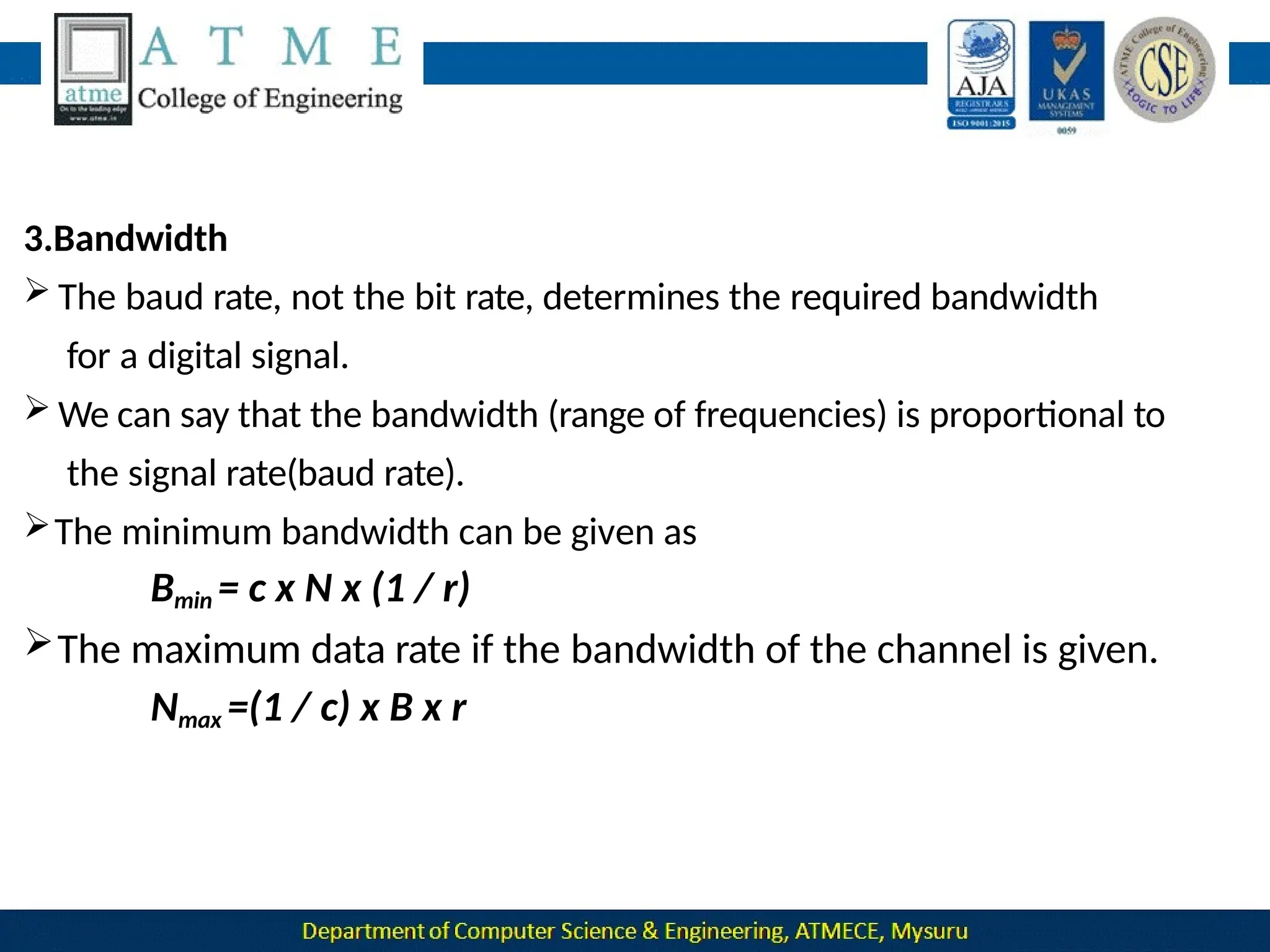
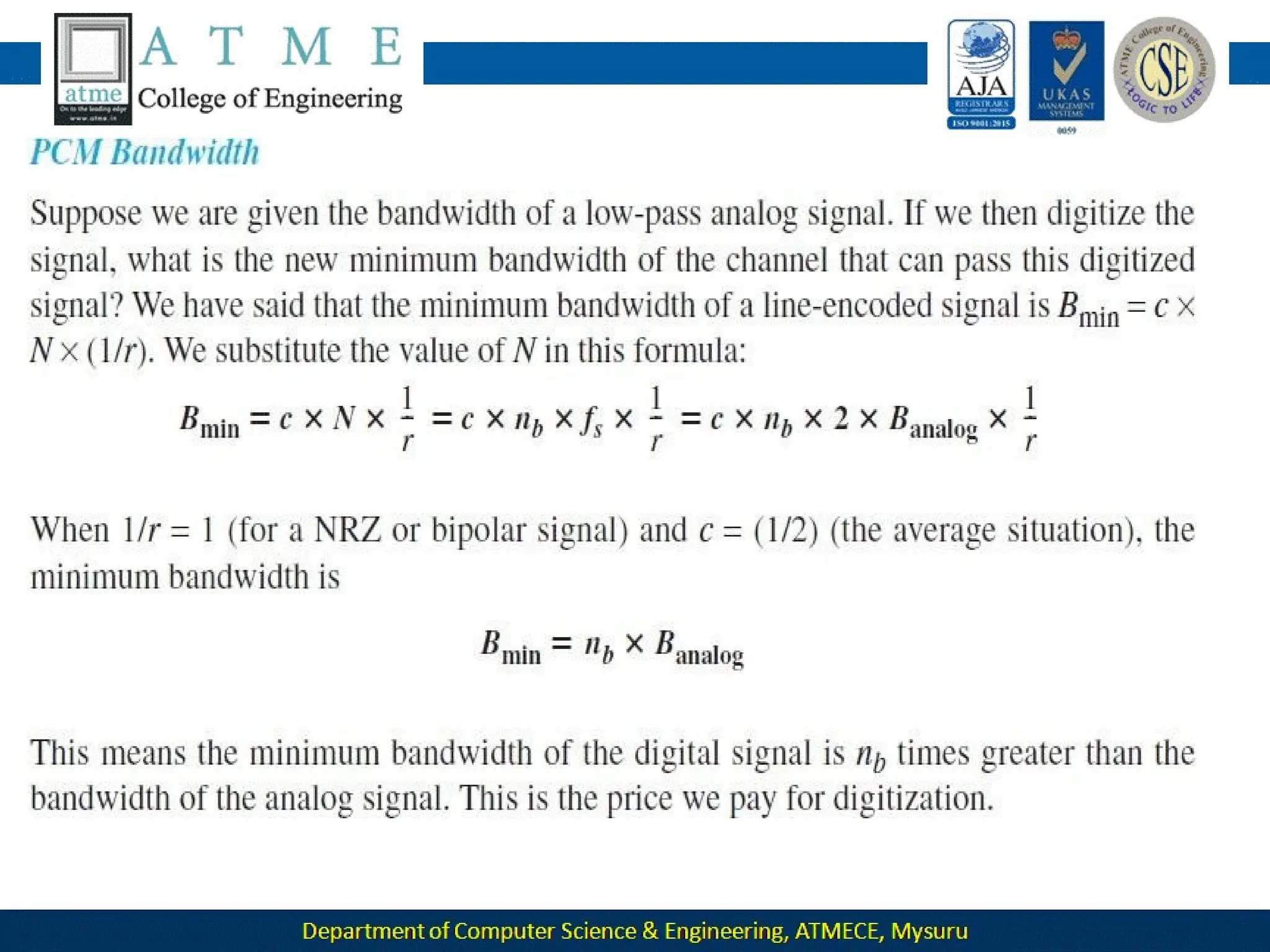
3.Bandwidth
 The baud rate, not the bit rate, determines the required bandwidth
for a digital signal.
 We can say that the bandwidth (range of frequencies) is proportional to
the signal rate(baud rate).
The minimum bandwidth can be given as
Bmin = c x N x (1 / r)
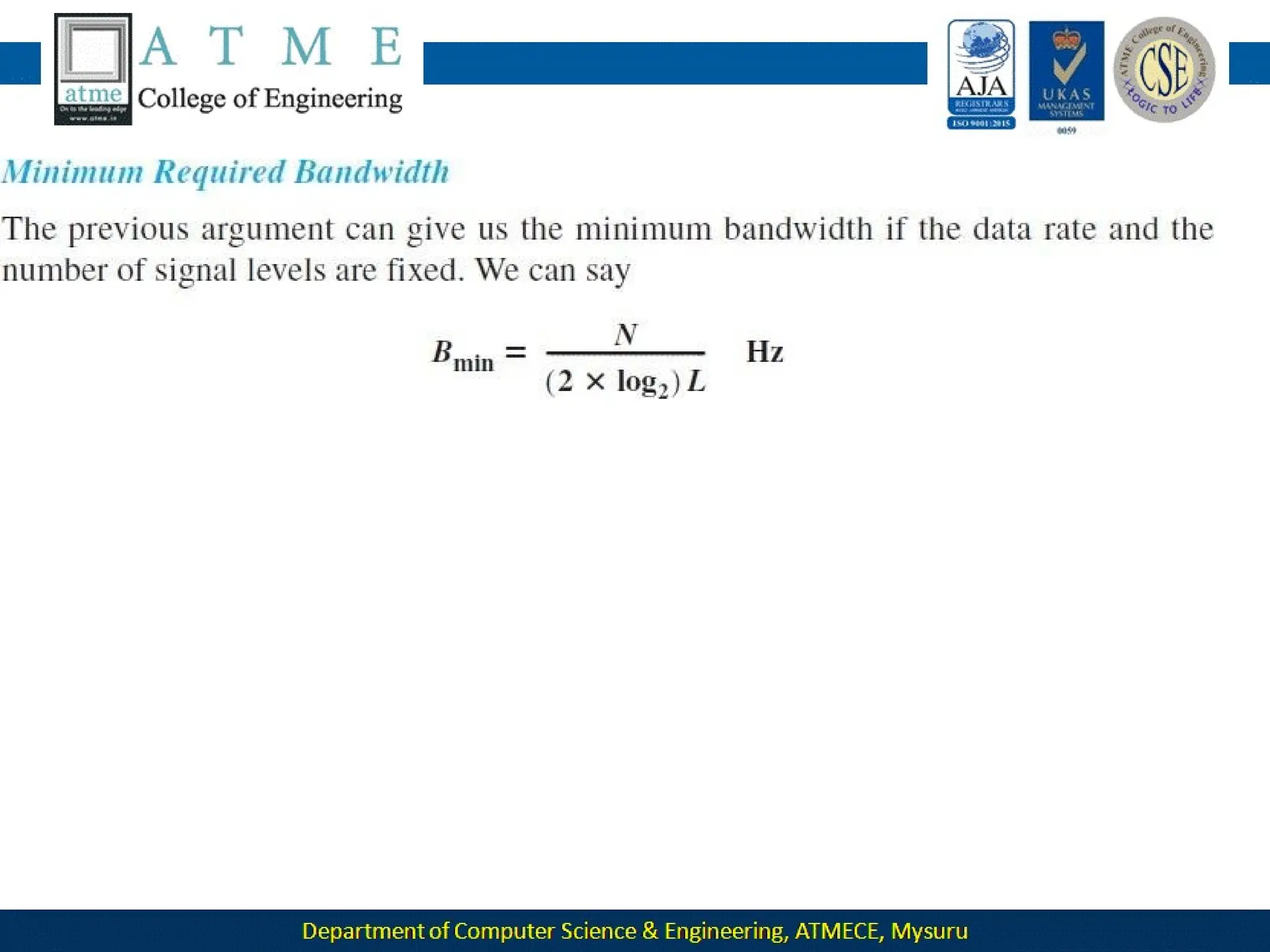
The maximum data rate if the bandwidth of the channel is given.
Nmax =(1 / c) x B x r
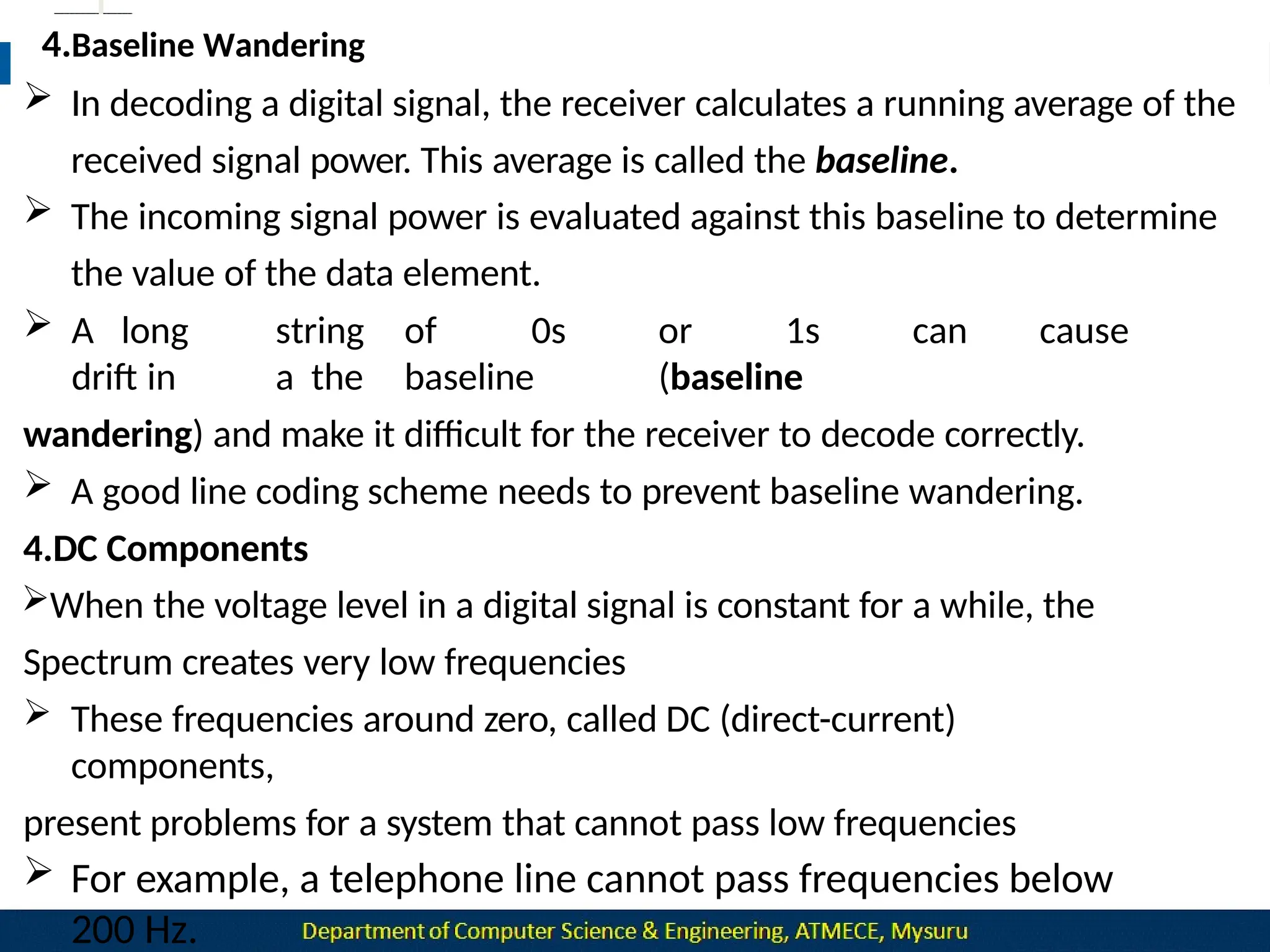
4.Baseline Wandering
 In decoding a digital signal, the receiver calculates a running average of the
received signal power. This average is called the baseline.
 The incoming signal power is evaluated against this baseline to determine
the value of the data element.
 A long
drift in
string of 0s or 1s can cause
a the baseline (baseline
wandering) and make it difficult for the receiver to decode correctly.
 A good line coding scheme needs to prevent baseline wandering.
4.DC Components
When the voltage level in a digital signal is constant for a while, the
Spectrum creates very low frequencies
 These frequencies around zero, called DC (direct-current)
components,
present problems for a system that cannot pass low frequencies
 For example, a telephone line cannot pass frequencies below
200 Hz.
5.Self-synchronization
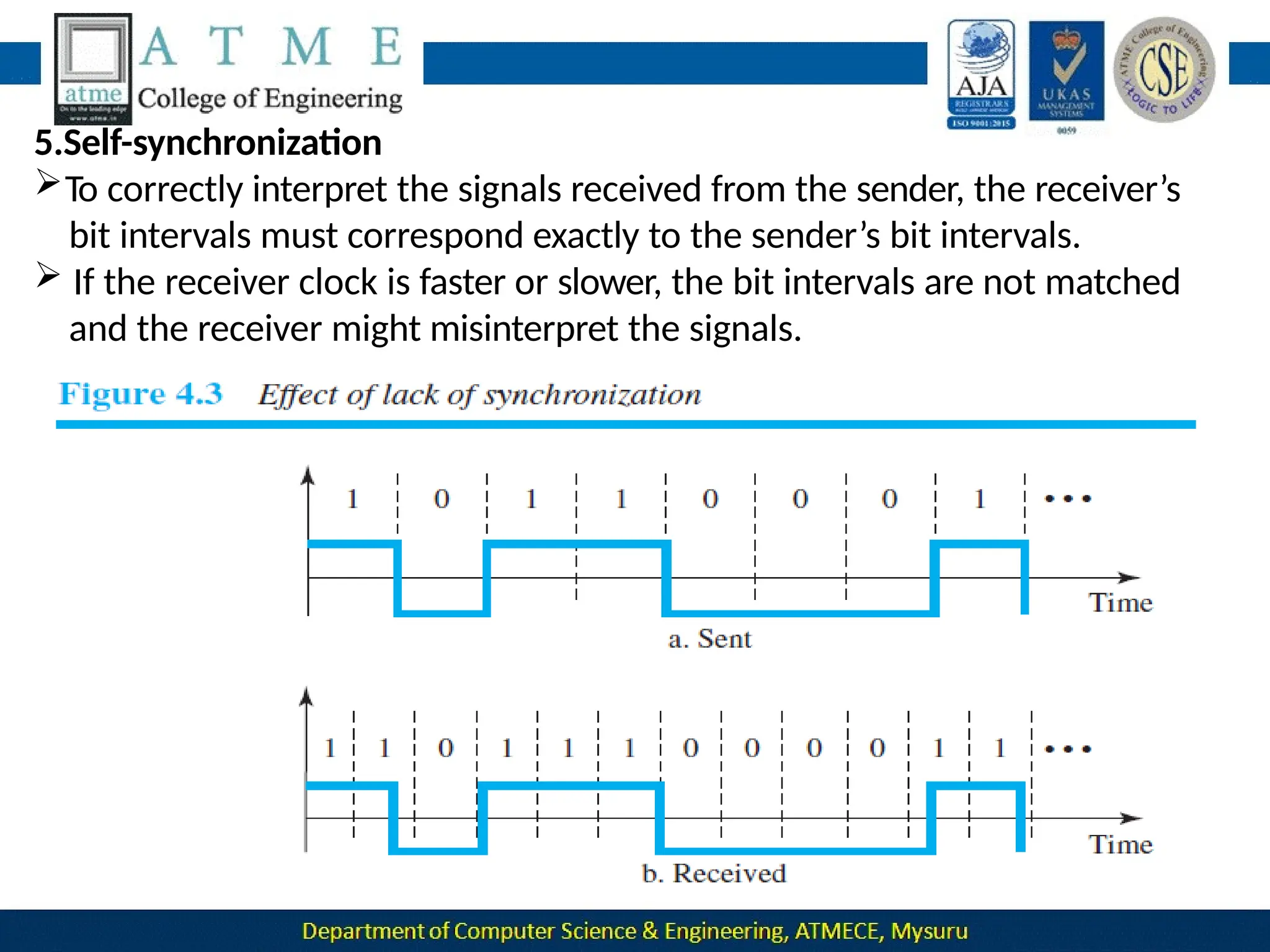
To correctly interpret the signals received from the sender, the receiver’s
bit intervals must correspond exactly to the sender’s bit intervals.
 If the receiver clock is faster or slower, the bit intervals are not matched
and the receiver might misinterpret the signals.
A self-synchronizing digital signal includes timing information in the
data being transmitted.
This can be achieved if there are transitions in the signal that alert
the
receiver to the beginning, middle, or end of the pulse.
If the receiver’s clock is out of synchronization, these points can
reset
the clock.
6.Built-in Error Detection
It is desirable to have a built-in error-detecting capability in the
generated code to detect some or all of the errors that occurred
during transmission.
Some encoding schemes have this capability to some extent.
7.Immunity to Noise and Interference
Another desirable code characteristic is a code that is immune to
A complex scheme is more costly to implement than a simple one.
For example, a scheme that uses four signal levels is more difficult to
interpret than one that uses only two levels.
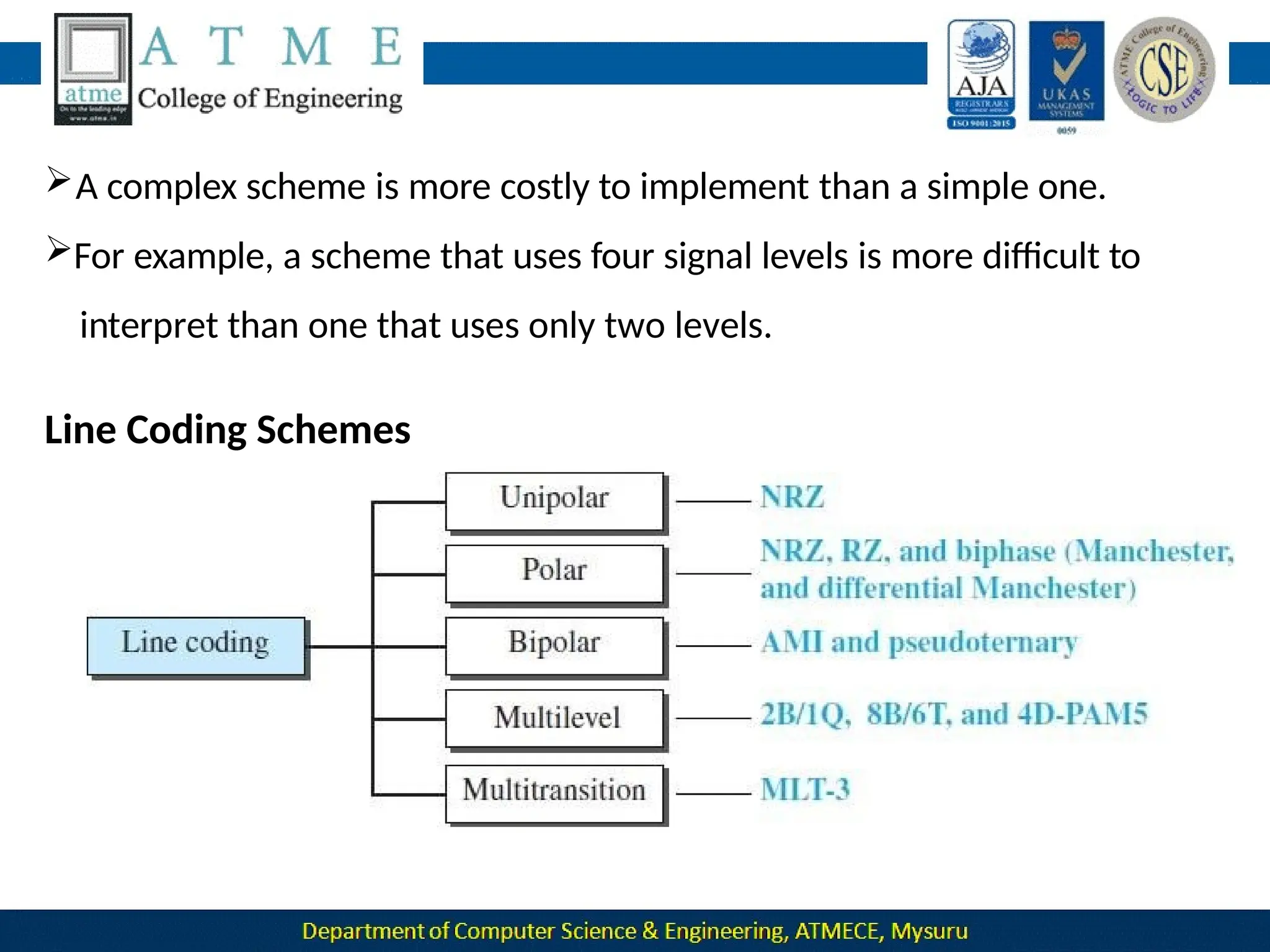
Line Coding Schemes
Unipolar Scheme
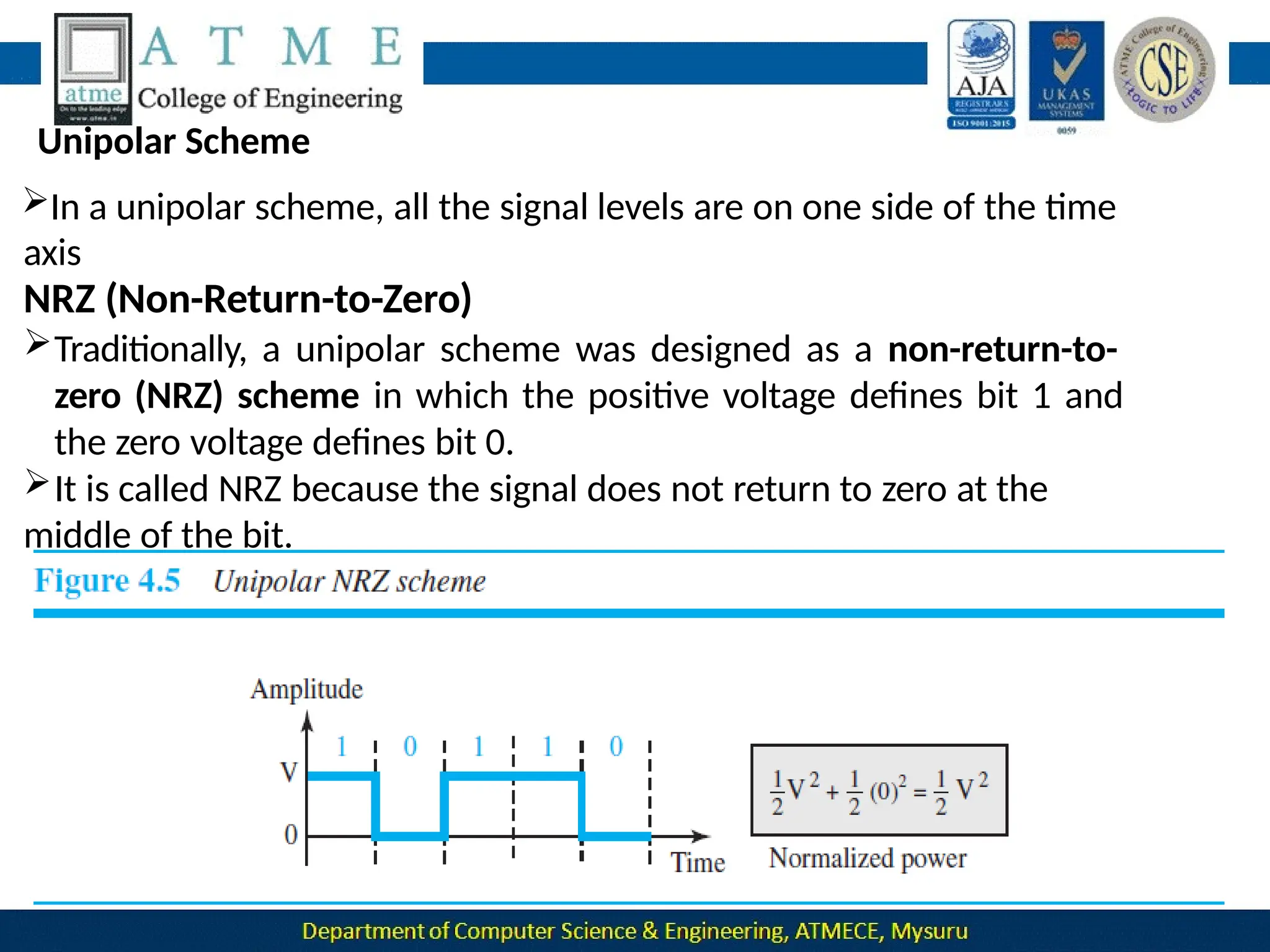
In a unipolar scheme, all the signal levels are on one side of the time
axis
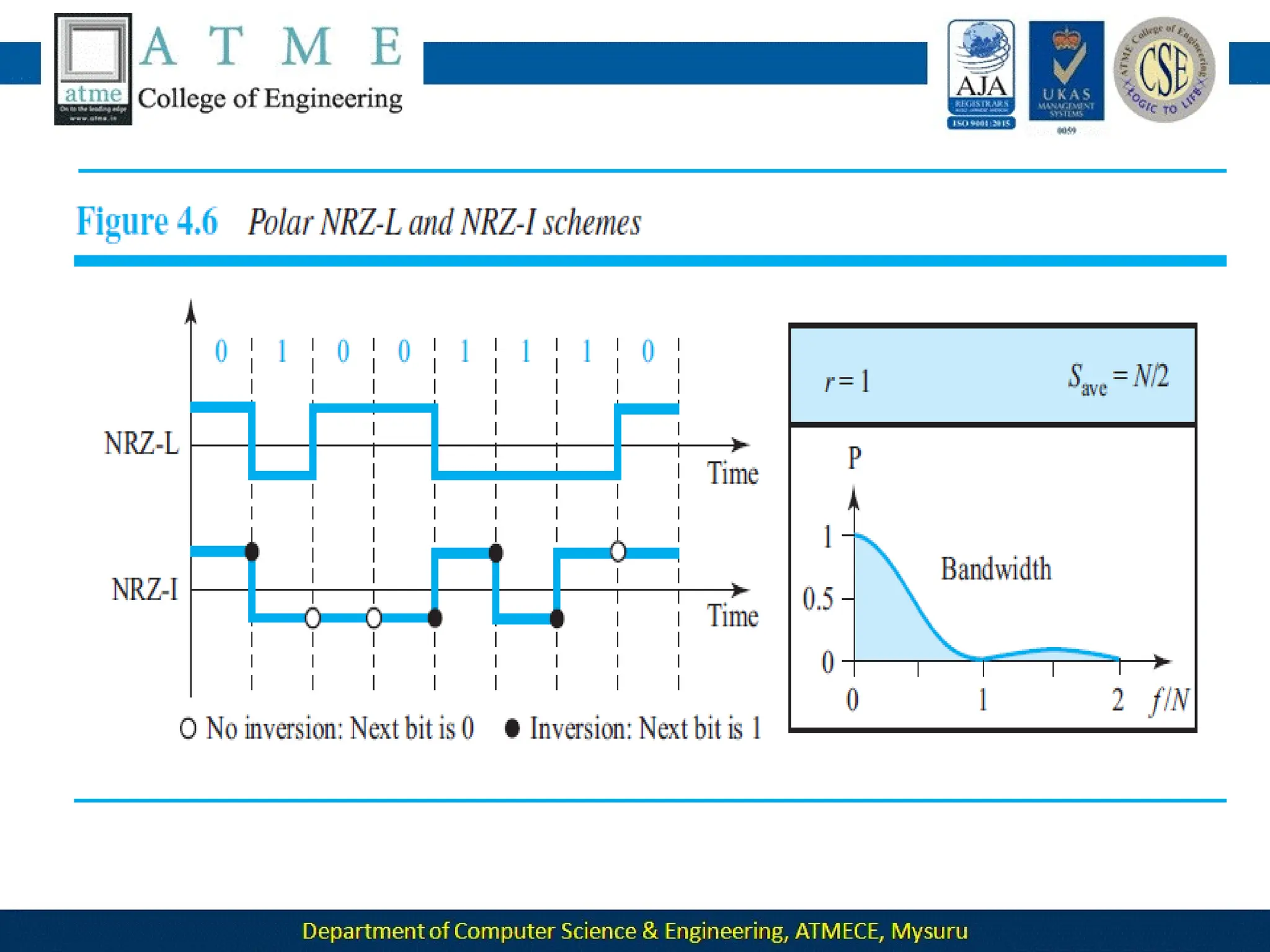
NRZ (Non-Return-to-Zero)
Traditionally, a unipolar scheme was designed as a non-return-to-
zero (NRZ) scheme in which the positive voltage defines bit 1 and
the zero voltage defines bit 0.
It is called NRZ because the signal does not return to zero at the
middle of the bit.
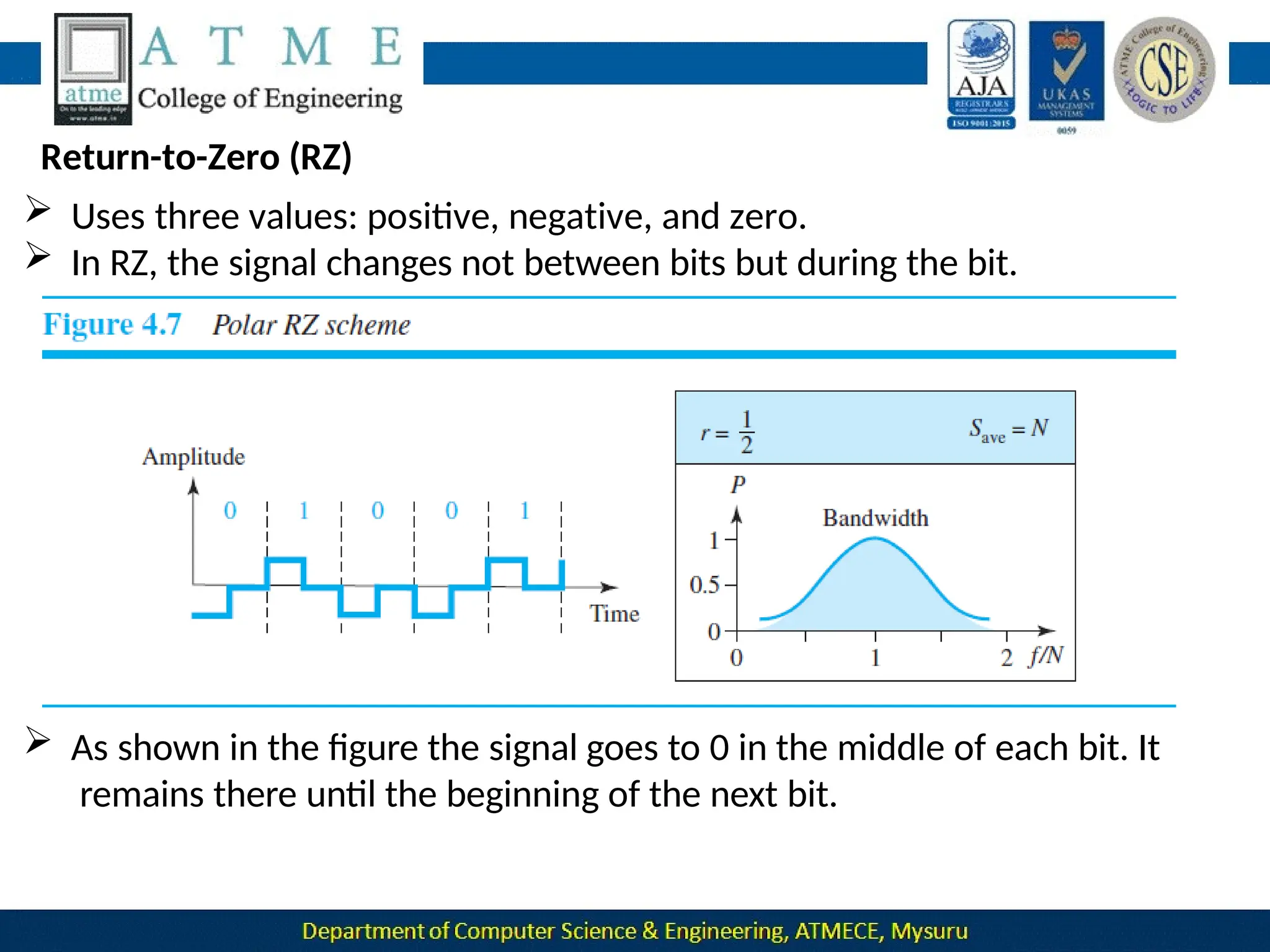
Return-to-Zero (RZ)
 Uses three values: positive, negative, and zero.
 In RZ, the signal changes not between bits but during the bit.
 As shown in the figure the signal goes to 0 in the middle of each bit. It
remains there until the beginning of the next bit.
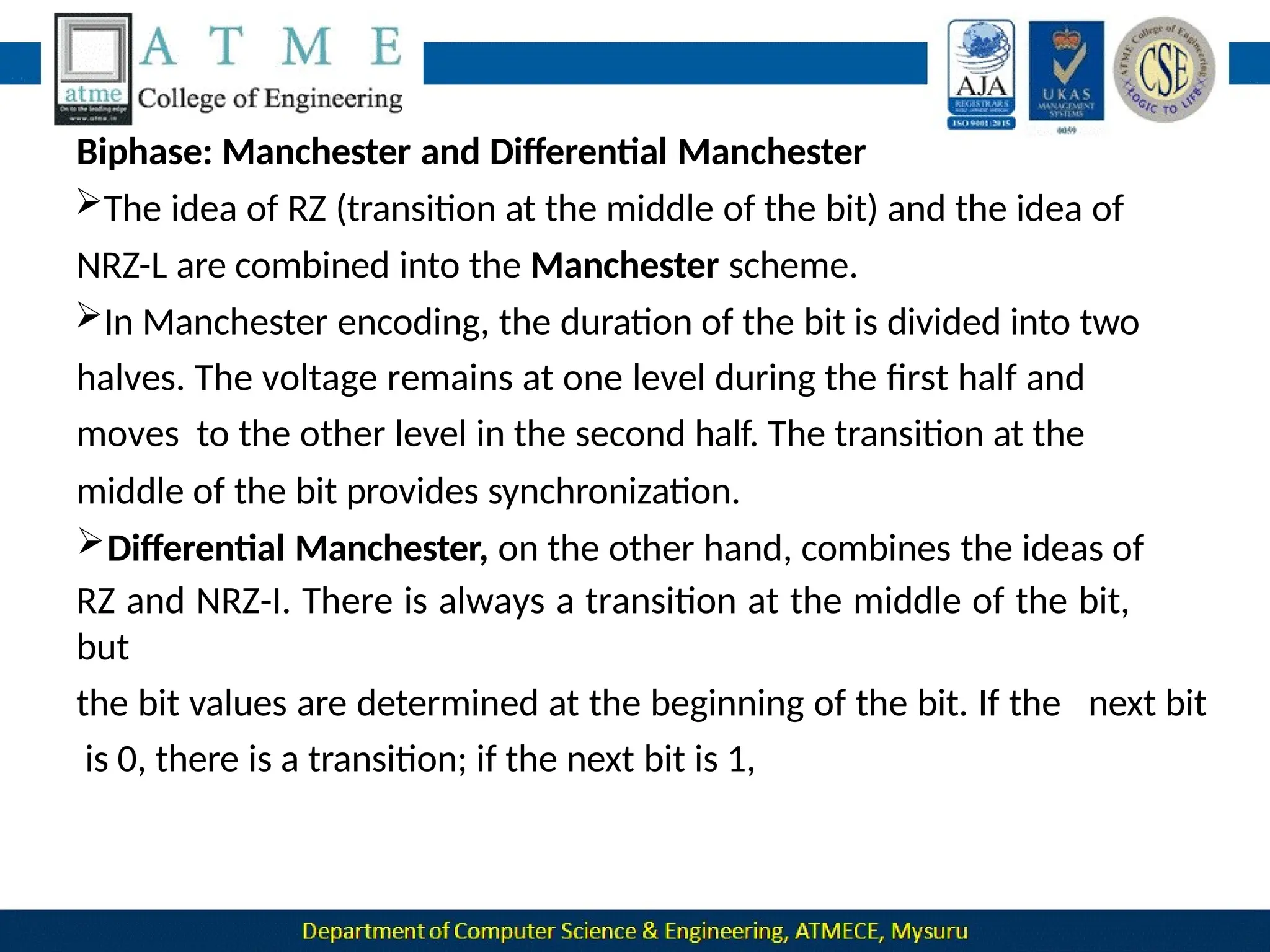
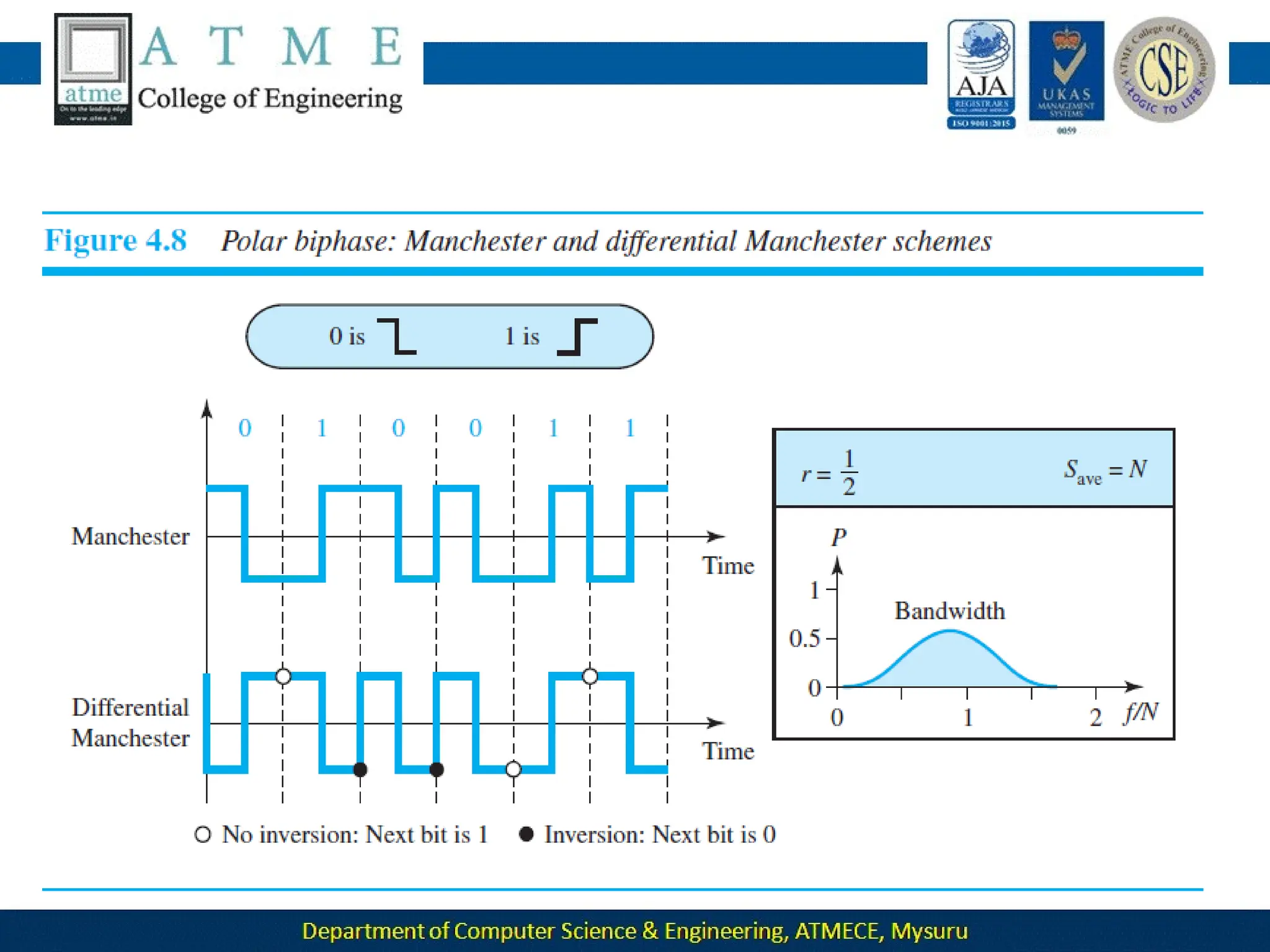
Biphase: Manchester and Differential Manchester
The idea of RZ (transition at the middle of the bit) and the idea of
NRZ-L are combined into the Manchester scheme.
In Manchester encoding, the duration of the bit is divided into two
halves. The voltage remains at one level during the first half and
moves to the other level in the second half. The transition at the
middle of the bit provides synchronization.
Differential Manchester, on the other hand, combines the ideas of
RZ and NRZ-I. There is always a transition at the middle of the bit,
but
the bit values are determined at the beginning of the bit. If the next bit
is 0, there is a transition; if the next bit is 1,
Bipolar Schemes
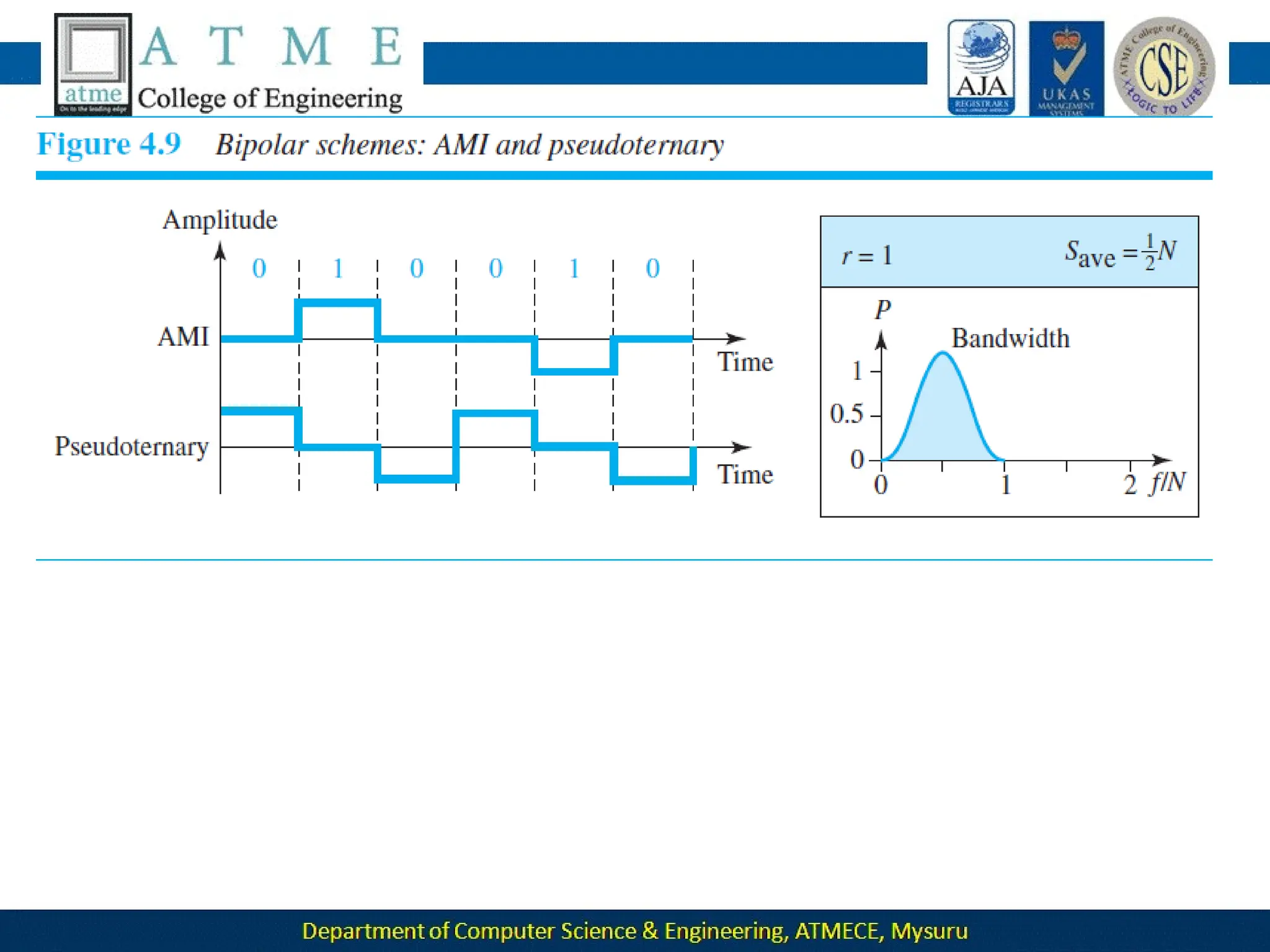
 In bipolar encoding (sometimes called multilevel binary), there are
three voltage levels: positive, negative, and zero.
 The voltage level for one data element is at zero, while the voltage level for
the other element alternates between positive and negative.
 Two variations of bipolar encoding: AMI and pseudoternary
In the term alternate mark inversion, the word mark comes from
telegraphy and means 1.
 So AMI means alternate 1 inversion. A neutral zero voltage
represents
binary 0. Binary 1s are represented by alternating positive and
negative voltages.
 A variation of AMI encoding is called pseudoternary in which the 1
bit is
encoded as a zero voltage and the 0 bit is encoded as alternating
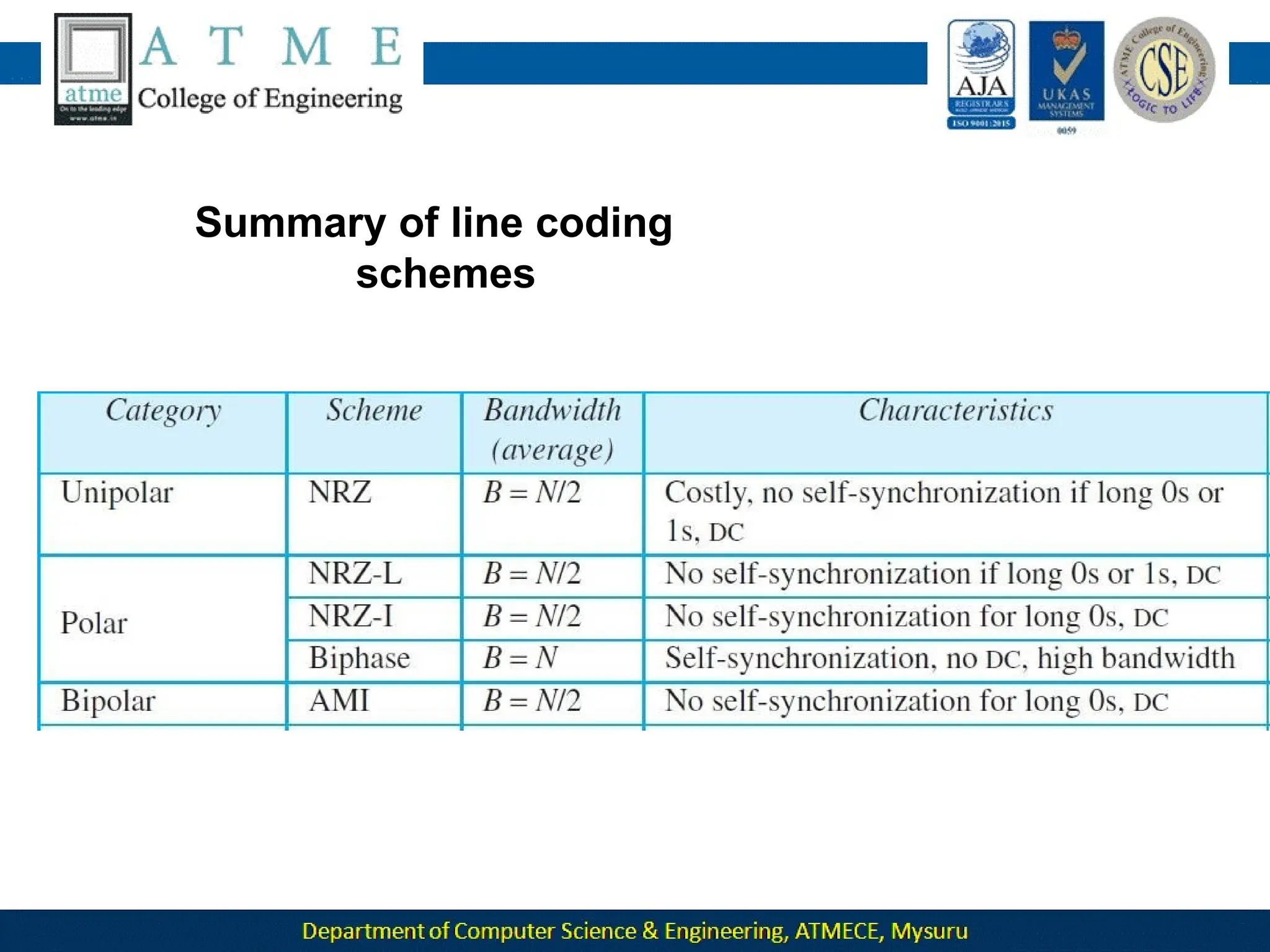
Summary of line coding
schemes
Analog-to-Digital Conversion
Analog-to-Digital conversion is a technique that is used to represent
analog information by a digital signal.
There are two techniques that can be used for this purpose.
1.Pulse Code Modulation(PCM)
2.Delta Modulation(DM)
Pulse Code Modulation (PCM)
 The most common technique to change an analog signal to digital
data (digitization) is called pulse code modulation (PCM).
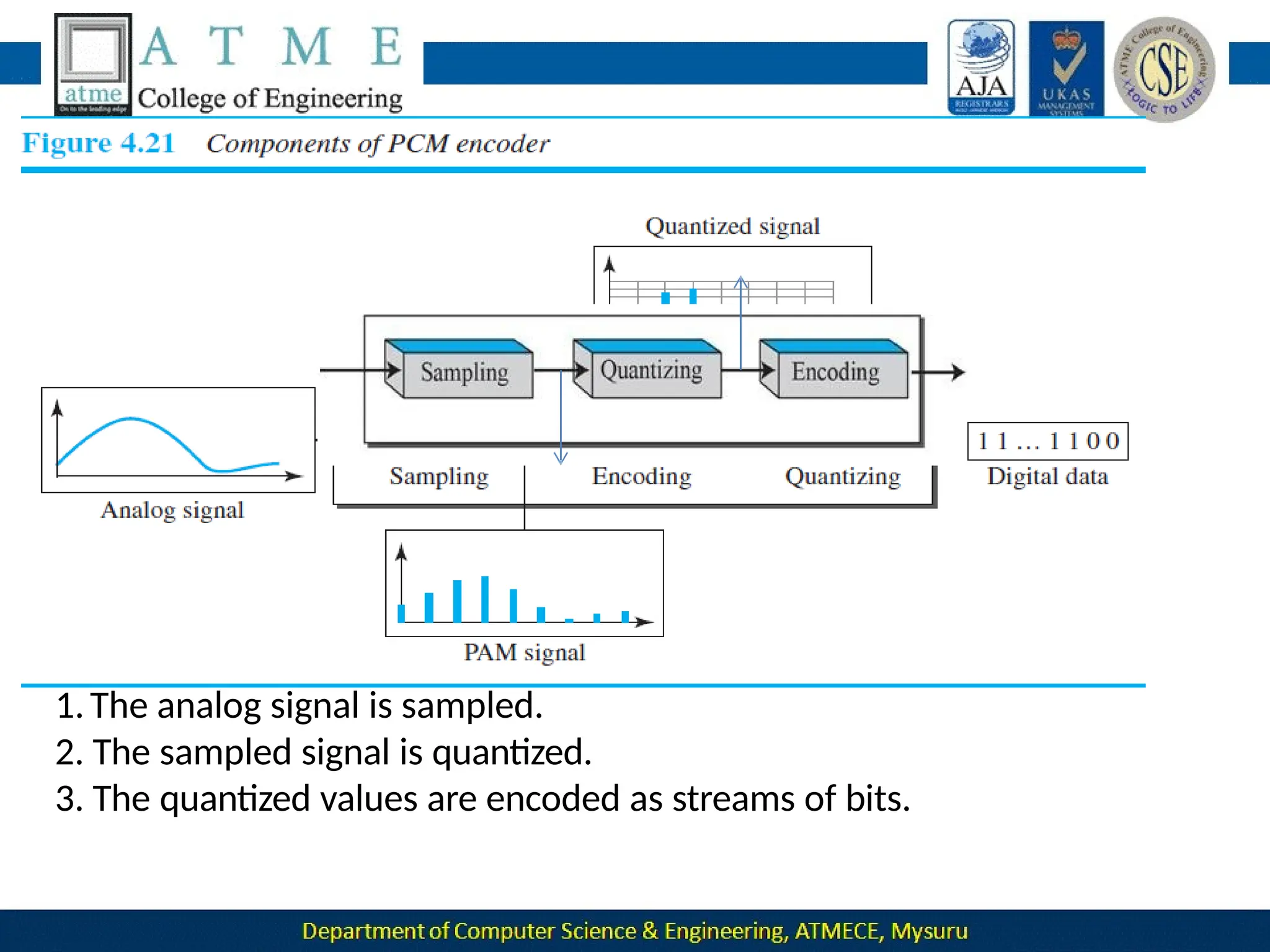
 A PCM encoder has three processes:
1.Sampling 2.Quantization 3.Encoding
1.The analog signal is sampled.
2. The sampled signal is quantized.
3. The quantized values are encoded as streams of bits.
Sampling
Sampling is the process of obtaining amplitudes of a signal at regular
intervals.
The sampling process is sometimes referred to as pulse amplitude
modulation (PAM).
The analog signal is sampled every Ts s, where Ts is the
sample
interval or period.
The inverse of the sampling interval is called the sampling rate or
sampling frequency and denoted by fs , where fs = 1/ Ts.
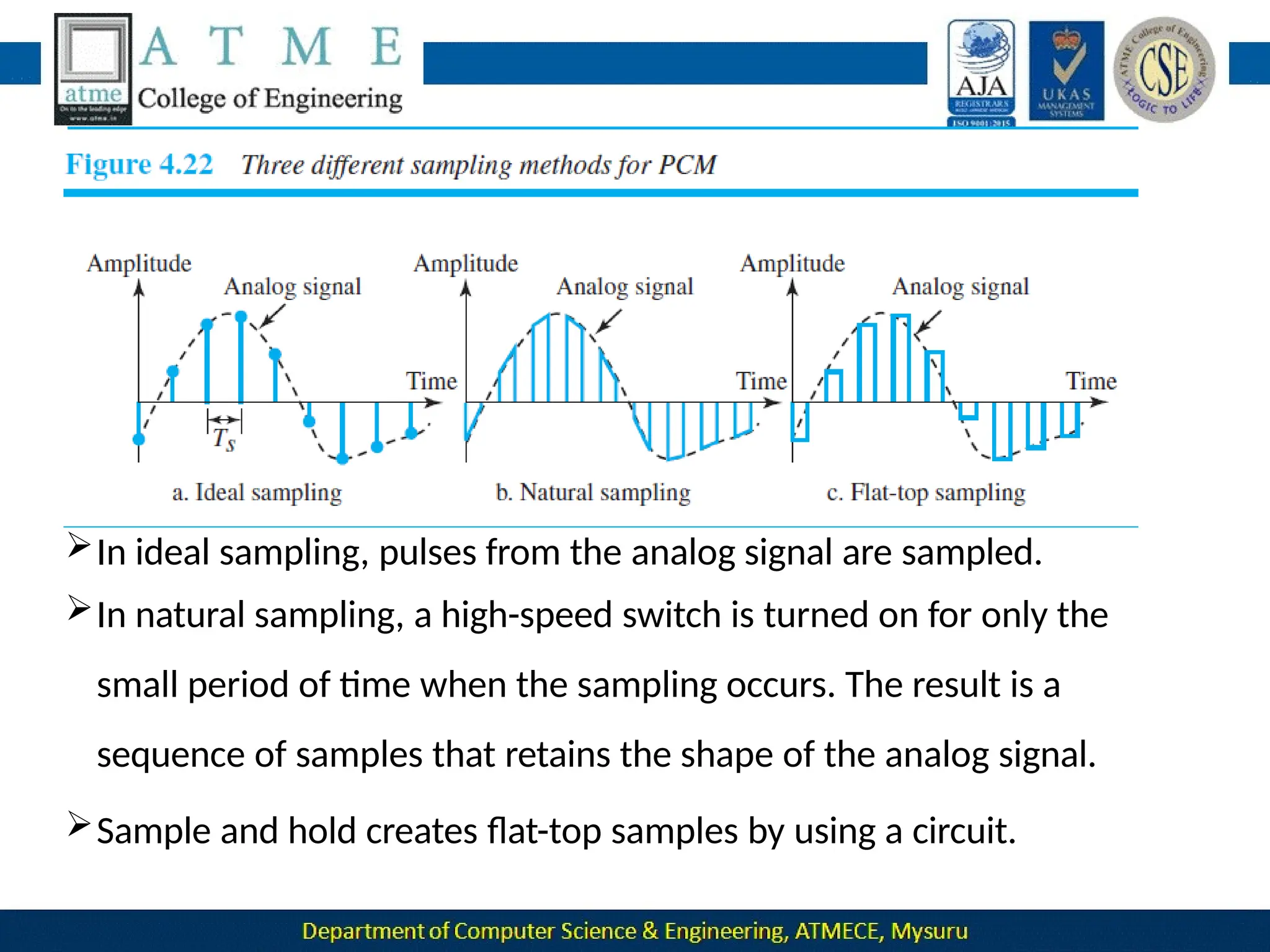
There are three sampling methods—ideal, natural, and flat-top
In ideal sampling, pulses from the analog signal are sampled.
In natural sampling, a high-speed switch is turned on for only the
small period of time when the sampling occurs. The result is a
sequence of samples that retains the shape of the analog signal.
Sample and hold creates flat-top samples by using a circuit.
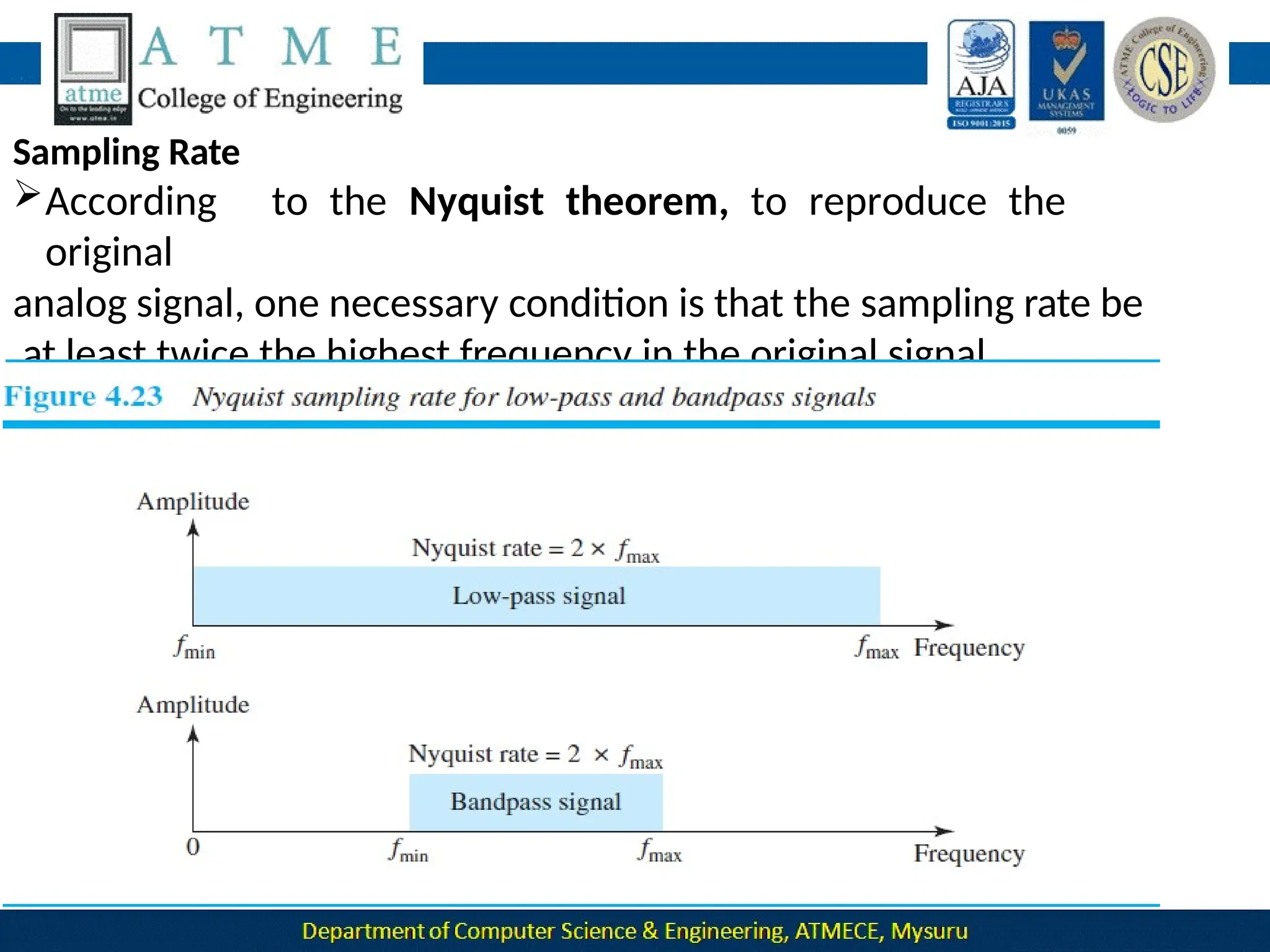
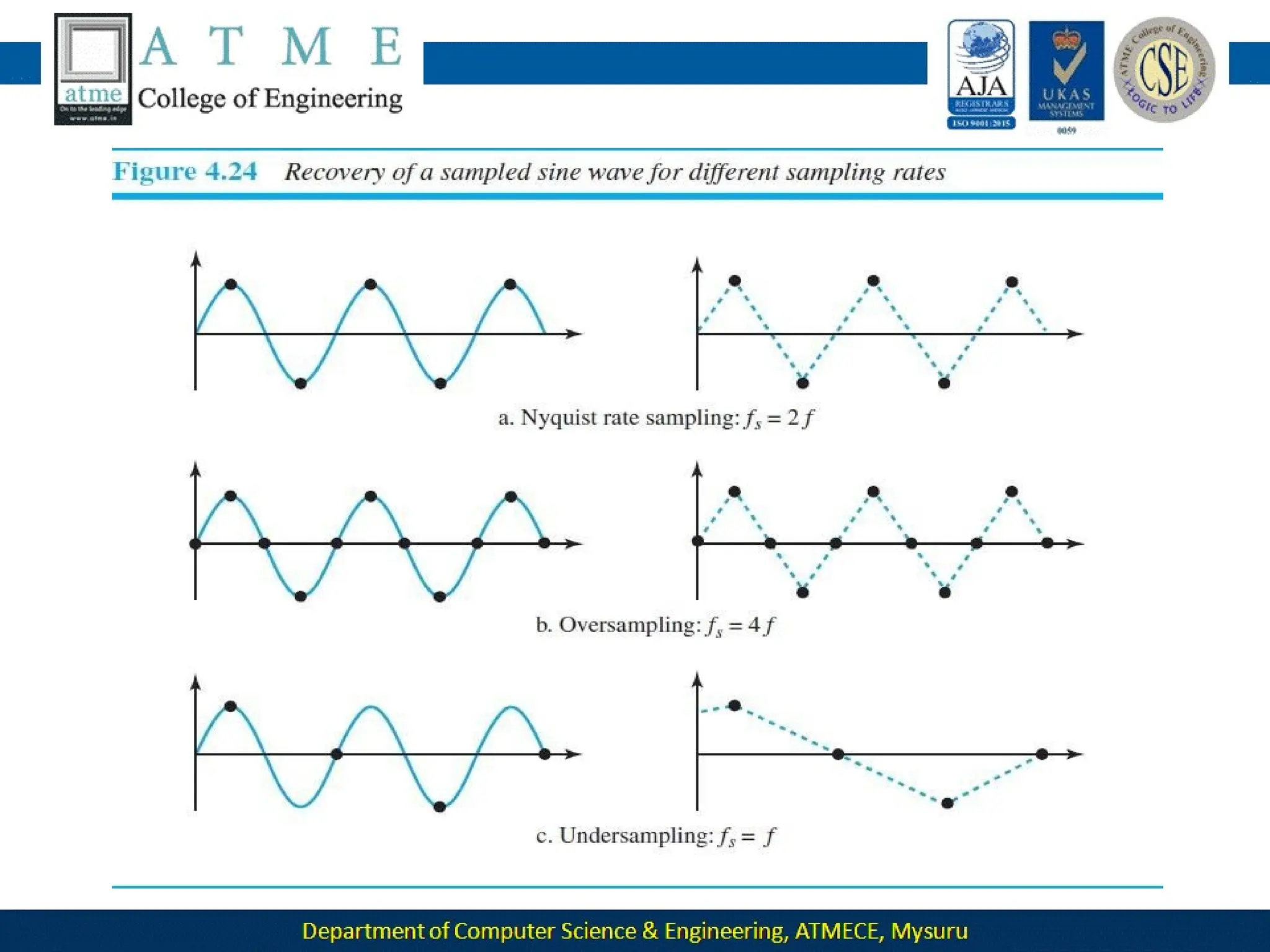
Sampling Rate
According to the Nyquist theorem, to reproduce the
original
analog signal, one necessary condition is that the sampling rate be
at least twice the highest frequency in the original signal.
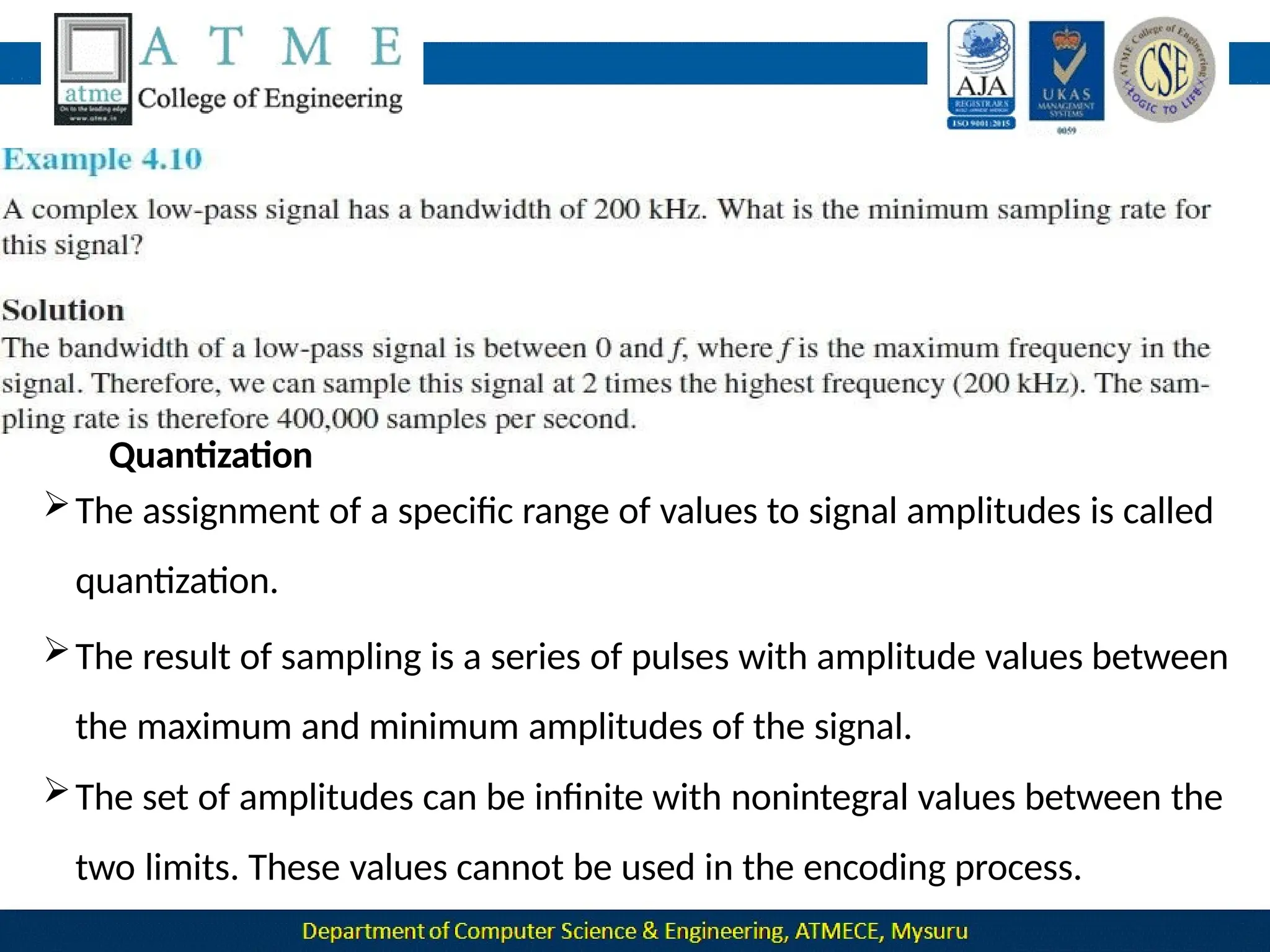
Quantization
The assignment of a specific range of values to signal amplitudes is called
quantization.
The result of sampling is a series of pulses with amplitude values between
the maximum and minimum amplitudes of the signal.
The set of amplitudes can be infinite with nonintegral values between the
two limits. These values cannot be used in the encoding process.
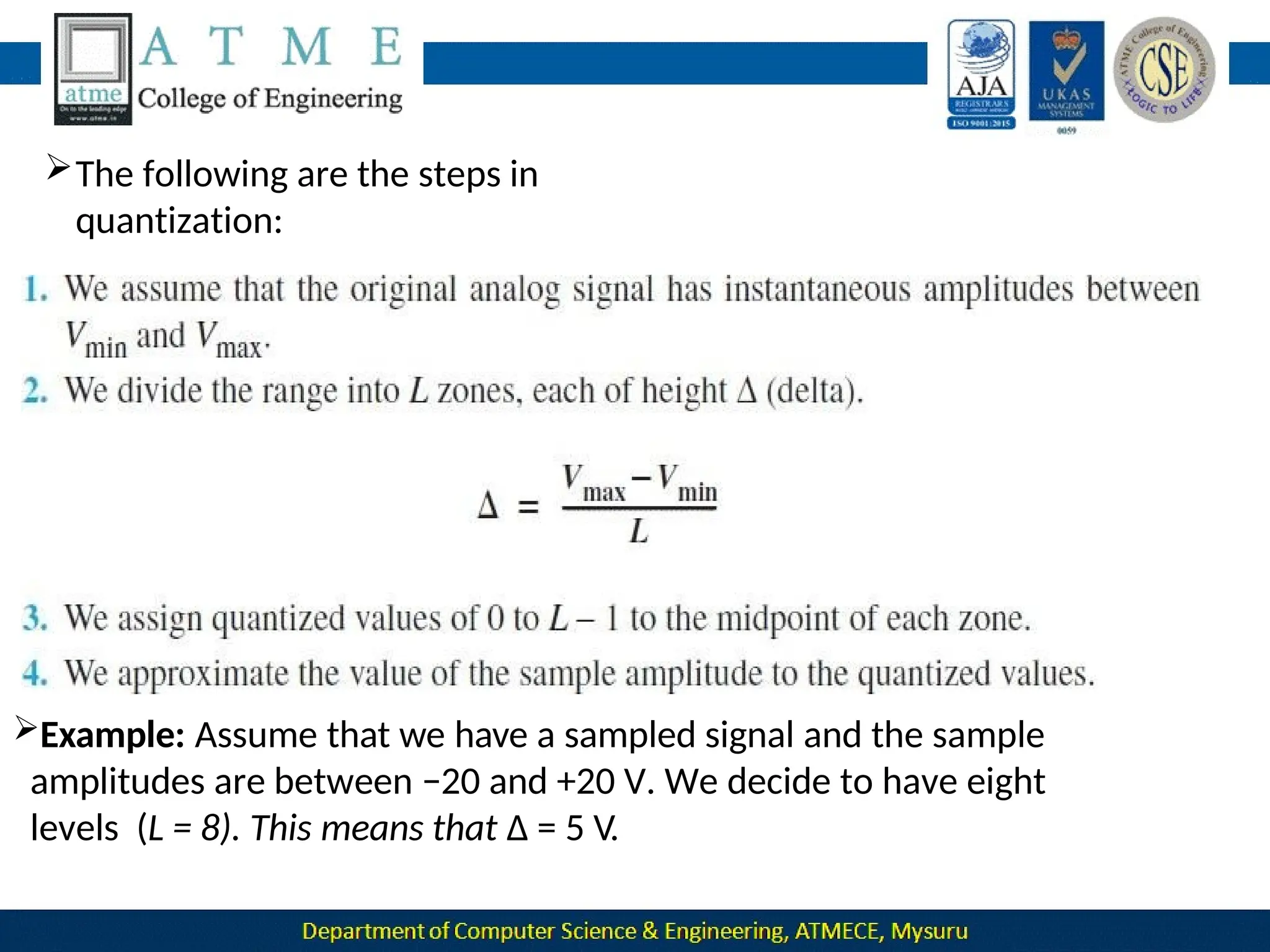
The following are the steps in
quantization:
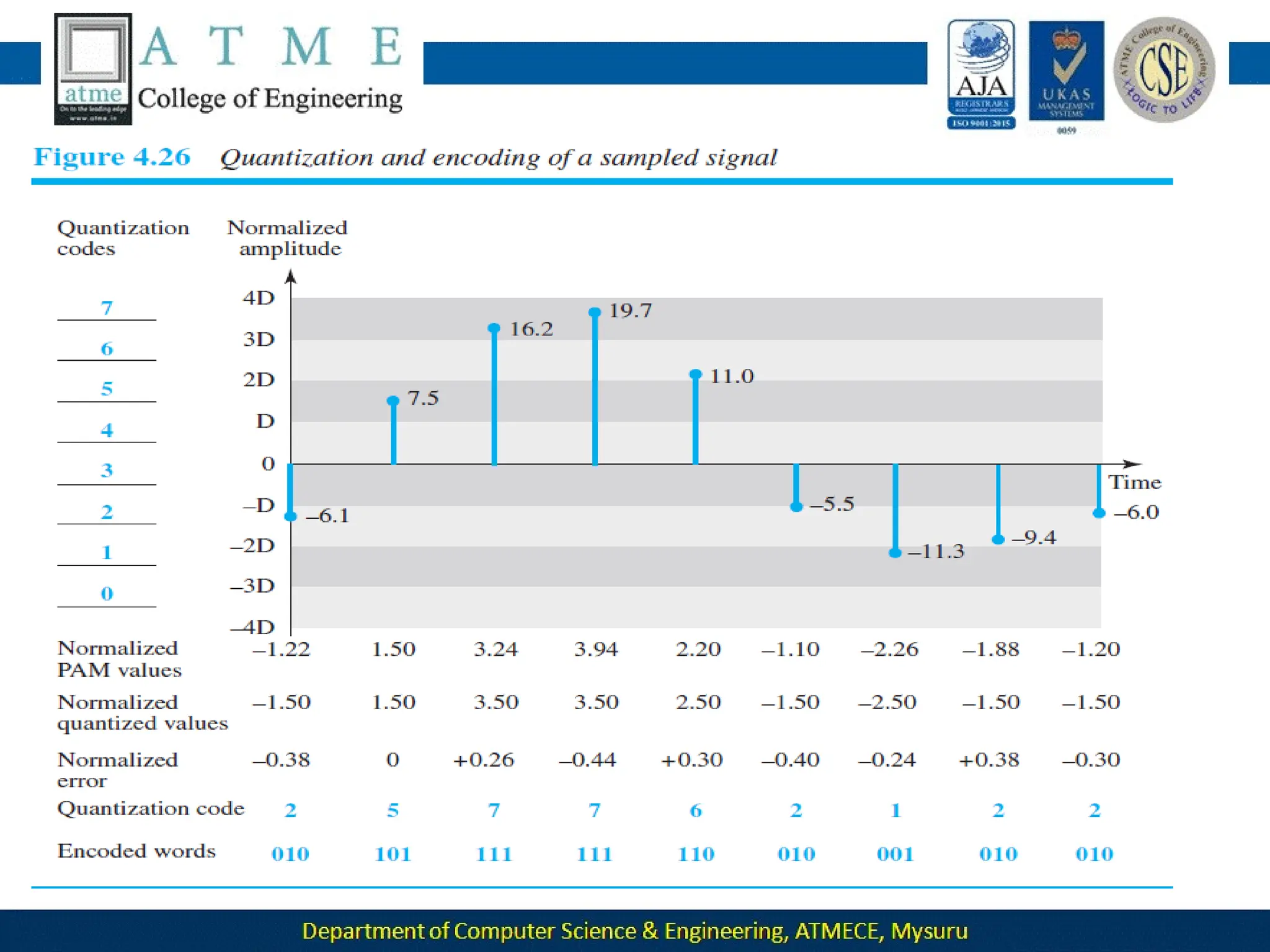
Example: Assume that we have a sampled signal and the sample
amplitudes are between −20 and +20 V. We decide to have eight
levels (L = 8). This means that Δ = 5 V.
Quantization Levels
The choice of L, the number of levels, depends on the range of the
amplitudes of the analog signal and how accurately we need to recover
the signal.
If the amplitude of a signal fluctuates between two values only, we
need only two levels
if the signal, like voice, has many amplitude values, we need more
quantization levels.
In audio digitizing, L is normally chosen to be 256; in video it is
normally thousands.
Choosing lower values of L increases the quantization error if
there is a
lot of fluctuation in the signal.
Quantization Error
Quantization is an approximation process
The input values to the quantizer are the real values; the output values are
the
approximated values.
The output values are chosen to be the middle value in the zone. If
the input value is also at the middle of the zone, there is no
quantization error; otherwise, there is an error. signal, which in
The quantization error changes the signal-to-noise ratio of the
turn reduces the upper limit capacity according to Shannon.
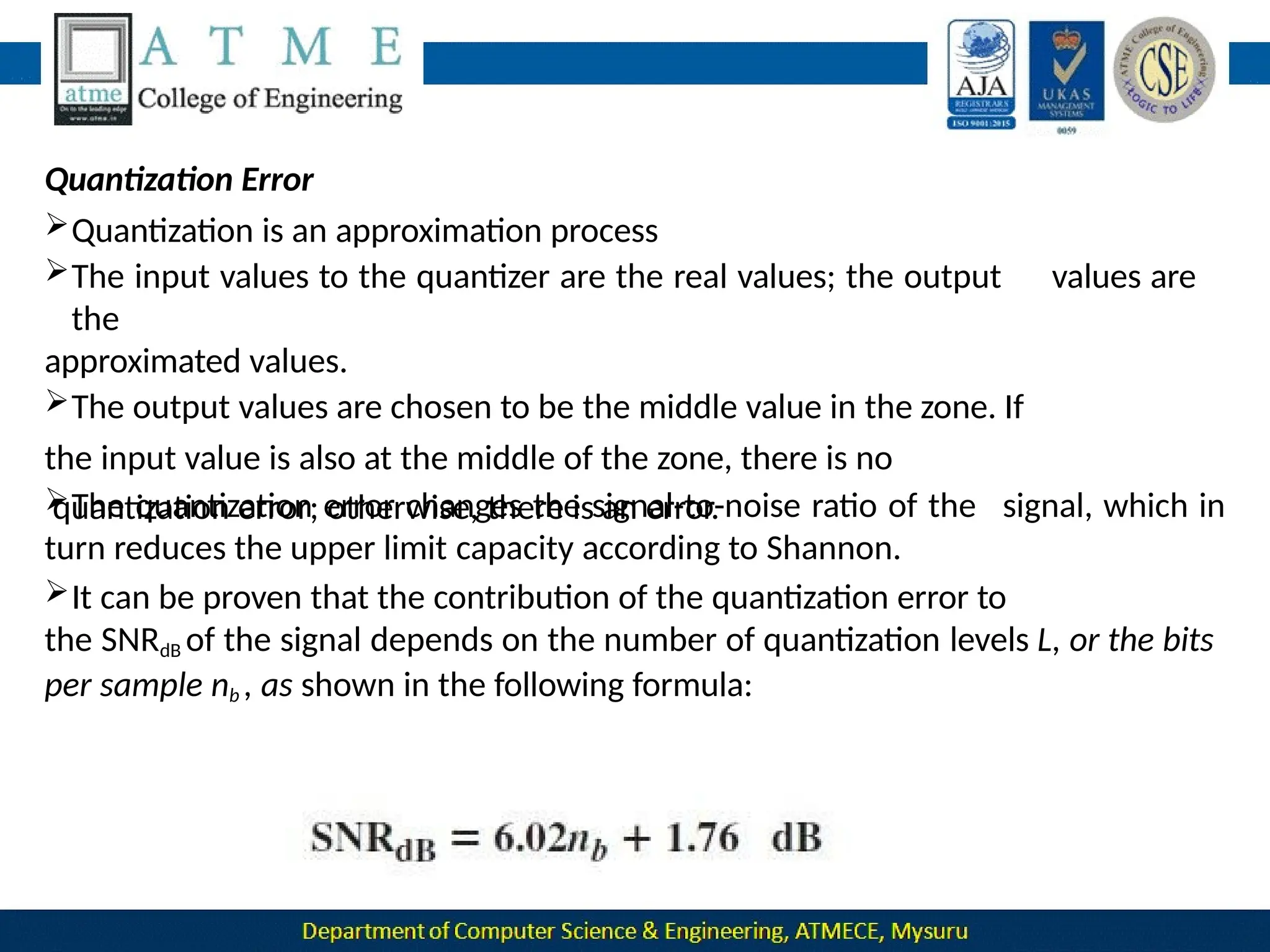
It can be proven that the contribution of the quantization error to
the SNRdB of the signal depends on the number of quantization levels L, or the bits
per sample nb , as shown in the following formula:
in the
Uniform Versus Nonuniform Quantization
For many applications, the distribution of the instantaneous amplitudes
analog signal is not uniform.
Changes in amplitude often occur more frequently in the lower amplitudes
than
in the higher ones.
For these types of applications it is better to use nonuniform zones.
In other words, the height of Δ is not fixed; it is greater near the lower
amplitudes and less near the higher amplitudes.
 Nonuniform quantization can also be achieved by using a
process called at the
companding and expanding.
The signal is companded at the sender before conversion; it is expanded
receiver after conversion.
Encoding
The last step in PCM is encoding.
After each sample is quantized and the number of bits per sample is
decided, each sample can be changed to an nb -bit code word.
number of
The number of bits for each sample is determined from the
quantization levels.
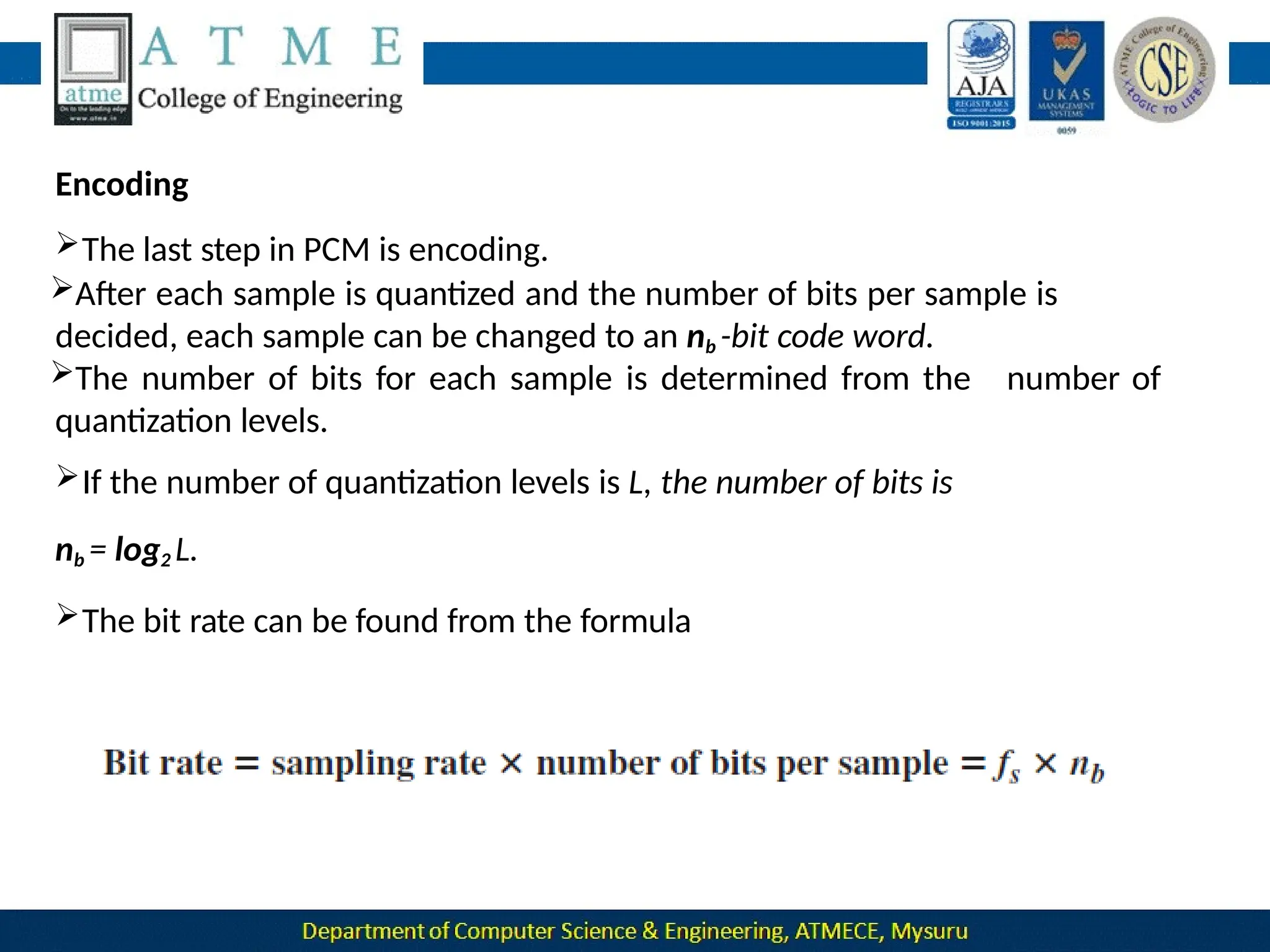
If the number of quantization levels is L, the number of bits is
nb = log2 L.
The bit rate can be found from the formula
Original Signal Recovery
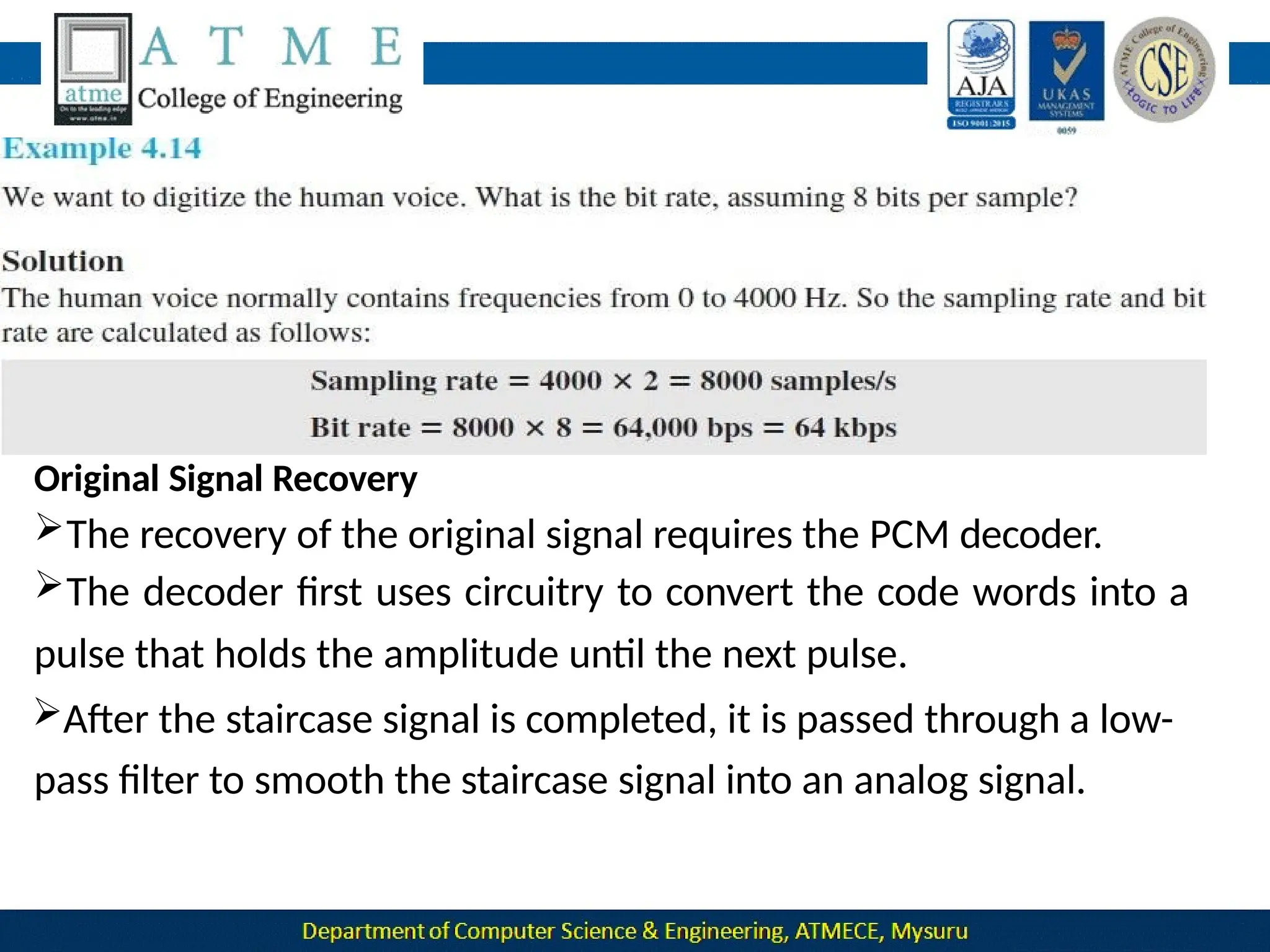
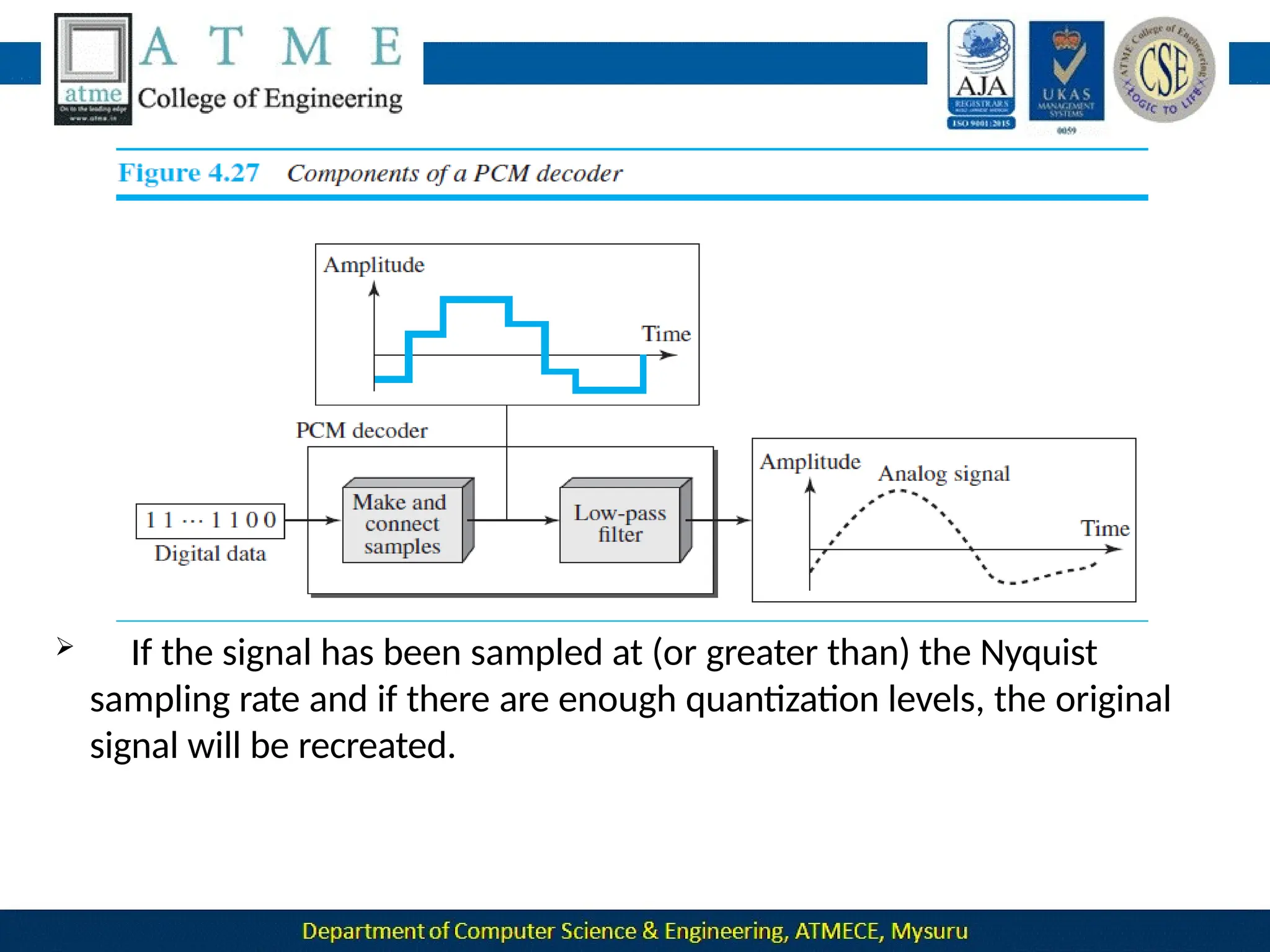
The recovery of the original signal requires the PCM decoder.
The decoder first uses circuitry to convert the code words into a
pulse that holds the amplitude until the next pulse.
After the staircase signal is completed, it is passed through a low-
pass filter to smooth the staircase signal into an analog signal.
 If the signal has been sampled at (or greater than) the Nyquist
sampling rate and if there are enough quantization levels, the original
signal will be recreated.
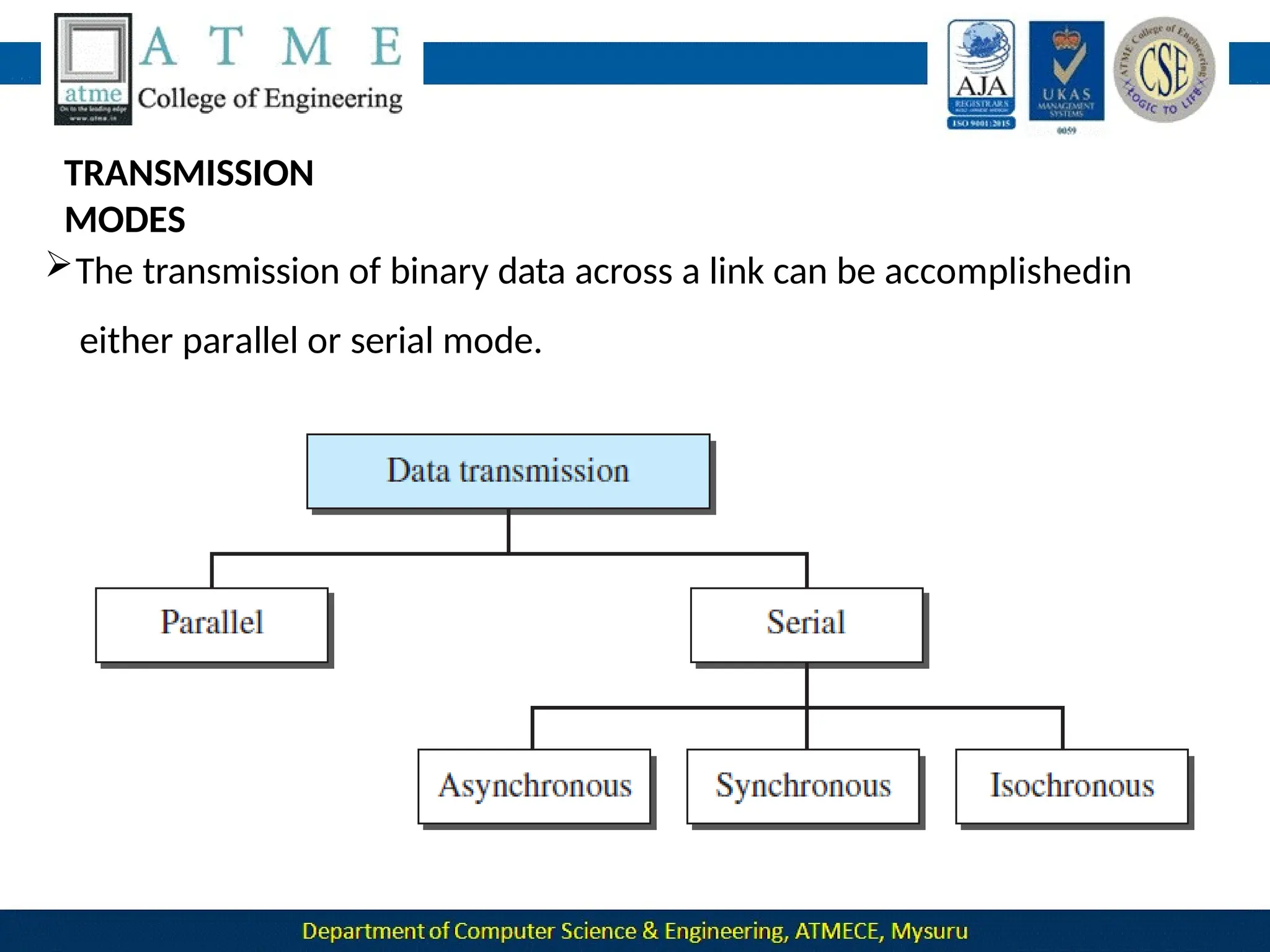
TRANSMISSION
MODES
The transmission of binary data across a link can be accomplishedin
either parallel or serial mode.
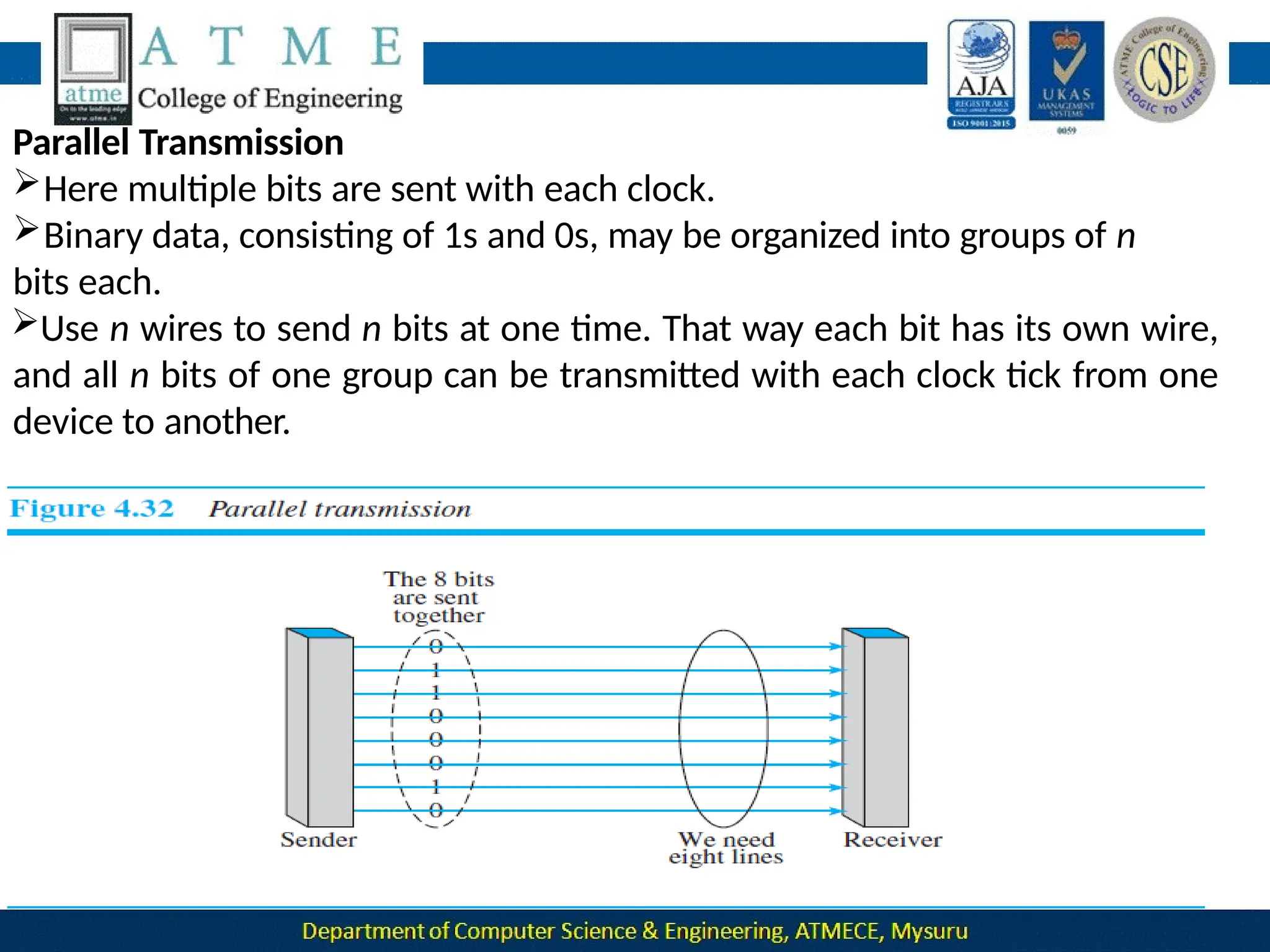
Parallel Transmission
Here multiple bits are sent with each clock.
Binary data, consisting of 1s and 0s, may be organized into groups of n
bits each.
Use n wires to send n bits at one time. That way each bit has its own wire,
and all n bits of one group can be transmitted with each clock tick from one
device to another.
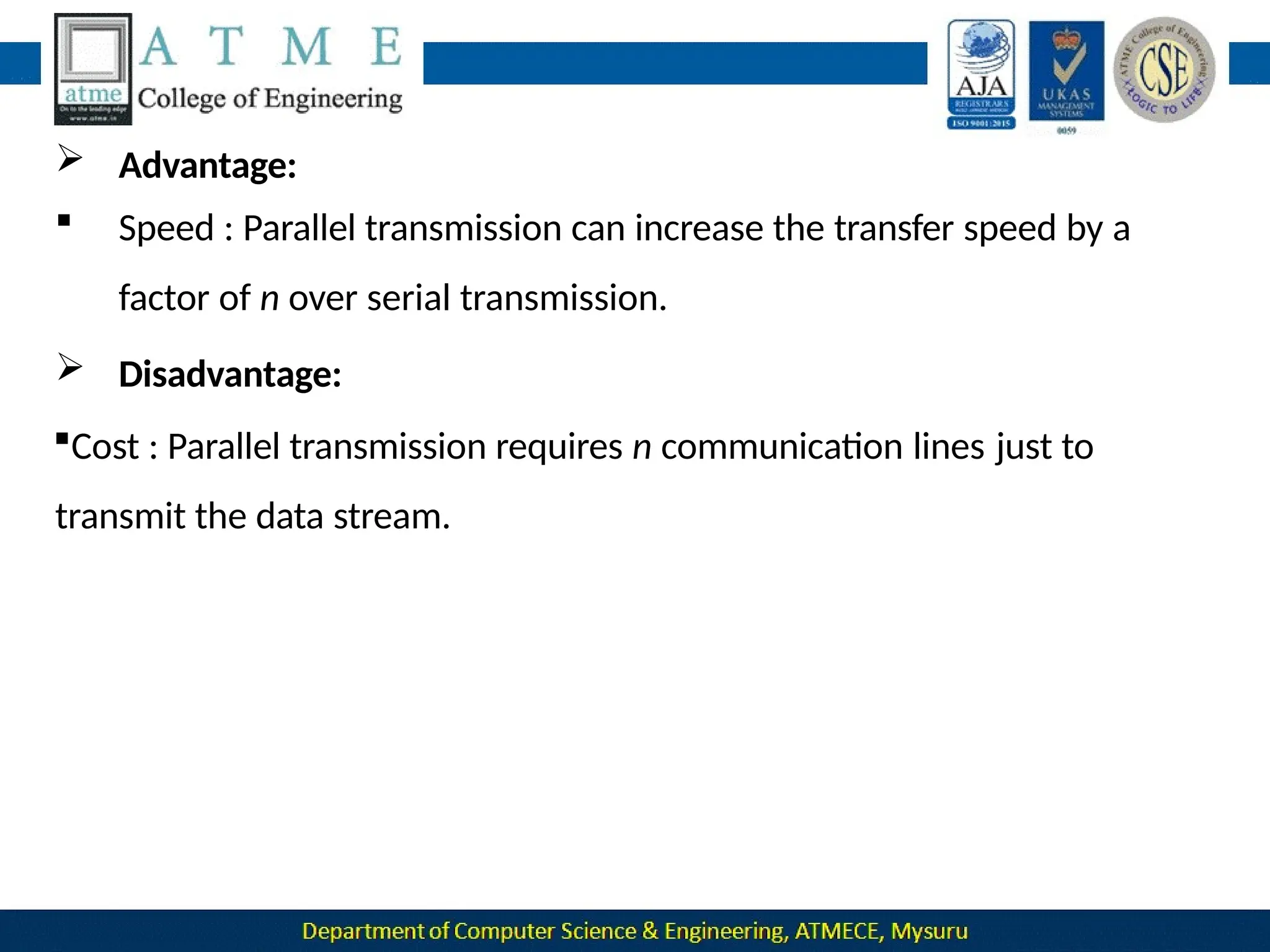
 Advantage:
 Speed : Parallel transmission can increase the transfer speed by a
factor of n over serial transmission.
 Disadvantage:
Cost : Parallel transmission requires n communication lines just to
transmit the data stream.
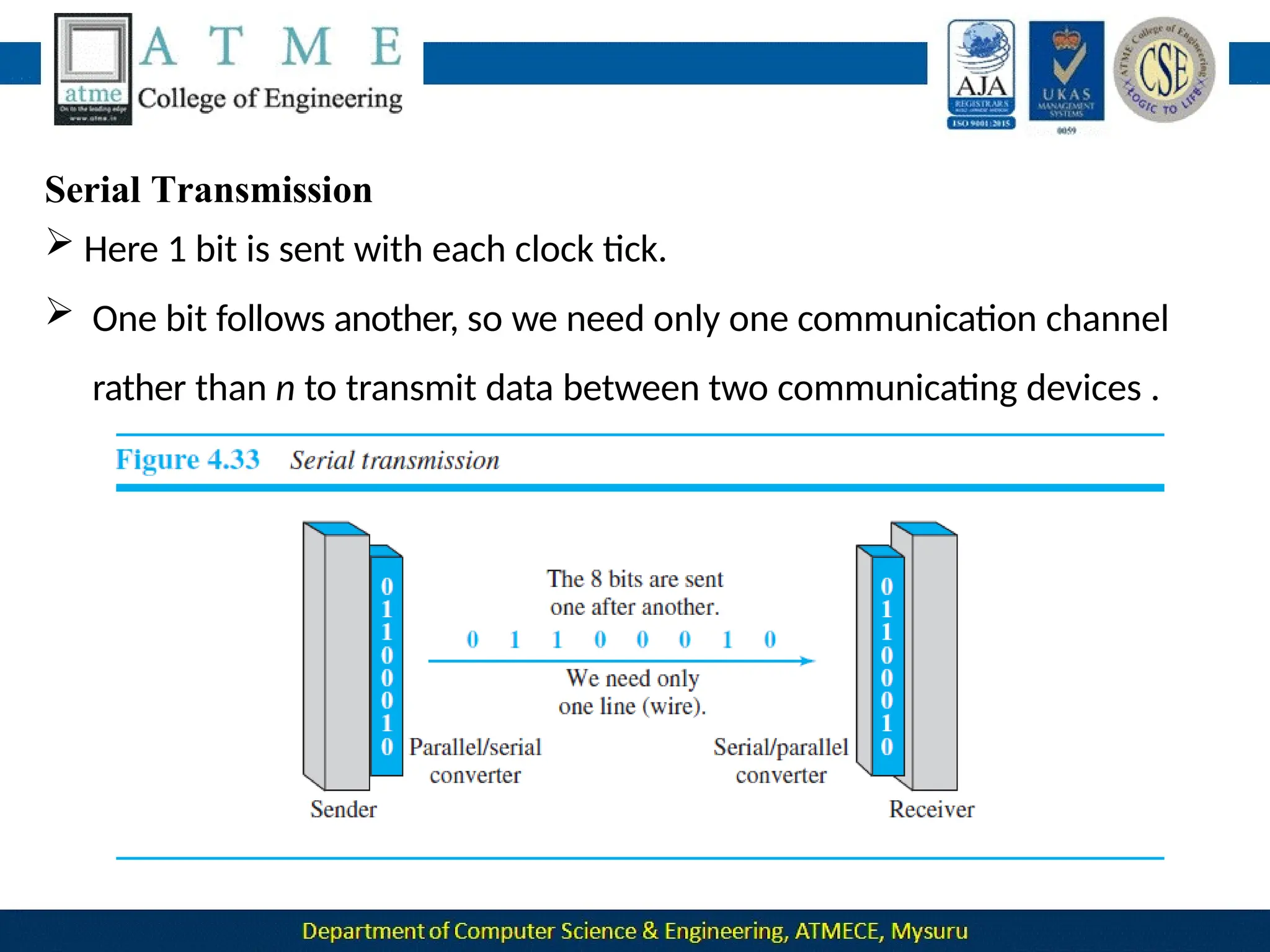
Serial Transmission
 Here 1 bit is sent with each clock tick.
 One bit follows another, so we need only one communication channel
rather than n to transmit data between two communicating devices .

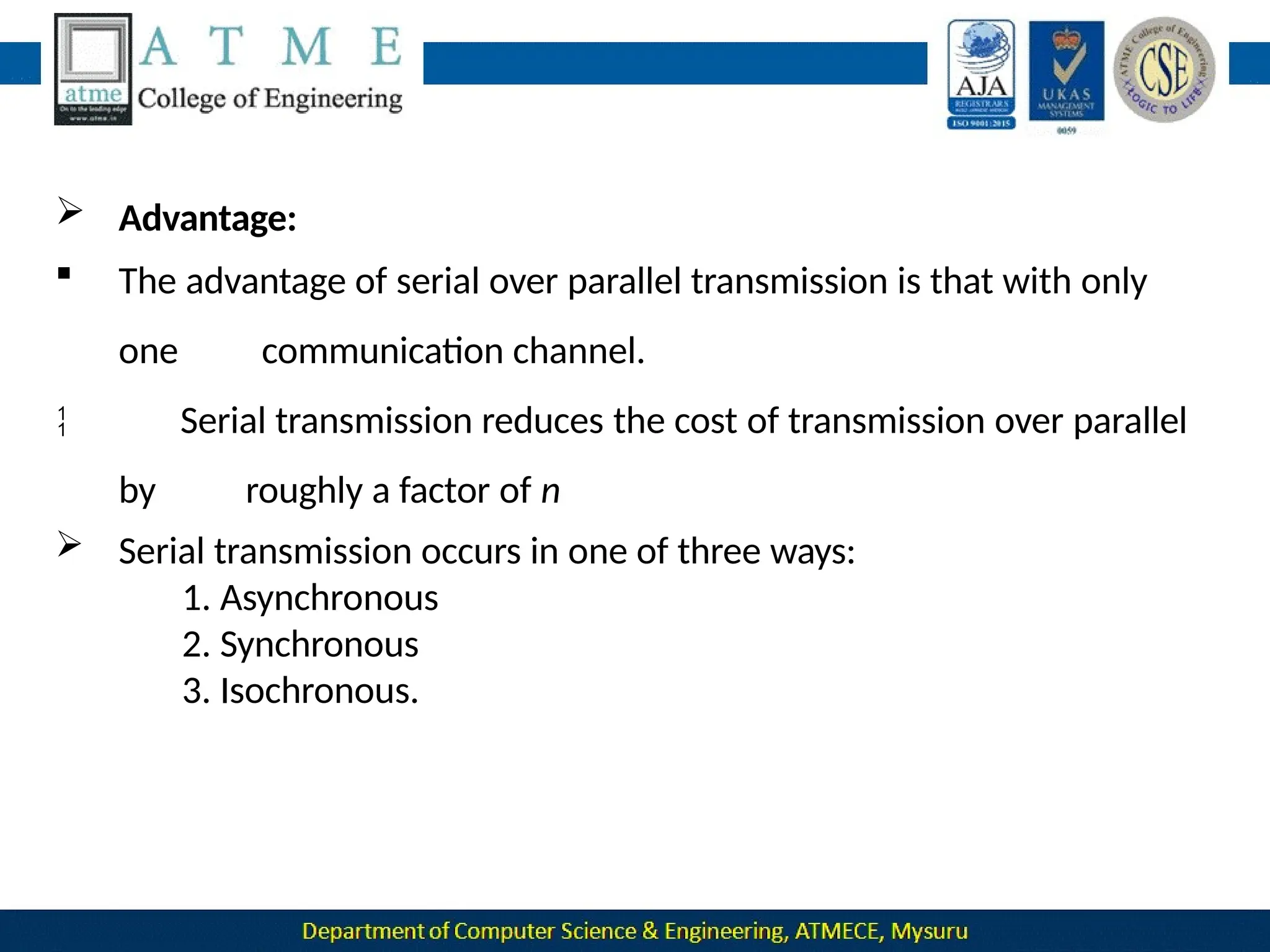
 Advantage:
 The advantage of serial over parallel transmission is that with only
one communication channel.
Serial transmission reduces the cost of transmission over parallel
by roughly a factor of n
 Serial transmission occurs in one of three ways:
1. Asynchronous
2. Synchronous
3. Isochronous.
Asynchronous
Transmission
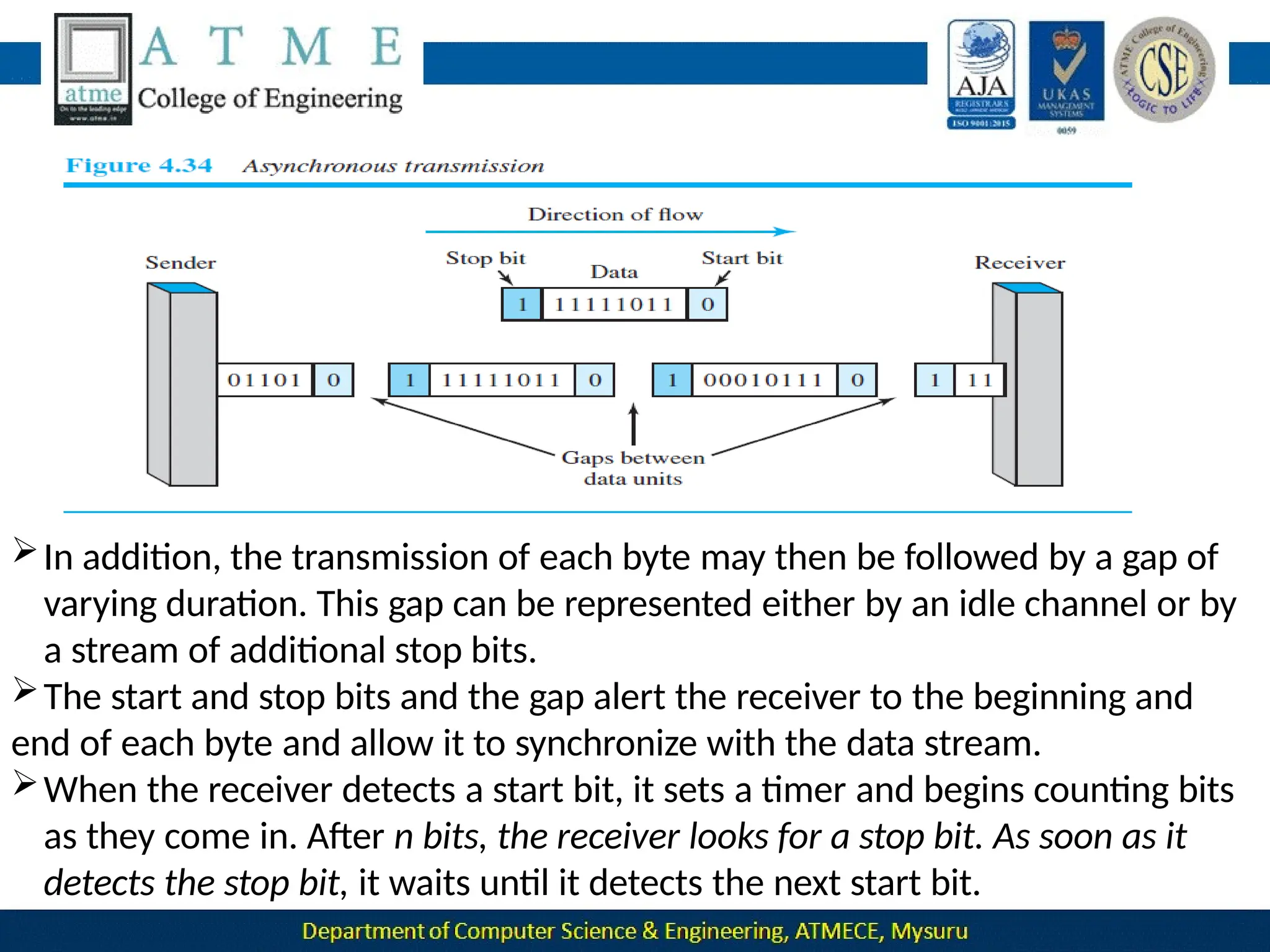
In this mode we send 1 start bit (0) at the beginning and 1 or more stop
bit (1s) at the end of each byte.
 Asynchronous transmission is so named because the timing of a
signal
is
unimportant.
 Information is received and translated by agreed upon patterns. Patterns are
based on grouping the bit stream in to bytes.
 Without synchronization, the receiver cannot use timing to predict when the
next group will arrive.
 To alert the receiver to the arrival of a new group, therefore, an extra
bit is the start
added to the beginning of each byte. This bit, usually a 0, is called
bit.
 To let the receiver know that the byte is finished, 1 or more additional
bits are appended to the end of the byte.
In addition, the transmission of each byte may then be followed by a gap of
varying duration. This gap can be represented either by an idle channel or by
a stream of additional stop bits.
The start and stop bits and the gap alert the receiver to the beginning and
end of each byte and allow it to synchronize with the data stream.
When the receiver detects a start bit, it sets a timer and begins counting bits
as they come in. After n bits, the receiver looks for a stop bit. As soon as it
detects the stop bit, it waits until it detects the next start bit.
Synchronous
Transmission
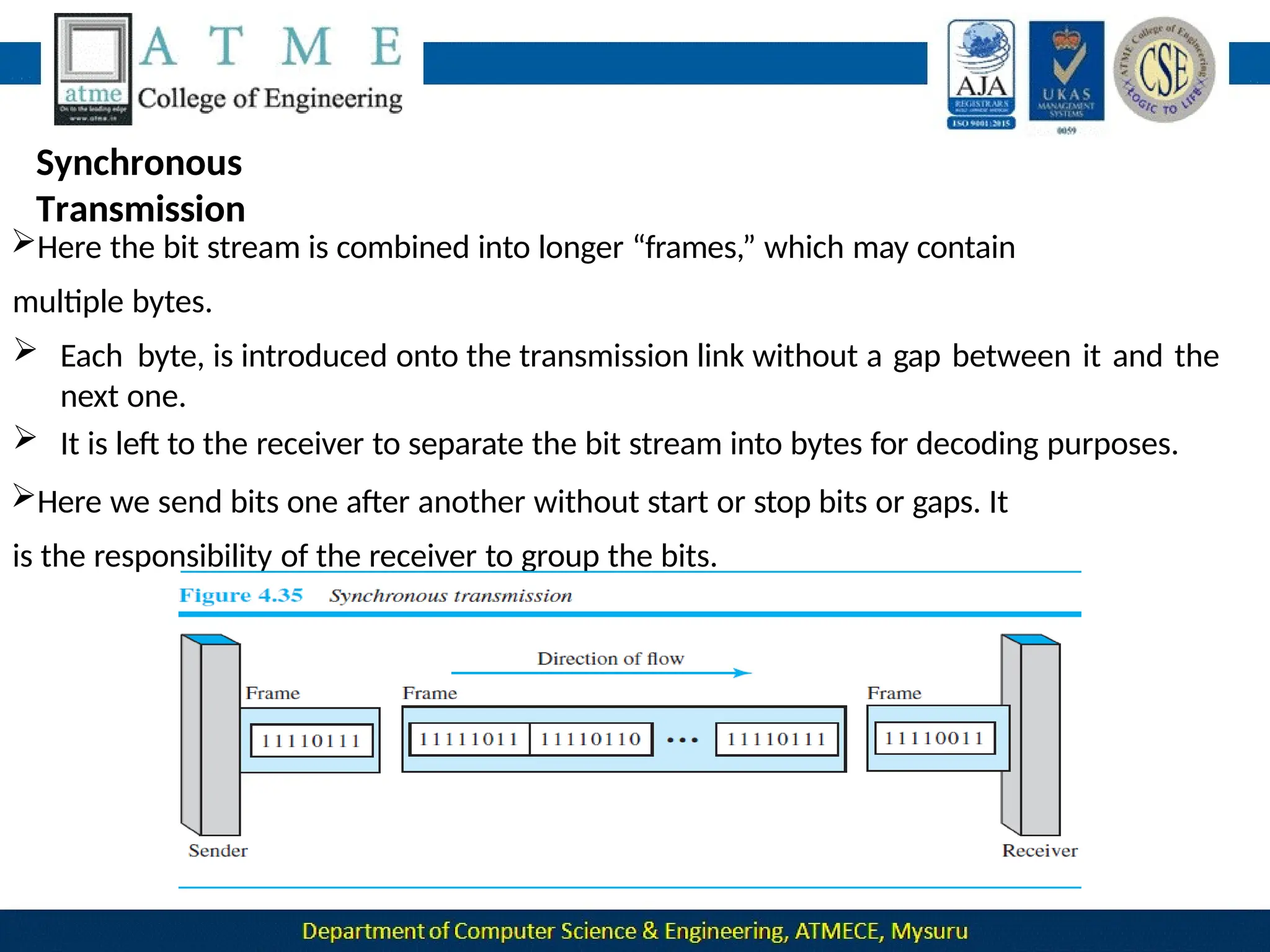
Here the bit stream is combined into longer “frames,” which may contain
multiple bytes.
 Each byte, is introduced onto the transmission link without a gap between it and the
next one.
 It is left to the receiver to separate the bit stream into bytes for decoding purposes.
Here we send bits one after another without start or stop bits or gaps. It
is the responsibility of the receiver to group the bits.
Timing becomes very important, therefore, because the accuracy of the
received information is completely dependent on the ability of the receiving
device to keep an accurate count of the bits as they come in.
Advantage :
•Speed : With no extra bits or gaps to introduce at the sending end and
remove at the receiving end, and, by extension, with fewer bits to move
across the link, synchronous transmission is faster than asynchronous
transmission.
Isochronous Transmission
This mode provides synchronization for the entire stream of bits.
It is used with real time audio and video applications.
In real-time audio and video, in which uneven delays between frames are
not acceptable, synchronous transmission fails.
For example, TV images are broadcast at the rate of 30 images per
second; they must be viewed at the same rate.
If each image is sent by using one or more frames, there should be
no delays between frames.
For this type of application, synchronization between characters is
not enough; the entire stream of bits must be synchronized.
The isochronous transmission guarantees that the data arrive at a
fixed rate.
Analog Transmission
Analog transmission is a transmission method of conveying
voice,data,image,signal or video information using a continuous signal
which varies in amplitude, frequency and phase .
DIGITAL-TO-ANALOG CONVERSION
Digital-to-analog conversion is the process of changing one of the
characteristics of an analog signal based on the information in digital
data.
Sine wave is defined by three characteristics: amplitude, frequency,
and phase.
So, by changing one characteristic of a simple electric signal, we can
use it to represent digital data.
Figure 5.2: Types of digita to
analog conversion
in 1s. The
The unit is
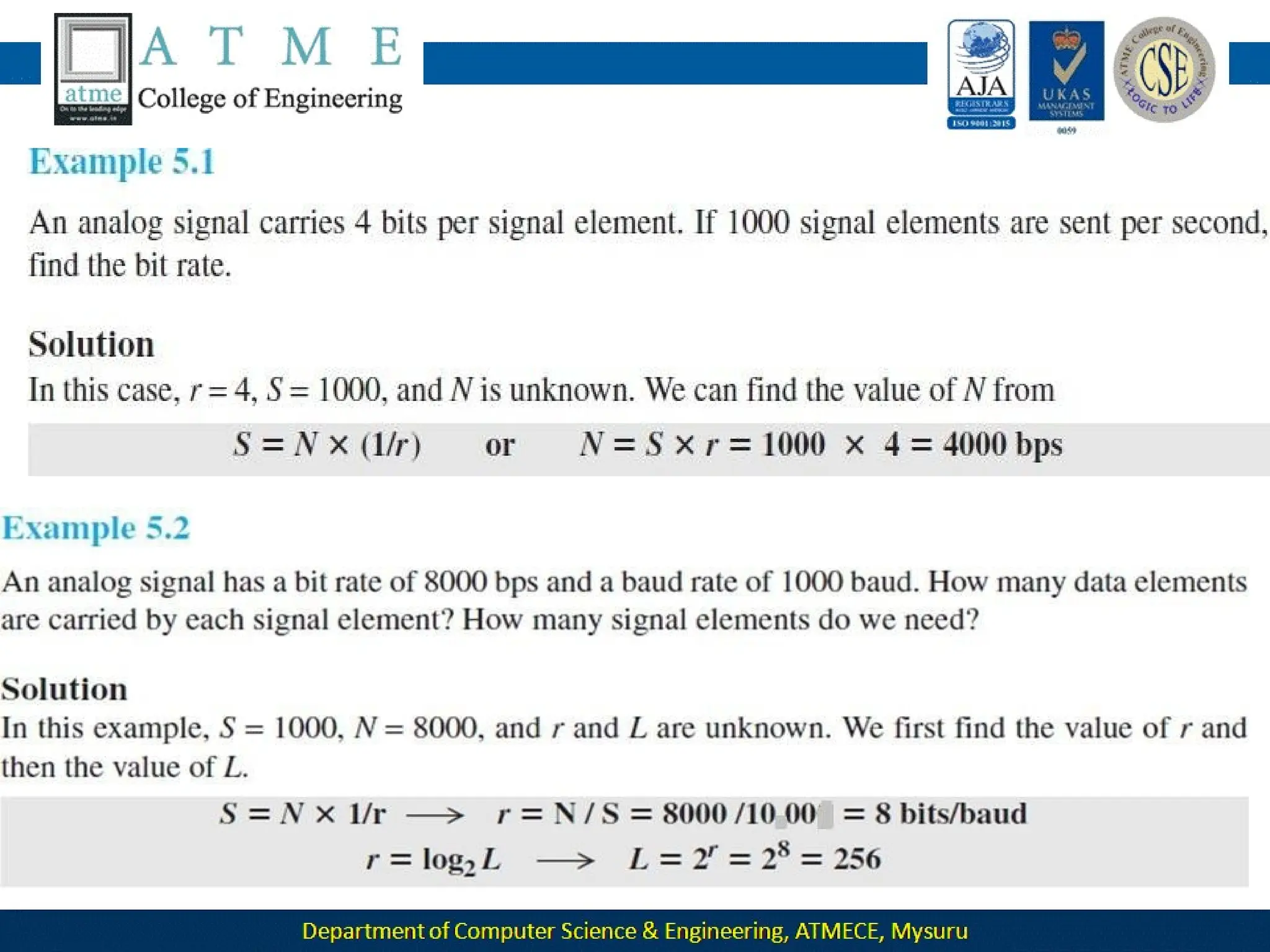
Aspects of Conversion
Data Element Versus Signal Element
•Data Element : It is the smallest piece of information to be
exchanged ,the bit.
• Signal element : It is the smallest unit of a signal that is
constant.
Data Rate Versus Signal Rate
• The data rate defines the number of data elements (bits) sent
unit is bits per second (bps).
• The signal rate is the number of signal elements sent in 1s.
the baud.
• Relationship between data rate (N) and signal rate (S)
S =N/r where N-> data rate (bps)
r->number of data elements carried in one signal
element. The value of r in analog transmission is r = log2 L,
where L is the number of different signal elements.
Aspects of Conversion
 Bandwidth: The required bandwidth for analog transmission of digital
data is difference between
proportional to the signal rate except for FSK, in which the
the carrier signals needs to be added.
 Carrier Signal:
 In analog transmission, the sending device produces a high-frequency signal that
acts as a base for the information signal. This base signal is called the carrier
signal .
 The receiving device is tuned to the frequency of the carrier signal that it expects
from the sender.
Digital information then changes the carrier signal by modifying
one or more of its characteristics (amplitude, frequency, or
phase). This kind of modification is called modulation (shift
keying).
Amplitude Shift Keying
Here the amplitude of the carrier signal is varied to create
signal elements. Both frequency and
phase remain constant while the
amplitude
changes.
Binary ASK (BASK):
ASK is normally implemented using only two levels. This
is
referred
to as binary amplitude shift keying or on-off keying (OOK).
The peak amplitude of one signal level is 0; the other is the
same as the amplitude of the carrier frequency.
The bandwidth is proportional to the signal rate (baud rate).
The value of d is between 0 and 1 and it depends on modulation
and filtering process.
56
Figure
5.3:
Binary amplitude shift
keying
Implementation of BASK
 If digital data are presented as a unipolar NRZ digital signal with a high
voltage of 1 V and a low voltage of 0 V.
signal
 The implementation can achieved by multiplying the NRZ digital
by the carrier signal coming from an oscillator.
 When the amplitude of the NRZ signal is 1, the amplitude of the
 carrier frequency is held.
 When the amplitude of the NRZ signal is 0, the amplitude of the
 carrier frequency is zero.
58
Frequency Shift Keying
 Here the frequency of the carrier signal is varied to
represent
data.
 The frequency of the modulated signal is constant for the duration
of one signal element, but changes for the next signal element if
the data element changes.
 Both peak amplitude and phase remain constant for all signal
elements.
Binary FSK(BFSK):
 Here two carrier frequencies f1 and f2 are selected.
 We use the first carrier if the data element is 0; we use the
second
if the data element is 1.
61
Figure
5.6:
Binary frequency shift
keying
We have an available bandwidth of 100
kHz which spans from 200 to 300 kHz.
What should be the carrier frequency
and the bit rate if we modulated our data
by using FSK with d = 1?
Solution
This problem is similar to Example 5.3, but we are
modulating by using FSK. The midpoint of the band is at
250 kHz. We choose 2Δf to be 50 kHz; this means
Implementation of BFSK
 Two implementations of BFSK: non coherent and coherent.
In non coherent BFSK, there may be discontinuity in the phase when
one signal element ends and the next begins.
 In coherent BFSK, the phase continues through the boundary of two
signal elements.
Non coherent BFSK can be implemented by treating BFSK as two ASK
modulations and using two carrier frequencies.
 Coherent BFSK can be implemented by using one voltage- controlled
oscillator (VCO) that changes its frequency according to the input
voltage.
Figure 5.7: Implementation of BFSK
The input to the oscillator is the unipolar NRZ signal. When the
amplitude of NRZ is zero, the oscillator keeps its regular frequency;
when the amplitude is positive, the frequency is increased.
Multi Level
FSK :
Phase Shift Keying
In phase shift keying, the phase of the carrier is varied
to represent two or more different signal elements.
 Both peak amplitude and frequency
remain constant as the
phase changes.
 Today, PSK is more common than ASK or FSK.
Binary PSK (BPSK)
 The simplest PSK is binary PSK, in which we have only
two
signal elements, one with a phase of 0°, and the other
with
Figure 5.9: Binary
phase shift
keying
 Binary PSK is as simple as binary ASK with one big advantage—it is less
 susceptible to noise.
 In ASK, the criterion for bit detection is the amplitude of the signal; in
PSK, it is the phase.
 Noise can change the amplitude easier than it can change the phase.
 PSK is less susceptible to noise than ASK.
 PSK is superior to FSK because we do not need two carrier signals.
 PSK needs more sophisticated hardware to be
able to distinguish between phases.
Implementation
 The implementation of BPSK is as simple as that for ASK.
 The reason is that the signal element with phase 180° can be seen as
the complement of the signal element with phase 0°.
 The polar NRZ signal is multiplied by the carrier frequency; the 1
bit (positive voltage) is represented by a phase starting at 0°; the 0
bit (negative voltage) is represented by a phase starting at 180°.
Q
Quadrature Phase Shift Keying
 It allows designers to use 2 bits at a time in each signal element,
thereby decreasing the baud rate and eventually the required bandwidth.
other
 It uses two separate BPSK modulations; one is in-phase,
the quadrature (out-of-phase).
 The incoming bits are first passed through a serial to parallel conversion
that sends one bit to one modulator and the next bit to the other
modulator.
71
Figure 5.11: QPSK and its
implementation
The two composite signals created by each multiplier are sine waves
with the same frequency, but different phases.
When they are added, the result is another sine wave.
 A constellation diagram can help us define the amplitude and
phase of a signal element, particularly when we are using two
carriers (one in-phase and one quadrature).
 Here signal element type is represented as a dot. The bit or
combination of bits it can carry is often written next to it.
73
 The diagram has two axes. The horizontal X axis is related to the in-phase
carrier; the vertical Y axis is related to the quadrature carrier.
 For each point on thediagram,four pieces of information can be deduced.
1. The projection of the point on the X axis defines the peak amplitude of
the in-phase component
2. The projection of the point on the Y axis defines the peak amplitude of the
quadrature component.
3. The length of the line (vector) that connects the point to the origin is the
peak amplitude of the signal element (combination of the X and Y
components)
4. The angle the line makes with the X axis is the phase of the signal
element. All the information we need can easily be found on a
constellation diagram.
Figure 5.12: Constellation
diagram
 For ASK, we are using only an in-phase carrier. Therefore, the two points
should be on the X axis.
 Binary 0 has an amplitude of 0 V; binary 1 has an amplitude of 1 V (for
example).
 The points are located at the origin and at 1 unit.
 BPSK also uses only an in-phase carrier. However, we use a polar NRZ
signal for modulation.
 It creates two types of signal elements, one with amplitude 1 and the
other with amplitude −1.
 This can be stated in other words: BPSK creates two different signal
 elements, one with amplitude 1 V and in phase and the other with
amplitude 1 V and 180° out of phase.
 QPSK uses two carriers, one in-phase and the other quadrature.
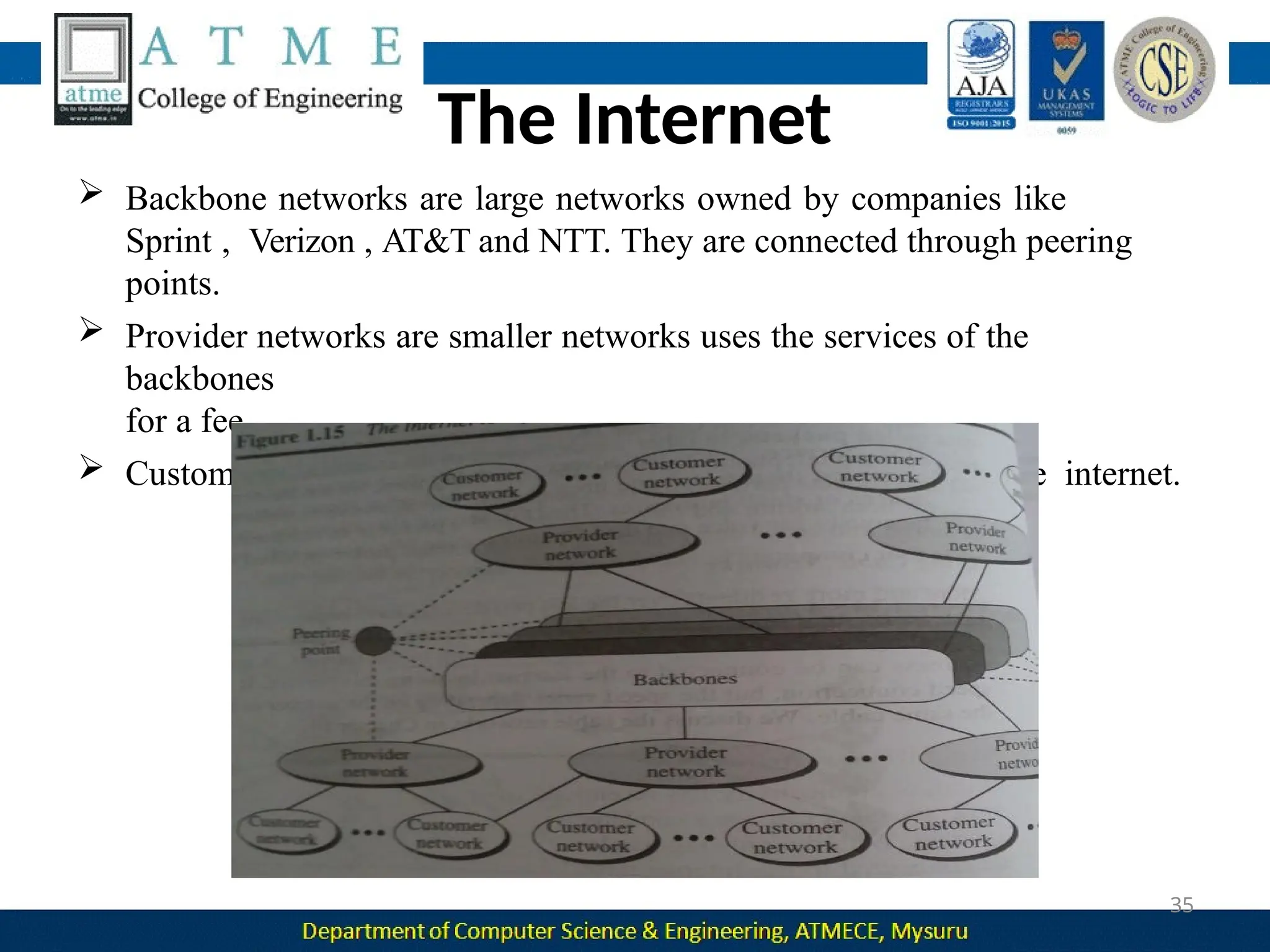
 The point representing 11 is made of two combined signal elements,
both with an amplitude of 1 V
.
 One element is represented by an in-phase carrier, the other element
by a quadrature carrier.
Quadrature Amplitude Modulation
Quadrature amplitude modulation is a combination of ASK and PSK.
QAM refer to QPSK with amplitude modulation.
QAM are of two types: 8-QAM and 16-QAM.
 8-QAM encodes 3 bits of data for every baud and 16-QAM
encodes 4 bits for every baud.
DATA
COMMUNICATIO
N 18CS46
M
s
.
1
Module-3
Bandwidth Utilization
Introduction
Today’s technology includes high-bandwidth media such as optical fiber
and terrestrial and satellite microwaves.
Each has a bandwidth far in excess of that needed for the
average transmission signal.
If the bandwidth of a link is greater than the bandwidth needs of the
devices connected to it, the bandwidth is wasted.
An efficient system maximizes the utilization of all resources; bandwidth
is one of the most precious resources we have in data communications.
Multiplexing
 Multiplexing is the set of techniques that allow the simultaneous
transmission of multiple signals across a single data link.
 It allows the various users to share the channel simultaneously.
Figure 6.1 Dividing a link into channels
The lines on the left direct their transmission streams to a
multiplexer (MUX), which combines them into a single stream (many-
to one).
 At the receiving end, that stream is fed into a demultiplexer (DEMUX),
which separates the stream back into its component transmissions (one-
to-many) and directs them to their corresponding lines.
 In the figure, the word link refers to the physical path.
The word channel refers to the portion of a link that carries a
transmission between a given pair of lines.
 One link can have many (n) channels.
Categories of multiplexing
Frequency Division Multiplexing(FDM)
It is an analog technique that can be applied when the
bandwidth of a link (in hertz) is greater than the combined
bandwidths of the signals to be transmitted.
Carrier frequencies are separated by sufficient bandwidth
to accommodate the modulated signal.
These bandwidth ranges are the channels through which
the various signals travel.
 Figure 6.3 gives a conceptual view of FDM. In this illustration, the
transmission path is divided into three parts, each representing a
channel that carries one transmission.
 Channels can be separated by strips of unused bandwidth guard
bands—to prevent signals from overlapping.
Figure : Multiplexing
Process
Multiplexing
Process :
 Each source generates a signal of a similar frequency range.
Inside the multiplexer, these similar signals modulate different carrier
frequencies ( f1, f2, and f3).
Figure 6.4: Demultiplexing
Process
Demultiplexing
Process :
 The demultiplexer uses a series of filters to decompose the multiplexed
signal into its constituent component signals.
 The individual signals are then passed to a demodulator that separates
them from their carriers and passes them to the output lines.
Example 6.1:Assume that a voice channel occupies a bandwidth of 4 kHz. We need
to combine three voice channels into a link with a bandwidth of 12 kHz, from 20 to
32 kHz. Show the configuration, using the frequency domain. Assume there are no
guard bands.
Solution:
We shift (modulate) each of the three voice channels to a different bandwidth.
We use the 20- to 24-kHz bandwidth for the first channel, the 24- to
28-kHz bandwidth for the second channel, and the
28- to 32-kHz bandwidth for the third one.
Then we combine them.
At the receiver, each channel receives the entire signal, using a filter to
separate out its own signal.
1
1
 The first channel uses a filter that passes frequencies between 20 and
24 kHz and filters out (discards) any other frequencies.
 The second channel uses a filter that passes frequencies between 24
and 28 kHz, and
 The third channel uses a filter that passes frequencies between 28 and
32 kHz.
 Each channel then shifts the frequency to start from zero.
13
14
The Analog Carrier System
To maximize the efficiency of their infrastructure, telephone companies
have traditionally multiplexed signals from lower-bandwidth lines onto
higher-bandwidth lines.
In this way, many switched or leased lines can be combined into fewer but
bigger channels.
For analog lines, FDM is used.
One of these hierarchical systems used by telephone companies is made
up of groups, supergroups, master groups, and jumbo groups
Here 12 voice channels are multiplexed onto a higher-bandwidth
line to create a group(12*4).
 At the next level, up to five groups can be multiplexed to create a
composite signal called a supergroup(48*5).
 At the next level, 10 supergroups are multiplexed to create a master
group(240*10).
 Six master groups can be combined into a jumbo group(6*2.52).
Other Applications of
FDM
• AM and FM radio broadcasting: Radio uses the air as the transmission
medium. A special band from 530 to 1700 kHz is assigned to AM radio. All
radio stations need to share this band. Each AM station needs 10 kHz of
bandwidth. Each station uses a different carrier frequency, which means it
is shifting its signal and multiplexing.
• Television broadcasting: Each TV channel has its own bandwidth of 6 MHz.
• The first generation of cellular telephones: Each user is assigned two
30kHz channels, one for sending voice and the other for receiving.
18
Implementation
FDM can be implemented very easily.
In other cases, such as the cellular telephone system, a base station
needs to assign a carrier frequency to the telephone user.
There is not enough bandwidth in a cell to permanently assign
a
bandwidth range to every telephone user.When a user hangs up, her or his
bandwidth is assigned to another caller.
Wavelength-Division Multiplexing(WDM)
Wavelength-division multiplexing (WDM) is designed to use the high-
data-rate capability of fiber-optic cable.
The optical fiber data rate is higher than the data rate of metallic
transmission cable, but using a fiber-optic cable for a single line wastes
the available bandwidth.
WDM is conceptually the same as FDM, except that the multiplexing
and demultiplexing.
Very narrow bands of light from different sources are combined to make
a wider band of light.
 At the receiver, the signals are separated by the demultiplexer. The
combining and splitting of light sources are easily handled by a prism.
Time-Division Multiplexing(TDM)
 Time-division multiplexing (TDM) is a digital process that
allows several connections to share the high bandwidth of a link.
 Each connection occupies a portion of time in the link.
 TDM is a digital multiplexing technique for combining several low-rate
channels into one high-rate channel.
Synchronous
TDM
 In synchronous TDM, each input connection has an allotment in the
output even if it is not sending data.
 A unit can be 1 bit, one character, or one block of data. Each input
unit becomes one output unit and occupies one output time slot.
If we have n connections, a frame is divided into n time slots and one
slot is allocated for each unit, one for each input line.
 If the duration of the input unit is T, the duration of each slot is T/n
and
the duration of each frame is T
.
 The data rate of the output link must be n times the data rate of a
connection to guarantee the flow of data.
Example 6.5:Three connections are multiplexed together .The data rate for each
input connection is 1 kbps. If 1 bit at a time is multiplexed (a unit is 1 bit), what is
the duration of
1.each input slot,
2.each output slot, and
3.each frame?
Solution
We can answer the
questions as follows:
1.The data rate of each
input connection is 1
kbps. This means
that the bit
duration is 1/1000 s or
1 ms. The duration of
the input time slot is 1
ms (same as
bit duration).
Example 6.6:Figure 6.14 shows synchronous TDM with a data streamfor
each input and one data stream for the output. The unit of data is 1 bit. Find
(1) the input bit duration,
(2) the output bit duration,
(3) the output bit rate, and
(4) the output frame rate.
Solution
We can answer the questions as follows:
1.The input bit duration is the inverse of the bit rate: 1/1 Mbps = 1 μs.
2.The output bit duration is one-fourth of the input bit duration, or 1/4 μs.
3.The output bit rate is the inverse of the output bit duration, or 1/4 μs, or
4 Mbps. This can also be deduced from the fact that the output rate is 4
times as fast as any input rate; so the output rate = 4 × 1 Mbps = 4 Mbps.
4.The frame rate is always the same as any input rate. So the frame rate is
1,000,000 frames per second. Because we are sending 4 bits in each
frame, we can verify the result of the previous question by multiplying the
frame rate by the number of bits per frame.
Example 6.7:Four 1-kbps connections are multiplexed together. A unit is 1
bit. Find
(1)the duration of 1 bit before multiplexing,
(2)The transmission rate of the link
(3)The duration of a time slot, and
(4)The duration of a frame.
Solution
We can answer the questions as
follows:
1.The duration of 1 bit before
multiplexing is 1/1 kbps, or
0.001 s (1 ms).
3.The duration of each time slot is one-fourth of the duration of each
bit before multiplexing,or 1/4 ms or 250 μs. Note that we can also
calculate this from the data rate of the link, 4 kbps.The bit duration is
the inverse of the data rate, or 1/4 kbps or 250 μs.
4.The duration of a frame is always the same as the duration of a unit
before multiplexing, or 1 ms. We can also calculate this in another way.
Each frame in this case has four time slots. So the duration of a frame
is 4 times 250 μs, or 1 ms.
29
Example 6.8:Four channels are multiplexed using TDM. If each channel
sends 100 bytes/s and we multiplex 1 byte per channel, show the frame
traveling on the link, the size of the frame, the duration of a frame, the
frame rate, and the bit rate for the link.
Solution
Each frame carries 1 byte from each channel; the size of each frame,
therefore, is 4 bytes, or 32 bits.
Because each channel is sending 100 bytes/s and a frame carries 1 byte
from each channel, the frame rate must be 100 frames per second.
Example 6.9:A multiplexer combines four 100-kbps channels using a
time slot of 2 bits. Show the output with four arbitrary inputs. What is
the frame rate? What is the frame duration? What is the bit rate?
What is the bit duration?
Solution
Figure 6.17 shows the output for four arbitrary inputs.
• The link carries 50,000 frames per second since each frame contains 2 bits
per channel.
• The frame duration is therefore 1/50,000 s or 20 μs.
•The frame rate is 50,000 frames per second, and each frame carries 8 bits;
the bit rate is 50,000 × 8 = 400,000 bits or 400 kbps.
• The bit duration is 1/400,000 s, or 2.5 μs. Note that the frame duration is
8 times the bit duration because each frame is carrying 8 bits.
Interleavin
g
 TDM can be visualized as two fast-rotating switches, one on
the multiplexing side and the other on the demultiplexing side.
 The switches are synchronized and rotate at the same speed, but in
opposite directions.
Figure :
Interleaving
 On the multiplexing side, as the switch opens in front of a
connection, that connection has the opportunity to send a unit on
to the path. This process is called interleaving.
 On the demultiplexing side, as the switch opens in front of a
connection, that connection has the opportunity to receive a unit
from the path.
Empty
Slots
Figure 6.18 shows a case in which one of the input lines has no data to
send and one slot in another input line has discontinuous data.
The first output frame has three slots filled, the second frame has two
slots filled,and the third frame has three slots filled. No frame is full.
Data Rate Management
One problem with TDM is how to handle a disparity in the input
data rates.
If data rates are not the same, three strategies can be used:
1. Multilevel multiplexing
2. Multiple-slot allocation and
3. Pulse stuffing.
Multilevel Multiplexing
 It is a technique used when the data rate of an input line is a multiple
of others.
 For example, in Figure below, we have two inputs of 20 kbps and
three inputs of 40 kbps.
Multiple-Slot Allocation
For example, we might have an input line that has a data rate that is a
multiple of another input.
In Figure below, the input line with a 50-kbps data rate can be given two
slots in the output. We insert a demultiplexer in the line to make two
inputs out of one.
Pulse Stuffing
tne solution is to make the highest input data rate the dominant
data rate and then add dummy bits to the input lines with lower
rates.
This will increase their rates. This technique is called pulse stuffing,
bit padding, or bit stuffing.
Frame
Synchronizing
 One or more synchronization bits are usually added to the beginning of
each frame. These bits, called framing bits.
 It follows a pattern, frame to frame, that allows the demultiplexer to
synchronize with the incoming stream so that it can separate the time
slots accurately.
Example 6.10:We have four sources, each creating 250 characters per second.
If the interleaved unit is a character and 1 synchronizing bit is added to each
frame, find
(1)the data rate of each source,
(2)The duration of each character in each source,
(3)the frame rate,
(4)the duration of each frame,
(5)the number of bits in each frame, and
(6)the data rate of the link.
Solution: We can answer the questions as follows:
1.The data rate of each source is 250 × 8 = 2000 bps = 2 kbps.
2.Each source sends 250 characters per second; therefore, the duration of a
character is 1/250 s, or 4 ms.
3.Each frame has one character from each source, which means the link
needs to
send 250 frames per second to keep the transmission rate of each source.
4.The duration of each frame is 1/250 s, or 4 ms. Note that the duration of each
frame is the same as the duration of each character coming from each source.
5.Each frame carries 4 characters and 1 extra synchronizing bit. This means
that each frame is 4 × 8 + 1 = 33 bits.
6.The link sends 250 frames per second, and each frame contains 33 bits. This
means that the data rate of the link is 250 × 33, or 8250 bps. Note that the bit rate
of the link is greater than the combined bit rates of the four channels. If we add the
bit rates of four channels, we get 8000 bps. Because 250 frames are traveling per
second and each contains 1 extra bit for synchronizing, we need to add 250 to the
sum to get 8250 bps.
Example 6.11:Two channels, one with a bit rate of 100 kbps and another with a bit
rate of 200 kbps, are to be multiplexed. How this can be achieved? What is the frame
rate? What is the frame duration? What is the bit rate of the link?
Solution:We can allocate one slot to the first channel and two slots to the second
channel.
Each frame carries 3 bits. The frame rate is 100,000 frames per second because
it carries 1 bit from the first channel.
The frame duration is 1/100,000 s, or 10 ms. The bit rate is 100,000 frames/s ×
3 bits per frame, or 300 kbps.
Note that because each frame carries 1 bit from the first channel, the bit rate for the
first channel is preserved.
The bit rate for the second channel is also preserved because each frame
carries 2 bits from the second channel.
Statistical
TDM
 In synchronous TDM, each input has a reserved slot in the output frame.
This can be inefficient if some input lines have no data to send.
In statistical time-division multiplexing, slots are dynamically allocated to
improve bandwidth efficiency.
 In statistical multiplexing, the number of slots in each frame is less
than
the number of input lines.
 The multiplexer checks each input line in round robin fashion; it allocates
a slot for an input line if the line has data to send; otherwise, it skips the
line and checks the next line.
In statistical TDM, a slot needs to carry data as well as the address of the
destination.
An output slot in synchronous TDM is totally occupied by data. there is
no need for addressing; synchronization and preassigned relationships
between the inputs and outputs serve as an address.
No Synchronization Bit
There is another difference between synchronous and statistical TDM,
but this time it is at the frame level.
The frames in statistical TDM need not be synchronized, so we do not
need synchronization bits.
Slot Size
Since a slot carries both data and an address in statistical TDM, the
ratio
of the data size to address size must be reasonable to make transmission
efficient.
In statistical TDM, a block of data is usually many bytes while the
address is just a few bytes.
 Spread spectrum is designed to be used in wireless applications (LANs
and WANs).
 In wireless applications, all stations use air as the medium for
communication. Stations must be able to share this medium without
interception by an eavesdropper and without being subject to jamming
from a malicious intruder (in military operations, for example).
 If the required bandwidth for each station is B, spread spectrum
expands it
to Bss , such that Bss >> B.
Spread
Spectrum
 Here we combine signals from different sources to fit into a
larger bandwidth. They spread the original spectrum needed for each
station.
 Two principles of spread spectrum :
1.The bandwidth allocated to each station needs to be, by far,
larger than what is needed. This allows redundancy.
2.The expanding of the original bandwidth B to the
bandwidth Bss
must be done by a process that is independent of the original
signal. The spreading process occurs after the signal is created by
the source.
After the signal is created by the source, the spreading process uses
a spreading code and spreads the bandwidth.
The spreading code is a series of numbers that look random, but are
actually a pattern.
Frequency hopping spread spectrum
 FHSS technique uses M different carrier frequencies that are modulated
by the source signal.
 The bandwidth occupied by a source after spreading is BFHSS >> B.
 A pseudorandom code generator, called pseudorandom noise
(PN),
creates a k-bit pattern for every hopping period Th .
The frequency table uses the pattern to find the frequency to be used
for this hopping period and passes it to the frequency synthesizer.
 The frequency synthesizer creates a carrier signal of that frequency,
and
the source signal modulates the carrier signal.
 Suppose we have decided to have eight hopping frequencies. In this
case, M is 8 and k is 3.
52
The pattern for this station is 101, 111, 001, 000, 010, 011, 100. Note
that the pattern is pseudorandom; it is repeated after eight hoppings.
This means that at hopping period 1, the pattern is 101. The
frequency
selected is 700 kHz; the source signal modulates this carrier
frequency.
The second k-bit pattern selected is 111, which selects the 900-kHz
carrier; the eighth pattern is 100, and the frequency is 600 kHz.
After eight hoppings, the pattern repeats, starting from 101 again.
If there are many k-bit patterns and the hopping period is short, a
sender and receiver can have privacy.
If an intruder tries to intercept the transmitted signal, she can
only
access a small piece of data because she does not know the
spreading sequence to quickly adapt herself to the next hop.
The scheme also has an anti jamming effect. A malicious sender may
be able to send noise to jam the signal for one hopping period
(randomly), but not for the whole period.
Bandwidth Sharing
If the number of hopping frequencies is M, we can multiplex M channels into
one by using the same Bss bandwidth.
This is possible because a station uses just one frequency in each hopping
period; M − 1 other frequencies can be used by M − 1 other stations.
 FHSS is similar to FDM, In FDM, each station uses 1/M of the
bandwidth, but the allocation is fixed; in FHSS, each station uses 1/M of
the bandwidth, but the allocation changes hop to hop.
Direct Sequence Spread Spectrum
In DSSS, we replace each data bit with n bits using a spreading code.
Each bit is assigned a code of n bits, called chips, where the chip rate is n
times that of the data bit.
As an example, let us consider the sequence used in a wireless LAN,
the famous Barker sequence, where n is 11.
We assume that the original signal and the chips in the chip
generator use polar NRZ encoding.
Figure : DSSS example
 Figure below shows the chips and the result of multiplying the original
data by the chips to get the spread signal.
If the original signal rate is N, the rate of the spread signal is 11N. This
means that the required bandwidth for the spread signal is 11 times
larger than the bandwidth of the original signal.
The spread signal can provide privacy if the intruder does not know
the code.
It can also provide immunity against interference if each station
uses a
different code.
Bandwidth Sharing
 Can we share a bandwidth in DSSS? The answer is no and yes.
 If we use a spreading-code that spreads signals that cannot be combined
and separated, we cannot share a bandwidth.
 For example:
 Some wireless LANs use DSSS and the spread bandwidth cannot
be shared.
 If we use a special spreading-code that spreads signals that can
be combined and separated, we can share a bandwidth.
62
Introduction to Switching
 A network is a set of connected devices. If we have multiple
devices, we have the problem of how to connect them to make
one-to-one communication possible.
These methods are impractical and wasteful when applied to
very large networks.
 The number and length of the links require
too much
infrastructure to be cost-efficient, and the majority of those links
would be idle most of the time.
 A better solution is switching.
Figure : Switched
network
A switched network consists of a series of interlinked nodes, called
switches.
 Switches are devices capable of creating
temporary connections between two or more devices linked to
the switch.
Figure : Taxonomy of switched
networks
Switching and TCP/IP
Layers
Switching at Physical Layer
 At the physical layer, we can have only circuit switching. There are
no packets exchanged at the physical layer. The switches at the physical
layer allow signals to travel in one path or another.
Switching at Data-Link Layer
 At the data-link layer, we can have packet switching. However, the
term packet in this case means frames or cells. Packet switching at the
data- link layer is normally done using a virtual-circuit approach.
Switching at Network Layer
 At the network layer, we can have packet switching. In this case,
either a virtual-circuit approach or a datagram approach can be used.
Currently the Internet uses a datagram approach.
Switching at Application Layer
At the application layer, we can have only message switching. The
communication at the application layer occurs by exchanging messages.
Conceptually, we can say that communication using e-mail is a kind of
message-switched communication.
Circuit Switched Networks
 A circuit-switched network is made of a set of switches
connected by physical links, in which each link is divided into n
channels.
Figure 8.3: A trivial circuit-switched
network
 When end system A needs to communicate with end system M,
system A needs to request a connection to M that must be
accepted by all switches as well as by M itself. This is called the
setup phase.
A circuit (channel) is reserved on each link, and the combination
of circuits or channels defines the dedicated path.
 After the dedicated path made of connected circuits (channels)
is established, the data-transfer phase can take place.
 Circuit switching takes place at physical layer.
 Setup Phase :
 Before the two parties can communicate, a dedicated
circuit needs to be established.
 Connection setup means creating dedicated channels between the
switches.
 When system A needs to connect to system M, it sends a setup
request that includes the address of system M, to switch.
 The switch finds a channel between itself and the switch
that connects to M and then sends the request to that switch.
Data Transfer Phase :After the establishment of the
dedicated circuit (channels), the two parties can transfer data.
Teardown Phase : When one of the parties needs to disconnect, a
signal is sent to each switch to release the resources.
Efficiency
 Circuit-switched networks are not as efficient as the other two
types of networks .
 Because resources are allocated during the entire duration of the
connection. These resources are unavailable to other connections.
Delay
 Delay is minimal. During data transfer the data are not delayed at
each switch ; the resources are allocated for the duration of the
connection.
Figure : Delay in a circuit-switched
network
Data
transfer
Packet Switching
In data communications, we need to send messages from one
end system to another.
If the message is going to pass through a packet-switched
network, it needs to be divided into packets of fixed or variable
size.
Here there is no resource reservation; resources are allocated on
demand.
Two types of packet switching : Datagram networks and virtual
circuit networks.
Datagram
Networks
 Here each packet is treated independently of all others. Even if a
packet is part of a multi packet transmission, the network treats it
as though it existed alone.
 This is so because the links may be involved in carrying packets
from other sources and do not have the necessary bandwidth
available to carry all the packets from A to X.
 This approach can cause the datagrams of a transmission to arrive
at their destination out of order with different delays between the
packets.
Figure : A Datagram network with four switches
(routers)
4 3 2
1
1
4
3
2
1
1
2
3
4
2 3 4
1
 Packets in this approach are referred to as datagrams. Datagram
switching is normally done at the network layer.
Here there are no setup or teardown phases, then how
the packets routed to their destinations in a datagram network?
 In this type of network, each switch (or packet switch)
has a routing table which is based on the destination address.
Destination Address :
Every packet in a datagram network carries a header that contains,
among other information, the destination address of the packet.
 When the switch receives the packet, this destination address is
examined.
Efficiency
 The efficiency
better
than
of a datagram network
is that of a circuit-switched network.
 Because resources are allocated only when there are packets to be
transferred.
Figure Delays in a datagram
network
Delay will be greater .
 Here there are no setup and teardown phases, each packet may
experience a wait at a switch before it is forwarded.
Virtual-Circuit Networks
A virtual-circuit network is a cross between a circuit-switched
network and a datagram network.
It has some characteristics of both.
As in a circuit-switched network, there are setup and teardown
phases in addition to the data transfer phase.
As in a datagram network, data are packetized and each packet
carries an address in the header.
As in a circuit-switched network, all packets follow the same path
established during the connection.
A virtual-circuit network is normally implemented in the data-link
layer, while a circuit-switched network is implemented in the physical
layer and a datagram network in the network layer.
Figure : Virtual-circuit
network
A source or destination can be a computer, packet switch, or any
other device that connects other networks.
Figure : Virtual-circuit
identifier
Addressing :
 Global Address : A source or a destination needs to have a global
address—an address that can be unique in the scope of the
network .
 Virtual-Circuit Identifier(Local Address):
• The identifier that is actually used for data transfer is called the
virtual-circuit identifier (VCI) .
• A VCI is a small number that has only switch scope; it is used by a
frame between two switches.
Three Phases :
 Data-Transfer Phase :
•To transfer a frame from a source to its destination, all switches
need to have a table entry for this virtual circuit.
• When the frame arrives, the switch looks in its table to find port
and a VCI.
• When it is found, the switch knows to change the VCI and send out
the frame from appropriate port.
• Each switch changes the VCI and routes the frame. The data
transfer phase is active until the source sends all its frames to the
destination.
Figure
:
Switch and table for a virtual-circuit
network
Three Phases :
 Setup Phase : A switch creates an entry for a virtual circuit. For E.g. :
suppose source A needs to create a virtual circuit to B . Two steps
are required: the setup request and the acknowledgment.
 Setup Request : A setup request frame is sent from the source to
the destination.
Source A sends a setup frame to switch 1.
Switch 1 receives the setup request frame. It knows that a frame
going from A to B goes out through port 3.
The switch creates an entry in its table for this virtual circuit, but
it is only able to fill three of the four columns.
The switch assigns the incoming port (1) and chooses an available
incoming VCI (14) and the outgoing port (3). It does not yet know
the outgoing VCI, which will be found during the
acknowledgment step.
The switch then forwards the frame through port 3 to switch 2.
The same process will be carried out for remaining switches until
it reaches the destination.
 Setup Acknowledgement: A special frame, called the
acknowledgment frame, completes the entries in the switching
tables.
The destination
and
destination
sends acknowledgment carries the global source
addresses so the switch knows which entry in
the
table is to be completed.
Switch 3 sends an acknowledgment to switch 2 that contains its
incoming VCI in the table, chosen in the previous step. Switch 2
uses this as the outgoing VCI in the table.
Switch 2 sends an acknowledgment to switch 1 that contains its
incoming VCI in the table, chosen in the previous step. Switch 1
uses this as the outgoing VCI in the table.
The source uses this as the outgoing VCI for the data frames to be
sent to destination.
Total
Delay=
Figure : Delay in a virtual-circuit
network
In a virtual-circuit network, there is a one-time delay for setup and
a one-time delay for teardown.
Types of Errors
10.1
1. single-bit error
The term single-bit error means that only 1 bit of a given data unit
(such as a byte, character, or packet) is changed from 1 to 0 or from 0
to 1.
2. burst error
The term burst error means that 2 or more bits in the data unit
have changed from 1 to 0 or from 0 to 10. Figure 10.1 shows the
effect of a single-bit and a burst error on a data unit.
Figure
:
Single-bit and burst
error
10.2
Redundancy
10.3
The central concept in detecting or correcting errors is redundancy.
To be able to detect or correct errors, we need to send some extra bits
with our data.
These redundant bits are added by the sender and removed by the
receiver.
Their presence allows the receiver to detect or correct corrupted bits.
Detection versus Correction
In error detection, we are only looking to see if any error has
occurred. The answer is a simple yes or no.
We are not even interested in the number of corrupted bits.A
single-bit error is the same for us as a burst error.
 In error correction, we need to know the exact number of bits that
are corrupted and, more importantly, their location in the
message.
10.4
Coding
10.5
Redundancy is achieved through various coding schemes.
The sender adds redundant bits through a process that creates a
relationship between the redundant bits and the actual data bits.
The ratio of redundant bits to data bits and the robustness of the
process are important factors in any coding scheme.
BLOCK
CODING
10.6
In block coding, we divide our message into blocks, each of k bits,
called datawords.
We add r redundant bits to each block to make the length n = k + r
.
The resulting n-bit blocks are called codewords.
Error Detection
How can errors be detected by using block coding? If
the following two conditions are met, the receiver can
detect a change in the original codeword.
10.7
1.The receiver has (or can find) a
list of valid codewords.
2.The original codeword has changed
to an invalid one.
Figure 10.2: Process of error
detection in block coding
10.8
Let us assume that k = 2 and n = 3. Table 10.1 shows the list
of datawords and codewords. Later, we will see how to
derive a codeword from a dataword.
Table 10.1: A code for error detection in Example
10.1
10.9
Hamming Distance
The main concept for error-control:
Hamming distance.
number of differences
between
The Hamming distance b/w 2 words is
the
the
corresponding bits. Let d(x,y) =
Hamming distance b/w 2 words x and y.
Hamming distance can be found by
applying the XOR operation on the 2 words
and counting the number of 1s in the result.
98
Let us find the
Hamming
distance between two pairs
of words.
10.10
Hamming Distance for
Error
100
Minimum
Detection
 Minimum Hamming distance is the smallest Hamming
distance b/w all possible pairs of code-words. Let dmin =
minimum Hamming distance.
 To find dmin value, we find the Hamming distances between
all words and select the smallest one.
Minimum-distance for Error-detection
 If ‘s’ errors occur during transmission, the Hamming distance
b/w the sent code-word and received code-word is ‘s’ (Figure
10.3).
 If code has to detect upto ‘s’ errors, the minimum-distance b/w the valid
codes must be ‘s+1’ i.e. dmin=s+1.
 We use a geometric approach to define dmin=s+1.
 Let us assume that the sent code-word x is at the center of a circle with
radius s.
 All received code-words that are created by 0 to s errors are points inside
the circle or on the perimeter of the circle.
 All other valid code-words must be outside the circle
101
A code scheme has a Hamming distance dmin = 4. This code guarantees
the detection of up to three errors (d = s + 1 or
s = 3).
10.12
The code in Table 10.1 is a linear block code because the
result of XORing any codeword with any other codeword is
a valid codeword. For example, the XORing of the second
and third codewords creates the fourth one.
10.13
Minimum Distance for Linear Block Codes
Minimum Hamming distance is no. of 1s in the
nonzero valid code-word with the smallest no.
of 1s. In Table 10.1,
The numbers of 1s in the nonzero code-words
are 2, 2, and 2. So the minimum Hamming
distance is dmin = 2.
104
In our first code (Table 10.1), the numbers of 1s in the nonzero codewords are 2,
2, and 2. So the minimum Hamming distance is dmin
= 2.
10.14
Parity Check Code
This code is a linear block code. This code can detect an
odd number of errors. A k-bit data-word is changed to an
n-bit code- word where n=k+1.
One extra bit is called the parity-bit.
The parity-bit is selected to make the total number of 1s in
the code-word even.
Minimum hamming distance dmin = 2. This means the code
is a single-bit error-detecting code.
Table
10.2:
Simple parity-check code C(5,
4)
10.15
10.16
Figure
10.4:
Encoder and decoder for simple parity-check
code
At Sender
 The encoder uses a generator that takes a copy of a 4-bit data-word (a0,
a1, a2, and a3) and generates a parity-bit r0.
 The encoder accepts a copy of a 4-bit data-word (a0, a1, a2, and a3) and
generates a parity-bit r0 using a generator generates a 5-bit code-word
 The parity-bit & 4-bit data-word are added to make the number of 1s in
the code-word even. The addition is done by using the following:
 The result of addition is the parity-bit.
 If the no. of 1s in data-word = even, result = 0. (r0=0)
 If the no. of 1s in data-word = odd, result = 1. (r0=1)
108
At Receiver
 The receiver receives a 5-bit word.
 Syndrome bit = 0 when the no. of 1s in the received code-word is
even; otherwise, it is 1. The syndrome is passed to the decision
logic analyzer.
 If s0=0, there is no error in the received code-word. The data
portion of the received code- word is accepted as the data-word.
 If s0=1, there is error in the received code-word. The data portion
of the received code-word is discarded. The data-word is not
created.
109
Let us look at some transmission scenarios. Assume the
sender sends the dataword 10110. The codeword created
from this dataword is 10111, which is sent to the receiver.
We examine five cases:
10.17
CYCLIC
CODES
10.18
Cyclic codes are special linear block codes with one extra
property.
In a cyclic code, if a codeword is cyclically shifted
(rotated), the result is another codeword.
For example, if 1011000 is a codeword and we cyclically
left-
shift, then 0110001 is also a codeword.
Figur
e
10.5: CRC encoder and
decoder
10.19
Figure
10.6:
Division in CRC
encoder
10.20
Figure
10.7:
Division in the CRC decoder for two
cases
10.21
Example
11
5
Polynomials
10.22
A better way to understand cyclic codesand how they can be
analyzed is to represent them as polynomials.
 A pattern of 0s and 1s can be representedas a polynomial with
coefficients of 0 and 10.
The power of each term shows the position of the bit; thecoefficient
shows the value of the bit.
Figure
10.8:
A polynomial to represent a binary
word
10.23
Cyclic Code Encoder Using Polynomials
Let Data-word = 1001 = x3+1.
Divisor = 1011 = x3+x+1.
In polynomial representation, the divisor is
referred to as generator polynomial t(x)
(Figure 10.9).
11
8
10.24
Figure
10.9:
CRC division using
polynomials
Cyclic Code Analysis
We define the following, where f(x) is a
polynomial with binary coefficients:
120
Single Bit Error
If the generator has more than one term and the coefficient of
x0 is 1, all single-bit errors can be caught.
Two Isolated Single-Bit Errors
If a generator cannot divide xi+1 (t between 0 & n-1), then all
isolated double errors can be detected (Figure 10.10).
121
Odd Numbers of Errors
A generator that contains a factor of x+1 can detect all odd-
numbered errors.
122
Table
10.4:
Standard
polynomials
10.25
Advantages of Cyclic Codes
cyclic codes have a very good performance in
detecting single-bit errors, double errors, an odd
number of errors, and burst errors.
They can easily be implemented in hardware
and software.
They are especially fast when implemented in
hardware.
This has made cyclic codes a good candidate
for many networks.
10.26
Hardware Implementation
One of the advantages of a cyclic code is that the encoder and
decoder can easily and cheaply be implemented in hardware by
using a handful of electronic devices.
Also, a hardware implementation increases the rate of check bit
and syndrome bit calculation.
10.27
Divisor
Let us first consider the divisor. We need to note the following points:
1.The divisor is repeatedly XORed with part of the dividend.
2.The divisor has n − k + 1 bits which either are predefined or are all
0s.
• In other words, the bits do not change from one dataword to
another.
• In our previous example, the divisor bits were either 1011 or
0000.
• The choice was based on the leftmost bit of the part of the
augmented data bits that are active in the XOR operation.
A. close look shows that only n − k bits of the divisor are needed in the
XOR operation.
• The leftmost bit is not needed because the result of the operation
is always 0,no matter what the value of this bit.
• The reason is that the inputs to this XOR operation are either both
0s or both 1s.
•In our previous example, only 3 bits, not 4, are actually used in the XOR
operation.
Using these points, we can make a fixed (hardwired) divisor that can be
used for a cyclic code if we know the divisor pattern.
10.31
Figure : Hand-wired design of the divisor in CRC
if the leftmost bit of the part of the dividend to be used in this step is
1, the divisor bits (d2d1d0) are 011;
if the leftmost bit is 0, the divisor bits are 000.
The design provides the right choice based on the leftmost bit.
Augmented Dataword
In our paper-and-pencil division process, we show the augmented
dataword as fixed in position with the divisor bits shifting to the
right, 1 bit in each step.
The divisor bits are aligned with the appropriate part of the
augmented dataword.
There is no need to store the augmented dataword bits.
Remainder
In our example, the remainder is 3 bits (n − k bits in general) in length.
We can use three registers (single-bit storage devices) to hold these bits.
The following is the step-by-step process that can be used to simulate
the division process in hardware (or even in software).
1. We assume that the remainder is originally all 0s (000 in our
example).
2. At each time click (arrival of 1 bit from an augmented dataword), we
repeat the following two actions:
a.We use the leftmost bit to make a decision about the divisor (011 or
000).
b. The other 2 bits of the remainder and the next bit from the
augmented dataword (total of 3 bits) are XORed with the 3-bit
divisor to create the next remainder.
10.34
Figure: Simulation of division in CRC
encoder
At each clock tick, shown as different times, one of the bits from the
augmented dataword is used in the XOR process.
If we look carefully at the design, we have seven steps here, while in the
paper-and-pencil method we had only four steps.
The first three steps have been added here to make each step equal and
to make the design for each step the same.
Steps 1, 2, and 3 push the first 3 bits to the remainder registers; steps 4,
5, 6,and 7 match the paper-and-pencil design.
The values in the remainder register in steps 4 to 7 exactly match the
values in the paper-and-pencil design.
Figure : CRC encoding design using shift register
A 1-bit shift register holds a bit for a duration of one clock time.
At a time click, the shift register accepts the bit at its input port, stores
the new bit, and displays it on the output port.
10.36
 The content and the output remain the same until the next input
arrives.
When we connect several 1-bit shift registers together, it looks as if the
contents of the register are shifting.
Fig:General design of encoder and decoder of
CRC
10.37
CHECKSUM
10.38
Checksum is an error-detecting technique that can be applied to a
message of any length.
In the Internet, the checksum technique is mostly used at the network
and transport layer rather than the data-link layer.
Figure :
Checksum
10.39
Concept
10.40
The idea of the traditional checksum is simple.
We show this using a simple example.
Suppose the message is a list of five 4-bit numbers that we
want to send to a destination. In addition to sending these
numbers, we send the sum of the numbers. For example, if
the set of numbers is (7, 11, 12, 0, 6), we send (7, 11, 12, 0,
6, 36), where 36 is the sum of the original numbers. The
receiver adds the five numbers and compares the result with
the sum. If the two are the same, the receiver assumes no
error, accepts the five numbers, and discards the sum.
Otherwise, there is an error somewhere and the message not
accepted.
Example 10.11
10.41
In the previous example, the decimal number 36 in binary is
(100100)2. To change it to a 4-bit number we add the extra
leftmost bit to the right four bits as shown below.
Example 10.12
Instead of sending 36 as the sum, we can send 6 as the sum
(7, 11, 12, 0, 6, 6). The receiver can add the first five
numbers in one’s complement arithmetic. If the result is 6,
the numbers are accepted; otherwise, they are rejected.
10.42
Let us use the idea of the checksum in Example 10.12. The
sender adds all five numbers in one’s complement toget the
sum = 6. The sender then complements the result to get the
checksum = 9, which is 15 − 6. Note that 6 = (0110)2 and 9
= (1001)2; they are complements of each other. The sender
sends the five data numbers and the checksum (7, 11, 12, 0,
6, 9). If there is no corruption in transmission, the receiver
receives (7, 11, 12, 0, 6, 9) and adds them in one’s
Example 10.13
complement to get 15 (See Figure 10.16).
10.43
10.44
Figure
10.16:
Example
10.13
Table
10.5:
Procedure to calculate the traditional
checksum
10.45
Figure
10.17:
10.46
Algorithm to calculate a traditional
checksum
Performanc
e
The traditional checksum uses a small number of bits (16) to detect
errors in a message of any size (sometimes thousands of bits).
However, it is not as strong as the CRC in error-checking capability.
Also, if the values of several words are incremented but the sum and
the checksum do not change, the errors are not detected.
10.48
Other Approaches to the
checksum
If two 16-bit items are transposed in transmission, the checksum
cannot catch this error.
The reason is that the traditional checksum is not weighted: it treats
each data item equally.
In other words, the order of data items is immaterial to the
calculation.
Several approaches have been used to prevent this problem. Two of
them are:
1. Fletcher checksum
2. Adler checksum
Fletcher
Checksum
 The Fletcher checksum was devised to weight each data item according to its
position.
 Fletcher has proposed two algorithms: 8-bit and 16-bit.
The 16-bit Fletcher, calculates on 16-bit data items and creates a 32-bit
checksum.
8-bit Fletcher
The 8-bit Fletcher is calculated over data octets (bytes) and creates a 16-bit
checksum.
 The calculation is done modulo 256 (28),which means the intermediate
results
are divided by 256 and the remainder is kept.
Figure : Algorithm to calculate an 8-bit Fletcher
checksum
Fletcher addresses weaknesses by computing a second value along with
the simple checksum.
This is the modular sum of the values taken by the simple checksum as
each block of the data word is added to it.
The modulus used is the same. So, for each block of the data word, taken
in sequence, the block's value is added to the first sum and the new value
of the first sum is then added to the second sum.
The 16-bit Fletcher checksum is similar to the 8-bit Fletcher checksum,
but it is calculated over 16-bit data items and creates a 32-bit checksum.
The calculation is done modulo 65,536.
Sensitivity to the order of blocks is introduced because once a block is
added to the first sum, it is then repeatedly added to the second sum
along with every block after it.
If, for example, two adjacent blocks become exchanged, the one that
was originally first will be added to the second sum one fewer times and
the one that was originally second will be added to the second sum one
more time.
The final value of the first sum will be the same, but the second sum will
be different, detecting the change to the message.
Adler Checksum
The Adler checksum is a 32-bit checksum.
Figure below shows a simple algorithm in flowchart form.
Figure : Algorithm to calculate an Adler
checksum
It is similar to the 16-bit Fletcher with three differences.
First, Calculation is done on single bytes instead of 2 bytes at a time.
Second, the modulus is a prime number (65,521) instead of 65,536.
Third, L is initialized to 1 instead of 0. It has been proved that a prime
modulo has a better detecting capability in some combinations of data.
DATA
COMMUNICATIO
N 18CS46
M
s
.
1
Module-4
2
3
4
5
6
7
8
Data Link Control (DLC)
The data-link layer is divided into two sublayers:
Data Link Control (DLC)
Media Access Control (MAC).
TCP/IP protocol suite does not define any protocol in the data-link layer
or physical layer.
These networks, wired or wireless, provide services to the upper three
layers of the TCP/IP suite.
DLC
SERVICES
The data link control (DLC) deals with procedures for communication
between two adjacent nodes—node-to-node communication.
 Data link control functions include framing , flow and error control.
Framing
 Data transmission in the physical layer means moving bits in the
form
of a signal from the source to the destination.
 The physical layer provides bit synchronization to ensure that the
sender and receiver use the same bit durations and timing.
 The data-link layer, on the other hand, needs to pack bits into frames,
so that each frame is distinguishable from another.
 Example: postal system practices a type of framing.
• The simple act of inserting a letter into an envelope separates one
piece of information from another; the envelope serves as the
delimiter.
• In addition, each envelope defines the sender and receiver
addresses, which is necessary since the postal system is a many to-
many carrier facility.
Framing in the data-link layer separates a message from one source to a
destination by adding a sender address and a destination address.
 The destination address defines where the packet is to go; the sender
address helps the recipient acknowledge the receipt.
 When a message is divided into smaller frames, a single-bit error affects
only that small frame.
Frame Size
Frames can be of fixed or variable size.
In fixed-size framing, there is no need for defining the boundaries of
the frames; the size itself can be used as a delimiter.
Example: ATM WAN, which uses frames of fixed size called cells.
Two approaches were used for this purpose:
• character-oriented approach and
• bit-oriented approach.
Character-Oriented Framing
In character-oriented (or byte-oriented) framing, data to be carried
are 8-bit characters from a coding system such as ASCII .
 The header, which normally carries the source and destination
addresses and other control information, and the trailer, which
carries error detection redundant bits, are also multiples of 8 bits.
 The flag, composed of protocol-dependent special characters,
signals the start or end of a frame.
Figure : A frame in a character-oriented
protocol
Character-oriented framing was popular when only text was
exchanged
by the data-link layers.
The flag could be selected to be any character not used for text
communication.
Now, however, we send other types of information such as graphs,
audio, and video; any character used for the flag could also be part of
the information.
 If this happens, the receiver, when it encounters this pattern in the
middle of the data, thinks it has reached the end of the frame.
 In byte stuffing (or character stuffing), a special byte is added to the
data section of the frame when there is a character with the same
pattern as the flag.
 Whenever the receiver encounters the ESC character, it removes it
from the data section and treats the next character as data, not as a
delimiting flag.
11.139
 Byte stuffing by the escape character allows the presence of the flag in
the data section of the frame, but it creates another problem.
What happens if the text contains one or more escape characters
followed by a byte with the same pattern as the flag?
 The universal coding systems in use today, such as Unicode, have
16-bit
and 32-bit characters that conflict with 8-bit characters.
Bit-Oriented Framing
 In bit-oriented framing, the data section of a frame is a sequence of
bits to be interpreted by the upper layer as text, graphic, audio, video,
and so on.
 However, in addition to headers (and possible trailers), we still need a
delimiter to separate one frame from the other.
 Most protocols use a special 8-bit pattern flag, 01111110, as the
delimiter to define the beginning and the end of the frame.
This flag can create the same type of problem we saw
in the character- oriented protocols.
We do this by stuffing 1 single bit (instead of 1 byte) to
prevent the pattern from looking like a flag. The strategy
is called bit stuffing.
 In bit stuffing, if a 0 and five consecutive 1 bits are encountered, an
extra 0 is added. This extra stuffed bit is eventually removed from
the data by the receiver.
 Note that the extra bit is added after one 0 followed by five 1s
regardless of the value of the next bit. This guarantees that the flag
field sequence does not inadvertently appear in the frame.
11.144
Figure shows bit stuffing at the sender and bit removal at the
receiver.
 Note that even if we have a 0 after five 1s, we still stuff a 0. The 0 will
be removed by the receiver.
 This means that if the flaglike pattern 01111110 appears in the data,
it will change to 011111010 (stuffed) and is not mistaken for a flag by
the receiver.
 The real flag 01111110 is not stuffed by the sender and is recognized
by the receiver.
Flow and Error
Control
Flow Control
Whenever an entity produces items and another entity consumes
them, there should be a balance between production and consumption
rates.
If the items are produced more slowly than they can be consumed,
the consumer must wait, and the system becomes less efficient.
Flow control is related to the first issue. We need to prevent losing the
data items at the consumer site.
11.147
The figure shows that the data-link layer at the
sending node tries to push frames toward the data-
link layer at the receiving node.
If the receiving node cannot process and deliver
the packet to its network at the same rate that the
frames arrive, it becomes overwhelmed with
frames.
Buffer
s
 Although flow control can be implemented in several ways, one of the
solutions is normally to use two buffers; one at the sending data-link
layer and the other at the receiving data-link layer.
 A buffer is a set of memory locations that can hold packets at the
sender and receiver.
 The flow control communication can occur by sending signals from
the consumer to the producer.
 When the buffer of the receiving data-link layer is full, it informs
the
sending data-link layer to stop pushing frames.
Example
 The consumers communicate with the producers on two occasions:
• when the buffer is full and
• when there are vacancies.
 If the two parties use a buffer with only one slot, the communication
can be easier.
 Assume that each data-link layer uses one single memory slot to hold a
frame.
 When this single slot in the receiving data-link layer is empty, it sends a
note to the network layer to send the next frame.
Error Control
Since the underlying technology at the physical layer is not fully reliable,
we need to implement error control at the data-link layer to prevent the
receiving node from delivering corrupted packets to its network layer.
In both methods, a CRC is added to the frame header by the sender and
checked by the receiver.
 In the first method, if the frame is corrupted, it is silently
discarded; if it is not corrupted, the packet is delivered to the network
layer. This method is used mostly in wired LANs such as Ethernet.
 In the second method, if the frame is corrupted, it is silently discarded;
if it is not corrupted, an acknowledgment is sent (for the purpose of
both flow and error control) to the sender.
Combination of Flow and Error Control
 Flow and error control can be combined.
 In a simple situation, the acknowledgment that is sent for flow control
can also be used for error control to tell the sender the packet has
arrived uncorrupted.
A frame that carries an acknowledgment is normally called an ACK to
distinguish it from the data frame.
Connectionless and Connection-Oriented
Connectionless Protocol
In a connectionless protocol, frames are sent from one node to the
next without any relationship between the frames; each frame is
independent.
The term connectionless here does not mean that there is no physical
connection (transmission medium) between the nodes; it means that
there is no connection between frames.
Most of the data-link protocols for LANs are connectionless protocols.
Connection-Oriented Protocol
 In a connection-oriented protocol, a logical connection should first be
established between the two nodes (setup phase).
 If they are not received in order, the receiver needs to wait until all
frames belonging to the same set are received and then deliver them
in order to the network layer.
 Connection oriented protocols are rare in wired LANs, but we can see
them in some point-to-point protocols, some wireless LANs, and some
WANs.
Data-link Layer Protocols
 Four protocols have been defined for the data-link layer to deal with
flow and error control:
1.Simple
2.Stop-and-Wait
3.Go-Back-N and
4.Selective-Repeat
 The behavior of a data-link-layer protocol can be better shown
as a Finite State Machine (FSM).
 Each event is associated with two reactions:
• defining the list of actions to be performed and
• determining the next state .
 One of the states must be defined as the initial state, the state in which
the machine starts when it turns on.
Simple
Protocol
 Our first protocol is a simple protocol with neither flow nor
error
control.
 We
assume any
frame
that the receiver can immediately handle
it receives.
 In other words, the receiver can never be overwhelmed with incoming
frames.
Figure : Simple protocol
The data-link layer at the sender gets a packet from its network layer,
makes a frame out of it, and sends the frame.
The data-link layer at the receiver receives a frame from the link,
extracts the packet from the frame, and delivers the packet to its
network layer.
FSMs
The sender site should not send a frame until its network layer has a
message to send.
The receiver site cannot deliver a message to its network layer until a
frame arrives.
Each FSM has only one state, the ready state.
The receiving machine remains in the ready state until a frame arrives
from the sending machine.
Stop-and-Wait Protocol
Stop-and-Wait protocol uses both flow and error control.
The silence of the receiver is a signal for the sender that a frame was
either corrupted or lost.
If the timer expires, the sender resends the previous frame,
assuming
that the frame was either lost or corrupted.
Sender States
The sender is initially in the ready state, but it can move between the
ready and blocking state.
❑ Ready State
- When the sender is in this state, it is only waiting for a packet
from the network layer.
- If a packet comes from the network layer, the sender creates a
frame, saves a copy of the frame, starts the only timer and sends
the frame.
- The sender then moves to the blocking state.
❑ Blocking State.
- When the sender is in this state, three events can occur:
a) If a time-out occurs, the sender resends the saved copy
of the frame and restarts the timer.
b)If a corrupted ACK arrives, it is discarded.
c) If an error-free ACK arrives, the sender stops the timer and
discards the saved copy of the frame. It then moves to the
ready state.
Receiver
The receiver is always in the ready state. Two events may occur:
a)If an error-free frame arrives, the message in the frame is delivered
to the network layer and an ACK is sent.
b) If a corrupted frame arrives, the frame is discarded.
Example 11.3
Figure 11.12 shows an example.
The first frame is sent and acknowledged.
The second frame is sent, but lost. After time-out, it is resent.
The third frame is sent and acknowledged, but the acknowledgment is
lost. The frame is resent.
Sequence and Acknowledgment Numbers
Duplicate packets, as much as corrupted packets, need to be avoided.
As an example, assume we are ordering some item online.
To correct the problem, we need to add sequence numbers to the data
frames and acknowledgment numbers to the ACK frames
Numbering in this case is very simple.
 Sequence numbers are 0, 1, 0, 1,0, 1, . . . ;
The acknowledgment numbers can also be 1, 0, 1, 0, 1, 0,…
In other words, the sequence numbers start with 0, the acknowledgment
numbers start with 1.
Point-to-point Protocol (PPP)
One of the most common protocols for point-to-point access is the
Point-to-Point Protocol (PPP).
The majority of these users have a traditional modem; they are
connected to the Internet through a telephone line, which provides
the services of the physical layer.
But to control and manage the transfer of data, there is a need for a
point-to-point protocol at the data-link layer.PPP is by far the most
common.
Services Provided by PPP
PPP defines the format of the frame to be exchanged between devices.
PPP is designed to accept payloads from several network layers (not
only IP).
Authentication is also provided in the protocol, but it is optional.
The new version of PPP, called Multilink PPP, provides connections over
multiple links.
Services Not Provided by PPP
PPP does not provide flow control.
A sender can send several frames one after another with no concern
about overwhelming the receiver.
PPP has a very simple mechanism for error control.
PPP does not provide a sophisticated addressing mechanism to
handle
frames in a multipoint configuration.
Framin
g
❑ Flag. A PPP frame starts and ends with a 1-byte flag with the bit pattern
01111110.
❑ Address. The address field in this protocol is a constant value and set
to 11111111 (broadcast address).
❑ Control. This field is set to the constant value 00000011 (imitating
unnumbered frames in HDLC).
❑ Protocol. The protocol field defines what is being carried in the data
field: either user data or other information.
❑ Payload field. This field carries either the user data or other
information. The data field is a sequence of bytes with the default of a
maximum of 1500 bytes;
❑FCS. The frame check sequence (FCS) is simply a 2-byte or 4-byte
standard CRC.
Byte Stuffing
Since PPP is a byte-oriented protocol, the flag in PPP is a byte that
needs to be escaped whenever it appears in the data section of the
frame.
The escape byte is 01111101, which means that every time the flag like
pattern appears in the data, this extra byte is stuffed to tell the receiver
that the next byte is not a flag.
Transition
Phases
 A PPP connection goes through phases which can be shown in a
transition phase diagram
 When one of the two nodes starts the communication, the connection
goes into the establish state.
 In this state, options are negotiated between the two parties. If the two
parties agree that they need authentication (for example, if they do not
know each other), then the system needs to do authentication (an extra
step); otherwise, the parties can simply start communication. The link-
control protocol packets, are used for this purpose. Several packets may
be exchanged here
Data transfer takes place in the open state.
When a connection reaches this state, the exchange of data packets can
be started.
The connection remains in this state until one of the endpoints wants to
terminate the connection.
In this case, the system goes to the terminate state.
The system remains in this state until the carrier (physical-layer signal) is
dropped, which moves the system to the dead state again.
Media Access Control (MAC)
When nodes or stations are connected and use a common link, called a
multipoint or broadcast link, we need a multiple-access protocol to
coordinate access to the link.
The procedures guarantee that the right to speak is upheld and ensure
that two people do not speak at the same time, do not interrupt each
other, do not monopolize the discussion, and so on.
Many protocols have been devised to handle access to a shared link.
12.2
Random Access
 In random-access or contention methods, no station is superior to
another station and none is assigned control over another.
 Two features give this method its name.

 First, there is no scheduled time for a station to
transmit. Transmission is random among the stations. That is
why these methods are called random access.
Second, no rules specify which station should send next.
Stations compete with one another to access the medium. That
is why these methods are also called contention methods.
 To avoid access conflict or to resolve it when it happens, each station
follows a procedure that answers the following questions:
❑ When can the station access the medium?
❑ What can the station do if the medium is busy?
❑ How can the station determine the success or failure of the
transmission?
❑ What can the station do if there is an access conflict?
ALOH
A
 ALOHA, the earliest random access method, was developed at the
University of Hawaii in early 1970.
 The medium is shared between the stations.
 When a station sends data, another station may attempt to do
so at the same time.
 The data from the two stations collide and become garbled.
Pure ALOHA
The original ALOHA protocol is called pure ALOHA. This is a simple but
elegant protocol.
The idea is that each station sends a frame whenever it has a frame to
send (multiple access).
However,
share,
since
there
there is only one channelto
is the possibility of collision between
frames from different stations.
12.7
Figure : Frames in a pure
ALOHAnetwork
 The figure shows that each station sends two frames; there are a
total
of eight frames on the shared medium.
 Some of these frames collide because multiple frames are
in
contention for the shared channel.
 Figure shows that only two frames survive: one frame from
station 1
bit from
and one frame from station 3.
 Even if one bit of a frame coexists on the channel with one
another frame, there is a collision and both will be
destroyed.
 It is obvious that we need to resend the frames that have
been destroyed during transmission.
The pure ALOHA protocol relies on acknowledgments from the receiver.
A collision involves two or more stations. If all these stations try to
resend their frames after the time-out, the frames will collide again.
Pure ALOHA dictates that when the time-out period passes, each station
waits a random amount of time before resending its frame.
The randomness will help avoid more collisions. We call this time
the backoff time TB.
Figure : Procedure for pure ALOHA
protocol
The backoff time TB is a random value that normally depends on K (the
number of attempted unsuccessful transmissions).
The formula for TB depends on the implementation.
One common formula is the binary exponential backoff.
 In this method, for each retransmission, a multiplier R = 0 to 2K − 1 is
randomly chosen and multiplied by Tp (maximum propagation time) or Tfr
(the average time required to send out a frame) to find TB.
The value of Kmax is usually chosen as 15.
Vulnerable time
Let us find the vulnerable time, the length of time in which there is a
possibility of collision.
We assume that the stations send fixed-length
frames
with each frame taking Tfr seconds to send.
 Station B starts to send a frame at time t.
 Now imagine station A has started to send its frame after t − Tfr
This leads to a collision between the frames from station B and station
A.
 On the other hand, suppose that station C starts to send a frame
before time t + Tfr. Here, there is also a collision between frames from
station B and station C.
 Looking at Figure 12.4, we see that the vulnerable time during which a
collision may occur in pure ALOHA is 2 times the frame transmission time.
Pure ALOHA vulnerable time =2 x Tfr
Example 12.2
A pure ALOHA network transmits 200-bit frames on a shared channel of
200 kbps. What is the requirement to make this frame collision-free?
Solution
Average frame transmission time Tfr is 200 bits/200 kbps or 1 ms. The
vulnerable time is 2 × 1 ms = 2 ms. This means no station should send later
than 1 ms before this station starts transmission and no station should start
sending during the period (1 ms) that this station is sending.
Throughput
 Let us call G the average number of frames generated by the system
during one frame transmission time.
 Then it can be proven that the average number of
successfully transmitted frames for pure ALOHA is S = G × e−2G .
 The maximum throughput Smax is 0.184, for G = 1/2.
Slotted ALOHA
In slotted ALOHA we divide the time into slots of Tfr seconds and force
the station to send only at the beginning of the time slot.
This means that the station which started at the beginning of this slot
has already finished sending its frame.
Of course, there is still the possibility of collision if two stations try to
send at the beginning of the same time slot.
However, the vulnerable time is now reduced to one-half, equal to Tfr.
Throughput
 It can be proven that the average number of successful transmissions
for slotted ALOHA is S = G × e−G .
 The maximum throughput Smax is 0.368, when G = 1.
CSMA(Carrier Sense Multiple Access)
 To minimize the chance of collision and, therefore, increase the
performance, the CSMA method was developed.
 The chance of collision can be
reduced
if a station senses the medium before trying to
use it.
 CSMA requires that each station first listen to the medium before
sending.
 In other words, CSMA is based on the
 CSMA can reduce the possibility of collision, but it cannot eliminate
it.
 The possibility of collision still exists because of propagation delay.
 when a station sends a frame, it still takes time (although very
short) for the first bit to reach every station and for every station to
sense it.
 In other words, a station may sense the medium and find it idle,
only because the first bit sent by another station has not yet been
received.
 At time t1, station B senses the medium and finds it idle, so it sends a
frame.
 At time t2 (t2 > t1), station C senses the medium and finds it idle because,
at this time, the first bits from station B have not reached station C.
Station C also sends a frame.
 The two signals collide and both frames are destroyed.
Vulnerable Time
The vulnerable time for CSMA is the propagation time Tp. This is
the time needed for a signal to propagate from one end of the
medium to the other.
When a station sends a frame and any other station tries to send a
frame during this time, a collision will result.
But if the first bit of the frame reaches the end of the medium,
every station will already have heard the bit and will refrain from
sending.
 The leftmost station, A, sends a frame at time t1, which reaches the
rightmost station, D, at time t1 + Tp.
 The gray area shows the vulnerable area in time and space.
Persistence
Methods
 What should a station do if the channel is busy? What should
a
station do if the channel is idle?
 Three methods have been devised to answer these questions:
• 1-persistent method
• nonpersistent method
• p-persistent method.
1-Persistent
This method has the highest chance of collision because two or more
stations may find the line idle and send their frames immediately.
Nonpersistent
In the nonpersistent method, a station that has a frame to send senses
the line.
 If the line is idle, it sends immediately.
 If the line is not idle, it waits a random amount of time and then
senses the line again.
 The nonpersistent approach reduces the chance of collision because
it is unlikely that two or more stations will wait the same amount of
time and retry to send simultaneously.
 However, this method reduces the efficiency of the network
because the medium remains idle when there may be stations with
frames to send.
p-Persistent
The p-persistent method is used if the channel has time slots with a
slot duration equal to or greater than the maximum propagation time.
The p-persistent approach combines the advantages of the other
two strategies.
It reduces the chance of collision and improves efficiency.
In this method, after the station finds the line idle it follows these
steps:
1. With probability p, the station sends its frame.
2. With probability q = 1 − p, the station waits for the beginning
of
the next time slot and checks the line again.
a. If the line is idle, it goes to step 1.
b.If the line is busy, it acts as though a collision has occurred
and uses the backoff procedure.
Carrier Sense Multiple Access with Collision Detection
(CSMA/CD)
 The CSMA method does not specify the procedure following a collision.
 CSMA/CD augments the algorithm to handle the collision.
 In this method, a station monitors the medium after it sends a frame to
see if the transmission was successful.
If so, the station is finished. If, however, there is a collision, the frame is
sent again.
 At time t1, station A has executed its persistence procedure and starts
sending the bits of its frame.
 At time t2, station C has not yet sensed the first bit sent by A.
Station C executes its persistence procedure and starts sending the bits
in its frame, which propagate both to the left and to the right.
 The collision occurs sometime after time t2.
 Station C detects a collision at time t3 when it receives the first bit of A’s frame.
Station C immediately aborts transmission.
 Station A detects collision at time t4 when it receives the first bit of C’s frame; it
also immediately aborts transmission.
 Looking at the figure, we see that A transmits for the duration t4 − t1; C
transmits for the duration t3 − t2
The flow diagram for CSMA/CD is similar to the one for the ALOHA
protocol, but there are differences.
 The first difference is the addition of the persistence process.
 We need to sense the channel before we start sending the frame
by
using one of the persistence processes
 The second difference is the frame transmission. In ALOHA,
we first
transmit the entire frame and then wait for an
acknowledgment. In
CSMA/CD, transmission and collision detection are
continuous
processes.
 We do not send the entire frame and then look for a collision. The
 We use a loop to show that transmission is a continuous process. We
constantly monitor in order to detect one of two conditions: either
transmission is finished or a collision is detected.
 Either event stops transmission.
When we come out of the loop, if a collision has not been detected, it
means that transmission is complete; the entire frame is transmitted.
 Otherwise, a collision has occurred.
The third difference is the sending of a short jamming signal to make
sure that all other stations become aware of the collision.
Minimum Frame
Size
 For CSMA/CD to work, we need a restriction on the frame size. Before
sending the last bit of the frame, the sending station must detect a
collision, if any, and abort the transmission.
 This is so because the station, once the entire frame is sent, does not
keep a copy of the frame and does not monitor the line for collision
detection.
 Therefore, the frame transmission time Tfr must be at least two times
the maximum propagation time Tp.
 To understand the reason, let us think about the worst-case
scenario.
 If the two stations involved in a collision are the maximum
distance apart, the signal from the first takes time Tp to reach the
second, and the effect of the collision takes another time Tp to
reach the first.
 So the requirement is that the first station must still be
transmitting after 2 Tp.
Throughput
The throughput
of
pure
or
CSMA/CD is greater than that
of slotted ALOHA.
The maximum throughput occurs at a different value of G and is based
on the persistence method and the value of p in the p-persistent approach.
For the 1-persistent method, the maximum throughput is around 50
percent when G = 1.
For the nonpersistent method, the maximum throughput can go up
to
90
percent when G is between 3 and 8.
Energy Level
We can say that the level of energy in a channel can have three
values: zero, normal, and abnormal.
At the zero level, the channel is idle.
At the abnormal level, there is a collision and the level of the
energy
is twice the normal level.
 A station that has a frame to send or is sending a frame needs
to monitor the energy level to determine if the channel is idle, busy,
or in collision mode.
Figure : Energy level during transmission, idleness, or
collision
Carrier sense multiple access with collision avoidance (CSMA/CA)
 CSMA/CA was invented for wireless networks. Collisions are
avoided through the use of CSMA/CA’s three strategies:
 The interframe space
 The contention window and
 Acknowledgments
❑ Interframe Space (IFS):
• When an idle channel is found, the station does not send
immediately. It waits for a period of time called the interframe space
or IFS.
• Even though the channel may appear idle when it is sensed, a distant
• The distant station’s signal has not yet reached this station.
•The IFS time allows the front of the transmitted signal by the distant
station to reach this station.
•After waiting an IFS time, if the channel is still idle, the station can
send, but it still needs to wait a time equal to the contention window.
• The IFS variable can also be used to prioritize stations or frame
types.
For example, a station that is assigned a shorter IFS has a higher
priority.
❑ Contention Window:
• The contention window is an amount of time divided into slots.
• This means that it is set to one slot the first time and then doubles
each time the station cannot detect an idle channel after the IFS time.
• One interesting point about the contention window is that the station
needs to sense the channel after each time slot.
• However, if the station finds the channel busy, it does not restart the
process; it just stops the timer and restarts it when the channel is
sensed as idle. This gives priority to the station with the longest waiting
time.
❑ Acknowledgment:
• With all these precautions, there still may be a collision resulting in
destroyed data.
• In addition, the data may be corrupted during the transmission.
• The positive acknowledgment and the time-out timer can help
guarantee that the receiver has received the frame.
1. Before sending a frame, the source station senses the medium
by checking the energy level at the carrier frequency.
a.The channel uses a persistence strategy with backoff until
thechannel is idle
b.After the station is found to be idle, the station waits for a period of
time called the DCF interframe space (DIFS); then the station sends
a control frame called the request to send (RTS).
2. After receiving the RTS and waiting a period of time called the
short interframe space (SIFS), the destination
station sends a control (CTS), to the source station. This
destination station is ready to
frame, called the clear to send
control frame indicates that
the receive data.
105
after waiting an amount of time
3.The source station sends data
equal to SIFS.
4.The destination station, after waiting an amount of time equal to SIFS,
sends an acknowledgment to show that the frame has been received.
Acknowledgment is needed in this protocol because the station does
not have any means to check for the successful arrival of its data at the
destination. On the other hand, the lack of collision in CSMA/CD is a
kind of indication to the source that data have arrived.
Network Allocation Vector
How do other stations defer sending their data if one station acquires
access? In other words, how is the collision avoidance aspect of this
protocol accomplished?
The key is a feature called NAV.
In other words, each station, before sensing the physical medium to
see
if it is idle, first checks its NAV to see if it has expired.
Collision During Handshaking
What happens if there is a collision during the time when RTS or CTS
control frames are in transition, often called the handshaking period?
Two or more stations may try to send RTS frames at the same time.
These control frames may collide. However, because there is no
mechanism for collision detection, the sender assumes there has
been
a collision if it has not received a CTS frame from the receiver.
The backoff strategy is employed, and the sender tries again.
CONTROLLED ACCESS
 In controlled access, the stations consult one another to find which
station has the right to send.
A station cannot send unless it has been authorized by other stations.
Three controlled-access methods
1.Reservation 2.Polling 3.Token Passing
Reservation
 In the reservation method, a station needs to make a reservation before
sending data.
 If there are N stations in the system, there are exactly N reservation
minislots in the reservation frame.
 Each minislot belongs to a station.
 When a station needs to send a data frame, it makes a reservation in its
own minislot.
 The stations that have made reservations can send their data frames
after the reservation frame.
Figure :Reservation access method
 Figure above shows a situation with five stations and a five-minislot
reservation frame.
In the first interval, only stations 1, 3, and 4 have made reservations.
In the second interval, only station 1 has made a reservation.
Polling
 Polling works with topologies in which one device is designated as a
primary station and the other devices are secondary stations.
It is up to the primary device to determine which device is allowed to
use the channel at a given time.
 The primary device, therefore, is always the initiator of a session
 Uses poll and select functions to prevent collisions.
 The drawback is if the primary station fails, the system goes down.
 If the primary wants to send data, it
tells the secondary to get ready to
receive the data. This is called select
function.
 Before sending the data, the primary
creates and transmits a select(SEL)
frame, one field of which includes
the address of the intended
secondary.
 If the secondary responses with ACK
frame, the primary sends the data
and gets the ACK from secondary.
 When the primary is ready to
receive data, it polls each device.
 If the NAK frame is received, it
means that the secondary device
has nothing to send.
 Then the primary polls the next
secondary in the same manner until
it finds the one with data to send.
 When the response is a data frame,
the primary reads the frame and
returns an acknowledgement(ACK)
frame.
Token
Passing
 In the token-passing method, the stations in a network are organized in
a logical ring.
 For each station, there is a predecessor and a successor.
 The right to this access has been passed from the predecessor to the
current station.
The right will be passed to the successor when the current station has
no more data to send.
The possession of the token gives the station the right to access the
channel and send its data.
 When a station has some data to send, it waits until it receives the
token
from its predecessor.
 It then holds the token and sends its data.
 When the station has no more data to send, it releases the token,
passing it to the next logical station in the ring.
 The station cannot send data until it receives the token again in the
next
round.
In this process, when a station receives the token and has no data to send,
it just passes the data to the next station.
 Token management is needed for this access method.
 Stations must be limited in the time they can have possession of the
token.
 Another function of token management is to assign priorities to the
stations and to the types of data being transmitted.
Finally, token management is needed to make low-priority stations
release the token to high-priority stations.
Logical Ring
 In a token-passing network, stations do not have to be physically
connected in a ring; the ring can be a logical one.
Four different physical topologies that can create a logical ring.
 In the physical ring topology, when a station
sends the token to its successor, the token
cannot be seen by other stations.
 The problem with this topology is that if
one of the links—the medium between
two adjacent stations—fails, the whole
system fails.
 The dual ring topology uses a second
(auxiliary) ring which operates in the
reverse direction compared with the main
ring.
The second ring is for emergencies only
(such as a spare tyre for a car).
 If one of the links in the main ring fails,
the system automatically combines the
two rings to form a temporary ring.
After the failed link is restored, the
auxiliary ring becomes idle again.
 For this topology to work, each station
needs to have two transmitter ports and
two receiver ports.
 The high-speed Token Ring networks
called FDDI (Fiber Distributed Data
Interface) and CDDI (Copper Distributed
Data Interface) use this topology.
 In the bus ring topology, also called a
token bus, the stations are
connected to a single cable called a
bus.
 They, however, make a logical ring,
because each station knows the
address of its successor (and also
predecessor for token management
purposes).
 When a station has finished sending
its data, it releases the token and
inserts the address of its successor
in the token.
 Only the station with the address
matching the destination address of
the token gets the token to access
the shared media.
 The Token Bus LAN, standardized by
IEEE, uses this topology.
 In a star ring topology, the physical topology
is a star.
 There is a hub that acts as the connector.
 The wiring inside the hub makes the ring.
 The stations are connected to this
ring
through the two wire connections.
 This topology makes the network less prone
to failure because if a link goes down, it will
be bypassed by the hub and the rest of the
stations can operate.
Adding and removing stations from the ring is
easier.
 This topology is still used in the Token Ring
LAN designed by IBM.
CHANNELIZATION
 Channelization (or channel partition, as it is sometimes called) is a
multiple-access method in which the available bandwidth of a link is
shared in time, frequency, or through code, among different stations.
• Three channelization protocols:
1. Frequency Division Multiple Access(FDMA).
2. Time Division Multiple Access(TDMA) and
3. Code Division Multiple Access(CDMA).
Frequency Division Multiple Access
 In FDMA, the available bandwidth is divided into frequency bands.
Figure : Frequency-division multiple access
(FDMA)
 Although FDMA and FDM are conceptually seem similar, there are differences
between them.
FDM is a physical layer technique that
combines the loads from low
bandwidth channels and transmits
them by using a high-bandwidth
channel.
The channels that are combined are
low-pass. The multiplexer modulates
the signals, combines them, and
creates a bandpass signal.
The bandwidth of each channel is
shifted by the multiplexer.
 FDMA, on the other hand, is an
access method in the data-link layer.
 The datalink layer in each station tells
its physical layer to make a bandpass
signal from the data passed to it.
The signal must be created in the
allocated band.
 There is no physical multiplexer at the
physical layer. The signals created at
each station are automatically
bandpass-filtered.
 They are mixed when they are sent to
the common channel.
Time Division Multiple Access
 In TDMA, the stations share the bandwidth of the channel in time.
Figure : Time-division multiple access
(TDMA)
 This may be difficult because of propagation delays introduced in the
system if the stations are spread over a large area.
 To compensate for the delays, we can insert guard times.
 Synchronization is normally accomplished by having some
synchronization bits (normally referred to as preamble bits) at the
beginning of each slot.
 TDM is a physical
layer
technique that
combines the data
from slower channels and
transmits them by using a faster
channel.
 The process uses a
physical multiplexer that
interleaves data
units from each channel.
 TDMA is an access method in
the data-link layer.
 The data-link layer in each
station tells its physical layer to
use the allocated time slot.
 There is no physical
multiplexer at the physical layer.
Code Division Multiple Access
It differs from TDMA in that all stations can send data simultaneously;
there is no timesharing.
Analogy
 CDMA simply means communication with different codes.
For example, in a large room with many people, two people can talk
privately in English if nobody else understands English.
 In other words, the common channel, the space of the room in this
case, can easily allow communication between several couples, but in
different languages (codes).
Idea
 Let us assume
we have four
stations, 1, 2, 3,
and 4, connected
to the
same channel.
 We assume that
the assigned
codes have two
properties.
1. If we multiply
each code by
another, we
Figure : Simple idea of communication with code
Station 1 multiplies (a special kind of multiplication, as we will see)
its data by its code to get d1 ⋅ c1. Station 2 multiplies its data by its
code to get d2 ⋅ c2, and so on.
The data that go on the channel are the sum of all these terms, as
shown in the box.
 For example, suppose stations 1 and 2 are talking to each other.
Station 2 wants to hear what station 1 is saying. It multiplies the data
on the channel by c1, the code of station 1.
 Because (c1 ⋅ c1) is 4, but (c2 ⋅ c1), (c3 ⋅ c1), and (c4 ⋅ c1) are all
0s, station 2 divides the result by 4 to get the data from station 1.
Chips
 CDMA is based on coding theory.
 Each station is assigned a code, which is a sequence of numbers called
chips
They are called orthogonal sequences and have the following properties:
1. Each sequence is made of N elements, where N is the number of
stations.
2. If we multiply a sequence by a number, every element in the sequence
is multiplied by that element. This is called multiplication of a sequence
by a scalar. For example,
3. If we multiply two equal sequences, element by element, and add the
results, we get N, where N is the number of elements in each
sequence. This is called the inner product of two equal sequences. For
example,
4.If we multiply two different sequences, element by element, and add
the results, we get 0. This is called the inner product of two different
sequences. For example,
5.Adding two sequences means adding the corresponding elements.
The
result is another sequence. For example,
Data Representation
 We follow these rules for encoding:
 If a station needs to send a 0 bit, it encodes it as −1;
 if it needs to send a 1 bit, it encodes it as +1.
 When a station is idle, it sends no signal, which is interpreted as a 0.
Encoding and Decoding
As a simple example, we show how four stations share the link during a
1-bit interval. The procedure can easily be repeated for additional intervals.
We assume that stations 1 and 2 are sending a 0 bit and channel 4 is
sending a 1 bit. Station 3 is silent.
The data at the sender site are translated to −1, −1, 0, and +1.
 Each station multiplies the corresponding number by its chip (its
orthogonal sequence), which is unique for each station.
 Now imagine that station 3, which we said is silent, is listening to station 2.
Station 3 multiplies the total data on the channel by the code for station
2, which is [+1 −1 +1 −1], to get
Signal Level
The figure shows the corresponding signals for each station (using NRZ-L
for simplicity) and the signal that is on the common channel.
Figure above shows how station 3 can detect the data sent by station 2
by using the code for station 2.
The total data on the channel are multiplied by the signal representing
station 2 chip code to get a new signal.
The station then integrates and adds the area under the signal, to get
the
value −4, which is divided by 4 and interpreted as bit 0.
Sequence
Generation
 In the Walsh table, each row is a sequence of chips. W1 for a one-
chip sequence has one row and one column.
We can choose −1 or +1 for the chip for this trivial table.
 According to Walsh, if we know the table for N sequences WN , we can
create the table for 2N sequences W2N .
 The WN with the overbar WN stands for the complement of WN, where each
+1 is changed to −1 and vice versa.
 Figure also shows how we can create W2 and W4 from W1. After we select
W1, W2 can be made from four W1s, with the last one the complement of
W1.
 After W2 is generated, W4 can be made of four W2s, with the last one
the
complement of W2 .
 W8 is composed of four W4, and so on. 140
141
142
143
144
145
IPV4 Address
146
The IPv4 address is a 32-bit number that uniquely identifies a network
interface on a machine. An IPv4 address is typically written in
decimal digits, formatted as four 8-bit fields that are separated by
periods. Each 8-bit field represents a byte of the IPv4 address.
147
Classful addressing
Classful addressing is a concept that divides the available address
space of IPv4 into five classes namely A, B, C, D & E. ... IP
addresses, before 1993 use the classful addressing where classes
have a fixed number of blocks and each block has a fixed number of
hosts.
148
149
Address depletion
150
of the pool of
 IPv4 address exhaustion is the
depletion
unallocated IPv4 addresses.
 Because the original Internet architecture had fewer than 4.3
billion addresses available, depletion has been anticipated since the
late 1980s, when the Internet started experiencing dramatic
growth.
Subnetting & Supernetting
151
Each IP class is equipped with its own default subnet mask which bounds that
IP class to have prefixed number of Networks and prefixed number of
Hosts per network. Classful IP addressing does not provide any flexibility
of having less number of Hosts per Network or more Networks per
IP Class.
Supernetting is the opposite of Subnetting. In subnetting, a single big
network is divided into multiple smaller subnetworks. In
Supernetting, multiple networks are combined into a bigger
network termed as a Supernetwork or Supernet.
Advantages
152
 Classful addressing does not send subnet information.
 Efficient address-space allocation is available in classless addressing
 Memory is allocated in terms of bits and bytes rather than huge chunks of
contiguous memory.
 It eliminates any class imbalances
 Routing entries are much more efficient
 There are no separate entities for subnetting.
Classless Addressing
153
Classless Addressing is an improved IP Addressing system. It makes the
allocation of IP Addresses more efficient. It replaces the older
classful addressing system based on classes. It is also known
as Classless Inter Domain Routing (CIDR).
154
155
156
157
158
159
160
DHCP
161
 Dynamic Host Configuration Protocol (DHCP) is a network
management protocol used to automate the process of configuring
devices on IP networks, thus allowing them to use network services
such as DNS, NTP, and any communication protocol based on UDP or
TCP.
 A DHCP server dynamically assigns an IP address and other network
configuration parameters to each device on a network so they can
communicate with other IP networks.
DHCP Message Format
162
163
Operation of DHCP
164
Error Control
165
 Two things can cause a DHCP error. One is the configuration on the
computer or device that allows a DHCP server to assign it an IP. The
other is the configuration of the DHCP server.
 DHCP errors occur when the DHCP server or router on a network
cannot automatically adjust the device's IP address to join the
network.
FSM for DHCP client
166
NA
T
Network Address Translation (NAT) is a process in which one or more
local IP address is translated into one or more Global IP address and
vice versa in order to provide Internet access to the local hosts.
167
Address Translation
168
169
170
DATA
COMMUNICATIO
N 18CS46
M
s
.
1
Module-5
Wired LANs: Ethernet
 Wired are the
most
networks, also called Ethernet
networks
common type of Local Area
Network(LAN)
technology
.
A wired network is simply a collection of two or more computers,
printers and the other devices linked by
Ethernet
Ethernet Protocol
 TCP/IP accepts any protocol at these two layers that can provide
services to the network layer.
 The Ethernet used the CSMA/CD approach. The Token Ring, Token Bus,
and FDDI (Fiber Distribution Data Interface) used the token-passing
approach.
 During this period, another LAN technology, ATM LAN, which deployed
the high speed WAN technology (ATM), appeared in the market.
 Almost every LAN except Ethernet has disappeared from the
marketplace because Ethernet was able to update itself to meet the
needs of the time.
 The Ethernet protocol was designed so that it could evolve with the
demand for higher transmission rates.
 It is natural that an organization that has used an Ethernet LAN in
the past and now needs a higher data rate would update to the new
generation instead of switching to another technology, which might
cost more.
IEEE Project 802
 In 1985, the Computer Society of the IEEE started a project, called
Project 802, to set standards to enable intercommunication among
equipment from a variety of manufacturers.
 Project 802 does not seek to replace any part of the OSI model or
TCP/IP protocol suite.
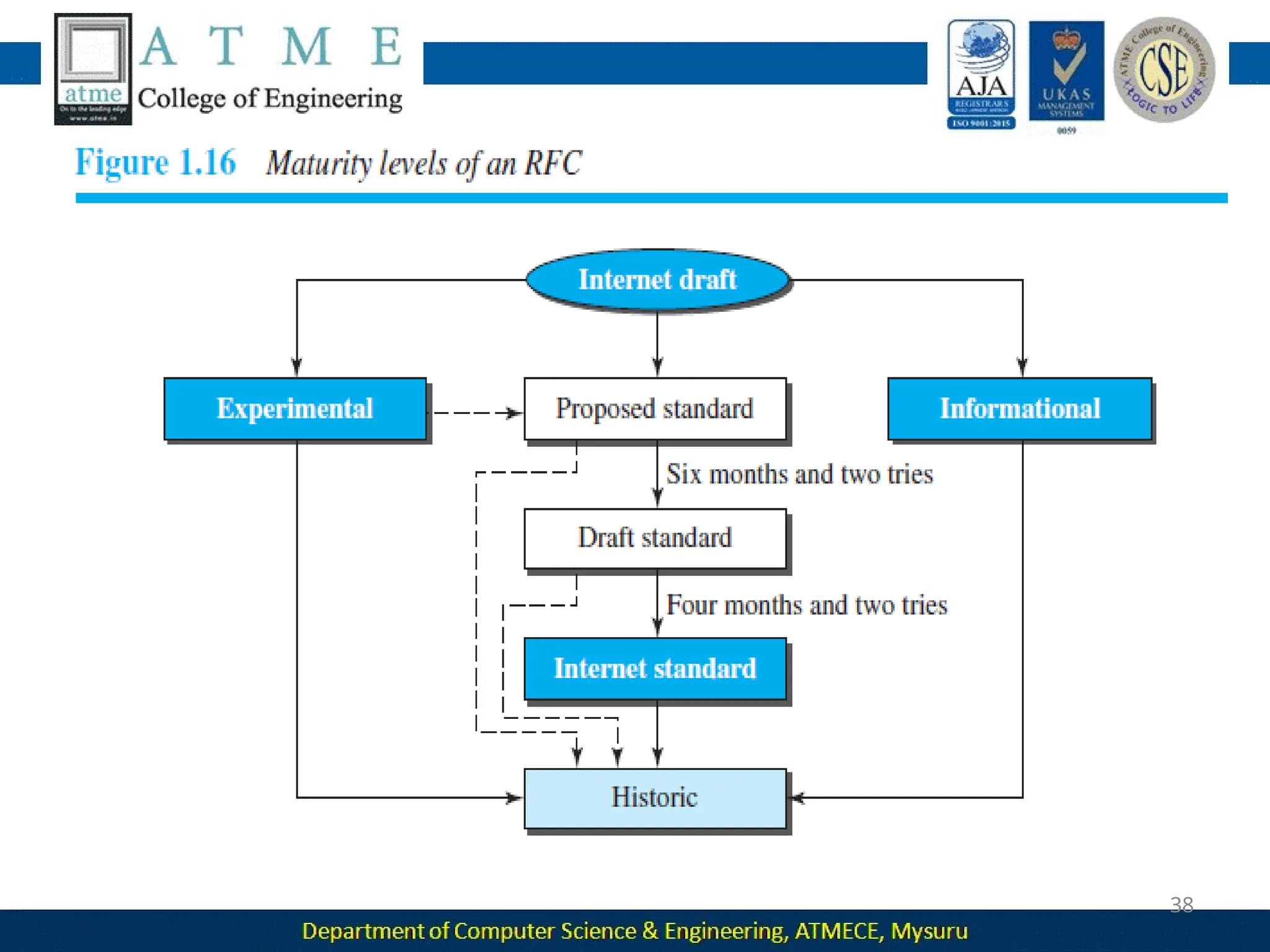
Instead, it is a way of specifying functions of the physical layer and the
data-link layer of major LAN protocols.
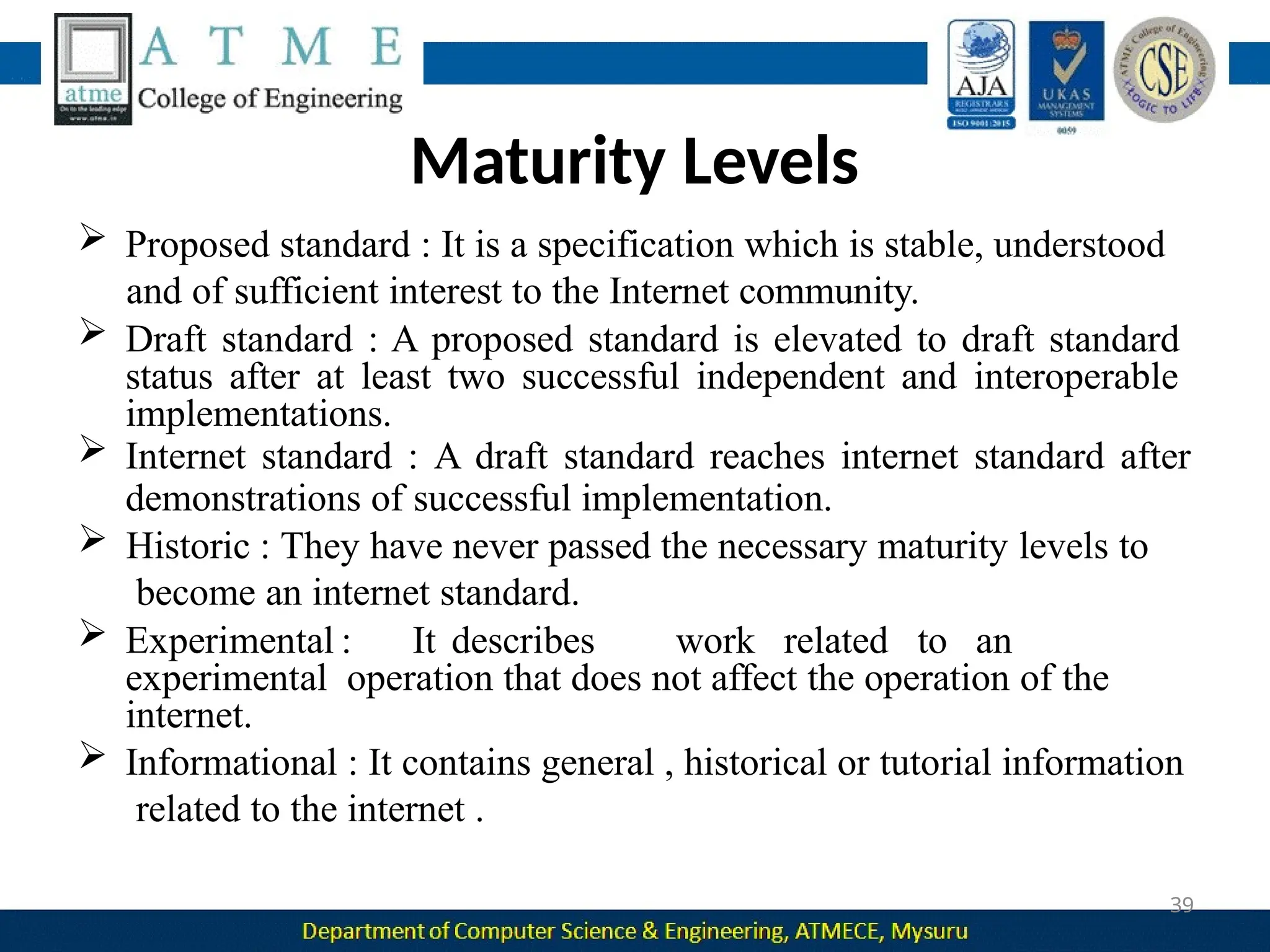
Figure : IEEE standard for LANs
 Figure above shows the relationship of the 802 Standard to the TCP/IP
protocol suite.
The IEEE has subdivided the data-link layer into two sub layers:
1. Logical Link Control (LLC) and
2. Media Access Control (MAC).
IEEE has also created several physical-layer standards for different LAN
protocols.
Logical Link Control (LLC)
In IEEE Project 802, flow control, error control, and part of the framing
duties are collected into one sublayer called the logical link control
(LLC). Framing is handled in both the LLC sublayer and the MAC
sublayer.
Media Access Control (MAC)
IEEE Project 802 has created a sublayer called media access control that
defines the specific access method for each LAN.
 For example, it defines
• CSMA/CD as the media access method for Ethernet LANs
• Token-passing method for Token Ring and
• Token Bus LANs.
Part of the framing function is also handled by the MAC layer.
Ethernet Evolution
 Since then, it has gone through four generations:
1. Standard Ethernet (10 Mbps)
2. Fast Ethernet (100 Mbps)
3. Gigabit Ethernet (1 Gbps) and
4. 10 Gigabit Ethernet (10 Gbps),
Standard Ethernet
Original Ethernet technology with the data rate of 10 Mbps is
referred to as the Standard Ethernet.
Characteristics
 Connectionless and Unreliable Service
• Ethernet provides a connectionless service, which means each frame
sent is independent of the previous or next frame.
• Ethernet has no connection establishment or connection termination
Phases.
• If a frame drops, the sender will not know about it. Since IP, which is
using the service of Ethernet, is also connectionless, it will not know
about it either.
•If the transport layer is also a connectionless protocol, such as UDP, the
frame is lost and salvation may only come from the application layer.
• If a frame is corrupted during transmission and the receiver finds out
about the corruption, which has a high level of probability of
happening because of the CRC-32, the receiver drops the frame
silently.
• It is the duty of high-level protocols to find out about it.
Frame
Format
The Ethernet frame contains seven fields
❑ Preamble: This field contains 7 bytes (56 bits) of alternating 0s and
1s that alert the receiving system to the coming frame and enable it
to synchronize its clock if it’s out of synchronization. The pattern
provides only an alert and a timing pulse.
❑ Start frame delimiter (SFD):This field (1 byte: 10101011) signals the
beginning of the frame. The SFD warns the station or stations that this
is the last chance for synchronization. The last 2 bits are (11)2 and alert
the receiver that the next field is the destination address. This field is
actually a flag that defines the beginning of the frame
❑ Destination address (DA):When the receiver sees its own link-layer
address, or a multicast address for a group that the receiver is a
member of, or a broadcast address, it decapsulates the data from the
frame and passes the data to the upperlayer protocol defined by the
value of the type field.
❑ Source address (SA): This field is also six bytes and contains the link-
layer address of the sender of the packet
❑ Type: This field defines the upper-layer protocol whose packet is
encapsulated in the frame. This protocol can be IP, ARP, OSPF, and so
on. In other words, it serves the same purpose as the protocol field
in
a datagram and the port number in a segment or user datagram.
❑ Data: This field carries data encapsulated from the upper-layer
protocols. It is a minimum of 46 and a maximum of 1500 bytes. If the
data coming from the upper layer is more than 1500 bytes, it should
be fragmented and encapsulated in more than one frame. If it is less
than 46 bytes, it needs to be padded with extra 0s. A padded data
frame is delivered to the upper-layer protocol as it is.
❑ CRC: The last field contains error detection information, in this case a
CRC-32. The CRC is calculated over the addresses, types, and data
field. If the receiver calculates the CRC and finds that it is not zero
(corruption in transmission), it discards the frame.
Frame Length
Ethernet has imposed restrictions on both the minimum and maximum
lengths of a frame.
The minimum length restriction is required for the correct operation of
CSMA/CD.
If we count 18 bytes of header and trailer (6 bytes of source address, 6
bytes of destination address, 2 bytes of length or type, and 4 bytes of
CRC), then the minimum length of data from the upper layer is 64 − 18
= 46 bytes.
If the upper-layer packet is less than 46 bytes, padding is added to make
up the difference.
The standard defines the maximum length of a frame (without
preamble and SFD field) as 1518 bytes.
The maximum length restriction has two historical reasons.
• First, memory was very expensive when Ethernet was
designed; a
maximum length restriction helped to reduce the size of the
buffer.
• Second, the maximum length restriction prevents one station from
monopolizing the shared medium, blocking other stations that have
data to send.
Minimum frame length: 64 bytes
Maximum frame length: 1518
bytes
Minimum data length: 46 bytes
Maximum data length: 1500
bytes
Addressing
in
 Each station on an Ethernet network (such as a PC, workstation, or
printer) has its own network interface card (NIC).
 The NIC fits inside the station and provides the station with a link-
layer address.
The Ethernet address is 6 bytes (48 bits), normally
written hexadecimal notation, with a colon between the bytes.
For example: 4A:30:10:21:10:1A
Unicast, Multicast, and Broadcast Addresses
 The destination address, however, can be unicast, multicast,
or broadcast.
 If the least significant bit of the first byte in a destination address is
0, the address is unicast; otherwise, it is multicast.
Transmission of Address Bits
 The way the addresses are sent out online is different from the way
they are written in hexadecimal notation.
 The transmission is left to right, byte by byte; however, for each byte,
the least significant bit is sent first and the most significant bit is sent
last.
 This means that the bit that defines an address as unicast or multicast
arrives first at the receiver.
 This helps the receiver to immediately know if the packet is unicast or
multicast.
Distinguish Between Unicast, Multicast, and Broadcast Transmission
Standard Ethernet uses a coaxial cable (bus topology) or a set of
twisted-pair cables with a hub (star topology).
 Transmission in the standard Ethernet is always broadcast,
nomatter if the intention is unicast, multicast, or broadcast.
In the bus topology, when station A sends a frame to station B, all
stations will receive it.
In the star topology, when station A sends a frame to station B,
the hub
will receive it. Since the hub is a passive element, it does not check the
destination address of the frame; it regenerates the bits (if they have
been weakened) and sends them to all stations except station A.
Station A floods the network with the frame.
In a unicast transmission, all stations will receive the frame, the
intended recipient keeps and handles the frame; the rest discard it.
 In a multicast transmission, all stations will receive the frame,
the
stations that are members of the group keep and handle it; the
rest discard it.
 In a broadcast transmission, all stations (except the sender) will
receive the frame and all stations (except the sender) keep and
handle it.
Access Method
 The standard Ethernet chose CSMA/CD with 1-persistent method.
 Assume station A has a frame to send to station D.
 Station A first should check whether any other station is
sending
(carrier sense).
Station A measures the level of energy on the medium for a short
period of time.
If there is no signal energy on the medium, it means that no
station is
sending (or the signal has not reached station A).
Station A interprets this situation as idle medium. It starts sending its
frame.
Station A continuously monitors the medium until it becomes idle. It
then starts sending the frame.
Station A needs to keep a copy of the frame in its buffer until it is sure
that there is no collision.
The medium sensing does not stop after station A has started
sending the frame.Station A needs to send and receive continuously.
Two cases may occur:
a. Station A has sent 512 bits and no collision is, the station then is
sure
that the frame will go through and stops sensing the medium. if station
A does not sense the collision before sending 512 bits, there must have
been no collision, because during this time, the first bit has reached
the end of the line and all other stations know that a station is sending
and refrain from sending.
b. Station A has sensed a collision before sending 512 bits. This means
that one of the previous bits has collided with a bit sent by another
station. In this case both stations should refrain from sending and keep
the frame in their buffer for resending when
the line becomes available.
After sending the jam signal, the stations need to increment the value of
K (number of attempts). If after increment K = 15, the experience has
shown that the network is too busy, the station needs to abort its
effort and try again. If K < 15, the station can wait a backoff time and
restart the process.
Efficiency of Standard Ethernet
The practical efficiency of standard Ethernet has been measured
to be
Efficiency = 1 / (1 + 6.4 x a)
The parameter “a” is the number of frames that can fit on the medium.
It can be calculated as
a = (propagation delay)/(transmission delay)
because the transmission delay is the time it takes a frame of average size to
be sent out and the propagation delay is the time it takes to reach the end of
the medium.
As the value of parameter a decreases, the efficiency increases.
This means that if the length of the media is shorter or the frame size
longer, the efficiency increases.
In the ideal case, a = 0 and the efficiency is 1.
Implementation
In 10BaseX
 the number defines the data rate (10 Mbps)
 the term Base means baseband (digital) signal
 X approximately defines either the maximum size of the cable in 100
meters (for example 5 for 500 or 2 for 185 meters) or the type of
cable, T for unshielded twisted pair cable (UTP) and F for fiber-optic.
Encoding and Decoding
All standard implementations use digital signaling (baseband) at 10 Mbps.
At the sender, data are converted to a digital signal using the Manchester
scheme; at the receiver, the received signal is interpreted as Manchester
and decoded into data.
Manchester encoding is self-synchronous, providing a transition at each
bit interval.
10Base5: Thick Ethernet
The first implementation is called 10Base5, thick Ethernet, or Thicknet.
The nickname derives from the size of the cable.
 10Base5 was the first Ethernet specification to use a bus topology
with an external transceiver (transmitter/receiver) connected via a tap to a
thick coaxial cable.
The transceiver is responsible for transmitting, receiving, and detecting
collisions.
The transceiver is connected to the station via a transceiver cable that
provides separate paths for sending and receiving.
This means that collision can only happen in the coaxial cable.
The maximum length of the coaxial cable must not exceed 500m,
otherwise, there is excessive degradation of the signal.
If a length of more than 500 m is needed, up to five segments, each a
maximum of 500 meters, can be connected using repeaters.
10Base2: Thin Ethernet
The second implementation is called 10Base2, thin Ethernet, or
Cheapernet.
10Base2 also uses a bus topology, but the cable is much thinner and
more flexible. The cable can be bent to pass very close to the stations.
This implementation is more cost effective than 10Base5 because thin
coaxial cable is less expensive than thick coaxial and the
tee connections are much cheaper than taps.
The length of each segment cannot exceed 185 m (close to 200 m) due
to the high level of attenuation in thin coaxial cable.
10Base-T: Twisted-Pair Ethernet
The third implementation is called 10Base-T or twisted-pair Ethernet.
10Base-T uses a physical star topology. The stations are connected to a
hub via two pairs of twisted cable.
 Two pairs of twisted cable create two paths (one for sending and one
for receiving) between the station and the hub.
 The maximum length of the twisted cable here is defined as 100 m, to
minimize the effect of attenuation in the twisted cable.
10Base-F: Fiber Ethernet
10Base-F uses a star topology to connect stations to a hub. The
stations are connected to the hub using two fiber-optic cables,
Changes in the Standard
Bridged Ethernet
The first step in the Ethernet evolution was the division of a LAN by
bridges.
Bridges have two effects on an Ethernet LAN:
 They raise the bandwidth and
 They separate collision domains.
Raising the Bandwidth
Inan unbridged Ethernet network, the total capacity (10 Mbps)
is
shared among all stations with a frame to send; the stations share the
bandwidth of the network.
When one station is sending, the other one refrains from sending.
We can say that, in this case, each station on average sends at a rate of
5 Mbps.
 A bridge divides the network into two or more networks.
 Bandwidthwise, each network is independent.
 For example, in Figure 13.12, a network with 12 stations is divided
into two networks, each with 6 stations. Now each network
has a capacity of 10 Mbps.
In a network with a heavy load, each station theoretically is offered
10/7 Mbps instead of 10/12 Mbps.
Separating Collision Domains
Another advantage of a bridge is the separation of the collision
domain.
The collision domain becomes much smaller and the probability of
collision is reduced tremendously.
Without bridging, 12 stations contend for access to the medium; with
bridging only 3 stations contend for access to the medium.
Switched Ethernet
The idea of a bridged LAN can be extended to a switched LAN.
 Instead of having two to four networks, why not have N
networks, where N is the number of stations on the LAN?
In other words, if we can have a multiple-port bridge, why not have an
N-port switch?
In this way, the bandwidth is shared only between the station and the
switch (5 Mbps each).
In addition, the collision domain is divided into N domains.
 A layer-2 switch is an N-port bridge with additional sophistication
that allows faster handling of the packets.
Evolution from a bridged Ethernet to a switched Ethernet was a big
step
that opened the way to an even faster Ethernet
Full-Duplex Ethernet
One of the limitations of 10Base5 and 10Base2 is that communication is
half-duplex (10Base-T is always full-duplex); a station can either send or
receive, but may not do both at the same time.
The full-duplex mode increases the capacity of each domain from 10
to
20 Mbps.
No Need for CSMA/CD
 In full-duplex switched Ethernet, there is no need for the CSMA/CD
method.
Each link is a point-to-point dedicated path between the station and
the switch.
There is no longer a need for carrier sensing; there is no longer a
need
for
collision detection.
The job of the MAC layer becomes much easier. The carrier sensing
and
collision detection functionalities of the MAC sublayer can be turned
MAC Control Layer
Standard Ethernet was designed as a connectionless protocol at the
MAC sublayer.
There is no explicit flow control or error control to inform the sender
that the frame has arrived at the destination without error.
When the receiver receives the frame, it does not send any positive
or
negative acknowledgment.
To provide for flow and error control in full-duplex switched Ethernet, a
new sublayer, called the MAC control, is added between the LLC sublayer
and the MAC sublayer.
FAST ETHERNET (100 MBPS)
 In the 1990s, some LAN technologies with transmission rates higher
than 10 Mbps, such as FDDI and Fiber Channel, appeared on the market.
If the Standard Ethernet wanted to survive, it had to compete with these
technologies.
Ethernet made a big jump by increasing the transmission rate to 100
Mbps, and the new generation was called the Fast Ethernet.
The goals of Fast Ethernet can be summarized as follows:
1. Upgrade the data rate to 100 Mbps.
2. Make it compatible with Standard Ethernet.
3. Keep the same 48-bit address.
4. Keep the same frame format.
Access Method
The proper operation of the CSMA/CD depends on the transmission rate,
the minimum size of the frame, and the maximum network length.
if the minimum frame size is still 512 bits, and it is transmitted 10 times
faster, the collision needs to be detected 10 times sooner, which means
the maximum length of the network should be 10 times shorter.
 So the Fast Ethernet came with two solutions
1. The first solution was to totally drop the bus topology and use a
passive
hub and star topology but make the maximum size of the network
250
meters instead of 2500 meters as in the Standard
Ethernet. This approach is kept for compatibility with the
Standard
Ethernet.
2. The second solution is to use a link-layer switch with a buffer to store
frames and a full-duplex connection to each host to make
the
Autonegotiation
A new feature added to Fast Ethernet is called autonegotiation.
Autonegotiation allows two devices to negotiate the mode or data rate
of operation.
It was designed particularly to allow incompatible devices to connect to
one another.
It was designed particularly for these purposes:
 To allow incompatible devices to connect to one another.
 To allow one device to have multiple capabilities.
 To allow a station to check a hub’s capabilities.
Physical Layer
To be able to handle a 100 Mbps data rate, several changes need to be
made at the physical layer.
Topology
 Fast Ethernet is designed to connect two or more stations.
If there are only two stations, they can be connected point-to-point.
Encoding
 Manchester scheme is unsuitable. For this reason, the Fast
Ethernet designers sought some alternative
encoding/decoding scheme.
Fast Ethernet implementation at the physical layer can be categorized as
either two-wire or four-wire.
 The two-wire implementation can be either shielded twisted pair (STP),
which is called 100Base-TX, or fiber-optic cable, which is called 100Base-
FX.
 The four-wire implementation is designed only for unshielded twisted pair
(UTP), which is called 100Base-T4.
100Base-TX uses two pairs of twisted-
pair.
 The MLT-3 scheme was selected since
it has good bandwidth performance.
 since MLT-3 is not a self-synchronous
line coding scheme, 4B/5B block
coding is used to provide bit
synchronization by preventing the
occurrence of a long sequence of 0s
and 1s.
 This creates a data rate of 125
Mbps,
which is fed into MLT-3 for
encoding.
 100Base-FX uses two pairs of fiber-optic
cables. Optical fiber can easily handle
high bandwidth requirements by using
simple encoding schemes.
 The designers of 100Base-FX selected the
NRZ-I encoding scheme.
 NRZ-I has a bit synchronization problem
for long sequences of 0s (or 1s, based on
the encoding).
To overcome this problem, the designers
used 4B/5B block encoding.
 The block encoding increases the bit
rate
from 100 to 125 Mbps, which can easily
be handled by fiber-optic cable.
100Base-T4, was designed to use
category 3 or higher UTP.
 Uses 8B/6T encoding scheme. In
this scheme eight data elements are
encoded as six signal elements.
60
MAC Sublayer
61
62
63
10-GIGABIT EHTERNET
64
In recent years, there has been another look into the Ethernet
for use in metropolitan areas. The idea is to extend the
technology, the data rate, and the coverage distance so that
the Ethernet can be used as LAN and MAN (metropolitan
area network). The IEEE committee created 10 Gigabit
Ethernet and called it Standard 802.3ae.
Implementation
65
10 Gigabit Ethernet operates only in full-duplex mode,
which means there is no need for contention;
CSMA/CD is not used in 10 Gigabit Ethernet. Four
implementations are the most common: 10GBase-
SR, 10GBase-LR, 10GBase-EW, and 10GBase-X4.
Table 13.4 shows a summary of the 10 Gigabit
Ethernet implementations.
66
WIRELESS LAN
67
Wireless LANs (WLANs) are wireless computer networks that use high-
frequency radio waves instead of cables for connecting the devices
within a limited area forming LAN (Local Area Network). Users
connected by wireless LANs can move around within this limited
area such as home, school, campus, office building, railway
platform, etc.
68
69
Characteristics of Wireless LAN
Attenuation
Interface
Multipath Propagation
Error
70
71
72
IEEE802.11
73
IEEE 802.11 standard, popularly known as WiFi, lays down the
architecture and specifications of wireless LANs (WLANs). WiFi or
WLAN uses high-frequency radio waves instead of cables for
connecting the devices in LAN. Users connected by WLANs can
move around within the area of network coverage
74
MAC Sublayer
75
76
77
78
79
80
81
Addressing Mechanisms
82
83
84
85
Physical Layer
86
87
88
Bluetooth
89
90
91
92
93
94
95

Module-1.pptx Computer Networks BCS502 module-1 ppt

  • 1.
  • 2.
    2 2 Objectives 1. Comprehend thetransmission technique of digital data between two or more computers and a computer network that allows computers to exchange data. 2. Explain with the basics of data communication and various types of computer networks. 3. Demonstrate Medium Access Control protocols for reliable and noisy channels. 4. Expose wireless and wired LANs.
  • 3.
    Overview of Syllabus 3 Module1 Introduction: Data Communications, Networks, Network Types, Internet History, Standards and Administration, Networks Models: Protocol Layering, TCP/IP Protocol suite, The OSI model, Introduction to Physical Layer-1: Data and Signals, Digital Signals, Transmission Impairment, Data Rate limits, Performance. Module 2 Digital Transmission: Digital to digital conversion (Only Line coding: Polar, Bipolar and Manchester coding). (only PCM), Physical Layer-2: Analog to digital conversion Transmission Modes. Analog Transmission: Digital to analog conversion.
  • 4.
    Module 3 Bandwidth Utilization:Multiplexing and Spread Spectrum, Switching: Introduction, Circuit Switched Networks and Packet switching. Error Detection and Correction: Introduction, Block coding, Cyclic codes, Checksum. Module 4 Data link control: DLC services, Data link layer protocols, Point to Point protocol (Framing,Transition phases only). Media Access control: Random Access, Controlled Access and Channelization, 4
  • 5.
    Introduction to Data-LinkLayer: Introduction, Link-Layer Addressing, ARP IPv4 Addressing and subnetting: Classful and CIDR addressing, DHCP, NAT Module 5 Wired LANs Ethernet: Ethernet Protocol, Standard Ethernet, Fast Ethernet, Gigabit Ethernet and 10 Gigabit Ethernet Wireless LANs: Introduction, IEEE 802.11 Project and Bluetooth. Other wireless Networks: Cellular Telephony 5
  • 6.
    Textbooks 6 1. Behrouz A.Forouzan, Data Communications and Networking 5E, 5th Edition, Tata McGraw-Hill,2013. Reference Books: 1. Alberto Leon-Garcia and Indra Widjaja: Communication Networks - Fundamental Concepts and Key architectures, 2nd Edition Tata McGraw- Hill, 2004. 2. William Stallings: Data and Computer Communication, 8th Edition, Pearson Education, 2007. 3. Larry L. Peterson and Bruce S. Davie: Computer Networks – A Systems Approach, 4th Edition, Elsevier, 2007. 4. Nader F. Mir: Computer and Communication Networks, Pearson Education, 2007.
  • 7.
    Course Outcomes 7 1. Explainthe various components of data communication. 2. Explain the fundamentals of digital communication and switching. 3. Compare and contrast data link layer protocols. 4. Summarize IEEE 802.xx standards
  • 8.
    Question Paper Pattern 1.Thequestion paper will have ten questions. 8 2. Each full Question consisting of 20 marks 3. There will be 2 full questions (with a maximum of four sub questions) from each module. 4. Each full question will have sub questions covering all the topics under a module. 5. The students will have to answer 5 full questions, selecting one full question from each module.
  • 9.
    INTRODUCTION 9  The worddata refers to information presented in whatever form is agreed upon by the parties creating and using the data.  Communication means sharing of information between two devices  using some medium such as wire cable (LAN), internet.  Data communication means exchange of data between two devices via some form of transmission medium such as a wire cable.  Information sharing can be of two types .  Local Communication : Face to face  Remote Communication : Takes place over a distance.  Networking: Two or more devices connected by some communication link.
  • 10.
    Characteristics of datacommunication system 10  Delivery : The system must deliver data to the correct destination .  Accuracy :The system must deliver the data accurately.  Timeliness: The system must deliver data in a timely manner.  Real time transmission : Delivering data as they are produced, in the same order that they are produced, and without significant delay.  Jitter: Jitter refers to variation in the packet arrival time.  Video packets are sent every 30 ms . If some of the packets arrive with 30-ms delay and others with 40-ms delay, an uneven quality in the video is the result.
  • 11.
    Components of datacommunication  Message : The message is the information (data) to be communicated .  Sender: The sender is the device that sends the data message.  Receiver :The receiver is the device that receives the message.  Transmission medium :The transmission medium is the physical path by which a message travels from sender to receiver.  Protocol : A protocol is a set of rules that govern data communications . Without a protocol, two devices may be connected but not communicating. 11
  • 12.
    Data Representation 12  Text:It is represented as a bit pattern, a sequence of bits(0s or 1s). Each set is called a code, and the process of representing symbols is called coding.  Numbers: It is also represented by bit patterns .  Images: An image is composed of a matrix of pixels where each pixel is a small dot . After an image is divided into pixels, each pixel is assigned a bit pattern.  Audio: It refers to the recording or broadcasting of sound or music. It is continuous, not discrete.  Video: Video refers to the recording or broadcasting of a picture or movie. It can be continuous or discrete.
  • 13.
    or full- Data Flow Communicationbetween two devices can be simplex, half-duplex, duplex as shown in figure. 13
  • 14.
     Simplex: Communicationis unidirectional, Only one of the two devices on a link can transmit; the other can only receive. E.g. : One way street, Keyboard , Monitor.  Half duplex: Each station can both transmit and receive, but not at the same time. When one device is sending, the other can only receive, and vice versa. E.g.: Walkie Talkie.  Full duplex: Both stations can transmit and receive simultaneously. It is like a two way street with the traffic flowing in both the directions at the same time. E.g .: Telephone network 14
  • 15.
    Network s 15  Networks :A network is a set of devices (nodes) connected by communication links. A node can be a computer, printer, or any other device capable of sending and/or receiving data generated by other nodes on the network.  A link can be a cable, air, optical fiber, or any medium which can transport a signal carrying information.  Distributed Processing : Here task is divided among multiple computers. Instead of one single large machine being responsible for all aspects of a process, separate computers handle a subset.
  • 16.
    Network Criteria 16  Performance: It can be measured in two ways. 1. Transit time : It is the amount of time required for a message to 2. travel from one device to another. 3. Response time: It is the time elapsed between an inquiry and a response.  Reliability : It is measured by the frequency of failure, the time it takes a link to recover from failure.  Security : It includes protecting data from unauthorized access, protecting data from damage , implementing policies and procedures for recovery from data losses.
  • 17.
    Physical Structures- Typeof Connection 17  Point to Point :  It provides a dedicated link between two devices .  The entire capacity of the link is reserved for transmission between those two devices.  It uses an actual length of wire or cable to connect the two ends.  Multi Point :  It is the one in which more than two specific devices share a single link.  Capacity of the channel is either spatially or temporally shared.  Spatially shared : Several devices can use the link simultaneously.  Temporally shared : Users take turns.
  • 18.
    Physical Structures- Typeof Connection 18
  • 19.
    Physical Topology  Twoor more devices connect to a link; two or more links form a topology.  Topology : It is the geometric representation of relationship of all the links and linking devices to one another.  Four basic topologies : 19
  • 20.
    Mesh Topology other  Everydevice has a dedicated point-to point link to every device.  The term dedicated means that the link carries traffic only between the two devices it connects.  To find the number of physical links in a fully connected mesh network with n nodes, n(n - 1) / 2 duplex mode links 20
  • 21.
    Advantages :  Amesh topology is robust. If one link becomes unusable, it does not incapacitate the entire system.  Point-to-point links make fault identification and fault isolation easy.  Privacy or security : When every message travels along a dedicated line, only the intended recipient sees it. 21 can be prohibitively Disadvantages :  Installation and reconnection are difficult.  The hardware required to connect each link expensive.  The sheer bulk of the wiring can be greater than the available space can accommodate.
  • 22.
    Star Topology point linkonly to a  Each device has a dedicated point-to central controller, usually called a hub.  The controller acts as an exchange:If one device wants to send data to another, it sends the data to the controller, which then relays the data to the other connected device. 22
  • 23.
    Advantages:  A startopology is less expensive than a mesh topology. Each device needs only one link and one I/O port to connect it to any number of others.  Easy to install and reconfigure.  Requires less cabling, less expensive than mesh topology.  Robustness: If one link fails, only that link is affected. All other links remain active. As a result fault identification and fault isolation becomes easy. Disadvantages :  Dependency of whole topology on one single point, the hub. E.g. : LAN 23
  • 24.
    Bus Topology  Onelong cable acts as a backbone to link all the devices in a network.  Nodes are connected to the bus cable by drop lines and taps.  A drop line is a connection running between the device and the main cable.  As a signal travels along the backbone, some of its energy is transformed into heat.  As a result there is a limit on the number of taps a bus can support and on the distance between those taps. 24
  • 25.
    efficient 25 Advantages:  Ease ofinstallation : Backbone cable can be laid along the most path, then connected to the nodes and drop lines.  Signal reflection at the taps can cause degradation in quality. This degradation can be controlled by limiting the number and spacing of devices connected to a given length of cable.  Adding new devices may therefore require modification or replacement of the backbone.  Redundancy is eliminated : Only the backbone cable stretches through the entire facility. Disadvantages :  A bus is usually designed to be optimally efficient at installation. It  can therefore be difficult to add new devices.  A fault or break in the bus cable stops all transmission, and the damaged area reflects signals back in the direction of origin, creating noise in both directions.
  • 26.
    Ring Topology  Eachdevice has a dedicated point-to-point connection with only the two devices on either side of it.  A signal is passed along the ring in one direction, from device to device, until it reaches its destination.  Each device in the ring incorporates a repeater.  When a device receives a signal intended for another device, its repeater regenerates the bits and passes them along. 26
  • 27.
    Advantages :  Aring is 27 relatively device is easy linked to to install and only its immediate reconfigure. Each neighbors.  To add or delete a device requires changing only two connections.  Fault isolation is simplified. Here, a signal is circulating at all times. If one device does not receive a signal within a specified period, it can issue an alarm.  The alarm alerts the network operator to the problem and its location. Disadvantages :  Unidirectional traffic can be a disadvantage. In a simple ring, a break in the ring can disable the entire network.
  • 28.
  • 29.
    Network Models  LocalArea Networks (LAN): It is privately owned and links the devices in a single office, building, or campus.  LAN can be as simple as two PCs and a printer in someone's home office . Its size is limited to a few kilometers.  LANs are designed to allow resources to be shared between personal computers or workstations.  The resources to be shared can include hardware (e.g., a printer), software (e.g., an application program). 29
  • 30.
    Network Models 30 Wide AreaNetworks (WAN):  It provides long-distance transmission of data, image, audio, and video information over large geographic areas that comprise a country, a continent or even the whole world. Two types of WAN:  Point to Point WAN : It is a line leased from a telephone that connects a home computer or a small LAN to an Internet service provider (ISP).  The switched WAN : It connects the end systems, which usually comprise a router that connects to another LAN or WAN.
  • 31.
  • 32.
  • 33.
    Switching An internet isa switched network in which a switch connects at least two links together. A switch needs to forward data from a network to another . Two types of switched networks :  Packet Switched networks : Here communication between the two ends is done in blocks of data called packets.  Router has a queue that can store and forward the packet which is used for longer distance transmission. 33
  • 34.
     Circuit Switchednetworks : Here a dedicated connection called a circuit is available between two end systems.  Switches are used to connect end system within a network.  The thick line connecting two switches is a high capacity communication line that can handle fo  ur voice communication at the same time. 34
  • 35.
    The Internet  Backbonenetworks are large networks owned by companies like Sprint , Verizon , AT&T and NTT. They are connected through peering points.  Provider networks are smaller networks uses the services of the backbones for a fee.  Customer networks that actually use the services provided by the internet. 35
  • 36.
    Accessing the Internet 36 UsingTelephone Networks  Dial up Service : To the telephone line add a modem that converts data to voice. But it is very slow when line used for internet connection.  DSL Service : Telephone companies have upgraded their telephone lines to provide higher speed internet services . Using Cable Networks  The cable companies have been upgrading their cable networks to provide internet connection.  But speed varies depending on the number of neighbors that use the same cable. Using Wireless Networks  A household or small business can be connected to the internet through a wireless LAN.  Direct Connection to the internet : A large organization can become a
  • 37.
    Interne t 37  Computer ScienceNetwork(CSNET) was a network sponsored by the National Science Foundation. It is a less expensive network and the transmission rate was slower.  National Science Foundation Network(NSFNET) was a backbone located rapidly network that connected five supercomputer centers throughout the United states . It was not supporting increased internet traffic.  Advanced Network Services Network(ANSNET) provides a high speed internet .
  • 38.
  • 39.
    Maturity Levels 39  Proposedstandard : It is a specification which is stable, understood and of sufficient interest to the Internet community.  Draft standard : A proposed standard is elevated to draft standard status after at least two successful independent and interoperable implementations.  Internet standard : A draft standard reaches internet standard after demonstrations of successful implementation.  Historic : They have never passed the necessary maturity levels to become an internet standard.  Experimental : It describes work related to an experimental operation that does not affect the operation of the internet.  Informational : It contains general , historical or tutorial information related to the internet .
  • 40.
    Requirement Levels 40  Required: An RFC is labeled required if it implemented by all internet systems to achieve minimum conformance. Eg : IP and ICMP are required protocols  Recommended : An RFC is labeled recommended if it is not required for minimum conformance. Eg : FTP and TELNET are recommended protocols  Elective : An RFC is labeled elective is not required and not recommended. However, a system can use it for its own benefit.  Limited Use : An RFC is labeled limited use should be used only in limited situation Eg: experimental RFCs.  Not Recommended : An RFC is labeled not recommended is inappropriate for general use. Eg:historic RFCs.
  • 41.
    Internet Administration  The Internet,with its roots primarily in the research domain.  Various groups that coordinate Internet issues have guided this growth and development.  Figure below shows the general organization of Internet administration 41
  • 42.
    Internet Society (ISOC) ISOC is an international, nonprofit organization formed in 1992 to provide support for the Internet standards process. ISOC accomplishes this through maintaining and supporting other Internet administrative bodies such as IAB,IETF, IRTF, and IANA .  Also promotes research and other scholarly activities relating to  the Internet. Internet Architecture Board (IAB)  The IAB is the technical advisor to the ISOC.  Purposes  oversee the continuing development of the TCP/IP  Protocol Suite  serve in a technical advisory capacity to research members of the Internet community. 42
  • 43.
    1.Internet 43  IAB accomplishesthis through its two primary components: Engineering Task Force (IETF) 2.Internet Research Task Force (IRTF).  Another responsibility of the IAB is the editorial management of the RFCs. Internet Engineering Task Force(IETF )  Forum of working groups managed by the Internet Engineering Steering Group (IESG).  Responsible for identifying operational problems and proposing solutions to these problems.
  • 44.
     IAB accomplishesthis through its two primary components: 1.Internet Engineering Task Force (IETF) 2.Internet Research Task Force (IRTF).  Another responsibility of the IAB is the editorial management of the RFCs. Internet Engineering Task Force(IETF ) Forum of working groups managed by the Internet Engineering Steering Group (IESG).  Responsible for identifying operational problems and proposing solutions to these problems.  Also develops and reviews specifications intended as Internet standards.
  • 45.
    Network Models PROTOCOL LAYERING Protocoldefines the rules that both the sender and receiver and all to communicate intermediate devices need to follow to be able effectively. When communication is simple- one simple protocol When the communication is complex-need to divide the task between different layers, in which case we need a protocol at each layer, or protocol layering.
  • 46.
    Scenarios Let us developtwo simple scenarios to better understand the need for protocol layering. First scenario  communication is so simple that it can occur in only one layer.  Assume Maria and Ann are neighbors with a lot of common ideas. Communication between Maria and Ann takes place in one layer, face to face, in the same language, as shown in Figure.
  • 47.
    2.42 Even in thissimple scenario, we can see that a set of rules needs to be followed. 1.Maria and Ann know that they should greet each other when they meet. 2.They know that they should confine their vocabulary to the level of their friendship. 3.Each party knows that she should refrain from speaking when the other party is speaking. 4.Each party knows that the conversation should be a dialog, not a monolog: both should have the opportunity to talk about the issue. 5.They should exchange some nice words when they leave.
  • 48.
    Second Scenario  Assumethat Ann is offered a higher-level position in her company, but needs to move to another branch located in a city very far from Maria.  The two friends still want to continue their communication and exchange ideas because they have come up with an innovative project to start a new business when they both retire. They decide to continue their conversation using regular mail through the post office.  They do not want their ideas to be revealed by other people if the letters are intercepted. They agree on an encryption/decryption technique.
  • 49.
    The sender ofthe letter encrypts it to make it unreadable by anintruder ; the receiver of the letter decrypts it to get the original letter.  Now we can say that the communication between Maria and Ann takes place in three layers, as shown in Figure 2.2.
  • 50.
    Let us assumethat Maria sends the first letter to Ann. At Maria side: •Maria talks to the machine at the third layer as though the machine is Ann and is listening to her. •The third layer machine listens to what Maria says and creates the plaintext (a letter in English), which is passed to the second layer machine. •The second layer machine takes the plaintext, encrypts it, and creates the ciphertext, which is passed to the first layer machine. •The first layer machine, presumably a robot, takes the ciphertext , puts it in an envelope, adds the sender and receiver addresses, and mails
  • 51.
    At Ann’s side •Thefirst layer machine picks up the letter from Ann’s mail box, recognizing the letter from Maria by the sender address. •The machine takes out the ciphertext from the envelope and delivers it to the second layer machine. plaintext, though •The second layer machine decrypts the message, creates the and passes the plaintext to the third-layer machine. •The third layer machine takes the plaintext and reads it as Maria is speaking. Protocol layering enables us to divide a complex task into several smaller and simpler tasks.
  • 52.
     For example,in Figure 2.2, we could have used only one machine to do the job of all three machines. However, if Maria and Ann decide that the encryption/ decryption done by the machine is not enough to protect their secrecy, they would have to change the whole machine.  In the present situation, they need to change only the second layer machine; the other two can remain the same. This is referred to as modularity.  Modularity in this case means independent layers.  A layer (module) can be defined as a black box with inputs and outputs, without concern about how inputs are changed to outputs. If two machines provide the same outputs when given the same inputs, they can replace each other.
  • 53.
     For example,Ann and Maria can buy the second layer machine from two different manufacturers. As long as the two machines create the same ciphertext from the same plaintext and vice versa, they do the job. Advantages of protocol layering  Allows to separate the services from the implementation. • A layer needs to be able to receive a set of services from the lower layer and to give the services to the upper layer; we don’t care about how the layer is implemented. • For example, Maria may decide not to buy the machine (robot) for the first layer; she can do the job herself. As long as Maria can do the tasks provided by the first layer, in both directions, the communication system works.
  • 54.
     Reduces thecomplexity at the intermediate system •Communication does not always use only two end systems; there are intermediate systems that need only some layers, but not all layers. • If we did not use protocol layering, we would have to make each intermediate whole system more system as complex as the end systems, which makes the expensive. Two principles of protocol layering First Principle The first principle dictates that if we want bidirectional communication, we need to make each layer so that it is able to perform two opposite tasks, one in each direction.  For example, the third layer task is to listen (in one direction) and talk (in the other direction). The second layer needs to be able to encrypt and decrypt. The first layer needs to send and receive mail.
  • 55.
    Second Principle The second principlethat we need to follow in protocol layering is that the two objects under each layer at both sites should be identical. For example, the object under layer 3 at both sites should be a plaintext letter. The object under layer 2 at both sites should be a ciphertext letter. The object under layer 1 at both sites should be a piece of mail. Logical Connections Two protocols at the same layer can have a logical Connection  This means that we have layer-to-layer communication.
  • 56.
    Maria and Anncan think that there is a logical (imaginary) connection at each layer through which they can send the object created from that layer.
  • 57.
    TCP/IP PROTOCOL SUITE TCP/IP(Transmission Control Protocol/Internet Protocol) suite used in the Internet today. It is a hierarchical protocol made up of interactive modules, each of which provides a specific functionality. hierarchical means that each upper level protocol is by the services provided by one or more lower level  The term supported protocols.  The original TCP/IP protocol suite was defined as four software layers built upon the hardware.  Today, however, TCP/IP is thought of as a five-layer model. Figure 2.4 shows both configurations.
  • 58.
    Layered Architecture  Toshow how the layers in the TCP/IP protocol suite are involved in communication between two hosts, we assume that we want to use the suite in a small internet made up of three LANs (links), each with a link- layer switch.  We also assume that the links are connected by one router
  • 60.
     Let usassume that computer A communicates with computer B. As the figure shows, we have five communicating devices in this communication: 1.source host(computer A) 2.The link-layer switch in link 1 3.The router 4.The link-layer switch in link 2, 5.destination host (computer B). Each device is involved with a set of layers depending on the role of the device in the internet.  The two hosts are involved in all five layers  The source host needs to create a message in the application layer and send it down the layers so that it is physically sent to the destination host.  The destination host needs to receive the communication at the physical layer and then deliver it through the other layers to the
  • 61.
     The routeris involved in only three layers; link-layer switch in a link is involved only in two layers, data-link and physical. Layers in the TCP/IP Protocol Suite  To better understand the duties of each layer, we need to think about the logical connections between layers.
  • 62.
     The dutyof the application, transport, and network layers is end-to- end.  The duty of the data-link and physical layers is hop-to-hop, in which a hop is a host or router.  The domain of duty of the top three layers is the internet, and the domain of duty of the two lower layers is the link.  Another way of thinking of the logical connections is to think about the data unit created from each layer.  In the top three layers, the data unit (packets) should not be changed by any router or link-layer switch.  In the bottom two layers, the packet created by the host is changed only by the routers, not by the link-layer switches.
  • 63.
     Figure 2.7shows the second principle the identical objects at each layer related to each device.  Although the logical connection at the network layer is between the two hosts, we can only say that identical objects exist between two hops in this case because a router may fragment the packet at the network layer and
  • 64.
    The link betweentwo hops does not change the object. Description of Each Layer Physical Layer The lowest level in the TCP/IP protocol suite, responsible for carrying individual bits in a frame across the link Two devices are connected by a transmission medium (cable or air). The transmission medium does not carry bits; it carries electrical or optical signals. So the bits received in a frame from the data-link layer are transformed and sent through the transmission media
  • 65.
    Data-link Layer  Responsiblefor taking the datagram and moving it across the link.  Internet is made up of several links (LANs and WANs) connected by routers. There may be several overlapping sets of links that a datagram can travel from the host to the destination.  The routers are responsible for choosing the best links.when the next link to travel is determined by the router, the data-link layer is responsible for taking the datagram and moving it across the link.  The link can be a wired LAN with a link-layer switch, a wireless LAN, a wired WAN, or a wireless WAN. TCP/IP does not define any specific protocol for the data-link layer. It supports all the standard and proprietary protocols.  The data-link layer takes a datagram and encapsulates it in a packet called a frame.  Each link-layer protocol may provide a different service. Some link-layer protocols provide complete error detection and correction, some provide only error correction
  • 66.
    Network Layer responsible forcreating a connection between the source computer and the destination computer. Responsible for host-to-host communication and routing the packet through possible routes. The network layer in the Internet includes the main protocol, Internet Protocol (IP), • Defines the format of the packet, called a datagram at the network layer. • defines the format and the structure of addresses used in this layer. • responsible for routing a packet from its source to its destination, which is achieved by each router forwarding the datagram to the next router in its path. IP is a connectionless protocol that provides no flow control, no error control, and no congestion control services. This means that if any of theses services is required for an application, the application should rely only on the transport-layer protocol.
  • 67.
    The network layeralso includes unicast (one-to-one) and multicast (one-to-many) routing protocols.  A routing protocol does not take part in but it creates forwarding tables for routers to help them in the routing process. The network layer also has some auxiliary protocols that help IP in its delivery and routing tasks. • The Internet Control Message Protocol (ICMP)- helps IP to report some problems when routing a packet. •The Internet Group Management Protocol (IGMP)-helps IP in multitasking. • The Dynamic Host Configuration Protocol (DHCP)-helps IP to get the network-layer address for a host. • The Address Resolution Protocol (ARP)-IP to find the link-layer address of a host or a router when its network-layer address is given.
  • 68.
    Transport Layer Responsible forgiving services to the application layer: to get a message from an application program running on the source host encapsulates it in a transport layer packet (called a segment or a user datagram and deliver it to the corresponding application program on the destination host through the logical connection The logical connection at the transport layer is also end-to-end. There are a few transport-layer protocols in the Internet, each designed for some specific task. Transmission Control Protocol (TCP) • connection-oriented protocol that first establishes a logical connection between transport layers at two hosts before transferring data. • creates a logical pipe between two TCPs for transferring a stream of bytes.
  • 69.
    control • provides flowcontrol, error control and congestion User Datagram Protocol (UDP) •Connectionless protocol that transmits user datagrams without first creating a logical connection •each user datagram is an independent entity without being related to the previous or the next one • does not provide flow, error, or congestion control • simplicity, which means small overhead, is attractive to an application program that needs to send short messages and cannot afford the retransmission of the packets involved in TCP, when a packet is corrupted or lost. Stream Control Transmission Protocol (SCTP) • designed to respond to new applications that are emerging in the
  • 70.
    Application Layer The logicalconnection between the two application layers is end to- end.  The two application layers exchange messages between each other as though there were a bridge between the two layers. Communication at the application layer is between two processes (two programs running at this layer).  To communicate, a process sends a request to the other process and receives a response. Process-to-process communication is the duty of the application layer.  The application layer in the Internet includes many predefined protocols, but a user can also create a pair of processes to be run at the two hosts.  The Hypertext Transfer Protocol (HTTP) : accessing the World Wide Web (WWW).
  • 71.
     The SimpleMail Transfer Protocol (SMTP): e-mail service.  The File Transfer Protocol (FTP): File Transfer.  The Terminal Network (TELNET) and Secure Shell (SSH): Remote login Protocol (SNMP): to manage the  The Simple Network Management Internet at global and local levels.  The Domain Name System (DNS): to find the network-layer address of a computer.  The Internet Group Management Protocol (IGMP): to collect membership in a group.
  • 72.
  • 73.
    Encapsulation at theSource Host 1. At the application layer, the data to be exchanged is referred to as a message. It does not contain header or trailer and message is passed to transport layer. 2. The transport layer takes the message as the payload, the load that the transport layer should take care of. It adds the transport layer header to the payload, which contains the identifiers of the source and destination application programs plus some more information that is needed for the end-to end delivery of the message, such as information needed for flow, error control, or congestion control. The result is the transport-layer packet, which is called the segment(in TCP) and the user datagram (in UDP). The transport layer then passes the packet to the network layer.
  • 74.
    3. The networklayer takes the transport-layer packet as data or payload and adds its own header to the payload. The header contains the addresses of the source and destination hosts and some more information used for error checking of the header, fragmentation information, and so on. The result is the network- layer packet, called a datagram. The network layer then passes the packet to the data-link layer. 4. The data-link layer takes the network-layer packet as data or payload and adds its own header, which contains the link-layer addresses of the host or the next hop (the router). The result is the link-layer packet, which is called a frame. The frame is passed to the physical layer for transmission.
  • 75.
    Decapsulation and Encapsulationat the Router At the router, we have both decapsulation and encapsulation because the router is connected to two or more links. 1. After the set of bits are delivered to the data-link layer, this layer decapsulates the datagram from the frame and passes it to the network layer. 2. The network layer only inspects the source and destination addresses in the datagram header and consults its forwarding table to find the next hop to which the datagram is to be delivered. The contents of the datagram should not be changed by the network layer in the router unless there is a need to fragment the datagram if it is too big to be passed through the next link. The datagram is then passed to the data-link layer of the next link. 3.The data-link layer of the next link encapsulates the datagram in a frame and passes it to the physical layer for transmission.
  • 76.
    Decapsulation at theDestination Host  At the destination host, each layer only decapsulates the packet received, removes the payload, and delivers the payload to the next- higher layer protocol until the message reaches the application layer.  decapsulation in the host involves error checking. Addressing  we have logical communication between pairs of layers in this model. Any communication that involves two parties needs two addresses: source address and destination address.  Although it looks as if we need five pairs of addresses, one pair per layer, we normally have only four because the physical layer does not need addresses; the unit of data exchange at the physical layer is a bit, which definitely cannot have an address.
  • 77.
     There isa relationship between the layer, the address used in that layer, and the packet name at that layer.  At the application layer, we normally use names to define the site that provides services, such as someorg.com,or the e-mail address, such as somebody@coldmail.com.
  • 78.
     At thetransport layer, addresses are called port numbers, and these define the application-layer programs at the source and destination.  Port numbers are local addresses that distinguish between several programs running at the same time. At the network-layer, the addresses are global, with the whole Internet as the scope.  A network-layer address uniquely defines the connection of a device to the Internet.  The link-layer addresses, sometimes called MAC addresses, are locally defined addresses, each of which defines a specific host or router in a network (LAN or WAN).
  • 79.
    Multiplexing and Demultiplexing Since the TCP/IP protocol suite uses several protocols at some layers, we can say that we have multiplexing at the source and demultiplexing at the destination.  Multiplexing in this case means that a protocol at a layer can encapsulate a packet from several next-higher layer protocols (one at a time)  Demultiplexing means that a protocol can decapsulate and deliver a packet to several next-higher layer protocols (one at a time).
  • 80.
     To beable to multiplex and demultiplex, a protocol needs to have a field in its header to identify to which protocol the encapsulated packets belong.  At the transport layer, either UDP or TCP can accept a message from several application-layer protocols.  At the network layer, IP can accept a segment from TCP or a user datagram from UDP.  IP can also accept a packet from other protocols such as ICMP, IGMP, and so on. At the data-link layer, a frame may carry the payload coming from IP or other protocols such as ARP
  • 81.
    THE OSI MODEL The International Organization for Standardization (ISO) is a multinational body dedicated to worldwide agreement on international standards.  An ISO standard that covers all aspects of network communications is the Open Systems Interconnection (OSI) model. It was first introduced in the late 1970s.  ISO is the organization; OSI is the model.  An open system is a set of protocols that allows any two different systems to communicate regardless of their underlying architecture.  The purpose of the OSI model is to show how to facilitate communication between different systems without requiring changes to the logic of the underlying hardware and software.  The OSI model is not a protocol; it is a model for understanding and designing a network architecture that is flexible, robust, and interoperable.
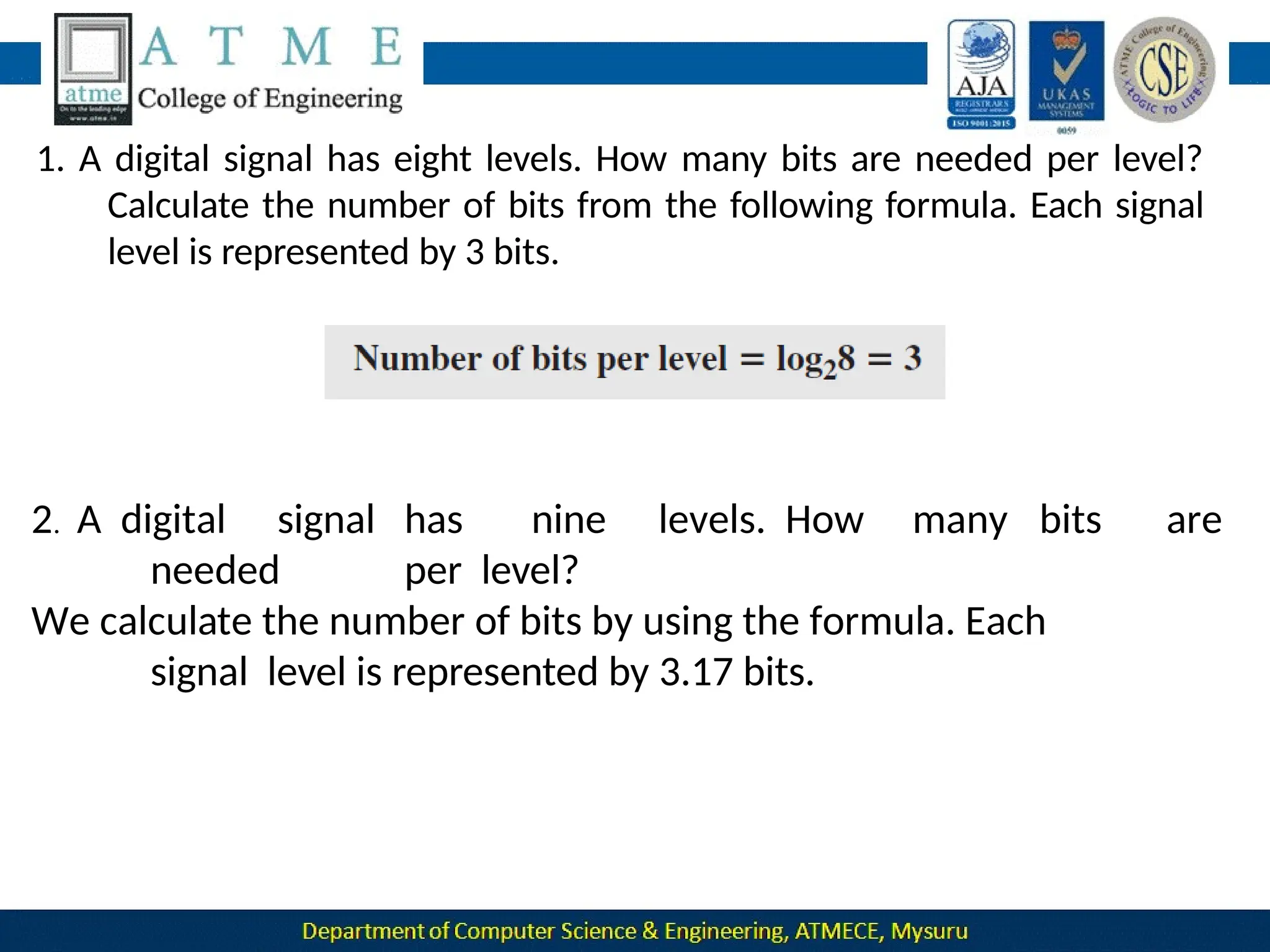
  • 82.
    The OSI modelwas intended to be the basis for the creation of the protocols in the OSI stack.  The OSI model is a layered framework for the design of network systems that allows communication between all types of computer systems. It consists of seven separate but related layers, each of which defines a part of the process of moving information across a network
  • 83.
    OSI versus TCP/IP Two layers, session and presentation are missing from the TCP/IP protocol suite.  The application layer in the suite is usually considered to be the combination of three layers in the OSI model
  • 84.
     TCP/IP hasmore than one transport-layer protocol. Some of the functionalities of the session layer are available in some of the transport-layer protocols.  The application layer is not only one piece of software. Many applications can be developed at this layer.  If some of the functionalities mentioned in the session and presentation layers are needed for a particular application, they can be included in the development of that piece of software. Lack of OSI Model’s Success  OSI was completed when TCP/IP was fully in place and a lot of time and money had been spent on the suite; changing it would cost a lot.  Some layers in the OSI model were never fully defined.
  • 85.
     For example,although the services provided by the presentation and the session layers were listed in the document, actual protocols for these two layers were not fully defined, nor were they fully described, and the corresponding software was not fully developed.  when OSI was implemented by an organization in a different application, it did not show a high enough level of performance to entice the Internet authority to switch from the TCP/IP protocol suite to the OSI model.
  • 86.
    Physical Layer- 1 Data andSignals Data need to be transmitted and received, but the media have to change data to signals. Both data and the signals that represent them can be either analog or digital in form. Analog data refers to information that is continuous. For example, an analog clock that has hour, minute, and second hands gives information in a continuous form; the movements of the hands are continuous. Digital data refers to information that has discrete states. For example, digital clock that reports the hours and the minutes will change suddenly from 8:05 to 8:06.
  • 87.
  • 88.
    Periodic and Nonperiodic A periodic signal completes a pattern within a measurable time frame, called a period, and repeats that pattern over subsequent identical periods.  The completion of one full pattern is called a cycle.  A non periodic signal changes without exhibiting a pattern or cycle that repeats over time.  Both analog and digital signals can be periodic or non periodic.  In data communication, we commonly use periodic analog signals and non periodic digital signals.
  • 89.
    Period and Frequency Period refers to the amount of time, in seconds, a signal needs to complete 1 cycle. Frequency refers to the number of periods in 1 s. Frequency and period are the inverse of each other.
  • 90.
    Phase The term phase,or phase shift, describes the position ofthe waveform relative to time 0.
  • 91.
    •A sine wavewith a phase of 90° starts at time 0 with a peak amplitude. The amplitude is decreasing. • A sine wave with a phase of 180° starts at time 0 with a zero amplitude. The amplitude is decreasing. Another way to look at the phase is in terms of shift or offset. We can say that • A sine wave with a phase of 0° is not shifted. •A sine wave with a phase of 90° is shifted to the left by ¼ cycle However, note that the signal does not really exist before time 0. • A sine wave with a phase of 180° is shifted to the left by ½ cycle. However, note that the signal does not really exist before time
  • 92.
    Digital Signals  In additionto being represented by an analog signal, information can also be represented by a digital signal.  For example, 1 can be encoded as a positive voltage and a 0 as zero voltage.  A digital signal can have more than two levels. In this case, we can send more than 1 bit for each level.
  • 94.
    1. A digitalsignal has eight levels. How many bits are needed per level? Calculate the number of bits from the following formula. Each signal level is represented by 3 bits. 2. A digital signal has nine levels. How many bits are needed per level? We calculate the number of bits by using the formula. Each signal level is represented by 3.17 bits.
  • 95.
    2. A digitizedvoice channel, is made by digitizing a 4-kHz bandwidth analog voice signal. What is the required bit rate? Solution: We need to sample the signal at twice the highest frequency (two samples per hertz). We assume that each sample requires 8 bits.
  • 96.
    Bit Rate The bitrate is the number of bits sent in 1s, expressed in bits per second (bps). Bit Length The bit length is the distance one bit occupies on the transmission medium. Bit length = propagation speed x bit duration
  • 97.
    Transmission of DigitalSignals A digital signal is a composite analog signal with an infinite bandwidth. Two approaches of Transmission of Digital Signals: 1 .Baseband transmission 2.Broadband transmission(using modulation). Baseband Transmission Baseband transmission means sending a digital signal over a channel without changing the digital signal to an analog signal.
  • 98.
    Baseband transmission requiresthat we have a low-pass channel, a channel with a bandwidth that starts from zero. Baseband transmission of a digital signal that preserves the shape of the digital signal is possible only if we have a low-pass channel with an infinite or very wide bandwidth. In baseband transmission, the required bandwidth is proportional to the bit rate; if we need to send bits faster, we need more bandwidth.
  • 99.
    Broadband Transmission (UsingModulation) Broadband transmission or modulation means changing the digital signal to an analog signal for transmission. Modulation allows us to use a bandpass channel—a channel witha bandwidth that does not start from zero. If the available channel is a bandpass channel, we cannot send the digital signal directly tothe channel; we need to convert the digital signal to an analog signal before transmission.
  • 101.
    TRANSMISSION IMPAIRMENT  Signalstravel through transmission media, which are not perfect.  The imperfection causes signal impairment. This means that the signal at the beginning of the medium is not the same as the signal at the end of the medium.
  • 102.
    Attenuation Attenuation means aloss of energy. When a signal, simple or composite, travels through a medium, it loses some of its energy in overcoming the resistance of the medium. To compensate for this loss, amplifiers are used to amplify the signal.
  • 103.
    Decibel To show thata signal has lost or gained strength, engineers use the unit of the decibel. The decibel (dB) measures the relative strengths of two signals or one signal at two different points. The decibel is negative if a signal is attenuated and positive if a signal is amplified. where P1 and P2 are the powers of a signal at points 1 and 2, respectively.
  • 105.
    Distortion Distortion means thatthe signal changes its form or shape. Distortion can occur in a composite signal made of different frequencies. Each signal component has its own propagation speed through a medium and, therefore, its own delay in arriving at the final destination. Differences in delay may create a difference in phase
  • 106.
    Noise Noise is anothercause of impairment. Types: • Thermal noise: random motion of electrons in a wire, which creates an extra signal not originally sent by the transmitter. • Induced noise: comes from sources such as motors and appliancses. • crosstalk: one wire on the other • impulse noise: a spike that comes from power lines, lightning, and so on.
  • 107.
    Signal-to-Noise Ratio (SNR):the ratio of the signal power to the noise power
  • 108.
     SNR isactually the ratio of what is wanted (signal) to what is not wanted (noise). A high SNR means the signal is less corrupted by noise; a low SNR means the signal is more corrupted by noise. Because SNR is the ratio of two powers, it is often described in decibel units, SNRdB, defined as
  • 109.
    DA TA RATE LIMITS  Avery important consideration in data communications is how fast we can send data, in bits per second, over a channel. Data rate depends on three factors: 1. The bandwidth available 2. The level of the signals we use 3. The quality of the channel (the level of noise) Two theoretical formulas were developed to calculate the data rate: 1. Nyquist for a noiseless channel 2. Shannon for a noisy channel.
  • 110.
    Noiseless Channel: NyquistBit Rate For a noiseless channel, the Nyquist bit rate formula defines the theoretical maximum bit rate where bandwidth->bandwidth of the channel L ->number of signal levels used to represent data BitRate -> bit rate in bits per second. According to the formula, we might think that, given a specific bandwidth, we can have any bit rate we want by increasing the number of signal levels. Although the idea is theoretically correct, practically there is a limit.
  • 111.
    When we increasethe number of signal levels, we impose a burden on the receiver. If the number of levels in a signal is just 2, the receiver can easily distinguish between a 0 and a 1. If the level of a signal is 64, the receiver must be very sophisticated to distinguish between 64 different levels. Inother words, increasing the levels of a signal reducesthe reliability of the system.
  • 113.
    Noisy Channel: ShannonCapacity  In 1944, Claude Shannon introduced a formula, called the Shannon capacity, to determine the theoretical highest data rate for a noisy channel: where bandwidth -> bandwidth of the channel SNR -> signal-to noise ratio capacity -> capacity of the channel in bits per second. In the Shannon formula there is no indication of the signal level, which means that no matter how many levels we have, we cannot achieve a data rate higher than the capacity of the channel. In other words, the formula defines a characteristic of the channel,
  • 115.
    Using Both Limits In practice, we need to use both methods to find the limits and signal levels.
  • 116.
    The Shannon formulagives us 6 Mbps, the upper limit.  For better performance we choose something lower, 4 Mbps, for example. Then we use the Nyquist formula to find the number of signal levels. The Shannon capacity gives us the upper limit; the Nyquist formula tells us how many signal levels we need.
  • 117.
    PERFORMANCE  One importantissue in networking is the performance of the network—how good is it? The characteristics that measures network performance are: 1. Bandwidth 2. Throughput 3. Latency(Delay) 4. Jitter
  • 118.
    1.Bandwidth In networking, weuse the term bandwidth in two contexts. ❑ The first, bandwidth in hertz, refers to the range of frequencies in a composite signal or the range of frequencies that a channel can pass. ❑ The second, bandwidth in bits per second, refers to the speed of bit transmission in a channel or link. ❑ Relationship There is an explicit relationship between the bandwidth in hertz and bandwidth in bits per second. Basically, an increase in bandwidth in hertz means an increase in bandwidth in bits per second. The relationship depends on baseband transmission
  • 119.
    Throughput The throughput isa measure of how fast we can actually send data through a network. Although, at first glance, bandwidth in bits per second and throughput seem the same, they are different. A link may have a bandwidth of B bps, but we can only send T bps through this link with T always less than B.  The bandwidth is a potential measurement of a link The throughput is an actual measurement of how fast we can send data.  For example, we may have a link with a bandwidth of 1 Mbps, but the devices connected to the end of the link may handle only 200
  • 120.
    Imagine a highwaydesigned to transmit 1000 cars per minute from one point to another. However, if there is congestion on the road, this figure may be reduced to 100 cars per minute. The bandwidth is 1000 cars per minute; the throughput is 100 cars per minute.
  • 121.
    Latency (Delay) The latencyor delay defines how long it takes for an entire message to completely arrive at the destination from the time the first bit is sent out from the source. latency is made of four components: 1.Propagation time 2.Transmission time, 3.Queuing time and 4.Processing delay.
  • 122.
    Propagation Time Propagation timemeasures the time required for a bit to travel from the source to the destination.  The propagation time is calculated by dividing the distance by the propagation speed. The propagation speed of electromagnetic signals depends on the medium and on the frequency of the signal. For example, in a vacuum, light is propagated with a speed of 3 × 10⁸ m/s.
  • 123.
    Transmission Time In datacommunications we don’t send just 1 bit, we send a message. The first bit may take a time equal to the propagation time to reach its destination; the last bit also may take the same amount of time.
  • 124.
    However, there isa time between the first bit leaving the sender and the last bit arriving at the receiver. The first bit leaves earlier and arrives earlier; the last bit leaves later and arrives later. The transmission time of a message depends on the size of the message and the bandwidth of the channel.
  • 125.
    Queuing Time Queuing time,the time needed for each intermediate or end device tohold the message before it can be processed. The queuing time is not a fixed factor; it changes with the load imposed on the network.
  • 126.
     When thereis heavy traffic on the network, the queuing time increases.  An intermediate device, such as a router, queues the arrived messages and processes them one by one.  If there are many messages, each message will have to wait. Bandwidth-Delay Product Bandwidth and delay are two performance metrics of a link. What is very important in data communications is the product of the two, the bandwidth-delay product.  Let us elaborate on this issue, using two hypothetical cases as examples.
  • 127.
    ❑ Case 1:Assume that we have a link with a bandwidth of 1 bps . and the delay of the link is 5 s .The bandwidth-delay product means in this case 1 × 5, is the maximum number of bits that can fill the link.
  • 128.
    ❑ Case 2:Assume we have a bandwidth of 5 bps. Figure 3.33 shows that there can be maximum 5 × 5 = 25 bits on the line. The reason is that, at each second, there are 5 bits on the line; the duration of each bit is 0.20 s.
  • 129.
    The two casesshow that the product of bandwidth and delay is the number of bits that can fill the link. This measurement is important if we need to send data in bursts and wait for the acknowledgment of each burst before sending the next one. To use the maximum capability of the link, we need to make the size of our burst 2 times the product of bandwidth and delay; we need to fill up the full-duplex channel (two directions). The sender should send a burst of data of (2 × bandwidth × delay) bits. The sender then waits for receiver acknowledgment for part of the
  • 130.
    Jitter Jitter is aproblem if different packets of data encounter different delays and the application using the data at the receiver site is time-sensitive (for example audio and video data). If the delay for the first packet is 20 ms, for the second is 45 ms, and for the third is 40 ms, then the real-time application that uses the packets endures jitter.
  • 131.
  • 132.
    Digital-to-Digital Conversion  Digital-todigital conversion involves converting digital data to digital signal.  The conversion involves 3 techniques: 1. Line coding 2. Block coding 3. Scrambling Line Coding  Line coding converts a sequence of bits to a digital signal.
  • 133.
    At the sender,digital data are encoded into a digital signal; at the receiver, the digital data are recreated by decoding the digital signal. 1.Signal Element Versus Data Element A data element is the smallest entity that can represent a piece of information: this is the bit. A signal element is the shortest unit (timewise) of a digital signal. Data elements are what we need to send; signal elements are what we can send. Data elements are being carried; signal elements are the carriers. We define a ratio r which is the number of data elements carried by each signal element.
  • 134.
    Fig: Signal elementsversus data elements
  • 135.
    The worst caseis when we need the maximum signal rate; the best case is when we need the minimum.  In data communications, we are usually interested in the average case. We can formulate the relationship between data rate and signal rate as Save = c x N x (1/r) baud where N is the data rate (bps) c is the case factor, which varies for each case S is the number of signal elements per second r is number of data elements carried by signal elements
  • 136.
    3.Bandwidth  The baudrate, not the bit rate, determines the required bandwidth for a digital signal.  We can say that the bandwidth (range of frequencies) is proportional to the signal rate(baud rate). The minimum bandwidth can be given as Bmin = c x N x (1 / r) The maximum data rate if the bandwidth of the channel is given. Nmax =(1 / c) x B x r
  • 137.
    4.Baseline Wandering  Indecoding a digital signal, the receiver calculates a running average of the received signal power. This average is called the baseline.  The incoming signal power is evaluated against this baseline to determine the value of the data element.  A long drift in string of 0s or 1s can cause a the baseline (baseline wandering) and make it difficult for the receiver to decode correctly.  A good line coding scheme needs to prevent baseline wandering. 4.DC Components When the voltage level in a digital signal is constant for a while, the Spectrum creates very low frequencies  These frequencies around zero, called DC (direct-current) components, present problems for a system that cannot pass low frequencies  For example, a telephone line cannot pass frequencies below 200 Hz.
  • 138.
    5.Self-synchronization To correctly interpretthe signals received from the sender, the receiver’s bit intervals must correspond exactly to the sender’s bit intervals.  If the receiver clock is faster or slower, the bit intervals are not matched and the receiver might misinterpret the signals.
  • 139.
    A self-synchronizing digitalsignal includes timing information in the data being transmitted. This can be achieved if there are transitions in the signal that alert the receiver to the beginning, middle, or end of the pulse. If the receiver’s clock is out of synchronization, these points can reset the clock. 6.Built-in Error Detection It is desirable to have a built-in error-detecting capability in the generated code to detect some or all of the errors that occurred during transmission. Some encoding schemes have this capability to some extent. 7.Immunity to Noise and Interference Another desirable code characteristic is a code that is immune to
  • 140.
    A complex schemeis more costly to implement than a simple one. For example, a scheme that uses four signal levels is more difficult to interpret than one that uses only two levels. Line Coding Schemes
  • 141.
    Unipolar Scheme In aunipolar scheme, all the signal levels are on one side of the time axis NRZ (Non-Return-to-Zero) Traditionally, a unipolar scheme was designed as a non-return-to- zero (NRZ) scheme in which the positive voltage defines bit 1 and the zero voltage defines bit 0. It is called NRZ because the signal does not return to zero at the middle of the bit.
  • 143.
    Return-to-Zero (RZ)  Usesthree values: positive, negative, and zero.  In RZ, the signal changes not between bits but during the bit.  As shown in the figure the signal goes to 0 in the middle of each bit. It remains there until the beginning of the next bit.
  • 144.
    Biphase: Manchester andDifferential Manchester The idea of RZ (transition at the middle of the bit) and the idea of NRZ-L are combined into the Manchester scheme. In Manchester encoding, the duration of the bit is divided into two halves. The voltage remains at one level during the first half and moves to the other level in the second half. The transition at the middle of the bit provides synchronization. Differential Manchester, on the other hand, combines the ideas of RZ and NRZ-I. There is always a transition at the middle of the bit, but the bit values are determined at the beginning of the bit. If the next bit is 0, there is a transition; if the next bit is 1,
  • 146.
    Bipolar Schemes  Inbipolar encoding (sometimes called multilevel binary), there are three voltage levels: positive, negative, and zero.  The voltage level for one data element is at zero, while the voltage level for the other element alternates between positive and negative.  Two variations of bipolar encoding: AMI and pseudoternary In the term alternate mark inversion, the word mark comes from telegraphy and means 1.  So AMI means alternate 1 inversion. A neutral zero voltage represents binary 0. Binary 1s are represented by alternating positive and negative voltages.  A variation of AMI encoding is called pseudoternary in which the 1 bit is encoded as a zero voltage and the 0 bit is encoded as alternating
  • 148.
    Summary of linecoding schemes
  • 149.
    Analog-to-Digital Conversion Analog-to-Digital conversionis a technique that is used to represent analog information by a digital signal. There are two techniques that can be used for this purpose. 1.Pulse Code Modulation(PCM) 2.Delta Modulation(DM)
  • 150.
    Pulse Code Modulation(PCM)  The most common technique to change an analog signal to digital data (digitization) is called pulse code modulation (PCM).  A PCM encoder has three processes: 1.Sampling 2.Quantization 3.Encoding
  • 151.
    1.The analog signalis sampled. 2. The sampled signal is quantized. 3. The quantized values are encoded as streams of bits.
  • 152.
    Sampling Sampling is theprocess of obtaining amplitudes of a signal at regular intervals. The sampling process is sometimes referred to as pulse amplitude modulation (PAM). The analog signal is sampled every Ts s, where Ts is the sample interval or period. The inverse of the sampling interval is called the sampling rate or sampling frequency and denoted by fs , where fs = 1/ Ts. There are three sampling methods—ideal, natural, and flat-top
  • 153.
    In ideal sampling,pulses from the analog signal are sampled. In natural sampling, a high-speed switch is turned on for only the small period of time when the sampling occurs. The result is a sequence of samples that retains the shape of the analog signal. Sample and hold creates flat-top samples by using a circuit.
  • 154.
    Sampling Rate According tothe Nyquist theorem, to reproduce the original analog signal, one necessary condition is that the sampling rate be at least twice the highest frequency in the original signal.
  • 156.
    Quantization The assignment ofa specific range of values to signal amplitudes is called quantization. The result of sampling is a series of pulses with amplitude values between the maximum and minimum amplitudes of the signal. The set of amplitudes can be infinite with nonintegral values between the two limits. These values cannot be used in the encoding process.
  • 157.
    The following arethe steps in quantization: Example: Assume that we have a sampled signal and the sample amplitudes are between −20 and +20 V. We decide to have eight levels (L = 8). This means that Δ = 5 V.
  • 159.
    Quantization Levels The choiceof L, the number of levels, depends on the range of the amplitudes of the analog signal and how accurately we need to recover the signal. If the amplitude of a signal fluctuates between two values only, we need only two levels if the signal, like voice, has many amplitude values, we need more quantization levels. In audio digitizing, L is normally chosen to be 256; in video it is normally thousands. Choosing lower values of L increases the quantization error if there is a lot of fluctuation in the signal.
  • 160.
    Quantization Error Quantization isan approximation process The input values to the quantizer are the real values; the output values are the approximated values. The output values are chosen to be the middle value in the zone. If the input value is also at the middle of the zone, there is no quantization error; otherwise, there is an error. signal, which in The quantization error changes the signal-to-noise ratio of the turn reduces the upper limit capacity according to Shannon. It can be proven that the contribution of the quantization error to the SNRdB of the signal depends on the number of quantization levels L, or the bits per sample nb , as shown in the following formula:
  • 162.
    in the Uniform VersusNonuniform Quantization For many applications, the distribution of the instantaneous amplitudes analog signal is not uniform. Changes in amplitude often occur more frequently in the lower amplitudes than in the higher ones. For these types of applications it is better to use nonuniform zones. In other words, the height of Δ is not fixed; it is greater near the lower amplitudes and less near the higher amplitudes.  Nonuniform quantization can also be achieved by using a process called at the companding and expanding. The signal is companded at the sender before conversion; it is expanded receiver after conversion.
  • 163.
    Encoding The last stepin PCM is encoding. After each sample is quantized and the number of bits per sample is decided, each sample can be changed to an nb -bit code word. number of The number of bits for each sample is determined from the quantization levels. If the number of quantization levels is L, the number of bits is nb = log2 L. The bit rate can be found from the formula
  • 164.
    Original Signal Recovery Therecovery of the original signal requires the PCM decoder. The decoder first uses circuitry to convert the code words into a pulse that holds the amplitude until the next pulse. After the staircase signal is completed, it is passed through a low- pass filter to smooth the staircase signal into an analog signal.
  • 165.
     If thesignal has been sampled at (or greater than) the Nyquist sampling rate and if there are enough quantization levels, the original signal will be recreated.
  • 169.
    TRANSMISSION MODES The transmission ofbinary data across a link can be accomplishedin either parallel or serial mode.
  • 170.
    Parallel Transmission Here multiplebits are sent with each clock. Binary data, consisting of 1s and 0s, may be organized into groups of n bits each. Use n wires to send n bits at one time. That way each bit has its own wire, and all n bits of one group can be transmitted with each clock tick from one device to another.
  • 171.
     Advantage:  Speed: Parallel transmission can increase the transfer speed by a factor of n over serial transmission.  Disadvantage: Cost : Parallel transmission requires n communication lines just to transmit the data stream.
  • 172.
    Serial Transmission  Here1 bit is sent with each clock tick.  One bit follows another, so we need only one communication channel rather than n to transmit data between two communicating devices .
  • 173.
      Advantage:  Theadvantage of serial over parallel transmission is that with only one communication channel. Serial transmission reduces the cost of transmission over parallel by roughly a factor of n  Serial transmission occurs in one of three ways: 1. Asynchronous 2. Synchronous 3. Isochronous.
  • 174.
    Asynchronous Transmission In this modewe send 1 start bit (0) at the beginning and 1 or more stop bit (1s) at the end of each byte.  Asynchronous transmission is so named because the timing of a signal is unimportant.  Information is received and translated by agreed upon patterns. Patterns are based on grouping the bit stream in to bytes.  Without synchronization, the receiver cannot use timing to predict when the next group will arrive.  To alert the receiver to the arrival of a new group, therefore, an extra bit is the start added to the beginning of each byte. This bit, usually a 0, is called bit.  To let the receiver know that the byte is finished, 1 or more additional bits are appended to the end of the byte.
  • 175.
    In addition, thetransmission of each byte may then be followed by a gap of varying duration. This gap can be represented either by an idle channel or by a stream of additional stop bits. The start and stop bits and the gap alert the receiver to the beginning and end of each byte and allow it to synchronize with the data stream. When the receiver detects a start bit, it sets a timer and begins counting bits as they come in. After n bits, the receiver looks for a stop bit. As soon as it detects the stop bit, it waits until it detects the next start bit.
  • 176.
    Synchronous Transmission Here the bitstream is combined into longer “frames,” which may contain multiple bytes.  Each byte, is introduced onto the transmission link without a gap between it and the next one.  It is left to the receiver to separate the bit stream into bytes for decoding purposes. Here we send bits one after another without start or stop bits or gaps. It is the responsibility of the receiver to group the bits.
  • 177.
    Timing becomes veryimportant, therefore, because the accuracy of the received information is completely dependent on the ability of the receiving device to keep an accurate count of the bits as they come in. Advantage : •Speed : With no extra bits or gaps to introduce at the sending end and remove at the receiving end, and, by extension, with fewer bits to move across the link, synchronous transmission is faster than asynchronous transmission. Isochronous Transmission This mode provides synchronization for the entire stream of bits. It is used with real time audio and video applications. In real-time audio and video, in which uneven delays between frames are not acceptable, synchronous transmission fails.
  • 178.
    For example, TVimages are broadcast at the rate of 30 images per second; they must be viewed at the same rate. If each image is sent by using one or more frames, there should be no delays between frames. For this type of application, synchronization between characters is not enough; the entire stream of bits must be synchronized. The isochronous transmission guarantees that the data arrive at a fixed rate.
  • 179.
    Analog Transmission Analog transmissionis a transmission method of conveying voice,data,image,signal or video information using a continuous signal which varies in amplitude, frequency and phase . DIGITAL-TO-ANALOG CONVERSION Digital-to-analog conversion is the process of changing one of the characteristics of an analog signal based on the information in digital data. Sine wave is defined by three characteristics: amplitude, frequency, and phase. So, by changing one characteristic of a simple electric signal, we can use it to represent digital data.
  • 181.
    Figure 5.2: Typesof digita to analog conversion
  • 182.
    in 1s. The Theunit is Aspects of Conversion Data Element Versus Signal Element •Data Element : It is the smallest piece of information to be exchanged ,the bit. • Signal element : It is the smallest unit of a signal that is constant. Data Rate Versus Signal Rate • The data rate defines the number of data elements (bits) sent unit is bits per second (bps). • The signal rate is the number of signal elements sent in 1s. the baud. • Relationship between data rate (N) and signal rate (S) S =N/r where N-> data rate (bps) r->number of data elements carried in one signal element. The value of r in analog transmission is r = log2 L, where L is the number of different signal elements.
  • 184.
    Aspects of Conversion Bandwidth: The required bandwidth for analog transmission of digital data is difference between proportional to the signal rate except for FSK, in which the the carrier signals needs to be added.  Carrier Signal:  In analog transmission, the sending device produces a high-frequency signal that acts as a base for the information signal. This base signal is called the carrier signal .  The receiving device is tuned to the frequency of the carrier signal that it expects from the sender. Digital information then changes the carrier signal by modifying one or more of its characteristics (amplitude, frequency, or phase). This kind of modification is called modulation (shift keying).
  • 186.
    Amplitude Shift Keying Herethe amplitude of the carrier signal is varied to create signal elements. Both frequency and phase remain constant while the amplitude changes. Binary ASK (BASK): ASK is normally implemented using only two levels. This is referred to as binary amplitude shift keying or on-off keying (OOK). The peak amplitude of one signal level is 0; the other is the same as the amplitude of the carrier frequency. The bandwidth is proportional to the signal rate (baud rate). The value of d is between 0 and 1 and it depends on modulation and filtering process. 56
  • 187.
  • 188.
    Implementation of BASK If digital data are presented as a unipolar NRZ digital signal with a high voltage of 1 V and a low voltage of 0 V. signal  The implementation can achieved by multiplying the NRZ digital by the carrier signal coming from an oscillator.  When the amplitude of the NRZ signal is 1, the amplitude of the  carrier frequency is held.  When the amplitude of the NRZ signal is 0, the amplitude of the  carrier frequency is zero. 58
  • 191.
    Frequency Shift Keying Here the frequency of the carrier signal is varied to represent data.  The frequency of the modulated signal is constant for the duration of one signal element, but changes for the next signal element if the data element changes.  Both peak amplitude and phase remain constant for all signal elements. Binary FSK(BFSK):  Here two carrier frequencies f1 and f2 are selected.  We use the first carrier if the data element is 0; we use the second if the data element is 1. 61
  • 192.
  • 193.
    We have anavailable bandwidth of 100 kHz which spans from 200 to 300 kHz. What should be the carrier frequency and the bit rate if we modulated our data by using FSK with d = 1? Solution This problem is similar to Example 5.3, but we are modulating by using FSK. The midpoint of the band is at 250 kHz. We choose 2Δf to be 50 kHz; this means
  • 194.
    Implementation of BFSK Two implementations of BFSK: non coherent and coherent. In non coherent BFSK, there may be discontinuity in the phase when one signal element ends and the next begins.  In coherent BFSK, the phase continues through the boundary of two signal elements. Non coherent BFSK can be implemented by treating BFSK as two ASK modulations and using two carrier frequencies.  Coherent BFSK can be implemented by using one voltage- controlled oscillator (VCO) that changes its frequency according to the input voltage.
  • 195.
    Figure 5.7: Implementationof BFSK The input to the oscillator is the unipolar NRZ signal. When the amplitude of NRZ is zero, the oscillator keeps its regular frequency; when the amplitude is positive, the frequency is increased. Multi Level FSK :
  • 196.
    Phase Shift Keying Inphase shift keying, the phase of the carrier is varied to represent two or more different signal elements.  Both peak amplitude and frequency remain constant as the phase changes.  Today, PSK is more common than ASK or FSK. Binary PSK (BPSK)  The simplest PSK is binary PSK, in which we have only two signal elements, one with a phase of 0°, and the other with
  • 197.
  • 198.
     Binary PSKis as simple as binary ASK with one big advantage—it is less  susceptible to noise.  In ASK, the criterion for bit detection is the amplitude of the signal; in PSK, it is the phase.  Noise can change the amplitude easier than it can change the phase.  PSK is less susceptible to noise than ASK.  PSK is superior to FSK because we do not need two carrier signals.  PSK needs more sophisticated hardware to be able to distinguish between phases.
  • 199.
    Implementation  The implementationof BPSK is as simple as that for ASK.  The reason is that the signal element with phase 180° can be seen as the complement of the signal element with phase 0°.  The polar NRZ signal is multiplied by the carrier frequency; the 1 bit (positive voltage) is represented by a phase starting at 0°; the 0 bit (negative voltage) is represented by a phase starting at 180°.
  • 200.
  • 201.
    Quadrature Phase ShiftKeying  It allows designers to use 2 bits at a time in each signal element, thereby decreasing the baud rate and eventually the required bandwidth. other  It uses two separate BPSK modulations; one is in-phase, the quadrature (out-of-phase).  The incoming bits are first passed through a serial to parallel conversion that sends one bit to one modulator and the next bit to the other modulator. 71
  • 202.
    Figure 5.11: QPSKand its implementation The two composite signals created by each multiplier are sine waves with the same frequency, but different phases. When they are added, the result is another sine wave.
  • 203.
     A constellationdiagram can help us define the amplitude and phase of a signal element, particularly when we are using two carriers (one in-phase and one quadrature).  Here signal element type is represented as a dot. The bit or combination of bits it can carry is often written next to it. 73
  • 204.
     The diagramhas two axes. The horizontal X axis is related to the in-phase carrier; the vertical Y axis is related to the quadrature carrier.  For each point on thediagram,four pieces of information can be deduced. 1. The projection of the point on the X axis defines the peak amplitude of the in-phase component 2. The projection of the point on the Y axis defines the peak amplitude of the quadrature component. 3. The length of the line (vector) that connects the point to the origin is the peak amplitude of the signal element (combination of the X and Y components) 4. The angle the line makes with the X axis is the phase of the signal element. All the information we need can easily be found on a constellation diagram.
  • 205.
    Figure 5.12: Constellation diagram For ASK, we are using only an in-phase carrier. Therefore, the two points should be on the X axis.  Binary 0 has an amplitude of 0 V; binary 1 has an amplitude of 1 V (for example).  The points are located at the origin and at 1 unit.
  • 206.
     BPSK alsouses only an in-phase carrier. However, we use a polar NRZ signal for modulation.  It creates two types of signal elements, one with amplitude 1 and the other with amplitude −1.  This can be stated in other words: BPSK creates two different signal  elements, one with amplitude 1 V and in phase and the other with amplitude 1 V and 180° out of phase.
  • 207.
     QPSK usestwo carriers, one in-phase and the other quadrature.  The point representing 11 is made of two combined signal elements, both with an amplitude of 1 V .  One element is represented by an in-phase carrier, the other element by a quadrature carrier.
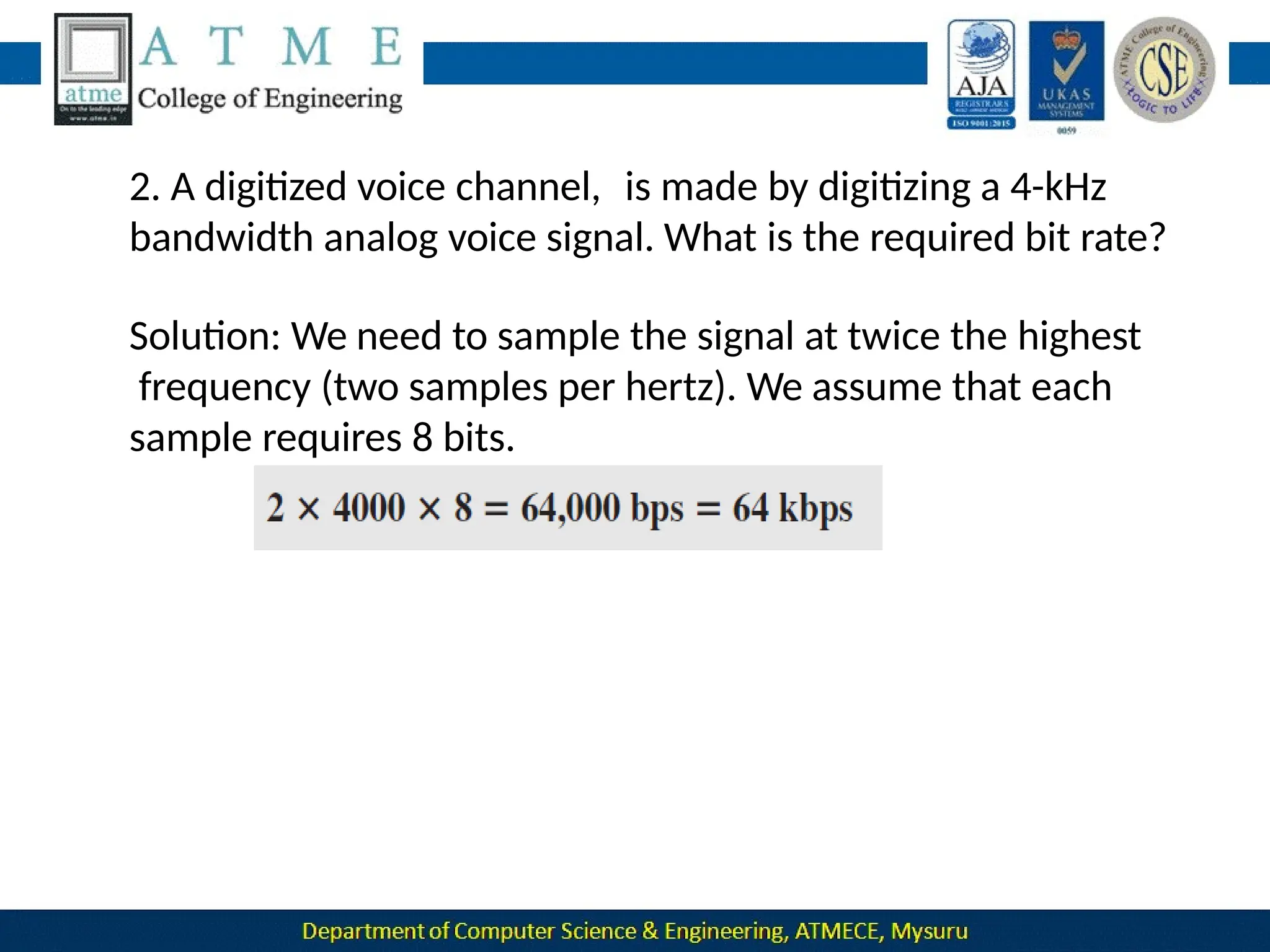
  • 208.
    Quadrature Amplitude Modulation Quadratureamplitude modulation is a combination of ASK and PSK. QAM refer to QPSK with amplitude modulation. QAM are of two types: 8-QAM and 16-QAM.  8-QAM encodes 3 bits of data for every baud and 16-QAM encodes 4 bits for every baud.
  • 209.
  • 210.
    Bandwidth Utilization Introduction Today’s technologyincludes high-bandwidth media such as optical fiber and terrestrial and satellite microwaves. Each has a bandwidth far in excess of that needed for the average transmission signal. If the bandwidth of a link is greater than the bandwidth needs of the devices connected to it, the bandwidth is wasted. An efficient system maximizes the utilization of all resources; bandwidth is one of the most precious resources we have in data communications.
  • 211.
    Multiplexing  Multiplexing isthe set of techniques that allow the simultaneous transmission of multiple signals across a single data link.  It allows the various users to share the channel simultaneously. Figure 6.1 Dividing a link into channels The lines on the left direct their transmission streams to a multiplexer (MUX), which combines them into a single stream (many- to one).
  • 212.
     At thereceiving end, that stream is fed into a demultiplexer (DEMUX), which separates the stream back into its component transmissions (one- to-many) and directs them to their corresponding lines.  In the figure, the word link refers to the physical path. The word channel refers to the portion of a link that carries a transmission between a given pair of lines.  One link can have many (n) channels.
  • 213.
  • 214.
    Frequency Division Multiplexing(FDM) Itis an analog technique that can be applied when the bandwidth of a link (in hertz) is greater than the combined bandwidths of the signals to be transmitted. Carrier frequencies are separated by sufficient bandwidth to accommodate the modulated signal. These bandwidth ranges are the channels through which the various signals travel.
  • 215.
     Figure 6.3gives a conceptual view of FDM. In this illustration, the transmission path is divided into three parts, each representing a channel that carries one transmission.  Channels can be separated by strips of unused bandwidth guard bands—to prevent signals from overlapping.
  • 216.
    Figure : Multiplexing Process Multiplexing Process:  Each source generates a signal of a similar frequency range. Inside the multiplexer, these similar signals modulate different carrier frequencies ( f1, f2, and f3).
  • 217.
    Figure 6.4: Demultiplexing Process Demultiplexing Process:  The demultiplexer uses a series of filters to decompose the multiplexed signal into its constituent component signals.  The individual signals are then passed to a demodulator that separates them from their carriers and passes them to the output lines.
  • 218.
    Example 6.1:Assume thata voice channel occupies a bandwidth of 4 kHz. We need to combine three voice channels into a link with a bandwidth of 12 kHz, from 20 to 32 kHz. Show the configuration, using the frequency domain. Assume there are no guard bands. Solution: We shift (modulate) each of the three voice channels to a different bandwidth. We use the 20- to 24-kHz bandwidth for the first channel, the 24- to 28-kHz bandwidth for the second channel, and the 28- to 32-kHz bandwidth for the third one. Then we combine them. At the receiver, each channel receives the entire signal, using a filter to separate out its own signal.
  • 219.
  • 220.
     The firstchannel uses a filter that passes frequencies between 20 and 24 kHz and filters out (discards) any other frequencies.  The second channel uses a filter that passes frequencies between 24 and 28 kHz, and  The third channel uses a filter that passes frequencies between 28 and 32 kHz.  Each channel then shifts the frequency to start from zero.
  • 221.
  • 222.
  • 223.
    The Analog CarrierSystem To maximize the efficiency of their infrastructure, telephone companies have traditionally multiplexed signals from lower-bandwidth lines onto higher-bandwidth lines. In this way, many switched or leased lines can be combined into fewer but bigger channels. For analog lines, FDM is used. One of these hierarchical systems used by telephone companies is made up of groups, supergroups, master groups, and jumbo groups
  • 224.
    Here 12 voicechannels are multiplexed onto a higher-bandwidth line to create a group(12*4).  At the next level, up to five groups can be multiplexed to create a composite signal called a supergroup(48*5).  At the next level, 10 supergroups are multiplexed to create a master group(240*10).  Six master groups can be combined into a jumbo group(6*2.52).
  • 225.
    Other Applications of FDM •AM and FM radio broadcasting: Radio uses the air as the transmission medium. A special band from 530 to 1700 kHz is assigned to AM radio. All radio stations need to share this band. Each AM station needs 10 kHz of bandwidth. Each station uses a different carrier frequency, which means it is shifting its signal and multiplexing. • Television broadcasting: Each TV channel has its own bandwidth of 6 MHz. • The first generation of cellular telephones: Each user is assigned two 30kHz channels, one for sending voice and the other for receiving.
  • 226.
  • 227.
    Implementation FDM can beimplemented very easily. In other cases, such as the cellular telephone system, a base station needs to assign a carrier frequency to the telephone user. There is not enough bandwidth in a cell to permanently assign a bandwidth range to every telephone user.When a user hangs up, her or his bandwidth is assigned to another caller.
  • 228.
    Wavelength-Division Multiplexing(WDM) Wavelength-division multiplexing(WDM) is designed to use the high- data-rate capability of fiber-optic cable. The optical fiber data rate is higher than the data rate of metallic transmission cable, but using a fiber-optic cable for a single line wastes the available bandwidth. WDM is conceptually the same as FDM, except that the multiplexing and demultiplexing.
  • 229.
    Very narrow bandsof light from different sources are combined to make a wider band of light.  At the receiver, the signals are separated by the demultiplexer. The combining and splitting of light sources are easily handled by a prism.
  • 230.
    Time-Division Multiplexing(TDM)  Time-divisionmultiplexing (TDM) is a digital process that allows several connections to share the high bandwidth of a link.  Each connection occupies a portion of time in the link.  TDM is a digital multiplexing technique for combining several low-rate channels into one high-rate channel.
  • 231.
    Synchronous TDM  In synchronousTDM, each input connection has an allotment in the output even if it is not sending data.  A unit can be 1 bit, one character, or one block of data. Each input unit becomes one output unit and occupies one output time slot.
  • 232.
    If we haven connections, a frame is divided into n time slots and one slot is allocated for each unit, one for each input line.  If the duration of the input unit is T, the duration of each slot is T/n and the duration of each frame is T .  The data rate of the output link must be n times the data rate of a connection to guarantee the flow of data.
  • 233.
    Example 6.5:Three connectionsare multiplexed together .The data rate for each input connection is 1 kbps. If 1 bit at a time is multiplexed (a unit is 1 bit), what is the duration of 1.each input slot, 2.each output slot, and 3.each frame? Solution We can answer the questions as follows: 1.The data rate of each input connection is 1 kbps. This means that the bit duration is 1/1000 s or 1 ms. The duration of the input time slot is 1 ms (same as bit duration).
  • 234.
    Example 6.6:Figure 6.14shows synchronous TDM with a data streamfor each input and one data stream for the output. The unit of data is 1 bit. Find (1) the input bit duration, (2) the output bit duration, (3) the output bit rate, and (4) the output frame rate.
  • 235.
    Solution We can answerthe questions as follows: 1.The input bit duration is the inverse of the bit rate: 1/1 Mbps = 1 μs. 2.The output bit duration is one-fourth of the input bit duration, or 1/4 μs. 3.The output bit rate is the inverse of the output bit duration, or 1/4 μs, or 4 Mbps. This can also be deduced from the fact that the output rate is 4 times as fast as any input rate; so the output rate = 4 × 1 Mbps = 4 Mbps. 4.The frame rate is always the same as any input rate. So the frame rate is 1,000,000 frames per second. Because we are sending 4 bits in each frame, we can verify the result of the previous question by multiplying the frame rate by the number of bits per frame.
  • 236.
    Example 6.7:Four 1-kbpsconnections are multiplexed together. A unit is 1 bit. Find (1)the duration of 1 bit before multiplexing, (2)The transmission rate of the link (3)The duration of a time slot, and (4)The duration of a frame. Solution We can answer the questions as follows: 1.The duration of 1 bit before multiplexing is 1/1 kbps, or 0.001 s (1 ms).
  • 237.
    3.The duration ofeach time slot is one-fourth of the duration of each bit before multiplexing,or 1/4 ms or 250 μs. Note that we can also calculate this from the data rate of the link, 4 kbps.The bit duration is the inverse of the data rate, or 1/4 kbps or 250 μs. 4.The duration of a frame is always the same as the duration of a unit before multiplexing, or 1 ms. We can also calculate this in another way. Each frame in this case has four time slots. So the duration of a frame is 4 times 250 μs, or 1 ms. 29
  • 238.
    Example 6.8:Four channelsare multiplexed using TDM. If each channel sends 100 bytes/s and we multiplex 1 byte per channel, show the frame traveling on the link, the size of the frame, the duration of a frame, the frame rate, and the bit rate for the link. Solution Each frame carries 1 byte from each channel; the size of each frame, therefore, is 4 bytes, or 32 bits. Because each channel is sending 100 bytes/s and a frame carries 1 byte from each channel, the frame rate must be 100 frames per second.
  • 239.
    Example 6.9:A multiplexercombines four 100-kbps channels using a time slot of 2 bits. Show the output with four arbitrary inputs. What is the frame rate? What is the frame duration? What is the bit rate? What is the bit duration? Solution Figure 6.17 shows the output for four arbitrary inputs.
  • 240.
    • The linkcarries 50,000 frames per second since each frame contains 2 bits per channel. • The frame duration is therefore 1/50,000 s or 20 μs. •The frame rate is 50,000 frames per second, and each frame carries 8 bits; the bit rate is 50,000 × 8 = 400,000 bits or 400 kbps. • The bit duration is 1/400,000 s, or 2.5 μs. Note that the frame duration is 8 times the bit duration because each frame is carrying 8 bits.
  • 241.
    Interleavin g  TDM canbe visualized as two fast-rotating switches, one on the multiplexing side and the other on the demultiplexing side.  The switches are synchronized and rotate at the same speed, but in opposite directions. Figure : Interleaving
  • 242.
     On themultiplexing side, as the switch opens in front of a connection, that connection has the opportunity to send a unit on to the path. This process is called interleaving.  On the demultiplexing side, as the switch opens in front of a connection, that connection has the opportunity to receive a unit from the path.
  • 243.
    Empty Slots Figure 6.18 showsa case in which one of the input lines has no data to send and one slot in another input line has discontinuous data. The first output frame has three slots filled, the second frame has two slots filled,and the third frame has three slots filled. No frame is full.
  • 244.
    Data Rate Management Oneproblem with TDM is how to handle a disparity in the input data rates. If data rates are not the same, three strategies can be used: 1. Multilevel multiplexing 2. Multiple-slot allocation and 3. Pulse stuffing.
  • 245.
    Multilevel Multiplexing  Itis a technique used when the data rate of an input line is a multiple of others.  For example, in Figure below, we have two inputs of 20 kbps and three inputs of 40 kbps.
  • 246.
    Multiple-Slot Allocation For example,we might have an input line that has a data rate that is a multiple of another input. In Figure below, the input line with a 50-kbps data rate can be given two slots in the output. We insert a demultiplexer in the line to make two inputs out of one.
  • 247.
    Pulse Stuffing tne solutionis to make the highest input data rate the dominant data rate and then add dummy bits to the input lines with lower rates. This will increase their rates. This technique is called pulse stuffing, bit padding, or bit stuffing.
  • 248.
    Frame Synchronizing  One ormore synchronization bits are usually added to the beginning of each frame. These bits, called framing bits.  It follows a pattern, frame to frame, that allows the demultiplexer to synchronize with the incoming stream so that it can separate the time slots accurately.
  • 249.
    Example 6.10:We havefour sources, each creating 250 characters per second. If the interleaved unit is a character and 1 synchronizing bit is added to each frame, find (1)the data rate of each source, (2)The duration of each character in each source, (3)the frame rate, (4)the duration of each frame, (5)the number of bits in each frame, and (6)the data rate of the link.
  • 250.
    Solution: We cananswer the questions as follows: 1.The data rate of each source is 250 × 8 = 2000 bps = 2 kbps. 2.Each source sends 250 characters per second; therefore, the duration of a character is 1/250 s, or 4 ms. 3.Each frame has one character from each source, which means the link needs to send 250 frames per second to keep the transmission rate of each source. 4.The duration of each frame is 1/250 s, or 4 ms. Note that the duration of each frame is the same as the duration of each character coming from each source. 5.Each frame carries 4 characters and 1 extra synchronizing bit. This means that each frame is 4 × 8 + 1 = 33 bits. 6.The link sends 250 frames per second, and each frame contains 33 bits. This means that the data rate of the link is 250 × 33, or 8250 bps. Note that the bit rate of the link is greater than the combined bit rates of the four channels. If we add the bit rates of four channels, we get 8000 bps. Because 250 frames are traveling per second and each contains 1 extra bit for synchronizing, we need to add 250 to the sum to get 8250 bps.
  • 251.
    Example 6.11:Two channels,one with a bit rate of 100 kbps and another with a bit rate of 200 kbps, are to be multiplexed. How this can be achieved? What is the frame rate? What is the frame duration? What is the bit rate of the link? Solution:We can allocate one slot to the first channel and two slots to the second channel. Each frame carries 3 bits. The frame rate is 100,000 frames per second because it carries 1 bit from the first channel. The frame duration is 1/100,000 s, or 10 ms. The bit rate is 100,000 frames/s × 3 bits per frame, or 300 kbps. Note that because each frame carries 1 bit from the first channel, the bit rate for the first channel is preserved. The bit rate for the second channel is also preserved because each frame carries 2 bits from the second channel.
  • 252.
    Statistical TDM  In synchronousTDM, each input has a reserved slot in the output frame. This can be inefficient if some input lines have no data to send. In statistical time-division multiplexing, slots are dynamically allocated to improve bandwidth efficiency.  In statistical multiplexing, the number of slots in each frame is less than the number of input lines.  The multiplexer checks each input line in round robin fashion; it allocates a slot for an input line if the line has data to send; otherwise, it skips the line and checks the next line.
  • 253.
    In statistical TDM,a slot needs to carry data as well as the address of the destination. An output slot in synchronous TDM is totally occupied by data. there is no need for addressing; synchronization and preassigned relationships between the inputs and outputs serve as an address.
  • 254.
    No Synchronization Bit Thereis another difference between synchronous and statistical TDM, but this time it is at the frame level. The frames in statistical TDM need not be synchronized, so we do not need synchronization bits. Slot Size Since a slot carries both data and an address in statistical TDM, the ratio of the data size to address size must be reasonable to make transmission efficient. In statistical TDM, a block of data is usually many bytes while the address is just a few bytes.
  • 255.
     Spread spectrumis designed to be used in wireless applications (LANs and WANs).  In wireless applications, all stations use air as the medium for communication. Stations must be able to share this medium without interception by an eavesdropper and without being subject to jamming from a malicious intruder (in military operations, for example).  If the required bandwidth for each station is B, spread spectrum expands it to Bss , such that Bss >> B. Spread Spectrum
  • 256.
     Here wecombine signals from different sources to fit into a larger bandwidth. They spread the original spectrum needed for each station.  Two principles of spread spectrum : 1.The bandwidth allocated to each station needs to be, by far, larger than what is needed. This allows redundancy. 2.The expanding of the original bandwidth B to the bandwidth Bss must be done by a process that is independent of the original signal. The spreading process occurs after the signal is created by the source.
  • 257.
    After the signalis created by the source, the spreading process uses a spreading code and spreads the bandwidth. The spreading code is a series of numbers that look random, but are actually a pattern.
  • 258.
    Frequency hopping spreadspectrum  FHSS technique uses M different carrier frequencies that are modulated by the source signal.  The bandwidth occupied by a source after spreading is BFHSS >> B.
  • 259.
     A pseudorandomcode generator, called pseudorandom noise (PN), creates a k-bit pattern for every hopping period Th . The frequency table uses the pattern to find the frequency to be used for this hopping period and passes it to the frequency synthesizer.  The frequency synthesizer creates a carrier signal of that frequency, and the source signal modulates the carrier signal.  Suppose we have decided to have eight hopping frequencies. In this case, M is 8 and k is 3.
  • 260.
  • 262.
    The pattern forthis station is 101, 111, 001, 000, 010, 011, 100. Note that the pattern is pseudorandom; it is repeated after eight hoppings. This means that at hopping period 1, the pattern is 101. The frequency selected is 700 kHz; the source signal modulates this carrier frequency. The second k-bit pattern selected is 111, which selects the 900-kHz carrier; the eighth pattern is 100, and the frequency is 600 kHz. After eight hoppings, the pattern repeats, starting from 101 again.
  • 264.
    If there aremany k-bit patterns and the hopping period is short, a sender and receiver can have privacy. If an intruder tries to intercept the transmitted signal, she can only access a small piece of data because she does not know the spreading sequence to quickly adapt herself to the next hop. The scheme also has an anti jamming effect. A malicious sender may be able to send noise to jam the signal for one hopping period (randomly), but not for the whole period.
  • 265.
    Bandwidth Sharing If thenumber of hopping frequencies is M, we can multiplex M channels into one by using the same Bss bandwidth. This is possible because a station uses just one frequency in each hopping period; M − 1 other frequencies can be used by M − 1 other stations.
  • 266.
     FHSS issimilar to FDM, In FDM, each station uses 1/M of the bandwidth, but the allocation is fixed; in FHSS, each station uses 1/M of the bandwidth, but the allocation changes hop to hop. Direct Sequence Spread Spectrum In DSSS, we replace each data bit with n bits using a spreading code. Each bit is assigned a code of n bits, called chips, where the chip rate is n times that of the data bit.
  • 267.
    As an example,let us consider the sequence used in a wireless LAN, the famous Barker sequence, where n is 11. We assume that the original signal and the chips in the chip generator use polar NRZ encoding.
  • 268.
    Figure : DSSSexample  Figure below shows the chips and the result of multiplying the original data by the chips to get the spread signal.
  • 269.
    If the originalsignal rate is N, the rate of the spread signal is 11N. This means that the required bandwidth for the spread signal is 11 times larger than the bandwidth of the original signal. The spread signal can provide privacy if the intruder does not know the code. It can also provide immunity against interference if each station uses a different code.
  • 270.
    Bandwidth Sharing  Canwe share a bandwidth in DSSS? The answer is no and yes.  If we use a spreading-code that spreads signals that cannot be combined and separated, we cannot share a bandwidth.  For example:  Some wireless LANs use DSSS and the spread bandwidth cannot be shared.  If we use a special spreading-code that spreads signals that can be combined and separated, we can share a bandwidth. 62
  • 271.
    Introduction to Switching A network is a set of connected devices. If we have multiple devices, we have the problem of how to connect them to make one-to-one communication possible. These methods are impractical and wasteful when applied to very large networks.  The number and length of the links require too much infrastructure to be cost-efficient, and the majority of those links would be idle most of the time.  A better solution is switching.
  • 272.
    Figure : Switched network Aswitched network consists of a series of interlinked nodes, called switches.  Switches are devices capable of creating temporary connections between two or more devices linked to the switch.
  • 273.
    Figure : Taxonomyof switched networks
  • 274.
    Switching and TCP/IP Layers Switchingat Physical Layer  At the physical layer, we can have only circuit switching. There are no packets exchanged at the physical layer. The switches at the physical layer allow signals to travel in one path or another. Switching at Data-Link Layer  At the data-link layer, we can have packet switching. However, the term packet in this case means frames or cells. Packet switching at the data- link layer is normally done using a virtual-circuit approach.
  • 275.
    Switching at NetworkLayer  At the network layer, we can have packet switching. In this case, either a virtual-circuit approach or a datagram approach can be used. Currently the Internet uses a datagram approach. Switching at Application Layer At the application layer, we can have only message switching. The communication at the application layer occurs by exchanging messages. Conceptually, we can say that communication using e-mail is a kind of message-switched communication.
  • 276.
    Circuit Switched Networks A circuit-switched network is made of a set of switches connected by physical links, in which each link is divided into n channels. Figure 8.3: A trivial circuit-switched network
  • 277.
     When endsystem A needs to communicate with end system M, system A needs to request a connection to M that must be accepted by all switches as well as by M itself. This is called the setup phase. A circuit (channel) is reserved on each link, and the combination of circuits or channels defines the dedicated path.  After the dedicated path made of connected circuits (channels) is established, the data-transfer phase can take place.  Circuit switching takes place at physical layer.
  • 278.
     Setup Phase:  Before the two parties can communicate, a dedicated circuit needs to be established.  Connection setup means creating dedicated channels between the switches.  When system A needs to connect to system M, it sends a setup request that includes the address of system M, to switch.  The switch finds a channel between itself and the switch that connects to M and then sends the request to that switch.
  • 279.
    Data Transfer Phase:After the establishment of the dedicated circuit (channels), the two parties can transfer data. Teardown Phase : When one of the parties needs to disconnect, a signal is sent to each switch to release the resources. Efficiency  Circuit-switched networks are not as efficient as the other two types of networks .  Because resources are allocated during the entire duration of the connection. These resources are unavailable to other connections. Delay  Delay is minimal. During data transfer the data are not delayed at each switch ; the resources are allocated for the duration of the connection.
  • 280.
    Figure : Delayin a circuit-switched network Data transfer
  • 281.
    Packet Switching In datacommunications, we need to send messages from one end system to another. If the message is going to pass through a packet-switched network, it needs to be divided into packets of fixed or variable size. Here there is no resource reservation; resources are allocated on demand. Two types of packet switching : Datagram networks and virtual circuit networks.
  • 282.
    Datagram Networks  Here eachpacket is treated independently of all others. Even if a packet is part of a multi packet transmission, the network treats it as though it existed alone.  This is so because the links may be involved in carrying packets from other sources and do not have the necessary bandwidth available to carry all the packets from A to X.  This approach can cause the datagrams of a transmission to arrive at their destination out of order with different delays between the packets.
  • 283.
    Figure : ADatagram network with four switches (routers) 4 3 2 1 1 4 3 2 1 1 2 3 4 2 3 4 1  Packets in this approach are referred to as datagrams. Datagram switching is normally done at the network layer.
  • 284.
    Here there areno setup or teardown phases, then how the packets routed to their destinations in a datagram network?  In this type of network, each switch (or packet switch) has a routing table which is based on the destination address.
  • 285.
    Destination Address : Everypacket in a datagram network carries a header that contains, among other information, the destination address of the packet.  When the switch receives the packet, this destination address is examined. Efficiency  The efficiency better than of a datagram network is that of a circuit-switched network.  Because resources are allocated only when there are packets to be transferred.
  • 286.
    Figure Delays ina datagram network Delay will be greater .  Here there are no setup and teardown phases, each packet may experience a wait at a switch before it is forwarded.
  • 287.
    Virtual-Circuit Networks A virtual-circuitnetwork is a cross between a circuit-switched network and a datagram network. It has some characteristics of both. As in a circuit-switched network, there are setup and teardown phases in addition to the data transfer phase. As in a datagram network, data are packetized and each packet carries an address in the header. As in a circuit-switched network, all packets follow the same path established during the connection. A virtual-circuit network is normally implemented in the data-link layer, while a circuit-switched network is implemented in the physical layer and a datagram network in the network layer.
  • 288.
    Figure : Virtual-circuit network Asource or destination can be a computer, packet switch, or any other device that connects other networks.
  • 289.
    Figure : Virtual-circuit identifier Addressing:  Global Address : A source or a destination needs to have a global address—an address that can be unique in the scope of the network .  Virtual-Circuit Identifier(Local Address): • The identifier that is actually used for data transfer is called the virtual-circuit identifier (VCI) . • A VCI is a small number that has only switch scope; it is used by a frame between two switches.
  • 290.
    Three Phases : Data-Transfer Phase : •To transfer a frame from a source to its destination, all switches need to have a table entry for this virtual circuit. • When the frame arrives, the switch looks in its table to find port and a VCI. • When it is found, the switch knows to change the VCI and send out the frame from appropriate port. • Each switch changes the VCI and routes the frame. The data transfer phase is active until the source sends all its frames to the destination.
  • 291.
    Figure : Switch and tablefor a virtual-circuit network
  • 292.
    Three Phases : Setup Phase : A switch creates an entry for a virtual circuit. For E.g. : suppose source A needs to create a virtual circuit to B . Two steps are required: the setup request and the acknowledgment.  Setup Request : A setup request frame is sent from the source to the destination.
  • 293.
    Source A sendsa setup frame to switch 1. Switch 1 receives the setup request frame. It knows that a frame going from A to B goes out through port 3. The switch creates an entry in its table for this virtual circuit, but it is only able to fill three of the four columns. The switch assigns the incoming port (1) and chooses an available incoming VCI (14) and the outgoing port (3). It does not yet know the outgoing VCI, which will be found during the acknowledgment step. The switch then forwards the frame through port 3 to switch 2. The same process will be carried out for remaining switches until it reaches the destination.
  • 294.
     Setup Acknowledgement:A special frame, called the acknowledgment frame, completes the entries in the switching tables.
  • 295.
    The destination and destination sends acknowledgmentcarries the global source addresses so the switch knows which entry in the table is to be completed. Switch 3 sends an acknowledgment to switch 2 that contains its incoming VCI in the table, chosen in the previous step. Switch 2 uses this as the outgoing VCI in the table. Switch 2 sends an acknowledgment to switch 1 that contains its incoming VCI in the table, chosen in the previous step. Switch 1 uses this as the outgoing VCI in the table. The source uses this as the outgoing VCI for the data frames to be sent to destination.
  • 296.
    Total Delay= Figure : Delayin a virtual-circuit network In a virtual-circuit network, there is a one-time delay for setup and a one-time delay for teardown.
  • 297.
    Types of Errors 10.1 1.single-bit error The term single-bit error means that only 1 bit of a given data unit (such as a byte, character, or packet) is changed from 1 to 0 or from 0 to 1. 2. burst error The term burst error means that 2 or more bits in the data unit have changed from 1 to 0 or from 0 to 10. Figure 10.1 shows the effect of a single-bit and a burst error on a data unit.
  • 298.
  • 299.
    Redundancy 10.3 The central conceptin detecting or correcting errors is redundancy. To be able to detect or correct errors, we need to send some extra bits with our data. These redundant bits are added by the sender and removed by the receiver. Their presence allows the receiver to detect or correct corrupted bits.
  • 300.
    Detection versus Correction Inerror detection, we are only looking to see if any error has occurred. The answer is a simple yes or no. We are not even interested in the number of corrupted bits.A single-bit error is the same for us as a burst error.  In error correction, we need to know the exact number of bits that are corrupted and, more importantly, their location in the message. 10.4
  • 301.
    Coding 10.5 Redundancy is achievedthrough various coding schemes. The sender adds redundant bits through a process that creates a relationship between the redundant bits and the actual data bits. The ratio of redundant bits to data bits and the robustness of the process are important factors in any coding scheme.
  • 302.
    BLOCK CODING 10.6 In block coding,we divide our message into blocks, each of k bits, called datawords. We add r redundant bits to each block to make the length n = k + r . The resulting n-bit blocks are called codewords.
  • 303.
    Error Detection How canerrors be detected by using block coding? If the following two conditions are met, the receiver can detect a change in the original codeword. 10.7 1.The receiver has (or can find) a list of valid codewords. 2.The original codeword has changed to an invalid one.
  • 304.
    Figure 10.2: Processof error detection in block coding 10.8
  • 305.
    Let us assumethat k = 2 and n = 3. Table 10.1 shows the list of datawords and codewords. Later, we will see how to derive a codeword from a dataword. Table 10.1: A code for error detection in Example 10.1 10.9
  • 306.
    Hamming Distance The mainconcept for error-control: Hamming distance. number of differences between The Hamming distance b/w 2 words is the the corresponding bits. Let d(x,y) = Hamming distance b/w 2 words x and y. Hamming distance can be found by applying the XOR operation on the 2 words and counting the number of 1s in the result. 98
  • 307.
    Let us findthe Hamming distance between two pairs of words. 10.10
  • 308.
    Hamming Distance for Error 100 Minimum Detection Minimum Hamming distance is the smallest Hamming distance b/w all possible pairs of code-words. Let dmin = minimum Hamming distance.  To find dmin value, we find the Hamming distances between all words and select the smallest one. Minimum-distance for Error-detection  If ‘s’ errors occur during transmission, the Hamming distance b/w the sent code-word and received code-word is ‘s’ (Figure 10.3).
  • 309.
     If codehas to detect upto ‘s’ errors, the minimum-distance b/w the valid codes must be ‘s+1’ i.e. dmin=s+1.  We use a geometric approach to define dmin=s+1.  Let us assume that the sent code-word x is at the center of a circle with radius s.  All received code-words that are created by 0 to s errors are points inside the circle or on the perimeter of the circle.  All other valid code-words must be outside the circle 101
  • 310.
    A code schemehas a Hamming distance dmin = 4. This code guarantees the detection of up to three errors (d = s + 1 or s = 3). 10.12
  • 311.
    The code inTable 10.1 is a linear block code because the result of XORing any codeword with any other codeword is a valid codeword. For example, the XORing of the second and third codewords creates the fourth one. 10.13
  • 312.
    Minimum Distance forLinear Block Codes Minimum Hamming distance is no. of 1s in the nonzero valid code-word with the smallest no. of 1s. In Table 10.1, The numbers of 1s in the nonzero code-words are 2, 2, and 2. So the minimum Hamming distance is dmin = 2. 104
  • 313.
    In our firstcode (Table 10.1), the numbers of 1s in the nonzero codewords are 2, 2, and 2. So the minimum Hamming distance is dmin = 2. 10.14 Parity Check Code This code is a linear block code. This code can detect an odd number of errors. A k-bit data-word is changed to an n-bit code- word where n=k+1. One extra bit is called the parity-bit. The parity-bit is selected to make the total number of 1s in the code-word even. Minimum hamming distance dmin = 2. This means the code is a single-bit error-detecting code.
  • 314.
  • 315.
    10.16 Figure 10.4: Encoder and decoderfor simple parity-check code
  • 316.
    At Sender  Theencoder uses a generator that takes a copy of a 4-bit data-word (a0, a1, a2, and a3) and generates a parity-bit r0.  The encoder accepts a copy of a 4-bit data-word (a0, a1, a2, and a3) and generates a parity-bit r0 using a generator generates a 5-bit code-word  The parity-bit & 4-bit data-word are added to make the number of 1s in the code-word even. The addition is done by using the following:  The result of addition is the parity-bit.  If the no. of 1s in data-word = even, result = 0. (r0=0)  If the no. of 1s in data-word = odd, result = 1. (r0=1) 108
  • 317.
    At Receiver  Thereceiver receives a 5-bit word.  Syndrome bit = 0 when the no. of 1s in the received code-word is even; otherwise, it is 1. The syndrome is passed to the decision logic analyzer.  If s0=0, there is no error in the received code-word. The data portion of the received code- word is accepted as the data-word.  If s0=1, there is error in the received code-word. The data portion of the received code-word is discarded. The data-word is not created. 109
  • 318.
    Let us lookat some transmission scenarios. Assume the sender sends the dataword 10110. The codeword created from this dataword is 10111, which is sent to the receiver. We examine five cases: 10.17
  • 319.
    CYCLIC CODES 10.18 Cyclic codes arespecial linear block codes with one extra property. In a cyclic code, if a codeword is cyclically shifted (rotated), the result is another codeword. For example, if 1011000 is a codeword and we cyclically left- shift, then 0110001 is also a codeword.
  • 320.
    Figur e 10.5: CRC encoderand decoder 10.19
  • 321.
  • 322.
    Figure 10.7: Division in theCRC decoder for two cases 10.21
  • 323.
  • 324.
    Polynomials 10.22 A better wayto understand cyclic codesand how they can be analyzed is to represent them as polynomials.  A pattern of 0s and 1s can be representedas a polynomial with coefficients of 0 and 10. The power of each term shows the position of the bit; thecoefficient shows the value of the bit.
  • 325.
    Figure 10.8: A polynomial torepresent a binary word 10.23
  • 326.
    Cyclic Code EncoderUsing Polynomials Let Data-word = 1001 = x3+1. Divisor = 1011 = x3+x+1. In polynomial representation, the divisor is referred to as generator polynomial t(x) (Figure 10.9). 11 8
  • 327.
  • 328.
    Cyclic Code Analysis Wedefine the following, where f(x) is a polynomial with binary coefficients: 120
  • 329.
    Single Bit Error Ifthe generator has more than one term and the coefficient of x0 is 1, all single-bit errors can be caught. Two Isolated Single-Bit Errors If a generator cannot divide xi+1 (t between 0 & n-1), then all isolated double errors can be detected (Figure 10.10). 121
  • 330.
    Odd Numbers ofErrors A generator that contains a factor of x+1 can detect all odd- numbered errors. 122
  • 331.
  • 332.
    Advantages of CyclicCodes cyclic codes have a very good performance in detecting single-bit errors, double errors, an odd number of errors, and burst errors. They can easily be implemented in hardware and software. They are especially fast when implemented in hardware. This has made cyclic codes a good candidate for many networks. 10.26
  • 333.
    Hardware Implementation One ofthe advantages of a cyclic code is that the encoder and decoder can easily and cheaply be implemented in hardware by using a handful of electronic devices. Also, a hardware implementation increases the rate of check bit and syndrome bit calculation. 10.27
  • 334.
    Divisor Let us firstconsider the divisor. We need to note the following points: 1.The divisor is repeatedly XORed with part of the dividend. 2.The divisor has n − k + 1 bits which either are predefined or are all 0s. • In other words, the bits do not change from one dataword to another. • In our previous example, the divisor bits were either 1011 or 0000. • The choice was based on the leftmost bit of the part of the augmented data bits that are active in the XOR operation.
  • 335.
    A. close lookshows that only n − k bits of the divisor are needed in the XOR operation. • The leftmost bit is not needed because the result of the operation is always 0,no matter what the value of this bit. • The reason is that the inputs to this XOR operation are either both 0s or both 1s. •In our previous example, only 3 bits, not 4, are actually used in the XOR operation. Using these points, we can make a fixed (hardwired) divisor that can be used for a cyclic code if we know the divisor pattern.
  • 336.
    10.31 Figure : Hand-wireddesign of the divisor in CRC if the leftmost bit of the part of the dividend to be used in this step is 1, the divisor bits (d2d1d0) are 011; if the leftmost bit is 0, the divisor bits are 000. The design provides the right choice based on the leftmost bit.
  • 337.
    Augmented Dataword In ourpaper-and-pencil division process, we show the augmented dataword as fixed in position with the divisor bits shifting to the right, 1 bit in each step. The divisor bits are aligned with the appropriate part of the augmented dataword. There is no need to store the augmented dataword bits.
  • 338.
    Remainder In our example,the remainder is 3 bits (n − k bits in general) in length. We can use three registers (single-bit storage devices) to hold these bits. The following is the step-by-step process that can be used to simulate the division process in hardware (or even in software). 1. We assume that the remainder is originally all 0s (000 in our example). 2. At each time click (arrival of 1 bit from an augmented dataword), we repeat the following two actions: a.We use the leftmost bit to make a decision about the divisor (011 or 000). b. The other 2 bits of the remainder and the next bit from the augmented dataword (total of 3 bits) are XORed with the 3-bit divisor to create the next remainder.
  • 339.
    10.34 Figure: Simulation ofdivision in CRC encoder
  • 340.
    At each clocktick, shown as different times, one of the bits from the augmented dataword is used in the XOR process. If we look carefully at the design, we have seven steps here, while in the paper-and-pencil method we had only four steps. The first three steps have been added here to make each step equal and to make the design for each step the same. Steps 1, 2, and 3 push the first 3 bits to the remainder registers; steps 4, 5, 6,and 7 match the paper-and-pencil design. The values in the remainder register in steps 4 to 7 exactly match the values in the paper-and-pencil design.
  • 341.
    Figure : CRCencoding design using shift register A 1-bit shift register holds a bit for a duration of one clock time. At a time click, the shift register accepts the bit at its input port, stores the new bit, and displays it on the output port. 10.36  The content and the output remain the same until the next input arrives. When we connect several 1-bit shift registers together, it looks as if the contents of the register are shifting.
  • 342.
    Fig:General design ofencoder and decoder of CRC 10.37
  • 343.
    CHECKSUM 10.38 Checksum is anerror-detecting technique that can be applied to a message of any length. In the Internet, the checksum technique is mostly used at the network and transport layer rather than the data-link layer.
  • 344.
  • 345.
    Concept 10.40 The idea ofthe traditional checksum is simple. We show this using a simple example.
  • 346.
    Suppose the messageis a list of five 4-bit numbers that we want to send to a destination. In addition to sending these numbers, we send the sum of the numbers. For example, if the set of numbers is (7, 11, 12, 0, 6), we send (7, 11, 12, 0, 6, 36), where 36 is the sum of the original numbers. The receiver adds the five numbers and compares the result with the sum. If the two are the same, the receiver assumes no error, accepts the five numbers, and discards the sum. Otherwise, there is an error somewhere and the message not accepted. Example 10.11 10.41
  • 347.
    In the previousexample, the decimal number 36 in binary is (100100)2. To change it to a 4-bit number we add the extra leftmost bit to the right four bits as shown below. Example 10.12 Instead of sending 36 as the sum, we can send 6 as the sum (7, 11, 12, 0, 6, 6). The receiver can add the first five numbers in one’s complement arithmetic. If the result is 6, the numbers are accepted; otherwise, they are rejected. 10.42
  • 348.
    Let us usethe idea of the checksum in Example 10.12. The sender adds all five numbers in one’s complement toget the sum = 6. The sender then complements the result to get the checksum = 9, which is 15 − 6. Note that 6 = (0110)2 and 9 = (1001)2; they are complements of each other. The sender sends the five data numbers and the checksum (7, 11, 12, 0, 6, 9). If there is no corruption in transmission, the receiver receives (7, 11, 12, 0, 6, 9) and adds them in one’s Example 10.13 complement to get 15 (See Figure 10.16). 10.43
  • 349.
  • 350.
    Table 10.5: Procedure to calculatethe traditional checksum 10.45
  • 351.
  • 352.
    Performanc e The traditional checksumuses a small number of bits (16) to detect errors in a message of any size (sometimes thousands of bits). However, it is not as strong as the CRC in error-checking capability. Also, if the values of several words are incremented but the sum and the checksum do not change, the errors are not detected.
  • 353.
    10.48 Other Approaches tothe checksum If two 16-bit items are transposed in transmission, the checksum cannot catch this error. The reason is that the traditional checksum is not weighted: it treats each data item equally. In other words, the order of data items is immaterial to the calculation. Several approaches have been used to prevent this problem. Two of them are: 1. Fletcher checksum 2. Adler checksum
  • 354.
    Fletcher Checksum  The Fletcherchecksum was devised to weight each data item according to its position.  Fletcher has proposed two algorithms: 8-bit and 16-bit. The 16-bit Fletcher, calculates on 16-bit data items and creates a 32-bit checksum. 8-bit Fletcher The 8-bit Fletcher is calculated over data octets (bytes) and creates a 16-bit checksum.  The calculation is done modulo 256 (28),which means the intermediate results are divided by 256 and the remainder is kept.
  • 355.
    Figure : Algorithmto calculate an 8-bit Fletcher checksum
  • 356.
    Fletcher addresses weaknessesby computing a second value along with the simple checksum. This is the modular sum of the values taken by the simple checksum as each block of the data word is added to it. The modulus used is the same. So, for each block of the data word, taken in sequence, the block's value is added to the first sum and the new value of the first sum is then added to the second sum. The 16-bit Fletcher checksum is similar to the 8-bit Fletcher checksum, but it is calculated over 16-bit data items and creates a 32-bit checksum. The calculation is done modulo 65,536.
  • 357.
    Sensitivity to theorder of blocks is introduced because once a block is added to the first sum, it is then repeatedly added to the second sum along with every block after it. If, for example, two adjacent blocks become exchanged, the one that was originally first will be added to the second sum one fewer times and the one that was originally second will be added to the second sum one more time. The final value of the first sum will be the same, but the second sum will be different, detecting the change to the message.
  • 358.
    Adler Checksum The Adlerchecksum is a 32-bit checksum. Figure below shows a simple algorithm in flowchart form. Figure : Algorithm to calculate an Adler checksum
  • 359.
    It is similarto the 16-bit Fletcher with three differences. First, Calculation is done on single bytes instead of 2 bytes at a time. Second, the modulus is a prime number (65,521) instead of 65,536. Third, L is initialized to 1 instead of 0. It has been proved that a prime modulo has a better detecting capability in some combinations of data.
  • 360.
  • 361.
  • 362.
  • 363.
  • 364.
  • 365.
  • 366.
  • 367.
  • 368.
    Data Link Control(DLC) The data-link layer is divided into two sublayers: Data Link Control (DLC) Media Access Control (MAC). TCP/IP protocol suite does not define any protocol in the data-link layer or physical layer. These networks, wired or wireless, provide services to the upper three layers of the TCP/IP suite.
  • 369.
    DLC SERVICES The data linkcontrol (DLC) deals with procedures for communication between two adjacent nodes—node-to-node communication.  Data link control functions include framing , flow and error control. Framing  Data transmission in the physical layer means moving bits in the form of a signal from the source to the destination.  The physical layer provides bit synchronization to ensure that the sender and receiver use the same bit durations and timing.
  • 370.
     The data-linklayer, on the other hand, needs to pack bits into frames, so that each frame is distinguishable from another.  Example: postal system practices a type of framing. • The simple act of inserting a letter into an envelope separates one piece of information from another; the envelope serves as the delimiter. • In addition, each envelope defines the sender and receiver addresses, which is necessary since the postal system is a many to- many carrier facility.
  • 371.
    Framing in thedata-link layer separates a message from one source to a destination by adding a sender address and a destination address.  The destination address defines where the packet is to go; the sender address helps the recipient acknowledge the receipt.  When a message is divided into smaller frames, a single-bit error affects only that small frame.
  • 372.
    Frame Size Frames canbe of fixed or variable size. In fixed-size framing, there is no need for defining the boundaries of the frames; the size itself can be used as a delimiter. Example: ATM WAN, which uses frames of fixed size called cells. Two approaches were used for this purpose: • character-oriented approach and • bit-oriented approach.
  • 373.
    Character-Oriented Framing In character-oriented(or byte-oriented) framing, data to be carried are 8-bit characters from a coding system such as ASCII .  The header, which normally carries the source and destination addresses and other control information, and the trailer, which carries error detection redundant bits, are also multiples of 8 bits.  The flag, composed of protocol-dependent special characters, signals the start or end of a frame.
  • 374.
    Figure : Aframe in a character-oriented protocol Character-oriented framing was popular when only text was exchanged by the data-link layers. The flag could be selected to be any character not used for text communication. Now, however, we send other types of information such as graphs, audio, and video; any character used for the flag could also be part of the information.
  • 375.
     If thishappens, the receiver, when it encounters this pattern in the middle of the data, thinks it has reached the end of the frame.  In byte stuffing (or character stuffing), a special byte is added to the data section of the frame when there is a character with the same pattern as the flag.  Whenever the receiver encounters the ESC character, it removes it from the data section and treats the next character as data, not as a delimiting flag.
  • 376.
  • 377.
     Byte stuffingby the escape character allows the presence of the flag in the data section of the frame, but it creates another problem. What happens if the text contains one or more escape characters followed by a byte with the same pattern as the flag?  The universal coding systems in use today, such as Unicode, have 16-bit and 32-bit characters that conflict with 8-bit characters.
  • 378.
    Bit-Oriented Framing  Inbit-oriented framing, the data section of a frame is a sequence of bits to be interpreted by the upper layer as text, graphic, audio, video, and so on.  However, in addition to headers (and possible trailers), we still need a delimiter to separate one frame from the other.  Most protocols use a special 8-bit pattern flag, 01111110, as the delimiter to define the beginning and the end of the frame.
  • 379.
    This flag cancreate the same type of problem we saw in the character- oriented protocols. We do this by stuffing 1 single bit (instead of 1 byte) to prevent the pattern from looking like a flag. The strategy is called bit stuffing.
  • 380.
     In bitstuffing, if a 0 and five consecutive 1 bits are encountered, an extra 0 is added. This extra stuffed bit is eventually removed from the data by the receiver.  Note that the extra bit is added after one 0 followed by five 1s regardless of the value of the next bit. This guarantees that the flag field sequence does not inadvertently appear in the frame.
  • 381.
  • 382.
    Figure shows bitstuffing at the sender and bit removal at the receiver.  Note that even if we have a 0 after five 1s, we still stuff a 0. The 0 will be removed by the receiver.  This means that if the flaglike pattern 01111110 appears in the data, it will change to 011111010 (stuffed) and is not mistaken for a flag by the receiver.  The real flag 01111110 is not stuffed by the sender and is recognized by the receiver.
  • 383.
    Flow and Error Control FlowControl Whenever an entity produces items and another entity consumes them, there should be a balance between production and consumption rates. If the items are produced more slowly than they can be consumed, the consumer must wait, and the system becomes less efficient. Flow control is related to the first issue. We need to prevent losing the data items at the consumer site.
  • 384.
    11.147 The figure showsthat the data-link layer at the sending node tries to push frames toward the data- link layer at the receiving node. If the receiving node cannot process and deliver the packet to its network at the same rate that the frames arrive, it becomes overwhelmed with frames.
  • 385.
    Buffer s  Although flowcontrol can be implemented in several ways, one of the solutions is normally to use two buffers; one at the sending data-link layer and the other at the receiving data-link layer.  A buffer is a set of memory locations that can hold packets at the sender and receiver.  The flow control communication can occur by sending signals from the consumer to the producer.  When the buffer of the receiving data-link layer is full, it informs the sending data-link layer to stop pushing frames.
  • 386.
    Example  The consumerscommunicate with the producers on two occasions: • when the buffer is full and • when there are vacancies.  If the two parties use a buffer with only one slot, the communication can be easier.  Assume that each data-link layer uses one single memory slot to hold a frame.  When this single slot in the receiving data-link layer is empty, it sends a note to the network layer to send the next frame.
  • 387.
    Error Control Since theunderlying technology at the physical layer is not fully reliable, we need to implement error control at the data-link layer to prevent the receiving node from delivering corrupted packets to its network layer. In both methods, a CRC is added to the frame header by the sender and checked by the receiver.  In the first method, if the frame is corrupted, it is silently discarded; if it is not corrupted, the packet is delivered to the network layer. This method is used mostly in wired LANs such as Ethernet.  In the second method, if the frame is corrupted, it is silently discarded; if it is not corrupted, an acknowledgment is sent (for the purpose of both flow and error control) to the sender.
  • 388.
    Combination of Flowand Error Control  Flow and error control can be combined.  In a simple situation, the acknowledgment that is sent for flow control can also be used for error control to tell the sender the packet has arrived uncorrupted. A frame that carries an acknowledgment is normally called an ACK to distinguish it from the data frame.
  • 389.
    Connectionless and Connection-Oriented ConnectionlessProtocol In a connectionless protocol, frames are sent from one node to the next without any relationship between the frames; each frame is independent. The term connectionless here does not mean that there is no physical connection (transmission medium) between the nodes; it means that there is no connection between frames. Most of the data-link protocols for LANs are connectionless protocols.
  • 390.
    Connection-Oriented Protocol  Ina connection-oriented protocol, a logical connection should first be established between the two nodes (setup phase).  If they are not received in order, the receiver needs to wait until all frames belonging to the same set are received and then deliver them in order to the network layer.  Connection oriented protocols are rare in wired LANs, but we can see them in some point-to-point protocols, some wireless LANs, and some WANs.
  • 391.
    Data-link Layer Protocols Four protocols have been defined for the data-link layer to deal with flow and error control: 1.Simple 2.Stop-and-Wait 3.Go-Back-N and 4.Selective-Repeat  The behavior of a data-link-layer protocol can be better shown as a Finite State Machine (FSM).
  • 392.
     Each eventis associated with two reactions: • defining the list of actions to be performed and • determining the next state .  One of the states must be defined as the initial state, the state in which the machine starts when it turns on.
  • 393.
    Simple Protocol  Our firstprotocol is a simple protocol with neither flow nor error control.  We assume any frame that the receiver can immediately handle it receives.  In other words, the receiver can never be overwhelmed with incoming frames.
  • 394.
    Figure : Simpleprotocol The data-link layer at the sender gets a packet from its network layer, makes a frame out of it, and sends the frame. The data-link layer at the receiver receives a frame from the link, extracts the packet from the frame, and delivers the packet to its network layer.
  • 395.
    FSMs The sender siteshould not send a frame until its network layer has a message to send. The receiver site cannot deliver a message to its network layer until a frame arrives. Each FSM has only one state, the ready state. The receiving machine remains in the ready state until a frame arrives from the sending machine.
  • 397.
    Stop-and-Wait Protocol Stop-and-Wait protocoluses both flow and error control. The silence of the receiver is a signal for the sender that a frame was either corrupted or lost. If the timer expires, the sender resends the previous frame, assuming that the frame was either lost or corrupted.
  • 399.
    Sender States The senderis initially in the ready state, but it can move between the ready and blocking state. ❑ Ready State - When the sender is in this state, it is only waiting for a packet from the network layer. - If a packet comes from the network layer, the sender creates a frame, saves a copy of the frame, starts the only timer and sends the frame. - The sender then moves to the blocking state.
  • 400.
    ❑ Blocking State. -When the sender is in this state, three events can occur: a) If a time-out occurs, the sender resends the saved copy of the frame and restarts the timer. b)If a corrupted ACK arrives, it is discarded. c) If an error-free ACK arrives, the sender stops the timer and discards the saved copy of the frame. It then moves to the ready state.
  • 401.
    Receiver The receiver isalways in the ready state. Two events may occur: a)If an error-free frame arrives, the message in the frame is delivered to the network layer and an ACK is sent. b) If a corrupted frame arrives, the frame is discarded. Example 11.3 Figure 11.12 shows an example. The first frame is sent and acknowledged. The second frame is sent, but lost. After time-out, it is resent. The third frame is sent and acknowledged, but the acknowledgment is lost. The frame is resent.
  • 403.
    Sequence and AcknowledgmentNumbers Duplicate packets, as much as corrupted packets, need to be avoided. As an example, assume we are ordering some item online. To correct the problem, we need to add sequence numbers to the data frames and acknowledgment numbers to the ACK frames Numbering in this case is very simple.  Sequence numbers are 0, 1, 0, 1,0, 1, . . . ; The acknowledgment numbers can also be 1, 0, 1, 0, 1, 0,… In other words, the sequence numbers start with 0, the acknowledgment numbers start with 1.
  • 406.
    Point-to-point Protocol (PPP) Oneof the most common protocols for point-to-point access is the Point-to-Point Protocol (PPP). The majority of these users have a traditional modem; they are connected to the Internet through a telephone line, which provides the services of the physical layer. But to control and manage the transfer of data, there is a need for a point-to-point protocol at the data-link layer.PPP is by far the most common.
  • 407.
    Services Provided byPPP PPP defines the format of the frame to be exchanged between devices. PPP is designed to accept payloads from several network layers (not only IP). Authentication is also provided in the protocol, but it is optional. The new version of PPP, called Multilink PPP, provides connections over multiple links.
  • 408.
    Services Not Providedby PPP PPP does not provide flow control. A sender can send several frames one after another with no concern about overwhelming the receiver. PPP has a very simple mechanism for error control. PPP does not provide a sophisticated addressing mechanism to handle frames in a multipoint configuration.
  • 409.
    Framin g ❑ Flag. APPP frame starts and ends with a 1-byte flag with the bit pattern 01111110. ❑ Address. The address field in this protocol is a constant value and set to 11111111 (broadcast address). ❑ Control. This field is set to the constant value 00000011 (imitating unnumbered frames in HDLC). ❑ Protocol. The protocol field defines what is being carried in the data field: either user data or other information.
  • 410.
    ❑ Payload field.This field carries either the user data or other information. The data field is a sequence of bytes with the default of a maximum of 1500 bytes; ❑FCS. The frame check sequence (FCS) is simply a 2-byte or 4-byte standard CRC.
  • 411.
    Byte Stuffing Since PPPis a byte-oriented protocol, the flag in PPP is a byte that needs to be escaped whenever it appears in the data section of the frame. The escape byte is 01111101, which means that every time the flag like pattern appears in the data, this extra byte is stuffed to tell the receiver that the next byte is not a flag.
  • 412.
    Transition Phases  A PPPconnection goes through phases which can be shown in a transition phase diagram
  • 413.
     When oneof the two nodes starts the communication, the connection goes into the establish state.  In this state, options are negotiated between the two parties. If the two parties agree that they need authentication (for example, if they do not know each other), then the system needs to do authentication (an extra step); otherwise, the parties can simply start communication. The link- control protocol packets, are used for this purpose. Several packets may be exchanged here
  • 414.
    Data transfer takesplace in the open state. When a connection reaches this state, the exchange of data packets can be started. The connection remains in this state until one of the endpoints wants to terminate the connection. In this case, the system goes to the terminate state. The system remains in this state until the carrier (physical-layer signal) is dropped, which moves the system to the dead state again.
  • 415.
    Media Access Control(MAC) When nodes or stations are connected and use a common link, called a multipoint or broadcast link, we need a multiple-access protocol to coordinate access to the link. The procedures guarantee that the right to speak is upheld and ensure that two people do not speak at the same time, do not interrupt each other, do not monopolize the discussion, and so on. Many protocols have been devised to handle access to a shared link.
  • 416.
  • 417.
    Random Access  Inrandom-access or contention methods, no station is superior to another station and none is assigned control over another.  Two features give this method its name.   First, there is no scheduled time for a station to transmit. Transmission is random among the stations. That is why these methods are called random access. Second, no rules specify which station should send next. Stations compete with one another to access the medium. That is why these methods are also called contention methods.
  • 418.
     To avoidaccess conflict or to resolve it when it happens, each station follows a procedure that answers the following questions: ❑ When can the station access the medium? ❑ What can the station do if the medium is busy? ❑ How can the station determine the success or failure of the transmission? ❑ What can the station do if there is an access conflict?
  • 419.
    ALOH A  ALOHA, theearliest random access method, was developed at the University of Hawaii in early 1970.  The medium is shared between the stations.  When a station sends data, another station may attempt to do so at the same time.  The data from the two stations collide and become garbled.
  • 420.
    Pure ALOHA The originalALOHA protocol is called pure ALOHA. This is a simple but elegant protocol. The idea is that each station sends a frame whenever it has a frame to send (multiple access). However, share, since there there is only one channelto is the possibility of collision between frames from different stations.
  • 421.
    12.7 Figure : Framesin a pure ALOHAnetwork
  • 422.
     The figureshows that each station sends two frames; there are a total of eight frames on the shared medium.  Some of these frames collide because multiple frames are in contention for the shared channel.
  • 423.
     Figure showsthat only two frames survive: one frame from station 1 bit from and one frame from station 3.  Even if one bit of a frame coexists on the channel with one another frame, there is a collision and both will be destroyed.  It is obvious that we need to resend the frames that have been destroyed during transmission.
  • 424.
    The pure ALOHAprotocol relies on acknowledgments from the receiver. A collision involves two or more stations. If all these stations try to resend their frames after the time-out, the frames will collide again. Pure ALOHA dictates that when the time-out period passes, each station waits a random amount of time before resending its frame. The randomness will help avoid more collisions. We call this time the backoff time TB.
  • 425.
    Figure : Procedurefor pure ALOHA protocol
  • 426.
    The backoff timeTB is a random value that normally depends on K (the number of attempted unsuccessful transmissions). The formula for TB depends on the implementation. One common formula is the binary exponential backoff.  In this method, for each retransmission, a multiplier R = 0 to 2K − 1 is randomly chosen and multiplied by Tp (maximum propagation time) or Tfr (the average time required to send out a frame) to find TB. The value of Kmax is usually chosen as 15.
  • 427.
    Vulnerable time Let usfind the vulnerable time, the length of time in which there is a possibility of collision. We assume that the stations send fixed-length frames with each frame taking Tfr seconds to send.
  • 428.
     Station Bstarts to send a frame at time t.  Now imagine station A has started to send its frame after t − Tfr This leads to a collision between the frames from station B and station A.  On the other hand, suppose that station C starts to send a frame before time t + Tfr. Here, there is also a collision between frames from station B and station C.
  • 429.
     Looking atFigure 12.4, we see that the vulnerable time during which a collision may occur in pure ALOHA is 2 times the frame transmission time. Pure ALOHA vulnerable time =2 x Tfr Example 12.2 A pure ALOHA network transmits 200-bit frames on a shared channel of 200 kbps. What is the requirement to make this frame collision-free? Solution Average frame transmission time Tfr is 200 bits/200 kbps or 1 ms. The vulnerable time is 2 × 1 ms = 2 ms. This means no station should send later than 1 ms before this station starts transmission and no station should start sending during the period (1 ms) that this station is sending.
  • 430.
    Throughput  Let uscall G the average number of frames generated by the system during one frame transmission time.  Then it can be proven that the average number of successfully transmitted frames for pure ALOHA is S = G × e−2G .  The maximum throughput Smax is 0.184, for G = 1/2.
  • 432.
    Slotted ALOHA In slottedALOHA we divide the time into slots of Tfr seconds and force the station to send only at the beginning of the time slot. This means that the station which started at the beginning of this slot has already finished sending its frame. Of course, there is still the possibility of collision if two stations try to send at the beginning of the same time slot. However, the vulnerable time is now reduced to one-half, equal to Tfr.
  • 433.
    Throughput  It canbe proven that the average number of successful transmissions for slotted ALOHA is S = G × e−G .  The maximum throughput Smax is 0.368, when G = 1.
  • 436.
    CSMA(Carrier Sense MultipleAccess)  To minimize the chance of collision and, therefore, increase the performance, the CSMA method was developed.  The chance of collision can be reduced if a station senses the medium before trying to use it.  CSMA requires that each station first listen to the medium before sending.  In other words, CSMA is based on the
  • 437.
     CSMA canreduce the possibility of collision, but it cannot eliminate it.  The possibility of collision still exists because of propagation delay.  when a station sends a frame, it still takes time (although very short) for the first bit to reach every station and for every station to sense it.  In other words, a station may sense the medium and find it idle, only because the first bit sent by another station has not yet been received.
  • 438.
     At timet1, station B senses the medium and finds it idle, so it sends a frame.  At time t2 (t2 > t1), station C senses the medium and finds it idle because, at this time, the first bits from station B have not reached station C. Station C also sends a frame.  The two signals collide and both frames are destroyed.
  • 439.
    Vulnerable Time The vulnerabletime for CSMA is the propagation time Tp. This is the time needed for a signal to propagate from one end of the medium to the other. When a station sends a frame and any other station tries to send a frame during this time, a collision will result. But if the first bit of the frame reaches the end of the medium, every station will already have heard the bit and will refrain from sending.
  • 440.
     The leftmoststation, A, sends a frame at time t1, which reaches the rightmost station, D, at time t1 + Tp.  The gray area shows the vulnerable area in time and space.
  • 441.
    Persistence Methods  What shoulda station do if the channel is busy? What should a station do if the channel is idle?  Three methods have been devised to answer these questions: • 1-persistent method • nonpersistent method • p-persistent method.
  • 442.
    1-Persistent This method hasthe highest chance of collision because two or more stations may find the line idle and send their frames immediately.
  • 443.
    Nonpersistent In the nonpersistentmethod, a station that has a frame to send senses the line.  If the line is idle, it sends immediately.  If the line is not idle, it waits a random amount of time and then senses the line again.
  • 444.
     The nonpersistentapproach reduces the chance of collision because it is unlikely that two or more stations will wait the same amount of time and retry to send simultaneously.  However, this method reduces the efficiency of the network because the medium remains idle when there may be stations with frames to send.
  • 445.
    p-Persistent The p-persistent methodis used if the channel has time slots with a slot duration equal to or greater than the maximum propagation time. The p-persistent approach combines the advantages of the other two strategies. It reduces the chance of collision and improves efficiency.
  • 446.
    In this method,after the station finds the line idle it follows these steps: 1. With probability p, the station sends its frame. 2. With probability q = 1 − p, the station waits for the beginning of the next time slot and checks the line again. a. If the line is idle, it goes to step 1. b.If the line is busy, it acts as though a collision has occurred and uses the backoff procedure.
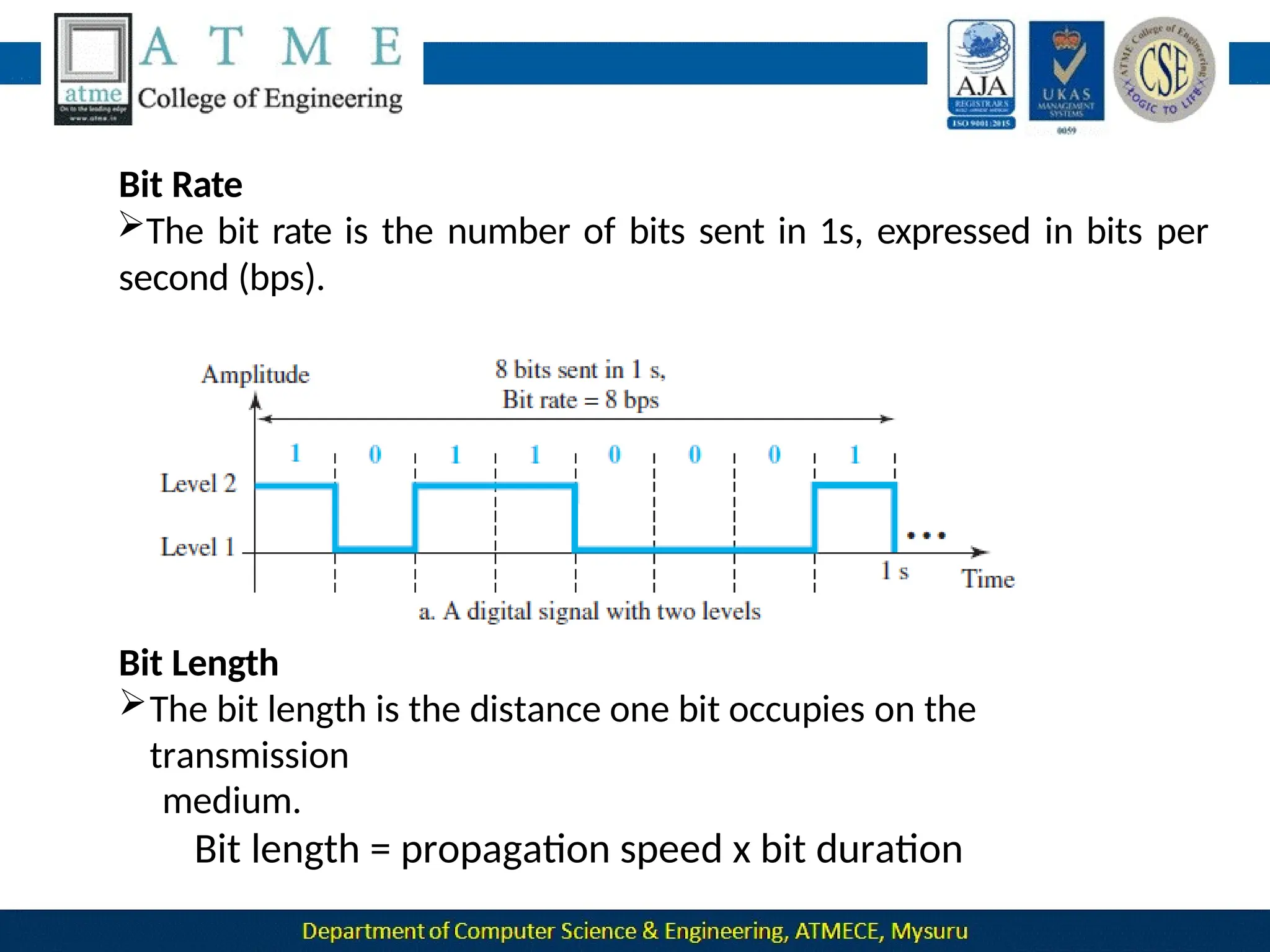
  • 447.
    Carrier Sense MultipleAccess with Collision Detection (CSMA/CD)  The CSMA method does not specify the procedure following a collision.  CSMA/CD augments the algorithm to handle the collision.  In this method, a station monitors the medium after it sends a frame to see if the transmission was successful. If so, the station is finished. If, however, there is a collision, the frame is sent again.
  • 448.
     At timet1, station A has executed its persistence procedure and starts sending the bits of its frame.  At time t2, station C has not yet sensed the first bit sent by A. Station C executes its persistence procedure and starts sending the bits in its frame, which propagate both to the left and to the right.  The collision occurs sometime after time t2.
  • 449.
     Station Cdetects a collision at time t3 when it receives the first bit of A’s frame. Station C immediately aborts transmission.  Station A detects collision at time t4 when it receives the first bit of C’s frame; it also immediately aborts transmission.  Looking at the figure, we see that A transmits for the duration t4 − t1; C transmits for the duration t3 − t2
  • 451.
    The flow diagramfor CSMA/CD is similar to the one for the ALOHA protocol, but there are differences.  The first difference is the addition of the persistence process.  We need to sense the channel before we start sending the frame by using one of the persistence processes  The second difference is the frame transmission. In ALOHA, we first transmit the entire frame and then wait for an acknowledgment. In CSMA/CD, transmission and collision detection are continuous processes.  We do not send the entire frame and then look for a collision. The
  • 452.
     We usea loop to show that transmission is a continuous process. We constantly monitor in order to detect one of two conditions: either transmission is finished or a collision is detected.  Either event stops transmission. When we come out of the loop, if a collision has not been detected, it means that transmission is complete; the entire frame is transmitted.  Otherwise, a collision has occurred. The third difference is the sending of a short jamming signal to make sure that all other stations become aware of the collision.
  • 453.
    Minimum Frame Size  ForCSMA/CD to work, we need a restriction on the frame size. Before sending the last bit of the frame, the sending station must detect a collision, if any, and abort the transmission.  This is so because the station, once the entire frame is sent, does not keep a copy of the frame and does not monitor the line for collision detection.  Therefore, the frame transmission time Tfr must be at least two times the maximum propagation time Tp.
  • 454.
     To understandthe reason, let us think about the worst-case scenario.  If the two stations involved in a collision are the maximum distance apart, the signal from the first takes time Tp to reach the second, and the effect of the collision takes another time Tp to reach the first.  So the requirement is that the first station must still be transmitting after 2 Tp.
  • 455.
    Throughput The throughput of pure or CSMA/CD isgreater than that of slotted ALOHA. The maximum throughput occurs at a different value of G and is based on the persistence method and the value of p in the p-persistent approach. For the 1-persistent method, the maximum throughput is around 50 percent when G = 1. For the nonpersistent method, the maximum throughput can go up to 90 percent when G is between 3 and 8.
  • 456.
    Energy Level We cansay that the level of energy in a channel can have three values: zero, normal, and abnormal. At the zero level, the channel is idle. At the abnormal level, there is a collision and the level of the energy is twice the normal level.  A station that has a frame to send or is sending a frame needs to monitor the energy level to determine if the channel is idle, busy, or in collision mode.
  • 457.
    Figure : Energylevel during transmission, idleness, or collision
  • 458.
    Carrier sense multipleaccess with collision avoidance (CSMA/CA)  CSMA/CA was invented for wireless networks. Collisions are avoided through the use of CSMA/CA’s three strategies:  The interframe space  The contention window and  Acknowledgments ❑ Interframe Space (IFS): • When an idle channel is found, the station does not send immediately. It waits for a period of time called the interframe space or IFS. • Even though the channel may appear idle when it is sensed, a distant
  • 459.
    • The distantstation’s signal has not yet reached this station. •The IFS time allows the front of the transmitted signal by the distant station to reach this station. •After waiting an IFS time, if the channel is still idle, the station can send, but it still needs to wait a time equal to the contention window. • The IFS variable can also be used to prioritize stations or frame types. For example, a station that is assigned a shorter IFS has a higher priority.
  • 460.
    ❑ Contention Window: •The contention window is an amount of time divided into slots. • This means that it is set to one slot the first time and then doubles each time the station cannot detect an idle channel after the IFS time. • One interesting point about the contention window is that the station needs to sense the channel after each time slot. • However, if the station finds the channel busy, it does not restart the process; it just stops the timer and restarts it when the channel is sensed as idle. This gives priority to the station with the longest waiting time.
  • 461.
    ❑ Acknowledgment: • Withall these precautions, there still may be a collision resulting in destroyed data. • In addition, the data may be corrupted during the transmission. • The positive acknowledgment and the time-out timer can help guarantee that the receiver has received the frame.
  • 464.
    1. Before sendinga frame, the source station senses the medium by checking the energy level at the carrier frequency. a.The channel uses a persistence strategy with backoff until thechannel is idle b.After the station is found to be idle, the station waits for a period of time called the DCF interframe space (DIFS); then the station sends a control frame called the request to send (RTS). 2. After receiving the RTS and waiting a period of time called the short interframe space (SIFS), the destination station sends a control (CTS), to the source station. This destination station is ready to frame, called the clear to send control frame indicates that the receive data. 105
  • 465.
    after waiting anamount of time 3.The source station sends data equal to SIFS. 4.The destination station, after waiting an amount of time equal to SIFS, sends an acknowledgment to show that the frame has been received. Acknowledgment is needed in this protocol because the station does not have any means to check for the successful arrival of its data at the destination. On the other hand, the lack of collision in CSMA/CD is a kind of indication to the source that data have arrived.
  • 466.
    Network Allocation Vector Howdo other stations defer sending their data if one station acquires access? In other words, how is the collision avoidance aspect of this protocol accomplished? The key is a feature called NAV. In other words, each station, before sensing the physical medium to see if it is idle, first checks its NAV to see if it has expired.
  • 467.
    Collision During Handshaking Whathappens if there is a collision during the time when RTS or CTS control frames are in transition, often called the handshaking period? Two or more stations may try to send RTS frames at the same time. These control frames may collide. However, because there is no mechanism for collision detection, the sender assumes there has been a collision if it has not received a CTS frame from the receiver. The backoff strategy is employed, and the sender tries again.
  • 468.
    CONTROLLED ACCESS  Incontrolled access, the stations consult one another to find which station has the right to send. A station cannot send unless it has been authorized by other stations. Three controlled-access methods 1.Reservation 2.Polling 3.Token Passing
  • 469.
    Reservation  In thereservation method, a station needs to make a reservation before sending data.  If there are N stations in the system, there are exactly N reservation minislots in the reservation frame.  Each minislot belongs to a station.  When a station needs to send a data frame, it makes a reservation in its own minislot.  The stations that have made reservations can send their data frames after the reservation frame.
  • 470.
    Figure :Reservation accessmethod  Figure above shows a situation with five stations and a five-minislot reservation frame. In the first interval, only stations 1, 3, and 4 have made reservations. In the second interval, only station 1 has made a reservation.
  • 471.
    Polling  Polling workswith topologies in which one device is designated as a primary station and the other devices are secondary stations. It is up to the primary device to determine which device is allowed to use the channel at a given time.  The primary device, therefore, is always the initiator of a session  Uses poll and select functions to prevent collisions.  The drawback is if the primary station fails, the system goes down.
  • 472.
     If theprimary wants to send data, it tells the secondary to get ready to receive the data. This is called select function.  Before sending the data, the primary creates and transmits a select(SEL) frame, one field of which includes the address of the intended secondary.  If the secondary responses with ACK frame, the primary sends the data and gets the ACK from secondary.
  • 473.
     When theprimary is ready to receive data, it polls each device.  If the NAK frame is received, it means that the secondary device has nothing to send.  Then the primary polls the next secondary in the same manner until it finds the one with data to send.  When the response is a data frame, the primary reads the frame and returns an acknowledgement(ACK) frame.
  • 474.
    Token Passing  In thetoken-passing method, the stations in a network are organized in a logical ring.  For each station, there is a predecessor and a successor.  The right to this access has been passed from the predecessor to the current station. The right will be passed to the successor when the current station has no more data to send.
  • 475.
    The possession ofthe token gives the station the right to access the channel and send its data.  When a station has some data to send, it waits until it receives the token from its predecessor.  It then holds the token and sends its data.  When the station has no more data to send, it releases the token, passing it to the next logical station in the ring.  The station cannot send data until it receives the token again in the next round.
  • 476.
    In this process,when a station receives the token and has no data to send, it just passes the data to the next station.  Token management is needed for this access method.  Stations must be limited in the time they can have possession of the token.  Another function of token management is to assign priorities to the stations and to the types of data being transmitted. Finally, token management is needed to make low-priority stations release the token to high-priority stations.
  • 477.
    Logical Ring  Ina token-passing network, stations do not have to be physically connected in a ring; the ring can be a logical one. Four different physical topologies that can create a logical ring.  In the physical ring topology, when a station sends the token to its successor, the token cannot be seen by other stations.  The problem with this topology is that if one of the links—the medium between two adjacent stations—fails, the whole system fails.
  • 478.
     The dualring topology uses a second (auxiliary) ring which operates in the reverse direction compared with the main ring. The second ring is for emergencies only (such as a spare tyre for a car).  If one of the links in the main ring fails, the system automatically combines the two rings to form a temporary ring. After the failed link is restored, the auxiliary ring becomes idle again.  For this topology to work, each station needs to have two transmitter ports and two receiver ports.  The high-speed Token Ring networks called FDDI (Fiber Distributed Data Interface) and CDDI (Copper Distributed Data Interface) use this topology.
  • 479.
     In thebus ring topology, also called a token bus, the stations are connected to a single cable called a bus.  They, however, make a logical ring, because each station knows the address of its successor (and also predecessor for token management purposes).  When a station has finished sending its data, it releases the token and inserts the address of its successor in the token.  Only the station with the address matching the destination address of the token gets the token to access the shared media.  The Token Bus LAN, standardized by IEEE, uses this topology.
  • 480.
     In astar ring topology, the physical topology is a star.  There is a hub that acts as the connector.  The wiring inside the hub makes the ring.  The stations are connected to this ring through the two wire connections.  This topology makes the network less prone to failure because if a link goes down, it will be bypassed by the hub and the rest of the stations can operate. Adding and removing stations from the ring is easier.  This topology is still used in the Token Ring LAN designed by IBM.
  • 481.
    CHANNELIZATION  Channelization (orchannel partition, as it is sometimes called) is a multiple-access method in which the available bandwidth of a link is shared in time, frequency, or through code, among different stations. • Three channelization protocols: 1. Frequency Division Multiple Access(FDMA). 2. Time Division Multiple Access(TDMA) and 3. Code Division Multiple Access(CDMA).
  • 482.
    Frequency Division MultipleAccess  In FDMA, the available bandwidth is divided into frequency bands. Figure : Frequency-division multiple access (FDMA)
  • 483.
     Although FDMAand FDM are conceptually seem similar, there are differences between them. FDM is a physical layer technique that combines the loads from low bandwidth channels and transmits them by using a high-bandwidth channel. The channels that are combined are low-pass. The multiplexer modulates the signals, combines them, and creates a bandpass signal. The bandwidth of each channel is shifted by the multiplexer.  FDMA, on the other hand, is an access method in the data-link layer.  The datalink layer in each station tells its physical layer to make a bandpass signal from the data passed to it. The signal must be created in the allocated band.  There is no physical multiplexer at the physical layer. The signals created at each station are automatically bandpass-filtered.  They are mixed when they are sent to the common channel.
  • 484.
    Time Division MultipleAccess  In TDMA, the stations share the bandwidth of the channel in time. Figure : Time-division multiple access (TDMA)
  • 485.
     This maybe difficult because of propagation delays introduced in the system if the stations are spread over a large area.  To compensate for the delays, we can insert guard times.  Synchronization is normally accomplished by having some synchronization bits (normally referred to as preamble bits) at the beginning of each slot.
  • 486.
     TDM isa physical layer technique that combines the data from slower channels and transmits them by using a faster channel.  The process uses a physical multiplexer that interleaves data units from each channel.  TDMA is an access method in the data-link layer.  The data-link layer in each station tells its physical layer to use the allocated time slot.  There is no physical multiplexer at the physical layer.
  • 487.
    Code Division MultipleAccess It differs from TDMA in that all stations can send data simultaneously; there is no timesharing. Analogy  CDMA simply means communication with different codes. For example, in a large room with many people, two people can talk privately in English if nobody else understands English.  In other words, the common channel, the space of the room in this case, can easily allow communication between several couples, but in different languages (codes).
  • 488.
    Idea  Let usassume we have four stations, 1, 2, 3, and 4, connected to the same channel.  We assume that the assigned codes have two properties. 1. If we multiply each code by another, we
  • 489.
    Figure : Simpleidea of communication with code Station 1 multiplies (a special kind of multiplication, as we will see) its data by its code to get d1 ⋅ c1. Station 2 multiplies its data by its code to get d2 ⋅ c2, and so on. The data that go on the channel are the sum of all these terms, as shown in the box.
  • 490.
     For example,suppose stations 1 and 2 are talking to each other. Station 2 wants to hear what station 1 is saying. It multiplies the data on the channel by c1, the code of station 1.  Because (c1 ⋅ c1) is 4, but (c2 ⋅ c1), (c3 ⋅ c1), and (c4 ⋅ c1) are all 0s, station 2 divides the result by 4 to get the data from station 1. Chips  CDMA is based on coding theory.  Each station is assigned a code, which is a sequence of numbers called chips
  • 491.
    They are calledorthogonal sequences and have the following properties: 1. Each sequence is made of N elements, where N is the number of stations. 2. If we multiply a sequence by a number, every element in the sequence is multiplied by that element. This is called multiplication of a sequence by a scalar. For example,
  • 492.
    3. If wemultiply two equal sequences, element by element, and add the results, we get N, where N is the number of elements in each sequence. This is called the inner product of two equal sequences. For example, 4.If we multiply two different sequences, element by element, and add the results, we get 0. This is called the inner product of two different sequences. For example, 5.Adding two sequences means adding the corresponding elements. The result is another sequence. For example,
  • 493.
    Data Representation  Wefollow these rules for encoding:  If a station needs to send a 0 bit, it encodes it as −1;  if it needs to send a 1 bit, it encodes it as +1.  When a station is idle, it sends no signal, which is interpreted as a 0.
  • 494.
    Encoding and Decoding Asa simple example, we show how four stations share the link during a 1-bit interval. The procedure can easily be repeated for additional intervals. We assume that stations 1 and 2 are sending a 0 bit and channel 4 is sending a 1 bit. Station 3 is silent. The data at the sender site are translated to −1, −1, 0, and +1.  Each station multiplies the corresponding number by its chip (its orthogonal sequence), which is unique for each station.
  • 495.
     Now imaginethat station 3, which we said is silent, is listening to station 2. Station 3 multiplies the total data on the channel by the code for station 2, which is [+1 −1 +1 −1], to get
  • 496.
    Signal Level The figureshows the corresponding signals for each station (using NRZ-L for simplicity) and the signal that is on the common channel.
  • 497.
    Figure above showshow station 3 can detect the data sent by station 2 by using the code for station 2. The total data on the channel are multiplied by the signal representing station 2 chip code to get a new signal. The station then integrates and adds the area under the signal, to get the value −4, which is divided by 4 and interpreted as bit 0.
  • 498.
    Sequence Generation  In theWalsh table, each row is a sequence of chips. W1 for a one- chip sequence has one row and one column. We can choose −1 or +1 for the chip for this trivial table.
  • 499.
     According toWalsh, if we know the table for N sequences WN , we can create the table for 2N sequences W2N .  The WN with the overbar WN stands for the complement of WN, where each +1 is changed to −1 and vice versa.  Figure also shows how we can create W2 and W4 from W1. After we select W1, W2 can be made from four W1s, with the last one the complement of W1.  After W2 is generated, W4 can be made of four W2s, with the last one the complement of W2 .  W8 is composed of four W4, and so on. 140
  • 500.
  • 501.
  • 502.
  • 503.
  • 504.
  • 505.
    IPV4 Address 146 The IPv4address is a 32-bit number that uniquely identifies a network interface on a machine. An IPv4 address is typically written in decimal digits, formatted as four 8-bit fields that are separated by periods. Each 8-bit field represents a byte of the IPv4 address.
  • 506.
  • 507.
    Classful addressing Classful addressingis a concept that divides the available address space of IPv4 into five classes namely A, B, C, D & E. ... IP addresses, before 1993 use the classful addressing where classes have a fixed number of blocks and each block has a fixed number of hosts. 148
  • 508.
  • 509.
    Address depletion 150 of thepool of  IPv4 address exhaustion is the depletion unallocated IPv4 addresses.  Because the original Internet architecture had fewer than 4.3 billion addresses available, depletion has been anticipated since the late 1980s, when the Internet started experiencing dramatic growth.
  • 510.
    Subnetting & Supernetting 151 EachIP class is equipped with its own default subnet mask which bounds that IP class to have prefixed number of Networks and prefixed number of Hosts per network. Classful IP addressing does not provide any flexibility of having less number of Hosts per Network or more Networks per IP Class. Supernetting is the opposite of Subnetting. In subnetting, a single big network is divided into multiple smaller subnetworks. In Supernetting, multiple networks are combined into a bigger network termed as a Supernetwork or Supernet.
  • 511.
    Advantages 152  Classful addressingdoes not send subnet information.  Efficient address-space allocation is available in classless addressing  Memory is allocated in terms of bits and bytes rather than huge chunks of contiguous memory.  It eliminates any class imbalances  Routing entries are much more efficient  There are no separate entities for subnetting.
  • 512.
    Classless Addressing 153 Classless Addressingis an improved IP Addressing system. It makes the allocation of IP Addresses more efficient. It replaces the older classful addressing system based on classes. It is also known as Classless Inter Domain Routing (CIDR).
  • 513.
  • 514.
  • 515.
  • 516.
  • 517.
  • 518.
  • 519.
  • 520.
    DHCP 161  Dynamic HostConfiguration Protocol (DHCP) is a network management protocol used to automate the process of configuring devices on IP networks, thus allowing them to use network services such as DNS, NTP, and any communication protocol based on UDP or TCP.  A DHCP server dynamically assigns an IP address and other network configuration parameters to each device on a network so they can communicate with other IP networks.
  • 521.
  • 522.
  • 523.
  • 524.
    Error Control 165  Twothings can cause a DHCP error. One is the configuration on the computer or device that allows a DHCP server to assign it an IP. The other is the configuration of the DHCP server.  DHCP errors occur when the DHCP server or router on a network cannot automatically adjust the device's IP address to join the network.
  • 525.
    FSM for DHCPclient 166
  • 526.
    NA T Network Address Translation(NAT) is a process in which one or more local IP address is translated into one or more Global IP address and vice versa in order to provide Internet access to the local hosts. 167
  • 527.
  • 528.
  • 529.
  • 530.
  • 531.
    Wired LANs: Ethernet Wired are the most networks, also called Ethernet networks common type of Local Area Network(LAN) technology . A wired network is simply a collection of two or more computers, printers and the other devices linked by Ethernet
  • 532.
    Ethernet Protocol  TCP/IPaccepts any protocol at these two layers that can provide services to the network layer.  The Ethernet used the CSMA/CD approach. The Token Ring, Token Bus, and FDDI (Fiber Distribution Data Interface) used the token-passing approach.  During this period, another LAN technology, ATM LAN, which deployed the high speed WAN technology (ATM), appeared in the market.
  • 533.
     Almost everyLAN except Ethernet has disappeared from the marketplace because Ethernet was able to update itself to meet the needs of the time.  The Ethernet protocol was designed so that it could evolve with the demand for higher transmission rates.  It is natural that an organization that has used an Ethernet LAN in the past and now needs a higher data rate would update to the new generation instead of switching to another technology, which might cost more.
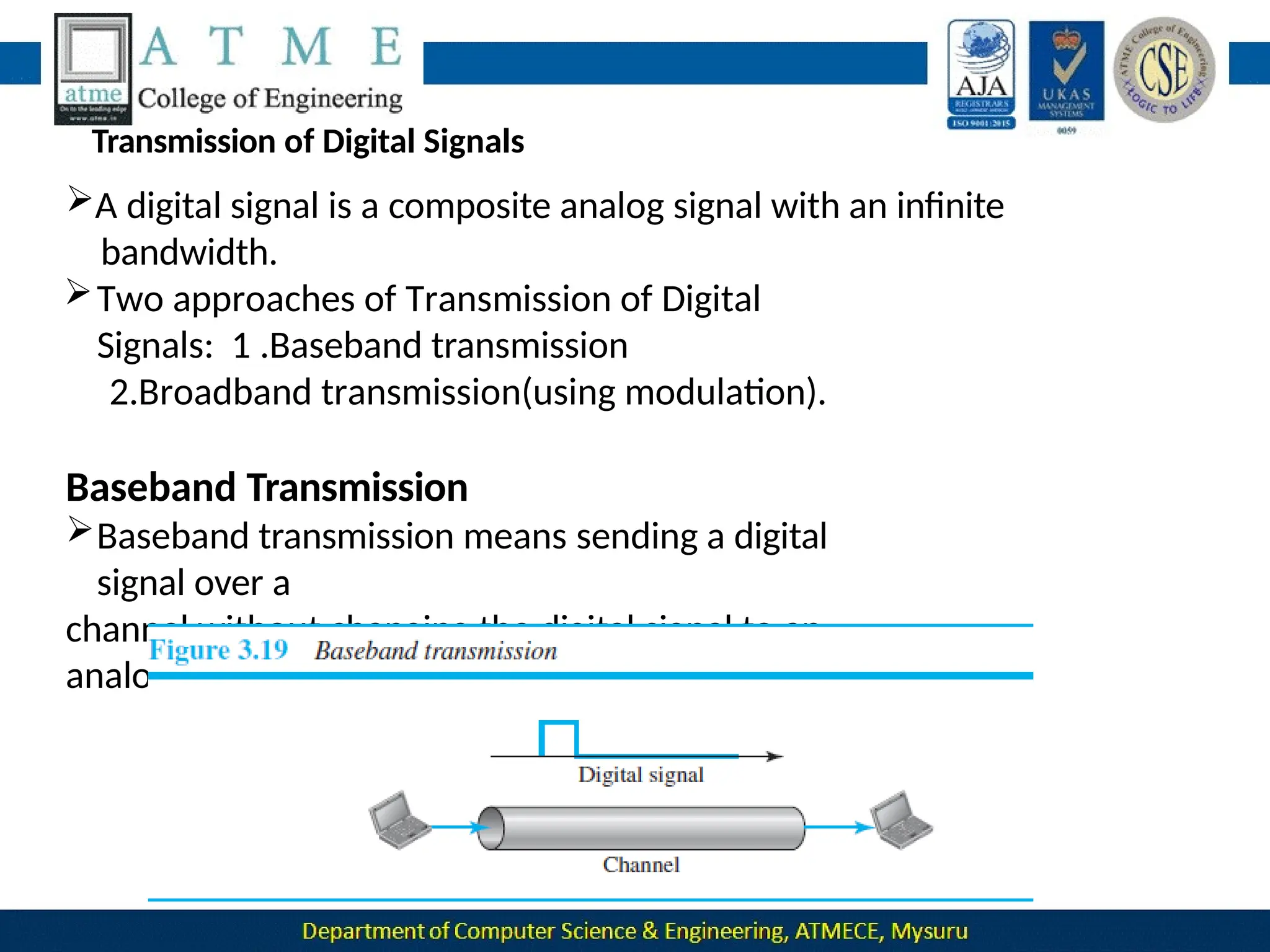
  • 534.
    IEEE Project 802 In 1985, the Computer Society of the IEEE started a project, called Project 802, to set standards to enable intercommunication among equipment from a variety of manufacturers.  Project 802 does not seek to replace any part of the OSI model or TCP/IP protocol suite. Instead, it is a way of specifying functions of the physical layer and the data-link layer of major LAN protocols.
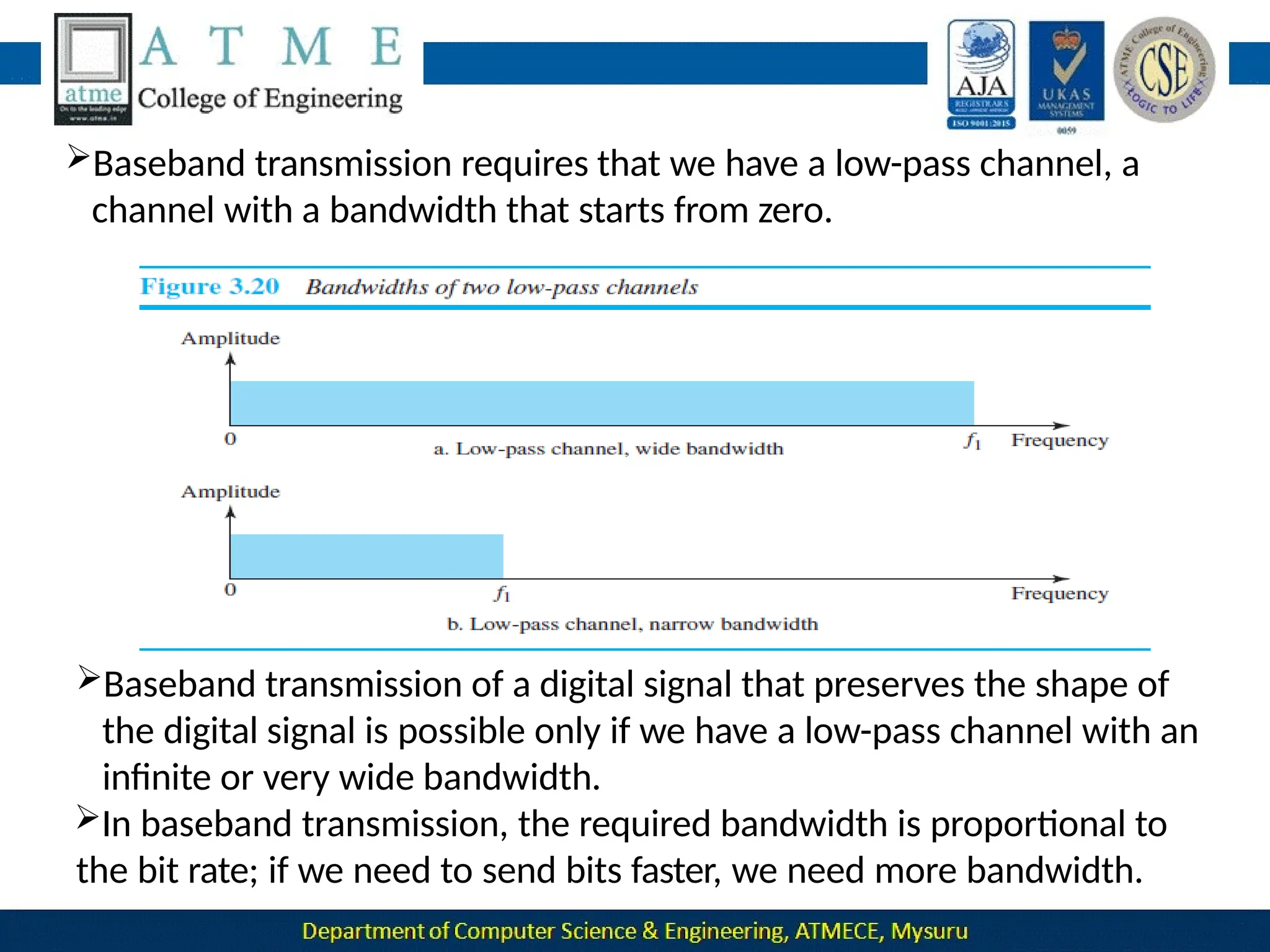
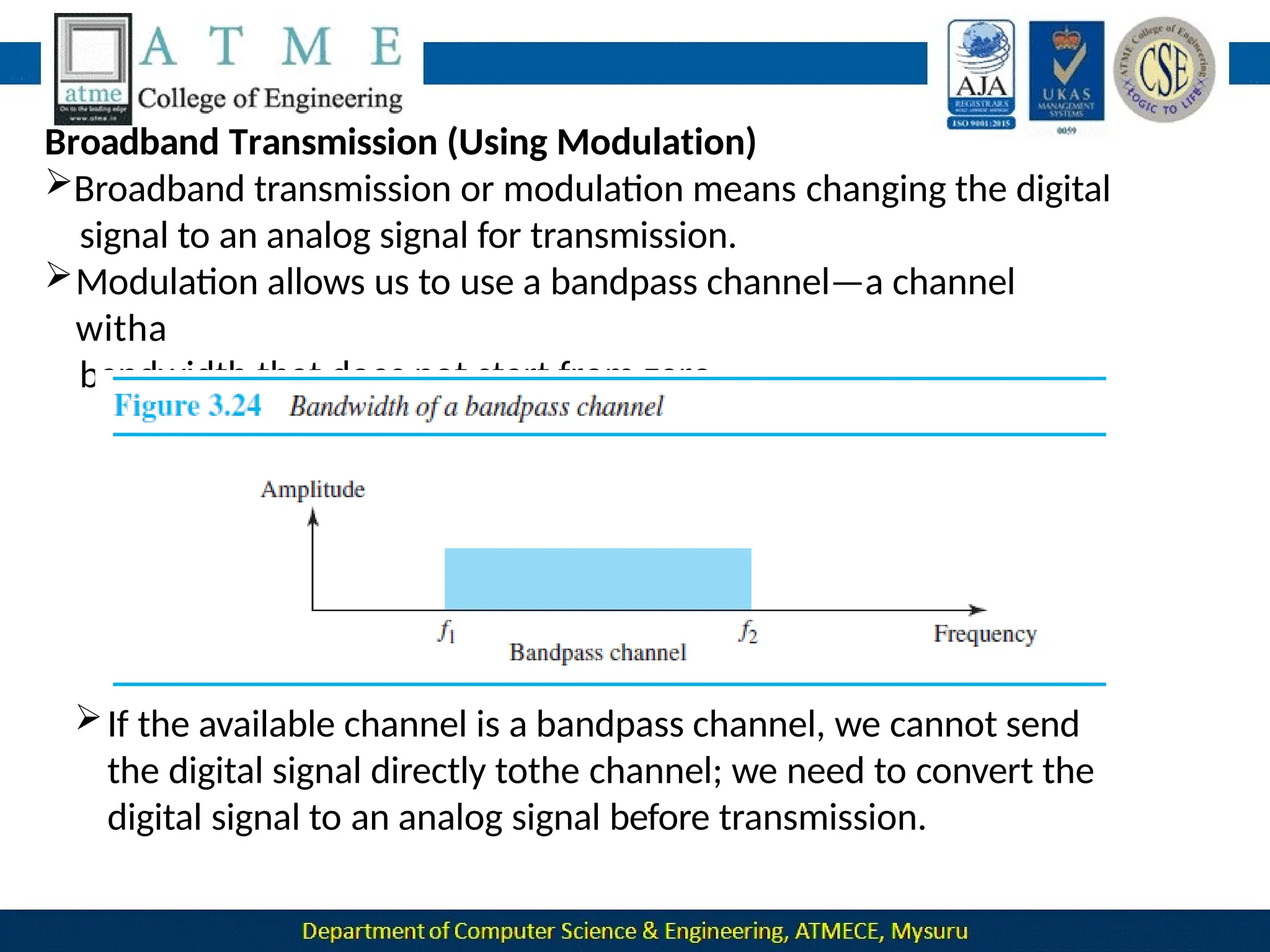
  • 535.
    Figure : IEEEstandard for LANs  Figure above shows the relationship of the 802 Standard to the TCP/IP protocol suite.
  • 536.
    The IEEE hassubdivided the data-link layer into two sub layers: 1. Logical Link Control (LLC) and 2. Media Access Control (MAC). IEEE has also created several physical-layer standards for different LAN protocols. Logical Link Control (LLC) In IEEE Project 802, flow control, error control, and part of the framing duties are collected into one sublayer called the logical link control (LLC). Framing is handled in both the LLC sublayer and the MAC sublayer.
  • 537.
    Media Access Control(MAC) IEEE Project 802 has created a sublayer called media access control that defines the specific access method for each LAN.  For example, it defines • CSMA/CD as the media access method for Ethernet LANs • Token-passing method for Token Ring and • Token Bus LANs. Part of the framing function is also handled by the MAC layer.
  • 538.
    Ethernet Evolution  Sincethen, it has gone through four generations: 1. Standard Ethernet (10 Mbps) 2. Fast Ethernet (100 Mbps) 3. Gigabit Ethernet (1 Gbps) and 4. 10 Gigabit Ethernet (10 Gbps),
  • 539.
    Standard Ethernet Original Ethernettechnology with the data rate of 10 Mbps is referred to as the Standard Ethernet. Characteristics  Connectionless and Unreliable Service • Ethernet provides a connectionless service, which means each frame sent is independent of the previous or next frame. • Ethernet has no connection establishment or connection termination Phases.
  • 540.
    • If aframe drops, the sender will not know about it. Since IP, which is using the service of Ethernet, is also connectionless, it will not know about it either. •If the transport layer is also a connectionless protocol, such as UDP, the frame is lost and salvation may only come from the application layer. • If a frame is corrupted during transmission and the receiver finds out about the corruption, which has a high level of probability of happening because of the CRC-32, the receiver drops the frame silently. • It is the duty of high-level protocols to find out about it.
  • 541.
  • 542.
    ❑ Preamble: Thisfield contains 7 bytes (56 bits) of alternating 0s and 1s that alert the receiving system to the coming frame and enable it to synchronize its clock if it’s out of synchronization. The pattern provides only an alert and a timing pulse. ❑ Start frame delimiter (SFD):This field (1 byte: 10101011) signals the beginning of the frame. The SFD warns the station or stations that this is the last chance for synchronization. The last 2 bits are (11)2 and alert the receiver that the next field is the destination address. This field is actually a flag that defines the beginning of the frame
  • 543.
    ❑ Destination address(DA):When the receiver sees its own link-layer address, or a multicast address for a group that the receiver is a member of, or a broadcast address, it decapsulates the data from the frame and passes the data to the upperlayer protocol defined by the value of the type field. ❑ Source address (SA): This field is also six bytes and contains the link- layer address of the sender of the packet ❑ Type: This field defines the upper-layer protocol whose packet is encapsulated in the frame. This protocol can be IP, ARP, OSPF, and so on. In other words, it serves the same purpose as the protocol field in a datagram and the port number in a segment or user datagram.
  • 544.
    ❑ Data: Thisfield carries data encapsulated from the upper-layer protocols. It is a minimum of 46 and a maximum of 1500 bytes. If the data coming from the upper layer is more than 1500 bytes, it should be fragmented and encapsulated in more than one frame. If it is less than 46 bytes, it needs to be padded with extra 0s. A padded data frame is delivered to the upper-layer protocol as it is. ❑ CRC: The last field contains error detection information, in this case a CRC-32. The CRC is calculated over the addresses, types, and data field. If the receiver calculates the CRC and finds that it is not zero (corruption in transmission), it discards the frame.
  • 545.
    Frame Length Ethernet hasimposed restrictions on both the minimum and maximum lengths of a frame. The minimum length restriction is required for the correct operation of CSMA/CD. If we count 18 bytes of header and trailer (6 bytes of source address, 6 bytes of destination address, 2 bytes of length or type, and 4 bytes of CRC), then the minimum length of data from the upper layer is 64 − 18 = 46 bytes. If the upper-layer packet is less than 46 bytes, padding is added to make up the difference.
  • 546.
    The standard definesthe maximum length of a frame (without preamble and SFD field) as 1518 bytes. The maximum length restriction has two historical reasons. • First, memory was very expensive when Ethernet was designed; a maximum length restriction helped to reduce the size of the buffer. • Second, the maximum length restriction prevents one station from monopolizing the shared medium, blocking other stations that have data to send. Minimum frame length: 64 bytes Maximum frame length: 1518 bytes Minimum data length: 46 bytes Maximum data length: 1500 bytes
  • 548.
    Addressing in  Each stationon an Ethernet network (such as a PC, workstation, or printer) has its own network interface card (NIC).  The NIC fits inside the station and provides the station with a link- layer address. The Ethernet address is 6 bytes (48 bits), normally written hexadecimal notation, with a colon between the bytes. For example: 4A:30:10:21:10:1A
  • 549.
    Unicast, Multicast, andBroadcast Addresses  The destination address, however, can be unicast, multicast, or broadcast.  If the least significant bit of the first byte in a destination address is 0, the address is unicast; otherwise, it is multicast.
  • 550.
    Transmission of AddressBits  The way the addresses are sent out online is different from the way they are written in hexadecimal notation.  The transmission is left to right, byte by byte; however, for each byte, the least significant bit is sent first and the most significant bit is sent last.  This means that the bit that defines an address as unicast or multicast arrives first at the receiver.  This helps the receiver to immediately know if the packet is unicast or multicast.
  • 552.
    Distinguish Between Unicast,Multicast, and Broadcast Transmission Standard Ethernet uses a coaxial cable (bus topology) or a set of twisted-pair cables with a hub (star topology).  Transmission in the standard Ethernet is always broadcast, nomatter if the intention is unicast, multicast, or broadcast.
  • 554.
    In the bustopology, when station A sends a frame to station B, all stations will receive it. In the star topology, when station A sends a frame to station B, the hub will receive it. Since the hub is a passive element, it does not check the destination address of the frame; it regenerates the bits (if they have been weakened) and sends them to all stations except station A. Station A floods the network with the frame.
  • 555.
    In a unicasttransmission, all stations will receive the frame, the intended recipient keeps and handles the frame; the rest discard it.  In a multicast transmission, all stations will receive the frame, the stations that are members of the group keep and handle it; the rest discard it.  In a broadcast transmission, all stations (except the sender) will receive the frame and all stations (except the sender) keep and handle it.
  • 556.
    Access Method  Thestandard Ethernet chose CSMA/CD with 1-persistent method.  Assume station A has a frame to send to station D.  Station A first should check whether any other station is sending (carrier sense).
  • 557.
    Station A measuresthe level of energy on the medium for a short period of time. If there is no signal energy on the medium, it means that no station is sending (or the signal has not reached station A). Station A interprets this situation as idle medium. It starts sending its frame. Station A continuously monitors the medium until it becomes idle. It then starts sending the frame. Station A needs to keep a copy of the frame in its buffer until it is sure that there is no collision.
  • 558.
    The medium sensingdoes not stop after station A has started sending the frame.Station A needs to send and receive continuously. Two cases may occur: a. Station A has sent 512 bits and no collision is, the station then is sure that the frame will go through and stops sensing the medium. if station A does not sense the collision before sending 512 bits, there must have been no collision, because during this time, the first bit has reached the end of the line and all other stations know that a station is sending and refrain from sending.
  • 559.
    b. Station Ahas sensed a collision before sending 512 bits. This means that one of the previous bits has collided with a bit sent by another station. In this case both stations should refrain from sending and keep the frame in their buffer for resending when the line becomes available. After sending the jam signal, the stations need to increment the value of K (number of attempts). If after increment K = 15, the experience has shown that the network is too busy, the station needs to abort its effort and try again. If K < 15, the station can wait a backoff time and restart the process.
  • 560.
    Efficiency of StandardEthernet The practical efficiency of standard Ethernet has been measured to be Efficiency = 1 / (1 + 6.4 x a) The parameter “a” is the number of frames that can fit on the medium. It can be calculated as a = (propagation delay)/(transmission delay) because the transmission delay is the time it takes a frame of average size to be sent out and the propagation delay is the time it takes to reach the end of the medium.
  • 561.
    As the valueof parameter a decreases, the efficiency increases. This means that if the length of the media is shorter or the frame size longer, the efficiency increases. In the ideal case, a = 0 and the efficiency is 1.
  • 562.
    Implementation In 10BaseX  thenumber defines the data rate (10 Mbps)  the term Base means baseband (digital) signal  X approximately defines either the maximum size of the cable in 100 meters (for example 5 for 500 or 2 for 185 meters) or the type of cable, T for unshielded twisted pair cable (UTP) and F for fiber-optic.
  • 563.
    Encoding and Decoding Allstandard implementations use digital signaling (baseband) at 10 Mbps. At the sender, data are converted to a digital signal using the Manchester scheme; at the receiver, the received signal is interpreted as Manchester and decoded into data. Manchester encoding is self-synchronous, providing a transition at each bit interval.
  • 564.
    10Base5: Thick Ethernet Thefirst implementation is called 10Base5, thick Ethernet, or Thicknet. The nickname derives from the size of the cable.  10Base5 was the first Ethernet specification to use a bus topology with an external transceiver (transmitter/receiver) connected via a tap to a thick coaxial cable.
  • 565.
    The transceiver isresponsible for transmitting, receiving, and detecting collisions. The transceiver is connected to the station via a transceiver cable that provides separate paths for sending and receiving. This means that collision can only happen in the coaxial cable. The maximum length of the coaxial cable must not exceed 500m, otherwise, there is excessive degradation of the signal. If a length of more than 500 m is needed, up to five segments, each a maximum of 500 meters, can be connected using repeaters.
  • 566.
    10Base2: Thin Ethernet Thesecond implementation is called 10Base2, thin Ethernet, or Cheapernet. 10Base2 also uses a bus topology, but the cable is much thinner and more flexible. The cable can be bent to pass very close to the stations.
  • 567.
    This implementation ismore cost effective than 10Base5 because thin coaxial cable is less expensive than thick coaxial and the tee connections are much cheaper than taps. The length of each segment cannot exceed 185 m (close to 200 m) due to the high level of attenuation in thin coaxial cable. 10Base-T: Twisted-Pair Ethernet The third implementation is called 10Base-T or twisted-pair Ethernet. 10Base-T uses a physical star topology. The stations are connected to a hub via two pairs of twisted cable.
  • 568.
     Two pairsof twisted cable create two paths (one for sending and one for receiving) between the station and the hub.  The maximum length of the twisted cable here is defined as 100 m, to minimize the effect of attenuation in the twisted cable.
  • 569.
    10Base-F: Fiber Ethernet 10Base-Fuses a star topology to connect stations to a hub. The stations are connected to the hub using two fiber-optic cables,
  • 570.
    Changes in theStandard Bridged Ethernet The first step in the Ethernet evolution was the division of a LAN by bridges. Bridges have two effects on an Ethernet LAN:  They raise the bandwidth and  They separate collision domains.
  • 571.
    Raising the Bandwidth Inanunbridged Ethernet network, the total capacity (10 Mbps) is shared among all stations with a frame to send; the stations share the bandwidth of the network. When one station is sending, the other one refrains from sending. We can say that, in this case, each station on average sends at a rate of 5 Mbps.
  • 572.
     A bridgedivides the network into two or more networks.  Bandwidthwise, each network is independent.  For example, in Figure 13.12, a network with 12 stations is divided into two networks, each with 6 stations. Now each network has a capacity of 10 Mbps.
  • 573.
    In a networkwith a heavy load, each station theoretically is offered 10/7 Mbps instead of 10/12 Mbps. Separating Collision Domains Another advantage of a bridge is the separation of the collision domain. The collision domain becomes much smaller and the probability of collision is reduced tremendously. Without bridging, 12 stations contend for access to the medium; with bridging only 3 stations contend for access to the medium.
  • 575.
    Switched Ethernet The ideaof a bridged LAN can be extended to a switched LAN.  Instead of having two to four networks, why not have N networks, where N is the number of stations on the LAN? In other words, if we can have a multiple-port bridge, why not have an N-port switch? In this way, the bandwidth is shared only between the station and the switch (5 Mbps each). In addition, the collision domain is divided into N domains.
  • 576.
     A layer-2switch is an N-port bridge with additional sophistication that allows faster handling of the packets. Evolution from a bridged Ethernet to a switched Ethernet was a big step that opened the way to an even faster Ethernet
  • 577.
    Full-Duplex Ethernet One ofthe limitations of 10Base5 and 10Base2 is that communication is half-duplex (10Base-T is always full-duplex); a station can either send or receive, but may not do both at the same time. The full-duplex mode increases the capacity of each domain from 10 to 20 Mbps.
  • 578.
    No Need forCSMA/CD  In full-duplex switched Ethernet, there is no need for the CSMA/CD method. Each link is a point-to-point dedicated path between the station and the switch. There is no longer a need for carrier sensing; there is no longer a need for collision detection. The job of the MAC layer becomes much easier. The carrier sensing and collision detection functionalities of the MAC sublayer can be turned
  • 579.
    MAC Control Layer StandardEthernet was designed as a connectionless protocol at the MAC sublayer. There is no explicit flow control or error control to inform the sender that the frame has arrived at the destination without error. When the receiver receives the frame, it does not send any positive or negative acknowledgment. To provide for flow and error control in full-duplex switched Ethernet, a new sublayer, called the MAC control, is added between the LLC sublayer and the MAC sublayer.
  • 580.
    FAST ETHERNET (100MBPS)  In the 1990s, some LAN technologies with transmission rates higher than 10 Mbps, such as FDDI and Fiber Channel, appeared on the market. If the Standard Ethernet wanted to survive, it had to compete with these technologies. Ethernet made a big jump by increasing the transmission rate to 100 Mbps, and the new generation was called the Fast Ethernet.
  • 581.
    The goals ofFast Ethernet can be summarized as follows: 1. Upgrade the data rate to 100 Mbps. 2. Make it compatible with Standard Ethernet. 3. Keep the same 48-bit address. 4. Keep the same frame format. Access Method The proper operation of the CSMA/CD depends on the transmission rate, the minimum size of the frame, and the maximum network length. if the minimum frame size is still 512 bits, and it is transmitted 10 times faster, the collision needs to be detected 10 times sooner, which means the maximum length of the network should be 10 times shorter.
  • 582.
     So theFast Ethernet came with two solutions 1. The first solution was to totally drop the bus topology and use a passive hub and star topology but make the maximum size of the network 250 meters instead of 2500 meters as in the Standard Ethernet. This approach is kept for compatibility with the Standard Ethernet. 2. The second solution is to use a link-layer switch with a buffer to store frames and a full-duplex connection to each host to make the
  • 583.
    Autonegotiation A new featureadded to Fast Ethernet is called autonegotiation. Autonegotiation allows two devices to negotiate the mode or data rate of operation. It was designed particularly to allow incompatible devices to connect to one another. It was designed particularly for these purposes:  To allow incompatible devices to connect to one another.  To allow one device to have multiple capabilities.  To allow a station to check a hub’s capabilities.
  • 584.
    Physical Layer To beable to handle a 100 Mbps data rate, several changes need to be made at the physical layer. Topology  Fast Ethernet is designed to connect two or more stations. If there are only two stations, they can be connected point-to-point. Encoding  Manchester scheme is unsuitable. For this reason, the Fast Ethernet designers sought some alternative encoding/decoding scheme.
  • 585.
    Fast Ethernet implementationat the physical layer can be categorized as either two-wire or four-wire.  The two-wire implementation can be either shielded twisted pair (STP), which is called 100Base-TX, or fiber-optic cable, which is called 100Base- FX.  The four-wire implementation is designed only for unshielded twisted pair (UTP), which is called 100Base-T4.
  • 586.
    100Base-TX uses twopairs of twisted- pair.  The MLT-3 scheme was selected since it has good bandwidth performance.  since MLT-3 is not a self-synchronous line coding scheme, 4B/5B block coding is used to provide bit synchronization by preventing the occurrence of a long sequence of 0s and 1s.  This creates a data rate of 125 Mbps, which is fed into MLT-3 for encoding.
  • 587.
     100Base-FX usestwo pairs of fiber-optic cables. Optical fiber can easily handle high bandwidth requirements by using simple encoding schemes.  The designers of 100Base-FX selected the NRZ-I encoding scheme.  NRZ-I has a bit synchronization problem for long sequences of 0s (or 1s, based on the encoding). To overcome this problem, the designers used 4B/5B block encoding.  The block encoding increases the bit rate from 100 to 125 Mbps, which can easily be handled by fiber-optic cable.
  • 588.
    100Base-T4, was designedto use category 3 or higher UTP.  Uses 8B/6T encoding scheme. In this scheme eight data elements are encoded as six signal elements.
  • 589.
  • 590.
  • 591.
  • 592.
  • 593.
    10-GIGABIT EHTERNET 64 In recentyears, there has been another look into the Ethernet for use in metropolitan areas. The idea is to extend the technology, the data rate, and the coverage distance so that the Ethernet can be used as LAN and MAN (metropolitan area network). The IEEE committee created 10 Gigabit Ethernet and called it Standard 802.3ae.
  • 594.
    Implementation 65 10 Gigabit Ethernetoperates only in full-duplex mode, which means there is no need for contention; CSMA/CD is not used in 10 Gigabit Ethernet. Four implementations are the most common: 10GBase- SR, 10GBase-LR, 10GBase-EW, and 10GBase-X4. Table 13.4 shows a summary of the 10 Gigabit Ethernet implementations.
  • 595.
  • 596.
    WIRELESS LAN 67 Wireless LANs(WLANs) are wireless computer networks that use high- frequency radio waves instead of cables for connecting the devices within a limited area forming LAN (Local Area Network). Users connected by wireless LANs can move around within this limited area such as home, school, campus, office building, railway platform, etc.
  • 597.
  • 598.
  • 599.
    Characteristics of WirelessLAN Attenuation Interface Multipath Propagation Error 70
  • 600.
  • 601.
  • 602.
    IEEE802.11 73 IEEE 802.11 standard,popularly known as WiFi, lays down the architecture and specifications of wireless LANs (WLANs). WiFi or WLAN uses high-frequency radio waves instead of cables for connecting the devices in LAN. Users connected by WLANs can move around within the area of network coverage
  • 603.
  • 604.
  • 605.
  • 606.
  • 607.
  • 608.
  • 609.
  • 610.
  • 611.
  • 612.
  • 613.
  • 614.
  • 615.
  • 616.
  • 617.
  • 618.
  • 619.
  • 620.
  • 621.
  • 622.
  • 623.
  • 624.