Friday, April 21, 2017 #1/213
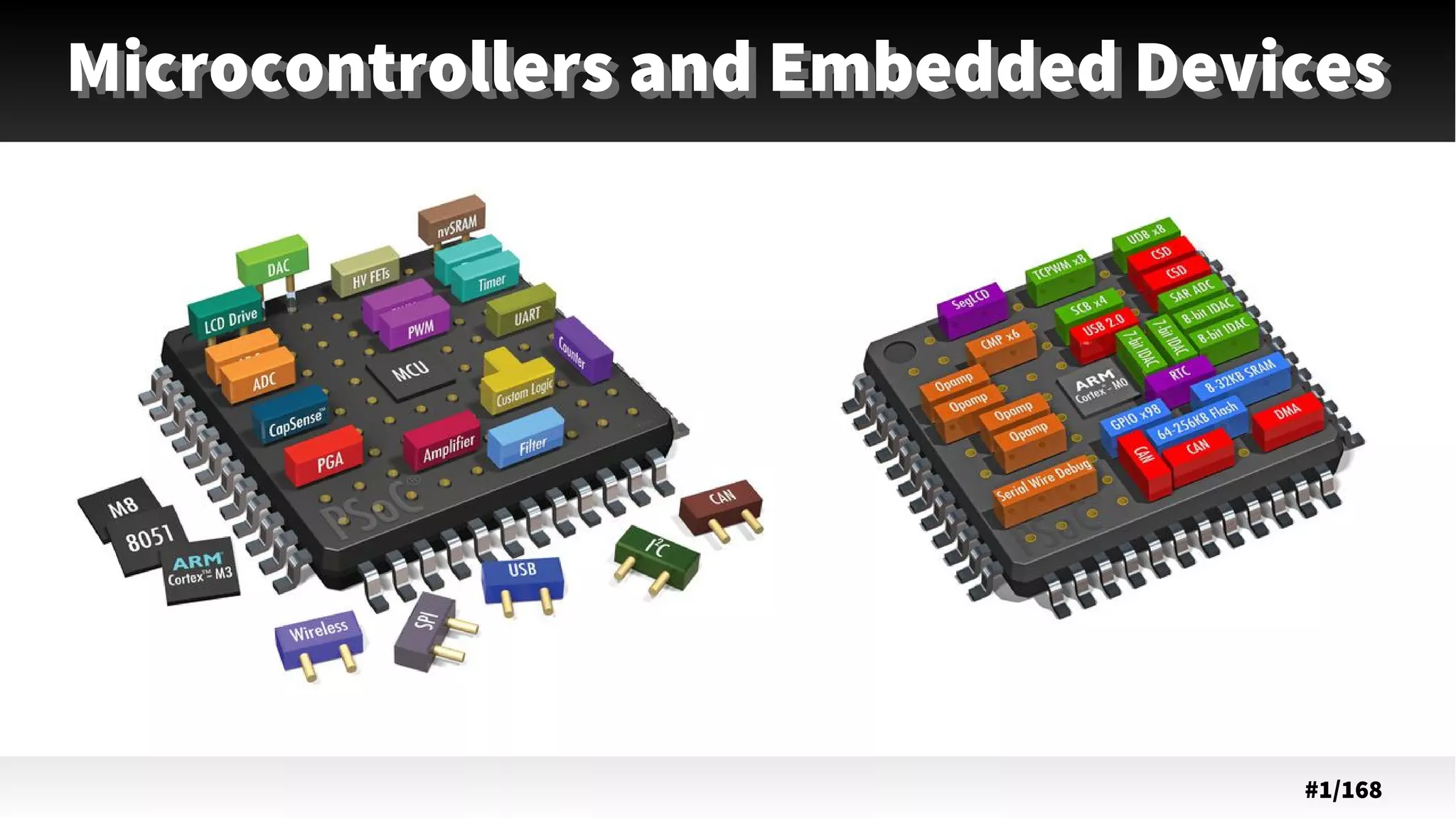
Microcontrollers and Embedded DevicesMicrocontrollers and Embedded Devices
# @2
LAB Navigation
@ #3/213
Th
● Introduction to microcontrollers and
embedded devices.
– History
– Single-board computer
– Single-chip computers
– Embedded devices
– Robots.
@ #4/213
Th Little History: Single board computers
●
single circuit board
● microprocessor(s)
●
memory
●
input/output (I/O)
REF: https://en.wikipedia.org/wiki/Single-board_computer
@ #5/213
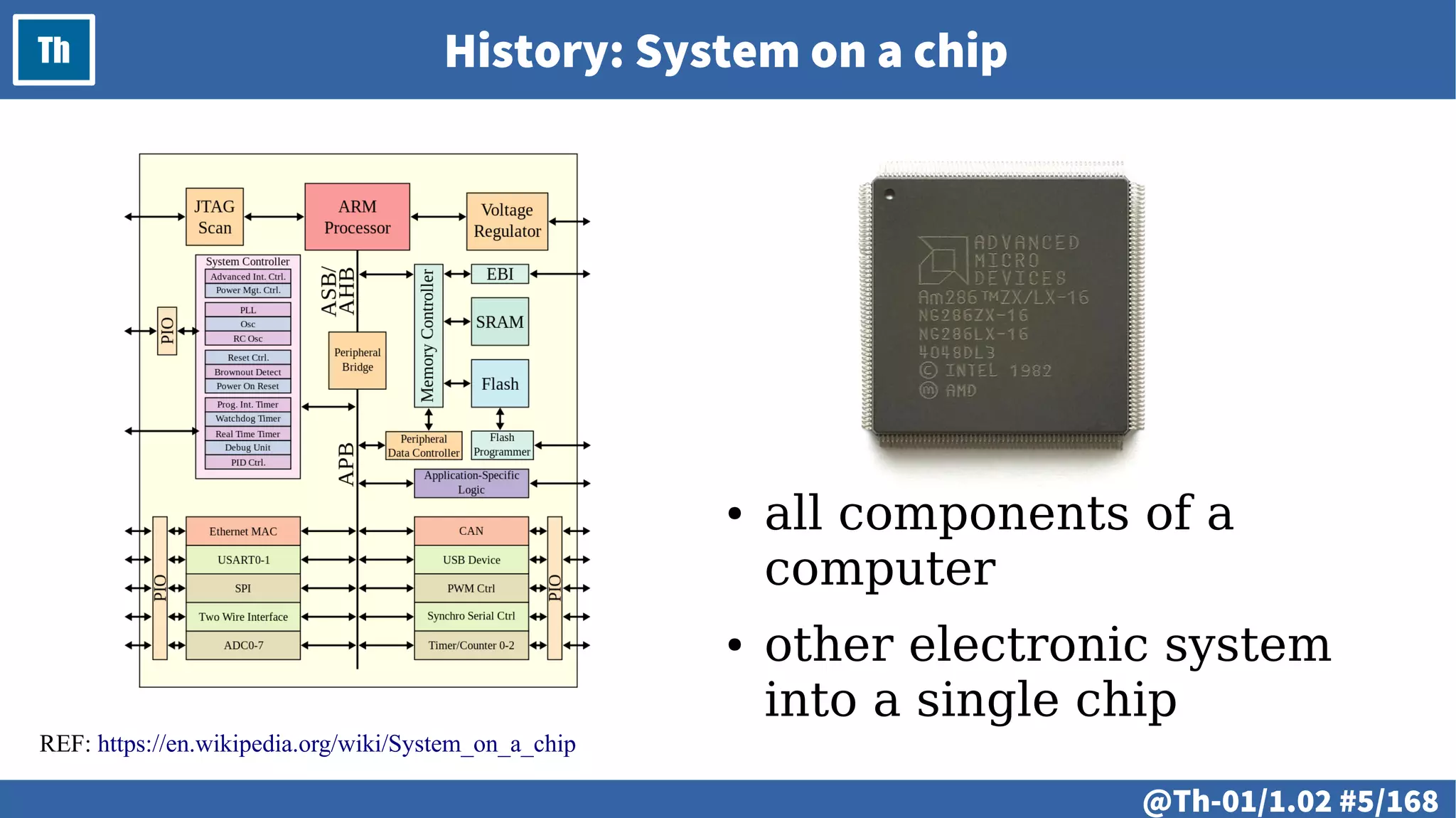
Th History: System on a chip
REF: https://en.wikipedia.org/wiki/System_on_a_chip
● all components of a
computer
● other electronic system
into a single chip
@ #6/213
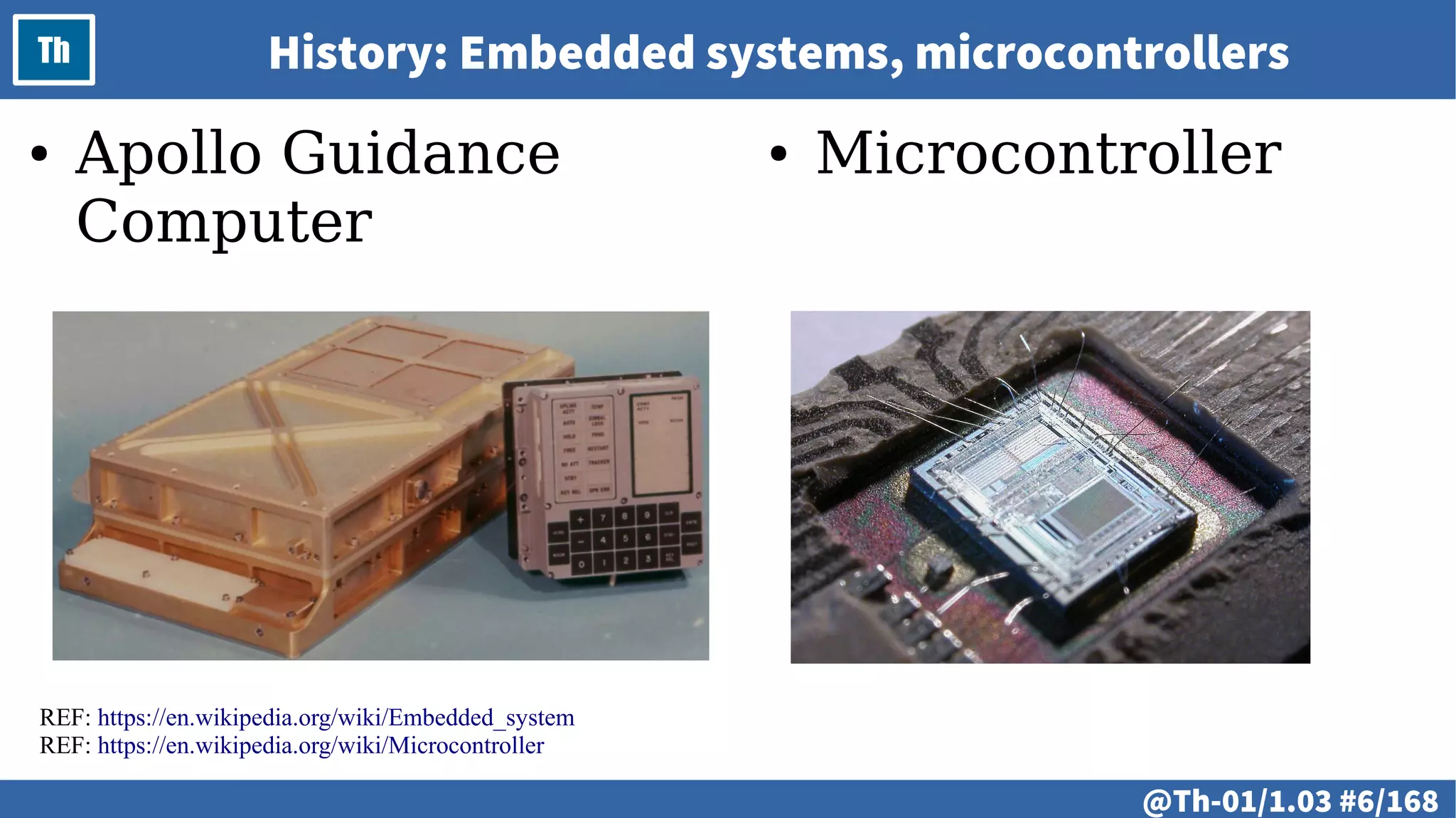
Th History: Embedded systems, microcontrollers
REF: https://en.wikipedia.org/wiki/Embedded_system
REF: https://en.wikipedia.org/wiki/Microcontroller
● Apollo Guidance
Computer
● Microcontroller
@ #7/213
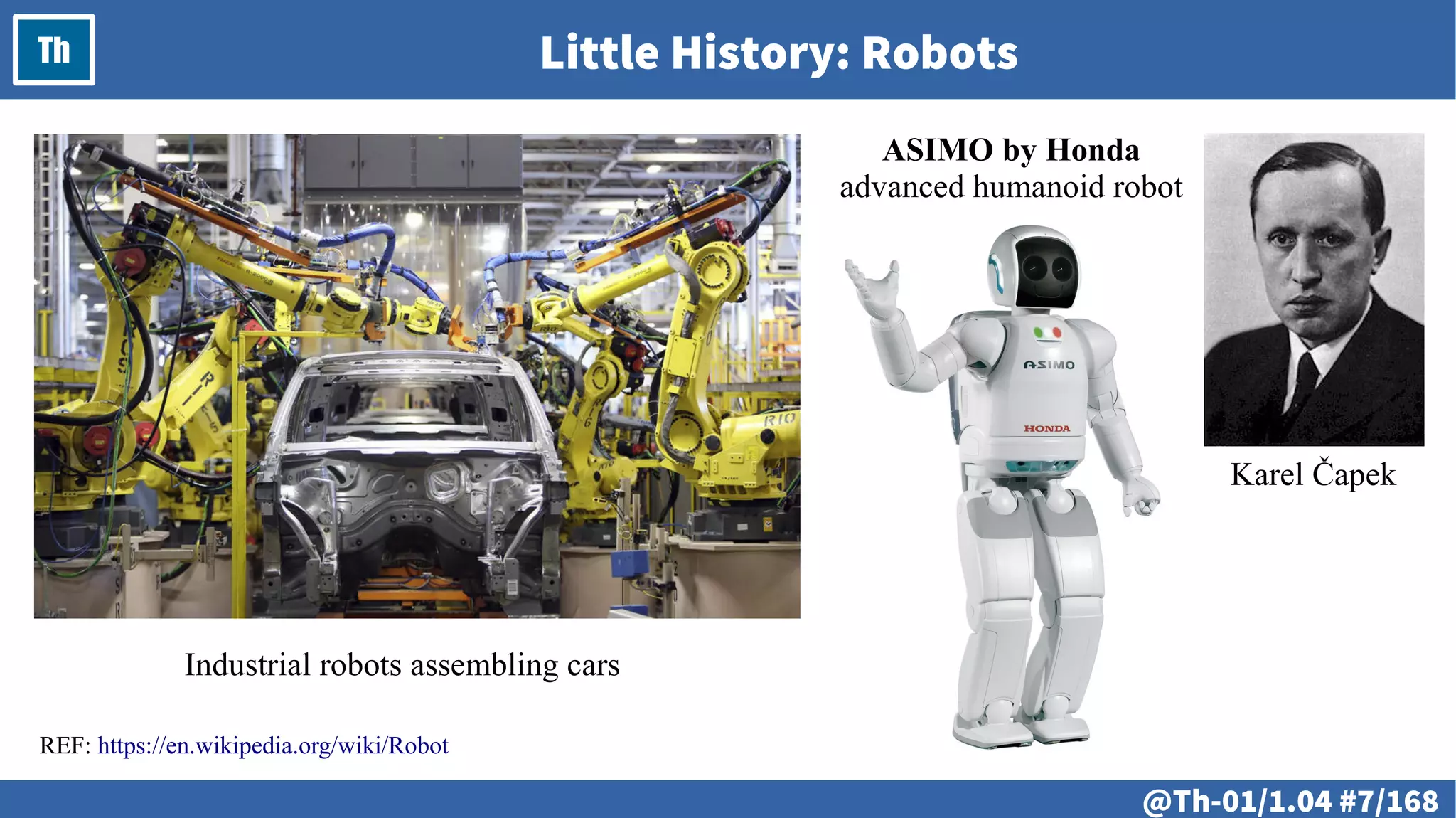
Th Little History: Robots
REF: https://en.wikipedia.org/wiki/Robot
Karel Čapek
ASIMO by Honda
advanced humanoid robot
Industrial robots assembling cars
@ #8/213
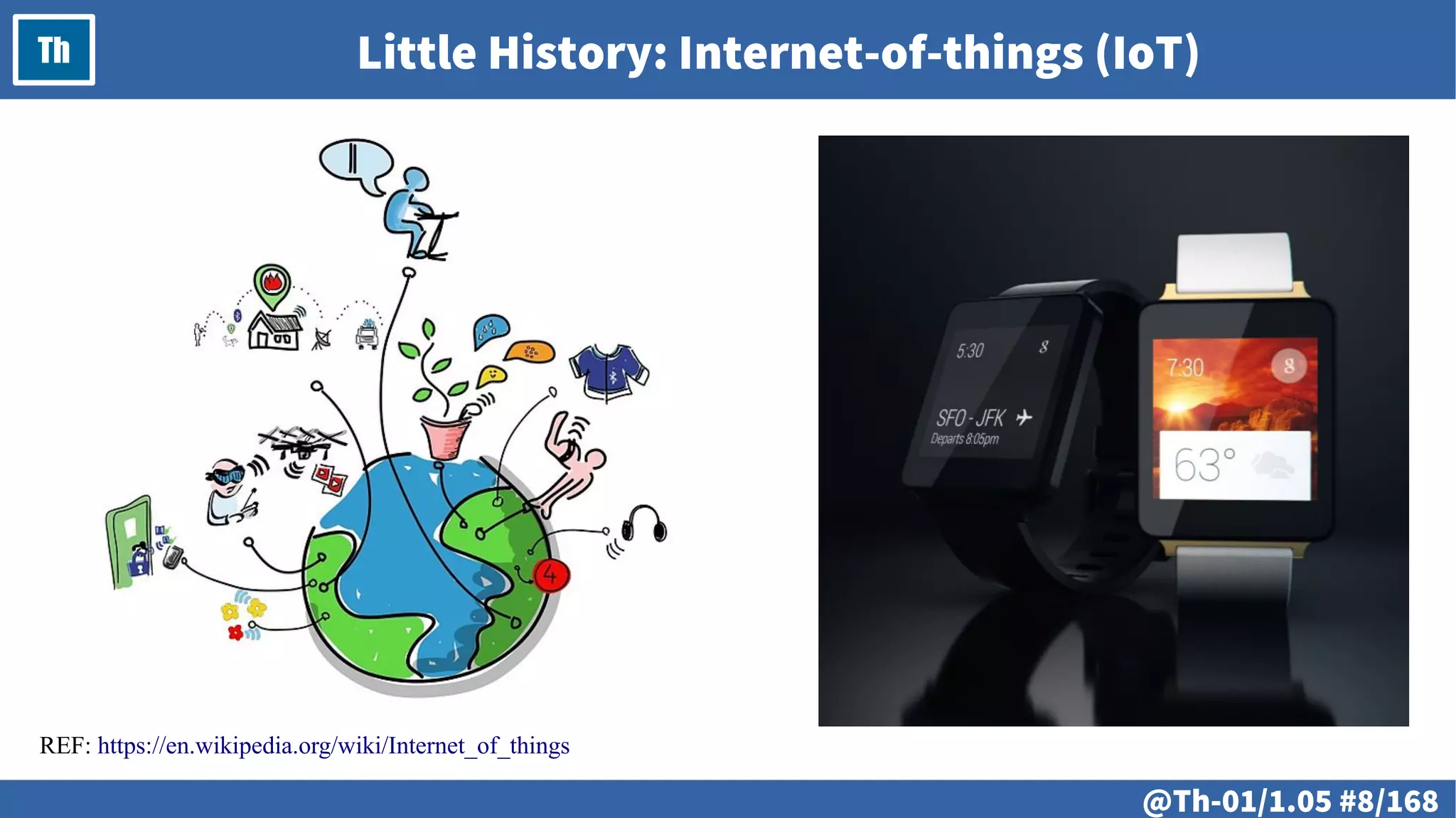
Th Little History: Internet-of-things (IoT)
REF: https://en.wikipedia.org/wiki/Internet_of_things
@ #9/213
Th
@ #10/213
Th
● Numeral systems. Logical and bitwise
operations.
– Numeral systems; decimal, binary and other
numbers – conversion from and to; Logical and
bitwise operations.
@ #11/213
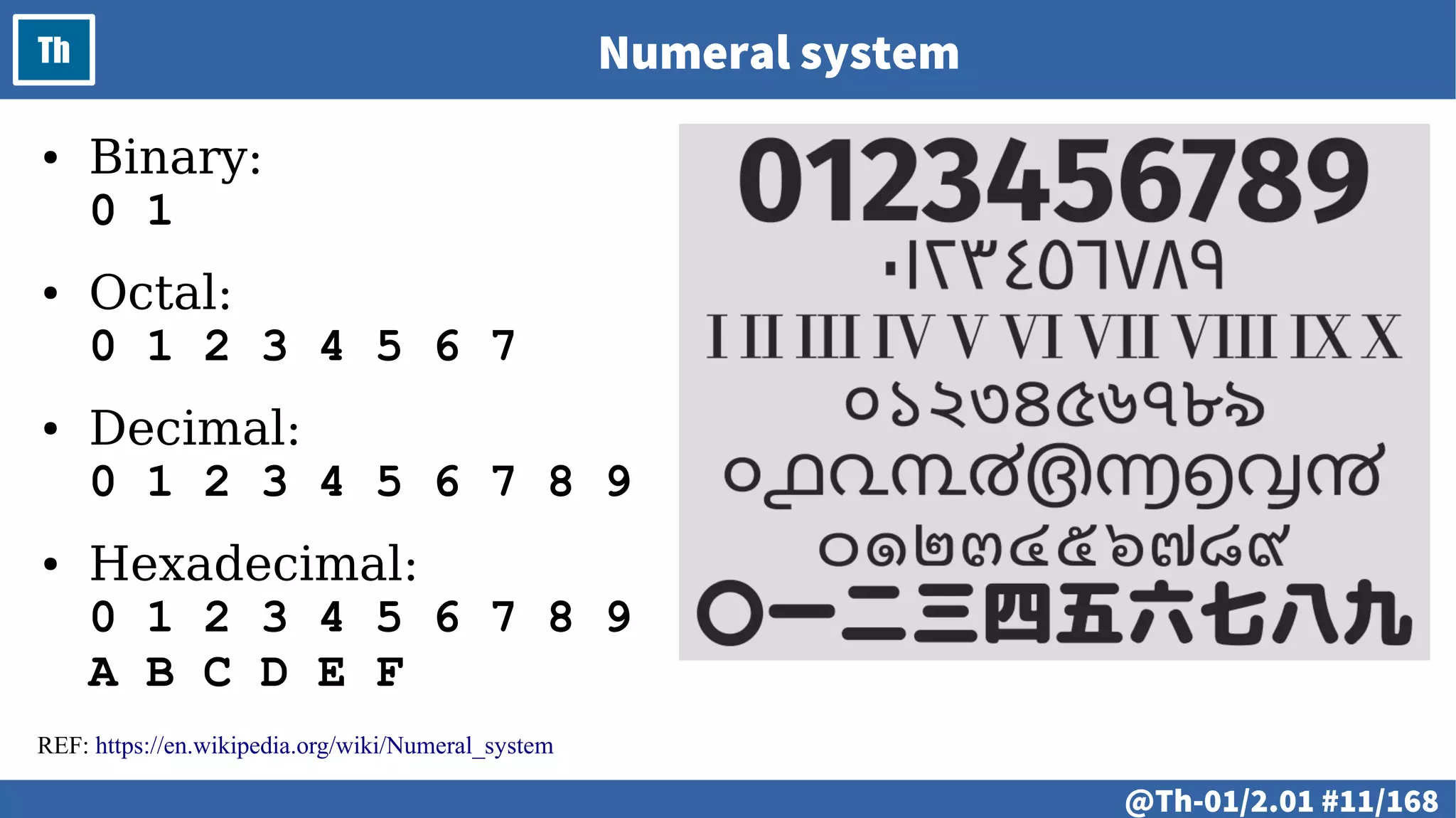
Th Numeral system
REF: https://en.wikipedia.org/wiki/Numeral_system
● Binary:
0 1
● Octal:
0 1 2 3 4 5 6 7
● Decimal:
0 1 2 3 4 5 6 7 8 9
● Hexadecimal:
0 1 2 3 4 5 6 7 8 9
A B C D E F
@ #12/213
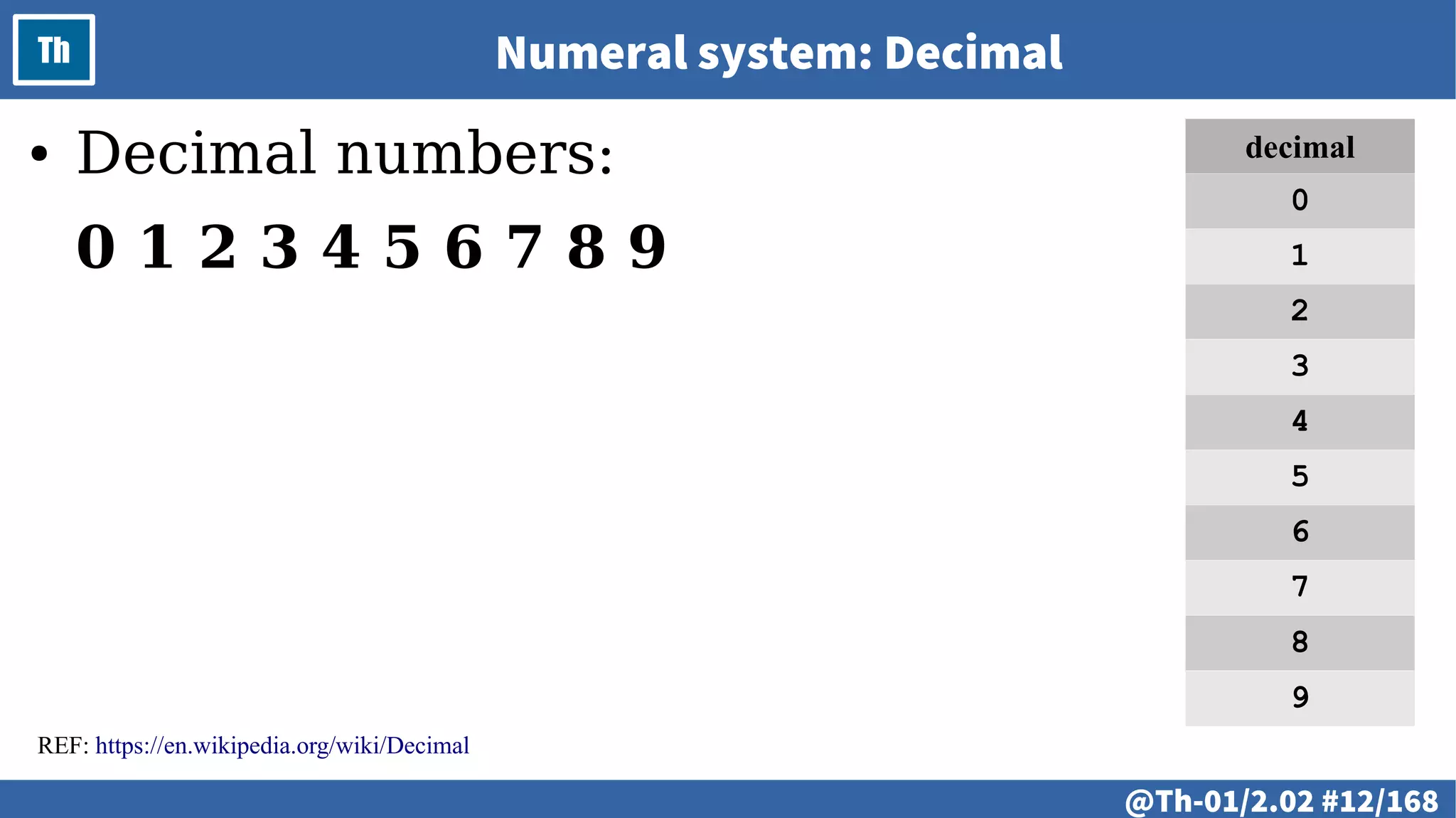
Th Numeral system: Decimal
● Decimal numbers:
0 1 2 3 4 5 6 7 8 9
REF: https://en.wikipedia.org/wiki/Decimal
decimal
0
1
2
3
4
5
6
7
8
9
@ #13/213
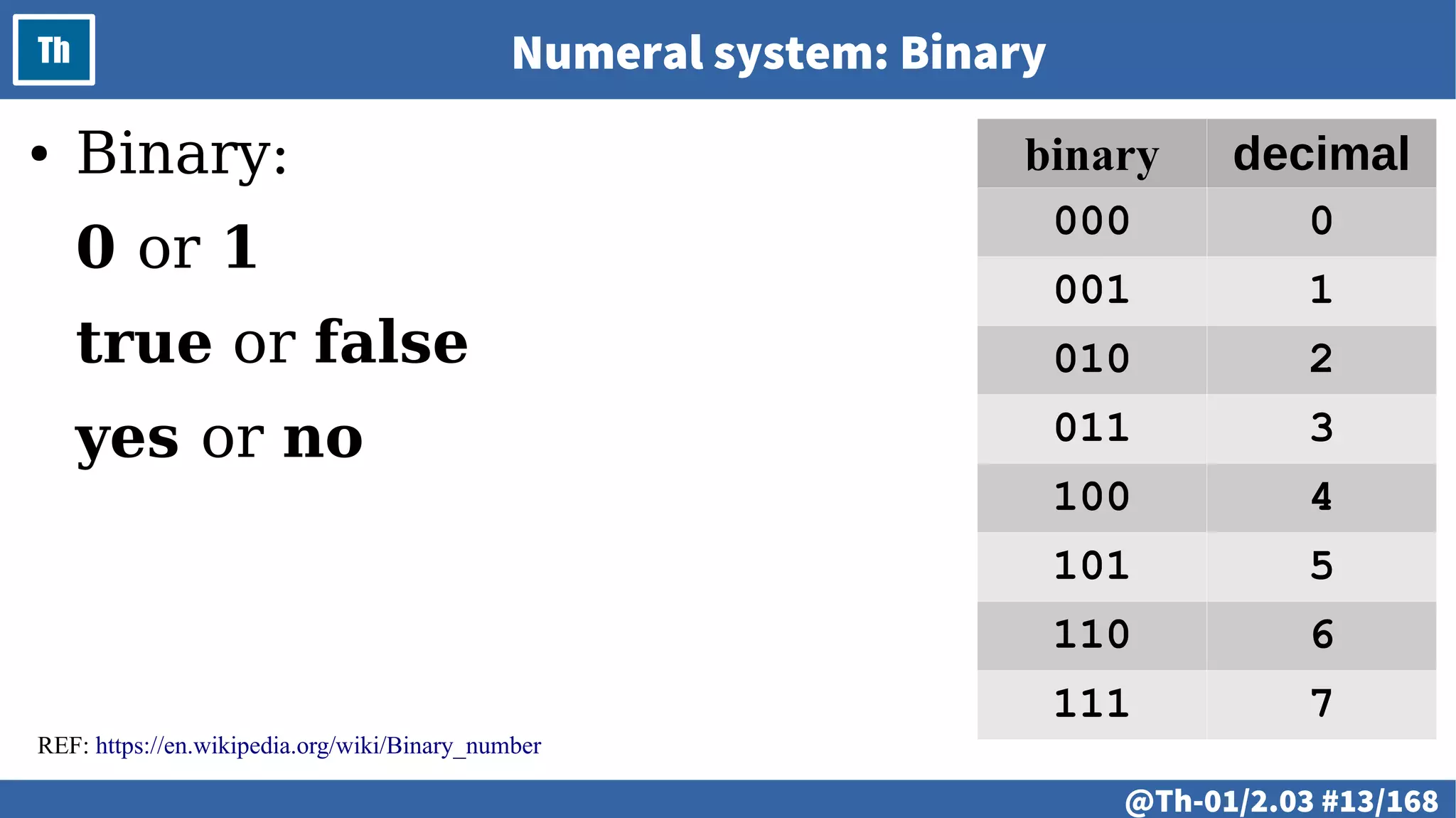
Th Numeral system: Binary
● Binary:
0 or 1
true or false
yes or no
REF: https://en.wikipedia.org/wiki/Binary_number
binary decimal
000 0
001 1
010 2
011 3
100 4
101 5
110 6
111 7
@ #14/213
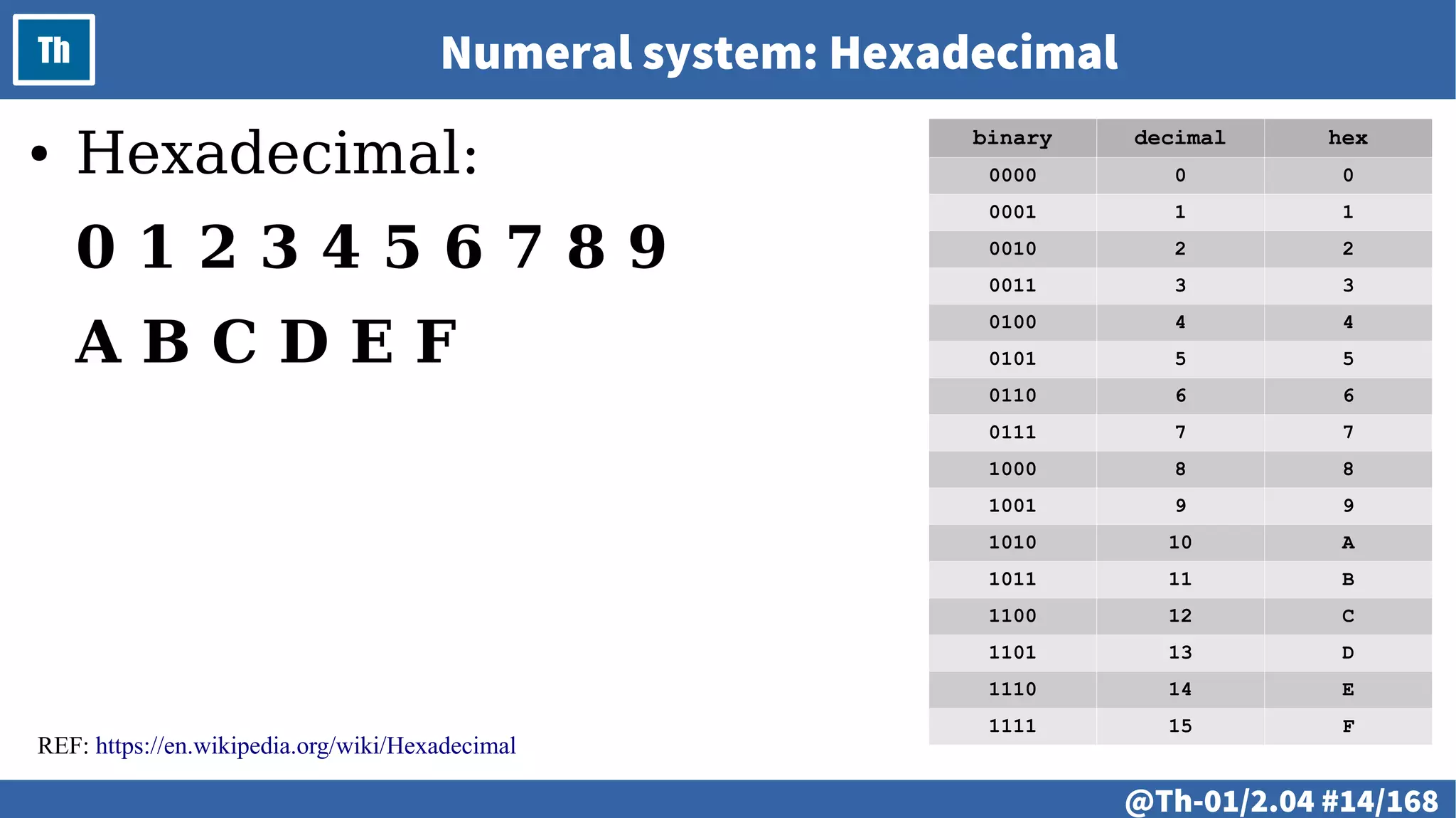
Th Numeral system: Hexadecimal
● Hexadecimal:
0 1 2 3 4 5 6 7 8 9
A B C D E F
binary decimal hex
0000 0 0
0001 1 1
0010 2 2
0011 3 3
0100 4 4
0101 5 5
0110 6 6
0111 7 7
1000 8 8
1001 9 9
1010 10 A
1011 11 B
1100 12 C
1101 13 D
1110 14 E
1111 15 F
REF: https://en.wikipedia.org/wiki/Hexadecimal
@ #15/213
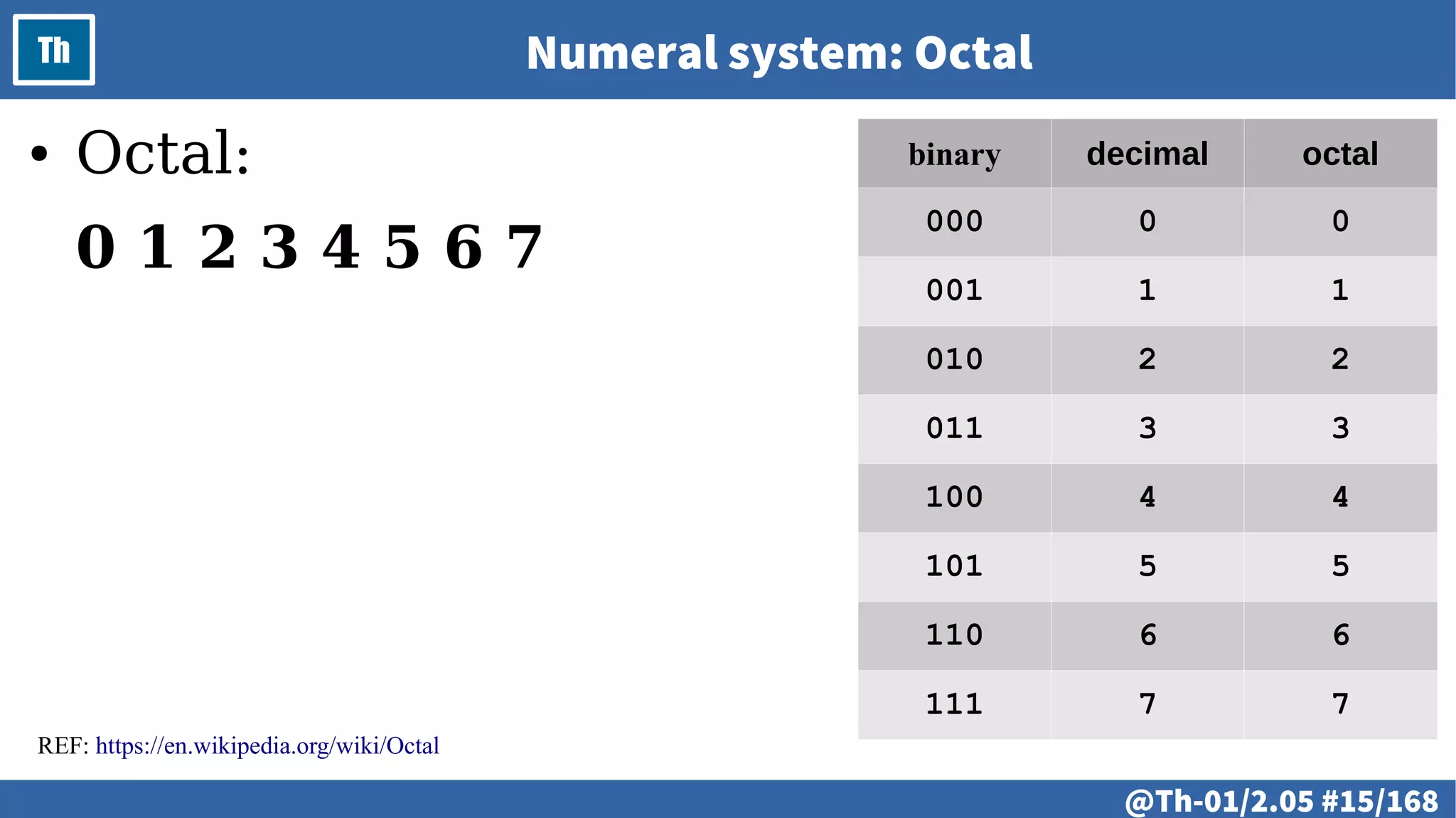
Th Numeral system: Octal
● Octal:
0 1 2 3 4 5 6 7
binary decimal octal
000 0 0
001 1 1
010 2 2
011 3 3
100 4 4
101 5 5
110 6 6
111 7 7
REF: https://en.wikipedia.org/wiki/Octal
@ #16/213
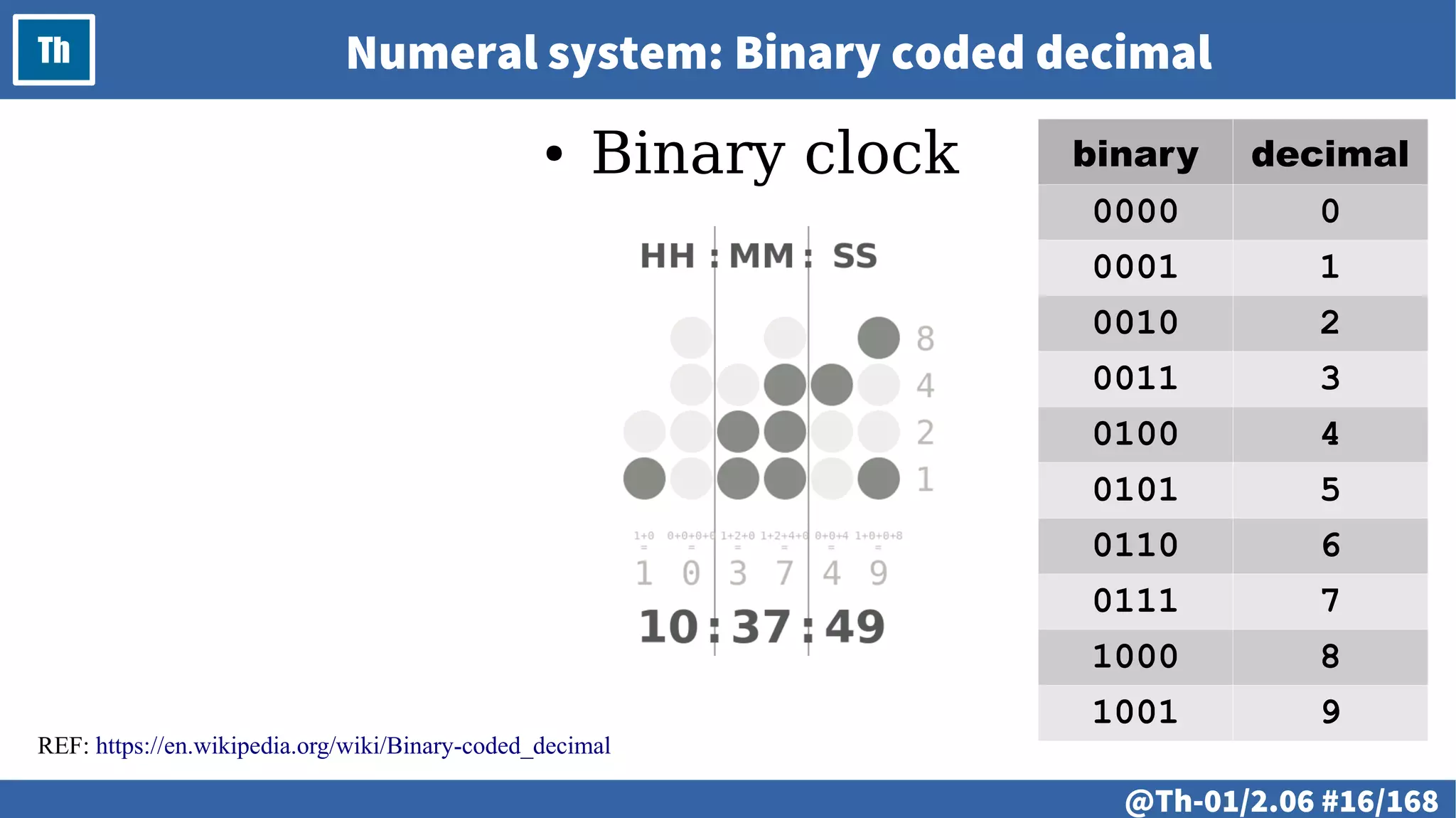
Th Numeral system: Binary coded decimal
● Binary clock
REF: https://en.wikipedia.org/wiki/Binary-coded_decimal
binary decimal
0000 0
0001 1
0010 2
0011 3
0100 4
0101 5
0110 6
0111 7
1000 8
1001 9
@ #17/213
Th Boolean algebra
REF: https://en.wikipedia.org/wiki/Boolean_algebra
@ #18/213
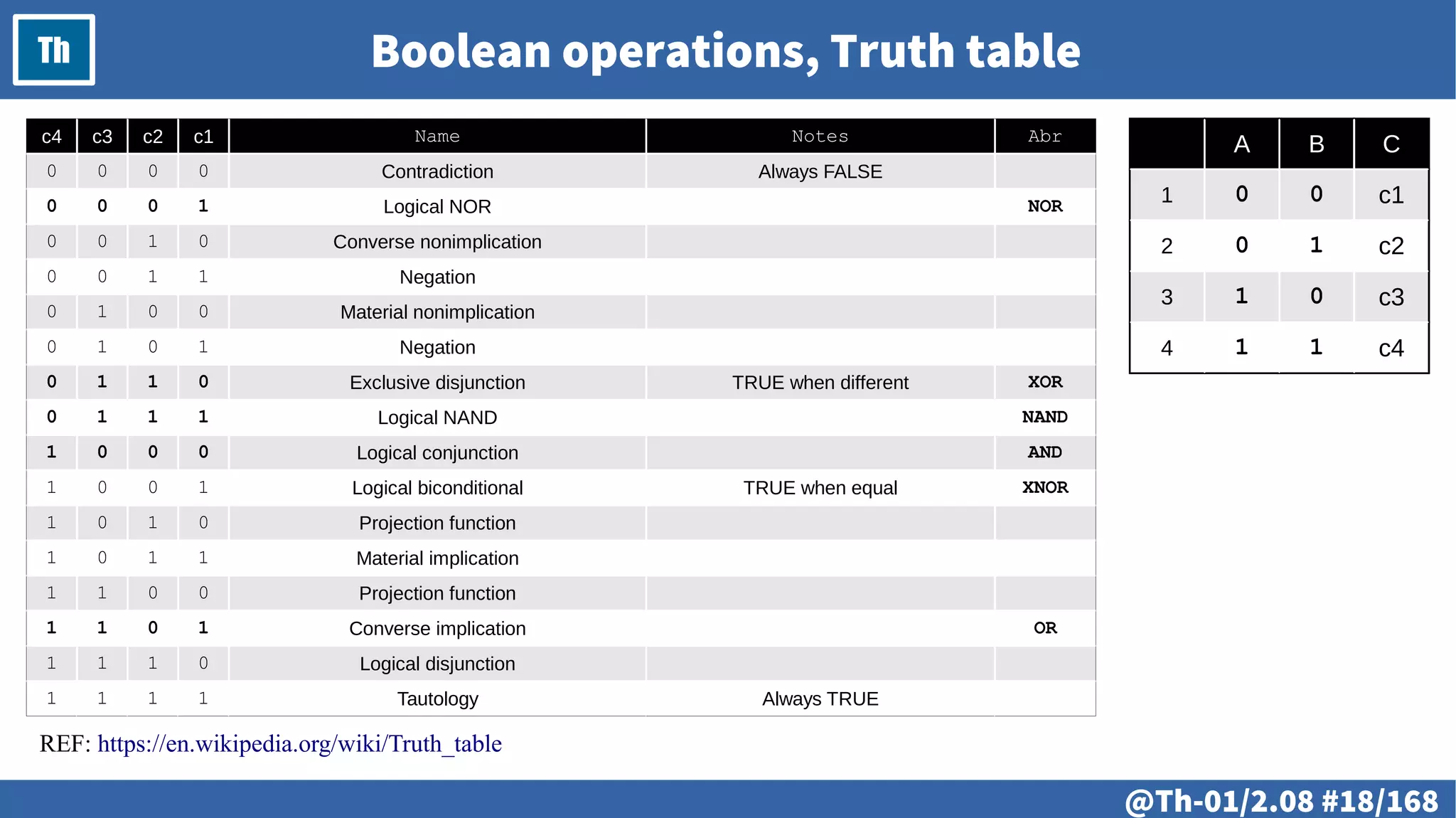
Th Boolean operations, Truth table
c4 c3 c2 c1 Name Notes Abr
0 0 0 0 Contradiction Always FALSE
0 0 0 1 Logical NOR NOR
0 0 1 0 Converse nonimplication
0 0 1 1 Negation
0 1 0 0 Material nonimplication
0 1 0 1 Negation
0 1 1 0 Exclusive disjunction TRUE when different XOR
0 1 1 1 Logical NAND NAND
1 0 0 0 Logical conjunction AND
1 0 0 1 Logical biconditional TRUE when equal XNOR
1 0 1 0 Projection function
1 0 1 1 Material implication
1 1 0 0 Projection function
1 1 0 1 Converse implication OR
1 1 1 0 Logical disjunction
1 1 1 1 Tautology Always TRUE
REF: https://en.wikipedia.org/wiki/Truth_table
A B C
1 0 0 c1
2 0 1 c2
3 1 0 c3
4 1 1 c4
@ #19/213
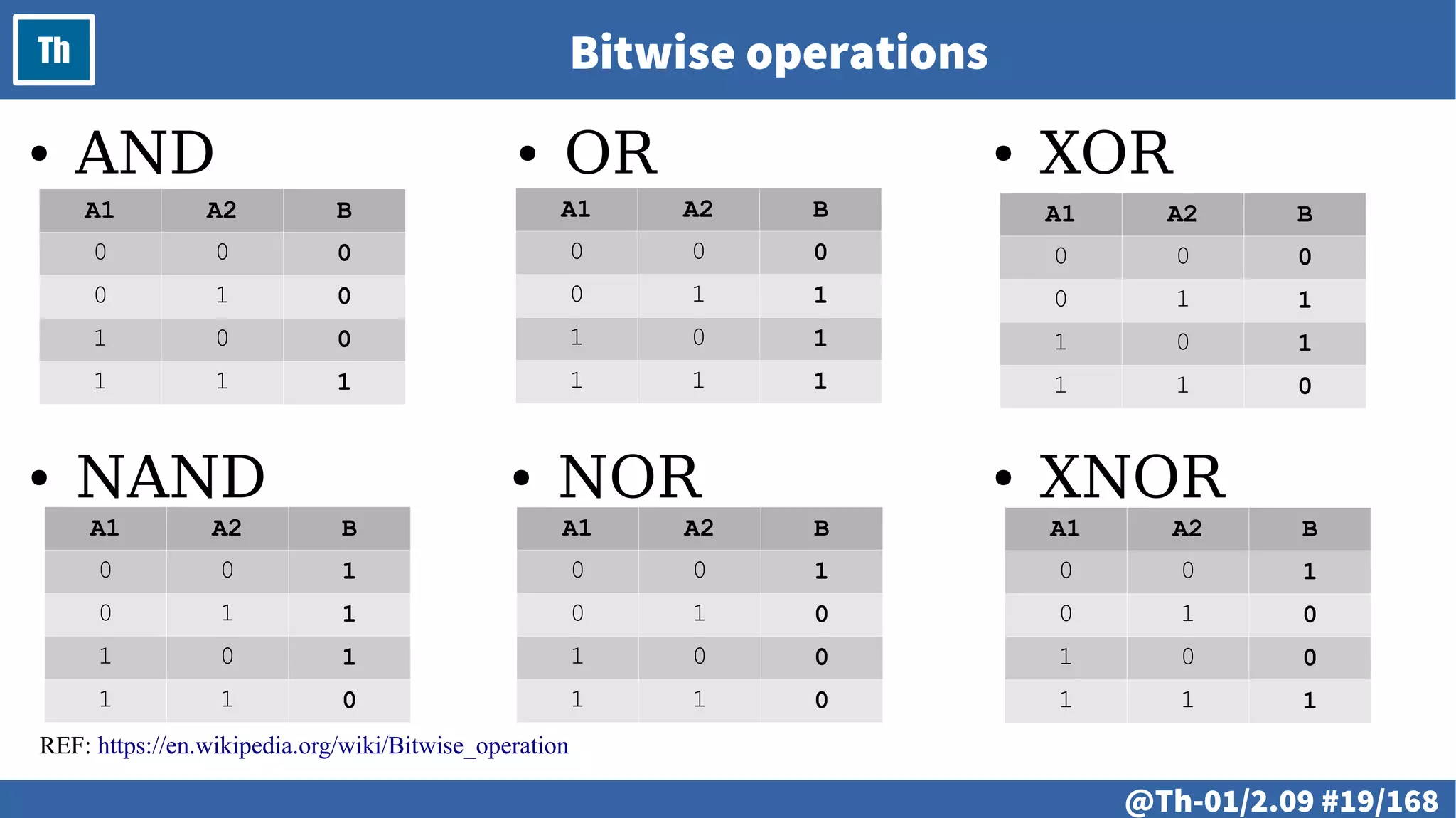
Th Bitwise operations
REF: https://en.wikipedia.org/wiki/Bitwise_operation
● AND ● OR ● XOR
● XNOR● NOR● NAND
A1 A2 B
0 0 1
0 1 0
1 0 0
1 1 0
A1 A2 B
0 0 0
0 1 1
1 0 1
1 1 1
A1 A2 B
0 0 0
0 1 0
1 0 0
1 1 1
A1 A2 B
0 0 1
0 1 1
1 0 1
1 1 0
A1 A2 B
0 0 0
0 1 1
1 0 1
1 1 0
A1 A2 B
0 0 1
0 1 0
1 0 0
1 1 1
@ #20/213
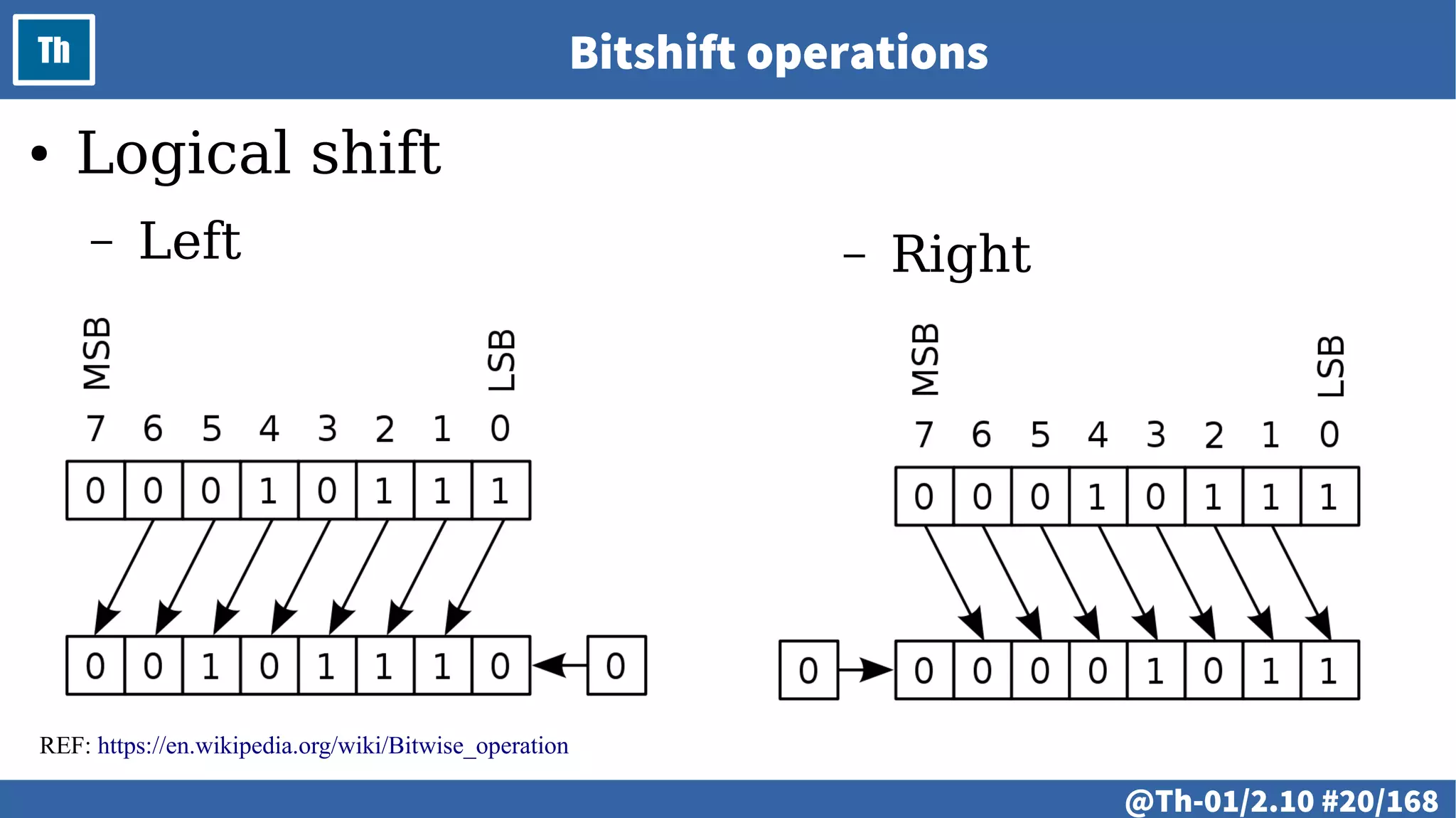
Th Bitshift operations
REF: https://en.wikipedia.org/wiki/Bitwise_operation
● Logical shift
– Left – Right
@ #21/213
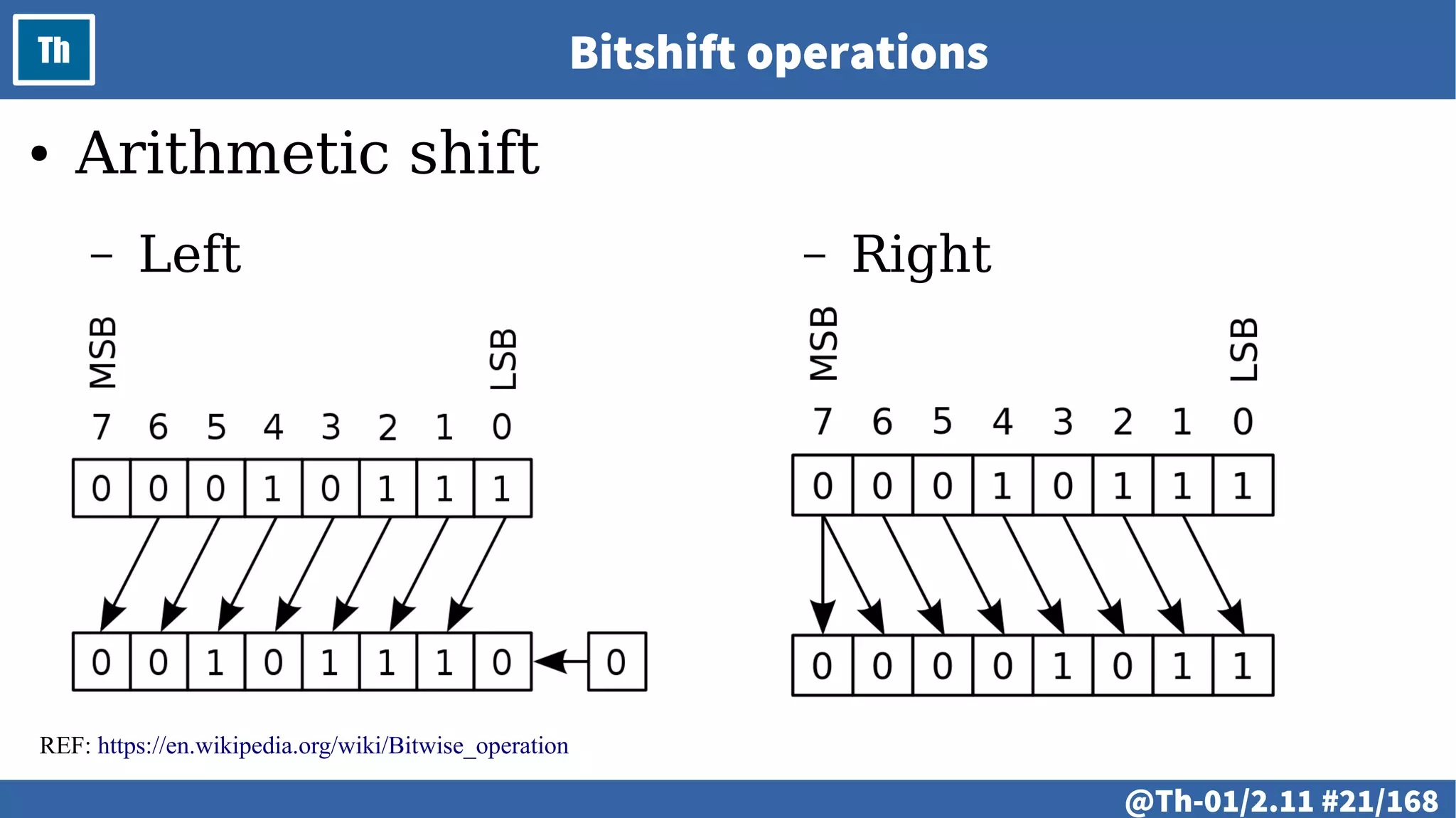
Th Bitshift operations
REF: https://en.wikipedia.org/wiki/Bitwise_operation
● Arithmetic shift
– Left – Right
@ #22/213
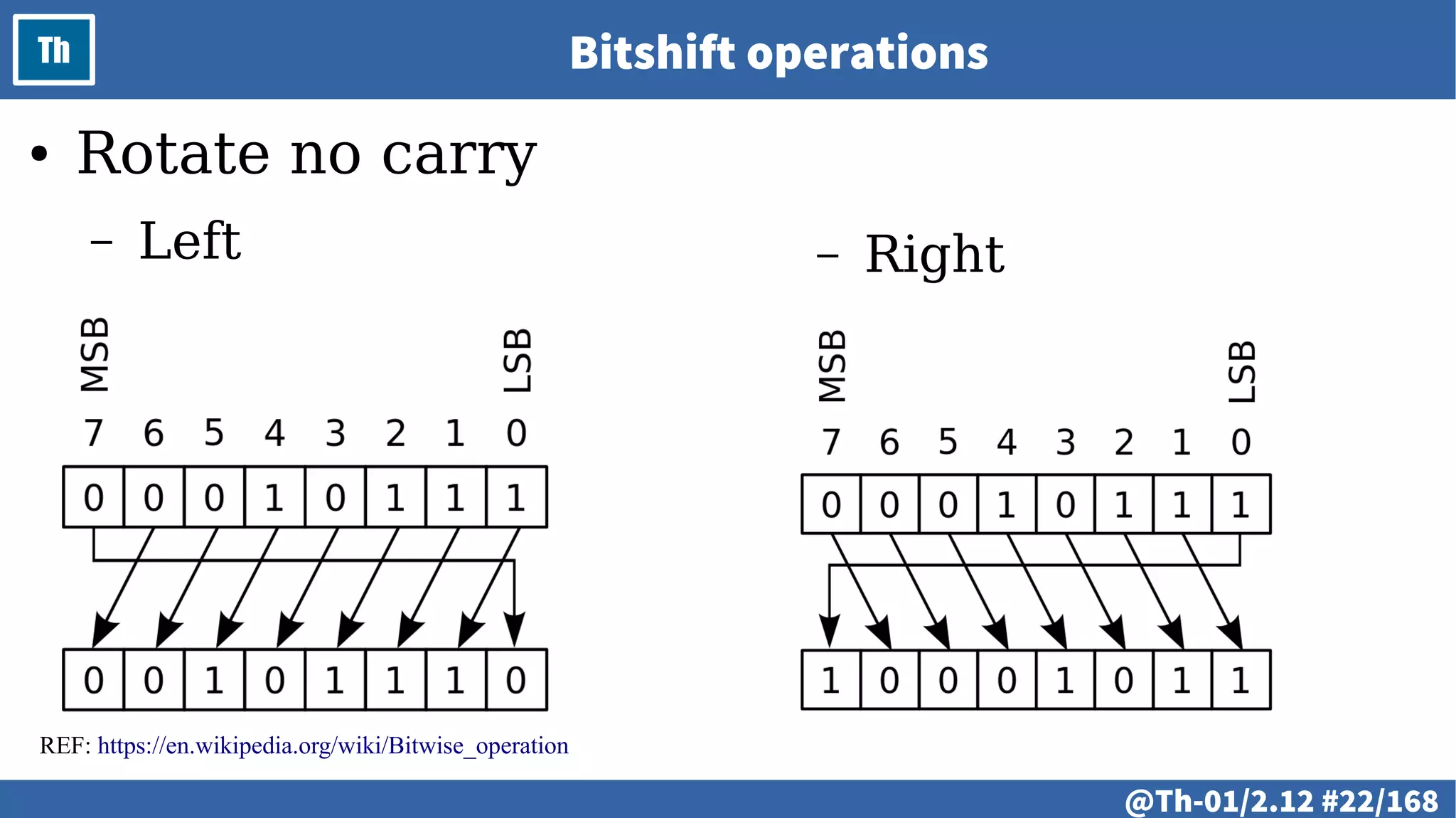
Th Bitshift operations
REF: https://en.wikipedia.org/wiki/Bitwise_operation
● Rotate no carry
– Left – Right
@ #23/213
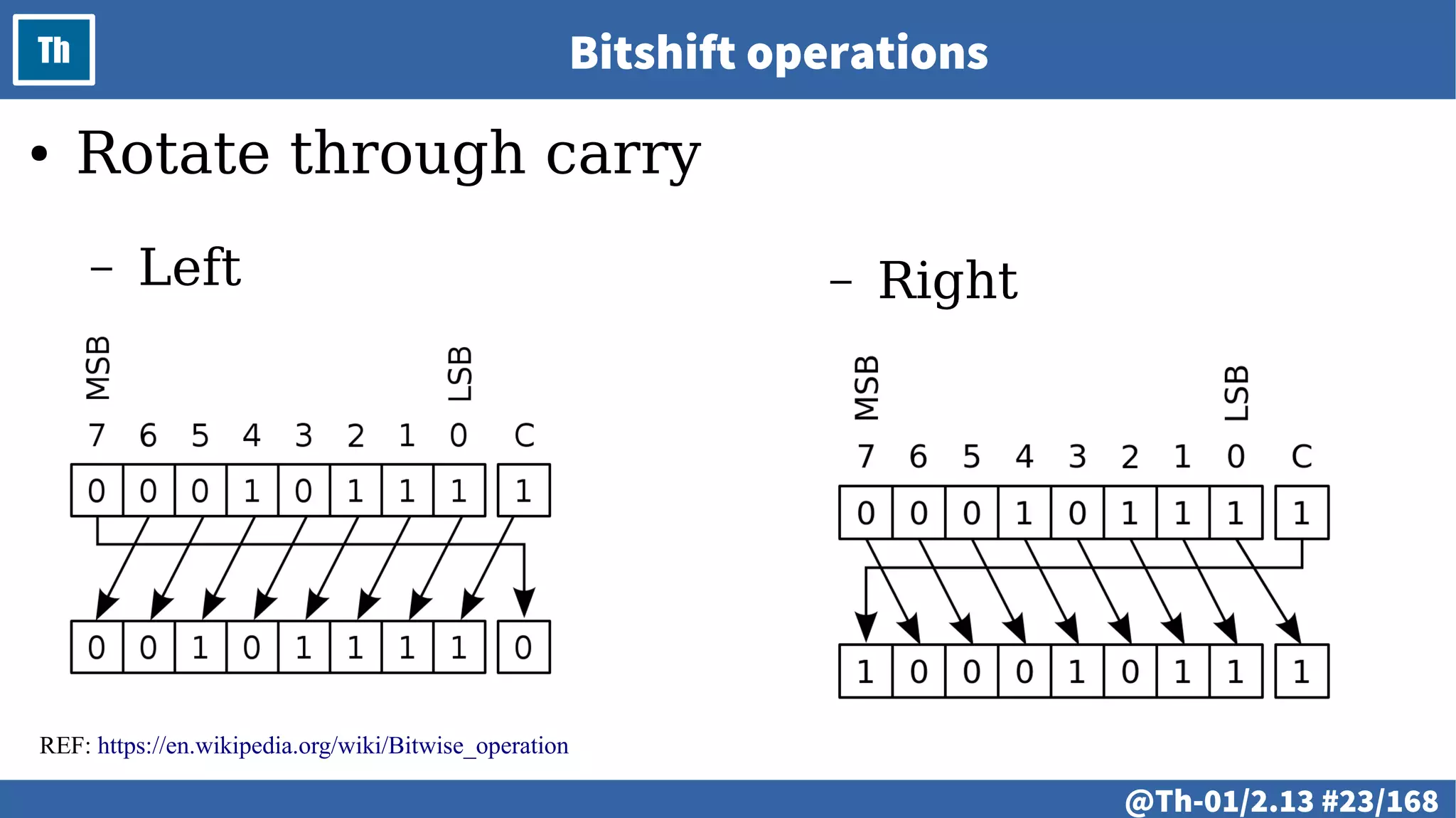
Th Bitshift operations
REF: https://en.wikipedia.org/wiki/Bitwise_operation
● Rotate through carry
– Left – Right
@ #24/213
Th
# @25
LAB
● Introduction to microcontrollers and embedded devices.
– Demonstration of microcontroller and embedded devices.
– Basic principles.
– Simulation of a microcontroller system.
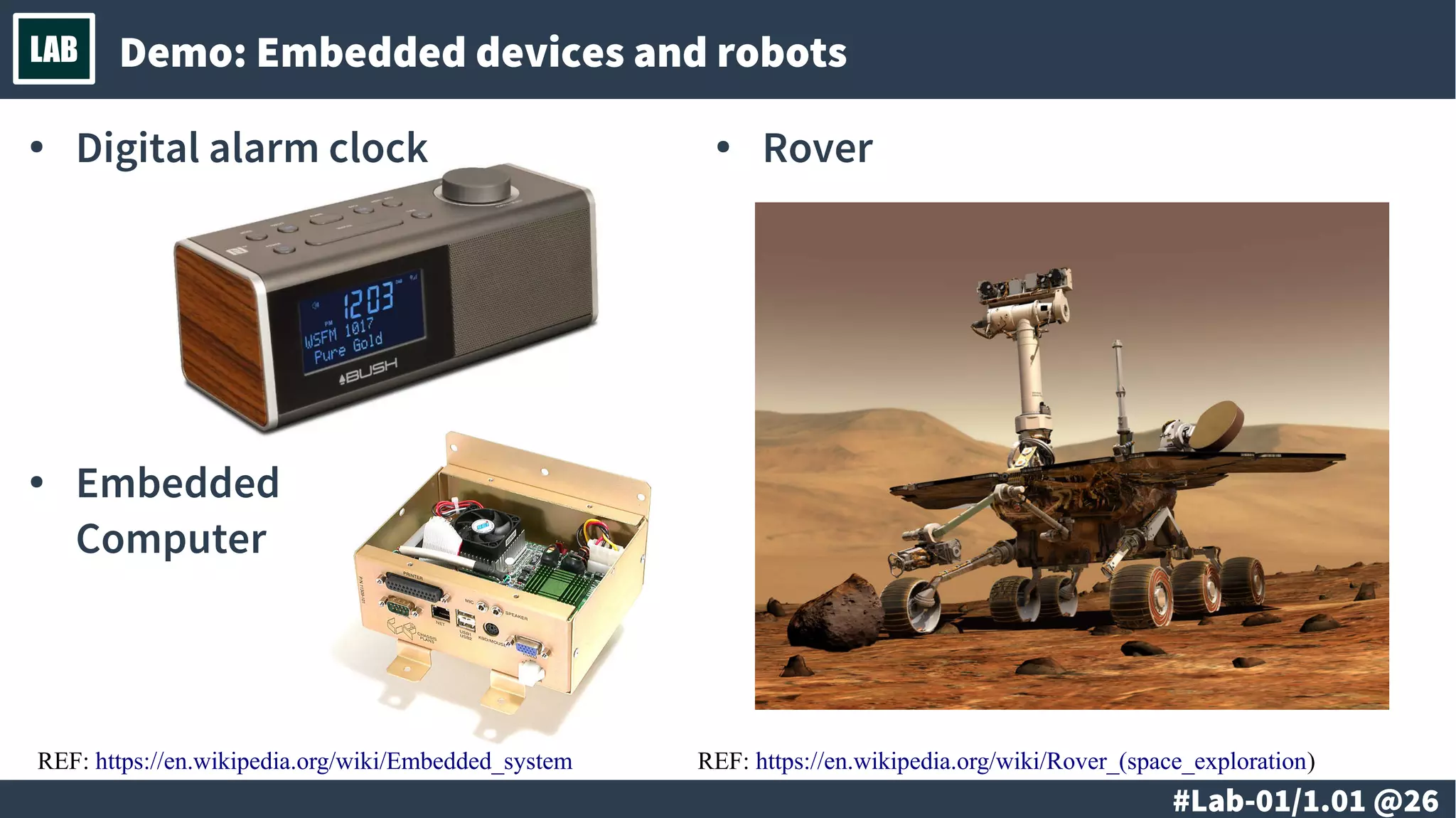
# @26
LAB Demo: Embedded devices and robots
● Digital alarm clock ● Rover
● Embedded
Computer
REF: https://en.wikipedia.org/wiki/Embedded_system REF: https://en.wikipedia.org/wiki/Rover_(space_exploration)
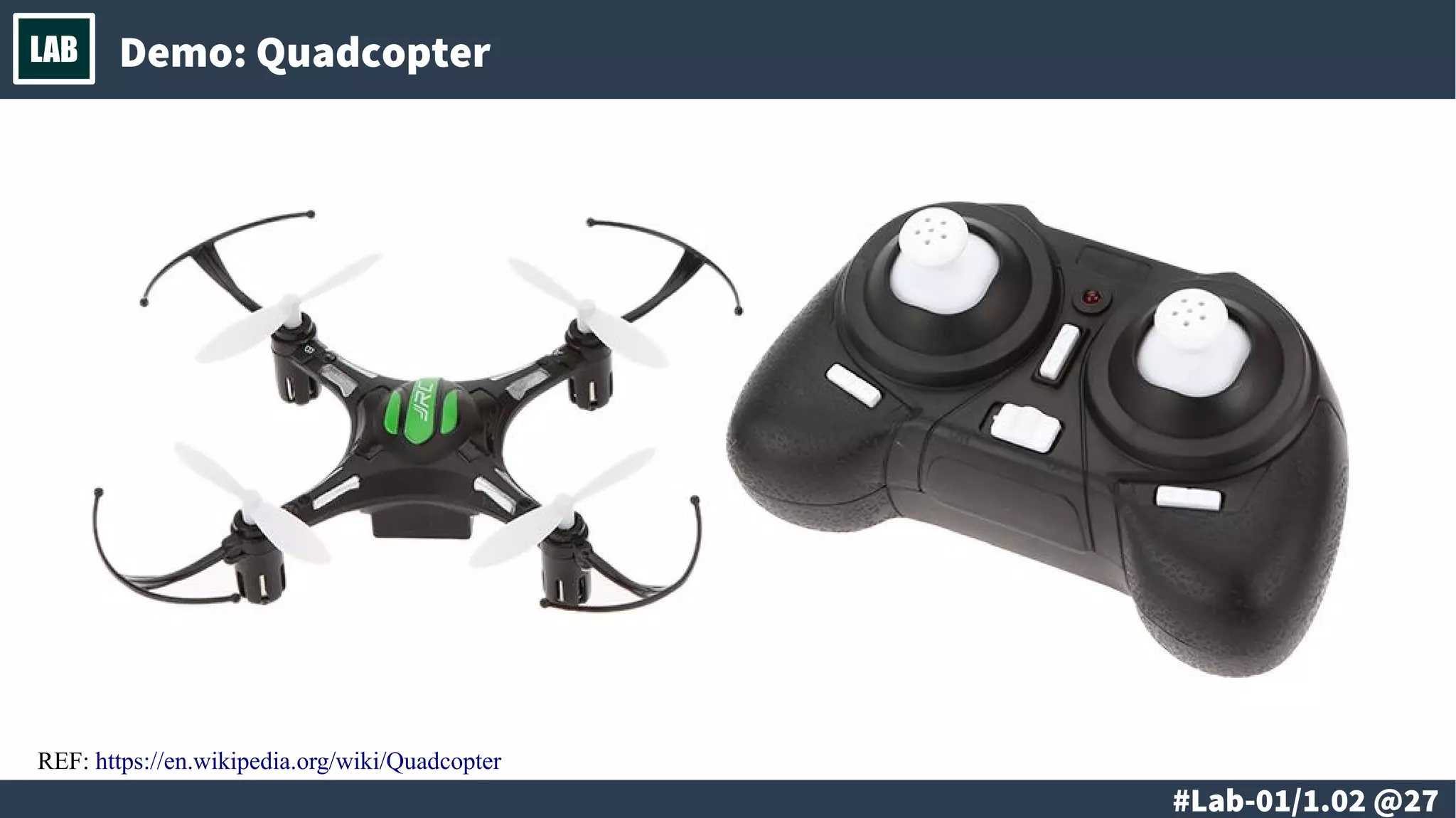
# @27
LAB Demo: Quadcopter
REF: https://en.wikipedia.org/wiki/Quadcopter
# @28
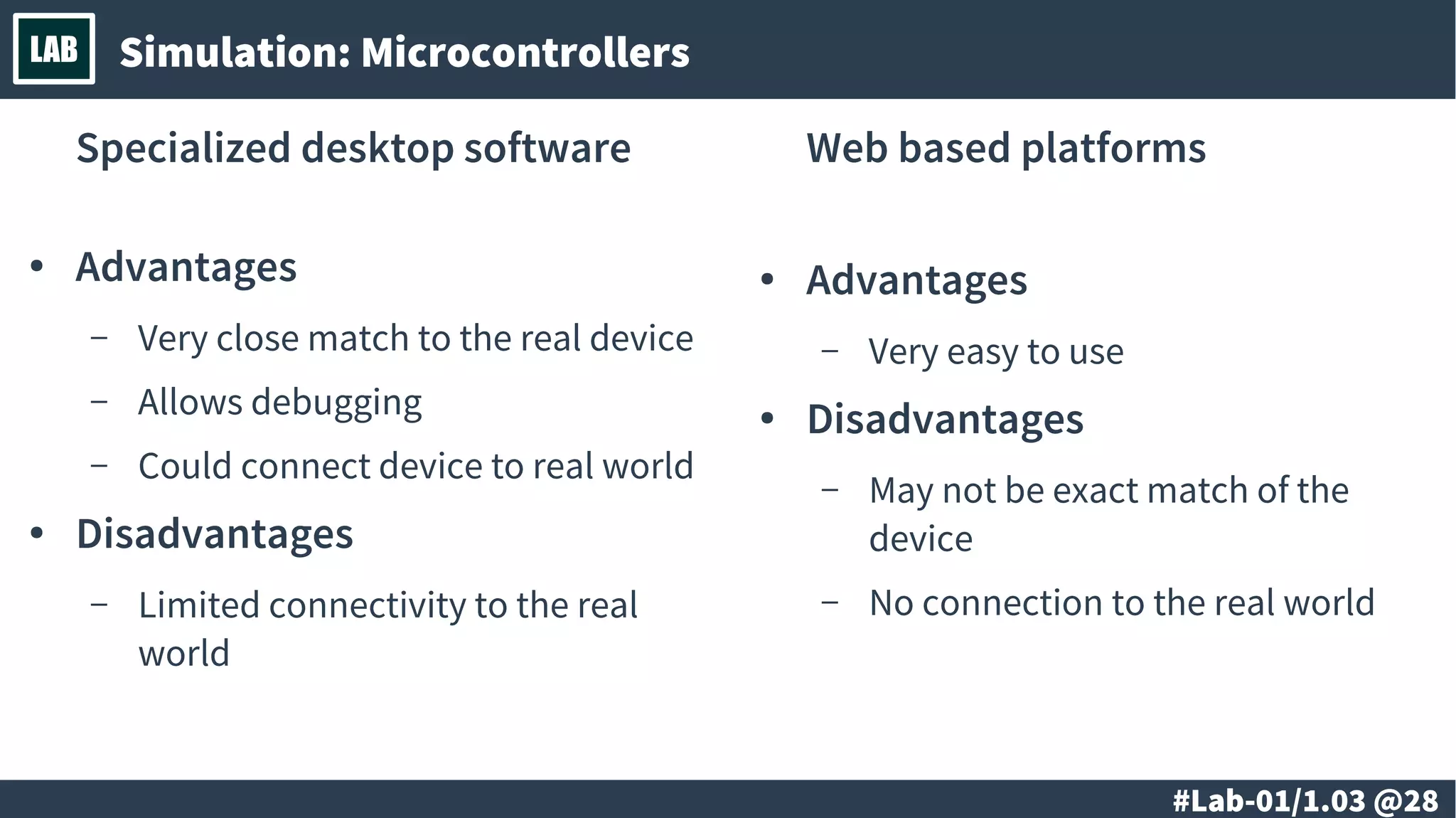
LAB Simulation: Microcontrollers
Specialized desktop software Web based platforms
● Advantages
– Very easy to use
● Disadvantages
– May not be exact match of the
device
– No connection to the real world
● Advantages
– Very close match to the real
device
– Allows debugging
– Could connect device to real
world
● Disadvantages
– Limited connectivity to the real
world
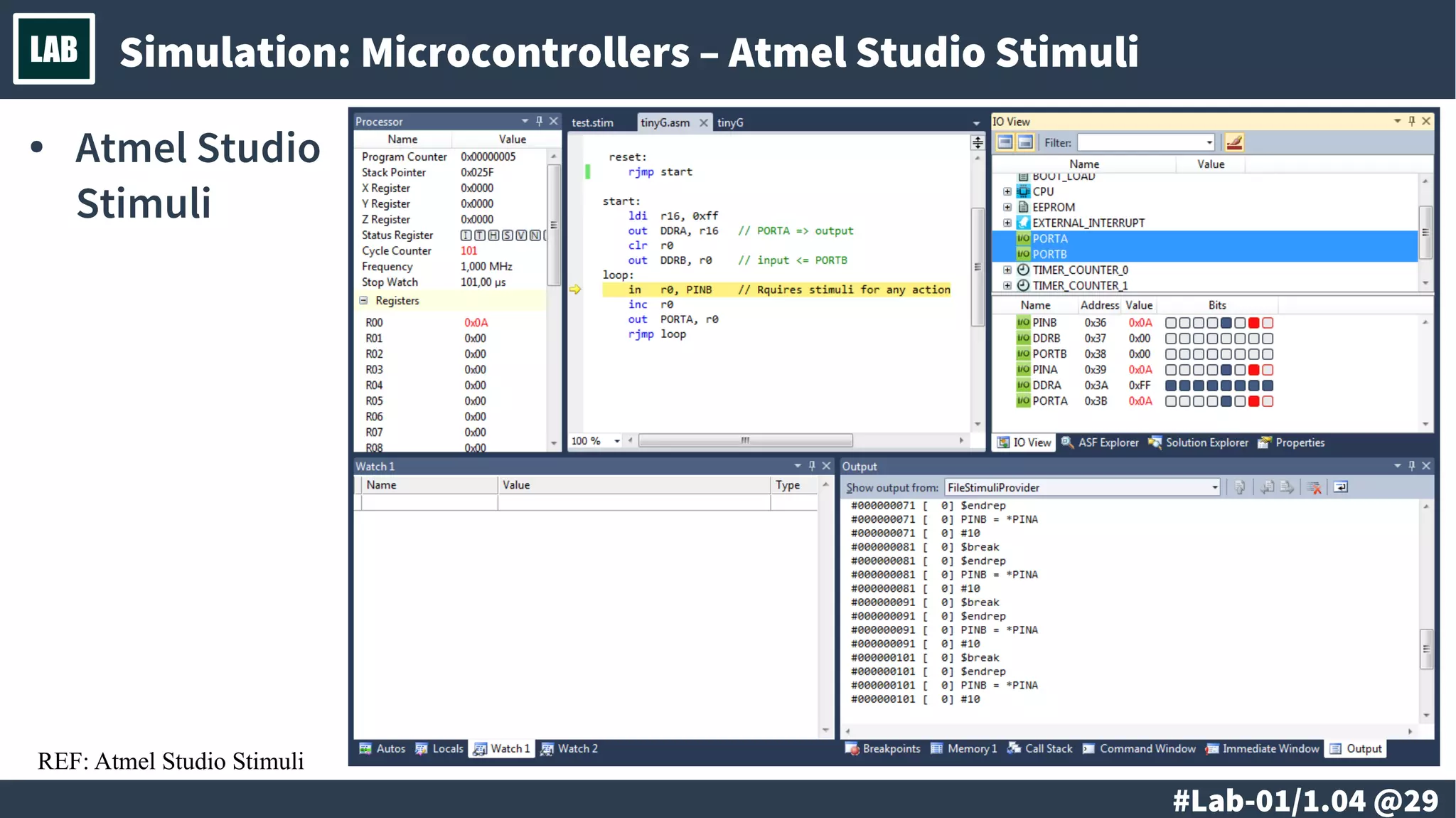
# @29
LAB Simulation: Microcontrollers – Atmel Studio Stimuli
● Atmel
Studio
Stimuli
REF: Atmel Studio Stimuli
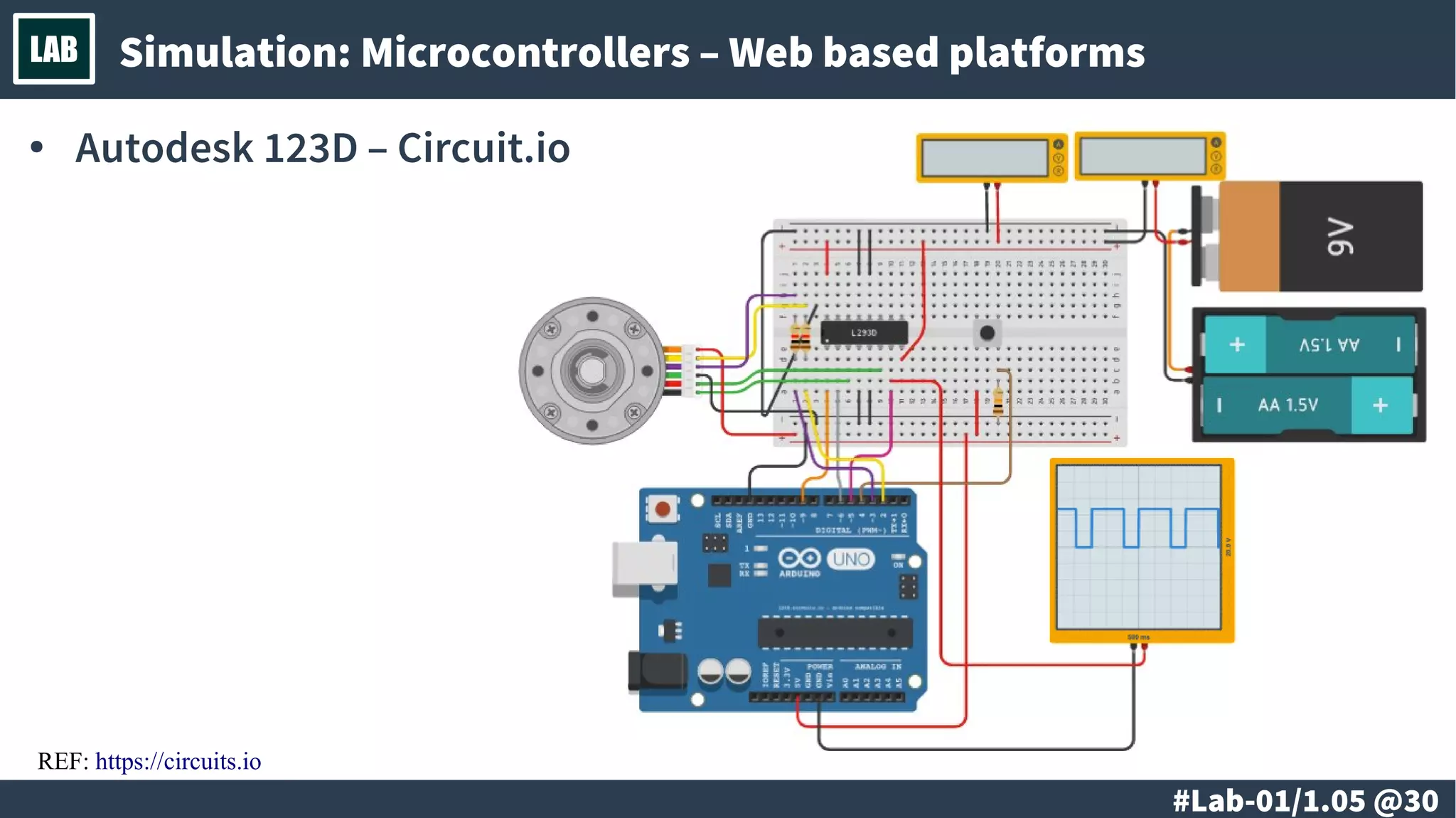
# @30
LAB Simulation: Microcontrollers – Web based platforms
● Autodesk 123D –
Circuit.io
REF: https://circuits.io
# @31
LAB
# @32
LAB
● Introduction to microcontrollers and embedded devices.
– Conversion between numeral systems.
– Logical, bitwise and arithmetic operations. Optimizations.
# @33
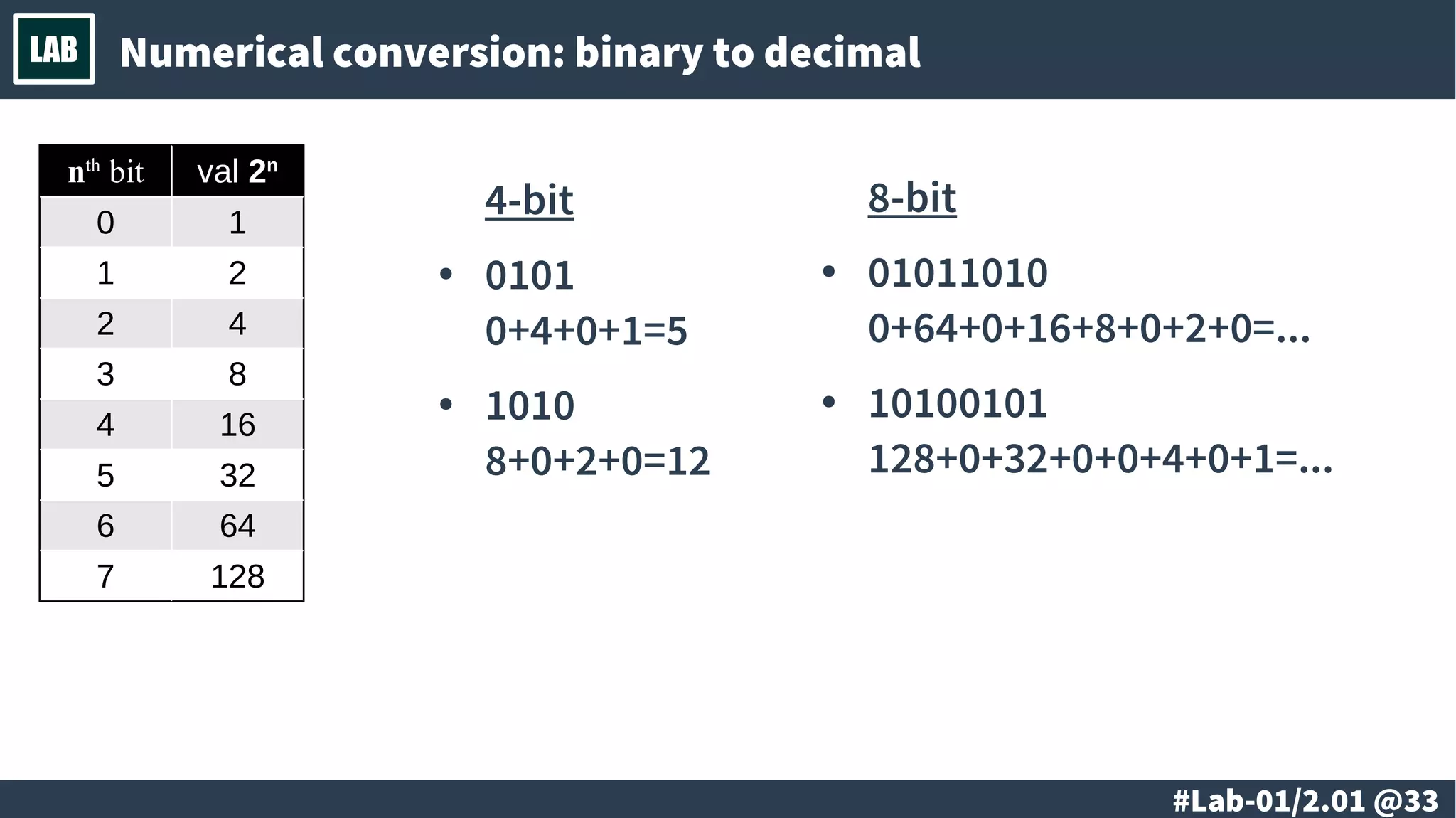
LAB Numerical conversion: binary to decimal
nth
bit val 2n
0 1
1 2
2 4
3 8
4 16
5 32
6 64
7 128
4-bit
● 0101
0+4+0+1=5
● 1010
8+0+2+0=12
8-bit
● 01011010
0+64+0+16+8+0+2+0=...
● 10100101
128+0+32+0+0+4+0+1=...
# @34
LAB Numerical conversion: decimal to binary
# @35
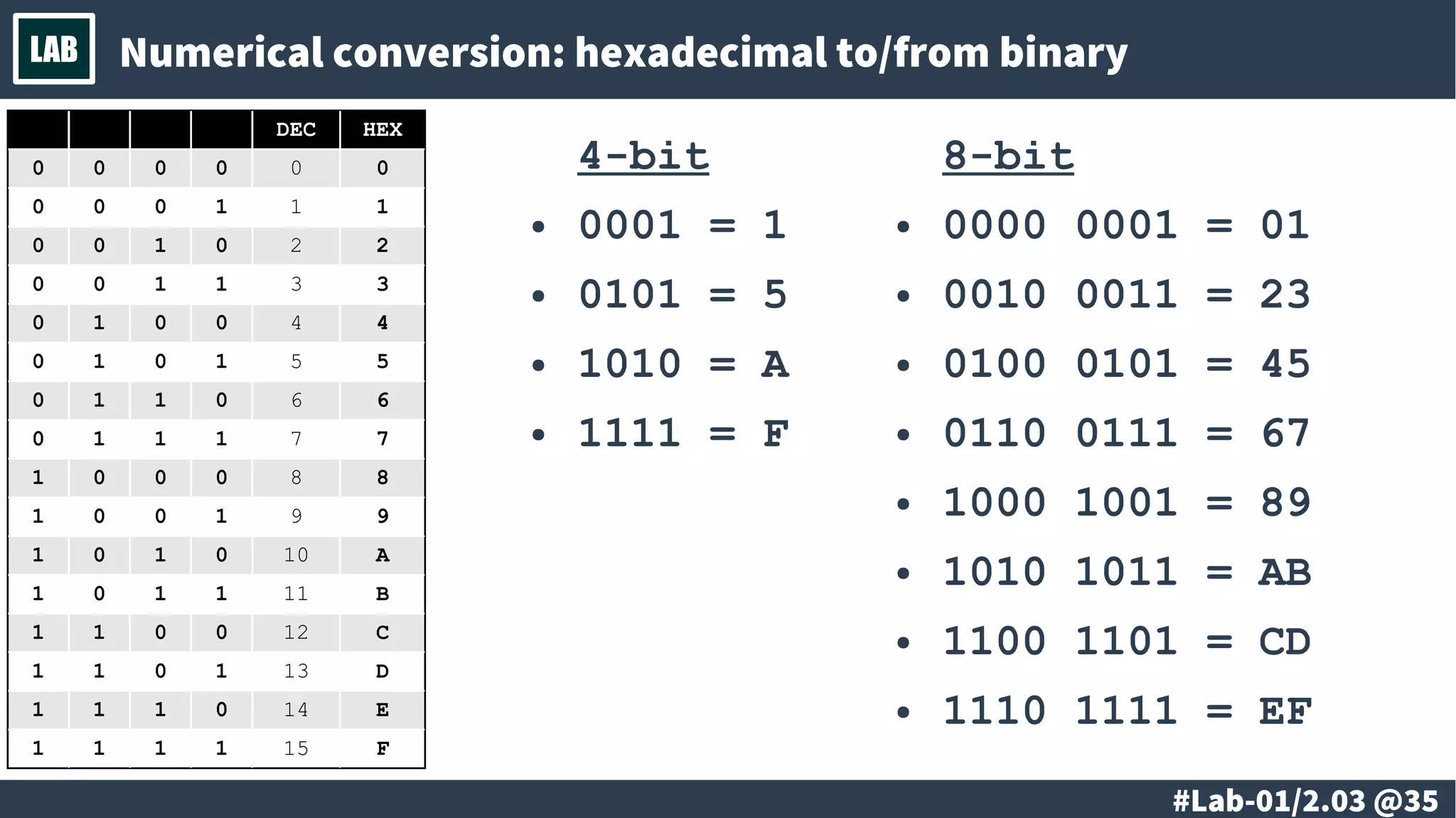
LAB Numerical conversion: hexadecimal to/from binary
DEC HEX
0 0 0 0 0 0
0 0 0 1 1 1
0 0 1 0 2 2
0 0 1 1 3 3
0 1 0 0 4 4
0 1 0 1 5 5
0 1 1 0 6 6
0 1 1 1 7 7
1 0 0 0 8 8
1 0 0 1 9 9
1 0 1 0 10 A
1 0 1 1 11 B
1 1 0 0 12 C
1 1 0 1 13 D
1 1 1 0 14 E
1 1 1 1 15 F
4-bit
● 0001 = 1
● 0101 = 5
● 1010 = A
● 1111 = F
8-bit
● 0000 0001 = 01
● 0010 0011 = 23
● 0100 0101 = 45
● 0110 0111 = 67
● 1000 1001 = 89
● 1010 1011 = AB
● 1100 1101 = CD
● 1110 1111 = EF
# @36
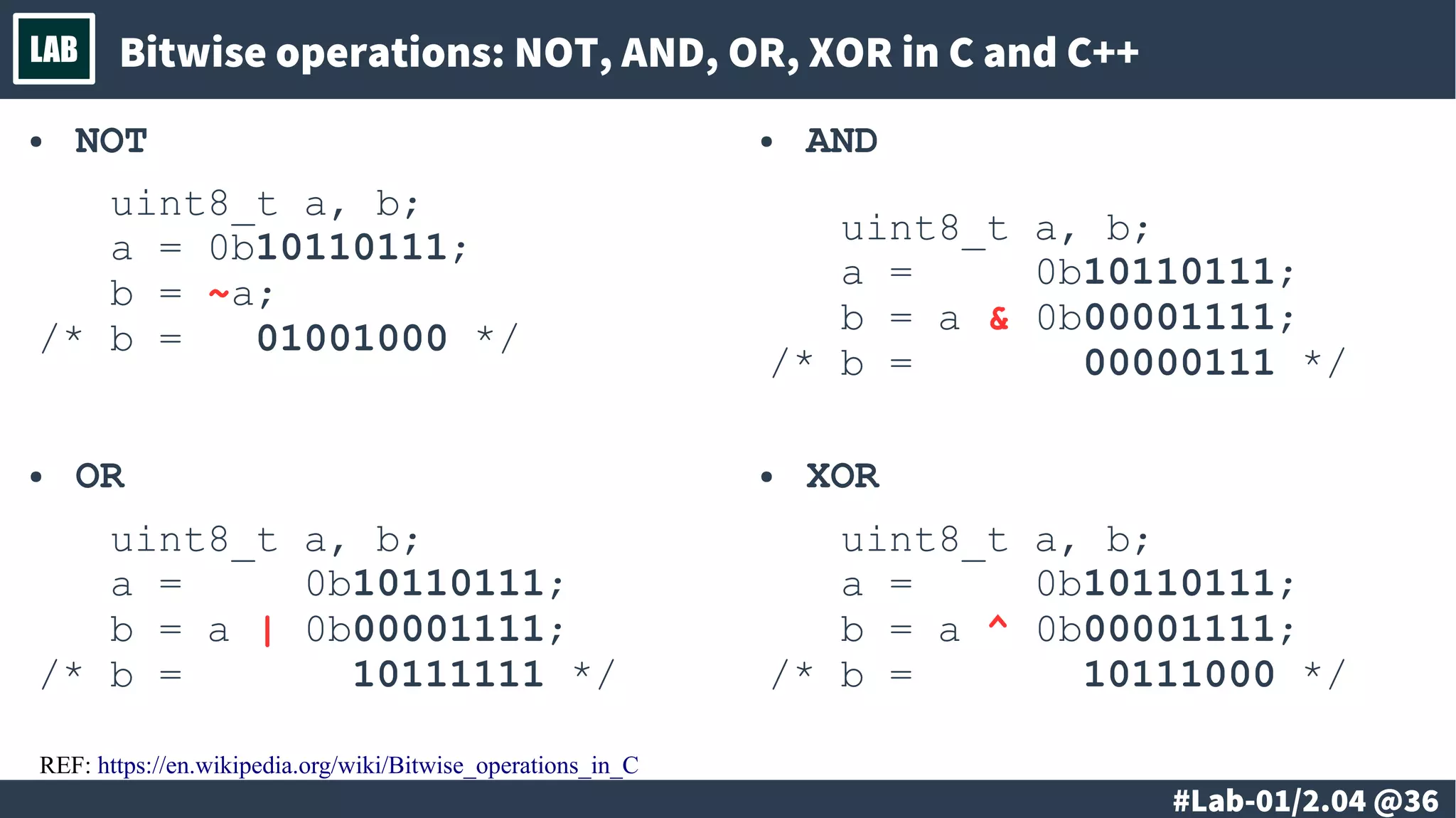
LAB Bitwise operations: NOT, AND, OR, XOR in C and C++
REF: https://en.wikipedia.org/wiki/Bitwise_operations_in_C
● NOT
uint8_t a, b;
a = 0b10110111;
b = ~a;
/* b = 01001000 */
● AND
uint8_t a, b;
a = 0b10110111;
b = a & 0b00001111;
/* b = 00000111 */
● XOR
uint8_t a, b;
a = 0b10110111;
b = a ^ 0b00001111;
/* b = 10111000 */
● OR
uint8_t a, b;
a = 0b10110111;
b = a | 0b00001111;
/* b = 10111111 */
# @37
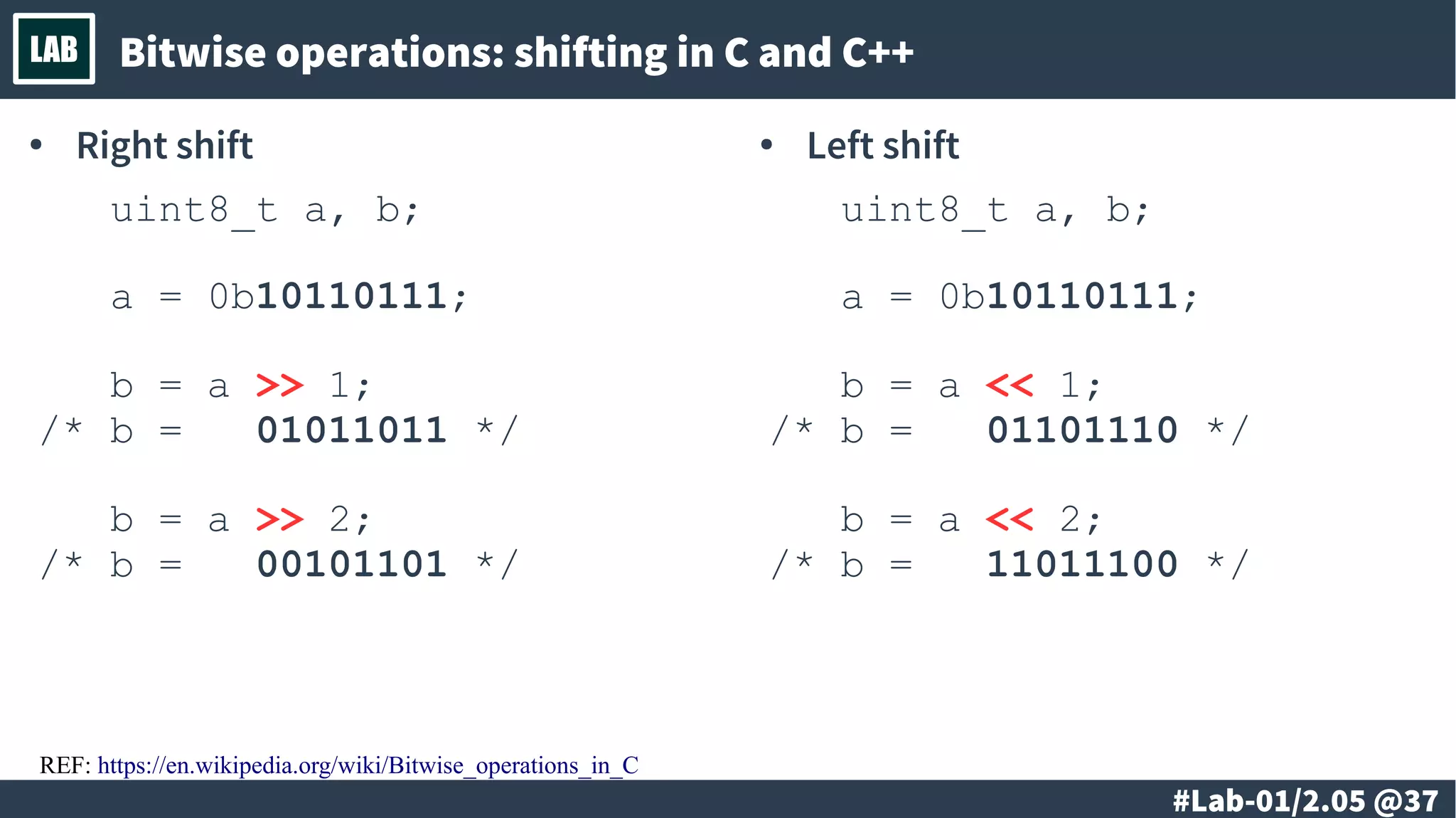
LAB Bitwise operations: shifting in C and C++
REF: https://en.wikipedia.org/wiki/Bitwise_operations_in_C
● Right shift
uint8_t a, b;
a = 0b10110111;
b = a >> 1;
/* b = 01011011 */
b = a >> 2;
/* b = 00101101 */
● Left shift
uint8_t a, b;
a = 0b10110111;
b = a << 1;
/* b = 01101110 */
b = a << 2;
/* b = 11011100 */
# @38
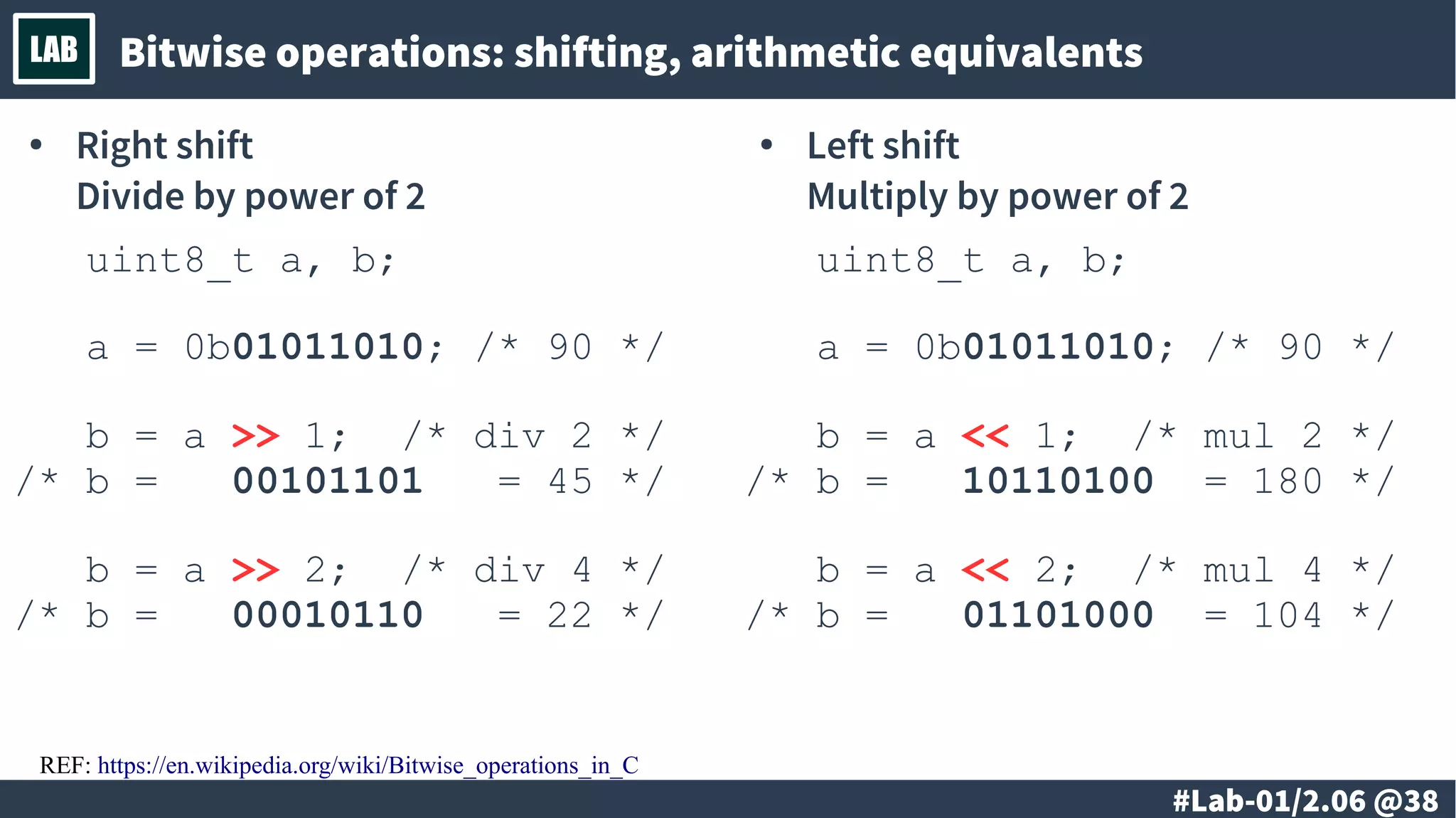
LAB Bitwise operations: shifting, arithmetic equivalents
● Right shift
Divide by power of 2
uint8_t a, b;
a = 0b01011010; /* 90 */
b = a >> 1; /* div 2 */
/* b = 00101101 = 45 */
b = a >> 2; /* div 4 */
/* b = 00010110 = 22 */
● Left shift
Multiply by power of 2
uint8_t a, b;
a = 0b01011010; /* 90 */
b = a << 1; /* mul 2 */
/* b = 10110100 = 180 */
b = a << 2; /* mul 4 */
/* b = 01101000 = 104 */
REF: https://en.wikipedia.org/wiki/Bitwise_operations_in_C
# @39
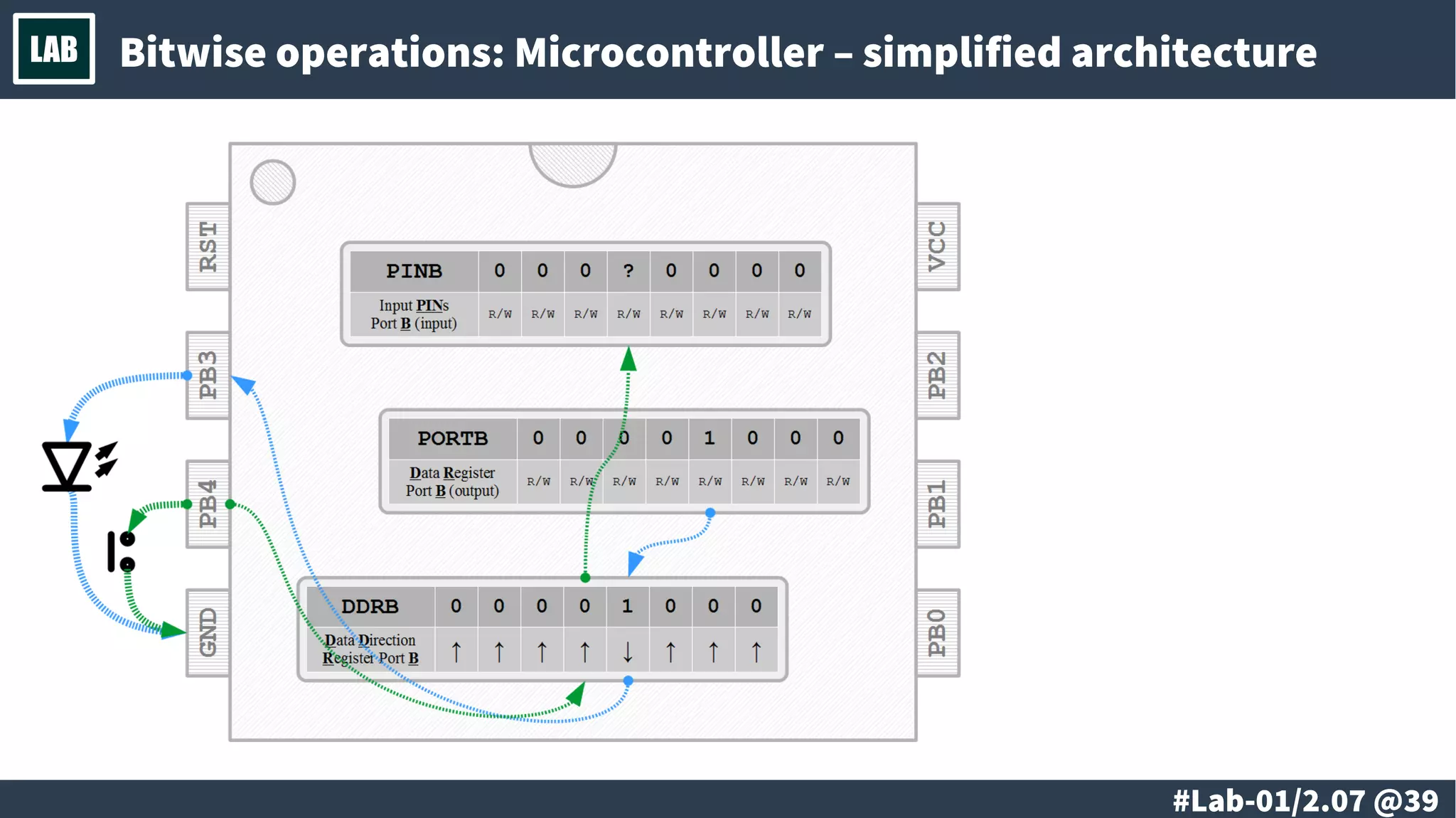
LAB Bitwise operations: Microcontroller – simplified architecture
# @40
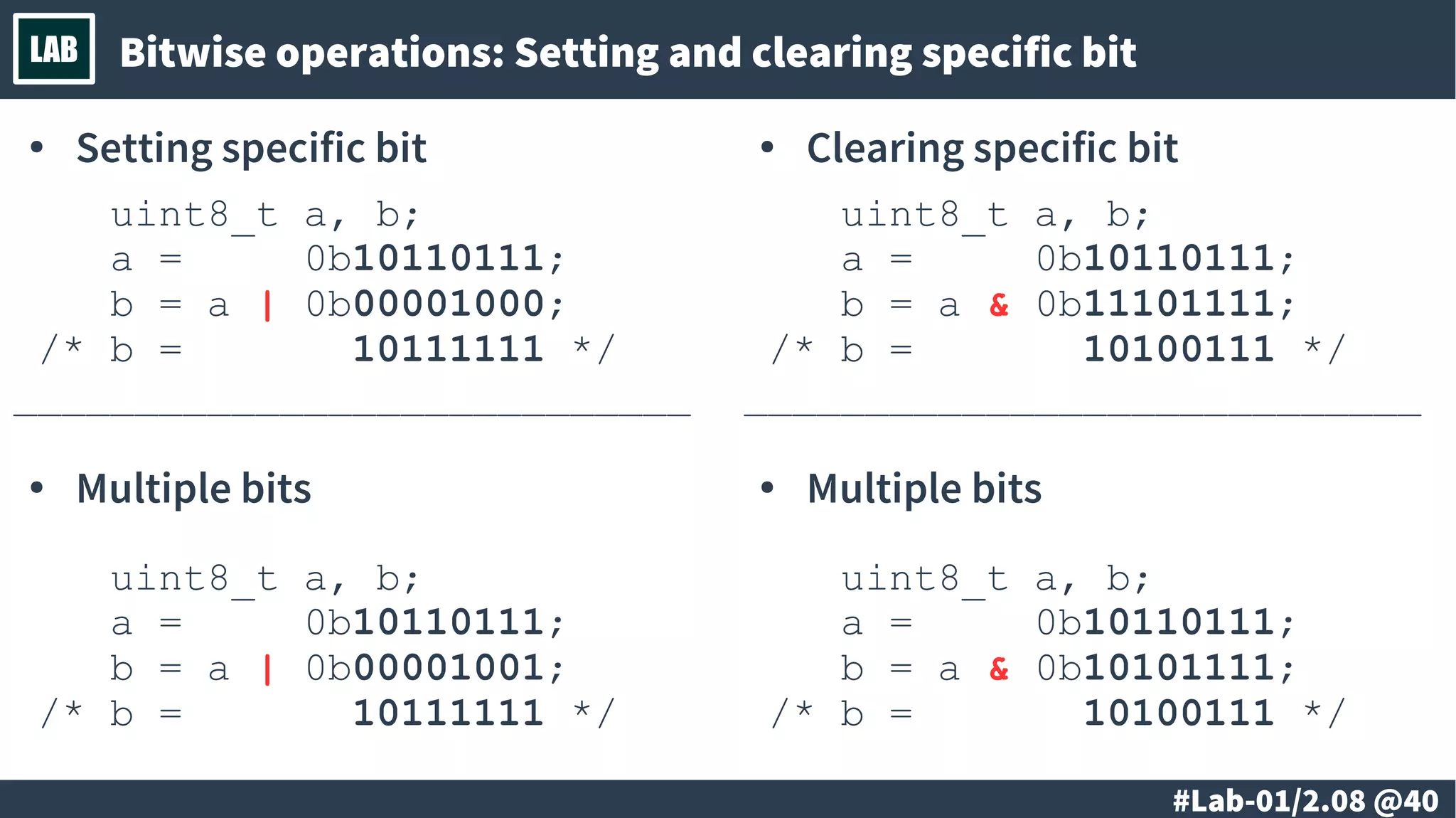
LAB Bitwise operations: Setting and clearing specific bit
● Setting specific bit
uint8_t a, b;
a = 0b10110111;
b = a | 0b00001000;
/* b = 10111111 */
____________________________
● Multiple bits
uint8_t a, b;
a = 0b10110111;
b = a | 0b00001001;
/* b = 10111111 */
● Clearing specific bit
uint8_t a, b;
a = 0b10110111;
b = a & 0b11101111;
/* b = 10100111 */
____________________________
● Multiple bits
uint8_t a, b;
a = 0b10110111;
b = a & 0b10101111;
/* b = 10100111 */
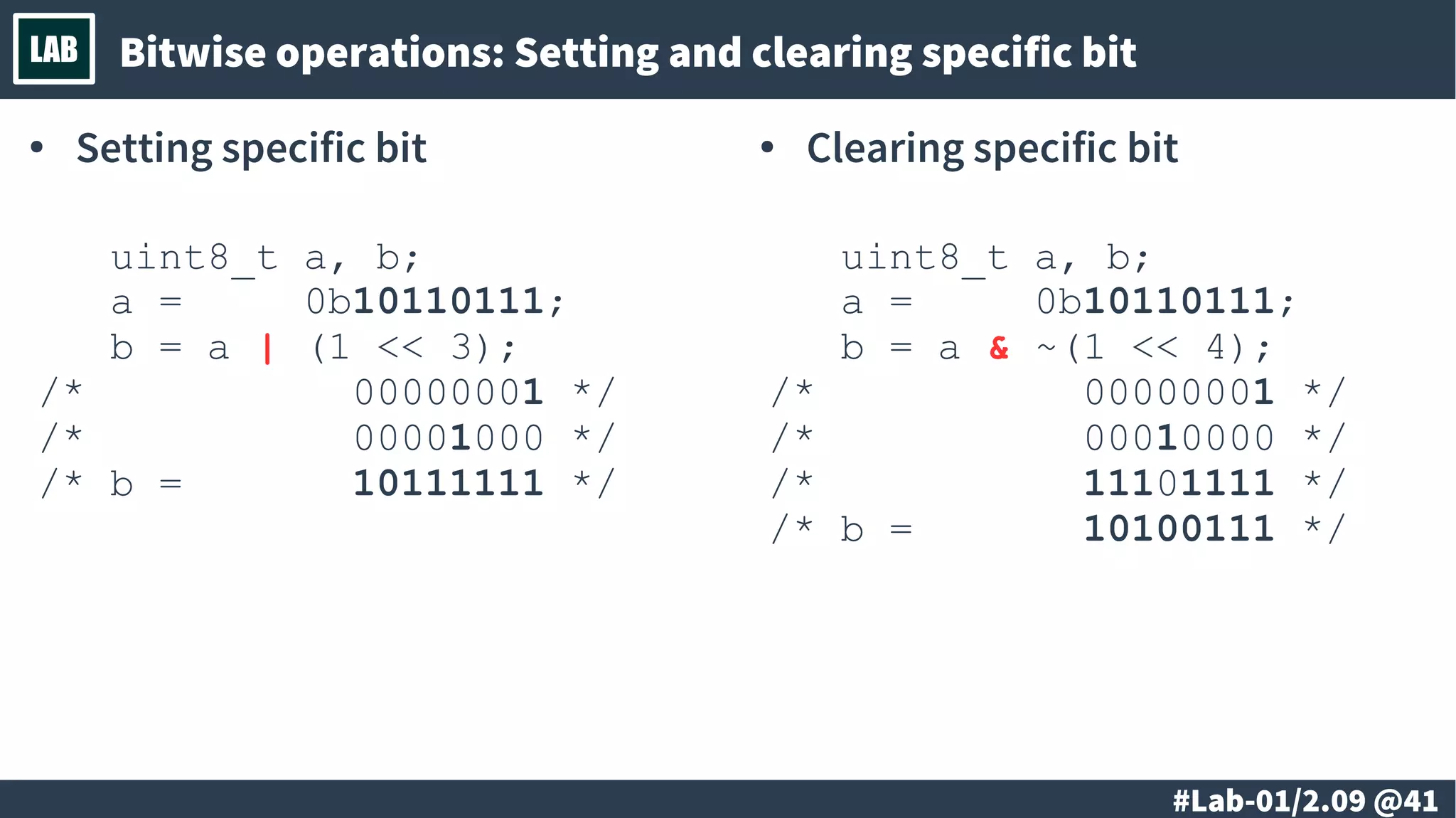
# @41
LAB Bitwise operations: Setting and clearing specific bit
● Setting specific bit
uint8_t a, b;
a = 0b10110111;
b = a | (1 << 3);
/* 00000001 */
/* 00001000 */
/* b = 10111111 */
● Clearing specific bit
uint8_t a, b;
a = 0b10110111;
b = a & ~(1 << 4);
/* 00000001 */
/* 00010000 */
/* 11101111 */
/* b = 10100111 */
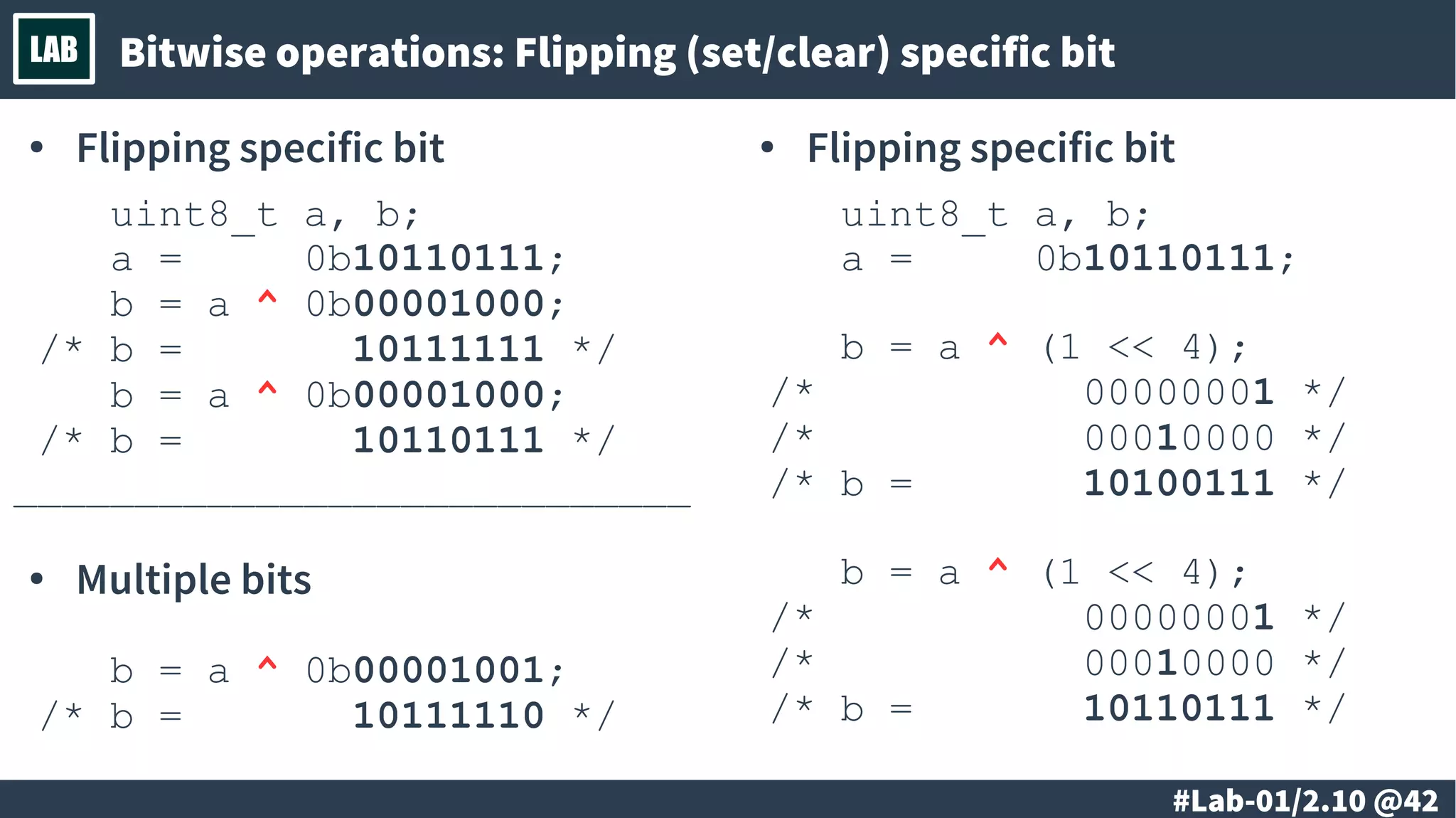
# @42
LAB Bitwise operations: Flipping (set/clear) specific bit
● Flipping specific bit
uint8_t a, b;
a = 0b10110111;
b = a ^ 0b00001000;
/* b = 10111111 */
b = a ^ 0b00001000;
/* b = 10110111 */
____________________________
● Multiple bits
b = a ^ 0b00001001;
/* b = 10111110 */
● Flipping specific bit
uint8_t a, b;
a = 0b10110111;
b = a ^ (1 << 4);
/* 00000001 */
/* 00010000 */
/* b = 10100111 */
b = a ^ (1 << 4);
/* 00000001 */
/* 00010000 */
/* b = 10110111 */
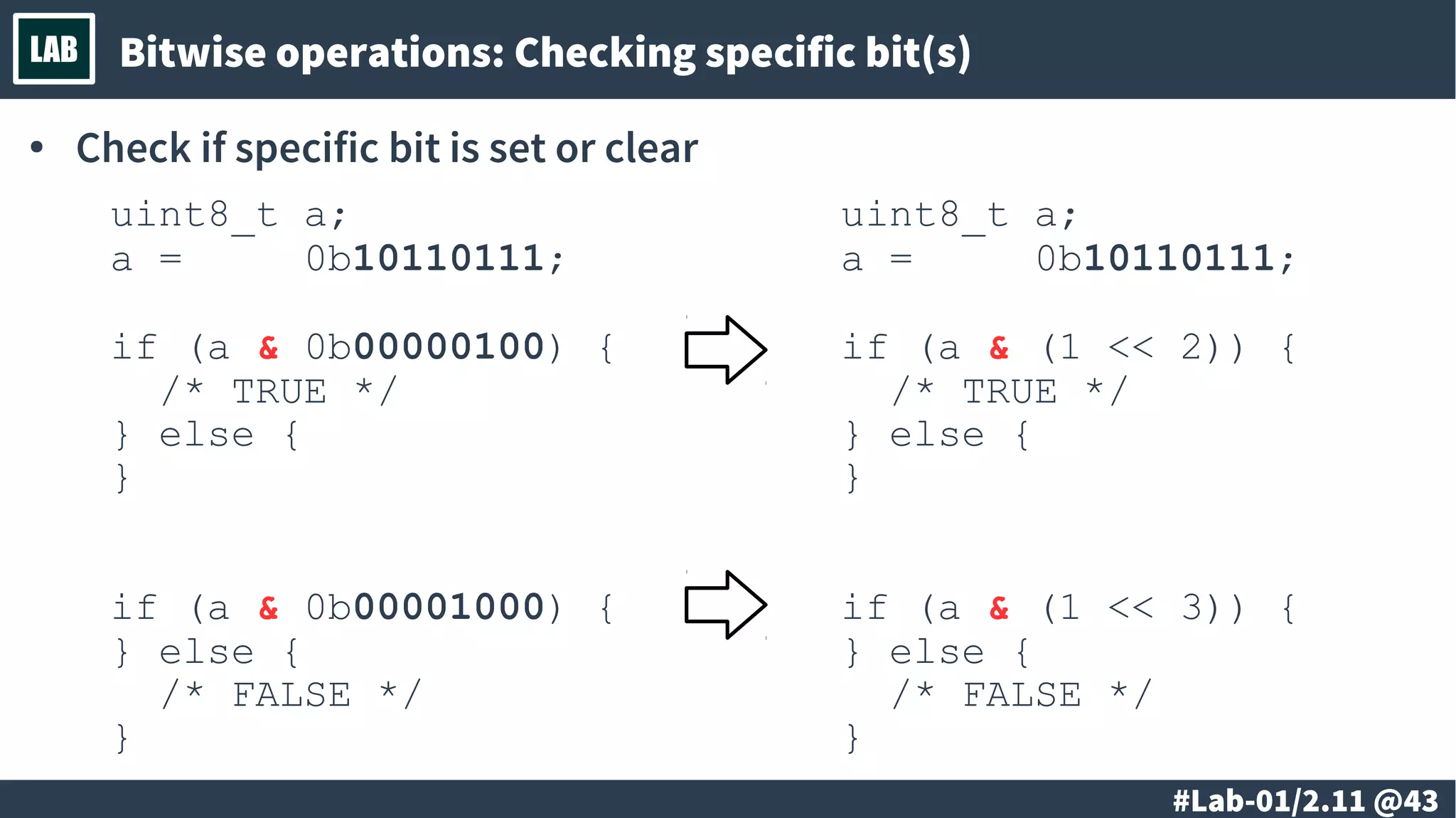
# @43
LAB Bitwise operations: Checking specific bit(s)
● Check if specific bit is set or clear
uint8_t a;
a = 0b10110111;
if (a & 0b00000100) {
/* TRUE */
} else {
}
if (a & 0b00001000) {
} else {
/* FALSE */
}
uint8_t a;
a = 0b10110111;
if (a & (1 << 2)) {
/* TRUE */
} else {
}
if (a & (1 << 3)) {
} else {
/* FALSE */
}
# @44
LAB Bitwise operations: Check and conditionally set/clear bit
● Check if a bit is set/clear and depending on that set/clear another bit
# @45
LAB
@ #46/213
Th
● Designing of a microcontroller system
– Basic principles in the design of a microcontroller
systems.
– Defining of the requirements and
implementation.
@ #47/213
Th
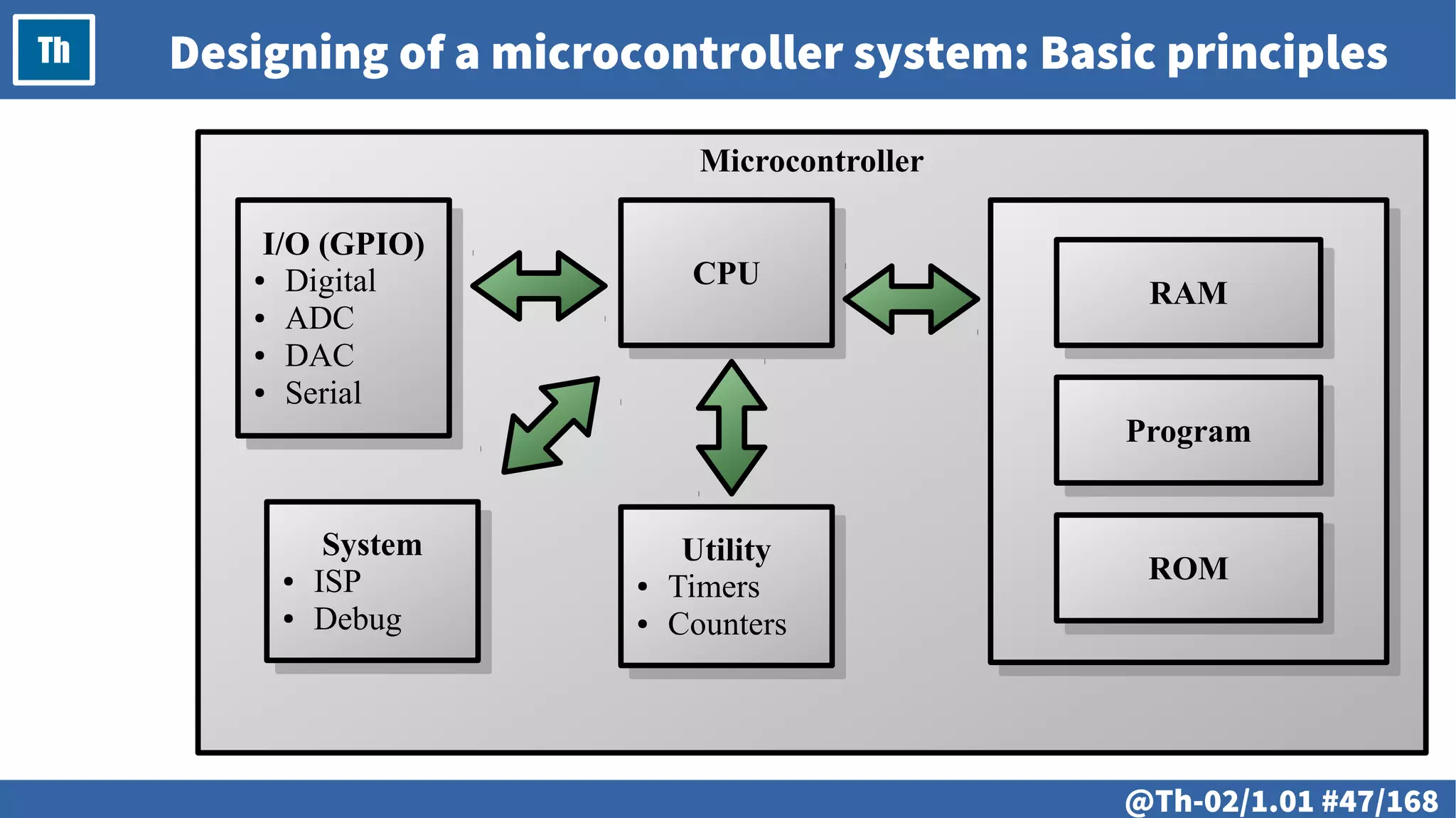
Microcontroller
Designing of a microcontroller system: Basic principles
CPUCPU
RAMRAM
ProgramProgram
ROMROMUtility
● Timers
● Counters
Utility
● Timers
● Counters
I/O (GPIO)
● Digital
● ADC
● DAC
● Serial
I/O (GPIO)
● Digital
● ADC
● DAC
● Serial
System
● ISP
● Debug
System
● ISP
● Debug
@ #48/213
Th
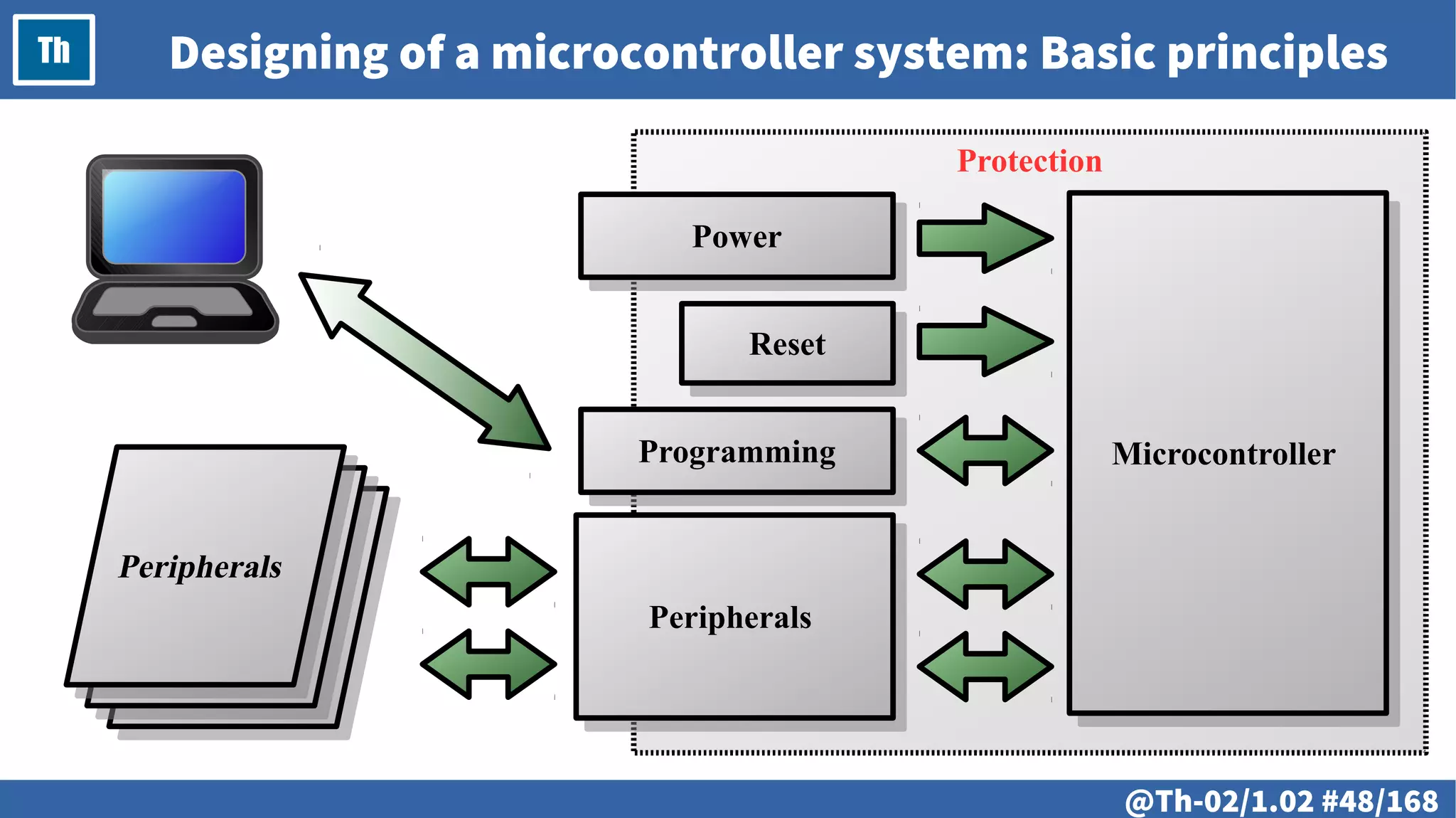
Protection
Designing of a microcontroller system: Basic principles
PowerPower
ResetReset
PeripheralsPeripherals
MicrocontrollerMicrocontrollerProgrammingProgramming
@ #49/213
Th
@ #50/213
Th
● Minimal microcontroller configuration
– The minimal allowed
(or acceptable, based on the requirements)
microcontroller configuration.
@ #51/213
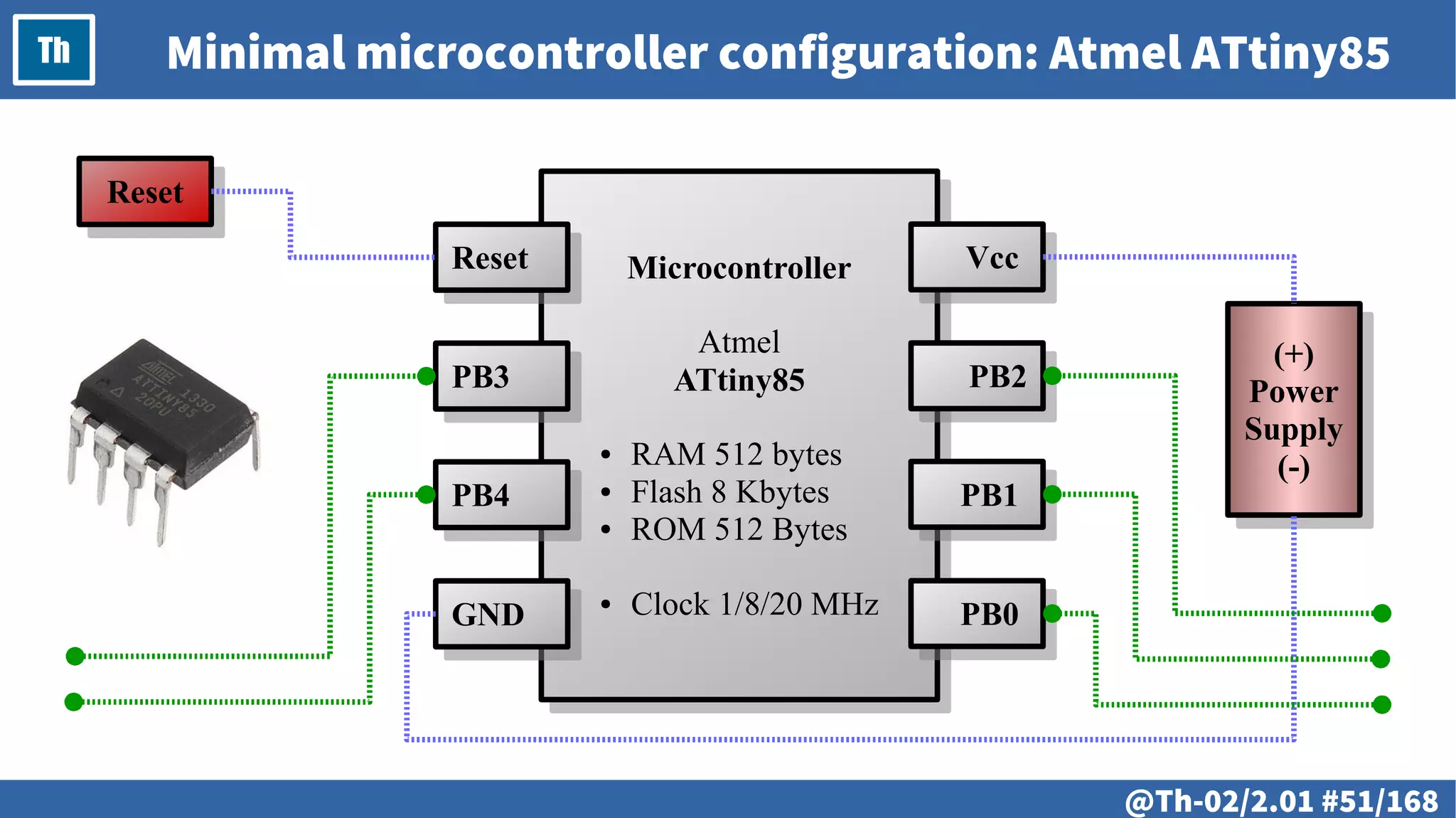
Th Minimal microcontroller configuration: Atmel ATtiny85
Microcontroller
Atmel
ATtiny85
● RAM 512 bytes
● Flash 8 Kbytes
● ROM 512 Bytes
● Clock 1/8/20 MHz
Microcontroller
Atmel
ATtiny85
● RAM 512 bytes
● Flash 8 Kbytes
● ROM 512 Bytes
● Clock 1/8/20 MHz
VccVcc
PB2PB2
PB1PB1
PB0PB0
ResetReset
PB3PB3
PB4PB4
GNDGND
(+)
Power
Supply
(-)
(+)
Power
Supply
(-)
ResetReset
@ #52/213
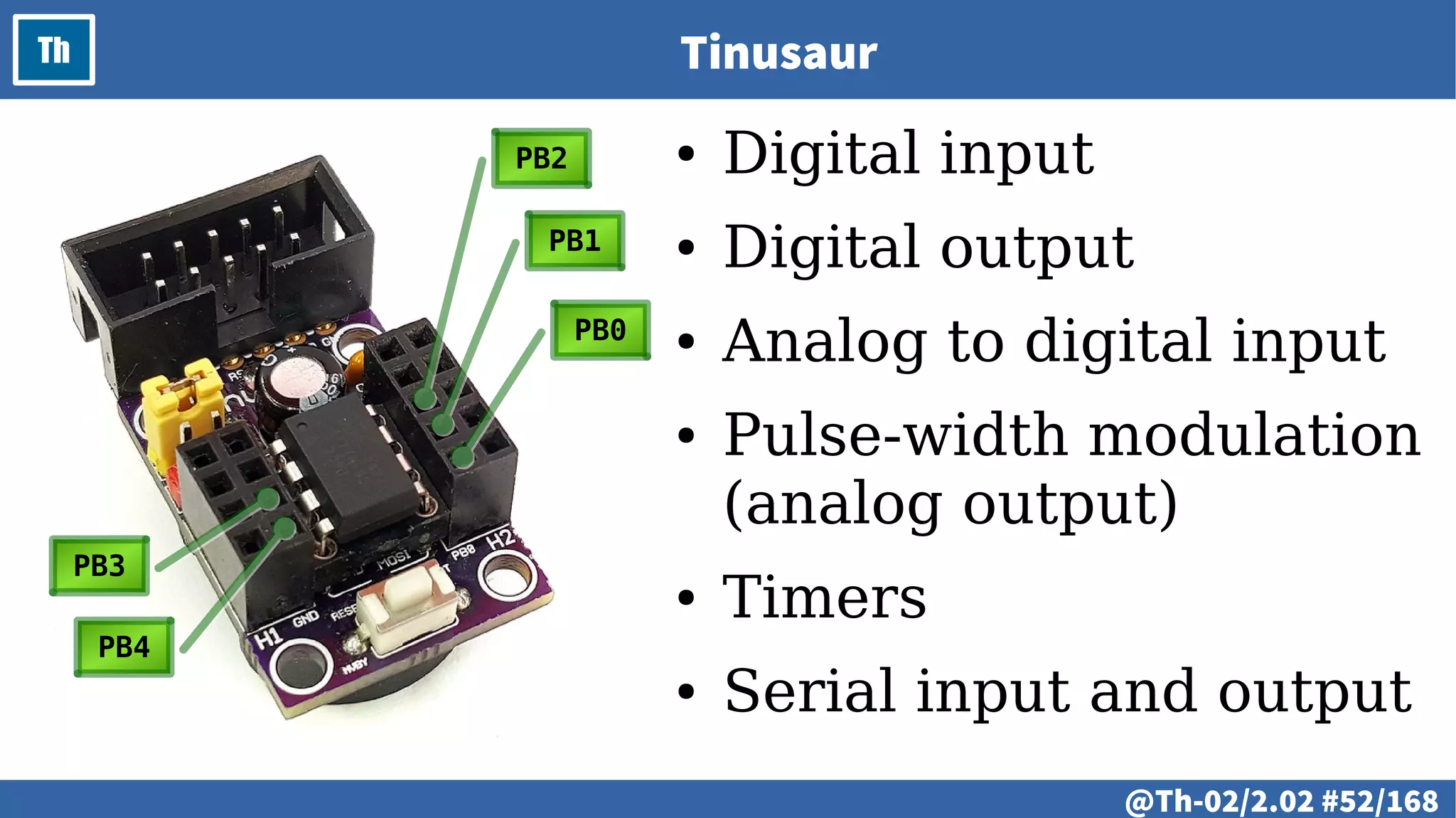
Th Tinusaur
● Digital input
● Digital output
● Analog to digital input
● Pulse-width modulation
(analog output)
● Timers
● Serial input and output
PB0PB0
PB1PB1
PB2PB2
PB3PB3
PB4PB4
@ #53/213
Th
# @54
LAB
● Designing a microcontroller system
– Circuit diagram. Practical design considerations
– PCB. Practical design considerations.
– Assembling of a minimal microcontroller system.
# @55
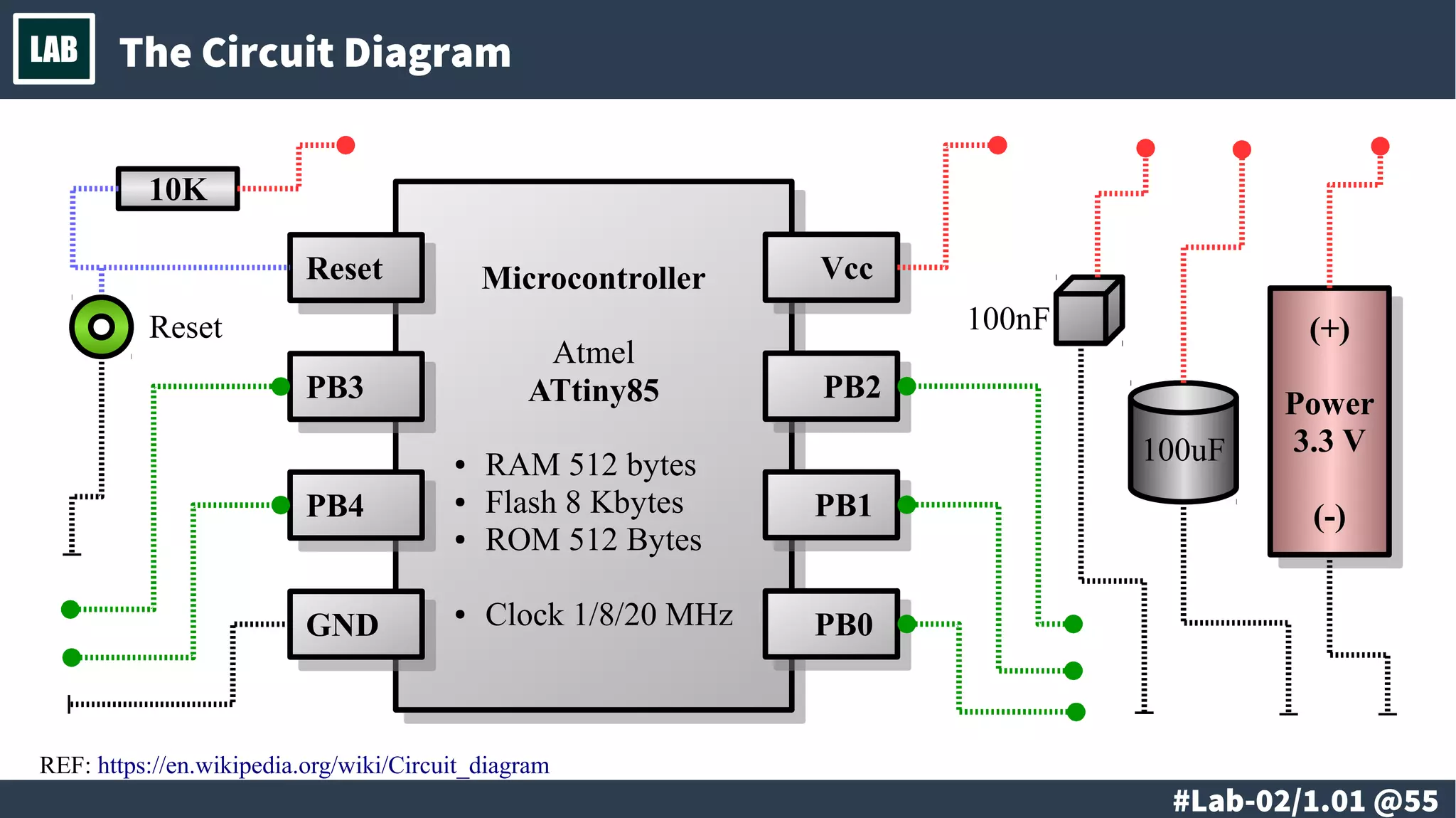
LAB The Circuit Diagram
Microcontroller
Atmel
ATtiny85
● RAM 512 bytes
● Flash 8 Kbytes
● ROM 512 Bytes
● Clock 1/8/20 MHz
Microcontroller
Atmel
ATtiny85
● RAM 512 bytes
● Flash 8 Kbytes
● ROM 512 Bytes
● Clock 1/8/20 MHz
VccVcc
PB2PB2
PB1PB1
PB0PB0
ResetReset
PB3PB3
PB4PB4
GNDGND
(+)
Power
3.3 V
(-)
(+)
Power
3.3 V
(-)
Reset
10K
100uF
100nF
REF: https://en.wikipedia.org/wiki/Circuit_diagram
# @56
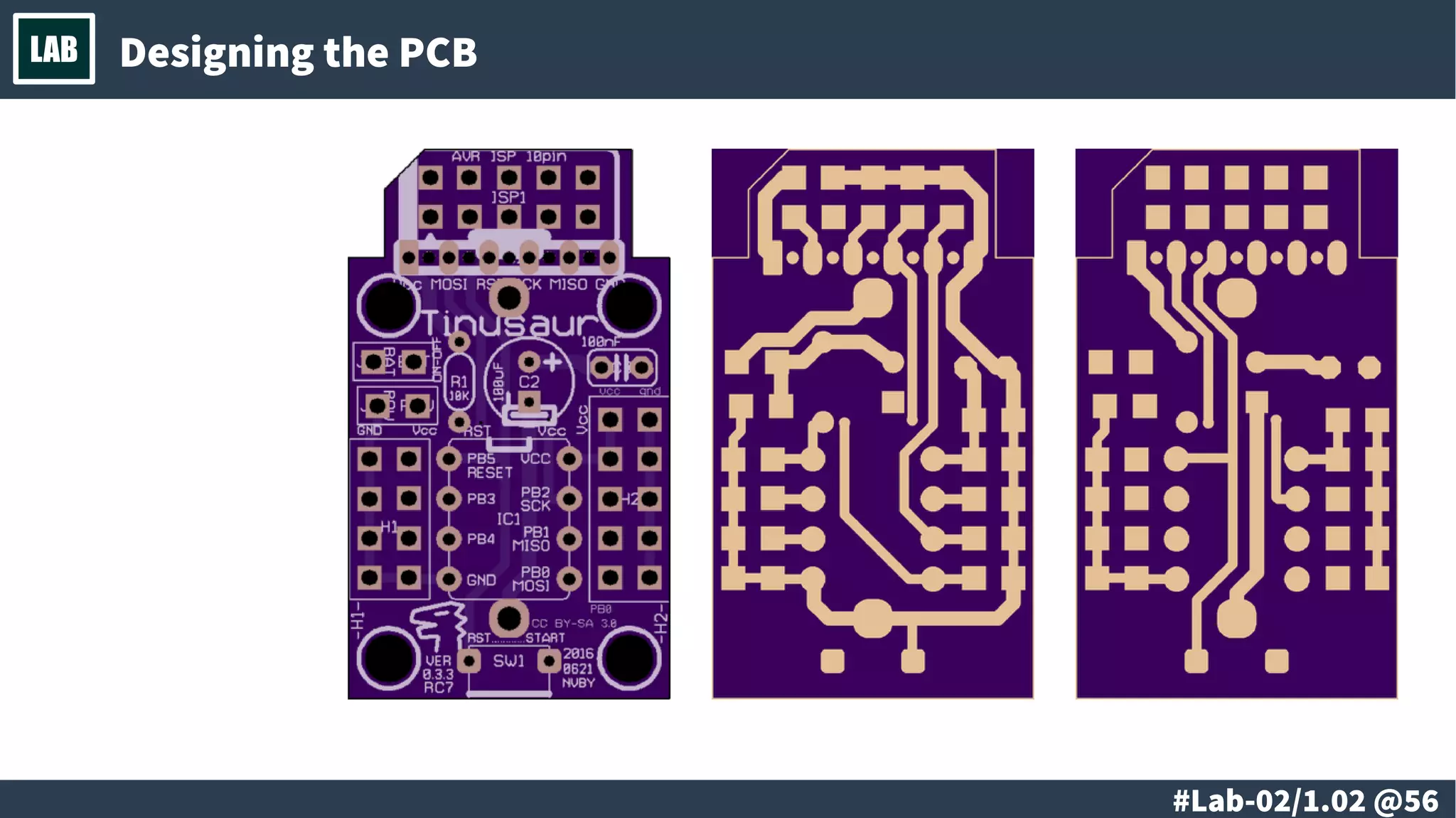
LAB Designing the PCB
# @57
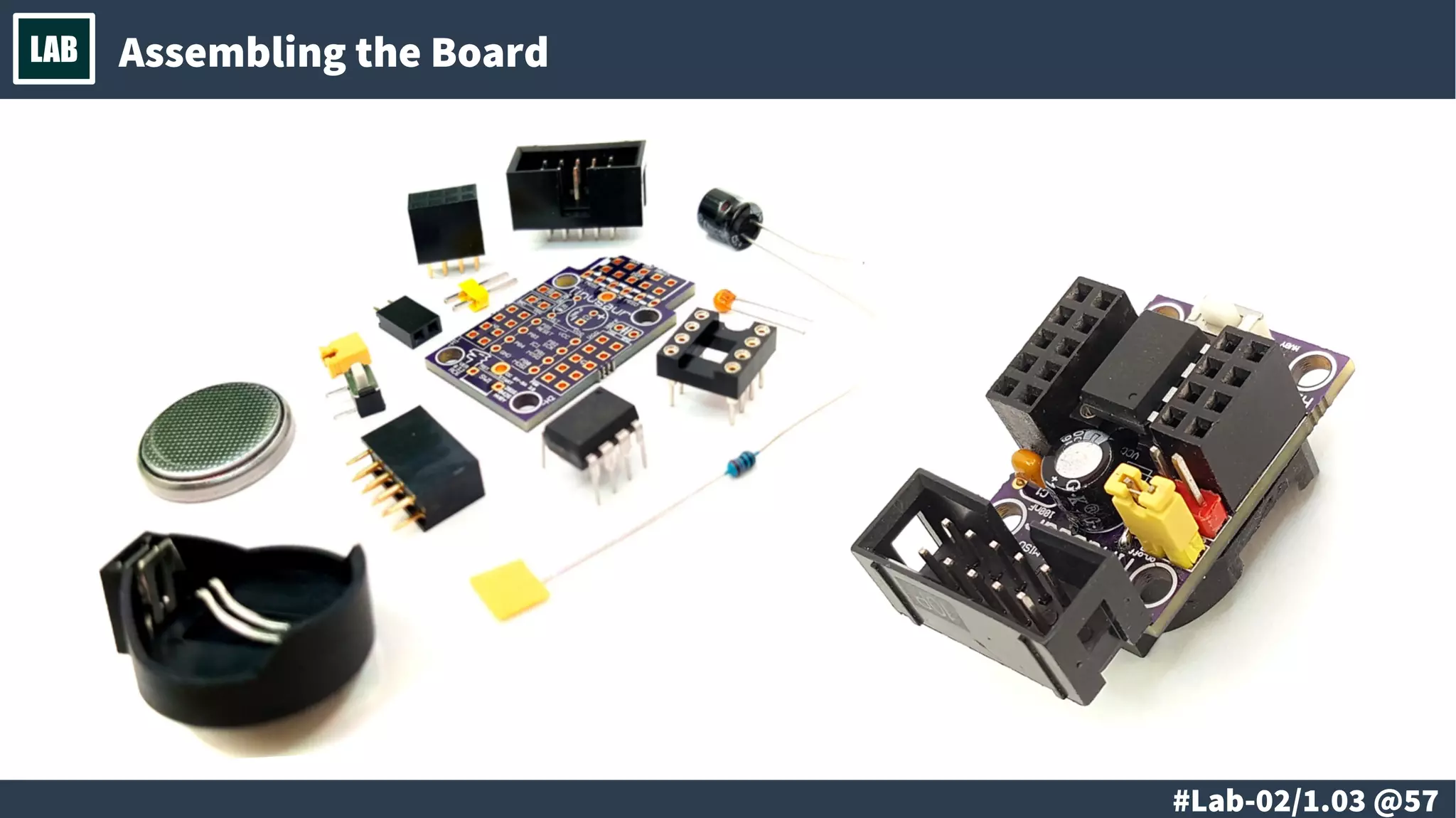
LAB Assembling the Board
# @58
LAB
# @59
LAB
● Minimal microcontroller configuration
– Programming and testing of a minimal microcontroller system.
(under Windows and Linux)
# @60
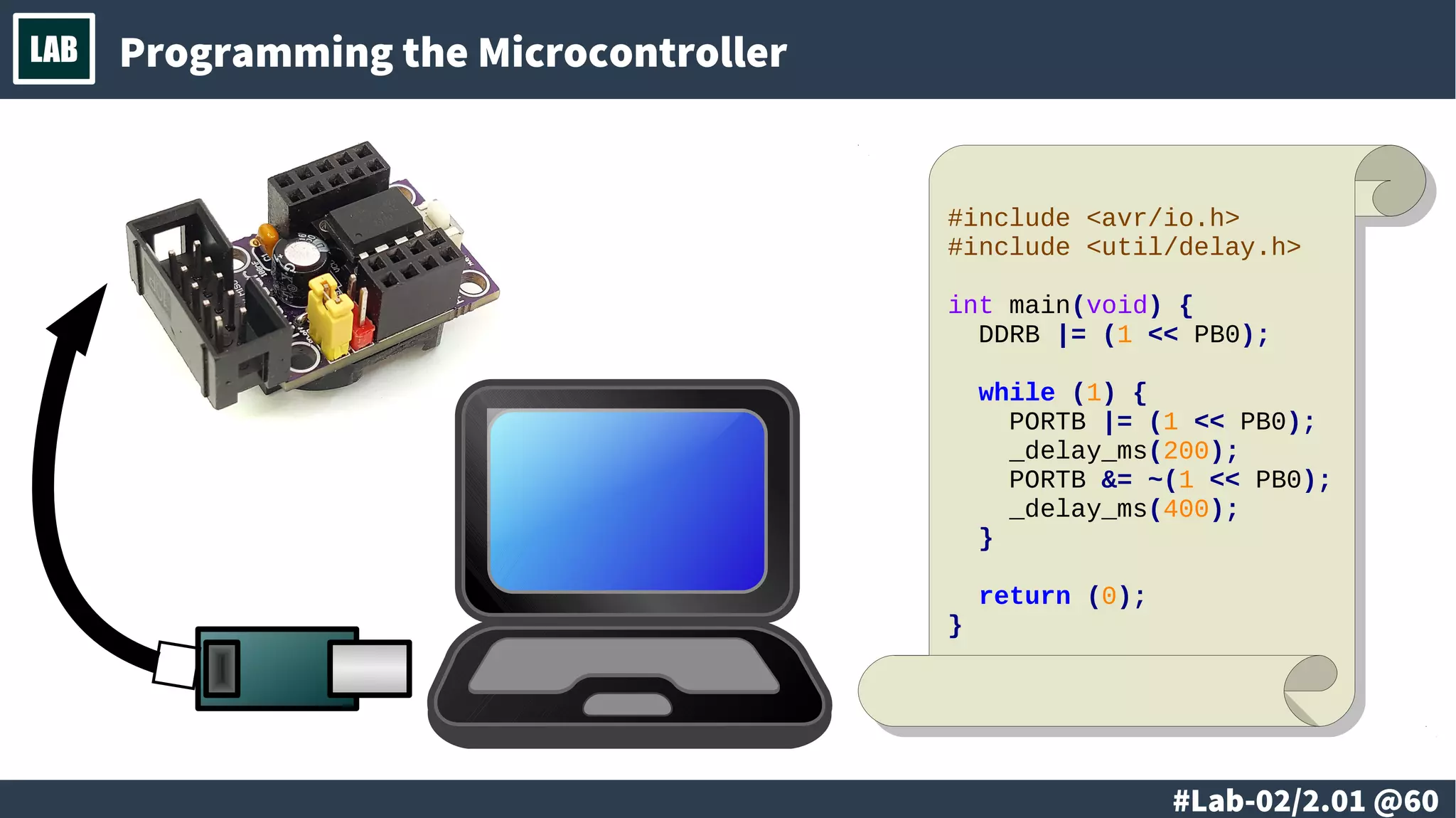
LAB Programming the Microcontroller
#include <avr/io.h>
#include <util/delay.h>
int main(void) {
DDRB |= (1 << PB0);
while (1) {
PORTB |= (1 << PB0);
_delay_ms(200);
PORTB &= ~(1 << PB0);
_delay_ms(400);
}
return (0);
}
# @61
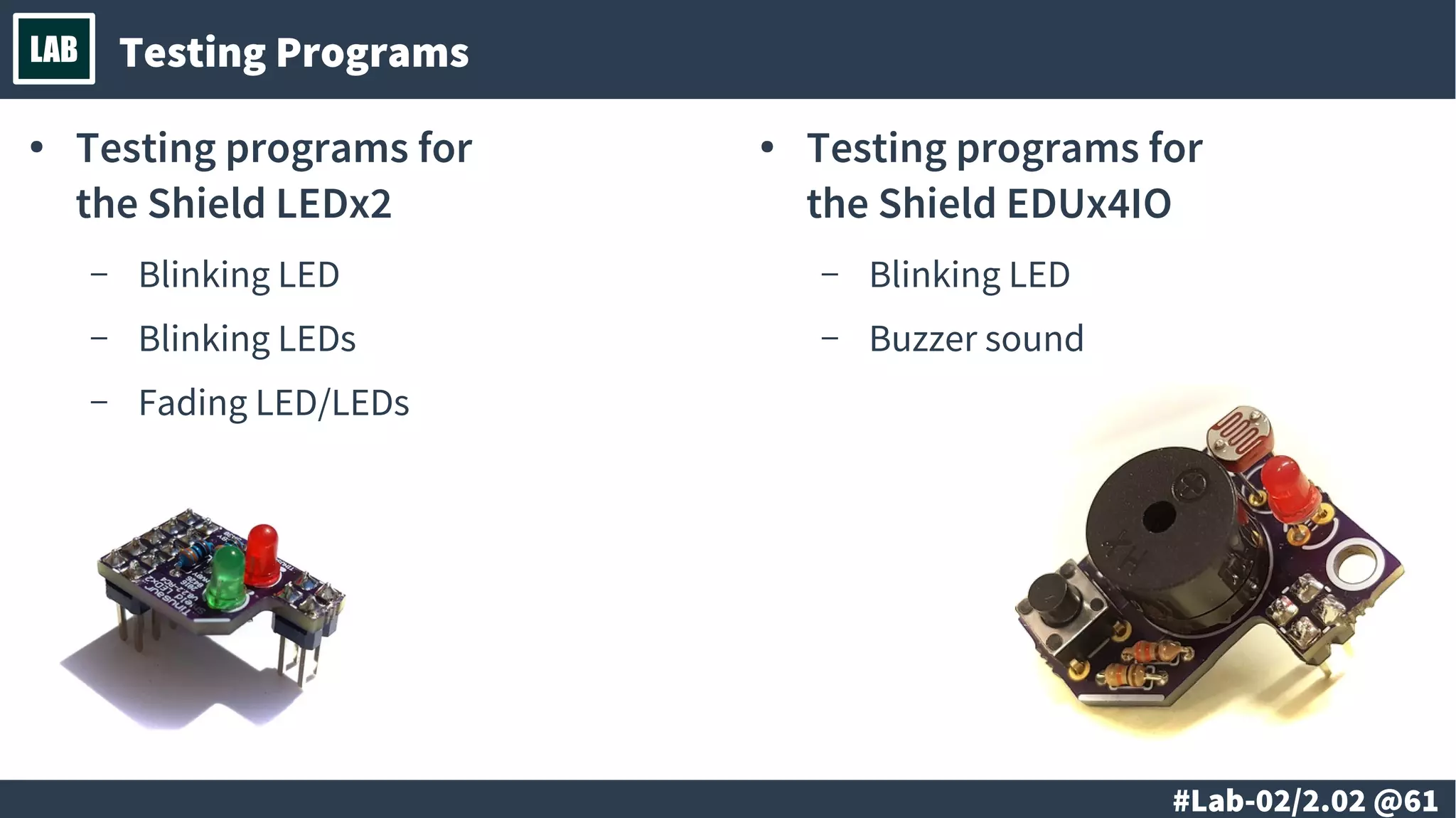
LAB Testing Programs
● Testing programs for
the Shield LEDx2
– Blinking LED
– Blinking LEDs
– Fading LED/LEDs
● Testing programs for
the Shield EDUx4IO
– Blinking LED
– Buzzer sound
# @62
LAB
@ #63/213
Th
● Development tools.
● Compiling the source code to binary.
● Cross-compilers for C/C++ and Assembly
language.
● Specialized development environments.
@ #64/213
Th Development Tools
● Compilers
● Linkers and other tools.
● Programmers.
● Debugging tools.
@ #65/213
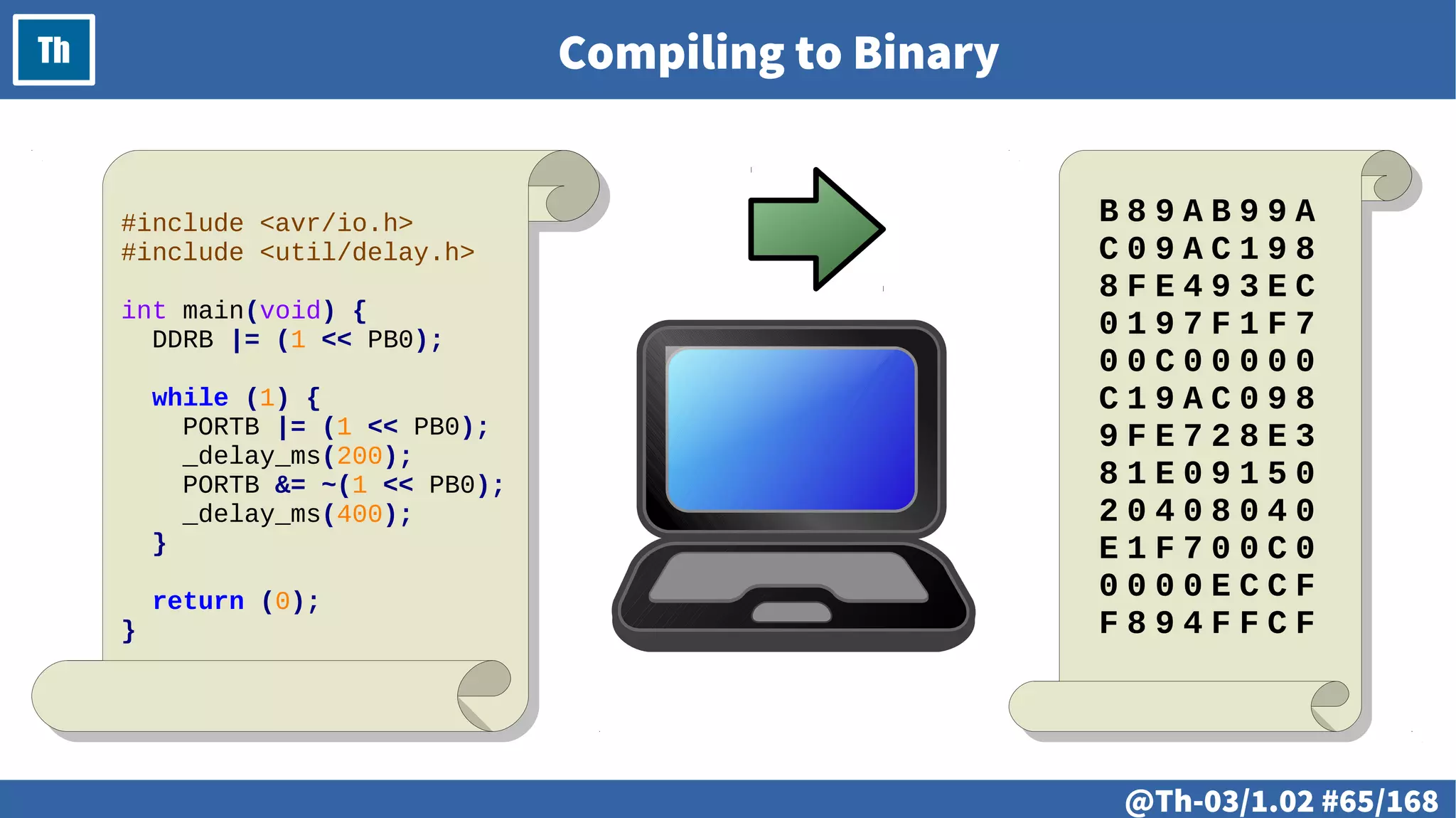
Th Compiling to Binary
#include <avr/io.h>
#include <util/delay.h>
int main(void) {
DDRB |= (1 << PB0);
while (1) {
PORTB |= (1 << PB0);
_delay_ms(200);
PORTB &= ~(1 << PB0);
_delay_ms(400);
}
return (0);
}
B 8 9 A B 9 9 A
C 0 9 A C 1 9 8
8 F E 4 9 3 E C
0 1 9 7 F 1 F 7
0 0 C 0 0 0 0 0
C 1 9 A C 0 9 8
9 F E 7 2 8 E 3
8 1 E 0 9 1 5 0
2 0 4 0 8 0 4 0
E 1 F 7 0 0 C 0
0 0 0 0 E C C F
F 8 9 4 F F C F
@ #66/213
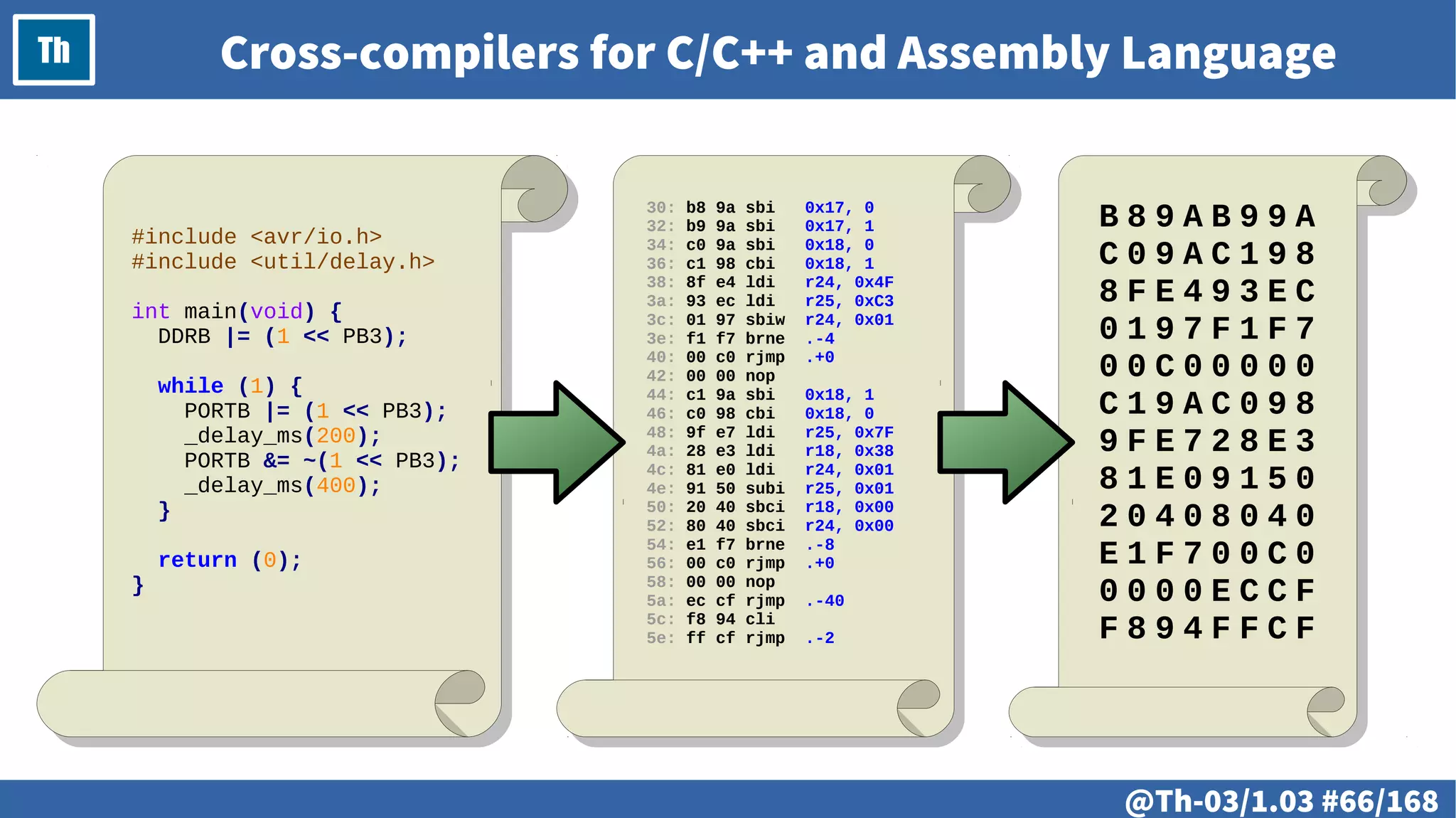
Th Cross-compilers for C/C++ and Assembly Language
#include <avr/io.h>
#include <util/delay.h>
int main(void) {
DDRB |= (1 << PB3);
while (1) {
PORTB |= (1 << PB3);
_delay_ms(200);
PORTB &= ~(1 << PB3);
_delay_ms(400);
}
return (0);
}
30: b8 9a sbi 0x17, 0
32: b9 9a sbi 0x17, 1
34: c0 9a sbi 0x18, 0
36: c1 98 cbi 0x18, 1
38: 8f e4 ldi r24, 0x4F
3a: 93 ec ldi r25, 0xC3
3c: 01 97 sbiw r24, 0x01
3e: f1 f7 brne .-4
40: 00 c0 rjmp .+0
42: 00 00 nop
44: c1 9a sbi 0x18, 1
46: c0 98 cbi 0x18, 0
48: 9f e7 ldi r25, 0x7F
4a: 28 e3 ldi r18, 0x38
4c: 81 e0 ldi r24, 0x01
4e: 91 50 subi r25, 0x01
50: 20 40 sbci r18, 0x00
52: 80 40 sbci r24, 0x00
54: e1 f7 brne .-8
56: 00 c0 rjmp .+0
58: 00 00 nop
5a: ec cf rjmp .-40
5c: f8 94 cli
5e: ff cf rjmp .-2
B 8 9 A B 9 9 A
C 0 9 A C 1 9 8
8 F E 4 9 3 E C
0 1 9 7 F 1 F 7
0 0 C 0 0 0 0 0
C 1 9 A C 0 9 8
9 F E 7 2 8 E 3
8 1 E 0 9 1 5 0
2 0 4 0 8 0 4 0
E 1 F 7 0 0 C 0
0 0 0 0 E C C F
F 8 9 4 F F C F
@ #67/213
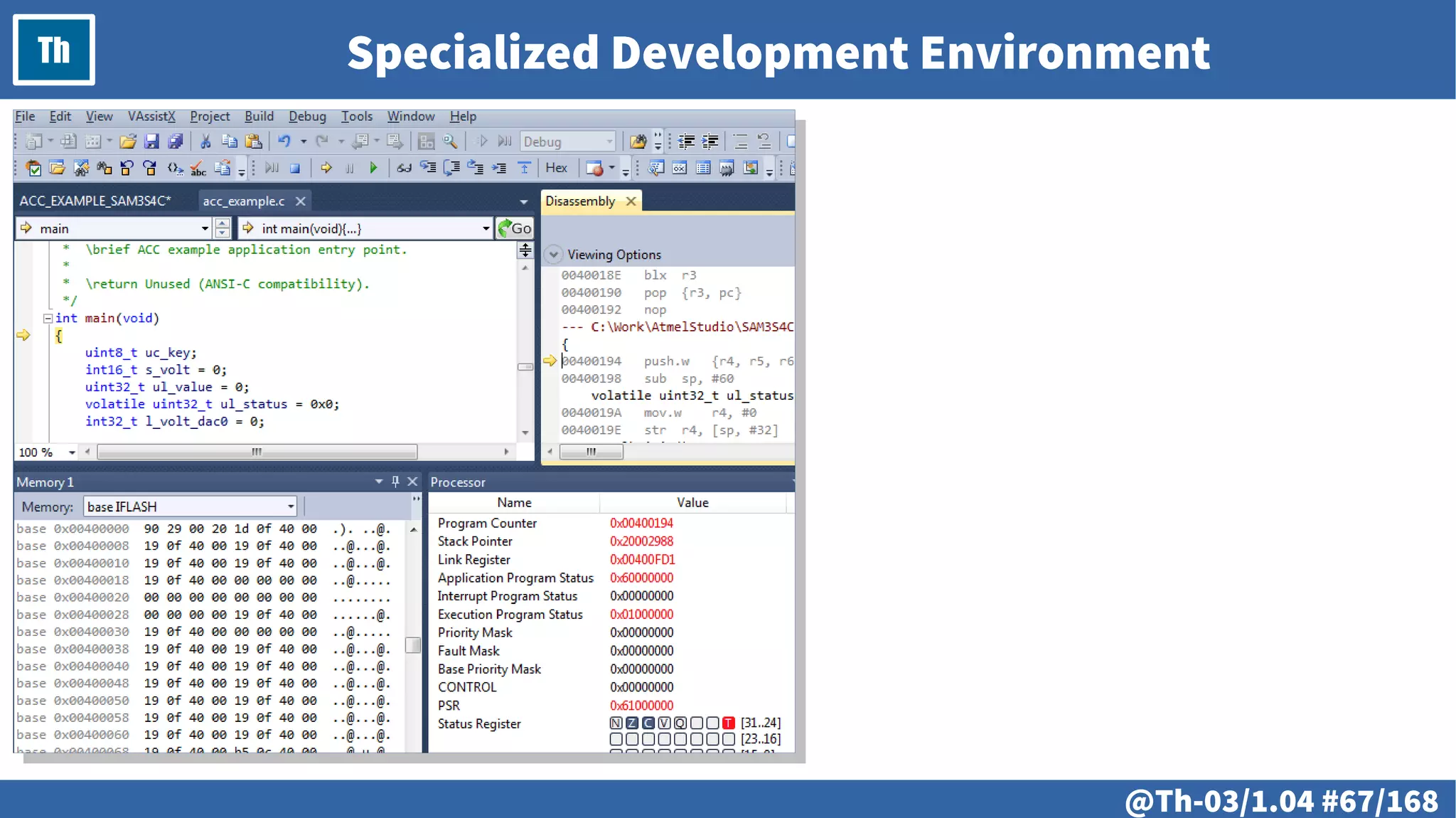
Th Specialized Development Environment
@ #68/213
Th
@ #69/213
Th
● Compiling the source code to a binary.
● Linking the compiled binary code.
● Deployment.
● Debugging tools.
@ #70/213
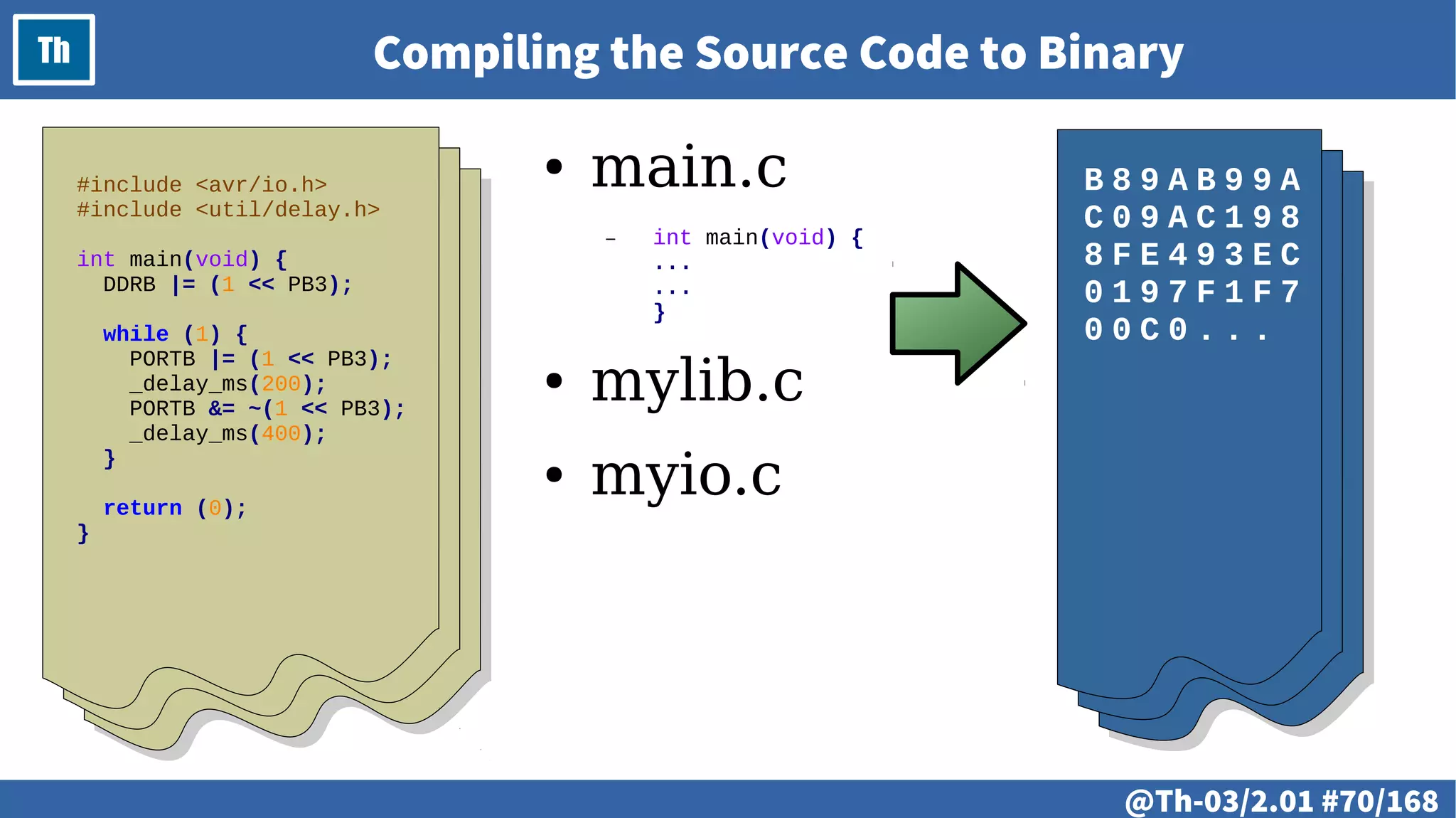
Th Compiling the Source Code to Binary
#include <avr/io.h>
#include <util/delay.h>
int main(void) {
DDRB |= (1 << PB3);
while (1) {
PORTB |= (1 << PB3);
_delay_ms(200);
PORTB &= ~(1 << PB3);
_delay_ms(400);
}
return (0);
}
B 8 9 A B 9 9 A
C 0 9 A C 1 9 8
8 F E 4 9 3 E C
0 1 9 7 F 1 F 7
0 0 C 0 . . .
● main.c
– int main(void) {
...
...
}
● mylib.c
● myio.c
@ #71/213
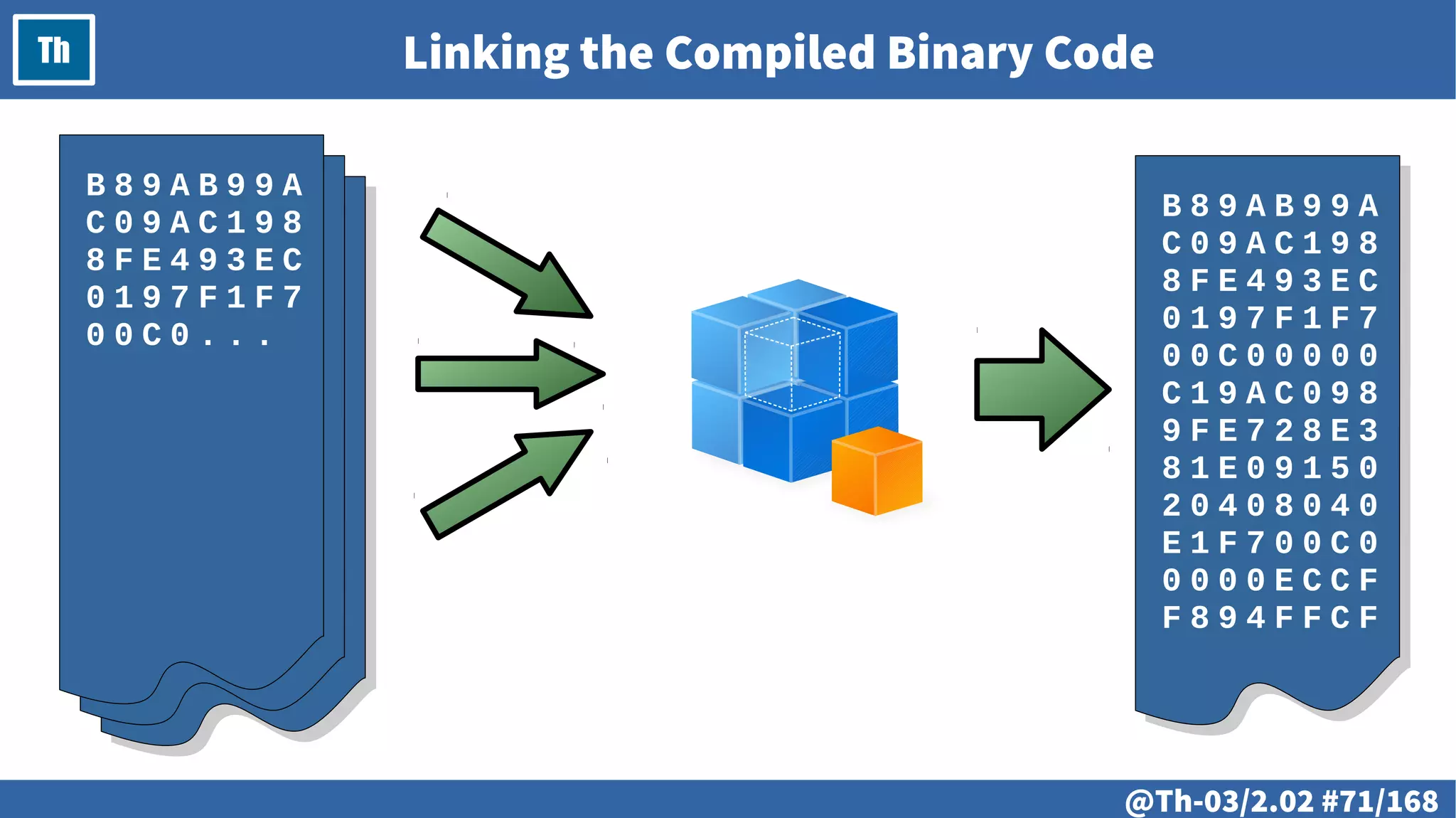
Th Linking the Compiled Binary Code
B 8 9 A B 9 9 A
C 0 9 A C 1 9 8
8 F E 4 9 3 E C
0 1 9 7 F 1 F 7
0 0 C 0 0 0 0 0
C 1 9 A C 0 9 8
9 F E 7 2 8 E 3
8 1 E 0 9 1 5 0
2 0 4 0 8 0 4 0
E 1 F 7 0 0 C 0
0 0 0 0 E C C F
F 8 9 4 F F C F
B 8 9 A B 9 9 A
C 0 9 A C 1 9 8
8 F E 4 9 3 E C
0 1 9 7 F 1 F 7
0 0 C 0 . . .
@ #72/213
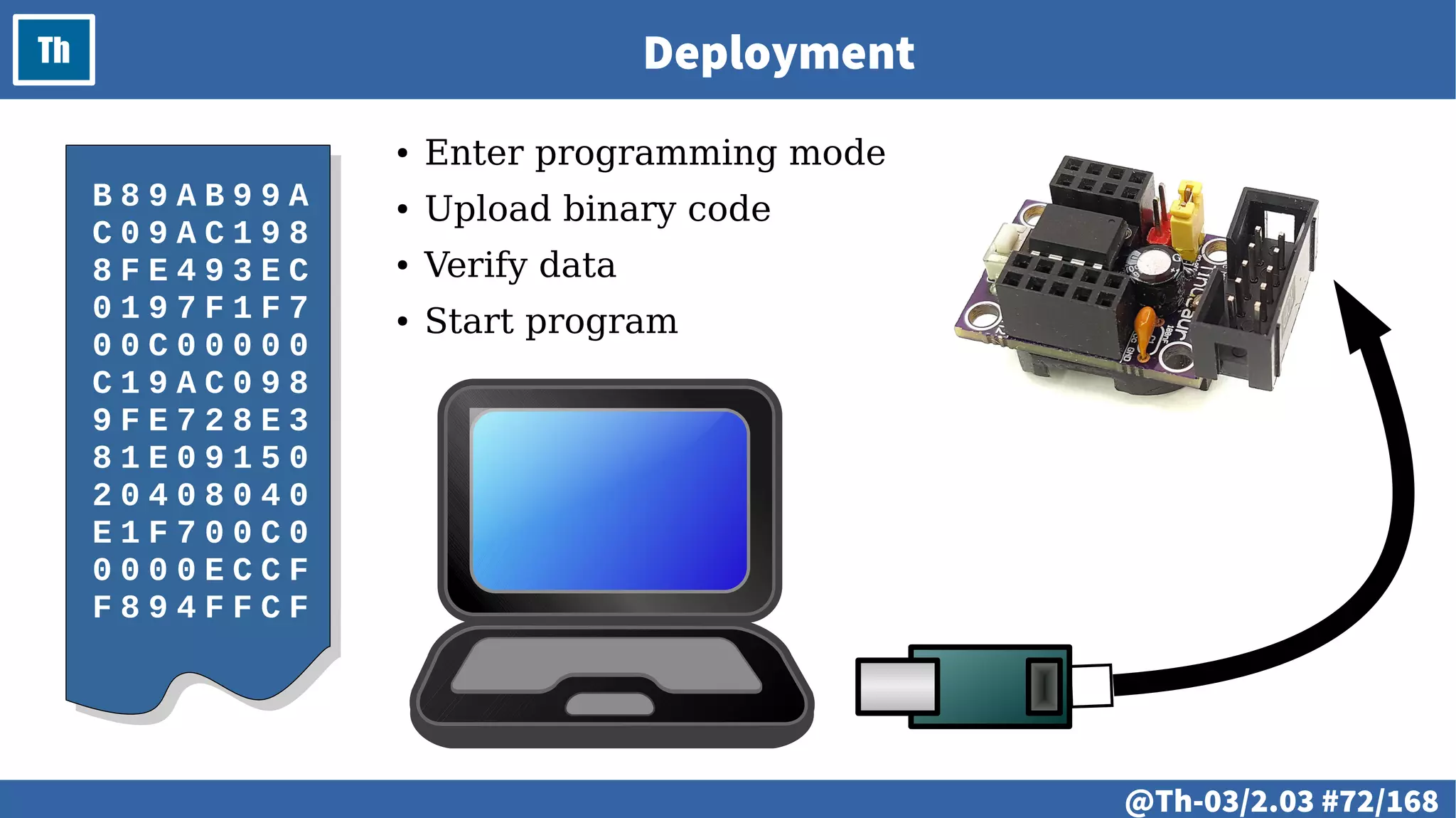
Th Deployment
B 8 9 A B 9 9 A
C 0 9 A C 1 9 8
8 F E 4 9 3 E C
0 1 9 7 F 1 F 7
0 0 C 0 0 0 0 0
C 1 9 A C 0 9 8
9 F E 7 2 8 E 3
8 1 E 0 9 1 5 0
2 0 4 0 8 0 4 0
E 1 F 7 0 0 C 0
0 0 0 0 E C C F
F 8 9 4 F F C F
● Enter programming mode
● Upload binary code
● Verify data
● Start program
@ #73/213
Th Debugging Tools
● Debugging
● Debugging tools
@ #74/213
Th
# @75
LAB
● Development tools.
– GCC-AVR, make, AVRDUDE.
● Specialized development environments.
– Atmel AVR Studio.
– Arduino IDE. Installation and setup.
● Specialized debugging tools.
# @76
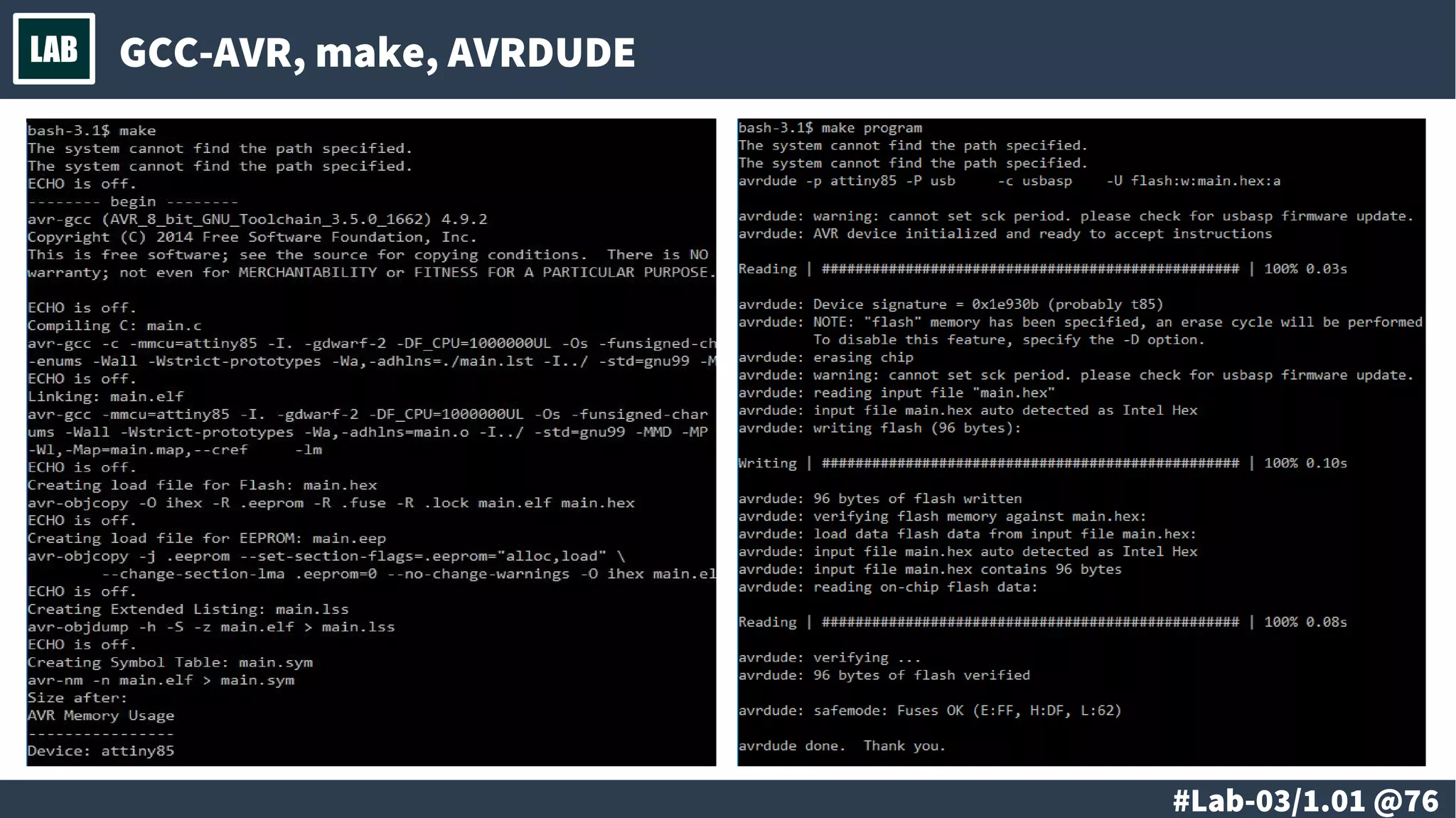
LAB GCC-AVR, make, AVRDUDE
# @77
LAB Atmel AVR Studio
# @78
LAB Arduino IDE
● Edit source code
● Verify source code
● Upload
# @79
LAB Specialized Debugging Tools
● Print over serial line
● Specialized tools
# @80
LAB
# @81
LAB
● “Hello, World!” for
the microcontrollers:
the blinking LED.
– Setup and algorithm.
– 1 blinking LED.
– 2 blinking LEDs.
● Practical implementation.
– Loop and delay.
– Compiling.
– Uploading.
● Advanced
– Using the timers – the idea.
# @82
LAB Setup
Microcontroller
Atmel
ATtiny85
● RAM 512 bytes
● Flash 8 Kbytes
● ROM 512 Bytes
● Clock 1/8/20 MHz
Microcontroller
Atmel
ATtiny85
● RAM 512 bytes
● Flash 8 Kbytes
● ROM 512 Bytes
● Clock 1/8/20 MHz
VccVcc
PB2PB2
PB1PB1
PB0PB0
ResetReset
PB3PB3
PB4PB4
GNDGND
330Ω
330Ω
# @83
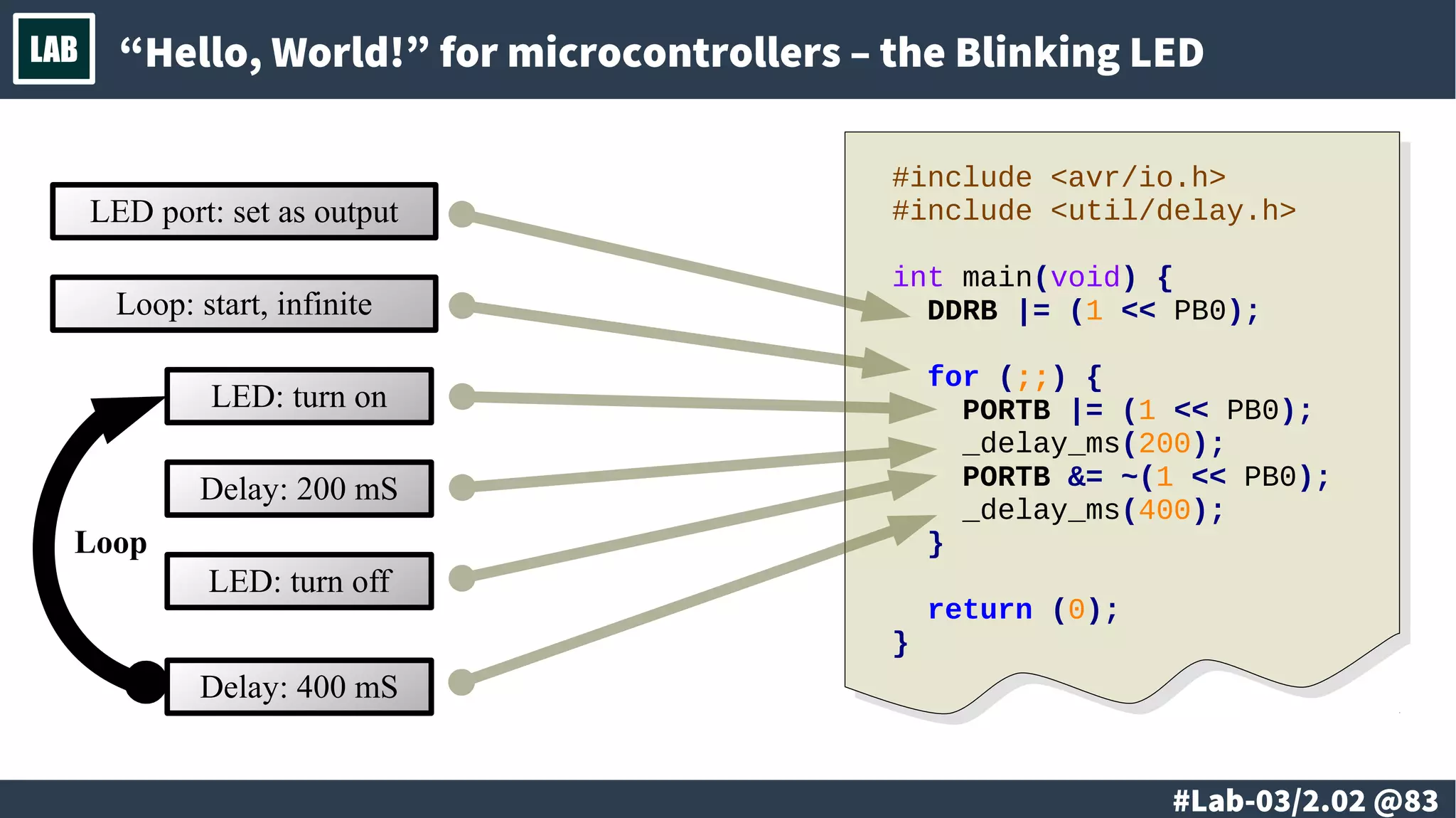
LAB “Hello, World!” for microcontrollers – the Blinking LED
Loop
LED: turn on
Delay: 200 mS
LED: turn off
Delay: 400 mS
LED port: set as output
#include <avr/io.h>
#include <util/delay.h>
int main(void) {
DDRB |= (1 << PB0);
for (;;) {
PORTB |= (1 << PB0);
_delay_ms(200);
PORTB &= ~(1 << PB0);
_delay_ms(400);
}
return (0);
}
Loop: start, infinite
# @84
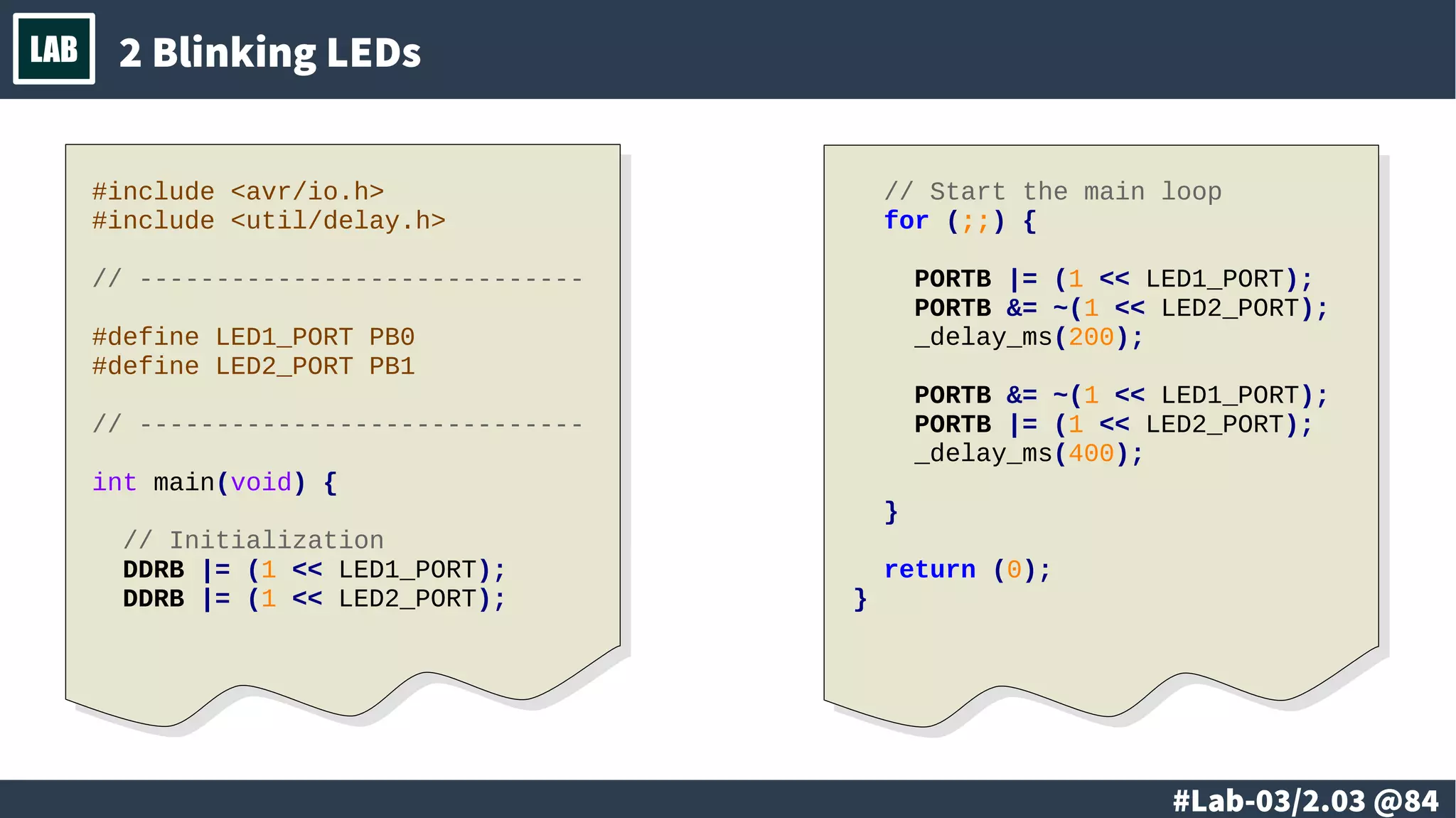
LAB 2 Blinking LEDs
#include <avr/io.h>
#include <util/delay.h>
// -----------------------------
#define LED1_PORT PB0
#define LED2_PORT PB1
// -----------------------------
int main(void) {
// Initialization
DDRB |= (1 << LED1_PORT);
DDRB |= (1 << LED2_PORT);
// Start the main loop
for (;;) {
PORTB |= (1 << LED1_PORT);
PORTB &= ~(1 << LED2_PORT);
_delay_ms(200);
PORTB &= ~(1 << LED1_PORT);
PORTB |= (1 << LED2_PORT);
_delay_ms(400);
}
return (0);
}
# @85
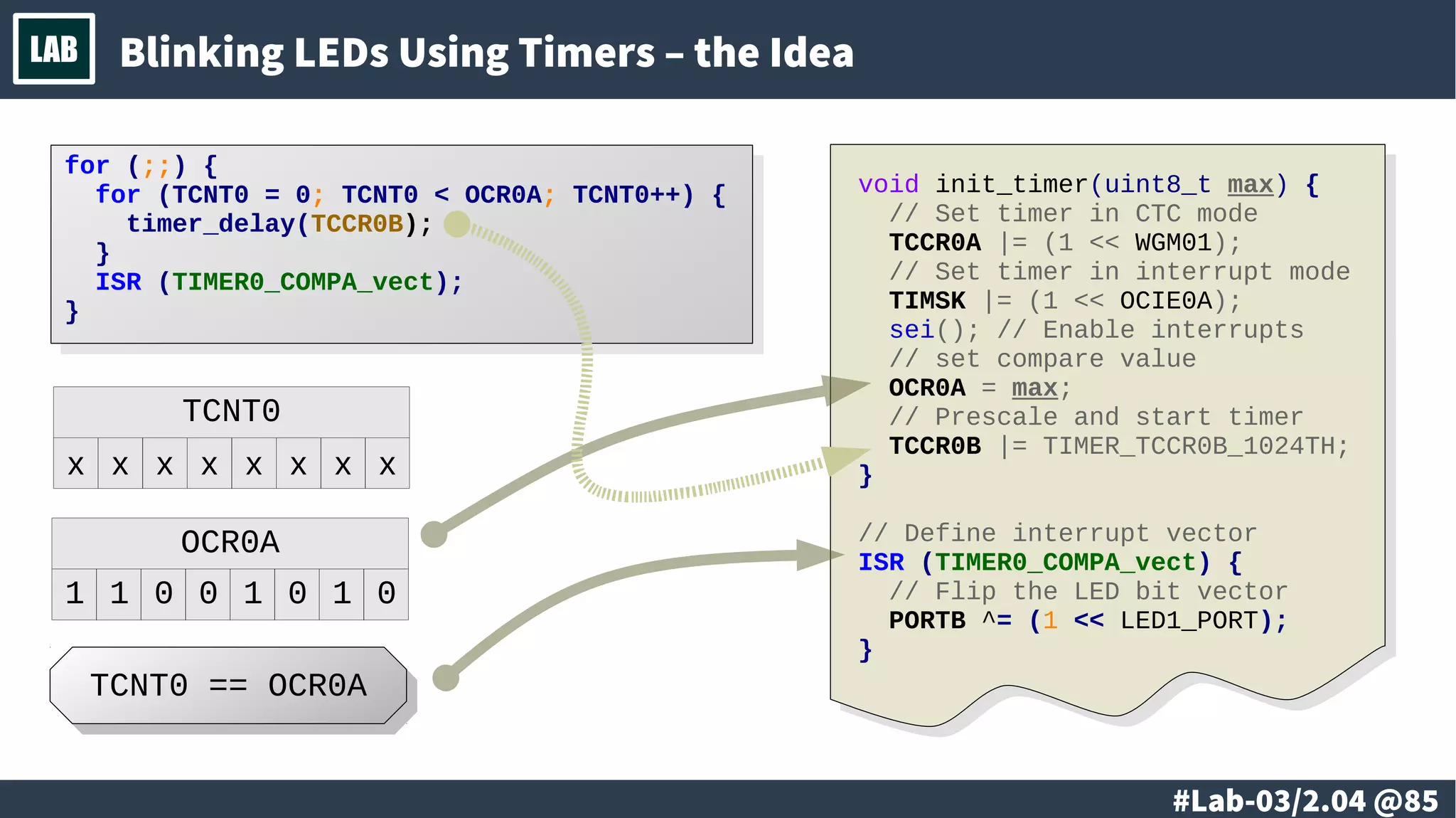
LAB Blinking LEDs Using Timers – the Idea
void init_timer(uint8_t max) {
// Set timer in CTC mode
TCCR0A |= (1 << WGM01);
// Set timer in interrupt mode
TIMSK |= (1 << OCIE0A);
sei(); // Enable interrupts
// set compare value
OCR0A = max;
// Prescale and start timer
TCCR0B |= TIMER_TCCR0B_1024TH;
}
// Define interrupt vector
ISR (TIMER0_COMPA_vect) {
// Flip the LED bit vector
PORTB ^= (1 << LED1_PORT);
}
OCR0A
1 1 0 0 1 0 1 0
TCNT0
x x x x x x x x
TCNT0 == OCR0ATCNT0 == OCR0A
for (;;) {
for (TCNT0 = 0; TCNT0 < OCR0A; TCNT0++) {
timer_delay(TCCR0B);
}
ISR (TIMER0_COMPA_vect);
}
for (;;) {
for (TCNT0 = 0; TCNT0 < OCR0A; TCNT0++) {
timer_delay(TCCR0B);
}
ISR (TIMER0_COMPA_vect);
}
# @86
LAB
@ #87/213
Th
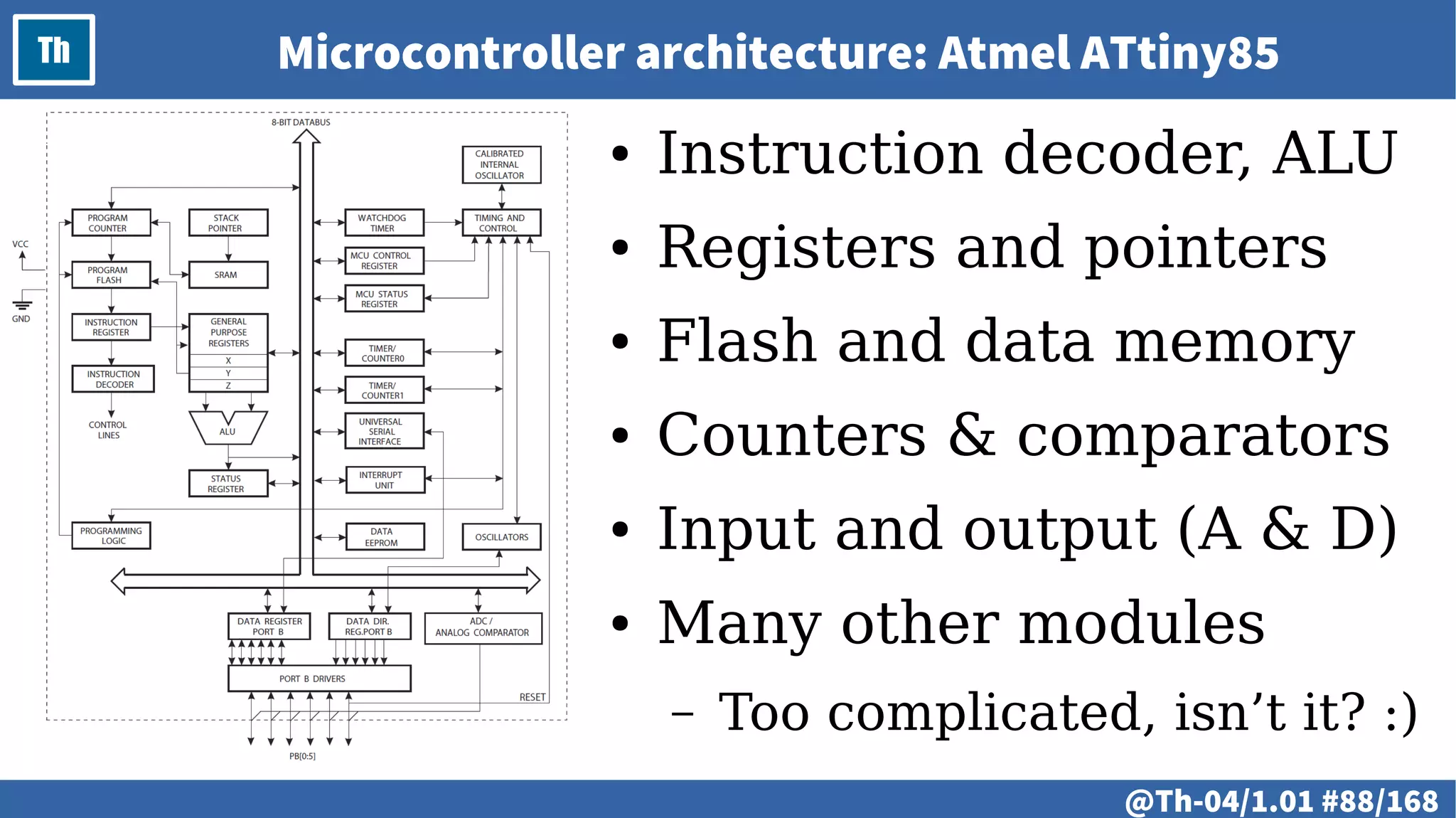
● Microcontroller architecture
– Atmel ATtiny85 block diagram
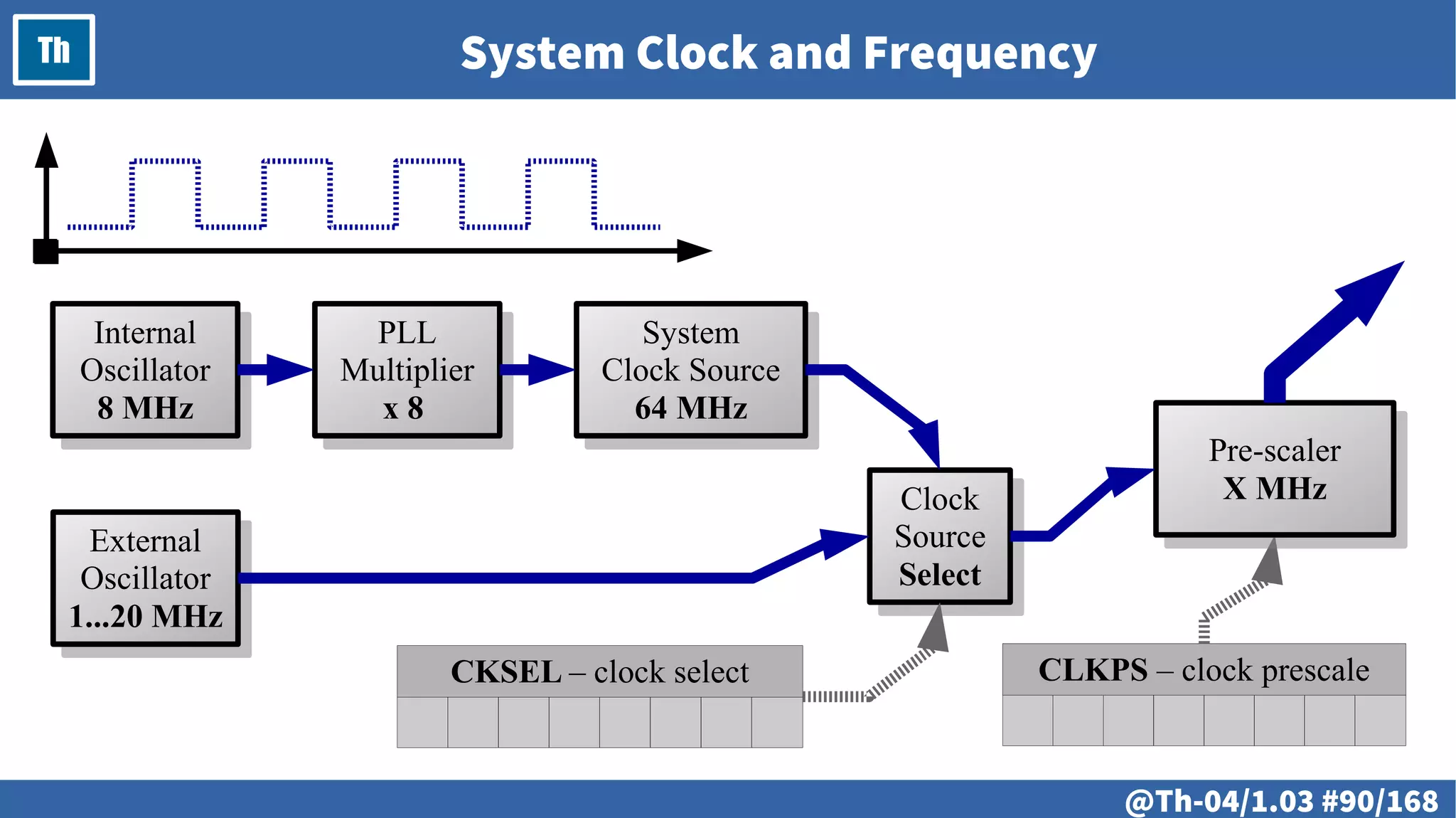
● System clock and frequency
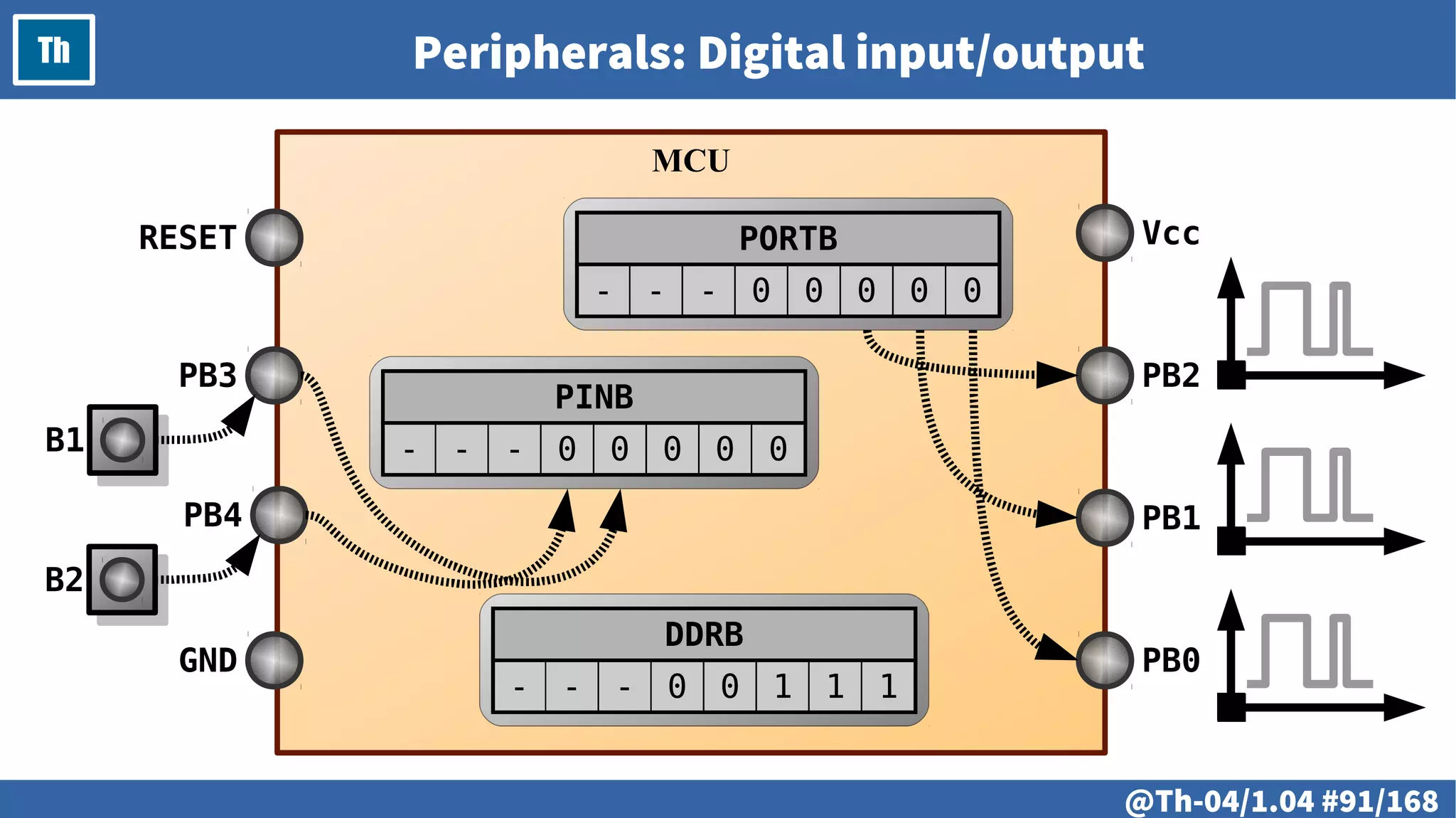
● Peripherals
– Digital input/output
– Analog input/output
– Interrupts
– Serial and other interfaces
@ #88/213
Th Microcontroller architecture: Atmel ATtiny85
● Instruction decoder, ALU
● Registers and pointers
● Flash and data memory
● Counters & comparators
● Input and output (A & D)
● Many other modules
– Too complicated, isn’t it? :)
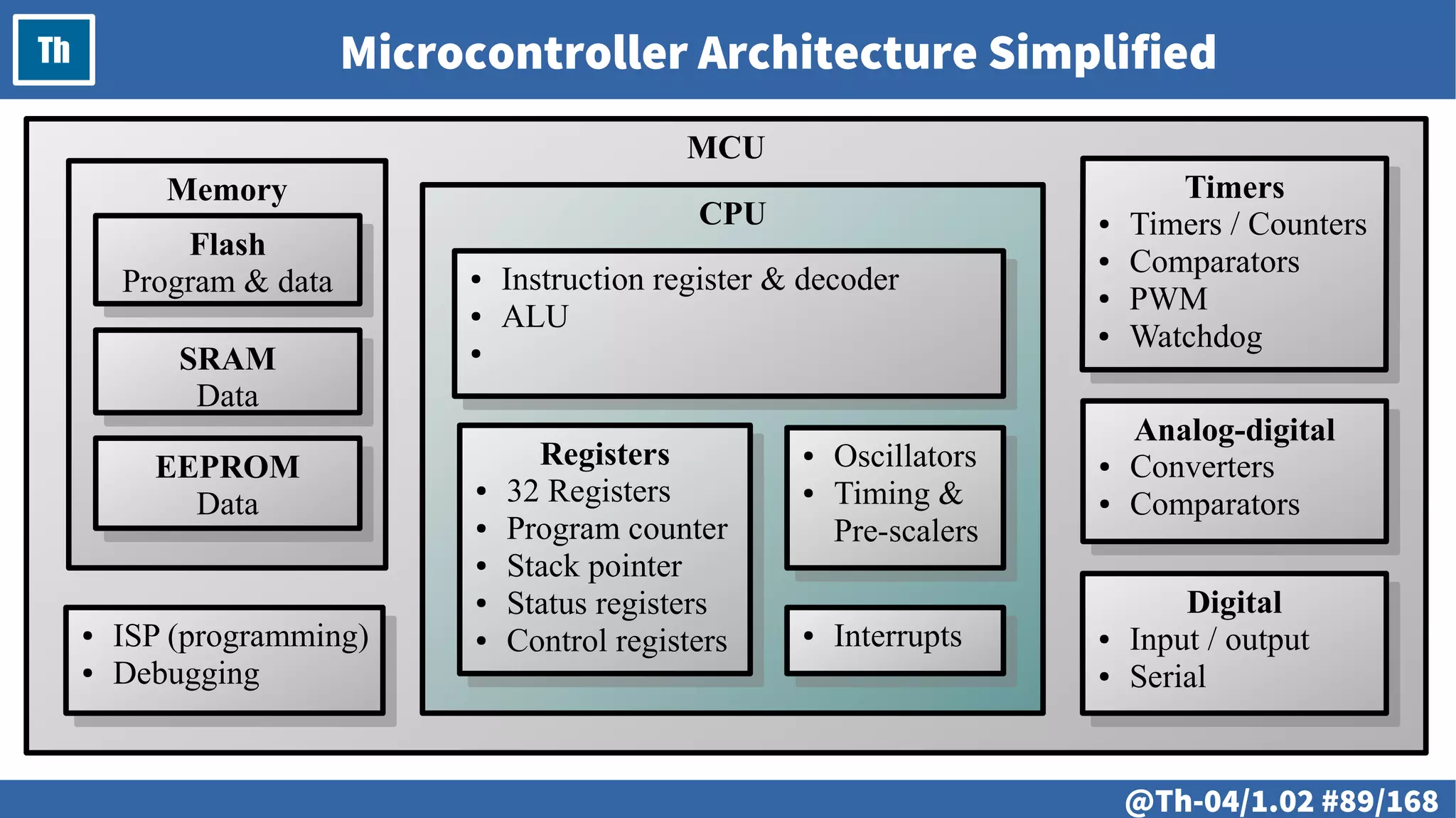
@ #89/213
Th
MCU
CPU
Microcontroller Architecture Simplified
Memory
Flash
Program & data
Flash
Program & data
SRAM
Data
SRAM
Data
EEPROM
Data
EEPROM
Data
Digital
● Input / output
● Serial
Digital
● Input / output
● Serial
● ISP (programming)
● Debugging
● ISP (programming)
● Debugging
Analog-digital
● Converters
● Comparators
Analog-digital
● Converters
● Comparators
Registers
● 32 Registers
● Program counter
● Stack pointer
● Status registers
● Control registers
Registers
● 32 Registers
● Program counter
● Stack pointer
● Status registers
● Control registers
● Oscillators
● Timing &
Pre-scalers
● Oscillators
● Timing &
Pre-scalers
● Instruction register & decoder
● ALU
●
● Instruction register & decoder
● ALU
●
● Interrupts
● Interrupts
@ #90/213
Th System Clock and Frequency
Internal
Oscillator
8 MHz
Internal
Oscillator
8 MHz
PLL
Multiplier
x 8
PLL
Multiplier
x 8
System
Clock Source
64 MHz
System
Clock Source
64 MHz
Clock
Source
Select
Clock
Source
Select
CKSEL – clock select CLKPS – clock prescale
External
Oscillator
1...20 MHz
External
Oscillator
1...20 MHz
Pre-scaler
X MHz
Pre-scaler
X MHz
@ #91/213
Th Peripherals: Digital input/output
MCU
DDRB
- - - 0 0 1 1 1
PB0
PB1
PB2
Vcc
GND
PB4
PB3
RESET PORTB
- - - 0 0 0 0 0
PINB
- - - 0 0 0 0 0
B2
B1
@ #92/213
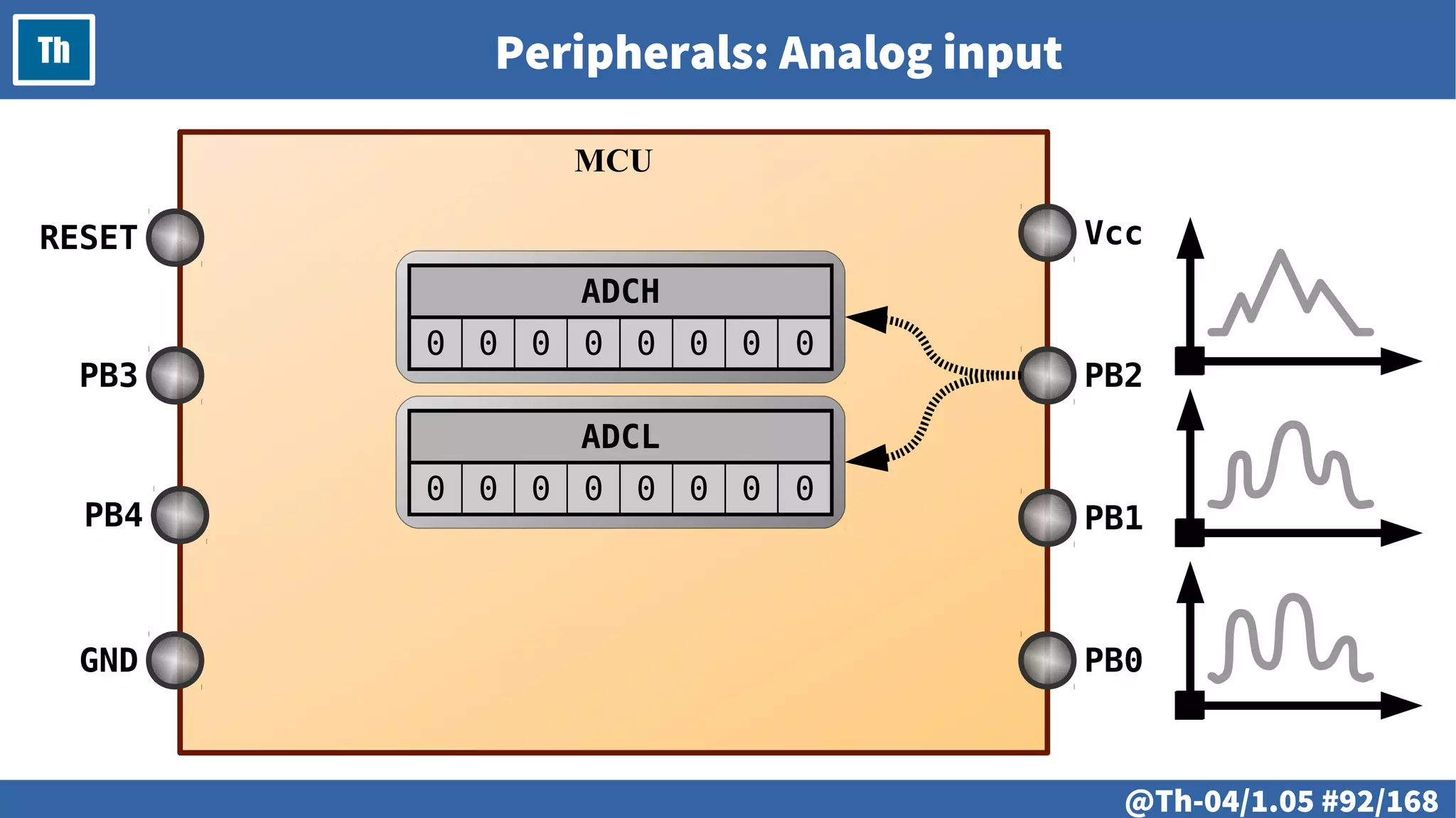
Th Peripherals: Analog input
MCU
PB0
PB1
PB2
Vcc
GND
PB4
PB3
RESET
ADCH
0 0 0 0 0 0 0 0
ADCL
0 0 0 0 0 0 0 0
@ #93/213
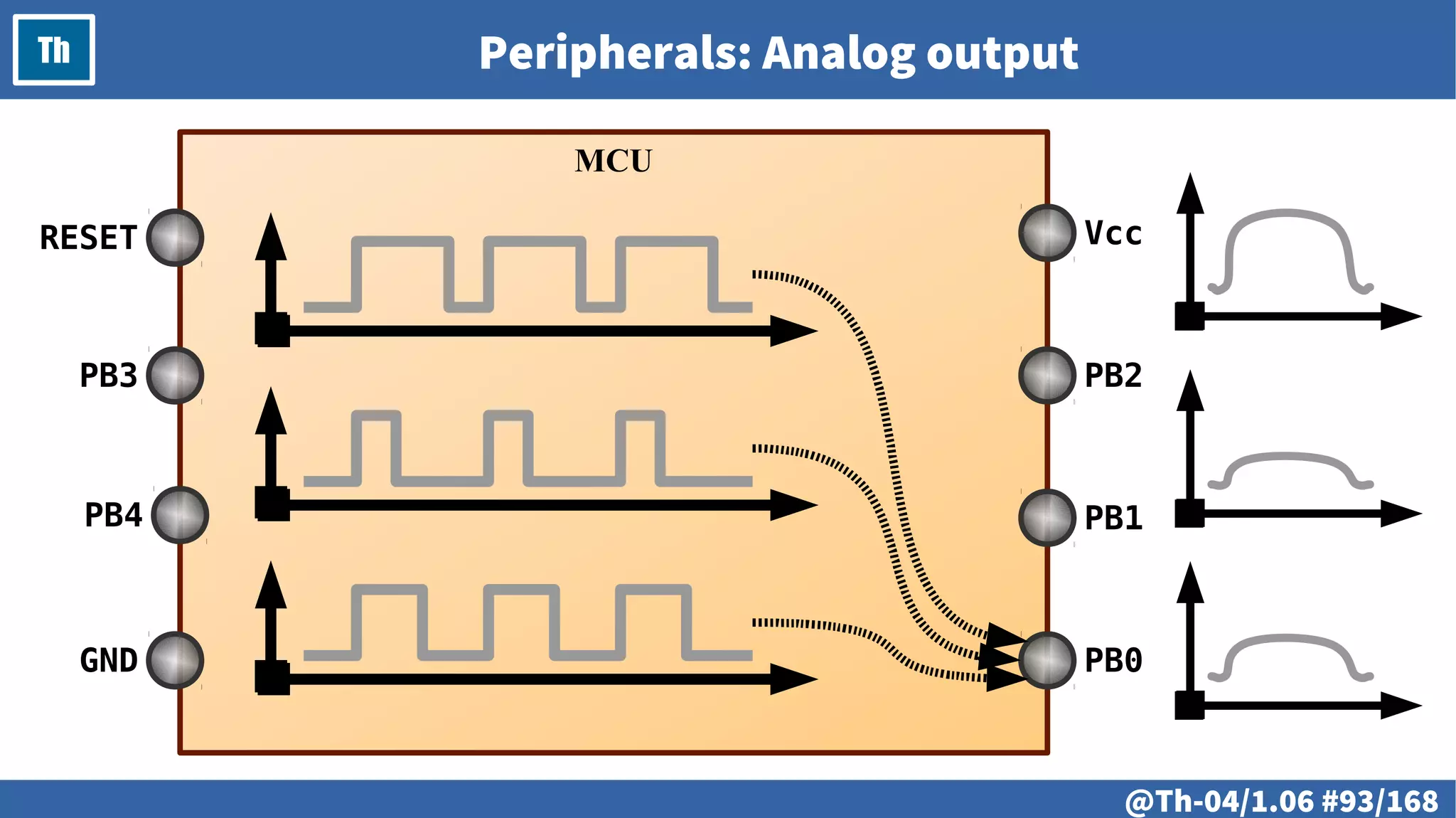
Th Peripherals: Analog output
MCU
PB0
PB1
PB2
Vcc
GND
PB4
PB3
RESET
@ #94/213
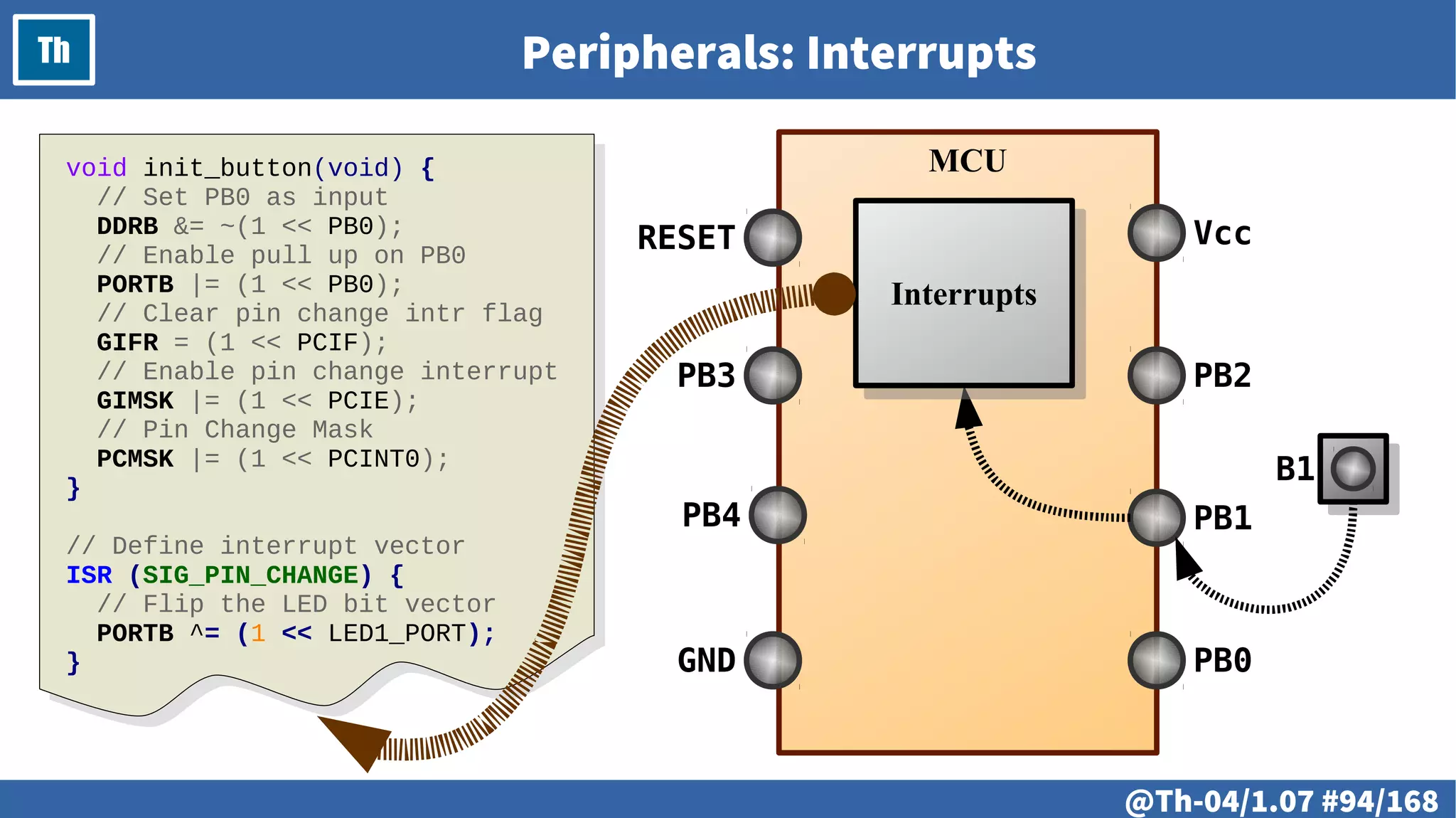
Th Peripherals: Interrupts
MCU
PB0
PB1
PB2
Vcc
GND
PB4
PB3
RESET
B1
InterruptsInterrupts
void init_button(void) {
// Set PB0 as input
DDRB &= ~(1 << PB0);
// Enable pull up on PB0
PORTB |= (1 << PB0);
// Clear pin change intr flag
GIFR = (1 << PCIF);
// Enable pin change interrupt
GIMSK |= (1 << PCIE);
// Pin Change Mask
PCMSK |= (1 << PCINT0);
}
// Define interrupt vector
ISR (SIG_PIN_CHANGE) {
// Flip the LED bit vector
PORTB ^= (1 << LED1_PORT);
}
@ #95/213
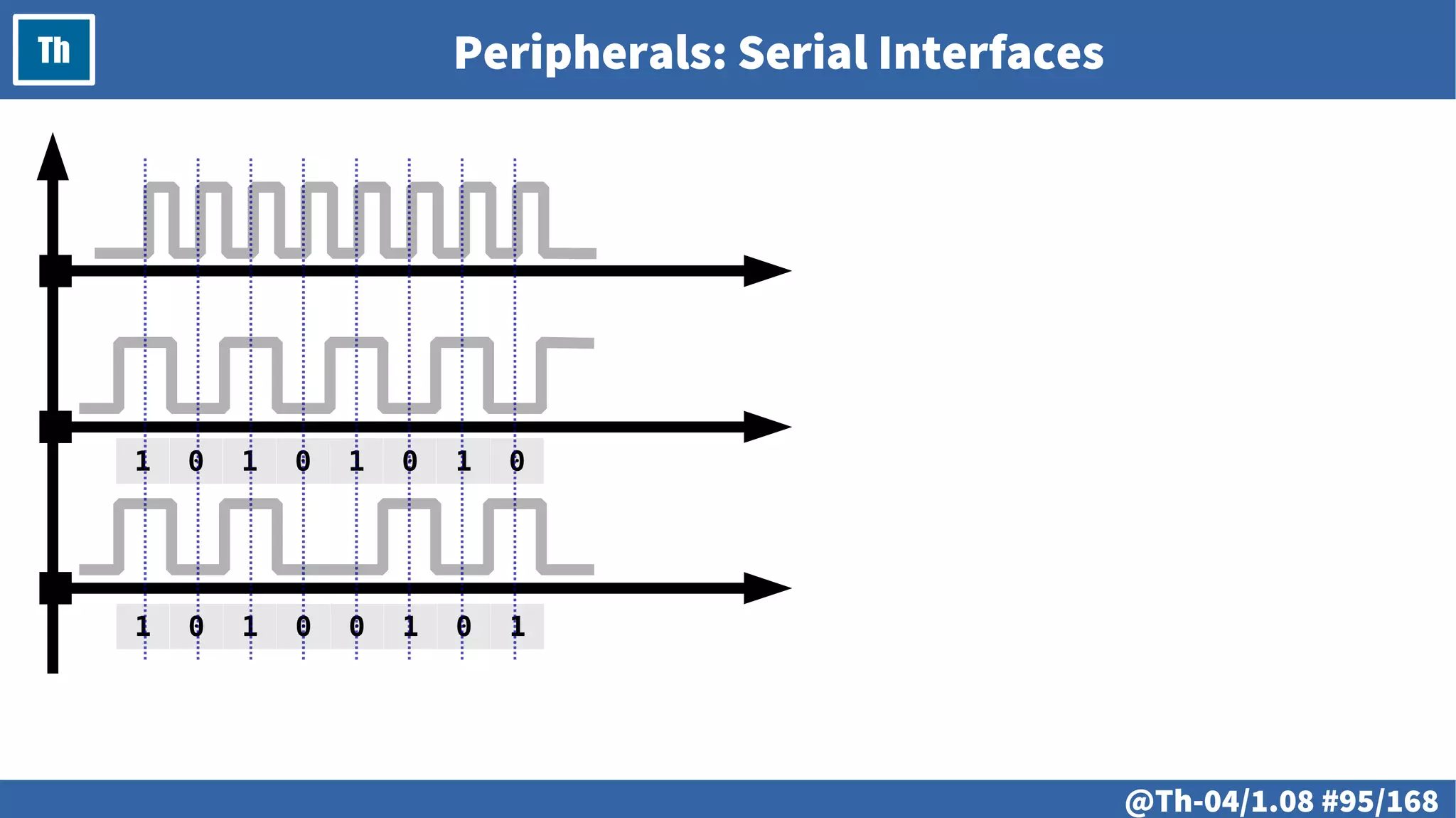
Th Peripherals: Serial Interfaces
1 0 1 0 1 0 1 0
1 0 1 0 0 1 0 1
@ #96/213
Th
@ #97/213
Th
● Memory
● Registers
● Program counter
● Machine instructions
● Addressing methods
● Stack
@ #98/213
Th Memory
@ #99/213
Th Registers
@ #100/213
Th Program Counter
@ #101/213
Th Machine Instructions
30: b8 9a sbi 0x17, 0
32: b9 9a sbi 0x17, 1
34: c0 9a sbi 0x18, 0
36: c1 98 cbi 0x18, 1
38: 8f e4 ldi r24, 0x4F
3a: 93 ec ldi r25, 0xC3
3c: 01 97 sbiw r24, 0x01
3e: f1 f7 brne .-4
40: 00 c0 rjmp .+0
42: 00 00 nop
44: c1 9a sbi 0x18, 1
46: c0 98 cbi 0x18, 0
48: 9f e7 ldi r25, 0x7F
4a: 28 e3 ldi r18, 0x38
4c: 81 e0 ldi r24, 0x01
4e: 91 50 subi r25, 0x01
50: 20 40 sbci r18, 0x00
52: 80 40 sbci r24, 0x00
54: e1 f7 brne .-8
56: 00 c0 rjmp .+0
58: 00 00 nop
5a: ec cf rjmp .-40
5c: f8 94 cli
5e: ff cf rjmp .-2
@ #102/213
Th Addressing Methods
@ #103/213
Th Stack
@ #104/213
Th
# @105
LAB
● Machine instructions
● Machine cycles
● Delay implementation
# @106
LAB Machine Instructions
# @107
LAB Machine Cycles
# @108
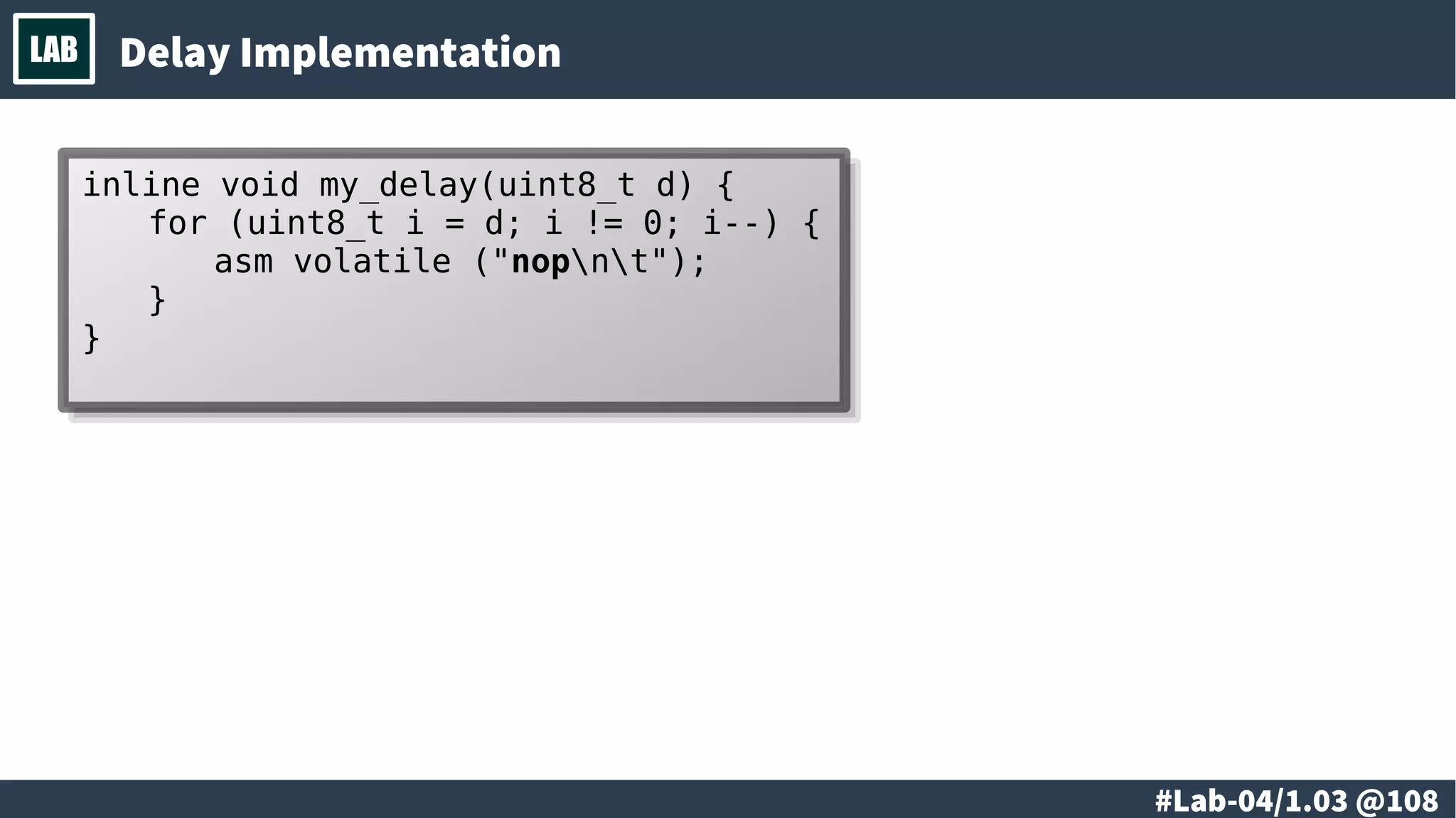
LAB Delay Implementation
inline void my_delay(uint8_t d) {
for (uint8_t i = d; i != 0; i--) {
asm volatile ("nopnt");
}
}
inline void my_delay(uint8_t d) {
for (uint8_t i = d; i != 0; i--) {
asm volatile ("nopnt");
}
}
# @109
LAB
# @110
LAB
● Types of memory
● Working with memory
● Addressing methods
● Capabilities and limitations
● Variables and size of the data
● Code and size of the code
# @111
LAB Types of Memory
● Flash Memory
● RAM
● EEPROM
# @112
LAB Working with Memory
# @113
LAB Addressing Methods
# @114
LAB Variables and Size of the Data
# @115
LAB Capabilities and Limitations
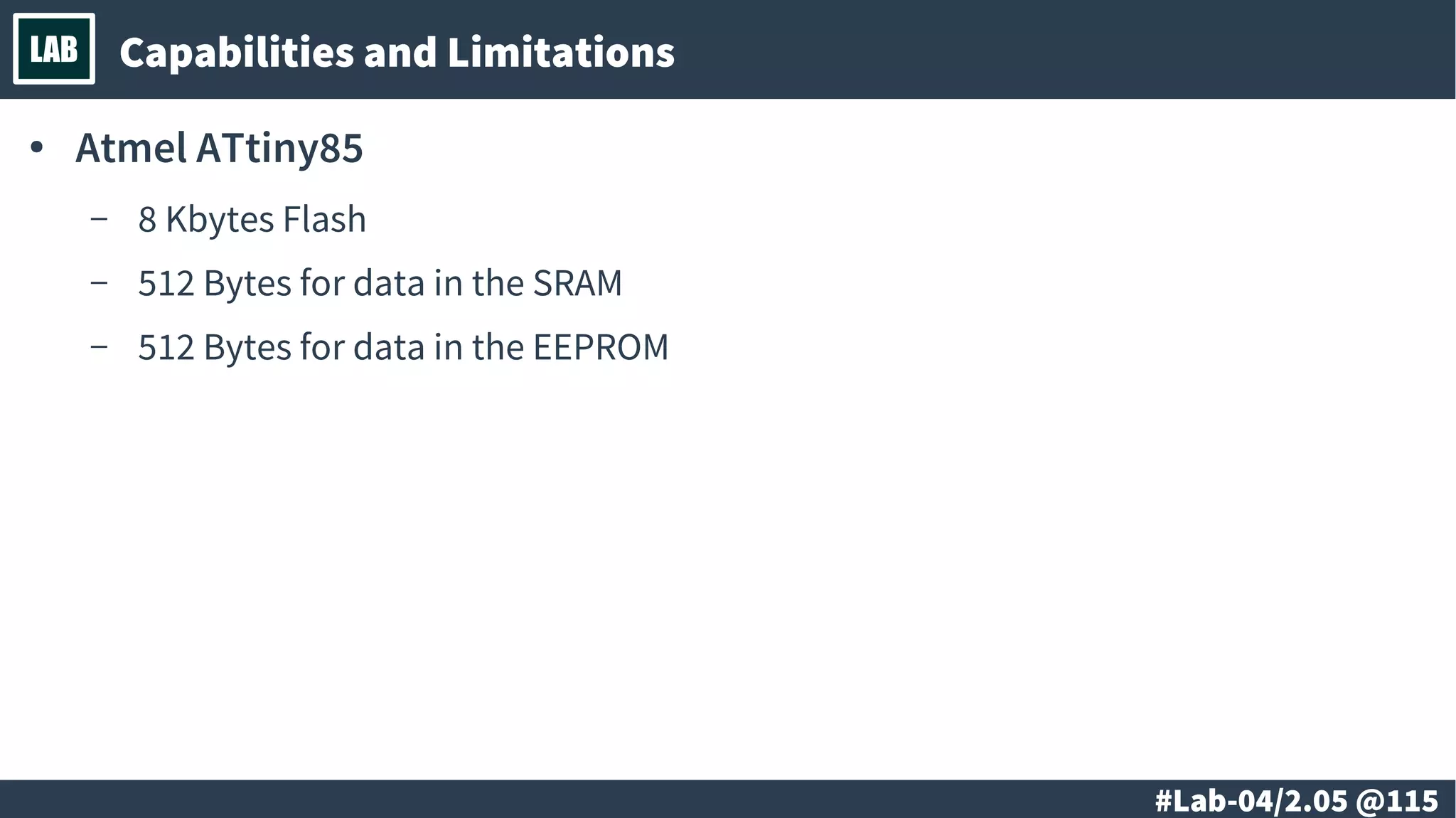
● Atmel ATtiny85
– 8 Kbytes Flash
– 512 Bytes for data in the SRAM
– 512 Bytes for data in the EEPROM
# @116
LAB Code and Size of the Code
# @117
LAB
@ #118/213
Th
● Electricity
● Current and voltage
● Resistance
● Ohm’s law
@ #119/213
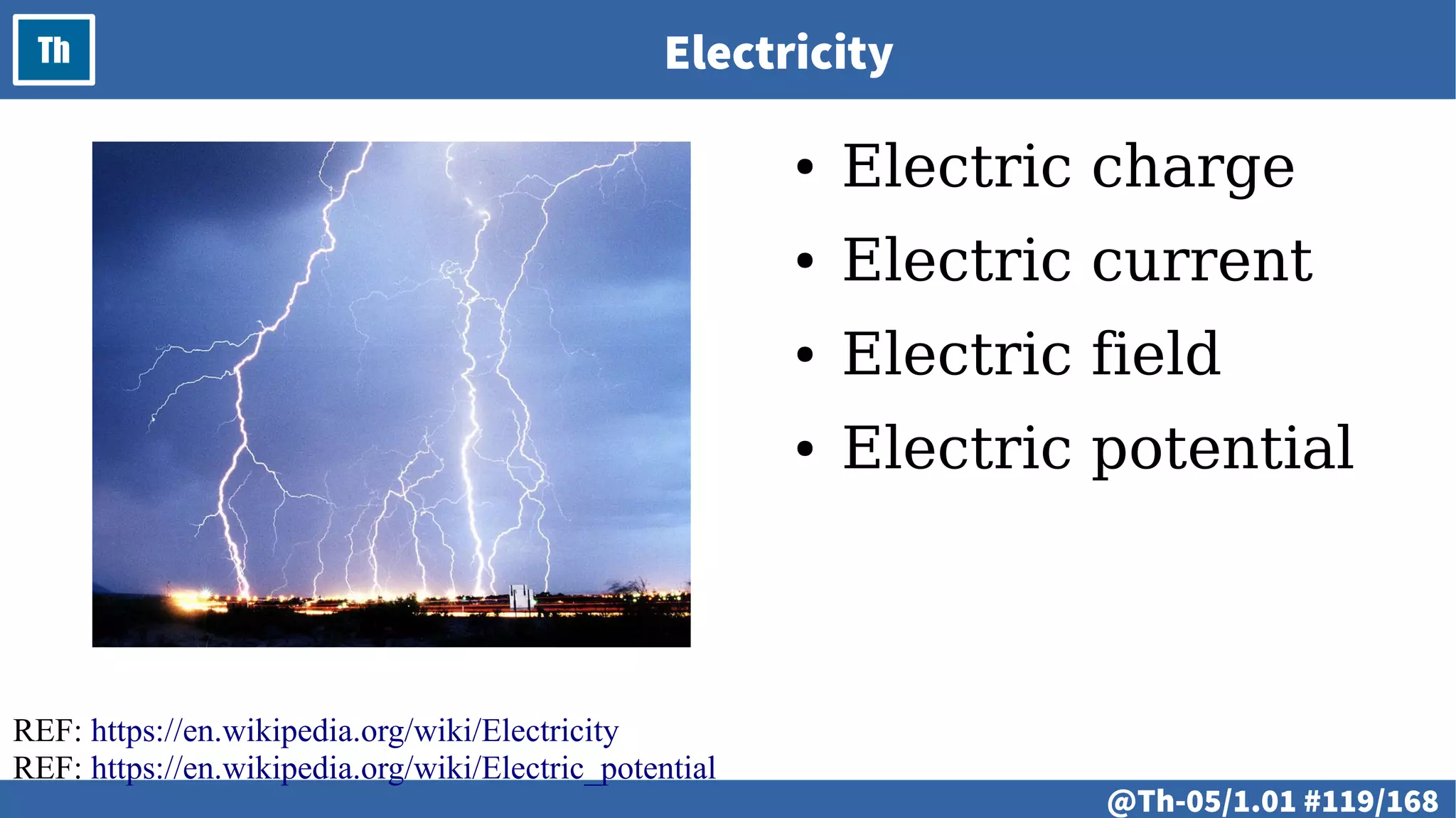
Th Electricity
● Electric charge
● Electric current
● Electric field
● Electric potential
REF: https://en.wikipedia.org/wiki/Electricity
REF: https://en.wikipedia.org/wiki/Electric_potential
@ #120/213
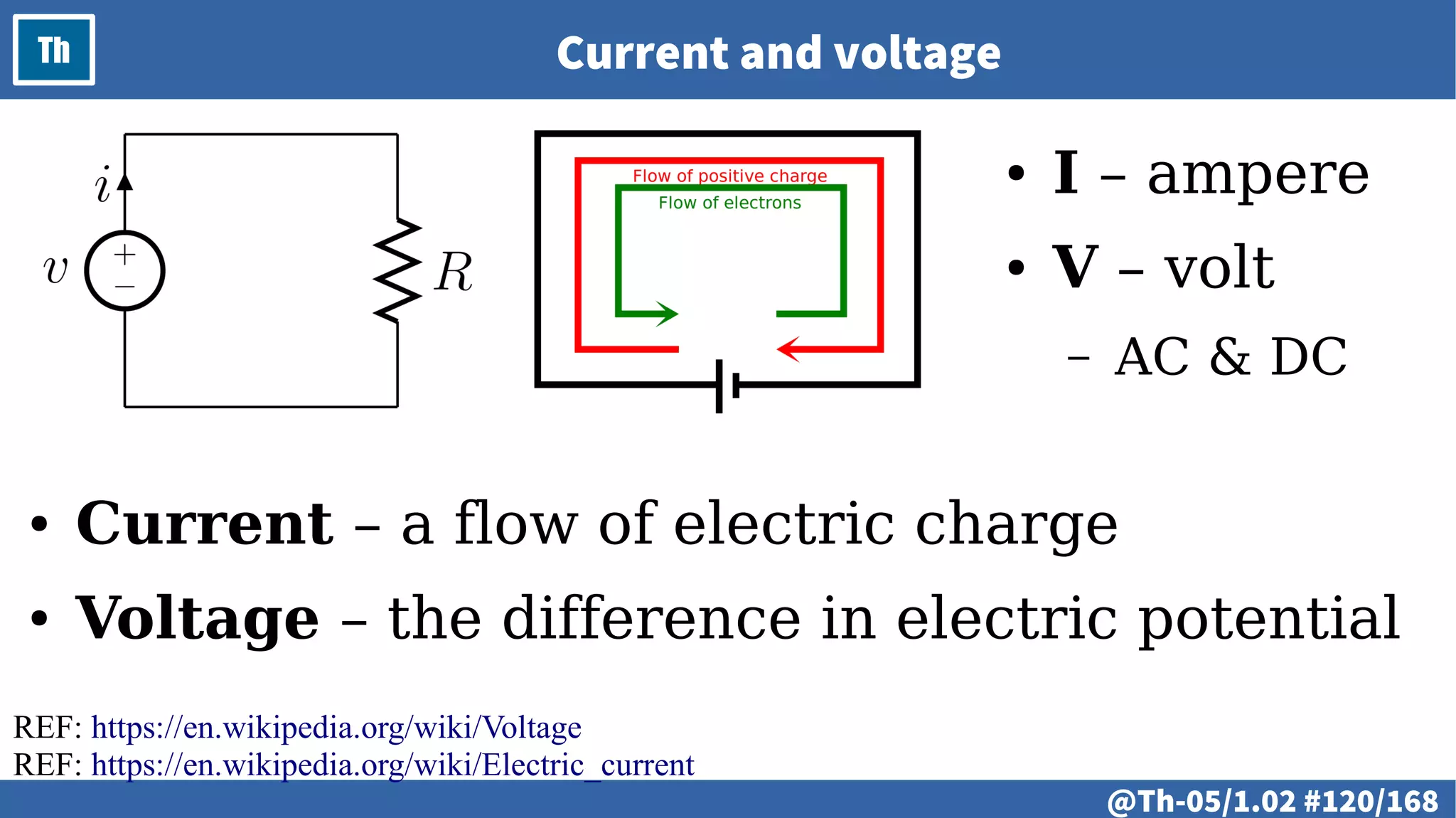
Th Current and voltage
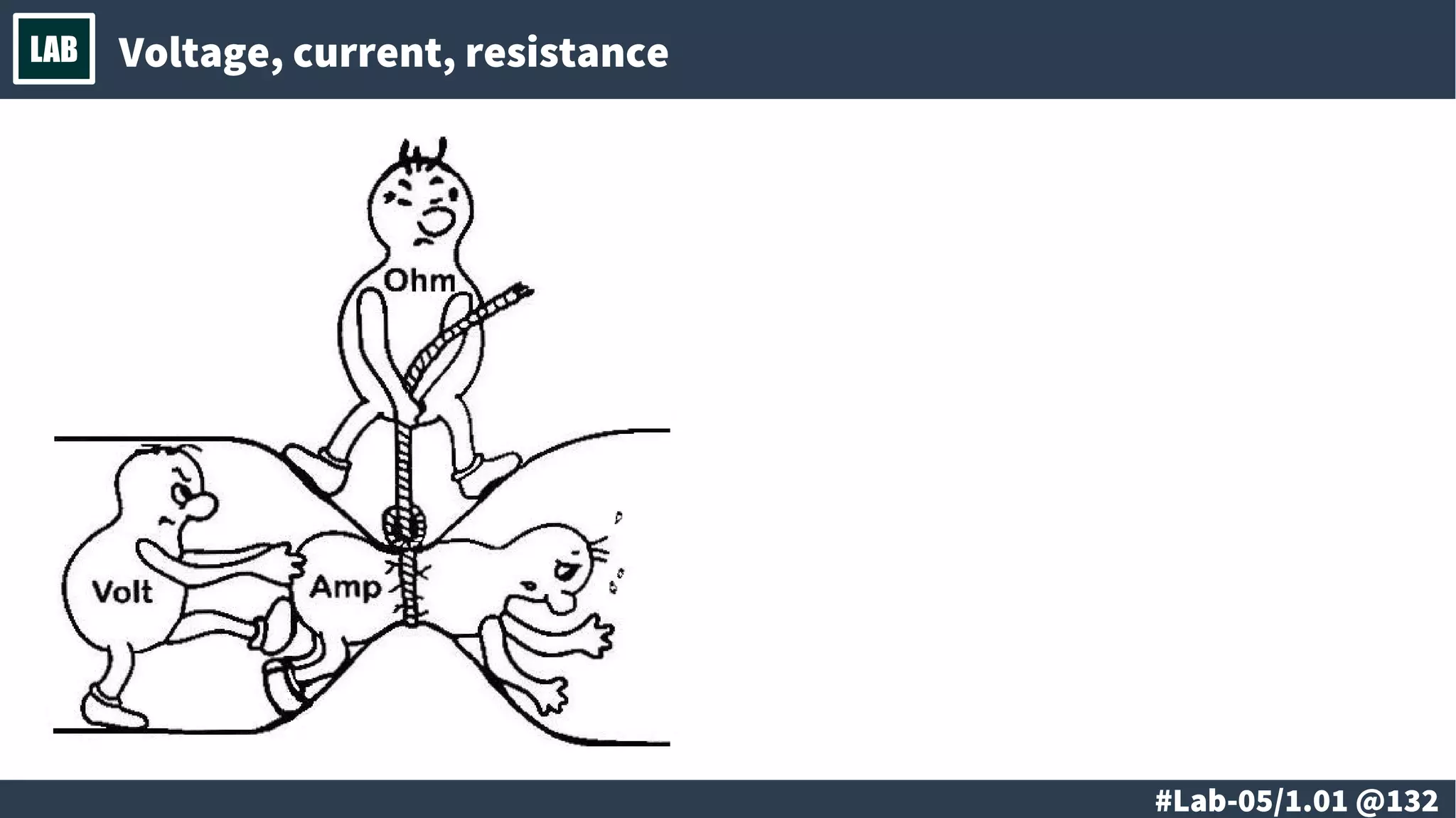
● I – ampere
● V – volt
– AC & DC
● Current – a flow of electric charge
● Voltage – the difference in electric potential
REF: https://en.wikipedia.org/wiki/Voltage
REF: https://en.wikipedia.org/wiki/Electric_current
@ #121/213
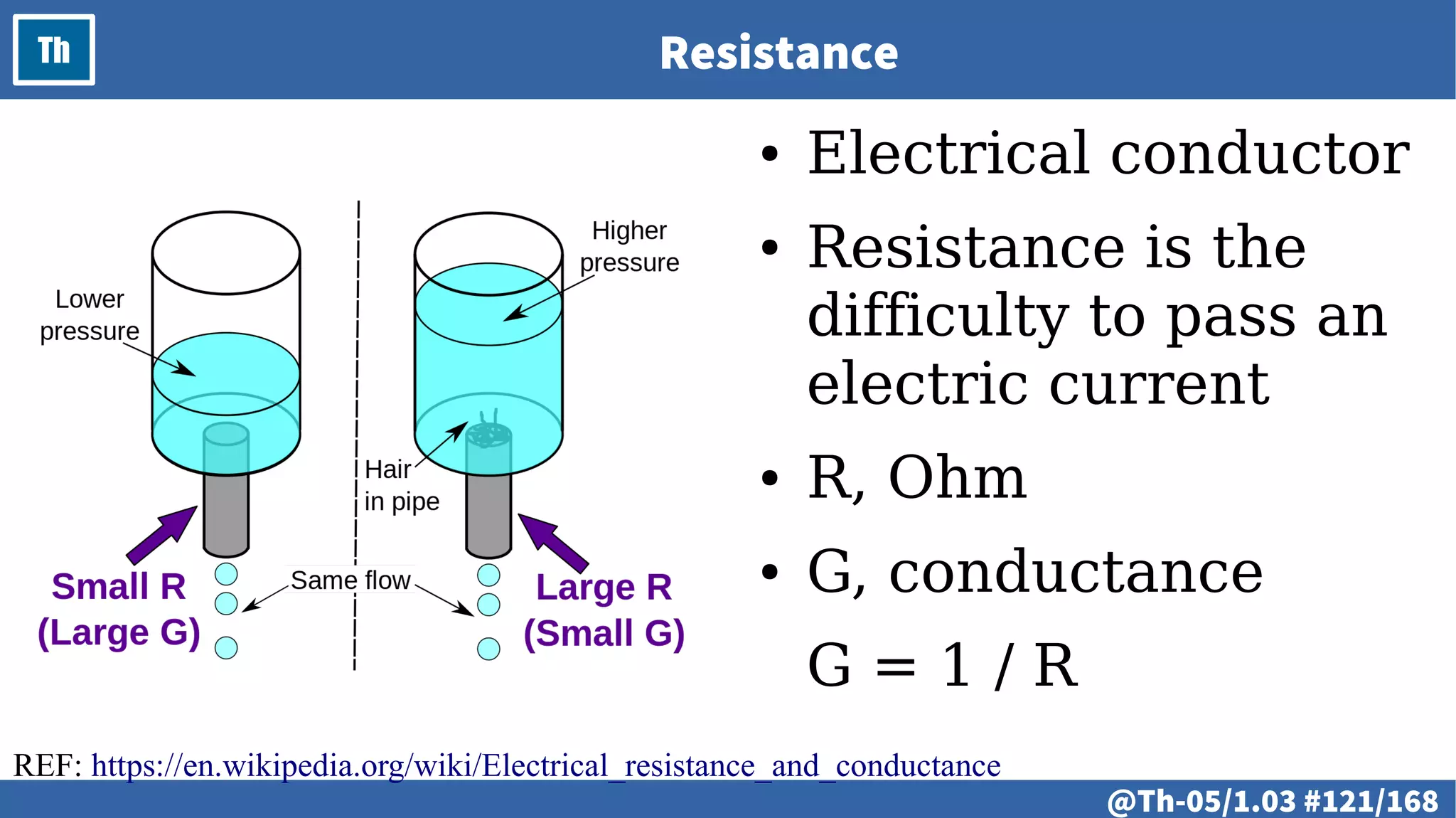
Th Resistance
● Electrical conductor
● Resistance is the
difficulty to pass an
electric current
● R, Ohm
● G, conductance
G = 1 / R
REF: https://en.wikipedia.org/wiki/Electrical_resistance_and_conductance
@ #122/213
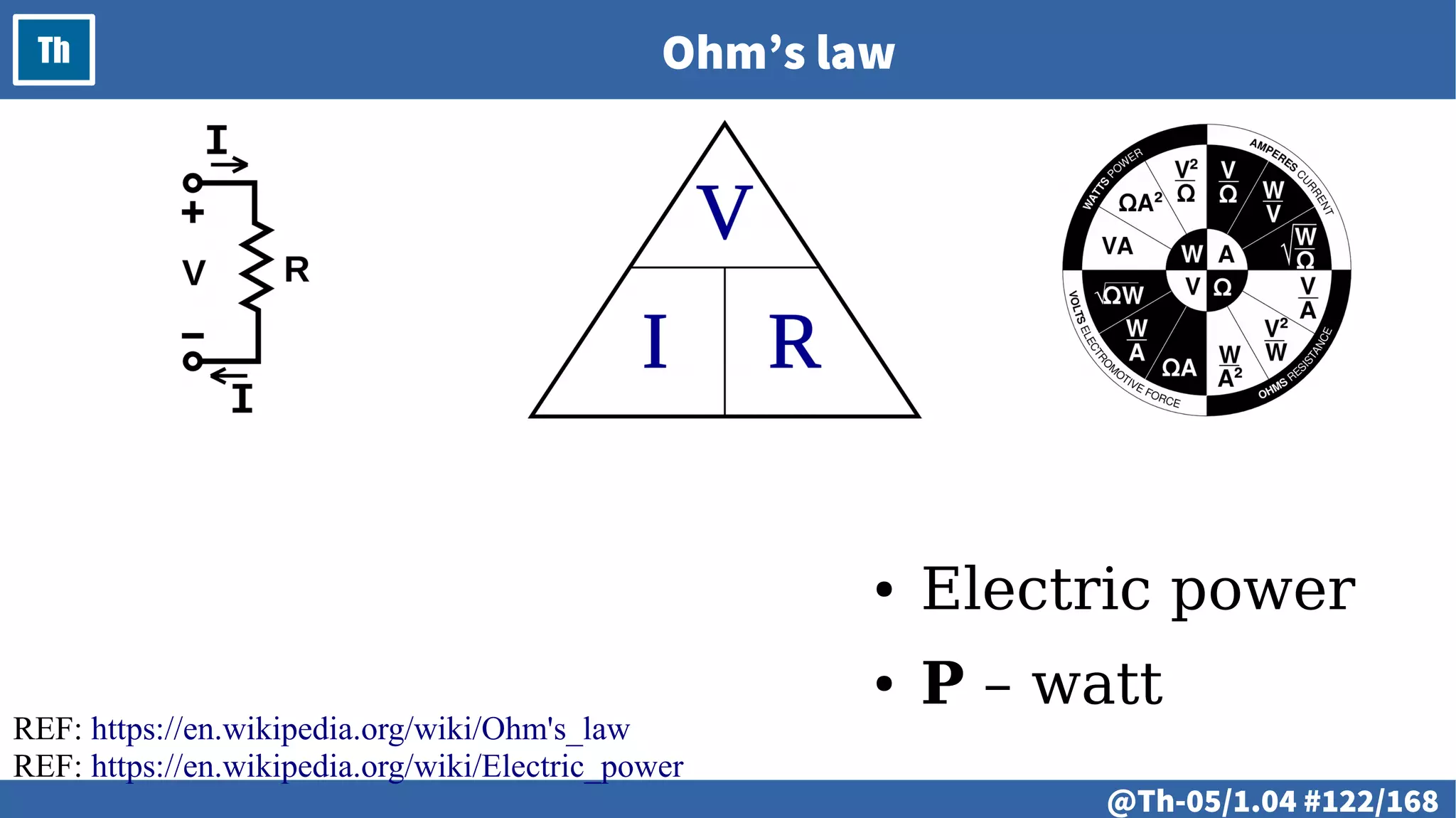
Th Ohm’s law
● Electric power
● P – watt
REF: https://en.wikipedia.org/wiki/Ohm's_law
REF: https://en.wikipedia.org/wiki/Electric_power
@ #123/213
Th
@ #124/213
Th
● Signals
● Electric signals
● Analog signals
● Digital signals
● Logic signals
@ #125/213
Th Signals
● Motion
● Sound
● Images, Videos
● Biological membrane
potentials
REF: https://en.wikipedia.org/wiki/Signal_(electrical_engineering)
@ #126/213
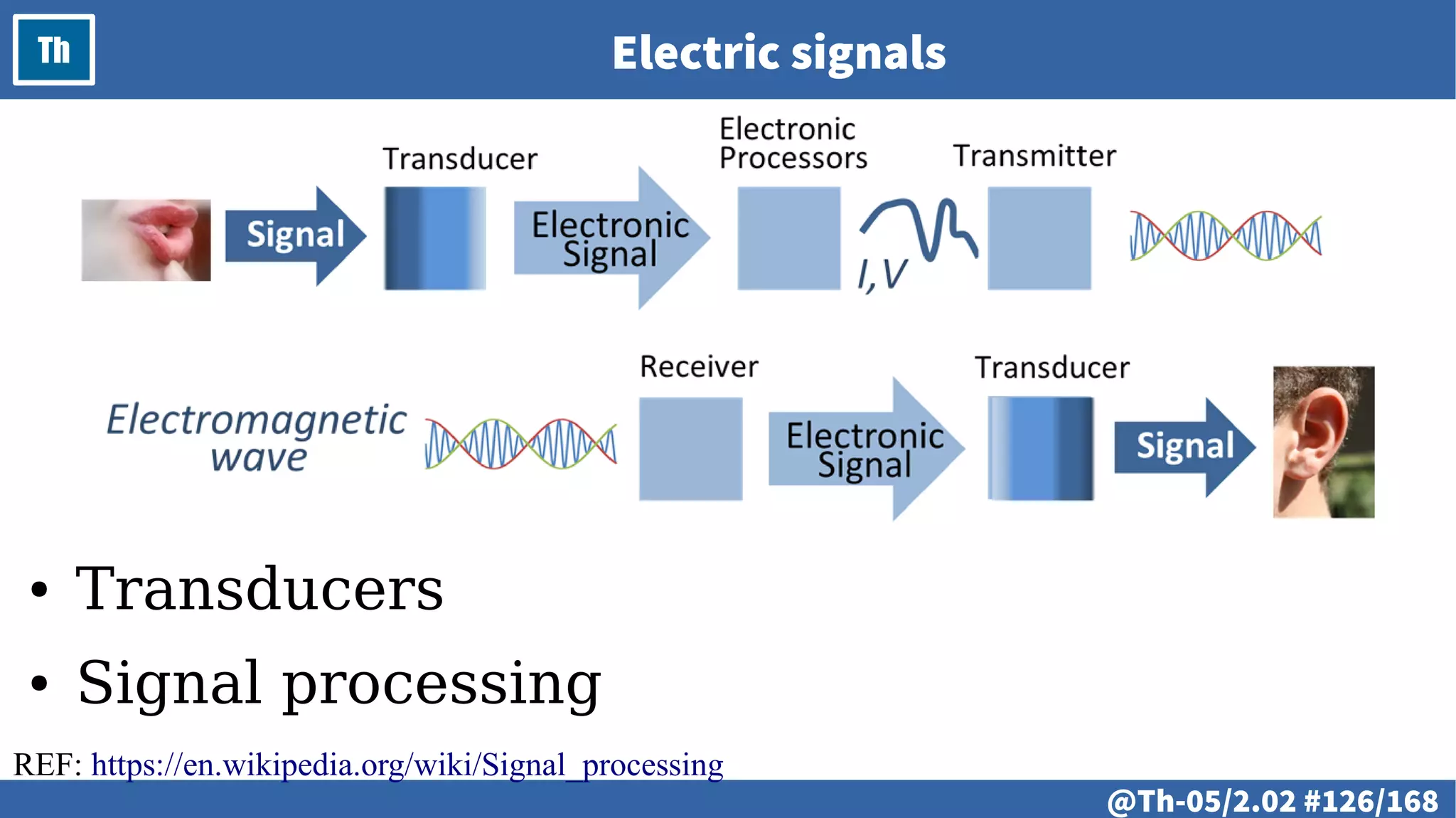
Th Electric signals
● Transducers
● Signal processing
REF: https://en.wikipedia.org/wiki/Signal_processing
@ #127/213
Th Analog signals
REF: https://en.wikipedia.org/wiki/Analog_signal
@ #128/213
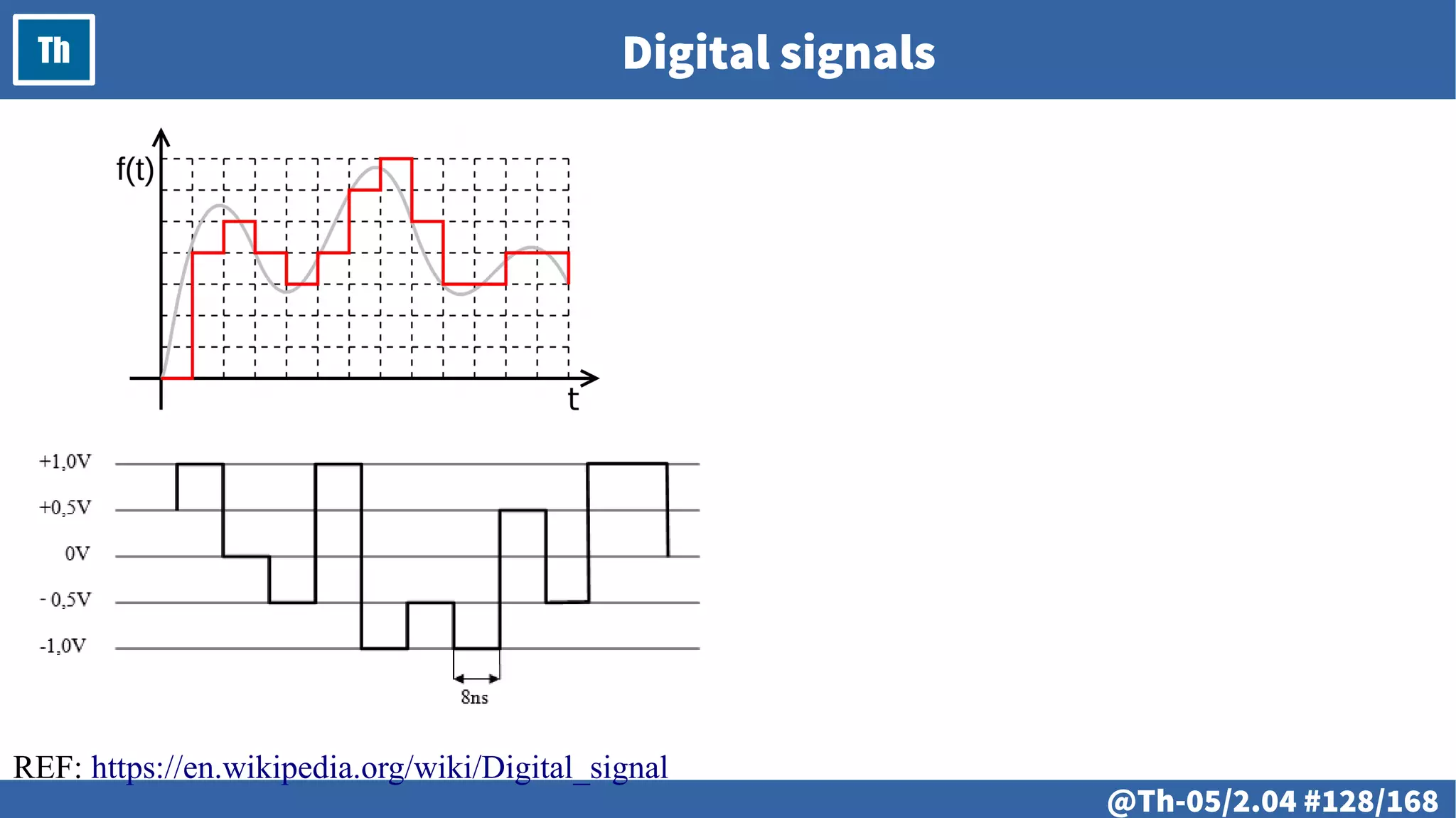
Th Digital signals
REF: https://en.wikipedia.org/wiki/Digital_signal
@ #129/213
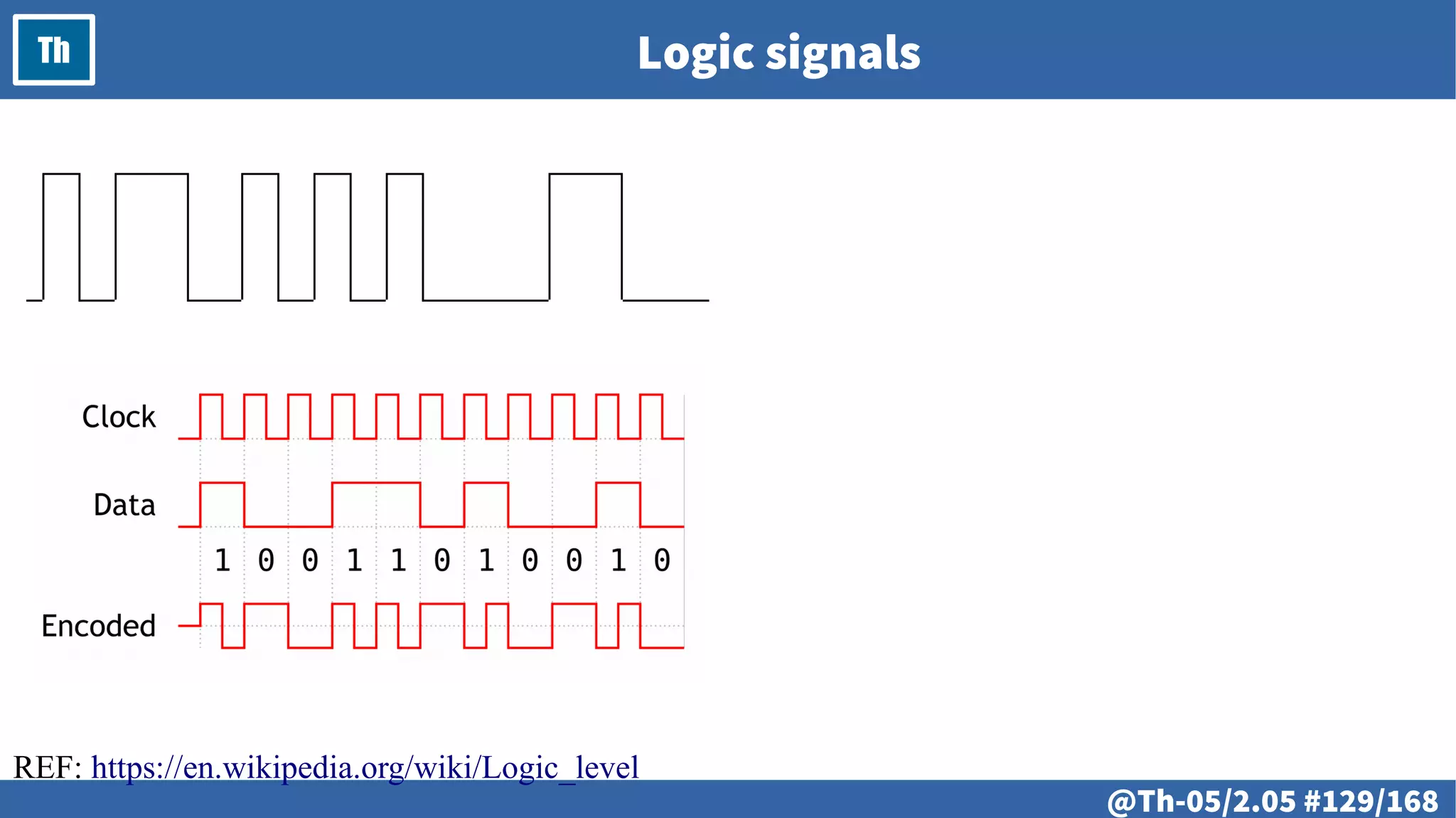
Th Logic signals
REF: https://en.wikipedia.org/wiki/Logic_level
@ #130/213
Th
# @131
LAB
● Voltage, current, resistance
● Working with multimeter
● Ohm’s law in practice
● Analog signals
– Graphical representation
● Working with oscilloscope
# @132
LAB Voltage, current, resistance
# @133
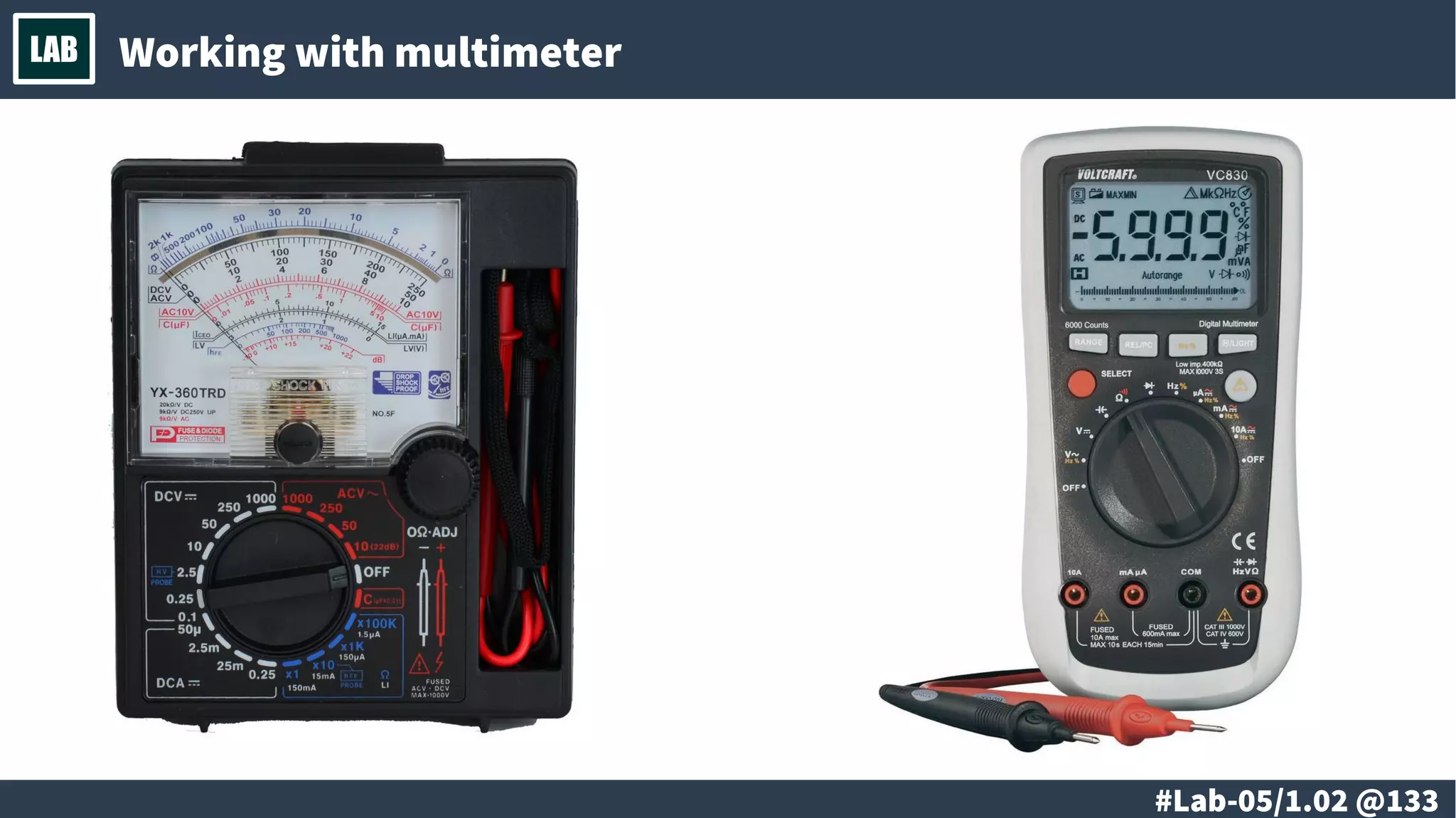
LAB Working with multimeter
# @134
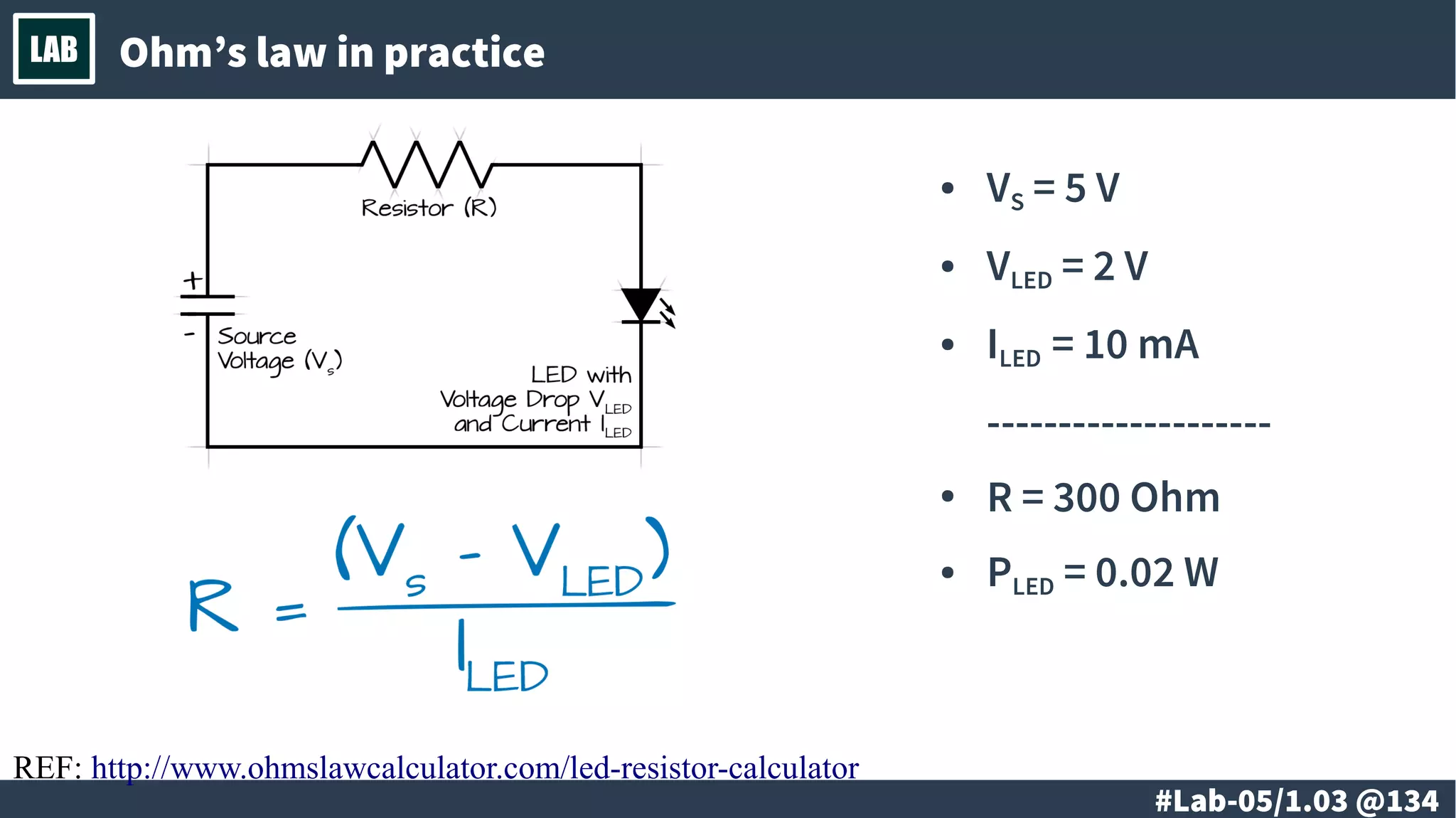
LAB Ohm’s law in practice
● VS
= 5 V
● VLED
= 2 V
● ILED
= 10 mA
--------------------
● R = 300 Ohm
● PLED
= 0.02 W
REF: http://www.ohmslawcalculator.com/led-resistor-calculator
# @135
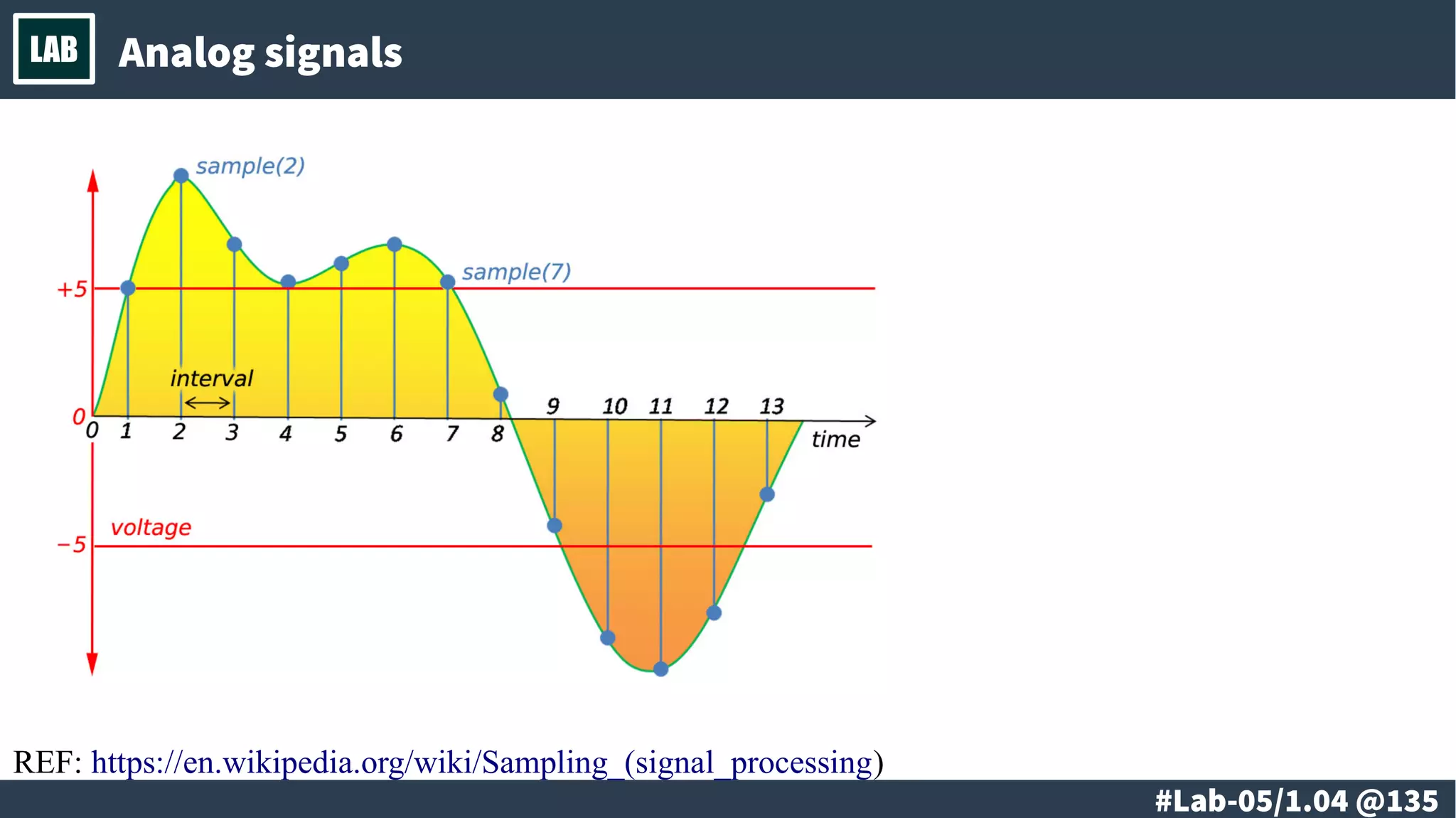
LAB Analog signals
REF: https://en.wikipedia.org/wiki/Sampling_(signal_processing)
# @136
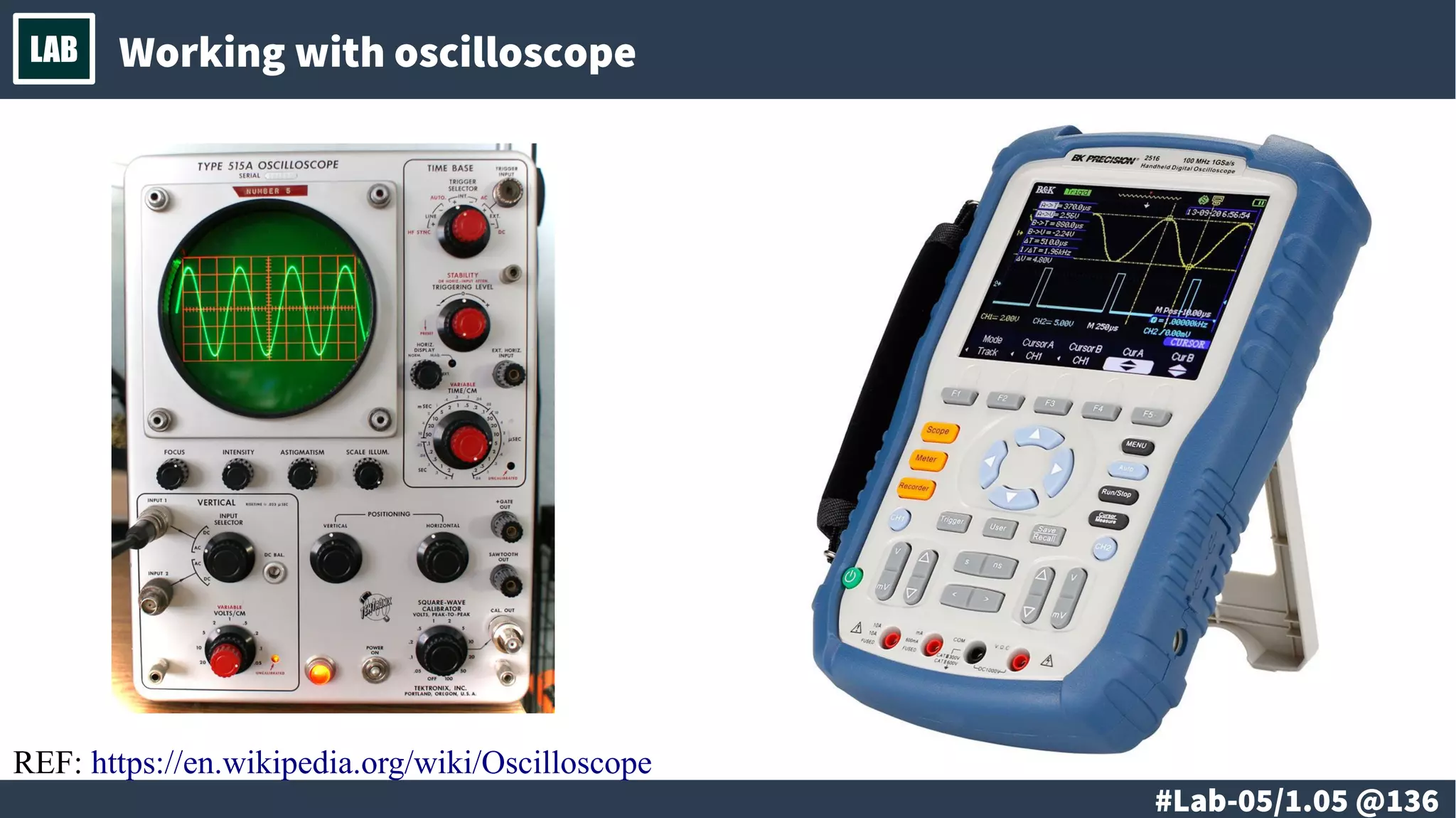
LAB Working with oscilloscope
REF: https://en.wikipedia.org/wiki/Oscilloscope
# @137
LAB
# @138
LAB
● Digital signals
– Graphical representation
● Logic signals
– Graphical representation
● Working with oscilloscope
● Logic analyzer
# @139
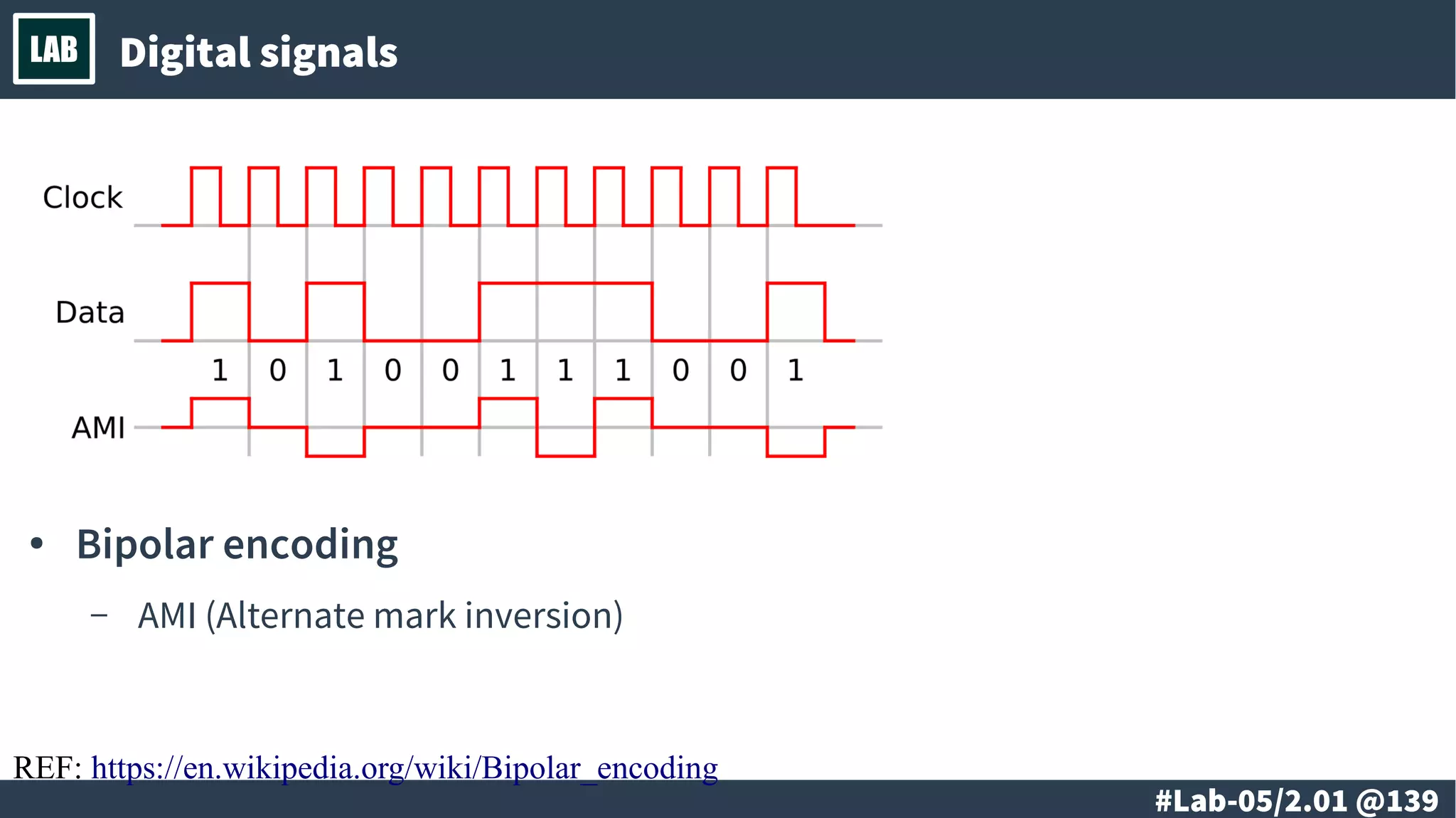
LAB Digital signals
● Bipolar encoding
– AMI (Alternate mark inversion)
REF: https://en.wikipedia.org/wiki/Bipolar_encoding
# @140
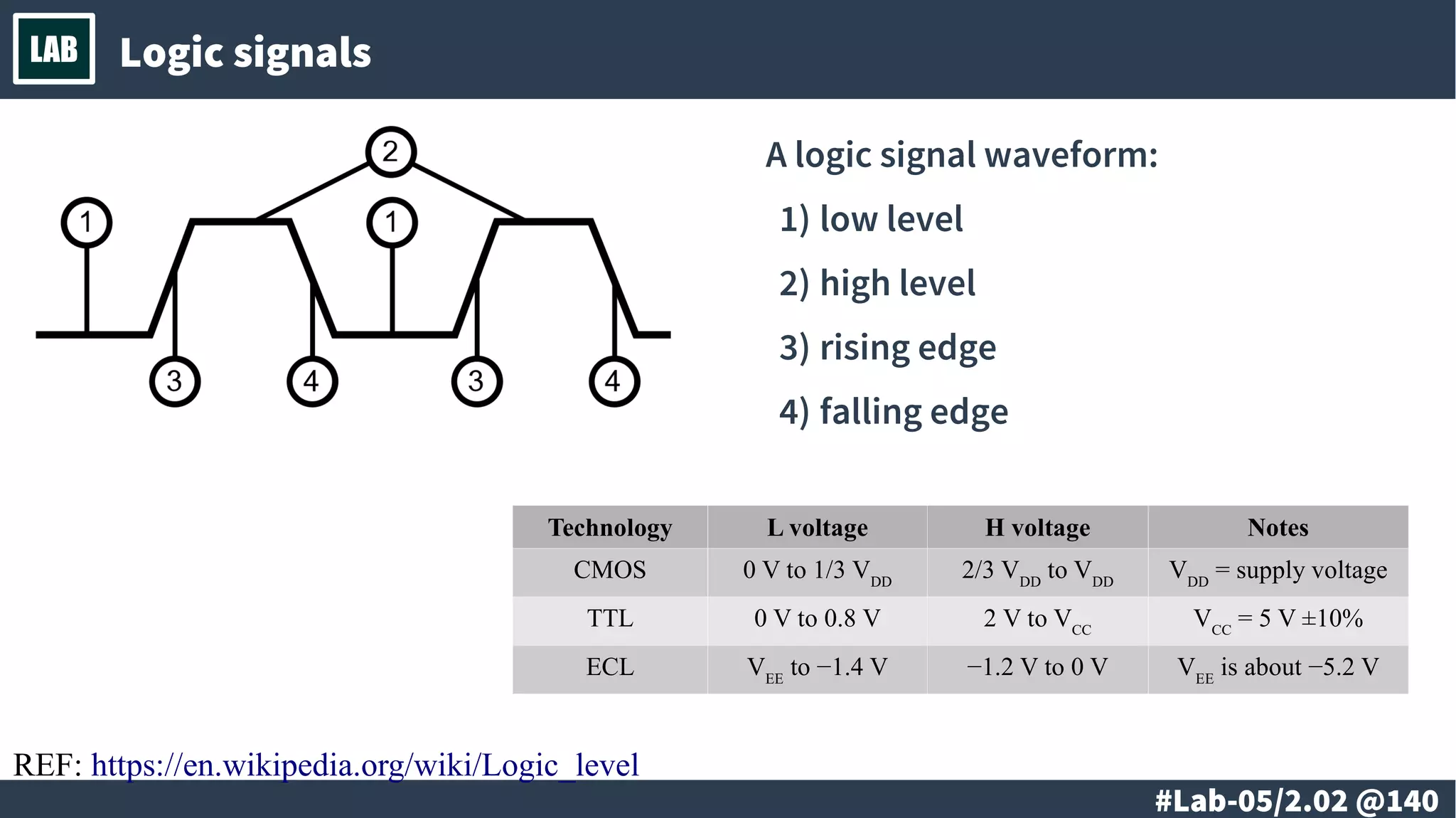
LAB Logic signals
A logic signal waveform:
1)low level
2)high level
3)rising edge
4)falling edge
Technology L voltage H voltage Notes
CMOS 0 V to 1/3 VDD
2/3 VDD
to VDD
VDD
= supply voltage
TTL 0 V to 0.8 V 2 V to VCC
VCC
= 5 V ±10%
ECL VEE
to −1.4 V −1.2 V to 0 V VEE
is about −5.2 V
REF: https://en.wikipedia.org/wiki/Logic_level
# @141
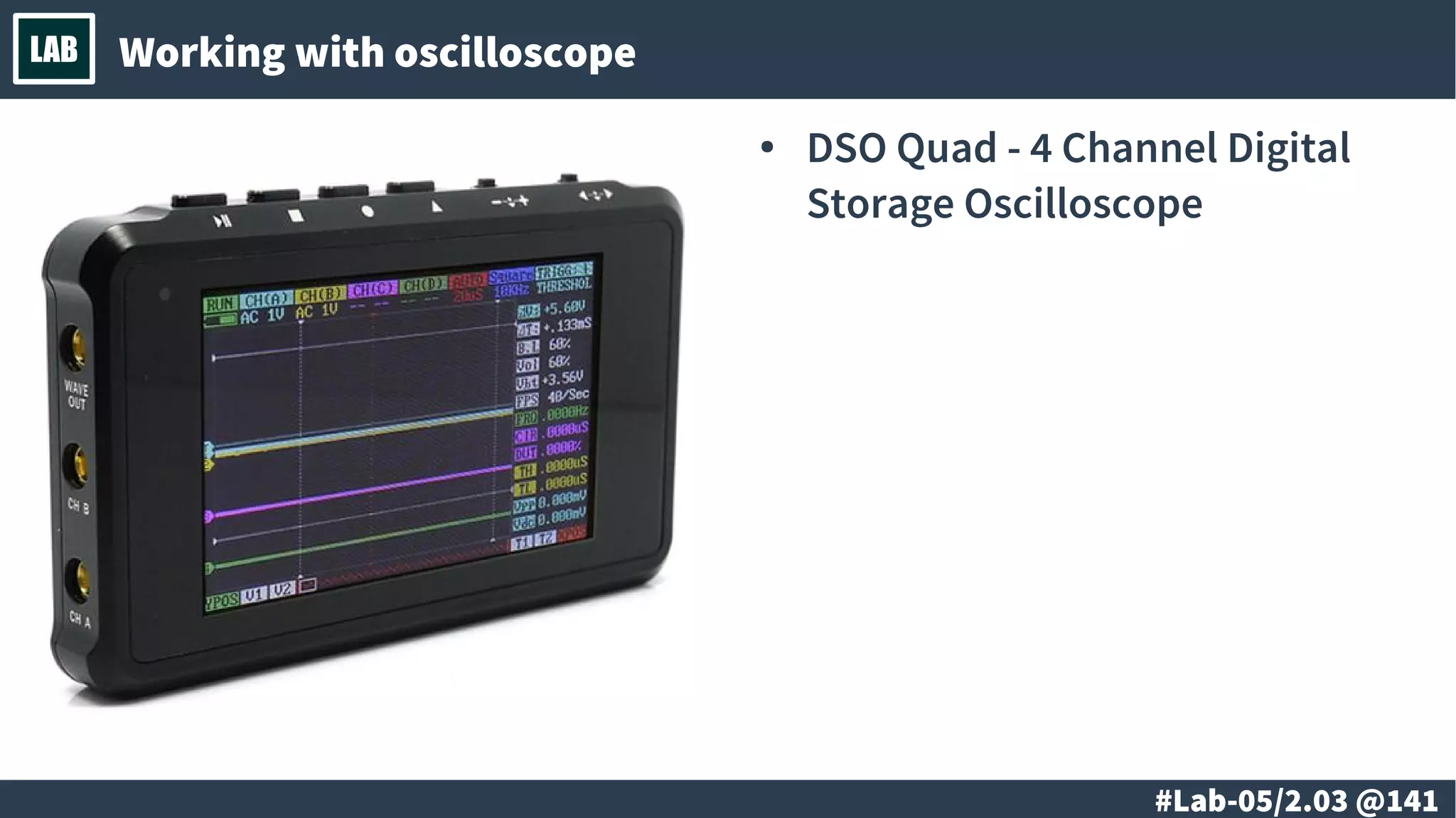
LAB Working with oscilloscope
● DSO Quad - 4 Channel Digital
Storage Oscilloscope
# @142
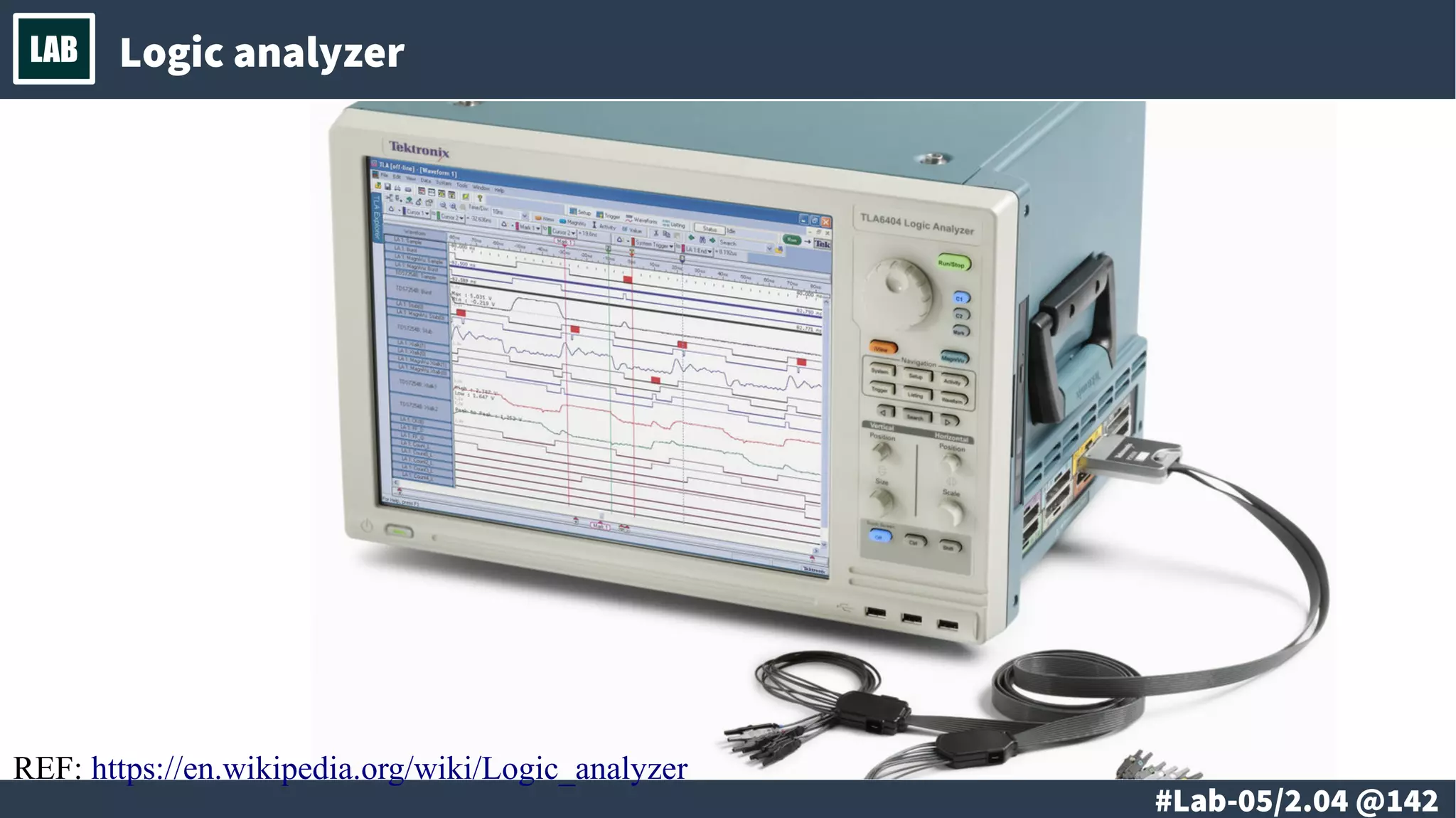
LAB Logic analyzer
REF: https://en.wikipedia.org/wiki/Logic_analyzer
# @143
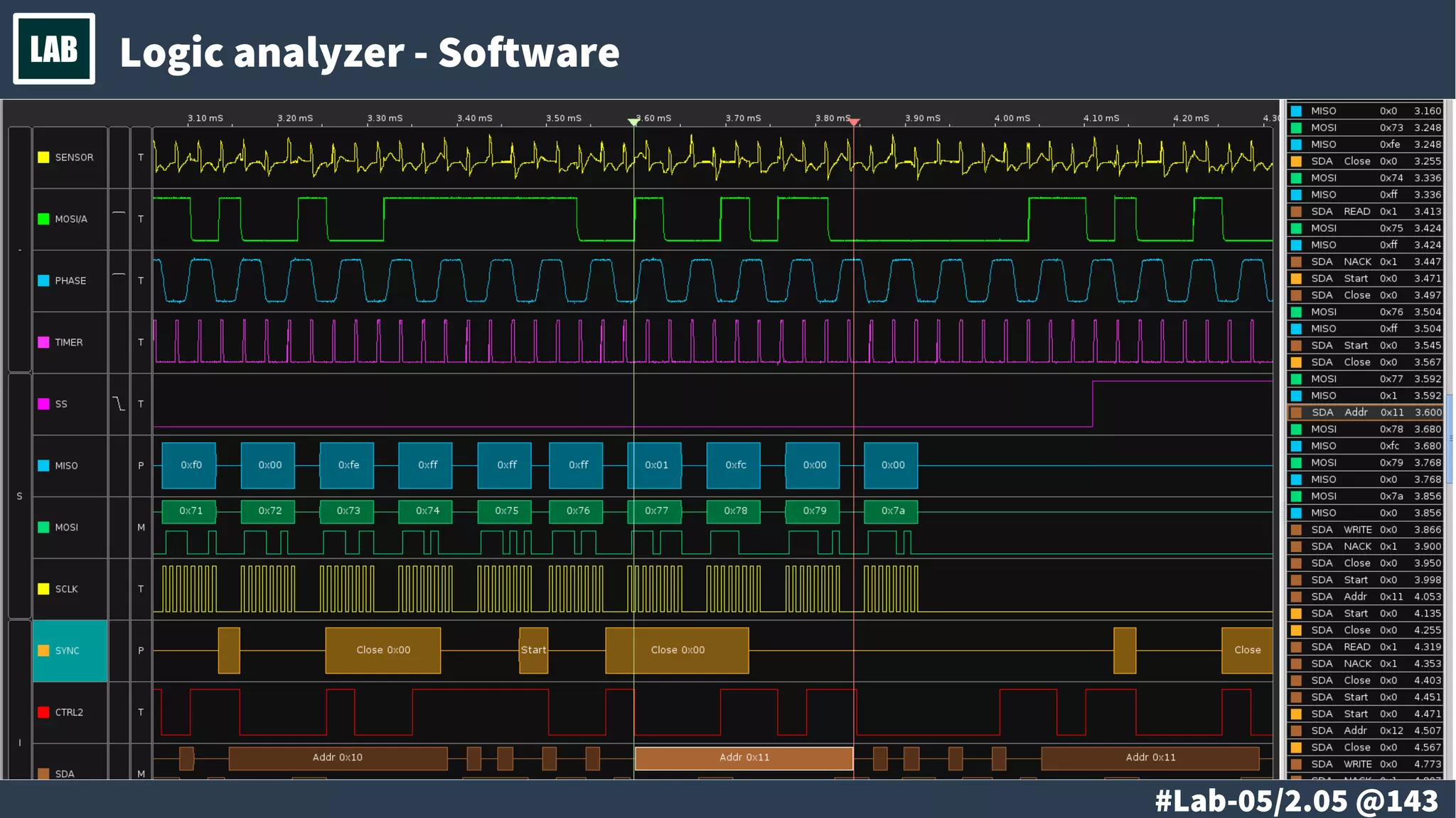
LAB Logic analyzer - Software
# @144
LAB
@ #145/213
Th
● Digital signal
vs. Logic signal
● Continuous-time signal
vs. Discrete-time signal
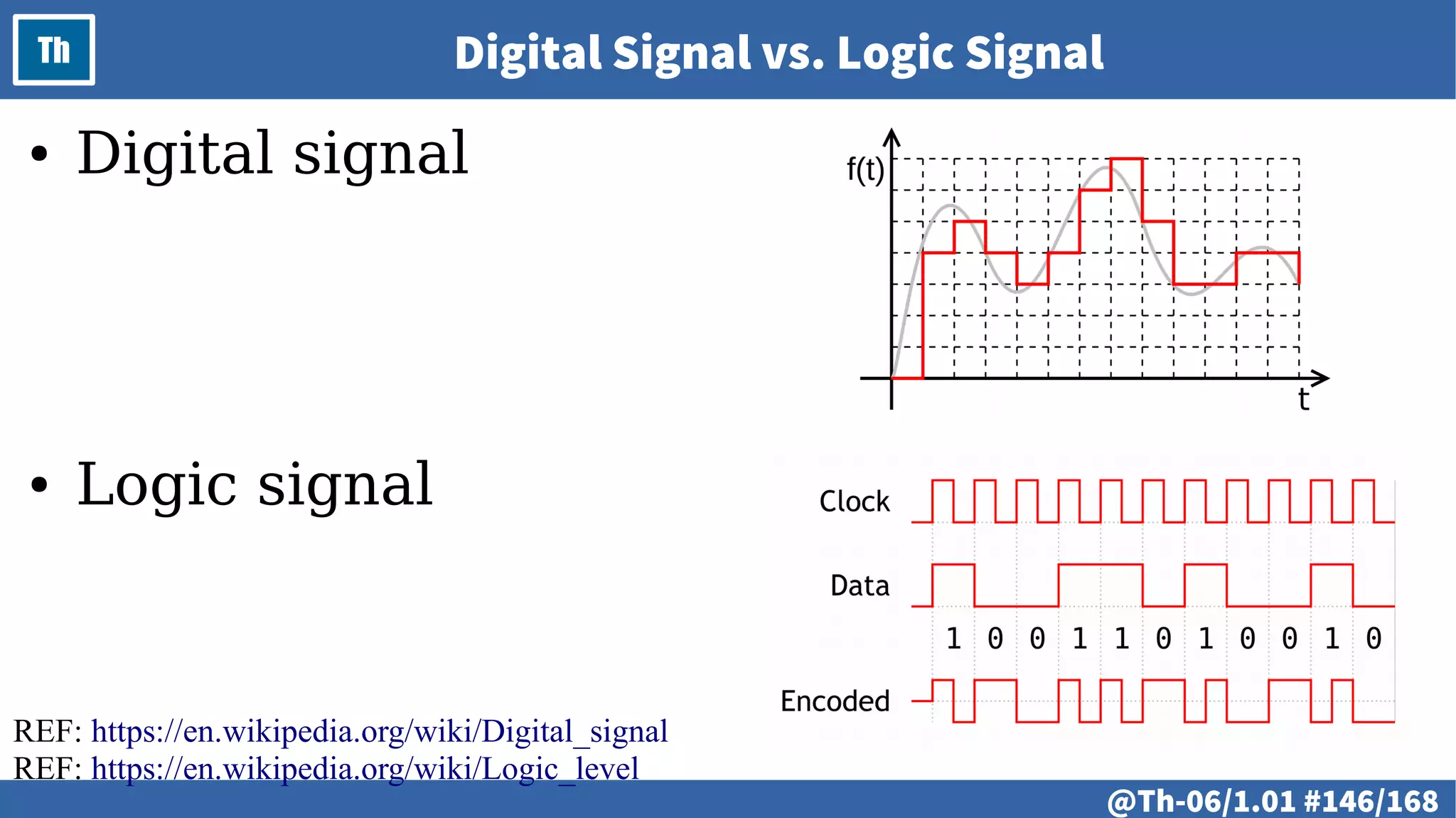
@ #146/213
Th Digital Signal vs. Logic Signal
REF: https://en.wikipedia.org/wiki/Digital_signal
REF: https://en.wikipedia.org/wiki/Logic_level
● Digital signal
● Logic signal
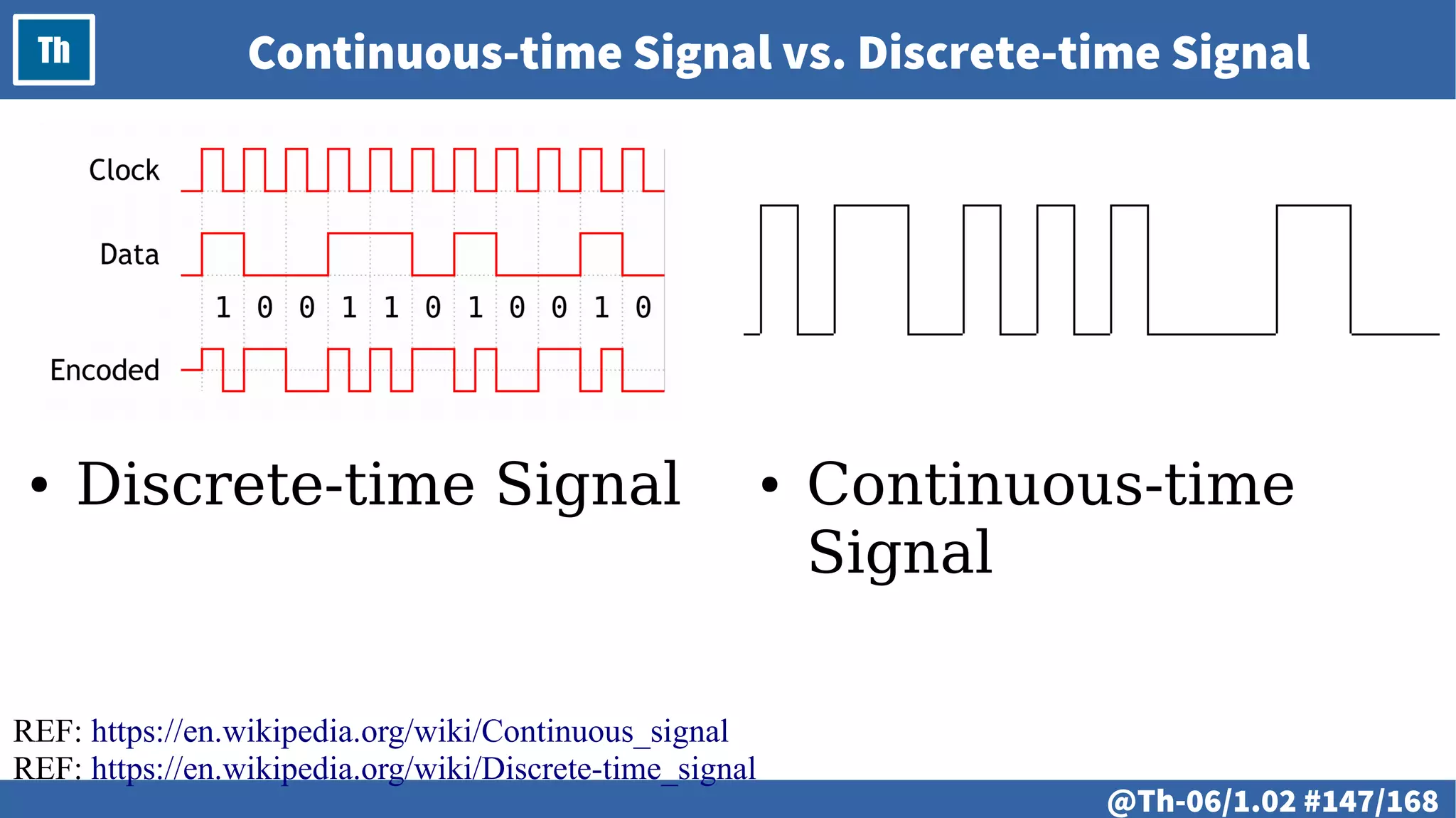
@ #147/213
Th Continuous-time Signal vs. Discrete-time Signal
● Continuous-time
Signal
● Discrete-time Signal
REF: https://en.wikipedia.org/wiki/Continuous_signal
REF: https://en.wikipedia.org/wiki/Discrete-time_signal
# @148
LAB
@ #149/213
Th
● Digital input-output ports
● Modes and configuration
● Digital output
● Working with bits
● Bitwise operations
@ #150/213
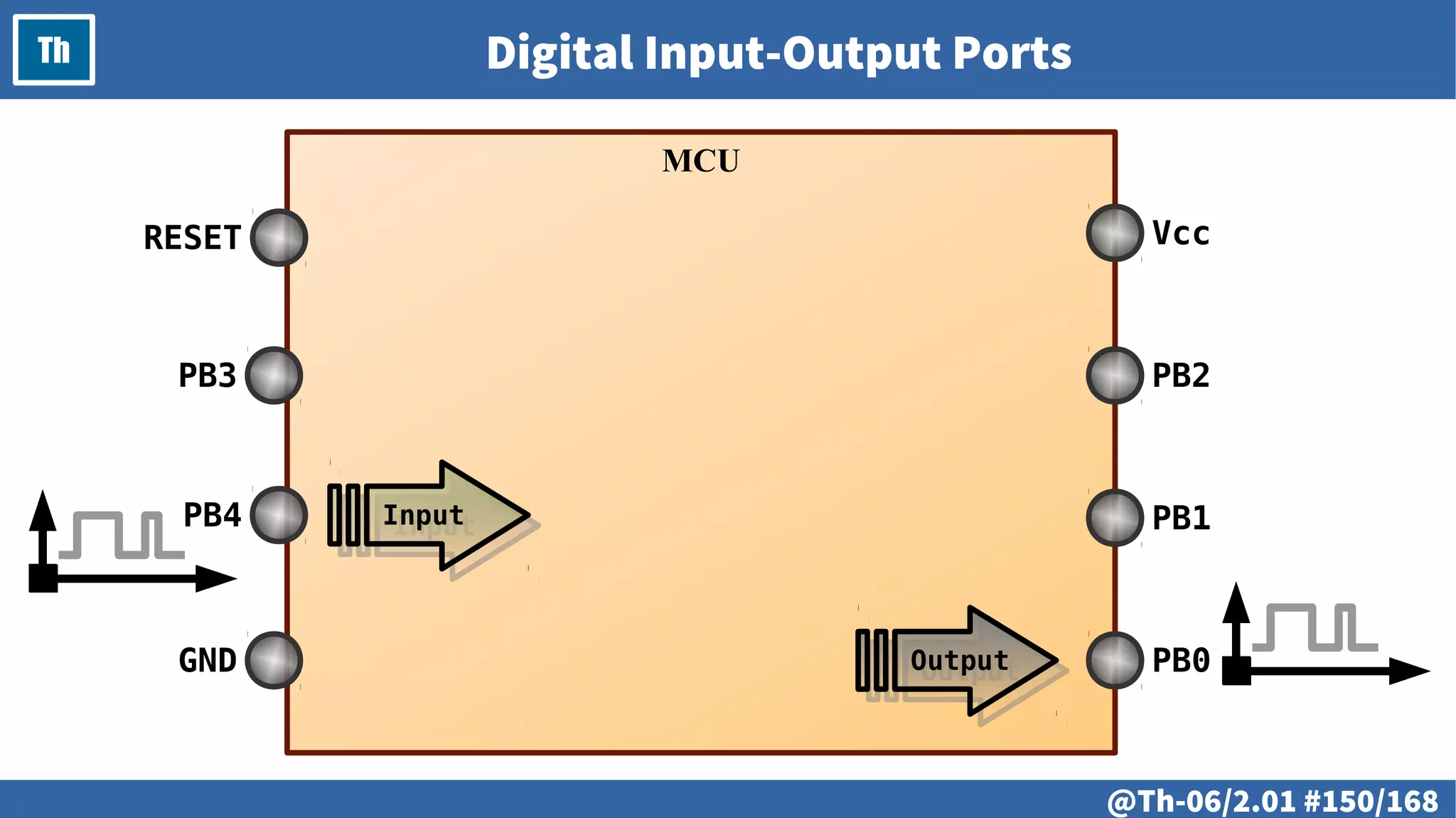
Th Digital Input-Output Ports
MCU
PB0
PB1
PB2
Vcc
GND
PB4
PB3
RESET
OutputOutput
InputInput
@ #151/213
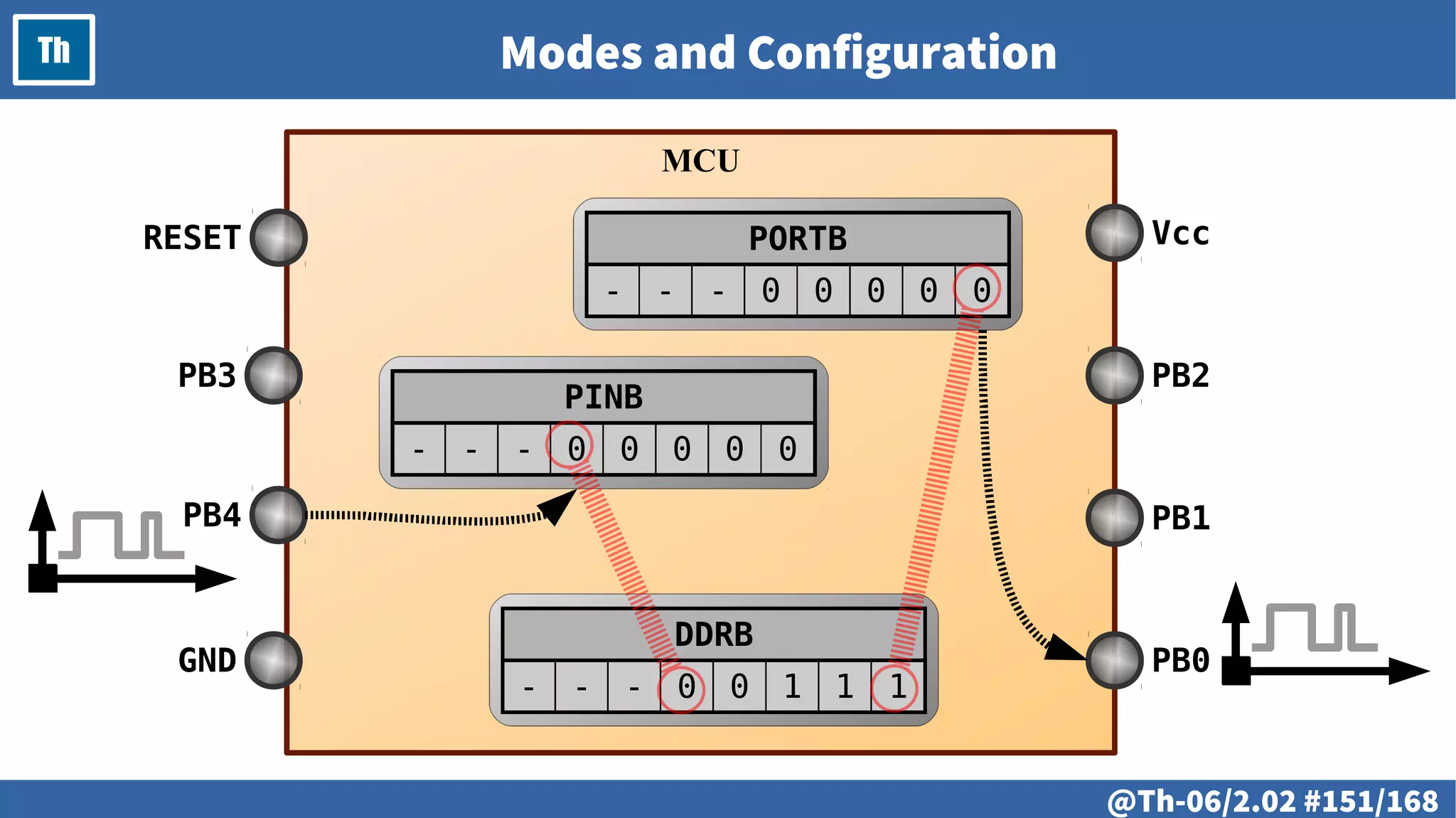
Th Modes and Configuration
MCU
DDRB
- - - 0 0 1 1 1
PB0
PB1
PB2
Vcc
GND
PB4
PB3
RESET PORTB
- - - 0 0 0 0 0
PINB
- - - 0 0 0 0 0
@ #152/213
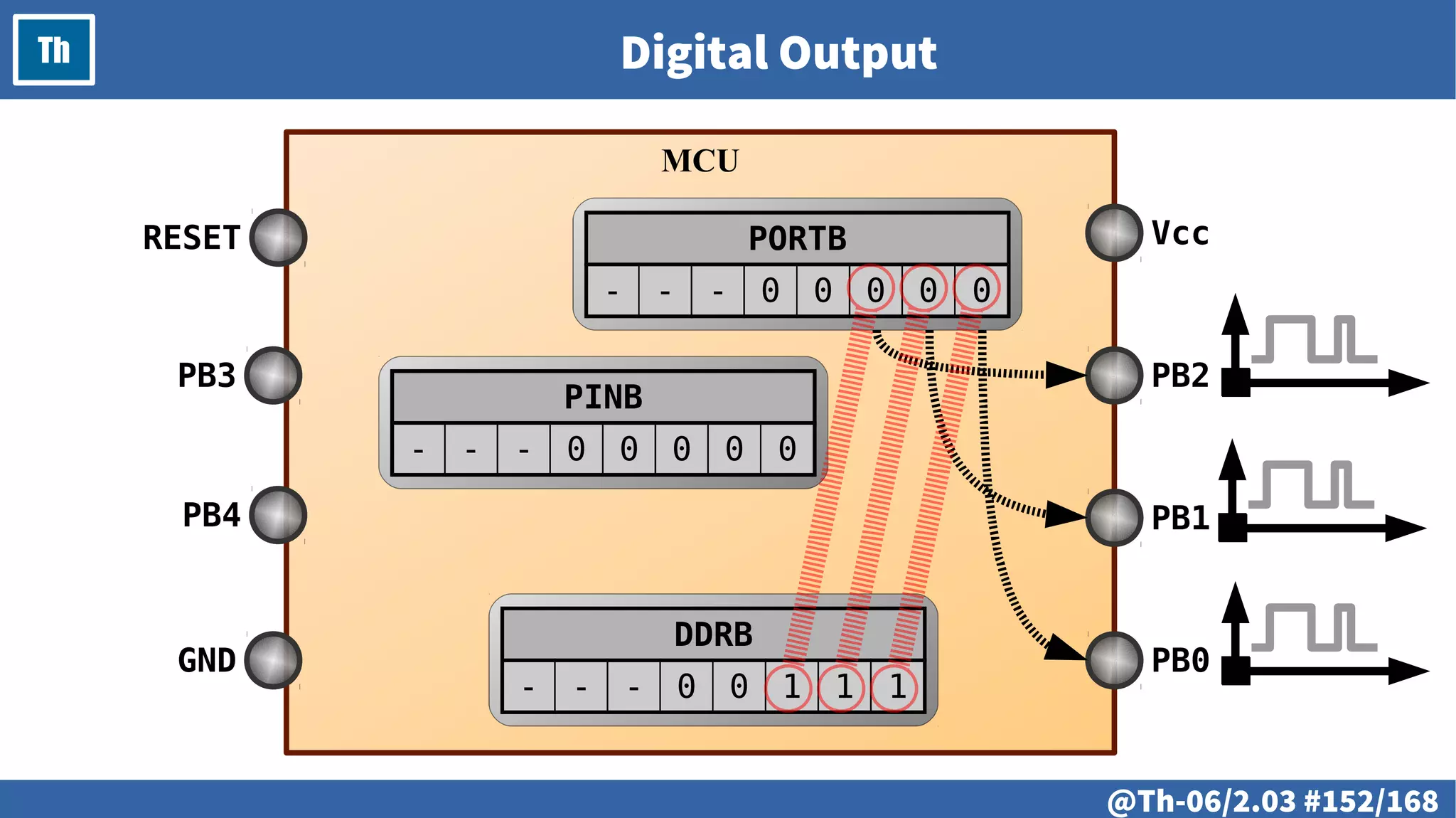
Th Digital Output
MCU
DDRB
- - - 0 0 1 1 1
PB0
PB1
PB2
Vcc
GND
PB4
PB3
RESET PORTB
- - - 0 0 0 0 0
PINB
- - - 0 0 0 0 0
@ #153/213
Th Working with Bits
@ #154/213
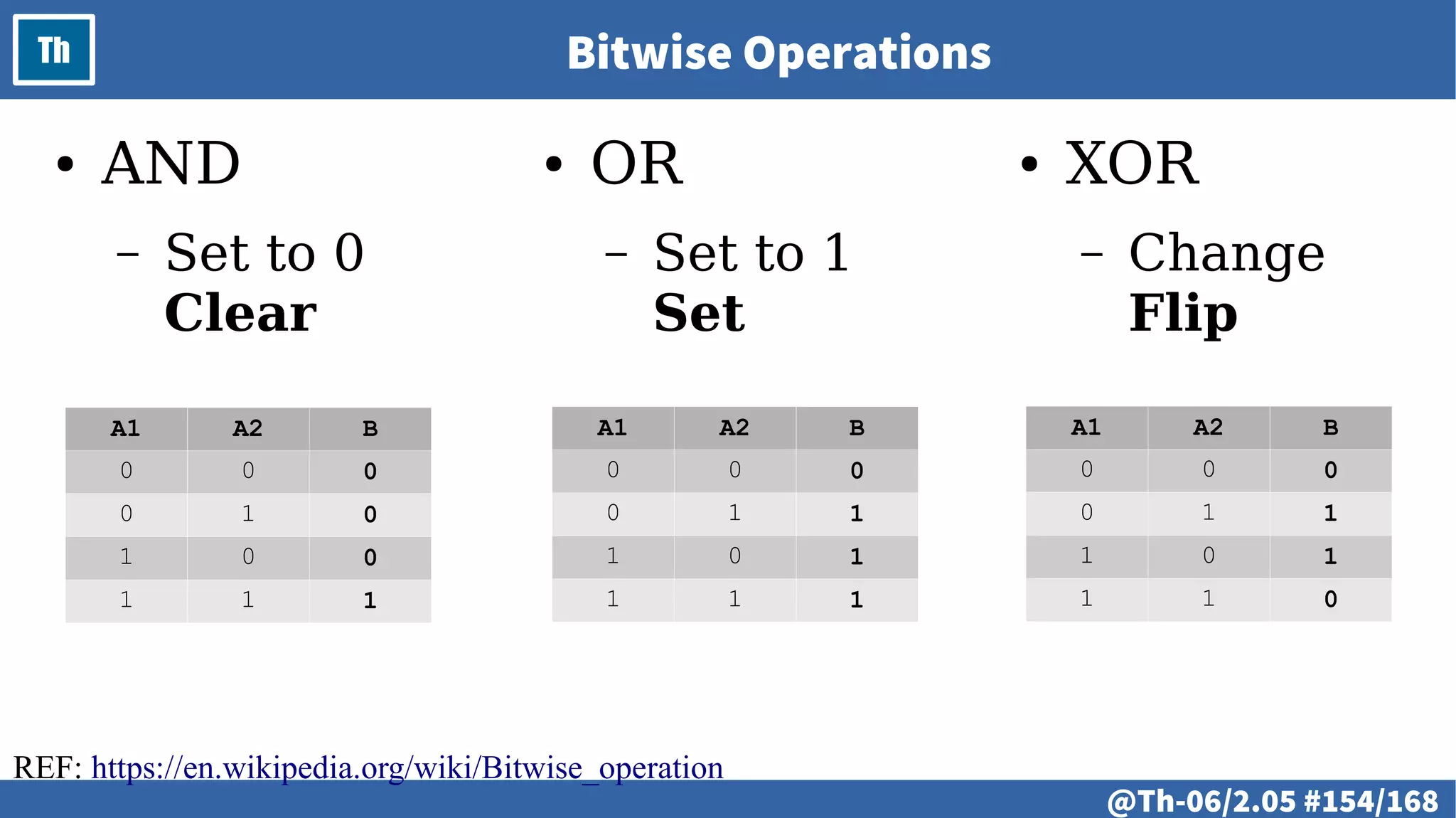
Th Bitwise Operations
● AND
– Set to 0
Clear
● OR
– Set to 1
Set
● XOR
– Change
Flip
A1 A2 B
0 0 0
0 1 1
1 0 1
1 1 1
A1 A2 B
0 0 0
0 1 0
1 0 0
1 1 1
A1 A2 B
0 0 0
0 1 1
1 0 1
1 1 0
REF: https://en.wikipedia.org/wiki/Bitwise_operation
# @155
LAB
# @156
LAB
● Working with bits
● Input-output ports configuration
● Digital output: set and clear a bit
# @157
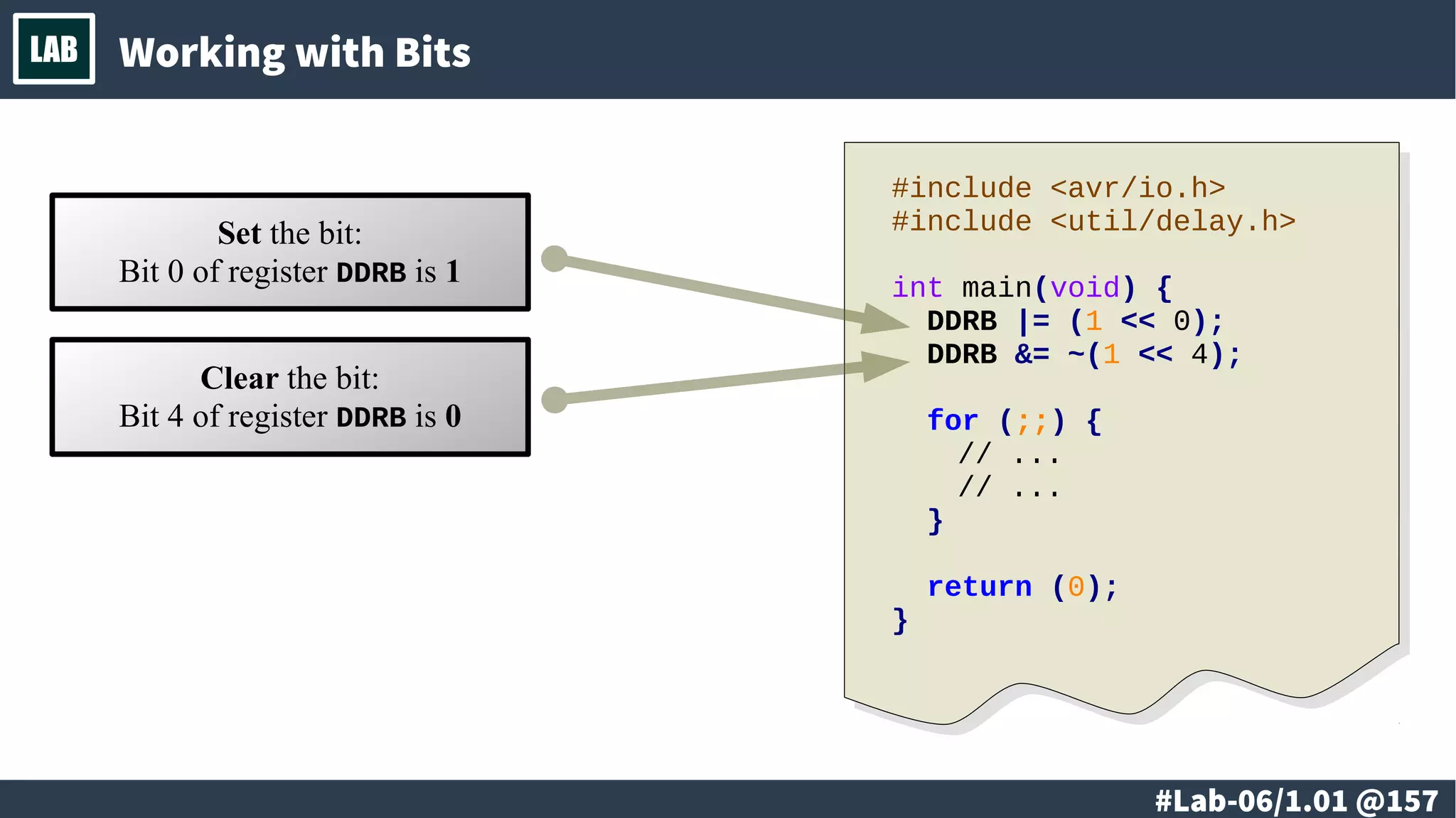
LAB Working with Bits
Set the bit:
Bit 0 of register DDRB is 1
#include <avr/io.h>
#include <util/delay.h>
int main(void) {
DDRB |= (1 << 0);
DDRB &= ~(1 << 4);
for (;;) {
// ...
// ...
}
return (0);
}
Clear the bit:
Bit 4 of register DDRB is 0
# @158
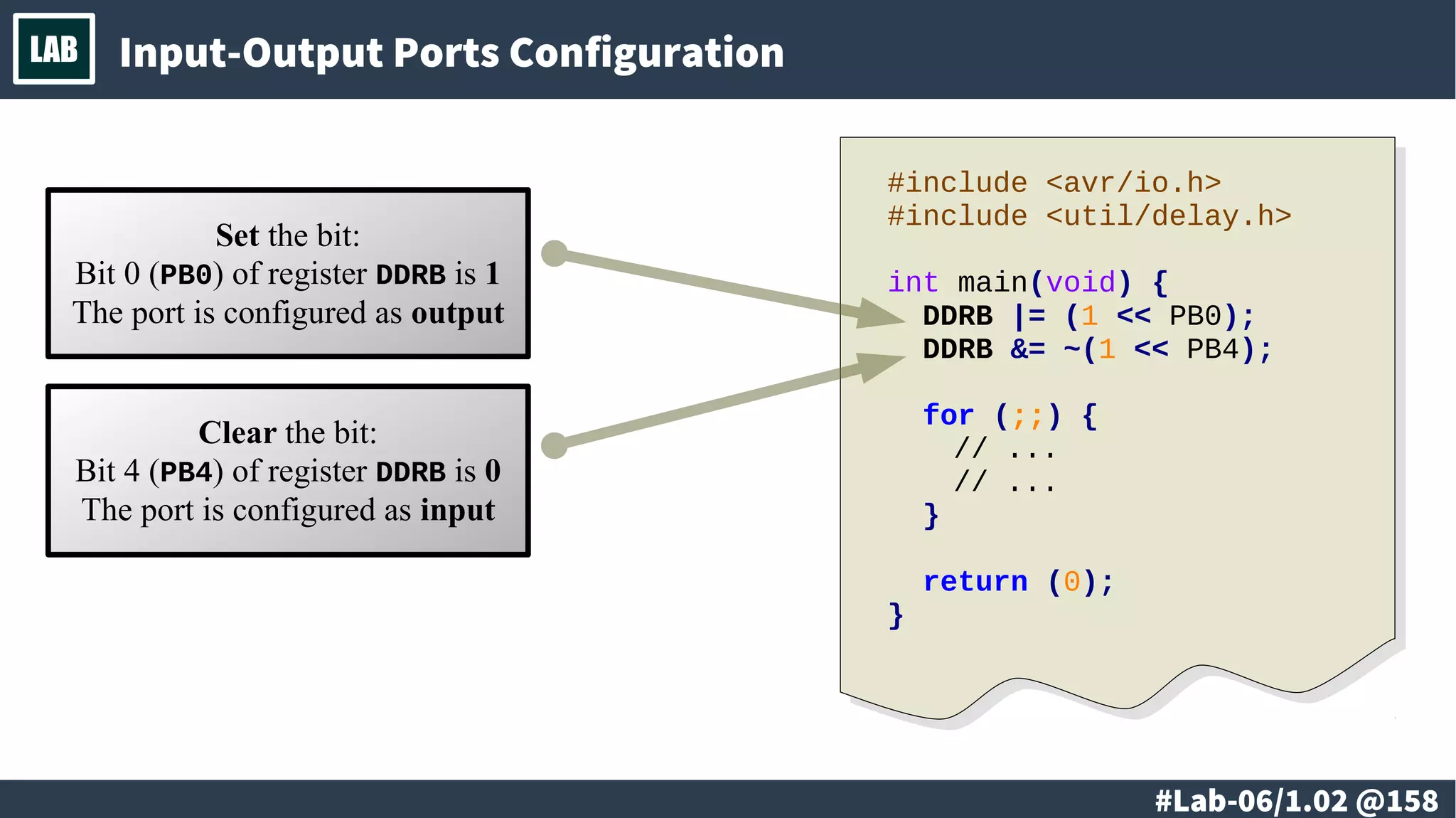
LAB Input-Output Ports Configuration
Set the bit:
Bit 0 (PB0) of register DDRB is 1
The port is configured as output
#include <avr/io.h>
#include <util/delay.h>
int main(void) {
DDRB |= (1 << PB0);
DDRB &= ~(1 << PB4);
for (;;) {
// ...
// ...
}
return (0);
}
Clear the bit:
Bit 4 (PB4) of register DDRB is 0
The port is configured as input
# @159
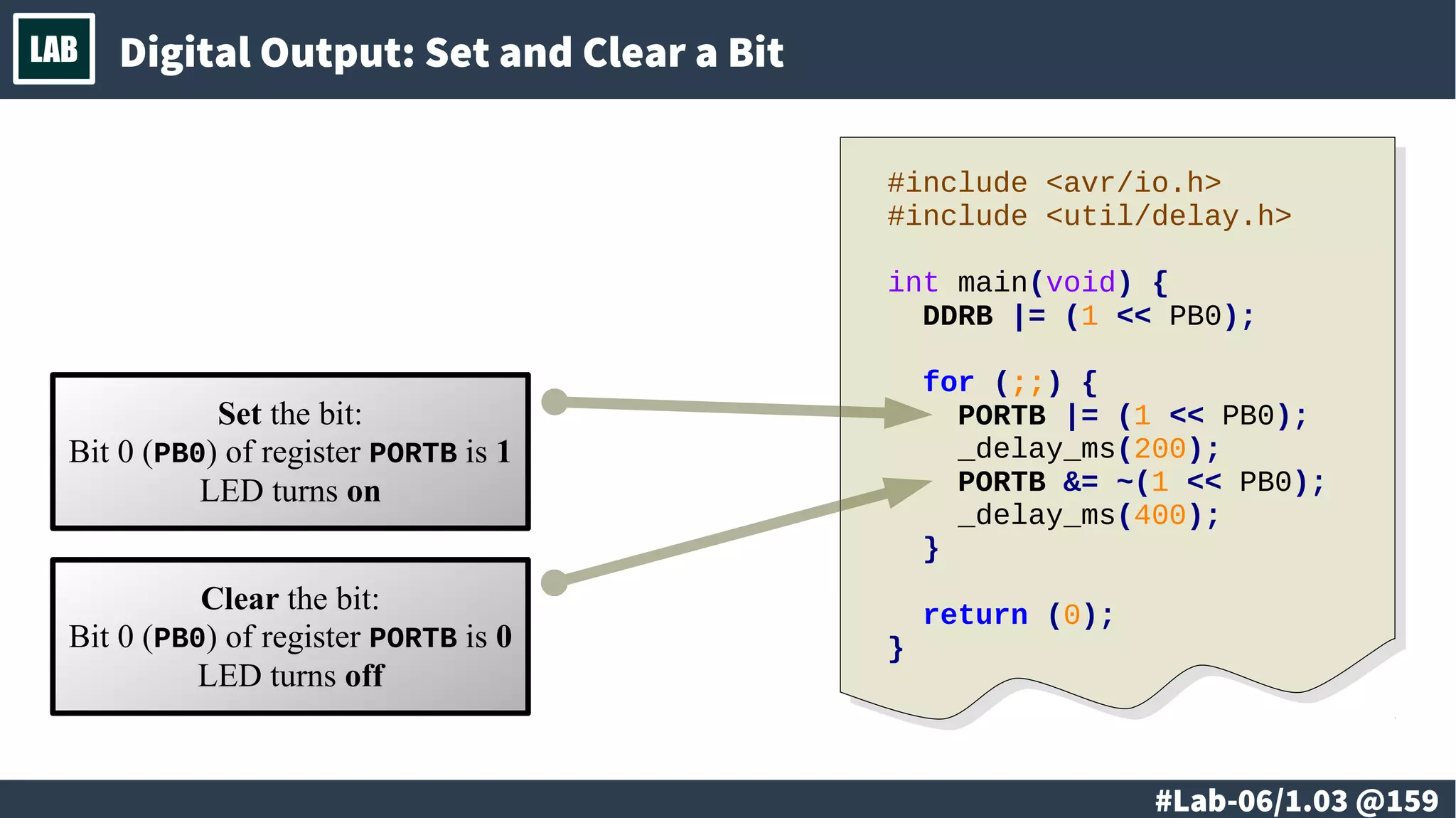
LAB Digital Output: Set and Clear a Bit
Set the bit:
Bit 0 (PB0) of register PORTB is 1
LED turns on
Clear the bit:
Bit 0 (PB0) of register PORTB is 0
LED turns off
#include <avr/io.h>
#include <util/delay.h>
int main(void) {
DDRB |= (1 << PB0);
for (;;) {
PORTB |= (1 << PB0);
_delay_ms(200);
PORTB &= ~(1 << PB0);
_delay_ms(400);
}
return (0);
}
# @160
LAB
# @161
LAB
● Blinking LED
● Making sound
● Blinking LED and making sound
– Alternating
– Simultaneously
# @162
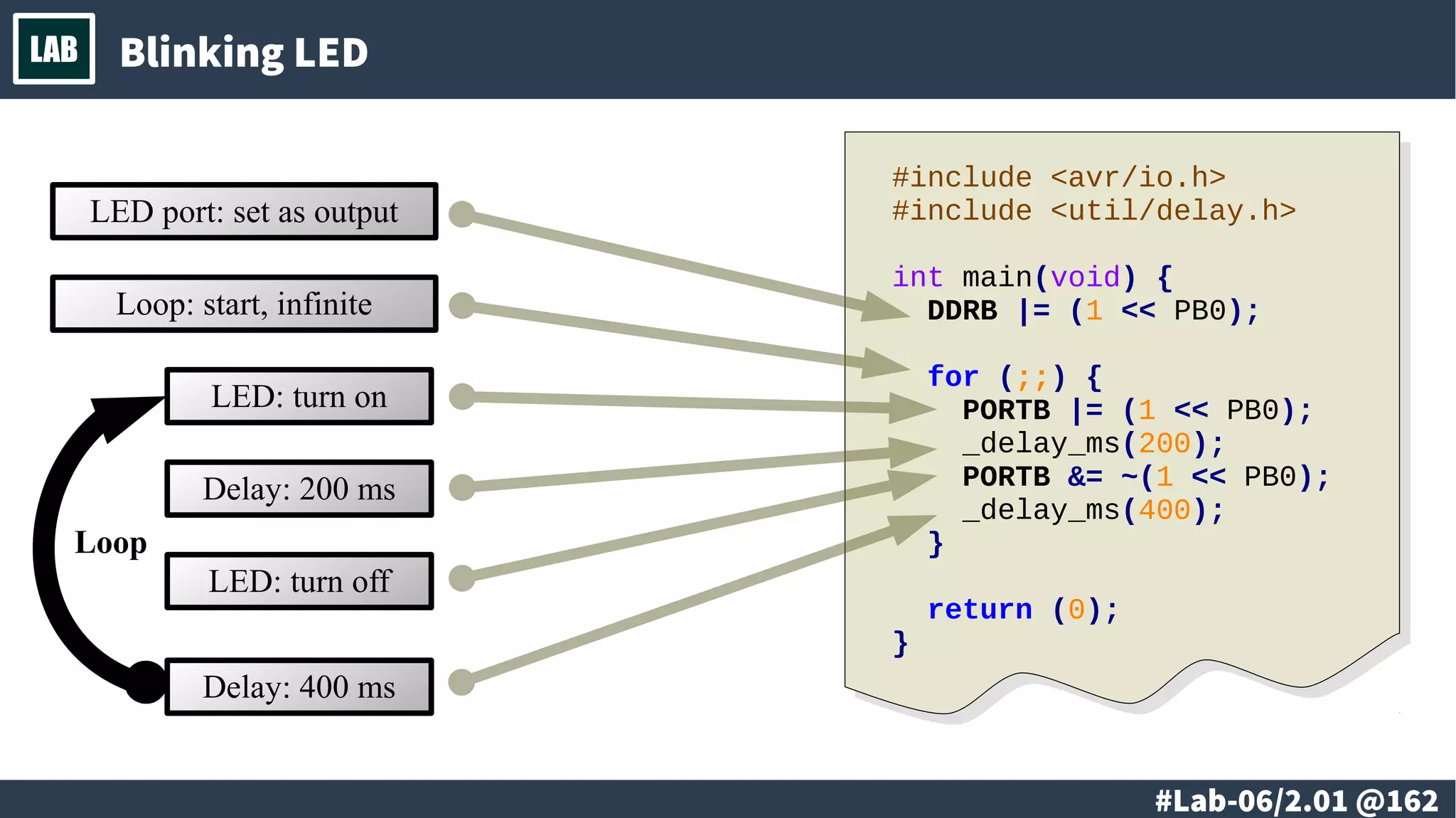
LAB Blinking LED
Loop
LED: turn on
Delay: 200 ms
LED: turn off
Delay: 400 ms
LED port: set as output
#include <avr/io.h>
#include <util/delay.h>
int main(void) {
DDRB |= (1 << PB0);
for (;;) {
PORTB |= (1 << PB0);
_delay_ms(200);
PORTB &= ~(1 << PB0);
_delay_ms(400);
}
return (0);
}
Loop: start, infinite
# @163
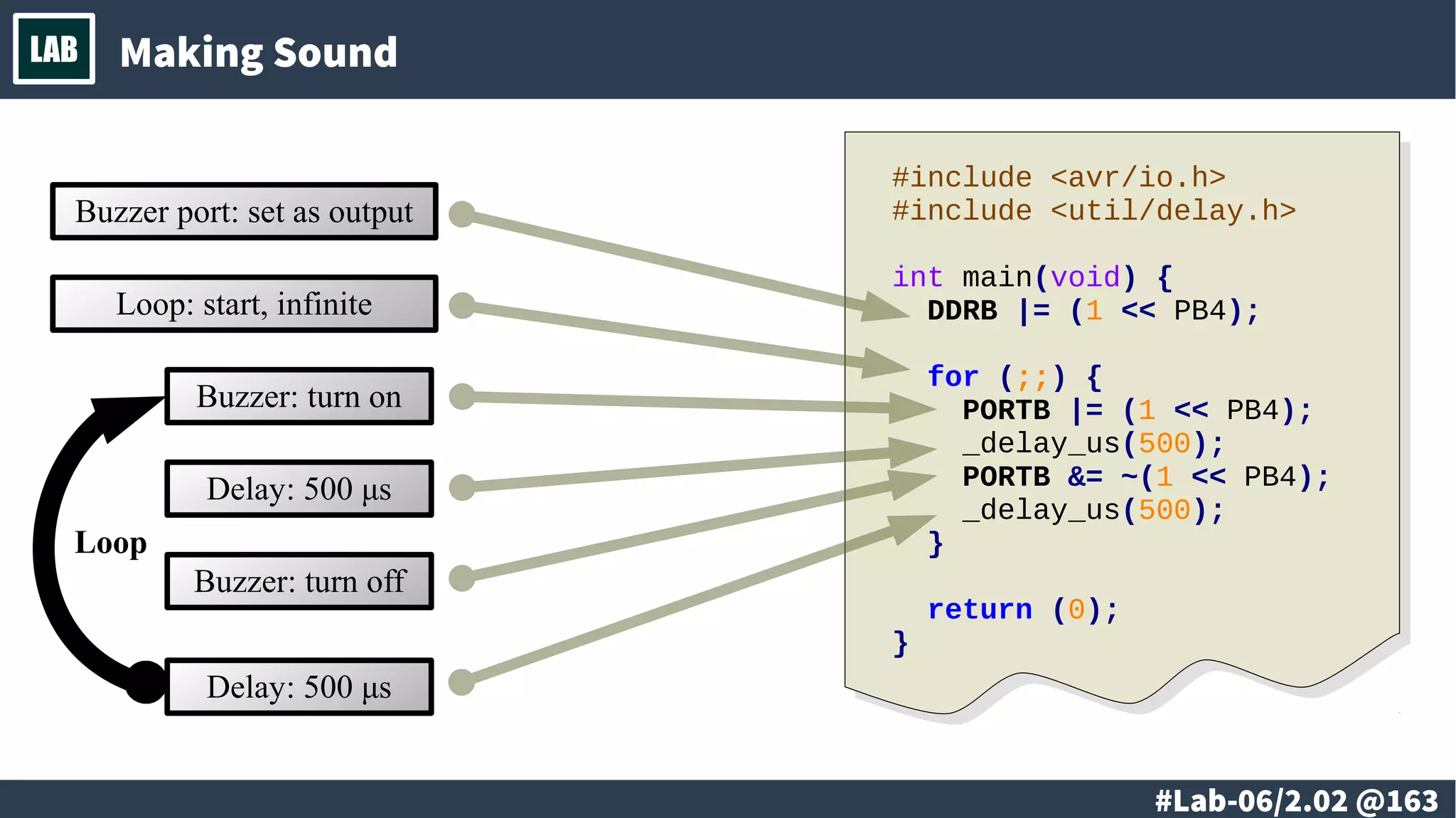
LAB Making Sound
Loop
Buzzer: turn on
Delay: 500 μs
Buzzer: turn off
Delay: 500 μs
Buzzer port: set as output
#include <avr/io.h>
#include <util/delay.h>
int main(void) {
DDRB |= (1 << PB4);
for (;;) {
PORTB |= (1 << PB4);
_delay_us(500);
PORTB &= ~(1 << PB4);
_delay_us(500);
}
return (0);
}
Loop: start, infinite
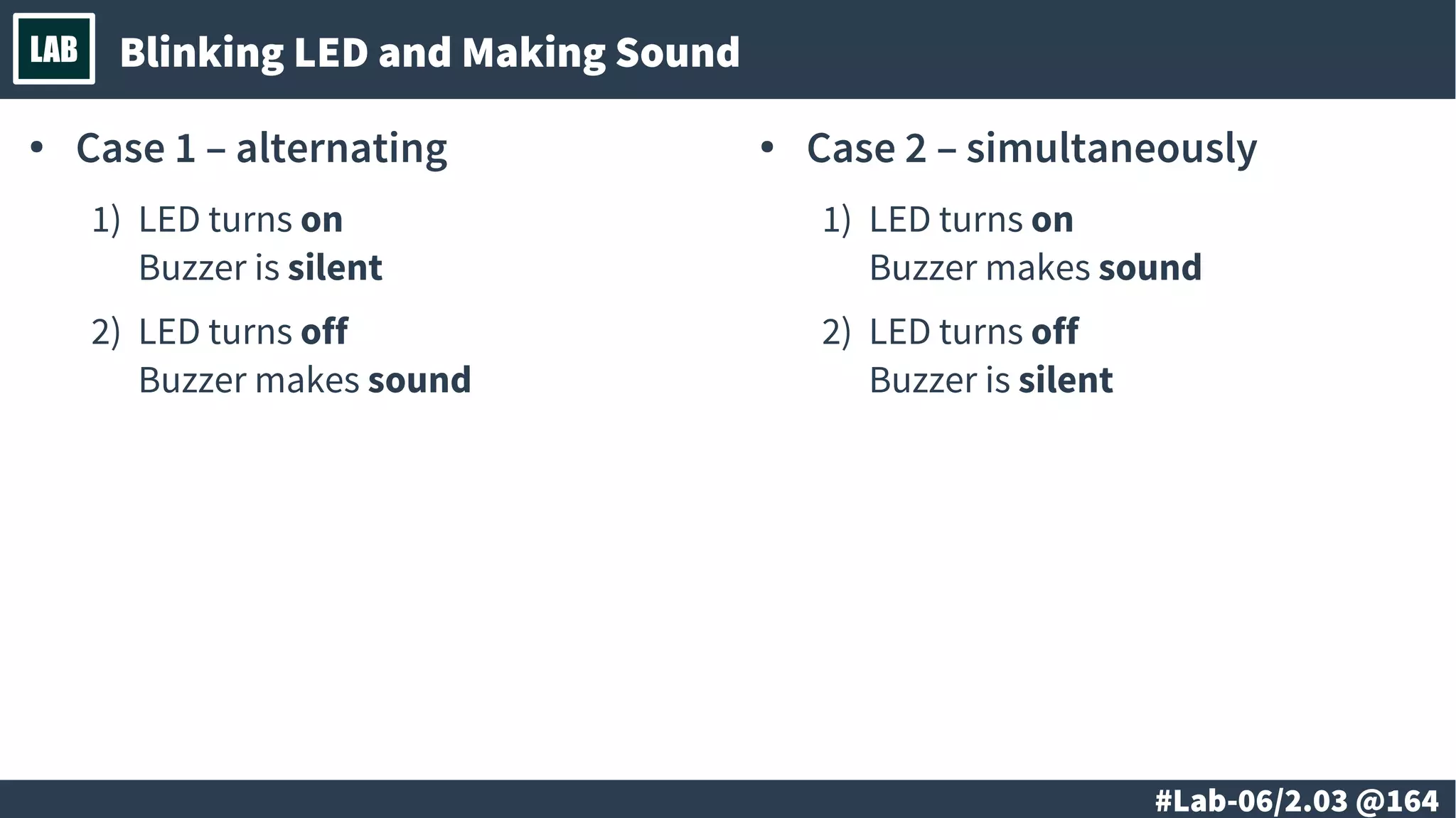
# @164
LAB Blinking LED and Making Sound
● Case 1 – alternating
1) LED turns on
Buzzer is silent
2) LED turns off
Buzzer makes sound
● Case 2 – simultaneously
1) LED turns on
Buzzer makes sound
2) LED turns off
Buzzer is silent
# @165
Ss
Self-study
● Wri t e a program t hat wi l l have t he f ol l owi ng
f eat ures:
– Pl ays a sequence of t ones
– Has i mpl ement ed a f unct i on ( pr ocedur e) t hat
pr oduces a t one wi t h speci f i c pi t ch
● Advanced:
– Pl ays al l t he t ones f or exact l y t he same amount
of t i me
# @166
LAB
@ #167/213
Th
● Digital input
● Continuous-time signal
vs. discrete-time signal
● Digital signal discretization
@ #168/213
Th Digital Input
MCU
DDRB
- - - 0 0 1 1 1 PB0
PB1
PB2
Vcc
GND
PB4
PB3
RESET
PINB
- - - 0 0 0 0 0
@ #169/213
Th Continuous-time Signal vs. Discrete-time Signal
● Discrete-time
signal
● Continuous-time
signal
@ #170/213
Th Digital Signal Discretization
1 0 1 0 1 0 1 0
1 0 0 1 1
REF: https://en.wikipedia.org/wiki/Discretization
# @171
LAB
@ #172/213
Th
● Digital signal vs. Analog signal
● Transient response
● Contact bounce and de-bounce
@ #173/213
Th Digital Signal vs. Analog Signal
1 0 1 0 0 1 0
1 0 1 0 1 0 1 0 1
@ #174/213
Th Transient Response
0 1 0 1 0
REF: https://en.wikipedia.org/wiki/Transient_response
@ #175/213
Th Contact Bounce and De-bounce
1 0 1 0 0
REF: https://en.wikipedia.org/wiki/Switch#Contact_bounce
# @176
LAB
# @177
LAB
● Digital input
– Reading PINB register
– Checking a bit
● I/O ports configuration
● Reading a button
# @178
LAB Digital Input
# @179
LAB I/O Ports Configuration
# @180
LAB Reading a Button
# @181
LAB
# @182
LAB
● Button bounce
● De-bounce
# @183
LAB Button Bounce
# @184
LAB De-bounce
# @185
Ss
Self-study
● Wri t e a program wi l l do t he f ol l owi ng:
– When you pr ess t he but t on t he LED wi l l swi t ch on
– When you pr ess t he but t on agai n t he LED wi l l
swi t ch of f
# @186
LAB
@ #187/213
Th
● Communication interfaces
● Parallel interfaces
● Serial interfaces
● Synchronous serial interfaces
● Asynchronous serial interfaces
@ #188/213
Th Communication Interfaces
@ #189/213
Th Parallel Interfaces
@ #190/213
Th Serial Interfaces
@ #191/213
Th Synchronous Serial Interfaces
@ #192/213
Th Asynchronous Serial Interfaces
# @193
LAB
@ #194/213
Th
● SPI interface
● UART interface
● RS-232 interface
● RS-485 interface
@ #195/213
Th SPI Interface
@ #196/213
Th UART Interface
@ #197/213
Th RS-232 Interface
@ #198/213
Th RS-485 Interface
# @199
LAB
# @200
LAB
● Asynchronous serial interface implementation
– Basic principles
– Bit-banging
● Transmitting the data
– Implementation
# @201
LAB Asynchronous Serial Interface Implementation – Basic Principles
# @202
LAB Asynchronous Serial Interface Implementation – Bit-Banging
# @203
LAB Transmitting the Data - Implementation
# @204
LAB Transmitting the Data – Some Source Code
# @205
LAB
# @206
LAB
● Sending the data out
– USB-to-Serial adapter
● Transmitting data to another computer
# @207
LAB Sending the Data Out - USB-To-Serial Adapter
# @208
LAB Transmitting Data to Another Computer
# @209
Ss
Self-study
● Wri t e a program wi l l do t he f ol l owi ng:
– . . .
# @210
LAB
# @211
LAB
END.
Friday, April 21, 2017 #212/213
● Author: Neven Boyanov
Facebook: https://www.facebook.com/boyanov
Twitter: https://twitter.com/boyanov
● Copyright (c) 2016-2017 by Neven Boyanov. All Rights Reserved.
● Licensing: CC-BY-SA-3.0
Creative Commons Attribution–ShareAlike License
Full text: https://creativecommons.org/licenses/by-sa/3.0/legalcode
More info: https://creativecommons.org/licenses/by-sa/3.0/
● Retain in your derivative work a note about the original author
Neven Boyanov and the link http://boyanov.org to the author’s
website.
Friday, April 21, 2017 #213/213
Good-bye!

Microcontrollers and embedded devices

  • 1.
    Friday, April 21,2017 #1/213 Microcontrollers and Embedded DevicesMicrocontrollers and Embedded Devices
  • 2.
  • 3.
    @ #3/213 Th ● Introductionto microcontrollers and embedded devices. – History – Single-board computer – Single-chip computers – Embedded devices – Robots.
  • 4.
    @ #4/213 Th LittleHistory: Single board computers ● single circuit board ● microprocessor(s) ● memory ● input/output (I/O) REF: https://en.wikipedia.org/wiki/Single-board_computer
  • 5.
    @ #5/213 Th History:System on a chip REF: https://en.wikipedia.org/wiki/System_on_a_chip ● all components of a computer ● other electronic system into a single chip
  • 6.
    @ #6/213 Th History:Embedded systems, microcontrollers REF: https://en.wikipedia.org/wiki/Embedded_system REF: https://en.wikipedia.org/wiki/Microcontroller ● Apollo Guidance Computer ● Microcontroller
  • 7.
    @ #7/213 Th LittleHistory: Robots REF: https://en.wikipedia.org/wiki/Robot Karel Čapek ASIMO by Honda advanced humanoid robot Industrial robots assembling cars
  • 8.
    @ #8/213 Th LittleHistory: Internet-of-things (IoT) REF: https://en.wikipedia.org/wiki/Internet_of_things
  • 9.
  • 10.
    @ #10/213 Th ● Numeralsystems. Logical and bitwise operations. – Numeral systems; decimal, binary and other numbers – conversion from and to; Logical and bitwise operations.
  • 11.
    @ #11/213 Th Numeralsystem REF: https://en.wikipedia.org/wiki/Numeral_system ● Binary: 0 1 ● Octal: 0 1 2 3 4 5 6 7 ● Decimal: 0 1 2 3 4 5 6 7 8 9 ● Hexadecimal: 0 1 2 3 4 5 6 7 8 9 A B C D E F
  • 12.
    @ #12/213 Th Numeralsystem: Decimal ● Decimal numbers: 0 1 2 3 4 5 6 7 8 9 REF: https://en.wikipedia.org/wiki/Decimal decimal 0 1 2 3 4 5 6 7 8 9
  • 13.
    @ #13/213 Th Numeralsystem: Binary ● Binary: 0 or 1 true or false yes or no REF: https://en.wikipedia.org/wiki/Binary_number binary decimal 000 0 001 1 010 2 011 3 100 4 101 5 110 6 111 7
  • 14.
    @ #14/213 Th Numeralsystem: Hexadecimal ● Hexadecimal: 0 1 2 3 4 5 6 7 8 9 A B C D E F binary decimal hex 0000 0 0 0001 1 1 0010 2 2 0011 3 3 0100 4 4 0101 5 5 0110 6 6 0111 7 7 1000 8 8 1001 9 9 1010 10 A 1011 11 B 1100 12 C 1101 13 D 1110 14 E 1111 15 F REF: https://en.wikipedia.org/wiki/Hexadecimal
  • 15.
    @ #15/213 Th Numeralsystem: Octal ● Octal: 0 1 2 3 4 5 6 7 binary decimal octal 000 0 0 001 1 1 010 2 2 011 3 3 100 4 4 101 5 5 110 6 6 111 7 7 REF: https://en.wikipedia.org/wiki/Octal
  • 16.
    @ #16/213 Th Numeralsystem: Binary coded decimal ● Binary clock REF: https://en.wikipedia.org/wiki/Binary-coded_decimal binary decimal 0000 0 0001 1 0010 2 0011 3 0100 4 0101 5 0110 6 0111 7 1000 8 1001 9
  • 17.
    @ #17/213 Th Booleanalgebra REF: https://en.wikipedia.org/wiki/Boolean_algebra
  • 18.
    @ #18/213 Th Booleanoperations, Truth table c4 c3 c2 c1 Name Notes Abr 0 0 0 0 Contradiction Always FALSE 0 0 0 1 Logical NOR NOR 0 0 1 0 Converse nonimplication 0 0 1 1 Negation 0 1 0 0 Material nonimplication 0 1 0 1 Negation 0 1 1 0 Exclusive disjunction TRUE when different XOR 0 1 1 1 Logical NAND NAND 1 0 0 0 Logical conjunction AND 1 0 0 1 Logical biconditional TRUE when equal XNOR 1 0 1 0 Projection function 1 0 1 1 Material implication 1 1 0 0 Projection function 1 1 0 1 Converse implication OR 1 1 1 0 Logical disjunction 1 1 1 1 Tautology Always TRUE REF: https://en.wikipedia.org/wiki/Truth_table A B C 1 0 0 c1 2 0 1 c2 3 1 0 c3 4 1 1 c4
  • 19.
    @ #19/213 Th Bitwiseoperations REF: https://en.wikipedia.org/wiki/Bitwise_operation ● AND ● OR ● XOR ● XNOR● NOR● NAND A1 A2 B 0 0 1 0 1 0 1 0 0 1 1 0 A1 A2 B 0 0 0 0 1 1 1 0 1 1 1 1 A1 A2 B 0 0 0 0 1 0 1 0 0 1 1 1 A1 A2 B 0 0 1 0 1 1 1 0 1 1 1 0 A1 A2 B 0 0 0 0 1 1 1 0 1 1 1 0 A1 A2 B 0 0 1 0 1 0 1 0 0 1 1 1
  • 20.
    @ #20/213 Th Bitshiftoperations REF: https://en.wikipedia.org/wiki/Bitwise_operation ● Logical shift – Left – Right
  • 21.
    @ #21/213 Th Bitshiftoperations REF: https://en.wikipedia.org/wiki/Bitwise_operation ● Arithmetic shift – Left – Right
  • 22.
    @ #22/213 Th Bitshiftoperations REF: https://en.wikipedia.org/wiki/Bitwise_operation ● Rotate no carry – Left – Right
  • 23.
    @ #23/213 Th Bitshiftoperations REF: https://en.wikipedia.org/wiki/Bitwise_operation ● Rotate through carry – Left – Right
  • 24.
  • 25.
    # @25 LAB ● Introductionto microcontrollers and embedded devices. – Demonstration of microcontroller and embedded devices. – Basic principles. – Simulation of a microcontroller system.
  • 26.
    # @26 LAB Demo:Embedded devices and robots ● Digital alarm clock ● Rover ● Embedded Computer REF: https://en.wikipedia.org/wiki/Embedded_system REF: https://en.wikipedia.org/wiki/Rover_(space_exploration)
  • 27.
    # @27 LAB Demo:Quadcopter REF: https://en.wikipedia.org/wiki/Quadcopter
  • 28.
    # @28 LAB Simulation:Microcontrollers Specialized desktop software Web based platforms ● Advantages – Very easy to use ● Disadvantages – May not be exact match of the device – No connection to the real world ● Advantages – Very close match to the real device – Allows debugging – Could connect device to real world ● Disadvantages – Limited connectivity to the real world
  • 29.
    # @29 LAB Simulation:Microcontrollers – Atmel Studio Stimuli ● Atmel Studio Stimuli REF: Atmel Studio Stimuli
  • 30.
    # @30 LAB Simulation:Microcontrollers – Web based platforms ● Autodesk 123D – Circuit.io REF: https://circuits.io
  • 31.
  • 32.
    # @32 LAB ● Introductionto microcontrollers and embedded devices. – Conversion between numeral systems. – Logical, bitwise and arithmetic operations. Optimizations.
  • 33.
    # @33 LAB Numericalconversion: binary to decimal nth bit val 2n 0 1 1 2 2 4 3 8 4 16 5 32 6 64 7 128 4-bit ● 0101 0+4+0+1=5 ● 1010 8+0+2+0=12 8-bit ● 01011010 0+64+0+16+8+0+2+0=... ● 10100101 128+0+32+0+0+4+0+1=...
  • 34.
    # @34 LAB Numericalconversion: decimal to binary
  • 35.
    # @35 LAB Numericalconversion: hexadecimal to/from binary DEC HEX 0 0 0 0 0 0 0 0 0 1 1 1 0 0 1 0 2 2 0 0 1 1 3 3 0 1 0 0 4 4 0 1 0 1 5 5 0 1 1 0 6 6 0 1 1 1 7 7 1 0 0 0 8 8 1 0 0 1 9 9 1 0 1 0 10 A 1 0 1 1 11 B 1 1 0 0 12 C 1 1 0 1 13 D 1 1 1 0 14 E 1 1 1 1 15 F 4-bit ● 0001 = 1 ● 0101 = 5 ● 1010 = A ● 1111 = F 8-bit ● 0000 0001 = 01 ● 0010 0011 = 23 ● 0100 0101 = 45 ● 0110 0111 = 67 ● 1000 1001 = 89 ● 1010 1011 = AB ● 1100 1101 = CD ● 1110 1111 = EF
  • 36.
    # @36 LAB Bitwiseoperations: NOT, AND, OR, XOR in C and C++ REF: https://en.wikipedia.org/wiki/Bitwise_operations_in_C ● NOT uint8_t a, b; a = 0b10110111; b = ~a; /* b = 01001000 */ ● AND uint8_t a, b; a = 0b10110111; b = a & 0b00001111; /* b = 00000111 */ ● XOR uint8_t a, b; a = 0b10110111; b = a ^ 0b00001111; /* b = 10111000 */ ● OR uint8_t a, b; a = 0b10110111; b = a | 0b00001111; /* b = 10111111 */
  • 37.
    # @37 LAB Bitwiseoperations: shifting in C and C++ REF: https://en.wikipedia.org/wiki/Bitwise_operations_in_C ● Right shift uint8_t a, b; a = 0b10110111; b = a >> 1; /* b = 01011011 */ b = a >> 2; /* b = 00101101 */ ● Left shift uint8_t a, b; a = 0b10110111; b = a << 1; /* b = 01101110 */ b = a << 2; /* b = 11011100 */
  • 38.
    # @38 LAB Bitwiseoperations: shifting, arithmetic equivalents ● Right shift Divide by power of 2 uint8_t a, b; a = 0b01011010; /* 90 */ b = a >> 1; /* div 2 */ /* b = 00101101 = 45 */ b = a >> 2; /* div 4 */ /* b = 00010110 = 22 */ ● Left shift Multiply by power of 2 uint8_t a, b; a = 0b01011010; /* 90 */ b = a << 1; /* mul 2 */ /* b = 10110100 = 180 */ b = a << 2; /* mul 4 */ /* b = 01101000 = 104 */ REF: https://en.wikipedia.org/wiki/Bitwise_operations_in_C
  • 39.
    # @39 LAB Bitwiseoperations: Microcontroller – simplified architecture
  • 40.
    # @40 LAB Bitwiseoperations: Setting and clearing specific bit ● Setting specific bit uint8_t a, b; a = 0b10110111; b = a | 0b00001000; /* b = 10111111 */ ____________________________ ● Multiple bits uint8_t a, b; a = 0b10110111; b = a | 0b00001001; /* b = 10111111 */ ● Clearing specific bit uint8_t a, b; a = 0b10110111; b = a & 0b11101111; /* b = 10100111 */ ____________________________ ● Multiple bits uint8_t a, b; a = 0b10110111; b = a & 0b10101111; /* b = 10100111 */
  • 41.
    # @41 LAB Bitwiseoperations: Setting and clearing specific bit ● Setting specific bit uint8_t a, b; a = 0b10110111; b = a | (1 << 3); /* 00000001 */ /* 00001000 */ /* b = 10111111 */ ● Clearing specific bit uint8_t a, b; a = 0b10110111; b = a & ~(1 << 4); /* 00000001 */ /* 00010000 */ /* 11101111 */ /* b = 10100111 */
  • 42.
    # @42 LAB Bitwiseoperations: Flipping (set/clear) specific bit ● Flipping specific bit uint8_t a, b; a = 0b10110111; b = a ^ 0b00001000; /* b = 10111111 */ b = a ^ 0b00001000; /* b = 10110111 */ ____________________________ ● Multiple bits b = a ^ 0b00001001; /* b = 10111110 */ ● Flipping specific bit uint8_t a, b; a = 0b10110111; b = a ^ (1 << 4); /* 00000001 */ /* 00010000 */ /* b = 10100111 */ b = a ^ (1 << 4); /* 00000001 */ /* 00010000 */ /* b = 10110111 */
  • 43.
    # @43 LAB Bitwiseoperations: Checking specific bit(s) ● Check if specific bit is set or clear uint8_t a; a = 0b10110111; if (a & 0b00000100) { /* TRUE */ } else { } if (a & 0b00001000) { } else { /* FALSE */ } uint8_t a; a = 0b10110111; if (a & (1 << 2)) { /* TRUE */ } else { } if (a & (1 << 3)) { } else { /* FALSE */ }
  • 44.
    # @44 LAB Bitwiseoperations: Check and conditionally set/clear bit ● Check if a bit is set/clear and depending on that set/clear another bit
  • 45.
  • 46.
    @ #46/213 Th ● Designingof a microcontroller system – Basic principles in the design of a microcontroller systems. – Defining of the requirements and implementation.
  • 47.
    @ #47/213 Th Microcontroller Designing ofa microcontroller system: Basic principles CPUCPU RAMRAM ProgramProgram ROMROMUtility ● Timers ● Counters Utility ● Timers ● Counters I/O (GPIO) ● Digital ● ADC ● DAC ● Serial I/O (GPIO) ● Digital ● ADC ● DAC ● Serial System ● ISP ● Debug System ● ISP ● Debug
  • 48.
    @ #48/213 Th Protection Designing ofa microcontroller system: Basic principles PowerPower ResetReset PeripheralsPeripherals MicrocontrollerMicrocontrollerProgrammingProgramming
  • 49.
  • 50.
    @ #50/213 Th ● Minimalmicrocontroller configuration – The minimal allowed (or acceptable, based on the requirements) microcontroller configuration.
  • 51.
    @ #51/213 Th Minimalmicrocontroller configuration: Atmel ATtiny85 Microcontroller Atmel ATtiny85 ● RAM 512 bytes ● Flash 8 Kbytes ● ROM 512 Bytes ● Clock 1/8/20 MHz Microcontroller Atmel ATtiny85 ● RAM 512 bytes ● Flash 8 Kbytes ● ROM 512 Bytes ● Clock 1/8/20 MHz VccVcc PB2PB2 PB1PB1 PB0PB0 ResetReset PB3PB3 PB4PB4 GNDGND (+) Power Supply (-) (+) Power Supply (-) ResetReset
  • 52.
    @ #52/213 Th Tinusaur ●Digital input ● Digital output ● Analog to digital input ● Pulse-width modulation (analog output) ● Timers ● Serial input and output PB0PB0 PB1PB1 PB2PB2 PB3PB3 PB4PB4
  • 53.
  • 54.
    # @54 LAB ● Designinga microcontroller system – Circuit diagram. Practical design considerations – PCB. Practical design considerations. – Assembling of a minimal microcontroller system.
  • 55.
    # @55 LAB TheCircuit Diagram Microcontroller Atmel ATtiny85 ● RAM 512 bytes ● Flash 8 Kbytes ● ROM 512 Bytes ● Clock 1/8/20 MHz Microcontroller Atmel ATtiny85 ● RAM 512 bytes ● Flash 8 Kbytes ● ROM 512 Bytes ● Clock 1/8/20 MHz VccVcc PB2PB2 PB1PB1 PB0PB0 ResetReset PB3PB3 PB4PB4 GNDGND (+) Power 3.3 V (-) (+) Power 3.3 V (-) Reset 10K 100uF 100nF REF: https://en.wikipedia.org/wiki/Circuit_diagram
  • 56.
  • 57.
  • 58.
  • 59.
    # @59 LAB ● Minimalmicrocontroller configuration – Programming and testing of a minimal microcontroller system. (under Windows and Linux)
  • 60.
    # @60 LAB Programmingthe Microcontroller #include <avr/io.h> #include <util/delay.h> int main(void) { DDRB |= (1 << PB0); while (1) { PORTB |= (1 << PB0); _delay_ms(200); PORTB &= ~(1 << PB0); _delay_ms(400); } return (0); }
  • 61.
    # @61 LAB TestingPrograms ● Testing programs for the Shield LEDx2 – Blinking LED – Blinking LEDs – Fading LED/LEDs ● Testing programs for the Shield EDUx4IO – Blinking LED – Buzzer sound
  • 62.
  • 63.
    @ #63/213 Th ● Developmenttools. ● Compiling the source code to binary. ● Cross-compilers for C/C++ and Assembly language. ● Specialized development environments.
  • 64.
    @ #64/213 Th DevelopmentTools ● Compilers ● Linkers and other tools. ● Programmers. ● Debugging tools.
  • 65.
    @ #65/213 Th Compilingto Binary #include <avr/io.h> #include <util/delay.h> int main(void) { DDRB |= (1 << PB0); while (1) { PORTB |= (1 << PB0); _delay_ms(200); PORTB &= ~(1 << PB0); _delay_ms(400); } return (0); } B 8 9 A B 9 9 A C 0 9 A C 1 9 8 8 F E 4 9 3 E C 0 1 9 7 F 1 F 7 0 0 C 0 0 0 0 0 C 1 9 A C 0 9 8 9 F E 7 2 8 E 3 8 1 E 0 9 1 5 0 2 0 4 0 8 0 4 0 E 1 F 7 0 0 C 0 0 0 0 0 E C C F F 8 9 4 F F C F
  • 66.
    @ #66/213 Th Cross-compilersfor C/C++ and Assembly Language #include <avr/io.h> #include <util/delay.h> int main(void) { DDRB |= (1 << PB3); while (1) { PORTB |= (1 << PB3); _delay_ms(200); PORTB &= ~(1 << PB3); _delay_ms(400); } return (0); } 30: b8 9a sbi 0x17, 0 32: b9 9a sbi 0x17, 1 34: c0 9a sbi 0x18, 0 36: c1 98 cbi 0x18, 1 38: 8f e4 ldi r24, 0x4F 3a: 93 ec ldi r25, 0xC3 3c: 01 97 sbiw r24, 0x01 3e: f1 f7 brne .-4 40: 00 c0 rjmp .+0 42: 00 00 nop 44: c1 9a sbi 0x18, 1 46: c0 98 cbi 0x18, 0 48: 9f e7 ldi r25, 0x7F 4a: 28 e3 ldi r18, 0x38 4c: 81 e0 ldi r24, 0x01 4e: 91 50 subi r25, 0x01 50: 20 40 sbci r18, 0x00 52: 80 40 sbci r24, 0x00 54: e1 f7 brne .-8 56: 00 c0 rjmp .+0 58: 00 00 nop 5a: ec cf rjmp .-40 5c: f8 94 cli 5e: ff cf rjmp .-2 B 8 9 A B 9 9 A C 0 9 A C 1 9 8 8 F E 4 9 3 E C 0 1 9 7 F 1 F 7 0 0 C 0 0 0 0 0 C 1 9 A C 0 9 8 9 F E 7 2 8 E 3 8 1 E 0 9 1 5 0 2 0 4 0 8 0 4 0 E 1 F 7 0 0 C 0 0 0 0 0 E C C F F 8 9 4 F F C F
  • 67.
    @ #67/213 Th SpecializedDevelopment Environment
  • 68.
  • 69.
    @ #69/213 Th ● Compilingthe source code to a binary. ● Linking the compiled binary code. ● Deployment. ● Debugging tools.
  • 70.
    @ #70/213 Th Compilingthe Source Code to Binary #include <avr/io.h> #include <util/delay.h> int main(void) { DDRB |= (1 << PB3); while (1) { PORTB |= (1 << PB3); _delay_ms(200); PORTB &= ~(1 << PB3); _delay_ms(400); } return (0); } B 8 9 A B 9 9 A C 0 9 A C 1 9 8 8 F E 4 9 3 E C 0 1 9 7 F 1 F 7 0 0 C 0 . . . ● main.c – int main(void) { ... ... } ● mylib.c ● myio.c
  • 71.
    @ #71/213 Th Linkingthe Compiled Binary Code B 8 9 A B 9 9 A C 0 9 A C 1 9 8 8 F E 4 9 3 E C 0 1 9 7 F 1 F 7 0 0 C 0 0 0 0 0 C 1 9 A C 0 9 8 9 F E 7 2 8 E 3 8 1 E 0 9 1 5 0 2 0 4 0 8 0 4 0 E 1 F 7 0 0 C 0 0 0 0 0 E C C F F 8 9 4 F F C F B 8 9 A B 9 9 A C 0 9 A C 1 9 8 8 F E 4 9 3 E C 0 1 9 7 F 1 F 7 0 0 C 0 . . .
  • 72.
    @ #72/213 Th Deployment B8 9 A B 9 9 A C 0 9 A C 1 9 8 8 F E 4 9 3 E C 0 1 9 7 F 1 F 7 0 0 C 0 0 0 0 0 C 1 9 A C 0 9 8 9 F E 7 2 8 E 3 8 1 E 0 9 1 5 0 2 0 4 0 8 0 4 0 E 1 F 7 0 0 C 0 0 0 0 0 E C C F F 8 9 4 F F C F ● Enter programming mode ● Upload binary code ● Verify data ● Start program
  • 73.
    @ #73/213 Th DebuggingTools ● Debugging ● Debugging tools
  • 74.
  • 75.
    # @75 LAB ● Developmenttools. – GCC-AVR, make, AVRDUDE. ● Specialized development environments. – Atmel AVR Studio. – Arduino IDE. Installation and setup. ● Specialized debugging tools.
  • 76.
    # @76 LAB GCC-AVR,make, AVRDUDE
  • 77.
    # @77 LAB AtmelAVR Studio
  • 78.
    # @78 LAB ArduinoIDE ● Edit source code ● Verify source code ● Upload
  • 79.
    # @79 LAB SpecializedDebugging Tools ● Print over serial line ● Specialized tools
  • 80.
  • 81.
    # @81 LAB ● “Hello,World!” for the microcontrollers: the blinking LED. – Setup and algorithm. – 1 blinking LED. – 2 blinking LEDs. ● Practical implementation. – Loop and delay. – Compiling. – Uploading. ● Advanced – Using the timers – the idea.
  • 82.
    # @82 LAB Setup Microcontroller Atmel ATtiny85 ●RAM 512 bytes ● Flash 8 Kbytes ● ROM 512 Bytes ● Clock 1/8/20 MHz Microcontroller Atmel ATtiny85 ● RAM 512 bytes ● Flash 8 Kbytes ● ROM 512 Bytes ● Clock 1/8/20 MHz VccVcc PB2PB2 PB1PB1 PB0PB0 ResetReset PB3PB3 PB4PB4 GNDGND 330Ω 330Ω
  • 83.
    # @83 LAB “Hello,World!” for microcontrollers – the Blinking LED Loop LED: turn on Delay: 200 mS LED: turn off Delay: 400 mS LED port: set as output #include <avr/io.h> #include <util/delay.h> int main(void) { DDRB |= (1 << PB0); for (;;) { PORTB |= (1 << PB0); _delay_ms(200); PORTB &= ~(1 << PB0); _delay_ms(400); } return (0); } Loop: start, infinite
  • 84.
    # @84 LAB 2Blinking LEDs #include <avr/io.h> #include <util/delay.h> // ----------------------------- #define LED1_PORT PB0 #define LED2_PORT PB1 // ----------------------------- int main(void) { // Initialization DDRB |= (1 << LED1_PORT); DDRB |= (1 << LED2_PORT); // Start the main loop for (;;) { PORTB |= (1 << LED1_PORT); PORTB &= ~(1 << LED2_PORT); _delay_ms(200); PORTB &= ~(1 << LED1_PORT); PORTB |= (1 << LED2_PORT); _delay_ms(400); } return (0); }
  • 85.
    # @85 LAB BlinkingLEDs Using Timers – the Idea void init_timer(uint8_t max) { // Set timer in CTC mode TCCR0A |= (1 << WGM01); // Set timer in interrupt mode TIMSK |= (1 << OCIE0A); sei(); // Enable interrupts // set compare value OCR0A = max; // Prescale and start timer TCCR0B |= TIMER_TCCR0B_1024TH; } // Define interrupt vector ISR (TIMER0_COMPA_vect) { // Flip the LED bit vector PORTB ^= (1 << LED1_PORT); } OCR0A 1 1 0 0 1 0 1 0 TCNT0 x x x x x x x x TCNT0 == OCR0ATCNT0 == OCR0A for (;;) { for (TCNT0 = 0; TCNT0 < OCR0A; TCNT0++) { timer_delay(TCCR0B); } ISR (TIMER0_COMPA_vect); } for (;;) { for (TCNT0 = 0; TCNT0 < OCR0A; TCNT0++) { timer_delay(TCCR0B); } ISR (TIMER0_COMPA_vect); }
  • 86.
  • 87.
    @ #87/213 Th ● Microcontrollerarchitecture – Atmel ATtiny85 block diagram ● System clock and frequency ● Peripherals – Digital input/output – Analog input/output – Interrupts – Serial and other interfaces
  • 88.
    @ #88/213 Th Microcontrollerarchitecture: Atmel ATtiny85 ● Instruction decoder, ALU ● Registers and pointers ● Flash and data memory ● Counters & comparators ● Input and output (A & D) ● Many other modules – Too complicated, isn’t it? :)
  • 89.
    @ #89/213 Th MCU CPU Microcontroller ArchitectureSimplified Memory Flash Program & data Flash Program & data SRAM Data SRAM Data EEPROM Data EEPROM Data Digital ● Input / output ● Serial Digital ● Input / output ● Serial ● ISP (programming) ● Debugging ● ISP (programming) ● Debugging Analog-digital ● Converters ● Comparators Analog-digital ● Converters ● Comparators Registers ● 32 Registers ● Program counter ● Stack pointer ● Status registers ● Control registers Registers ● 32 Registers ● Program counter ● Stack pointer ● Status registers ● Control registers ● Oscillators ● Timing & Pre-scalers ● Oscillators ● Timing & Pre-scalers ● Instruction register & decoder ● ALU ● ● Instruction register & decoder ● ALU ● ● Interrupts ● Interrupts
  • 90.
    @ #90/213 Th SystemClock and Frequency Internal Oscillator 8 MHz Internal Oscillator 8 MHz PLL Multiplier x 8 PLL Multiplier x 8 System Clock Source 64 MHz System Clock Source 64 MHz Clock Source Select Clock Source Select CKSEL – clock select CLKPS – clock prescale External Oscillator 1...20 MHz External Oscillator 1...20 MHz Pre-scaler X MHz Pre-scaler X MHz
  • 91.
    @ #91/213 Th Peripherals:Digital input/output MCU DDRB - - - 0 0 1 1 1 PB0 PB1 PB2 Vcc GND PB4 PB3 RESET PORTB - - - 0 0 0 0 0 PINB - - - 0 0 0 0 0 B2 B1
  • 92.
    @ #92/213 Th Peripherals:Analog input MCU PB0 PB1 PB2 Vcc GND PB4 PB3 RESET ADCH 0 0 0 0 0 0 0 0 ADCL 0 0 0 0 0 0 0 0
  • 93.
    @ #93/213 Th Peripherals:Analog output MCU PB0 PB1 PB2 Vcc GND PB4 PB3 RESET
  • 94.
    @ #94/213 Th Peripherals:Interrupts MCU PB0 PB1 PB2 Vcc GND PB4 PB3 RESET B1 InterruptsInterrupts void init_button(void) { // Set PB0 as input DDRB &= ~(1 << PB0); // Enable pull up on PB0 PORTB |= (1 << PB0); // Clear pin change intr flag GIFR = (1 << PCIF); // Enable pin change interrupt GIMSK |= (1 << PCIE); // Pin Change Mask PCMSK |= (1 << PCINT0); } // Define interrupt vector ISR (SIG_PIN_CHANGE) { // Flip the LED bit vector PORTB ^= (1 << LED1_PORT); }
  • 95.
    @ #95/213 Th Peripherals:Serial Interfaces 1 0 1 0 1 0 1 0 1 0 1 0 0 1 0 1
  • 96.
  • 97.
    @ #97/213 Th ● Memory ●Registers ● Program counter ● Machine instructions ● Addressing methods ● Stack
  • 98.
  • 99.
  • 100.
  • 101.
    @ #101/213 Th MachineInstructions 30: b8 9a sbi 0x17, 0 32: b9 9a sbi 0x17, 1 34: c0 9a sbi 0x18, 0 36: c1 98 cbi 0x18, 1 38: 8f e4 ldi r24, 0x4F 3a: 93 ec ldi r25, 0xC3 3c: 01 97 sbiw r24, 0x01 3e: f1 f7 brne .-4 40: 00 c0 rjmp .+0 42: 00 00 nop 44: c1 9a sbi 0x18, 1 46: c0 98 cbi 0x18, 0 48: 9f e7 ldi r25, 0x7F 4a: 28 e3 ldi r18, 0x38 4c: 81 e0 ldi r24, 0x01 4e: 91 50 subi r25, 0x01 50: 20 40 sbci r18, 0x00 52: 80 40 sbci r24, 0x00 54: e1 f7 brne .-8 56: 00 c0 rjmp .+0 58: 00 00 nop 5a: ec cf rjmp .-40 5c: f8 94 cli 5e: ff cf rjmp .-2
  • 102.
  • 103.
  • 104.
  • 105.
    # @105 LAB ● Machineinstructions ● Machine cycles ● Delay implementation
  • 106.
    # @106 LAB MachineInstructions
  • 107.
  • 108.
    # @108 LAB DelayImplementation inline void my_delay(uint8_t d) { for (uint8_t i = d; i != 0; i--) { asm volatile ("nopnt"); } } inline void my_delay(uint8_t d) { for (uint8_t i = d; i != 0; i--) { asm volatile ("nopnt"); } }
  • 109.
  • 110.
    # @110 LAB ● Typesof memory ● Working with memory ● Addressing methods ● Capabilities and limitations ● Variables and size of the data ● Code and size of the code
  • 111.
    # @111 LAB Typesof Memory ● Flash Memory ● RAM ● EEPROM
  • 112.
    # @112 LAB Workingwith Memory
  • 113.
  • 114.
    # @114 LAB Variablesand Size of the Data
  • 115.
    # @115 LAB Capabilitiesand Limitations ● Atmel ATtiny85 – 8 Kbytes Flash – 512 Bytes for data in the SRAM – 512 Bytes for data in the EEPROM
  • 116.
    # @116 LAB Codeand Size of the Code
  • 117.
  • 118.
    @ #118/213 Th ● Electricity ●Current and voltage ● Resistance ● Ohm’s law
  • 119.
    @ #119/213 Th Electricity ●Electric charge ● Electric current ● Electric field ● Electric potential REF: https://en.wikipedia.org/wiki/Electricity REF: https://en.wikipedia.org/wiki/Electric_potential
  • 120.
    @ #120/213 Th Currentand voltage ● I – ampere ● V – volt – AC & DC ● Current – a flow of electric charge ● Voltage – the difference in electric potential REF: https://en.wikipedia.org/wiki/Voltage REF: https://en.wikipedia.org/wiki/Electric_current
  • 121.
    @ #121/213 Th Resistance ●Electrical conductor ● Resistance is the difficulty to pass an electric current ● R, Ohm ● G, conductance G = 1 / R REF: https://en.wikipedia.org/wiki/Electrical_resistance_and_conductance
  • 122.
    @ #122/213 Th Ohm’slaw ● Electric power ● P – watt REF: https://en.wikipedia.org/wiki/Ohm's_law REF: https://en.wikipedia.org/wiki/Electric_power
  • 123.
  • 124.
    @ #124/213 Th ● Signals ●Electric signals ● Analog signals ● Digital signals ● Logic signals
  • 125.
    @ #125/213 Th Signals ●Motion ● Sound ● Images, Videos ● Biological membrane potentials REF: https://en.wikipedia.org/wiki/Signal_(electrical_engineering)
  • 126.
    @ #126/213 Th Electricsignals ● Transducers ● Signal processing REF: https://en.wikipedia.org/wiki/Signal_processing
  • 127.
    @ #127/213 Th Analogsignals REF: https://en.wikipedia.org/wiki/Analog_signal
  • 128.
    @ #128/213 Th Digitalsignals REF: https://en.wikipedia.org/wiki/Digital_signal
  • 129.
    @ #129/213 Th Logicsignals REF: https://en.wikipedia.org/wiki/Logic_level
  • 130.
  • 131.
    # @131 LAB ● Voltage,current, resistance ● Working with multimeter ● Ohm’s law in practice ● Analog signals – Graphical representation ● Working with oscilloscope
  • 132.
    # @132 LAB Voltage,current, resistance
  • 133.
    # @133 LAB Workingwith multimeter
  • 134.
    # @134 LAB Ohm’slaw in practice ● VS = 5 V ● VLED = 2 V ● ILED = 10 mA -------------------- ● R = 300 Ohm ● PLED = 0.02 W REF: http://www.ohmslawcalculator.com/led-resistor-calculator
  • 135.
    # @135 LAB Analogsignals REF: https://en.wikipedia.org/wiki/Sampling_(signal_processing)
  • 136.
    # @136 LAB Workingwith oscilloscope REF: https://en.wikipedia.org/wiki/Oscilloscope
  • 137.
  • 138.
    # @138 LAB ● Digitalsignals – Graphical representation ● Logic signals – Graphical representation ● Working with oscilloscope ● Logic analyzer
  • 139.
    # @139 LAB Digitalsignals ● Bipolar encoding – AMI (Alternate mark inversion) REF: https://en.wikipedia.org/wiki/Bipolar_encoding
  • 140.
    # @140 LAB Logicsignals A logic signal waveform: 1)low level 2)high level 3)rising edge 4)falling edge Technology L voltage H voltage Notes CMOS 0 V to 1/3 VDD 2/3 VDD to VDD VDD = supply voltage TTL 0 V to 0.8 V 2 V to VCC VCC = 5 V ±10% ECL VEE to −1.4 V −1.2 V to 0 V VEE is about −5.2 V REF: https://en.wikipedia.org/wiki/Logic_level
  • 141.
    # @141 LAB Workingwith oscilloscope ● DSO Quad - 4 Channel Digital Storage Oscilloscope
  • 142.
    # @142 LAB Logicanalyzer REF: https://en.wikipedia.org/wiki/Logic_analyzer
  • 143.
    # @143 LAB Logicanalyzer - Software
  • 144.
  • 145.
    @ #145/213 Th ● Digitalsignal vs. Logic signal ● Continuous-time signal vs. Discrete-time signal
  • 146.
    @ #146/213 Th DigitalSignal vs. Logic Signal REF: https://en.wikipedia.org/wiki/Digital_signal REF: https://en.wikipedia.org/wiki/Logic_level ● Digital signal ● Logic signal
  • 147.
    @ #147/213 Th Continuous-timeSignal vs. Discrete-time Signal ● Continuous-time Signal ● Discrete-time Signal REF: https://en.wikipedia.org/wiki/Continuous_signal REF: https://en.wikipedia.org/wiki/Discrete-time_signal
  • 148.
  • 149.
    @ #149/213 Th ● Digitalinput-output ports ● Modes and configuration ● Digital output ● Working with bits ● Bitwise operations
  • 150.
    @ #150/213 Th DigitalInput-Output Ports MCU PB0 PB1 PB2 Vcc GND PB4 PB3 RESET OutputOutput InputInput
  • 151.
    @ #151/213 Th Modesand Configuration MCU DDRB - - - 0 0 1 1 1 PB0 PB1 PB2 Vcc GND PB4 PB3 RESET PORTB - - - 0 0 0 0 0 PINB - - - 0 0 0 0 0
  • 152.
    @ #152/213 Th DigitalOutput MCU DDRB - - - 0 0 1 1 1 PB0 PB1 PB2 Vcc GND PB4 PB3 RESET PORTB - - - 0 0 0 0 0 PINB - - - 0 0 0 0 0
  • 153.
  • 154.
    @ #154/213 Th BitwiseOperations ● AND – Set to 0 Clear ● OR – Set to 1 Set ● XOR – Change Flip A1 A2 B 0 0 0 0 1 1 1 0 1 1 1 1 A1 A2 B 0 0 0 0 1 0 1 0 0 1 1 1 A1 A2 B 0 0 0 0 1 1 1 0 1 1 1 0 REF: https://en.wikipedia.org/wiki/Bitwise_operation
  • 155.
  • 156.
    # @156 LAB ● Workingwith bits ● Input-output ports configuration ● Digital output: set and clear a bit
  • 157.
    # @157 LAB Workingwith Bits Set the bit: Bit 0 of register DDRB is 1 #include <avr/io.h> #include <util/delay.h> int main(void) { DDRB |= (1 << 0); DDRB &= ~(1 << 4); for (;;) { // ... // ... } return (0); } Clear the bit: Bit 4 of register DDRB is 0
  • 158.
    # @158 LAB Input-OutputPorts Configuration Set the bit: Bit 0 (PB0) of register DDRB is 1 The port is configured as output #include <avr/io.h> #include <util/delay.h> int main(void) { DDRB |= (1 << PB0); DDRB &= ~(1 << PB4); for (;;) { // ... // ... } return (0); } Clear the bit: Bit 4 (PB4) of register DDRB is 0 The port is configured as input
  • 159.
    # @159 LAB DigitalOutput: Set and Clear a Bit Set the bit: Bit 0 (PB0) of register PORTB is 1 LED turns on Clear the bit: Bit 0 (PB0) of register PORTB is 0 LED turns off #include <avr/io.h> #include <util/delay.h> int main(void) { DDRB |= (1 << PB0); for (;;) { PORTB |= (1 << PB0); _delay_ms(200); PORTB &= ~(1 << PB0); _delay_ms(400); } return (0); }
  • 160.
  • 161.
    # @161 LAB ● BlinkingLED ● Making sound ● Blinking LED and making sound – Alternating – Simultaneously
  • 162.
    # @162 LAB BlinkingLED Loop LED: turn on Delay: 200 ms LED: turn off Delay: 400 ms LED port: set as output #include <avr/io.h> #include <util/delay.h> int main(void) { DDRB |= (1 << PB0); for (;;) { PORTB |= (1 << PB0); _delay_ms(200); PORTB &= ~(1 << PB0); _delay_ms(400); } return (0); } Loop: start, infinite
  • 163.
    # @163 LAB MakingSound Loop Buzzer: turn on Delay: 500 μs Buzzer: turn off Delay: 500 μs Buzzer port: set as output #include <avr/io.h> #include <util/delay.h> int main(void) { DDRB |= (1 << PB4); for (;;) { PORTB |= (1 << PB4); _delay_us(500); PORTB &= ~(1 << PB4); _delay_us(500); } return (0); } Loop: start, infinite
  • 164.
    # @164 LAB BlinkingLED and Making Sound ● Case 1 – alternating 1) LED turns on Buzzer is silent 2) LED turns off Buzzer makes sound ● Case 2 – simultaneously 1) LED turns on Buzzer makes sound 2) LED turns off Buzzer is silent
  • 165.
    # @165 Ss Self-study ● Writ e a program t hat wi l l have t he f ol l owi ng f eat ures: – Pl ays a sequence of t ones – Has i mpl ement ed a f unct i on ( pr ocedur e) t hat pr oduces a t one wi t h speci f i c pi t ch ● Advanced: – Pl ays al l t he t ones f or exact l y t he same amount of t i me
  • 166.
  • 167.
    @ #167/213 Th ● Digitalinput ● Continuous-time signal vs. discrete-time signal ● Digital signal discretization
  • 168.
    @ #168/213 Th DigitalInput MCU DDRB - - - 0 0 1 1 1 PB0 PB1 PB2 Vcc GND PB4 PB3 RESET PINB - - - 0 0 0 0 0
  • 169.
    @ #169/213 Th Continuous-timeSignal vs. Discrete-time Signal ● Discrete-time signal ● Continuous-time signal
  • 170.
    @ #170/213 Th DigitalSignal Discretization 1 0 1 0 1 0 1 0 1 0 0 1 1 REF: https://en.wikipedia.org/wiki/Discretization
  • 171.
  • 172.
    @ #172/213 Th ● Digitalsignal vs. Analog signal ● Transient response ● Contact bounce and de-bounce
  • 173.
    @ #173/213 Th DigitalSignal vs. Analog Signal 1 0 1 0 0 1 0 1 0 1 0 1 0 1 0 1
  • 174.
    @ #174/213 Th TransientResponse 0 1 0 1 0 REF: https://en.wikipedia.org/wiki/Transient_response
  • 175.
    @ #175/213 Th ContactBounce and De-bounce 1 0 1 0 0 REF: https://en.wikipedia.org/wiki/Switch#Contact_bounce
  • 176.
  • 177.
    # @177 LAB ● Digitalinput – Reading PINB register – Checking a bit ● I/O ports configuration ● Reading a button
  • 178.
  • 179.
    # @179 LAB I/OPorts Configuration
  • 180.
  • 181.
  • 182.
    # @182 LAB ● Buttonbounce ● De-bounce
  • 183.
  • 184.
  • 185.
    # @185 Ss Self-study ● Writ e a program wi l l do t he f ol l owi ng: – When you pr ess t he but t on t he LED wi l l swi t ch on – When you pr ess t he but t on agai n t he LED wi l l swi t ch of f
  • 186.
  • 187.
    @ #187/213 Th ● Communicationinterfaces ● Parallel interfaces ● Serial interfaces ● Synchronous serial interfaces ● Asynchronous serial interfaces
  • 188.
  • 189.
  • 190.
  • 191.
    @ #191/213 Th SynchronousSerial Interfaces
  • 192.
    @ #192/213 Th AsynchronousSerial Interfaces
  • 193.
  • 194.
    @ #194/213 Th ● SPIinterface ● UART interface ● RS-232 interface ● RS-485 interface
  • 195.
  • 196.
  • 197.
  • 198.
  • 199.
  • 200.
    # @200 LAB ● Asynchronousserial interface implementation – Basic principles – Bit-banging ● Transmitting the data – Implementation
  • 201.
    # @201 LAB AsynchronousSerial Interface Implementation – Basic Principles
  • 202.
    # @202 LAB AsynchronousSerial Interface Implementation – Bit-Banging
  • 203.
    # @203 LAB Transmittingthe Data - Implementation
  • 204.
    # @204 LAB Transmittingthe Data – Some Source Code
  • 205.
  • 206.
    # @206 LAB ● Sendingthe data out – USB-to-Serial adapter ● Transmitting data to another computer
  • 207.
    # @207 LAB Sendingthe Data Out - USB-To-Serial Adapter
  • 208.
    # @208 LAB TransmittingData to Another Computer
  • 209.
    # @209 Ss Self-study ● Writ e a program wi l l do t he f ol l owi ng: – . . .
  • 210.
  • 211.
  • 212.
    Friday, April 21,2017 #212/213 ● Author: Neven Boyanov Facebook: https://www.facebook.com/boyanov Twitter: https://twitter.com/boyanov ● Copyright (c) 2016-2017 by Neven Boyanov. All Rights Reserved. ● Licensing: CC-BY-SA-3.0 Creative Commons Attribution–ShareAlike License Full text: https://creativecommons.org/licenses/by-sa/3.0/legalcode More info: https://creativecommons.org/licenses/by-sa/3.0/ ● Retain in your derivative work a note about the original author Neven Boyanov and the link http://boyanov.org to the author’s website.
  • 213.
    Friday, April 21,2017 #213/213 Good-bye!