Matlab and Python: Basic Operations
Programming Seminar
Wai Nwe Tun
Konkuk University
July 11, 2016
Wai Nwe Tun (Konkuk University) Matlab and Python: Basic Operations July 11, 2016 1 / 18
Outline
1 Programming Paradigms
2 Objected-Oriented Fundamentals
3 Basic Operations: Arrays and Lists
4 Basic Operations: Cells and Structures
5 Basic Operations: Functions
6 Basic Operations: Loops
7 References
Wai Nwe Tun (Konkuk University) Matlab and Python: Basic Operations July 11, 2016 2 / 18
Programming Paradigms
Imperative
a series of well-structured steps and procedures
Examples : Fortran, C, etc.
Functional
a collection of mathematical functions
Examples : Haskell, Lisp, etc.
Object-oriented
focus on code reuse
a collection of objects (instances of a class)
class as specification like blueprint or pattern
Examples: Python, Matlab, C++, etc.
Logic, Event-based, Concurrent, and others
Wai Nwe Tun (Konkuk University) Matlab and Python: Basic Operations July 11, 2016 3 / 18
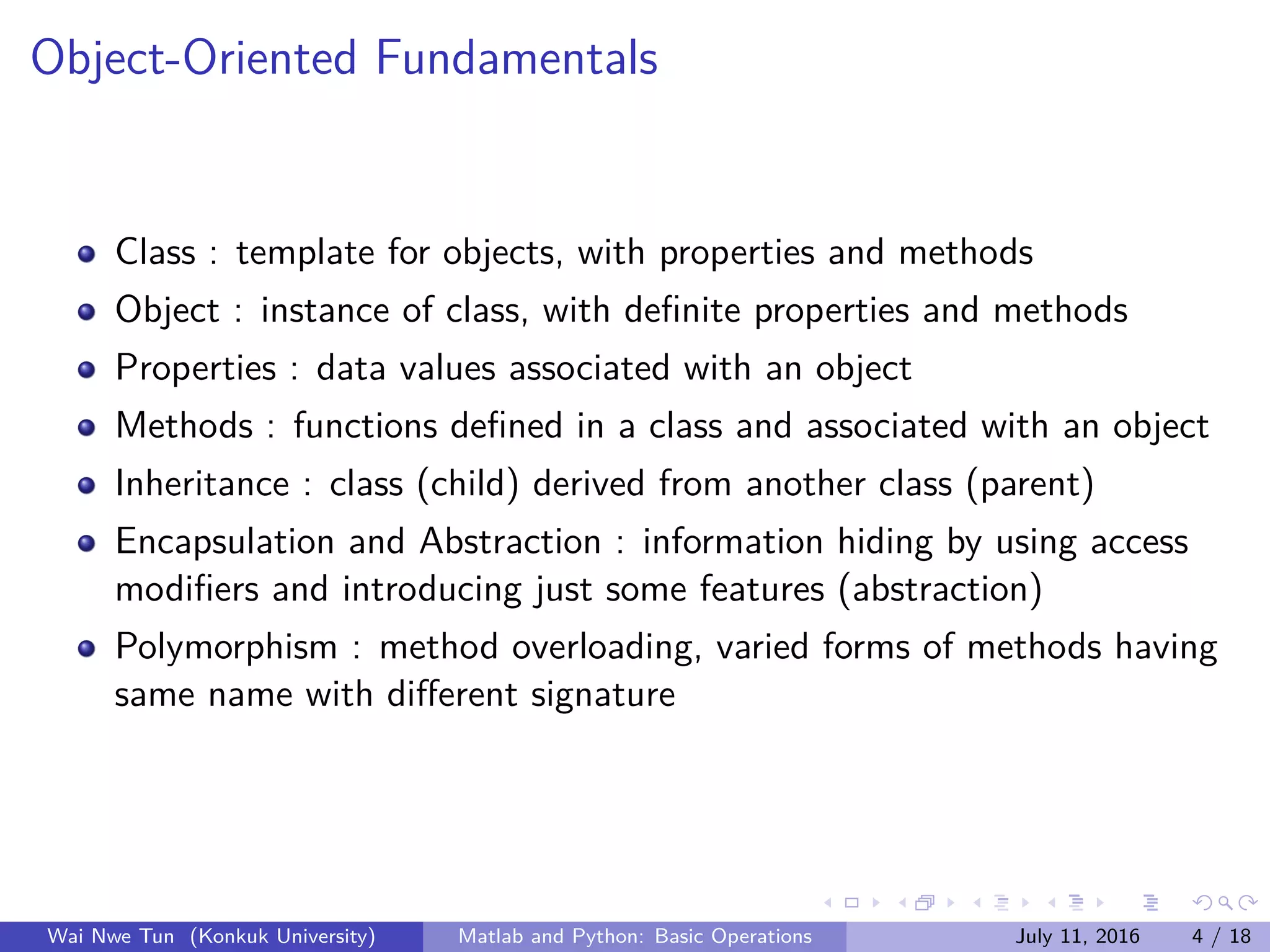
Object-Oriented Fundamentals
Class : template for objects, with properties and methods
Object : instance of class, with definite properties and methods
Properties : data values associated with an object
Methods : functions defined in a class and associated with an object
Inheritance : class (child) derived from another class (parent)
Encapsulation and Abstraction : information hiding by using access
modifiers and introducing just some features (abstraction)
Polymorphism : method overloading, varied forms of methods having
same name with different signature
Wai Nwe Tun (Konkuk University) Matlab and Python: Basic Operations July 11, 2016 4 / 18
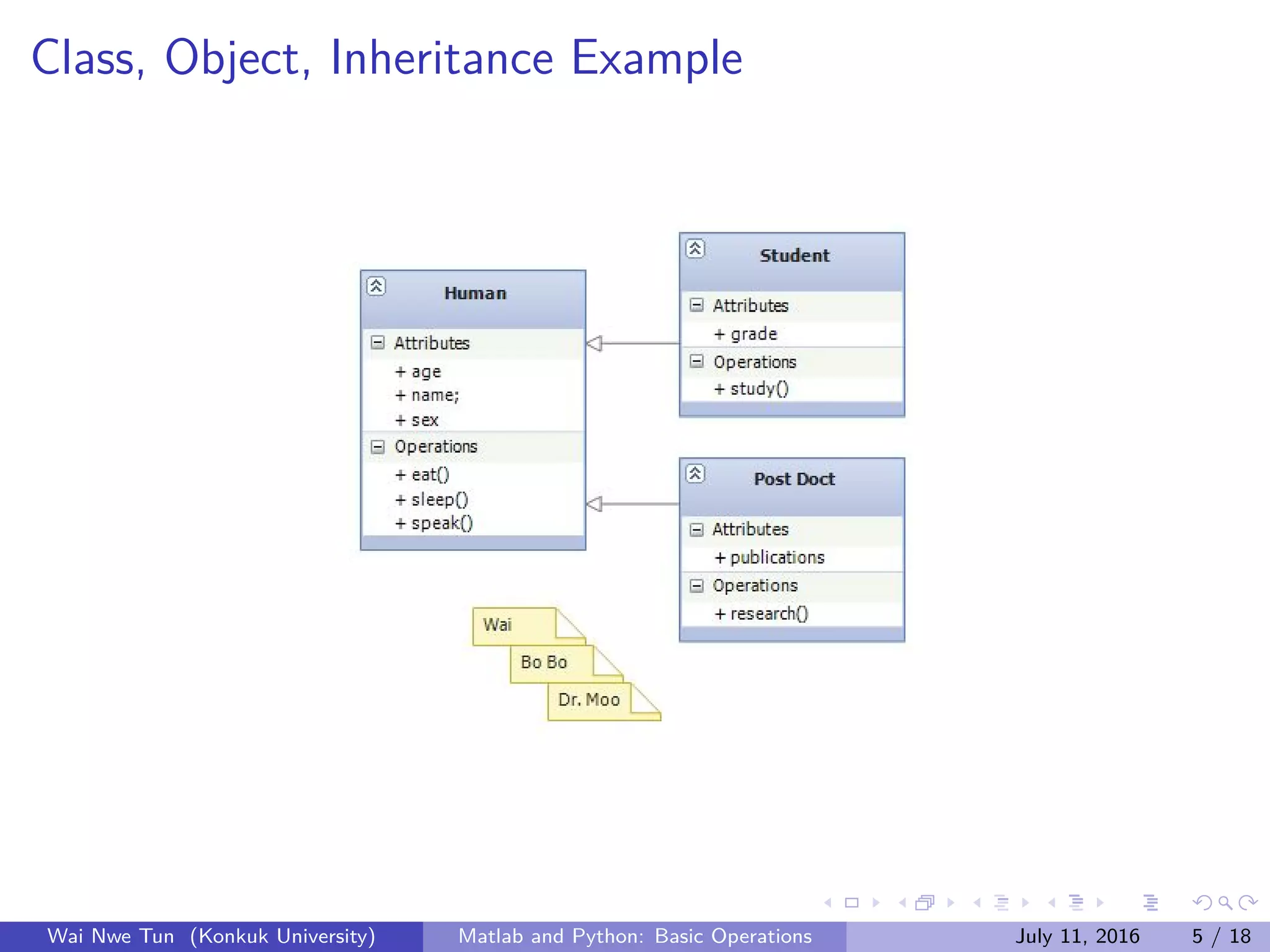
Class, Object, Inheritance Example
Wai Nwe Tun (Konkuk University) Matlab and Python: Basic Operations July 11, 2016 5 / 18
Example in Matlab
classdef polynomial
properties (Access=private)
coeffs = 0;
order = 0;
end
methods
function self=polynomial(arg)
self.coeffs = arg;
self.order = length(arg) -1;
end
function [] = display(poly)
str = ’␣’;
if(poly.coeffs (1) ˜=0)
str = num2str(poly.
coeffs (1));
str = strcat(str ,’+’);
end
for i=2: poly.order +1
if(poly.coeffs(i)˜=0)
...
end
...
end
end
end
end
Object Creation
function oopexamples
p1 = polynomial ([1 ,2 ,3]);
p1.display ();
p1 = polynomial ([0 ,0 ,0 ,5]);
p1.display ();
end
Output
>> oopexamples
1+2x+3xˆ2
5xˆ3
Wai Nwe Tun (Konkuk University) Matlab and Python: Basic Operations July 11, 2016 6 / 18
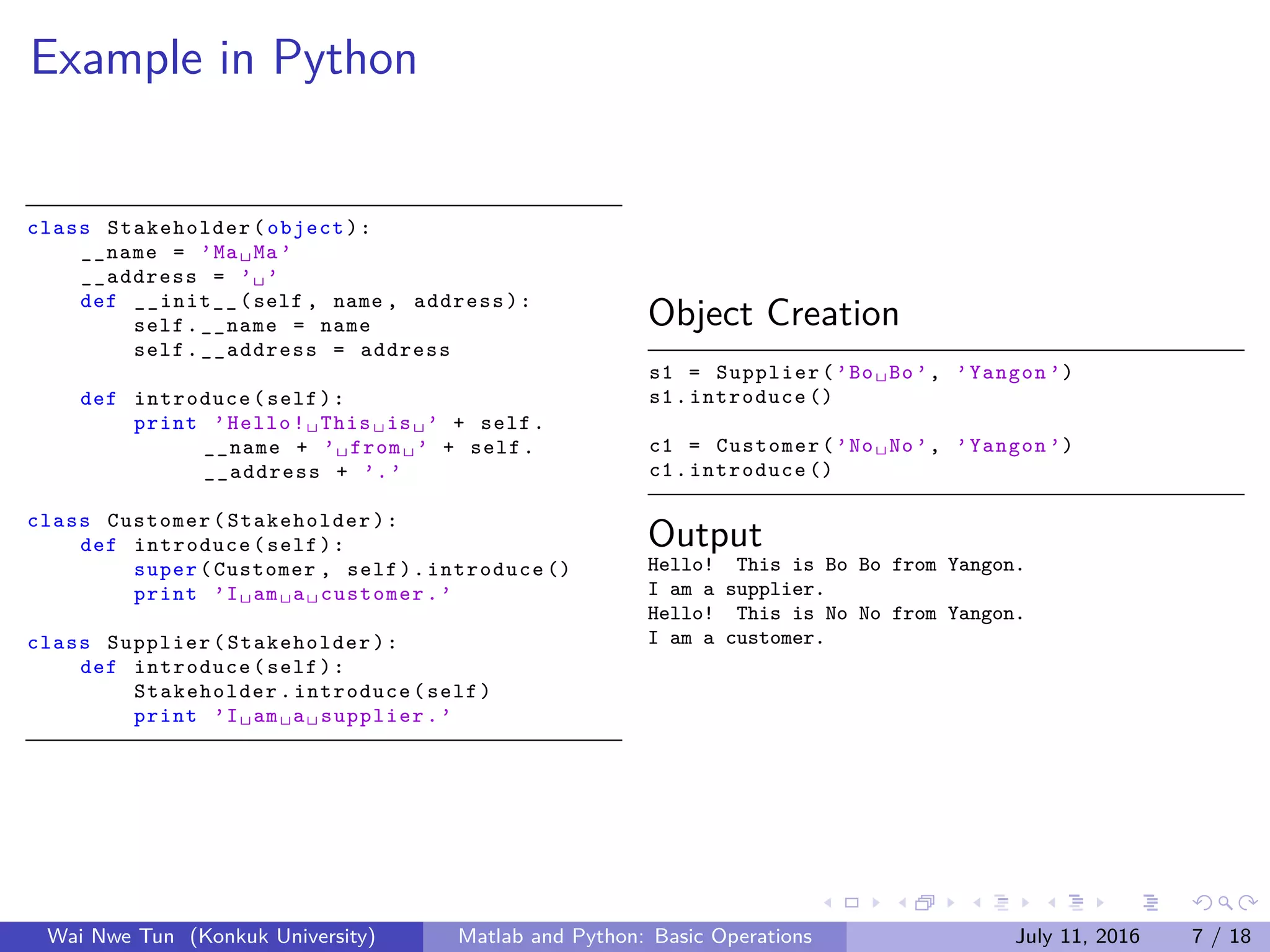
Example in Python
class Stakeholder (object):
__name = ’Ma␣Ma’
__address = ’␣’
def __init__(self , name , address):
self.__name = name
self.__address = address
def introduce(self):
print ’Hello!␣This␣is␣’ + self.
__name + ’␣from␣’ + self.
__address + ’.’
class Customer( Stakeholder ):
def introduce(self):
super(Customer , self).introduce ()
print ’I␣am␣a␣customer.’
class Supplier( Stakeholder ):
def introduce(self):
Stakeholder .introduce(self)
print ’I␣am␣a␣supplier.’
Object Creation
s1 = Supplier(’Bo␣Bo’, ’Yangon ’)
s1.introduce ()
c1 = Customer(’No␣No’, ’Yangon ’)
c1.introduce ()
Output
Hello! This is Bo Bo from Yangon.
I am a supplier.
Hello! This is No No from Yangon.
I am a customer.
Wai Nwe Tun (Konkuk University) Matlab and Python: Basic Operations July 11, 2016 7 / 18
Basic Operations: Arrays and Lists
Arrays : as a storage for homogeneous data types
Lists : It depends on the nature of programming language. Some
languages allow lists to contain hetrogeneous data types, e.g., in
Python.
In Python, arrays are different from lists as described above two
statements. Arrays are created from using numpy package.
In Matlab, arrays and lists are treated as the same and they can only
be used for homogeneous types. For heterogeneous ones, structure
and cell are solutions.
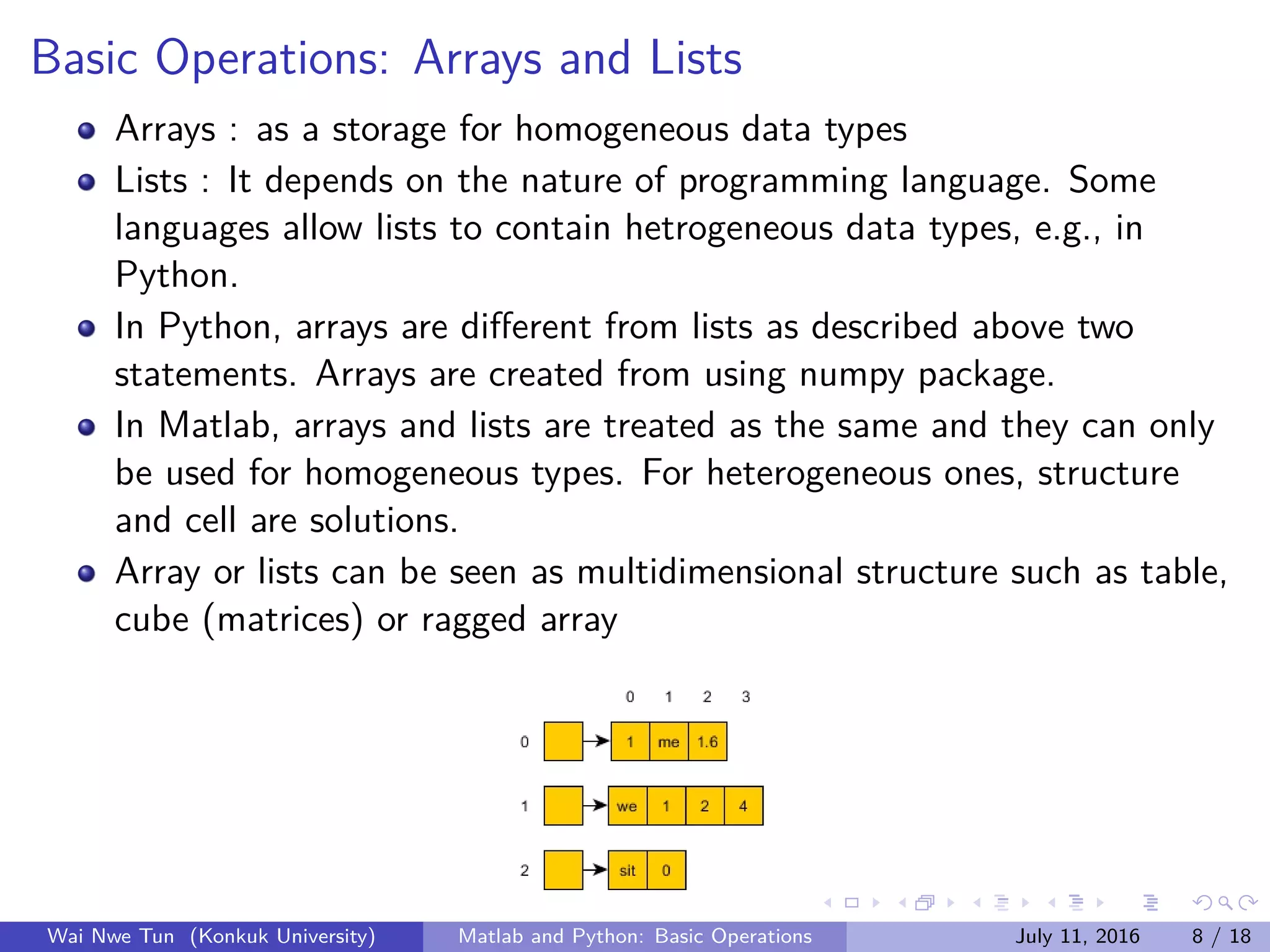
Array or lists can be seen as multidimensional structure such as table,
cube (matrices) or ragged array
Wai Nwe Tun (Konkuk University) Matlab and Python: Basic Operations July 11, 2016 8 / 18
Example in Matlab
>> a = [1 2 3 4];
>> a = 1:4
a =
1 2 3 4
>> a = [1 ’2’ ’3’ ’45’ 6]
a =
2345 % because of
heterogeneous
data types
>> length(a)
ans =
6
Wai Nwe Tun (Konkuk University) Matlab and Python: Basic Operations July 11, 2016 9 / 18
Example in Python
“numpy” package is used for array
creation
conversion
shape manipulation
item selection and manipulation
arithmetic, matrix multiplication, and
comparison operations
special methods such as copy, pickling,
indexing, etc.
import numpy as np
a = np.array ([0, 1, 2, 3])
a = np.arrange (4)
a = a.reshape (2 ,2)
for x in np.nditer(a):
print x,
Output
0 1 2 3
Wai Nwe Tun (Konkuk University) Matlab and Python: Basic Operations July 11, 2016 10 / 18
Basic Operations: Cells and Structures
For Matlab, apart from using Cell array, Structure is a solution for
heterogeneous data storage
The different between Structure and Cell is that data in Cell can be
accessed by numeric indexing while in Structure by name.
Structure can be said as class without methods but just with
properties, from end user’s point.
Wai Nwe Tun (Konkuk University) Matlab and Python: Basic Operations July 11, 2016 11 / 18
Example in Matlab (Cell)
function cellExample
a = cell (1 ,3);
a{1} = 4;
a{1 ,2} = ’BoBo ’;
a{3} = 0.5;
disp(a);
disp(a{1 ,3});
end
Output
cellExample
[4] ’PaPa ’ [0.5000]
function cellExample
a = cell (1 ,3);
a{1} = 4;
a{1 ,2} = ’BoBo ’;
a{3} = [1 2 3];
disp(a);
disp(a{1 ,3});
end
Output
cellExample
[4] ’BoBo ’ [1x3 double]
1 2 3
Wai Nwe Tun (Konkuk University) Matlab and Python: Basic Operations July 11, 2016 12 / 18
Example in Matlab (Structure)
function structureExample
student.name = ’BoBo ’;
student.mark = [50 40 43.4];
disp(student);
disp(student.mark (3));
end
Output
>> structureExample
name: ’BoBo ’
mark: [50 40 43.4000]
43.4000
function structureExample
student.name = [’BoBo ’; ’NoNo ’];
student.mark = [50;43.4];
len = size(student.name);
for i=1: len (1)
fprintf(’%s␣:␣mark␣(%f)␣nabla ’,
student.name(i ,:) , student.mark
(i,:));
end
end
Output
>> structureExample
BoBo : mark (50.00)
NoNo : mark (43.40)
Wai Nwe Tun (Konkuk University) Matlab and Python: Basic Operations July 11, 2016 13 / 18
Basic Operations: Function
It is to implement business logic.
It enhances code reusability and maintainability.
It has three main parts: return type, argument list, and logic
implementation.
Generally, parameter value in argument list could be changed not only
inside but also outside that function, on the condition of pass by
reference. Or for pass by value cases, the value is not changed outside
that function.
Pass by value: copy data value; Pass by reference: copy address of
data value.
Built-in data types (integer, string) are passed by value. Arrays and
objects are passed by reference.
String in some languages such as Java is passed by reference.
Wai Nwe Tun (Konkuk University) Matlab and Python: Basic Operations July 11, 2016 14 / 18
Example in Matlab and Python
def update1(x):
x = 3
return x
x = 2
x = update2(x)
print x
def multivalues_return ():
x = 3
y = ’hi’
return (x,y)
(a,b) = multivalues_return ()
print (‘x‘+y)
def update(x):
x.append (4)
# return x
x = [1, 2, 3]
update(x)
print x
function functionExample
function [x] = change(x)
x = strcat(x, ’hi’);
end
x = ’hello ’;
x = change(x);
disp(x);
end
Wai Nwe Tun (Konkuk University) Matlab and Python: Basic Operations July 11, 2016 15 / 18
Basic Operations: Loops
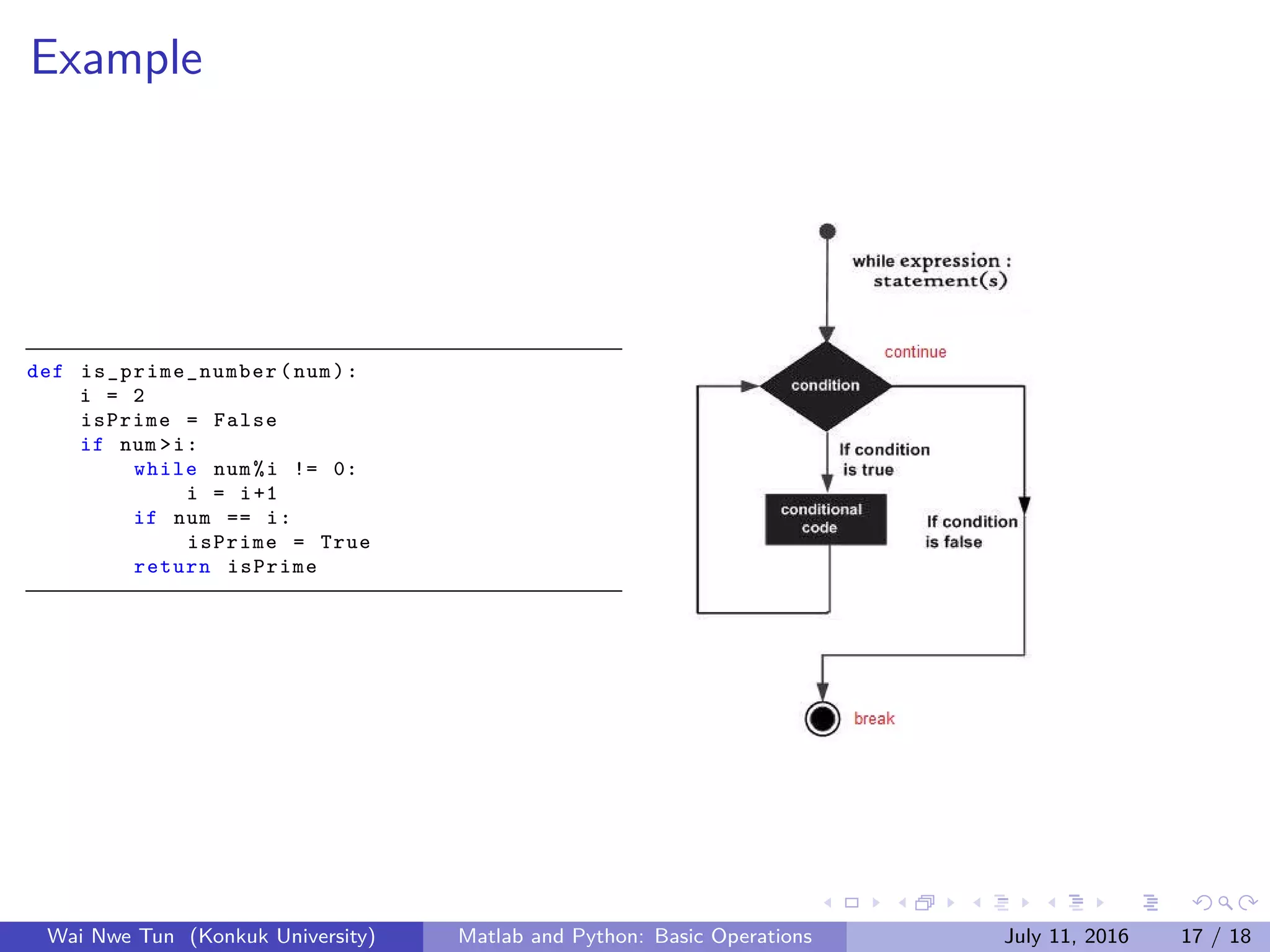
It is to repeatedly execute a block of code.
It can also reduce code duplicate as function does. But, loop is more
similar to recursive function, which means function calls itself.
Loop can be carried out in two ways: do loop and while loop.
With the specific number of times, do loop is used whereas in
unknown execution times or conditional dependence, while loop did.
Loop control statements (break, continue, pass(just in Python)) can
be used. Break is to terminate the loop statement and transfers
execution to the statement immediately following the loop. Continue
is to cause the loop to skip the loop remaining part but to retest its
condition. Pass is used by a developer just to remind herself/himself
that statement position needs some kind of update.
Wai Nwe Tun (Konkuk University) Matlab and Python: Basic Operations July 11, 2016 16 / 18
Example
def is_prime_number (num):
i = 2
isPrime = False
if num >i:
while num%i != 0:
i = i+1
if num == i:
isPrime = True
return isPrime
Wai Nwe Tun (Konkuk University) Matlab and Python: Basic Operations July 11, 2016 17 / 18
References
Matlab - Object-oriented Programming by Paul Schrimpf, January 14,
2009.
Lecture 5 Advanced Matlab: OOP by Mathew J. Zahr, April 17, 2014.
http://docs.scipy.org/doc/numpy/reference/index.html
http://kr.mathworks.com/
http://www.tutorialspoint.com/python/
Programming Languages: Principles and Paradigms by Allen Tucker,
Robert Noonan.
Wai Nwe Tun (Konkuk University) Matlab and Python: Basic Operations July 11, 2016 18 / 18

Matlab and Python: Basic Operations

  • 1.
    Matlab and Python:Basic Operations Programming Seminar Wai Nwe Tun Konkuk University July 11, 2016 Wai Nwe Tun (Konkuk University) Matlab and Python: Basic Operations July 11, 2016 1 / 18
  • 2.
    Outline 1 Programming Paradigms 2Objected-Oriented Fundamentals 3 Basic Operations: Arrays and Lists 4 Basic Operations: Cells and Structures 5 Basic Operations: Functions 6 Basic Operations: Loops 7 References Wai Nwe Tun (Konkuk University) Matlab and Python: Basic Operations July 11, 2016 2 / 18
  • 3.
    Programming Paradigms Imperative a seriesof well-structured steps and procedures Examples : Fortran, C, etc. Functional a collection of mathematical functions Examples : Haskell, Lisp, etc. Object-oriented focus on code reuse a collection of objects (instances of a class) class as specification like blueprint or pattern Examples: Python, Matlab, C++, etc. Logic, Event-based, Concurrent, and others Wai Nwe Tun (Konkuk University) Matlab and Python: Basic Operations July 11, 2016 3 / 18
  • 4.
    Object-Oriented Fundamentals Class :template for objects, with properties and methods Object : instance of class, with definite properties and methods Properties : data values associated with an object Methods : functions defined in a class and associated with an object Inheritance : class (child) derived from another class (parent) Encapsulation and Abstraction : information hiding by using access modifiers and introducing just some features (abstraction) Polymorphism : method overloading, varied forms of methods having same name with different signature Wai Nwe Tun (Konkuk University) Matlab and Python: Basic Operations July 11, 2016 4 / 18
  • 5.
    Class, Object, InheritanceExample Wai Nwe Tun (Konkuk University) Matlab and Python: Basic Operations July 11, 2016 5 / 18
  • 6.
    Example in Matlab classdefpolynomial properties (Access=private) coeffs = 0; order = 0; end methods function self=polynomial(arg) self.coeffs = arg; self.order = length(arg) -1; end function [] = display(poly) str = ’␣’; if(poly.coeffs (1) ˜=0) str = num2str(poly. coeffs (1)); str = strcat(str ,’+’); end for i=2: poly.order +1 if(poly.coeffs(i)˜=0) ... end ... end end end end Object Creation function oopexamples p1 = polynomial ([1 ,2 ,3]); p1.display (); p1 = polynomial ([0 ,0 ,0 ,5]); p1.display (); end Output >> oopexamples 1+2x+3xˆ2 5xˆ3 Wai Nwe Tun (Konkuk University) Matlab and Python: Basic Operations July 11, 2016 6 / 18
  • 7.
    Example in Python classStakeholder (object): __name = ’Ma␣Ma’ __address = ’␣’ def __init__(self , name , address): self.__name = name self.__address = address def introduce(self): print ’Hello!␣This␣is␣’ + self. __name + ’␣from␣’ + self. __address + ’.’ class Customer( Stakeholder ): def introduce(self): super(Customer , self).introduce () print ’I␣am␣a␣customer.’ class Supplier( Stakeholder ): def introduce(self): Stakeholder .introduce(self) print ’I␣am␣a␣supplier.’ Object Creation s1 = Supplier(’Bo␣Bo’, ’Yangon ’) s1.introduce () c1 = Customer(’No␣No’, ’Yangon ’) c1.introduce () Output Hello! This is Bo Bo from Yangon. I am a supplier. Hello! This is No No from Yangon. I am a customer. Wai Nwe Tun (Konkuk University) Matlab and Python: Basic Operations July 11, 2016 7 / 18
  • 8.
    Basic Operations: Arraysand Lists Arrays : as a storage for homogeneous data types Lists : It depends on the nature of programming language. Some languages allow lists to contain hetrogeneous data types, e.g., in Python. In Python, arrays are different from lists as described above two statements. Arrays are created from using numpy package. In Matlab, arrays and lists are treated as the same and they can only be used for homogeneous types. For heterogeneous ones, structure and cell are solutions. Array or lists can be seen as multidimensional structure such as table, cube (matrices) or ragged array Wai Nwe Tun (Konkuk University) Matlab and Python: Basic Operations July 11, 2016 8 / 18
  • 9.
    Example in Matlab >>a = [1 2 3 4]; >> a = 1:4 a = 1 2 3 4 >> a = [1 ’2’ ’3’ ’45’ 6] a = 2345 % because of heterogeneous data types >> length(a) ans = 6 Wai Nwe Tun (Konkuk University) Matlab and Python: Basic Operations July 11, 2016 9 / 18
  • 10.
    Example in Python “numpy”package is used for array creation conversion shape manipulation item selection and manipulation arithmetic, matrix multiplication, and comparison operations special methods such as copy, pickling, indexing, etc. import numpy as np a = np.array ([0, 1, 2, 3]) a = np.arrange (4) a = a.reshape (2 ,2) for x in np.nditer(a): print x, Output 0 1 2 3 Wai Nwe Tun (Konkuk University) Matlab and Python: Basic Operations July 11, 2016 10 / 18
  • 11.
    Basic Operations: Cellsand Structures For Matlab, apart from using Cell array, Structure is a solution for heterogeneous data storage The different between Structure and Cell is that data in Cell can be accessed by numeric indexing while in Structure by name. Structure can be said as class without methods but just with properties, from end user’s point. Wai Nwe Tun (Konkuk University) Matlab and Python: Basic Operations July 11, 2016 11 / 18
  • 12.
    Example in Matlab(Cell) function cellExample a = cell (1 ,3); a{1} = 4; a{1 ,2} = ’BoBo ’; a{3} = 0.5; disp(a); disp(a{1 ,3}); end Output cellExample [4] ’PaPa ’ [0.5000] function cellExample a = cell (1 ,3); a{1} = 4; a{1 ,2} = ’BoBo ’; a{3} = [1 2 3]; disp(a); disp(a{1 ,3}); end Output cellExample [4] ’BoBo ’ [1x3 double] 1 2 3 Wai Nwe Tun (Konkuk University) Matlab and Python: Basic Operations July 11, 2016 12 / 18
  • 13.
    Example in Matlab(Structure) function structureExample student.name = ’BoBo ’; student.mark = [50 40 43.4]; disp(student); disp(student.mark (3)); end Output >> structureExample name: ’BoBo ’ mark: [50 40 43.4000] 43.4000 function structureExample student.name = [’BoBo ’; ’NoNo ’]; student.mark = [50;43.4]; len = size(student.name); for i=1: len (1) fprintf(’%s␣:␣mark␣(%f)␣nabla ’, student.name(i ,:) , student.mark (i,:)); end end Output >> structureExample BoBo : mark (50.00) NoNo : mark (43.40) Wai Nwe Tun (Konkuk University) Matlab and Python: Basic Operations July 11, 2016 13 / 18
  • 14.
    Basic Operations: Function Itis to implement business logic. It enhances code reusability and maintainability. It has three main parts: return type, argument list, and logic implementation. Generally, parameter value in argument list could be changed not only inside but also outside that function, on the condition of pass by reference. Or for pass by value cases, the value is not changed outside that function. Pass by value: copy data value; Pass by reference: copy address of data value. Built-in data types (integer, string) are passed by value. Arrays and objects are passed by reference. String in some languages such as Java is passed by reference. Wai Nwe Tun (Konkuk University) Matlab and Python: Basic Operations July 11, 2016 14 / 18
  • 15.
    Example in Matlaband Python def update1(x): x = 3 return x x = 2 x = update2(x) print x def multivalues_return (): x = 3 y = ’hi’ return (x,y) (a,b) = multivalues_return () print (‘x‘+y) def update(x): x.append (4) # return x x = [1, 2, 3] update(x) print x function functionExample function [x] = change(x) x = strcat(x, ’hi’); end x = ’hello ’; x = change(x); disp(x); end Wai Nwe Tun (Konkuk University) Matlab and Python: Basic Operations July 11, 2016 15 / 18
  • 16.
    Basic Operations: Loops Itis to repeatedly execute a block of code. It can also reduce code duplicate as function does. But, loop is more similar to recursive function, which means function calls itself. Loop can be carried out in two ways: do loop and while loop. With the specific number of times, do loop is used whereas in unknown execution times or conditional dependence, while loop did. Loop control statements (break, continue, pass(just in Python)) can be used. Break is to terminate the loop statement and transfers execution to the statement immediately following the loop. Continue is to cause the loop to skip the loop remaining part but to retest its condition. Pass is used by a developer just to remind herself/himself that statement position needs some kind of update. Wai Nwe Tun (Konkuk University) Matlab and Python: Basic Operations July 11, 2016 16 / 18
  • 17.
    Example def is_prime_number (num): i= 2 isPrime = False if num >i: while num%i != 0: i = i+1 if num == i: isPrime = True return isPrime Wai Nwe Tun (Konkuk University) Matlab and Python: Basic Operations July 11, 2016 17 / 18
  • 18.
    References Matlab - Object-orientedProgramming by Paul Schrimpf, January 14, 2009. Lecture 5 Advanced Matlab: OOP by Mathew J. Zahr, April 17, 2014. http://docs.scipy.org/doc/numpy/reference/index.html http://kr.mathworks.com/ http://www.tutorialspoint.com/python/ Programming Languages: Principles and Paradigms by Allen Tucker, Robert Noonan. Wai Nwe Tun (Konkuk University) Matlab and Python: Basic Operations July 11, 2016 18 / 18