Download free for 30 days
Sign in
Upload
Language (EN)
Support
Business
Mobile
Social Media
Marketing
Technology
Art & Photos
Career
Design
Education
Presentations & Public Speaking
Government & Nonprofit
Healthcare
Internet
Law
Leadership & Management
Automotive
Engineering
Software
Recruiting & HR
Retail
Sales
Services
Science
Small Business & Entrepreneurship
Food
Environment
Economy & Finance
Data & Analytics
Investor Relations
Sports
Spiritual
News & Politics
Travel
Self Improvement
Real Estate
Entertainment & Humor
Health & Medicine
Devices & Hardware
Lifestyle
Change Language
Language
English
Español
Português
Français
Deutsche
Cancel
Save
Submit search
EN
Uploaded by
AbhilashaVarshney3
PPTX, PDF
1 view
List _Python Programming_Built in functions
List in python :- introduction, built-in functions,
Engineering
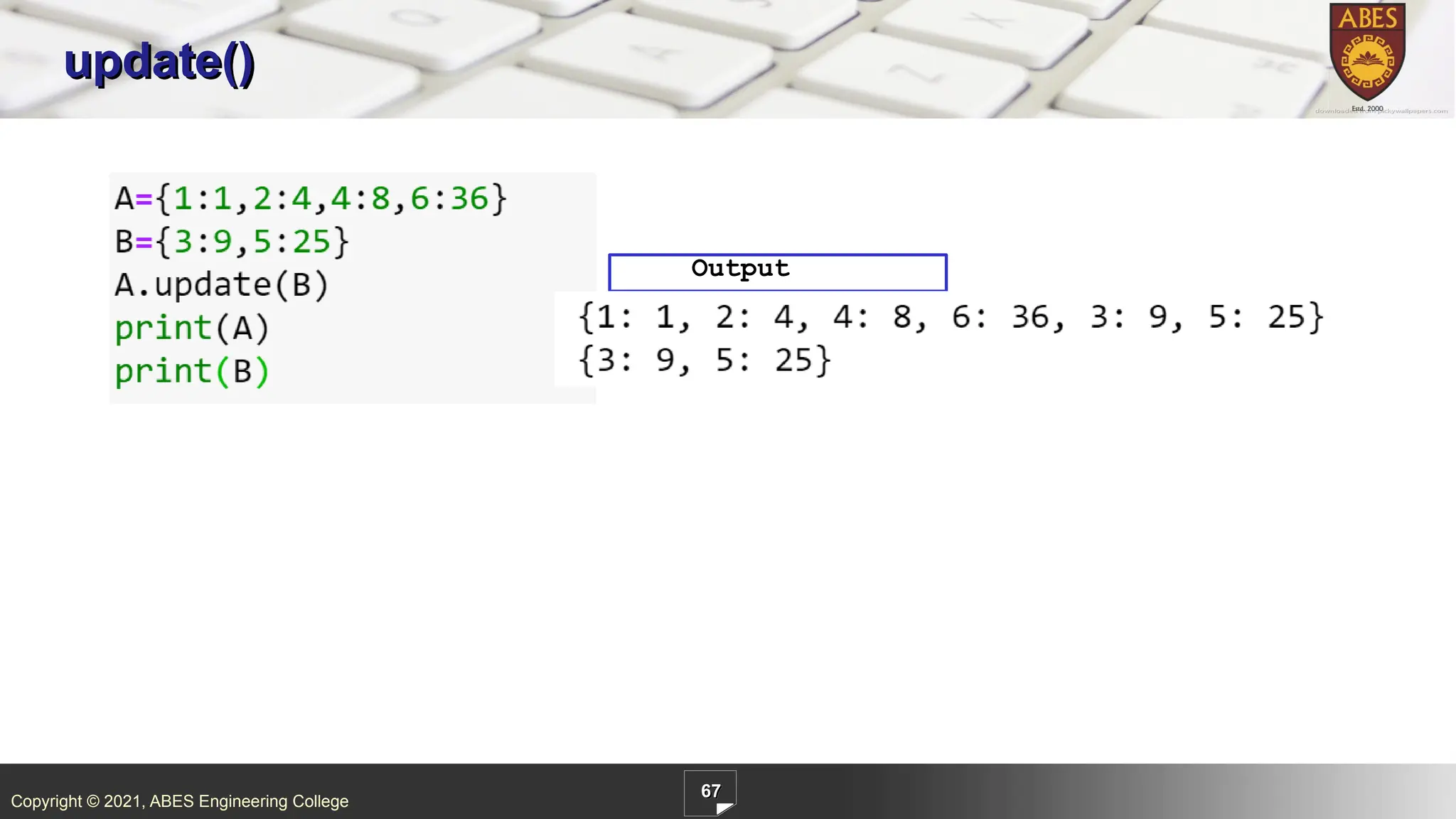
◦
Related topics:
Python Programming
•
Read more
0
Save
Share
Embed
Embed presentation
Download
Download to read offline
1
/ 97
2
/ 97
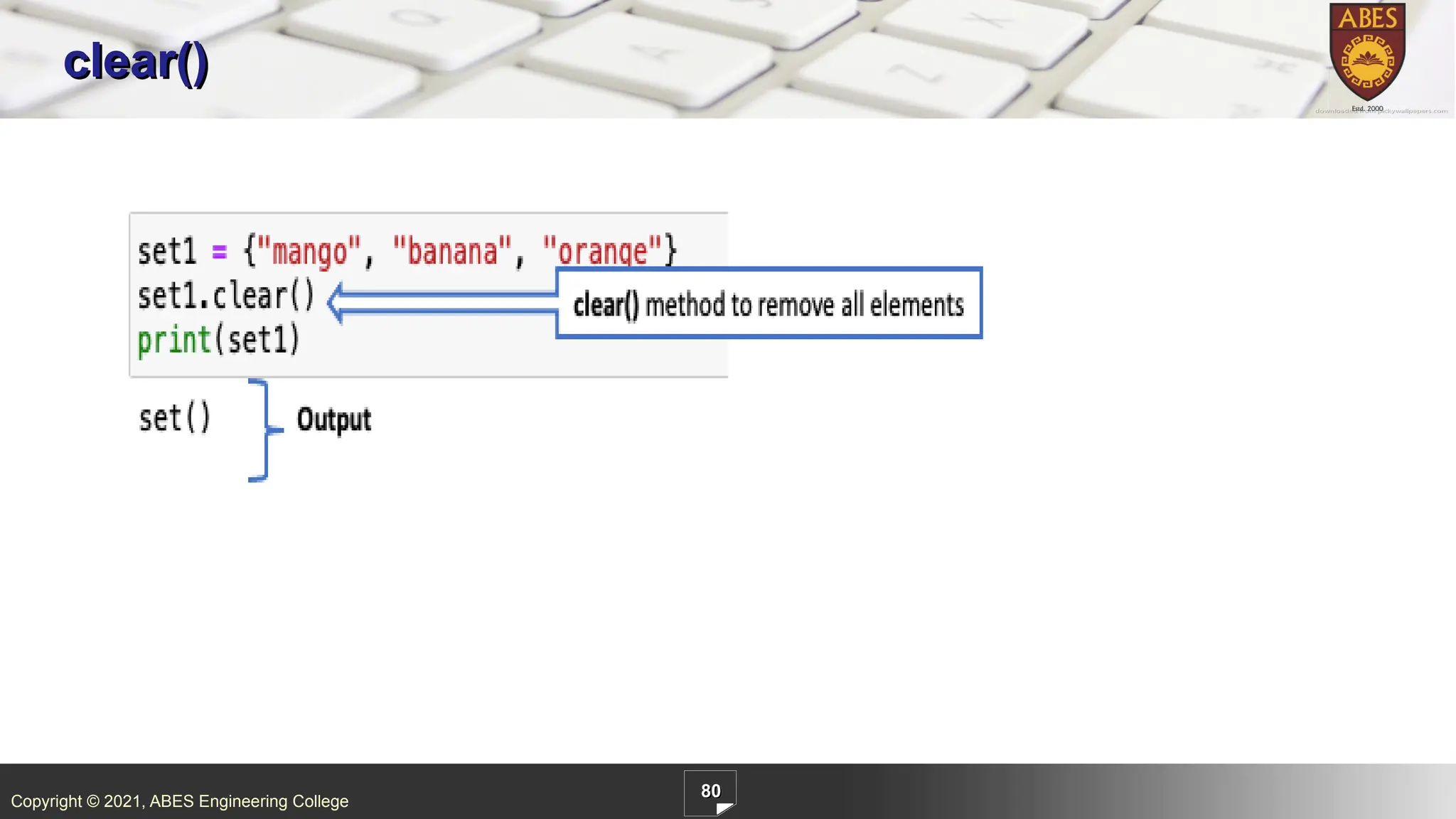
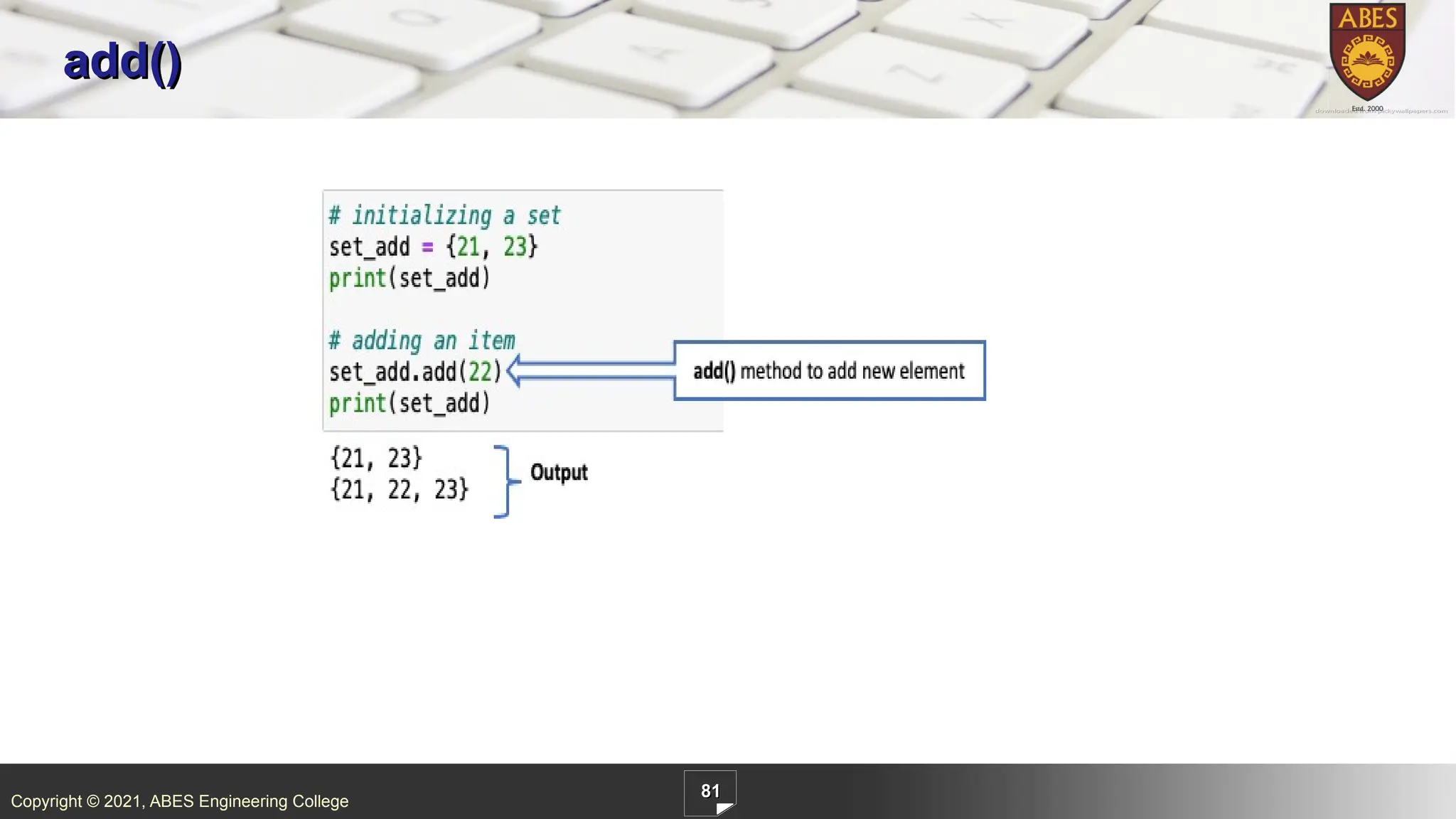
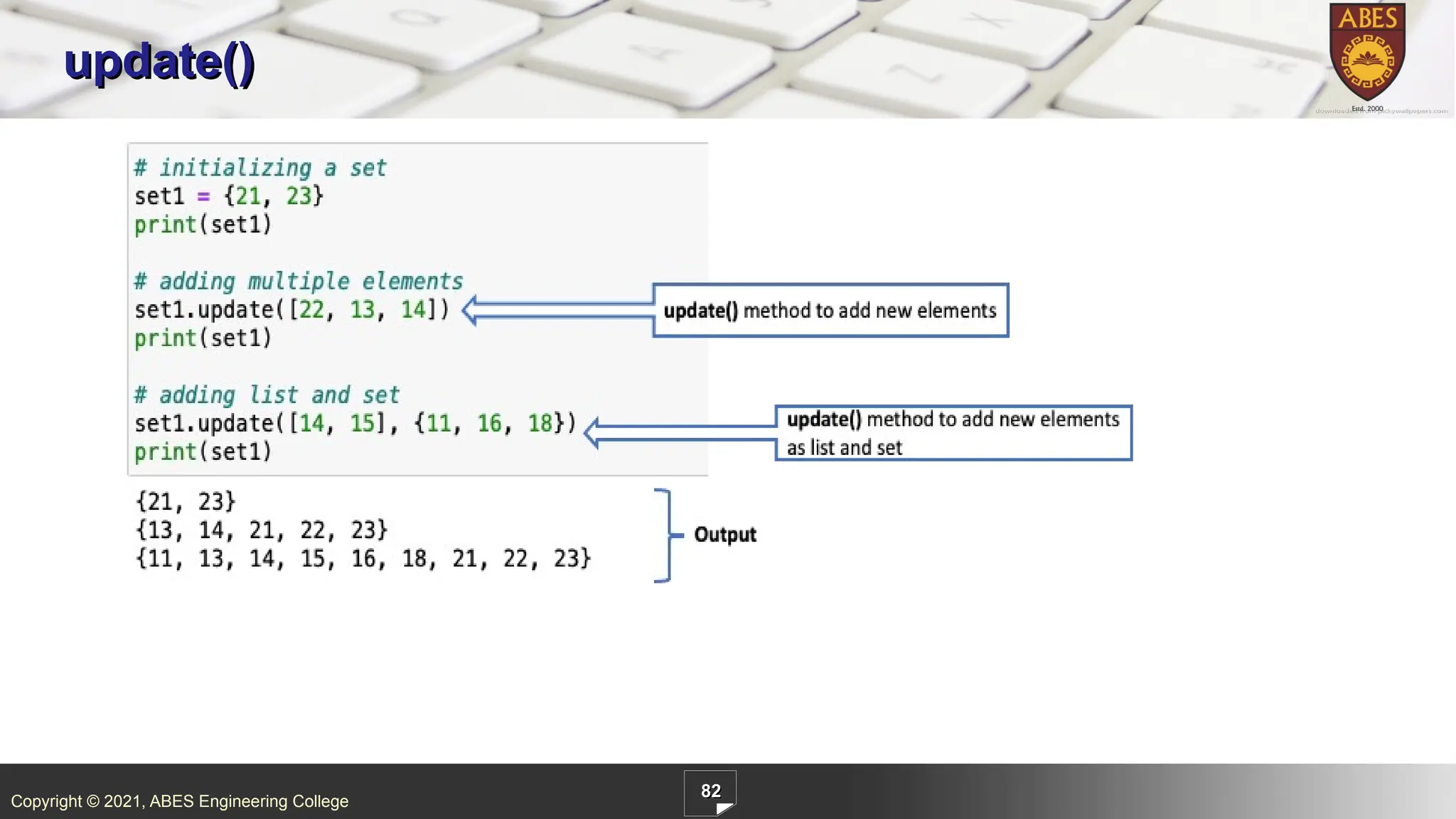
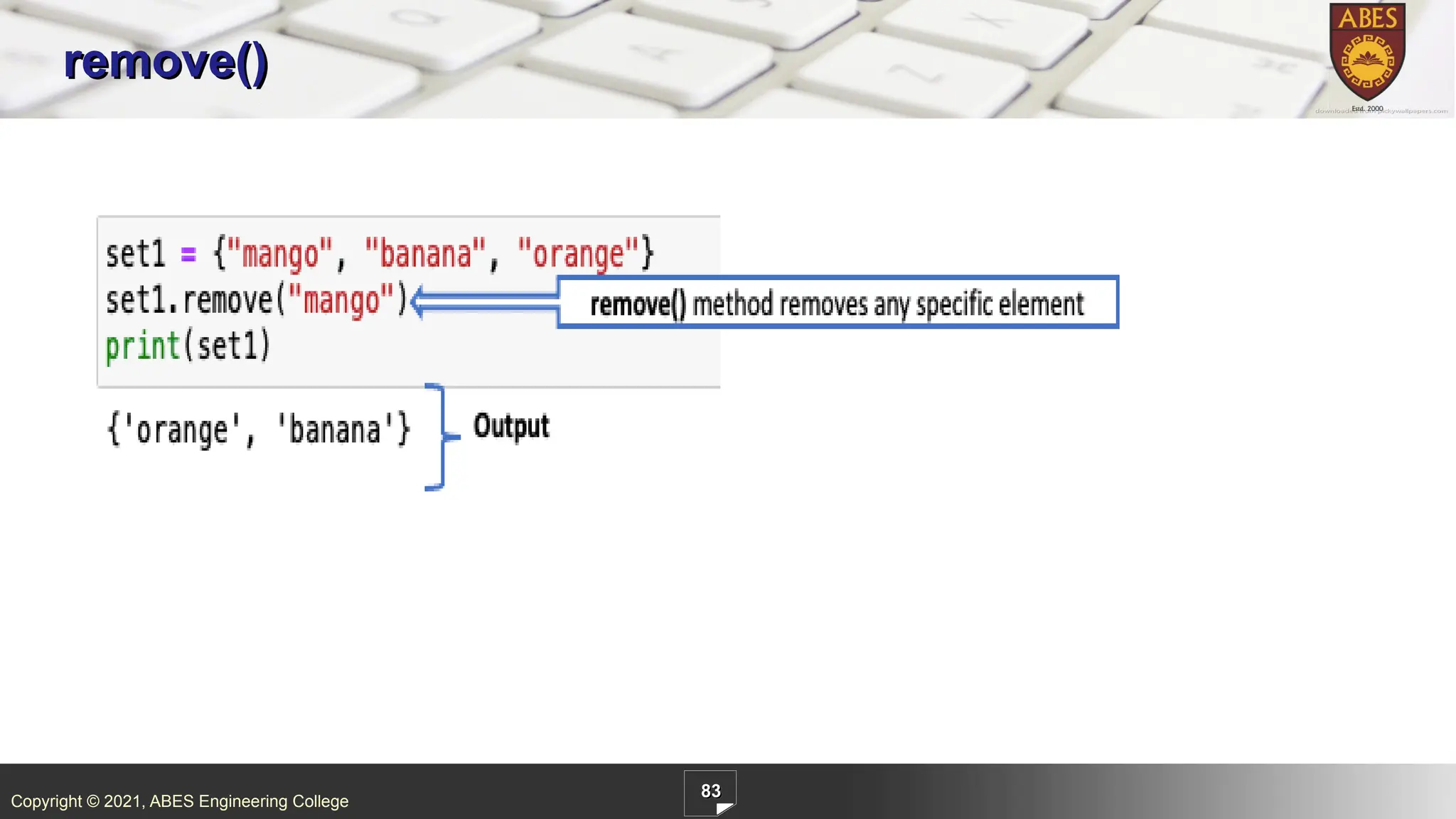
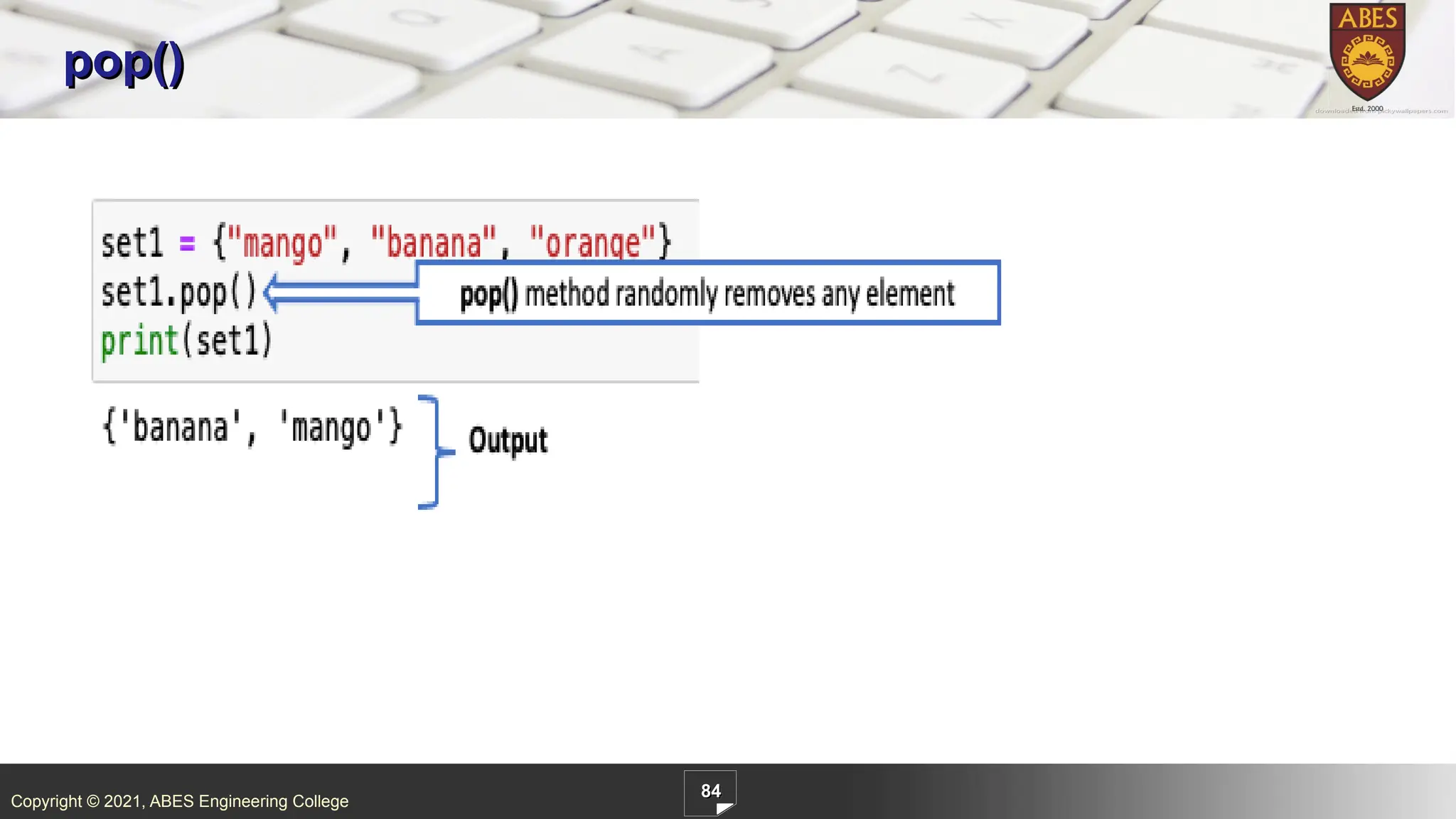
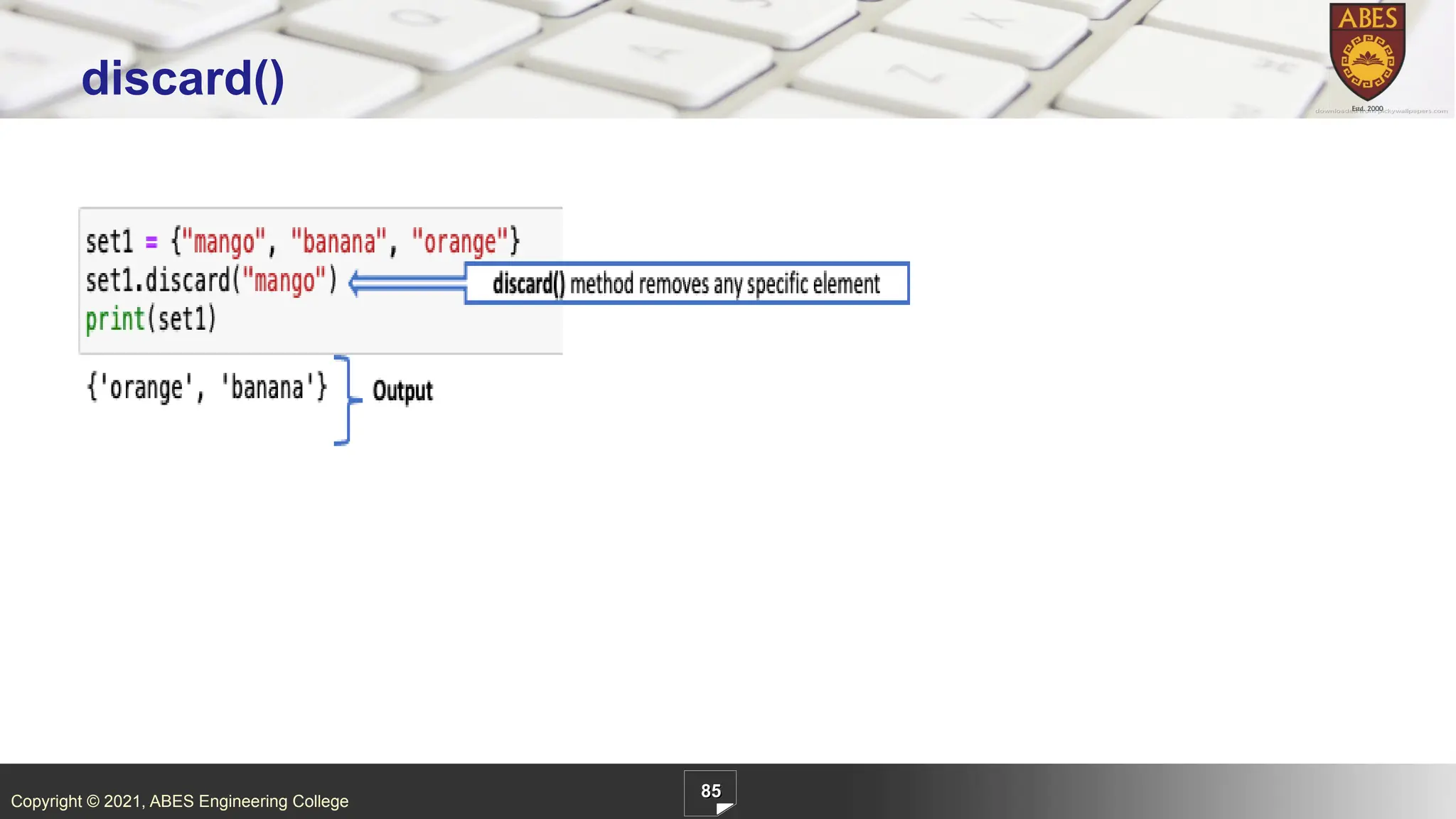
3
/ 97
4
/ 97
5
/ 97
6
/ 97
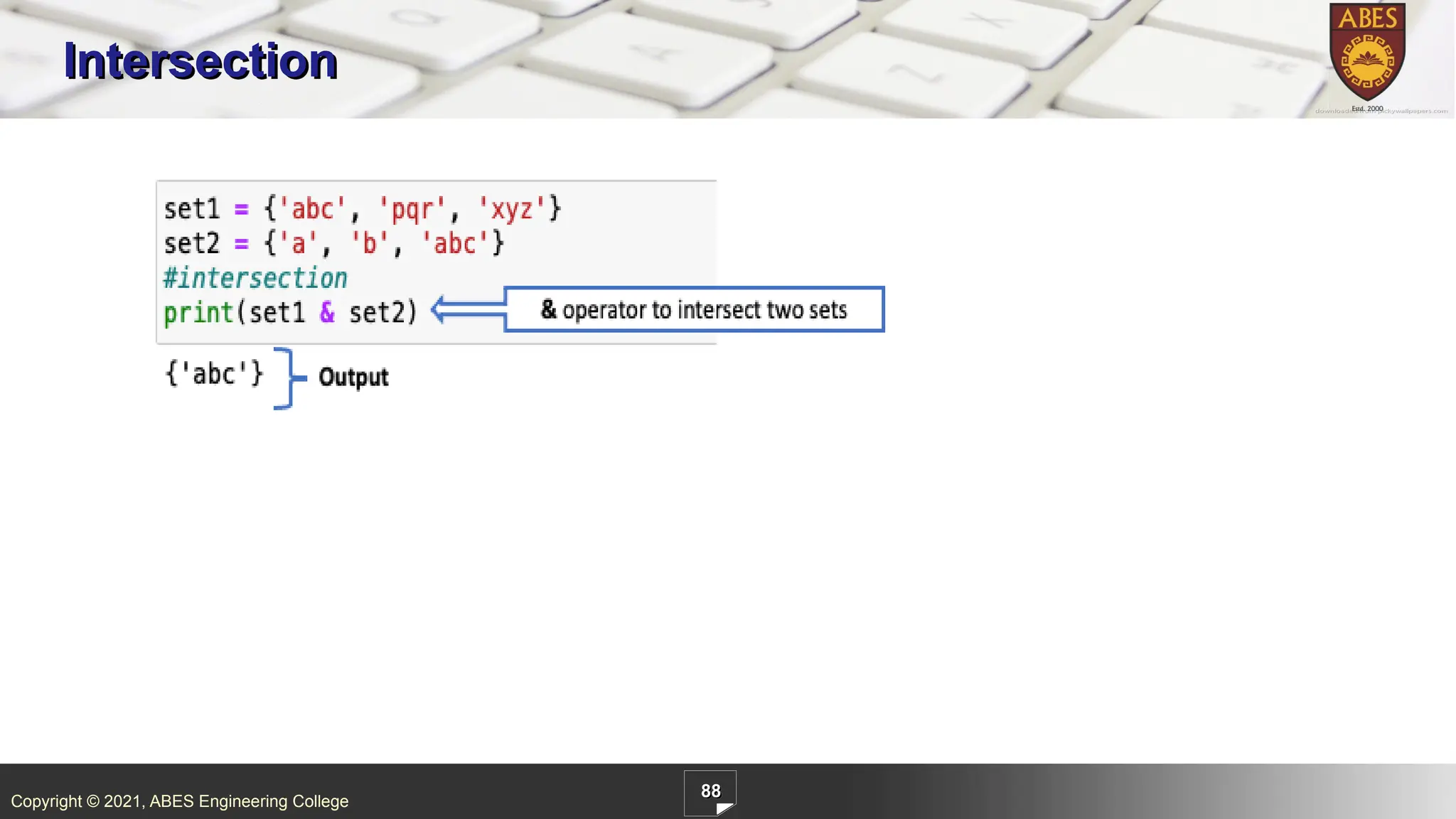
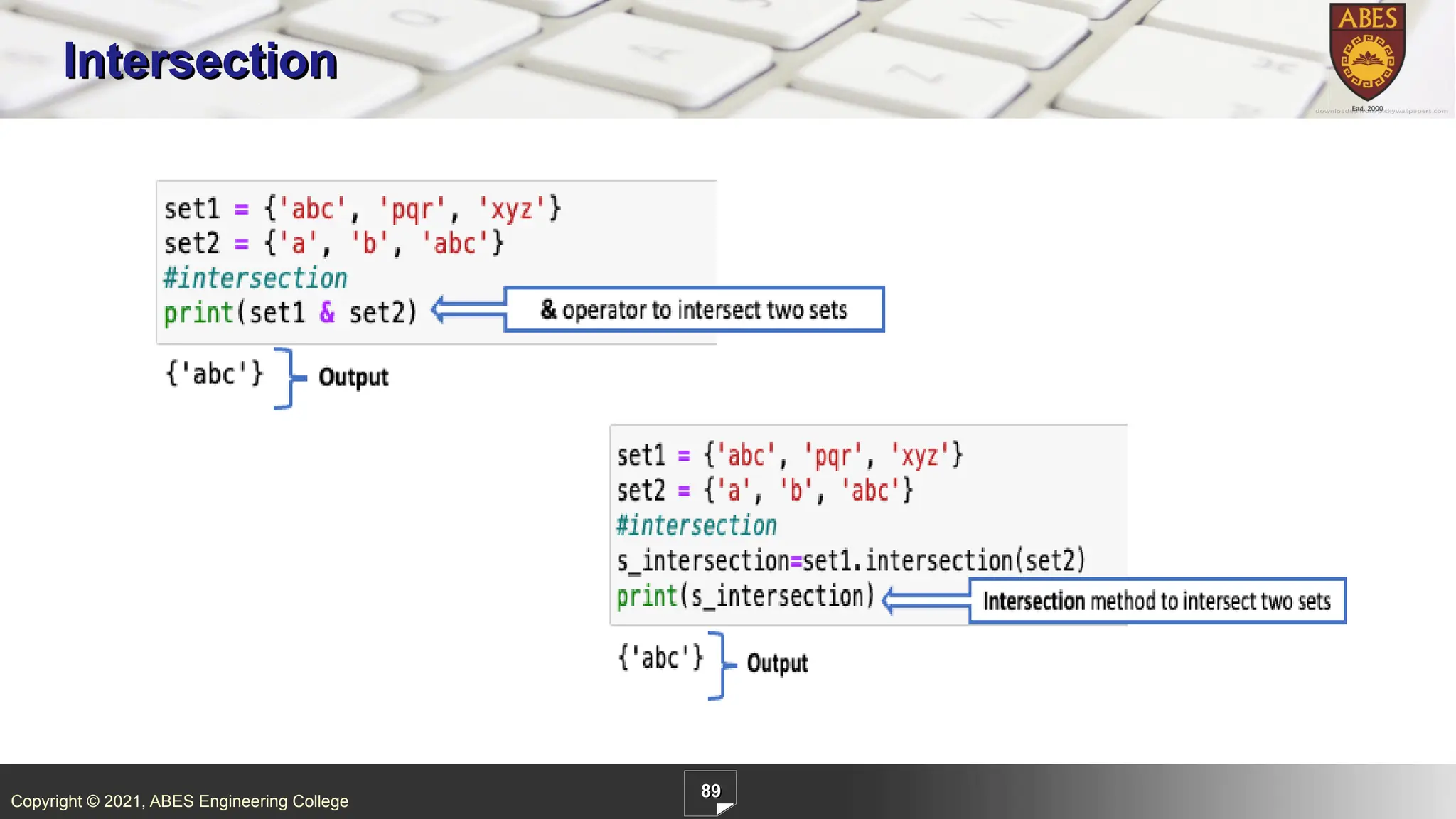
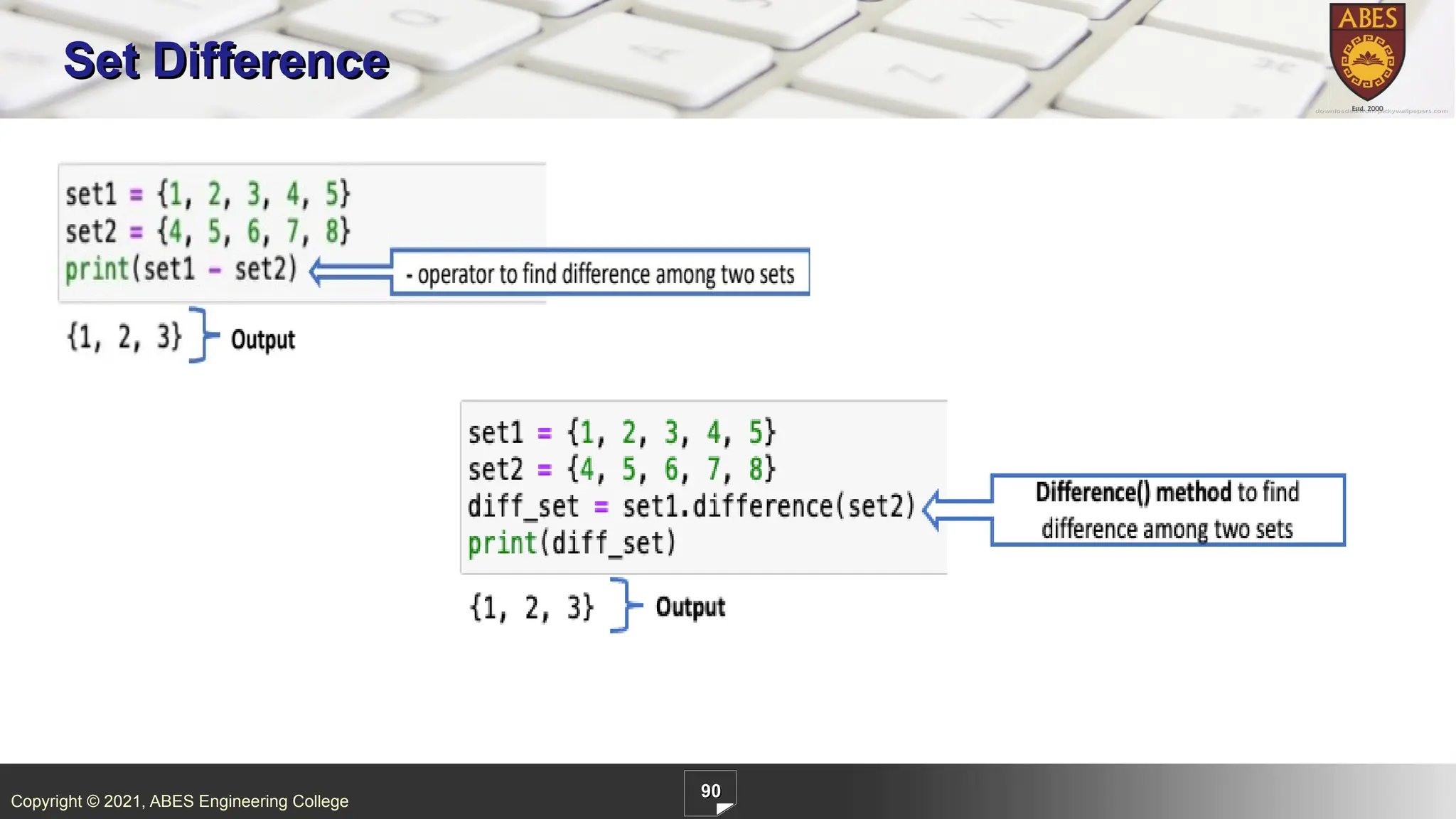
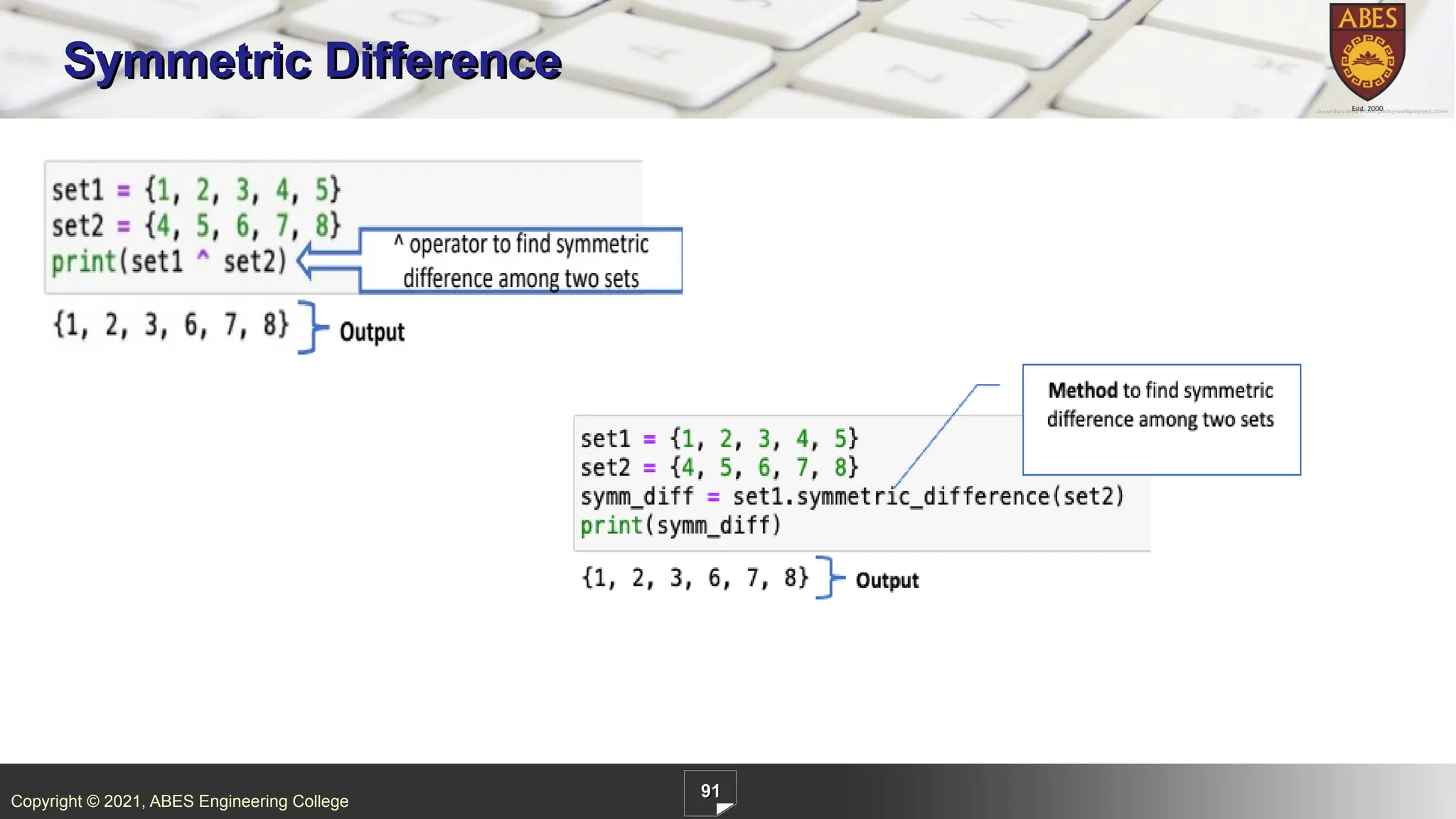
7
/ 97
8
/ 97
9
/ 97
10
/ 97
11
/ 97
12
/ 97
13
/ 97
14
/ 97
15
/ 97
16
/ 97
17
/ 97
18
/ 97
19
/ 97
20
/ 97
21
/ 97
22
/ 97
23
/ 97
24
/ 97
25
/ 97
26
/ 97
27
/ 97
28
/ 97
29
/ 97
30
/ 97
31
/ 97
32
/ 97
33
/ 97
34
/ 97
35
/ 97
36
/ 97
37
/ 97
38
/ 97
39
/ 97
40
/ 97
41
/ 97
42
/ 97
43
/ 97
44
/ 97
45
/ 97
46
/ 97
47
/ 97
48
/ 97
49
/ 97
50
/ 97
51
/ 97
52
/ 97
53
/ 97
54
/ 97
55
/ 97
56
/ 97
57
/ 97
58
/ 97
59
/ 97
60
/ 97
61
/ 97
62
/ 97
63
/ 97
64
/ 97
65
/ 97
66
/ 97
67
/ 97
68
/ 97
69
/ 97
70
/ 97
71
/ 97
72
/ 97
73
/ 97
74
/ 97
75
/ 97
76
/ 97
77
/ 97
78
/ 97
79
/ 97
80
/ 97
81
/ 97
82
/ 97
83
/ 97
84
/ 97
85
/ 97
86
/ 97
87
/ 97
88
/ 97
89
/ 97
90
/ 97
91
/ 97
92
/ 97
93
/ 97
94
/ 97
95
/ 97
96
/ 97
97
/ 97
More Related Content
PPTX
python Lists introduction where the students learn about how to use lists
by
shailajajirs
PDF
Module III.pdf
by
R.K.College of engg & Tech
PPTX
Chapter 15 Lists
by
Praveen M Jigajinni
DOCX
Python Materials- Lists, Dictionary, Tuple
by
KarthicSundaram
PPTX
Python _dataStructures_ List, Tuples, its functions
by
VidhyaB10
PDF
Pytho lists
by
BMS Institute of Technology and Management
PPTX
Introduction To Programming with Python-4
by
Syed Farjad Zia Zaidi
PDF
GE3151_PSPP_UNIT_4_Notes
by
Guru Nanak Technical Institutions
python Lists introduction where the students learn about how to use lists
by
shailajajirs
Module III.pdf
by
R.K.College of engg & Tech
Chapter 15 Lists
by
Praveen M Jigajinni
Python Materials- Lists, Dictionary, Tuple
by
KarthicSundaram
Python _dataStructures_ List, Tuples, its functions
by
VidhyaB10
Pytho lists
by
BMS Institute of Technology and Management
Introduction To Programming with Python-4
by
Syed Farjad Zia Zaidi
GE3151_PSPP_UNIT_4_Notes
by
Guru Nanak Technical Institutions
Similar to List _Python Programming_Built in functions
PPTX
list.pptx
by
SwapnaliGawali5
PPTX
Python for Beginners(v3)
by
Panimalar Engineering College
PPTX
Unit 4.pptx python list tuples dictionary
by
shakthi10
PDF
Python list manipulation basics in detail.pdf
by
neonaveen
PDF
Lists and its functions in python for beginners
by
Mohammad Usman
PPTX
PROBLEM SOLVING AND PYTHON PROGRAMMING PPT
by
MulliMary
PPTX
Python-List.pptx
by
AnitaDevi158873
PPTX
PYTHON-PROGRAMMING- language-UNIT-III.pptx
by
tejasmeshram148
PPTX
PYTHON-PROGRAMMING-UNIT-III.pptx kghbg kfhjf jruufg jtuuf
by
DeepakRattan3
PPTX
Lists on the pyhton to learn the children more easily on easy codes.pptx
by
cjrfailure
PPTX
Python list, Operations performed on list
by
vishwanath patil
PPTX
listtupledictionary-2001okdhfuihcasbdjj02082611.pptx
by
meganathan162007
PDF
Python Programming: Lists, Modules, Exceptions
by
Sreedhar Chowdam
PDF
List,tuple,dictionary
by
nitamhaske
PDF
Ch-8.pdf
by
R.K.College of engg & Tech
PPTX
Python list tuple dictionary presentation
by
NarendraDev11
PPTX
List_tuple_dictionary.pptx
by
ChandanVatsa2
PPTX
PPT NOV 18 LIST.pptx is about how lists are accessed ,traversed and operation...
by
afshanaffu05
PPTX
UNIT-3 python and data structure alo.pptx
by
harikahhy
PDF
‘How to develop Pythonic coding rather than Python coding – Logic Perspective’
by
S.Mohideen Badhusha
list.pptx
by
SwapnaliGawali5
Python for Beginners(v3)
by
Panimalar Engineering College
Unit 4.pptx python list tuples dictionary
by
shakthi10
Python list manipulation basics in detail.pdf
by
neonaveen
Lists and its functions in python for beginners
by
Mohammad Usman
PROBLEM SOLVING AND PYTHON PROGRAMMING PPT
by
MulliMary
Python-List.pptx
by
AnitaDevi158873
PYTHON-PROGRAMMING- language-UNIT-III.pptx
by
tejasmeshram148
PYTHON-PROGRAMMING-UNIT-III.pptx kghbg kfhjf jruufg jtuuf
by
DeepakRattan3
Lists on the pyhton to learn the children more easily on easy codes.pptx
by
cjrfailure
Python list, Operations performed on list
by
vishwanath patil
listtupledictionary-2001okdhfuihcasbdjj02082611.pptx
by
meganathan162007
Python Programming: Lists, Modules, Exceptions
by
Sreedhar Chowdam
List,tuple,dictionary
by
nitamhaske
Ch-8.pdf
by
R.K.College of engg & Tech
Python list tuple dictionary presentation
by
NarendraDev11
List_tuple_dictionary.pptx
by
ChandanVatsa2
PPT NOV 18 LIST.pptx is about how lists are accessed ,traversed and operation...
by
afshanaffu05
UNIT-3 python and data structure alo.pptx
by
harikahhy
‘How to develop Pythonic coding rather than Python coding – Logic Perspective’
by
S.Mohideen Badhusha
Recently uploaded
PPTX
IEC60079-10-1 -Annex F -Hazardous Area Classification -HAC-Annex F.pptx
by
asifmirzamakki
PPTX
Preventive Maintenance for Material Handling Equipment — Complete Guide
by
MaintWiz Technologies Private Limited
PDF
Ground heat exchanger for rootzone cooling of crops in vertical aeroponics
by
ChristopherPascual13
PPTX
Step-by-step guide to designing standard a microbiology laboratory in pharmac...
by
shawkyabdo1
PPTX
Plant Performance Strategies: Enhanced Reliability & Operational Efficiency w...
by
MaintWiz Technologies Private Limited
PPTX
MECCA Empire – Hotel Shuttle System for the 2026 FIFA World Cup
by
ay2432
PDF
STOP CONSOLIDATION: Optimizing Transit Speed & Rider Experience
by
ti2208
PPTX
Lean Maintenance: Streamlining Operations for Efficiency & Reliability
by
MaintWiz Technologies Private Limited
PPTX
Inventory Excellence: Achieve Efficient Inventory Management with CMMS
by
MaintWiz Technologies Private Limited
PPTX
UnrealGameplayAbilitySystemPresentation.pptx
by
BenHowenstein
PPTX
Assessment 4 SRS Presentation - Final (2).pptx
by
ayush445302
PPT
Pointer in C: declaration and initialization
by
Minakshee Patil
PDF
Presentation-on-Energy-Transition-in-Bangladesh-Employment-and-Skills.pdf
by
syedSajib8
PPTX
Salesforce Bulk Connector V1 and V2 Deep Dive!
by
RajeevRanjan368982
PPTX
Importance of Instrument Calibration — Improve Accuracy, Reliability & Mainte...
by
MaintWiz Technologies Private Limited
PPTX
Lecture-15- Thermodynamics II Mohamed salem-NO COMMENTARY.pptx
by
DinaSaad22
PDF
ACI 318-2205_American Concrete Institute.pdf
by
ericaguilerasoto1
PPTX
Coupled Hazard-Mobility Framework for Optimizing Emergency Vehicle Routing
by
ghn2015
PPT
861828706-chapter-7 introductionto UrbanHydrology.ppt
by
HussenMohammed18
PPTX
Natural Gas fundamentals and GRU for associated gas trap.pptx
by
engineerhassan
IEC60079-10-1 -Annex F -Hazardous Area Classification -HAC-Annex F.pptx
by
asifmirzamakki
Preventive Maintenance for Material Handling Equipment — Complete Guide
by
MaintWiz Technologies Private Limited
Ground heat exchanger for rootzone cooling of crops in vertical aeroponics
by
ChristopherPascual13
Step-by-step guide to designing standard a microbiology laboratory in pharmac...
by
shawkyabdo1
Plant Performance Strategies: Enhanced Reliability & Operational Efficiency w...
by
MaintWiz Technologies Private Limited
MECCA Empire – Hotel Shuttle System for the 2026 FIFA World Cup
by
ay2432
STOP CONSOLIDATION: Optimizing Transit Speed & Rider Experience
by
ti2208
Lean Maintenance: Streamlining Operations for Efficiency & Reliability
by
MaintWiz Technologies Private Limited
Inventory Excellence: Achieve Efficient Inventory Management with CMMS
by
MaintWiz Technologies Private Limited
UnrealGameplayAbilitySystemPresentation.pptx
by
BenHowenstein
Assessment 4 SRS Presentation - Final (2).pptx
by
ayush445302
Pointer in C: declaration and initialization
by
Minakshee Patil
Presentation-on-Energy-Transition-in-Bangladesh-Employment-and-Skills.pdf
by
syedSajib8
Salesforce Bulk Connector V1 and V2 Deep Dive!
by
RajeevRanjan368982
Importance of Instrument Calibration — Improve Accuracy, Reliability & Mainte...
by
MaintWiz Technologies Private Limited
Lecture-15- Thermodynamics II Mohamed salem-NO COMMENTARY.pptx
by
DinaSaad22
ACI 318-2205_American Concrete Institute.pdf
by
ericaguilerasoto1
Coupled Hazard-Mobility Framework for Optimizing Emergency Vehicle Routing
by
ghn2015
861828706-chapter-7 introductionto UrbanHydrology.ppt
by
HussenMohammed18
Natural Gas fundamentals and GRU for associated gas trap.pptx
by
engineerhassan
List _Python Programming_Built in functions
1.
Copyright © 2021,
ABES Engineering College 1 List . Python List is the most commonly used sequence. Important points about list are as follows. List elements are enclosed in square brackets [] and are comma separated. List is the sequence of class type ‘list’. List can contain elements of different data types. List is a mutable(changeable) sequence, would be discussed in detail in 3.2.3 List allows duplicate elements. List elements are ordered, it means it give specific order to the elements, if new element is added, by default it comes at the end of the list.
2.
Copyright © 2021,
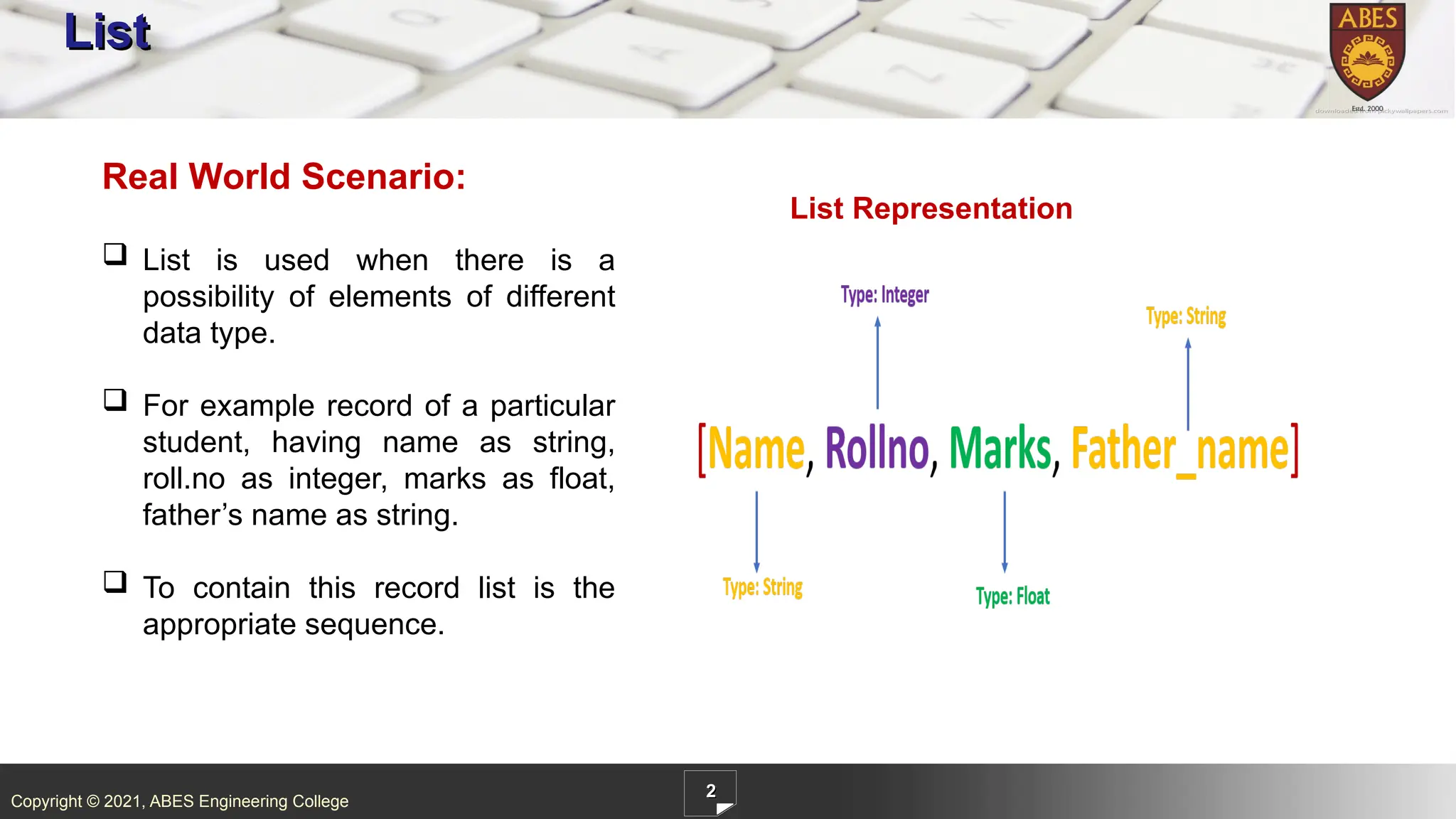
ABES Engineering College 2 List Real World Scenario: List is used when there is a possibility of elements of different data type. For example record of a particular student, having name as string, roll.no as integer, marks as float, father’s name as string. To contain this record list is the appropriate sequence. List Representation
3.
Copyright © 2021,
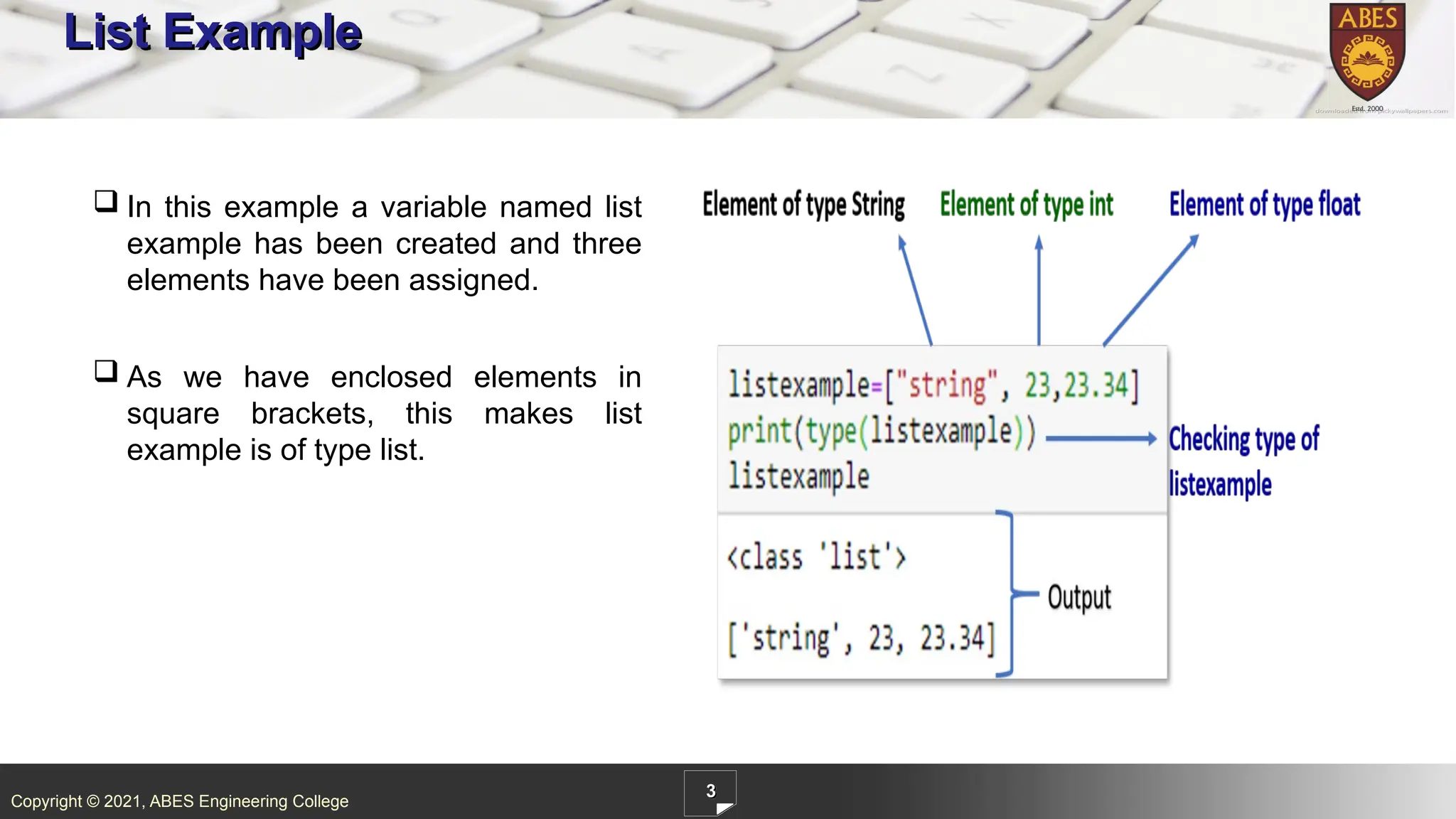
ABES Engineering College 3 List Example In this example a variable named list example has been created and three elements have been assigned. As we have enclosed elements in square brackets, this makes list example is of type list.
4.
Copyright © 2021,
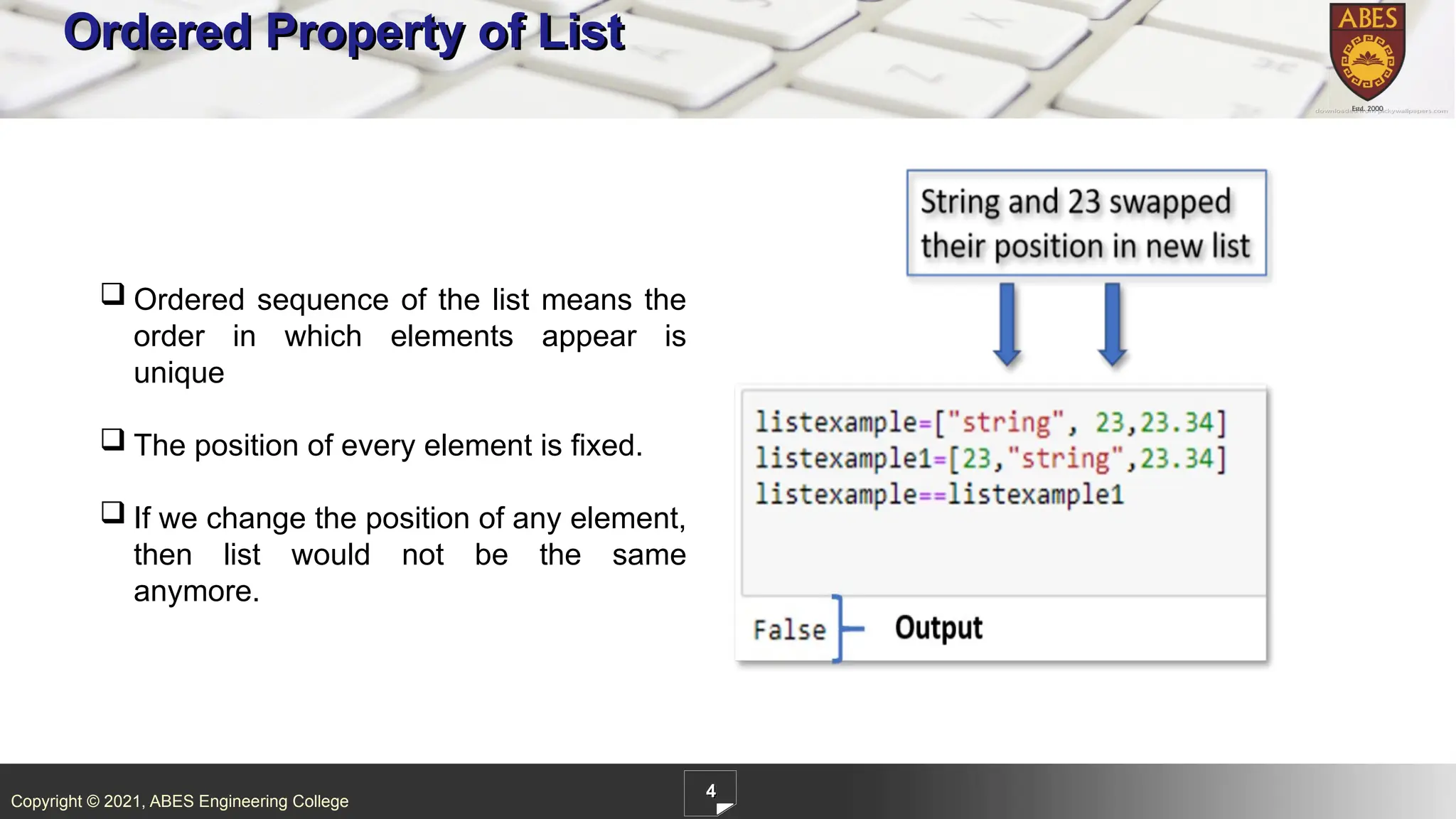
ABES Engineering College 4 Ordered Property of List Ordered sequence of the list means the order in which elements appear is unique The position of every element is fixed. If we change the position of any element, then list would not be the same anymore.
5.
Copyright © 2021,
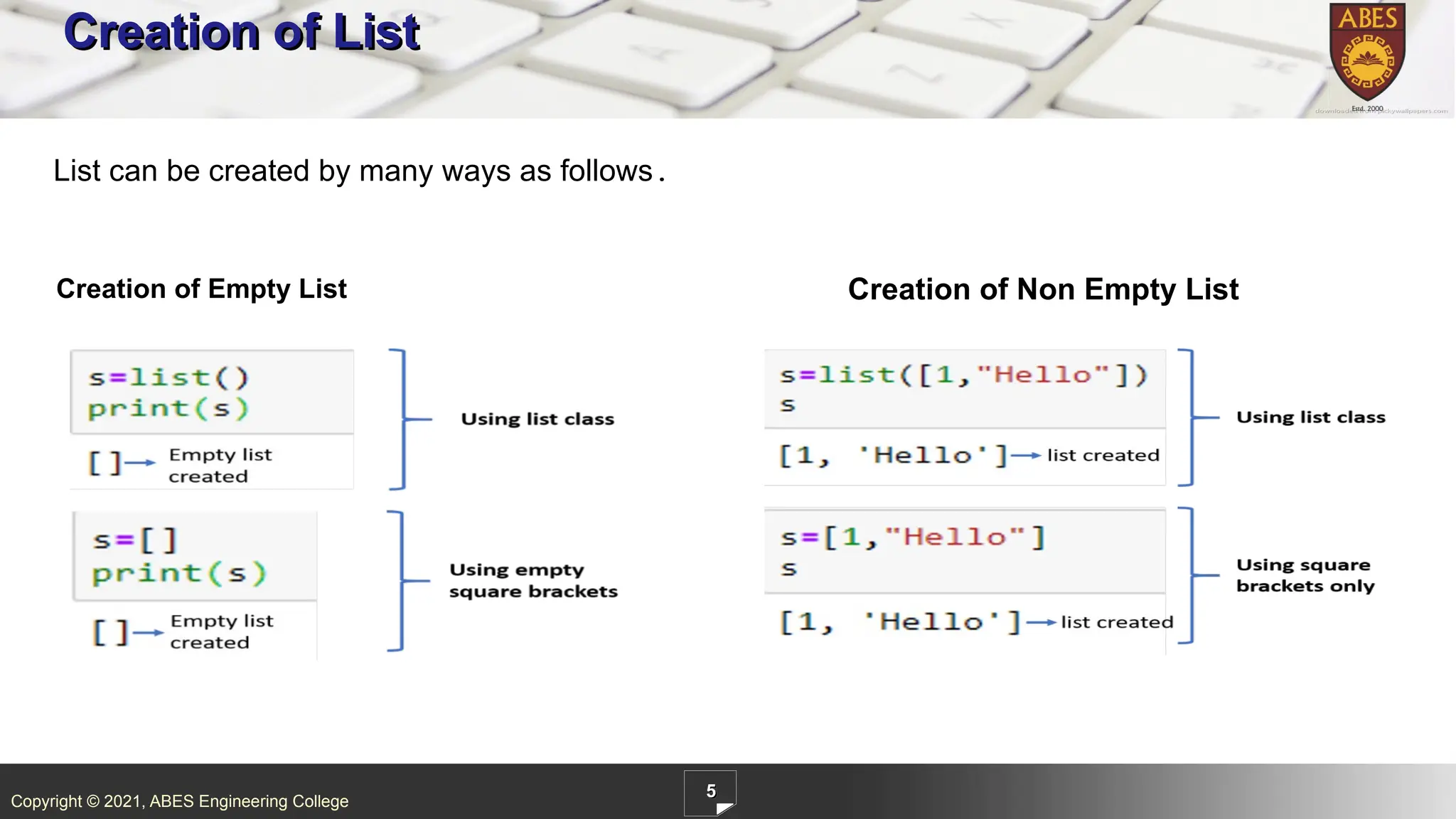
ABES Engineering College 5 Creation of List Creation of Empty List Creation of Non Empty List List can be created by many ways as follows.
6.
Copyright © 2021,
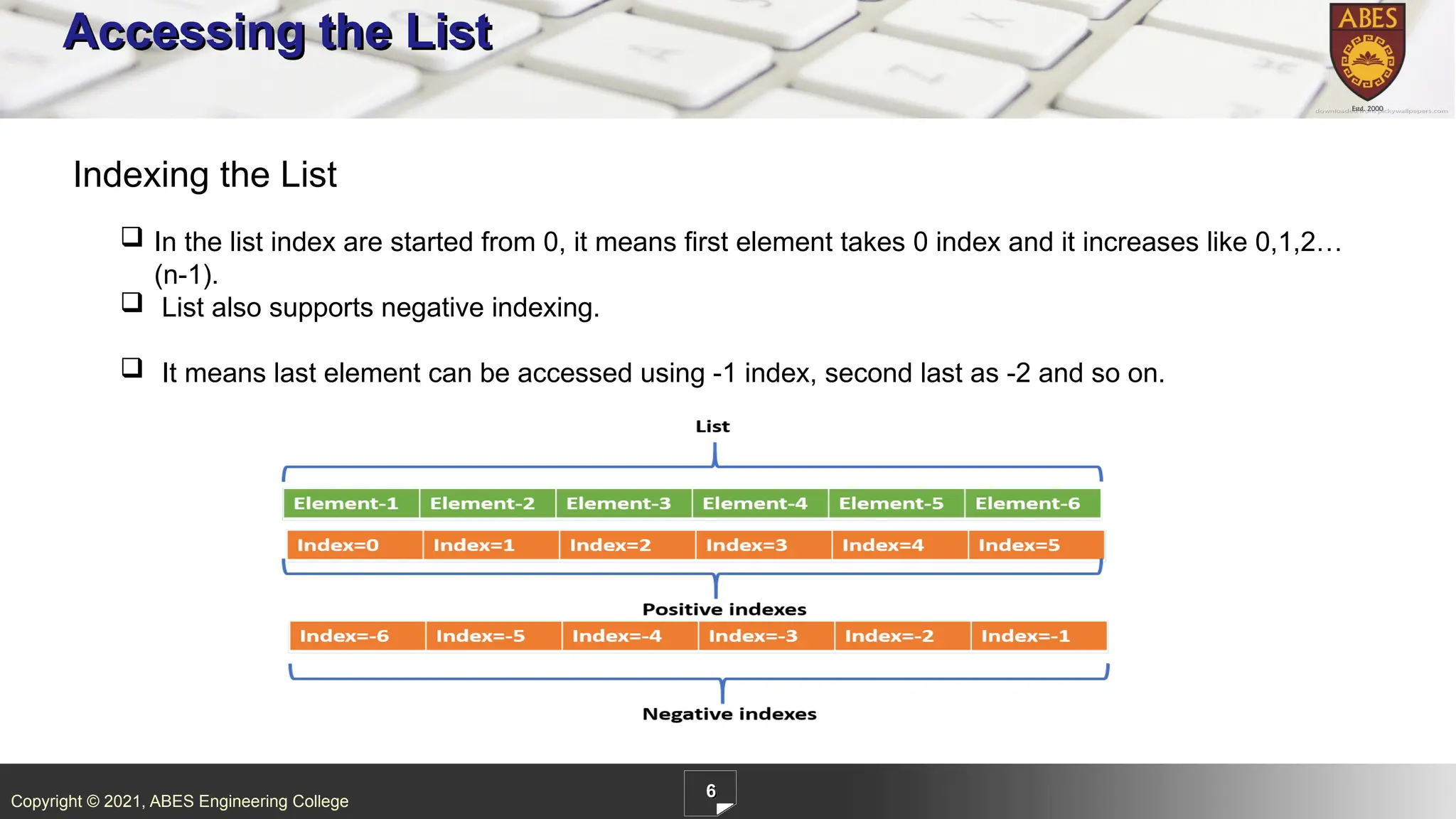
ABES Engineering College 6 Accessing the List In the list index are started from 0, it means first element takes 0 index and it increases like 0,1,2… (n-1). List also supports negative indexing. It means last element can be accessed using -1 index, second last as -2 and so on. Indexing the List
7.
Copyright © 2021,
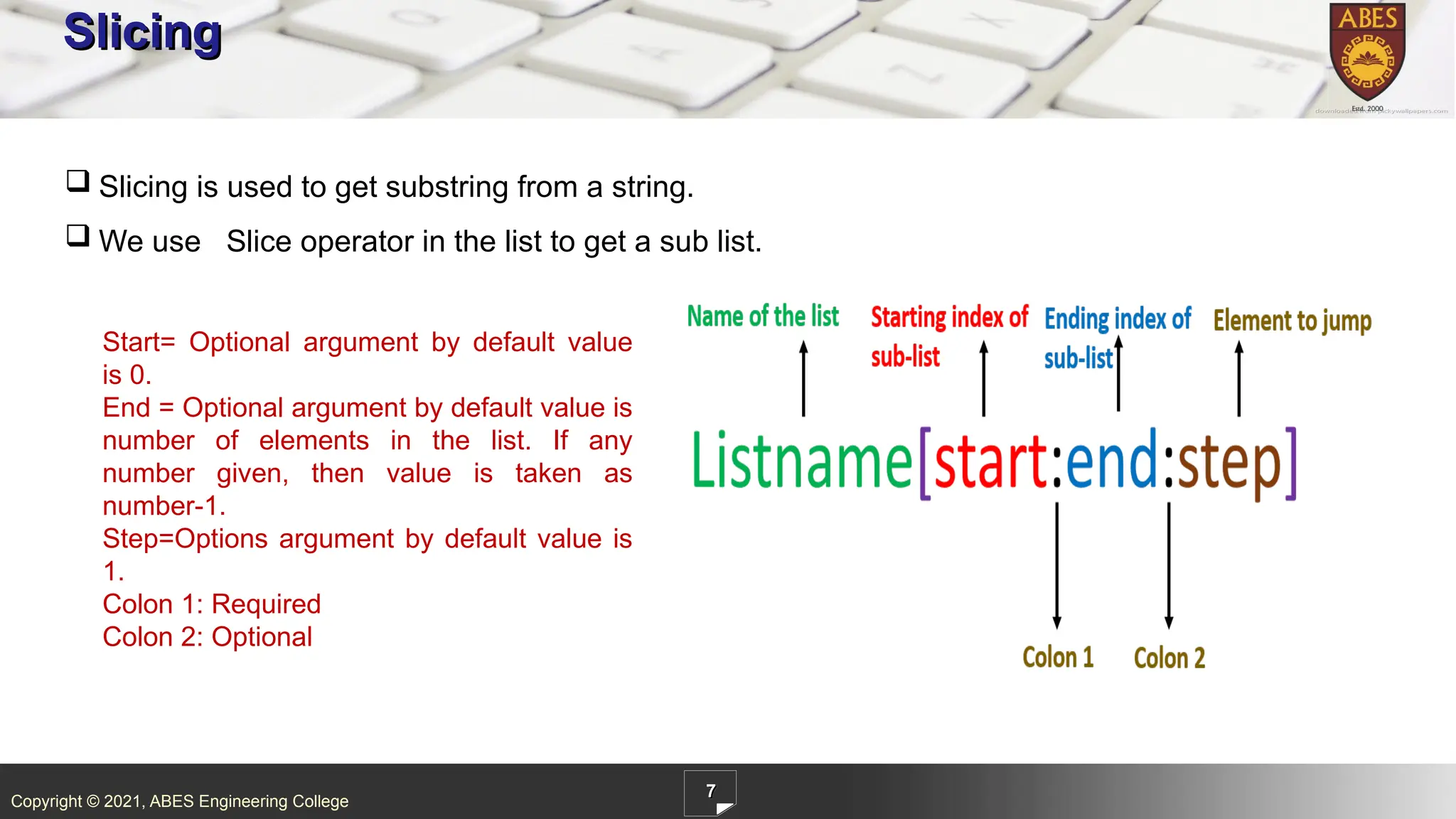
ABES Engineering College 7 Slicing Slicing is used to get substring from a string. We use Slice operator in the list to get a sub list. Start= Optional argument by default value is 0. End = Optional argument by default value is number of elements in the list. If any number given, then value is taken as number-1. Step=Options argument by default value is 1. Colon 1: Required Colon 2: Optional
8.
Copyright © 2021,
ABES Engineering College 8 Slicing Example Single colon[:]- It is used to print the entire list. Double colon[:]- It is used to print the entire list. l[2::]-It is used to print the list starting from index 2 till the last element of the list. L[2:5:]- We have set start and end both as 2 and 5, so it’s starting from 2 and ending with (5-1) and printing values for indexes 2,3 and 4 index. L[2:5:2]-end and step has been set as 2,5 and 2. So output substring starting from index 2, ending with 5- 1=4 and step counter is 2, so its skipping alternate element.
9.
Copyright © 2021,
ABES Engineering College 9 Examples of List Slicing Operator Explanation Example [:] This gives a complete original list [1:3] It starts with 1th index and ending with (3-1=2) index [2:] Sub list starts with index 2 and ends at last element as nothing specified on right side of the colon
10.
Copyright © 2021,
ABES Engineering College 10 Examples of List Slicing Operator Explanation Example [1:4:] Start=1, stop=4 and by default step=1. [1:4:2] Start=1, stop=4 and by step=2. As the step is 2, it took every 2nd element. [::-1] Starting is 0th index and stopping at last index and step is negative count so that it would print in reverse order
11.
Copyright © 2021,
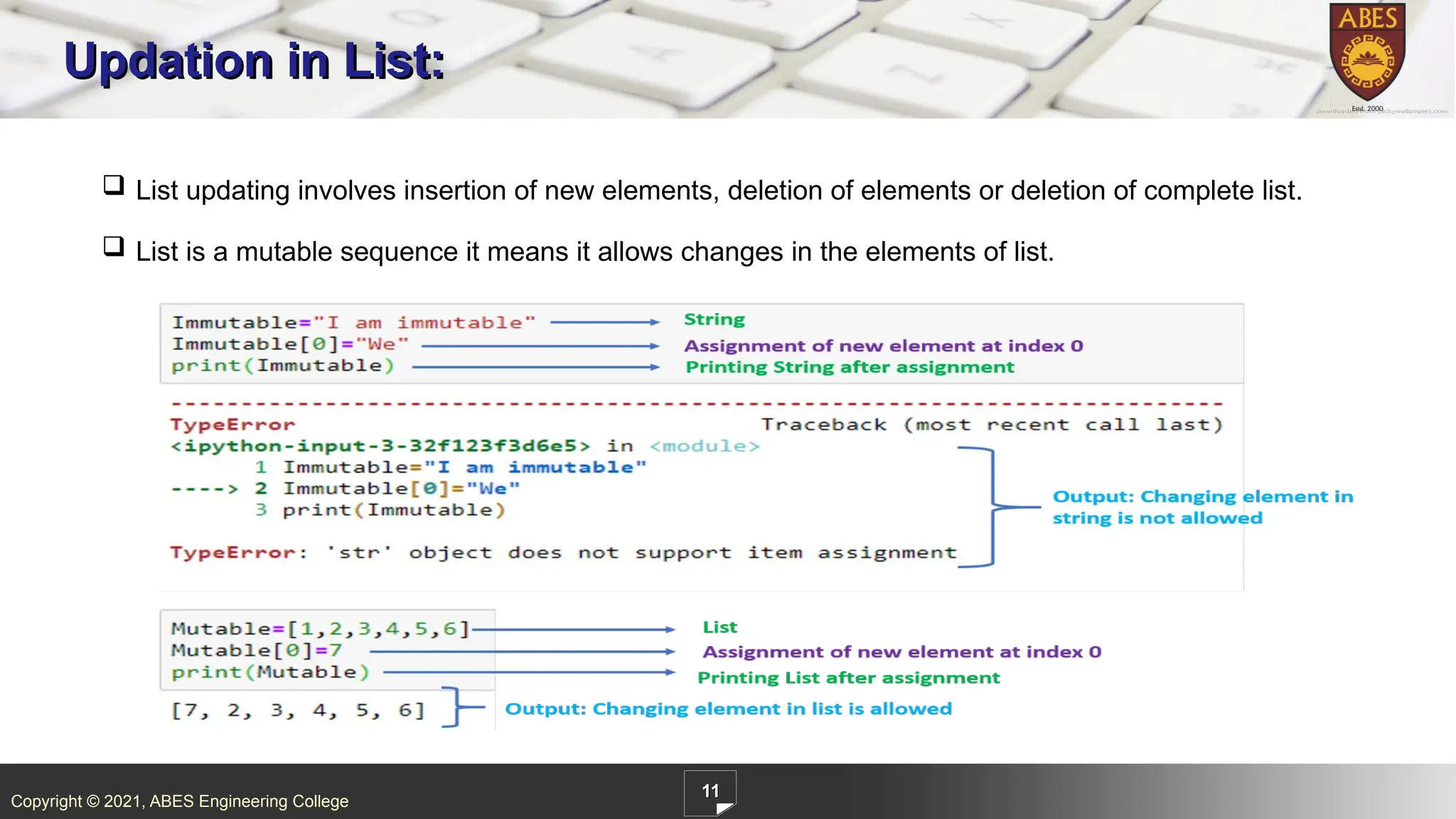
ABES Engineering College 11 Updation in List: List updating involves insertion of new elements, deletion of elements or deletion of complete list. List is a mutable sequence it means it allows changes in the elements of list.
12.
Copyright © 2021,
ABES Engineering College 13 Can you answer these Questions 1.What is the output of the following code? A.[‘XY’,’YZ’] B.[‘xy’,’yz’] C. None of the above D. Both of the above
13.
Copyright © 2021,
ABES Engineering College 14 Can you answer these Questions 2.What is the output of the following code? A. [‘g’,’h’,’k’,’l’,’m’] B. [‘g’,’h’,’k’,’l’,’m’,9] C. [‘g’,’h’,’k’,’l’,’m’,8,9] D. [‘g’,’h’,’k’,’l’,’m’,9,8]
14.
Copyright © 2021,
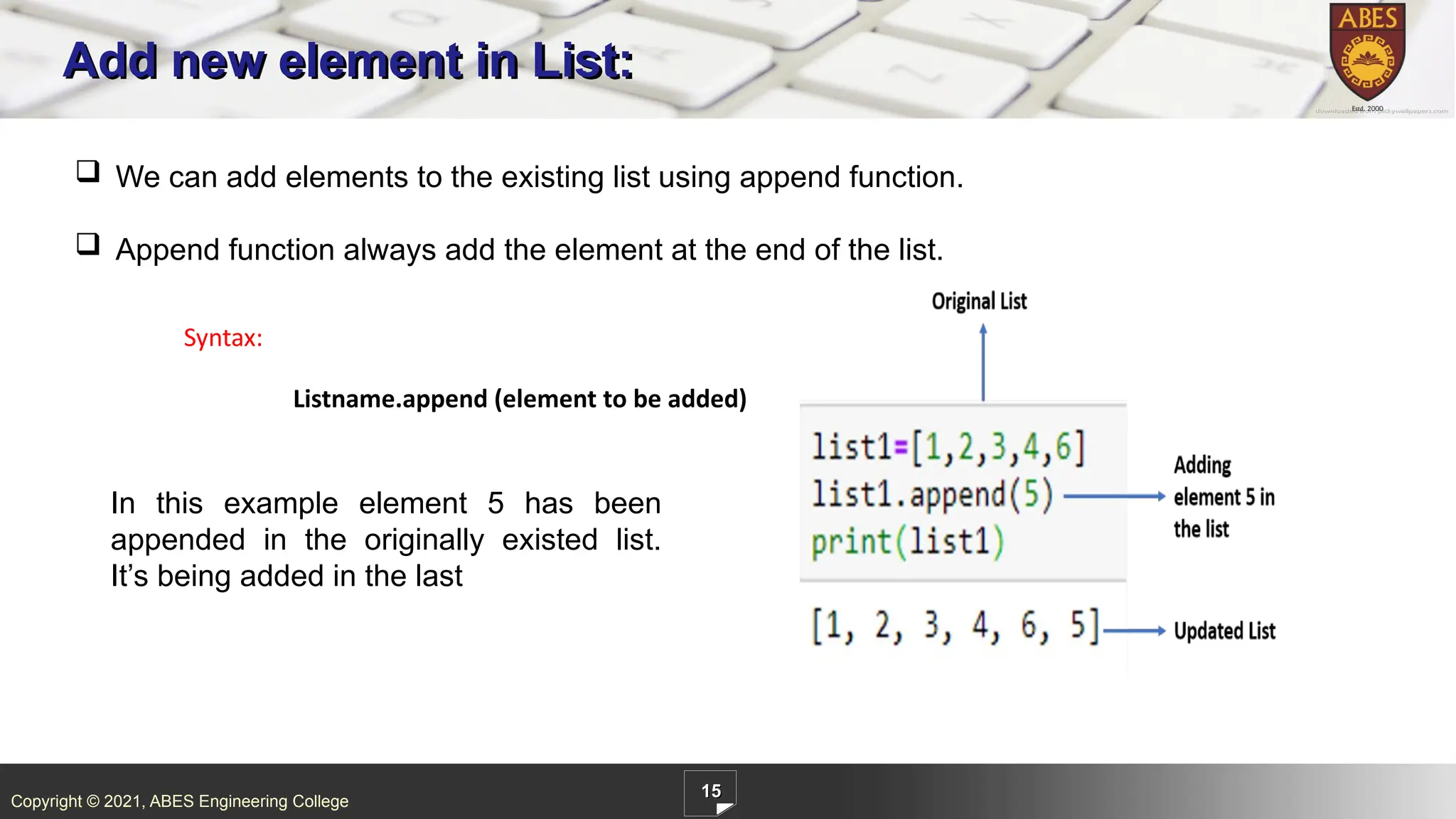
ABES Engineering College 15 Add new element in List: We can add elements to the existing list using append function. Append function always add the element at the end of the list. Syntax: Listname.append (element to be added) In this example element 5 has been appended in the originally existed list. It’s being added in the last
15.
Copyright © 2021,
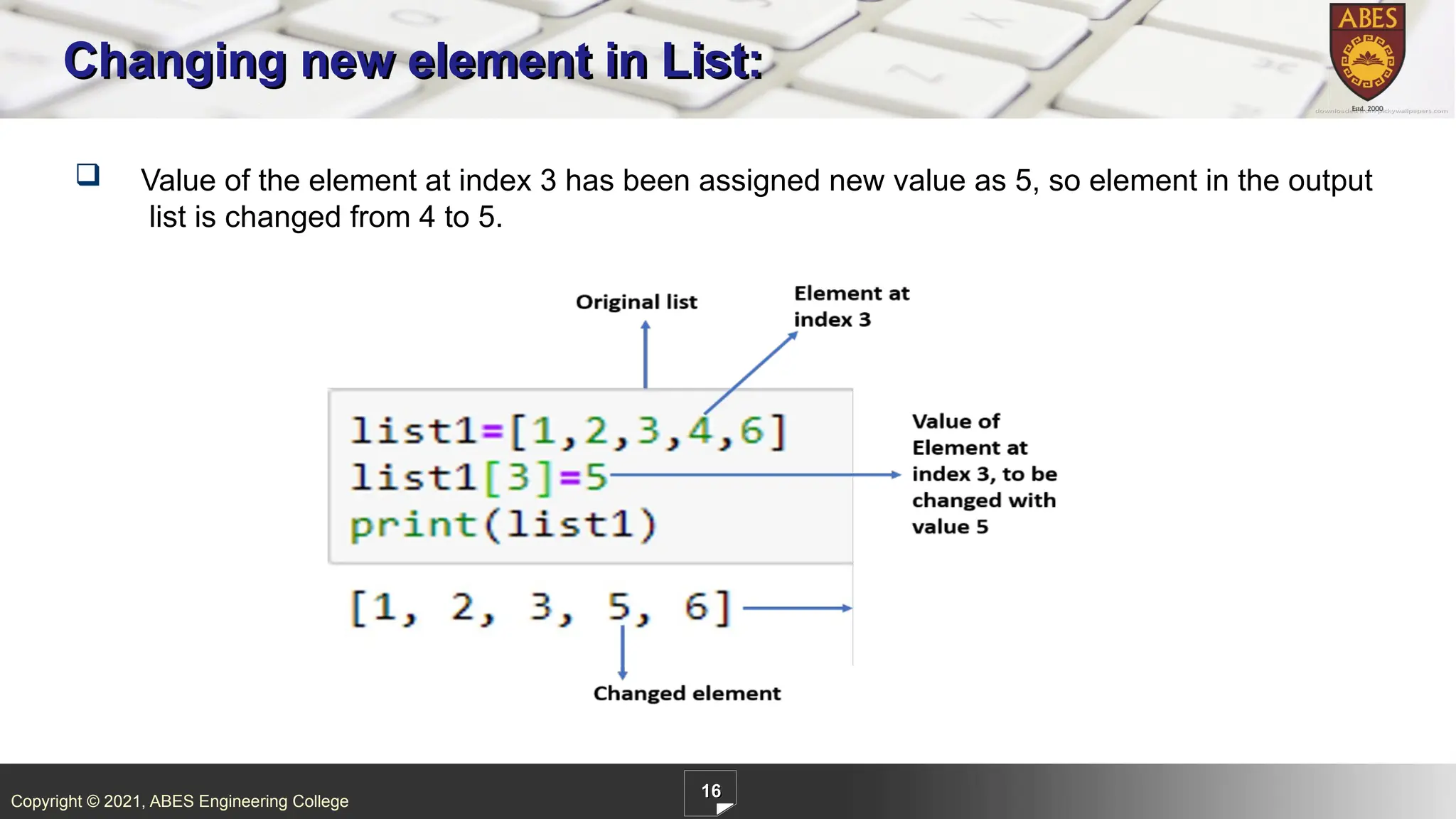
ABES Engineering College 16 Changing new element in List: Value of the element at index 3 has been assigned new value as 5, so element in the output list is changed from 4 to 5.
16.
Copyright © 2021,
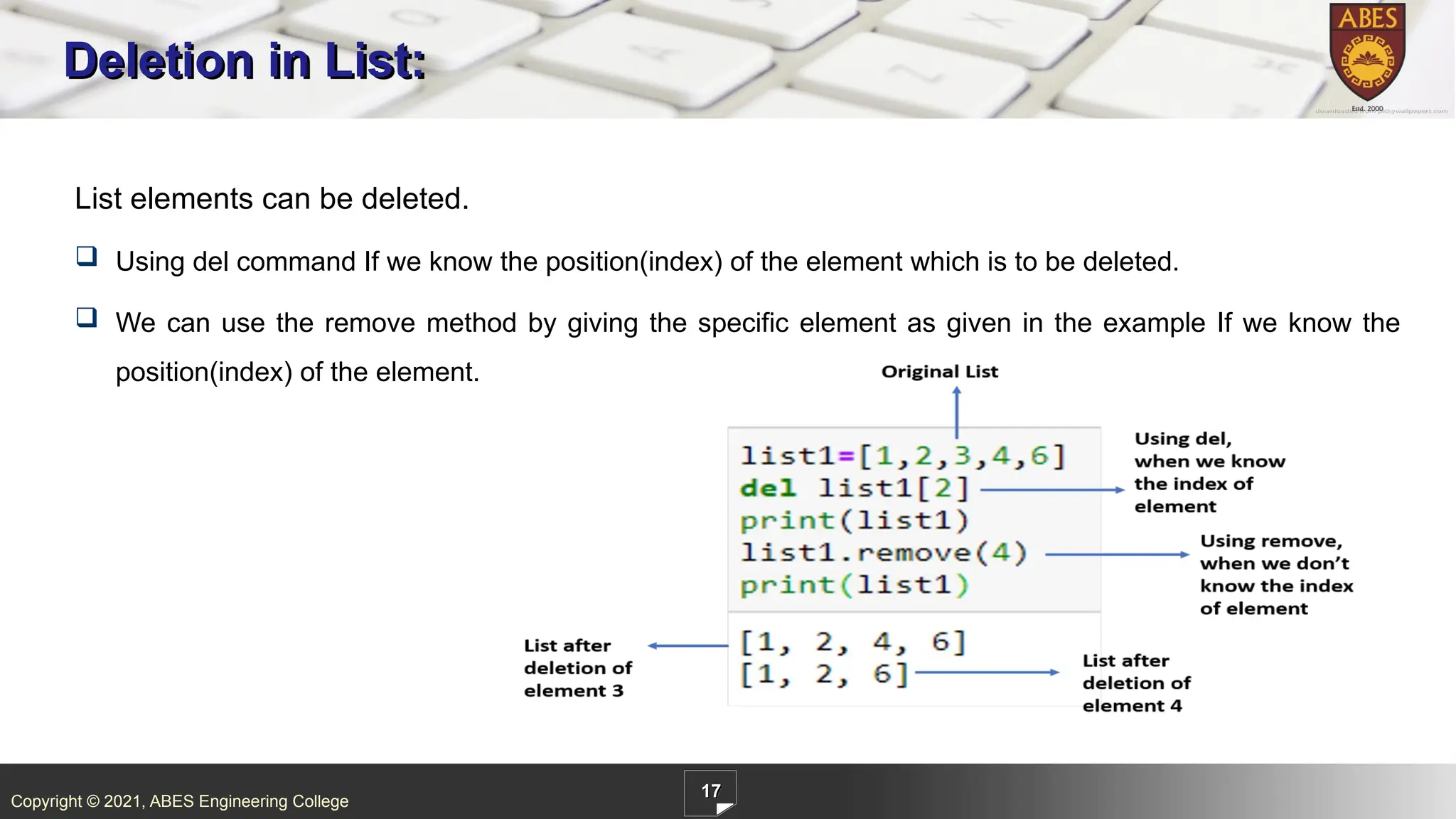
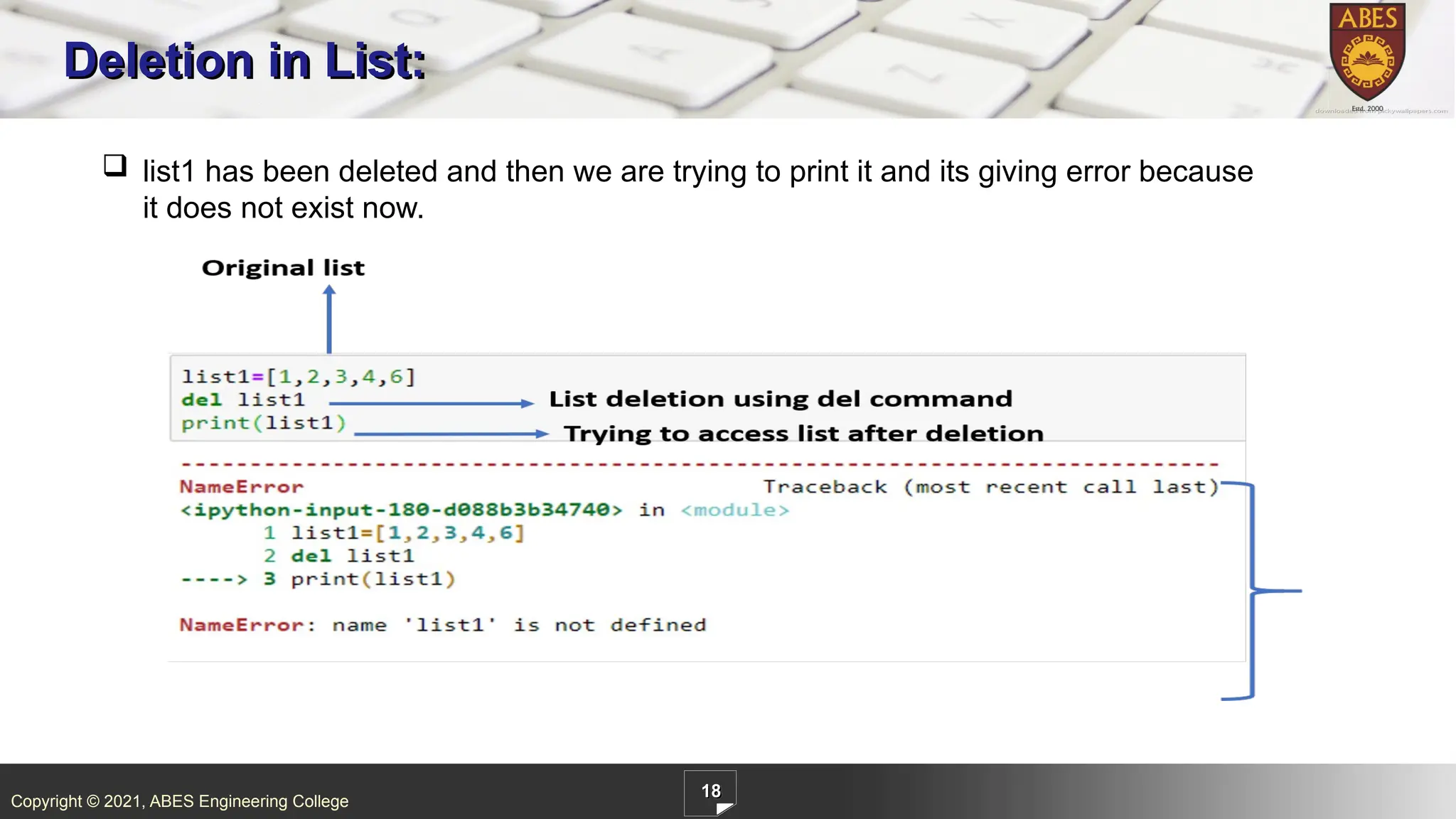
ABES Engineering College 17 Deletion in List: List elements can be deleted. Using del command If we know the position(index) of the element which is to be deleted. We can use the remove method by giving the specific element as given in the example If we know the position(index) of the element.
17.
Copyright © 2021,
ABES Engineering College 18 Deletion in List: list1 has been deleted and then we are trying to print it and its giving error because it does not exist now.
18.
Copyright © 2021,
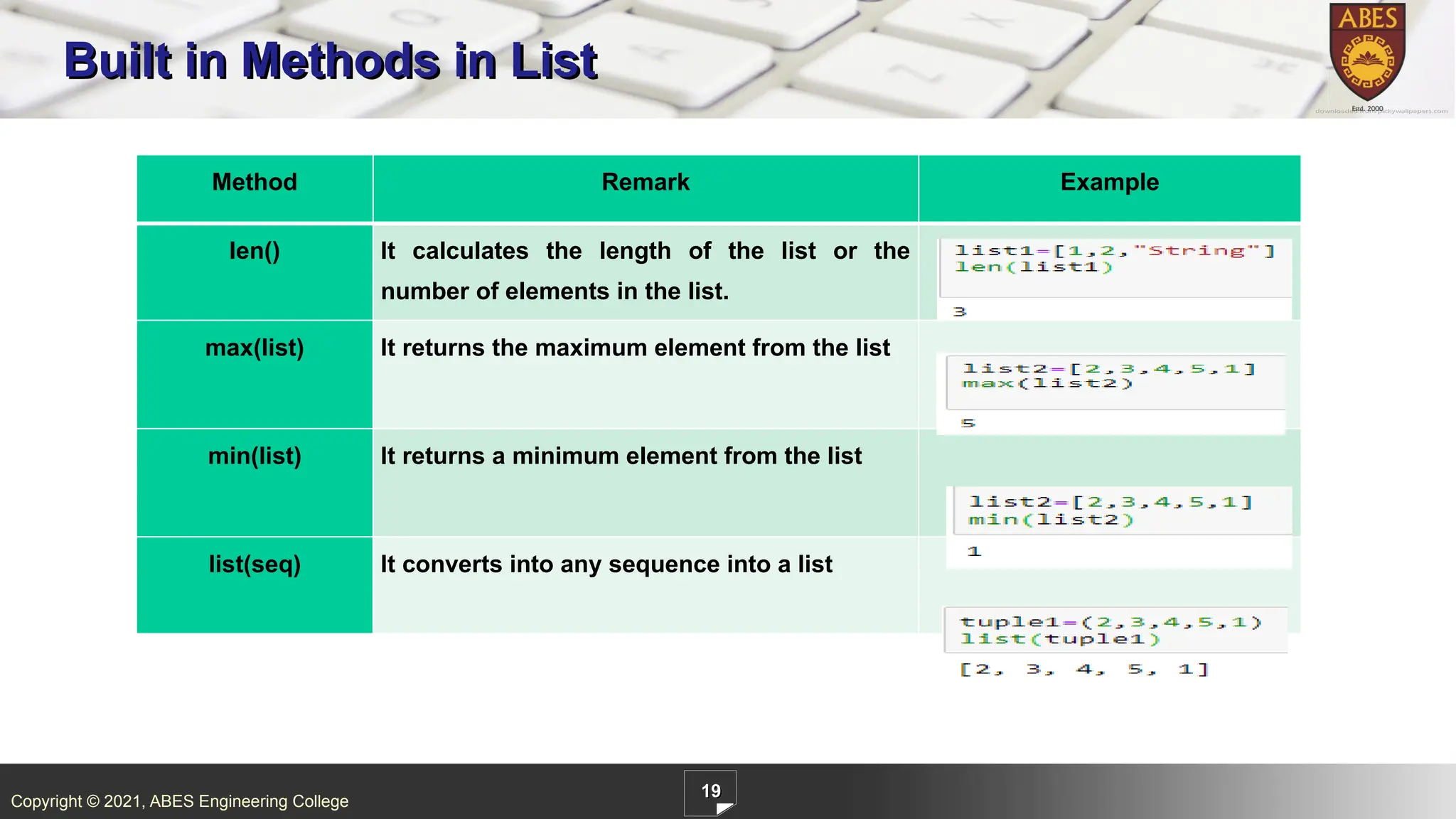
ABES Engineering College 19 Built in Methods in List Method Remark Example len() It calculates the length of the list or the number of elements in the list. max(list) It returns the maximum element from the list min(list) It returns a minimum element from the list list(seq) It converts into any sequence into a list
19.
Copyright © 2021,
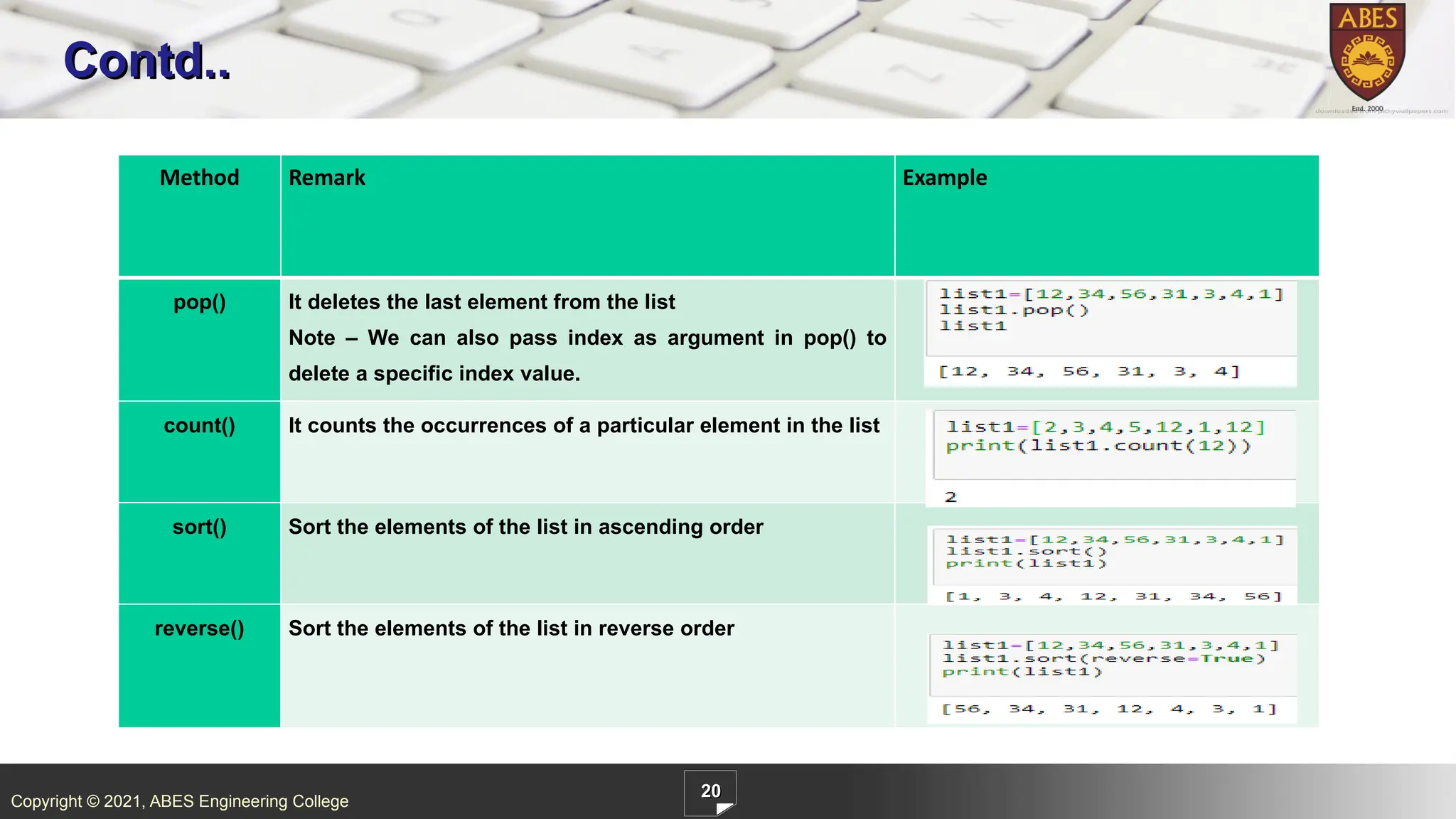
ABES Engineering College 20 Contd.. Method Remark Example pop() It deletes the last element from the list Note – We can also pass index as argument in pop() to delete a specific index value. count() It counts the occurrences of a particular element in the list sort() Sort the elements of the list in ascending order reverse() Sort the elements of the list in reverse order
20.
Copyright © 2021,
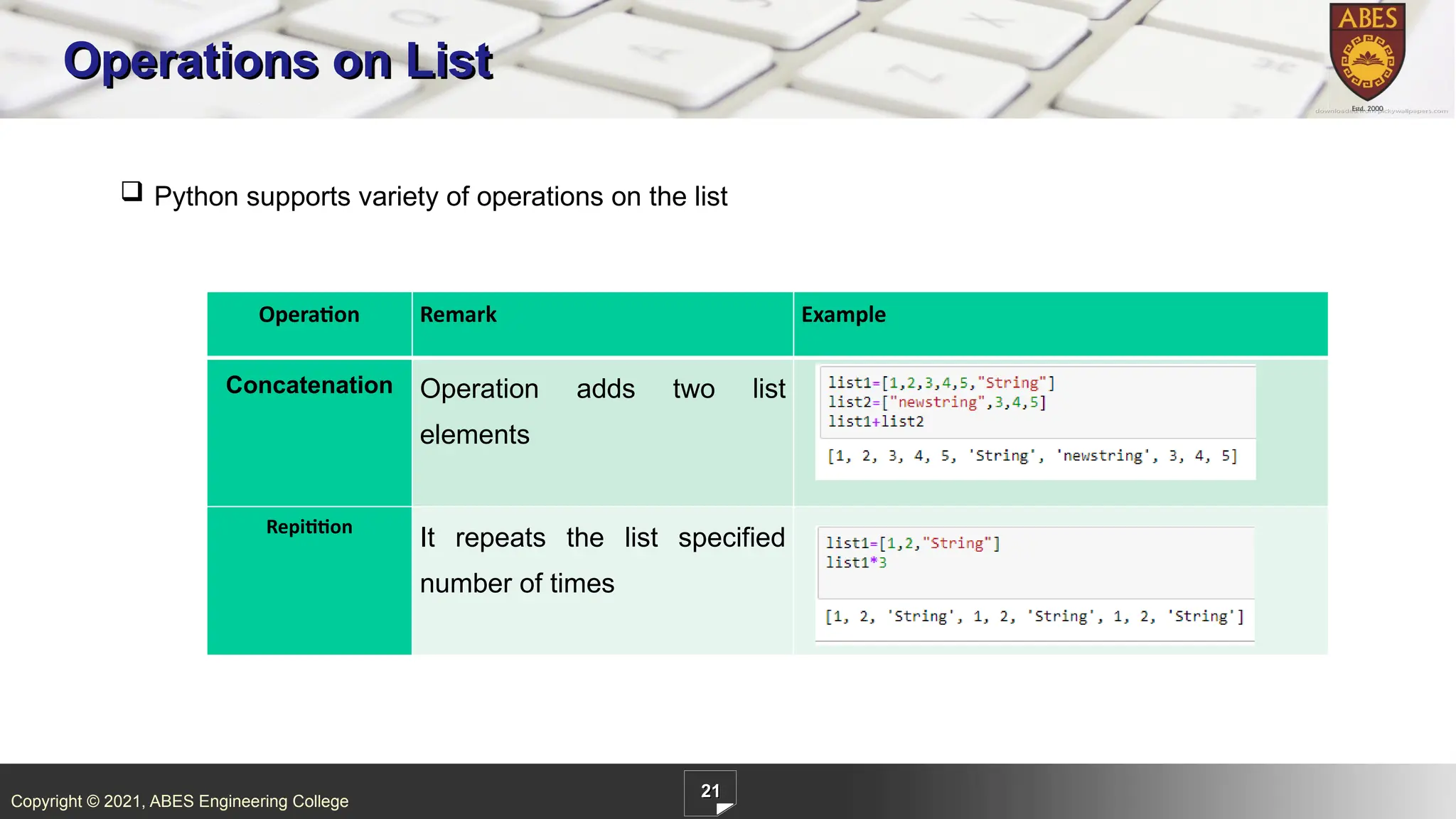
ABES Engineering College 21 Operations on List Operation Remark Example Concatenation Operation adds two list elements Repitition It repeats the list specified number of times Python supports variety of operations on the list
21.
Copyright © 2021,
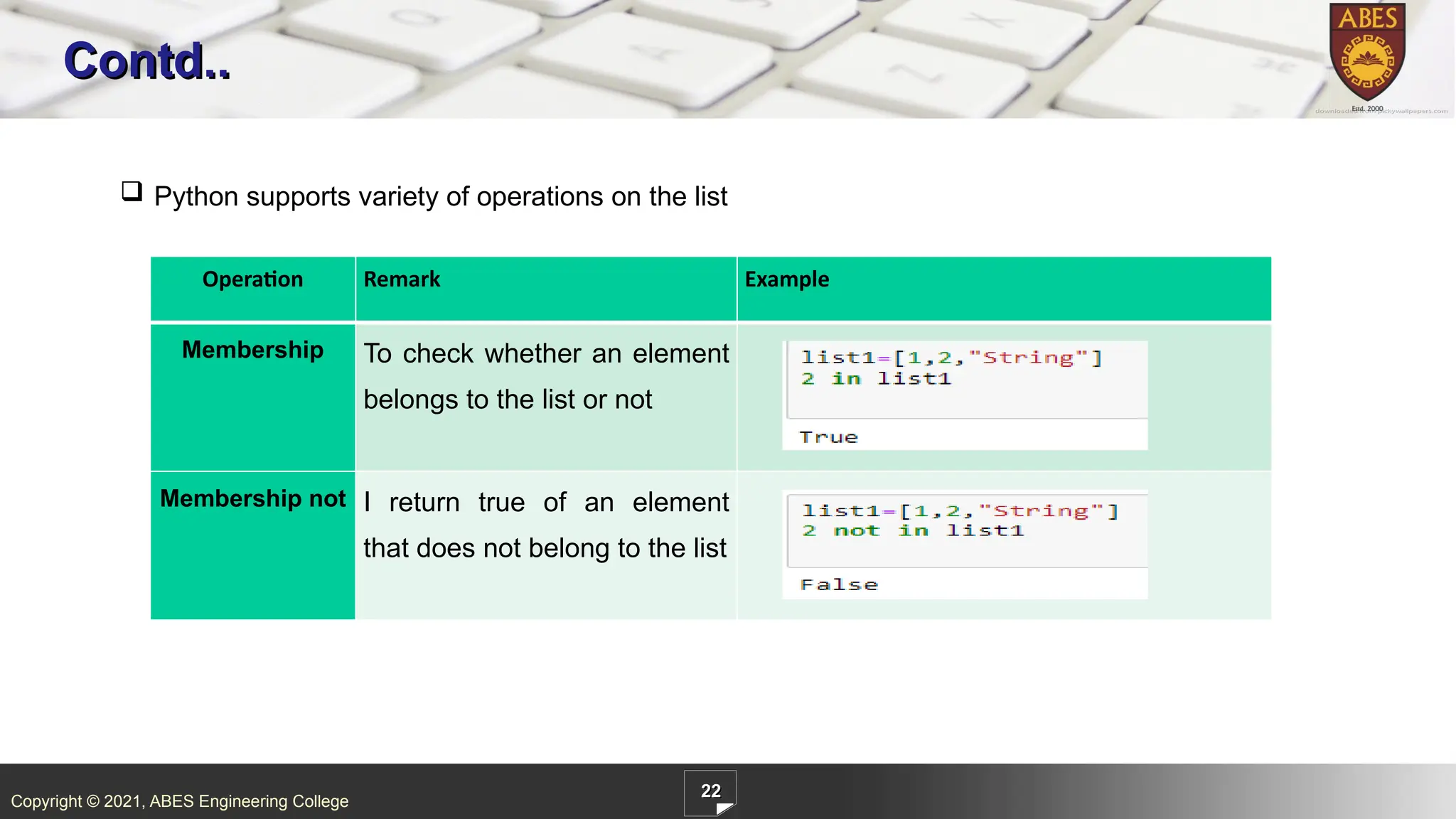
ABES Engineering College 22 Contd.. Operation Remark Example Membership To check whether an element belongs to the list or not Membership not I return true of an element that does not belong to the list Python supports variety of operations on the list
22.
Copyright © 2021,
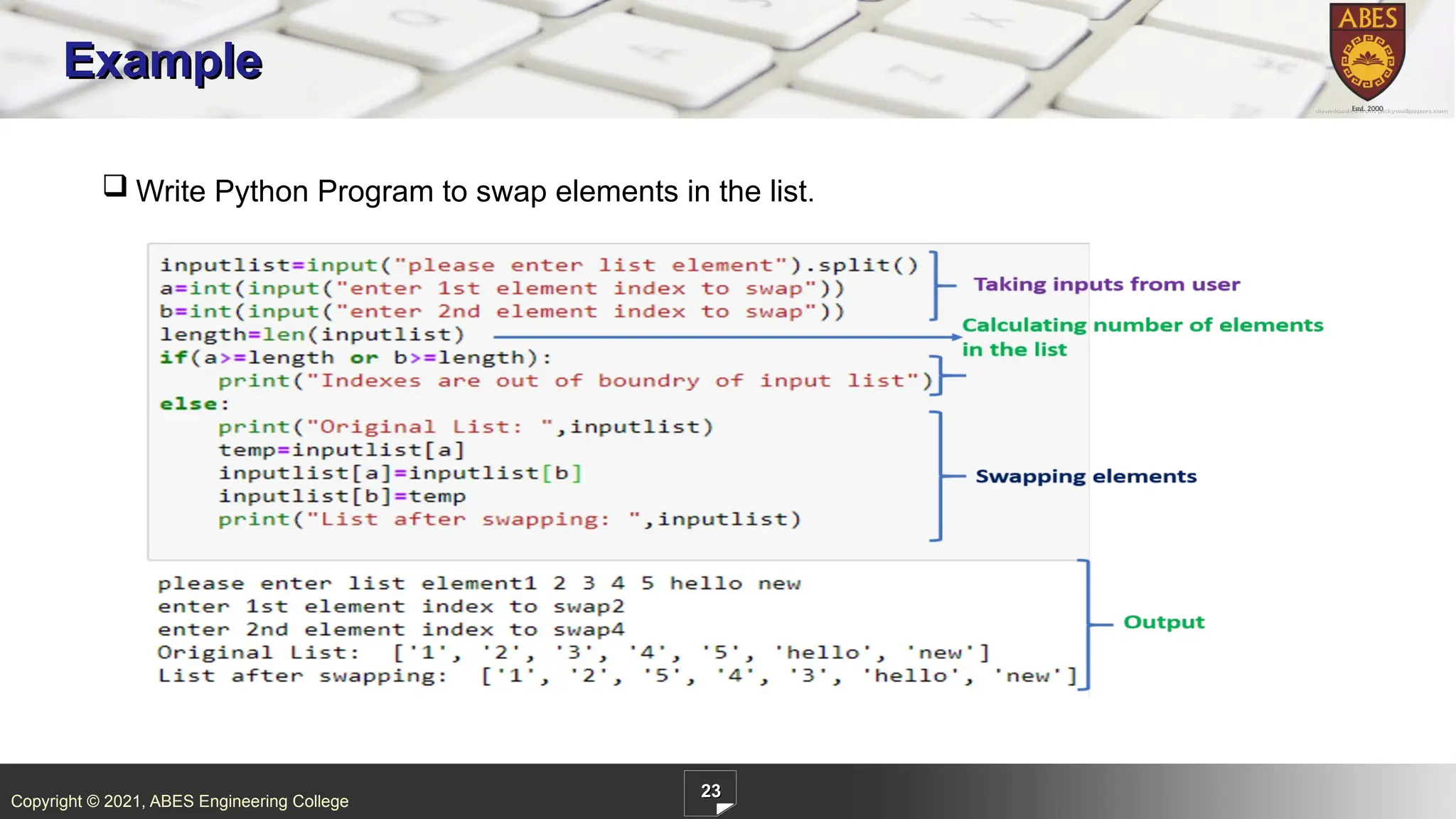
ABES Engineering College 23 Example Write Python Program to swap elements in the list.
23.
Copyright © 2021,
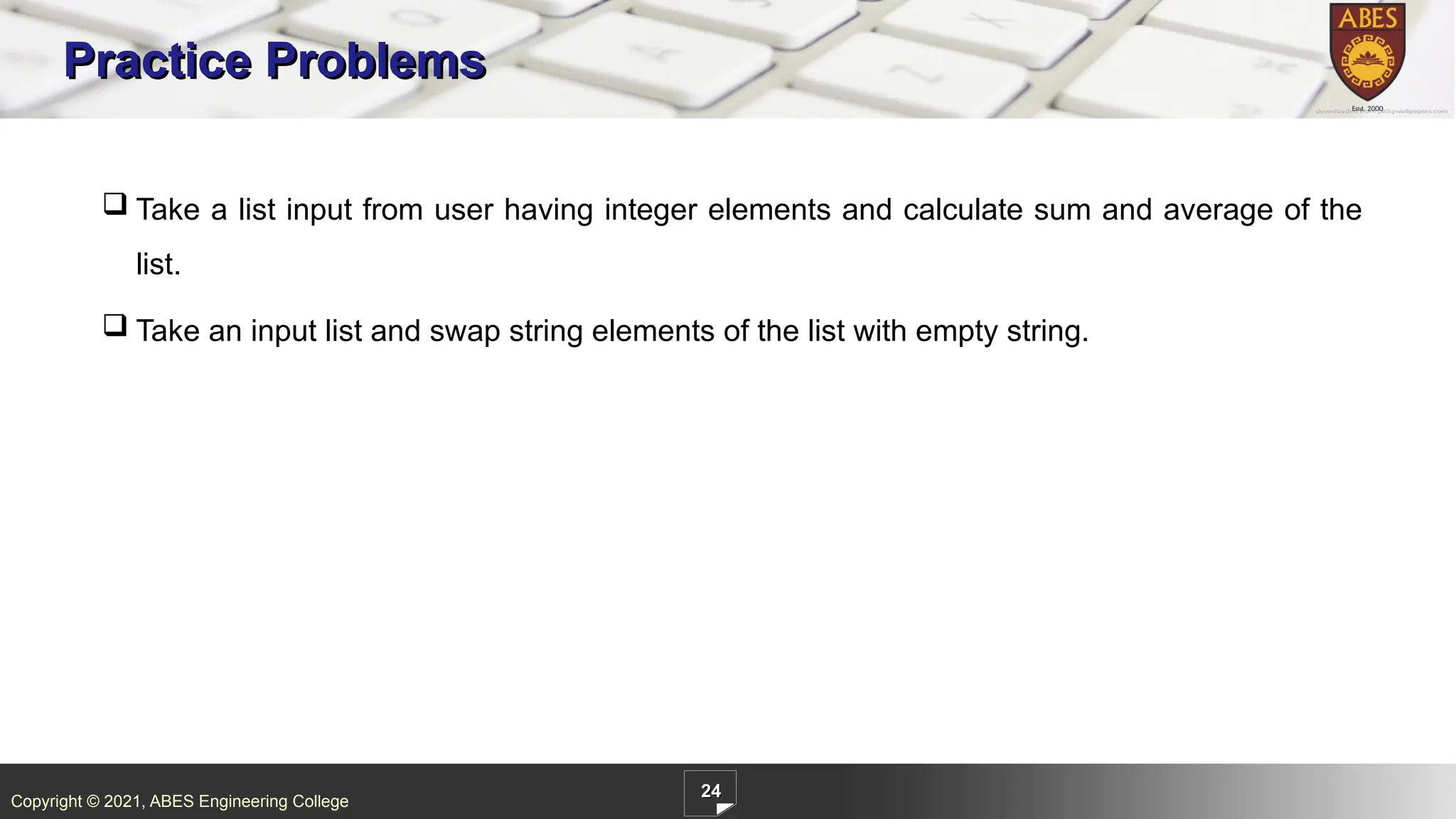
ABES Engineering College 24 Practice Problems Take a list input from user having integer elements and calculate sum and average of the list. Take an input list and swap string elements of the list with empty string.
24.
Copyright © 2021,
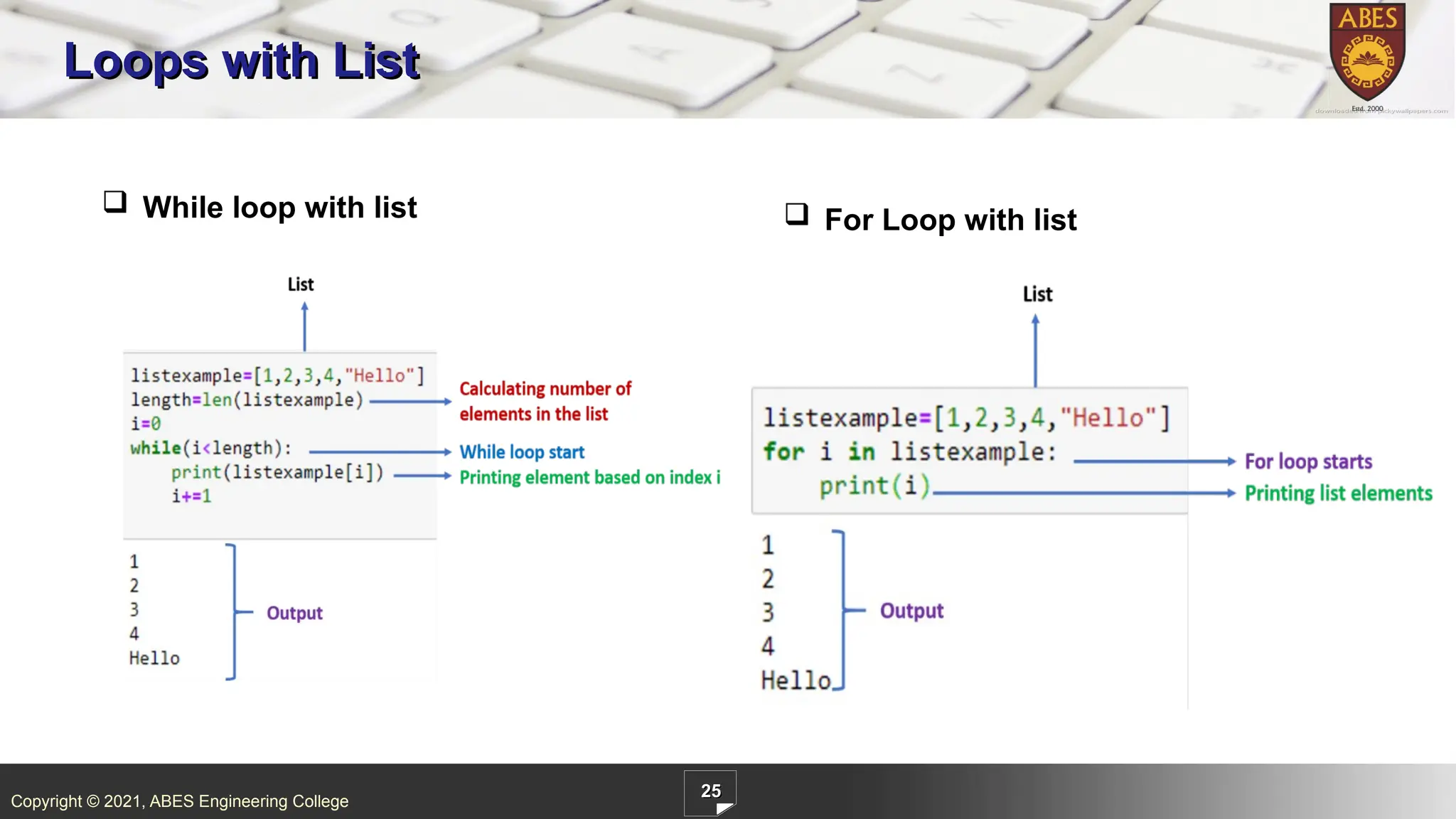
ABES Engineering College 25 Loops with List While loop with list For Loop with list
25.
Copyright © 2021,
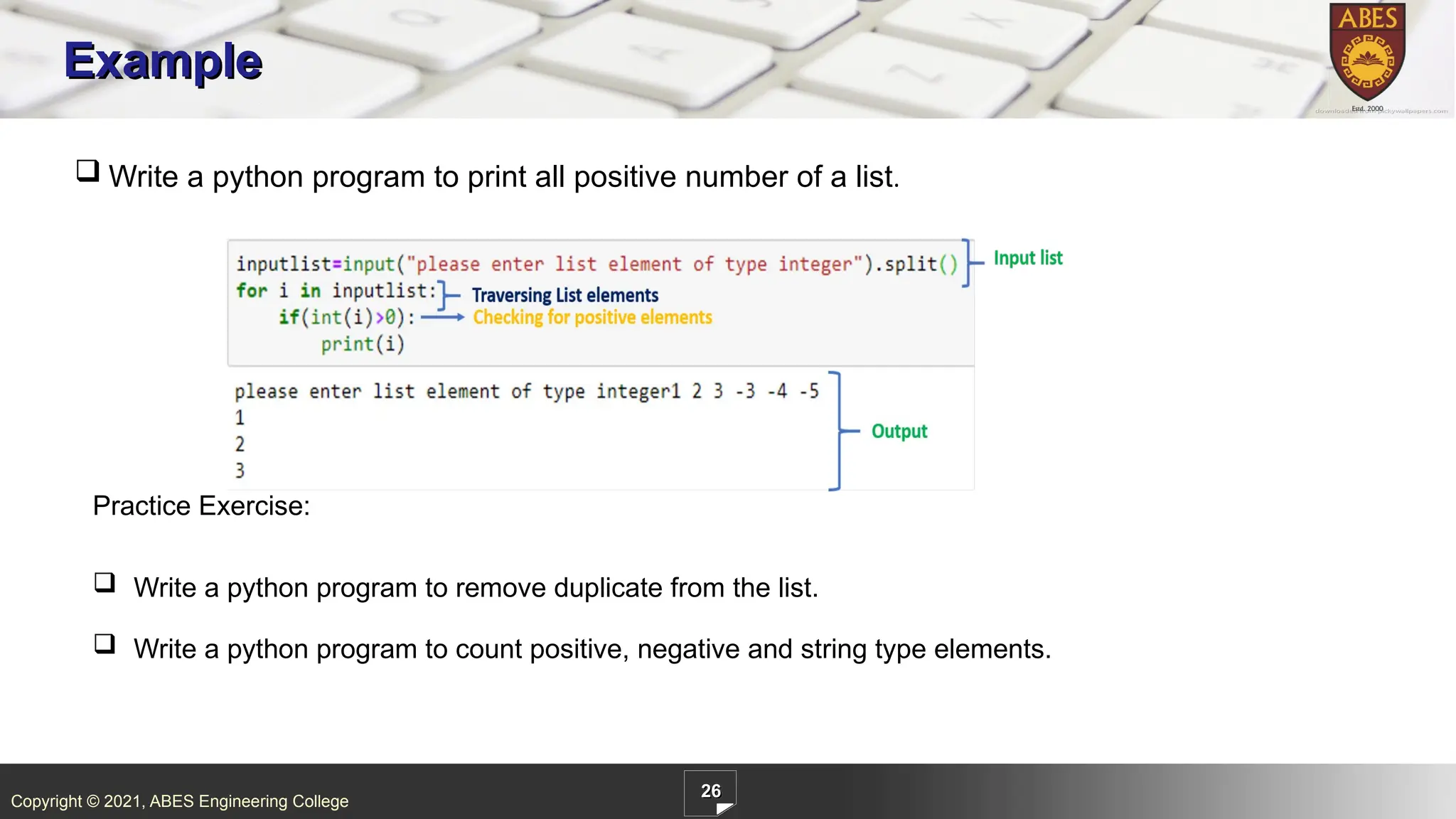
ABES Engineering College 26 Example Write a python program to print all positive number of a list. Practice Exercise: Write a python program to remove duplicate from the list. Write a python program to count positive, negative and string type elements.
26.
Copyright © 2021,
ABES Engineering College 27 Nested List When we have an element of a list in the form of the list itself, it is called Nested List. Elements of the nested list can be accessed using the 2-D indexing access method. . In this example, first [1] denotes [3,4] and second [1] represents 4, so it gives output as 4.
27.
Copyright © 2021,
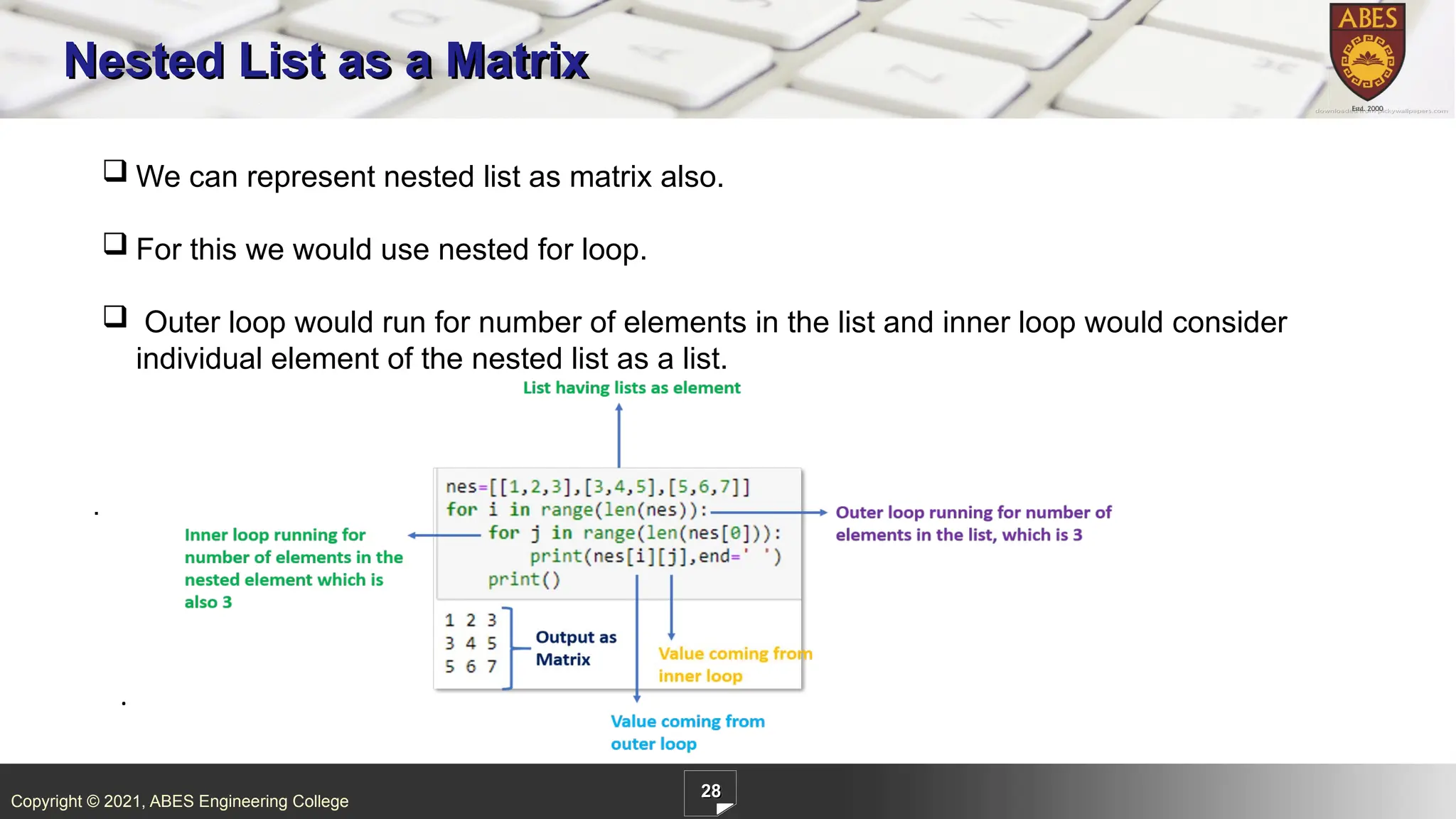
ABES Engineering College 28 Nested List as a Matrix We can represent nested list as matrix also. For this we would use nested for loop. Outer loop would run for number of elements in the list and inner loop would consider individual element of the nested list as a list. . .
28.
Copyright © 2021,
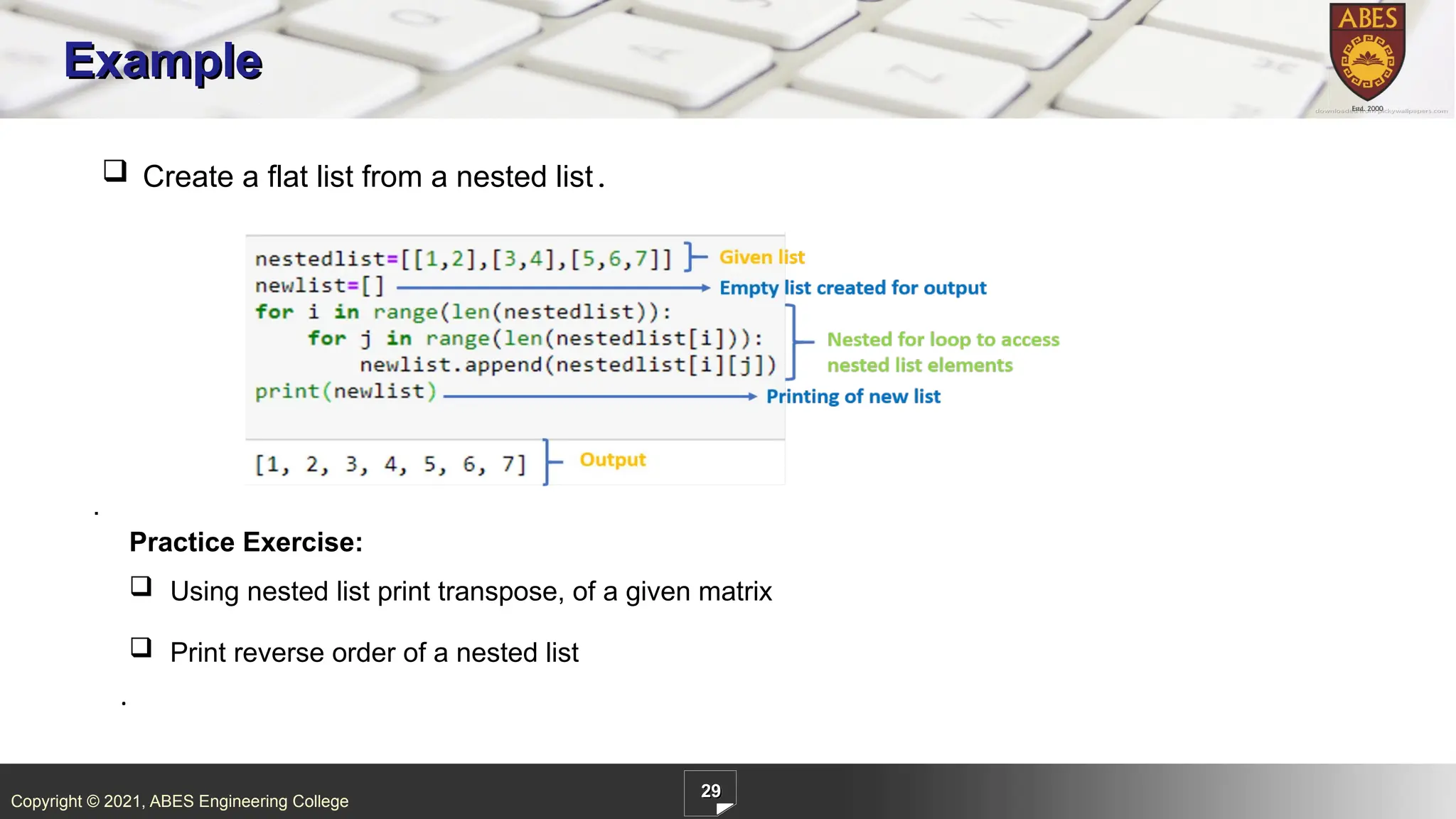
ABES Engineering College 29 Example Create a flat list from a nested list. . . Practice Exercise: Using nested list print transpose, of a given matrix Print reverse order of a nested list
29.
Copyright © 2021,
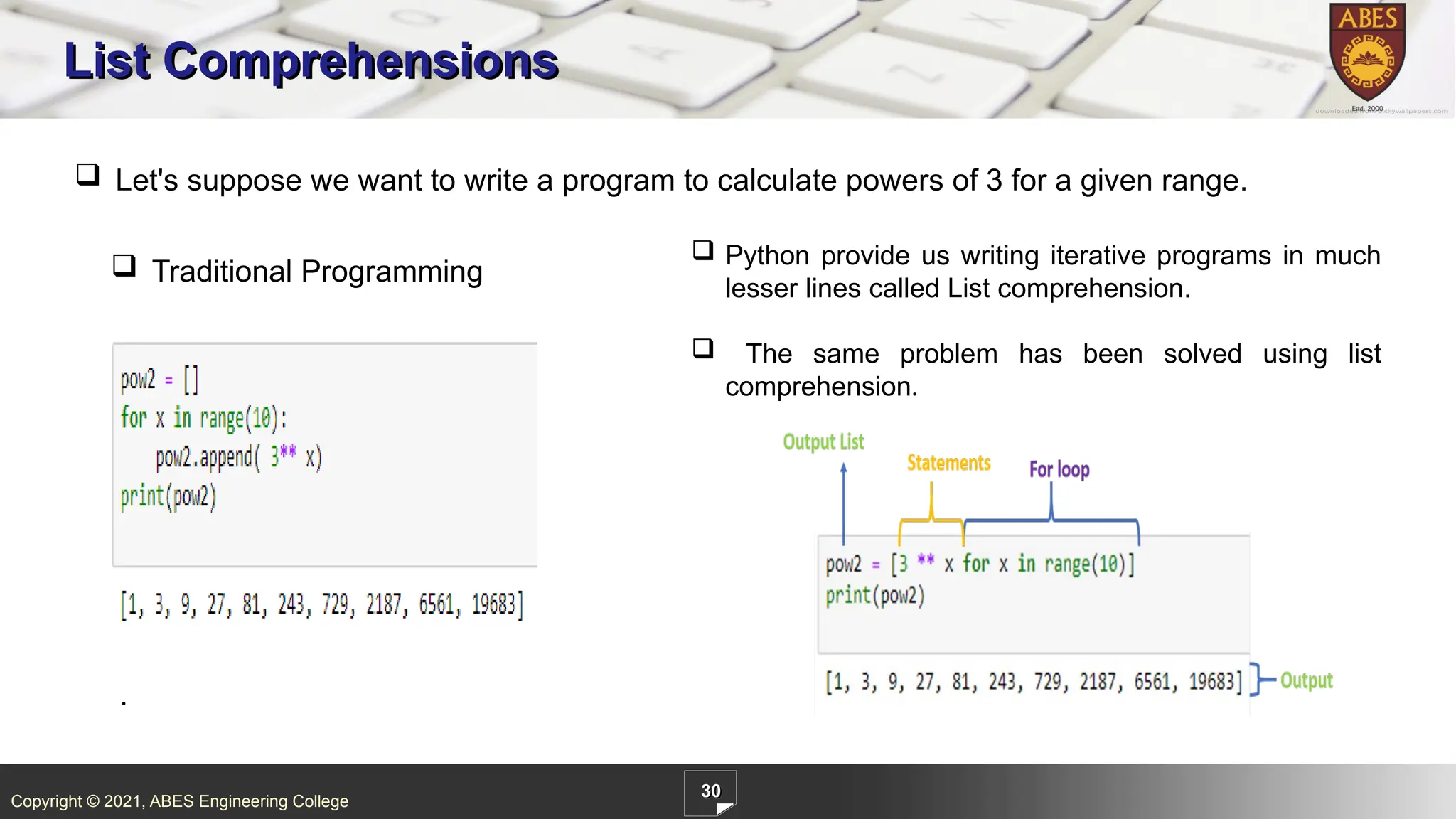
ABES Engineering College 30 List Comprehensions . Let's suppose we want to write a program to calculate powers of 3 for a given range. Python provide us writing iterative programs in much lesser lines called List comprehension. The same problem has been solved using list comprehension. Traditional Programming
30.
Copyright © 2021,
ABES Engineering College 31 List Comprehension Syntax: [ statements for an item in list ] . IF ELSE : We should notice one change that because in if-else case output is separated based on the condition. if-else and conditions has been written along with statements. We have the facility of adding conditionals in the list comprehension.
31.
Copyright © 2021,
ABES Engineering College 32 Can you answer these questions? 1. What will be the Output of the following code? . A.[0,1,2,3,4,5] B.[0,1,2,3,4,5,6] C.[0,1,2,3] D. None of the Above
32.
Copyright © 2021,
ABES Engineering College 33 Can you answer these questions? 2. What will be the Output of the following code? . A. [5,7,9] B.[3,4,5] C.[6,7,8] D.[9,10,11]
33.
Copyright © 2021,
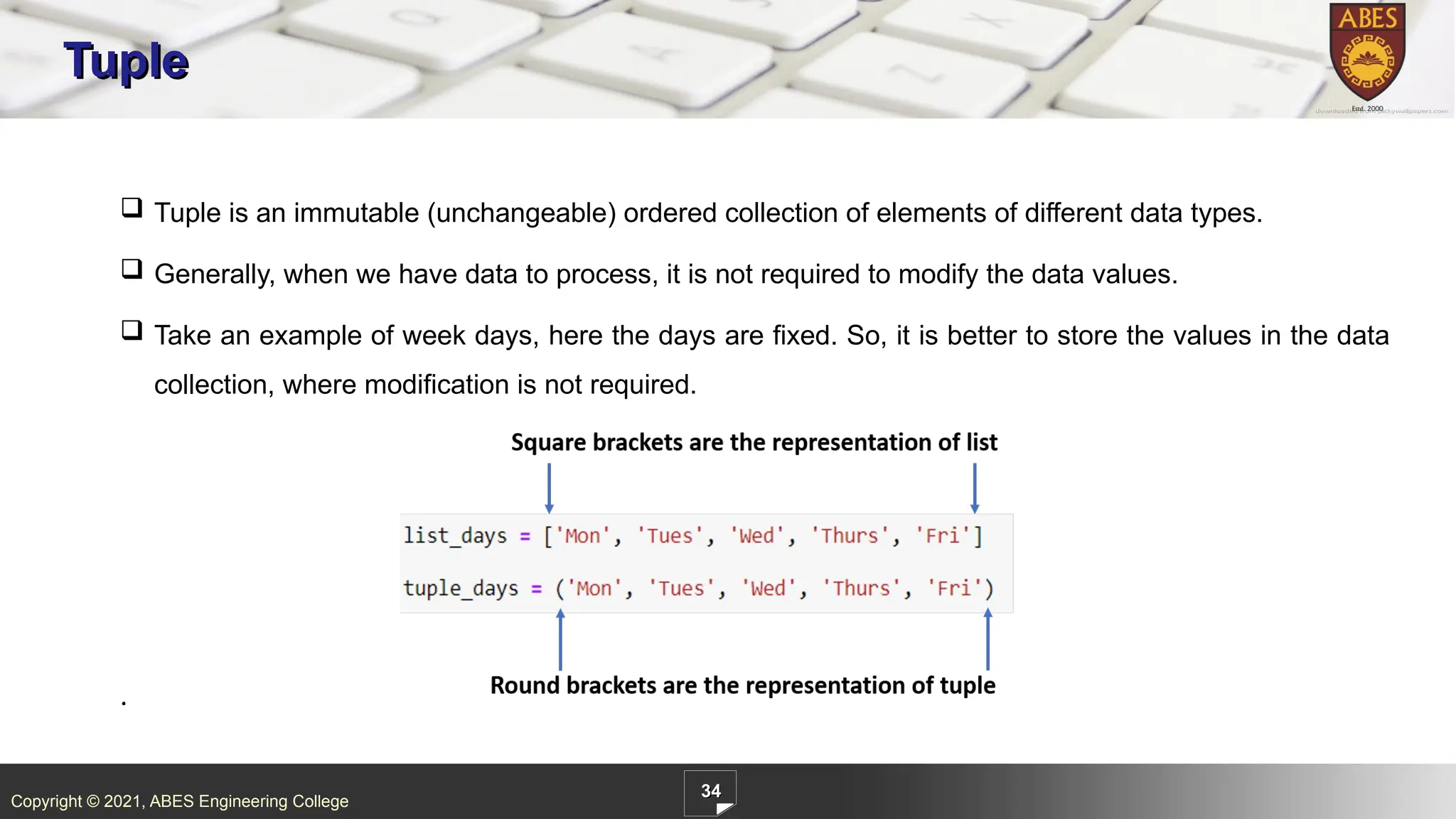
ABES Engineering College 34 Tuple . Tuple is an immutable (unchangeable) ordered collection of elements of different data types. Generally, when we have data to process, it is not required to modify the data values. Take an example of week days, here the days are fixed. So, it is better to store the values in the data collection, where modification is not required.
34.
Copyright © 2021,
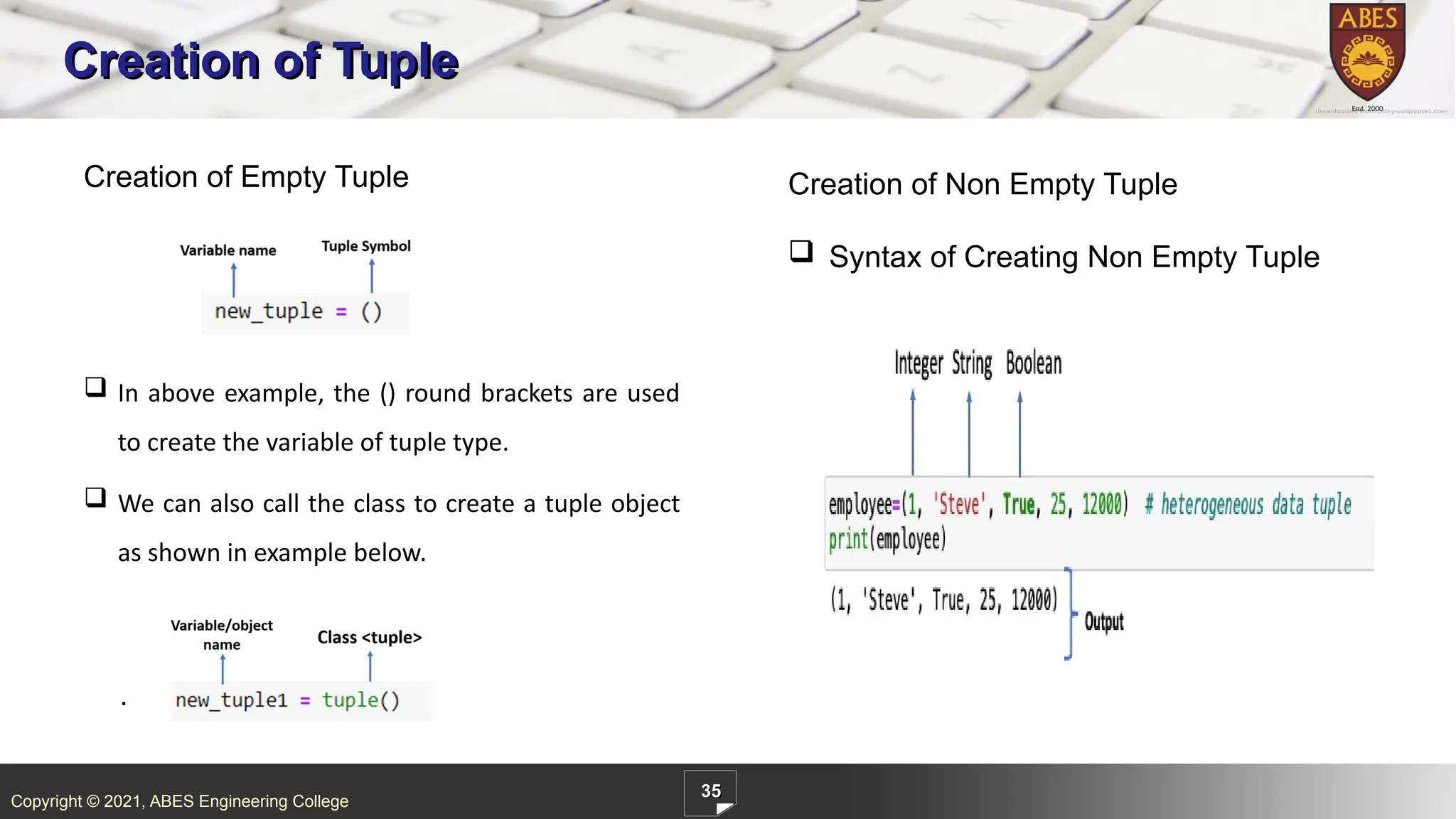
ABES Engineering College 35 Creation of Tuple . Creation of Empty Tuple Creation of Non Empty Tuple Syntax of Creating Non Empty Tuple In above example, the () round brackets are used to create the variable of tuple type. We can also call the class to create a tuple object as shown in example below.
35.
Copyright © 2021,
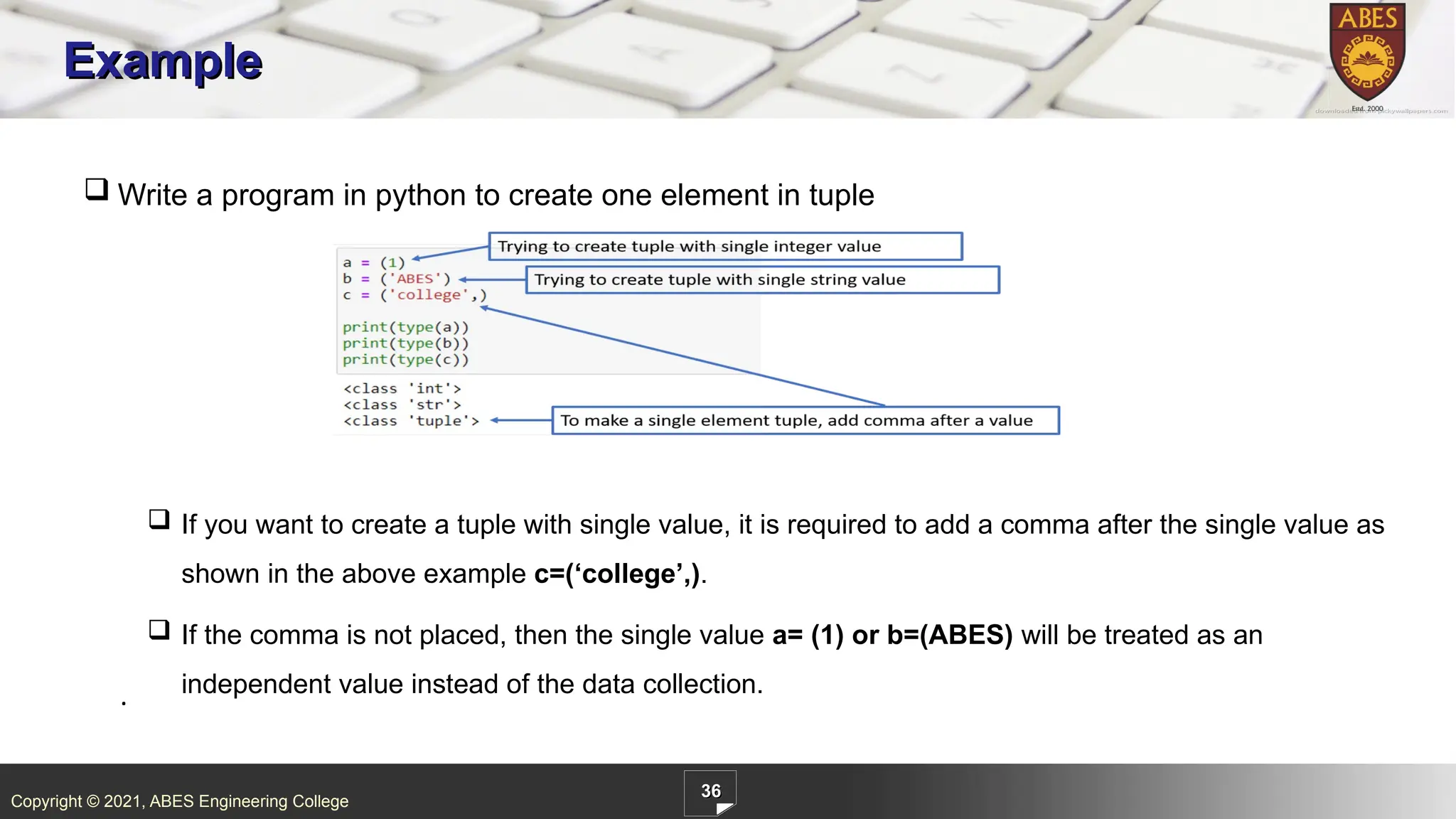
ABES Engineering College 36 Example . Write a program in python to create one element in tuple If you want to create a tuple with single value, it is required to add a comma after the single value as shown in the above example c=(‘college’,). If the comma is not placed, then the single value a= (1) or b=(ABES) will be treated as an independent value instead of the data collection.
36.
Copyright © 2021,
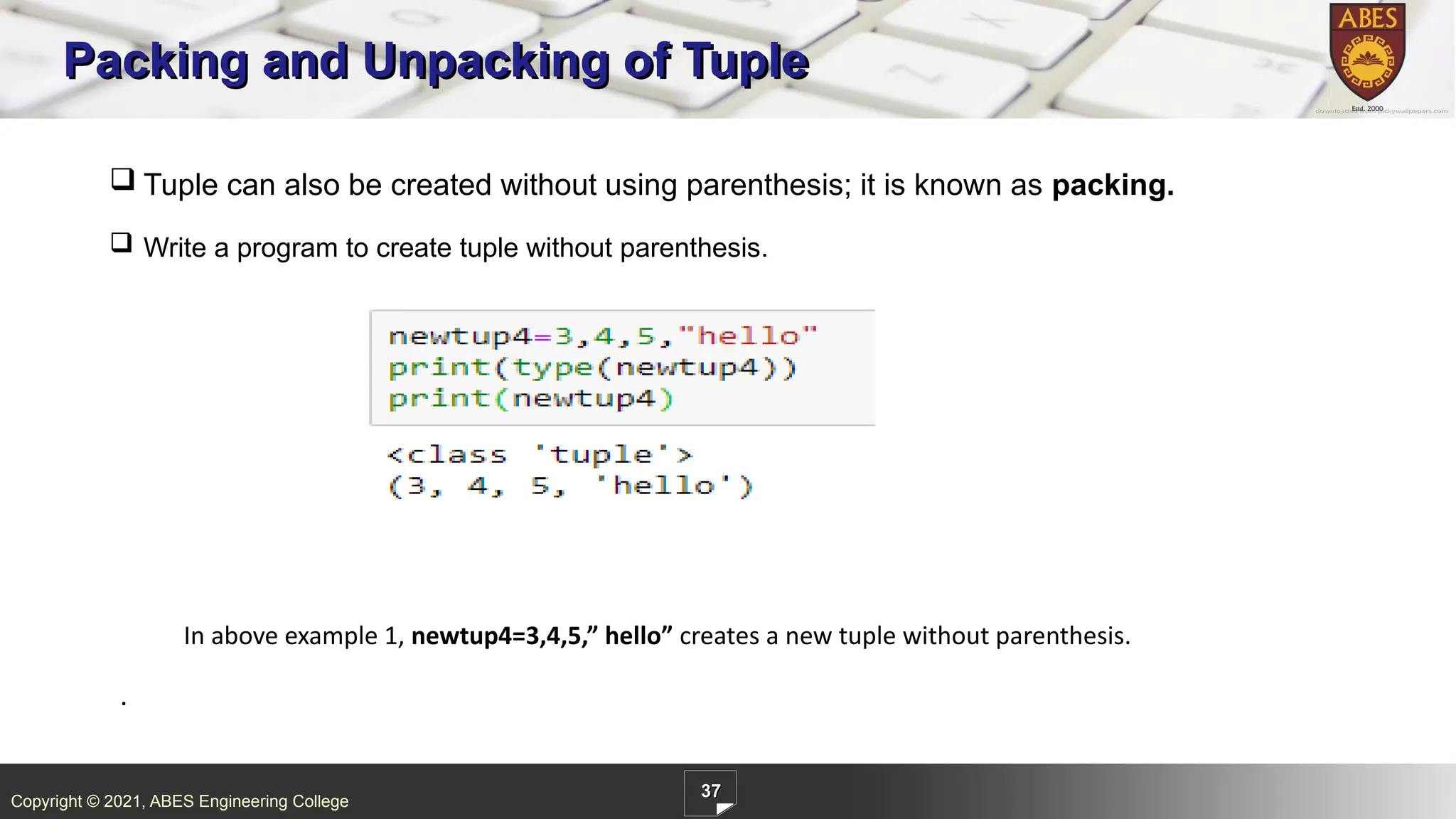
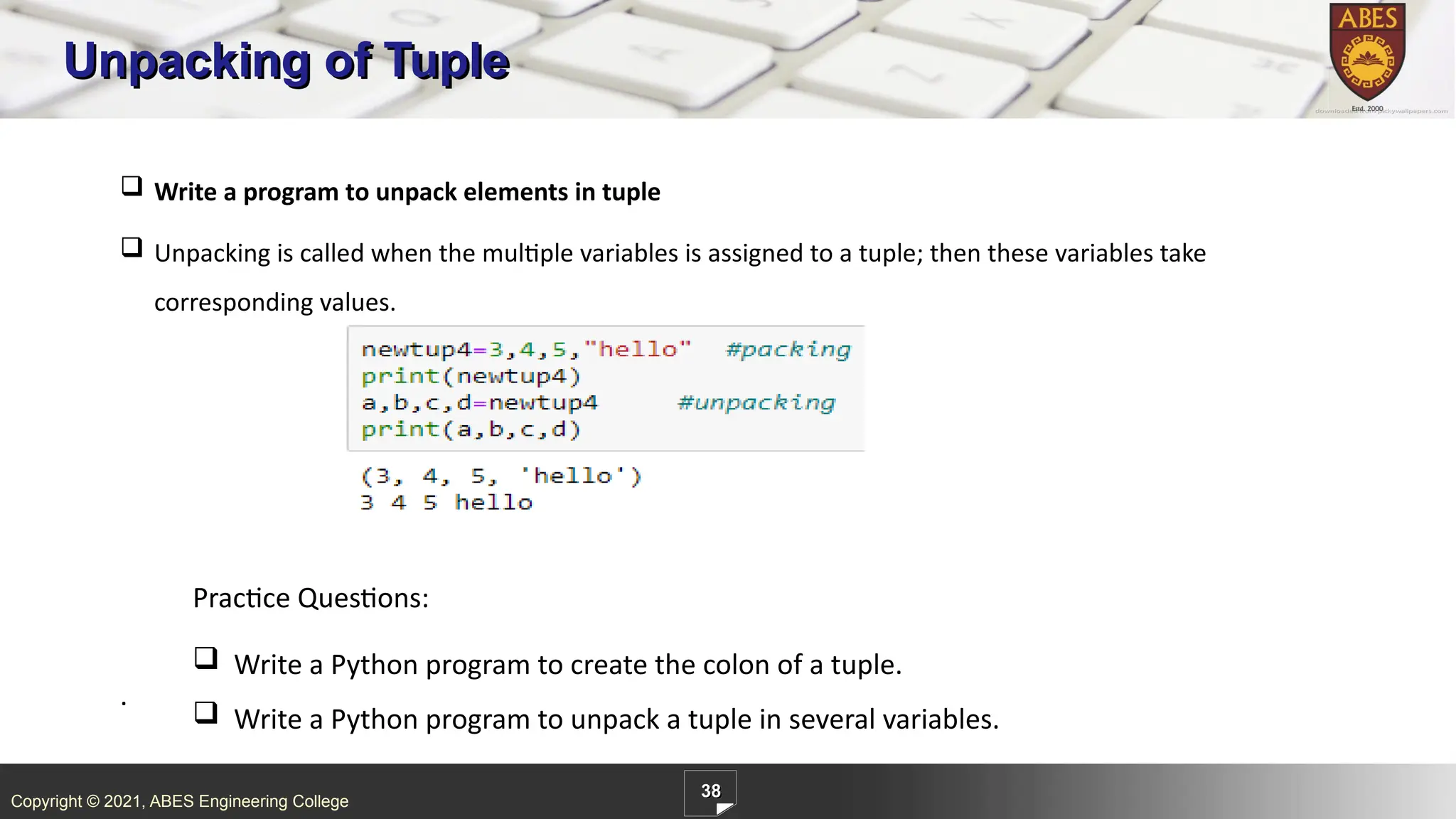
ABES Engineering College 37 Packing and Unpacking of Tuple . Tuple can also be created without using parenthesis; it is known as packing. Write a program to create tuple without parenthesis. In above example 1, newtup4=3,4,5,” hello” creates a new tuple without parenthesis.
37.
Copyright © 2021,
ABES Engineering College 38 Unpacking of Tuple . Write a program to unpack elements in tuple Unpacking is called when the multiple variables is assigned to a tuple; then these variables take corresponding values. Practice Questions: Write a Python program to create the colon of a tuple. Write a Python program to unpack a tuple in several variables.
38.
Copyright © 2021,
ABES Engineering College 39 Accessing Elements in Tuple . Tuple elements can be accessed using indexes, just like String and List . Each element in the tuple is accessed by the index in the square brackets []. An index starts with zero and ends with (number of elements - 1) Example: Write a program to access index 1 element from tuple. In above example 1: tuple newtup carries multiple types of data in it as “hello” is string, 2 is integer, and 23.45 is float. If we can fetch the index 1 element using print(newtup[1]).
39.
Copyright © 2021,
ABES Engineering College 40 Contd… . Write a program to access index 0 element from tuple. Basically, the -1 index will return the last value of tuple. Indexes start from zero, and it goes up to a number of elements or say -1. Take another example to fetch the -1 index from tuple. last element is accessed by print(tuple_days[-1]).
40.
Copyright © 2021,
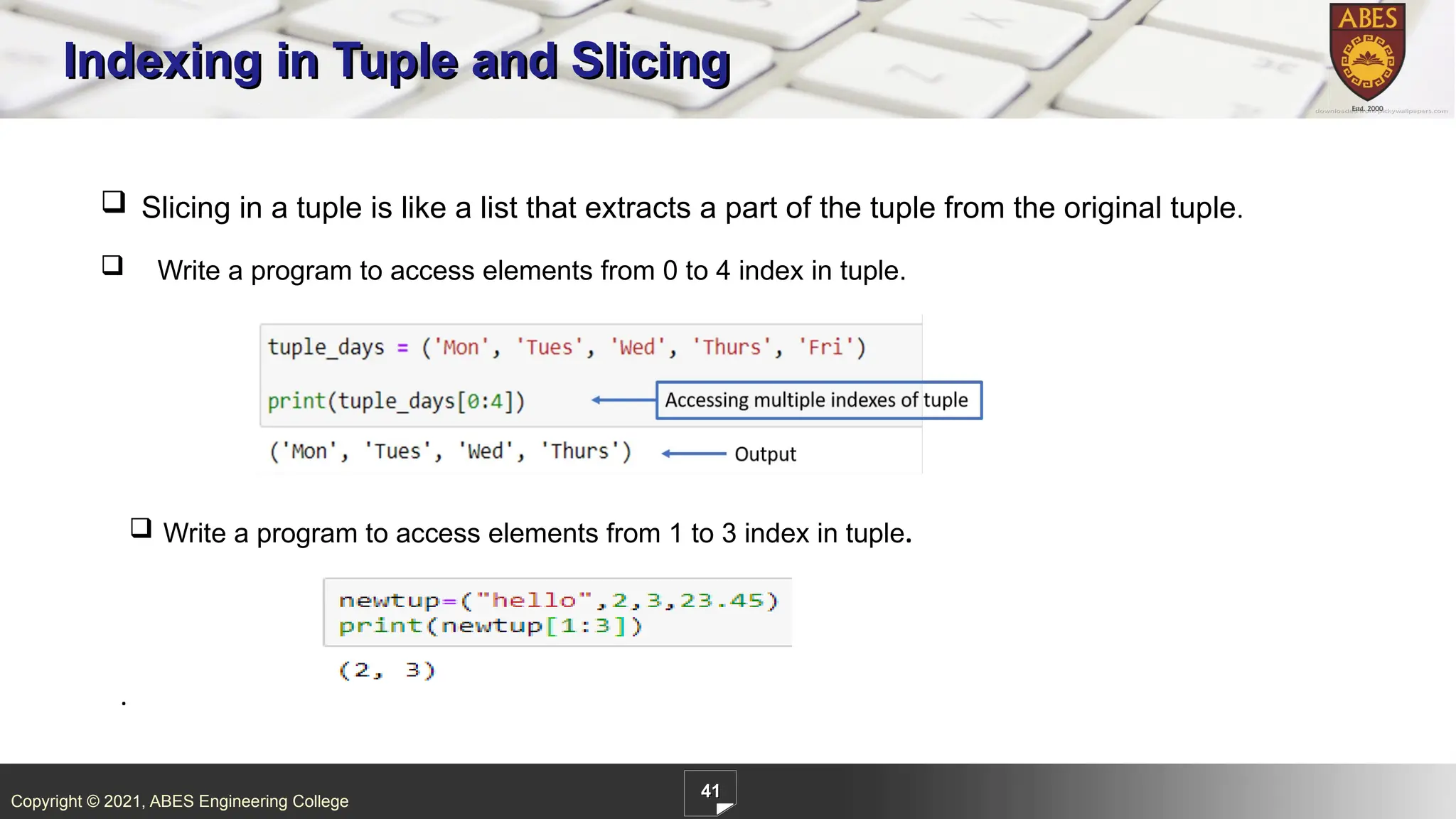
ABES Engineering College 41 Indexing in Tuple and Slicing . Slicing in a tuple is like a list that extracts a part of the tuple from the original tuple. Write a program to access elements from 0 to 4 index in tuple. Write a program to access elements from 1 to 3 index in tuple.
41.
Copyright © 2021,
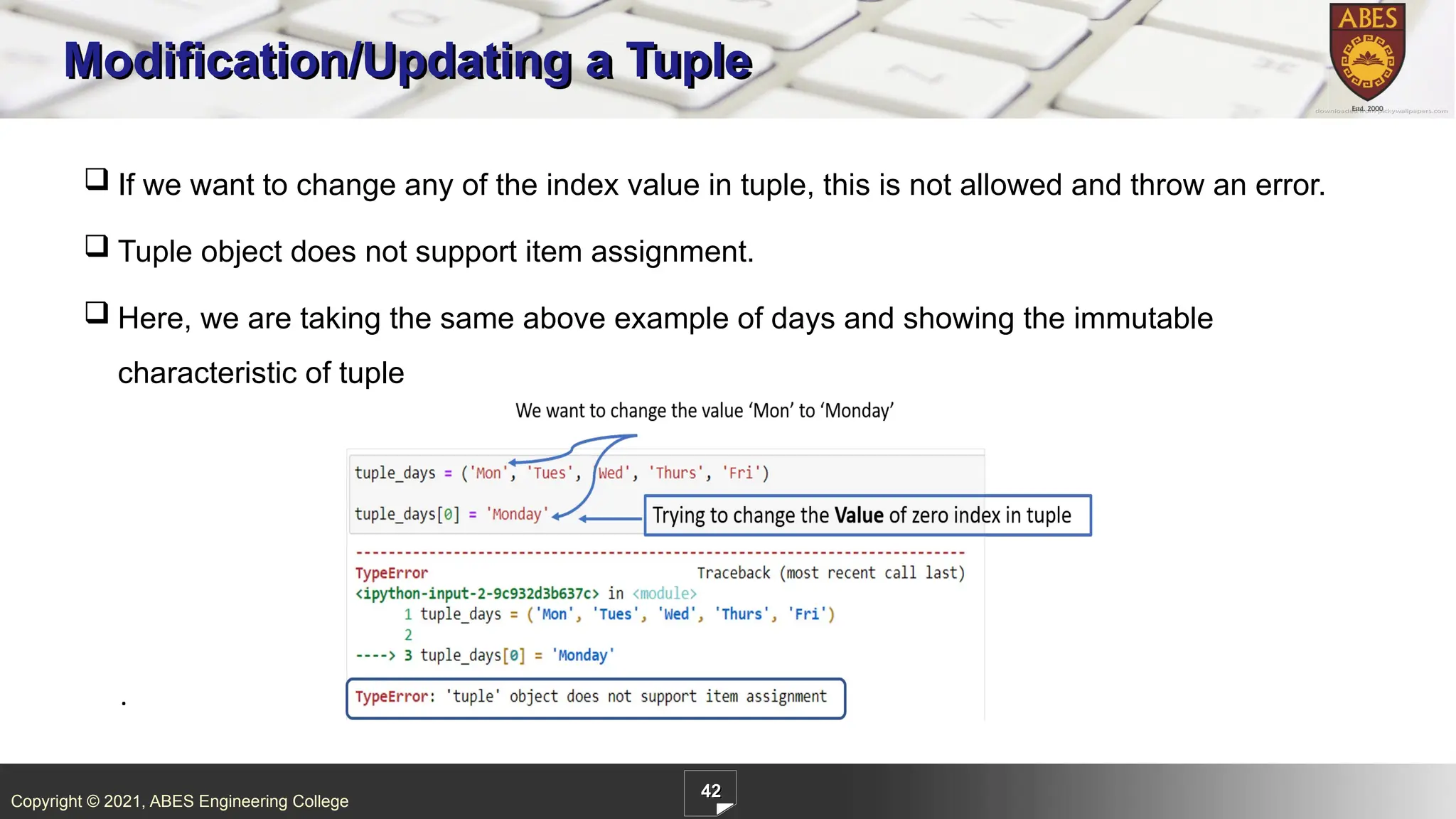
ABES Engineering College 42 Modification/Updating a Tuple . If we want to change any of the index value in tuple, this is not allowed and throw an error. Tuple object does not support item assignment. Here, we are taking the same above example of days and showing the immutable characteristic of tuple
42.
Copyright © 2021,
ABES Engineering College 43 Practice Exercises . Write a Python program to get the 4th element and 4th element from last of a tuple. Write a Python program to check whether an element exists within a tuple.
43.
Ver. No.: 1.1
Copyright © 2021, ABES Engineering College Quality Content for Outcome based Learning
44.
Copyright © 2021,
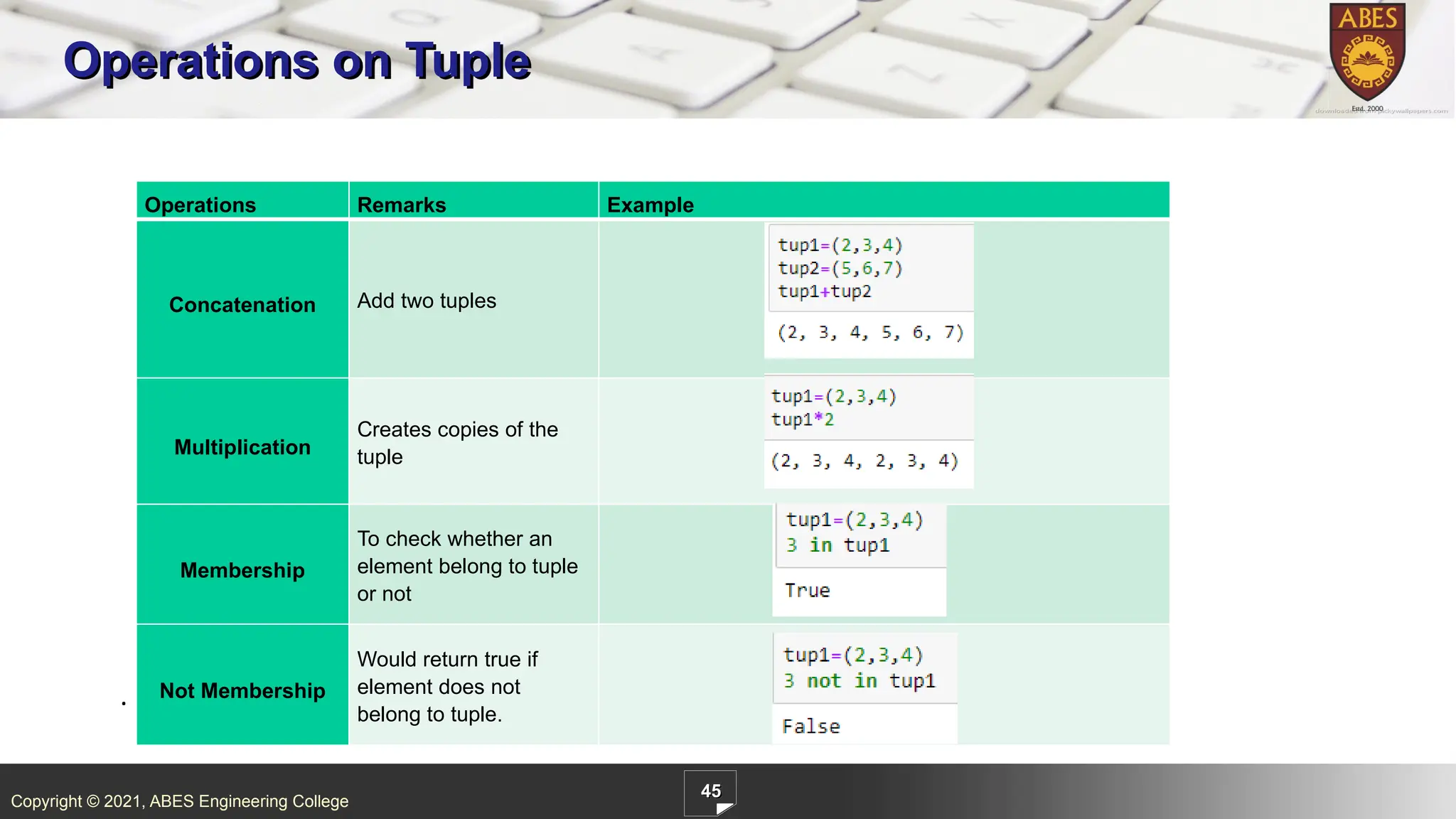
ABES Engineering College 45 Operations on Tuple . Tuple has some operations, which are listed below: Operations Remarks Example Concatenation Add two tuples Multiplication Creates copies of the tuple Membership To check whether an element belong to tuple or not Not Membership Would return true if element does not belong to tuple.
45.
Copyright © 2021,
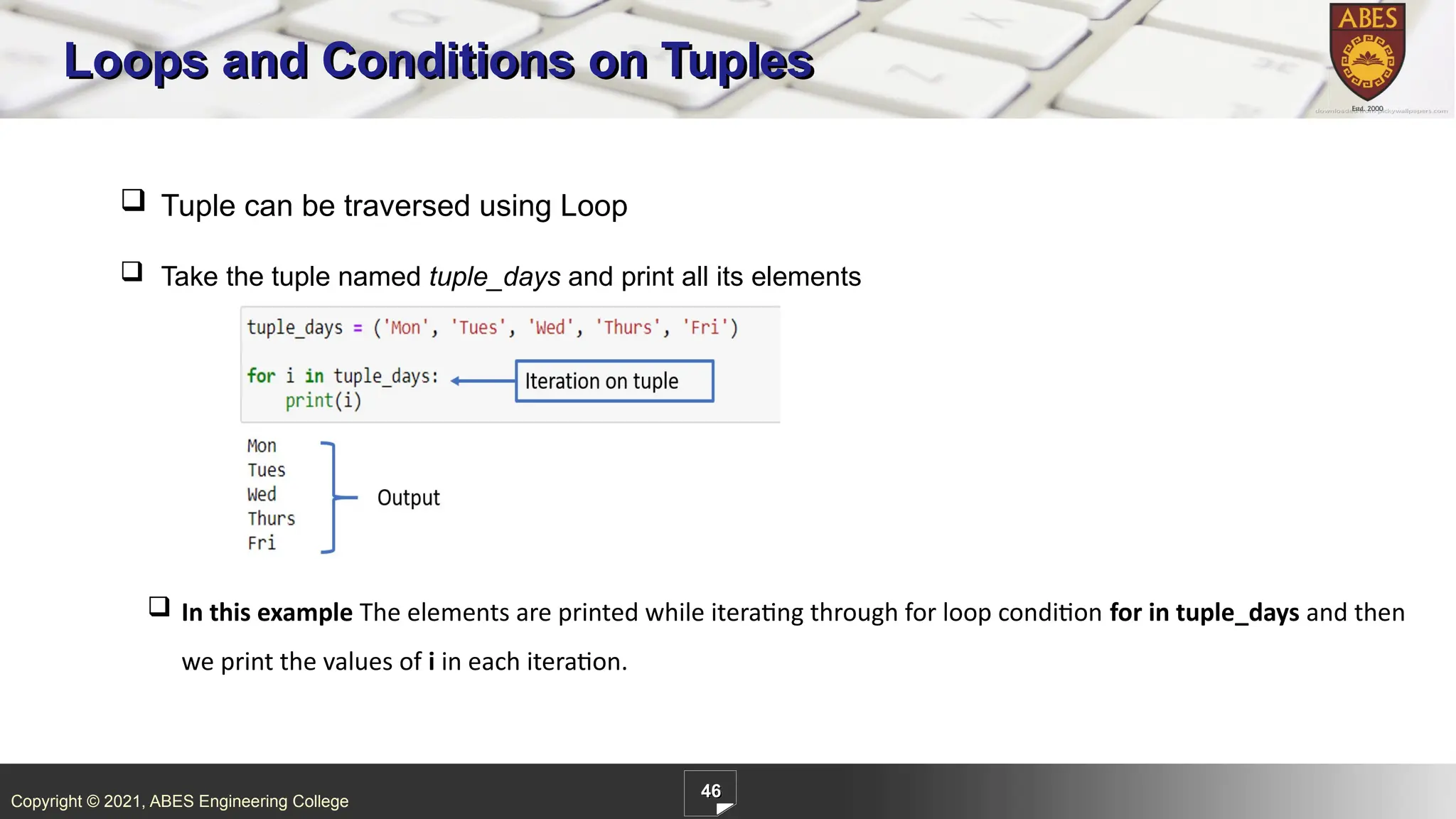
ABES Engineering College 46 Loops and Conditions on Tuples In this example The elements are printed while iterating through for loop condition for in tuple_days and then we print the values of i in each iteration. Tuple can be traversed using Loop Take the tuple named tuple_days and print all its elements
46.
Copyright © 2021,
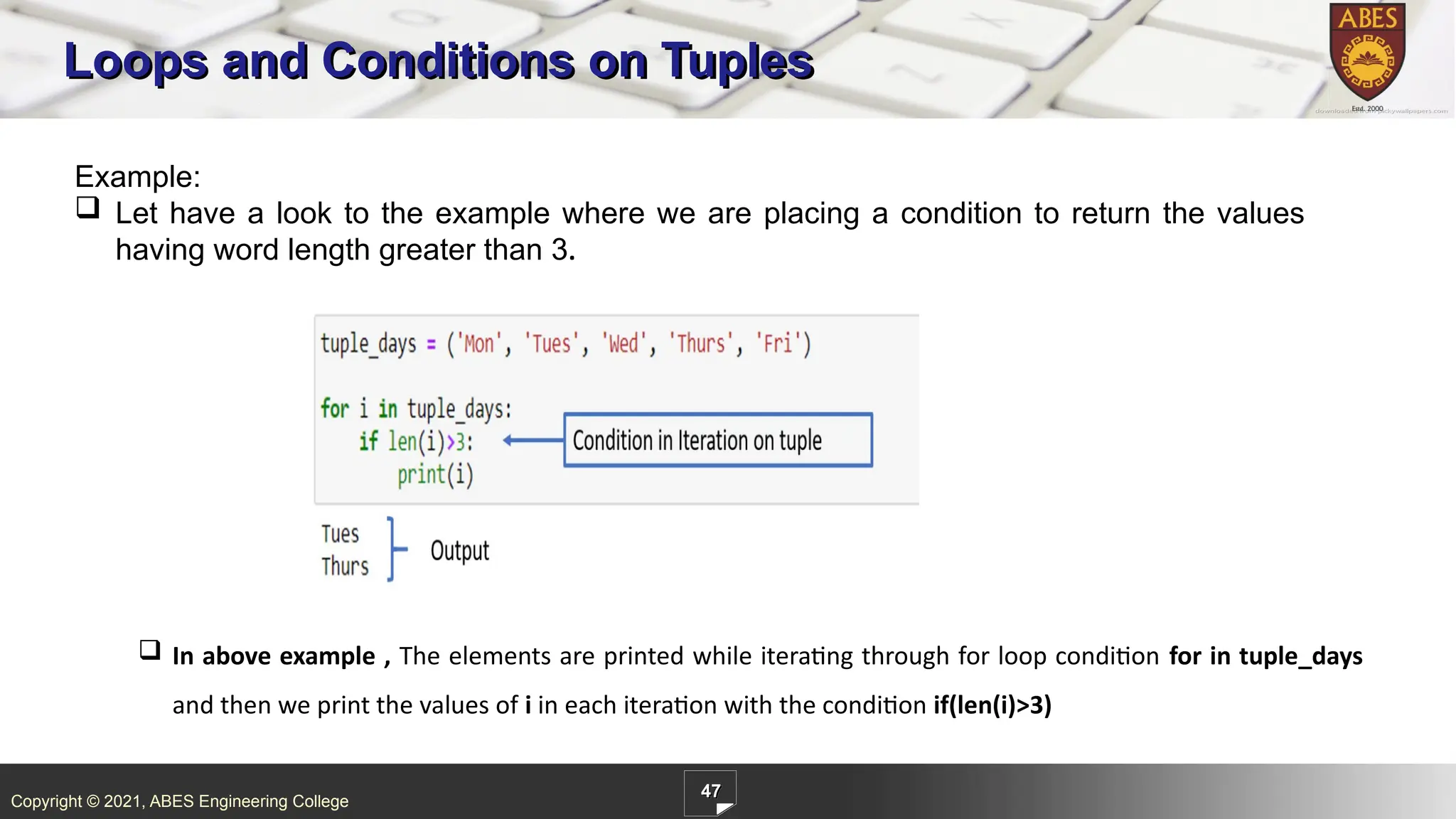
ABES Engineering College 47 Loops and Conditions on Tuples Example: Let have a look to the example where we are placing a condition to return the values having word length greater than 3. In above example , The elements are printed while iterating through for loop condition for in tuple_days and then we print the values of i in each iteration with the condition if(len(i)>3)
47.
Ver. No.: 1.1
Copyright © 2021, ABES Engineering College Quality Content for Outcome based Learning
48.
Copyright © 2021,
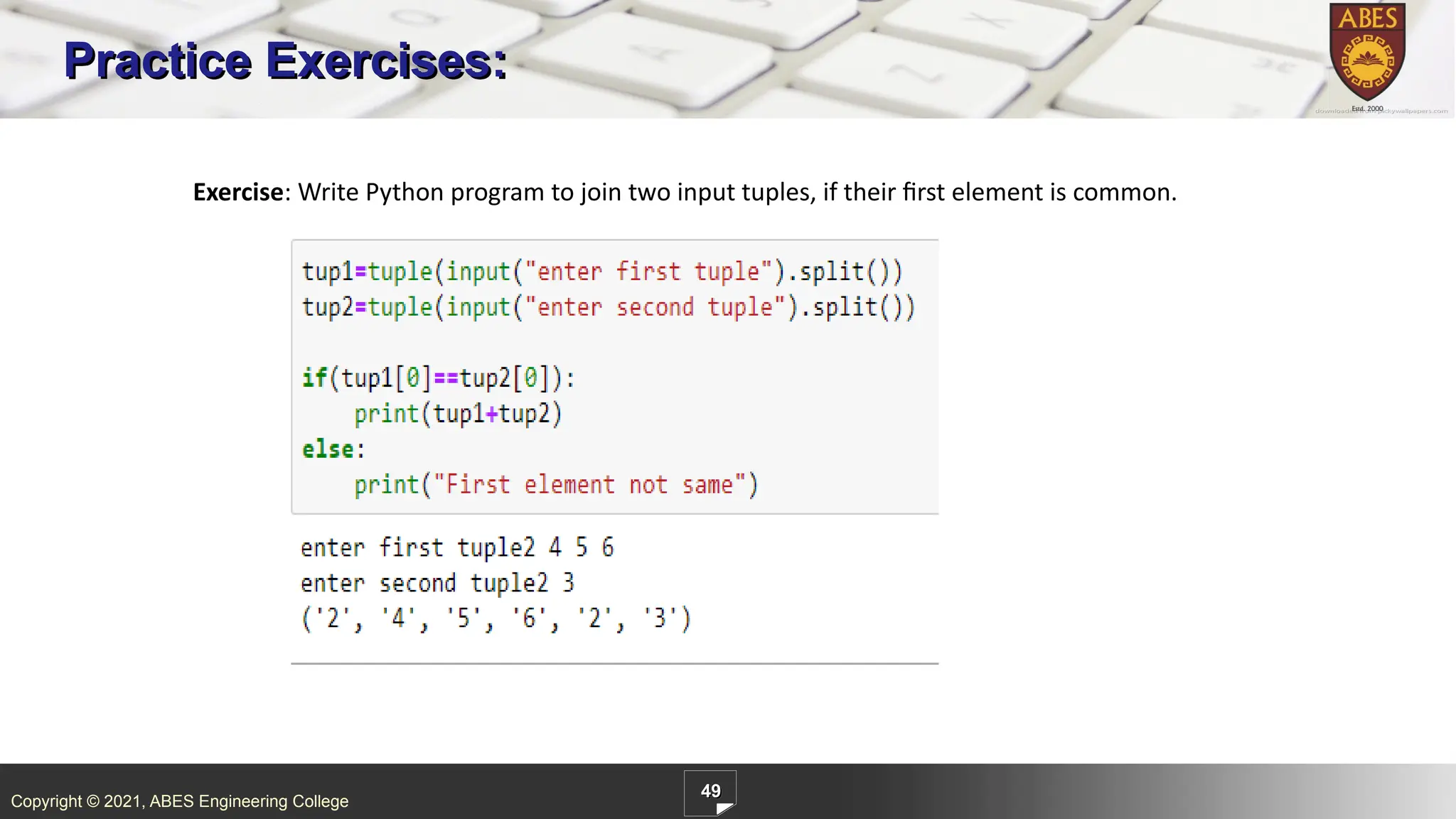
ABES Engineering College 49 Practice Exercises: Exercise: Write Python program to join two input tuples, if their first element is common.
49.
Copyright © 2021,
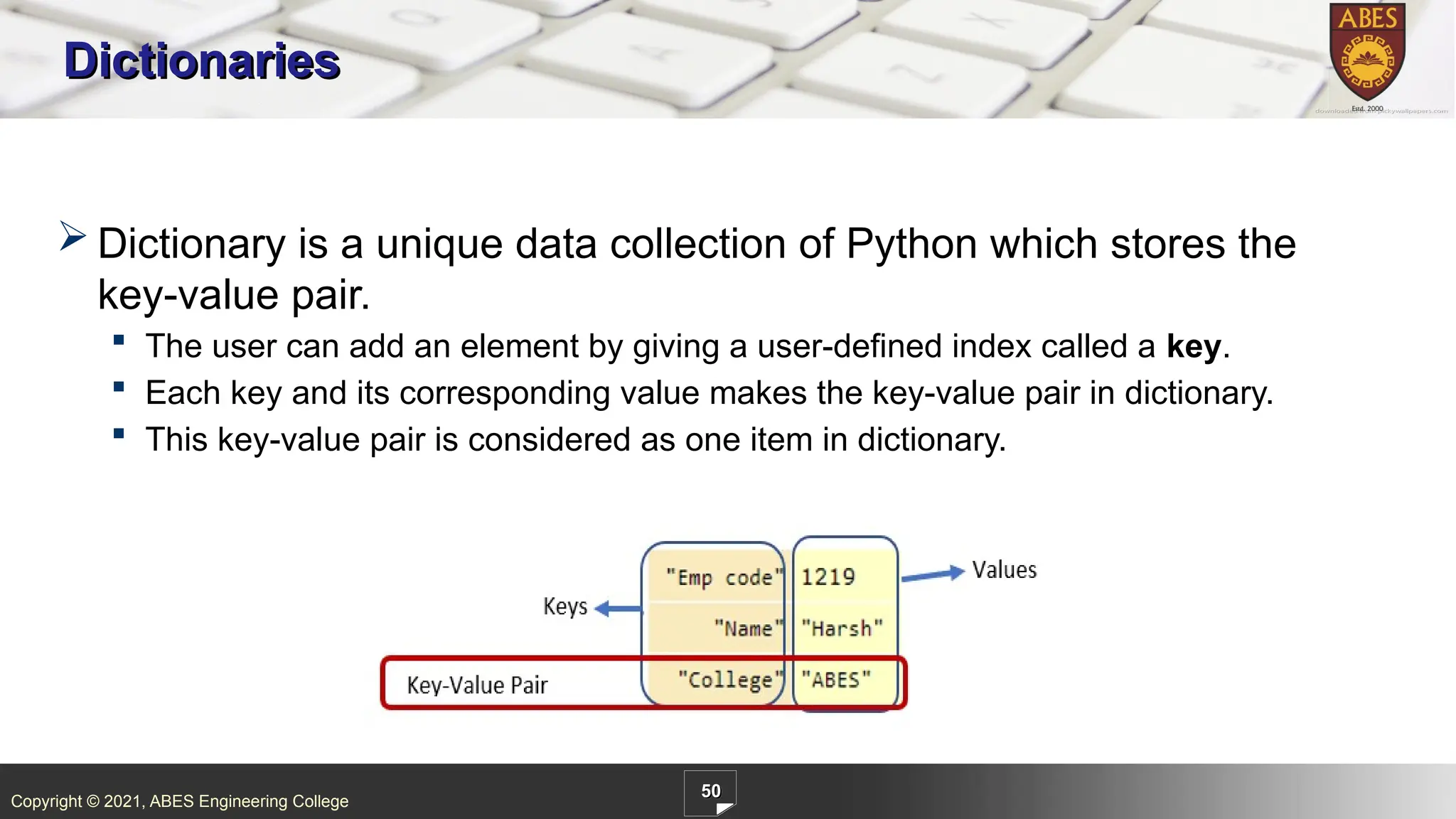
ABES Engineering College 50 Dictionaries Dictionary is a unique data collection of Python which stores the key-value pair. The user can add an element by giving a user-defined index called a key. Each key and its corresponding value makes the key-value pair in dictionary. This key-value pair is considered as one item in dictionary.
50.
Copyright © 2021,
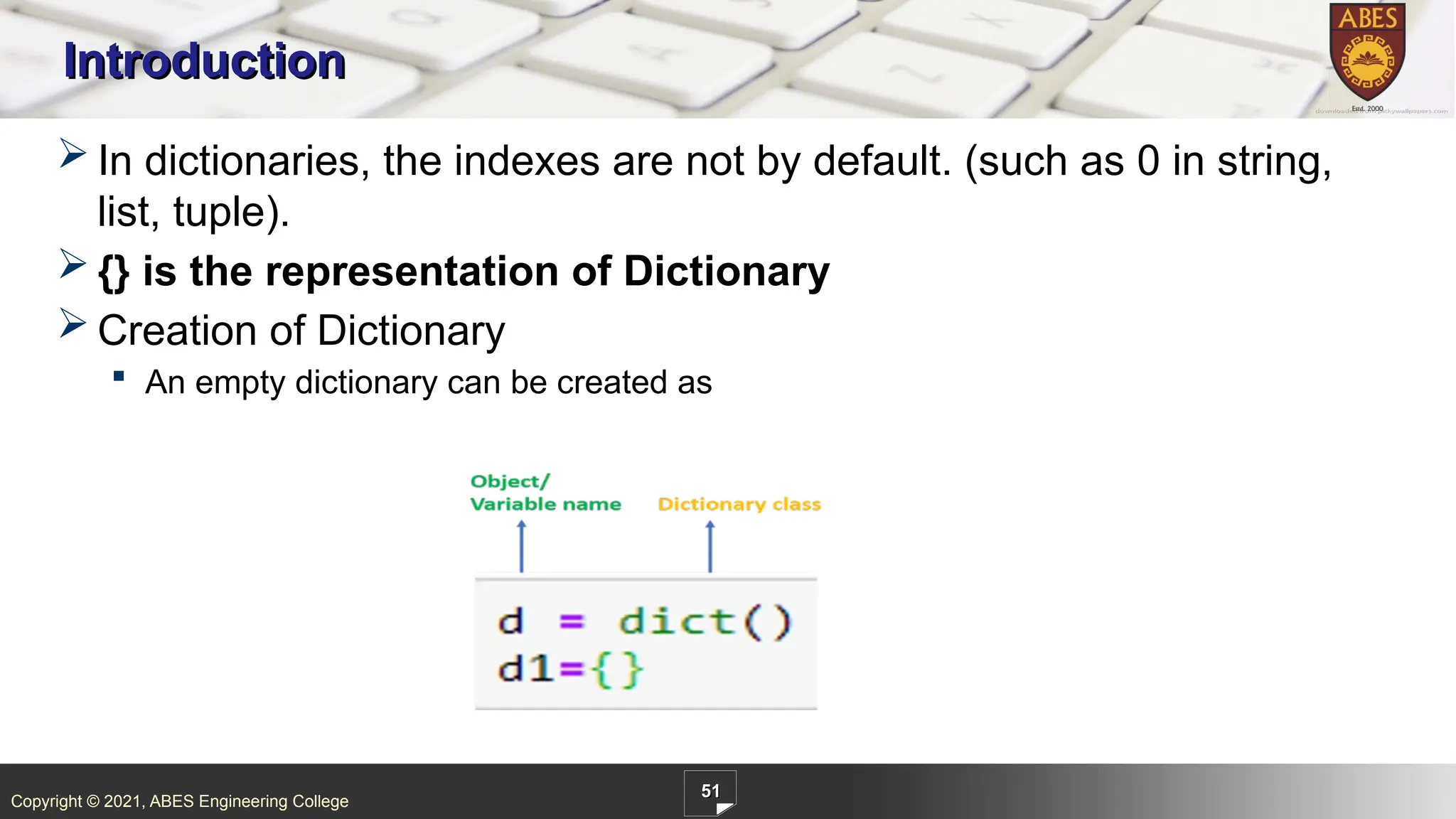
ABES Engineering College 51 Introduction In dictionaries, the indexes are not by default. (such as 0 in string, list, tuple). {} is the representation of Dictionary Creation of Dictionary An empty dictionary can be created as
51.
Copyright © 2021,
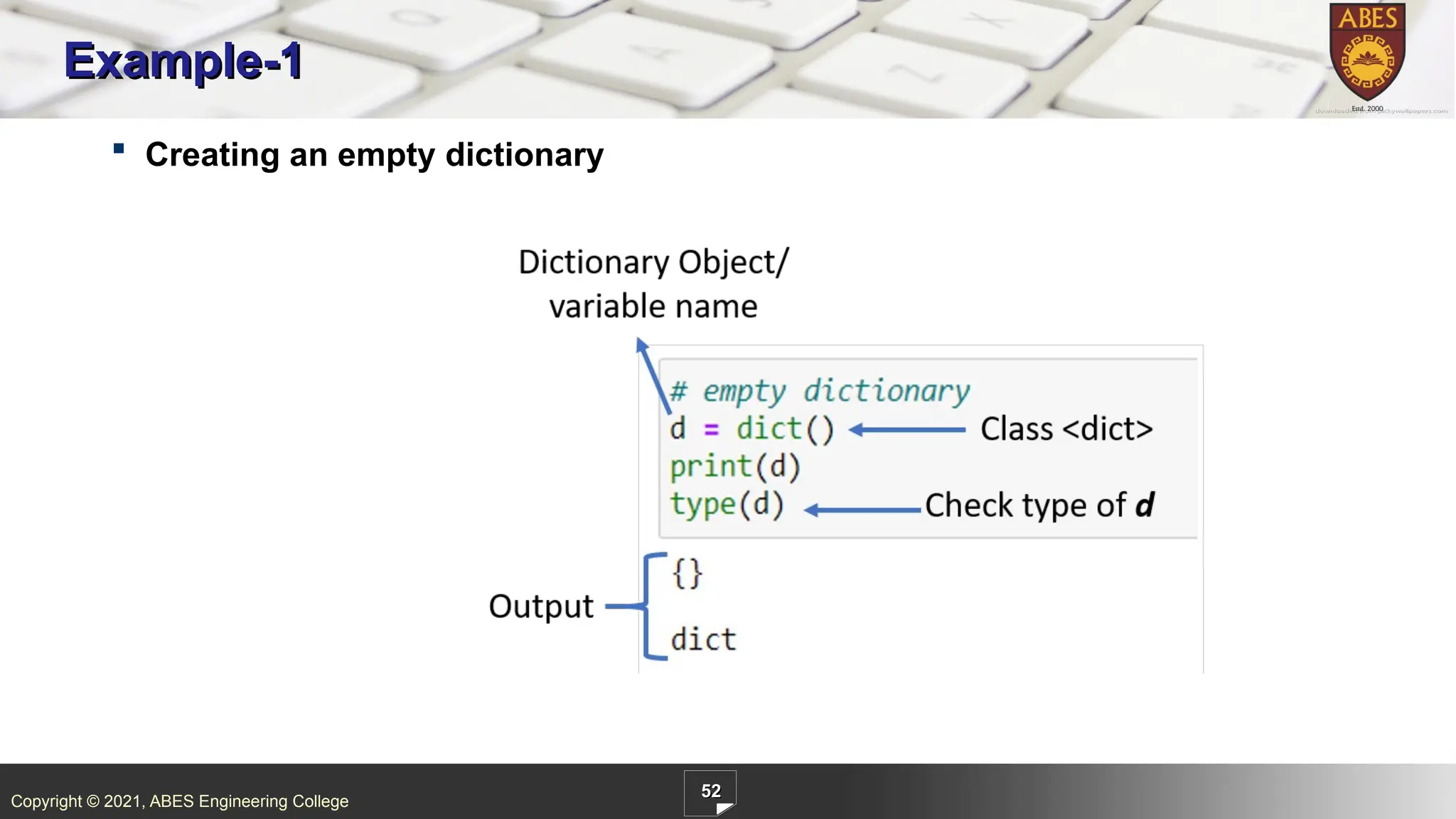
ABES Engineering College 52 Example-1 Creating an empty dictionary
52.
Copyright © 2021,
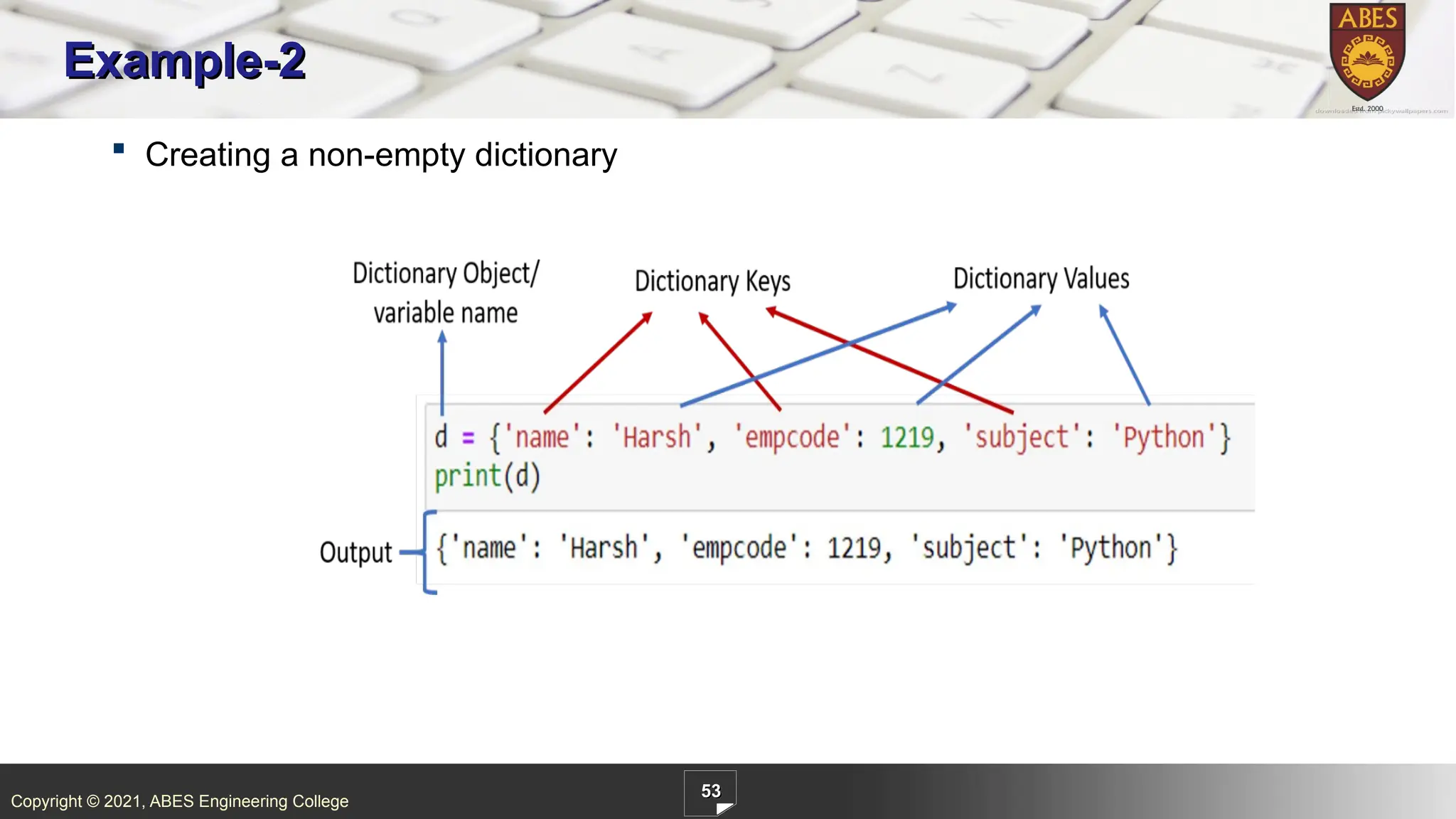
ABES Engineering College 53 Example-2 Creating a non-empty dictionary
53.
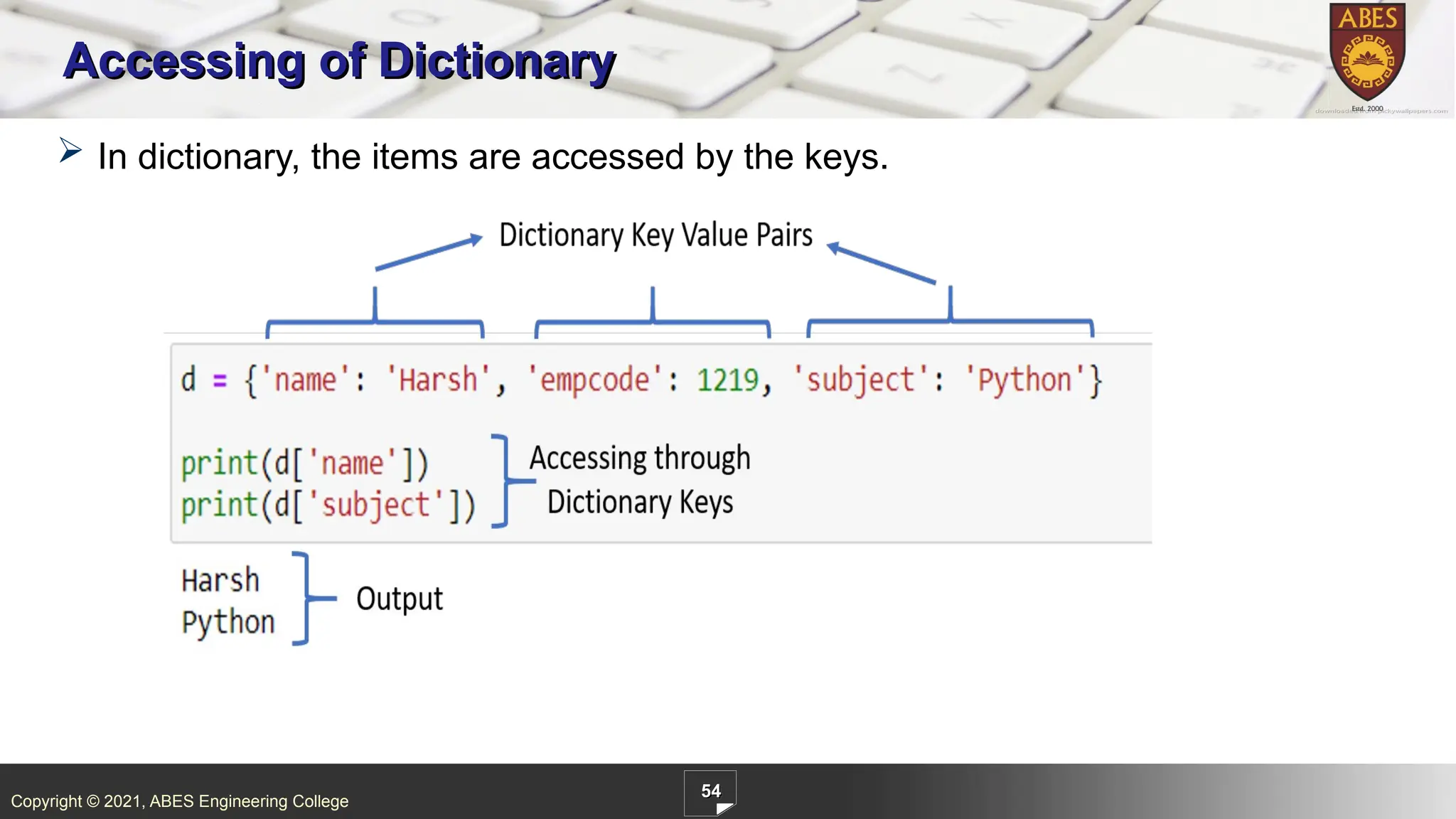
Copyright © 2021,
ABES Engineering College 54 Accessing of Dictionary In dictionary, the items are accessed by the keys.
54.
Copyright © 2021,
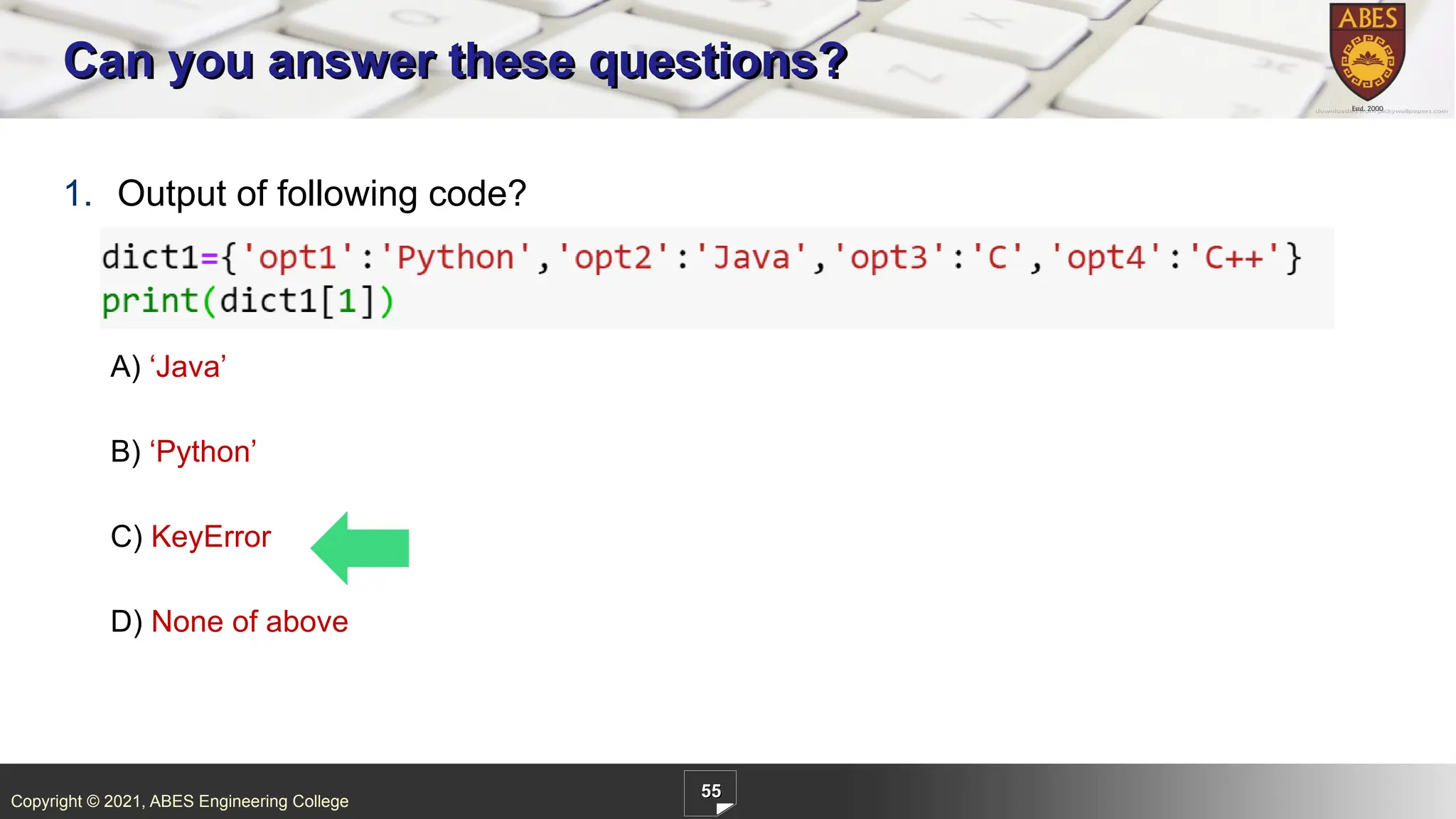
ABES Engineering College 55 1. Output of following code? A) ‘Java’ B) ‘Python’ C) KeyError D) None of above Can you answer these questions?
55.
Copyright © 2021,
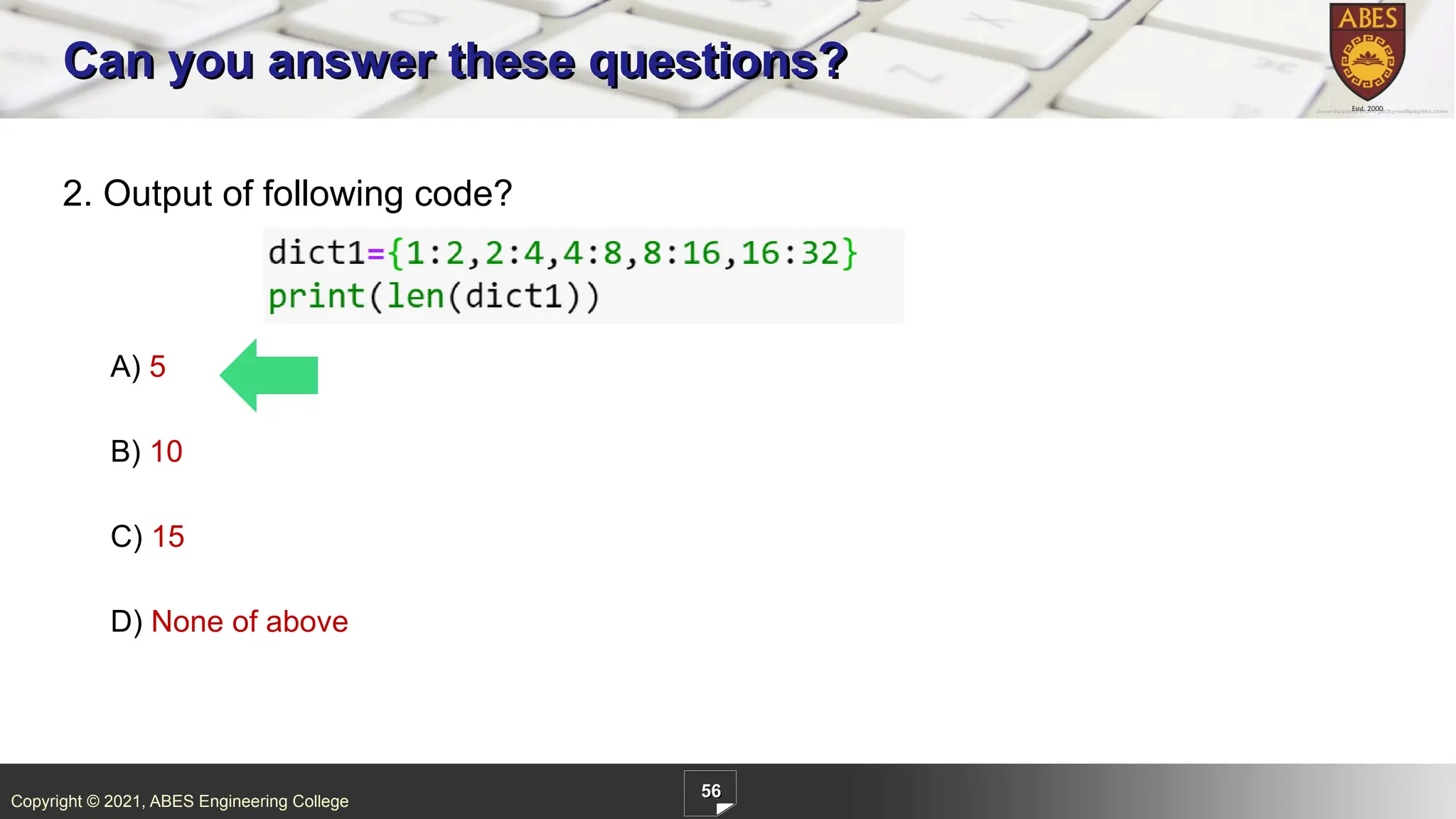
ABES Engineering College 56 2. Output of following code? A) 5 B) 10 C) 15 D) None of above Can you answer these questions?
56.
Copyright © 2021,
ABES Engineering College 57 Accessing of Dictionary List By Default indexing Indexes are only of integer type Adds an element to the next default index Fetching of element is through index, lst[0] Traversing is easy just by increase the index, i+=1 Dictionary User defined Keys Keys can be of any type Adds an element to the user defined key location Fetching of value is through keys, dic[<key>] Traversing is easy just by increase the index, i+=1
57.
Copyright © 2021,
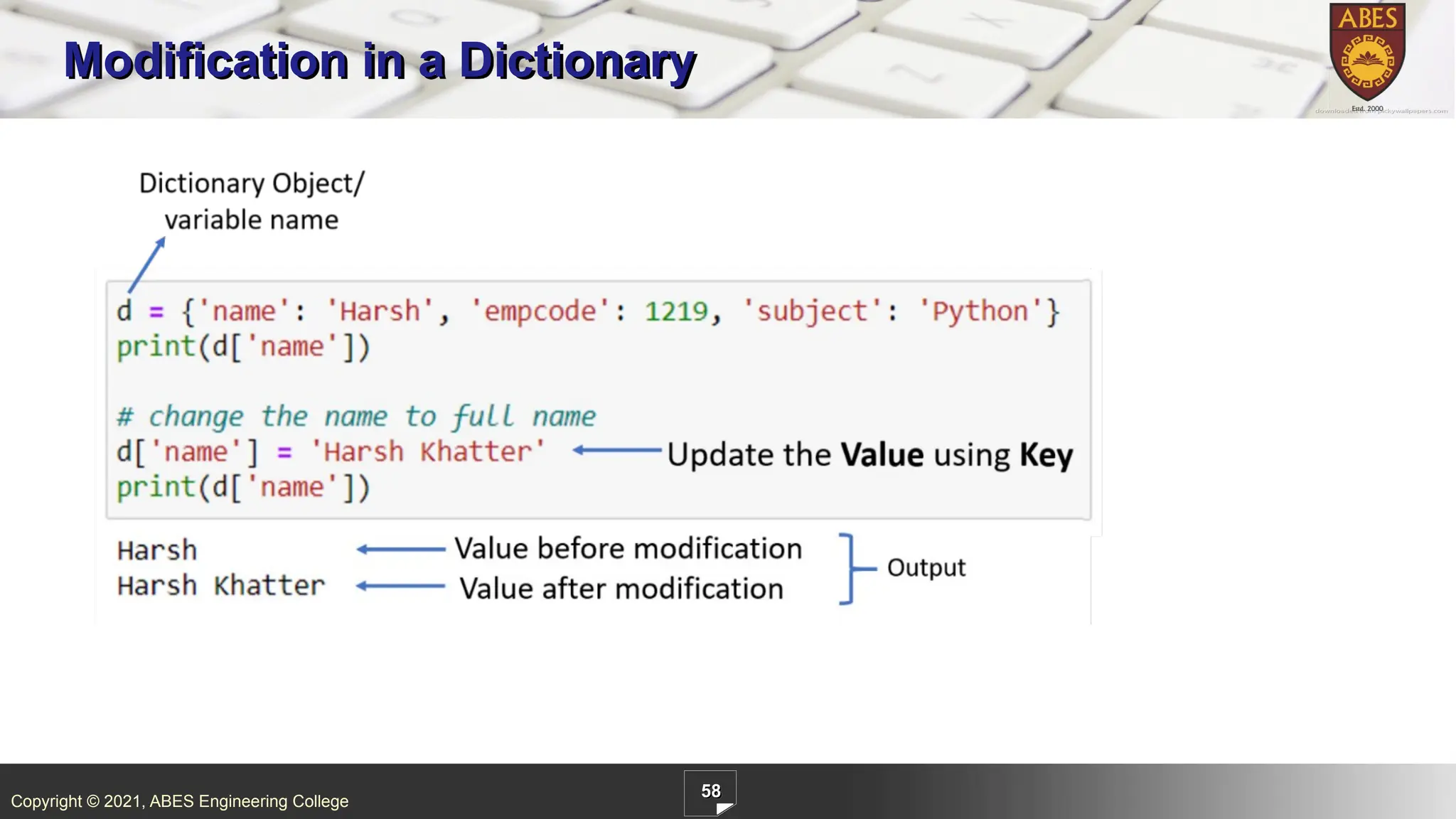
ABES Engineering College 58 Modification in a Dictionary
58.
Copyright © 2021,
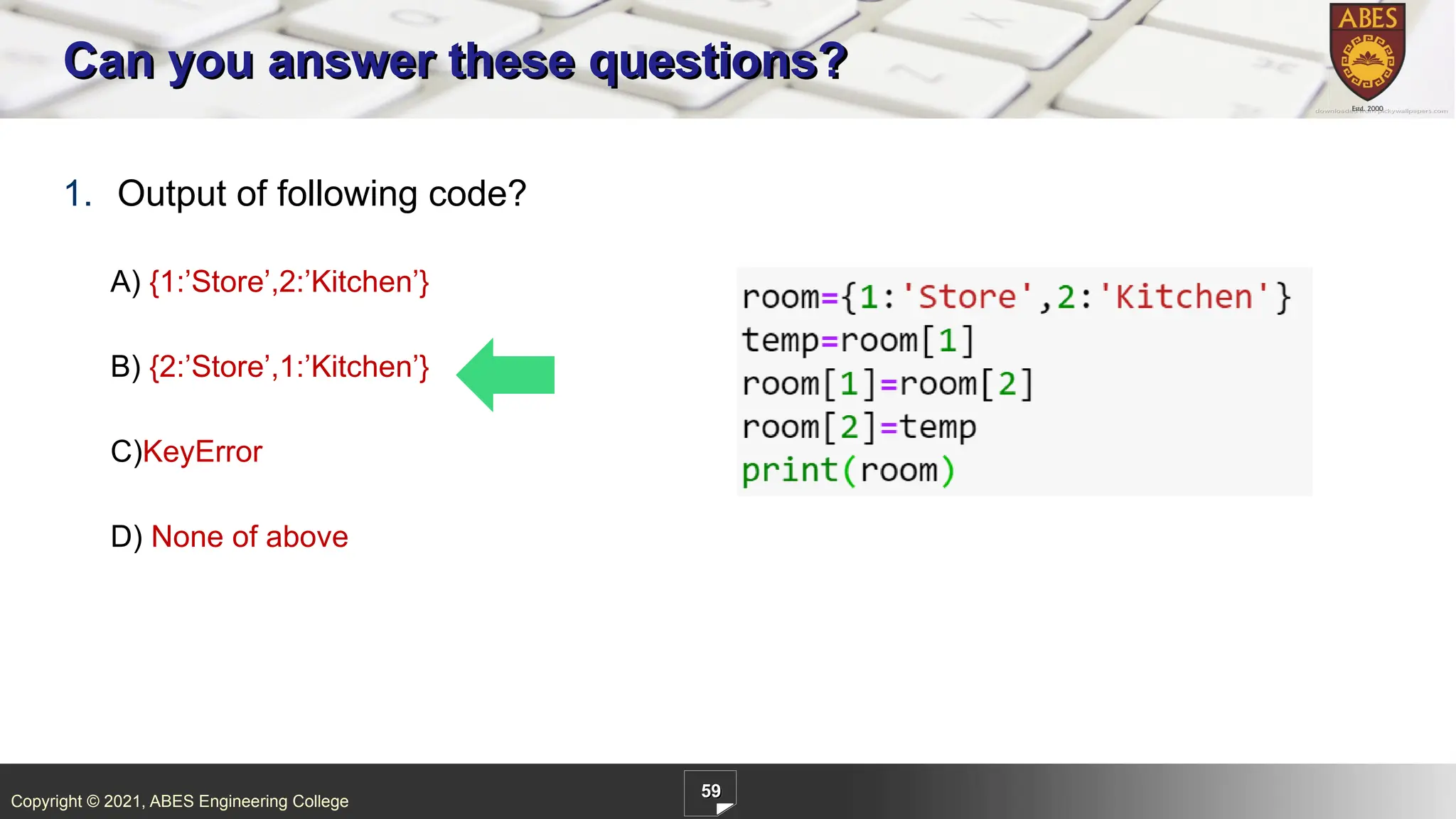
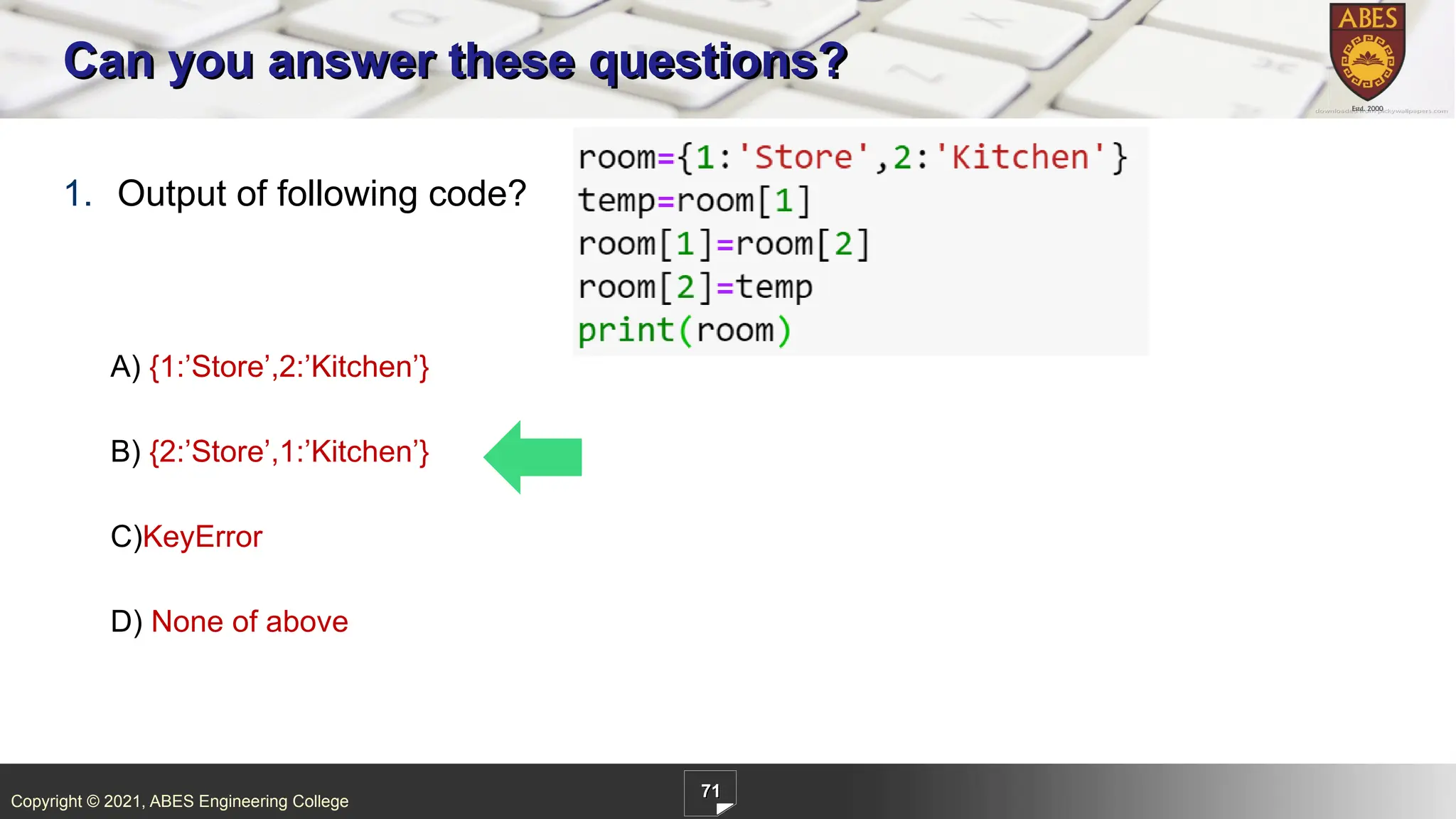
ABES Engineering College 59 1. Output of following code? A) {1:’Store’,2:’Kitchen’} B) {2:’Store’,1:’Kitchen’} C)KeyError D) None of above Can you answer these questions?
59.
Copyright © 2021,
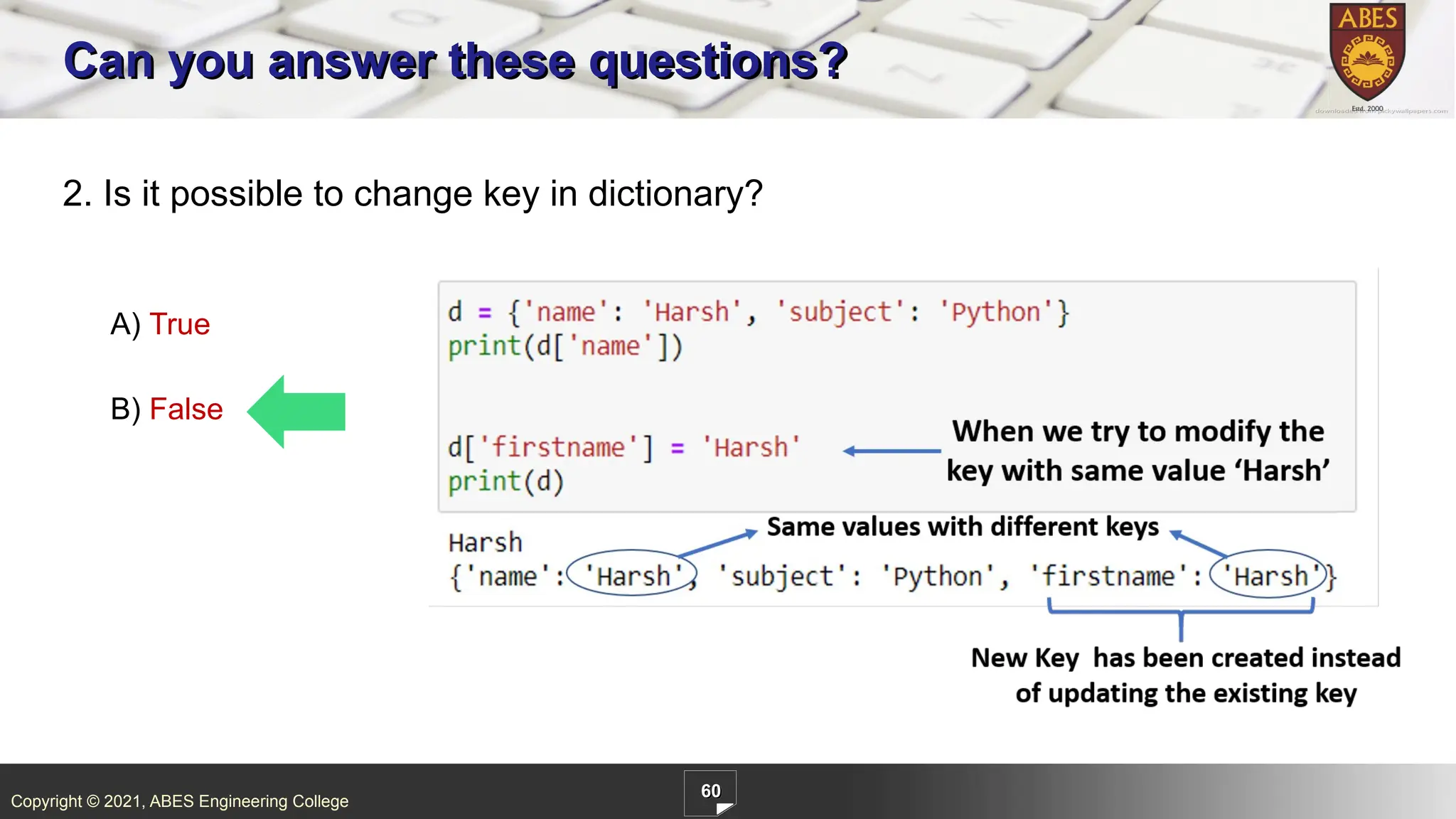
ABES Engineering College 60 2. Is it possible to change key in dictionary? A) True B) False Can you answer these questions?
60.
Copyright © 2021,
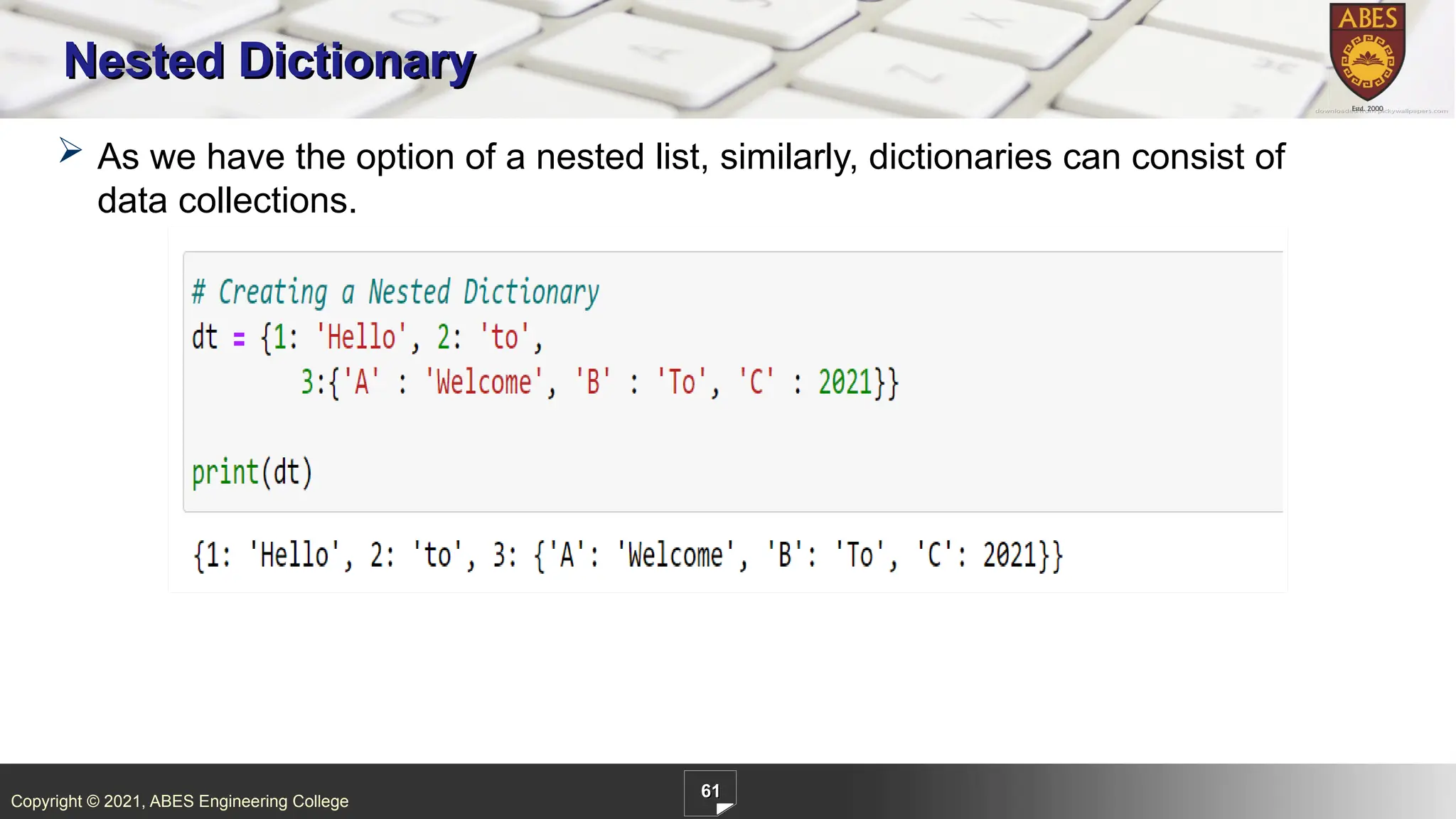
ABES Engineering College 61 Nested Dictionary As we have the option of a nested list, similarly, dictionaries can consist of data collections.
61.
Copyright © 2021,
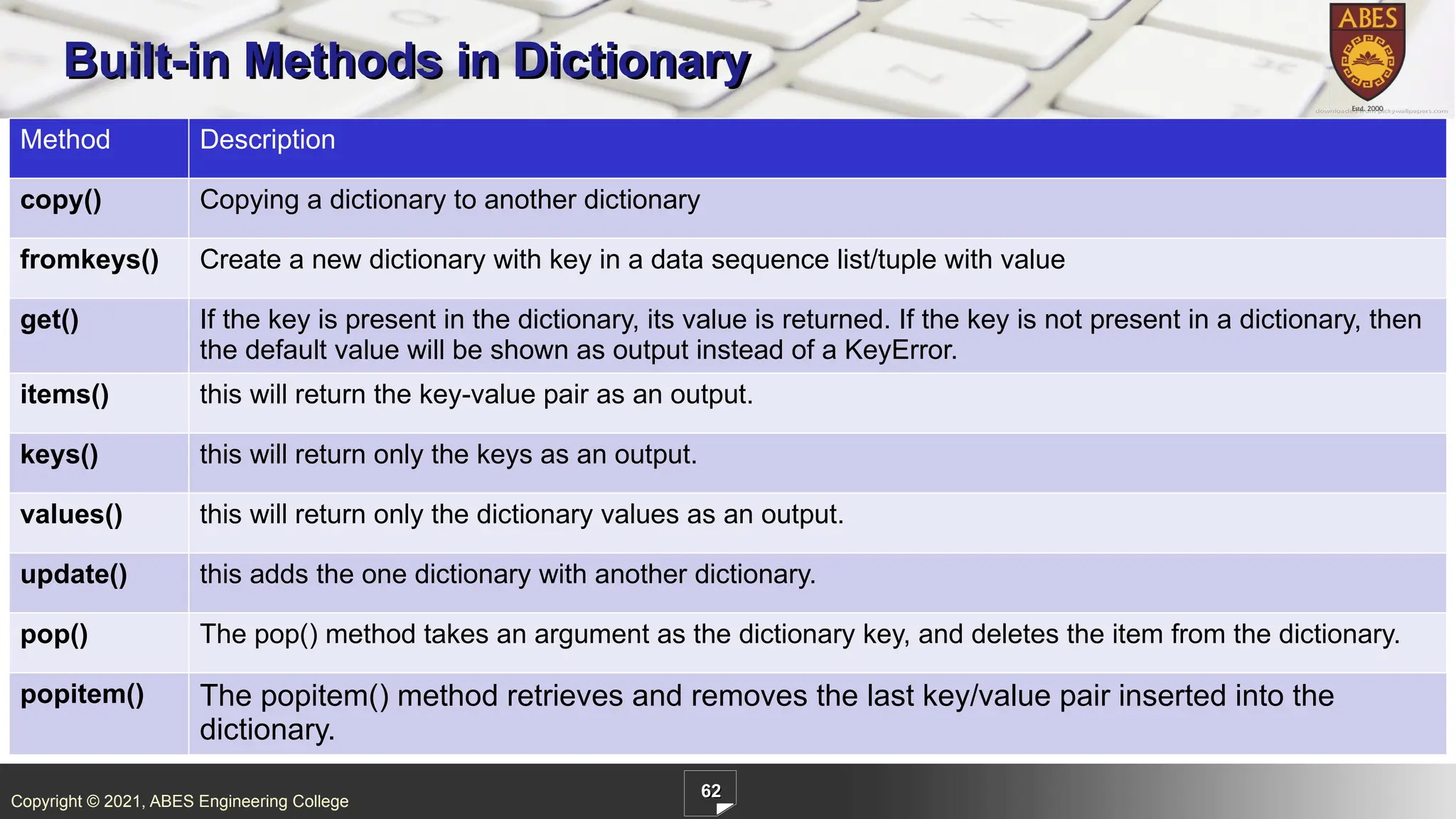
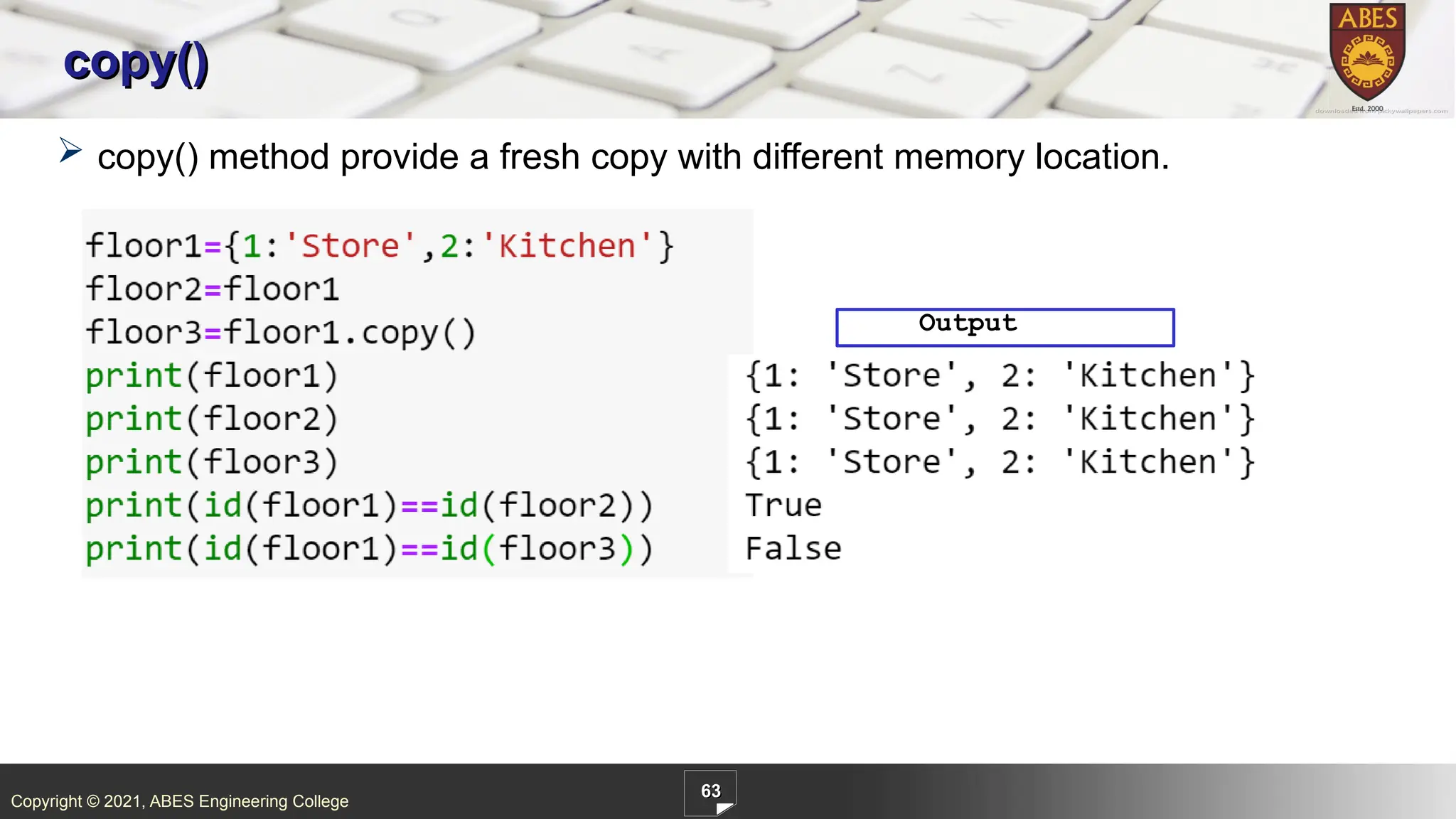
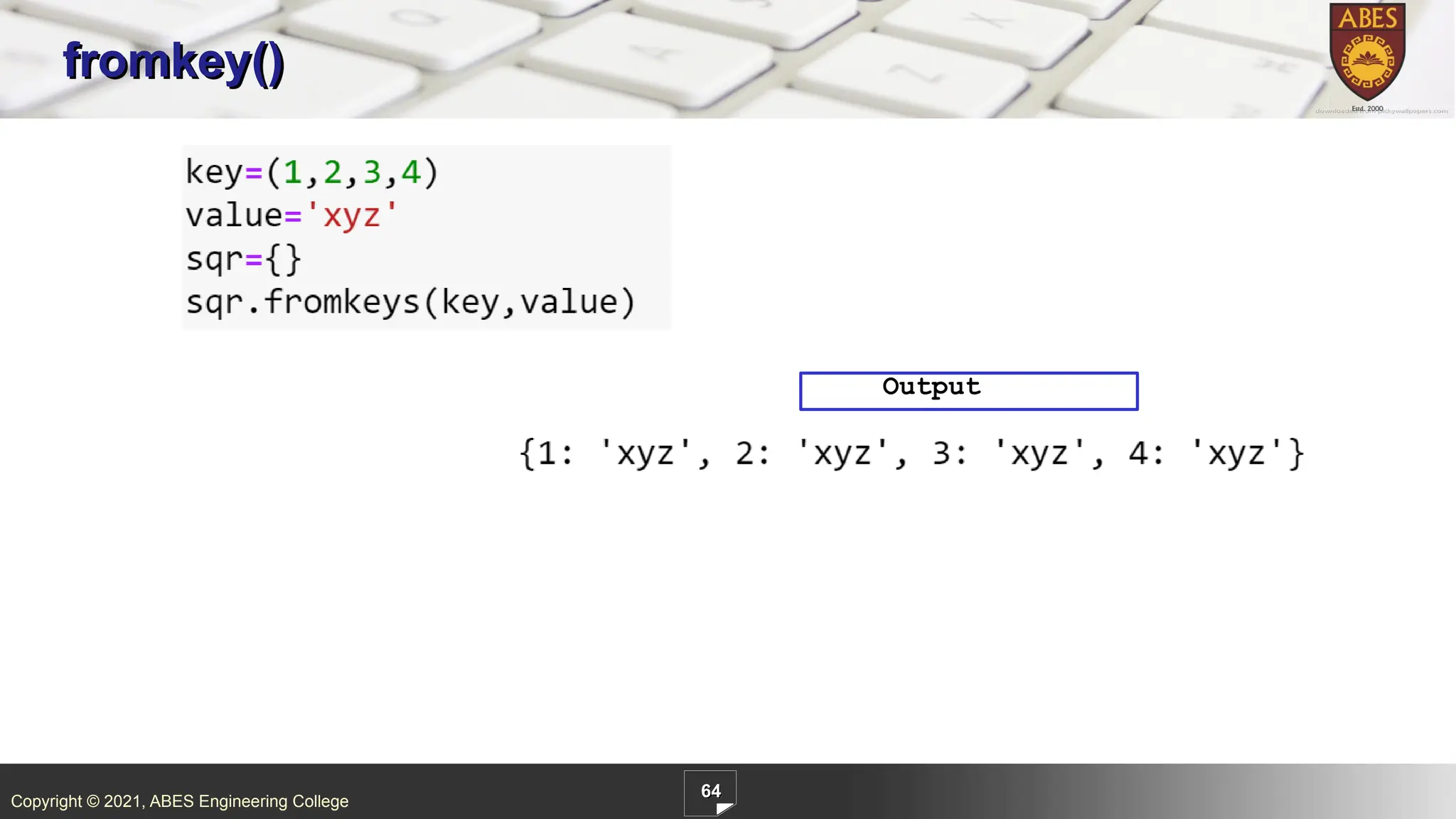
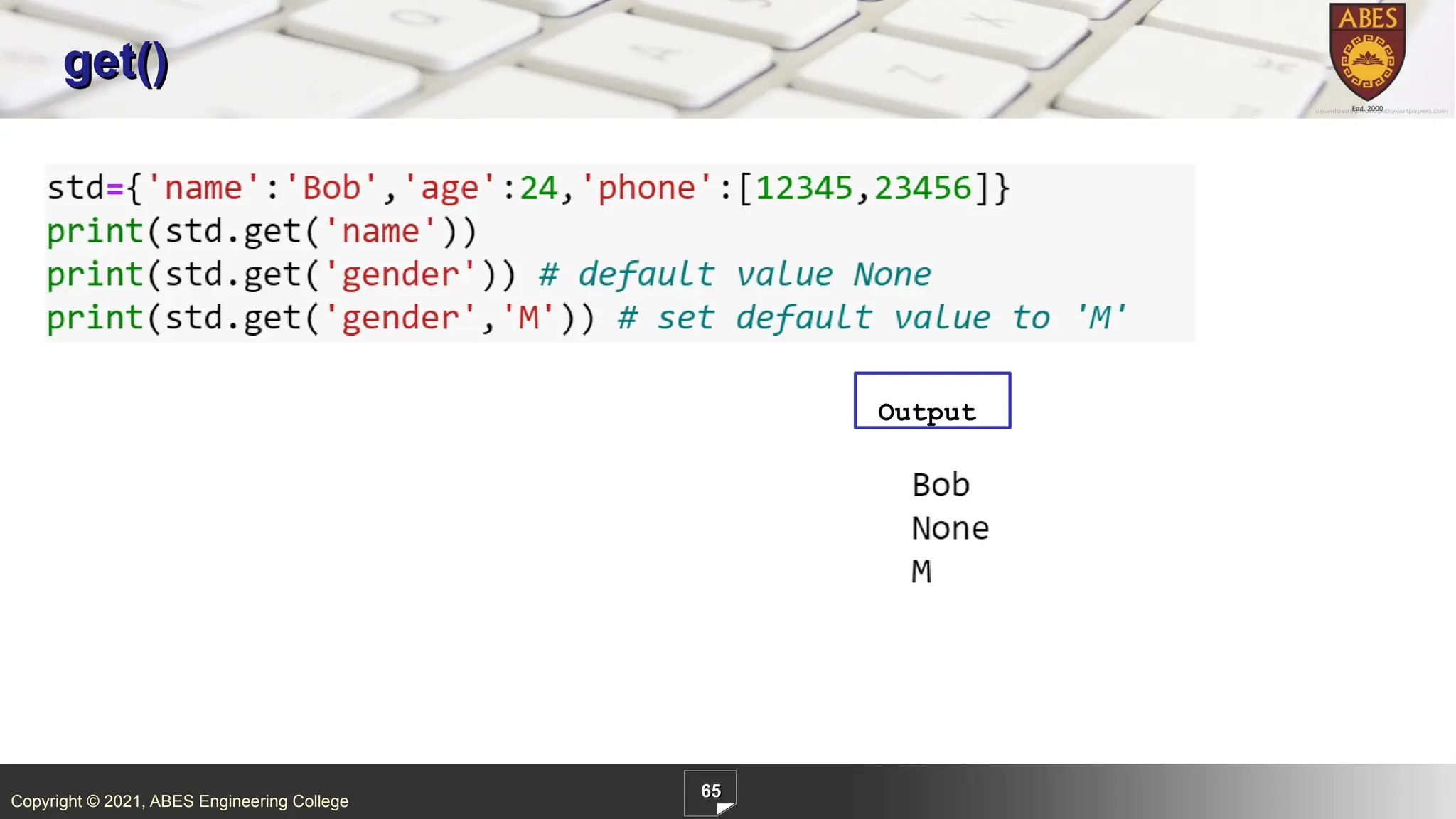
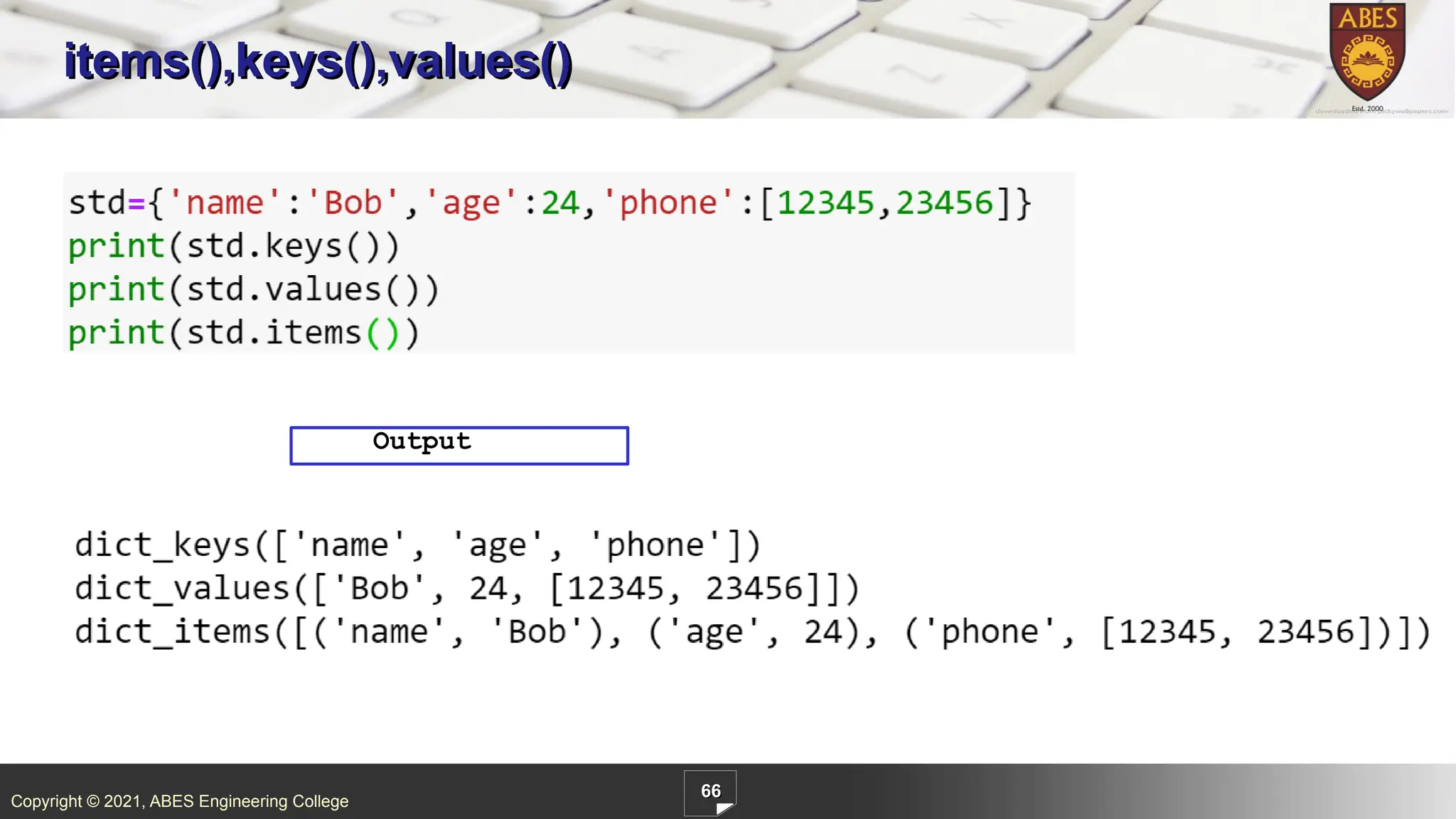
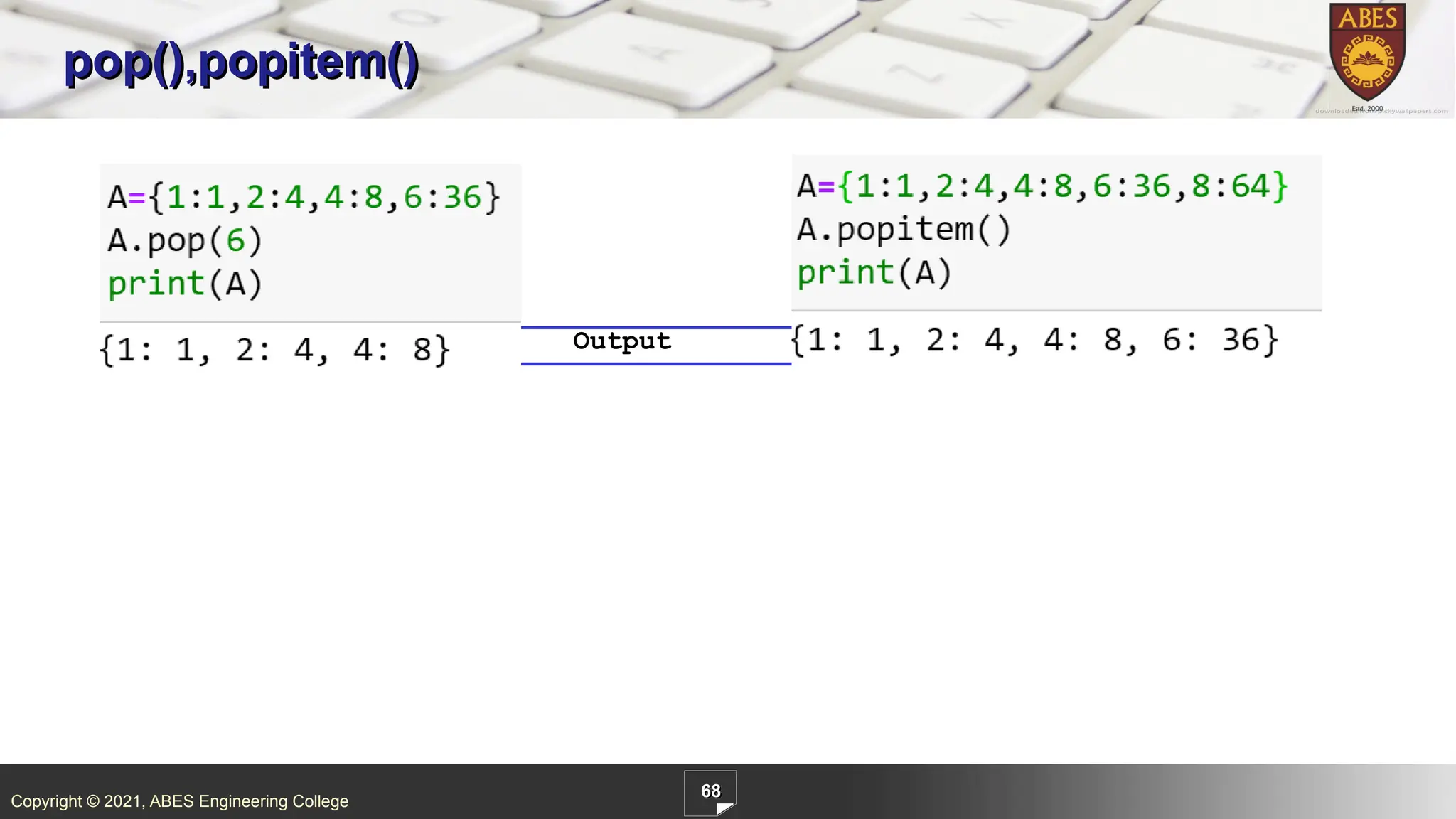
ABES Engineering College 62 Built-in Methods in Dictionary Method Description copy() Copying a dictionary to another dictionary fromkeys() Create a new dictionary with key in a data sequence list/tuple with value get() If the key is present in the dictionary, its value is returned. If the key is not present in a dictionary, then the default value will be shown as output instead of a KeyError. items() this will return the key-value pair as an output. keys() this will return only the keys as an output. values() this will return only the dictionary values as an output. update() this adds the one dictionary with another dictionary. pop() The pop() method takes an argument as the dictionary key, and deletes the item from the dictionary. popitem() The popitem() method retrieves and removes the last key/value pair inserted into the dictionary.
62.
Copyright © 2021,
ABES Engineering College 63 copy() copy() method provide a fresh copy with different memory location. Output
63.
Copyright © 2021,
ABES Engineering College 64 fromkey() Output
64.
Copyright © 2021,
ABES Engineering College 65 get() Output
65.
Copyright © 2021,
ABES Engineering College 66 items(),keys(),values() Output
66.
Copyright © 2021,
ABES Engineering College 67 update() Output
67.
Copyright © 2021,
ABES Engineering College 68 pop(),popitem() Output
68.
Copyright © 2021,
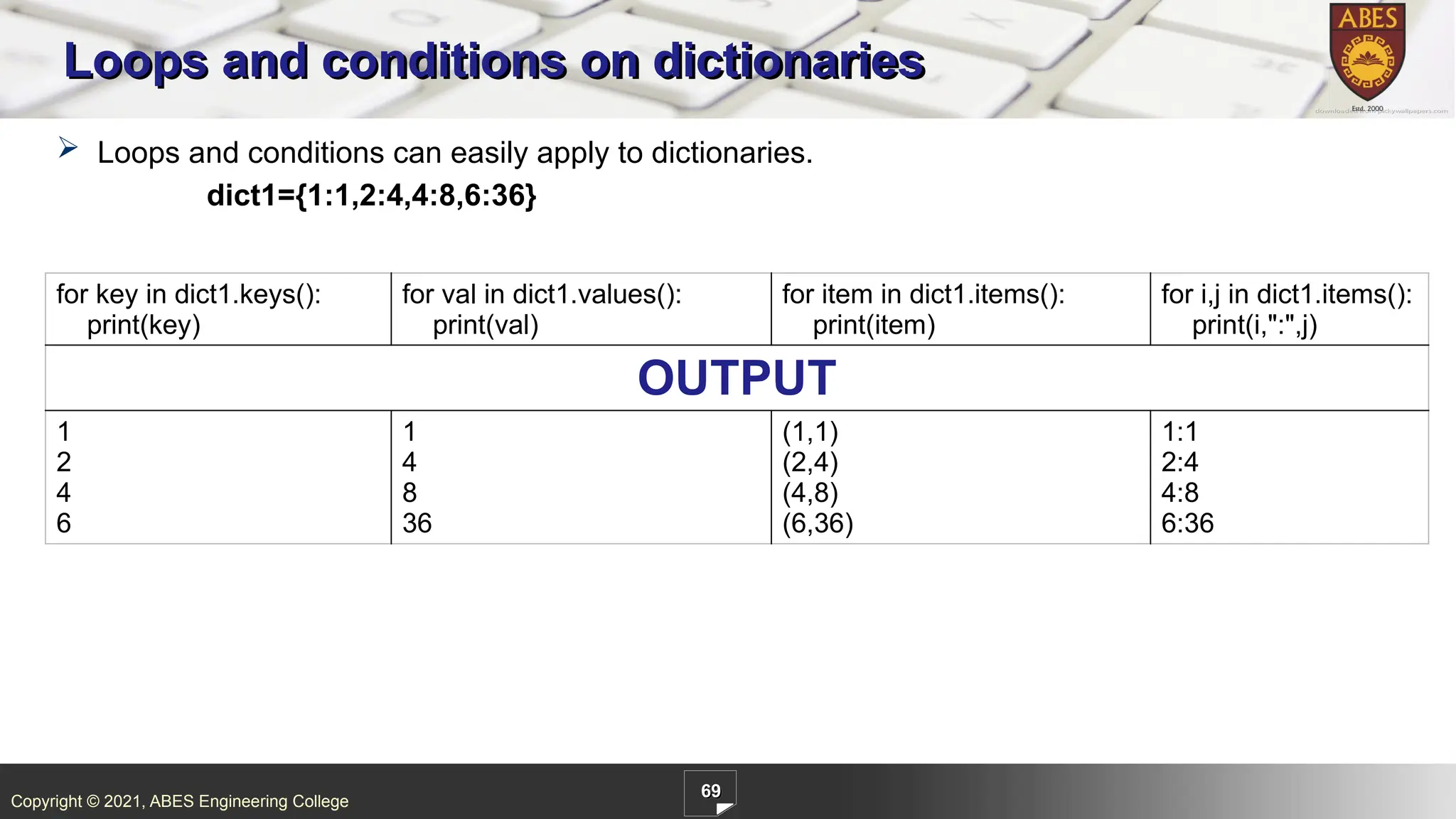
ABES Engineering College 69 Loops and conditions on dictionaries Loops and conditions can easily apply to dictionaries. dict1={1:1,2:4,4:8,6:36} for key in dict1.keys(): print(key) for val in dict1.values(): print(val) for item in dict1.items(): print(item) for i,j in dict1.items(): print(i,":",j) OUTPUT 1 2 4 6 1 4 8 36 (1,1) (2,4) (4,8) (6,36) 1:1 2:4 4:8 6:36
69.
Copyright © 2021,
ABES Engineering College 70 1. Output of following code? A) {1:1,2:4,3:9,4:16,5:25,6:36} B) {1:1,2:4,3:9,4:16,5:25} C) [1,4,9,16,25] D) Error Can you answer these questions?
70.
Copyright © 2021,
ABES Engineering College 71 1. Output of following code? A) {1:’Store’,2:’Kitchen’} B) {2:’Store’,1:’Kitchen’} C)KeyError D) None of above Can you answer these questions?
71.
Copyright © 2021,
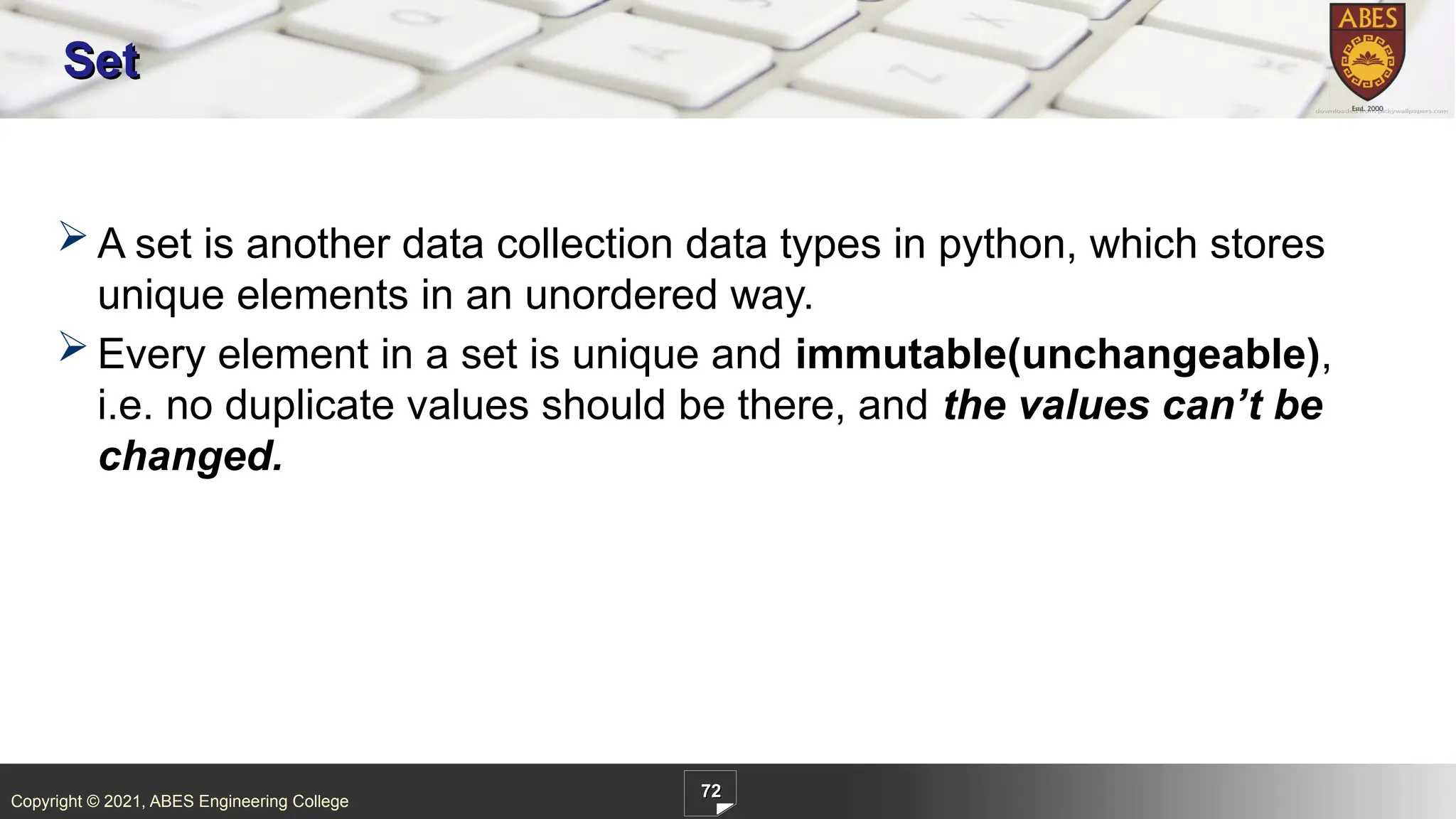
ABES Engineering College 72 Set A set is another data collection data types in python, which stores unique elements in an unordered way. Every element in a set is unique and immutable(unchangeable), i.e. no duplicate values should be there, and the values can’t be changed.
72.
Copyright © 2021,
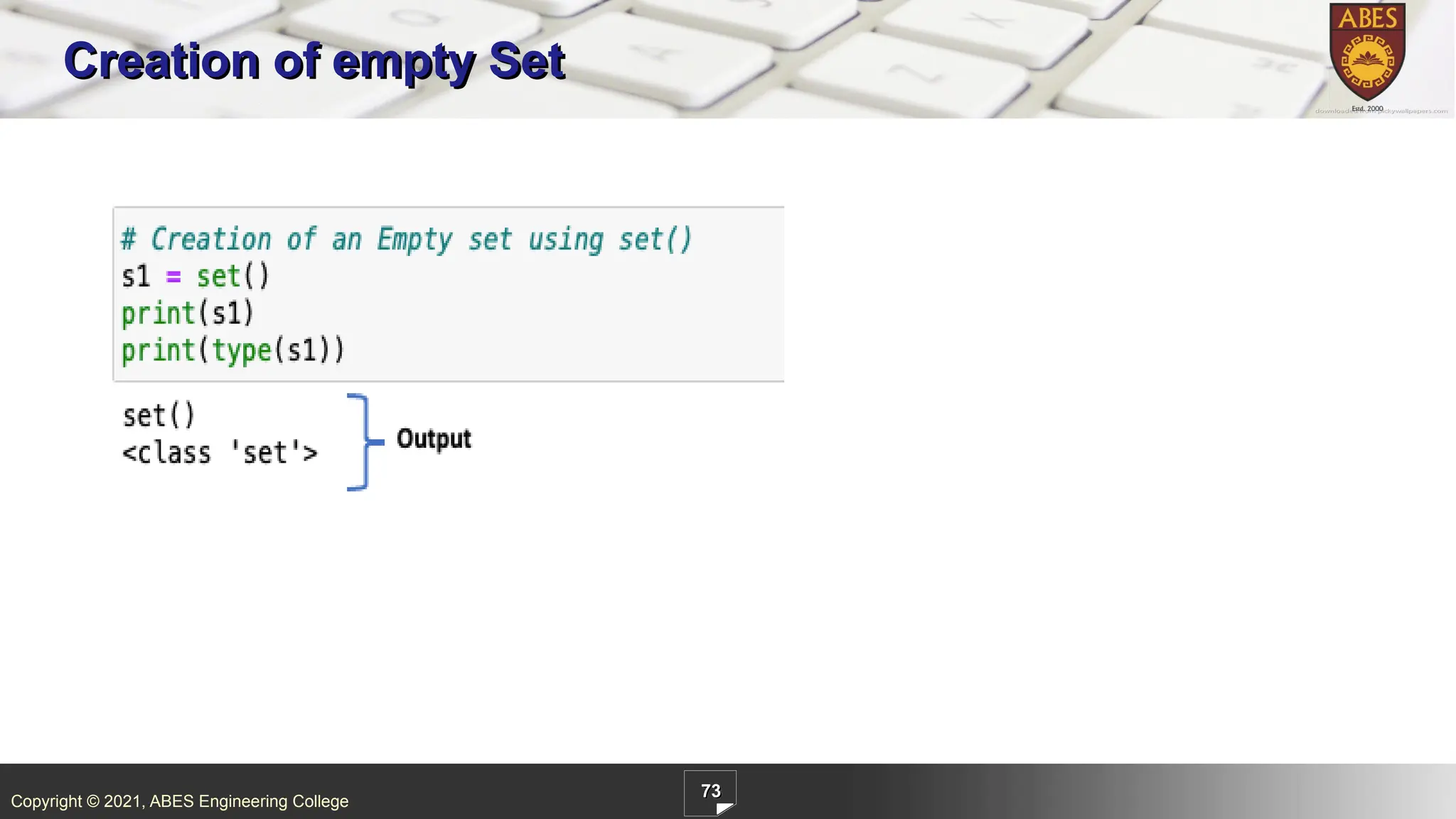
ABES Engineering College 73 Creation of empty Set
73.
Copyright © 2021,
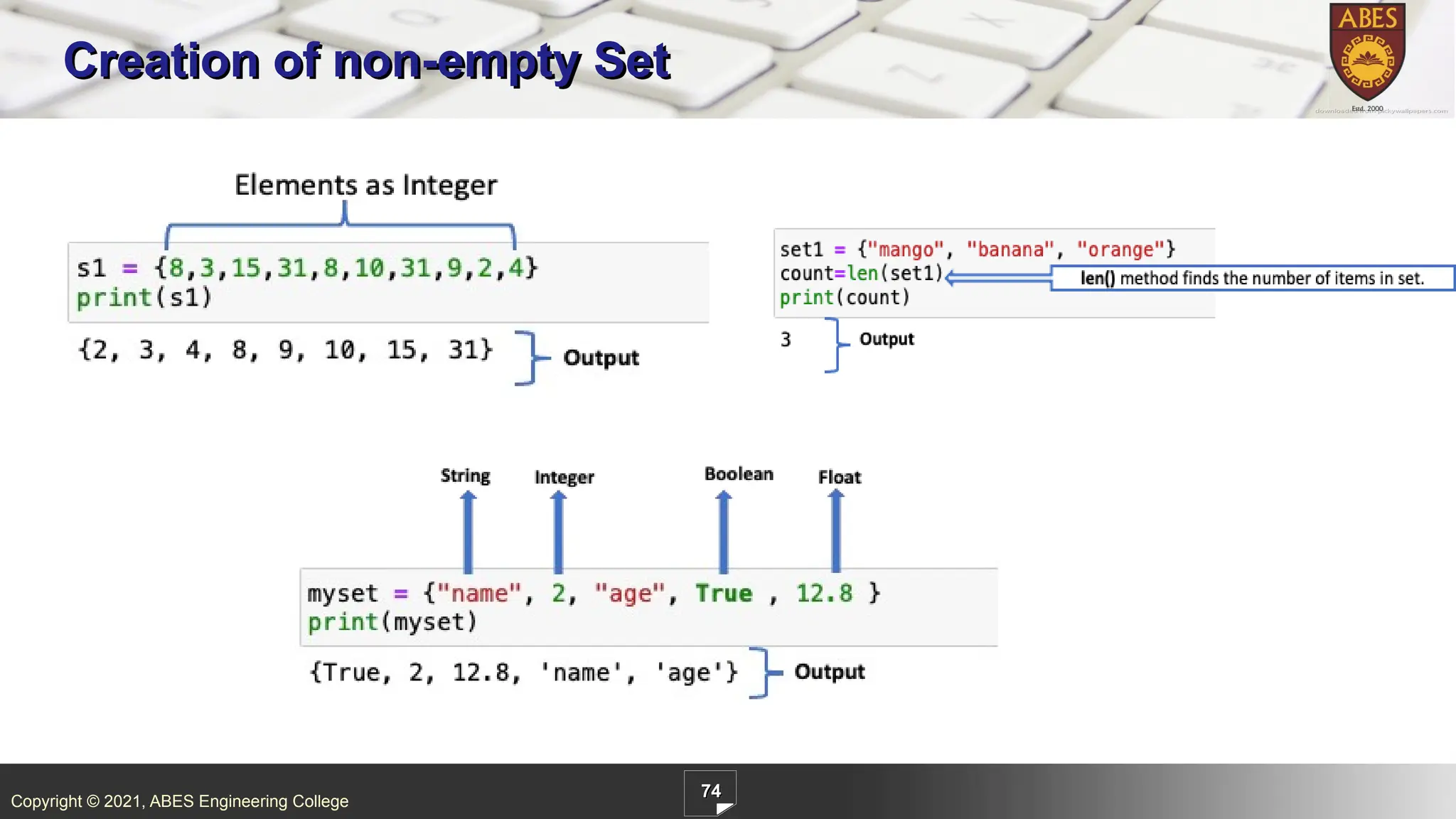
ABES Engineering College 74 Creation of non-empty Set
74.
Copyright © 2021,
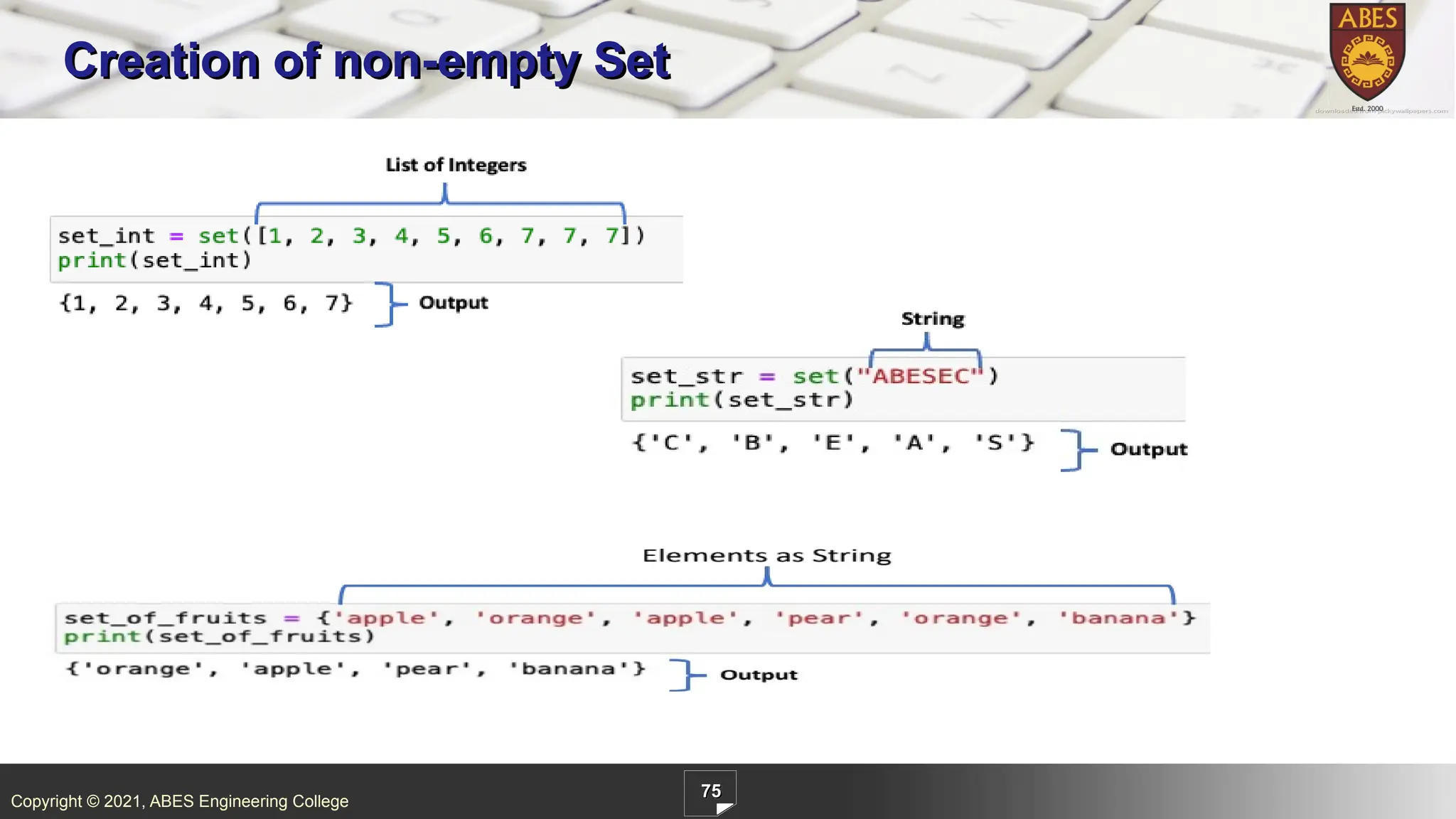
ABES Engineering College 75 Creation of non-empty Set
75.
Copyright © 2021,
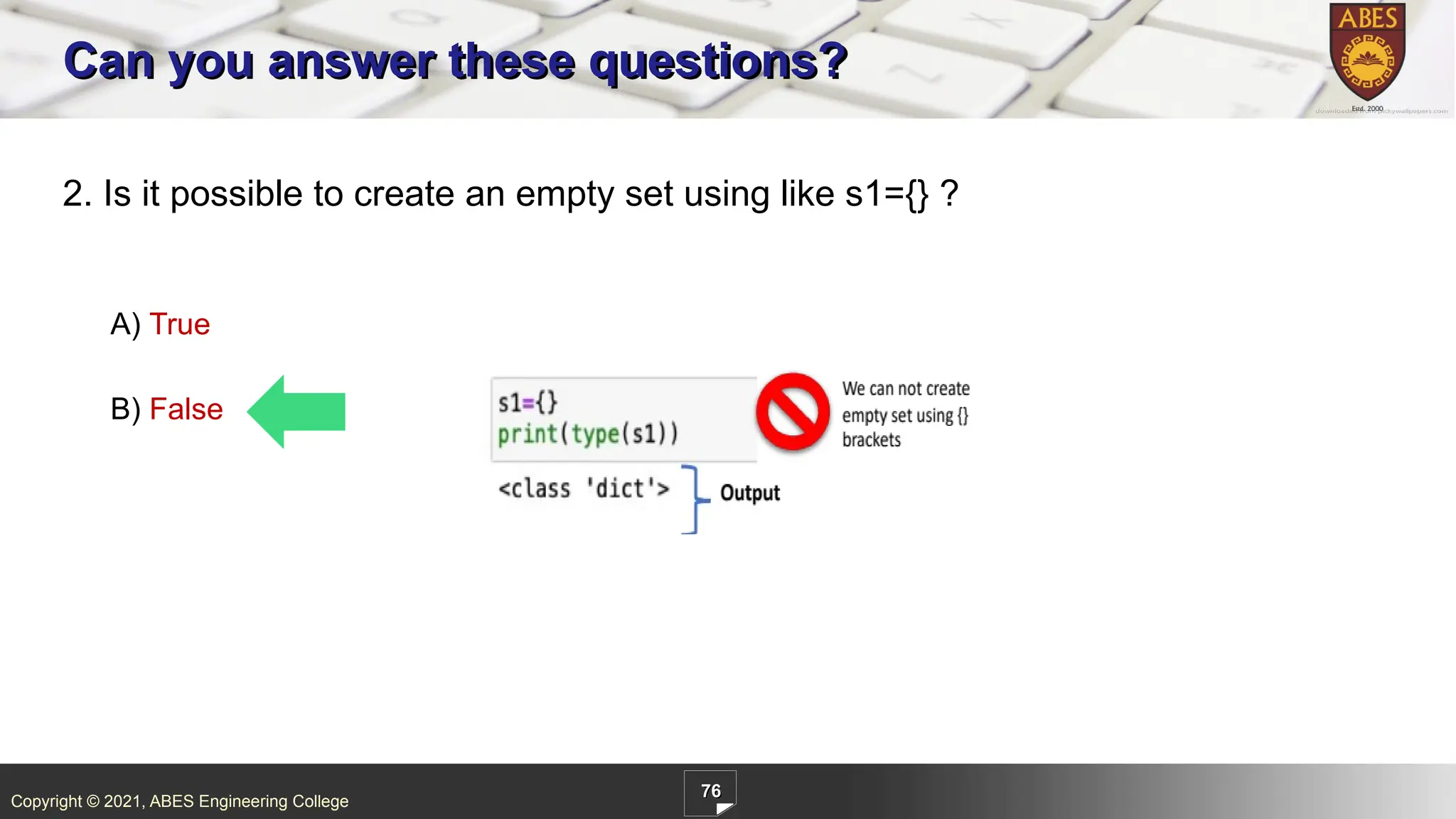
ABES Engineering College 76 2. Is it possible to create an empty set using like s1={} ? A) True B) False Can you answer these questions?
76.
Copyright © 2021,
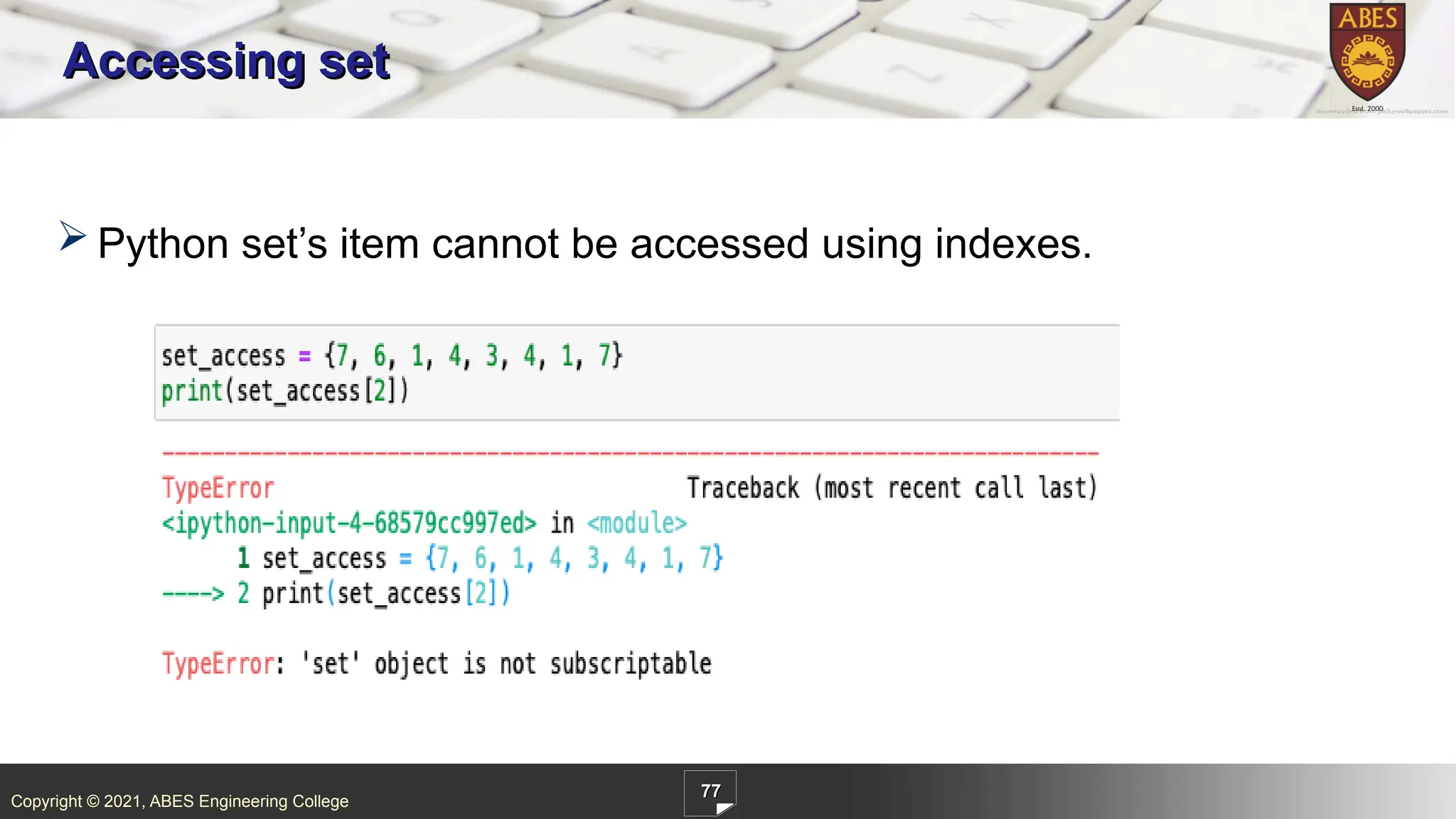
ABES Engineering College 77 Accessing set Python set’s item cannot be accessed using indexes.
77.
Copyright © 2021,
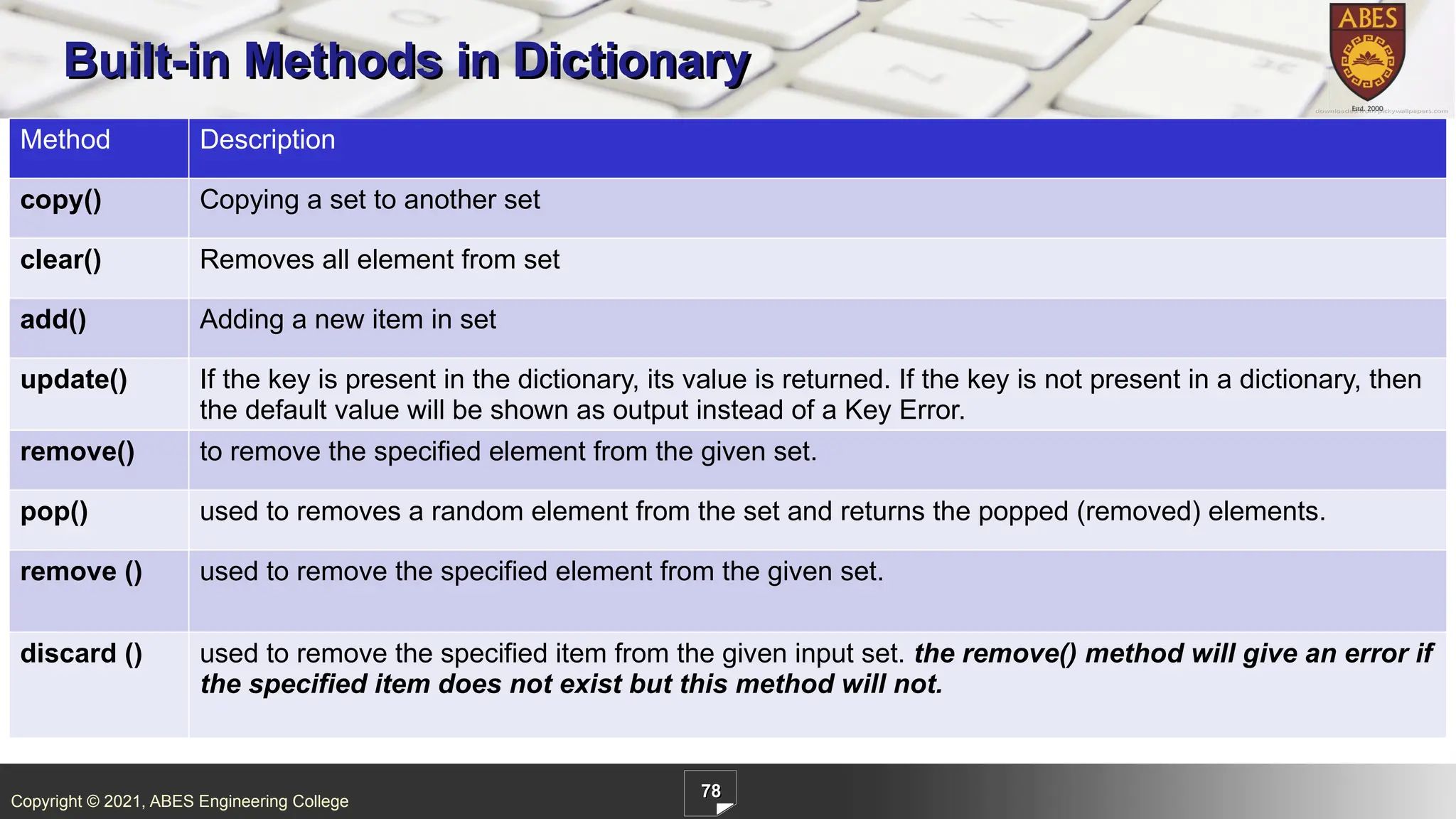
ABES Engineering College 78 Built-in Methods in Dictionary Method Description copy() Copying a set to another set clear() Removes all element from set add() Adding a new item in set update() If the key is present in the dictionary, its value is returned. If the key is not present in a dictionary, then the default value will be shown as output instead of a Key Error. remove() to remove the specified element from the given set. pop() used to removes a random element from the set and returns the popped (removed) elements. remove () used to remove the specified element from the given set. discard () used to remove the specified item from the given input set. the remove() method will give an error if the specified item does not exist but this method will not.
78.
Copyright © 2021,
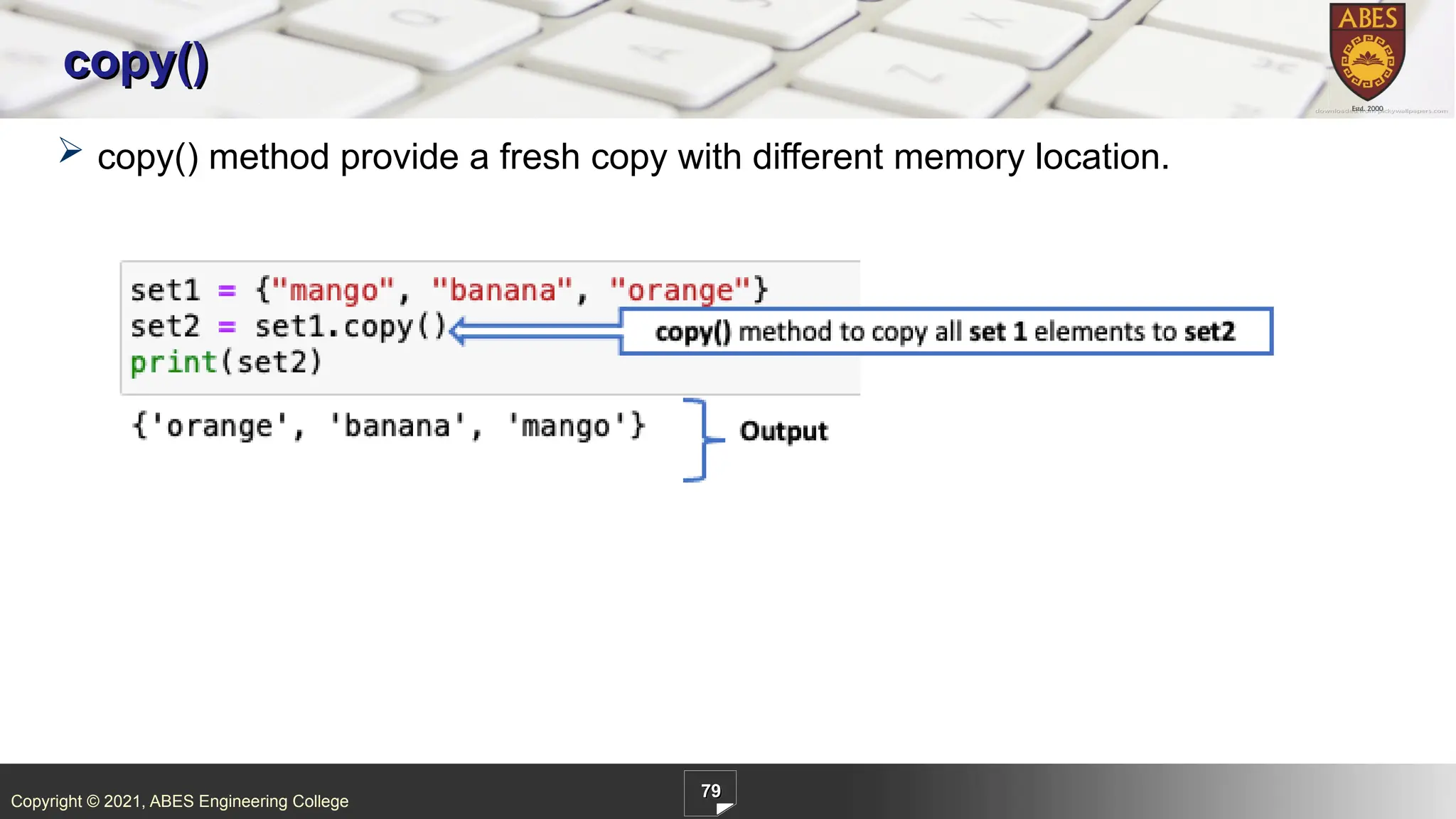
ABES Engineering College 79 copy() copy() method provide a fresh copy with different memory location.
79.
Copyright © 2021,
ABES Engineering College 80 clear()
80.
Copyright © 2021,
ABES Engineering College 81 add()
81.
Copyright © 2021,
ABES Engineering College 82 update()
82.
Copyright © 2021,
ABES Engineering College 83 remove()
83.
Copyright © 2021,
ABES Engineering College 84 pop()
84.
Copyright © 2021,
ABES Engineering College 85 discard()
85.
Copyright © 2021,
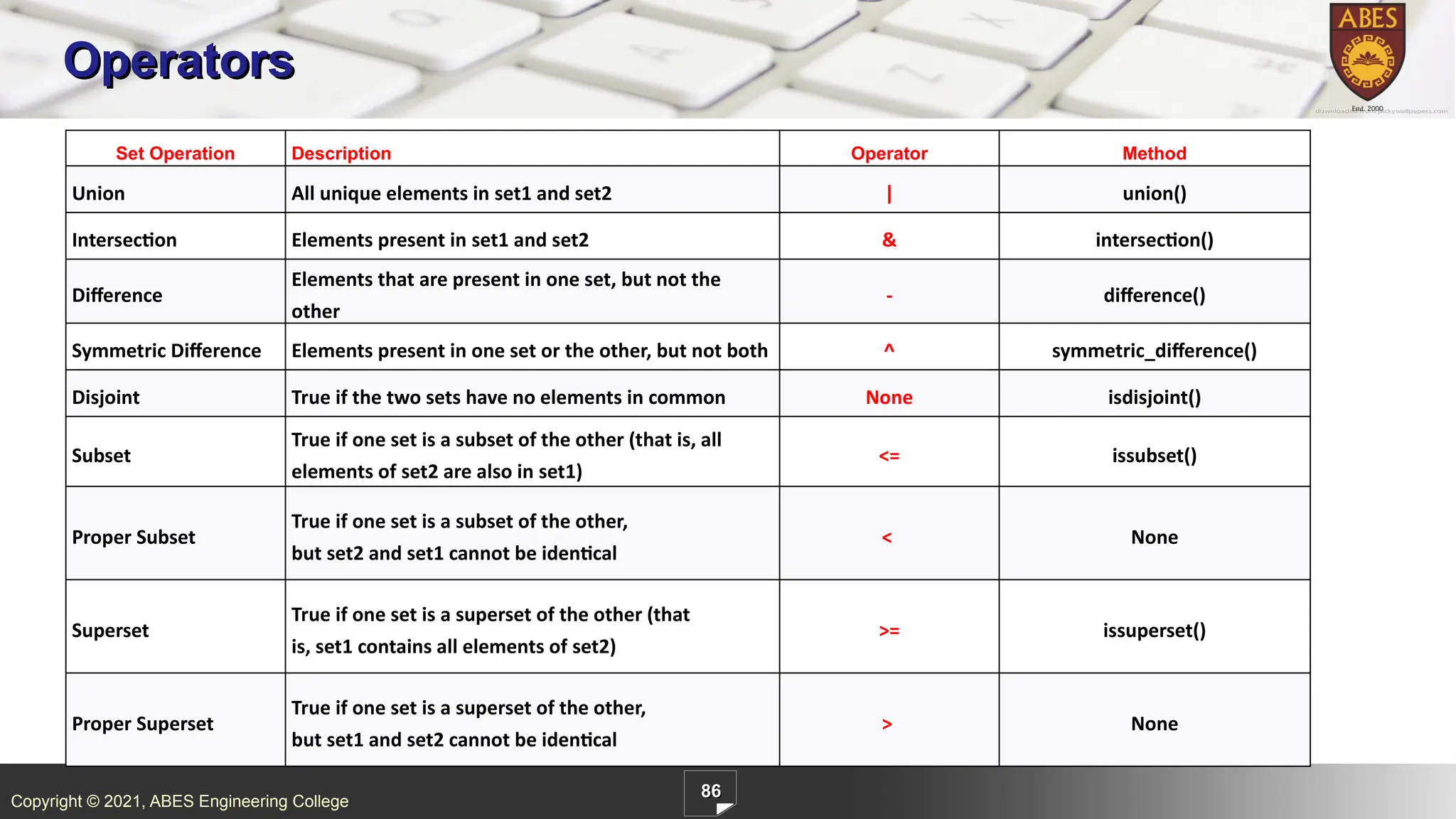
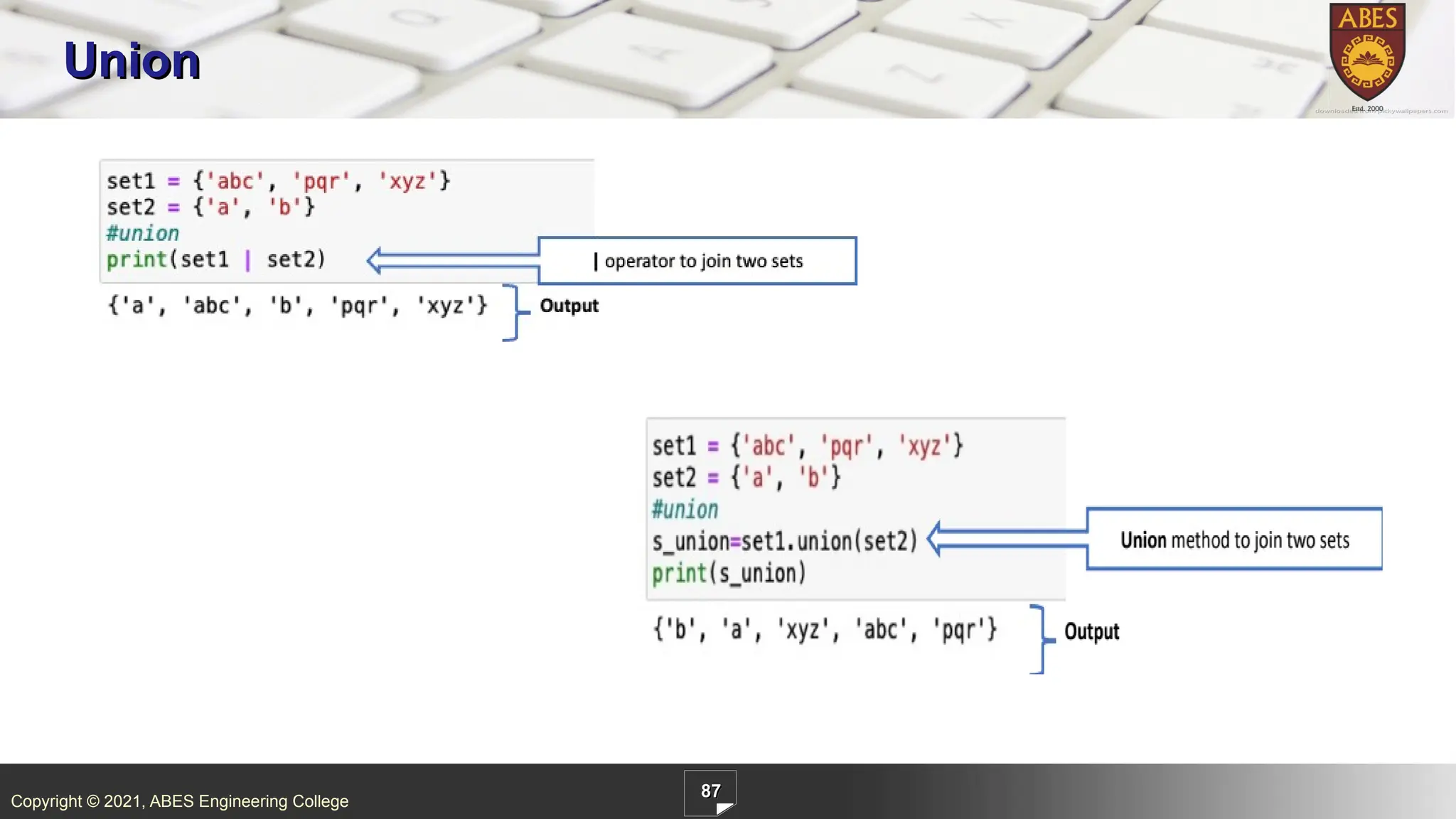
ABES Engineering College 86 Operators Set Operation Description Operator Method Union All unique elements in set1 and set2 | union() Intersection Elements present in set1 and set2 & intersection() Difference Elements that are present in one set, but not the other - difference() Symmetric Difference Elements present in one set or the other, but not both ^ symmetric_difference() Disjoint True if the two sets have no elements in common None isdisjoint() Subset True if one set is a subset of the other (that is, all elements of set2 are also in set1) <= issubset() Proper Subset True if one set is a subset of the other, but set2 and set1 cannot be identical < None Superset True if one set is a superset of the other (that is, set1 contains all elements of set2) >= issuperset() Proper Superset True if one set is a superset of the other, but set1 and set2 cannot be identical > None
86.
Copyright © 2021,
ABES Engineering College 87 Union
87.
Copyright © 2021,
ABES Engineering College 88 Intersection
88.
Copyright © 2021,
ABES Engineering College 89 Intersection
89.
Copyright © 2021,
ABES Engineering College 90 Set Difference
90.
Copyright © 2021,
ABES Engineering College 91 Symmetric Difference
91.
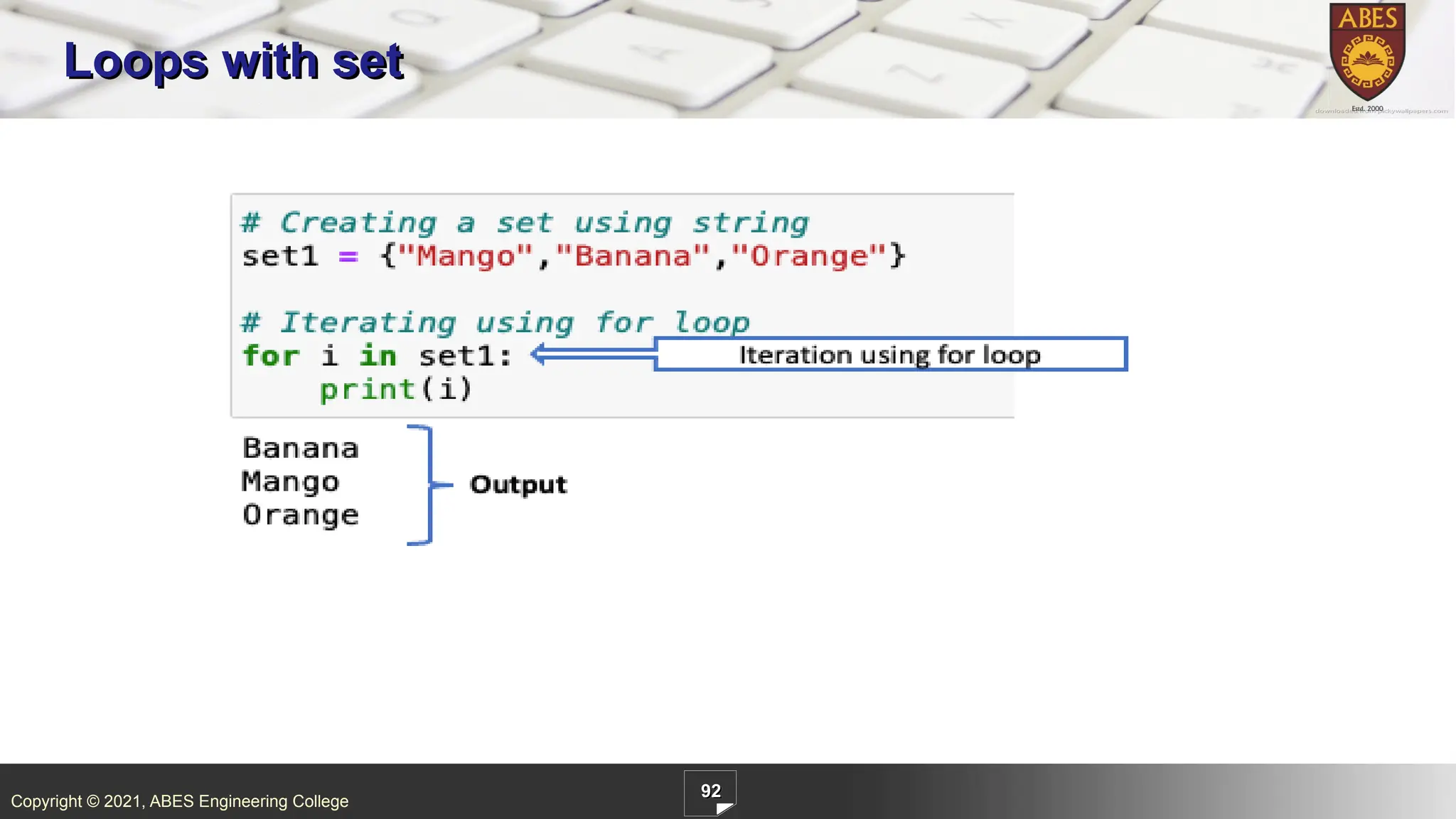
Copyright © 2021,
ABES Engineering College 92 Loops with set
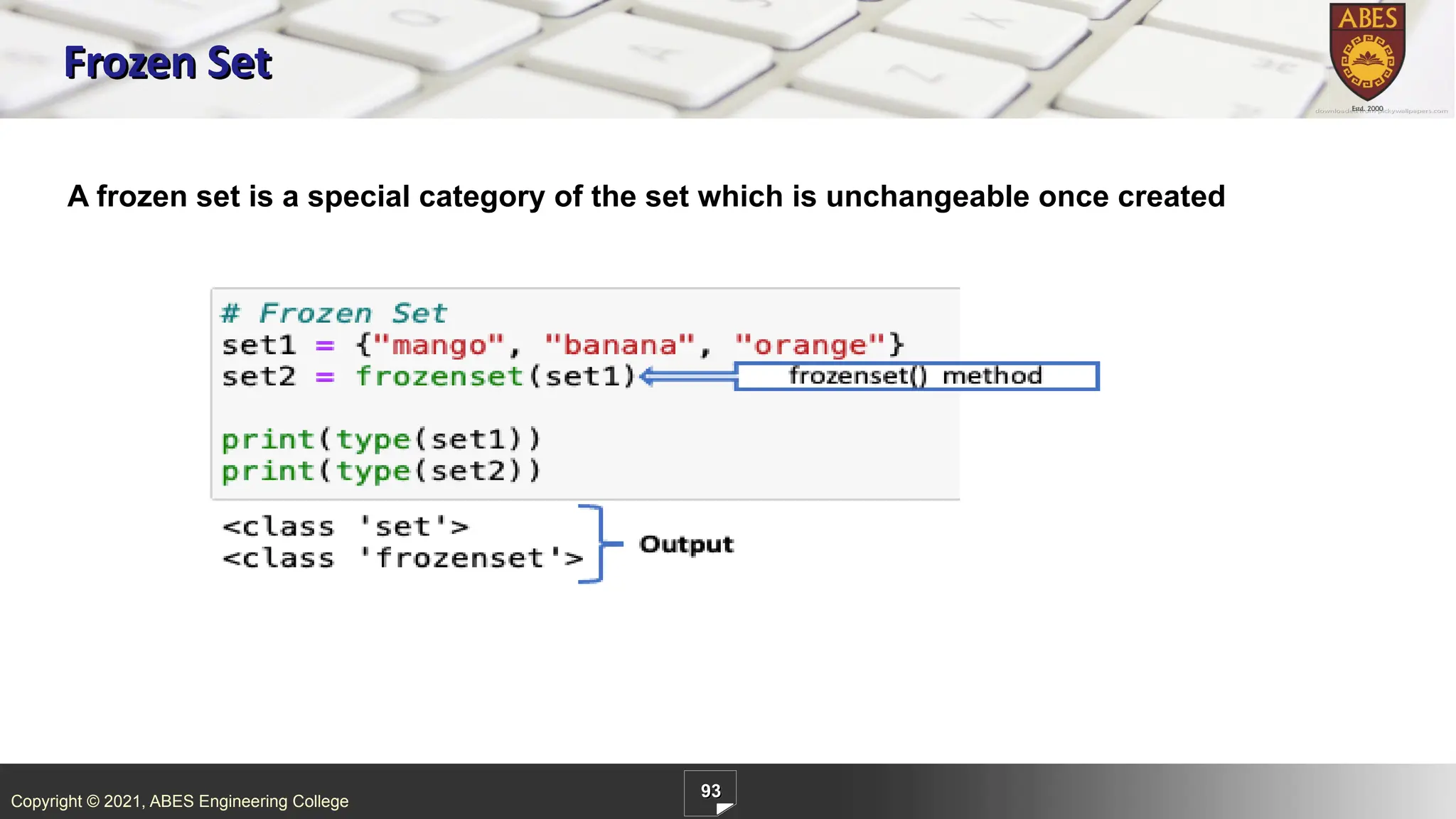
92.
Copyright © 2021,
ABES Engineering College 93 Frozen Set A frozen set is a special category of the set which is unchangeable once created
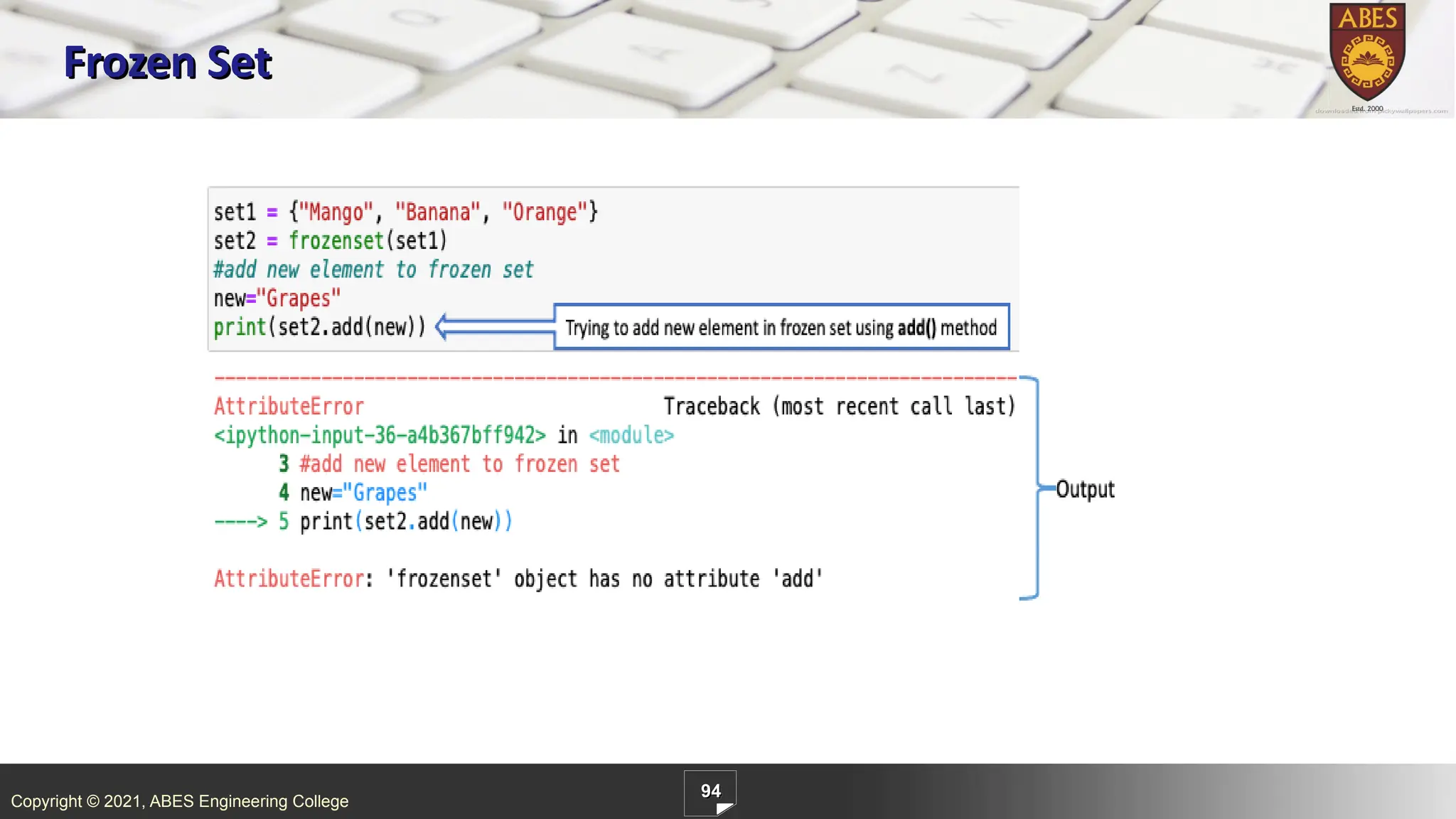
93.
Copyright © 2021,
ABES Engineering College 94 Frozen Set
94.
Copyright © 2021,
ABES Engineering College 95 Summary List Tuple Set Dictionary List is a collection of values that is ordered. Tuple is ordered and unchangeable collection of values Set stores the unique values as data collection Dictionary is a collection of key-value pairs Represented by [ ] Represented by ( ) Represented by { } Represented by { } Duplicate elements allowed Duplicate elements allowed Duplicate elements not allowed Duplicate keys not allowed, in dictionary values allowed duplicate Values can be of any type Values can be of any type Values can be of any type Keys are immutable type, and value can be of any type Example: [1, 2, 3, 4] Example: (1, 2, 3, 4) Example: {1, 2, 3, 4} Example: {1:1, 2:2, 3:3, 4:4} List is mutable Tuple is immutable Set is mutable Dictionary is mutable List is ordered Tuple is ordered Set is unordered Dictionary is insertion ordered Creating an empty list l=list() l = [] Creating an empty Tuple t = tuple () t=( ) Creating a set s=set () Creating an empty dictionary d=dict( ) d={}
95.
Copyright © 2021,
ABES Engineering College 96 1. Which of the following Python code will create a set? (i) set1=set((0,9,0)) (ii) set1=set([0,2,9]) (iii) set1={} A) iii B) i and ii C) ii and iii D) All of Above Can you answer these questions?
96.
Copyright © 2021,
ABES Engineering College 97 2. What is the output of following code? set1=set((0,9,0)) print(set1) A) {0,0,9} B) {0,9} C) {9} D) Error Can you answer these questions?
97.
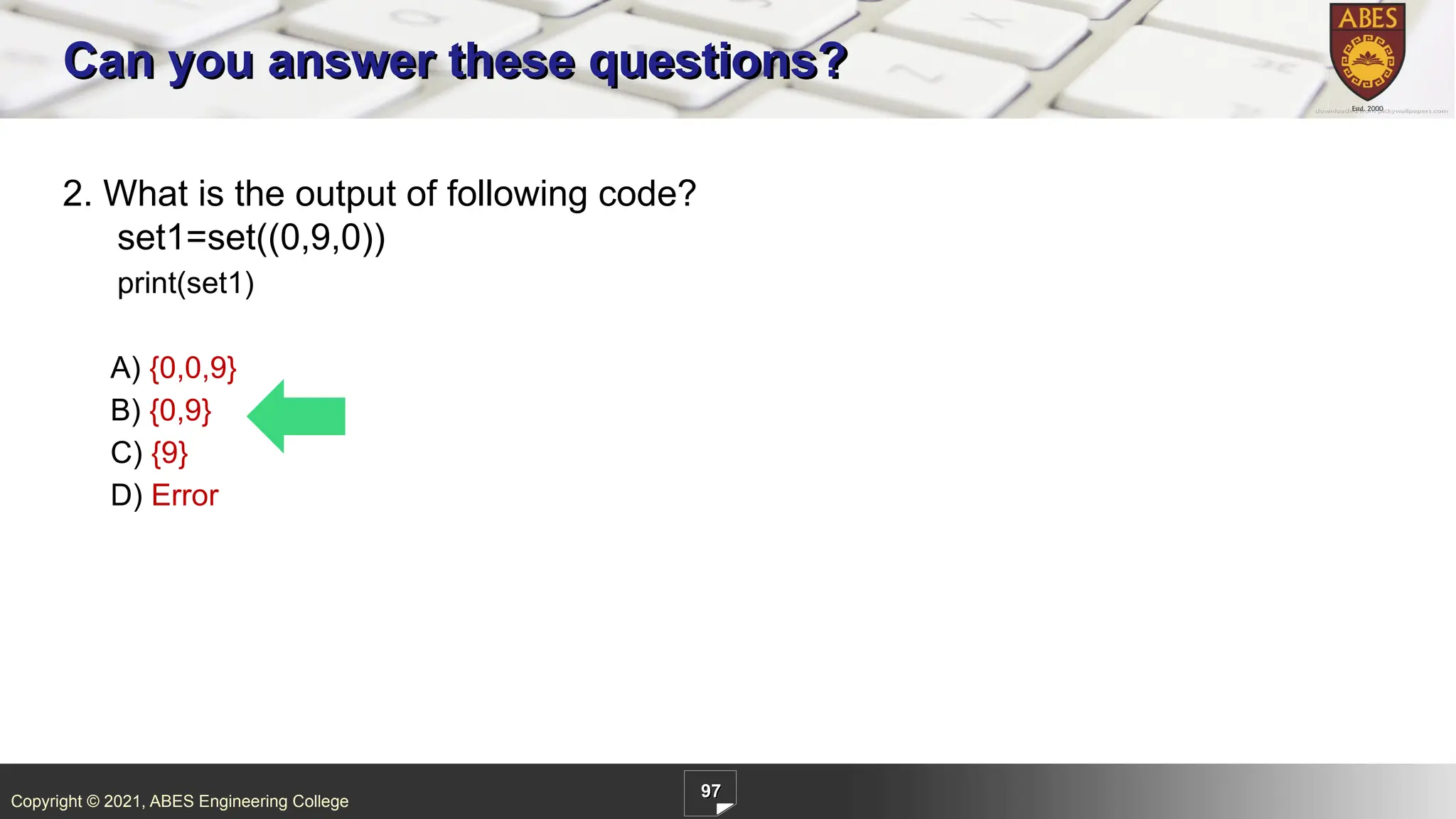
Copyright © 2021,
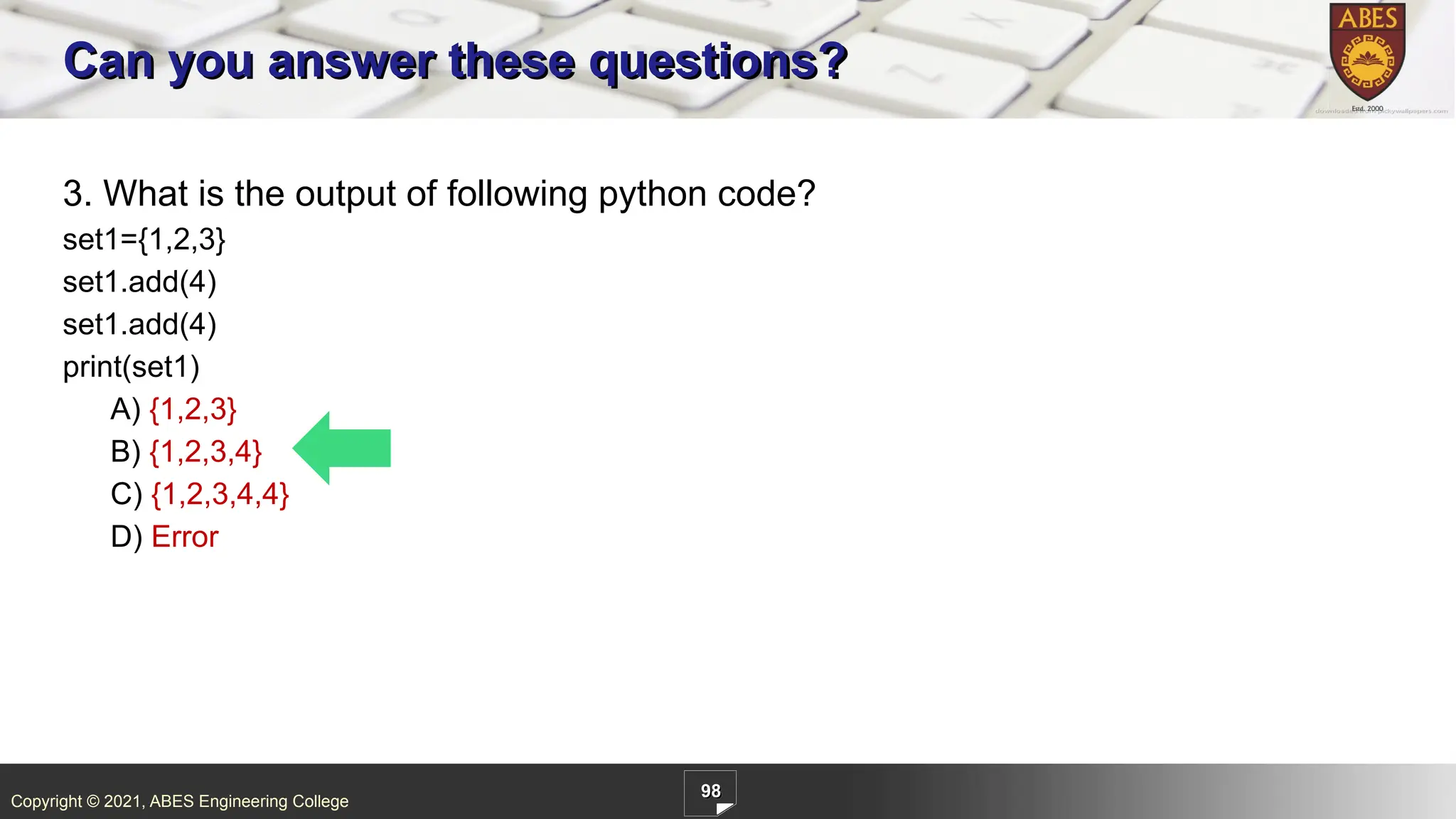
ABES Engineering College 98 3. What is the output of following python code? set1={1,2,3} set1.add(4) set1.add(4) print(set1) A) {1,2,3} B) {1,2,3,4} C) {1,2,3,4,4} D) Error Can you answer these questions?
Download
![Copyright © 2021, ABES Engineering College
1
List
. Python List is the most commonly used sequence.
Important points about list are as follows.
List elements are enclosed in square brackets [] and are comma separated.
List is the sequence of class type ‘list’.
List can contain elements of different data types.
List is a mutable(changeable) sequence, would be discussed in detail in 3.2.3
List allows duplicate elements.
List elements are ordered, it means it give specific order to the elements, if new element is
added, by default it comes at the end of the list.](https://image.slidesharecdn.com/l11list-251128053214-e8c75f56/75/List-_Python-Programming_Built-in-functions-1-2048.jpg)
![Copyright © 2021, ABES Engineering College
8
Slicing Example
Single colon[:]- It is used to print the entire list.
Double colon[:]- It is used to print the entire list.
l[2::]-It is used to print the list starting from index 2 till
the last element of the list.
L[2:5:]- We have set start and end both as 2 and 5,
so it’s starting from 2 and ending with (5-1) and
printing values for indexes 2,3 and 4 index.
L[2:5:2]-end and step has been set as 2,5 and 2. So
output substring starting from index 2, ending with 5-
1=4 and step counter is 2, so its skipping alternate
element.](https://image.slidesharecdn.com/l11list-251128053214-e8c75f56/75/List-_Python-Programming_Built-in-functions-8-2048.jpg)
![Copyright © 2021, ABES Engineering College
9
Examples of List Slicing
Operator Explanation Example
[:] This gives a complete original list
[1:3] It starts with 1th
index and ending
with (3-1=2) index
[2:] Sub list starts with index 2 and
ends at last element as nothing
specified on right side of the
colon](https://image.slidesharecdn.com/l11list-251128053214-e8c75f56/75/List-_Python-Programming_Built-in-functions-9-2048.jpg)
![Copyright © 2021, ABES Engineering College
10
Examples of List Slicing
Operator Explanation Example
[1:4:] Start=1, stop=4 and by default
step=1.
[1:4:2] Start=1, stop=4 and by step=2.
As the step is 2, it took every 2nd
element.
[::-1] Starting is 0th index and stopping
at last index and step is negative
count so that it would print in
reverse order](https://image.slidesharecdn.com/l11list-251128053214-e8c75f56/75/List-_Python-Programming_Built-in-functions-10-2048.jpg)
![Copyright © 2021, ABES Engineering College
13
Can you answer these Questions
1.What is the output of the following code?
A.[‘XY’,’YZ’]
B.[‘xy’,’yz’]
C. None of the above
D. Both of the above](https://image.slidesharecdn.com/l11list-251128053214-e8c75f56/75/List-_Python-Programming_Built-in-functions-12-2048.jpg)
![Copyright © 2021, ABES Engineering College
14
Can you answer these Questions
2.What is the output of the following code?
A. [‘g’,’h’,’k’,’l’,’m’]
B. [‘g’,’h’,’k’,’l’,’m’,9]
C. [‘g’,’h’,’k’,’l’,’m’,8,9]
D. [‘g’,’h’,’k’,’l’,’m’,9,8]](https://image.slidesharecdn.com/l11list-251128053214-e8c75f56/75/List-_Python-Programming_Built-in-functions-13-2048.jpg)
![Copyright © 2021, ABES Engineering College
27
Nested List
When we have an element of a list in the form of the list itself, it is called Nested List.
Elements of the nested list can be accessed using the 2-D indexing access method.
.
In this example, first [1] denotes [3,4] and second [1] represents 4, so it gives output as 4.](https://image.slidesharecdn.com/l11list-251128053214-e8c75f56/75/List-_Python-Programming_Built-in-functions-26-2048.jpg)
![Copyright © 2021, ABES Engineering College
31
List Comprehension
Syntax:
[ statements for an item in list ]
.
IF ELSE :
We should notice one change that because in if-else
case output is separated based on the condition.
if-else and conditions has been written along with
statements.
We have the facility of adding conditionals in
the list comprehension.](https://image.slidesharecdn.com/l11list-251128053214-e8c75f56/75/List-_Python-Programming_Built-in-functions-30-2048.jpg)
![Copyright © 2021, ABES Engineering College
32
Can you answer these questions?
1. What will be the Output of the following code?
.
A.[0,1,2,3,4,5]
B.[0,1,2,3,4,5,6]
C.[0,1,2,3]
D. None of the Above](https://image.slidesharecdn.com/l11list-251128053214-e8c75f56/75/List-_Python-Programming_Built-in-functions-31-2048.jpg)
![Copyright © 2021, ABES Engineering College
33
Can you answer these questions?
2. What will be the Output of the following code?
.
A. [5,7,9]
B.[3,4,5]
C.[6,7,8]
D.[9,10,11]](https://image.slidesharecdn.com/l11list-251128053214-e8c75f56/75/List-_Python-Programming_Built-in-functions-32-2048.jpg)
![Copyright © 2021, ABES Engineering College
39
Accessing Elements in Tuple
.
Tuple elements can be accessed using indexes, just like String and List .
Each element in the tuple is accessed by the index in the square brackets [].
An index starts with zero and ends with (number of elements - 1)
Example:
Write a program to access index 1 element from tuple.
In above example 1: tuple newtup carries multiple types of data in it as “hello” is string, 2 is integer, and
23.45 is float. If we can fetch the index 1 element using print(newtup[1]).](https://image.slidesharecdn.com/l11list-251128053214-e8c75f56/75/List-_Python-Programming_Built-in-functions-38-2048.jpg)
![Copyright © 2021, ABES Engineering College
40
Contd…
.
Write a program to access index 0 element from tuple.
Basically, the -1 index will return the last value of tuple.
Indexes start from zero, and it goes up to a number of elements or say -1.
Take another example to fetch the -1 index from tuple.
last element is accessed by print(tuple_days[-1]).](https://image.slidesharecdn.com/l11list-251128053214-e8c75f56/75/List-_Python-Programming_Built-in-functions-39-2048.jpg)


![Copyright © 2021, ABES Engineering College
57
Accessing of Dictionary
List
By Default indexing
Indexes are only of
integer type
Adds an element to
the next default
index
Fetching of element
is through index,
lst[0]
Traversing is easy
just by increase the
index, i+=1
Dictionary
User defined Keys
Keys can be of any
type
Adds an element to
the user defined key
location
Fetching of value is
through keys,
dic[<key>]
Traversing is easy
just by increase the
index, i+=1](https://image.slidesharecdn.com/l11list-251128053214-e8c75f56/75/List-_Python-Programming_Built-in-functions-56-2048.jpg)
![Copyright © 2021, ABES Engineering College
70
1. Output of following code?
A) {1:1,2:4,3:9,4:16,5:25,6:36}
B) {1:1,2:4,3:9,4:16,5:25}
C) [1,4,9,16,25]
D) Error
Can you answer these questions?](https://image.slidesharecdn.com/l11list-251128053214-e8c75f56/75/List-_Python-Programming_Built-in-functions-69-2048.jpg)
![Copyright © 2021, ABES Engineering College
95
Summary
List Tuple Set Dictionary
List is a collection of values
that is ordered.
Tuple is ordered and
unchangeable collection of
values
Set stores the unique values
as data collection
Dictionary is a collection of
key-value pairs
Represented by [ ] Represented by ( ) Represented by { } Represented by { }
Duplicate elements allowed Duplicate elements allowed Duplicate elements not
allowed
Duplicate keys not allowed, in
dictionary values allowed
duplicate
Values can be of any type Values can be of any type Values can be of any type Keys are immutable type, and
value can be of any type
Example:
[1, 2, 3, 4]
Example:
(1, 2, 3, 4)
Example:
{1, 2, 3, 4}
Example:
{1:1, 2:2, 3:3, 4:4}
List is mutable Tuple is immutable Set is mutable Dictionary is mutable
List is ordered Tuple is ordered Set is unordered Dictionary is insertion
ordered
Creating an empty list
l=list()
l = []
Creating an empty Tuple
t = tuple ()
t=( )
Creating a set
s=set ()
Creating an empty dictionary
d=dict( )
d={}](https://image.slidesharecdn.com/l11list-251128053214-e8c75f56/75/List-_Python-Programming_Built-in-functions-94-2048.jpg)
![Copyright © 2021, ABES Engineering College
96
1. Which of the following Python code will create a set?
(i) set1=set((0,9,0))
(ii) set1=set([0,2,9])
(iii) set1={}
A) iii
B) i and ii
C) ii and iii
D) All of Above
Can you answer these questions?](https://image.slidesharecdn.com/l11list-251128053214-e8c75f56/75/List-_Python-Programming_Built-in-functions-95-2048.jpg)