Data Communication & Computer
Networks

           Lecture #5


    Mrs. Vasanthi Muniasamy
 Department of Information System
       King Khalid university
                                    1
Data Communication

   The transfer of data/messages from
    one point to another point.


                                         2
Basic Elements of Communication
System

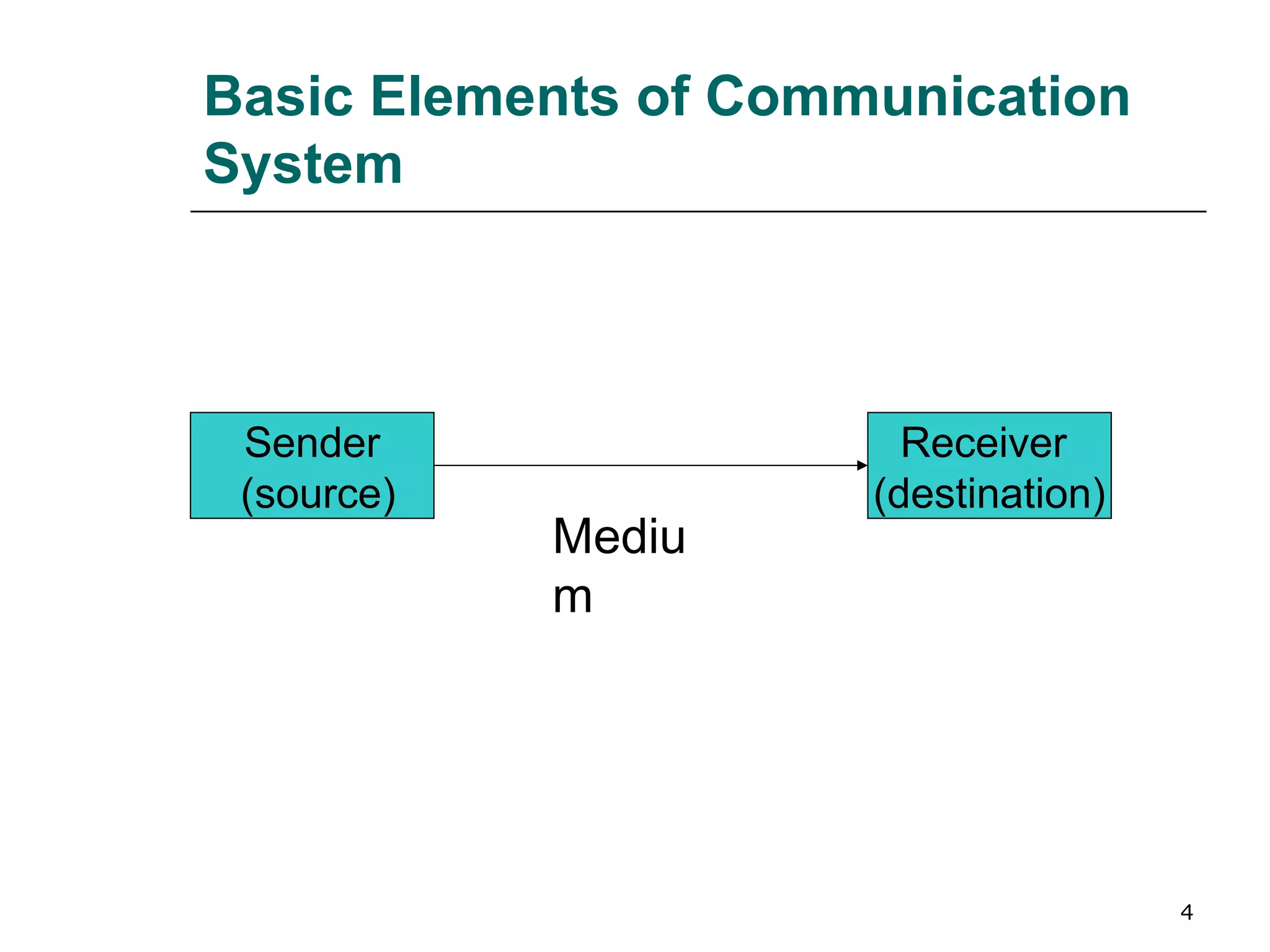
   Three basic elements of communication
    system are:-
    1.   A sender (source) which creates the message
         to transmitted.

    2.   A medium which carries the message.

    3.   A receiver (destination) which receives the
         message.


                                                       3
Basic Elements of Communication
System


 Sender                 Receiver
 (source)             (destination)
            Mediu
            m


                                      4
Data Transmission Modes

   There are three ways, modes for
    transmitting data from one point to
    another. These are simplex, half-
    duplex and full-duplex.


                                          5
Data Transmission Modes
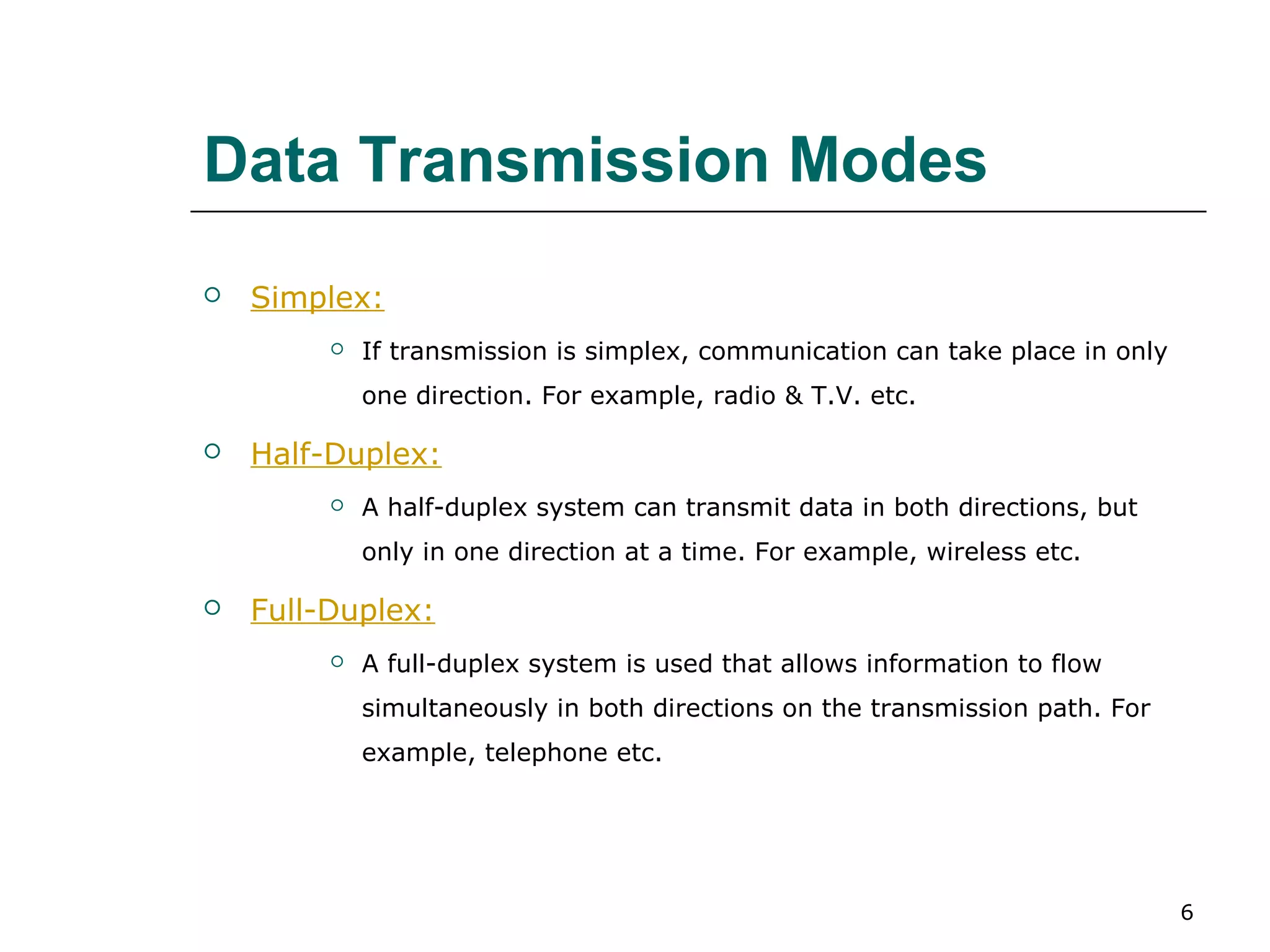
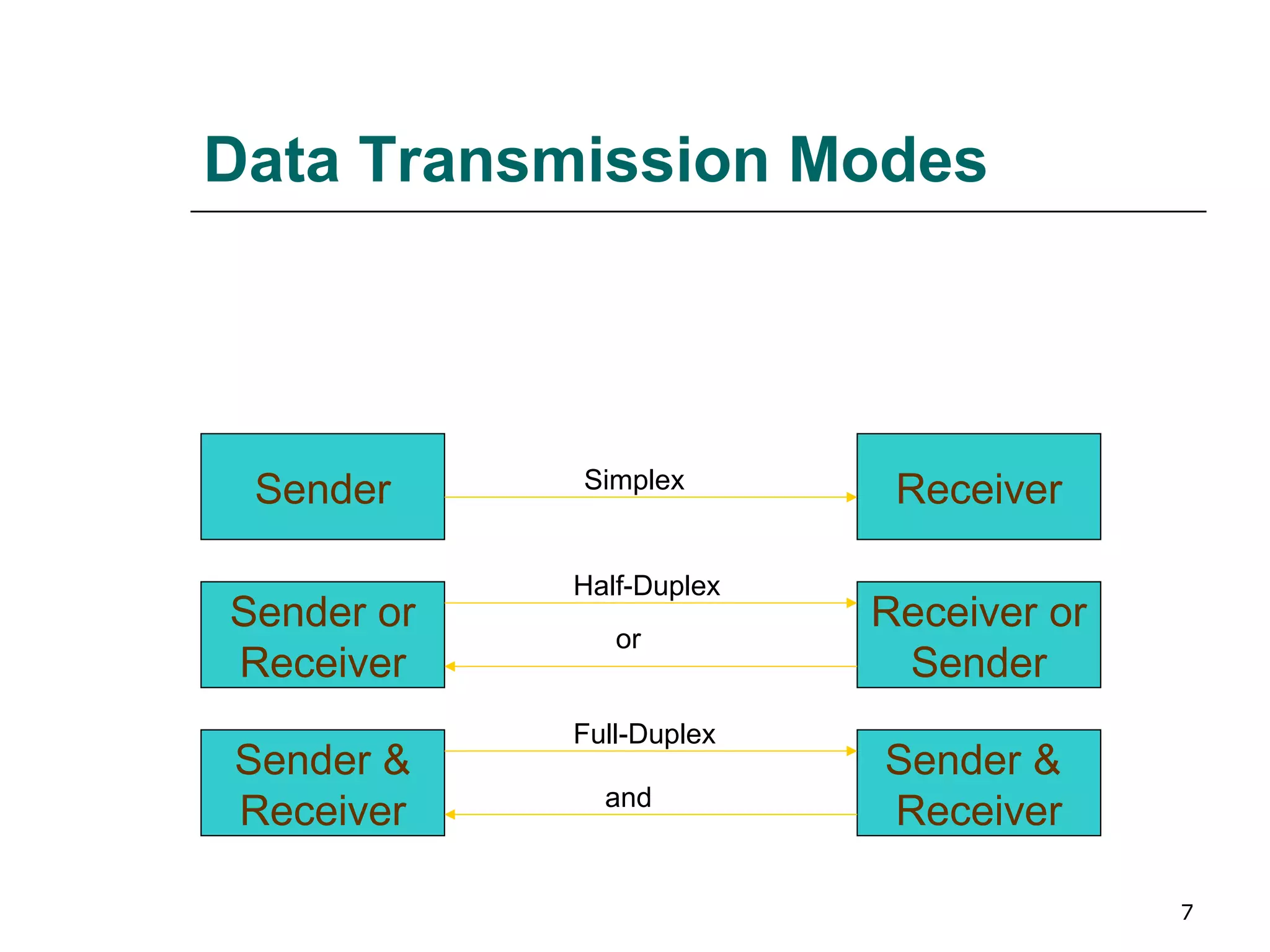
   Simplex:
            If transmission is simplex, communication can take place in only
             one direction. For example, radio & T.V. etc.

   Half-Duplex:
            A half-duplex system can transmit data in both directions, but
             only in one direction at a time. For example, wireless etc.

   Full-Duplex:
            A full-duplex system is used that allows information to flow
             simultaneously in both directions on the transmission path. For
             example, telephone etc.


                                                                                6
Data Transmission Modes


            Simplex
 Sender                    Receiver

            Half-Duplex
Sender or                 Receiver or
               or
Receiver                   Sender
            Full-Duplex
Sender &                  Sender &
              and
Receiver                  Receiver

                                        7
Digital & Analog Transmission

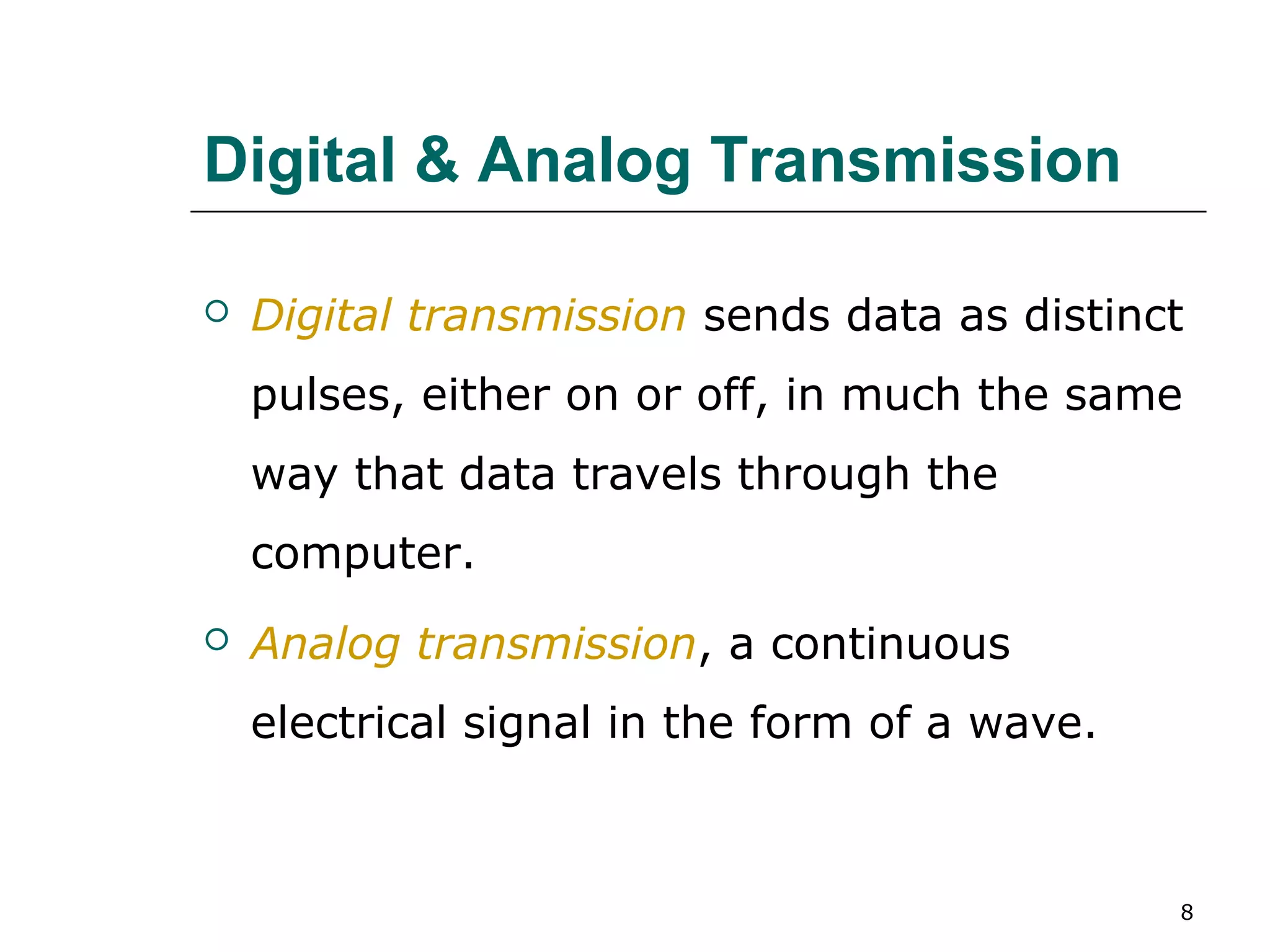
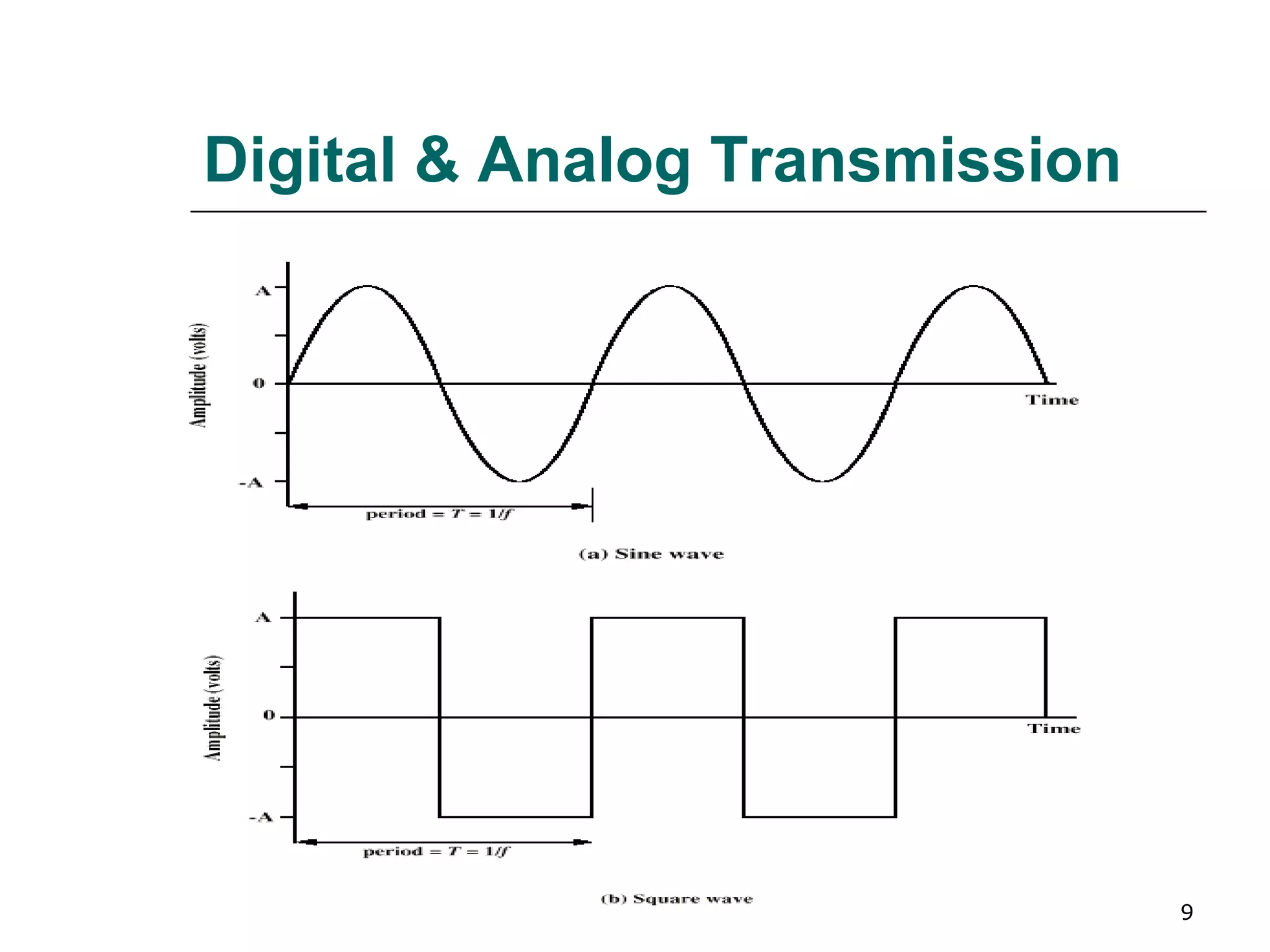
   Digital transmission sends data as distinct
    pulses, either on or off, in much the same
    way that data travels through the
    computer.
   Analog transmission, a continuous
    electrical signal in the form of a wave.


                                               8
Digital & Analog Transmission


                                9
Digital & Analog Transmission
   Frequency: It is the rate (cycles/sec or HZ) at which the
    signals repeat.
   Bandwidth: It is the range of frequencies that is available
    for the transmission of data.
   Channel:     A channel is a portion of the communications
    medium allocated to the sender and receiver for
    conveying information between them.
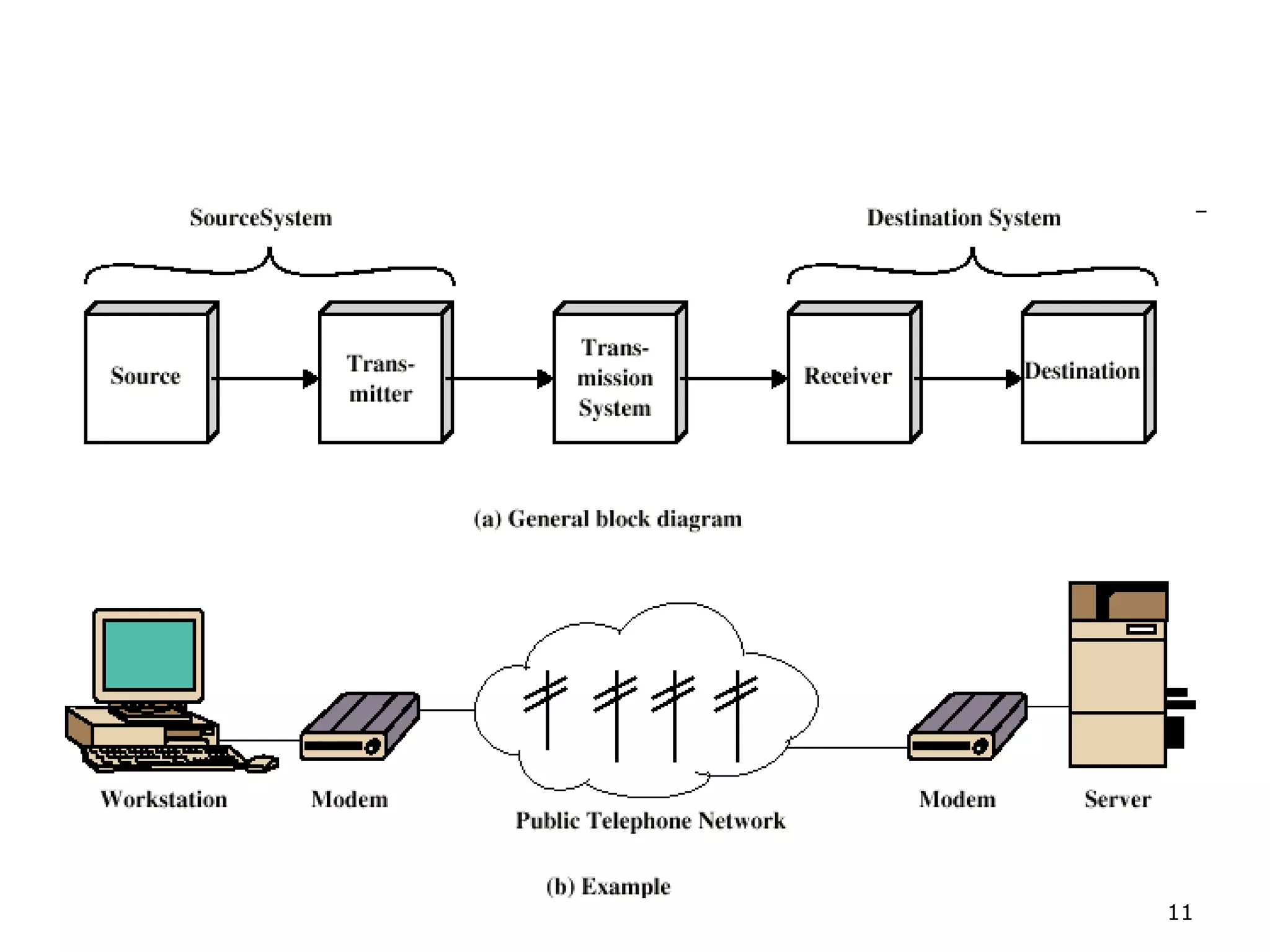
   Modems:      A modem is a device that converts a digital
    signal to an analog signal and vice versa.


                                                               10
11
Transmission Media

   There are several types of physical
    channels (communication media) through
    which data can be transmitted from one
    point to another. Some of the most
    common data transmission medium are
    as under:-


                                             12
Transmission Media

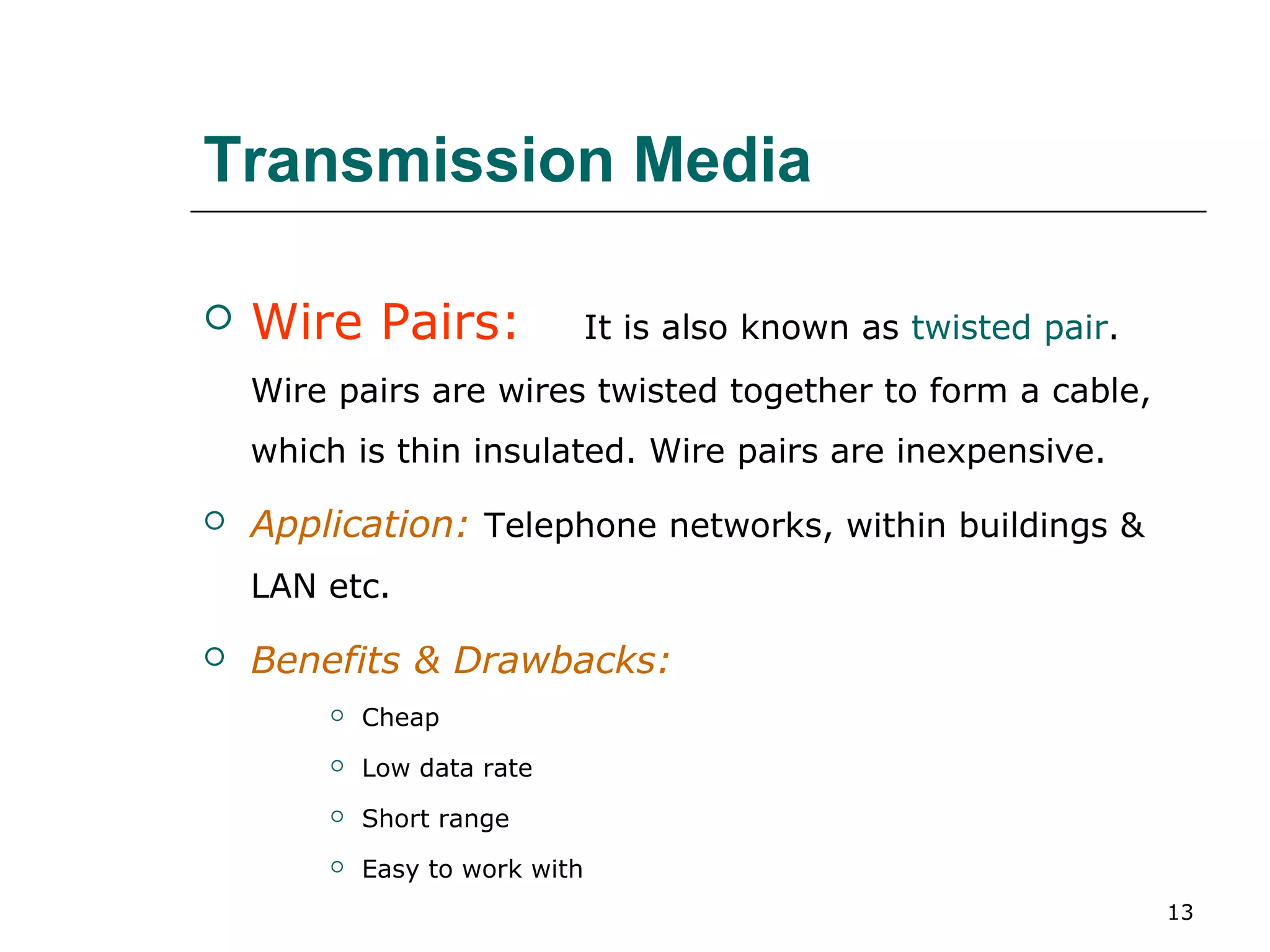
   Wire Pairs:                 It is also known as twisted pair.
    Wire pairs are wires twisted together to form a cable,
    which is thin insulated. Wire pairs are inexpensive.

   Application: Telephone networks, within buildings &
    LAN etc.

   Benefits & Drawbacks:
           Cheap
           Low data rate
           Short range
           Easy to work with
                                                                    13
Transmission Media

   Coaxial Cable: are groups of specially
    wrapped and insulated wire lines that are
    able to transmit data at very high rates.
    These cables can transmit data much
    faster than wire pairs.
   Application:     Long distance telephone
    transmission, Local Area Networks etc.


                                                14
Transmission Media

   Fiber Optics:          Instead of using electricity to
    send data, fiber optics uses light.
   Application: Long haul trunks, Metropolitan trunks, LAN
    & WAN etc.
   Benefits & Drawbacks:
           Greater capacity
           Smaller size & weight
           Lower attenuation


                                                             15
Protocol
   A protocol is a set of rules and procedures
    established to control transmission
    between two points.
   Some common protocols are:-
       TCP/IP (Transmission Control Protocol/Internet
        protocol)
       IPX (Internet Packet Exchange) etc.


                                                     16
Computer Networks
   Network:        A computer system that uses communications
    equipment to connect two or more computers and their resources.
   Network Interface Card (NIC):       A circuit board that can be inserted
    into a slot inside a personal computer to allow it to send and receive
    messages on a LAN.
   Node: A device, usually a personal computer, that is connected to a
    computer.
   Topology:       The physical layout of a network is called a topology.
        Some common network topologies are as under:-


                                                                             17
Network Topologies

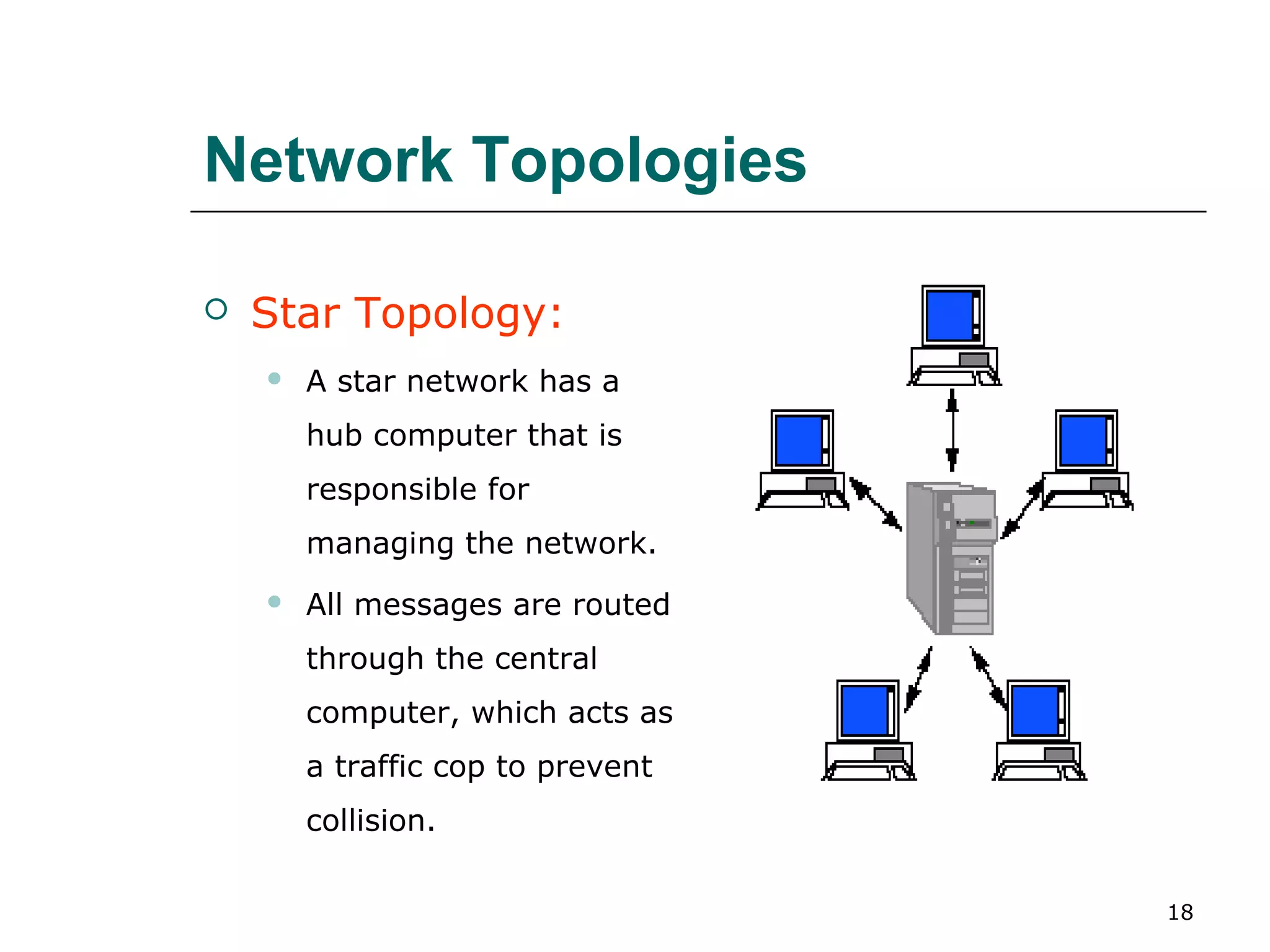
   Star Topology:
       A star network has a
        hub computer that is
        responsible for
        managing the network.
       All messages are routed
        through the central
        computer, which acts as
        a traffic cop to prevent
        collision.

                                   18
Network Topologies
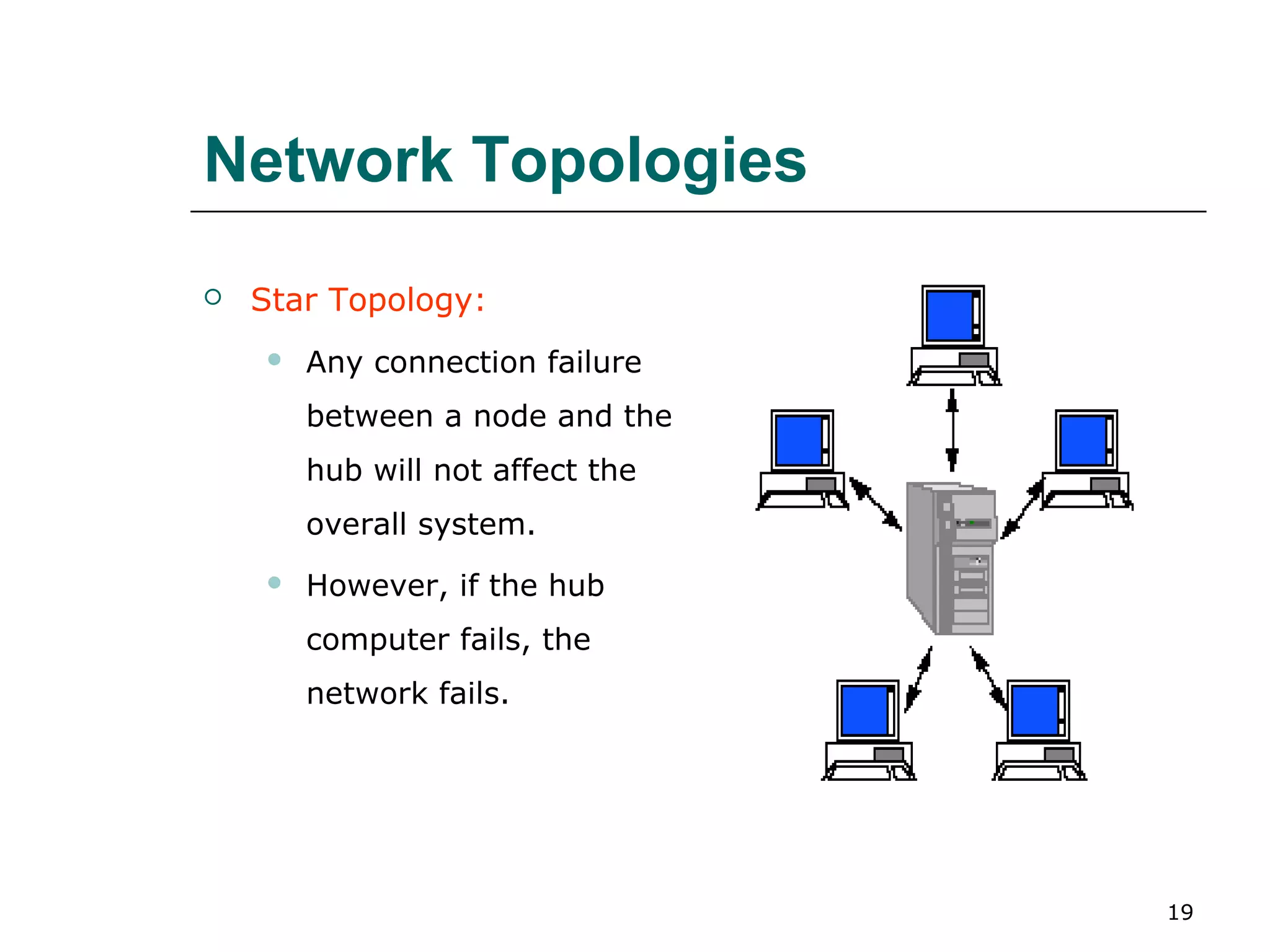
   Star Topology:
       Any connection failure
        between a node and the
        hub will not affect the
        overall system.
       However, if the hub
        computer fails, the
        network fails.


                                  19
Network Topologies
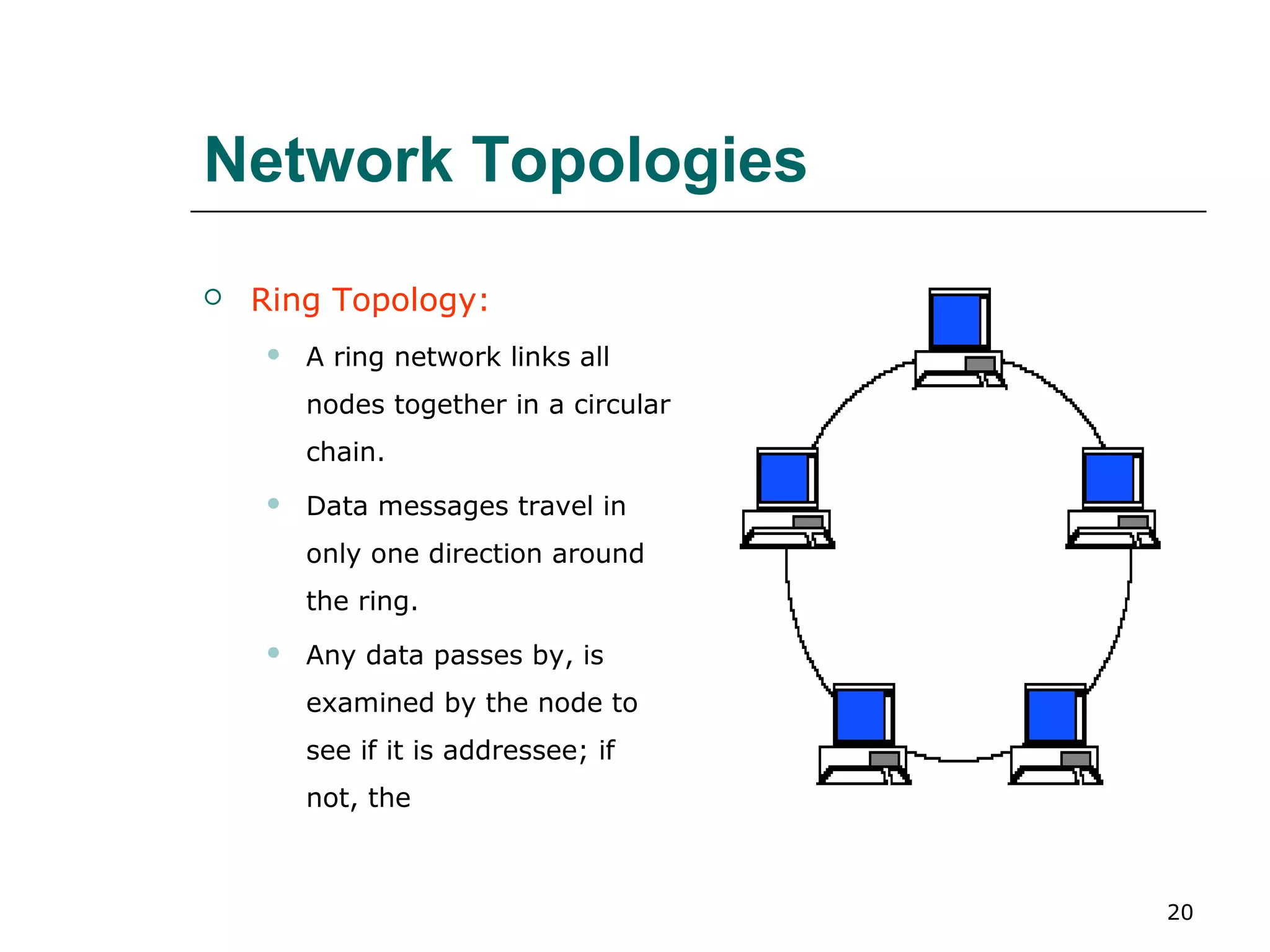
   Ring Topology:
       A ring network links all
        nodes together in a circular
        chain.
       Data messages travel in
        only one direction around
        the ring.
       Any data passes by, is
        examined by the node to
        see if it is addressee; if
        not, the


                                       20
Network Topologies
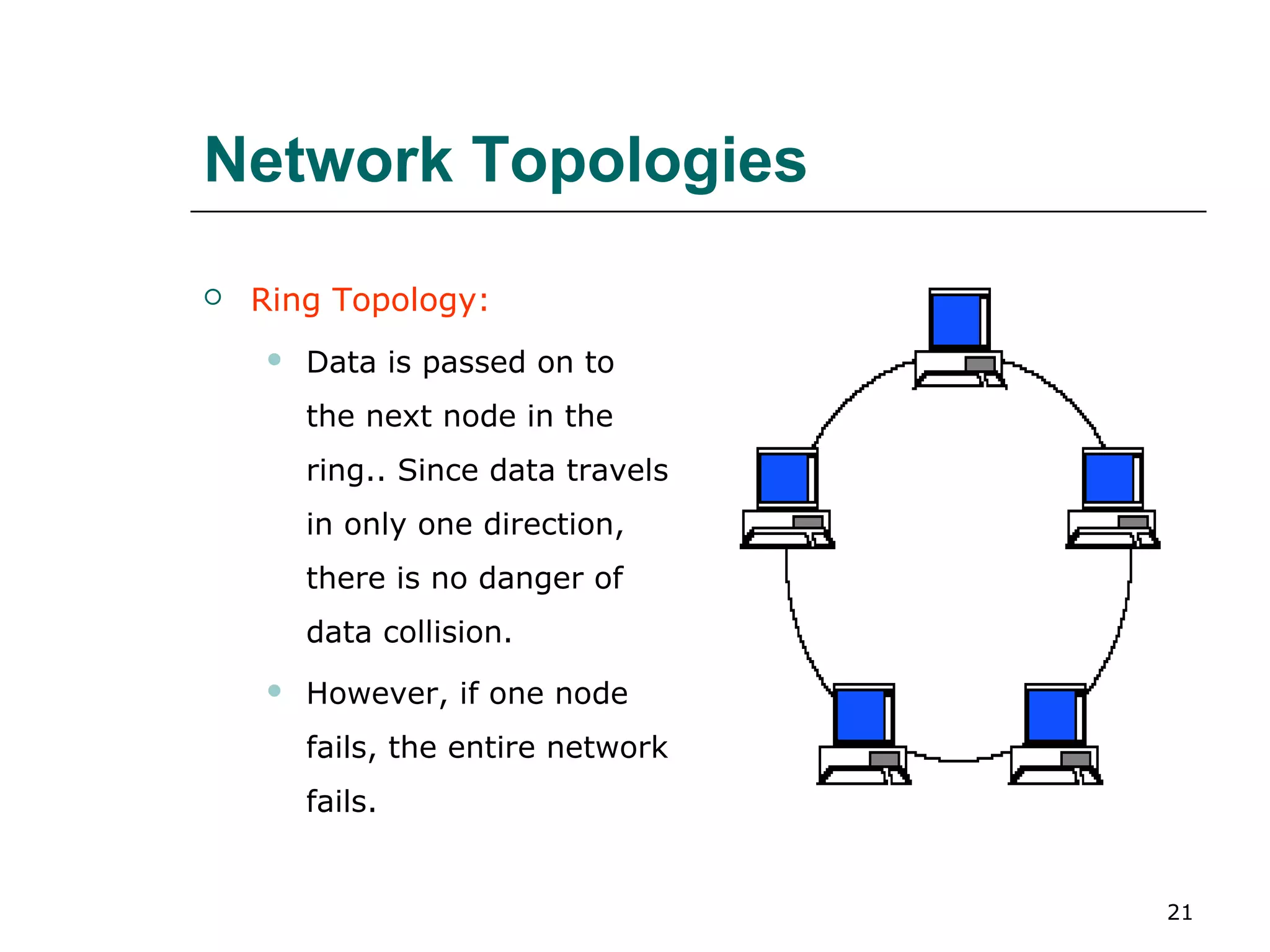
   Ring Topology:
       Data is passed on to
        the next node in the
        ring.. Since data travels
        in only one direction,
        there is no danger of
        data collision.
       However, if one node
        fails, the entire network
        fails.


                                    21
Network Topologies

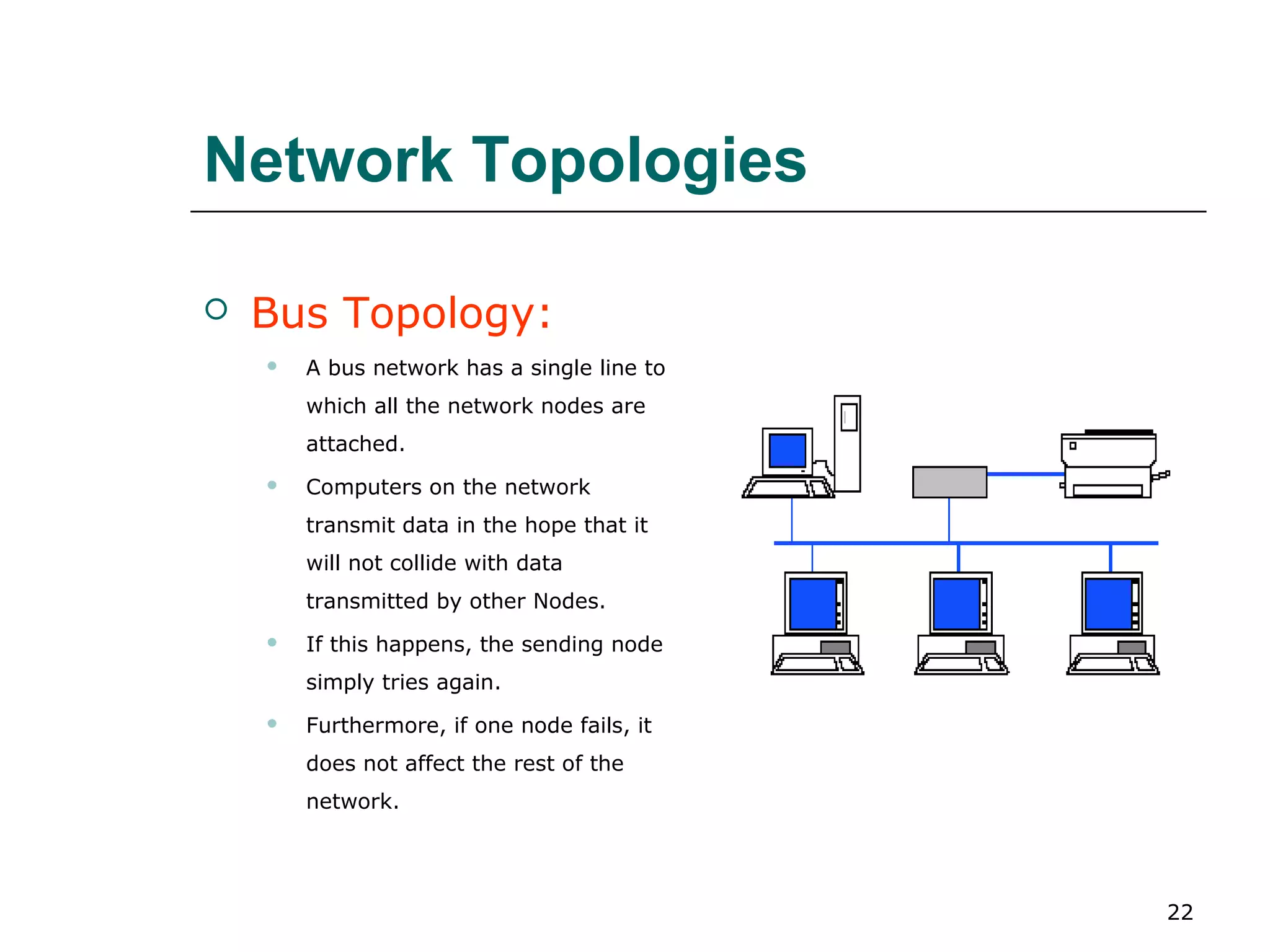
   Bus Topology:
       A bus network has a single line to
        which all the network nodes are
        attached.
       Computers on the network
        transmit data in the hope that it
        will not collide with data
        transmitted by other Nodes.
       If this happens, the sending node
        simply tries again.
       Furthermore, if one node fails, it
        does not affect the rest of the
        network.


                                             22
Computer Networks

   There are two ways to organize the
    resources in networking, which
    are :-
     Peer   to Peer Networking
     Client/Server   Networking


                                         23
Computer Networks

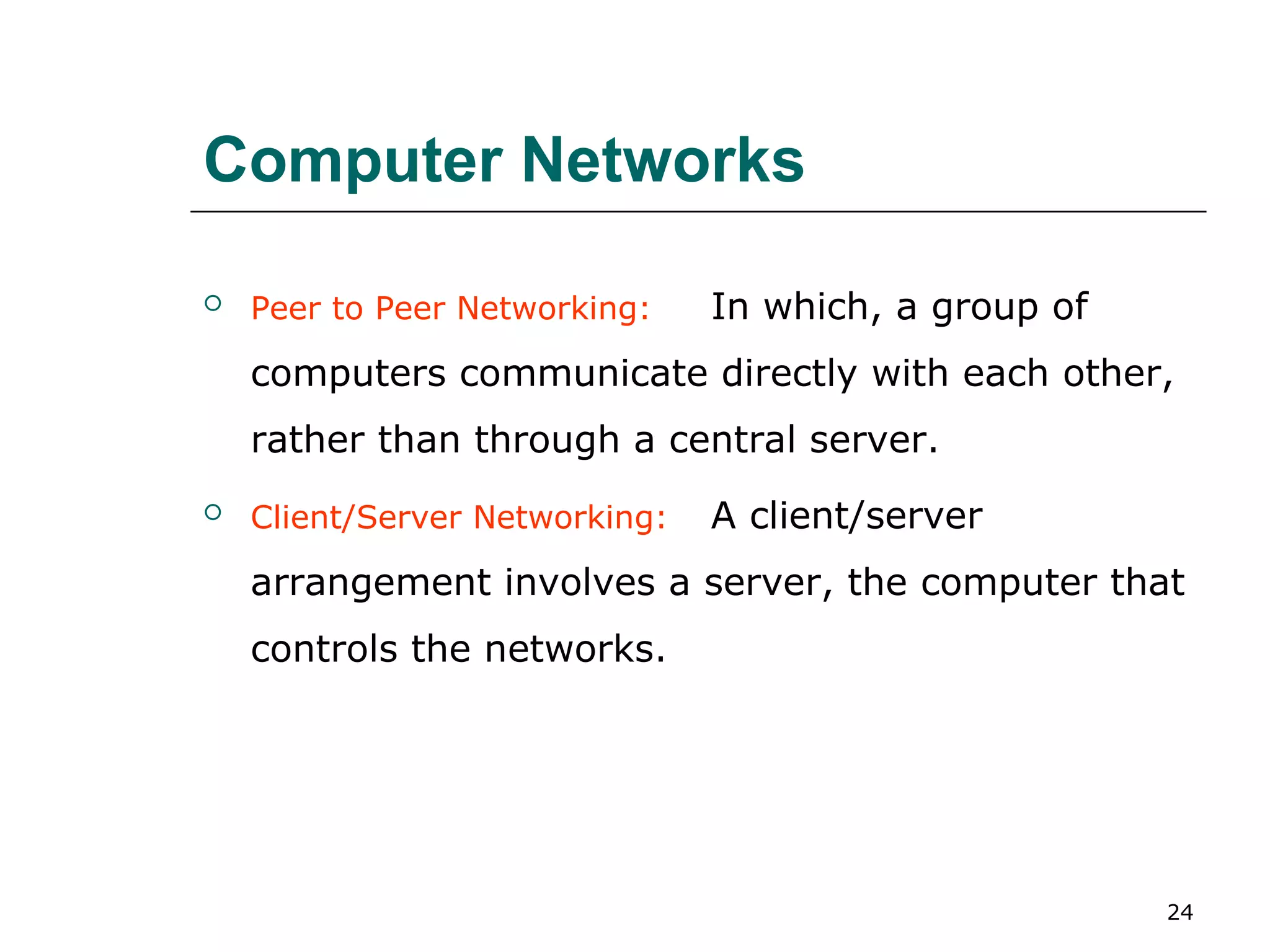
   Peer to Peer Networking:    In which, a group of
    computers communicate directly with each other,
    rather than through a central server.
   Client/Server Networking:   A client/server
    arrangement involves a server, the computer that
    controls the networks.


                                                       24
Kinds of Networks

   There are different kinds of
    networks, for example,
     LAN   (Local Area Networks)
     WAN   (Wide Area Networks)
     MAN   (Metropolitan Area Network)


                                          25
Kinds of Networks

   Local Area Networks: A network which
    spreads over limited geographical area is
    called as LAN.
   Wide Area Networks: A WAN is a network
    of geographically distant computers. (e.g.
    Internet)


                                                26
Local Area Networks

   LAN refers to a network with the following
    characteristics:-
       The network is confined to a small area,
        typically a single building.
       The network consists of a shared transmission
        medium.
       The data rate on the network is high,
        anywhere from 1 Mbps to 100 Mbps.

                                                    27
Local Area Networks
   LAN Protocols:           The two most common network
    protocols for LANs are Ethernet & Token Ring network.
        Ethernet – The network protocol which uses the high speed
         network cable.
        Ethernet uses a bus topology, inexpensive and relatively simple to
         set up.
        Since all the computers in a LAN use the same cable to transmit
         and receive data, they must follow a set of rules about when to
         communicate; otherwise two or more computers could transmit at
         the same time,


                                                                           28
Local Area Networks

    Ethernet – Causing lost messages. So, if the
     cable is in use, the computer must wait.
         When the cable is free from other
          transmissions, the computer can begin
          transmitting immediately.
         This transmission method is called by the
          fancy name of carrier sense multiple access
          with collision detection (CSMA/CD).


                                                        29
Local Area Networks
    Token Ring – which is closely associated with IBM, works on the
     concept of a ring network topology, using a token, a kind of
     electronic signal.
         Only one token is available on the network. When a computer
          on a network wishes to transmit, it first captures the token;
          only then can it transmit data.
         When the computer has sent its message, it releases the
          token back to the network.
         Since only one token is circulating around the network, only
          one device is able to access the network at a time.


                                                                          30
Network Applications

    Electronic Mail
    Voice Mail
    Facsimile Technology (FAX)
    Electronic Data Interchange (EDI)
    E–Commerce
    Instant Banking
    Video Conferencing etc.


                                         31
Internet – & its use…
   ISP - An internet service provider provides the facility to
    connect the internet.
   Browser – is a software on the user’s computer that allows the
    user to access the internet, for example, Internet explorer &
    Netscape communicator etc.
   Domain Name – Which is the address of the specific web page.
   Search Engine – is a software that lets a user specify search
    terms; the search engine then finds sites that fit those terms.


                                                                    32

Lecture #5 Data Communication and Network

  • 1.
    Data Communication &Computer Networks Lecture #5 Mrs. Vasanthi Muniasamy Department of Information System King Khalid university 1
  • 2.
    Data Communication  The transfer of data/messages from one point to another point. 2
  • 3.
    Basic Elements ofCommunication System  Three basic elements of communication system are:- 1. A sender (source) which creates the message to transmitted. 2. A medium which carries the message. 3. A receiver (destination) which receives the message. 3
  • 4.
    Basic Elements ofCommunication System Sender Receiver (source) (destination) Mediu m 4
  • 5.
    Data Transmission Modes  There are three ways, modes for transmitting data from one point to another. These are simplex, half- duplex and full-duplex. 5
  • 6.
    Data Transmission Modes  Simplex:  If transmission is simplex, communication can take place in only one direction. For example, radio & T.V. etc.  Half-Duplex:  A half-duplex system can transmit data in both directions, but only in one direction at a time. For example, wireless etc.  Full-Duplex:  A full-duplex system is used that allows information to flow simultaneously in both directions on the transmission path. For example, telephone etc. 6
  • 7.
    Data Transmission Modes Simplex Sender Receiver Half-Duplex Sender or Receiver or or Receiver Sender Full-Duplex Sender & Sender & and Receiver Receiver 7
  • 8.
    Digital & AnalogTransmission  Digital transmission sends data as distinct pulses, either on or off, in much the same way that data travels through the computer.  Analog transmission, a continuous electrical signal in the form of a wave. 8
  • 9.
    Digital & AnalogTransmission 9
  • 10.
    Digital & AnalogTransmission  Frequency: It is the rate (cycles/sec or HZ) at which the signals repeat.  Bandwidth: It is the range of frequencies that is available for the transmission of data.  Channel: A channel is a portion of the communications medium allocated to the sender and receiver for conveying information between them.  Modems: A modem is a device that converts a digital signal to an analog signal and vice versa. 10
  • 11.
  • 12.
    Transmission Media  There are several types of physical channels (communication media) through which data can be transmitted from one point to another. Some of the most common data transmission medium are as under:- 12
  • 13.
    Transmission Media  Wire Pairs: It is also known as twisted pair. Wire pairs are wires twisted together to form a cable, which is thin insulated. Wire pairs are inexpensive.  Application: Telephone networks, within buildings & LAN etc.  Benefits & Drawbacks:  Cheap  Low data rate  Short range  Easy to work with 13
  • 14.
    Transmission Media  Coaxial Cable: are groups of specially wrapped and insulated wire lines that are able to transmit data at very high rates. These cables can transmit data much faster than wire pairs.  Application: Long distance telephone transmission, Local Area Networks etc. 14
  • 15.
    Transmission Media  Fiber Optics: Instead of using electricity to send data, fiber optics uses light.  Application: Long haul trunks, Metropolitan trunks, LAN & WAN etc.  Benefits & Drawbacks:  Greater capacity  Smaller size & weight  Lower attenuation 15
  • 16.
    Protocol  A protocol is a set of rules and procedures established to control transmission between two points.  Some common protocols are:-  TCP/IP (Transmission Control Protocol/Internet protocol)  IPX (Internet Packet Exchange) etc. 16
  • 17.
    Computer Networks  Network: A computer system that uses communications equipment to connect two or more computers and their resources.  Network Interface Card (NIC): A circuit board that can be inserted into a slot inside a personal computer to allow it to send and receive messages on a LAN.  Node: A device, usually a personal computer, that is connected to a computer.  Topology: The physical layout of a network is called a topology.  Some common network topologies are as under:- 17
  • 18.
    Network Topologies  Star Topology:  A star network has a hub computer that is responsible for managing the network.  All messages are routed through the central computer, which acts as a traffic cop to prevent collision. 18
  • 19.
    Network Topologies  Star Topology:  Any connection failure between a node and the hub will not affect the overall system.  However, if the hub computer fails, the network fails. 19
  • 20.
    Network Topologies  Ring Topology:  A ring network links all nodes together in a circular chain.  Data messages travel in only one direction around the ring.  Any data passes by, is examined by the node to see if it is addressee; if not, the 20
  • 21.
    Network Topologies  Ring Topology:  Data is passed on to the next node in the ring.. Since data travels in only one direction, there is no danger of data collision.  However, if one node fails, the entire network fails. 21
  • 22.
    Network Topologies  Bus Topology:  A bus network has a single line to which all the network nodes are attached.  Computers on the network transmit data in the hope that it will not collide with data transmitted by other Nodes.  If this happens, the sending node simply tries again.  Furthermore, if one node fails, it does not affect the rest of the network. 22
  • 23.
    Computer Networks  There are two ways to organize the resources in networking, which are :-  Peer to Peer Networking  Client/Server Networking 23
  • 24.
    Computer Networks  Peer to Peer Networking: In which, a group of computers communicate directly with each other, rather than through a central server.  Client/Server Networking: A client/server arrangement involves a server, the computer that controls the networks. 24
  • 25.
    Kinds of Networks  There are different kinds of networks, for example,  LAN (Local Area Networks)  WAN (Wide Area Networks)  MAN (Metropolitan Area Network) 25
  • 26.
    Kinds of Networks  Local Area Networks: A network which spreads over limited geographical area is called as LAN.  Wide Area Networks: A WAN is a network of geographically distant computers. (e.g. Internet) 26
  • 27.
    Local Area Networks  LAN refers to a network with the following characteristics:-  The network is confined to a small area, typically a single building.  The network consists of a shared transmission medium.  The data rate on the network is high, anywhere from 1 Mbps to 100 Mbps. 27
  • 28.
    Local Area Networks  LAN Protocols: The two most common network protocols for LANs are Ethernet & Token Ring network.  Ethernet – The network protocol which uses the high speed network cable.  Ethernet uses a bus topology, inexpensive and relatively simple to set up.  Since all the computers in a LAN use the same cable to transmit and receive data, they must follow a set of rules about when to communicate; otherwise two or more computers could transmit at the same time, 28
  • 29.
    Local Area Networks  Ethernet – Causing lost messages. So, if the cable is in use, the computer must wait.  When the cable is free from other transmissions, the computer can begin transmitting immediately.  This transmission method is called by the fancy name of carrier sense multiple access with collision detection (CSMA/CD). 29
  • 30.
    Local Area Networks  Token Ring – which is closely associated with IBM, works on the concept of a ring network topology, using a token, a kind of electronic signal.  Only one token is available on the network. When a computer on a network wishes to transmit, it first captures the token; only then can it transmit data.  When the computer has sent its message, it releases the token back to the network.  Since only one token is circulating around the network, only one device is able to access the network at a time. 30
  • 31.
    Network Applications  Electronic Mail  Voice Mail  Facsimile Technology (FAX)  Electronic Data Interchange (EDI)  E–Commerce  Instant Banking  Video Conferencing etc. 31
  • 32.
    Internet – &its use…  ISP - An internet service provider provides the facility to connect the internet.  Browser – is a software on the user’s computer that allows the user to access the internet, for example, Internet explorer & Netscape communicator etc.  Domain Name – Which is the address of the specific web page.  Search Engine – is a software that lets a user specify search terms; the search engine then finds sites that fit those terms. 32