
Lazy Loading
“do the least work possible”
Evolution of javascript application
           optimization

 <head> <script> code </script> </head>

 Many separate script file as separate
 resources (cacheable)

 Far futures expires headers, e-tags

 Reduce requests: minification and
 concatenation

 Serve from static, “cookieless” domains, CDNs

 We’re still slow....what’s next?
The problem: the file
   keeps growing!
Not scalable for large applications

Complexity of production support increases,
more code = more liability (one syntax error
and boom!)

Big ball of mud

Hard to maintain development vs. production
systems (dev mode with separate files, build
process, versioning, etc)
The solution: lazy load
Always load core javascript framework
(jquery + your framework/bootstrap)  You don’t have a
framework???


Lazy load models and controllers based upon
interaction

Don’t have an MVC framework? coremvc,
JavascriptMVC, many others

Avoid dependency hell: keep it one-level/
controller based. Don’t “abuse” prototype
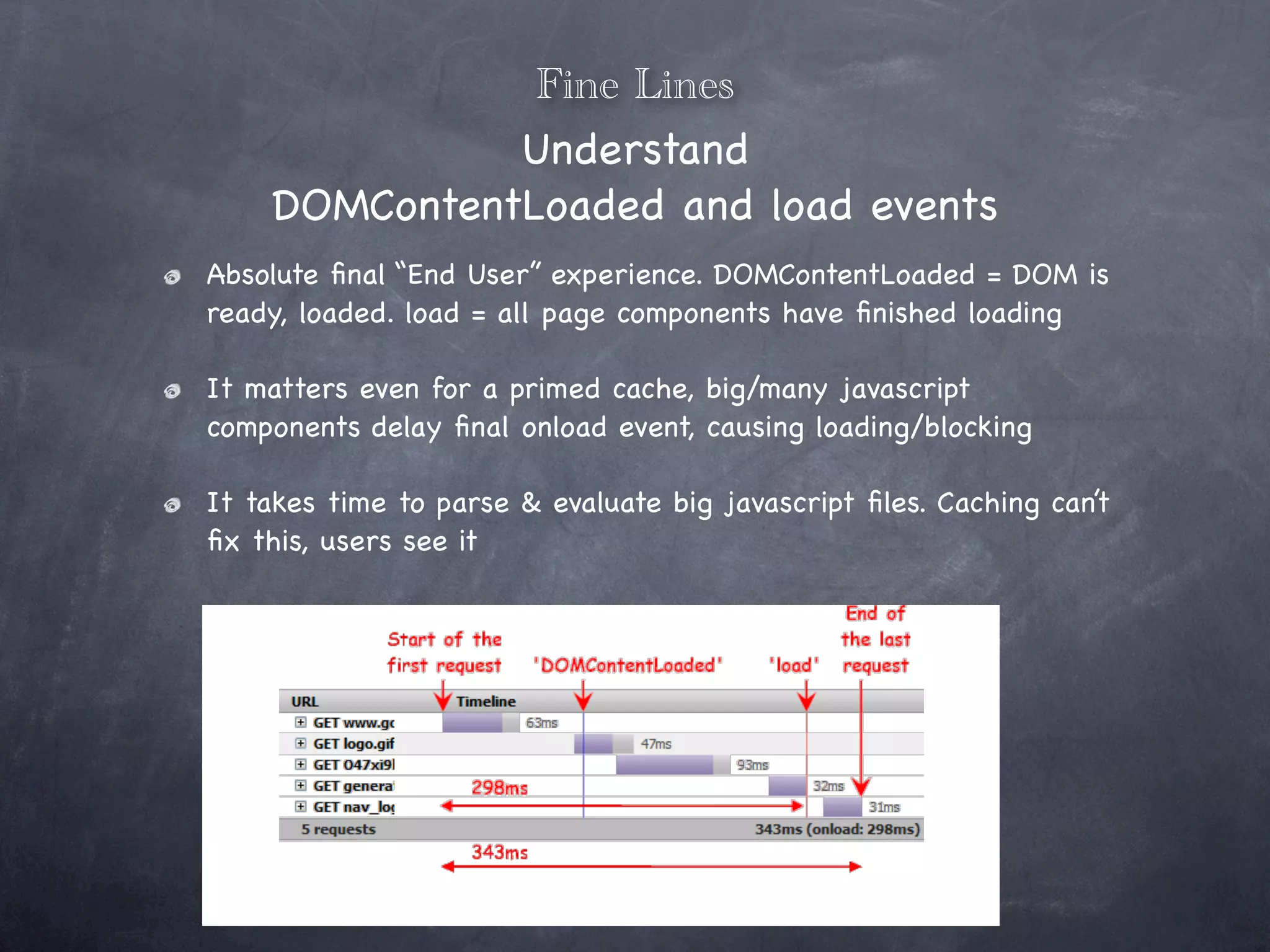
Fine Lines
              Understand
    DOMContentLoaded and load events
Absolute final “End User” experience. DOMContentLoaded = DOM is
ready, loaded. load = all page components have finished loading

It matters even for a primed cache, big/many javascript
components delay final onload event, causing loading/blocking

It takes time to parse & evaluate big javascript files. Caching can’t
fix this, users see it
Possible improvements:
 why invest the time?
Increase simplicity

“Snappiness”, reduce memory footprint --
less code in memory

Hide latency

Manage user expectations (users expect to
wait when they do some action the first
time, but hate waiting on every page load)

Evaluate your site metrics (passers-by vs.
heavy users), cache rate percentage for
Where do I start?
Today (probably yesterday)

Evaluate your application, especially your users

Y-SLOW & Firebug Net Panel. Google Page Speed Plugin

Look at existing solutions

    jquery plugins available

    yuiloader, requirejs, many others as well

    dojo loader & dep management

    (maybe) do your own - simple bootstrap with simple API

    test in all target browsers for loading indications. hacks will be
    needed
<html>
      A maybe-contrived example
<head>
<title>LazyLoading Test</title>
<script>
         var AsyncLoader = function(src, cb) {
         var s = document.createElement('script');
         s.type = 'text/javascript';
                             s.async = true;
                             s.src = src + '?=' + Math.random(); // make sure we are loading this once
                             if(typeof(cb) == 'function') {
                                       this.onLoad(cb);
                             }


                                                                                                  https://gist.github.com/904251
                             var onLoad = this.onLoad();

                                     s.onreadystatechange = function() {
                                              if(this.readyState == 'loaded' ||
                                                         this.readyState == 'complete') {
                                                         onLoad();
                                              }
                                     };
                                     s.onload = onLoad;
                                     s.onerror = onLoad;

                            var asyncLoad = function() {
                                    setTimeout(function() {
                                              document.getElementById('msg').innerHTML = document.getElementById('msg').innerHTML + 'Loading...';
                                              var x = document.getElementsByTagName('script')[0];
                                              var head = document.getElementsByTagName("head")[0];
                                              x.parentNode.insertBefore(s, x);
                                    }, 1000);
                            };

                            if (window.attachEvent) {
                                       window.attachEvent('onload', asyncLoad);
                            } else if(window.addEventListener) {
                                       window.addEventListener('load', asyncLoad, false);
                            }
         };

         AsyncLoader.prototype.onLoad = function(cb) {
                if(typeof(cb) == 'function') {
                           this._cb = cb;
                } else if(typeof(this._cb) == 'function') {
                           var that = this;
                           return function() {
                                     that._cb();
                           }
                }
         };

         var loader = new AsyncLoader('http://www.mersenneforum.org/txt/43.txt', function() {
                  document.getElementById('msg').innerHTML = document.getElementById('msg').innerHTML + 'done';
         });

</script>
</head>
<body>
<h1>Javascript Lazy Loading Test</h1>
<div id='msg'></div>
<div style="height:1000px; width: 50px; background: #aaaaaa;"></div>
</body>
</html>
Desired Outcome
Minimal loading indication across most
browsers. “Defer” load until after load or
your custom event

Good for third party javascripts which may
be slow or trigger more blocking requests
themselves which continue page loading

Die silently, but handle it. Don’t go on like
nothing happened; don’t try to use code that
didn’t load!
Example Results


http://www.letseehere.com/examples/lazy_loading/
thanks
                   Johnathan Leppert
                  Developer, Manta.com
                  twitter: @iamleppert
              johnathan.leppert@gmail.com
               Let me google that for you
                    (further reading):
https://gist.github.com/904251
http://velocityconf.com/velocity2010/public/schedule/detail/15412
http://ajaxpatterns.org/On-Demand_Javascript
http://jasonleveille.com/blog/2008/05/javascript-lazy-loading
http://developer.yahoo.com/yui/3/yui/
http://requirejs.org
http://wonko.com/post/painless_javascript_lazy_loading_with_lazyload
http://ajaxian.com/archives/a-technique-for-lazy-script-loading
http://www.digital-web.com/articles/improve_page_performance_with_lazy_loading/

Lazy Loading Because I'm Lazy

  • 1.
    Lazy Loading “do theleast work possible”
  • 2.
    Evolution of javascriptapplication optimization <head> <script> code </script> </head> Many separate script file as separate resources (cacheable) Far futures expires headers, e-tags Reduce requests: minification and concatenation Serve from static, “cookieless” domains, CDNs We’re still slow....what’s next?
  • 3.
    The problem: thefile keeps growing! Not scalable for large applications Complexity of production support increases, more code = more liability (one syntax error and boom!) Big ball of mud Hard to maintain development vs. production systems (dev mode with separate files, build process, versioning, etc)
  • 4.
    The solution: lazyload Always load core javascript framework (jquery + your framework/bootstrap) You don’t have a framework??? Lazy load models and controllers based upon interaction Don’t have an MVC framework? coremvc, JavascriptMVC, many others Avoid dependency hell: keep it one-level/ controller based. Don’t “abuse” prototype
  • 5.
    Fine Lines Understand DOMContentLoaded and load events Absolute final “End User” experience. DOMContentLoaded = DOM is ready, loaded. load = all page components have finished loading It matters even for a primed cache, big/many javascript components delay final onload event, causing loading/blocking It takes time to parse & evaluate big javascript files. Caching can’t fix this, users see it
  • 6.
    Possible improvements: whyinvest the time? Increase simplicity “Snappiness”, reduce memory footprint -- less code in memory Hide latency Manage user expectations (users expect to wait when they do some action the first time, but hate waiting on every page load) Evaluate your site metrics (passers-by vs. heavy users), cache rate percentage for
  • 7.
    Where do Istart? Today (probably yesterday) Evaluate your application, especially your users Y-SLOW & Firebug Net Panel. Google Page Speed Plugin Look at existing solutions jquery plugins available yuiloader, requirejs, many others as well dojo loader & dep management (maybe) do your own - simple bootstrap with simple API test in all target browsers for loading indications. hacks will be needed
  • 8.
    <html> A maybe-contrived example <head> <title>LazyLoading Test</title> <script> var AsyncLoader = function(src, cb) { var s = document.createElement('script'); s.type = 'text/javascript'; s.async = true; s.src = src + '?=' + Math.random(); // make sure we are loading this once if(typeof(cb) == 'function') { this.onLoad(cb); } https://gist.github.com/904251 var onLoad = this.onLoad(); s.onreadystatechange = function() { if(this.readyState == 'loaded' || this.readyState == 'complete') { onLoad(); } }; s.onload = onLoad; s.onerror = onLoad; var asyncLoad = function() { setTimeout(function() { document.getElementById('msg').innerHTML = document.getElementById('msg').innerHTML + 'Loading...'; var x = document.getElementsByTagName('script')[0]; var head = document.getElementsByTagName("head")[0]; x.parentNode.insertBefore(s, x); }, 1000); }; if (window.attachEvent) { window.attachEvent('onload', asyncLoad); } else if(window.addEventListener) { window.addEventListener('load', asyncLoad, false); } }; AsyncLoader.prototype.onLoad = function(cb) { if(typeof(cb) == 'function') { this._cb = cb; } else if(typeof(this._cb) == 'function') { var that = this; return function() { that._cb(); } } }; var loader = new AsyncLoader('http://www.mersenneforum.org/txt/43.txt', function() { document.getElementById('msg').innerHTML = document.getElementById('msg').innerHTML + 'done'; }); </script> </head> <body> <h1>Javascript Lazy Loading Test</h1> <div id='msg'></div> <div style="height:1000px; width: 50px; background: #aaaaaa;"></div> </body> </html>
  • 9.
    Desired Outcome Minimal loadingindication across most browsers. “Defer” load until after load or your custom event Good for third party javascripts which may be slow or trigger more blocking requests themselves which continue page loading Die silently, but handle it. Don’t go on like nothing happened; don’t try to use code that didn’t load!
  • 10.
  • 11.
    thanks Johnathan Leppert Developer, Manta.com twitter: @iamleppert johnathan.leppert@gmail.com Let me google that for you (further reading): https://gist.github.com/904251 http://velocityconf.com/velocity2010/public/schedule/detail/15412 http://ajaxpatterns.org/On-Demand_Javascript http://jasonleveille.com/blog/2008/05/javascript-lazy-loading http://developer.yahoo.com/yui/3/yui/ http://requirejs.org http://wonko.com/post/painless_javascript_lazy_loading_with_lazyload http://ajaxian.com/archives/a-technique-for-lazy-script-loading http://www.digital-web.com/articles/improve_page_performance_with_lazy_loading/

Editor's Notes