Course Contents
I. PART1
Introduction to Python Programming
Why Python
Install Python Environment
II. PART 2
Python Basic Syntax
Python Statements & Comments
Python Variables and Data Types
Python I/O and Import
Python Operators
FCI-Minia University 2
3.
Course Contents
III. PART3
Python Flow Control
Python if…else
Python for Loop
Python while Loop
IV. PART 4
Python Functions
Python Recursion
Python Anonymous Function
V. PART 5
Python Object & Class
Python Inheritance
VI.PART 6
Python Numpy
FCI-Minia University 3
4.
Agenda
Array inNumpy
Creating a Numpy Array
Accessing the Numpy array Index
Data Types in Numpy
FCI-Minia University 4
5.
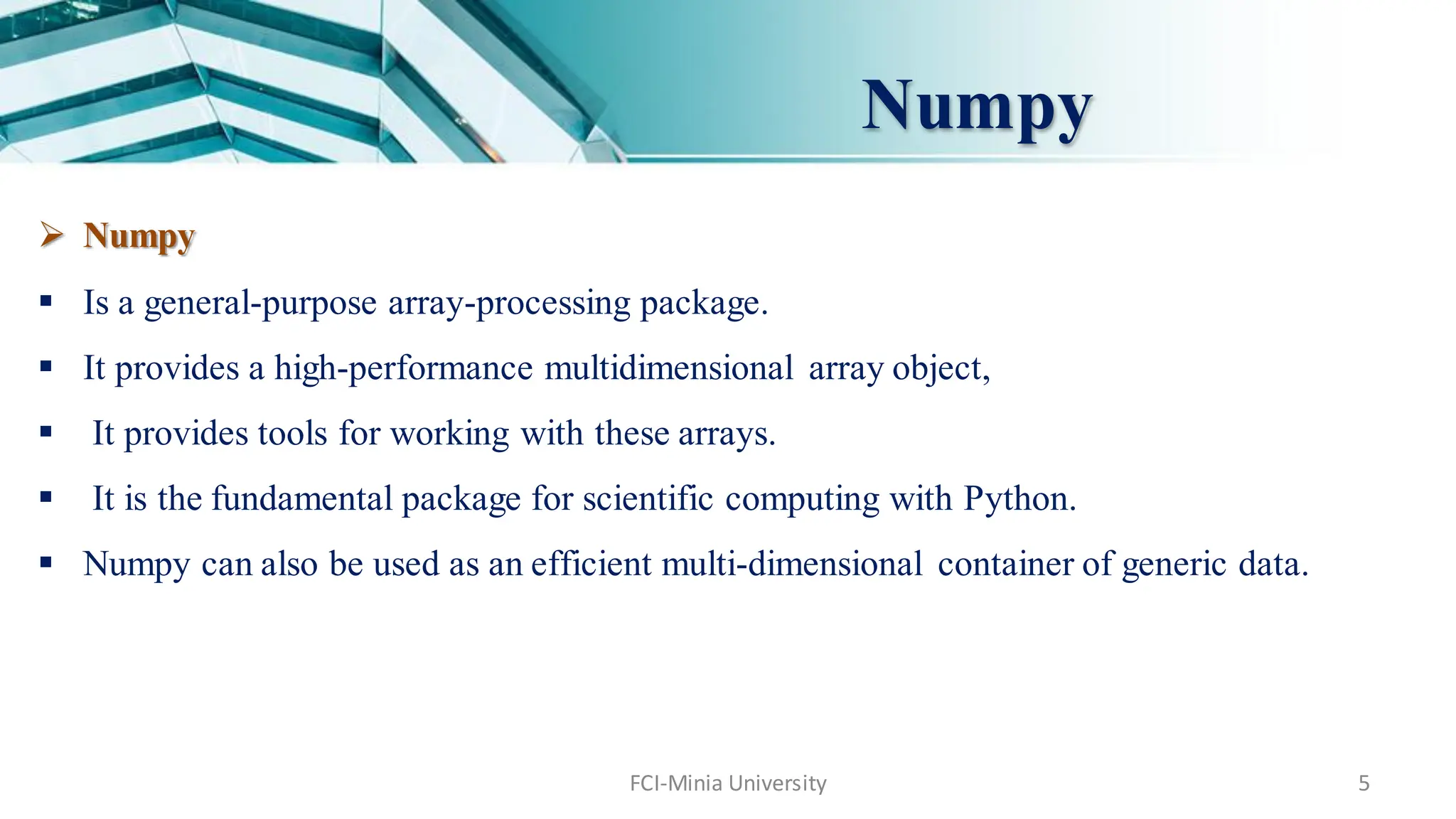
Numpy
FCI-Minia University 5
Numpy
Is a general-purpose array-processing package.
It provides a high-performance multidimensional array object,
It provides tools for working with these arrays.
It is the fundamental package for scientific computing with Python.
Numpy can also be used as an efficient multi-dimensional container of generic data.
6.
Numpy
6
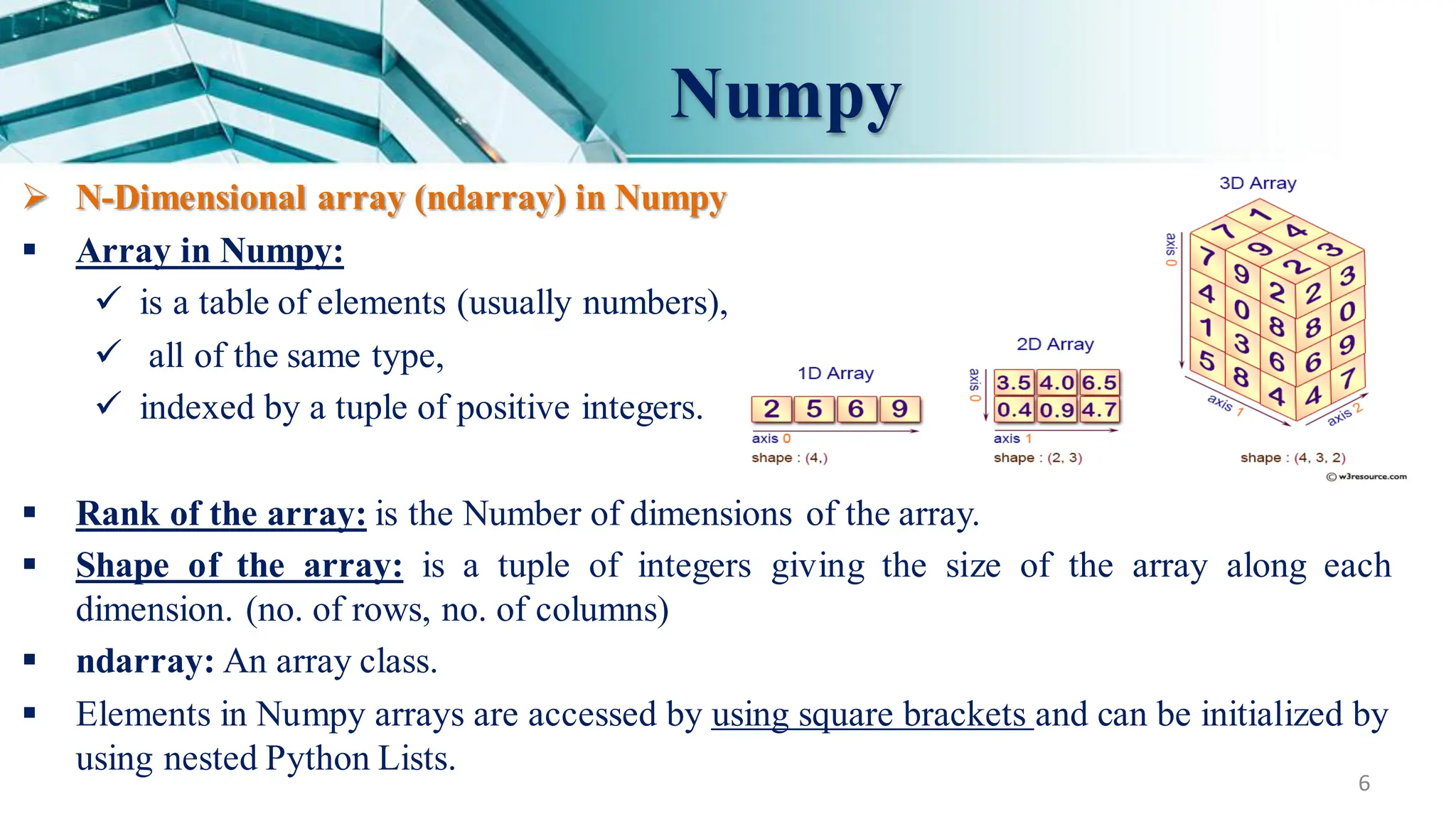
N-Dimensional array(ndarray) in Numpy
Array in Numpy:
is a table of elements (usually numbers),
all of the same type,
indexed by a tuple of positive integers.
Rank of the array: is the Number of dimensions of the array.
Shape of the array: is a tuple of integers giving the size of the array along each
dimension. (no. of rows, no. of columns)
ndarray: An array class.
Elements in Numpy arrays are accessed by using square brackets and can be initialized by
using nested Python Lists.
7.
7
Numpy
Example :
[ [1, 2, 3],
[ 4, 2, 5] ]
rank = 2 (as it is 2-dimensional or it has 2 axes)
First dimension(axis) length = 2,
second dimension has length = 3
shape can be expressed as: (2, 3)
8.
Agenda
Array inNumpy
Creating a Numpy Array
Data Types in Numpy
Accessing the Numpy array Index
FCI-Minia University 8
9.
FCI-Minia University 9
Creatinga Numpy Array
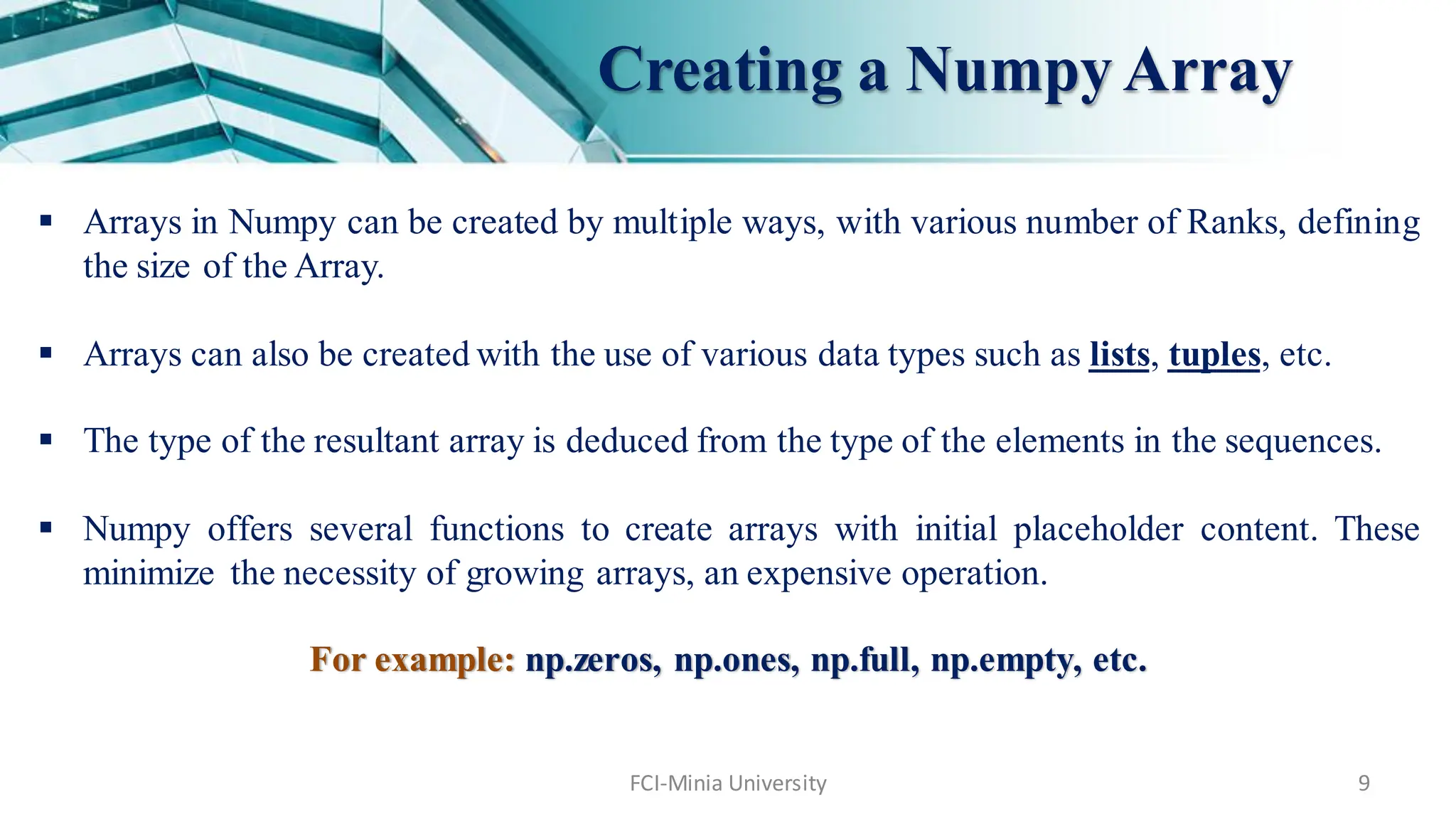
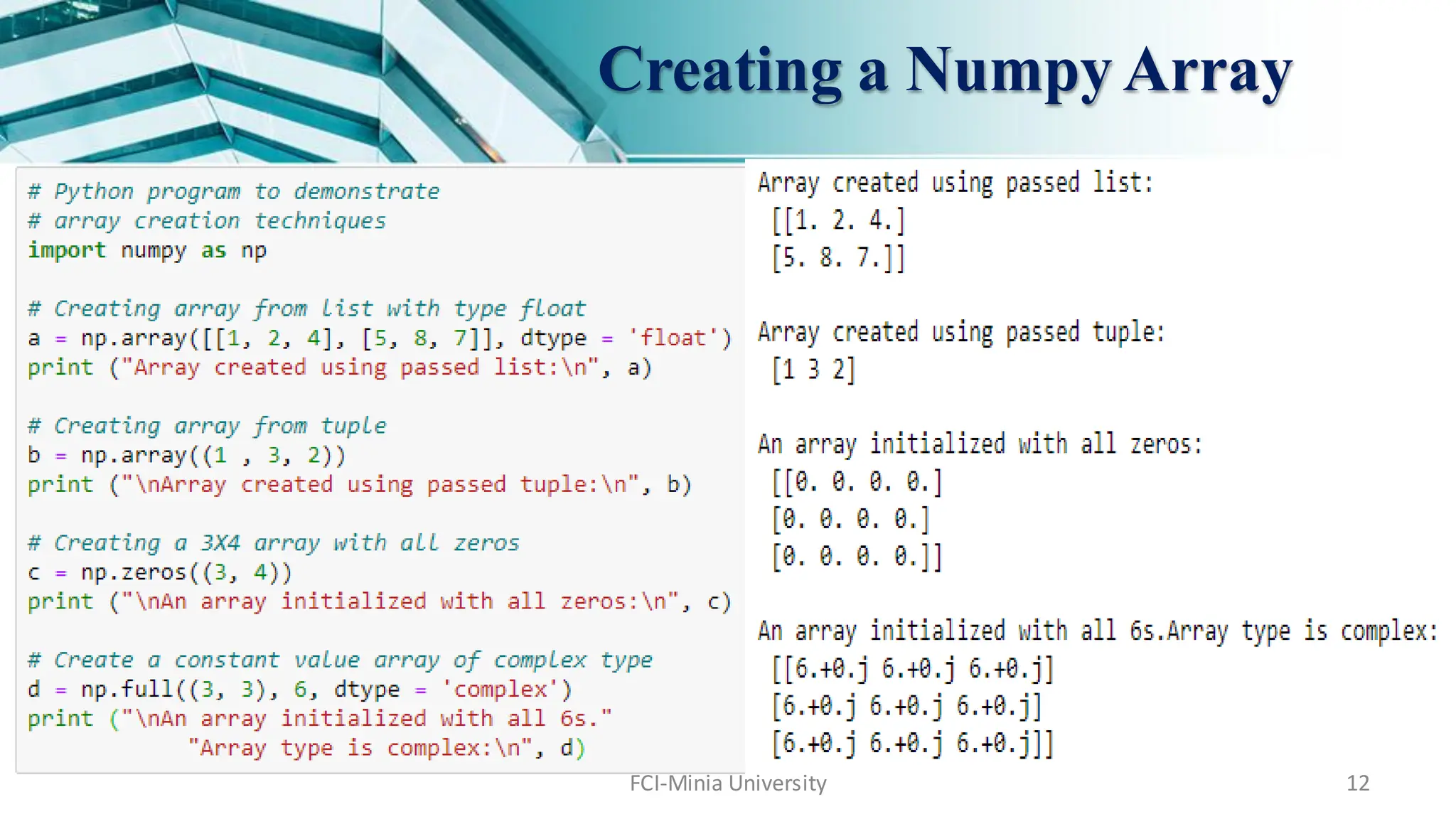
Arrays in Numpy can be created by multiple ways, with various number of Ranks, defining
the size of the Array.
Arrays can also be created with the use of various data types such as lists, tuples, etc.
The type of the resultant array is deduced from the type of the elements in the sequences.
Numpy offers several functions to create arrays with initial placeholder content. These
minimize the necessity of growing arrays, an expensive operation.
For example: np.zeros, np.ones, np.full, np.empty, etc.
10.
FCI-Minia University 10
Creatinga Numpy Array
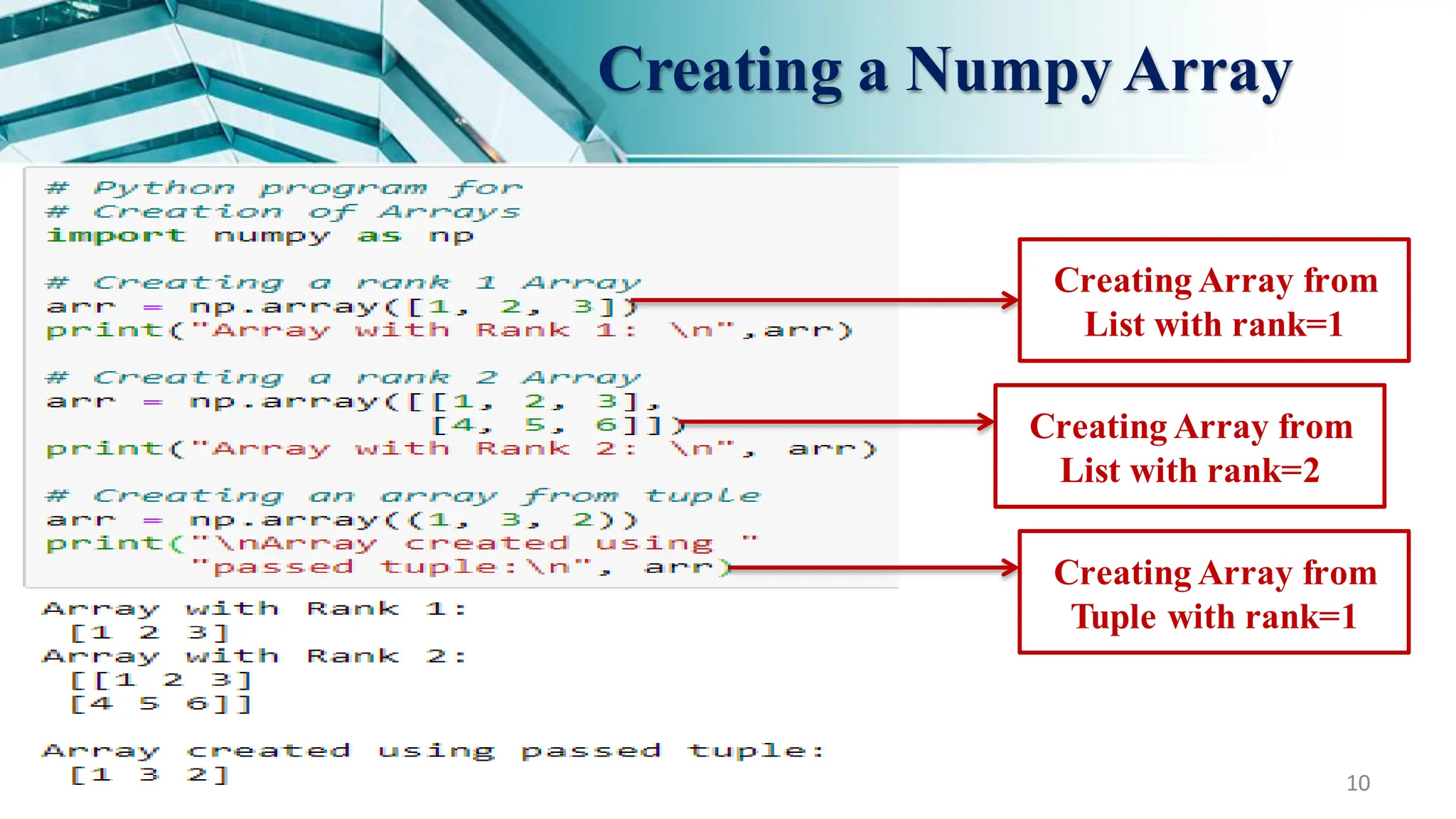
Creating Array from
List with rank=1
Creating Array from
List with rank=2
Creating Array from
Tuple with rank=1
11.
FCI-Minia University 11
Creatinga Numpy Array
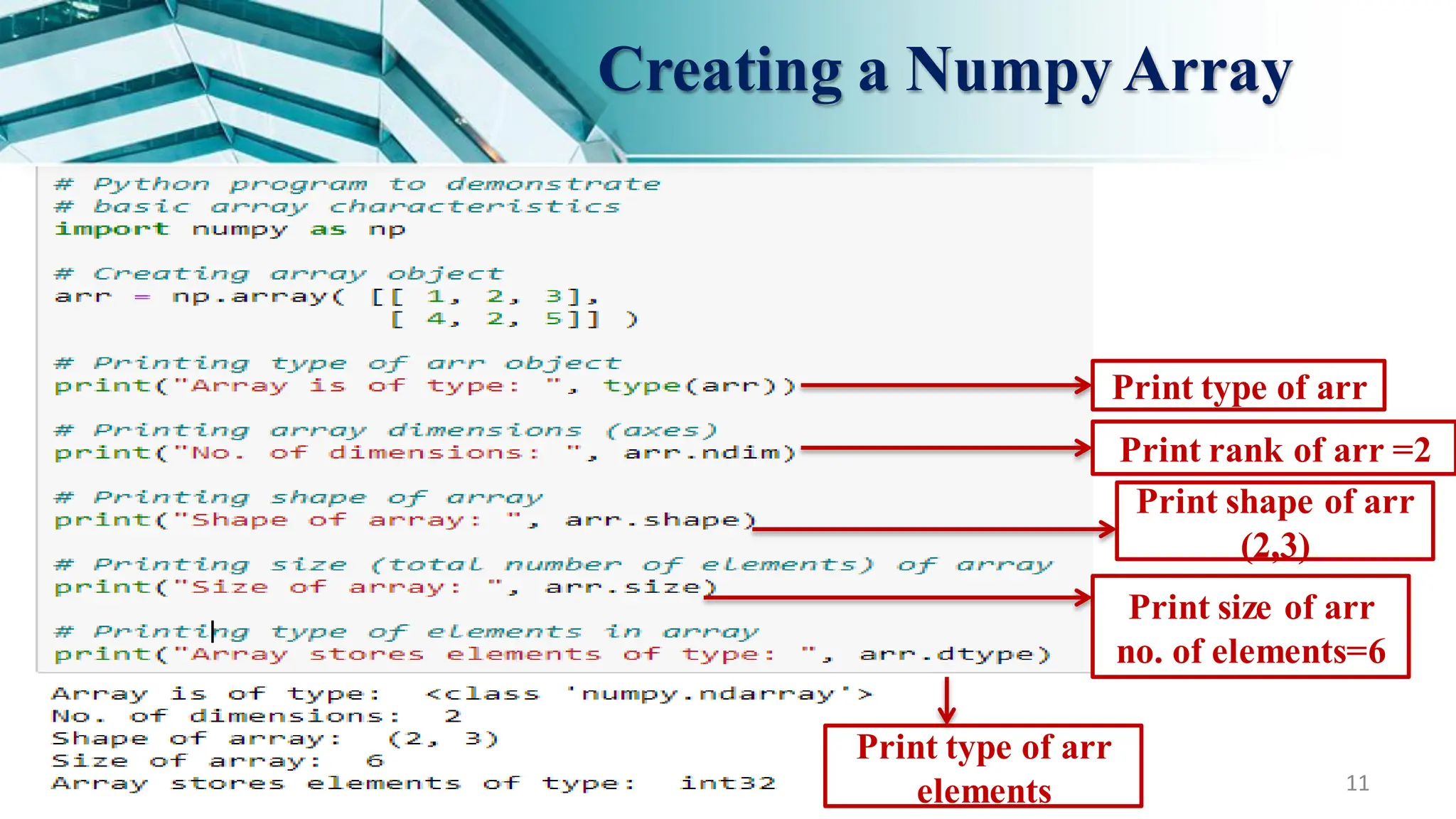
Print type of arr
Print rank of arr =2
Print shape of arr
(2,3)
Print size of arr
no. of elements=6
Print type of arr
elements
13
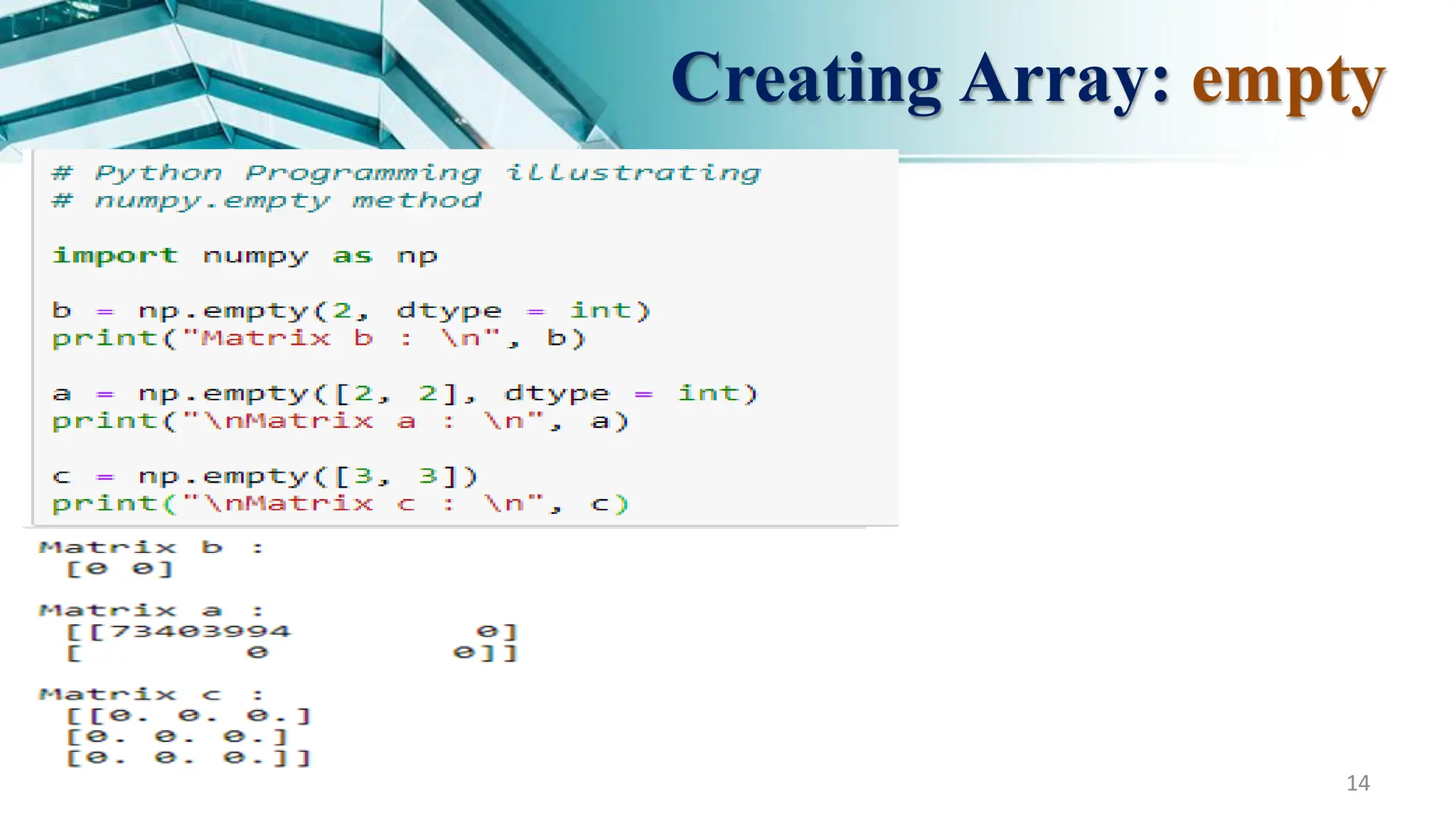
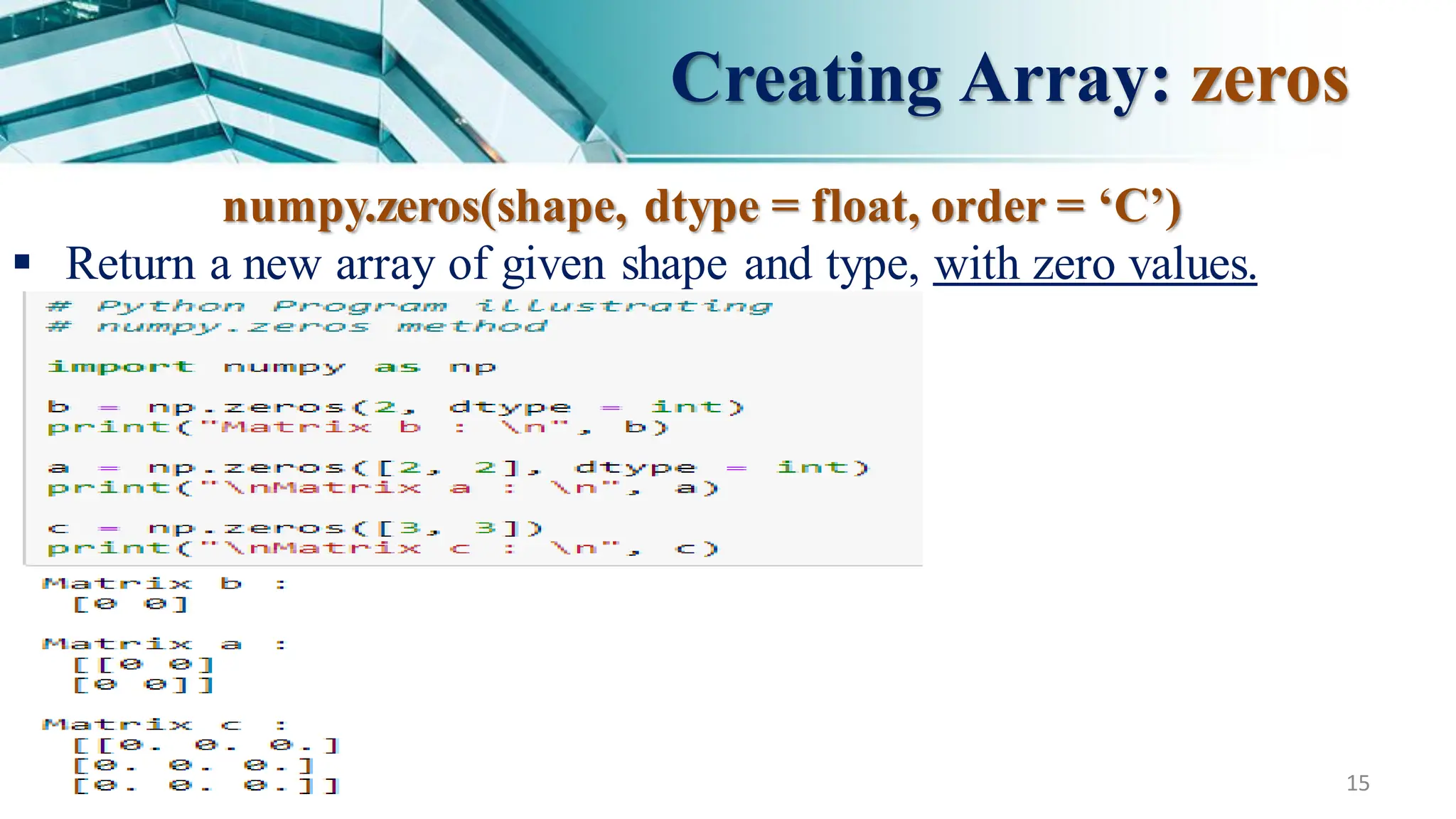
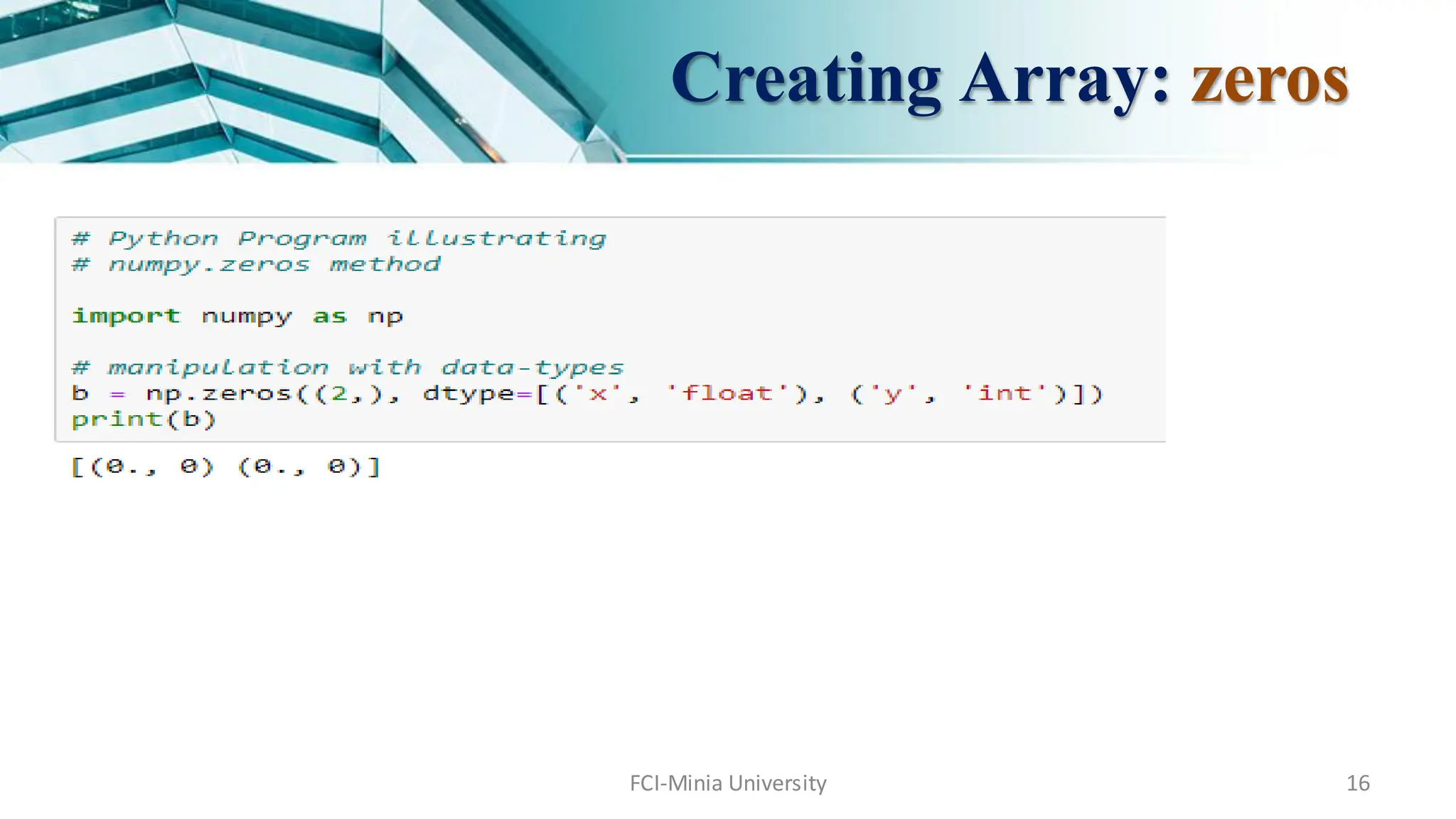
Creating Array: empty
numpy.empty(shape,dtype = float, order = ‘C’)
Return a new array of given shape and type, with random values.
Parameters :
shape : Number of rows,
order : C_contiguous or F_contiguous.
dtype : [optional, float(by Default)] Data type of returned array.
FCI-Minia University 17
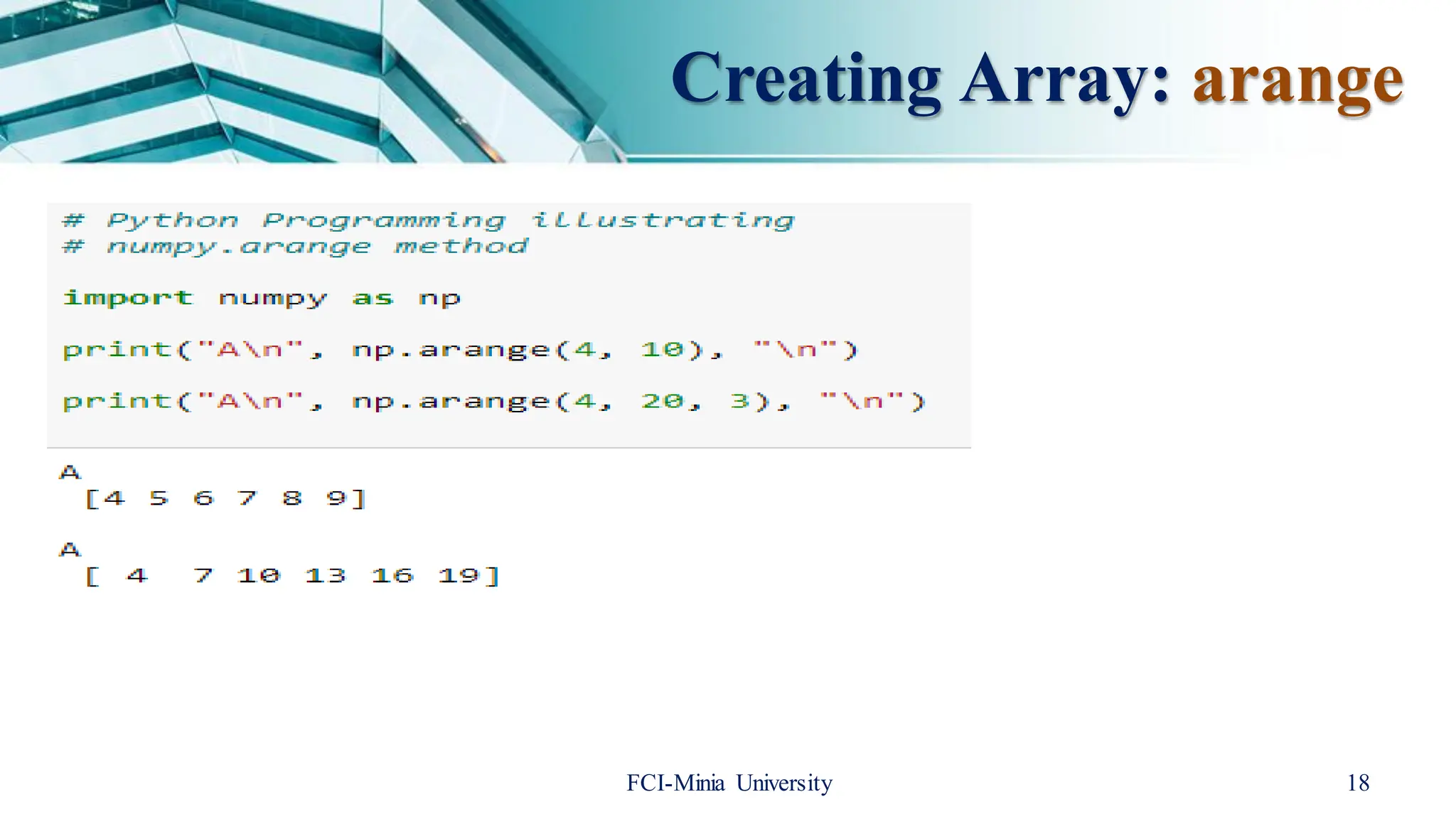
CreatingArray: arange
arange([start,] stop[, step,][, dtype])
Returnsan array with evenly spaced elements as per the interval.
The interval mentioned is half opened i.e. [Start, Stop)
Parameters :
start : [optional]start of interval range. By default start = 0
stop : end of interval range
step : [optional] step size of interval. By default step size = 1, For any output
out, this is the distance between two adjacent values, out[i+1]- out[i].
dtype : type of outputarray
FCI-Minia University 19
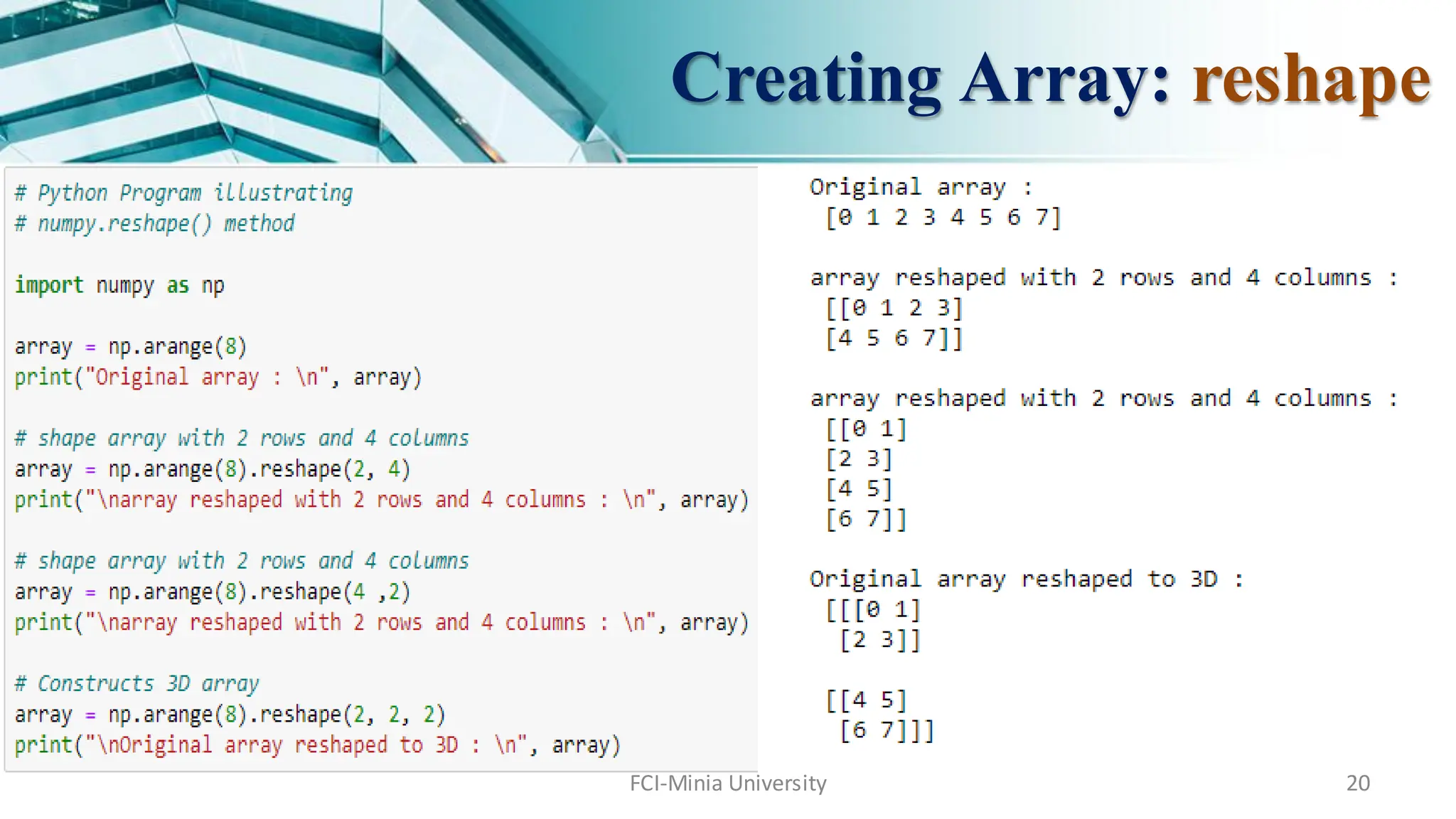
numpy.reshape(array,shape, order = ‘C’)
shapes an array without changing data of array.
Parameters :
array : [array_like] Input array
shape : [int or tuples_of_int] e.g. if we are aranging an array with
10 elements then shaping it like numpy.reshape(4, 8) is wrong;
Creating Array: reshape
FCI-Minia University 21
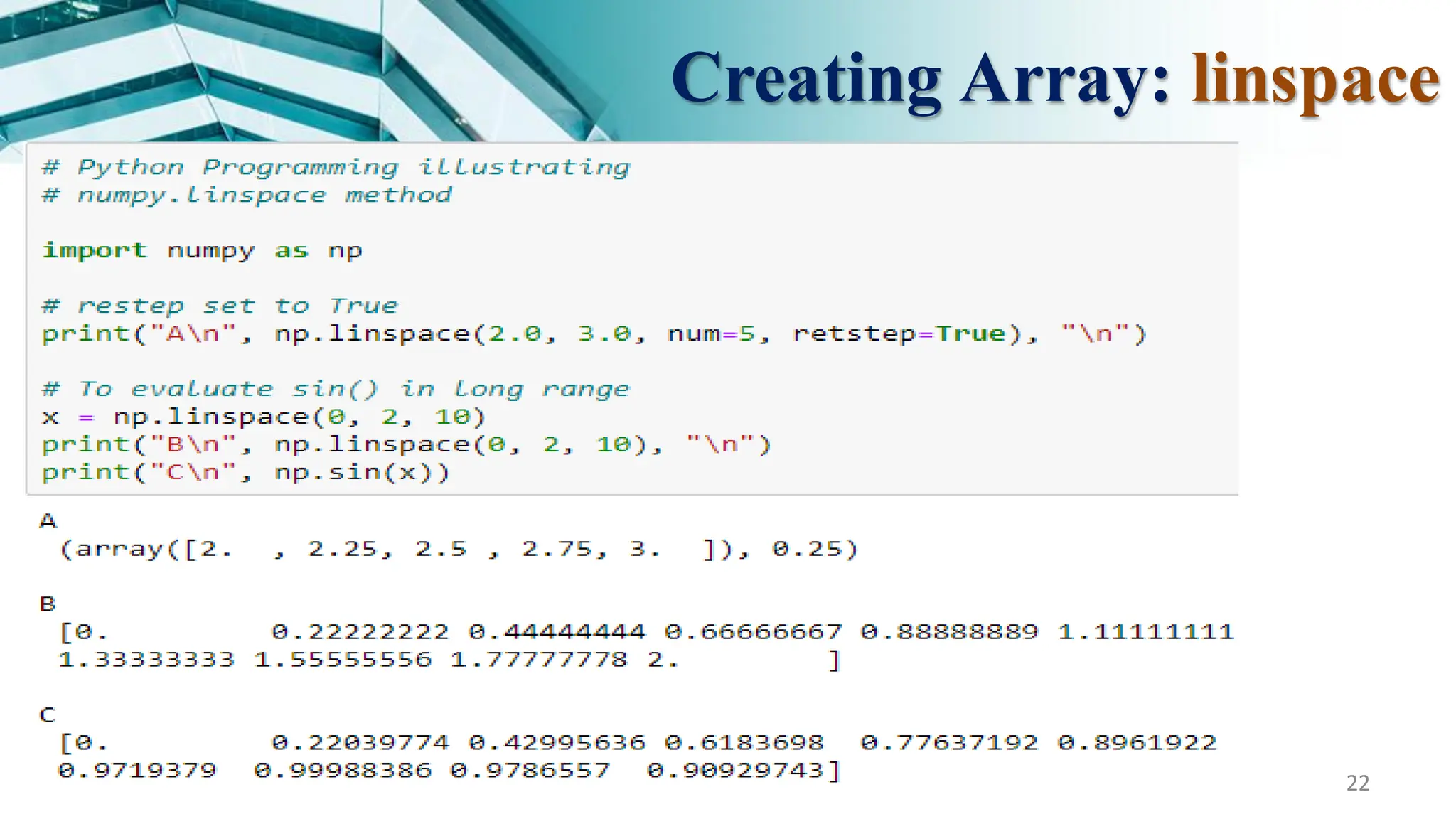
CreatingArray: linspace
numpy.linspace(start, stop, num = 50, endpoint = True, retstep = False, dtype = None)
Returnsnumber spaces evenly w.r.t interval.
Similar to arange but instead of step it uses sample number.
Parameters :
start : [optional]start of interval range. By default start = 0
stop : end of interval range
restep : (representstep) If True, return (samples, step). By deflut restep = False
num : [int, optional]No. of samples to generate
dtype : type of outputarray
FCI-Minia University 23
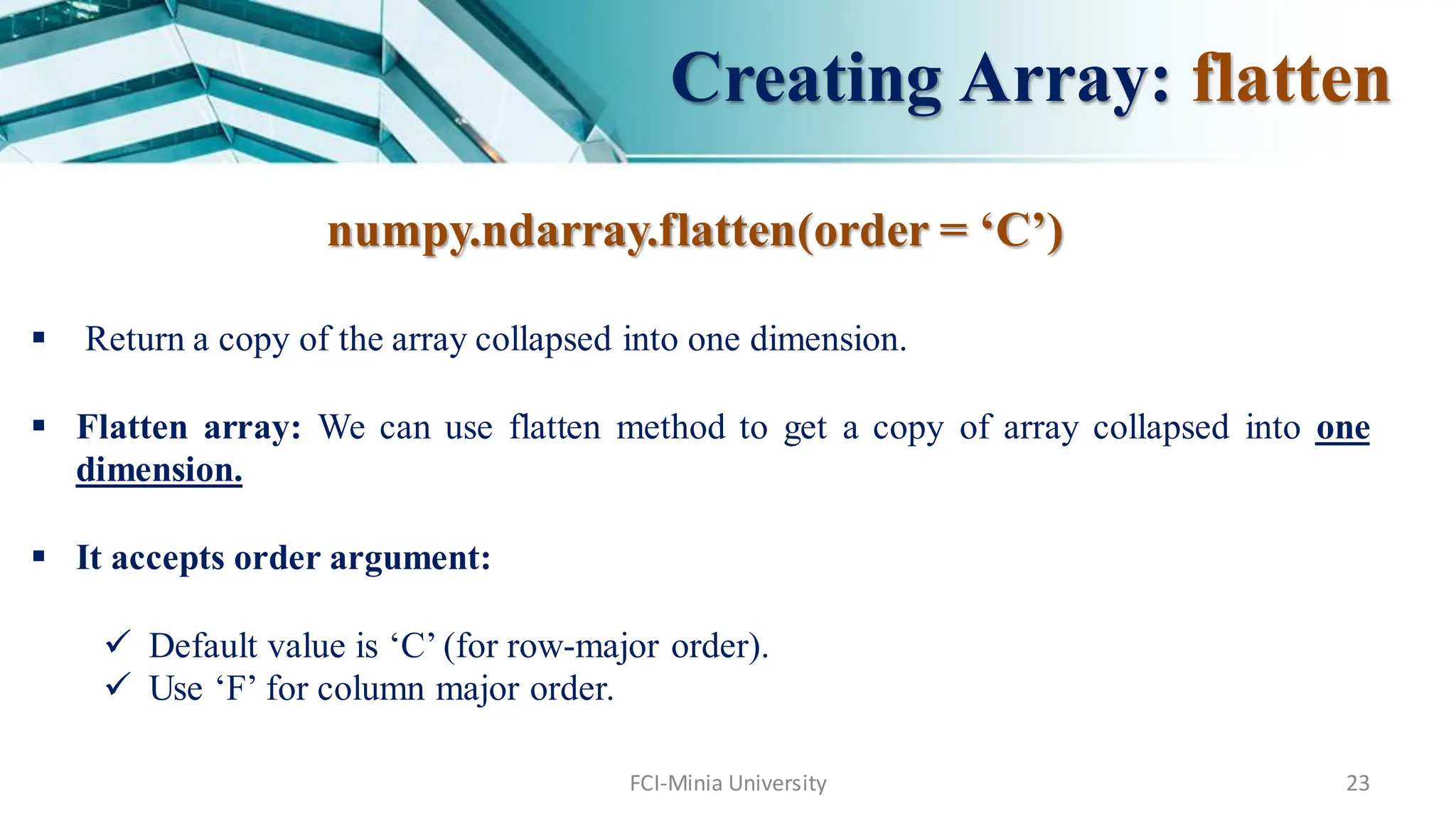
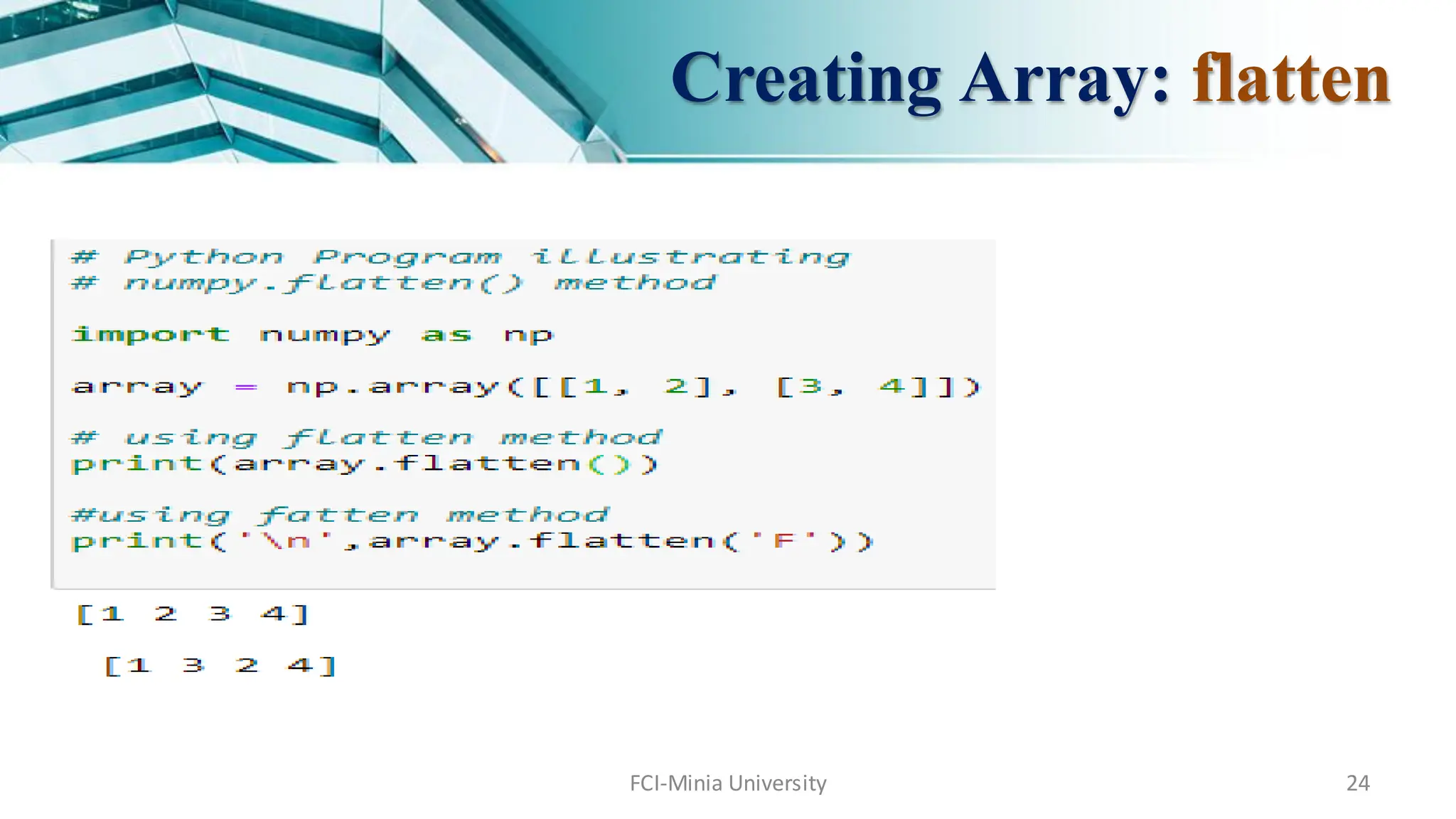
numpy.ndarray.flatten(order= ‘C’)
Return a copy of the array collapsed into one dimension.
Flatten array: We can use flatten method to get a copy of array collapsed into one
dimension.
It accepts order argument:
Default value is ‘C’ (for row-major order).
Use ‘F’ for column major order.
Creating Array: flatten
Agenda
Array inNumpy
Creating a Numpy Array
Data Types in Numpy
Accessing the Numpy array Index
FCI-Minia University 25
26.
Data Type inNumpy
FCI-Minia University 26
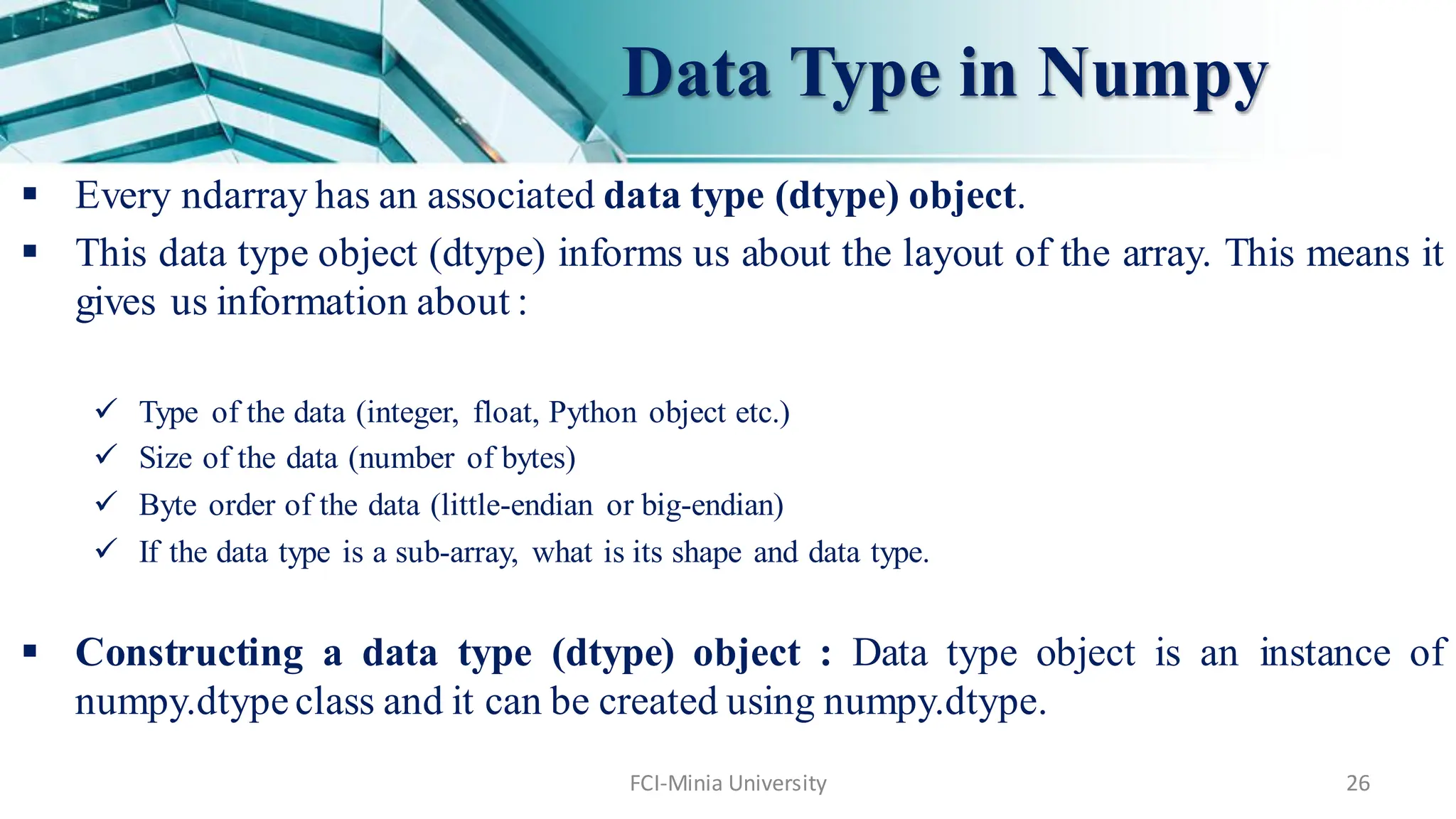
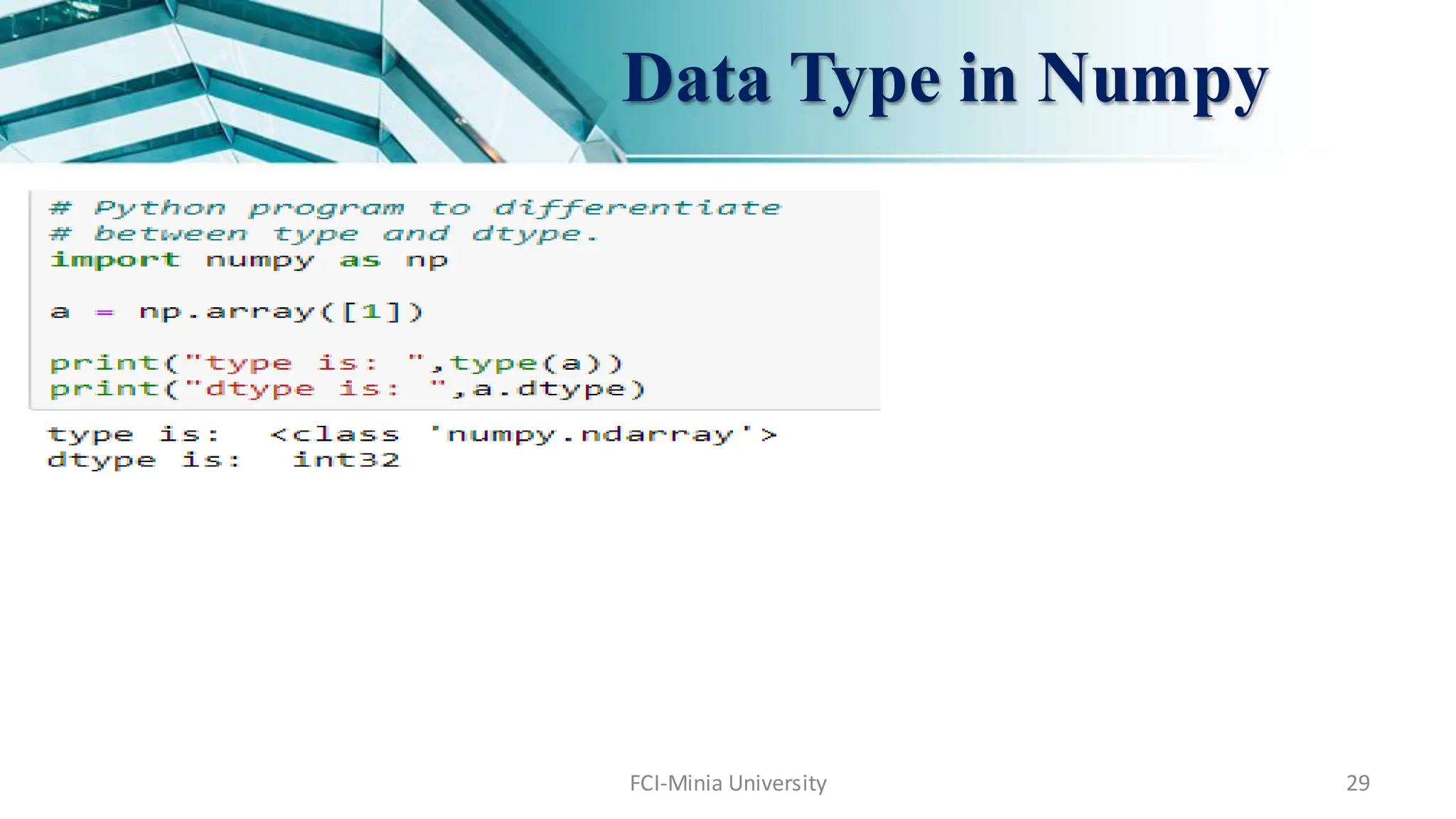
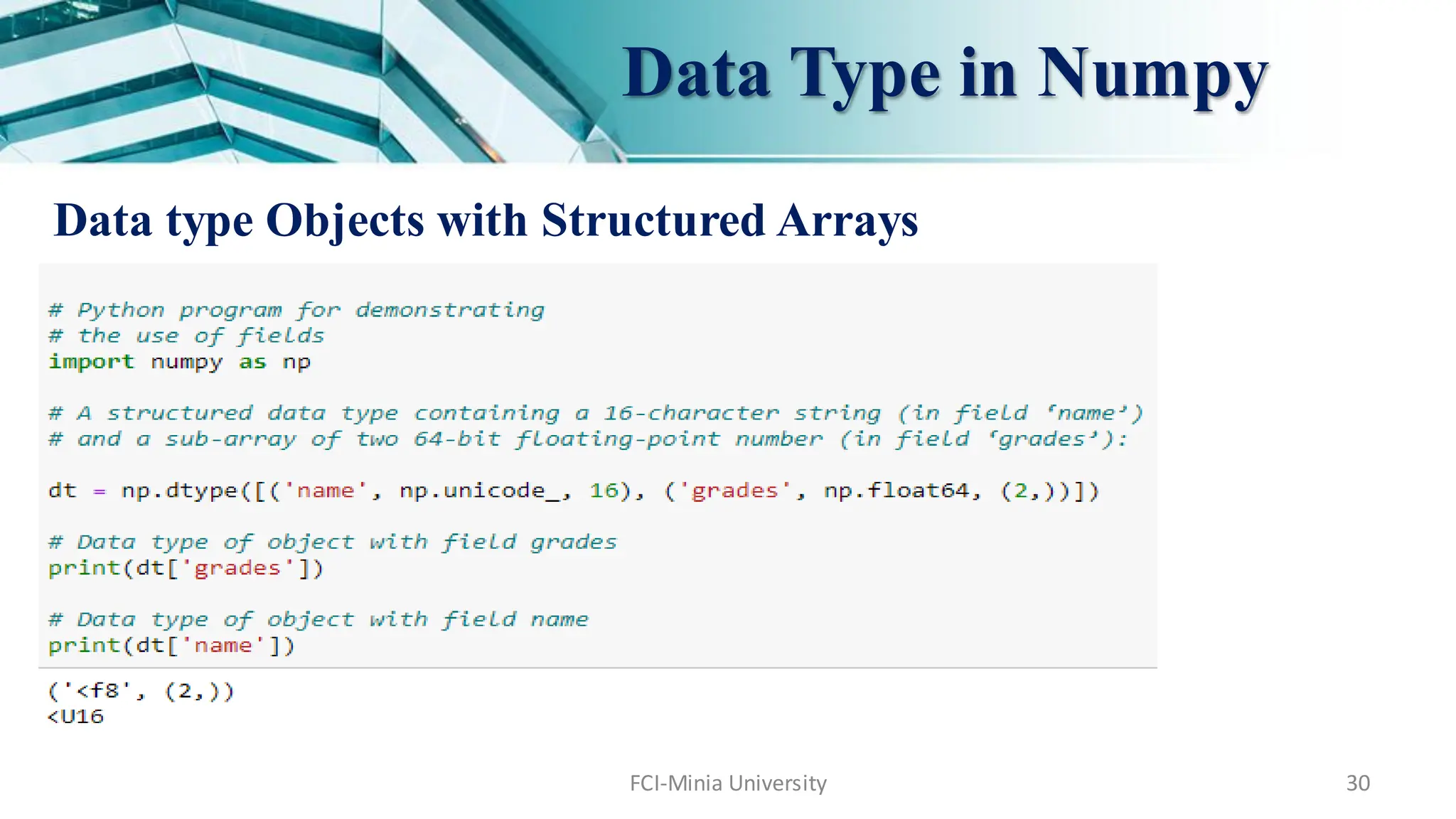
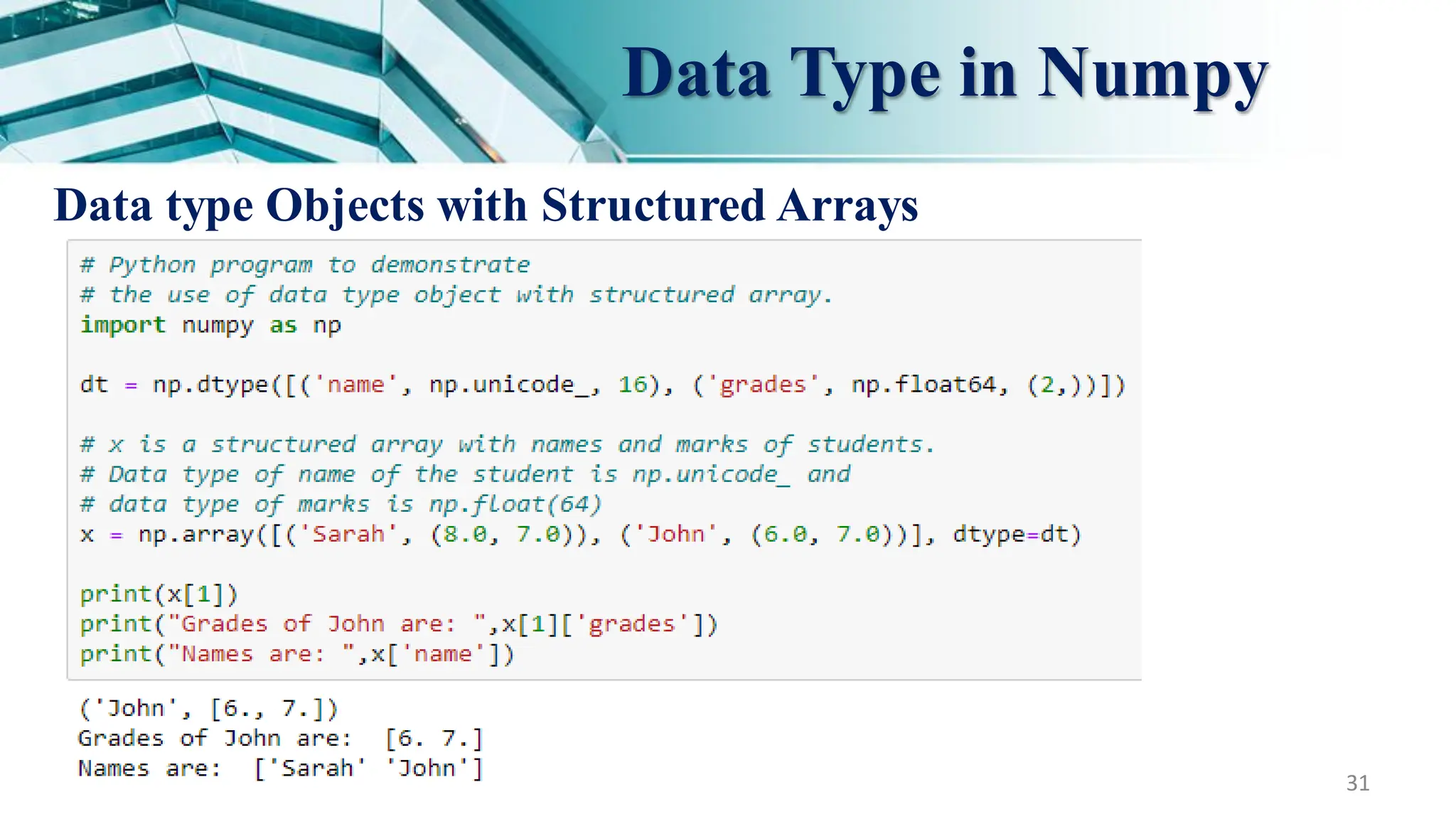
Every ndarray has an associated data type (dtype) object.
This data type object (dtype) informs us about the layout of the array. This means it
gives us information about :
Type of the data (integer, float, Python object etc.)
Size of the data (number of bytes)
Byte order of the data (little-endian or big-endian)
If the data type is a sub-array, what is its shape and data type.
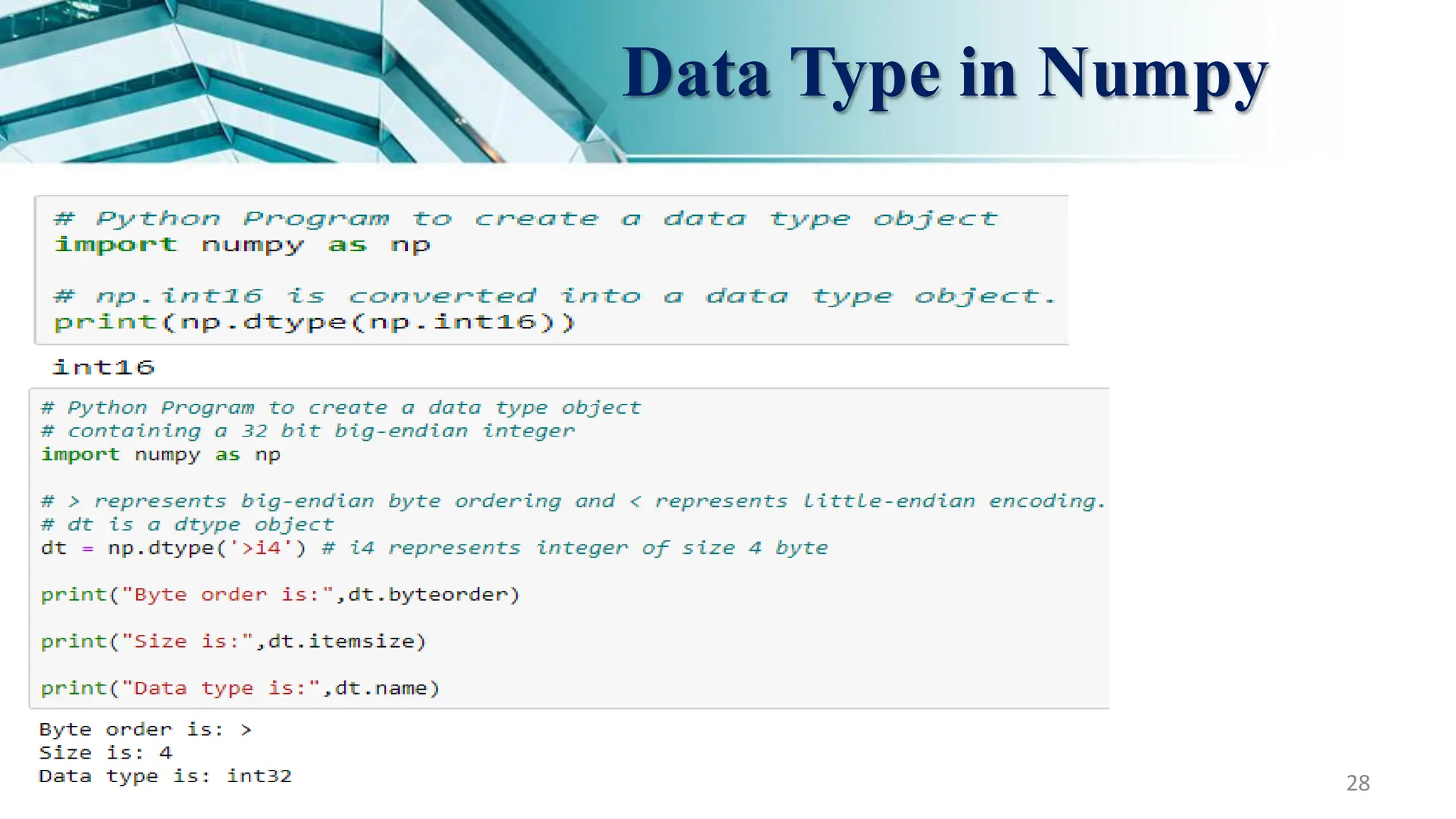
Constructing a data type (dtype) object : Data type object is an instance of
numpy.dtype class and it can be created using numpy.dtype.
27.
FCI-Minia University 27
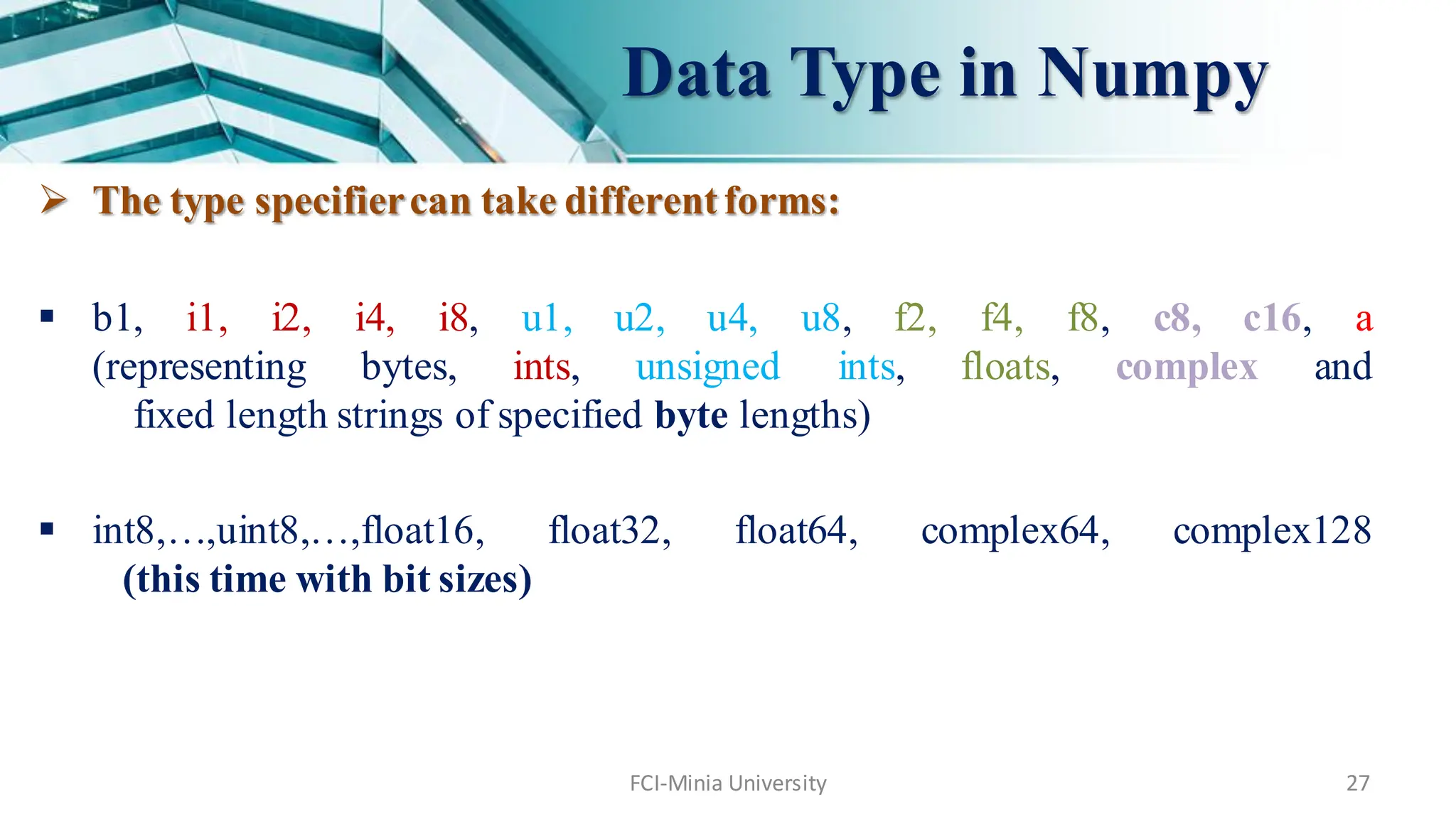
The type specifiercan take different forms:
b1, i1, i2, i4, i8, u1, u2, u4, u8, f2, f4, f8, c8, c16, a
(representing bytes, ints, unsigned ints, floats, complex and
fixed length strings of specified byte lengths)
int8,…,uint8,…,float16, float32, float64, complex64, complex128
(this time with bit sizes)
Data Type in Numpy
FCI-Minia University 35
BasicSlicing and Indexing
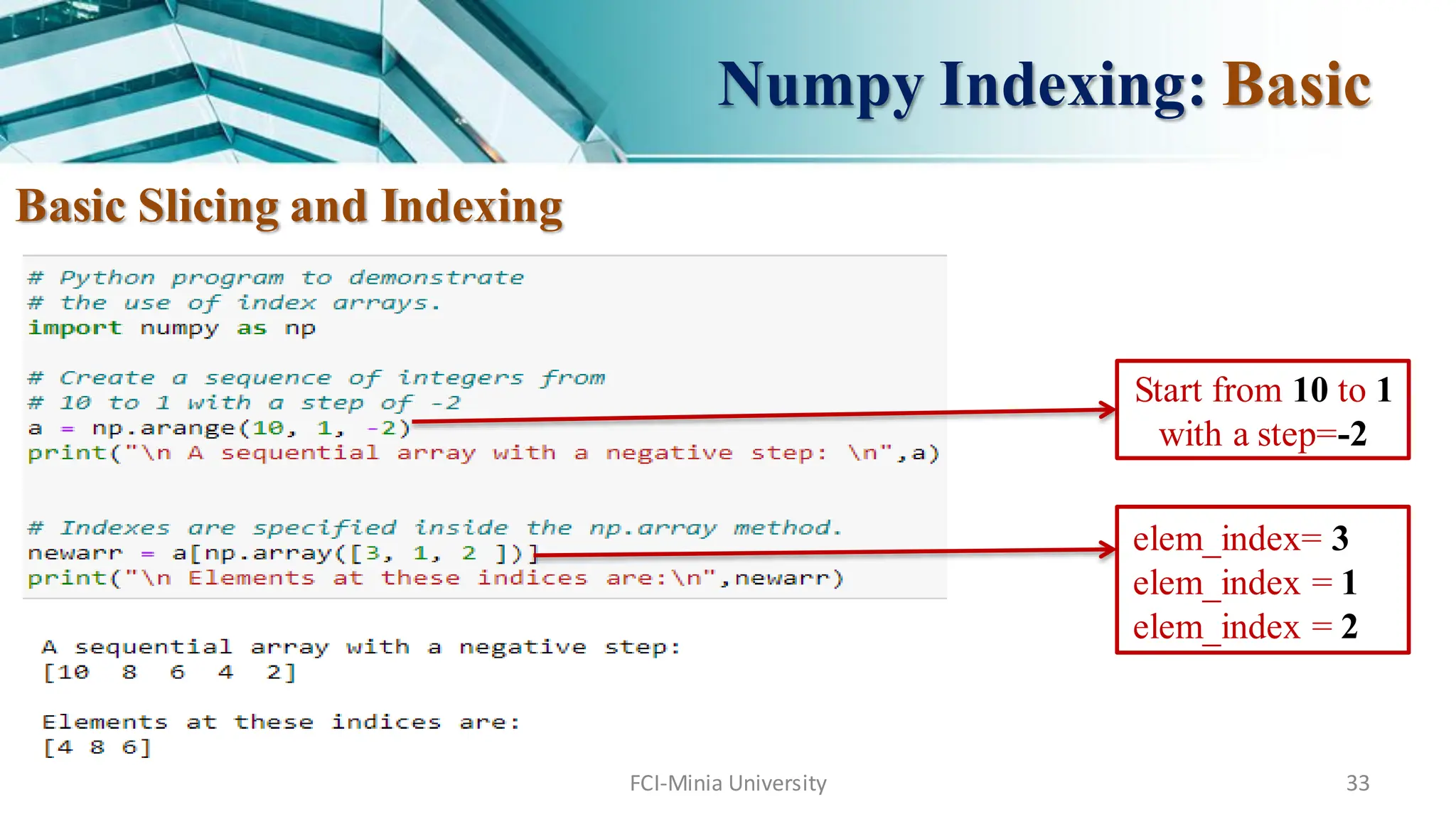
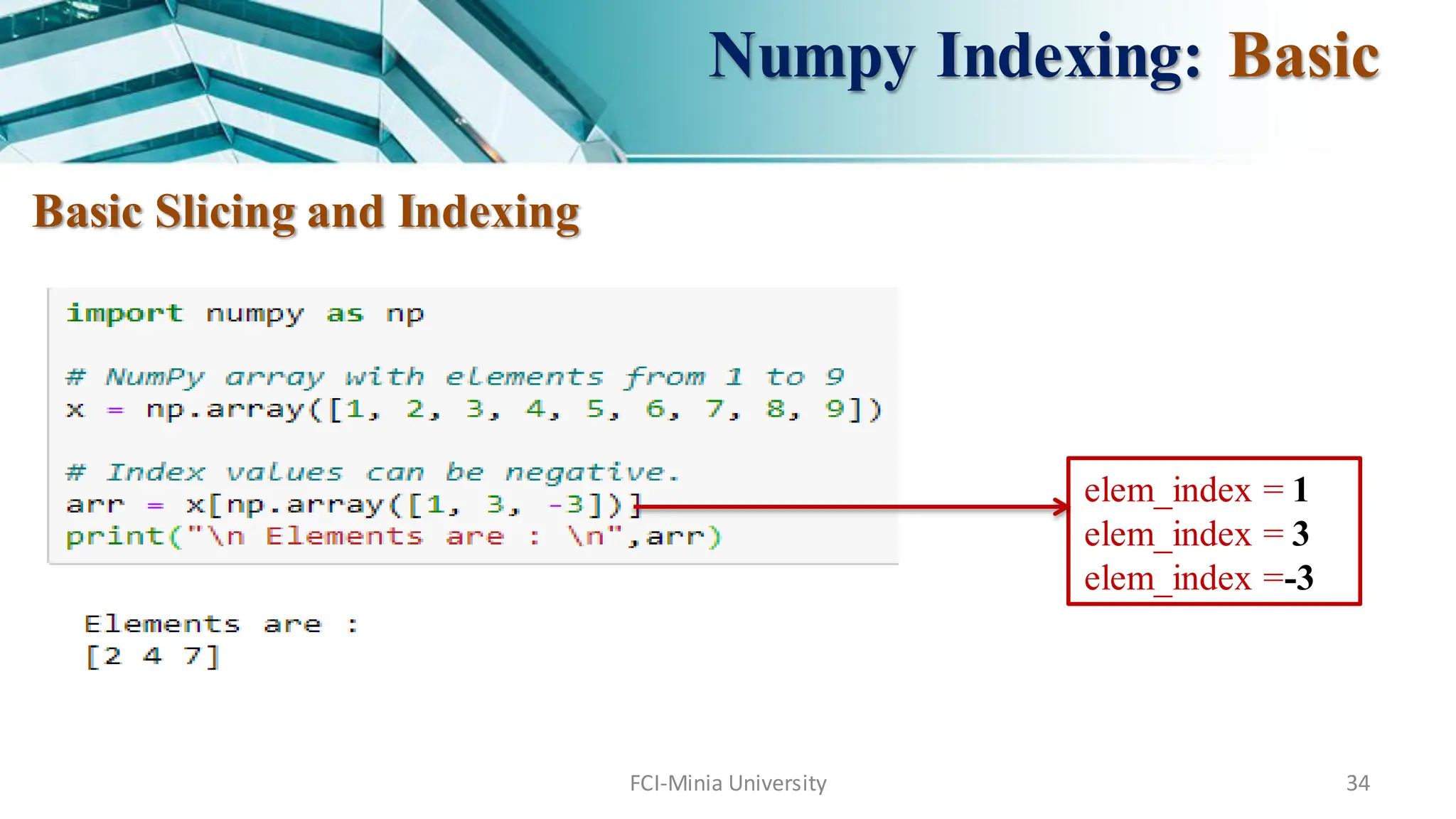
Consider the syntax x[obj] where x is the array and obj is the index. Slice object
is the index in case of basic slicing.
Basic slicing occurs when obj is :
a slice object that is of the form [start : stop : step] inside of brackets
an integer
or a tupleof slice objects and integers
All arrays generated by basic slicing are always view of the original array.
Numpy Indexing: Basic
36.
FCI-Minia University 36
BasicSlicing and Indexing
Numpy Indexing: Basic
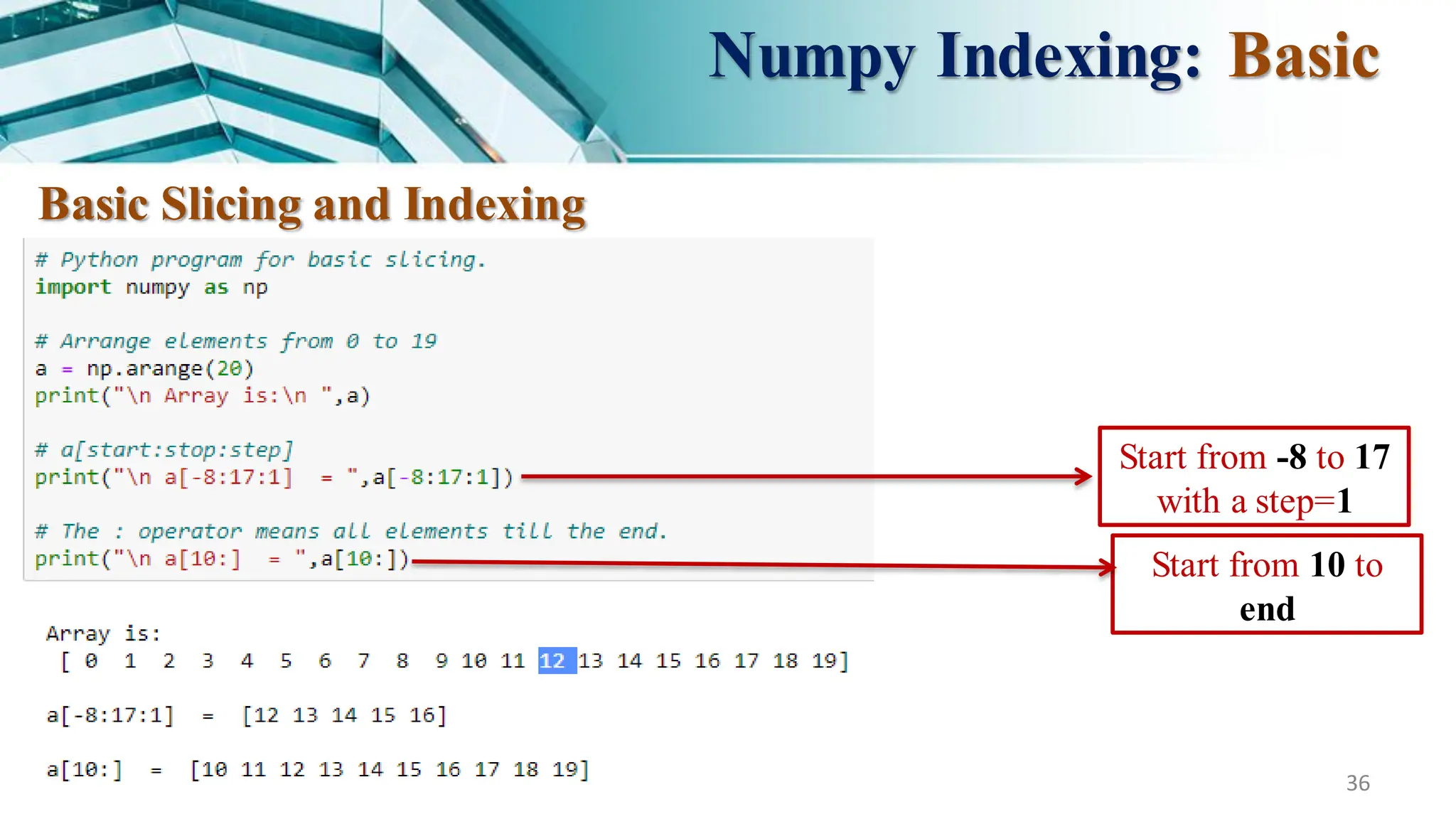
Start from -8 to 17
with a step=1
Start from 10 to
end
FCI-Minia University 39
Ellipsis can also be used along with basic slicing.
Ellipsis (…) is the number of : objects needed to make a selection tuple of the same
length as the dimensions of the array.
Numpy Indexing: Basic
b[… , 1] = b[ : , : , 1]
40.
FCI-Minia University 40
AdvancedSlicing and Indexing
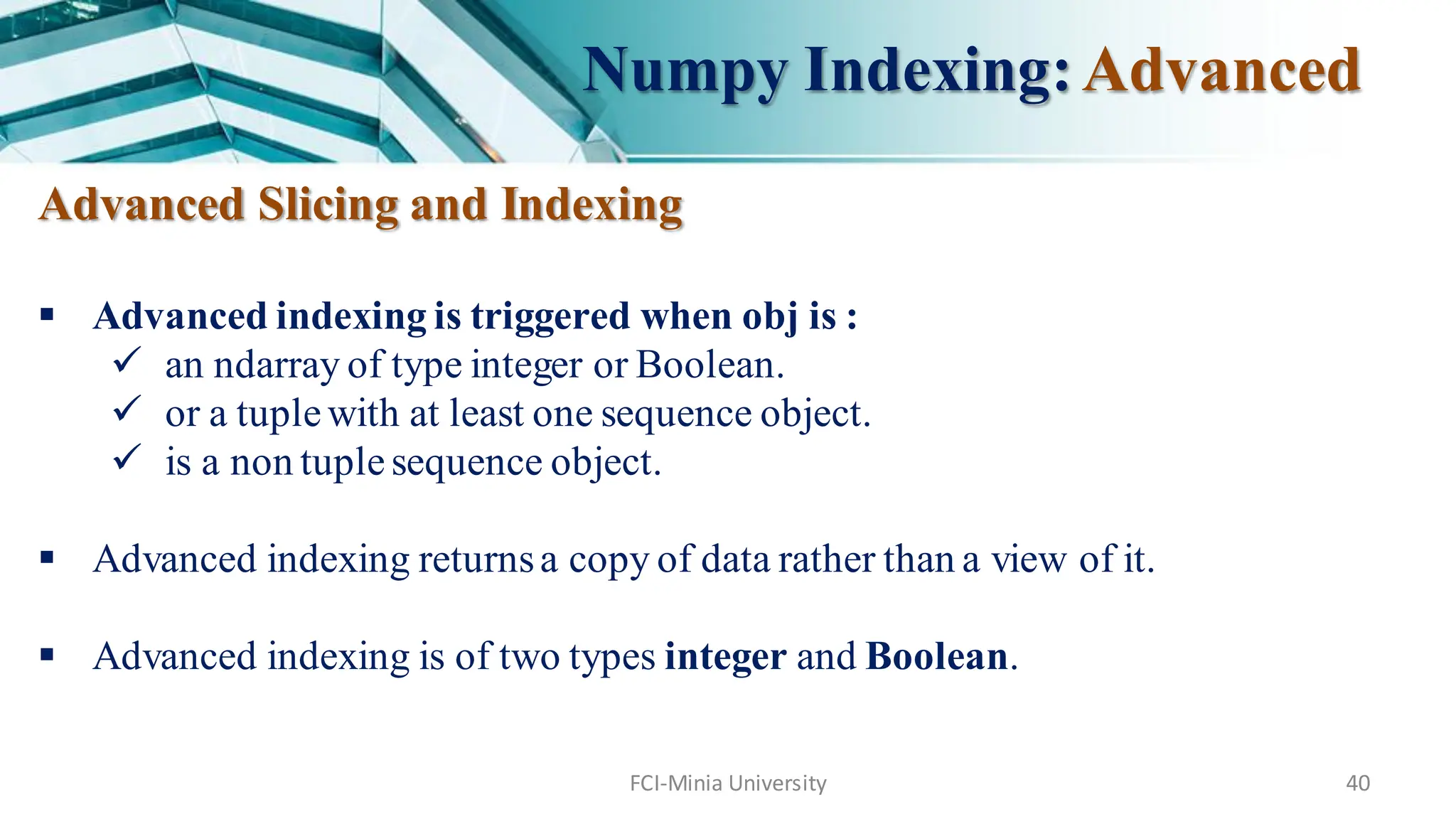
Advanced indexing is triggered when obj is :
an ndarray of type integer or Boolean.
or a tuplewith at least one sequence object.
is a non tuplesequence object.
Advanced indexing returnsa copy of data rather than a view of it.
Advanced indexing is of two types integer and Boolean.
Numpy Indexing:Advanced
41.
FCI-Minia University 41
AdvancedSlicing and Indexing
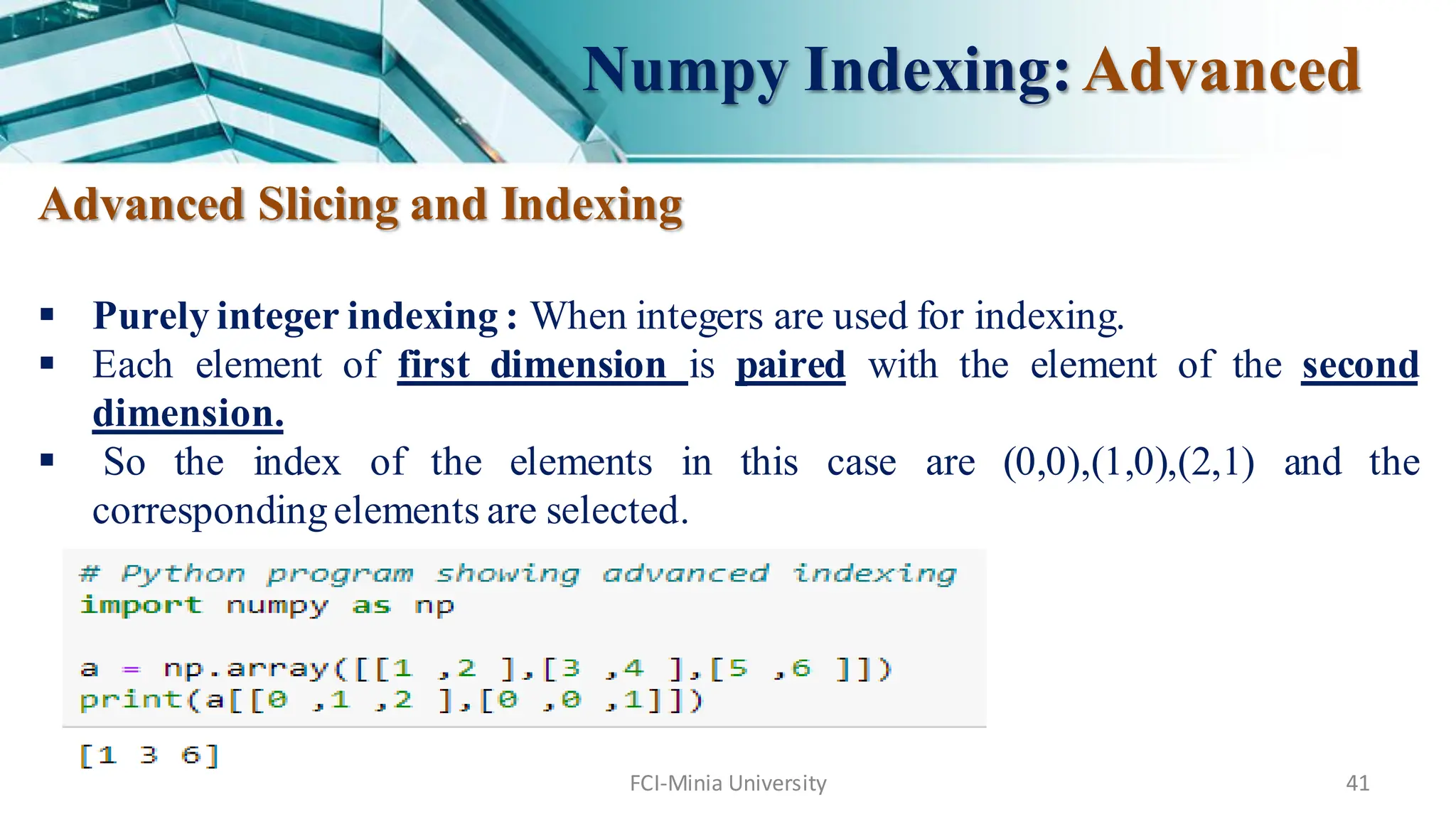
Purely integer indexing : When integers are used for indexing.
Each element of first dimension is paired with the element of the second
dimension.
So the index of the elements in this case are (0,0),(1,0),(2,1) and the
correspondingelements are selected.
Numpy Indexing:Advanced
42.
FCI-Minia University 42
AdvancedSlicing and Indexing
Boolean Indexing
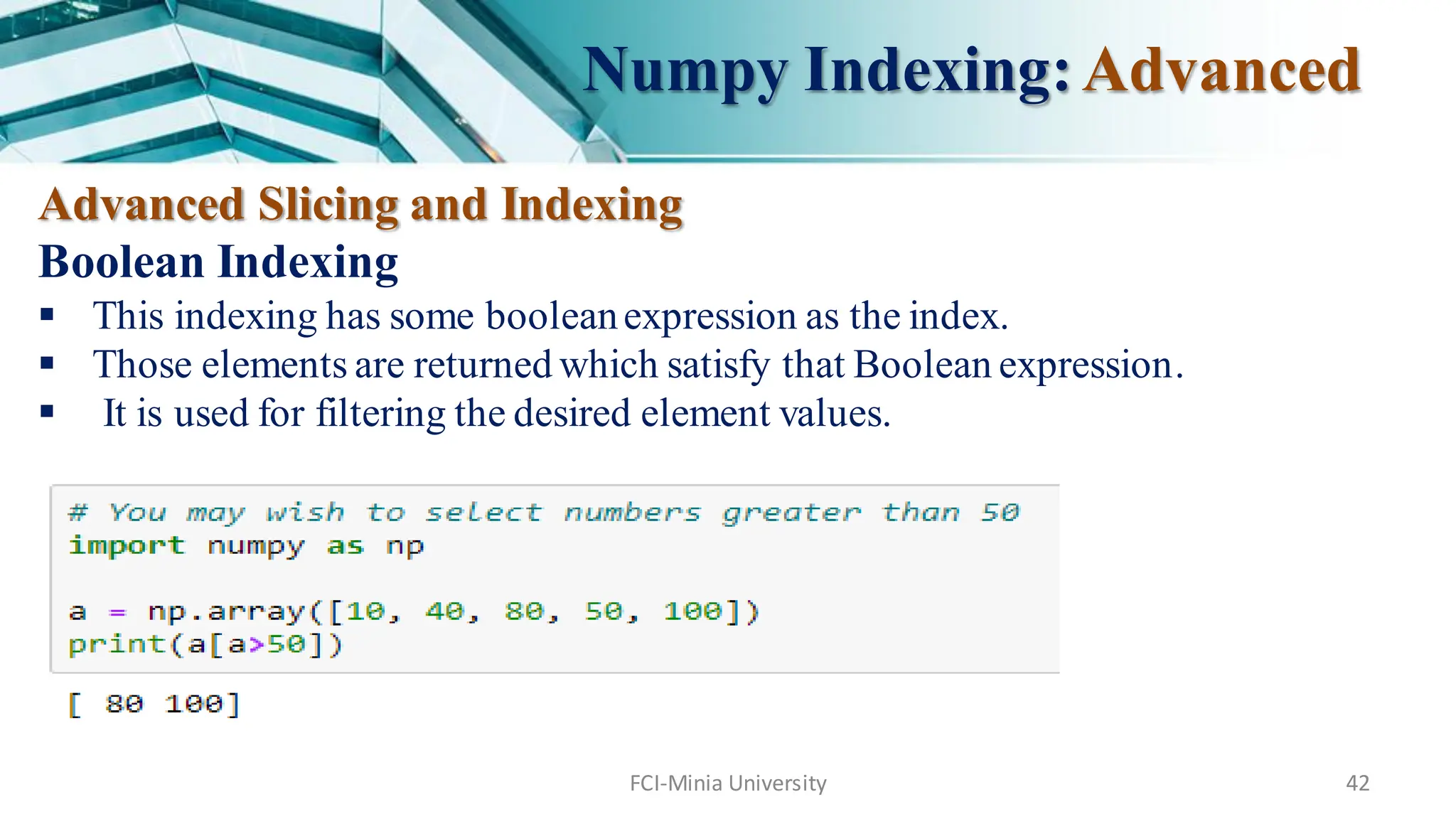
This indexing has some booleanexpression as the index.
Those elements are returned which satisfy that Boolean expression.
It is used for filtering the desired element values.
Numpy Indexing:Advanced
43.
FCI-Minia University 43
AdvancedSlicing and Indexing
Boolean Indexing
Numpy Indexing:Advanced
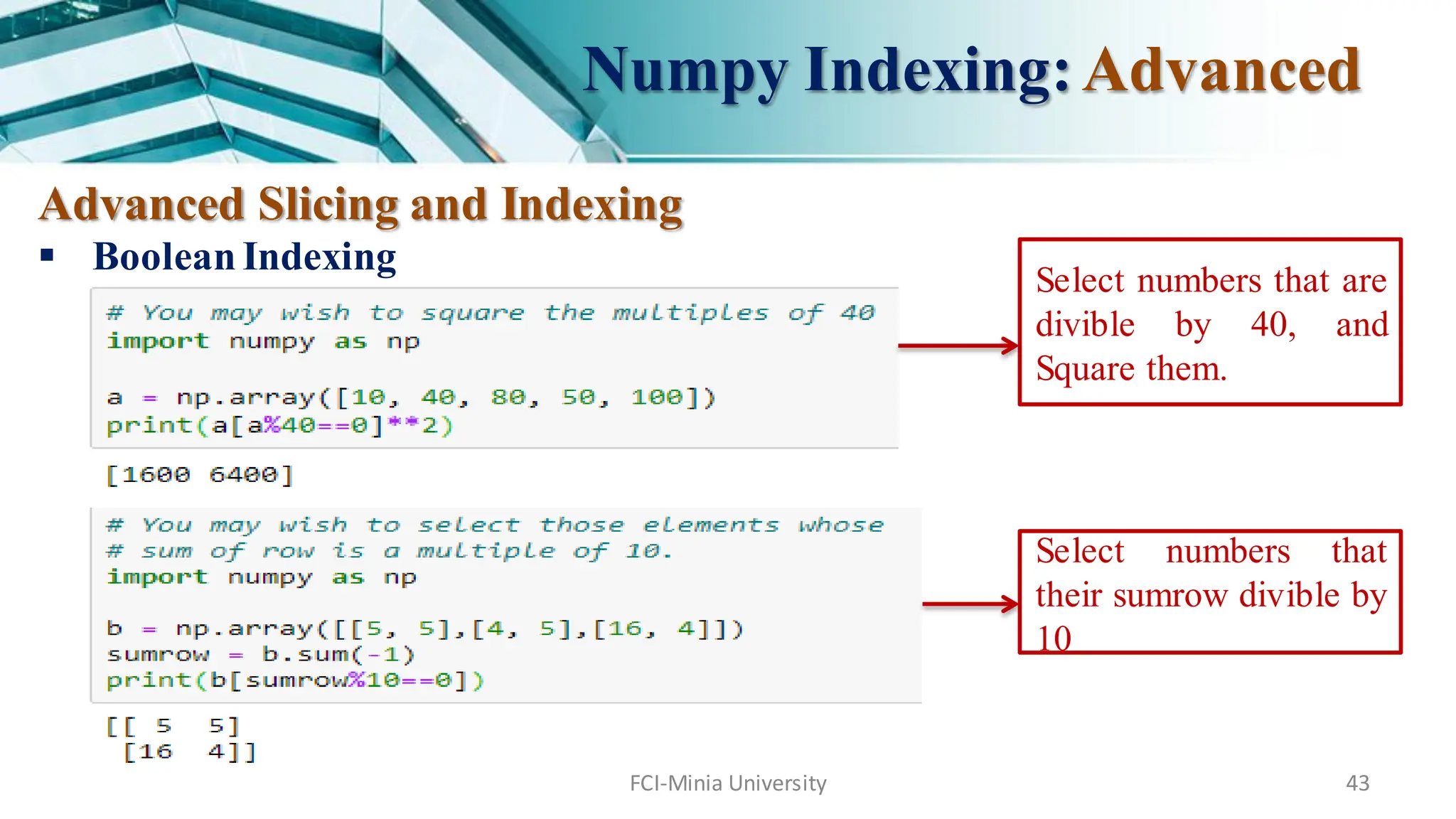
Select numbers that are
divible by 40, and
Square them.
Select numbers that
their sumrow divible by
10
44.
Thanks…
For more readingabout Numpy
https://docs.scipy.org/doc/numpy/reference/index.html
https://www.geeksforgeeks.org/python-numpy/
FCI-Minia University 44
![7
Numpy
Example :
[ [ 1, 2, 3],
[ 4, 2, 5] ]
rank = 2 (as it is 2-dimensional or it has 2 axes)
First dimension(axis) length = 2,
second dimension has length = 3
shape can be expressed as: (2, 3)](https://image.slidesharecdn.com/lab4-python-numpy-251007062022-d2df740d/75/Lab4-Python-Numpy-for-basics-and-variables-pdf-7-2048.jpg)
![13
Creating Array: empty
numpy.empty(shape, dtype = float, order = ‘C’)
Return a new array of given shape and type, with random values.
Parameters :
shape : Number of rows,
order : C_contiguous or F_contiguous.
dtype : [optional, float(by Default)] Data type of returned array.](https://image.slidesharecdn.com/lab4-python-numpy-251007062022-d2df740d/75/Lab4-Python-Numpy-for-basics-and-variables-pdf-13-2048.jpg)
![FCI-Minia University 17
Creating Array: arange
arange([start,] stop[, step,][, dtype])
Returnsan array with evenly spaced elements as per the interval.
The interval mentioned is half opened i.e. [Start, Stop)
Parameters :
start : [optional]start of interval range. By default start = 0
stop : end of interval range
step : [optional] step size of interval. By default step size = 1, For any output
out, this is the distance between two adjacent values, out[i+1]- out[i].
dtype : type of outputarray](https://image.slidesharecdn.com/lab4-python-numpy-251007062022-d2df740d/75/Lab4-Python-Numpy-for-basics-and-variables-pdf-17-2048.jpg)
![FCI-Minia University 19
numpy.reshape(array, shape, order = ‘C’)
shapes an array without changing data of array.
Parameters :
array : [array_like] Input array
shape : [int or tuples_of_int] e.g. if we are aranging an array with
10 elements then shaping it like numpy.reshape(4, 8) is wrong;
Creating Array: reshape](https://image.slidesharecdn.com/lab4-python-numpy-251007062022-d2df740d/75/Lab4-Python-Numpy-for-basics-and-variables-pdf-19-2048.jpg)
![FCI-Minia University 21
Creating Array: linspace
numpy.linspace(start, stop, num = 50, endpoint = True, retstep = False, dtype = None)
Returnsnumber spaces evenly w.r.t interval.
Similar to arange but instead of step it uses sample number.
Parameters :
start : [optional]start of interval range. By default start = 0
stop : end of interval range
restep : (representstep) If True, return (samples, step). By deflut restep = False
num : [int, optional]No. of samples to generate
dtype : type of outputarray](https://image.slidesharecdn.com/lab4-python-numpy-251007062022-d2df740d/75/Lab4-Python-Numpy-for-basics-and-variables-pdf-21-2048.jpg)
![FCI-Minia University 35
Basic Slicing and Indexing
Consider the syntax x[obj] where x is the array and obj is the index. Slice object
is the index in case of basic slicing.
Basic slicing occurs when obj is :
a slice object that is of the form [start : stop : step] inside of brackets
an integer
or a tupleof slice objects and integers
All arrays generated by basic slicing are always view of the original array.
Numpy Indexing: Basic](https://image.slidesharecdn.com/lab4-python-numpy-251007062022-d2df740d/75/Lab4-Python-Numpy-for-basics-and-variables-pdf-35-2048.jpg)
![FCI-Minia University 39
Ellipsis can also be used along with basic slicing.
Ellipsis (…) is the number of : objects needed to make a selection tuple of the same
length as the dimensions of the array.
Numpy Indexing: Basic
b[… , 1] = b[ : , : , 1]](https://image.slidesharecdn.com/lab4-python-numpy-251007062022-d2df740d/75/Lab4-Python-Numpy-for-basics-and-variables-pdf-39-2048.jpg)


![[DSC Europe 25] Velibor Ilic - Autonomous Driving - How AI Shapes Technical ...](https://cdn.slidesharecdn.com/ss_thumbnails/gwu9aqths9ovngsrhidc-3-velibor-ilic-autonomous-driving-how-ai-shapes-technical-challenges-251219150035-7436923a-thumbnail.jpg?width=640&height=640&fit=bounds)
![[DSC Europe 25] Dobrica Cosic - From Electrons to Innovation: How Granular Da...](https://cdn.slidesharecdn.com/ss_thumbnails/h4qk69zereaumbceubgr-dobrica-cosic-from-electrons-to-innovation-how-granular-data-and-analytics-are--251218085301-b982fb14-thumbnail.jpg?width=640&height=640&fit=bounds)
![[DSC Europe 25] Mathias Halkjær Petersen - The AI workforce revolution.pptx](https://cdn.slidesharecdn.com/ss_thumbnails/3xviexv7q5gojhdsyvat-the-ai-workforce-revolution-251218084820-f3c286ed-thumbnail.jpg?width=640&height=640&fit=bounds)
![[DSC Europe 25] Marko Djordjevic - AI can help Agriculture.pptx](https://cdn.slidesharecdn.com/ss_thumbnails/c0huq0ztiubmgccem2hc-marko-djordjevic-ai-can-help-agriculture-251218125253-7606f036-thumbnail.jpg?width=640&height=640&fit=bounds)
![[DSC Europe 25] Jean Del Rosario - How to Reduce GenAI Costs up to 73.45%.pptx](https://cdn.slidesharecdn.com/ss_thumbnails/zjehcwqsiwjisav1znml-5-251217093201-eae4440a-thumbnail.jpg?width=640&height=640&fit=bounds)

![[DSC Europe 25] Maria Kokiasmenos - AI Governance US Perspective.pptx](https://cdn.slidesharecdn.com/ss_thumbnails/eszqnbzlsqa2vch6dmci-6-251215095918-6fcdf45f-thumbnail.jpg?width=640&height=640&fit=bounds)


![[DSC Europe 25] Tatevik Maytesyan - How to actually use AI in marketing: gett...](https://cdn.slidesharecdn.com/ss_thumbnails/tjo626lsqdgfntbgl2mw-4-251216103155-e36cd239-thumbnail.jpg?width=640&height=640&fit=bounds)
![[DSC Europe 25] Ivan Peric - Intelligence Swarm Logic and Techno-Functional M...](https://cdn.slidesharecdn.com/ss_thumbnails/7my7c97fsduiccadgavw-2-251212103249-5a03f7c6-thumbnail.jpg?width=640&height=640&fit=bounds)
![[DSC Europe 25] Behzad Hosseini - AI Agents in the Wild: Deploying Models tha...](https://cdn.slidesharecdn.com/ss_thumbnails/3qtejajvsjqrzwfept2c-10-251212103250-7f2b1068-thumbnail.jpg?width=640&height=640&fit=bounds)
![[DSC Europe 25] Hans Kleinsman - The Compliance Gearbox: How Tax Tech Mediate...](https://cdn.slidesharecdn.com/ss_thumbnails/dxdytie1toel0hr90bjs-2-251212103250-174fdbe7-thumbnail.jpg?width=640&height=640&fit=bounds)

![[DSC Europe 25] Uros Pesic - The Reality of AI in Marketing.pdf](https://cdn.slidesharecdn.com/ss_thumbnails/rtkodnmtycovsllvzsyn-9-251215095918-b0c6bfe3-thumbnail.jpg?width=640&height=640&fit=bounds)


