IPA
1st
Semester, 2007-2008
Internet 1
Ch. 10
JavaScript: Control
Statements II
attasr@ipa.edu.sa
09/30/15 © Reem Al-Attas 2
Essentials of Counter-Controlled
Repetition
Counter-controlled repetition requires
 Control variable (loop counter)
 Initial value of the control variable
 Increment or decrement the control variable
through the loop
 Condition to test the final value of the control
variable
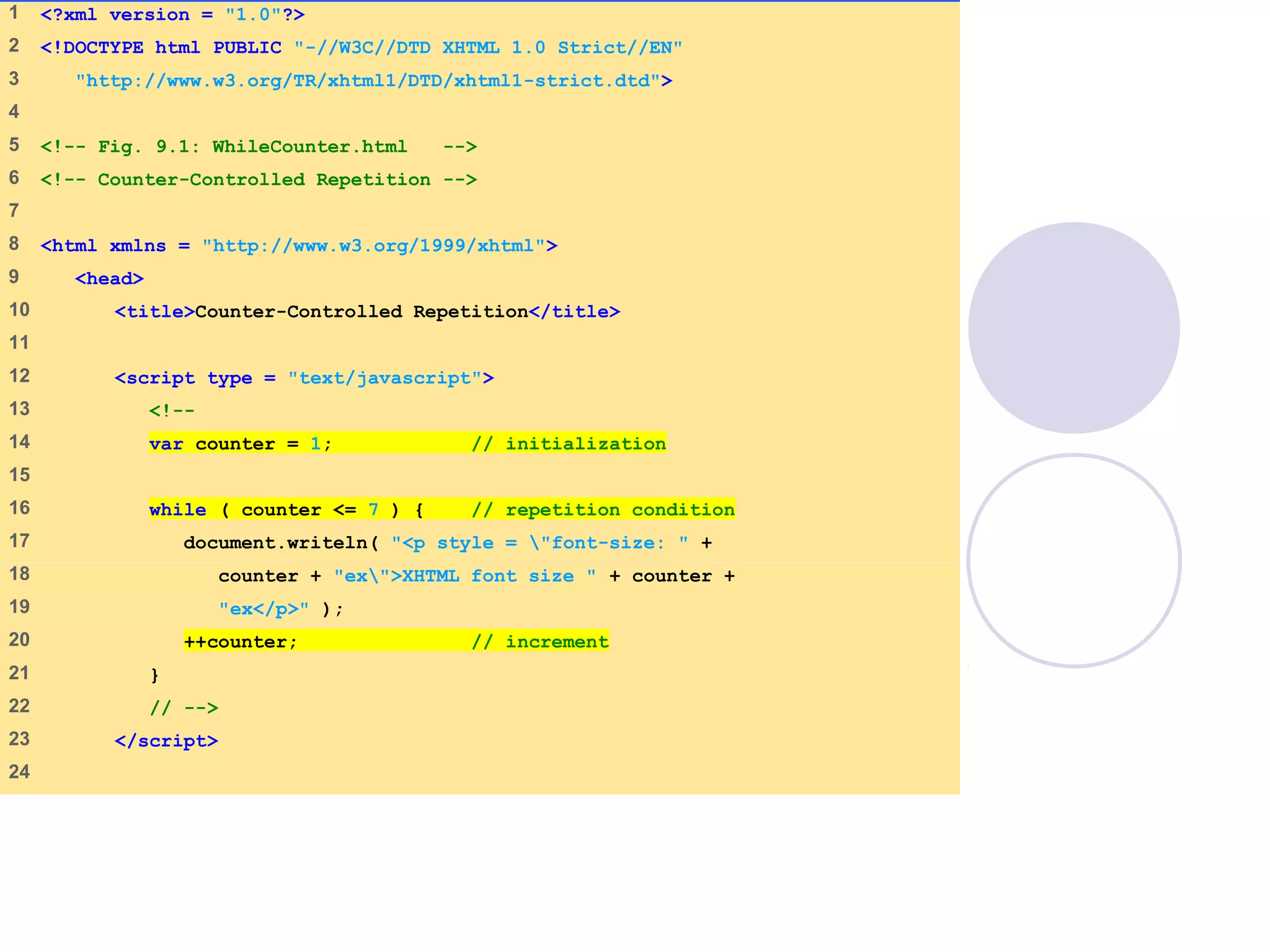
WhileCounter.html
(1 of 2)
1 <?xml version = "1.0"?>
2 <!DOCTYPE html PUBLIC "-//W3C//DTD XHTML 1.0 Strict//EN"
3 "http://www.w3.org/TR/xhtml1/DTD/xhtml1-strict.dtd">
4
5 <!-- Fig. 9.1: WhileCounter.html -->
6 <!-- Counter-Controlled Repetition -->
7
8 <html xmlns = "http://www.w3.org/1999/xhtml">
9 <head>
10 <title>Counter-Controlled Repetition</title>
11
12 <script type = "text/javascript">
13 <!--
14 var counter = 1; // initialization
15
16 while ( counter <= 7 ) { // repetition condition
17 document.writeln( "<p style = "font-size: " +
18 counter + "ex">XHTML font size " + counter +
19 "ex</p>" );
20 ++counter; // increment
21 }
22 // -->
23 </script>
24
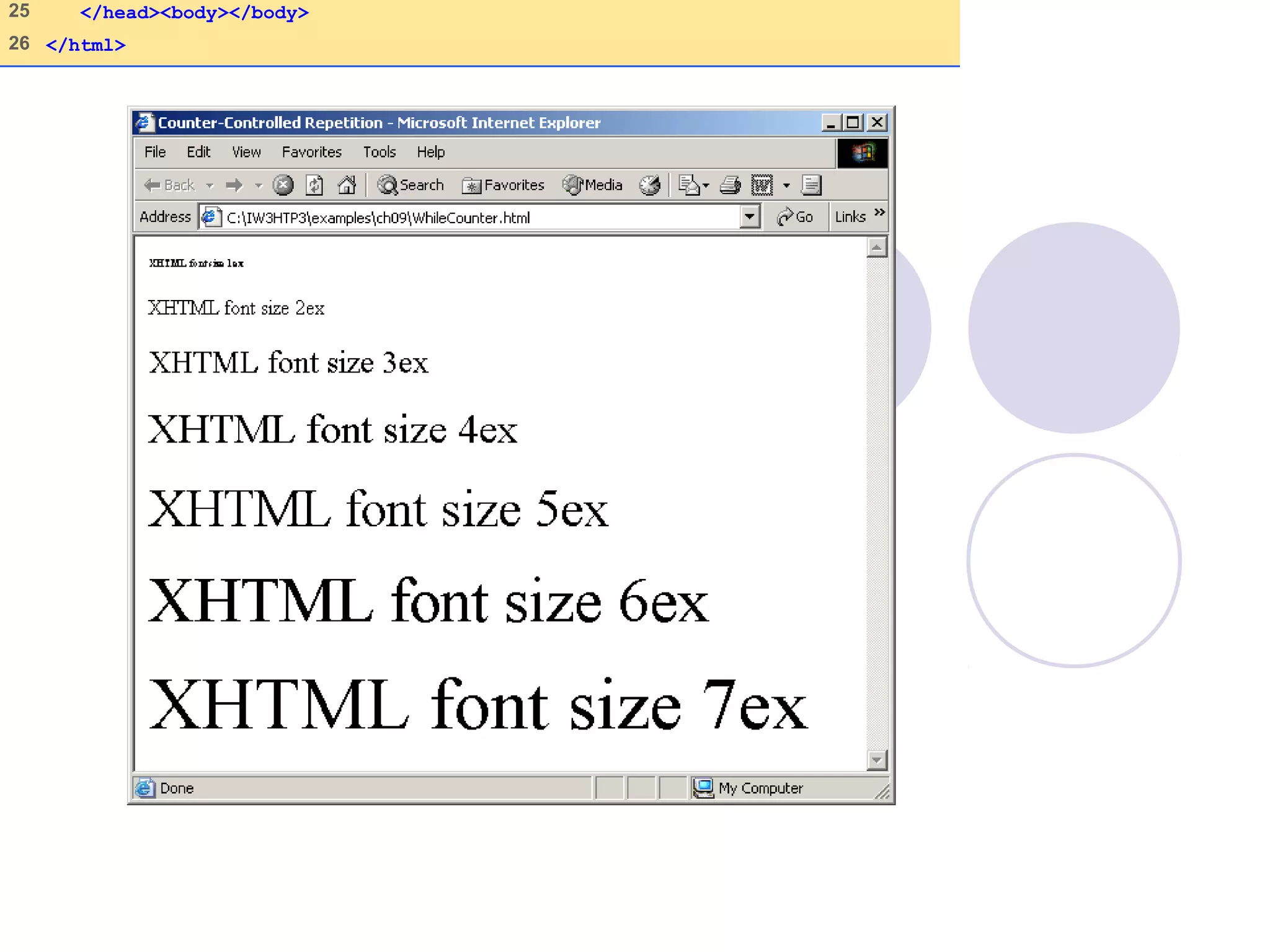
25 </head><body></body>
26 </html>
09/30/15 © Reem Al-Attas 5
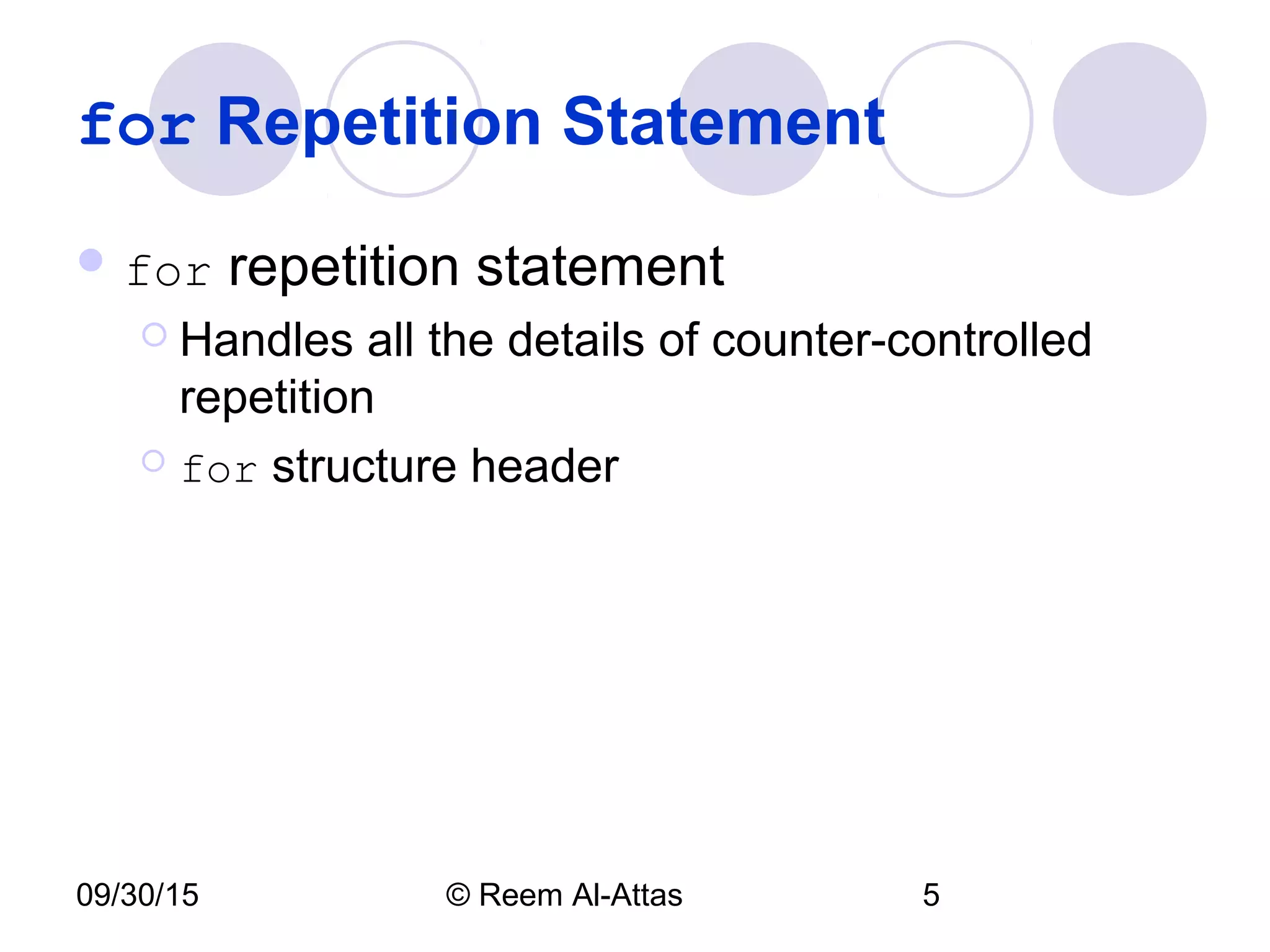
for Repetition Statement
 for repetition statement
 Handles all the details of counter-controlled
repetition
 for structure header
09/30/15 © Reem Al-Attas 6
for Repetition Statement
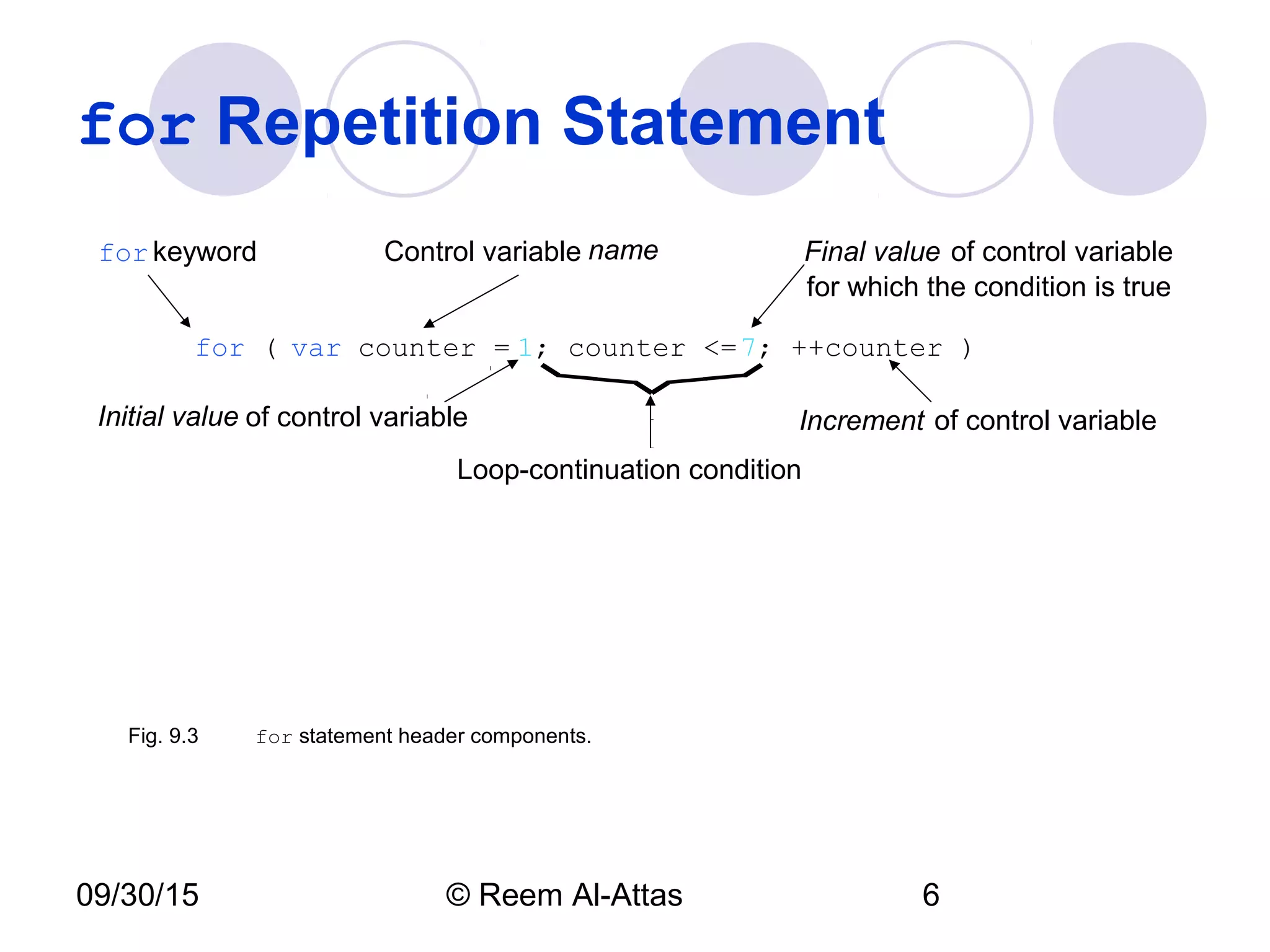
for ( var counter = 1; counter <=7; ++counter )
Initial value of control variable Increment of control variable
Control variable name Final value of control variable
for which the condition is true
forkeyword
Loop-continuation condition
Fig. 9.3 for statement header components.
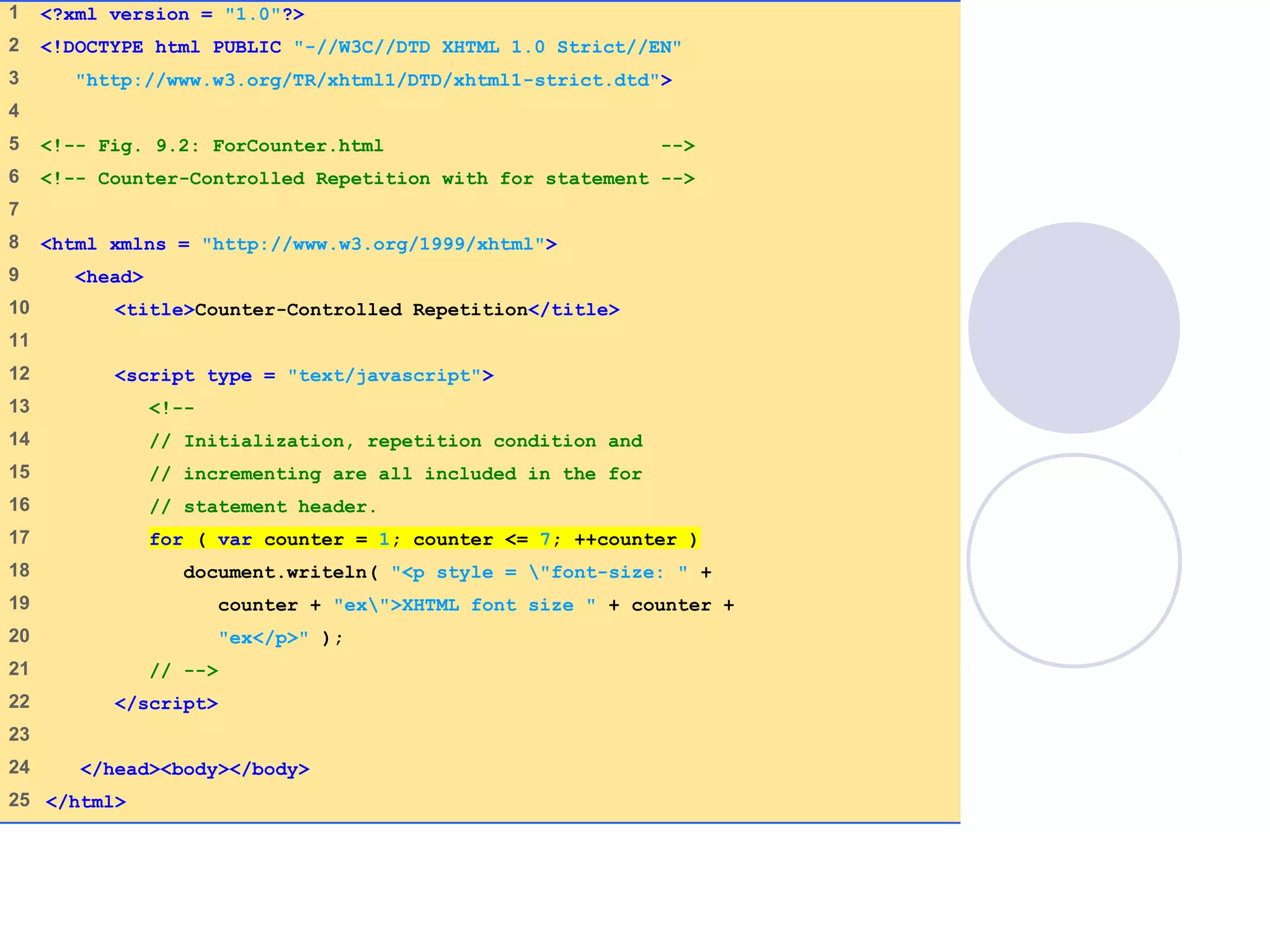
ForCounter.html
(1 of 1)
1 <?xml version = "1.0"?>
2 <!DOCTYPE html PUBLIC "-//W3C//DTD XHTML 1.0 Strict//EN"
3 "http://www.w3.org/TR/xhtml1/DTD/xhtml1-strict.dtd">
4
5 <!-- Fig. 9.2: ForCounter.html -->
6 <!-- Counter-Controlled Repetition with for statement -->
7
8 <html xmlns = "http://www.w3.org/1999/xhtml">
9 <head>
10 <title>Counter-Controlled Repetition</title>
11
12 <script type = "text/javascript">
13 <!--
14 // Initialization, repetition condition and
15 // incrementing are all included in the for
16 // statement header.
17 for ( var counter = 1; counter <= 7; ++counter )
18 document.writeln( "<p style = "font-size: " +
19 counter + "ex">XHTML font size " + counter +
20 "ex</p>" );
21 // -->
22 </script>
23
24 </head><body></body>
25 </html>
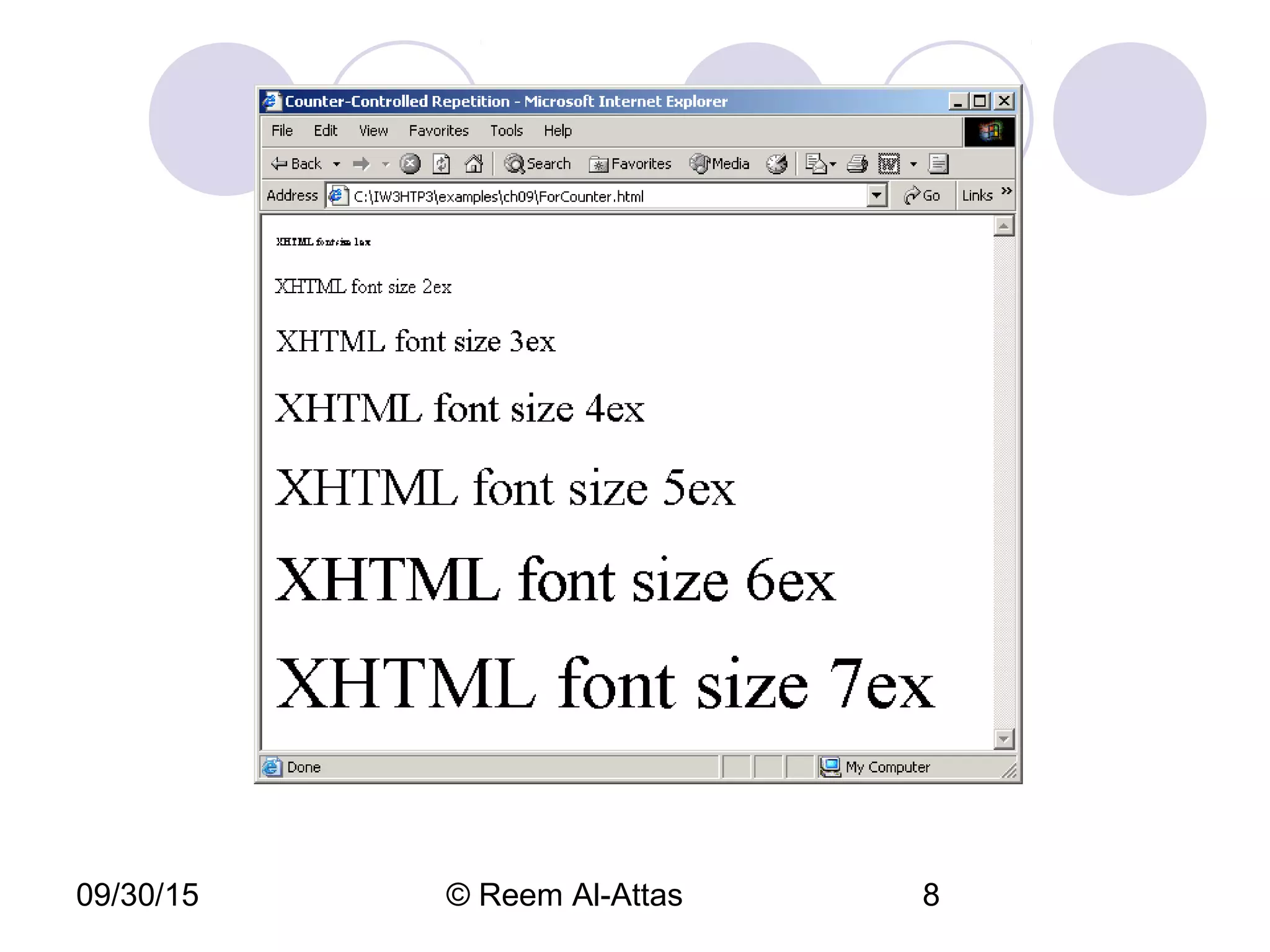
09/30/15 © Reem Al-Attas 8
09/30/15 © Reem Al-Attas 9
for Repetition Statement
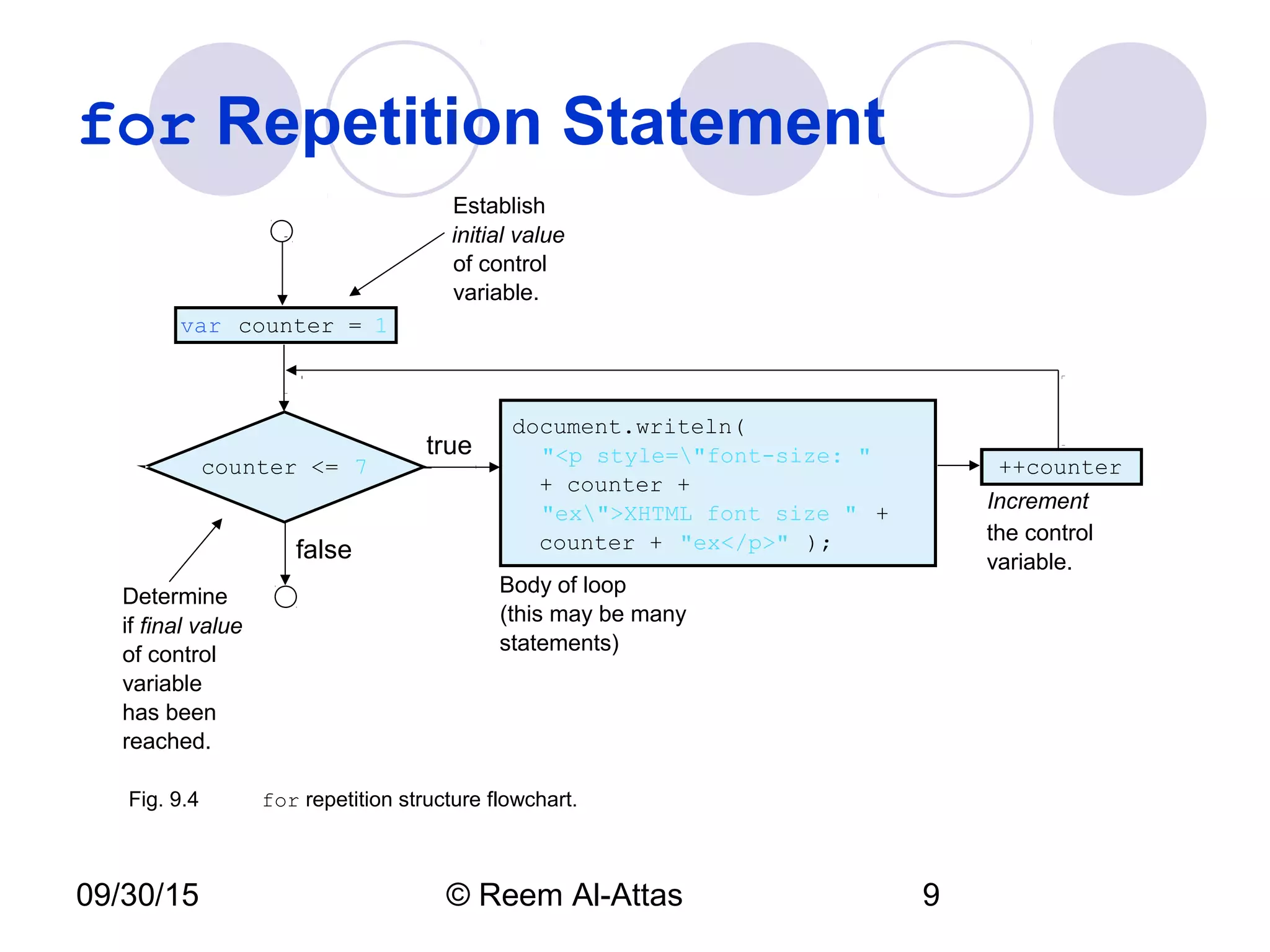
counter <= 7
document.writeln(
"<p style="font-size: "
+ counter +
"ex">XHTML font size " +
counter + "ex</p>" );
true
false
var counter = 1
++counter
Establish
initial value
of control
variable.
Determine
if final value
of control
variable
has been
reached.
Body of loop
(this may be many
statements)
Increment
the control
variable.
Fig. 9.4 for repetition structure flowchart.
09/30/15 © Reem Al-Attas 10
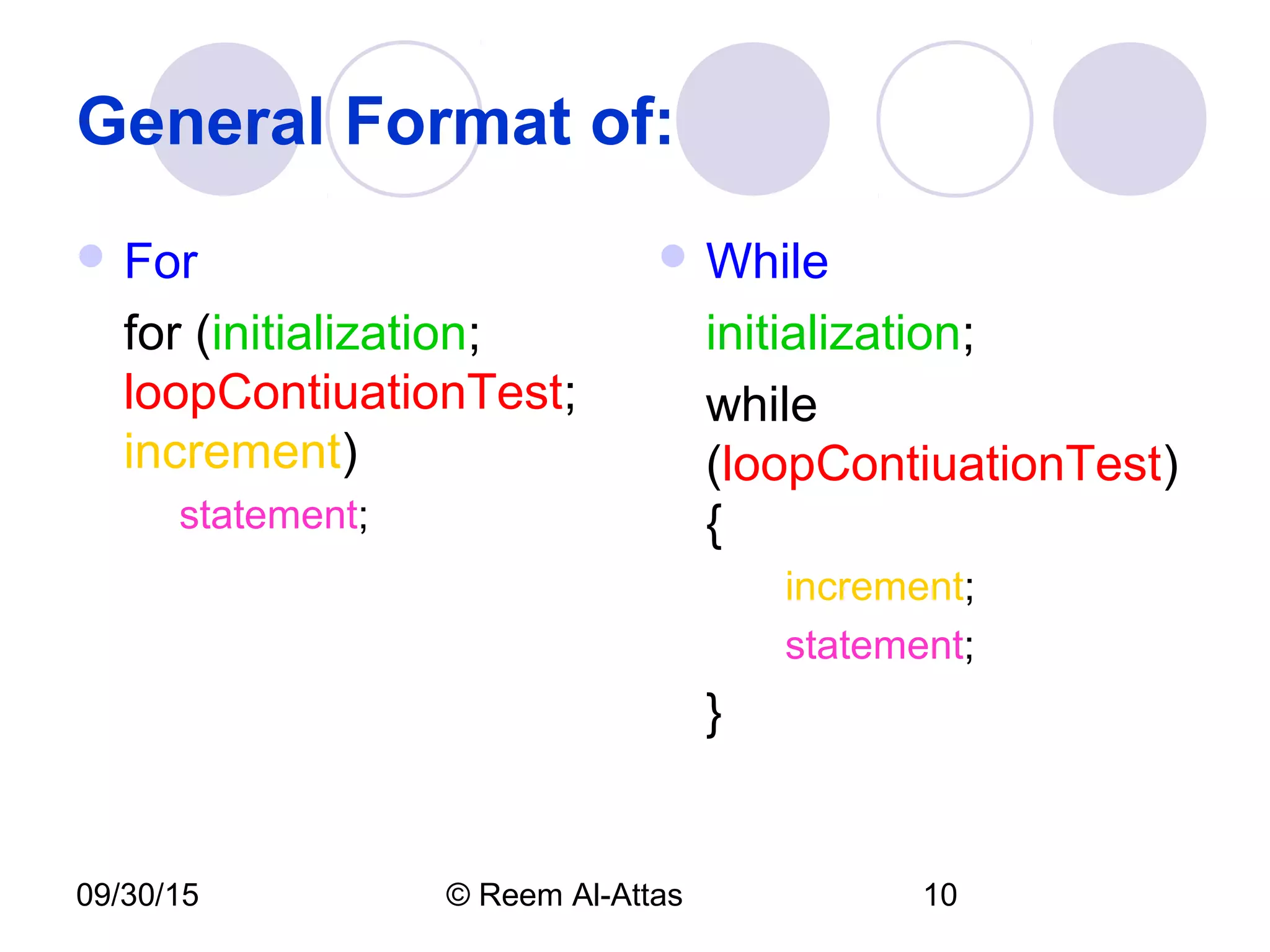
General Format of:
 For
for (initialization;
loopContiuationTest;
increment)
statement;
 While
initialization;
while
(loopContiuationTest)
{
increment;
statement;
}
09/30/15 © Reem Al-Attas 11
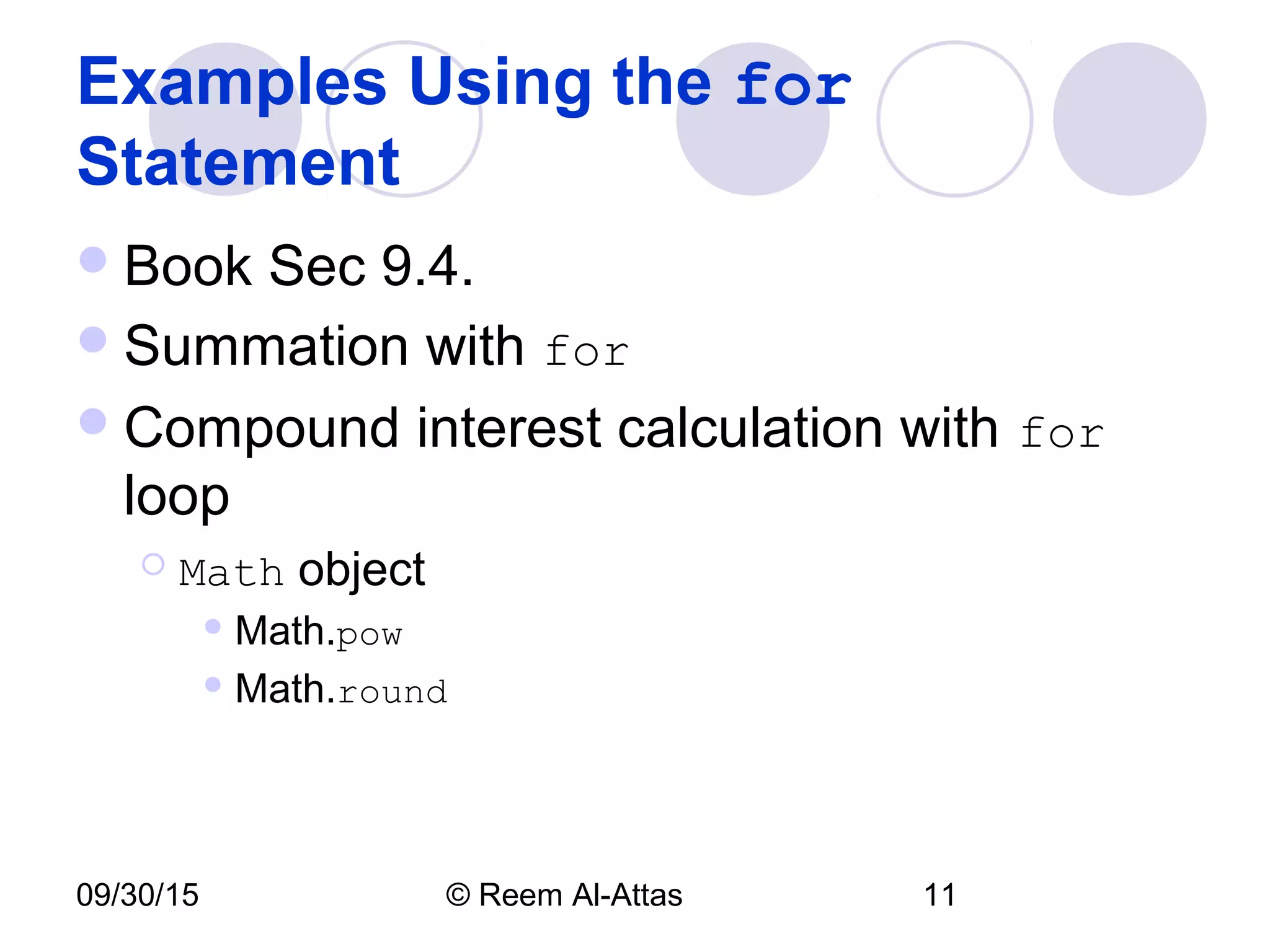
Examples Using the for
Statement
Book Sec 9.4.
Summation with for
Compound interest calculation with for
loop
 Math object
 Math.pow
 Math.round
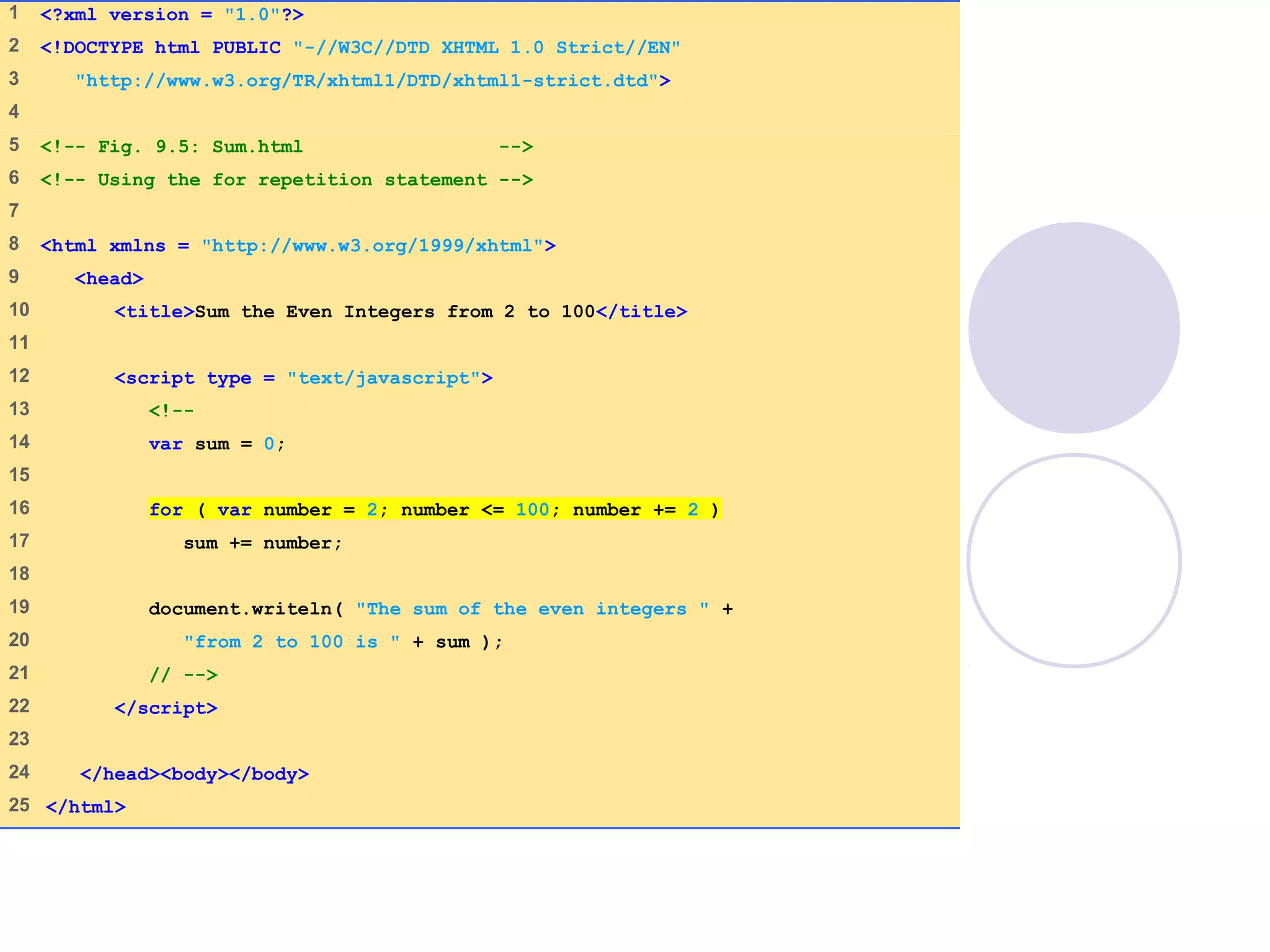
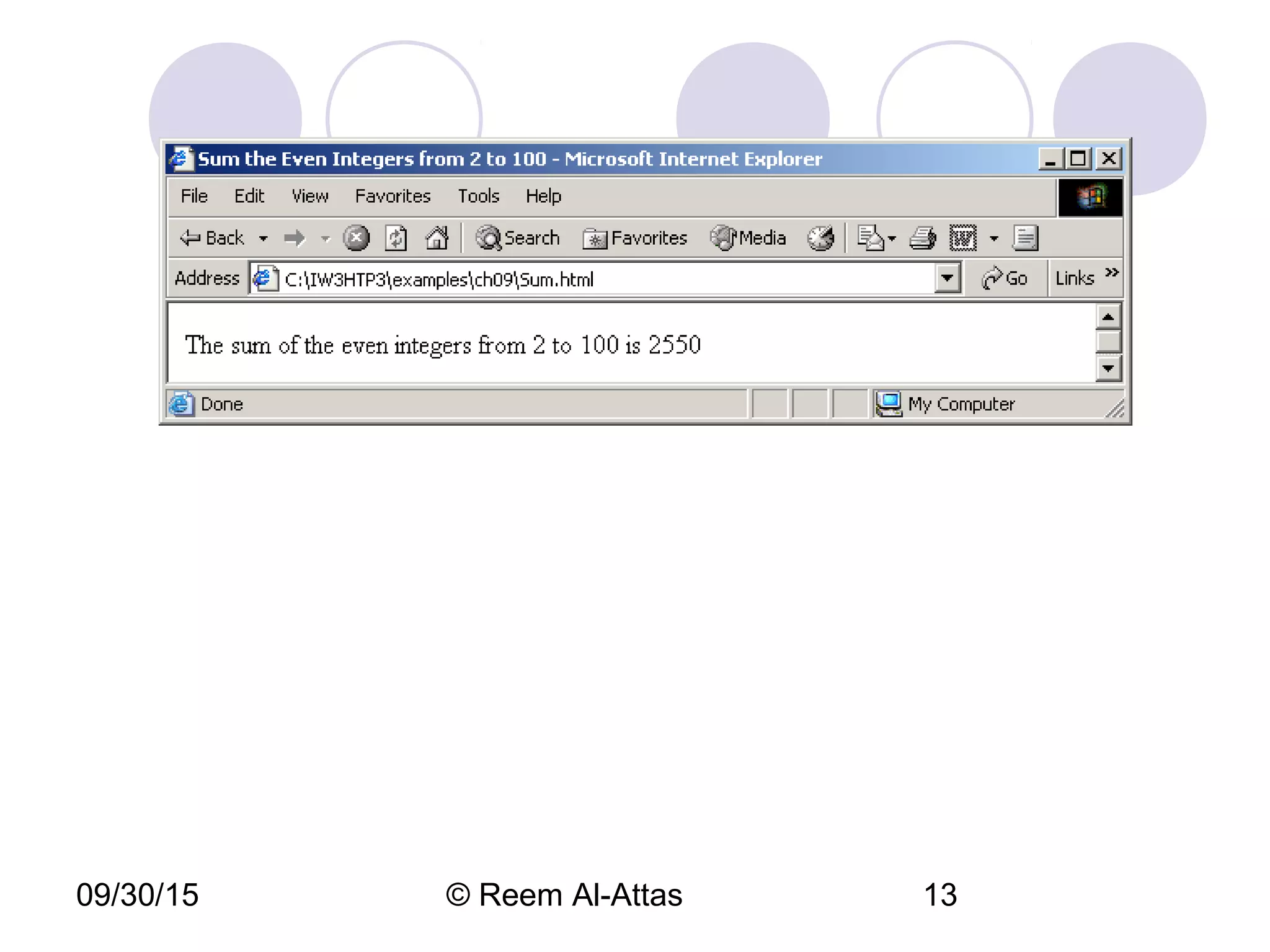
Sum.html
(1 of 1)
1 <?xml version = "1.0"?>
2 <!DOCTYPE html PUBLIC "-//W3C//DTD XHTML 1.0 Strict//EN"
3 "http://www.w3.org/TR/xhtml1/DTD/xhtml1-strict.dtd">
4
5 <!-- Fig. 9.5: Sum.html -->
6 <!-- Using the for repetition statement -->
7
8 <html xmlns = "http://www.w3.org/1999/xhtml">
9 <head>
10 <title>Sum the Even Integers from 2 to 100</title>
11
12 <script type = "text/javascript">
13 <!--
14 var sum = 0;
15
16 for ( var number = 2; number <= 100; number += 2 )
17 sum += number;
18
19 document.writeln( "The sum of the even integers " +
20 "from 2 to 100 is " + sum );
21 // -->
22 </script>
23
24 </head><body></body>
25 </html>
09/30/15 © Reem Al-Attas 13
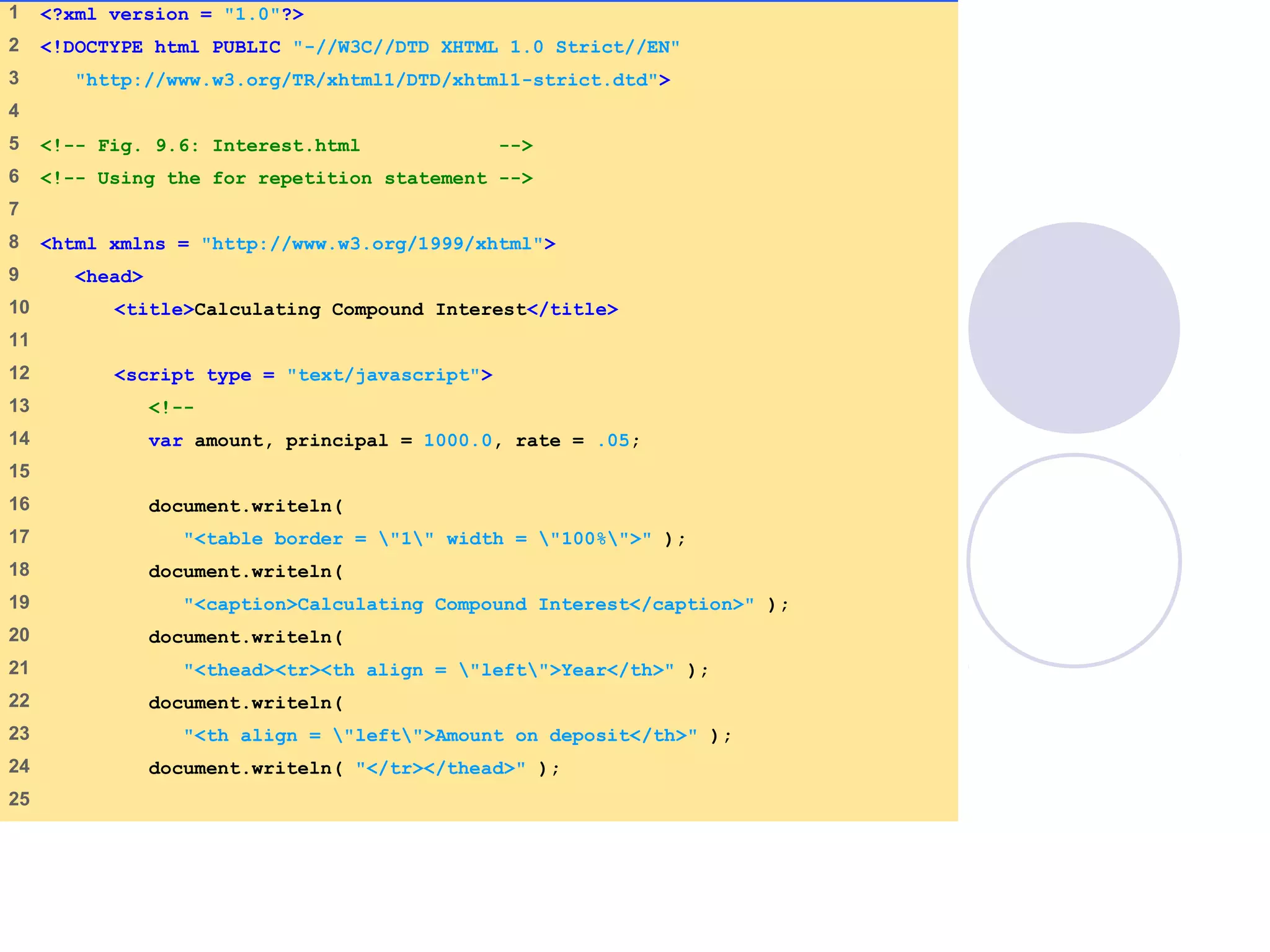
Interest.html
(1 of 2)
1 <?xml version = "1.0"?>
2 <!DOCTYPE html PUBLIC "-//W3C//DTD XHTML 1.0 Strict//EN"
3 "http://www.w3.org/TR/xhtml1/DTD/xhtml1-strict.dtd">
4
5 <!-- Fig. 9.6: Interest.html -->
6 <!-- Using the for repetition statement -->
7
8 <html xmlns = "http://www.w3.org/1999/xhtml">
9 <head>
10 <title>Calculating Compound Interest</title>
11
12 <script type = "text/javascript">
13 <!--
14 var amount, principal = 1000.0, rate = .05;
15
16 document.writeln(
17 "<table border = "1" width = "100%">" );
18 document.writeln(
19 "<caption>Calculating Compound Interest</caption>" );
20 document.writeln(
21 "<thead><tr><th align = "left">Year</th>" );
22 document.writeln(
23 "<th align = "left">Amount on deposit</th>" );
24 document.writeln( "</tr></thead>" );
25
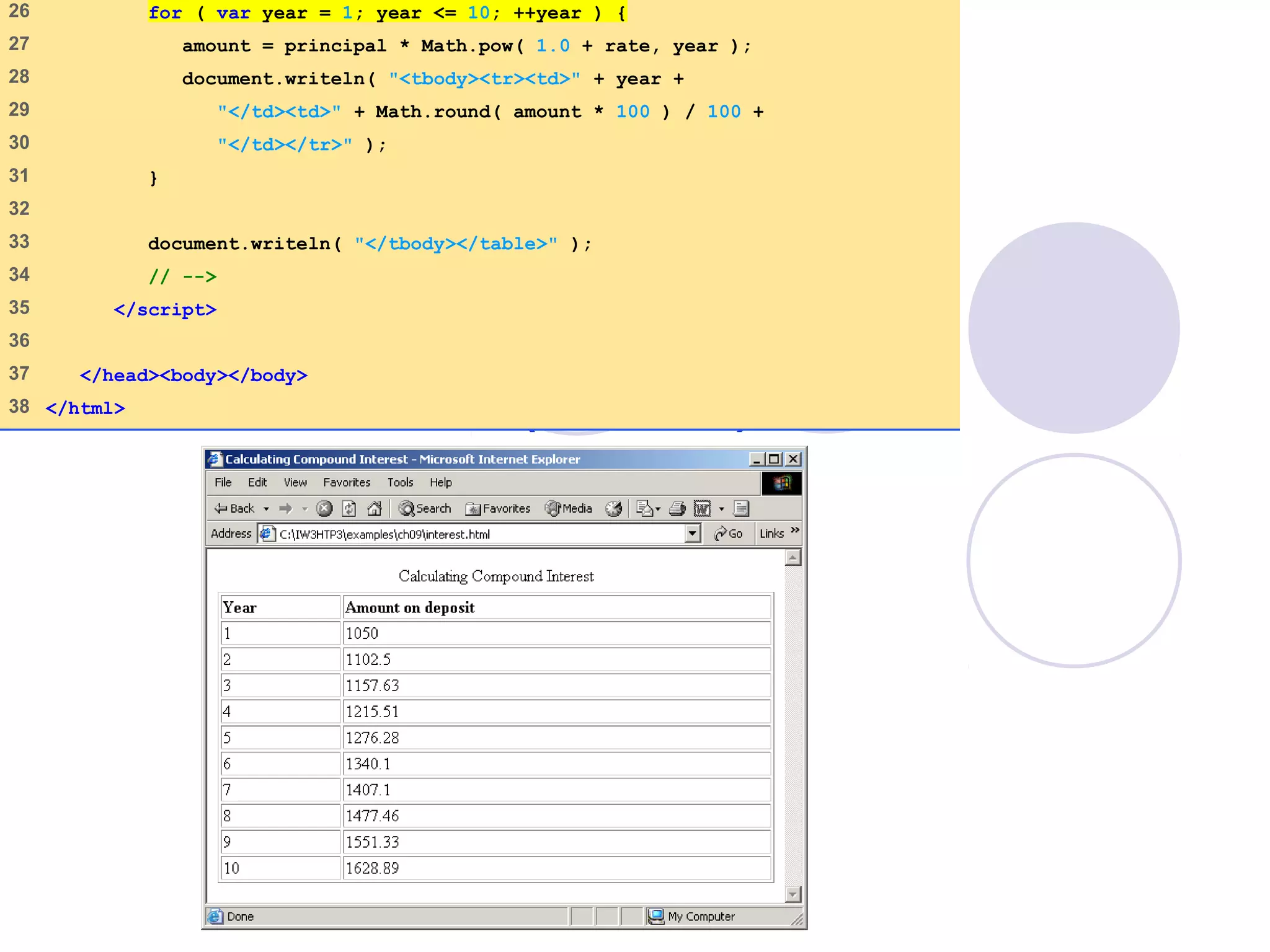
Interest.html
(2 of 2)
26 for ( var year = 1; year <= 10; ++year ) {
27 amount = principal * Math.pow( 1.0 + rate, year );
28 document.writeln( "<tbody><tr><td>" + year +
29 "</td><td>" + Math.round( amount * 100 ) / 100 +
30 "</td></tr>" );
31 }
32
33 document.writeln( "</tbody></table>" );
34 // -->
35 </script>
36
37 </head><body></body>
38 </html>
09/30/15 © Reem Al-Attas 16
switch Multiple-Selection
Statement
Controlling expression
Case labels
Default case
SwitchTest.html
(1 of 3)
1 <?xml version = "1.0"?>
2 <!DOCTYPE html PUBLIC "-//W3C//DTD XHTML 1.0 Strict//EN"
3 "http://www.w3.org/TR/xhtml1/DTD/xhtml1-strict.dtd">
4
5 <!-- Fig. 9.7: SwitchTest.html -->
6 <!-- Using the switch statement -->
7
8 <html xmlns = "http://www.w3.org/1999/xhtml">
9 <head>
10 <title>Switching between XHTML List Formats</title>
11
12 <script type = "text/javascript">
13 <!--
14 var choice, // user’s choice
15 startTag, // starting list item tag
16 endTag, // ending list item tag
17 validInput = true, // indicates if input is valid
18 listType; // list type as a string
19
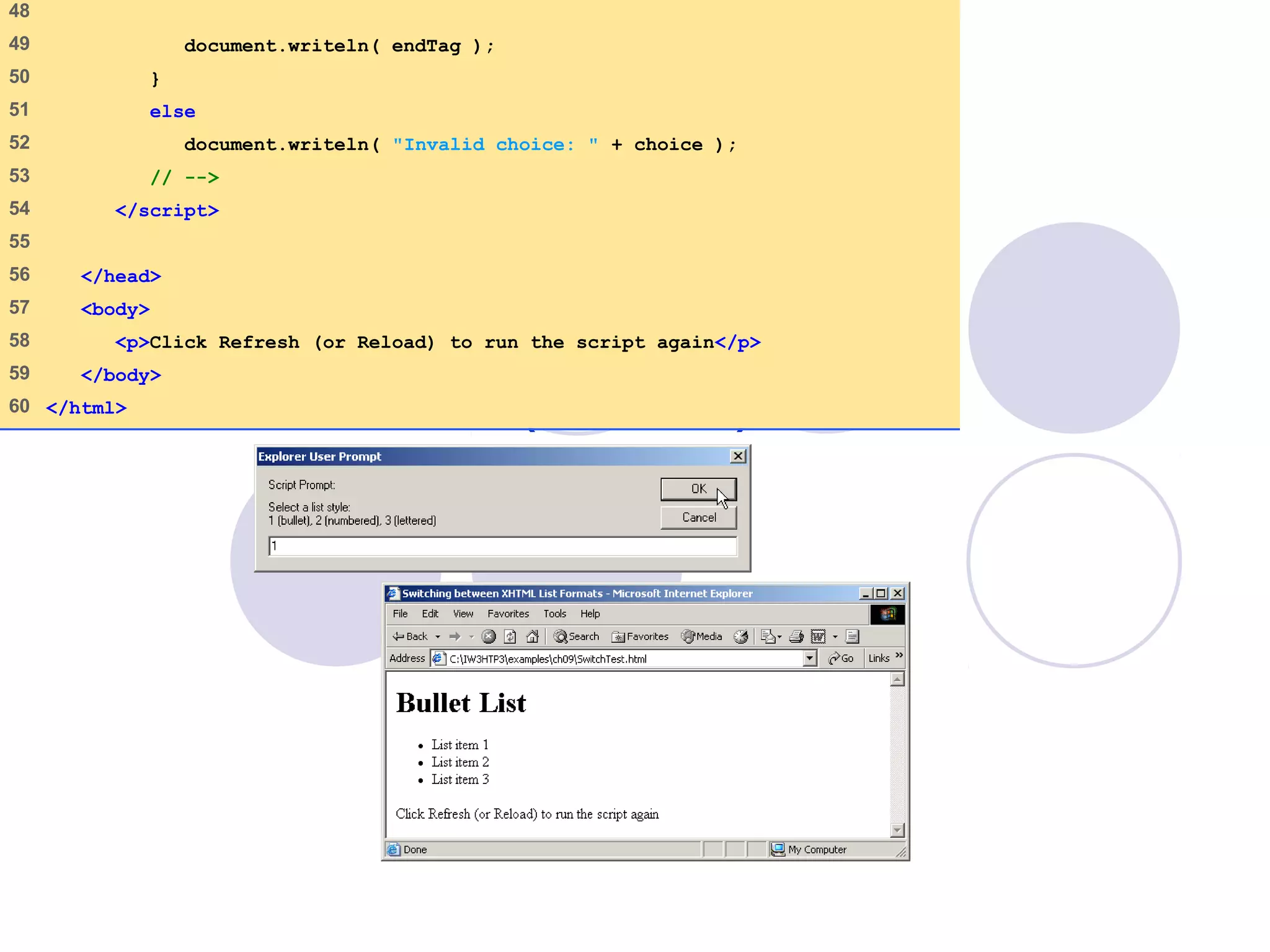
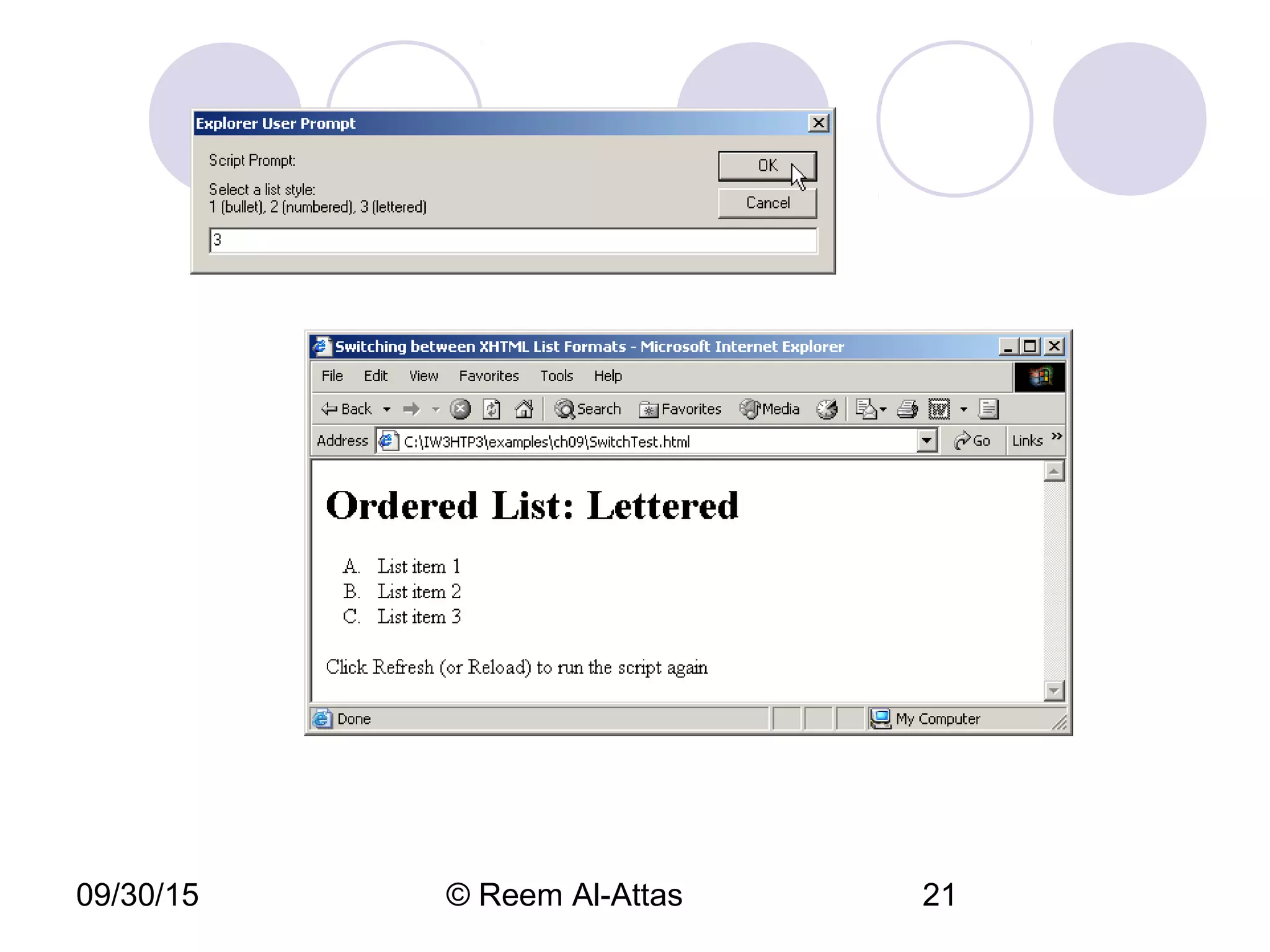
20 choice = window.prompt( "Select a list style:n" +
21 "1 (bullet), 2 (numbered), 3 (lettered)", "1" );
22
SwitchTest.html
(2 of 3)
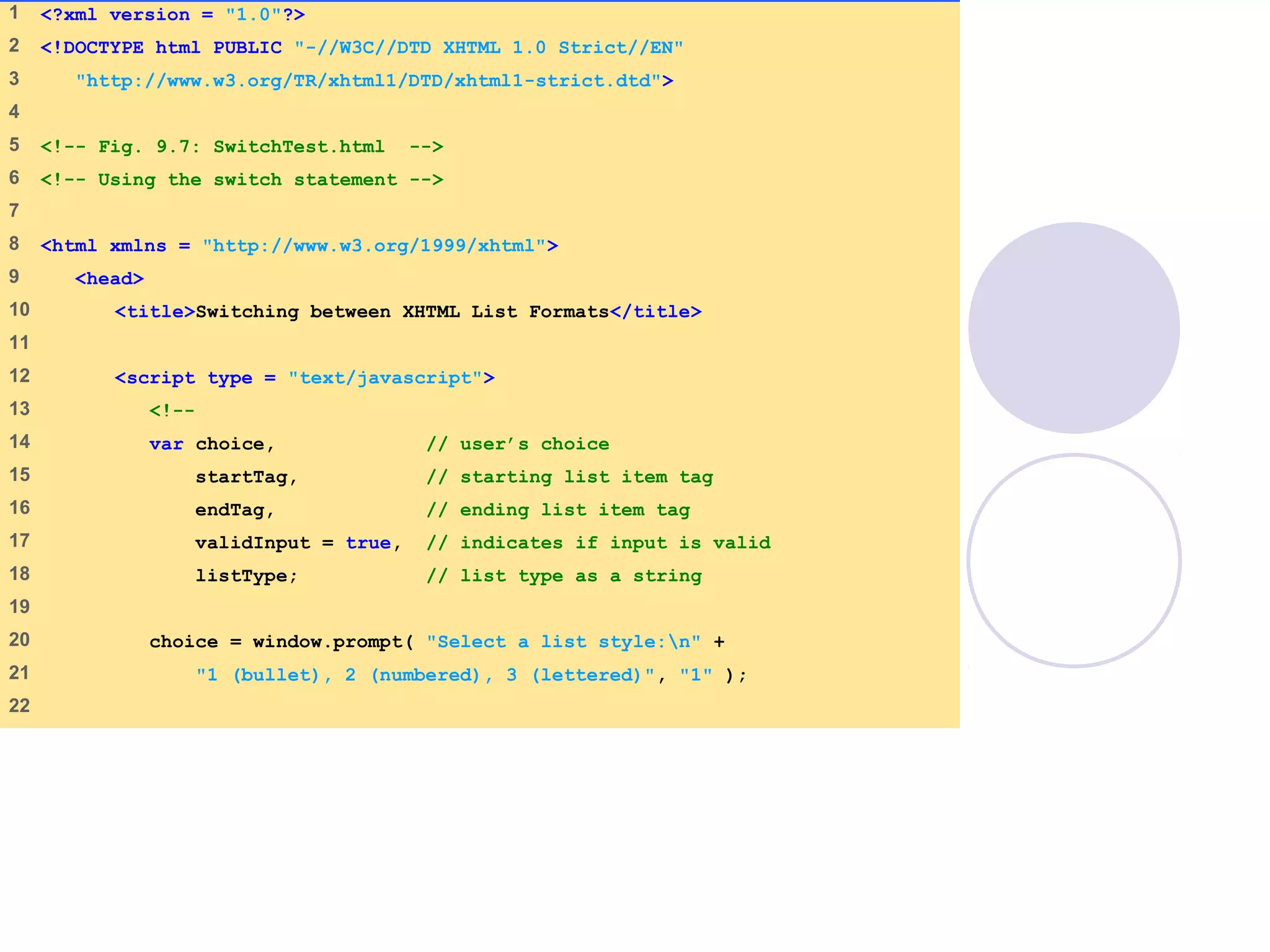
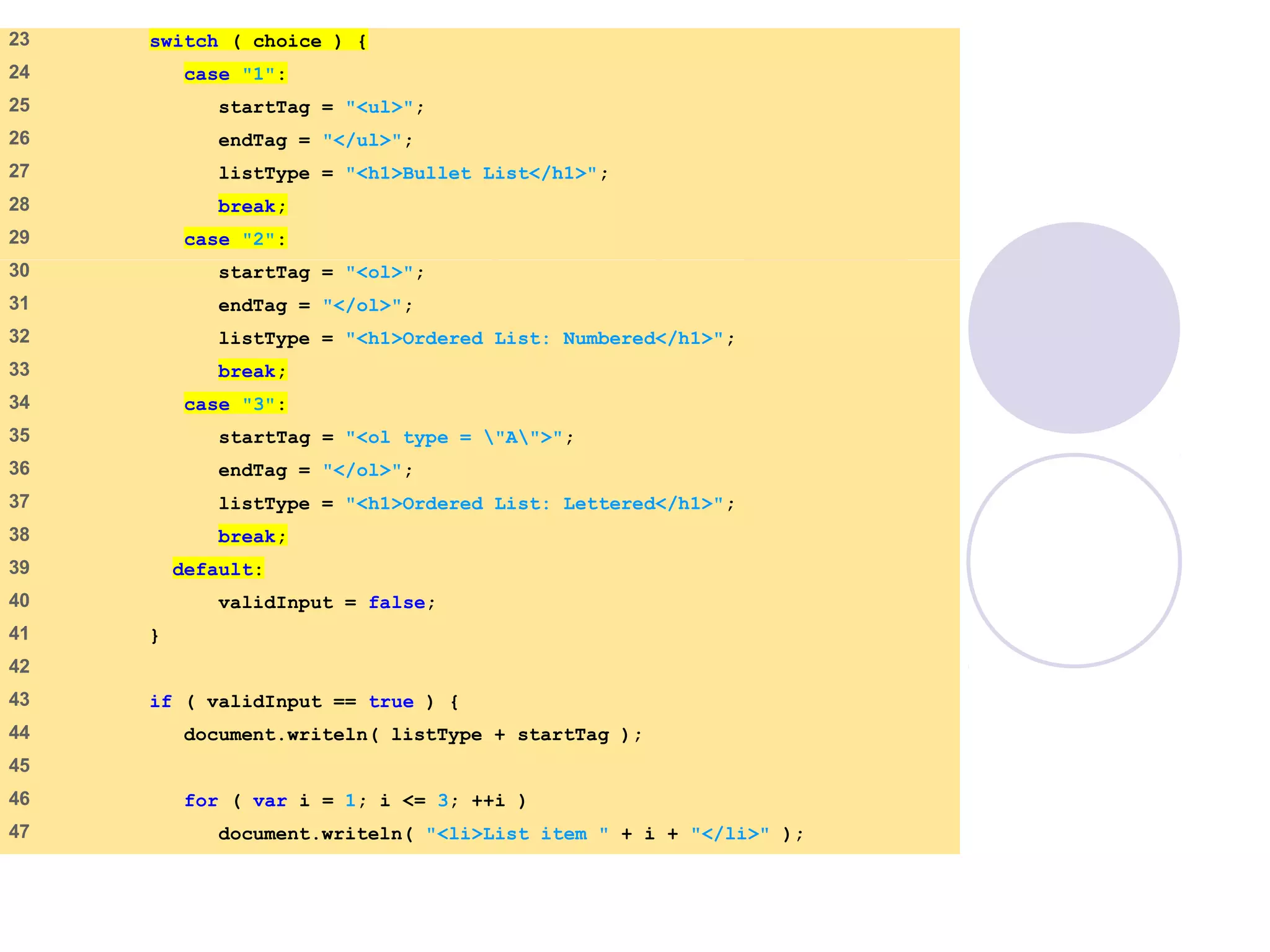
23 switch ( choice ) {
24 case "1":
25 startTag = "<ul>";
26 endTag = "</ul>";
27 listType = "<h1>Bullet List</h1>";
28 break;
29 case "2":
30 startTag = "<ol>";
31 endTag = "</ol>";
32 listType = "<h1>Ordered List: Numbered</h1>";
33 break;
34 case "3":
35 startTag = "<ol type = "A">";
36 endTag = "</ol>";
37 listType = "<h1>Ordered List: Lettered</h1>";
38 break;
39 default:
40 validInput = false;
41 }
42
43 if ( validInput == true ) {
44 document.writeln( listType + startTag );
45
46 for ( var i = 1; i <= 3; ++i )
47 document.writeln( "<li>List item " + i + "</li>" );
SwitchTest.html
(3 of 3)
48
49 document.writeln( endTag );
50 }
51 else
52 document.writeln( "Invalid choice: " + choice );
53 // -->
54 </script>
55
56 </head>
57 <body>
58 <p>Click Refresh (or Reload) to run the script again</p>
59 </body>
60 </html>
09/30/15 © Reem Al-Attas 20
09/30/15 © Reem Al-Attas 21
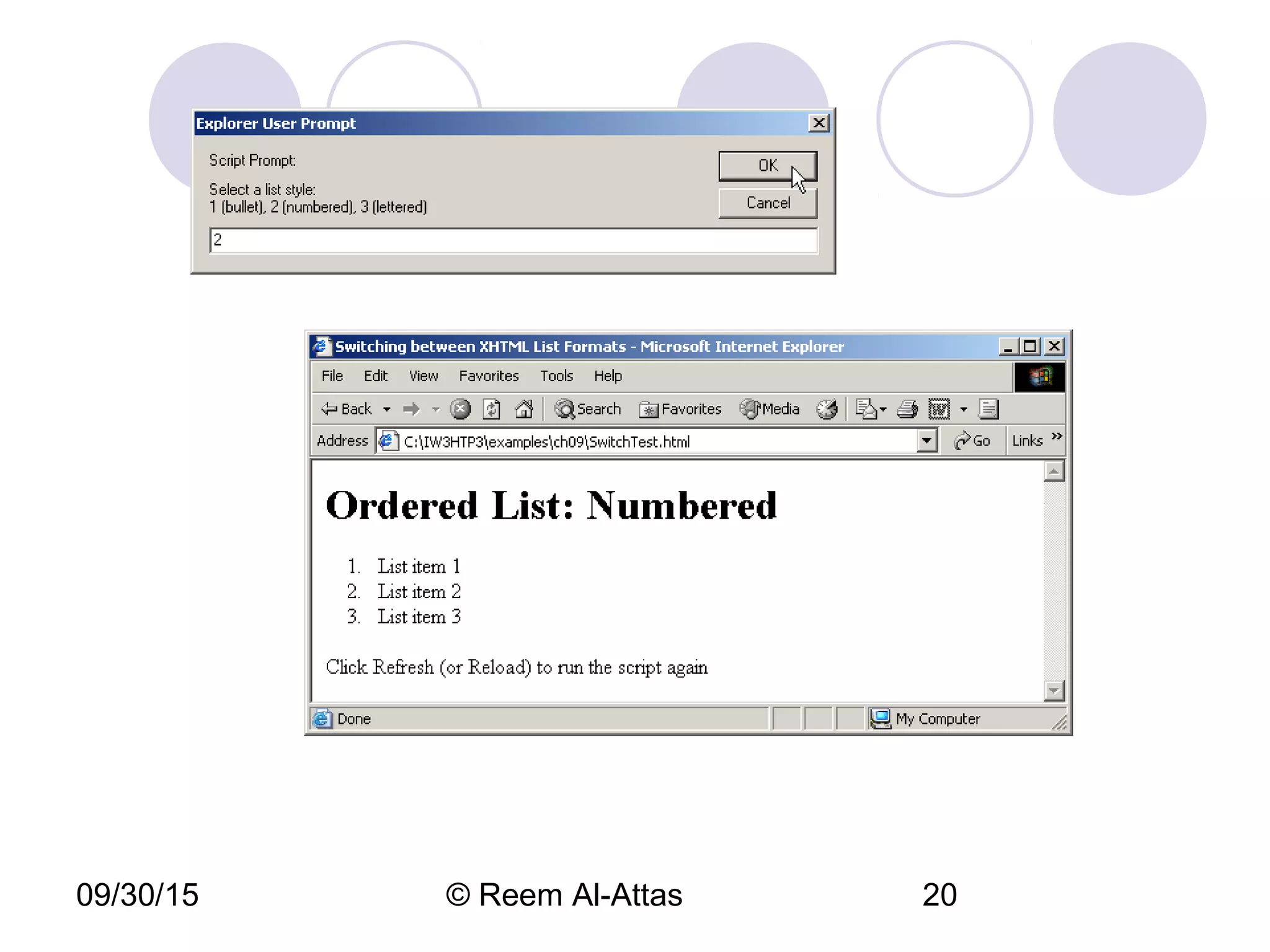
09/30/15 © Reem Al-Attas 22
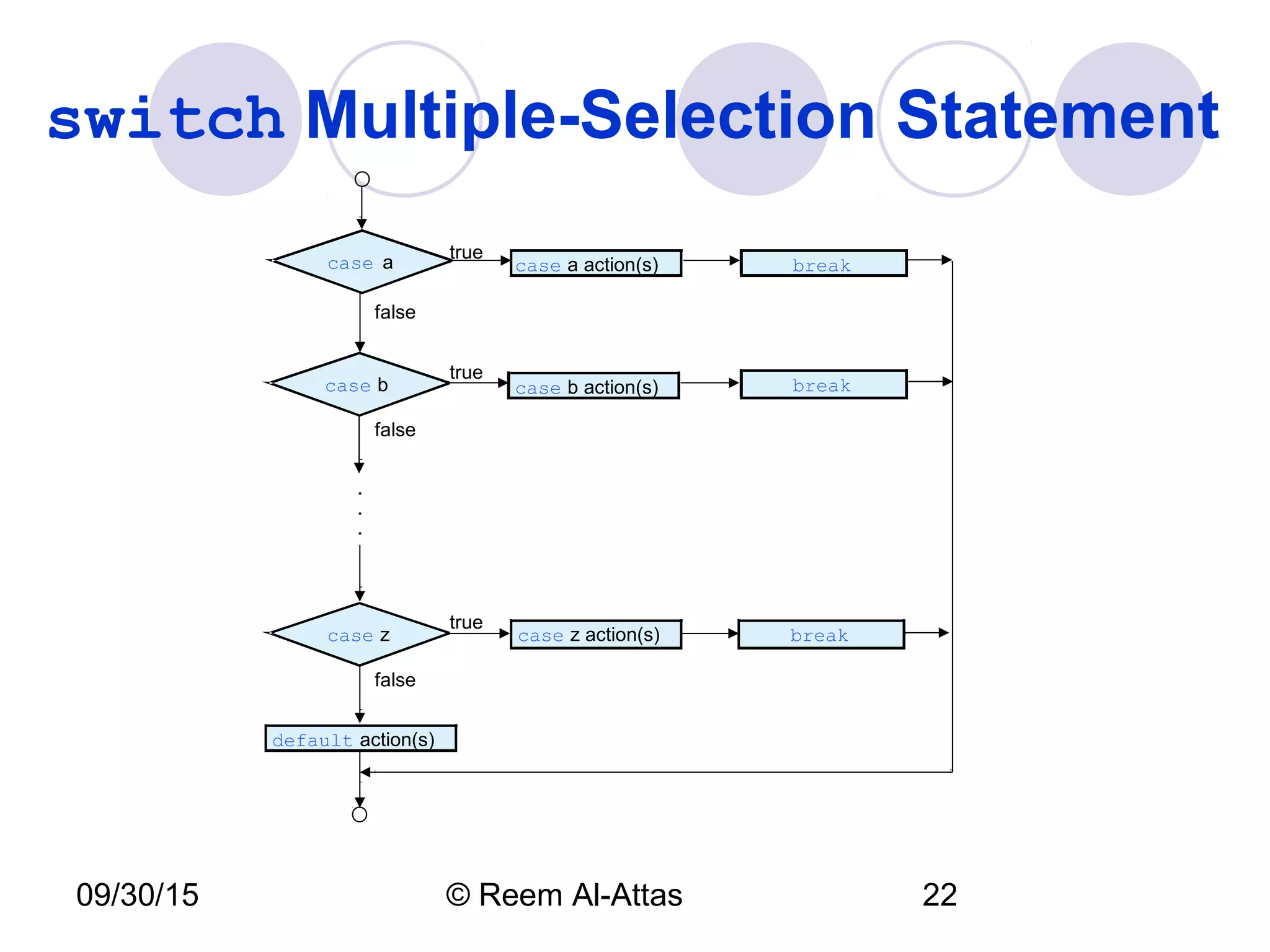
switch Multiple-Selection Statement
case a case a action(s)
true
false
.
.
.
break
case b action(s) break
false
false
case z case z action(s) break
default action(s)
true
true
case b
09/30/15 © Reem Al-Attas 23
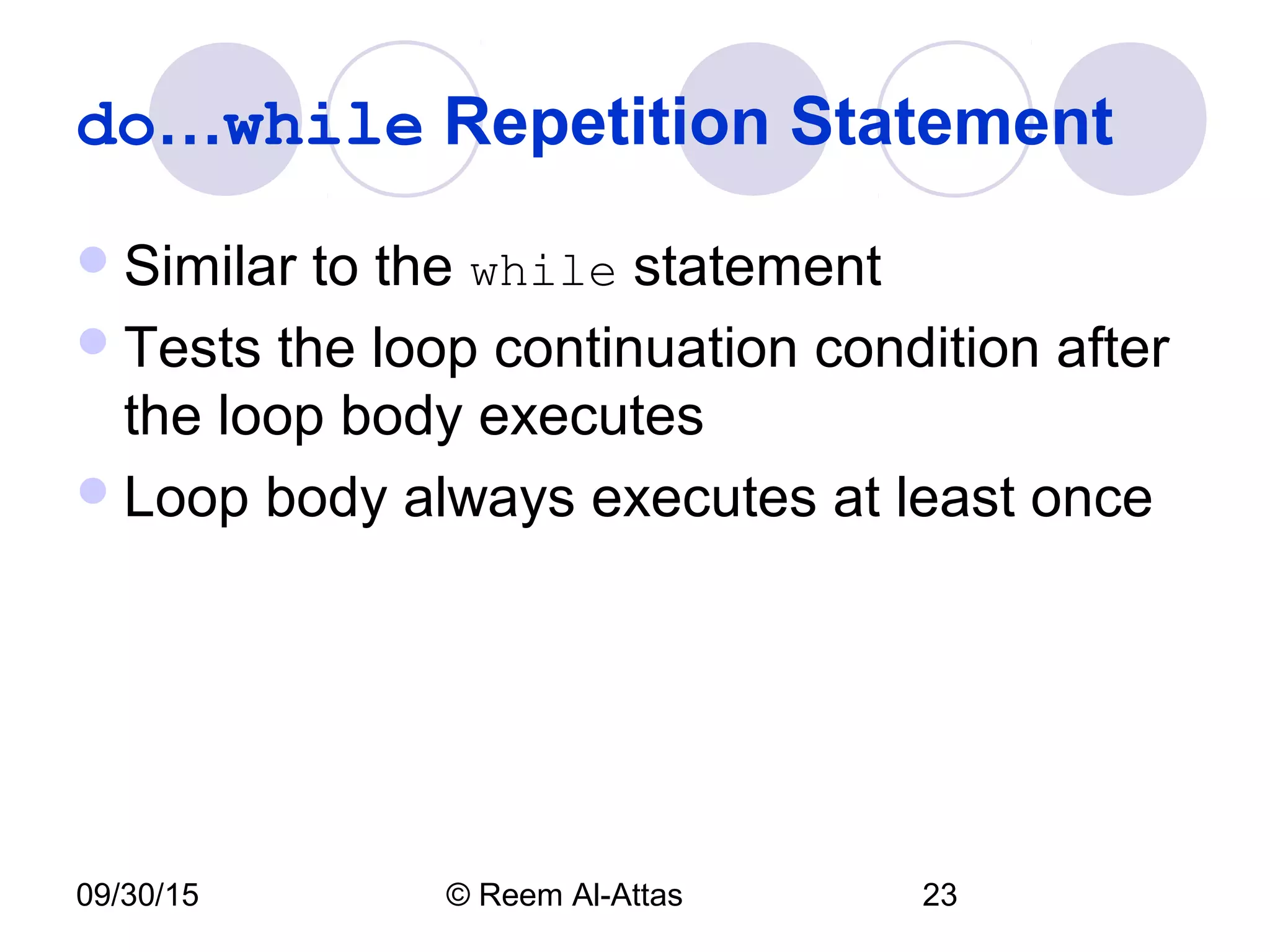
do…while Repetition Statement
Similar to the while statement
Tests the loop continuation condition after
the loop body executes
Loop body always executes at least once
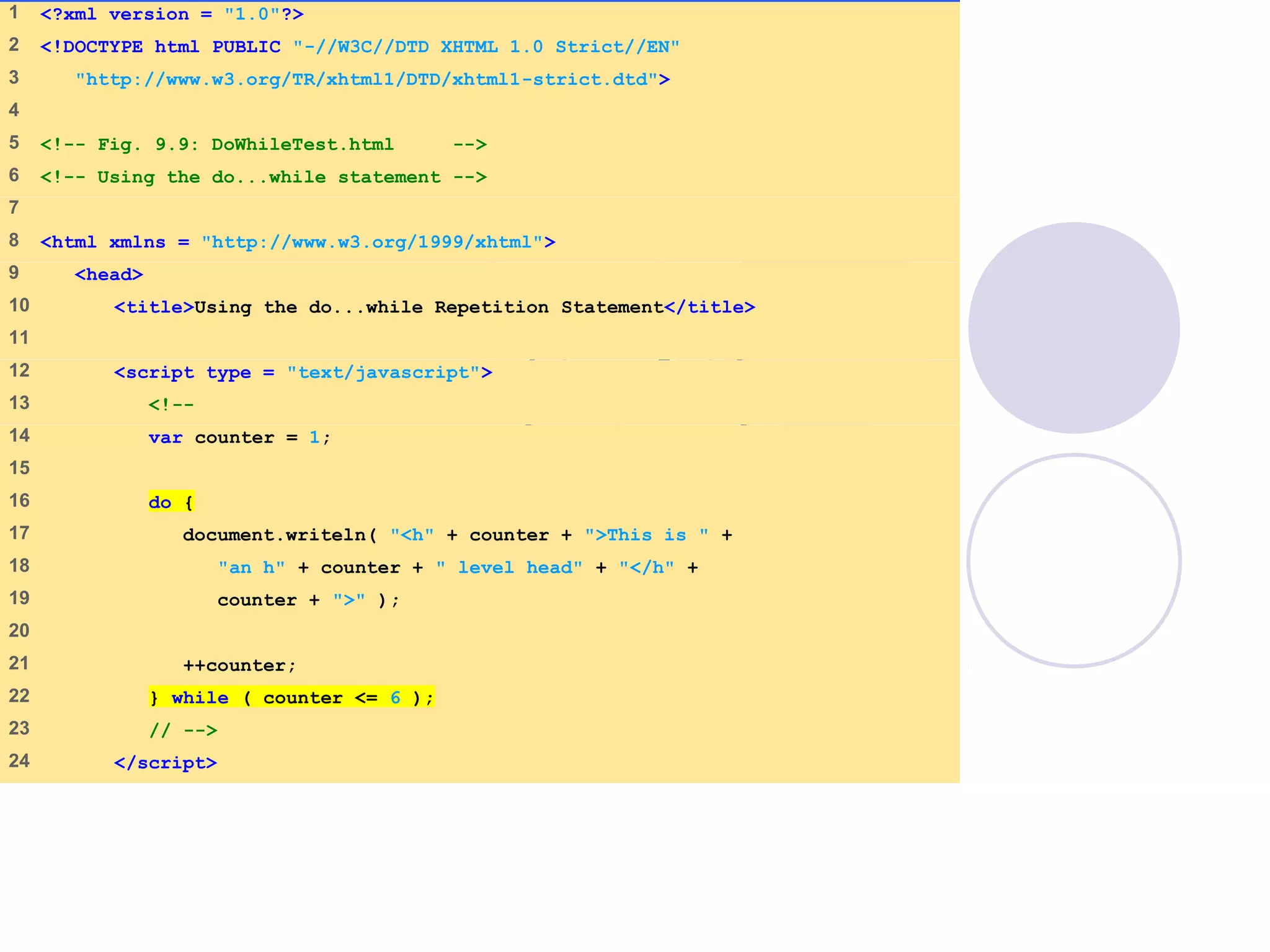
DoWhileTest.html
(1 of 2)
1 <?xml version = "1.0"?>
2 <!DOCTYPE html PUBLIC "-//W3C//DTD XHTML 1.0 Strict//EN"
3 "http://www.w3.org/TR/xhtml1/DTD/xhtml1-strict.dtd">
4
5 <!-- Fig. 9.9: DoWhileTest.html -->
6 <!-- Using the do...while statement -->
7
8 <html xmlns = "http://www.w3.org/1999/xhtml">
9 <head>
10 <title>Using the do...while Repetition Statement</title>
11
12 <script type = "text/javascript">
13 <!--
14 var counter = 1;
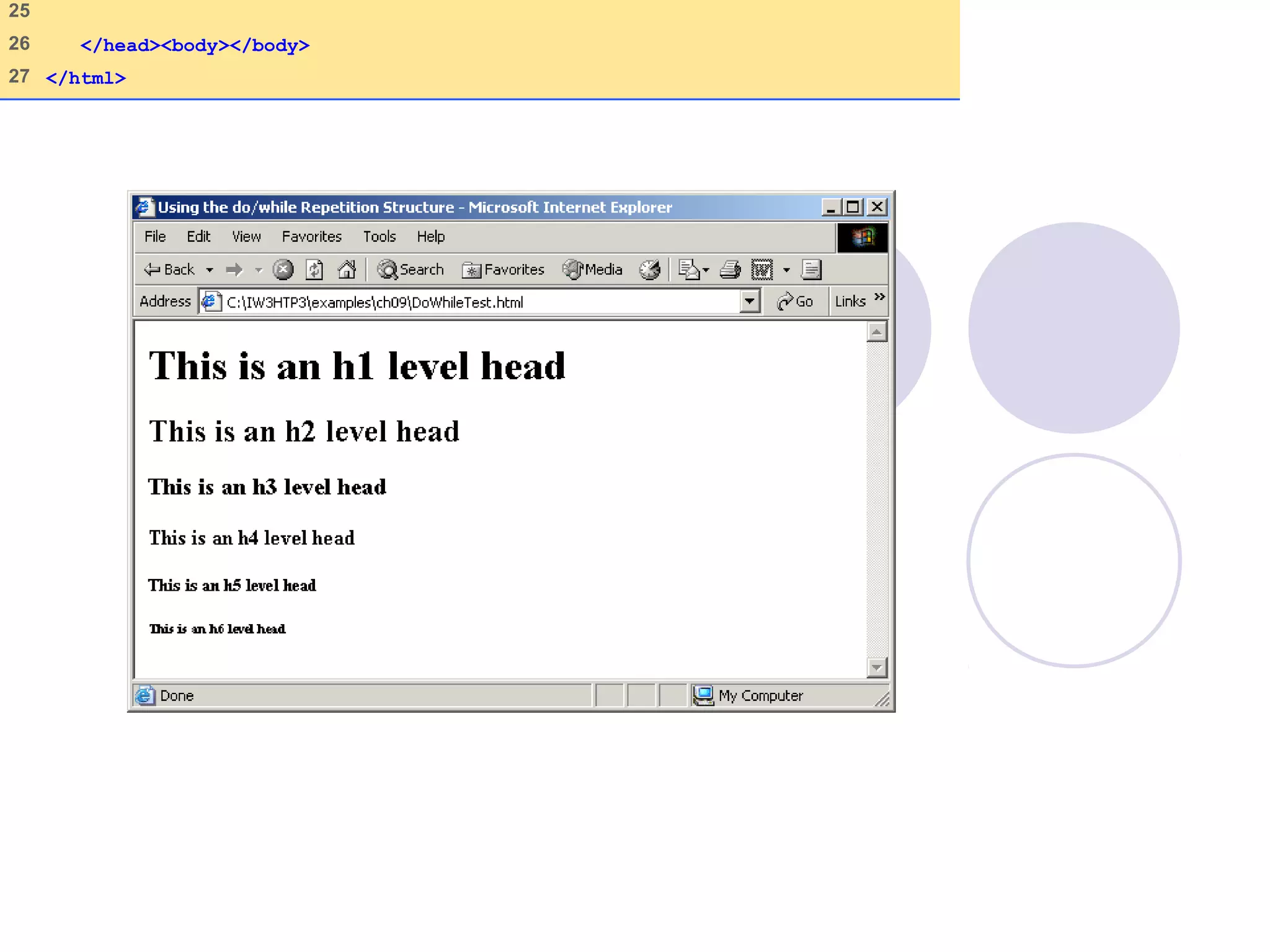
15
16 do {
17 document.writeln( "<h" + counter + ">This is " +
18 "an h" + counter + " level head" + "</h" +
19 counter + ">" );
20
21 ++counter;
22 } while ( counter <= 6 );
23 // -->
24 </script>
25
26 </head><body></body>
27 </html>
09/30/15 © Reem Al-Attas 26
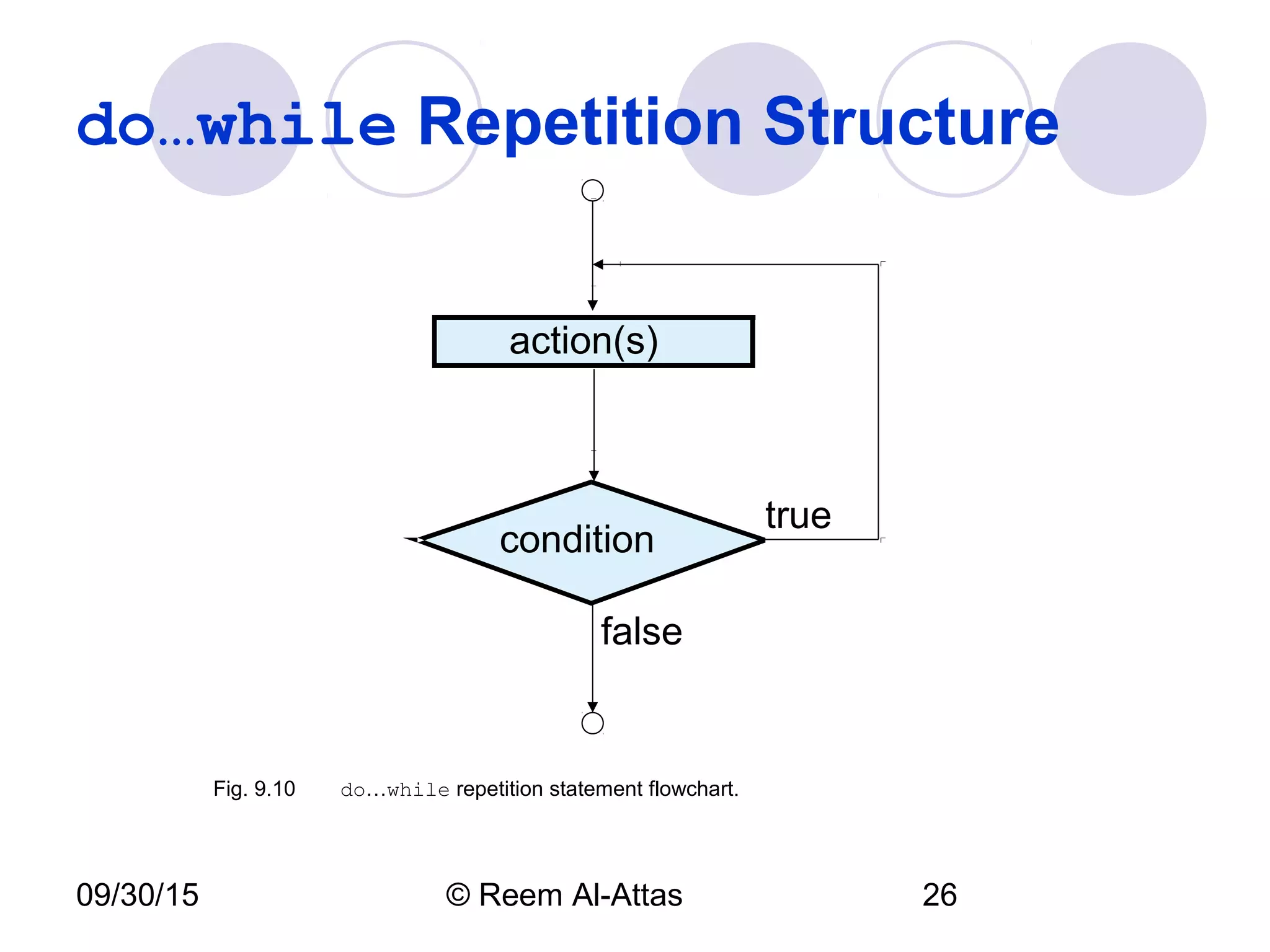
do…while Repetition Structure
condition
true
action(s)
false
Fig. 9.10 do…while repetition statement flowchart.
09/30/15 © Reem Al-Attas 27
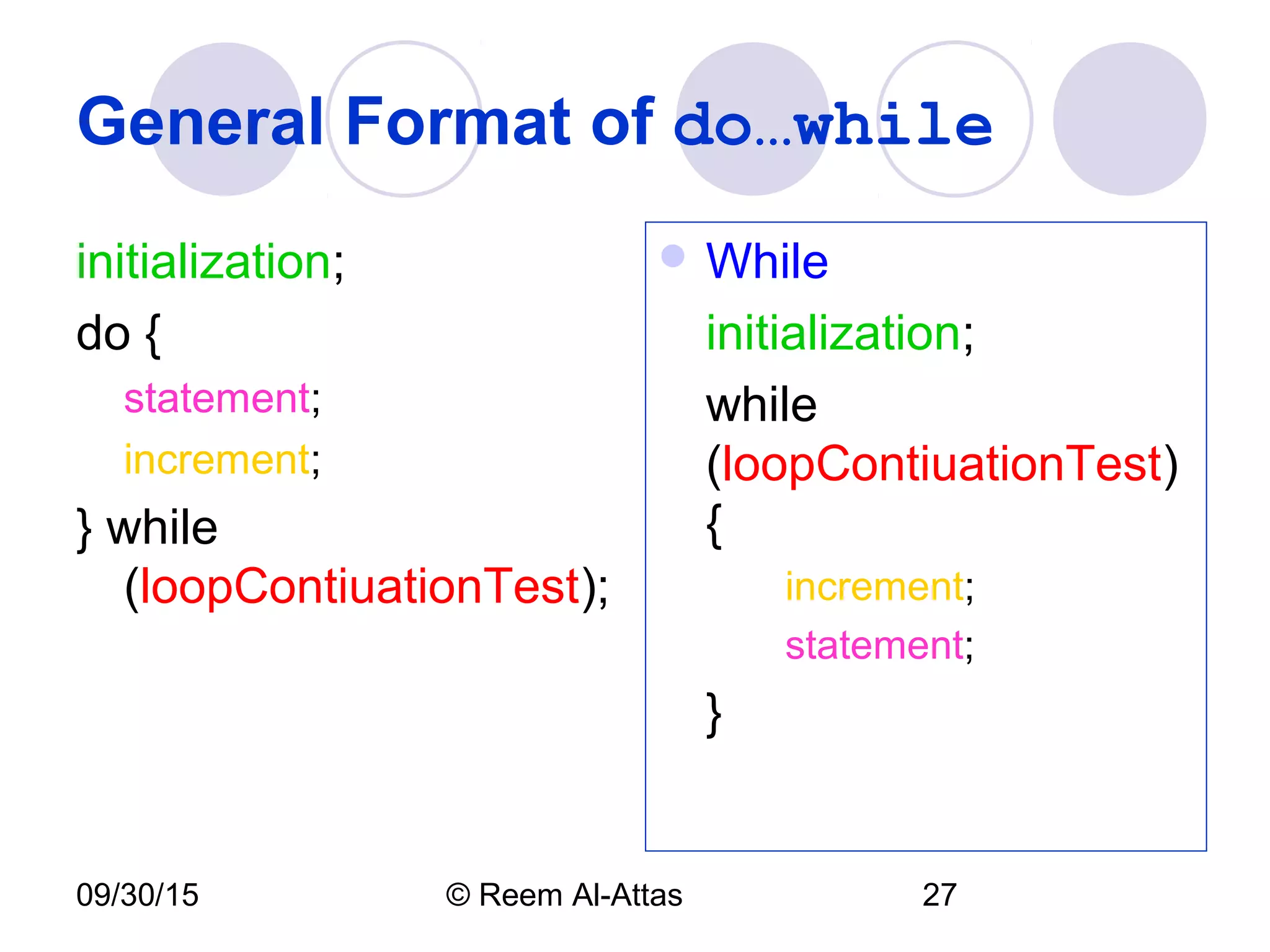
General Format of do…while
initialization;
do {
statement;
increment;
} while
(loopContiuationTest);
 While
initialization;
while
(loopContiuationTest)
{
increment;
statement;
}
09/30/15 © Reem Al-Attas 28
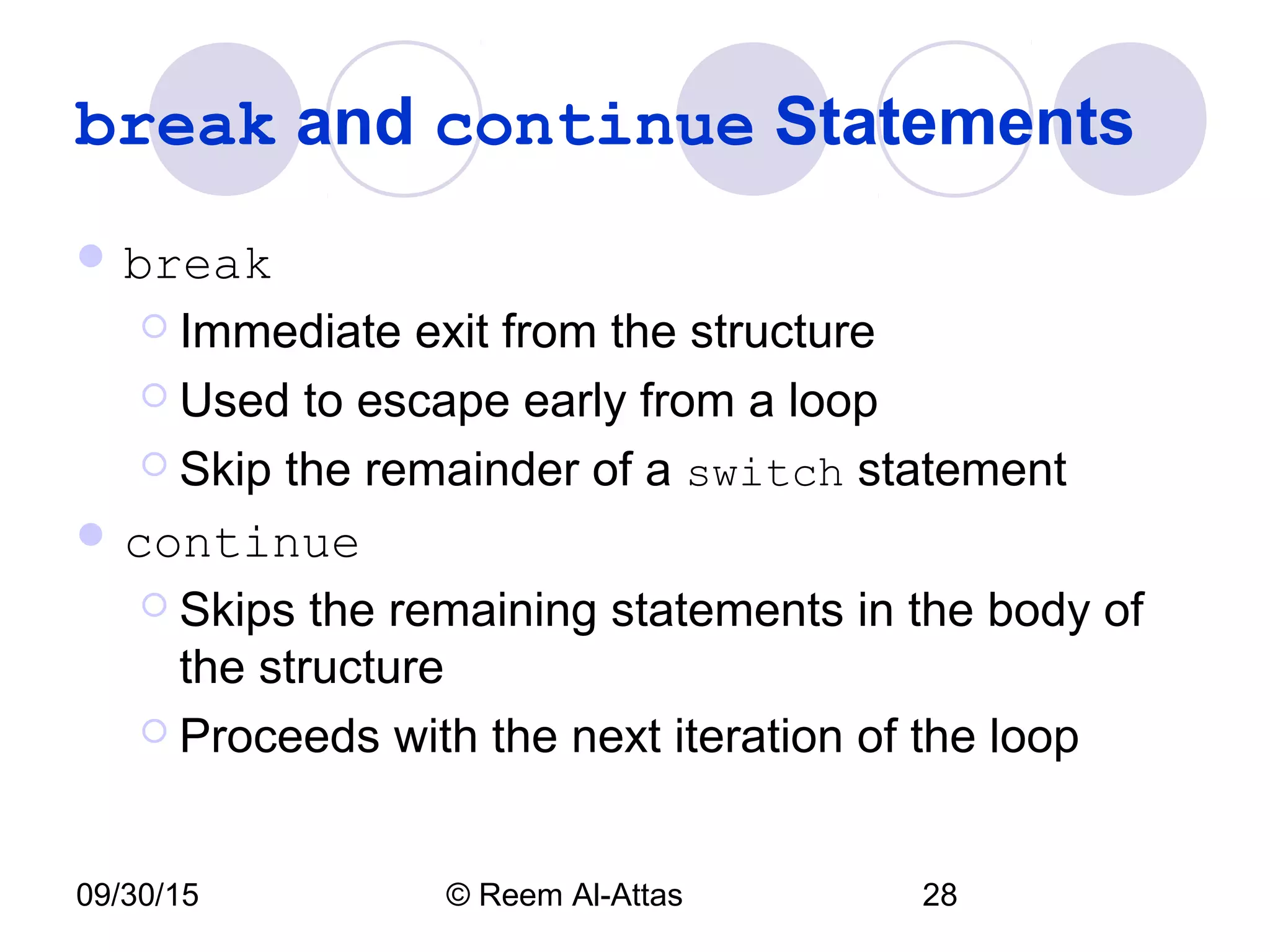
break and continue Statements
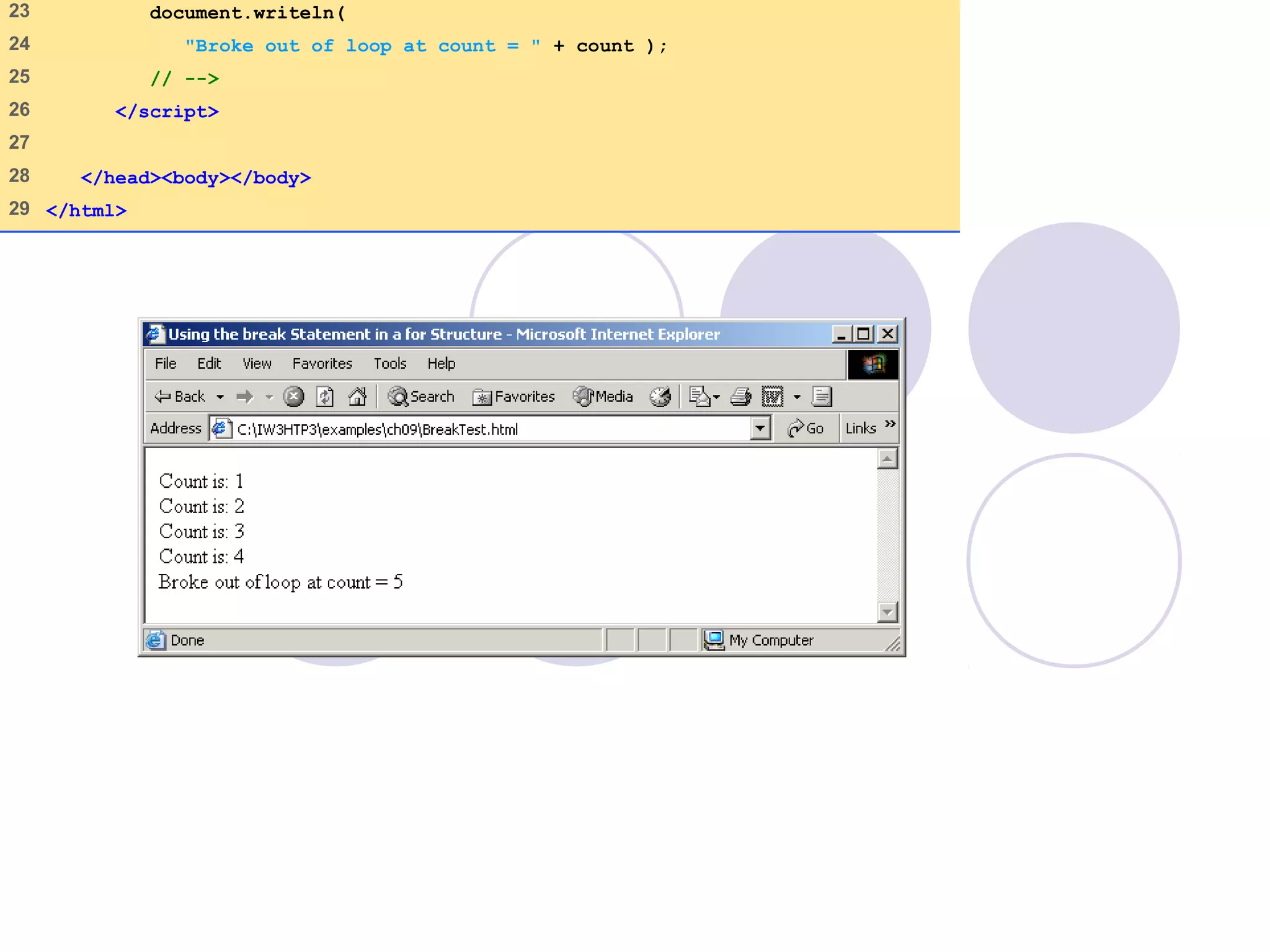
 break
 Immediate exit from the structure
 Used to escape early from a loop
 Skip the remainder of a switch statement
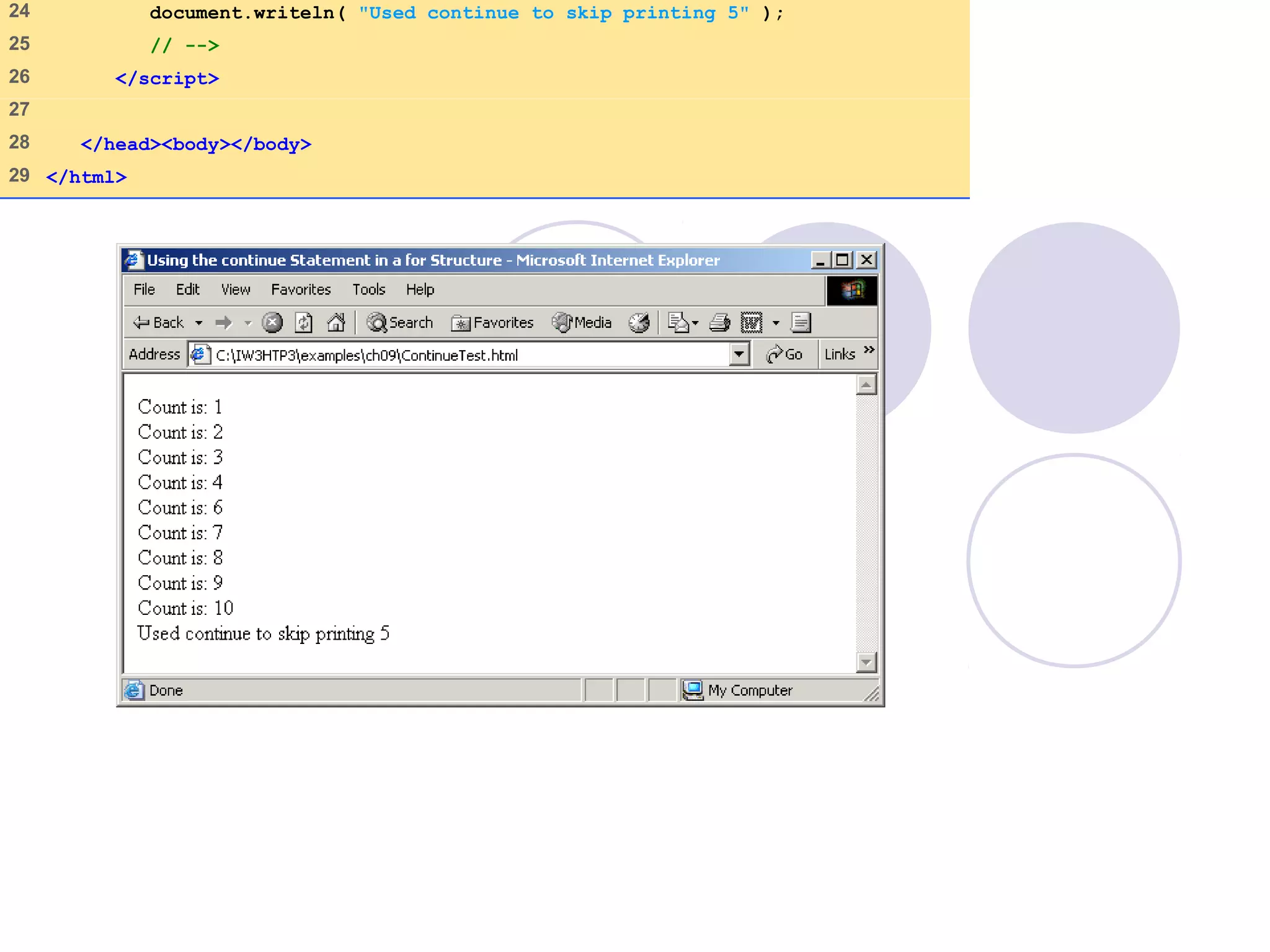
 continue
 Skips the remaining statements in the body of
the structure
 Proceeds with the next iteration of the loop
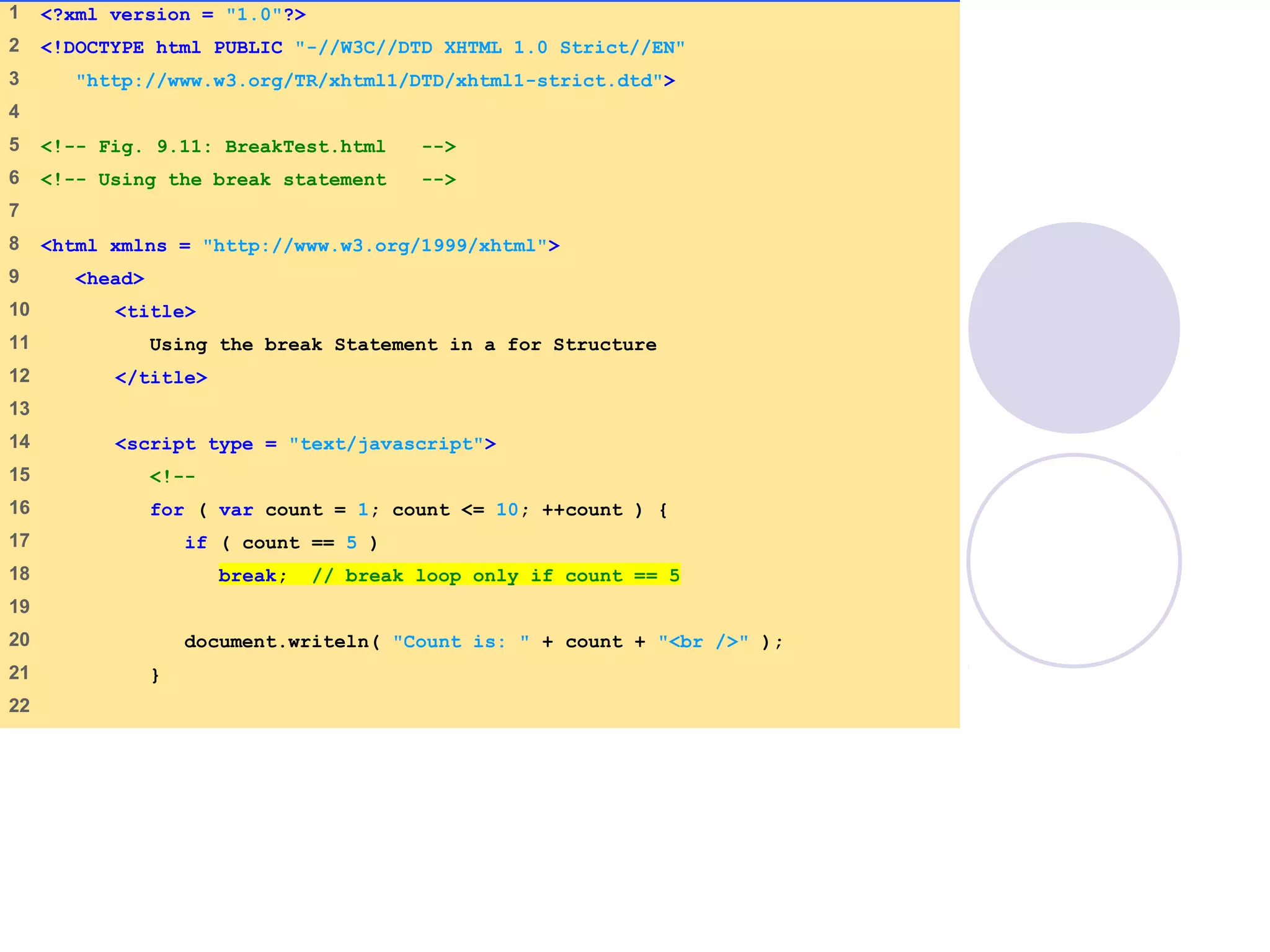
BreakTest.html
(1 of 2)
1 <?xml version = "1.0"?>
2 <!DOCTYPE html PUBLIC "-//W3C//DTD XHTML 1.0 Strict//EN"
3 "http://www.w3.org/TR/xhtml1/DTD/xhtml1-strict.dtd">
4
5 <!-- Fig. 9.11: BreakTest.html -->
6 <!-- Using the break statement -->
7
8 <html xmlns = "http://www.w3.org/1999/xhtml">
9 <head>
10 <title>
11 Using the break Statement in a for Structure
12 </title>
13
14 <script type = "text/javascript">
15 <!--
16 for ( var count = 1; count <= 10; ++count ) {
17 if ( count == 5 )
18 break; // break loop only if count == 5
19
20 document.writeln( "Count is: " + count + "<br />" );
21 }
22
23 document.writeln(
24 "Broke out of loop at count = " + count );
25 // -->
26 </script>
27
28 </head><body></body>
29 </html>
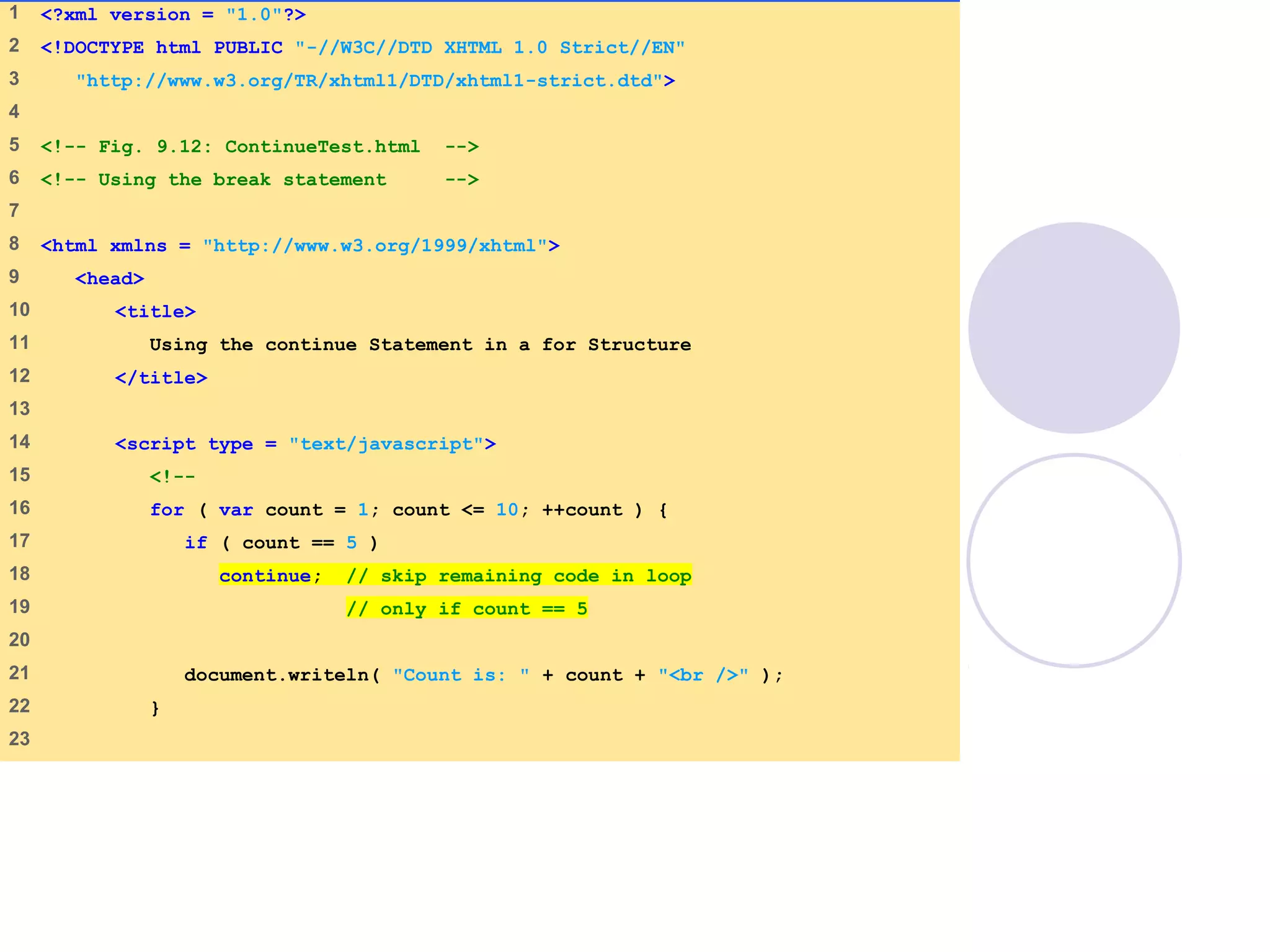
ContinueTest.html
(1 of 2)
1 <?xml version = "1.0"?>
2 <!DOCTYPE html PUBLIC "-//W3C//DTD XHTML 1.0 Strict//EN"
3 "http://www.w3.org/TR/xhtml1/DTD/xhtml1-strict.dtd">
4
5 <!-- Fig. 9.12: ContinueTest.html -->
6 <!-- Using the break statement -->
7
8 <html xmlns = "http://www.w3.org/1999/xhtml">
9 <head>
10 <title>
11 Using the continue Statement in a for Structure
12 </title>
13
14 <script type = "text/javascript">
15 <!--
16 for ( var count = 1; count <= 10; ++count ) {
17 if ( count == 5 )
18 continue; // skip remaining code in loop
19 // only if count == 5
20
21 document.writeln( "Count is: " + count + "<br />" );
22 }
23
24 document.writeln( "Used continue to skip printing 5" );
25 // -->
26 </script>
27
28 </head><body></body>
29 </html>
09/30/15 © Reem Al-Attas 33
Labeled break and continue Statements
 Labeled break statement
 Break out of a nested set of structures
 Immediate exit from that structure and enclosing
repetition structures
 Execution resumes with first statement after enclosing
labeled statement
 Labeled continue statement
 Skips the remaining statements in structure’s body
and enclosing repetition structures
 Proceeds with next iteration of enclosing labeled
repetition structure
 Loop-continuation test evaluates immediately after the
continue statement executes
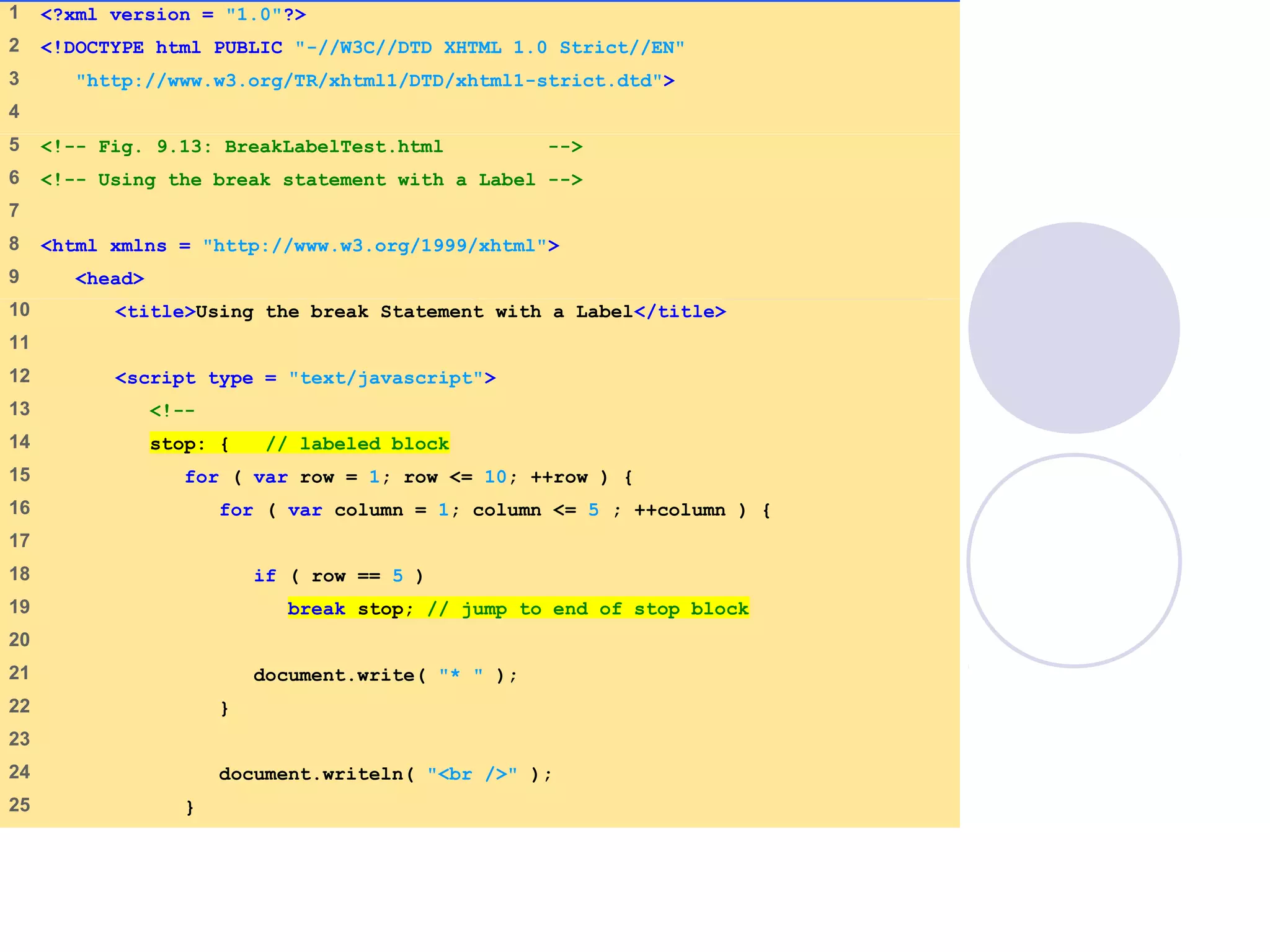
1 <?xml version = "1.0"?>
2 <!DOCTYPE html PUBLIC "-//W3C//DTD XHTML 1.0 Strict//EN"
3 "http://www.w3.org/TR/xhtml1/DTD/xhtml1-strict.dtd">
4
5 <!-- Fig. 9.13: BreakLabelTest.html -->
6 <!-- Using the break statement with a Label -->
7
8 <html xmlns = "http://www.w3.org/1999/xhtml">
9 <head>
10 <title>Using the break Statement with a Label</title>
11
12 <script type = "text/javascript">
13 <!--
14 stop: { // labeled block
15 for ( var row = 1; row <= 10; ++row ) {
16 for ( var column = 1; column <= 5 ; ++column ) {
17
18 if ( row == 5 )
19 break stop; // jump to end of stop block
20
21 document.write( "* " );
22 }
23
24 document.writeln( "<br />" );
25 }
26
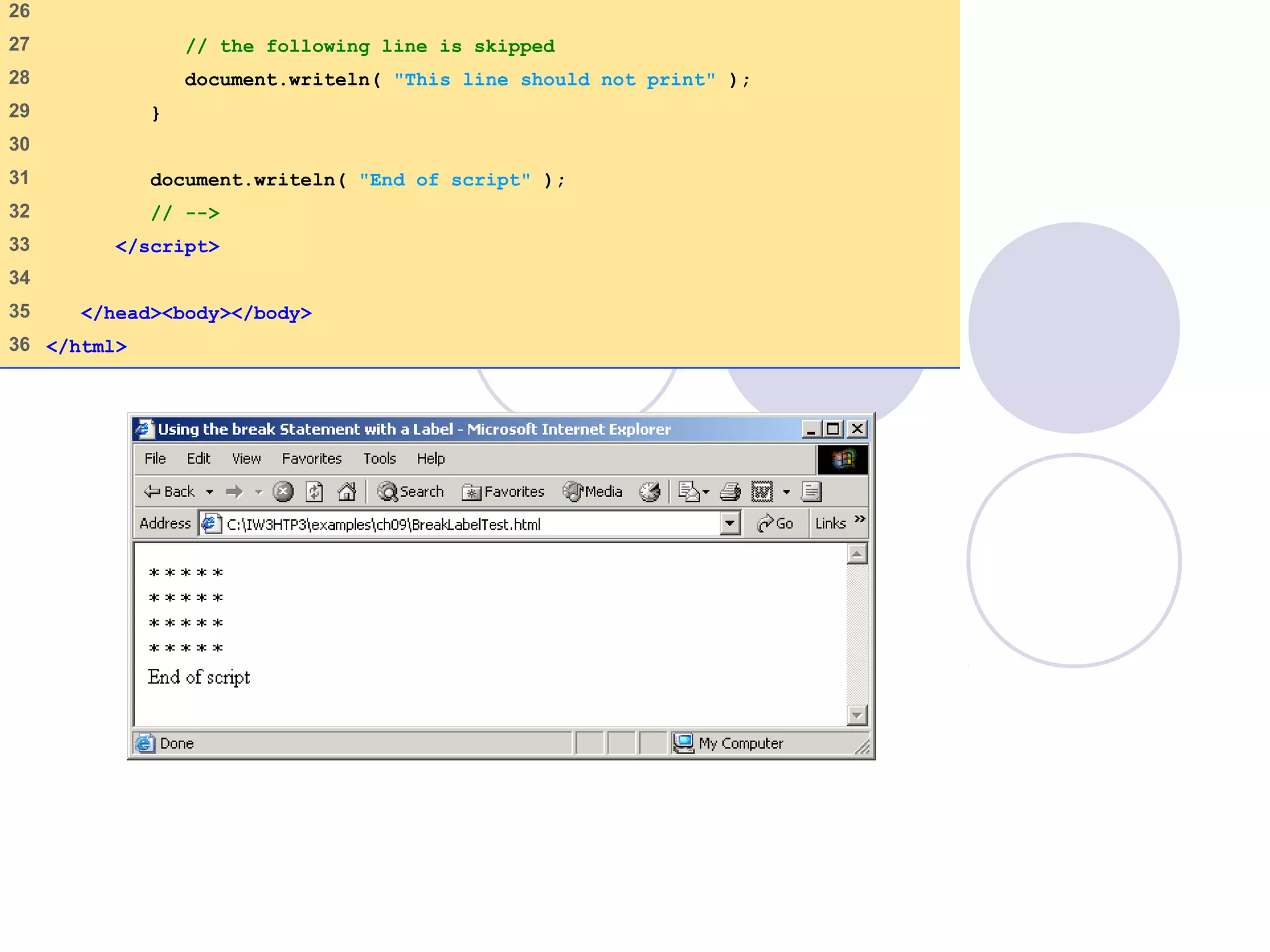
27 // the following line is skipped
28 document.writeln( "This line should not print" );
29 }
30
31 document.writeln( "End of script" );
32 // -->
33 </script>
34
35 </head><body></body>
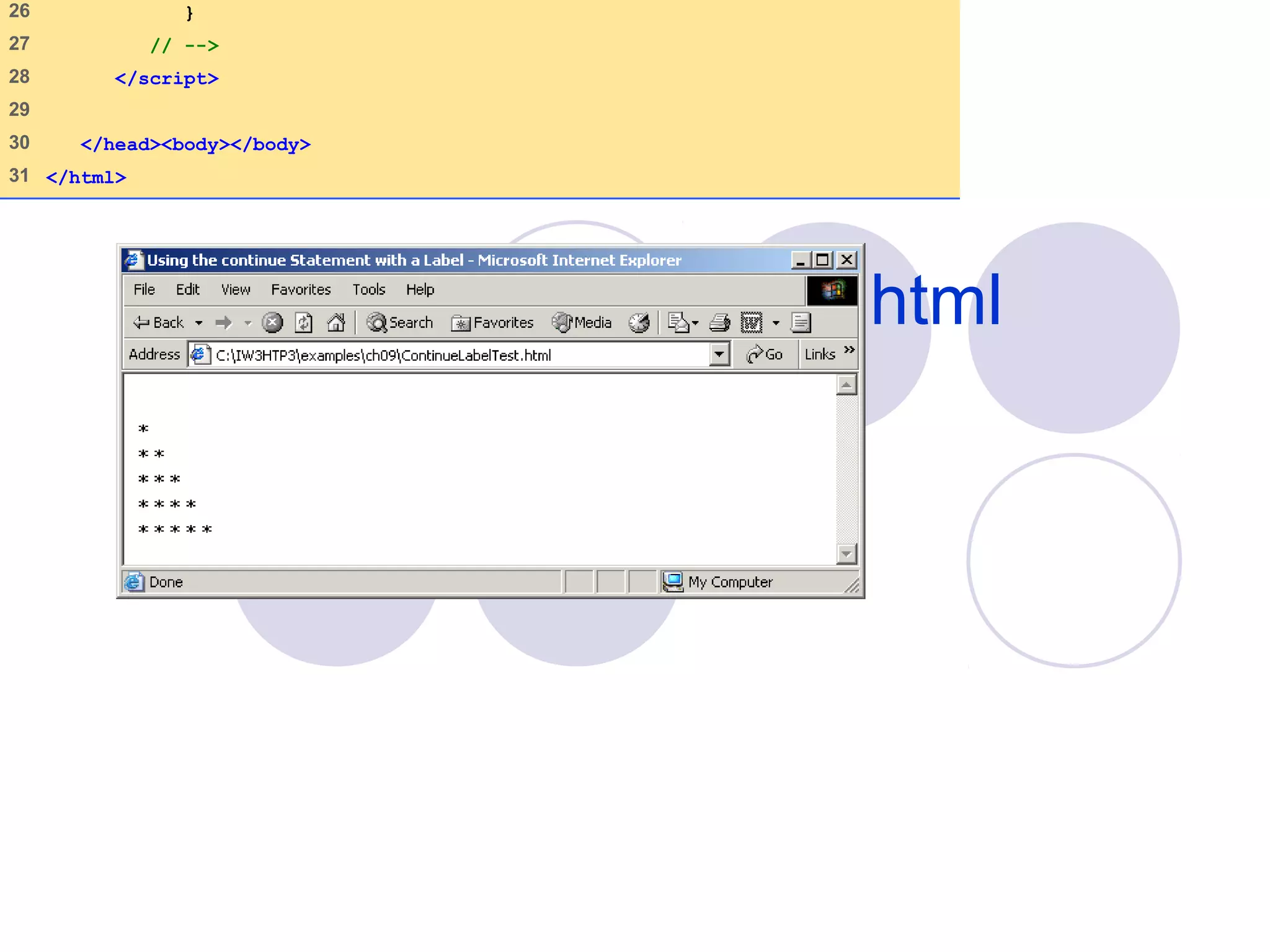
36 </html>
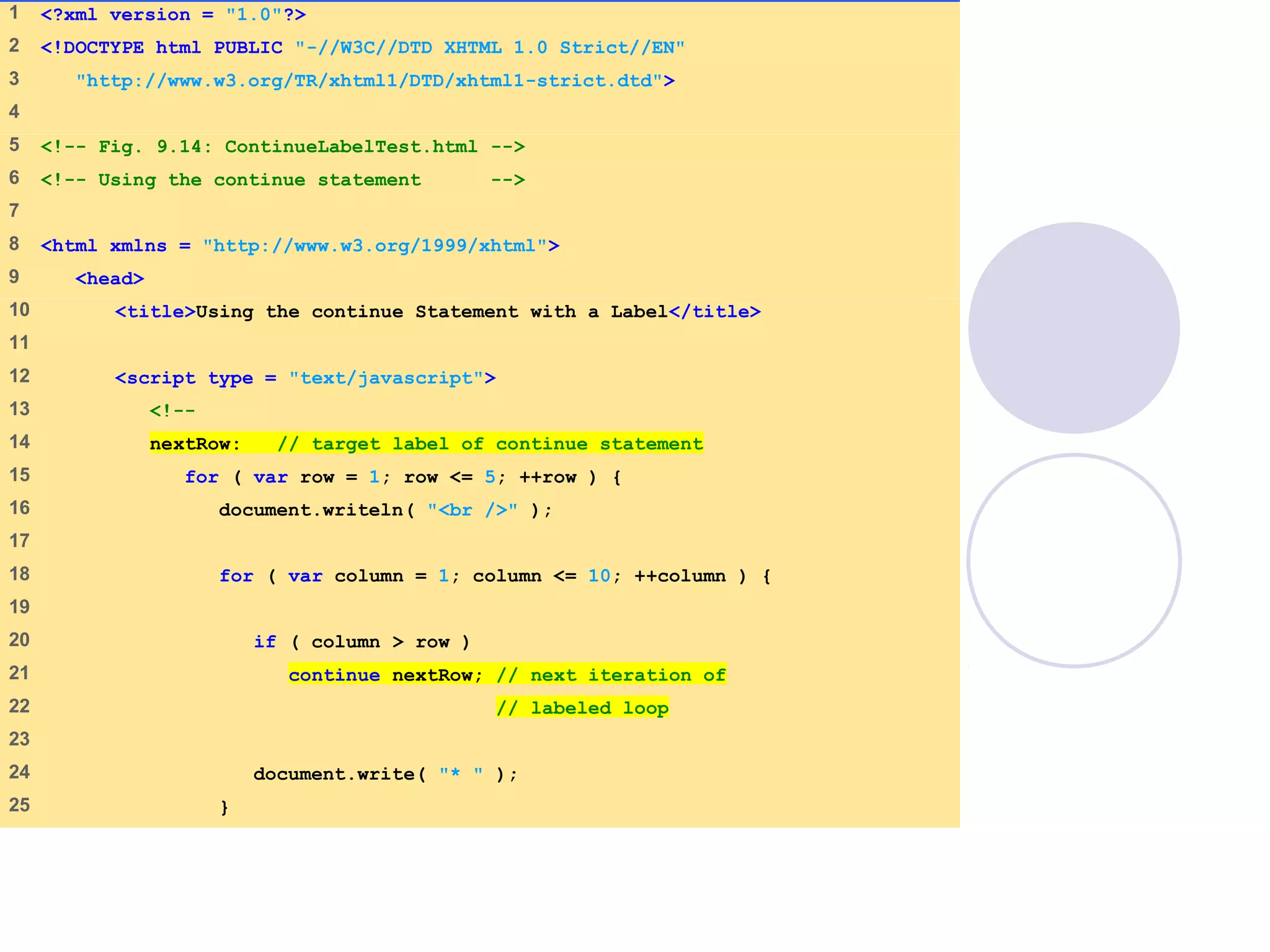
1 <?xml version = "1.0"?>
2 <!DOCTYPE html PUBLIC "-//W3C//DTD XHTML 1.0 Strict//EN"
3 "http://www.w3.org/TR/xhtml1/DTD/xhtml1-strict.dtd">
4
5 <!-- Fig. 9.14: ContinueLabelTest.html -->
6 <!-- Using the continue statement -->
7
8 <html xmlns = "http://www.w3.org/1999/xhtml">
9 <head>
10 <title>Using the continue Statement with a Label</title>
11
12 <script type = "text/javascript">
13 <!--
14 nextRow: // target label of continue statement
15 for ( var row = 1; row <= 5; ++row ) {
16 document.writeln( "<br />" );
17
18 for ( var column = 1; column <= 10; ++column ) {
19
20 if ( column > row )
21 continue nextRow; // next iteration of
22 // labeled loop
23
24 document.write( "* " );
25 }
ContinueLabelTest.html
(2 of 2)
26 }
27 // -->
28 </script>
29
30 </head><body></body>
31 </html>
09/30/15 © Reem Al-Attas 38
Logical Operators
More logical operators
 Logical AND ( && )
 Logical OR ( || )
 Logical NOT ( ! )
09/30/15 © Reem Al-Attas 39
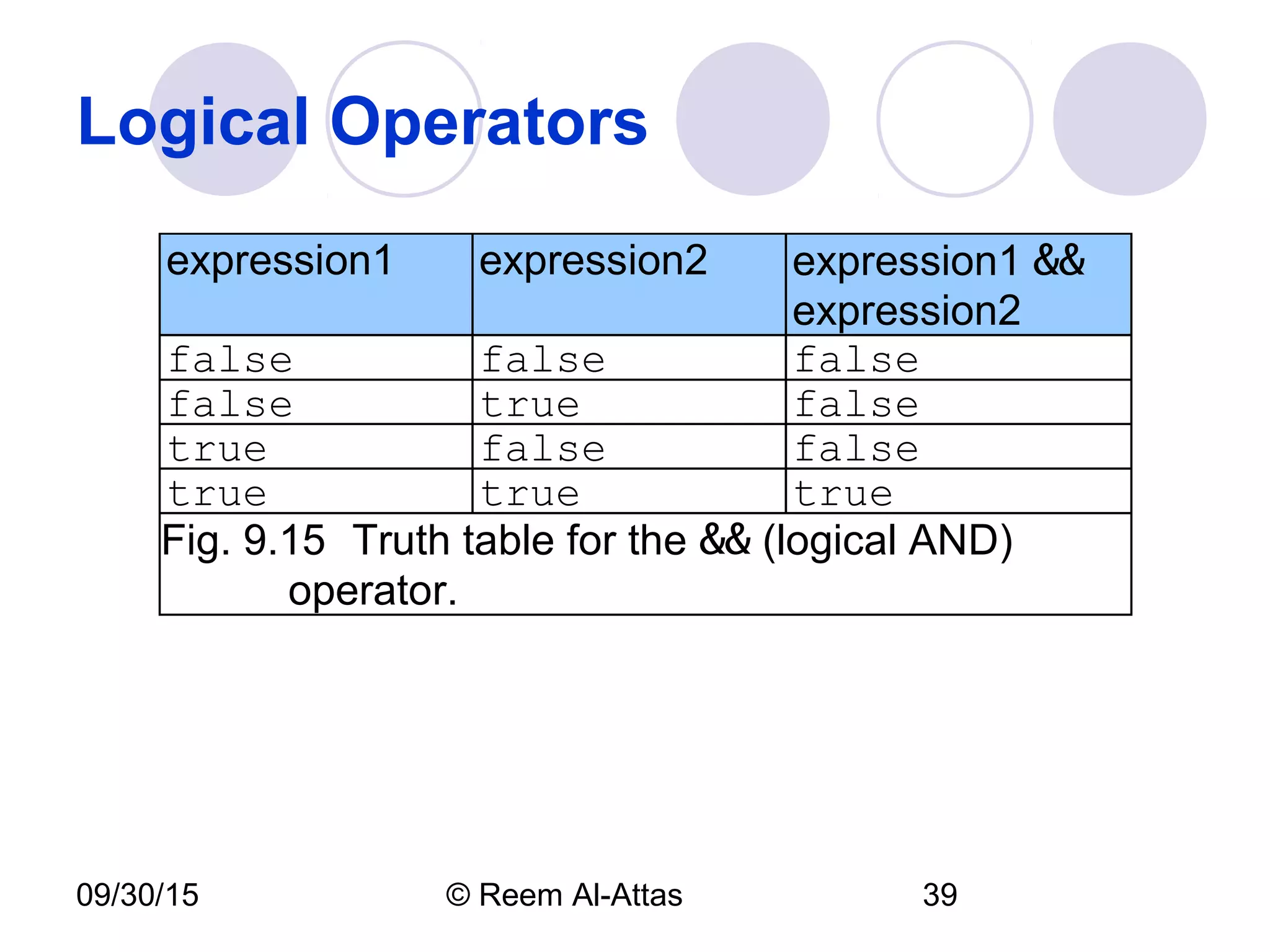
Logical Operators
expression1 expression2 expression1 &&
expression2
false false false
false true false
true false false
true true true
Fig. 9.15 Truth table for the && (logical AND)
operator.
09/30/15 © Reem Al-Attas 40
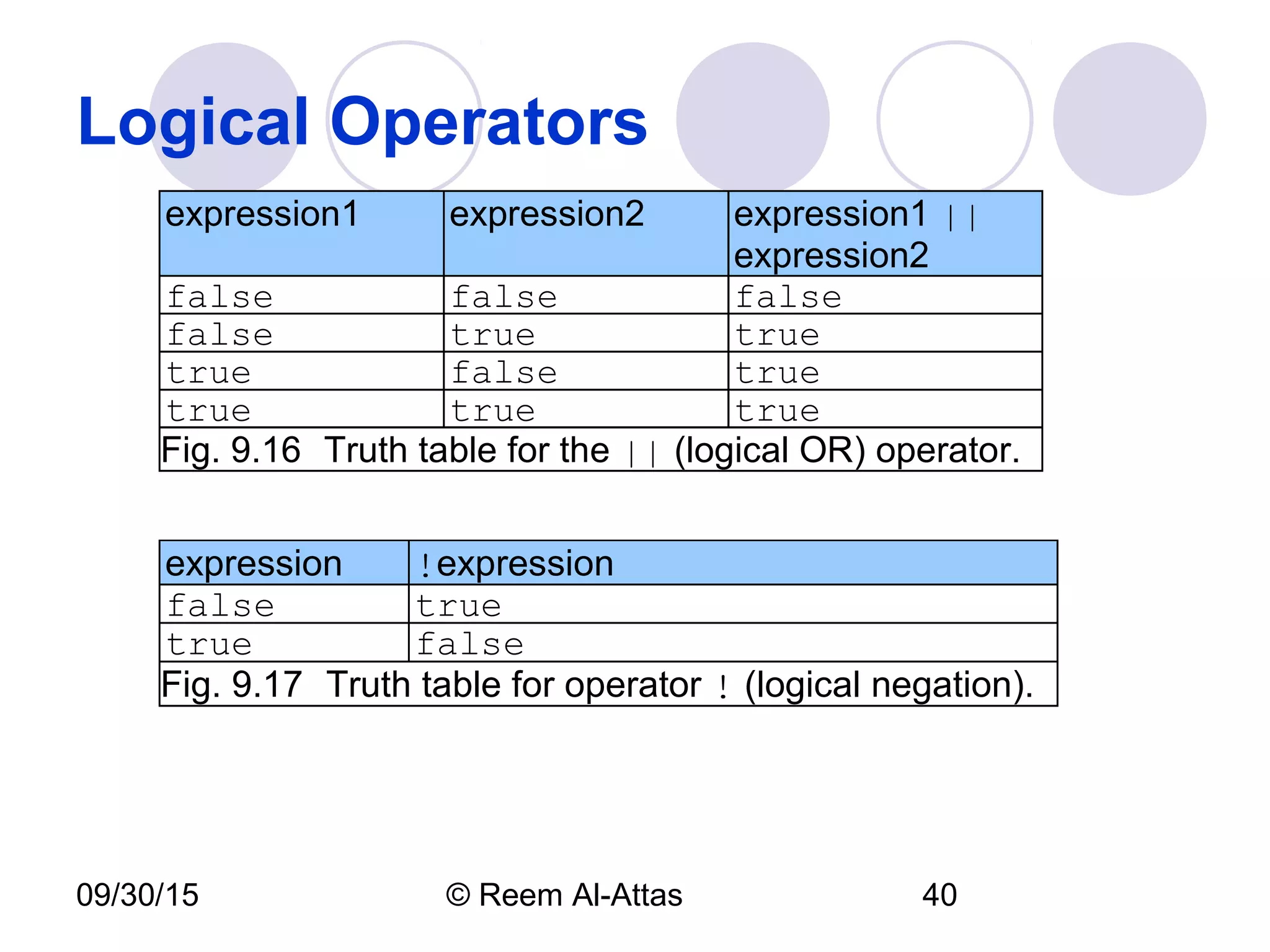
Logical Operators
expression1 expression2 expression1 ||
expression2
false false false
false true true
true false true
true true true
Fig. 9.16 Truth table for the || (logical OR) operator.
expression !expression
false true
true false
Fig. 9.17 Truth table for operator ! (logical negation).
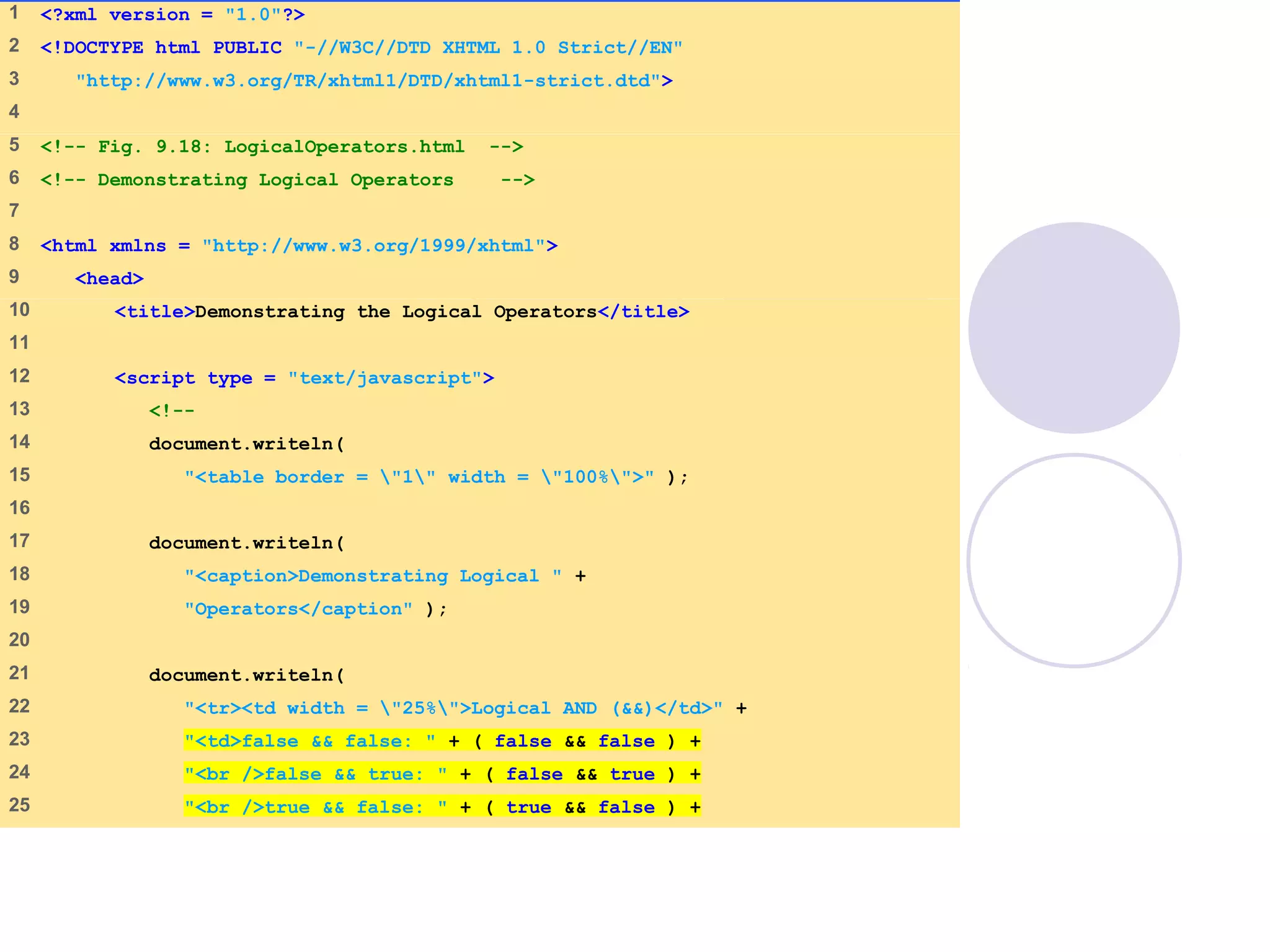
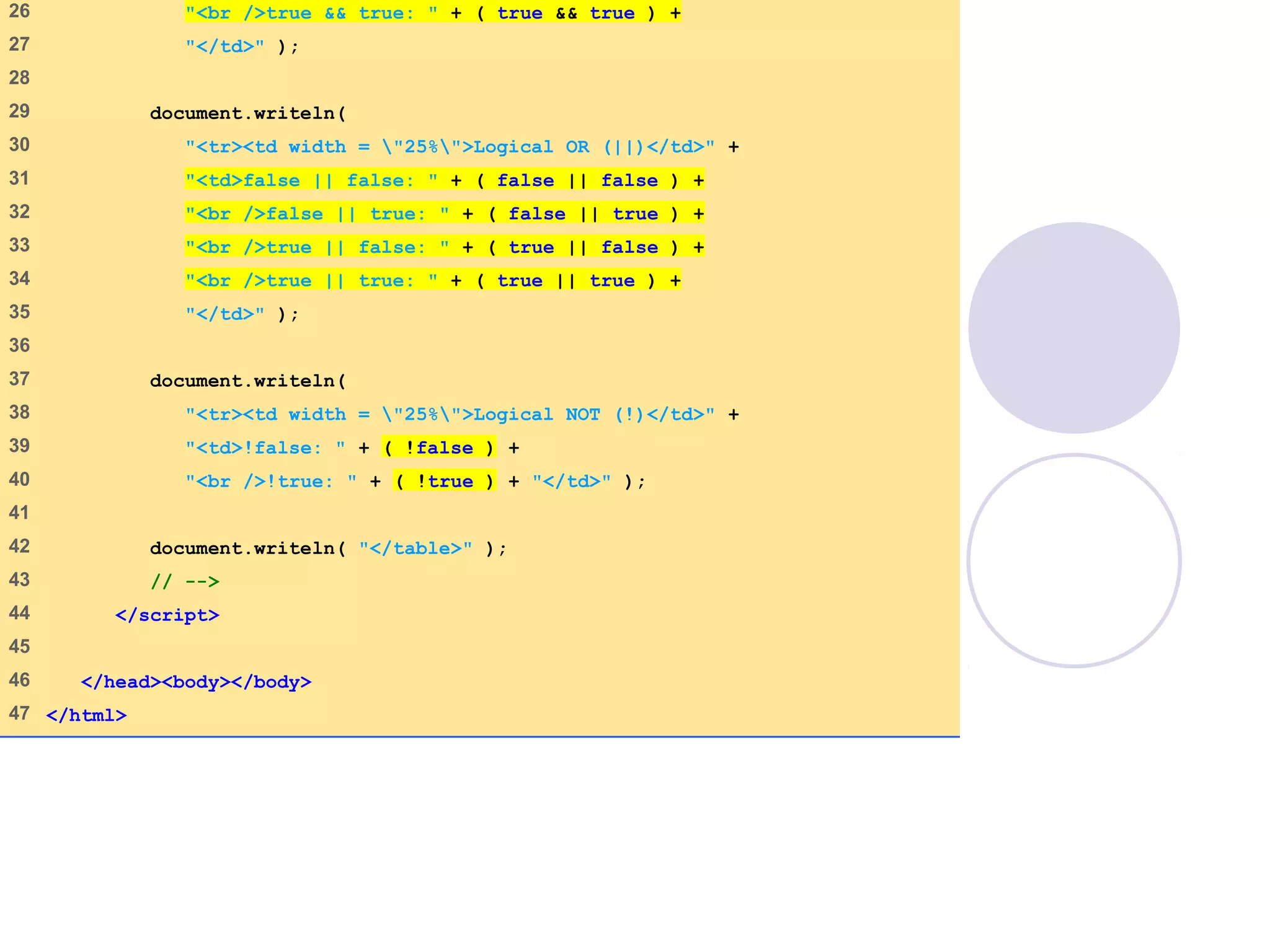
1 <?xml version = "1.0"?>
2 <!DOCTYPE html PUBLIC "-//W3C//DTD XHTML 1.0 Strict//EN"
3 "http://www.w3.org/TR/xhtml1/DTD/xhtml1-strict.dtd">
4
5 <!-- Fig. 9.18: LogicalOperators.html -->
6 <!-- Demonstrating Logical Operators -->
7
8 <html xmlns = "http://www.w3.org/1999/xhtml">
9 <head>
10 <title>Demonstrating the Logical Operators</title>
11
12 <script type = "text/javascript">
13 <!--
14 document.writeln(
15 "<table border = "1" width = "100%">" );
16
17 document.writeln(
18 "<caption>Demonstrating Logical " +
19 "Operators</caption" );
20
21 document.writeln(
22 "<tr><td width = "25%">Logical AND (&&)</td>" +
23 "<td>false && false: " + ( false && false ) +
24 "<br />false && true: " + ( false && true ) +
25 "<br />true && false: " + ( true && false ) +
26 "<br />true && true: " + ( true && true ) +
27 "</td>" );
28
29 document.writeln(
30 "<tr><td width = "25%">Logical OR (||)</td>" +
31 "<td>false || false: " + ( false || false ) +
32 "<br />false || true: " + ( false || true ) +
33 "<br />true || false: " + ( true || false ) +
34 "<br />true || true: " + ( true || true ) +
35 "</td>" );
36
37 document.writeln(
38 "<tr><td width = "25%">Logical NOT (!)</td>" +
39 "<td>!false: " + ( !false ) +
40 "<br />!true: " + ( !true ) + "</td>" );
41
42 document.writeln( "</table>" );
43 // -->
44 </script>
45
46 </head><body></body>
47 </html>
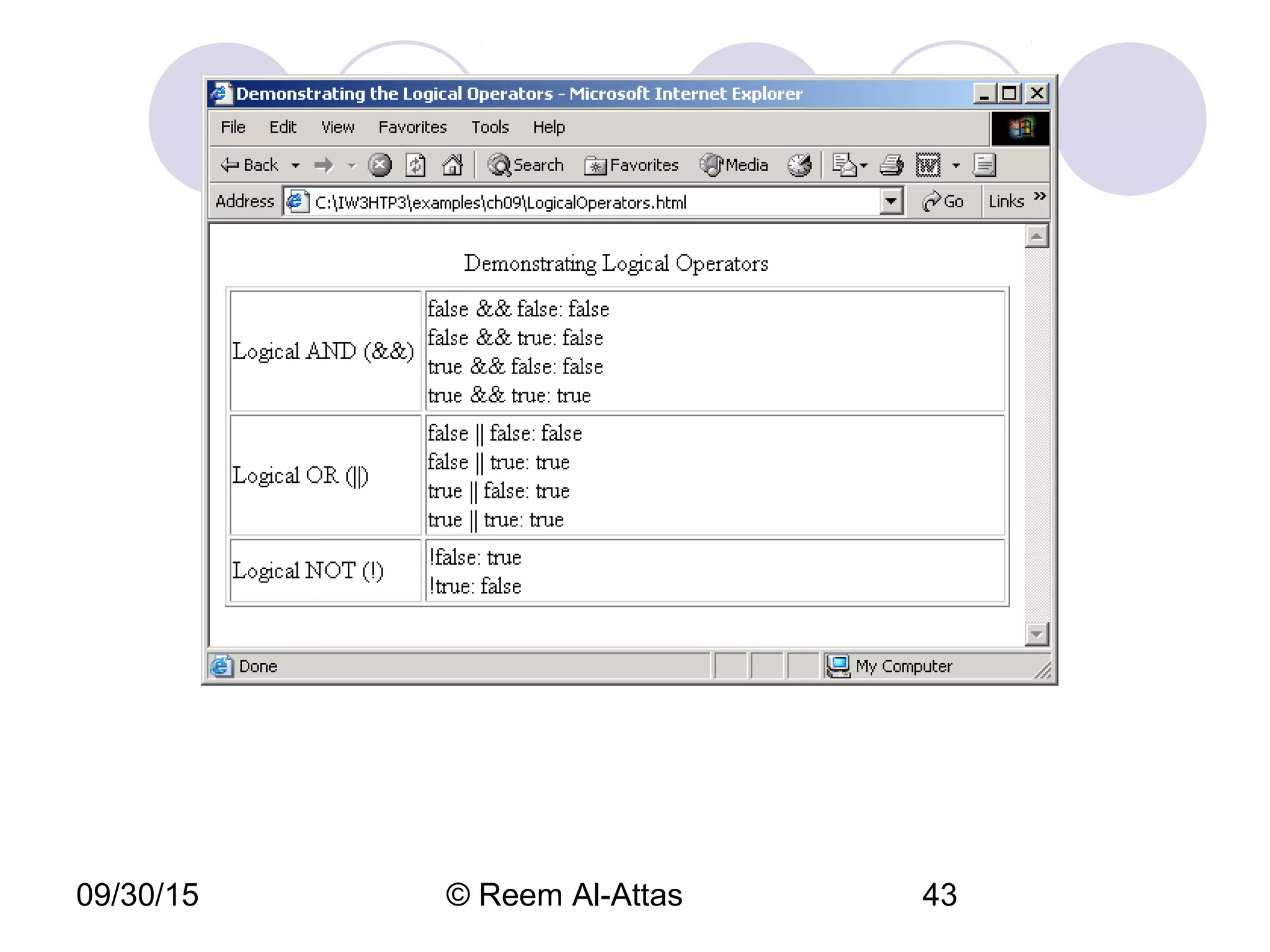
09/30/15 © Reem Al-Attas 43
09/30/15 © Reem Al-Attas 44
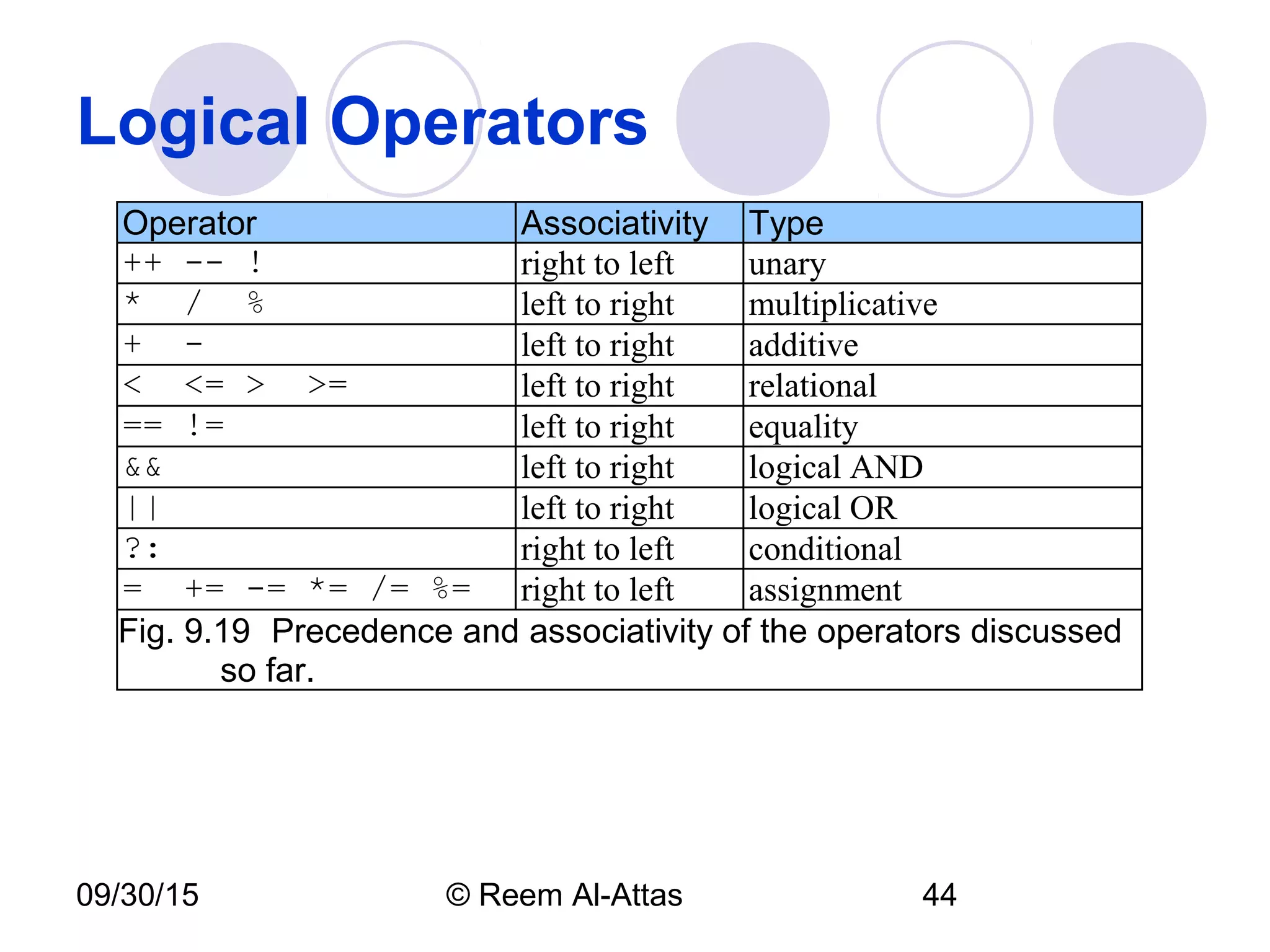
Logical Operators
Operator Associativity Type
++ -- ! right to left unary
* / % left to right multiplicative
+ - left to right additive
< <= > >= left to right relational
== != left to right equality
&& left to right logical AND
|| left to right logical OR
?: right to left conditional
= += -= *= /= %= right to left assignment
Fig. 9.19 Precedence and associativity of the operators discussed
so far.
09/30/15 © Reem Al-Attas 45
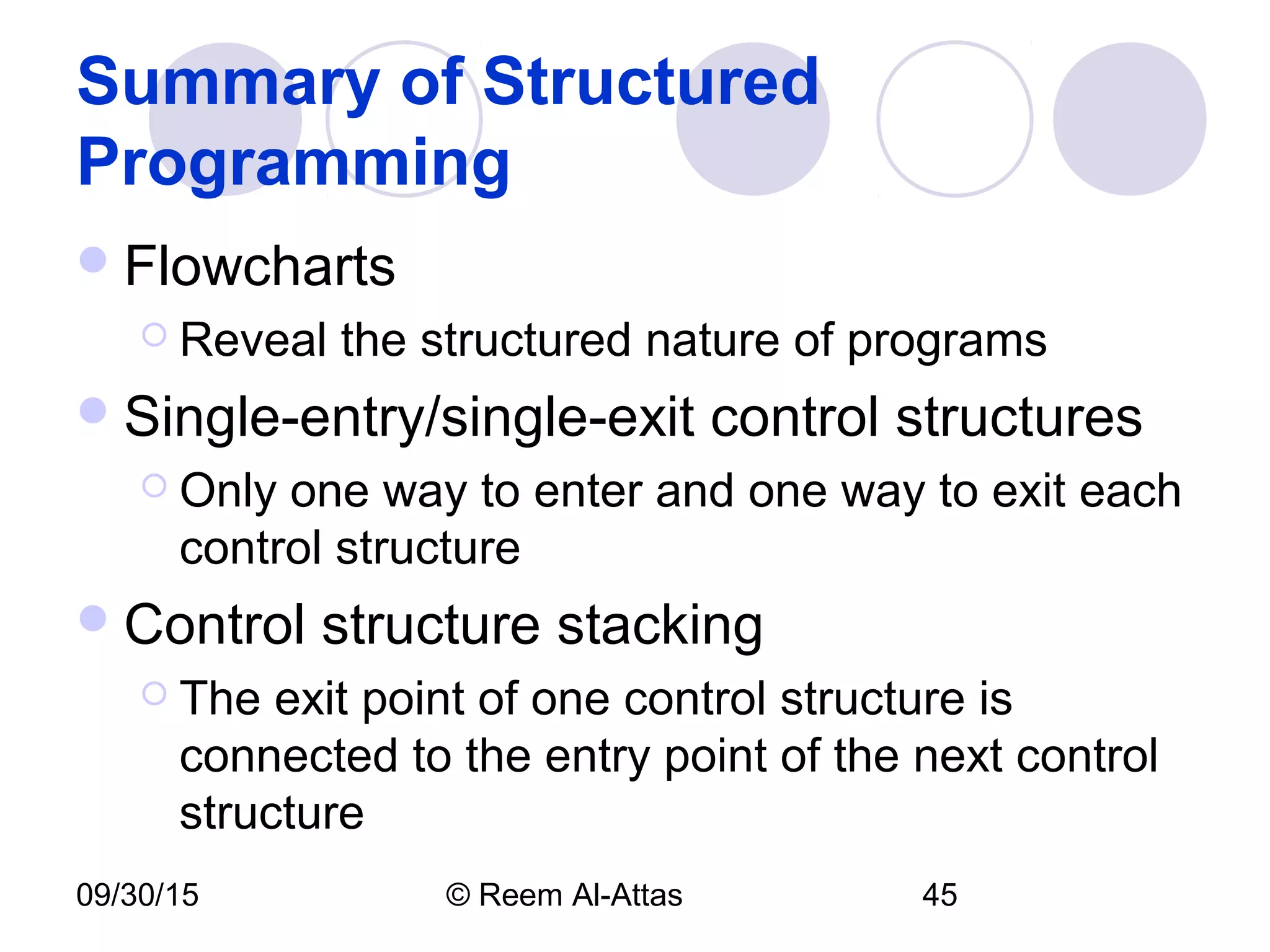
Summary of Structured
Programming
Flowcharts
 Reveal the structured nature of programs
Single-entry/single-exit control structures
 Only one way to enter and one way to exit each
control structure
Control structure stacking
 The exit point of one control structure is
connected to the entry point of the next control
structure
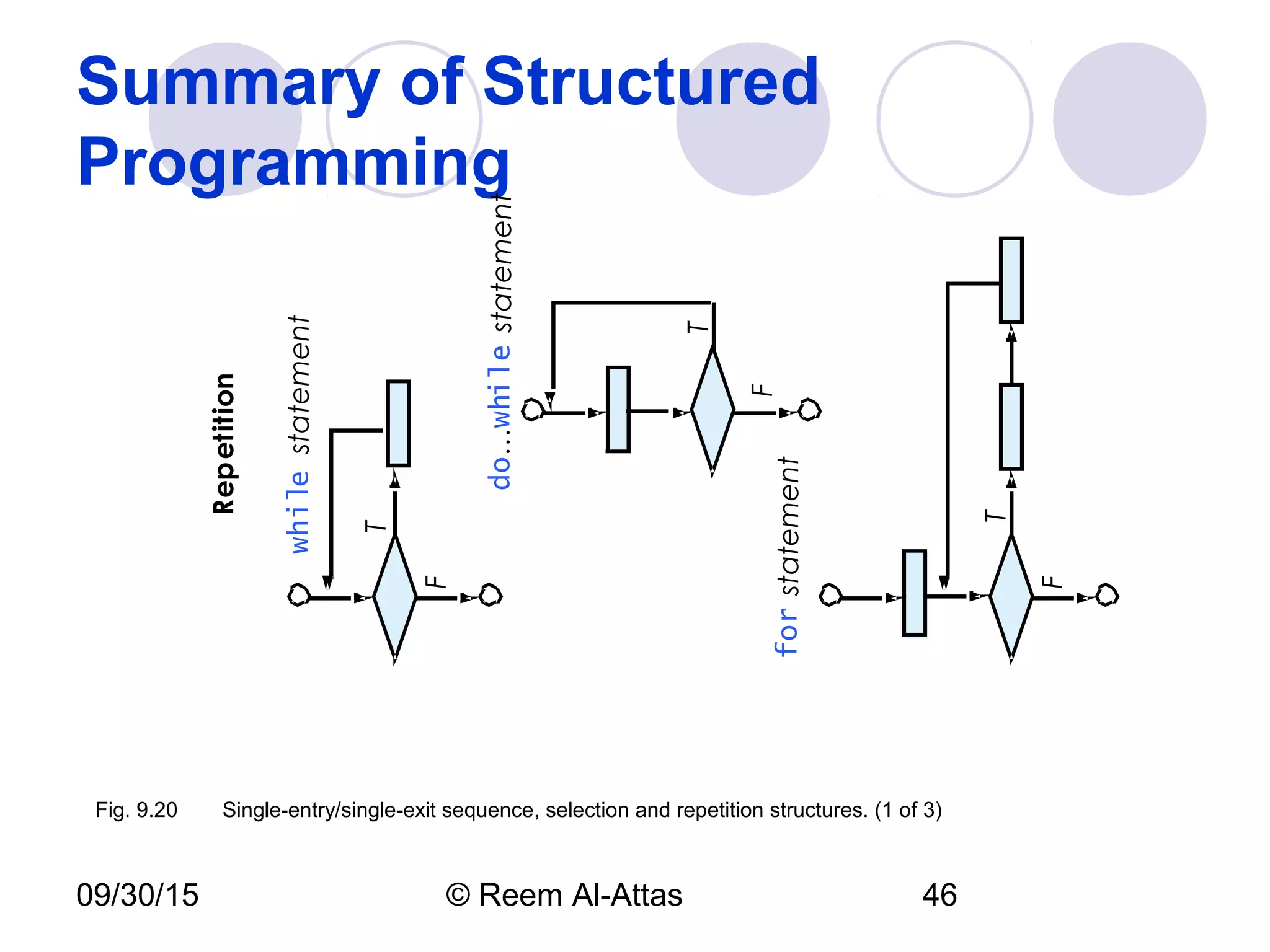
09/30/15 © Reem Al-Attas 46
Summary of Structured
Programming
T
F
whilestatement
T
F
for
T
F
do…while
Repetition
Fig. 9.20 Single-entry/single-exit sequence, selection and repetition structures. (1 of 3)
statement
statement
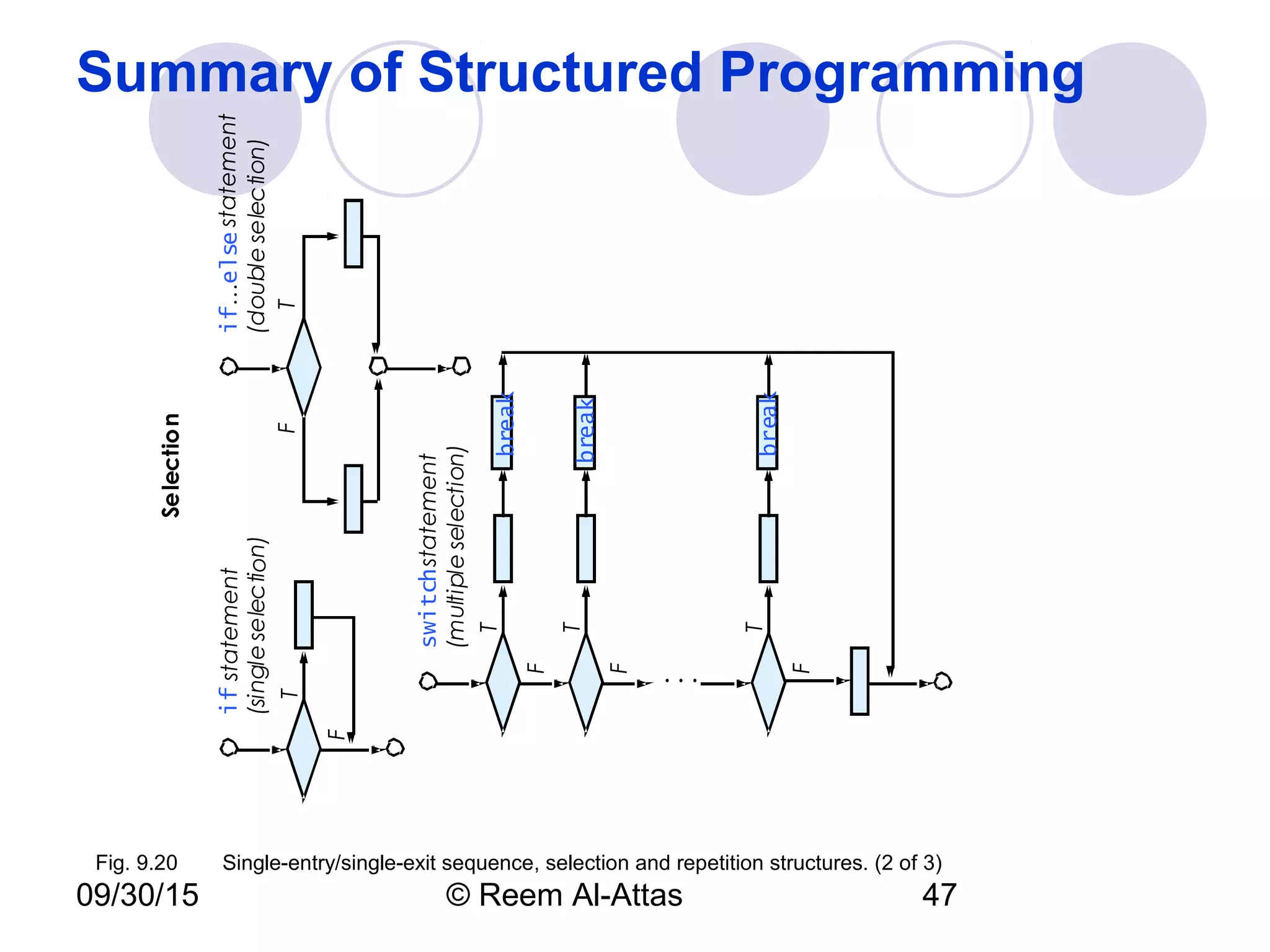
09/30/15 © Reem Al-Attas 47
Summary of Structured Programming
break
T
F
ifstatement
(singleselection)
TF
if…else
(doubleselection)
T
F
switch
(multipleselection)
T
F
T
F
.
.
.
Selection
break
break
Fig. 9.20 Single-entry/single-exit sequence, selection and repetition structures. (2 of 3)
statement
statement
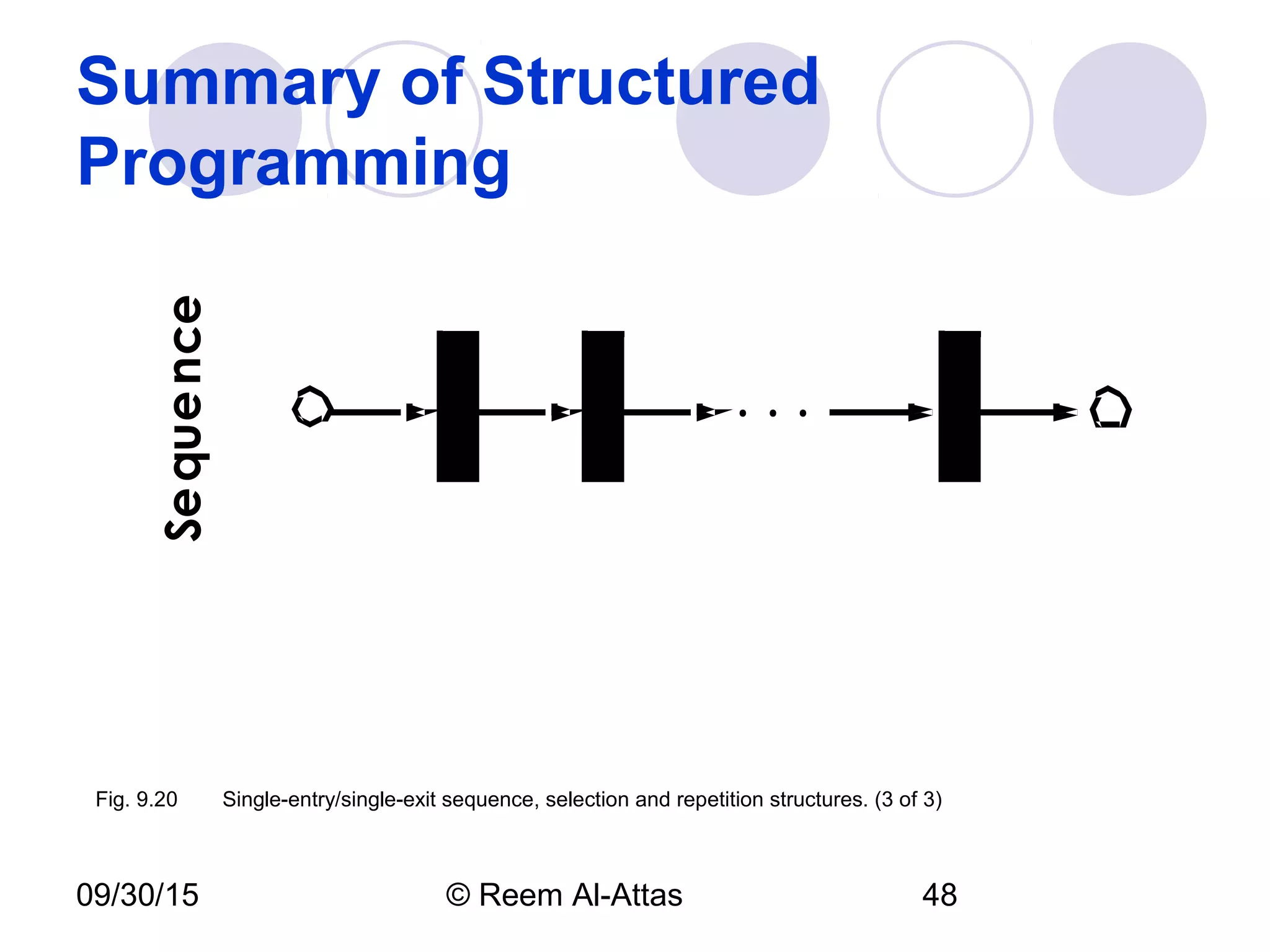
09/30/15 © Reem Al-Attas 48
Summary of Structured
ProgrammingSequence
.
.
.Fig. 9.20 Single-entry/single-exit sequence, selection and repetition structures. (3 of 3)
09/30/15 © Reem Al-Attas 49
Summary of Structured
Programming
Rules for Forming Structured Programs
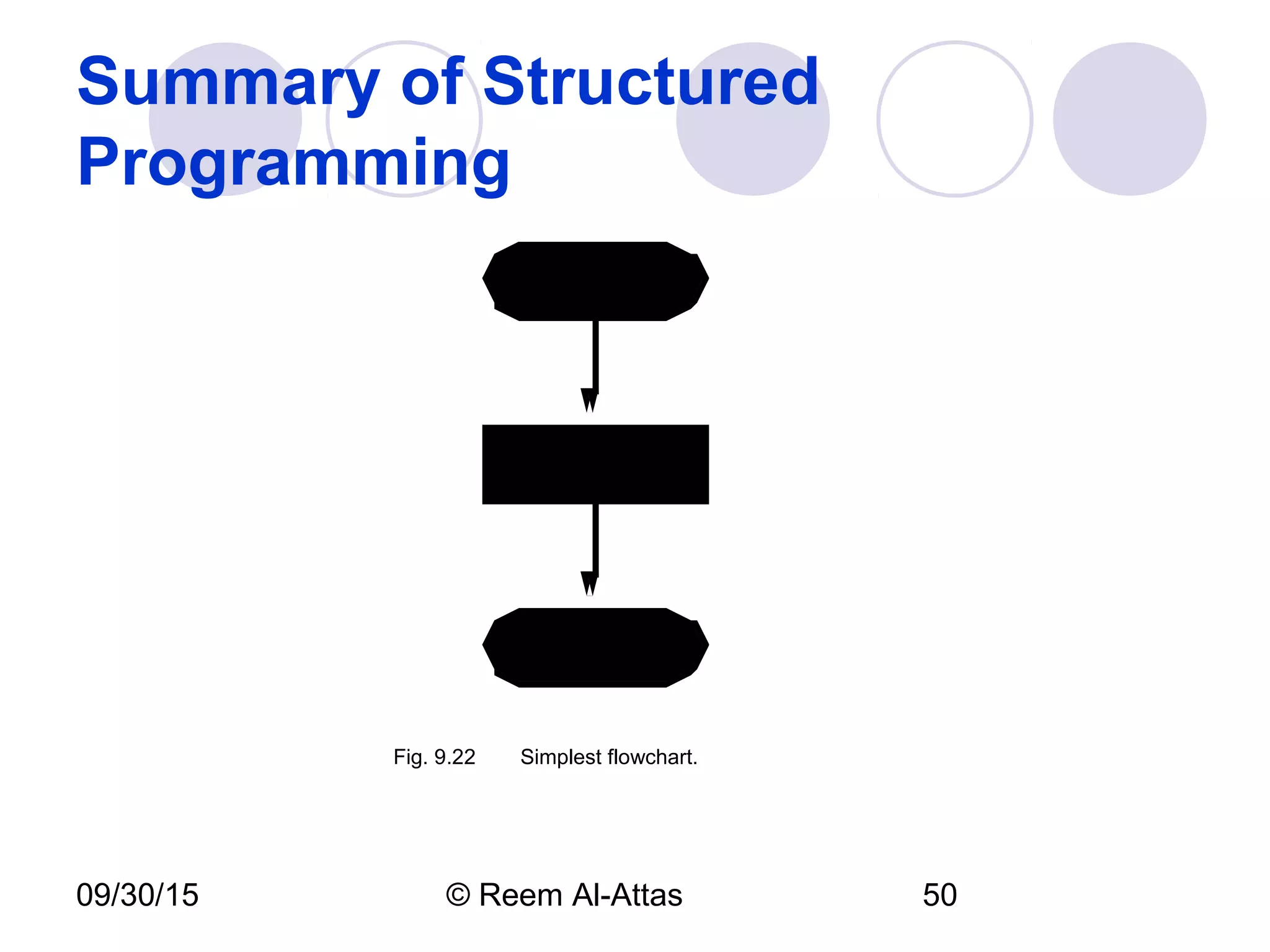
1) Begin with the “simplest flowchart” (Fig. 9.22).
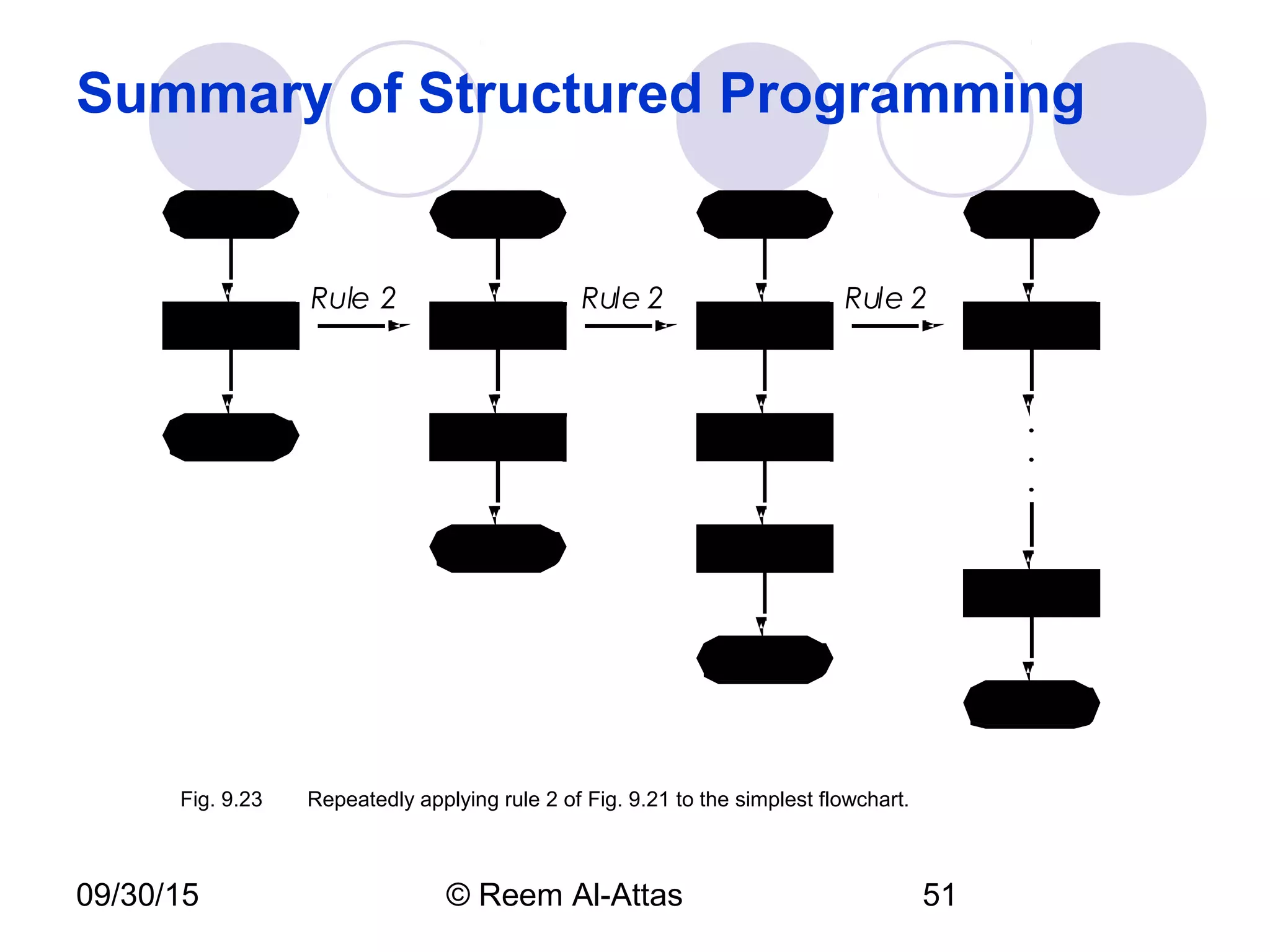
2) Any rectangle (action) can be replaced by two rectangles (actions) in sequence.
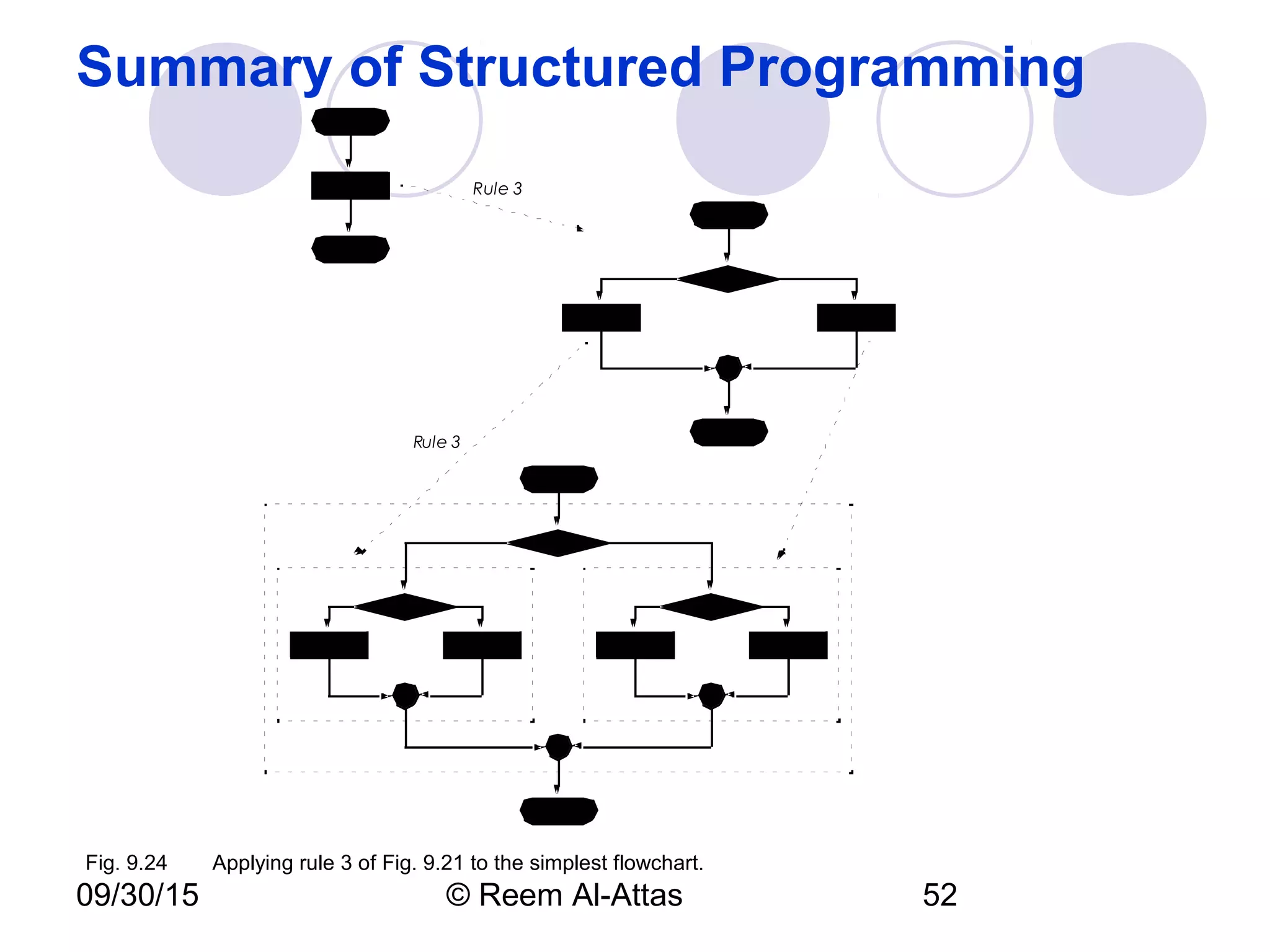
3) Any rectangle (action) can be replaced by any control structure (sequence, if, if…else,
switch, while, do…while or for).
4) Rules 2 and 3 may be applied as often as you like and in any order.
Fig. 9.21Rules for forming structured programs.
09/30/15 © Reem Al-Attas 50
Summary of Structured
Programming
Fig. 9.22 Simplest flowchart.
09/30/15 © Reem Al-Attas 51
Summary of Structured Programming
.
.
.
Rule 2 Rule 2 Rule 2
Fig. 9.23 Repeatedly applying rule 2 of Fig. 9.21 to the simplest flowchart.
09/30/15 © Reem Al-Attas 52
Summary of Structured Programming
Rule 3
Rule 3
Fig. 9.24 Applying rule 3 of Fig. 9.21 to the simplest flowchart.
09/30/15 © Reem Al-Attas 53
Summary of Structured Programming
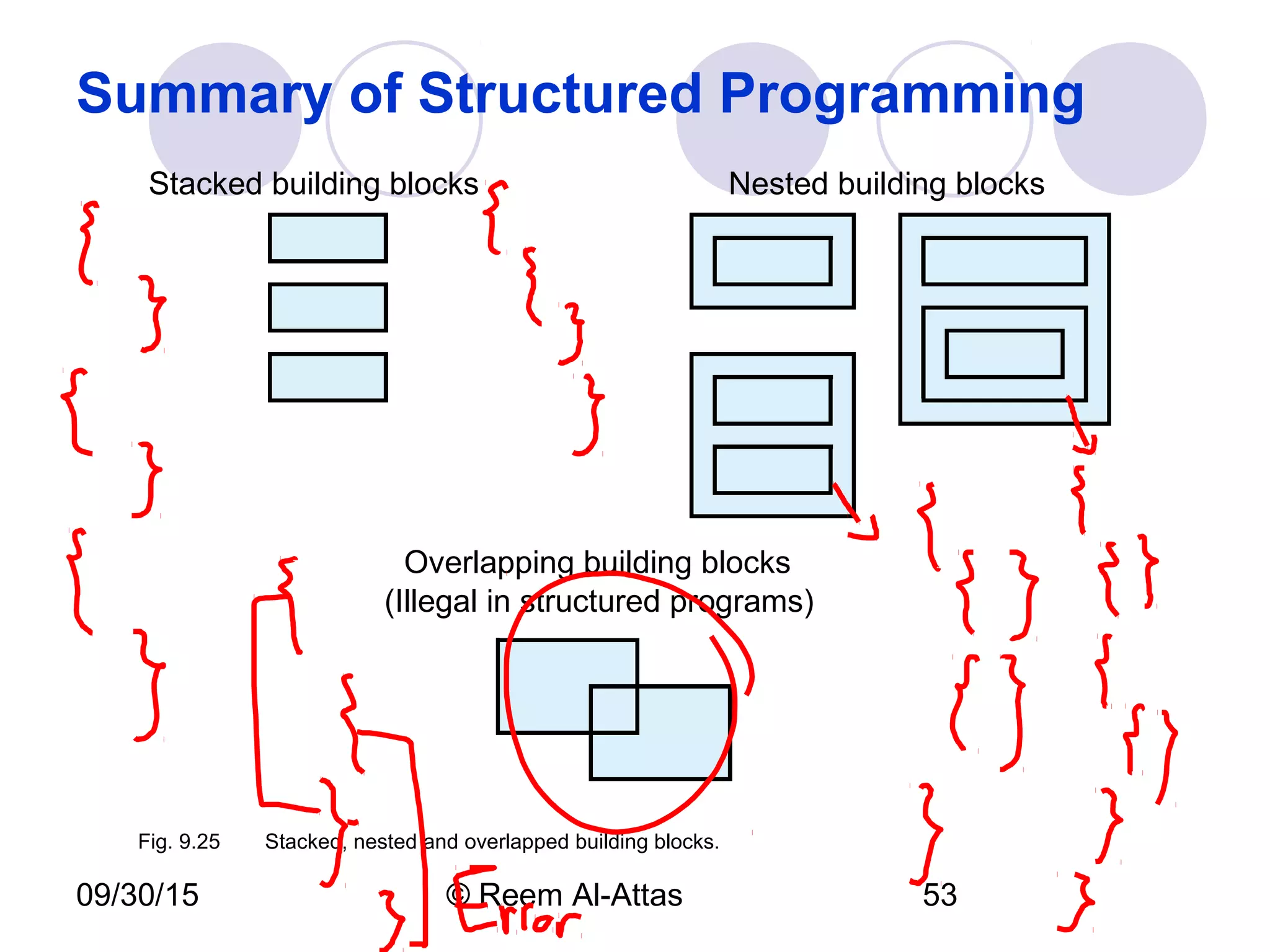
Stacked building blocks Nested building blocks
Overlapping building blocks
(Illegal in structured programs)
Fig. 9.25 Stacked, nested and overlapped building blocks.
09/30/15 © Reem Al-Attas 54
Summary of Structured
Programming
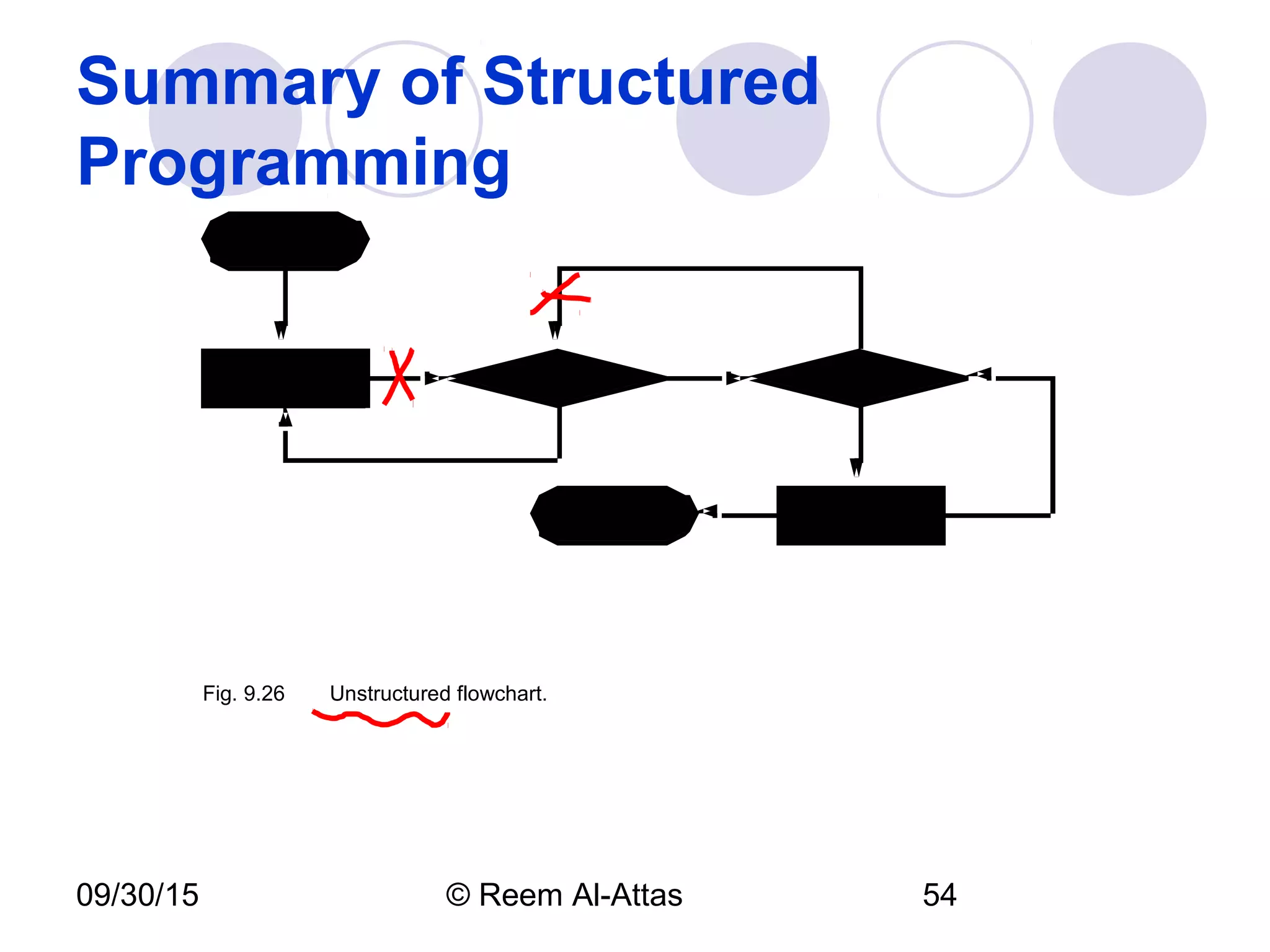
Fig. 9.26 Unstructured flowchart.
09/30/15 © Reem Al-Attas 55
Assignment 7
 1) Exercise # 9.9 &
 2) Exercise # 9.14 in
the text book.
Due Date for A # 7:
 Monday before your
lecture.

JavaScript Control Statements II

  • 1.
    IPA 1st Semester, 2007-2008 Internet 1 Ch.10 JavaScript: Control Statements II attasr@ipa.edu.sa
  • 2.
    09/30/15 © ReemAl-Attas 2 Essentials of Counter-Controlled Repetition Counter-controlled repetition requires  Control variable (loop counter)  Initial value of the control variable  Increment or decrement the control variable through the loop  Condition to test the final value of the control variable
  • 3.
    WhileCounter.html (1 of 2) 1<?xml version = "1.0"?> 2 <!DOCTYPE html PUBLIC "-//W3C//DTD XHTML 1.0 Strict//EN" 3 "http://www.w3.org/TR/xhtml1/DTD/xhtml1-strict.dtd"> 4 5 <!-- Fig. 9.1: WhileCounter.html --> 6 <!-- Counter-Controlled Repetition --> 7 8 <html xmlns = "http://www.w3.org/1999/xhtml"> 9 <head> 10 <title>Counter-Controlled Repetition</title> 11 12 <script type = "text/javascript"> 13 <!-- 14 var counter = 1; // initialization 15 16 while ( counter <= 7 ) { // repetition condition 17 document.writeln( "<p style = "font-size: " + 18 counter + "ex">XHTML font size " + counter + 19 "ex</p>" ); 20 ++counter; // increment 21 } 22 // --> 23 </script> 24
  • 4.
  • 5.
    09/30/15 © ReemAl-Attas 5 for Repetition Statement  for repetition statement  Handles all the details of counter-controlled repetition  for structure header
  • 6.
    09/30/15 © ReemAl-Attas 6 for Repetition Statement for ( var counter = 1; counter <=7; ++counter ) Initial value of control variable Increment of control variable Control variable name Final value of control variable for which the condition is true forkeyword Loop-continuation condition Fig. 9.3 for statement header components.
  • 7.
    ForCounter.html (1 of 1) 1<?xml version = "1.0"?> 2 <!DOCTYPE html PUBLIC "-//W3C//DTD XHTML 1.0 Strict//EN" 3 "http://www.w3.org/TR/xhtml1/DTD/xhtml1-strict.dtd"> 4 5 <!-- Fig. 9.2: ForCounter.html --> 6 <!-- Counter-Controlled Repetition with for statement --> 7 8 <html xmlns = "http://www.w3.org/1999/xhtml"> 9 <head> 10 <title>Counter-Controlled Repetition</title> 11 12 <script type = "text/javascript"> 13 <!-- 14 // Initialization, repetition condition and 15 // incrementing are all included in the for 16 // statement header. 17 for ( var counter = 1; counter <= 7; ++counter ) 18 document.writeln( "<p style = "font-size: " + 19 counter + "ex">XHTML font size " + counter + 20 "ex</p>" ); 21 // --> 22 </script> 23 24 </head><body></body> 25 </html>
  • 8.
    09/30/15 © ReemAl-Attas 8
  • 9.
    09/30/15 © ReemAl-Attas 9 for Repetition Statement counter <= 7 document.writeln( "<p style="font-size: " + counter + "ex">XHTML font size " + counter + "ex</p>" ); true false var counter = 1 ++counter Establish initial value of control variable. Determine if final value of control variable has been reached. Body of loop (this may be many statements) Increment the control variable. Fig. 9.4 for repetition structure flowchart.
  • 10.
    09/30/15 © ReemAl-Attas 10 General Format of:  For for (initialization; loopContiuationTest; increment) statement;  While initialization; while (loopContiuationTest) { increment; statement; }
  • 11.
    09/30/15 © ReemAl-Attas 11 Examples Using the for Statement Book Sec 9.4. Summation with for Compound interest calculation with for loop  Math object  Math.pow  Math.round
  • 12.
    Sum.html (1 of 1) 1<?xml version = "1.0"?> 2 <!DOCTYPE html PUBLIC "-//W3C//DTD XHTML 1.0 Strict//EN" 3 "http://www.w3.org/TR/xhtml1/DTD/xhtml1-strict.dtd"> 4 5 <!-- Fig. 9.5: Sum.html --> 6 <!-- Using the for repetition statement --> 7 8 <html xmlns = "http://www.w3.org/1999/xhtml"> 9 <head> 10 <title>Sum the Even Integers from 2 to 100</title> 11 12 <script type = "text/javascript"> 13 <!-- 14 var sum = 0; 15 16 for ( var number = 2; number <= 100; number += 2 ) 17 sum += number; 18 19 document.writeln( "The sum of the even integers " + 20 "from 2 to 100 is " + sum ); 21 // --> 22 </script> 23 24 </head><body></body> 25 </html>
  • 13.
    09/30/15 © ReemAl-Attas 13
  • 14.
    Interest.html (1 of 2) 1<?xml version = "1.0"?> 2 <!DOCTYPE html PUBLIC "-//W3C//DTD XHTML 1.0 Strict//EN" 3 "http://www.w3.org/TR/xhtml1/DTD/xhtml1-strict.dtd"> 4 5 <!-- Fig. 9.6: Interest.html --> 6 <!-- Using the for repetition statement --> 7 8 <html xmlns = "http://www.w3.org/1999/xhtml"> 9 <head> 10 <title>Calculating Compound Interest</title> 11 12 <script type = "text/javascript"> 13 <!-- 14 var amount, principal = 1000.0, rate = .05; 15 16 document.writeln( 17 "<table border = "1" width = "100%">" ); 18 document.writeln( 19 "<caption>Calculating Compound Interest</caption>" ); 20 document.writeln( 21 "<thead><tr><th align = "left">Year</th>" ); 22 document.writeln( 23 "<th align = "left">Amount on deposit</th>" ); 24 document.writeln( "</tr></thead>" ); 25
  • 15.
    Interest.html (2 of 2) 26for ( var year = 1; year <= 10; ++year ) { 27 amount = principal * Math.pow( 1.0 + rate, year ); 28 document.writeln( "<tbody><tr><td>" + year + 29 "</td><td>" + Math.round( amount * 100 ) / 100 + 30 "</td></tr>" ); 31 } 32 33 document.writeln( "</tbody></table>" ); 34 // --> 35 </script> 36 37 </head><body></body> 38 </html>
  • 16.
    09/30/15 © ReemAl-Attas 16 switch Multiple-Selection Statement Controlling expression Case labels Default case
  • 17.
    SwitchTest.html (1 of 3) 1<?xml version = "1.0"?> 2 <!DOCTYPE html PUBLIC "-//W3C//DTD XHTML 1.0 Strict//EN" 3 "http://www.w3.org/TR/xhtml1/DTD/xhtml1-strict.dtd"> 4 5 <!-- Fig. 9.7: SwitchTest.html --> 6 <!-- Using the switch statement --> 7 8 <html xmlns = "http://www.w3.org/1999/xhtml"> 9 <head> 10 <title>Switching between XHTML List Formats</title> 11 12 <script type = "text/javascript"> 13 <!-- 14 var choice, // user’s choice 15 startTag, // starting list item tag 16 endTag, // ending list item tag 17 validInput = true, // indicates if input is valid 18 listType; // list type as a string 19 20 choice = window.prompt( "Select a list style:n" + 21 "1 (bullet), 2 (numbered), 3 (lettered)", "1" ); 22
  • 18.
    SwitchTest.html (2 of 3) 23switch ( choice ) { 24 case "1": 25 startTag = "<ul>"; 26 endTag = "</ul>"; 27 listType = "<h1>Bullet List</h1>"; 28 break; 29 case "2": 30 startTag = "<ol>"; 31 endTag = "</ol>"; 32 listType = "<h1>Ordered List: Numbered</h1>"; 33 break; 34 case "3": 35 startTag = "<ol type = "A">"; 36 endTag = "</ol>"; 37 listType = "<h1>Ordered List: Lettered</h1>"; 38 break; 39 default: 40 validInput = false; 41 } 42 43 if ( validInput == true ) { 44 document.writeln( listType + startTag ); 45 46 for ( var i = 1; i <= 3; ++i ) 47 document.writeln( "<li>List item " + i + "</li>" );
  • 19.
    SwitchTest.html (3 of 3) 48 49document.writeln( endTag ); 50 } 51 else 52 document.writeln( "Invalid choice: " + choice ); 53 // --> 54 </script> 55 56 </head> 57 <body> 58 <p>Click Refresh (or Reload) to run the script again</p> 59 </body> 60 </html>
  • 20.
    09/30/15 © ReemAl-Attas 20
  • 21.
    09/30/15 © ReemAl-Attas 21
  • 22.
    09/30/15 © ReemAl-Attas 22 switch Multiple-Selection Statement case a case a action(s) true false . . . break case b action(s) break false false case z case z action(s) break default action(s) true true case b
  • 23.
    09/30/15 © ReemAl-Attas 23 do…while Repetition Statement Similar to the while statement Tests the loop continuation condition after the loop body executes Loop body always executes at least once
  • 24.
    DoWhileTest.html (1 of 2) 1<?xml version = "1.0"?> 2 <!DOCTYPE html PUBLIC "-//W3C//DTD XHTML 1.0 Strict//EN" 3 "http://www.w3.org/TR/xhtml1/DTD/xhtml1-strict.dtd"> 4 5 <!-- Fig. 9.9: DoWhileTest.html --> 6 <!-- Using the do...while statement --> 7 8 <html xmlns = "http://www.w3.org/1999/xhtml"> 9 <head> 10 <title>Using the do...while Repetition Statement</title> 11 12 <script type = "text/javascript"> 13 <!-- 14 var counter = 1; 15 16 do { 17 document.writeln( "<h" + counter + ">This is " + 18 "an h" + counter + " level head" + "</h" + 19 counter + ">" ); 20 21 ++counter; 22 } while ( counter <= 6 ); 23 // --> 24 </script>
  • 25.
  • 26.
    09/30/15 © ReemAl-Attas 26 do…while Repetition Structure condition true action(s) false Fig. 9.10 do…while repetition statement flowchart.
  • 27.
    09/30/15 © ReemAl-Attas 27 General Format of do…while initialization; do { statement; increment; } while (loopContiuationTest);  While initialization; while (loopContiuationTest) { increment; statement; }
  • 28.
    09/30/15 © ReemAl-Attas 28 break and continue Statements  break  Immediate exit from the structure  Used to escape early from a loop  Skip the remainder of a switch statement  continue  Skips the remaining statements in the body of the structure  Proceeds with the next iteration of the loop
  • 29.
    BreakTest.html (1 of 2) 1<?xml version = "1.0"?> 2 <!DOCTYPE html PUBLIC "-//W3C//DTD XHTML 1.0 Strict//EN" 3 "http://www.w3.org/TR/xhtml1/DTD/xhtml1-strict.dtd"> 4 5 <!-- Fig. 9.11: BreakTest.html --> 6 <!-- Using the break statement --> 7 8 <html xmlns = "http://www.w3.org/1999/xhtml"> 9 <head> 10 <title> 11 Using the break Statement in a for Structure 12 </title> 13 14 <script type = "text/javascript"> 15 <!-- 16 for ( var count = 1; count <= 10; ++count ) { 17 if ( count == 5 ) 18 break; // break loop only if count == 5 19 20 document.writeln( "Count is: " + count + "<br />" ); 21 } 22
  • 30.
    23 document.writeln( 24 "Brokeout of loop at count = " + count ); 25 // --> 26 </script> 27 28 </head><body></body> 29 </html>
  • 31.
    ContinueTest.html (1 of 2) 1<?xml version = "1.0"?> 2 <!DOCTYPE html PUBLIC "-//W3C//DTD XHTML 1.0 Strict//EN" 3 "http://www.w3.org/TR/xhtml1/DTD/xhtml1-strict.dtd"> 4 5 <!-- Fig. 9.12: ContinueTest.html --> 6 <!-- Using the break statement --> 7 8 <html xmlns = "http://www.w3.org/1999/xhtml"> 9 <head> 10 <title> 11 Using the continue Statement in a for Structure 12 </title> 13 14 <script type = "text/javascript"> 15 <!-- 16 for ( var count = 1; count <= 10; ++count ) { 17 if ( count == 5 ) 18 continue; // skip remaining code in loop 19 // only if count == 5 20 21 document.writeln( "Count is: " + count + "<br />" ); 22 } 23
  • 32.
    24 document.writeln( "Usedcontinue to skip printing 5" ); 25 // --> 26 </script> 27 28 </head><body></body> 29 </html>
  • 33.
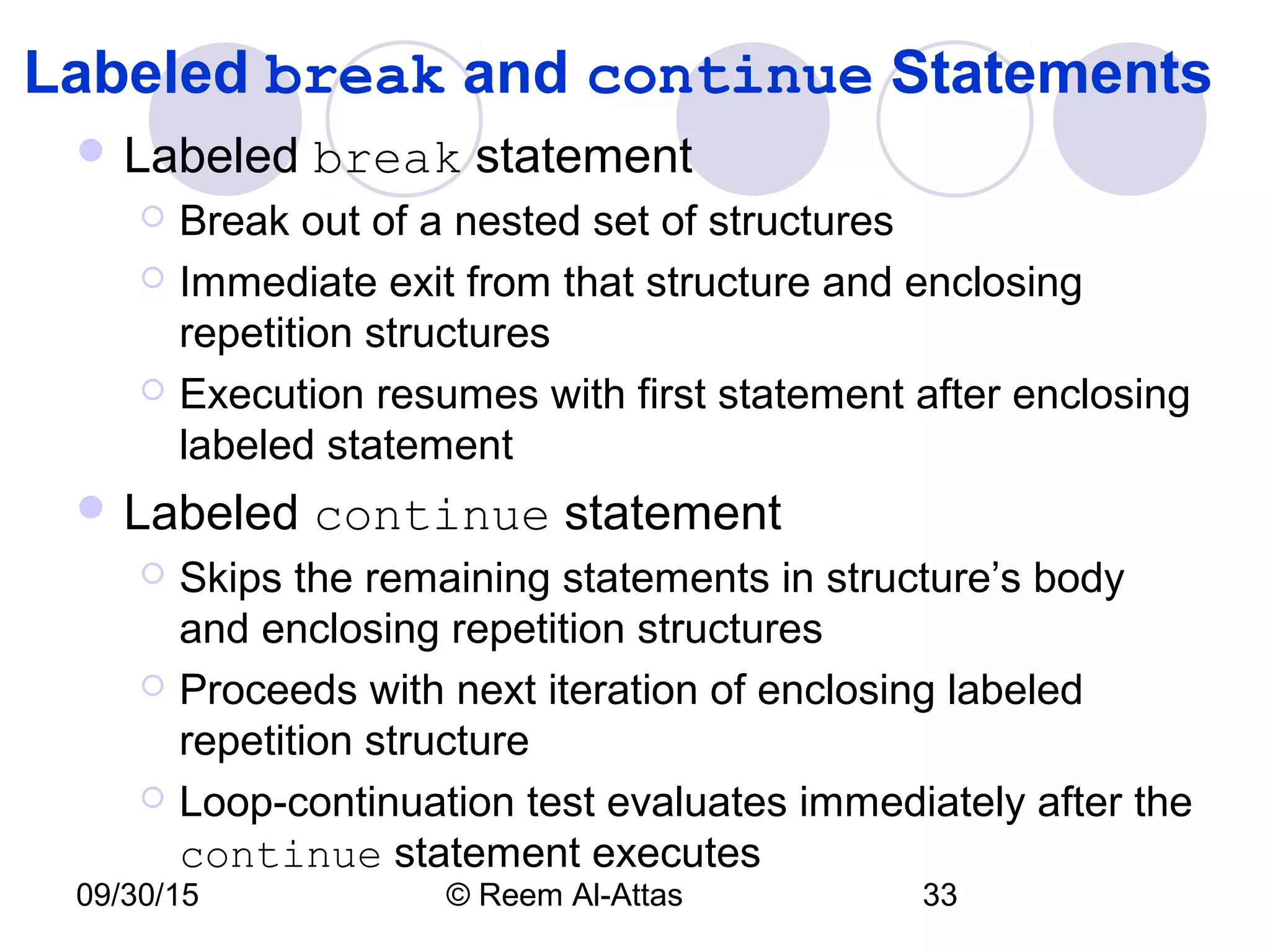
    09/30/15 © ReemAl-Attas 33 Labeled break and continue Statements  Labeled break statement  Break out of a nested set of structures  Immediate exit from that structure and enclosing repetition structures  Execution resumes with first statement after enclosing labeled statement  Labeled continue statement  Skips the remaining statements in structure’s body and enclosing repetition structures  Proceeds with next iteration of enclosing labeled repetition structure  Loop-continuation test evaluates immediately after the continue statement executes
  • 34.
    1 <?xml version= "1.0"?> 2 <!DOCTYPE html PUBLIC "-//W3C//DTD XHTML 1.0 Strict//EN" 3 "http://www.w3.org/TR/xhtml1/DTD/xhtml1-strict.dtd"> 4 5 <!-- Fig. 9.13: BreakLabelTest.html --> 6 <!-- Using the break statement with a Label --> 7 8 <html xmlns = "http://www.w3.org/1999/xhtml"> 9 <head> 10 <title>Using the break Statement with a Label</title> 11 12 <script type = "text/javascript"> 13 <!-- 14 stop: { // labeled block 15 for ( var row = 1; row <= 10; ++row ) { 16 for ( var column = 1; column <= 5 ; ++column ) { 17 18 if ( row == 5 ) 19 break stop; // jump to end of stop block 20 21 document.write( "* " ); 22 } 23 24 document.writeln( "<br />" ); 25 }
  • 35.
    26 27 // thefollowing line is skipped 28 document.writeln( "This line should not print" ); 29 } 30 31 document.writeln( "End of script" ); 32 // --> 33 </script> 34 35 </head><body></body> 36 </html>
  • 36.
    1 <?xml version= "1.0"?> 2 <!DOCTYPE html PUBLIC "-//W3C//DTD XHTML 1.0 Strict//EN" 3 "http://www.w3.org/TR/xhtml1/DTD/xhtml1-strict.dtd"> 4 5 <!-- Fig. 9.14: ContinueLabelTest.html --> 6 <!-- Using the continue statement --> 7 8 <html xmlns = "http://www.w3.org/1999/xhtml"> 9 <head> 10 <title>Using the continue Statement with a Label</title> 11 12 <script type = "text/javascript"> 13 <!-- 14 nextRow: // target label of continue statement 15 for ( var row = 1; row <= 5; ++row ) { 16 document.writeln( "<br />" ); 17 18 for ( var column = 1; column <= 10; ++column ) { 19 20 if ( column > row ) 21 continue nextRow; // next iteration of 22 // labeled loop 23 24 document.write( "* " ); 25 }
  • 37.
    ContinueLabelTest.html (2 of 2) 26} 27 // --> 28 </script> 29 30 </head><body></body> 31 </html>
  • 38.
    09/30/15 © ReemAl-Attas 38 Logical Operators More logical operators  Logical AND ( && )  Logical OR ( || )  Logical NOT ( ! )
  • 39.
    09/30/15 © ReemAl-Attas 39 Logical Operators expression1 expression2 expression1 && expression2 false false false false true false true false false true true true Fig. 9.15 Truth table for the && (logical AND) operator.
  • 40.
    09/30/15 © ReemAl-Attas 40 Logical Operators expression1 expression2 expression1 || expression2 false false false false true true true false true true true true Fig. 9.16 Truth table for the || (logical OR) operator. expression !expression false true true false Fig. 9.17 Truth table for operator ! (logical negation).
  • 41.
    1 <?xml version= "1.0"?> 2 <!DOCTYPE html PUBLIC "-//W3C//DTD XHTML 1.0 Strict//EN" 3 "http://www.w3.org/TR/xhtml1/DTD/xhtml1-strict.dtd"> 4 5 <!-- Fig. 9.18: LogicalOperators.html --> 6 <!-- Demonstrating Logical Operators --> 7 8 <html xmlns = "http://www.w3.org/1999/xhtml"> 9 <head> 10 <title>Demonstrating the Logical Operators</title> 11 12 <script type = "text/javascript"> 13 <!-- 14 document.writeln( 15 "<table border = "1" width = "100%">" ); 16 17 document.writeln( 18 "<caption>Demonstrating Logical " + 19 "Operators</caption" ); 20 21 document.writeln( 22 "<tr><td width = "25%">Logical AND (&&)</td>" + 23 "<td>false && false: " + ( false && false ) + 24 "<br />false && true: " + ( false && true ) + 25 "<br />true && false: " + ( true && false ) +
  • 42.
    26 "<br />true&& true: " + ( true && true ) + 27 "</td>" ); 28 29 document.writeln( 30 "<tr><td width = "25%">Logical OR (||)</td>" + 31 "<td>false || false: " + ( false || false ) + 32 "<br />false || true: " + ( false || true ) + 33 "<br />true || false: " + ( true || false ) + 34 "<br />true || true: " + ( true || true ) + 35 "</td>" ); 36 37 document.writeln( 38 "<tr><td width = "25%">Logical NOT (!)</td>" + 39 "<td>!false: " + ( !false ) + 40 "<br />!true: " + ( !true ) + "</td>" ); 41 42 document.writeln( "</table>" ); 43 // --> 44 </script> 45 46 </head><body></body> 47 </html>
  • 43.
    09/30/15 © ReemAl-Attas 43
  • 44.
    09/30/15 © ReemAl-Attas 44 Logical Operators Operator Associativity Type ++ -- ! right to left unary * / % left to right multiplicative + - left to right additive < <= > >= left to right relational == != left to right equality && left to right logical AND || left to right logical OR ?: right to left conditional = += -= *= /= %= right to left assignment Fig. 9.19 Precedence and associativity of the operators discussed so far.
  • 45.
    09/30/15 © ReemAl-Attas 45 Summary of Structured Programming Flowcharts  Reveal the structured nature of programs Single-entry/single-exit control structures  Only one way to enter and one way to exit each control structure Control structure stacking  The exit point of one control structure is connected to the entry point of the next control structure
  • 46.
    09/30/15 © ReemAl-Attas 46 Summary of Structured Programming T F whilestatement T F for T F do…while Repetition Fig. 9.20 Single-entry/single-exit sequence, selection and repetition structures. (1 of 3) statement statement
  • 47.
    09/30/15 © ReemAl-Attas 47 Summary of Structured Programming break T F ifstatement (singleselection) TF if…else (doubleselection) T F switch (multipleselection) T F T F . . . Selection break break Fig. 9.20 Single-entry/single-exit sequence, selection and repetition structures. (2 of 3) statement statement
  • 48.
    09/30/15 © ReemAl-Attas 48 Summary of Structured ProgrammingSequence . . .Fig. 9.20 Single-entry/single-exit sequence, selection and repetition structures. (3 of 3)
  • 49.
    09/30/15 © ReemAl-Attas 49 Summary of Structured Programming Rules for Forming Structured Programs 1) Begin with the “simplest flowchart” (Fig. 9.22). 2) Any rectangle (action) can be replaced by two rectangles (actions) in sequence. 3) Any rectangle (action) can be replaced by any control structure (sequence, if, if…else, switch, while, do…while or for). 4) Rules 2 and 3 may be applied as often as you like and in any order. Fig. 9.21Rules for forming structured programs.
  • 50.
    09/30/15 © ReemAl-Attas 50 Summary of Structured Programming Fig. 9.22 Simplest flowchart.
  • 51.
    09/30/15 © ReemAl-Attas 51 Summary of Structured Programming . . . Rule 2 Rule 2 Rule 2 Fig. 9.23 Repeatedly applying rule 2 of Fig. 9.21 to the simplest flowchart.
  • 52.
    09/30/15 © ReemAl-Attas 52 Summary of Structured Programming Rule 3 Rule 3 Fig. 9.24 Applying rule 3 of Fig. 9.21 to the simplest flowchart.
  • 53.
    09/30/15 © ReemAl-Attas 53 Summary of Structured Programming Stacked building blocks Nested building blocks Overlapping building blocks (Illegal in structured programs) Fig. 9.25 Stacked, nested and overlapped building blocks.
  • 54.
    09/30/15 © ReemAl-Attas 54 Summary of Structured Programming Fig. 9.26 Unstructured flowchart.
  • 55.
    09/30/15 © ReemAl-Attas 55 Assignment 7  1) Exercise # 9.9 &  2) Exercise # 9.14 in the text book. Due Date for A # 7:  Monday before your lecture.

Editor's Notes

  • #29 Break يخرج تماما من الـ loop Continue يخرج من الـ iteration and continue the loop with the next iteration