Team Emertxe
www.webstackacademy.com
Browser Object Model (BOM)
JavaScript
www.webstackacademy.com ‹#›www.webstackacademy.com
JavaScript BOM
(Introduction)
BOM
• The Browser Object Model (BOM) is used to interact with the browser.
• These BOM provides access to the various characteristics of a browser (Browser
window itself, Screen characteristics, Browser history etc…)
• The default object of browser is window means we can call all the functions of
window by specifying window or directly.
• If a document contain frames (<iframe> tags), the browser creates one window
object for the HTML document, and one additional window object for each frame.
Example :
window.alert("Hello World");
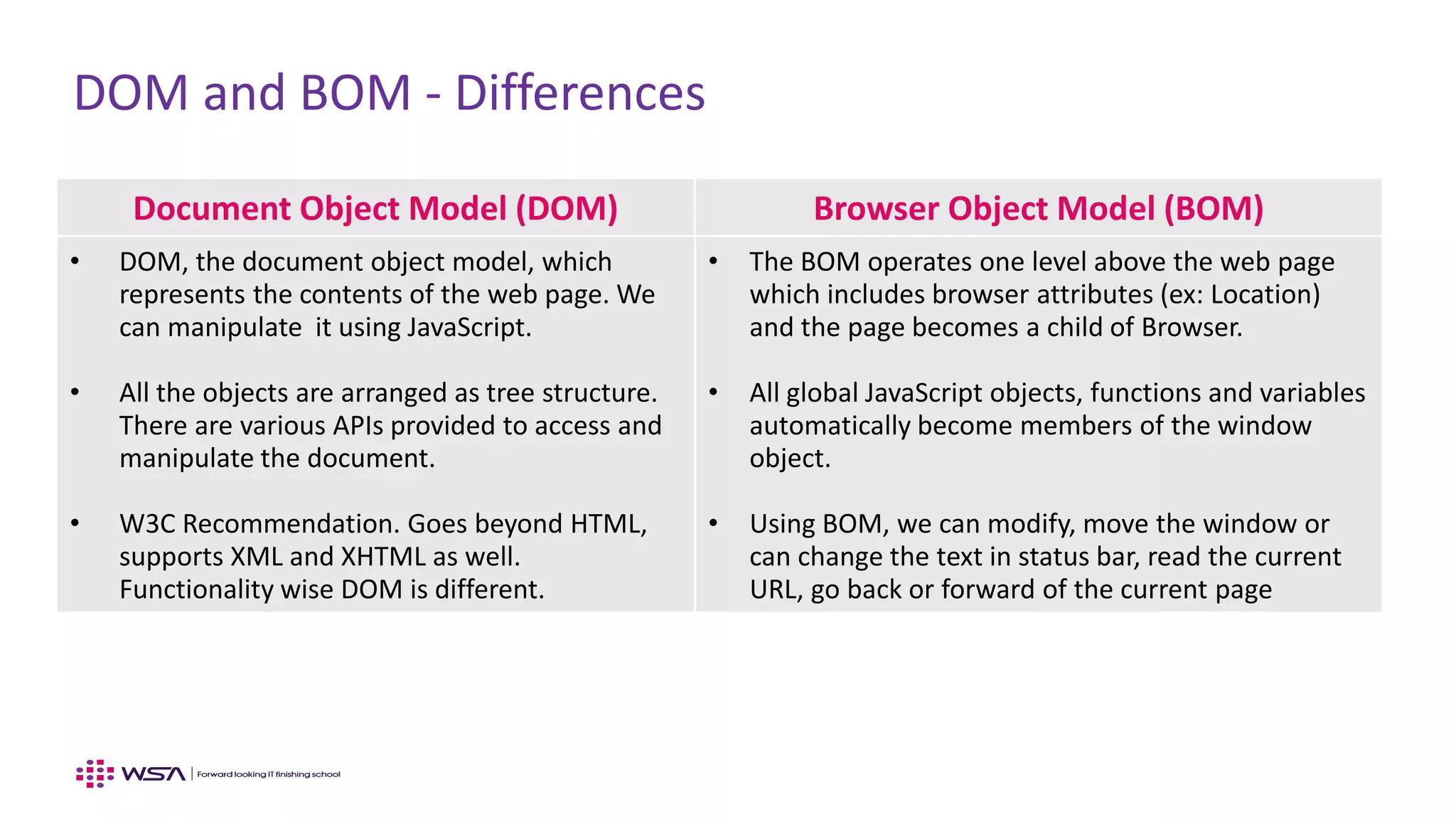
DOM and BOM - Differences
Document Object Model (DOM) Browser Object Model (BOM)
• DOM, the document object model, which
represents the contents of the web page. We
can manipulate it using JavaScript.
• All the objects are arranged as tree structure.
There are various APIs provided to access and
manipulate the document.
• W3C Recommendation. Goes beyond HTML,
supports XML and XHTML as well.
Functionality wise DOM is different.
• The BOM operates one level above the web page
which includes browser attributes (ex: Location)
and the page becomes a child of Browser.
• All global JavaScript objects, functions and variables
automatically become members of the window
object.
• Using BOM, we can modify, move the window or
can change the text in status bar, read the current
URL, go back or forward of the current page
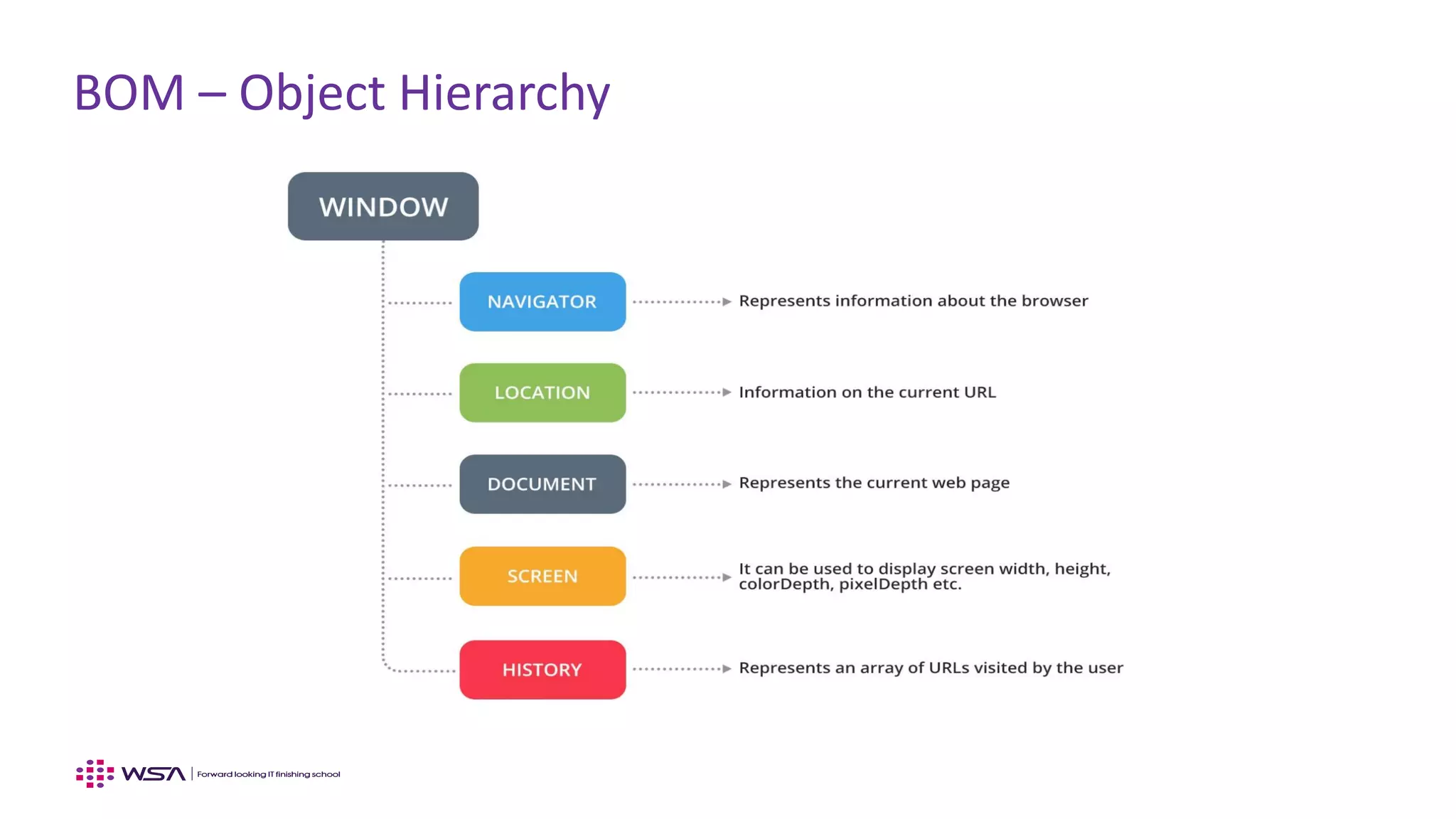
BOM – Object Hierarchy
www.webstackacademy.com ‹#›www.webstackacademy.com
BOM - Window
(Basic BOM Window APIs)
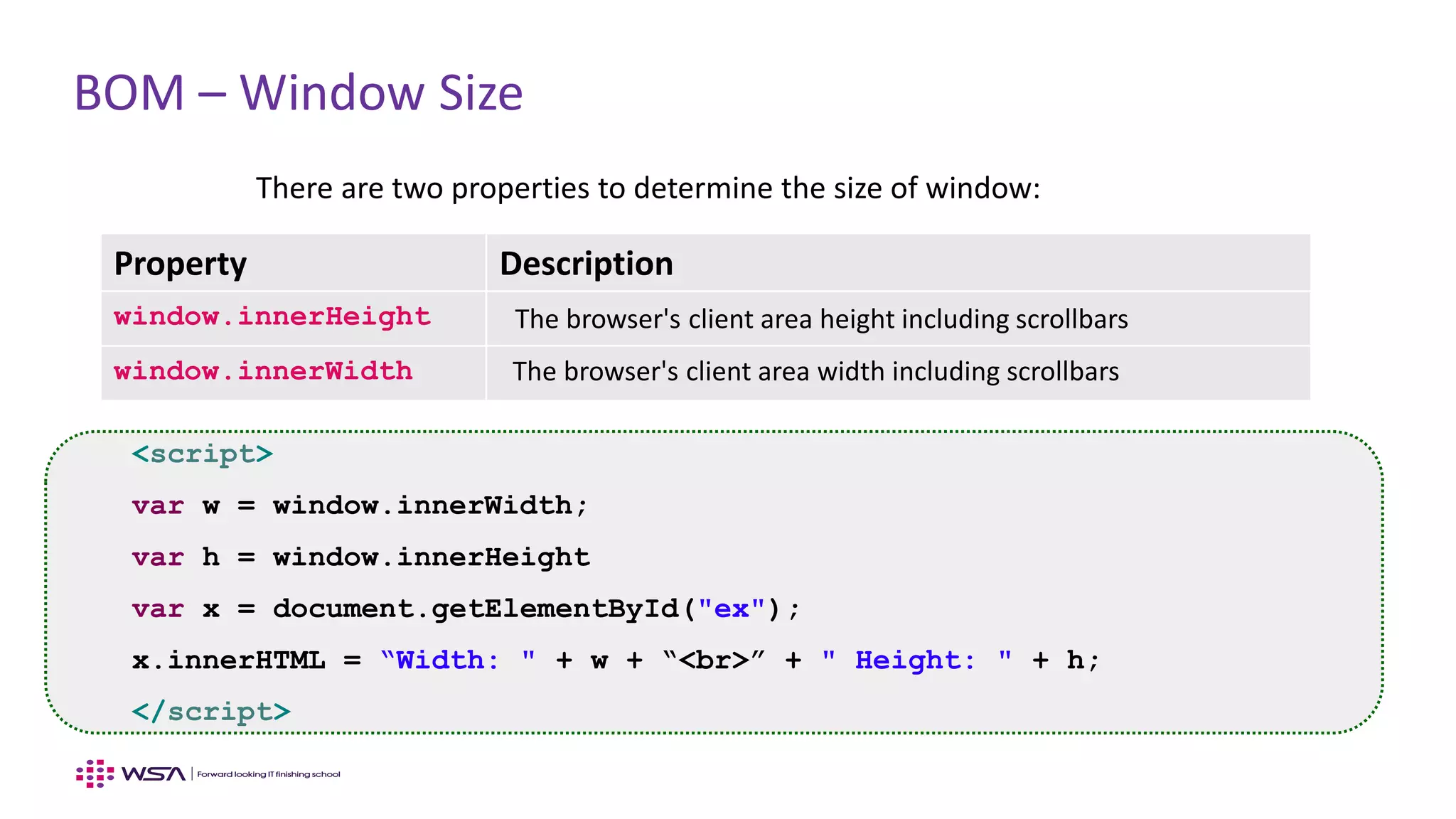
BOM – Window Size
<script>
var w = window.innerWidth;
var h = window.innerHeight
var x = document.getElementById("ex");
x.innerHTML = “Width: " + w + “<br>” + " Height: " + h;
</script>
Property Description
window.innerHeight The browser's client area height including scrollbars
window.innerWidth The browser's client area width including scrollbars
There are two properties to determine the size of window:
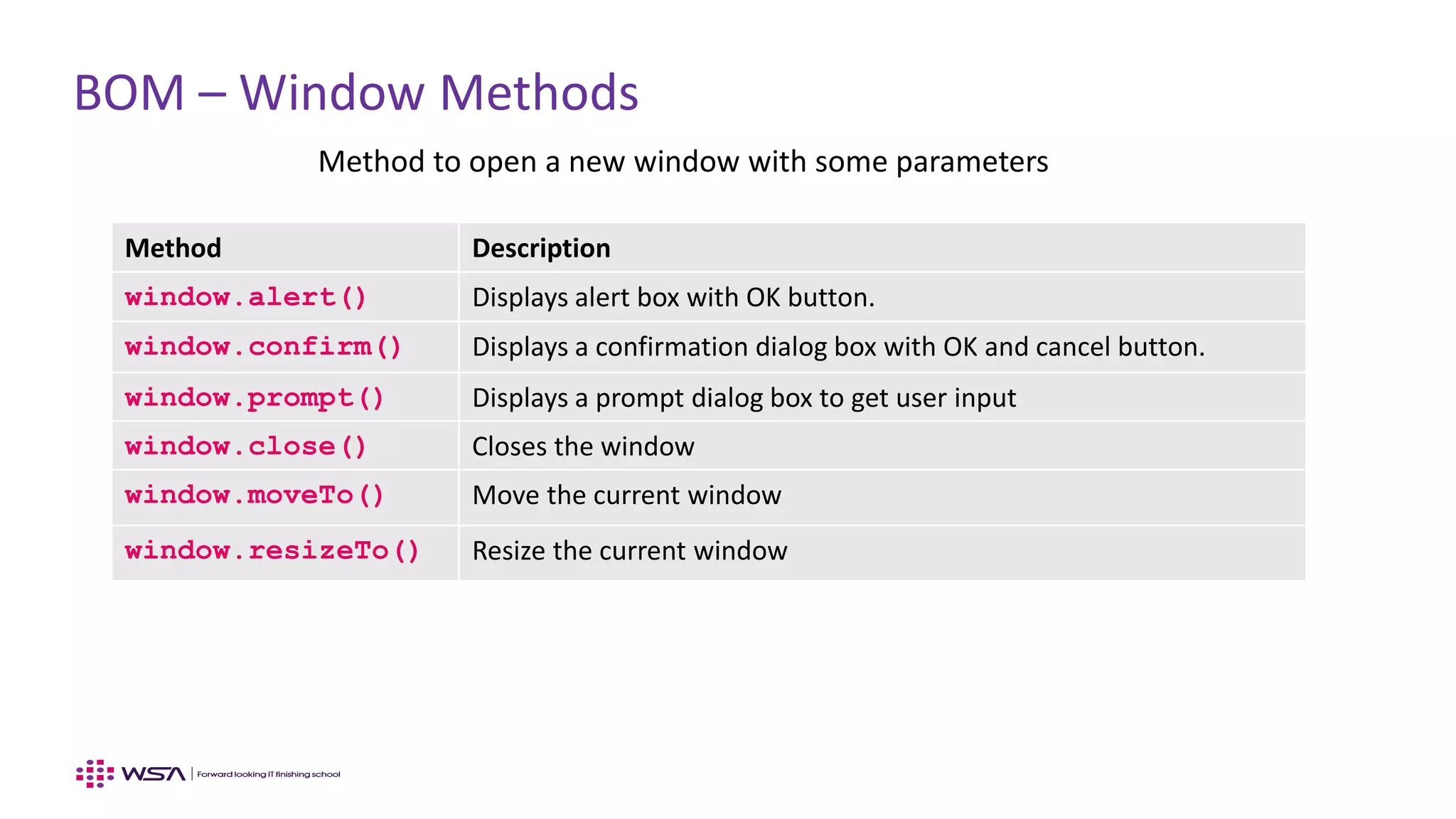
BOM – Window Methods
Method to open a new window with some parameters
Method Description
window.alert() Displays alert box with OK button.
window.confirm() Displays a confirmation dialog box with OK and cancel button.
window.prompt() Displays a prompt dialog box to get user input
window.close() Closes the window
window.moveTo() Move the current window
window.resizeTo() Resize the current window
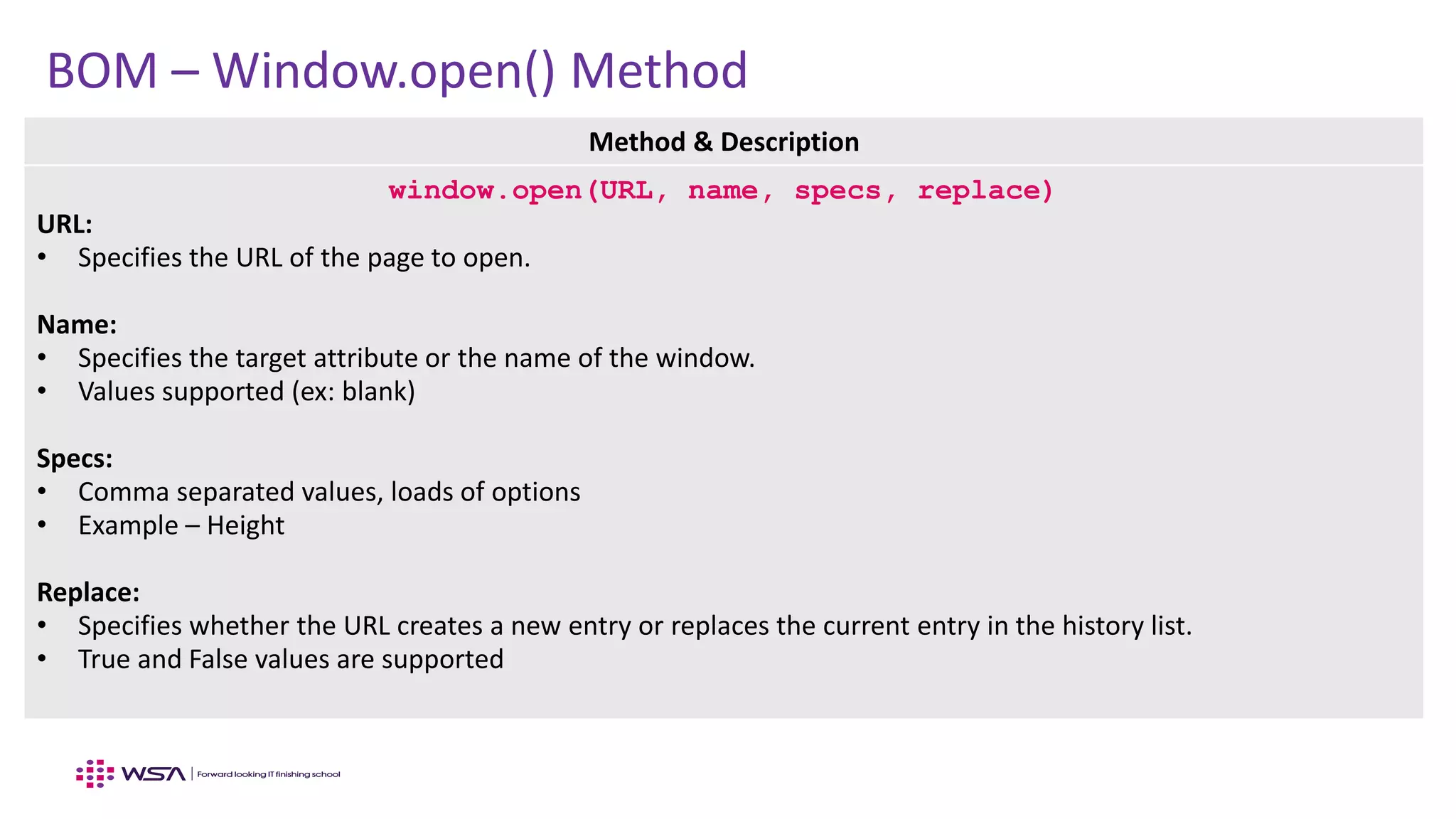
BOM – Window.open() Method
Method & Description
window.open(URL, name, specs, replace)
URL:
• Specifies the URL of the page to open.
Name:
• Specifies the target attribute or the name of the window.
• Values supported (ex: blank)
Specs:
• Comma separated values, loads of options
• Example – Height
Replace:
• Specifies whether the URL creates a new entry or replaces the current entry in the history list.
• True and False values are supported
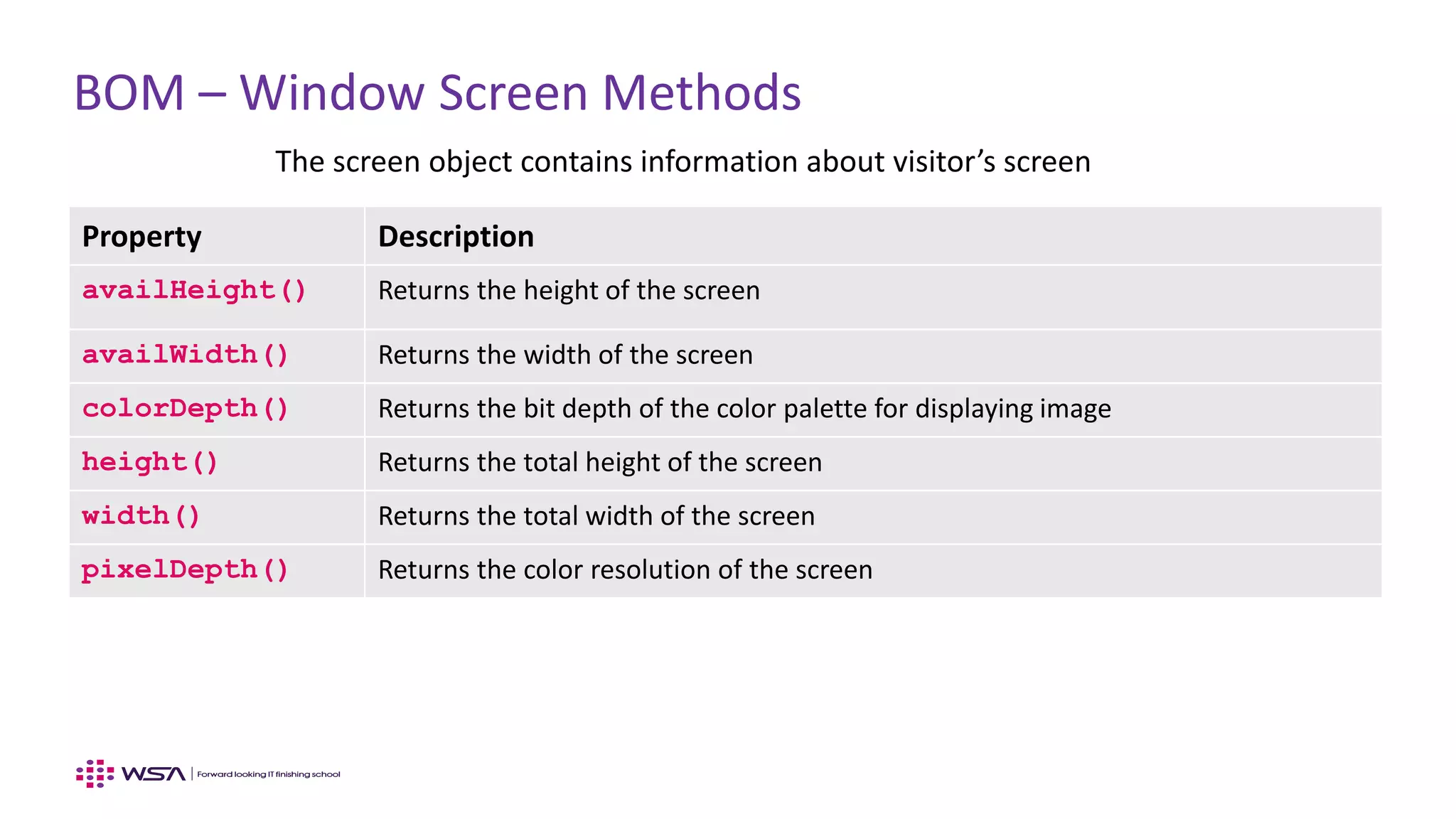
BOM – Window Screen Methods
The screen object contains information about visitor’s screen
Property Description
availHeight() Returns the height of the screen
availWidth() Returns the width of the screen
colorDepth() Returns the bit depth of the color palette for displaying image
height() Returns the total height of the screen
width() Returns the total width of the screen
pixelDepth() Returns the color resolution of the screen
www.webstackacademy.com ‹#›www.webstackacademy.com
BOM – Navigator
(BOM Browser related APIs)
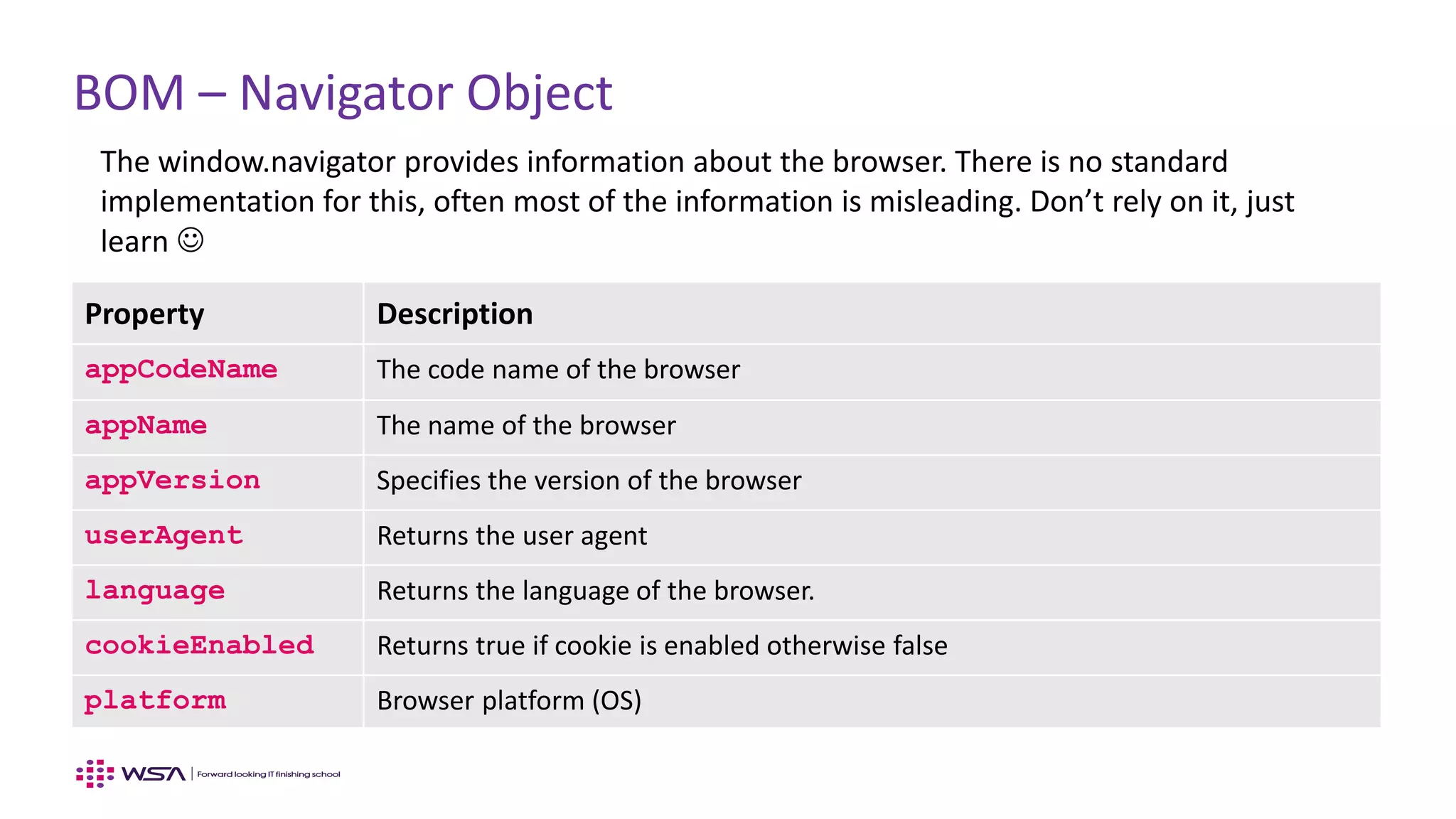
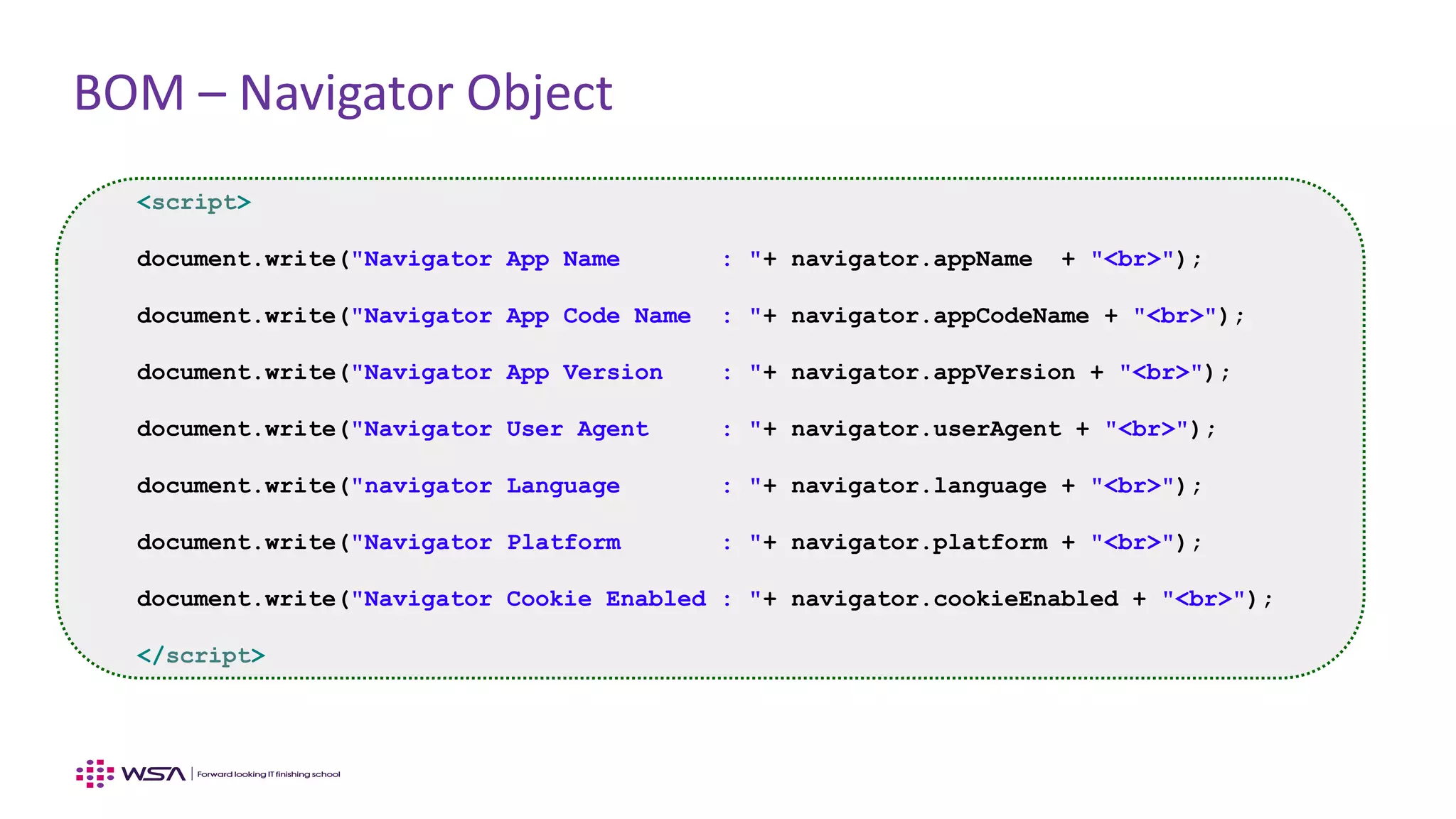
BOM – Navigator Object
The window.navigator provides information about the browser. There is no standard
implementation for this, often most of the information is misleading. Don’t rely on it, just
learn 
Property Description
appCodeName The code name of the browser
appName The name of the browser
appVersion Specifies the version of the browser
userAgent Returns the user agent
language Returns the language of the browser.
cookieEnabled Returns true if cookie is enabled otherwise false
platform Browser platform (OS)
BOM – Navigator Object
<script>
document.write("Navigator App Name : "+ navigator.appName + "<br>");
document.write("Navigator App Code Name : "+ navigator.appCodeName + "<br>");
document.write("Navigator App Version : "+ navigator.appVersion + "<br>");
document.write("Navigator User Agent : "+ navigator.userAgent + "<br>");
document.write("navigator Language : "+ navigator.language + "<br>");
document.write("Navigator Platform : "+ navigator.platform + "<br>");
document.write("Navigator Cookie Enabled : "+ navigator.cookieEnabled + "<br>");
</script>
www.webstackacademy.com ‹#›www.webstackacademy.com
BOM – History
(BOM User history related APIs)
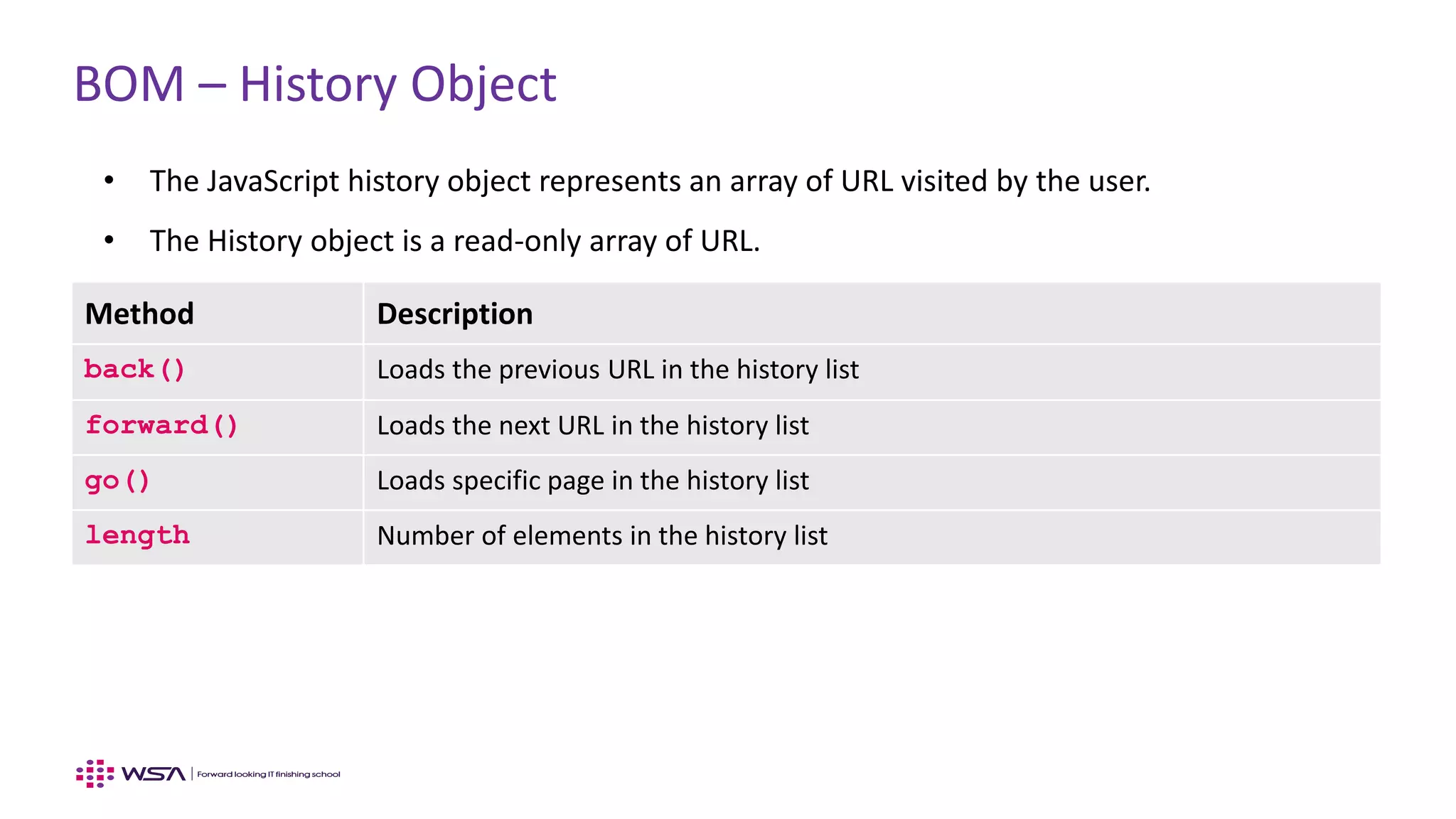
BOM – History Object
• The JavaScript history object represents an array of URL visited by the user.
• The History object is a read-only array of URL.
• We can load previous, forward or any particular page using history object.Method Description
back() Loads the previous URL in the history list
forward() Loads the next URL in the history list
go() Loads specific page in the history list
length Number of elements in the history list
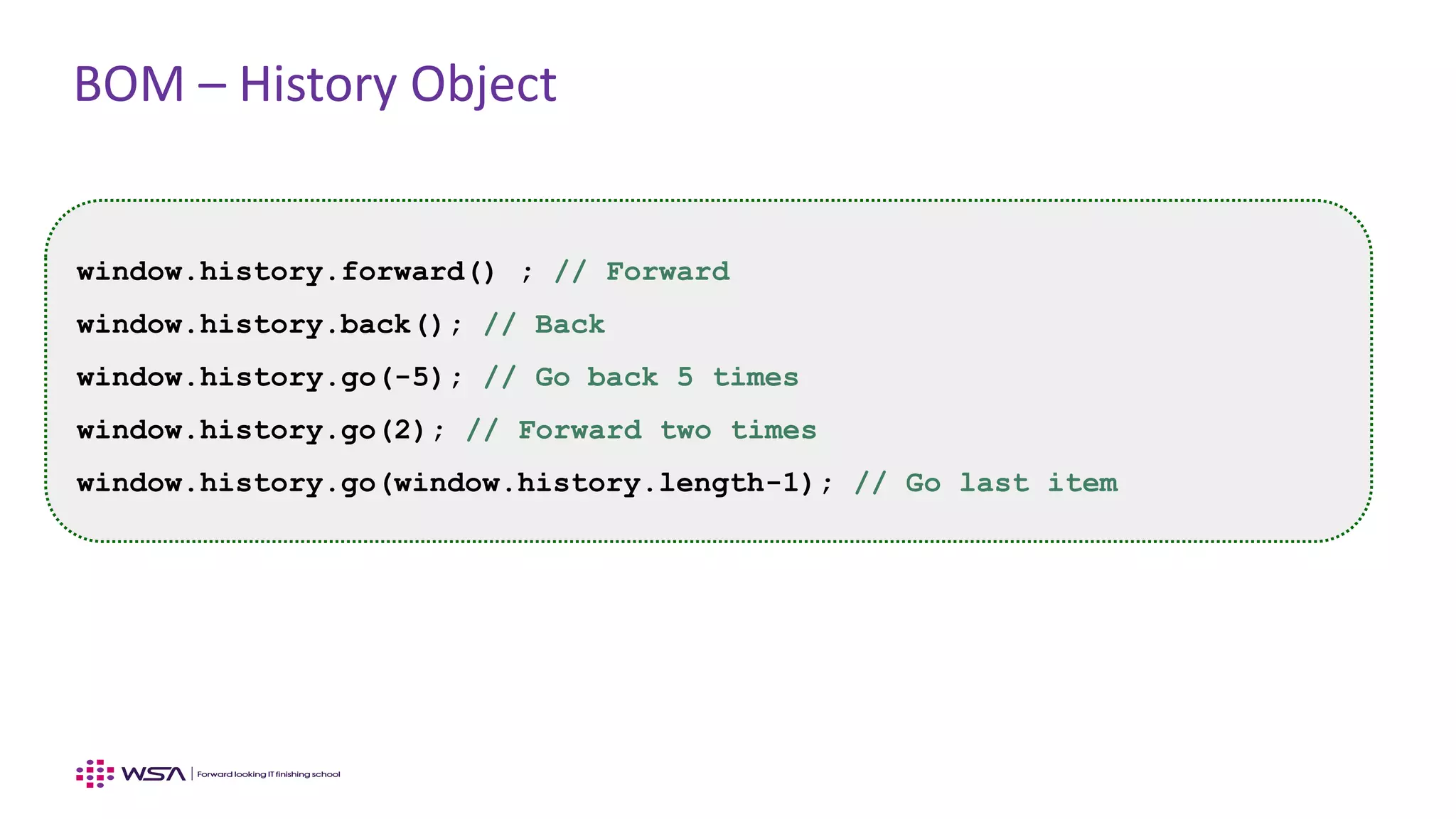
BOM – History Object
window.history.forward() ; // Forward
window.history.back(); // Back
window.history.go(-5); // Go back 5 times
window.history.go(2); // Forward two times
window.history.go(window.history.length-1); // Go last item
www.webstackacademy.com ‹#›www.webstackacademy.com
BOM – Location
(BOM User location related APIs)
BOM – Location Object
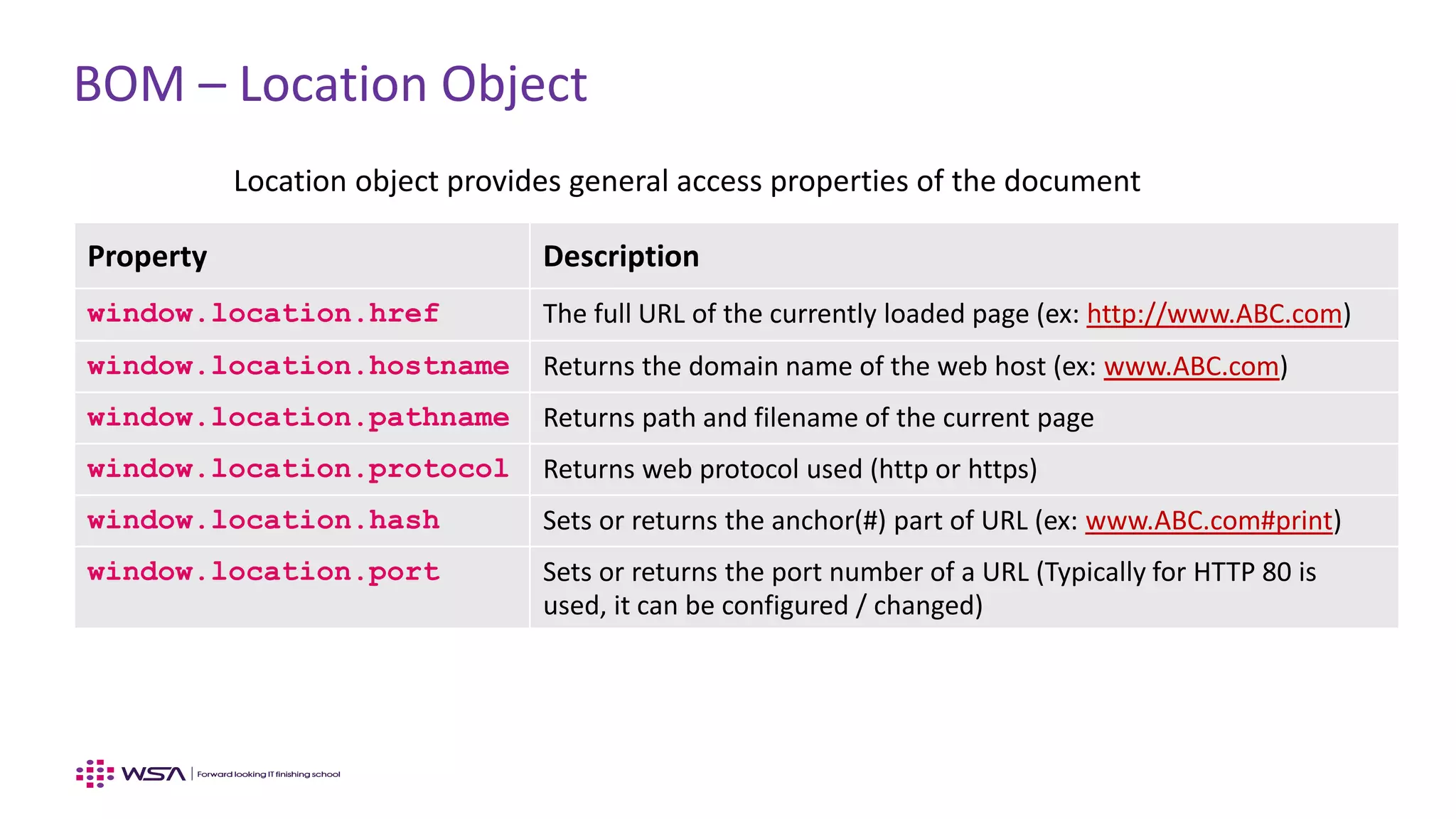
Location object provides general access properties of the document
Property Description
window.location.href The full URL of the currently loaded page (ex: http://www.ABC.com)
window.location.hostname Returns the domain name of the web host (ex: www.ABC.com)
window.location.pathname Returns path and filename of the current page
window.location.protocol Returns web protocol used (http or https)
window.location.hash Sets or returns the anchor(#) part of URL (ex: www.ABC.com#print)
window.location.port Sets or returns the port number of a URL (Typically for HTTP 80 is
used, it can be configured / changed)
BOM – Location Methods
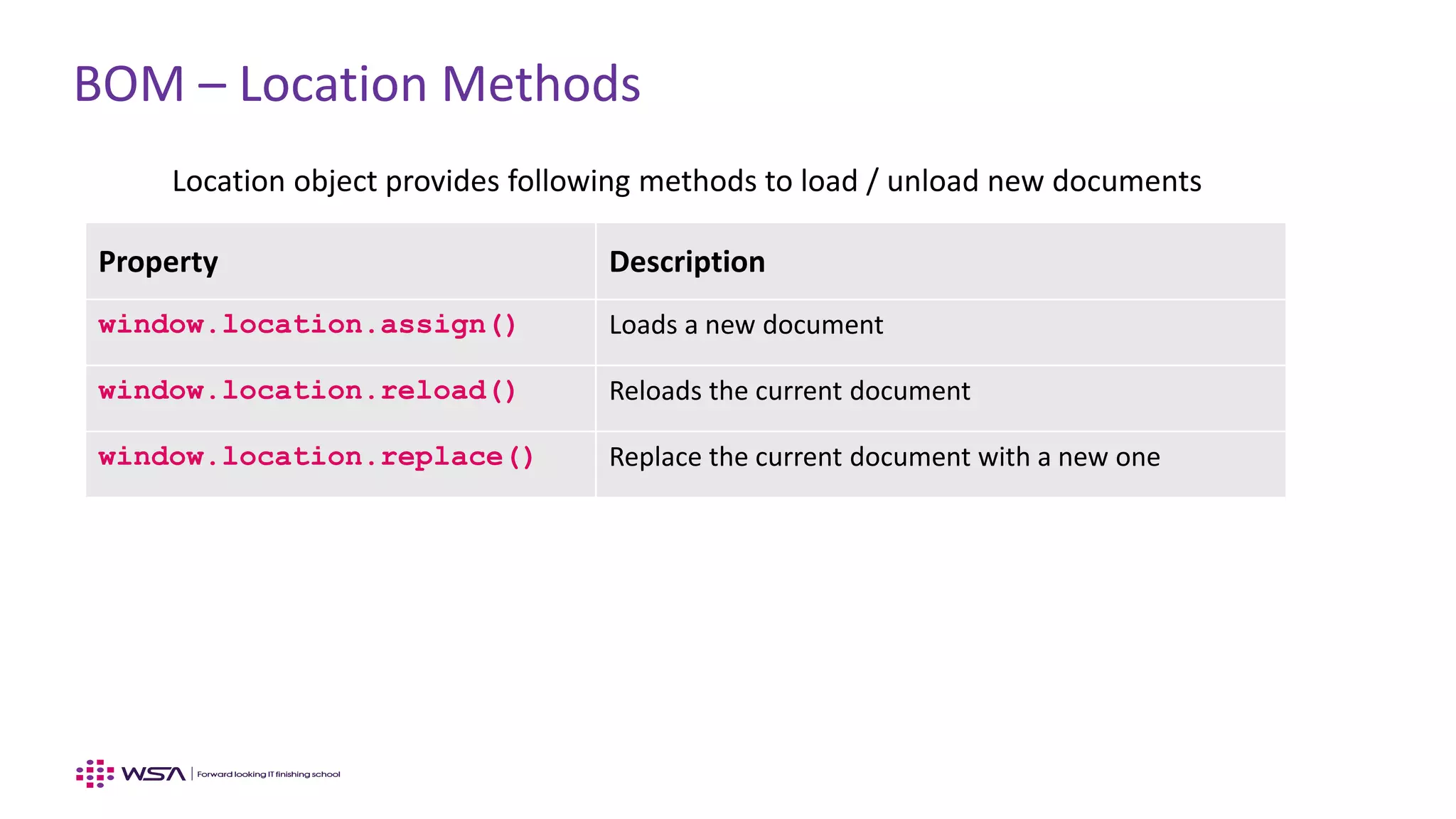
Location object provides following methods to load / unload new documents
Property Description
window.location.assign() Loads a new document
window.location.reload() Reloads the current document
window.location.replace() Replace the current document with a new one
www.webstackacademy.com ‹#›www.webstackacademy.com
BOM – Timing Events
(BOM Timer APIs)
BOM Timing Events
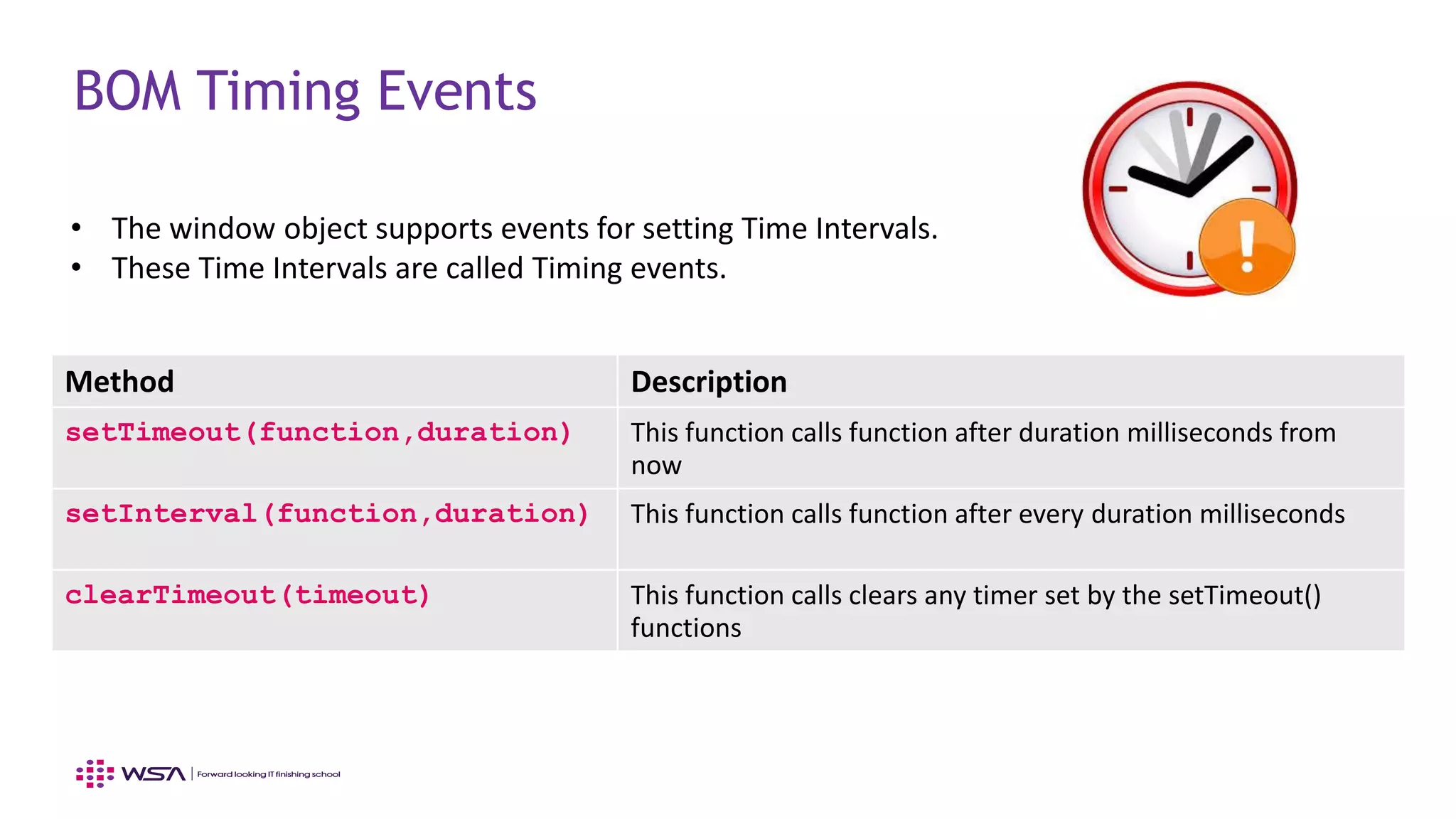
Method Description
setTimeout(function,duration) This function calls function after duration milliseconds from
now
setInterval(function,duration) This function calls function after every duration milliseconds
clearTimeout(timeout) This function calls clears any timer set by the setTimeout()
functions
• The window object supports events for setting Time Intervals.
• These Time Intervals are called Timing events.
www.webstackacademy.com ‹#›www.webstackacademy.com
Cookies
(Storing meta information using BOM)
Cookies – What?
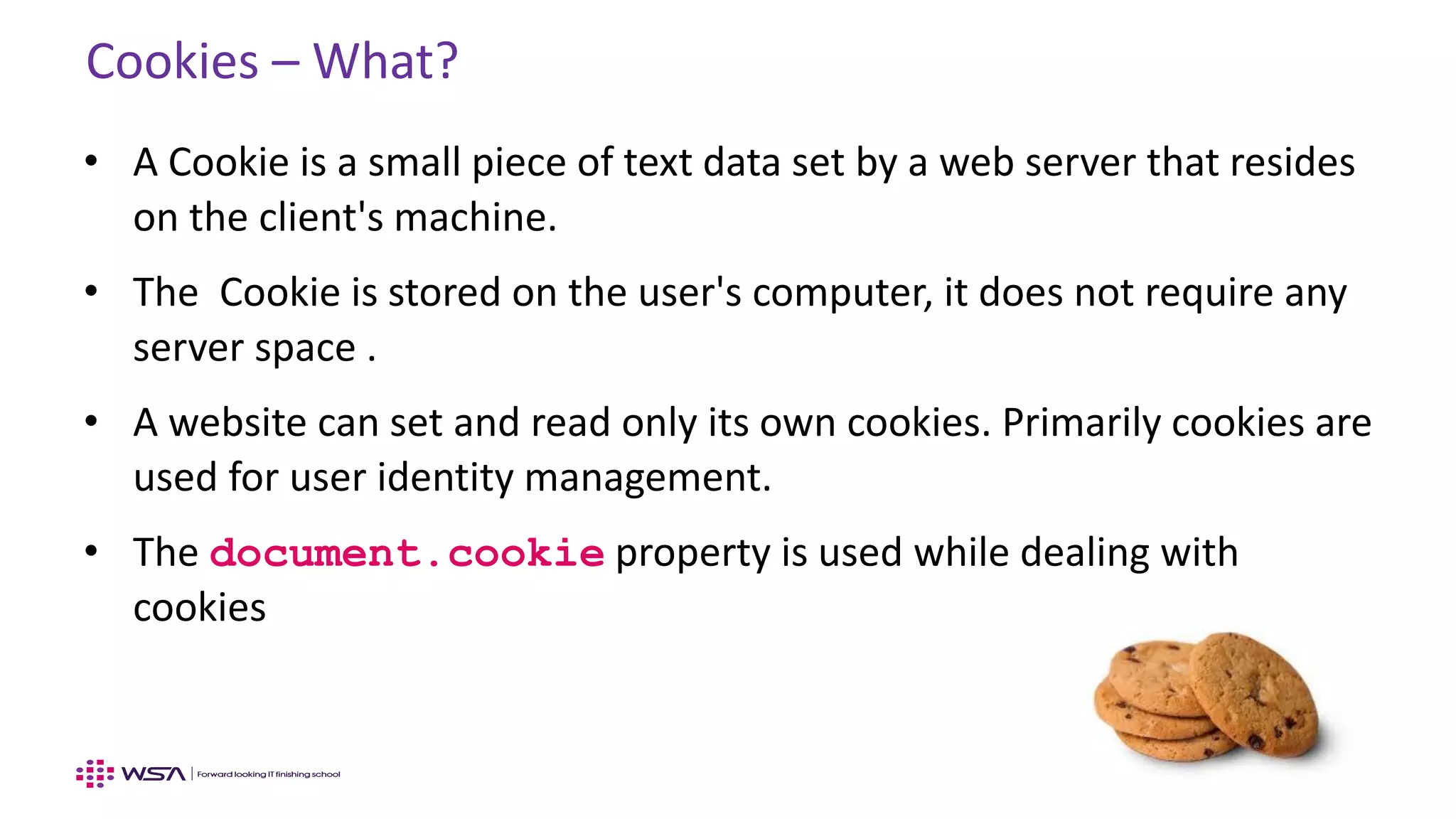
• A Cookie is a small piece of text data set by a web server that resides
on the client's machine.
• The Cookie is stored on the user's computer, it does not require any
server space .
• A website can set and read only its own cookies. Primarily cookies are
used for user identity management.
• The document.cookie property is used while dealing with
cookies
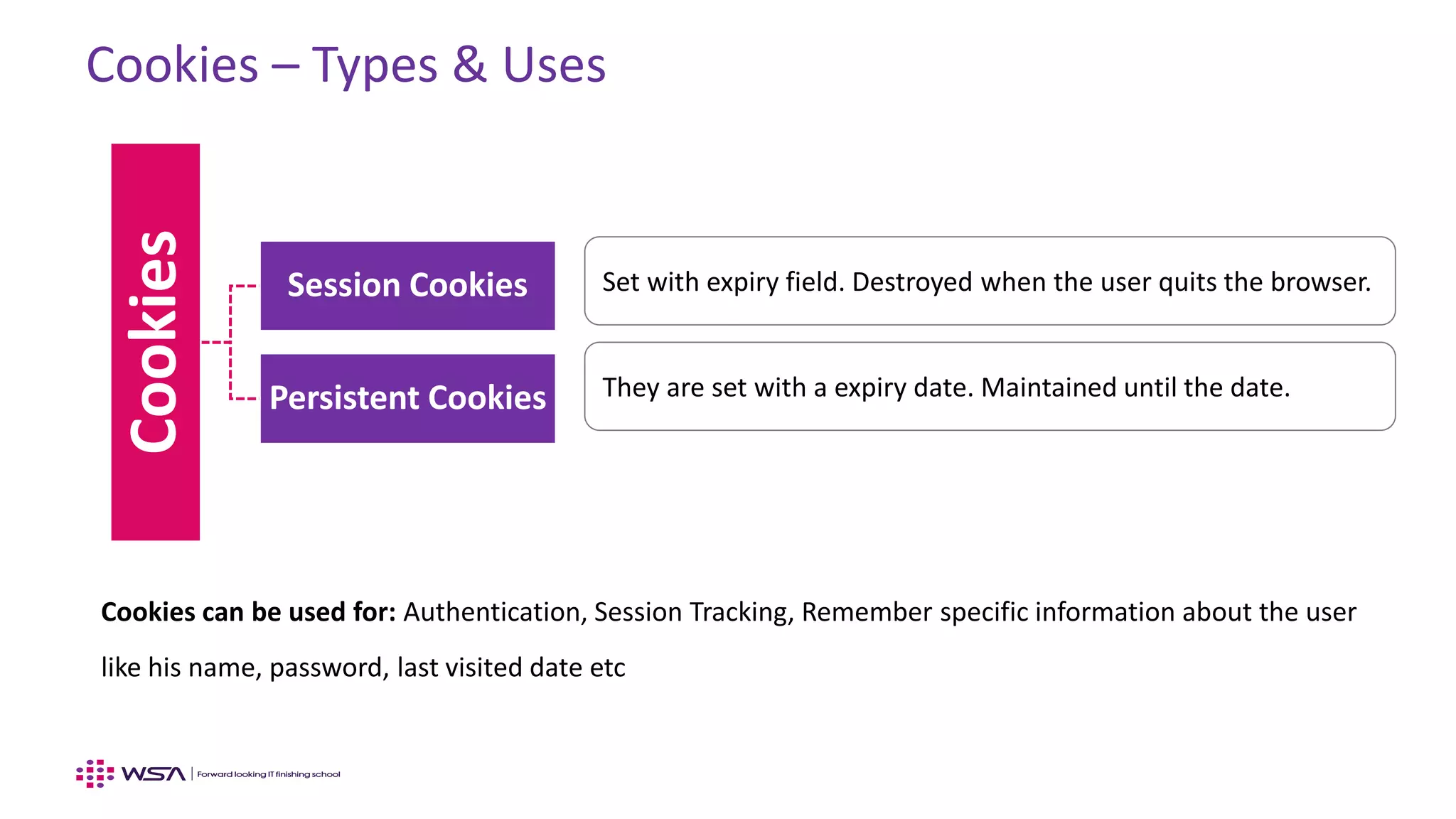
Cookies – Types & Uses
Cookies
Session Cookies
Persistent Cookies
Set with expiry field. Destroyed when the user quits the browser.
They are set with a expiry date. Maintained until the date.
Cookies can be used for: Authentication, Session Tracking, Remember specific information about the user
like his name, password, last visited date etc
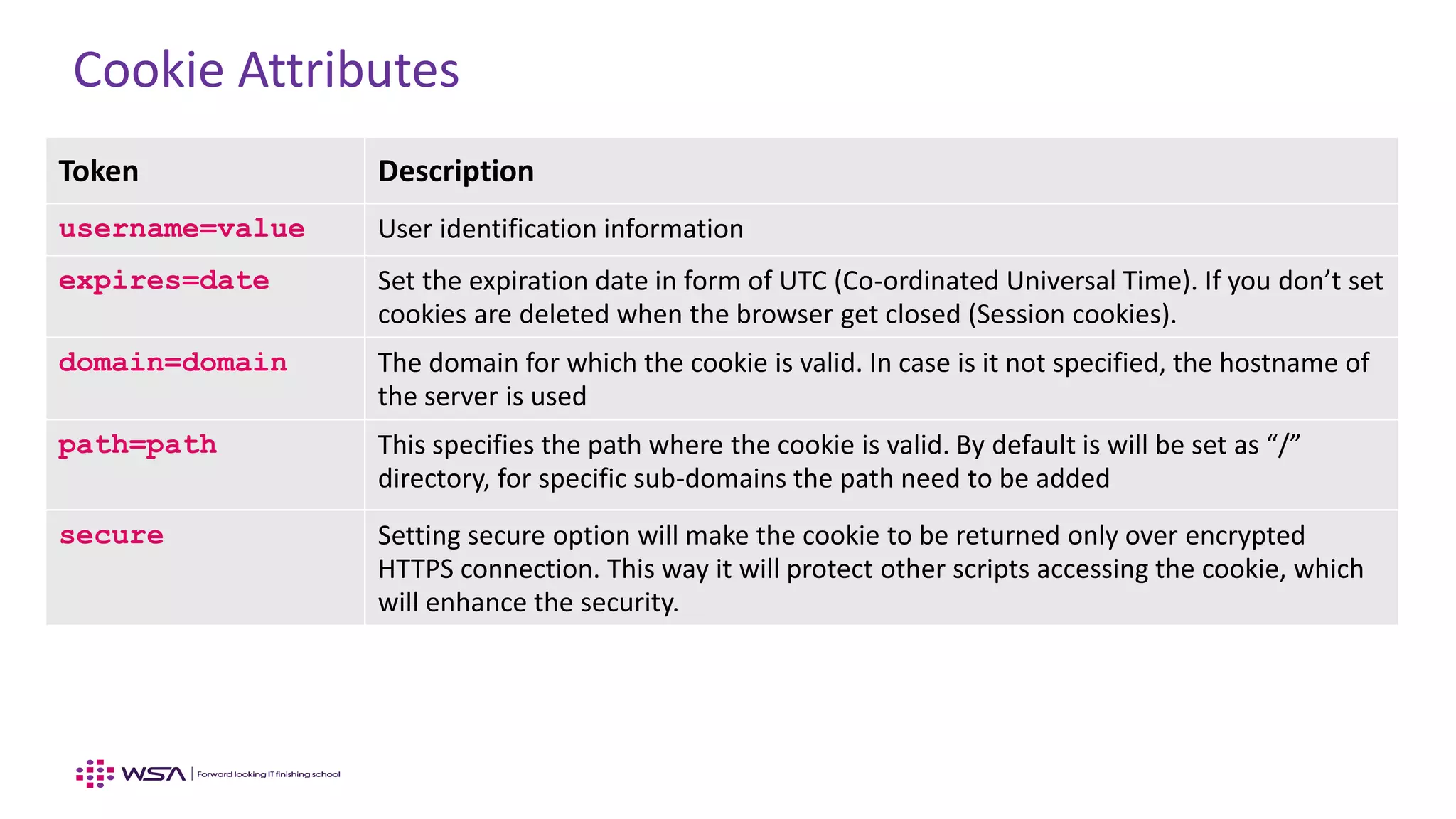
Cookie Attributes
Token Description
username=value User identification information
expires=date Set the expiration date in form of UTC (Co-ordinated Universal Time). If you don’t set
cookies are deleted when the browser get closed (Session cookies).
domain=domain The domain for which the cookie is valid. In case is it not specified, the hostname of
the server is used
path=path This specifies the path where the cookie is valid. By default is will be set as “/”
directory, for specific sub-domains the path need to be added
secure Setting secure option will make the cookie to be returned only over encrypted
HTTPS connection. This way it will protect other scripts accessing the cookie, which
will enhance the security.
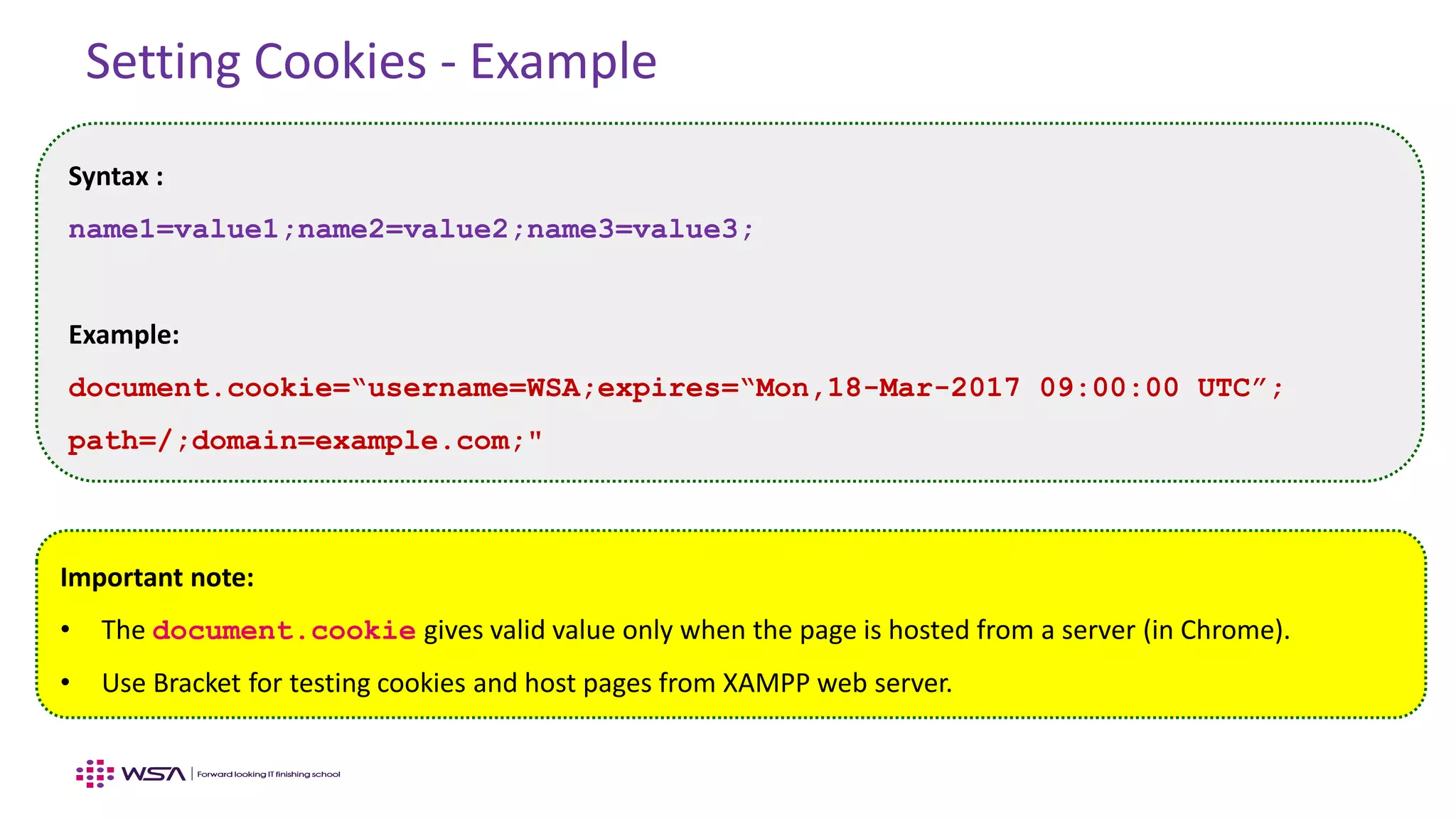
Setting Cookies - Example
Syntax :
name1=value1;name2=value2;name3=value3;
Example:
document.cookie=“username=WSA;expires=“Mon,18-Mar-2017 09:00:00 UTC”;
path=/;domain=example.com;"
Important note:
• The document.cookie gives valid value only when the page is hosted from a server (in Chrome).
• Use Bracket for testing cookies and host pages from XAMPP web server.
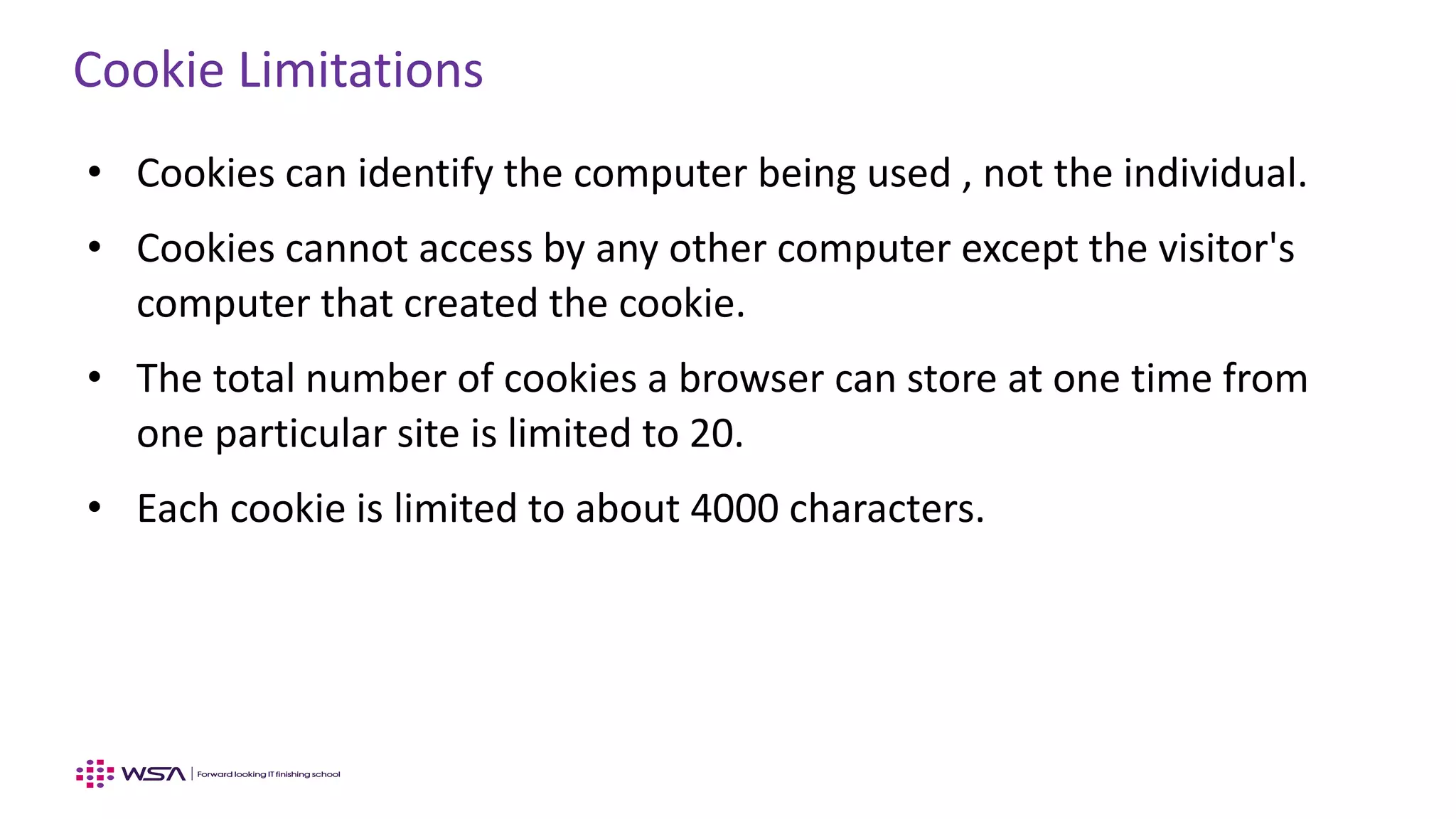
Cookie Limitations
• Cookies can identify the computer being used , not the individual.
• Cookies cannot access by any other computer except the visitor's
computer that created the cookie.
• The total number of cookies a browser can store at one time from
one particular site is limited to 20.
• Each cookie is limited to about 4000 characters.
WebStack Academy
#83, Farah Towers,
1st Floor, MG Road,
Bangalore – 560001
M: +91-809555 7332
E: training@webstackacademy.com
WSA in Social Media:

JavaScript - Chapter 13 - Browser Object Model(BOM)

  • 1.
  • 2.
  • 3.
    BOM • The BrowserObject Model (BOM) is used to interact with the browser. • These BOM provides access to the various characteristics of a browser (Browser window itself, Screen characteristics, Browser history etc…) • The default object of browser is window means we can call all the functions of window by specifying window or directly. • If a document contain frames (<iframe> tags), the browser creates one window object for the HTML document, and one additional window object for each frame. Example : window.alert("Hello World");
  • 4.
    DOM and BOM- Differences Document Object Model (DOM) Browser Object Model (BOM) • DOM, the document object model, which represents the contents of the web page. We can manipulate it using JavaScript. • All the objects are arranged as tree structure. There are various APIs provided to access and manipulate the document. • W3C Recommendation. Goes beyond HTML, supports XML and XHTML as well. Functionality wise DOM is different. • The BOM operates one level above the web page which includes browser attributes (ex: Location) and the page becomes a child of Browser. • All global JavaScript objects, functions and variables automatically become members of the window object. • Using BOM, we can modify, move the window or can change the text in status bar, read the current URL, go back or forward of the current page
  • 5.
    BOM – ObjectHierarchy
  • 6.
  • 7.
    BOM – WindowSize <script> var w = window.innerWidth; var h = window.innerHeight var x = document.getElementById("ex"); x.innerHTML = “Width: " + w + “<br>” + " Height: " + h; </script> Property Description window.innerHeight The browser's client area height including scrollbars window.innerWidth The browser's client area width including scrollbars There are two properties to determine the size of window:
  • 8.
    BOM – WindowMethods Method to open a new window with some parameters Method Description window.alert() Displays alert box with OK button. window.confirm() Displays a confirmation dialog box with OK and cancel button. window.prompt() Displays a prompt dialog box to get user input window.close() Closes the window window.moveTo() Move the current window window.resizeTo() Resize the current window
  • 9.
    BOM – Window.open()Method Method & Description window.open(URL, name, specs, replace) URL: • Specifies the URL of the page to open. Name: • Specifies the target attribute or the name of the window. • Values supported (ex: blank) Specs: • Comma separated values, loads of options • Example – Height Replace: • Specifies whether the URL creates a new entry or replaces the current entry in the history list. • True and False values are supported
  • 10.
    BOM – WindowScreen Methods The screen object contains information about visitor’s screen Property Description availHeight() Returns the height of the screen availWidth() Returns the width of the screen colorDepth() Returns the bit depth of the color palette for displaying image height() Returns the total height of the screen width() Returns the total width of the screen pixelDepth() Returns the color resolution of the screen
  • 11.
  • 12.
    BOM – NavigatorObject The window.navigator provides information about the browser. There is no standard implementation for this, often most of the information is misleading. Don’t rely on it, just learn  Property Description appCodeName The code name of the browser appName The name of the browser appVersion Specifies the version of the browser userAgent Returns the user agent language Returns the language of the browser. cookieEnabled Returns true if cookie is enabled otherwise false platform Browser platform (OS)
  • 13.
    BOM – NavigatorObject <script> document.write("Navigator App Name : "+ navigator.appName + "<br>"); document.write("Navigator App Code Name : "+ navigator.appCodeName + "<br>"); document.write("Navigator App Version : "+ navigator.appVersion + "<br>"); document.write("Navigator User Agent : "+ navigator.userAgent + "<br>"); document.write("navigator Language : "+ navigator.language + "<br>"); document.write("Navigator Platform : "+ navigator.platform + "<br>"); document.write("Navigator Cookie Enabled : "+ navigator.cookieEnabled + "<br>"); </script>
  • 14.
  • 15.
    BOM – HistoryObject • The JavaScript history object represents an array of URL visited by the user. • The History object is a read-only array of URL. • We can load previous, forward or any particular page using history object.Method Description back() Loads the previous URL in the history list forward() Loads the next URL in the history list go() Loads specific page in the history list length Number of elements in the history list
  • 16.
    BOM – HistoryObject window.history.forward() ; // Forward window.history.back(); // Back window.history.go(-5); // Go back 5 times window.history.go(2); // Forward two times window.history.go(window.history.length-1); // Go last item
  • 17.
    www.webstackacademy.com ‹#›www.webstackacademy.com BOM –Location (BOM User location related APIs)
  • 18.
    BOM – LocationObject Location object provides general access properties of the document Property Description window.location.href The full URL of the currently loaded page (ex: http://www.ABC.com) window.location.hostname Returns the domain name of the web host (ex: www.ABC.com) window.location.pathname Returns path and filename of the current page window.location.protocol Returns web protocol used (http or https) window.location.hash Sets or returns the anchor(#) part of URL (ex: www.ABC.com#print) window.location.port Sets or returns the port number of a URL (Typically for HTTP 80 is used, it can be configured / changed)
  • 19.
    BOM – LocationMethods Location object provides following methods to load / unload new documents Property Description window.location.assign() Loads a new document window.location.reload() Reloads the current document window.location.replace() Replace the current document with a new one
  • 20.
  • 21.
    BOM Timing Events MethodDescription setTimeout(function,duration) This function calls function after duration milliseconds from now setInterval(function,duration) This function calls function after every duration milliseconds clearTimeout(timeout) This function calls clears any timer set by the setTimeout() functions • The window object supports events for setting Time Intervals. • These Time Intervals are called Timing events.
  • 22.
  • 23.
    Cookies – What? •A Cookie is a small piece of text data set by a web server that resides on the client's machine. • The Cookie is stored on the user's computer, it does not require any server space . • A website can set and read only its own cookies. Primarily cookies are used for user identity management. • The document.cookie property is used while dealing with cookies
  • 24.
    Cookies – Types& Uses Cookies Session Cookies Persistent Cookies Set with expiry field. Destroyed when the user quits the browser. They are set with a expiry date. Maintained until the date. Cookies can be used for: Authentication, Session Tracking, Remember specific information about the user like his name, password, last visited date etc
  • 25.
    Cookie Attributes Token Description username=valueUser identification information expires=date Set the expiration date in form of UTC (Co-ordinated Universal Time). If you don’t set cookies are deleted when the browser get closed (Session cookies). domain=domain The domain for which the cookie is valid. In case is it not specified, the hostname of the server is used path=path This specifies the path where the cookie is valid. By default is will be set as “/” directory, for specific sub-domains the path need to be added secure Setting secure option will make the cookie to be returned only over encrypted HTTPS connection. This way it will protect other scripts accessing the cookie, which will enhance the security.
  • 26.
    Setting Cookies -Example Syntax : name1=value1;name2=value2;name3=value3; Example: document.cookie=“username=WSA;expires=“Mon,18-Mar-2017 09:00:00 UTC”; path=/;domain=example.com;" Important note: • The document.cookie gives valid value only when the page is hosted from a server (in Chrome). • Use Bracket for testing cookies and host pages from XAMPP web server.
  • 27.
    Cookie Limitations • Cookiescan identify the computer being used , not the individual. • Cookies cannot access by any other computer except the visitor's computer that created the cookie. • The total number of cookies a browser can store at one time from one particular site is limited to 20. • Each cookie is limited to about 4000 characters.
  • 28.
    WebStack Academy #83, FarahTowers, 1st Floor, MG Road, Bangalore – 560001 M: +91-809555 7332 E: training@webstackacademy.com WSA in Social Media: