What is java?
Java is a programming language and a platform.
"Write once, run anywhere" (WORA), or sometimes “write once, run everywhere”
(WORE), is a slogan created by Sun Microsystems to illustrate the cross-platform
benefits of the Java language.
This language was developed at SUN Microsystems in the year 1995 under the
guidance of James Gosling and team.
Platform: Any hardware or software environment in which a program runs, is
known as a platform. Since Java has its own runtime environment (JRE) and API, it
is called platform.
Features of Java
1- Simple
2- Object-Oriented
3- Platform independent
4- Secured
5- Robust
6- Architecture neutral
7- Portable
8- Dynamic
9- Interpreted
10- High Performance
11- Multithreaded
12- Distributed
Software & tools required
Software & Tools-
1- Linux 7.1 or Windows xp/7/8 operating system
2- Java JDK 8
3- Microsoft Notepad or any other text editor
4- Eclipse or NetBeans .
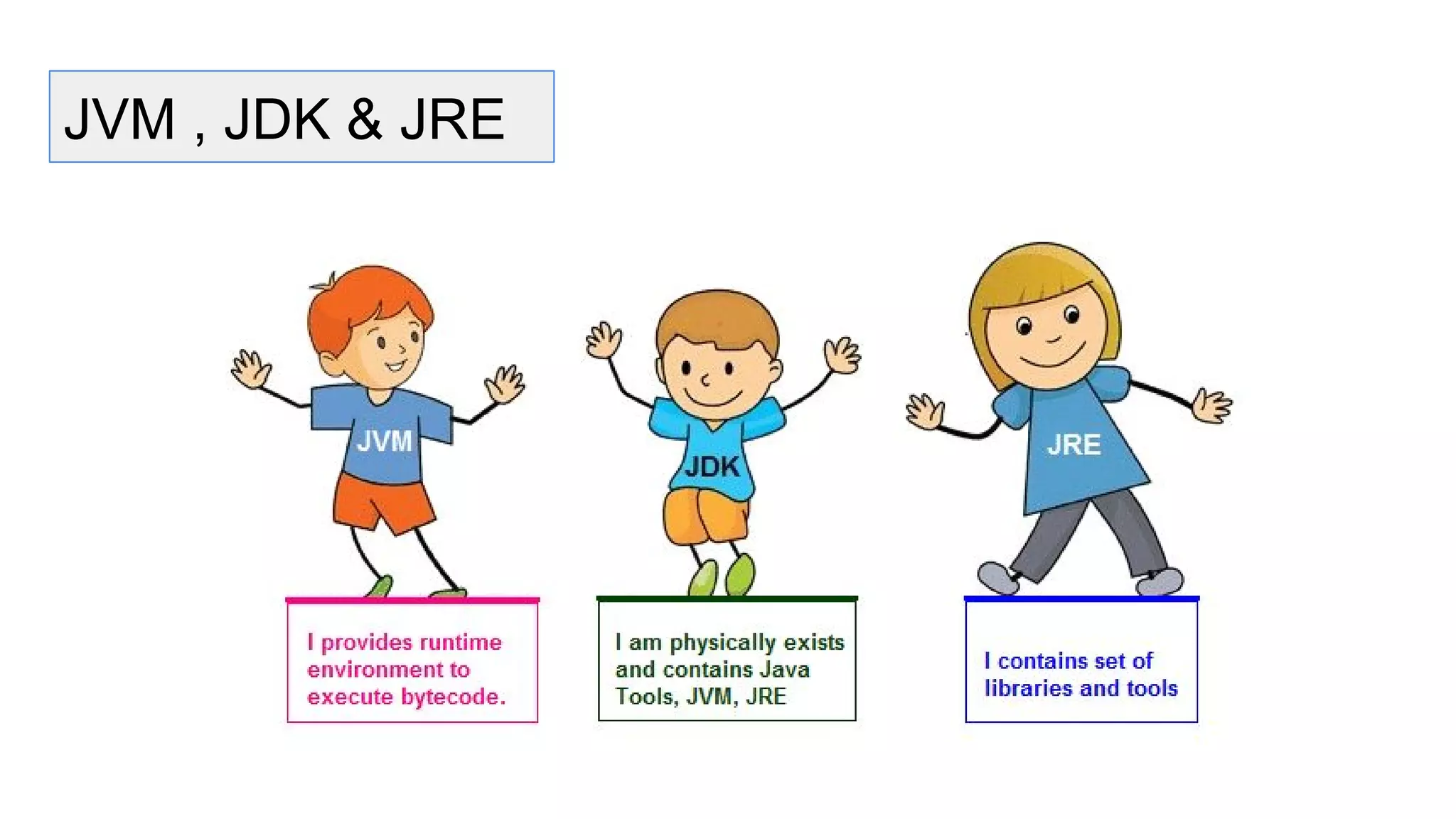
JVM , JDK & JRE
JVM
● JVM (Java Virtual Machine) is a software.
● It is a specification that provides runtime environment in which java bytecode
can be executed.
● It not physically exists.
● JVMs are not same for all hardware and software,for example for window os
JVM is different and for Linux JVM is different.
● JVM, JRE and JDK are platform dependent because configuration of each OS
differs. But, Java is platform independent.
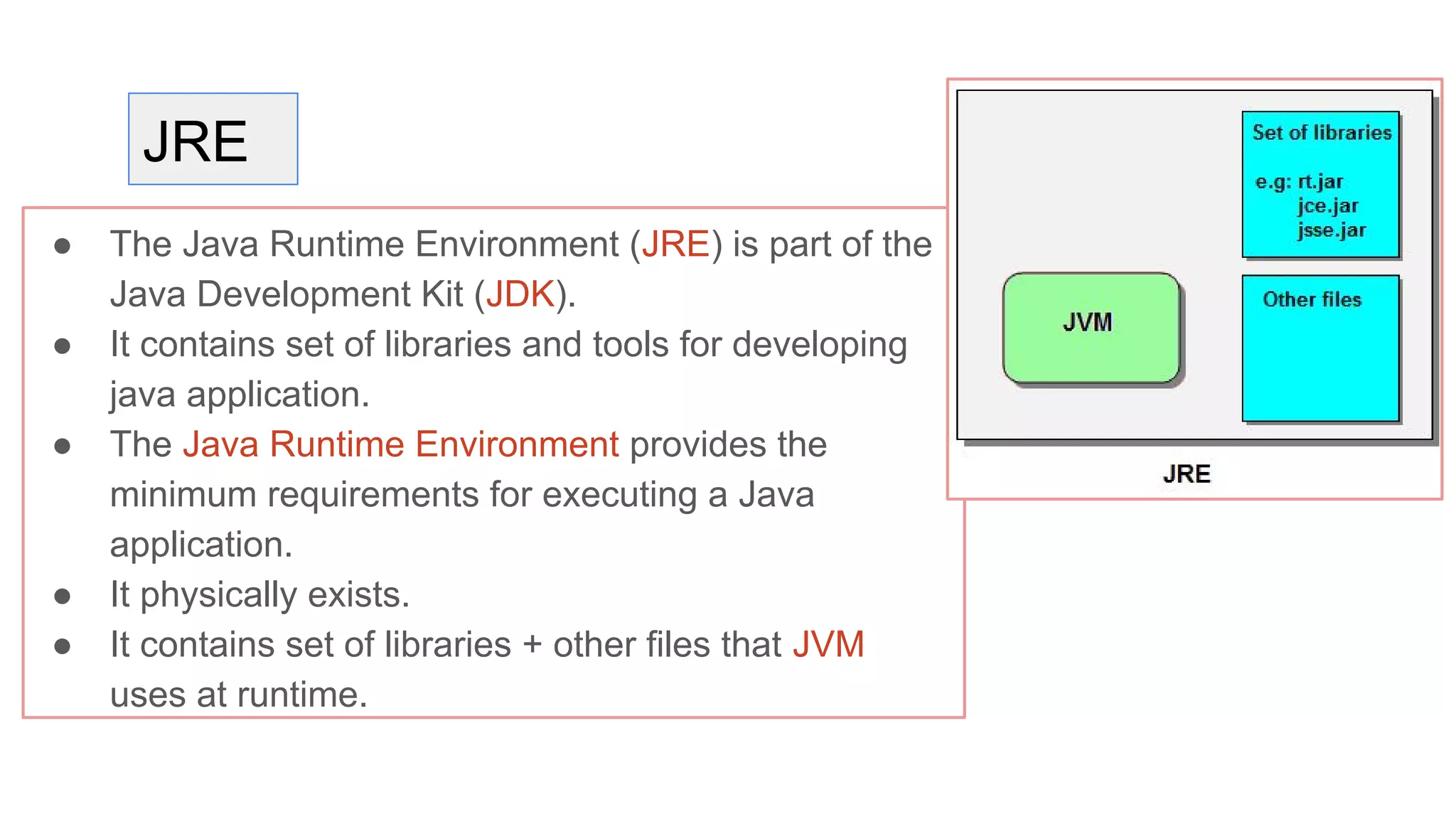
JRE
● The Java Runtime Environment (JRE) is part of the
Java Development Kit (JDK).
● It contains set of libraries and tools for developing
java application.
● The Java Runtime Environment provides the
minimum requirements for executing a Java
application.
● It physically exists.
● It contains set of libraries + other files that JVM
uses at runtime.
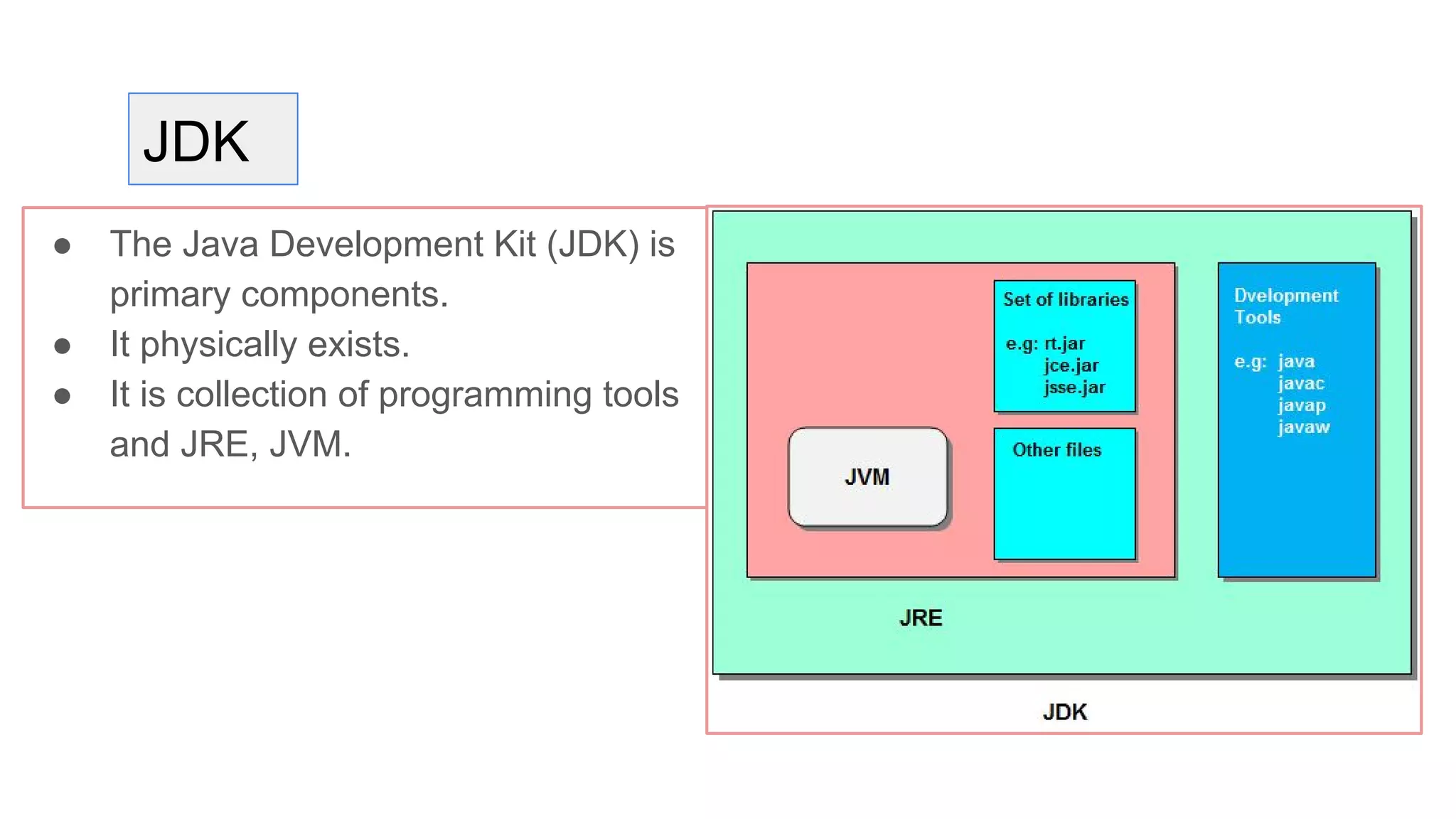
JDK
● The Java Development Kit (JDK) is
primary components.
● It physically exists.
● It is collection of programming tools
and JRE, JVM.
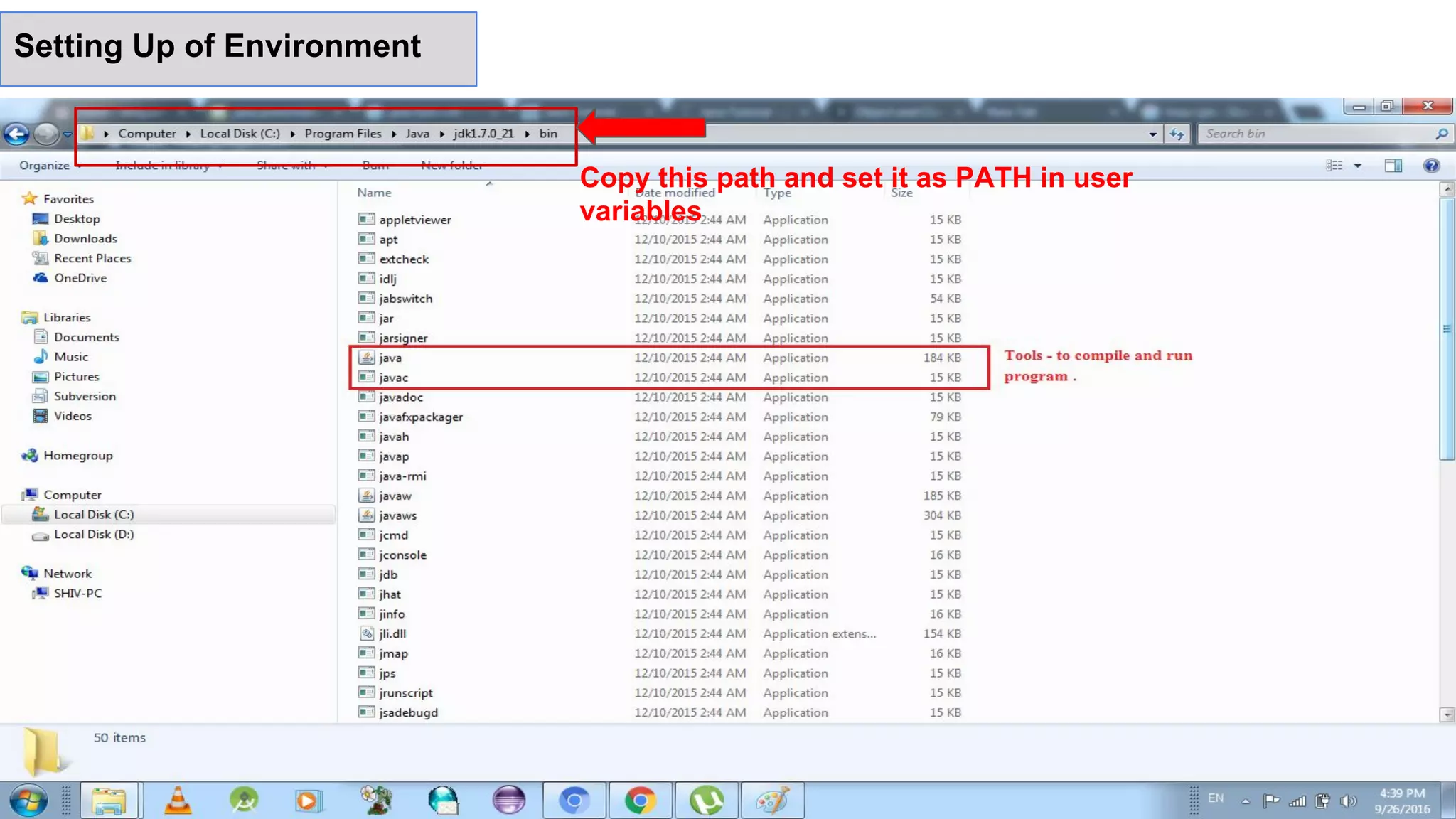
Copy this path and set it as PATH in user
variables
Setting Up of Environment
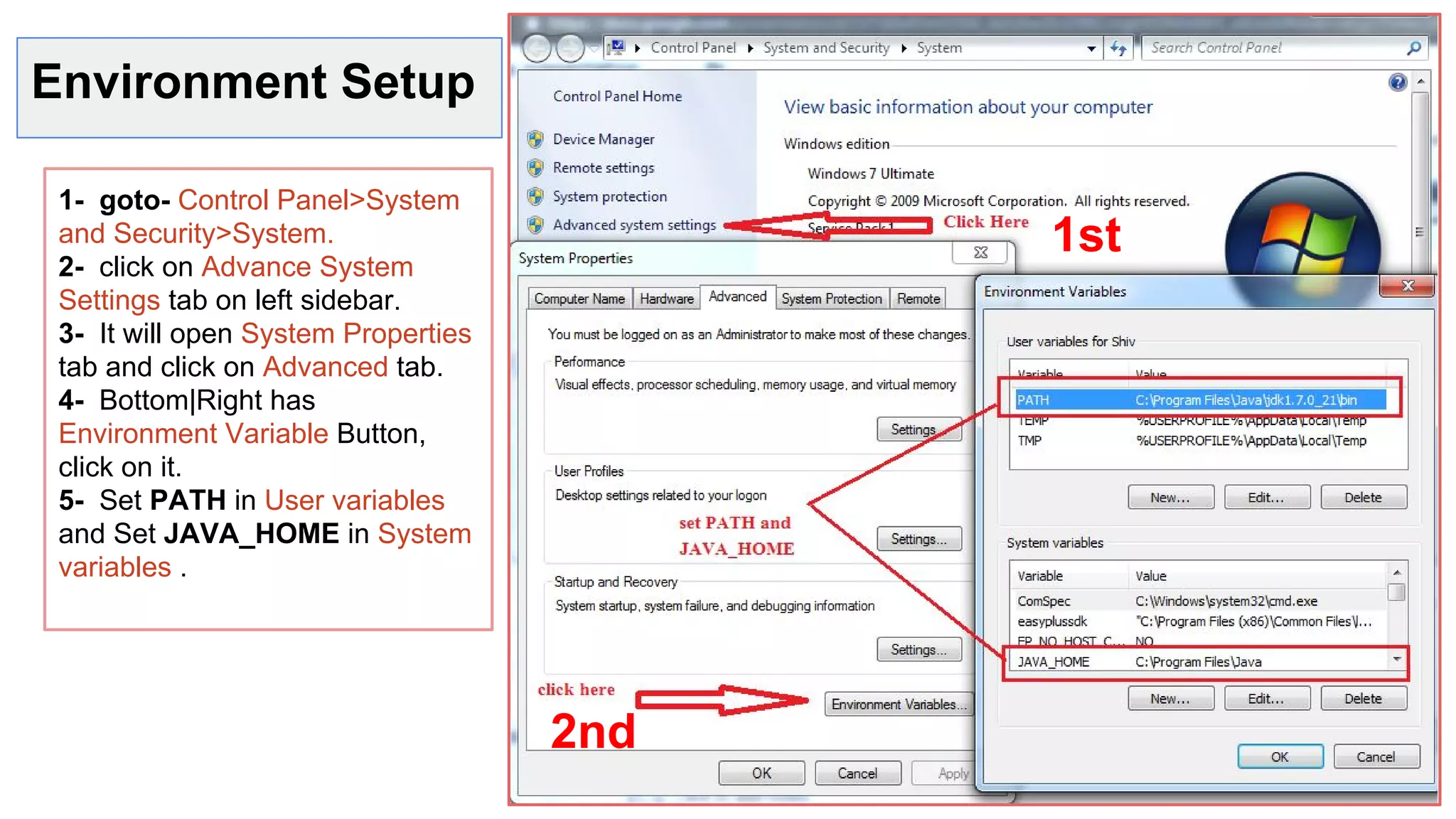
Environment Setup
1- goto- Control Panel>System
and Security>System.
2- click on Advance System
Settings tab on left sidebar.
3- It will open System Properties
tab and click on Advanced tab.
4- Bottom|Right has
Environment Variable Button,
click on it.
5- Set PATH in User variables
and Set JAVA_HOME in System
variables .
1st
2nd
Where JAVA is used?
● Desktop Applications such as acrobat reader, media player, antivirus etc.
● Web Applications such as irctc.co.in, javatpoint.com etc.
● Enterprise Applications such as banking applications.
● Mobile
● Embedded System
● Smart Card
● Robotics
● Games etc.
Types of JAVA Application
There are mainly 4 type of applications that can be created using java
programming:
1- Standalone Application- Antivirus, Media Player etc.
2- Web Application- JSP, Servlets etc. used to make web application
3- Enterprise Application- JAVA EE at business tier
4- Mobile Application. Android and JAVA ME.
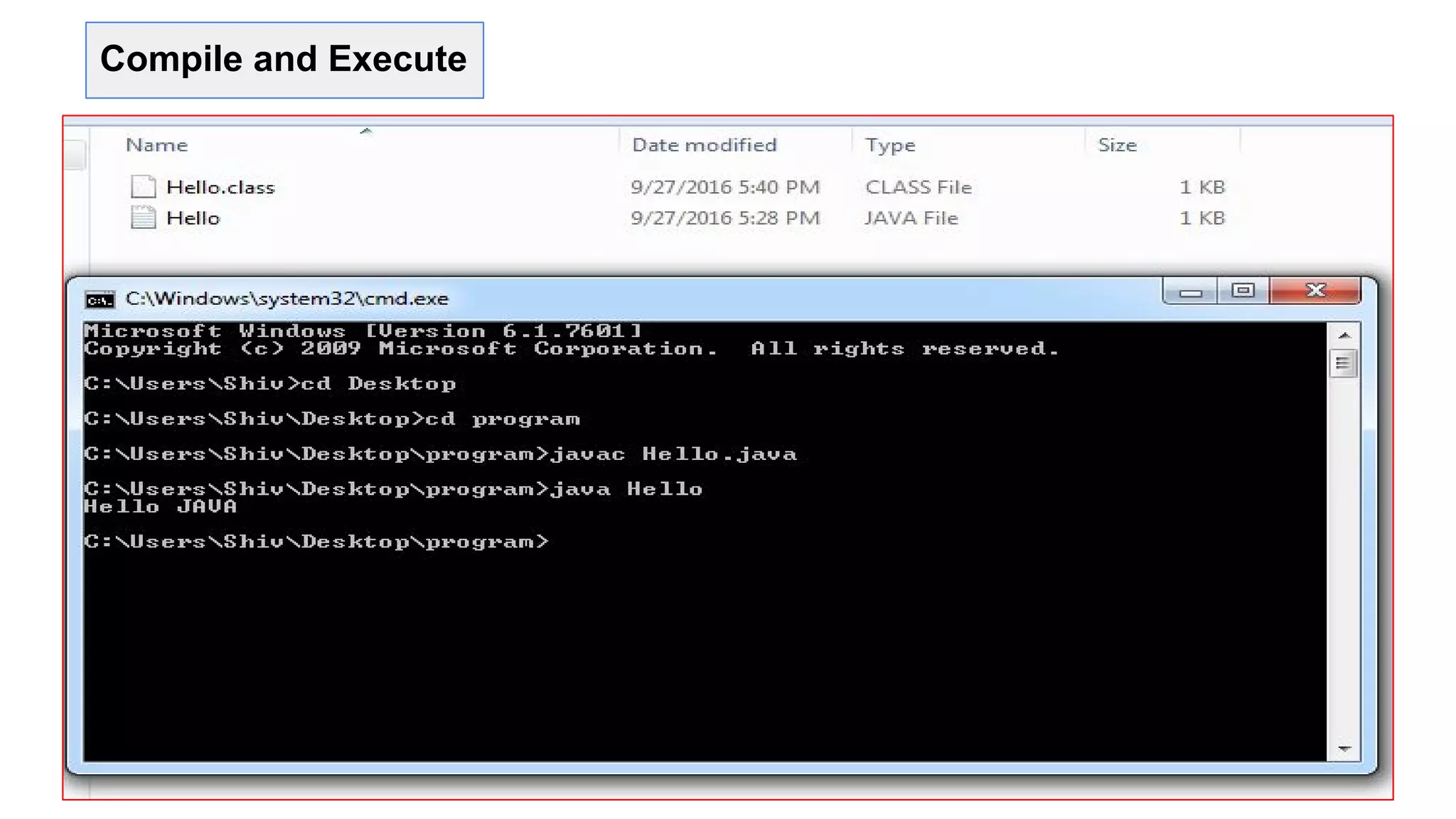
First Program “Hello World”
1- open text editor and write first program
2- Save it as Hello.java
3- Open command prompt or terminal .
4- Go to the file and to compile code write
“javac Hello.java” command.
5- to run “java Hello”.
class Hello {
public static void main (String args[])
{
System.out.println("Hello JAVA");
}
}
Compile and Execute
Class in JAVA
“class is the only logical entity.”
Class: Class is a blueprint which is containing only list of variables and method
and no memory is allocated for them. A class is a group of objects that has
common properties.
A class in java contains:
1- Data Member, 2- Method, 3- Constructor
4- Block, 5- Class and 6- Interface
Object in JAVA
“Object is the physical as well as logical entity.”
Object: Object is an instance of class, object has state and behaviors.
An Object in java has three characteristics:
1- State 2- Behavior 3- Identity
State: Represents data (value) of an object.
Behavior: Represents the behavior (functionality) of an object
Identity: Object identity is typically implemented via a unique ID.
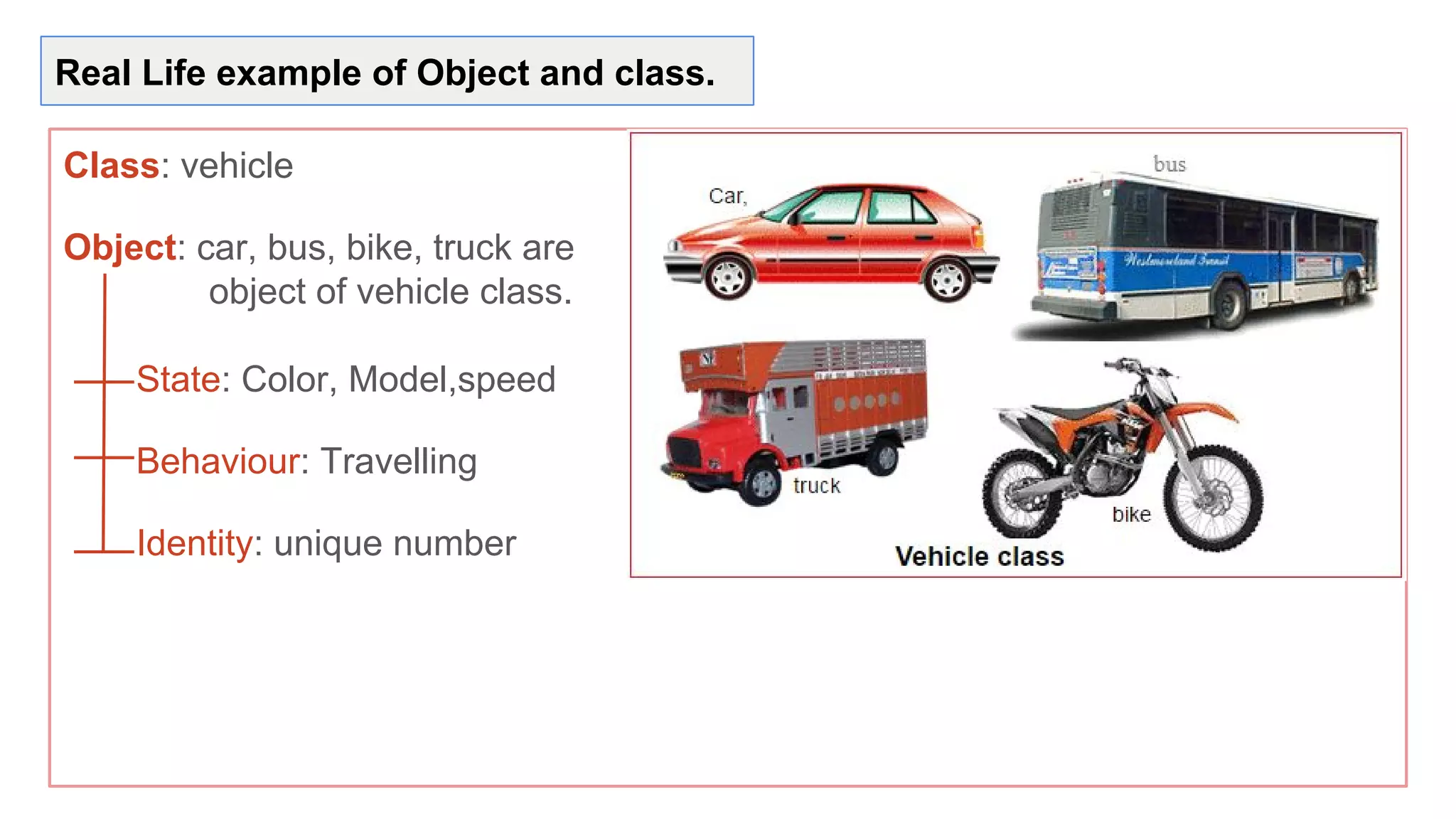
Real Life example of Object and class.
Class: vehicle
Object: car, bus, bike, truck are
object of vehicle class.
State: Color, Model,speed
Behaviour: Travelling
Identity: unique number
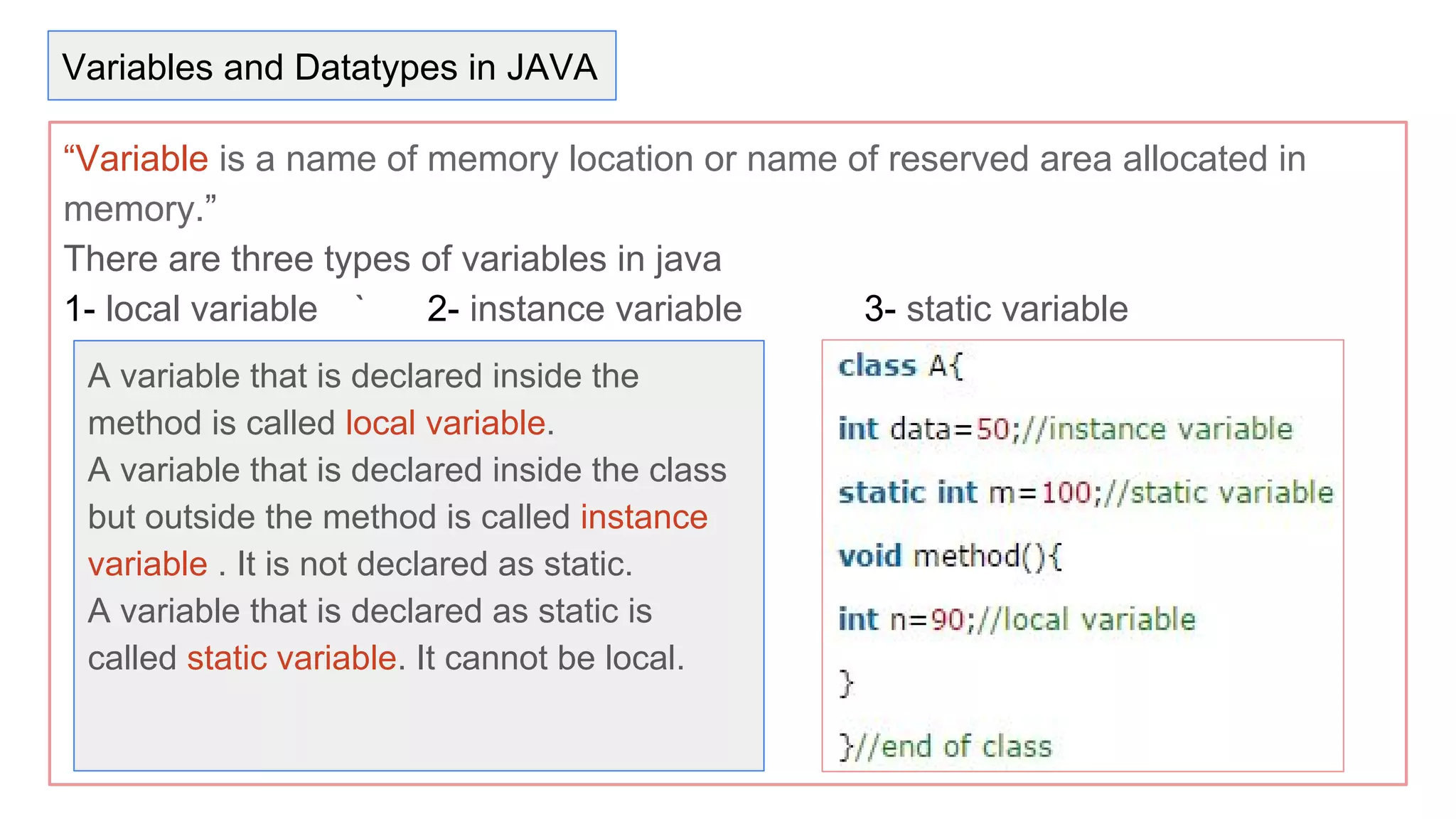
“Variable is a name of memory location or name of reserved area allocated in
memory.”
There are three types of variables in java
1- local variable ` 2- instance variable 3- static variable
A variable that is declared inside the
method is called local variable.
A variable that is declared inside the class
but outside the method is called instance
variable . It is not declared as static.
A variable that is declared as static is
called static variable. It cannot be local.
Variables and Datatypes in JAVA
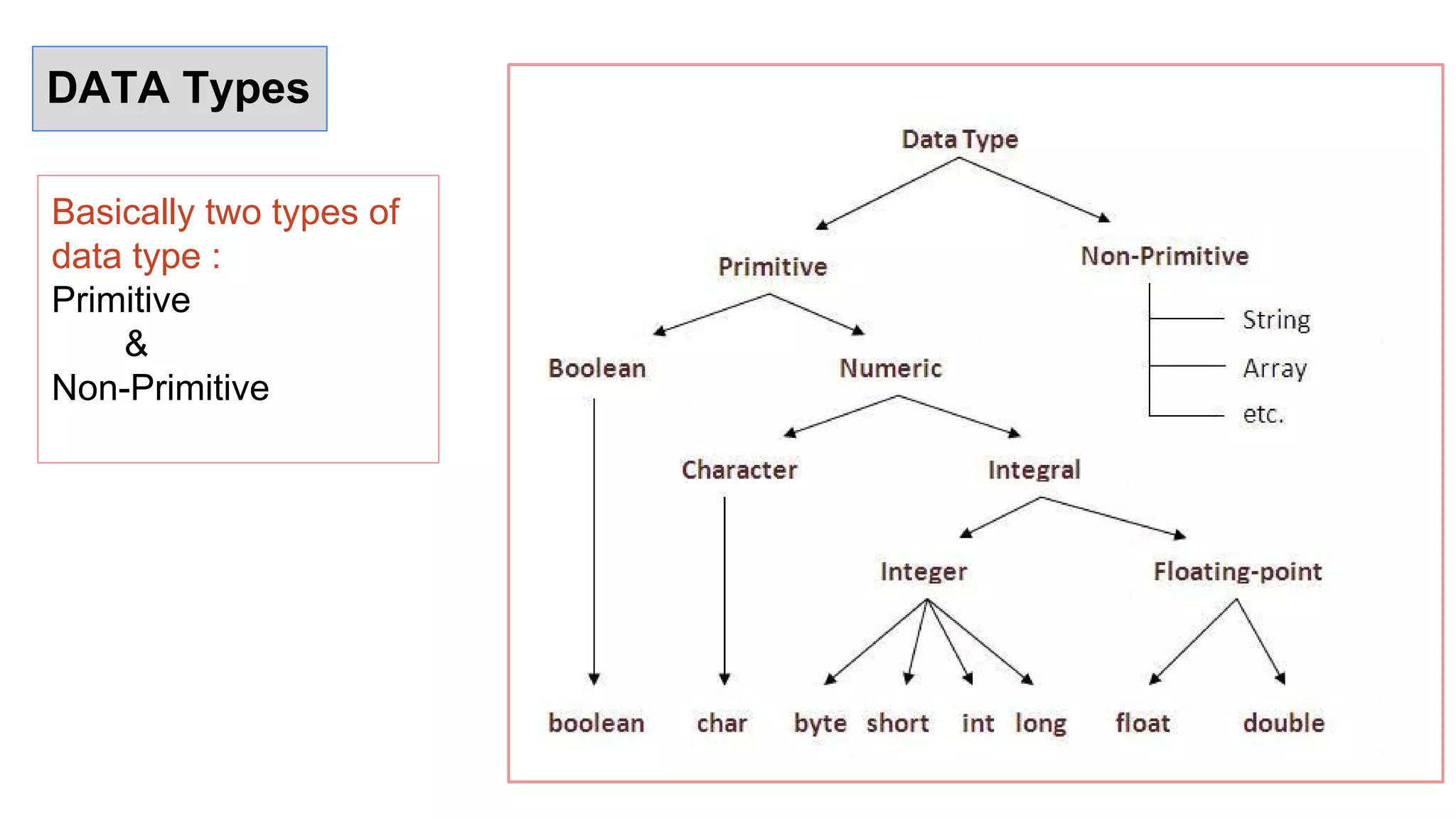
DATA Types
Basically two types of
data type :
Primitive
&
Non-Primitive

Java presentation

  • 2.
    What is java? Javais a programming language and a platform. "Write once, run anywhere" (WORA), or sometimes “write once, run everywhere” (WORE), is a slogan created by Sun Microsystems to illustrate the cross-platform benefits of the Java language. This language was developed at SUN Microsystems in the year 1995 under the guidance of James Gosling and team. Platform: Any hardware or software environment in which a program runs, is known as a platform. Since Java has its own runtime environment (JRE) and API, it is called platform.
  • 3.
    Features of Java 1-Simple 2- Object-Oriented 3- Platform independent 4- Secured 5- Robust 6- Architecture neutral 7- Portable 8- Dynamic 9- Interpreted 10- High Performance 11- Multithreaded 12- Distributed
  • 4.
    Software & toolsrequired Software & Tools- 1- Linux 7.1 or Windows xp/7/8 operating system 2- Java JDK 8 3- Microsoft Notepad or any other text editor 4- Eclipse or NetBeans .
  • 5.
    JVM , JDK& JRE
  • 6.
    JVM ● JVM (JavaVirtual Machine) is a software. ● It is a specification that provides runtime environment in which java bytecode can be executed. ● It not physically exists. ● JVMs are not same for all hardware and software,for example for window os JVM is different and for Linux JVM is different. ● JVM, JRE and JDK are platform dependent because configuration of each OS differs. But, Java is platform independent.
  • 7.
    JRE ● The JavaRuntime Environment (JRE) is part of the Java Development Kit (JDK). ● It contains set of libraries and tools for developing java application. ● The Java Runtime Environment provides the minimum requirements for executing a Java application. ● It physically exists. ● It contains set of libraries + other files that JVM uses at runtime.
  • 8.
    JDK ● The JavaDevelopment Kit (JDK) is primary components. ● It physically exists. ● It is collection of programming tools and JRE, JVM.
  • 9.
    Copy this pathand set it as PATH in user variables Setting Up of Environment
  • 10.
    Environment Setup 1- goto-Control Panel>System and Security>System. 2- click on Advance System Settings tab on left sidebar. 3- It will open System Properties tab and click on Advanced tab. 4- Bottom|Right has Environment Variable Button, click on it. 5- Set PATH in User variables and Set JAVA_HOME in System variables . 1st 2nd
  • 11.
    Where JAVA isused? ● Desktop Applications such as acrobat reader, media player, antivirus etc. ● Web Applications such as irctc.co.in, javatpoint.com etc. ● Enterprise Applications such as banking applications. ● Mobile ● Embedded System ● Smart Card ● Robotics ● Games etc.
  • 12.
    Types of JAVAApplication There are mainly 4 type of applications that can be created using java programming: 1- Standalone Application- Antivirus, Media Player etc. 2- Web Application- JSP, Servlets etc. used to make web application 3- Enterprise Application- JAVA EE at business tier 4- Mobile Application. Android and JAVA ME.
  • 13.
    First Program “HelloWorld” 1- open text editor and write first program 2- Save it as Hello.java 3- Open command prompt or terminal . 4- Go to the file and to compile code write “javac Hello.java” command. 5- to run “java Hello”. class Hello { public static void main (String args[]) { System.out.println("Hello JAVA"); } }
  • 14.
  • 15.
    Class in JAVA “classis the only logical entity.” Class: Class is a blueprint which is containing only list of variables and method and no memory is allocated for them. A class is a group of objects that has common properties. A class in java contains: 1- Data Member, 2- Method, 3- Constructor 4- Block, 5- Class and 6- Interface
  • 16.
    Object in JAVA “Objectis the physical as well as logical entity.” Object: Object is an instance of class, object has state and behaviors. An Object in java has three characteristics: 1- State 2- Behavior 3- Identity State: Represents data (value) of an object. Behavior: Represents the behavior (functionality) of an object Identity: Object identity is typically implemented via a unique ID.
  • 17.
    Real Life exampleof Object and class. Class: vehicle Object: car, bus, bike, truck are object of vehicle class. State: Color, Model,speed Behaviour: Travelling Identity: unique number
  • 18.
    “Variable is aname of memory location or name of reserved area allocated in memory.” There are three types of variables in java 1- local variable ` 2- instance variable 3- static variable A variable that is declared inside the method is called local variable. A variable that is declared inside the class but outside the method is called instance variable . It is not declared as static. A variable that is declared as static is called static variable. It cannot be local. Variables and Datatypes in JAVA
  • 19.
    DATA Types Basically twotypes of data type : Primitive & Non-Primitive