The document contains 21 code snippets showing examples of various Java programming concepts. The code snippets cover topics such as classes and objects, inheritance, interfaces, exceptions, threads, applets, packages, input/output, and networking.
1. Program togenerate Fibonacci series
import java.io.*;
import java.util.*;
public class Fibonacci
{
public static void main(String[] args)
{
DataInputStream reader = new DataInputStream((System.in));
int f1=0,f2=0,f3=1;
try
{
System.out.print("Enter value of n: ");
String st = reader.readLine();
int num = Integer.parseInt(st);
for(int i=1;i<=num;i++)
{
System.out.println("tt"+f3+"tnt");
f1=f2;
f2=f3;
f3=f1+f2;
}
}
catch(Exception e)
{
System.out.println("wrong input");
}
}
}
2. Program to take two numbers as input from command line interface and display their sum
2.
Coding:
class Sum
{
public void add(int a,int b)
{
int c;
c=a+b;
System.out.print("tttnnThe sum of two no is = "+c);
System.out.println("nnn");
}
}
class SMain
{
public static void main(String arg[])
{
Sum obj1=new Sum();
int x,y;
String s1,s2;
s1=arg[0];
s2=arg[1];
x=Integer.parseInt(s1);
y=Integer.parseInt(s2);
obj1.add(x,y);
}
}
3. Use of array in java
Coding:
class Person
{
String name[];
int age[];
}
3.
class PersonMain
{
public staticvoid main(String arg[])
{
Person obj=new Person();
obj.name=new String[6];
obj.age=new int[6];
obj.name[0]="Neha";
obj.age[0]=19;
obj.name[1]="manpreet";
obj.age[1]=19;
obj.name[2]="rahul";
obj.age[2]=23;
obj.name[3]="yuvraj";
obj.age[3]=12;
obj.name[4]="kombe";
obj.age[4]=19;
obj.name[5]="tony";
obj.age[5]=19;
4.
for(int i=0;i<4;i++)
System.out.println(obj.name[i]);
{
for(int j=0;j<4;j++)
System.out.println(obj.age[j]);
}
}
}
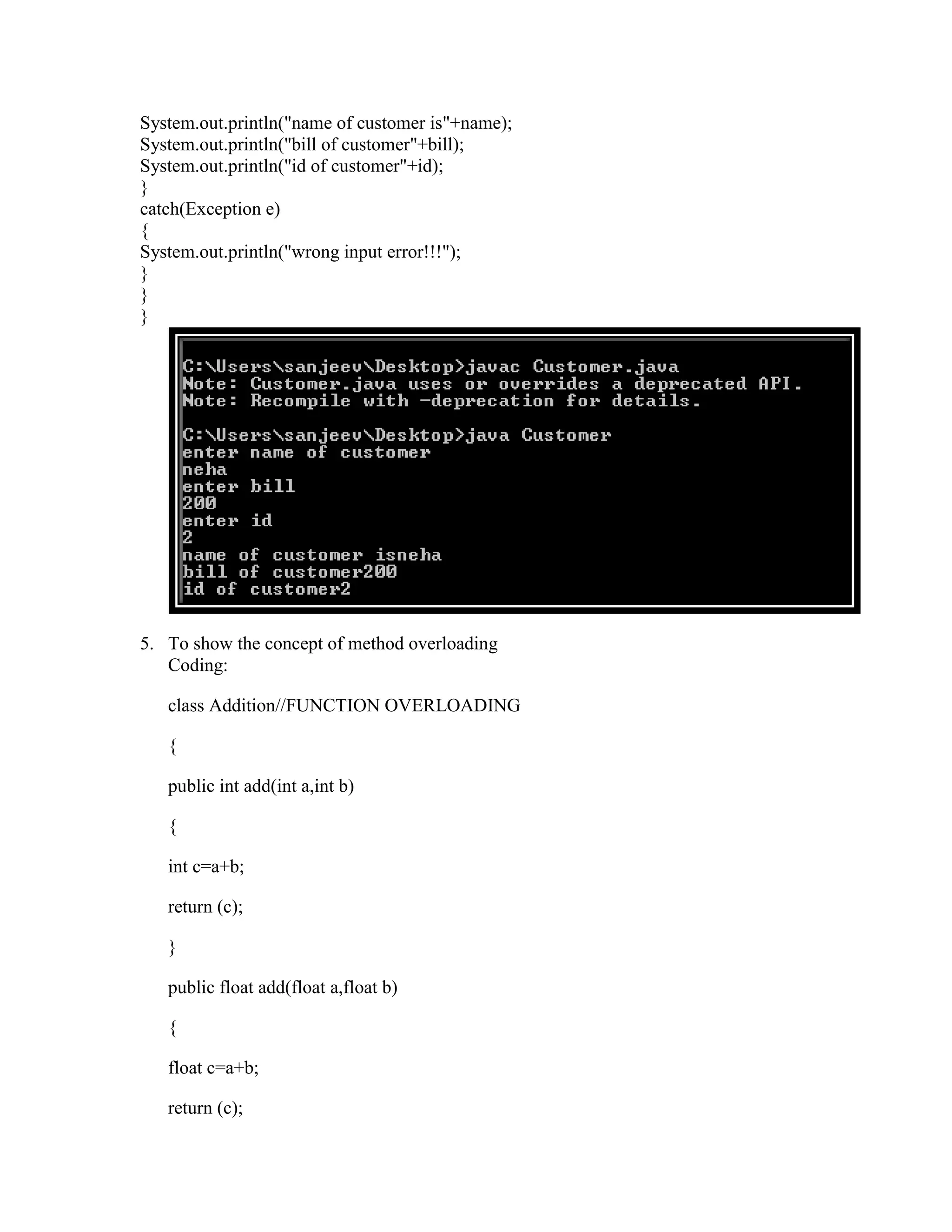
4.Create a class customer having three attributes name, bill and id. Include appropriate
methods for taking input from customer and displaying its values
Coding: import java.io.DataInputStream;
class Customer
{
public static void main(String arf[])
{
DataInputStream myinput=new DataInputStream(System.in);
String name;
int bill=0,id=0;
try
{
System.out.println("enter name of customer");
name=myinput.readLine();
System.out.println("enter bill");
bill=Integer.parseInt(myinput.readLine());
System.out.println("enter id");
id=Integer.parseInt(myinput.readLine());
5.
System.out.println("name of customeris"+name);
System.out.println("bill of customer"+bill);
System.out.println("id of customer"+id);
}
catch(Exception e)
{
System.out.println("wrong input error!!!");
}
}
}
5. To show the concept of method overloading
Coding:
class Addition//FUNCTION OVERLOADING
{
public int add(int a,int b)
{
int c=a+b;
return (c);
}
public float add(float a,float b)
{
float c=a+b;
return (c);
6.
}
public double add(double a,double b)
{
double c=a+b;
return (c);
}
}
class AddMain
{
public static void main(String arg[])
{
Addition obj=new Addition();
System.out.println(obj.add(20,30));
System.out.println(obj.add(100.44f,20.54f));
System.out.println(obj.add(1380.544,473.56784));
}
}
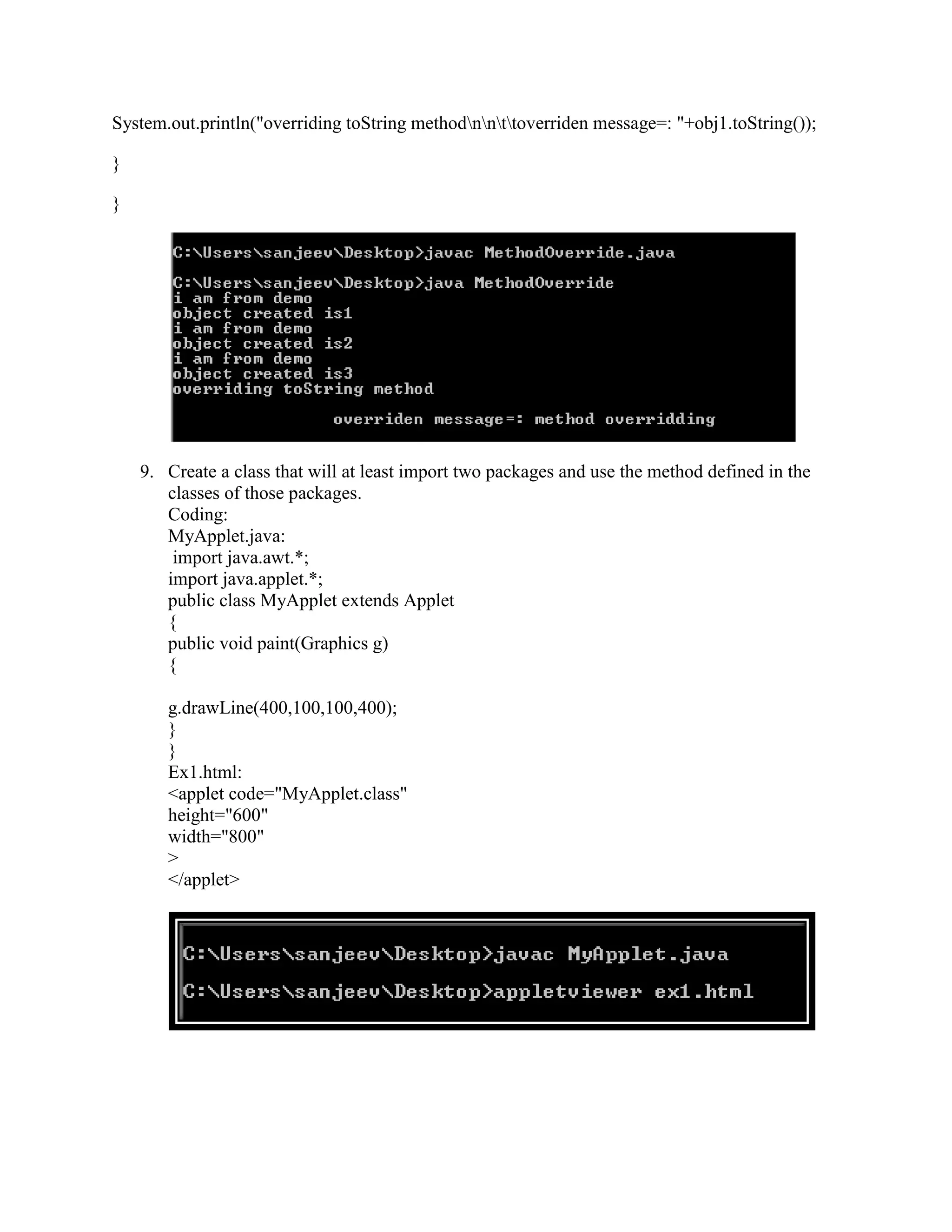
6. To count no. of object created of a class
class Demo//OBJECT CREATION
{
private static int count=0;
public Demo()
7.
{
System.out.println("i am from demo");
count++;
System.out.println("object created is"+count);
}
}
class DemoMains
{
public static void main(String args[])
{
Demo obj1=new Demo();
Demo obj2=new Demo();
Demo obj3=new Demo();
}
}
7. To show concept of multilevel inheritance
Coding:
class A
{
private int num1,num2,sum;
public void set(int x,int y)
{
8.
num1=x;
num2=y;
sum=num1+num2;
}
public int get1()
{
return(sum);
}
}
classB extends A
{
public void display()
{
System.out.println("sum of two numbers is"+get1());
}
}
class C extends B
{
private double sqr;
public void sqrs()
{
sqr=java.lang.Math.sqrt(get1());
System.out.println("square root of sum is"+sqr);
}
}
class ABCMain
{
public static void main(String args[])
{
C obj1=new C();
obj1.set(100,200);
System.out.println("first number is 100");
System.out.println("second number is 200");
obj1.display();
obj1.sqrs();
}
}
9.
8. To show concept of method overriding
Coding:
class Demo
{
private static int count=0;
public Demo()
{
System.out.println("i am from demo");
count++;
System.out.println("object created is"+count);
}
public String toString()
{
return("method overridding");
}
}
class MethodOverride
{
public static void main(String args[])
{
Demo obj1=new Demo();
Demo obj2=new Demo();
Demo obj3=new Demo();
10.
System.out.println("overriding toString methodnnttoverridenmessage=: "+obj1.toString());
}
}
9. Create a class that will at least import two packages and use the method defined in the
classes of those packages.
Coding:
MyApplet.java:
import java.awt.*;
import java.applet.*;
public class MyApplet extends Applet
{
public void paint(Graphics g)
{
g.drawLine(400,100,100,400);
}
}
Ex1.html:
<applet code="MyApplet.class"
height="600"
width="800"
>
</applet>
11.
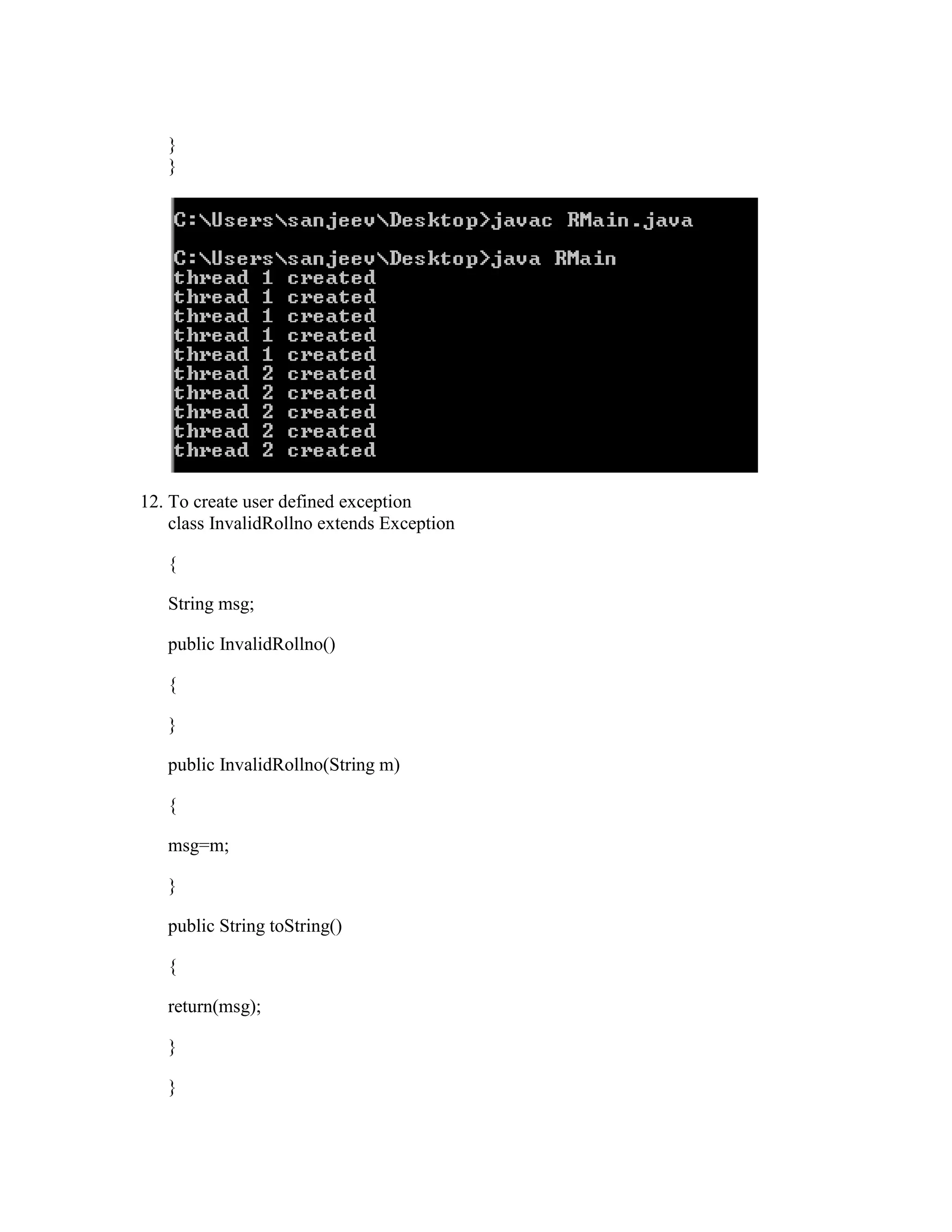
10. To createthread by extending thread class
Coding:
class T1 extends Thread
{
public void run()
{
for(int i=0;i<5;i++)
{
System.out.println("thread 1 created");
}
}
}
class T2 extends Thread
{
public void run()
{
for(int i=0;i<5;i++)
{
System.out.println("thread 2 created");
}
}
}
class TMain
{
public static void main(String arg[])
{
T1 obj1=new T1();
obj1.start();
T2 obj2=new T2();
obj2.start();
}
}
}
}
12. To create user defined exception
class InvalidRollno extends Exception
{
String msg;
public InvalidRollno()
{
}
public InvalidRollno(String m)
{
msg=m;
}
public String toString()
{
return(msg);
}
}
14.
class Student
{
private introllno;
public void setStudent(int r) throws InvalidRollno
{
rollno=r;
if(r<1)
{
throw new InvalidRollno("invalid rollno");
}
}
}
class SMain
{
public static void main(String agf[])
{
Student obj1=new Student();
try
{
obj1.setStudent(-11);
}
catch(InvalidRollno e)
{
System.out.println(e);
}
15.
}
}
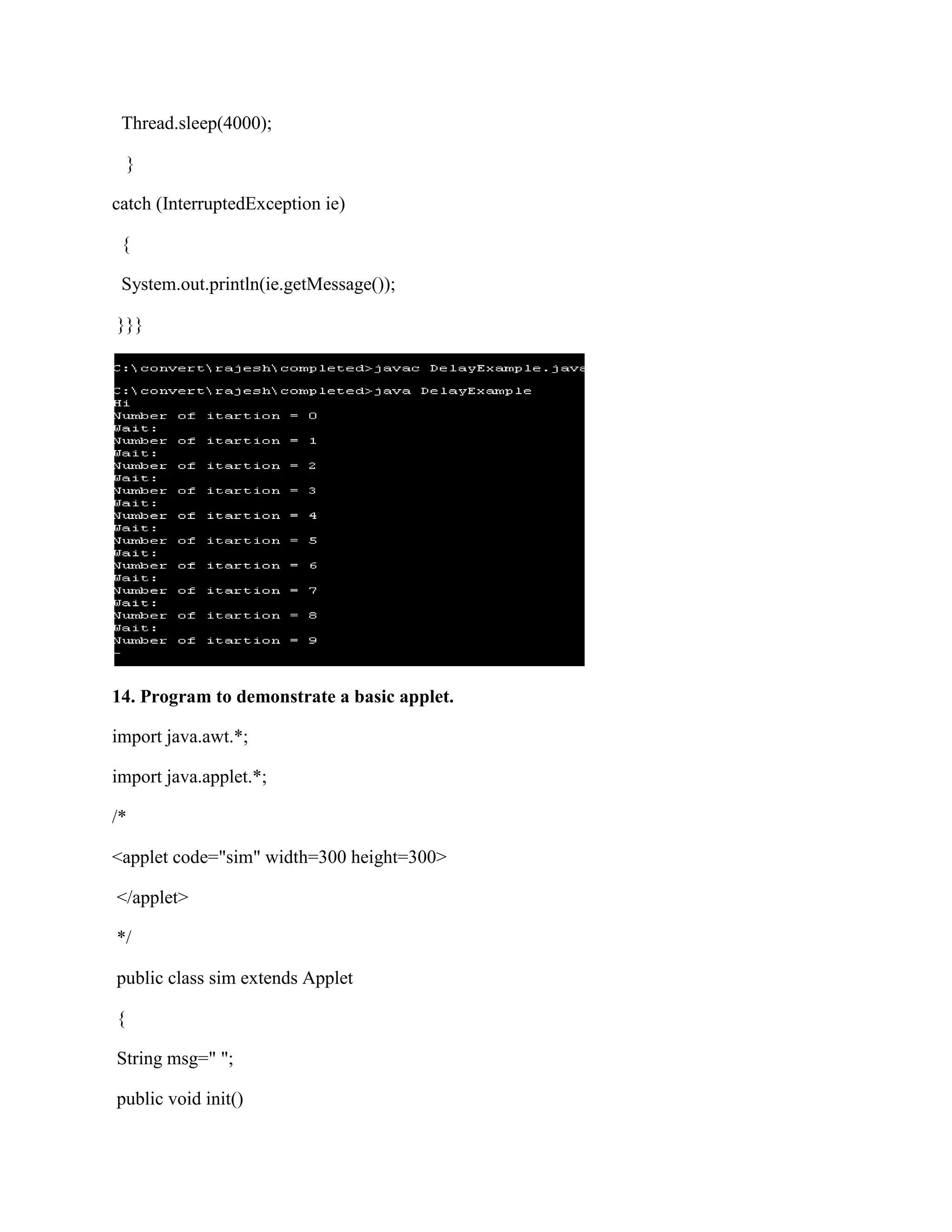
13. Program for showing the concept of sleep method in multithreading.
public class DelayExample{
public static void main(String[] args)
{
System.out.println("Hi");
for (int i = 0; i < 10; i++)
{
System.out.println("Number of itartion = " + i);
System.out.println("Wait:");
try
{
16.
Thread.sleep(4000);
}
catch (InterruptedException ie)
{
System.out.println(ie.getMessage());
}}}
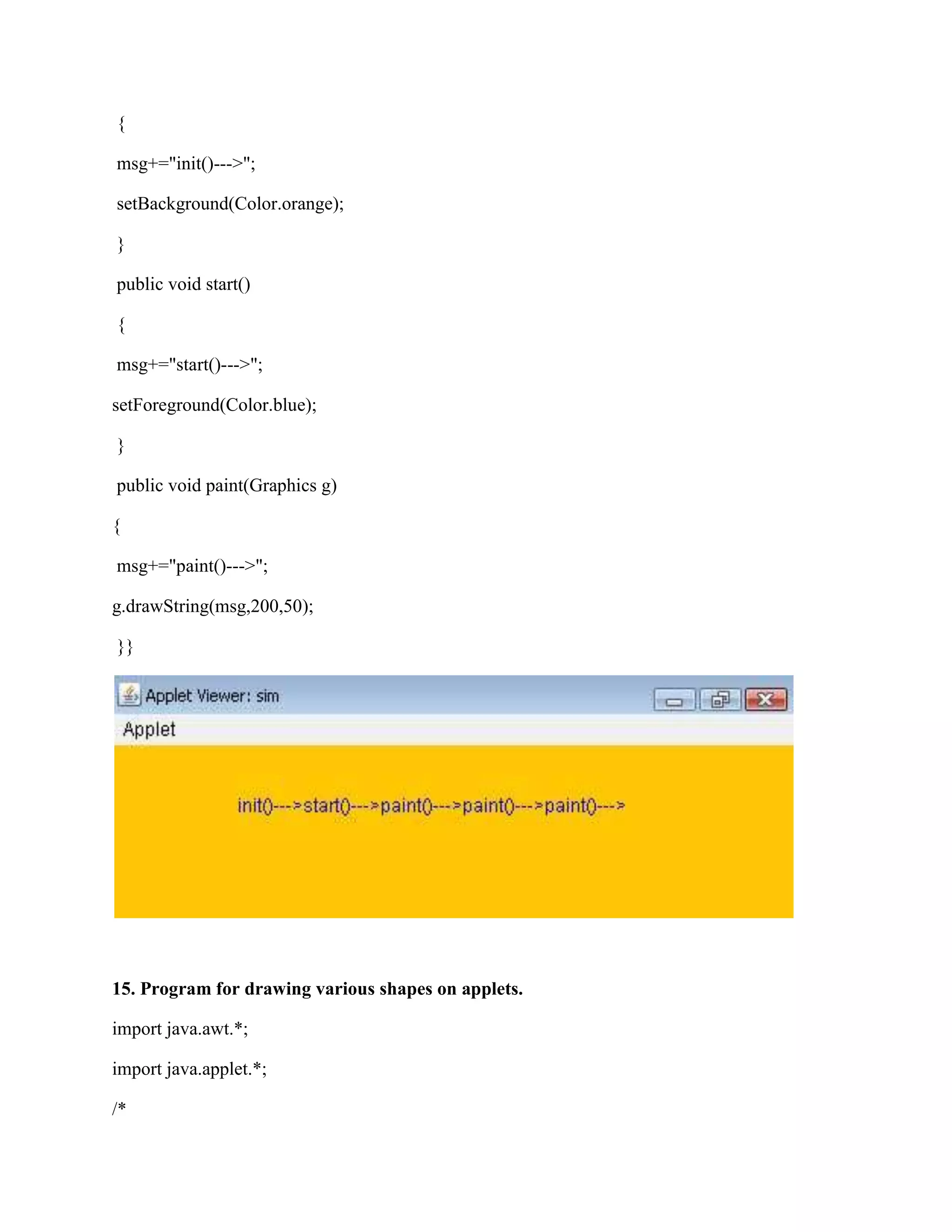
14. Program to demonstrate a basic applet.
import java.awt.*;
import java.applet.*;
/*
<applet code="sim" width=300 height=300>
</applet>
*/
public class sim extends Applet
{
String msg=" ";
public void init()
{
if (e.getSource() ==theButton)
changeColor();
}
}
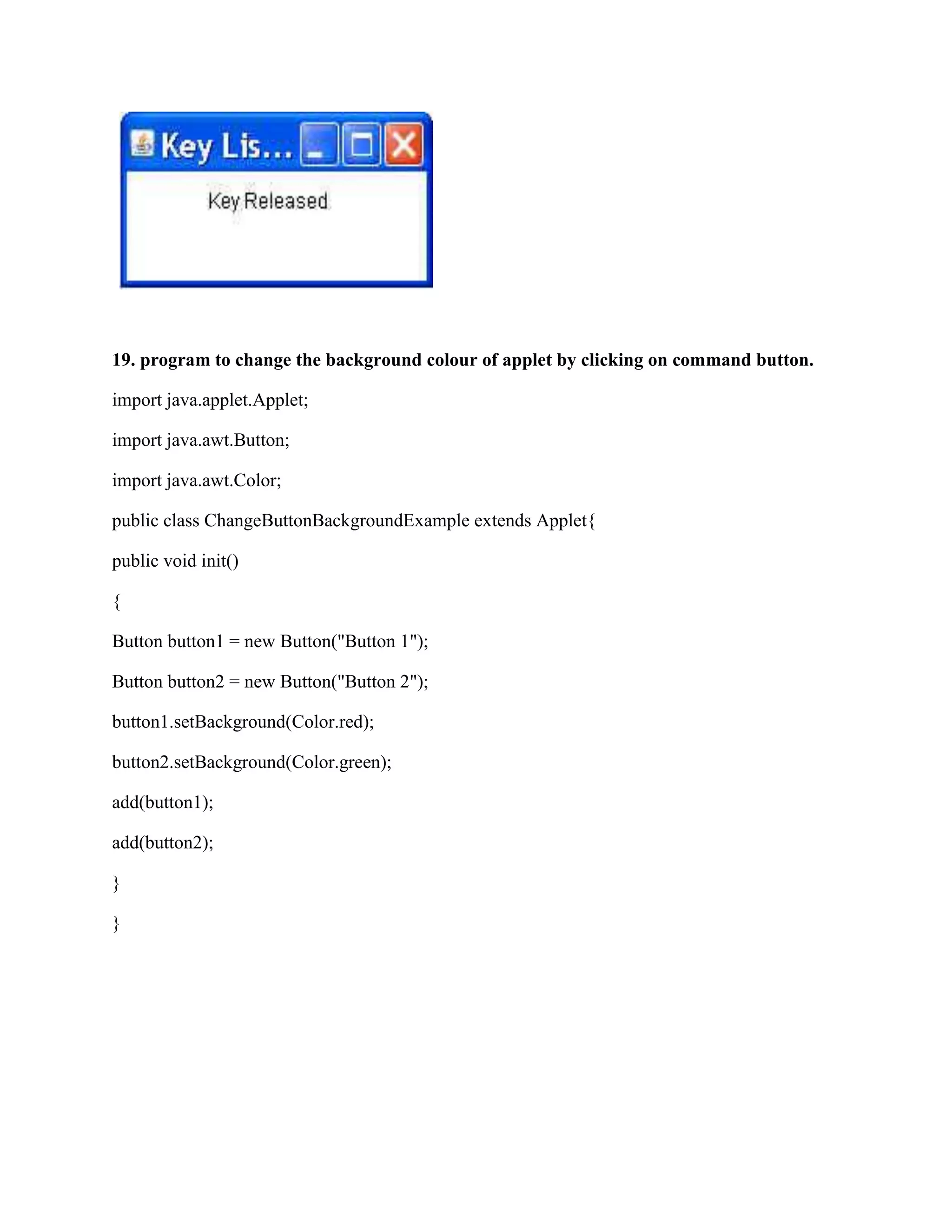
18. Program of an applet which uses the various methods defined in the key listener
interface.
import java.awt.*;
import java.awt.event.*;
public class KeyListenerTester extends Frame implements KeyListener{
TextField t1;
Label l1;
public KeyListenerTester(String s ) {
super(s);
Panel p =new Panel();
l1 = new Label ("Key Listener!" ) ;
p.add(l1);
add(p);
addKeyListener ( this ) ;
24.
setSize ( 200,100);
setVisible(true);
addWindowListener(new WindowAdapter(){
public void windowClosing(WindowEvent e){
System.exit(0);
}
});
}
public void keyTyped ( KeyEvent e ){
l1.setText("Key Typed");
}
public void keyPressed ( KeyEvent e){
l1.setText ( "Key Pressed" ) ;
}
public void keyReleased ( KeyEvent e ){
l1.setText( "Key Released" ) ;
}
public static void main (String[]args ){
new KeyListenerTester ( "Key Listener Tester" ) ;
}
}
25.
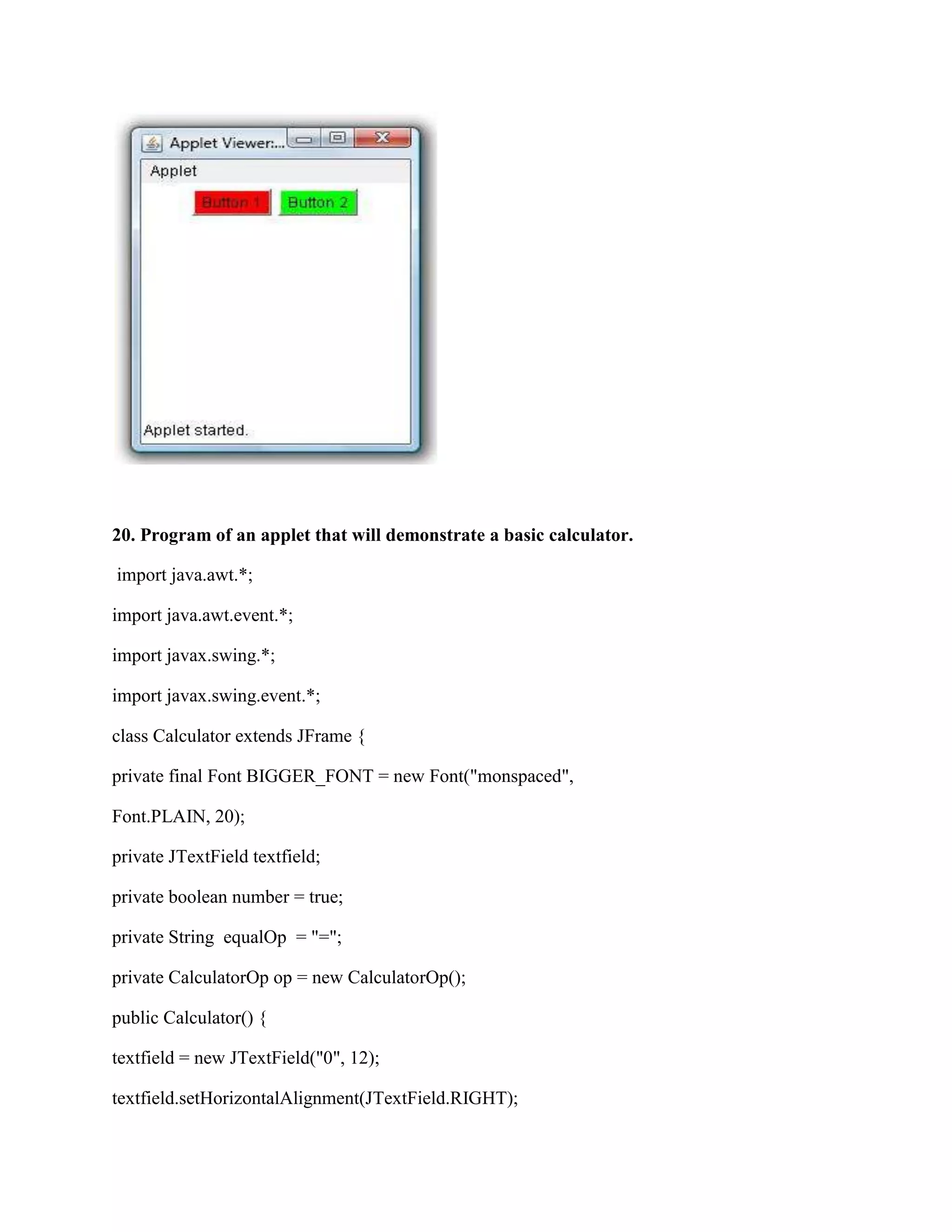
19. program tochange the background colour of applet by clicking on command button.
import java.applet.Applet;
import java.awt.Button;
import java.awt.Color;
public class ChangeButtonBackgroundExample extends Applet{
public void init()
{
Button button1 = new Button("Button 1");
Button button2 = new Button("Button 2");
button1.setBackground(Color.red);
button2.setBackground(Color.green);
add(button1);
add(button2);
}
}
26.
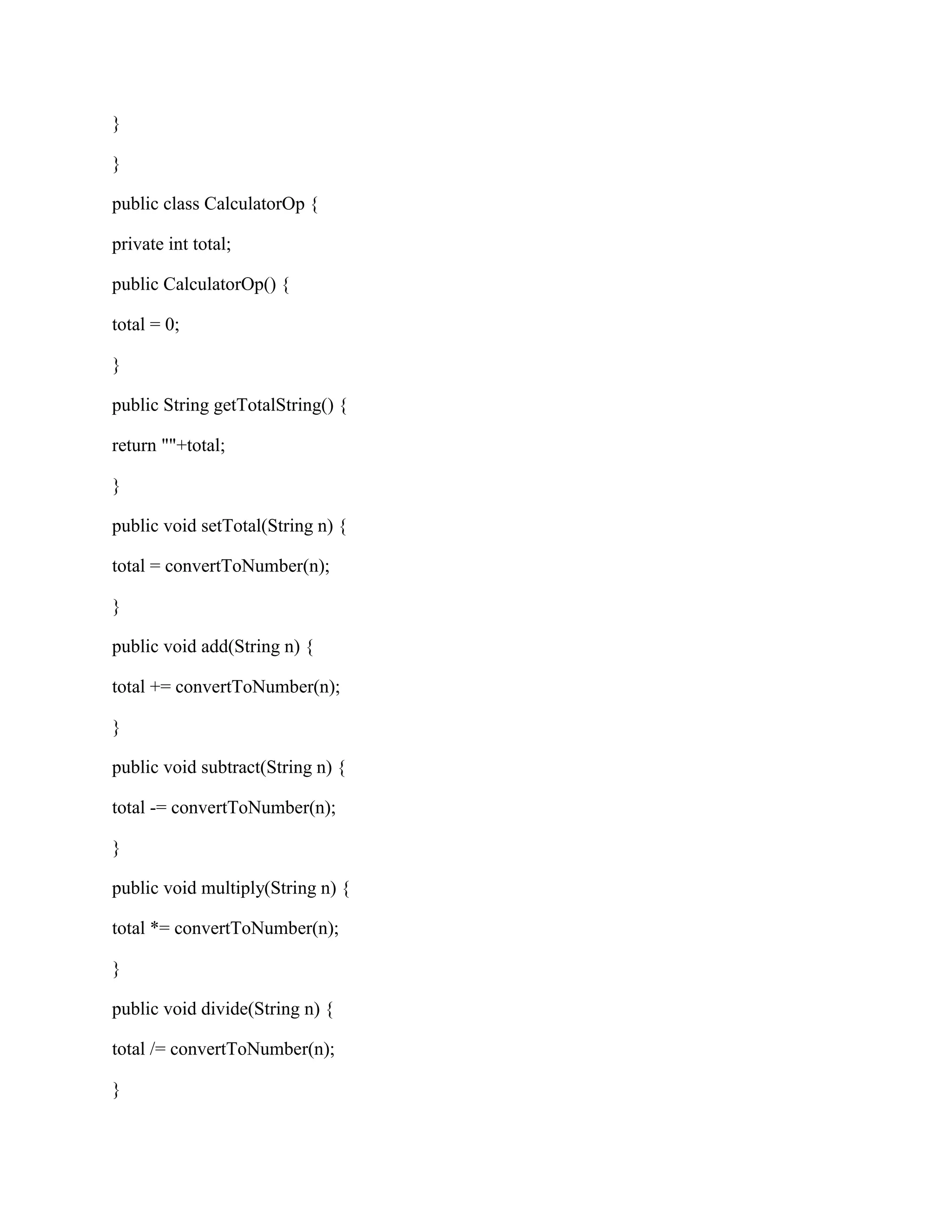
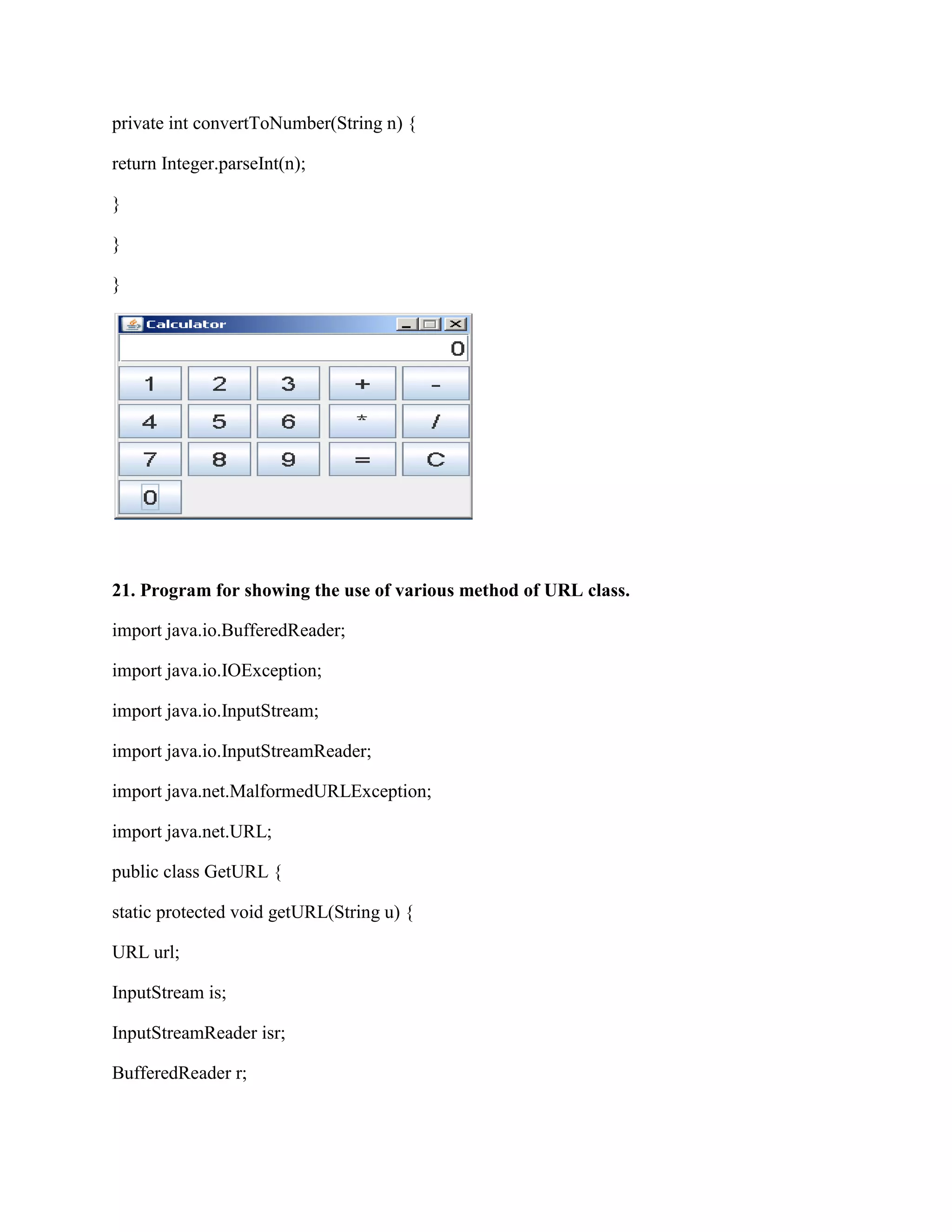
20. Program ofan applet that will demonstrate a basic calculator.
import java.awt.*;
import java.awt.event.*;
import javax.swing.*;
import javax.swing.event.*;
class Calculator extends JFrame {
private final Font BIGGER_FONT = new Font("monspaced",
Font.PLAIN, 20);
private JTextField textfield;
private boolean number = true;
private String equalOp = "=";
private CalculatorOp op = new CalculatorOp();
public Calculator() {
textfield = new JTextField("0", 12);
textfield.setHorizontalAlignment(JTextField.RIGHT);
27.
textfield.setFont(BIGGER_FONT);
ActionListener numberListener =new NumberListener();
String buttonOrder = "1234567890 ";
JPanel buttonPanel = new JPanel();
buttonPanel.setLayout(new GridLayout(4, 4, 4, 4));
for (int i = 0; i < buttonOrder.length(); i++) {
String key = buttonOrder.substring(i, i+1);
if (key.equals(" ")) {
buttonPanel.add(new JLabel(""));
} else {
JButton button = new JButton(key);
button.addActionListener(numberListener);
button.setFont(BIGGER_FONT);
buttonPanel.add(button);
}
}
ActionListener operatorListener = new OperatorListener();
JPanel panel = new JPanel();
panel.setLayout(new GridLayout(4, 4, 4, 4));
String[] opOrder = {"+", "-", "*", "/","=","C"};
for (int i = 0; i < opOrder.length; i++) {
JButton button = new JButton(opOrder[i]);
button.addActionListener(operatorListener);
button.setFont(BIGGER_FONT);
panel.add(button);
if (equalOp.equals("=")) {
op.setTotal(displayText);
}else if (equalOp.equals("+")) {
op.add(displayText);
} else if (equalOp.equals("-")) {
op.subtract(displayText);
} else if (equalOp.equals("*")) {
op.multiply(displayText);
} else if (equalOp.equals("/")) {
op.divide(displayText);
}
textfield.setText("" + op.getTotalString());
equalOp = e.getActionCommand();
}
}
}
class NumberListener implements ActionListener {
public void actionPerformed(ActionEvent event) {
String digit = event.getActionCommand();
if (number) {
textfield.setText(digit);
number = false;
} else {
textfield.setText(textfield.getText() + digit);
}
30.
}
}
public class CalculatorOp{
private int total;
public CalculatorOp() {
total = 0;
}
public String getTotalString() {
return ""+total;
}
public void setTotal(String n) {
total = convertToNumber(n);
}
public void add(String n) {
total += convertToNumber(n);
}
public void subtract(String n) {
total -= convertToNumber(n);
}
public void multiply(String n) {
total *= convertToNumber(n);
}
public void divide(String n) {
total /= convertToNumber(n);
}
31.
private int convertToNumber(Stringn) {
return Integer.parseInt(n);
}
}
}
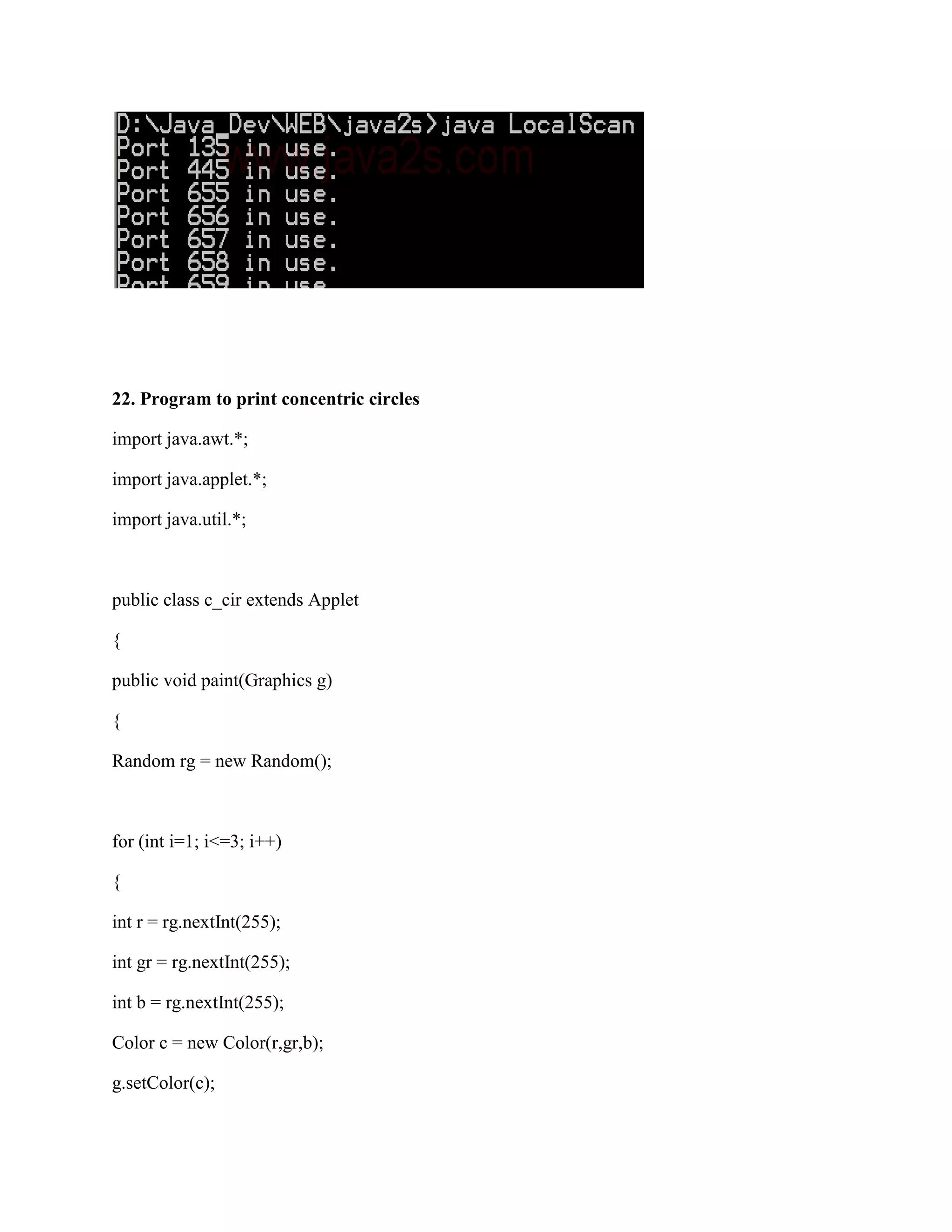
21. Program for showing the use of various method of URL class.
import java.io.BufferedReader;
import java.io.IOException;
import java.io.InputStream;
import java.io.InputStreamReader;
import java.net.MalformedURLException;
import java.net.URL;
public class GetURL {
static protected void getURL(String u) {
URL url;
InputStream is;
InputStreamReader isr;
BufferedReader r;
32.
String str;
try {
System.out.println("ReadingURL: " + u);
url = new URL(u);
is = url.openStream();
isr = new InputStreamReader(is);
r = new BufferedReader(isr);
do {
str = r.readLine();
if (str != null)
System.out.println(str);
} while (str != null);
} catch (MalformedURLException e) {
System.out.println("Must enter a valid URL");
} catch (IOException e) {
System.out.println("Can not connect");
}
}
static public void main(String args[]) {
if (args.length < 1)
System.out.println("Usage: GetURL ");
else
getURL(args[0]);
}
}
33.
22. Program toprint concentric circles
import java.awt.*;
import java.applet.*;
import java.util.*;
public class c_cir extends Applet
{
public void paint(Graphics g)
{
Random rg = new Random();
for (int i=1; i<=3; i++)
{
int r = rg.nextInt(255);
int gr = rg.nextInt(255);
int b = rg.nextInt(255);
Color c = new Color(r,gr,b);
g.setColor(c);
Vector a1 =new Vector();
int l = a.length;
int i;
for(i=0;i<l;i++)
{
a1.addElement(a[i]);
}
a1.insertElementAt("Vatan",2);
int s = a1.size();
String r[] = new String[s];
a1.copyInto(r);
System.out.println("n Different Font Styles:n");
for(i=0;i<s;i++)
{
System.out.println(r[i]);
}
}
}
24. Program for showing the use ‘for’ in each statement.
package loops;
public class Forloops
{
public static void main(string[] args) {
int loopval;
36.
int end_value=11;
for (loopval=0;loopval<end_value;loopval++) {
system.out.printin("loop value="+ loopval);
}
}
}
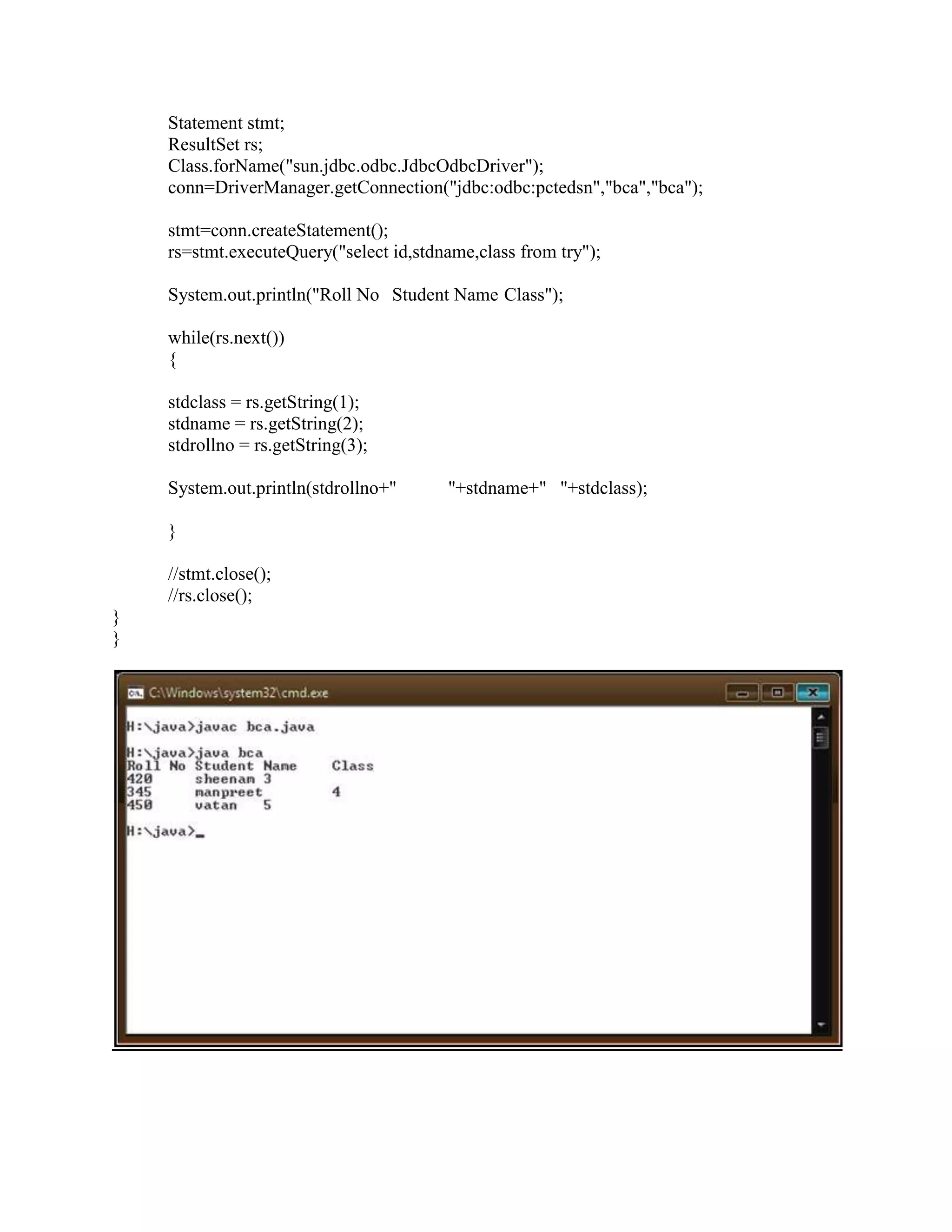
25. Program for showing a use of jdp programming in java.
import java.lang.*;
import java.sql.*;
class bca
{
public static void main(String arg[]) throws Exception
{
String stdrollno,stdname,stdclass;
Connection conn;
![1. Program to generate Fibonacci series
import java.io.*;
import java.util.*;
public class Fibonacci
{
public static void main(String[] args)
{
DataInputStream reader = new DataInputStream((System.in));
int f1=0,f2=0,f3=1;
try
{
System.out.print("Enter value of n: ");
String st = reader.readLine();
int num = Integer.parseInt(st);
for(int i=1;i<=num;i++)
{
System.out.println("tt"+f3+"tnt");
f1=f2;
f2=f3;
f3=f1+f2;
}
}
catch(Exception e)
{
System.out.println("wrong input");
}
}
}
2. Program to take two numbers as input from command line interface and display their sum](https://image.slidesharecdn.com/javapractical-111228103258-phpapp02/75/Java-practical-1-2048.jpg)
![Coding:
class Sum
{
public void add(int a,int b)
{
int c;
c=a+b;
System.out.print("tttnnThe sum of two no is = "+c);
System.out.println("nnn");
}
}
class SMain
{
public static void main(String arg[])
{
Sum obj1=new Sum();
int x,y;
String s1,s2;
s1=arg[0];
s2=arg[1];
x=Integer.parseInt(s1);
y=Integer.parseInt(s2);
obj1.add(x,y);
}
}
3. Use of array in java
Coding:
class Person
{
String name[];
int age[];
}](https://image.slidesharecdn.com/javapractical-111228103258-phpapp02/75/Java-practical-2-2048.jpg)
![class PersonMain
{
public static void main(String arg[])
{
Person obj=new Person();
obj.name=new String[6];
obj.age=new int[6];
obj.name[0]="Neha";
obj.age[0]=19;
obj.name[1]="manpreet";
obj.age[1]=19;
obj.name[2]="rahul";
obj.age[2]=23;
obj.name[3]="yuvraj";
obj.age[3]=12;
obj.name[4]="kombe";
obj.age[4]=19;
obj.name[5]="tony";
obj.age[5]=19;](https://image.slidesharecdn.com/javapractical-111228103258-phpapp02/75/Java-practical-3-2048.jpg)
![for(int i=0;i<4;i++)
System.out.println(obj.name[i]);
{
for(int j=0;j<4;j++)
System.out.println(obj.age[j]);
}
}
}
4. Create a class customer having three attributes name, bill and id. Include appropriate
methods for taking input from customer and displaying its values
Coding: import java.io.DataInputStream;
class Customer
{
public static void main(String arf[])
{
DataInputStream myinput=new DataInputStream(System.in);
String name;
int bill=0,id=0;
try
{
System.out.println("enter name of customer");
name=myinput.readLine();
System.out.println("enter bill");
bill=Integer.parseInt(myinput.readLine());
System.out.println("enter id");
id=Integer.parseInt(myinput.readLine());](https://image.slidesharecdn.com/javapractical-111228103258-phpapp02/75/Java-practical-4-2048.jpg)
![}
public double add(double a,double b)
{
double c=a+b;
return (c);
}
}
class AddMain
{
public static void main(String arg[])
{
Addition obj=new Addition();
System.out.println(obj.add(20,30));
System.out.println(obj.add(100.44f,20.54f));
System.out.println(obj.add(1380.544,473.56784));
}
}
6. To count no. of object created of a class
class Demo//OBJECT CREATION
{
private static int count=0;
public Demo()](https://image.slidesharecdn.com/javapractical-111228103258-phpapp02/75/Java-practical-6-2048.jpg)
![{
System.out.println("i am from demo");
count++;
System.out.println("object created is"+count);
}
}
class DemoMains
{
public static void main(String args[])
{
Demo obj1=new Demo();
Demo obj2=new Demo();
Demo obj3=new Demo();
}
}
7. To show concept of multilevel inheritance
Coding:
class A
{
private int num1,num2,sum;
public void set(int x,int y)
{](https://image.slidesharecdn.com/javapractical-111228103258-phpapp02/75/Java-practical-7-2048.jpg)
![num1=x;
num2=y;
sum=num1+num2;
}
public int get1()
{
return(sum);
}
}
class B extends A
{
public void display()
{
System.out.println("sum of two numbers is"+get1());
}
}
class C extends B
{
private double sqr;
public void sqrs()
{
sqr=java.lang.Math.sqrt(get1());
System.out.println("square root of sum is"+sqr);
}
}
class ABCMain
{
public static void main(String args[])
{
C obj1=new C();
obj1.set(100,200);
System.out.println("first number is 100");
System.out.println("second number is 200");
obj1.display();
obj1.sqrs();
}
}](https://image.slidesharecdn.com/javapractical-111228103258-phpapp02/75/Java-practical-8-2048.jpg)
![8. To show concept of method overriding
Coding:
class Demo
{
private static int count=0;
public Demo()
{
System.out.println("i am from demo");
count++;
System.out.println("object created is"+count);
}
public String toString()
{
return("method overridding");
}
}
class MethodOverride
{
public static void main(String args[])
{
Demo obj1=new Demo();
Demo obj2=new Demo();
Demo obj3=new Demo();](https://image.slidesharecdn.com/javapractical-111228103258-phpapp02/75/Java-practical-9-2048.jpg)
![10. To create thread by extending thread class
Coding:
class T1 extends Thread
{
public void run()
{
for(int i=0;i<5;i++)
{
System.out.println("thread 1 created");
}
}
}
class T2 extends Thread
{
public void run()
{
for(int i=0;i<5;i++)
{
System.out.println("thread 2 created");
}
}
}
class TMain
{
public static void main(String arg[])
{
T1 obj1=new T1();
obj1.start();
T2 obj2=new T2();
obj2.start();
}
}](https://image.slidesharecdn.com/javapractical-111228103258-phpapp02/75/Java-practical-11-2048.jpg)
![11. Create thread by implementing runnable interface
Coding:
class T1 implements Runnable
{
public void run()
{
for(int i=0;i<5;i++)
{
System.out.println("thread 1 created");
}
}
}
class T2 implements Runnable
{
public void run()
{
for(int i=0;i<5;i++)
{
System.out.println("thread 2 created");
}
}
}
class RMain
{
public static void main(String arg[])
{
T1 obj1=new T1();
Thread t1=new Thread(obj1);
T2 obj2=new T2();
Thread t2=new Thread(obj2);
t1.start();
t2.start();](https://image.slidesharecdn.com/javapractical-111228103258-phpapp02/75/Java-practical-12-2048.jpg)
![class Student
{
private int rollno;
public void setStudent(int r) throws InvalidRollno
{
rollno=r;
if(r<1)
{
throw new InvalidRollno("invalid rollno");
}
}
}
class SMain
{
public static void main(String agf[])
{
Student obj1=new Student();
try
{
obj1.setStudent(-11);
}
catch(InvalidRollno e)
{
System.out.println(e);
}](https://image.slidesharecdn.com/javapractical-111228103258-phpapp02/75/Java-practical-14-2048.jpg)
![}
}
13. Program for showing the concept of sleep method in multithreading.
public class DelayExample{
public static void main(String[] args)
{
System.out.println("Hi");
for (int i = 0; i < 10; i++)
{
System.out.println("Number of itartion = " + i);
System.out.println("Wait:");
try
{](https://image.slidesharecdn.com/javapractical-111228103258-phpapp02/75/Java-practical-15-2048.jpg)
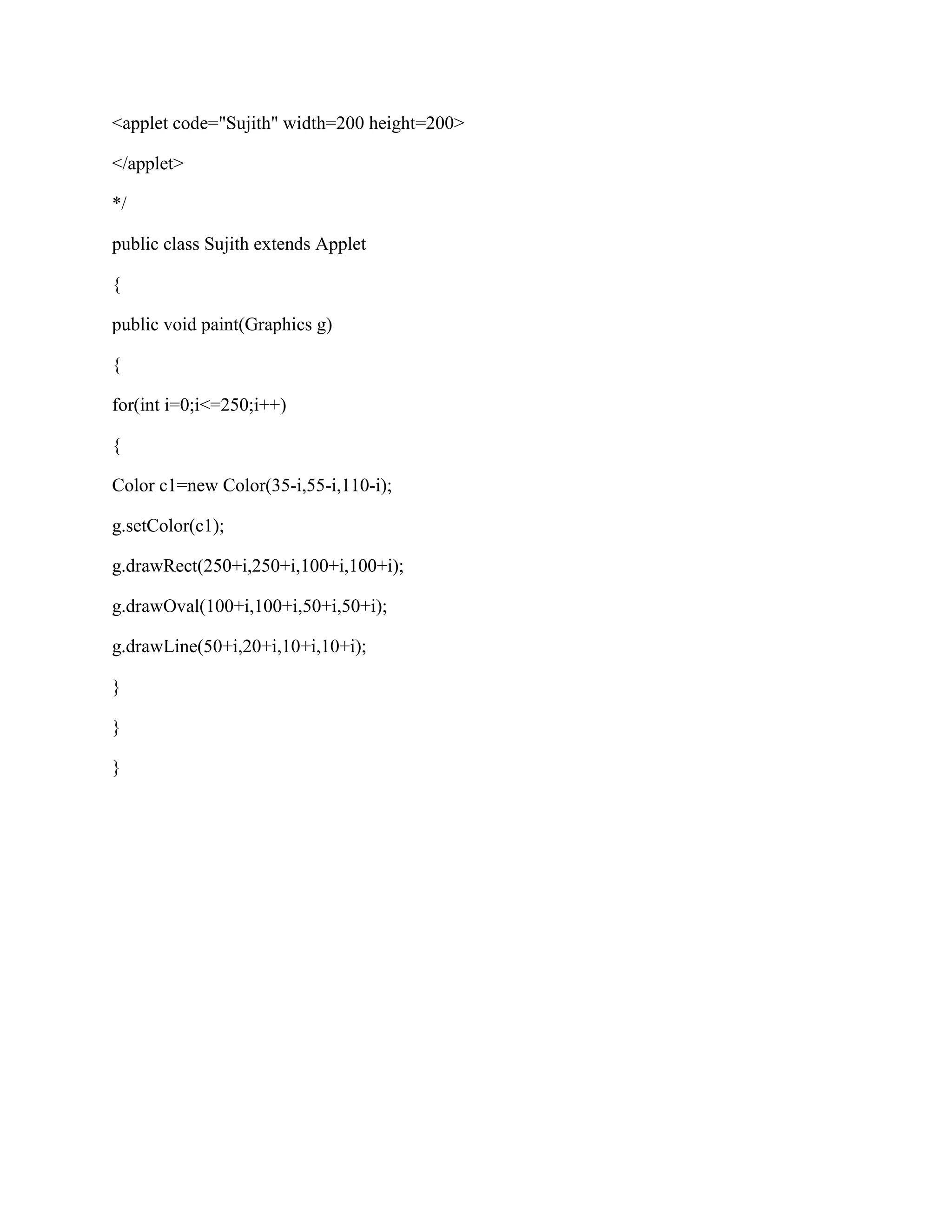
![g2d.setPaint(gradient);
g2d.fill(getCircle());
g2d.setPaint(Color.black);
g2d.draw(getCircle());
}
public static void main(String[] args) {
WindowUtilities.openInJFrame(new GradientPaintExample(),
380, 400);
}
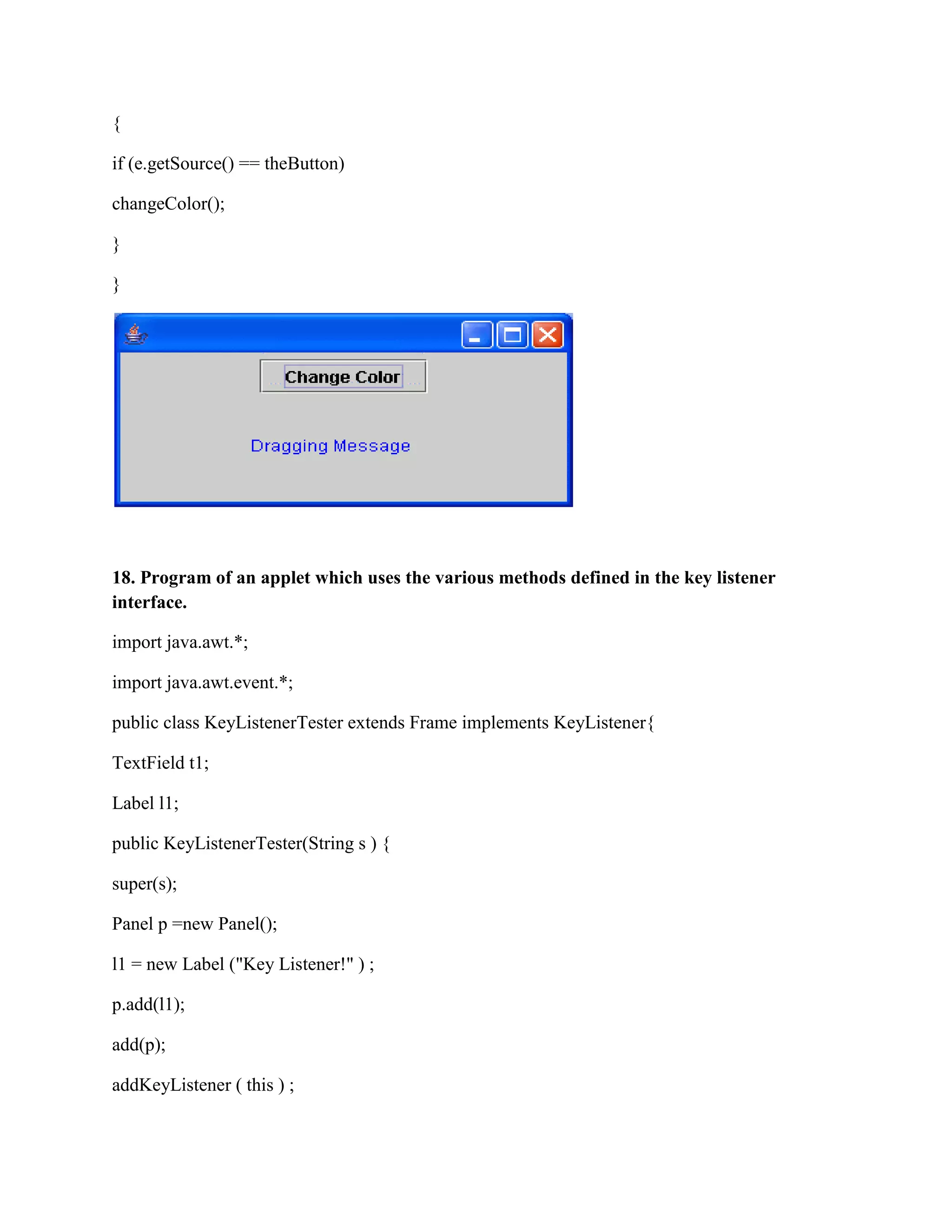
17. Program of an applet which respond to mouse motion listener interface method.
import javax.swing.*;
import java.awt.Color;](https://image.slidesharecdn.com/javapractical-111228103258-phpapp02/75/Java-practical-20-2048.jpg)
![import java.awt.FlowLayout;
import java.awt.Graphics;
import java.awt.Container;
import java.awt.event.*;
public class MovingMessage
{
public static void main (String[] s)
{ HelloJava f = new HelloJava();}
}
class HelloJava extends JFrame implements MouseMotionListener, ActionListener
{
int messageX = 25, messageY = 100;
String theMessage;
JButton theButton;
int colorIndex = 0;
static Color[] someColors = { Color.black, Color.red,Color.green, Color.blue, Color.magenta };
HelloJava()
{
theMessage = "Dragging Message";
setSize(300, 200);
Container contentPane = getContentPane();
contentPane.setLayout(new FlowLayout());
theButton = new JButton("Change Color");
contentPane.add(theButton);
theButton.addActionListener(this);](https://image.slidesharecdn.com/javapractical-111228103258-phpapp02/75/Java-practical-21-2048.jpg)
![addMouseMotionListener(this);
setVisible(true);
}
private void changeColor()
{
if (++colorIndex == someColors.length)
colorIndex = 0;
setForeground(currentColor());
repaint();
}
private Color currentColor()
{ return someColors[colorIndex]; }
public void paint(Graphics g)
{
super.paint(g);
g.drawString(theMessage, messageX, messageY);
}
public void mouseDragged(MouseEvent e)
{
messageX = e.getX();
messageY = e.getY();
repaint();
}
public void mouseMoved(MouseEvent e) { }
public void actionPerformed(ActionEvent e)](https://image.slidesharecdn.com/javapractical-111228103258-phpapp02/75/Java-practical-22-2048.jpg)
![setSize ( 200,100 );
setVisible(true);
addWindowListener(new WindowAdapter(){
public void windowClosing(WindowEvent e){
System.exit(0);
}
});
}
public void keyTyped ( KeyEvent e ){
l1.setText("Key Typed");
}
public void keyPressed ( KeyEvent e){
l1.setText ( "Key Pressed" ) ;
}
public void keyReleased ( KeyEvent e ){
l1.setText( "Key Released" ) ;
}
public static void main (String[]args ){
new KeyListenerTester ( "Key Listener Tester" ) ;
}
}](https://image.slidesharecdn.com/javapractical-111228103258-phpapp02/75/Java-practical-24-2048.jpg)
![textfield.setFont(BIGGER_FONT);
ActionListener numberListener = new NumberListener();
String buttonOrder = "1234567890 ";
JPanel buttonPanel = new JPanel();
buttonPanel.setLayout(new GridLayout(4, 4, 4, 4));
for (int i = 0; i < buttonOrder.length(); i++) {
String key = buttonOrder.substring(i, i+1);
if (key.equals(" ")) {
buttonPanel.add(new JLabel(""));
} else {
JButton button = new JButton(key);
button.addActionListener(numberListener);
button.setFont(BIGGER_FONT);
buttonPanel.add(button);
}
}
ActionListener operatorListener = new OperatorListener();
JPanel panel = new JPanel();
panel.setLayout(new GridLayout(4, 4, 4, 4));
String[] opOrder = {"+", "-", "*", "/","=","C"};
for (int i = 0; i < opOrder.length; i++) {
JButton button = new JButton(opOrder[i]);
button.addActionListener(operatorListener);
button.setFont(BIGGER_FONT);
panel.add(button);](https://image.slidesharecdn.com/javapractical-111228103258-phpapp02/75/Java-practical-27-2048.jpg)
![String str;
try {
System.out.println("Reading URL: " + u);
url = new URL(u);
is = url.openStream();
isr = new InputStreamReader(is);
r = new BufferedReader(isr);
do {
str = r.readLine();
if (str != null)
System.out.println(str);
} while (str != null);
} catch (MalformedURLException e) {
System.out.println("Must enter a valid URL");
} catch (IOException e) {
System.out.println("Can not connect");
}
}
static public void main(String args[]) {
if (args.length < 1)
System.out.println("Usage: GetURL ");
else
getURL(args[0]);
}
}](https://image.slidesharecdn.com/javapractical-111228103258-phpapp02/75/Java-practical-32-2048.jpg)
![g.fillOval(100+i*5,100+i*5,100-i*10,100-i*10);
}
}
}
23. Program to illustrate the use of methods of vector class
import java.util.*;
class vvect
{
public static void main(String a[])
{](https://image.slidesharecdn.com/javapractical-111228103258-phpapp02/75/Java-practical-34-2048.jpg)
![Vector a1 = new Vector();
int l = a.length;
int i;
for(i=0;i<l;i++)
{
a1.addElement(a[i]);
}
a1.insertElementAt("Vatan",2);
int s = a1.size();
String r[] = new String[s];
a1.copyInto(r);
System.out.println("n Different Font Styles:n");
for(i=0;i<s;i++)
{
System.out.println(r[i]);
}
}
}
24. Program for showing the use ‘for’ in each statement.
package loops;
public class Forloops
{
public static void main(string[] args) {
int loopval;](https://image.slidesharecdn.com/javapractical-111228103258-phpapp02/75/Java-practical-35-2048.jpg)
![int end_value=11;
for (loopval=0; loopval<end_value;loopval++) {
system.out.printin("loop value="+ loopval);
}
}
}
25. Program for showing a use of jdp programming in java.
import java.lang.*;
import java.sql.*;
class bca
{
public static void main(String arg[]) throws Exception
{
String stdrollno,stdname,stdclass;
Connection conn;](https://image.slidesharecdn.com/javapractical-111228103258-phpapp02/75/Java-practical-36-2048.jpg)


![Coded Agents – with UiPath SDK + LangGraph [Virtual Hands-on Workshop]](https://cdn.slidesharecdn.com/ss_thumbnails/codedagentsdeck-251215155422-5497c599-thumbnail.jpg?width=640&height=640&fit=bounds)


