JAVA - Introduction to Threads PowerPoint presentation
1.
Java Threads
A Javathread is the smallest unit of execution
within a program. It is a lightweight subprocess
that runs independently but shares the same
memory space of the process, allowing multiple
tasks to execute concurrently.
2.
• For example:In MS Word, one thread formats
the document while another takes user input.
Multithreading also keeps applications
responsive, since other threads can continue
running even if one gets stuck.
3.
Life Cycle ofThread
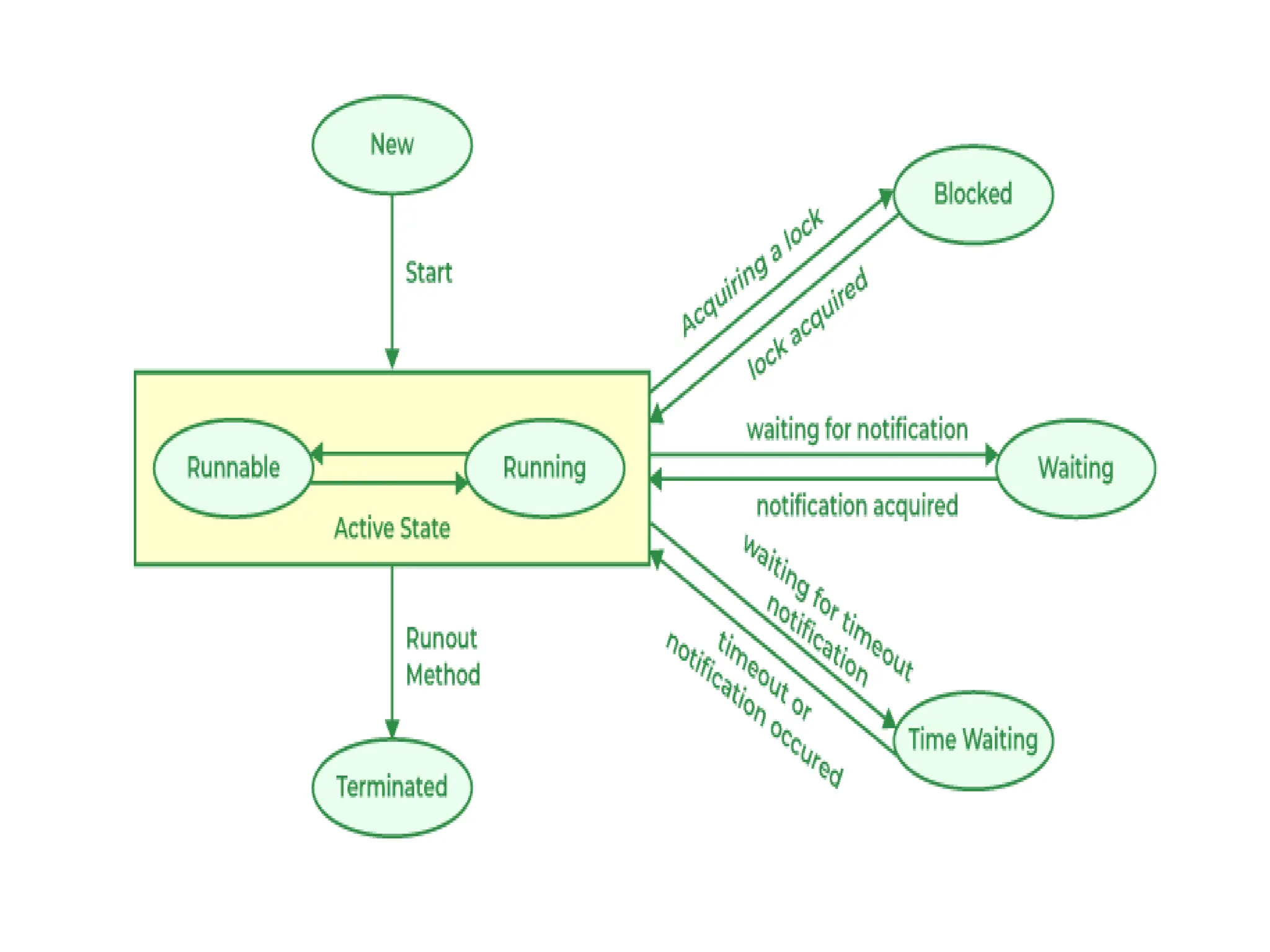
During its lifetime, a thread transitions through
several states, they are:
• New State
• Active State
• Waiting/Blocked State
• Timed Waiting State
• Terminated State
5.
Working of ThreadStates
• 1. New State: By default, a thread will be in a new state, in
this state, code has not yet started execution.
• 2. Active State: When a thread calls the start() method, it
enters the Active state, which has two sub-states:
Runnable State: The thread is ready to run but is waiting
for the Thread Scheduler to give it CPU time. Multiple
runnable threads share CPU time in small slices.
Running State: When the scheduler assigns CPU to a
runnable thread, it moves to the Running state. After its
time slice ends, it goes back to the Runnable state, waiting
for the next chance to run.
6.
• 3. Waiting/BlockedState: a thread is
temporarily inactive, it may be in the Waiting
or Blocked state:
Waiting: If thread T1 needs to use a camera
but thread T2 is already using it, T1 waits until
T2 finishes.
Blocked: If two threads try to use the same
resource at the same time, one may be
blocked until the other releases it.
7.
• 4. TimedWaiting State: Sometimes threads
may face starvation if one thread keeps using
the CPU for a long time while others keep
waiting.
For example: If T1 is doing a long important
task, T2 may wait indefinitely. To avoid this,
Java provides the Timed Waiting state, where
methods like sleep() allow a thread to pause
only for a fixed time. After the time expires,
the thread gets a chance to run.
8.
• 5. TerminatedState: A thread enters the
Terminated state when its task is finished or it
is explicitly stopped. In this state, the thread is
dead and cannot be restarted. If you try to call
start() on a terminated thread, it will throw an
exception.
9.
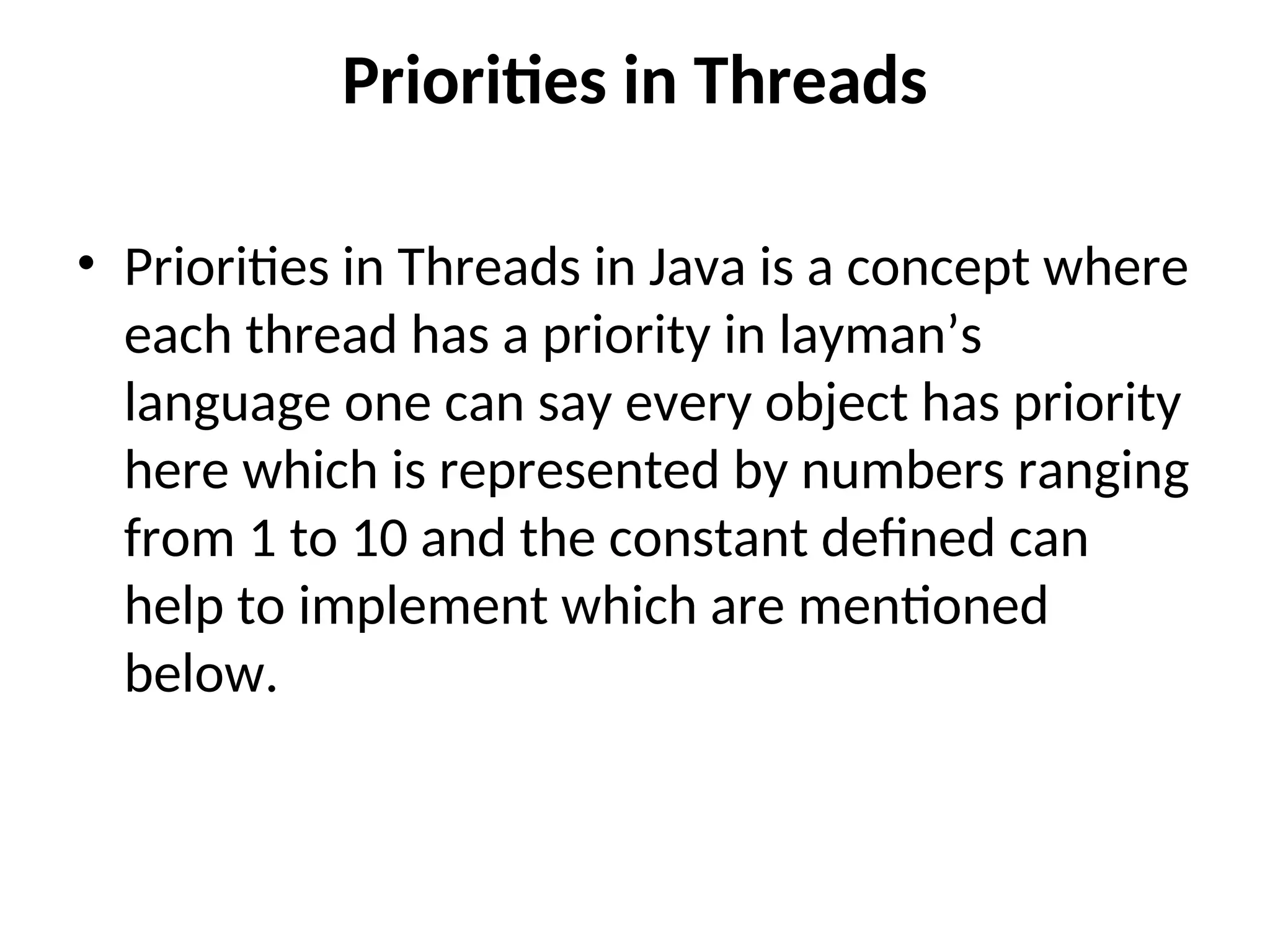
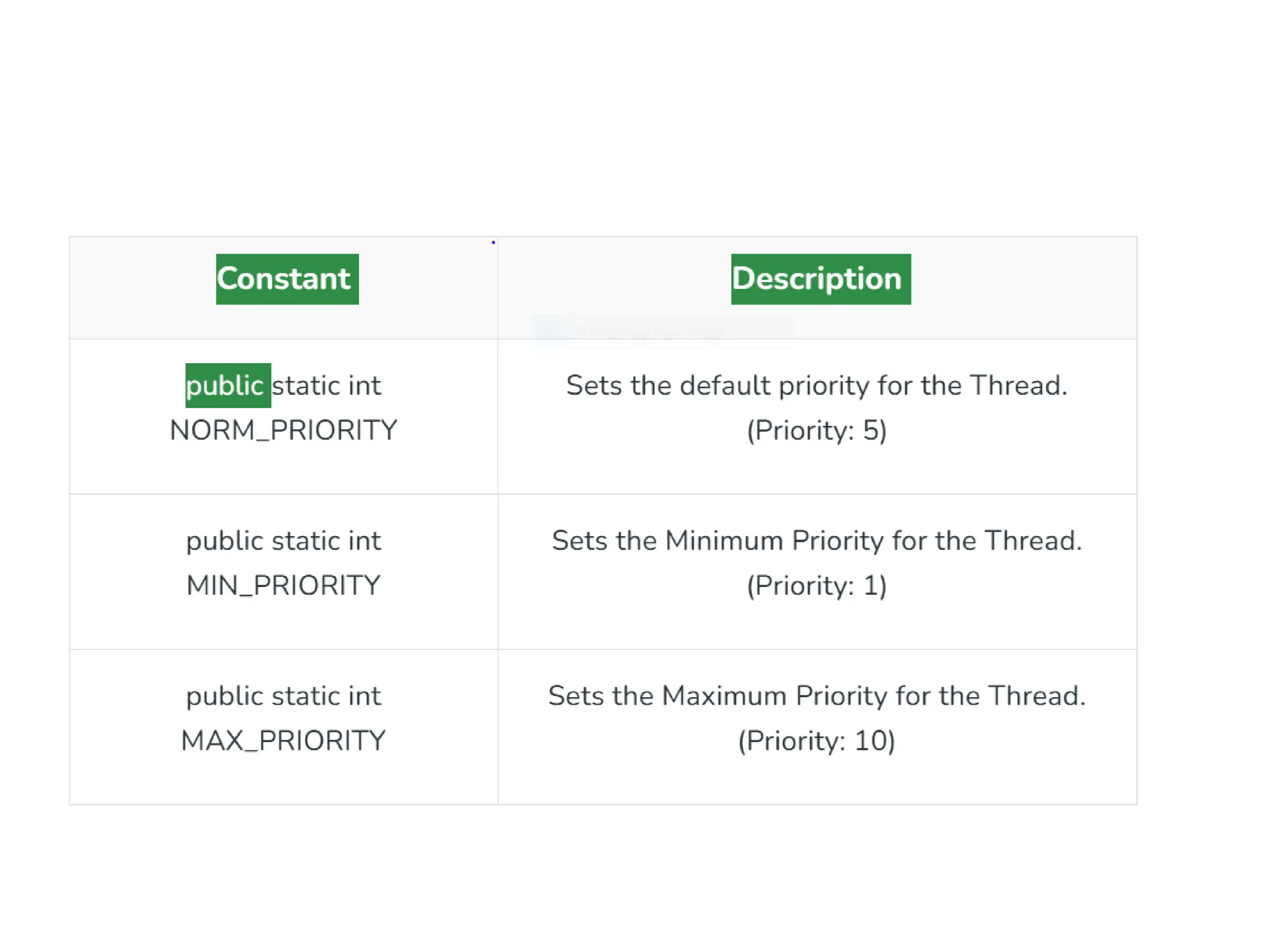
Priorities in Threads
•Priorities in Threads in Java is a concept where
each thread has a priority in layman’s
language one can say every object has priority
here which is represented by numbers ranging
from 1 to 10 and the constant defined can
help to implement which are mentioned
below.
11.
• import java.lang.*;
•class Thread1 extends Thread {
• // run() method for the thread that is called as soon as start() is invoked for
thread in main()
• public void run()
• {
• System.out.println(Thread.currentThread().getName() + " is running with
priority " + Thread.currentThread().getPriority());
• }
• public static void main(String[] args)
• {
• // Creating random threads with the help of above class
• Thread1 t1 = new Thread1();
• Thread1 t2 = new Thread1();
• Thread1 t3 = new Thread1();
• // Display the priority of above threads using getPriority() method
• System.out.println("t1 thread priority: " + t1.getPriority());
• System.out.println("t2 thread priority: " + t2.getPriority());
• System.out.println("t3 thread priority: " + t3.getPriority());
12.
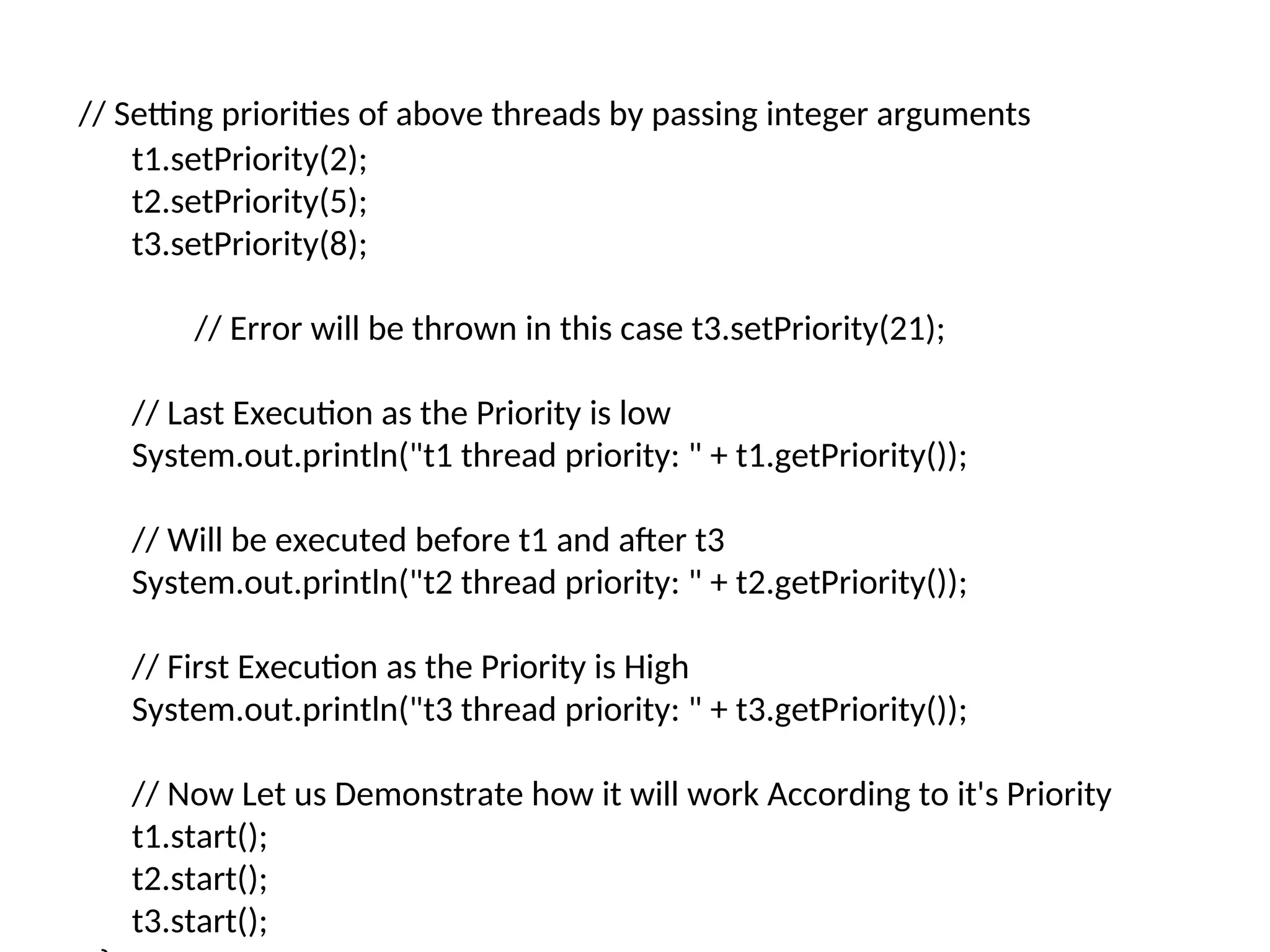
// Setting prioritiesof above threads by passing integer arguments
t1.setPriority(2);
t2.setPriority(5);
t3.setPriority(8);
// Error will be thrown in this case t3.setPriority(21);
// Last Execution as the Priority is low
System.out.println("t1 thread priority: " + t1.getPriority());
// Will be executed before t1 and after t3
System.out.println("t2 thread priority: " + t2.getPriority());
// First Execution as the Priority is High
System.out.println("t3 thread priority: " + t3.getPriority());
// Now Let us Demonstrate how it will work According to it's Priority
t1.start();
t2.start();
t3.start();
13.
• import java.lang.*;
•class Thread1 extends Thread {
• // run() method for the thread that is called as soon
as start() is invoked for thread in main()
• public void run()
• {
•
System.out.println(Thread.currentThread().getName(
) + " is running with priority " +
Thread.currentThread().getPriority());
• }
• public static void main(String[] args)
• {
• // Creating random threads with the help of
above class
• Thread1 t1 = new Thread1();
• Thread1 t2 = new Thread1();
• Thread1 t3 = new Thread1();
• // Display the priority of above threads using
getPriority() method
• System.out.println("t1 thread priority: " +
t1.getPriority());
• System.out.println("t2 thread priority: " +
t2.getPriority());
• System.out.println("t3 thread priority: " +
t3.getPriority());
// Setting priorities of above threads by
passing integer arguments
t1.setPriority(2);
t2.setPriority(5);
t3.setPriority(8);
// Error will be thrown in this case
t3.setPriority(21);
// Last Execution as the Priority is low
System.out.println("t1 thread priority: " +
t1.getPriority());
// Will be executed before t1 and after t3
System.out.println("t2 thread priority: " +
t2.getPriority());
// First Execution as the Priority is High
System.out.println("t3 thread priority: " +
t3.getPriority());
// Now Let us Demonstrate how it will
work According to it's Priority
t1.start();
t2.start();
t3.start();
}
}
14.
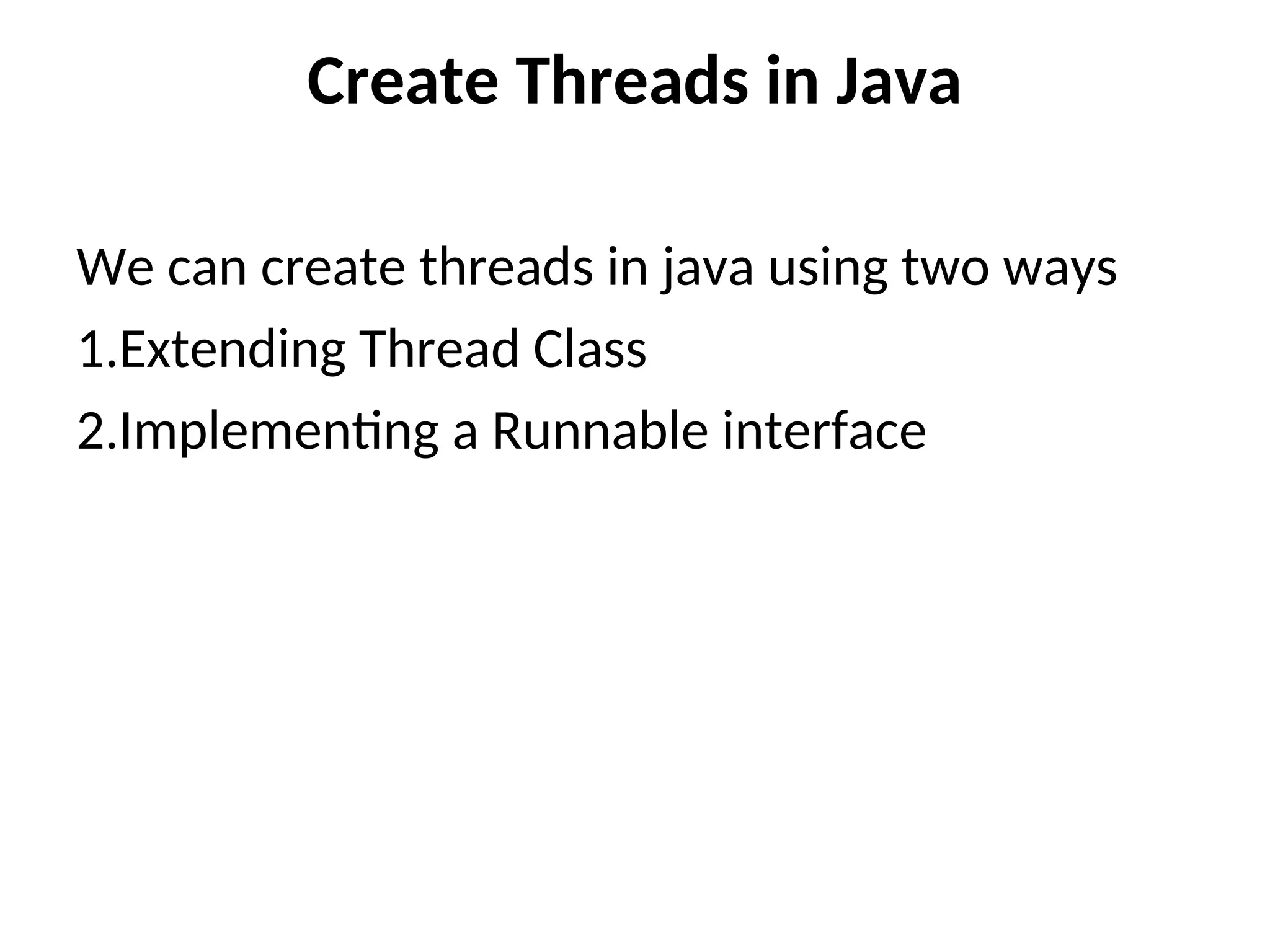
Create Threads inJava
We can create threads in java using two ways
1.Extending Thread Class
2.Implementing a Runnable interface
15.
1.Extending Thread Class
1.By Extending Thread Class
• Create a class that extends Thread. Override
the run() method, this is where you put the
code that the thread should execute. Then
create an object of your class and call the
start() method. This will internally call run() in
a new thread.
16.
import java.io.*;
import java.util.*;
classMyThread extends Thread
{
// initiated run method for Thread
public void run()
{
String str = "Thread Started Running...";
System.out.println(str);
}
}
public class Geeks
{
public static void main(String args[])
{
MyThread t1 = new MyThread();
t1.start();
}
}
17.
2. Using RunnableInterface
• Create a class that implements Runnable.
Override the run() method, this contains the
code for the thread. Then create a Thread
object, pass your Runnable object to it and
call start().
18.
import java.io.*;
import java.util.*;
classMyThread implements
Runnable
{
// Method to start Thread
public void run()
{
String str = "Thread
is Running Successfully";
System.out.println(str);
}
}
public class Geeks
{
public static void
main(String[] args)
{
MyThread g1 = new
MyThread();
// initializing Thread
Object
Thread t1 = new
Thread(g1);
// Running Thread
t1.start();
}
}
![• import java.lang.*;
• class Thread1 extends Thread {
• // run() method for the thread that is called as soon as start() is invoked for
thread in main()
• public void run()
• {
• System.out.println(Thread.currentThread().getName() + " is running with
priority " + Thread.currentThread().getPriority());
• }
• public static void main(String[] args)
• {
• // Creating random threads with the help of above class
• Thread1 t1 = new Thread1();
• Thread1 t2 = new Thread1();
• Thread1 t3 = new Thread1();
• // Display the priority of above threads using getPriority() method
• System.out.println("t1 thread priority: " + t1.getPriority());
• System.out.println("t2 thread priority: " + t2.getPriority());
• System.out.println("t3 thread priority: " + t3.getPriority());](https://image.slidesharecdn.com/javathreads3-251112070531-9c6d4bdd/75/JAVA-Introduction-to-Threads-PowerPoint-presentation-11-2048.jpg)
![• import java.lang.*;
• class Thread1 extends Thread {
• // run() method for the thread that is called as soon
as start() is invoked for thread in main()
• public void run()
• {
•
System.out.println(Thread.currentThread().getName(
) + " is running with priority " +
Thread.currentThread().getPriority());
• }
• public static void main(String[] args)
• {
• // Creating random threads with the help of
above class
• Thread1 t1 = new Thread1();
• Thread1 t2 = new Thread1();
• Thread1 t3 = new Thread1();
• // Display the priority of above threads using
getPriority() method
• System.out.println("t1 thread priority: " +
t1.getPriority());
• System.out.println("t2 thread priority: " +
t2.getPriority());
• System.out.println("t3 thread priority: " +
t3.getPriority());
// Setting priorities of above threads by
passing integer arguments
t1.setPriority(2);
t2.setPriority(5);
t3.setPriority(8);
// Error will be thrown in this case
t3.setPriority(21);
// Last Execution as the Priority is low
System.out.println("t1 thread priority: " +
t1.getPriority());
// Will be executed before t1 and after t3
System.out.println("t2 thread priority: " +
t2.getPriority());
// First Execution as the Priority is High
System.out.println("t3 thread priority: " +
t3.getPriority());
// Now Let us Demonstrate how it will
work According to it's Priority
t1.start();
t2.start();
t3.start();
}
}](https://image.slidesharecdn.com/javathreads3-251112070531-9c6d4bdd/75/JAVA-Introduction-to-Threads-PowerPoint-presentation-13-2048.jpg)
![import java.io.*;
import java.util.*;
class MyThread extends Thread
{
// initiated run method for Thread
public void run()
{
String str = "Thread Started Running...";
System.out.println(str);
}
}
public class Geeks
{
public static void main(String args[])
{
MyThread t1 = new MyThread();
t1.start();
}
}](https://image.slidesharecdn.com/javathreads3-251112070531-9c6d4bdd/75/JAVA-Introduction-to-Threads-PowerPoint-presentation-16-2048.jpg)
![import java.io.*;
import java.util.*;
class MyThread implements
Runnable
{
// Method to start Thread
public void run()
{
String str = "Thread
is Running Successfully";
System.out.println(str);
}
}
public class Geeks
{
public static void
main(String[] args)
{
MyThread g1 = new
MyThread();
// initializing Thread
Object
Thread t1 = new
Thread(g1);
// Running Thread
t1.start();
}
}](https://image.slidesharecdn.com/javathreads3-251112070531-9c6d4bdd/75/JAVA-Introduction-to-Threads-PowerPoint-presentation-18-2048.jpg)


