5TH Assessment
on
Java AWT & Java FX.
Presented by
PRATIK KADAM.
URN: 2020-M-02101997.
Under the Supervision of
Professor
SARDAR PUNEET PRASAD SINGH.
Java Programming (CSC510)
INDEX
Sr.
no:
Topic Page no:
1 Java AWT 3 - 20
2 Java FX 21 - 29
JAVAAWT
 Java AWT (Abstract Window Toolkit) is an API to develop GUI or window-based applications in
java.
 Java AWT components are platform-dependent i.e. components are displayed according to the
view of operating system. AWT is heavyweight i.e. its components are using the resources of OS.
 The java.awt package provides classes for AWT api such as TextField, Label, TextArea,
RadioButton, CheckBox, Choice, List etc
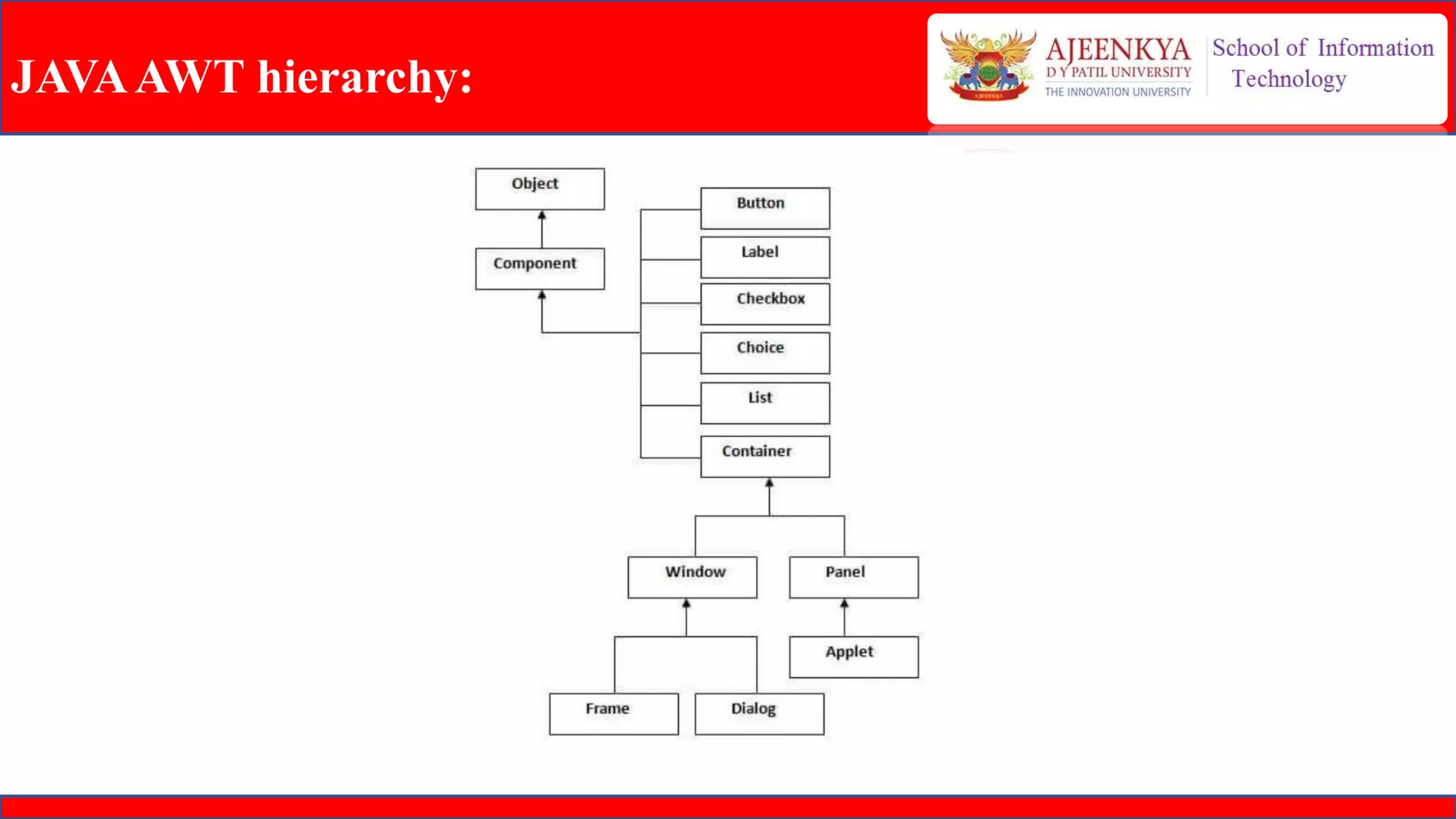
JAVAAWT hierarchy:
JAVAAWT
JAVAAWT LAYOUTS:
• Layout means the arrangement of components within the container. In other way we can say
that placing the components at a particular position within the container.
• The task of layouting the controls is done automatically by the Layout Manager.
AWT Layout Manager Classes:
• BorderLayout
• CardLayout
• FlowLayout
• GridLayout
• GridBagLayout
JAVAAWT
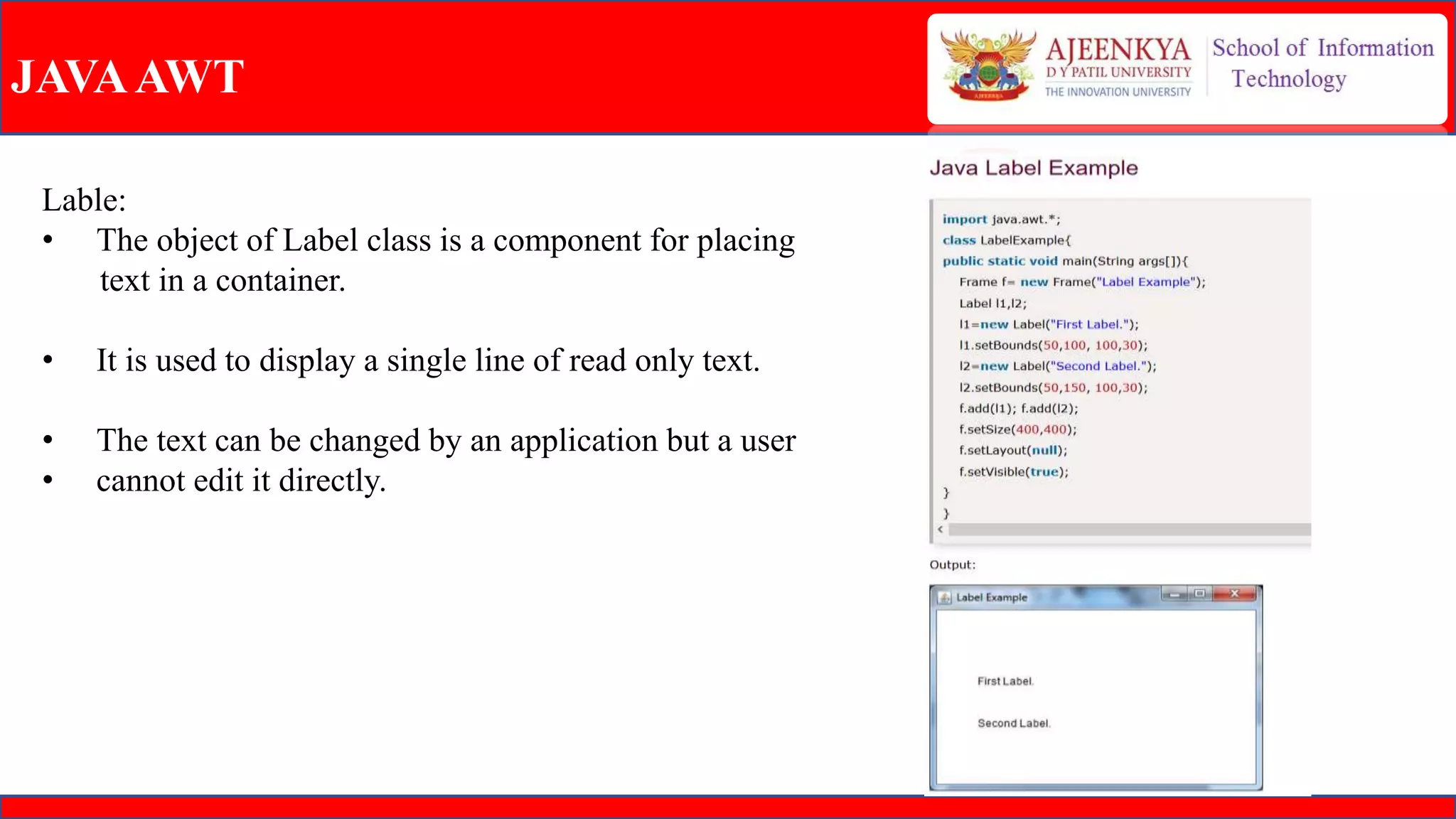
Lable:
• The object of Label class is a component for placing
text in a container.
• It is used to display a single line of read only text.
• The text can be changed by an application but a user
• cannot edit it directly.
JAVAAWT
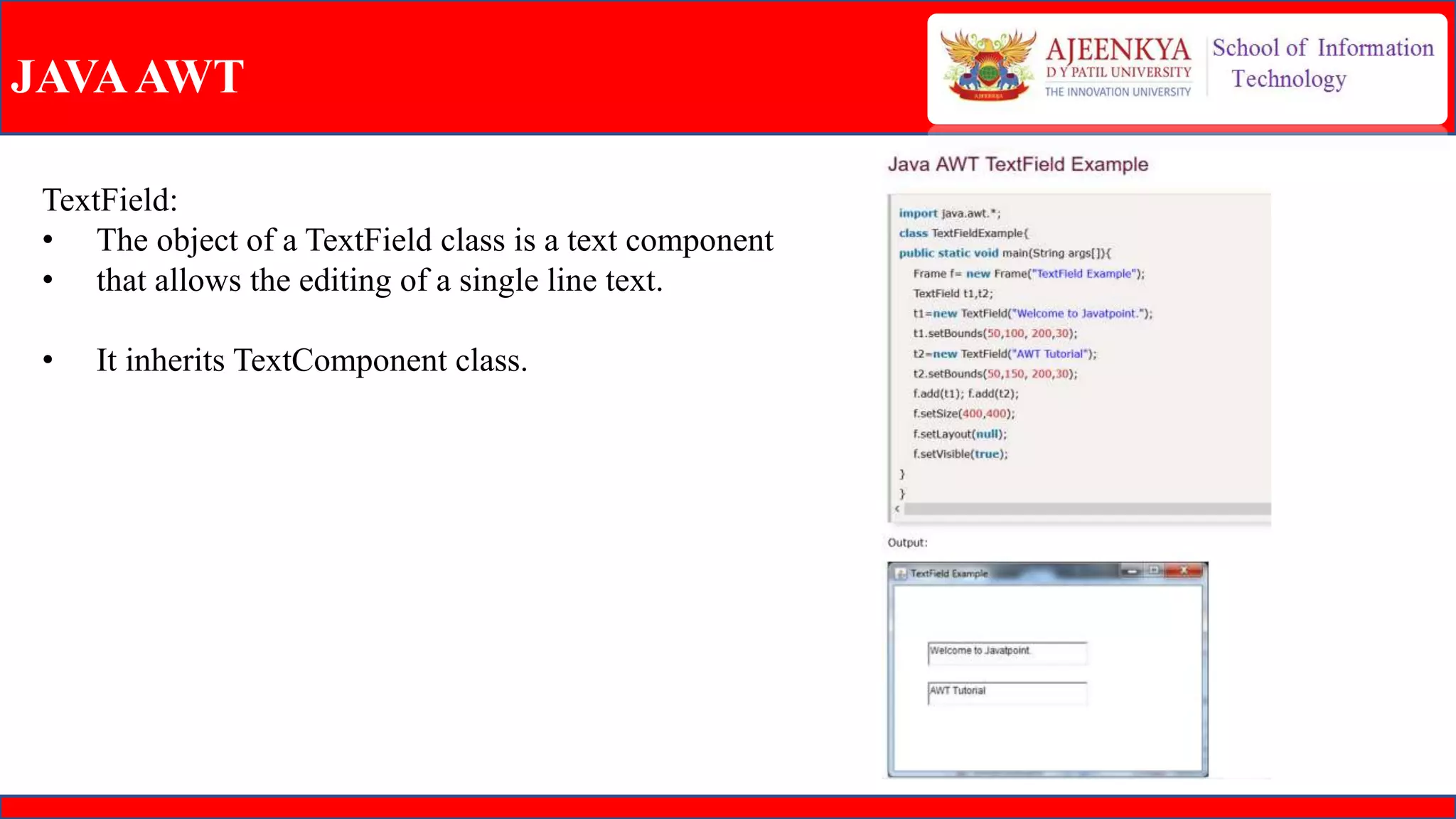
TextField:
• The object of a TextField class is a text component
• that allows the editing of a single line text.
• It inherits TextComponent class.
JAVAAWT
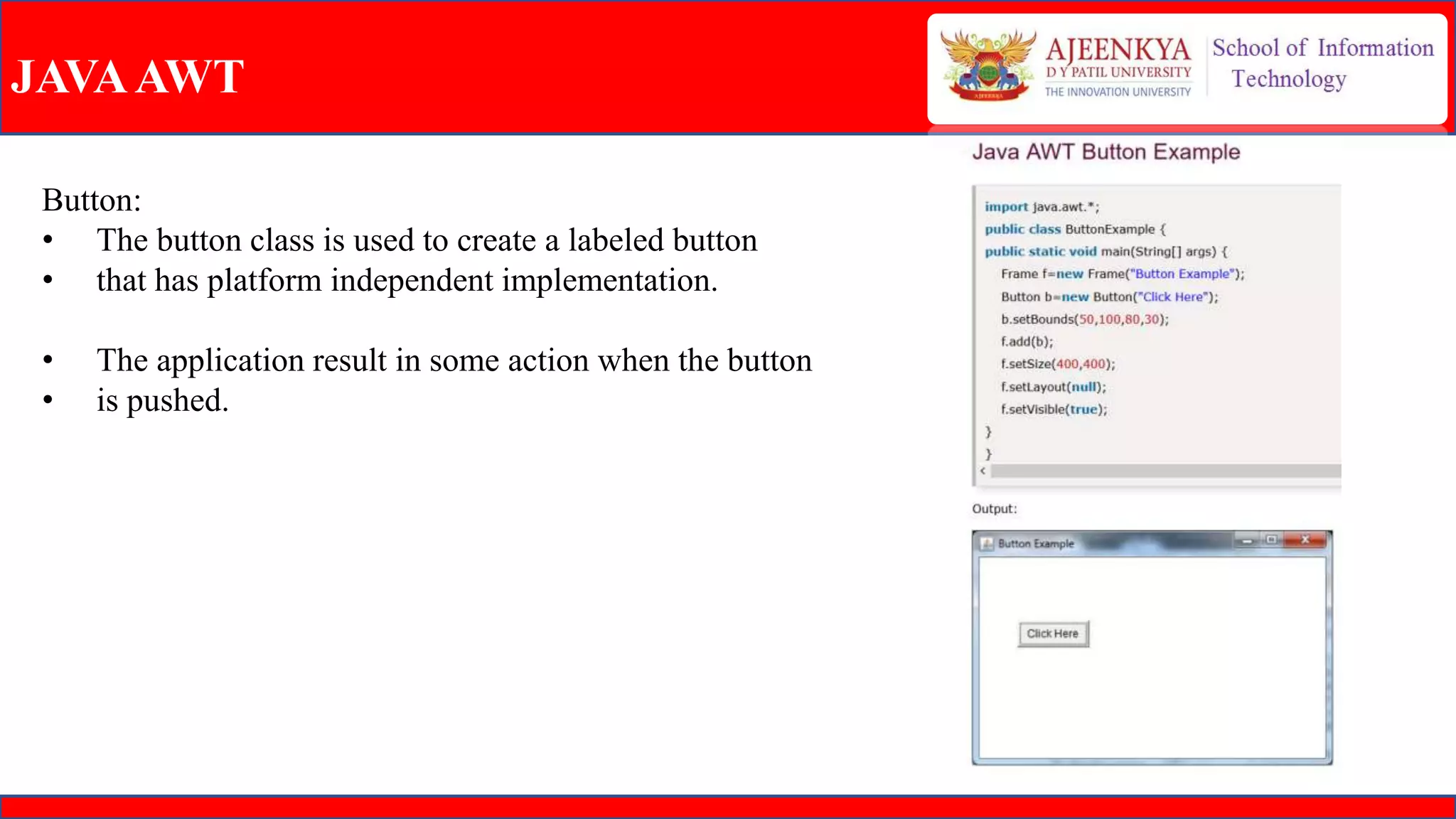
Button:
• The button class is used to create a labeled button
• that has platform independent implementation.
• The application result in some action when the button
• is pushed.
JAVAAWT
Event:
 The Event classes represent the event. Java provides us various Event classes but we will discuss those
which are more frequently used.
EventObject class:
 It is the root class from which all event state objects shall be derived. All Events are constructed with a
reference to the object, the source, that is logically deemed to be the object upon which the Event in
question initially occurred upon.This class is defined in java.util package.
JAVAAWT
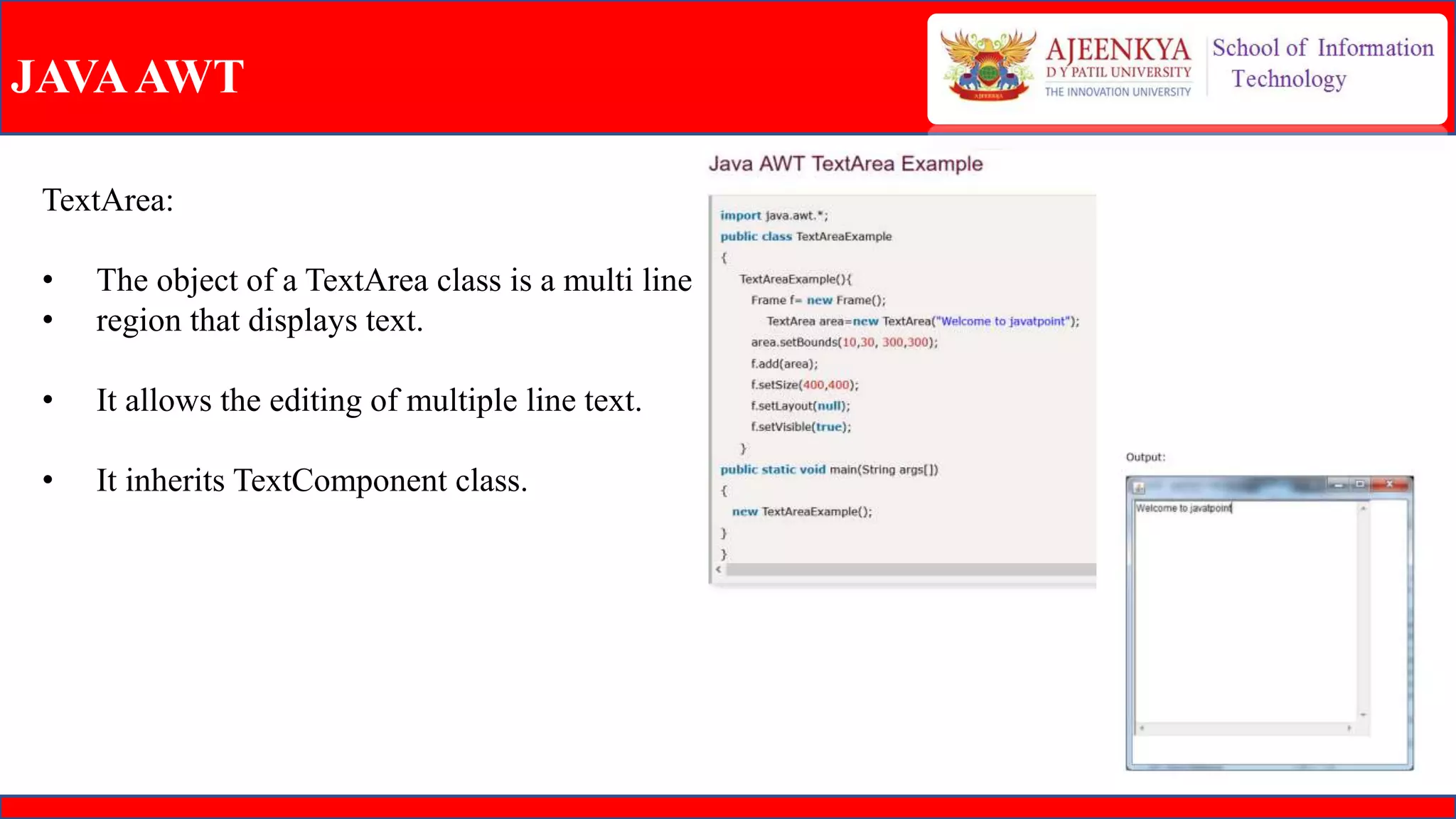
TextArea:
• The object of a TextArea class is a multi line
• region that displays text.
• It allows the editing of multiple line text.
• It inherits TextComponent class.
JAVAAWT
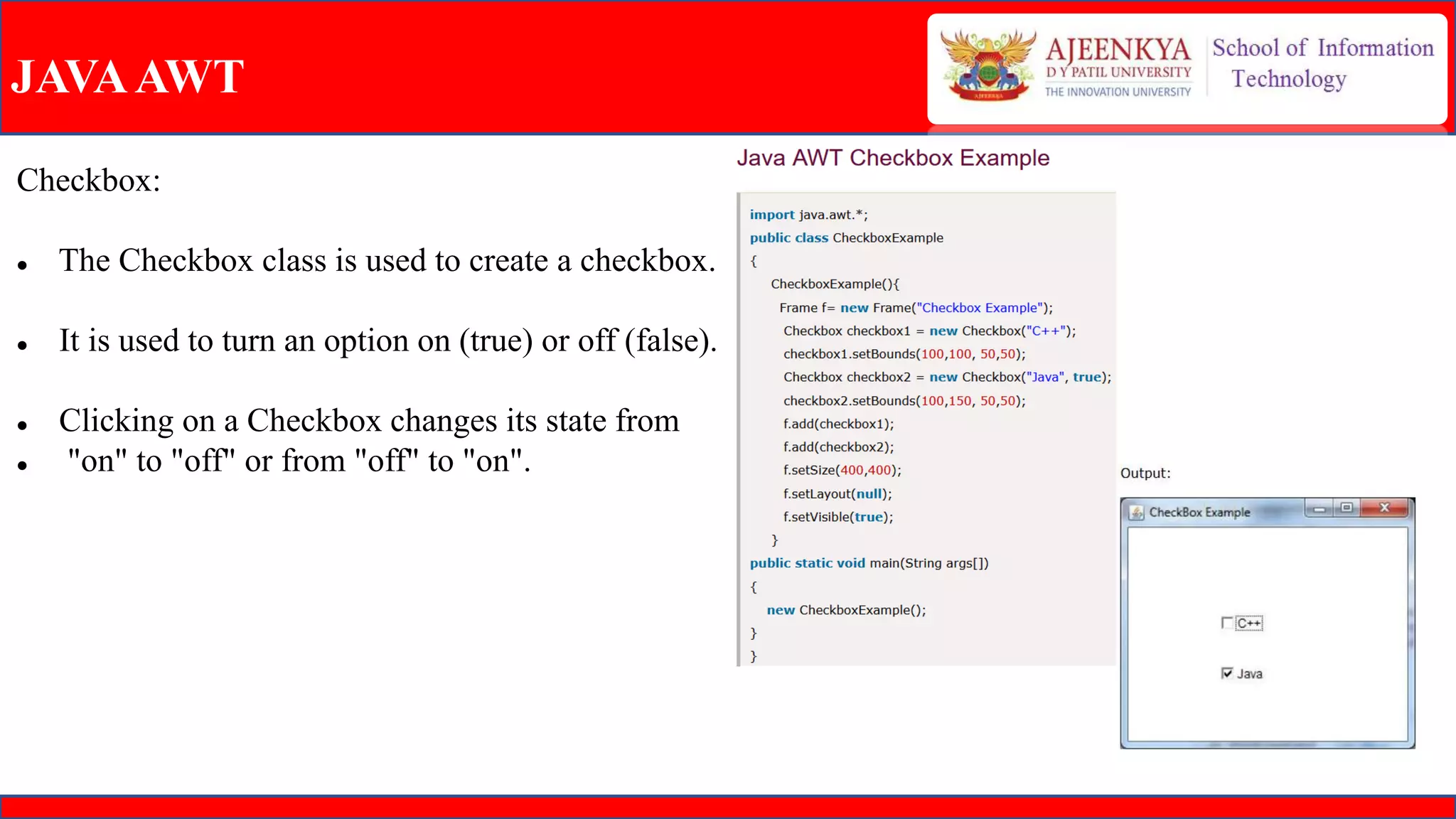
Checkbox:
 The Checkbox class is used to create a checkbox.
 It is used to turn an option on (true) or off (false).
 Clicking on a Checkbox changes its state from
 "on" to "off" or from "off" to "on".
JAVAAWT
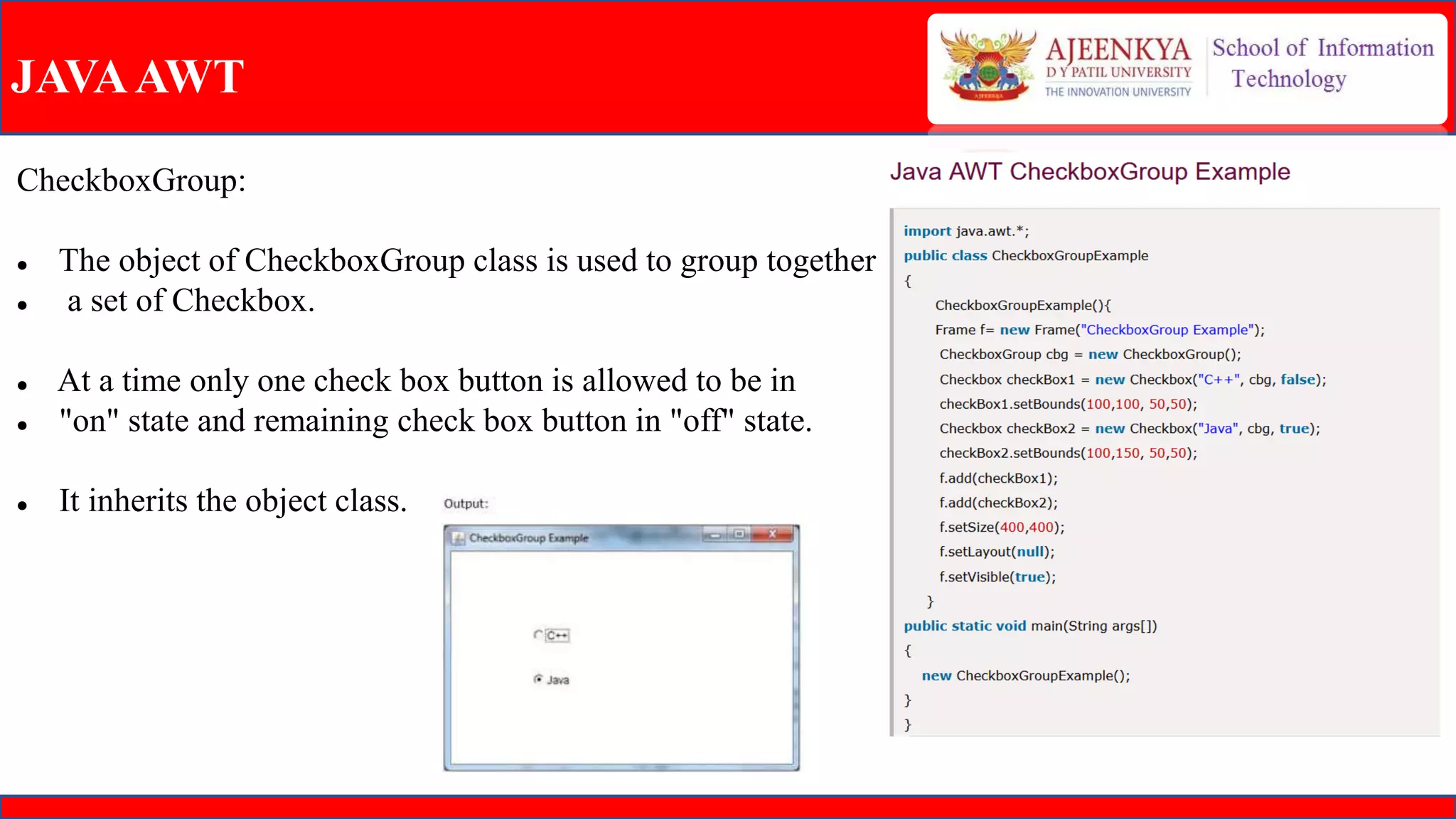
CheckboxGroup:
 The object of CheckboxGroup class is used to group together
 a set of Checkbox.
 At a time only one check box button is allowed to be in
 "on" state and remaining check box button in "off" state.
 It inherits the object class.
JAVAAWT
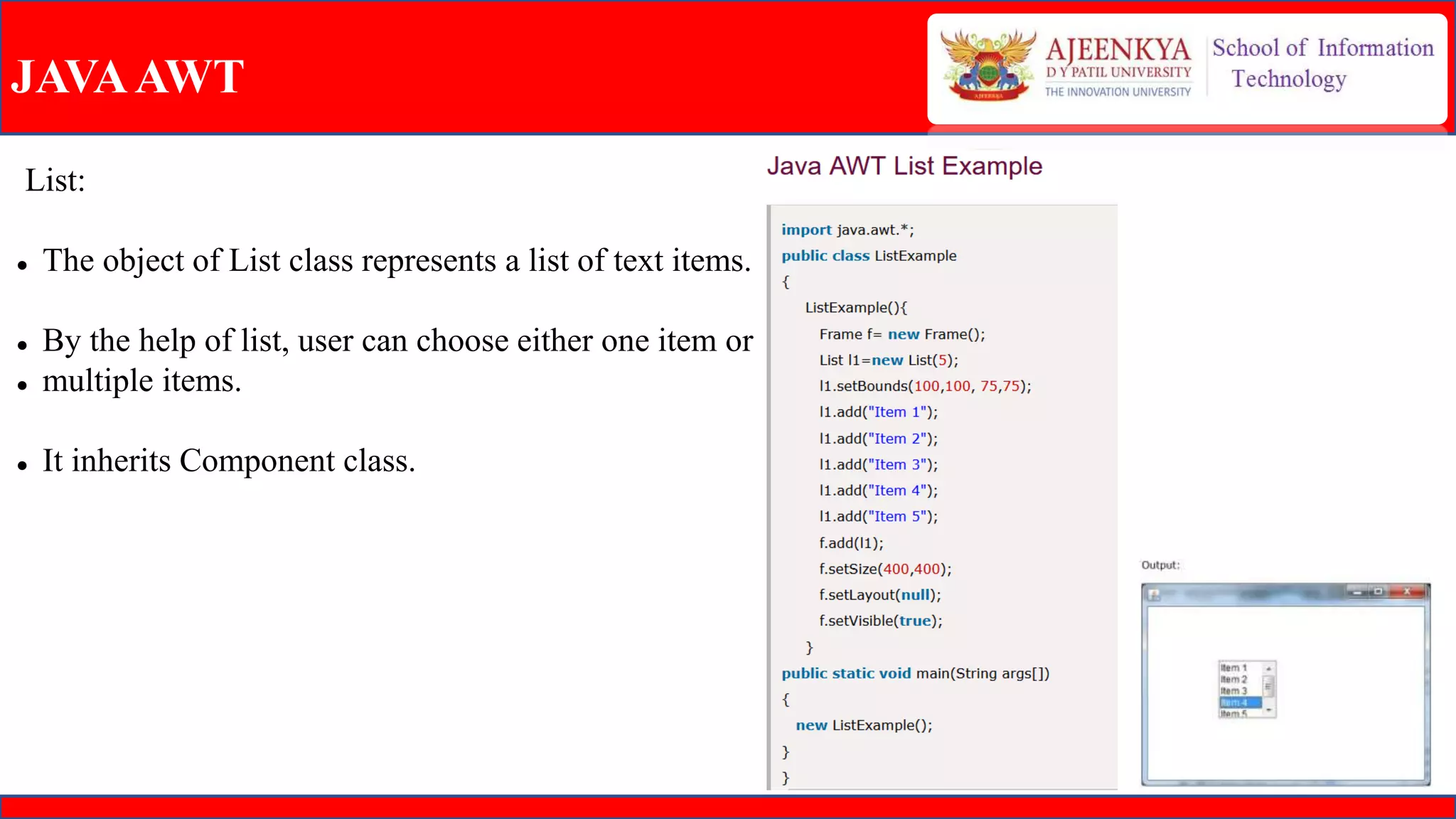
List:
 The object of List class represents a list of text items.
 By the help of list, user can choose either one item or
 multiple items.
 It inherits Component class.
JAVAAWT
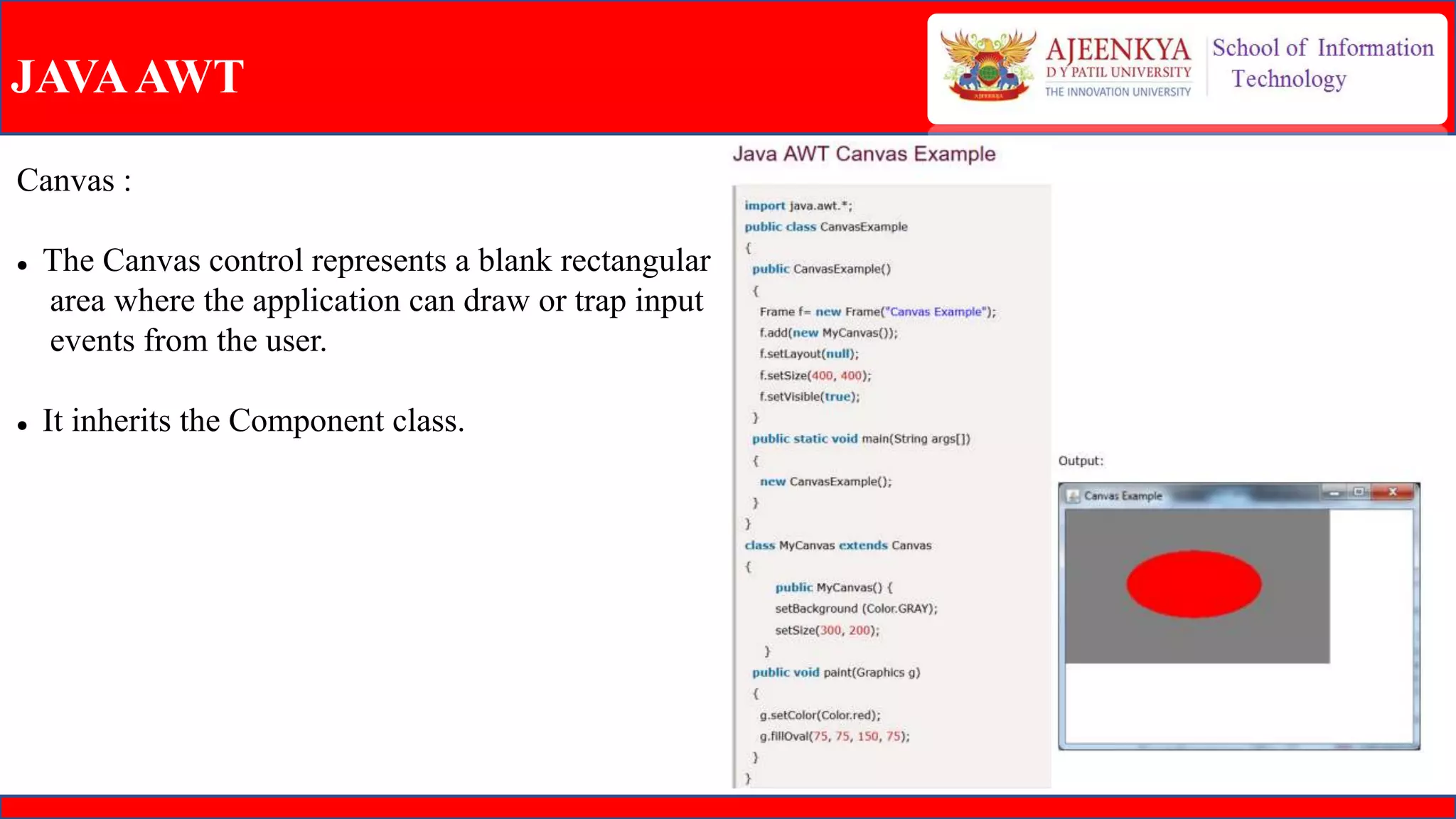
Canvas :
 The Canvas control represents a blank rectangular
area where the application can draw or trap input
events from the user.
 It inherits the Component class.
JAVAAWT
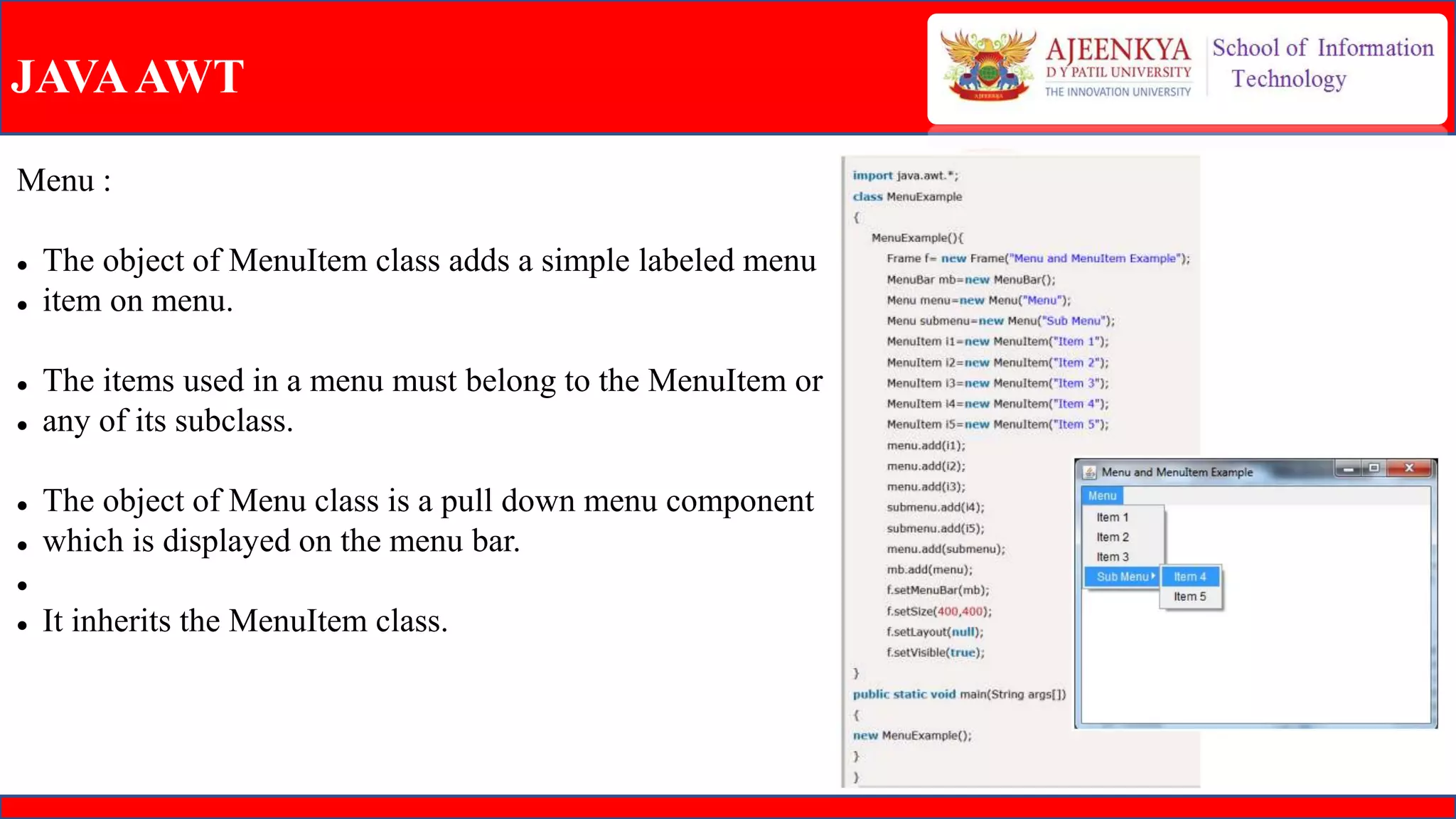
Menu :
 The object of MenuItem class adds a simple labeled menu
 item on menu.
 The items used in a menu must belong to the MenuItem or
 any of its subclass.
 The object of Menu class is a pull down menu component
 which is displayed on the menu bar.

 It inherits the MenuItem class.
JAVAAWT
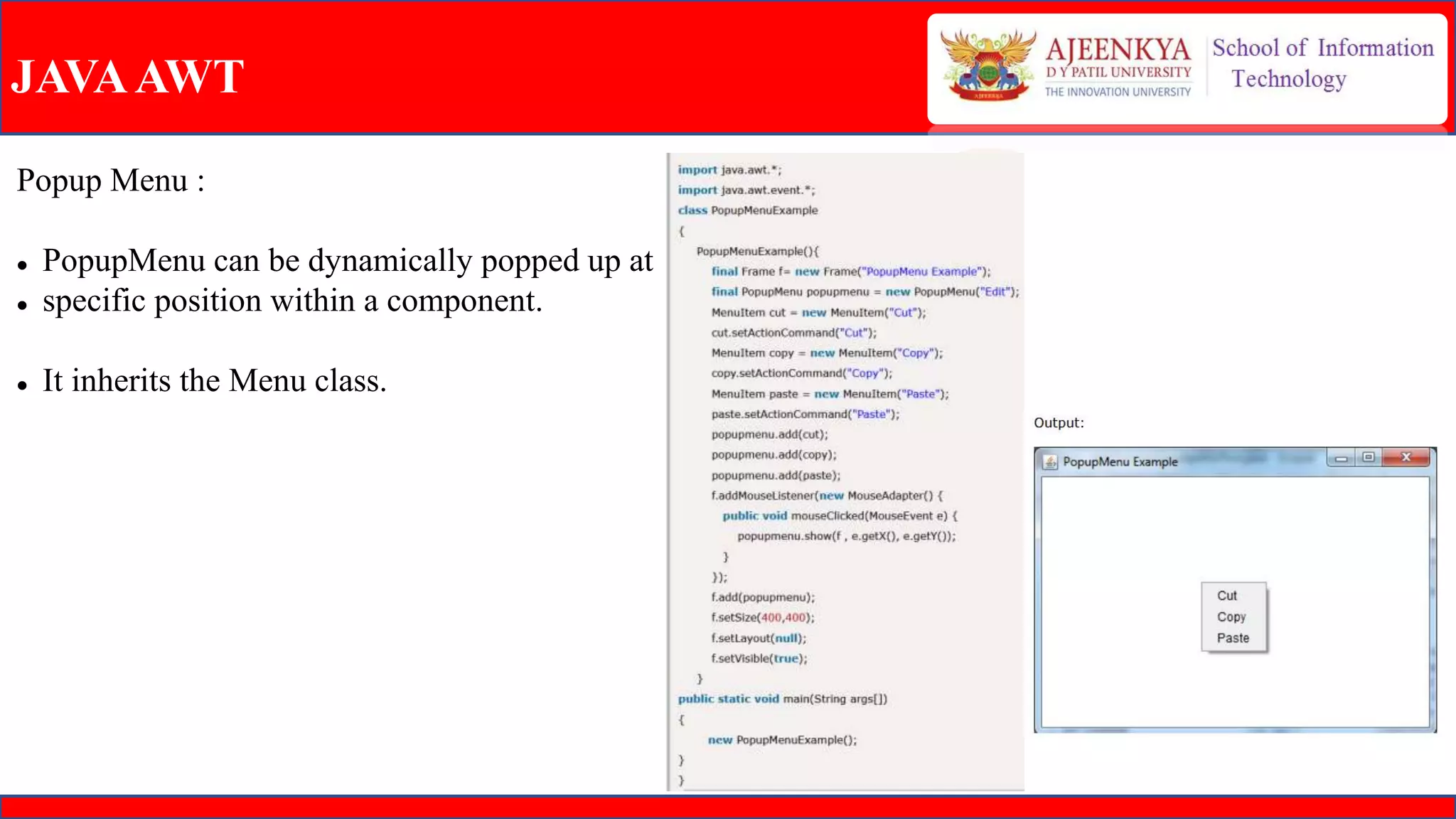
Popup Menu :
 PopupMenu can be dynamically popped up at
 specific position within a component.
 It inherits the Menu class.
JAVAAWT
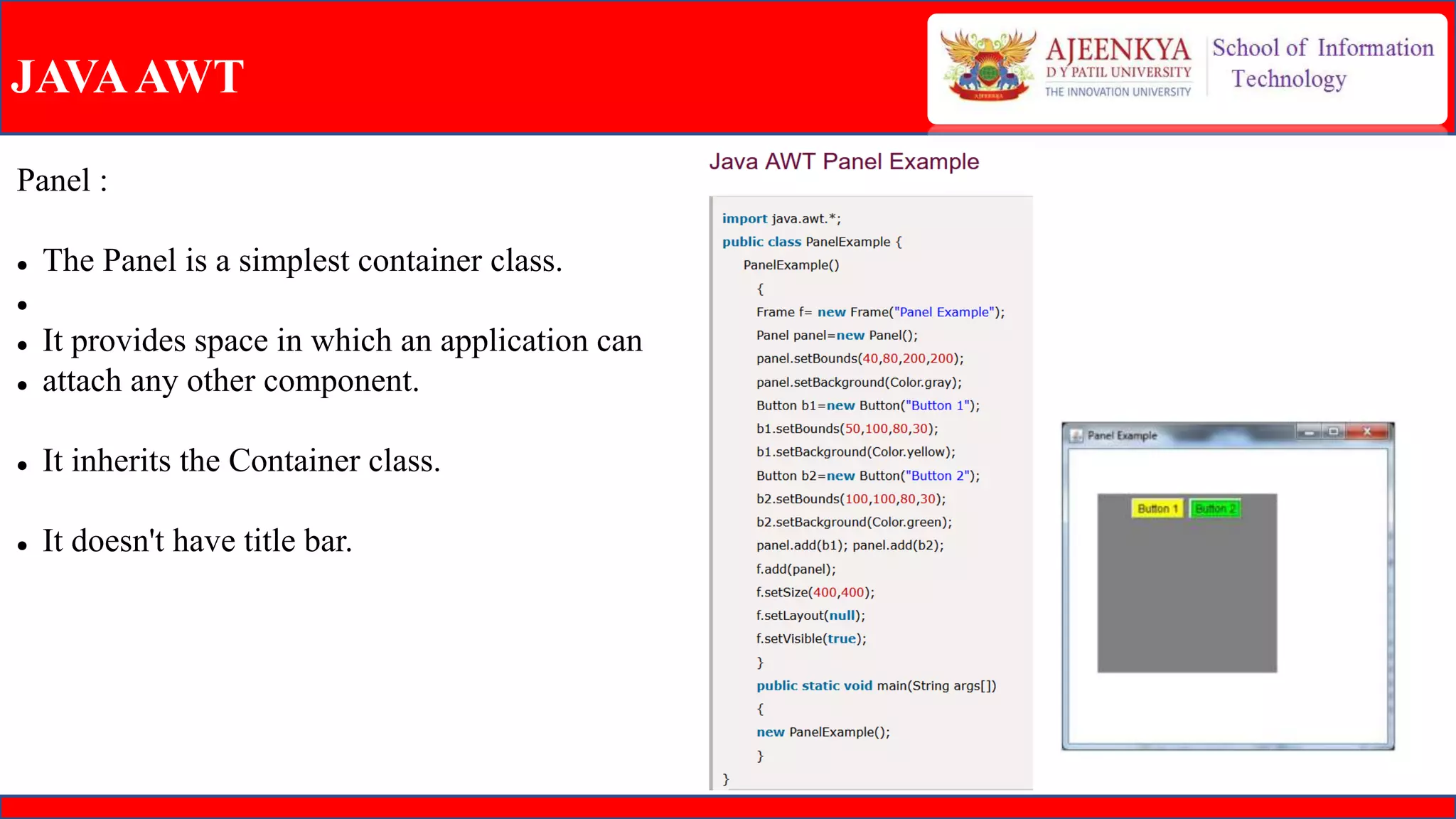
Panel :
 The Panel is a simplest container class.

 It provides space in which an application can
 attach any other component.
 It inherits the Container class.
 It doesn't have title bar.
JAVAAWT
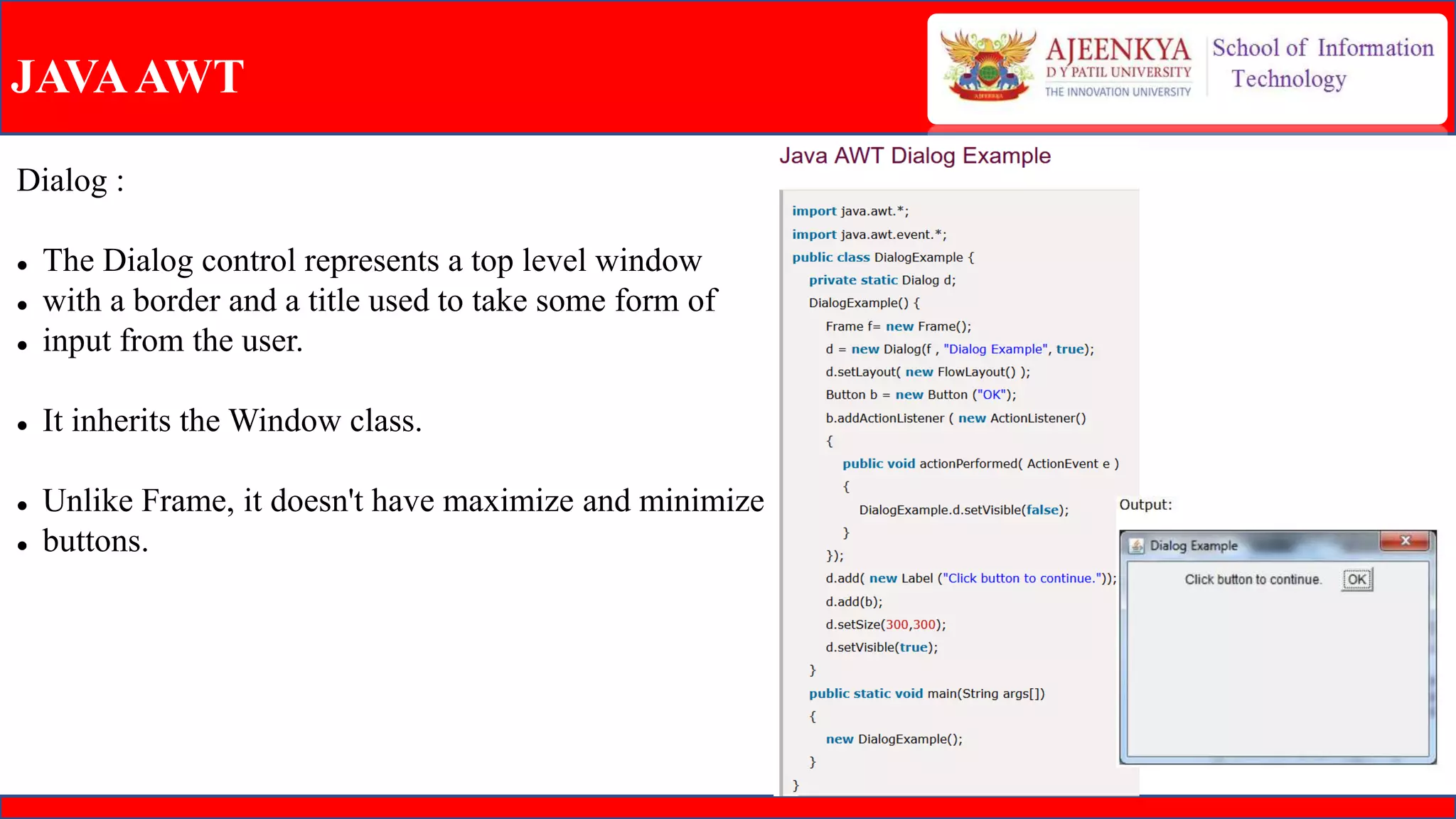
Dialog :
 The Dialog control represents a top level window
 with a border and a title used to take some form of
 input from the user.
 It inherits the Window class.
 Unlike Frame, it doesn't have maximize and minimize
 buttons.
JAVAAWT
Listener :
 The Event listener represent the interfaces responsible to handle events.
 Java provides us various Event listener classes but we will discuss those which are more frequently
used.
 Every method of an event listener method has a single argument as an object which is subclass of
EventObject class.
 For example, mouse event listener methods will accept instance of MouseEvent, where MouseEvent
derives from EventObject.
JAVAAWT
Listener :
 ActionListener :
 This interface is used for receiving the action events.
 MouseListener :
 This interface is used for receiving the mouse events.
 ItemListener :
 This interface is used for receiving the item events.
 KeyListener :
 This interface is used for receiving the key events.
 WindowListener :
 This interface is used for receiving the window events.
JAVA FX :
 JavaFX is a Java library used to develop Desktop applications as well as Rich Internet Applications
(RIA). The applications built in JavaFX, can run on multiple platforms including Web, Mobile and
Desktops.
 JavaFX is intended to replace swing in Java applications as a GUI framework. However, It provides
more functionalities than swing. Like Swing, JavaFX also provides its own components and doesn't
depend upon the operating system.
 It is lightweight and hardware accelerated. It supports various operating systems including Windows,
Linux and Mac OS.
JAVA FX :
JavaFX Package :
 To distribute or deploy JavaFX application we need to package the JavaFX application class.
 To handle the application packaging and deployment, we can use JavaFX Packager tool to build,
package, and deploy applications.
Stage :
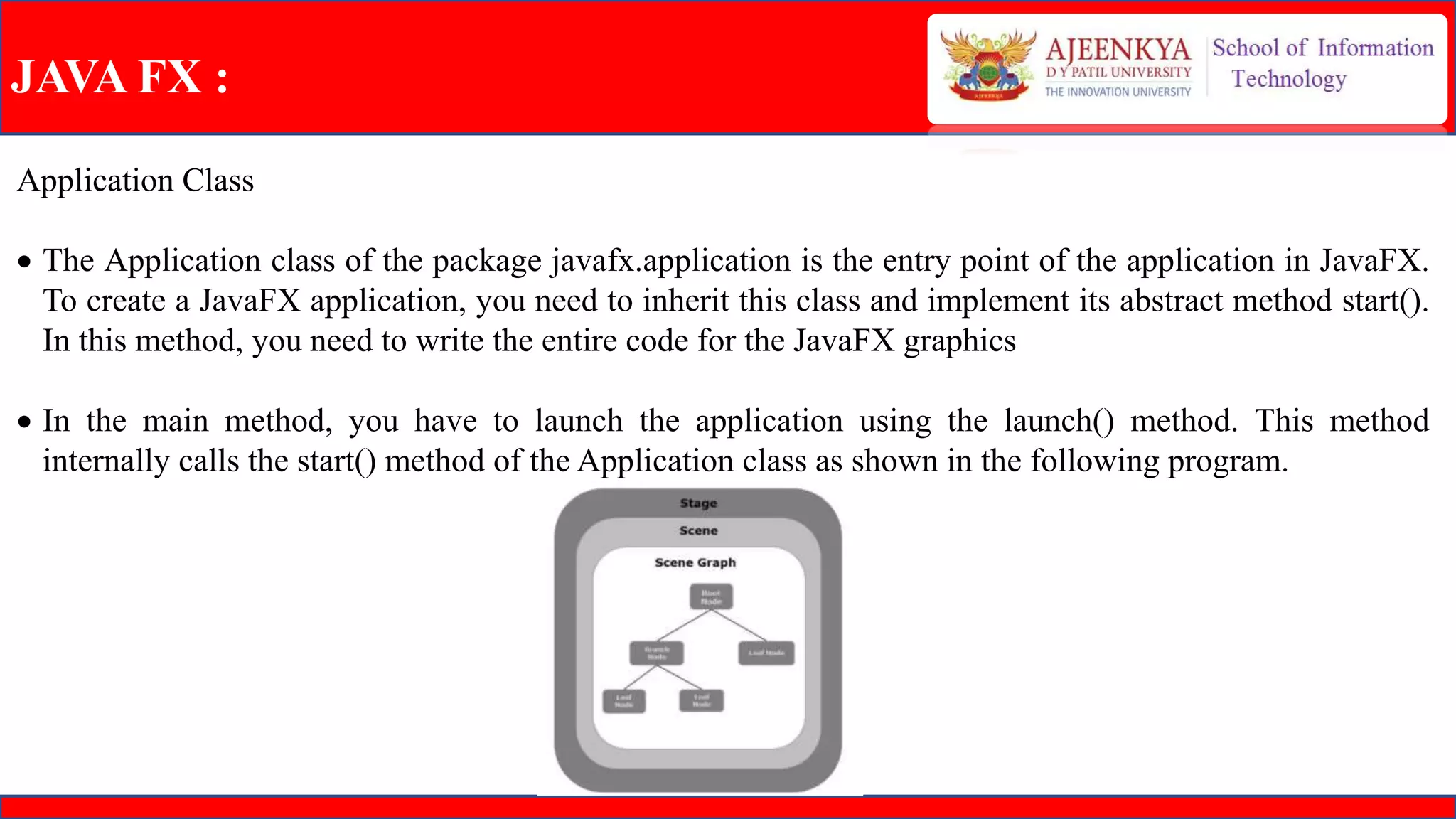
 A stage (a window) contains all the objects of a JavaFX application. It is represented by Stage class of
the package javafx.stage. The primary stage is created by the platform itself.
 The created stage object is passed as an argument to the start() method of the Application class
(explained in the next section).
JAVA FX :
Scene:
 A scene represents the physical contents of a JavaFX application. It contains all the contents of a scene
graph. The class Scene of the package javafx.scene represents the scene object. At an instance, the
scene object is added to only one stage.
 You can create a scene by instantiating the Scene Class. You can opt for the size of the scene by passing
its dimensions (height and width) along with the root node to its constructor.
JAVA FX :
Application Class
 The Application class of the package javafx.application is the entry point of the application in JavaFX.
To create a JavaFX application, you need to inherit this class and implement its abstract method start().
In this method, you need to write the entire code for the JavaFX graphics
 In the main method, you have to launch the application using the launch() method. This method
internally calls the start() method of the Application class as shown in the following program.
JAVA FX :
Lifecycle of JavaFX Application:
 The JavaFX Application class has three life cycle methods, which are −
 start() − The entry point method where the JavaFX graphics code is to be written.
 stop() − An empty method which can be overridden, here you can write the logic to stop the
application.
 init() − An empty method which can be overridden, but you cannot create stage or scene in this method.
JAVA FX :
Java Fx controls :
 JavaFX provides several classes in the package javafx.scene.control. To create various GUI
components (controls), JavaFX supports several controls such as date picker, button text field, etc.

 The graphical user interface of every desktop application mainly considers UI elements, layouts and
behaviour.
 Each control is represented by a class; you can create a control by instantiating its respective class.
JAVA FX :
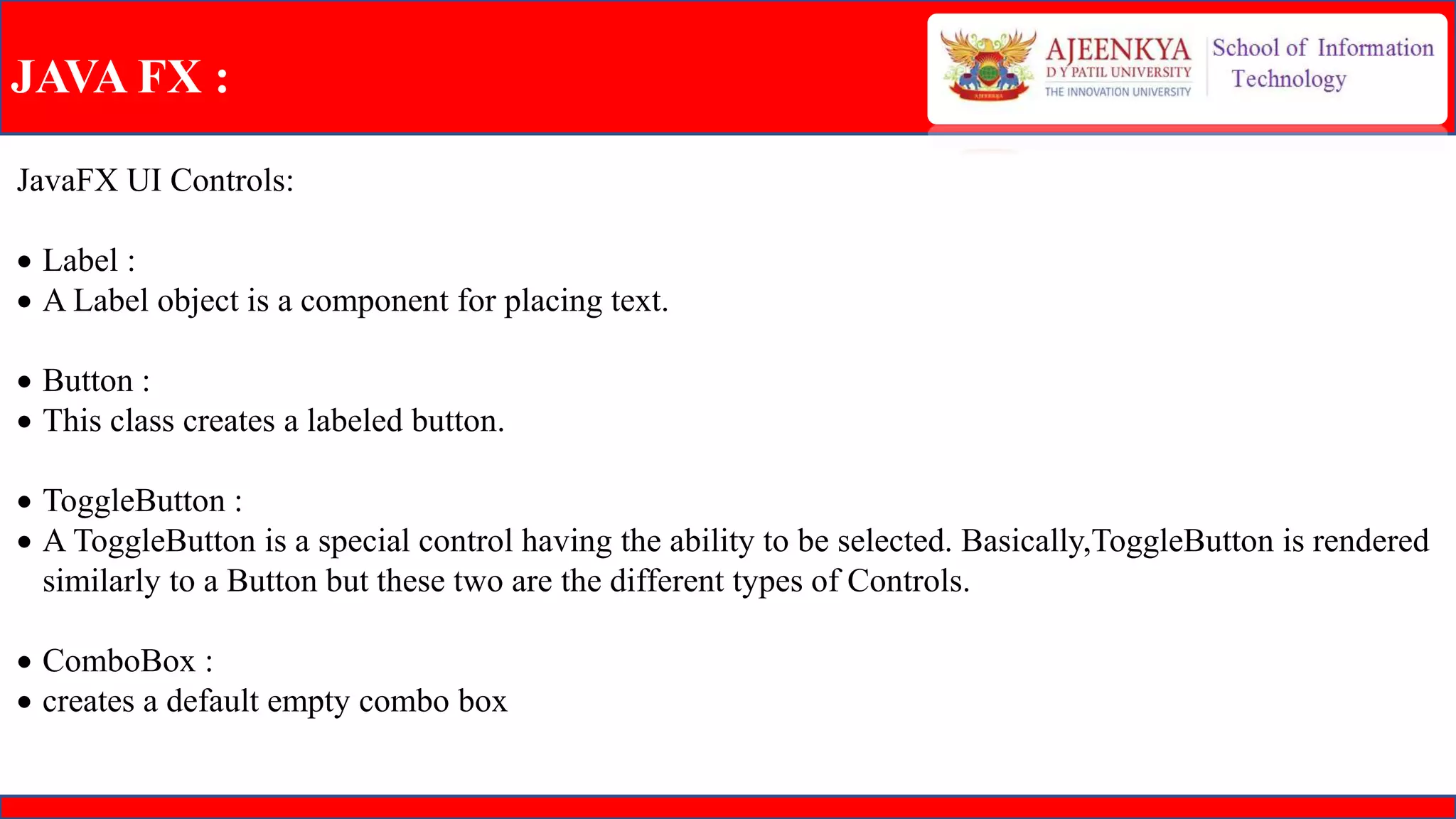
JavaFX UI Controls:
 Label :
 A Label object is a component for placing text.
 Button :
 This class creates a labeled button.
 ToggleButton :
 A ToggleButton is a special control having the ability to be selected. Basically,ToggleButton is rendered
similarly to a Button but these two are the different types of Controls.
 ComboBox :
 creates a default empty combo box
JAVA FX :
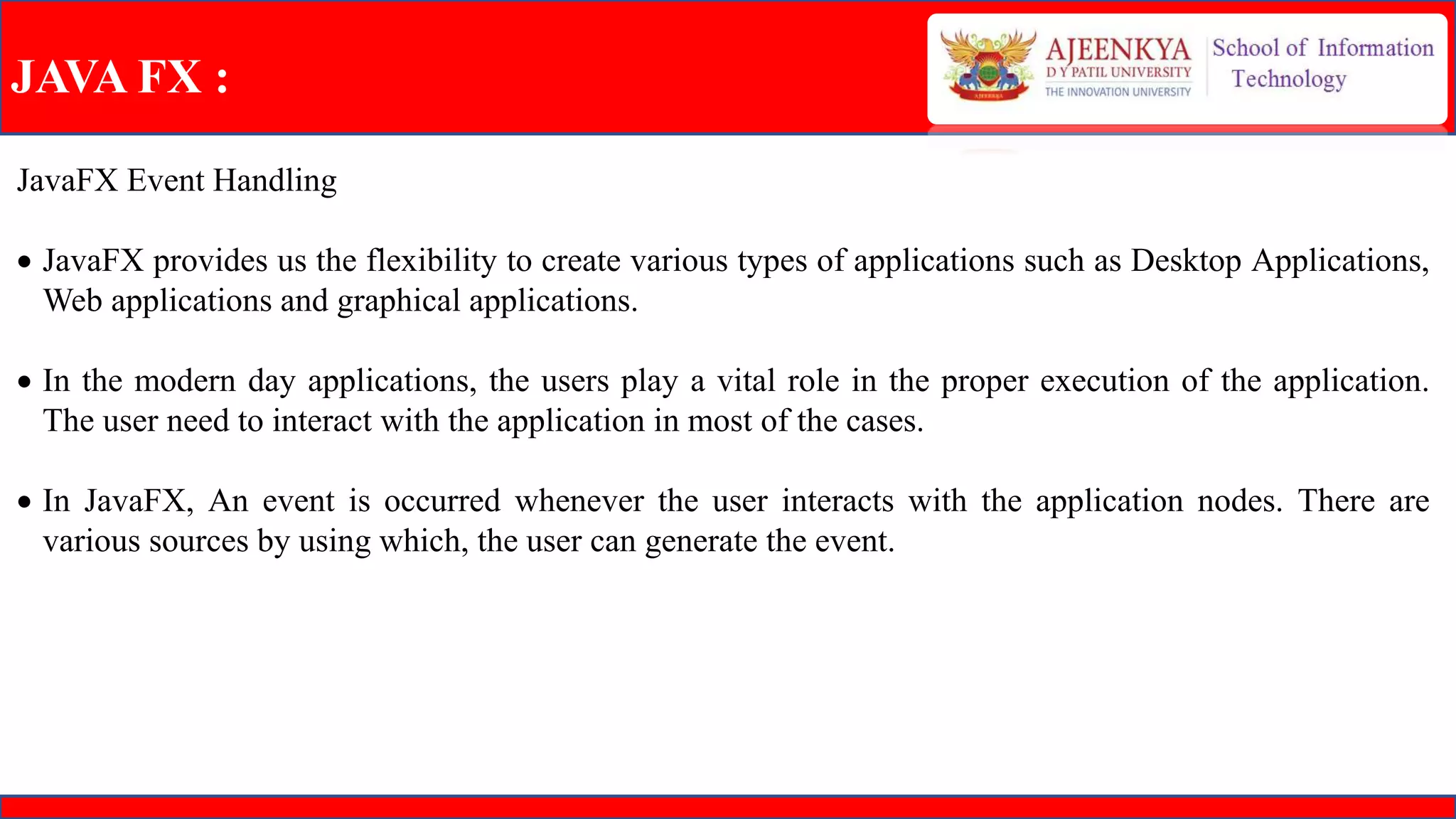
JavaFX Event Handling
 JavaFX provides us the flexibility to create various types of applications such as Desktop Applications,
Web applications and graphical applications.
 In the modern day applications, the users play a vital role in the proper execution of the application.
The user need to interact with the application in most of the cases.
 In JavaFX, An event is occurred whenever the user interacts with the application nodes. There are
various sources by using which, the user can generate the event.
JAVA FX :
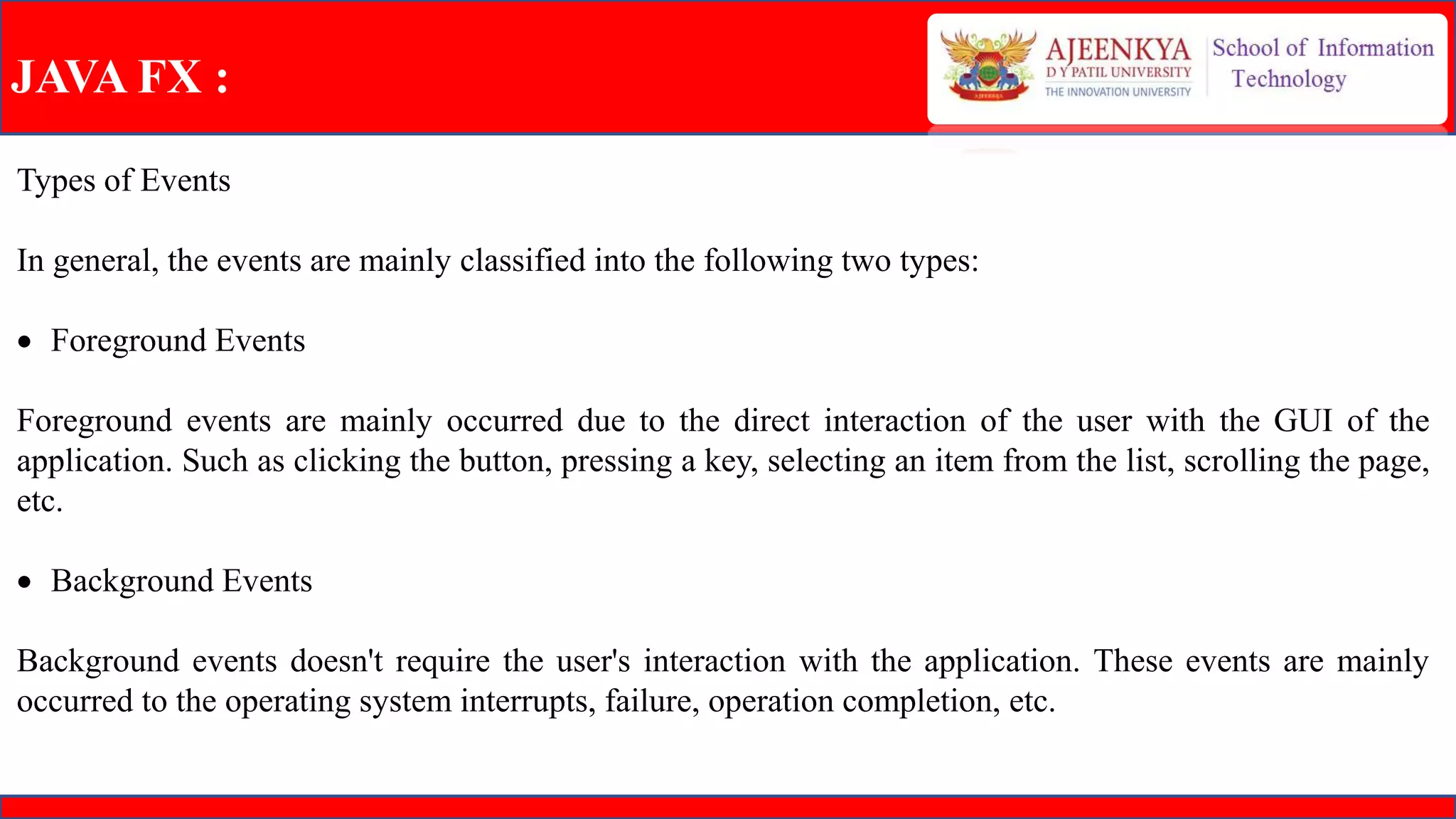
Types of Events
In general, the events are mainly classified into the following two types:
 Foreground Events
Foreground events are mainly occurred due to the direct interaction of the user with the GUI of the
application. Such as clicking the button, pressing a key, selecting an item from the list, scrolling the page,
etc.
 Background Events
Background events doesn't require the user's interaction with the application. These events are mainly
occurred to the operating system interrupts, failure, operation completion, etc.
Java AWT and Java FX

Java AWT and Java FX

  • 1.
    5TH Assessment on Java AWT& Java FX. Presented by PRATIK KADAM. URN: 2020-M-02101997. Under the Supervision of Professor SARDAR PUNEET PRASAD SINGH. Java Programming (CSC510)
  • 2.
    INDEX Sr. no: Topic Page no: 1Java AWT 3 - 20 2 Java FX 21 - 29
  • 3.
    JAVAAWT  Java AWT(Abstract Window Toolkit) is an API to develop GUI or window-based applications in java.  Java AWT components are platform-dependent i.e. components are displayed according to the view of operating system. AWT is heavyweight i.e. its components are using the resources of OS.  The java.awt package provides classes for AWT api such as TextField, Label, TextArea, RadioButton, CheckBox, Choice, List etc
  • 4.
  • 5.
    JAVAAWT JAVAAWT LAYOUTS: • Layoutmeans the arrangement of components within the container. In other way we can say that placing the components at a particular position within the container. • The task of layouting the controls is done automatically by the Layout Manager. AWT Layout Manager Classes: • BorderLayout • CardLayout • FlowLayout • GridLayout • GridBagLayout
  • 6.
    JAVAAWT Lable: • The objectof Label class is a component for placing text in a container. • It is used to display a single line of read only text. • The text can be changed by an application but a user • cannot edit it directly.
  • 7.
    JAVAAWT TextField: • The objectof a TextField class is a text component • that allows the editing of a single line text. • It inherits TextComponent class.
  • 8.
    JAVAAWT Button: • The buttonclass is used to create a labeled button • that has platform independent implementation. • The application result in some action when the button • is pushed.
  • 9.
    JAVAAWT Event:  The Eventclasses represent the event. Java provides us various Event classes but we will discuss those which are more frequently used. EventObject class:  It is the root class from which all event state objects shall be derived. All Events are constructed with a reference to the object, the source, that is logically deemed to be the object upon which the Event in question initially occurred upon.This class is defined in java.util package.
  • 10.
    JAVAAWT TextArea: • The objectof a TextArea class is a multi line • region that displays text. • It allows the editing of multiple line text. • It inherits TextComponent class.
  • 11.
    JAVAAWT Checkbox:  The Checkboxclass is used to create a checkbox.  It is used to turn an option on (true) or off (false).  Clicking on a Checkbox changes its state from  "on" to "off" or from "off" to "on".
  • 12.
    JAVAAWT CheckboxGroup:  The objectof CheckboxGroup class is used to group together  a set of Checkbox.  At a time only one check box button is allowed to be in  "on" state and remaining check box button in "off" state.  It inherits the object class.
  • 13.
    JAVAAWT List:  The objectof List class represents a list of text items.  By the help of list, user can choose either one item or  multiple items.  It inherits Component class.
  • 14.
    JAVAAWT Canvas :  TheCanvas control represents a blank rectangular area where the application can draw or trap input events from the user.  It inherits the Component class.
  • 15.
    JAVAAWT Menu :  Theobject of MenuItem class adds a simple labeled menu  item on menu.  The items used in a menu must belong to the MenuItem or  any of its subclass.  The object of Menu class is a pull down menu component  which is displayed on the menu bar.   It inherits the MenuItem class.
  • 16.
    JAVAAWT Popup Menu : PopupMenu can be dynamically popped up at  specific position within a component.  It inherits the Menu class.
  • 17.
    JAVAAWT Panel :  ThePanel is a simplest container class.   It provides space in which an application can  attach any other component.  It inherits the Container class.  It doesn't have title bar.
  • 18.
    JAVAAWT Dialog :  TheDialog control represents a top level window  with a border and a title used to take some form of  input from the user.  It inherits the Window class.  Unlike Frame, it doesn't have maximize and minimize  buttons.
  • 19.
    JAVAAWT Listener :  TheEvent listener represent the interfaces responsible to handle events.  Java provides us various Event listener classes but we will discuss those which are more frequently used.  Every method of an event listener method has a single argument as an object which is subclass of EventObject class.  For example, mouse event listener methods will accept instance of MouseEvent, where MouseEvent derives from EventObject.
  • 20.
    JAVAAWT Listener :  ActionListener:  This interface is used for receiving the action events.  MouseListener :  This interface is used for receiving the mouse events.  ItemListener :  This interface is used for receiving the item events.  KeyListener :  This interface is used for receiving the key events.  WindowListener :  This interface is used for receiving the window events.
  • 21.
    JAVA FX : JavaFX is a Java library used to develop Desktop applications as well as Rich Internet Applications (RIA). The applications built in JavaFX, can run on multiple platforms including Web, Mobile and Desktops.  JavaFX is intended to replace swing in Java applications as a GUI framework. However, It provides more functionalities than swing. Like Swing, JavaFX also provides its own components and doesn't depend upon the operating system.  It is lightweight and hardware accelerated. It supports various operating systems including Windows, Linux and Mac OS.
  • 22.
    JAVA FX : JavaFXPackage :  To distribute or deploy JavaFX application we need to package the JavaFX application class.  To handle the application packaging and deployment, we can use JavaFX Packager tool to build, package, and deploy applications. Stage :  A stage (a window) contains all the objects of a JavaFX application. It is represented by Stage class of the package javafx.stage. The primary stage is created by the platform itself.  The created stage object is passed as an argument to the start() method of the Application class (explained in the next section).
  • 23.
    JAVA FX : Scene: A scene represents the physical contents of a JavaFX application. It contains all the contents of a scene graph. The class Scene of the package javafx.scene represents the scene object. At an instance, the scene object is added to only one stage.  You can create a scene by instantiating the Scene Class. You can opt for the size of the scene by passing its dimensions (height and width) along with the root node to its constructor.
  • 24.
    JAVA FX : ApplicationClass  The Application class of the package javafx.application is the entry point of the application in JavaFX. To create a JavaFX application, you need to inherit this class and implement its abstract method start(). In this method, you need to write the entire code for the JavaFX graphics  In the main method, you have to launch the application using the launch() method. This method internally calls the start() method of the Application class as shown in the following program.

  • 25.
    JAVA FX : Lifecycleof JavaFX Application:  The JavaFX Application class has three life cycle methods, which are −  start() − The entry point method where the JavaFX graphics code is to be written.  stop() − An empty method which can be overridden, here you can write the logic to stop the application.  init() − An empty method which can be overridden, but you cannot create stage or scene in this method.
  • 26.
    JAVA FX : JavaFx controls :  JavaFX provides several classes in the package javafx.scene.control. To create various GUI components (controls), JavaFX supports several controls such as date picker, button text field, etc.   The graphical user interface of every desktop application mainly considers UI elements, layouts and behaviour.  Each control is represented by a class; you can create a control by instantiating its respective class.
  • 27.
    JAVA FX : JavaFXUI Controls:  Label :  A Label object is a component for placing text.  Button :  This class creates a labeled button.  ToggleButton :  A ToggleButton is a special control having the ability to be selected. Basically,ToggleButton is rendered similarly to a Button but these two are the different types of Controls.  ComboBox :  creates a default empty combo box
  • 28.
    JAVA FX : JavaFXEvent Handling  JavaFX provides us the flexibility to create various types of applications such as Desktop Applications, Web applications and graphical applications.  In the modern day applications, the users play a vital role in the proper execution of the application. The user need to interact with the application in most of the cases.  In JavaFX, An event is occurred whenever the user interacts with the application nodes. There are various sources by using which, the user can generate the event.
  • 29.
    JAVA FX : Typesof Events In general, the events are mainly classified into the following two types:  Foreground Events Foreground events are mainly occurred due to the direct interaction of the user with the GUI of the application. Such as clicking the button, pressing a key, selecting an item from the list, scrolling the page, etc.  Background Events Background events doesn't require the user's interaction with the application. These events are mainly occurred to the operating system interrupts, failure, operation completion, etc.