PYTHON
PROGRAMMIN
G
BY
MRS. V. JAYAVANI
ASSISTANT PROFESSOR
DEPARTMENT OF COMPUTER SCIENCE
WHAT IS PYTHON?
 Python is a popular high-level programming language used in various applications.
 Python is an easy language to learn because of its simple syntax.
 Python can be used for simple tasks such as plotting or for more complex tasks like machine
learning.
VARIABLES, OBJECTS, AND CLASSES
 A variable is a reference to a value stored in a computer’s memory.
 Variables can be sorted into a variety of categories (or data types) such as numbers (int/float
etc), boolean values (true/false), and sequences (strings, lists etc).
 An object is a collection of data from a computer’s memory that can be manipulated.
 All variables are objects although some objects can be defined by data referred to
by multiple variables.
 Methods are the functions used to act on/alter an object’s data. they describe what
your object can “do.”
VARIABLES, OBJECTS, AND CLASSES (CONT.)
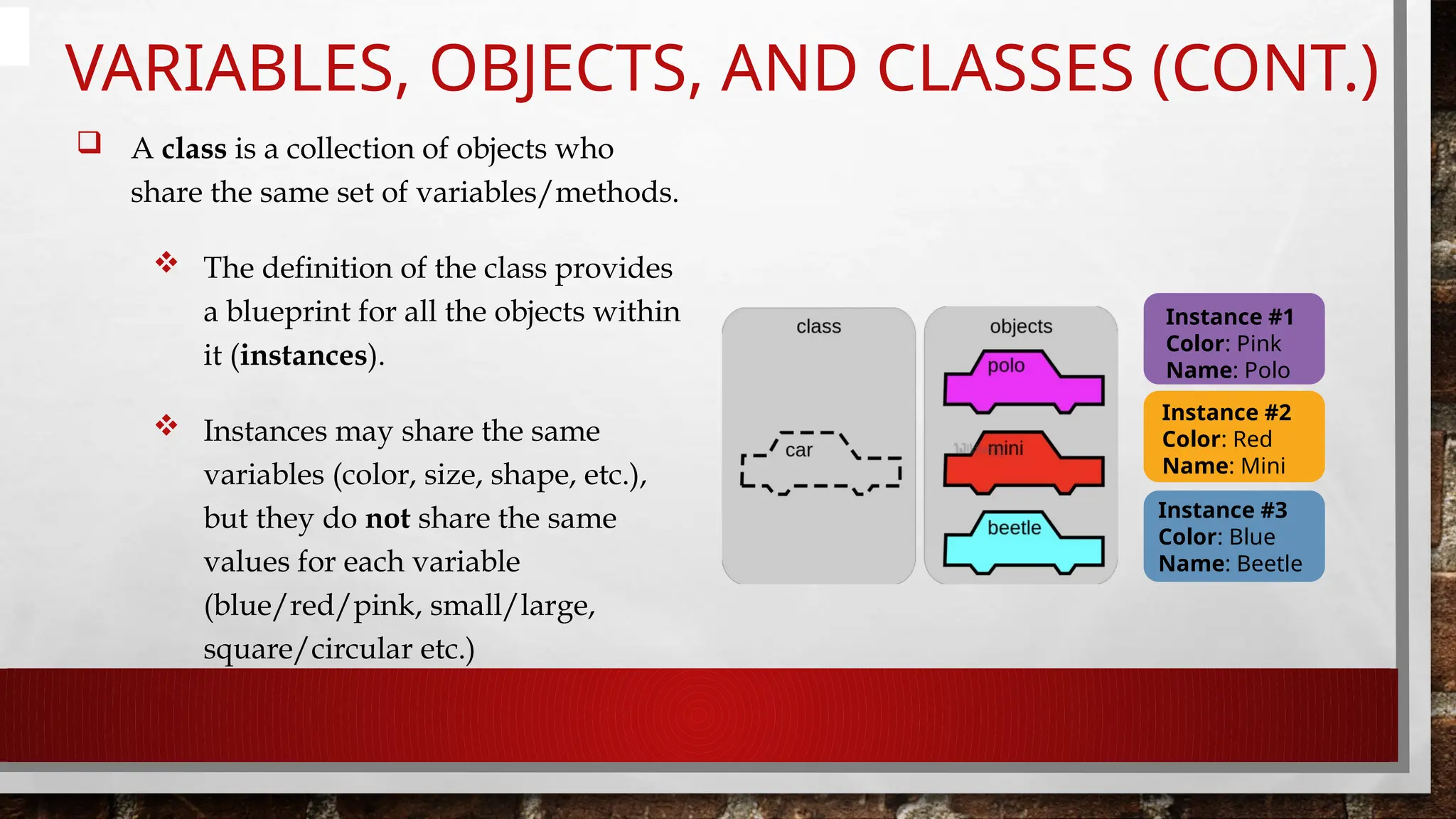
 A class is a collection of objects who
share the same set of variables/methods.
 The definition of the class provides
a blueprint for all the objects within
it (instances).
 Instances may share the same
variables (color, size, shape, etc.),
but they do not share the same
values for each variable
(blue/red/pink, small/large,
square/circular etc.)
Instance #1
Color: Pink
Name: Polo
Instance #2
Color: Red
Name: Mini
Instance #3
Color: Blue
Name: Beetle
BASIC SYNTAX RULES
 The name of your variable (myint etc.) is placed on the left of the “=“ operator.
 Most variable names are in camel case where the first word begins with a lowercase letter and any
subsequent words are capitalized.
 Variable names may also appear in snake case where all words are lowercase, with underscores between
words.
 The assignment operator (“=“) sets the variable name equal to the memory location where your value is found.
 The value of your variable (“hello, world”) is placed on the right of the “=“ operator.
 The type of this value does not need to be stated but its format must abide by a given object type (as shown).
myString = “Hello, World” myInt = 7
myFloat = 7.0
myList = [7, 8, 9] myBoolean = true
BASIC SYNTAX RULES (CONT.)
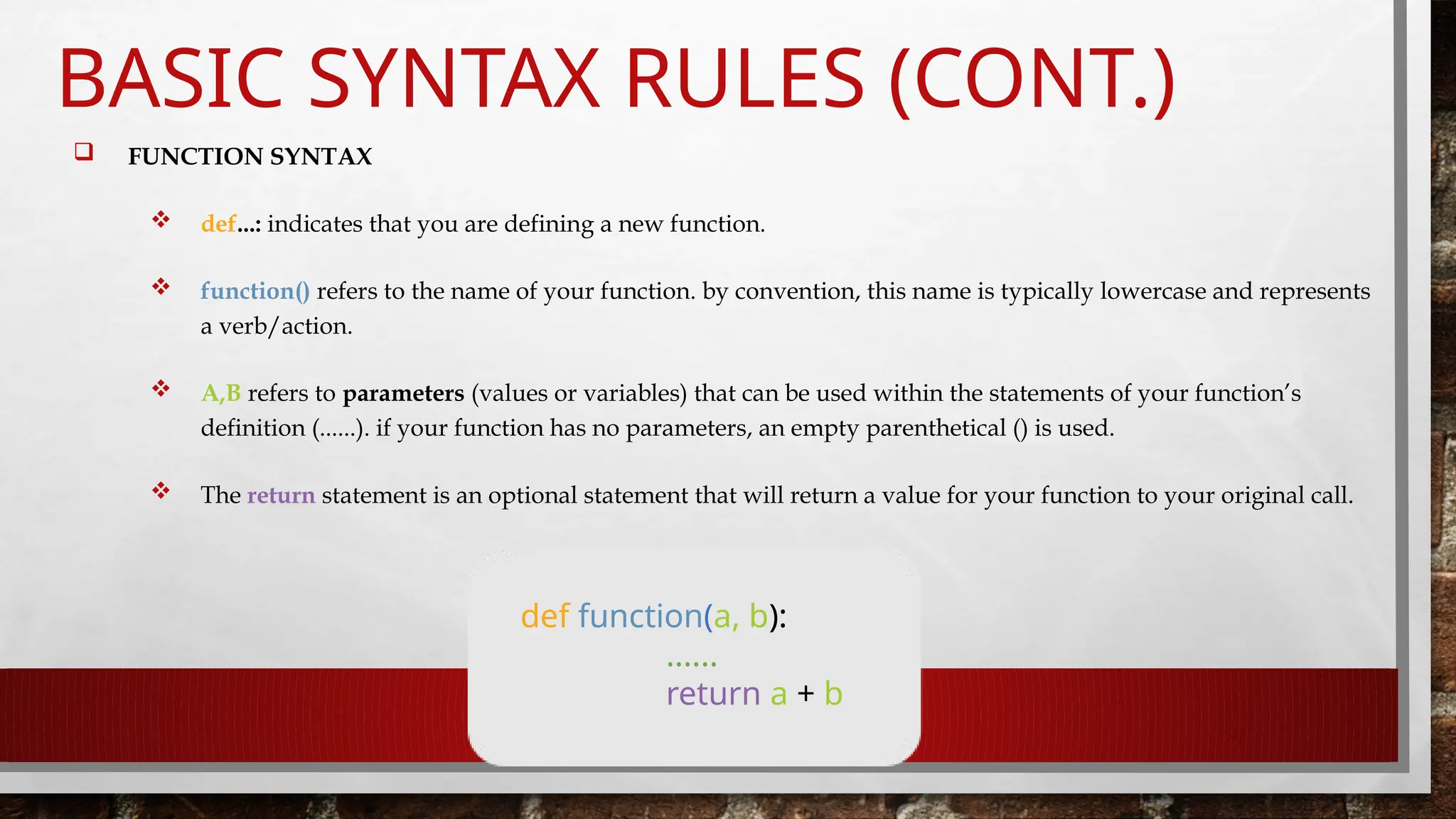
 FUNCTION SYNTAX
 def...: indicates that you are defining a new function.
 function() refers to the name of your function. by convention, this name is typically lowercase and represents
a verb/action.
 A,B refers to parameters (values or variables) that can be used within the statements of your function’s
definition (......). if your function has no parameters, an empty parenthetical () is used.
 The return statement is an optional statement that will return a value for your function to your original call.
def function(a, b):
......
return a + b
BASIC SYNTAX RULES (CONT.)
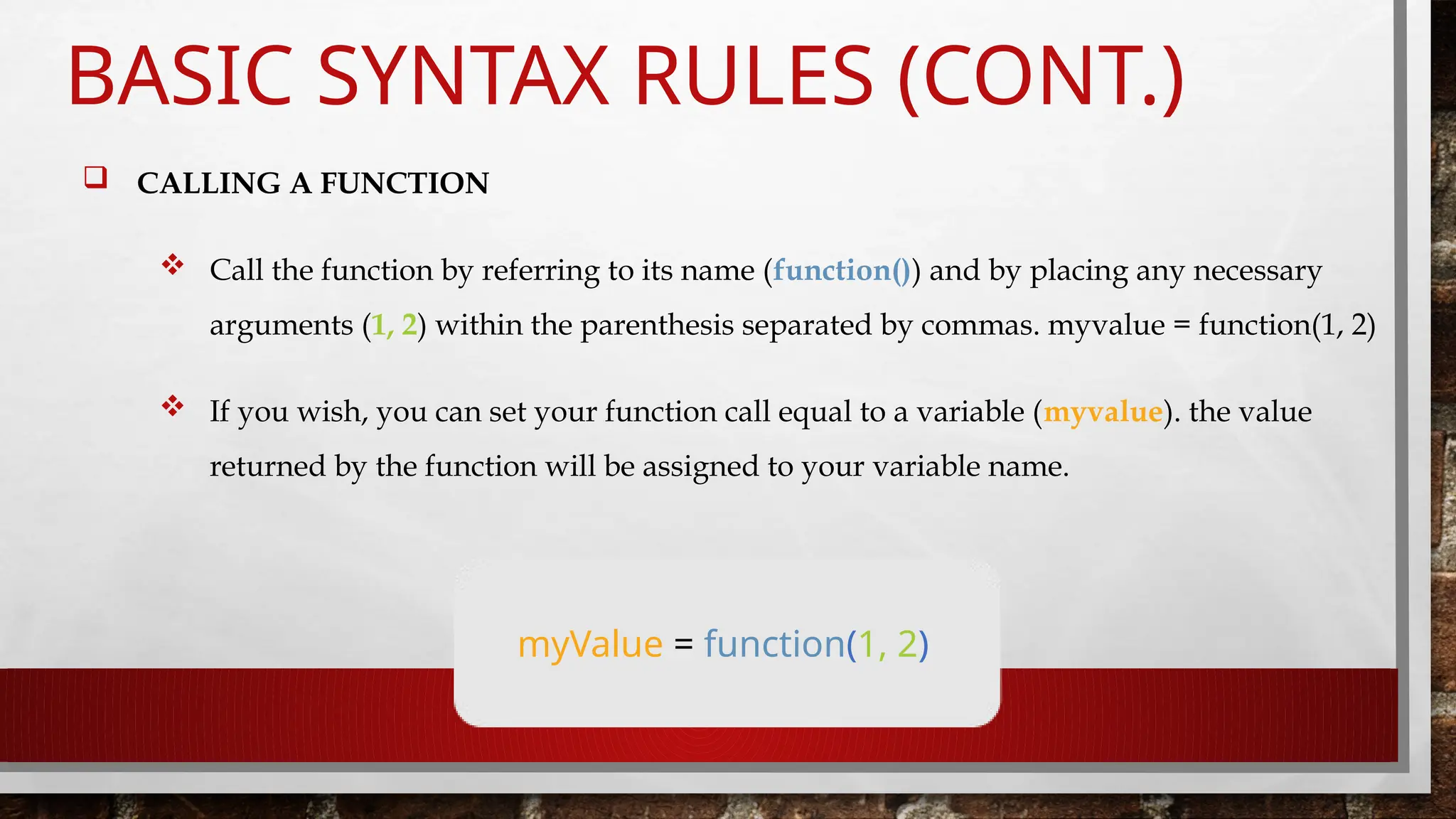
 CALLING A FUNCTION
 Call the function by referring to its name (function()) and by placing any necessary
arguments (1, 2) within the parenthesis separated by commas. myvalue = function(1, 2)
 If you wish, you can set your function call equal to a variable (myvalue). the value
returned by the function will be assigned to your variable name.
myValue = function(1, 2)
COMMON DATA TYPES AND OPERATORS
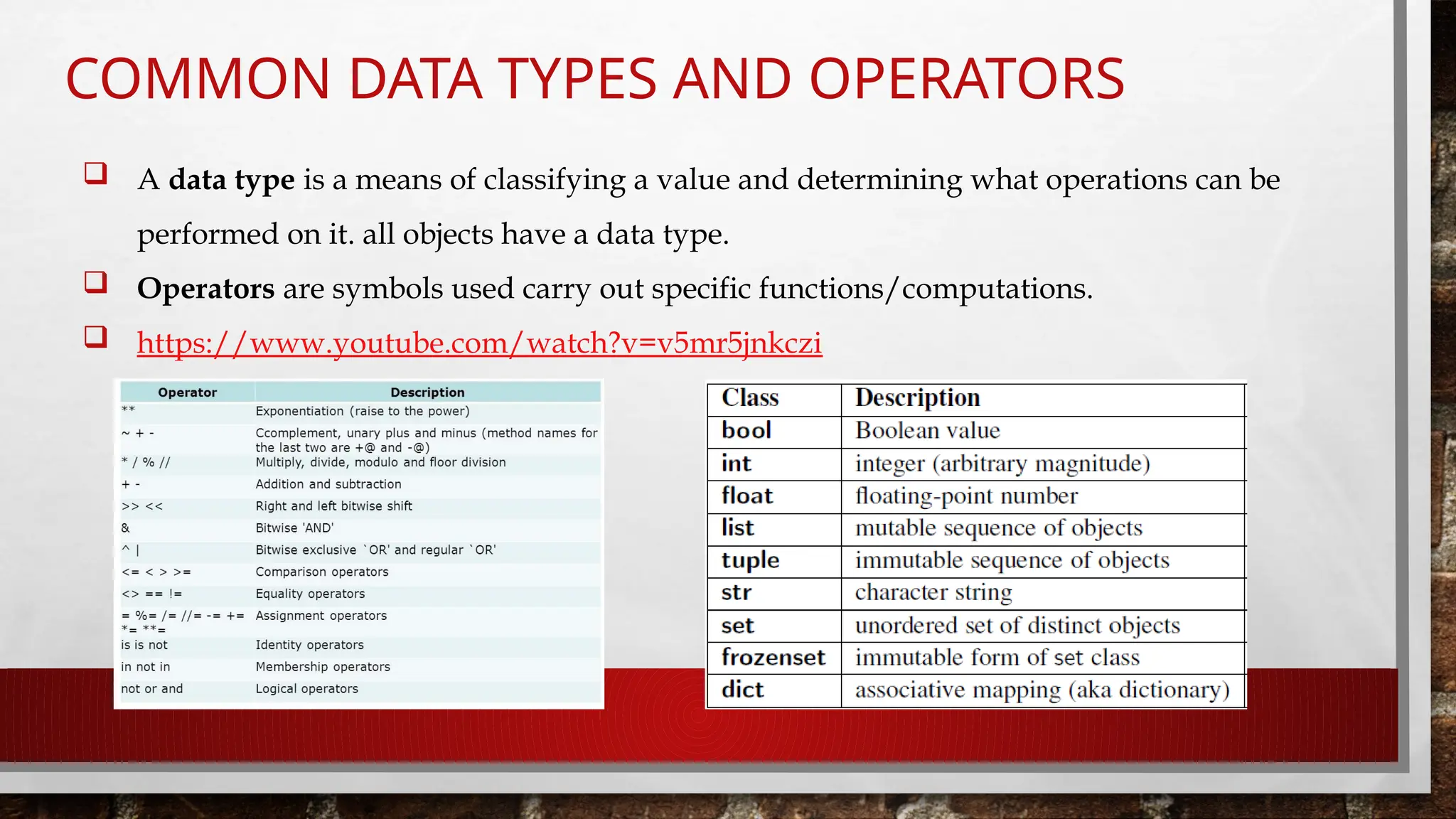
 A data type is a means of classifying a value and determining what operations can be
performed on it. all objects have a data type.
 Operators are symbols used carry out specific functions/computations.
 https://www.youtube.com/watch?v=v5mr5jnkczi
INPUT/OUTPUT
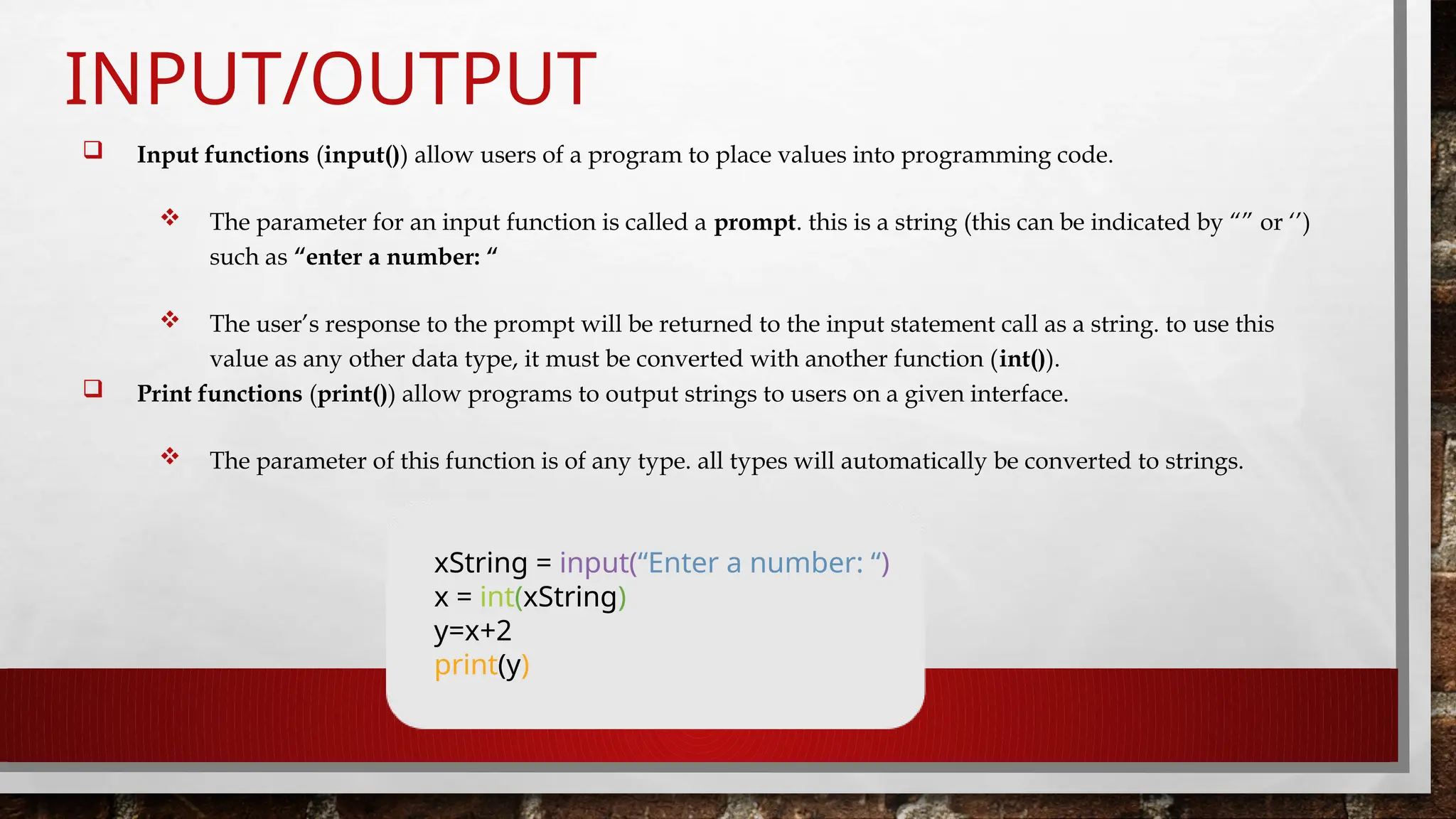
 Input functions (input()) allow users of a program to place values into programming code.
 The parameter for an input function is called a prompt. this is a string (this can be indicated by “” or ‘’)
such as “enter a number: “
 The user’s response to the prompt will be returned to the input statement call as a string. to use this
value as any other data type, it must be converted with another function (int()).
 Print functions (print()) allow programs to output strings to users on a given interface.
 The parameter of this function is of any type. all types will automatically be converted to strings.
xString = input(“Enter a number: “)
x = int(xString)
y=x+2
print(y)
IF-ELSE STATEMENTS
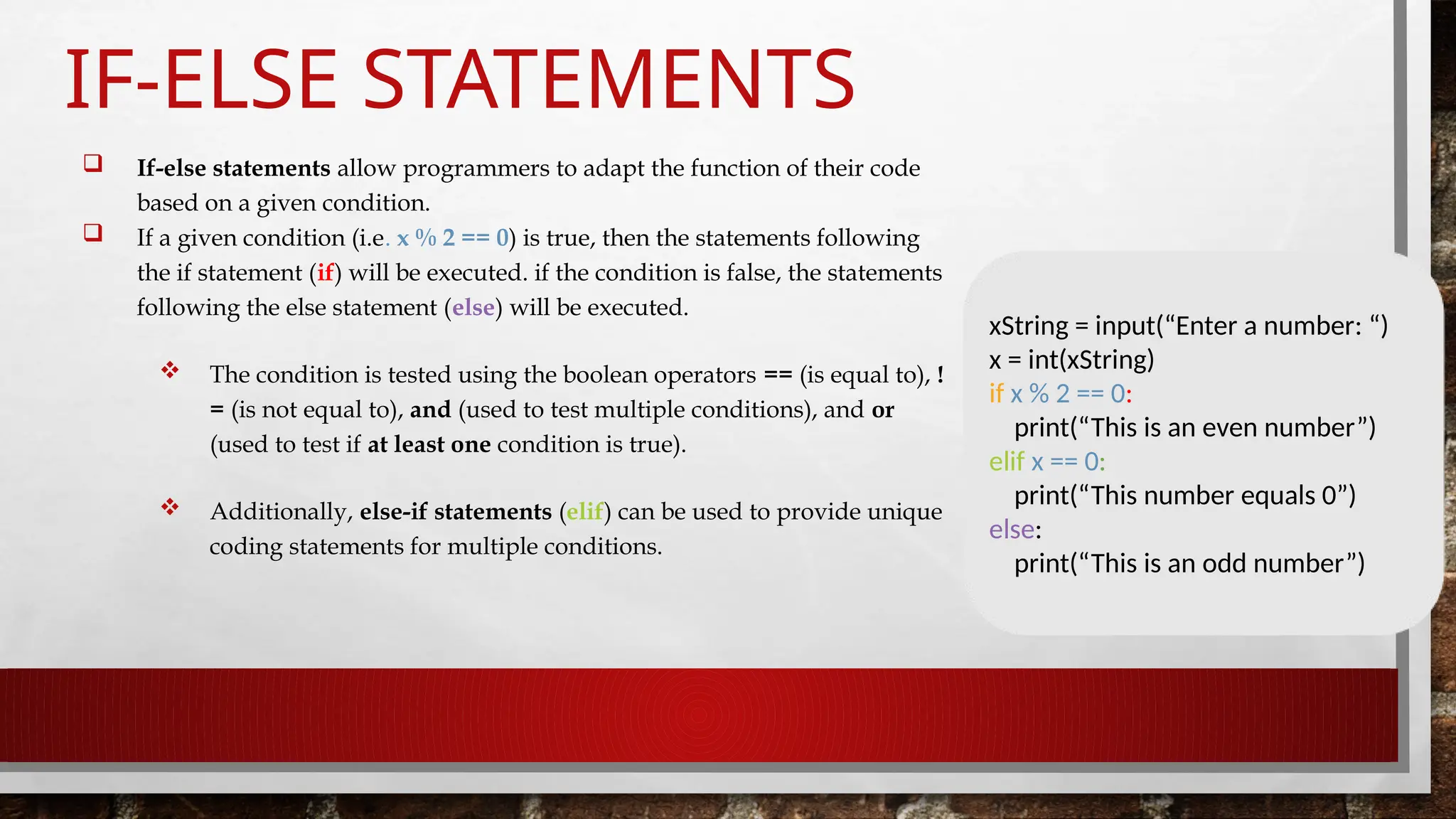
 If-else statements allow programmers to adapt the function of their code
based on a given condition.
 If a given condition (i.e. x % 2 == 0) is true, then the statements following
the if statement (if) will be executed. if the condition is false, the statements
following the else statement (else) will be executed.
 The condition is tested using the boolean operators == (is equal to), !
= (is not equal to), and (used to test multiple conditions), and or
(used to test if at least one condition is true).
 Additionally, else-if statements (elif) can be used to provide unique
coding statements for multiple conditions.
xString = input(“Enter a number: “)
x = int(xString)
if x % 2 == 0:
print(“This is an even number”)
elif x == 0:
print(“This number equals 0”)
else:
print(“This is an odd number”)
FOR LOOPS
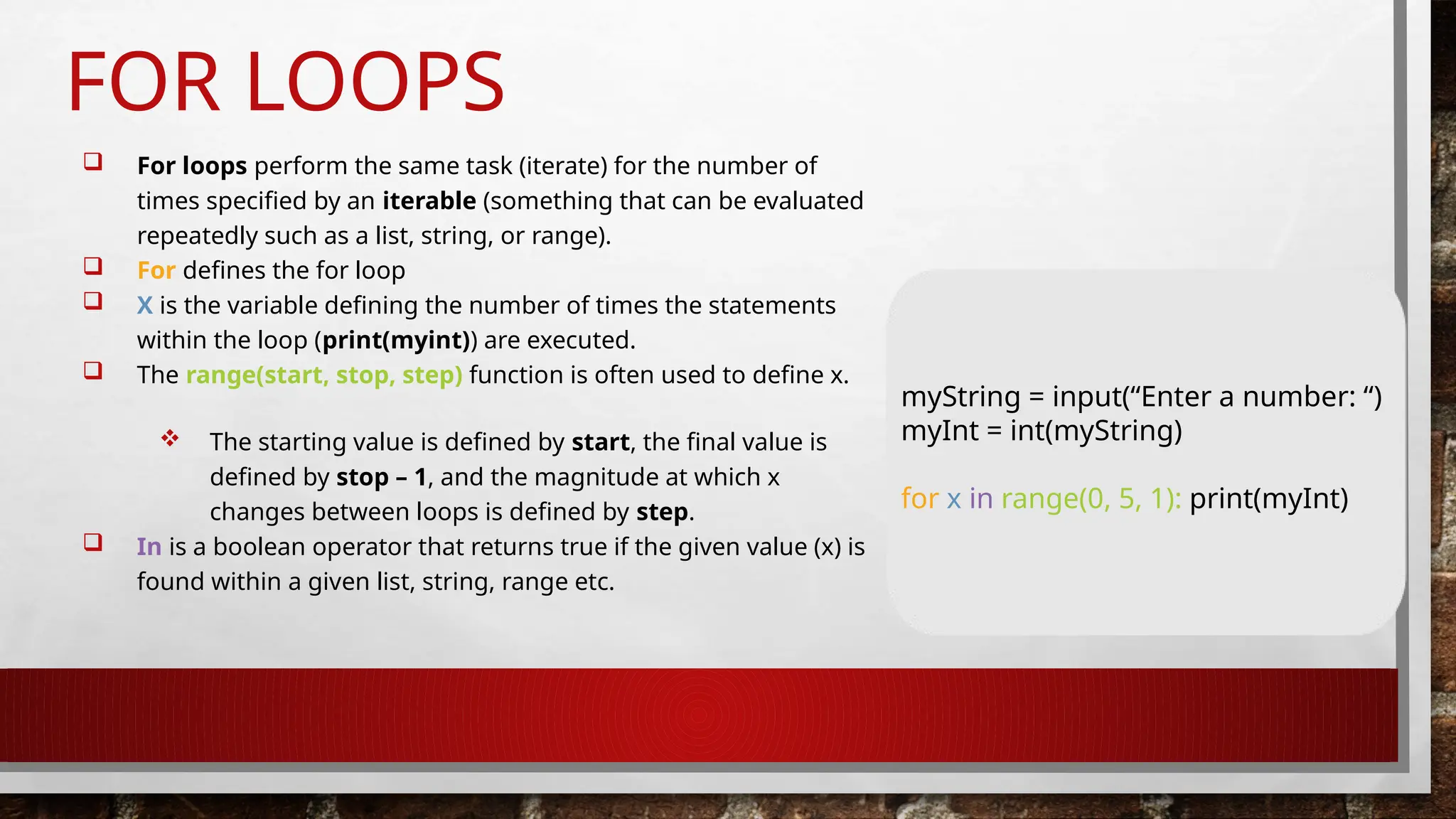
 For loops perform the same task (iterate) for the number of
times specified by an iterable (something that can be evaluated
repeatedly such as a list, string, or range).
 For defines the for loop
 X is the variable defining the number of times the statements
within the loop (print(myint)) are executed.
 The range(start, stop, step) function is often used to define x.
 The starting value is defined by start, the final value is
defined by stop – 1, and the magnitude at which x
changes between loops is defined by step.
 In is a boolean operator that returns true if the given value (x) is
found within a given list, string, range etc.
myString = input(“Enter a number: “)
myInt = int(myString)
for x in range(0, 5, 1): print(myInt)
WHILE LOOPS
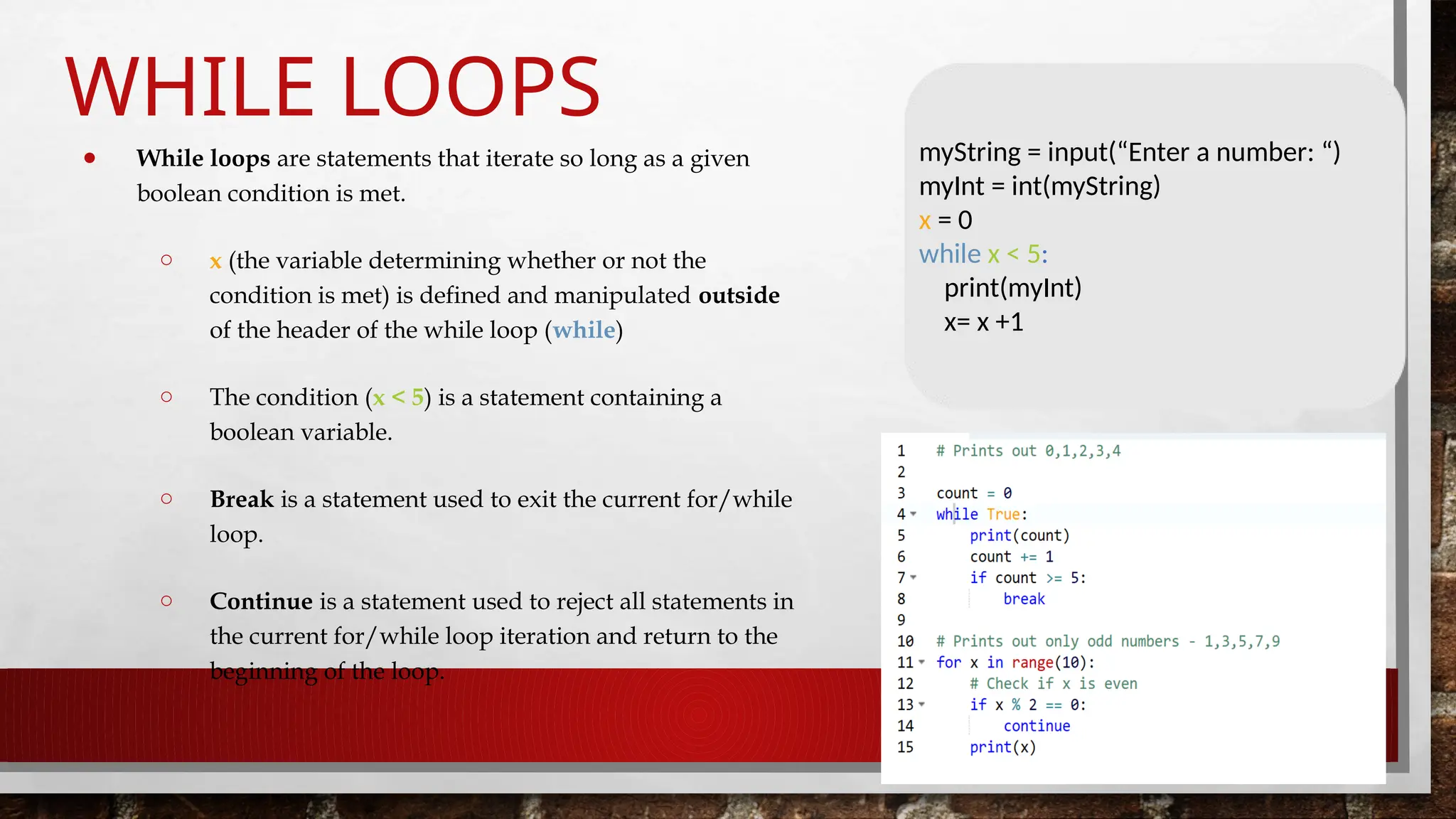
● While loops are statements that iterate so long as a given
boolean condition is met.
○ x (the variable determining whether or not the
condition is met) is defined and manipulated outside
of the header of the while loop (while)
○ The condition (x < 5) is a statement containing a
boolean variable.
○ Break is a statement used to exit the current for/while
loop.
○ Continue is a statement used to reject all statements in
the current for/while loop iteration and return to the
beginning of the loop.
myString = input(“Enter a number: “)
myInt = int(myString)
x = 0
while x < 5:
print(myInt)
x= x +1
THANK YOU

Introduction to Python Programming language

  • 1.
    PYTHON PROGRAMMIN G BY MRS. V. JAYAVANI ASSISTANTPROFESSOR DEPARTMENT OF COMPUTER SCIENCE
  • 2.
    WHAT IS PYTHON? Python is a popular high-level programming language used in various applications.  Python is an easy language to learn because of its simple syntax.  Python can be used for simple tasks such as plotting or for more complex tasks like machine learning.
  • 3.
    VARIABLES, OBJECTS, ANDCLASSES  A variable is a reference to a value stored in a computer’s memory.  Variables can be sorted into a variety of categories (or data types) such as numbers (int/float etc), boolean values (true/false), and sequences (strings, lists etc).  An object is a collection of data from a computer’s memory that can be manipulated.  All variables are objects although some objects can be defined by data referred to by multiple variables.  Methods are the functions used to act on/alter an object’s data. they describe what your object can “do.”
  • 4.
    VARIABLES, OBJECTS, ANDCLASSES (CONT.)  A class is a collection of objects who share the same set of variables/methods.  The definition of the class provides a blueprint for all the objects within it (instances).  Instances may share the same variables (color, size, shape, etc.), but they do not share the same values for each variable (blue/red/pink, small/large, square/circular etc.) Instance #1 Color: Pink Name: Polo Instance #2 Color: Red Name: Mini Instance #3 Color: Blue Name: Beetle
  • 5.
    BASIC SYNTAX RULES The name of your variable (myint etc.) is placed on the left of the “=“ operator.  Most variable names are in camel case where the first word begins with a lowercase letter and any subsequent words are capitalized.  Variable names may also appear in snake case where all words are lowercase, with underscores between words.  The assignment operator (“=“) sets the variable name equal to the memory location where your value is found.  The value of your variable (“hello, world”) is placed on the right of the “=“ operator.  The type of this value does not need to be stated but its format must abide by a given object type (as shown). myString = “Hello, World” myInt = 7 myFloat = 7.0 myList = [7, 8, 9] myBoolean = true
  • 6.
    BASIC SYNTAX RULES(CONT.)  FUNCTION SYNTAX  def...: indicates that you are defining a new function.  function() refers to the name of your function. by convention, this name is typically lowercase and represents a verb/action.  A,B refers to parameters (values or variables) that can be used within the statements of your function’s definition (......). if your function has no parameters, an empty parenthetical () is used.  The return statement is an optional statement that will return a value for your function to your original call. def function(a, b): ...... return a + b
  • 7.
    BASIC SYNTAX RULES(CONT.)  CALLING A FUNCTION  Call the function by referring to its name (function()) and by placing any necessary arguments (1, 2) within the parenthesis separated by commas. myvalue = function(1, 2)  If you wish, you can set your function call equal to a variable (myvalue). the value returned by the function will be assigned to your variable name. myValue = function(1, 2)
  • 8.
    COMMON DATA TYPESAND OPERATORS  A data type is a means of classifying a value and determining what operations can be performed on it. all objects have a data type.  Operators are symbols used carry out specific functions/computations.  https://www.youtube.com/watch?v=v5mr5jnkczi
  • 9.
    INPUT/OUTPUT  Input functions(input()) allow users of a program to place values into programming code.  The parameter for an input function is called a prompt. this is a string (this can be indicated by “” or ‘’) such as “enter a number: “  The user’s response to the prompt will be returned to the input statement call as a string. to use this value as any other data type, it must be converted with another function (int()).  Print functions (print()) allow programs to output strings to users on a given interface.  The parameter of this function is of any type. all types will automatically be converted to strings. xString = input(“Enter a number: “) x = int(xString) y=x+2 print(y)
  • 10.
    IF-ELSE STATEMENTS  If-elsestatements allow programmers to adapt the function of their code based on a given condition.  If a given condition (i.e. x % 2 == 0) is true, then the statements following the if statement (if) will be executed. if the condition is false, the statements following the else statement (else) will be executed.  The condition is tested using the boolean operators == (is equal to), ! = (is not equal to), and (used to test multiple conditions), and or (used to test if at least one condition is true).  Additionally, else-if statements (elif) can be used to provide unique coding statements for multiple conditions. xString = input(“Enter a number: “) x = int(xString) if x % 2 == 0: print(“This is an even number”) elif x == 0: print(“This number equals 0”) else: print(“This is an odd number”)
  • 11.
    FOR LOOPS  Forloops perform the same task (iterate) for the number of times specified by an iterable (something that can be evaluated repeatedly such as a list, string, or range).  For defines the for loop  X is the variable defining the number of times the statements within the loop (print(myint)) are executed.  The range(start, stop, step) function is often used to define x.  The starting value is defined by start, the final value is defined by stop – 1, and the magnitude at which x changes between loops is defined by step.  In is a boolean operator that returns true if the given value (x) is found within a given list, string, range etc. myString = input(“Enter a number: “) myInt = int(myString) for x in range(0, 5, 1): print(myInt)
  • 12.
    WHILE LOOPS ● Whileloops are statements that iterate so long as a given boolean condition is met. ○ x (the variable determining whether or not the condition is met) is defined and manipulated outside of the header of the while loop (while) ○ The condition (x < 5) is a statement containing a boolean variable. ○ Break is a statement used to exit the current for/while loop. ○ Continue is a statement used to reject all statements in the current for/while loop iteration and return to the beginning of the loop. myString = input(“Enter a number: “) myInt = int(myString) x = 0 while x < 5: print(myInt) x= x +1
  • 13.