Introduction to Python
Programming
Dr.S.Sangeetha
Department of Computer Applications
National Institute of Technology
Tiruchirappalli
Dr.S.Sangeetha, Department of Computer Applications,
NIT Trichy
History
Dr.S.Sangeetha, Department of Computer Applications,
NIT Trichy
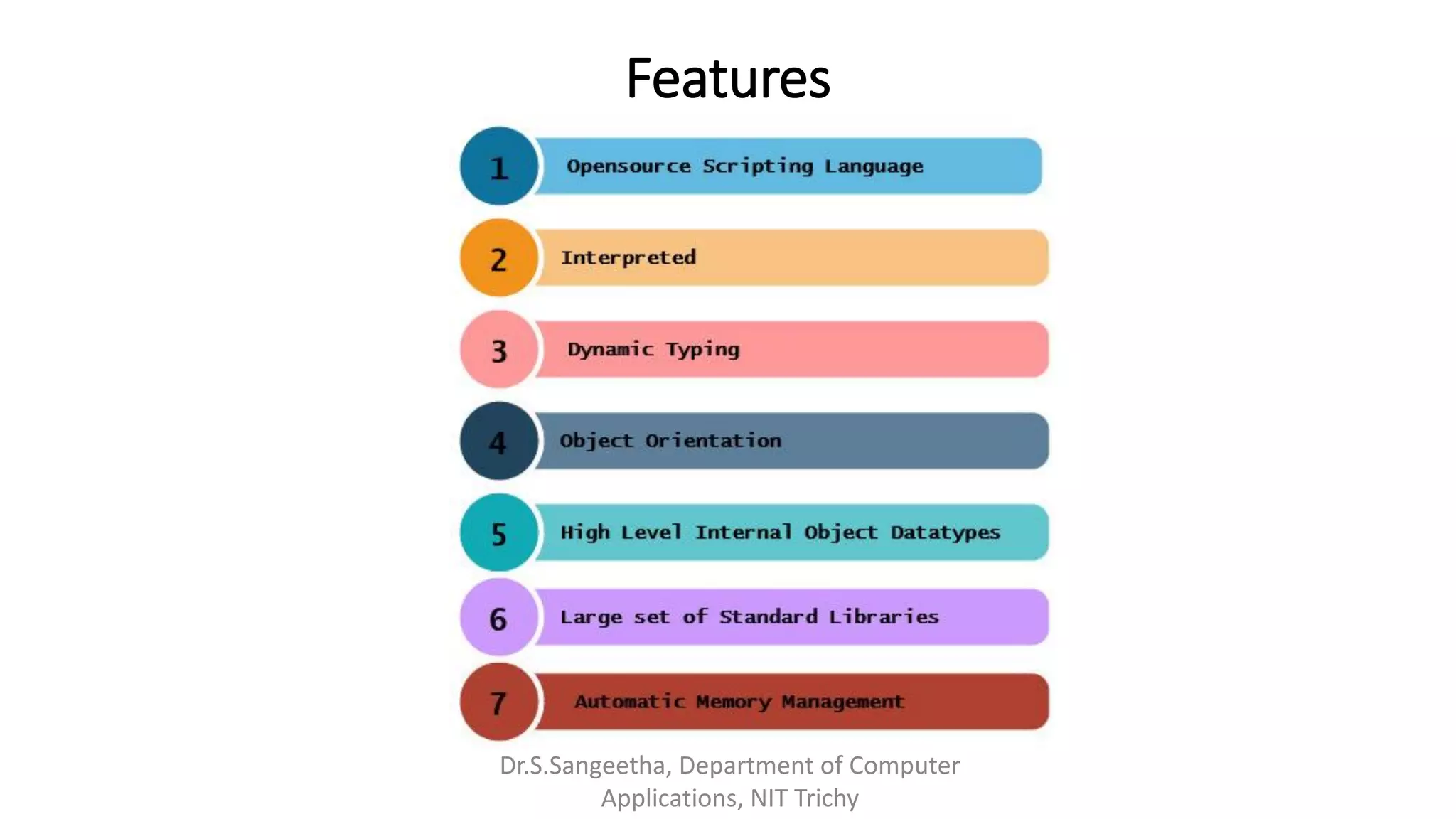
Features
Dr.S.Sangeetha, Department of Computer
Applications, NIT Trichy
Working Environment
Anaconda (written in Python)
• Anaconda is a free and open source distribution
• Simplifies package management and deployment
• Package versions are managed by Package Management system Conda
• 1400 + data science packages for Python & R
• IDES – Jupyter, Spyder, Jupyter Lab, R Studio
1. Data Science Libraries in Anaconda
▪ Data Analytics & Scientific Computing – NumPy, SciPy, Pandas , Numba
▪ Visualization
Bokeh, Holoviews, Data shader, Matplotlib
▪ Machine Learning
TensorFlow, H2o, Theano, Scikit learn
Dr.S.Sangeetha, Department of Computer Applications,
NIT Trichy
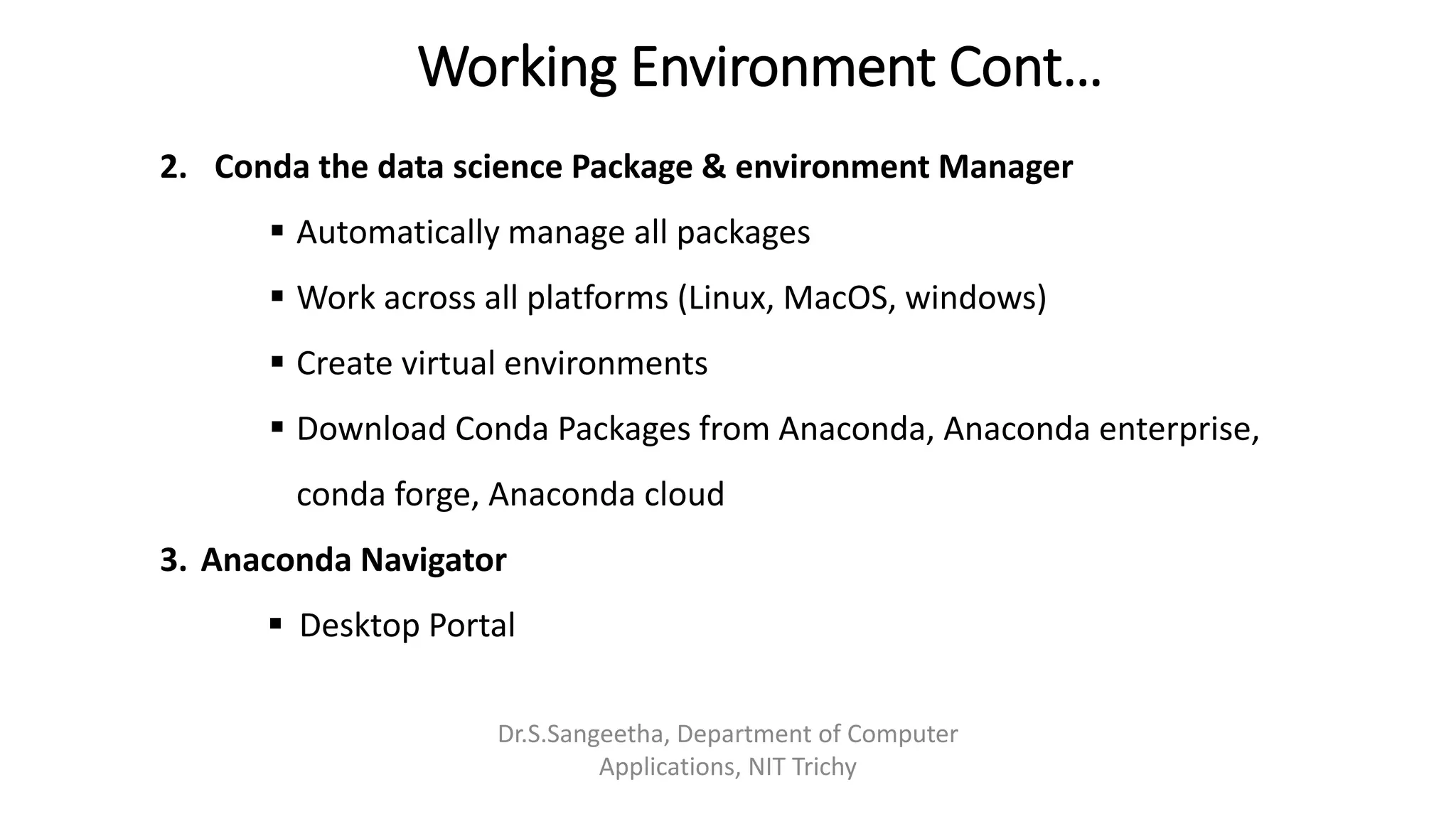
Working Environment Cont…
2. Conda the data science Package & environment Manager
▪ Automatically manage all packages
▪ Work across all platforms (Linux, MacOS, windows)
▪ Create virtual environments
▪ Download Conda Packages from Anaconda, Anaconda enterprise,
conda forge, Anaconda cloud
3. Anaconda Navigator
▪ Desktop Portal
Dr.S.Sangeetha, Department of Computer
Applications, NIT Trichy
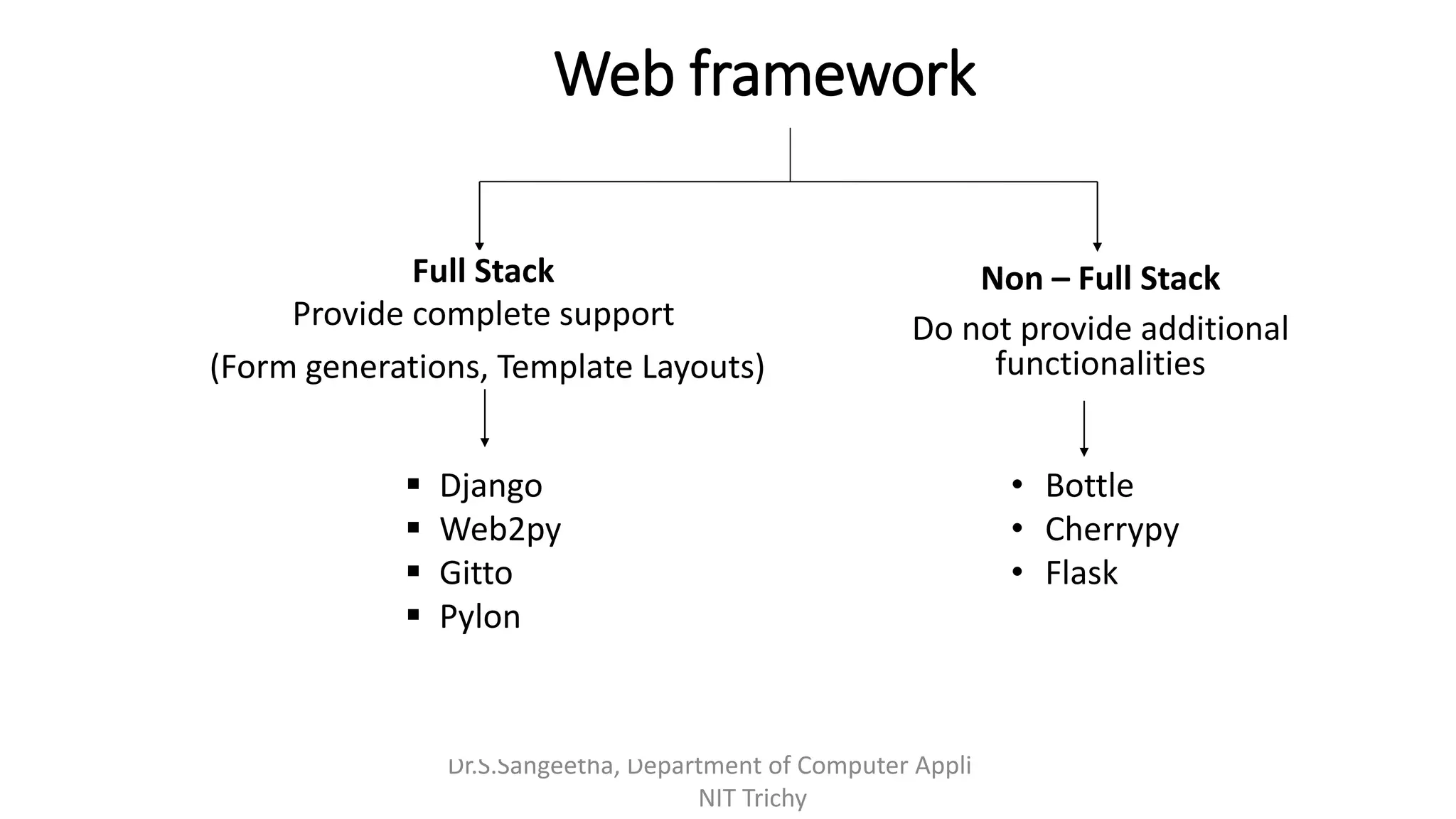
Web framework
Dr.S.Sangeetha, Department of Computer Applications,
NIT Trichy
Full Stack
Provide complete support
(Form generations, Template Layouts)
Non – Full Stack
Do not provide additional
functionalities
▪ Django
▪ Web2py
▪ Gitto
▪ Pylon
• Bottle
• Cherrypy
• Flask
Python GUI
▪TKinter – Bundled with Python
▪WXPython
▪PYGUI – Light weight, cross Platform
▪PYside – Nokia
▪PyGObject – bindings for GTK+
▪PyQt5 – bindings for QT application framework
▪Kivy – cross-platform UI creation tool
▪Glade
Dr.S.Sangeetha, Department of Computer Applications,
NIT Trichy
Why it is Slow?
1) Dynamically typed Language
2) Interpreted code is always slower
Takes more instructions in order to implement actual machine instruction
3) GIL (Global Interpreter Lock)
➢Allows only one thread to hold the control of python Interpreter
➢Bottleneck in CPU bound multi-threaded code [Even in multi thread architecture
with more than CPU core]
➢Prevents CPU bound threads from executing parallel
Dr.S.Sangeetha, Department of Computer Applications,
NIT Trichy
PyPy
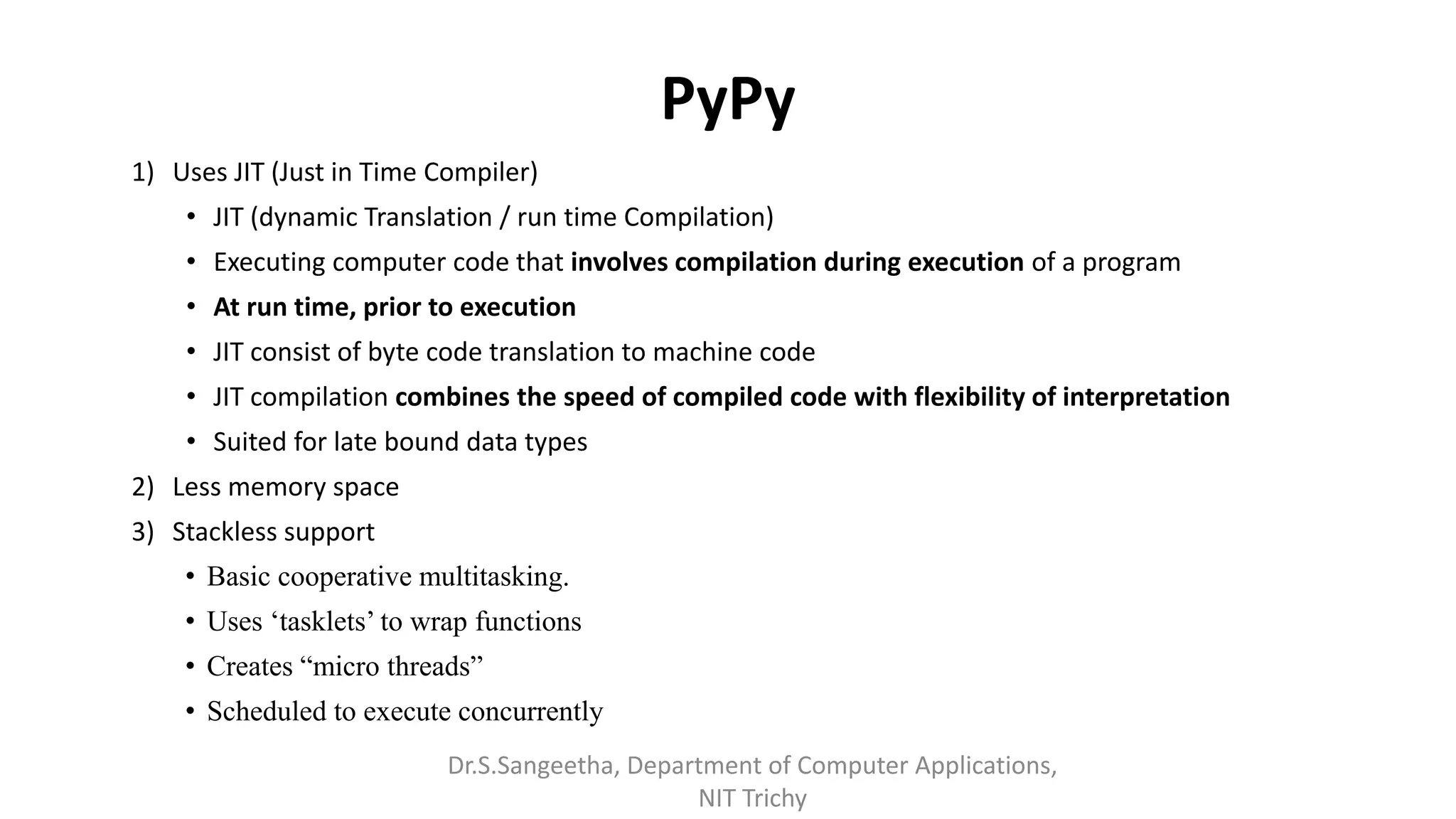
1) Uses JIT (Just in Time Compiler)
• JIT (dynamic Translation / run time Compilation)
• Executing computer code that involves compilation during execution of a program
• At run time, prior to execution
• JIT consist of byte code translation to machine code
• JIT compilation combines the speed of compiled code with flexibility of interpretation
• Suited for late bound data types
2) Less memory space
3) Stackless support
• Basic cooperative multitasking.
• Uses ‘tasklets’ to wrap functions
• Creates “micro threads”
• Scheduled to execute concurrently
Dr.S.Sangeetha, Department of Computer Applications,
NIT Trichy
Basics of Python
Comments
# Single line or inline comments
1.Data types
Python provides data types such as numeric, complex, strings and Boolean.
It supports no type Declaration.
Numeric
Python has two numeric types int and float
Strings
• ‘Welcome’
• “Welcome”
Dr.S.Sangeetha, Department of Computer Applications,
NIT Trichy
Data types cont.….
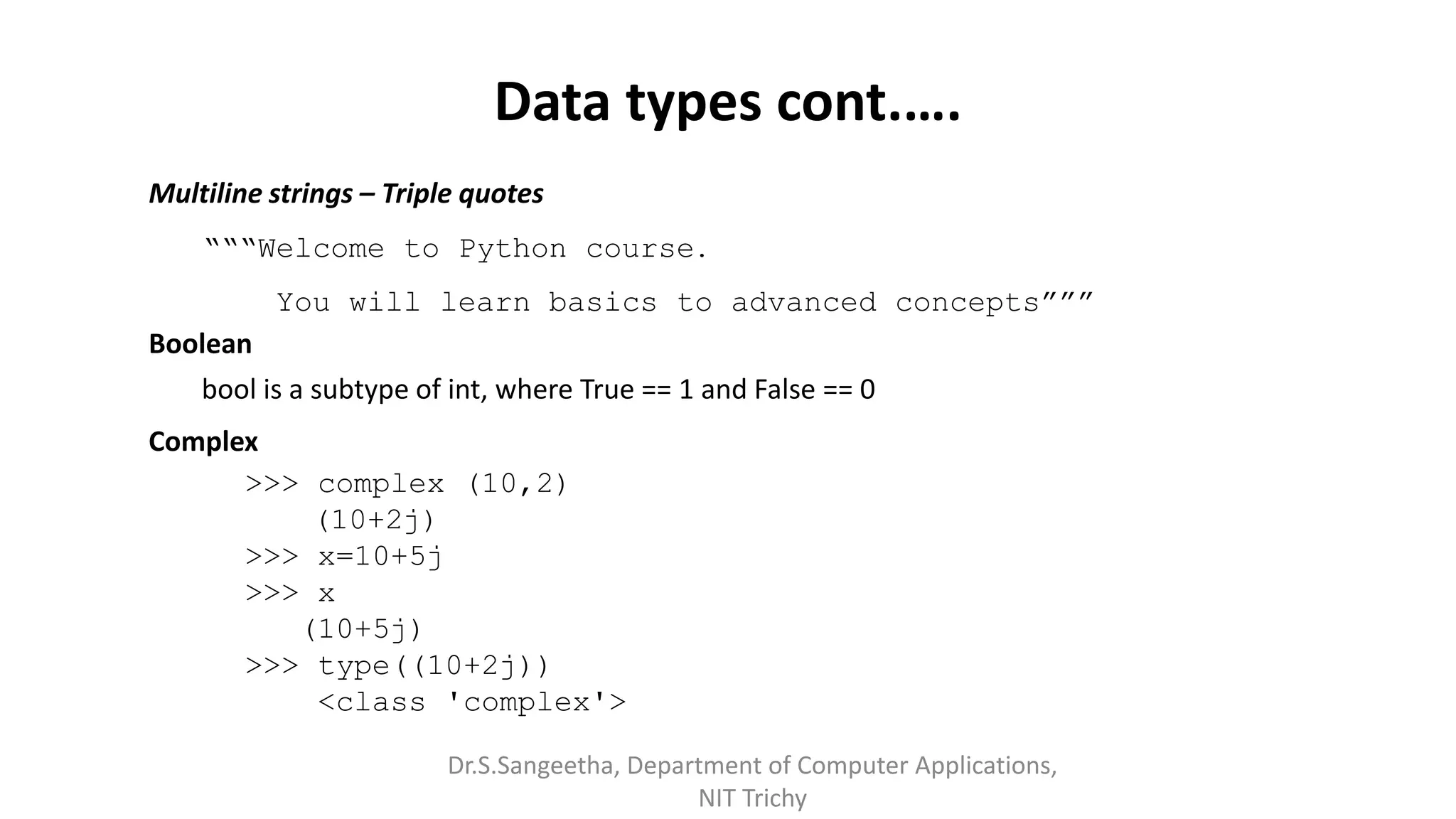
Multiline strings – Triple quotes
“““Welcome to Python course.
You will learn basics to advanced concepts”””
Boolean
bool is a subtype of int, where True == 1 and False == 0
Complex
>>> complex (10,2)
(10+2j)
>>> x=10+5j
>>> x
(10+5j)
>>> type((10+2j))
<class 'complex'>
Dr.S.Sangeetha, Department of Computer Applications,
NIT Trichy
Operators
() {}[] Tuple, List, Dictionary, set display
f (….), x [ :], X.attr Function calls, slicing, Attribute reference
** Exponentiation - Right to left associativity
x, -x Bitwise Not, Negative
*, /, //,% Multiplication, division, floor division,
Modulo division
+ - Additive
<< >> Shift
& Bitwise AND
 Bitwise XOR
| Bitwise OR
in, not in, is, is not <, <=, >, >=, <>, !=, == Membership, Comparison/relational
not Boolean NOT
and Boolean AND
or Boolean OR
lambda Lambda expressions
Quick Demo
Dr.S.Sangeetha, Department of Computer Applications, NIT
Trichy
Objects
• Objects are Python’s abstraction for data.
• Objects are typed
• All data in a Python program is represented by objects or by relations
between objects.
• Every object has an identity, type and value.
Dr.S.Sangeetha, Department of Computer Applications,
NIT Trichy
Objects Cont..
Object’s Identity
• Objects have Identity
• Identity is unique and fixed during an object's lifetime
• id() returns an object's identity
• An object’s identity never changes once it has been created
Object Type
• Objects are tagged with their type at runtime
• type determines the operations that the object supports
• type() returns objects type
• Objects contain pointers to their data blob (Binary large object)
Dr.S.Sangeetha, Department of Computer Applications,
NIT Trichy
Object categories
▪ Python objects are classified in to categories such as mutable and immutable
• The value of some objects can change.
• Objects whose value can change are mutable
• Objects whose value is unchangeable once they are created are
immutable.
Mutability of the object is determined by its type
• Immutable Object: int, float, complex, string, tuple, bool
• Mutable Object: list, dict, set, byte array, user-defined classes
Dr.S.Sangeetha, Department of Computer Applications,
NIT Trichy
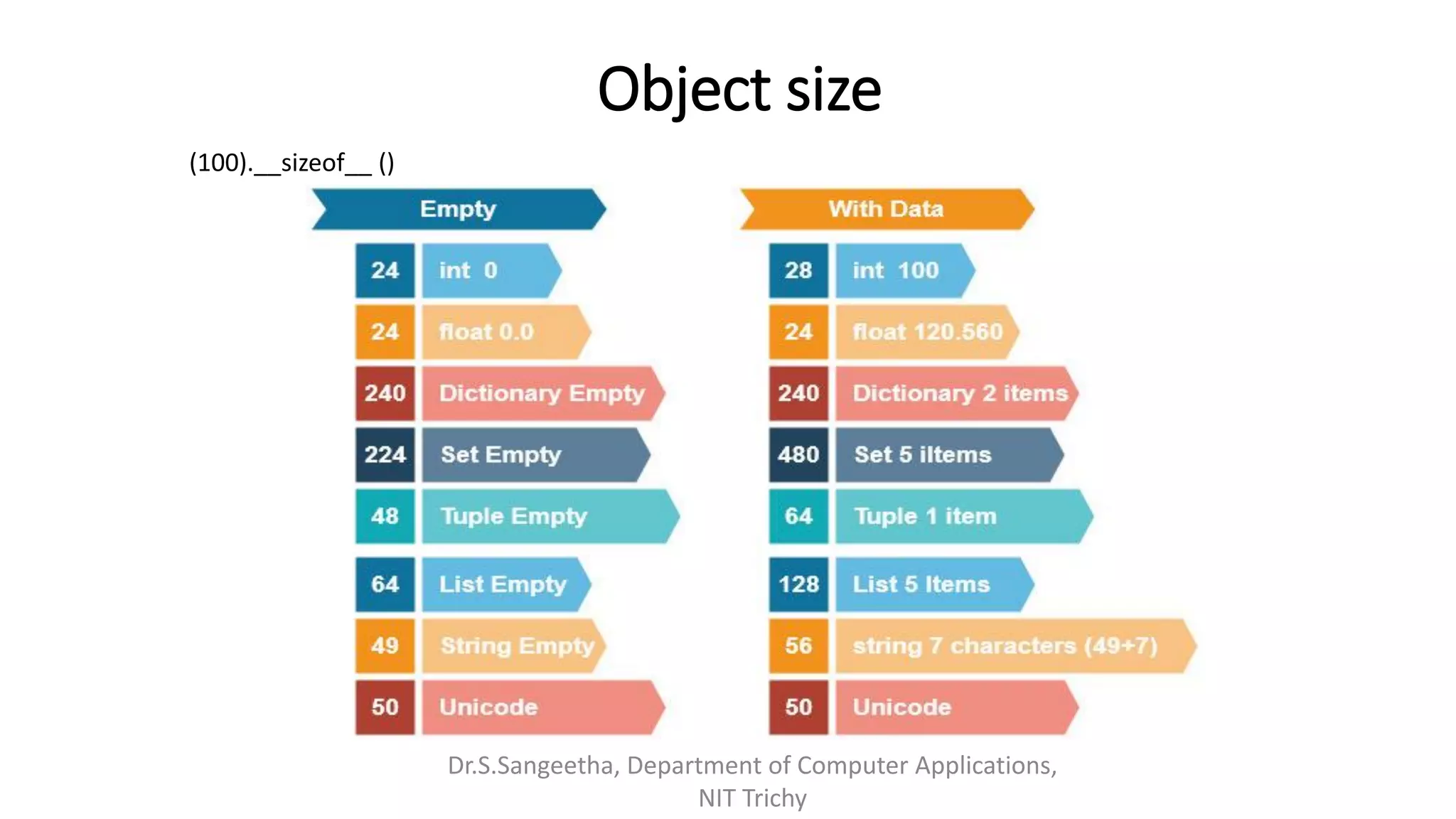
Object size
Dr.S.Sangeetha, Department of Computer Applications,
NIT Trichy
(100).__sizeof__ ()
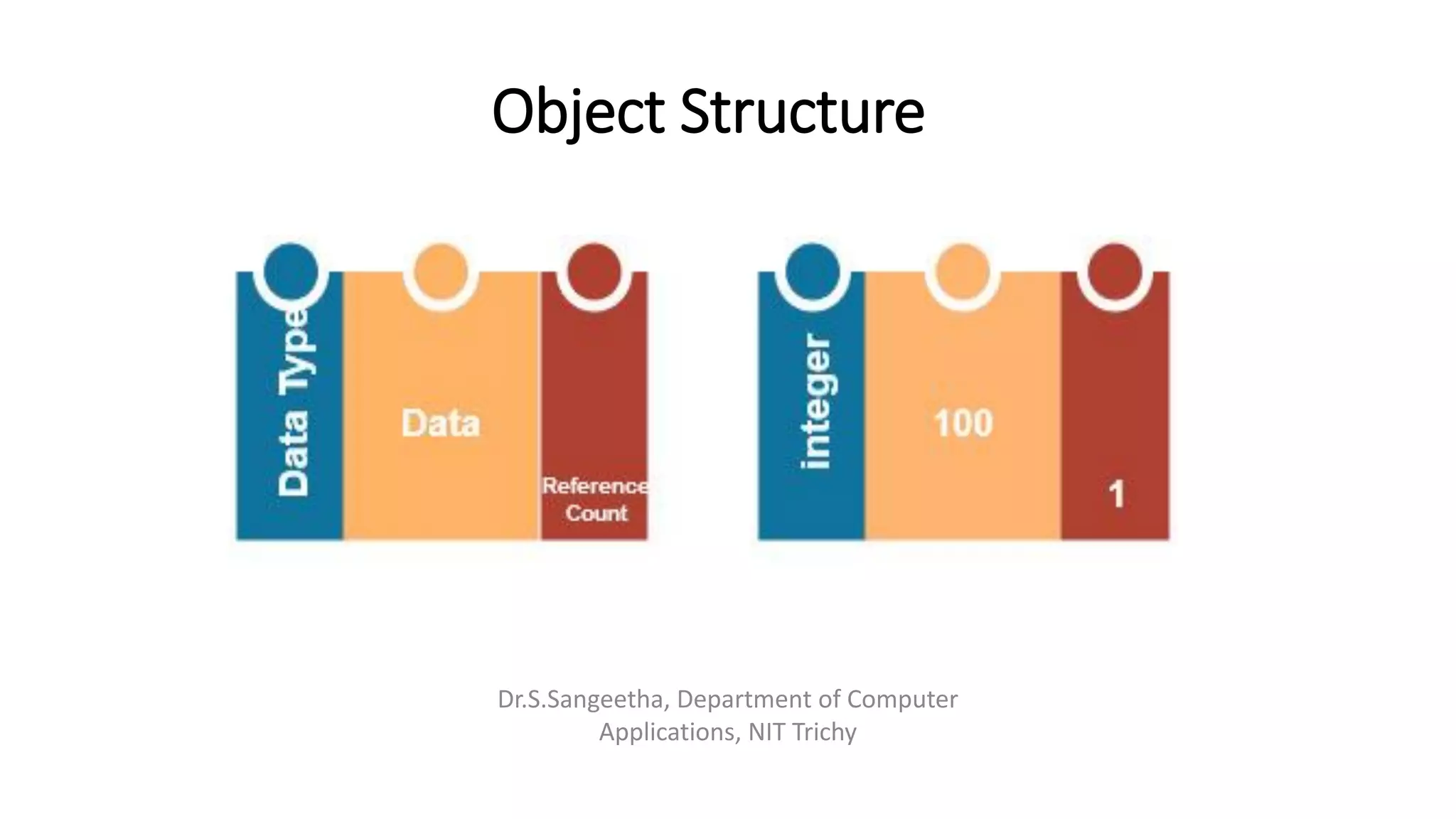
Object Structure
Dr.S.Sangeetha, Department of Computer
Applications, NIT Trichy
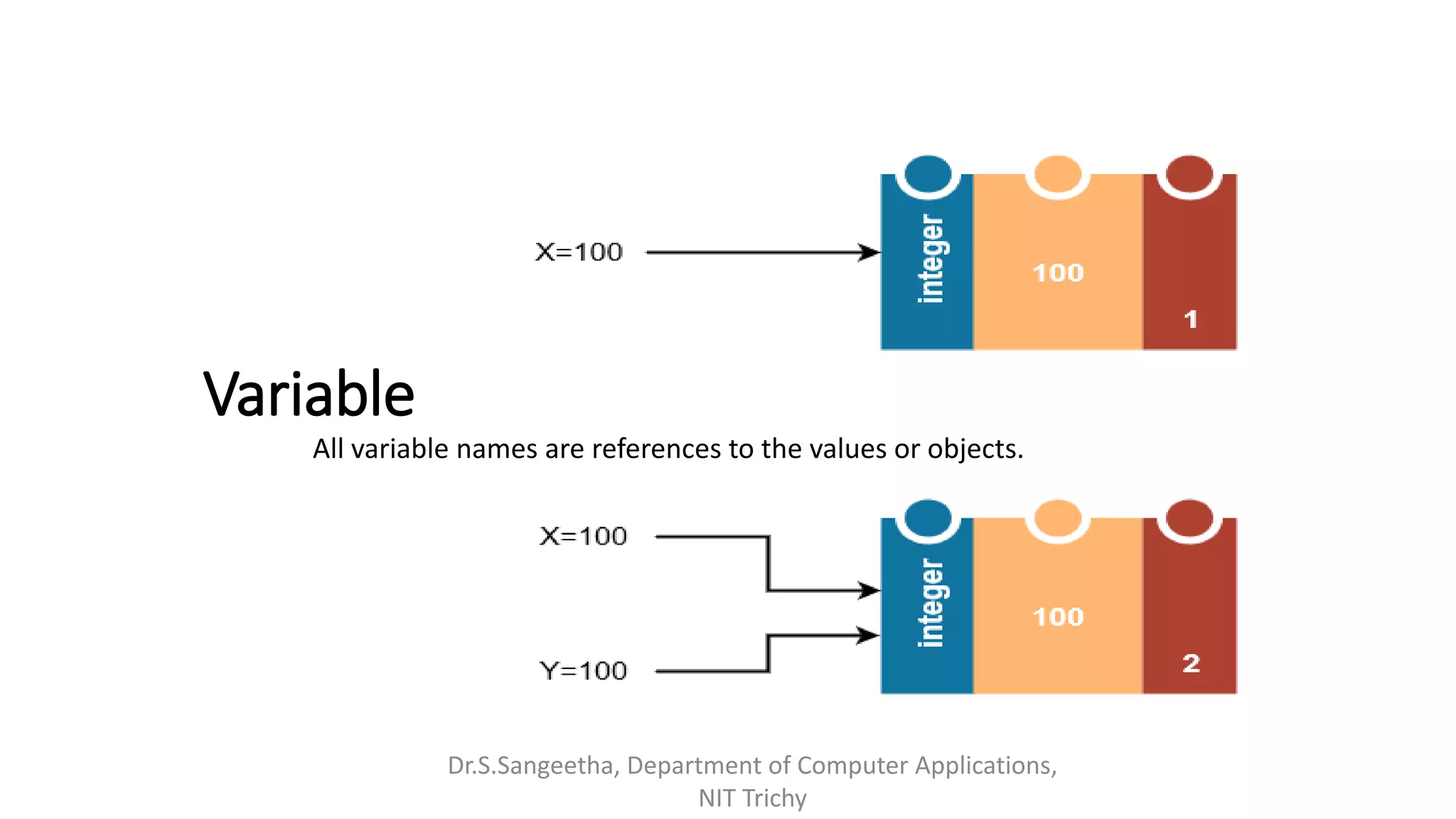
Variable
Dr.S.Sangeetha, Department of Computer Applications,
NIT Trichy
All variable names are references to the values or objects.
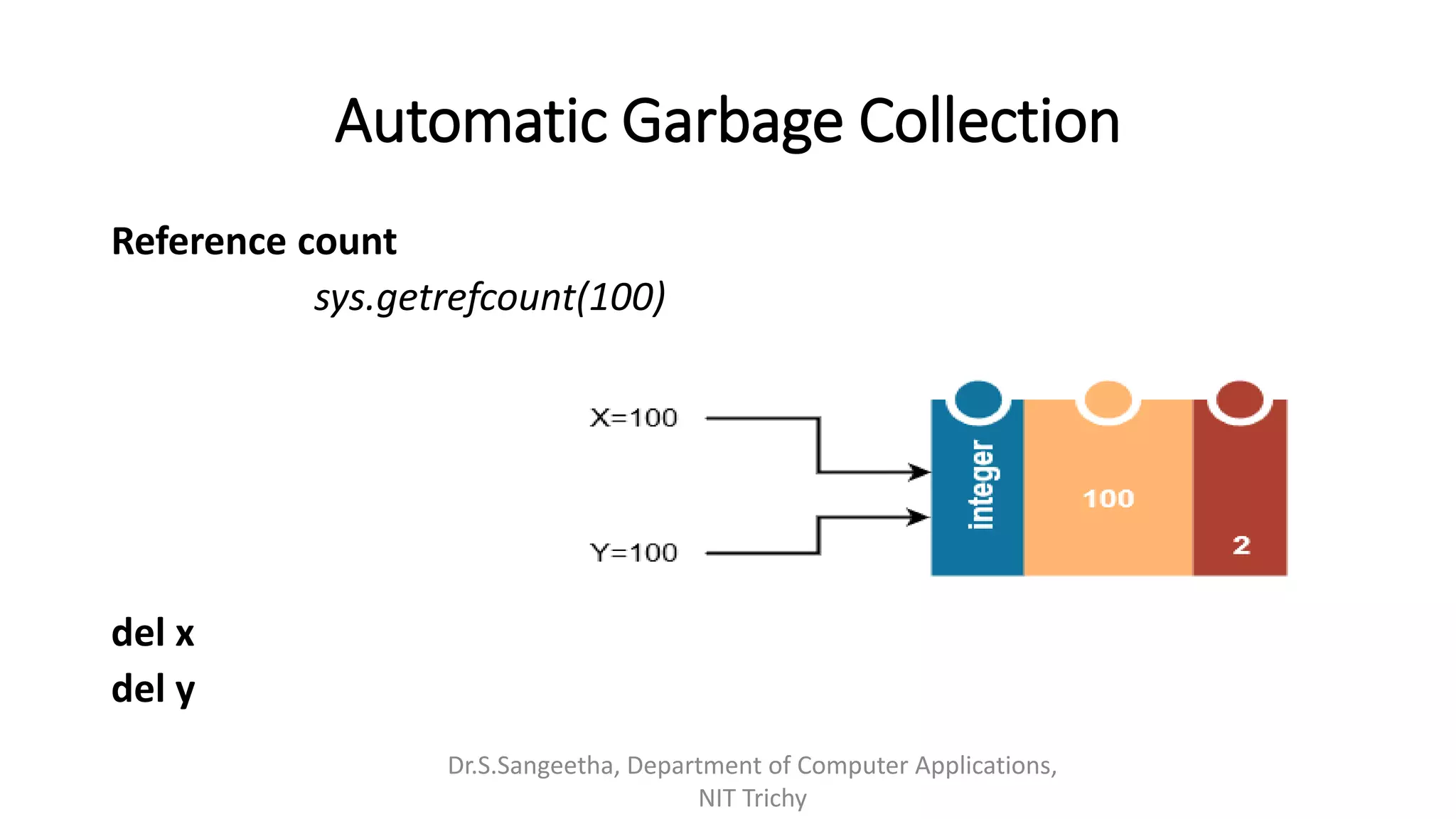
Automatic Garbage Collection
Reference count
sys.getrefcount(100)
del x
del y
Dr.S.Sangeetha, Department of Computer Applications,
NIT Trichy
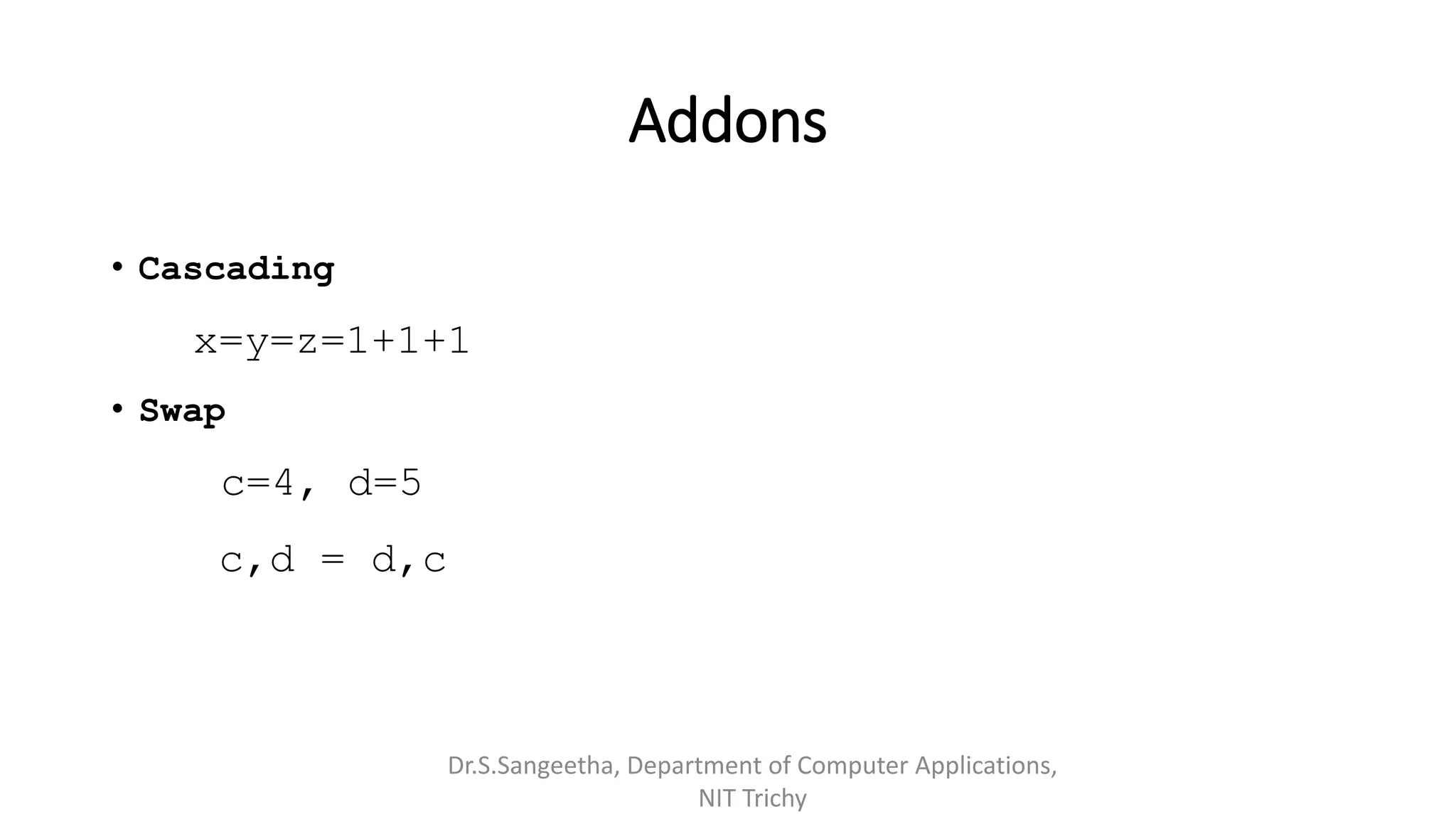
Addons
• Cascading
x=y=z=1+1+1
• Swap
c=4, d=5
c,d = d,c
Dr.S.Sangeetha, Department of Computer Applications,
NIT Trichy
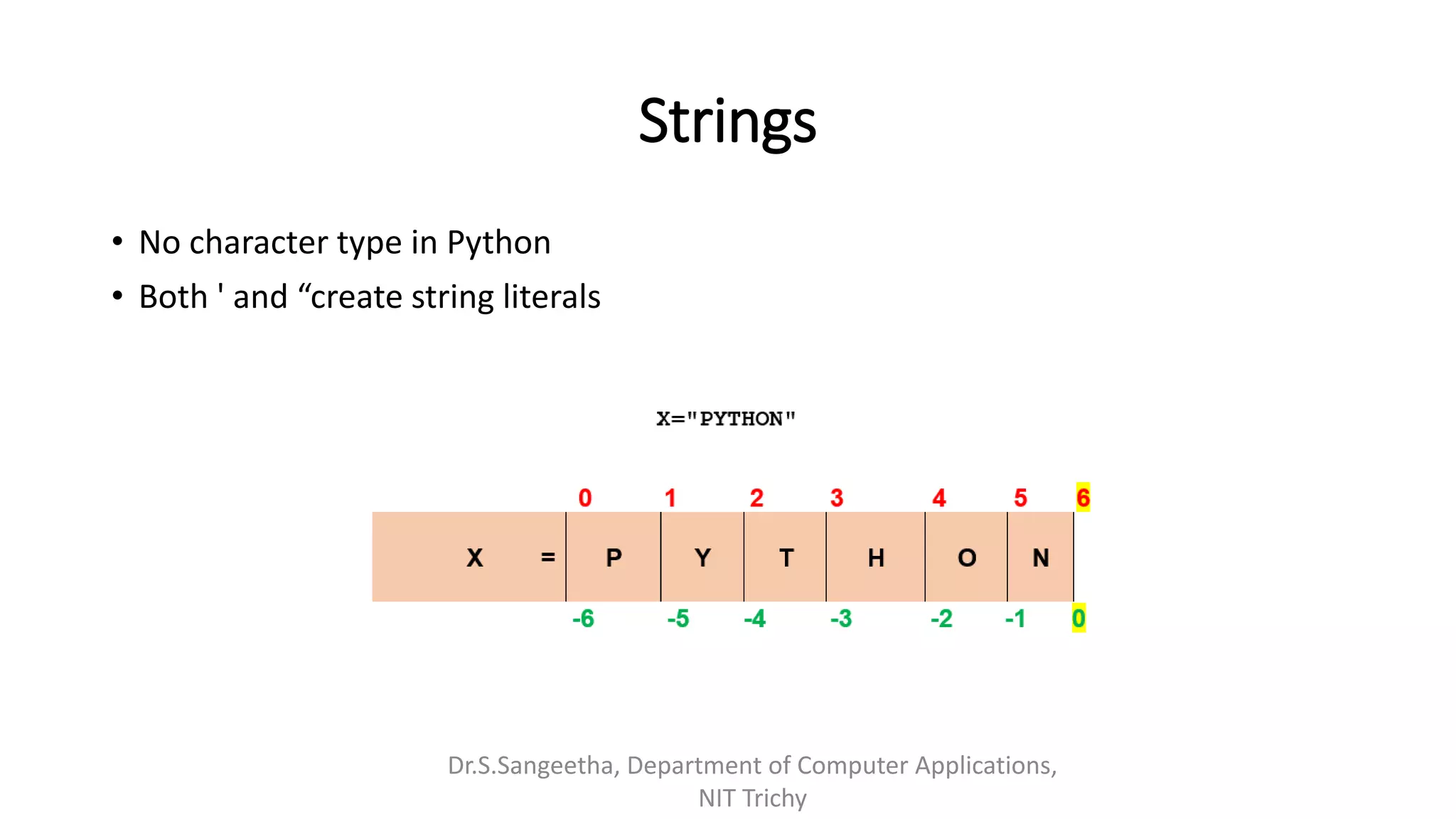
Strings
• No character type in Python
• Both ' and “create string literals
Dr.S.Sangeetha, Department of Computer Applications,
NIT Trichy
String Slicing
print(X[0:2])
print(X[4:6])
print(X[1:3])
print(X[:3])
print(X[4:])
print(X[1:5:2]) #step size as 3rd parameter
print(X[4::-2])
PY
ON
YT
PYT
ON
YH
OTP
print(X[::-1]) # NOHTYP
Dr.S.Sangeetha, Department of Computer Applications, NIT Trichy
Quick Demo
Dr.S.Sangeetha, Department of Computer Applications, NIT
Trichy
Immutability
>>> x="In India"
>>> id(x)
64787744
>>> x=x+' We have'
>>> x
'In India We have'
>>> id(x)
64763184
>>> y="India"
>>> id(y)
64799392
>>> y[2]="o"
TypeError: 'str'
object does not
support item
assignment
Dr.S.Sangeetha, Department of Computer Applications, NIT
Trichy
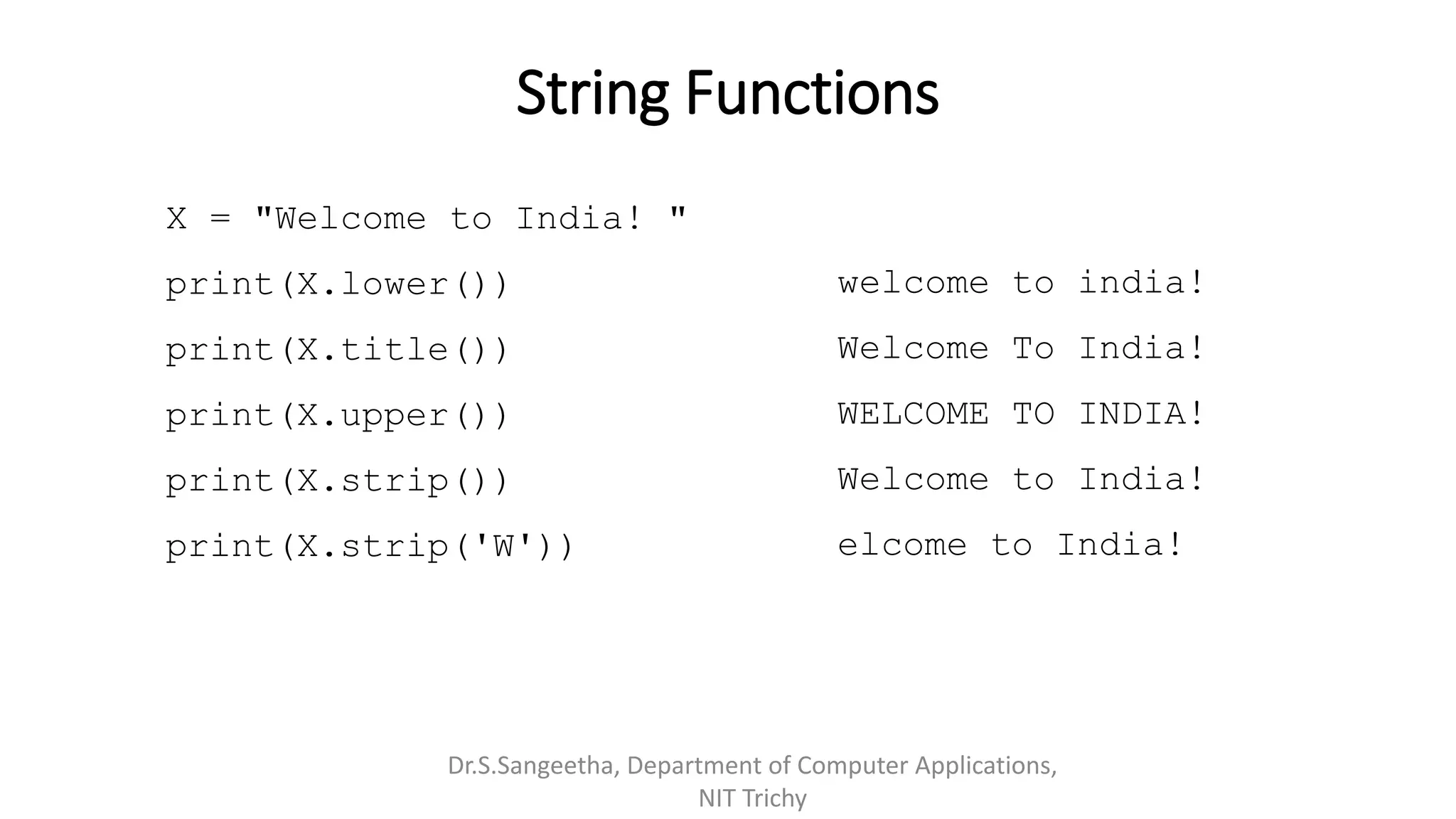
String Functions
X = "Welcome to India! "
print(X.lower())
print(X.title())
print(X.upper())
print(X.strip())
print(X.strip('W'))
Dr.S.Sangeetha, Department of Computer Applications,
NIT Trichy
welcome to india!
Welcome To India!
WELCOME TO INDIA!
Welcome to India!
elcome to India!
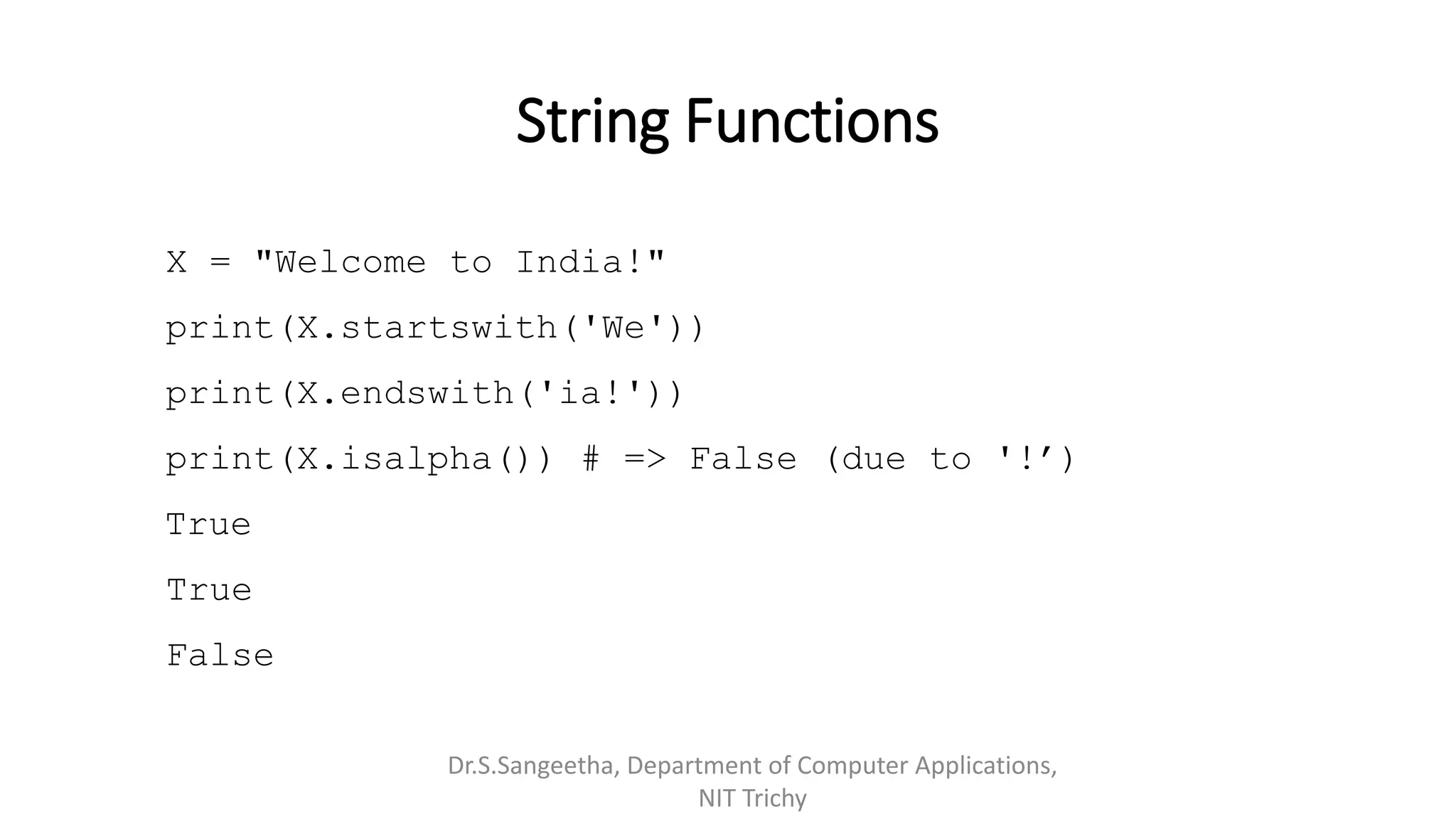
String Functions
X = "Welcome to India!"
print(X.startswith('We'))
print(X.endswith('ia!'))
print(X.isalpha()) # => False (due to '!’)
True
True
False
Dr.S.Sangeetha, Department of Computer Applications,
NIT Trichy
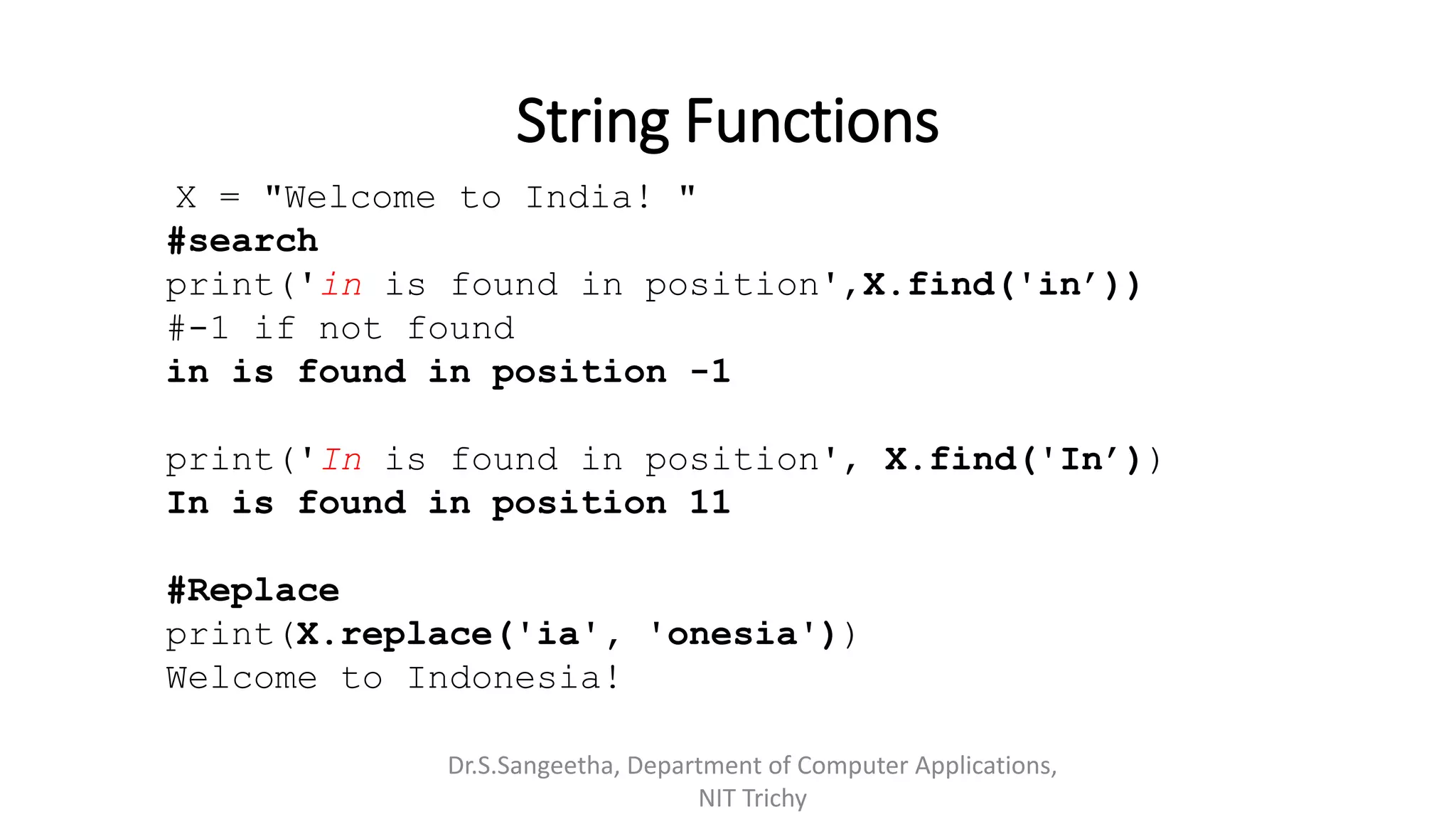
String Functions
X = "Welcome to India! "
#search
print('in is found in position',X.find('in’))
#-1 if not found
in is found in position -1
print('In is found in position', X.find('In’))
In is found in position 11
#Replace
print(X.replace('ia', 'onesia'))
Welcome to Indonesia!
Dr.S.Sangeetha, Department of Computer Applications,
NIT Trichy
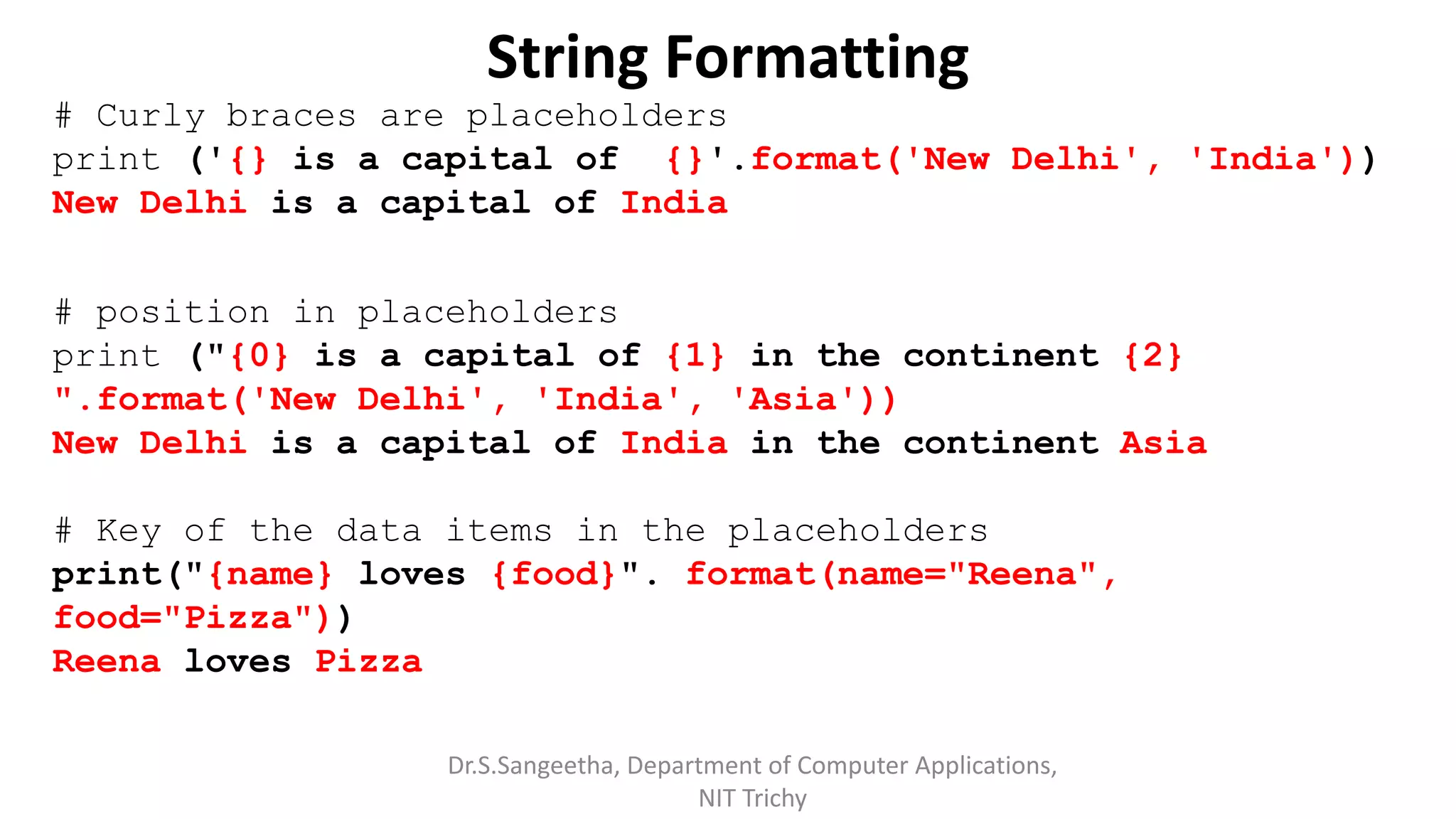
String Formatting
# Curly braces are placeholders
print ('{} is a capital of {}'.format('New Delhi', 'India'))
New Delhi is a capital of India
# position in placeholders
print ("{0} is a capital of {1} in the continent {2}
".format('New Delhi', 'India', 'Asia'))
New Delhi is a capital of India in the continent Asia
# Key of the data items in the placeholders
print("{name} loves {food}". format(name="Reena",
food="Pizza"))
Reena loves Pizza
Dr.S.Sangeetha, Department of Computer Applications,
NIT Trichy
String Formatting
# index in the placeholders
Fruits = ['Apple', 'Orange’, 'Guava']
print("{f[0]} is good compared to {f[1]}".format(f=Fruits))
Apple is good compared to Orange
# Evaluated expressions to strings
print ("Square of {} is {}".format (8, 8 ** 2))
Square of 8 is 64
Dr.S.Sangeetha, Department of Computer Applications,
NIT Trichy
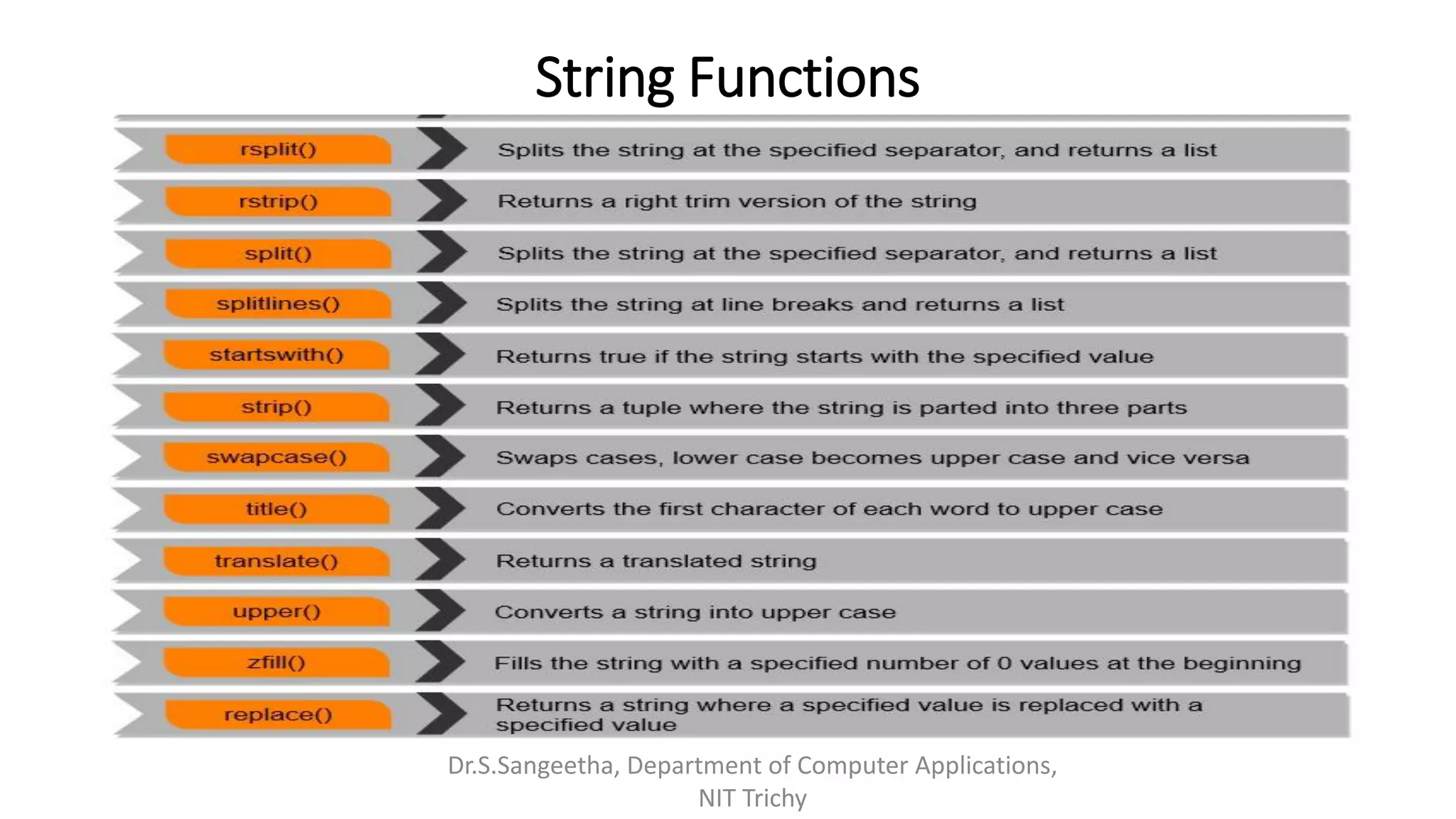
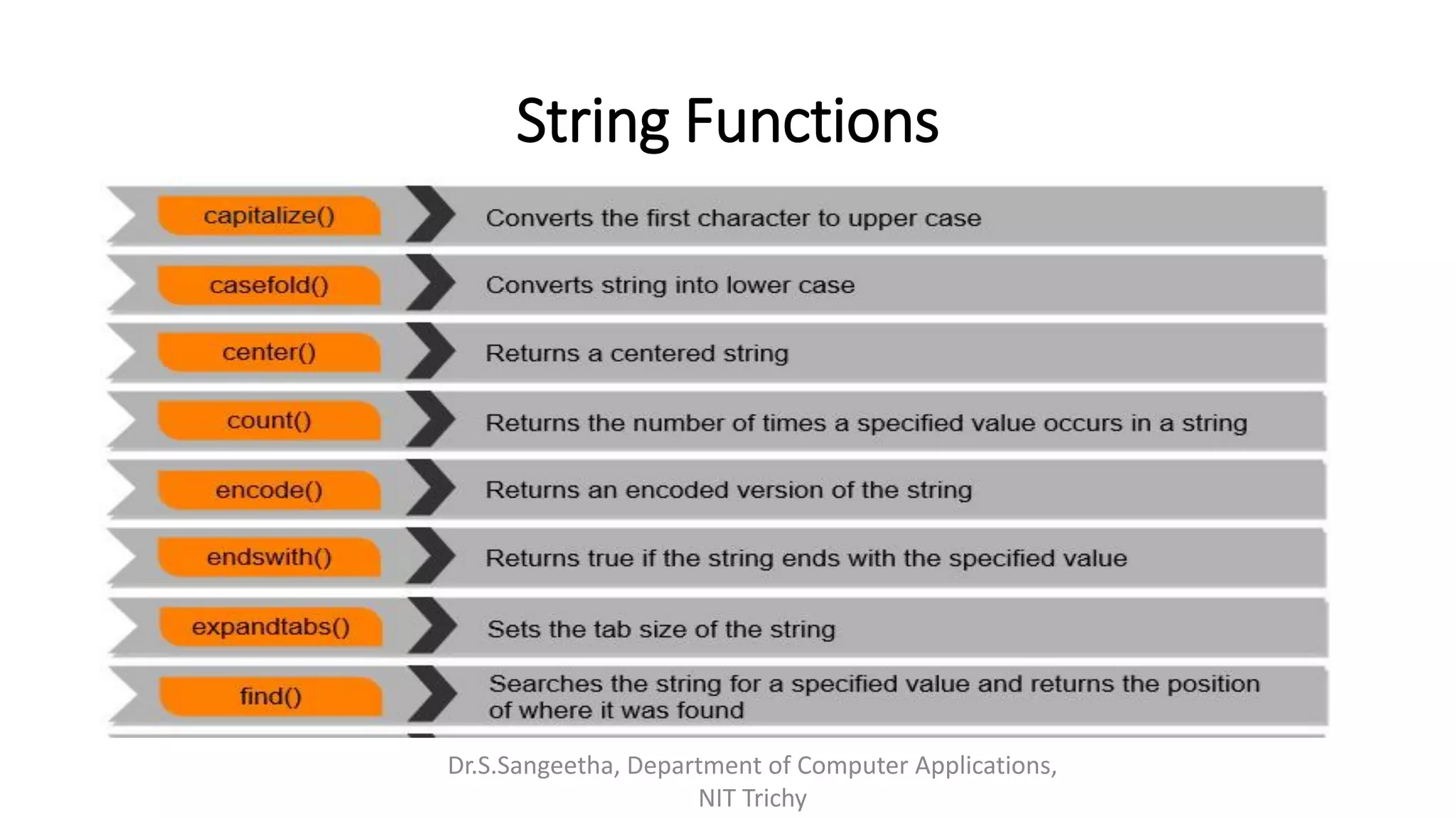
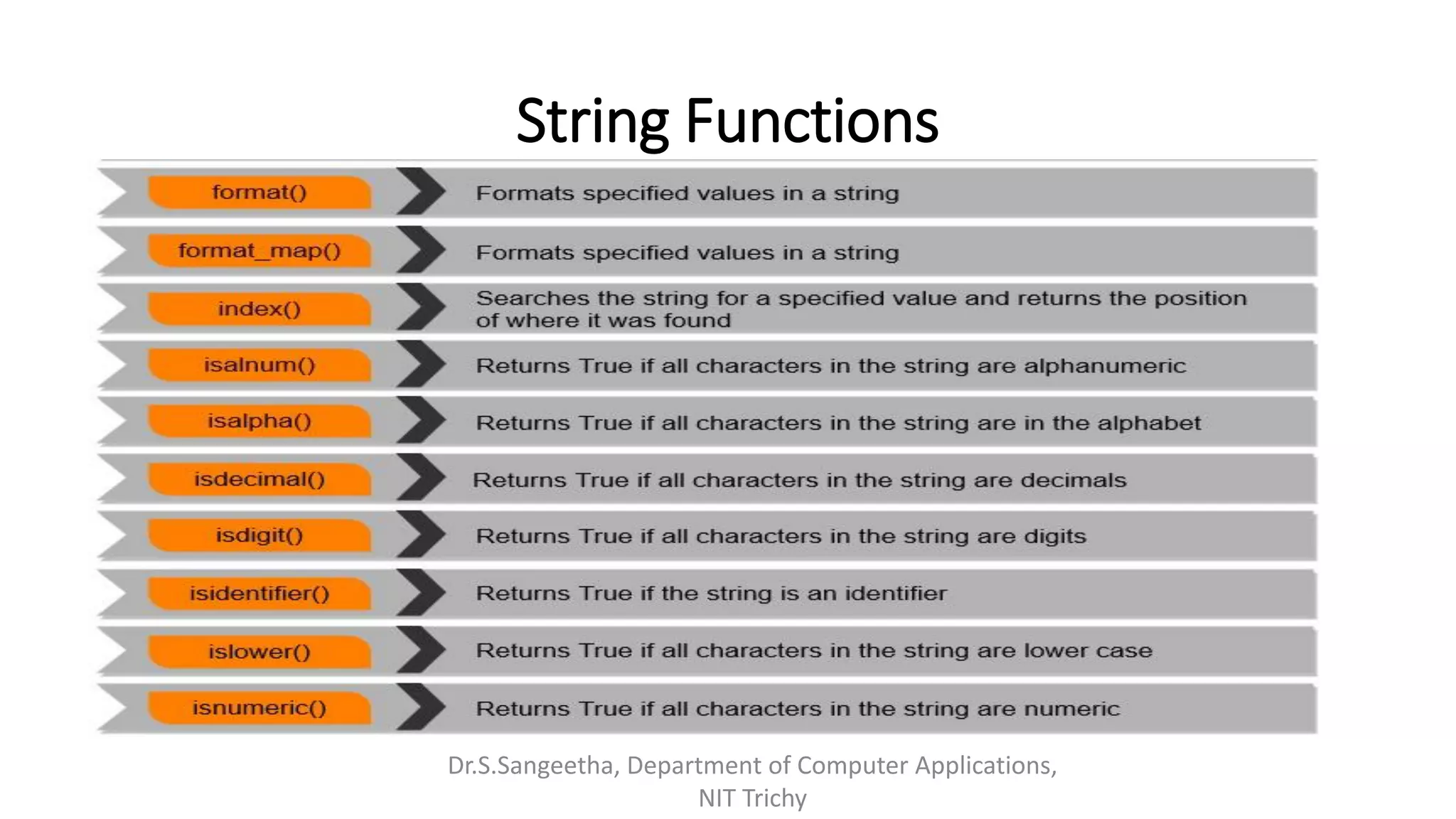
String Functions
Dr.S.Sangeetha, Department of Computer Applications,
NIT Trichy
String Functions
Dr.S.Sangeetha, Department of Computer Applications,
NIT Trichy
String Functions
Dr.S.Sangeetha, Department of Computer Applications,
NIT Trichy
String Functions
Dr.S.Sangeetha, Department of Computer Applications,
NIT Trichy
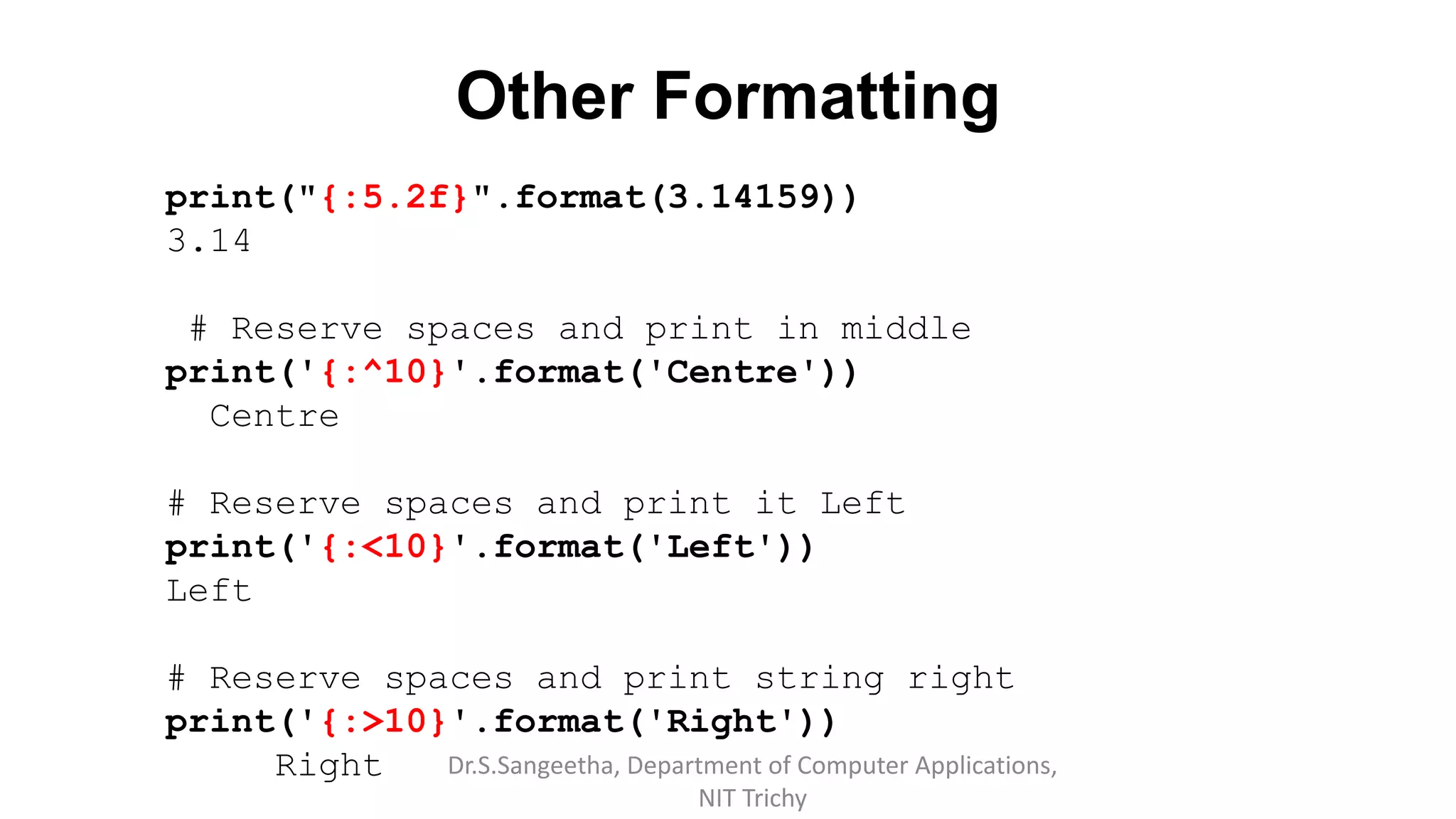
Other Formatting
print("{:5.2f}".format(3.14159))
3.14
# Reserve spaces and print in middle
print('{:^10}'.format('Centre'))
Centre
# Reserve spaces and print it Left
print('{:<10}'.format('Left'))
Left
# Reserve spaces and print string right
print('{:>10}'.format('Right'))
Right Dr.S.Sangeetha, Department of Computer Applications,
NIT Trichy
Other Formatting
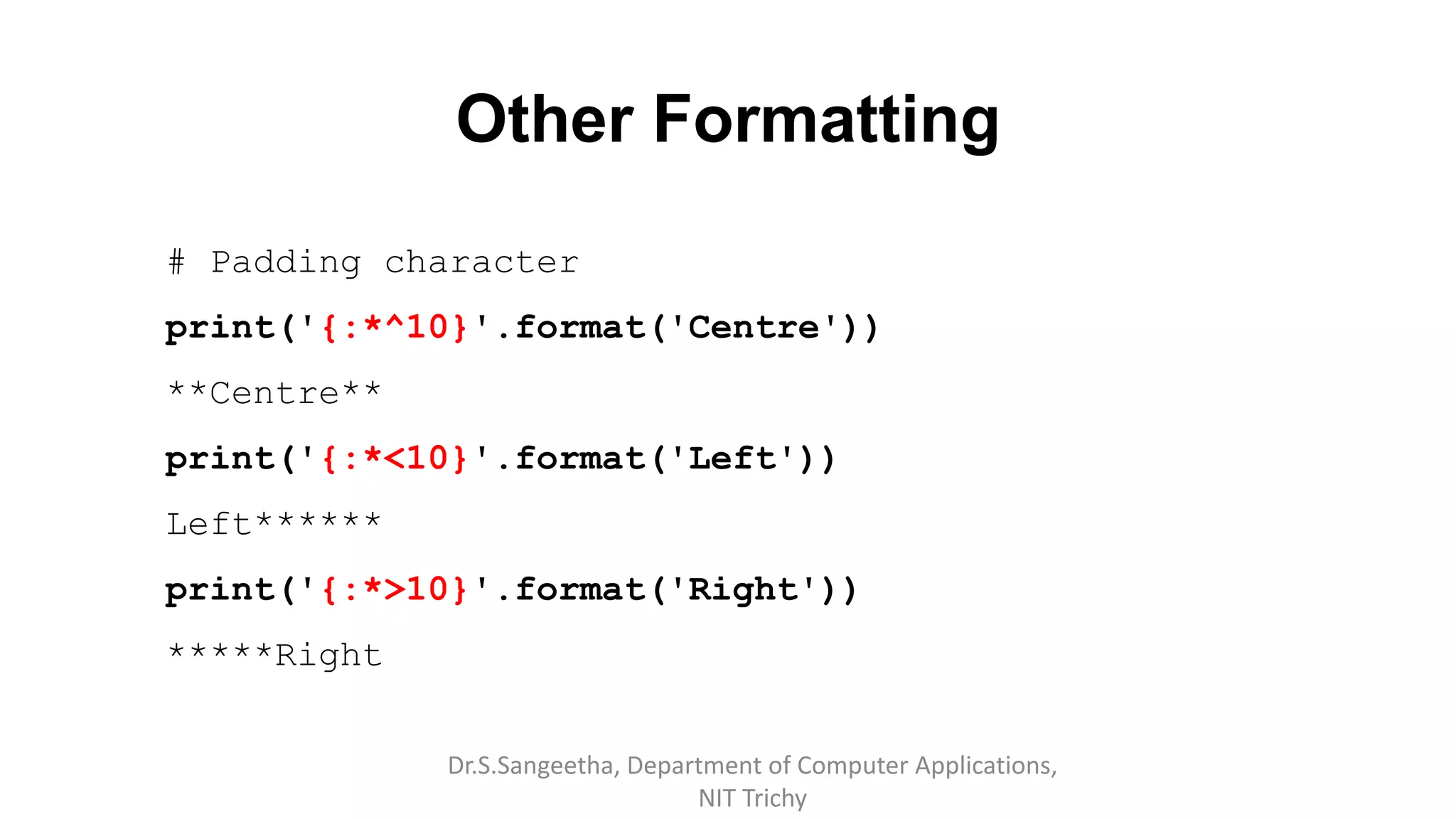
# Padding character
print('{:*^10}'.format('Centre'))
**Centre**
print('{:*<10}'.format('Left'))
Left******
print('{:*>10}'.format('Right'))
*****Right
Dr.S.Sangeetha, Department of Computer Applications,
NIT Trichy
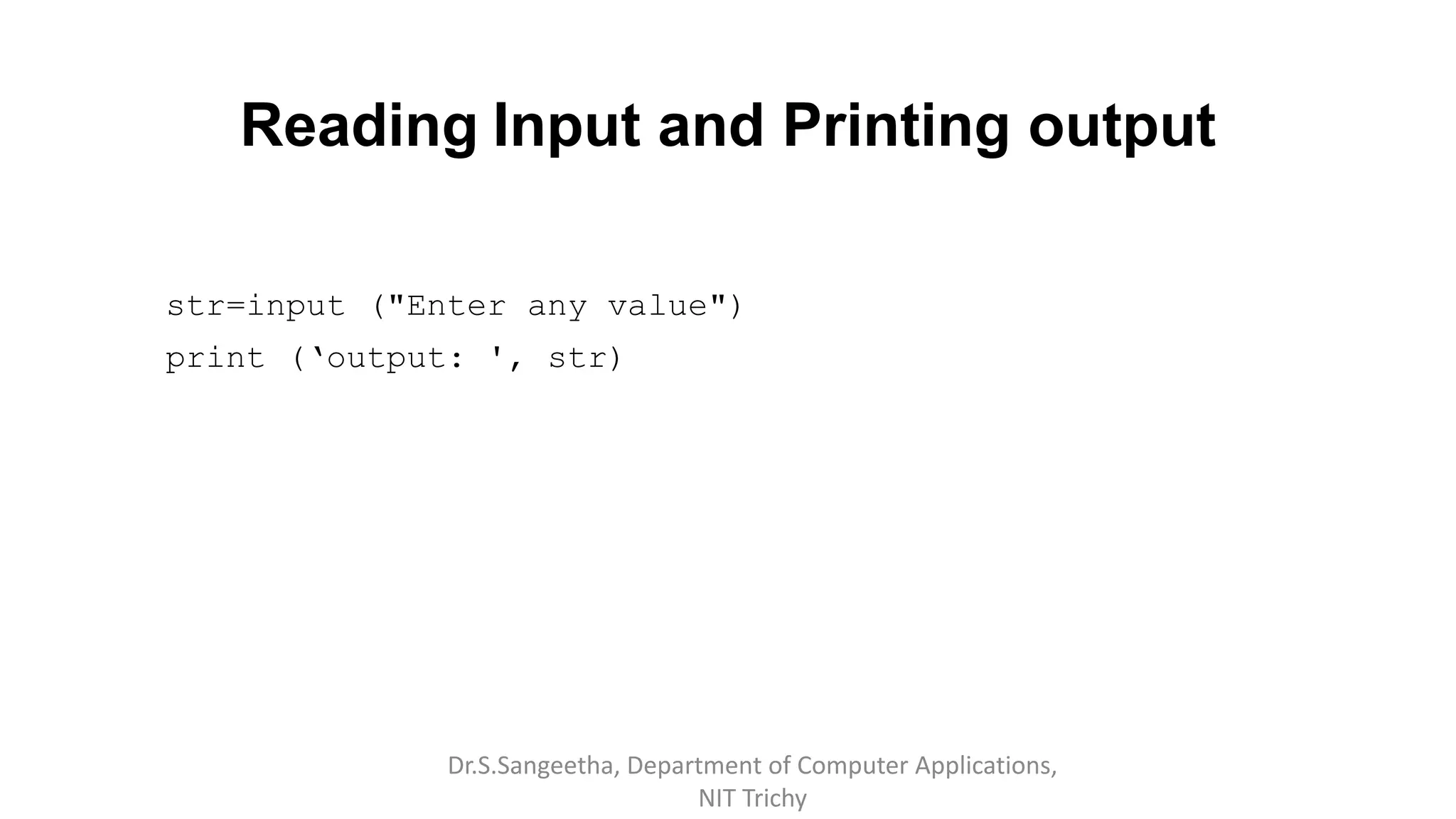
Reading Input and Printing output
str=input ("Enter any value")
print (‘output: ', str)
Dr.S.Sangeetha, Department of Computer Applications,
NIT Trichy
Writing Simple Program
Demo
Dr.S.Sangeetha, Department of Computer Applications,
NIT Trichy
Reference Book
Guido van Rossum and Fred L. Drake Jr, “An Introduction to Python “
Revised and updated for Python 3.2, Network Theory Ltd., 2011.
Dr.S.Sangeetha, Department of Computer Applications,
NIT Trichy

Introduction to Python Objects and Strings

  • 1.
    Introduction to Python Programming Dr.S.Sangeetha Departmentof Computer Applications National Institute of Technology Tiruchirappalli
  • 2.
    Dr.S.Sangeetha, Department ofComputer Applications, NIT Trichy
  • 3.
    History Dr.S.Sangeetha, Department ofComputer Applications, NIT Trichy
  • 4.
    Features Dr.S.Sangeetha, Department ofComputer Applications, NIT Trichy
  • 5.
    Working Environment Anaconda (writtenin Python) • Anaconda is a free and open source distribution • Simplifies package management and deployment • Package versions are managed by Package Management system Conda • 1400 + data science packages for Python & R • IDES – Jupyter, Spyder, Jupyter Lab, R Studio 1. Data Science Libraries in Anaconda ▪ Data Analytics & Scientific Computing – NumPy, SciPy, Pandas , Numba ▪ Visualization Bokeh, Holoviews, Data shader, Matplotlib ▪ Machine Learning TensorFlow, H2o, Theano, Scikit learn Dr.S.Sangeetha, Department of Computer Applications, NIT Trichy
  • 6.
    Working Environment Cont… 2.Conda the data science Package & environment Manager ▪ Automatically manage all packages ▪ Work across all platforms (Linux, MacOS, windows) ▪ Create virtual environments ▪ Download Conda Packages from Anaconda, Anaconda enterprise, conda forge, Anaconda cloud 3. Anaconda Navigator ▪ Desktop Portal Dr.S.Sangeetha, Department of Computer Applications, NIT Trichy
  • 7.
    Web framework Dr.S.Sangeetha, Departmentof Computer Applications, NIT Trichy Full Stack Provide complete support (Form generations, Template Layouts) Non – Full Stack Do not provide additional functionalities ▪ Django ▪ Web2py ▪ Gitto ▪ Pylon • Bottle • Cherrypy • Flask
  • 8.
    Python GUI ▪TKinter –Bundled with Python ▪WXPython ▪PYGUI – Light weight, cross Platform ▪PYside – Nokia ▪PyGObject – bindings for GTK+ ▪PyQt5 – bindings for QT application framework ▪Kivy – cross-platform UI creation tool ▪Glade Dr.S.Sangeetha, Department of Computer Applications, NIT Trichy
  • 9.
    Why it isSlow? 1) Dynamically typed Language 2) Interpreted code is always slower Takes more instructions in order to implement actual machine instruction 3) GIL (Global Interpreter Lock) ➢Allows only one thread to hold the control of python Interpreter ➢Bottleneck in CPU bound multi-threaded code [Even in multi thread architecture with more than CPU core] ➢Prevents CPU bound threads from executing parallel Dr.S.Sangeetha, Department of Computer Applications, NIT Trichy
  • 10.
    PyPy 1) Uses JIT(Just in Time Compiler) • JIT (dynamic Translation / run time Compilation) • Executing computer code that involves compilation during execution of a program • At run time, prior to execution • JIT consist of byte code translation to machine code • JIT compilation combines the speed of compiled code with flexibility of interpretation • Suited for late bound data types 2) Less memory space 3) Stackless support • Basic cooperative multitasking. • Uses ‘tasklets’ to wrap functions • Creates “micro threads” • Scheduled to execute concurrently Dr.S.Sangeetha, Department of Computer Applications, NIT Trichy
  • 11.
    Basics of Python Comments #Single line or inline comments 1.Data types Python provides data types such as numeric, complex, strings and Boolean. It supports no type Declaration. Numeric Python has two numeric types int and float Strings • ‘Welcome’ • “Welcome” Dr.S.Sangeetha, Department of Computer Applications, NIT Trichy
  • 12.
    Data types cont.…. Multilinestrings – Triple quotes “““Welcome to Python course. You will learn basics to advanced concepts””” Boolean bool is a subtype of int, where True == 1 and False == 0 Complex >>> complex (10,2) (10+2j) >>> x=10+5j >>> x (10+5j) >>> type((10+2j)) <class 'complex'> Dr.S.Sangeetha, Department of Computer Applications, NIT Trichy
  • 13.
    Operators () {}[] Tuple,List, Dictionary, set display f (….), x [ :], X.attr Function calls, slicing, Attribute reference ** Exponentiation - Right to left associativity x, -x Bitwise Not, Negative *, /, //,% Multiplication, division, floor division, Modulo division + - Additive << >> Shift & Bitwise AND  Bitwise XOR | Bitwise OR in, not in, is, is not <, <=, >, >=, <>, !=, == Membership, Comparison/relational not Boolean NOT and Boolean AND or Boolean OR lambda Lambda expressions
  • 14.
    Quick Demo Dr.S.Sangeetha, Departmentof Computer Applications, NIT Trichy
  • 15.
    Objects • Objects arePython’s abstraction for data. • Objects are typed • All data in a Python program is represented by objects or by relations between objects. • Every object has an identity, type and value. Dr.S.Sangeetha, Department of Computer Applications, NIT Trichy
  • 16.
    Objects Cont.. Object’s Identity •Objects have Identity • Identity is unique and fixed during an object's lifetime • id() returns an object's identity • An object’s identity never changes once it has been created Object Type • Objects are tagged with their type at runtime • type determines the operations that the object supports • type() returns objects type • Objects contain pointers to their data blob (Binary large object) Dr.S.Sangeetha, Department of Computer Applications, NIT Trichy
  • 17.
    Object categories ▪ Pythonobjects are classified in to categories such as mutable and immutable • The value of some objects can change. • Objects whose value can change are mutable • Objects whose value is unchangeable once they are created are immutable. Mutability of the object is determined by its type • Immutable Object: int, float, complex, string, tuple, bool • Mutable Object: list, dict, set, byte array, user-defined classes Dr.S.Sangeetha, Department of Computer Applications, NIT Trichy
  • 18.
    Object size Dr.S.Sangeetha, Departmentof Computer Applications, NIT Trichy (100).__sizeof__ ()
  • 19.
    Object Structure Dr.S.Sangeetha, Departmentof Computer Applications, NIT Trichy
  • 20.
    Variable Dr.S.Sangeetha, Department ofComputer Applications, NIT Trichy All variable names are references to the values or objects.
  • 21.
    Automatic Garbage Collection Referencecount sys.getrefcount(100) del x del y Dr.S.Sangeetha, Department of Computer Applications, NIT Trichy
  • 22.
    Addons • Cascading x=y=z=1+1+1 • Swap c=4,d=5 c,d = d,c Dr.S.Sangeetha, Department of Computer Applications, NIT Trichy
  • 23.
    Strings • No charactertype in Python • Both ' and “create string literals Dr.S.Sangeetha, Department of Computer Applications, NIT Trichy
  • 24.
    String Slicing print(X[0:2]) print(X[4:6]) print(X[1:3]) print(X[:3]) print(X[4:]) print(X[1:5:2]) #stepsize as 3rd parameter print(X[4::-2]) PY ON YT PYT ON YH OTP print(X[::-1]) # NOHTYP Dr.S.Sangeetha, Department of Computer Applications, NIT Trichy
  • 25.
    Quick Demo Dr.S.Sangeetha, Departmentof Computer Applications, NIT Trichy
  • 26.
    Immutability >>> x="In India" >>>id(x) 64787744 >>> x=x+' We have' >>> x 'In India We have' >>> id(x) 64763184 >>> y="India" >>> id(y) 64799392 >>> y[2]="o" TypeError: 'str' object does not support item assignment Dr.S.Sangeetha, Department of Computer Applications, NIT Trichy
  • 27.
    String Functions X ="Welcome to India! " print(X.lower()) print(X.title()) print(X.upper()) print(X.strip()) print(X.strip('W')) Dr.S.Sangeetha, Department of Computer Applications, NIT Trichy welcome to india! Welcome To India! WELCOME TO INDIA! Welcome to India! elcome to India!
  • 28.
    String Functions X ="Welcome to India!" print(X.startswith('We')) print(X.endswith('ia!')) print(X.isalpha()) # => False (due to '!’) True True False Dr.S.Sangeetha, Department of Computer Applications, NIT Trichy
  • 29.
    String Functions X ="Welcome to India! " #search print('in is found in position',X.find('in’)) #-1 if not found in is found in position -1 print('In is found in position', X.find('In’)) In is found in position 11 #Replace print(X.replace('ia', 'onesia')) Welcome to Indonesia! Dr.S.Sangeetha, Department of Computer Applications, NIT Trichy
  • 30.
    String Formatting # Curlybraces are placeholders print ('{} is a capital of {}'.format('New Delhi', 'India')) New Delhi is a capital of India # position in placeholders print ("{0} is a capital of {1} in the continent {2} ".format('New Delhi', 'India', 'Asia')) New Delhi is a capital of India in the continent Asia # Key of the data items in the placeholders print("{name} loves {food}". format(name="Reena", food="Pizza")) Reena loves Pizza Dr.S.Sangeetha, Department of Computer Applications, NIT Trichy
  • 31.
    String Formatting # indexin the placeholders Fruits = ['Apple', 'Orange’, 'Guava'] print("{f[0]} is good compared to {f[1]}".format(f=Fruits)) Apple is good compared to Orange # Evaluated expressions to strings print ("Square of {} is {}".format (8, 8 ** 2)) Square of 8 is 64 Dr.S.Sangeetha, Department of Computer Applications, NIT Trichy
  • 32.
    String Functions Dr.S.Sangeetha, Departmentof Computer Applications, NIT Trichy
  • 33.
    String Functions Dr.S.Sangeetha, Departmentof Computer Applications, NIT Trichy
  • 34.
    String Functions Dr.S.Sangeetha, Departmentof Computer Applications, NIT Trichy
  • 35.
    String Functions Dr.S.Sangeetha, Departmentof Computer Applications, NIT Trichy
  • 36.
    Other Formatting print("{:5.2f}".format(3.14159)) 3.14 # Reservespaces and print in middle print('{:^10}'.format('Centre')) Centre # Reserve spaces and print it Left print('{:<10}'.format('Left')) Left # Reserve spaces and print string right print('{:>10}'.format('Right')) Right Dr.S.Sangeetha, Department of Computer Applications, NIT Trichy
  • 37.
    Other Formatting # Paddingcharacter print('{:*^10}'.format('Centre')) **Centre** print('{:*<10}'.format('Left')) Left****** print('{:*>10}'.format('Right')) *****Right Dr.S.Sangeetha, Department of Computer Applications, NIT Trichy
  • 38.
    Reading Input andPrinting output str=input ("Enter any value") print (‘output: ', str) Dr.S.Sangeetha, Department of Computer Applications, NIT Trichy
  • 39.
    Writing Simple Program Demo Dr.S.Sangeetha,Department of Computer Applications, NIT Trichy
  • 40.
    Reference Book Guido vanRossum and Fred L. Drake Jr, “An Introduction to Python “ Revised and updated for Python 3.2, Network Theory Ltd., 2011. Dr.S.Sangeetha, Department of Computer Applications, NIT Trichy