What is Web?
The World Wide Web (WWW), often called the Web, is a system of
interconnected webpages and information that you can access using the
Internet.
What is Web Development?
Web development refers to building, creating, and maintaining websites.
It includes aspects such as web design, web publishing, web
programming, and database management.
It is the creation of an application that works over the internet, i.e.,
websites.
3.
There are twomajor areas: Frontend and Backend which forms
the backbone of web development
Frontend Development
This module, explore’s the core technologies that run in the
user’s browser—the client side—including how web pages are
structured, styled, and made interactive, building everything
users see and interact with.
4.
HTML (HyperTextMarkup Language): HTML is the
language used to create the basic structure and content of web
pages. It uses elements, tags, and attributes to organize text,
images, and links.
CSS (Cascading Style Sheets): CSS is used to style the
HTML content. It controls colors, fonts, layouts, and how the
page looks on different devices.
JS (JavaScript): JavaScript adds life to web pages by making
them interactive. It handles things like buttons, animations, and
form checks.
5.
Backend Development:
Thismodule explores the technologies that work behind the scenes
on the server to handle data, run the website, and store
information.
Server-Side Programming Languages
In Backend Development, Server-side programming languages are
used to write code that runs on the server, not in the user’s browser.
This server-side scripting handles tasks like processing data,
managing databases, and controlling how the website works
behind the scenes
6.
JavaScript/Node.js: JavaScriptis a popular programming
language mainly used to add interactivity on the client side. With
Node.js, JavaScript can also run on the server side.
Node.js is an open-source environment that allows JavaScript to
build fast, scalable back-end services like APIs. Many big
companies like PayPal, Uber, and Netflix use Node.js for their
server-side code.
Python: Python is a programming language that lets you work
quickly and integrate systems more efficiently.
7.
Web terminologiesencompass a variety of terms and concepts
essential for understanding the internet, web development, and
online technologies.
1. WWW or World Wide Web
WWW is the system consisting of interlinked hypertext
documents that can be accessed on the internet.
2. Internet
Internet is popularly known as network of networks.
Internet helps any computer system/mobile to connect with any
other computer system globally using TCP/IP protocol.
8.
3. Internet ServiceProvider or ISP
Internet Service Provider is full form of ISP.
ISP is company or organization that provides access to internet
services to an individual or family or company or organization
using dial-up or other means of data telecommunications.
4. URL
URL stands for Uniform Resource Locator.
It is also known as URI or Uniform Resource Identifier.
Suppose you need to visit, Google so you need to type its URL
- www.google.com
9.
3. Internet ServiceProvider or ISP
Internet Service Provider is full form of ISP.
ISP is company or organization that provides access to internet
services to an individual or family or company or organization
using dial-up or other means of data telecommunications.
4. URL
URL stands for Uniform Resource Locator.
It is also known as URI or Uniform Resource Identifier.
Suppose you need to visit, Google so you need to type its URL
- www.google.com
10.
5. Web Page
There are number of html documents present on World Wide
Web.
These html documents contain lot of information which can be
accessed using URL via web browser.
These html documents are referred to as Web Pages.
6. Websites
Collection of interlinked web pages with related information is
referred to as website.
11.
5. Web Page
There are number of html documents present on World Wide
Web.
These html documents contain lot of information which can be
accessed using URL via web browser.
These html documents are referred to as Web Pages.
6. Websites
Collection of interlinked web pages with related information is
referred to as website.
12.
Static andDynamic website
There are two different types of website:
Static website → Static Website displays same content or
information to all the visitors.
Static websites are not interactive in nature as their content
remains same irrespective of the number of times you visit it.
13.
Dynamic website→ Dynamic website is the one which
displays content created on go by considering the information
entered by the user.
They do not show the same information every time you visit the
page or refresh it. Dynamic websites are interactive in nature.
14.
7. Web Browser
A web browser sends and receives response as HTML
document from the server, converts them to a form that user
can read and finally displays them on computer screen.
8. Web Server
A web server receives the request from the user with help of a
browser and then it process the request, prepares the necessary
response and sends it back to the browser.
15.
9. Domain name
Domain Name is the way to identify and locate computers
connected to the internet.
Two websites cannot have same domain name along with top
level domain.
For example, consider an website www.google.com
google is the domain name and .com is the top level domain.
16.
10. IPAddress
IPAddress is a unique logical address provided to each computer
system on the internet network.
To communicate, send files, send emails, share information's, etc,
with other systems it is necessary to know where that computer is.
IP address helps to identify the different systems uniquely.
IP address is an identifier for a particular computer on a particular
network.
There are two types of IP address:
IPv4 and IPv6.
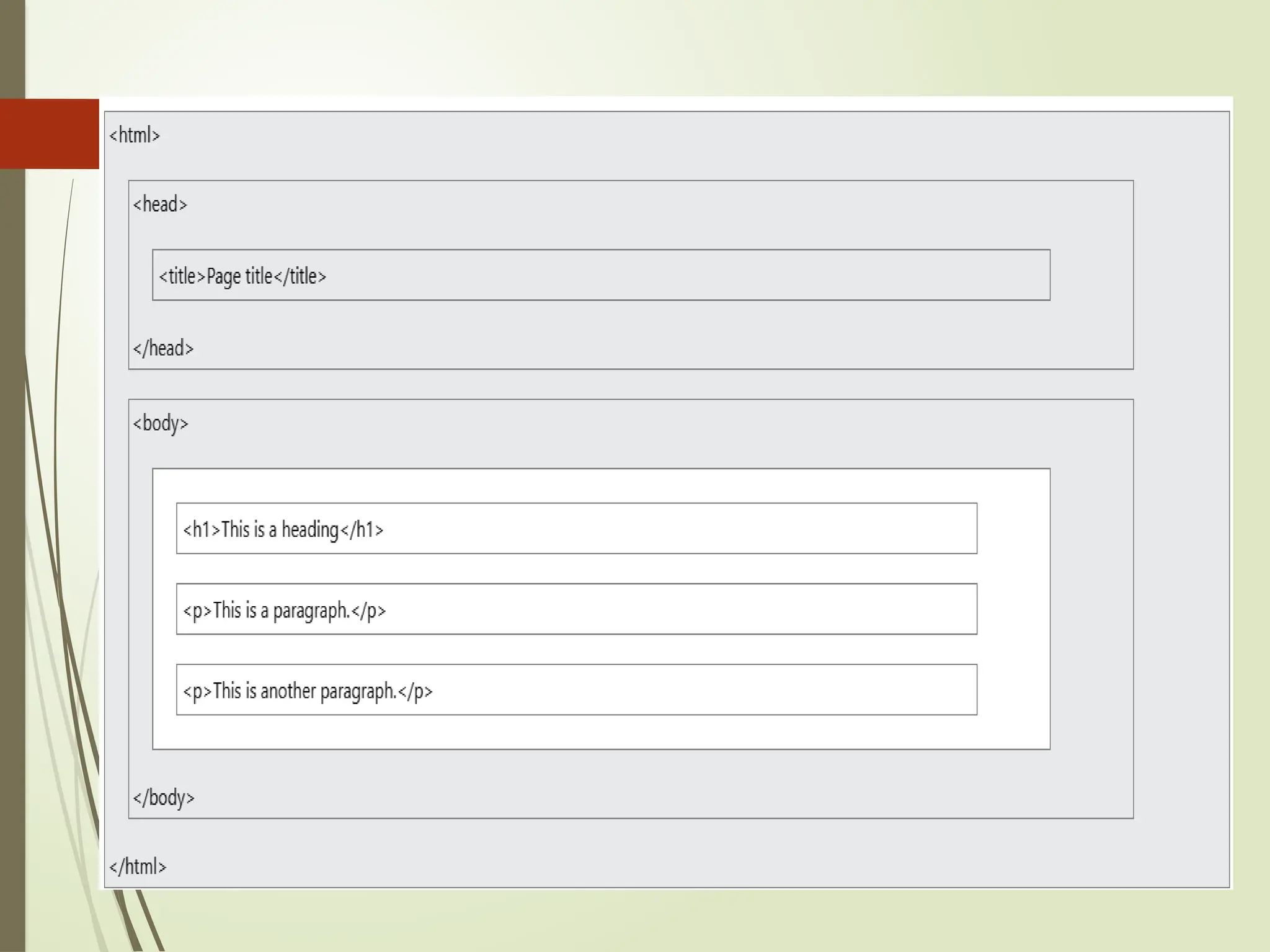
HTML (HYPER-TEXT MARKUPLANGUAGE)
HTML stands for Hyper Text Markup Language
HTML is the standard markup language for creating Web pages
HTML describes the structure of a Web page
HTML consists of a series of elements
HTML elements tell the browser how to display the content
20.
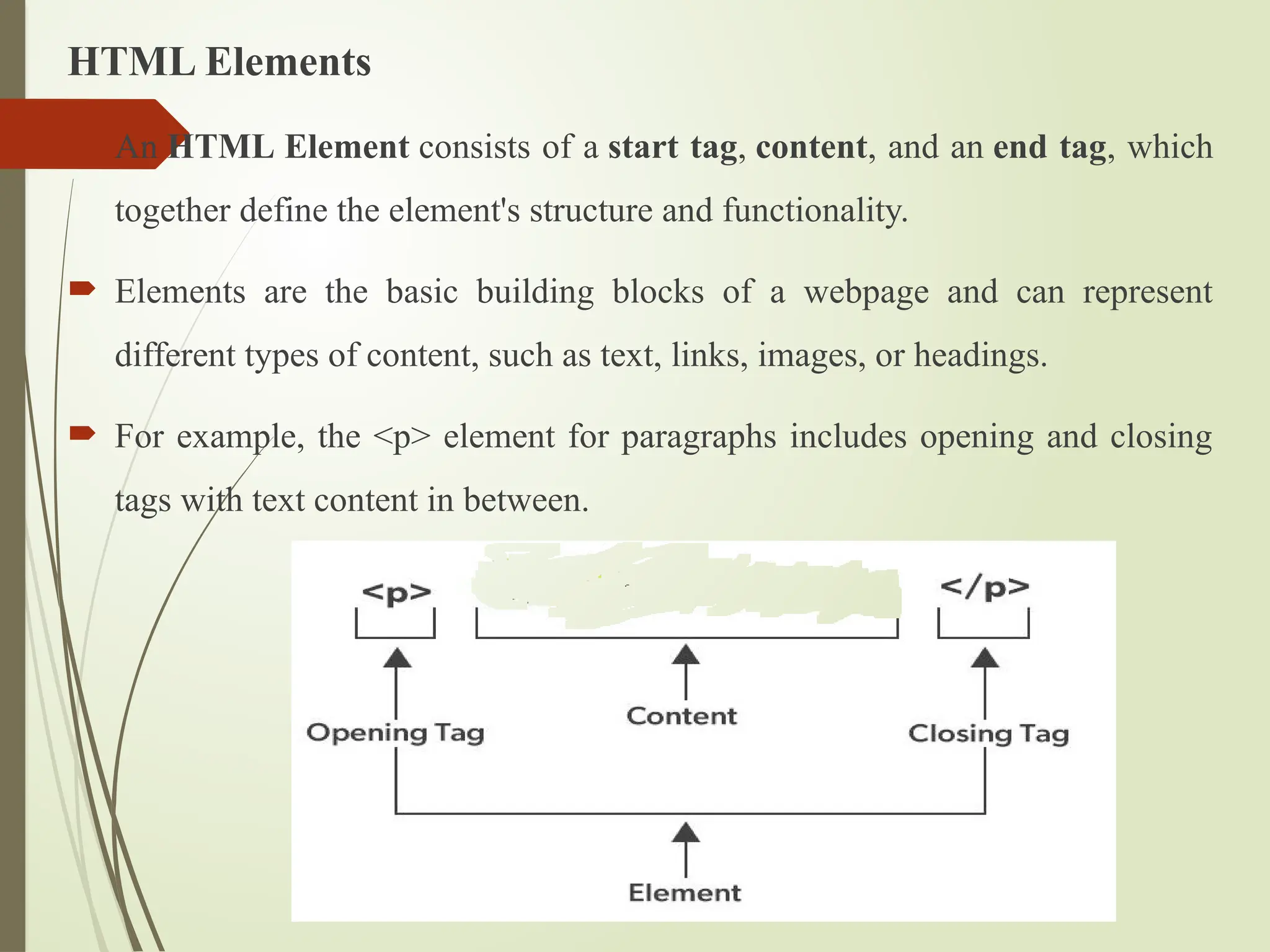
HTML Elements
AnHTML Element consists of a start tag, content, and an end tag, which
together define the element's structure and functionality.
Elements are the basic building blocks of a webpage and can represent
different types of content, such as text, links, images, or headings.
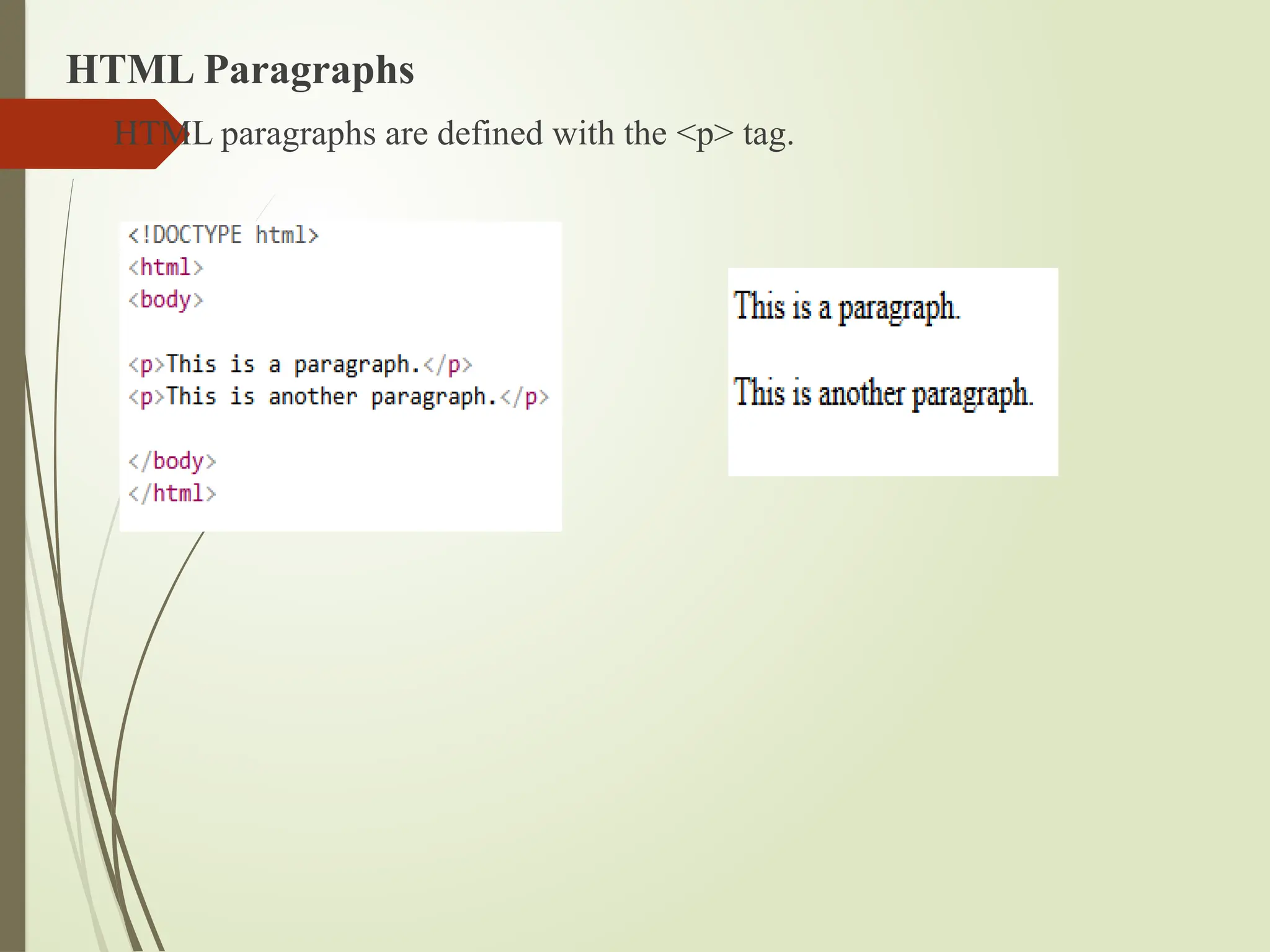
For example, the <p> element for paragraphs includes opening and closing
tags with text content in between.
21.
HTMLAttributes
HTML Attributesare special words used within the opening tag of an
HTML element.
They provide additional information about HTML elements.
HTML attributes are used to configure and adjust the element's behavior,
appearance, or functionality in a variety of ways.
Each attribute has a name and a value, formatted as name="value".
Attributes tell the browser how to render the element or how it should behave
during user interactions.
Syntax:
<tagname attribute_name = "attribute_value"> content... </tagname>
22.
Components of Attribute
An HTML attribute consists of two primary components:
1. attribute_name: This is the name of the attribute, which specifies what
kind of additional information or property you are defining for the element.
Common attribute names include href, src, class, id, etc.
2. attribute_value: The value is assigned to the attribute to define the
specific setting or behavior. It is always placed in quotes.
23.
Common HTMLAttributes
HTMLalt Attribute
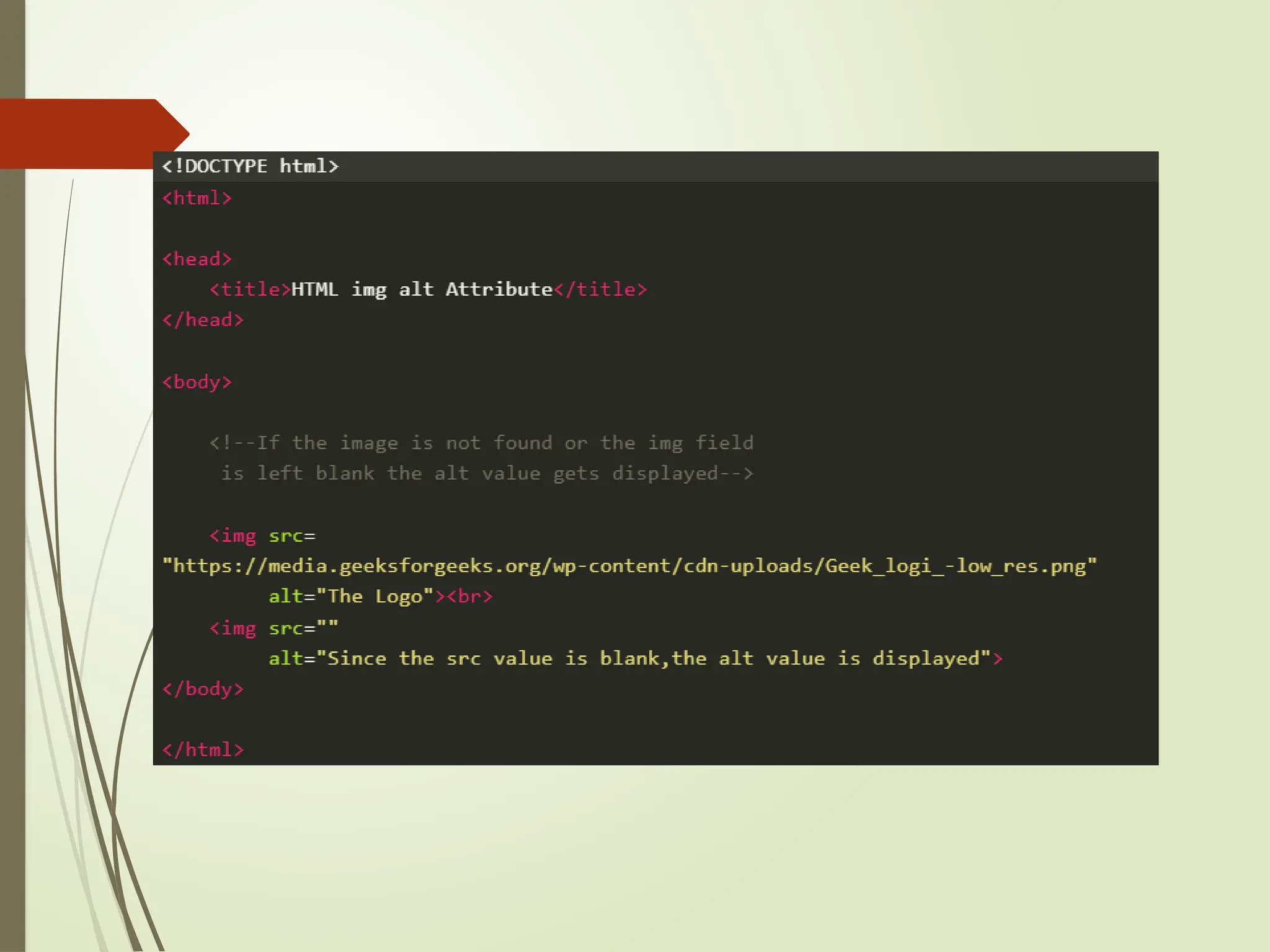
The alt attribute in HTML provides alternative text for an image if the image
cannot be displayed. It improves accessibility and provides context for screen
readers.
Example: This example explains the HTML alt Attributes to specify the
name of the file when the image is not loaded properly.
25.
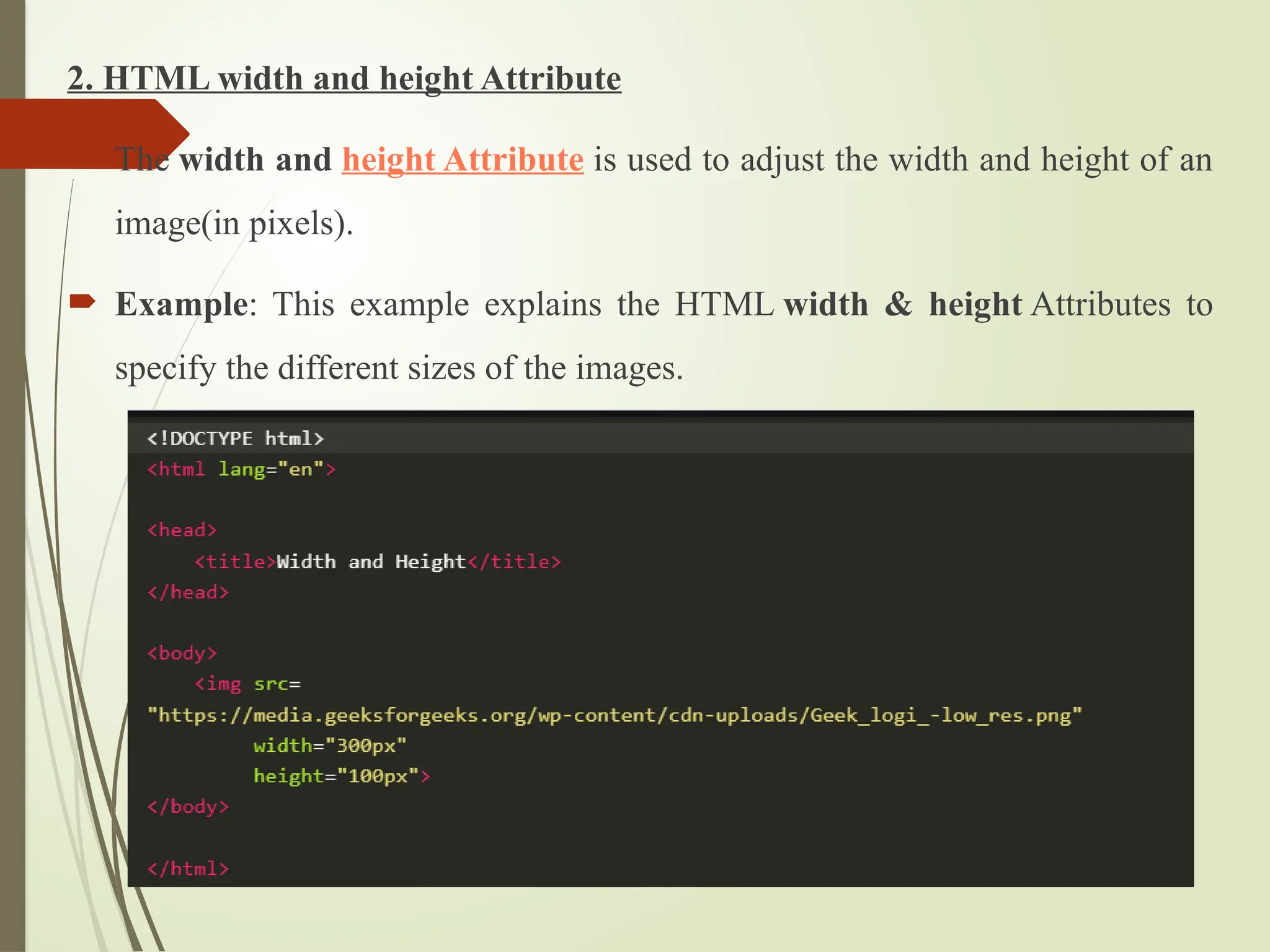
2. HTML widthand height Attribute
The width and height Attribute is used to adjust the width and height of an
image(in pixels).
Example: This example explains the HTML width & height Attributes to
specify the different sizes of the images.
26.
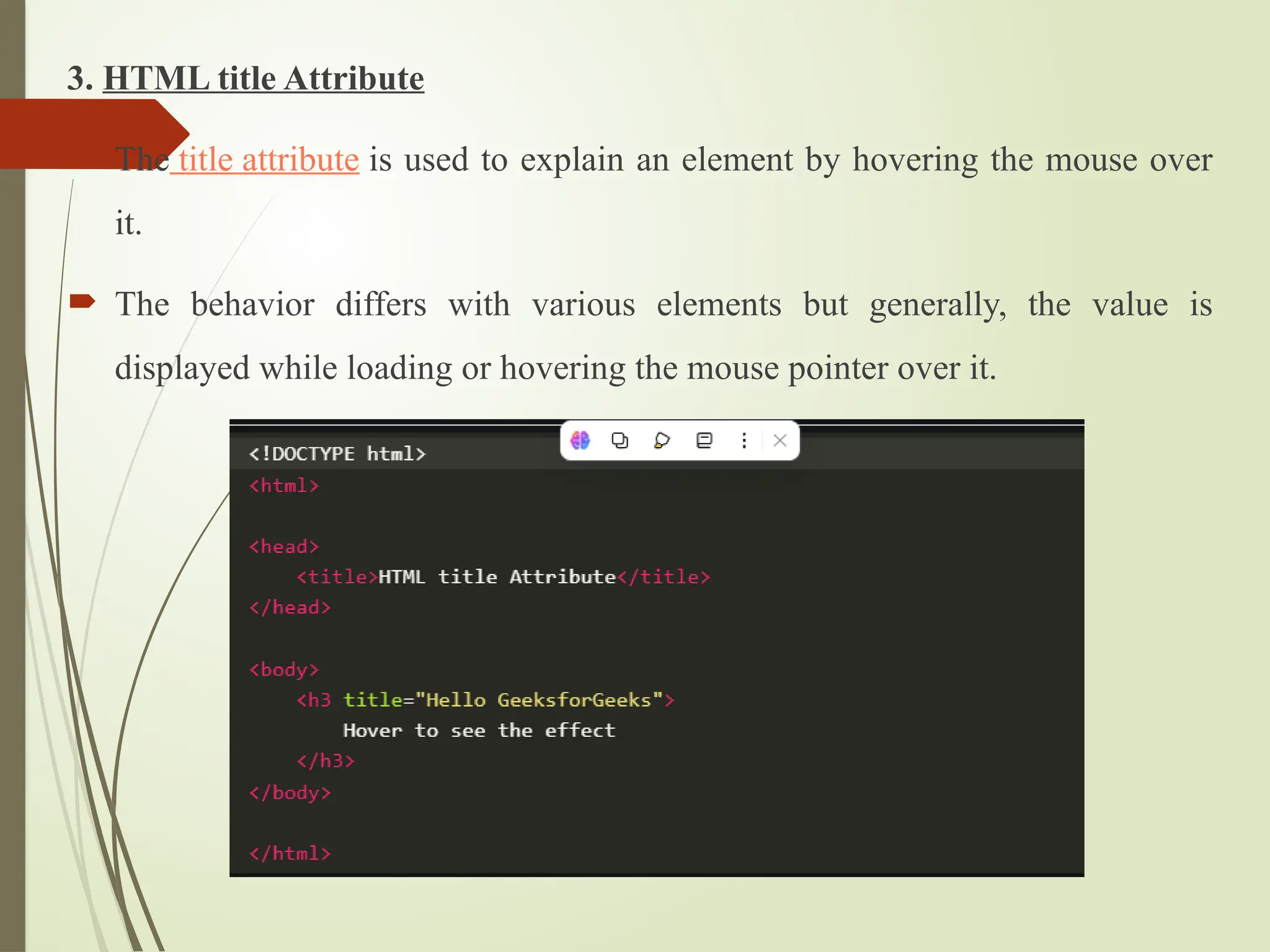
3. HTML titleAttribute
The title attribute is used to explain an element by hovering the mouse over
it.
The behavior differs with various elements but generally, the value is
displayed while loading or hovering the mouse pointer over it.
27.
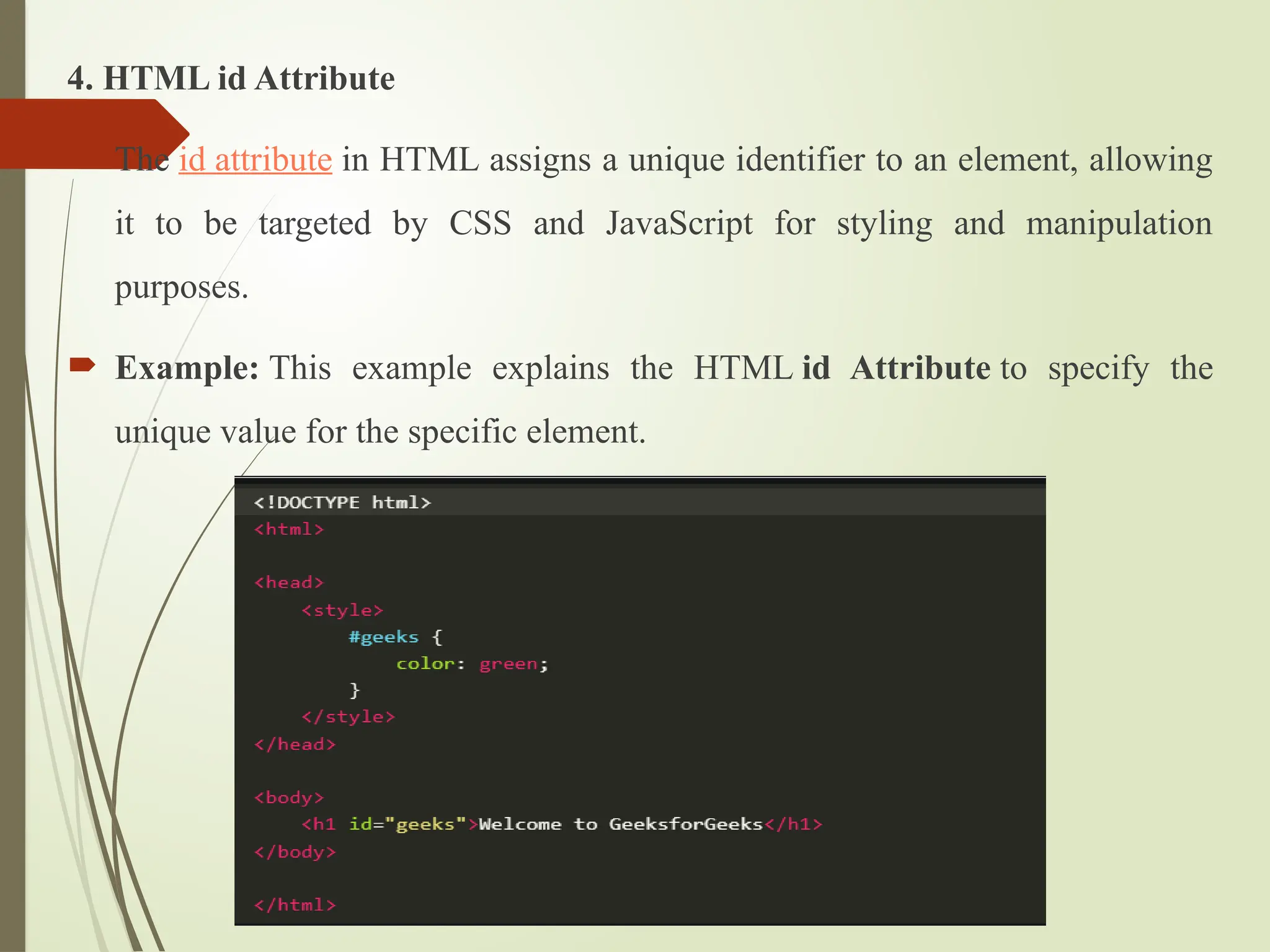
4. HTML idAttribute
The id attribute in HTML assigns a unique identifier to an element, allowing
it to be targeted by CSS and JavaScript for styling and manipulation
purposes.
Example: This example explains the HTML id Attribute to specify the
unique value for the specific element.
28.
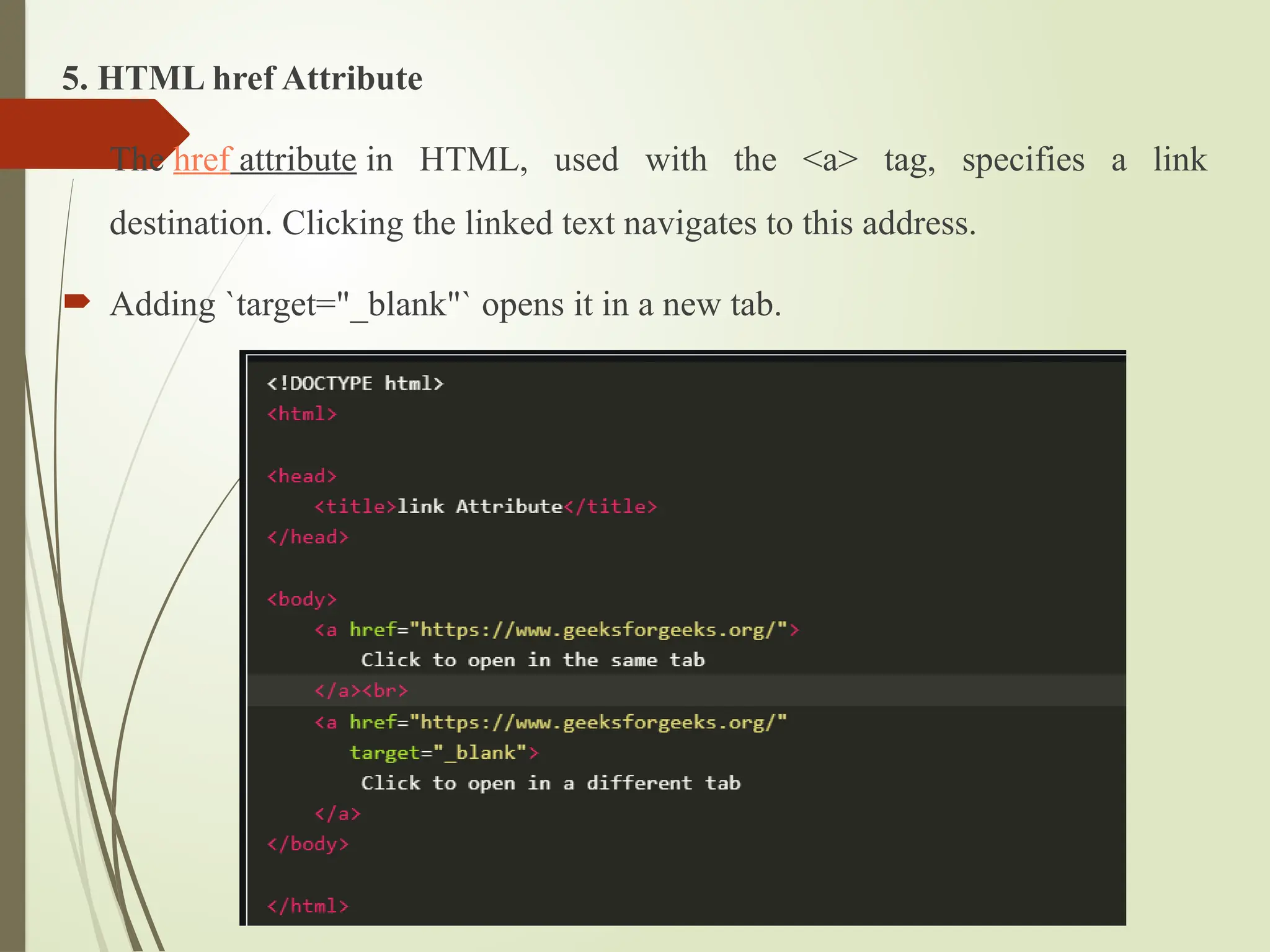
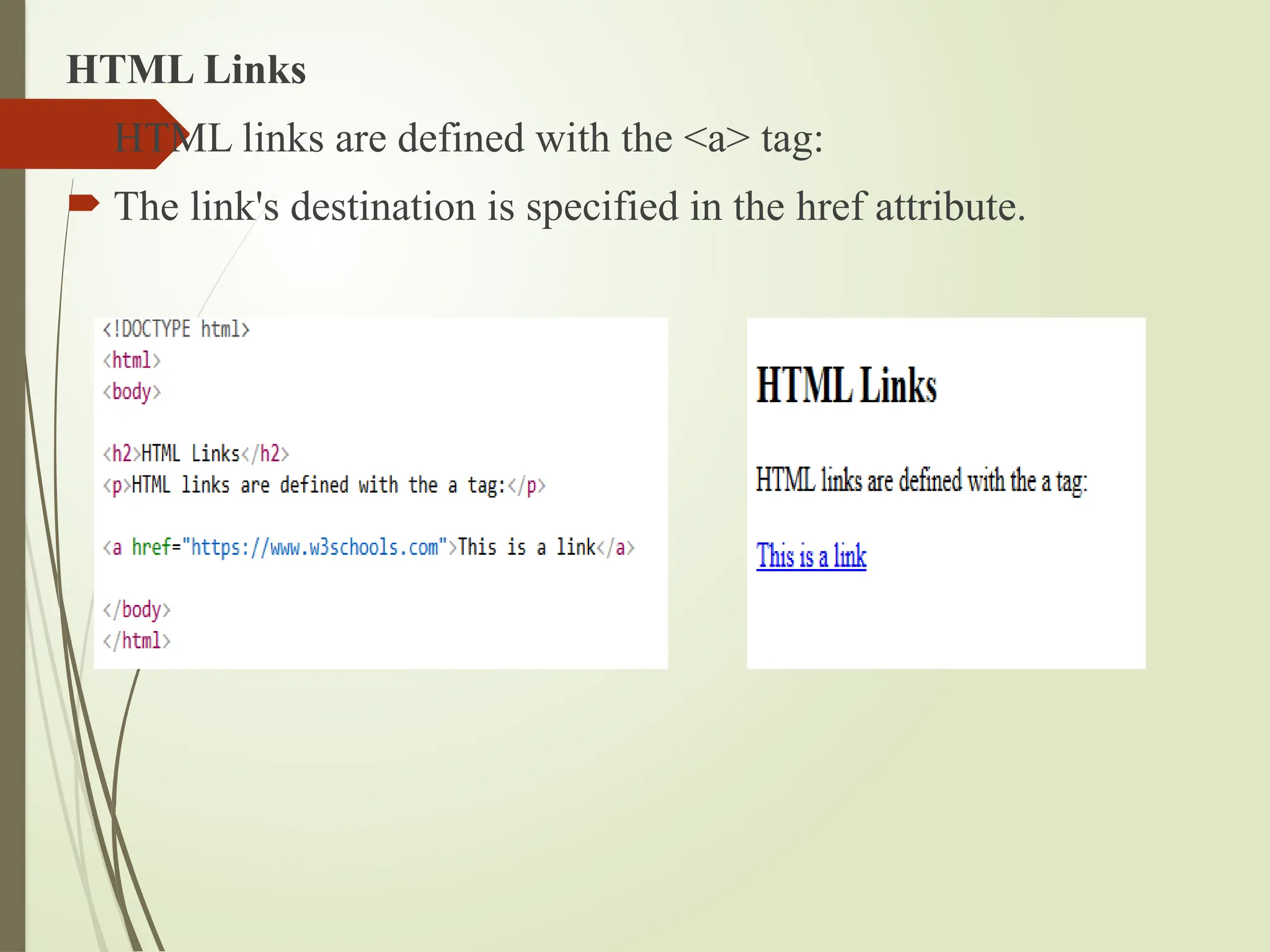
5. HTML hrefAttribute
The href attribute in HTML, used with the <a> tag, specifies a link
destination. Clicking the linked text navigates to this address.
Adding `target="_blank"` opens it in a new tab.
29.
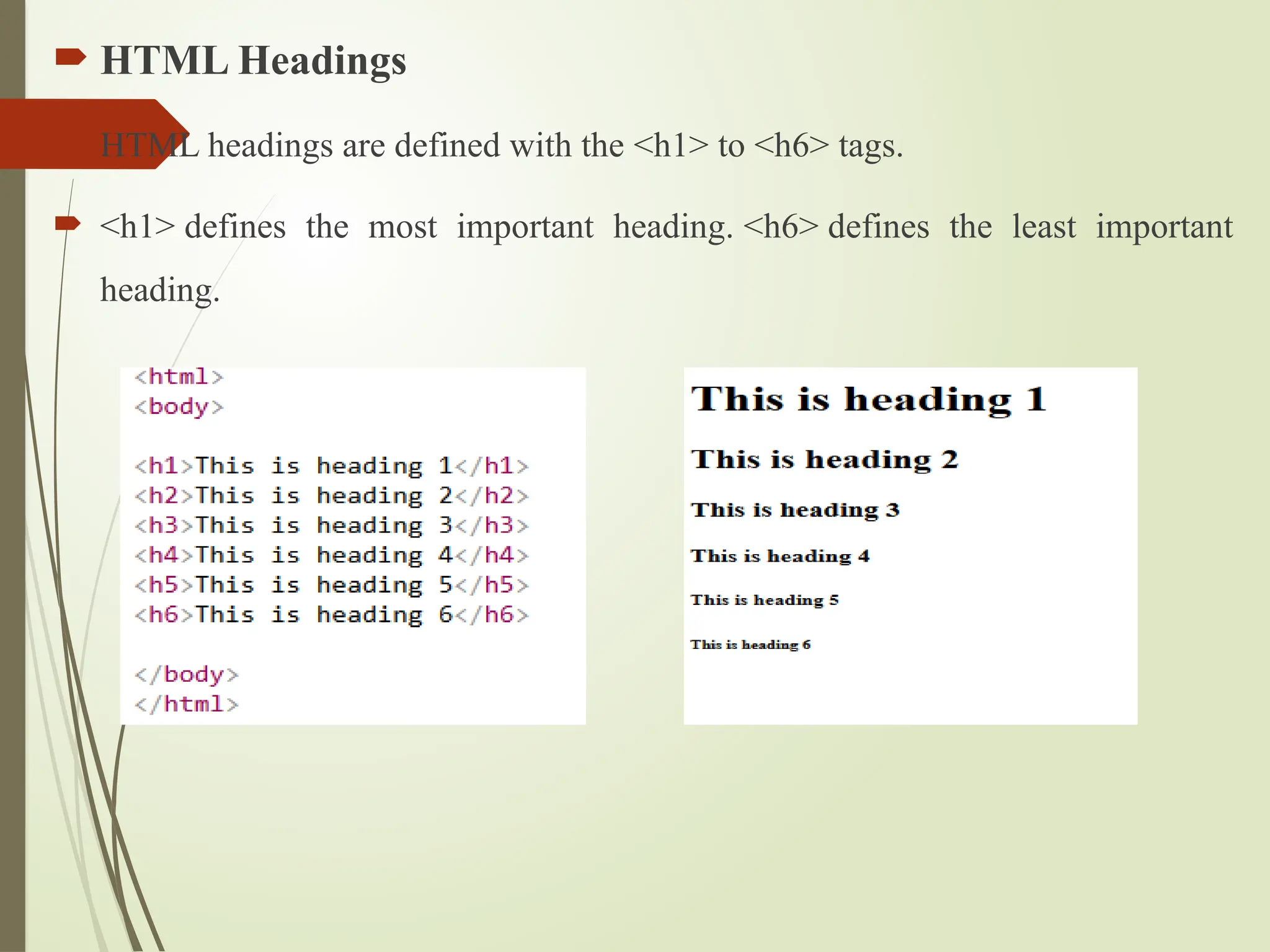
HTML Headings
HTML headings are defined with the <h1> to <h6> tags.
<h1> defines the most important heading. <h6> defines the least important
heading.
HTML Links
HTMLlinks are defined with the <a> tag:
The link's destination is specified in the href attribute.
32.
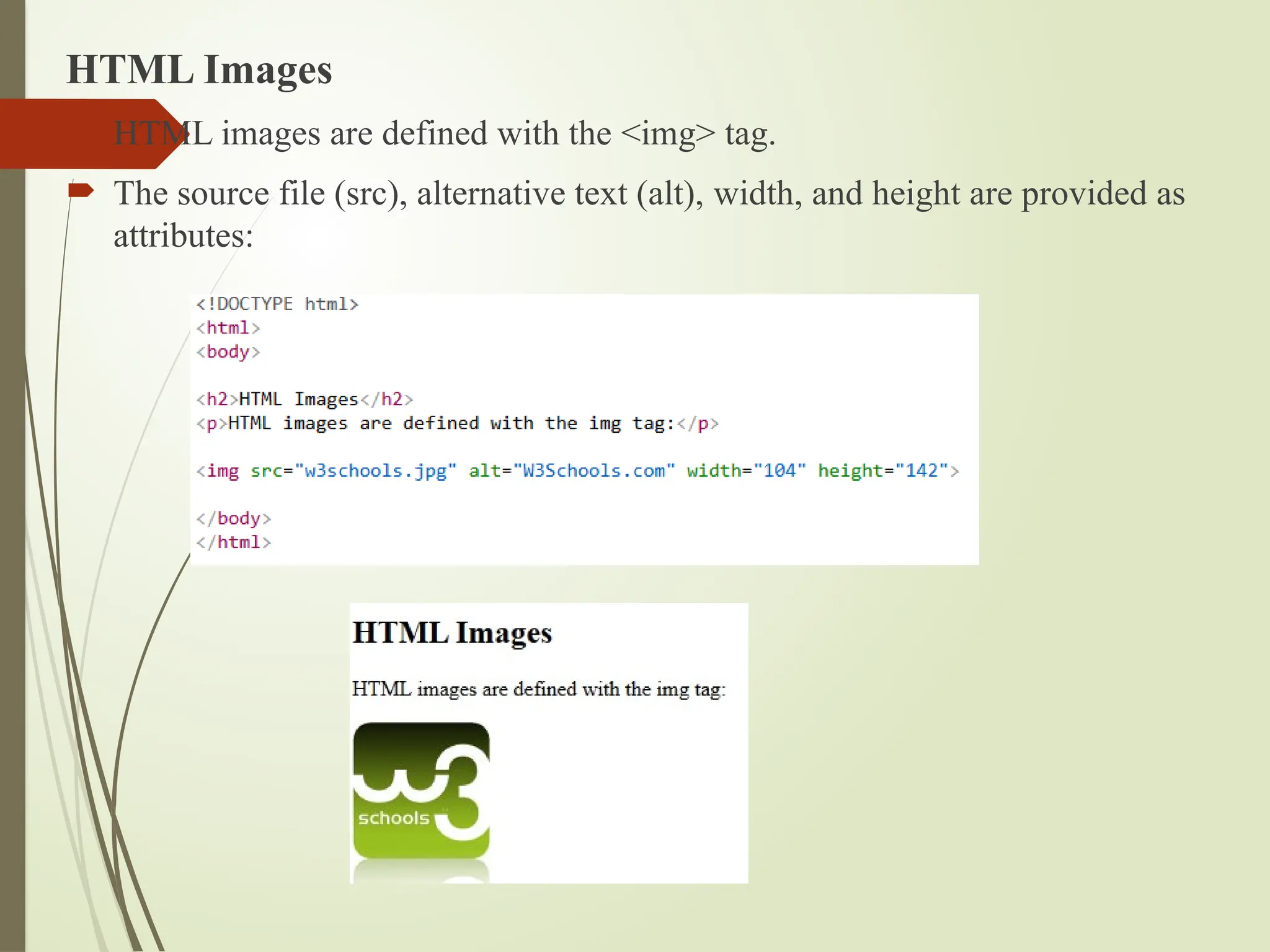
HTML Images
HTMLimages are defined with the <img> tag.
The source file (src), alternative text (alt), width, and height are provided as
attributes:
33.
HTML Text Formatting
HTML text formatting refers to the use of specific HTML tags to
modify the appearance and structure of text on a webpage.
It allows you to style text in different ways, such as making it
bold, italic, underlined, highlighted, or struck-through.
34.
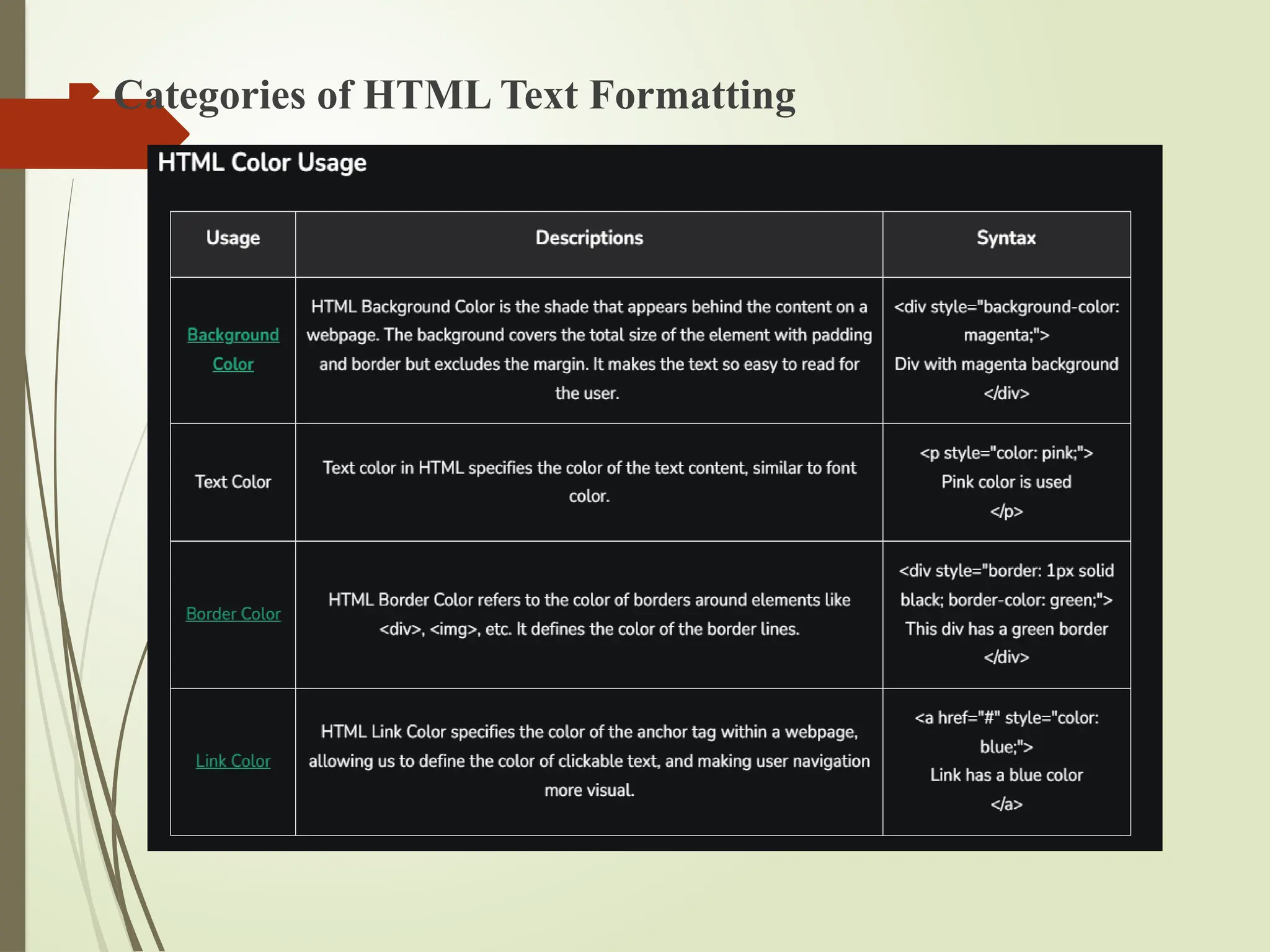
HTML Colors
HTMLColors can be applied to text, backgrounds, borders, links, forms,
tables, etc.
There are different color formats including hexadecimal, RGB, RGBA, HSL,
and named colors, offering you precise control over the color presentation on
your web pages.
HTML Lists
AnHTML List allows you to organize data on web pages into an ordered or
unordered format to make the information easier to read and visually
appealing.
HTML Lists are very helpful for creating structured, accessible content in web
development.
37.
Types ofHTML Lists
There are three main types of lists in HTML:
1. Unordered Lists (<ul>): These lists are used for items that do not need to be
in any specific order. The list items are typically marked with bullets.
2. Ordered Lists (<ol>): These lists are used when the order of the items is
important. Each item in an ordered list is typically marked with numbers or
letters.
3. Description Lists (<dl>): These lists are used to contain terms and their
corresponding descriptions
38.
HTML Tables
HTML(Hypertext Markup Language) is the standard markup language
used to create and structure web pages.
It defines the layout of a webpage using elements and tags, allowing for the
display of text, images, links, and multimedia content.
39.
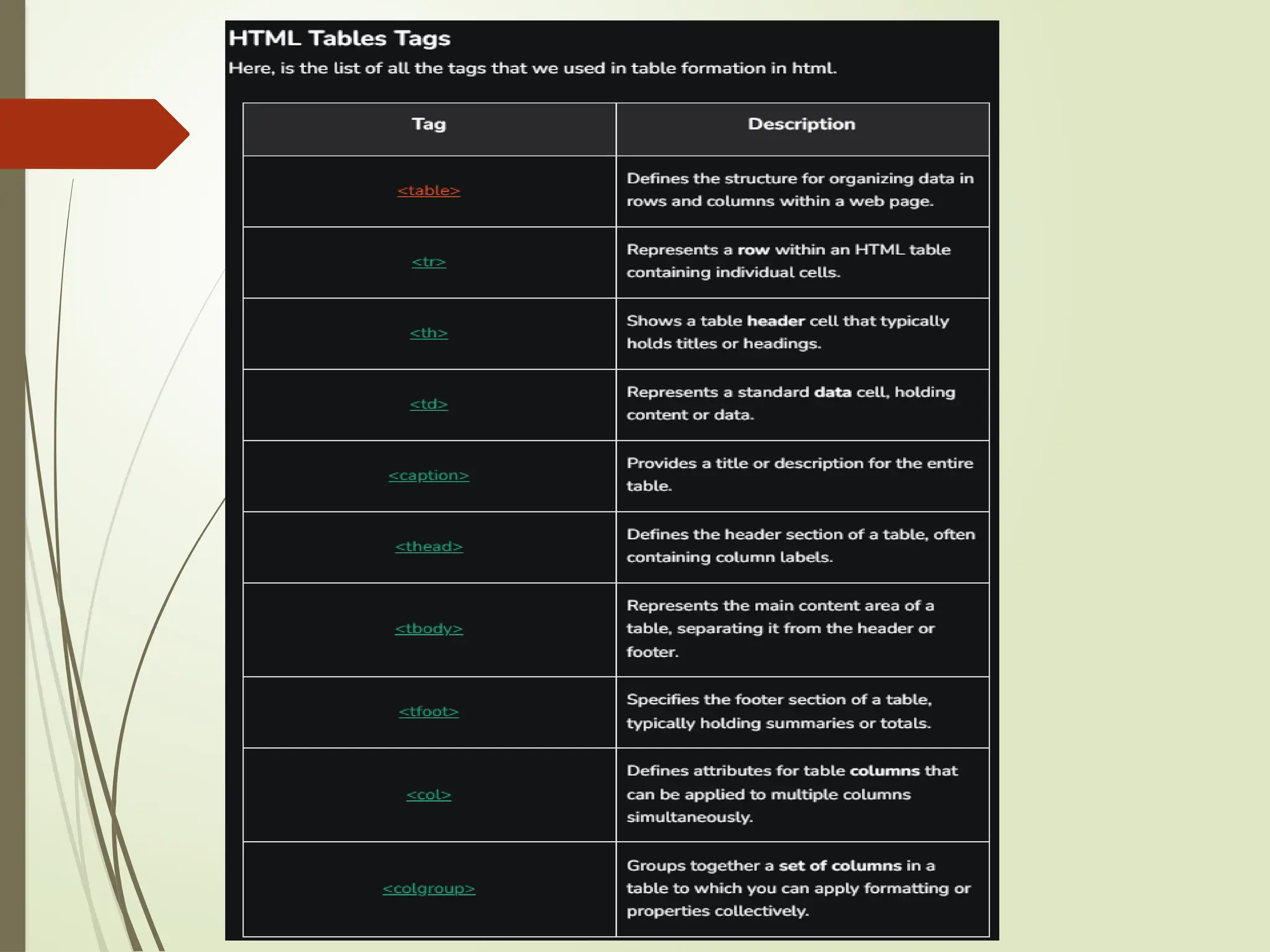
Basic HTML TableStructure
An HTML table is created using the <table> tag. Inside the table, we use:
1. <tr>: Table Row
2. <th>: Table Header
3. <td>: Table Data
Each <tr> represents a row, and within each row, <th> and <td> tags represent
the cells in that row, which can contain text, images, lists, or even another
table
41.
CSS (CASCADING STYLESHEET)
CSS is the language we use to style a Web page.
CSS stands for Cascading Style Sheets
CSS describes how HTML elements are to be displayed on screen, paper, or in
other media
CSS saves a lot of work. It can control the layout of multiple web pages all at
once
External stylesheets are stored in CSS files
42.
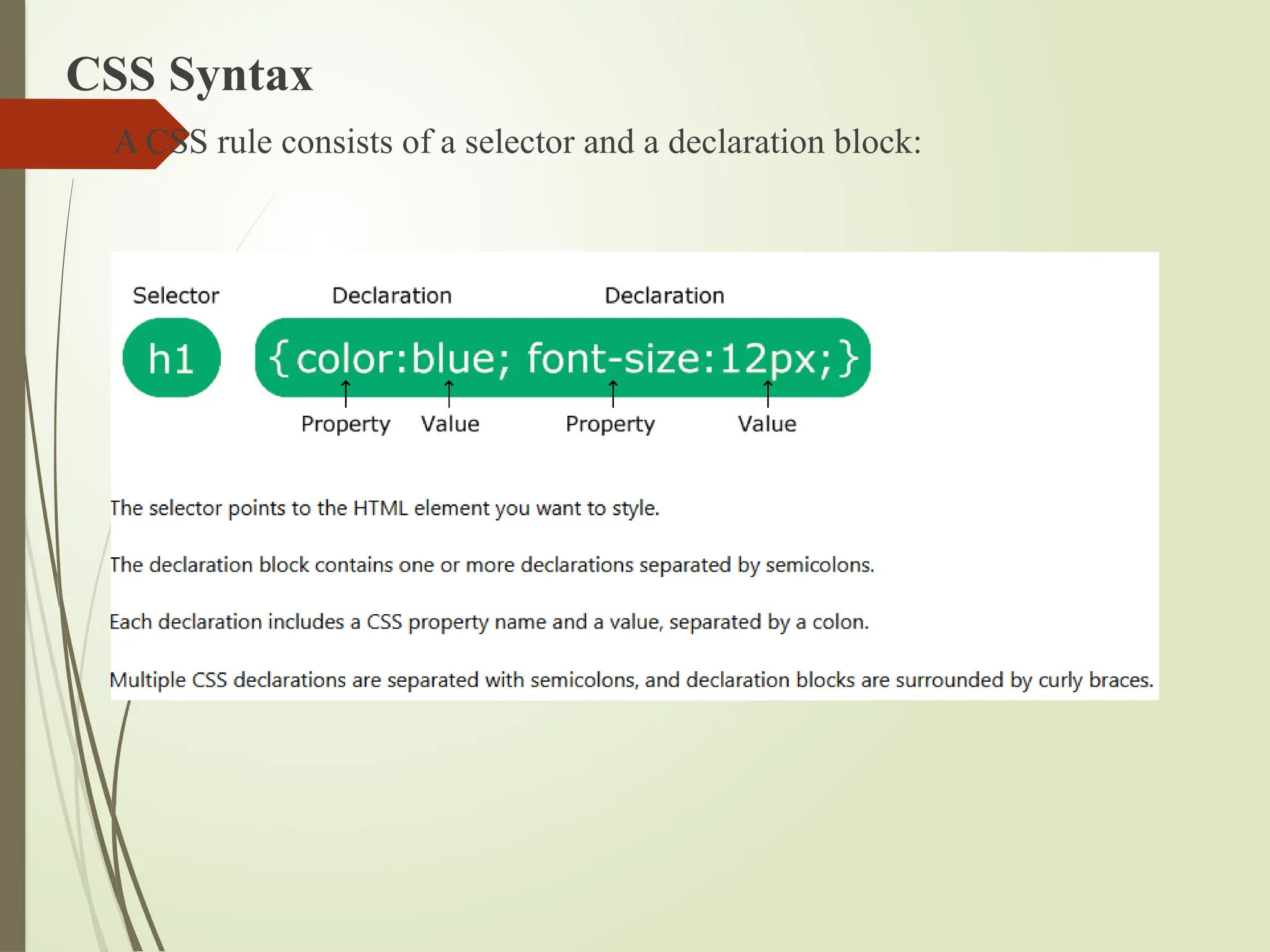
CSS Syntax
ACSS rule consists of a selector and a declaration block:
43.
CSS Selectors
CSSselectors are used to "find" (or select) the HTML elements you want to
style.
There are five categories:
Simple selectors (select elements based on name, id, class)
Combinator selectors (select elements based on a specific relationship between
them)
Pseudo-class selectors (select elements based on a certain state)
Pseudo-elements selectors (select and style a part of an element)
Attribute selectors (select elements based on an attribute or attribute value)
44.
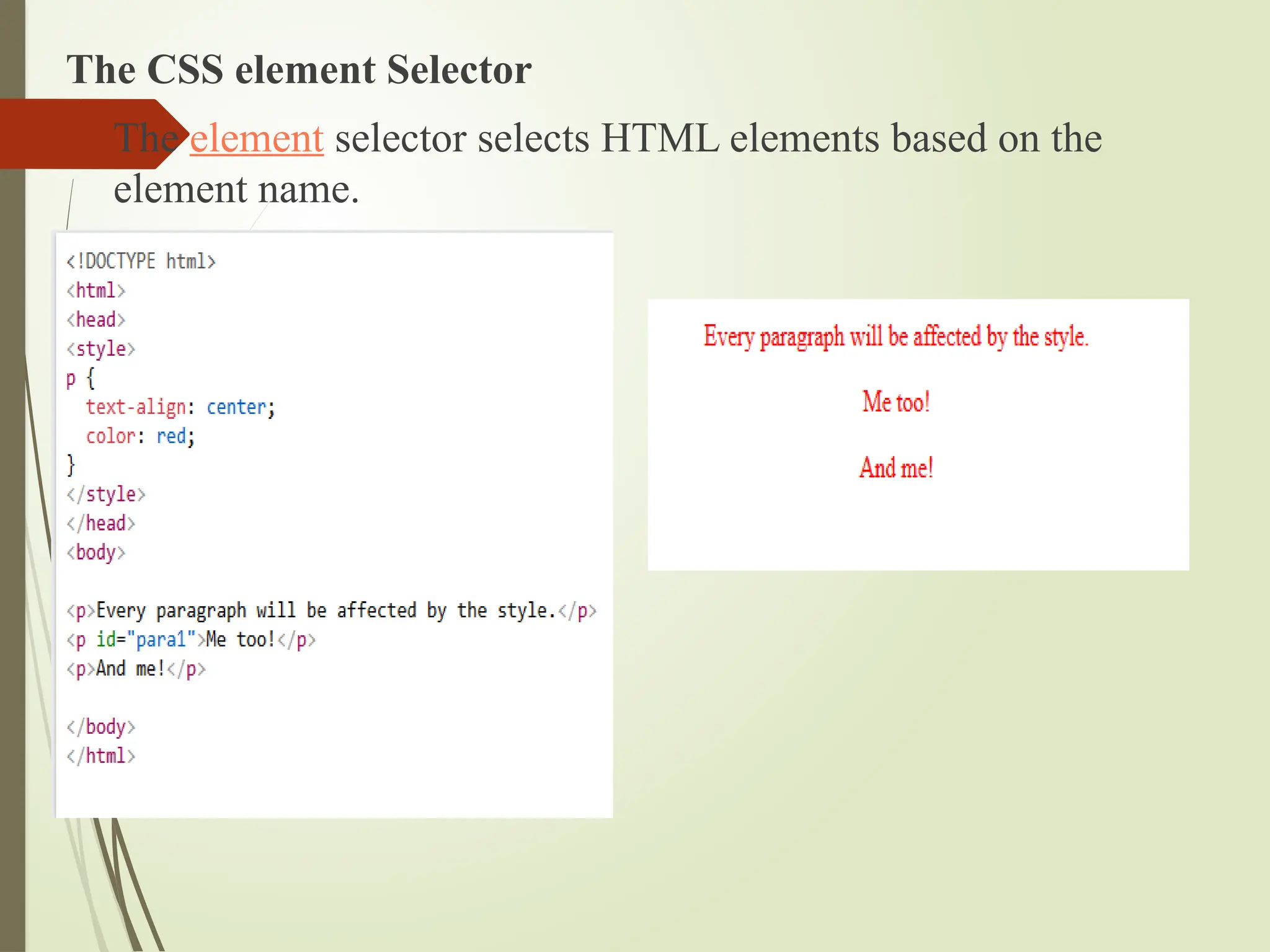
The CSS elementSelector
The element selector selects HTML elements based on the
element name.
45.
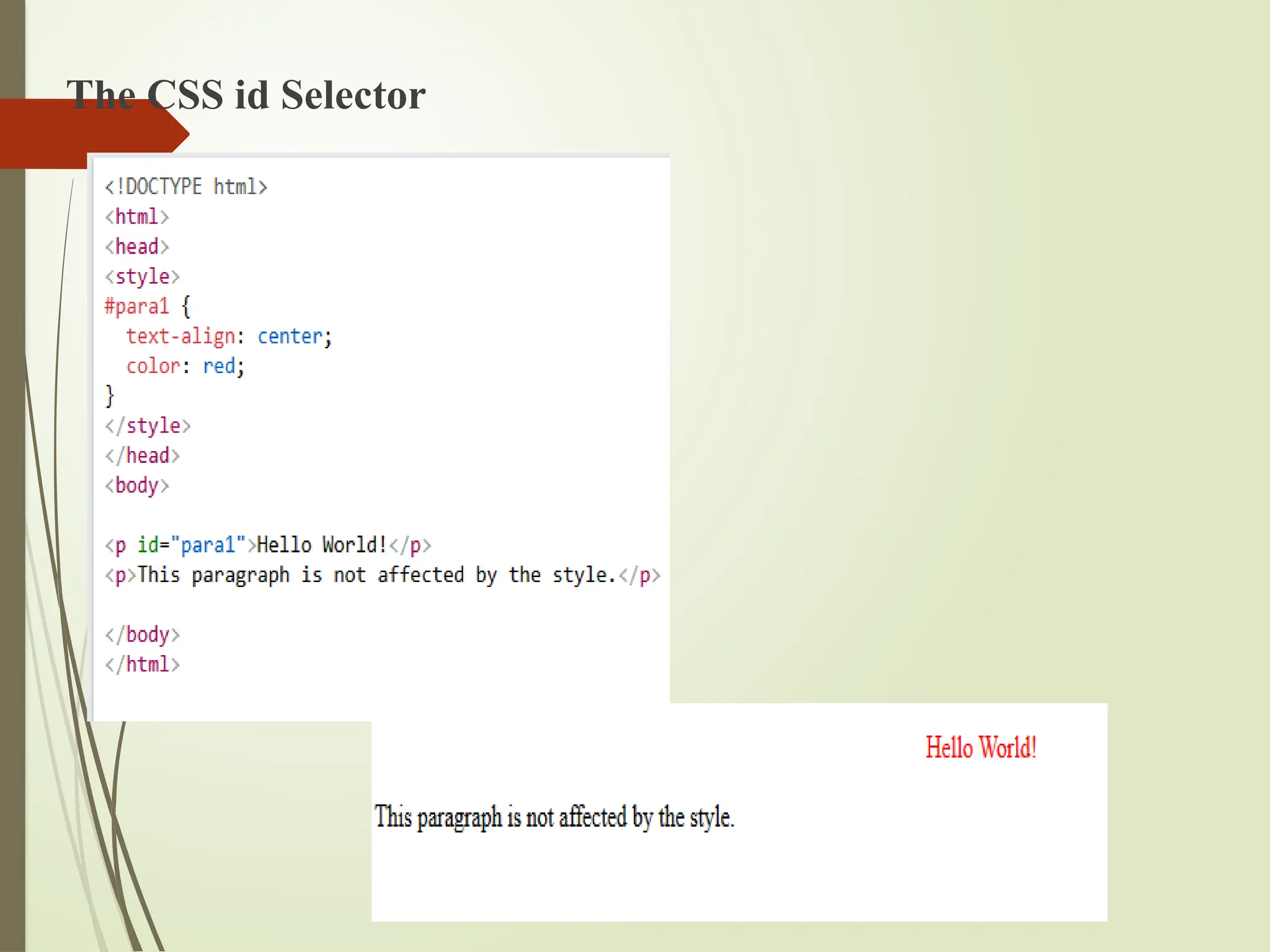
The CSS idSelector
The id selector uses the id attribute of an HTML element to select a specific
element.
The id of an element is unique within a page, so the id selector is used to
select one unique element!
To select an element with a specific id, write a hash (#) character, followed by
the id of the element.
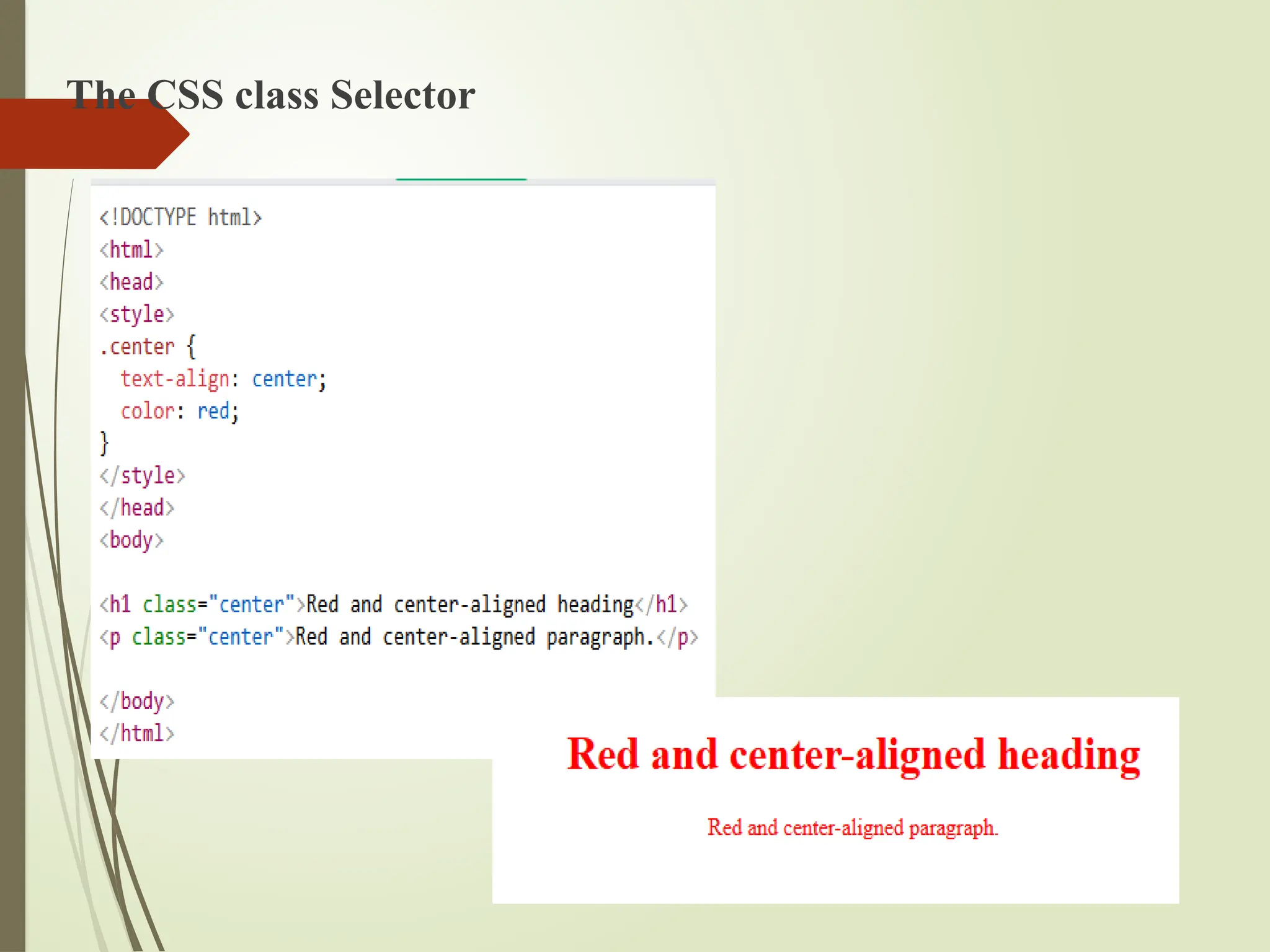
The CSS classSelector
The class selector selects HTML elements with a specific class
attribute.
To select elements with a specific class, write a period (.)
character, followed by the class name.
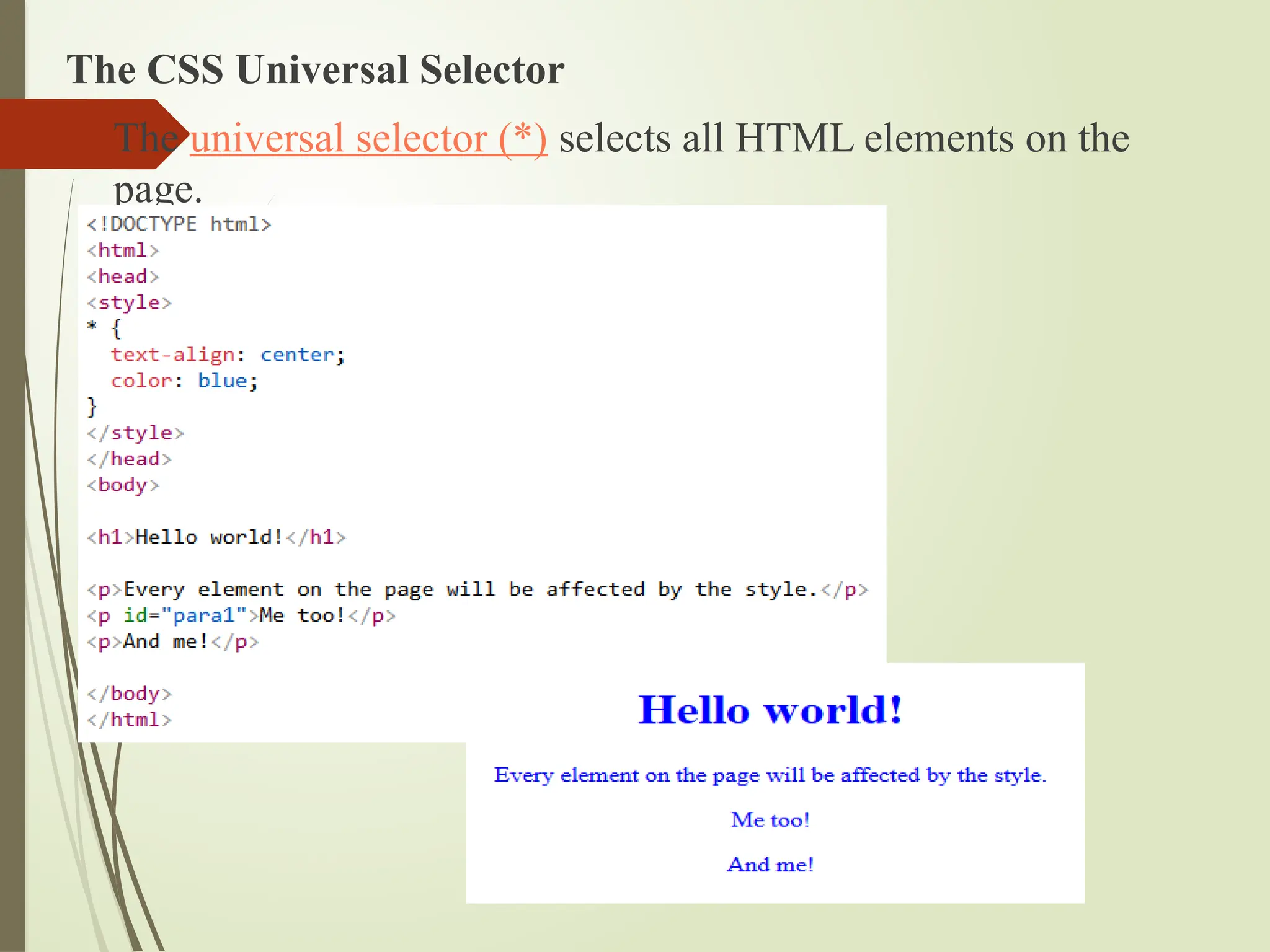
The CSS UniversalSelector
The universal selector (*) selects all HTML elements on the
page.
50.
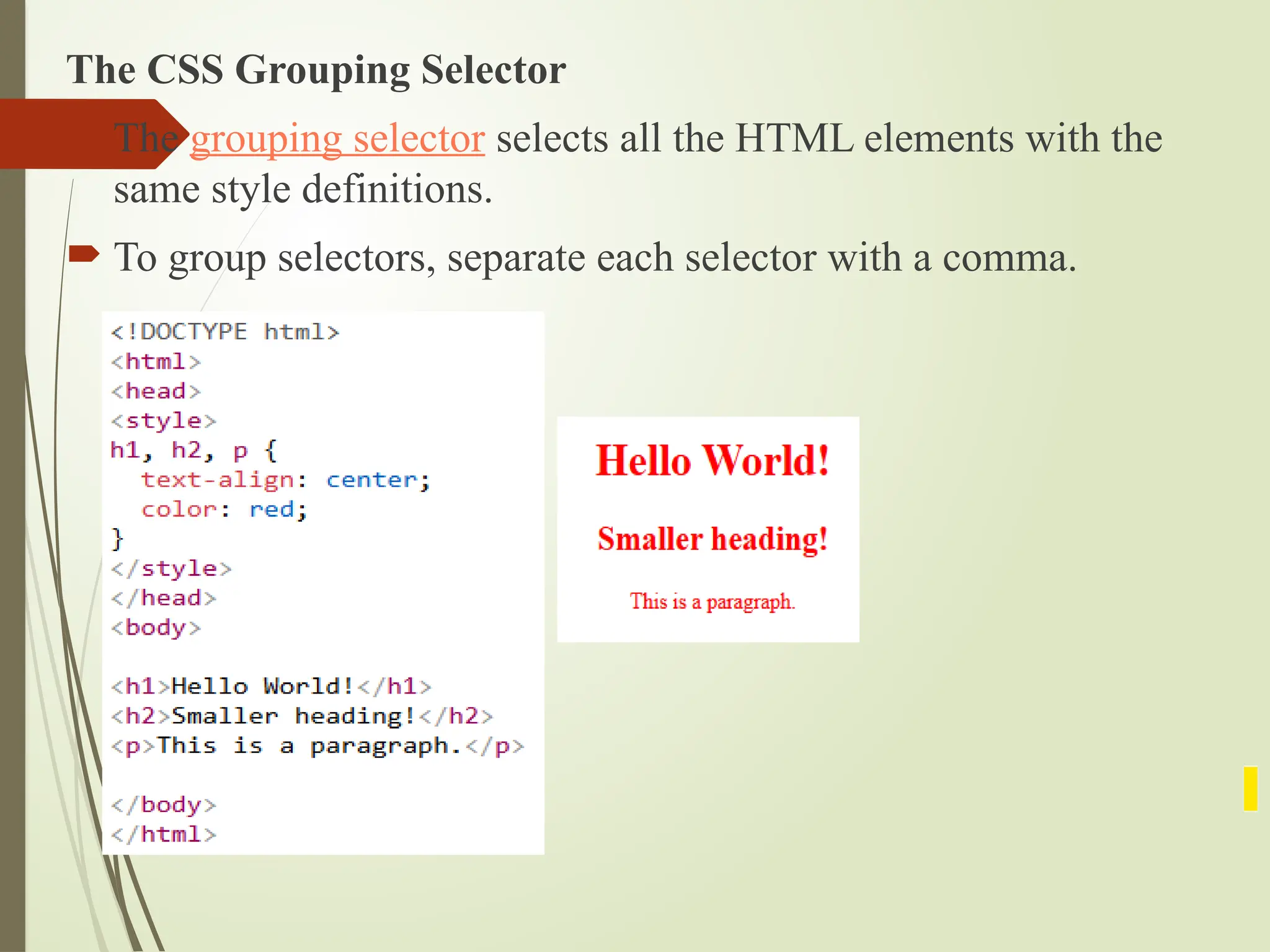
The CSS GroupingSelector
The grouping selector selects all the HTML elements with the
same style definitions.
To group selectors, separate each selector with a comma.
51.
How to AddCSS
When a browser reads a style sheet, it will format the HTML
document according to the information in the style sheet.
There are three ways of inserting a style sheet:
External CSS
Internal CSS
Inline CSS
52.
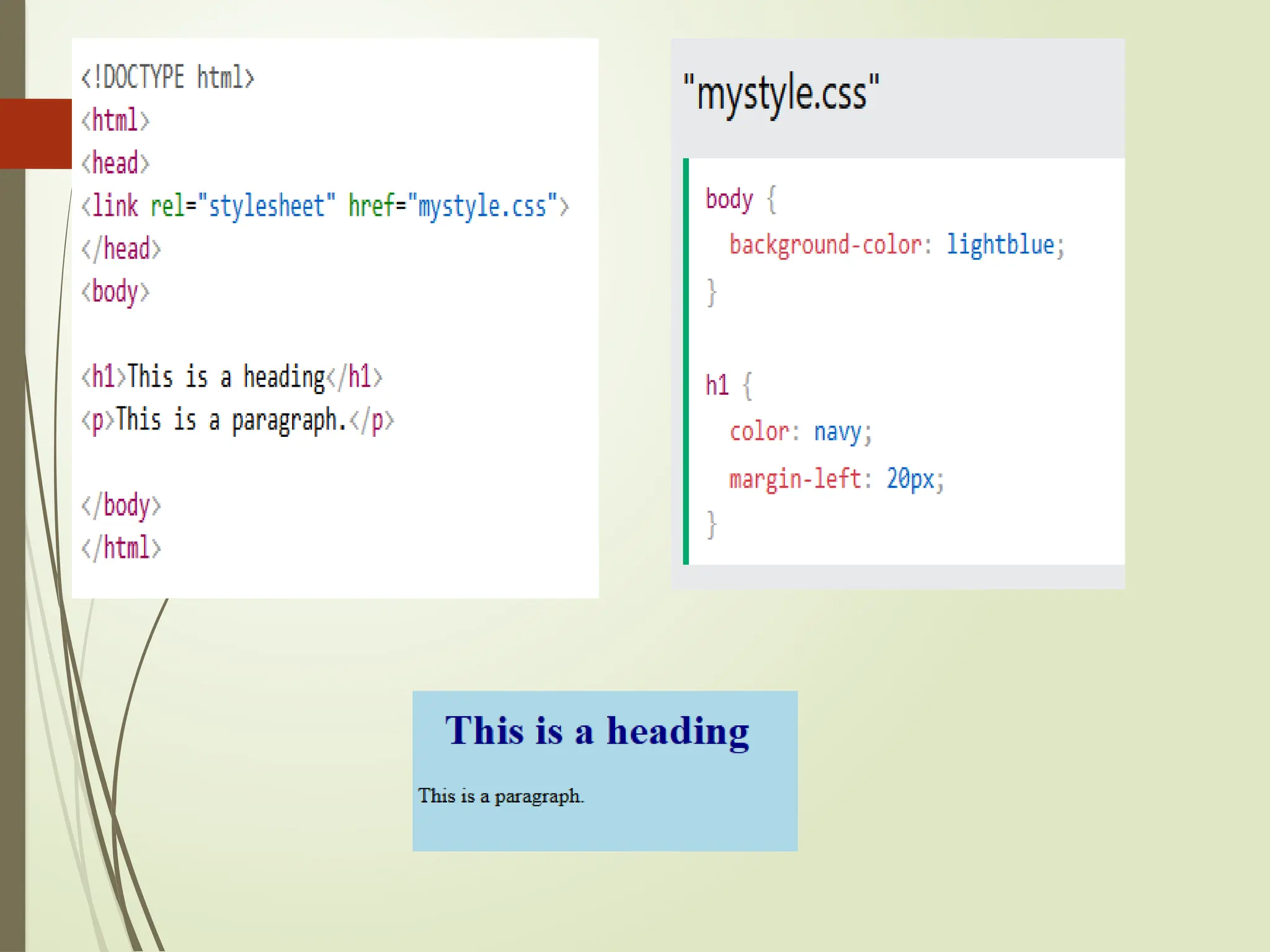
External CSS
Withan external style sheet, you can change the look of an entire
website by changing just one file!
Each HTML page must include a reference to the external style sheet
file inside the <link> element, inside the head section.
An external style sheet can be written in any text editor, and must be
saved with a .css extension.
The external .css file should not contain any HTML tags.
54.
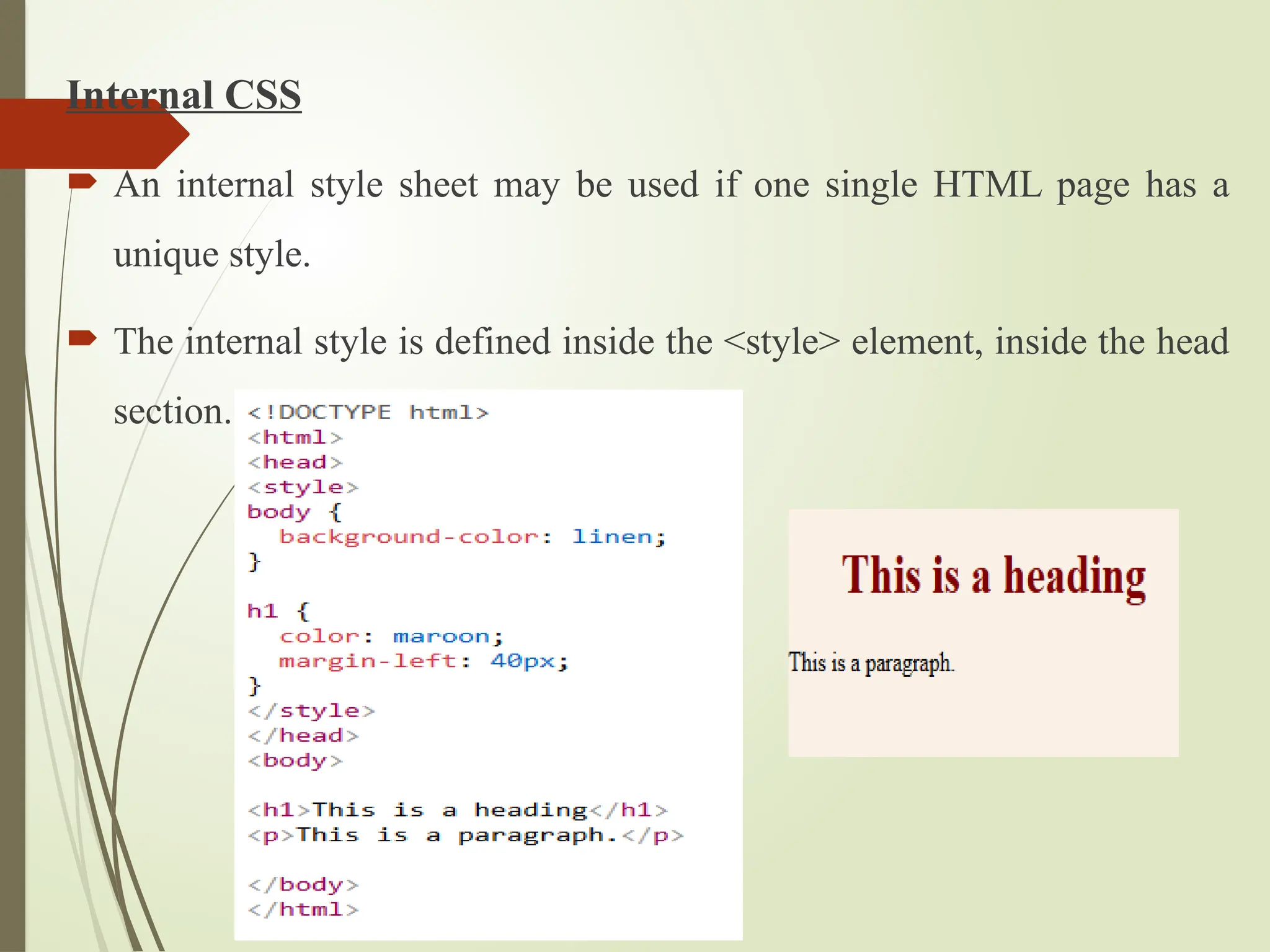
Internal CSS
Aninternal style sheet may be used if one single HTML page has a
unique style.
The internal style is defined inside the <style> element, inside the head
section.
55.
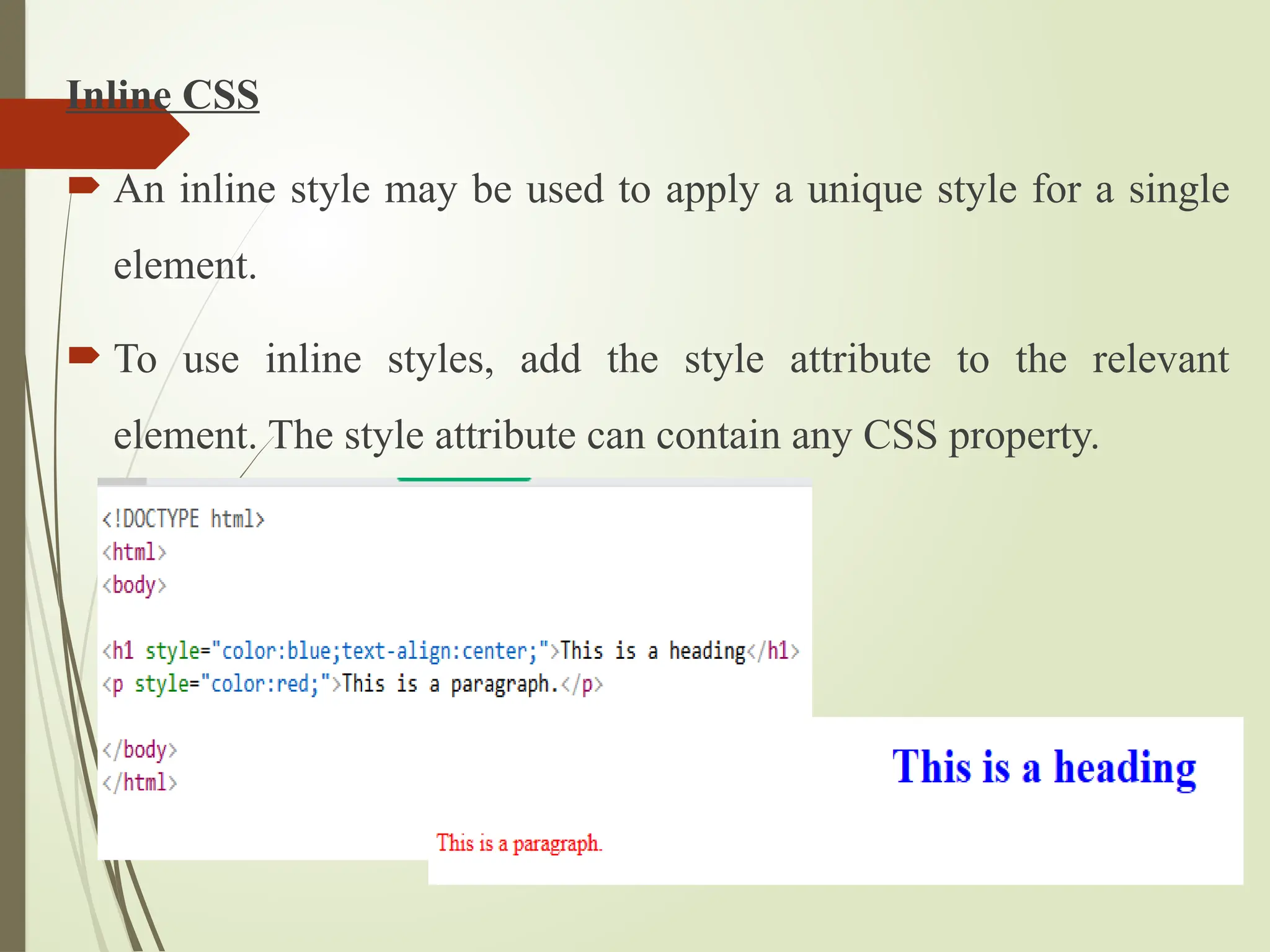
Inline CSS
Aninline style may be used to apply a unique style for a single
element.
To use inline styles, add the style attribute to the relevant
element. The style attribute can contain any CSS property.
56.
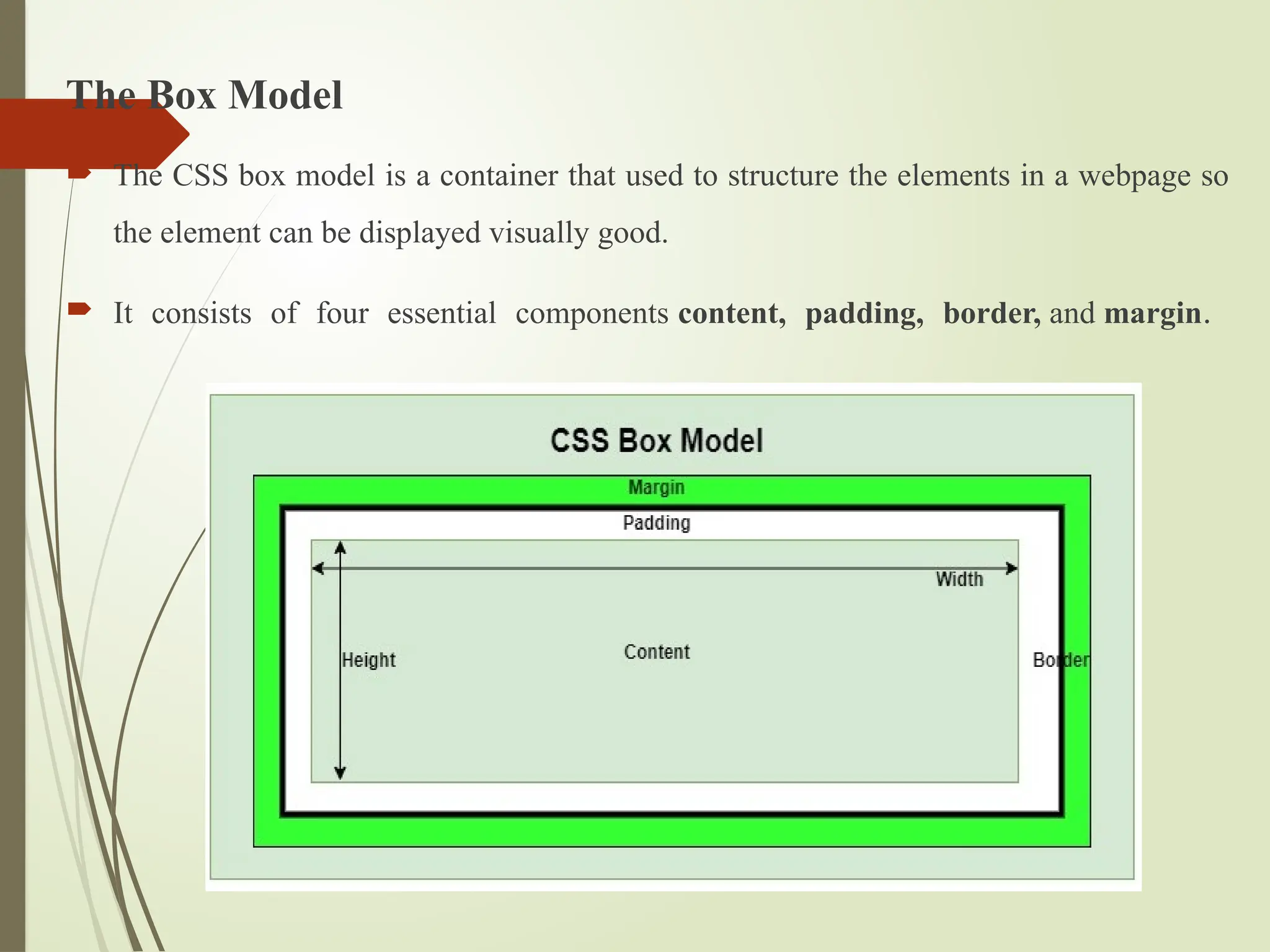
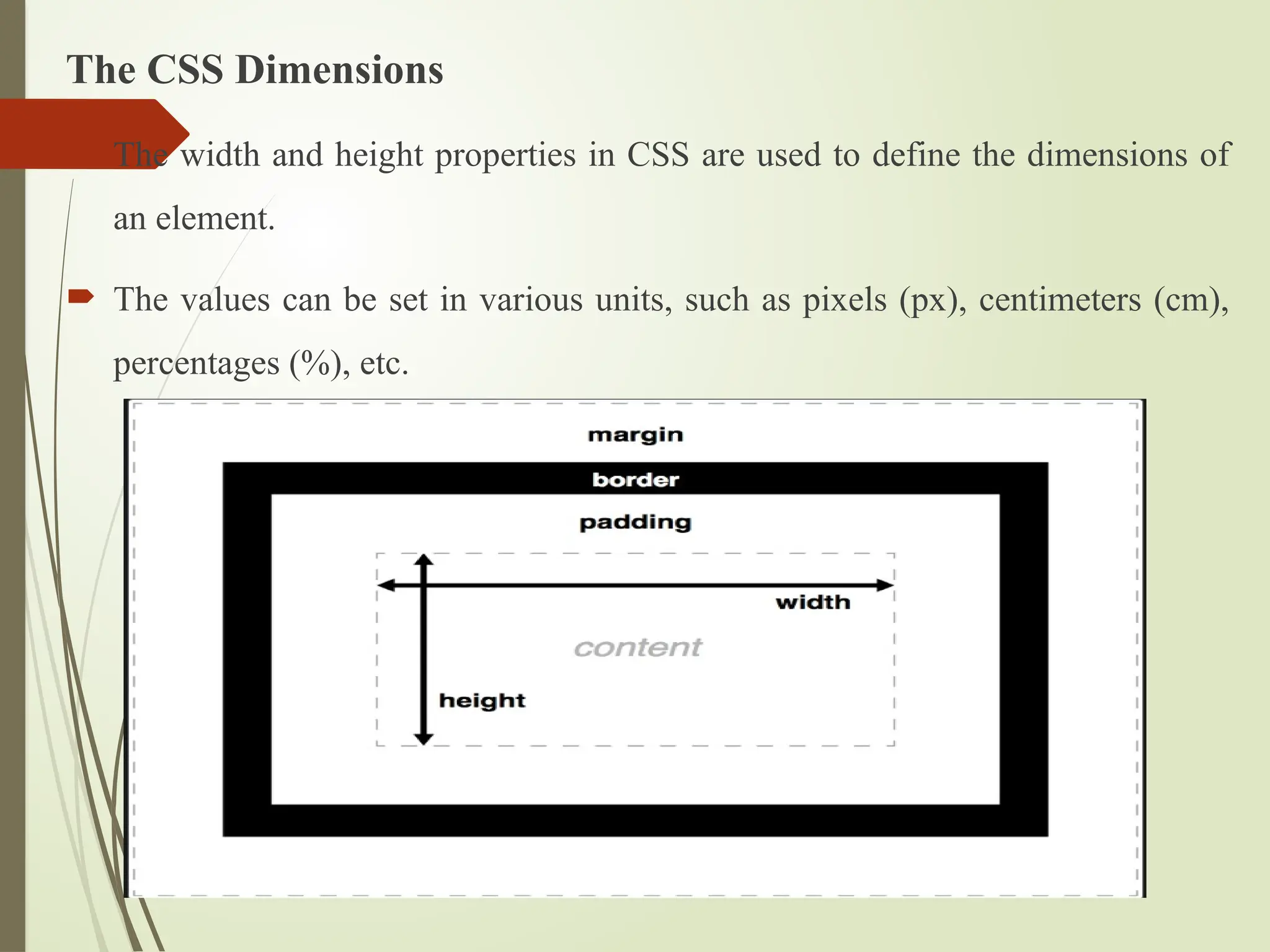
The Box Model
The CSS box model is a container that used to structure the elements in a webpage so
the element can be displayed visually good.
It consists of four essential components content, padding, border, and margin.
57.
Box Model ComponentLayout
Content: This is the innermost part of the box and refers to the actual content
of an element, such as text, images, or other media.
Padding: Represents the space between the content and the element's border.
Border: Defines a line or boundary around the padding and content of an
element.
Margin: Represents the space outside the border of an element.
58.
The CSS Background
The CSS background is the area behind an element's content, which can be a
color, image, or both.
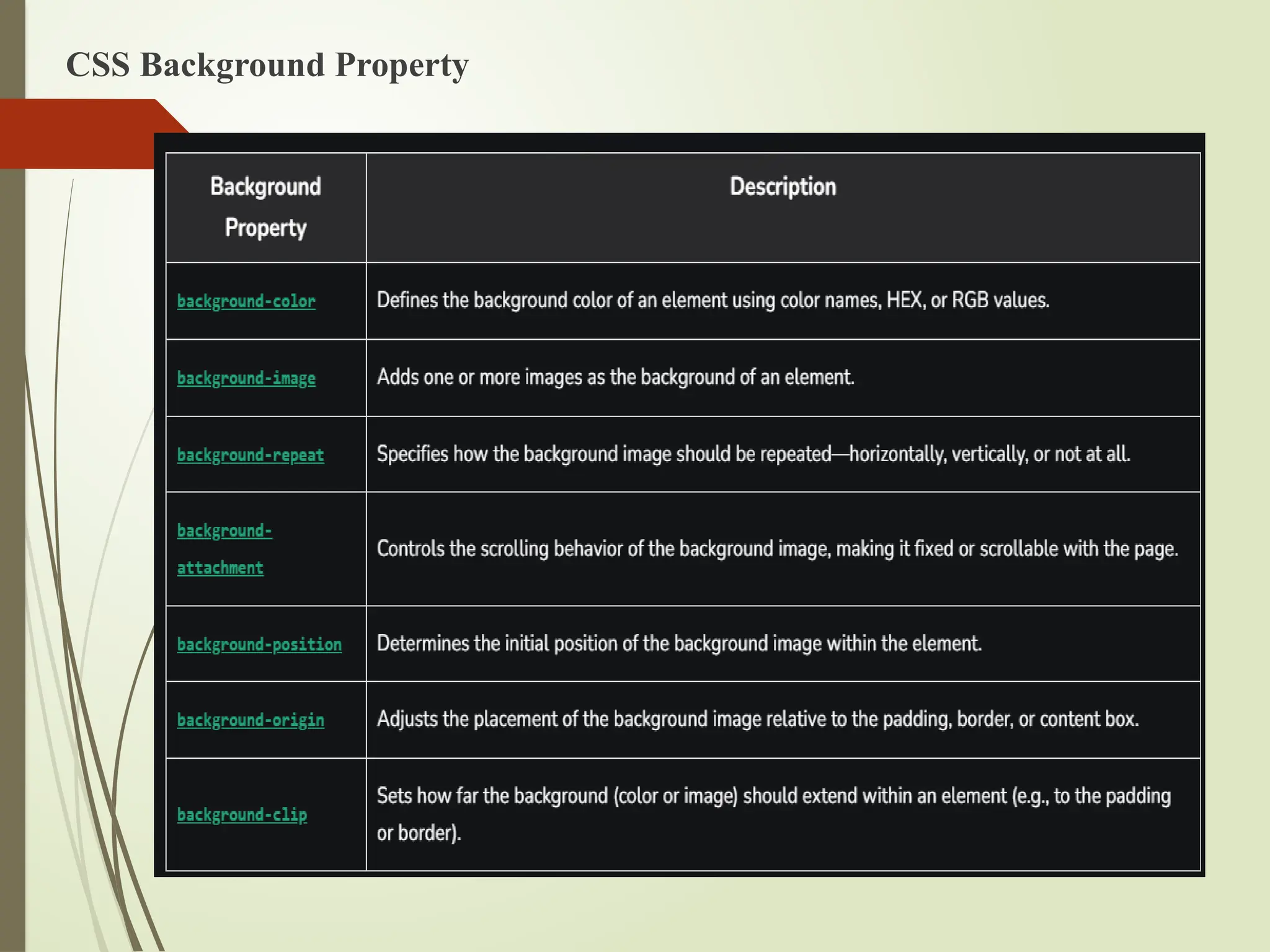
The background property include color, image, position, and repetition.
CSS Background Property
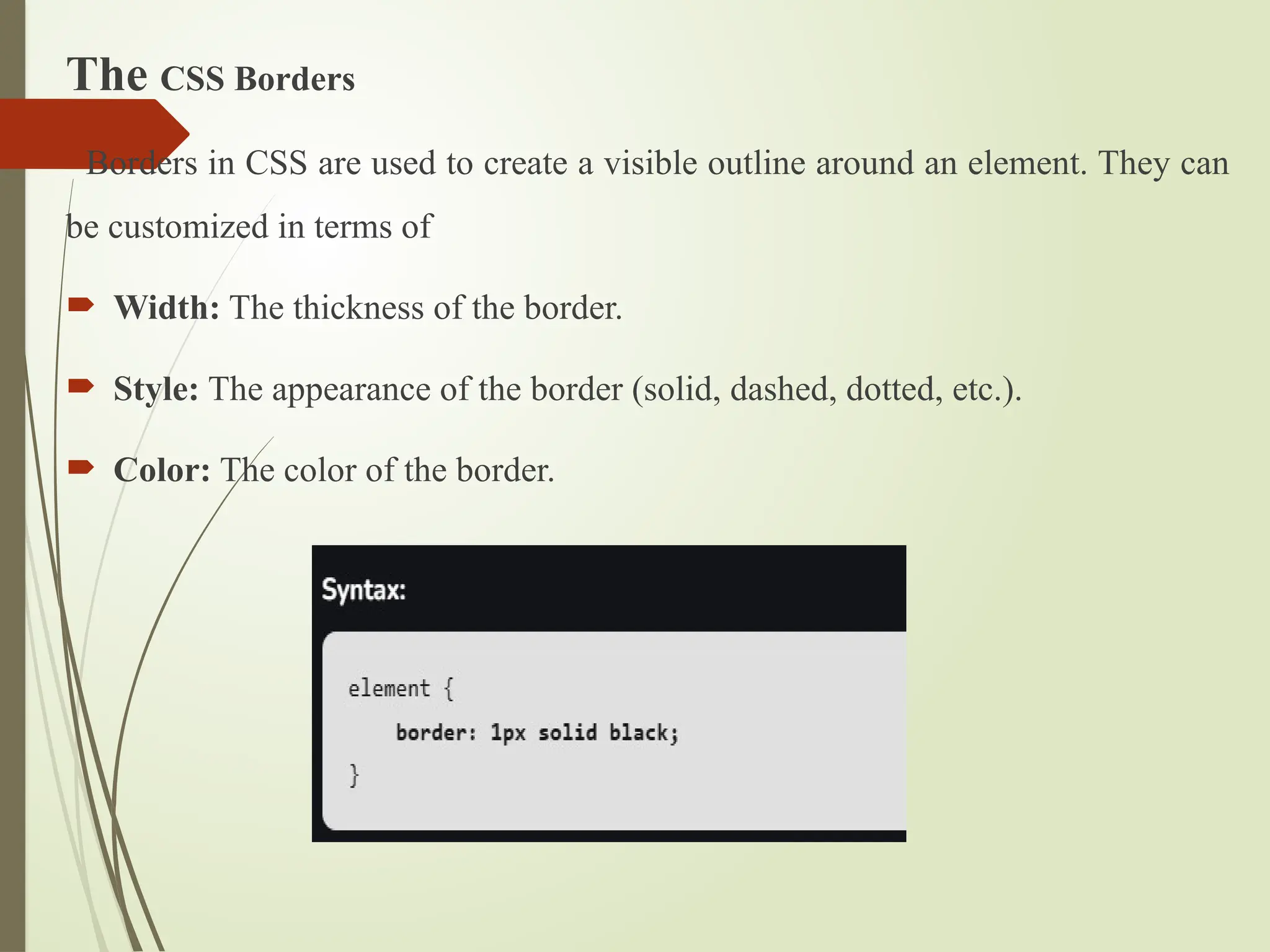
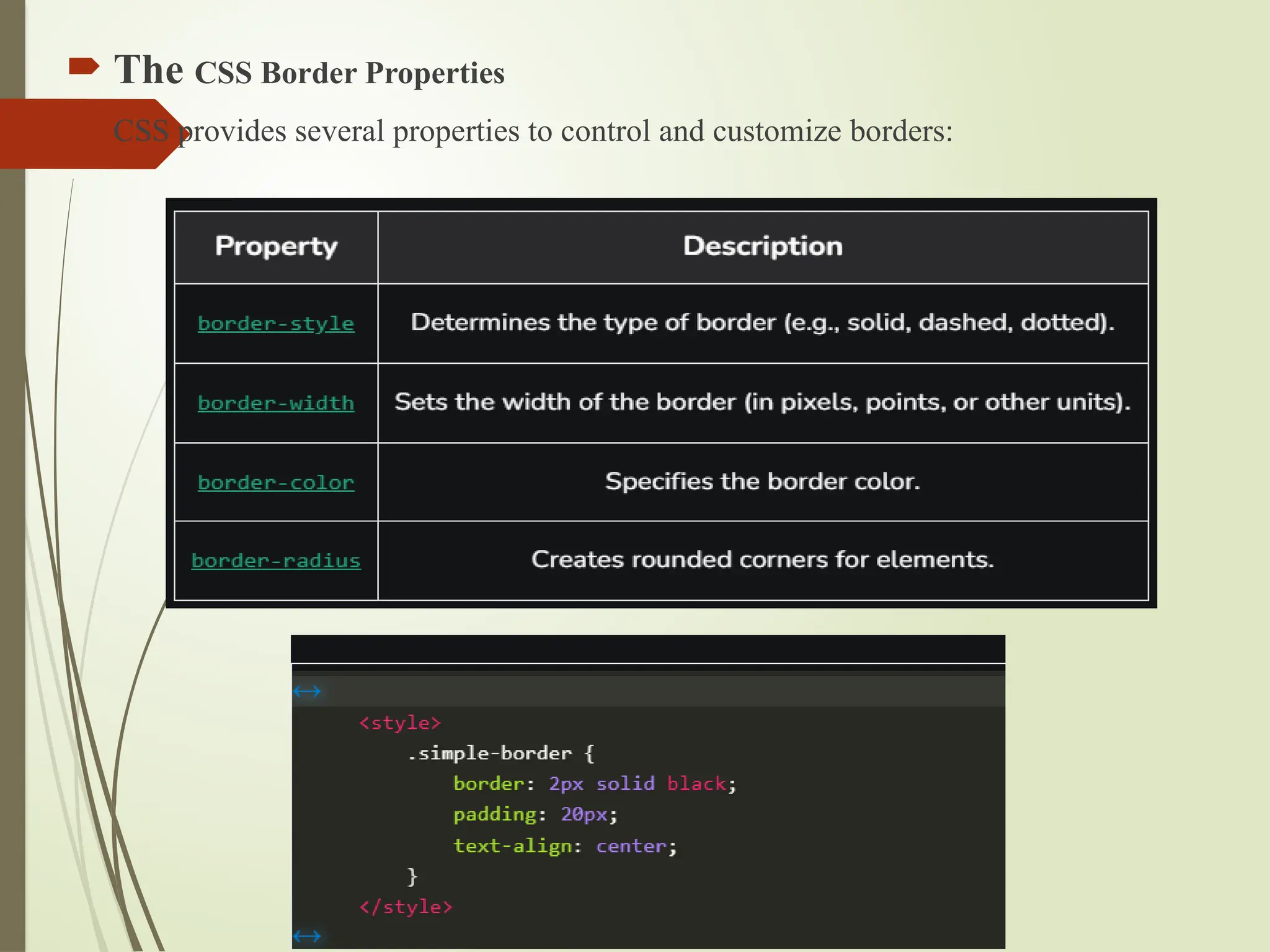
The CSS Borders
Bordersin CSS are used to create a visible outline around an element. They can
be customized in terms of
Width: The thickness of the border.
Style: The appearance of the border (solid, dashed, dotted, etc.).
Color: The color of the border.
61.
The CSSBorder Properties
CSS provides several properties to control and customize borders:
62.
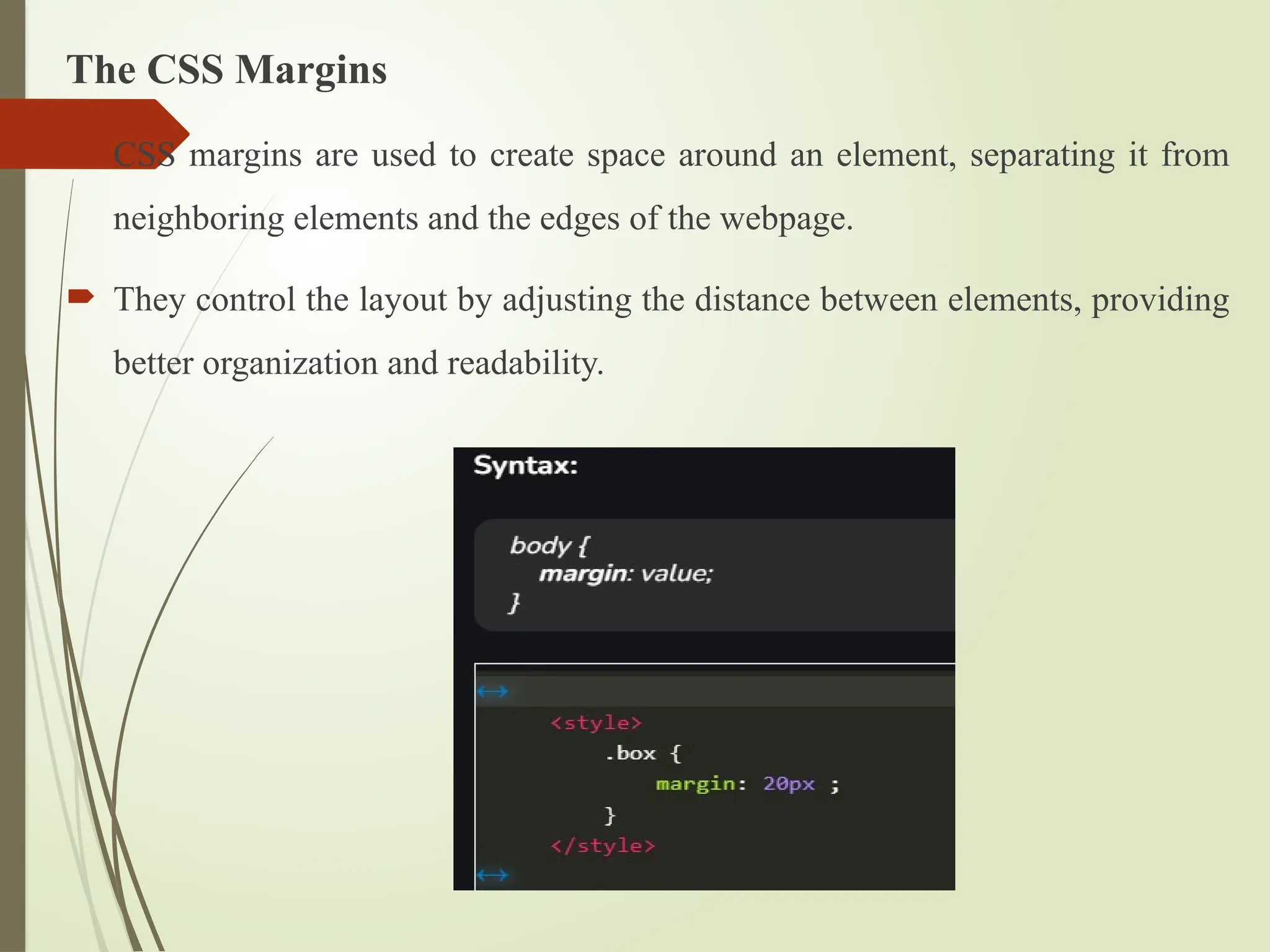
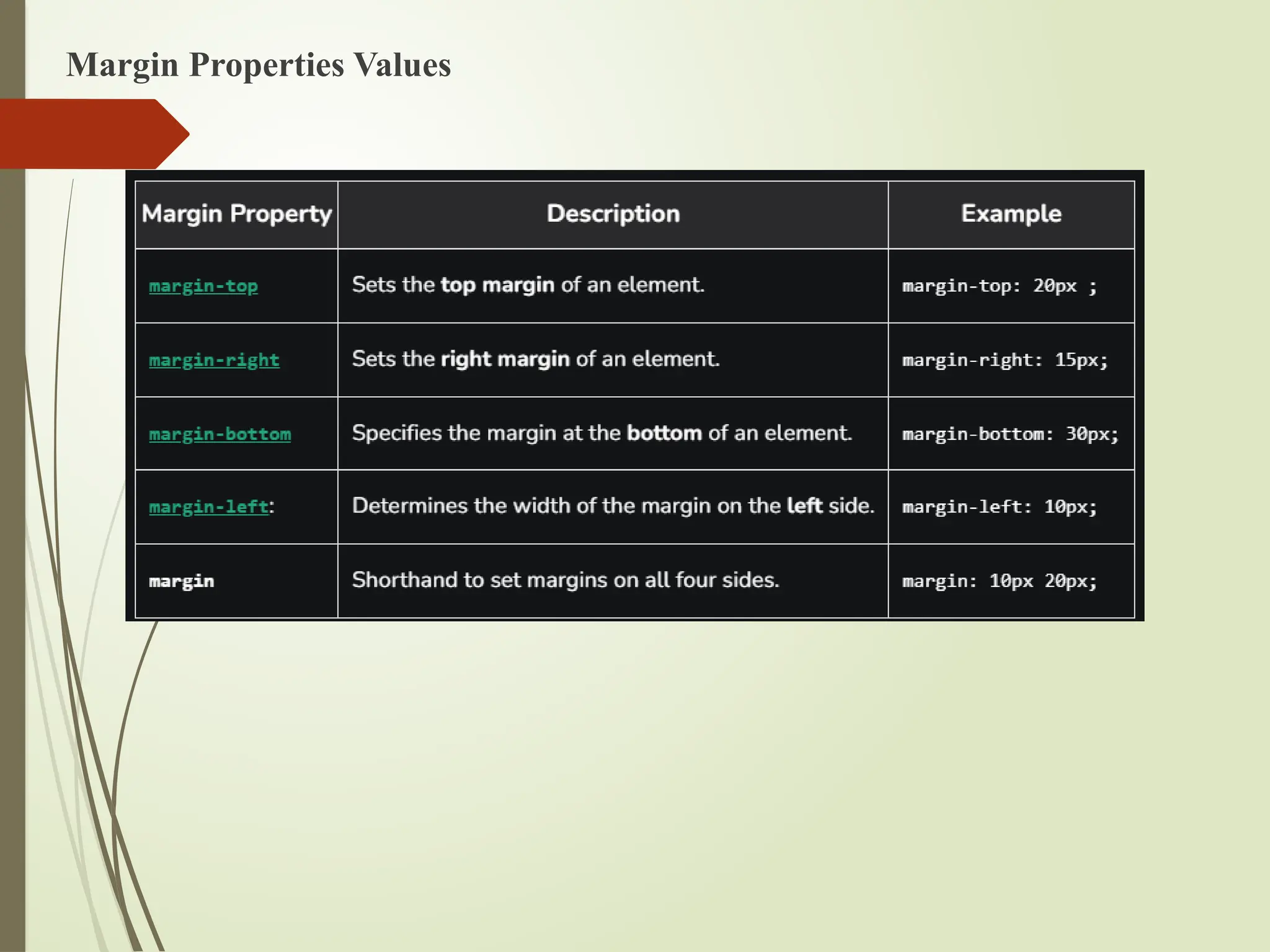
The CSS Margins
CSS margins are used to create space around an element, separating it from
neighboring elements and the edges of the webpage.
They control the layout by adjusting the distance between elements, providing
better organization and readability.
63.
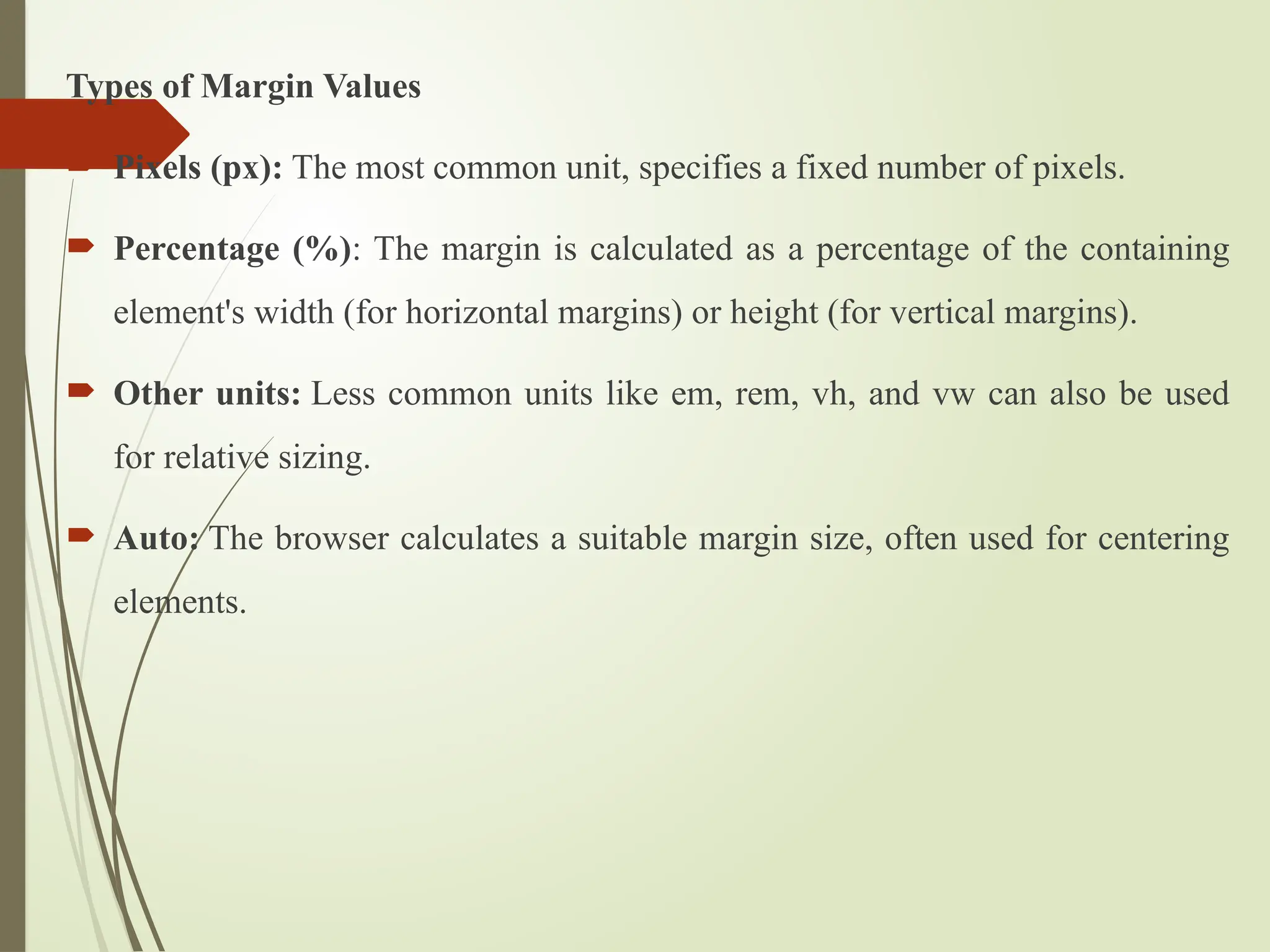
Types of MarginValues
Pixels (px): The most common unit, specifies a fixed number of pixels.
Percentage (%): The margin is calculated as a percentage of the containing
element's width (for horizontal margins) or height (for vertical margins).
Other units: Less common units like em, rem, vh, and vw can also be used
for relative sizing.
Auto: The browser calculates a suitable margin size, often used for centering
elements.
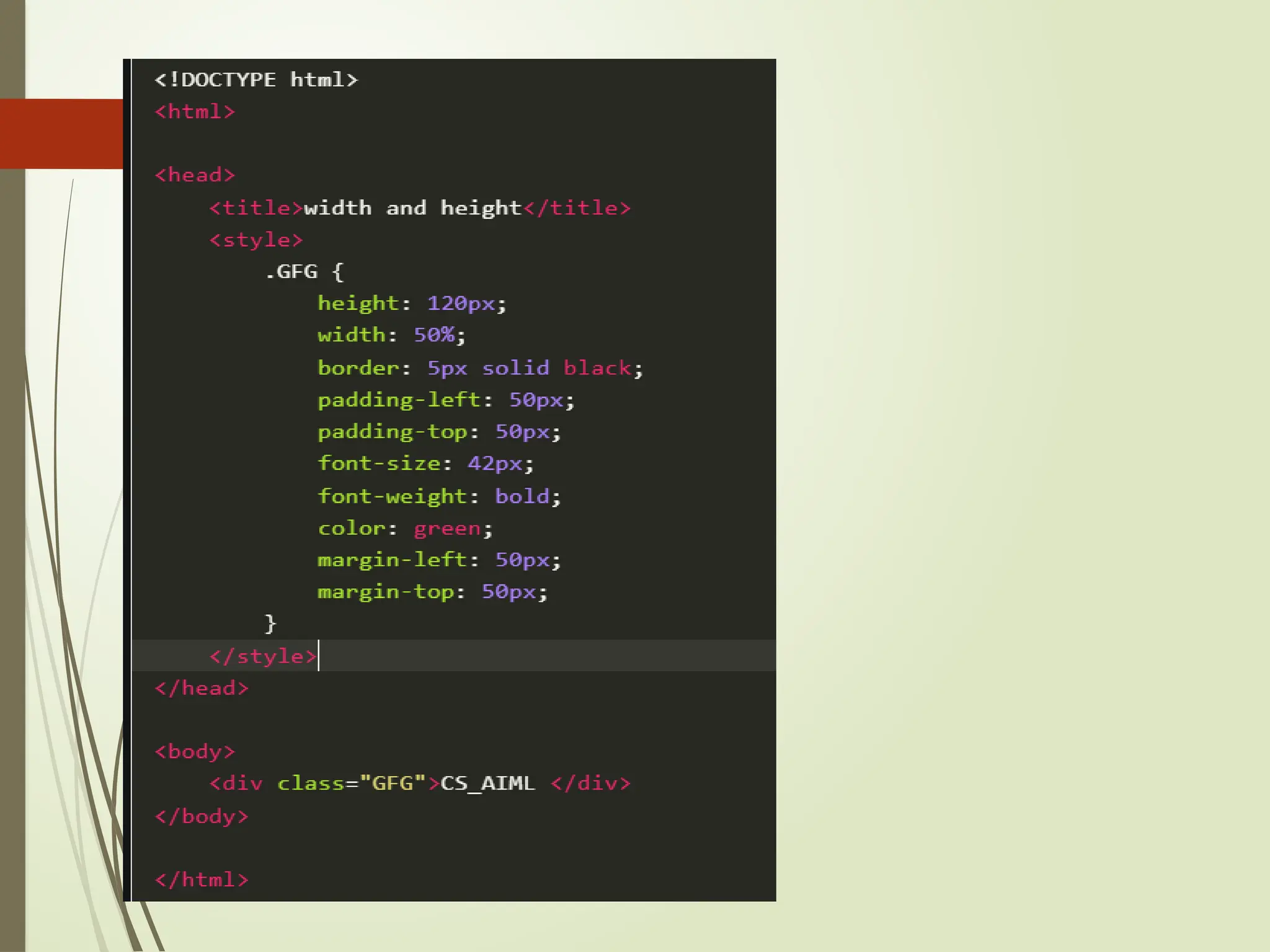
The CSS Dimensions
The width and height properties in CSS are used to define the dimensions of
an element.
The values can be set in various units, such as pixels (px), centimeters (cm),
percentages (%), etc.
67.
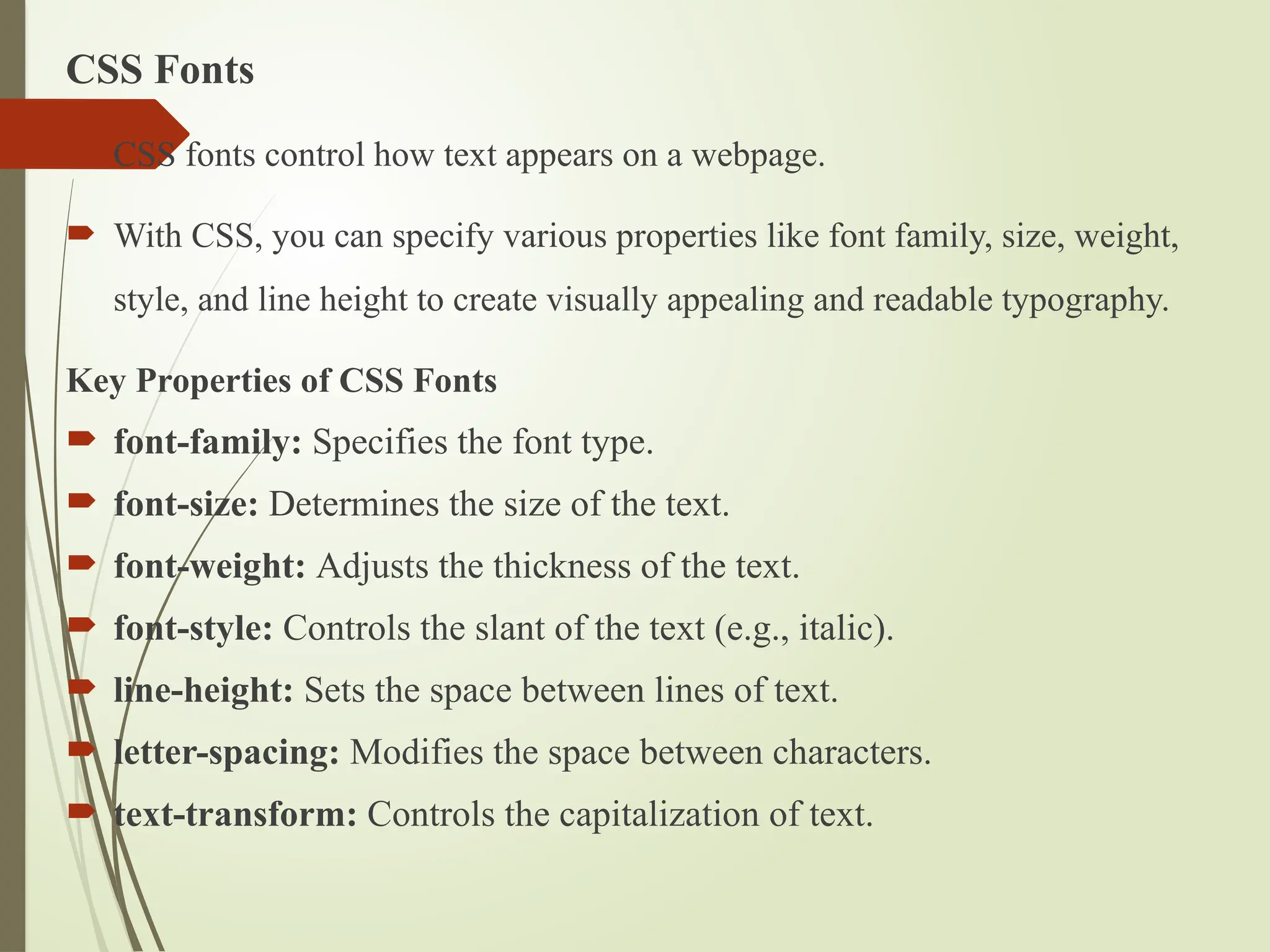
CSS Fonts
CSSfonts control how text appears on a webpage.
With CSS, you can specify various properties like font family, size, weight,
style, and line height to create visually appealing and readable typography.
Key Properties of CSS Fonts
font-family: Specifies the font type.
font-size: Determines the size of the text.
font-weight: Adjusts the thickness of the text.
font-style: Controls the slant of the text (e.g., italic).
line-height: Sets the space between lines of text.
letter-spacing: Modifies the space between characters.
text-transform: Controls the capitalization of text.
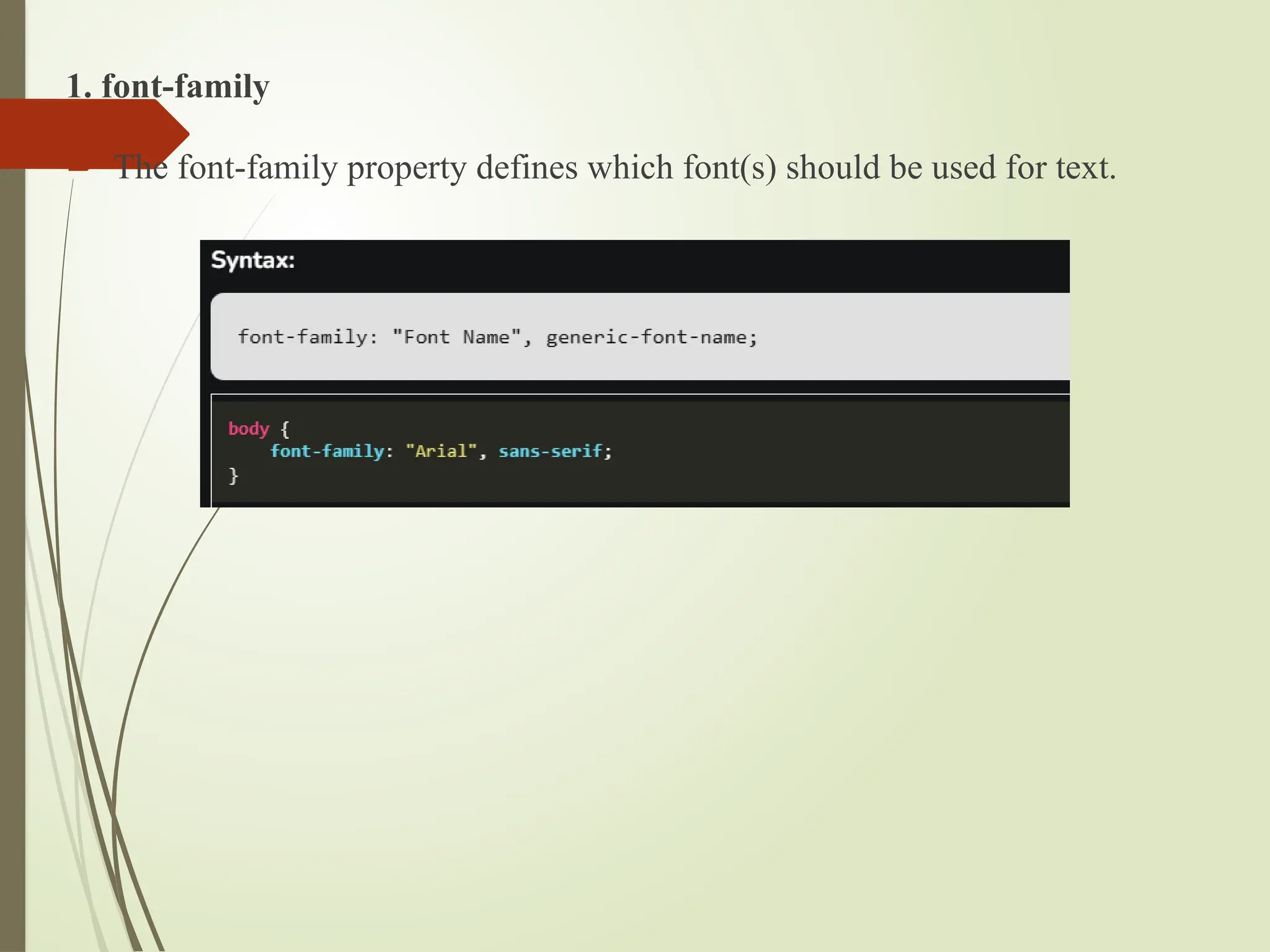
68.
1. font-family
Thefont-family property defines which font(s) should be used for text.
69.
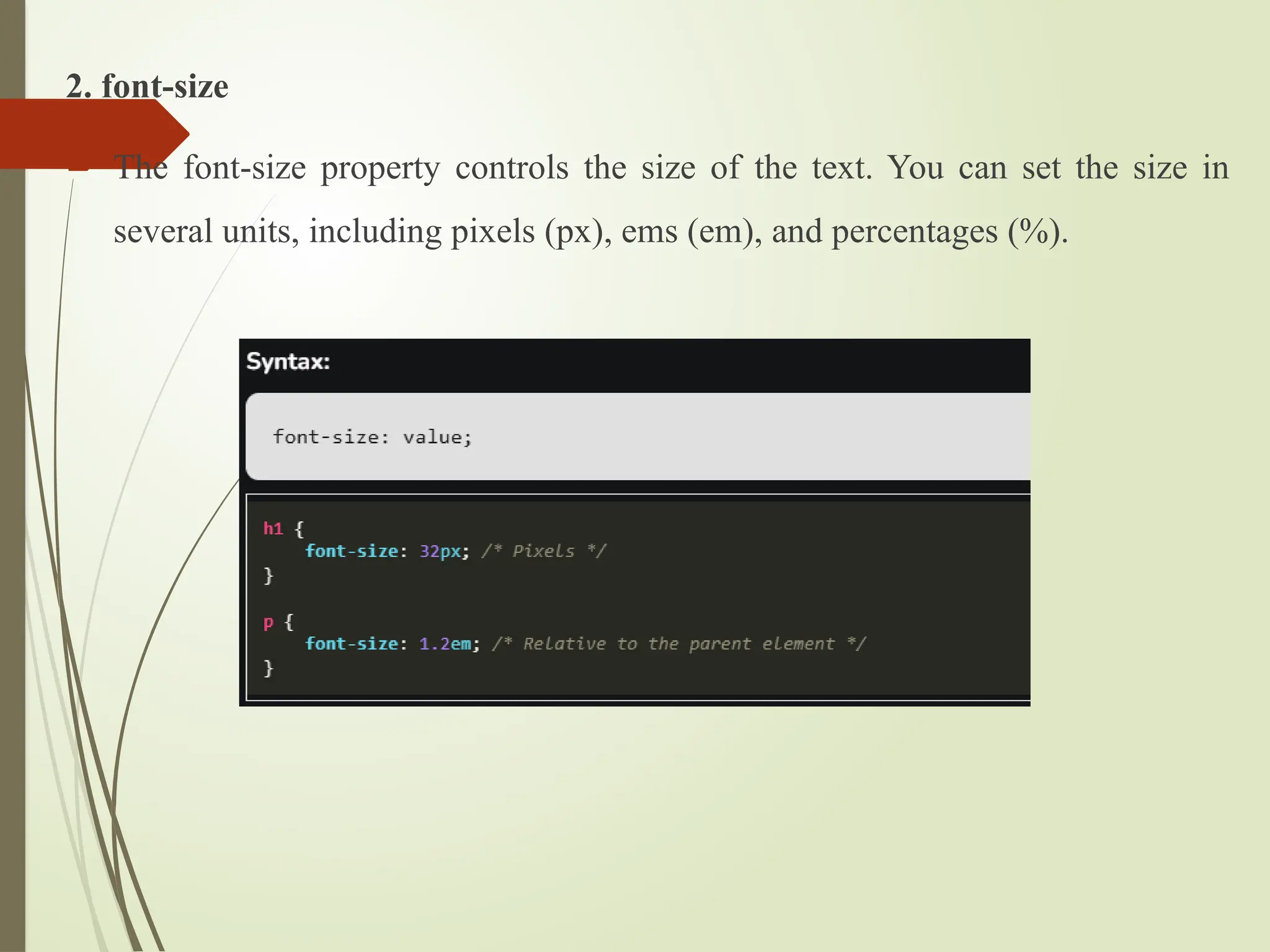
2. font-size
Thefont-size property controls the size of the text. You can set the size in
several units, including pixels (px), ems (em), and percentages (%).
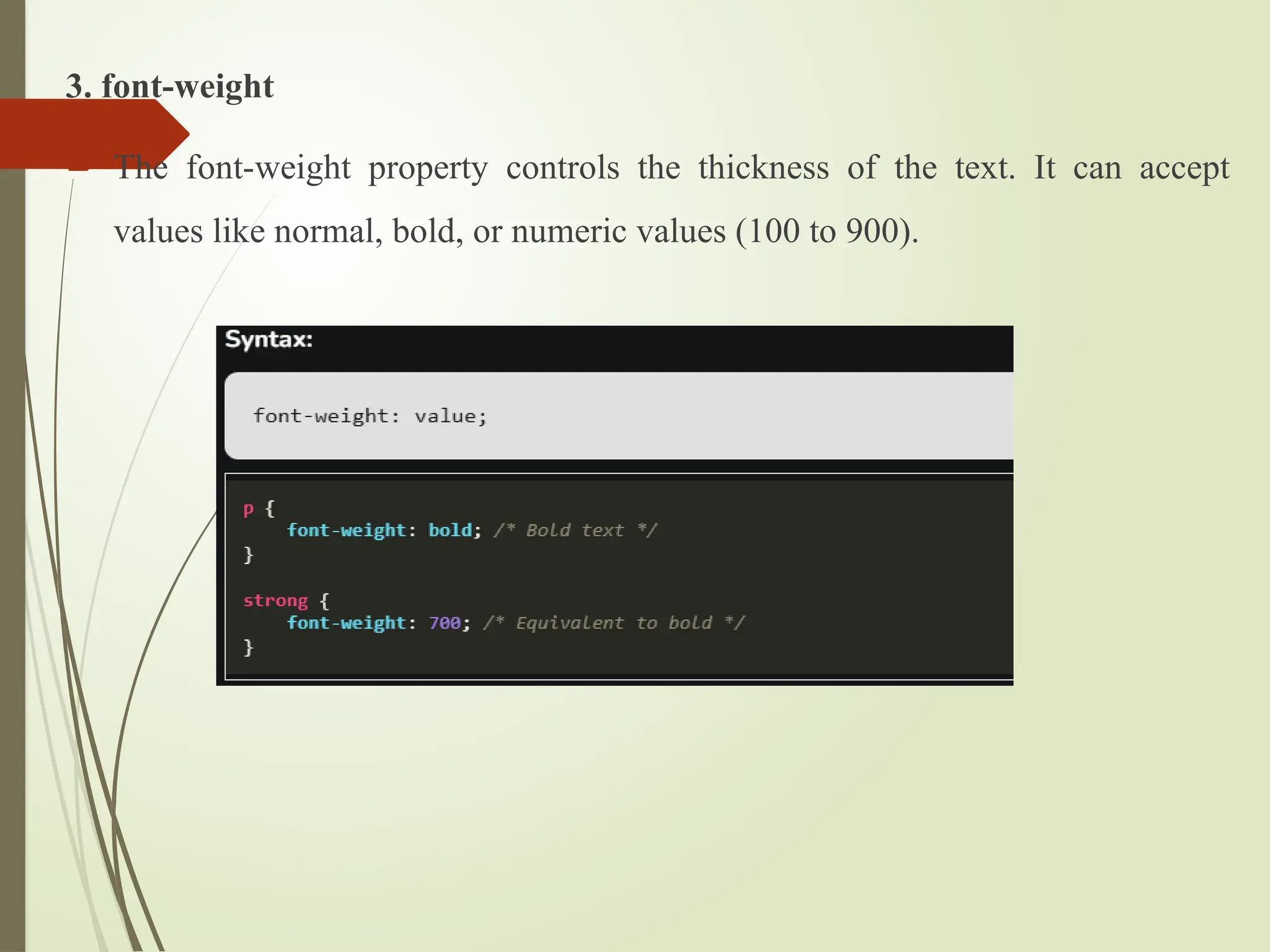
70.
3. font-weight
Thefont-weight property controls the thickness of the text. It can accept
values like normal, bold, or numeric values (100 to 900).
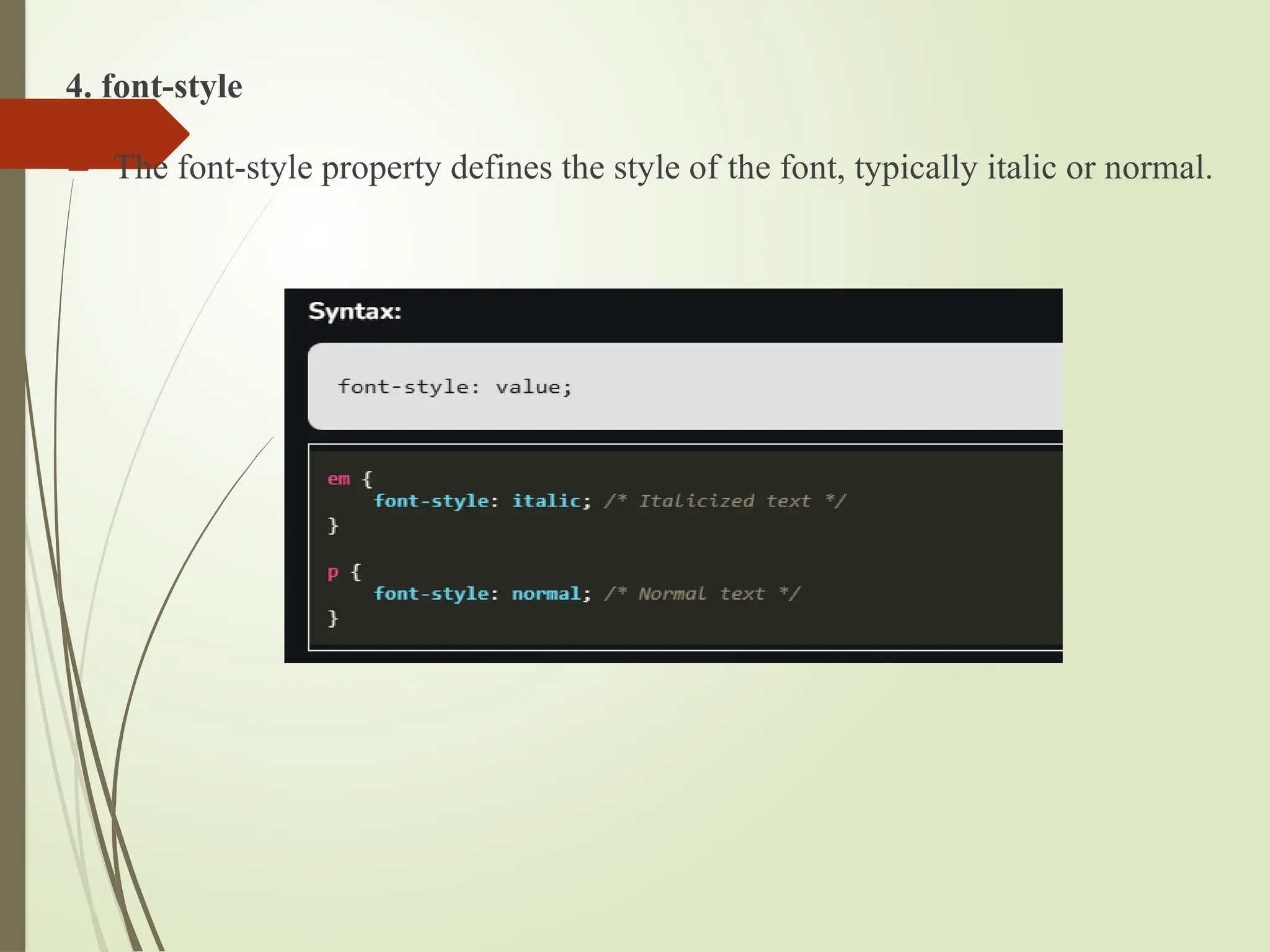
71.
4. font-style
Thefont-style property defines the style of the font, typically italic or normal.
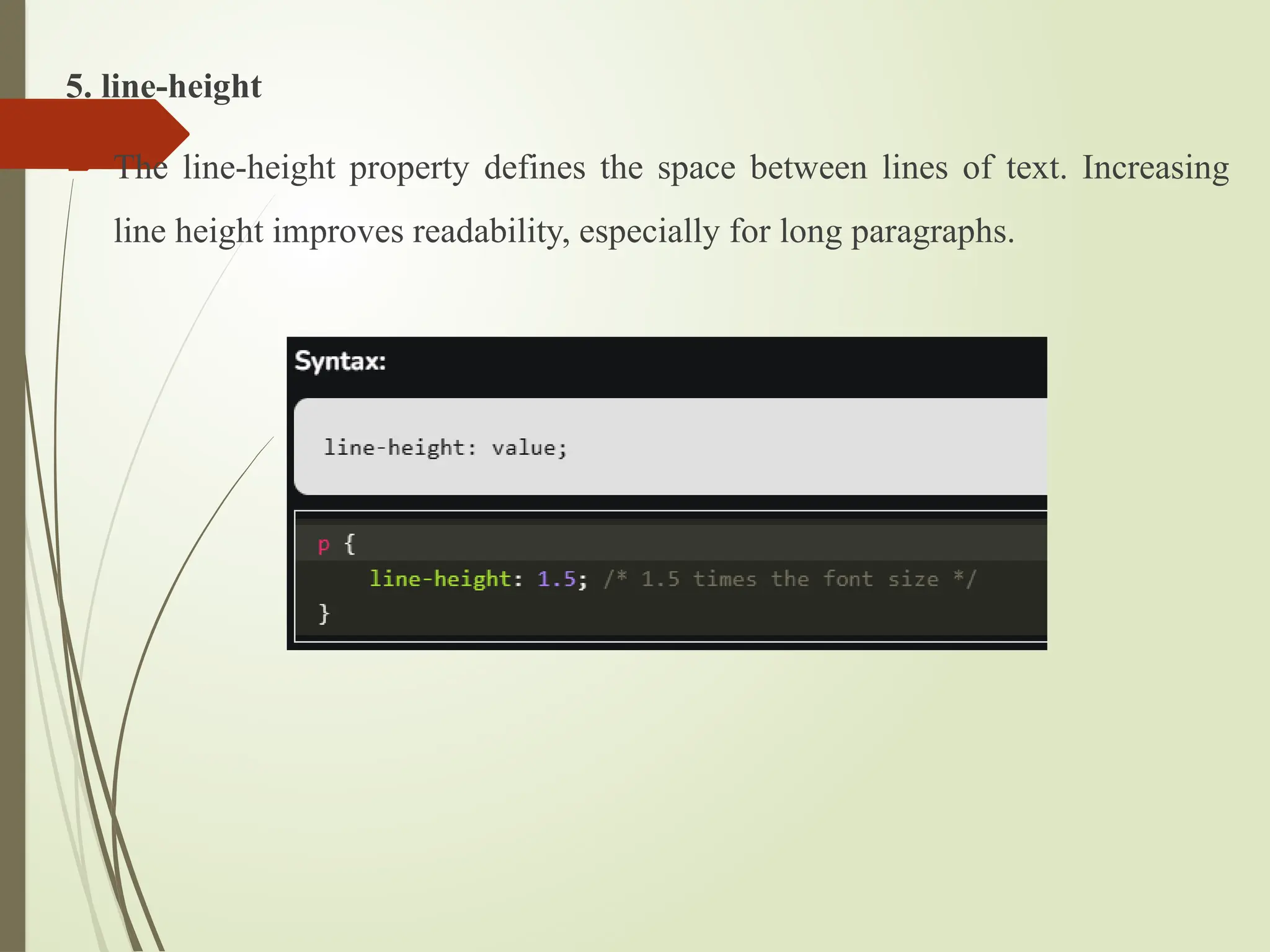
72.
5. line-height
Theline-height property defines the space between lines of text. Increasing
line height improves readability, especially for long paragraphs.