Introduction to Data Structures
Presented By:Presented By:
Anil DuttAnil Dutt
DataStructures
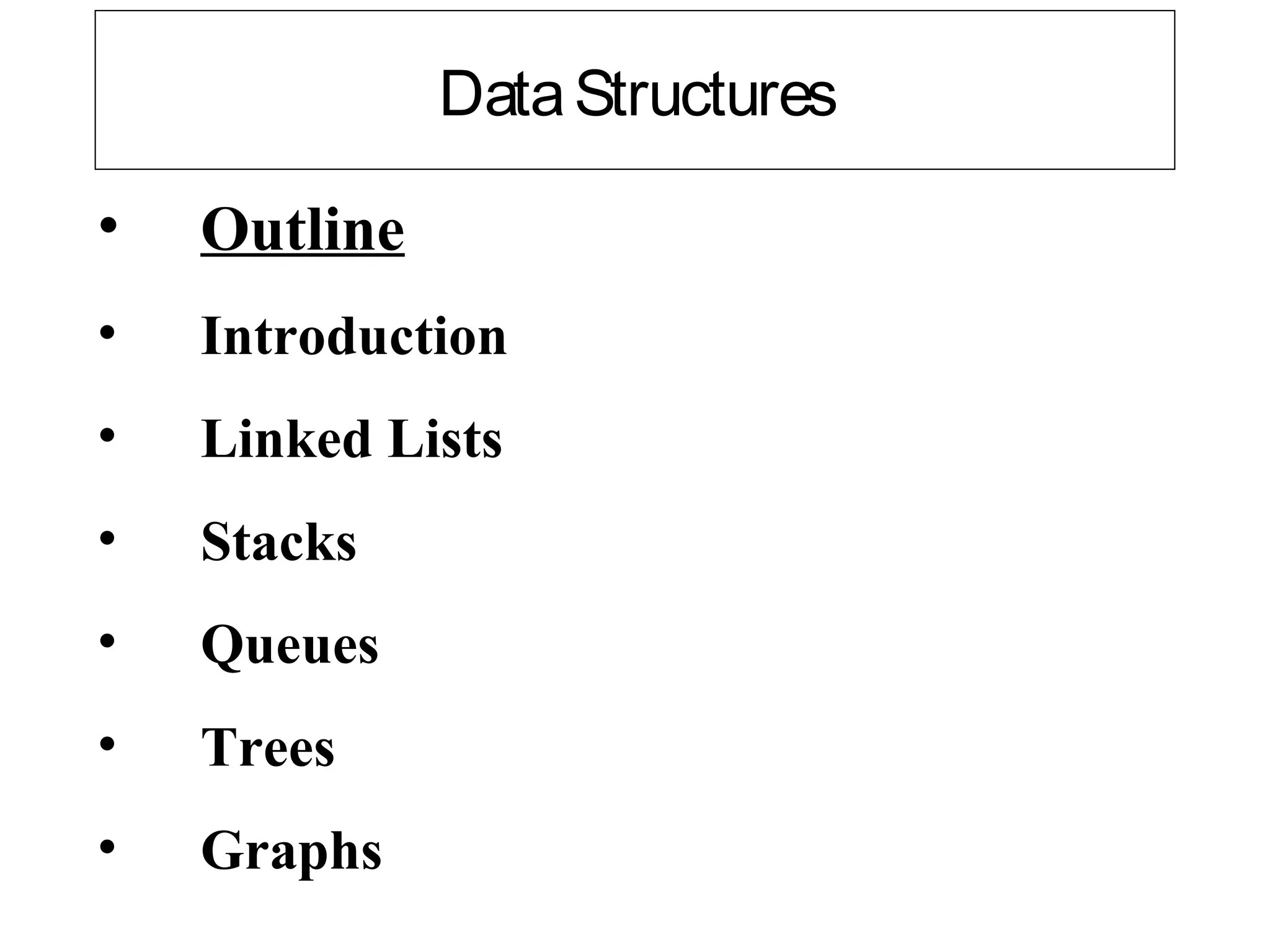
• Outline
• Introduction
• Linked Lists
• Stacks
• Queues
• Trees
• Graphs
Introduction
• Dynamic data structures
– Data structures that grow and shrink during execution
• Linked lists
– Allow insertions and removals anywhere
• Stacks
– Allow insertions and removals only at top of stack
• Queues
– Allow insertions at the back and removals from the front
• Binary trees
– High-speed searching and sorting of data and efficient
elimination of duplicate data items
Linked Lists
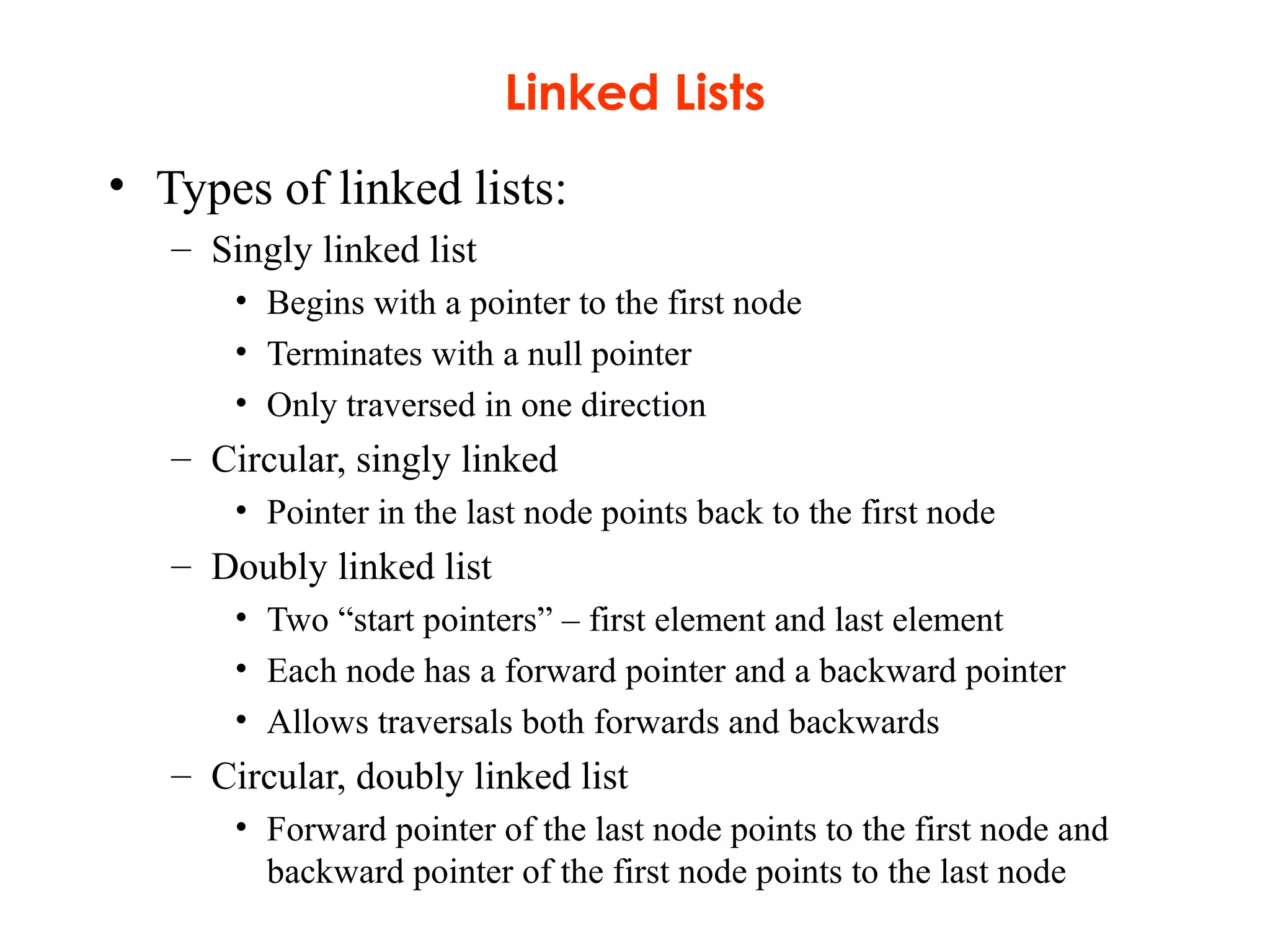
• Linked list
– Linear collection of self-referential class objects, called nodes
– Connected by pointer links
– Accessed via a pointer to the first node of the list
– Subsequent nodes are accessed via the link-pointer member of
the current node
– Link pointer in the last node is set to null to mark the list’s end
• Use a linked list instead of an array when
– You have an unpredictable number of data elements
– Your list needs to be sorted quickly
Linked Lists
• Types of linked lists:
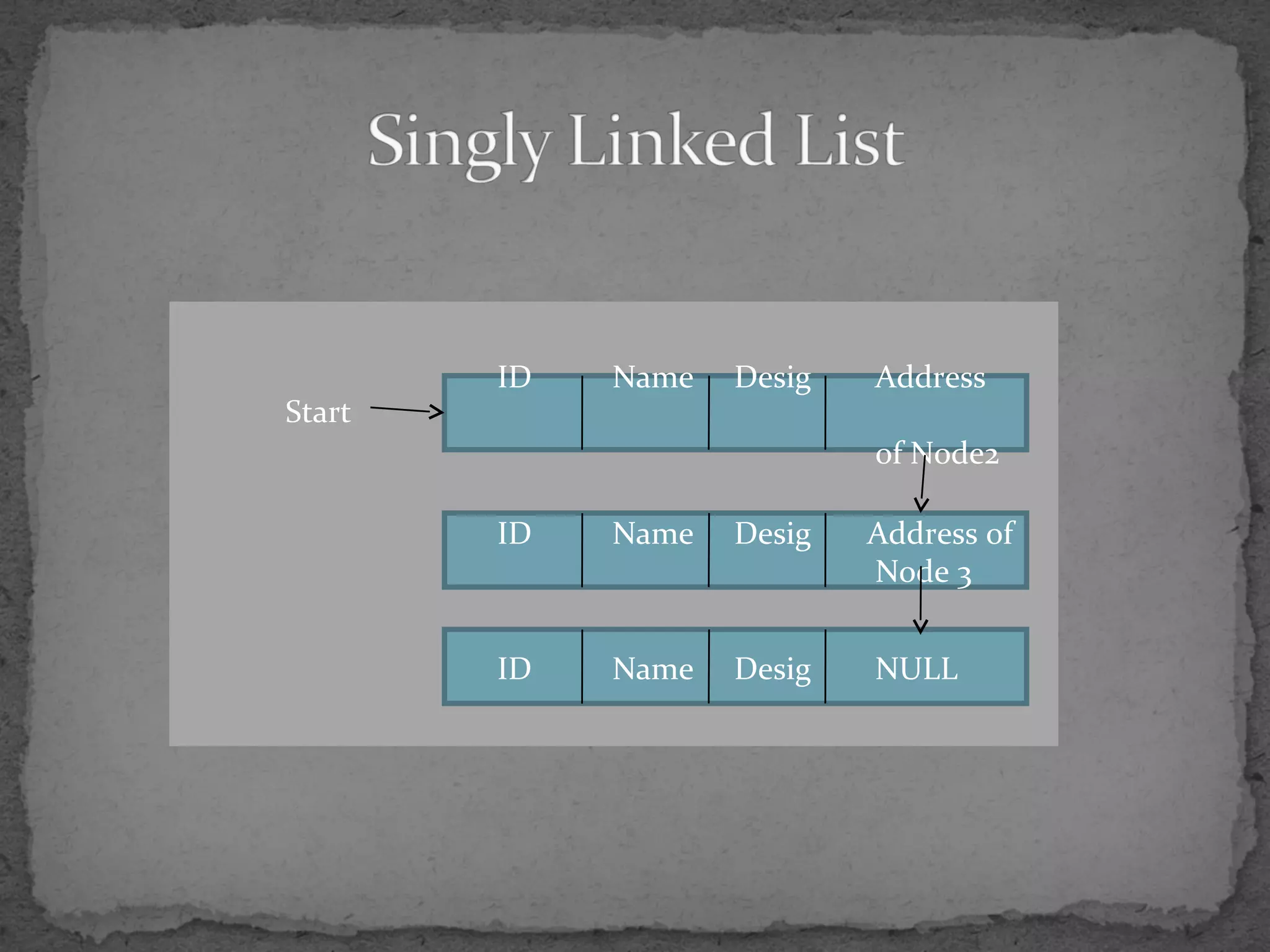
– Singly linked list
• Begins with a pointer to the first node
• Terminates with a null pointer
• Only traversed in one direction
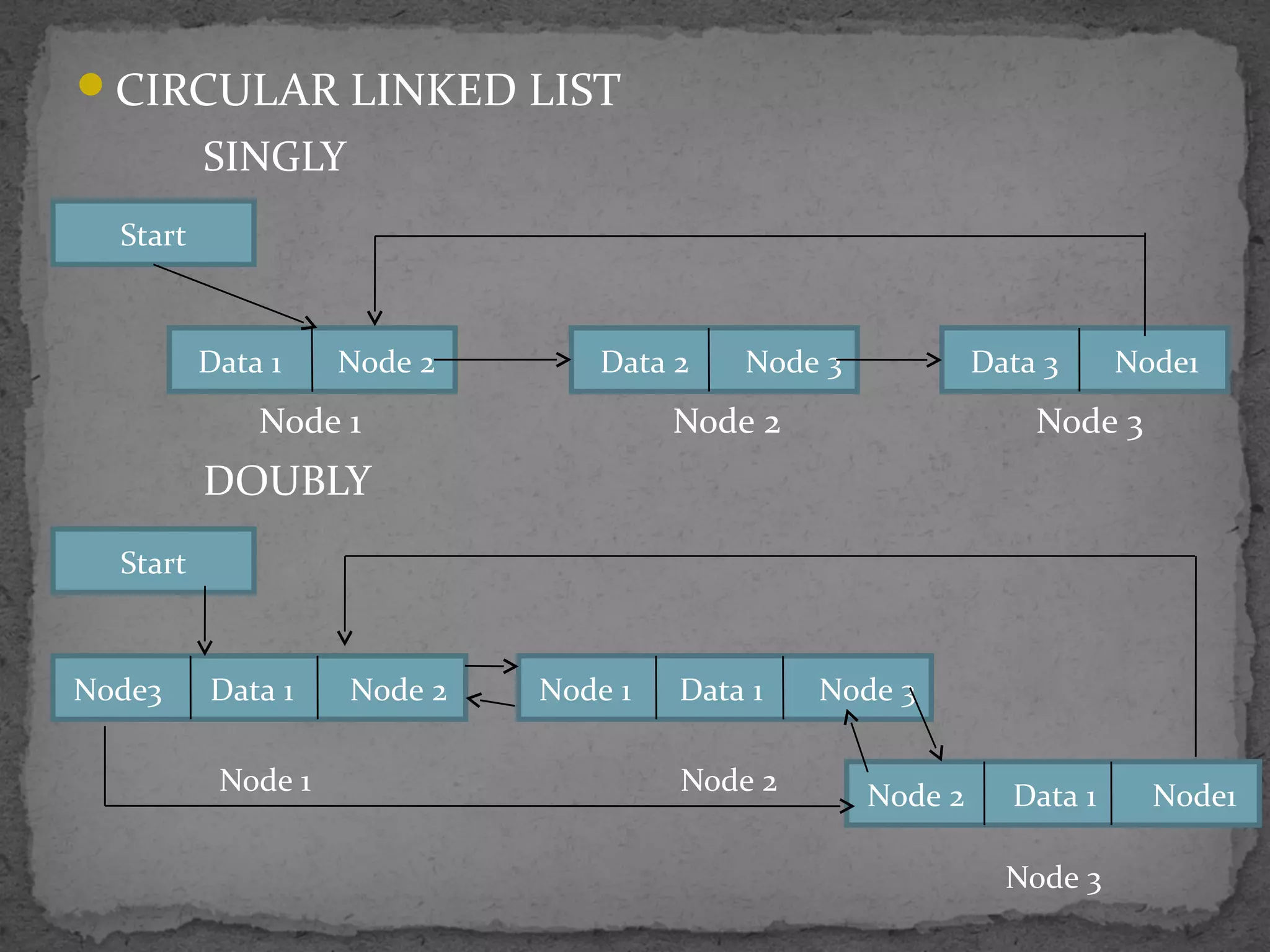
– Circular, singly linked
• Pointer in the last node points back to the first node
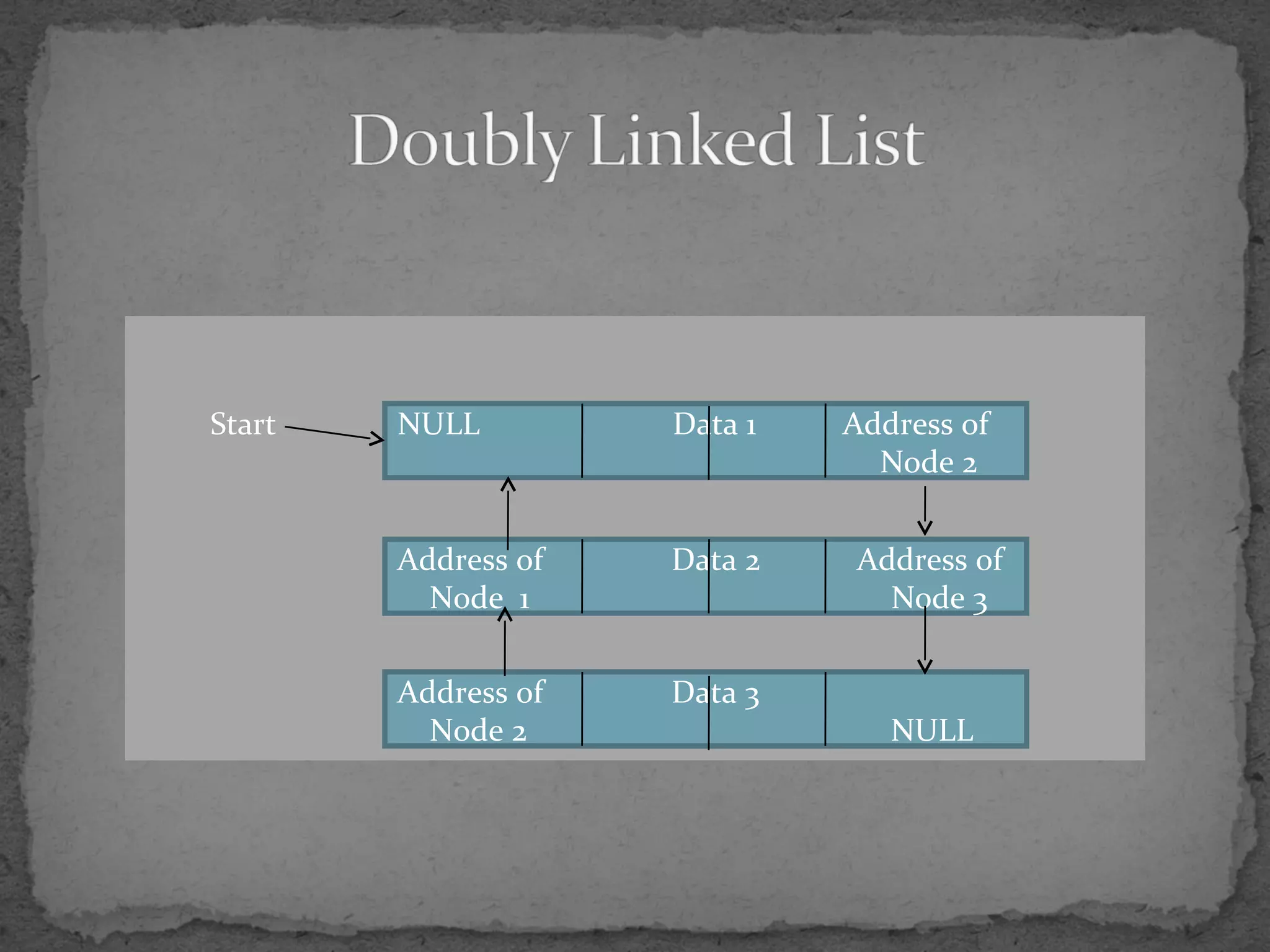
– Doubly linked list
• Two “start pointers” – first element and last element
• Each node has a forward pointer and a backward pointer
• Allows traversals both forwards and backwards
– Circular, doubly linked list
• Forward pointer of the last node points to the first node and
backward pointer of the first node points to the last node
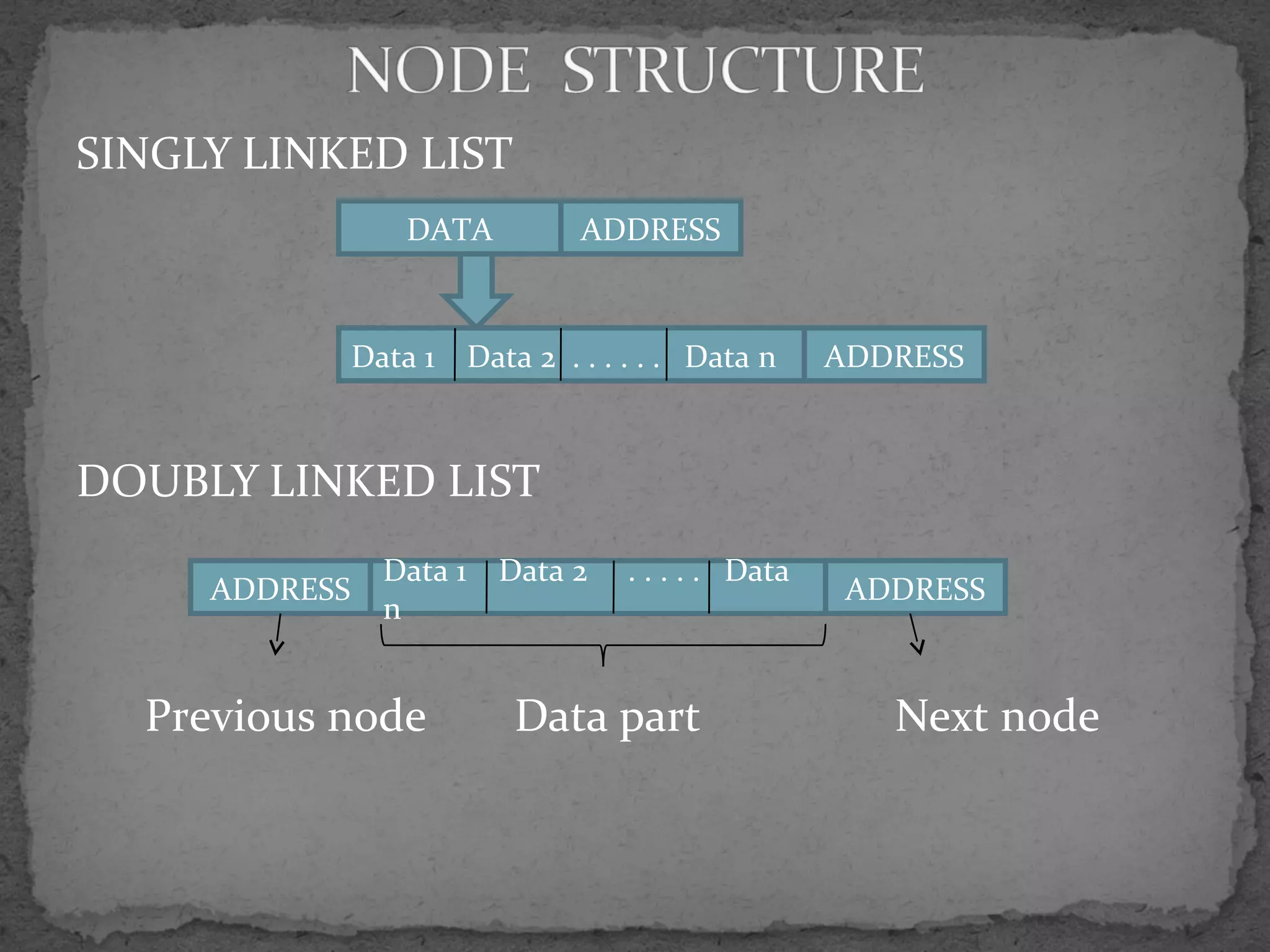
SINGLY LINKED LIST
DOUBLY LINKED LIST
Previous node Data part Next node
DATA ADDRESS
Data 1 Data 2 . . . . . . Data n ADDRESS
ADDRESS
Data 1 Data 2 . . . . . Data
n
ADDRESS
ID Name Desig Address
of Node2
ID Name Desig Address of
Node 3
ID Name Desig NULL
Start
NULL Data 1 Address of
Node 2
Address of Data 2 Address of
Node 1 Node 3
Address of Data 3
Node 2 NULL
Start
CIRCULAR LINKED LIST
SINGLY
Node 1 Node 2 Node 3
DOUBLY
Node 1 Node 2
Node 3
Start
Data 1 Node 2 Data 2 Node 3 Data 3 Node1
Start
Node3 Data 1 Node 2 Node 1 Data 1 Node 3
Node 2 Data 1 Node1
struct node
{
int x;
char c[10];
struct node *next;
}*current;
x c[10] next
create_node()
{
current=(struct node *)malloc(sizeof(struct node));
current->x=10; current->c=“try”; current->next=null;
return current;
}
Allocation
Assignment
x c[10] next
10 try NULL
Create a linked list for maintaining the employee
details such as Ename,Eid,Edesig.
Steps:
1)Identify the node structure
2)Allocate space for the node
3)Insert the node in the list
EID EName EDesig
struct node
{
int Eid;
char Ename[10],Edesig[10];
struct node *next;
} *current;
next
The basic operations on linked lists are
1. Creation
2. Insertion
3. Deletion
4. Traversing
5. Searching
6. Concatenation
7. Display
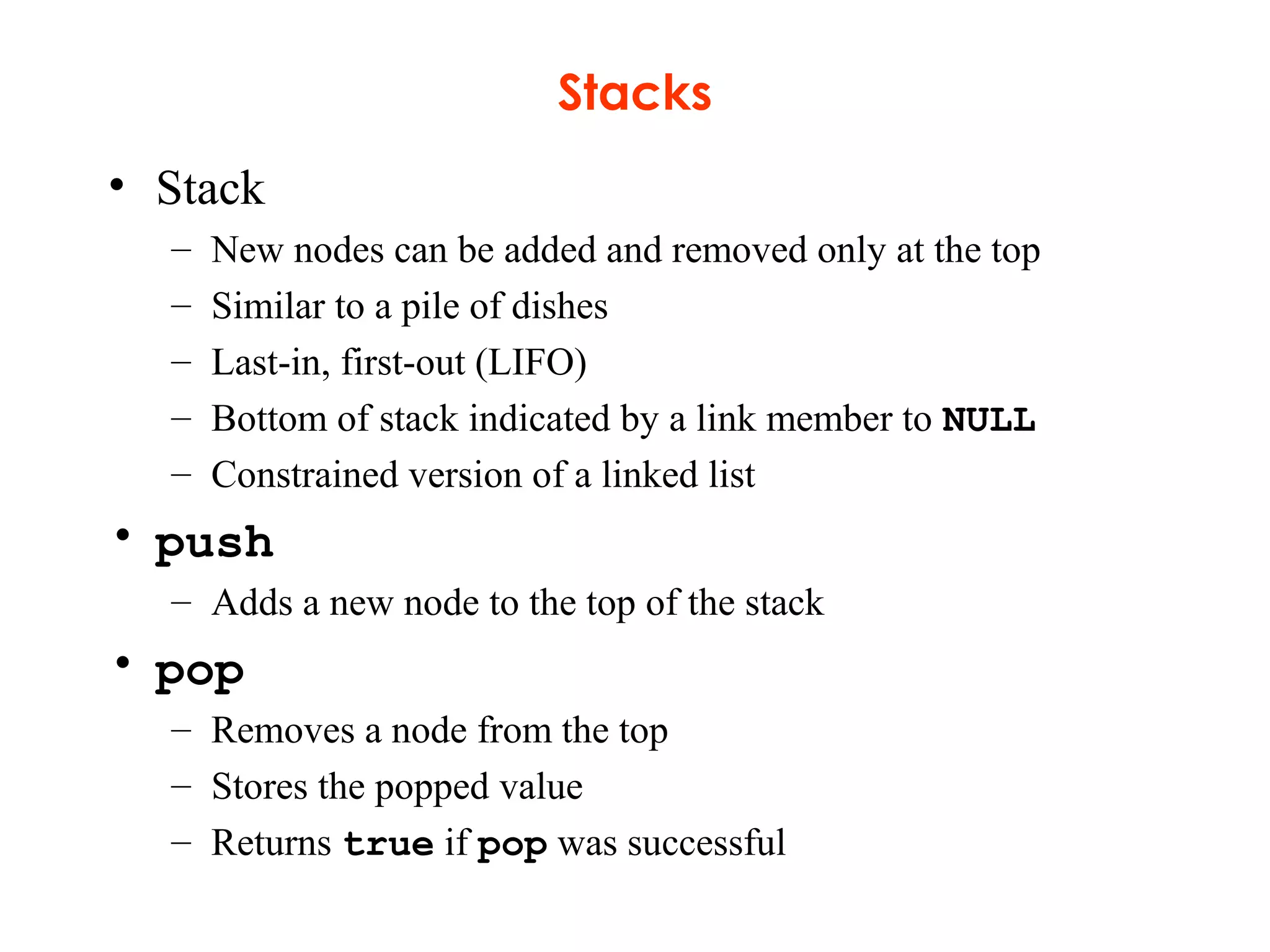
Stacks
• Stack
– New nodes can be added and removed only at the top
– Similar to a pile of dishes
– Last-in, first-out (LIFO)
– Bottom of stack indicated by a link member to NULL
– Constrained version of a linked list
• push
– Adds a new node to the top of the stack
• pop
– Removes a node from the top
– Stores the popped value
– Returns true if pop was successful
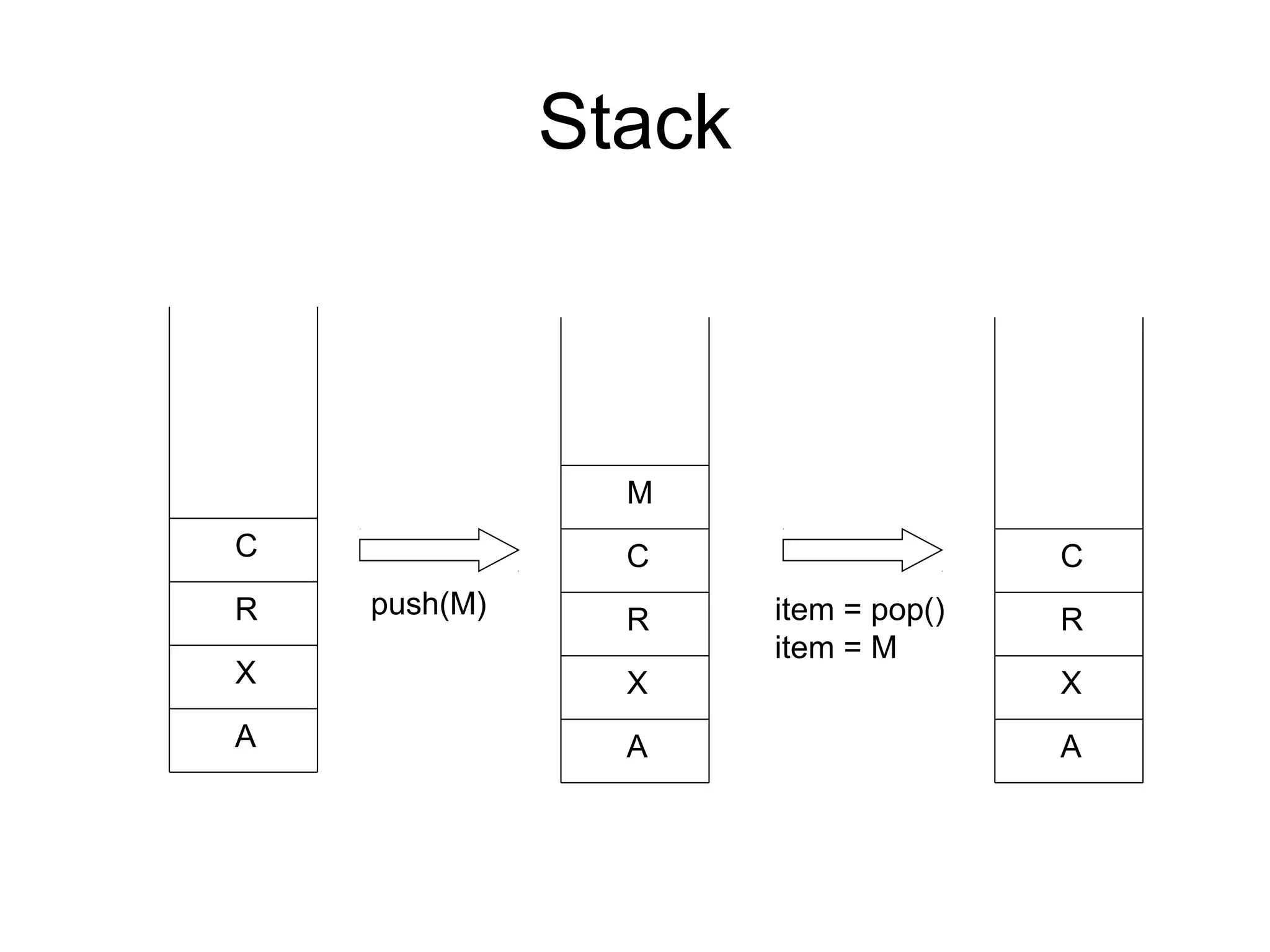
Stack
A
X
R
C
push(M)
A
X
R
C
M
item = pop()
item = M
A
X
R
C
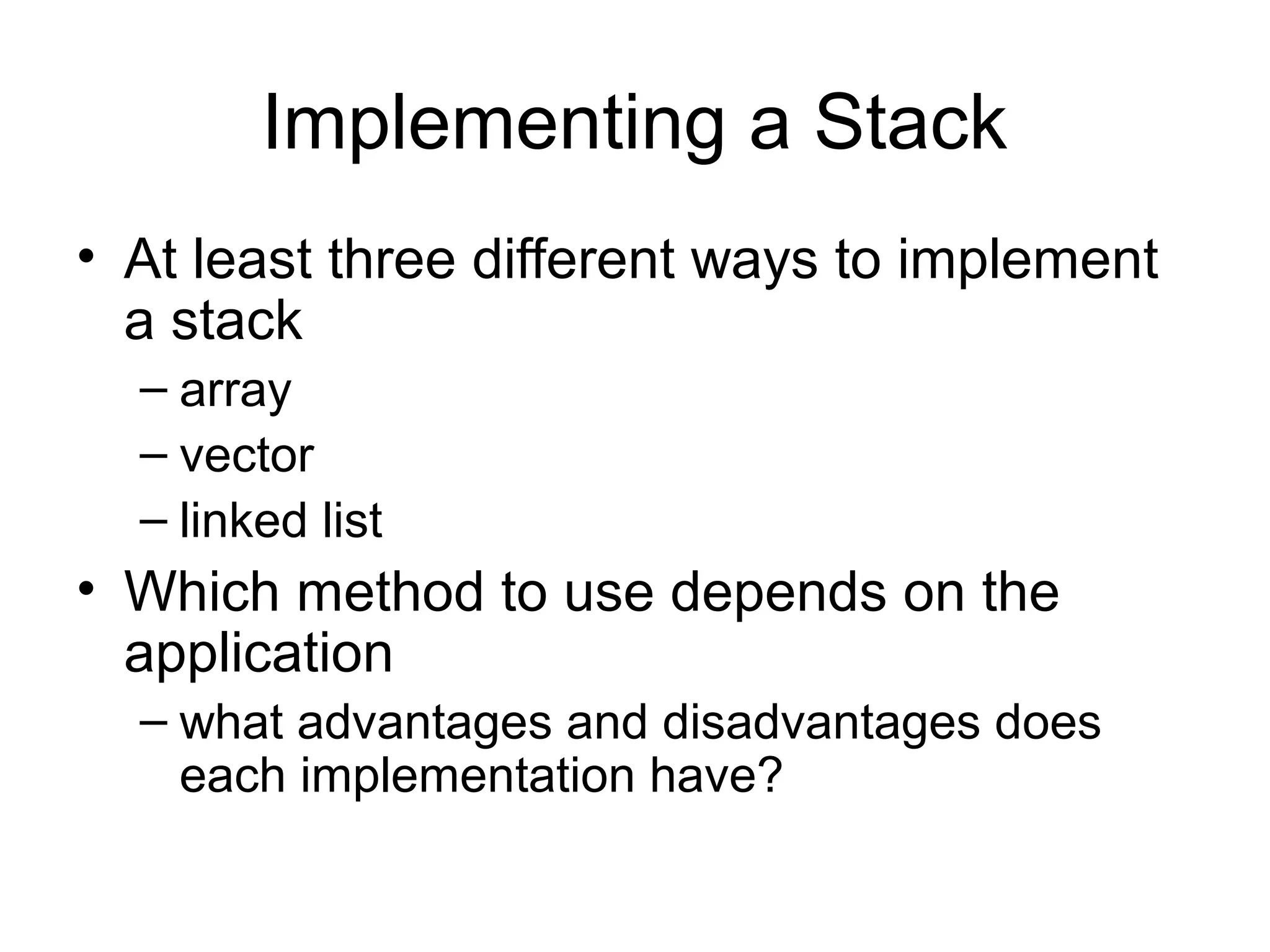
Implementing a Stack
• At least three different ways to implement
a stack
– array
– vector
– linked list
• Which method to use depends on the
application
– what advantages and disadvantages does
each implementation have?
Queues
• Queue
– Similar to a supermarket checkout line
– First-in, first-out (FIFO)
– Nodes are removed only from the head
– Nodes are inserted only at the tail
• Insert and remove operations
– Enqueue (insert) and dequeue (remove)
Queues 18
A QUEUE IS A CONTAINER IN WHICH:
. INSERTIONS ARE MADE ONLY AT
THE BACK;
. DELETIONS, RETRIEVALS, AND
MODIFICATIONS ARE MADE ONLY
AT THE FRONT.
Queues 19
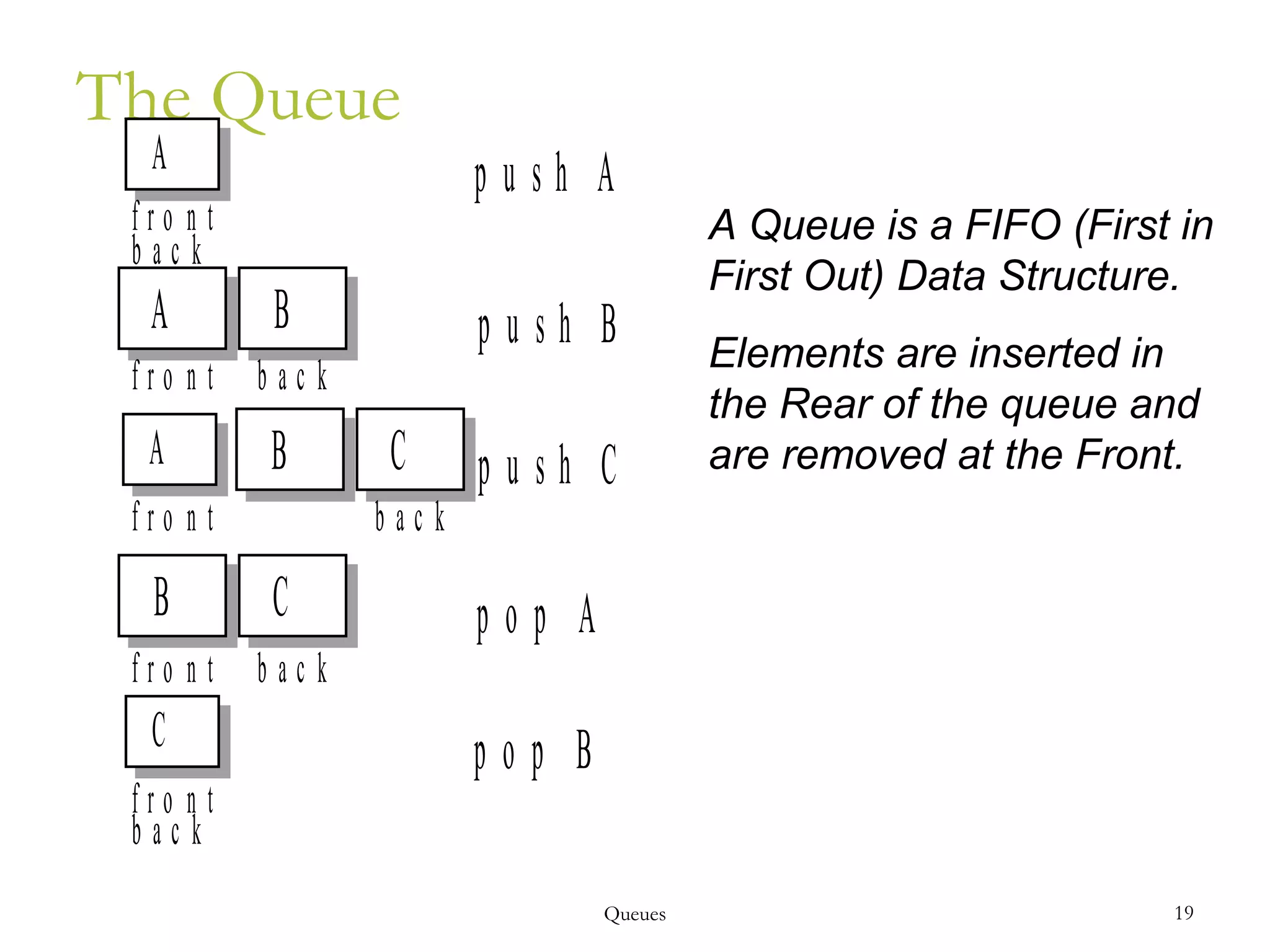
The Queue
A Queue is a FIFO (First in
First Out) Data Structure.
Elements are inserted in
the Rear of the queue and
are removed at the Front.
C
B C
A B C
A
b a c k
f r o n t
p u s h A
A B
f r o n t b a c k
p u s h B
f r o n t b a c k
p u s h C
f r o n t b a c k
p o p A
f r o n t
b a c k
p o p B
Queues 20
PUSH (ALSO CALLED ENQUEUE) -- TO
INSERT AN ITEM AT THE BACK
POP (ALSO CALLED DEQUEUE) -- TO
DELETE THE FRONT ITEM
IN A QUEUE, THE FIRST ITEM
INSERTED WILL BE THE FIRST ITEM
DELETED: FIFO (FIRST-IN, FIRST-OUT)
21
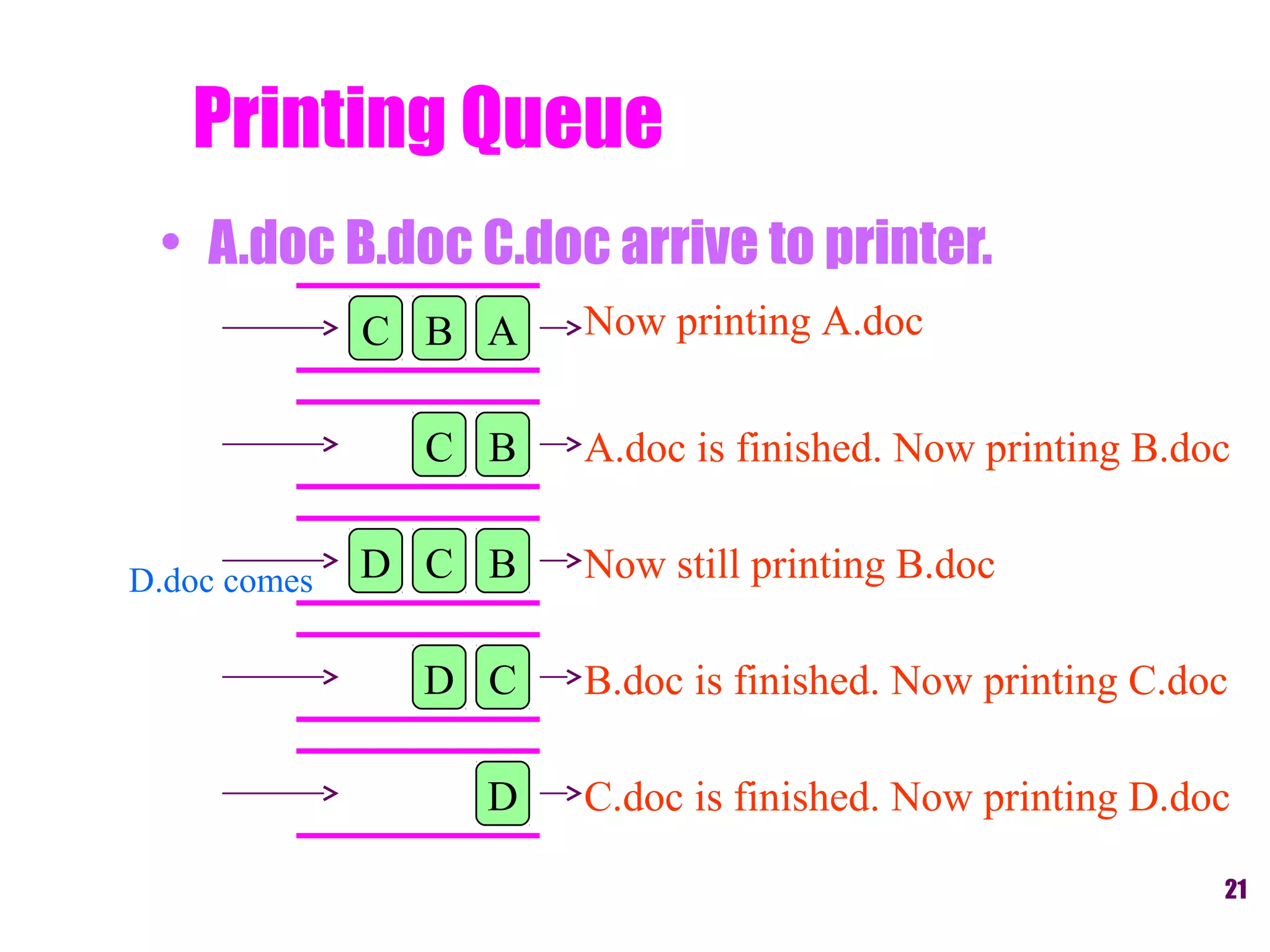
Printing Queue
Now printing A.doc
A.doc is finished. Now printing B.doc
Now still printing B.docD.doc comes
• A.doc B.doc C.doc arrive to printer.
ABC
BC
BCD
CD
D
B.doc is finished. Now printing C.doc
C.doc is finished. Now printing D.doc
Trees
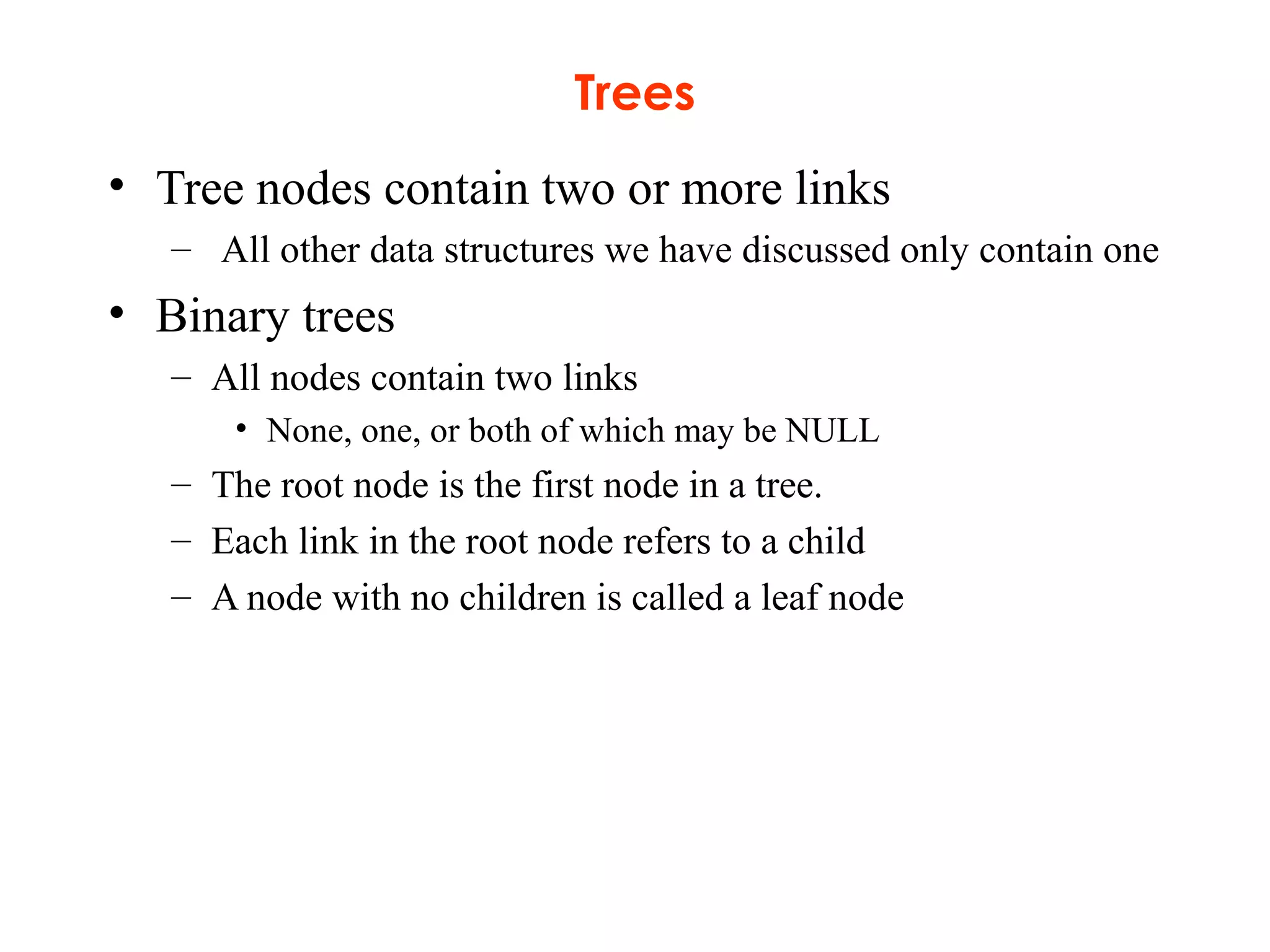
• Tree nodes contain two or more links
– All other data structures we have discussed only contain one
• Binary trees
– All nodes contain two links
• None, one, or both of which may be NULL
– The root node is the first node in a tree.
– Each link in the root node refers to a child
– A node with no children is called a leaf node
Trees
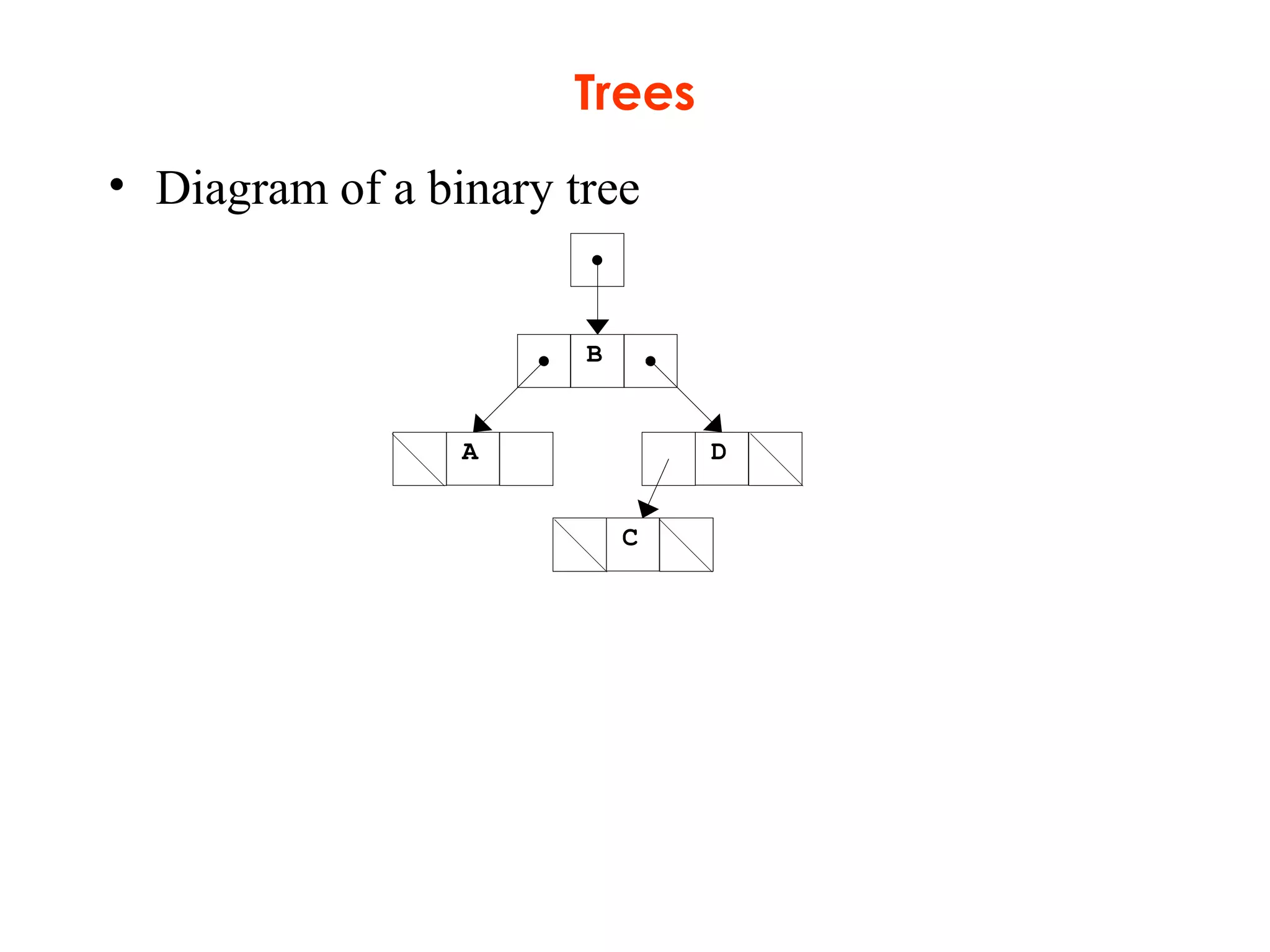
• Diagram of a binary tree
B
A D
C
Trees
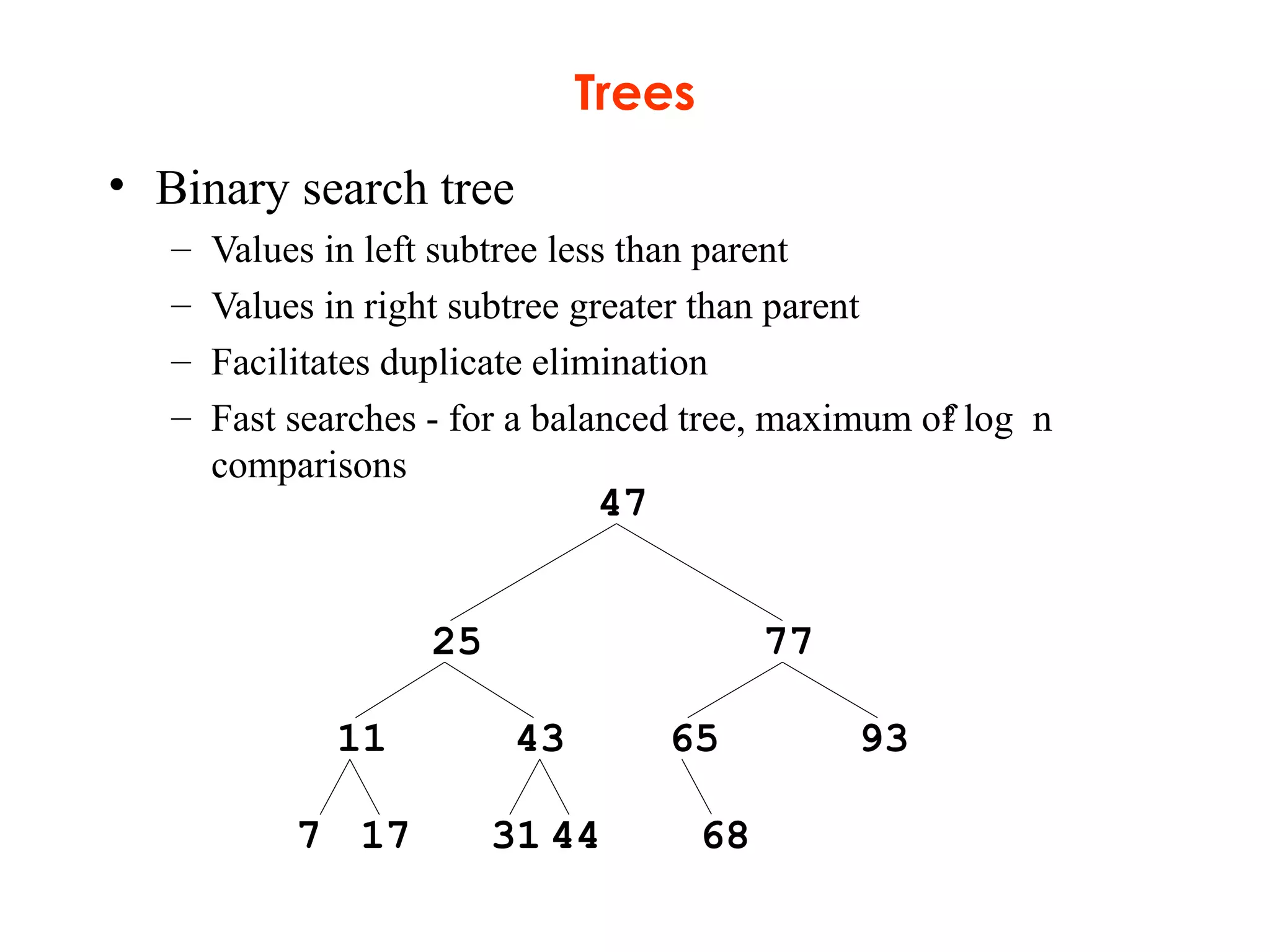
• Binary search tree
– Values in left subtree less than parent
– Values in right subtree greater than parent
– Facilitates duplicate elimination
– Fast searches - for a balanced tree, maximum of log n
comparisons
47
25 77
11 43 65 93
687 17 31 44
2
Trees
• Tree traversals:
– Inorder traversal – prints the node values in ascending order
1. Traverse the left subtree with an inorder traversal
2. Process the value in the node (i.e., print the node value)
3. Traverse the right subtree with an inorder traversal
– Preorder traversal
1. Process the value in the node
2. Traverse the left subtree with a preorder traversal
3. Traverse the right subtree with a preorder traversal
– Postorder traversal
1. Traverse the left subtree with a postorder traversal
2. Traverse the right subtree with a postorder traversal
3. Process the value in the node
Trees Data Structures
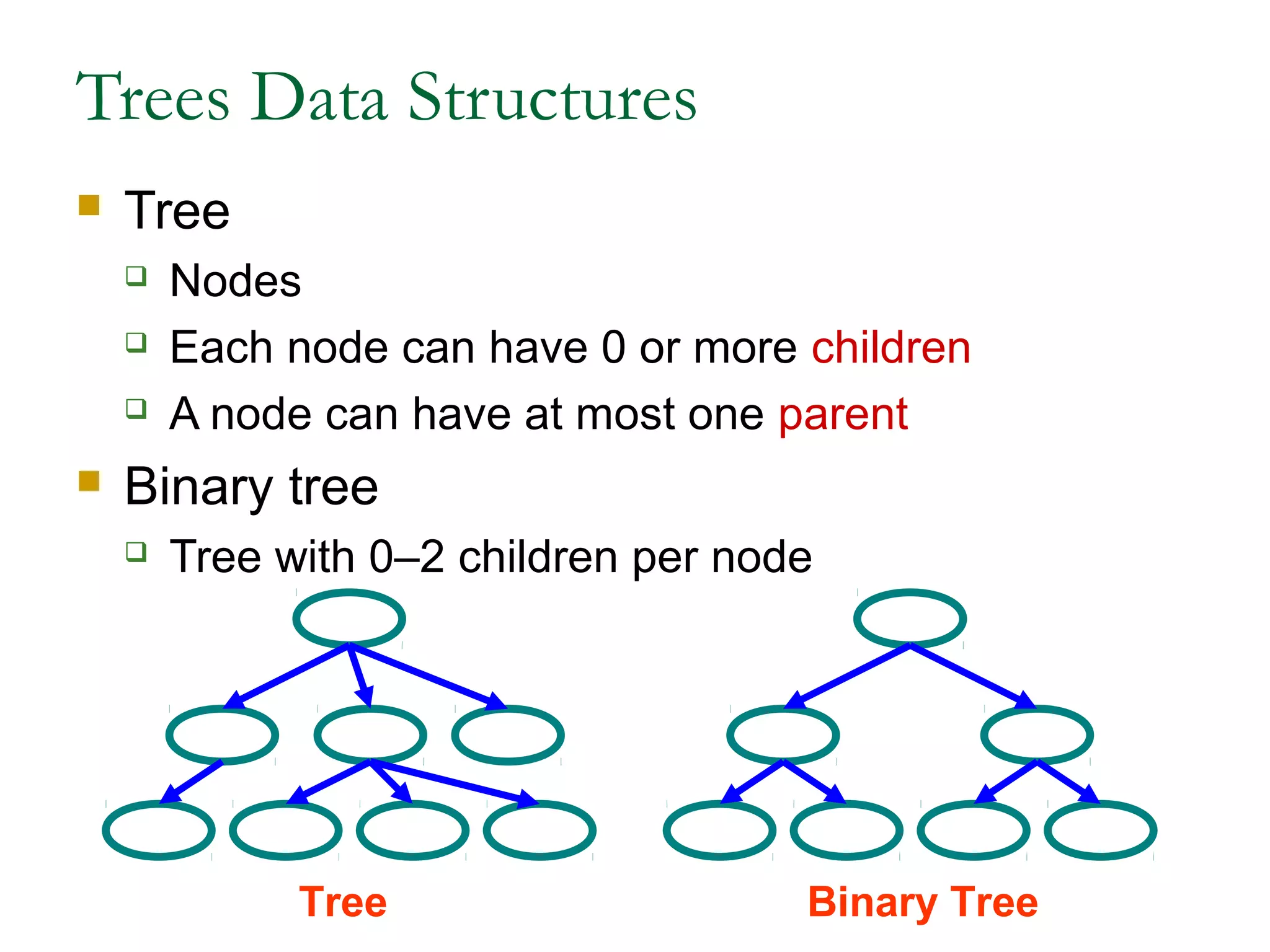
 Tree
 Nodes
 Each node can have 0 or more children
 A node can have at most one parent
 Binary tree
 Tree with 0–2 children per node
Tree Binary Tree
Trees
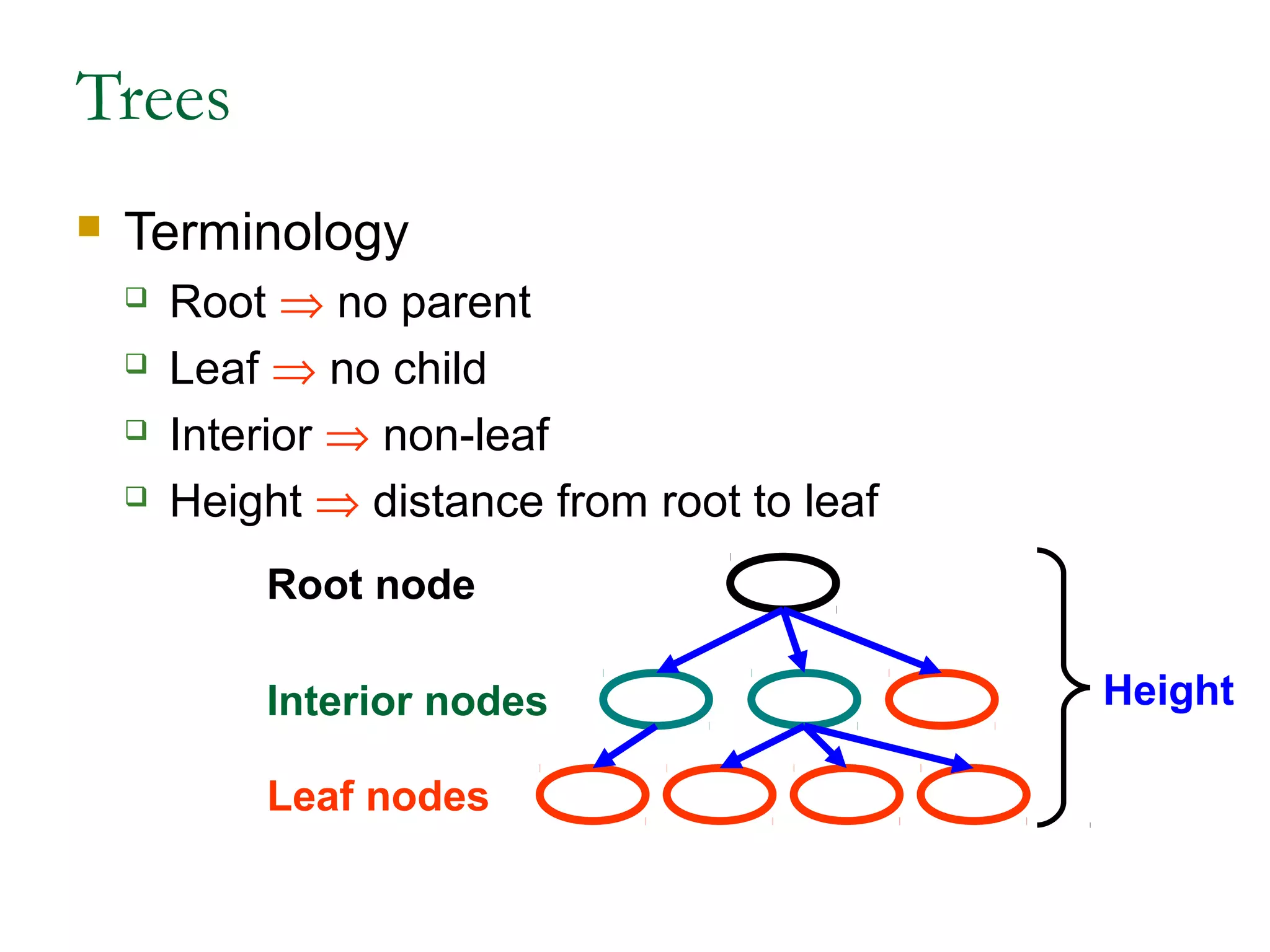
 Terminology
 Root ⇒ no parent
 Leaf ⇒ no child
 Interior ⇒ non-leaf
 Height ⇒ distance from root to leaf
Root node
Leaf nodes
Interior nodes Height
Binary Search Trees
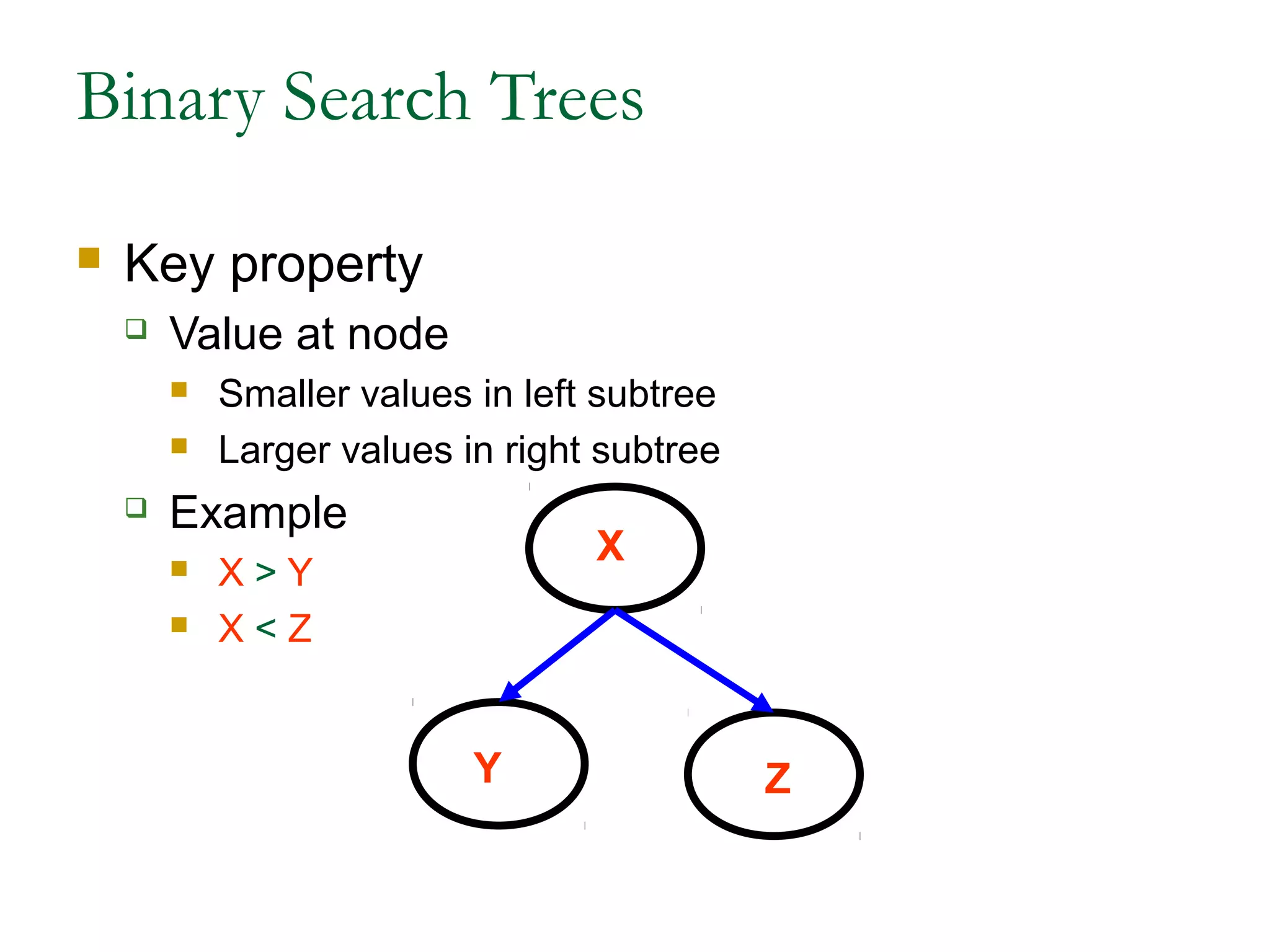
 Key property
 Value at node
 Smaller values in left subtree
 Larger values in right subtree
 Example
 X > Y
 X < Z
Y
X
Z
Binary Search Trees
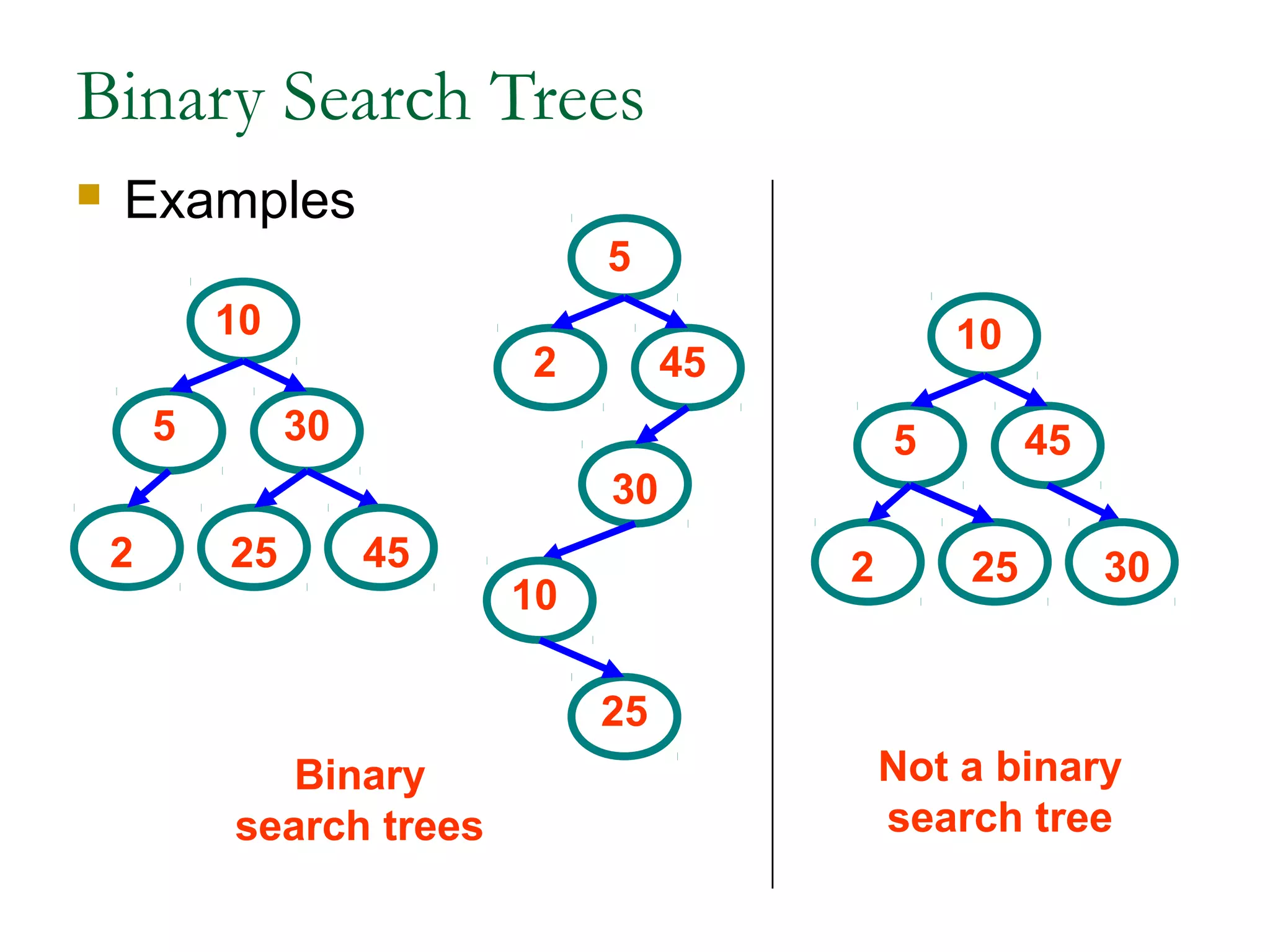
 Examples
Binary
search trees
Not a binary
search tree
5
10
30
2 25 45
5
10
45
2 25 30
5
10
30
2
25
45
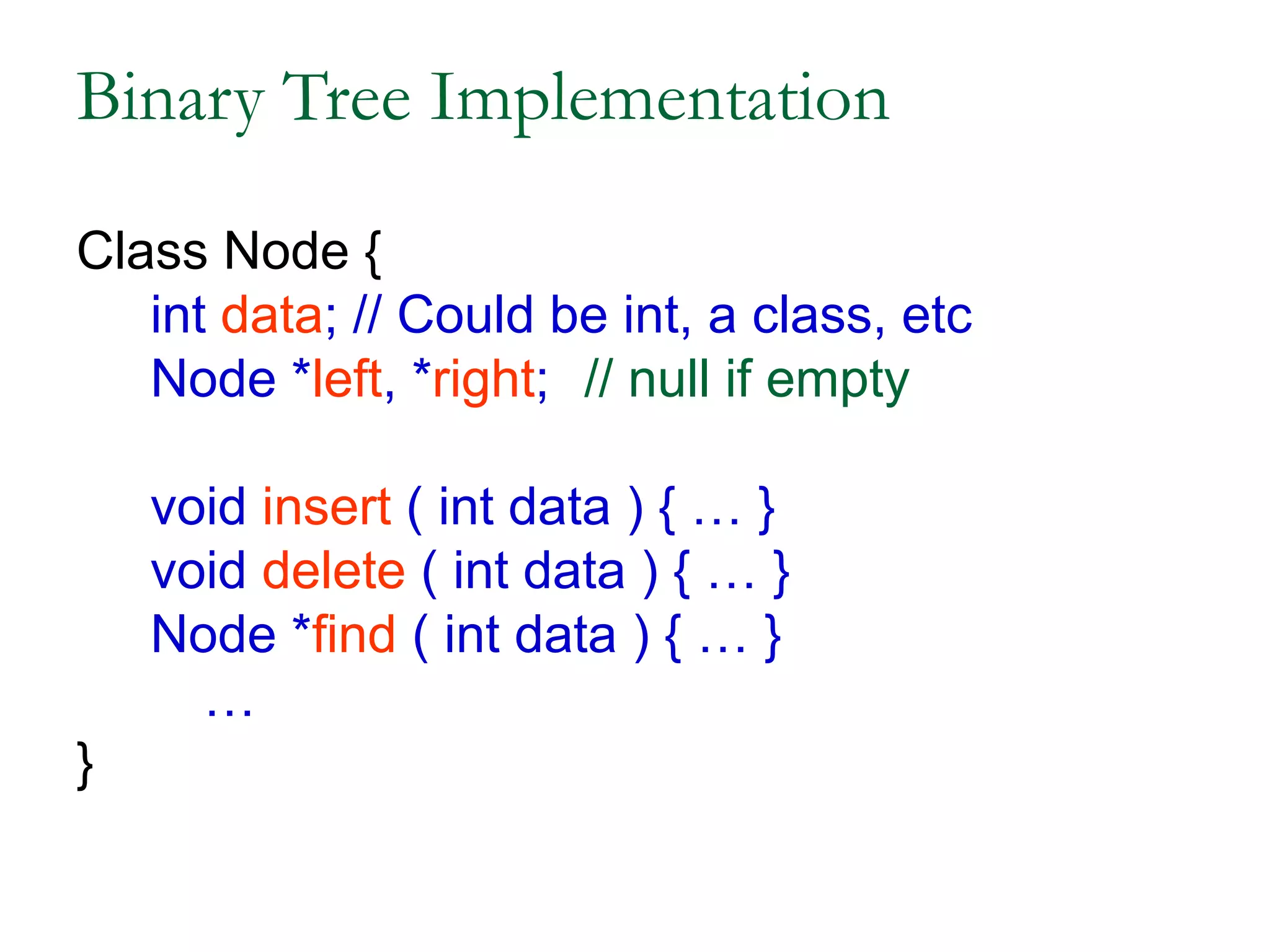
Binary Tree Implementation
Class Node {
int data; // Could be int, a class, etc
Node *left, *right; // null if empty
void insert ( int data ) { … }
void delete ( int data ) { … }
Node *find ( int data ) { … }
…
}
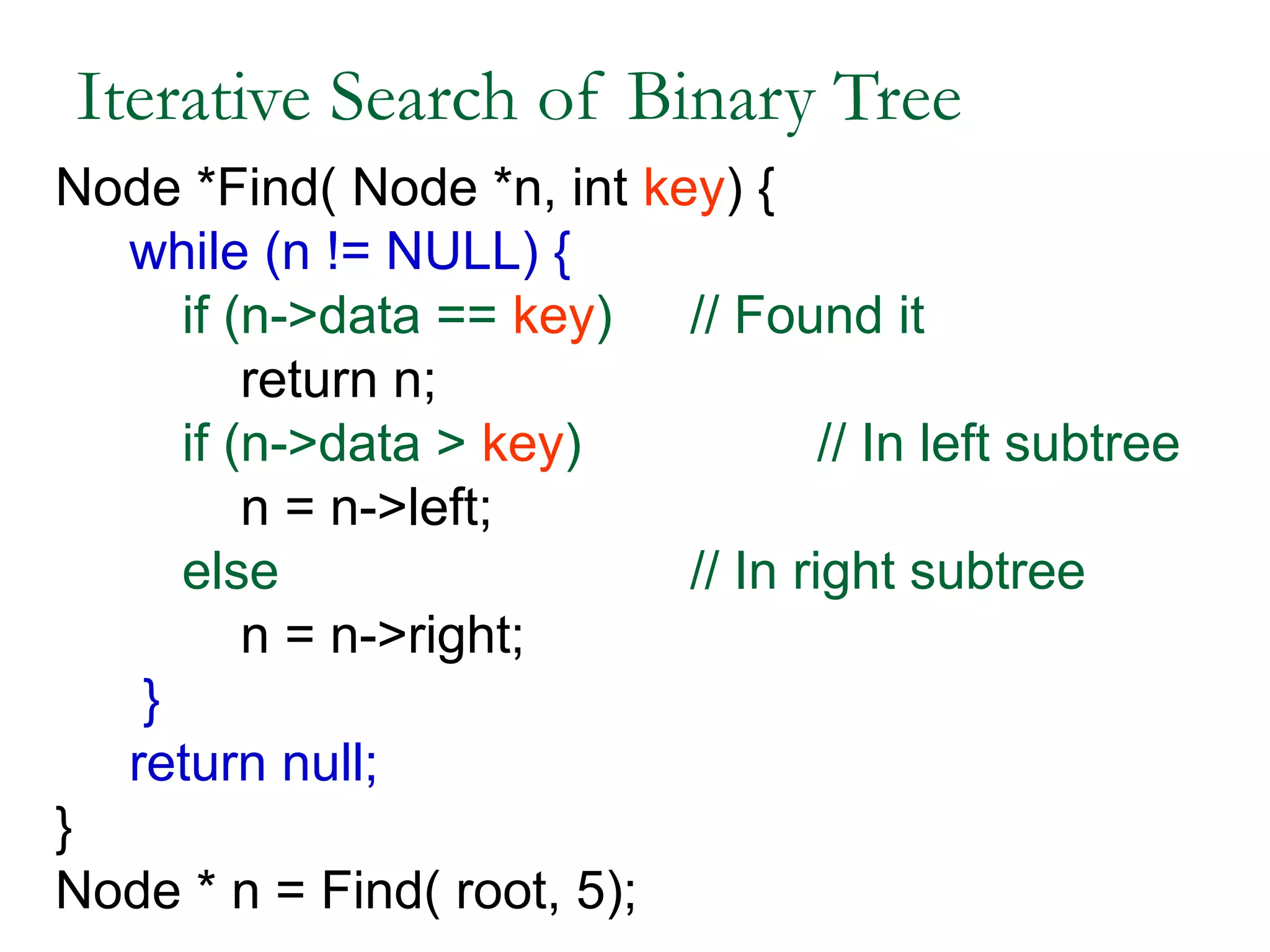
Iterative Search of Binary Tree
Node *Find( Node *n, int key) {
while (n != NULL) {
if (n->data == key) // Found it
return n;
if (n->data > key) // In left subtree
n = n->left;
else // In right subtree
n = n->right;
}
return null;
}
Node * n = Find( root, 5);
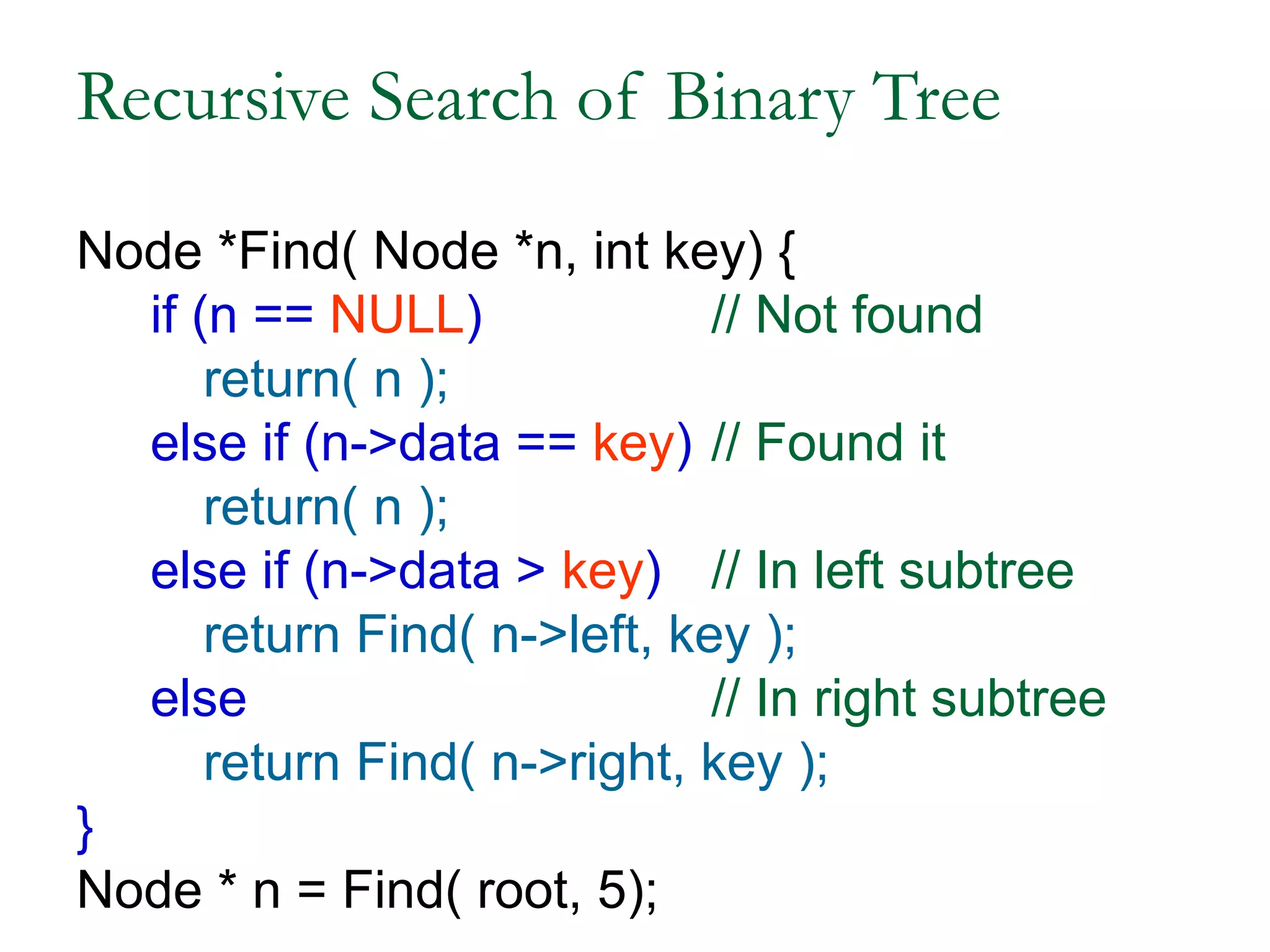
Recursive Search of Binary Tree
Node *Find( Node *n, int key) {
if (n == NULL) // Not found
return( n );
else if (n->data == key) // Found it
return( n );
else if (n->data > key) // In left subtree
return Find( n->left, key );
else // In right subtree
return Find( n->right, key );
}
Node * n = Find( root, 5);
Example Binary Searches
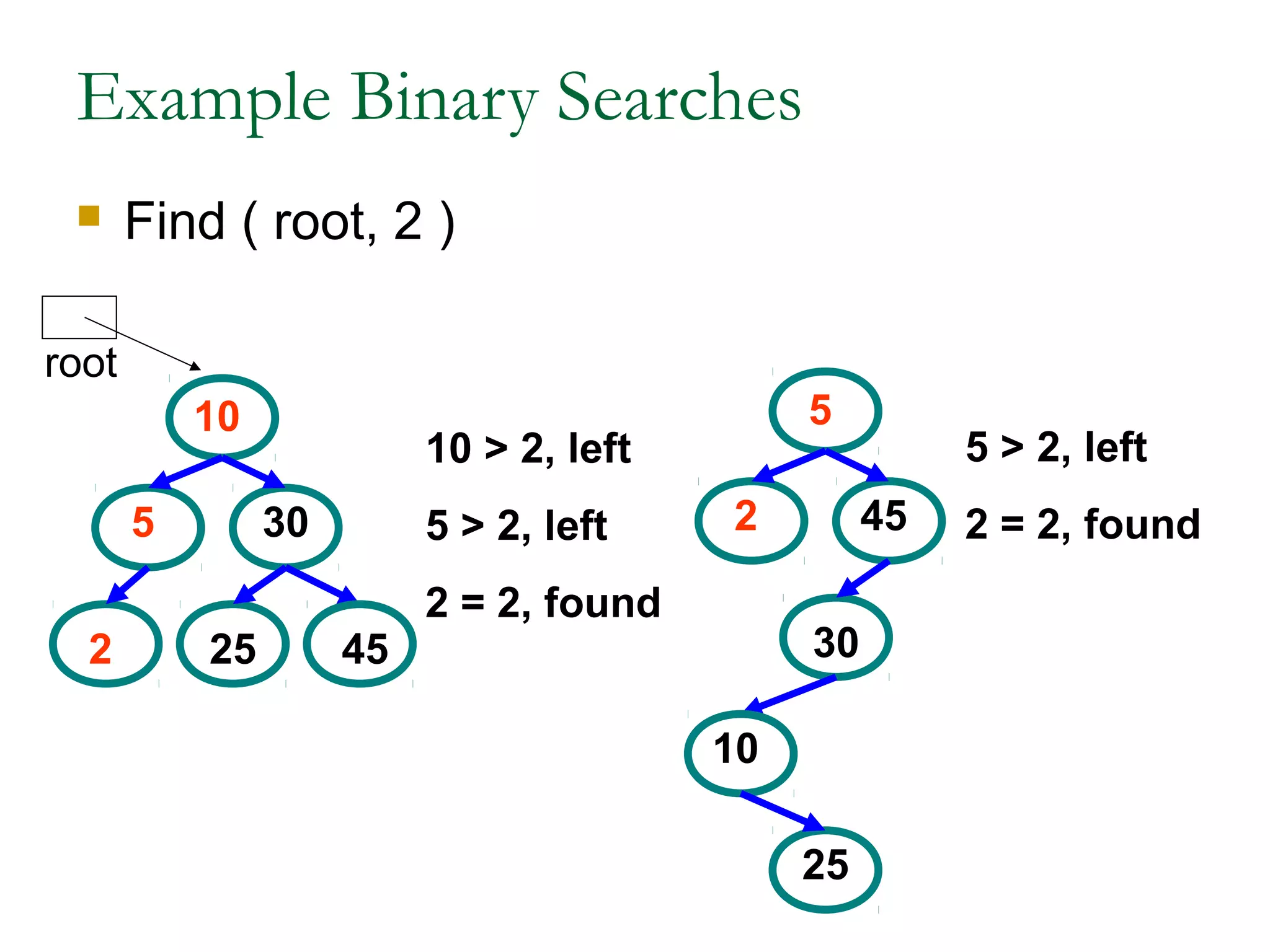
 Find ( root, 2 )
5
10
30
2 25 45
5
10
30
2
25
45
10 > 2, left
5 > 2, left
2 = 2, found
5 > 2, left
2 = 2, found
root
Example Binary Searches
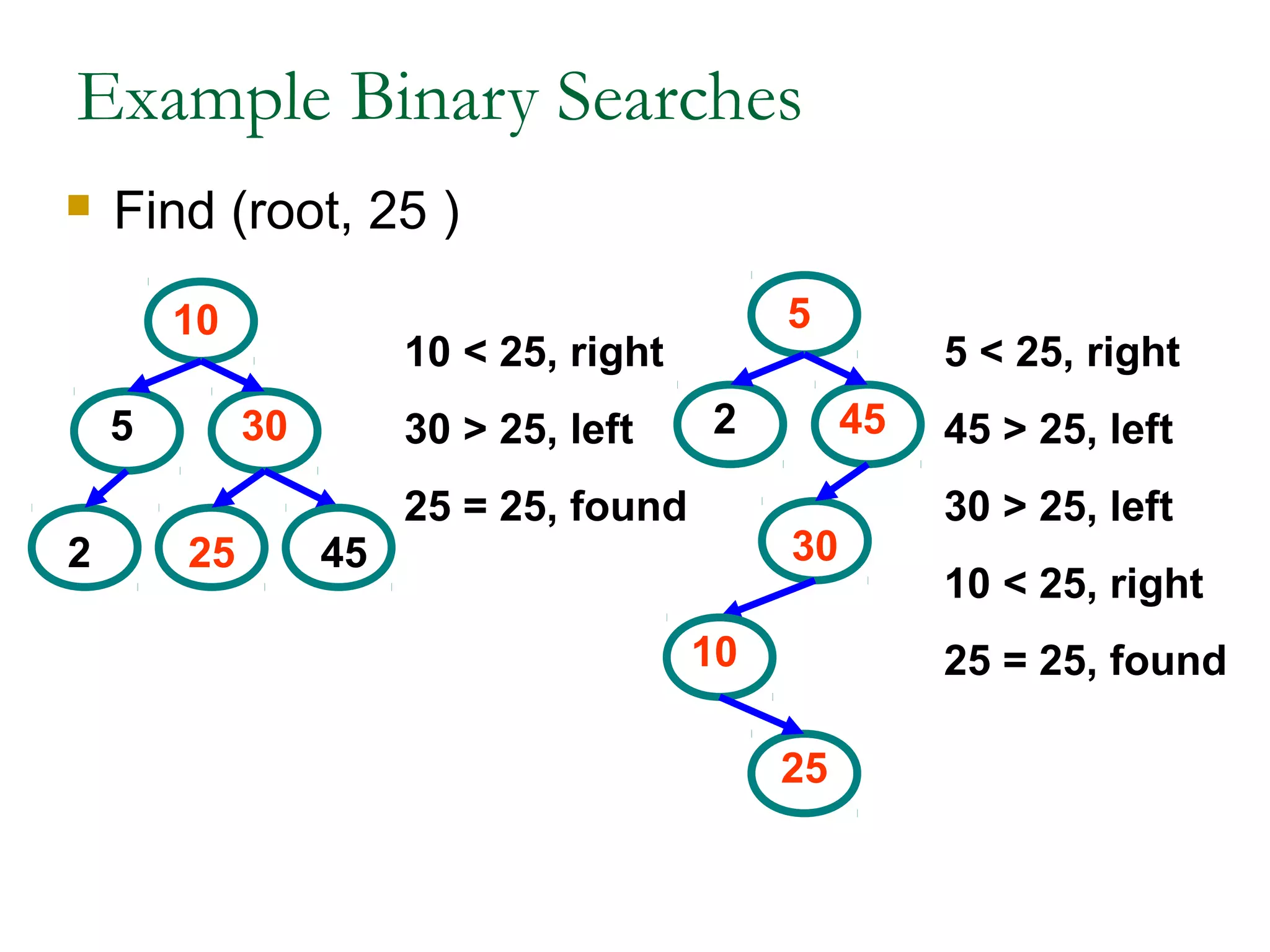
 Find (root, 25 )
5
10
30
2 25 45
5
10
30
2
25
45
10 < 25, right
30 > 25, left
25 = 25, found
5 < 25, right
45 > 25, left
30 > 25, left
10 < 25, right
25 = 25, found
Types of Binary Trees
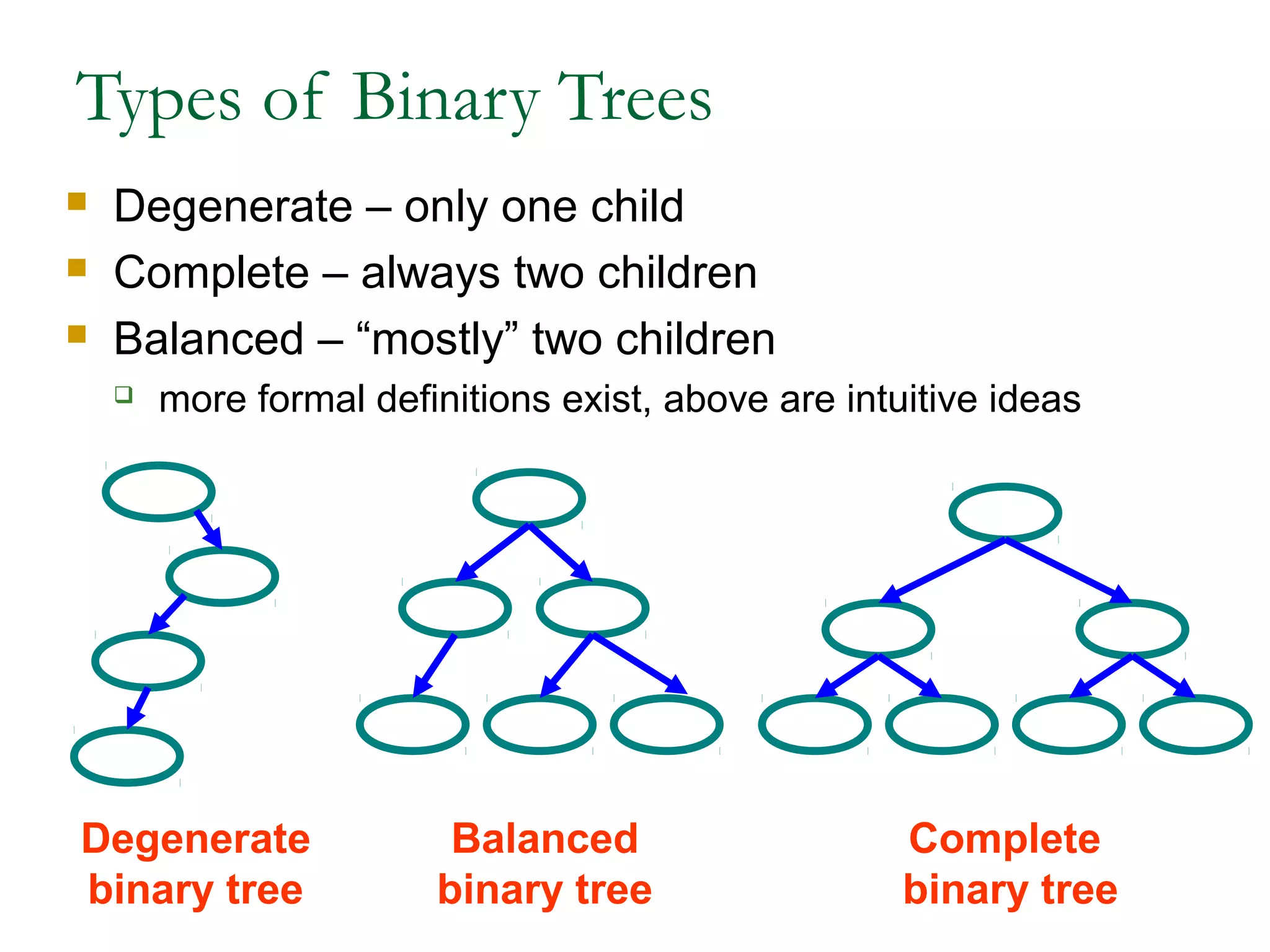
 Degenerate – only one child
 Complete – always two children
 Balanced – “mostly” two children
 more formal definitions exist, above are intuitive ideas
Degenerate
binary tree
Balanced
binary tree
Complete
binary tree
Binary Trees Properties
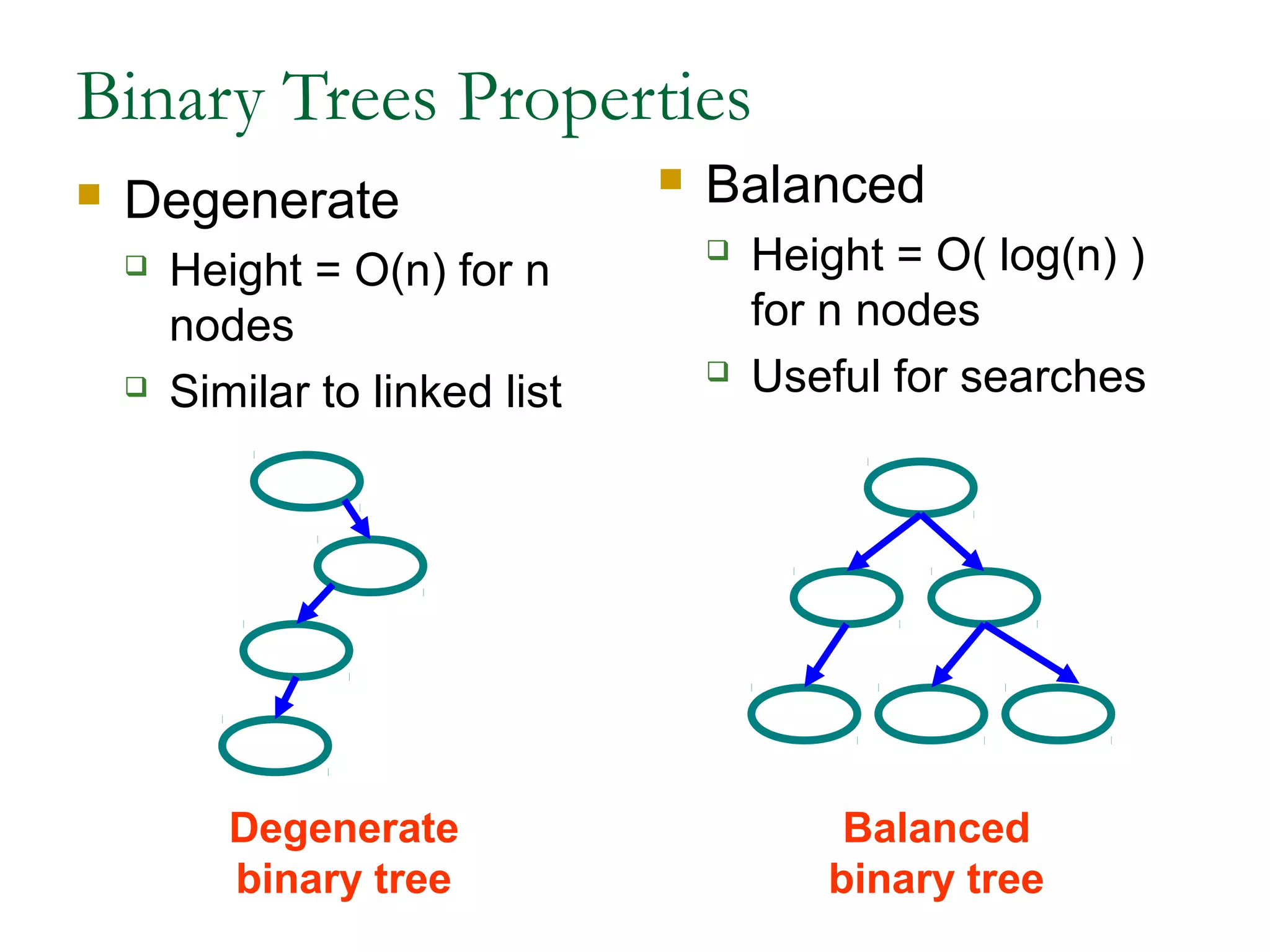
 Degenerate
 Height = O(n) for n
nodes
 Similar to linked list
 Balanced
 Height = O( log(n) )
for n nodes
 Useful for searches
Degenerate
binary tree
Balanced
binary tree
Binary Search Properties
 Time of search
 Proportional to height of tree
 Balanced binary tree
 O( log(n) ) time
 Degenerate tree
 O( n ) time
 Like searching linked list / unsorted array
Binary Search Tree Construction
 How to build & maintain binary trees?
 Insertion
 Deletion
 Maintain key property (invariant)
 Smaller values in left subtree
 Larger values in right subtree
Binary Search Tree – Insertion
 Algorithm
1. Perform search for value X
2. Search will end at node Y (if X not in tree)
3. If X < Y, insert new leaf X as new left subtree for
Y
4. If X > Y, insert new leaf X as new right subtree
for Y
 Observations
 O( log(n) ) operation for balanced tree
 Insertions may unbalance tree
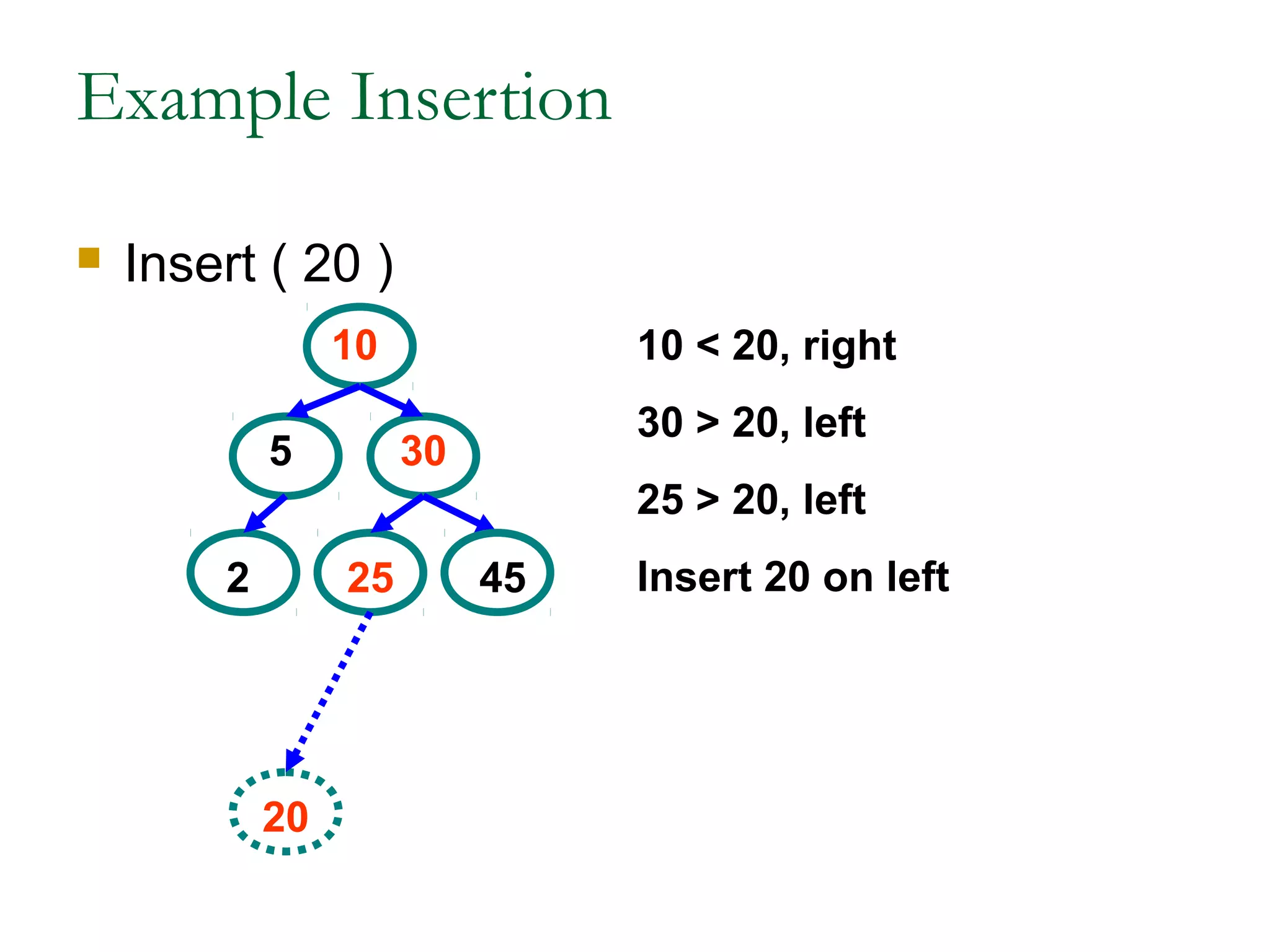
Example Insertion
 Insert ( 20 )
5
10
30
2 25 45
10 < 20, right
30 > 20, left
25 > 20, left
Insert 20 on left
20
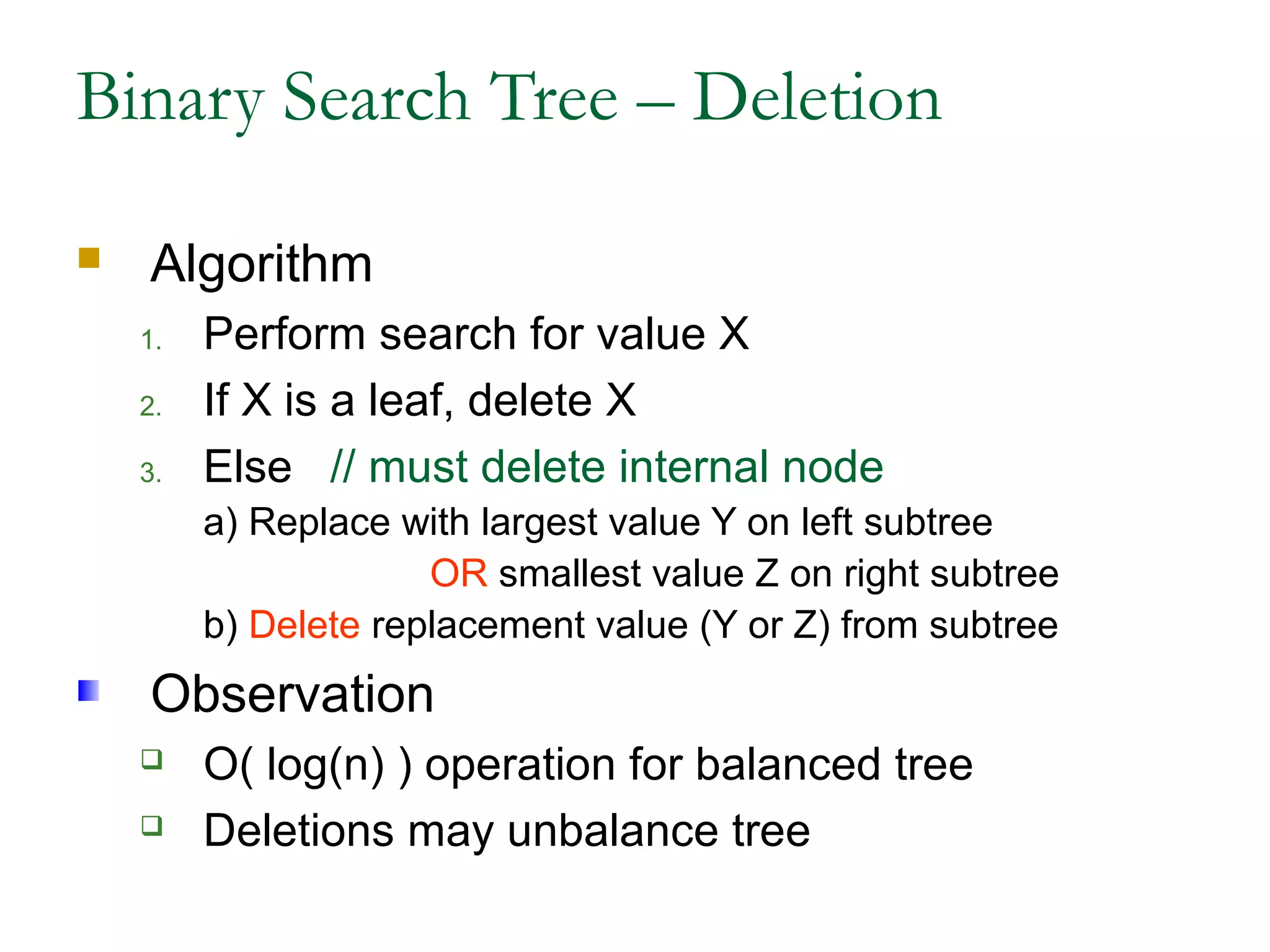
Binary Search Tree – Deletion
 Algorithm
1. Perform search for value X
2. If X is a leaf, delete X
3. Else // must delete internal node
a) Replace with largest value Y on left subtree
OR smallest value Z on right subtree
b) Delete replacement value (Y or Z) from subtree
Observation
 O( log(n) ) operation for balanced tree
 Deletions may unbalance tree
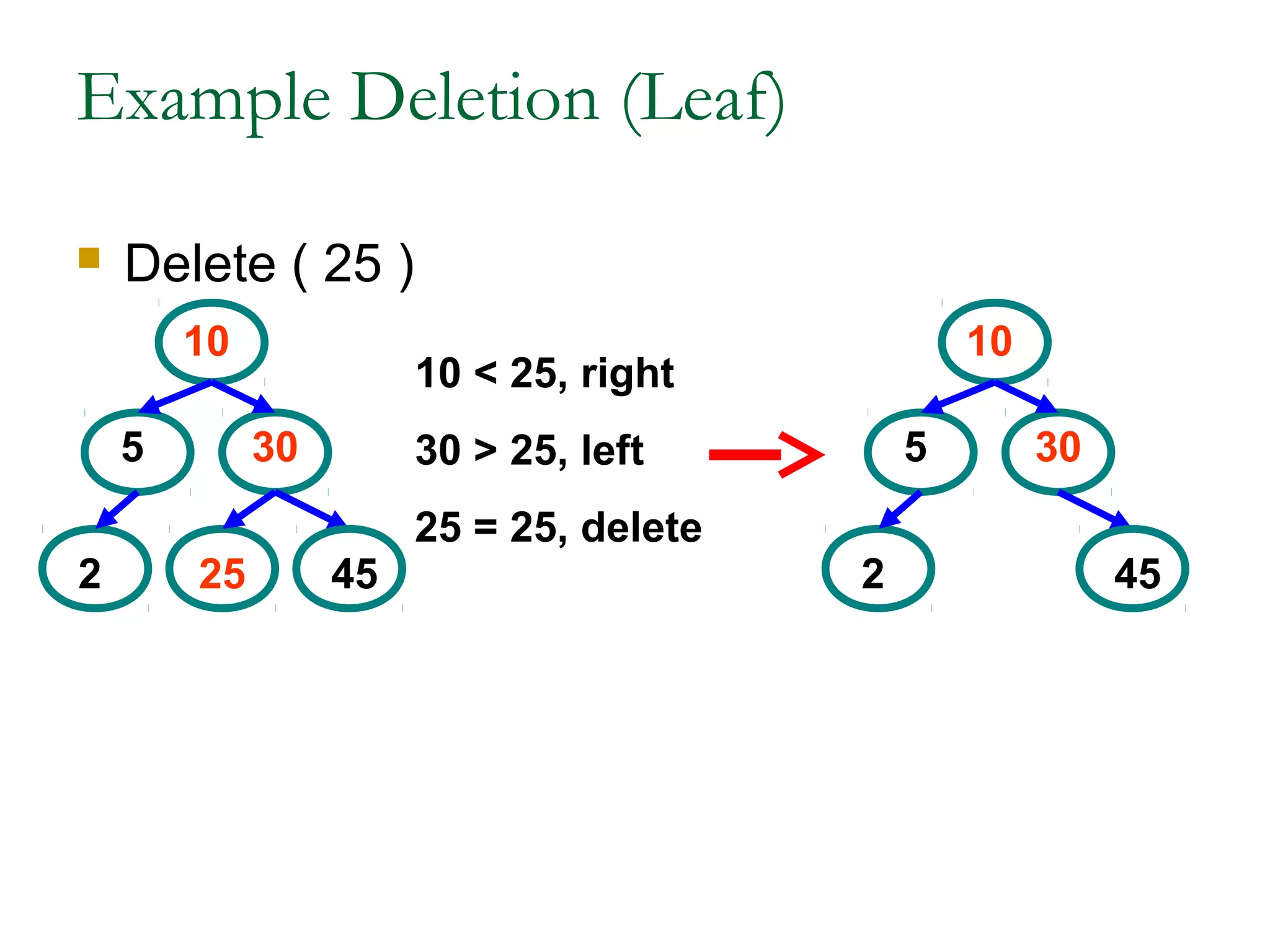
Example Deletion (Leaf)
 Delete ( 25 )
5
10
30
2 25 45
10 < 25, right
30 > 25, left
25 = 25, delete
5
10
30
2 45
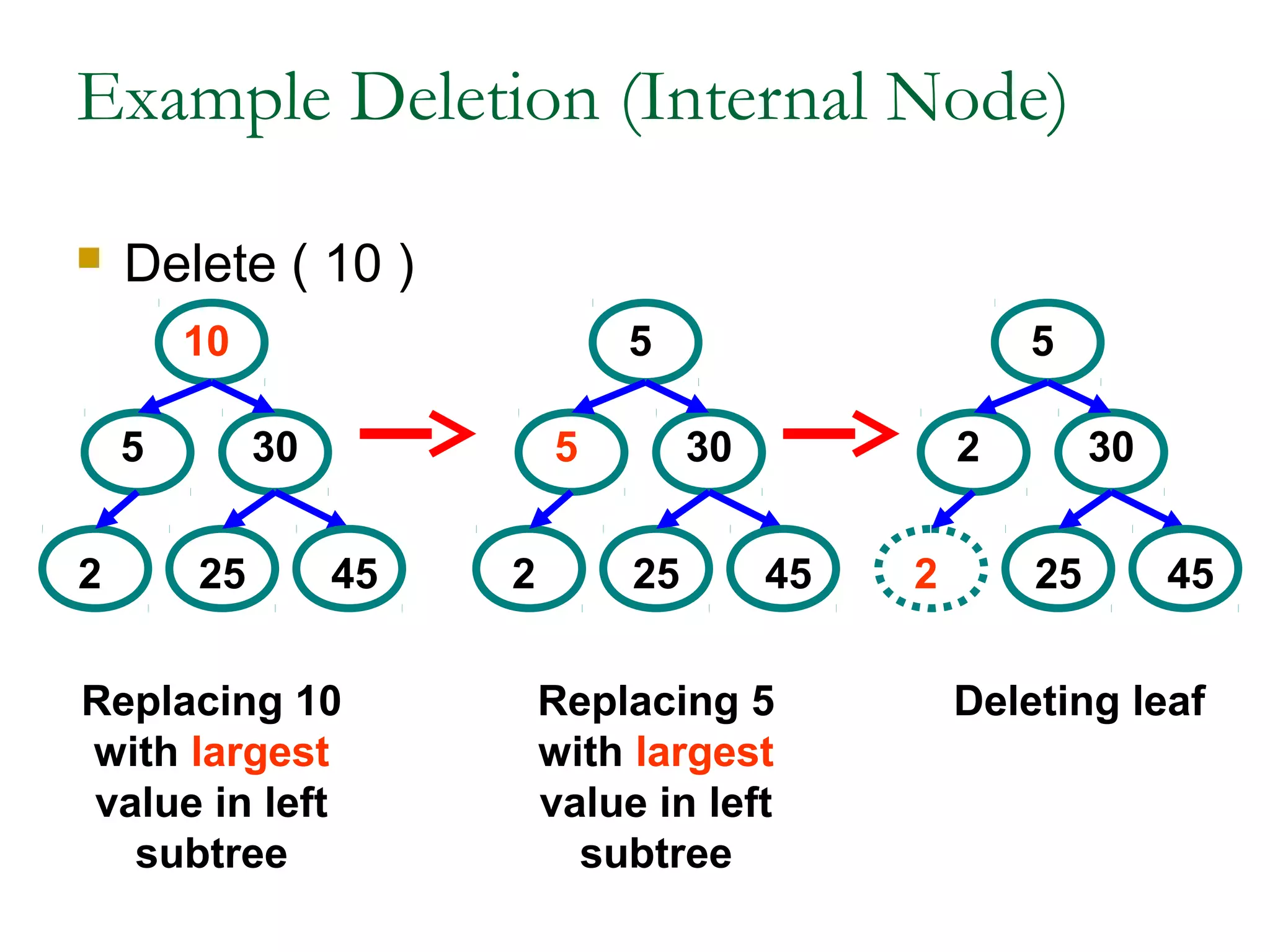
Example Deletion (Internal Node)
 Delete ( 10 )
5
10
30
2 25 45
5
5
30
2 25 45
2
5
30
2 25 45
Replacing 10
with largest
value in left
subtree
Replacing 5
with largest
value in left
subtree
Deleting leaf
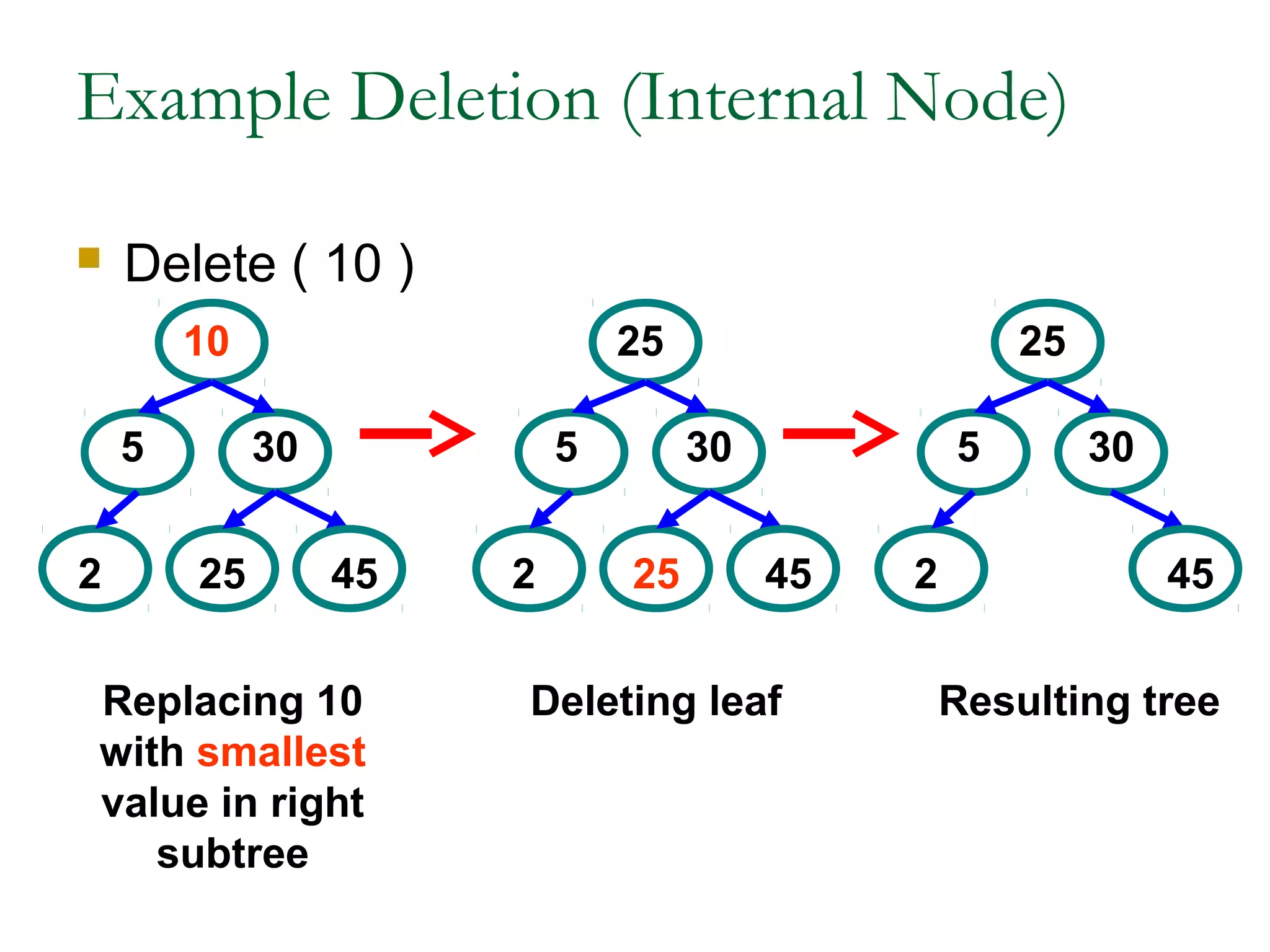
Example Deletion (Internal Node)
 Delete ( 10 )
5
10
30
2 25 45
5
25
30
2 25 45
5
25
30
2 45
Replacing 10
with smallest
value in right
subtree
Deleting leaf Resulting tree
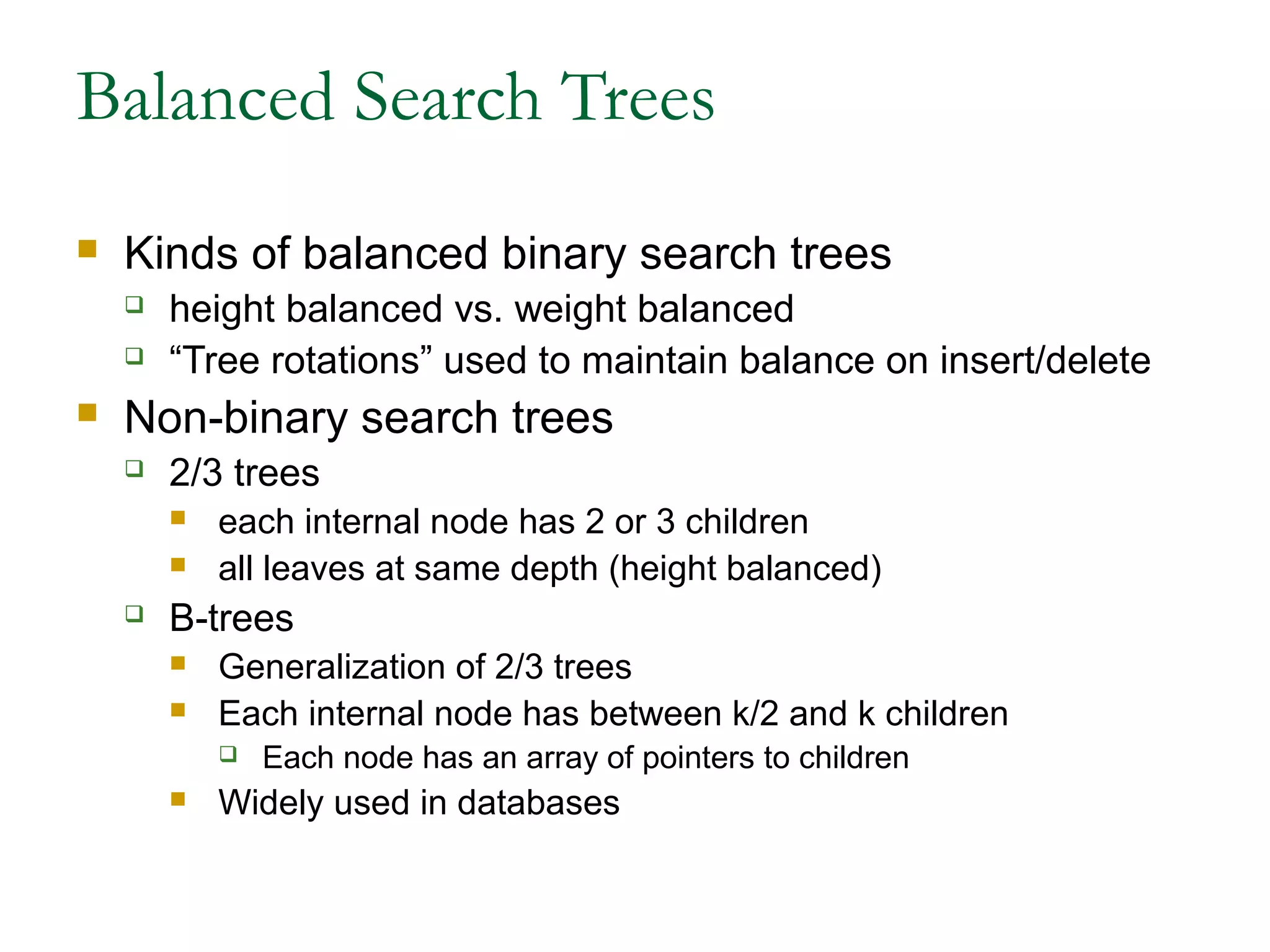
Balanced Search Trees
 Kinds of balanced binary search trees
 height balanced vs. weight balanced
 “Tree rotations” used to maintain balance on insert/delete
 Non-binary search trees
 2/3 trees
 each internal node has 2 or 3 children
 all leaves at same depth (height balanced)
 B-trees
 Generalization of 2/3 trees
 Each internal node has between k/2 and k children
 Each node has an array of pointers to children
 Widely used in databases
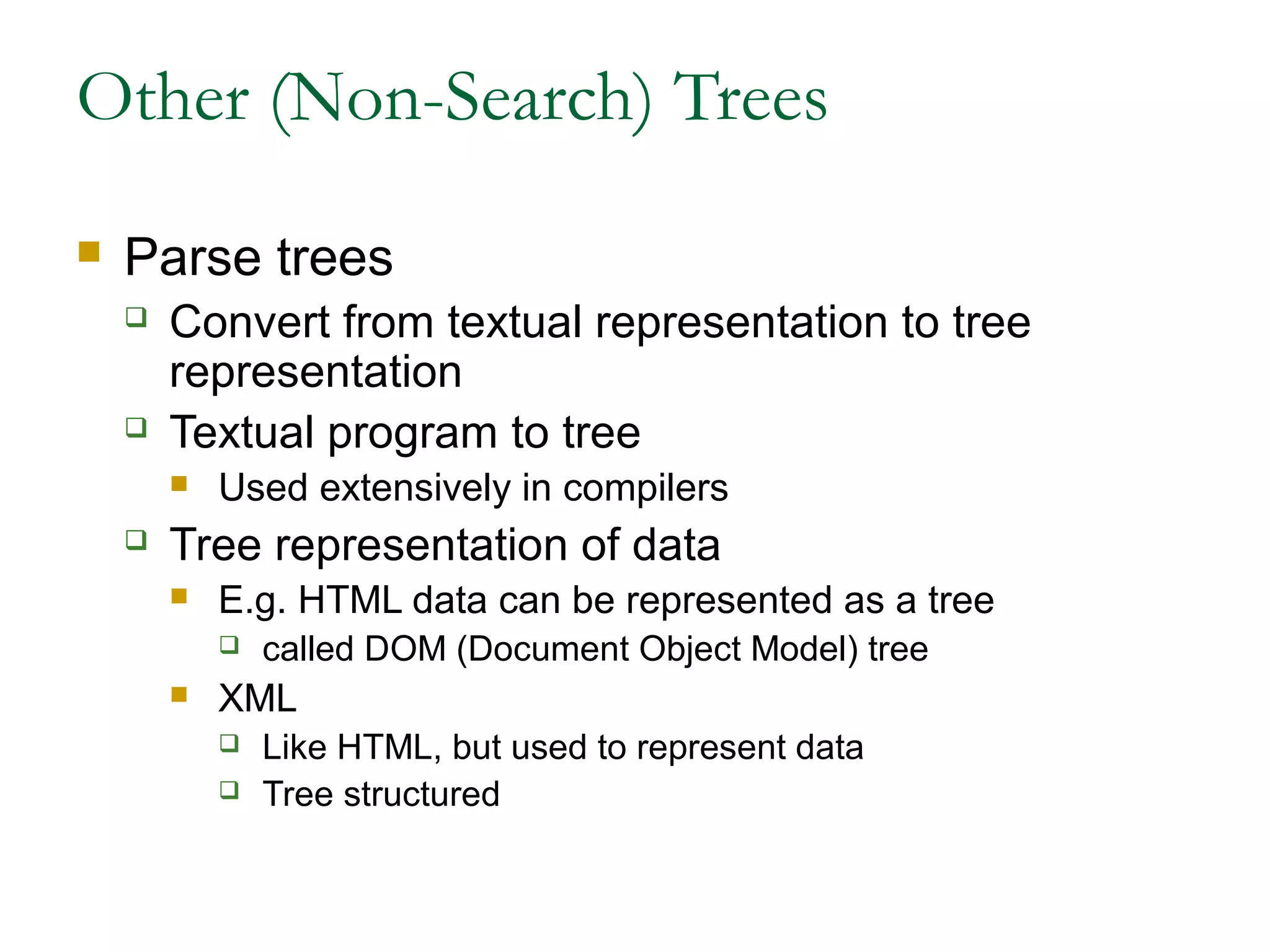
Other (Non-Search) Trees
 Parse trees
 Convert from textual representation to tree
representation
 Textual program to tree
 Used extensively in compilers
 Tree representation of data
 E.g. HTML data can be represented as a tree
 called DOM (Document Object Model) tree
 XML
 Like HTML, but used to represent data
 Tree structured
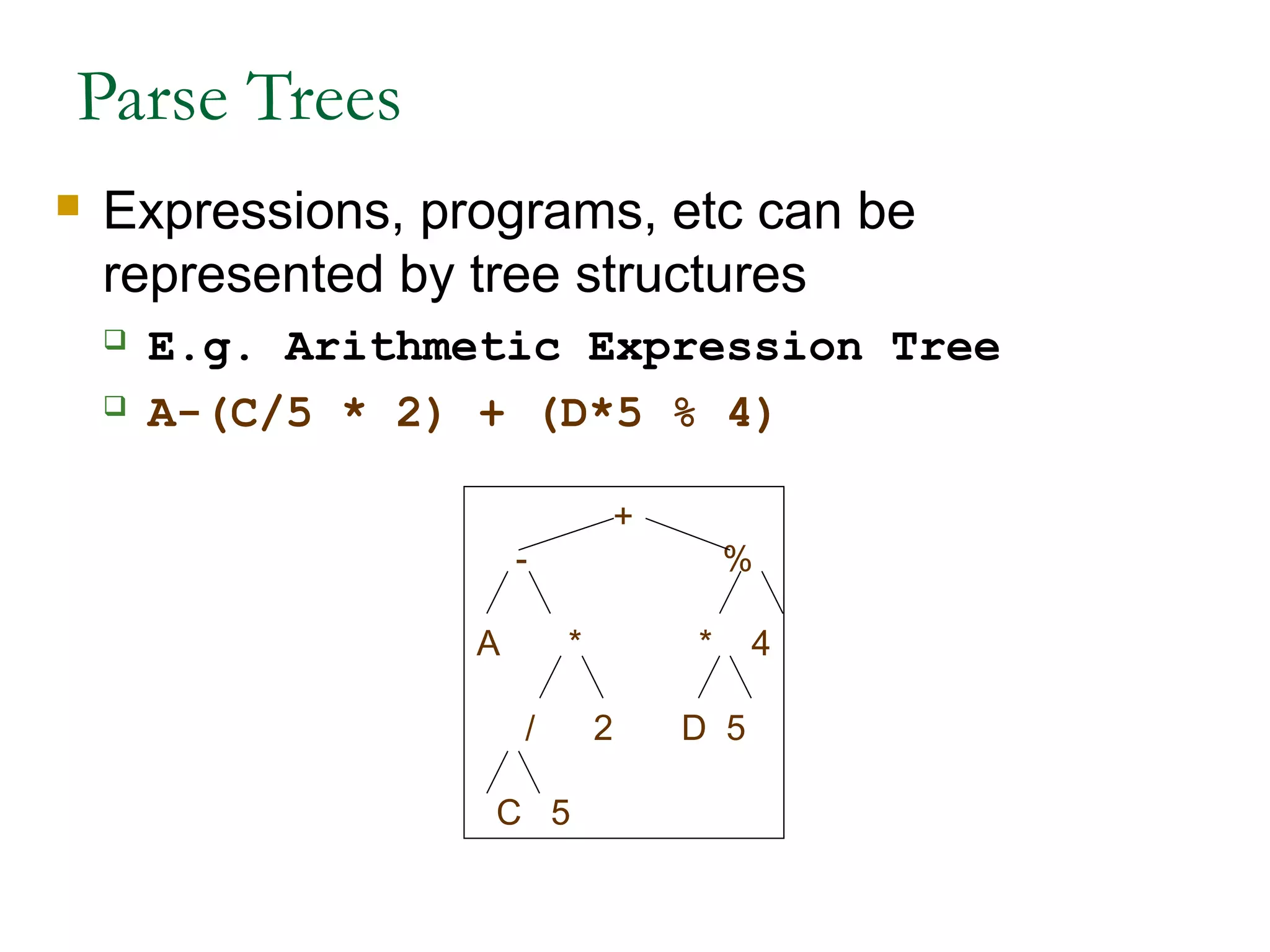
Parse Trees
 Expressions, programs, etc can be
represented by tree structures
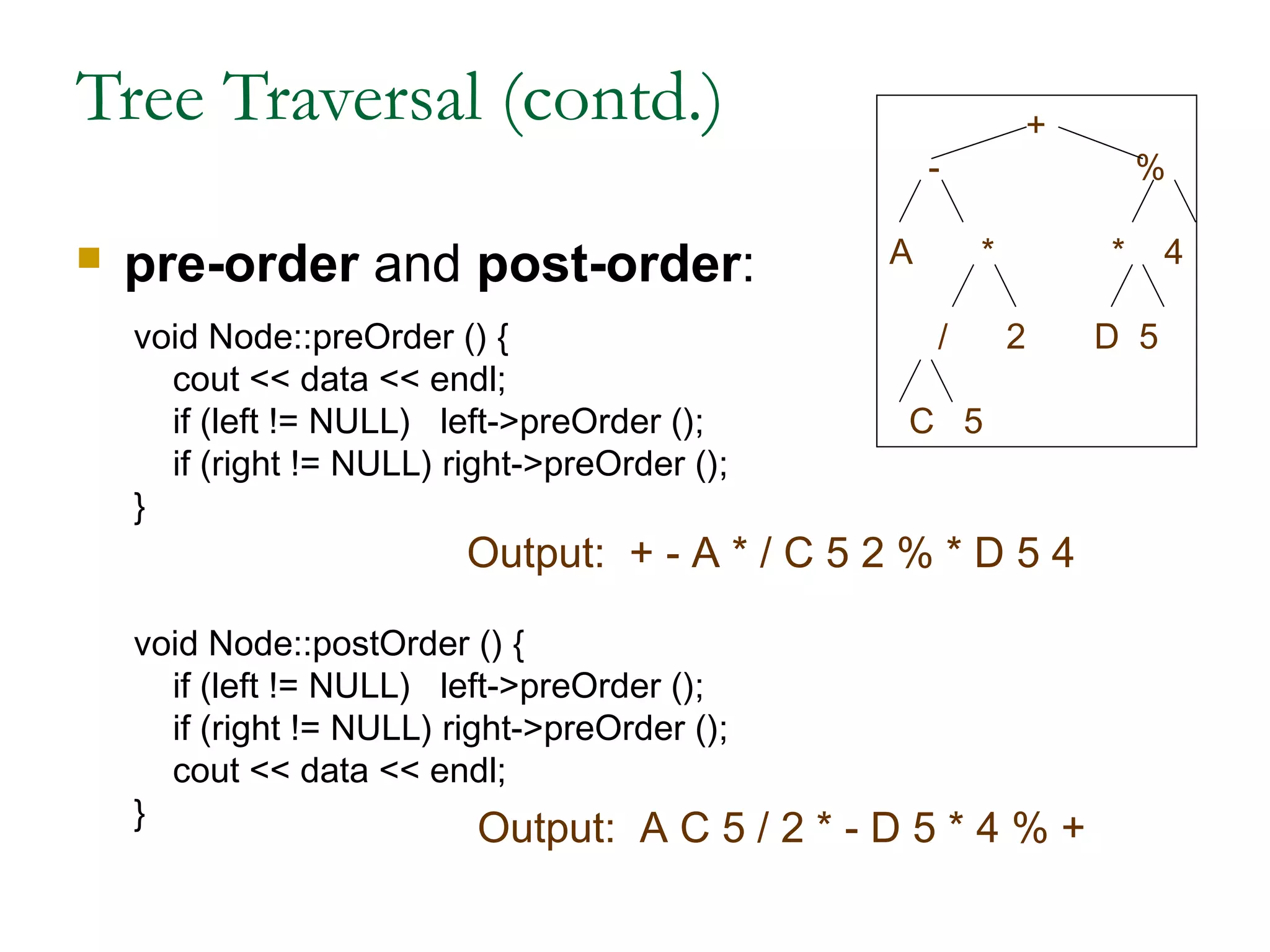
 E.g. Arithmetic Expression Tree
 A-(C/5 * 2) + (D*5 % 4)
+
- %
A * * 4
/ 2 D 5
C 5
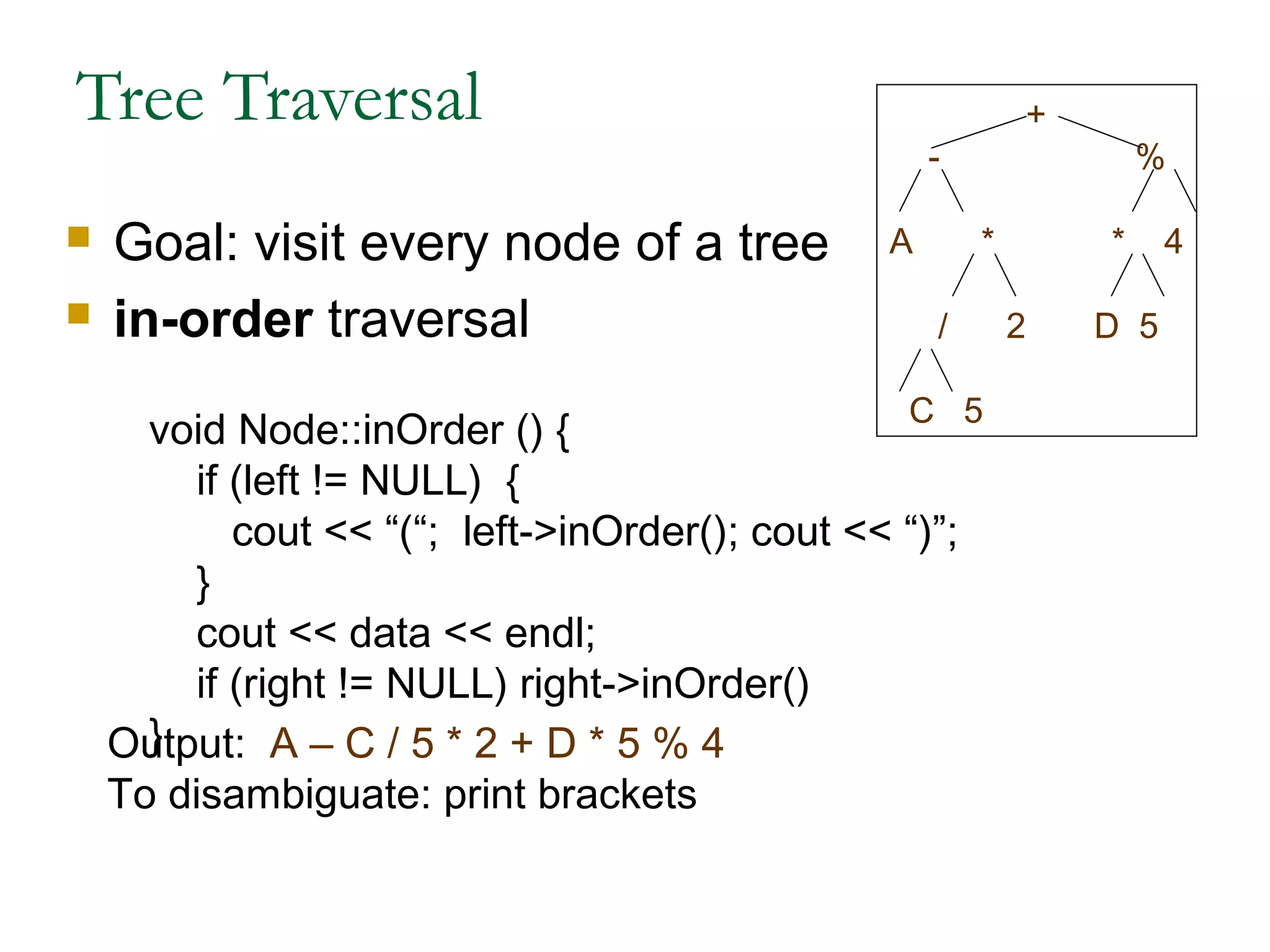
Tree Traversal
 Goal: visit every node of a tree
 in-order traversal
void Node::inOrder () {
if (left != NULL) {
cout << “(“; left->inOrder(); cout << “)”;
}
cout << data << endl;
if (right != NULL) right->inOrder()
}Output: A – C / 5 * 2 + D * 5 % 4
To disambiguate: print brackets
+
- %
A * * 4
/ 2 D 5
C 5
Tree Traversal (contd.)
 pre-order and post-order:
void Node::preOrder () {
cout << data << endl;
if (left != NULL) left->preOrder ();
if (right != NULL) right->preOrder ();
}
void Node::postOrder () {
if (left != NULL) left->preOrder ();
if (right != NULL) right->preOrder ();
cout << data << endl;
}
Output: + - A * / C 5 2 % * D 5 4
Output: A C 5 / 2 * - D 5 * 4 % +
+
- %
A * * 4
/ 2 D 5
C 5
Graph Data Structures
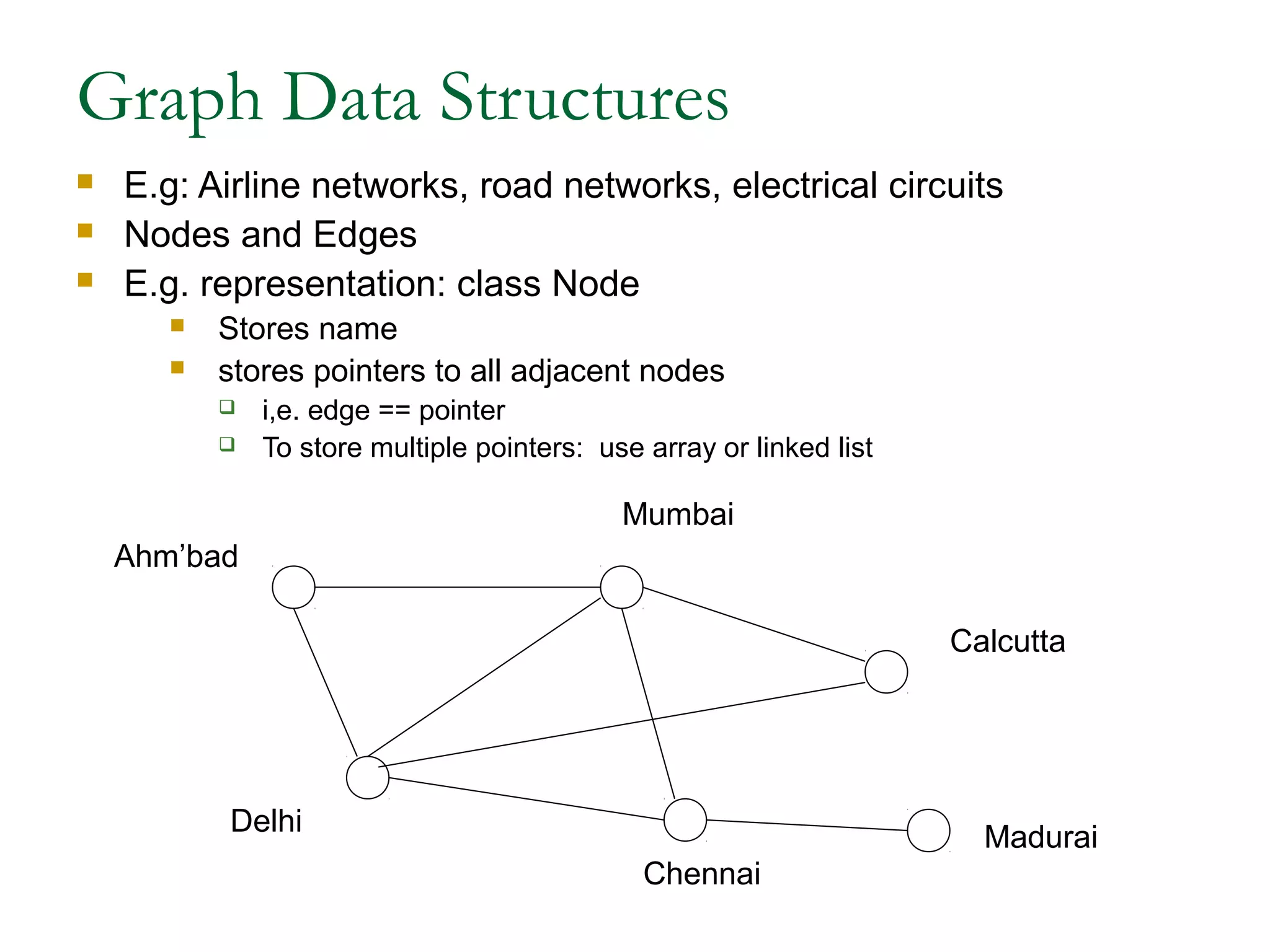
 E.g: Airline networks, road networks, electrical circuits
 Nodes and Edges
 E.g. representation: class Node
 Stores name
 stores pointers to all adjacent nodes
 i,e. edge == pointer
 To store multiple pointers: use array or linked list
Ahm’bad
Delhi
Mumbai
Calcutta
Chennai
Madurai

Introduction to data structure by anil dutt

  • 1.
    Introduction to DataStructures Presented By:Presented By: Anil DuttAnil Dutt
  • 2.
    DataStructures • Outline • Introduction •Linked Lists • Stacks • Queues • Trees • Graphs
  • 3.
    Introduction • Dynamic datastructures – Data structures that grow and shrink during execution • Linked lists – Allow insertions and removals anywhere • Stacks – Allow insertions and removals only at top of stack • Queues – Allow insertions at the back and removals from the front • Binary trees – High-speed searching and sorting of data and efficient elimination of duplicate data items
  • 4.
    Linked Lists • Linkedlist – Linear collection of self-referential class objects, called nodes – Connected by pointer links – Accessed via a pointer to the first node of the list – Subsequent nodes are accessed via the link-pointer member of the current node – Link pointer in the last node is set to null to mark the list’s end • Use a linked list instead of an array when – You have an unpredictable number of data elements – Your list needs to be sorted quickly
  • 5.
    Linked Lists • Typesof linked lists: – Singly linked list • Begins with a pointer to the first node • Terminates with a null pointer • Only traversed in one direction – Circular, singly linked • Pointer in the last node points back to the first node – Doubly linked list • Two “start pointers” – first element and last element • Each node has a forward pointer and a backward pointer • Allows traversals both forwards and backwards – Circular, doubly linked list • Forward pointer of the last node points to the first node and backward pointer of the first node points to the last node
  • 6.
    SINGLY LINKED LIST DOUBLYLINKED LIST Previous node Data part Next node DATA ADDRESS Data 1 Data 2 . . . . . . Data n ADDRESS ADDRESS Data 1 Data 2 . . . . . Data n ADDRESS
  • 7.
    ID Name DesigAddress of Node2 ID Name Desig Address of Node 3 ID Name Desig NULL Start
  • 8.
    NULL Data 1Address of Node 2 Address of Data 2 Address of Node 1 Node 3 Address of Data 3 Node 2 NULL Start
  • 9.
    CIRCULAR LINKED LIST SINGLY Node1 Node 2 Node 3 DOUBLY Node 1 Node 2 Node 3 Start Data 1 Node 2 Data 2 Node 3 Data 3 Node1 Start Node3 Data 1 Node 2 Node 1 Data 1 Node 3 Node 2 Data 1 Node1
  • 10.
    struct node { int x; charc[10]; struct node *next; }*current; x c[10] next
  • 11.
    create_node() { current=(struct node *)malloc(sizeof(structnode)); current->x=10; current->c=“try”; current->next=null; return current; } Allocation Assignment x c[10] next 10 try NULL
  • 12.
    Create a linkedlist for maintaining the employee details such as Ename,Eid,Edesig. Steps: 1)Identify the node structure 2)Allocate space for the node 3)Insert the node in the list EID EName EDesig struct node { int Eid; char Ename[10],Edesig[10]; struct node *next; } *current; next
  • 13.
    The basic operationson linked lists are 1. Creation 2. Insertion 3. Deletion 4. Traversing 5. Searching 6. Concatenation 7. Display
  • 14.
    Stacks • Stack – Newnodes can be added and removed only at the top – Similar to a pile of dishes – Last-in, first-out (LIFO) – Bottom of stack indicated by a link member to NULL – Constrained version of a linked list • push – Adds a new node to the top of the stack • pop – Removes a node from the top – Stores the popped value – Returns true if pop was successful
  • 15.
  • 16.
    Implementing a Stack •At least three different ways to implement a stack – array – vector – linked list • Which method to use depends on the application – what advantages and disadvantages does each implementation have?
  • 17.
    Queues • Queue – Similarto a supermarket checkout line – First-in, first-out (FIFO) – Nodes are removed only from the head – Nodes are inserted only at the tail • Insert and remove operations – Enqueue (insert) and dequeue (remove)
  • 18.
    Queues 18 A QUEUEIS A CONTAINER IN WHICH: . INSERTIONS ARE MADE ONLY AT THE BACK; . DELETIONS, RETRIEVALS, AND MODIFICATIONS ARE MADE ONLY AT THE FRONT.
  • 19.
    Queues 19 The Queue AQueue is a FIFO (First in First Out) Data Structure. Elements are inserted in the Rear of the queue and are removed at the Front. C B C A B C A b a c k f r o n t p u s h A A B f r o n t b a c k p u s h B f r o n t b a c k p u s h C f r o n t b a c k p o p A f r o n t b a c k p o p B
  • 20.
    Queues 20 PUSH (ALSOCALLED ENQUEUE) -- TO INSERT AN ITEM AT THE BACK POP (ALSO CALLED DEQUEUE) -- TO DELETE THE FRONT ITEM IN A QUEUE, THE FIRST ITEM INSERTED WILL BE THE FIRST ITEM DELETED: FIFO (FIRST-IN, FIRST-OUT)
  • 21.
    21 Printing Queue Now printingA.doc A.doc is finished. Now printing B.doc Now still printing B.docD.doc comes • A.doc B.doc C.doc arrive to printer. ABC BC BCD CD D B.doc is finished. Now printing C.doc C.doc is finished. Now printing D.doc
  • 22.
    Trees • Tree nodescontain two or more links – All other data structures we have discussed only contain one • Binary trees – All nodes contain two links • None, one, or both of which may be NULL – The root node is the first node in a tree. – Each link in the root node refers to a child – A node with no children is called a leaf node
  • 23.
    Trees • Diagram ofa binary tree B A D C
  • 24.
    Trees • Binary searchtree – Values in left subtree less than parent – Values in right subtree greater than parent – Facilitates duplicate elimination – Fast searches - for a balanced tree, maximum of log n comparisons 47 25 77 11 43 65 93 687 17 31 44 2
  • 25.
    Trees • Tree traversals: –Inorder traversal – prints the node values in ascending order 1. Traverse the left subtree with an inorder traversal 2. Process the value in the node (i.e., print the node value) 3. Traverse the right subtree with an inorder traversal – Preorder traversal 1. Process the value in the node 2. Traverse the left subtree with a preorder traversal 3. Traverse the right subtree with a preorder traversal – Postorder traversal 1. Traverse the left subtree with a postorder traversal 2. Traverse the right subtree with a postorder traversal 3. Process the value in the node
  • 26.
    Trees Data Structures Tree  Nodes  Each node can have 0 or more children  A node can have at most one parent  Binary tree  Tree with 0–2 children per node Tree Binary Tree
  • 27.
    Trees  Terminology  Root⇒ no parent  Leaf ⇒ no child  Interior ⇒ non-leaf  Height ⇒ distance from root to leaf Root node Leaf nodes Interior nodes Height
  • 28.
    Binary Search Trees Key property  Value at node  Smaller values in left subtree  Larger values in right subtree  Example  X > Y  X < Z Y X Z
  • 29.
    Binary Search Trees Examples Binary search trees Not a binary search tree 5 10 30 2 25 45 5 10 45 2 25 30 5 10 30 2 25 45
  • 30.
    Binary Tree Implementation ClassNode { int data; // Could be int, a class, etc Node *left, *right; // null if empty void insert ( int data ) { … } void delete ( int data ) { … } Node *find ( int data ) { … } … }
  • 31.
    Iterative Search ofBinary Tree Node *Find( Node *n, int key) { while (n != NULL) { if (n->data == key) // Found it return n; if (n->data > key) // In left subtree n = n->left; else // In right subtree n = n->right; } return null; } Node * n = Find( root, 5);
  • 32.
    Recursive Search ofBinary Tree Node *Find( Node *n, int key) { if (n == NULL) // Not found return( n ); else if (n->data == key) // Found it return( n ); else if (n->data > key) // In left subtree return Find( n->left, key ); else // In right subtree return Find( n->right, key ); } Node * n = Find( root, 5);
  • 33.
    Example Binary Searches Find ( root, 2 ) 5 10 30 2 25 45 5 10 30 2 25 45 10 > 2, left 5 > 2, left 2 = 2, found 5 > 2, left 2 = 2, found root
  • 34.
    Example Binary Searches Find (root, 25 ) 5 10 30 2 25 45 5 10 30 2 25 45 10 < 25, right 30 > 25, left 25 = 25, found 5 < 25, right 45 > 25, left 30 > 25, left 10 < 25, right 25 = 25, found
  • 35.
    Types of BinaryTrees  Degenerate – only one child  Complete – always two children  Balanced – “mostly” two children  more formal definitions exist, above are intuitive ideas Degenerate binary tree Balanced binary tree Complete binary tree
  • 36.
    Binary Trees Properties Degenerate  Height = O(n) for n nodes  Similar to linked list  Balanced  Height = O( log(n) ) for n nodes  Useful for searches Degenerate binary tree Balanced binary tree
  • 37.
    Binary Search Properties Time of search  Proportional to height of tree  Balanced binary tree  O( log(n) ) time  Degenerate tree  O( n ) time  Like searching linked list / unsorted array
  • 38.
    Binary Search TreeConstruction  How to build & maintain binary trees?  Insertion  Deletion  Maintain key property (invariant)  Smaller values in left subtree  Larger values in right subtree
  • 39.
    Binary Search Tree– Insertion  Algorithm 1. Perform search for value X 2. Search will end at node Y (if X not in tree) 3. If X < Y, insert new leaf X as new left subtree for Y 4. If X > Y, insert new leaf X as new right subtree for Y  Observations  O( log(n) ) operation for balanced tree  Insertions may unbalance tree
  • 40.
    Example Insertion  Insert( 20 ) 5 10 30 2 25 45 10 < 20, right 30 > 20, left 25 > 20, left Insert 20 on left 20
  • 41.
    Binary Search Tree– Deletion  Algorithm 1. Perform search for value X 2. If X is a leaf, delete X 3. Else // must delete internal node a) Replace with largest value Y on left subtree OR smallest value Z on right subtree b) Delete replacement value (Y or Z) from subtree Observation  O( log(n) ) operation for balanced tree  Deletions may unbalance tree
  • 42.
    Example Deletion (Leaf) Delete ( 25 ) 5 10 30 2 25 45 10 < 25, right 30 > 25, left 25 = 25, delete 5 10 30 2 45
  • 43.
    Example Deletion (InternalNode)  Delete ( 10 ) 5 10 30 2 25 45 5 5 30 2 25 45 2 5 30 2 25 45 Replacing 10 with largest value in left subtree Replacing 5 with largest value in left subtree Deleting leaf
  • 44.
    Example Deletion (InternalNode)  Delete ( 10 ) 5 10 30 2 25 45 5 25 30 2 25 45 5 25 30 2 45 Replacing 10 with smallest value in right subtree Deleting leaf Resulting tree
  • 45.
    Balanced Search Trees Kinds of balanced binary search trees  height balanced vs. weight balanced  “Tree rotations” used to maintain balance on insert/delete  Non-binary search trees  2/3 trees  each internal node has 2 or 3 children  all leaves at same depth (height balanced)  B-trees  Generalization of 2/3 trees  Each internal node has between k/2 and k children  Each node has an array of pointers to children  Widely used in databases
  • 46.
    Other (Non-Search) Trees Parse trees  Convert from textual representation to tree representation  Textual program to tree  Used extensively in compilers  Tree representation of data  E.g. HTML data can be represented as a tree  called DOM (Document Object Model) tree  XML  Like HTML, but used to represent data  Tree structured
  • 47.
    Parse Trees  Expressions,programs, etc can be represented by tree structures  E.g. Arithmetic Expression Tree  A-(C/5 * 2) + (D*5 % 4) + - % A * * 4 / 2 D 5 C 5
  • 48.
    Tree Traversal  Goal:visit every node of a tree  in-order traversal void Node::inOrder () { if (left != NULL) { cout << “(“; left->inOrder(); cout << “)”; } cout << data << endl; if (right != NULL) right->inOrder() }Output: A – C / 5 * 2 + D * 5 % 4 To disambiguate: print brackets + - % A * * 4 / 2 D 5 C 5
  • 49.
    Tree Traversal (contd.) pre-order and post-order: void Node::preOrder () { cout << data << endl; if (left != NULL) left->preOrder (); if (right != NULL) right->preOrder (); } void Node::postOrder () { if (left != NULL) left->preOrder (); if (right != NULL) right->preOrder (); cout << data << endl; } Output: + - A * / C 5 2 % * D 5 4 Output: A C 5 / 2 * - D 5 * 4 % + + - % A * * 4 / 2 D 5 C 5
  • 50.
    Graph Data Structures E.g: Airline networks, road networks, electrical circuits  Nodes and Edges  E.g. representation: class Node  Stores name  stores pointers to all adjacent nodes  i,e. edge == pointer  To store multiple pointers: use array or linked list Ahm’bad Delhi Mumbai Calcutta Chennai Madurai