CUDA – AN
INTRODUCTION
               Raymond Tay
CUDA - What and Why
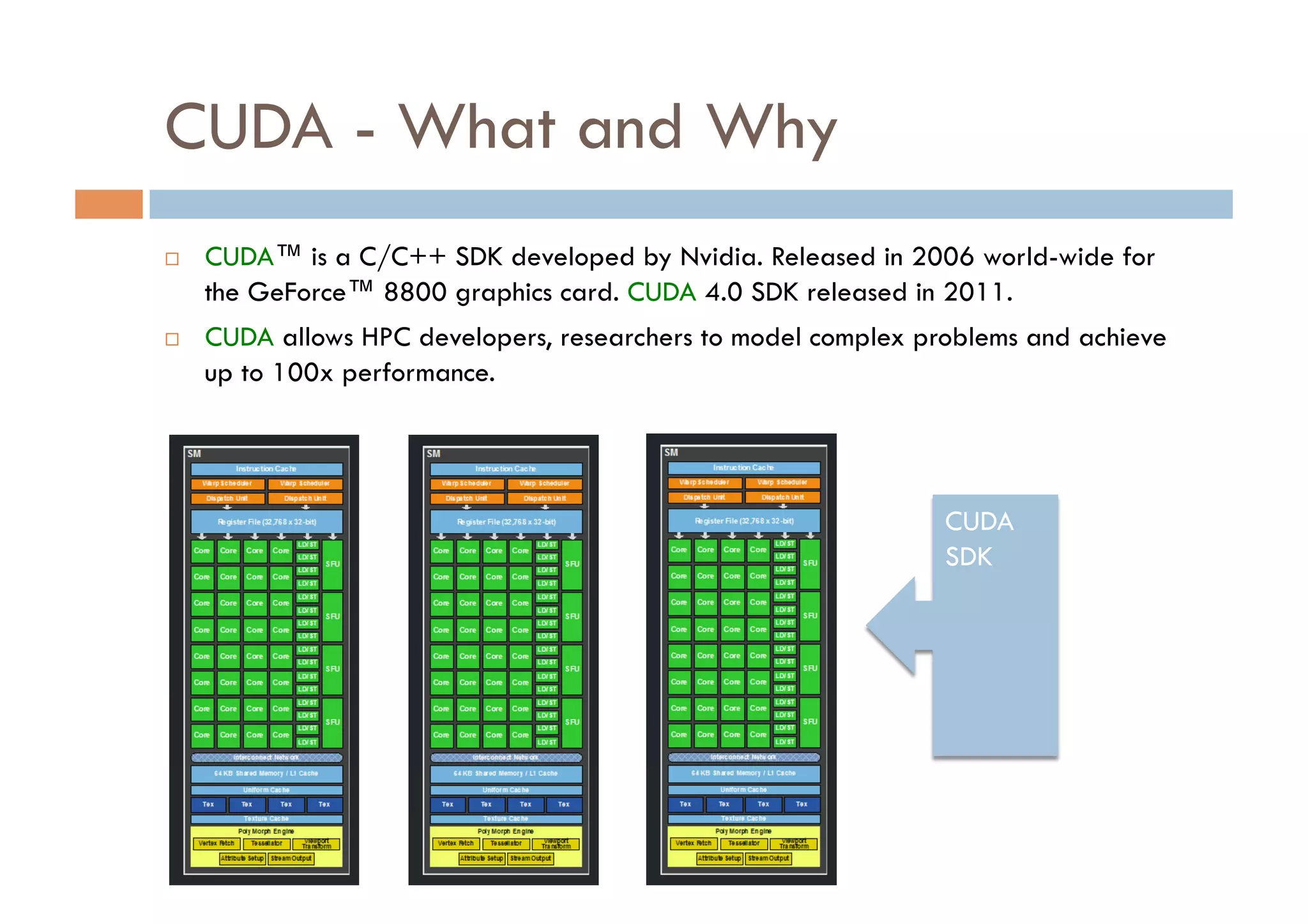
    CUDA™ is a C/C++ SDK developed by Nvidia. Released in 2006 world-wide for
     the GeForce™ 8800 graphics card. CUDA 4.0 SDK released in 2011.
    CUDA allows HPC developers, researchers to model complex problems and achieve
     up to 100x performance.


                                                                CUDA
                                                                SDK
Nvidia GPUs FPS
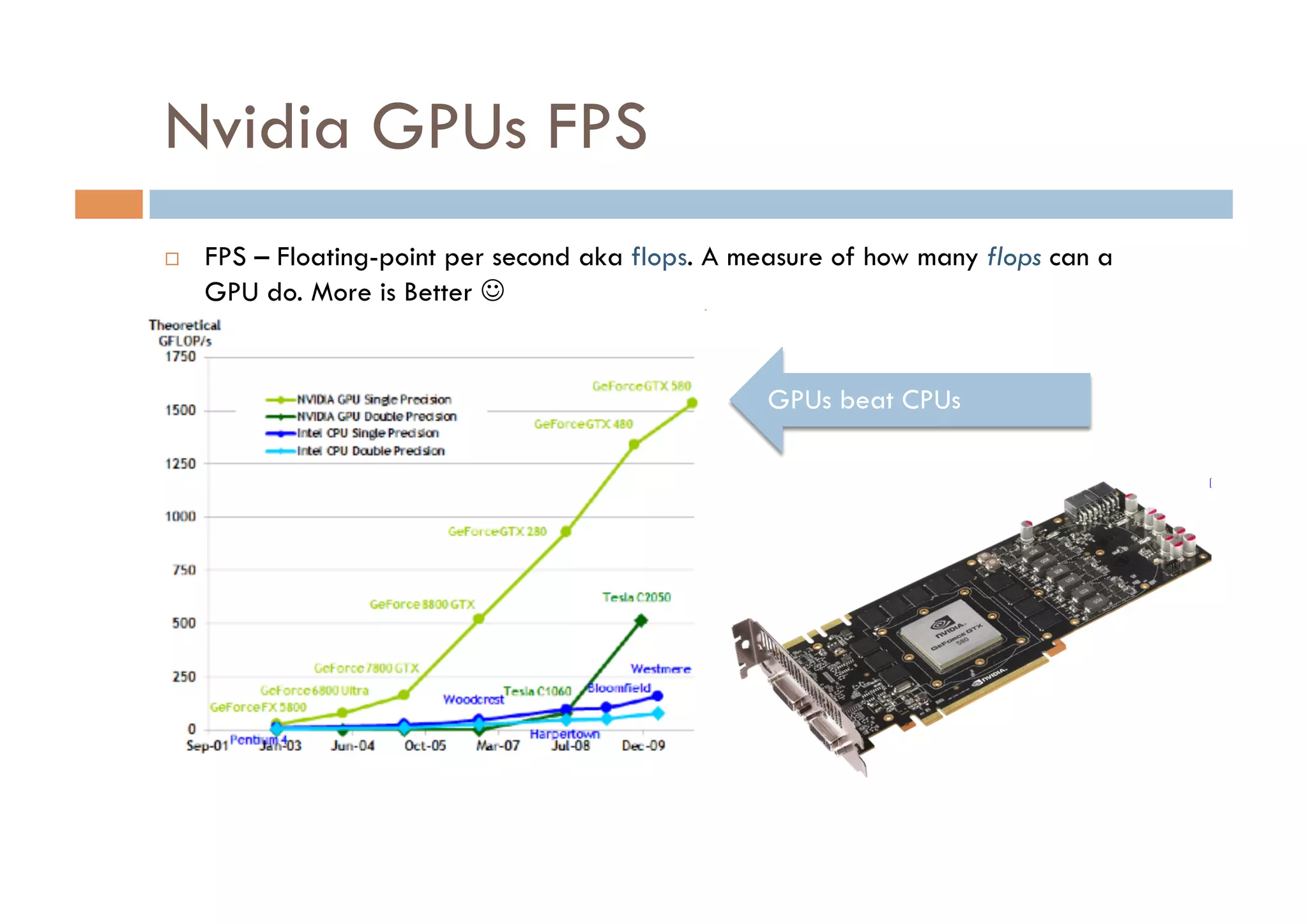
    FPS – Floating-point per second aka flops. A measure of how many flops can a
     GPU do. More is Better 


                                                    GPUs beat CPUs
Nvidia GPUs Memory Bandwidth
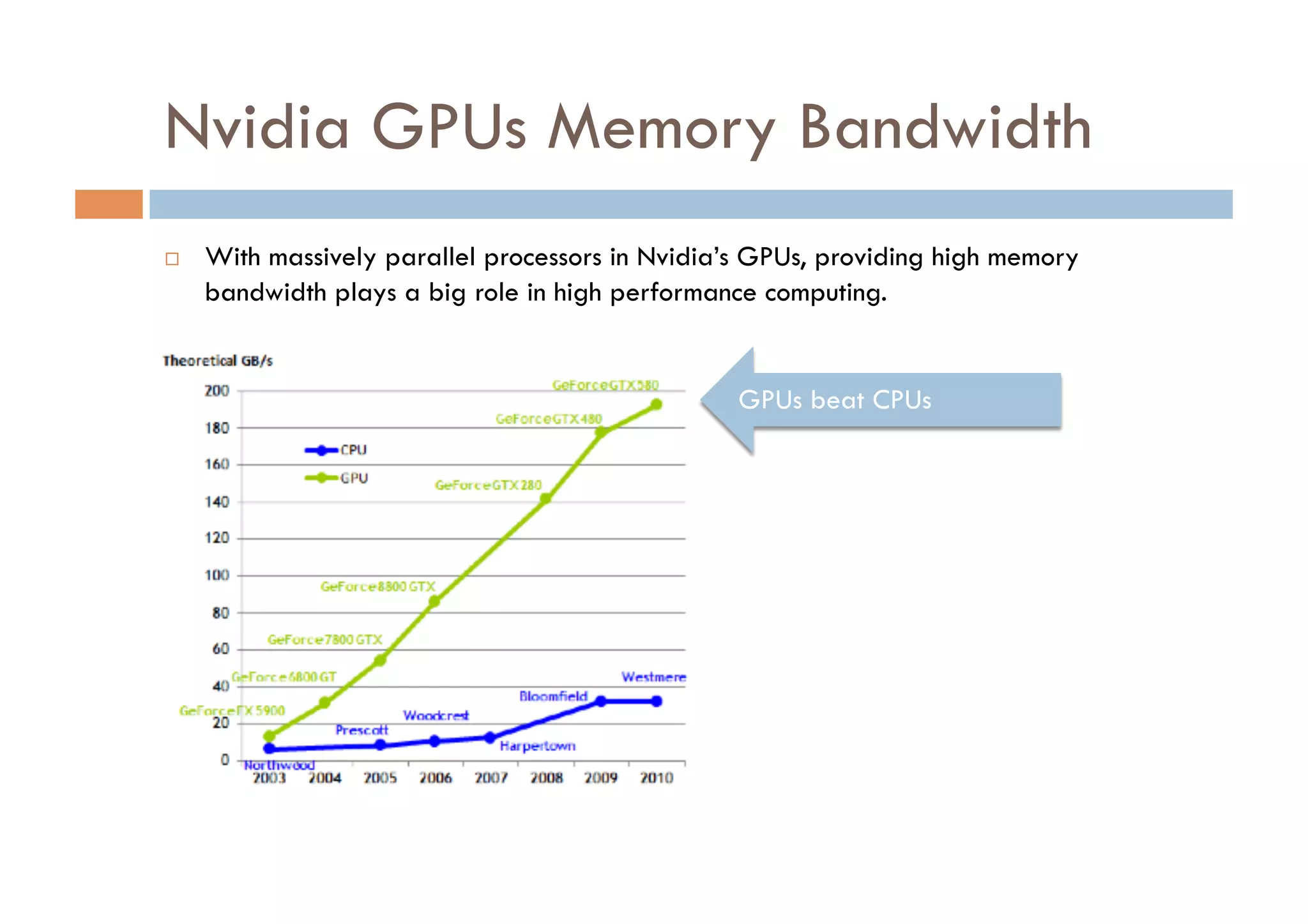
    With massively parallel processors in Nvidia’s GPUs, providing high memory
     bandwidth plays a big role in high performance computing.


                                                  GPUs beat CPUs
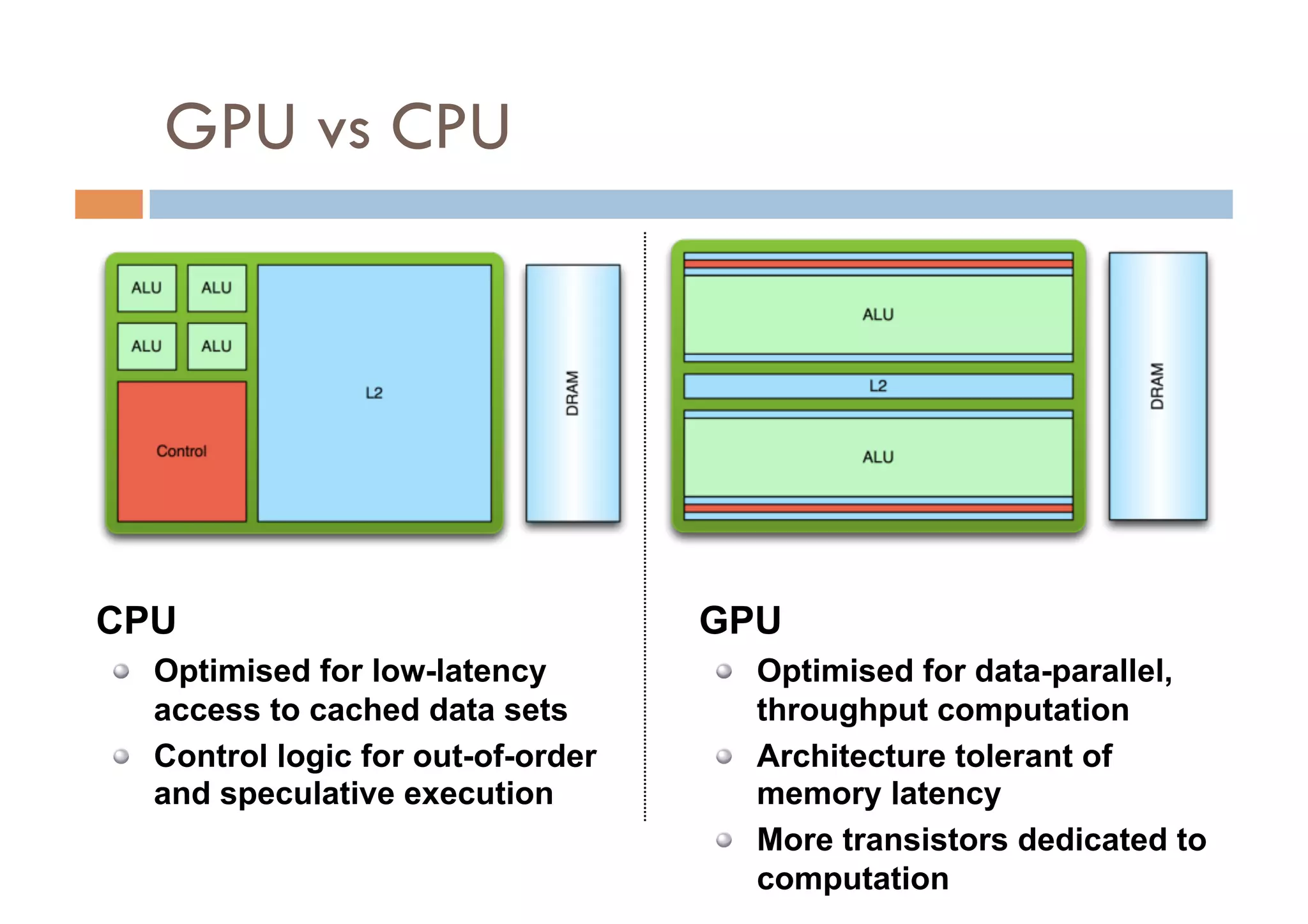
GPU vs CPU


CPU                                  GPU
"   Optimised for low-latency        "   Optimised for data-parallel,
    access to cached data sets           throughput computation
"   Control logic for out-of-order   "   Architecture tolerant of
    and speculative execution            memory latency
                                     "   More transistors dedicated to
                                         computation
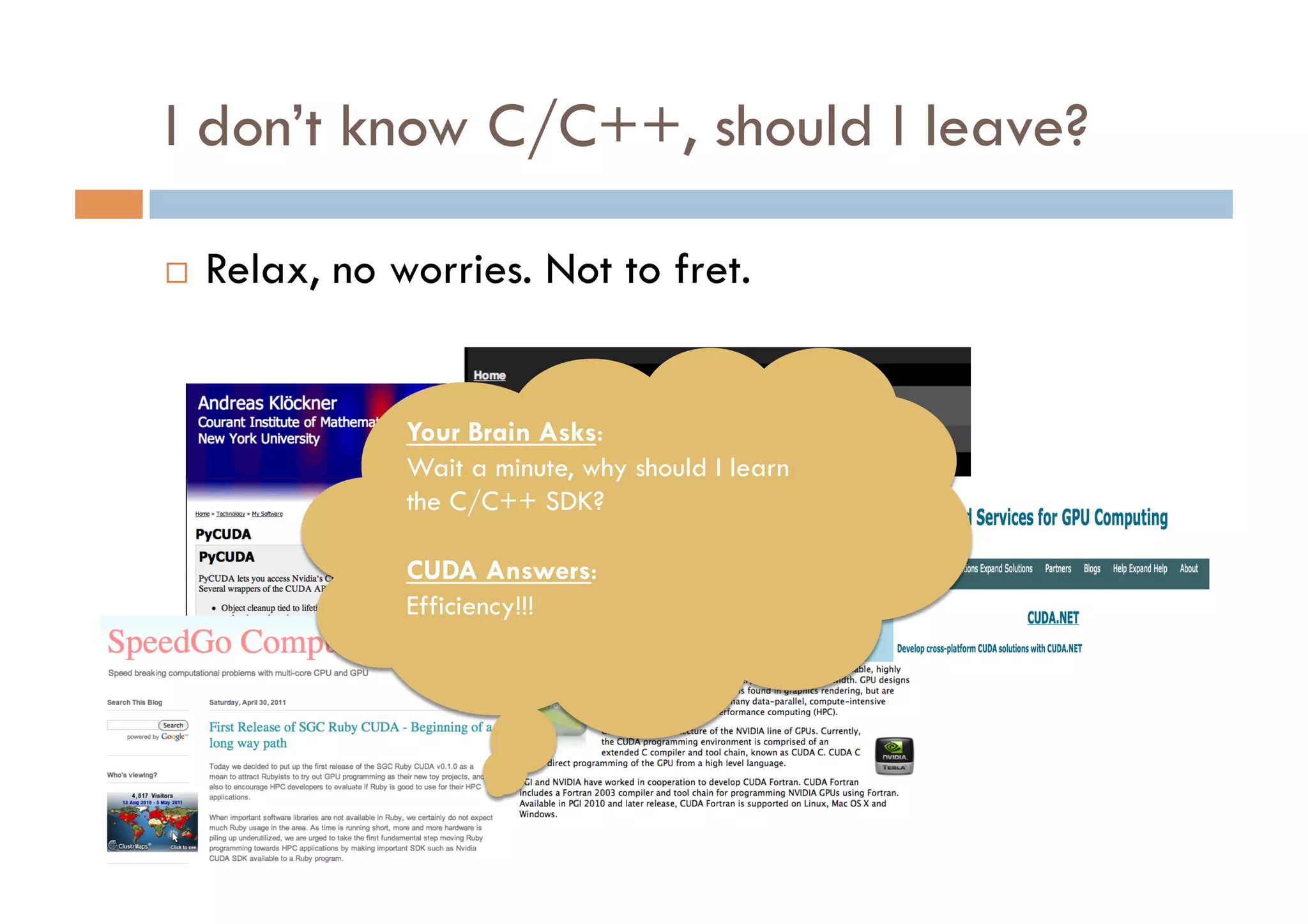
I don’t know C/C++, should I leave?

    Relax, no worries. Not to fret.


                Your Brain Asks:
                Wait a minute, why should I learn
                the C/C++ SDK?

                CUDA Answers:
                Efficiency!!!
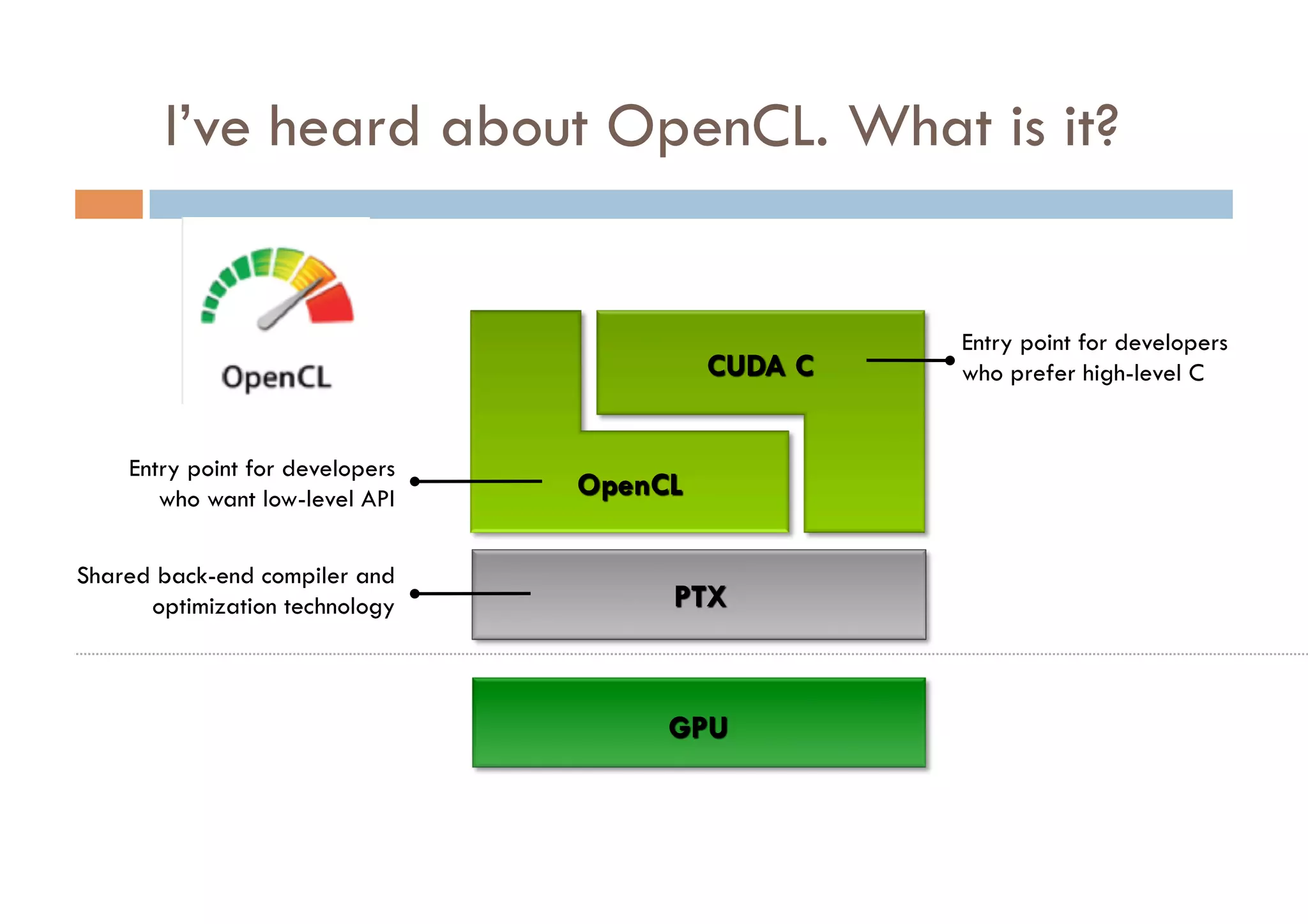
I’ve heard about OpenCL. What is it?


                                     Entry point for developers
                                     who prefer high-level C


    Entry point for developers
       who want low-level API

Shared back-end compiler and
      optimization technology
What do I need to begin with CUDA?

    A Nvidia CUDA enabled graphics card e.g. Fermi
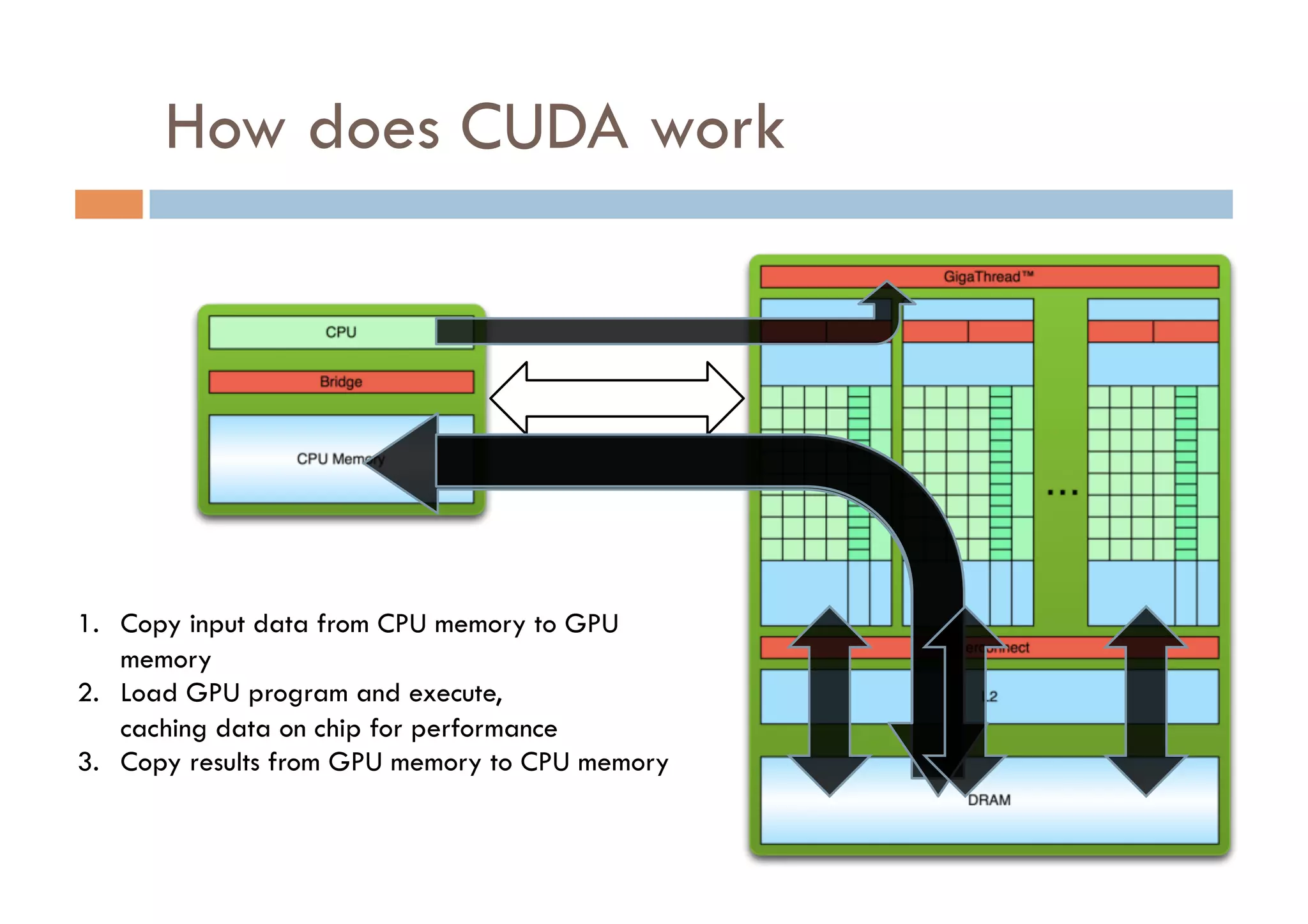
How does CUDA work


                                       PCI Bus


1.  Copy input data from CPU memory to GPU
    memory
2.  Load GPU program and execute,
    caching data on chip for performance
3.  Copy results from GPU memory to CPU memory
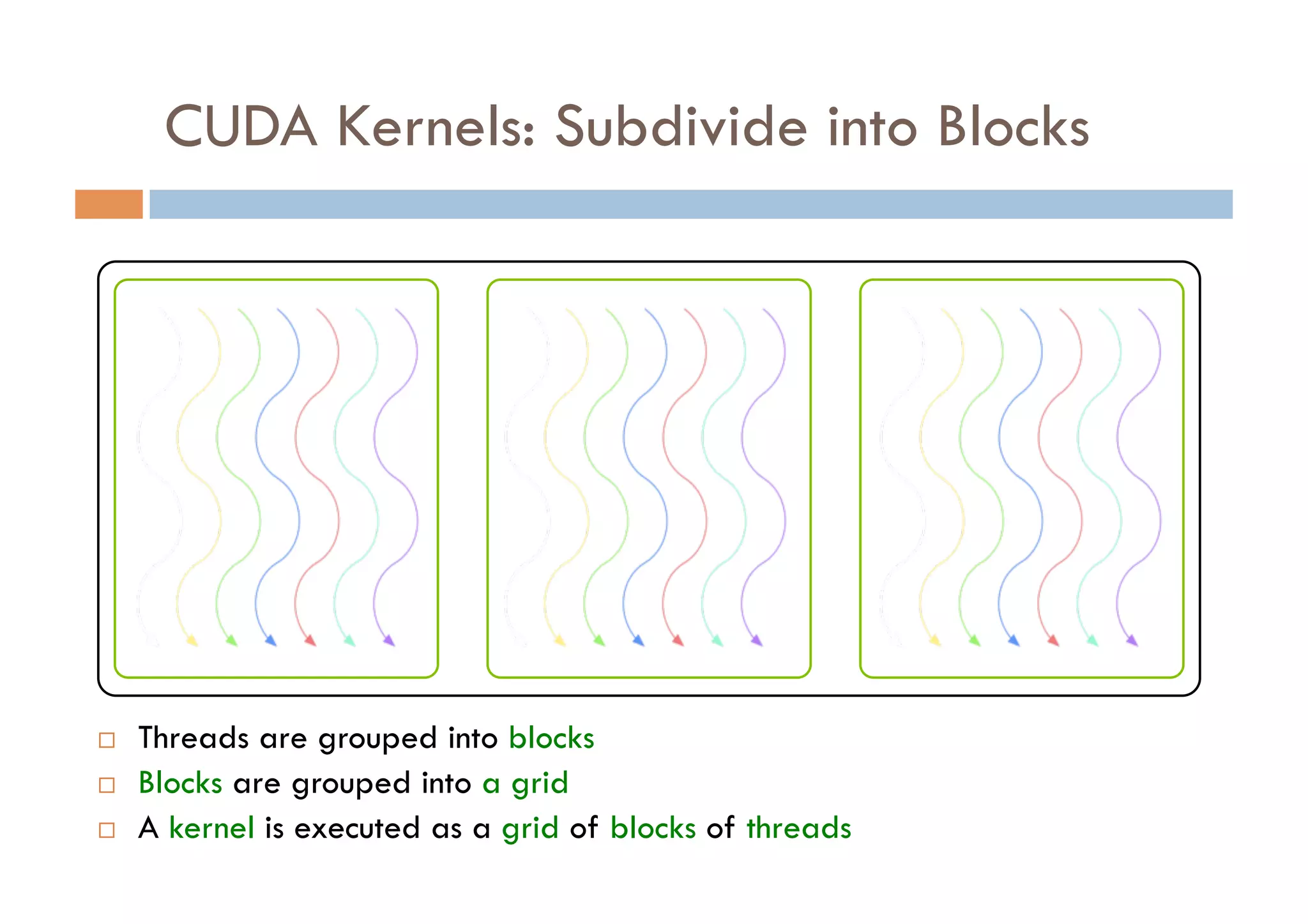
CUDA Kernels: Subdivide into Blocks


    Threads are grouped into blocks
    Blocks are grouped into a grid
    A kernel is executed as a grid of blocks of threads
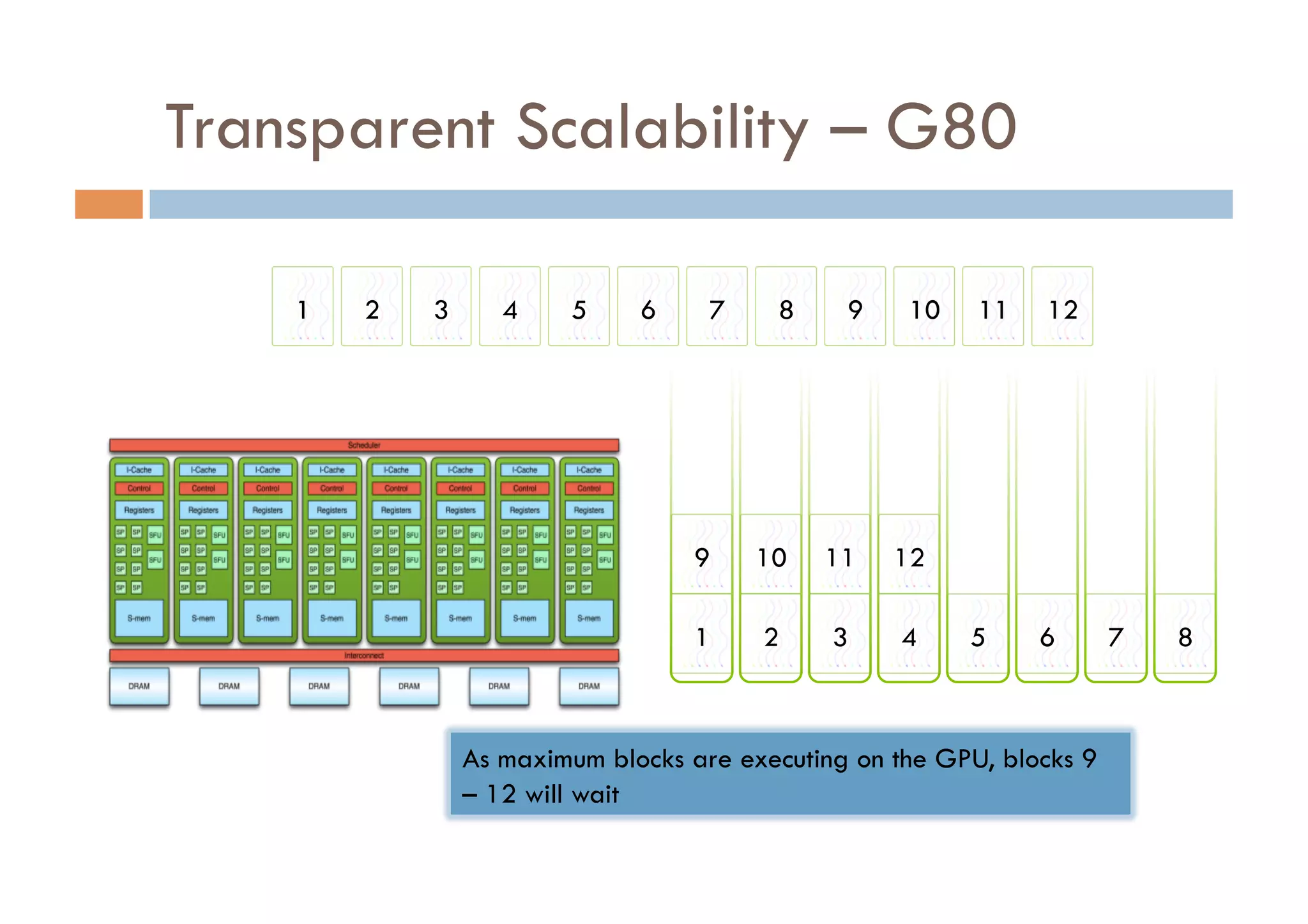
Transparent Scalability – G80

    1   2   3      4    5     6     7    8     9    10    11   12


                                  9     10   11    12

                                  1     2     3    4     5     6       7   8


                As maximum blocks are executing on the GPU, blocks 9
                – 12 will wait
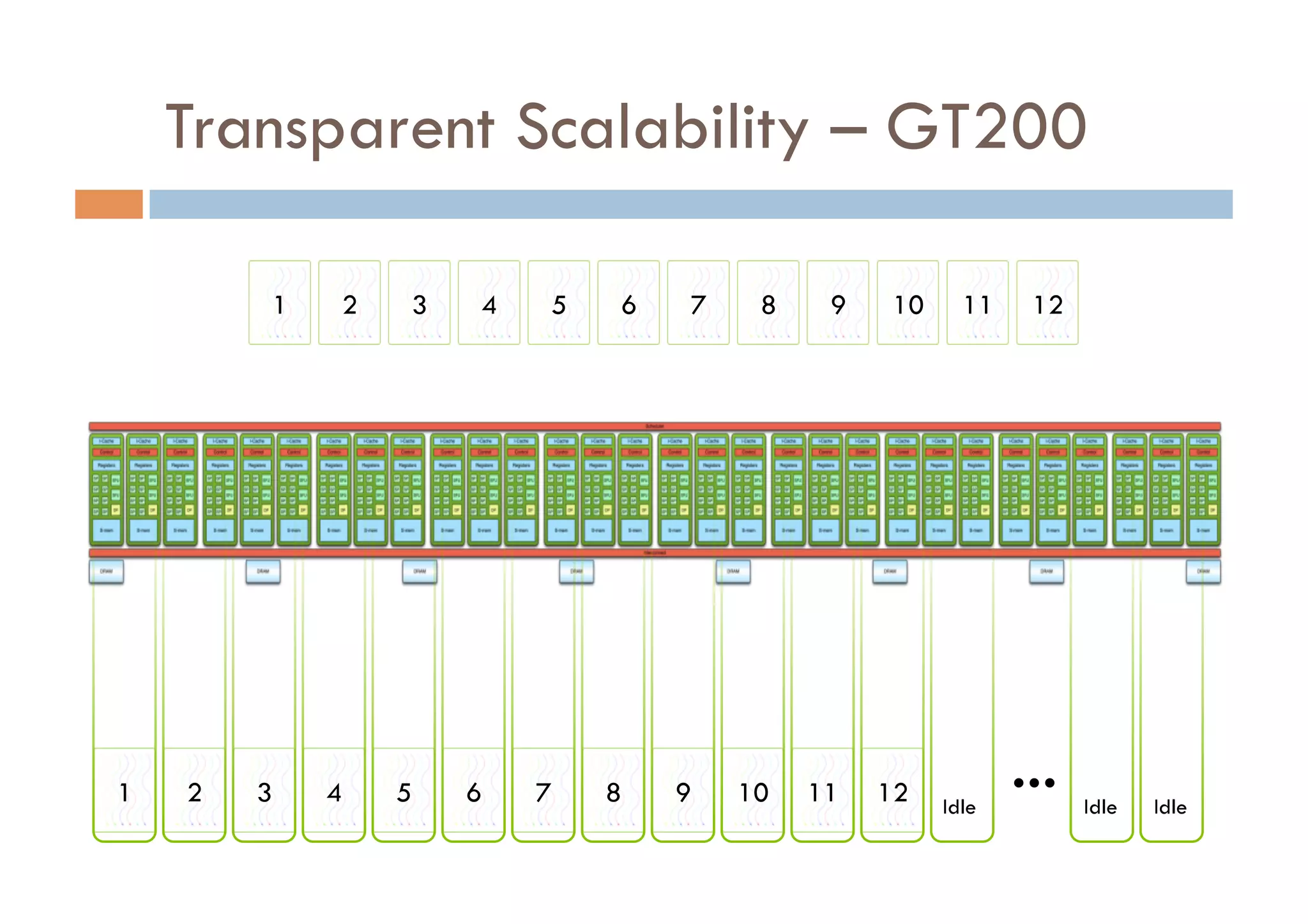
Transparent Scalability – GT200

        1   2   3   4   5   6   7    8    9   10     11    12


1   2   3   4   5   6   7   8   9   10   11   12   Idle
                                                          ...   Idle   Idle
Arrays of Parallel Threads
   ALL threads run the same kernel code
   Each thread has an ID that’s used to compute

    address & make control decisions
Block 0                                                     Block (N -1)

0       1       2       3       4      5       6     7      0       1       2       3       4      5       6     7


 …                                                           …
unsigned int tid = threadIdx.x + blockIdx.x * blockDim.x;   unsigned int tid = threadIdx.x + blockIdx.x * blockDim.x;

    int shifted = input_array[tid] + shift_amount;              int shifted = input_array[tid] + shift_amount;
    if ( shifted > alphabet_max )                               if ( shifted > alphabet_max )
      shifted = shifted % (alphabet_max + 1);                     shifted = shifted % (alphabet_max + 1);

 output_array[tid] = shifted;                                output_array[tid] = shifted;
…                                                           …
                                    Parallel code                                                Parallel code
Compiling a CUDA program
            C/C++ CUDA    float4 me = gx[gtid];
                          me.x += me.y * me.z;
            Application
                                                   •    Parallel Thread
                                                        eXecution (PTX)‫‏‬
                                                         –  Virtual Machine
              NVCC              CPU Code                    and ISA
                                                         –  Programming
                                                            model
Virtual      PTX Code                                    –  Execution
                                                            resources and
                                                            state
          PTX to Target       ld.global.v4.f32   {$f1,$f3,$f5,$f7}, [$r9+0];
                              mad.f32            $f1, $f5, $f3, $f1;
             Compiler


      G80       …       GPU

          Target code
Example: Block Cypher
void host_shift_cypher(unsigned int *input_array,    __global__ void shift_cypher(unsigned int
    unsigned int *output_array, unsigned int             *input_array, unsigned int *output_array,
    shift_amount, unsigned int alphabet_max,             unsigned int shift_amount, unsigned int
    unsigned int array_length)	
                         alphabet_max, unsigned int array_length)	
{	
                                                  {	
  for(unsigned int i=0;i<array_length;i++)	
           unsigned int tid = threadIdx.x + blockIdx.x *
                                                          blockDim.x;	
 {	
                                                       int shifted = input_array[tid] + shift_amount;	
       int element = input_array[i];	
                                                       if ( shifted > alphabet_max )	
       int shifted = element + shift_amount;	
                                                           	
shifted = shifted % (alphabet_max + 1);	
       if(shifted > alphabet_max)	
       {	
                                                       output_array[tid] = shifted;	
         shifted = shifted % (alphabet_max + 1);	
                                                     }	
       }	
       output_array[i] = shifted;	
                                                     Int main() {	
  }	
                                                     dim3 dimGrid(ceil(array_length)/block_size);	
}	
                                                     dim3 dimBlock(block_size);	
Int main() {	
                                                     shift_cypher<<<dimGrid,dimBlock>>>(input_array,
host_shift_cypher(input_array, output_array,
                                                          output_array, shift_amount, alphabet_max,
    shift_amount, alphabet_max, array_length);	
                                                          array_length);	
}	
                                                     }	
                    CPU Program                                       GPU Program
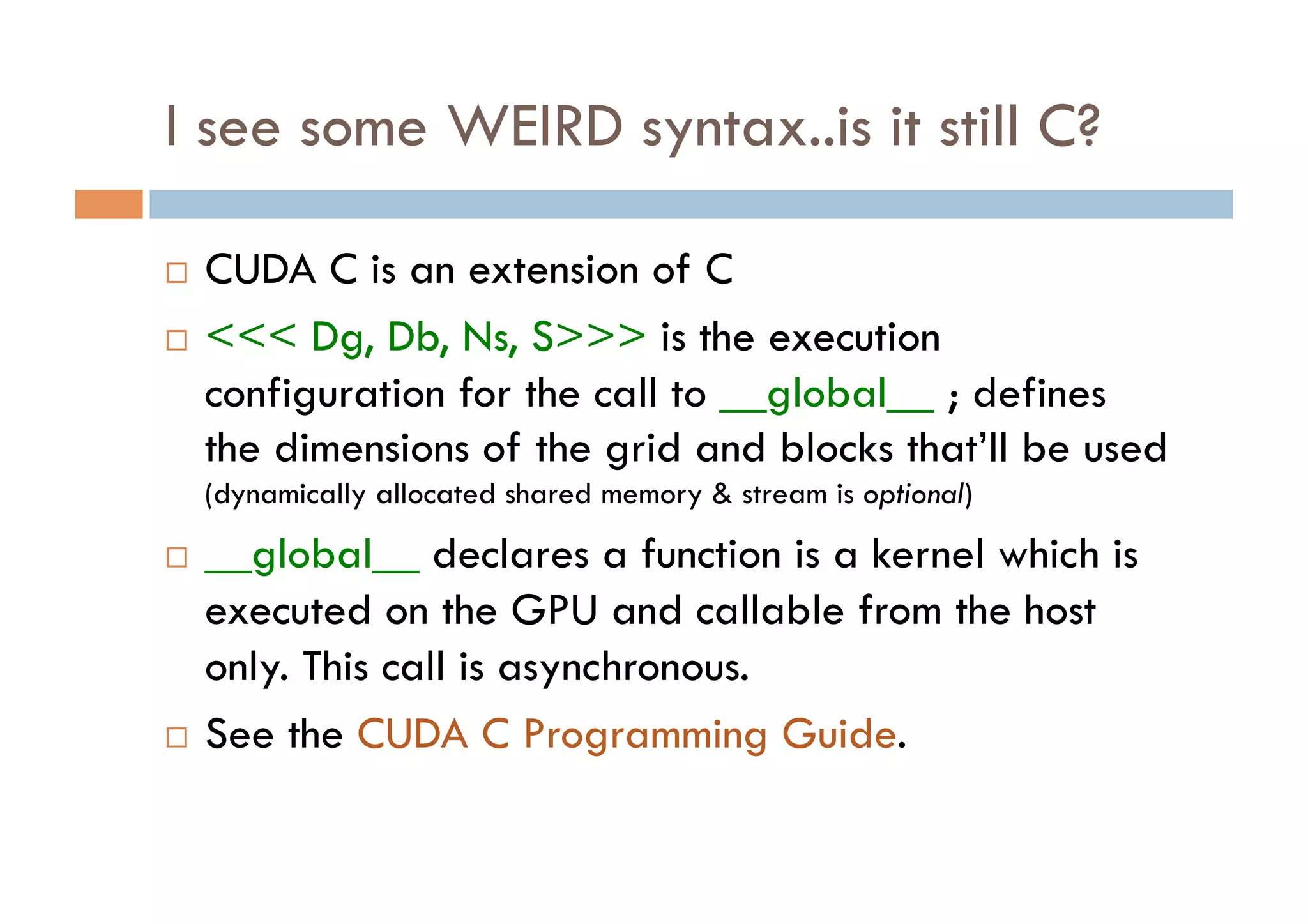
I see some WEIRD syntax..is it still C?

  CUDA C is an extension of C
  <<< Dg, Db, Ns, S>>> is the execution

   configuration for the call to __global__ ; defines
   the dimensions of the grid and blocks that’ll be used
     (dynamically allocated shared memory & stream is optional)
  __global__ declares a function is a kernel which is
   executed on the GPU and callable from the host
   only. This call is asynchronous.
  See the CUDA C Programming Guide.
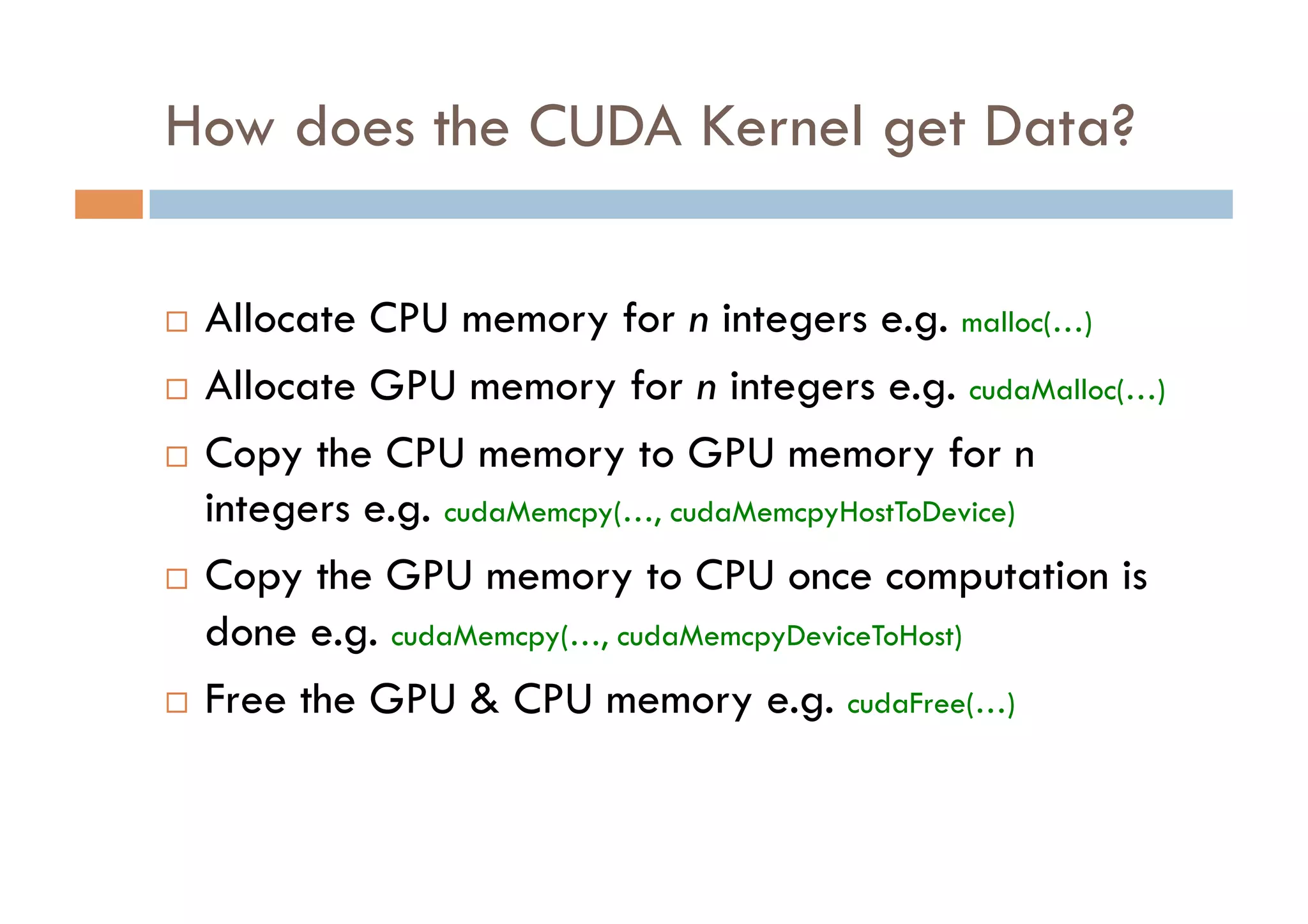
How does the CUDA Kernel get Data?

  Allocate CPU memory for n integers e.g. malloc(…)
  Allocate GPU memory for n integers e.g. cudaMalloc(…)

  Copy the CPU memory to GPU memory for n
   integers e.g. cudaMemcpy(…, cudaMemcpyHostToDevice)
  Copy the GPU memory to CPU once computation is

   done e.g. cudaMemcpy(…, cudaMemcpyDeviceToHost)
  Free the GPU & CPU memory e.g. cudaFree(…)
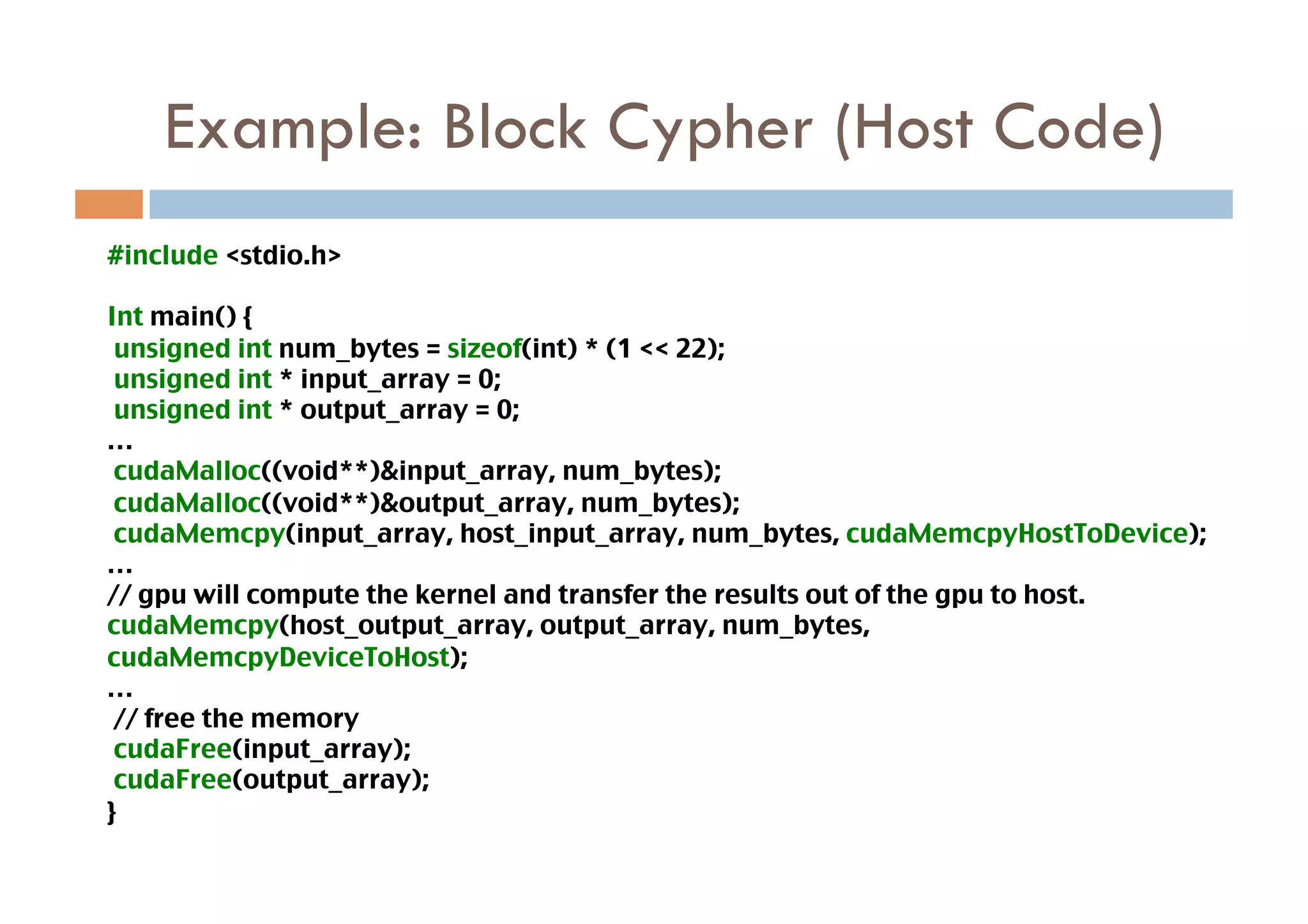
Example: Block Cypher (Host Code)
#include <stdio.h>	

Int main() {	
 unsigned int num_bytes = sizeof(int) * (1 << 22); 	
 unsigned int * input_array = 0;	
 unsigned int * output_array = 0;	
…	
 cudaMalloc((void**)&input_array, num_bytes);	
 cudaMalloc((void**)&output_array, num_bytes);	
 cudaMemcpy(input_array, host_input_array, num_bytes, cudaMemcpyHostToDevice);	
…	
// gpu will compute the kernel and transfer the results out of the gpu to host.	
cudaMemcpy(host_output_array, output_array, num_bytes,
cudaMemcpyDeviceToHost);	
…	
 // free the memory	
 cudaFree(input_array);	
 cudaFree(output_array);	
}
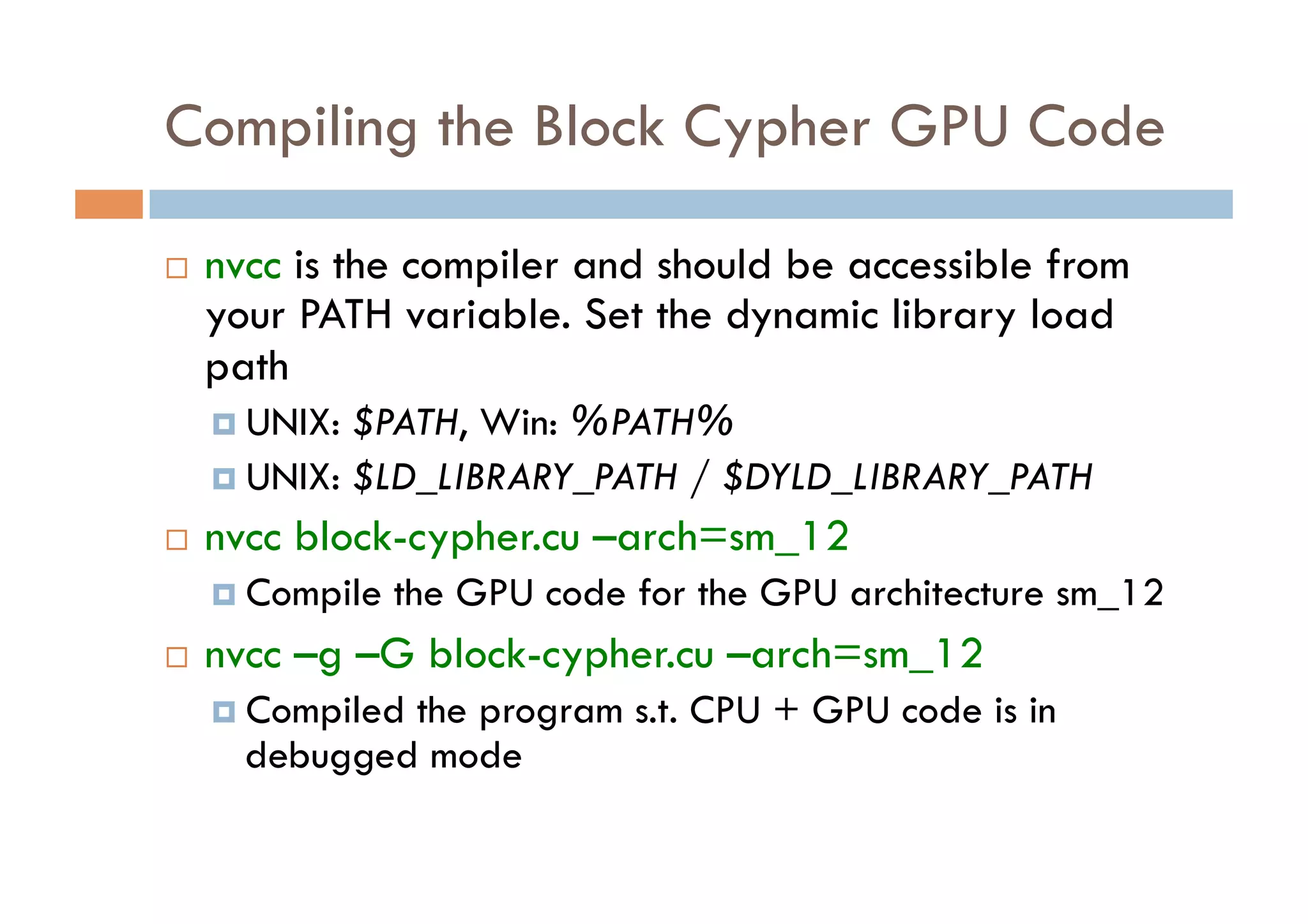
Compiling the Block Cypher GPU Code

    nvcc is the compiler and should be accessible from
     your PATH variable. Set the dynamic library load
     path
       UNIX: $PATH, Win: %PATH%
       UNIX: $LD_LIBRARY_PATH / $DYLD_LIBRARY_PATH

    nvcc block-cypher.cu –arch=sm_12
       Compile   the GPU code for the GPU architecture sm_12
    nvcc –g –G block-cypher.cu –arch=sm_12
       Compiled
               the program s.t. CPU + GPU code is in
       debugged mode
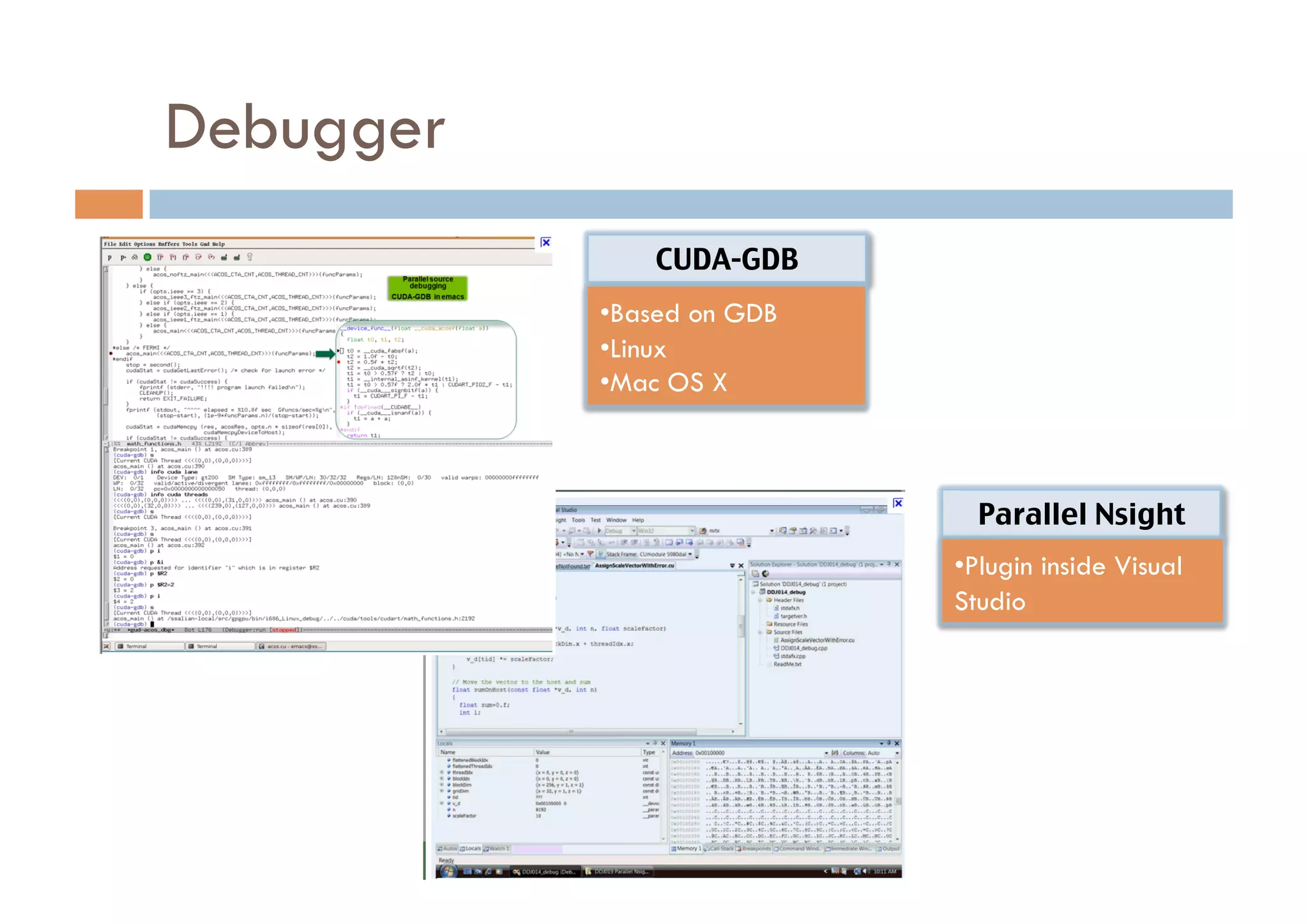
Debugger
               CUDA-GDB	
           • Based on GDB
           • Linux
           • Mac OS X


                              Parallel Nsight	
                            • Plugin inside Visual
                            Studio
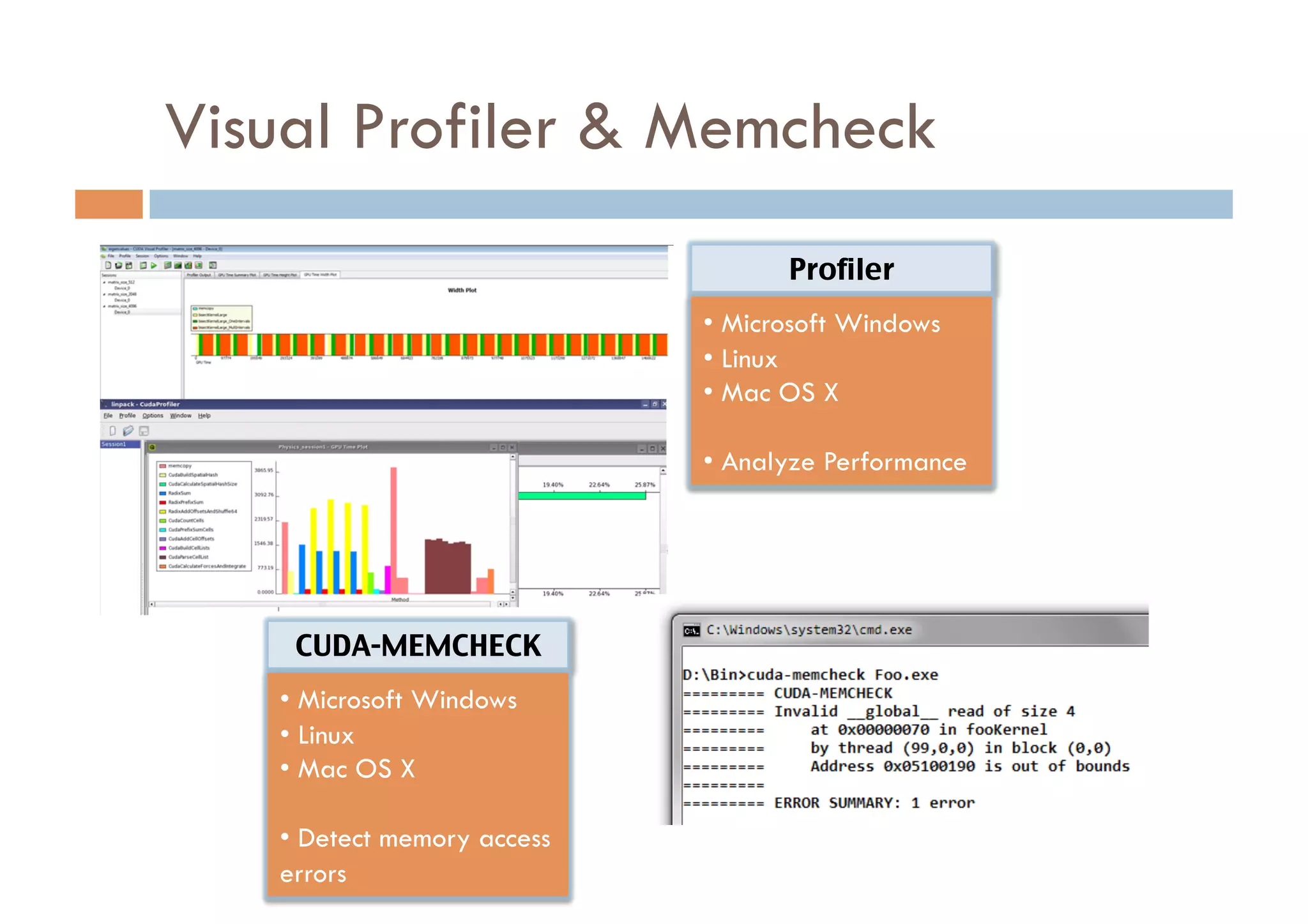
Visual Profiler & Memcheck
                                    Profiler	
                             •  Microsoft Windows
                             •  Linux
                             •  Mac OS X

                             •  Analyze Performance


    CUDA-MEMCHECK	
   •  Microsoft Windows
   •  Linux
   •  Mac OS X

   •  Detect memory access
   errors
Hints
    Think about producing a serial algorithm that can
     execute correctly on a CPU
    Think about producing a parallel (CUDA/OpenCL)
     algorithm from that serial algorithm
    Obtain a initial run time (call it gold standard?)
       Use
          the profiler to profile this initial run (Typically its quite
       bad )
    Fine tune your code to take advantage of shared
     memory, improving memory coalescing, reduce shared
     memory conflicts etc (Consult the best practices guide &
     SDK)
       Use   the profiler to conduct cross comparisons
Hints (Not exhaustive!)
    Be aware of the trade offs when your kernel becomes
     too complicated:
       If you noticed the kernel has a lot of local (thread) variables
        e.g. int i, float j : register spilling
       If you noticed the run time is still slow EVEN AFTER you’ve
        used shared memory, re-assess the memory access patterns :
        shared memory conflicts
       TRY to reduce the number of conditionals e.g. Ifs : thread
        divergence
       TRY to unroll ANY loops in the kernel code e.g. #pragma
        unroll n
       Don’t use thread blocks that are not a multiple of warpSize.
Other cool things in the CUDA SDK 4.0
    GPUDirect
    Unified Virtual Address Space
    Multi-GPU
         P2P Memory Access/Copy (gels with the UVA)
    Concurrent Execution
         Kernel + Data
         Streams, Events
    GPU Memories
         Shared, Texture, Surface, Constant, Registers, Portable, Write-combining, Page-locked/
          Pinned
    OpenGL, Direct3D interoperability
    Atomic functions, Fast Math Functions
    Dynamic Global Memory Allocation (in-kernel)
         Determine how much the device supports e.g. cudaDeviceGetLimit
         Set it before you launch the kernel e.g. cudaDeviceSetLimit
         Free it!
Additional Resources
    CUDA FAQ (http://tegradeveloper.nvidia.com/cuda-faq)
    CUDA Tools & Ecosystem (http://tegradeveloper.nvidia.com/cuda-tools-ecosystem)
    CUDA Downloads (http://tegradeveloper.nvidia.com/cuda-downloads)
    NVIDIA Forums (http://forums.nvidia.com/index.php?showforum=62)
    GPGPU (http://gpgpu.org )
    CUDA By Example (
     http://tegradeveloper.nvidia.com/content/cuda-example-introduction-general-purpose-gpu-
     programming-0)
         Jason Sanders & Edward Kandrot
    GPU Computing Gems Emerald Edition (
     http://www.amazon.com/GPU-Computing-Gems-Emerald-Applications/dp/0123849888/ )
         Editor in Chief: Prof Hwu Wen-Mei
CUDA Libraries
  Visit this site
   http://developer.nvidia.com/cuda-tools-
   ecosystem#Libraries
  Thrust, CUFFT, CUBLAS, CUSP, NPP, OpenCV, GPU

   AI-Tree Search, GPU AI-Path Finding
  A lot of the libraries are hosted in Google Code.

   Many more gems in there too!
Questions?
THANK YOU
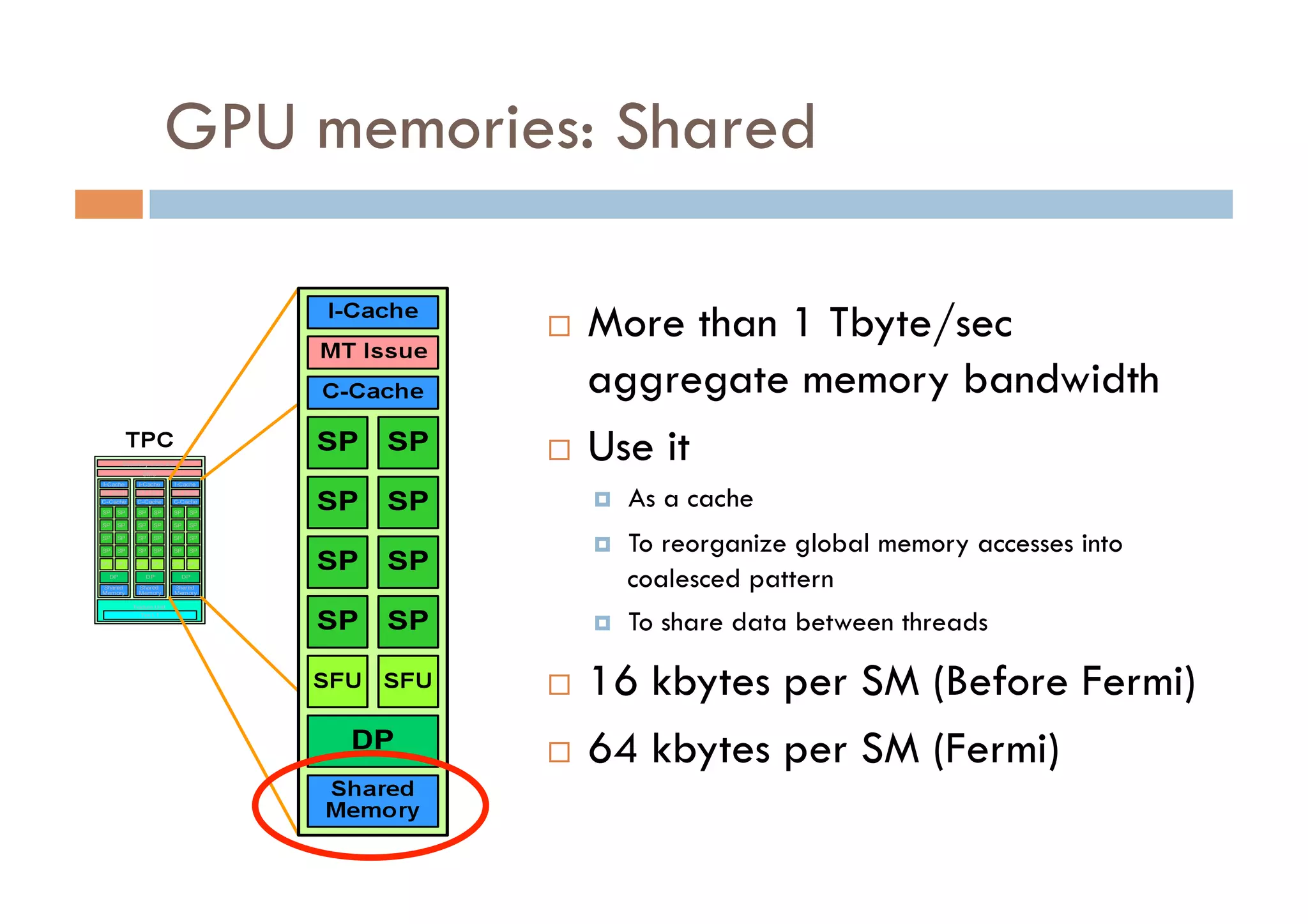
GPU memories: Shared

             More than 1 Tbyte/sec
              aggregate memory bandwidth
             Use it
                    As a cache
                    To reorganize global memory accesses into
                     coalesced pattern
                    To share data between threads

             16 kbytes per SM (Before Fermi)
             64 kbytes per SM (Fermi)
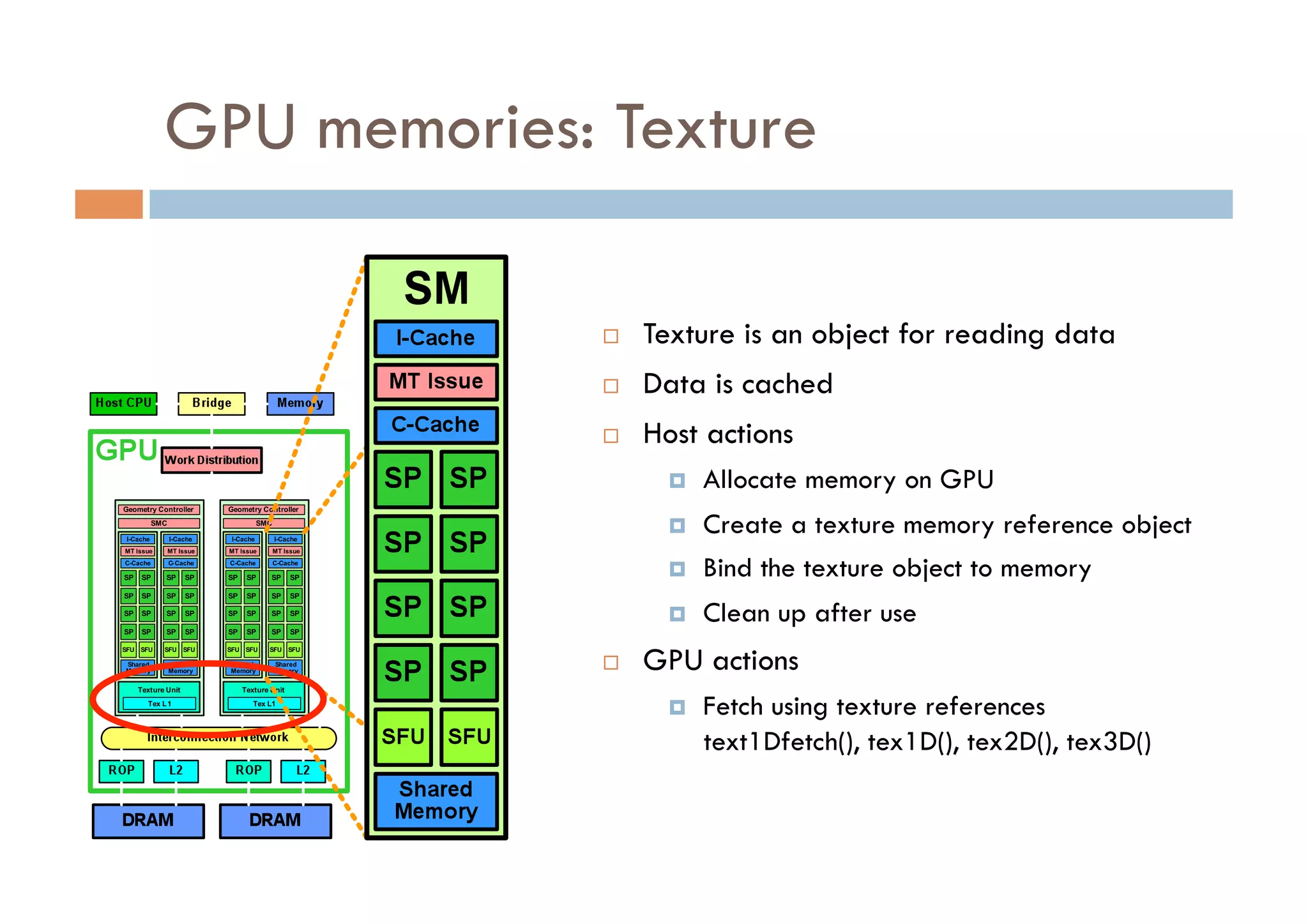
GPU memories: Texture

                  Texture is an object for reading data
                  Data is cached
                  Host actions
                         Allocate memory on GPU
                         Create a texture memory reference object
                         Bind the texture object to memory
                         Clean up after use
                  GPU actions
                         Fetch using texture references
                          text1Dfetch(), tex1D(), tex2D(), tex3D()
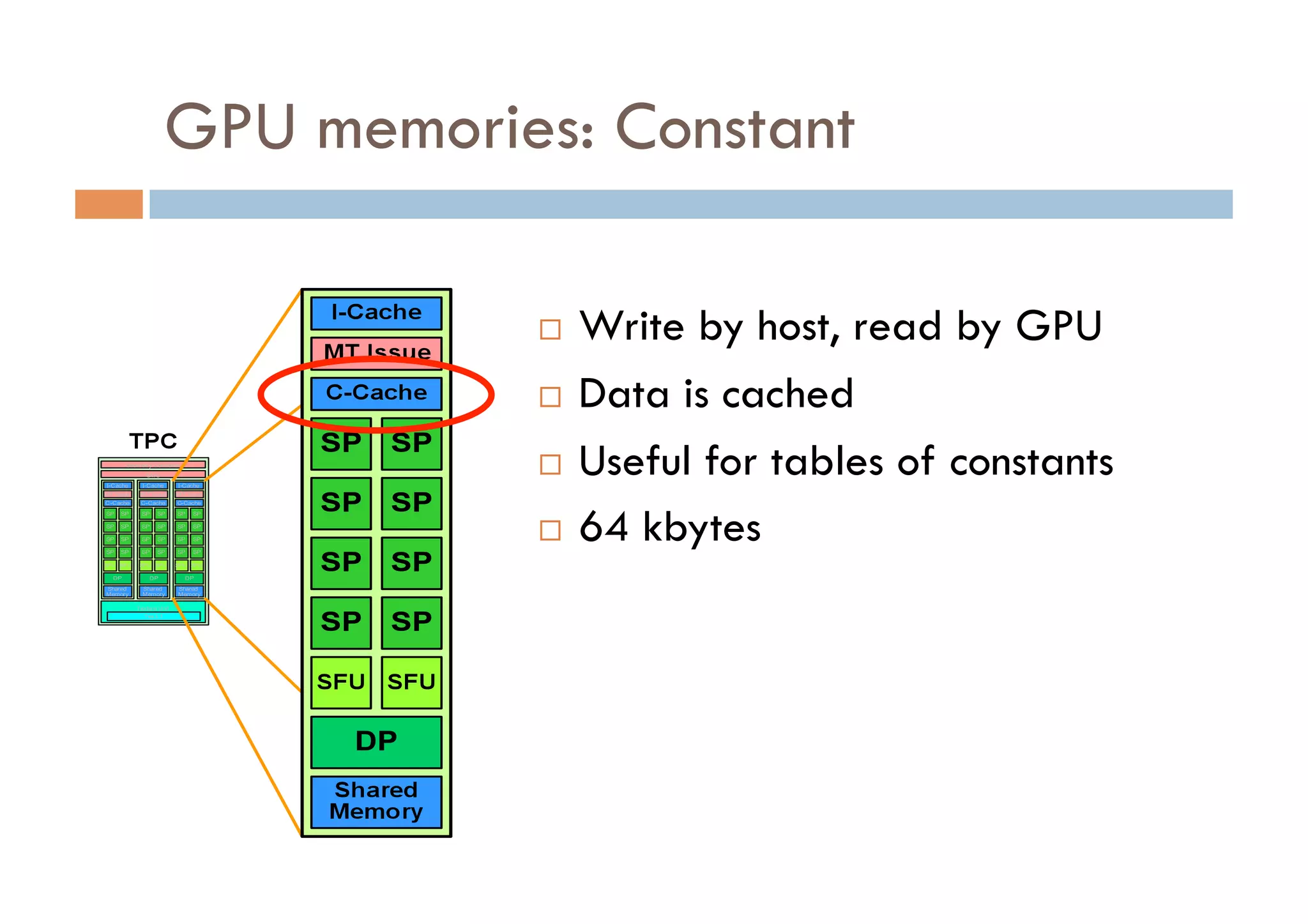
GPU memories: Constant

             Write by host, read by GPU
             Data is cached

             Useful for tables of constants

             64 kbytes

Introduction to CUDA

  • 1.
  • 2.
    CUDA - Whatand Why   CUDA™ is a C/C++ SDK developed by Nvidia. Released in 2006 world-wide for the GeForce™ 8800 graphics card. CUDA 4.0 SDK released in 2011.   CUDA allows HPC developers, researchers to model complex problems and achieve up to 100x performance. CUDA SDK
  • 3.
    Nvidia GPUs FPS   FPS – Floating-point per second aka flops. A measure of how many flops can a GPU do. More is Better  GPUs beat CPUs
  • 4.
    Nvidia GPUs MemoryBandwidth   With massively parallel processors in Nvidia’s GPUs, providing high memory bandwidth plays a big role in high performance computing. GPUs beat CPUs
  • 5.
    GPU vs CPU CPU GPU "   Optimised for low-latency "   Optimised for data-parallel, access to cached data sets throughput computation "   Control logic for out-of-order "   Architecture tolerant of and speculative execution memory latency "   More transistors dedicated to computation
  • 6.
    I don’t knowC/C++, should I leave?   Relax, no worries. Not to fret. Your Brain Asks: Wait a minute, why should I learn the C/C++ SDK? CUDA Answers: Efficiency!!!
  • 7.
    I’ve heard aboutOpenCL. What is it? Entry point for developers who prefer high-level C Entry point for developers who want low-level API Shared back-end compiler and optimization technology
  • 8.
    What do Ineed to begin with CUDA?   A Nvidia CUDA enabled graphics card e.g. Fermi
  • 9.
    How does CUDAwork PCI Bus 1.  Copy input data from CPU memory to GPU memory 2.  Load GPU program and execute, caching data on chip for performance 3.  Copy results from GPU memory to CPU memory
  • 10.
    CUDA Kernels: Subdivideinto Blocks   Threads are grouped into blocks   Blocks are grouped into a grid   A kernel is executed as a grid of blocks of threads
  • 11.
    Transparent Scalability –G80 1 2 3 4 5 6 7 8 9 10 11 12 9 10 11 12 1 2 3 4 5 6 7 8 As maximum blocks are executing on the GPU, blocks 9 – 12 will wait
  • 12.
    Transparent Scalability –GT200 1 2 3 4 5 6 7 8 9 10 11 12 1 2 3 4 5 6 7 8 9 10 11 12 Idle ... Idle Idle
  • 13.
    Arrays of ParallelThreads   ALL threads run the same kernel code   Each thread has an ID that’s used to compute address & make control decisions Block 0 Block (N -1) 0 1 2 3 4 5 6 7 0 1 2 3 4 5 6 7 … … unsigned int tid = threadIdx.x + blockIdx.x * blockDim.x; unsigned int tid = threadIdx.x + blockIdx.x * blockDim.x; int shifted = input_array[tid] + shift_amount; int shifted = input_array[tid] + shift_amount; if ( shifted > alphabet_max ) if ( shifted > alphabet_max ) shifted = shifted % (alphabet_max + 1); shifted = shifted % (alphabet_max + 1); output_array[tid] = shifted; output_array[tid] = shifted; … … Parallel code Parallel code
  • 14.
    Compiling a CUDAprogram C/C++ CUDA float4 me = gx[gtid]; me.x += me.y * me.z; Application •  Parallel Thread eXecution (PTX)‫‏‬ –  Virtual Machine NVCC CPU Code and ISA –  Programming model Virtual PTX Code –  Execution resources and state PTX to Target ld.global.v4.f32 {$f1,$f3,$f5,$f7}, [$r9+0]; mad.f32 $f1, $f5, $f3, $f1; Compiler G80 … GPU Target code
  • 15.
    Example: Block Cypher voidhost_shift_cypher(unsigned int *input_array, __global__ void shift_cypher(unsigned int unsigned int *output_array, unsigned int *input_array, unsigned int *output_array, shift_amount, unsigned int alphabet_max, unsigned int shift_amount, unsigned int unsigned int array_length) alphabet_max, unsigned int array_length) { { for(unsigned int i=0;i<array_length;i++) unsigned int tid = threadIdx.x + blockIdx.x * blockDim.x; { int shifted = input_array[tid] + shift_amount; int element = input_array[i]; if ( shifted > alphabet_max ) int shifted = element + shift_amount; shifted = shifted % (alphabet_max + 1); if(shifted > alphabet_max) { output_array[tid] = shifted; shifted = shifted % (alphabet_max + 1); } } output_array[i] = shifted; Int main() { } dim3 dimGrid(ceil(array_length)/block_size); } dim3 dimBlock(block_size); Int main() { shift_cypher<<<dimGrid,dimBlock>>>(input_array, host_shift_cypher(input_array, output_array, output_array, shift_amount, alphabet_max, shift_amount, alphabet_max, array_length); array_length); } } CPU Program GPU Program
  • 16.
    I see someWEIRD syntax..is it still C?   CUDA C is an extension of C   <<< Dg, Db, Ns, S>>> is the execution configuration for the call to __global__ ; defines the dimensions of the grid and blocks that’ll be used (dynamically allocated shared memory & stream is optional)   __global__ declares a function is a kernel which is executed on the GPU and callable from the host only. This call is asynchronous.   See the CUDA C Programming Guide.
  • 17.
    How does theCUDA Kernel get Data?   Allocate CPU memory for n integers e.g. malloc(…)   Allocate GPU memory for n integers e.g. cudaMalloc(…)   Copy the CPU memory to GPU memory for n integers e.g. cudaMemcpy(…, cudaMemcpyHostToDevice)   Copy the GPU memory to CPU once computation is done e.g. cudaMemcpy(…, cudaMemcpyDeviceToHost)   Free the GPU & CPU memory e.g. cudaFree(…)
  • 18.
    Example: Block Cypher(Host Code) #include <stdio.h> Int main() { unsigned int num_bytes = sizeof(int) * (1 << 22); unsigned int * input_array = 0; unsigned int * output_array = 0; … cudaMalloc((void**)&input_array, num_bytes); cudaMalloc((void**)&output_array, num_bytes); cudaMemcpy(input_array, host_input_array, num_bytes, cudaMemcpyHostToDevice); … // gpu will compute the kernel and transfer the results out of the gpu to host. cudaMemcpy(host_output_array, output_array, num_bytes, cudaMemcpyDeviceToHost); … // free the memory cudaFree(input_array); cudaFree(output_array); }
  • 19.
    Compiling the BlockCypher GPU Code   nvcc is the compiler and should be accessible from your PATH variable. Set the dynamic library load path   UNIX: $PATH, Win: %PATH%   UNIX: $LD_LIBRARY_PATH / $DYLD_LIBRARY_PATH   nvcc block-cypher.cu –arch=sm_12   Compile the GPU code for the GPU architecture sm_12   nvcc –g –G block-cypher.cu –arch=sm_12   Compiled the program s.t. CPU + GPU code is in debugged mode
  • 20.
    Debugger CUDA-GDB • Based on GDB • Linux • Mac OS X Parallel Nsight • Plugin inside Visual Studio
  • 21.
    Visual Profiler &Memcheck Profiler •  Microsoft Windows •  Linux •  Mac OS X •  Analyze Performance CUDA-MEMCHECK •  Microsoft Windows •  Linux •  Mac OS X •  Detect memory access errors
  • 22.
    Hints   Think about producing a serial algorithm that can execute correctly on a CPU   Think about producing a parallel (CUDA/OpenCL) algorithm from that serial algorithm   Obtain a initial run time (call it gold standard?)   Use the profiler to profile this initial run (Typically its quite bad )   Fine tune your code to take advantage of shared memory, improving memory coalescing, reduce shared memory conflicts etc (Consult the best practices guide & SDK)   Use the profiler to conduct cross comparisons
  • 23.
    Hints (Not exhaustive!)   Be aware of the trade offs when your kernel becomes too complicated:   If you noticed the kernel has a lot of local (thread) variables e.g. int i, float j : register spilling   If you noticed the run time is still slow EVEN AFTER you’ve used shared memory, re-assess the memory access patterns : shared memory conflicts   TRY to reduce the number of conditionals e.g. Ifs : thread divergence   TRY to unroll ANY loops in the kernel code e.g. #pragma unroll n   Don’t use thread blocks that are not a multiple of warpSize.
  • 24.
    Other cool thingsin the CUDA SDK 4.0   GPUDirect   Unified Virtual Address Space   Multi-GPU   P2P Memory Access/Copy (gels with the UVA)   Concurrent Execution   Kernel + Data   Streams, Events   GPU Memories   Shared, Texture, Surface, Constant, Registers, Portable, Write-combining, Page-locked/ Pinned   OpenGL, Direct3D interoperability   Atomic functions, Fast Math Functions   Dynamic Global Memory Allocation (in-kernel)   Determine how much the device supports e.g. cudaDeviceGetLimit   Set it before you launch the kernel e.g. cudaDeviceSetLimit   Free it!
  • 25.
    Additional Resources   CUDA FAQ (http://tegradeveloper.nvidia.com/cuda-faq)   CUDA Tools & Ecosystem (http://tegradeveloper.nvidia.com/cuda-tools-ecosystem)   CUDA Downloads (http://tegradeveloper.nvidia.com/cuda-downloads)   NVIDIA Forums (http://forums.nvidia.com/index.php?showforum=62)   GPGPU (http://gpgpu.org )   CUDA By Example ( http://tegradeveloper.nvidia.com/content/cuda-example-introduction-general-purpose-gpu- programming-0)   Jason Sanders & Edward Kandrot   GPU Computing Gems Emerald Edition ( http://www.amazon.com/GPU-Computing-Gems-Emerald-Applications/dp/0123849888/ )   Editor in Chief: Prof Hwu Wen-Mei
  • 26.
    CUDA Libraries   Visitthis site http://developer.nvidia.com/cuda-tools- ecosystem#Libraries   Thrust, CUFFT, CUBLAS, CUSP, NPP, OpenCV, GPU AI-Tree Search, GPU AI-Path Finding   A lot of the libraries are hosted in Google Code. Many more gems in there too!
  • 27.
  • 28.
  • 29.
    GPU memories: Shared   More than 1 Tbyte/sec aggregate memory bandwidth   Use it   As a cache   To reorganize global memory accesses into coalesced pattern   To share data between threads   16 kbytes per SM (Before Fermi)   64 kbytes per SM (Fermi)
  • 30.
    GPU memories: Texture   Texture is an object for reading data   Data is cached   Host actions   Allocate memory on GPU   Create a texture memory reference object   Bind the texture object to memory   Clean up after use   GPU actions   Fetch using texture references text1Dfetch(), tex1D(), tex2D(), tex3D()
  • 31.
    GPU memories: Constant   Write by host, read by GPU   Data is cached   Useful for tables of constants   64 kbytes