+
Dr Ramadan Babers
Faculty of Science - Helwan University
Fall - 2018
Introduction
to
Computer
LEC - 5
+
Computer Networks
2
Chapter 5 Outlines
 Introduction
 What is a Network?
 Why do We Need Computer Networks?
 Data Communications
 Components of a data communication system
 Networks
 Physical Structures
 Categories of Networks
 Types of Networks
 Network Bandwidth (BW)
3
Introduction
4
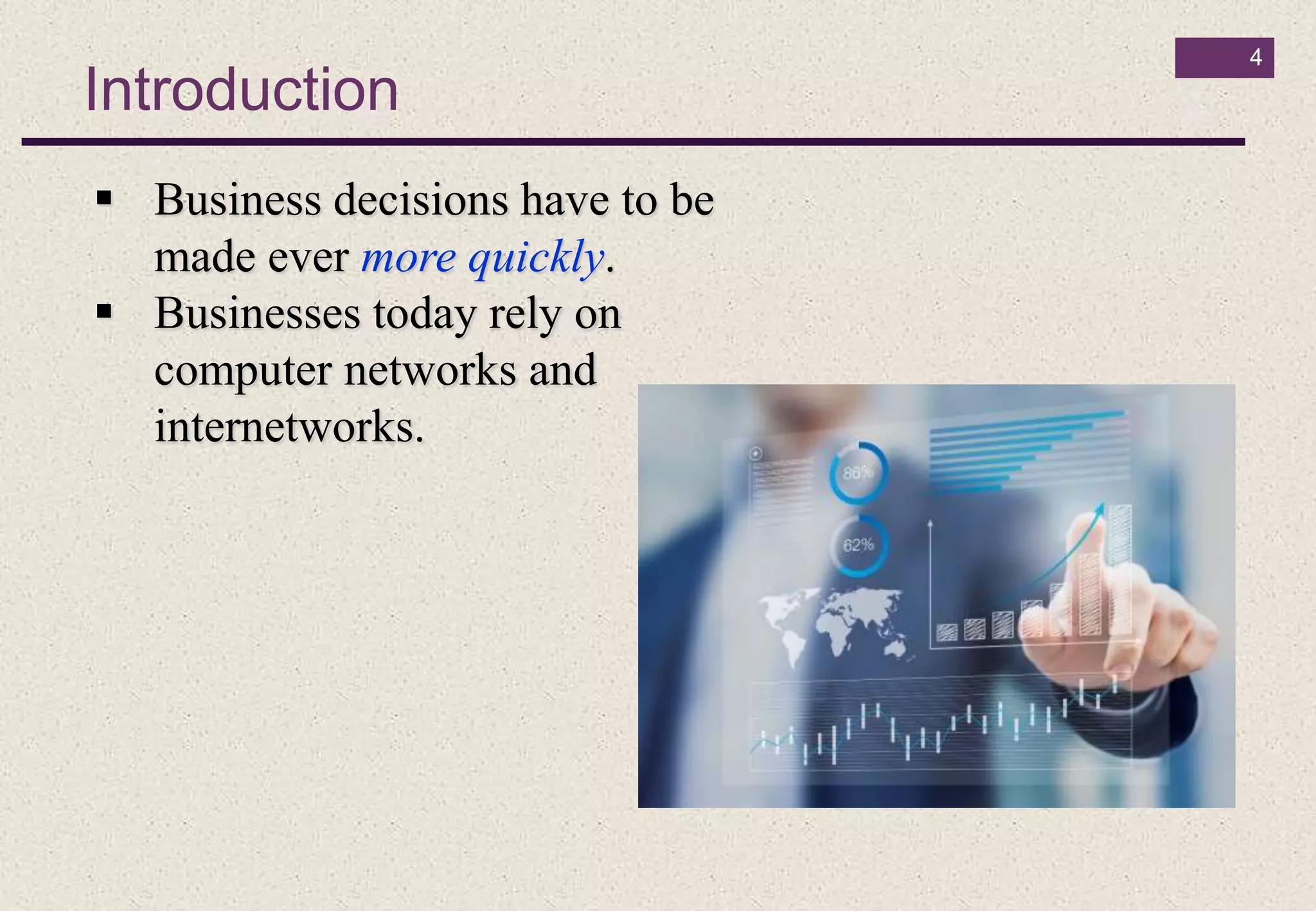
 Business decisions have to be
made ever more quickly.
 Businesses today rely on
computer networks and
internetworks.
What is a Network?
5
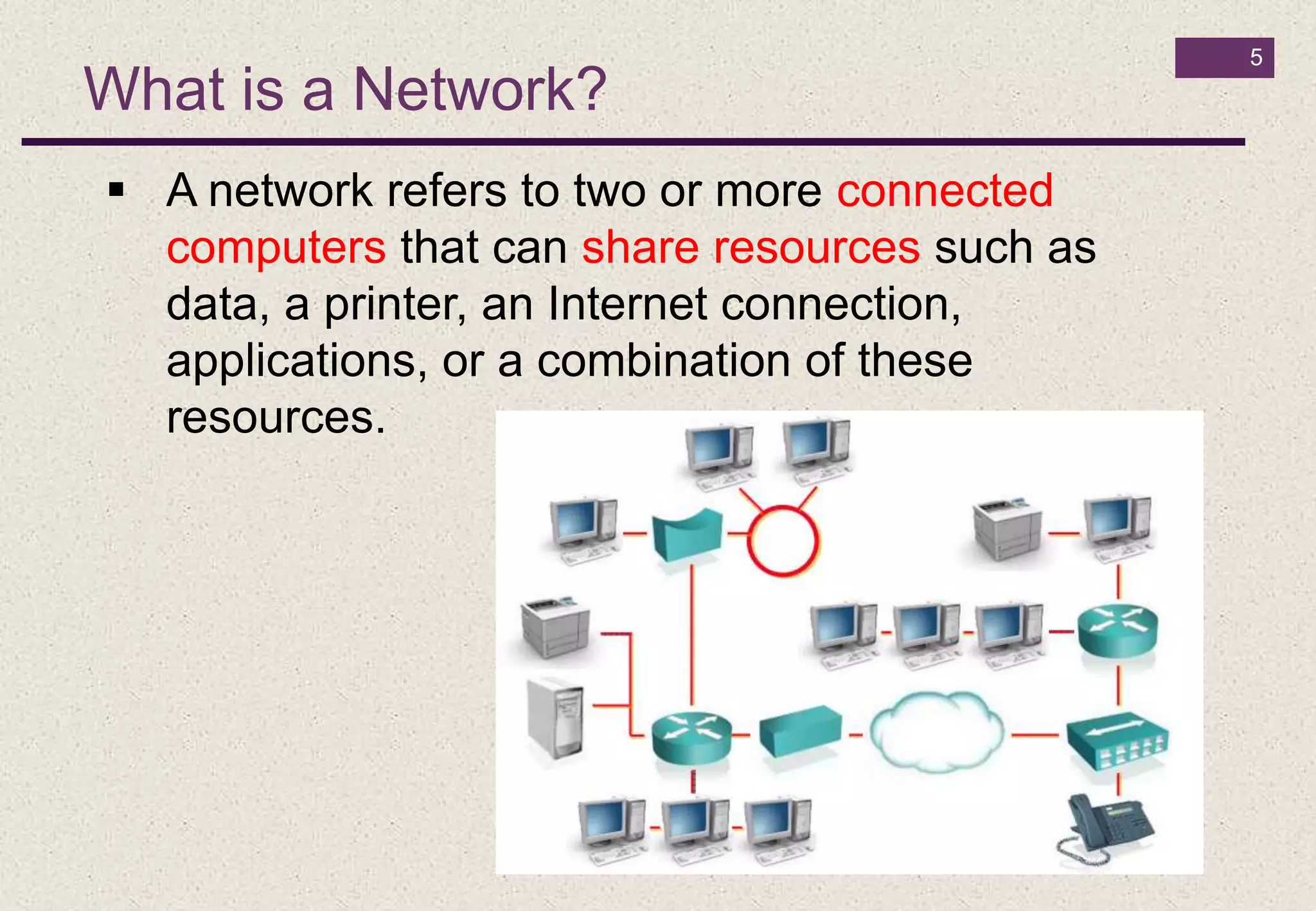
 A network refers to two or more connected
computers that can share resources such as
data, a printer, an Internet connection,
applications, or a combination of these
resources.
Why do We Need Computer Networks?
6
The main reasons for building and using computer networks are:
 Resource sharing: To make all programs, data, and equipment
available for anyone on the network without regard to the physical
location of the resource.
 High reliability: If some computers go down, others may be able
to take over their work. It is very important for military and air
traffic corporations to continue operating when encountering some
hardware problems.
 Cost saving.
 Enhance online communications.
1- Data Communications
7
 Telecommunication means communication at a
distance.
 Data refers to information presented in whatever
form is agreed upon by the parties creating and
using the data.
 Data communications are the exchange of data
between two devices via some form of
transmission medium such as a wire cable.
1- Data Communications (Cont.)
8
The effectiveness of a data communications
system depends on four fundamental
characteristics:
1- Delivery. The system must deliver data to the correct
destination
2- Accuracy. The system must deliver the data accurately. Data
that have been altered in transmission and left uncorrected are
unusable.
3- Timeliness. The system must deliver data in a timely manner.
Data delivered late are useless.
4- Jitter Jitter refers to the variation in the packet arrival time.
2- Components of a data communication system
9
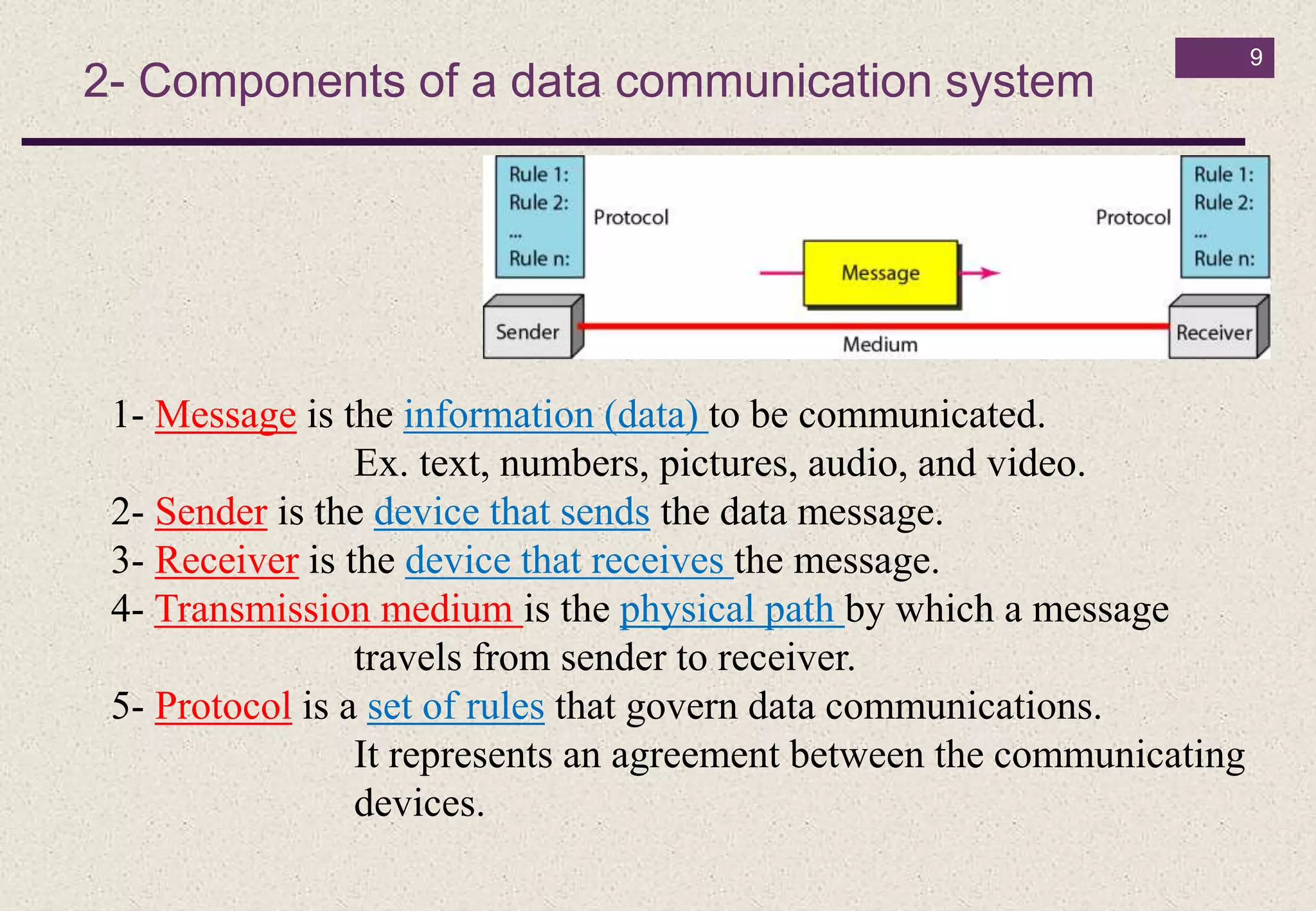
1- Message is the information (data) to be communicated.
Ex. text, numbers, pictures, audio, and video.
2- Sender is the device that sends the data message.
3- Receiver is the device that receives the message.
4- Transmission medium is the physical path by which a message
travels from sender to receiver.
5- Protocol is a set of rules that govern data communications.
It represents an agreement between the communicating
devices.
3- Networks
10
• A network is a set of devices (often referred to
as nodes) connected by communication links.
• A node can be a computer, printer, or any other
device capable of sending and/or receiving data
generated by other nodes on the network.
• A link can be a cable, air, optical fiber, or any
medium which can transport a signal carrying
information.
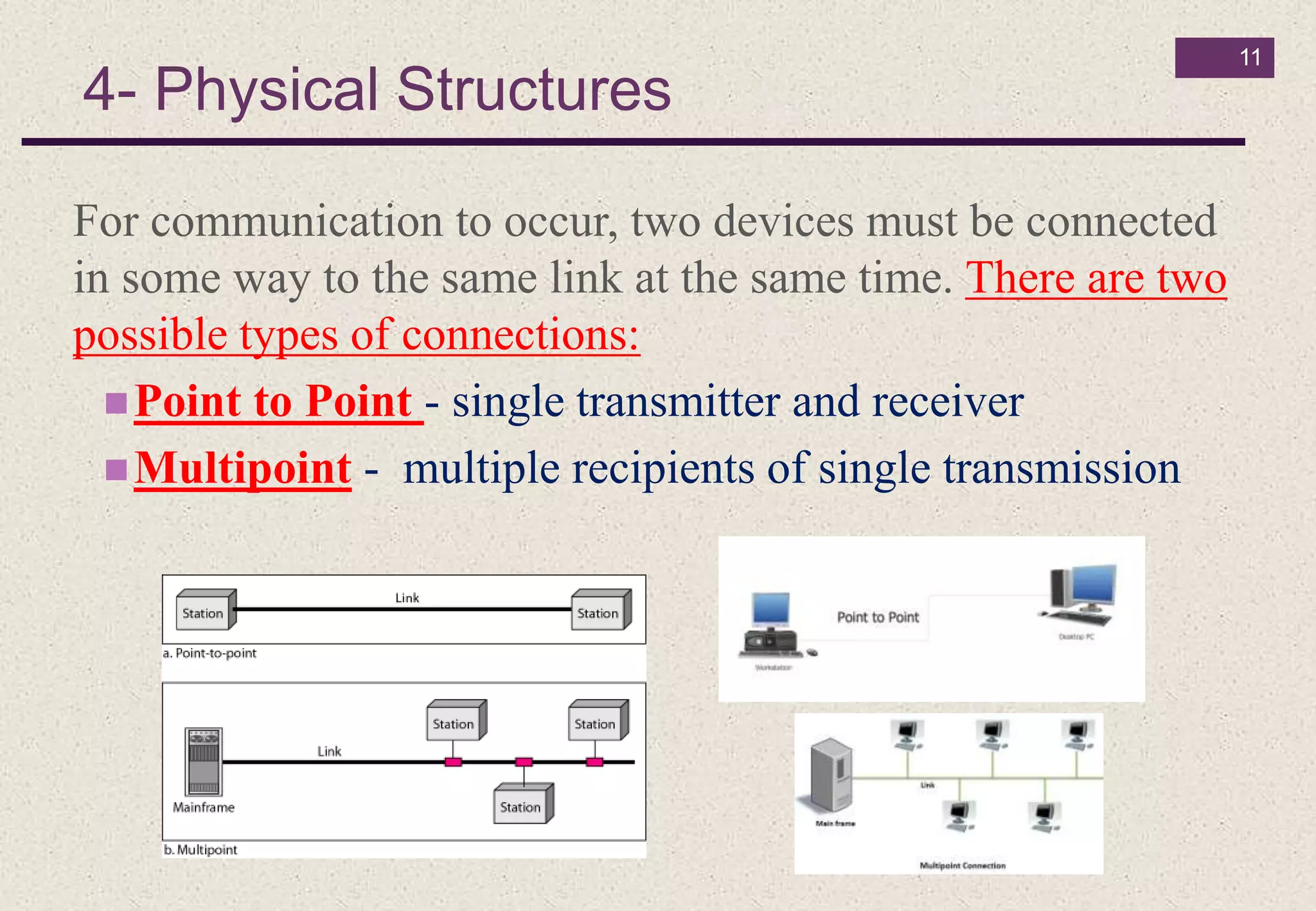
4- Physical Structures
11
For communication to occur, two devices must be connected
in some way to the same link at the same time. There are two
possible types of connections:
Point to Point - single transmitter and receiver
Multipoint - multiple recipients of single transmission
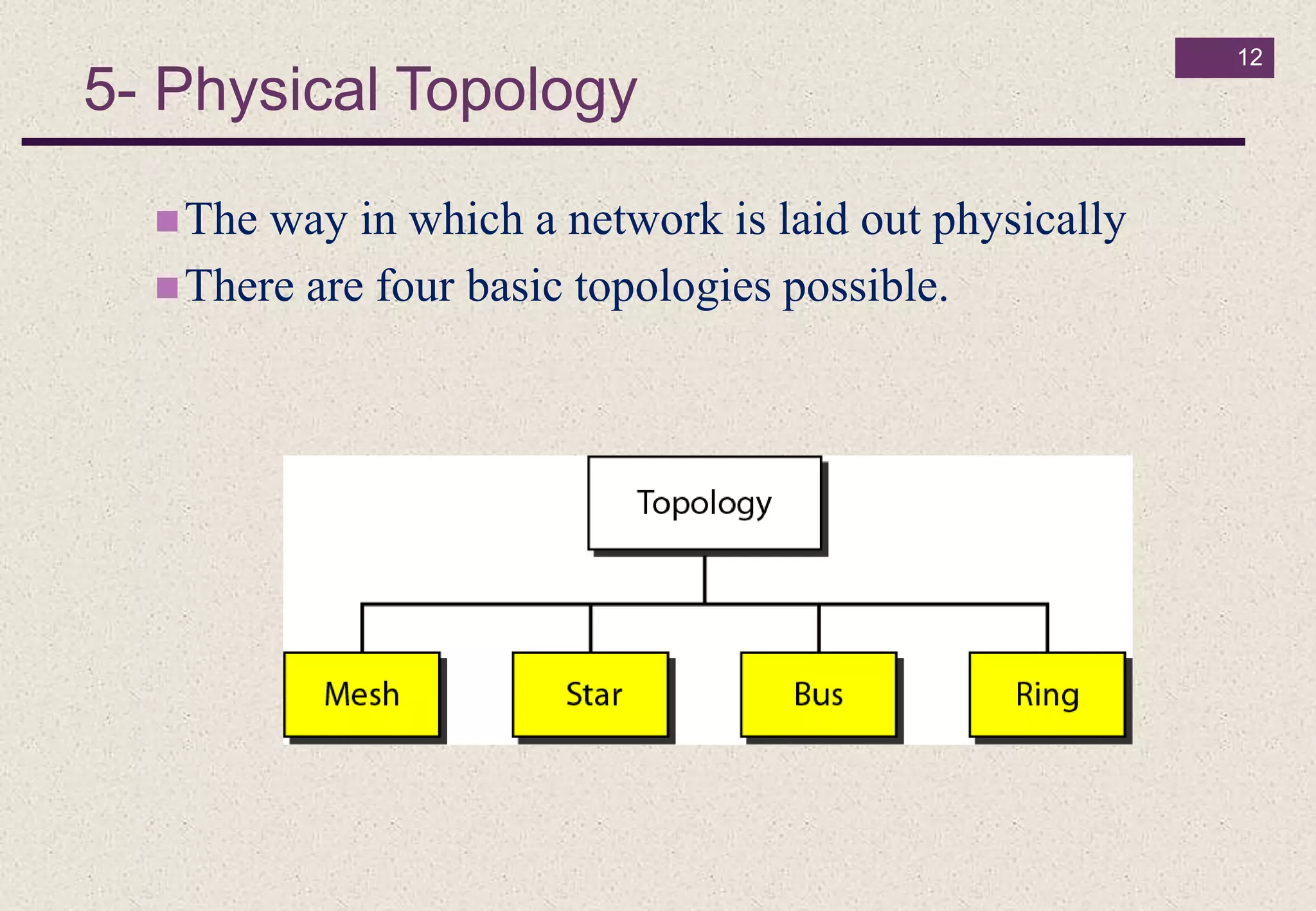
5- Physical Topology
12
The way in which a network is laid out physically
There are four basic topologies possible.
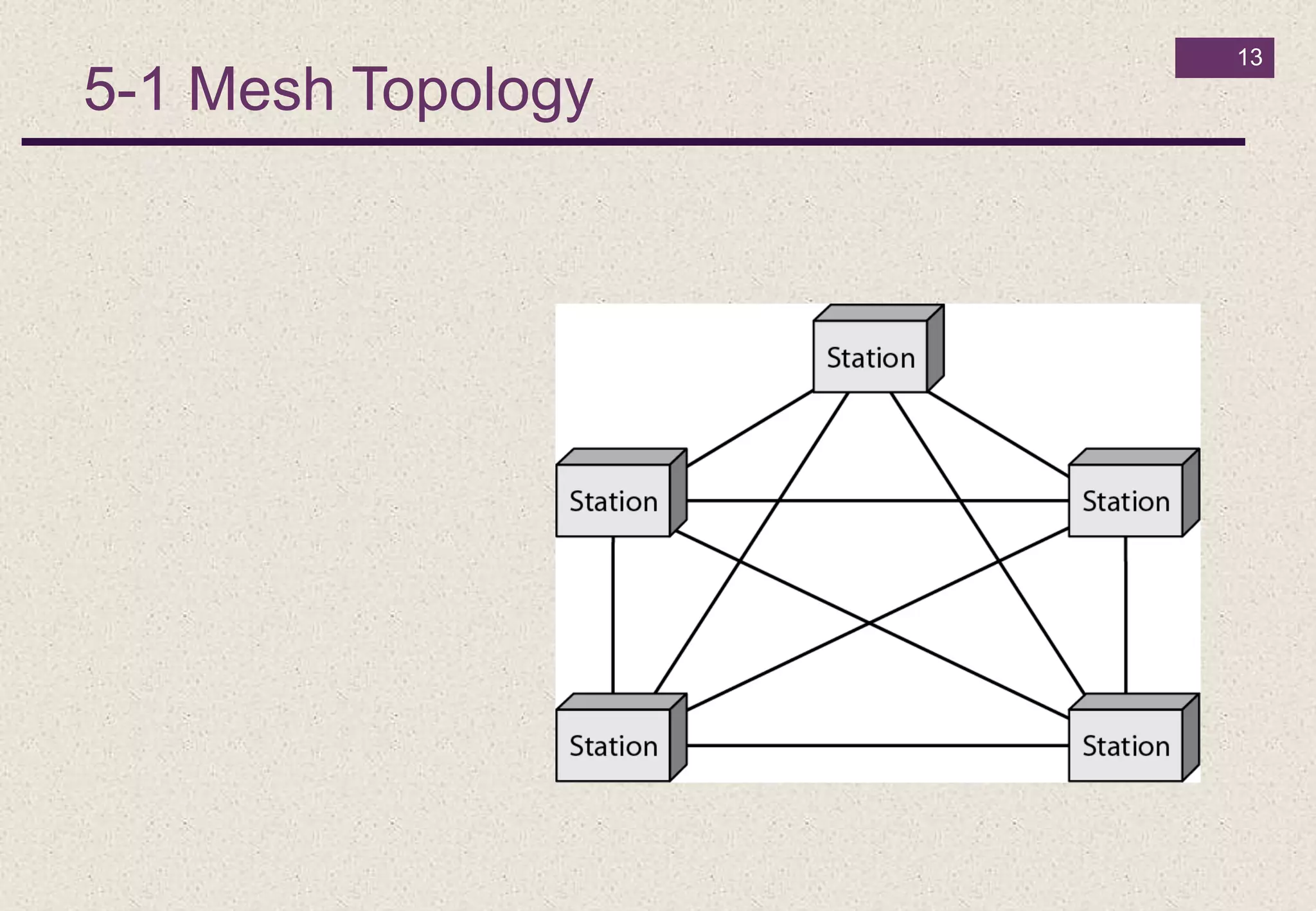
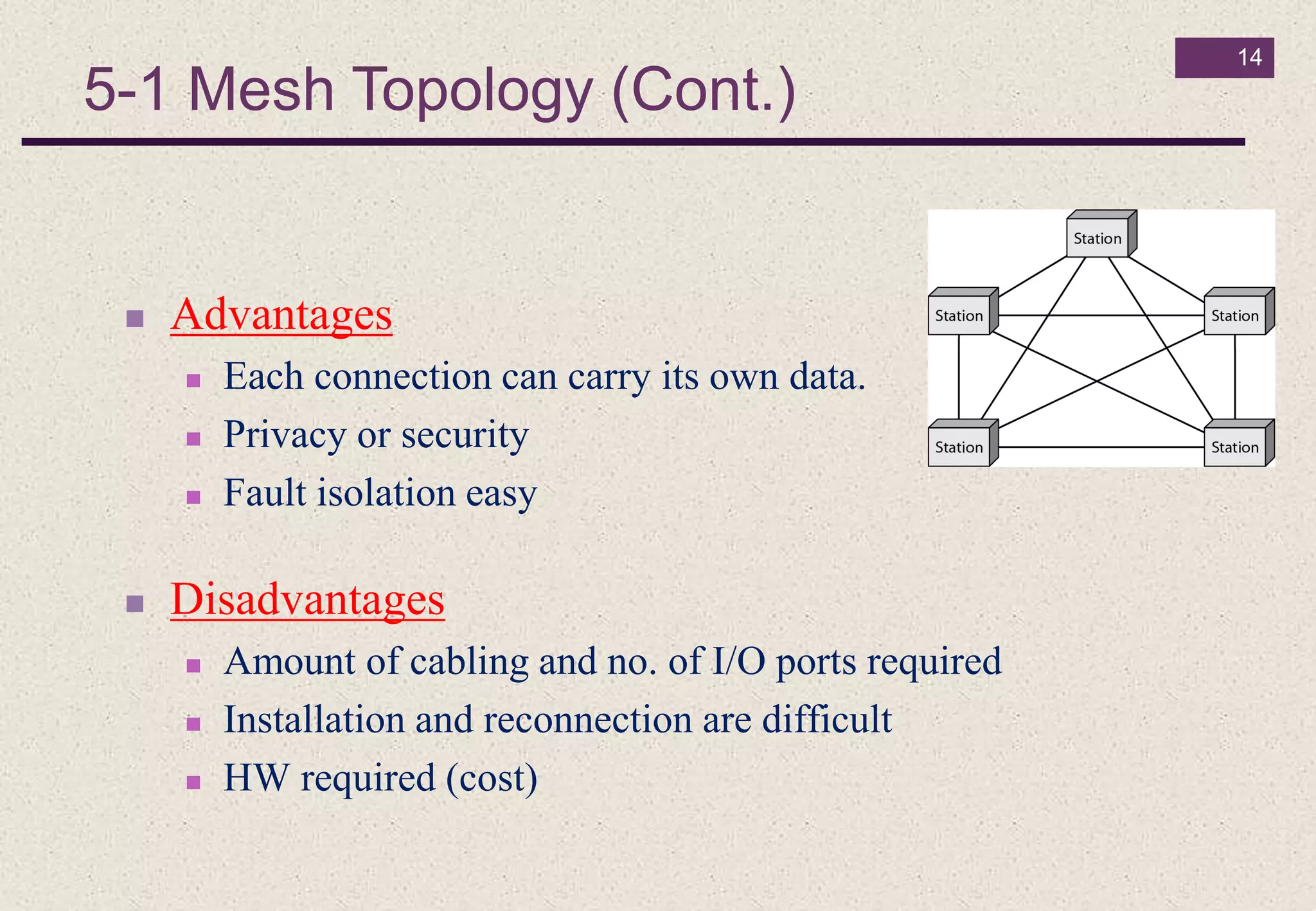
5-1 Mesh Topology
13
14
 Advantages
 Each connection can carry its own data.
 Privacy or security
 Fault isolation easy
 Disadvantages
 Amount of cabling and no. of I/O ports required
 Installation and reconnection are difficult
 HW required (cost)
5-1 Mesh Topology (Cont.)
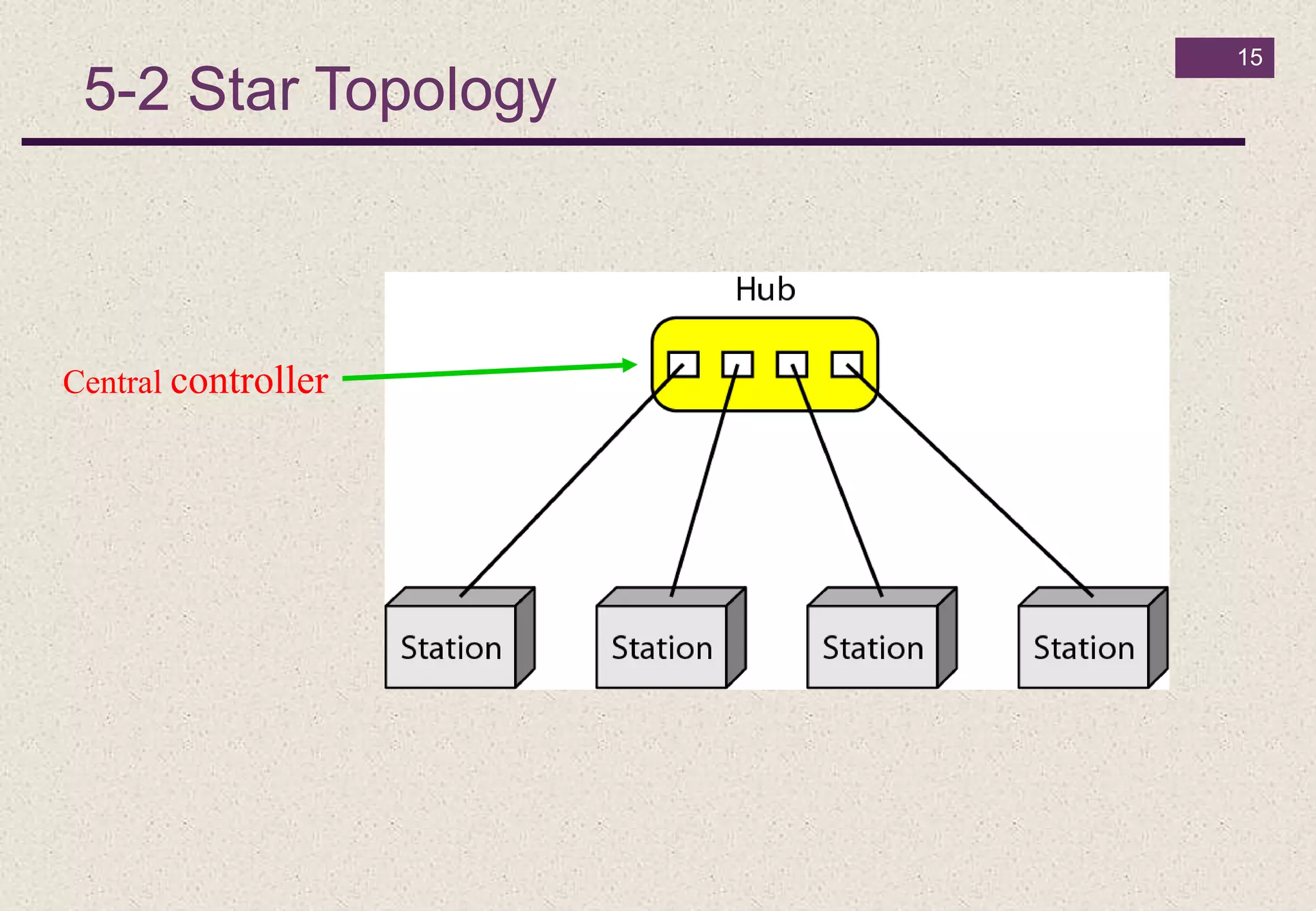
5-2 Star Topology
15
Central controller
16
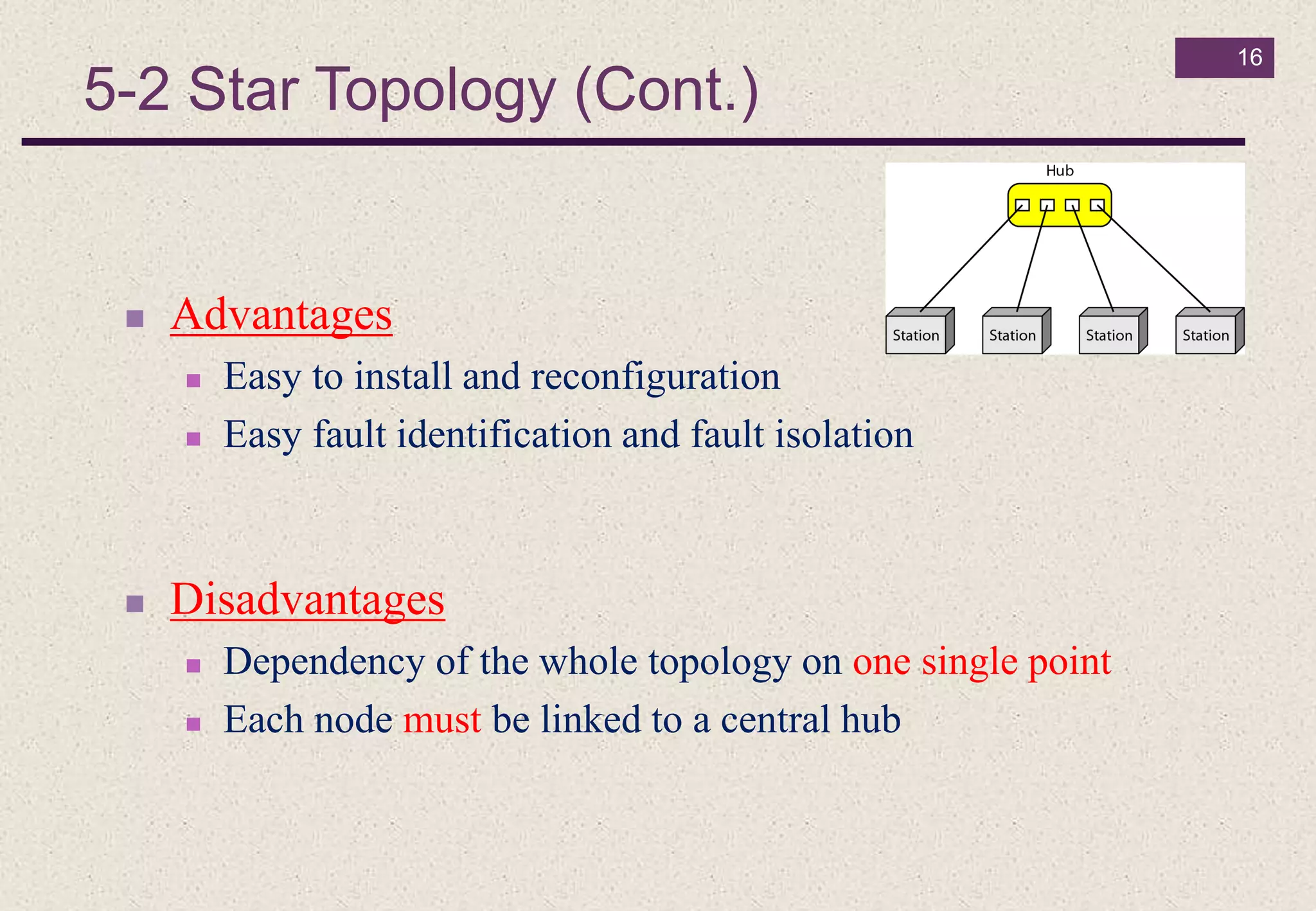
 Advantages
 Easy to install and reconfiguration
 Easy fault identification and fault isolation
 Disadvantages
 Dependency of the whole topology on one single point
 Each node must be linked to a central hub
5-2 Star Topology (Cont.)
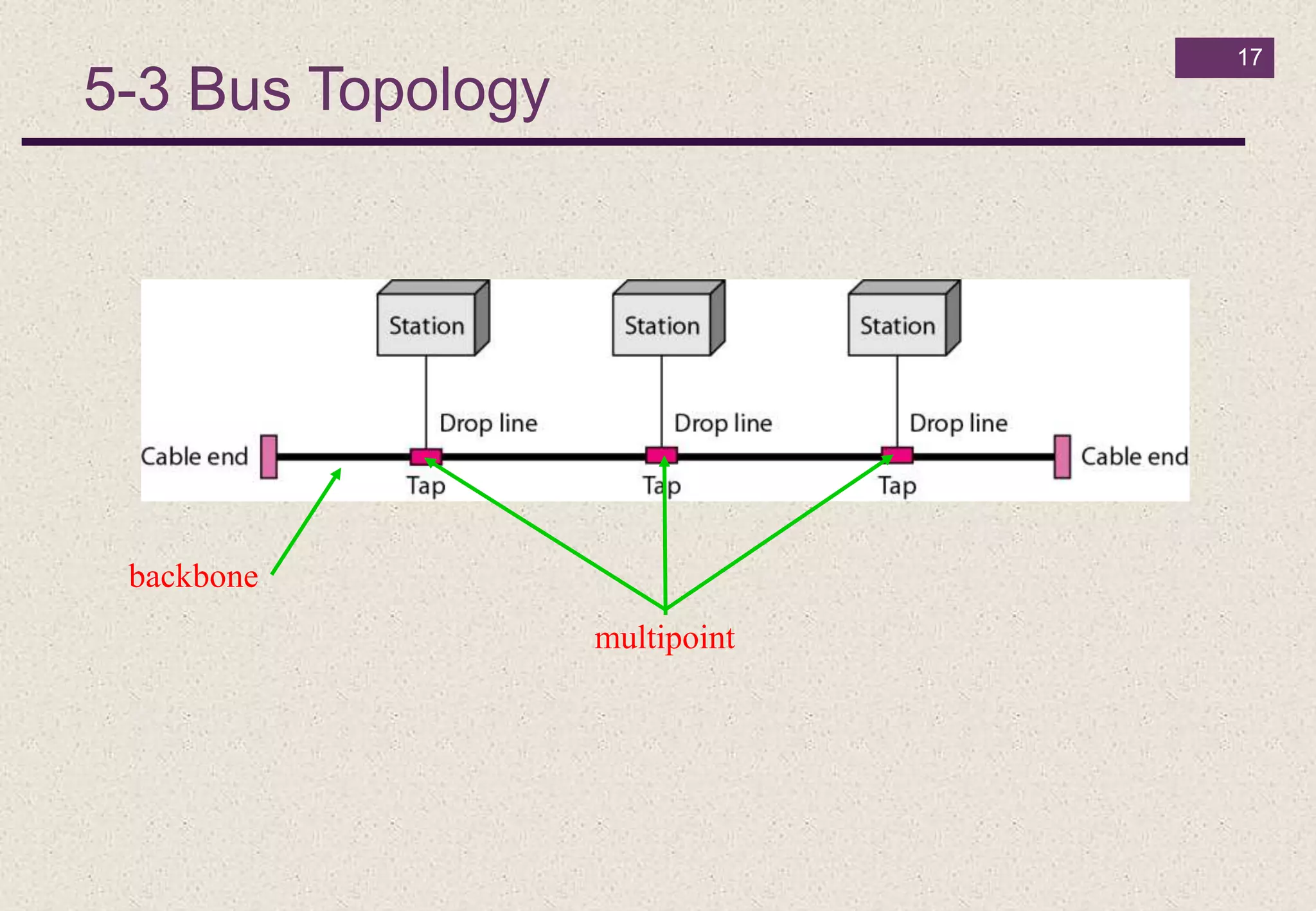
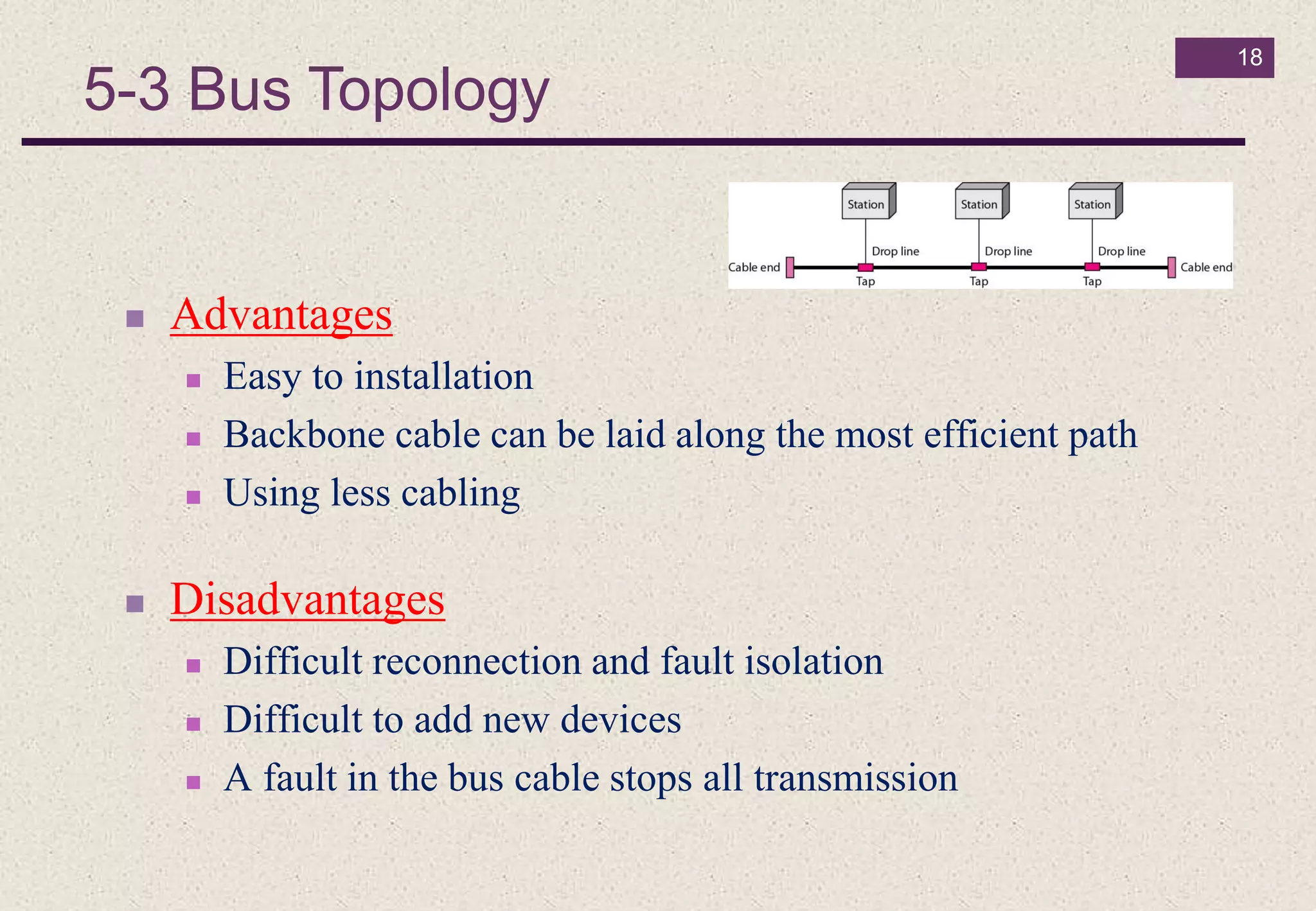
5-3 Bus Topology
17
multipoint
backbone
18
 Advantages
 Easy to installation
 Backbone cable can be laid along the most efficient path
 Using less cabling
 Disadvantages
 Difficult reconnection and fault isolation
 Difficult to add new devices
 A fault in the bus cable stops all transmission
5-3 Bus Topology
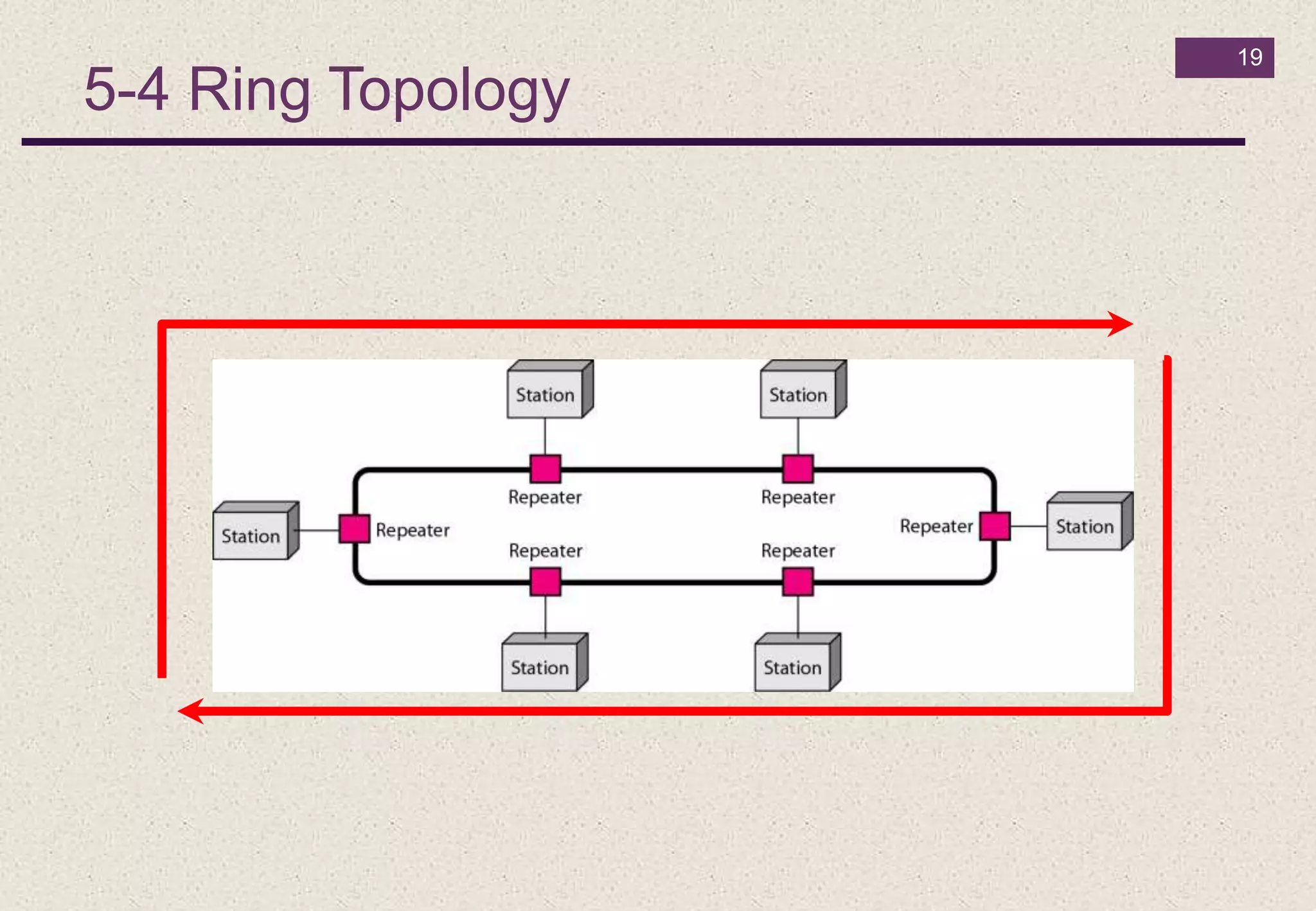
5-4 Ring Topology
19
20
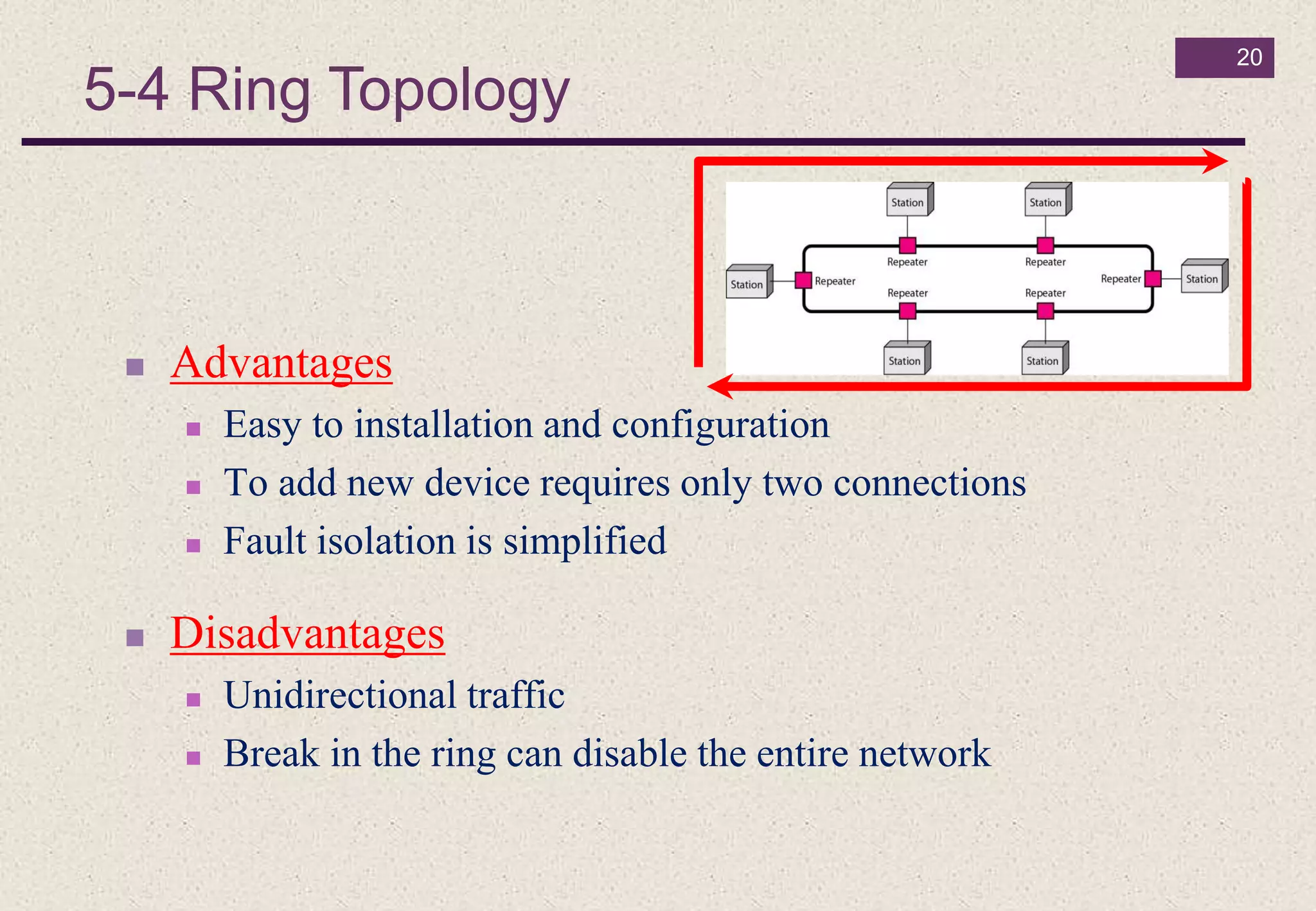
 Advantages
 Easy to installation and configuration
 To add new device requires only two connections
 Fault isolation is simplified
 Disadvantages
 Unidirectional traffic
 Break in the ring can disable the entire network
5-4 Ring Topology
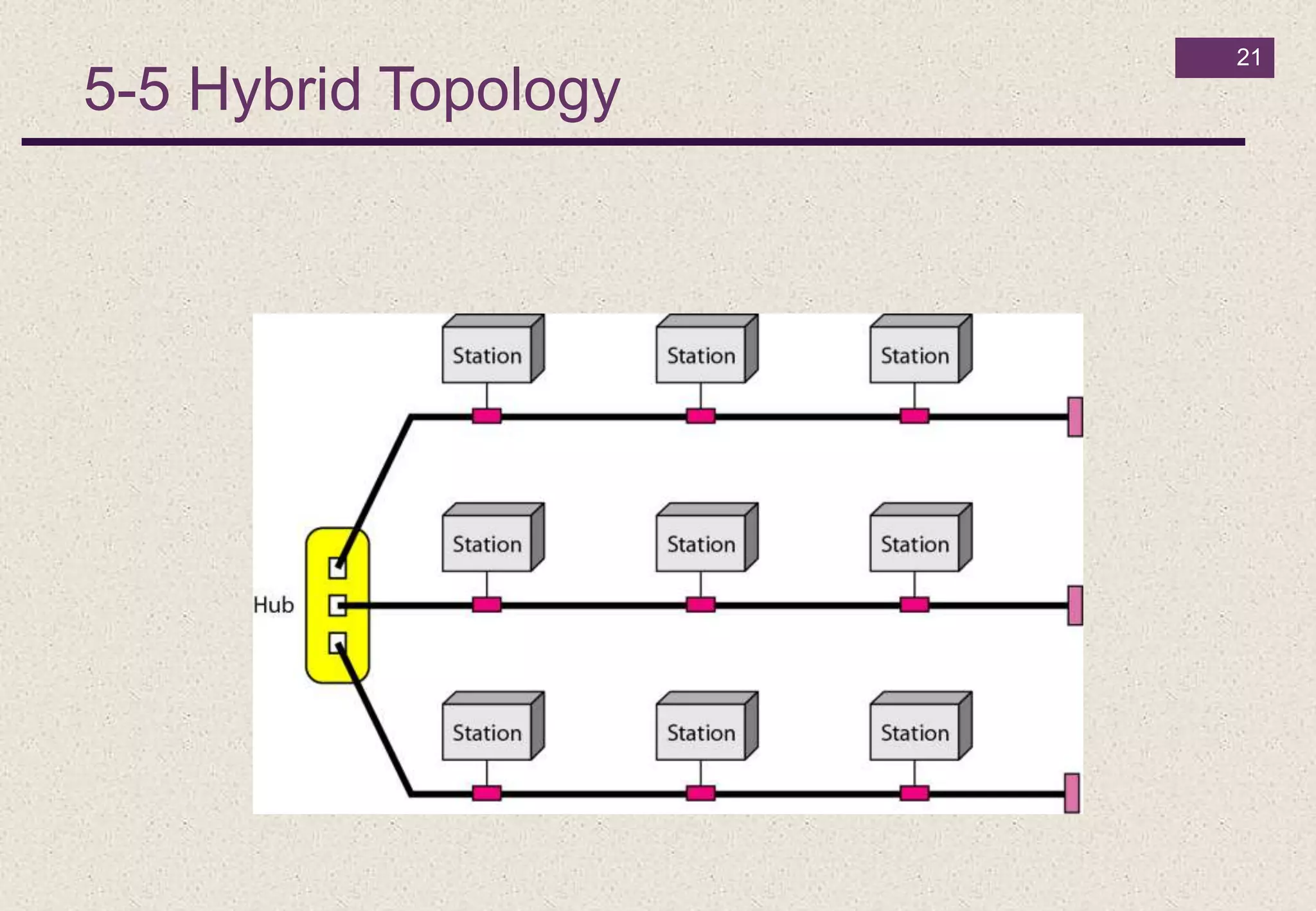
5-5 Hybrid Topology
21
6- Categories of Networks (according to its size)
22
Local Area Networks (LANs)
 Short distances
 Designed to provide local interconnectivity
Wide Area Networks (WANs)
 Long distances
 Provide connectivity over large areas
Metropolitan Area Networks (MANs)
 Provide connectivity over areas such as a city, a campus
Heterogeneous Network
23
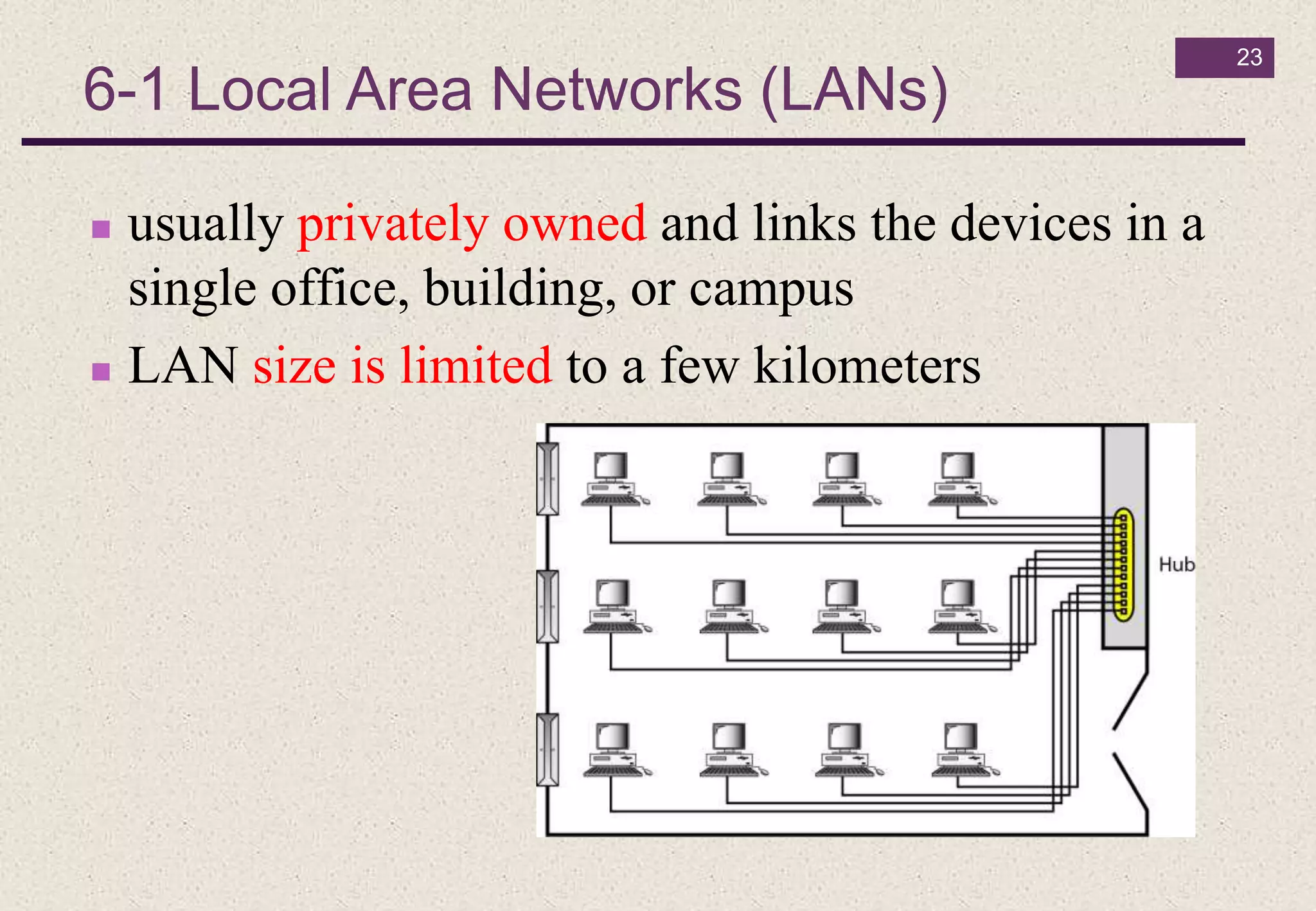
 usually privately owned and links the devices in a
single office, building, or campus
 LAN size is limited to a few kilometers
6-1 Local Area Networks (LANs)
24
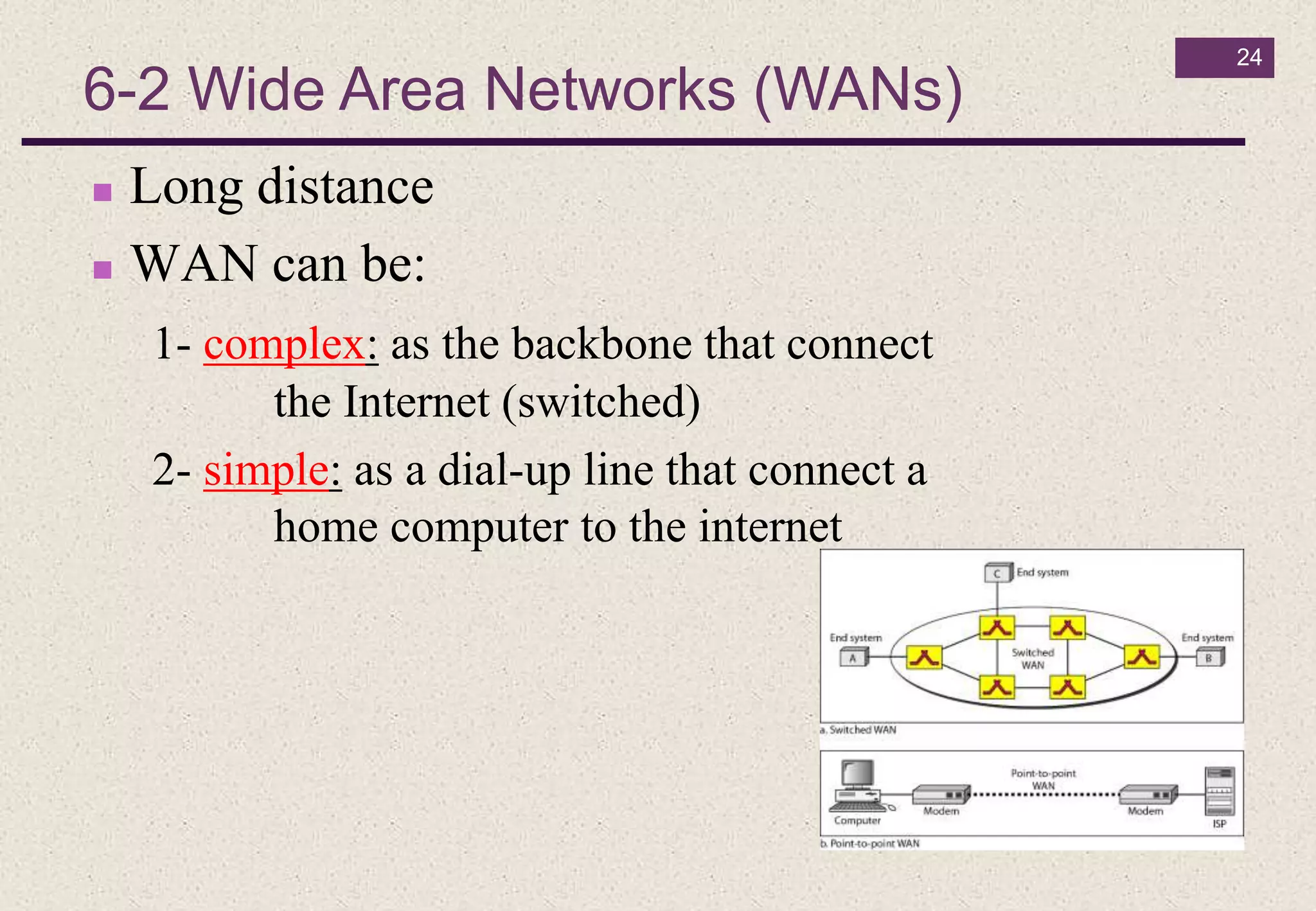
6-2 Wide Area Networks (WANs)
 Long distance
 WAN can be:
1- complex: as the backbone that connect
the Internet (switched)
2- simple: as a dial-up line that connect a
home computer to the internet
25
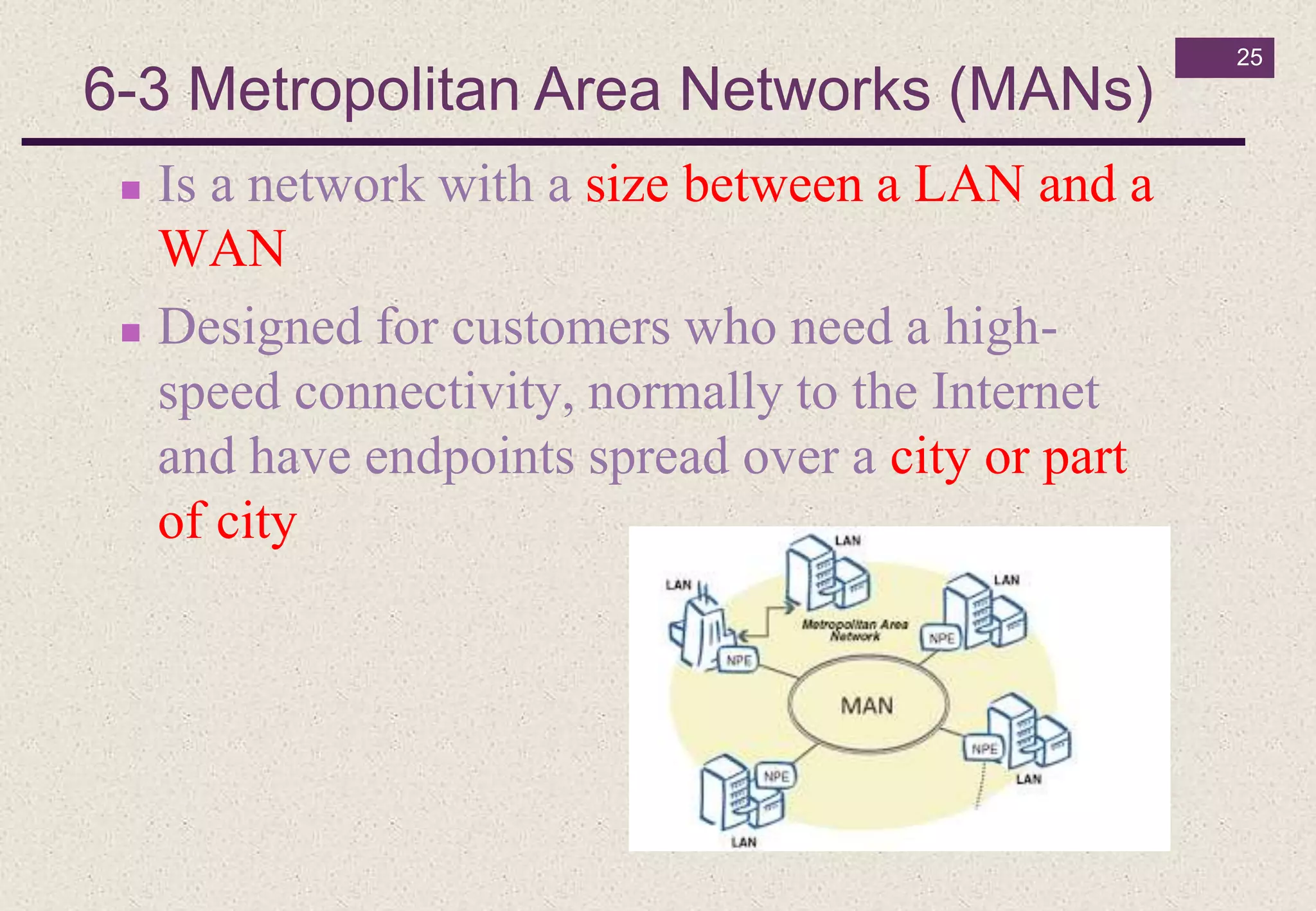
6-3 Metropolitan Area Networks (MANs)
 Is a network with a size between a LAN and a
WAN
 Designed for customers who need a high-
speed connectivity, normally to the Internet
and have endpoints spread over a city or part
of city
26
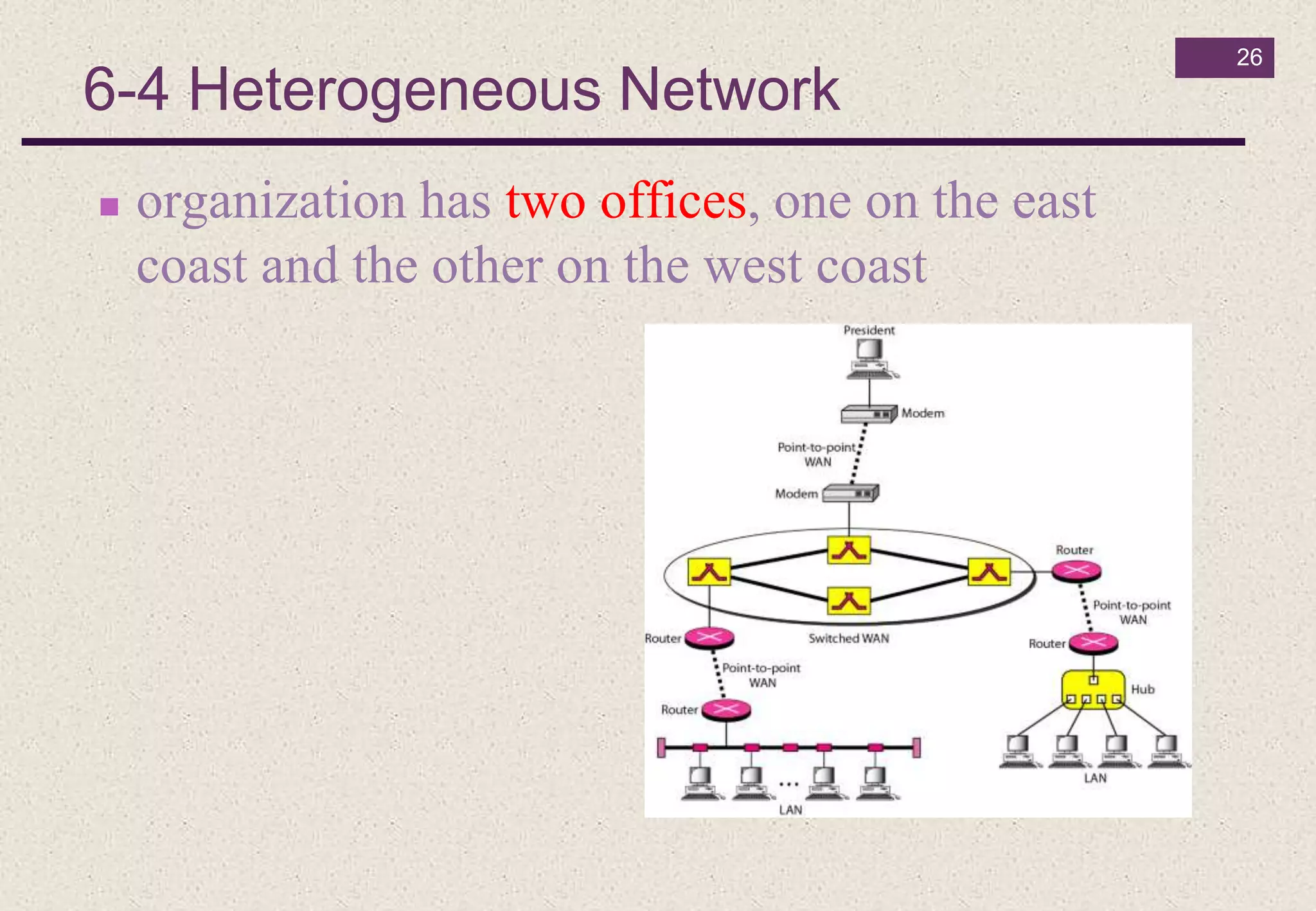
6-4 Heterogeneous Network
 organization has two offices, one on the east
coast and the other on the west coast
7- Network Bandwidth (BW)
27
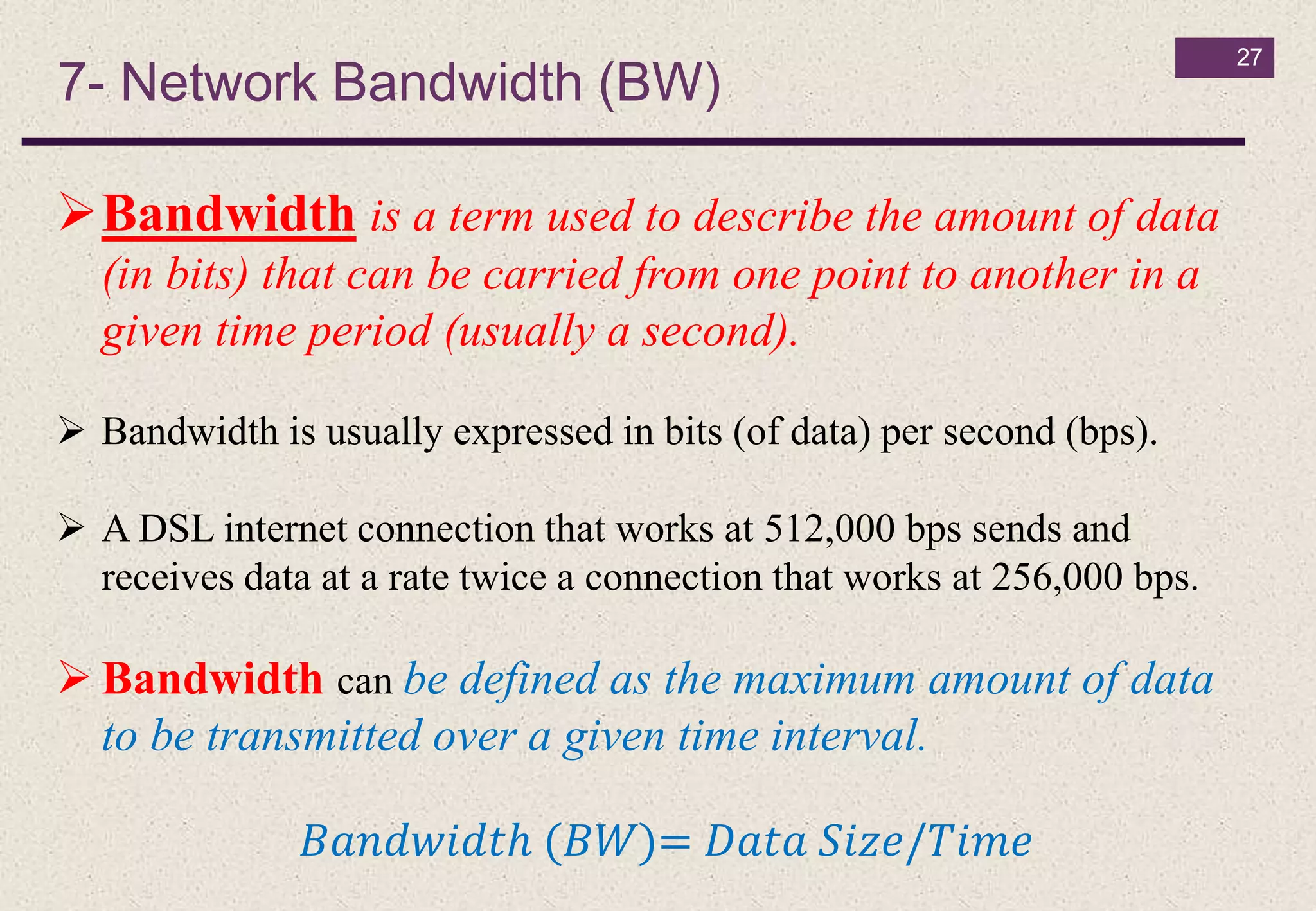
Bandwidth is a term used to describe the amount of data
(in bits) that can be carried from one point to another in a
given time period (usually a second).
 Bandwidth is usually expressed in bits (of data) per second (bps).
 A DSL internet connection that works at 512,000 bps sends and
receives data at a rate twice a connection that works at 256,000 bps.
 Bandwidth can be defined as the maximum amount of data
to be transmitted over a given time interval.
𝐵𝑎𝑛𝑑𝑤𝑖𝑑𝑡ℎ (𝐵𝑊)= 𝐷𝑎𝑡𝑎 𝑆𝑖𝑧𝑒/𝑇𝑖𝑚𝑒
7- Network Bandwidth (Cont.)
28
Bandwidth depends on:
Media type (microwave, twisted pair, coaxial, or
optical fiber)
Coding of information.
7- Network Bandwidth (Cont.)
29
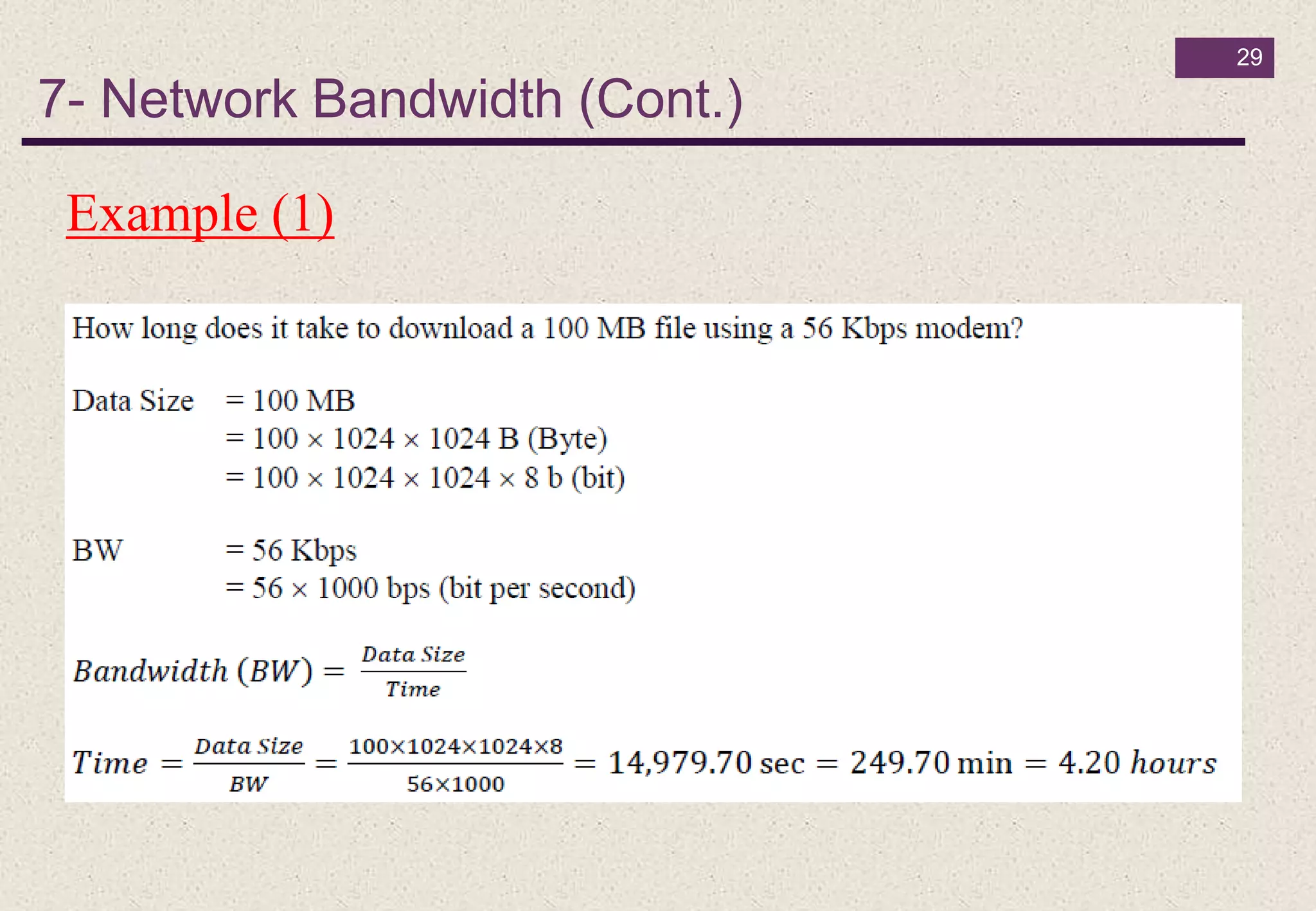
Example (1)
30
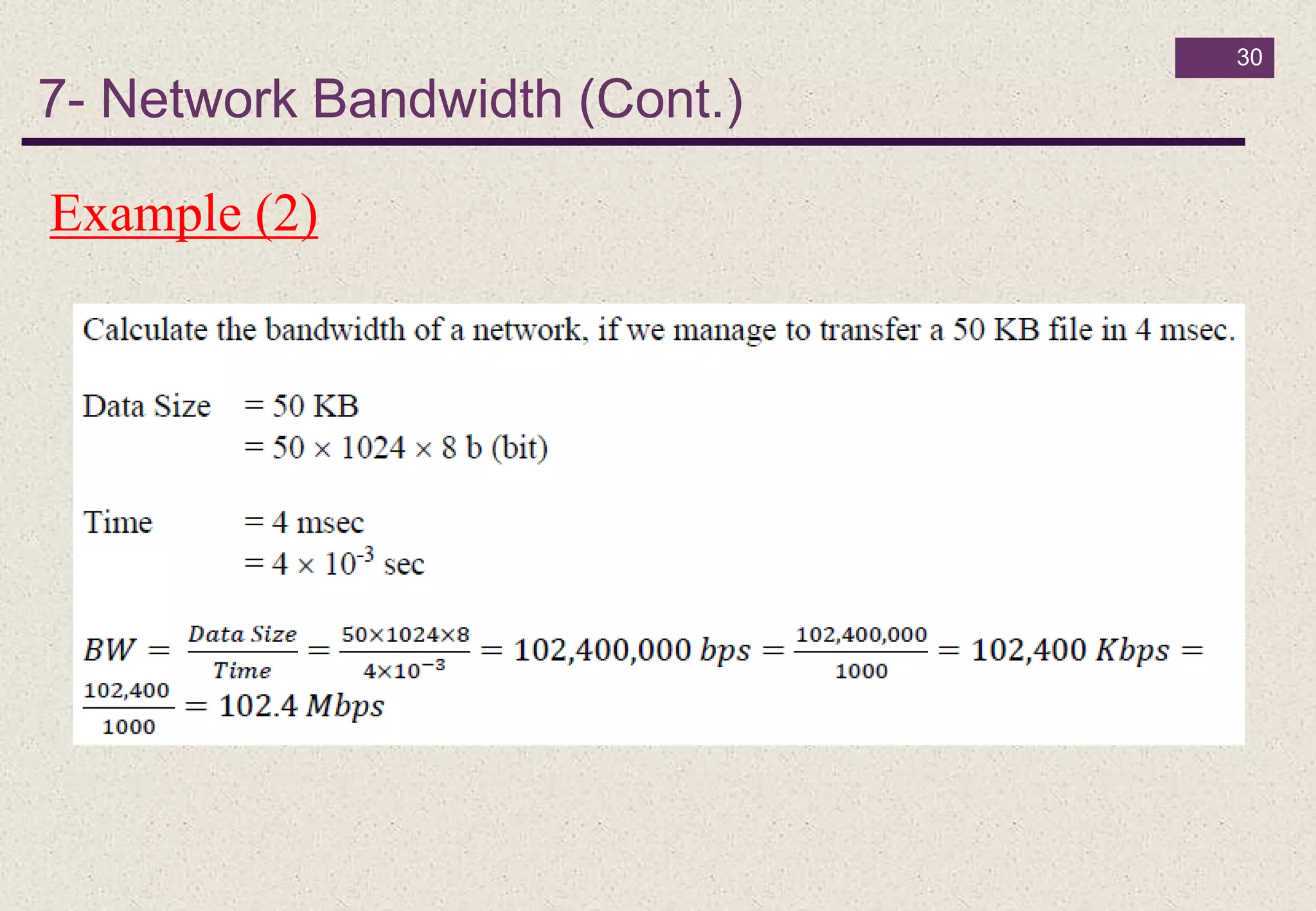
Example (2)
7- Network Bandwidth (Cont.)

Introduction to computer_lec_05_fall_2018

  • 1.
    + Dr Ramadan Babers Facultyof Science - Helwan University Fall - 2018 Introduction to Computer LEC - 5
  • 2.
  • 3.
    Chapter 5 Outlines Introduction  What is a Network?  Why do We Need Computer Networks?  Data Communications  Components of a data communication system  Networks  Physical Structures  Categories of Networks  Types of Networks  Network Bandwidth (BW) 3
  • 4.
    Introduction 4  Business decisionshave to be made ever more quickly.  Businesses today rely on computer networks and internetworks.
  • 5.
    What is aNetwork? 5  A network refers to two or more connected computers that can share resources such as data, a printer, an Internet connection, applications, or a combination of these resources.
  • 6.
    Why do WeNeed Computer Networks? 6 The main reasons for building and using computer networks are:  Resource sharing: To make all programs, data, and equipment available for anyone on the network without regard to the physical location of the resource.  High reliability: If some computers go down, others may be able to take over their work. It is very important for military and air traffic corporations to continue operating when encountering some hardware problems.  Cost saving.  Enhance online communications.
  • 7.
    1- Data Communications 7 Telecommunication means communication at a distance.  Data refers to information presented in whatever form is agreed upon by the parties creating and using the data.  Data communications are the exchange of data between two devices via some form of transmission medium such as a wire cable.
  • 8.
    1- Data Communications(Cont.) 8 The effectiveness of a data communications system depends on four fundamental characteristics: 1- Delivery. The system must deliver data to the correct destination 2- Accuracy. The system must deliver the data accurately. Data that have been altered in transmission and left uncorrected are unusable. 3- Timeliness. The system must deliver data in a timely manner. Data delivered late are useless. 4- Jitter Jitter refers to the variation in the packet arrival time.
  • 9.
    2- Components ofa data communication system 9 1- Message is the information (data) to be communicated. Ex. text, numbers, pictures, audio, and video. 2- Sender is the device that sends the data message. 3- Receiver is the device that receives the message. 4- Transmission medium is the physical path by which a message travels from sender to receiver. 5- Protocol is a set of rules that govern data communications. It represents an agreement between the communicating devices.
  • 10.
    3- Networks 10 • Anetwork is a set of devices (often referred to as nodes) connected by communication links. • A node can be a computer, printer, or any other device capable of sending and/or receiving data generated by other nodes on the network. • A link can be a cable, air, optical fiber, or any medium which can transport a signal carrying information.
  • 11.
    4- Physical Structures 11 Forcommunication to occur, two devices must be connected in some way to the same link at the same time. There are two possible types of connections: Point to Point - single transmitter and receiver Multipoint - multiple recipients of single transmission
  • 12.
    5- Physical Topology 12 Theway in which a network is laid out physically There are four basic topologies possible.
  • 13.
  • 14.
    14  Advantages  Eachconnection can carry its own data.  Privacy or security  Fault isolation easy  Disadvantages  Amount of cabling and no. of I/O ports required  Installation and reconnection are difficult  HW required (cost) 5-1 Mesh Topology (Cont.)
  • 15.
  • 16.
    16  Advantages  Easyto install and reconfiguration  Easy fault identification and fault isolation  Disadvantages  Dependency of the whole topology on one single point  Each node must be linked to a central hub 5-2 Star Topology (Cont.)
  • 17.
  • 18.
    18  Advantages  Easyto installation  Backbone cable can be laid along the most efficient path  Using less cabling  Disadvantages  Difficult reconnection and fault isolation  Difficult to add new devices  A fault in the bus cable stops all transmission 5-3 Bus Topology
  • 19.
  • 20.
    20  Advantages  Easyto installation and configuration  To add new device requires only two connections  Fault isolation is simplified  Disadvantages  Unidirectional traffic  Break in the ring can disable the entire network 5-4 Ring Topology
  • 21.
  • 22.
    6- Categories ofNetworks (according to its size) 22 Local Area Networks (LANs)  Short distances  Designed to provide local interconnectivity Wide Area Networks (WANs)  Long distances  Provide connectivity over large areas Metropolitan Area Networks (MANs)  Provide connectivity over areas such as a city, a campus Heterogeneous Network
  • 23.
    23  usually privatelyowned and links the devices in a single office, building, or campus  LAN size is limited to a few kilometers 6-1 Local Area Networks (LANs)
  • 24.
    24 6-2 Wide AreaNetworks (WANs)  Long distance  WAN can be: 1- complex: as the backbone that connect the Internet (switched) 2- simple: as a dial-up line that connect a home computer to the internet
  • 25.
    25 6-3 Metropolitan AreaNetworks (MANs)  Is a network with a size between a LAN and a WAN  Designed for customers who need a high- speed connectivity, normally to the Internet and have endpoints spread over a city or part of city
  • 26.
    26 6-4 Heterogeneous Network organization has two offices, one on the east coast and the other on the west coast
  • 27.
    7- Network Bandwidth(BW) 27 Bandwidth is a term used to describe the amount of data (in bits) that can be carried from one point to another in a given time period (usually a second).  Bandwidth is usually expressed in bits (of data) per second (bps).  A DSL internet connection that works at 512,000 bps sends and receives data at a rate twice a connection that works at 256,000 bps.  Bandwidth can be defined as the maximum amount of data to be transmitted over a given time interval. 𝐵𝑎𝑛𝑑𝑤𝑖𝑑𝑡ℎ (𝐵𝑊)= 𝐷𝑎𝑡𝑎 𝑆𝑖𝑧𝑒/𝑇𝑖𝑚𝑒
  • 28.
    7- Network Bandwidth(Cont.) 28 Bandwidth depends on: Media type (microwave, twisted pair, coaxial, or optical fiber) Coding of information.
  • 29.
    7- Network Bandwidth(Cont.) 29 Example (1)
  • 30.
    30 Example (2) 7- NetworkBandwidth (Cont.)