Computer Networks
An Introduction
Dr.P.AMUDHA
Associate Professor
Dept. of CSE
School of Engineering
Avinashilingam Institute
Introduction
● The Historical Perspective
● The 18th century: the great mechanical systems
accompanying the Industrial Revolution.
● The 19th century: steam engine.
● The 20th century: information gathering, processing,
and distribution.
● The 21th century: Internet, large distributed
systems (e.g., Grid), heavy reliance on computers.
Contd.,
● Networking is the process by which people or group
of people share information or services.
● Computer networks facilitate their information
sharing
● Network services are the abilities that computers
share with other networks
● They use data, processing and communications to
accomplish the tasks:
a) store and manipulate information
b) Make decisions and manipulate data
c) Move information
3
(Cont’d)
● What is Computer Network?
● we will use the term ''computer network'' to mean
a collection of autonomous computers
interconnected by a single technology.
● Two computers are said to be interconnected if
they are able to exchange information.
● copper wire; fiber optics, microwaves, infrared, and
communication satellites, etc.
● Business Applications
● Home Applications
● Mobile Users
* 5
Uses of Computer Networks
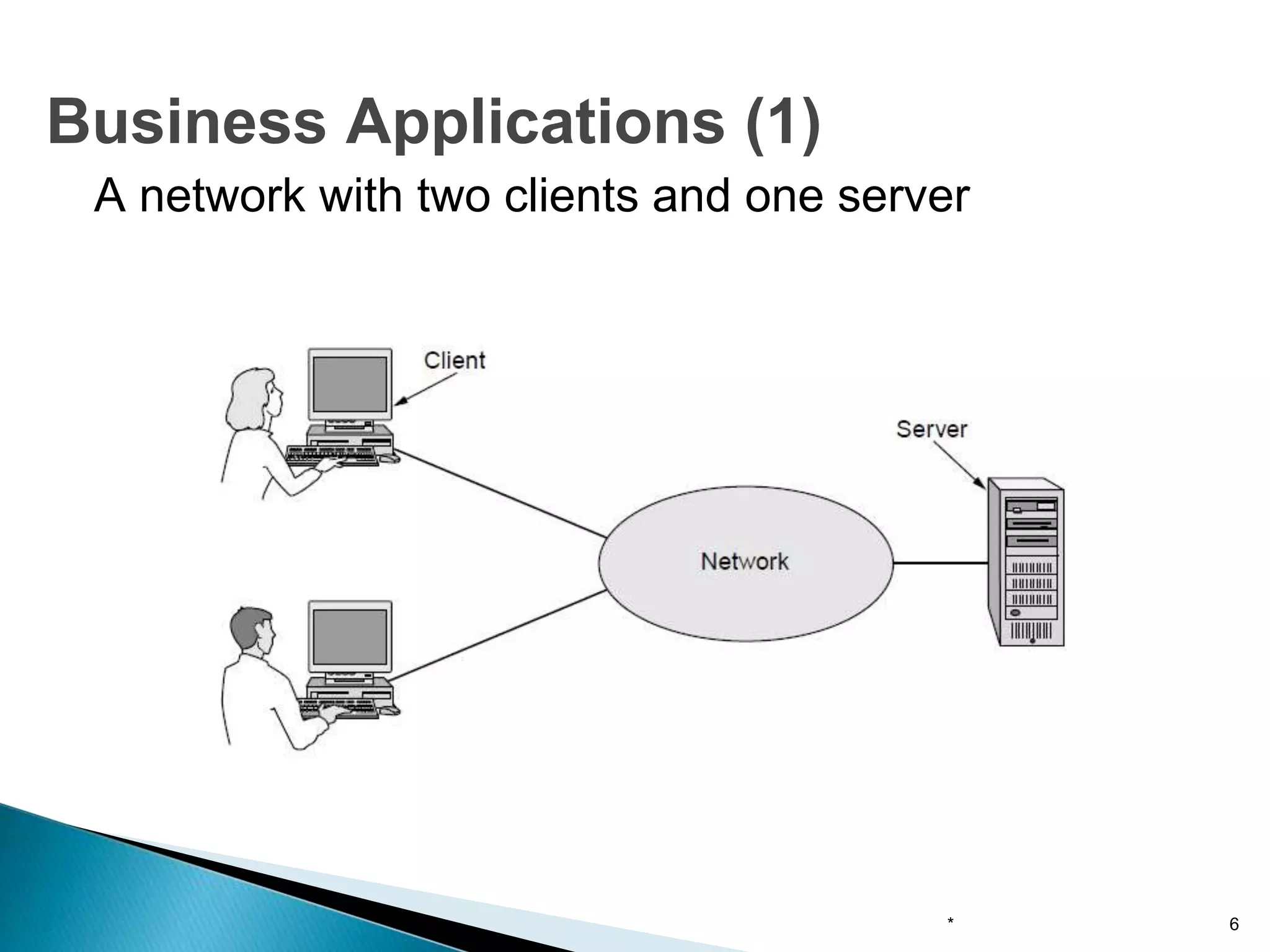
A network with two clients and one server
* 6
Business Applications (1)
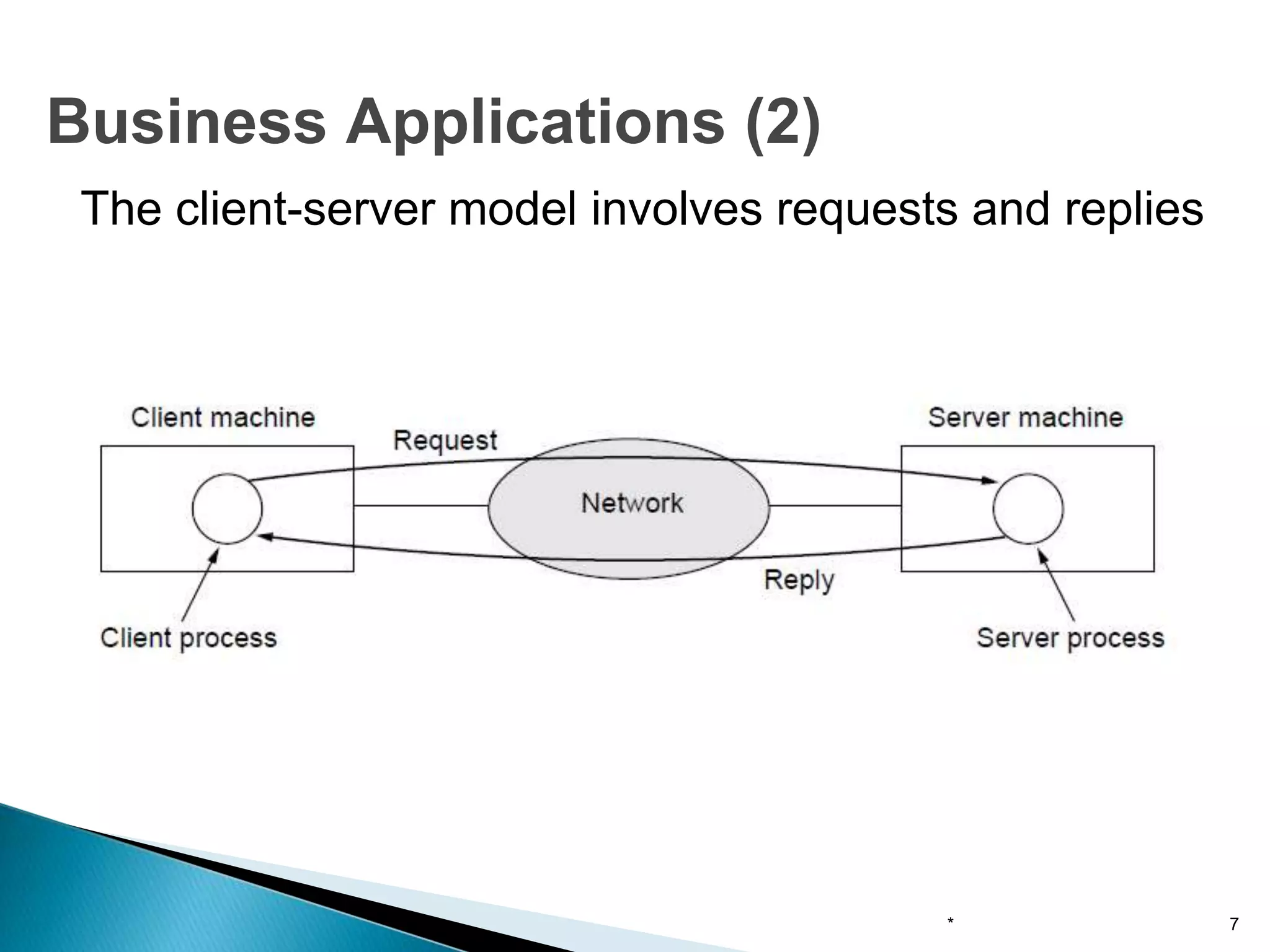
The client-server model involves requests and replies
* 7
Business Applications (2)
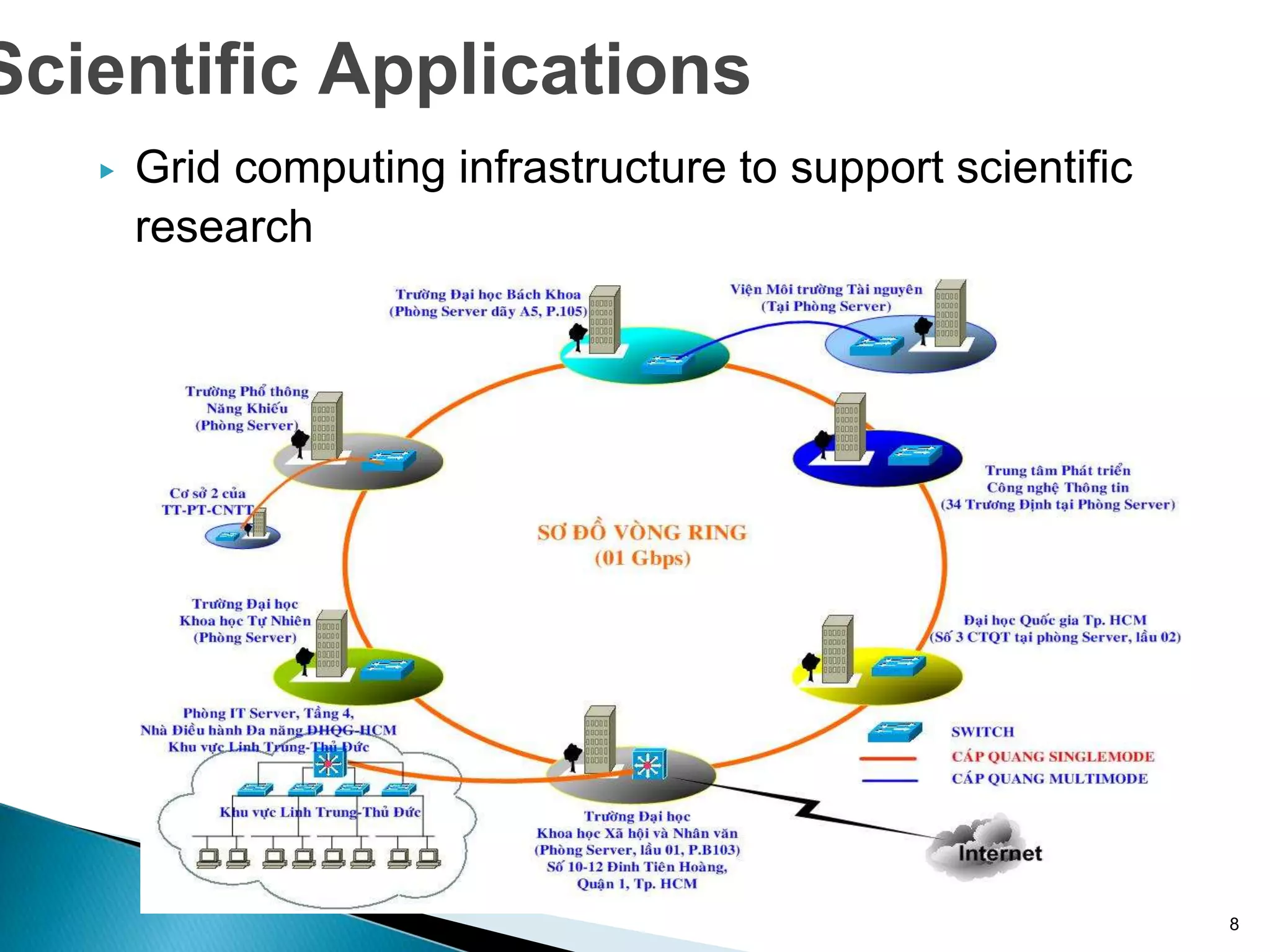
▶ Grid computing infrastructure to support scientific
research
8
Scientific Applications
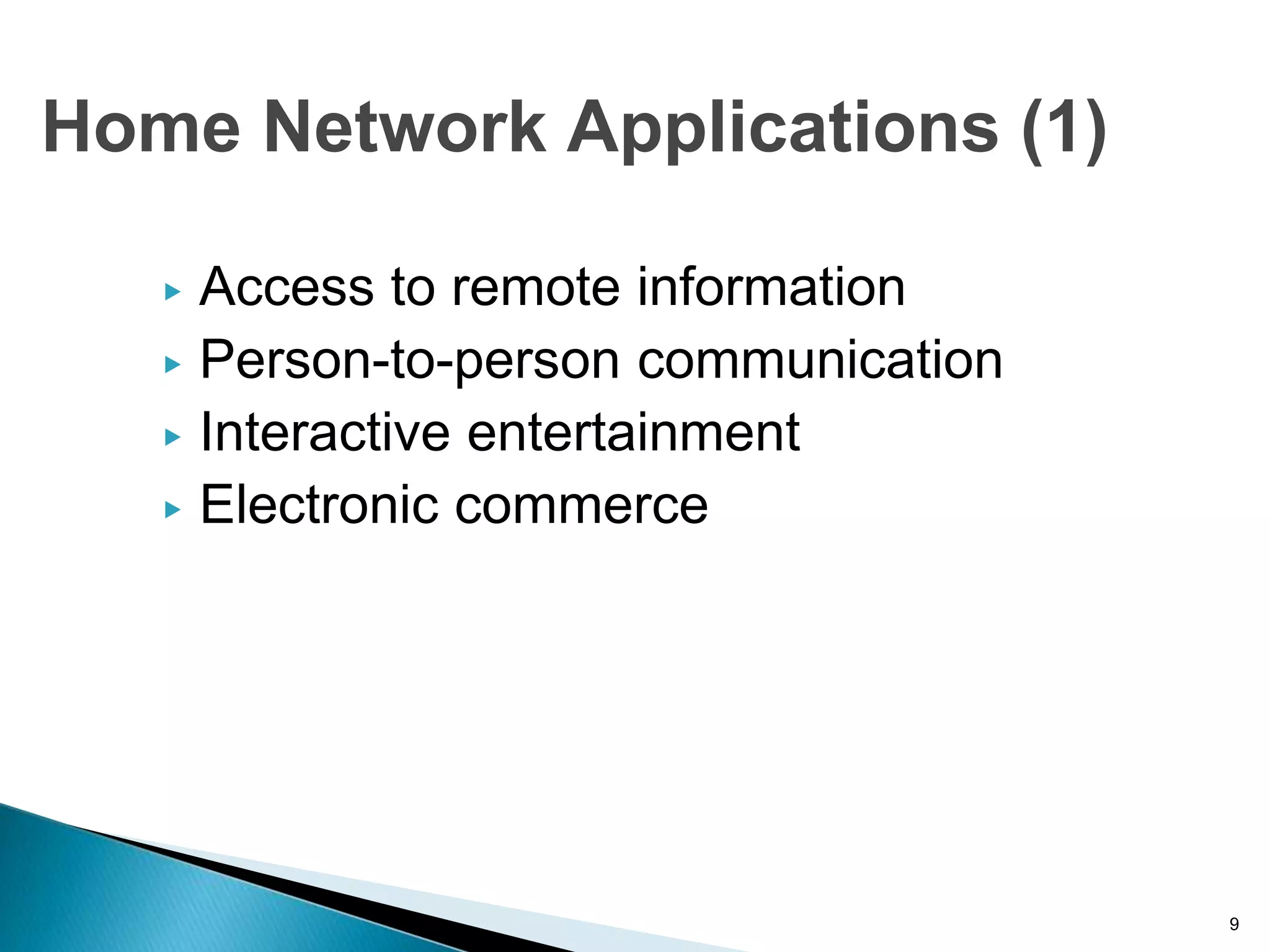
▶ Access to remote information
▶ Person-to-person communication
▶ Interactive entertainment
▶ Electronic commerce
9
Home Network Applications (1)
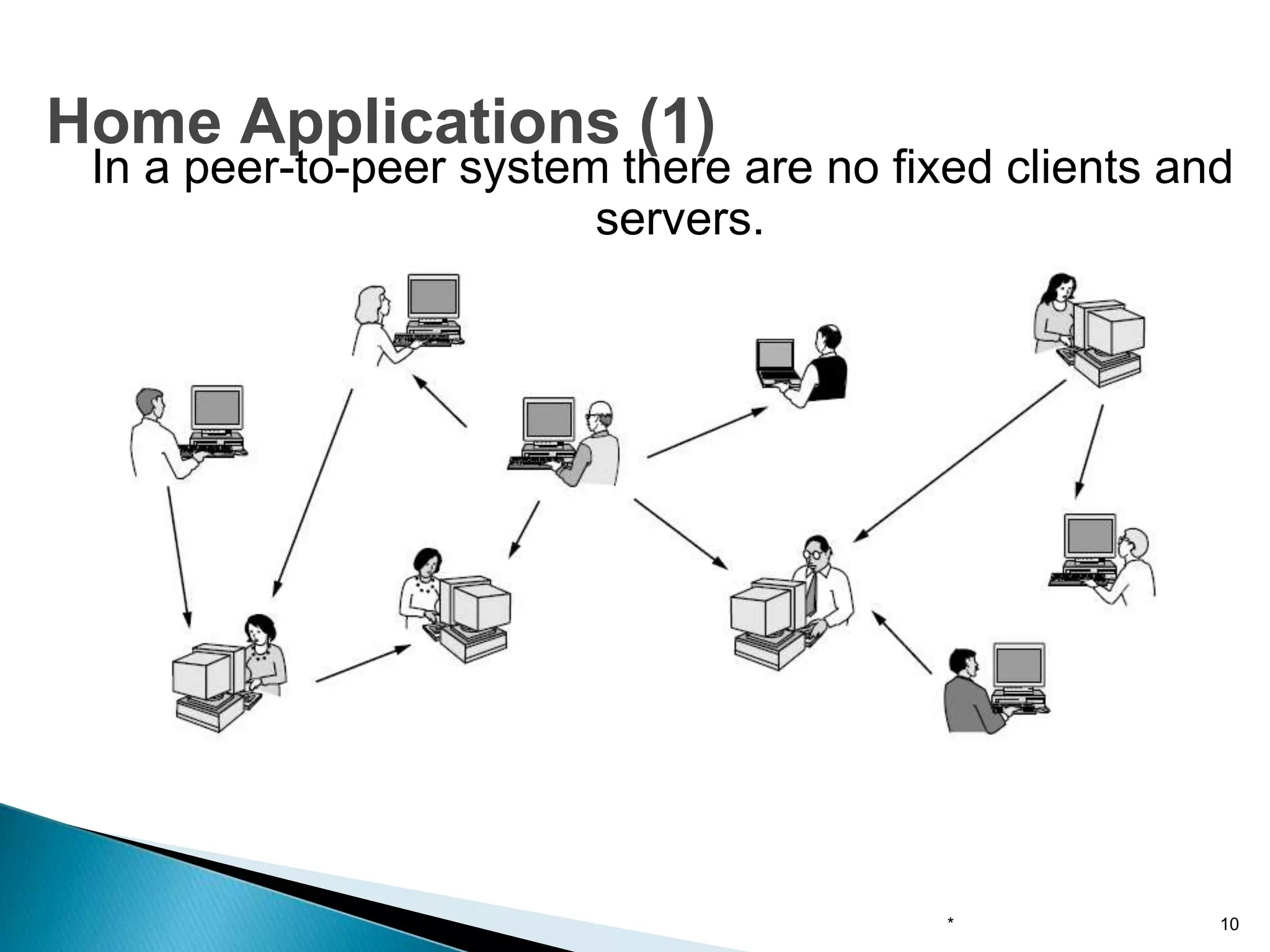
In a peer-to-peer system there are no fixed clients and
servers.
* 10
Home Applications (1)
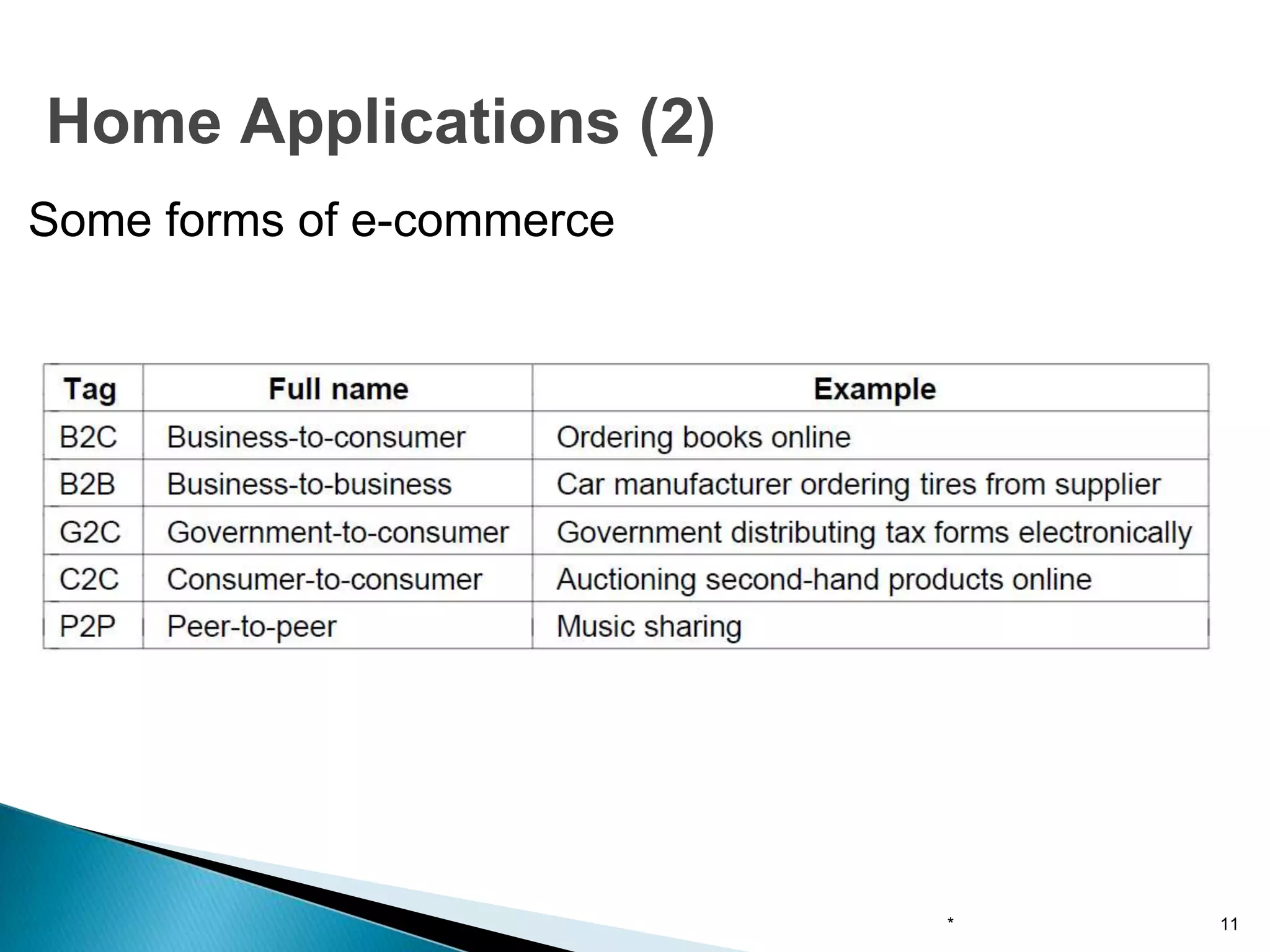
Some forms of e-commerce
* 11
Home Applications (2)
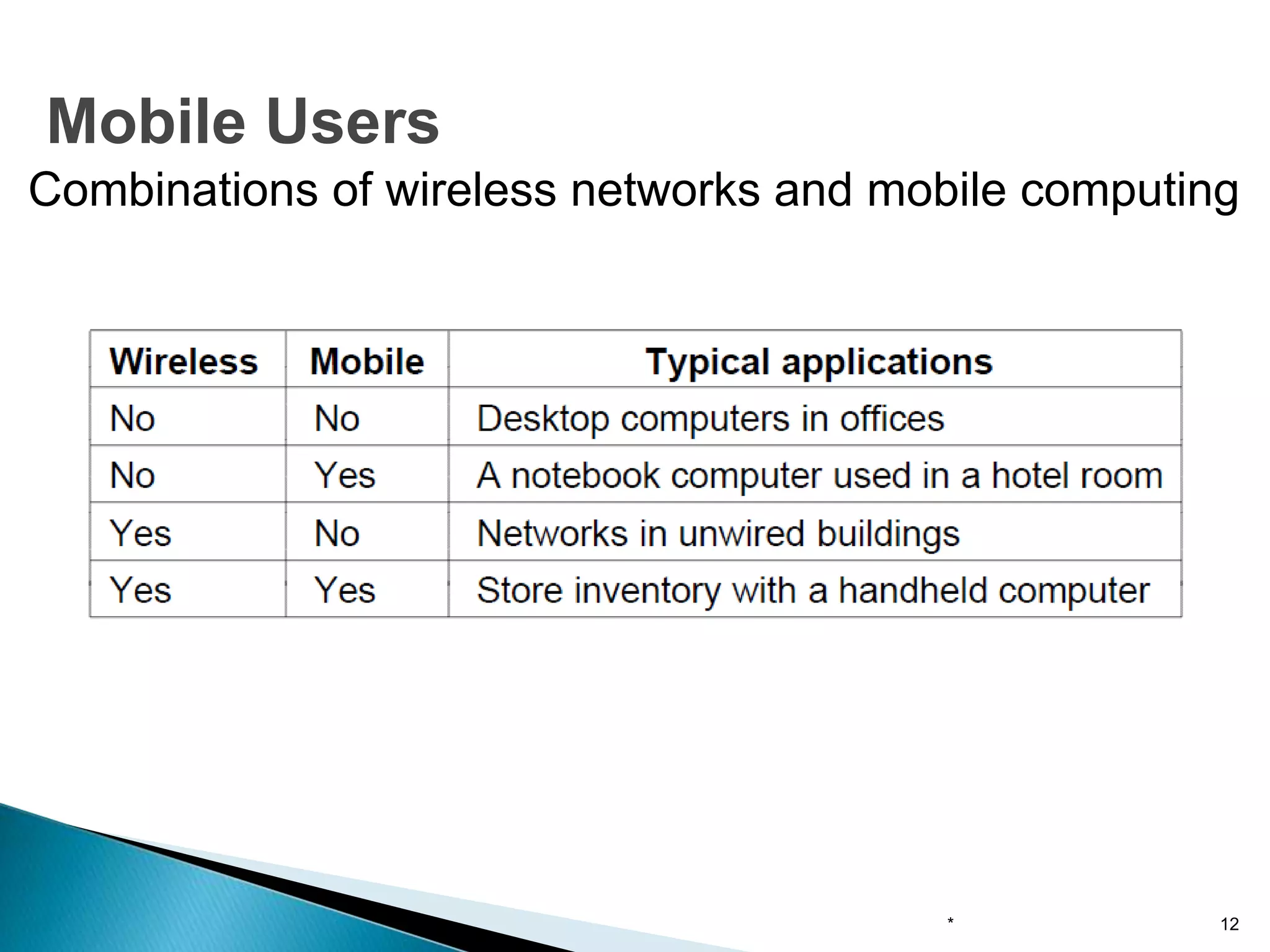
Combinations of wireless networks and mobile computing
* 12
Mobile Users
● Network neutrality
● Digital Millennium Copyright Act
● Profiling users
● Phishing
* 13
Social Issues
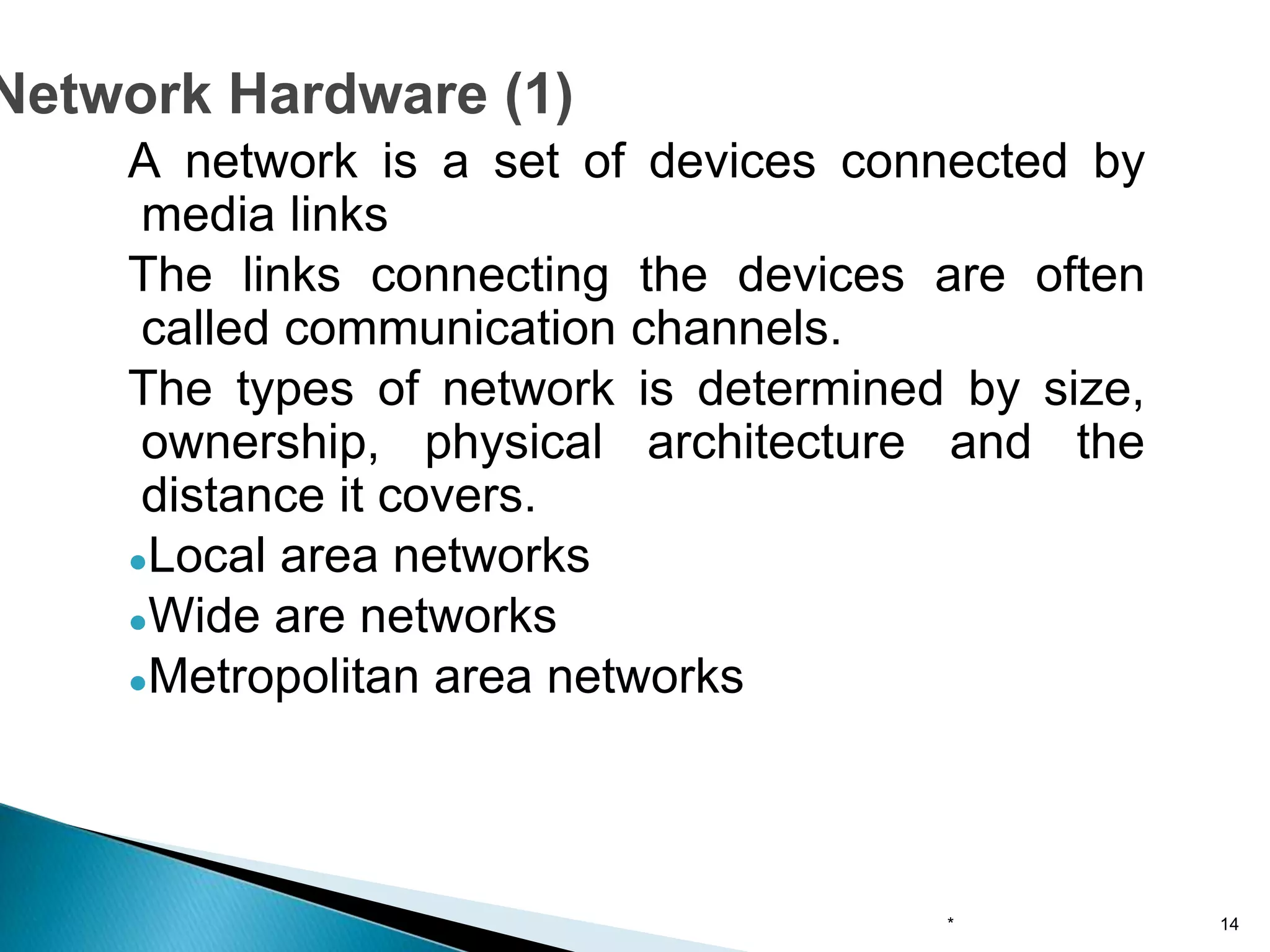
A network is a set of devices connected by
media links
The links connecting the devices are often
called communication channels.
The types of network is determined by size,
ownership, physical architecture and the
distance it covers.
●Local area networks
●Wide are networks
●Metropolitan area networks
* 14
Network Hardware (1)
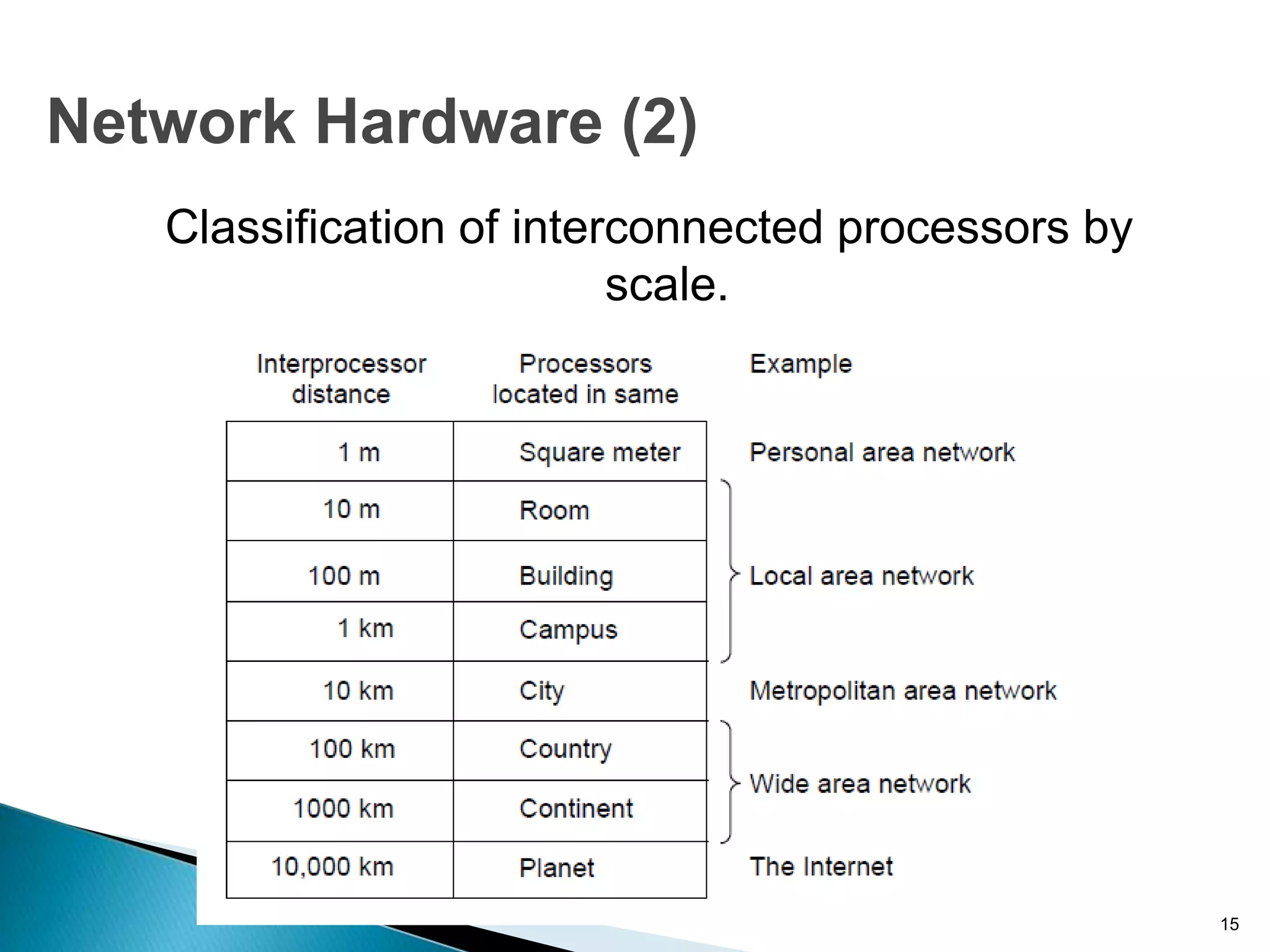
Classification of interconnected processors by
scale.
* 15
Network Hardware (2)
● A LAN is a system composed of computer hardware
and transmission media, software.
● LANs are privately owned networks within a single
building or campus of up to few km in range
● It generally uses only one type of transmission
media.
● Depends upon application and cost, various
topology are used in LAN.
● The basic idea of a LAN is to provide easy access to
data terminal equipment (DTE) such as computers,
printers, plotters and electronic files and databases.
* 16
Local area networks
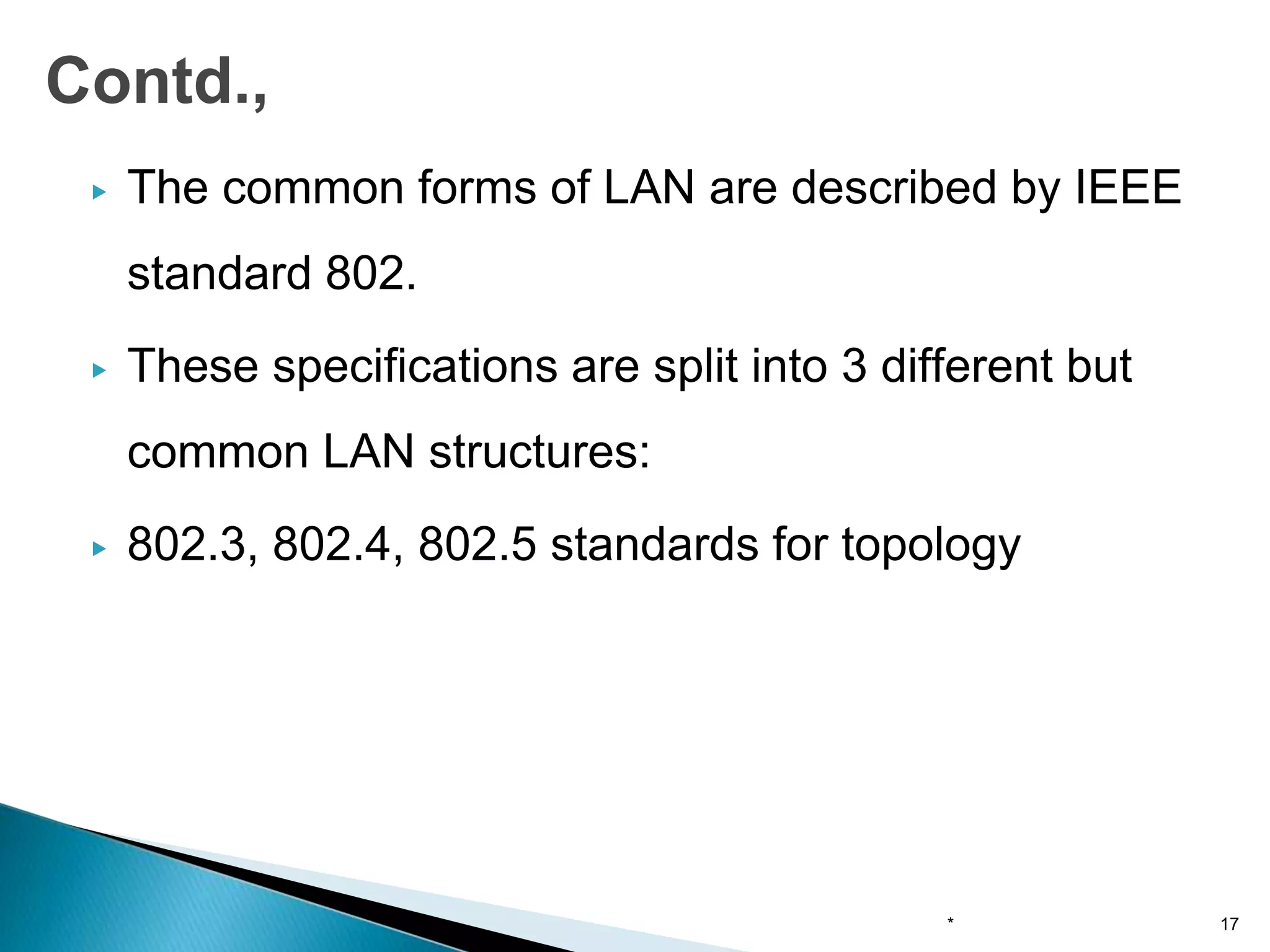
▶ The common forms of LAN are described by IEEE
standard 802.
▶ These specifications are split into 3 different but
common LAN structures:
▶ 802.3, 802.4, 802.5 standards for topology
* 17
Contd.,
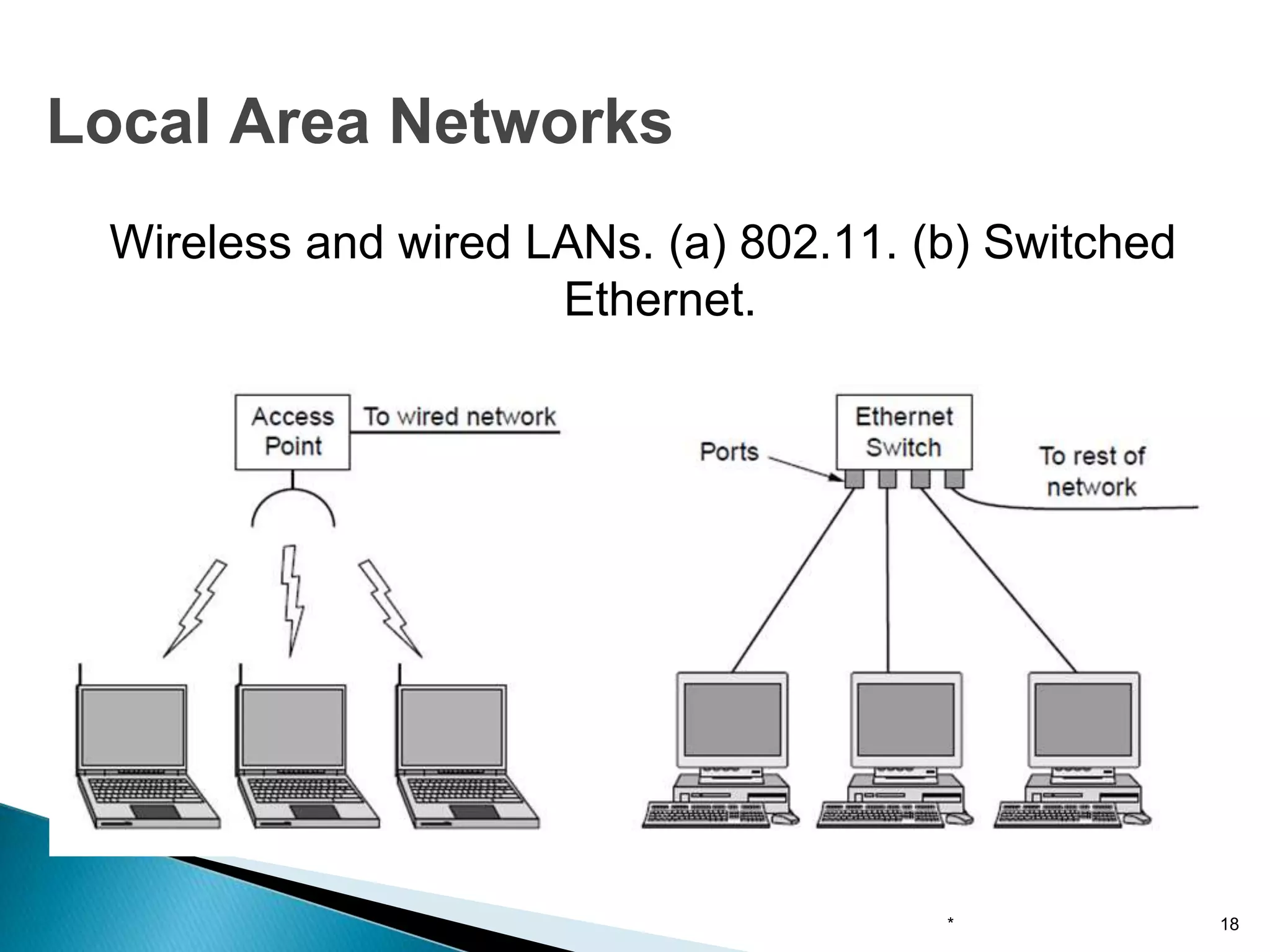
Wireless and wired LANs. (a) 802.11. (b) Switched
Ethernet.
* 18
Local Area Networks
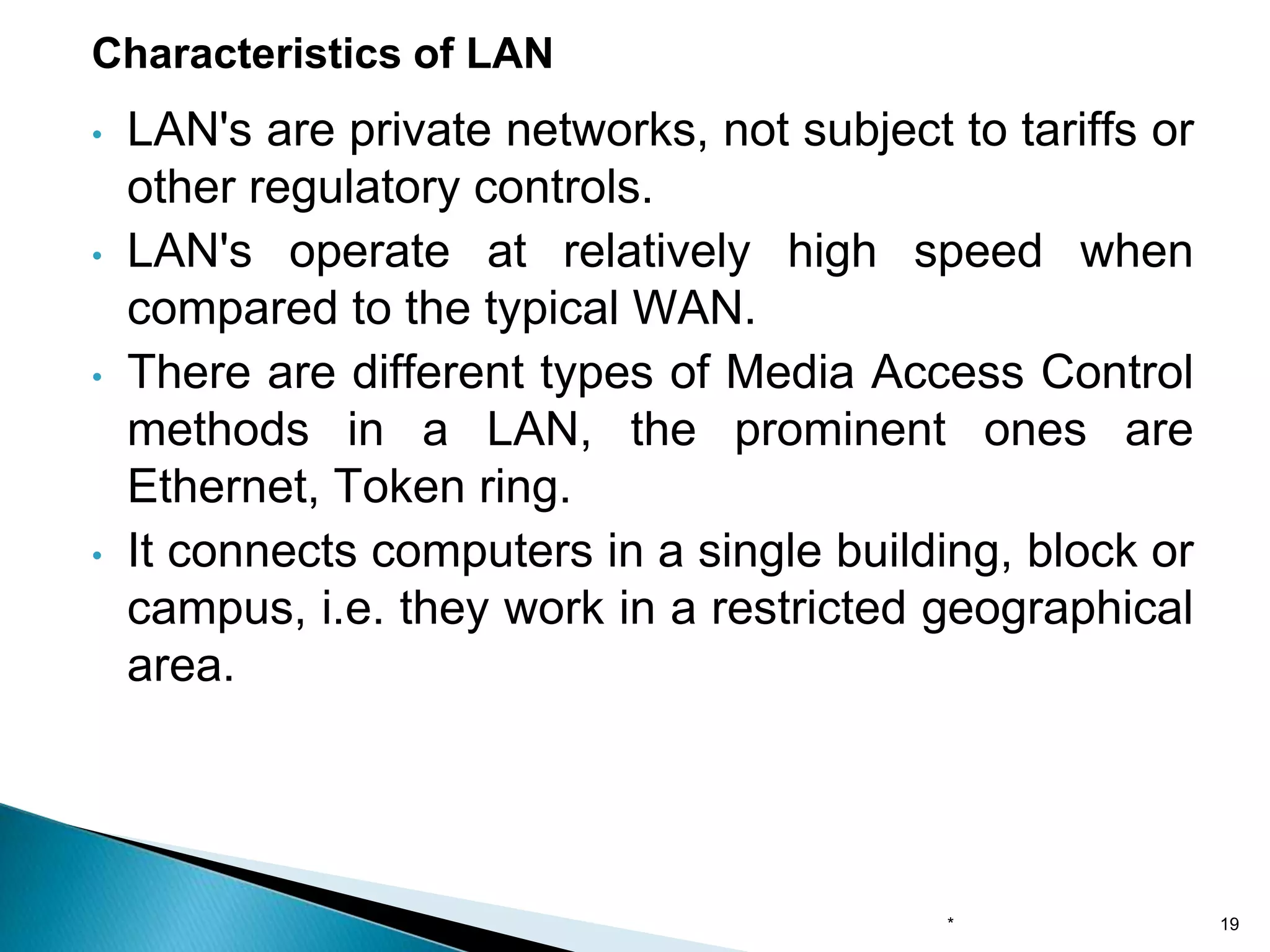
• LAN's are private networks, not subject to tariffs or
other regulatory controls.
• LAN's operate at relatively high speed when
compared to the typical WAN.
• There are different types of Media Access Control
methods in a LAN, the prominent ones are
Ethernet, Token ring.
• It connects computers in a single building, block or
campus, i.e. they work in a restricted geographical
area.
Characteristics of LAN
* 19
Contd.,
LAN can provide users:
➢Flexibility
➢Speed
➢Relaibility
➢Adaptability
➢Security
➢Centralized management
➢Hardware and software sharing
➢Access to other LAN and WAN
➢Transparent interface
* 20
• One of the computer in a network can become a
server serving all the remaining computers called
clients.
• Software can be stored on the server and it can be
used by the remaining clients.
• Connecting Locally all the workstations in a building to
let them communicate with each other locally without
any internet access.
• Sharing common resources like printers etc are some
common applications of LAN.
Applications of LAN
* 21
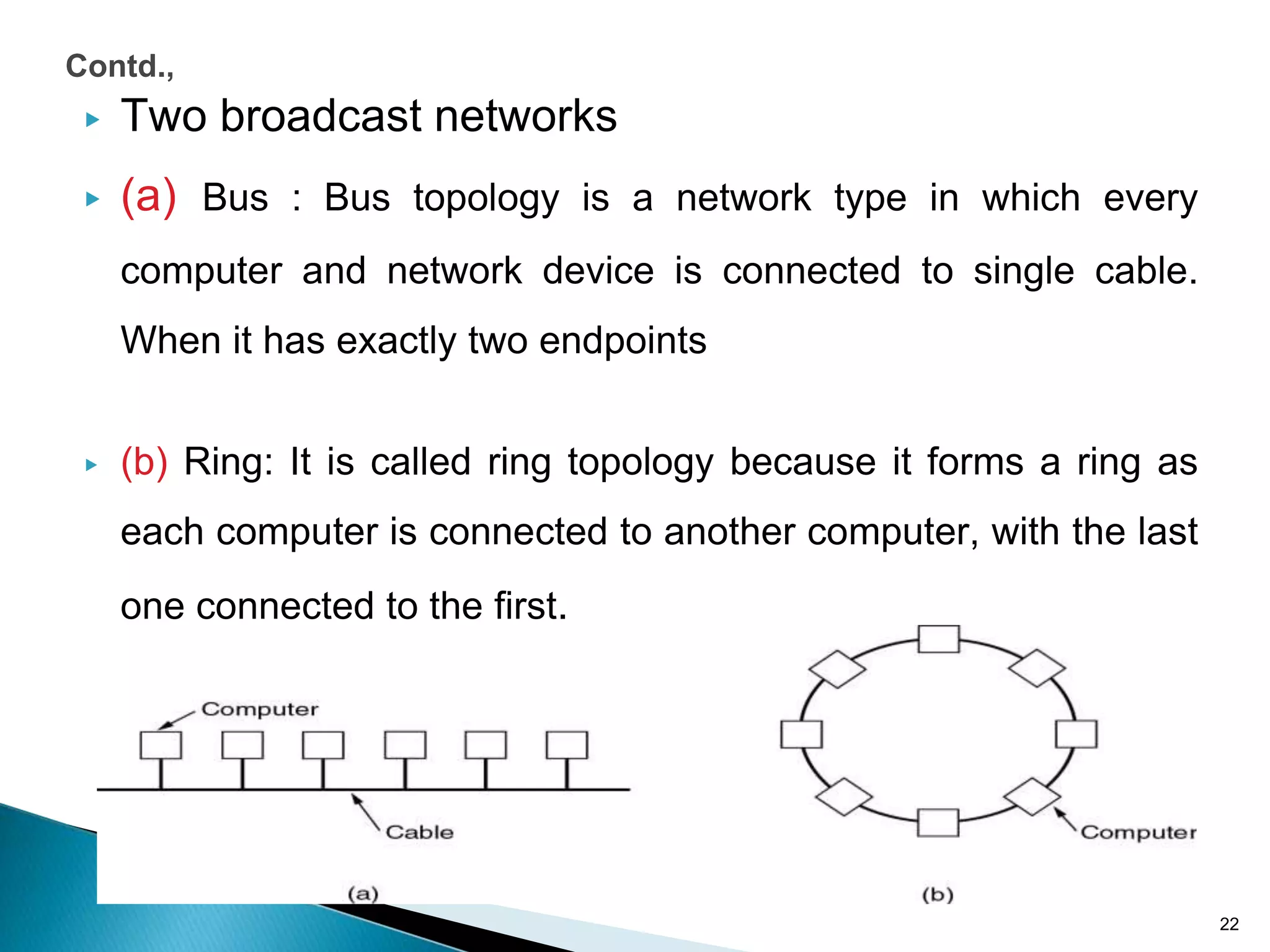
▶ Two broadcast networks
▶ (a) Bus : Bus topology is a network type in which every
computer and network device is connected to single cable.
When it has exactly two endpoints
▶ (b) Ring: It is called ring topology because it forms a ring as
each computer is connected to another computer, with the last
one connected to the first.
22
Contd.,
Contd.,
Attributes of LAN
➢The LAN transmits data between user stations
and computers
➢LAN transmission capacity is more than 1 Mbps
➢LAN channel is typically privately owned by the
organization
➢The geographical coverage is limited to area
less than 5 sq. km
* 23
Contd.,
Properties of LAN
➢Multiple systems are attached to shared
medium
➢High total bandwidth
➢Low delay
➢Low error rate
➢Broadcast/multicast capability
➢Limited area
➢Limited number of stations
➢Peer relationship between stations
* 24
Contd.,
The characteristics differentiating LAN from one another:
Topology
The geometric arrangement of devices on the network
For eg., devices can be arranged in a ring or in a straight line
Protocols
the rules and encoding specifications for sending data.
Media
Devices can be connected by twisted-pair wire, coaxial cables, or
fiber optic cables.
* 25
▶ LAN are capable of transmitting data at very fast
rates
▶ But the distance is limited
▶ No. of computers attached to a single LAN is also
limited
* 26
Contd.,
• Resource Sharing: Computer resources like printers, modems, DVD-
ROM drives and hard disks can be shared with the help of local area
networks. This reduces cost and hardware purchases.
• Software Applications Sharing: It is cheaper to use same software
over network instead of purchasing separate licensed software for each
client a network.
• Easy and Cheap Communication: Data and messages can easily be
transferred over networked computers.
• Centralized Data: The data of all network users can be saved on hard
disk of the server computer. This will help users to use any workstation
in a network to access their data. Because data is not stored on
workstations locally.
• Data Security: Since, data is stored on server computer centrally, it will
be easy to manage data at only one place and the data will be more
secure too.
• Internet Sharing: Local Area Network provides the facility to share a
single internet connection among all the LAN users. In Net Cafes, single
internet connection sharing system keeps the internet expenses
cheaper.
Advantages of LAN
* 27
• High Setup Cost: Although the LAN will save cost over time due
to shared computer resources, but the initial setup costs of
installing Local Area Networks is high.
• Privacy Violations: The LAN administrator has the rights to
check personal data files of each and every LAN user. Moreover
he can check the internet history and computer use history of the
LAN user.
• Data Security Threat: Unauthorised users can access important
data of an organization if centralized data repository is not
secured properly by the LAN administrator.
• LAN Maintenance Job: Local Area Network requires a LAN
Administrator because, there are problems of software
installations or hardware failures or cable disturbances in Local
Area Network. A LAN Administrator is needed at this full time job.
• Covers Limited Area: Local Area Network covers a small area
like one office, one building or a group of nearby buildings.
Disadvantages of LAN
* 28
▶ A MAN is larger than LAN is limited to city or
group of nearby corporate offices.
▶ It uses similar technology of LAN
▶ The MAN standard is organized around a topology
and technique called distributed queue dual
bus(DQDB).
▶ MAN provides transfer rates from 34 to 150Mbps.
* 29
Metropolitan Area Networks
▶ It can support both data and voice.
▶ The standard for MAN is IEEE 802.6
▶ A MAN is designed with two unidirectional buses.
▶ MANs are based on fiber optic transmission
technology
* 30
Contd.,
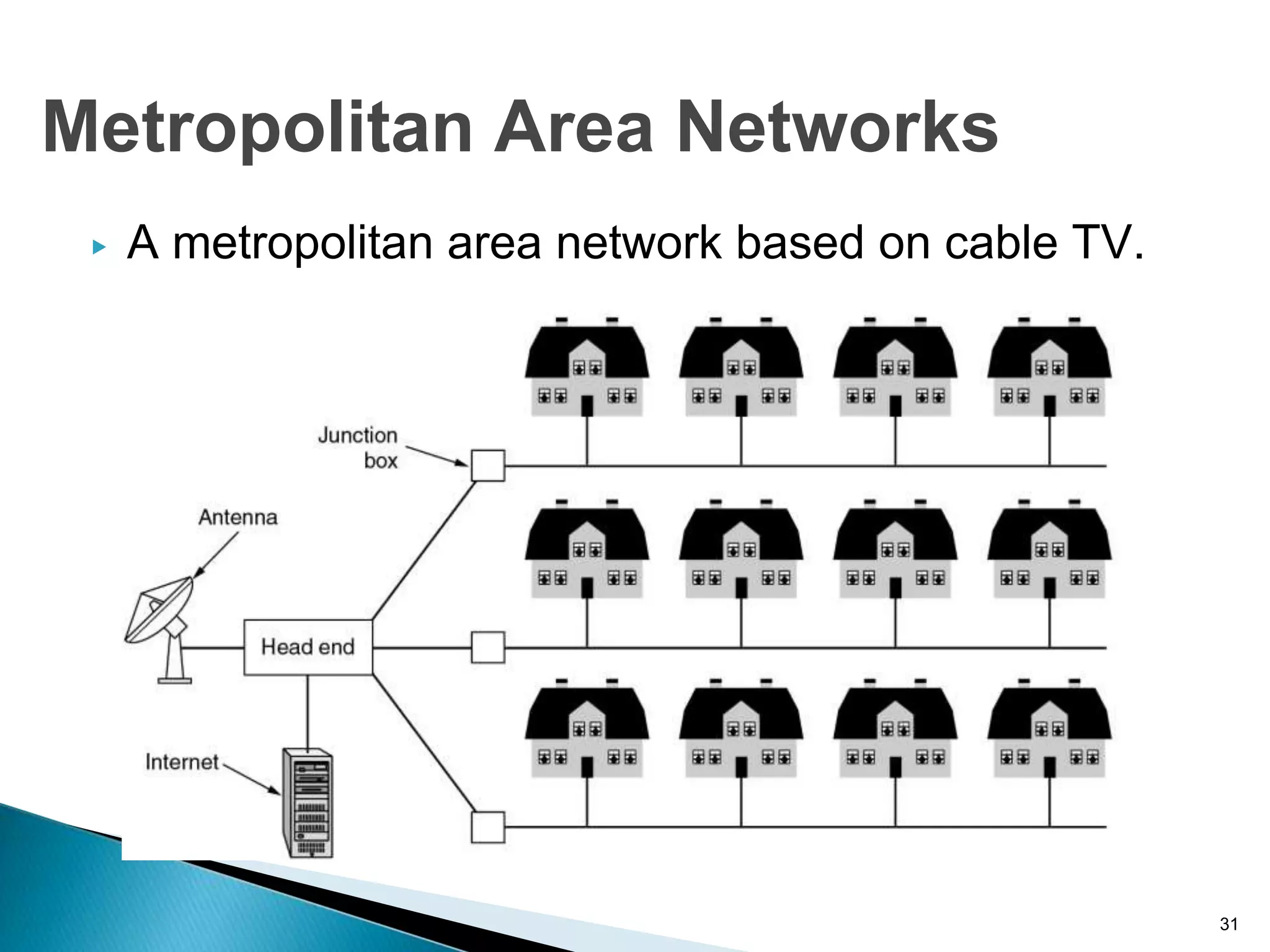
▶ A metropolitan area network based on cable TV.
31
Metropolitan Area Networks
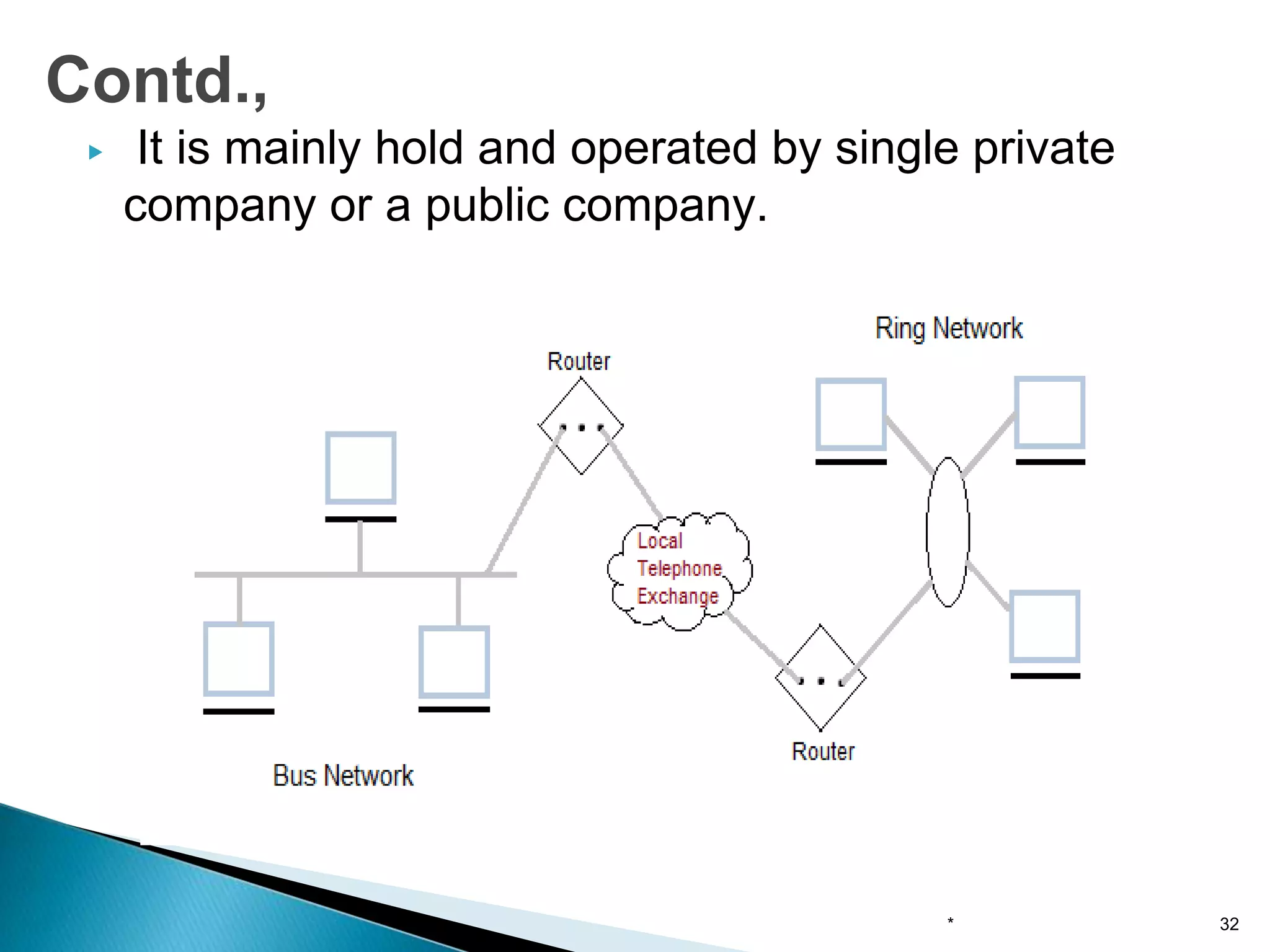
▶ It is mainly hold and operated by single private
company or a public company.
Contd.,
* 32
▶ Characteristics of MAN
• It generally covers towns and cities (50 km)
• Communication medium used for MAN are optical fibers,
cables etc.
• Data rates adequate for distributed computing applications.
▶ Advantages of MAN
• Extremely efficient and provide fast communication via high-
speed carriers, such as fibre optic cables.
• It provides a good back bone for large network and provides
greater access to WANs.
• The dual bus used in MAN helps the transmission of data in both
directions simultaneously.
• A MAN usually encompasses several blocks of a city or an entire
city.
Contd.,
* 33
▶ Disadvantages of MAN
• More cable required for a MAN connection from
one place to another.
• It is difficult to make the system secure from
hackers and industrial espionage(spying)
graphical regions.
Contd.,
* 34
▶ A WAN provides long distance transmission of data
and voice.
▶ A network that covers a larger area such as city,
state, country is called wide area network.
▶ The WAN contains host and collection of machines.
▶ User programs is installed on the host and
machines.
▶ All the host are connected through communication
subnet
▶ Subnet carries messages from host to host.
* 35
Wide Area Networks
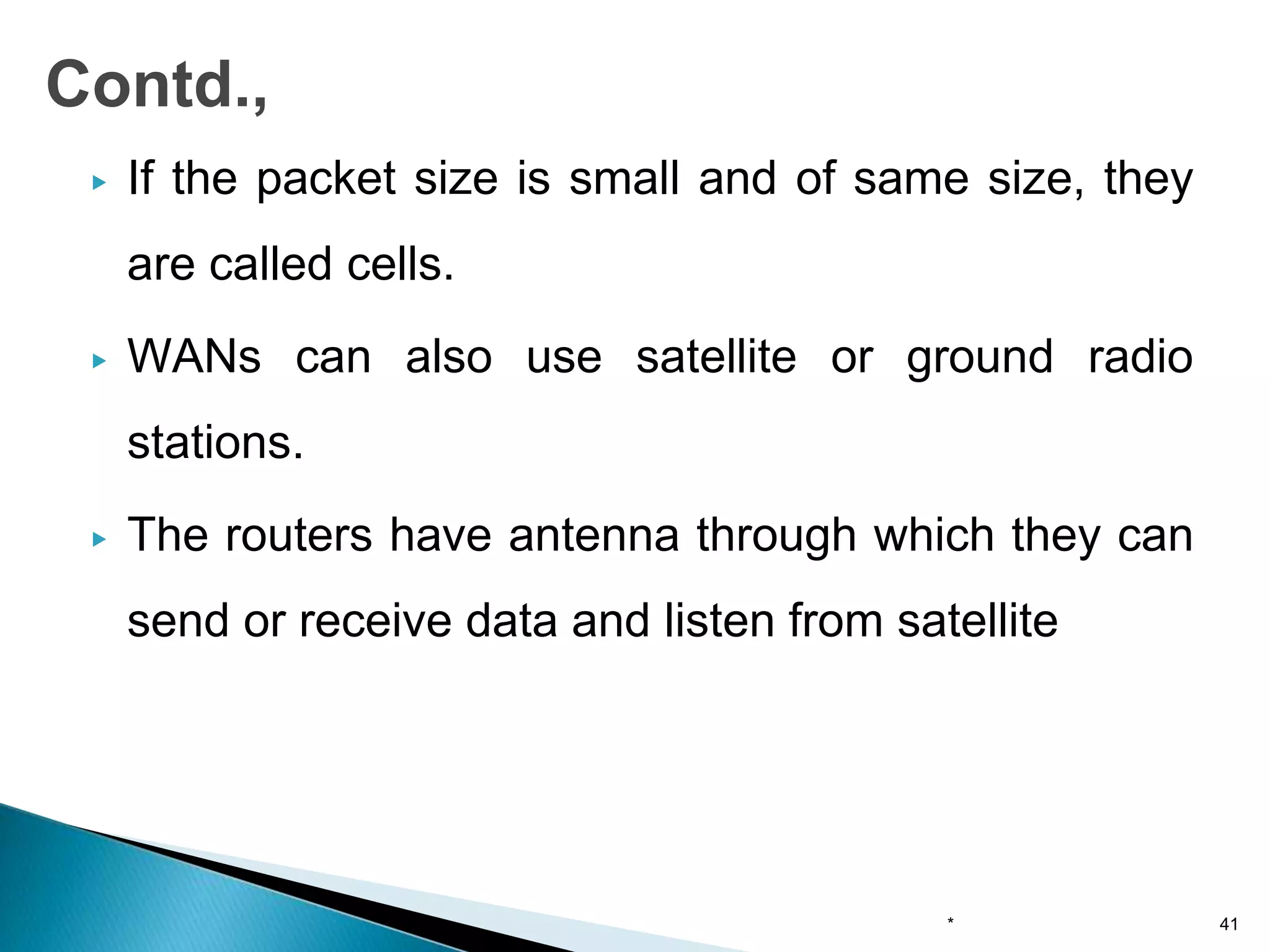
▶ Subnet consists of transmission lines and
switching elements.
▶ The transmission lines(also called circuits,
channels or trunks) is used for data transfer
between two machines
▶ Switching elements are used for connecting two
transmission lines.
▶ Switching elements are basically computers and
they are called packet switching nodes,
intermediate systems and data switching
exchange.
▶ It is also called routers.
* 36
Contd.,
Contd.,
* 37
Characteristics of WAN
• It generally covers large distances(states, countries, continents).
• Communication medium used are satellite, public telephone
networks which are connected by routers.
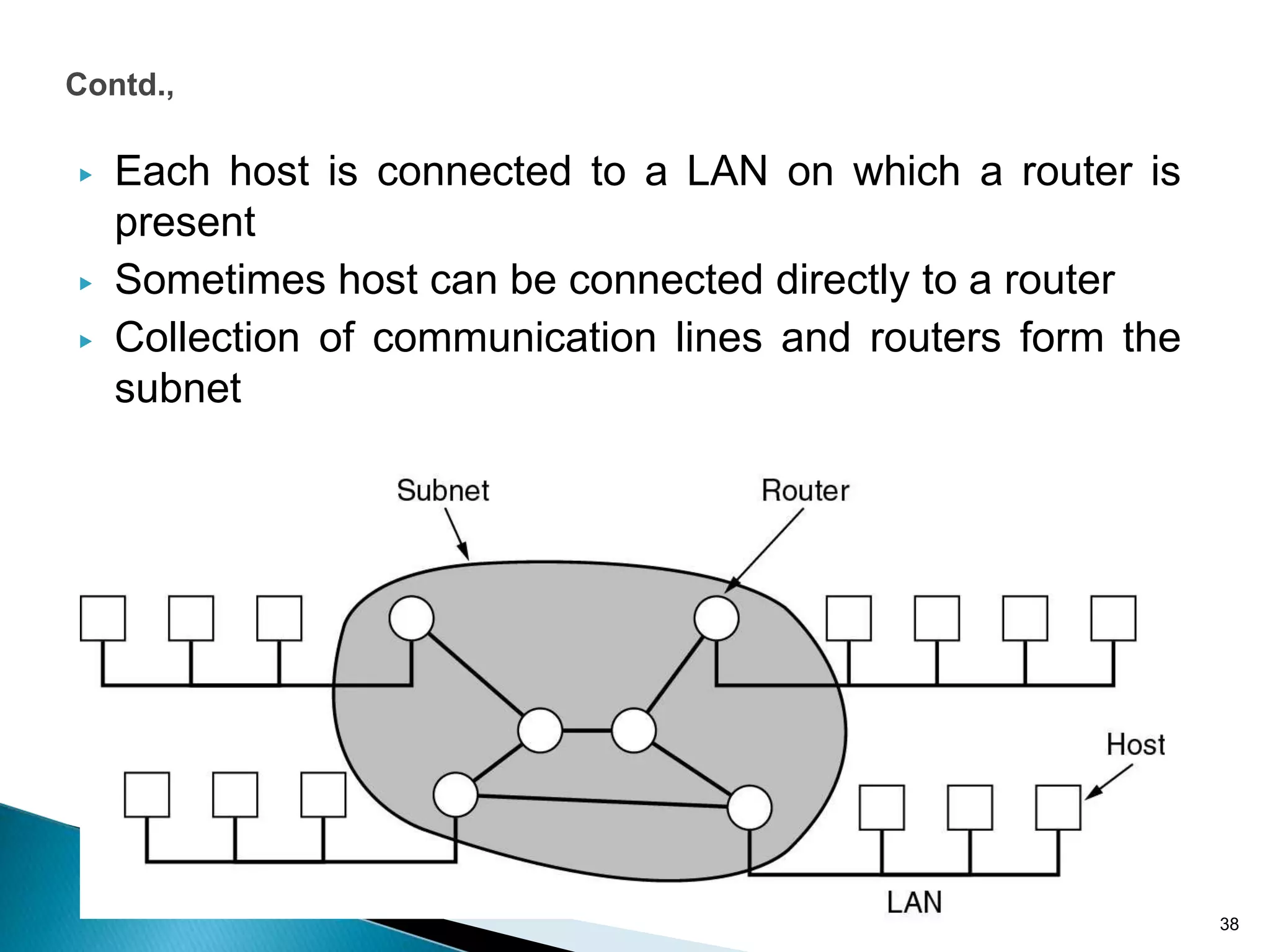
▶ Each host is connected to a LAN on which a router is
present
▶ Sometimes host can be connected directly to a router
▶ Collection of communication lines and routers form the
subnet
38
Contd.,
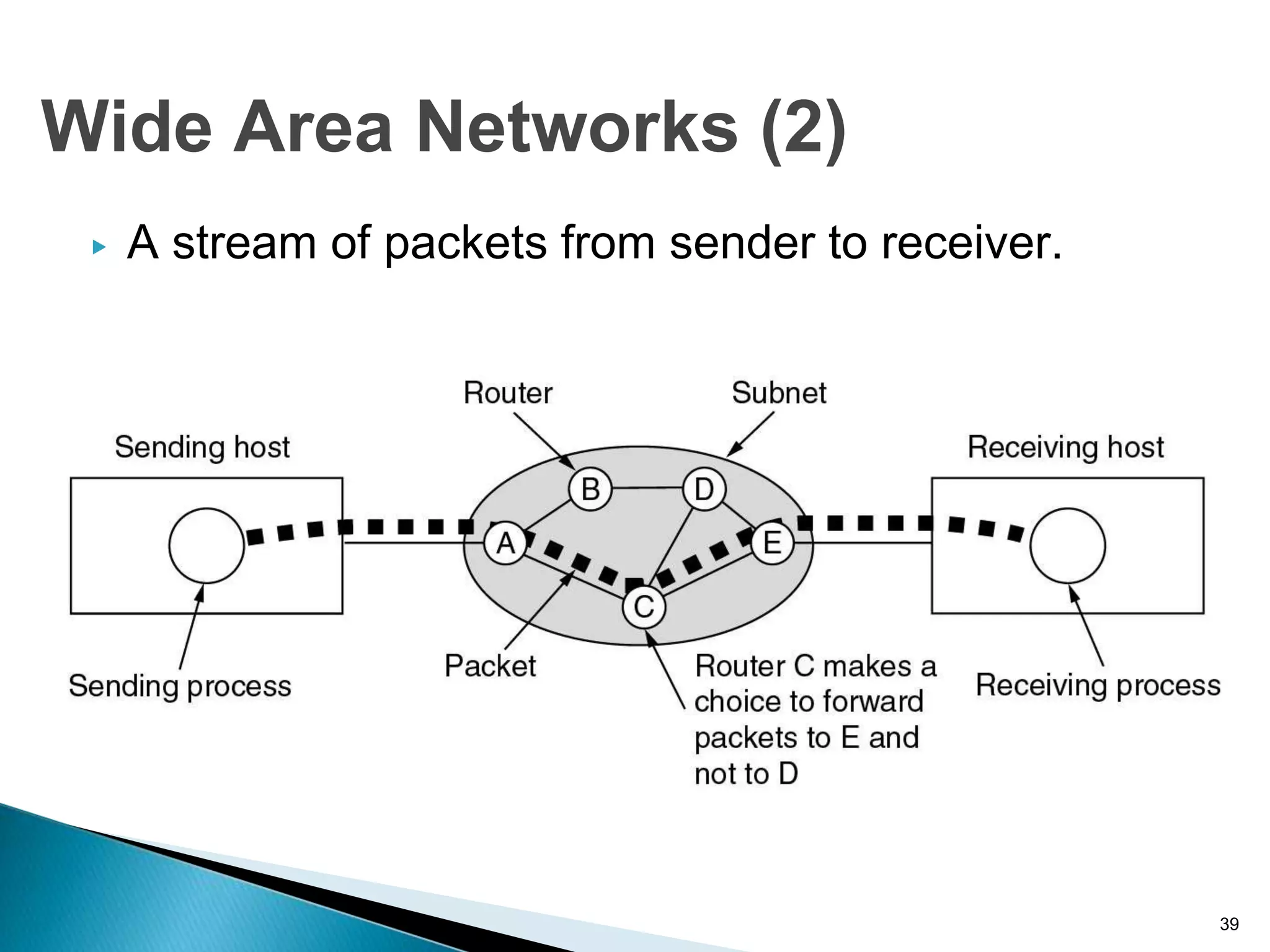
▶ A stream of packets from sender to receiver.
39
Wide Area Networks (2)
▶ In WAN, when the packet is sent from one router
to router via one or more intermediate routers.
▶ This packet is stored in that router until the
required output line is free.
▶ The subnet which uses this principle is called
point-to-point, store and forward or packet
switched subnet.
▶ Almost all WANs use store and forward subnets.
* 40
Contd.,
▶ If the packet size is small and of same size, they
are called cells.
▶ WANs can also use satellite or ground radio
stations.
▶ The routers have antenna through which they can
send or receive data and listen from satellite
* 41
Contd.,
WAN that connects three branch offices in Australia
* 42
Wide Area Networks (1)
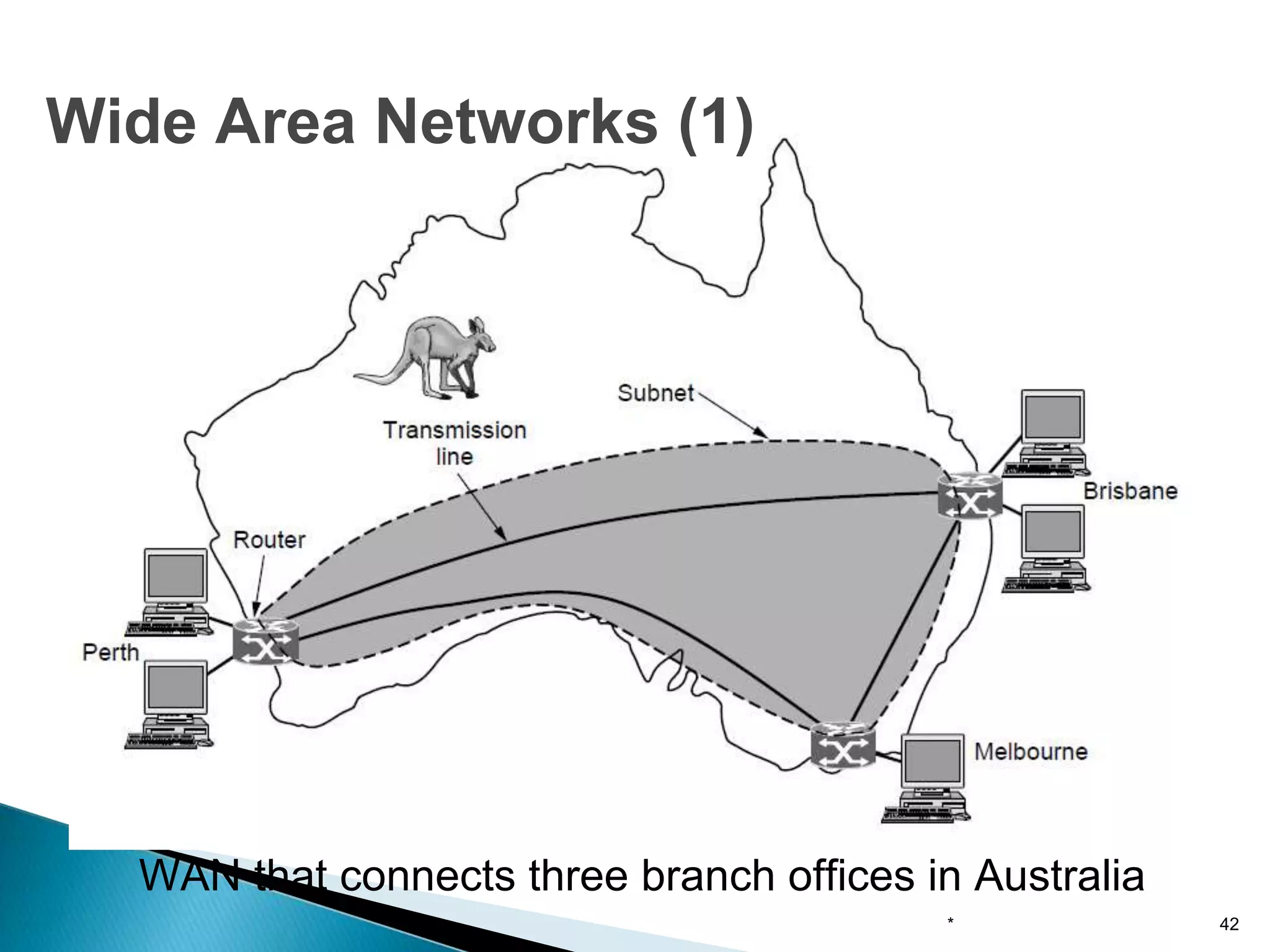
WAN using a virtual private network.
* 43
Wide Area Networks (2)
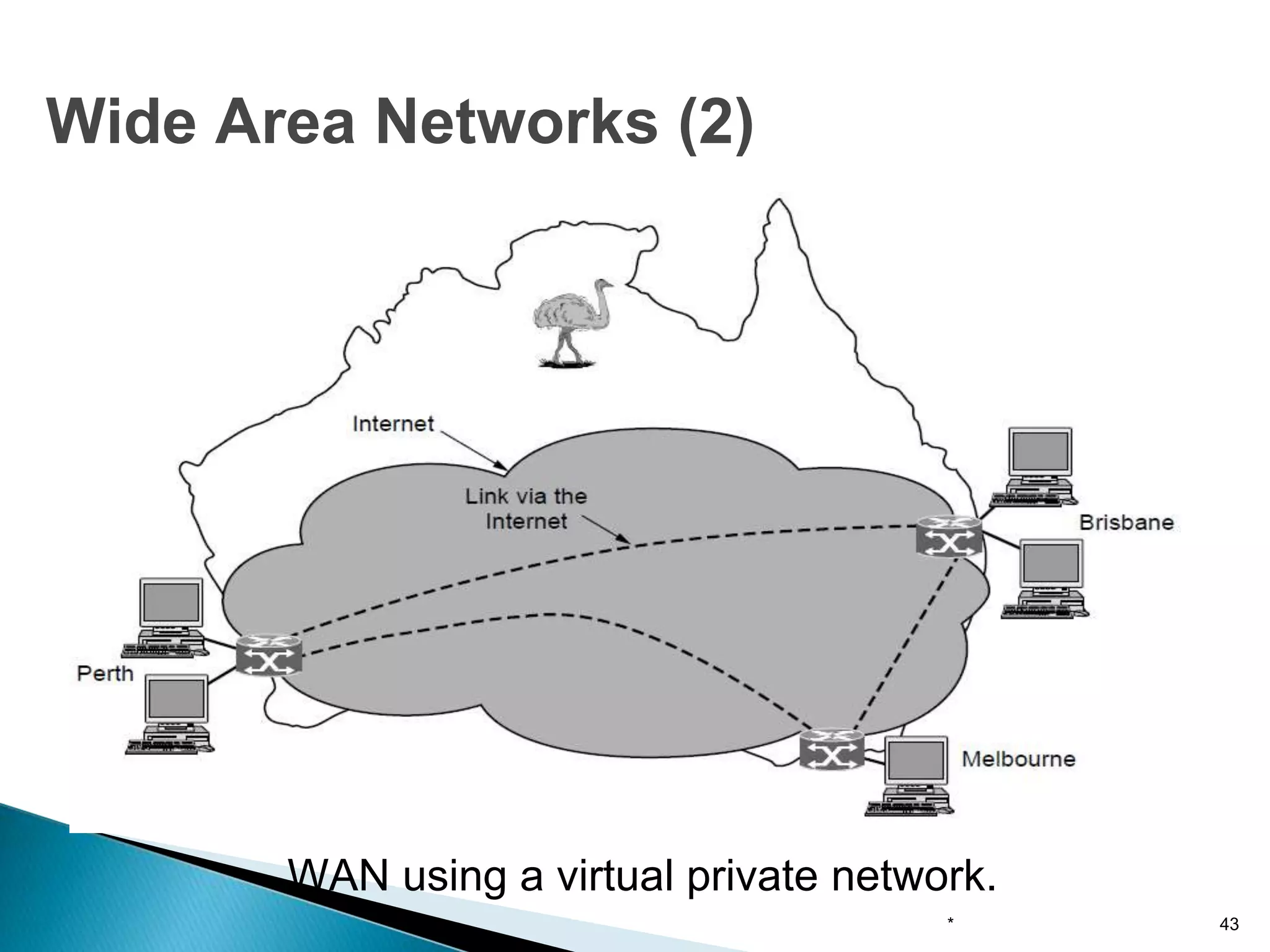
WAN using an ISP network.
* 44
Wide Area Networks (3)
• Covers a large geographical area so long distance business
can connect on the one network.
• Shares software and resources with connecting workstations.
• Messages can be sent very quickly to anyone else on the
network.
• Expensive things(such as printers or phone lines to the
internet) can be shared by all the computers on the network
without having to buy a different peripheral for each computer.
• Everyone on the network can use the same data. This avoids
problems where some users may have older information than
others.
Advantages of WAN
* 45
▶ Need a good firewall to restrict outsiders from entering and
disrupting the network.
▶ Setting up a network can be an expensive, slow and complicated.
The bigger the network the more expensive it is.
▶ Once set up, maintaining a network is a full-time job which requires
network supervisors and technicians to be employed.
▶ Security is a real issue when many different people have the ability
to use information from other computers.
▶ Protection against hackers and viruses adds more complexity and
expense.
Disadvantages of WAN
* 46
▶ Many of the owners of mobile computers have
desktop machines on LANs and WANS at office
and to be connected to their home even away
from home
▶ Wired connection is impossible in cars and
airplanes
▶ Digital wireless communication is not a new idea.
▶ Earlier, Morse code was used to implement
wireless networks.
Wireless Networks
* 47
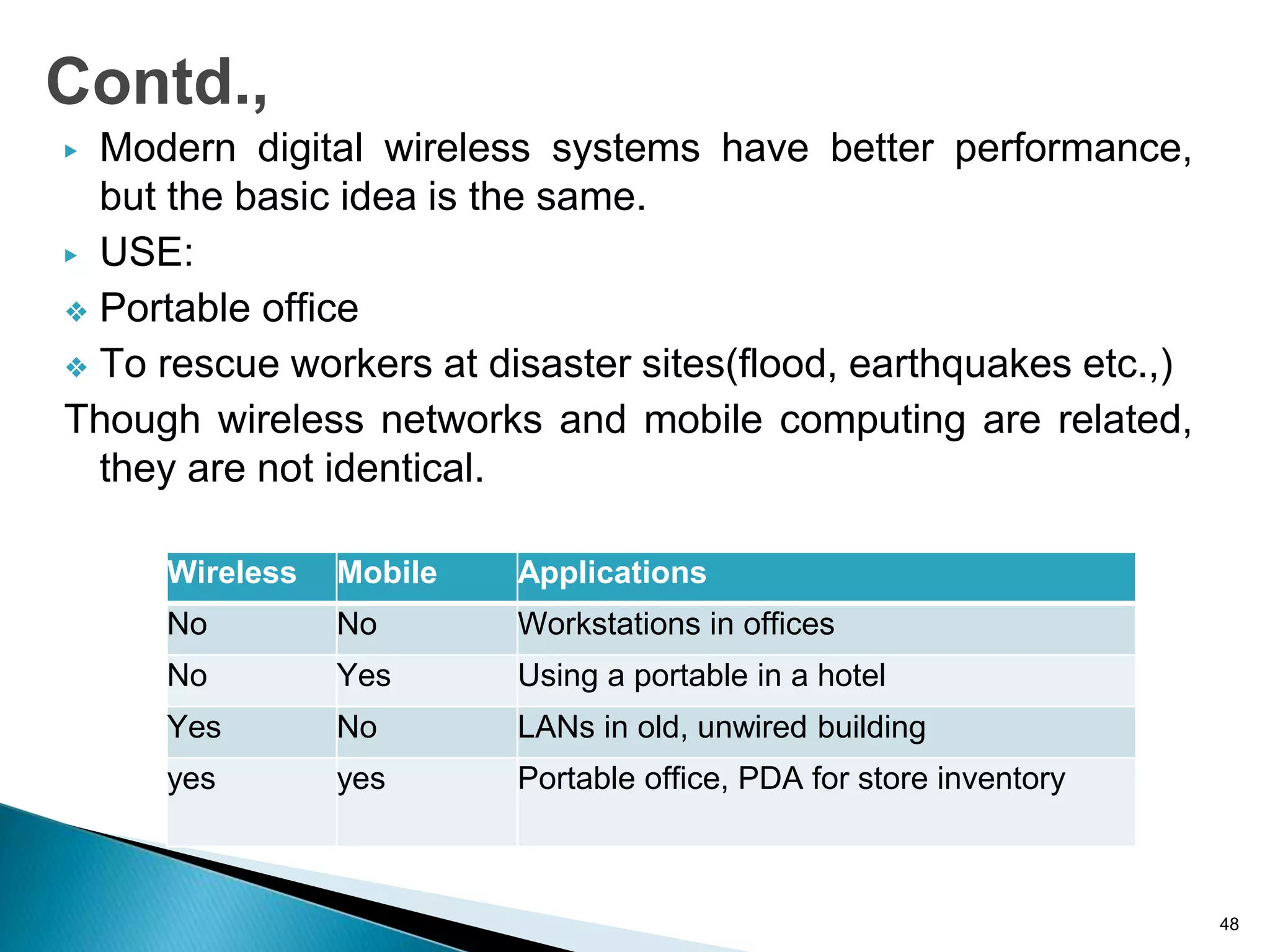
▶ Modern digital wireless systems have better performance,
but the basic idea is the same.
▶ USE:
❖ Portable office
❖ To rescue workers at disaster sites(flood, earthquakes etc.,)
Though wireless networks and mobile computing are related,
they are not identical.
48
Contd.,
Wireless Mobile Applications
No No Workstations in offices
No Yes Using a portable in a hotel
Yes No LANs in old, unwired building
yes yes Portable office, PDA for store inventory
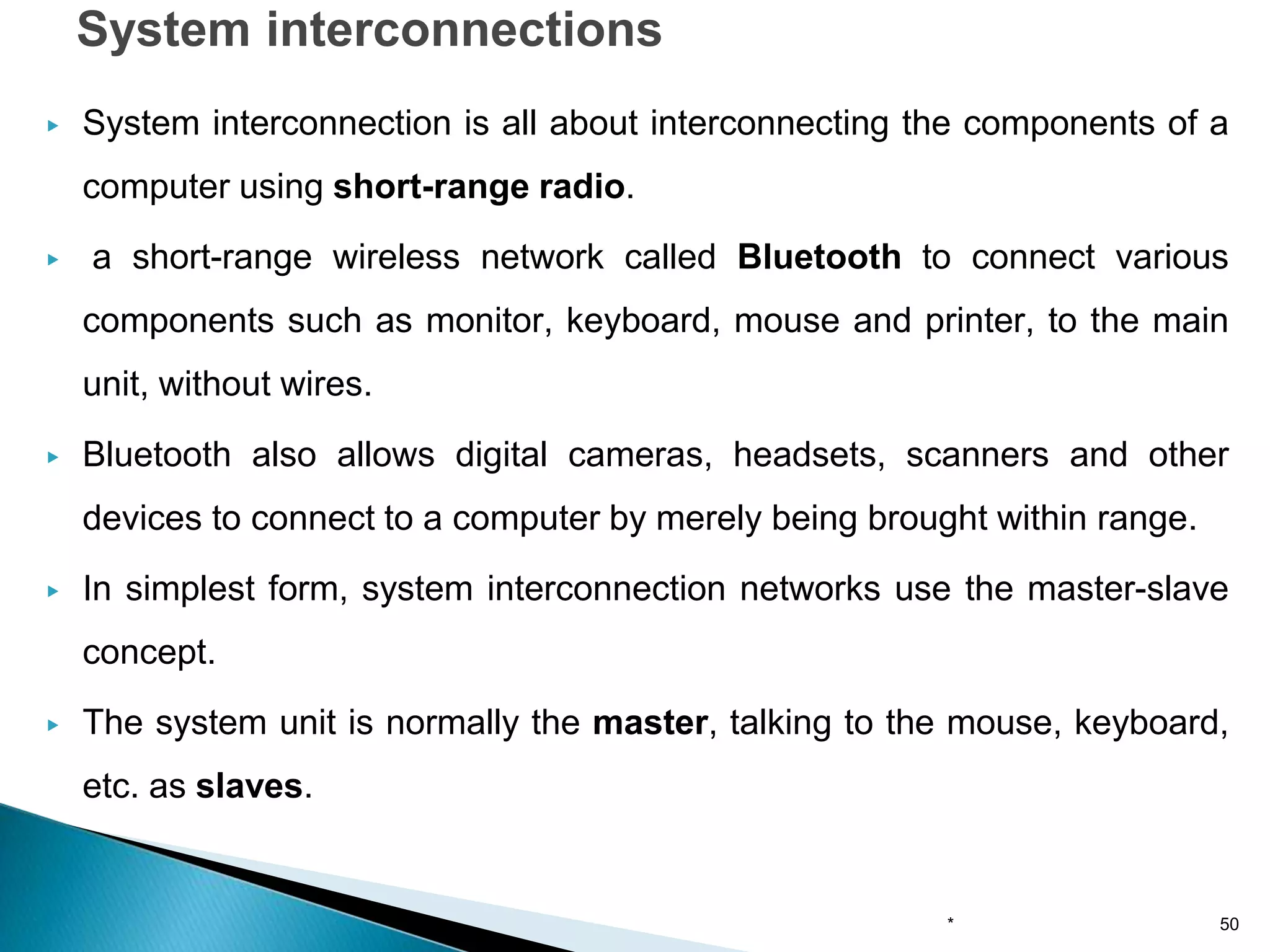
◦ System interconnections
◦ Wireless LANs
◦ Wireless WANs
Categories of Wireless Networks
* 49
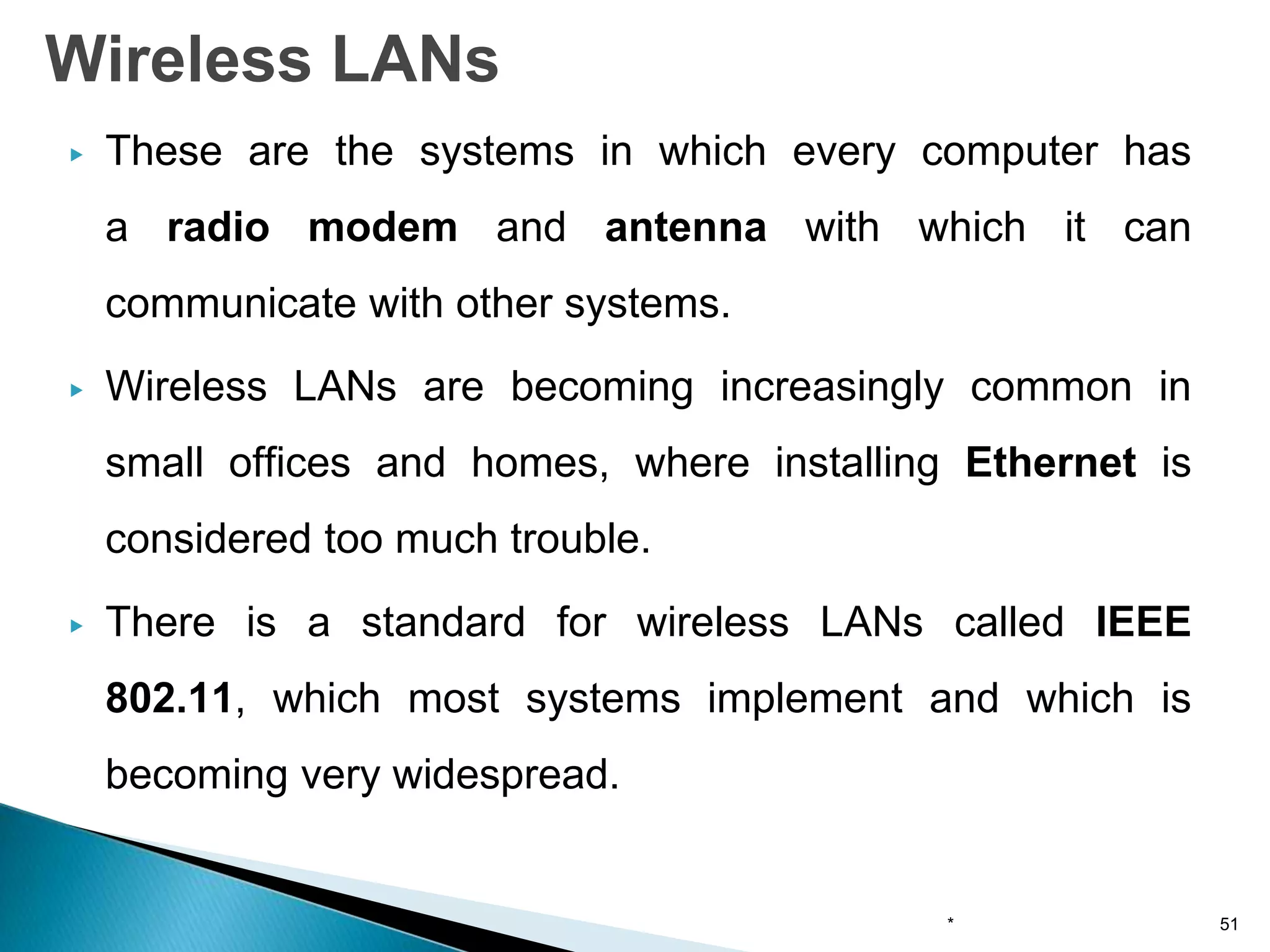
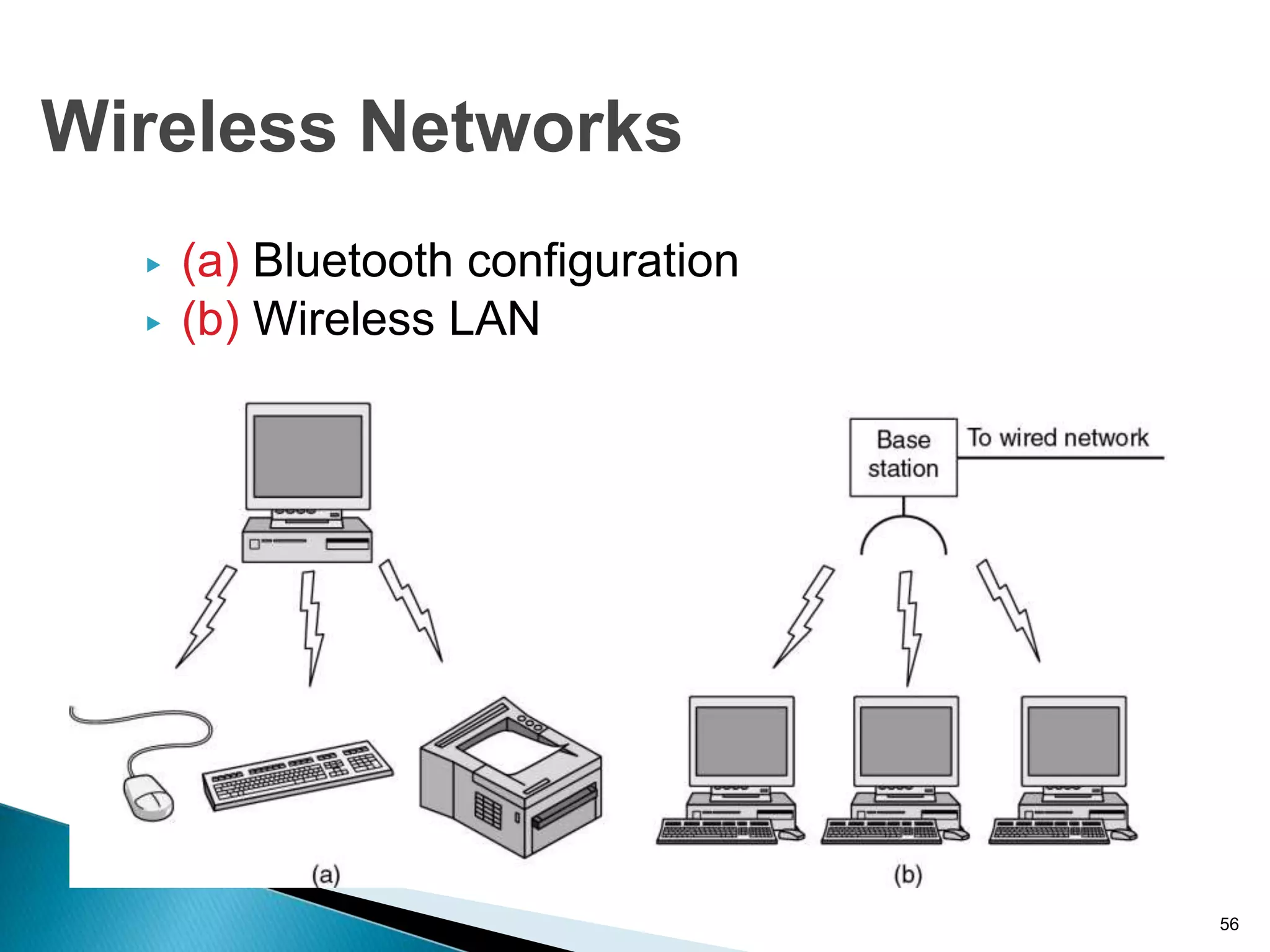
▶ System interconnection is all about interconnecting the components of a
computer using short-range radio.
▶ a short-range wireless network called Bluetooth to connect various
components such as monitor, keyboard, mouse and printer, to the main
unit, without wires.
▶ Bluetooth also allows digital cameras, headsets, scanners and other
devices to connect to a computer by merely being brought within range.
▶ In simplest form, system interconnection networks use the master-slave
concept.
▶ The system unit is normally the master, talking to the mouse, keyboard,
etc. as slaves.
System interconnections
* 50
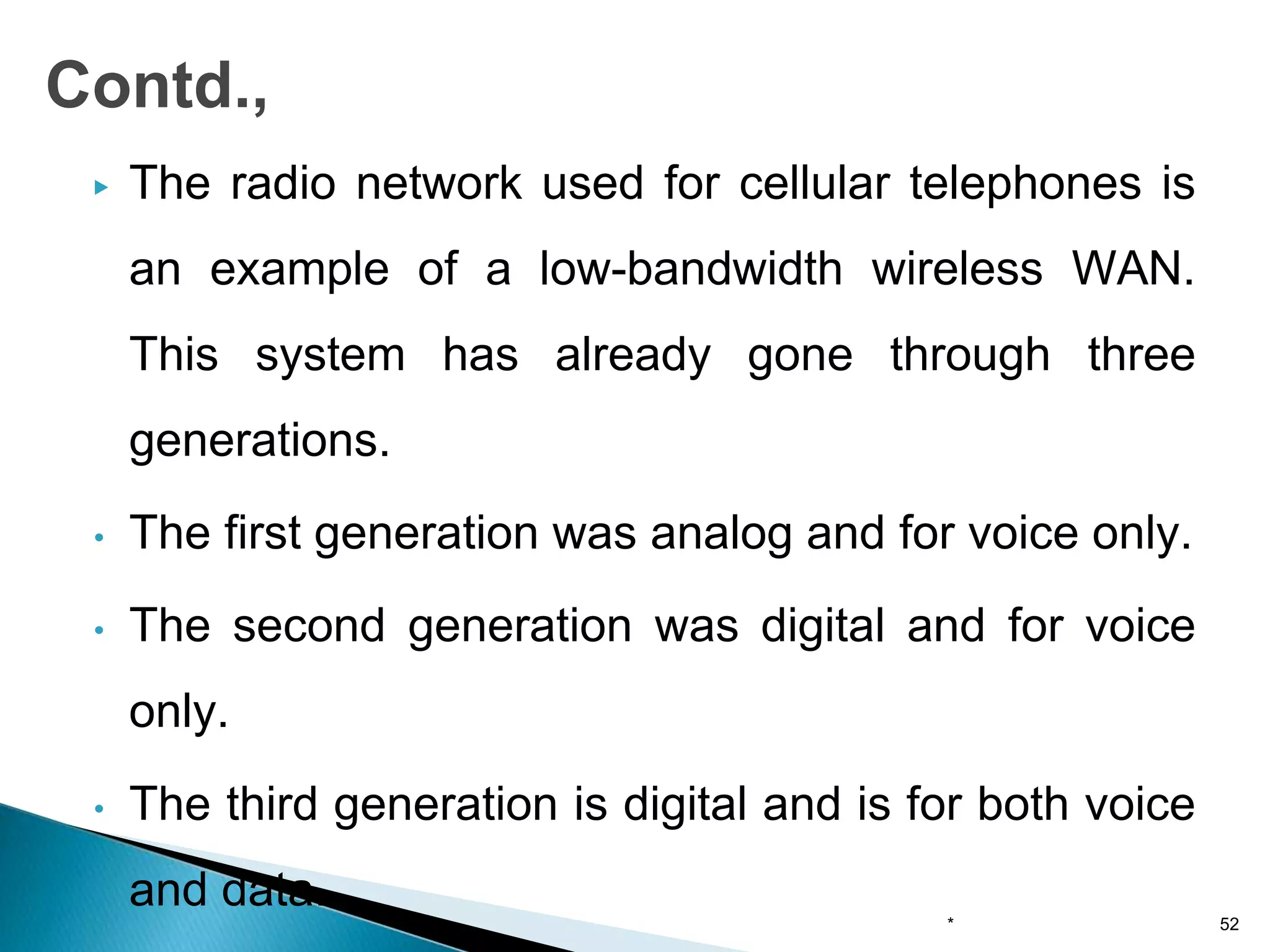
▶ These are the systems in which every computer has
a radio modem and antenna with which it can
communicate with other systems.
▶ Wireless LANs are becoming increasingly common in
small offices and homes, where installing Ethernet is
considered too much trouble.
▶ There is a standard for wireless LANs called IEEE
802.11, which most systems implement and which is
becoming very widespread.
Wireless LANs
* 51
▶ The radio network used for cellular telephones is
an example of a low-bandwidth wireless WAN.
This system has already gone through three
generations.
• The first generation was analog and for voice only.
• The second generation was digital and for voice
only.
• The third generation is digital and is for both voice
and data.
Contd.,
* 52
Contd.,
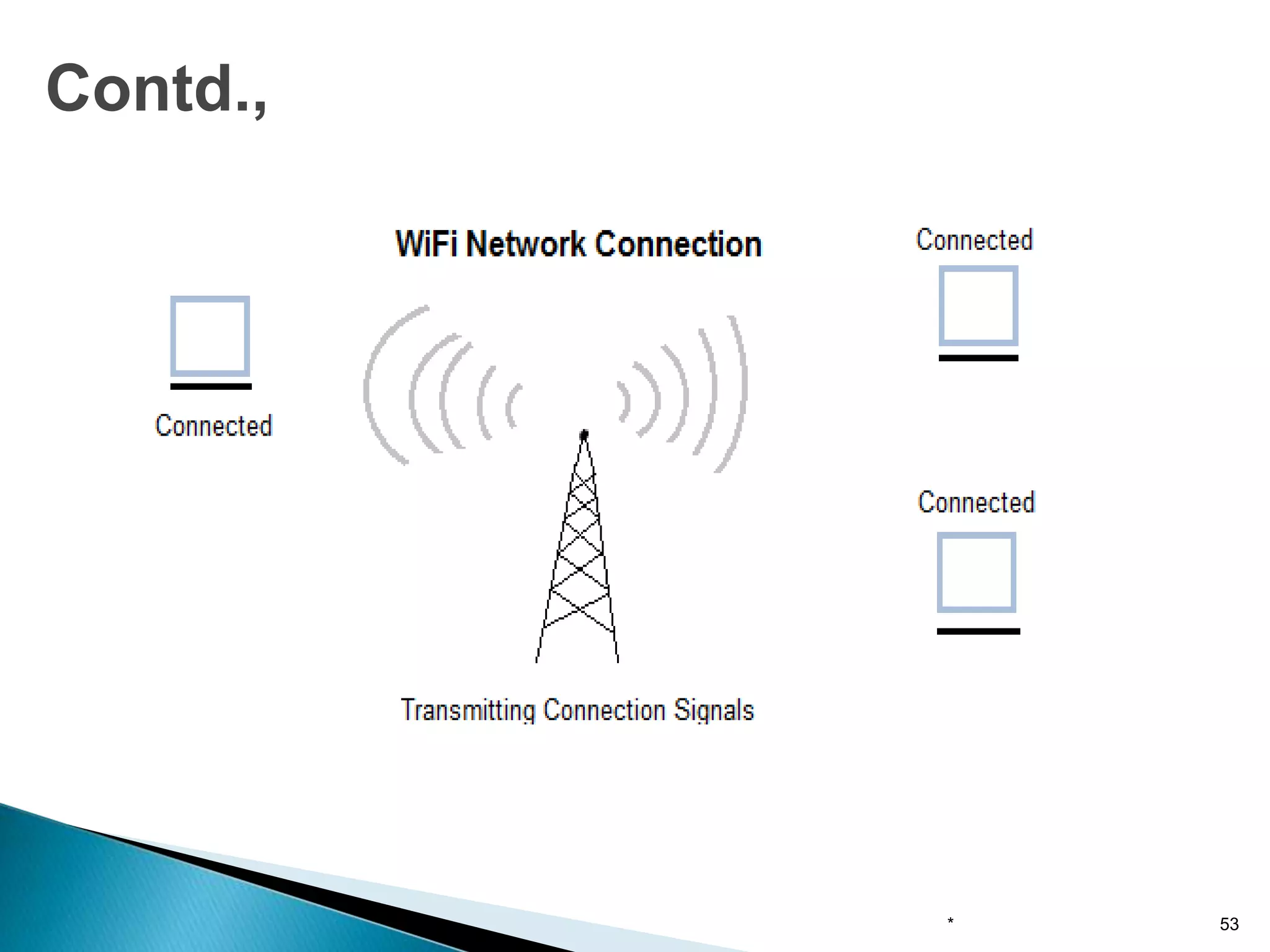
* 53
▶ No. of nodes
▶ Throughput
▶ Service area
▶ Battery power consumption
▶ Transmission robustness and security
▶ License free operation
▶ Dynamic configuration
* 54
Requirements of wireless LAN
▶ Infrared LAN : limited to a single room
▶ Spread spectrum LAN : it uses spread spectrum
transmission technology
▶ Narrow band microwave: it uses microwave
frequencies. It does not use spread spectrum
* 55
Types of wireless LAN
▶ (a) Bluetooth configuration
▶ (b) Wireless LAN
56
Wireless Networks
▶ Coverage area for wireless LAN is about 300 to
1000 feet diameter.
▶ Mobile users use battery powered workstations
that need to have long life battery used with
wireless adapters.
* 57
Contd.,
▶ Computers: desktop PC, PDA, shared
peripherals
▶ Entertainment: TV, DVD, VCR, camera, MP3
▶ Telecomm: telephone, cell phone, intercom, fax
▶ Appliances: microwave, fridge, clock, aircon
▶ Telemetry: utility meter, burglar alarm, babycam
58
Home Network Categories

Introduction to computer networks

  • 1.
    Computer Networks An Introduction Dr.P.AMUDHA AssociateProfessor Dept. of CSE School of Engineering Avinashilingam Institute
  • 2.
    Introduction ● The HistoricalPerspective ● The 18th century: the great mechanical systems accompanying the Industrial Revolution. ● The 19th century: steam engine. ● The 20th century: information gathering, processing, and distribution. ● The 21th century: Internet, large distributed systems (e.g., Grid), heavy reliance on computers.
  • 3.
    Contd., ● Networking isthe process by which people or group of people share information or services. ● Computer networks facilitate their information sharing ● Network services are the abilities that computers share with other networks ● They use data, processing and communications to accomplish the tasks: a) store and manipulate information b) Make decisions and manipulate data c) Move information 3
  • 4.
    (Cont’d) ● What isComputer Network? ● we will use the term ''computer network'' to mean a collection of autonomous computers interconnected by a single technology. ● Two computers are said to be interconnected if they are able to exchange information. ● copper wire; fiber optics, microwaves, infrared, and communication satellites, etc.
  • 5.
    ● Business Applications ●Home Applications ● Mobile Users * 5 Uses of Computer Networks
  • 6.
    A network withtwo clients and one server * 6 Business Applications (1)
  • 7.
    The client-server modelinvolves requests and replies * 7 Business Applications (2)
  • 8.
    ▶ Grid computinginfrastructure to support scientific research 8 Scientific Applications
  • 9.
    ▶ Access toremote information ▶ Person-to-person communication ▶ Interactive entertainment ▶ Electronic commerce 9 Home Network Applications (1)
  • 10.
    In a peer-to-peersystem there are no fixed clients and servers. * 10 Home Applications (1)
  • 11.
    Some forms ofe-commerce * 11 Home Applications (2)
  • 12.
    Combinations of wirelessnetworks and mobile computing * 12 Mobile Users
  • 13.
    ● Network neutrality ●Digital Millennium Copyright Act ● Profiling users ● Phishing * 13 Social Issues
  • 14.
    A network isa set of devices connected by media links The links connecting the devices are often called communication channels. The types of network is determined by size, ownership, physical architecture and the distance it covers. ●Local area networks ●Wide are networks ●Metropolitan area networks * 14 Network Hardware (1)
  • 15.
    Classification of interconnectedprocessors by scale. * 15 Network Hardware (2)
  • 16.
    ● A LANis a system composed of computer hardware and transmission media, software. ● LANs are privately owned networks within a single building or campus of up to few km in range ● It generally uses only one type of transmission media. ● Depends upon application and cost, various topology are used in LAN. ● The basic idea of a LAN is to provide easy access to data terminal equipment (DTE) such as computers, printers, plotters and electronic files and databases. * 16 Local area networks
  • 17.
    ▶ The commonforms of LAN are described by IEEE standard 802. ▶ These specifications are split into 3 different but common LAN structures: ▶ 802.3, 802.4, 802.5 standards for topology * 17 Contd.,
  • 18.
    Wireless and wiredLANs. (a) 802.11. (b) Switched Ethernet. * 18 Local Area Networks
  • 19.
    • LAN's areprivate networks, not subject to tariffs or other regulatory controls. • LAN's operate at relatively high speed when compared to the typical WAN. • There are different types of Media Access Control methods in a LAN, the prominent ones are Ethernet, Token ring. • It connects computers in a single building, block or campus, i.e. they work in a restricted geographical area. Characteristics of LAN * 19
  • 20.
    Contd., LAN can provideusers: ➢Flexibility ➢Speed ➢Relaibility ➢Adaptability ➢Security ➢Centralized management ➢Hardware and software sharing ➢Access to other LAN and WAN ➢Transparent interface * 20
  • 21.
    • One ofthe computer in a network can become a server serving all the remaining computers called clients. • Software can be stored on the server and it can be used by the remaining clients. • Connecting Locally all the workstations in a building to let them communicate with each other locally without any internet access. • Sharing common resources like printers etc are some common applications of LAN. Applications of LAN * 21
  • 22.
    ▶ Two broadcastnetworks ▶ (a) Bus : Bus topology is a network type in which every computer and network device is connected to single cable. When it has exactly two endpoints ▶ (b) Ring: It is called ring topology because it forms a ring as each computer is connected to another computer, with the last one connected to the first. 22 Contd.,
  • 23.
    Contd., Attributes of LAN ➢TheLAN transmits data between user stations and computers ➢LAN transmission capacity is more than 1 Mbps ➢LAN channel is typically privately owned by the organization ➢The geographical coverage is limited to area less than 5 sq. km * 23
  • 24.
    Contd., Properties of LAN ➢Multiplesystems are attached to shared medium ➢High total bandwidth ➢Low delay ➢Low error rate ➢Broadcast/multicast capability ➢Limited area ➢Limited number of stations ➢Peer relationship between stations * 24
  • 25.
    Contd., The characteristics differentiatingLAN from one another: Topology The geometric arrangement of devices on the network For eg., devices can be arranged in a ring or in a straight line Protocols the rules and encoding specifications for sending data. Media Devices can be connected by twisted-pair wire, coaxial cables, or fiber optic cables. * 25
  • 26.
    ▶ LAN arecapable of transmitting data at very fast rates ▶ But the distance is limited ▶ No. of computers attached to a single LAN is also limited * 26 Contd.,
  • 27.
    • Resource Sharing:Computer resources like printers, modems, DVD- ROM drives and hard disks can be shared with the help of local area networks. This reduces cost and hardware purchases. • Software Applications Sharing: It is cheaper to use same software over network instead of purchasing separate licensed software for each client a network. • Easy and Cheap Communication: Data and messages can easily be transferred over networked computers. • Centralized Data: The data of all network users can be saved on hard disk of the server computer. This will help users to use any workstation in a network to access their data. Because data is not stored on workstations locally. • Data Security: Since, data is stored on server computer centrally, it will be easy to manage data at only one place and the data will be more secure too. • Internet Sharing: Local Area Network provides the facility to share a single internet connection among all the LAN users. In Net Cafes, single internet connection sharing system keeps the internet expenses cheaper. Advantages of LAN * 27
  • 28.
    • High SetupCost: Although the LAN will save cost over time due to shared computer resources, but the initial setup costs of installing Local Area Networks is high. • Privacy Violations: The LAN administrator has the rights to check personal data files of each and every LAN user. Moreover he can check the internet history and computer use history of the LAN user. • Data Security Threat: Unauthorised users can access important data of an organization if centralized data repository is not secured properly by the LAN administrator. • LAN Maintenance Job: Local Area Network requires a LAN Administrator because, there are problems of software installations or hardware failures or cable disturbances in Local Area Network. A LAN Administrator is needed at this full time job. • Covers Limited Area: Local Area Network covers a small area like one office, one building or a group of nearby buildings. Disadvantages of LAN * 28
  • 29.
    ▶ A MANis larger than LAN is limited to city or group of nearby corporate offices. ▶ It uses similar technology of LAN ▶ The MAN standard is organized around a topology and technique called distributed queue dual bus(DQDB). ▶ MAN provides transfer rates from 34 to 150Mbps. * 29 Metropolitan Area Networks
  • 30.
    ▶ It cansupport both data and voice. ▶ The standard for MAN is IEEE 802.6 ▶ A MAN is designed with two unidirectional buses. ▶ MANs are based on fiber optic transmission technology * 30 Contd.,
  • 31.
    ▶ A metropolitanarea network based on cable TV. 31 Metropolitan Area Networks
  • 32.
    ▶ It ismainly hold and operated by single private company or a public company. Contd., * 32
  • 33.
    ▶ Characteristics ofMAN • It generally covers towns and cities (50 km) • Communication medium used for MAN are optical fibers, cables etc. • Data rates adequate for distributed computing applications. ▶ Advantages of MAN • Extremely efficient and provide fast communication via high- speed carriers, such as fibre optic cables. • It provides a good back bone for large network and provides greater access to WANs. • The dual bus used in MAN helps the transmission of data in both directions simultaneously. • A MAN usually encompasses several blocks of a city or an entire city. Contd., * 33
  • 34.
    ▶ Disadvantages ofMAN • More cable required for a MAN connection from one place to another. • It is difficult to make the system secure from hackers and industrial espionage(spying) graphical regions. Contd., * 34
  • 35.
    ▶ A WANprovides long distance transmission of data and voice. ▶ A network that covers a larger area such as city, state, country is called wide area network. ▶ The WAN contains host and collection of machines. ▶ User programs is installed on the host and machines. ▶ All the host are connected through communication subnet ▶ Subnet carries messages from host to host. * 35 Wide Area Networks
  • 36.
    ▶ Subnet consistsof transmission lines and switching elements. ▶ The transmission lines(also called circuits, channels or trunks) is used for data transfer between two machines ▶ Switching elements are used for connecting two transmission lines. ▶ Switching elements are basically computers and they are called packet switching nodes, intermediate systems and data switching exchange. ▶ It is also called routers. * 36 Contd.,
  • 37.
    Contd., * 37 Characteristics ofWAN • It generally covers large distances(states, countries, continents). • Communication medium used are satellite, public telephone networks which are connected by routers.
  • 38.
    ▶ Each hostis connected to a LAN on which a router is present ▶ Sometimes host can be connected directly to a router ▶ Collection of communication lines and routers form the subnet 38 Contd.,
  • 39.
    ▶ A streamof packets from sender to receiver. 39 Wide Area Networks (2)
  • 40.
    ▶ In WAN,when the packet is sent from one router to router via one or more intermediate routers. ▶ This packet is stored in that router until the required output line is free. ▶ The subnet which uses this principle is called point-to-point, store and forward or packet switched subnet. ▶ Almost all WANs use store and forward subnets. * 40 Contd.,
  • 41.
    ▶ If thepacket size is small and of same size, they are called cells. ▶ WANs can also use satellite or ground radio stations. ▶ The routers have antenna through which they can send or receive data and listen from satellite * 41 Contd.,
  • 42.
    WAN that connectsthree branch offices in Australia * 42 Wide Area Networks (1)
  • 43.
    WAN using avirtual private network. * 43 Wide Area Networks (2)
  • 44.
    WAN using anISP network. * 44 Wide Area Networks (3)
  • 45.
    • Covers alarge geographical area so long distance business can connect on the one network. • Shares software and resources with connecting workstations. • Messages can be sent very quickly to anyone else on the network. • Expensive things(such as printers or phone lines to the internet) can be shared by all the computers on the network without having to buy a different peripheral for each computer. • Everyone on the network can use the same data. This avoids problems where some users may have older information than others. Advantages of WAN * 45
  • 46.
    ▶ Need agood firewall to restrict outsiders from entering and disrupting the network. ▶ Setting up a network can be an expensive, slow and complicated. The bigger the network the more expensive it is. ▶ Once set up, maintaining a network is a full-time job which requires network supervisors and technicians to be employed. ▶ Security is a real issue when many different people have the ability to use information from other computers. ▶ Protection against hackers and viruses adds more complexity and expense. Disadvantages of WAN * 46
  • 47.
    ▶ Many ofthe owners of mobile computers have desktop machines on LANs and WANS at office and to be connected to their home even away from home ▶ Wired connection is impossible in cars and airplanes ▶ Digital wireless communication is not a new idea. ▶ Earlier, Morse code was used to implement wireless networks. Wireless Networks * 47
  • 48.
    ▶ Modern digitalwireless systems have better performance, but the basic idea is the same. ▶ USE: ❖ Portable office ❖ To rescue workers at disaster sites(flood, earthquakes etc.,) Though wireless networks and mobile computing are related, they are not identical. 48 Contd., Wireless Mobile Applications No No Workstations in offices No Yes Using a portable in a hotel Yes No LANs in old, unwired building yes yes Portable office, PDA for store inventory
  • 49.
    ◦ System interconnections ◦Wireless LANs ◦ Wireless WANs Categories of Wireless Networks * 49
  • 50.
    ▶ System interconnectionis all about interconnecting the components of a computer using short-range radio. ▶ a short-range wireless network called Bluetooth to connect various components such as monitor, keyboard, mouse and printer, to the main unit, without wires. ▶ Bluetooth also allows digital cameras, headsets, scanners and other devices to connect to a computer by merely being brought within range. ▶ In simplest form, system interconnection networks use the master-slave concept. ▶ The system unit is normally the master, talking to the mouse, keyboard, etc. as slaves. System interconnections * 50
  • 51.
    ▶ These arethe systems in which every computer has a radio modem and antenna with which it can communicate with other systems. ▶ Wireless LANs are becoming increasingly common in small offices and homes, where installing Ethernet is considered too much trouble. ▶ There is a standard for wireless LANs called IEEE 802.11, which most systems implement and which is becoming very widespread. Wireless LANs * 51
  • 52.
    ▶ The radionetwork used for cellular telephones is an example of a low-bandwidth wireless WAN. This system has already gone through three generations. • The first generation was analog and for voice only. • The second generation was digital and for voice only. • The third generation is digital and is for both voice and data. Contd., * 52
  • 53.
  • 54.
    ▶ No. ofnodes ▶ Throughput ▶ Service area ▶ Battery power consumption ▶ Transmission robustness and security ▶ License free operation ▶ Dynamic configuration * 54 Requirements of wireless LAN
  • 55.
    ▶ Infrared LAN: limited to a single room ▶ Spread spectrum LAN : it uses spread spectrum transmission technology ▶ Narrow band microwave: it uses microwave frequencies. It does not use spread spectrum * 55 Types of wireless LAN
  • 56.
    ▶ (a) Bluetoothconfiguration ▶ (b) Wireless LAN 56 Wireless Networks
  • 57.
    ▶ Coverage areafor wireless LAN is about 300 to 1000 feet diameter. ▶ Mobile users use battery powered workstations that need to have long life battery used with wireless adapters. * 57 Contd.,
  • 58.
    ▶ Computers: desktopPC, PDA, shared peripherals ▶ Entertainment: TV, DVD, VCR, camera, MP3 ▶ Telecomm: telephone, cell phone, intercom, fax ▶ Appliances: microwave, fridge, clock, aircon ▶ Telemetry: utility meter, burglar alarm, babycam 58 Home Network Categories