Introduction to Programming
with JavaScript
Week 3: Control Statements
Jeongbae Oh

YCC JavaScript Seminar

2017.10.30
Flow
• In principle, JavaScript code is executed from
top to bottom.

• Control statement changes the way ("flow")
code is executed.

• Control statement consists of conditionals

(조건문) and loops (반복문).
Conditional
• Conditionals work as "branches" of the flow
according to the specified condition.

• if...else

• switch
• try...catch
if...else
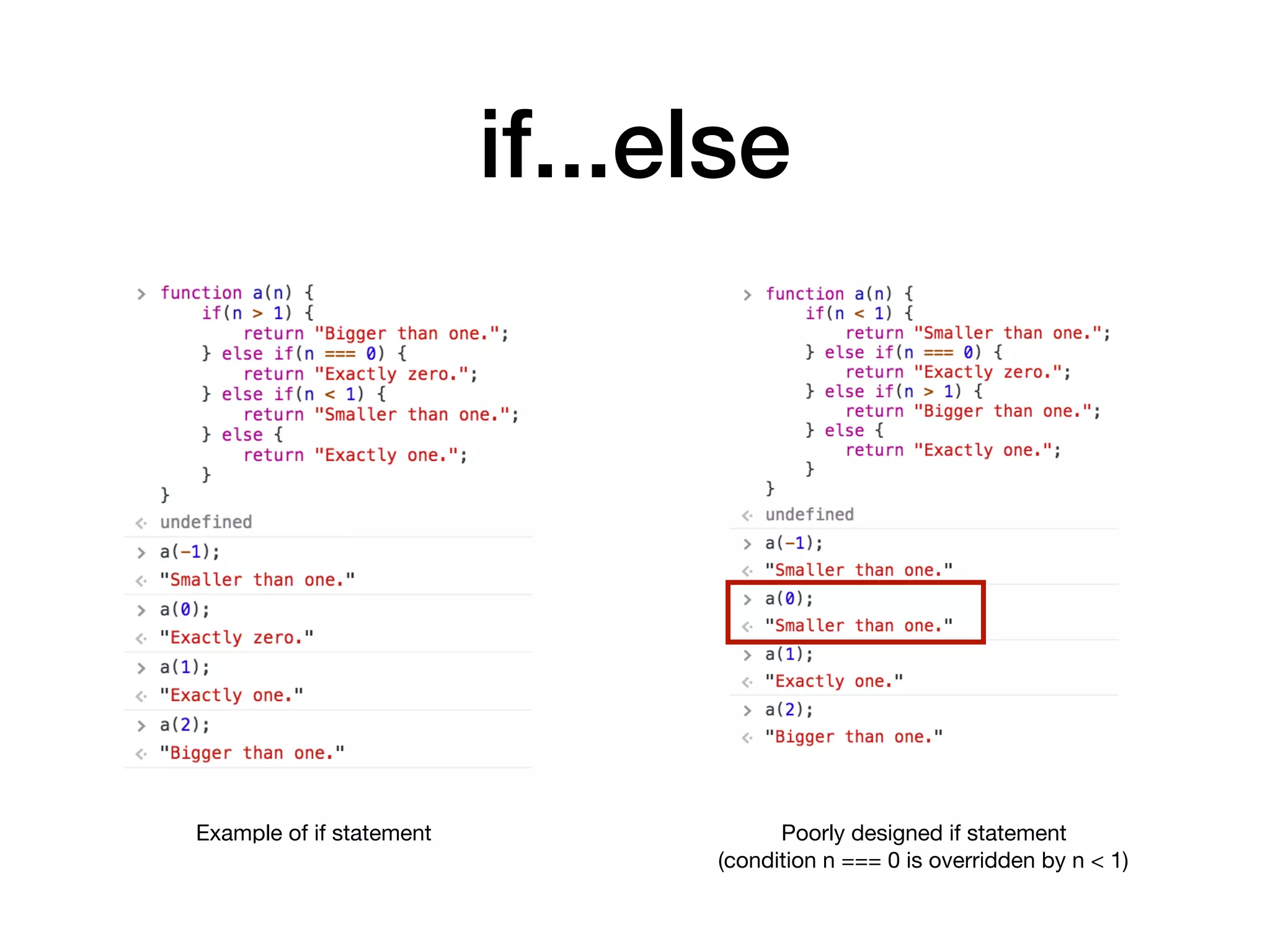
• if...else statement executes specific blocks of code
according to a set of pre-defined conditions.

• First condition can be written: if(condition) { ... }
• Next condition can be written: else if(condition) { ... }
• If there's no next condition: else { ... }
• At the end, any remaining possible conditions go to else

• Since code is executed from top to bottom, conditions need to
be arranged carefully not to be overridden.
if...else
Example of if statement Poorly designed if statement

(condition n === 0 is overridden by n < 1)
switch
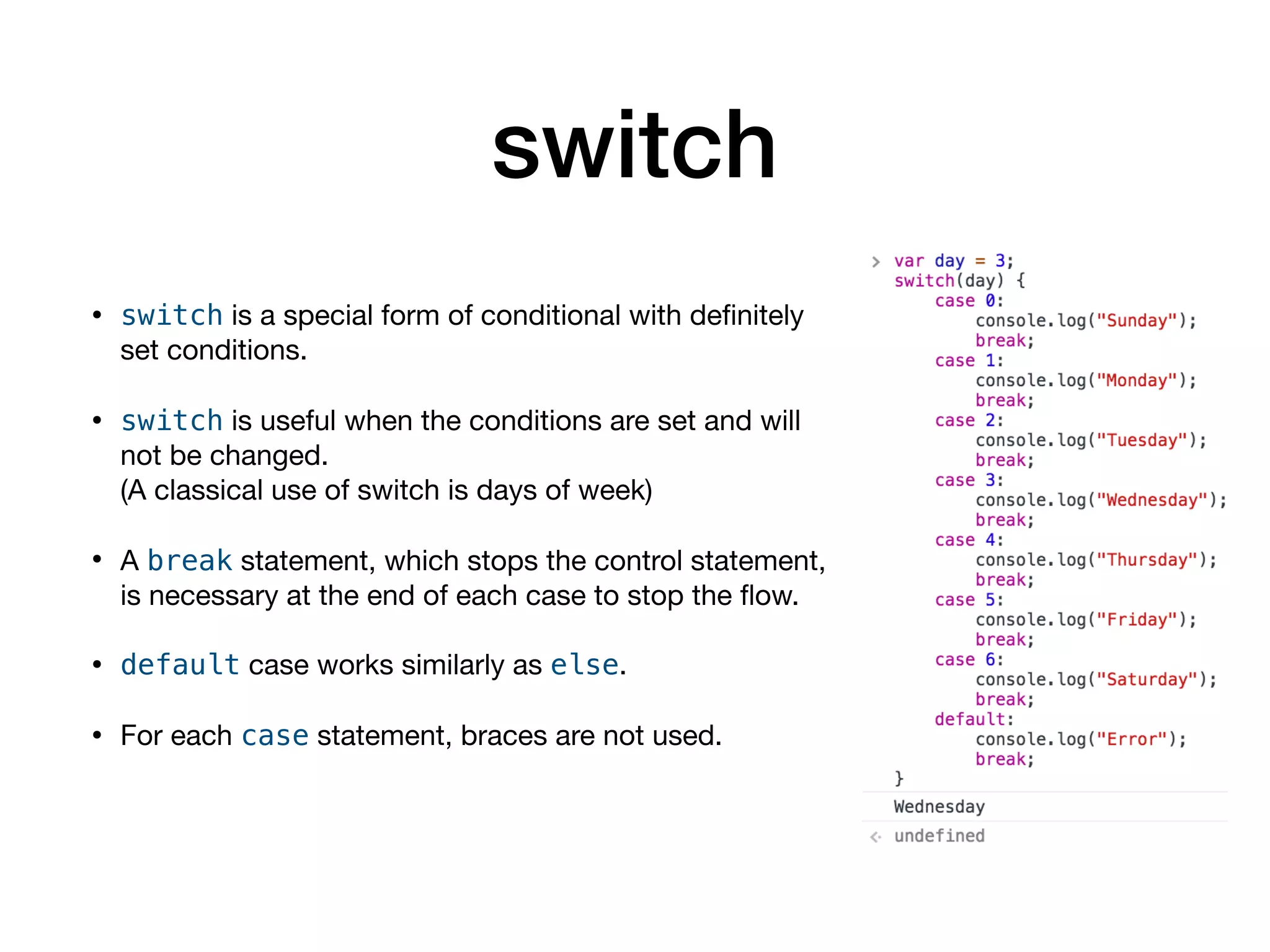
• switch is a special form of conditional with definitely
set conditions.

• switch is useful when the conditions are set and will
not be changed. 

(A classical use of switch is days of week)

• A break statement, which stops the control statement,
is necessary at the end of each case to stop the flow.

• default case works similarly as else.

• For each case statement, braces are not used.
switch
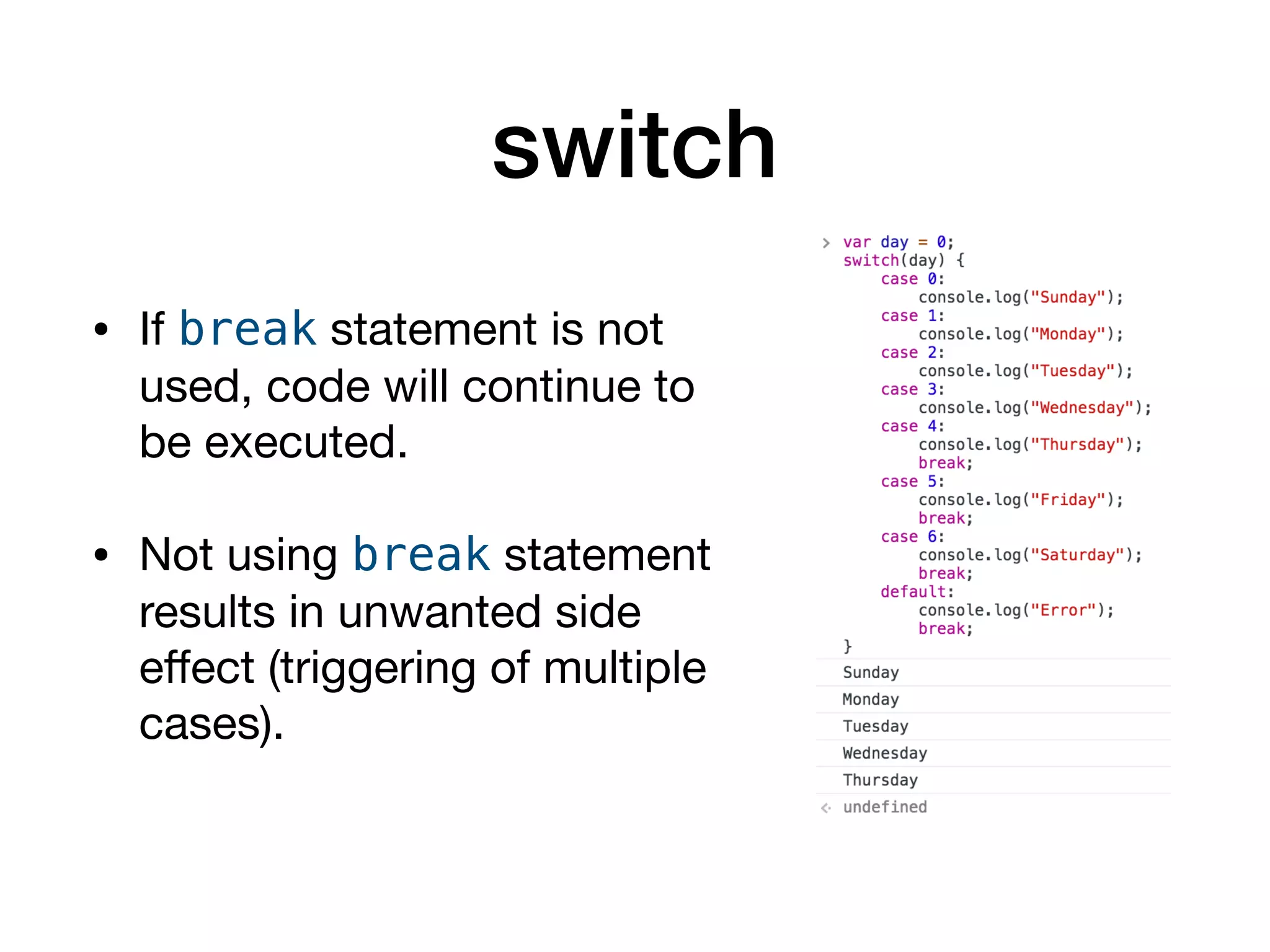
• If break statement is not
used, code will continue to
be executed.

• Not using break statement
results in unwanted side
effect (triggering of multiple
cases).
switch
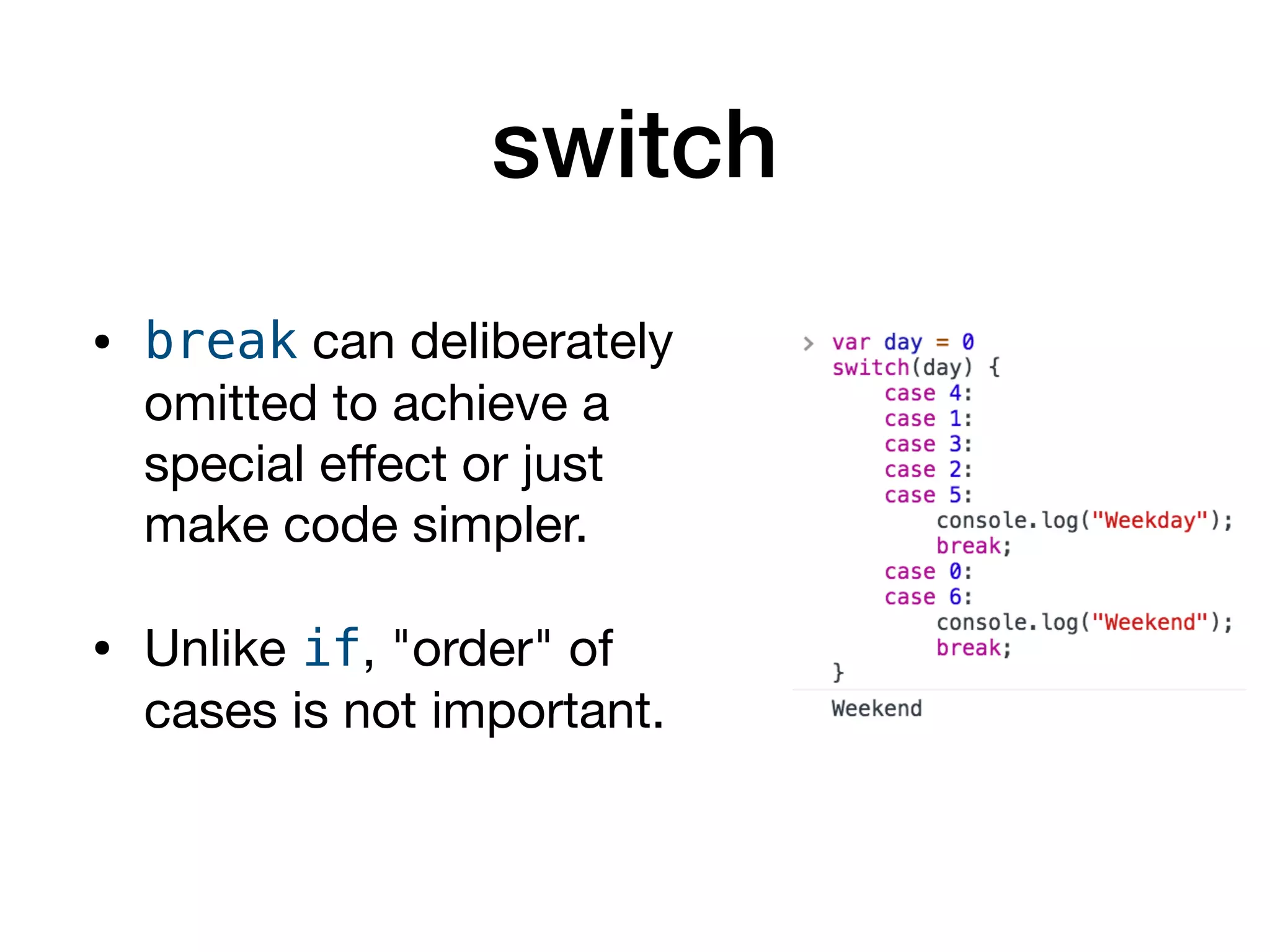
• break can deliberately
omitted to achieve a
special effect or just
make code simpler.

• Unlike if, "order" of
cases is not important.
try...catch
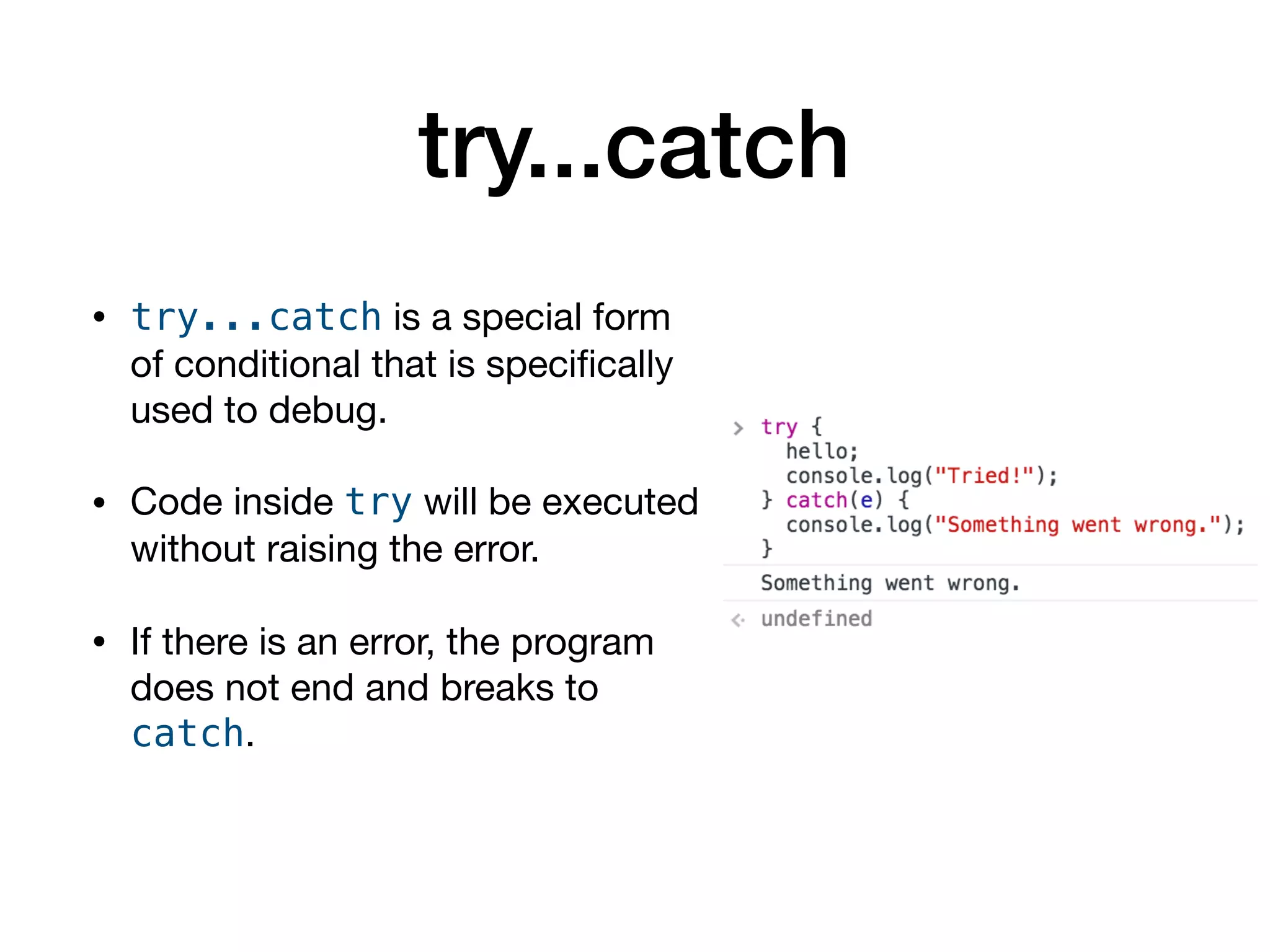
• try...catch is a special form
of conditional that is specifically
used to debug.

• Code inside try will be executed
without raising the error.

• If there is an error, the program
does not end and breaks to
catch.
try...catch
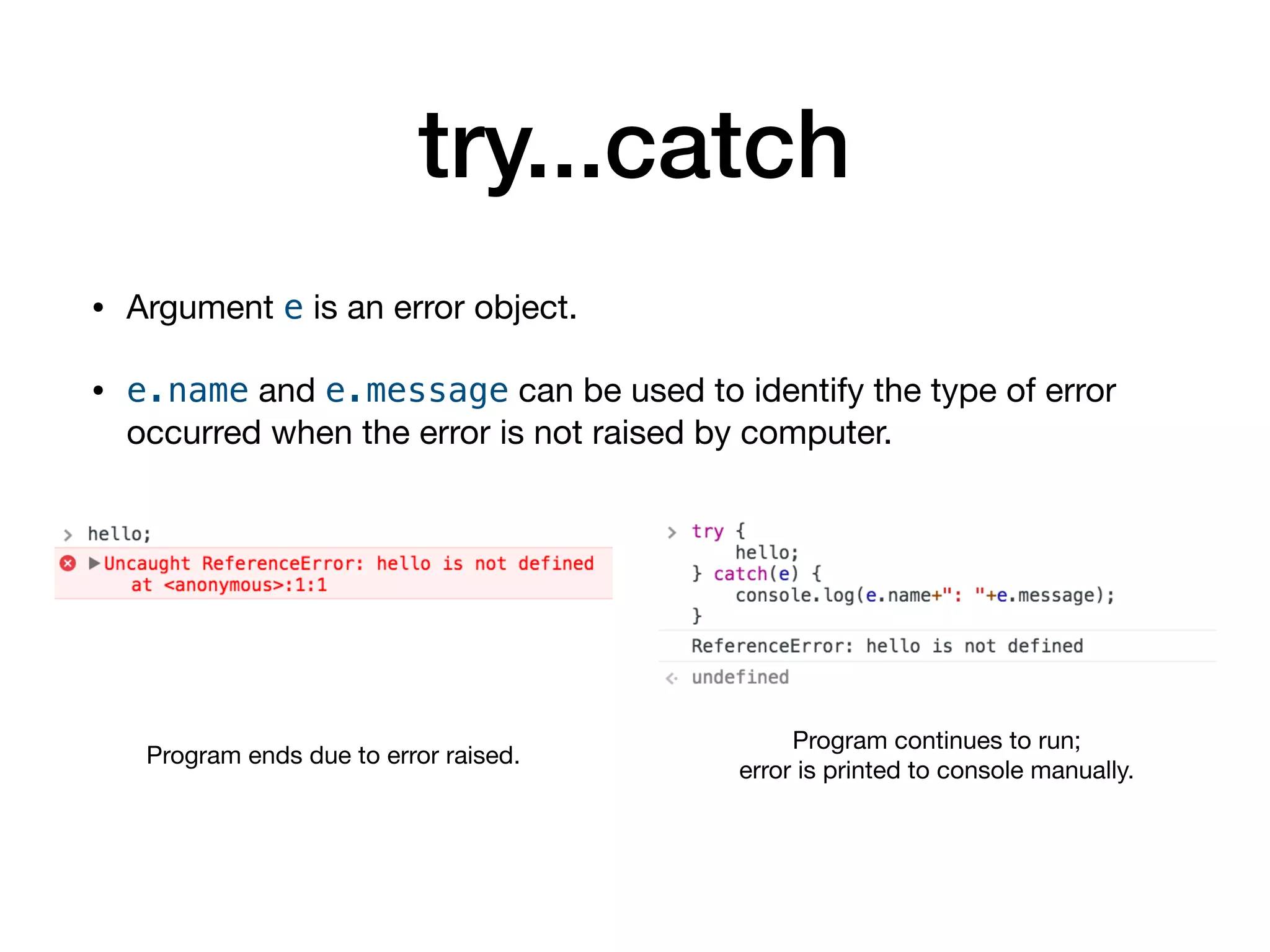
• Argument e is an error object. 

• e.name and e.message can be used to identify the type of error
occurred when the error is not raised by computer.
Program ends due to error raised.
Program continues to run;

error is printed to console manually.
Errors
• In programming, there are three types of errors:

• Syntax error: incorrect syntax (e.g. missing ending parenthesis)

• Semantic error: incorrect usage 

(e.g. using == when === should be used)

• Logic error: incorrect logic

(i.e. wrongly designed code giving unintended results)

• Only syntax error can be detected by interpreter/debugger. Semantic
and logic error must be debugged manually by programmer.
Common Errors
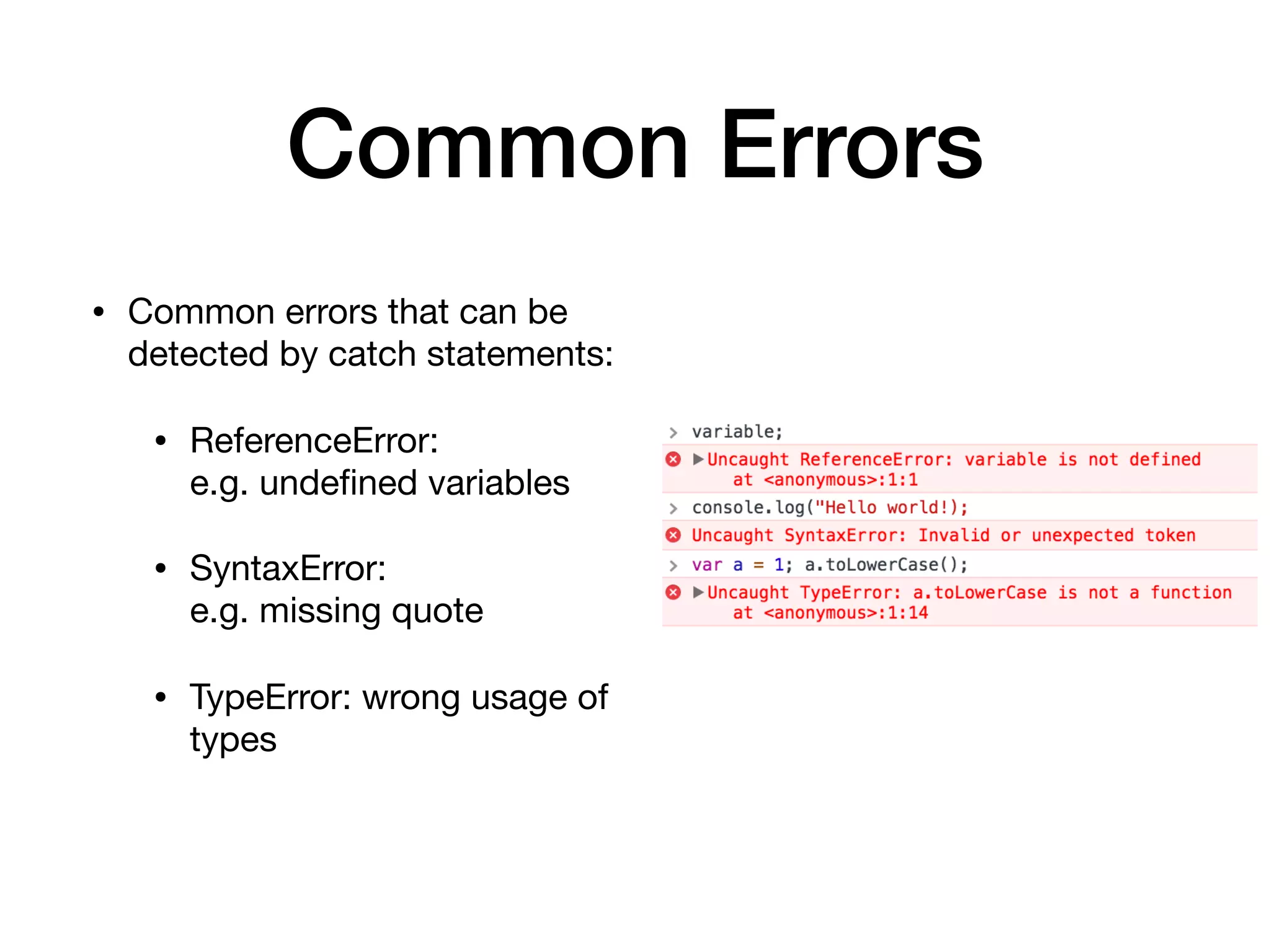
• Common errors that can be
detected by catch statements:

• ReferenceError: 

e.g. undefined variables

• SyntaxError: 

e.g. missing quote

• TypeError: wrong usage of
types
try...catch
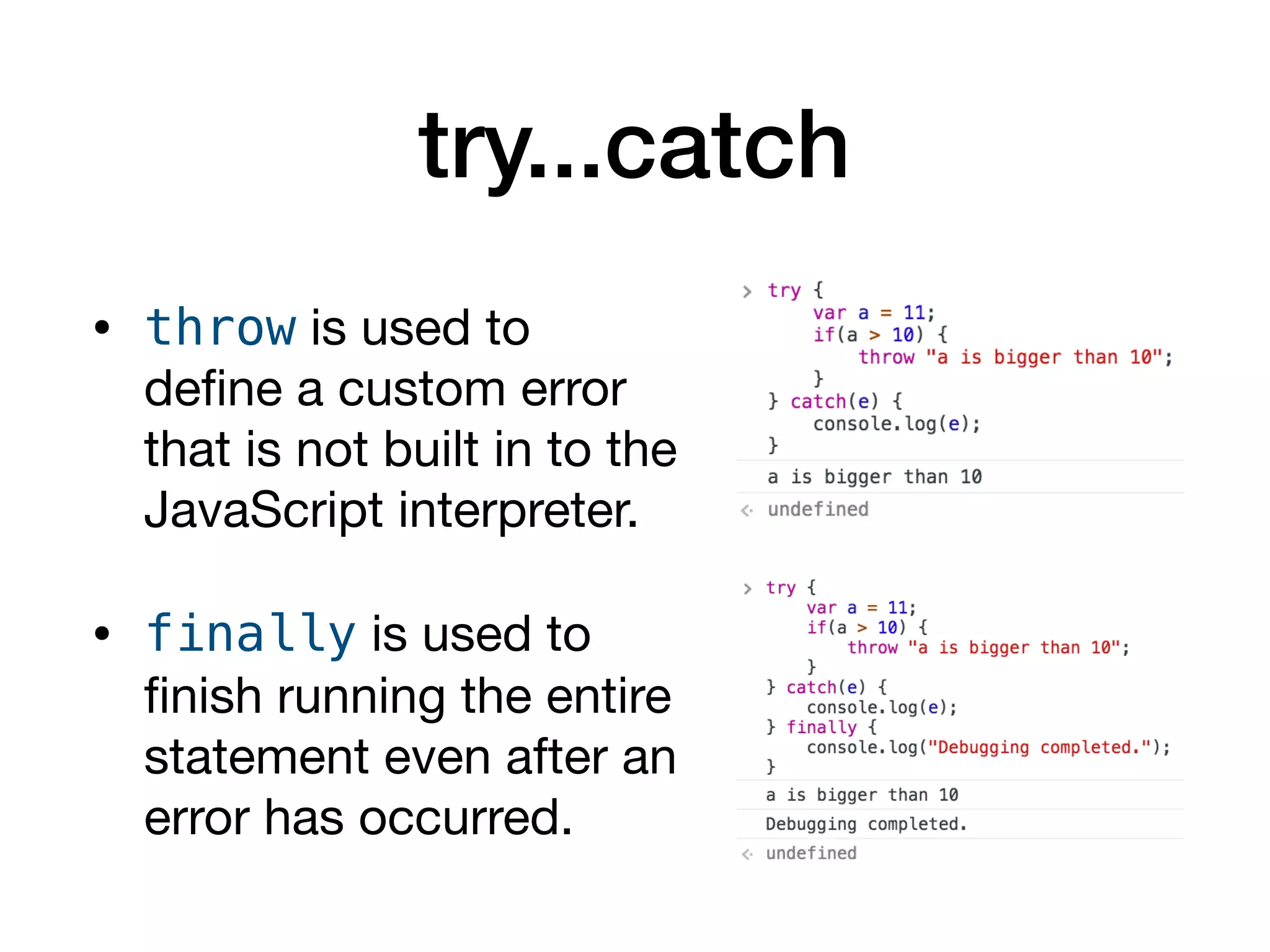
• throw is used to
define a custom error
that is not built in to the
JavaScript interpreter.

• finally is used to
finish running the entire
statement even after an
error has occurred.
Loop
• Loops repeats the block of code until
the specified conditions are met.

• while, do...while

• for, for...in
while
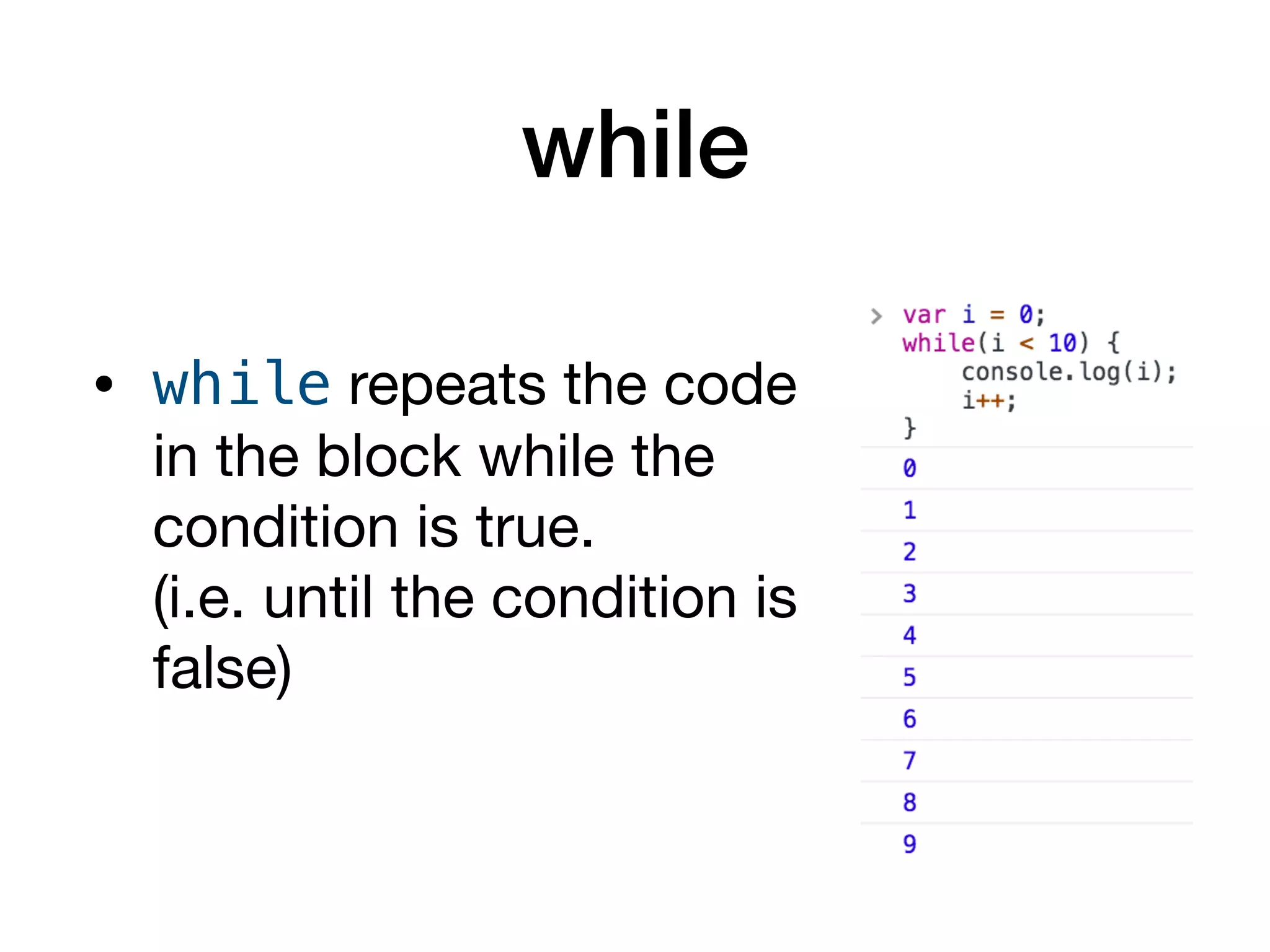
• while repeats the code
in the block while the
condition is true.

(i.e. until the condition is
false)
while
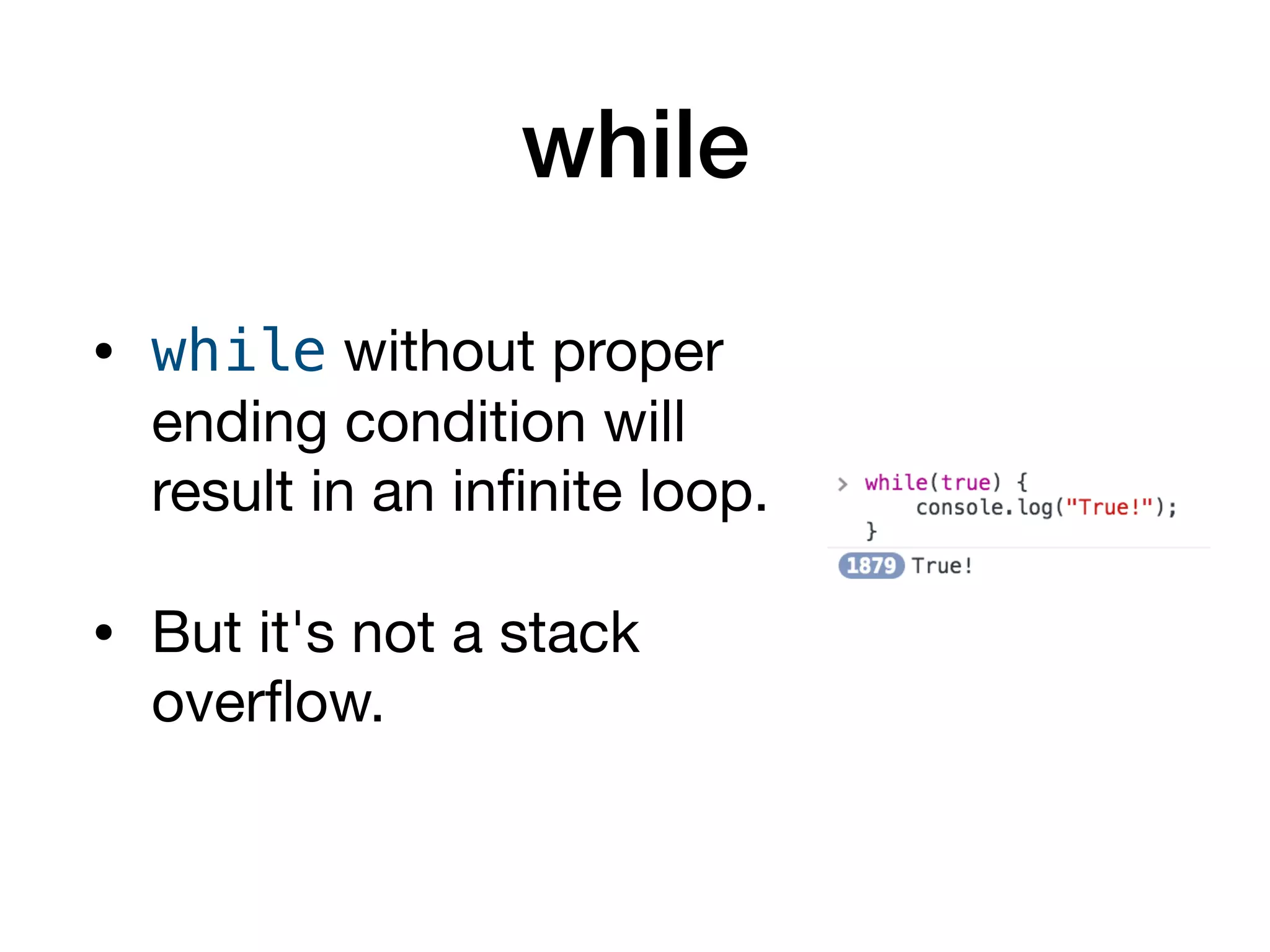
• while without proper
ending condition will
result in an infinite loop.

• But it's not a stack
overflow.
do...while
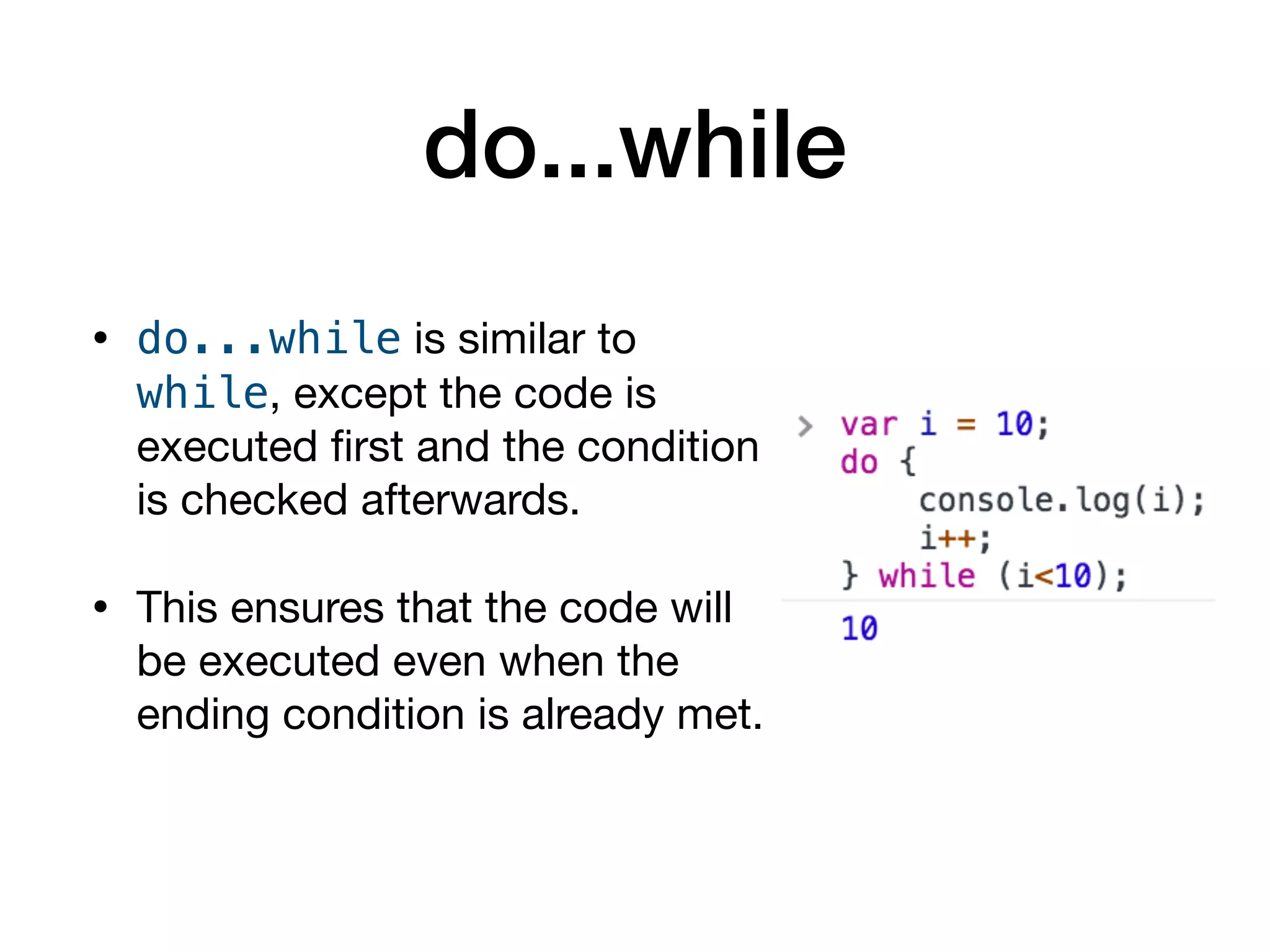
• do...while is similar to
while, except the code is
executed first and the condition
is checked afterwards.

• This ensures that the code will
be executed even when the
ending condition is already met.
for
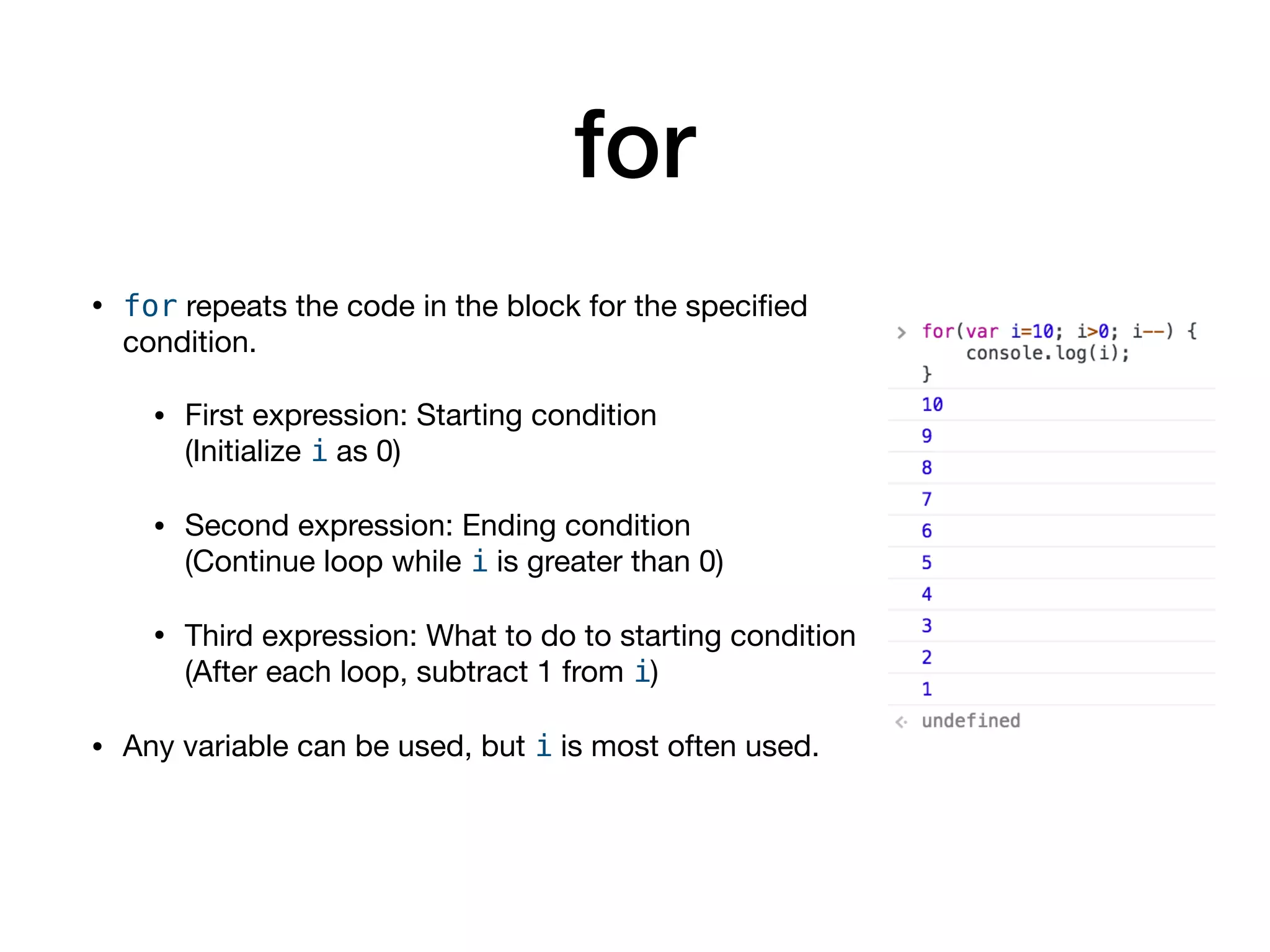
• for repeats the code in the block for the specified
condition.

• First expression: Starting condition

(Initialize i as 0)

• Second expression: Ending condition

(Continue loop while i is greater than 0)

• Third expression: What to do to starting condition

(After each loop, subtract 1 from i)

• Any variable can be used, but i is most often used.
for...in
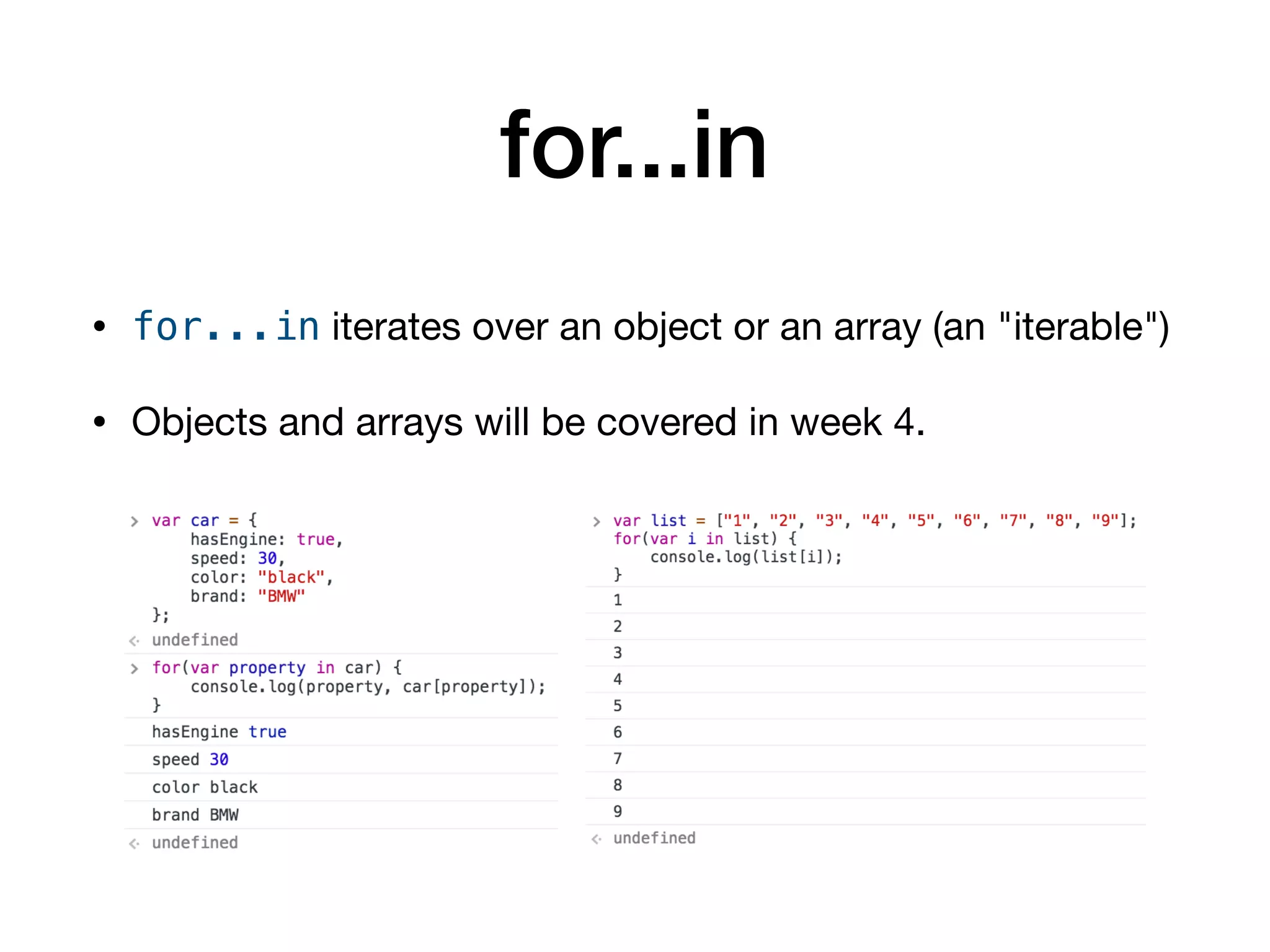
• for...in iterates over an object or an array (an "iterable")

• Objects and arrays will be covered in week 4.

Intro to JavaScript - Week 3: Control Statements

  • 1.
    Introduction to Programming withJavaScript Week 3: Control Statements Jeongbae Oh YCC JavaScript Seminar 2017.10.30
  • 2.
    Flow • In principle,JavaScript code is executed from top to bottom. • Control statement changes the way ("flow") code is executed. • Control statement consists of conditionals
 (조건문) and loops (반복문).
  • 3.
    Conditional • Conditionals workas "branches" of the flow according to the specified condition. • if...else • switch • try...catch
  • 4.
    if...else • if...else statementexecutes specific blocks of code according to a set of pre-defined conditions. • First condition can be written: if(condition) { ... } • Next condition can be written: else if(condition) { ... } • If there's no next condition: else { ... } • At the end, any remaining possible conditions go to else • Since code is executed from top to bottom, conditions need to be arranged carefully not to be overridden.
  • 5.
    if...else Example of ifstatement Poorly designed if statement (condition n === 0 is overridden by n < 1)
  • 6.
    switch • switch isa special form of conditional with definitely set conditions. • switch is useful when the conditions are set and will not be changed. 
 (A classical use of switch is days of week) • A break statement, which stops the control statement, is necessary at the end of each case to stop the flow. • default case works similarly as else. • For each case statement, braces are not used.
  • 7.
    switch • If breakstatement is not used, code will continue to be executed. • Not using break statement results in unwanted side effect (triggering of multiple cases).
  • 8.
    switch • break candeliberately omitted to achieve a special effect or just make code simpler. • Unlike if, "order" of cases is not important.
  • 9.
    try...catch • try...catch isa special form of conditional that is specifically used to debug. • Code inside try will be executed without raising the error. • If there is an error, the program does not end and breaks to catch.
  • 10.
    try...catch • Argument eis an error object. • e.name and e.message can be used to identify the type of error occurred when the error is not raised by computer. Program ends due to error raised. Program continues to run; error is printed to console manually.
  • 11.
    Errors • In programming,there are three types of errors: • Syntax error: incorrect syntax (e.g. missing ending parenthesis) • Semantic error: incorrect usage 
 (e.g. using == when === should be used) • Logic error: incorrect logic
 (i.e. wrongly designed code giving unintended results) • Only syntax error can be detected by interpreter/debugger. Semantic and logic error must be debugged manually by programmer.
  • 12.
    Common Errors • Commonerrors that can be detected by catch statements: • ReferenceError: 
 e.g. undefined variables • SyntaxError: 
 e.g. missing quote • TypeError: wrong usage of types
  • 13.
    try...catch • throw isused to define a custom error that is not built in to the JavaScript interpreter. • finally is used to finish running the entire statement even after an error has occurred.
  • 14.
    Loop • Loops repeatsthe block of code until the specified conditions are met. • while, do...while • for, for...in
  • 15.
    while • while repeatsthe code in the block while the condition is true.
 (i.e. until the condition is false)
  • 16.
    while • while withoutproper ending condition will result in an infinite loop. • But it's not a stack overflow.
  • 17.
    do...while • do...while issimilar to while, except the code is executed first and the condition is checked afterwards. • This ensures that the code will be executed even when the ending condition is already met.
  • 18.
    for • for repeatsthe code in the block for the specified condition. • First expression: Starting condition
 (Initialize i as 0) • Second expression: Ending condition
 (Continue loop while i is greater than 0) • Third expression: What to do to starting condition
 (After each loop, subtract 1 from i) • Any variable can be used, but i is most often used.
  • 19.
    for...in • for...in iteratesover an object or an array (an "iterable") • Objects and arrays will be covered in week 4.