1
Hi, I’m Donny
Improving apps with iOS 10 notifications
Because notifications can be pretty cool
2
Contents
A quick history of notifications
Introduction to the UserNotifications framework
Service Extensions
Content Extensions
The bigger picture
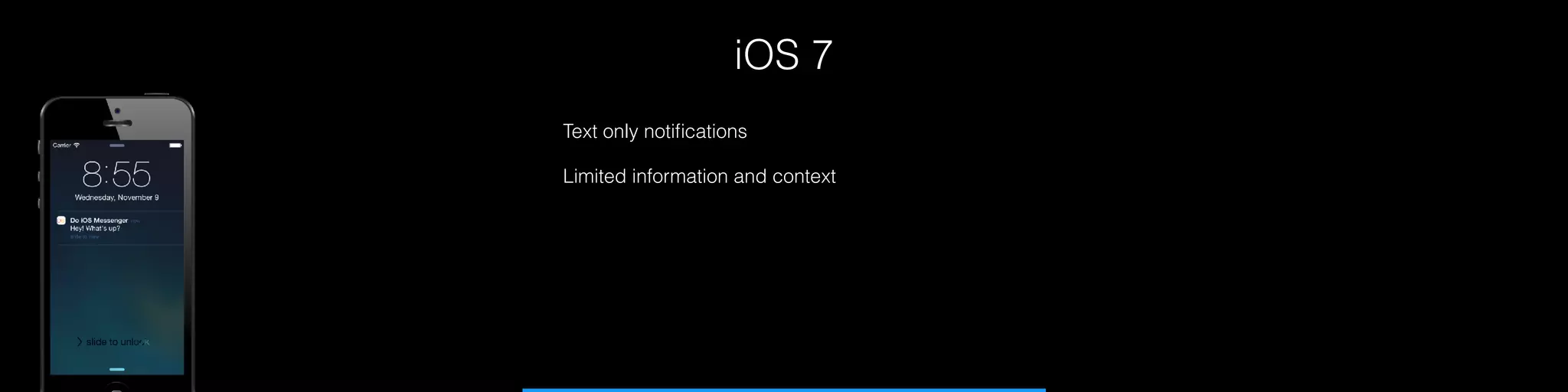
iOS 7
Text only notifications
Limited information and context
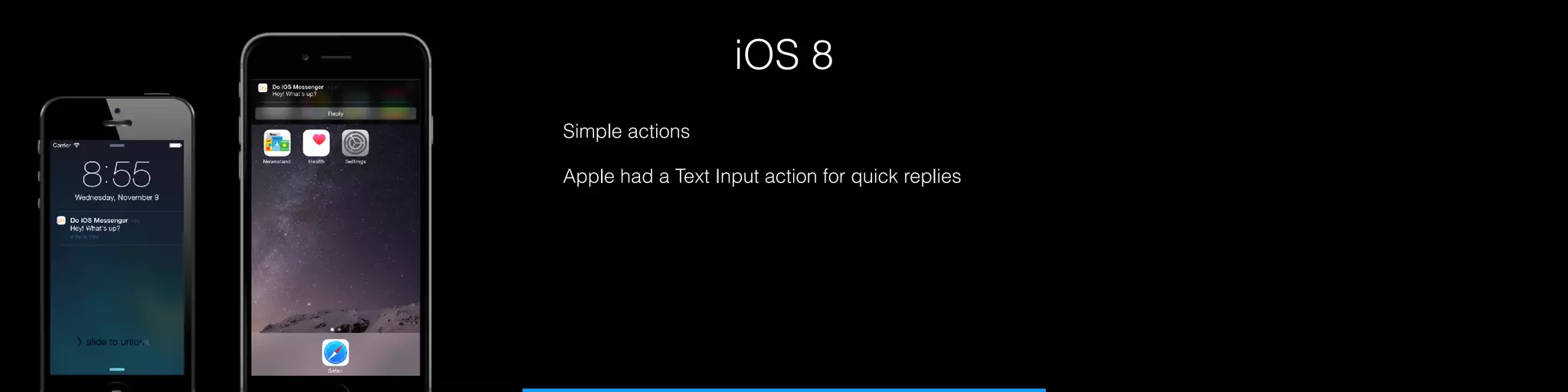
iOS 8
Simple actions
Apple had a Text Input action for quick replies
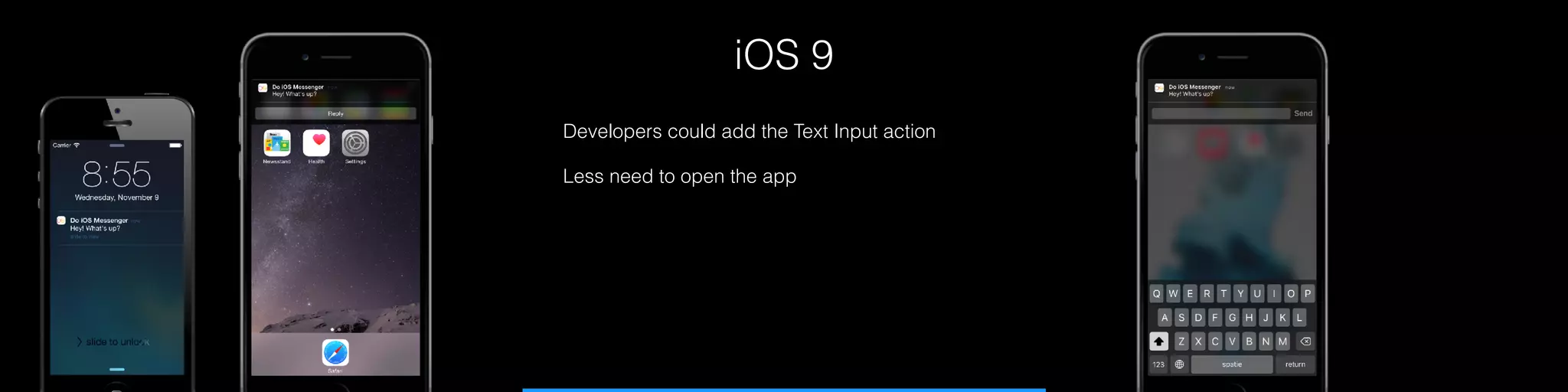
iOS 9
Developers could add the Text Input action
Less need to open the app
Everything < iOS 10
The difference between local and remote
func application(_ application: UIApplication,
didReceiveRemoteNotification userInfo: [AnyHashable : Any])
{
}
func application(_ application: UIApplication,
didRegisterForRemoteNotificationsWithDeviceToken
deviceToken: Data) {
}
func application(_ application: UIApplication, didReceive
notification: UILocalNotification) {
}
func application(_ application: UIApplication, didRegister
notificationSettings: UIUserNotificationSettings) {
}
Everything < iOS 10
And of course, it all goes in AppDelegate
func application(_ application: UIApplication,
didReceiveRemoteNotification userInfo: [AnyHashable : Any])
{
}
func application(_ application: UIApplication,
didRegisterForRemoteNotificationsWithDeviceToken
deviceToken: Data) {
}
func application(_ application: UIApplication, didReceive
notification: UILocalNotification) {
}
func application(_ application: UIApplication, didRegister
notificationSettings: UIUserNotificationSettings) {
}
Everything < iOS 10
Showing notifications while foregrounded
There’s one more thing…
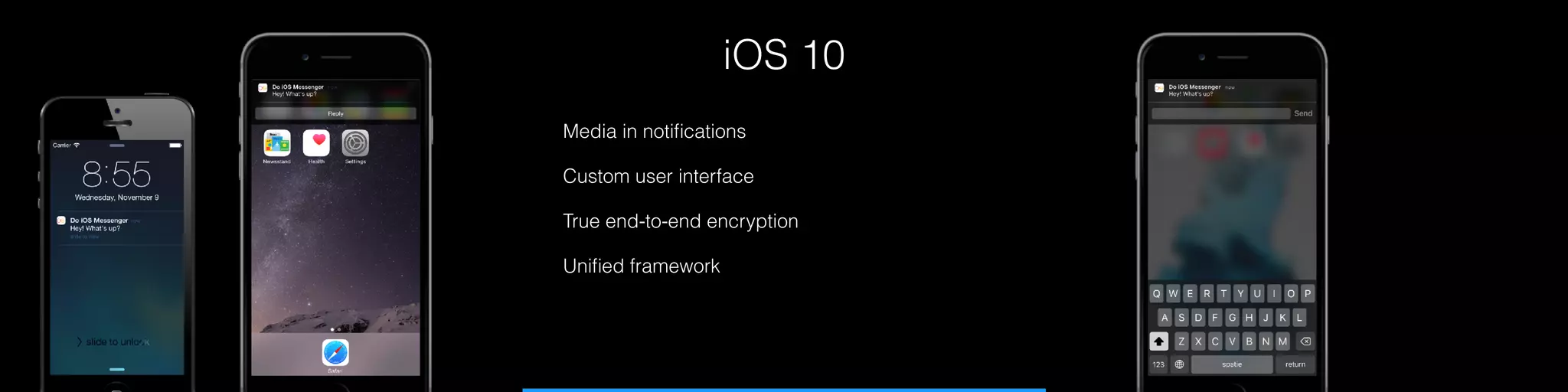
iOS 10
Media in notifications
Custom user interface
True end-to-end encryption
Unified framework
UserNotification at a glance
Unified Local and Remote
Single registration handler
Handle notifications through a delegate
Not compatible with < iOS 10
func userNotificationCenter(_ center:
UNUserNotificationCenter, didReceive response:
UNNotificationResponse, withCompletionHandler
completionHandler: @escaping () -> Void) {
}
func userNotificationCenter(_ center:
UNUserNotificationCenter, willPresent notification:
UNNotification, withCompletionHandler completionHandler:
@escaping (UNNotificationPresentationOptions) -> Void) {
}
let notificationCenter = UNUserNotificationCenter.current()
notificationCenter.getNotificationSettings { settings in
if settings.authorizationStatus == .notDetermined {
notificationCenter.requestAuthorization(options:
[.badge, .alert]) { success, error in
// handle status
}
}
}
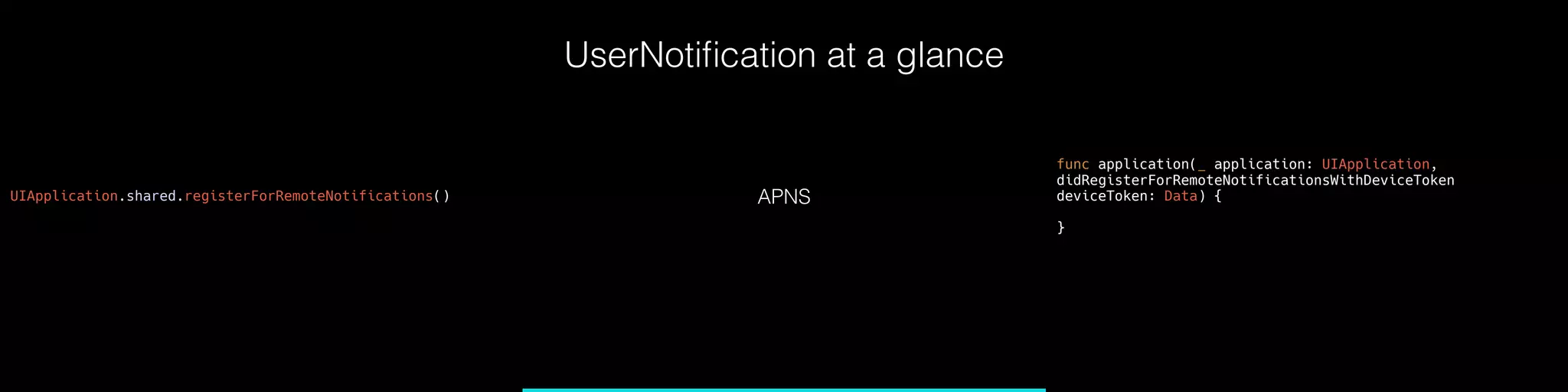
UserNotification at a glance
UIApplication.shared.registerForRemoteNotifications() APNS
func application(_ application: UIApplication,
didRegisterForRemoteNotificationsWithDeviceToken
deviceToken: Data) {
}
UserNotification at a glance
let content = UNMutableNotificationContent()
content.title = “Next speaker"

content.body = “Donny is up next"
content.badge = 1
let path = Bundle.main.path(forResource: "thumbs", ofType:
"png")!
let imageUrl = URL(fileURLWithPath: path)
let image = try! UNNotificationAttachment(identifier:
"thumbs-up", url: imageUrl, options: nil)
content.attachments = [image]
let trigger =
UNTimeIntervalNotificationTrigger(timeInterval: 10, repeats:
false)
let request = UNNotificationRequest(identifier:
“nextSpeaker", content: content, trigger: trigger)
notificationCenter.add(request, withCompletionHandler: nil)
Create notification contents
Schedule the notification
Update notification contents
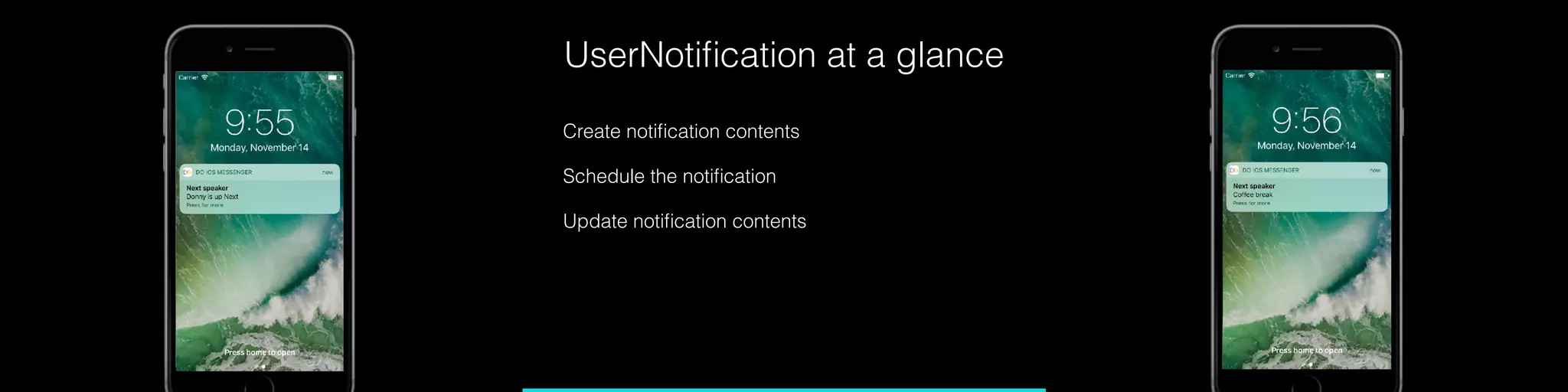
UserNotification at a glance
Create notification contents
Schedule the notification
Update notification contents
And when you're in the
foreground...
func userNotificationCenter(_ center:
UNUserNotificationCenter, willPresent notification:
UNNotification, withCompletionHandler completionHandler:
@escaping (UNNotificationPresentationOptions) -> Void) {
completionHandler([.alert, .sound])
}
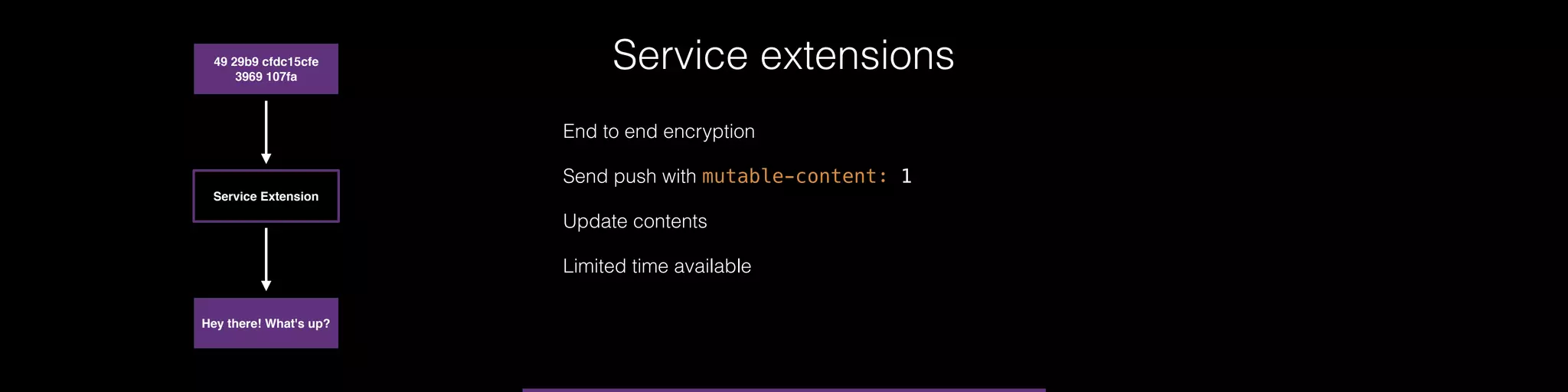
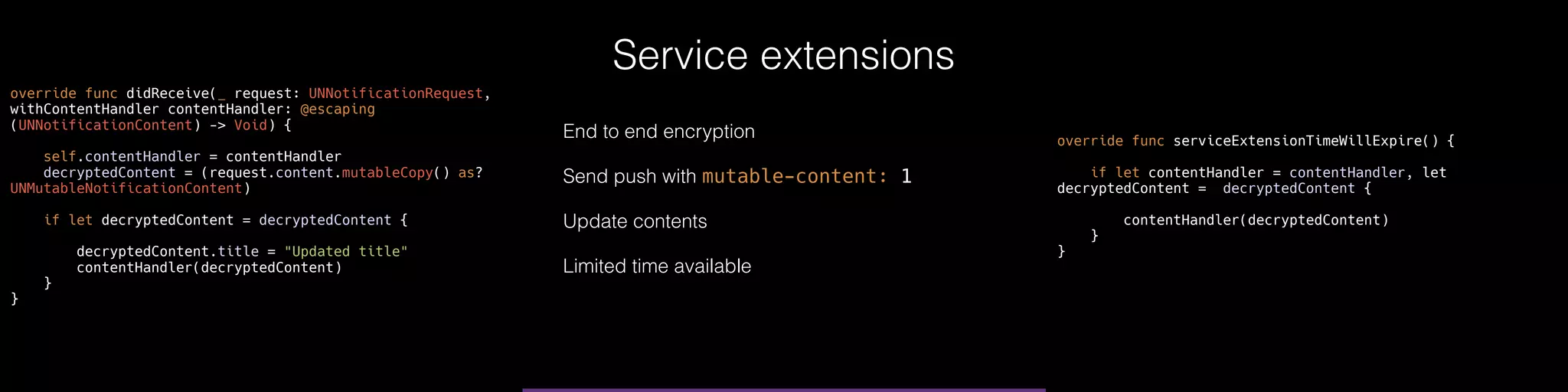
Service extensions
Hey there! What's up?
49 29b9 cfdc15cfe
3969 107fa
Service Extension
End to end encryption
Send push with mutable-content: 1
Update contents
Limited time available
Service extensions
override func didReceive(_ request: UNNotificationRequest,
withContentHandler contentHandler: @escaping
(UNNotificationContent) -> Void) {
self.contentHandler = contentHandler
decryptedContent = (request.content.mutableCopy() as?
UNMutableNotificationContent)
if let decryptedContent = decryptedContent {
decryptedContent.title = "Updated title"
contentHandler(decryptedContent)
}
}
override func serviceExtensionTimeWillExpire() {
if let contentHandler = contentHandler, let
decryptedContent = decryptedContent {
contentHandler(decryptedContent)
}
}
End to end encryption
Send push with mutable-content: 1
Update contents
Limited time available
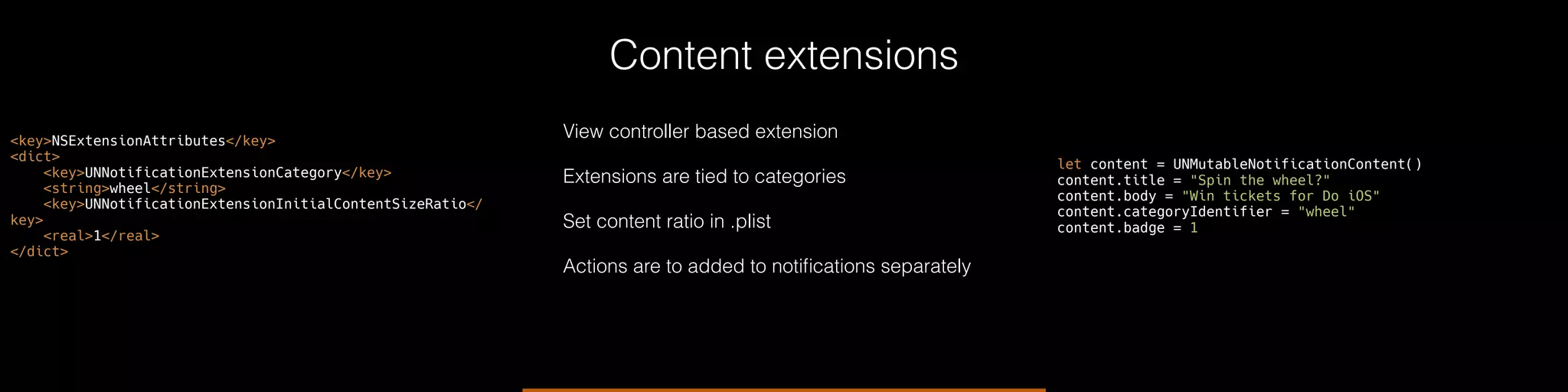
Content extensions
View controller based extension
Extensions are tied to categories
Set content ratio in .plist
Actions are to added to notifications separately
<key>NSExtensionAttributes</key>
<dict>
<key>UNNotificationExtensionCategory</key>
<string>wheel</string>
<key>UNNotificationExtensionInitialContentSizeRatio</
key>
<real>1</real>
</dict>
let content = UNMutableNotificationContent()
content.title = "Spin the wheel?"
content.body = "Win tickets for Do iOS"
content.categoryIdentifier = "wheel"
content.badge = 1
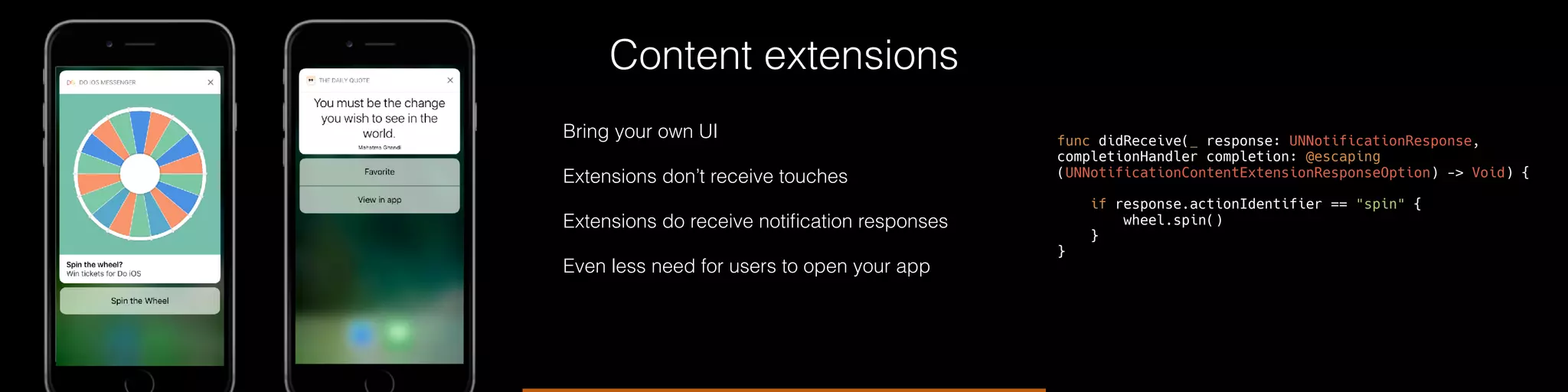
Content extensions
Bring your own UI
Extensions don’t receive touches
Extensions do receive notification responses
Even less need for users to open your app
func didReceive(_ response: UNNotificationResponse,
completionHandler completion: @escaping
(UNNotificationContentExtensionResponseOption) -> Void) {
if response.actionIdentifier == "spin" {
wheel.spin()
}
}
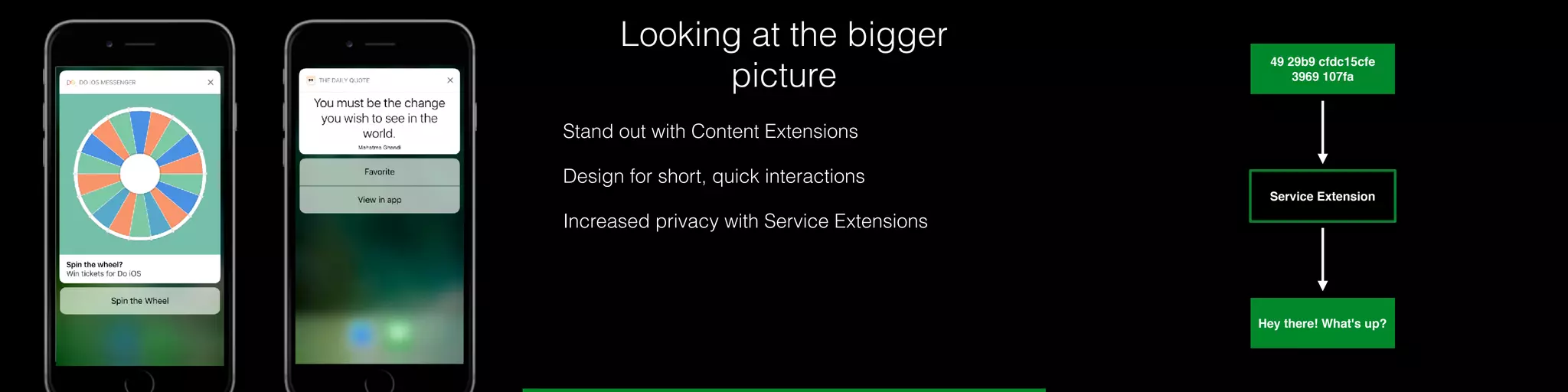
Looking at the bigger
picture
Stand out with Content Extensions
Design for short, quick interactions
Increased privacy with Service Extensions
Hey there! What's up?
49 29b9 cfdc15cfe
3969 107fa
Service Extension
Looking at the bigger
picture
Cleaner code, more maintainable
Only send meaningful messages
Use identifiers to update notifications if needed
Thank you

Improving apps with iOS 10 notifications (do iOS 2016)

  • 1.
    1 Hi, I’m Donny Improvingapps with iOS 10 notifications Because notifications can be pretty cool
  • 2.
    2 Contents A quick historyof notifications Introduction to the UserNotifications framework Service Extensions Content Extensions The bigger picture
  • 3.
    iOS 7 Text onlynotifications Limited information and context
  • 4.
    iOS 8 Simple actions Applehad a Text Input action for quick replies
  • 5.
    iOS 9 Developers couldadd the Text Input action Less need to open the app
  • 6.
    Everything < iOS10 The difference between local and remote func application(_ application: UIApplication, didReceiveRemoteNotification userInfo: [AnyHashable : Any]) { } func application(_ application: UIApplication, didRegisterForRemoteNotificationsWithDeviceToken deviceToken: Data) { } func application(_ application: UIApplication, didReceive notification: UILocalNotification) { } func application(_ application: UIApplication, didRegister notificationSettings: UIUserNotificationSettings) { }
  • 7.
    Everything < iOS10 And of course, it all goes in AppDelegate func application(_ application: UIApplication, didReceiveRemoteNotification userInfo: [AnyHashable : Any]) { } func application(_ application: UIApplication, didRegisterForRemoteNotificationsWithDeviceToken deviceToken: Data) { } func application(_ application: UIApplication, didReceive notification: UILocalNotification) { } func application(_ application: UIApplication, didRegister notificationSettings: UIUserNotificationSettings) { }
  • 8.
    Everything < iOS10 Showing notifications while foregrounded There’s one more thing…
  • 9.
    iOS 10 Media innotifications Custom user interface True end-to-end encryption Unified framework
  • 10.
    UserNotification at aglance Unified Local and Remote Single registration handler Handle notifications through a delegate Not compatible with < iOS 10 func userNotificationCenter(_ center: UNUserNotificationCenter, didReceive response: UNNotificationResponse, withCompletionHandler completionHandler: @escaping () -> Void) { } func userNotificationCenter(_ center: UNUserNotificationCenter, willPresent notification: UNNotification, withCompletionHandler completionHandler: @escaping (UNNotificationPresentationOptions) -> Void) { } let notificationCenter = UNUserNotificationCenter.current() notificationCenter.getNotificationSettings { settings in if settings.authorizationStatus == .notDetermined { notificationCenter.requestAuthorization(options: [.badge, .alert]) { success, error in // handle status } } }
  • 11.
    UserNotification at aglance UIApplication.shared.registerForRemoteNotifications() APNS func application(_ application: UIApplication, didRegisterForRemoteNotificationsWithDeviceToken deviceToken: Data) { }
  • 12.
    UserNotification at aglance let content = UNMutableNotificationContent() content.title = “Next speaker"
 content.body = “Donny is up next" content.badge = 1 let path = Bundle.main.path(forResource: "thumbs", ofType: "png")! let imageUrl = URL(fileURLWithPath: path) let image = try! UNNotificationAttachment(identifier: "thumbs-up", url: imageUrl, options: nil) content.attachments = [image] let trigger = UNTimeIntervalNotificationTrigger(timeInterval: 10, repeats: false) let request = UNNotificationRequest(identifier: “nextSpeaker", content: content, trigger: trigger) notificationCenter.add(request, withCompletionHandler: nil) Create notification contents Schedule the notification Update notification contents
  • 13.
    UserNotification at aglance Create notification contents Schedule the notification Update notification contents
  • 14.
    And when you'rein the foreground... func userNotificationCenter(_ center: UNUserNotificationCenter, willPresent notification: UNNotification, withCompletionHandler completionHandler: @escaping (UNNotificationPresentationOptions) -> Void) { completionHandler([.alert, .sound]) }
  • 15.
    Service extensions Hey there!What's up? 49 29b9 cfdc15cfe 3969 107fa Service Extension End to end encryption Send push with mutable-content: 1 Update contents Limited time available
  • 16.
    Service extensions override funcdidReceive(_ request: UNNotificationRequest, withContentHandler contentHandler: @escaping (UNNotificationContent) -> Void) { self.contentHandler = contentHandler decryptedContent = (request.content.mutableCopy() as? UNMutableNotificationContent) if let decryptedContent = decryptedContent { decryptedContent.title = "Updated title" contentHandler(decryptedContent) } } override func serviceExtensionTimeWillExpire() { if let contentHandler = contentHandler, let decryptedContent = decryptedContent { contentHandler(decryptedContent) } } End to end encryption Send push with mutable-content: 1 Update contents Limited time available
  • 17.
    Content extensions View controllerbased extension Extensions are tied to categories Set content ratio in .plist Actions are to added to notifications separately <key>NSExtensionAttributes</key> <dict> <key>UNNotificationExtensionCategory</key> <string>wheel</string> <key>UNNotificationExtensionInitialContentSizeRatio</ key> <real>1</real> </dict> let content = UNMutableNotificationContent() content.title = "Spin the wheel?" content.body = "Win tickets for Do iOS" content.categoryIdentifier = "wheel" content.badge = 1
  • 18.
    Content extensions Bring yourown UI Extensions don’t receive touches Extensions do receive notification responses Even less need for users to open your app func didReceive(_ response: UNNotificationResponse, completionHandler completion: @escaping (UNNotificationContentExtensionResponseOption) -> Void) { if response.actionIdentifier == "spin" { wheel.spin() } }
  • 19.
    Looking at thebigger picture Stand out with Content Extensions Design for short, quick interactions Increased privacy with Service Extensions Hey there! What's up? 49 29b9 cfdc15cfe 3969 107fa Service Extension
  • 20.
    Looking at thebigger picture Cleaner code, more maintainable Only send meaningful messages Use identifiers to update notifications if needed
  • 21.