How to Convert Your
PowerPoint to a Movie
by
by
1
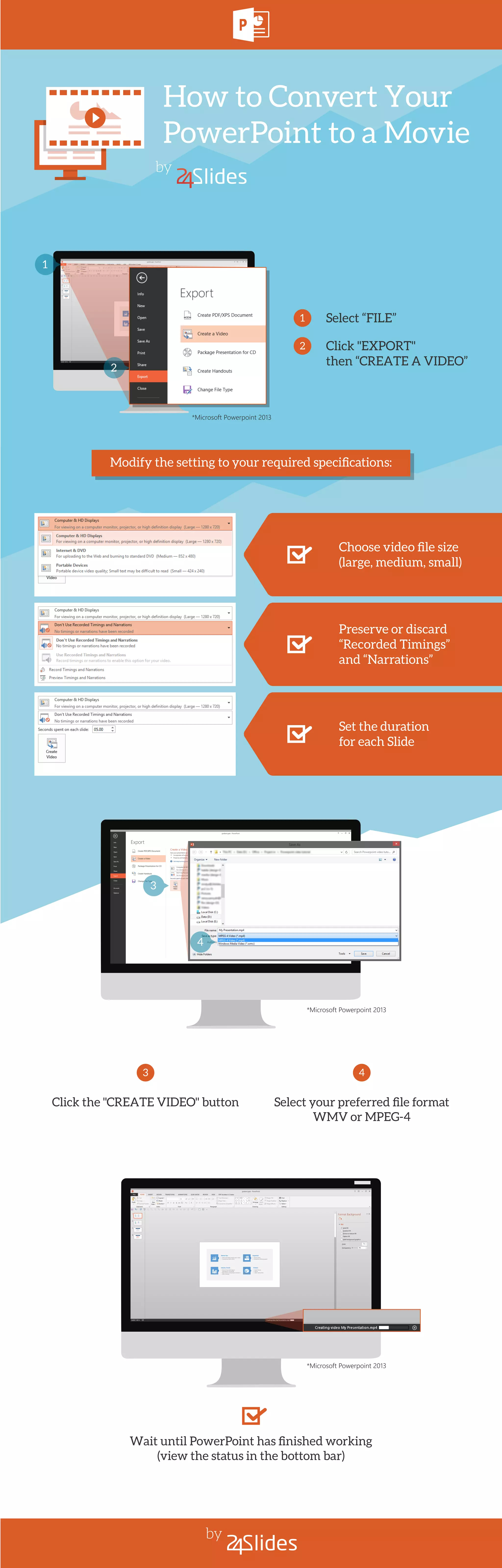
Select “FILE”
Click "EXPORT"
then “CREATE A VIDEO”
1
2
2
*Microsoft Powerpoint 2013
Click the "CREATE VIDEO" button
3
Select your preferred file format
WMV or MPEG-4
4
Choose video file size
(large, medium, small)
Preserve or discard
“Recorded Timings”
and “Narrations”
Set the duration
for each Slide
Modify the setting to your required specifications:
Wait until PowerPoint has finished working
(view the status in the bottom bar)
3
*Microsoft Powerpoint 2013
4
*Microsoft Powerpoint 2013

How to Convert Your PowerPoint to a Movie

  • 1.
    How to ConvertYour PowerPoint to a Movie by by 1 Select “FILE” Click "EXPORT" then “CREATE A VIDEO” 1 2 2 *Microsoft Powerpoint 2013 Click the "CREATE VIDEO" button 3 Select your preferred file format WMV or MPEG-4 4 Choose video file size (large, medium, small) Preserve or discard “Recorded Timings” and “Narrations” Set the duration for each Slide Modify the setting to your required specifications: Wait until PowerPoint has finished working (view the status in the bottom bar) 3 *Microsoft Powerpoint 2013 4 *Microsoft Powerpoint 2013