How to Build & Deploy to HoloLens
Shahed Chowdhuri
Sr. Technical Evangelist @ Microsoft
@shahedC
WakeUpAndCode.com
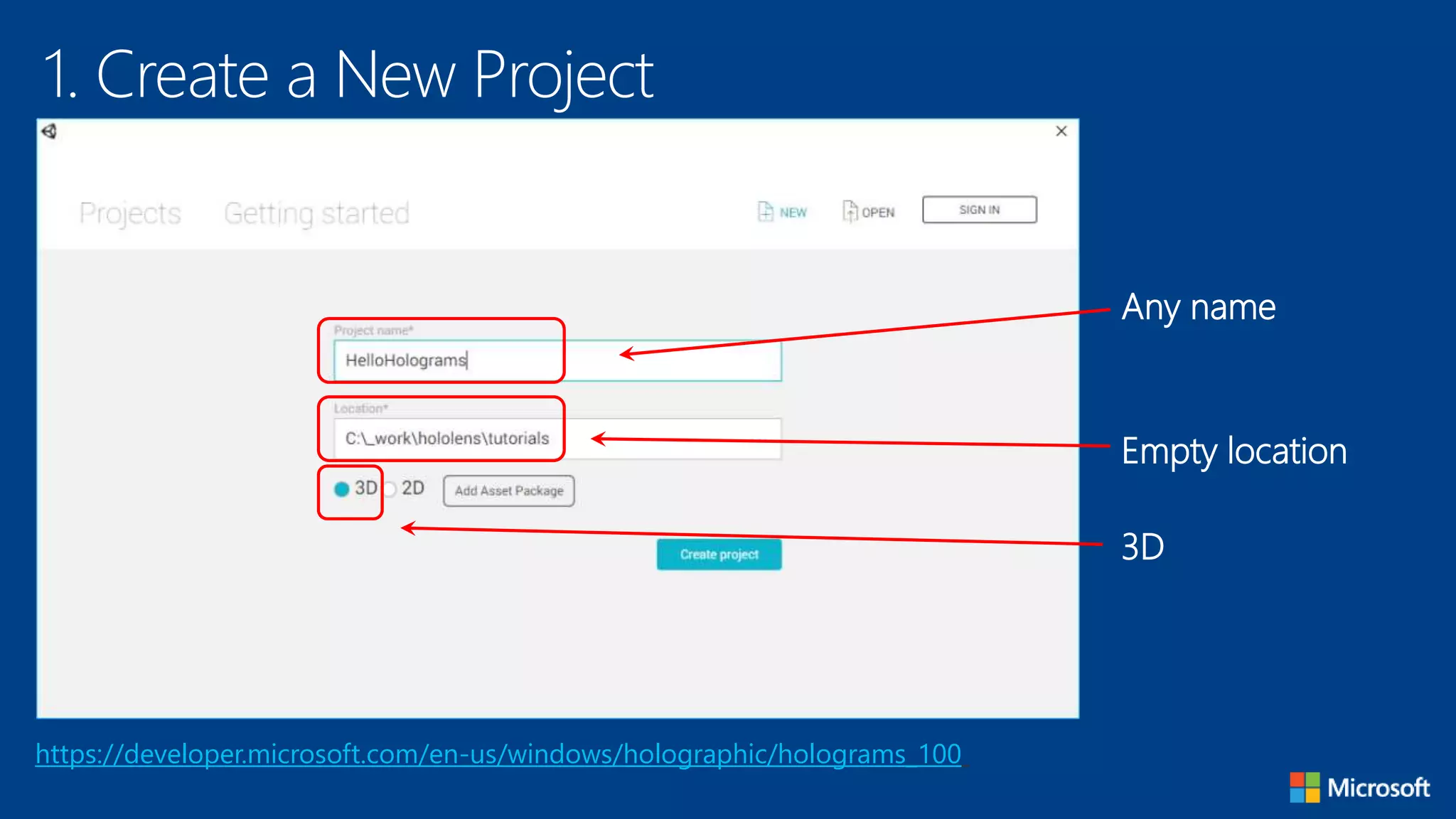
1. Create a New Project
https://developer.microsoft.com/en-us/windows/holographic/holograms_100
Any name
Empty location
3D
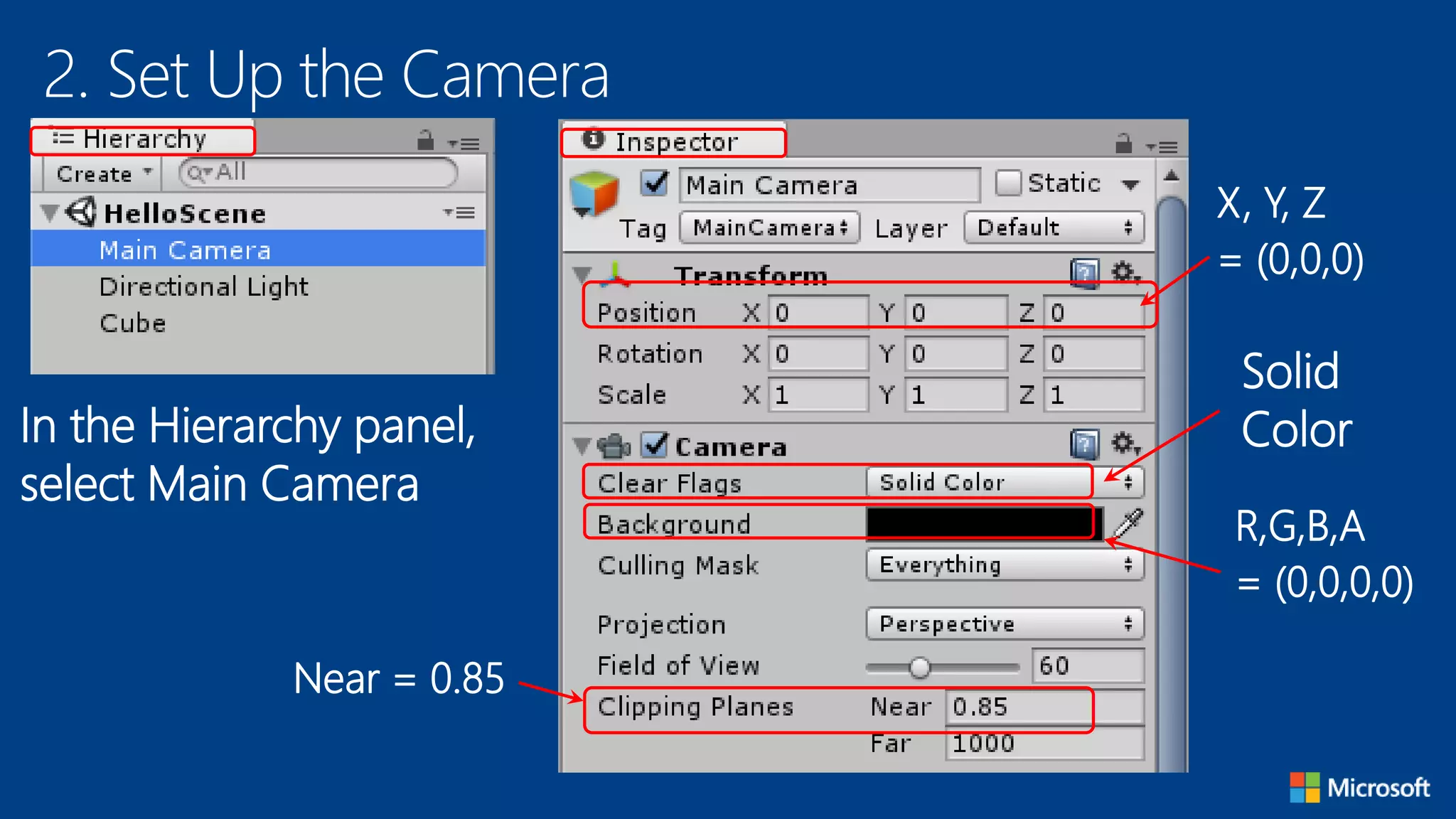
2. Set Up the Camera
In the Hierarchy panel,
select Main Camera
X, Y, Z
= (0,0,0)
Solid
Color
R,G,B,A
= (0,0,0,0)
Near = 0.85
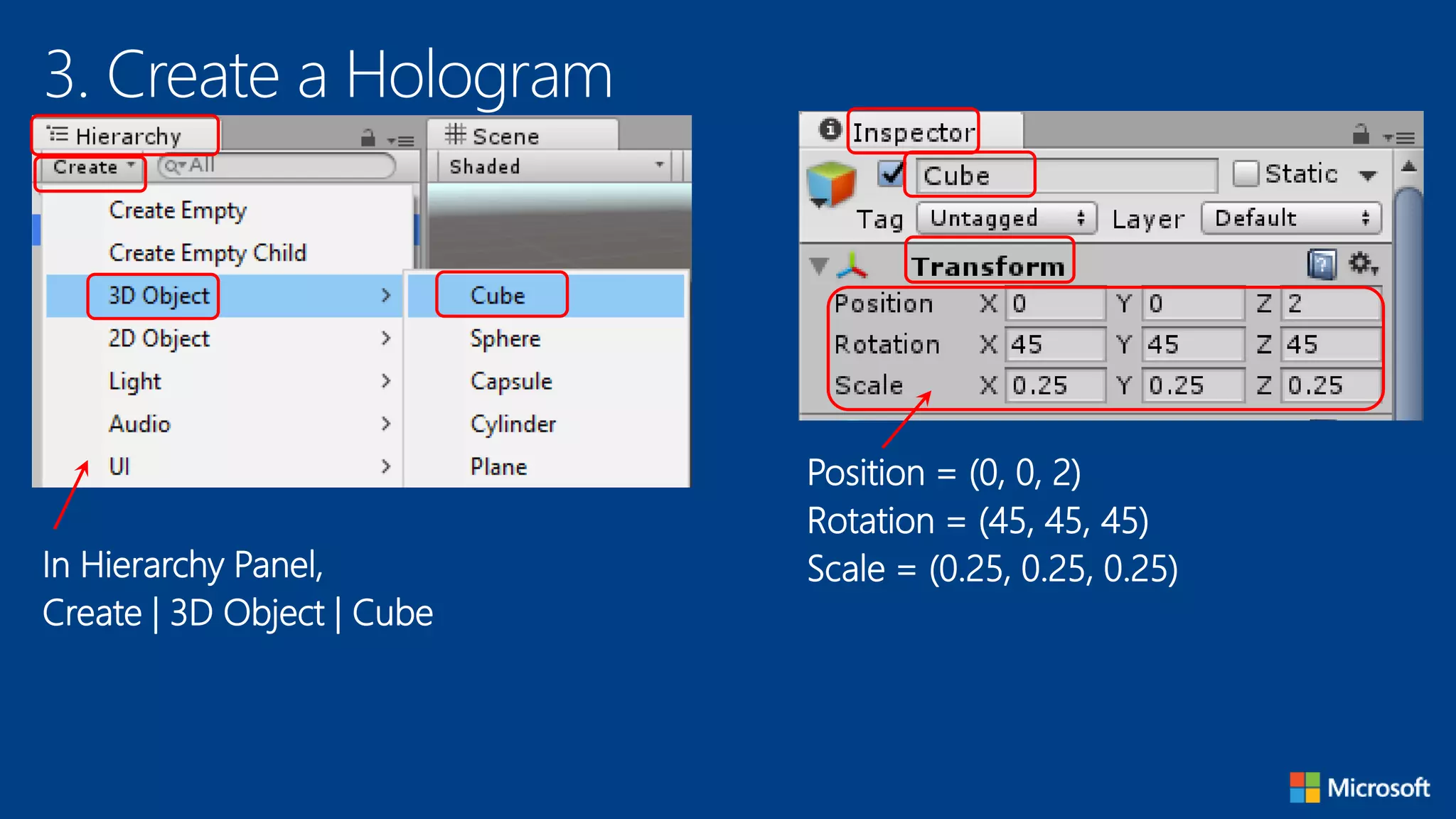
3. Create a Hologram
In Hierarchy Panel,
Create | 3D Object | Cube
Position = (0, 0, 2)
Rotation = (45, 45, 45)
Scale = (0.25, 0.25, 0.25)
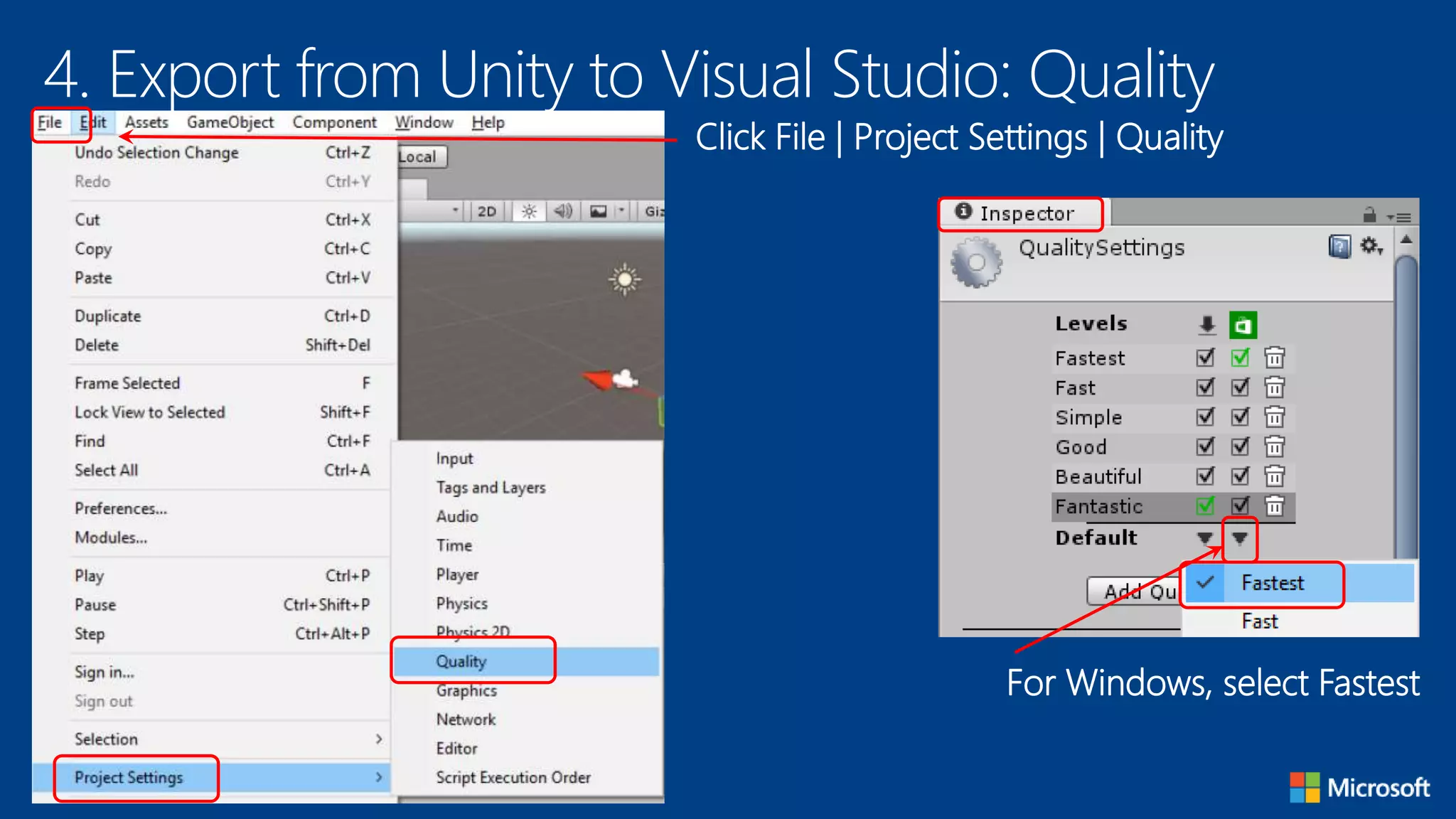
4. Export from Unity to Visual Studio: Quality
Click File | Project Settings | Quality
For Windows, select Fastest
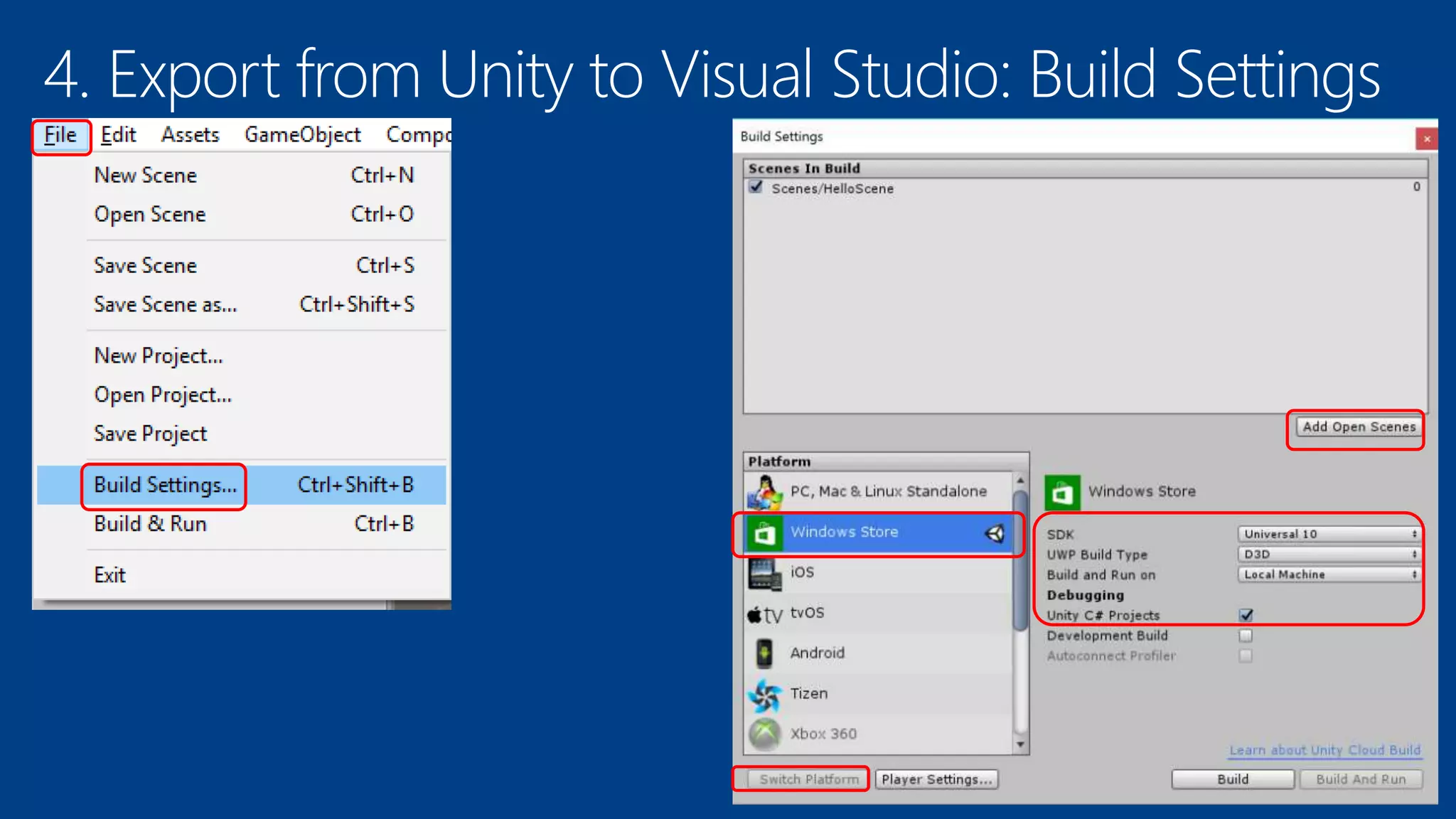
4. Export from Unity to Visual Studio: Build Settings
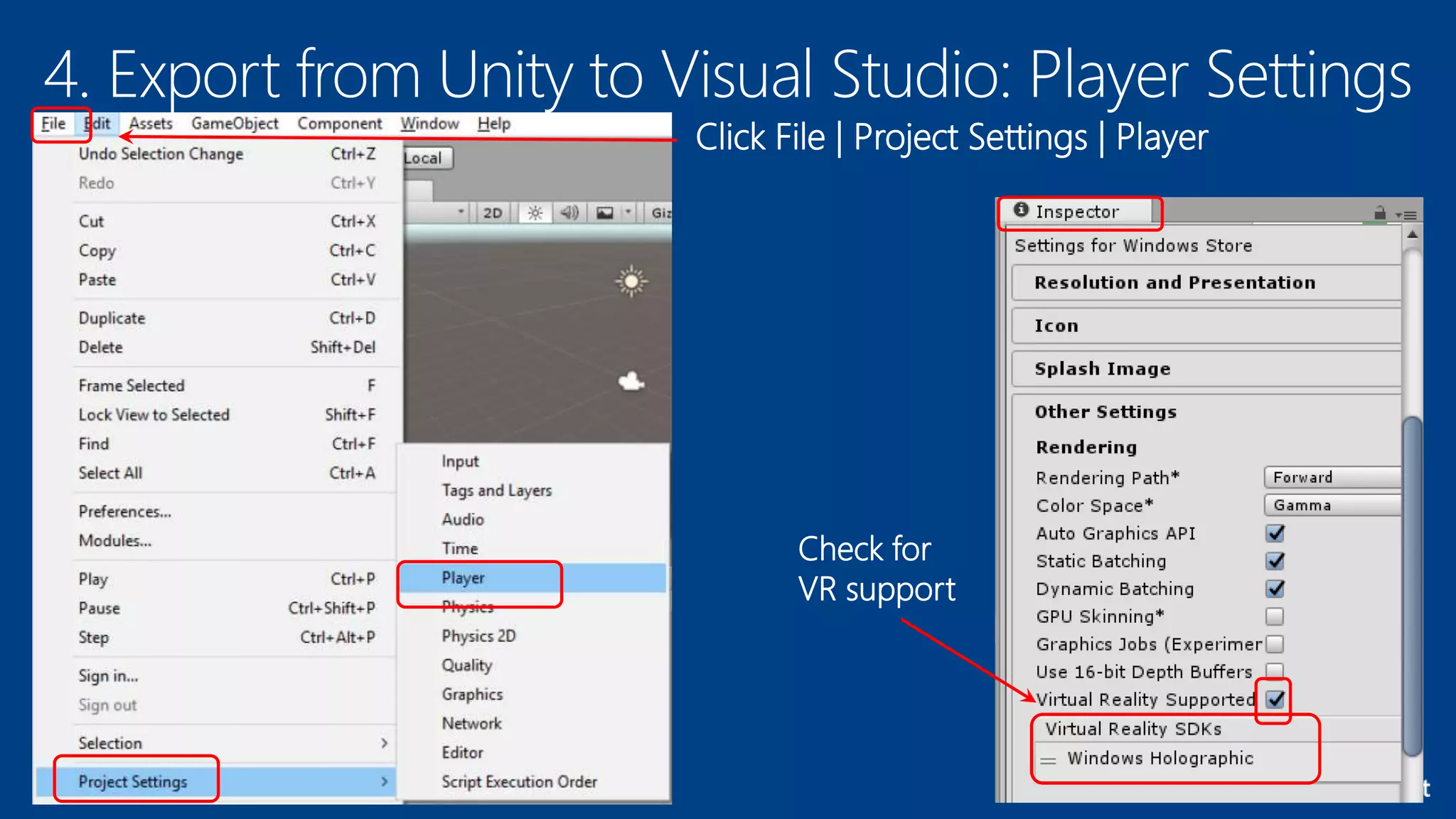
4. Export from Unity to Visual Studio: Player Settings
Click File | Project Settings | Player
Check for
VR support
4. Export from Unity to Visual Studio: Manifest
Right-click manifest file to View Code
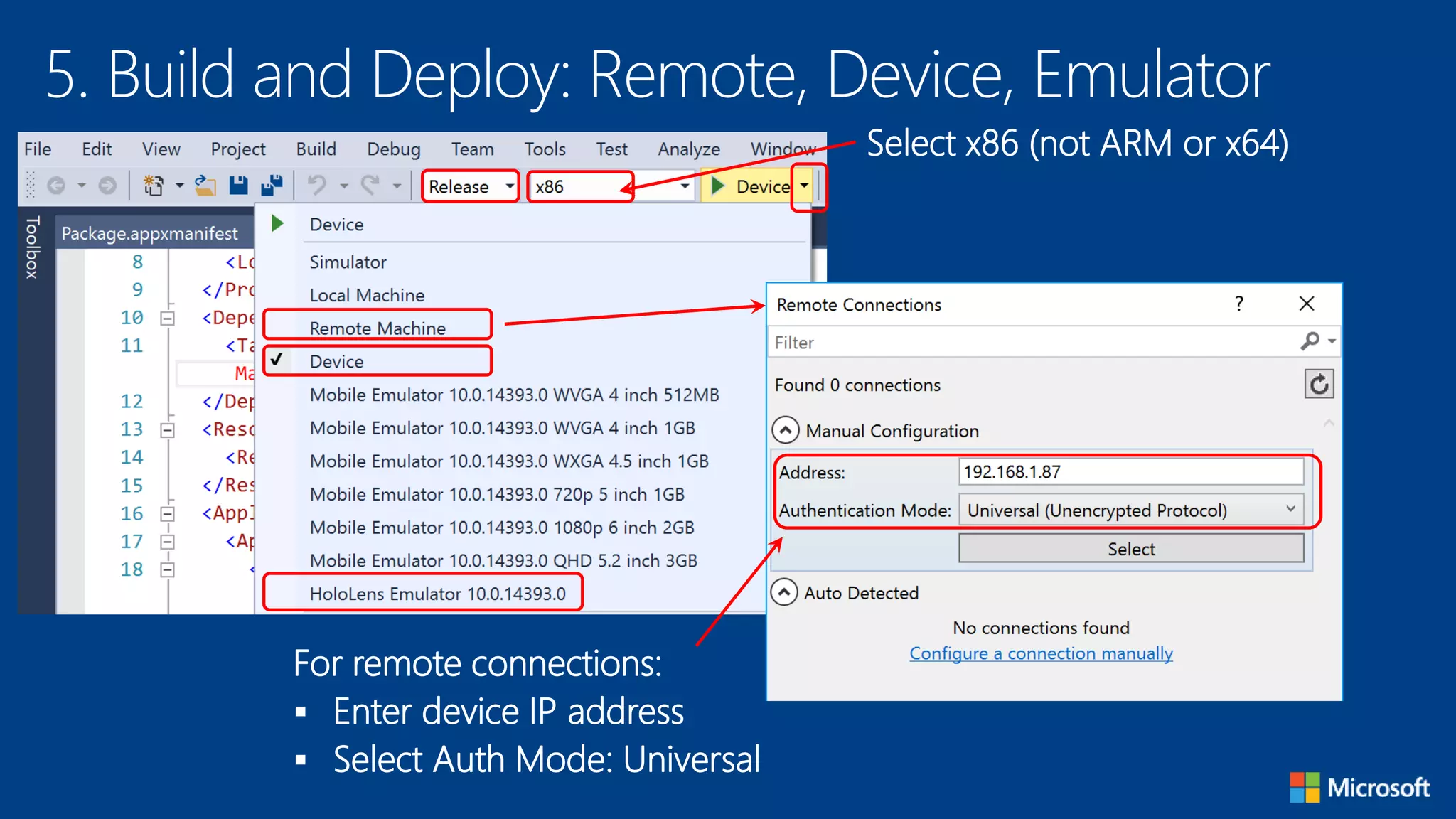
5. Build and Deploy: Remote, Device, Emulator
For remote connections:
 Enter device IP address
 Select Auth Mode: Universal
Select x86 (not ARM or x64)
6. Build and Deploy: Remote, Device, Emulator
For remote connections:
 Enter device IP address
 Select Auth Mode: Universal
Select x86 (not ARM or x64)

How to Build and Deploy to HoloLens

  • 1.
    How to Build& Deploy to HoloLens Shahed Chowdhuri Sr. Technical Evangelist @ Microsoft @shahedC WakeUpAndCode.com
  • 2.
    1. Create aNew Project https://developer.microsoft.com/en-us/windows/holographic/holograms_100 Any name Empty location 3D
  • 3.
    2. Set Upthe Camera In the Hierarchy panel, select Main Camera X, Y, Z = (0,0,0) Solid Color R,G,B,A = (0,0,0,0) Near = 0.85
  • 4.
    3. Create aHologram In Hierarchy Panel, Create | 3D Object | Cube Position = (0, 0, 2) Rotation = (45, 45, 45) Scale = (0.25, 0.25, 0.25)
  • 5.
    4. Export fromUnity to Visual Studio: Quality Click File | Project Settings | Quality For Windows, select Fastest
  • 6.
    4. Export fromUnity to Visual Studio: Build Settings
  • 7.
    4. Export fromUnity to Visual Studio: Player Settings Click File | Project Settings | Player Check for VR support
  • 8.
    4. Export fromUnity to Visual Studio: Manifest Right-click manifest file to View Code
  • 9.
    5. Build andDeploy: Remote, Device, Emulator For remote connections:  Enter device IP address  Select Auth Mode: Universal Select x86 (not ARM or x64)
  • 10.
    6. Build andDeploy: Remote, Device, Emulator For remote connections:  Enter device IP address  Select Auth Mode: Universal Select x86 (not ARM or x64)

Editor's Notes

  • #3 Speaker notes: Deliver video content or stream video to audiences large or small to any device(Web or Mobile) anywhere reliably and in scale. Helps you create versatile media workflows for ingesting, encoding, protecting and streaming content to audiences on-demand or broadcast live. Powerful and extensible platform with broad set of first and third-party capabilities to support complete end-to-end media workflows. Integration with Office 365 empowers organizations of all sizes helps to use videos to enhance sharing, collaboration and communication. Azure Media Player, an automated online player solution, supports all the usual industry standards like HTML5 video, Media Source Extensions and rights management through Encrypted Media Extensions. The focus here is on open standards, but on older browsers, the player can fall back on Flash or Silverlight.
  • #4 Speaker notes: Deliver video content or stream video to audiences large or small to any device(Web or Mobile) anywhere reliably and in scale. Helps you create versatile media workflows for ingesting, encoding, protecting and streaming content to audiences on-demand or broadcast live. Powerful and extensible platform with broad set of first and third-party capabilities to support complete end-to-end media workflows. Integration with Office 365 empowers organizations of all sizes helps to use videos to enhance sharing, collaboration and communication. Azure Media Player, an automated online player solution, supports all the usual industry standards like HTML5 video, Media Source Extensions and rights management through Encrypted Media Extensions. The focus here is on open standards, but on older browsers, the player can fall back on Flash or Silverlight.
  • #5 Speaker notes: Deliver video content or stream video to audiences large or small to any device(Web or Mobile) anywhere reliably and in scale. Helps you create versatile media workflows for ingesting, encoding, protecting and streaming content to audiences on-demand or broadcast live. Powerful and extensible platform with broad set of first and third-party capabilities to support complete end-to-end media workflows. Integration with Office 365 empowers organizations of all sizes helps to use videos to enhance sharing, collaboration and communication. Azure Media Player, an automated online player solution, supports all the usual industry standards like HTML5 video, Media Source Extensions and rights management through Encrypted Media Extensions. The focus here is on open standards, but on older browsers, the player can fall back on Flash or Silverlight.
  • #6 Speaker notes: Deliver video content or stream video to audiences large or small to any device(Web or Mobile) anywhere reliably and in scale. Helps you create versatile media workflows for ingesting, encoding, protecting and streaming content to audiences on-demand or broadcast live. Powerful and extensible platform with broad set of first and third-party capabilities to support complete end-to-end media workflows. Integration with Office 365 empowers organizations of all sizes helps to use videos to enhance sharing, collaboration and communication. Azure Media Player, an automated online player solution, supports all the usual industry standards like HTML5 video, Media Source Extensions and rights management through Encrypted Media Extensions. The focus here is on open standards, but on older browsers, the player can fall back on Flash or Silverlight.
  • #7 Speaker notes: Deliver video content or stream video to audiences large or small to any device(Web or Mobile) anywhere reliably and in scale. Helps you create versatile media workflows for ingesting, encoding, protecting and streaming content to audiences on-demand or broadcast live. Powerful and extensible platform with broad set of first and third-party capabilities to support complete end-to-end media workflows. Integration with Office 365 empowers organizations of all sizes helps to use videos to enhance sharing, collaboration and communication. Azure Media Player, an automated online player solution, supports all the usual industry standards like HTML5 video, Media Source Extensions and rights management through Encrypted Media Extensions. The focus here is on open standards, but on older browsers, the player can fall back on Flash or Silverlight.
  • #8 Speaker notes: Deliver video content or stream video to audiences large or small to any device(Web or Mobile) anywhere reliably and in scale. Helps you create versatile media workflows for ingesting, encoding, protecting and streaming content to audiences on-demand or broadcast live. Powerful and extensible platform with broad set of first and third-party capabilities to support complete end-to-end media workflows. Integration with Office 365 empowers organizations of all sizes helps to use videos to enhance sharing, collaboration and communication. Azure Media Player, an automated online player solution, supports all the usual industry standards like HTML5 video, Media Source Extensions and rights management through Encrypted Media Extensions. The focus here is on open standards, but on older browsers, the player can fall back on Flash or Silverlight.
  • #9 Speaker notes: Deliver video content or stream video to audiences large or small to any device(Web or Mobile) anywhere reliably and in scale. Helps you create versatile media workflows for ingesting, encoding, protecting and streaming content to audiences on-demand or broadcast live. Powerful and extensible platform with broad set of first and third-party capabilities to support complete end-to-end media workflows. Integration with Office 365 empowers organizations of all sizes helps to use videos to enhance sharing, collaboration and communication. Azure Media Player, an automated online player solution, supports all the usual industry standards like HTML5 video, Media Source Extensions and rights management through Encrypted Media Extensions. The focus here is on open standards, but on older browsers, the player can fall back on Flash or Silverlight.
  • #10 Speaker notes: Deliver video content or stream video to audiences large or small to any device(Web or Mobile) anywhere reliably and in scale. Helps you create versatile media workflows for ingesting, encoding, protecting and streaming content to audiences on-demand or broadcast live. Powerful and extensible platform with broad set of first and third-party capabilities to support complete end-to-end media workflows. Integration with Office 365 empowers organizations of all sizes helps to use videos to enhance sharing, collaboration and communication. Azure Media Player, an automated online player solution, supports all the usual industry standards like HTML5 video, Media Source Extensions and rights management through Encrypted Media Extensions. The focus here is on open standards, but on older browsers, the player can fall back on Flash or Silverlight.
  • #11 Builds a Visual Studio solution Visual Studio > Debug > Release > X86 > First deploy over "Device" "Start without debugging" ... (flip HoloLens over so it is not upsidedown)