Something behind “Hello World”
Jeff Liaw ( 廖健富 ), Jim Huang ( 黃敬群 )
National Cheng Kung University, Taiwan / Apr 14
Outline
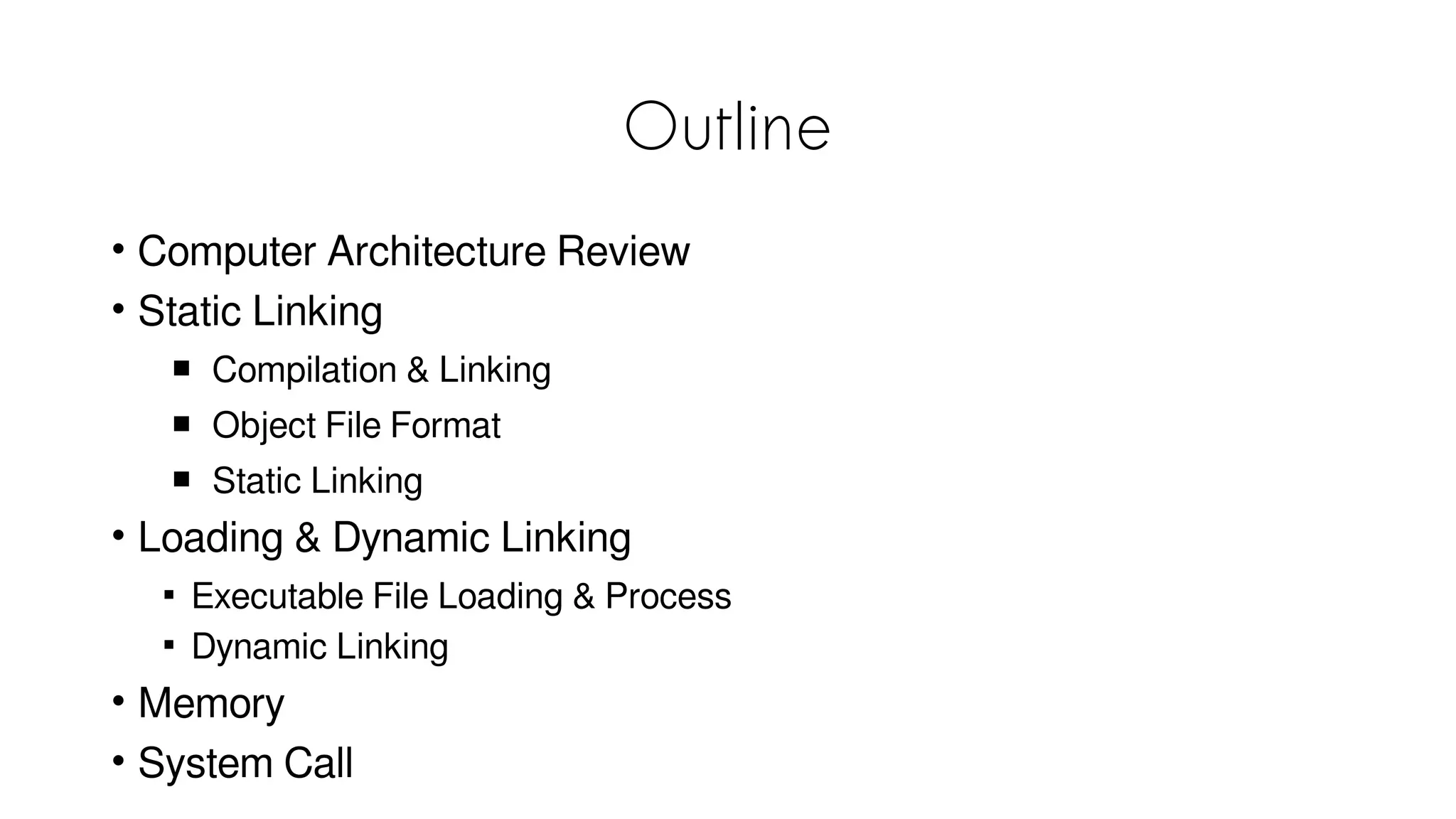
• Computer Architecture Review
• Static Linking
 Compilation & Linking
 Object File Format
 Static Linking
• Loading & Dynamic Linking

Executable File Loading & Process

Dynamic Linking
• Memory
• System Call
3
Hello World!
0
1
2
3
~$ vim hello.c
~$ gcc hello.c
~$ ./a.out
Hello World!
Filename: hello.c
0
1
2
3
4
5
6
7
#include <stdio.h>
int main(int argc, char *argv[])
{
    printf(“Hello World!n”);
    return 0;
}
• Why we need to compile the program
• What is in an executable file
• What is the meaning of “#include<stdio.h>”
• Difference between
• Compiler(Microsoft C/C++ compiler, GCC)
• Hardware architecture(ARM, x86)
• How to execute a program
• What does OS do
• Before main function
• Memory layout
• If we don’t have OS
Computer Architecture Review
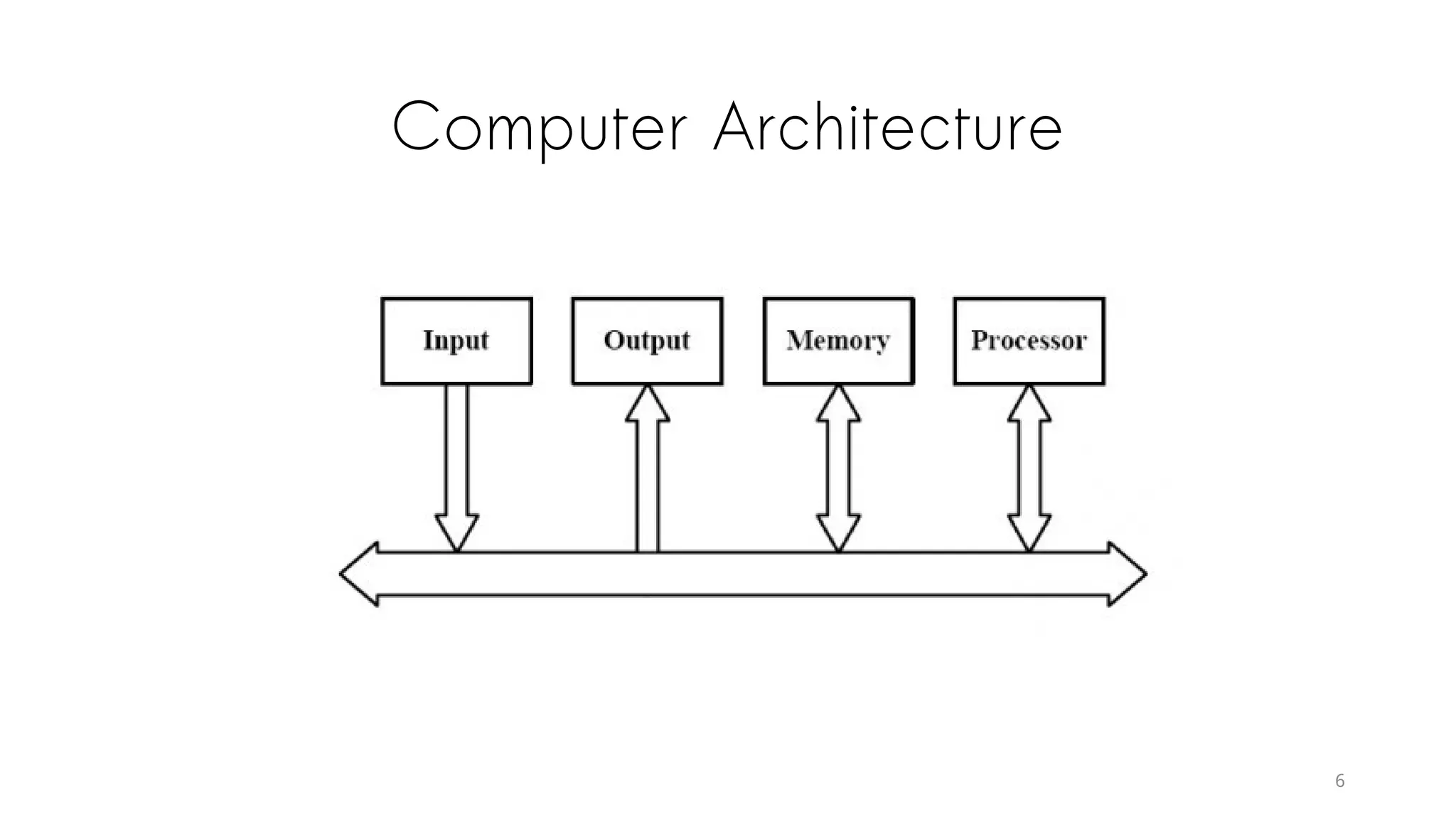
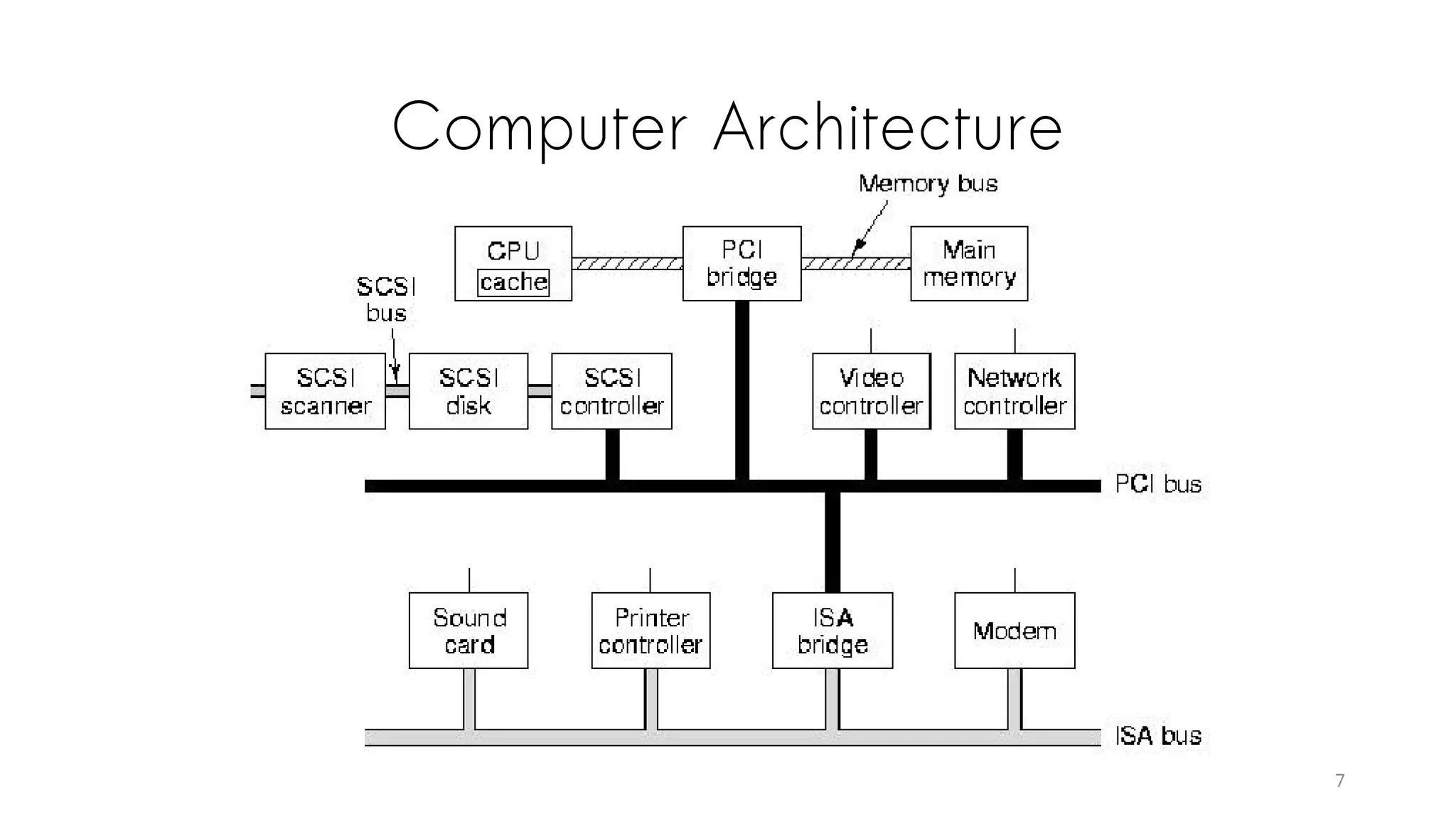
Computer Architecture
7
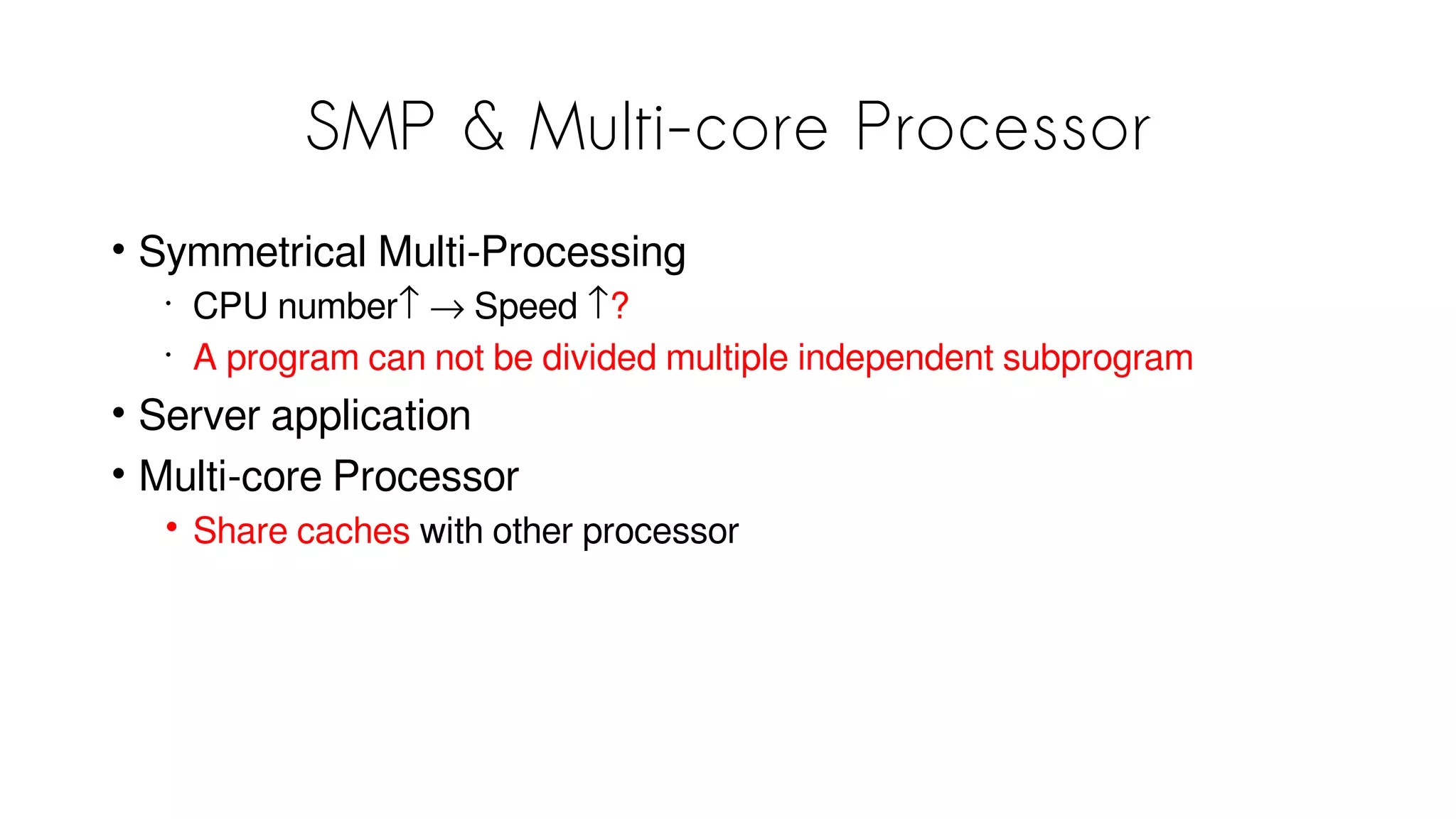
SMP & Multi-core Processor
• Symmetrical Multi-Processing
•
CPU number↑ → Speed ↑?
•
A program can not be divided multiple independent subprogram
• Server application
• Multi-core Processor
• Share caches with other processor
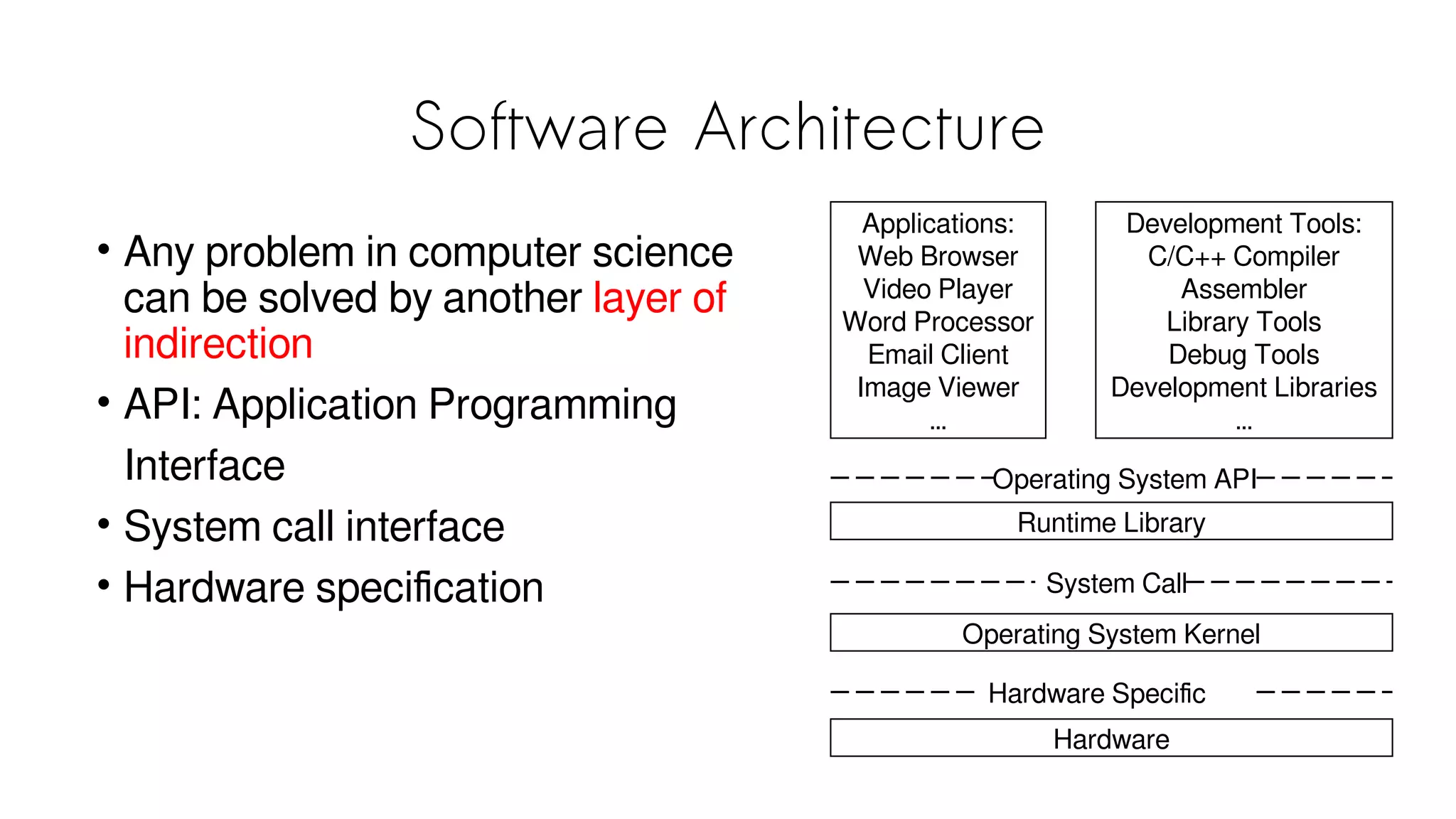
Software Architecture
• Any problem in computer science
can be solved by another layer of
indirection
• API: Application Programming
Interface
• System call interface
• Hardware specification
Applications:
Web Browser
Video Player
Word Processor
Email Client
Image Viewer
…
Development Tools:
C/C++ Compiler
Assembler
Library Tools
Debug Tools
Development Libraries
…
Operating System API
System Call
Runtime Library
Operating System Kernel
Hardware
Hardware Specific
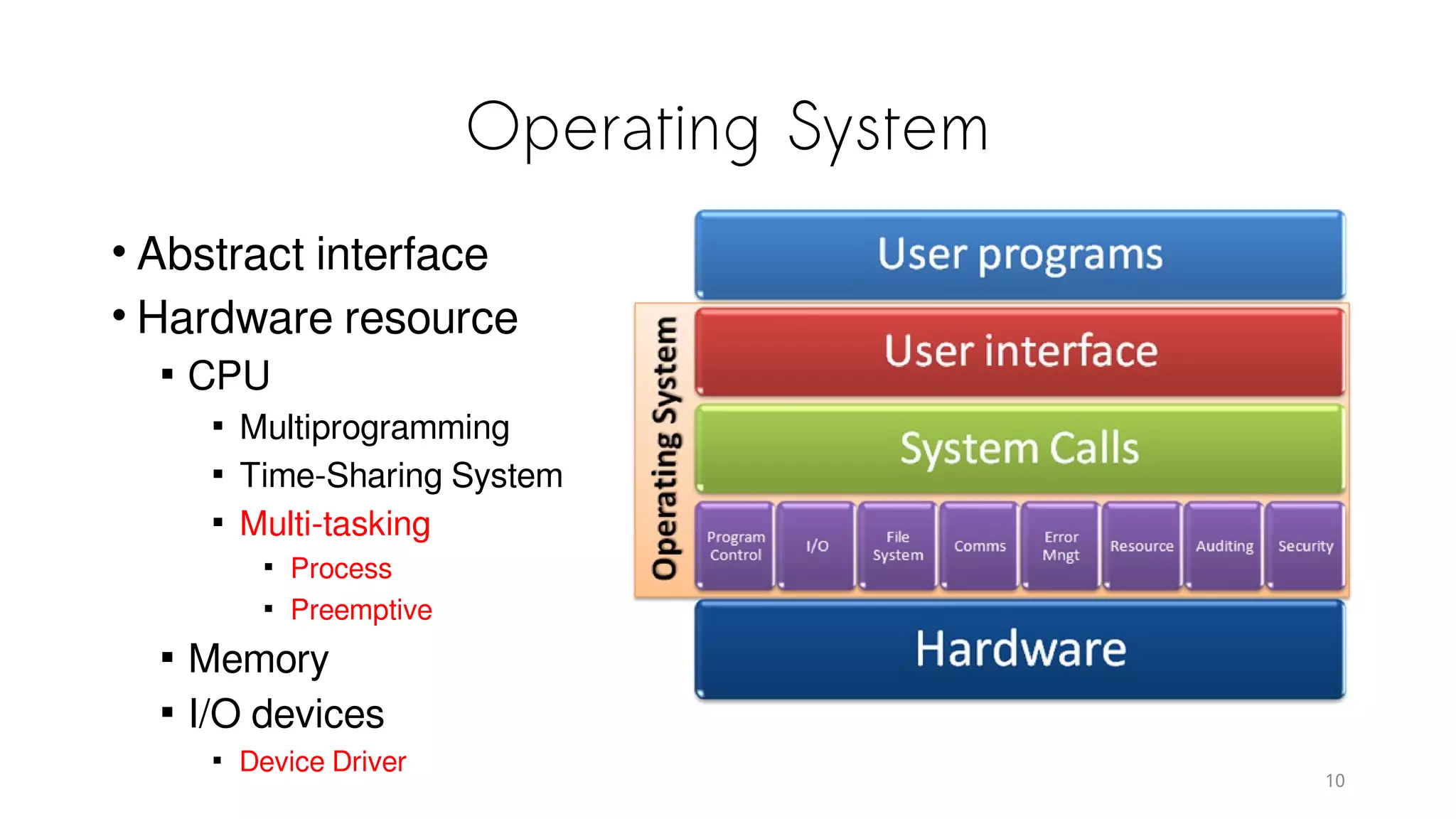
Operating System
• Abstract interface
• Hardware resource

CPU

Multiprogramming

Time-Sharing System

Multi-tasking

Process

Preemptive

Memory

I/O devices

Device Driver
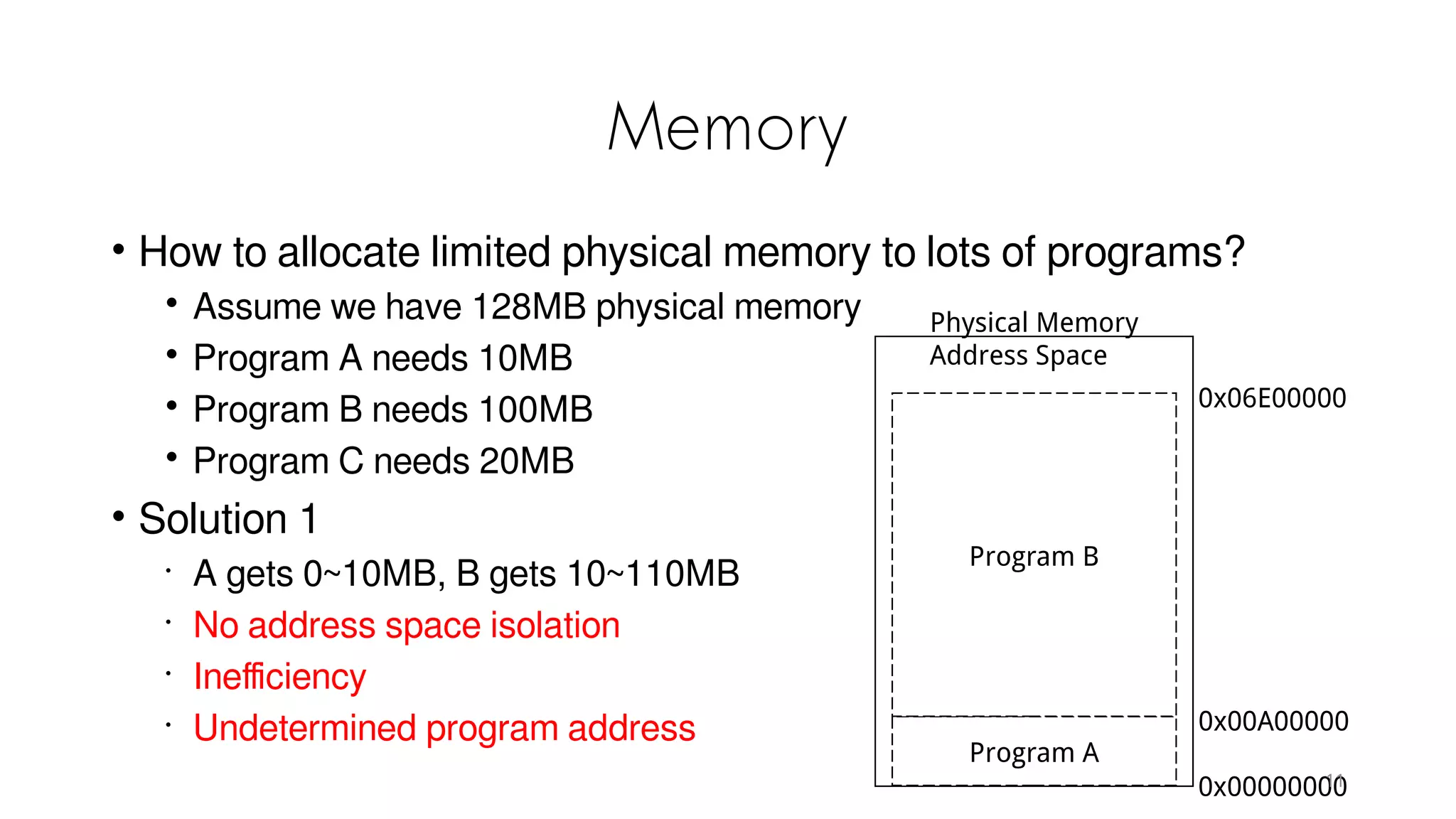
Memory
• How to allocate limited physical memory to lots of programs?
• Assume we have 128MB physical memory
• Program A needs 10MB
• Program B needs 100MB
• Program C needs 20MB
• Solution 1
•
A gets 0~10MB, B gets 10~110MB
•
No address space isolation
•
Inefficiency
•
Undetermined program address
Program A
Program B
Physical Memory
Address Space
0x00000000
0x00A00000
0x06E00000
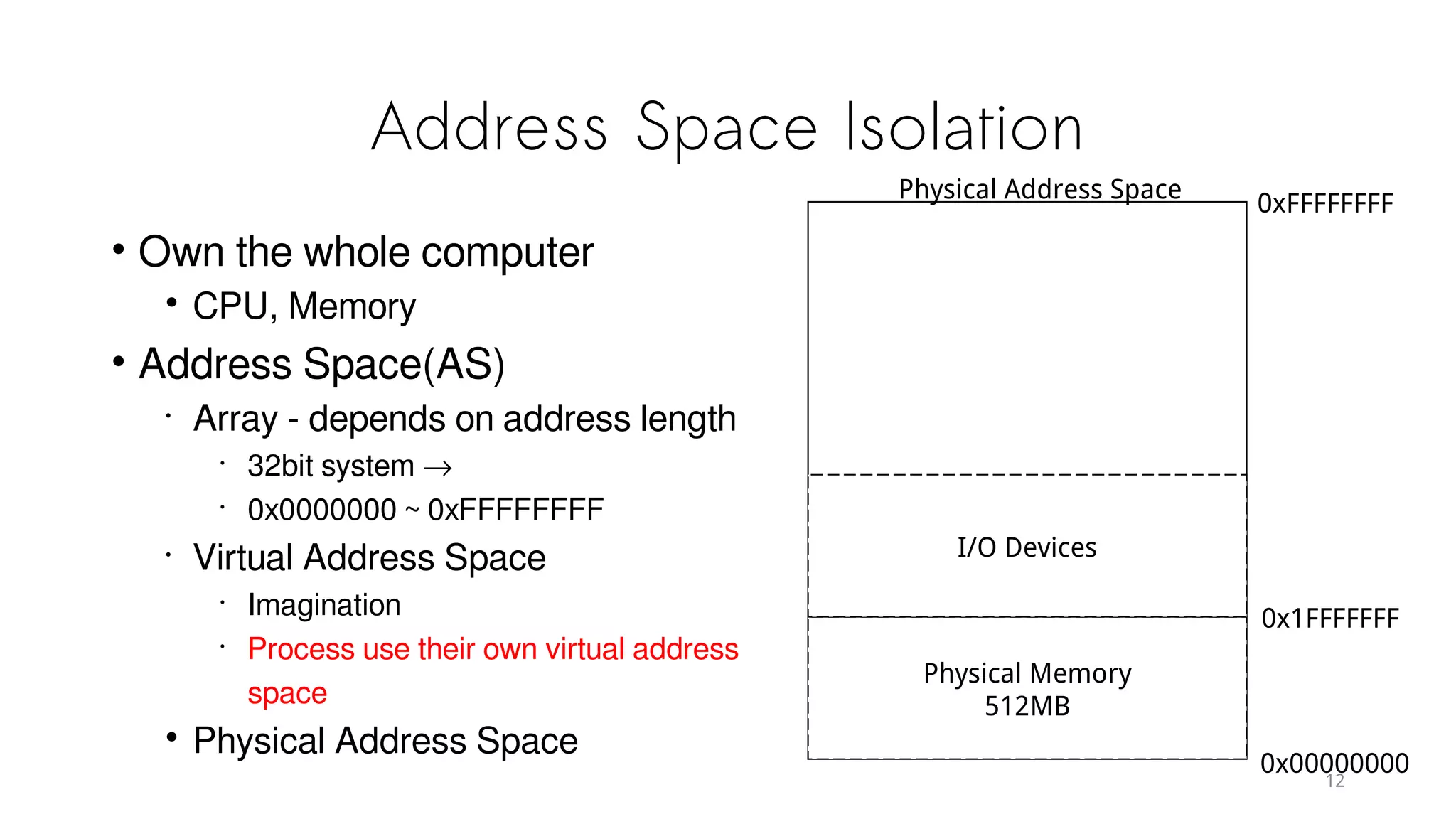
Address Space Isolation
• Own the whole computer
• CPU, Memory
• Address Space(AS)
•
Array - depends on address length
•
32bit system →
•
0x0000000 ~ 0xFFFFFFFF
•
Virtual Address Space
•
Imagination
•
Process use their own virtual address
space
• Physical Address Space
0x00000000
0xFFFFFFFF
Physical Memory
512MB
0x1FFFFFFF
I/O Devices
Physical Address Space
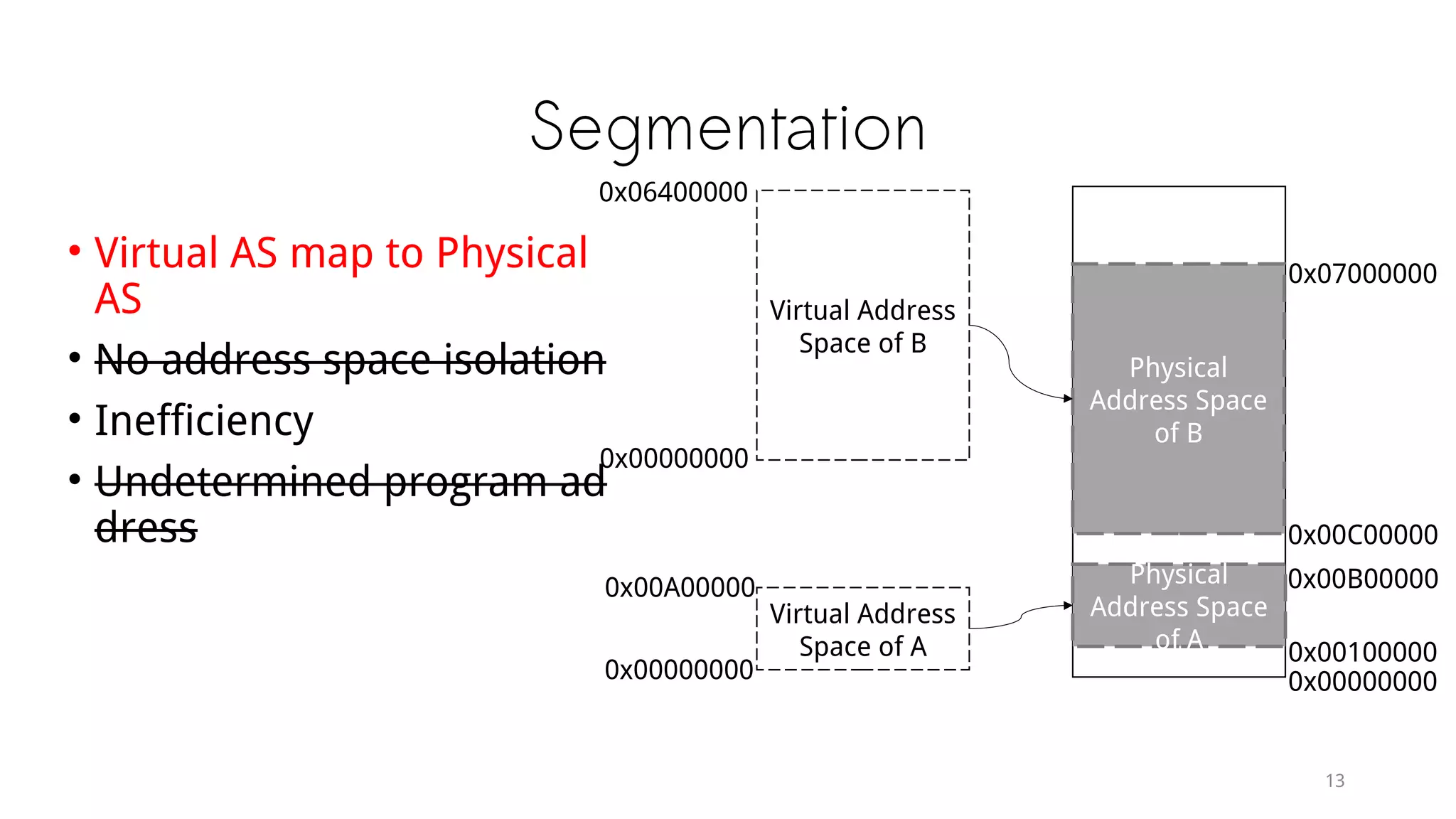
Segmentation
• Virtual AS map to Physical AS
• No address space isolation
• Inefficiency
• Undetermined program address
Physical
Address Space
of B
Physical
Address Space
of A
Virtual Address
Space of B
Virtual Address
Space of A
0x00000000
0x00100000
0x00B00000
0x00C00000
0x07000000
0x00000000
0x00A00000
0x00000000
0x06400000
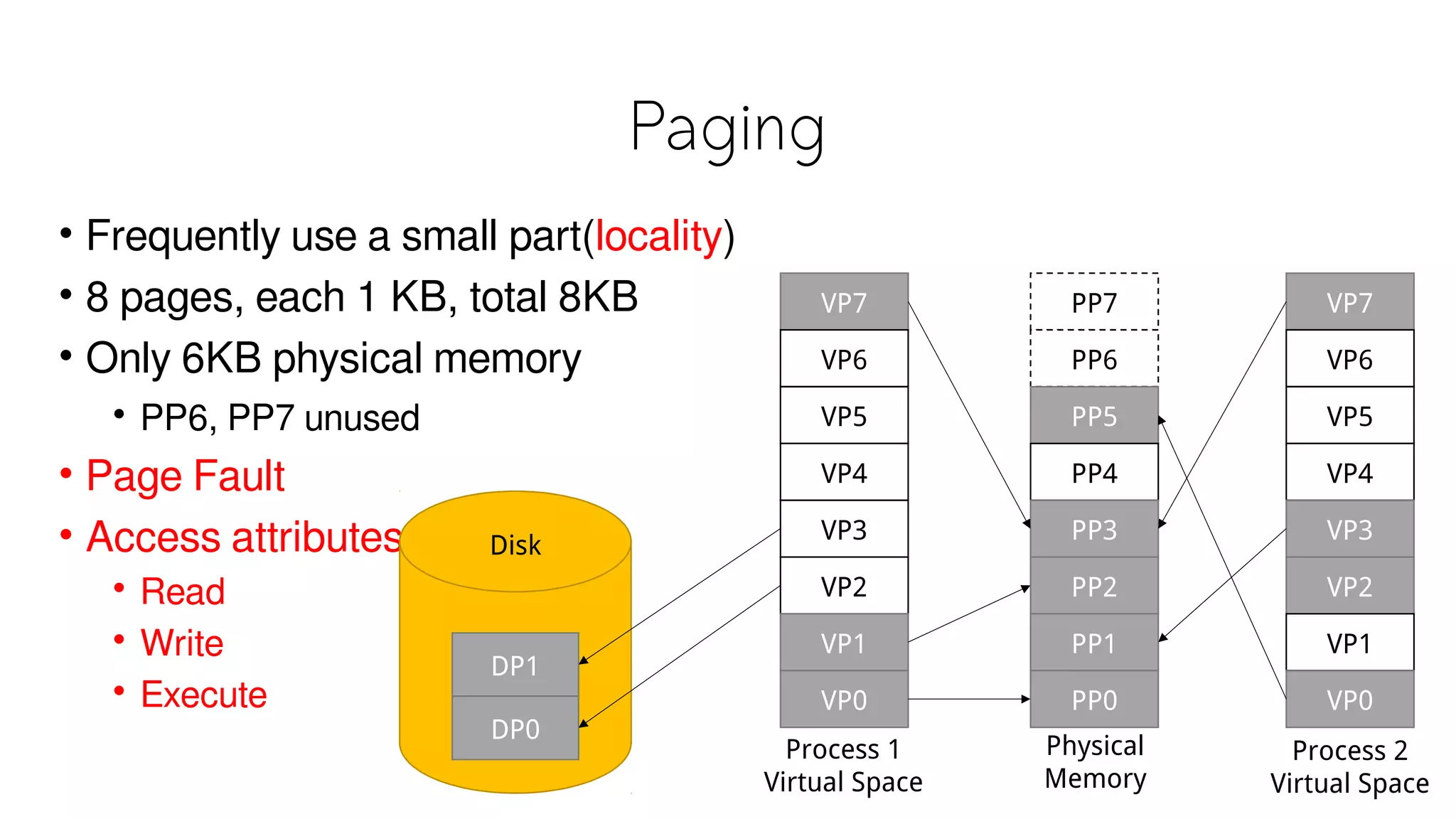
Paging
• Frequently use a small part(locality)
• 8 pages, each 1 KB, total 8KB
• Only 6KB physical memory
• PP6, PP7 unused
• Page Fault
• Access attributes
• Read
• Write
• Execute
VP7
VP6
VP5
VP4
VP3
VP2
VP1
VP0
PP7
PP6
PP5
PP4
PP3
PP2
PP1
PP0
VP7
VP6
VP5
VP4
VP3
VP2
VP1
VP0
DP1
DP0
Disk
Process 1
Virtual Space
Process 2
Virtual Space
Physical
Memory
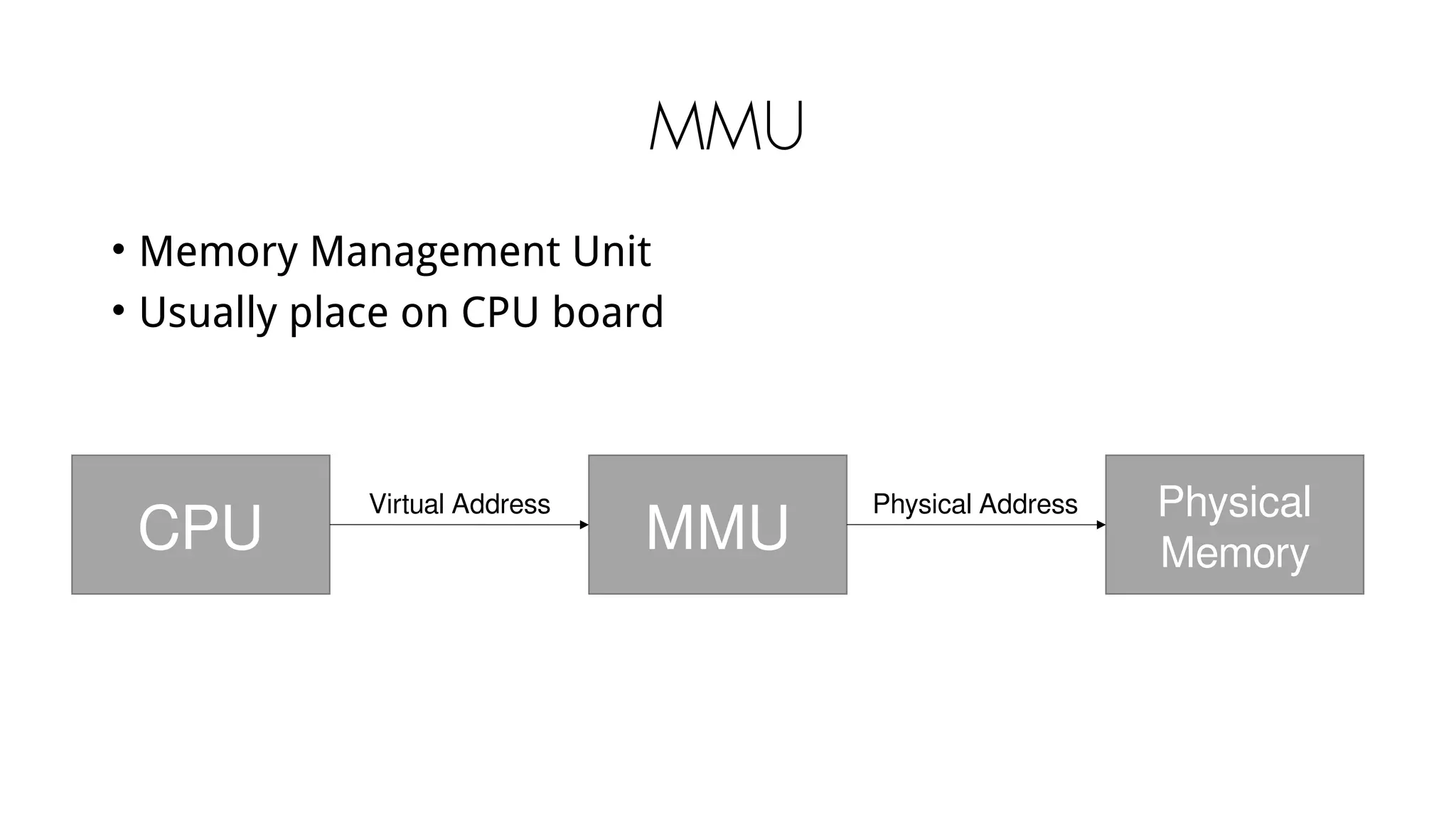
MMU
• Memory Management Unit
• Usually place on CPU board
CPU MMU
Physical
Memory
Virtual Address Physical Address
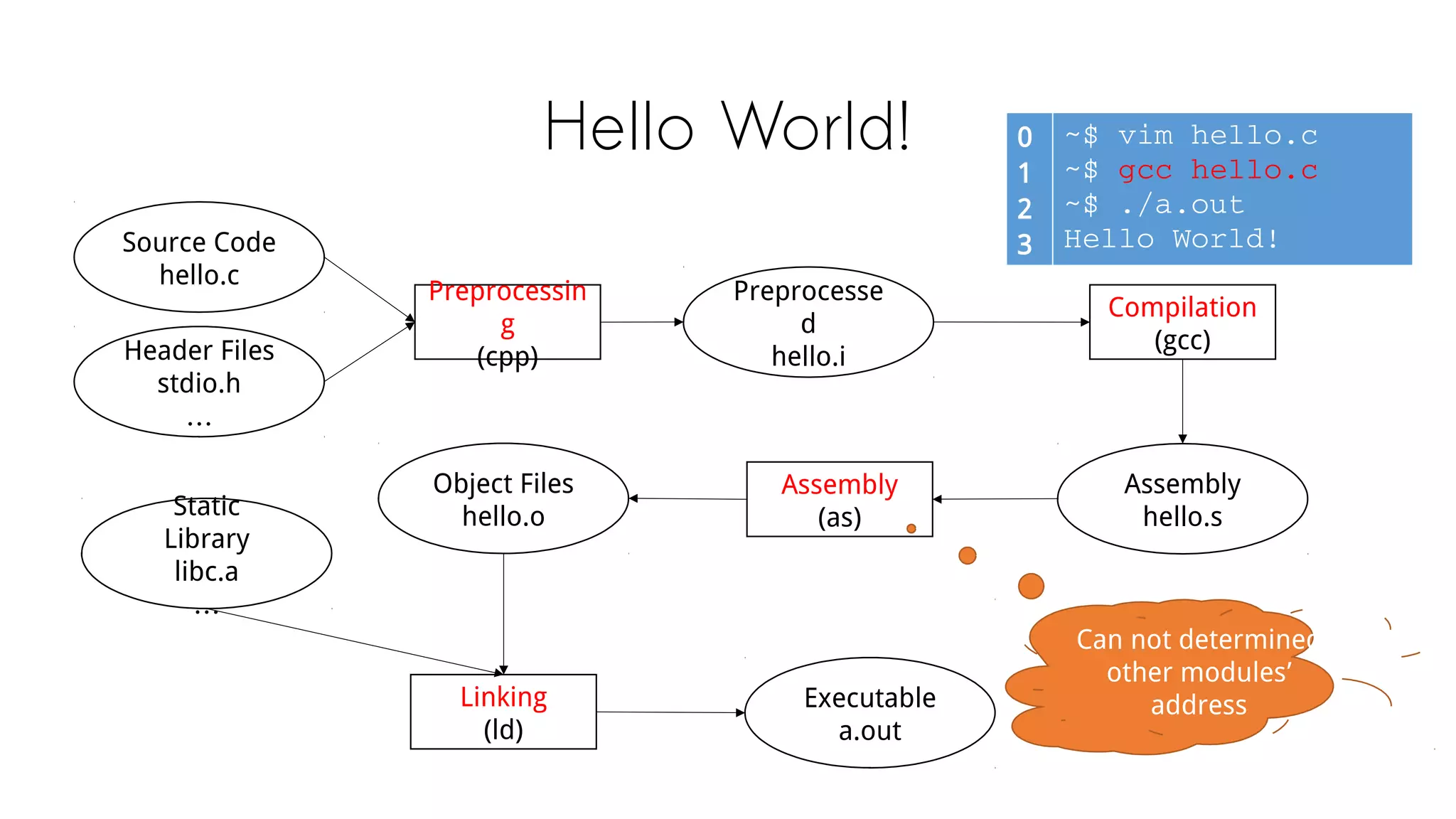
Compilation & Linking
Hello World! 0
1
2
3
~$ vim hello.c
~$ gcc hello.c
~$ ./a.out
Hello World!Source Code
hello.c
Header Files
stdio.h
Preprocessing
(cpp)
Preprocessed
hello.i
Compilation
(gcc)
Assembly
hello.s
Assembly
(as)
Object Files
hello.o
Static Library
libc.a
Linking
(ld)
Executable
a.out
Can not determined
other modules’ address
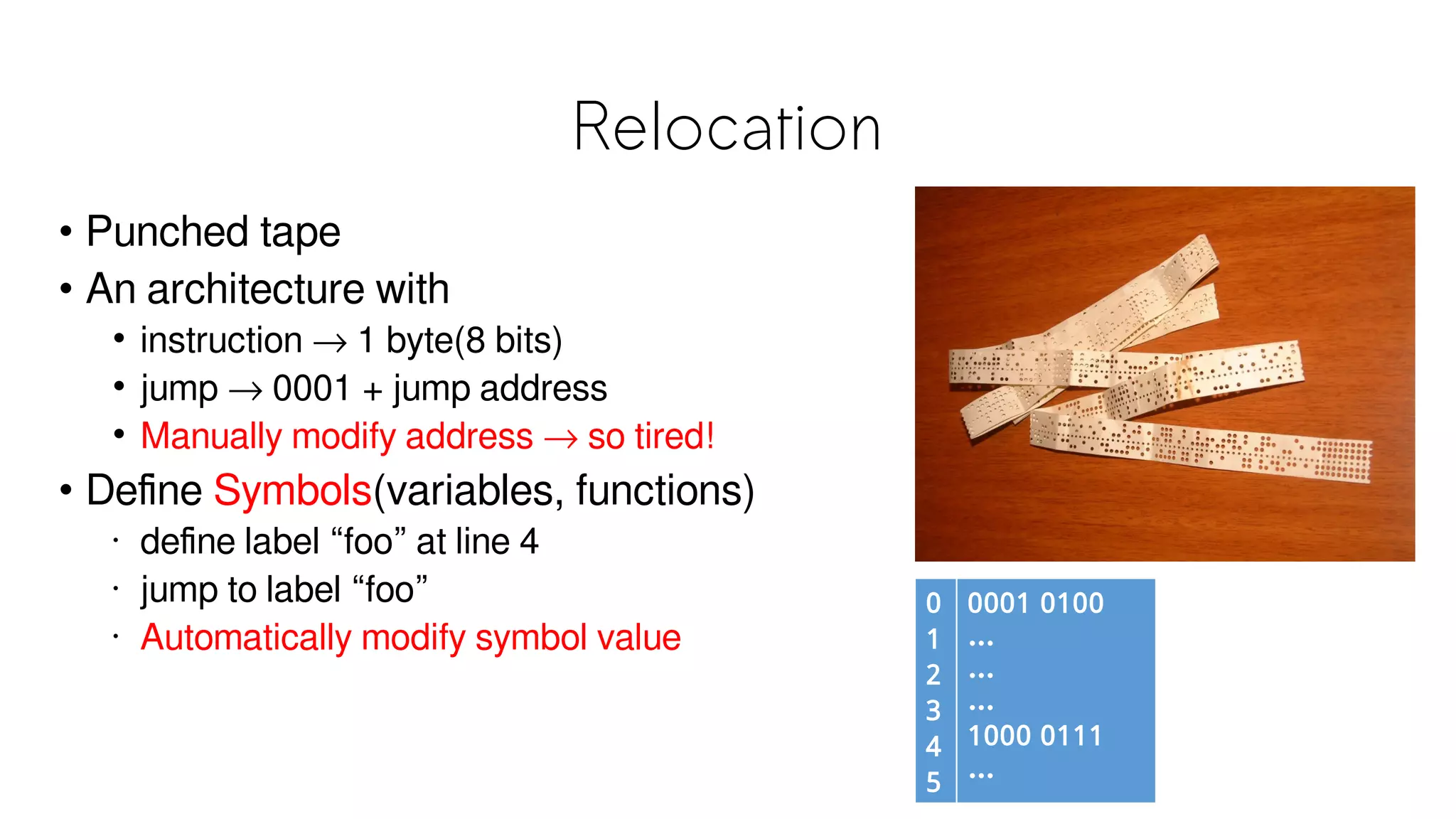
Relocation
0
1
2
3
4
5
0001 0100
…
…
…
1000 0111
…
• Punched tape
• An architecture with
• instruction → 1 byte(8 bits)
• jump → 0001 + jump address
• Manually modify address → impractical
• Define Symbols(variables, functions)
• define label “foo” at line 4
• jump to label “foo”
• Automatically modify symbol value
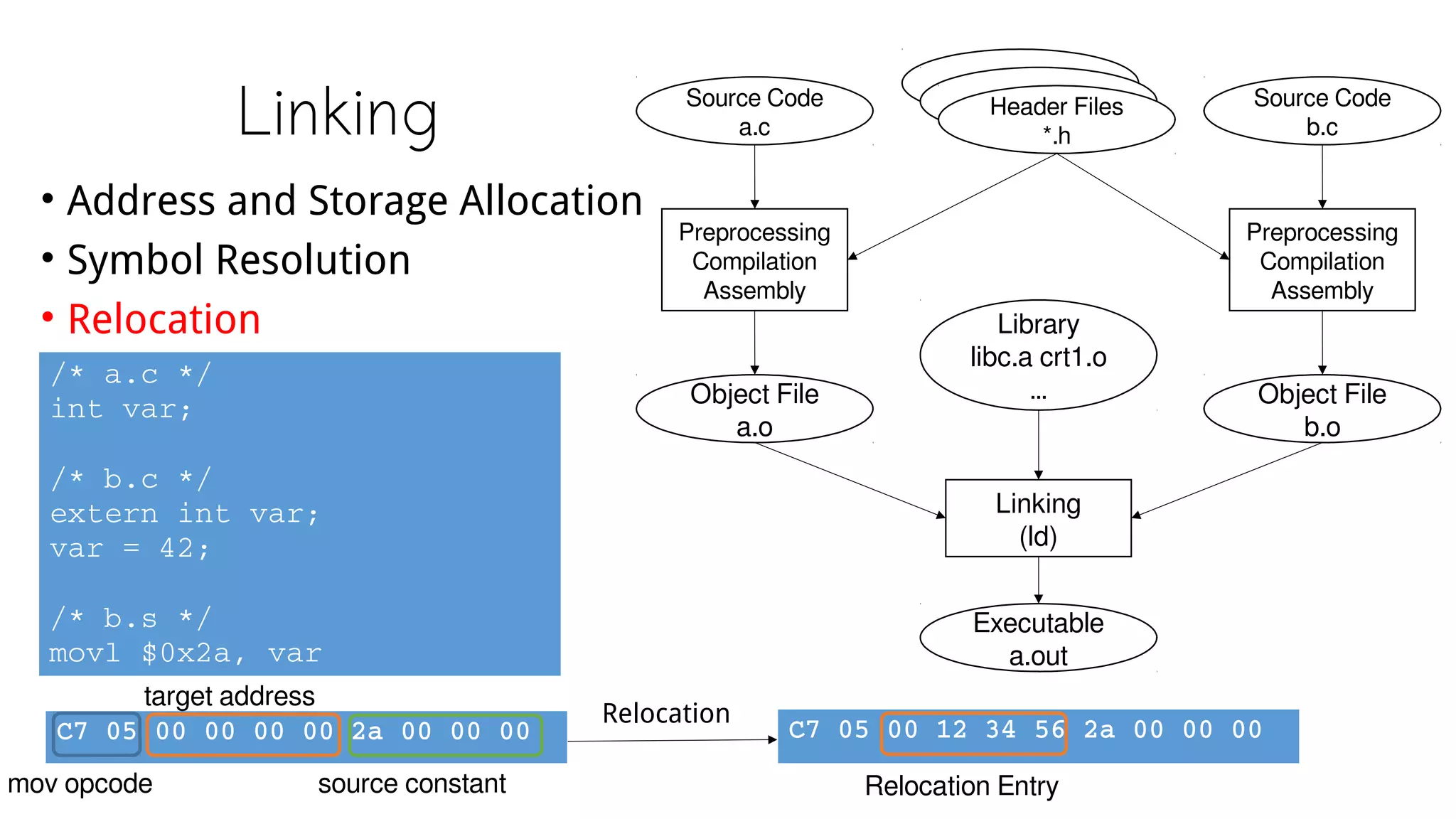
Linking
• Address and Storage Allocation
• Symbol Resolution
• Relocation
Source Code
a.c
Source Code
b.c
Header Files
*.h
Preprocessing
Compilation
Assembly
Preprocessing
Compilation
Assembly
Object File
a.o
Object File
b.o
Library
libc.a 
crt1.o
…
Linking
(ld)
Executable
a.out
/* a.c */
int var;
/* b.c */
extern int var;
var = 42;
/* b.s */
movl $0x2a, var
C7 05 00 00 00 00 2a 00 00 00
mov opcode
target address
source constant
C7 05 00 12 34 56 2a 00 00 00
Relocation
Relocation Entry
Object File Format
20
File Format
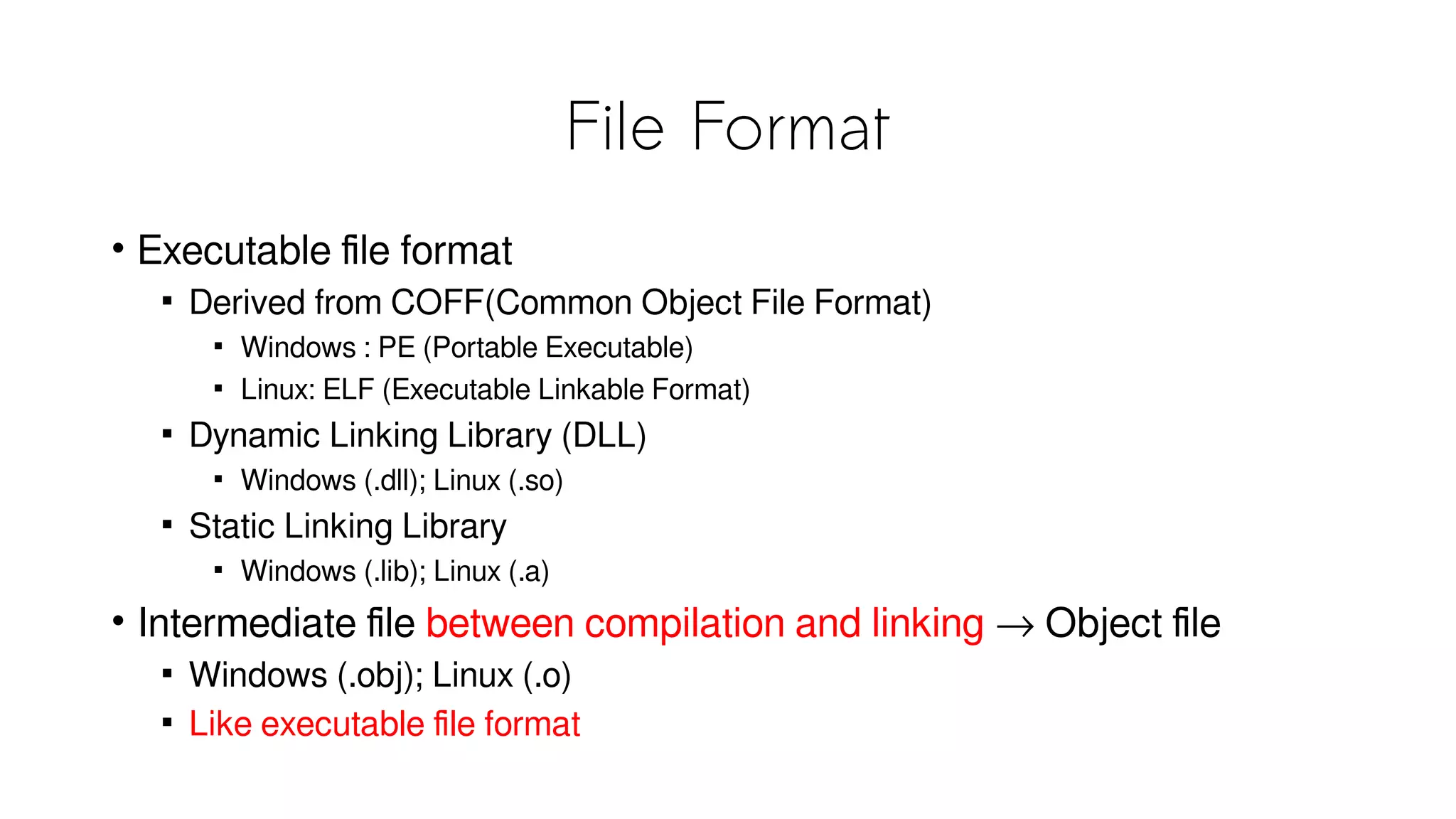
• Executable file format

Derived from COFF(Common Object File Format)

Windows : PE (Portable Executable)

Linux: ELF (Executable Linkable Format)

Dynamic Linking Library (DLL)

Windows (.dll); Linux (.so)

Static Linking Library

Windows (.lib); Linux (.a)
• Intermediate file between compilation and linking → Object file

Windows (.obj); Linux (.o)

Like executable file format
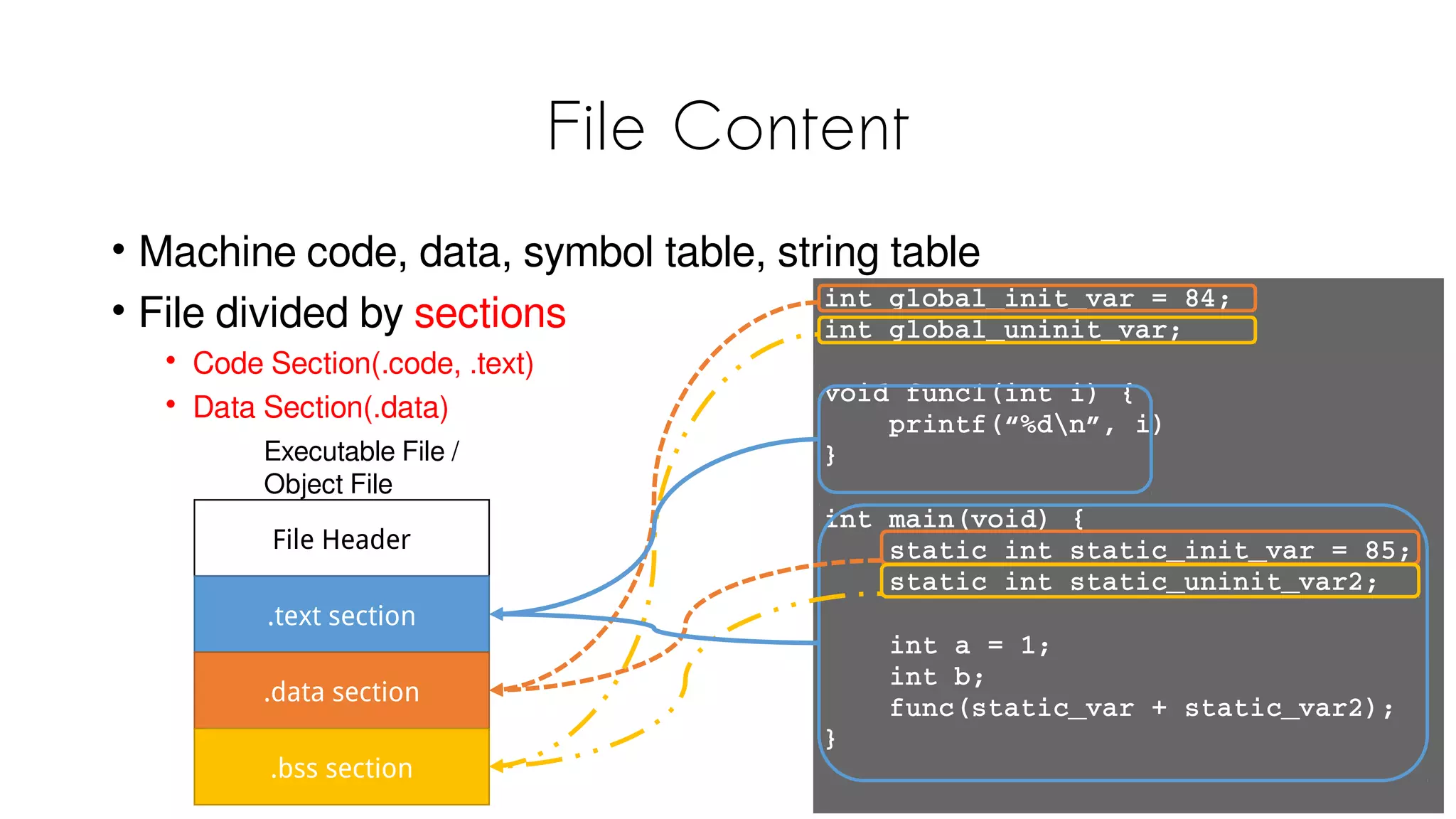
File Content
• Machine code, data, symbol table, string table
• File divided by sections
• Code Section (.code, .text)
• Data Section (.data)
int global_init_var = 84;
int global_uninit_var;
void func1(int i) {
    printf(“%dn”, i)
}
int main(void) {
    static int static_init_var = 85;
    static int static_uninit_var2;
    int a = 1;
    int b;
    func(static_var + static_var2);
}
File Header
.text section
.data section
.bss section
Executable File /
Object File
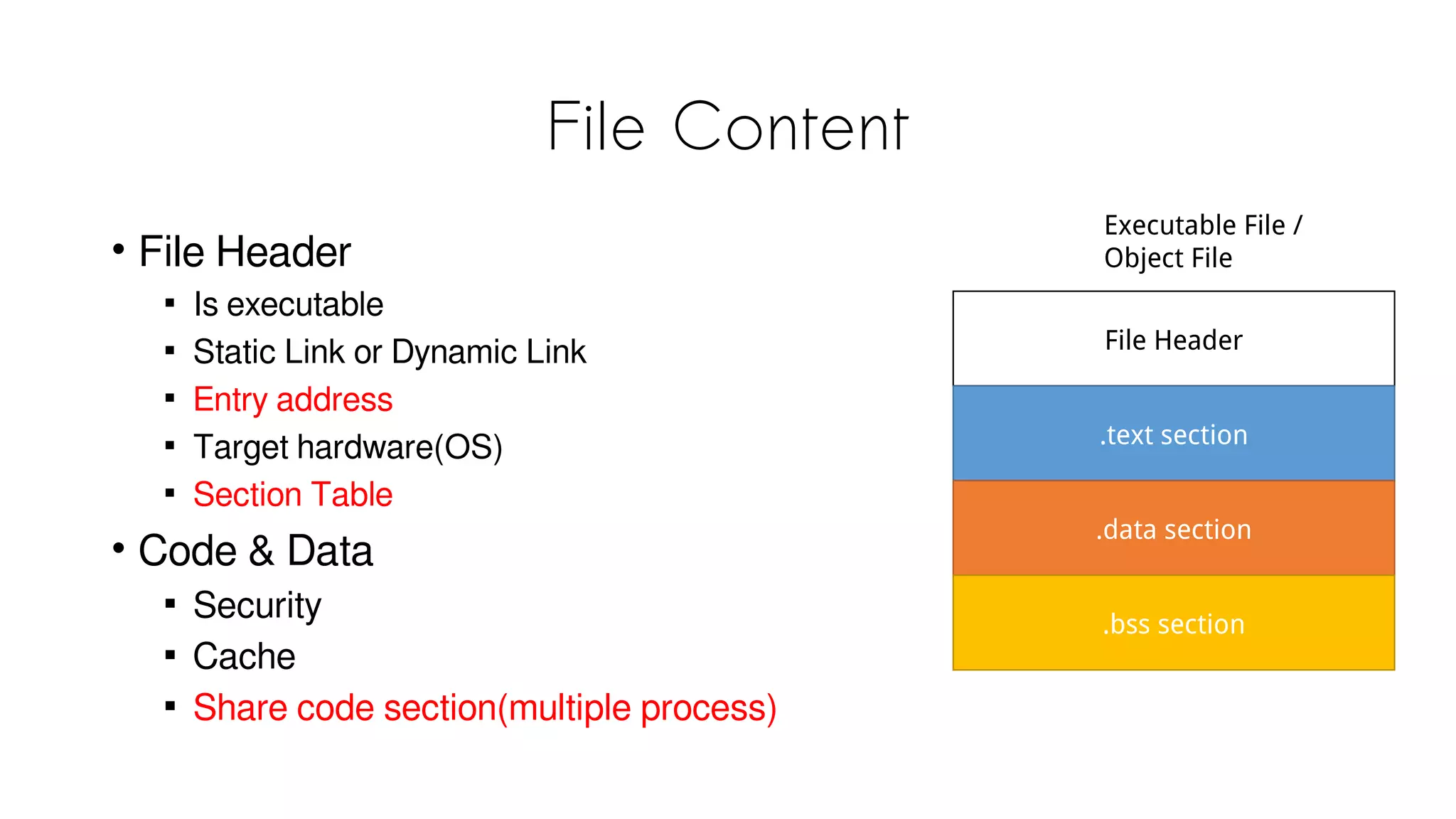
File Content
• File Header

Is executable

Static Link or Dynamic Link

Entry address

Target hardware / OS

Section Table
• Code & Data

Security

Cache

Share code section(multiple process)
File Header
.text section
.data section
.bss section
Executable File /
Object File
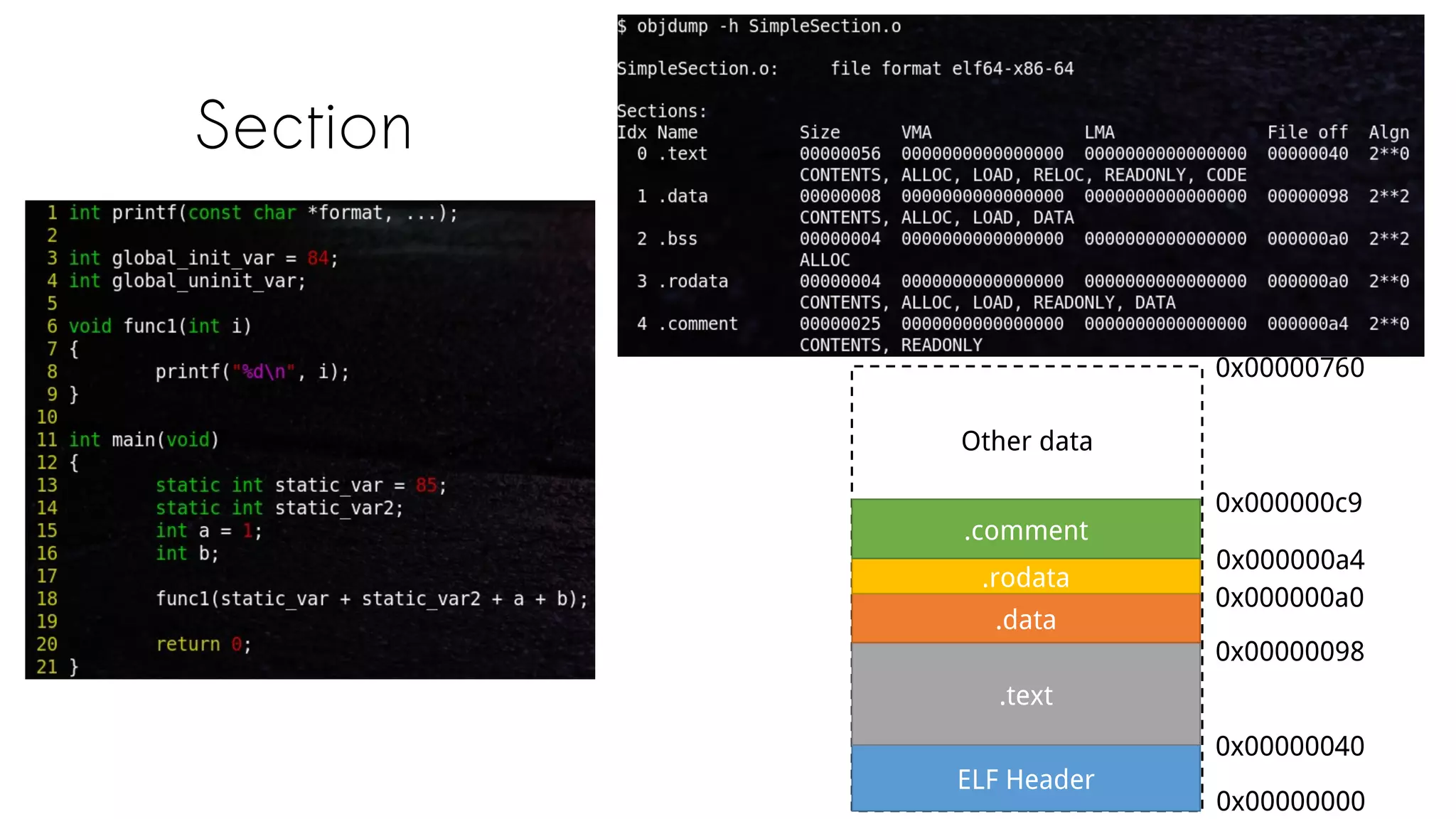
Section
ELF Header
.text
.data
.rodata
.comment
Other data
0x00000760
0x00000040
0x00000098
0x000000a0
0x000000a4
0x00000000
0x000000c9
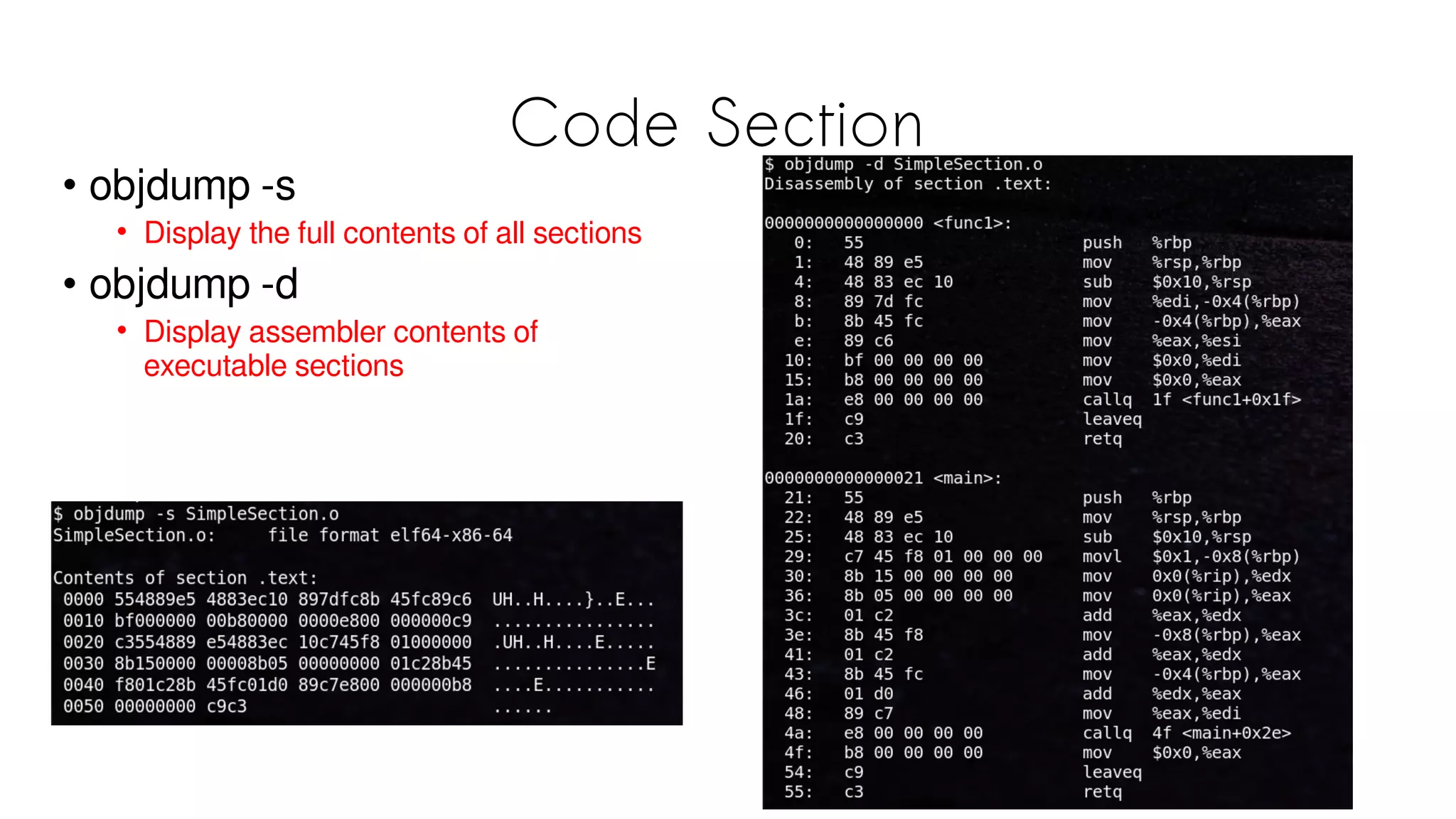
Code Section
• objdump -s
• Display the full contents of all sections
• objdump -d
• Display assembler contents of
executable sections
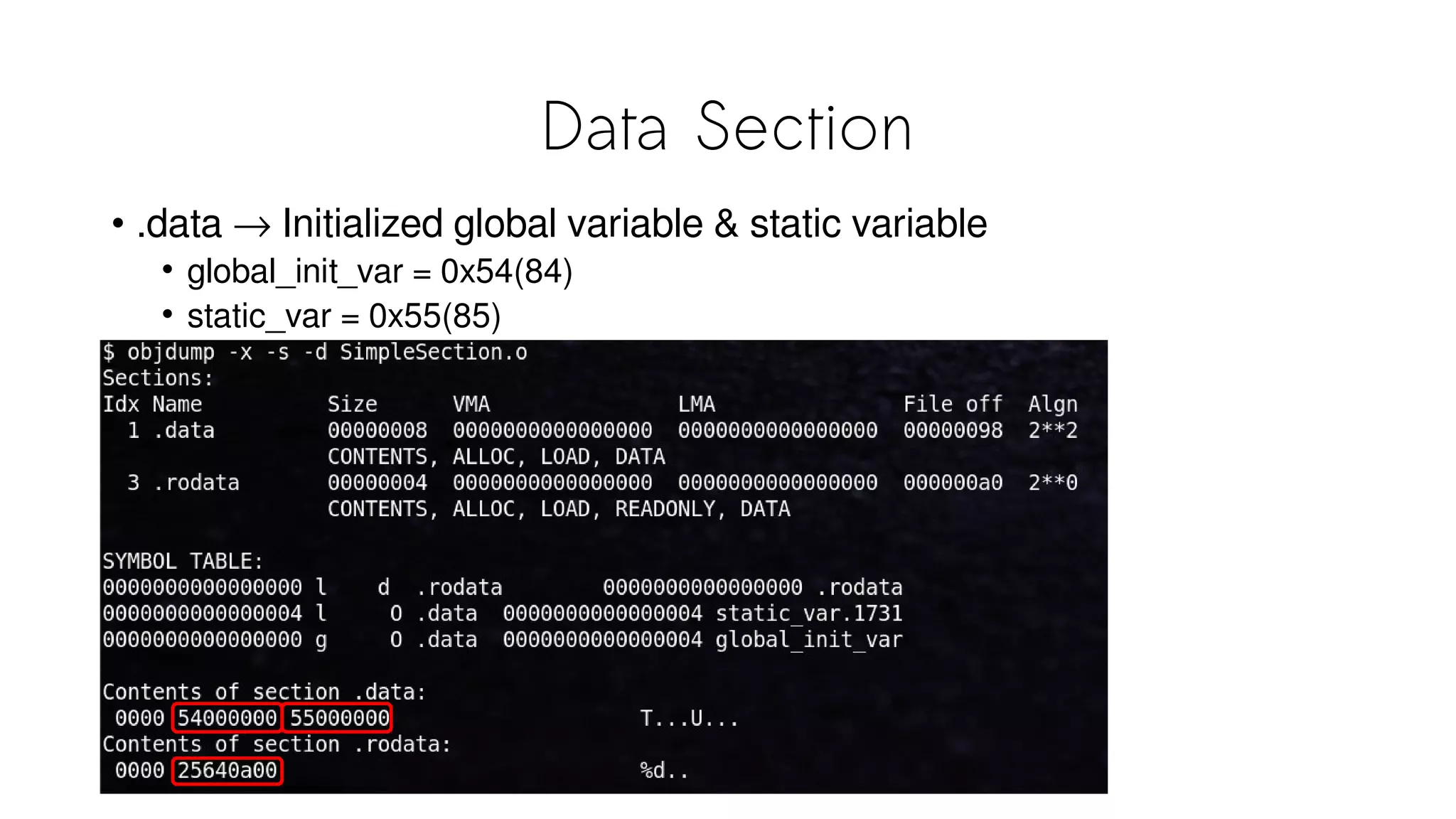
Data Section
• .data → Initialized global variable & static variable
• global_init_var = 0x54(84)
• static_var = 0x55(85)
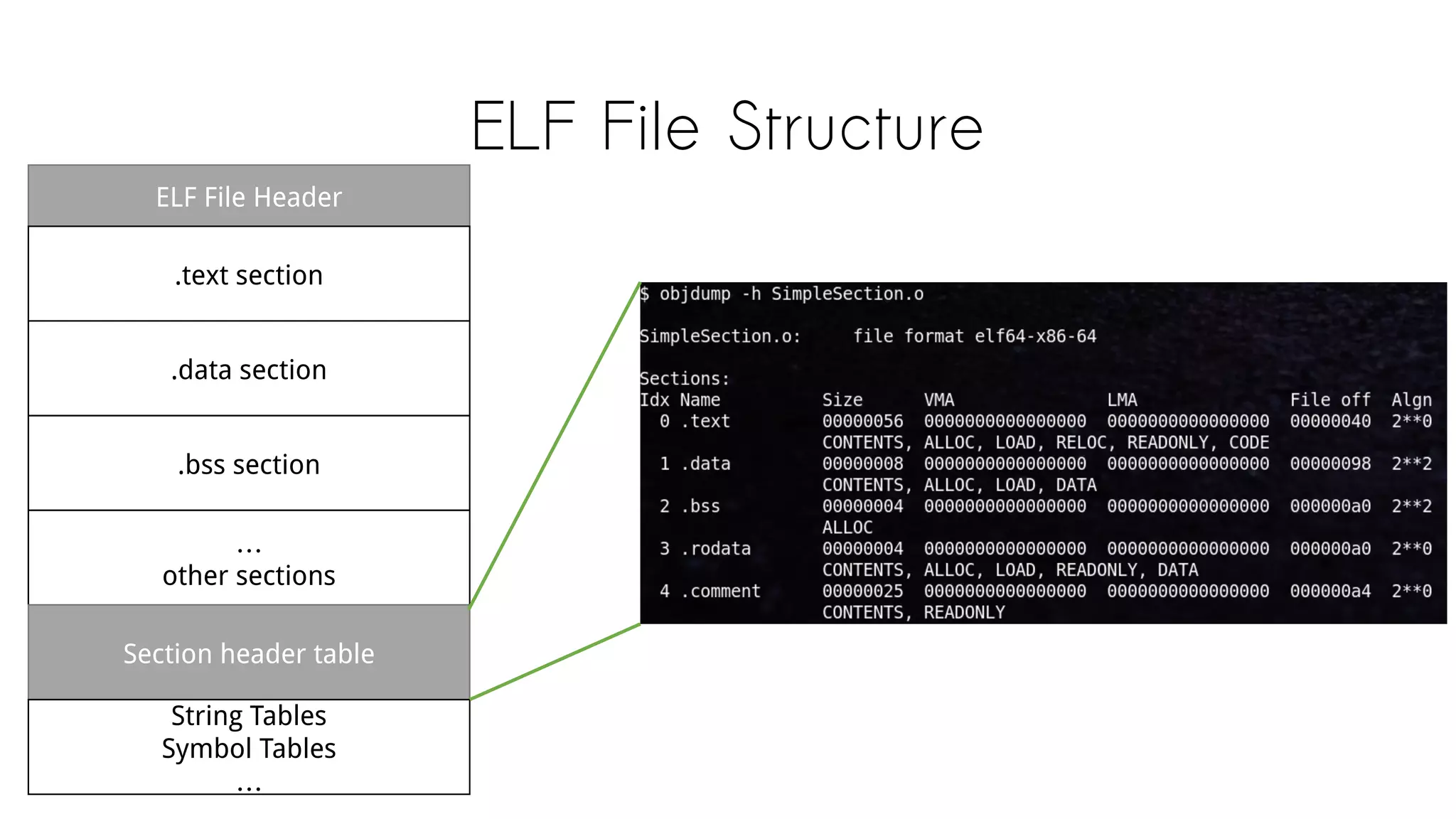
ELF File Structure
ELF File Header
.text section
.data section
.bss section
…
other sections
Section header table
String Tables
Symbol Tables
…
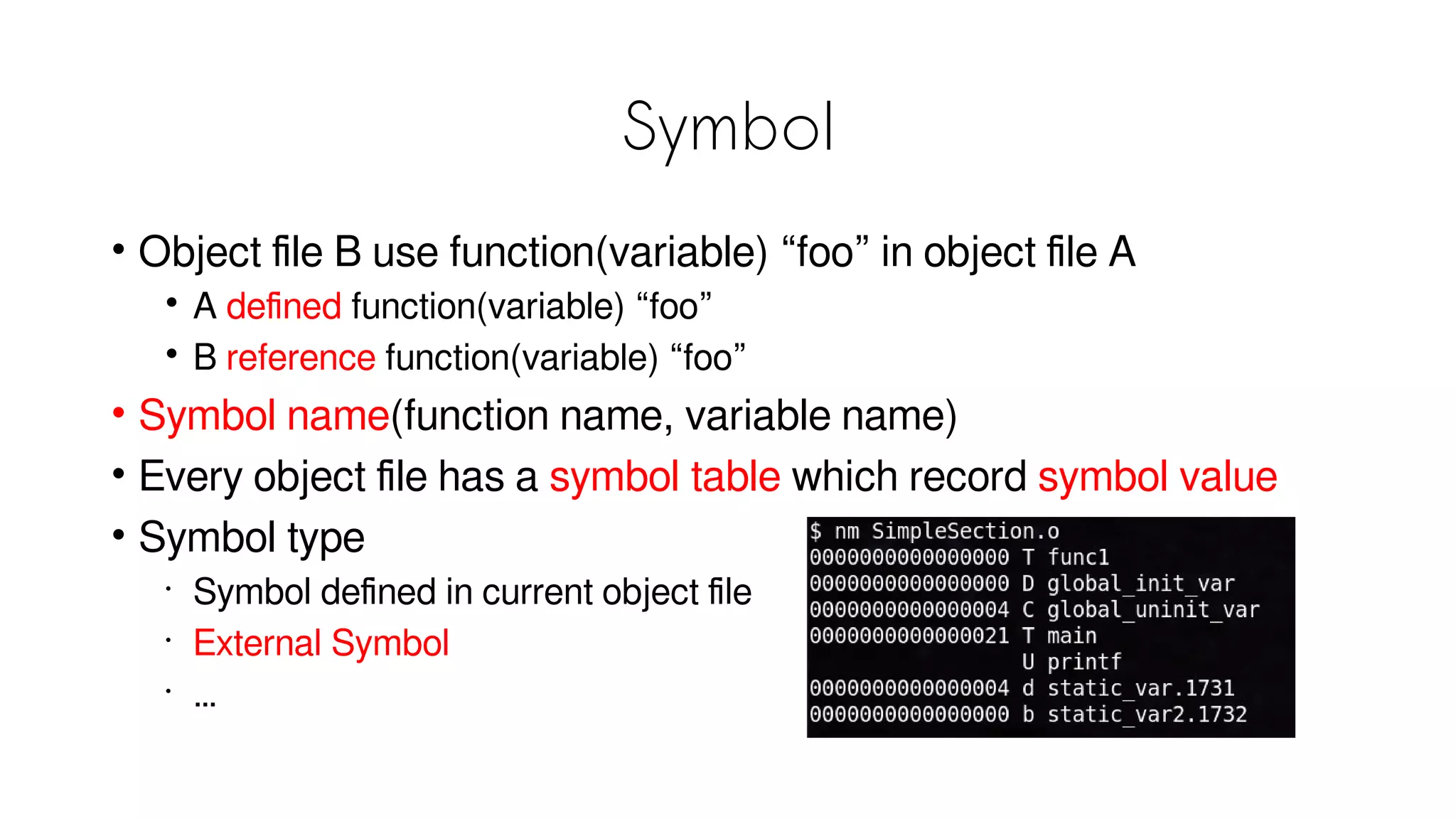
Symbol
• Object file B use function(variable) “foo” in object file A
• A defined function(variable) “foo”
• B reference function(variable) “foo”
• Symbol name(function name, variable name)
• Every object file has a symbol table which record symbol value
• Symbol type
•
Symbol defined in current object file
•
External Symbol
•
…
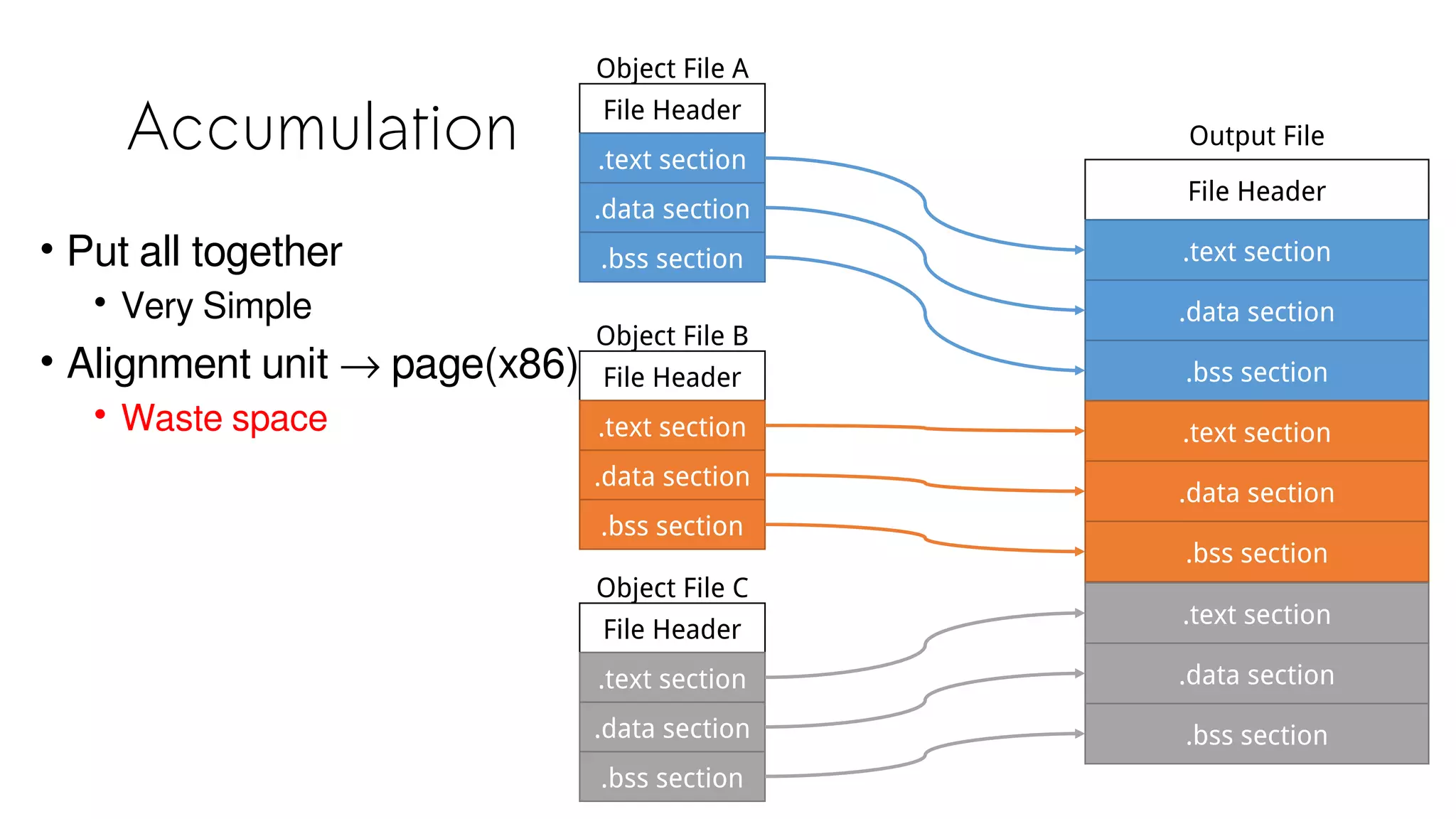
Static Linking
Accumulation File Header
.text section
.data section
.bss section
Object File A
File Header
.text section
.data section
.bss section
Object File B
File Header
.text section
.data section
.bss section
Object File C
File Header
.text section
.data section
.bss section
Output File
.text section
.data section
.bss section
.text section
.data section
.bss section
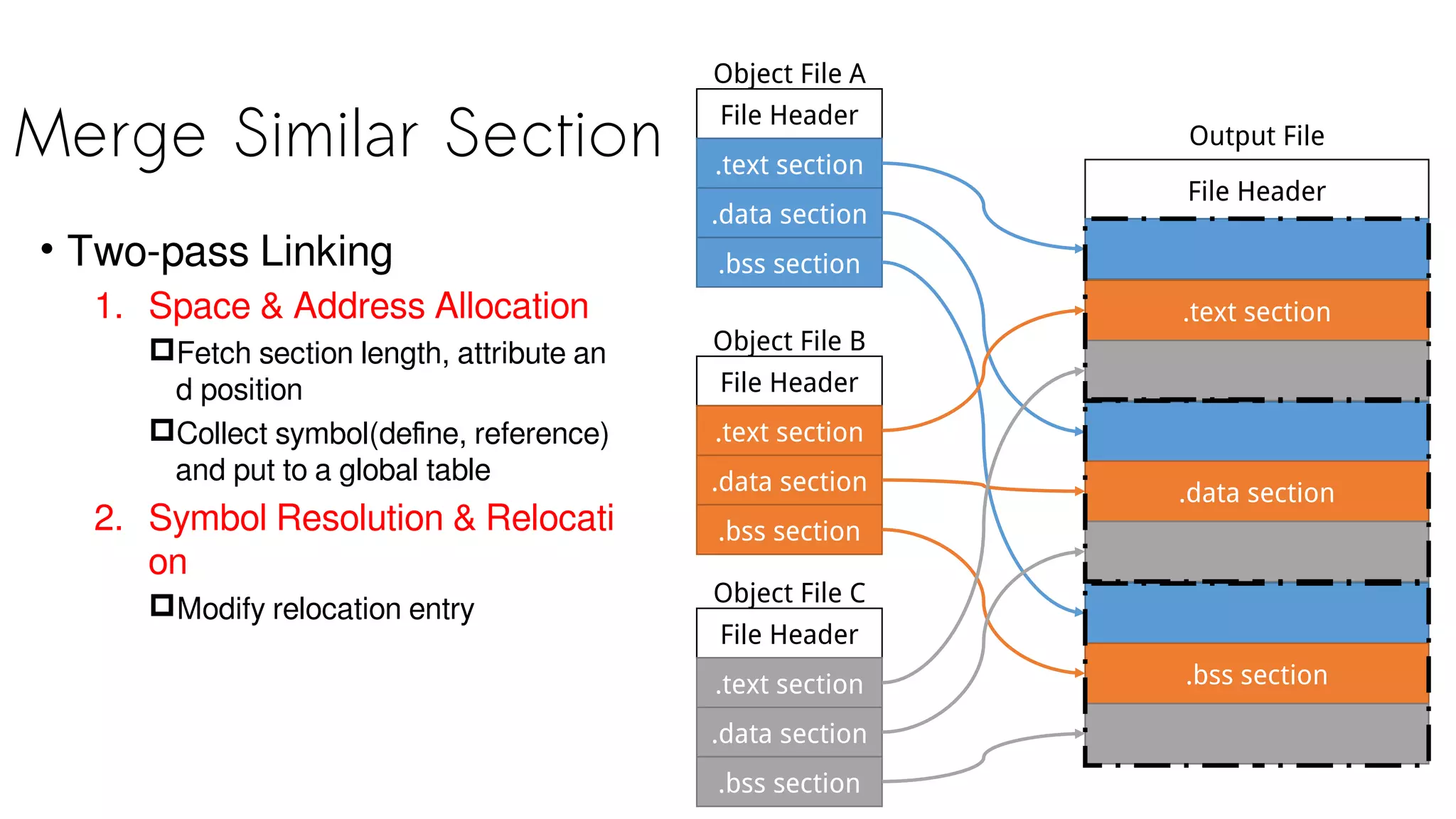
• Put all together
• Very Simple
• Alignment unit → page(x86)
• Waste space
Merge Similar Section File Header
.text section
.data section
.bss section
Object File A
File Header
.text section
.data section
.bss section
Object File B
File Header
.text section
.data section
.bss section
Object File C
File Header
.text section
Output File
.data section
.bss section
• Two-pass Linking
1. Space & Address Allocation
Fetch section length, attribute an
d position
Collect symbol(define, reference)
and put to a global table
2. Symbol Resolution & Relocati
on
Modify relocation entry
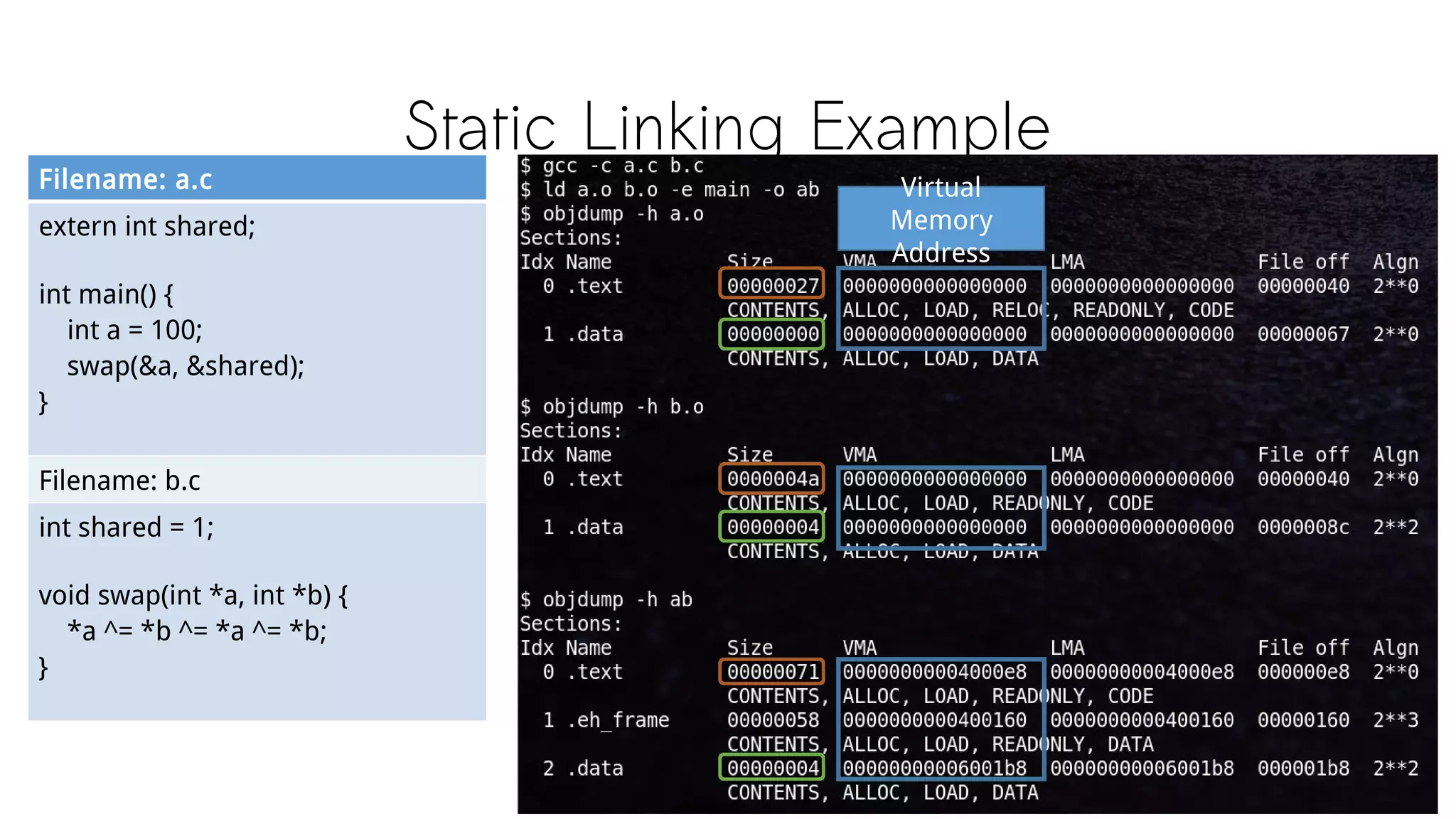
Static Linking Example
Filename: a.c
extern int shared;
int main() {
int a = 100;
swap(&a, &shared);
}
Filename: b.c
int shared = 1;
void swap(int *a, int *b) {
*a ^= *b ^= *a ^= *b;
}
Virtual
Memory
Address
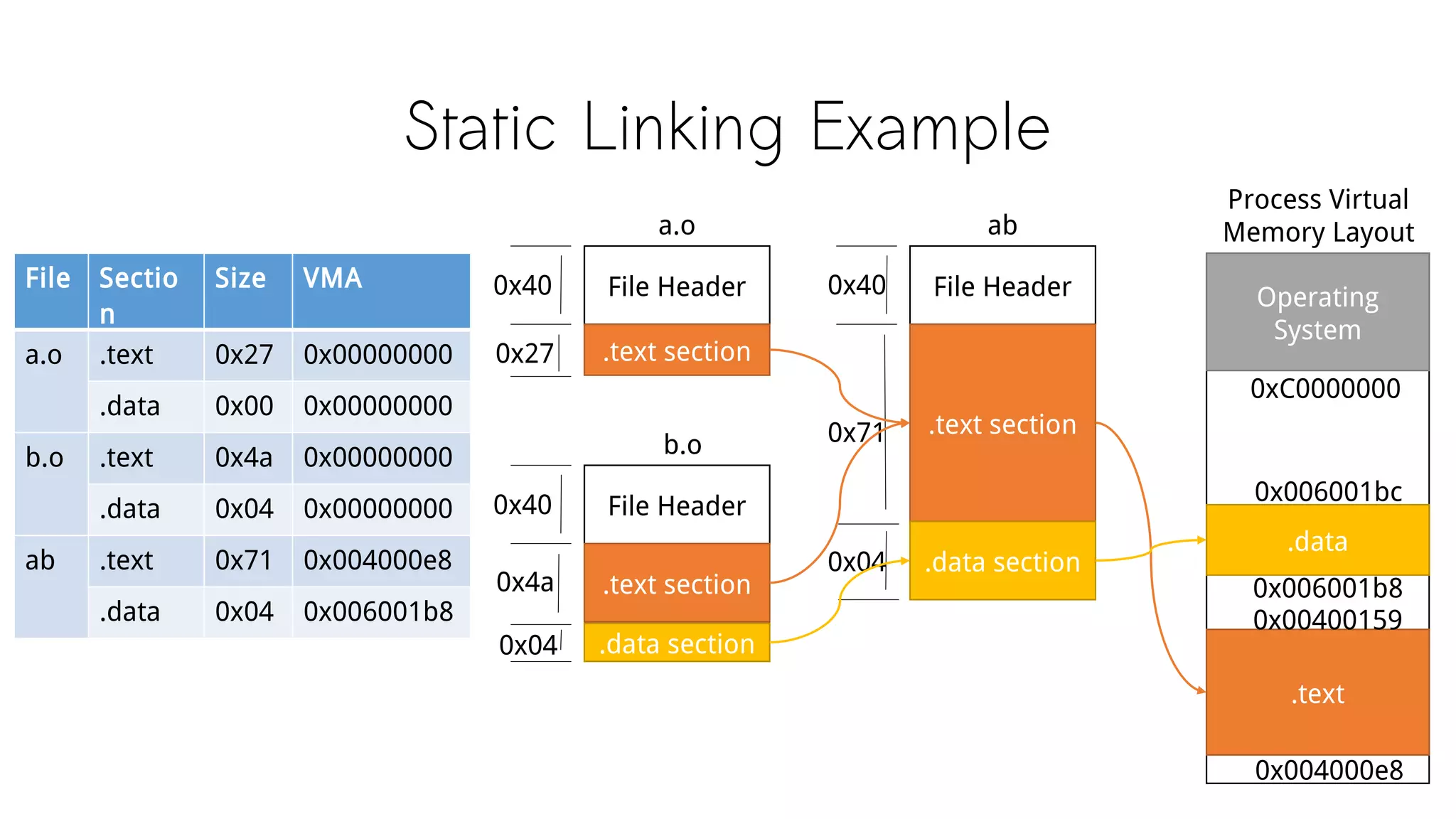
Static Linking Example
File Header
.text section
a.o
0x40
0x27
0x40 File Header
.text section
b.o
0x4a
.data section0x04
File Header
.text section
ab
0x71
.data section0x04
0x40File Sectio
n
Size VMA
a.o .text 0x27 0x00000000
.data 0x00 0x00000000
b.o .text 0x4a 0x00000000
.data 0x04 0x00000000
ab .text 0x71 0x004000e8
.data 0x04 0x006001b8
Process Virtual
Memory Layout
Operating
System
.data
.text
0xC0000000
0x006001b8
0x004000e8
0x00400159
0x006001bc
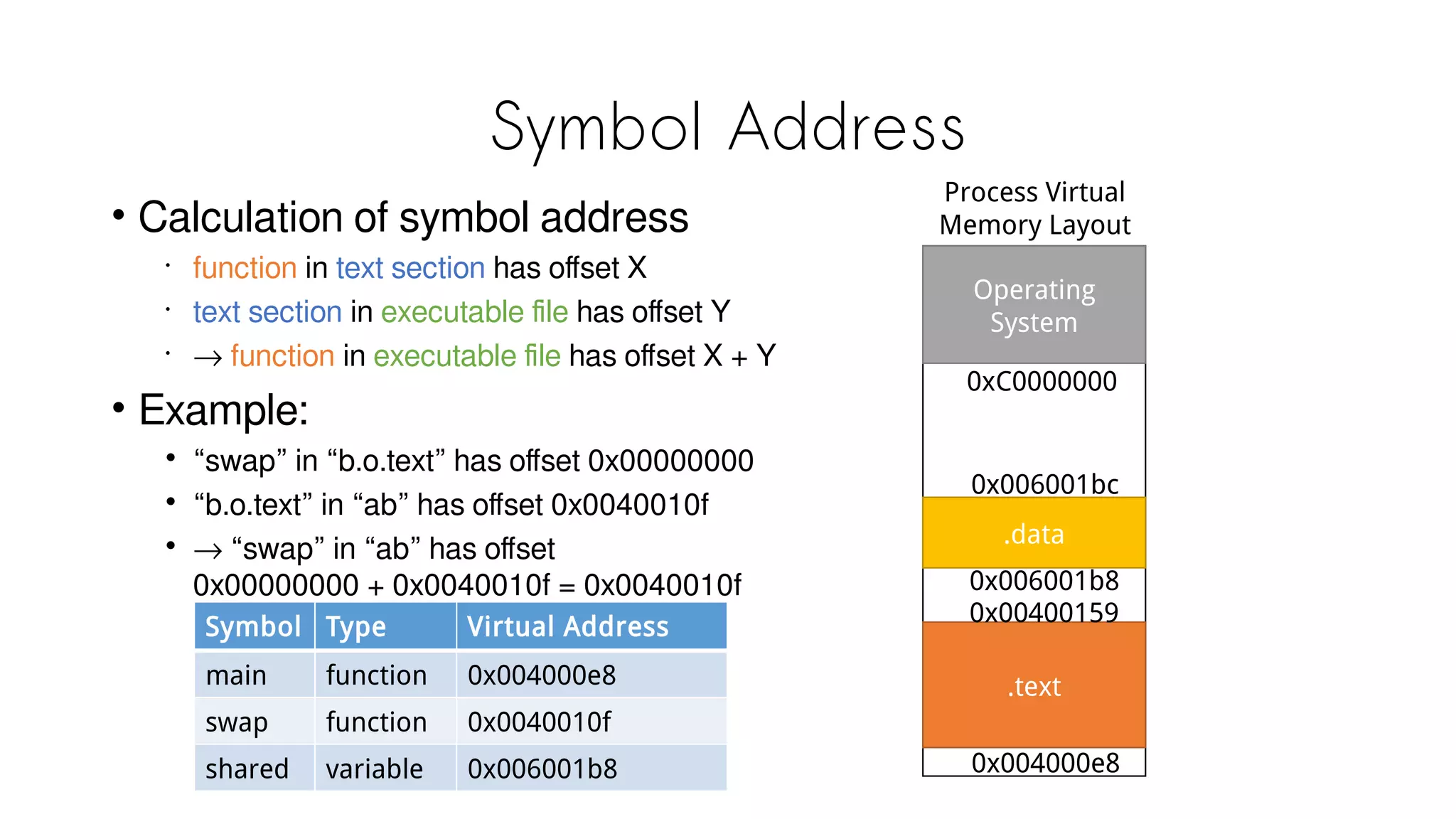
Symbol Address
• Calculation of symbol address
•
function in text section has offset X
•
text section in executable file has offset Y
•
→ function in executable file has offset X + Y
• Example:
• “swap” in “b.o.text” has offset 0x00000000
• “b.o.text” in “ab” has offset 0x0040010f
• → “swap” in “ab” has offset
0x00000000 + 0x0040010f = 0x0040010f
Symbol Type Virtual Address
main function 0x004000e8
swap function 0x0040010f
shared variable 0x006001b8
Process Virtual
Memory Layout
Operating
System
.data
.text
0xC0000000
0x006001b8
0x004000e8
0x00400159
0x006001bc
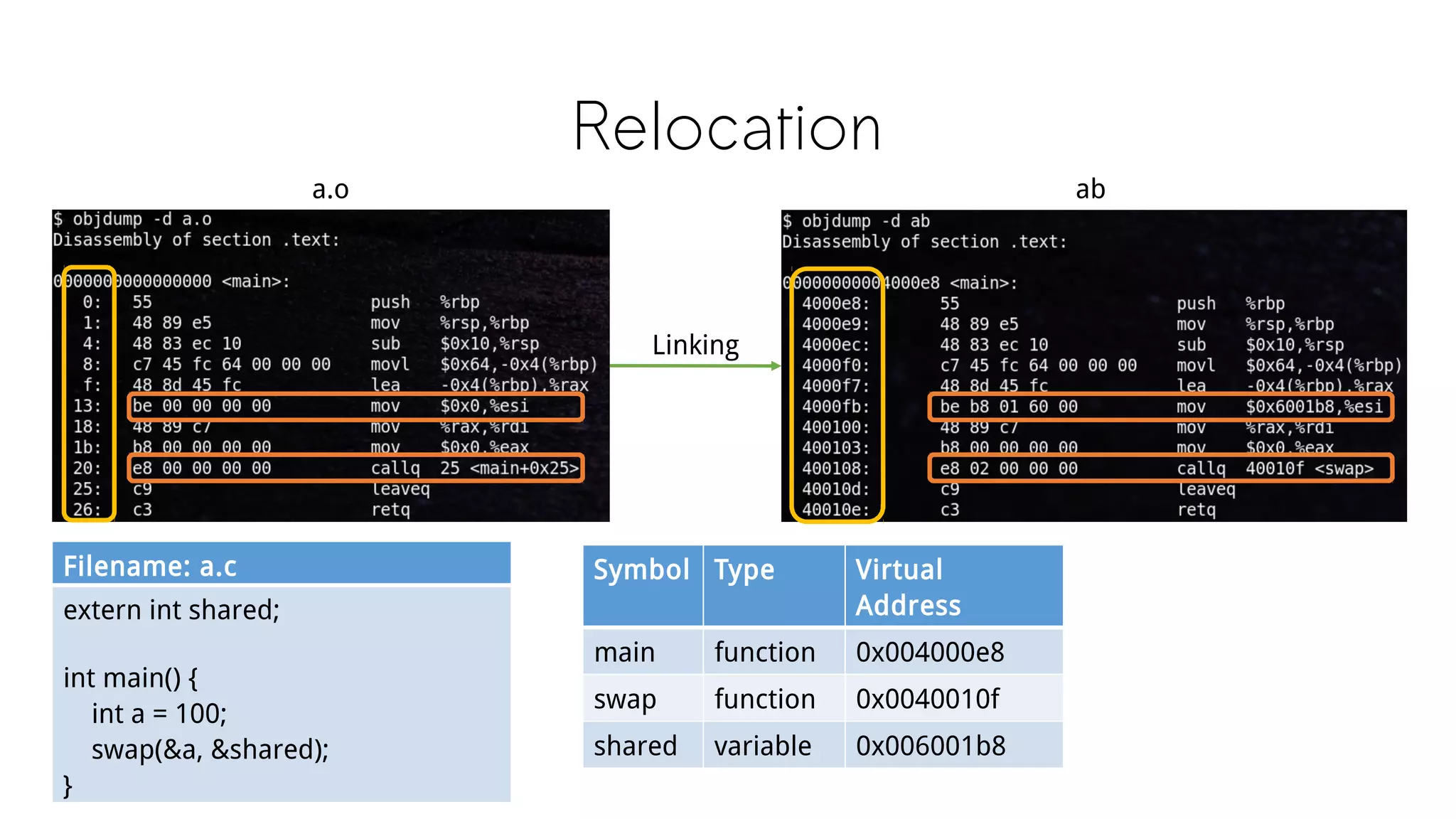
Relocation
a.o
Filename: a.c
extern int shared;
int main() {
int a = 100;
swap(&a, &shared);
}
Linking
ab
Symbol Type Virtual
Address
main function 0x004000e8
swap function 0x0040010f
shared variable 0x006001b8
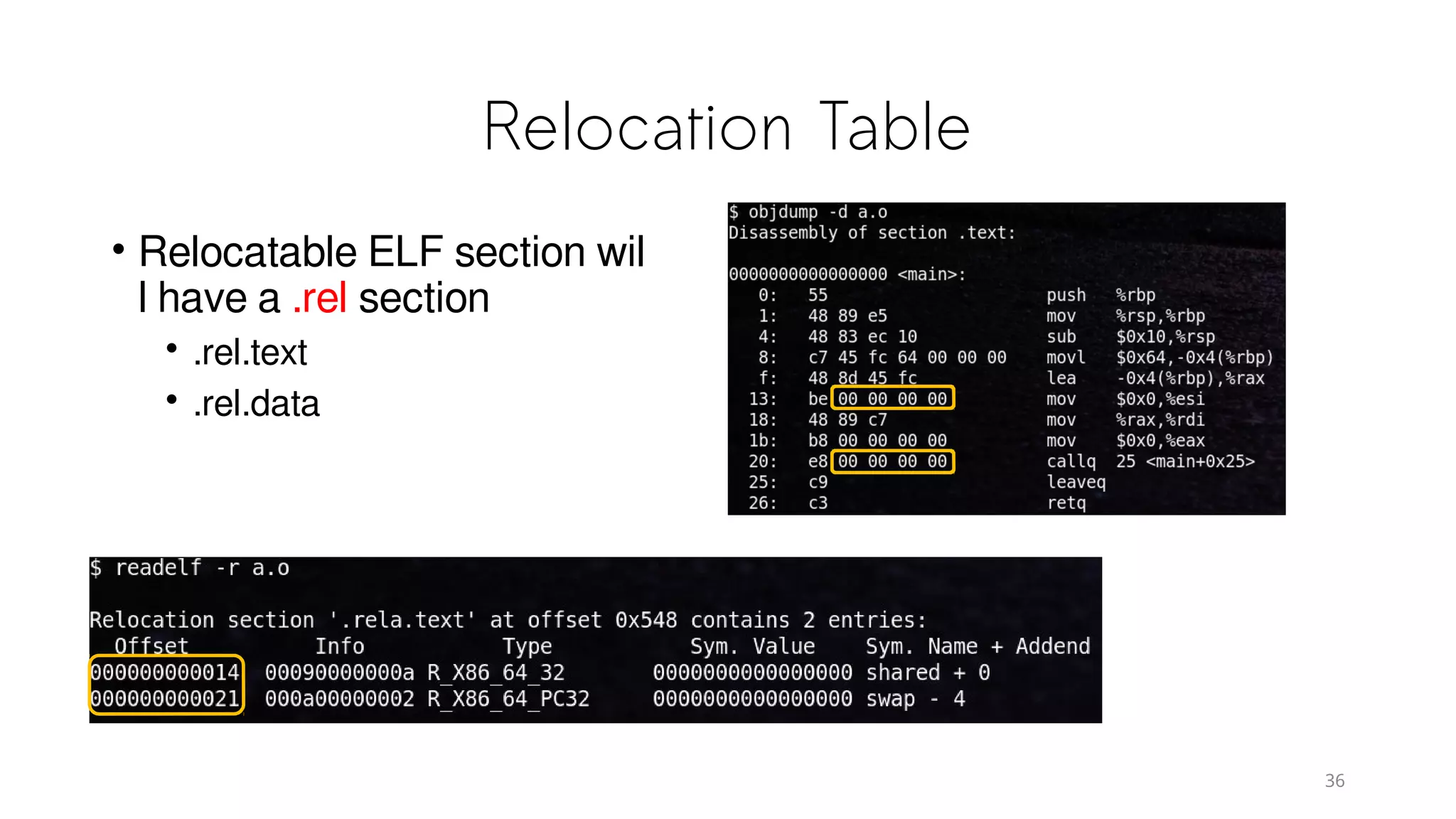
Relocation Table
• Relocatable ELF section wil
l have a .rel section
• .rel.text
• .rel.data
36
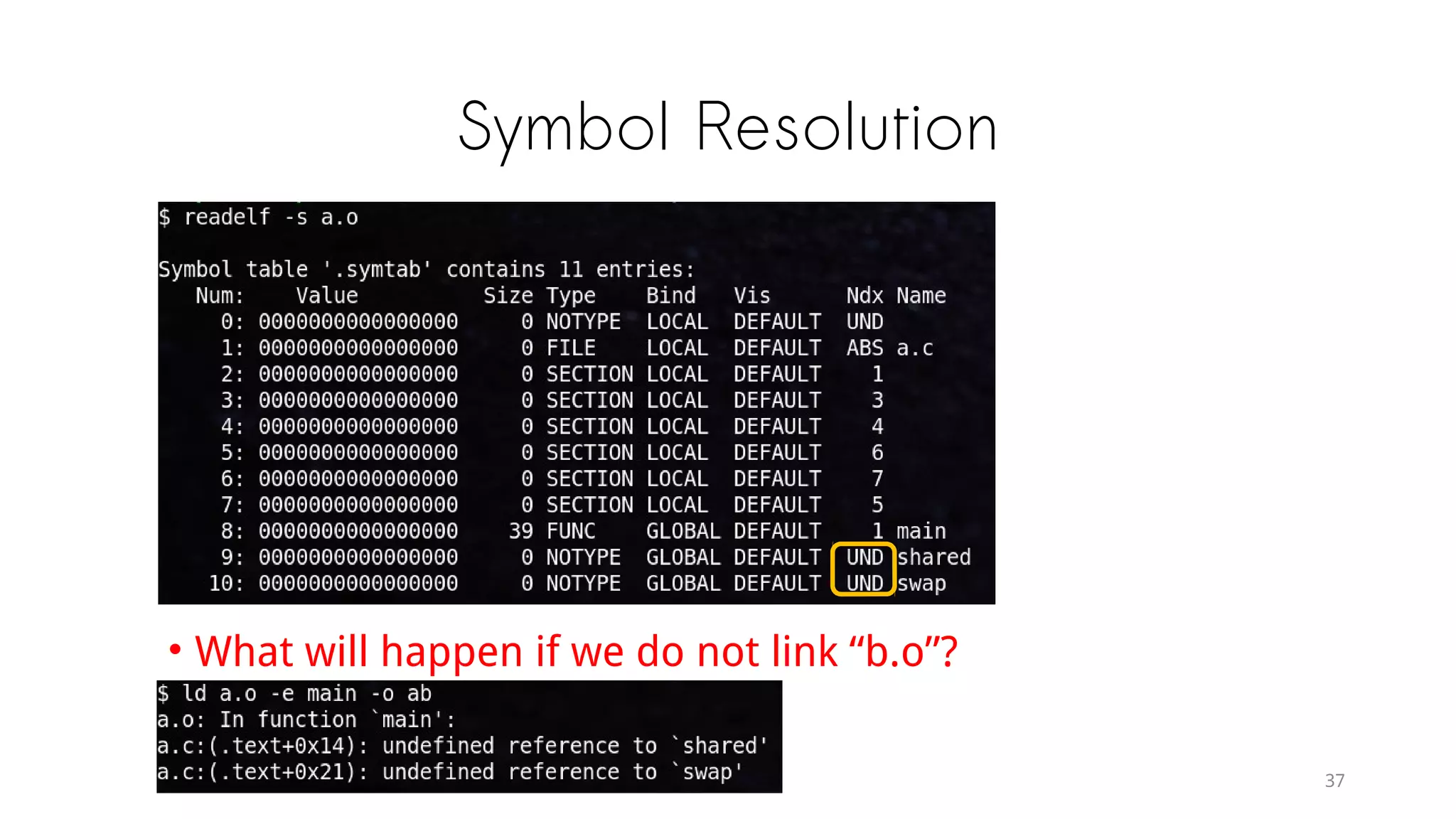
Symbol Resolution
• What will happen if we do not link “b.o”?
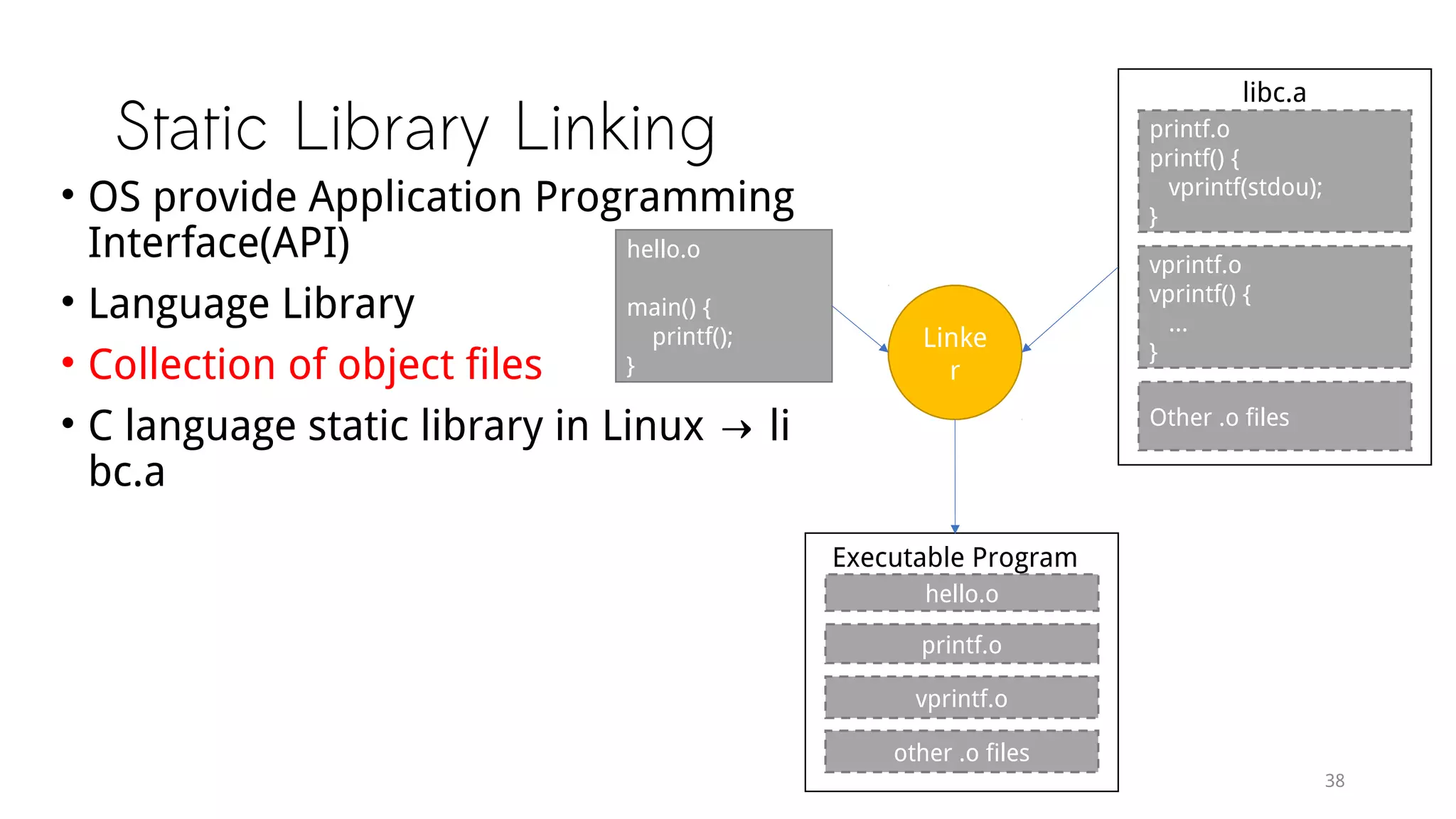
Static Library Linking
hello.o
main() {
printf();
}
printf.o
printf() {
vprintf(stdou);
}
vprintf.o
vprintf() {
...
}
Other .o files
libc.a
Linker
hello.o
printf.o
vprintf.o
Executable Program
other .o files
• OS provide Application Programming
Interface(API)
• Language Library
• Collection of object files
• C language static library in Linux → li
bc.a
Executable File Loading & Process
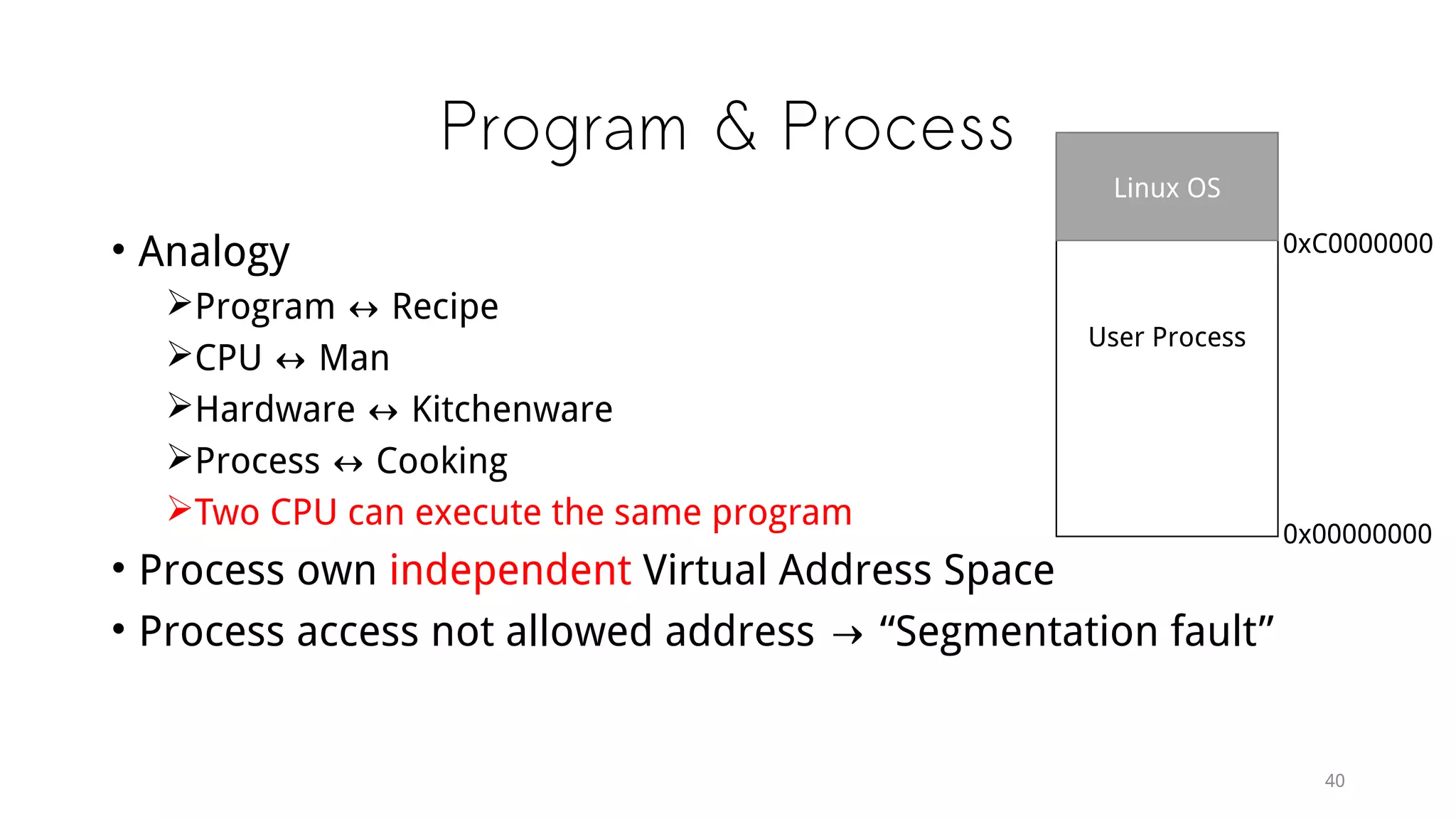
Program & Process
• Analogy
Program ↔ Recipe
CPU ↔ Man
Hardware ↔ Kitchenware
Process ↔ Cooking
Two CPU can execute the same program
• Process own independent Virtual Address Space
• Process access not allowed address → “Segmentation fault”
User Process
Linux OS
0xC0000000
0x00000000
Loading
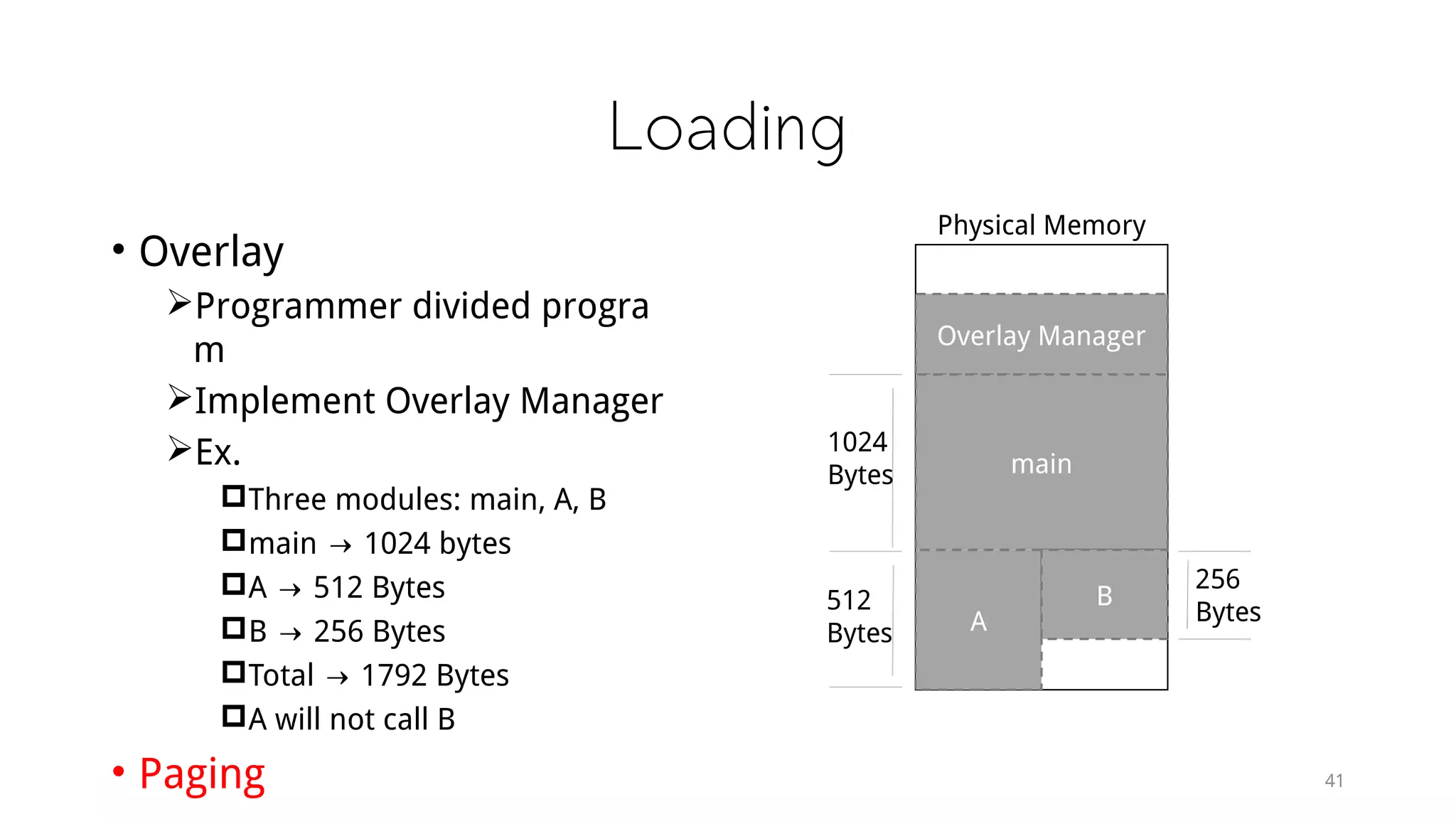
• Overlay
Programmer divided progra
m
Implement Overlay Manager
Ex.
Three modules: main, A, B
main → 1024 bytes
A → 512 Bytes
B → 256 Bytes
Total → 1792 Bytes
A will not call B
• Paging
Overlay Manager
main
A
B
1024
Bytes
512
Bytes
256
Bytes
Physical Memory
41
Paging
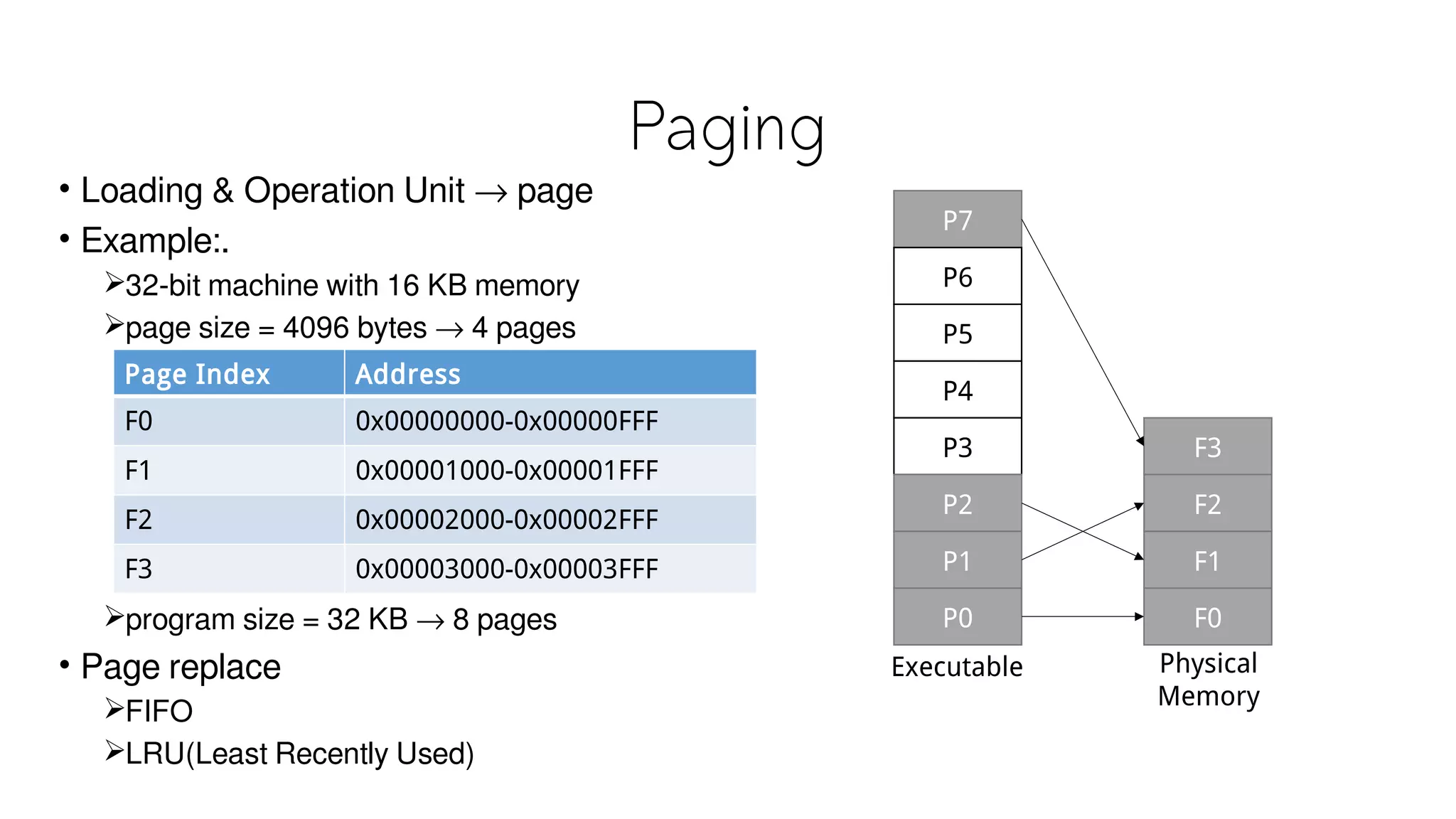
• Loading & Operation Unit → page
• Example:.
32-bit machine with 16 KB memory
page size = 4096 bytes → 4 pages
program size = 32 KB → 8 pages
• Page replace
FIFO
LRU(Least Recently Used)
Page Index Address
F0 0x00000000-0x00000FFF
F1 0x00001000-0x00001FFF
F2 0x00002000-0x00002FFF
F3 0x00003000-0x00003FFF
P7
P6
P5
P4
P3
P2
P1
P0
F3
F2
F1
F0
Executable Physical
Memory
Creation of Process
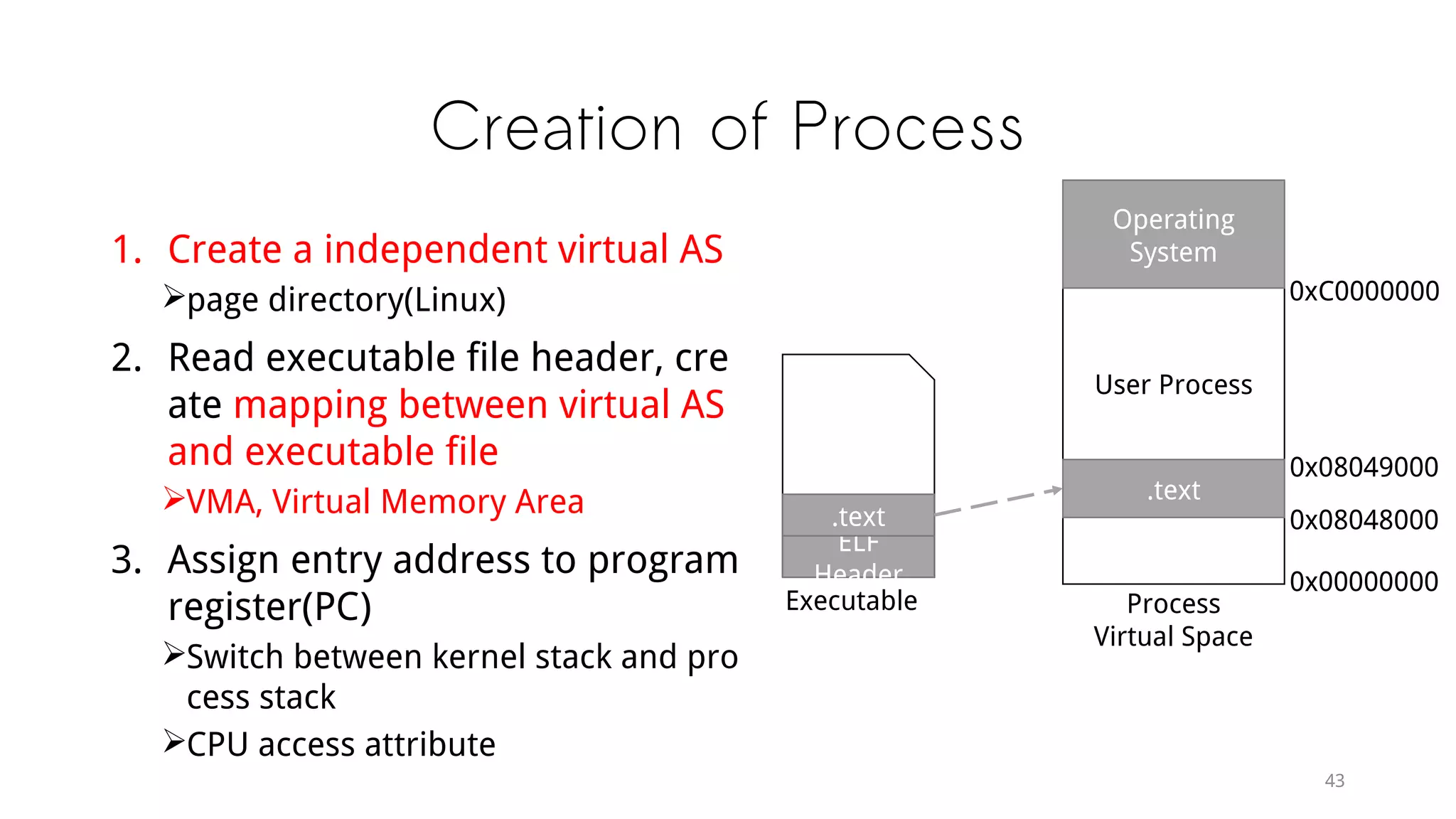
1. Create a independent virtual AS
page directory(Linux)
2. Read executable file header, cre
ate mapping between virtual AS
and executable file
VMA, Virtual Memory Area
3. Assign entry address to program
register(PC)
Switch between kernel stack and pro
cess stack
CPU access attribute
ELF
Header
.text
Executable
User Process
Operating
System
0xC0000000
0x00000000
.text
0x08048000
0x08049000
Process
Virtual Space
Page Fault
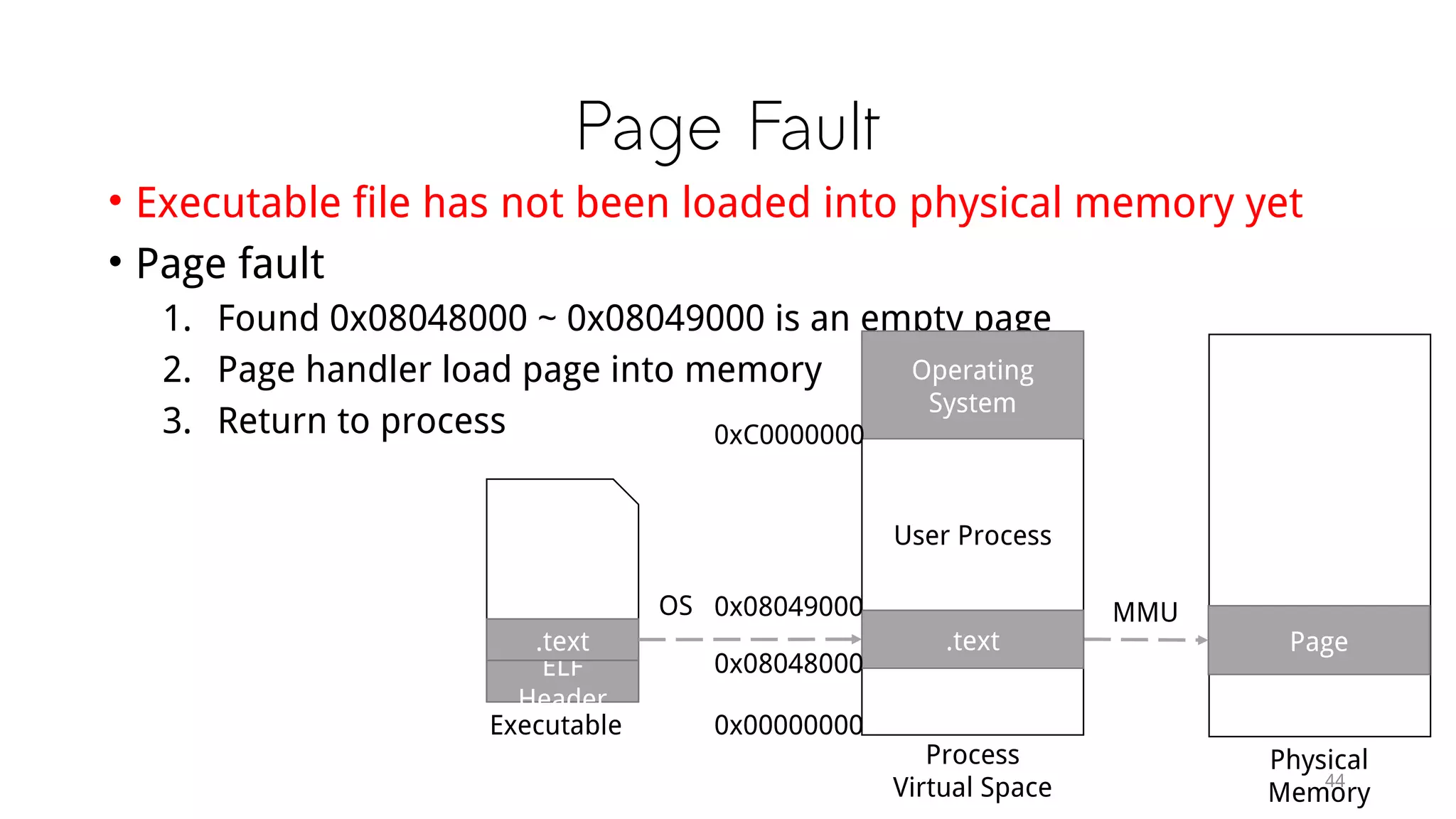
• Executable file has not been loaded into physical memory yet
• Page fault
1. Found 0x08048000 ~ 0x08049000 is an empty page
2. Page handler load page into memory
3. Return to process
ELF
Header
.text
Executable
Page
Physical
Memory
MMUOS
Process
Virtual Space
User Process
Operating
System
.text
0xC0000000
0x00000000
0x08048000
0x08049000
Segment
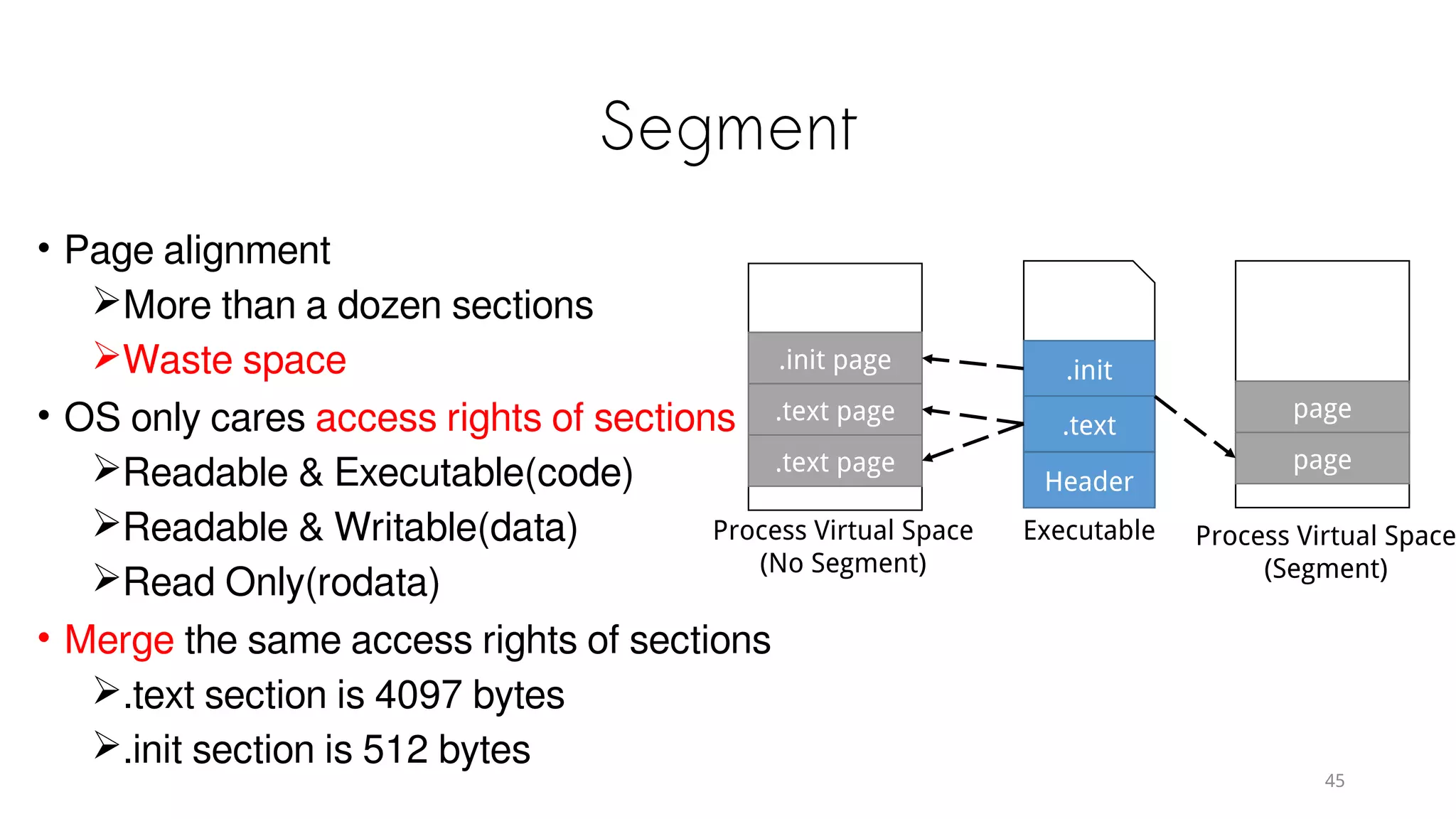
• Page alignment
More than a dozen sections
Waste space
• OS only cares access rights of sections
Readable & Executable(code)
Readable & Writable(data)
Read Only(rodata)
• Merge the same access rights of sections
.text section is 4097 bytes
.init section is 512 bytes
page
page
Process Virtual Space
(Segment)
.init page
.text page
.text page
Process Virtual Space
(No Segment)
.init
.text
Header
Executable
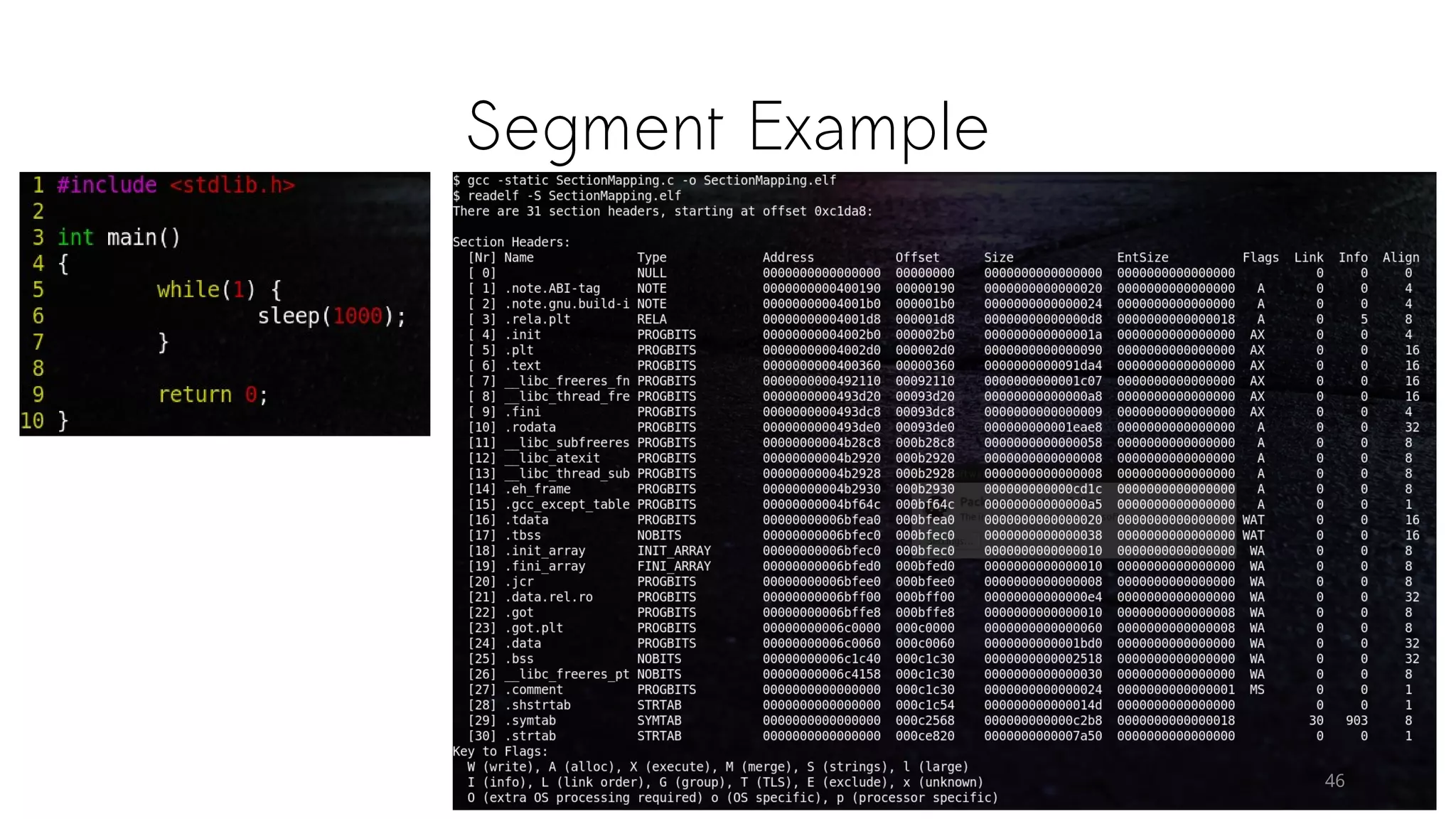
Segment Example
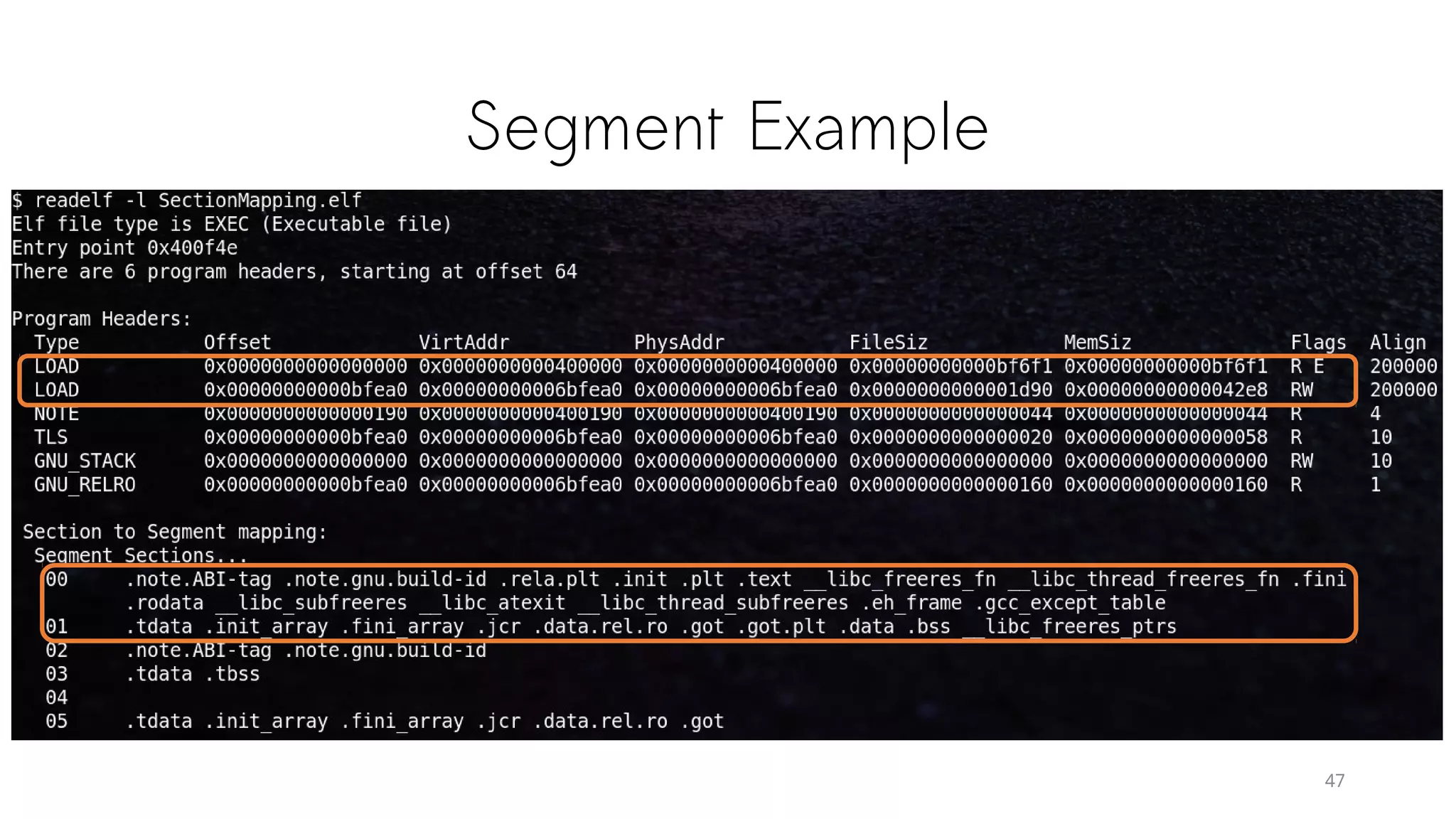
Segment Example
47
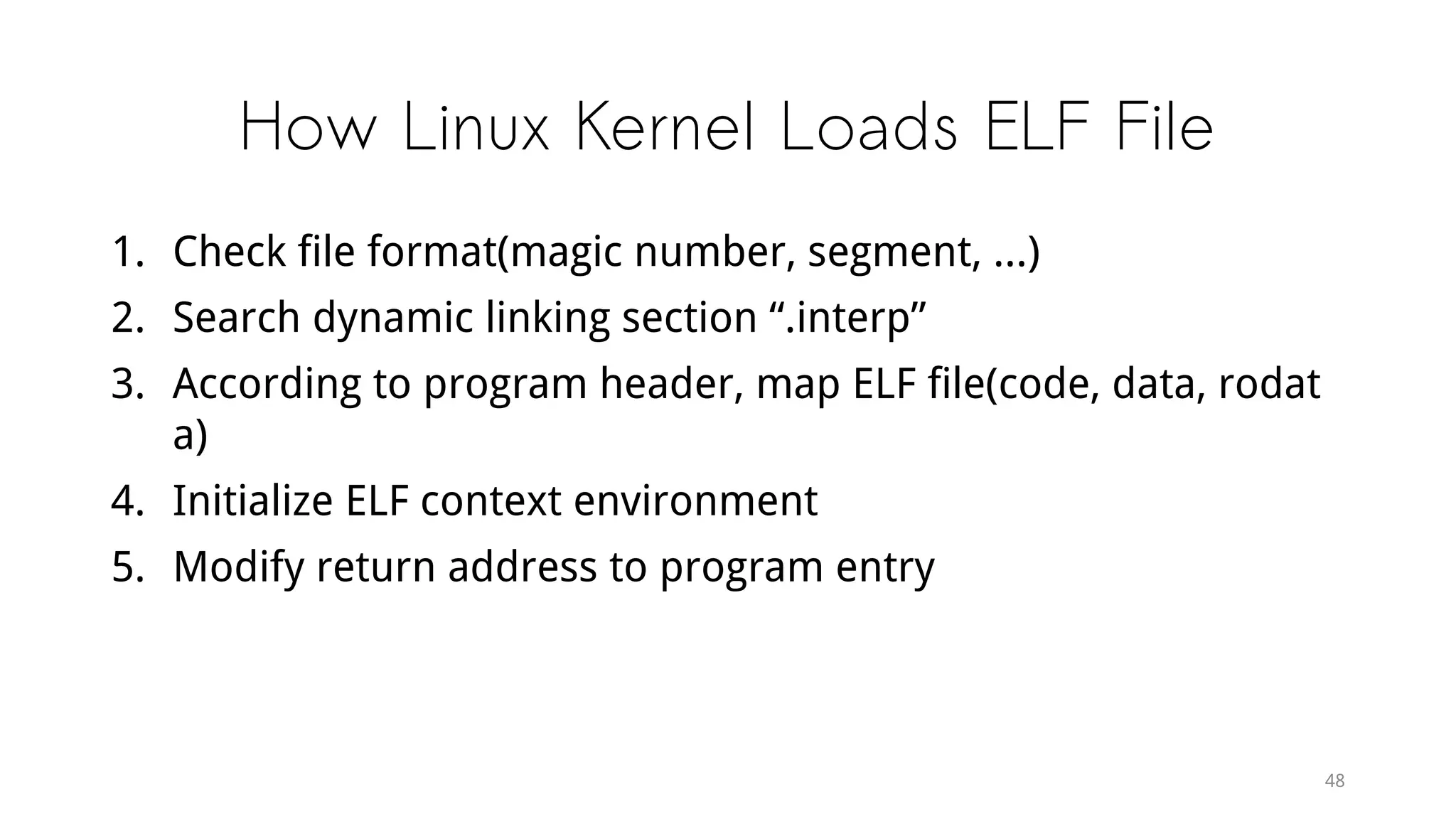
How Linux Kernel Loads ELF File
1. Check file format(magic number, segment, ...)
2. Search dynamic linking section “.interp”
3. According to program header, map ELF file(code, data, rodat
a)
4. Initialize ELF context environment
5. Modify return address to program entry
48
Dynamic Linking
49
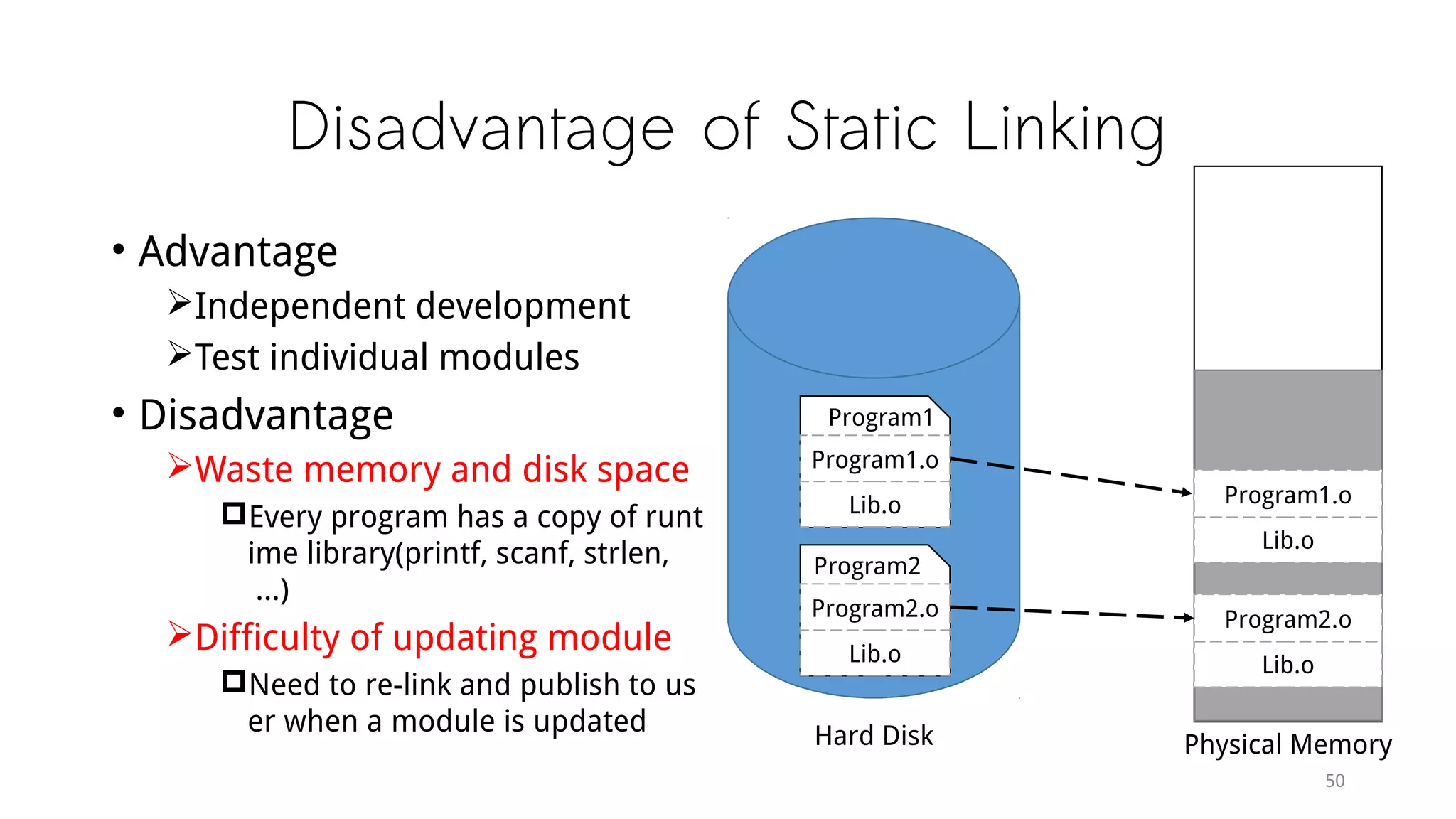
Disadvantage of Static Linking
• Advantage
Independent development
Test individual modules
• Disadvantage
Waste memory and disk space
Every program has a copy of runt
ime library(printf, scanf, strlen,
...)
Difficulty of updating module
Need to re-link and publish to us
er when a module is updated
50
Lib.o
Program1.o
Lib.o
Program2.o
Physical Memory
Lib.o
Program1.o
Program1
Lib.o
Program2.o
Program2
Hard Disk
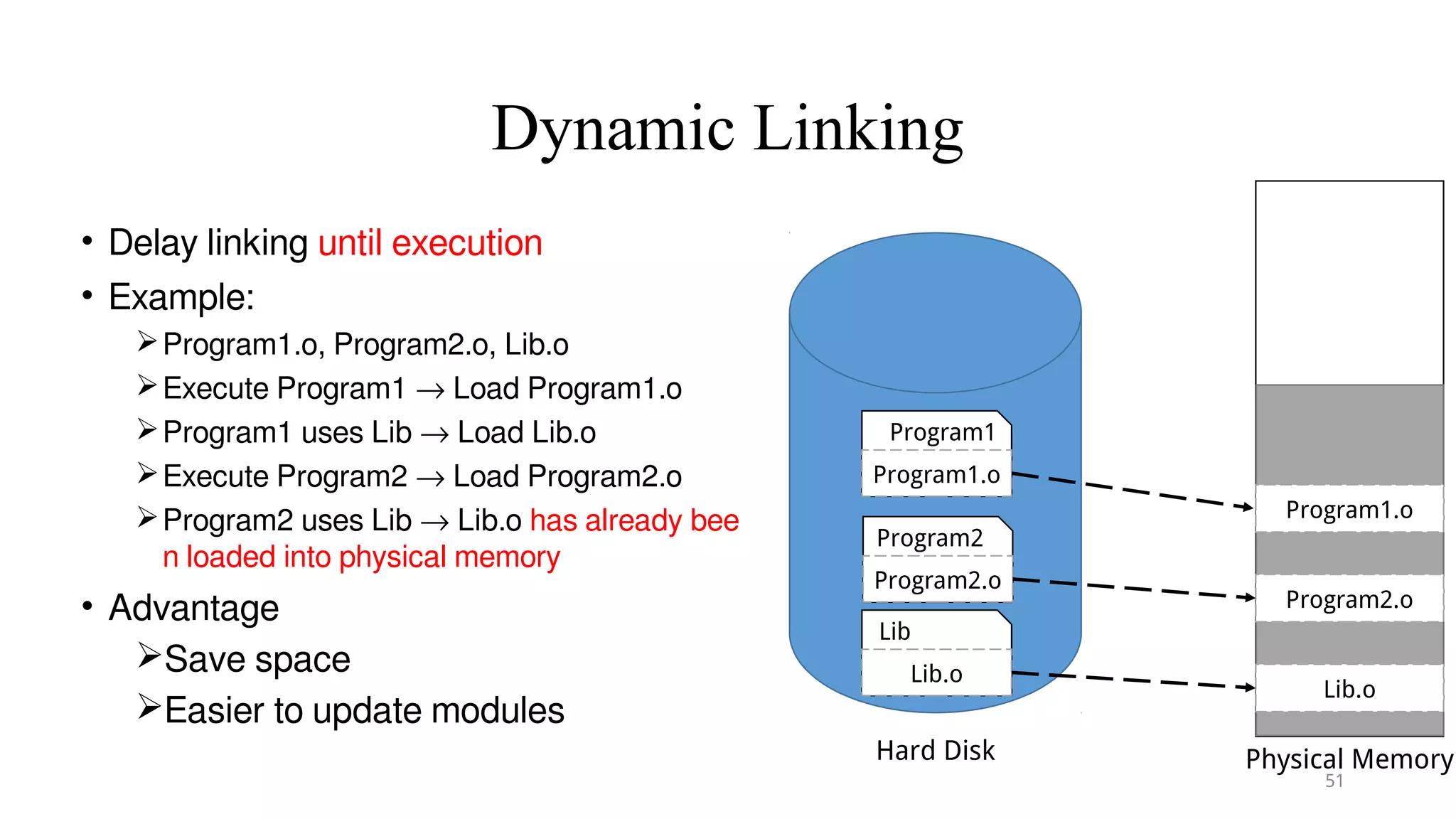
Dynamic Linking
• Delay linking until execution
• Example:
Program1.o, Program2.o, Lib.o
Execute Program1 → Load Program1.o
Program1 uses Lib → Load Lib.o
Execute Program2 → Load Program2.o
Program2 uses Lib → Lib.o has already bee
n loaded into physical memory
• Advantage
Save space
Easier to update modules
51
Program1.o
Lib.o
Program2.o
Physical Memory
Program1.o
Program1
Program2.o
Program2
Hard Disk
Lib.o
Lib
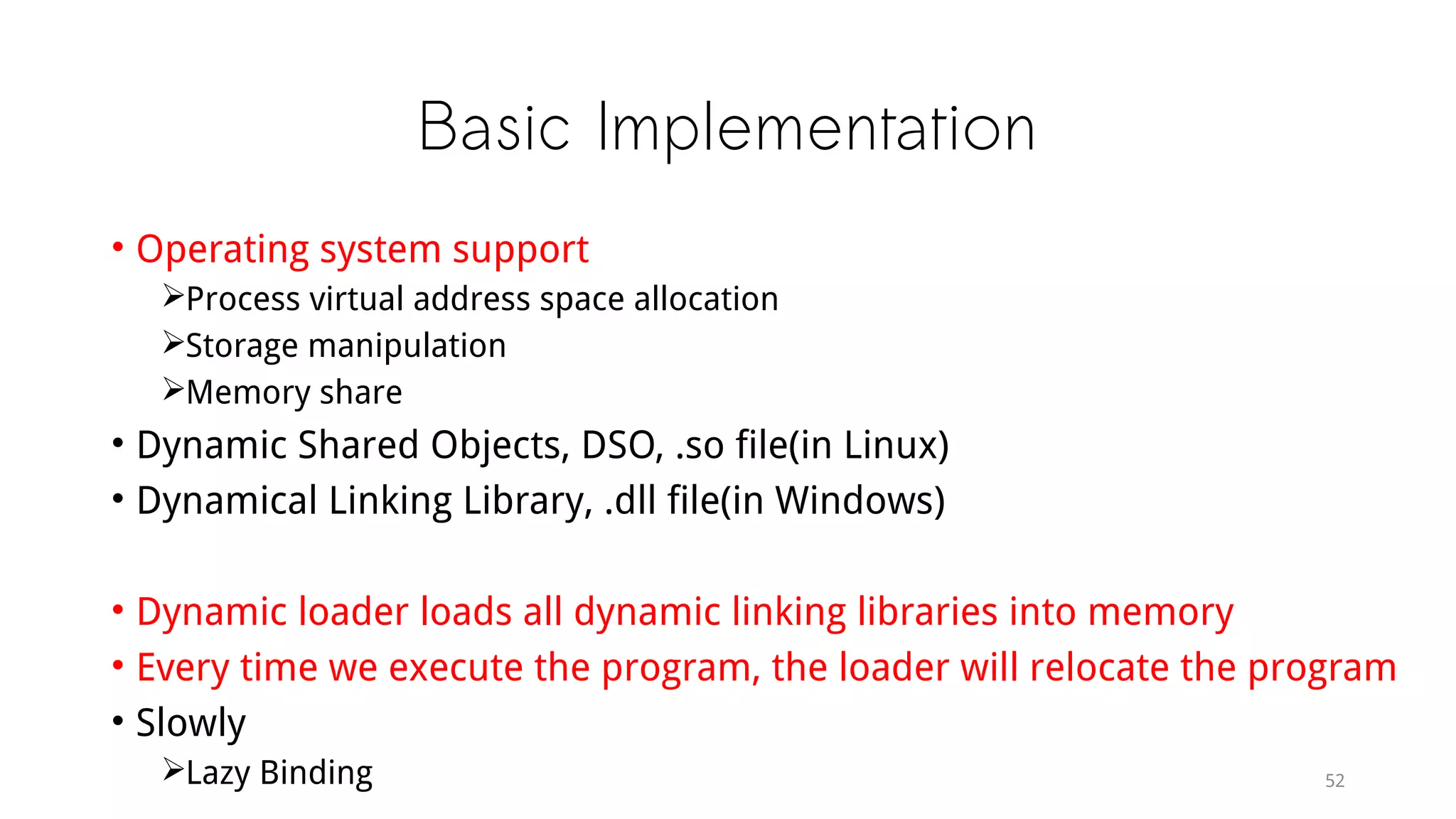
Basic Implementation
• Operating system support
Process virtual address space allocation
Storage manipulation
Memory share
• Dynamic Shared Objects, DSO, .so file(in Linux)
• Dynamical Linking Library, .dll file(in Windows)
• Dynamic loader loads all dynamic linking libraries into memory
• Every time we execute the program, the loader will relocate the program
• Slowly
Lazy Binding 52
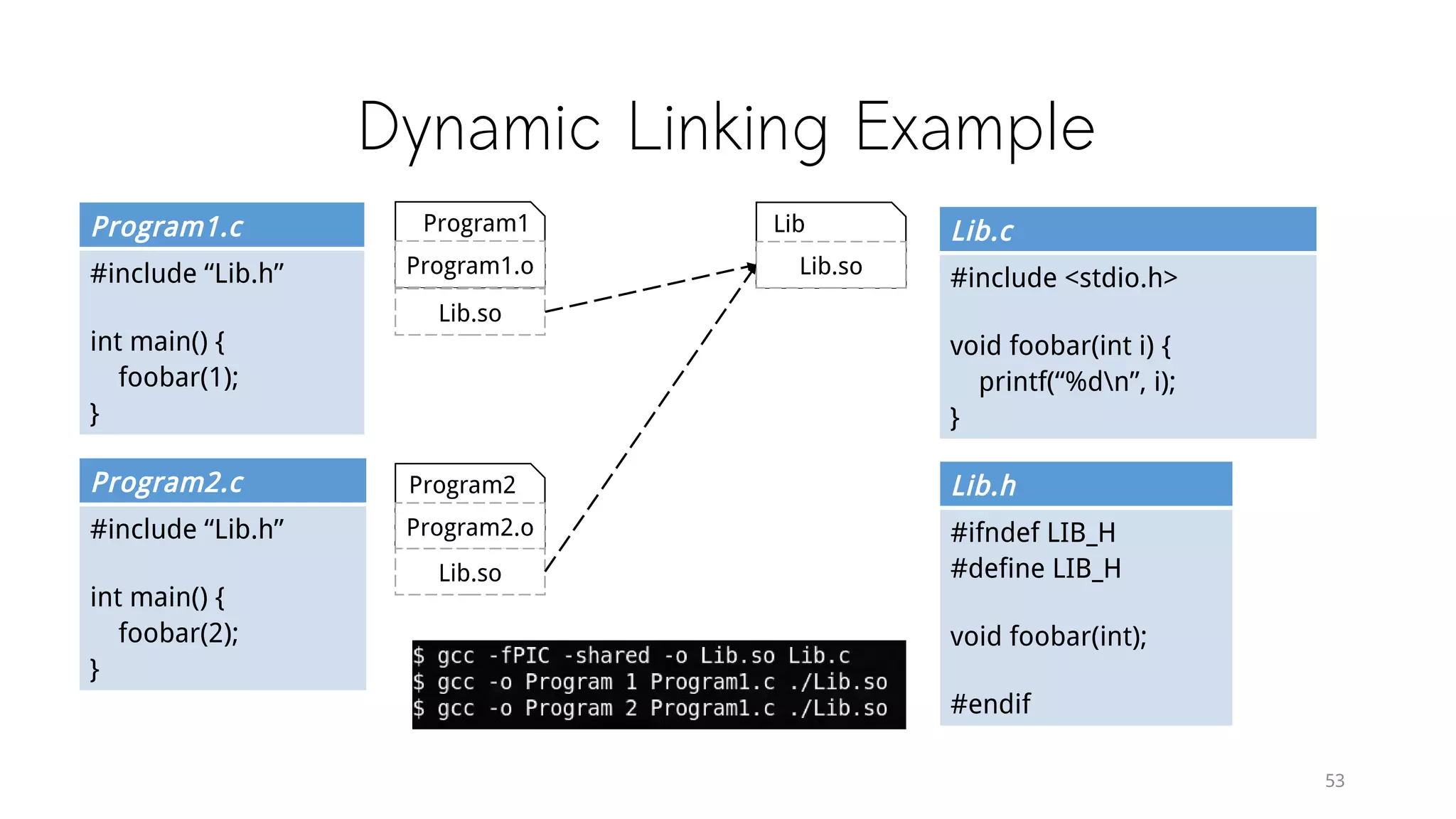
Dynamic Linking Example
Program1.c
#include “Lib.h”
int main() {
foobar(1);
}
53
Program2.c
#include “Lib.h”
int main() {
foobar(2);
}
Lib.c
#include <stdio.h>
void foobar(int i) {
printf(“%dn”, i);
}
Lib.h
#ifndef LIB_H
#define LIB_H
void foobar(int);
#endif
Program1.o
Program1
Program2.o
Program2
Lib.so
Lib
Lib.so
Lib.so
Dynamic Linking Example
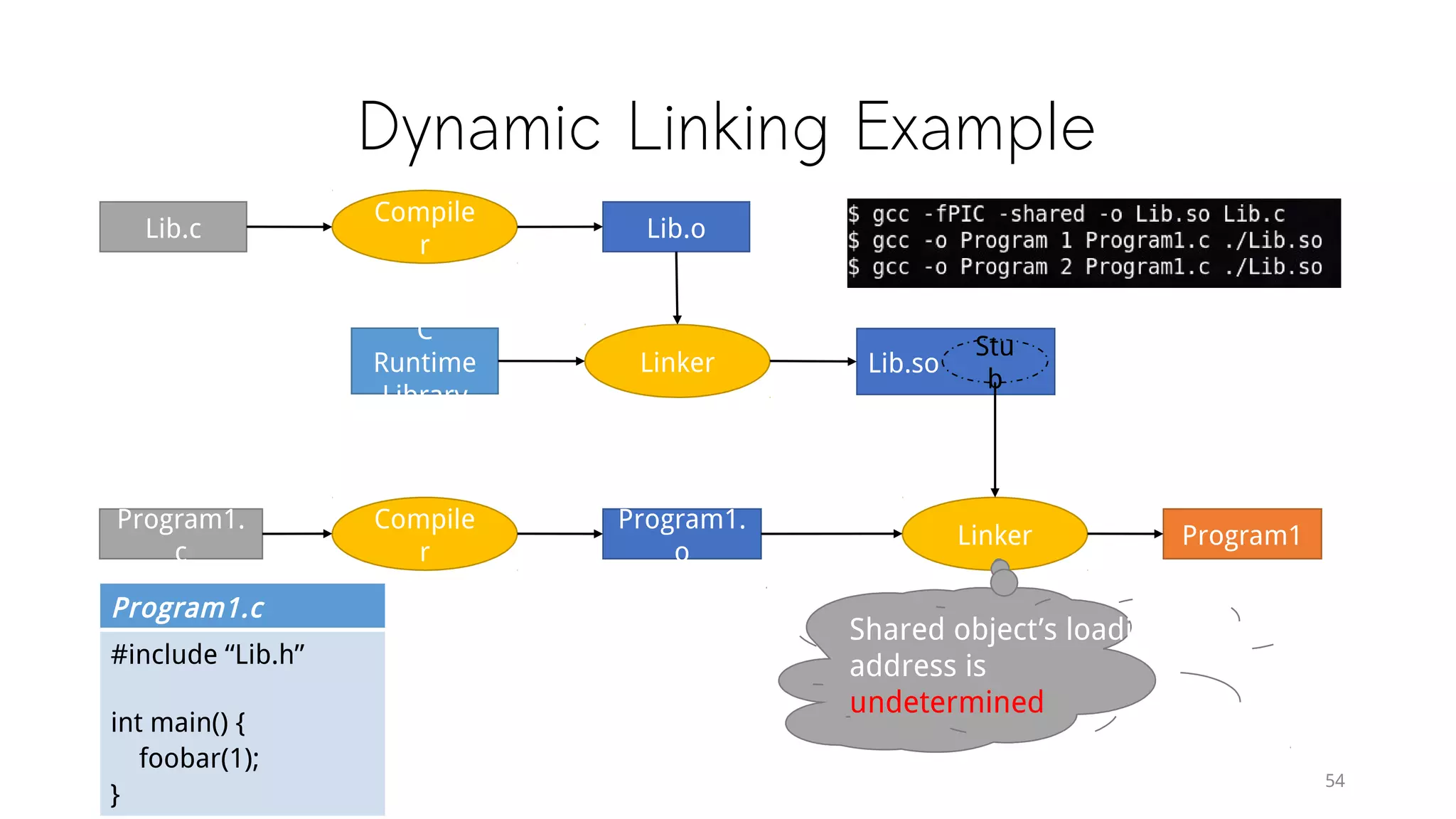
Lib.c
Compile
r
Linker
C
Runtime
Library
Lib.o
Program1.
c
Compile
r
Lib.so
Program1.
o
Linker Program1
Stu
b
Program1.c
#include “Lib.h”
int main() {
foobar(1);
}
Shared object’s loading
address is
undetermined
Dynamic Linking Example
55
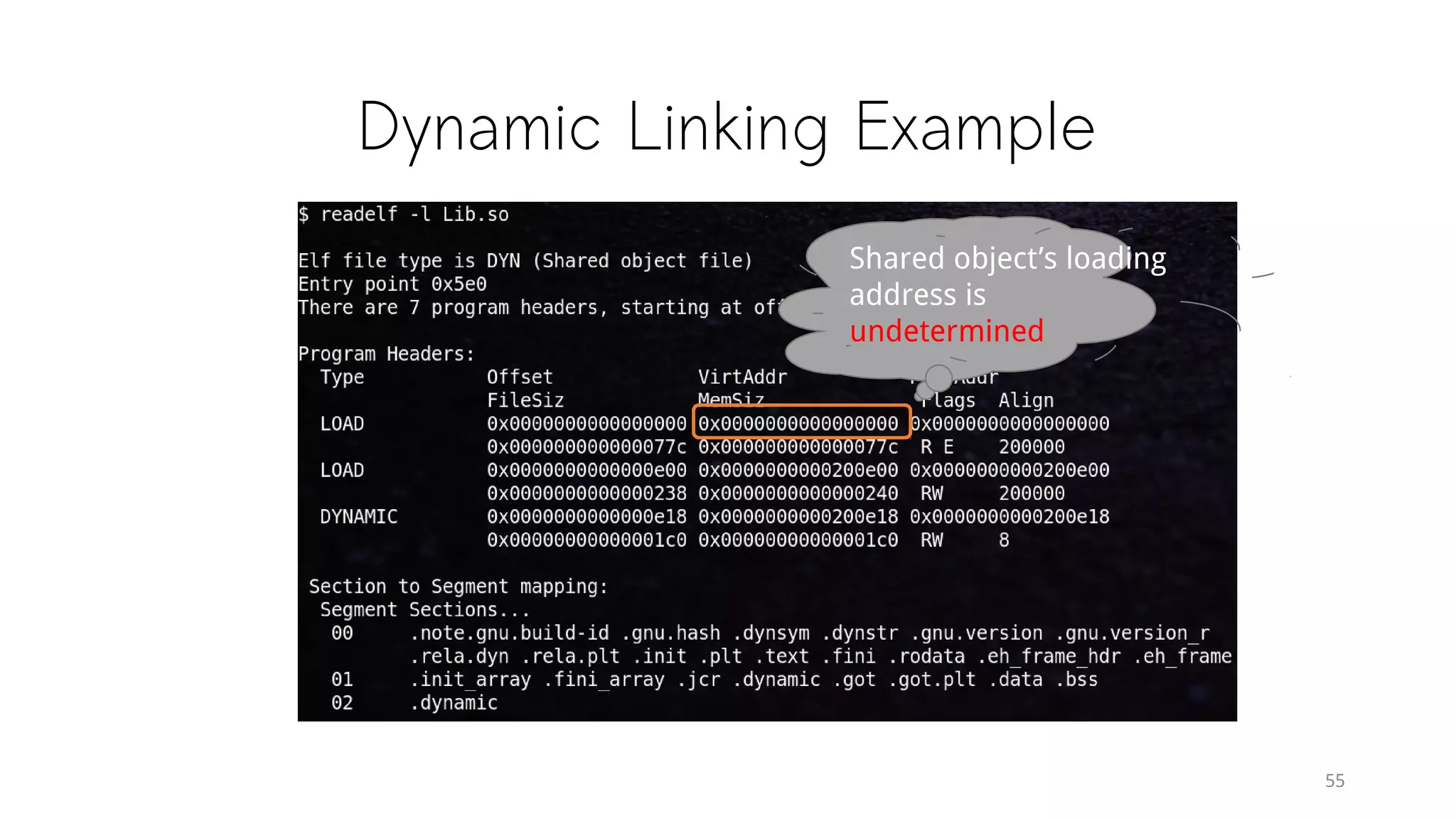
Shared object’s loading
address is
undetermined
Static Shared Library
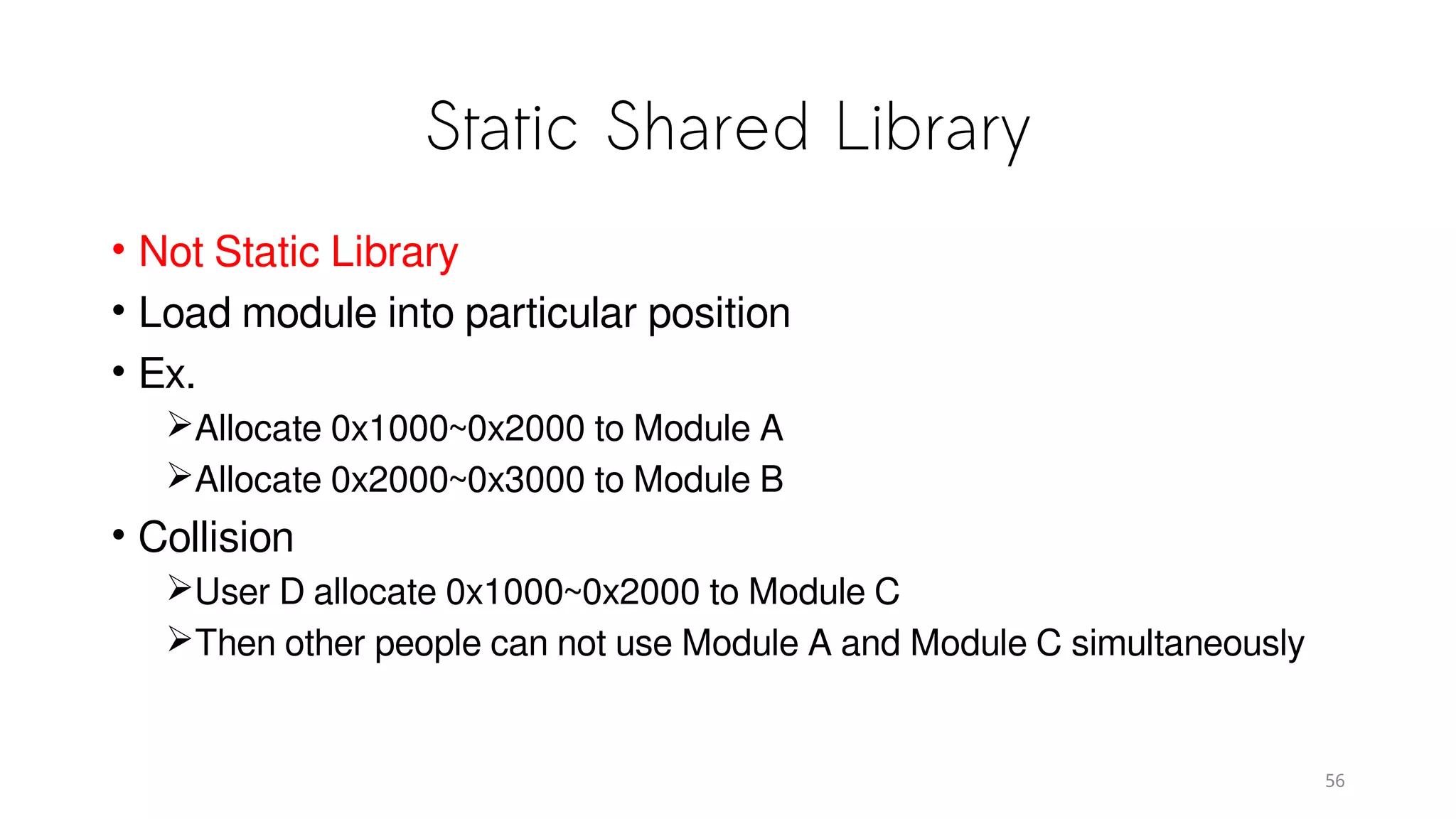
• Not Static Library
• Load module into particular position
• Ex.
Allocate 0x1000~0x2000 to Module A
Allocate 0x2000~0x3000 to Module B
• Collision
User D allocate 0x1000~0x2000 to Module C
Then other people can not use Module A and Module C simultaneously
56
Load Time Relocation
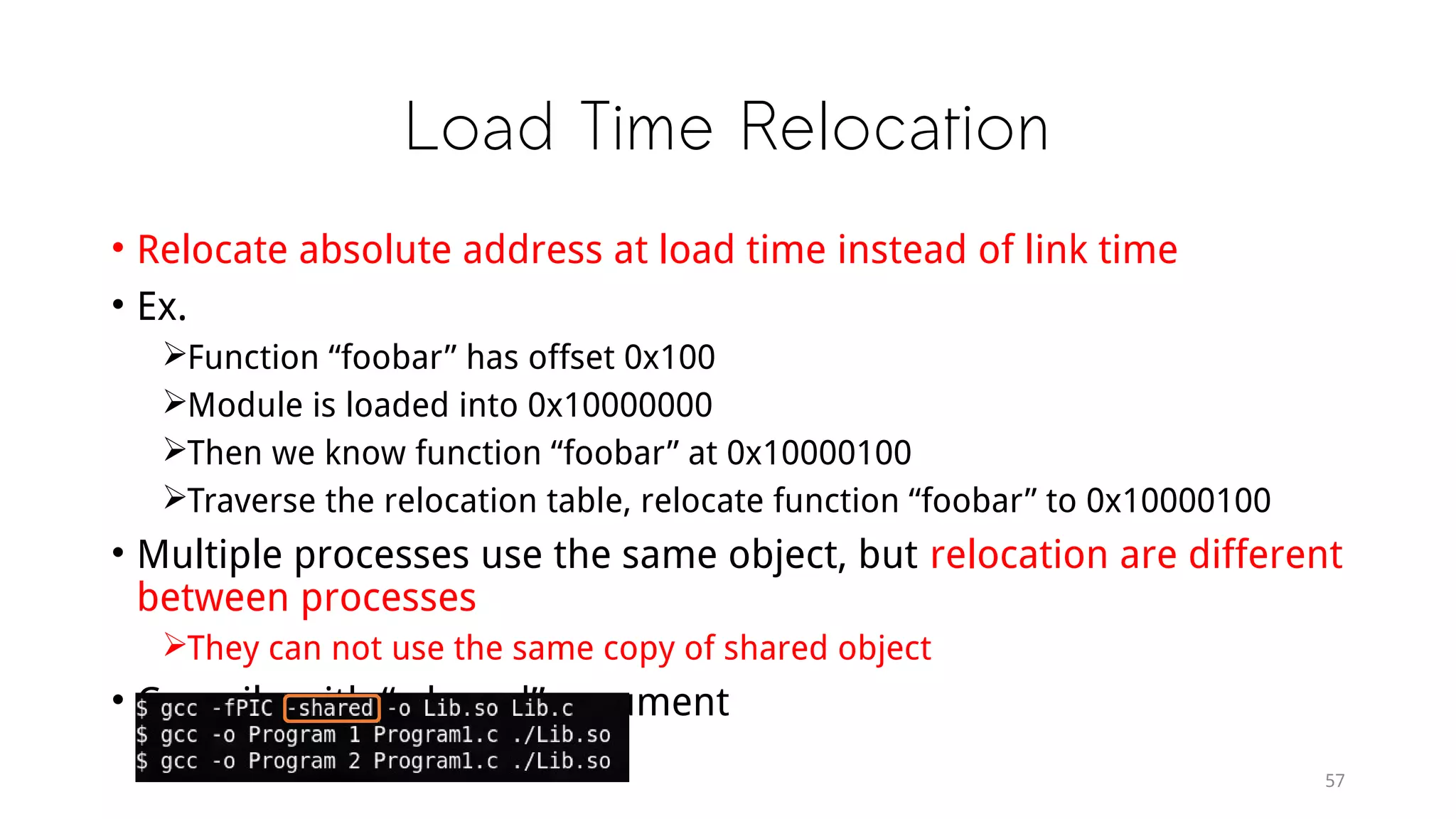
• Relocate absolute address at load time instead of link time
• Example:
Function “foobar” has offset 0x100
Module is loaded into 0x10000000
Then we know function “foobar” at 0x10000100
Traverse the relocation table, relocate function “foobar” to 0x10000100
• Multiple processes use the same object, but relocation are differe
nt between processes
They can not use the same copy of shared object
• Compile with “-shared” argument
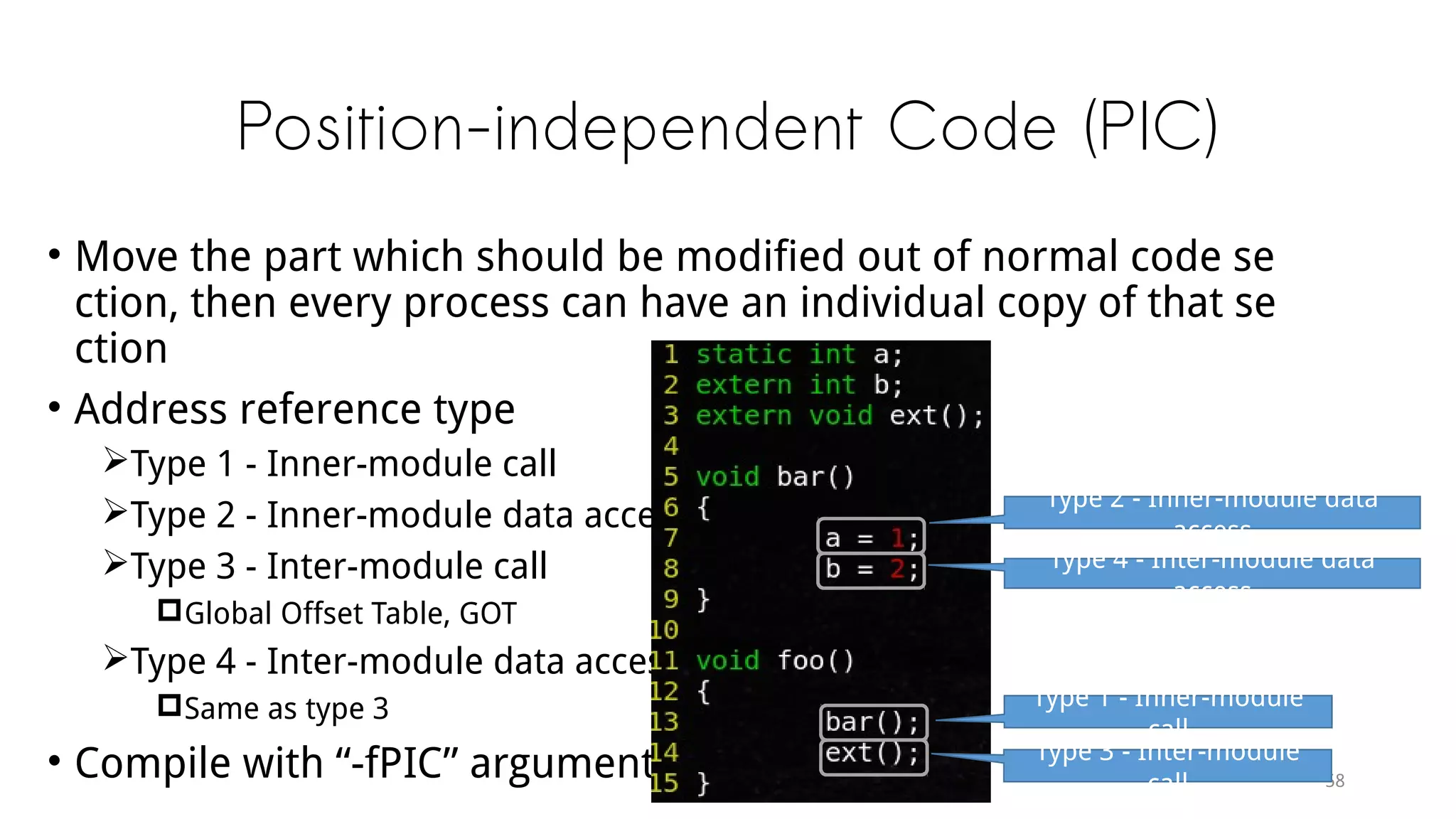
Position-independent Code (PIC)
• Move the part which should be modified out of normal code sectio
n, then every process can have an individual copy of that section
• Address reference type
Type 1 - Inner-module call
Type 2 - Inner-module data access
Type 3 - Inter-module call
Global Offset Table, GOT
Type 4 - Inter-module data access
Same as type 3
• Compile with “-fPIC” argument
Type 2 - Inner-module data
access
Type 4 - Inter-module data
access
Type 1 - Inner-module call
Type 3 - Inter-module call
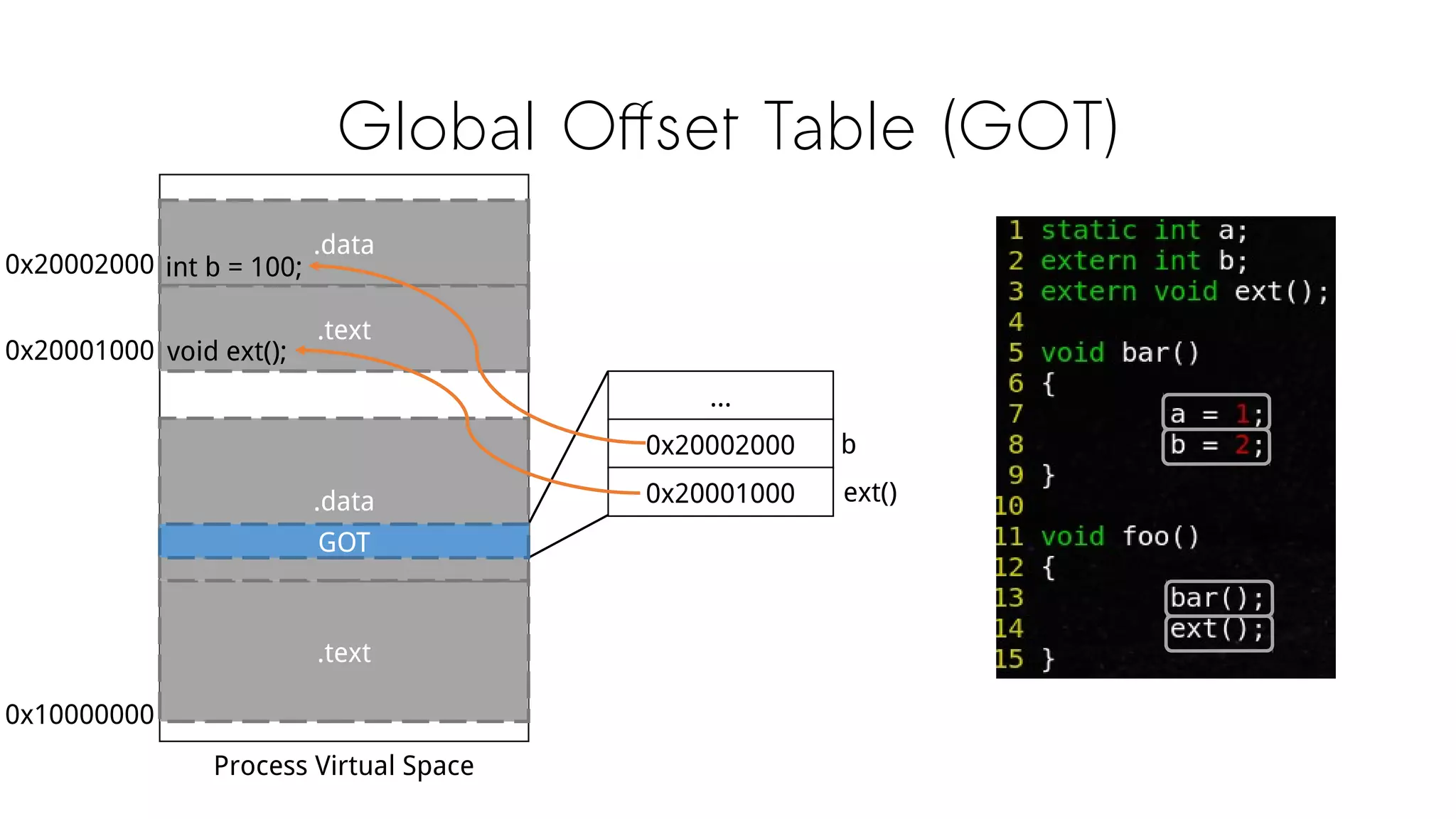
Global Offset Table (GOT)
.data
.text
.text
.data
int b = 100;
GOT
Process Virtual Space
0x10000000
0x20002000
void ext();0x20001000
...
0x20002000
0x20001000
b
ext()
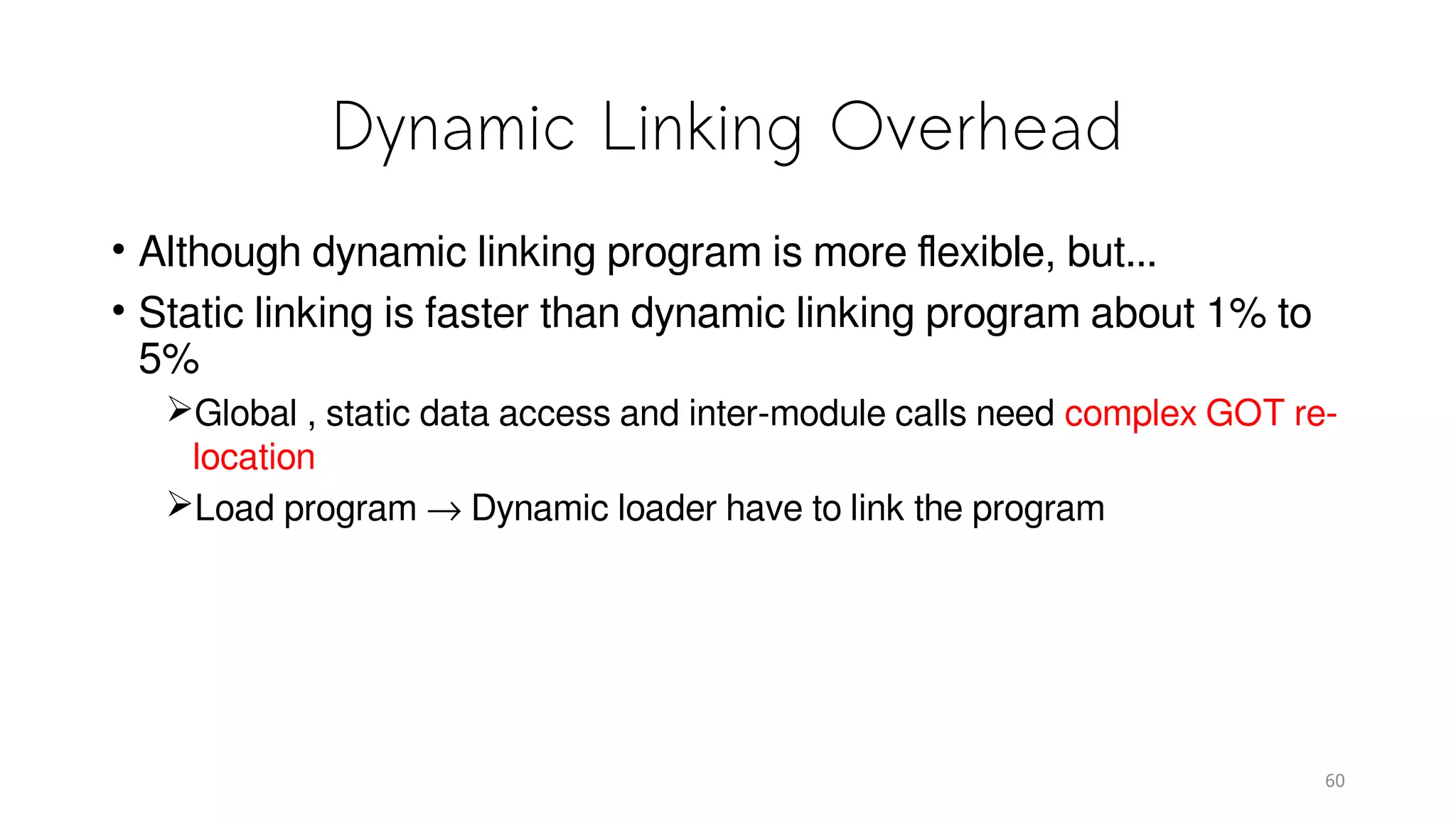
Dynamic Linking Overhead
• Although dynamic linking program is more flexible, but...
• Static linking is faster than dynamic linking program about 1% to
5%
Global , static data access and inter-module calls need complex GOT re-
location
Load program → Dynamic loader have to link the program
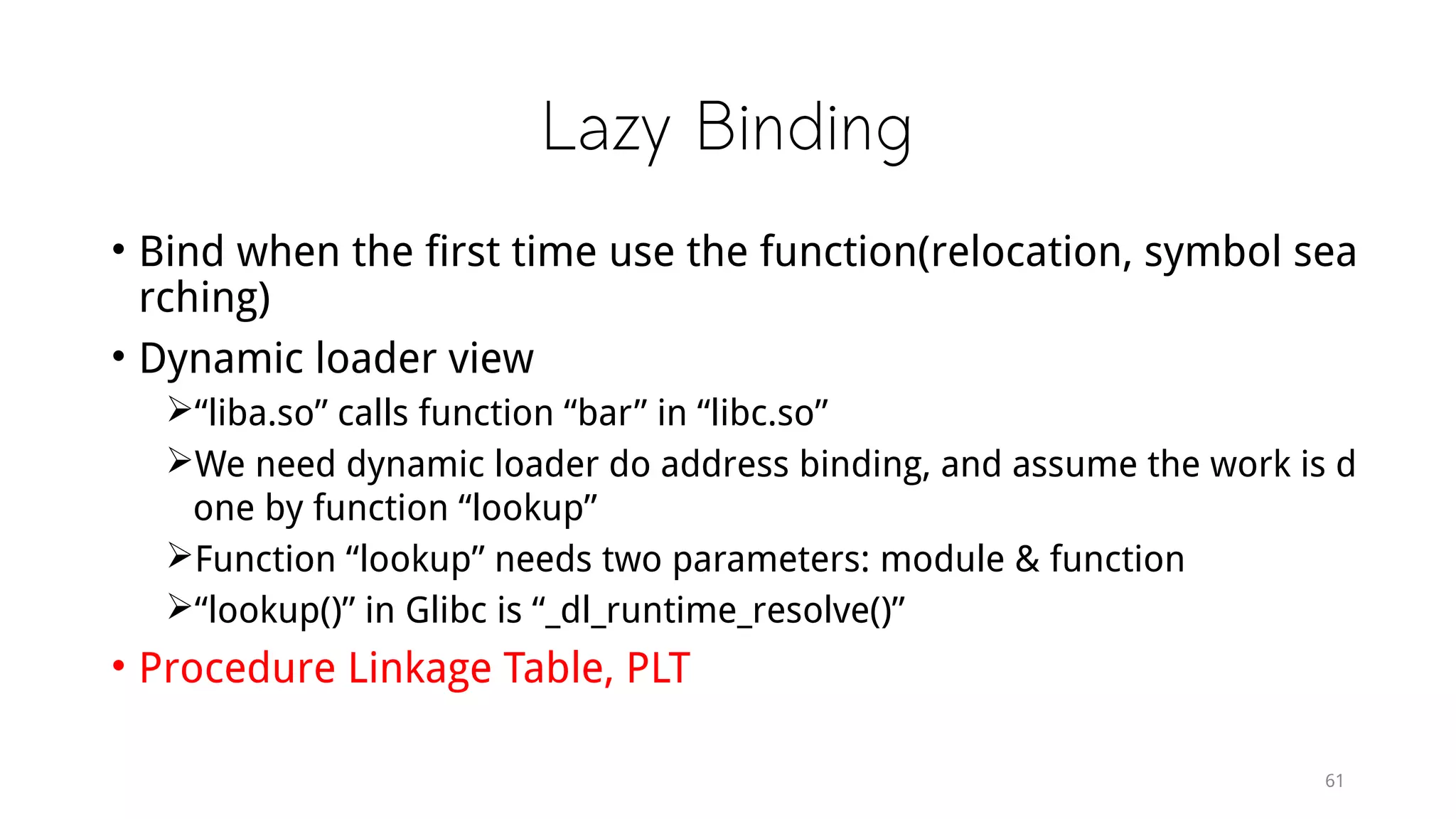
Lazy Binding
• Bind when the first time use the function(relocation, symbol sea
rching)
• Dynamic loader view
“liba.so” calls function “bar” in “libc.so”
We need dynamic loader do address binding, and assume the work is d
one by function “lookup”
Function “lookup” needs two parameters: module & function
“lookup()” in Glibc is “_dl_runtime_resolve()”
• Procedure Linkage Table, PLT
61
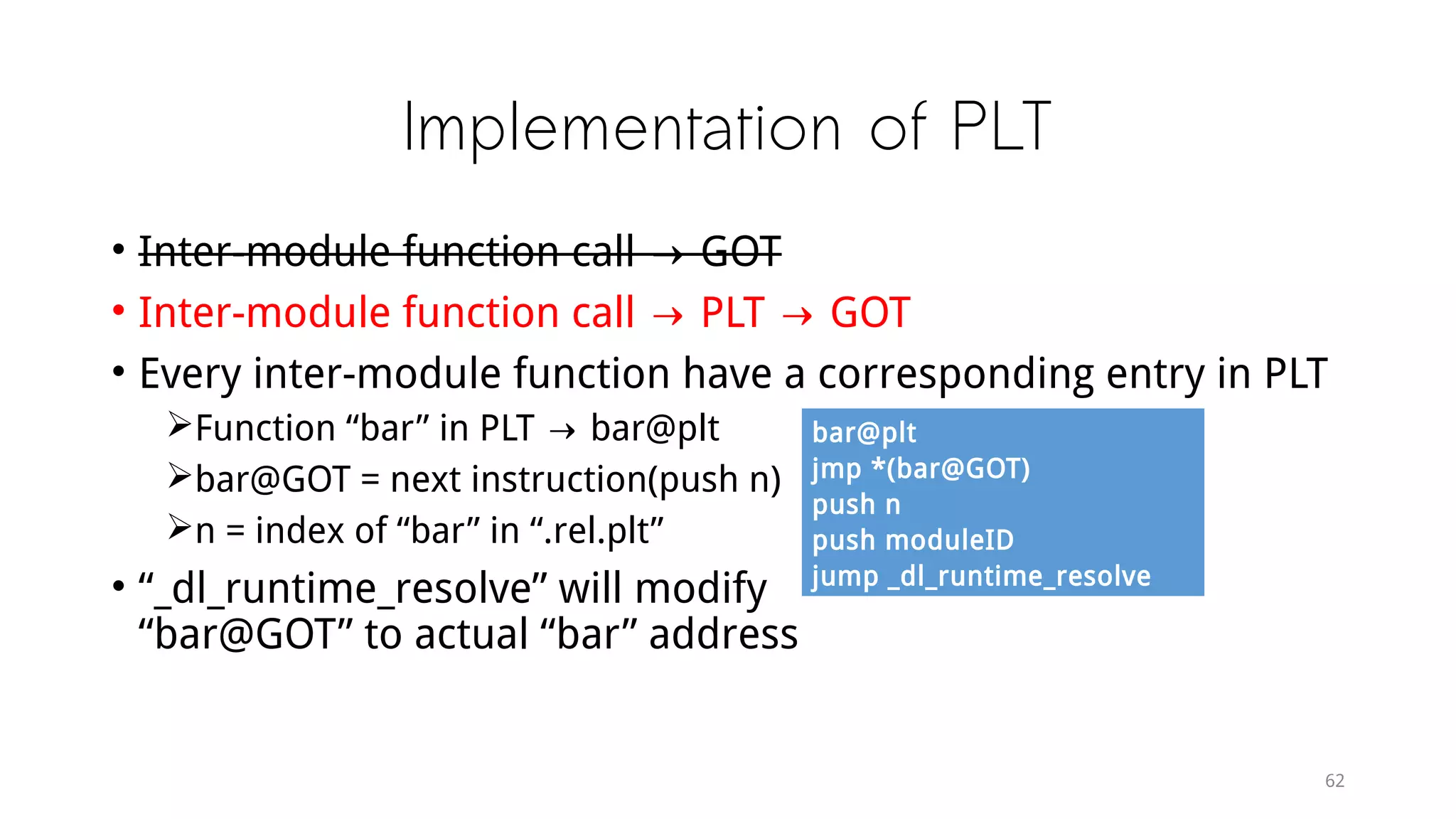
Implementation of PLT
• Inter-module function call → GOT
• Inter-module function call → PLT → GOT
• Every inter-module function have a corresponding entry in PLT
Function “bar” in PLT → bar@plt
bar@GOT = next instruction(push n)
n = index of “bar” in “.rel.plt”
• “_dl_runtime_resolve” will modify
“bar@GOT” to actual “bar” address
62
bar@plt
jmp *(bar@GOT)
push n
push moduleID
jump _dl_runtime_resolve
Memory
63
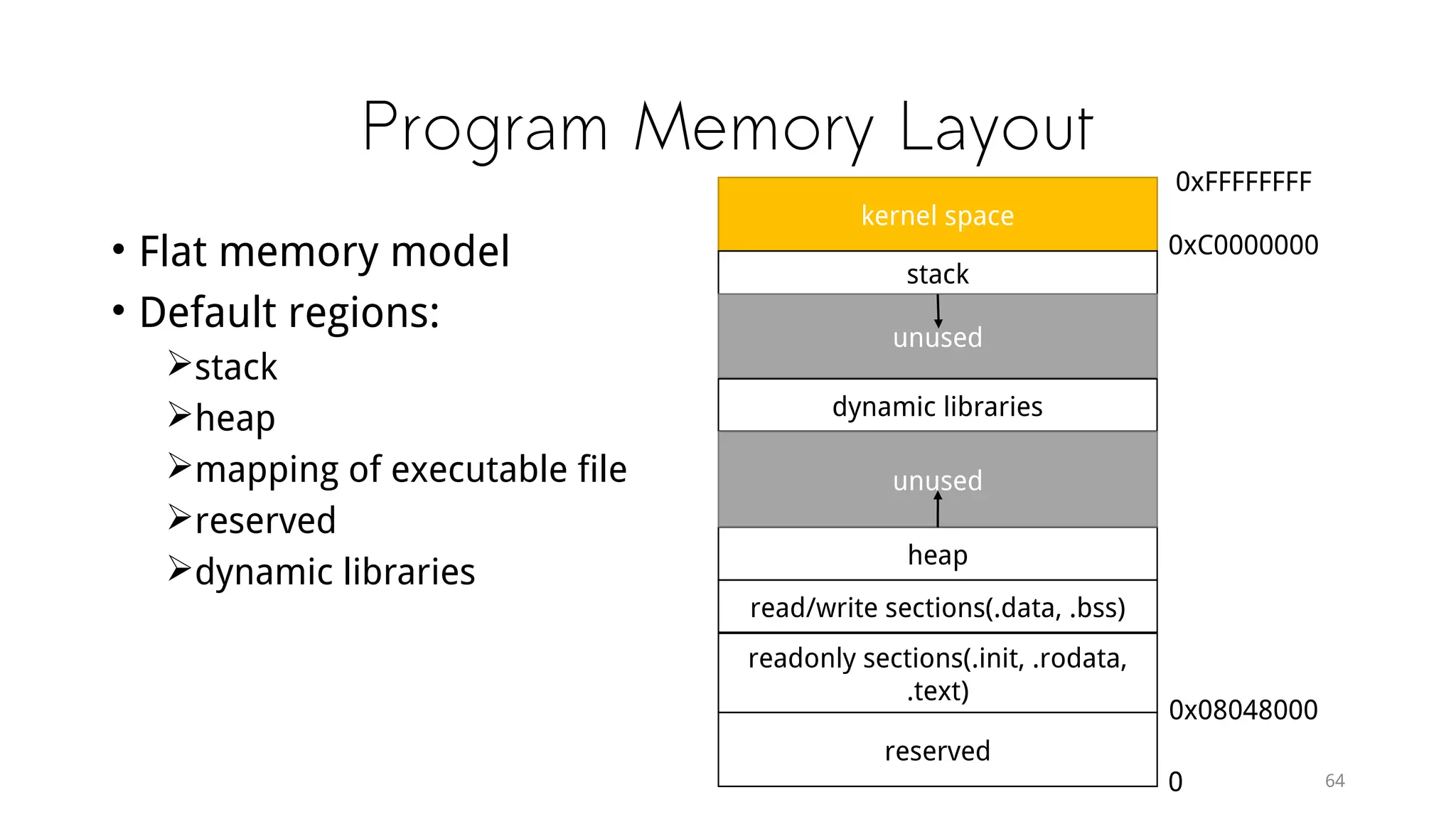
Program Memory Layout
• Flat memory model
• Default regions:
stack
heap
mapping of executable file
reserved
dynamic libraries
64
kernel space
stack
unused
dynamic libraries
heap
unused
read/write sections(.data, .bss)
readonly sections(.init, .rodata,
.text)
reserved
0xFFFFFFFF
0xC0000000
0x08048000
0
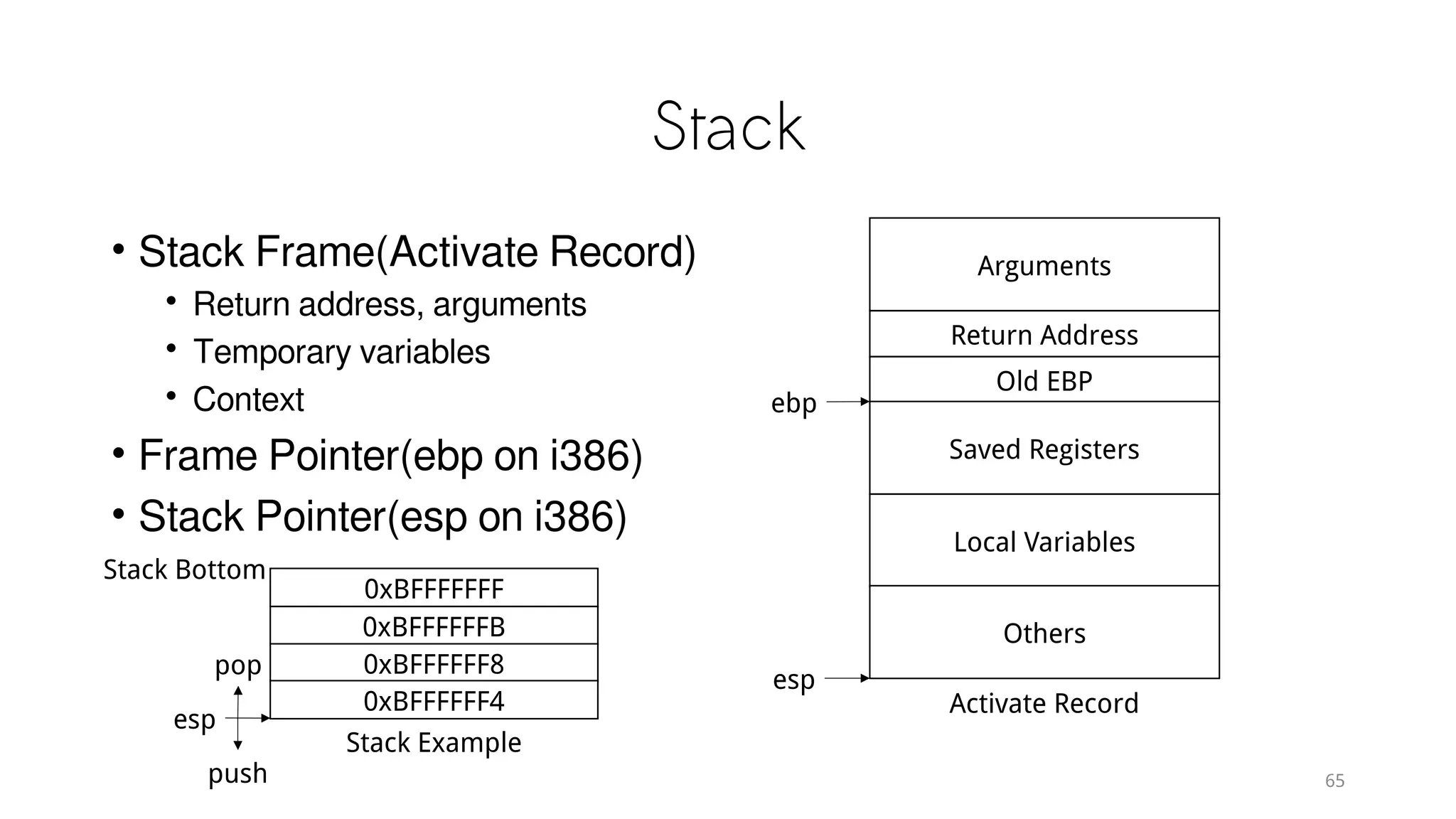
Stack
• Stack Frame(Activate Record)
• Return address, arguments
• Temporary variables
• Context
• Frame Pointer(ebp on i386)
• Stack Pointer(esp on i386)
65
Arguments
Return Address
Old EBP
Saved Registers
Local Variables
Others
Activate Record
ebp
esp
0xBFFFFFFF
0xBFFFFFFB
0xBFFFFFF8
0xBFFFFFF4
Stack Example
Stack Bottom
esp
push
pop
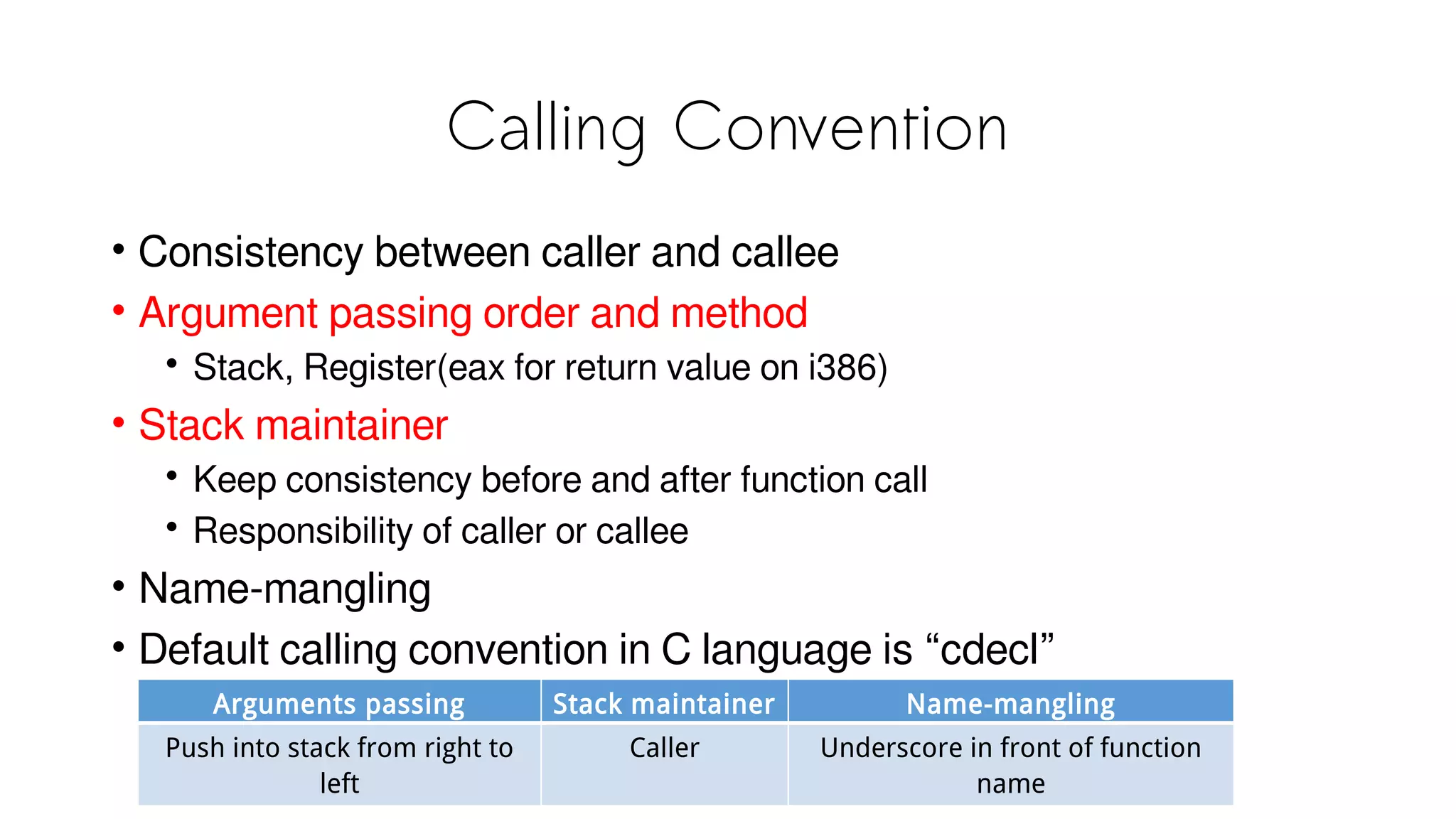
Calling Convention
• Consistency between caller and callee
• Argument passing order and method
• Stack, Register(eax for return value on i386)
• Stack maintainer
• Keep consistency before and after function call
• Responsibility of caller or callee
• Name-mangling
• Default calling convention in C language is “cdecl”
Arguments passing Stack maintainer Name-mangling
Push into stack from right to
left
Caller Underscore in front of function
name
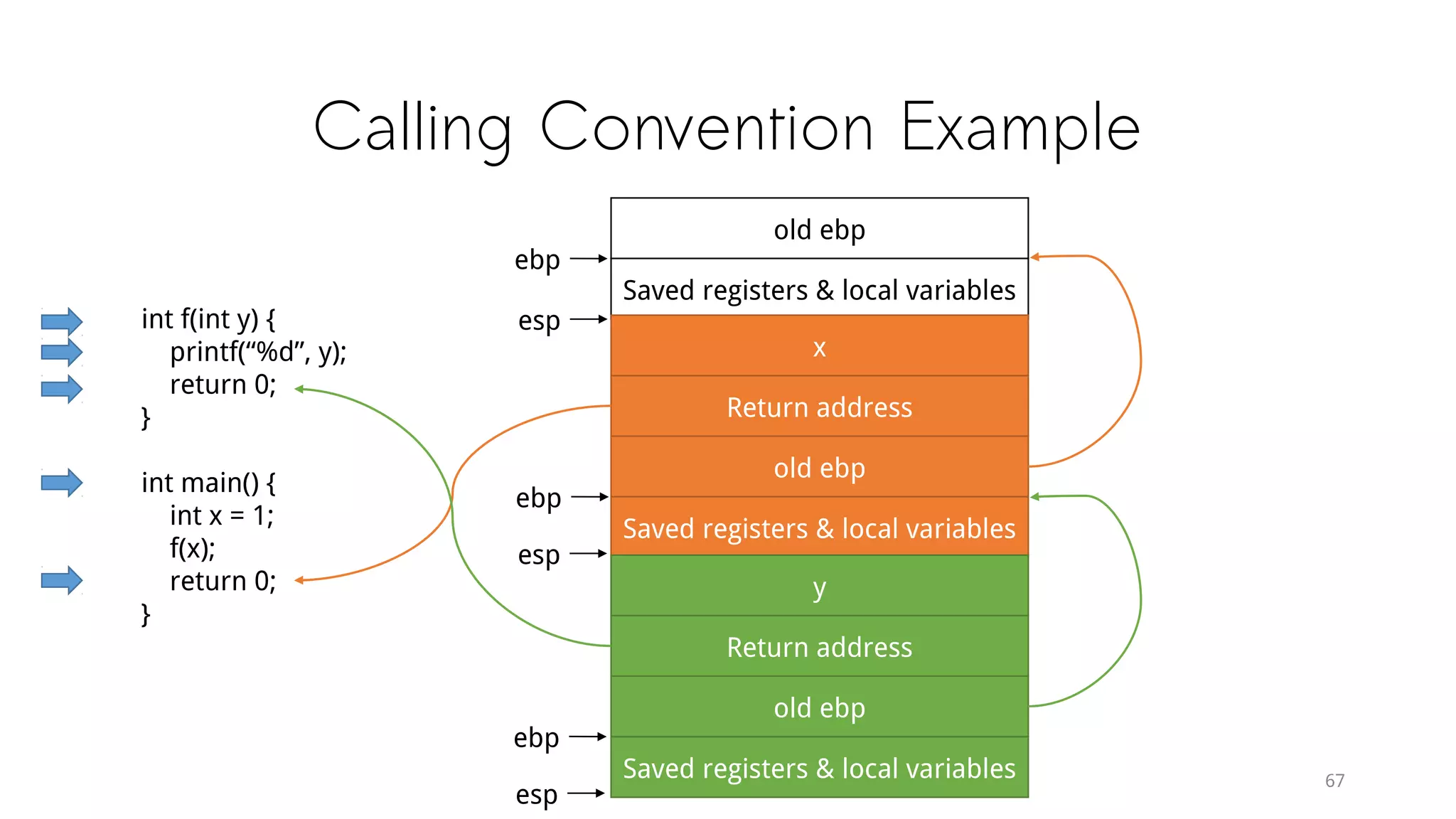
Calling Convention Example
67
int f(int y) {
printf(“%d”, y);
return 0;
}
int main() {
int x = 1;
f(x);
return 0;
}
old ebp
Saved registers & local variables
ebp
esp
x
Return address
old ebp
Saved registers & local variables
ebp
esp
y
Return address
old ebp
Saved registers & local variables
ebp
esp
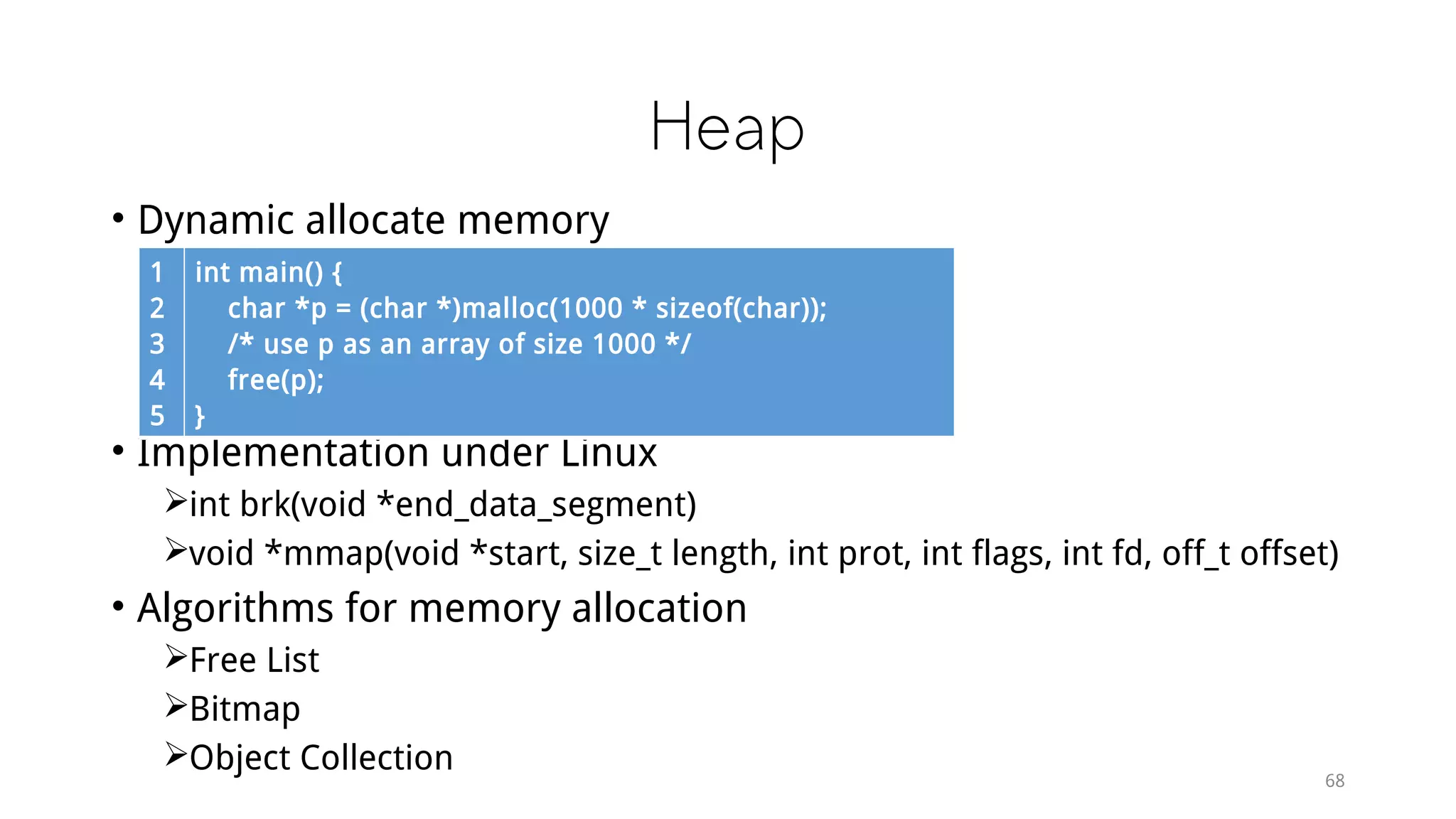
Heap
• Dynamic allocate memory
• Implementation under Linux
int brk(void *end_data_segment)
void *mmap(void *start, size_t length, int prot, int flags, int fd, off_t offset)
• Algorithms for memory allocation
Free List
Bitmap
Object Collection
68
1
2
3
4
5
int main() {
char *p = (char *)malloc(1000 * sizeof(char));
/* use p as an array of size 1000 */
free(p);
}
System Call & API
69
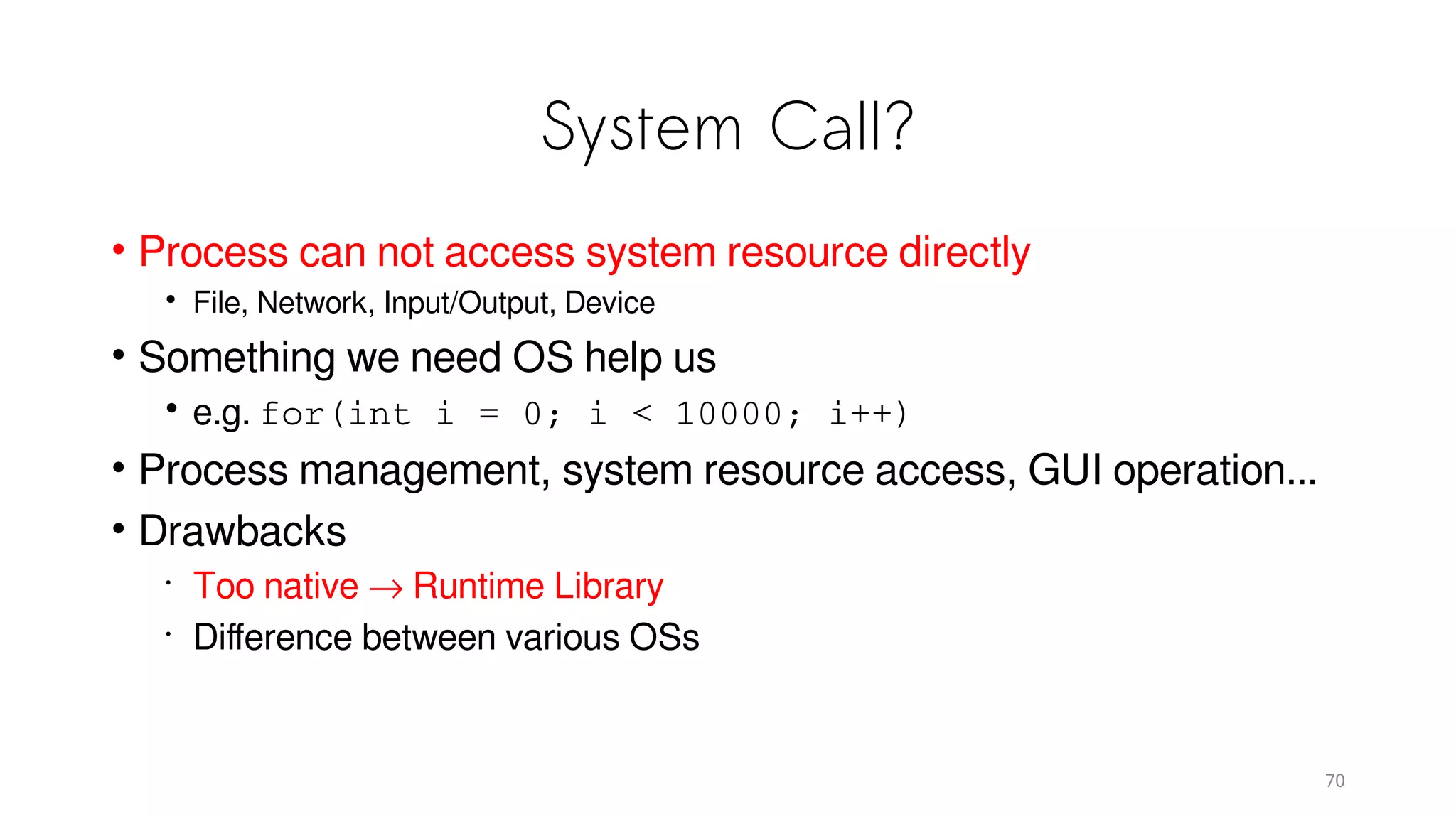
System Call?
• Process can not access system resource directly
• File, Network, Input/Output, Device
• Something we need OS help us
• e.g. for(int i = 0; i < 10000; i++)
• Process management, system resource access, GUI operation...
• Drawbacks
•
Too native → Runtime Library
•
Difference between various OSs
70
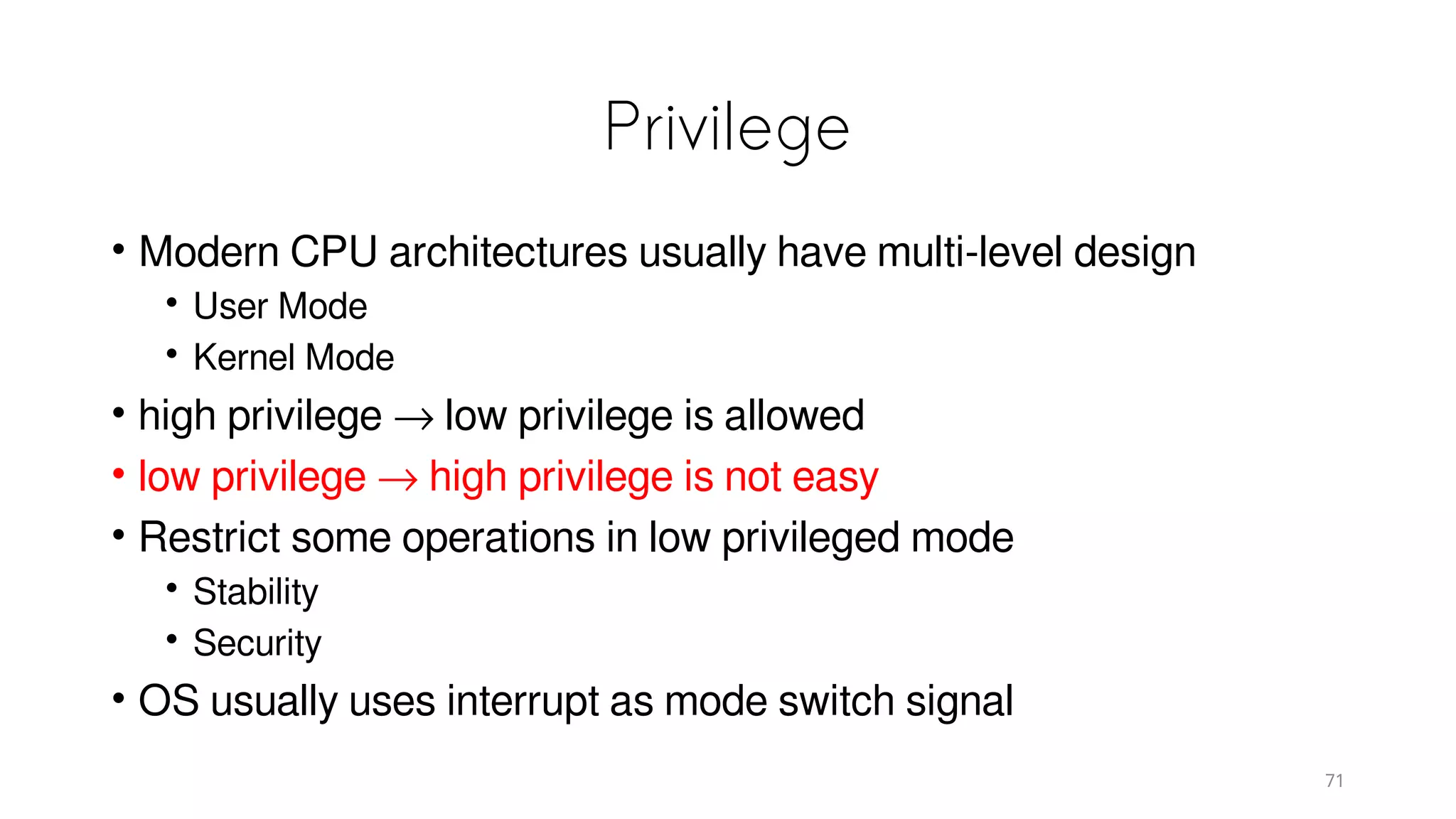
Privilege
• Modern CPU architectures usually have multi-level design
• User Mode
• Kernel Mode
• high privilege → low privilege is allowed
• low privilege → high privilege is not easy
• Restrict some operations in low privileged mode
• Stability
• Security
• OS usually uses interrupt as mode switch signal
71
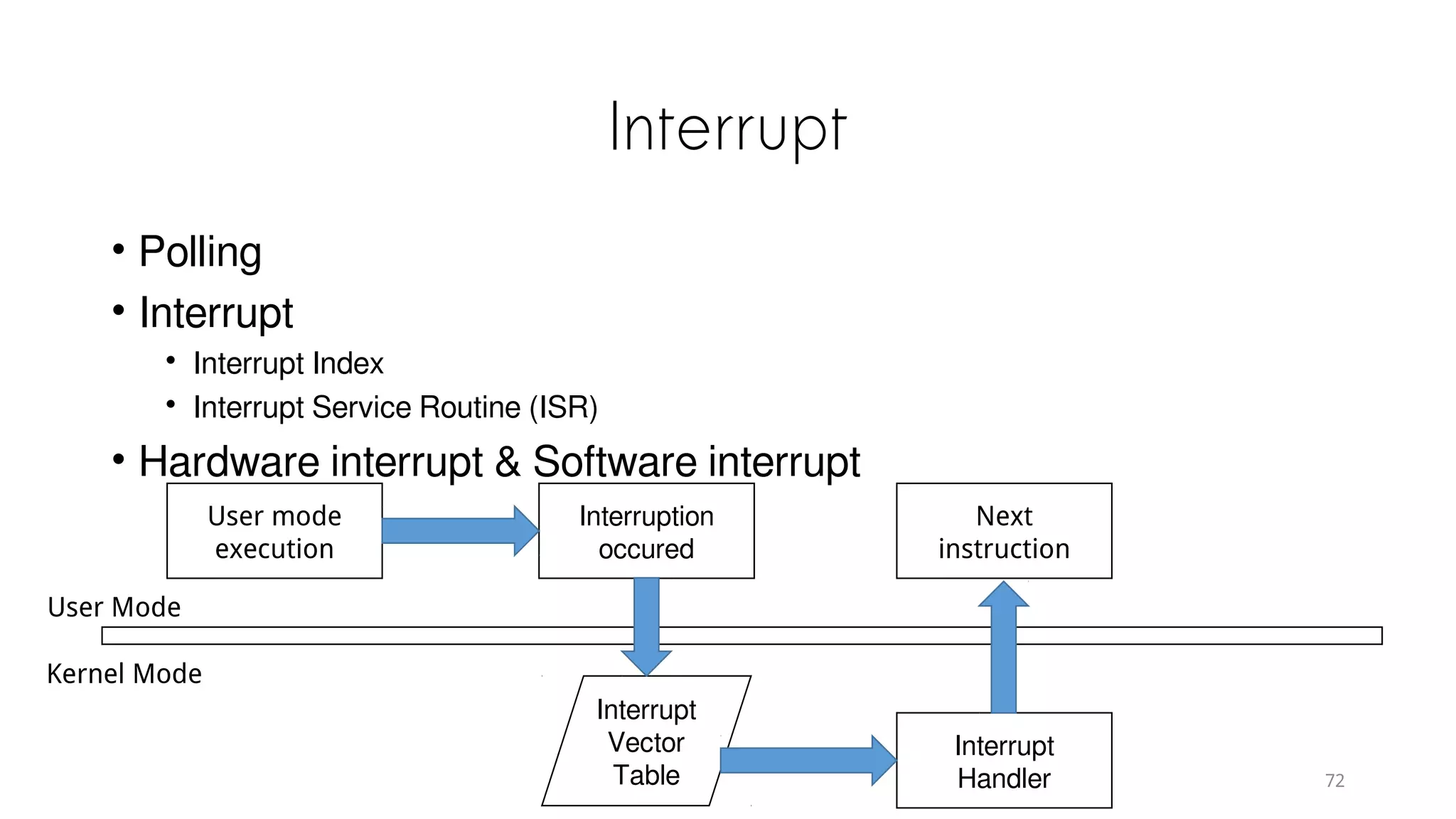
Interrupt
• Polling
• Interrupt
• Interrupt Index
• Interrupt Service Routine (ISR)
• Hardware interrupt & Software interrupt
72
User mode
execution
Interruption
occured
Next
instruction
Interrupt
Handler
Interrupt
Vector
Table
User Mode
Kernel Mode
System Call Example
• rtenv+
• ARM Cortex-M3
• https://hackpad.com/RTENV-xzo9mDkptBW#
73
Thinking
• Why do we need to compile the program
• What is in an executable file
• What is the meaning of “#include<stdio.h>”
• Difference between
 Compiler(Microsoft VC, GCC)
 Hardware architecture(ARM, x86)
• How to execute a program
 What does OS do
 Before main function
 Memory layout
 If we don’t have OS
0
1
2
3
~$ vim hello.c
~$ gcc hello.c
~$ ./a.out
Hello World!
Filename: hello.c
0
1
2
3
4
5
6
7
#include <stdio.h>
int main(int argc, char *argv[])
{
printf(“Hello World!n”);
return 0;
}
74

The Internals of "Hello World" Program

  • 1.
    Something behind “HelloWorld” Jeff Liaw ( 廖健富 ), Jim Huang ( 黃敬群 ) National Cheng Kung University, Taiwan / Apr 14
  • 2.
    Outline • Computer ArchitectureReview • Static Linking  Compilation & Linking  Object File Format  Static Linking • Loading & Dynamic Linking  Executable File Loading & Process  Dynamic Linking • Memory • System Call
  • 3.
  • 4.
    Hello World! 0 1 2 3 ~$ vim hello.c ~$ gcc hello.c ~$ ./a.out Hello World! Filename: hello.c 0 1 2 3 4 5 6 7 #include <stdio.h> int main(int argc, char *argv[]) {     printf(“Hello World!n”);     return 0; } •Why we need to compile the program • What is in an executable file • What is the meaning of “#include<stdio.h>” • Difference between • Compiler(Microsoft C/C++ compiler, GCC) • Hardware architecture(ARM, x86) • How to execute a program • What does OS do • Before main function • Memory layout • If we don’t have OS
  • 5.
  • 6.
  • 7.
  • 8.
    SMP & Multi-coreProcessor • Symmetrical Multi-Processing • CPU number↑ → Speed ↑? • A program can not be divided multiple independent subprogram • Server application • Multi-core Processor • Share caches with other processor
  • 9.
    Software Architecture • Anyproblem in computer science can be solved by another layer of indirection • API: Application Programming Interface • System call interface • Hardware specification Applications: Web Browser Video Player Word Processor Email Client Image Viewer … Development Tools: C/C++ Compiler Assembler Library Tools Debug Tools Development Libraries … Operating System API System Call Runtime Library Operating System Kernel Hardware Hardware Specific
  • 10.
    Operating System • Abstractinterface • Hardware resource  CPU  Multiprogramming  Time-Sharing System  Multi-tasking  Process  Preemptive  Memory  I/O devices  Device Driver
  • 11.
    Memory • How toallocate limited physical memory to lots of programs? • Assume we have 128MB physical memory • Program A needs 10MB • Program B needs 100MB • Program C needs 20MB • Solution 1 • A gets 0~10MB, B gets 10~110MB • No address space isolation • Inefficiency • Undetermined program address Program A Program B Physical Memory Address Space 0x00000000 0x00A00000 0x06E00000
  • 12.
    Address Space Isolation •Own the whole computer • CPU, Memory • Address Space(AS) • Array - depends on address length • 32bit system → • 0x0000000 ~ 0xFFFFFFFF • Virtual Address Space • Imagination • Process use their own virtual address space • Physical Address Space 0x00000000 0xFFFFFFFF Physical Memory 512MB 0x1FFFFFFF I/O Devices Physical Address Space
  • 13.
    Segmentation • Virtual ASmap to Physical AS • No address space isolation • Inefficiency • Undetermined program address Physical Address Space of B Physical Address Space of A Virtual Address Space of B Virtual Address Space of A 0x00000000 0x00100000 0x00B00000 0x00C00000 0x07000000 0x00000000 0x00A00000 0x00000000 0x06400000
  • 14.
    Paging • Frequently usea small part(locality) • 8 pages, each 1 KB, total 8KB • Only 6KB physical memory • PP6, PP7 unused • Page Fault • Access attributes • Read • Write • Execute VP7 VP6 VP5 VP4 VP3 VP2 VP1 VP0 PP7 PP6 PP5 PP4 PP3 PP2 PP1 PP0 VP7 VP6 VP5 VP4 VP3 VP2 VP1 VP0 DP1 DP0 Disk Process 1 Virtual Space Process 2 Virtual Space Physical Memory
  • 15.
    MMU • Memory ManagementUnit • Usually place on CPU board CPU MMU Physical Memory Virtual Address Physical Address
  • 16.
  • 17.
    Hello World! 0 1 2 3 ~$ vim hello.c ~$ gcc hello.c ~$ ./a.out Hello World!SourceCode hello.c Header Files stdio.h Preprocessing (cpp) Preprocessed hello.i Compilation (gcc) Assembly hello.s Assembly (as) Object Files hello.o Static Library libc.a Linking (ld) Executable a.out Can not determined other modules’ address
  • 18.
    Relocation 0 1 2 3 4 5 0001 0100 … … … 1000 0111 … •Punched tape • An architecture with • instruction → 1 byte(8 bits) • jump → 0001 + jump address • Manually modify address → impractical • Define Symbols(variables, functions) • define label “foo” at line 4 • jump to label “foo” • Automatically modify symbol value
  • 19.
    Linking • Address andStorage Allocation • Symbol Resolution • Relocation Source Code a.c Source Code b.c Header Files *.h Preprocessing Compilation Assembly Preprocessing Compilation Assembly Object File a.o Object File b.o Library libc.a  crt1.o … Linking (ld) Executable a.out /* a.c */ int var; /* b.c */ extern int var; var = 42; /* b.s */ movl $0x2a, var C7 05 00 00 00 00 2a 00 00 00 mov opcode target address source constant C7 05 00 12 34 56 2a 00 00 00 Relocation Relocation Entry
  • 20.
  • 21.
    File Format • Executablefile format  Derived from COFF(Common Object File Format)  Windows : PE (Portable Executable)  Linux: ELF (Executable Linkable Format)  Dynamic Linking Library (DLL)  Windows (.dll); Linux (.so)  Static Linking Library  Windows (.lib); Linux (.a) • Intermediate file between compilation and linking → Object file  Windows (.obj); Linux (.o)  Like executable file format
  • 22.
    File Content • Machinecode, data, symbol table, string table • File divided by sections • Code Section (.code, .text) • Data Section (.data) int global_init_var = 84; int global_uninit_var; void func1(int i) {     printf(“%dn”, i) } int main(void) {     static int static_init_var = 85;     static int static_uninit_var2;     int a = 1;     int b;     func(static_var + static_var2); } File Header .text section .data section .bss section Executable File / Object File
  • 23.
    File Content • FileHeader  Is executable  Static Link or Dynamic Link  Entry address  Target hardware / OS  Section Table • Code & Data  Security  Cache  Share code section(multiple process) File Header .text section .data section .bss section Executable File / Object File
  • 24.
  • 25.
    Code Section • objdump-s • Display the full contents of all sections • objdump -d • Display assembler contents of executable sections
  • 26.
    Data Section • .data→ Initialized global variable & static variable • global_init_var = 0x54(84) • static_var = 0x55(85)
  • 27.
    ELF File Structure ELFFile Header .text section .data section .bss section … other sections Section header table String Tables Symbol Tables …
  • 28.
    Symbol • Object fileB use function(variable) “foo” in object file A • A defined function(variable) “foo” • B reference function(variable) “foo” • Symbol name(function name, variable name) • Every object file has a symbol table which record symbol value • Symbol type • Symbol defined in current object file • External Symbol • …
  • 29.
  • 30.
    Accumulation File Header .textsection .data section .bss section Object File A File Header .text section .data section .bss section Object File B File Header .text section .data section .bss section Object File C File Header .text section .data section .bss section Output File .text section .data section .bss section .text section .data section .bss section • Put all together • Very Simple • Alignment unit → page(x86) • Waste space
  • 31.
    Merge Similar SectionFile Header .text section .data section .bss section Object File A File Header .text section .data section .bss section Object File B File Header .text section .data section .bss section Object File C File Header .text section Output File .data section .bss section • Two-pass Linking 1. Space & Address Allocation Fetch section length, attribute an d position Collect symbol(define, reference) and put to a global table 2. Symbol Resolution & Relocati on Modify relocation entry
  • 32.
    Static Linking Example Filename:a.c extern int shared; int main() { int a = 100; swap(&a, &shared); } Filename: b.c int shared = 1; void swap(int *a, int *b) { *a ^= *b ^= *a ^= *b; } Virtual Memory Address
  • 33.
    Static Linking Example FileHeader .text section a.o 0x40 0x27 0x40 File Header .text section b.o 0x4a .data section0x04 File Header .text section ab 0x71 .data section0x04 0x40File Sectio n Size VMA a.o .text 0x27 0x00000000 .data 0x00 0x00000000 b.o .text 0x4a 0x00000000 .data 0x04 0x00000000 ab .text 0x71 0x004000e8 .data 0x04 0x006001b8 Process Virtual Memory Layout Operating System .data .text 0xC0000000 0x006001b8 0x004000e8 0x00400159 0x006001bc
  • 34.
    Symbol Address • Calculationof symbol address • function in text section has offset X • text section in executable file has offset Y • → function in executable file has offset X + Y • Example: • “swap” in “b.o.text” has offset 0x00000000 • “b.o.text” in “ab” has offset 0x0040010f • → “swap” in “ab” has offset 0x00000000 + 0x0040010f = 0x0040010f Symbol Type Virtual Address main function 0x004000e8 swap function 0x0040010f shared variable 0x006001b8 Process Virtual Memory Layout Operating System .data .text 0xC0000000 0x006001b8 0x004000e8 0x00400159 0x006001bc
  • 35.
    Relocation a.o Filename: a.c extern intshared; int main() { int a = 100; swap(&a, &shared); } Linking ab Symbol Type Virtual Address main function 0x004000e8 swap function 0x0040010f shared variable 0x006001b8
  • 36.
    Relocation Table • RelocatableELF section wil l have a .rel section • .rel.text • .rel.data 36
  • 37.
    Symbol Resolution • Whatwill happen if we do not link “b.o”?
  • 38.
    Static Library Linking hello.o main(){ printf(); } printf.o printf() { vprintf(stdou); } vprintf.o vprintf() { ... } Other .o files libc.a Linker hello.o printf.o vprintf.o Executable Program other .o files • OS provide Application Programming Interface(API) • Language Library • Collection of object files • C language static library in Linux → li bc.a
  • 39.
  • 40.
    Program & Process •Analogy Program ↔ Recipe CPU ↔ Man Hardware ↔ Kitchenware Process ↔ Cooking Two CPU can execute the same program • Process own independent Virtual Address Space • Process access not allowed address → “Segmentation fault” User Process Linux OS 0xC0000000 0x00000000
  • 41.
    Loading • Overlay Programmer dividedprogra m Implement Overlay Manager Ex. Three modules: main, A, B main → 1024 bytes A → 512 Bytes B → 256 Bytes Total → 1792 Bytes A will not call B • Paging Overlay Manager main A B 1024 Bytes 512 Bytes 256 Bytes Physical Memory 41
  • 42.
    Paging • Loading &Operation Unit → page • Example:. 32-bit machine with 16 KB memory page size = 4096 bytes → 4 pages program size = 32 KB → 8 pages • Page replace FIFO LRU(Least Recently Used) Page Index Address F0 0x00000000-0x00000FFF F1 0x00001000-0x00001FFF F2 0x00002000-0x00002FFF F3 0x00003000-0x00003FFF P7 P6 P5 P4 P3 P2 P1 P0 F3 F2 F1 F0 Executable Physical Memory
  • 43.
    Creation of Process 1.Create a independent virtual AS page directory(Linux) 2. Read executable file header, cre ate mapping between virtual AS and executable file VMA, Virtual Memory Area 3. Assign entry address to program register(PC) Switch between kernel stack and pro cess stack CPU access attribute ELF Header .text Executable User Process Operating System 0xC0000000 0x00000000 .text 0x08048000 0x08049000 Process Virtual Space
  • 44.
    Page Fault • Executablefile has not been loaded into physical memory yet • Page fault 1. Found 0x08048000 ~ 0x08049000 is an empty page 2. Page handler load page into memory 3. Return to process ELF Header .text Executable Page Physical Memory MMUOS Process Virtual Space User Process Operating System .text 0xC0000000 0x00000000 0x08048000 0x08049000
  • 45.
    Segment • Page alignment Morethan a dozen sections Waste space • OS only cares access rights of sections Readable & Executable(code) Readable & Writable(data) Read Only(rodata) • Merge the same access rights of sections .text section is 4097 bytes .init section is 512 bytes page page Process Virtual Space (Segment) .init page .text page .text page Process Virtual Space (No Segment) .init .text Header Executable
  • 46.
  • 47.
  • 48.
    How Linux KernelLoads ELF File 1. Check file format(magic number, segment, ...) 2. Search dynamic linking section “.interp” 3. According to program header, map ELF file(code, data, rodat a) 4. Initialize ELF context environment 5. Modify return address to program entry 48
  • 49.
  • 50.
    Disadvantage of StaticLinking • Advantage Independent development Test individual modules • Disadvantage Waste memory and disk space Every program has a copy of runt ime library(printf, scanf, strlen, ...) Difficulty of updating module Need to re-link and publish to us er when a module is updated 50 Lib.o Program1.o Lib.o Program2.o Physical Memory Lib.o Program1.o Program1 Lib.o Program2.o Program2 Hard Disk
  • 51.
    Dynamic Linking • Delaylinking until execution • Example: Program1.o, Program2.o, Lib.o Execute Program1 → Load Program1.o Program1 uses Lib → Load Lib.o Execute Program2 → Load Program2.o Program2 uses Lib → Lib.o has already bee n loaded into physical memory • Advantage Save space Easier to update modules 51 Program1.o Lib.o Program2.o Physical Memory Program1.o Program1 Program2.o Program2 Hard Disk Lib.o Lib
  • 52.
    Basic Implementation • Operatingsystem support Process virtual address space allocation Storage manipulation Memory share • Dynamic Shared Objects, DSO, .so file(in Linux) • Dynamical Linking Library, .dll file(in Windows) • Dynamic loader loads all dynamic linking libraries into memory • Every time we execute the program, the loader will relocate the program • Slowly Lazy Binding 52
  • 53.
    Dynamic Linking Example Program1.c #include“Lib.h” int main() { foobar(1); } 53 Program2.c #include “Lib.h” int main() { foobar(2); } Lib.c #include <stdio.h> void foobar(int i) { printf(“%dn”, i); } Lib.h #ifndef LIB_H #define LIB_H void foobar(int); #endif Program1.o Program1 Program2.o Program2 Lib.so Lib Lib.so Lib.so
  • 54.
    Dynamic Linking Example Lib.c Compile r Linker C Runtime Library Lib.o Program1. c Compile r Lib.so Program1. o LinkerProgram1 Stu b Program1.c #include “Lib.h” int main() { foobar(1); } Shared object’s loading address is undetermined
  • 55.
    Dynamic Linking Example 55 Sharedobject’s loading address is undetermined
  • 56.
    Static Shared Library •Not Static Library • Load module into particular position • Ex. Allocate 0x1000~0x2000 to Module A Allocate 0x2000~0x3000 to Module B • Collision User D allocate 0x1000~0x2000 to Module C Then other people can not use Module A and Module C simultaneously 56
  • 57.
    Load Time Relocation •Relocate absolute address at load time instead of link time • Example: Function “foobar” has offset 0x100 Module is loaded into 0x10000000 Then we know function “foobar” at 0x10000100 Traverse the relocation table, relocate function “foobar” to 0x10000100 • Multiple processes use the same object, but relocation are differe nt between processes They can not use the same copy of shared object • Compile with “-shared” argument
  • 58.
    Position-independent Code (PIC) •Move the part which should be modified out of normal code sectio n, then every process can have an individual copy of that section • Address reference type Type 1 - Inner-module call Type 2 - Inner-module data access Type 3 - Inter-module call Global Offset Table, GOT Type 4 - Inter-module data access Same as type 3 • Compile with “-fPIC” argument Type 2 - Inner-module data access Type 4 - Inter-module data access Type 1 - Inner-module call Type 3 - Inter-module call
  • 59.
    Global Offset Table(GOT) .data .text .text .data int b = 100; GOT Process Virtual Space 0x10000000 0x20002000 void ext();0x20001000 ... 0x20002000 0x20001000 b ext()
  • 60.
    Dynamic Linking Overhead •Although dynamic linking program is more flexible, but... • Static linking is faster than dynamic linking program about 1% to 5% Global , static data access and inter-module calls need complex GOT re- location Load program → Dynamic loader have to link the program
  • 61.
    Lazy Binding • Bindwhen the first time use the function(relocation, symbol sea rching) • Dynamic loader view “liba.so” calls function “bar” in “libc.so” We need dynamic loader do address binding, and assume the work is d one by function “lookup” Function “lookup” needs two parameters: module & function “lookup()” in Glibc is “_dl_runtime_resolve()” • Procedure Linkage Table, PLT 61
  • 62.
    Implementation of PLT •Inter-module function call → GOT • Inter-module function call → PLT → GOT • Every inter-module function have a corresponding entry in PLT Function “bar” in PLT → bar@plt bar@GOT = next instruction(push n) n = index of “bar” in “.rel.plt” • “_dl_runtime_resolve” will modify “bar@GOT” to actual “bar” address 62 bar@plt jmp *(bar@GOT) push n push moduleID jump _dl_runtime_resolve
  • 63.
  • 64.
    Program Memory Layout •Flat memory model • Default regions: stack heap mapping of executable file reserved dynamic libraries 64 kernel space stack unused dynamic libraries heap unused read/write sections(.data, .bss) readonly sections(.init, .rodata, .text) reserved 0xFFFFFFFF 0xC0000000 0x08048000 0
  • 65.
    Stack • Stack Frame(ActivateRecord) • Return address, arguments • Temporary variables • Context • Frame Pointer(ebp on i386) • Stack Pointer(esp on i386) 65 Arguments Return Address Old EBP Saved Registers Local Variables Others Activate Record ebp esp 0xBFFFFFFF 0xBFFFFFFB 0xBFFFFFF8 0xBFFFFFF4 Stack Example Stack Bottom esp push pop
  • 66.
    Calling Convention • Consistencybetween caller and callee • Argument passing order and method • Stack, Register(eax for return value on i386) • Stack maintainer • Keep consistency before and after function call • Responsibility of caller or callee • Name-mangling • Default calling convention in C language is “cdecl” Arguments passing Stack maintainer Name-mangling Push into stack from right to left Caller Underscore in front of function name
  • 67.
    Calling Convention Example 67 intf(int y) { printf(“%d”, y); return 0; } int main() { int x = 1; f(x); return 0; } old ebp Saved registers & local variables ebp esp x Return address old ebp Saved registers & local variables ebp esp y Return address old ebp Saved registers & local variables ebp esp
  • 68.
    Heap • Dynamic allocatememory • Implementation under Linux int brk(void *end_data_segment) void *mmap(void *start, size_t length, int prot, int flags, int fd, off_t offset) • Algorithms for memory allocation Free List Bitmap Object Collection 68 1 2 3 4 5 int main() { char *p = (char *)malloc(1000 * sizeof(char)); /* use p as an array of size 1000 */ free(p); }
  • 69.
  • 70.
    System Call? • Processcan not access system resource directly • File, Network, Input/Output, Device • Something we need OS help us • e.g. for(int i = 0; i < 10000; i++) • Process management, system resource access, GUI operation... • Drawbacks • Too native → Runtime Library • Difference between various OSs 70
  • 71.
    Privilege • Modern CPUarchitectures usually have multi-level design • User Mode • Kernel Mode • high privilege → low privilege is allowed • low privilege → high privilege is not easy • Restrict some operations in low privileged mode • Stability • Security • OS usually uses interrupt as mode switch signal 71
  • 72.
    Interrupt • Polling • Interrupt •Interrupt Index • Interrupt Service Routine (ISR) • Hardware interrupt & Software interrupt 72 User mode execution Interruption occured Next instruction Interrupt Handler Interrupt Vector Table User Mode Kernel Mode
  • 73.
    System Call Example •rtenv+ • ARM Cortex-M3 • https://hackpad.com/RTENV-xzo9mDkptBW# 73
  • 74.
    Thinking • Why dowe need to compile the program • What is in an executable file • What is the meaning of “#include<stdio.h>” • Difference between  Compiler(Microsoft VC, GCC)  Hardware architecture(ARM, x86) • How to execute a program  What does OS do  Before main function  Memory layout  If we don’t have OS 0 1 2 3 ~$ vim hello.c ~$ gcc hello.c ~$ ./a.out Hello World! Filename: hello.c 0 1 2 3 4 5 6 7 #include <stdio.h> int main(int argc, char *argv[]) { printf(“Hello World!n”); return 0; } 74