refer to thetransmission of the digital data between
two or more computers. These are telecommunications
network that allow computers to exchange data. The
physical connection between networked computing
devices is established using either cable media (wired)
or wireless media. The best-known computer
network for communication is the Internet.
Network and
communication
5.
5
The effectiveness ofa data communications system
depends on four fundamental characteristics:
Delivery, Accuracy, Timeliness and Jitter.
1. Delivery. The system must deliver data to the correct destination. Data must be
received by the planned device or user and only by that device or user.
2. Accuracy. The system must deliver the data accurately. Data that have been
altered in transmission and left uncorrected are unusable.
3. Timeliness. The system must deliver data in a timely manner. Data delivered
late are useless. In the case of video or audio, timely deliver means delivering data
as they are produced, in the same order that they are produced, and without
significant delay. This kind of delivery is called real-time transmission.
4. Jitter. Jitter refers to the variation in a packet arrival time. It is uneven delay in
the delivery of audio or video packets.
5
7
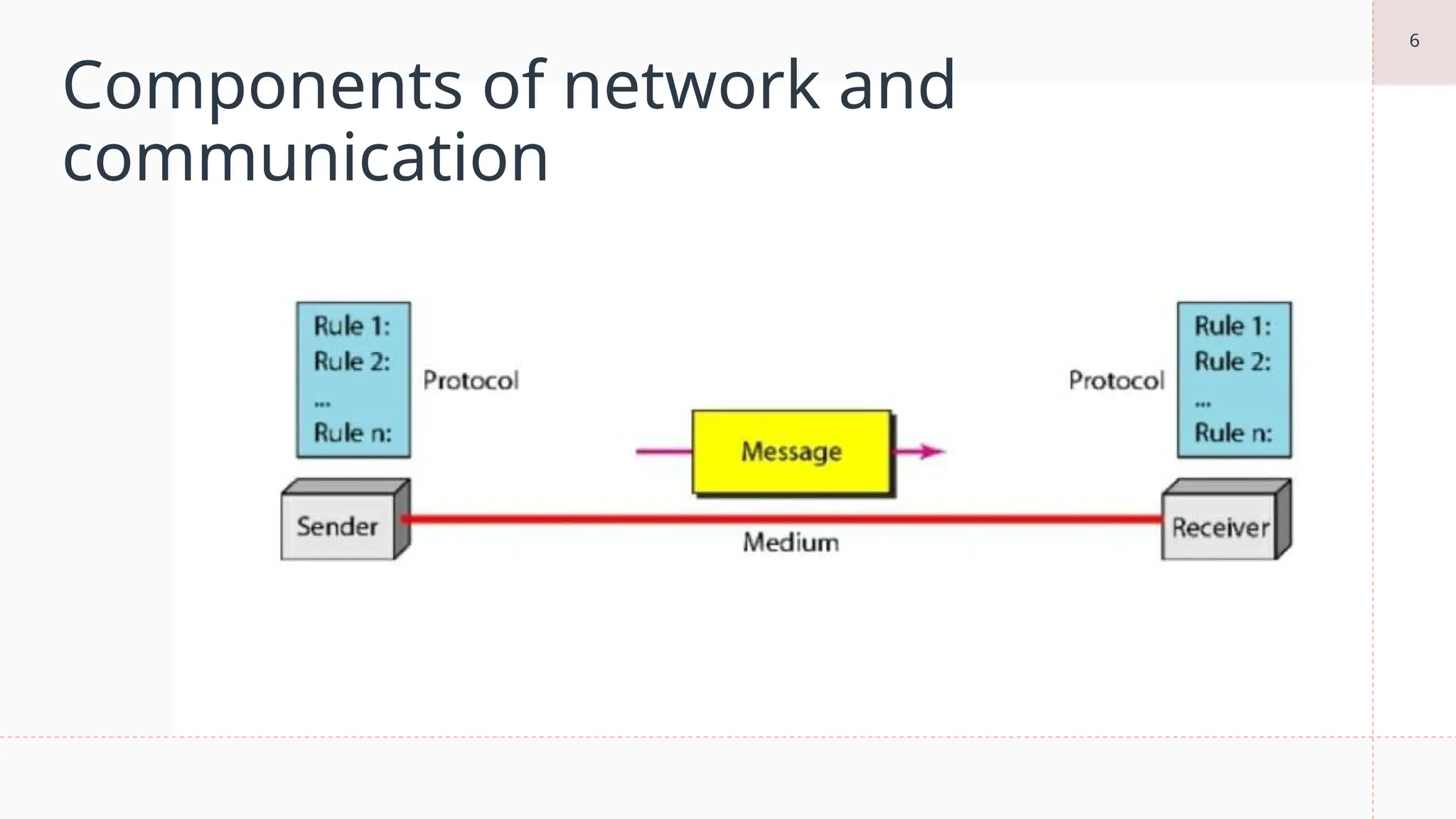
Components of Network
1.Message. The message is the information (data) to be communicated. Popular forms of
information include text, number, pictures, audio and video.
2. Sender. The sender the device that sends the data message. It can be a computer,
workstation, telephone handset, video camera and so on.
3. Receiver. The Receiver is the device that receives the message. It can be a computer,
workstation, telephone handset, television and so on.
4. Transmission Medium. The transmission Medium is the physical path by which a message
travels from sender to receiver. Some example of transmission media includes twisted-pair
wire, coaxial cable, fiber-optic cable and radio waves.
5. Protocol. A protocol is a set of rules that govern data communications. It represents an
agreement between the communicating devices. Without a protocol, two devices may be
connected but not communicating, just as a person speaking French cannot be understood by
a person who speaks only Japanese.
8.
8
Computer networks areclassified based on
various factors. These include:
• Geographical span
• Inter-connectivity
• Administration
• Architecture
9.
9
Geographical Span
Geographically anetwork can be seen in one of the following categories:
• It may be spanned across your table, among Bluetooth enabled devices,
ranging not more than few meters.
• It may be spanned across a whole building, including intermediate
devices to connect all floors.
• It may be spanned across a whole city.
• It may be spanned across multiple cities or provinces.
• It may be one network covering whole world
10.
10
Inter-Connectivity
Components of anetwork can be connected to each other differently in some
fashion. By connectedness we mean either logically, physically, or both ways.
• Every single device can be connected to every other device on network, making the
network mesh.
• All devices can be connected to a single medium but geographically disconnected,
created bus like structure.
• Each device is connected to its left and right peers only, creating linear structure.
• All devices connected together with a single device, creating star like structure.
• All devices connected arbitrarily using all previous ways to connect each other,
resulting in a hybrid structure.
11.
11
Administration
From an administrator’spoint of view, a network can be
private network which belongs a single autonomous
system and cannot be accessed outside its physical or
logical domain. A network can be public which is
accessed by all.
12.
12
Network Architecture
Computer networkscan be discriminated into various types such as Client-
Server, peer-to-peer or hybrid, depending upon its architecture.
• There can be one or more systems acting as Server. Other being Client,
requests the Server to serve requests. Server takes and processes request
on behalf of Clients.
• Two systems can be connected Point-to-Point, or in back-to-back fashion.
They both reside at the same level and called peers.
• There can be hybrid network which involves network architecture of both
the above types.
13.
13
Network Applications
Computer systemsand peripherals are connected to form a network. They provide numerous
advantages:
Resource sharing such as printers and storage devices
• Exchange of information by means of e-Mails and FTP
• Information sharing by using Web or Internet
• Interaction with other users using dynamic web pages
• IP phones
• Video conferences
• Parallel computing
• Instant messaging