Recap
2
What is that last topic?
2
The CPU
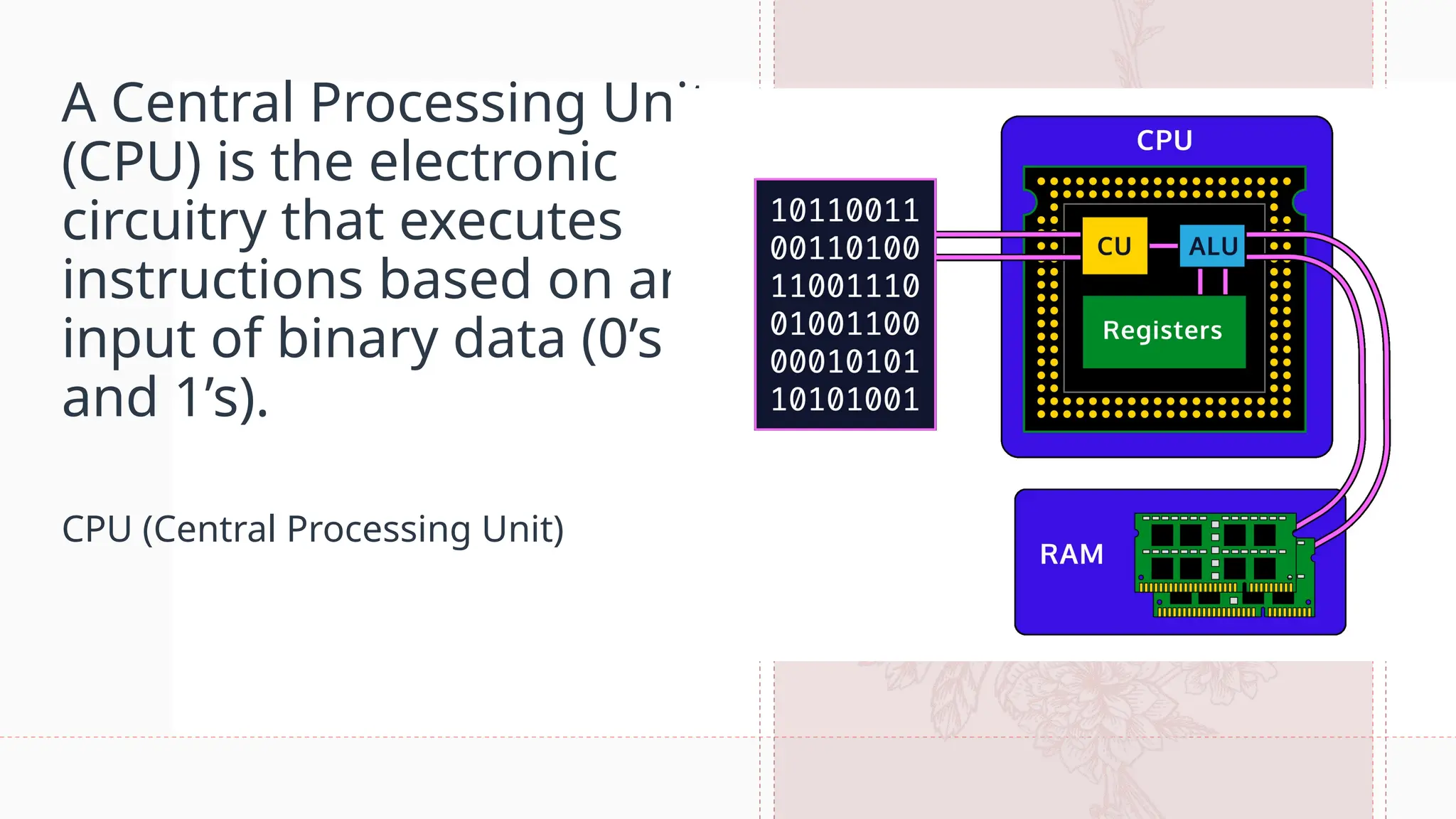
A Central Processing Unit
(CPU) is the electronic
circuitry that executes
instructions based on an
input of binary data (0’s
and 1’s).
CPU (Central Processing Unit)
5
The CPU consists of three main
components:
• Control Unit (CU)
• Arithmetic and Logic Unit (ALU)
• Registers (Immediate Access Store)
These components are all wired in very specific ways in order to process data. It
is important here to remember that data, to our hardware, is a series of binary,
on and off, electrical pulses. These pulses are run through different wires,
semiconductors, and components as a means to process and return data that is
usable by the software. Now that we have a general understanding of the CPU,
let’s dive a little deeper.
5
6
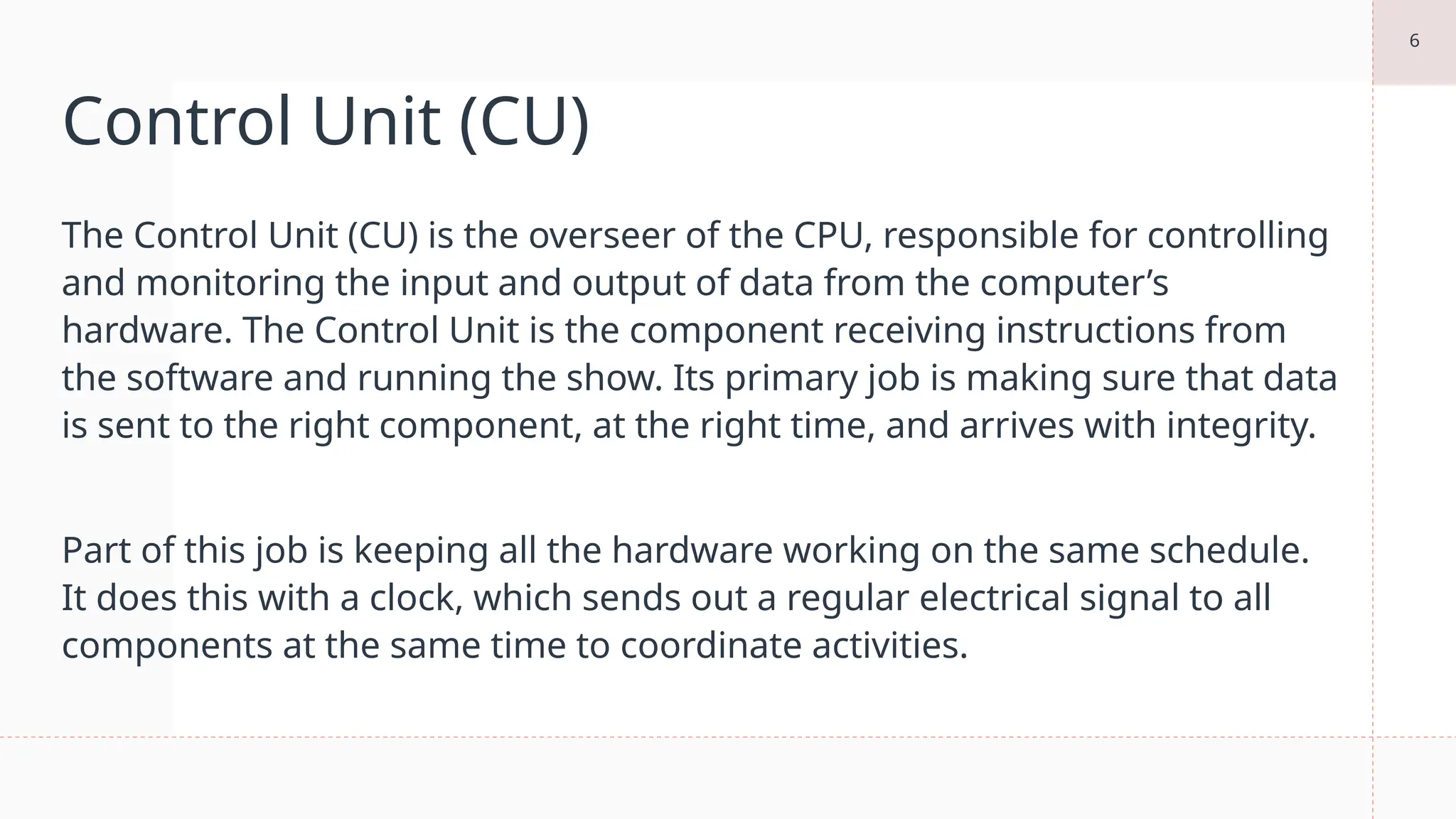
Control Unit (CU)
The Control Unit (CU) is the overseer of the CPU, responsible for controlling
and monitoring the input and output of data from the computer’s
hardware. The Control Unit is the component receiving instructions from
the software and running the show. Its primary job is making sure that data
is sent to the right component, at the right time, and arrives with integrity.
Part of this job is keeping all the hardware working on the same schedule.
It does this with a clock, which sends out a regular electrical signal to all
components at the same time to coordinate activities.
7
Arithmetic and Logic Unit (ALU)
The Arithmetic and Logic Unit (ALU) is where all the processing on your
computer takes place. Even as you scroll this text box, the ALU is calculating
pixel changes on the screen and sending that output to the monitor. The ALU
is the fundamental building block of the CPU, the brains of the entire
computer. Nearly all functional processing occurs in this chip. As the name
implies, the ALU’s functions can be divided into two primary areas:
• Arithmetic operations that deal with calculating data (e.g. 5 * 4 = 20)
• Logic operations that deal with comparisons and conditionals (e.g. 25 > 10)
8
Register
The register, or immediate access store, is limited space, high-
speed memory that the CPU can use for quick processing.
Registers are small pieces of memory right on the CPU. They are
fixed in number and defined in the Instruction Set Architecture.
There are typically 8, 16, 32, or 64 registers depending on the
architecture and are also fixed in size based on the size of the
number it can hold. They provide the CPU with a place to store
and access values that are crucial to the immediate calculations
the ALU is processing.
The CPU is just a single
component of the
computer’s hardware, other
important components of
hardware include Random
Access Memory (RAM),
buses (high-speed wires), as
well as a hard disk and
other non-volatile memory.
Memory
10
Random Access Memory (RAM)
Random Access Memory, or RAM, is additional high-
speed memory that a computer uses to store and access
information on a short-term basis. In general, a
computer’s performance can be directly correlated to the
amount of RAM it has available to use. RAM is considered
primary volatile memory, which means it loses whatever
is stored on it as soon as power is disconnected.
11
Buses
A bus is an engineering term for a job-specific
high-speed wire. These wires are often group
together in bundles and will transfer electrical
signals either in parallel or in serial, that is many
signals at once or one pulse at a time. Buses can
be grouped into three functions: data buses,
address buses, and control buses.
12
13
Explanation
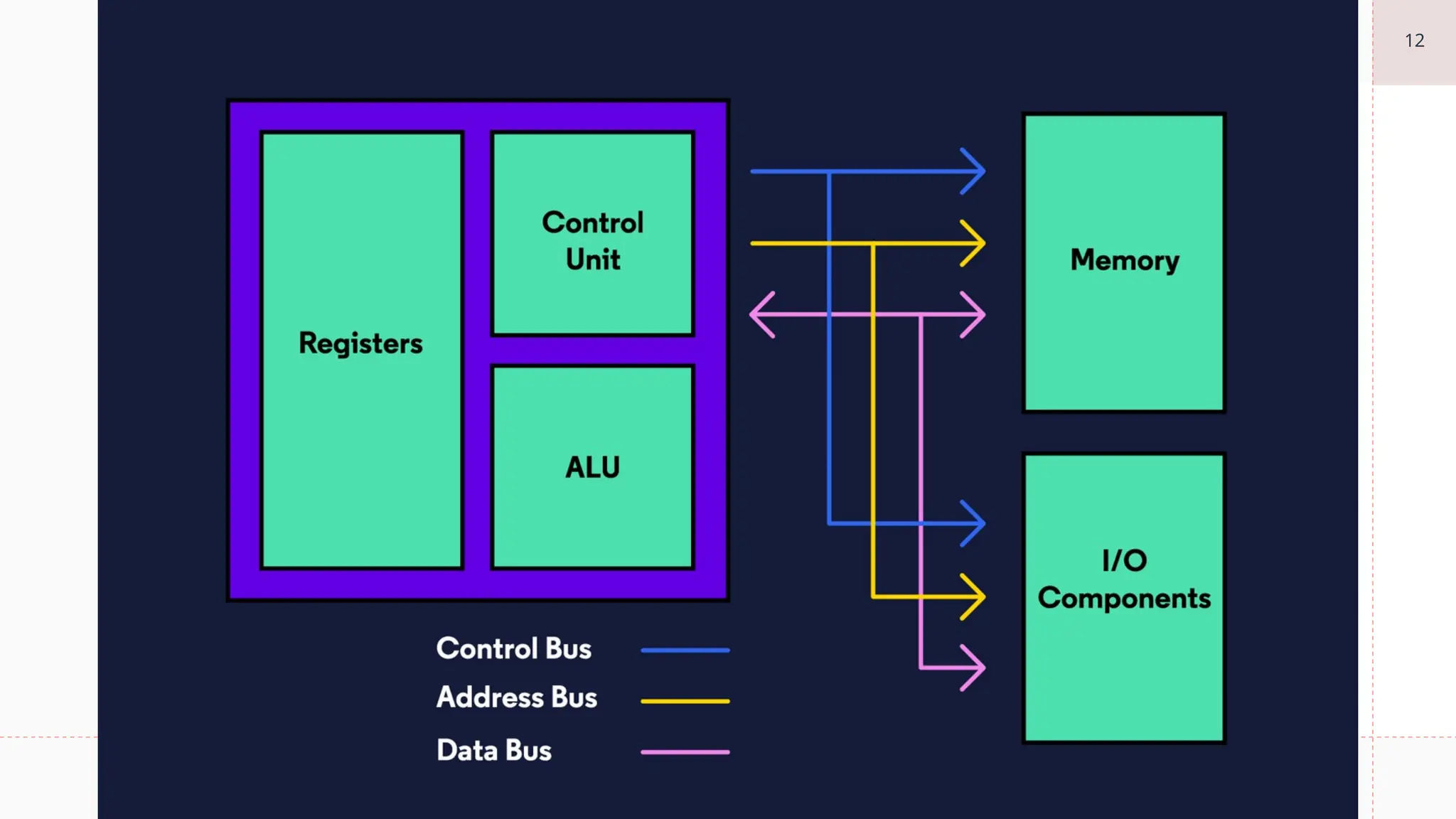
Data buses carry data back and forth between the processor and other components.
Data buses are bidirectional, which means that they transfer data both to and from
other locations.
Address buses carry a specific address in memory and are unidirectional. We can
visualize all of our memory like a village with each house representing a package of
data. Every house/data has an address. When our computer tells a program or
component what data to use, it sends the address and then the component knows
where to find the data when it needs it.
Control buses are also unidirectional and are responsible for carrying the control
signals of the CU to other components as well as the clock signals for synchronization.
Number
Bases
15
Introduction to Bases
We use number bases every day without realizing it. When we think about numbers
in everyday life, we are almost always thinking of decimal numbers, or numbers in
base 10, where each digit of a number can be one of ten values. People have ten
fingers and ten toes (most of the time), so it seems natural to base a number
system on ten. But, we are not required to use ten as a base. For example, in the
movie Avatar, the Na’vi inhabitants have eight fingers and base their number
system on eight because of that. Back on Earth, we see other bases use commonly
in computing systems, such as binary (base 2) and hexadecimal (base 16).
When we wish to discuss non-ten bases, we use a leading notation like this:
0b1100111101 (binary for decimal 829). Any number can be a base; however binary,
hexadecimal, and decimal are the most common on computer systems.
Binary (Base 2): leading 0b
Decimal (Base 10): leading
nothing (we use it all the
time!)
Hexadecimal (Base 16):
leading 0x
Types of Bases on Computer system
17
Binary
Binary information is defined as relating to, composed of, or
involving two things. What we, as computer scientists,
understand as examples of binary can be broken into two
distinct categories:
1. Binary Numbers
2. Binary Data
Binary numbers are expressed as a combination of 0s and 1s.
For example, 100110 is the binary equivalent of the number 38.
18
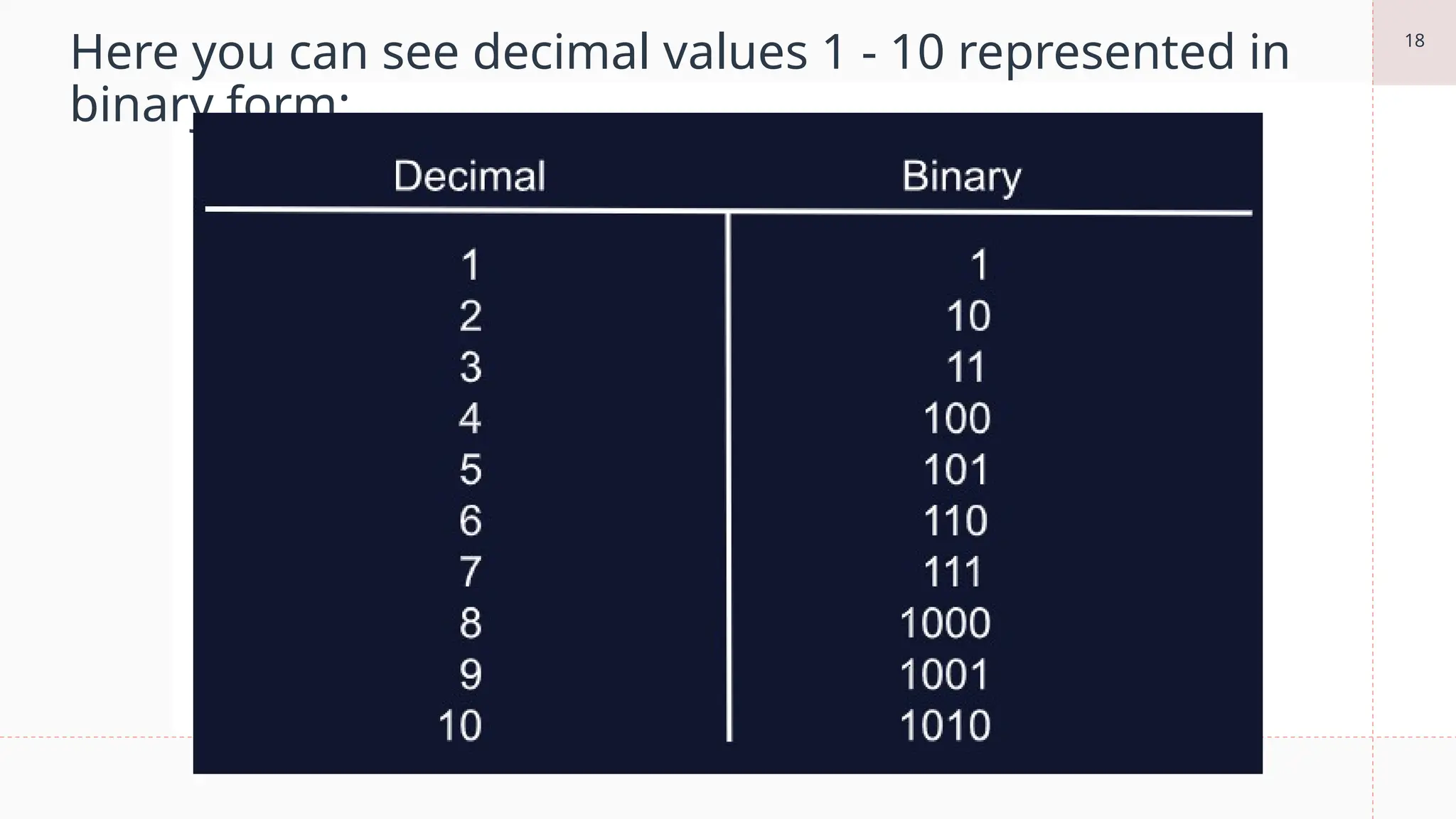
Here you can see decimal values 1 - 10 represented in
binary form:
19
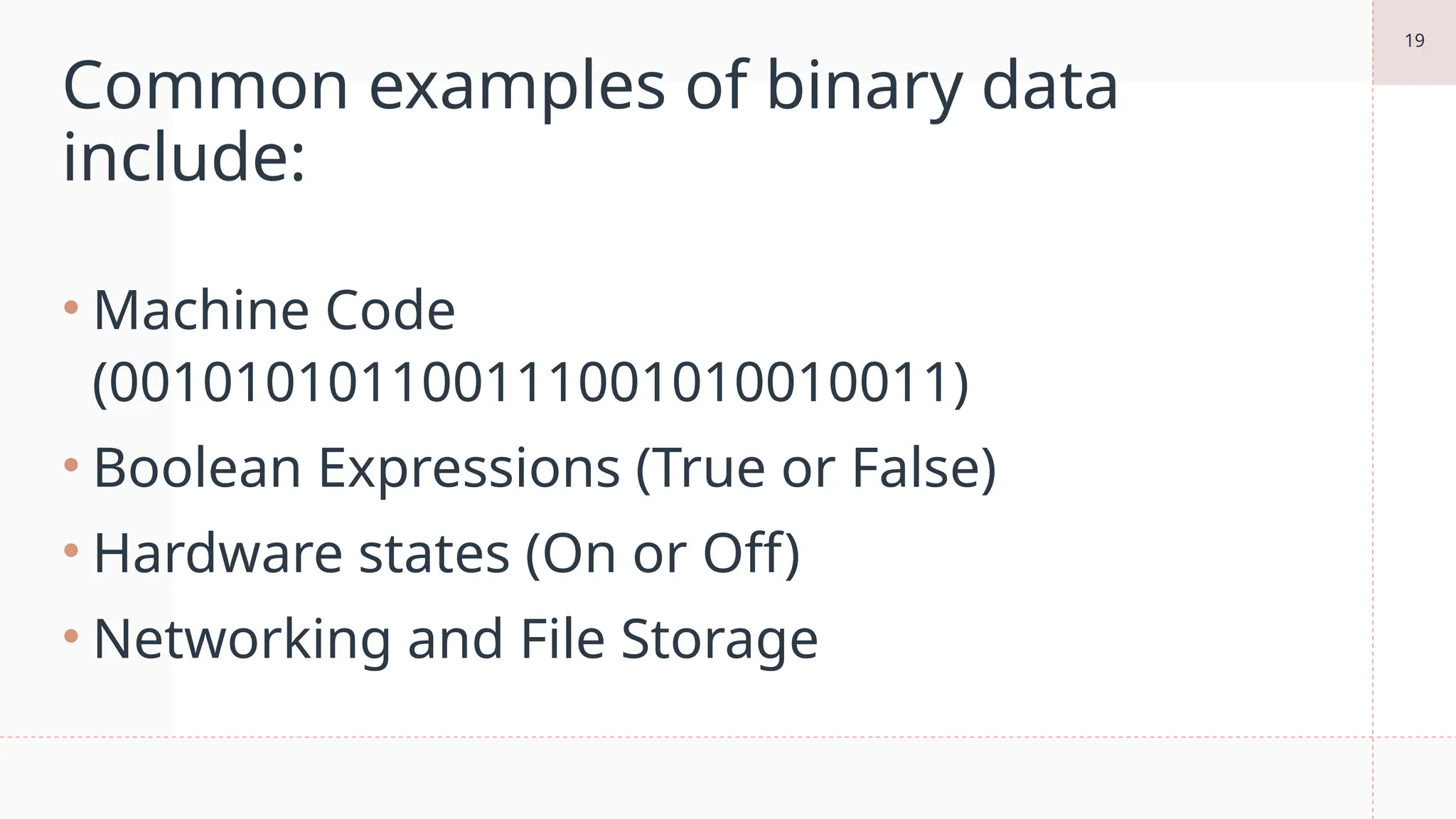
Common examples of binary data
include:
• Machine Code
(001010101100111001010010011)
• Boolean Expressions (True or False)
• Hardware states (On or Off)
• Networking and File Storage
20
Binary in Computing
 Computers only understand two states of being, off and on,
represented by the bits 0 and 1 respectively. Computer
hardware would be incredibly large, expensive, and resource-
intensive if they were made to handle ten different states of
data.
 Binary data also typically comes in specific lengths, for example,
eight bits is called a Byte and two Bytes (16 bits) is called a Word.
When the incoming data follows these guidelines, it is easy for
the hardware to process and compute the desired result.
being, off and on, represented by the bits 0 and 1 respectively. Computer hardware would be incredibly large, expensive, and resource-intensive if they were m
21
Hexadecimal
 Hexadecimal (base 16), often called “hex,” is a convenient and
concise way to represent binary numbers on a computer. Hex
numbers are often used for values like colors and any other
place where we need to represent bits more space efficiently.
They are also commonly used to represent memory addresses.
 Every four binary digits become a single hexadecimal digit,
which simplifies conversions between the two bases. Because
hexadecimal is base 16, we must have 16 numerals, including
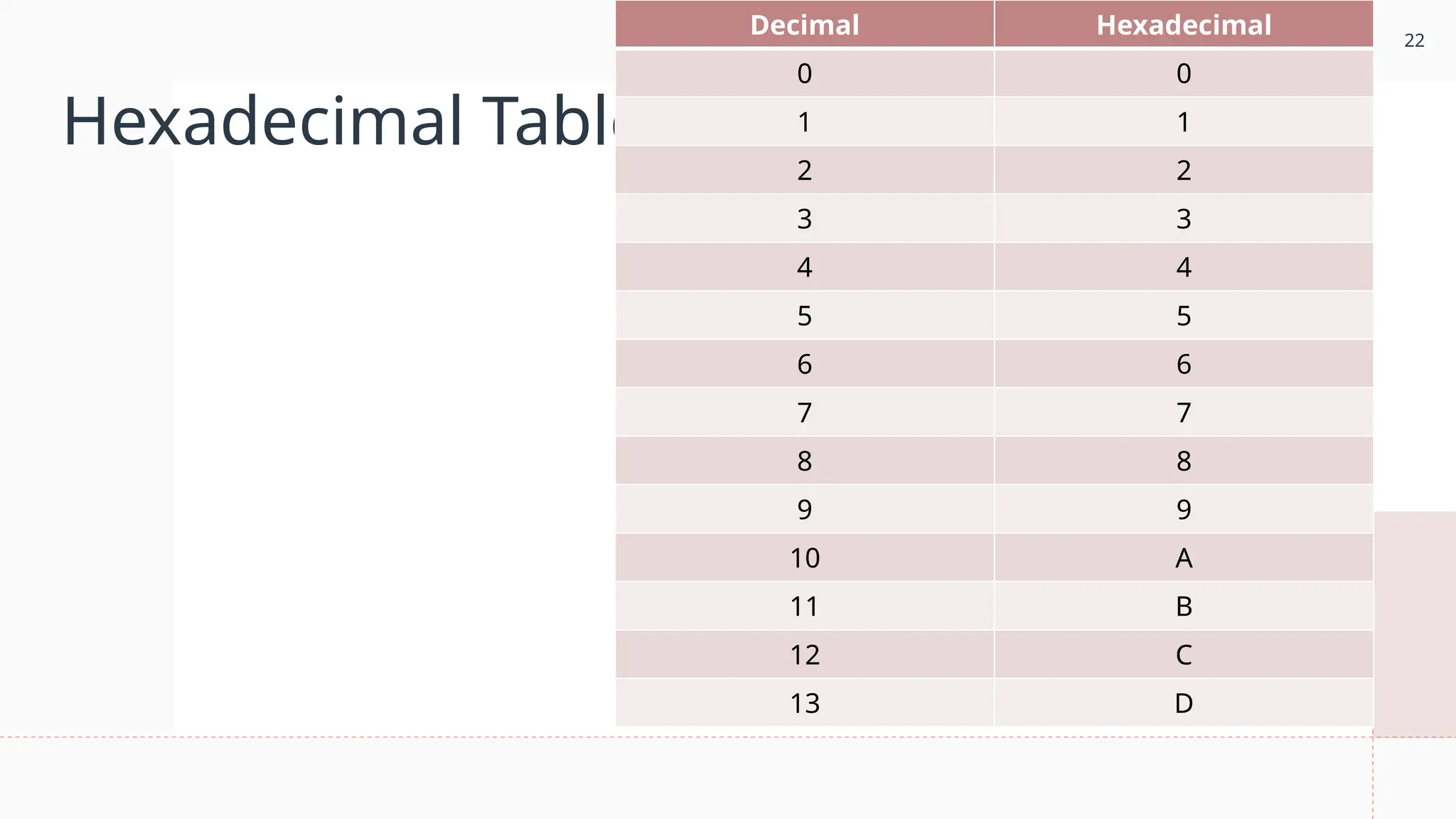
zero. Here is the standard representation for the 16 numerals:
being, off and on, represented by the bits 0 and 1 respectively. Computer hardware would be incredibly large, expensive, and resource-intensive if they were m
22
Hexadecimal Table
Decimal Hexadecimal
0 0
1 1
2 2
3 3
4 4
5 5
6 6
7 7
8 8
9 9
10 A
11 B
12 C
13 D
23
Example
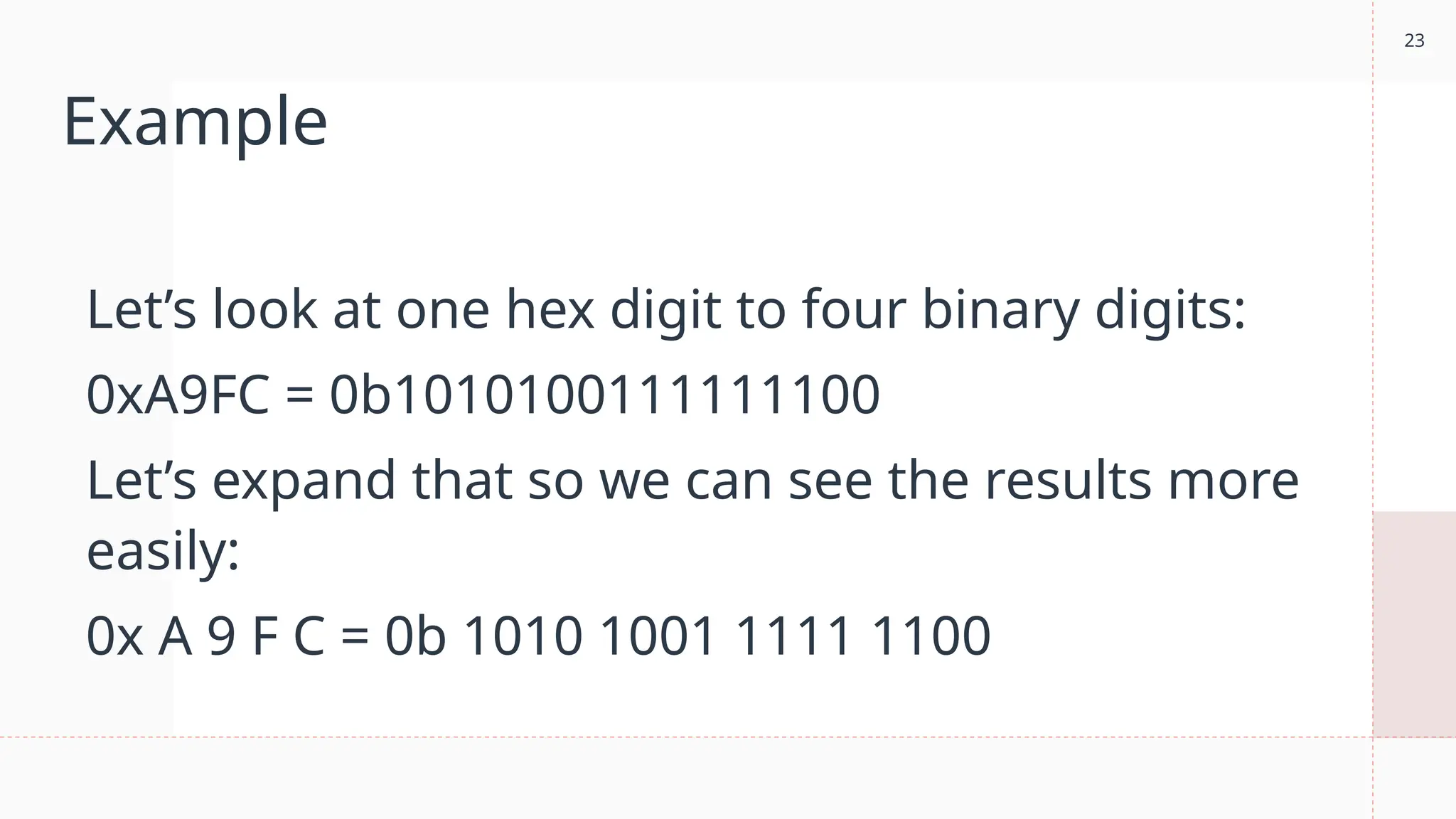
Let’s look at one hex digit to four binary digits:
0xA9FC = 0b1010100111111100
Let’s expand that so we can see the results more
easily:
0x A 9 F C = 0b 1010 1001 1111 1100
24
Binary in Computing
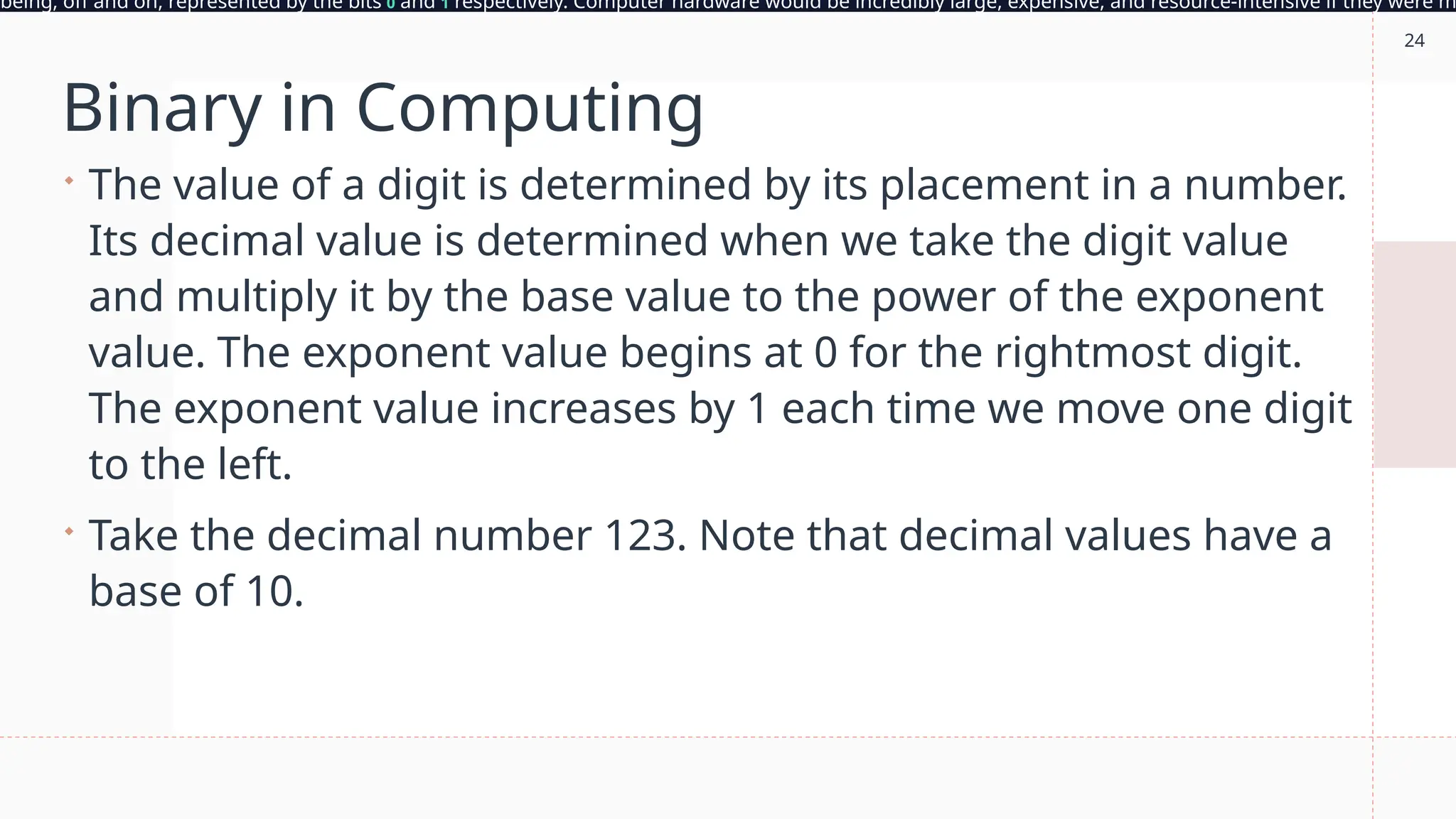
 The value of a digit is determined by its placement in a number.
Its decimal value is determined when we take the digit value
and multiply it by the base value to the power of the exponent
value. The exponent value begins at 0 for the rightmost digit.
The exponent value increases by 1 each time we move one digit
to the left.
 Take the decimal number 123. Note that decimal values have a
base of 10.
being, off and on, represented by the bits 0 and 1 respectively. Computer hardware would be incredibly large, expensive, and resource-intensive if they were m
25
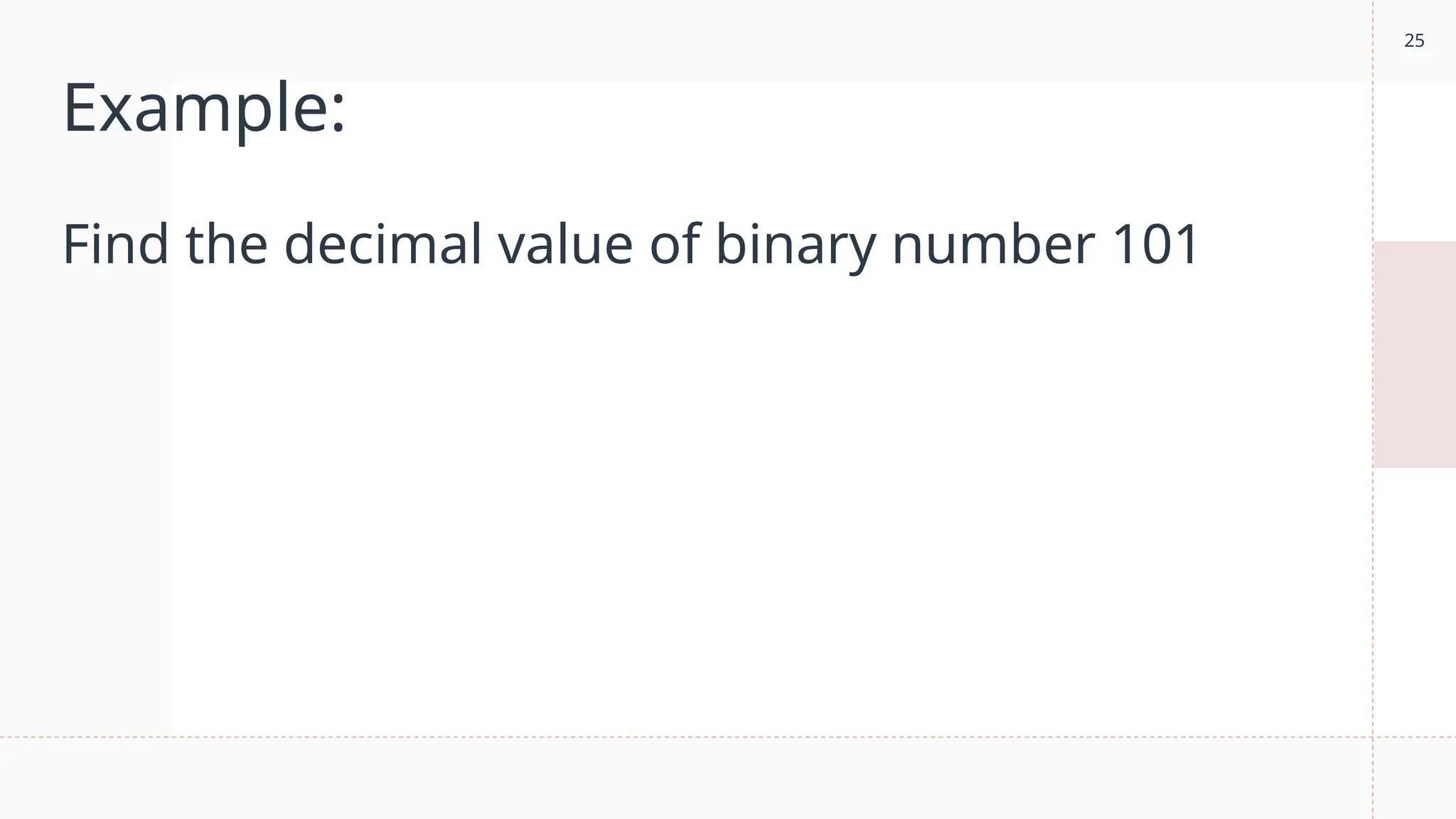
Example:
Find the decimal value of binary number 101
26
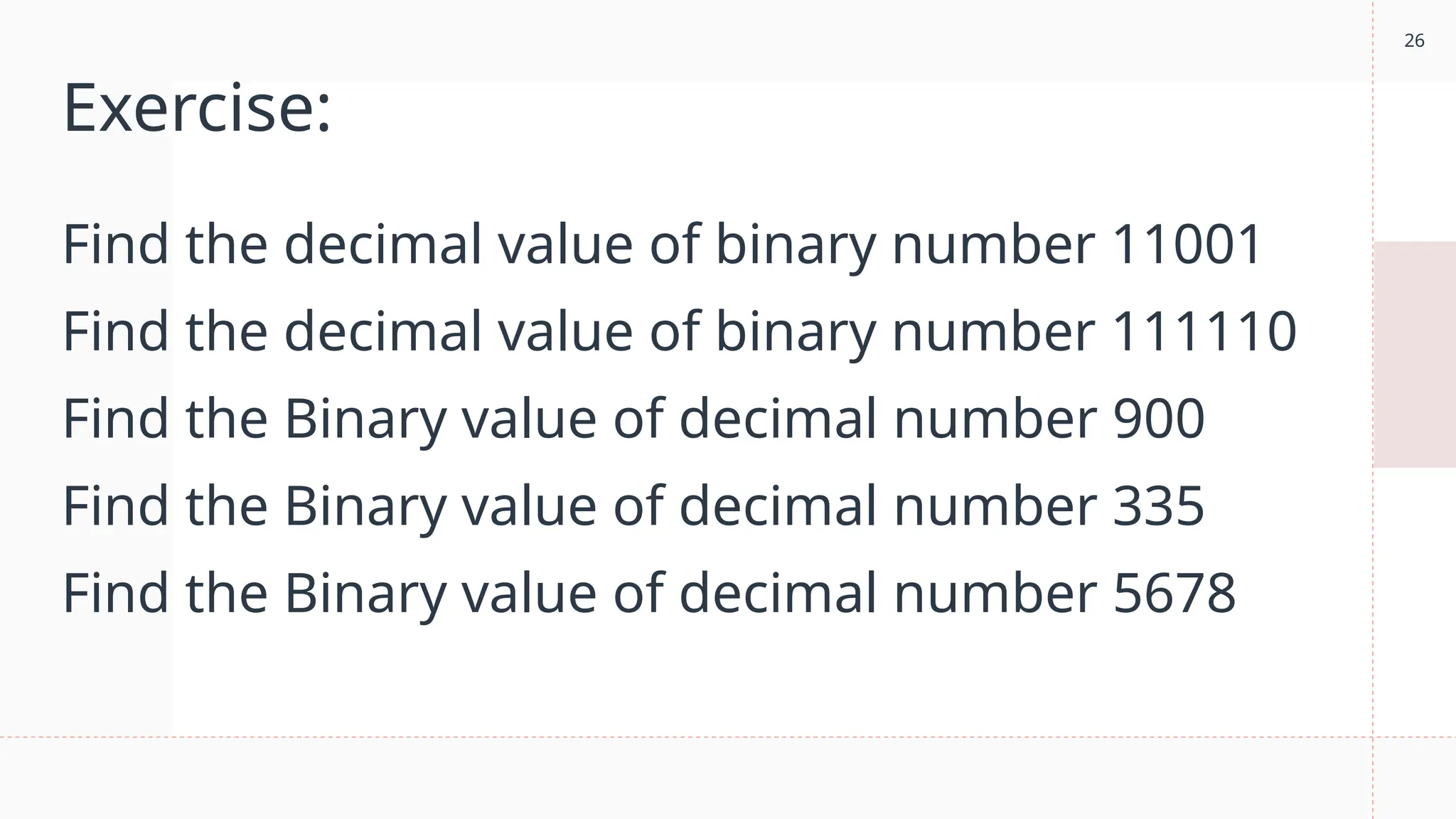
Exercise:
Find the decimal value of binary number 11001
Find the decimal value of binary number 111110
Find the Binary value of decimal number 900
Find the Binary value of decimal number 335
Find the Binary value of decimal number 5678
27
Before Exit
1. What did I learn.
2. I’m still confused about…
3. I enjoyed the topic on…because…
Grade 12 PPT on Computer css servicing lesson 1

  • 1.
  • 2.
    2 What is thatlast topic? 2
  • 3.
  • 4.
    A Central ProcessingUnit (CPU) is the electronic circuitry that executes instructions based on an input of binary data (0’s and 1’s). CPU (Central Processing Unit)
  • 5.
    5 The CPU consistsof three main components: • Control Unit (CU) • Arithmetic and Logic Unit (ALU) • Registers (Immediate Access Store) These components are all wired in very specific ways in order to process data. It is important here to remember that data, to our hardware, is a series of binary, on and off, electrical pulses. These pulses are run through different wires, semiconductors, and components as a means to process and return data that is usable by the software. Now that we have a general understanding of the CPU, let’s dive a little deeper. 5
  • 6.
    6 Control Unit (CU) TheControl Unit (CU) is the overseer of the CPU, responsible for controlling and monitoring the input and output of data from the computer’s hardware. The Control Unit is the component receiving instructions from the software and running the show. Its primary job is making sure that data is sent to the right component, at the right time, and arrives with integrity. Part of this job is keeping all the hardware working on the same schedule. It does this with a clock, which sends out a regular electrical signal to all components at the same time to coordinate activities.
  • 7.
    7 Arithmetic and LogicUnit (ALU) The Arithmetic and Logic Unit (ALU) is where all the processing on your computer takes place. Even as you scroll this text box, the ALU is calculating pixel changes on the screen and sending that output to the monitor. The ALU is the fundamental building block of the CPU, the brains of the entire computer. Nearly all functional processing occurs in this chip. As the name implies, the ALU’s functions can be divided into two primary areas: • Arithmetic operations that deal with calculating data (e.g. 5 * 4 = 20) • Logic operations that deal with comparisons and conditionals (e.g. 25 > 10)
  • 8.
    8 Register The register, orimmediate access store, is limited space, high- speed memory that the CPU can use for quick processing. Registers are small pieces of memory right on the CPU. They are fixed in number and defined in the Instruction Set Architecture. There are typically 8, 16, 32, or 64 registers depending on the architecture and are also fixed in size based on the size of the number it can hold. They provide the CPU with a place to store and access values that are crucial to the immediate calculations the ALU is processing.
  • 9.
    The CPU isjust a single component of the computer’s hardware, other important components of hardware include Random Access Memory (RAM), buses (high-speed wires), as well as a hard disk and other non-volatile memory. Memory
  • 10.
    10 Random Access Memory(RAM) Random Access Memory, or RAM, is additional high- speed memory that a computer uses to store and access information on a short-term basis. In general, a computer’s performance can be directly correlated to the amount of RAM it has available to use. RAM is considered primary volatile memory, which means it loses whatever is stored on it as soon as power is disconnected.
  • 11.
    11 Buses A bus isan engineering term for a job-specific high-speed wire. These wires are often group together in bundles and will transfer electrical signals either in parallel or in serial, that is many signals at once or one pulse at a time. Buses can be grouped into three functions: data buses, address buses, and control buses.
  • 12.
  • 13.
    13 Explanation Data buses carrydata back and forth between the processor and other components. Data buses are bidirectional, which means that they transfer data both to and from other locations. Address buses carry a specific address in memory and are unidirectional. We can visualize all of our memory like a village with each house representing a package of data. Every house/data has an address. When our computer tells a program or component what data to use, it sends the address and then the component knows where to find the data when it needs it. Control buses are also unidirectional and are responsible for carrying the control signals of the CU to other components as well as the clock signals for synchronization.
  • 14.
  • 15.
    15 Introduction to Bases Weuse number bases every day without realizing it. When we think about numbers in everyday life, we are almost always thinking of decimal numbers, or numbers in base 10, where each digit of a number can be one of ten values. People have ten fingers and ten toes (most of the time), so it seems natural to base a number system on ten. But, we are not required to use ten as a base. For example, in the movie Avatar, the Na’vi inhabitants have eight fingers and base their number system on eight because of that. Back on Earth, we see other bases use commonly in computing systems, such as binary (base 2) and hexadecimal (base 16). When we wish to discuss non-ten bases, we use a leading notation like this: 0b1100111101 (binary for decimal 829). Any number can be a base; however binary, hexadecimal, and decimal are the most common on computer systems.
  • 16.
    Binary (Base 2):leading 0b Decimal (Base 10): leading nothing (we use it all the time!) Hexadecimal (Base 16): leading 0x Types of Bases on Computer system
  • 17.
    17 Binary Binary information isdefined as relating to, composed of, or involving two things. What we, as computer scientists, understand as examples of binary can be broken into two distinct categories: 1. Binary Numbers 2. Binary Data Binary numbers are expressed as a combination of 0s and 1s. For example, 100110 is the binary equivalent of the number 38.
  • 18.
    18 Here you cansee decimal values 1 - 10 represented in binary form:
  • 19.
    19 Common examples ofbinary data include: • Machine Code (001010101100111001010010011) • Boolean Expressions (True or False) • Hardware states (On or Off) • Networking and File Storage
  • 20.
    20 Binary in Computing Computers only understand two states of being, off and on, represented by the bits 0 and 1 respectively. Computer hardware would be incredibly large, expensive, and resource- intensive if they were made to handle ten different states of data.  Binary data also typically comes in specific lengths, for example, eight bits is called a Byte and two Bytes (16 bits) is called a Word. When the incoming data follows these guidelines, it is easy for the hardware to process and compute the desired result. being, off and on, represented by the bits 0 and 1 respectively. Computer hardware would be incredibly large, expensive, and resource-intensive if they were m
  • 21.
    21 Hexadecimal  Hexadecimal (base16), often called “hex,” is a convenient and concise way to represent binary numbers on a computer. Hex numbers are often used for values like colors and any other place where we need to represent bits more space efficiently. They are also commonly used to represent memory addresses.  Every four binary digits become a single hexadecimal digit, which simplifies conversions between the two bases. Because hexadecimal is base 16, we must have 16 numerals, including zero. Here is the standard representation for the 16 numerals: being, off and on, represented by the bits 0 and 1 respectively. Computer hardware would be incredibly large, expensive, and resource-intensive if they were m
  • 22.
    22 Hexadecimal Table Decimal Hexadecimal 00 1 1 2 2 3 3 4 4 5 5 6 6 7 7 8 8 9 9 10 A 11 B 12 C 13 D
  • 23.
    23 Example Let’s look atone hex digit to four binary digits: 0xA9FC = 0b1010100111111100 Let’s expand that so we can see the results more easily: 0x A 9 F C = 0b 1010 1001 1111 1100
  • 24.
    24 Binary in Computing The value of a digit is determined by its placement in a number. Its decimal value is determined when we take the digit value and multiply it by the base value to the power of the exponent value. The exponent value begins at 0 for the rightmost digit. The exponent value increases by 1 each time we move one digit to the left.  Take the decimal number 123. Note that decimal values have a base of 10. being, off and on, represented by the bits 0 and 1 respectively. Computer hardware would be incredibly large, expensive, and resource-intensive if they were m
  • 25.
    25 Example: Find the decimalvalue of binary number 101
  • 26.
    26 Exercise: Find the decimalvalue of binary number 11001 Find the decimal value of binary number 111110 Find the Binary value of decimal number 900 Find the Binary value of decimal number 335 Find the Binary value of decimal number 5678
  • 27.
    27 Before Exit 1. Whatdid I learn. 2. I’m still confused about… 3. I enjoyed the topic on…because…