Parallel Programming:
An Introduction to GPU Computing
Will Cunningham
Outline
1. Motivation
2. Hardware Architecture
3. CUDA Programming
4. Connection to Physics
5. Putting it All Together: The Sparse
Conjugate Gradient Method
2
What is a GPU?
• A GPU is a Graphics Processing Unit
• It is optimized for rendering a 2D matrix of
many, many pixels all at the same time
• The GeForce 256 contains 22 million
transistors compared to 9 million in the
Pentium 3 CPU chip
• Despite a slower clock, GPUs can have
hundreds of cores, so hybrid systems have
become very popular over the past decade
3
Who Cares?
“GPUs have evolved to the point where
many real-world applications are easily
implemented on them and run significantly
faster than on multi-core systems. Future
computing architectures will be hybrid
systems with parallel-core GPUs working in
tandem with multi-core CPUs.”
-Prof. Jack Dongarra
Director of the Innovative Computing Laboratory
University of Tennessee 4
Real-World Applications
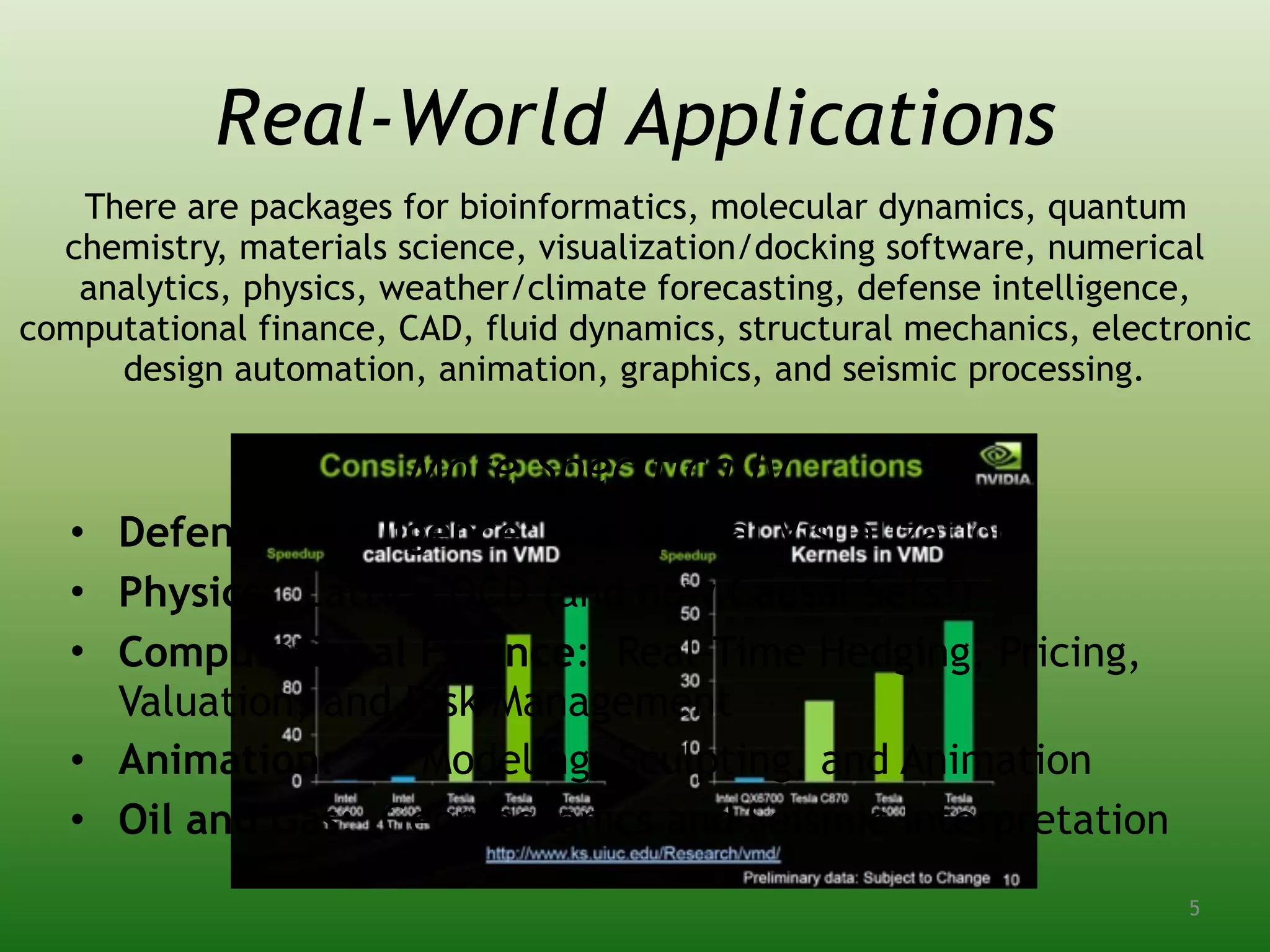
More Specifically…..
• Defense Intelligence: Geospatial Visualization
• Physics: Lattice QCD (and now Causal Sets!)
• Computational Finance: Real-Time Hedging, Pricing,
Valuation, and Risk Management
• Animation: 3D Modeling, Sculpting, and Animation
• Oil and Gas: Geomechanics and Seismic Interpretation
There are packages for bioinformatics, molecular dynamics, quantum
chemistry, materials science, visualization/docking software, numerical
analytics, physics, weather/climate forecasting, defense intelligence,
computational finance, CAD, fluid dynamics, structural mechanics, electronic
design automation, animation, graphics, and seismic processing.
5
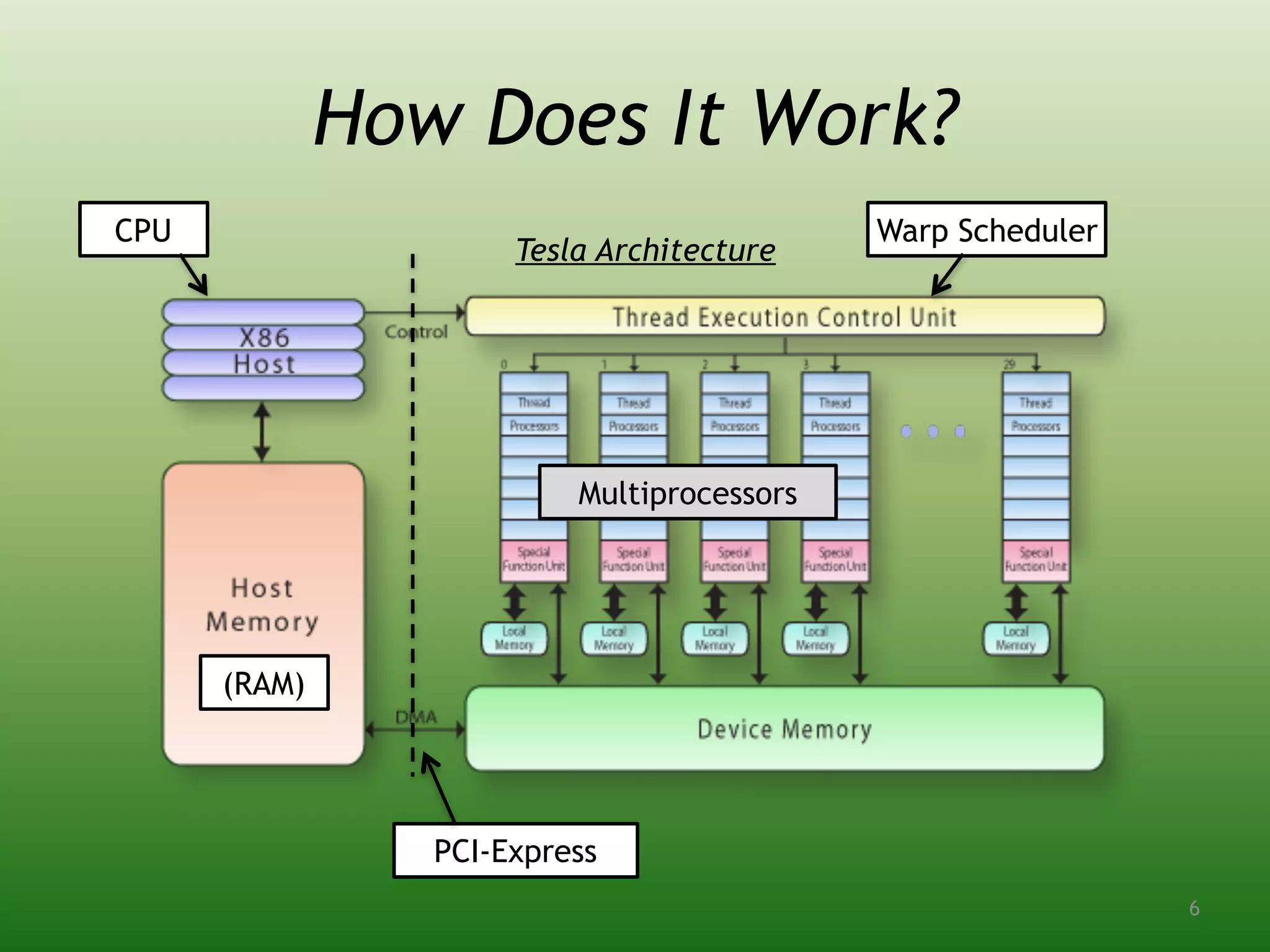
How Does It Work?
Tesla Architecture
PCI-Express
(RAM)
Multiprocessors
CPU Warp Scheduler
6
Different Architectures
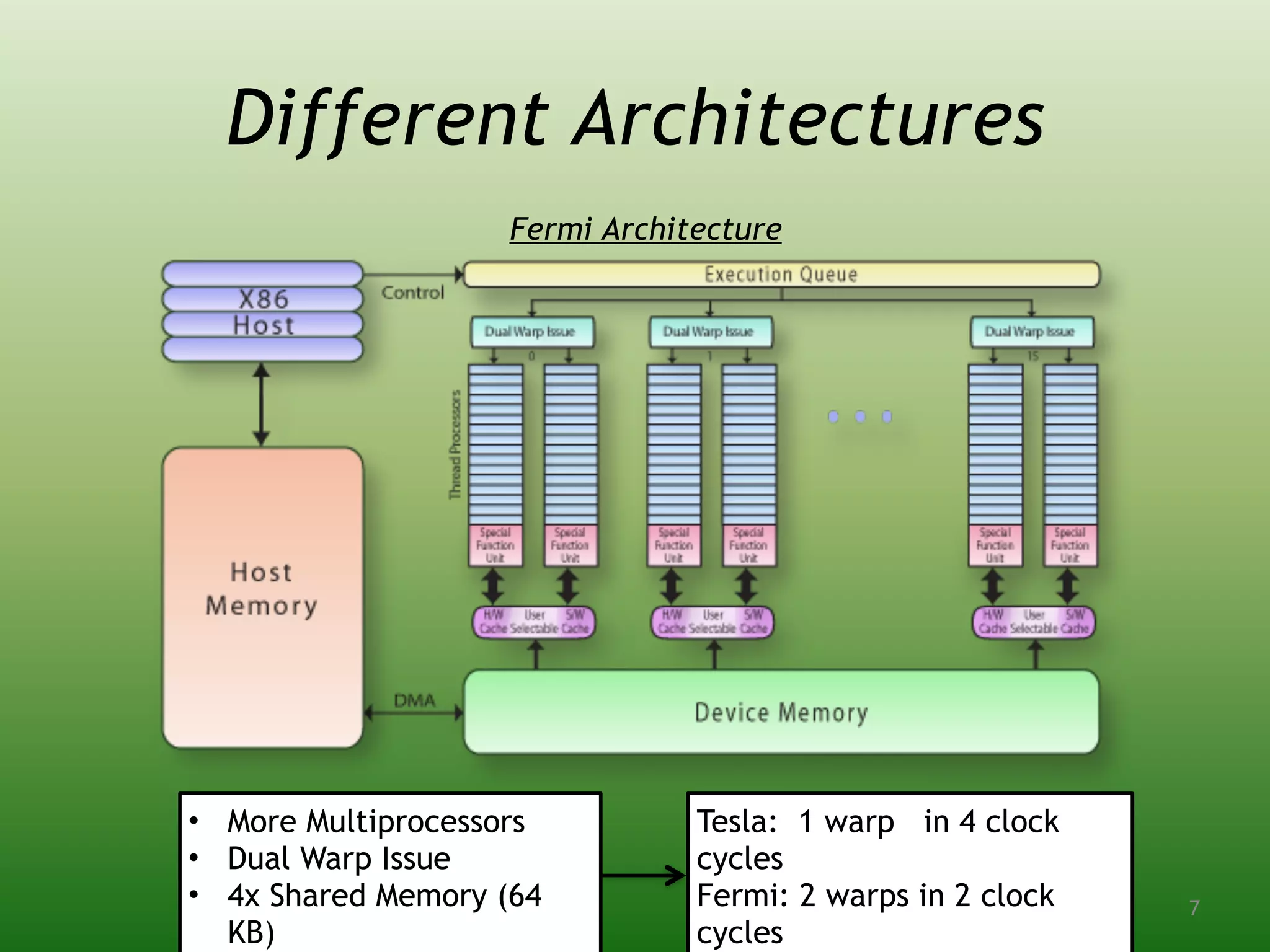
Fermi Architecture
• More Multiprocessors
• Dual Warp Issue
• 4x Shared Memory (64
KB)
Tesla: 1 warp in 4 clock
cycles
Fermi: 2 warps in 2 clock
cycles
7
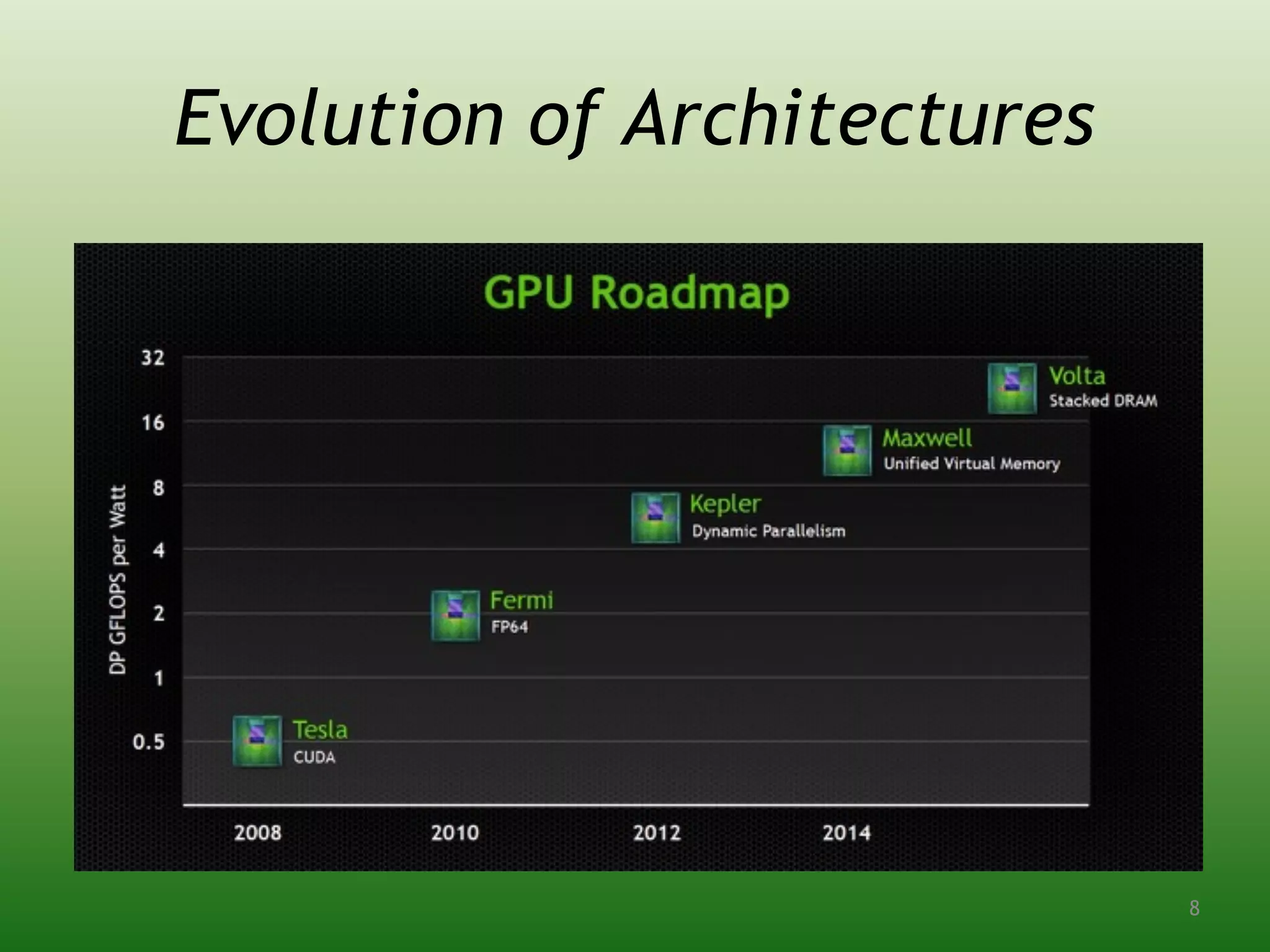
Evolution of Architectures
8
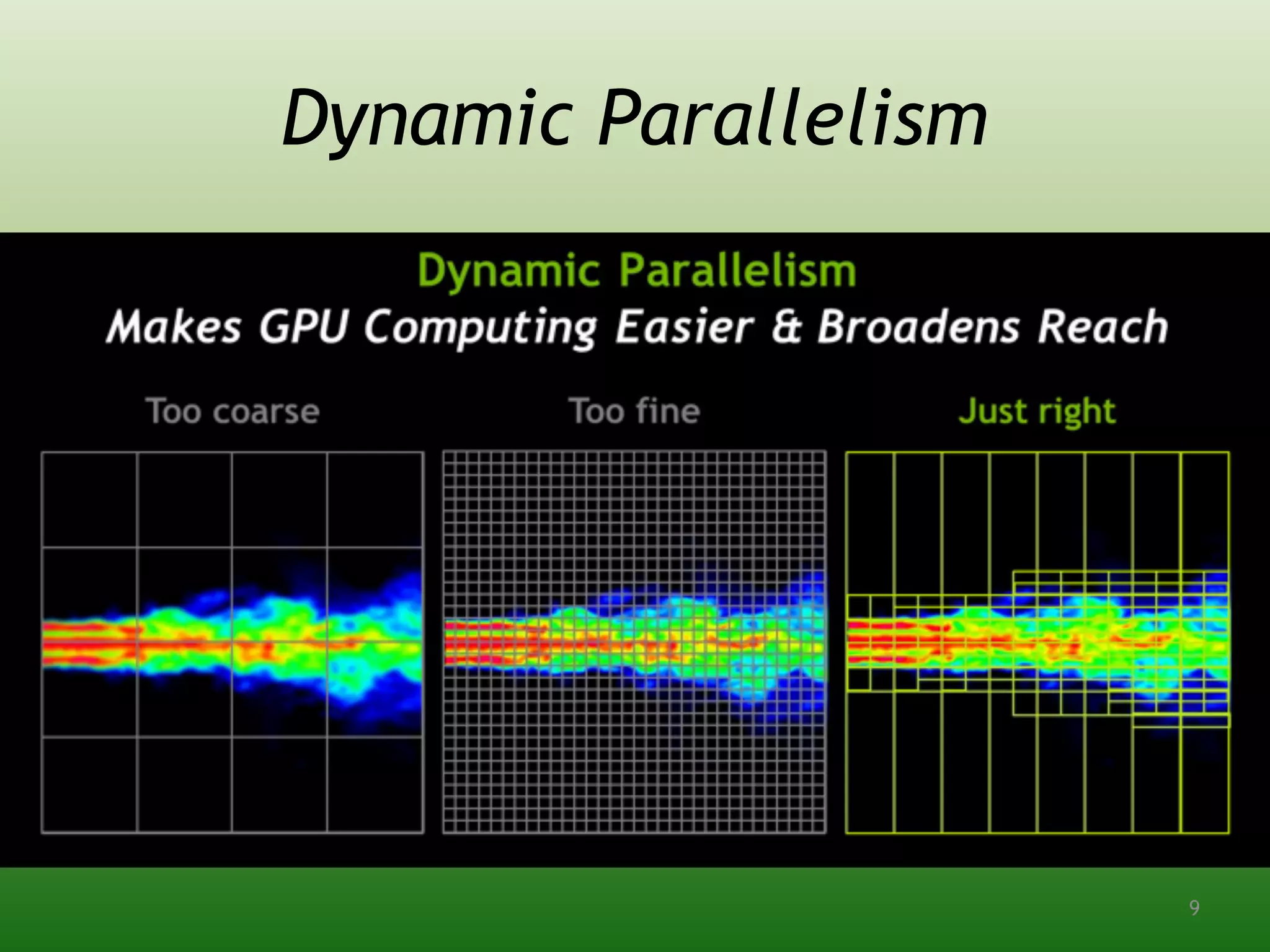
Dynamic Parallelism
9
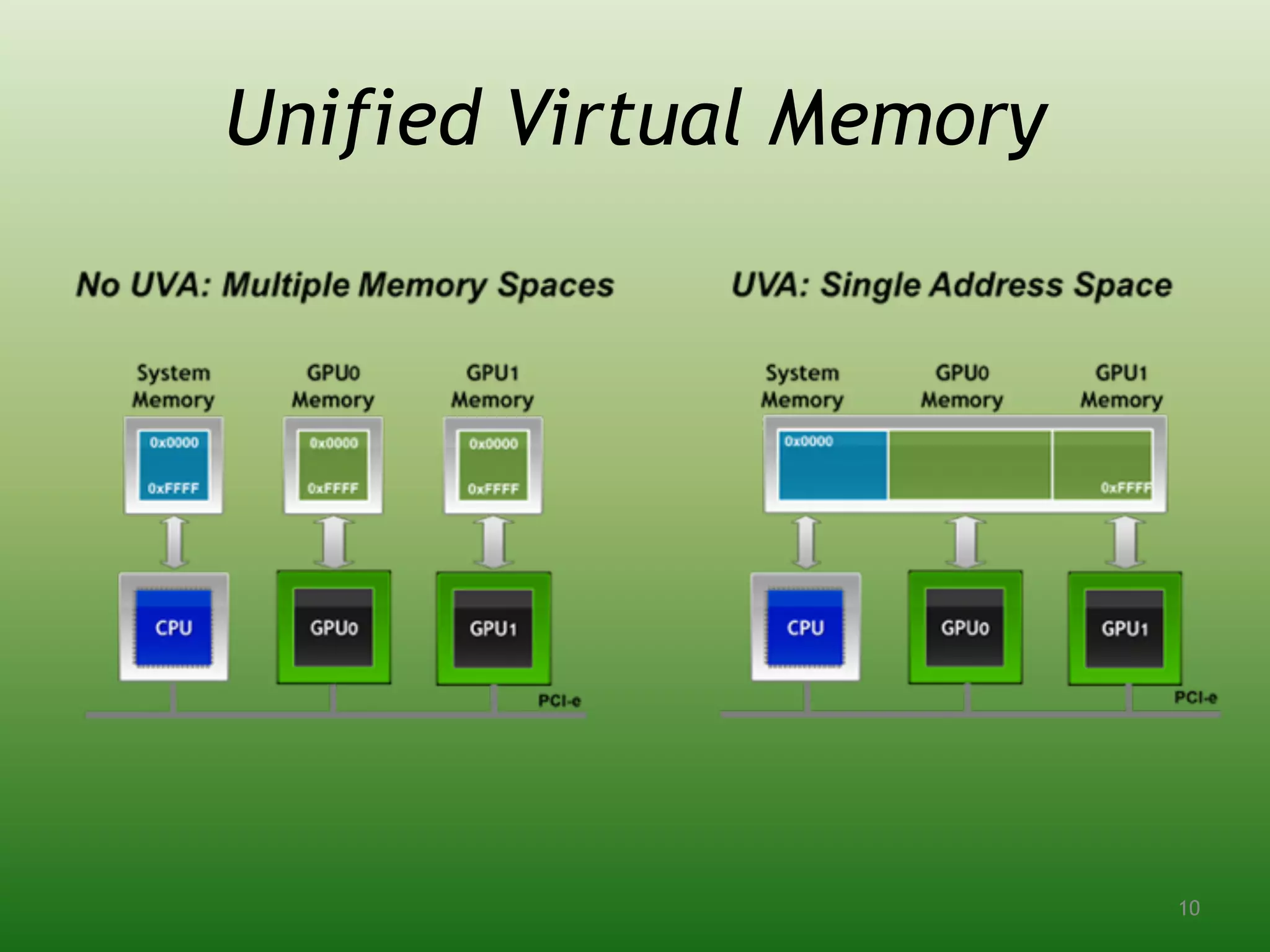
Unified Virtual Memory
10
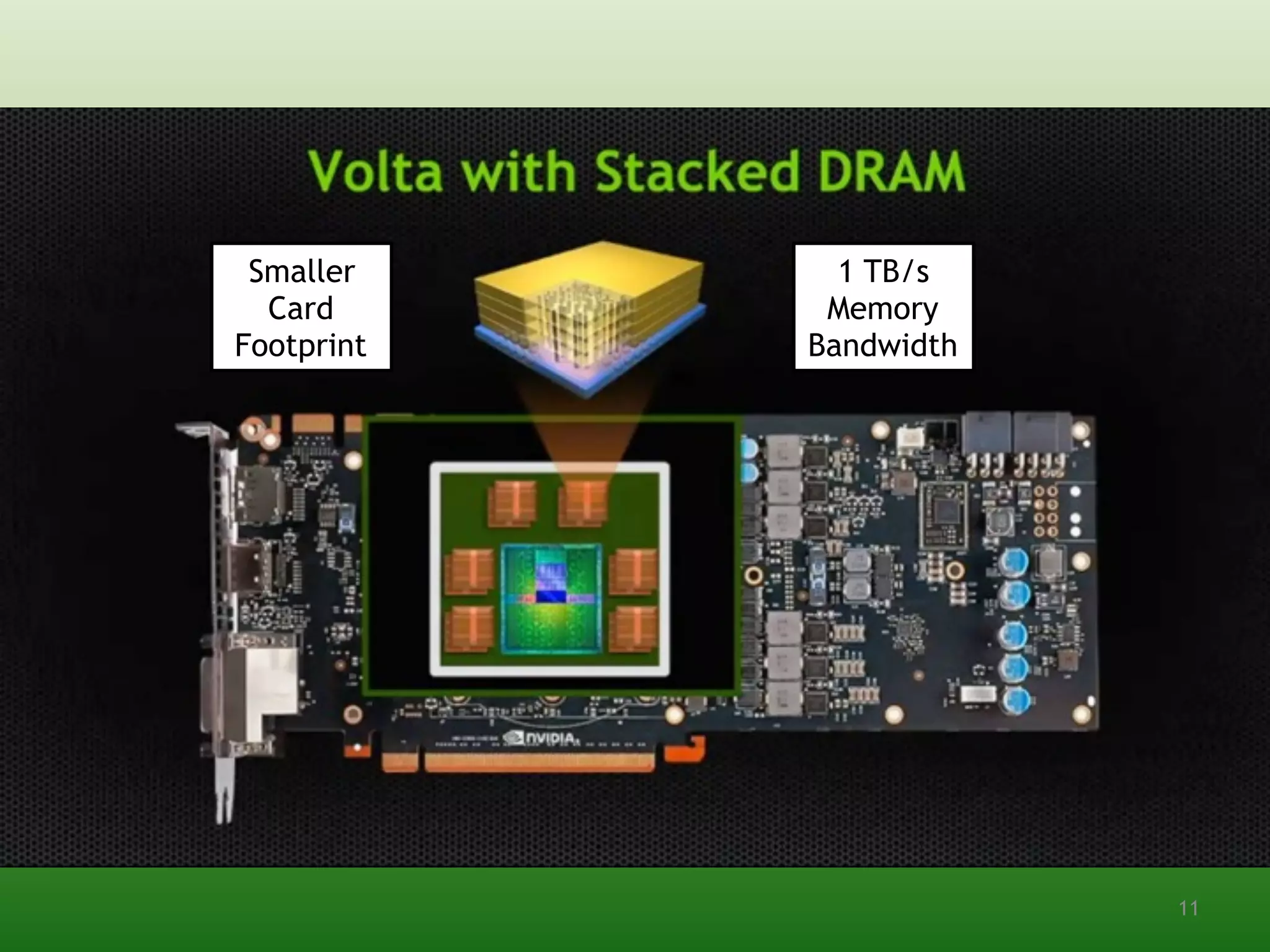
Smaller
Card
Footprint
1 TB/s
Memory
Bandwidth
11
CUDA Programming
5 Parts of a CUDA Program:
1. Initialize Connection to GPU
2. Allocate Memory on GPU
3. Copy Data from RAM to GPU Memory
4. Execute Kernel
5. Copy Data from GPU Memory to RAM
12
Two Ways to Interface
1. Runtime API – Easier to Use, Less Control


2. Driver API – More Code, Greater Control
#include <cuda.h>
CUdevice cuDevice;
CUcontext cuContext;
CUresult result = cuDeviceGet(&cuDevice, dev);
CUresult status = cuCtxCreate(&cuContext,
CU_CTX_SCHED_SPIN | CU_CTX_MAP_HOST, cuDevice);
#include <cuda_runtime_api.h>
cudaError success = cudaSetDevice(devID);
Connecting to the GPU
**You can also write programs in PTX, an intermediate
assembly language for NVIDIA GPUs. This is far more
difficult.
13
Working with Memory
Allocating Memory
//Determine Memory Size (Ex: 10 doubles)
size_t mem_size = sizeof(double) * 10;
//Allocate Host Memory
double *h_data =
(double*)malloc(mem_size); //Initialize
with your data
//Allocate Device Memory
double *d_data;
cudaError success =
cudaMalloc((void**)&d_data, mem_size);
//Copy Data from Host to Device
cudaError success = cudaMemcpy(d_data,
h_data, mem_size,
cudaMemcpyHostToDevice);
Deallocating Memory
//Copy Result from Device to Host
cudaError success = cudaMemcpy(h_data,
d_data, mem_size,
cudaMemcpyDeviceToHost);
//Free Host Memory
free(h_data);
cudaFree(d_data);
//Null Pointers
h_data = NULL;
d_data = NULL;
Make sure not to confuse host and
device memory addresses!
14
Kernels are functions written to run on the
GPU:
Invocation on the host side executes the
kernel:
//This kernel adds the each value in d_data to its index
__global__ void myKernel(double *d_data)
{
unsigned int i = blockDim.x * blockIdx.x + threadIdx.x;
unsigned int j = blockDim.y * blockIdx.y + threadIdx.y;
d_data[(i*width)+j] = d_data[(i*width)+j] + (i*width) + j;
}
Kernels
//Kernel Parameters
dim3 threads(numthreads / blocksize, 1);
dim3 blocks(blocksize, 1);
//Execute Kernel
myKernel<<<blocks, threads>>>(d_data);
These
determine the
grid size
15
The Grid
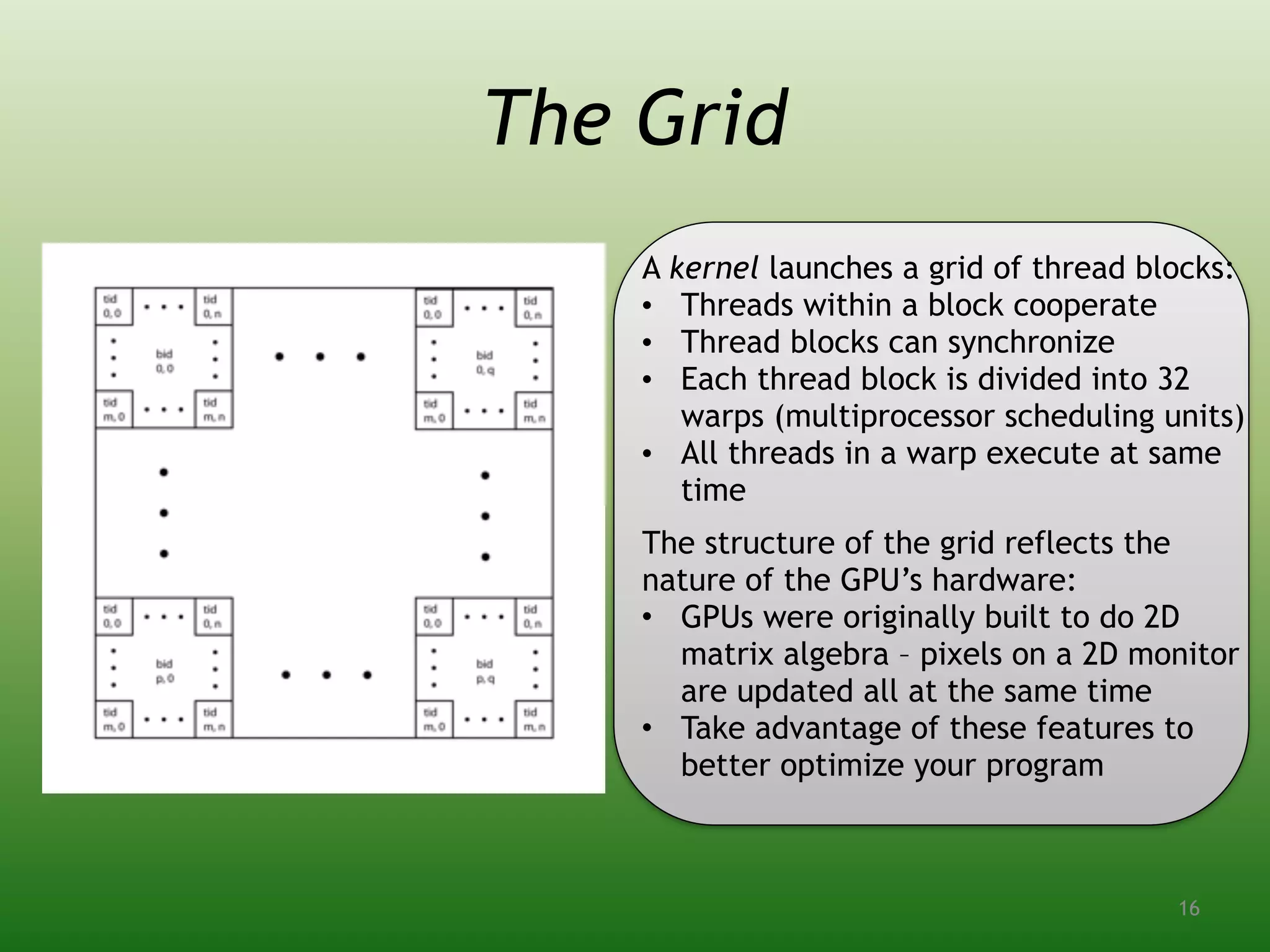
A kernel launches a grid of thread blocks:
• Threads within a block cooperate
• Thread blocks can synchronize
• Each thread block is divided into 32
warps (multiprocessor scheduling units)
• All threads in a warp execute at same
time
The structure of the grid reflects the
nature of the GPU’s hardware:
• GPUs were originally built to do 2D
matrix algebra – pixels on a 2D monitor
are updated all at the same time
• Take advantage of these features to
better optimize your program
16
Application to Physics
➢Nearly every physics problem can be
related back to a system of eigenvalue
equations
➢This makes matrix inversion very
important for computational physicists
➢The algorithms become a bit more
interesting when we are dealing with
sparse matrices
17
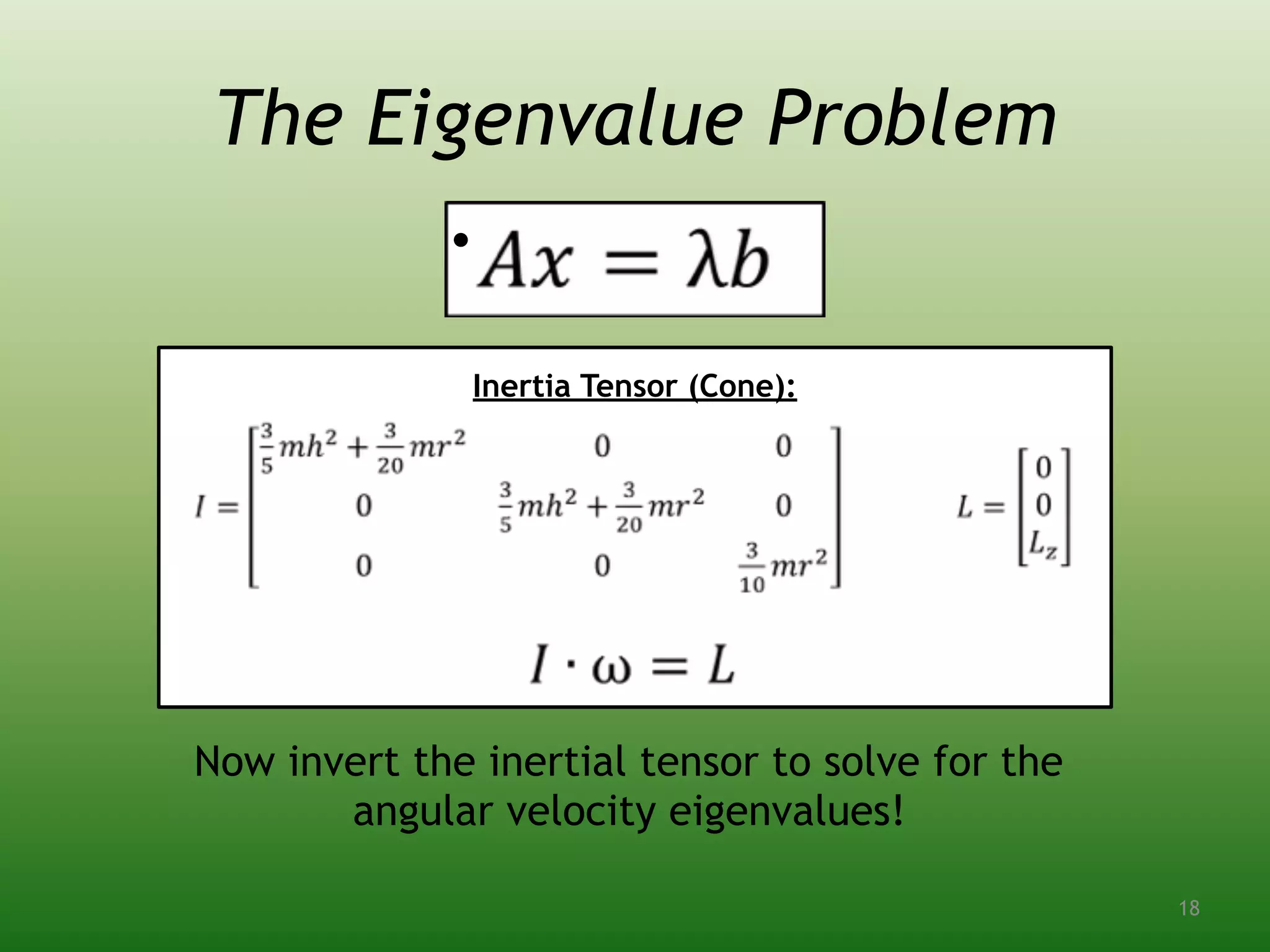
The Eigenvalue Problem
•  
 
Inertia Tensor (Cone):
Now invert the inertial tensor to solve for the
angular velocity eigenvalues!
18
Inversion on the CPU
There are many methods to decompose a matrix
using a standard numerical algorithm. Many of
these are optimized in downloadable libraries!
❖ Gauss-Jordan Elimination
❖ LU or QR Factorization
❖ Cholesky Decomposition
❖ Singular Value
Decomposition
❖ Conjugate Gradient Method
❖ Biconjugate Gradient
Method 19
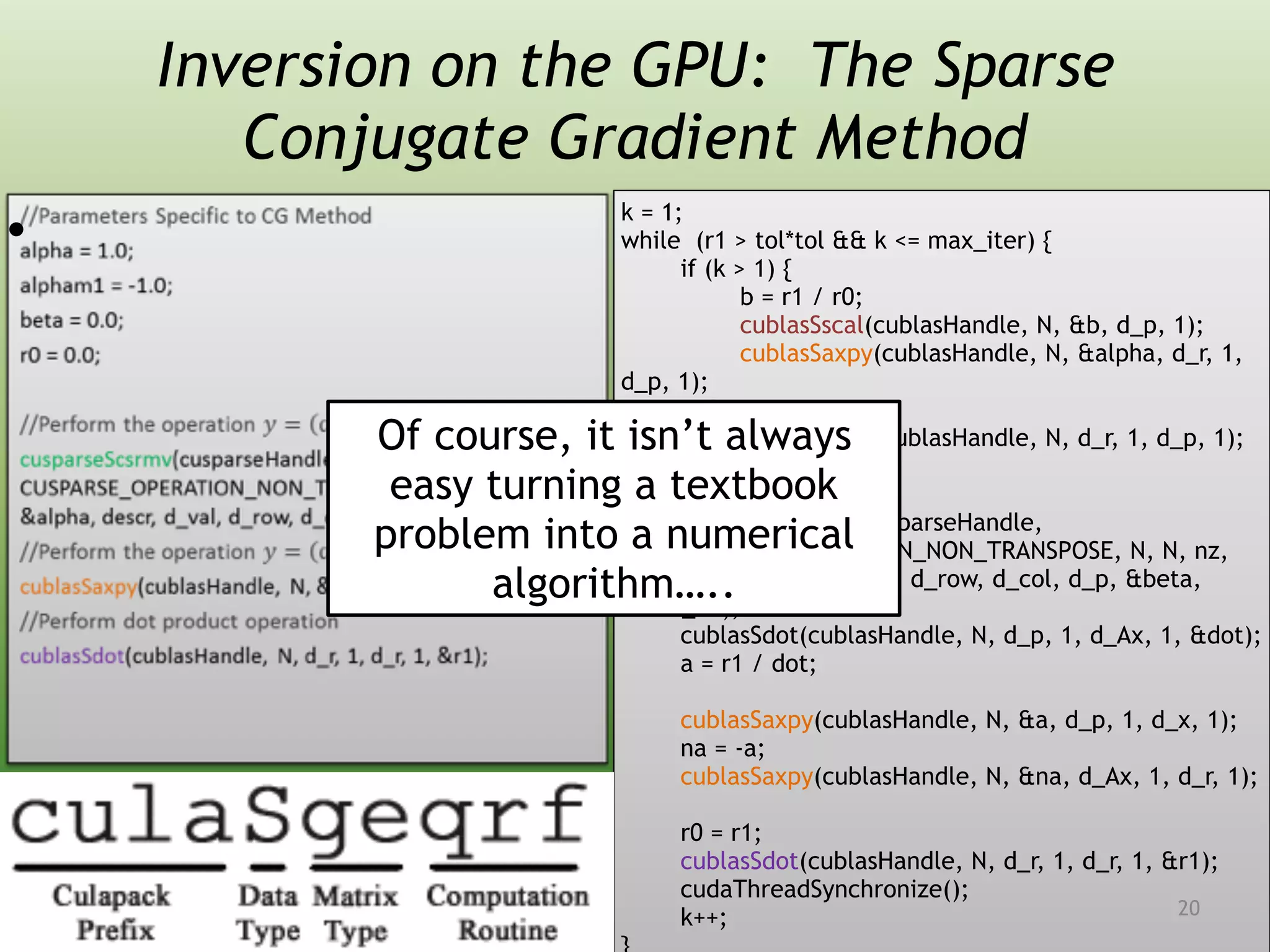
Inversion on the GPU: The Sparse
Conjugate Gradient Method
•  
k = 1;
while (r1 > tol*tol && k <= max_iter) {
if (k > 1) {
b = r1 / r0;
cublasSscal(cublasHandle, N, &b, d_p, 1);
cublasSaxpy(cublasHandle, N, &alpha, d_r, 1,
d_p, 1);
} else {
cublasScopy(cublasHandle, N, d_r, 1, d_p, 1);
}
cusparseScsrmv(cusparseHandle,
CUSPARSE_OPERATION_NON_TRANSPOSE, N, N, nz,
&alpha, descr, d_val, d_row, d_col, d_p, &beta,
d_Ax);
cublasSdot(cublasHandle, N, d_p, 1, d_Ax, 1, &dot);
a = r1 / dot;
cublasSaxpy(cublasHandle, N, &a, d_p, 1, d_x, 1);
na = -a;
cublasSaxpy(cublasHandle, N, &na, d_Ax, 1, d_r, 1);
r0 = r1;
cublasSdot(cublasHandle, N, d_r, 1, d_r, 1, &r1);
cudaThreadSynchronize();
k++;
Of course, it isn’t always
easy turning a textbook
problem into a numerical
algorithm…..
20
External Resources
• NVIDIA Support (developer.nvidia.com)
• Download test matrices at Matrix Market
(math.nist.gov/MatrixMarket)
• Popular Packages: CUBLAS, CULA, CUFFT,
Thrust, CUSPARSE, CUSP
• Check out the Cuda Wiki
(icmp.phys.rpi.edu/cudawiki) for more
information, as well as instructions for
how to use the GPU on your own
computer for parallel programming!
21
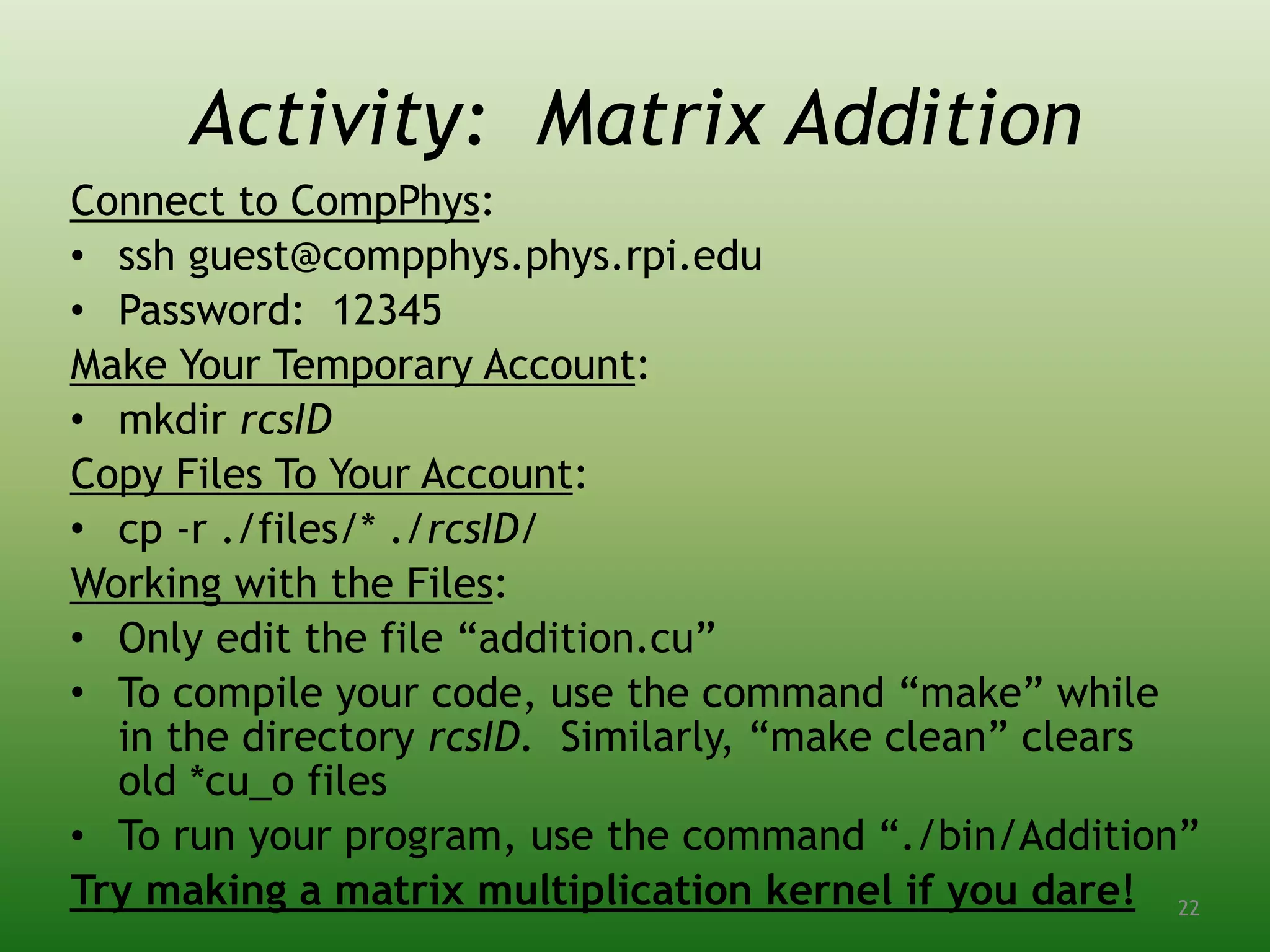
Activity: Matrix Addition
Connect to CompPhys:
• ssh guest@compphys.phys.rpi.edu
• Password: 12345
Make Your Temporary Account:
• mkdir rcsID
Copy Files To Your Account:
• cp -r ./files/* ./rcsID/
Working with the Files:
• Only edit the file “addition.cu”
• To compile your code, use the command “make” while
in the directory rcsID. Similarly, “make clean” clears
old *cu_o files
• To run your program, use the command “./bin/Addition”
Try making a matrix multiplication kernel if you dare! 22

GPU Programming

  • 1.
    Parallel Programming: An Introductionto GPU Computing Will Cunningham
  • 2.
    Outline 1. Motivation 2. HardwareArchitecture 3. CUDA Programming 4. Connection to Physics 5. Putting it All Together: The Sparse Conjugate Gradient Method 2
  • 3.
    What is aGPU? • A GPU is a Graphics Processing Unit • It is optimized for rendering a 2D matrix of many, many pixels all at the same time • The GeForce 256 contains 22 million transistors compared to 9 million in the Pentium 3 CPU chip • Despite a slower clock, GPUs can have hundreds of cores, so hybrid systems have become very popular over the past decade 3
  • 4.
    Who Cares? “GPUs haveevolved to the point where many real-world applications are easily implemented on them and run significantly faster than on multi-core systems. Future computing architectures will be hybrid systems with parallel-core GPUs working in tandem with multi-core CPUs.” -Prof. Jack Dongarra Director of the Innovative Computing Laboratory University of Tennessee 4
  • 5.
    Real-World Applications More Specifically….. •Defense Intelligence: Geospatial Visualization • Physics: Lattice QCD (and now Causal Sets!) • Computational Finance: Real-Time Hedging, Pricing, Valuation, and Risk Management • Animation: 3D Modeling, Sculpting, and Animation • Oil and Gas: Geomechanics and Seismic Interpretation There are packages for bioinformatics, molecular dynamics, quantum chemistry, materials science, visualization/docking software, numerical analytics, physics, weather/climate forecasting, defense intelligence, computational finance, CAD, fluid dynamics, structural mechanics, electronic design automation, animation, graphics, and seismic processing. 5
  • 6.
    How Does ItWork? Tesla Architecture PCI-Express (RAM) Multiprocessors CPU Warp Scheduler 6
  • 7.
    Different Architectures Fermi Architecture •More Multiprocessors • Dual Warp Issue • 4x Shared Memory (64 KB) Tesla: 1 warp in 4 clock cycles Fermi: 2 warps in 2 clock cycles 7
  • 8.
  • 9.
  • 10.
  • 11.
  • 12.
    CUDA Programming 5 Partsof a CUDA Program: 1. Initialize Connection to GPU 2. Allocate Memory on GPU 3. Copy Data from RAM to GPU Memory 4. Execute Kernel 5. Copy Data from GPU Memory to RAM 12
  • 13.
    Two Ways toInterface 1. Runtime API – Easier to Use, Less Control
 
 2. Driver API – More Code, Greater Control #include <cuda.h> CUdevice cuDevice; CUcontext cuContext; CUresult result = cuDeviceGet(&cuDevice, dev); CUresult status = cuCtxCreate(&cuContext, CU_CTX_SCHED_SPIN | CU_CTX_MAP_HOST, cuDevice); #include <cuda_runtime_api.h> cudaError success = cudaSetDevice(devID); Connecting to the GPU **You can also write programs in PTX, an intermediate assembly language for NVIDIA GPUs. This is far more difficult. 13
  • 14.
    Working with Memory AllocatingMemory //Determine Memory Size (Ex: 10 doubles) size_t mem_size = sizeof(double) * 10; //Allocate Host Memory double *h_data = (double*)malloc(mem_size); //Initialize with your data //Allocate Device Memory double *d_data; cudaError success = cudaMalloc((void**)&d_data, mem_size); //Copy Data from Host to Device cudaError success = cudaMemcpy(d_data, h_data, mem_size, cudaMemcpyHostToDevice); Deallocating Memory //Copy Result from Device to Host cudaError success = cudaMemcpy(h_data, d_data, mem_size, cudaMemcpyDeviceToHost); //Free Host Memory free(h_data); cudaFree(d_data); //Null Pointers h_data = NULL; d_data = NULL; Make sure not to confuse host and device memory addresses! 14
  • 15.
    Kernels are functionswritten to run on the GPU: Invocation on the host side executes the kernel: //This kernel adds the each value in d_data to its index __global__ void myKernel(double *d_data) { unsigned int i = blockDim.x * blockIdx.x + threadIdx.x; unsigned int j = blockDim.y * blockIdx.y + threadIdx.y; d_data[(i*width)+j] = d_data[(i*width)+j] + (i*width) + j; } Kernels //Kernel Parameters dim3 threads(numthreads / blocksize, 1); dim3 blocks(blocksize, 1); //Execute Kernel myKernel<<<blocks, threads>>>(d_data); These determine the grid size 15
  • 16.
    The Grid A kernellaunches a grid of thread blocks: • Threads within a block cooperate • Thread blocks can synchronize • Each thread block is divided into 32 warps (multiprocessor scheduling units) • All threads in a warp execute at same time The structure of the grid reflects the nature of the GPU’s hardware: • GPUs were originally built to do 2D matrix algebra – pixels on a 2D monitor are updated all at the same time • Take advantage of these features to better optimize your program 16
  • 17.
    Application to Physics ➢Nearlyevery physics problem can be related back to a system of eigenvalue equations ➢This makes matrix inversion very important for computational physicists ➢The algorithms become a bit more interesting when we are dealing with sparse matrices 17
  • 18.
    The Eigenvalue Problem •    Inertia Tensor (Cone): Now invert the inertial tensor to solve for the angular velocity eigenvalues! 18
  • 19.
    Inversion on theCPU There are many methods to decompose a matrix using a standard numerical algorithm. Many of these are optimized in downloadable libraries! ❖ Gauss-Jordan Elimination ❖ LU or QR Factorization ❖ Cholesky Decomposition ❖ Singular Value Decomposition ❖ Conjugate Gradient Method ❖ Biconjugate Gradient Method 19
  • 20.
    Inversion on theGPU: The Sparse Conjugate Gradient Method •   k = 1; while (r1 > tol*tol && k <= max_iter) { if (k > 1) { b = r1 / r0; cublasSscal(cublasHandle, N, &b, d_p, 1); cublasSaxpy(cublasHandle, N, &alpha, d_r, 1, d_p, 1); } else { cublasScopy(cublasHandle, N, d_r, 1, d_p, 1); } cusparseScsrmv(cusparseHandle, CUSPARSE_OPERATION_NON_TRANSPOSE, N, N, nz, &alpha, descr, d_val, d_row, d_col, d_p, &beta, d_Ax); cublasSdot(cublasHandle, N, d_p, 1, d_Ax, 1, &dot); a = r1 / dot; cublasSaxpy(cublasHandle, N, &a, d_p, 1, d_x, 1); na = -a; cublasSaxpy(cublasHandle, N, &na, d_Ax, 1, d_r, 1); r0 = r1; cublasSdot(cublasHandle, N, d_r, 1, d_r, 1, &r1); cudaThreadSynchronize(); k++; Of course, it isn’t always easy turning a textbook problem into a numerical algorithm….. 20
  • 21.
    External Resources • NVIDIASupport (developer.nvidia.com) • Download test matrices at Matrix Market (math.nist.gov/MatrixMarket) • Popular Packages: CUBLAS, CULA, CUFFT, Thrust, CUSPARSE, CUSP • Check out the Cuda Wiki (icmp.phys.rpi.edu/cudawiki) for more information, as well as instructions for how to use the GPU on your own computer for parallel programming! 21
  • 22.
    Activity: Matrix Addition Connectto CompPhys: • ssh guest@compphys.phys.rpi.edu • Password: 12345 Make Your Temporary Account: • mkdir rcsID Copy Files To Your Account: • cp -r ./files/* ./rcsID/ Working with the Files: • Only edit the file “addition.cu” • To compile your code, use the command “make” while in the directory rcsID. Similarly, “make clean” clears old *cu_o files • To run your program, use the command “./bin/Addition” Try making a matrix multiplication kernel if you dare! 22