SNJB’s
Late Sau.Kantabai Bhavarlalji Jain College of
Engineering
FLUTTER
TECHNOLOGY
1
BY:
Divya Prafull Wani
(TE Computer Engineering)
Outline
Introduction
Need
Popularity
Comparison
Architecture
Working
Example
Application
Advantages
Limitations
Conclusion
Reference's
FLUTTER
TECHNOLOGY
2
Introduction
It is single codebase for Android and ioS.
Free and Open Source.
It is invented by Google.
Built with C,C++, and dart based .
Mobile app SDK.
Easy access to developer.
FLUTTER
3
Why to Use?
High quality native app
Fast Development
Expressive and Beautiful UI
Native Performance
Migration
FLUTTER
TECHNOLOGY
4
Popularity
Reactive performance
Code usability
rendering engine to draw widgets.
Modern and reactive framework.
Build Full featured apps
FLUTTER
TECHNOLOGY
5
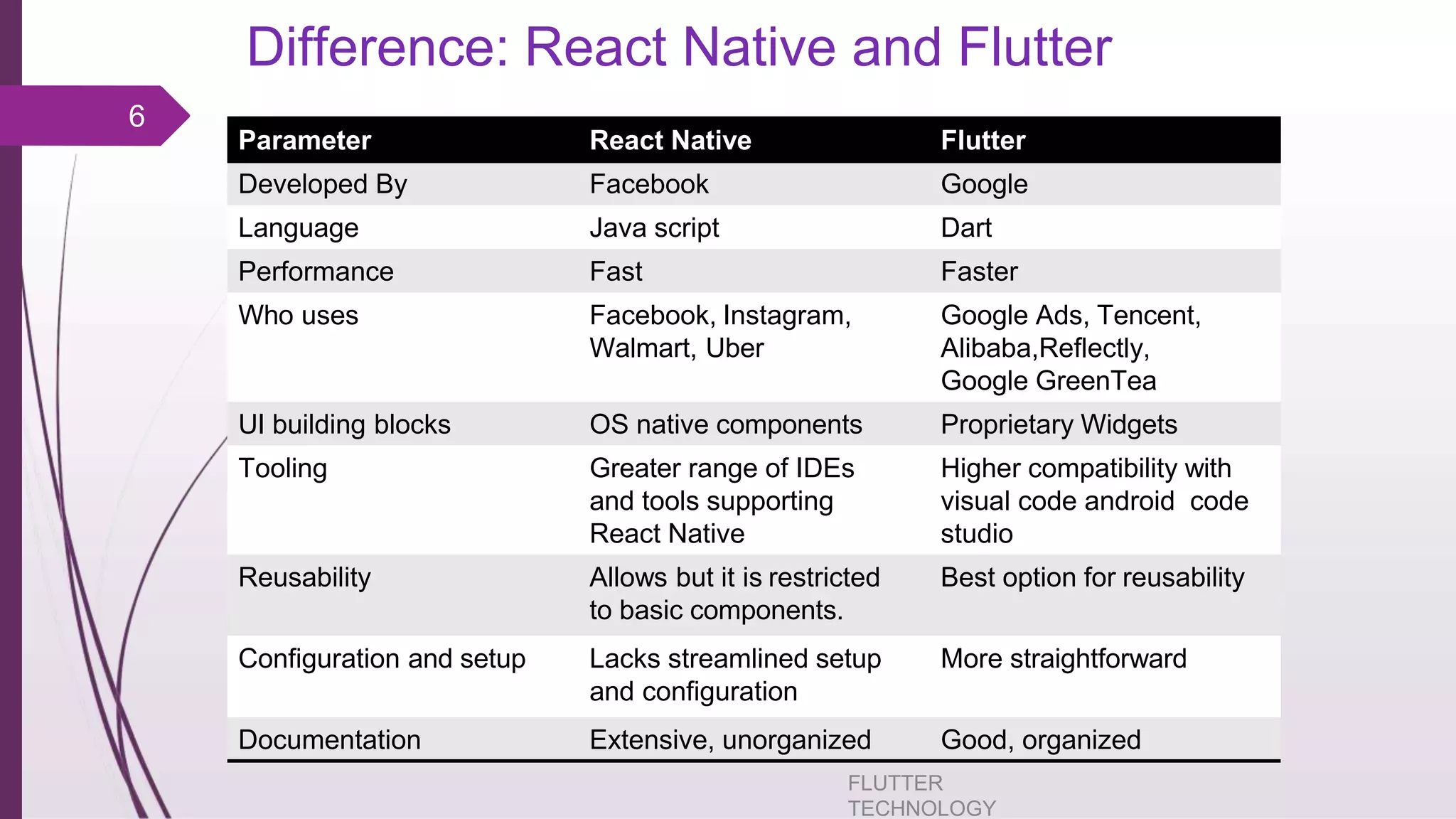
Difference: React Native and Flutter
FLUTTER
TECHNOLOGY
6
Parameter React Native Flutter
Developed By Facebook Google
Language Java script Dart
Performance Fast Faster
Who uses Facebook, Instagram,
Walmart, Uber
Google Ads, Tencent,
Alibaba,Reflectly,
Google GreenTea
UI building blocks OS native components Proprietary Widgets
Tooling Greater range of IDEs
and tools supporting
React Native
Higher compatibility with
visual code android code
studio
Reusability Allows but it is restricted
to basic components.
Best option for reusability
Configuration and setup Lacks streamlined setup
and configuration
More straightforward
Documentation Extensive, unorganized Good, organized
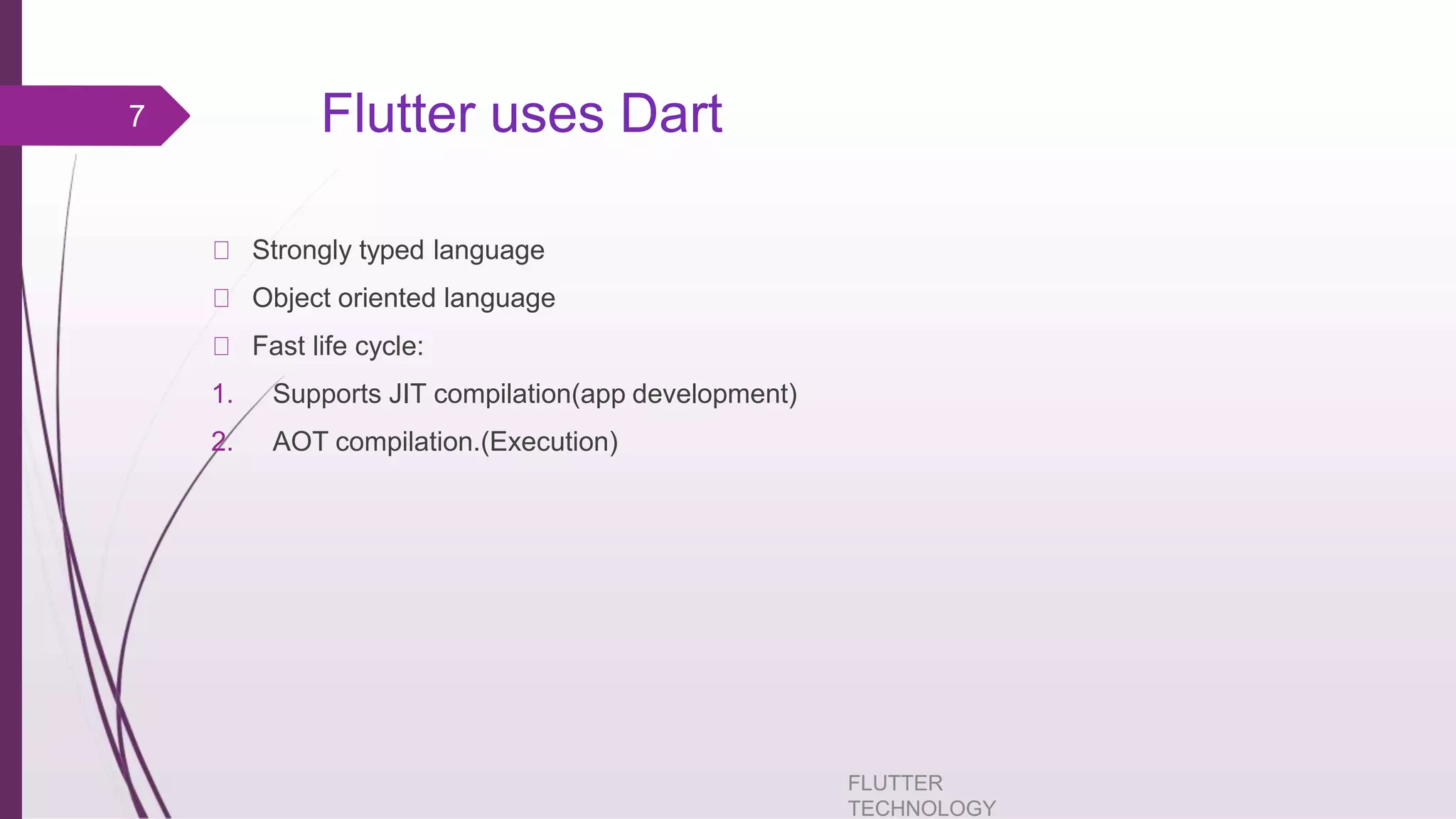
Flutter uses Dart
FLUTTER
TECHNOLOGY
Strongly typed language
Object oriented language
Fast life cycle:
1. Supports JIT compilation(app development)
2. AOT compilation.(Execution)
7
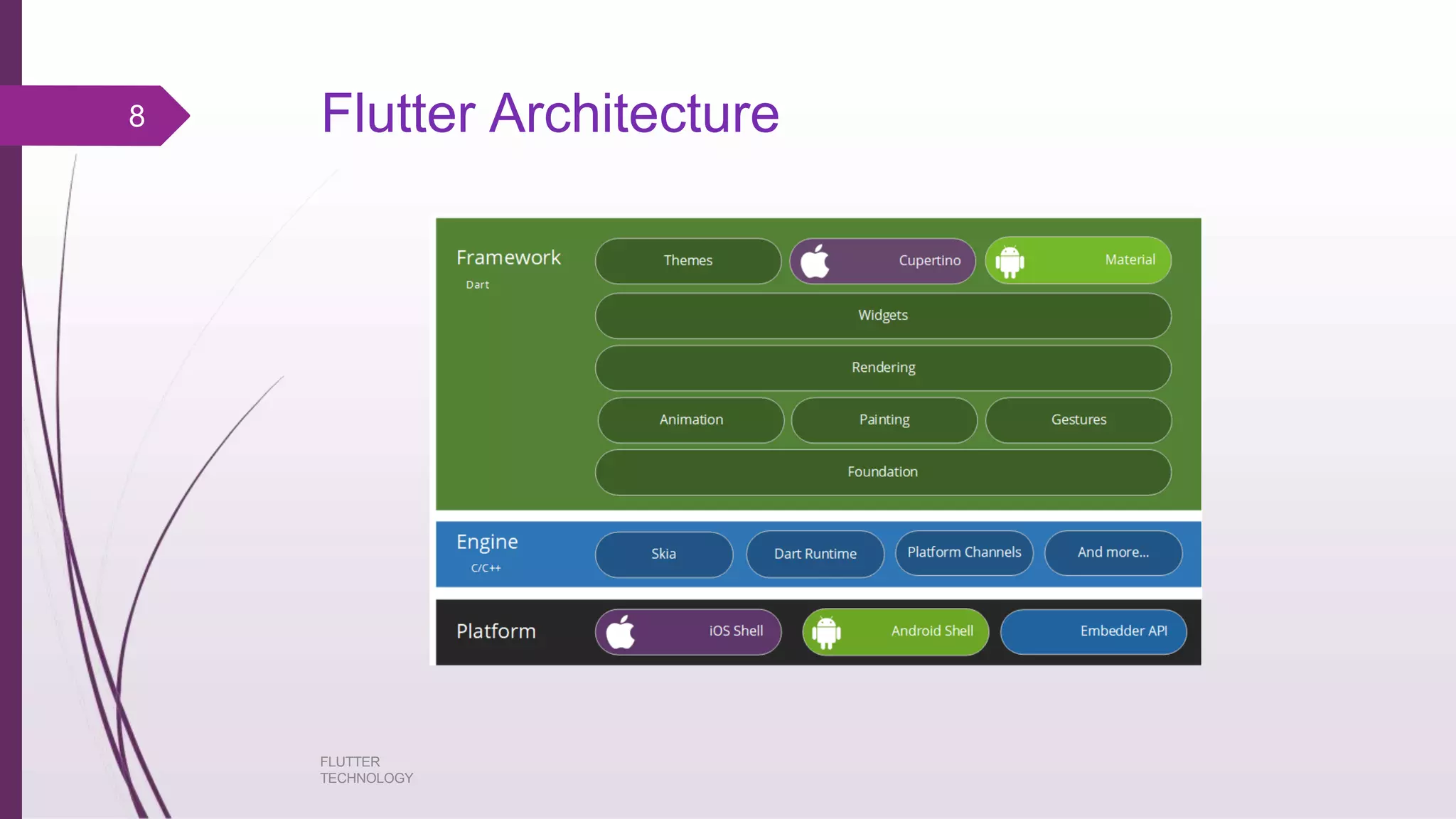
Flutter Architecture8
FLUTTER
TECHNOLOGY
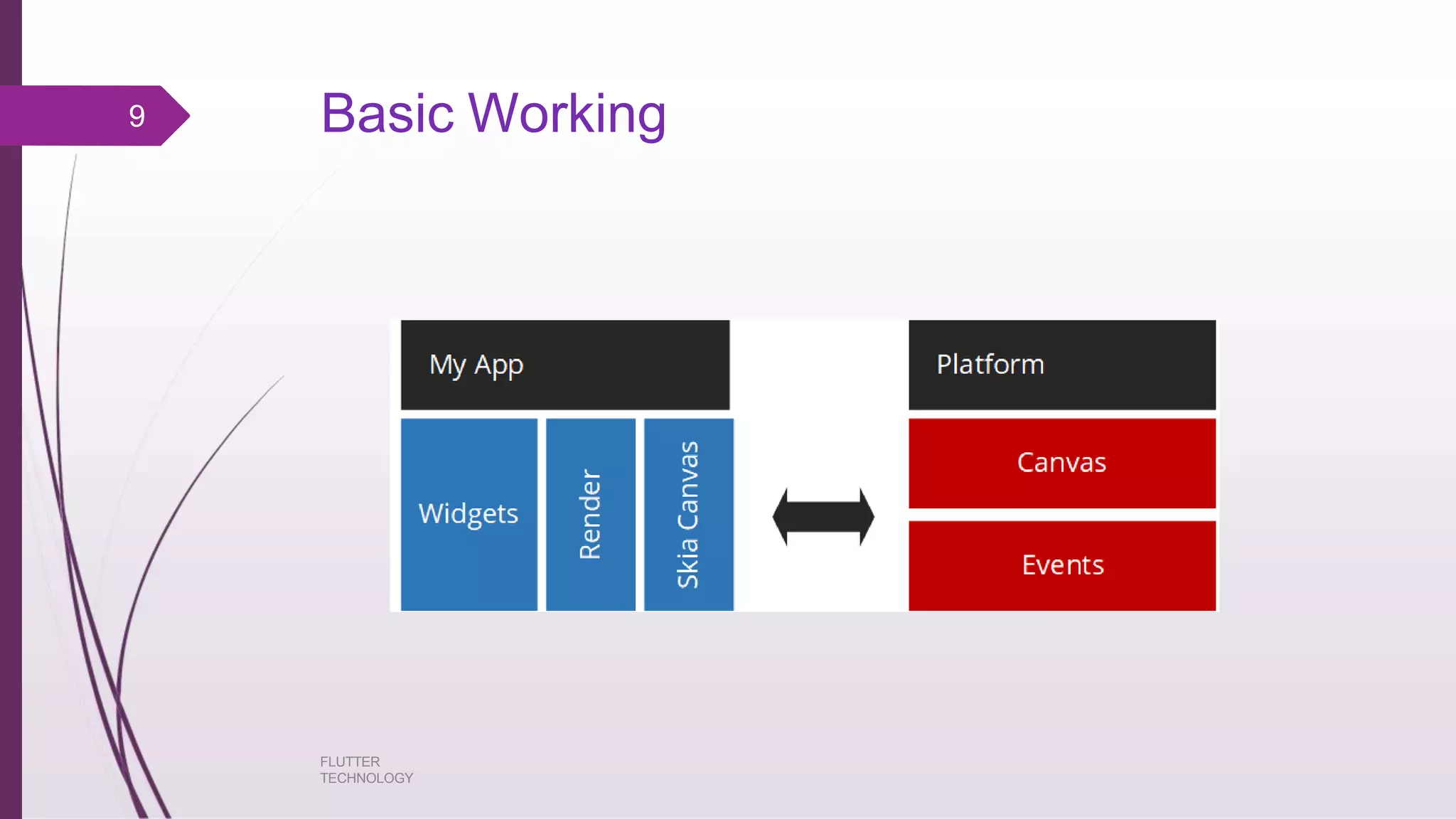
Basic Working9
FLUTTER
TECHNOLOGY
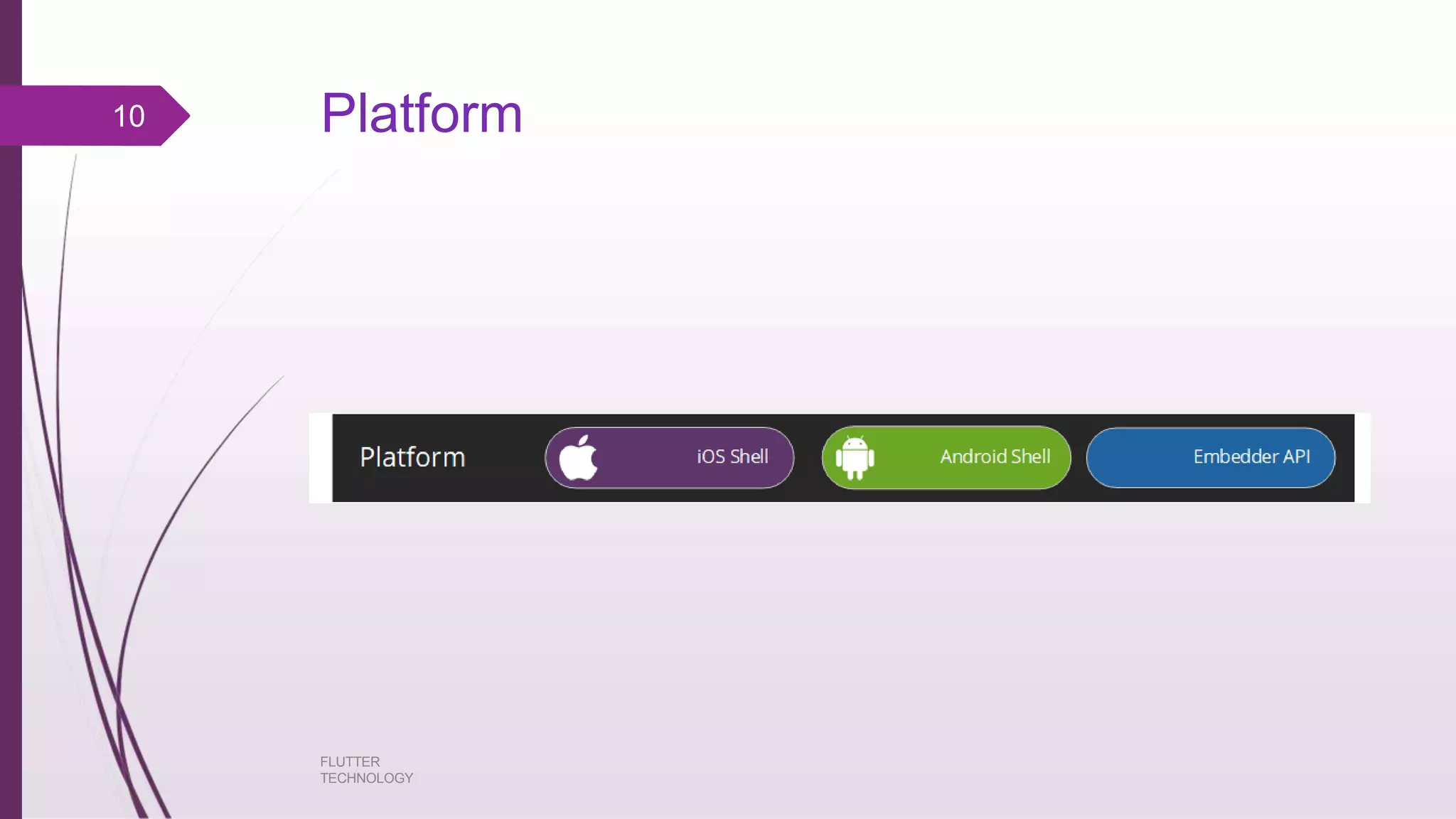
Platform10
FLUTTER
TECHNOLOGY
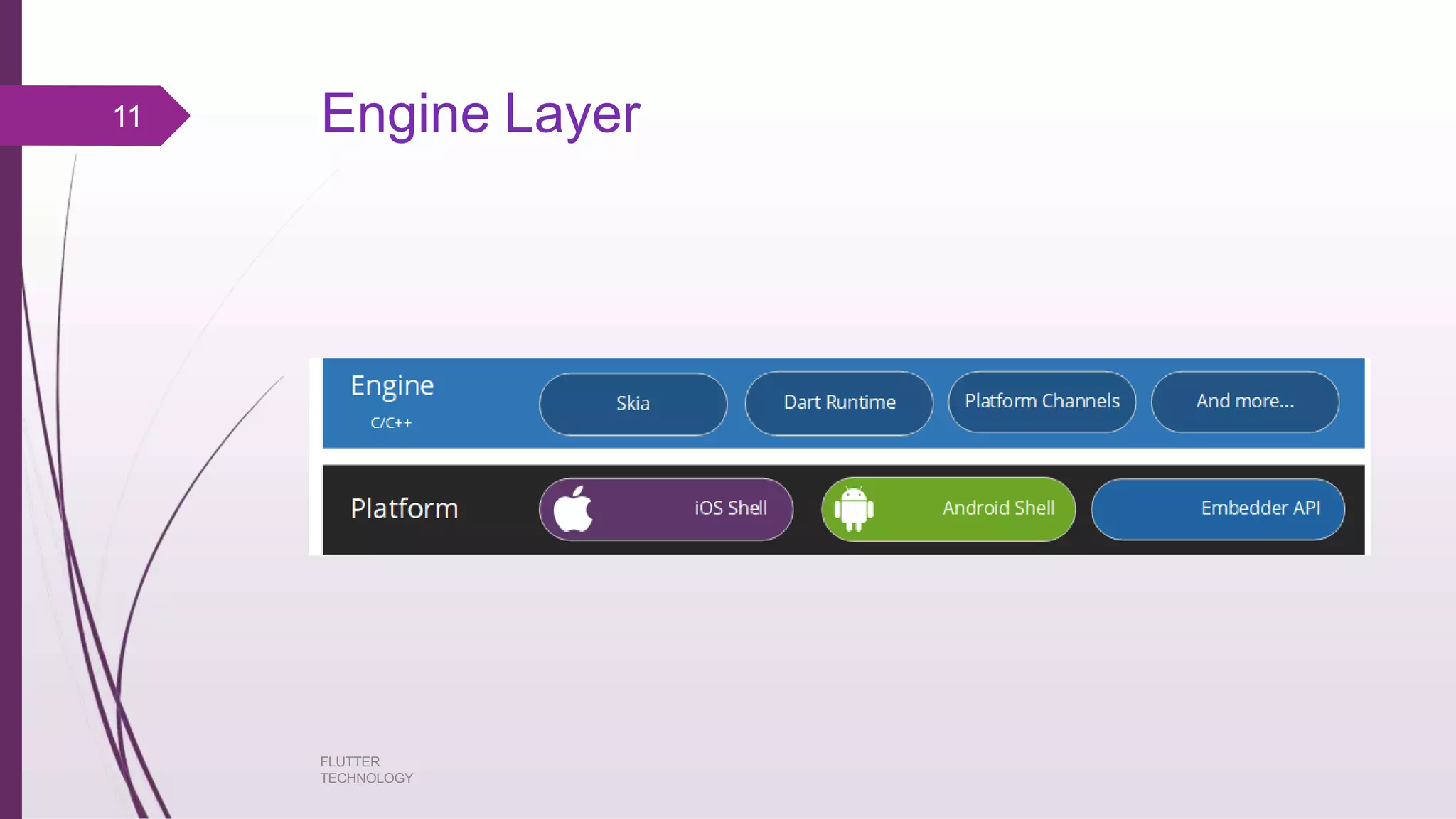
Engine Layer11
FLUTTER
TECHNOLOGY
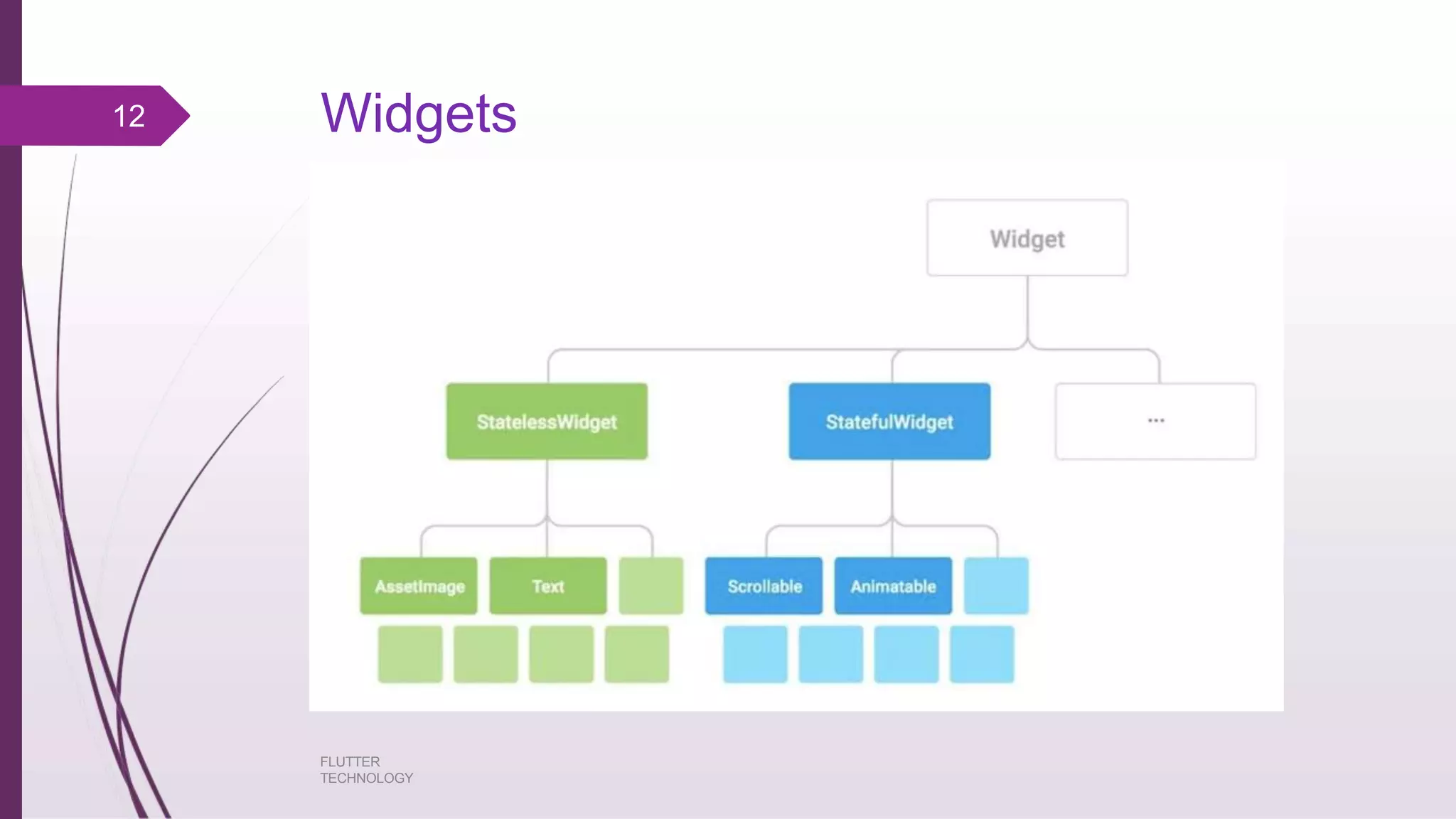
Widgets12
FLUTTER
TECHNOLOGY
Stateless Widget
FLUTTER
TECHNOLOGY
Stateless widgets do not require mutable state, i.e., it is immutable.
In simple words, Stateless widgets cannot change their state during the runtime of
the app, which means the widgets cannot be redrawn while the app is in action.
You can quickly build a Stateful Widget in VS Code or Android Studio by using
the shortcut “stf”.
13
State full Widget
FLUTTER
TECHNOLOGY
State full widgets have a mutable state, i.e., they are mutable and can be drawn
multiple times within its lifetime.
They are the widgets which can change their state multiple times and can be
redrawn on to the screen any number of times while the app is in action.
Stateful widgets are useful when the part of the user interface you are
describing can change dynamically.
When Flutter builds a Statefull widget it creates a State object. This object is
where all the mutable state for that widget is held.
14
Lifecycle of statefull widget
FLUTTER
TECHNOLOGY
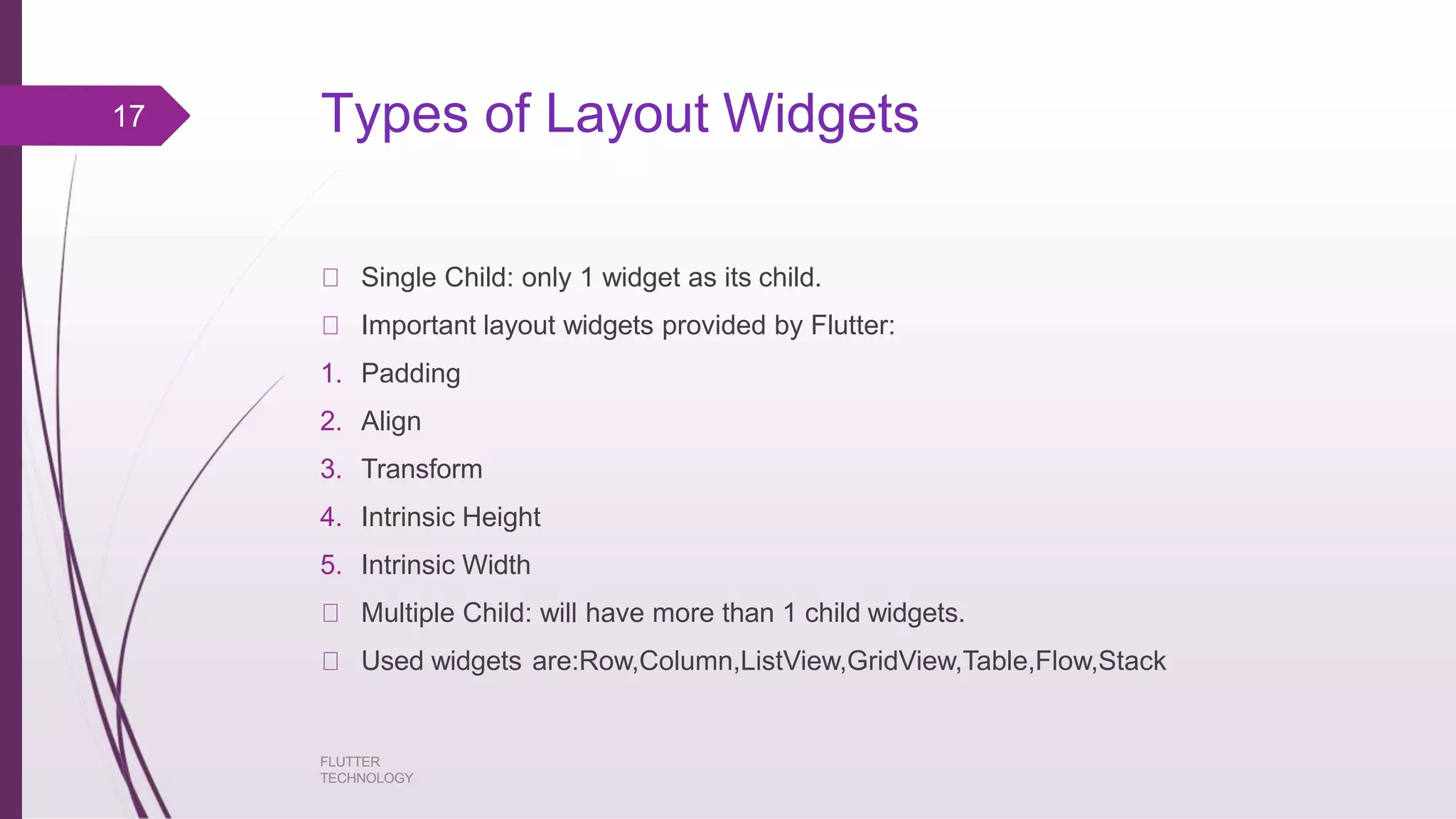
createState() -- When Flutter is instructed to build a StatefulWidget, it
immediately calls createState().
mounted == true -- All widgets have a bool this.mounted property. It turns true when
the buildContext is assigned.
initState() -- This is the first method called when the widget is created (after the
class constructor, of course.)
didChangeDependencies() -- Called when a dependency of this State object
changes.
build() -- Describes the part of the user interface represented by the widget.
didUpdateWidget() -- Called whenever the widget configuration changes.
setState() -- Whenever you change the internal state of a State object, make the
change in a function that you pass to setState.
15
deactivate() -- Deactivate is called when State is removed from the tree.
16
FLUTTER
TECHNOLOGY
Types of Layout Widgets
FLUTTER
TECHNOLOGY
Single Child: only 1 widget as its child.
Important layout widgets provided by Flutter:
1. Padding
2. Align
3. Transform
4. Intrinsic Height
5. Intrinsic Width
Multiple Child: will have more than 1 child widgets.
Used widgets are:Row,Column,ListView,GridView,Table,Flow,Stack
17
Gestures
FLUTTER
TECHNOLOGY
Used Gestures are:
1. Tap
2. Drag
3. Flick
4. Pinch
5. Spread/Zoom
6. Double Tap
7. Panning
18
Animation
FLUTTER
TECHNOLOGY
Enhances user experience to a new level .
Provides rich interaction.
Has two values : Start Value and End Value
Animation Based Classes
a. Animation<double>
b. Animation<Color>
c. Animation<Size>
d. Animation Controller
19
Creation of Application in Android
Step 1: Open Android Studio
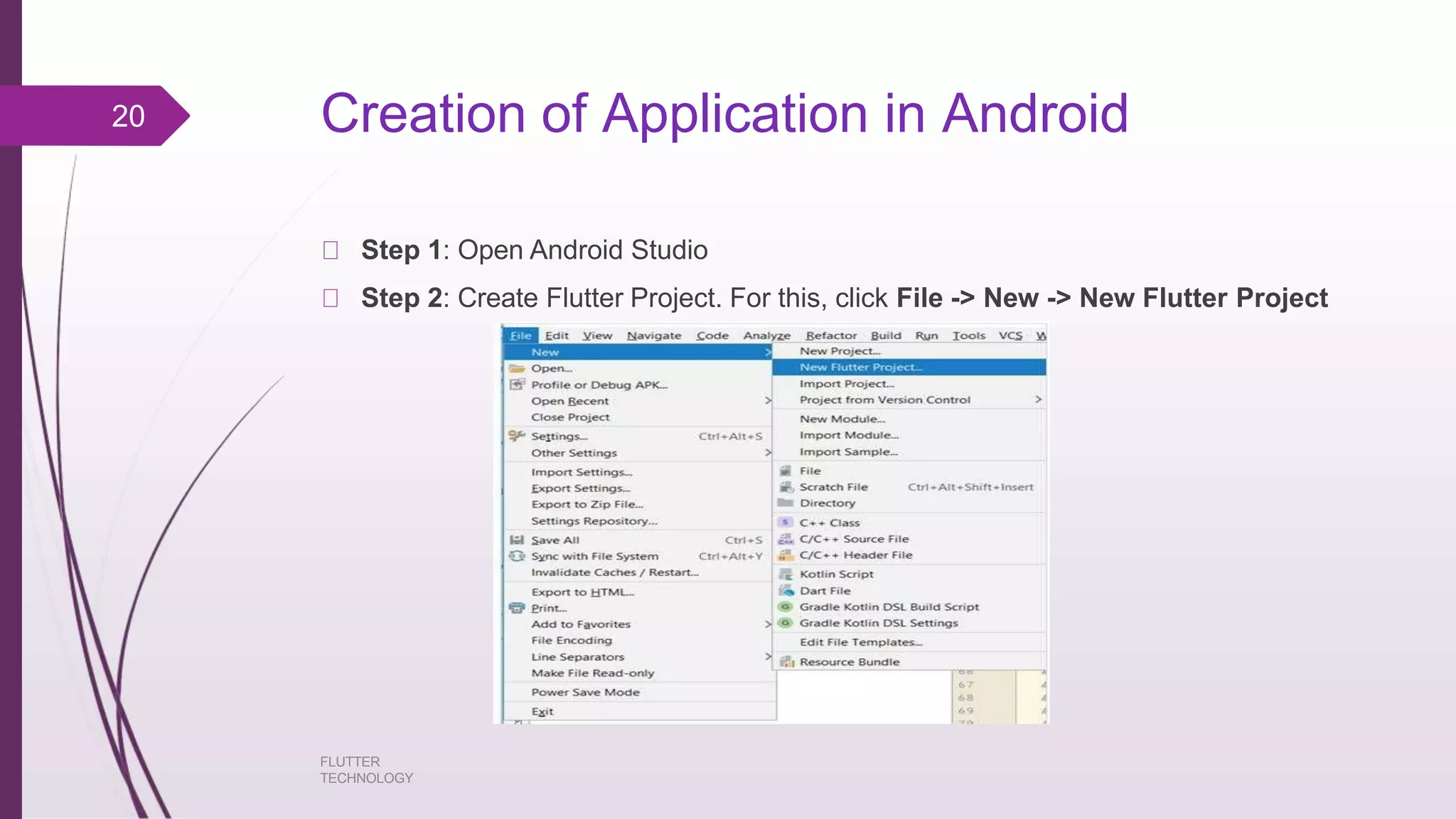
Step 2: Create Flutter Project. For this, click File -> New -> New Flutter Project
20
FLUTTER
TECHNOLOGY
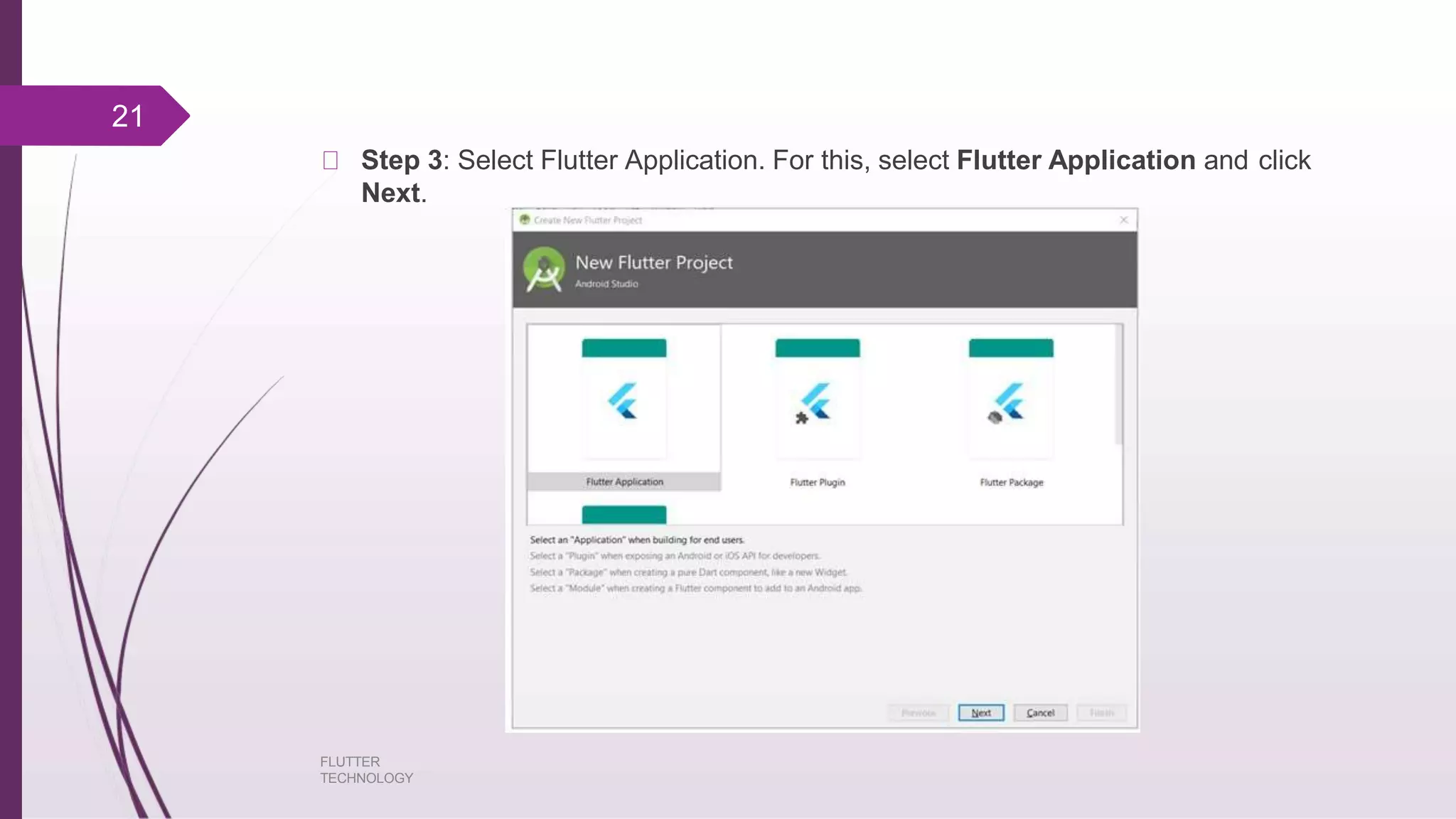
Step 3: Select Flutter Application. For this, select Flutter Application and click
Next.
21
FLUTTER
TECHNOLOGY
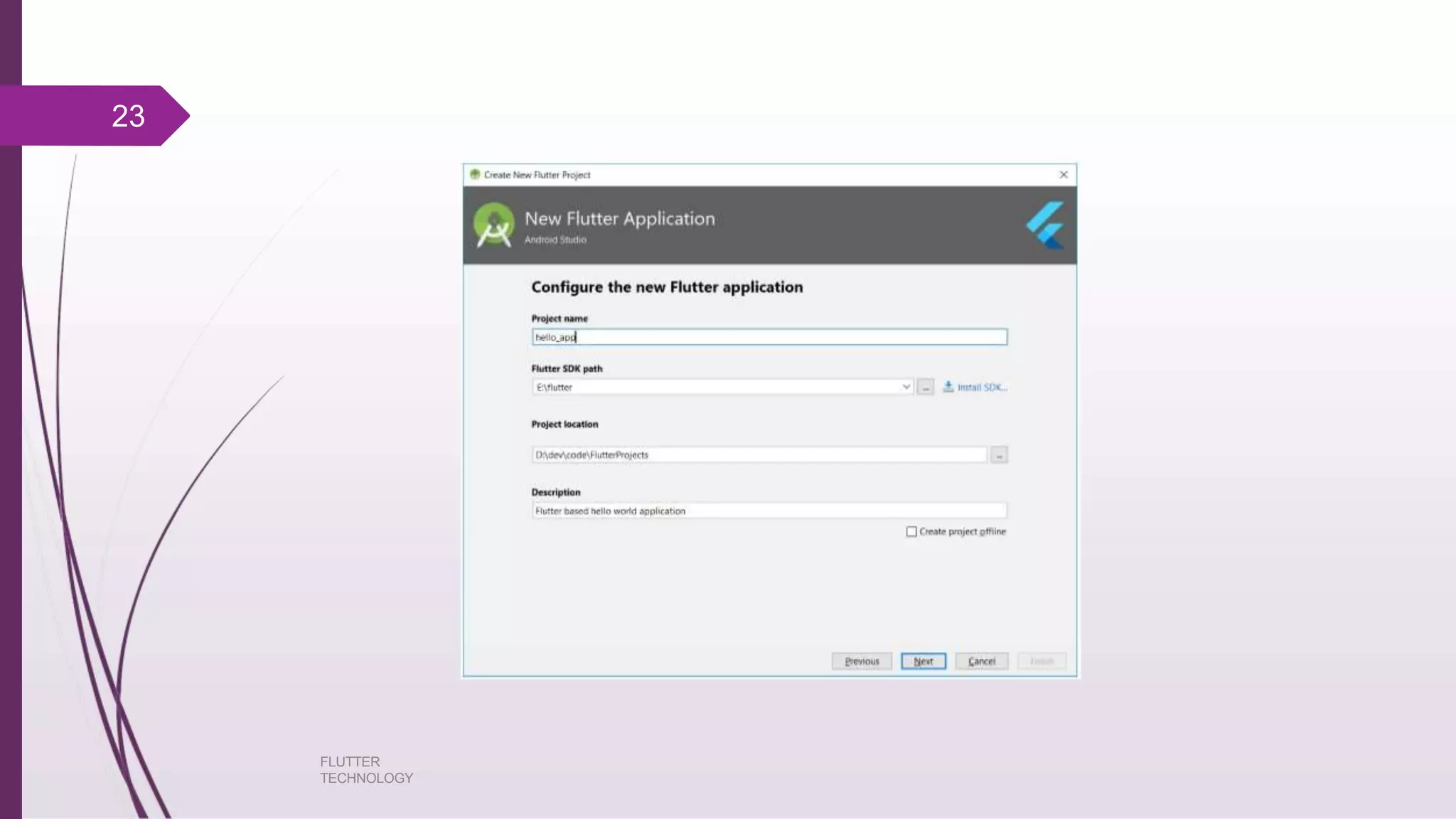
Step 4: Configure the application as below and click Next.
FLUTTER
TECHNOLOGY
Project name: hello_app
Flutter SDK Path: <path_to_flutter_sdk
Project Location: <path_to_project_folder>
Description: Flutter based hello world application
22
23
FLUTTER
TECHNOLOGY
Step 5: Configure Project
Step 6: Finish
Android Studio creates a fully working flutter application with minimal
functionality.
FLUTTER
TECHNOLOGY
24
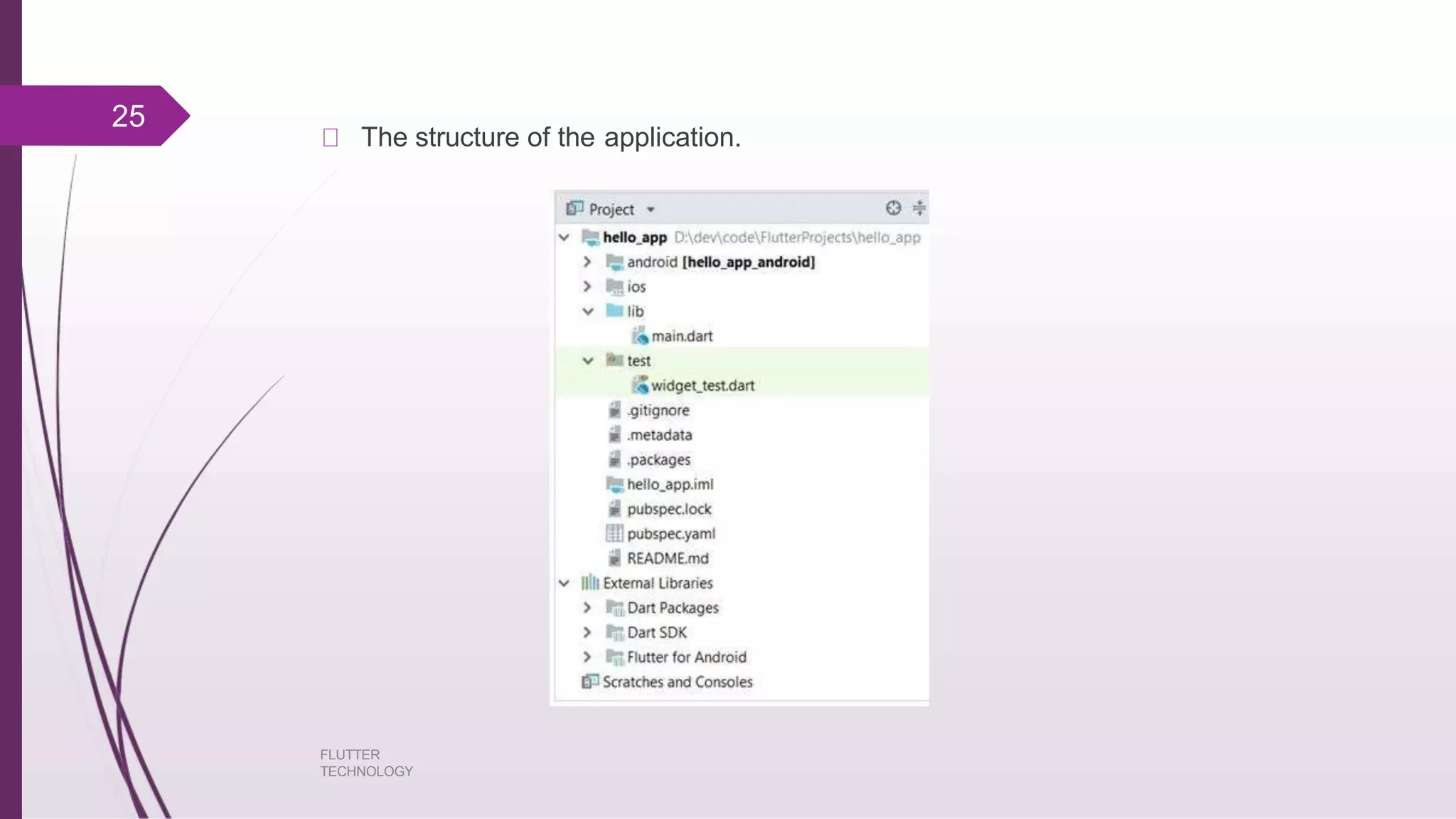
The structure of the application.
25
FLUTTER
TECHNOLOGY
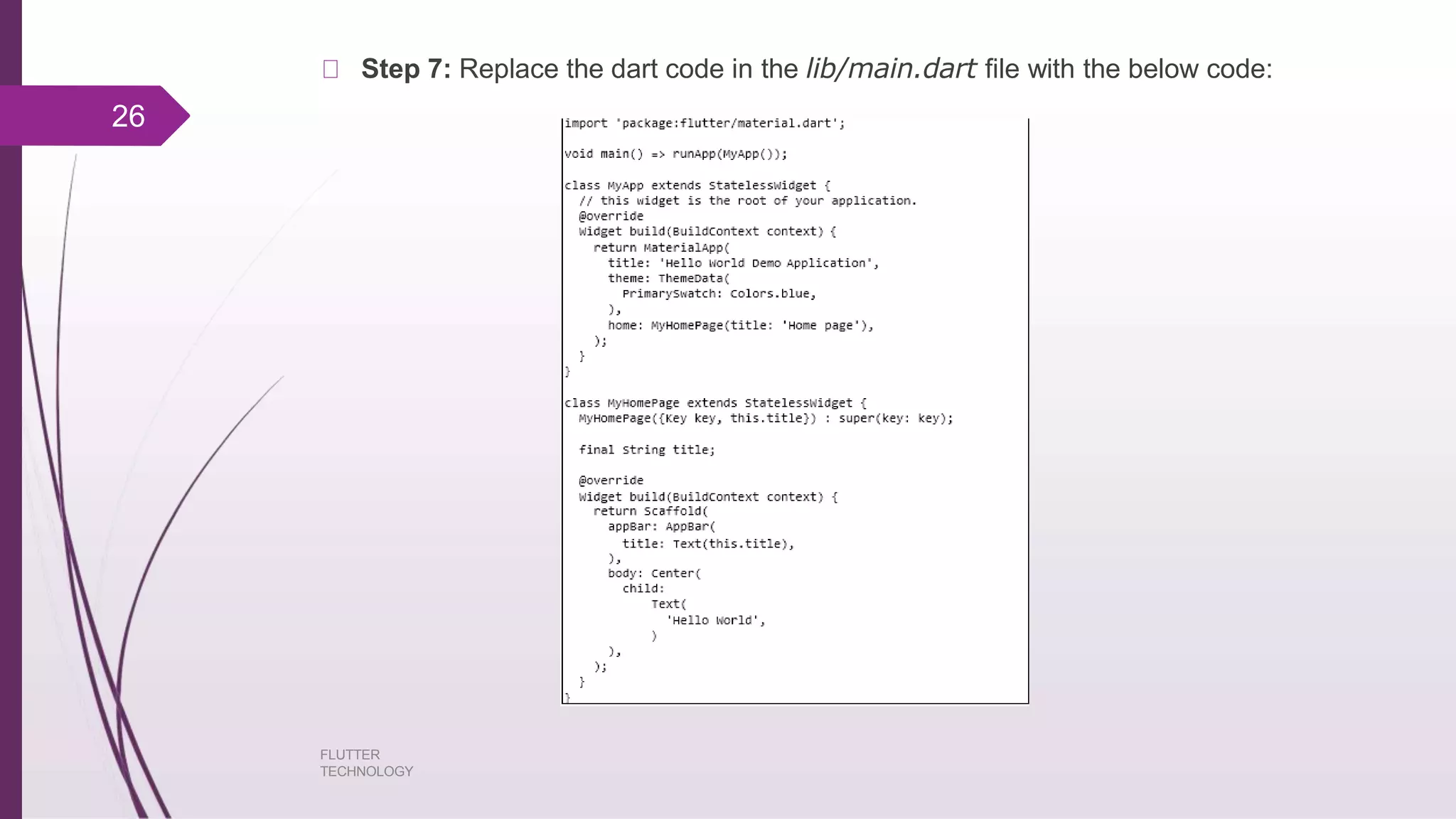
Step 7: Replace the dart code in the lib/main.dart file with the below code:
26
FLUTTER
TECHNOLOGY
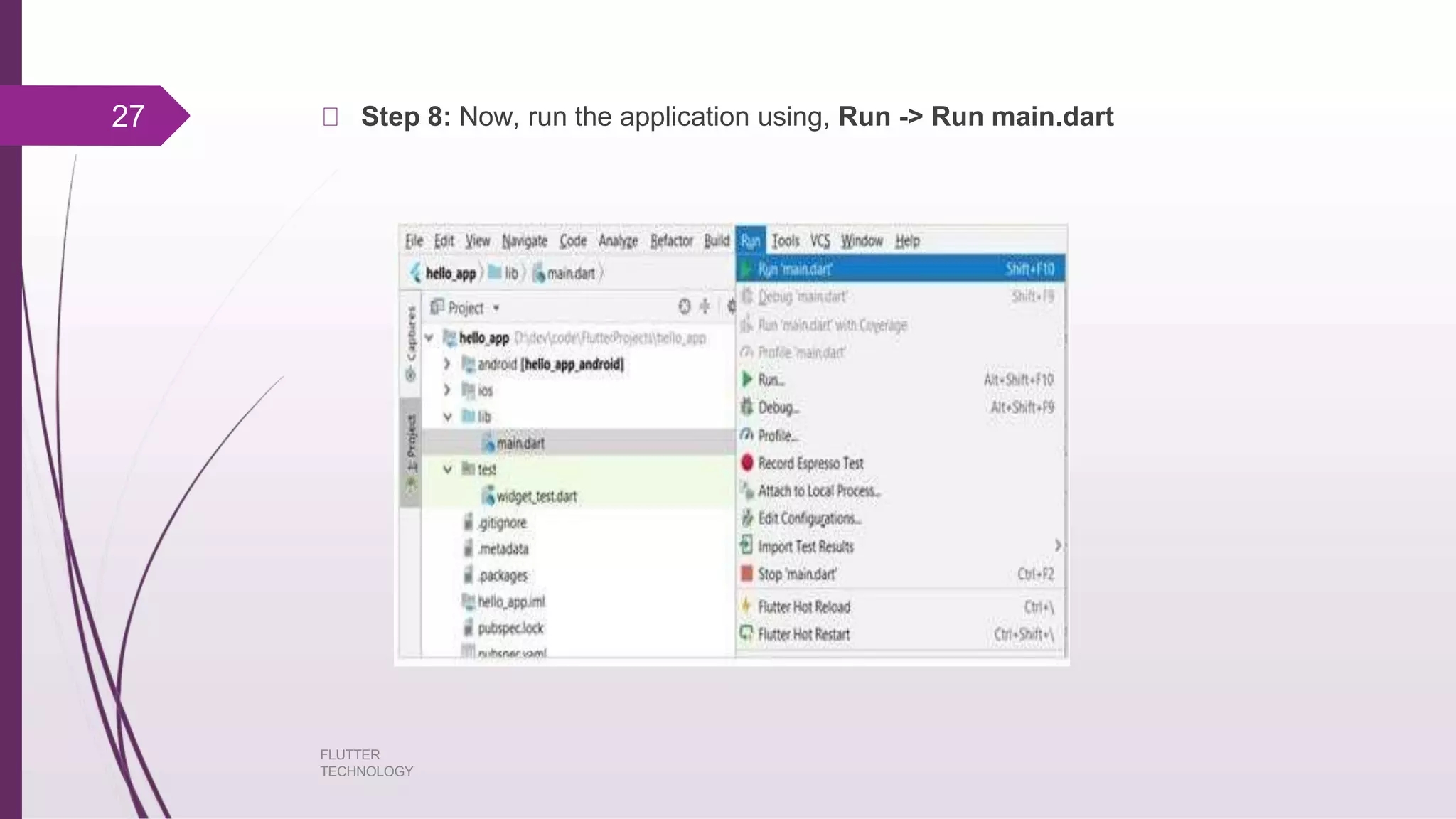
Step 8: Now, run the application using, Run -> Run main.dart27
FLUTTER
TECHNOLOGY
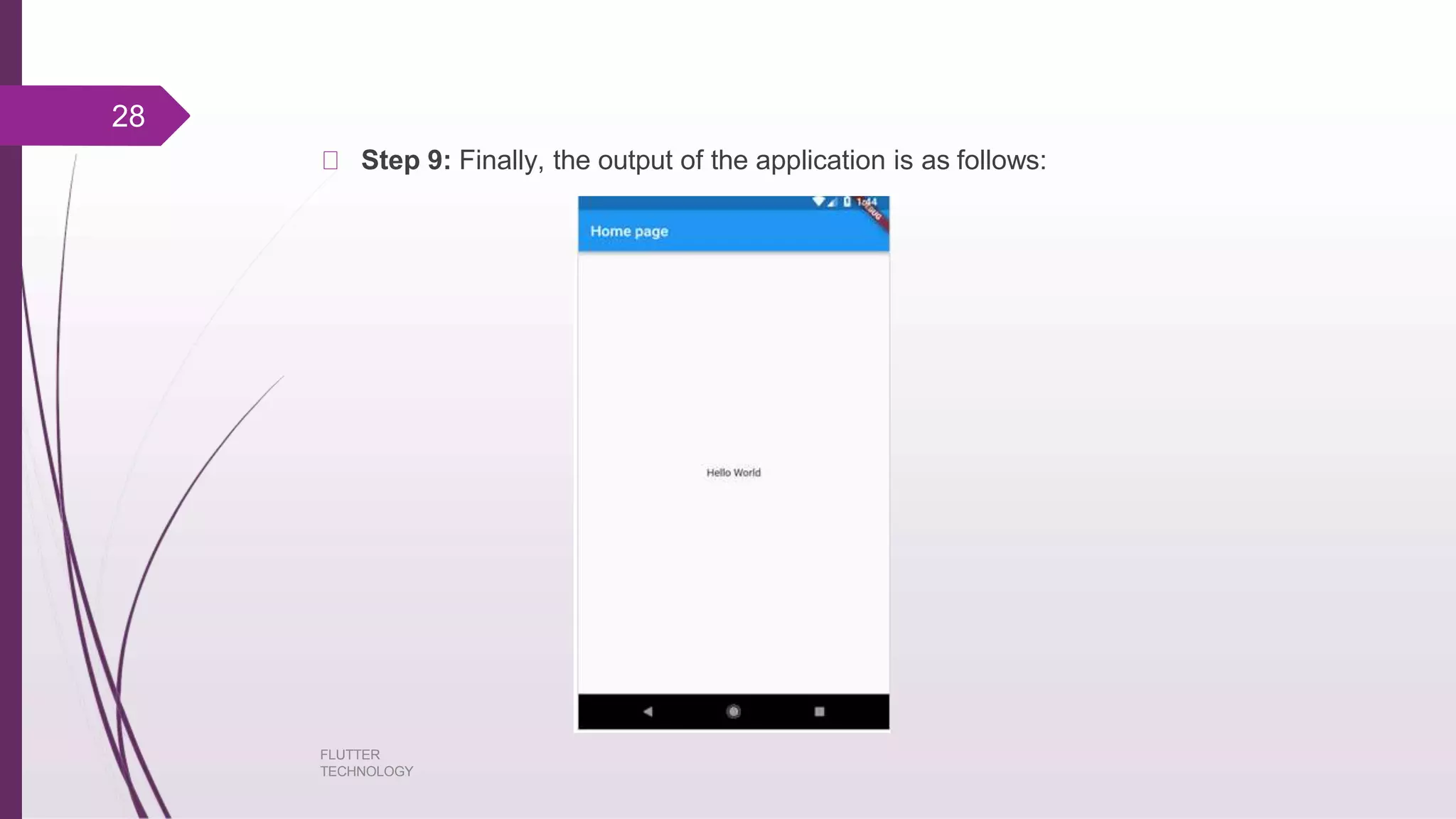
Step 9: Finally, the output of the application is as follows:
28
FLUTTER
TECHNOLOGY
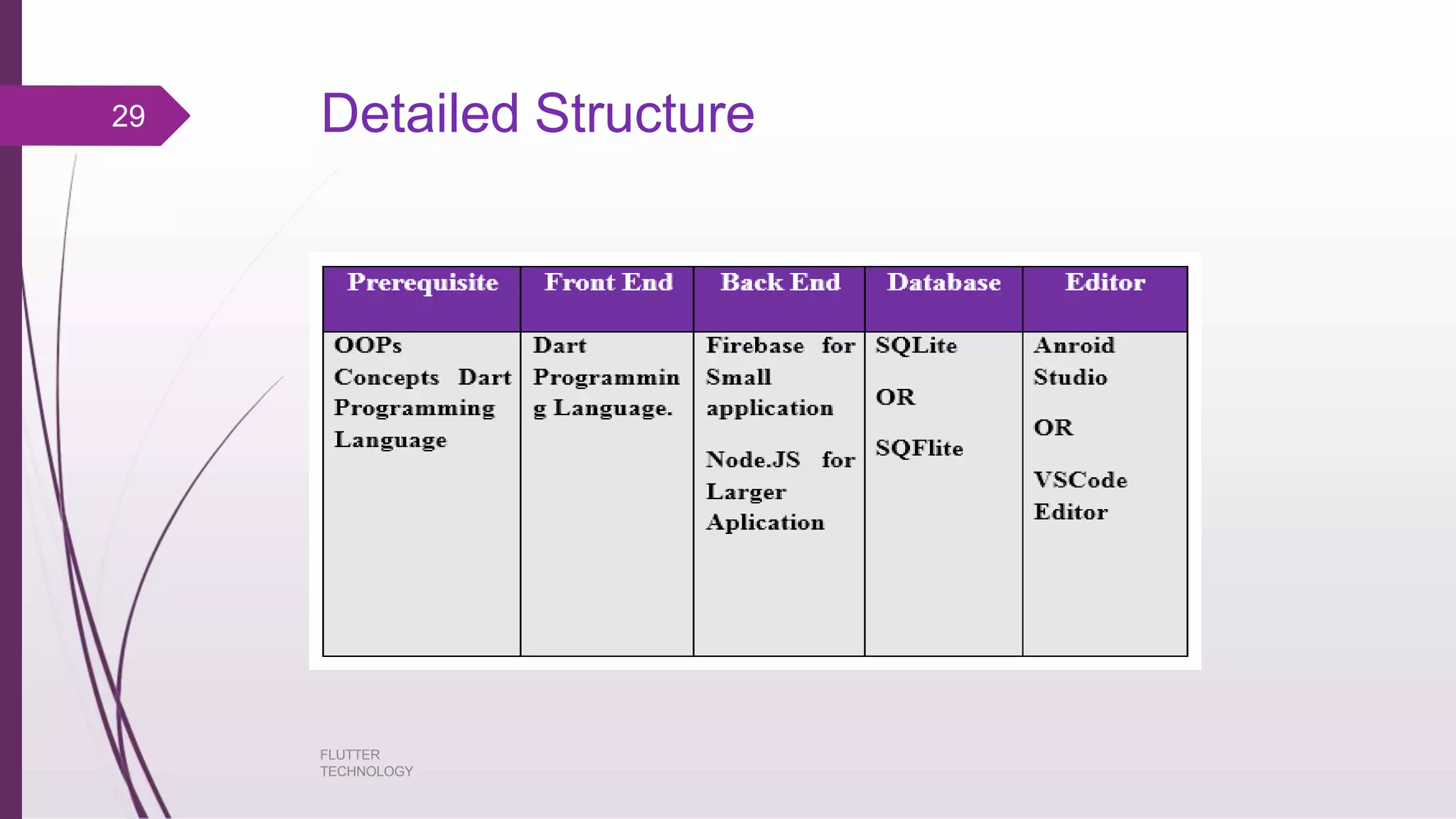
Detailed Structure29
FLUTTER
TECHNOLOGY
Applications:
FLUTTER
TECHNOLOGY
Google Ads : Utility Application (shows stats)
Alibaba : Ecommerce Application
Reflectly : Lifestyle Application(create personal stories journal)
SG Bus Tracker :Maps and Navigation Application
Hookle : Social Application
Birch Finance : Finance Application
Water maniac : Health & Fitness Application
30
Advantages:
FLUTTER
TECHNOLOGY
Dart has a large repository of software packages which lets you to extend the
capabilities of your application.
Developers need to write just a single code base for both applications (both
Android and iOS platforms). Flutter may to be extended to other platform as
well in the future.
Flutter needs lesser testing. Because of its single code base, it is sufficient if
we write automated tests once for both the platforms.
Flutter’s simplicity makes it a good candidate for fast development. Its
customization capability and extendibility makes it even more powerful.
With Flutter, developers has full control over the widgets and its layout.
Flutter offers great developer tools, with amazing hot reload.
31
Limitations:
FLUTTER
TECHNOLOGY
Since it is coded in Dart language, a developer needs to learn new
language (though it is easy to learn).
Modern framework tries to separate logic and UI as much as possible but, in
Flutter, user interface and logic is intermixed. We can overcome this using smart
coding and using high level module to separate user interface and logic.
Flutter is yet another framework to create mobile application. Developers are
having a hard time in choosing the right development tools in hugely populated
segment.
32
Conclusion
FLUTTER
TECHNOLOGY
Flutter framework does a great job by providing an excellent framework to build
mobile applications in a truly platform independent way . By providing simplicity in
the development process, high performance in the resulting mobile application, rich
and relevant user interface for both Android and iOS platform, Flutter framework will
surely enable a lot of new developers to develop high performance and feature-full
mobile application in the near future.
33
References:
FLUTTER
TECHNOLOGY
https://buildflutter.com/how-flutter-works/
https://www.tutorialspoint.com/flutter/index.htm
https://insights.daffodilsw.com/blog/10-amazing-apps-built-using-flutter-
framework
https://flutter.dev/
34
THANK YOU!!
Any Questions??
FLUTTER
TECHNOLOGY
35

Flutter technology Based on Web Development

  • 1.
    SNJB’s Late Sau.Kantabai BhavarlaljiJain College of Engineering FLUTTER TECHNOLOGY 1 BY: Divya Prafull Wani (TE Computer Engineering)
  • 2.
  • 3.
    Introduction It is singlecodebase for Android and ioS. Free and Open Source. It is invented by Google. Built with C,C++, and dart based . Mobile app SDK. Easy access to developer. FLUTTER 3
  • 4.
    Why to Use? Highquality native app Fast Development Expressive and Beautiful UI Native Performance Migration FLUTTER TECHNOLOGY 4
  • 5.
    Popularity Reactive performance Code usability renderingengine to draw widgets. Modern and reactive framework. Build Full featured apps FLUTTER TECHNOLOGY 5
  • 6.
    Difference: React Nativeand Flutter FLUTTER TECHNOLOGY 6 Parameter React Native Flutter Developed By Facebook Google Language Java script Dart Performance Fast Faster Who uses Facebook, Instagram, Walmart, Uber Google Ads, Tencent, Alibaba,Reflectly, Google GreenTea UI building blocks OS native components Proprietary Widgets Tooling Greater range of IDEs and tools supporting React Native Higher compatibility with visual code android code studio Reusability Allows but it is restricted to basic components. Best option for reusability Configuration and setup Lacks streamlined setup and configuration More straightforward Documentation Extensive, unorganized Good, organized
  • 7.
    Flutter uses Dart FLUTTER TECHNOLOGY Stronglytyped language Object oriented language Fast life cycle: 1. Supports JIT compilation(app development) 2. AOT compilation.(Execution) 7
  • 8.
  • 9.
  • 10.
  • 11.
  • 12.
  • 13.
    Stateless Widget FLUTTER TECHNOLOGY Stateless widgetsdo not require mutable state, i.e., it is immutable. In simple words, Stateless widgets cannot change their state during the runtime of the app, which means the widgets cannot be redrawn while the app is in action. You can quickly build a Stateful Widget in VS Code or Android Studio by using the shortcut “stf”. 13
  • 14.
    State full Widget FLUTTER TECHNOLOGY Statefull widgets have a mutable state, i.e., they are mutable and can be drawn multiple times within its lifetime. They are the widgets which can change their state multiple times and can be redrawn on to the screen any number of times while the app is in action. Stateful widgets are useful when the part of the user interface you are describing can change dynamically. When Flutter builds a Statefull widget it creates a State object. This object is where all the mutable state for that widget is held. 14
  • 15.
    Lifecycle of statefullwidget FLUTTER TECHNOLOGY createState() -- When Flutter is instructed to build a StatefulWidget, it immediately calls createState(). mounted == true -- All widgets have a bool this.mounted property. It turns true when the buildContext is assigned. initState() -- This is the first method called when the widget is created (after the class constructor, of course.) didChangeDependencies() -- Called when a dependency of this State object changes. build() -- Describes the part of the user interface represented by the widget. didUpdateWidget() -- Called whenever the widget configuration changes. setState() -- Whenever you change the internal state of a State object, make the change in a function that you pass to setState. 15
  • 16.
    deactivate() -- Deactivateis called when State is removed from the tree. 16 FLUTTER TECHNOLOGY
  • 17.
    Types of LayoutWidgets FLUTTER TECHNOLOGY Single Child: only 1 widget as its child. Important layout widgets provided by Flutter: 1. Padding 2. Align 3. Transform 4. Intrinsic Height 5. Intrinsic Width Multiple Child: will have more than 1 child widgets. Used widgets are:Row,Column,ListView,GridView,Table,Flow,Stack 17
  • 18.
    Gestures FLUTTER TECHNOLOGY Used Gestures are: 1.Tap 2. Drag 3. Flick 4. Pinch 5. Spread/Zoom 6. Double Tap 7. Panning 18
  • 19.
    Animation FLUTTER TECHNOLOGY Enhances user experienceto a new level . Provides rich interaction. Has two values : Start Value and End Value Animation Based Classes a. Animation<double> b. Animation<Color> c. Animation<Size> d. Animation Controller 19
  • 20.
    Creation of Applicationin Android Step 1: Open Android Studio Step 2: Create Flutter Project. For this, click File -> New -> New Flutter Project 20 FLUTTER TECHNOLOGY
  • 21.
    Step 3: SelectFlutter Application. For this, select Flutter Application and click Next. 21 FLUTTER TECHNOLOGY
  • 22.
    Step 4: Configurethe application as below and click Next. FLUTTER TECHNOLOGY Project name: hello_app Flutter SDK Path: <path_to_flutter_sdk Project Location: <path_to_project_folder> Description: Flutter based hello world application 22
  • 23.
  • 24.
    Step 5: ConfigureProject Step 6: Finish Android Studio creates a fully working flutter application with minimal functionality. FLUTTER TECHNOLOGY 24
  • 25.
    The structure ofthe application. 25 FLUTTER TECHNOLOGY
  • 26.
    Step 7: Replacethe dart code in the lib/main.dart file with the below code: 26 FLUTTER TECHNOLOGY
  • 27.
    Step 8: Now,run the application using, Run -> Run main.dart27 FLUTTER TECHNOLOGY
  • 28.
    Step 9: Finally,the output of the application is as follows: 28 FLUTTER TECHNOLOGY
  • 29.
  • 30.
    Applications: FLUTTER TECHNOLOGY Google Ads :Utility Application (shows stats) Alibaba : Ecommerce Application Reflectly : Lifestyle Application(create personal stories journal) SG Bus Tracker :Maps and Navigation Application Hookle : Social Application Birch Finance : Finance Application Water maniac : Health & Fitness Application 30
  • 31.
    Advantages: FLUTTER TECHNOLOGY Dart has alarge repository of software packages which lets you to extend the capabilities of your application. Developers need to write just a single code base for both applications (both Android and iOS platforms). Flutter may to be extended to other platform as well in the future. Flutter needs lesser testing. Because of its single code base, it is sufficient if we write automated tests once for both the platforms. Flutter’s simplicity makes it a good candidate for fast development. Its customization capability and extendibility makes it even more powerful. With Flutter, developers has full control over the widgets and its layout. Flutter offers great developer tools, with amazing hot reload. 31
  • 32.
    Limitations: FLUTTER TECHNOLOGY Since it iscoded in Dart language, a developer needs to learn new language (though it is easy to learn). Modern framework tries to separate logic and UI as much as possible but, in Flutter, user interface and logic is intermixed. We can overcome this using smart coding and using high level module to separate user interface and logic. Flutter is yet another framework to create mobile application. Developers are having a hard time in choosing the right development tools in hugely populated segment. 32
  • 33.
    Conclusion FLUTTER TECHNOLOGY Flutter framework doesa great job by providing an excellent framework to build mobile applications in a truly platform independent way . By providing simplicity in the development process, high performance in the resulting mobile application, rich and relevant user interface for both Android and iOS platform, Flutter framework will surely enable a lot of new developers to develop high performance and feature-full mobile application in the near future. 33
  • 34.
  • 35.