Flutter 3
Warren
Agenda
• BottomNavigationBar
• Row / Column
• Stack
• Expanded
• Padding
• Routes
• async, await, Future
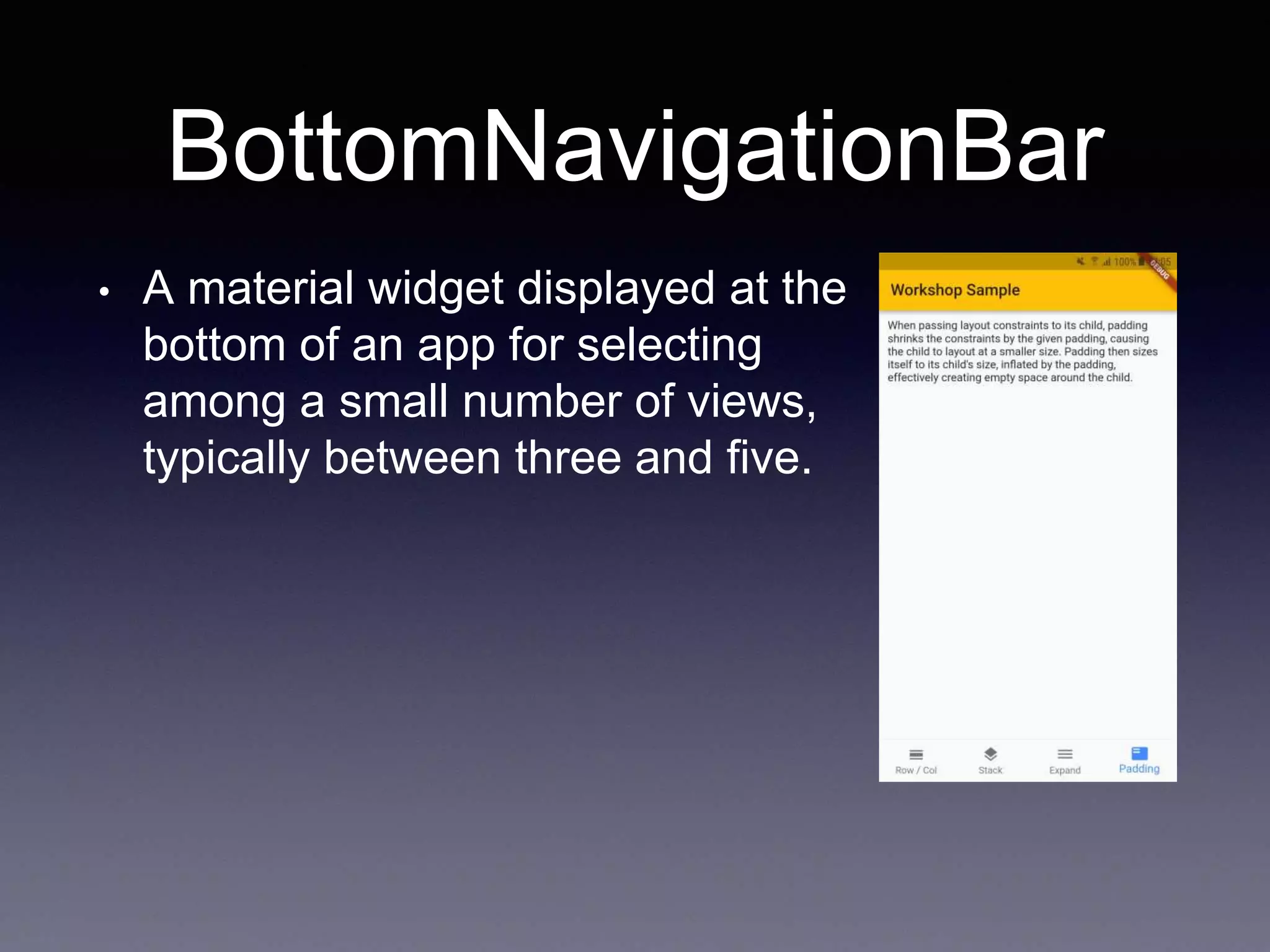
BottomNavigationBar
• A material widget displayed at the
bottom of an app for selecting
among a small number of views,
typically between three and five.
Row / Column
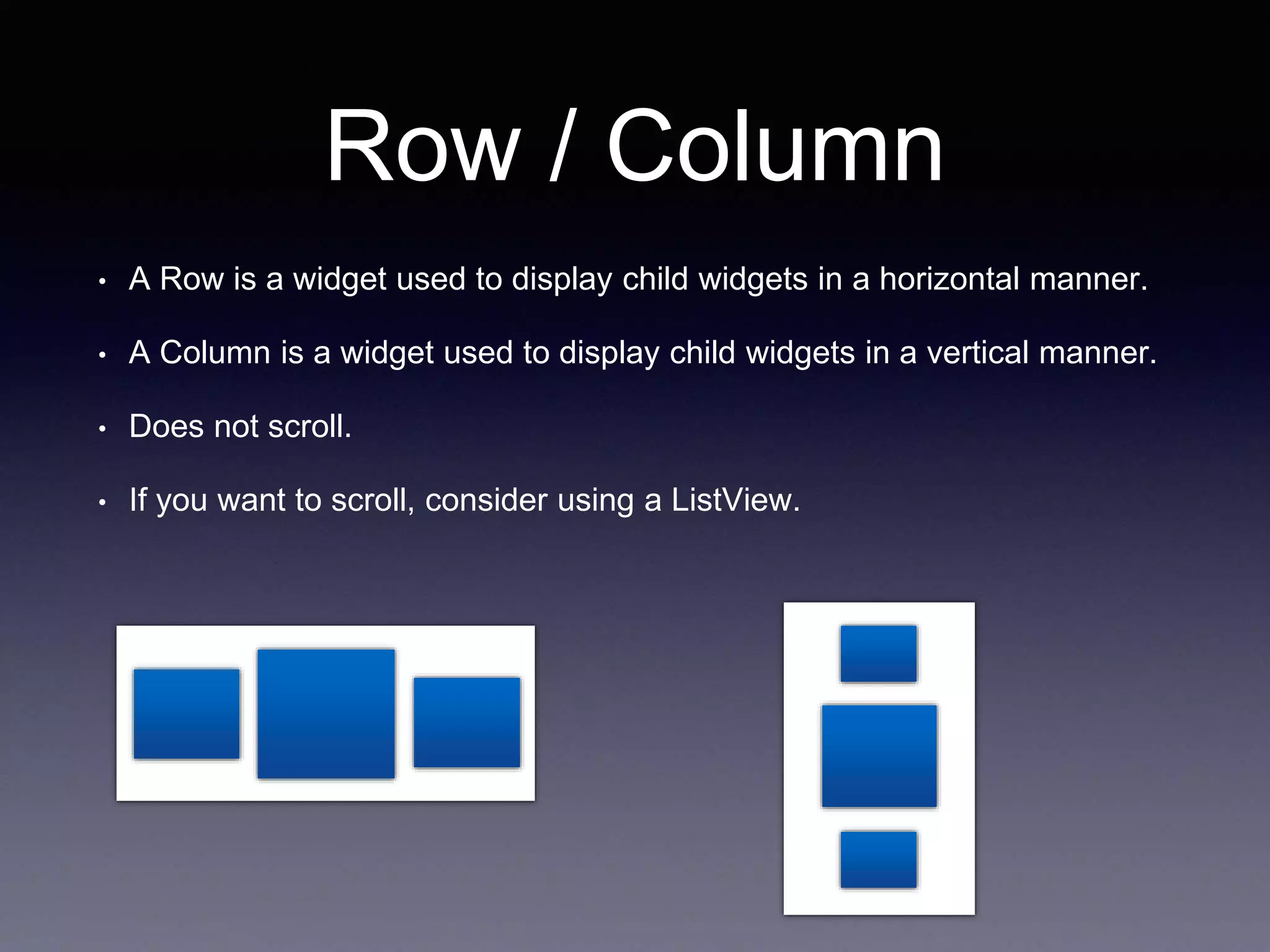
• A Row is a widget used to display child widgets in a horizontal manner.
• A Column is a widget used to display child widgets in a vertical manner.
• Does not scroll.
• If you want to scroll, consider using a ListView.
Row / Column
• MainAxisAlignment.start
Row /*or Column*/(
mainAxisAlignment: MainAxisAlignment.start,
children: <Widget>[
Text("One", style: TextStyle(fontSize: 28.0),),
Text("Two", style: TextStyle(fontSize: 68.0),),
Text("Three", style: TextStyle(fontSize: 28.0),)
],
),
Row / Column
• MainAxisAlignment.start
Row /*or Column*/(
mainAxisAlignment: MainAxisAlignment.start,
children: <Widget>[
Text("One", style: TextStyle(fontSize: 28.0),),
Text("Two", style: TextStyle(fontSize: 68.0),),
Text("Three", style: TextStyle(fontSize: 28.0),)
],
),
Row / Column
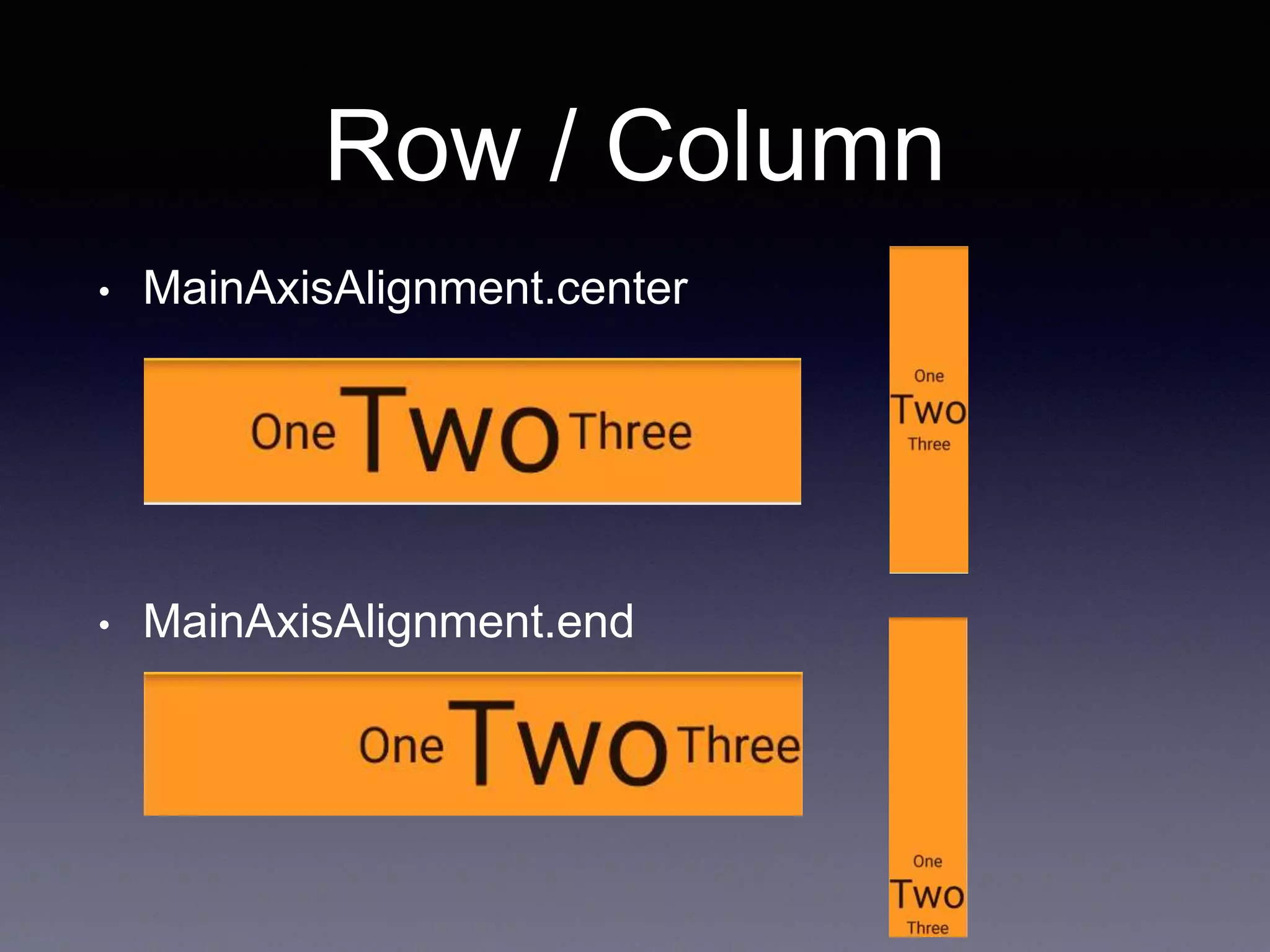
• MainAxisAlignment.center
• MainAxisAlignment.end
Row / Column
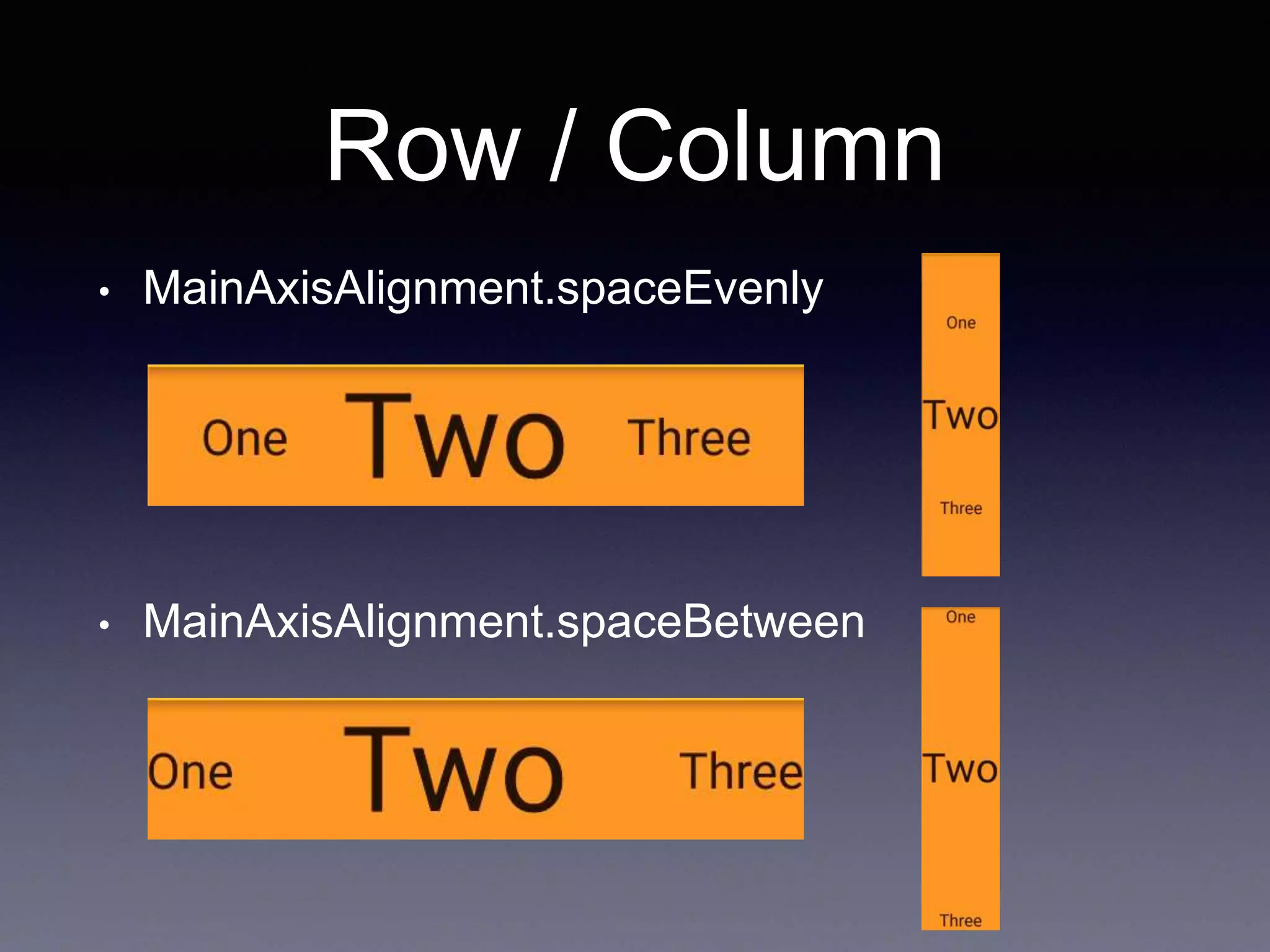
• MainAxisAlignment.spaceEvenly
• MainAxisAlignment.spaceBetween
Row / Column
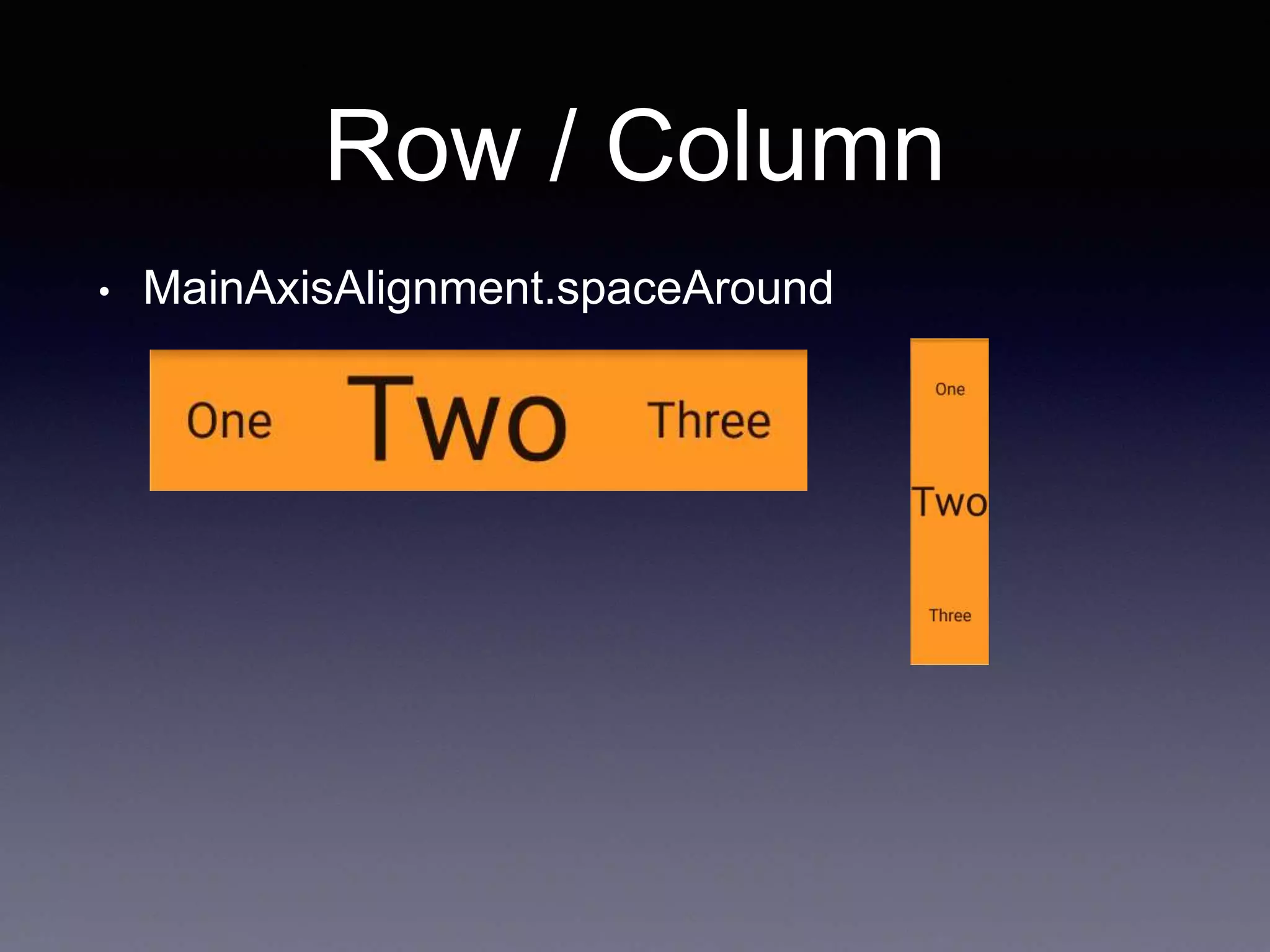
• MainAxisAlignment.spaceAround
Row / Column
• MainAxisSize.min
Row /*or Column*/(
mainAxisSize: MainAxisSize.min,
children: <Widget>[
Text("One", style: TextStyle(fontSize: 28.0),),
Text("Two", style: TextStyle(fontSize: 68.0),),
Text("Three", style: TextStyle(fontSize: 28.0),)
],
),
Row / Column
• CrossAxisAlignment.start
Row /*or Column*/(
crossAxisAlignment: CrossAxisAlignment.start,
children: <Widget>[
Text("One", style: TextStyle(fontSize: 28.0),),
Text("Two", style: TextStyle(fontSize: 68.0),),
Text("Three", style: TextStyle(fontSize: 28.0),)
],
),
Row / Column
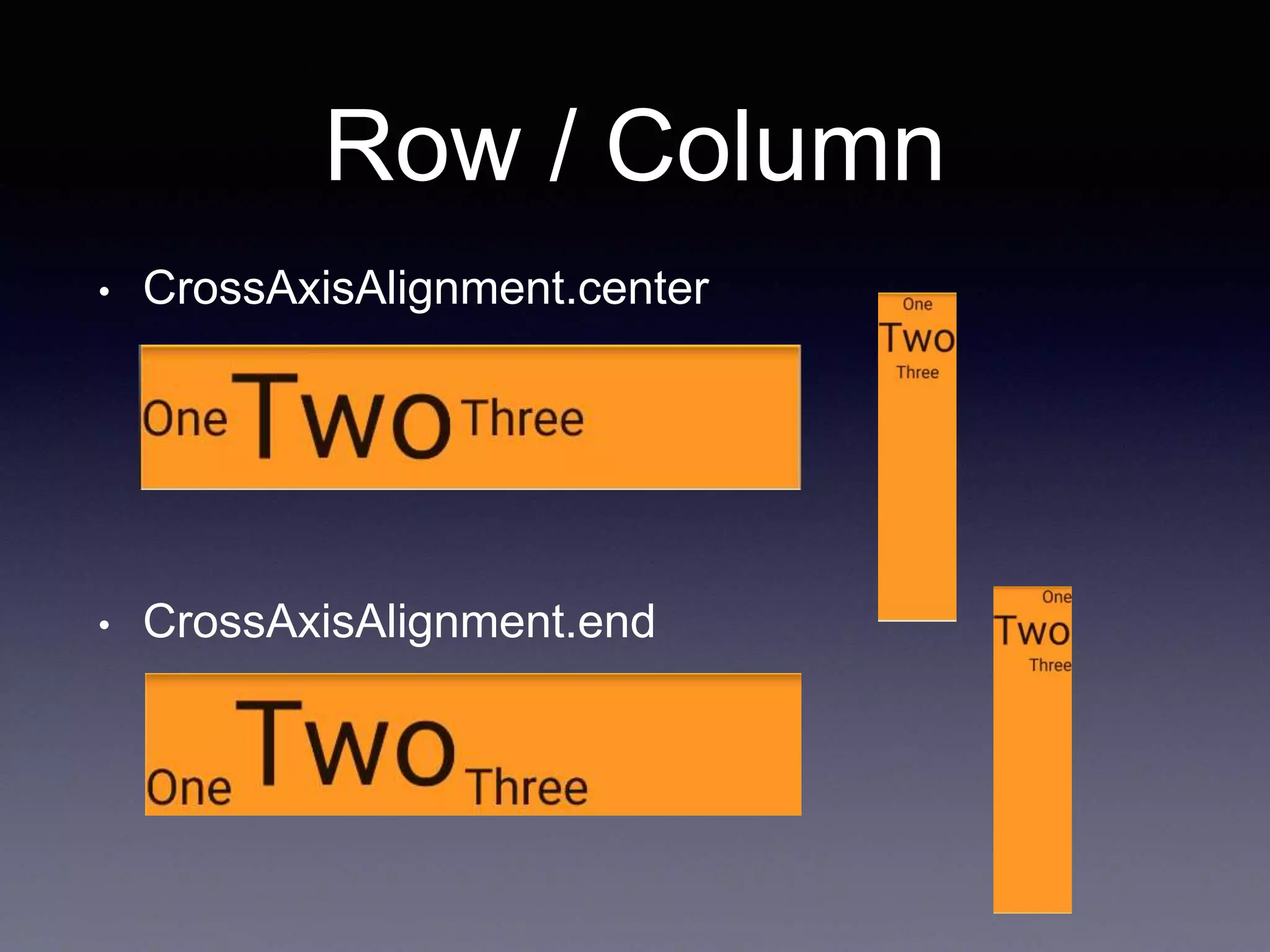
• CrossAxisAlignment.center
• CrossAxisAlignment.end
Row / Column
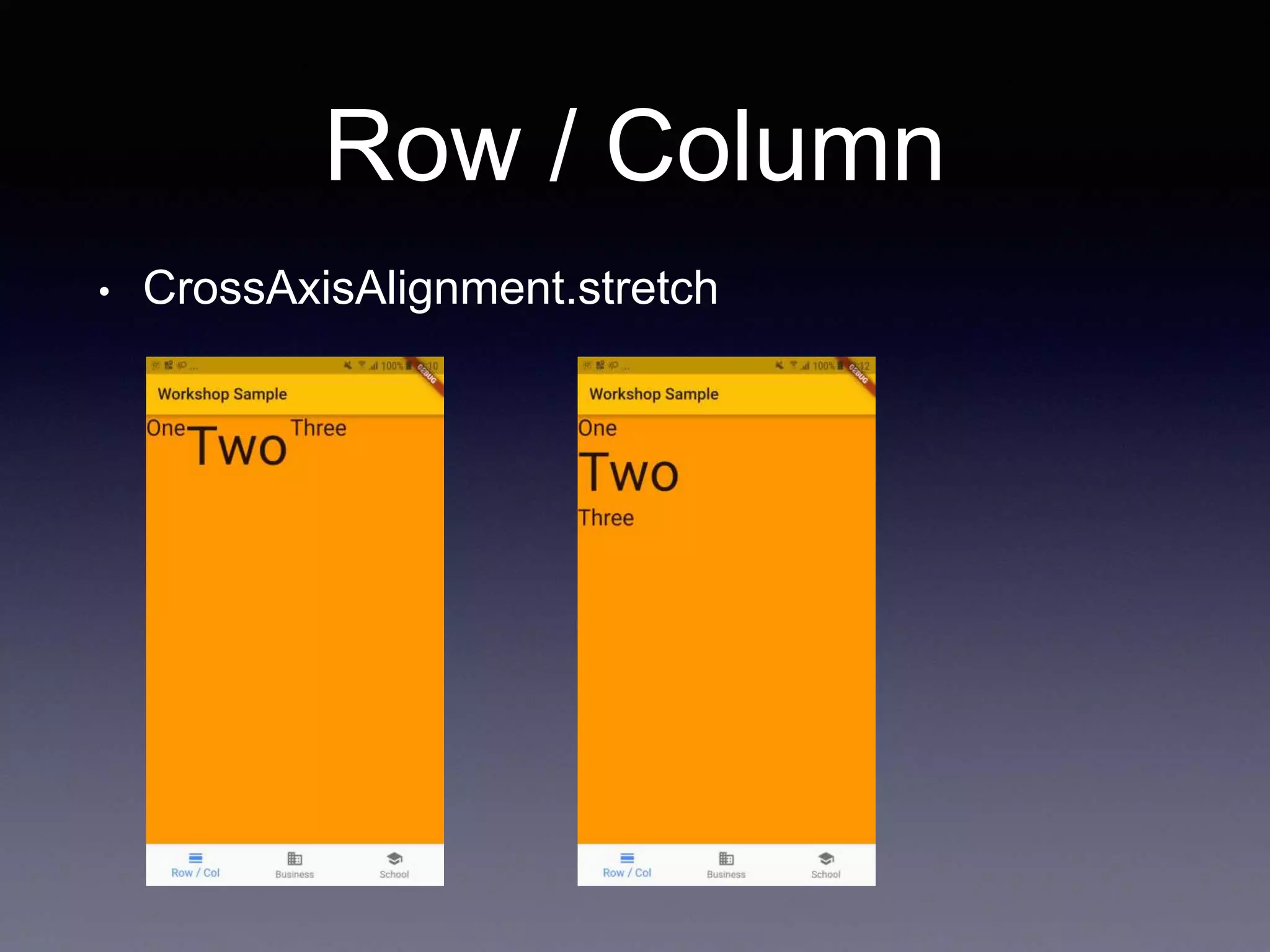
• CrossAxisAlignment.stretch
Stack
• A widget that positions its children relative to the
edges of its box.
Stack(
children: <Widget>[
alignment: AlignmentDirectional.topStart,
Container(color: Colors.orange, width: 350, height: 350,),
Container(color: Colors.blue, width: 250, height: 250,),
Container(color: Colors.green, width: 150, height: 150,),
Container(color: Colors.red, width: 50, height: 50,),
],
)
Stack
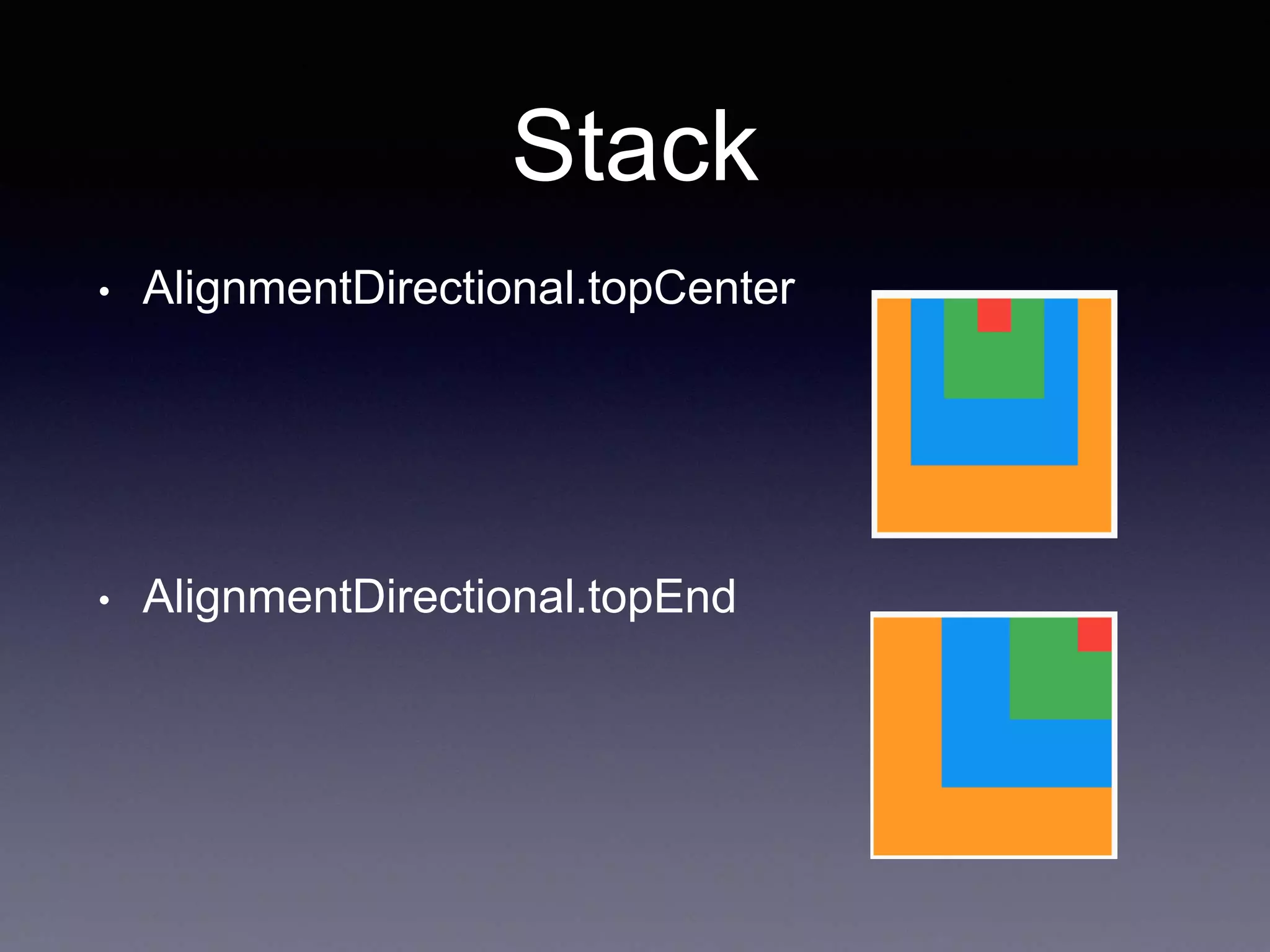
• AlignmentDirectional.topCenter
• AlignmentDirectional.topEnd
Stack
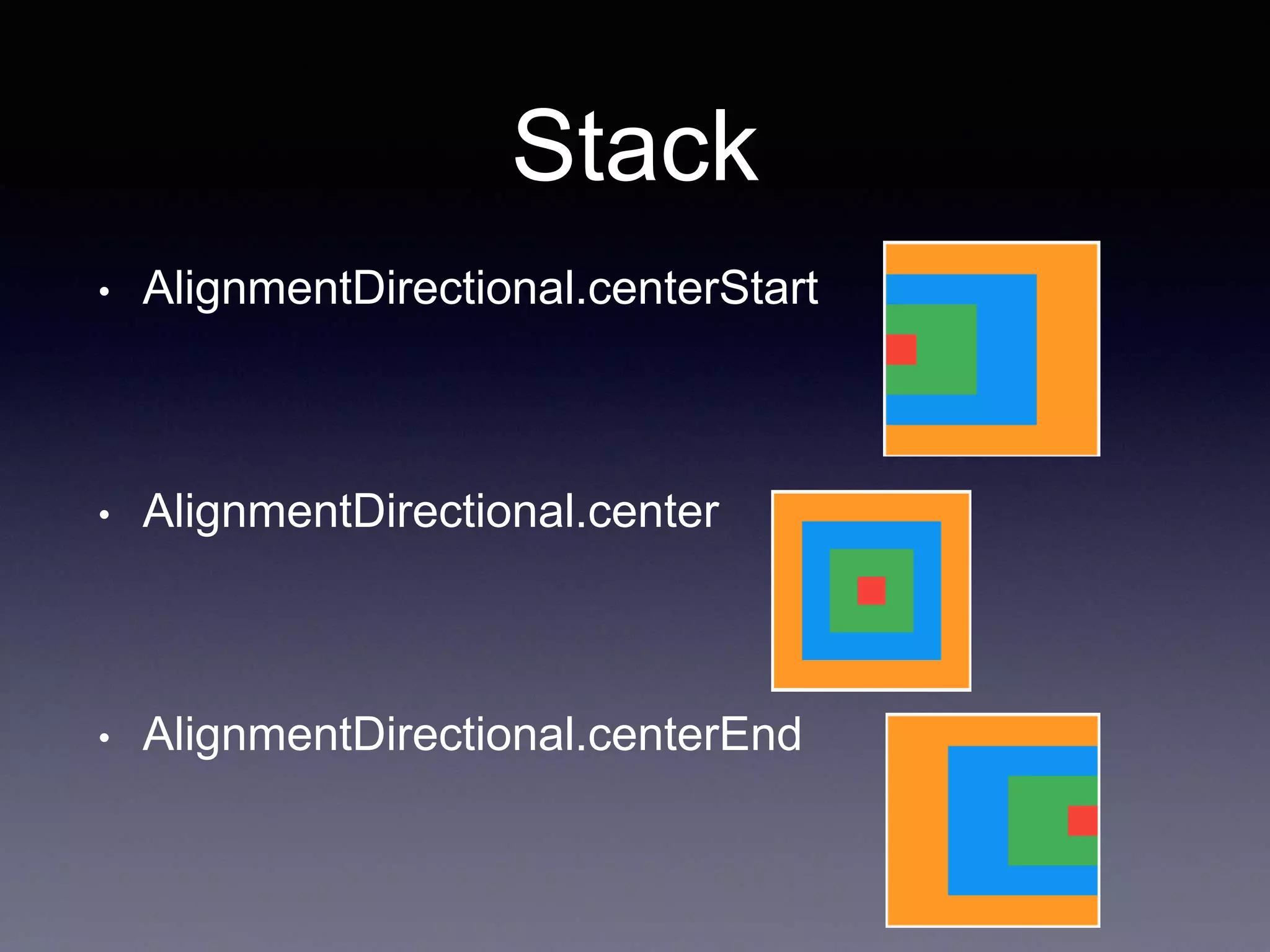
• AlignmentDirectional.centerStart
• AlignmentDirectional.center
• AlignmentDirectional.centerEnd
Stack
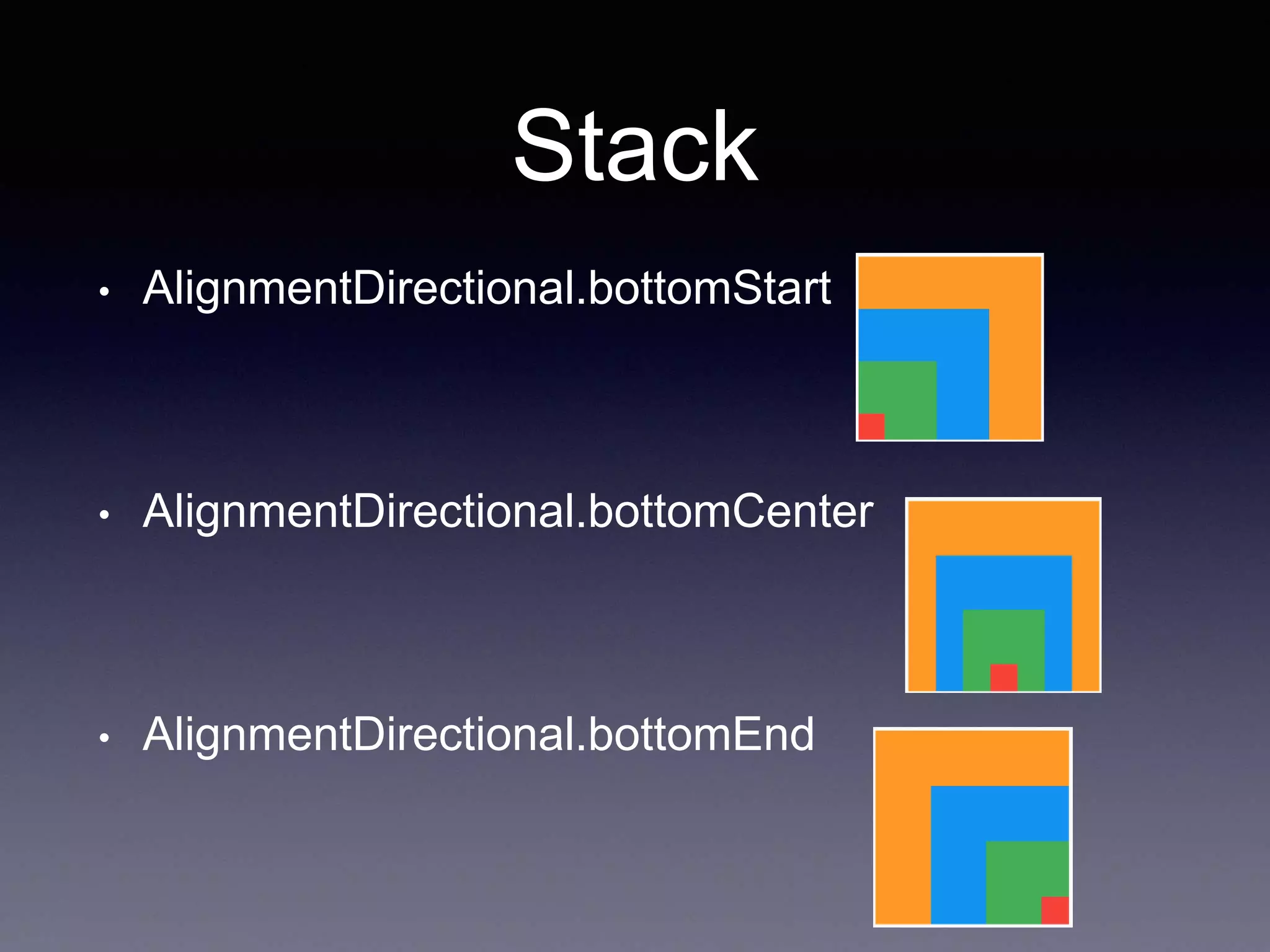
• AlignmentDirectional.bottomStart
• AlignmentDirectional.bottomCenter
• AlignmentDirectional.bottomEnd
Stack
• Use the Positioned widget to position Flutter
widgets in a Stack
Stack(
children: <Widget>[
Container(color: Colors.orange, width: 350, height: 350,),
Positioned(left: 20.0, child: Container(color: Colors.blue, width: 150,
height: 150,)),
Positioned(left:20.0, top:190.0,child: Container(color: Colors.green,
width: 150, height: 150,)),
Positioned(left:190.0,child: Container(color: Colors.red, width: 150,
height: 150,)),
],),
)
Stack Question
Stack(
children: <Widget>[
alignment: AlignmentDirectional.topStart,
Container(color: Colors.orange, width: 150, height: 150,),
Container(color: Colors.blue, width: 150, height: 150,),
Container(color: Colors.green, width: 150, height: 150,),
Container(color: Colors.red, width: 150, height: 150,),
],
)
Expanded
• distributing space between multiple items
Row(
children: <Widget>[
Expanded(
child: Container(
decoration: const BoxDecoration(color: Colors.red),
),
flex: 3,
),
Expanded(
child: Container(
decoration: const BoxDecoration(color: Colors.green),
),
flex: 2,
),
Expanded(
child: Container(
decoration: const BoxDecoration(color: Colors.blue),
),
flex: 1,
),
],
)
Expanded Question
Column(
children: <Widget>[
Expanded(
child: Container(
decoration: const BoxDecoration(color: Colors.red),
),
),
Expanded(
child: Container(
decoration: const BoxDecoration(color: Colors.green),
),
),
Expanded(
child: Container(
decoration: const BoxDecoration(color: Colors.blue),
),
),
],
)
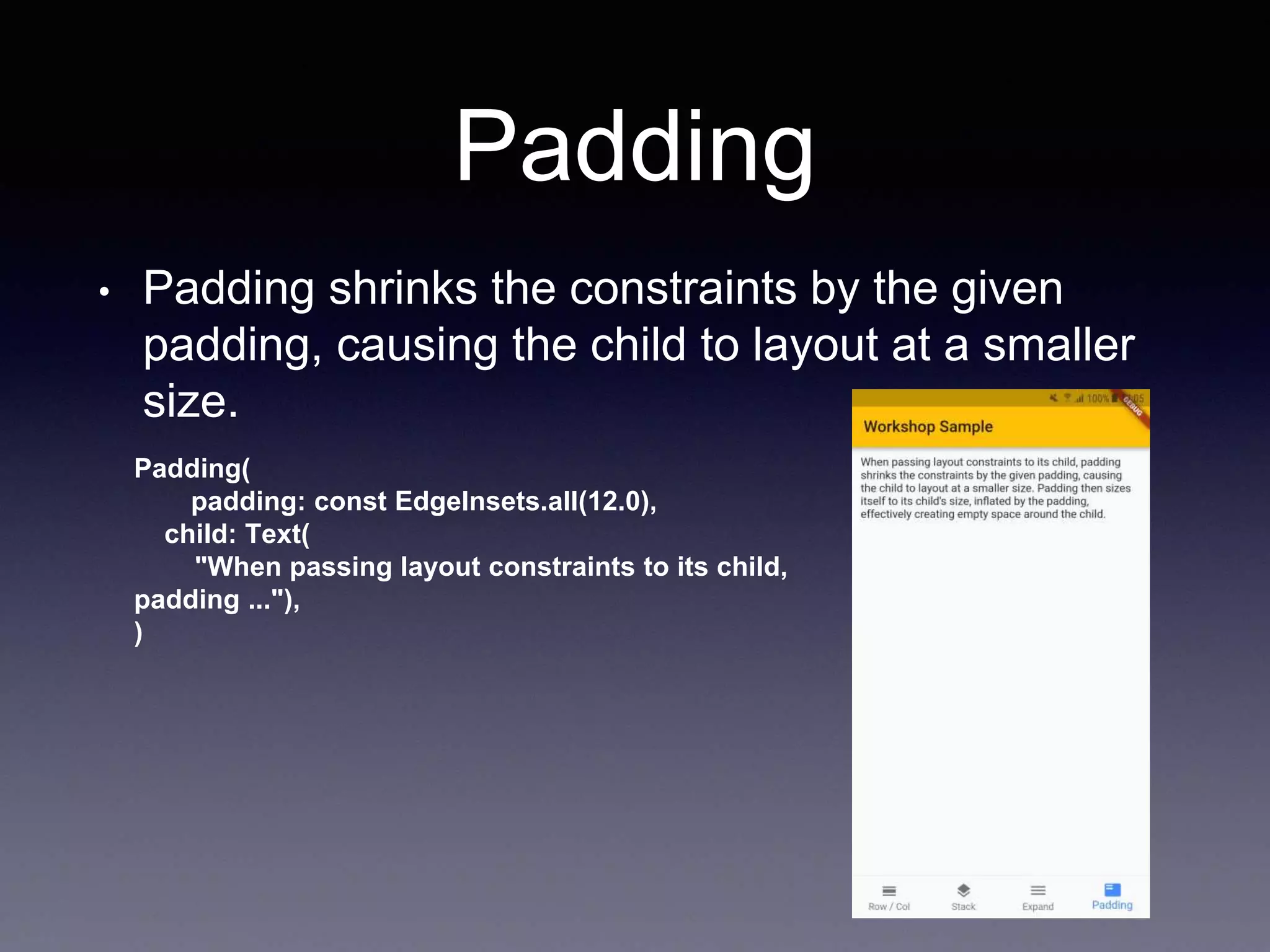
Padding
• Padding shrinks the constraints by the given
padding, causing the child to layout at a smaller
size.
Padding(
padding: const EdgeInsets.all(12.0),
child: Text(
"When passing layout constraints to its child,
padding ..."),
)
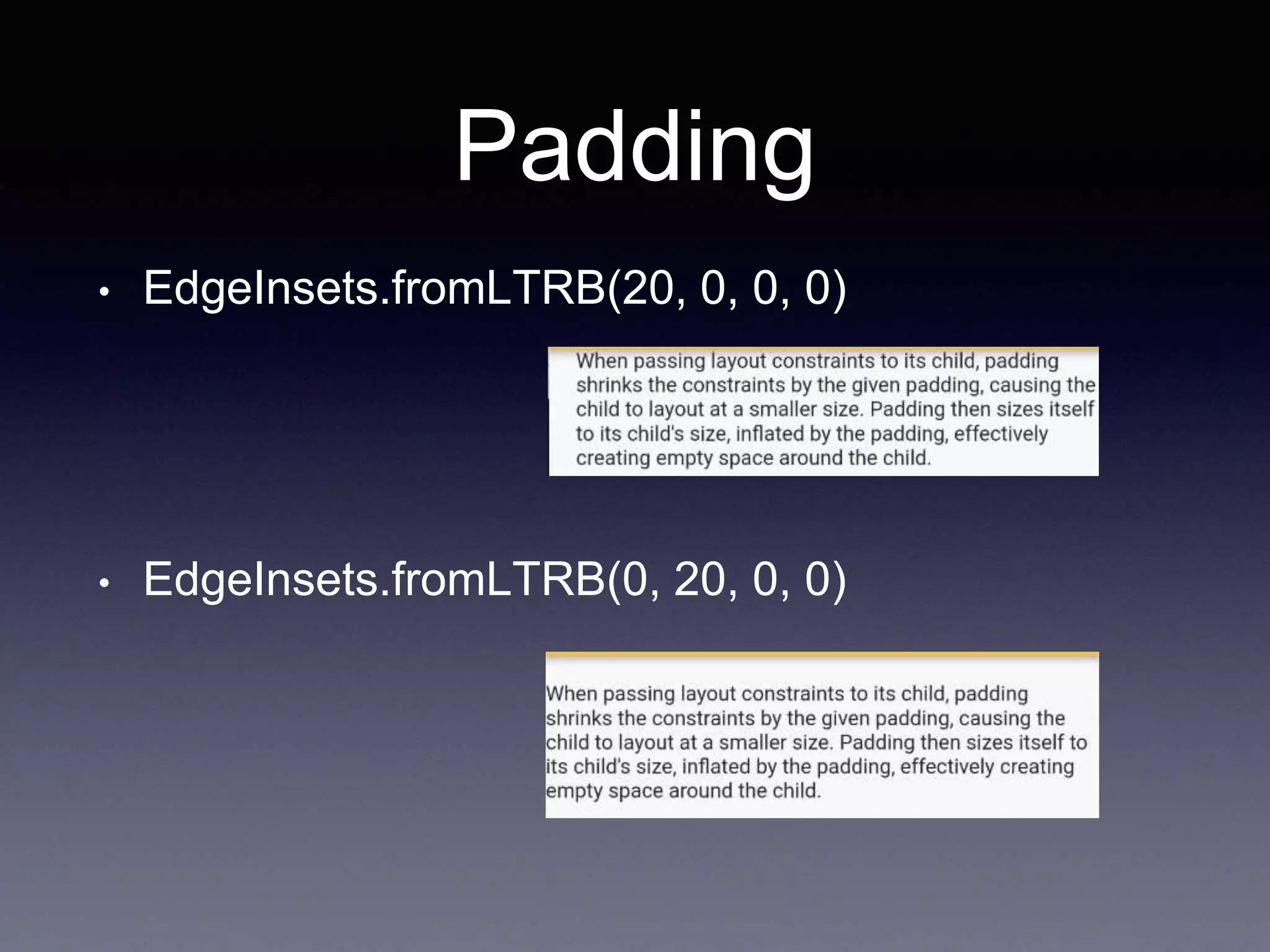
Padding
• EdgeInsets.fromLTRB(20, 0, 0, 0)
• EdgeInsets.fromLTRB(0, 20, 0, 0)
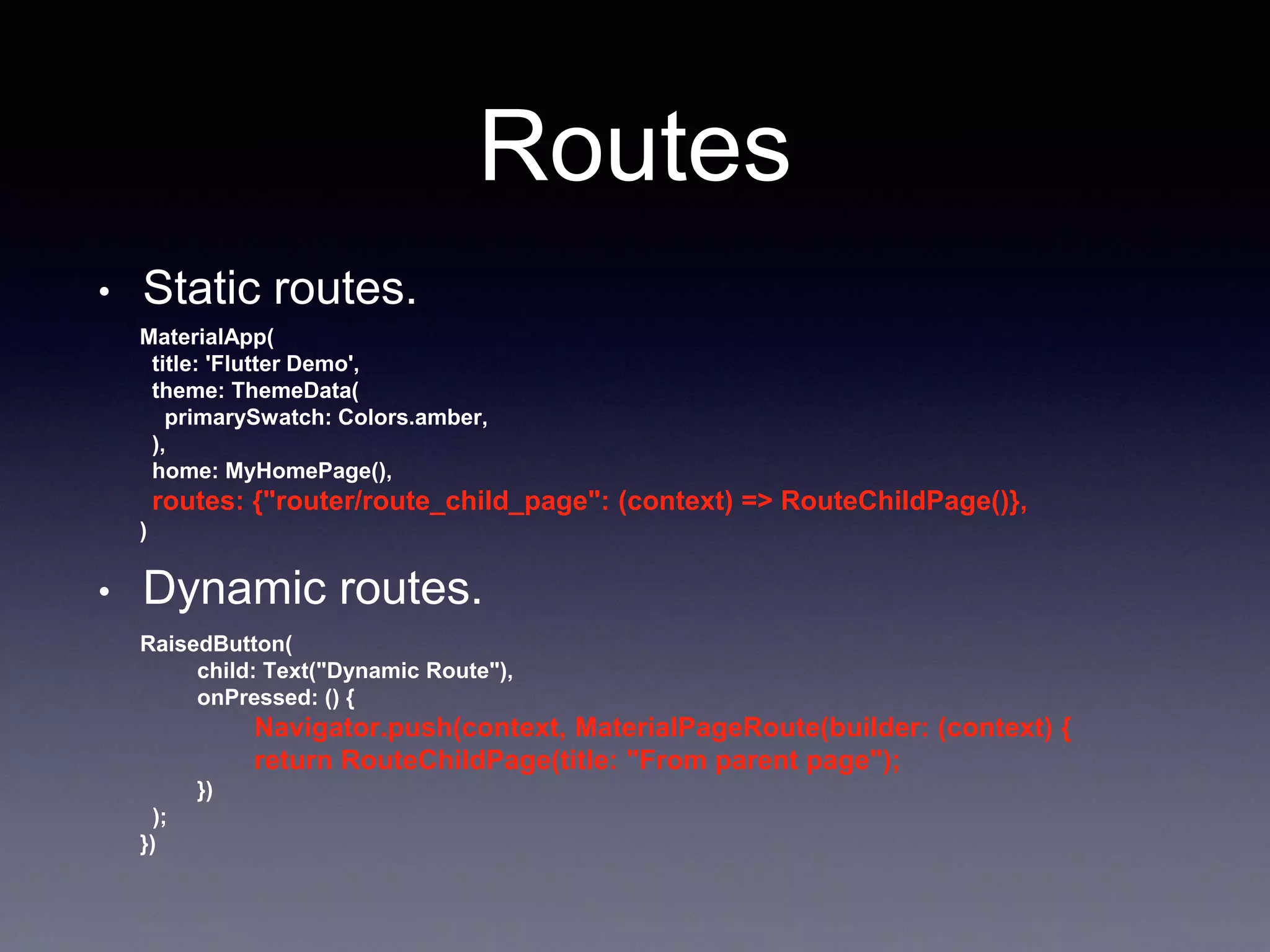
Routes
• Static routes.
MaterialApp(
title: 'Flutter Demo',
theme: ThemeData(
primarySwatch: Colors.amber,
),
home: MyHomePage(),
routes: {"router/route_child_page": (context) => RouteChildPage()},
)
• Dynamic routes.
RaisedButton(
child: Text("Dynamic Route"),
onPressed: () {
Navigator.push(context, MaterialPageRoute(builder: (context) {
return RouteChildPage(title: "From parent page");
})
);
})
async, await, Future
• Dart code runs in a single “thread” of execution.
• Application Not Response.(ANR)
• I/O, Network operations
• Dart uses Future objects (futures) to represent the
results of asynchronous operations
• Future is something that is based on the observer
pattern. (Rx, Promises)
async, await, Future
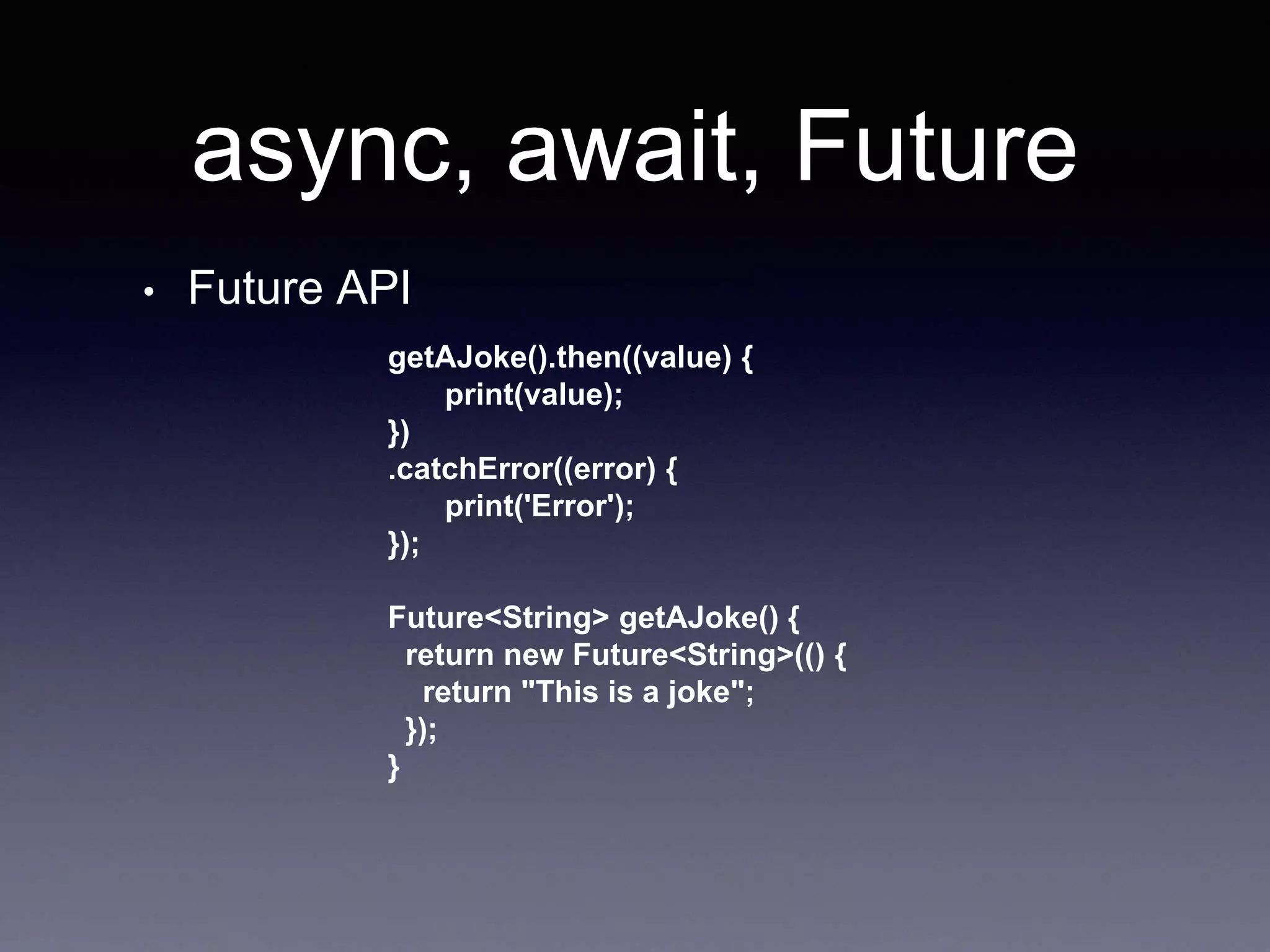
• Future API
getAJoke().then((value) {
print(value);
})
.catchError((error) {
print('Error');
});
Future<String> getAJoke() {
return new Future<String>(() {
return "This is a joke";
});
}
async, await, Future
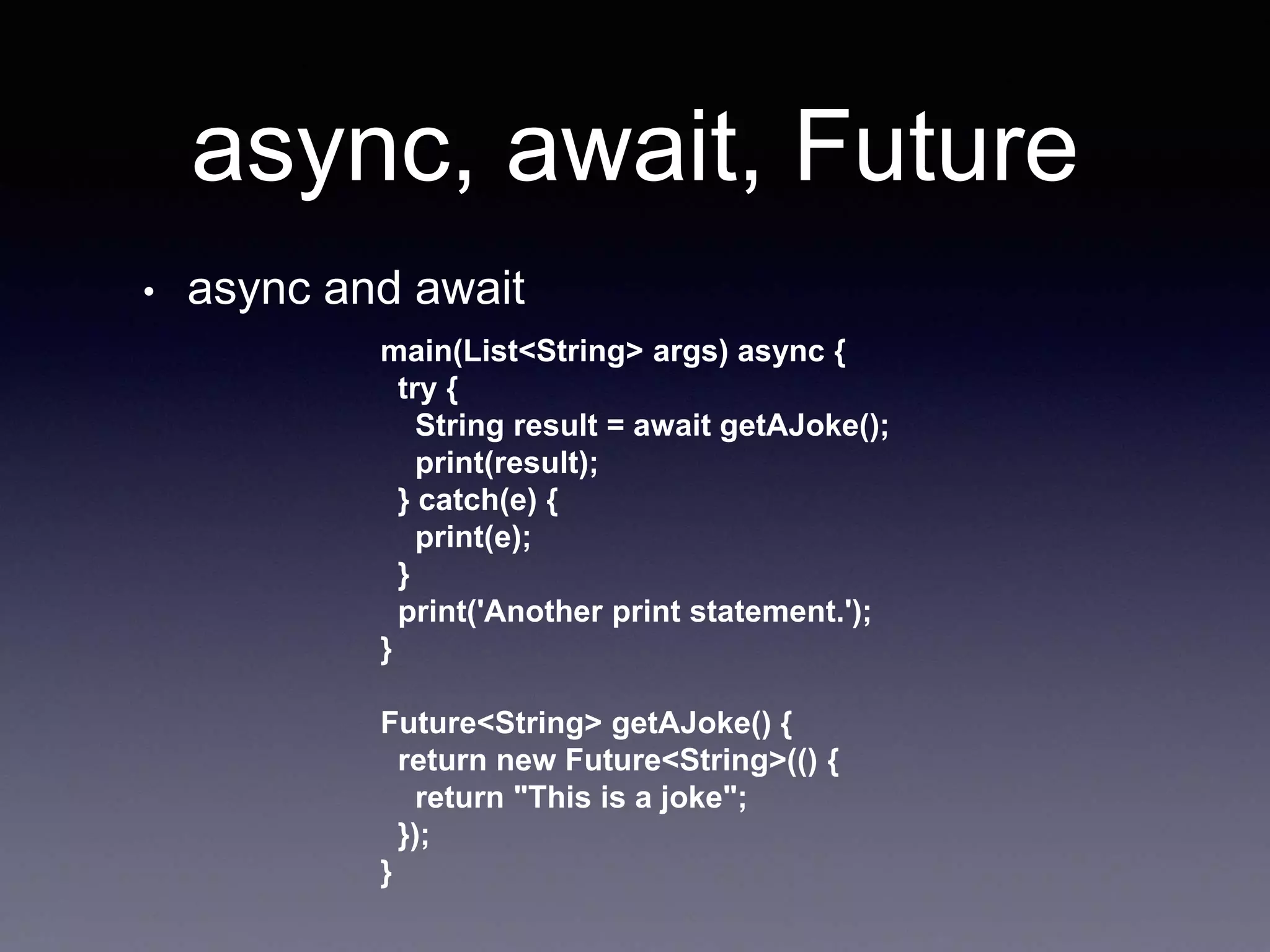
• async and await
main(List<String> args) async {
try {
String result = await getAJoke();
print(result);
} catch(e) {
print(e);
}
print('Another print statement.');
}
Future<String> getAJoke() {
return new Future<String>(() {
return "This is a joke";
});
}
async, await, Future
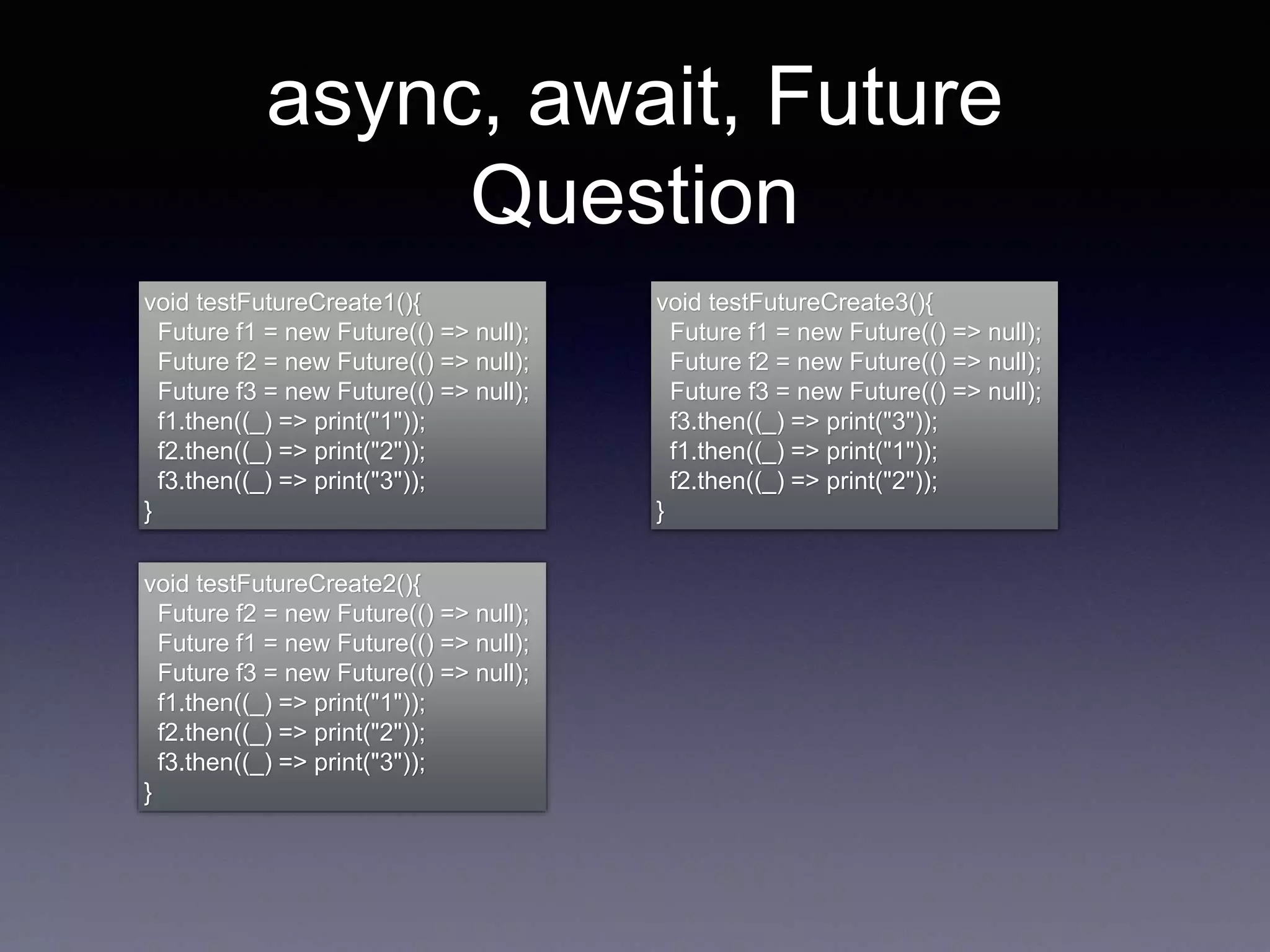
Question
void testFutureCreate1(){
Future f1 = new Future(() => null);
Future f2 = new Future(() => null);
Future f3 = new Future(() => null);
f1.then((_) => print("1"));
f2.then((_) => print("2"));
f3.then((_) => print("3"));
}
void testFutureCreate2(){
Future f2 = new Future(() => null);
Future f1 = new Future(() => null);
Future f3 = new Future(() => null);
f1.then((_) => print("1"));
f2.then((_) => print("2"));
f3.then((_) => print("3"));
}
void testFutureCreate3(){
Future f1 = new Future(() => null);
Future f2 = new Future(() => null);
Future f3 = new Future(() => null);
f3.then((_) => print("3"));
f1.then((_) => print("1"));
f2.then((_) => print("2"));
}
Q & A
Reference
• https://www.dartlang.org/tutorials/language/future
s
• https://flutter.dev/docs/development/ui/widgets/m
aterial
• http://thetechnocafe.com/just-enough-dart-for-
flutter-tutorial-04-asynchronous-and-libraries/
• https://www.jianshu.com/p/c0e30769ea7e

Flutter 3

  • 1.
  • 2.
    Agenda • BottomNavigationBar • Row/ Column • Stack • Expanded • Padding • Routes • async, await, Future
  • 3.
    BottomNavigationBar • A materialwidget displayed at the bottom of an app for selecting among a small number of views, typically between three and five.
  • 4.
    Row / Column •A Row is a widget used to display child widgets in a horizontal manner. • A Column is a widget used to display child widgets in a vertical manner. • Does not scroll. • If you want to scroll, consider using a ListView.
  • 5.
    Row / Column •MainAxisAlignment.start Row /*or Column*/( mainAxisAlignment: MainAxisAlignment.start, children: <Widget>[ Text("One", style: TextStyle(fontSize: 28.0),), Text("Two", style: TextStyle(fontSize: 68.0),), Text("Three", style: TextStyle(fontSize: 28.0),) ], ),
  • 6.
    Row / Column •MainAxisAlignment.start Row /*or Column*/( mainAxisAlignment: MainAxisAlignment.start, children: <Widget>[ Text("One", style: TextStyle(fontSize: 28.0),), Text("Two", style: TextStyle(fontSize: 68.0),), Text("Three", style: TextStyle(fontSize: 28.0),) ], ),
  • 7.
    Row / Column •MainAxisAlignment.center • MainAxisAlignment.end
  • 8.
    Row / Column •MainAxisAlignment.spaceEvenly • MainAxisAlignment.spaceBetween
  • 9.
    Row / Column •MainAxisAlignment.spaceAround
  • 10.
    Row / Column •MainAxisSize.min Row /*or Column*/( mainAxisSize: MainAxisSize.min, children: <Widget>[ Text("One", style: TextStyle(fontSize: 28.0),), Text("Two", style: TextStyle(fontSize: 68.0),), Text("Three", style: TextStyle(fontSize: 28.0),) ], ),
  • 11.
    Row / Column •CrossAxisAlignment.start Row /*or Column*/( crossAxisAlignment: CrossAxisAlignment.start, children: <Widget>[ Text("One", style: TextStyle(fontSize: 28.0),), Text("Two", style: TextStyle(fontSize: 68.0),), Text("Three", style: TextStyle(fontSize: 28.0),) ], ),
  • 12.
    Row / Column •CrossAxisAlignment.center • CrossAxisAlignment.end
  • 13.
    Row / Column •CrossAxisAlignment.stretch
  • 14.
    Stack • A widgetthat positions its children relative to the edges of its box. Stack( children: <Widget>[ alignment: AlignmentDirectional.topStart, Container(color: Colors.orange, width: 350, height: 350,), Container(color: Colors.blue, width: 250, height: 250,), Container(color: Colors.green, width: 150, height: 150,), Container(color: Colors.red, width: 50, height: 50,), ], )
  • 15.
  • 16.
  • 17.
  • 18.
    Stack • Use thePositioned widget to position Flutter widgets in a Stack Stack( children: <Widget>[ Container(color: Colors.orange, width: 350, height: 350,), Positioned(left: 20.0, child: Container(color: Colors.blue, width: 150, height: 150,)), Positioned(left:20.0, top:190.0,child: Container(color: Colors.green, width: 150, height: 150,)), Positioned(left:190.0,child: Container(color: Colors.red, width: 150, height: 150,)), ],), )
  • 19.
    Stack Question Stack( children: <Widget>[ alignment:AlignmentDirectional.topStart, Container(color: Colors.orange, width: 150, height: 150,), Container(color: Colors.blue, width: 150, height: 150,), Container(color: Colors.green, width: 150, height: 150,), Container(color: Colors.red, width: 150, height: 150,), ], )
  • 20.
    Expanded • distributing spacebetween multiple items Row( children: <Widget>[ Expanded( child: Container( decoration: const BoxDecoration(color: Colors.red), ), flex: 3, ), Expanded( child: Container( decoration: const BoxDecoration(color: Colors.green), ), flex: 2, ), Expanded( child: Container( decoration: const BoxDecoration(color: Colors.blue), ), flex: 1, ), ], )
  • 21.
    Expanded Question Column( children: <Widget>[ Expanded( child:Container( decoration: const BoxDecoration(color: Colors.red), ), ), Expanded( child: Container( decoration: const BoxDecoration(color: Colors.green), ), ), Expanded( child: Container( decoration: const BoxDecoration(color: Colors.blue), ), ), ], )
  • 22.
    Padding • Padding shrinksthe constraints by the given padding, causing the child to layout at a smaller size. Padding( padding: const EdgeInsets.all(12.0), child: Text( "When passing layout constraints to its child, padding ..."), )
  • 23.
    Padding • EdgeInsets.fromLTRB(20, 0,0, 0) • EdgeInsets.fromLTRB(0, 20, 0, 0)
  • 24.
    Routes • Static routes. MaterialApp( title:'Flutter Demo', theme: ThemeData( primarySwatch: Colors.amber, ), home: MyHomePage(), routes: {"router/route_child_page": (context) => RouteChildPage()}, ) • Dynamic routes. RaisedButton( child: Text("Dynamic Route"), onPressed: () { Navigator.push(context, MaterialPageRoute(builder: (context) { return RouteChildPage(title: "From parent page"); }) ); })
  • 25.
    async, await, Future •Dart code runs in a single “thread” of execution. • Application Not Response.(ANR) • I/O, Network operations • Dart uses Future objects (futures) to represent the results of asynchronous operations • Future is something that is based on the observer pattern. (Rx, Promises)
  • 26.
    async, await, Future •Future API getAJoke().then((value) { print(value); }) .catchError((error) { print('Error'); }); Future<String> getAJoke() { return new Future<String>(() { return "This is a joke"; }); }
  • 27.
    async, await, Future •async and await main(List<String> args) async { try { String result = await getAJoke(); print(result); } catch(e) { print(e); } print('Another print statement.'); } Future<String> getAJoke() { return new Future<String>(() { return "This is a joke"; }); }
  • 28.
    async, await, Future Question voidtestFutureCreate1(){ Future f1 = new Future(() => null); Future f2 = new Future(() => null); Future f3 = new Future(() => null); f1.then((_) => print("1")); f2.then((_) => print("2")); f3.then((_) => print("3")); } void testFutureCreate2(){ Future f2 = new Future(() => null); Future f1 = new Future(() => null); Future f3 = new Future(() => null); f1.then((_) => print("1")); f2.then((_) => print("2")); f3.then((_) => print("3")); } void testFutureCreate3(){ Future f1 = new Future(() => null); Future f2 = new Future(() => null); Future f3 = new Future(() => null); f3.then((_) => print("3")); f1.then((_) => print("1")); f2.then((_) => print("2")); }
  • 29.
  • 30.
    Reference • https://www.dartlang.org/tutorials/language/future s • https://flutter.dev/docs/development/ui/widgets/m aterial •http://thetechnocafe.com/just-enough-dart-for- flutter-tutorial-04-asynchronous-and-libraries/ • https://www.jianshu.com/p/c0e30769ea7e