DOM
DOCUMENT OBJECT MODEL
INTRODUCTION
 W3C standard recommendation
 For building a tree structure in memory for XML
documents
 DOM Application Programming Interface (API)
is a a programmatic library
 Allows manipulation of the contents of an XML
document.
 The DOM interfaces are platform and language
independent.
DOM STRUCTRE MODEL
 Based on OO(Object Oriented) concepts:
– methods (to access or change object’s state)
– interfaces (declaration of a set of methods)
– objects (encapsulation of data and methods)
LIMITATIONS
 Since DOM tree resides in the memory.
Hence larger the XML document the more
memory resource it will consume.
 As its resource needs are high, its
processing is slower as compared to other
XML parsers.
DOM LEVELS
 3 different levels:
– Core DOM - standard model for any structured
document
– XML DOM - standard model for XML
documents
– HTML DOM - standard model for HTML
documents
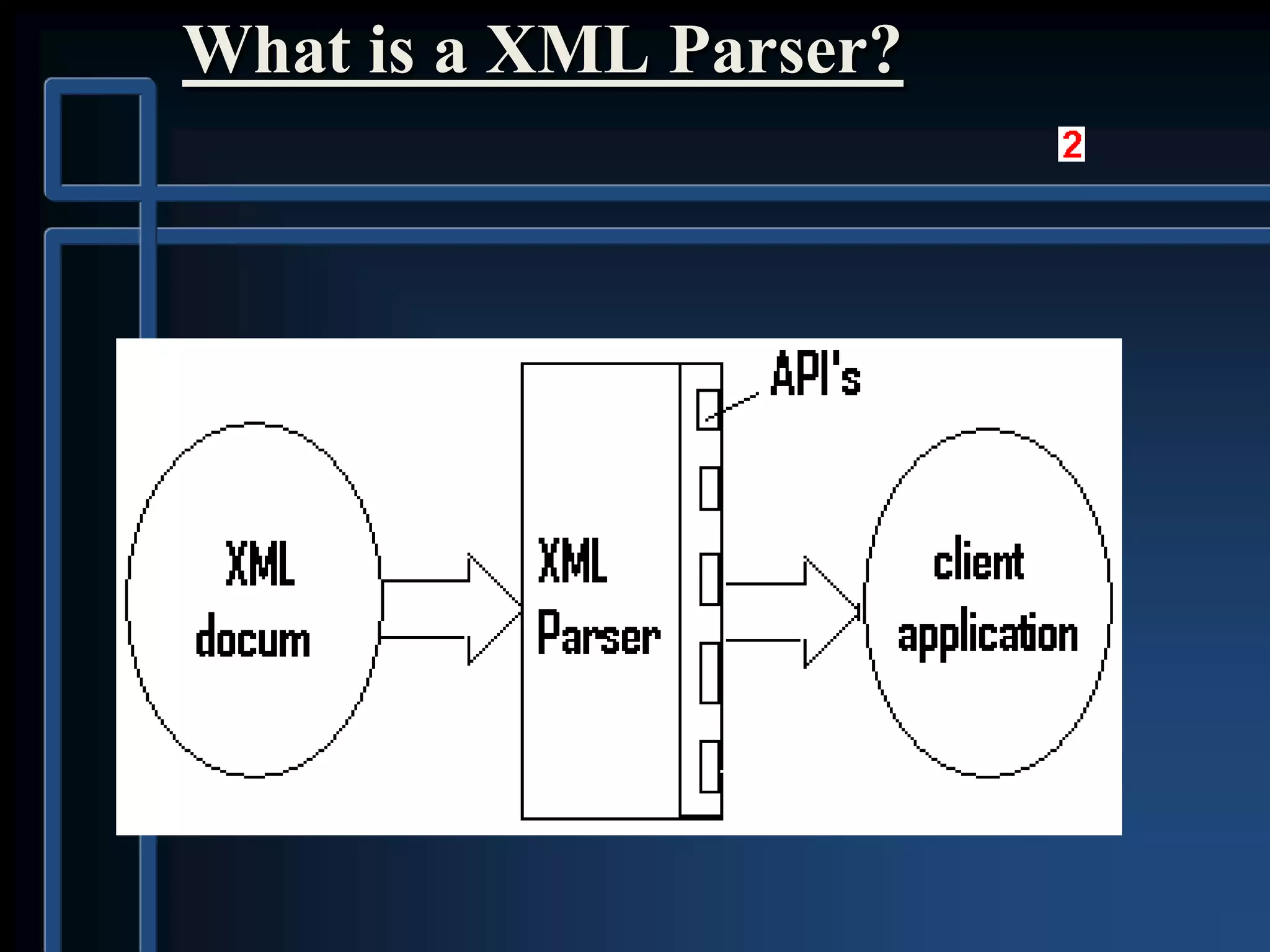
What is a XML Parser?
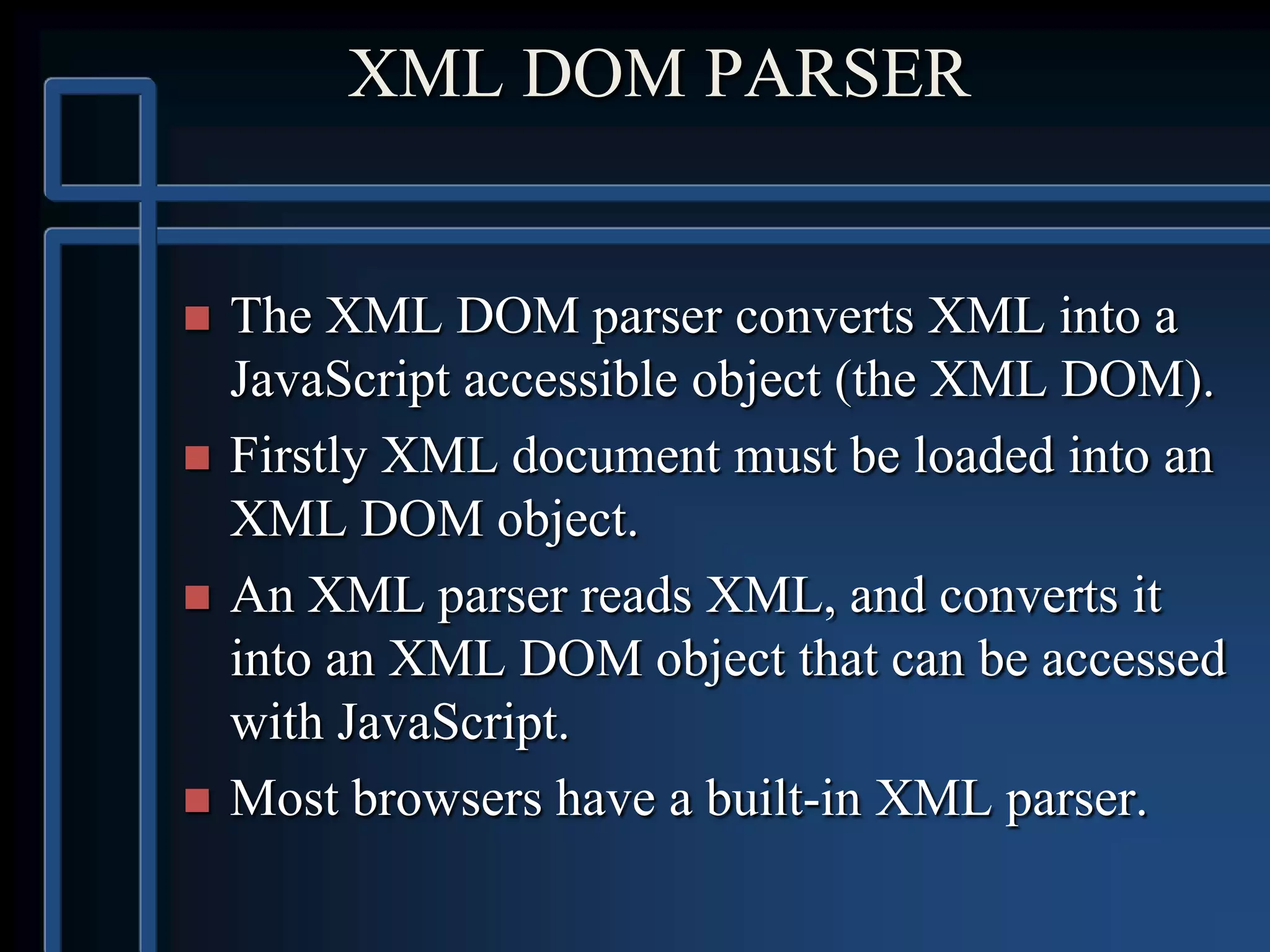
XML DOM PARSER
 The XML DOM parser converts XML into a
JavaScript accessible object (the XML DOM).
 Firstly XML document must be loaded into an
XML DOM object.
 An XML parser reads XML, and converts it
into an XML DOM object that can be accessed
with JavaScript.
 Most browsers have a built-in XML parser.
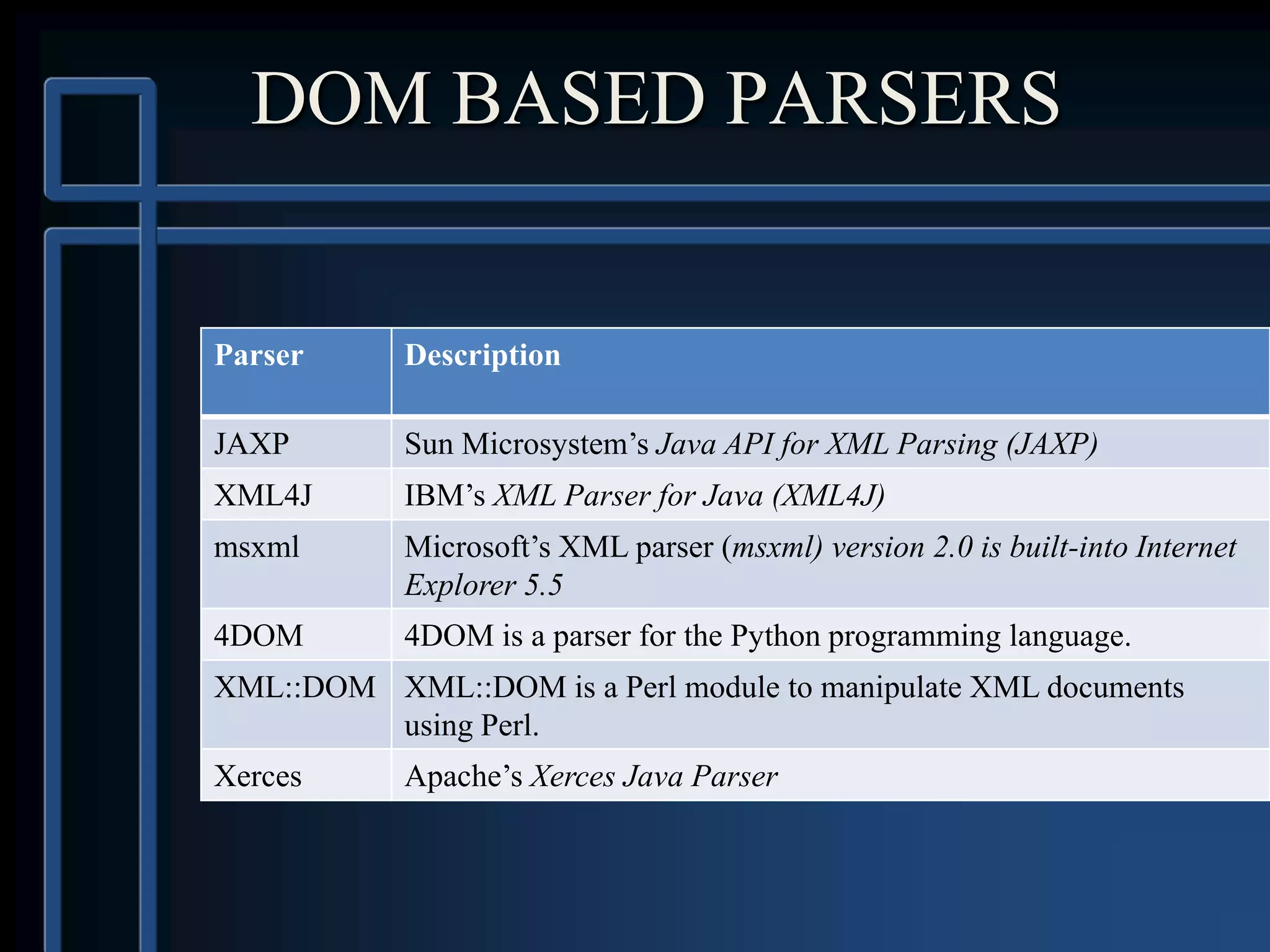
DOM BASED PARSERS
Parser Description
JAXP Sun Microsystem’s Java API for XML Parsing (JAXP)
XML4J IBM’s XML Parser for Java (XML4J)
msxml Microsoft’s XML parser (msxml) version 2.0 is built-into Internet
Explorer 5.5
4DOM 4DOM is a parser for the Python programming language.
XML::DOM XML::DOM is a Perl module to manipulate XML documents
using Perl.
Xerces Apache’s Xerces Java Parser
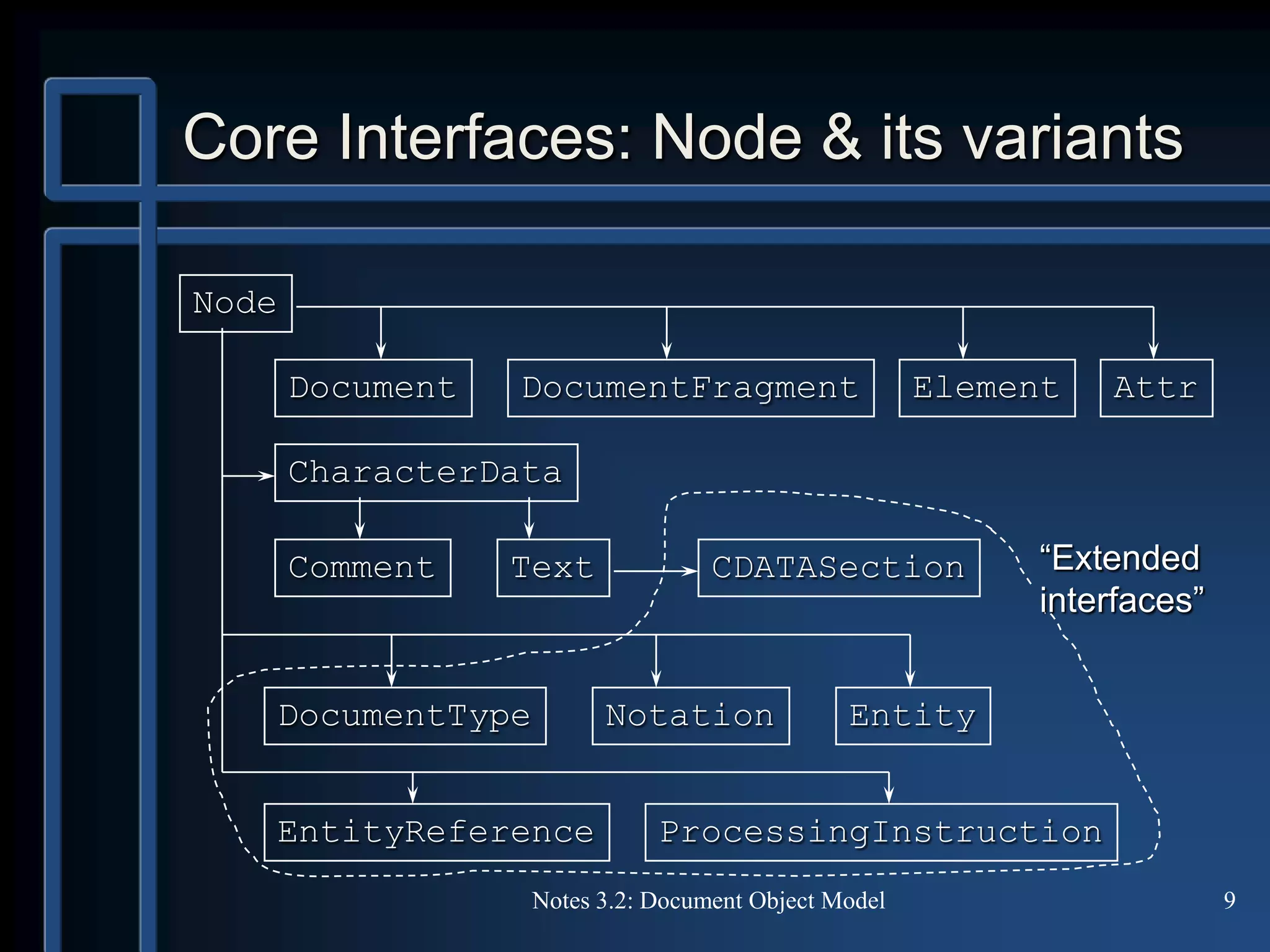
Core Interfaces: Node & its variants
Notes 3.2: Document Object Model 9
Node
Comment
DocumentFragment Attr
Text
Element
CDATASection
ProcessingInstruction
CharacterData
EntityDocumentType Notation
EntityReference
“Extended
interfaces”
Document
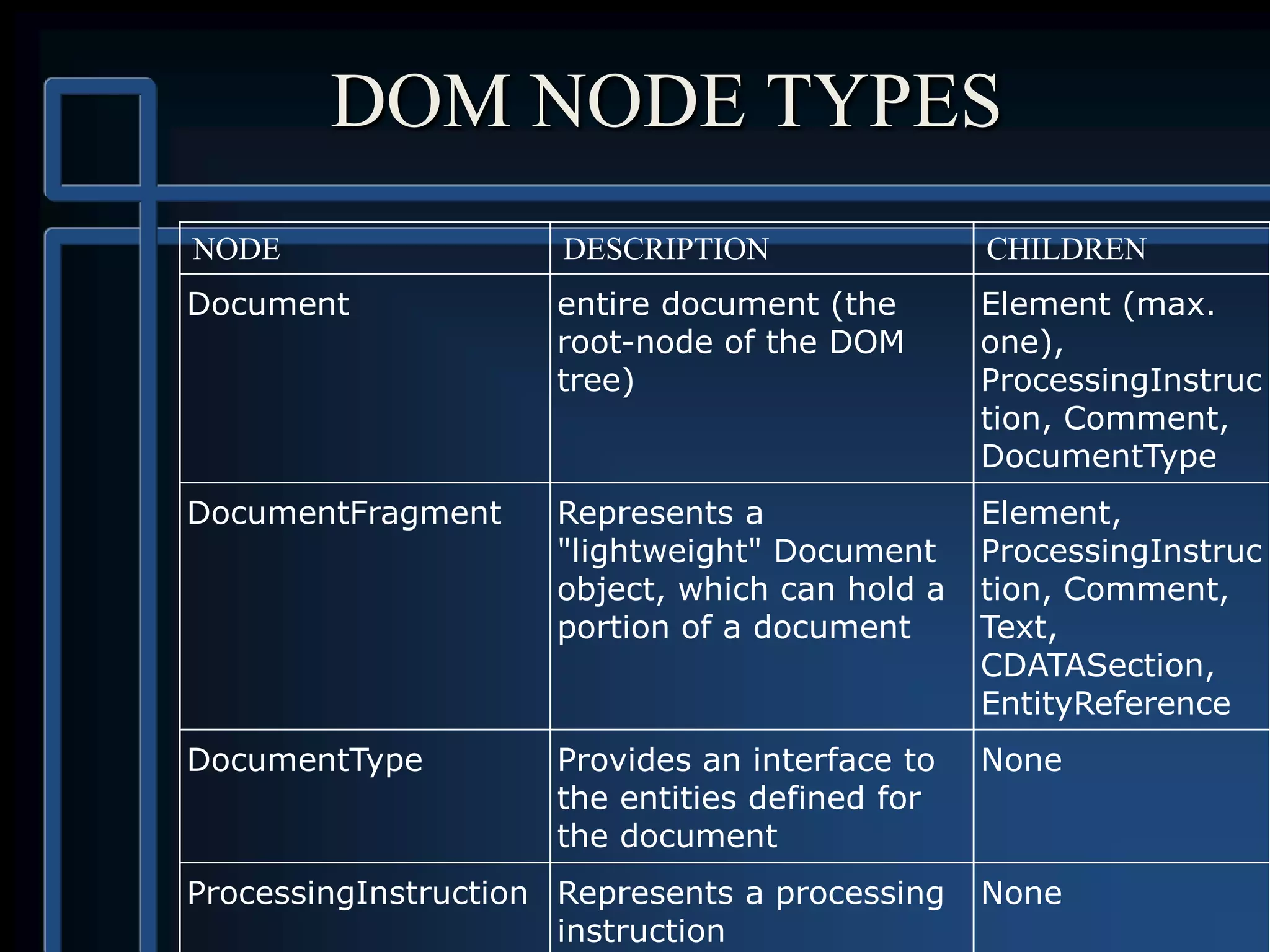
DOM NODE TYPES
NODE DESCRIPTION CHILDREN
Document entire document (the
root-node of the DOM
tree)
Element (max.
one),
ProcessingInstruc
tion, Comment,
DocumentType
DocumentFragment Represents a
"lightweight" Document
object, which can hold a
portion of a document
Element,
ProcessingInstruc
tion, Comment,
Text,
CDATASection,
EntityReference
DocumentType Provides an interface to
the entities defined for
the document
None
ProcessingInstruction Represents a processing
instruction
None
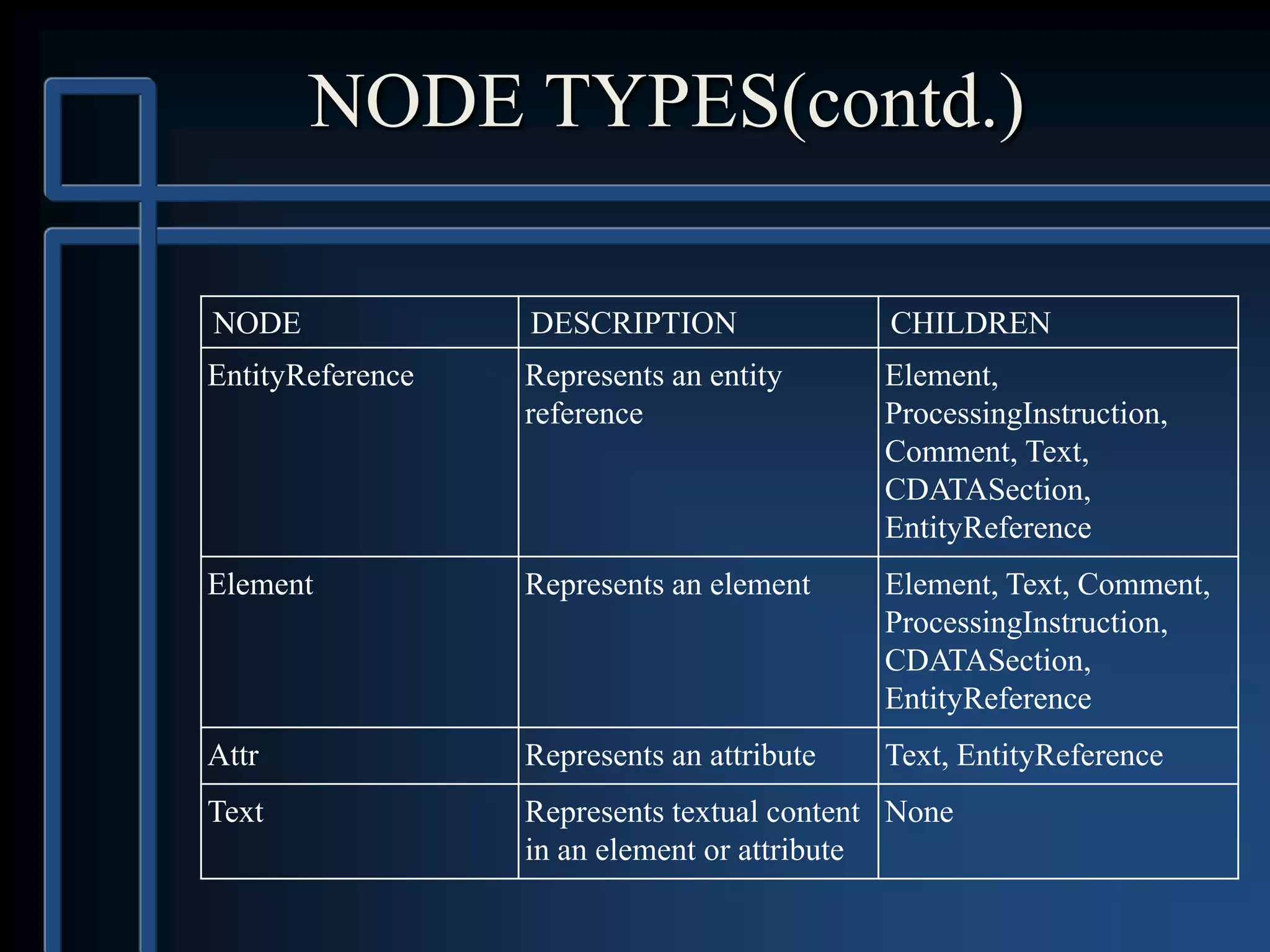
NODE TYPES(contd.)
NODE DESCRIPTION CHILDREN
EntityReference Represents an entity
reference
Element,
ProcessingInstruction,
Comment, Text,
CDATASection,
EntityReference
Element Represents an element Element, Text, Comment,
ProcessingInstruction,
CDATASection,
EntityReference
Attr Represents an attribute Text, EntityReference
Text Represents textual content
in an element or attribute
None
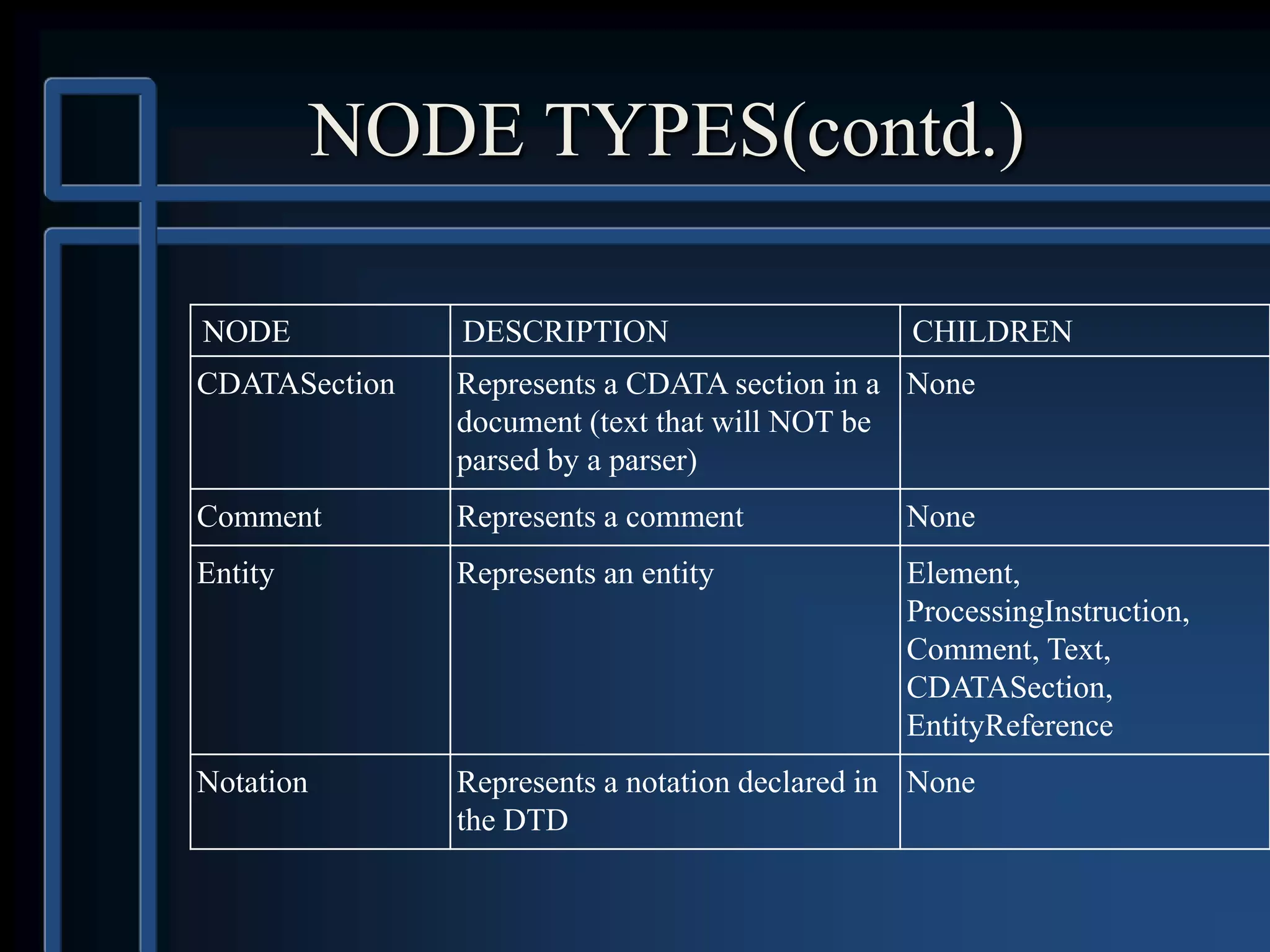
NODE TYPES(contd.)
NODE DESCRIPTION CHILDREN
CDATASection Represents a CDATA section in a
document (text that will NOT be
parsed by a parser)
None
Comment Represents a comment None
Entity Represents an entity Element,
ProcessingInstruction,
Comment, Text,
CDATASection,
EntityReference
Notation Represents a notation declared in
the DTD
None
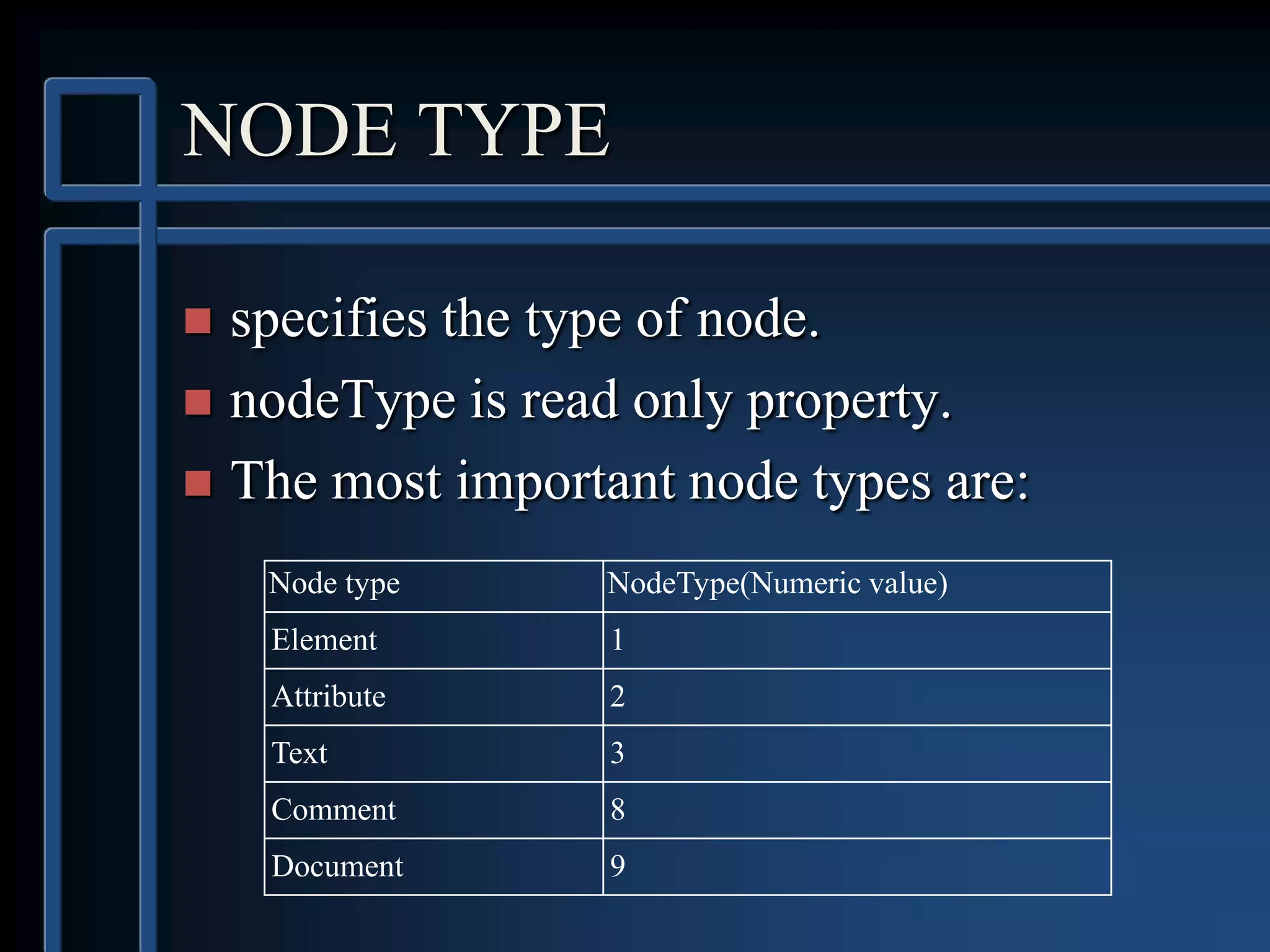
NODE TYPE
 specifies the type of node.
 nodeType is read only property.
 The most important node types are:
Node type NodeType(Numeric value)
Element 1
Attribute 2
Text 3
Comment 8
Document 9
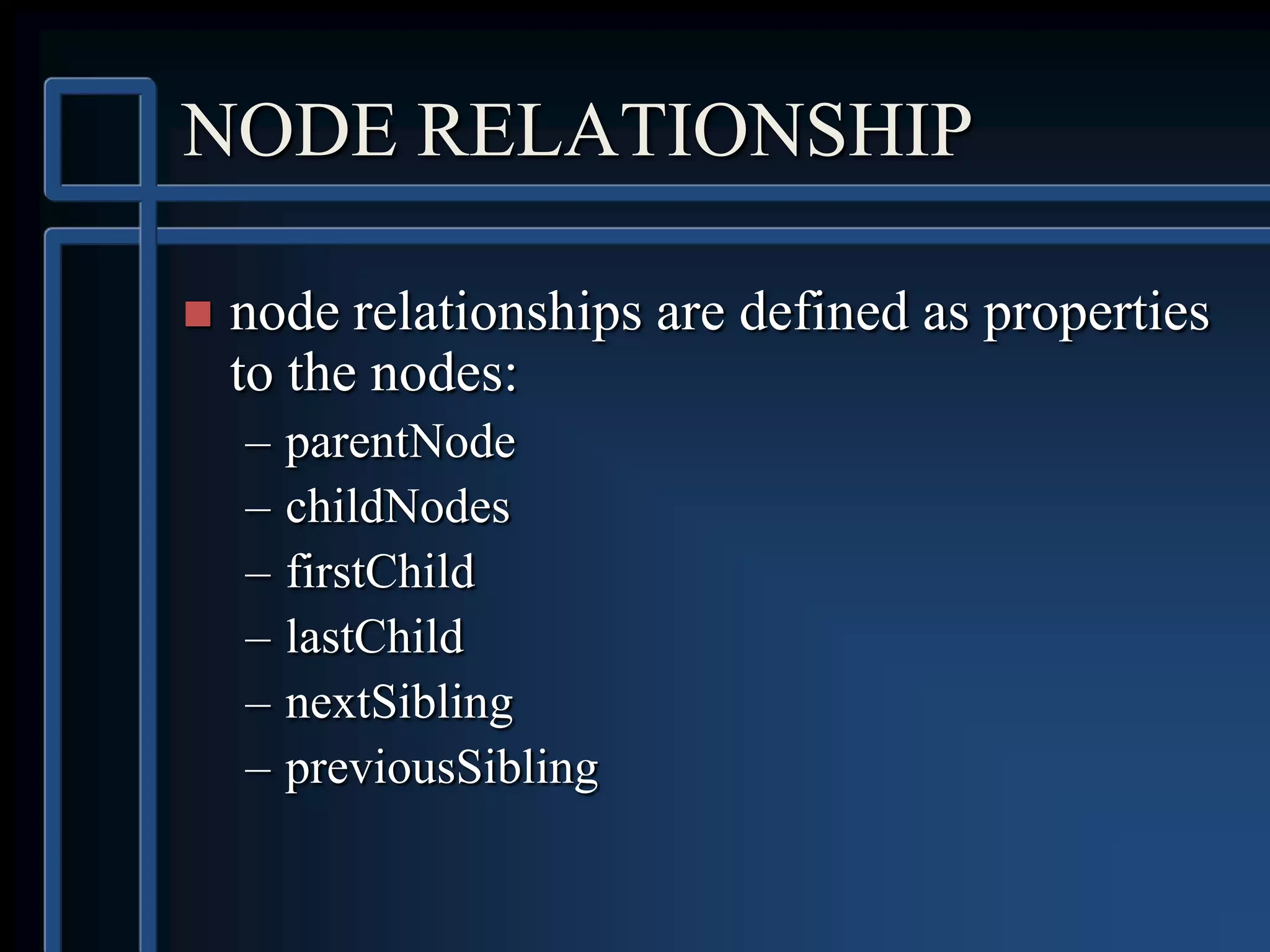
NODE RELATIONSHIP
 node relationships are defined as properties
to the nodes:
– parentNode
– childNodes
– firstChild
– lastChild
– nextSibling
– previousSibling
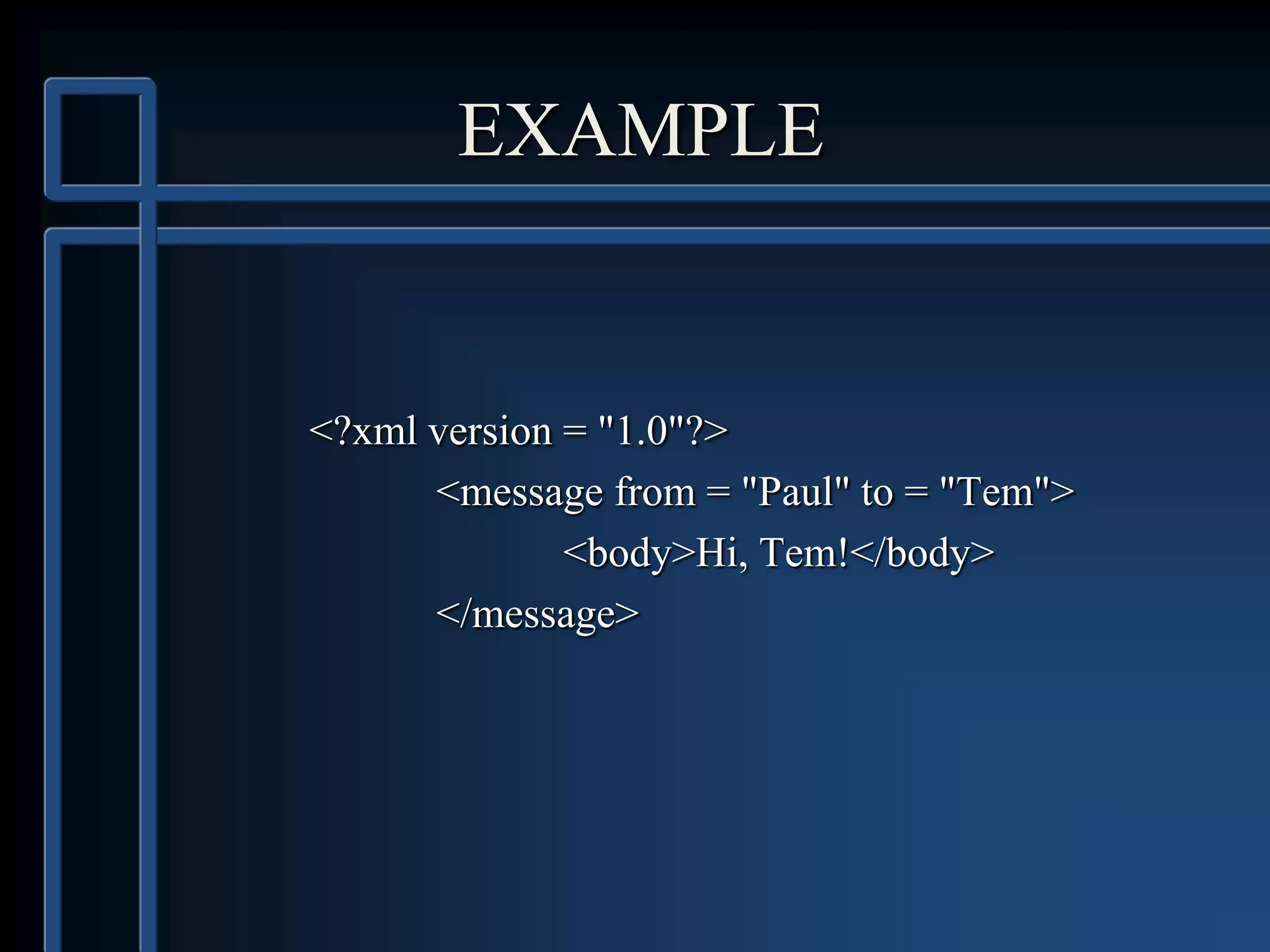
EXAMPLE
<?xml version = "1.0"?>
<message from = "Paul" to = "Tem">
<body>Hi, Tem!</body>
</message>
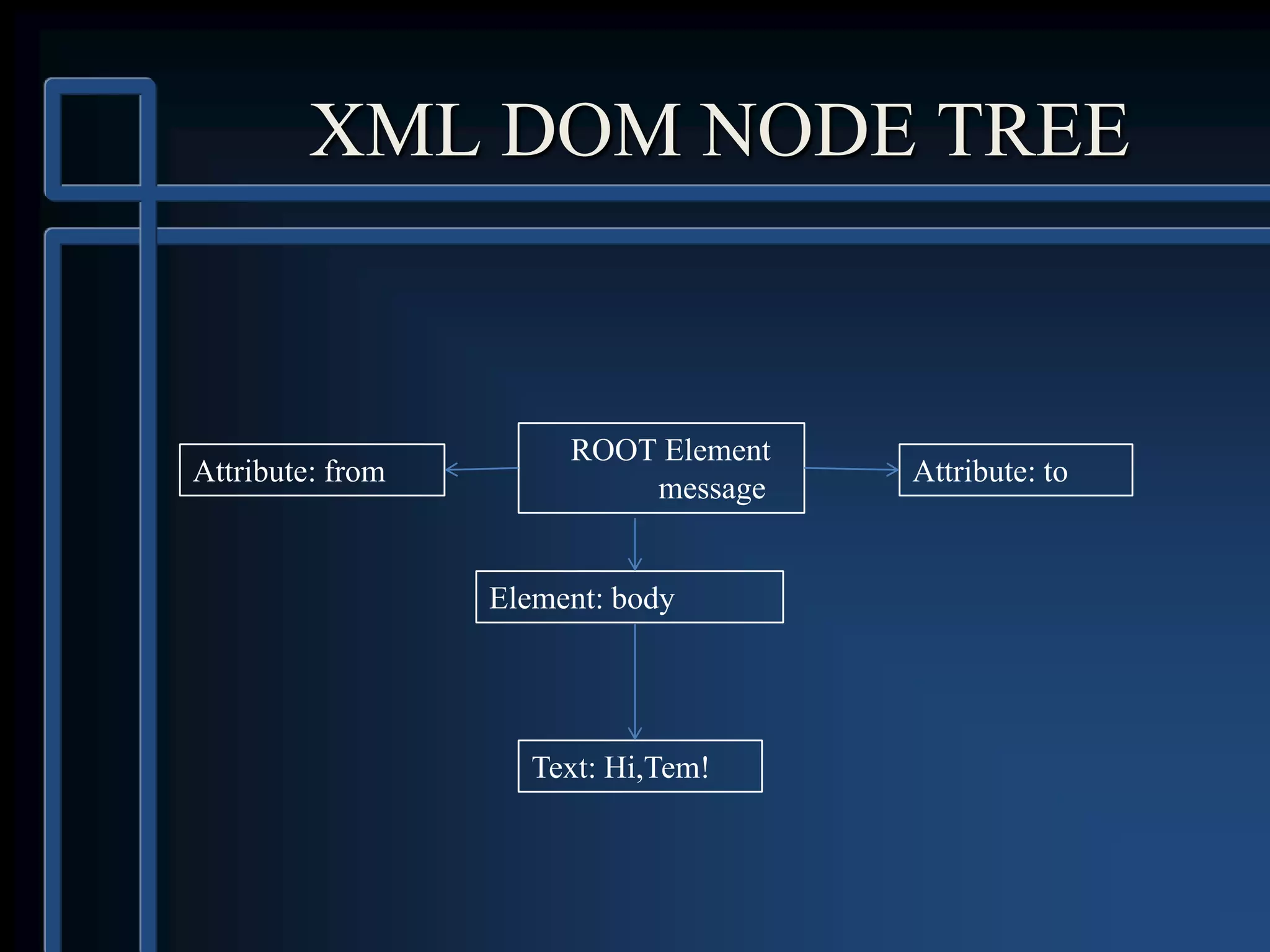
XML DOM NODE TREE
ROOT Element
message
Attribute: from Attribute: to
Element: body
Text: Hi,Tem!
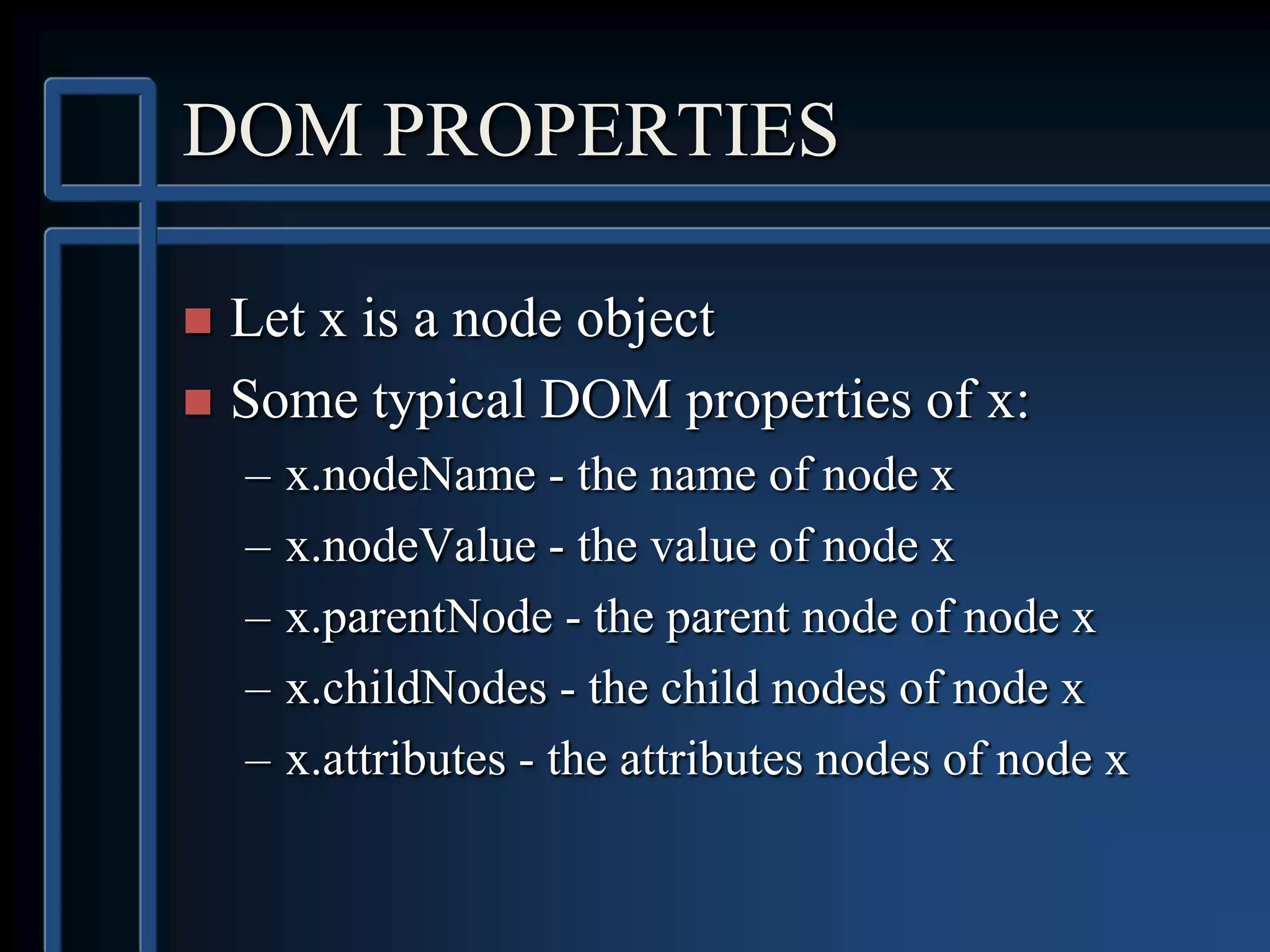
DOM PROPERTIES
 Let x is a node object
 Some typical DOM properties of x:
– x.nodeName - the name of node x
– x.nodeValue - the value of node x
– x.parentNode - the parent node of node x
– x.childNodes - the child nodes of node x
– x.attributes - the attributes nodes of node x
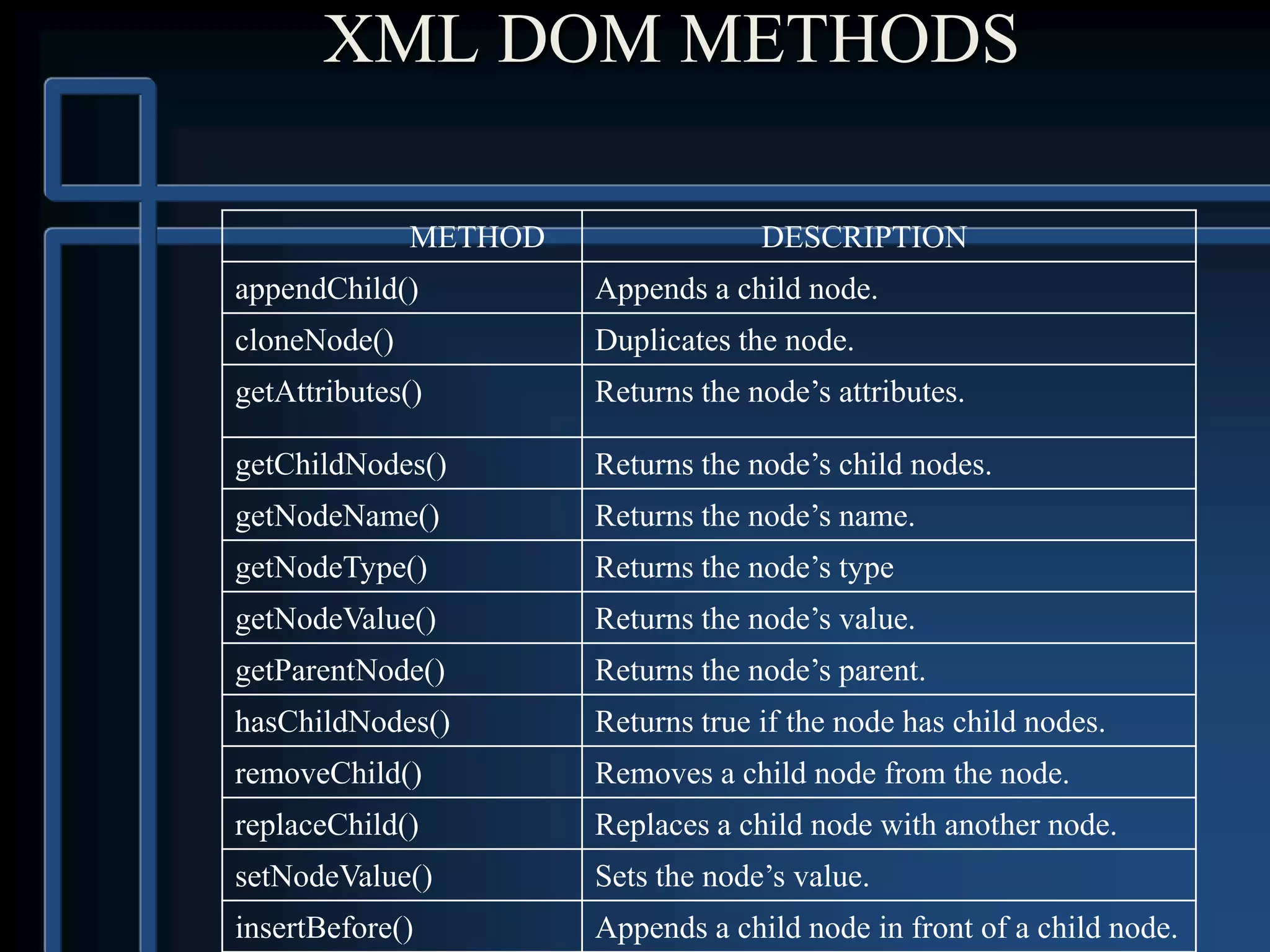
XML DOM METHODS
METHOD DESCRIPTION
appendChild() Appends a child node.
cloneNode() Duplicates the node.
getAttributes() Returns the node’s attributes.
getChildNodes() Returns the node’s child nodes.
getNodeName() Returns the node’s name.
getNodeType() Returns the node’s type
getNodeValue() Returns the node’s value.
getParentNode() Returns the node’s parent.
hasChildNodes() Returns true if the node has child nodes.
removeChild() Removes a child node from the node.
replaceChild() Replaces a child node with another node.
setNodeValue() Sets the node’s value.
insertBefore() Appends a child node in front of a child node.
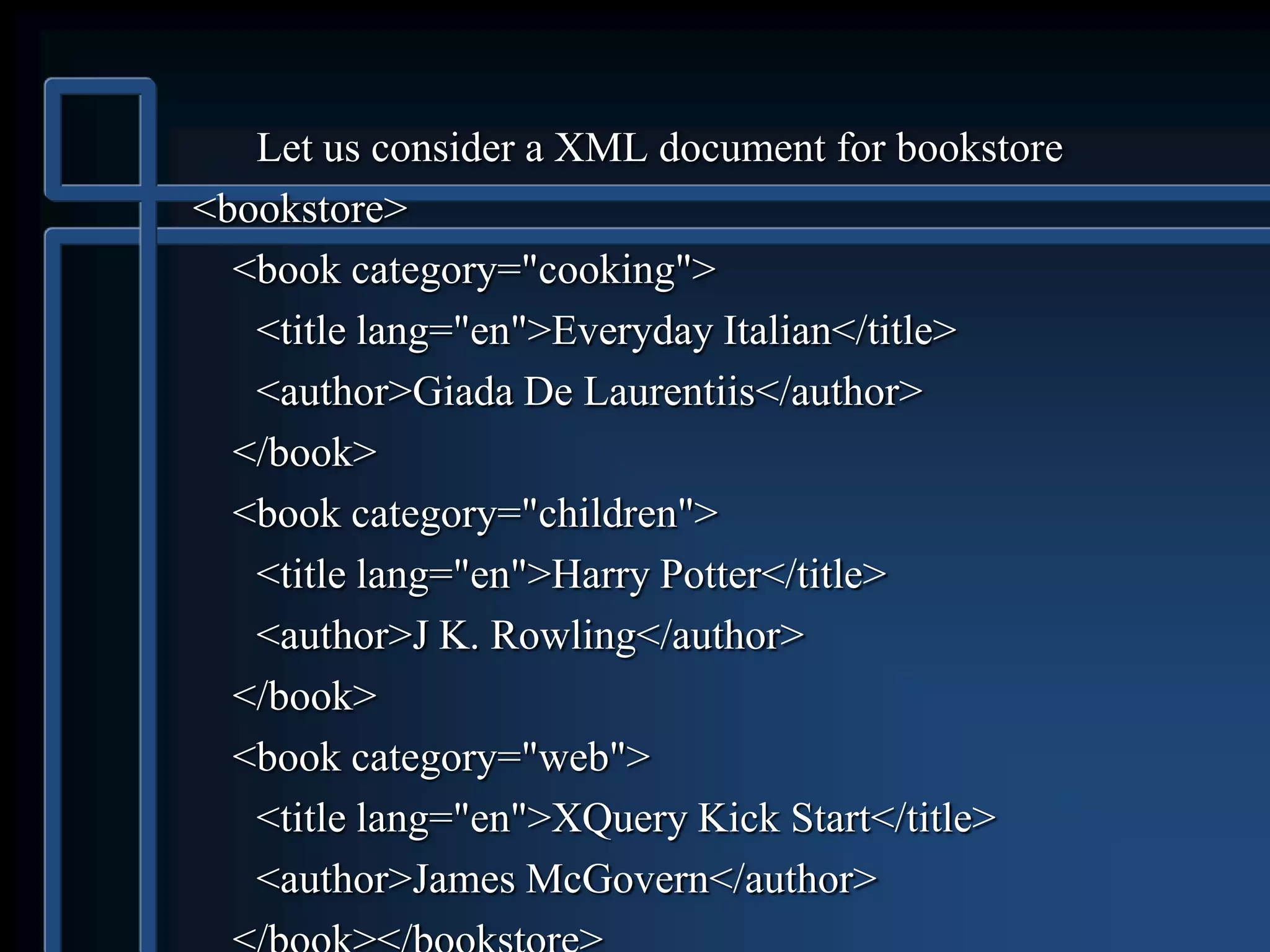
Let us consider a XML document for bookstore
<bookstore>
<book category="cooking">
<title lang="en">Everyday Italian</title>
<author>Giada De Laurentiis</author>
</book>
<book category="children">
<title lang="en">Harry Potter</title>
<author>J K. Rowling</author>
</book>
<book category="web">
<title lang="en">XQuery Kick Start</title>
<author>James McGovern</author>
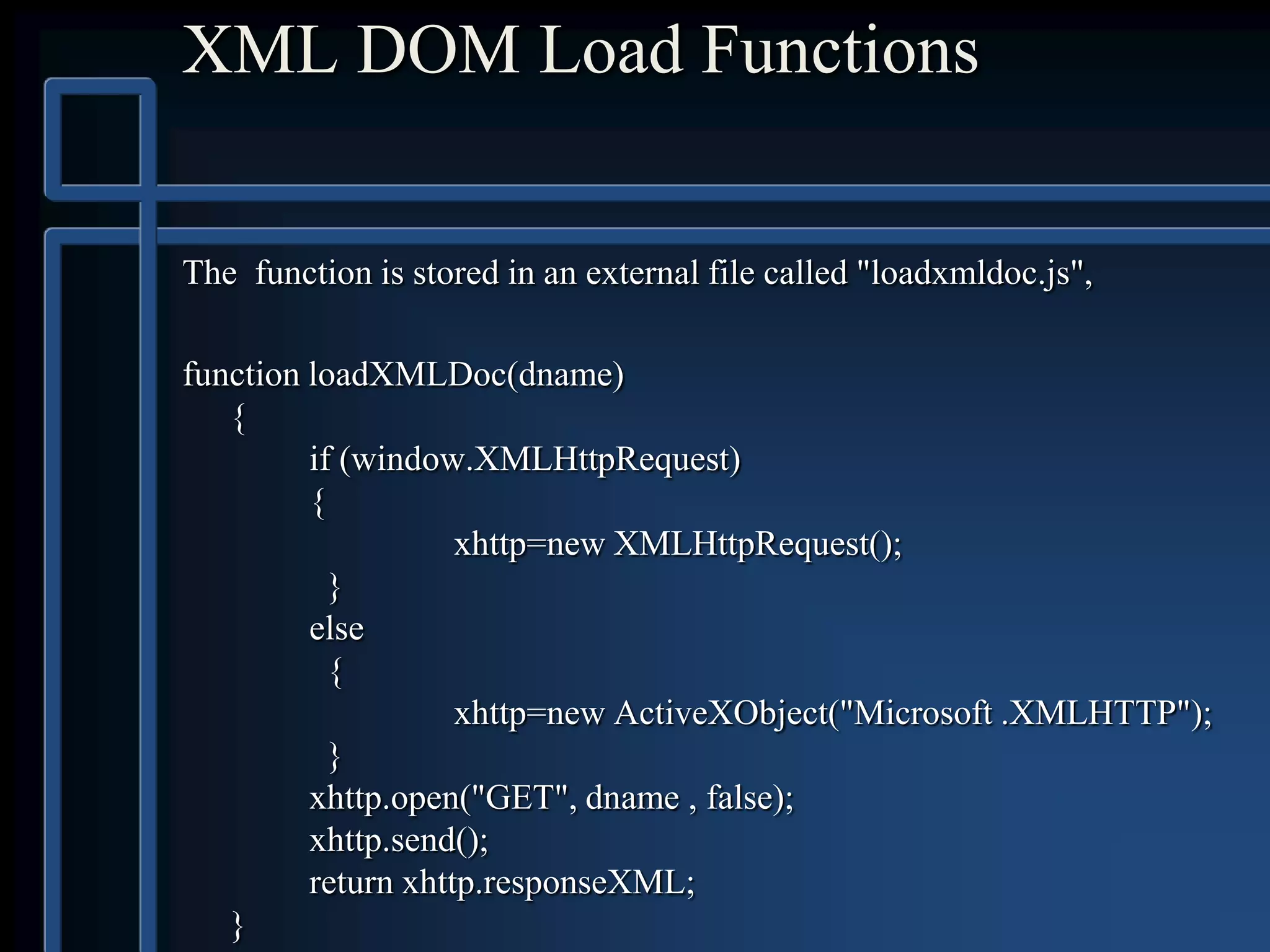
XML DOM Load Functions
The function is stored in an external file called "loadxmldoc.js",
function loadXMLDoc(dname)
{
if (window.XMLHttpRequest)
{
xhttp=new XMLHttpRequest();
}
else
{
xhttp=new ActiveXObject("Microsoft .XMLHTTP");
}
xhttp.open("GET", dname , false);
xhttp.send();
return xhttp.responseXML;
}
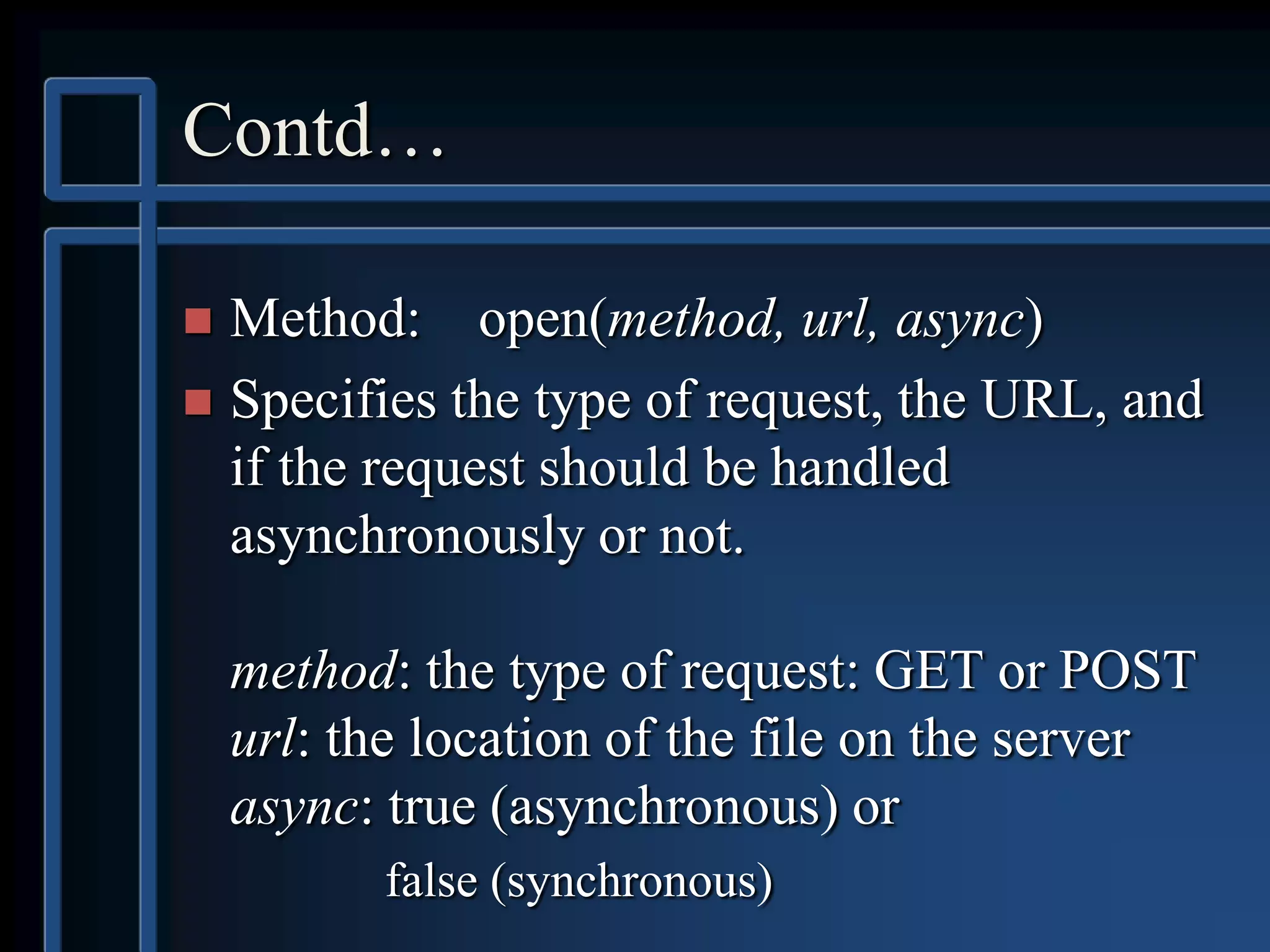
Contd…
 Method: open(method, url, async)
 Specifies the type of request, the URL, and
if the request should be handled
asynchronously or not.
method: the type of request: GET or POST
url: the location of the file on the server
async: true (asynchronous) or
false (synchronous)
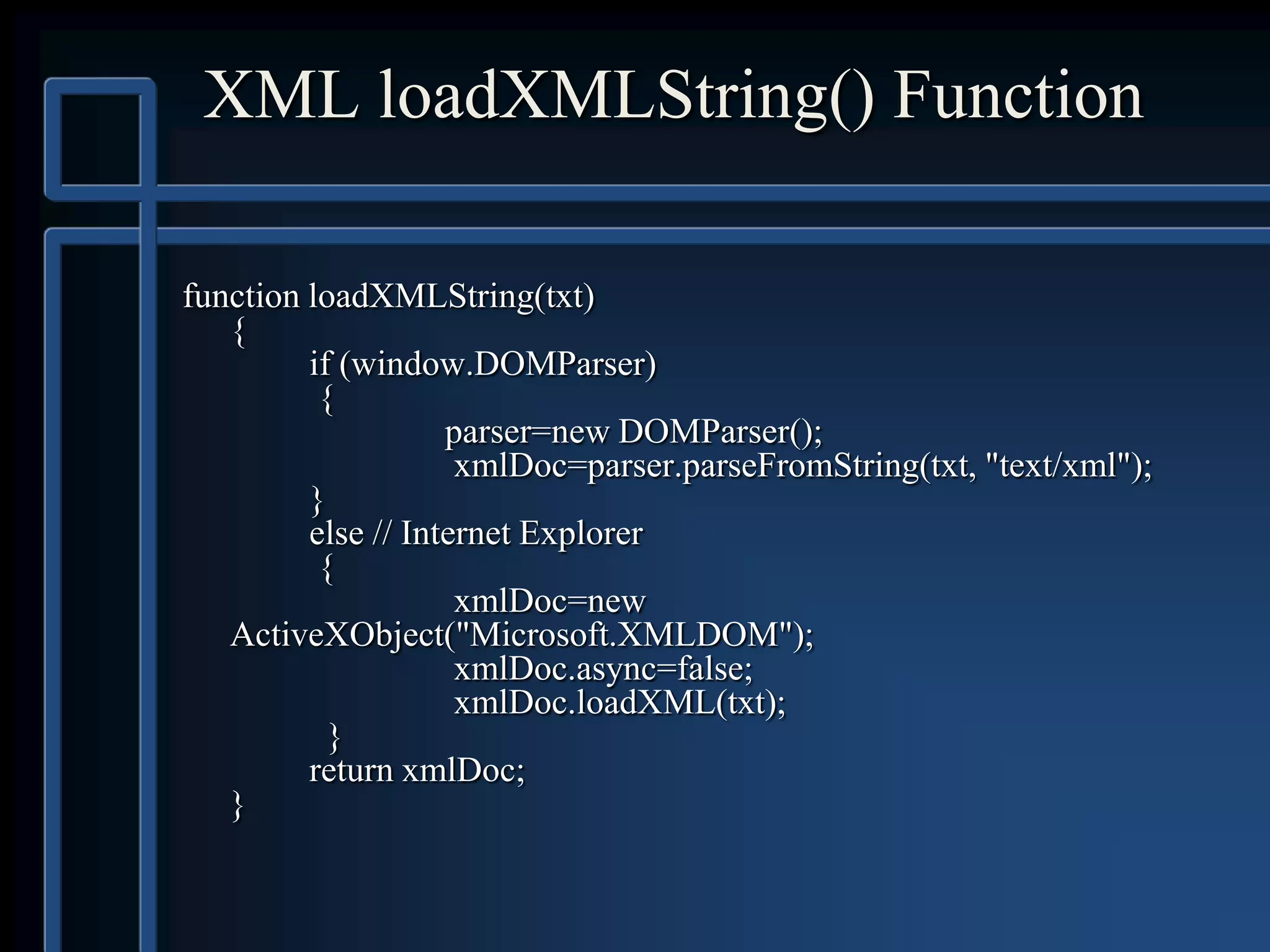
XML loadXMLString() Function
function loadXMLString(txt)
{
if (window.DOMParser)
{
parser=new DOMParser();
xmlDoc=parser.parseFromString(txt, "text/xml");
}
else // Internet Explorer
{
xmlDoc=new
ActiveXObject("Microsoft.XMLDOM");
xmlDoc.async=false;
xmlDoc.loadXML(txt);
}
return xmlDoc;
}
Example
<html><head><script src="loadxmlstring.js"></script></head>
<body><script>
text="<bookstore><book>";
text=text+"<title>Everyday Italian</title>";
text=text+"<author>Giada De Laurentiis</author>";
text=text+"<year>2005</year>";
text=text+"</book></bookstore>";
xmlDoc=loadXMLString(text);
document.write(xmlDoc.getElementsByTagName("title")[0].childNo
des[0].nodeValue);
document.write("<br>");
document.write(xmlDoc.getElementsByTagName("author")[0].child
Nodes[0].nodeValue);
document.write("<br>");
document.write(xmlDoc.getElementsByTagName("year")[0].childN
odes[0].nodeValue);
</script></body>
</html>
ACCESSING NODES
 There are 3 ways:
1. By using the getElementsByTagName() method
2. By looping through (traversing) the nodes tree.
3. By navigating the node tree, using the node
relationships.
getElementsByTagName()
method
 Syntax:
node.getElementsByTagName("tagname”);
 returns an array of all elements with the specified tagname that
are descendents of element “node”.
 The elements in the node list returned can be accessed using
index number that starts with 0.
 To get all elements with specific tagname in the XML document
use:
– xmlDoc.getElementsByTagName(“tagname”);
 where xmlDoc is the document itself (document node).
Example
<html>
<head><script src="loadxmldoc.js"></script></head>
<body><script>
xmlDoc=loadXMLDoc("books.xml");
x=xmlDoc.getElementsByTagName("title");
for (i=0;i<x.length;i++){
document.write(x[i].childNodes[0].nodeValue);
document.write("<br>");
}
</script></body>
</html>
Traversing the Tree
 Load xml document.
 Get the child nodes of the root element.
 For each child node, check the node type of
the node.
 If the node type is matches the node type of
the desired node process that node.
EXAMPLE
<html>
<head><script src="loadxmldoc.js"></script></head>
<body><script>
xmlDoc=loadXMLDoc("books.xml");
x=xmlDoc.documentElement.childNodes;
for (i=0;i<x.length;i++){
if (x[i].nodeType==1)
{//Process only element nodes (type 1)
} }
</script></body>
</html>
Using the Node Relationships.
 Load xml document.
 Get the child nodes of the first element
 Set the "y" variable to be the first child node of the first
element.
 For each child node (starting with the first child node
"y"). Check the node type.
 If the node type is desired node type process that node.
 Set the "y" variable to be the next sibling node, and run
through the loop again
Example
<html>
<head><script src="loadxmldoc.js"></script></head>
<body><script>
xmlDoc=loadXMLDoc("books.xml");
x=xmlDoc.getElementsByTagName("book")[0].childNodes;
y=xmlDoc.getElementsByTagName("book")[0].firstChild;
for (i=0;i<x.length;i++){
if (y.nodeType==1)
{ document.write(y.nodeName + "<br>");}
y=y.nextSibling;
}
</script></body>
</html>
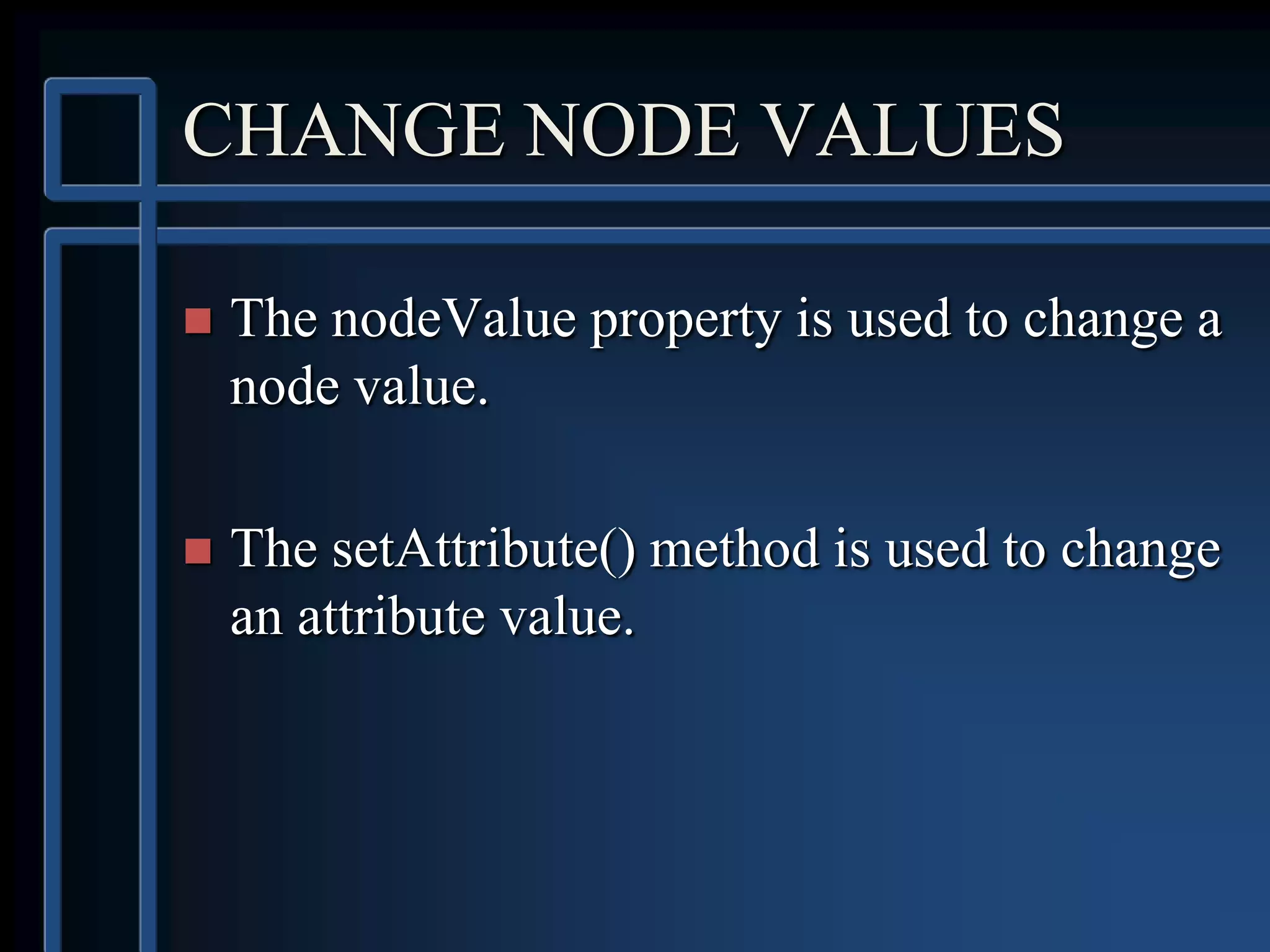
CHANGE NODE VALUES
 The nodeValue property is used to change a
node value.
 The setAttribute() method is used to change
an attribute value.
Changing value of Element node
code changes the text node value of the first <title> element i.e.
Everyday Italian to Easy Cooking
<html>
<head><script src="loadxmldoc.js"> </script></head>
<body>
<script>
xmlDoc=loadXMLDoc("books.xml");
x=xmlDoc.getElementsByTagName("title")[0].childNodes[0];
x.nodeValue="Easy Cooking";
</script>
</body>
</html>
Change an Attribute Using
setAttribute()
Change the attribute “category” to “food” of element book
<html>
<head><script src="loadxmldoc.js"> </script></head>
<body><script>
xmlDoc=loadXMLDoc("books.xml");
x=xmlDoc.getElementsByTagName('book');
x[0].setAttribute("category","food");
document.write(x[0].getAttribute("category"));
</script></body>
</html>
Change an Attribute Using nodeValue
<html>
<head><script src="loadxmldoc.js"> </script></head>
<body><script>
xmlDoc=loadXMLDoc("books.xml");
x=xmlDoc.getElementsByTagName("book")[0]
y=x.getAttributeNode("category");
y.nodeValue="food";
</script></body>
</html>
Remove Nodes
Remove an Element Node
<html>
<head><script src="loadxmldoc.js"> </script></head>
<body><script>
xmlDoc=loadXMLDoc("books.xml");
document.write(xmlDoc.getElementsByTagName('book').length);
document.write("<br>");
y=xmlDoc.getElementsByTagName("book")[0];
xmlDoc.documentElement.removeChild(y);
document.write(xmlDoc.getElementsByTagName('book').length);
</script></body>
</html>
Remove the Current Node
Navigate to the node to be removed then use parentNode property and
removeChild ()
<html>
<head><script src="loadxmldoc.js"> </script></head>
<body><script>
xmlDoc=loadXMLDoc("books.xml");
x=xmlDoc.getElementsByTagName("book")[0];
x.parentNode.removeChild(x);
</script></body>
</html>
Remove the Text Node
<html>
<head><script src="loadxmldoc.js"> </script></head>
<body><script>
xmlDoc=loadXMLDoc("books.xml");
x=xmlDoc.getElementsByTagName("title")[0];
y=x.childNodes[0];
x.removeChild(y);
</script></body>
</html>
Remove the Text of Text Node
<html>
<head><script src="loadxmldoc.js"> </script></head>
<body><script>
xmlDoc=loadXMLDoc("books.xml");
x=xmlDoc.getElementsByTagName("title")[0];
x=xmlDoc.getElementsByTagName("title")[0].childNodes[0];
document.write("Value: " + x.nodeValue);
document.write("<br>");
x.nodeValue="";
document.write("Value: " + x.nodeValue);
</script></body>
</html>
Remove Attribute
<html>
<head><script src="loadxmldoc.js"> </script></head>
<body><script>
xmlDoc=loadXMLDoc("books.xml");
x=xmlDoc.getElementsByTagName('book');
document.write(x[0].getAttribute('category'));
document.write("<br>");
x[0].removeAttribute('category');
document.write(x[0].getAttribute('category'));
</script></body>
</html>
CREATING NODES
Create a New Element Node
<html>
<head><script src="loadxmldoc.js"> </script></head>
<body><script>
xmlDoc=loadXMLDoc("books.xml");
newel=xmlDoc.createElement("edition");
x=xmlDoc.getElementsByTagName("book")[0];
x.appendChild(newel);
</script></body>
</html>
Create a New Attribute Node
<html>
<head><script src="loadxmldoc.js"> </script></head>
<body><script>
xmlDoc=loadXMLDoc("books.xml");
newatt=xmlDoc.createAttribute("edition");
newatt.nodeValue="first";
x=xmlDoc.getElementsByTagName("title");
x[0].setAttributeNode(newatt);
</script>
</body>
</html>
Create an Attribute Using setAttribute()
<html>
<head><script src="loadxmldoc.js"> </script></head>
<body><script>
xmlDoc=loadXMLDoc("books.xml");
x=xmlDoc.getElementsByTagName("title");
x[0].setAttribute("edition","first");
</script></body>
</html>
Create a CDATA SECTION Node
<html>
<head><script src="loadxmldoc.js"></script></head>
<body><script>
xmlDoc=loadXMLDoc("books.xml");
newCDATA=xmlDoc.createCDATASection("Special Offer &
Book Sale");
x=xmlDoc.getElementsByTagName("book")[0];
x.appendChild(newCDATA);
document.write(x.lastChild.nodeValue);
</script></body>
</html>
Create a TEXT Section Node
<html>
<head><script src="loadxmldoc.js"> </script></head>
<body><script>
xmlDoc=loadXMLDoc("books.xml");
newel=xmlDoc.createElement("edition");
newtext=xmlDoc.createTextNode("first");
newel.appendChild(newtext);
x=xmlDoc.getElementsByTagName("book")[0];
x.appendChild(newel);
</script></body>
</html>
APPENDING NODES
After Last Child Node
<html>
<head><script src="loadxmldoc.js"> </script></head>
<body><script>
xmlDoc=loadXMLDoc("books.xml");
newel=xmlDoc.createElement("edition");
x=xmlDoc.getElementsByTagName("book")[0];
x.appendChild(newel);
</script></body>
</html>
Before a Specified Child Node
<html>
<head><script src="loadxmldoc.js"> </script></head>
<body><script>
xmlDoc=loadXMLDoc("books.xml");
newNode=xmlDoc.createElement("book");
x=xmlDoc.documentElement;
y=xmlDoc.getElementsByTagName("book")[3];
x.insertBefore(newNode , y);
</script></body>
</html>
Add Text to a Text Node - insertData()
The insertData() method has two parameters:
offset - Where to begin inserting characters (starts at zero)
string - The string to insert
<html>
<head><script src="loadxmldoc.js"> </script></head>
<body><script>
xmlDoc=loadXMLDoc("books.xml");
x=xmlDoc.getElementsByTagName("title")[0].childNodes[0];
x.insertData(0,"Easy ");
</script></body>
</html>
REPLACE NODES
Replace an Element Node
<html>
<head><script src="loadxmldoc.js"> </script></head>
<body><script>
xmlDoc=loadXMLDoc("books.xml");
x=xmlDoc.documentElement;
newNode=xmlDoc.createElement("book");
newTitle=xmlDoc.createElement("title");
newText=xmlDoc.createTextNode("A Notebook");
newTitle.appendChild(newText);
newNode.appendChild(newTitle);
y=xmlDoc.getElementsByTagName("book")[0]
x.replaceChild(newNode,y);
</script></body>
</html>
Replace Data In a Text Node
<html>
<head><script src="loadxmldoc.js"> </script></head>
<body><script>
xmlDoc=loadXMLDoc("books.xml");
x=xmlDoc.getElementsByTagName("title")[0].childNodes[0];
x.nodeValue="Easy Italian";
</script></body>
</html>
Cloning the nodes
Example
The cloneNode() method has a parameter (true or false). This parameter
indicates if the cloned node should include all attributes and child
nodes of the original node.
<html>
<head><script src="loadxmldoc.js"> </script></head>
<body><script>
xmlDoc=loadXMLDoc("books.xml");
x=xmlDoc.getElementsByTagName('book')[0];
cloneNode=x.cloneNode(true);
xmlDoc.documentElement.appendChild(cloneNode);
</script></body>
</html>

Dom

  • 1.
  • 2.
    INTRODUCTION  W3C standardrecommendation  For building a tree structure in memory for XML documents  DOM Application Programming Interface (API) is a a programmatic library  Allows manipulation of the contents of an XML document.  The DOM interfaces are platform and language independent.
  • 3.
    DOM STRUCTRE MODEL Based on OO(Object Oriented) concepts: – methods (to access or change object’s state) – interfaces (declaration of a set of methods) – objects (encapsulation of data and methods)
  • 4.
    LIMITATIONS  Since DOMtree resides in the memory. Hence larger the XML document the more memory resource it will consume.  As its resource needs are high, its processing is slower as compared to other XML parsers.
  • 5.
    DOM LEVELS  3different levels: – Core DOM - standard model for any structured document – XML DOM - standard model for XML documents – HTML DOM - standard model for HTML documents
  • 6.
    What is aXML Parser?
  • 7.
    XML DOM PARSER The XML DOM parser converts XML into a JavaScript accessible object (the XML DOM).  Firstly XML document must be loaded into an XML DOM object.  An XML parser reads XML, and converts it into an XML DOM object that can be accessed with JavaScript.  Most browsers have a built-in XML parser.
  • 8.
    DOM BASED PARSERS ParserDescription JAXP Sun Microsystem’s Java API for XML Parsing (JAXP) XML4J IBM’s XML Parser for Java (XML4J) msxml Microsoft’s XML parser (msxml) version 2.0 is built-into Internet Explorer 5.5 4DOM 4DOM is a parser for the Python programming language. XML::DOM XML::DOM is a Perl module to manipulate XML documents using Perl. Xerces Apache’s Xerces Java Parser
  • 9.
    Core Interfaces: Node& its variants Notes 3.2: Document Object Model 9 Node Comment DocumentFragment Attr Text Element CDATASection ProcessingInstruction CharacterData EntityDocumentType Notation EntityReference “Extended interfaces” Document
  • 10.
    DOM NODE TYPES NODEDESCRIPTION CHILDREN Document entire document (the root-node of the DOM tree) Element (max. one), ProcessingInstruc tion, Comment, DocumentType DocumentFragment Represents a "lightweight" Document object, which can hold a portion of a document Element, ProcessingInstruc tion, Comment, Text, CDATASection, EntityReference DocumentType Provides an interface to the entities defined for the document None ProcessingInstruction Represents a processing instruction None
  • 11.
    NODE TYPES(contd.) NODE DESCRIPTIONCHILDREN EntityReference Represents an entity reference Element, ProcessingInstruction, Comment, Text, CDATASection, EntityReference Element Represents an element Element, Text, Comment, ProcessingInstruction, CDATASection, EntityReference Attr Represents an attribute Text, EntityReference Text Represents textual content in an element or attribute None
  • 12.
    NODE TYPES(contd.) NODE DESCRIPTIONCHILDREN CDATASection Represents a CDATA section in a document (text that will NOT be parsed by a parser) None Comment Represents a comment None Entity Represents an entity Element, ProcessingInstruction, Comment, Text, CDATASection, EntityReference Notation Represents a notation declared in the DTD None
  • 13.
    NODE TYPE  specifiesthe type of node.  nodeType is read only property.  The most important node types are: Node type NodeType(Numeric value) Element 1 Attribute 2 Text 3 Comment 8 Document 9
  • 14.
    NODE RELATIONSHIP  noderelationships are defined as properties to the nodes: – parentNode – childNodes – firstChild – lastChild – nextSibling – previousSibling
  • 15.
    EXAMPLE <?xml version ="1.0"?> <message from = "Paul" to = "Tem"> <body>Hi, Tem!</body> </message>
  • 16.
    XML DOM NODETREE ROOT Element message Attribute: from Attribute: to Element: body Text: Hi,Tem!
  • 17.
    DOM PROPERTIES  Letx is a node object  Some typical DOM properties of x: – x.nodeName - the name of node x – x.nodeValue - the value of node x – x.parentNode - the parent node of node x – x.childNodes - the child nodes of node x – x.attributes - the attributes nodes of node x
  • 18.
    XML DOM METHODS METHODDESCRIPTION appendChild() Appends a child node. cloneNode() Duplicates the node. getAttributes() Returns the node’s attributes. getChildNodes() Returns the node’s child nodes. getNodeName() Returns the node’s name. getNodeType() Returns the node’s type getNodeValue() Returns the node’s value. getParentNode() Returns the node’s parent. hasChildNodes() Returns true if the node has child nodes. removeChild() Removes a child node from the node. replaceChild() Replaces a child node with another node. setNodeValue() Sets the node’s value. insertBefore() Appends a child node in front of a child node.
  • 19.
    Let us considera XML document for bookstore <bookstore> <book category="cooking"> <title lang="en">Everyday Italian</title> <author>Giada De Laurentiis</author> </book> <book category="children"> <title lang="en">Harry Potter</title> <author>J K. Rowling</author> </book> <book category="web"> <title lang="en">XQuery Kick Start</title> <author>James McGovern</author>
  • 20.
    XML DOM LoadFunctions The function is stored in an external file called "loadxmldoc.js", function loadXMLDoc(dname) { if (window.XMLHttpRequest) { xhttp=new XMLHttpRequest(); } else { xhttp=new ActiveXObject("Microsoft .XMLHTTP"); } xhttp.open("GET", dname , false); xhttp.send(); return xhttp.responseXML; }
  • 21.
    Contd…  Method: open(method,url, async)  Specifies the type of request, the URL, and if the request should be handled asynchronously or not. method: the type of request: GET or POST url: the location of the file on the server async: true (asynchronous) or false (synchronous)
  • 22.
    XML loadXMLString() Function functionloadXMLString(txt) { if (window.DOMParser) { parser=new DOMParser(); xmlDoc=parser.parseFromString(txt, "text/xml"); } else // Internet Explorer { xmlDoc=new ActiveXObject("Microsoft.XMLDOM"); xmlDoc.async=false; xmlDoc.loadXML(txt); } return xmlDoc; }
  • 23.
    Example <html><head><script src="loadxmlstring.js"></script></head> <body><script> text="<bookstore><book>"; text=text+"<title>Everyday Italian</title>"; text=text+"<author>GiadaDe Laurentiis</author>"; text=text+"<year>2005</year>"; text=text+"</book></bookstore>"; xmlDoc=loadXMLString(text); document.write(xmlDoc.getElementsByTagName("title")[0].childNo des[0].nodeValue); document.write("<br>"); document.write(xmlDoc.getElementsByTagName("author")[0].child Nodes[0].nodeValue); document.write("<br>"); document.write(xmlDoc.getElementsByTagName("year")[0].childN odes[0].nodeValue); </script></body> </html>
  • 24.
    ACCESSING NODES  Thereare 3 ways: 1. By using the getElementsByTagName() method 2. By looping through (traversing) the nodes tree. 3. By navigating the node tree, using the node relationships.
  • 25.
    getElementsByTagName() method  Syntax: node.getElementsByTagName("tagname”);  returnsan array of all elements with the specified tagname that are descendents of element “node”.  The elements in the node list returned can be accessed using index number that starts with 0.  To get all elements with specific tagname in the XML document use: – xmlDoc.getElementsByTagName(“tagname”);  where xmlDoc is the document itself (document node).
  • 26.
  • 27.
    Traversing the Tree Load xml document.  Get the child nodes of the root element.  For each child node, check the node type of the node.  If the node type is matches the node type of the desired node process that node.
  • 28.
  • 29.
    Using the NodeRelationships.  Load xml document.  Get the child nodes of the first element  Set the "y" variable to be the first child node of the first element.  For each child node (starting with the first child node "y"). Check the node type.  If the node type is desired node type process that node.  Set the "y" variable to be the next sibling node, and run through the loop again
  • 30.
  • 31.
    CHANGE NODE VALUES The nodeValue property is used to change a node value.  The setAttribute() method is used to change an attribute value.
  • 32.
    Changing value ofElement node code changes the text node value of the first <title> element i.e. Everyday Italian to Easy Cooking <html> <head><script src="loadxmldoc.js"> </script></head> <body> <script> xmlDoc=loadXMLDoc("books.xml"); x=xmlDoc.getElementsByTagName("title")[0].childNodes[0]; x.nodeValue="Easy Cooking"; </script> </body> </html>
  • 33.
    Change an AttributeUsing setAttribute() Change the attribute “category” to “food” of element book <html> <head><script src="loadxmldoc.js"> </script></head> <body><script> xmlDoc=loadXMLDoc("books.xml"); x=xmlDoc.getElementsByTagName('book'); x[0].setAttribute("category","food"); document.write(x[0].getAttribute("category")); </script></body> </html>
  • 34.
    Change an AttributeUsing nodeValue <html> <head><script src="loadxmldoc.js"> </script></head> <body><script> xmlDoc=loadXMLDoc("books.xml"); x=xmlDoc.getElementsByTagName("book")[0] y=x.getAttributeNode("category"); y.nodeValue="food"; </script></body> </html>
  • 35.
  • 36.
    Remove an ElementNode <html> <head><script src="loadxmldoc.js"> </script></head> <body><script> xmlDoc=loadXMLDoc("books.xml"); document.write(xmlDoc.getElementsByTagName('book').length); document.write("<br>"); y=xmlDoc.getElementsByTagName("book")[0]; xmlDoc.documentElement.removeChild(y); document.write(xmlDoc.getElementsByTagName('book').length); </script></body> </html>
  • 37.
    Remove the CurrentNode Navigate to the node to be removed then use parentNode property and removeChild () <html> <head><script src="loadxmldoc.js"> </script></head> <body><script> xmlDoc=loadXMLDoc("books.xml"); x=xmlDoc.getElementsByTagName("book")[0]; x.parentNode.removeChild(x); </script></body> </html>
  • 38.
    Remove the TextNode <html> <head><script src="loadxmldoc.js"> </script></head> <body><script> xmlDoc=loadXMLDoc("books.xml"); x=xmlDoc.getElementsByTagName("title")[0]; y=x.childNodes[0]; x.removeChild(y); </script></body> </html>
  • 39.
    Remove the Textof Text Node <html> <head><script src="loadxmldoc.js"> </script></head> <body><script> xmlDoc=loadXMLDoc("books.xml"); x=xmlDoc.getElementsByTagName("title")[0]; x=xmlDoc.getElementsByTagName("title")[0].childNodes[0]; document.write("Value: " + x.nodeValue); document.write("<br>"); x.nodeValue=""; document.write("Value: " + x.nodeValue); </script></body> </html>
  • 40.
    Remove Attribute <html> <head><script src="loadxmldoc.js"></script></head> <body><script> xmlDoc=loadXMLDoc("books.xml"); x=xmlDoc.getElementsByTagName('book'); document.write(x[0].getAttribute('category')); document.write("<br>"); x[0].removeAttribute('category'); document.write(x[0].getAttribute('category')); </script></body> </html>
  • 41.
  • 42.
    Create a NewElement Node <html> <head><script src="loadxmldoc.js"> </script></head> <body><script> xmlDoc=loadXMLDoc("books.xml"); newel=xmlDoc.createElement("edition"); x=xmlDoc.getElementsByTagName("book")[0]; x.appendChild(newel); </script></body> </html>
  • 43.
    Create a NewAttribute Node <html> <head><script src="loadxmldoc.js"> </script></head> <body><script> xmlDoc=loadXMLDoc("books.xml"); newatt=xmlDoc.createAttribute("edition"); newatt.nodeValue="first"; x=xmlDoc.getElementsByTagName("title"); x[0].setAttributeNode(newatt); </script> </body> </html>
  • 44.
    Create an AttributeUsing setAttribute() <html> <head><script src="loadxmldoc.js"> </script></head> <body><script> xmlDoc=loadXMLDoc("books.xml"); x=xmlDoc.getElementsByTagName("title"); x[0].setAttribute("edition","first"); </script></body> </html>
  • 45.
    Create a CDATASECTION Node <html> <head><script src="loadxmldoc.js"></script></head> <body><script> xmlDoc=loadXMLDoc("books.xml"); newCDATA=xmlDoc.createCDATASection("Special Offer & Book Sale"); x=xmlDoc.getElementsByTagName("book")[0]; x.appendChild(newCDATA); document.write(x.lastChild.nodeValue); </script></body> </html>
  • 46.
    Create a TEXTSection Node <html> <head><script src="loadxmldoc.js"> </script></head> <body><script> xmlDoc=loadXMLDoc("books.xml"); newel=xmlDoc.createElement("edition"); newtext=xmlDoc.createTextNode("first"); newel.appendChild(newtext); x=xmlDoc.getElementsByTagName("book")[0]; x.appendChild(newel); </script></body> </html>
  • 47.
  • 48.
    After Last ChildNode <html> <head><script src="loadxmldoc.js"> </script></head> <body><script> xmlDoc=loadXMLDoc("books.xml"); newel=xmlDoc.createElement("edition"); x=xmlDoc.getElementsByTagName("book")[0]; x.appendChild(newel); </script></body> </html>
  • 49.
    Before a SpecifiedChild Node <html> <head><script src="loadxmldoc.js"> </script></head> <body><script> xmlDoc=loadXMLDoc("books.xml"); newNode=xmlDoc.createElement("book"); x=xmlDoc.documentElement; y=xmlDoc.getElementsByTagName("book")[3]; x.insertBefore(newNode , y); </script></body> </html>
  • 50.
    Add Text toa Text Node - insertData() The insertData() method has two parameters: offset - Where to begin inserting characters (starts at zero) string - The string to insert <html> <head><script src="loadxmldoc.js"> </script></head> <body><script> xmlDoc=loadXMLDoc("books.xml"); x=xmlDoc.getElementsByTagName("title")[0].childNodes[0]; x.insertData(0,"Easy "); </script></body> </html>
  • 51.
  • 52.
    Replace an ElementNode <html> <head><script src="loadxmldoc.js"> </script></head> <body><script> xmlDoc=loadXMLDoc("books.xml"); x=xmlDoc.documentElement; newNode=xmlDoc.createElement("book"); newTitle=xmlDoc.createElement("title"); newText=xmlDoc.createTextNode("A Notebook"); newTitle.appendChild(newText); newNode.appendChild(newTitle); y=xmlDoc.getElementsByTagName("book")[0] x.replaceChild(newNode,y); </script></body> </html>
  • 53.
    Replace Data Ina Text Node <html> <head><script src="loadxmldoc.js"> </script></head> <body><script> xmlDoc=loadXMLDoc("books.xml"); x=xmlDoc.getElementsByTagName("title")[0].childNodes[0]; x.nodeValue="Easy Italian"; </script></body> </html>
  • 54.
  • 55.
    Example The cloneNode() methodhas a parameter (true or false). This parameter indicates if the cloned node should include all attributes and child nodes of the original node. <html> <head><script src="loadxmldoc.js"> </script></head> <body><script> xmlDoc=loadXMLDoc("books.xml"); x=xmlDoc.getElementsByTagName('book')[0]; cloneNode=x.cloneNode(true); xmlDoc.documentElement.appendChild(cloneNode); </script></body> </html>