Document Object Model XML http://yht4ever.blogspot.com [email_address] B070066 - NIIT Quang Trung 08/2007
Contents Exercises Validate and tranform an XML document Working with the XML DOM Introducing the DOM Objects Introduction
Introduction Introducing the W3C DOM DOM Implementation
Introducing the W3C DOM XML Document Object Model (DOM) W3C standard recommendation Build tree structure in memory for XML documents Provides an Application Programming Interface (API) for dynamically accessing and manipulating a document DOM-based parsers  parse these structures Exist in several languages (Java, C, C++, Python, Perl, etc.)
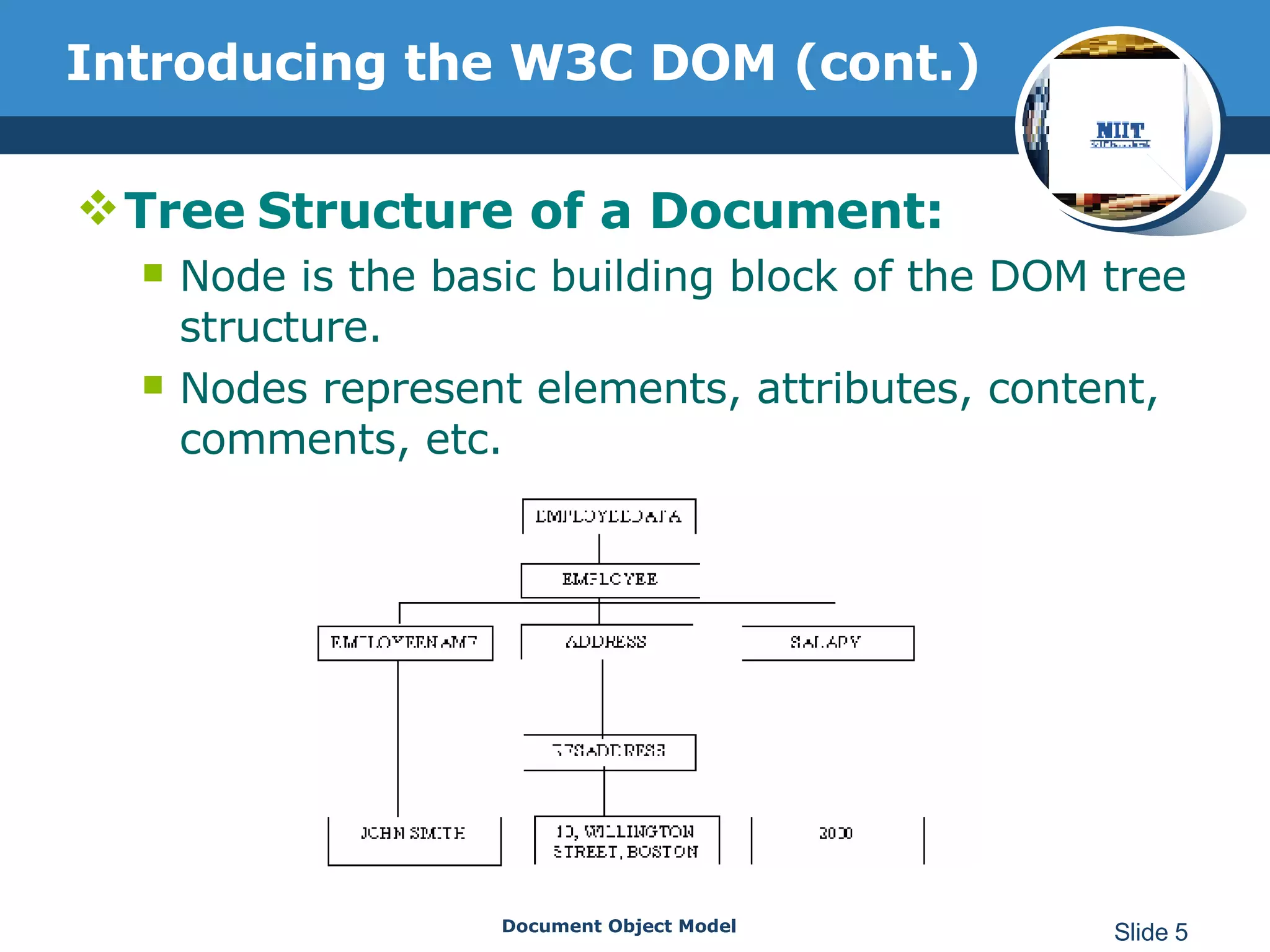
Introducing the W3C DOM (cont.) Tree   Structure of a Document: Node is the basic building block of the DOM tree structure. Nodes represent elements, attributes, content, comments, etc.
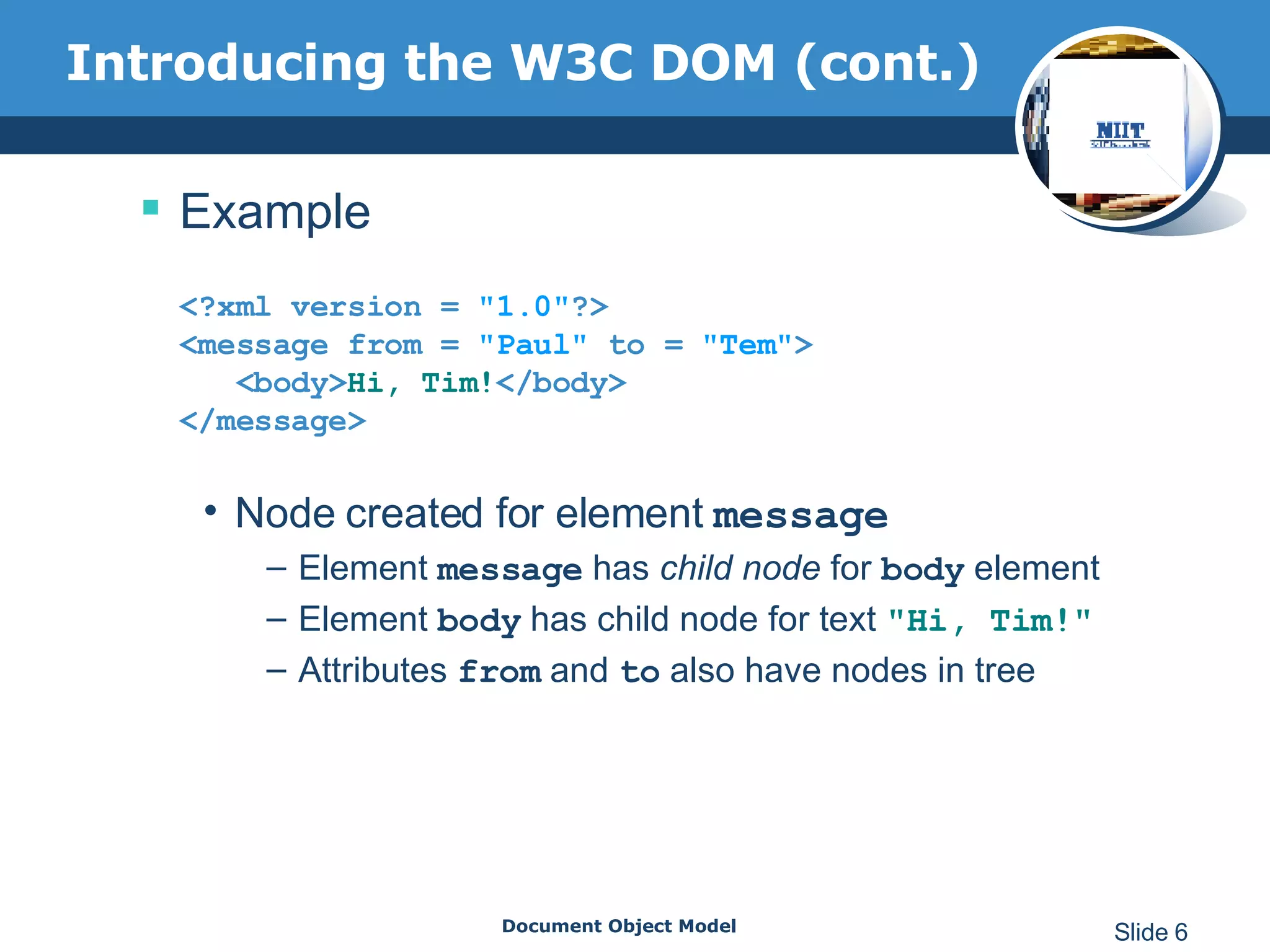
Introducing the W3C DOM (cont.) Example <?xml version =   &quot;1.0&quot; ?> <message from =  &quot;Paul&quot;  to =  &quot;Tem&quot; >   <body> Hi, Tim! </body> </message> Node created for element  message Element  message  has  child node  for  body  element Element  body  has child node for text  &quot; Hi, Tim! &quot; Attributes  from  and  to  also have nodes in tree
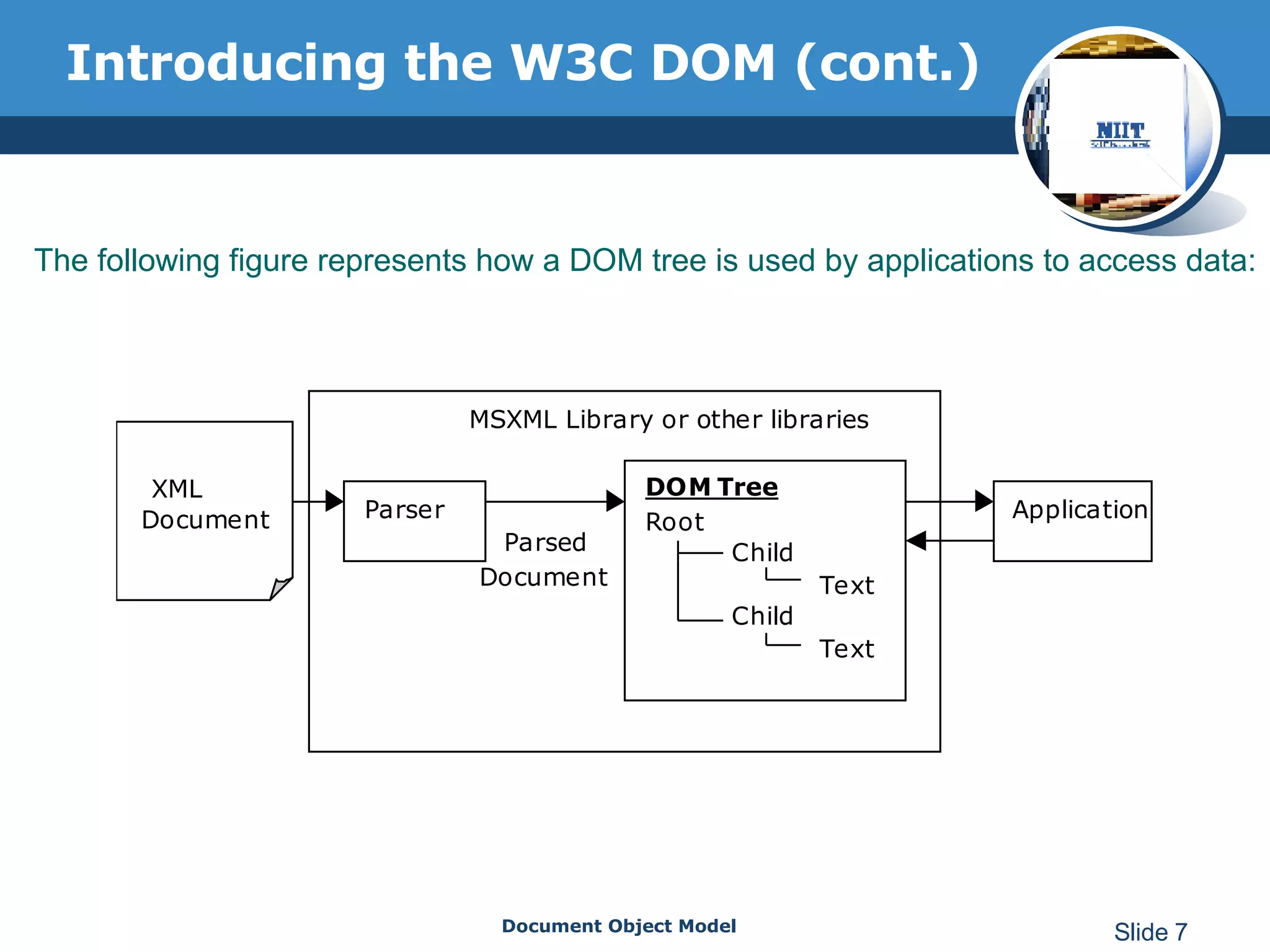
Introducing the W3C DOM (cont.) The following figure represents how a DOM tree is used by applications to access data:
DOM Implementation DOM-based parsers Sun Microsystem’s JAXP Apache Xerces XML4J DOM4J JDOM Microsoft’s msxml 4DOM XML::DOM …
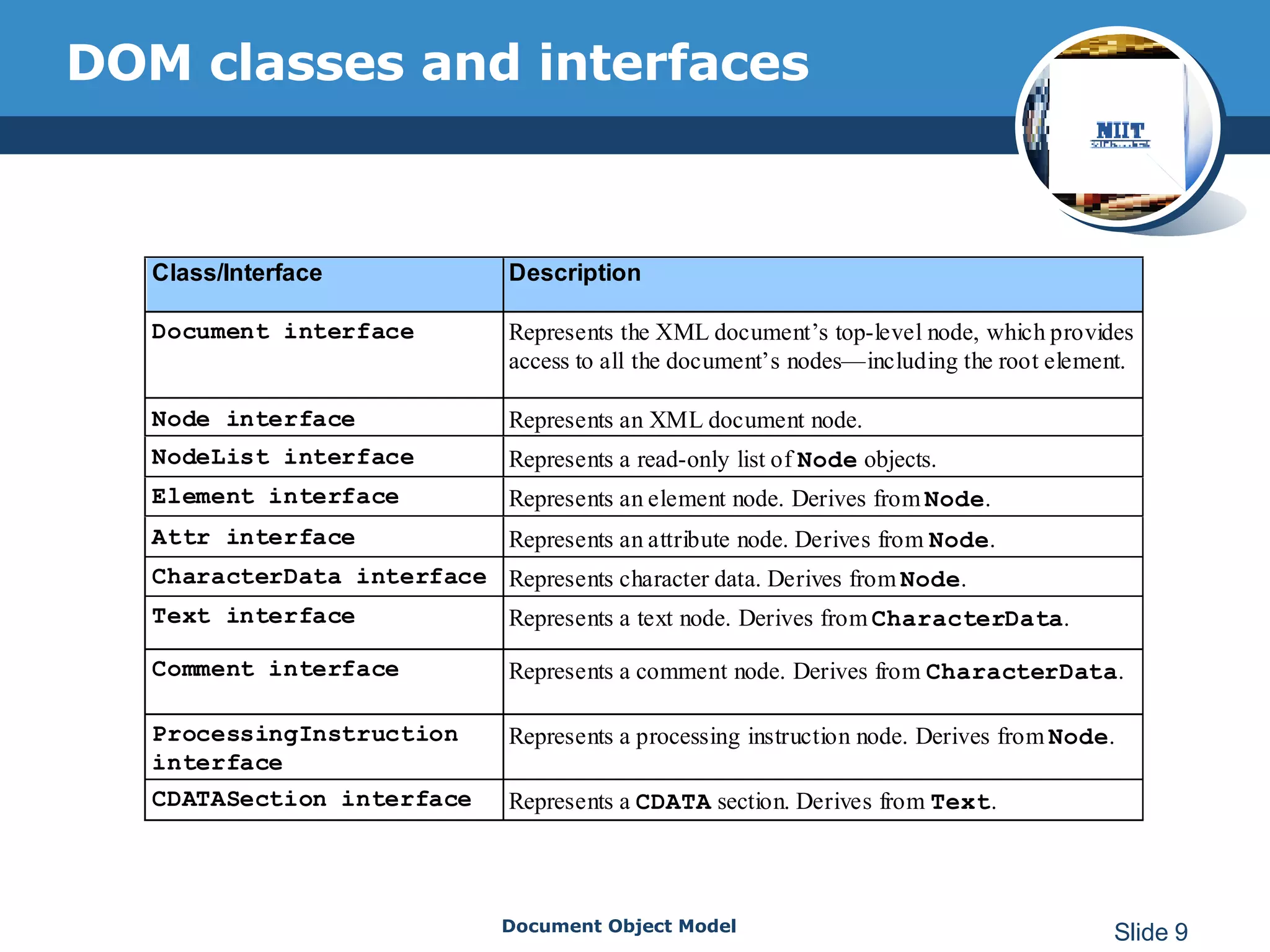
DOM classes and interfaces
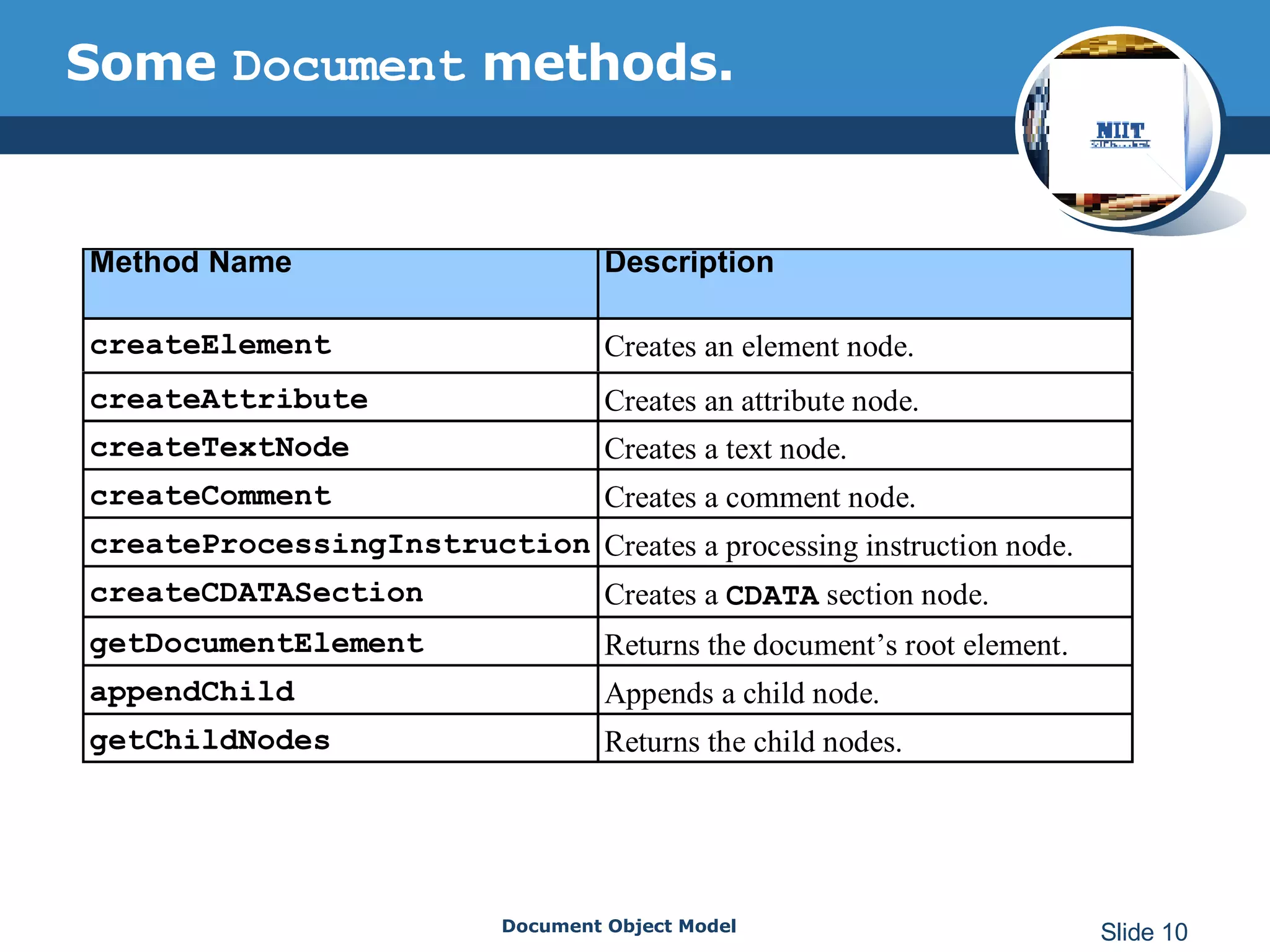
Some  Document  methods.
Some  Document  properties Following are the associated properties for the Document object methods: childNodes documentElement firstChild lastChild parseError validateOnParse
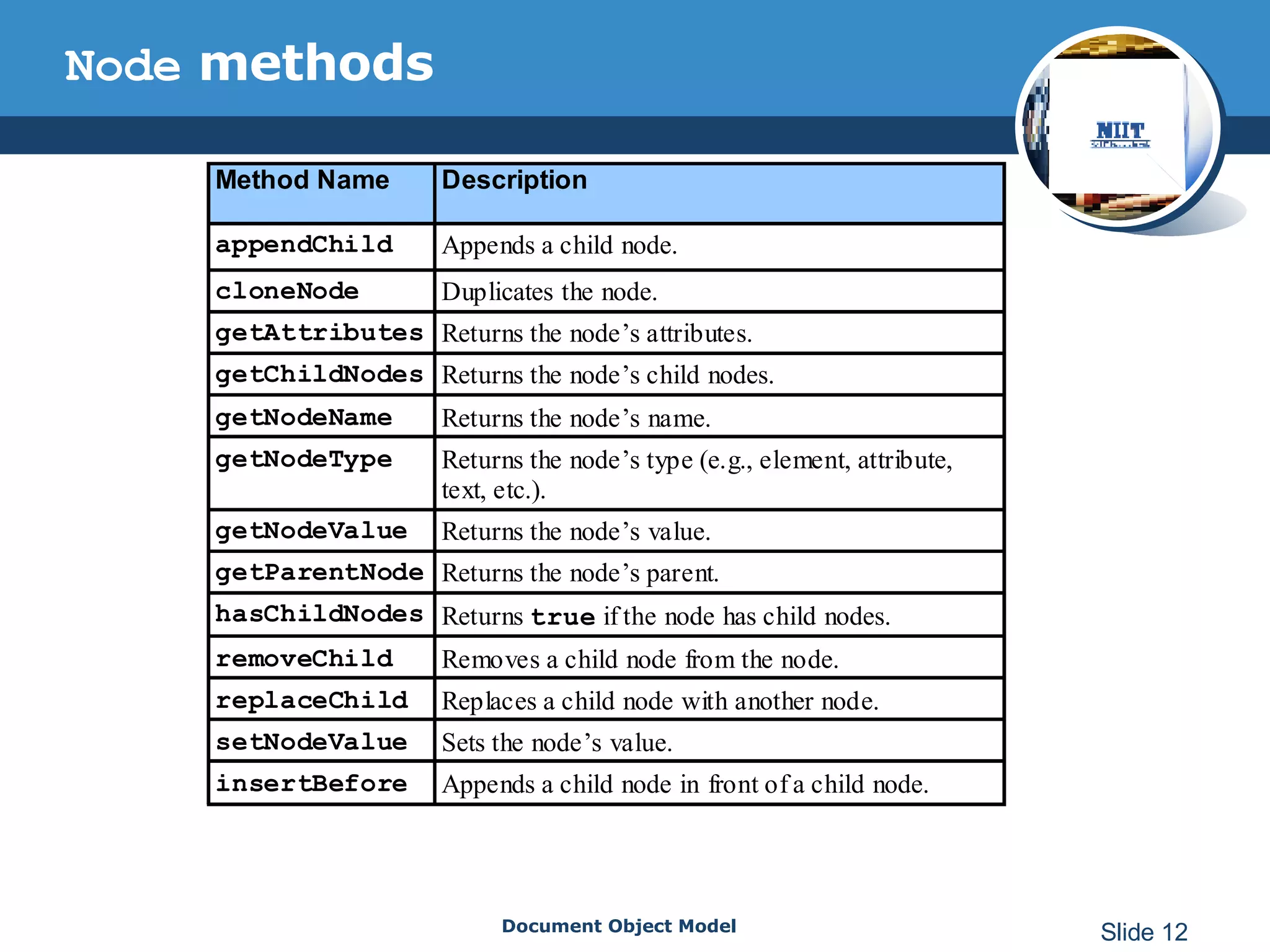
Node  methods
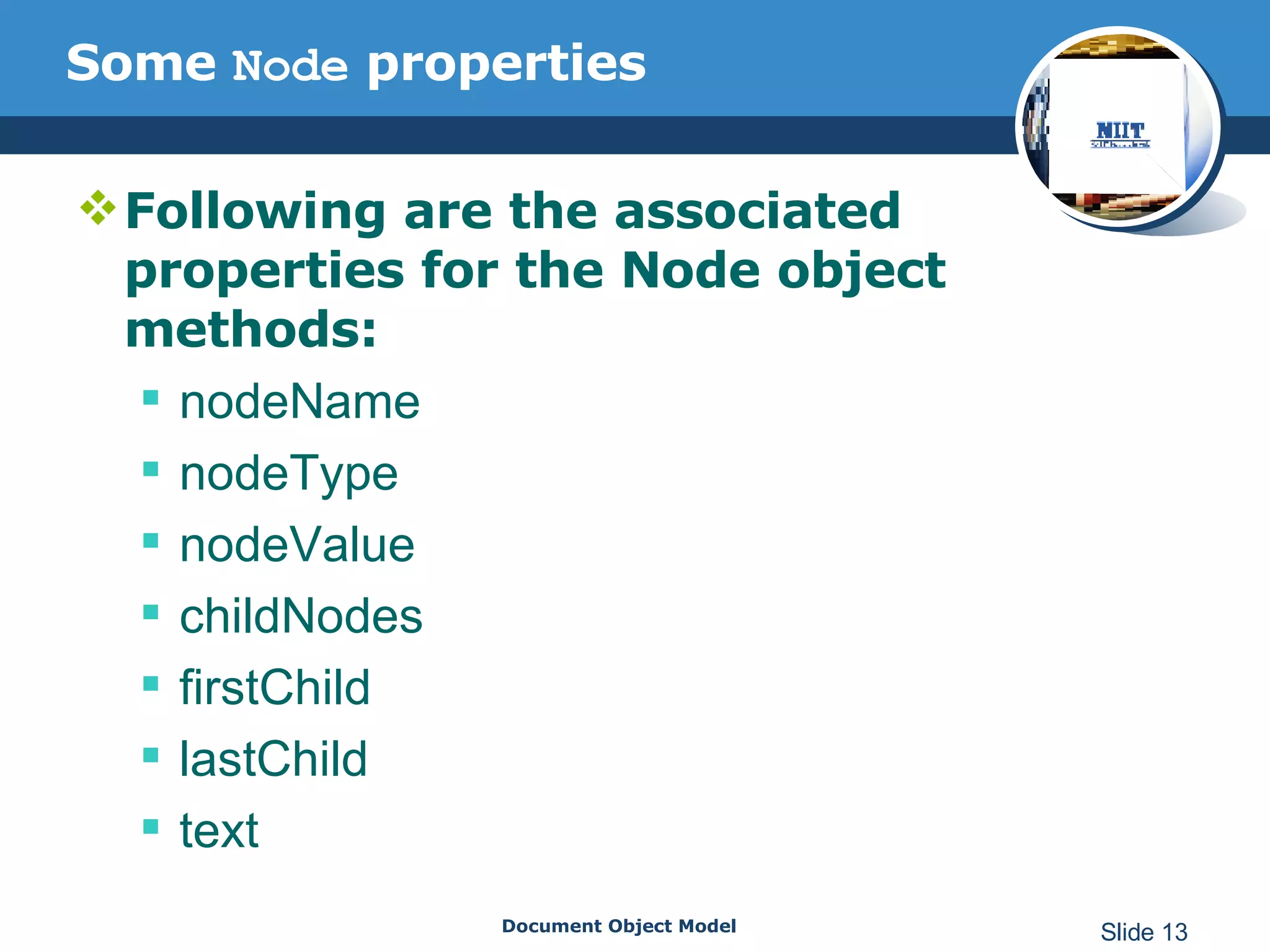
Some  Node  properties Following are the associated properties for the Node object methods:   nodeName  nodeType  nodeValue  childNodes firstChild  lastChild text
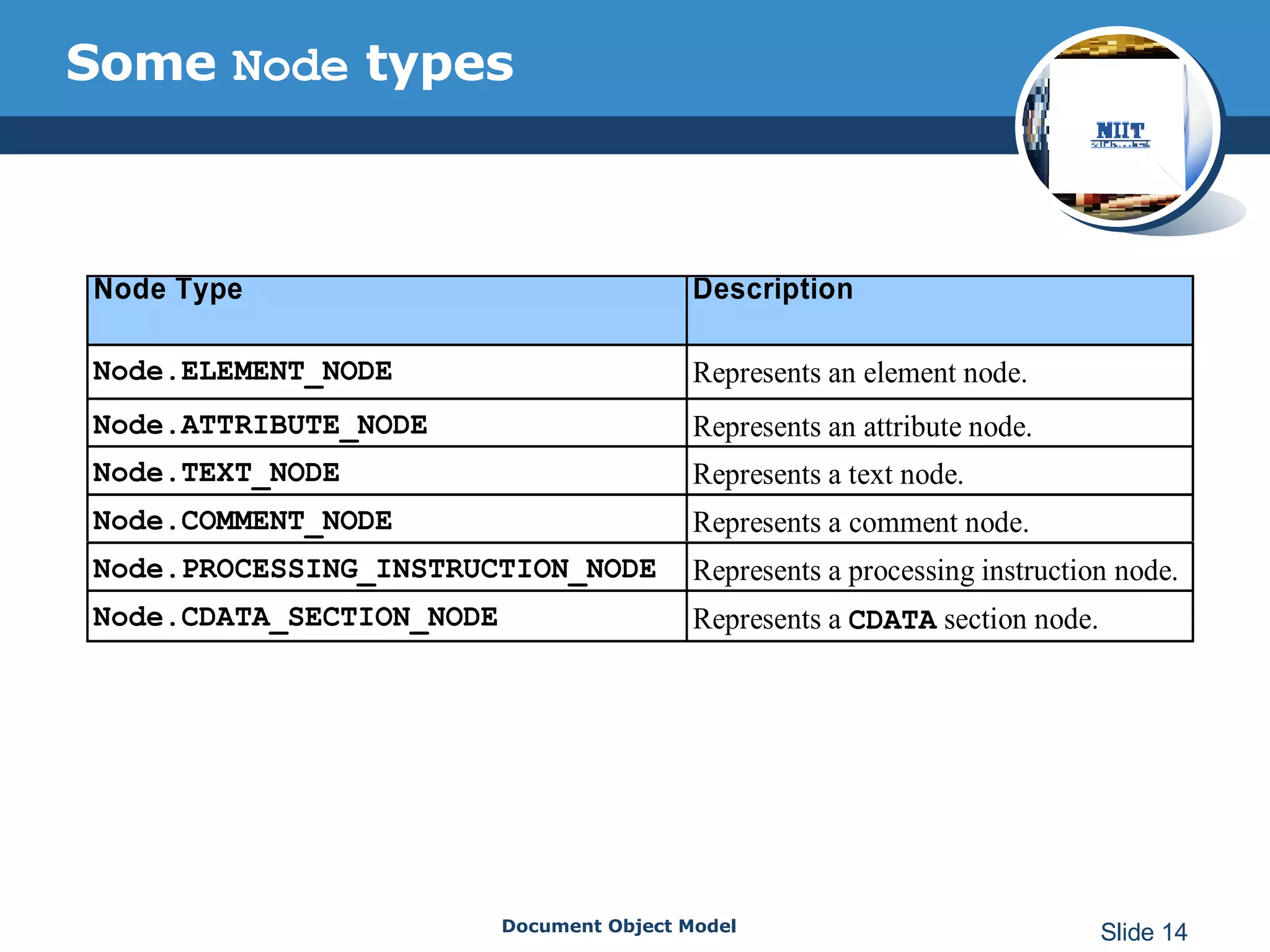
Some  Node  types
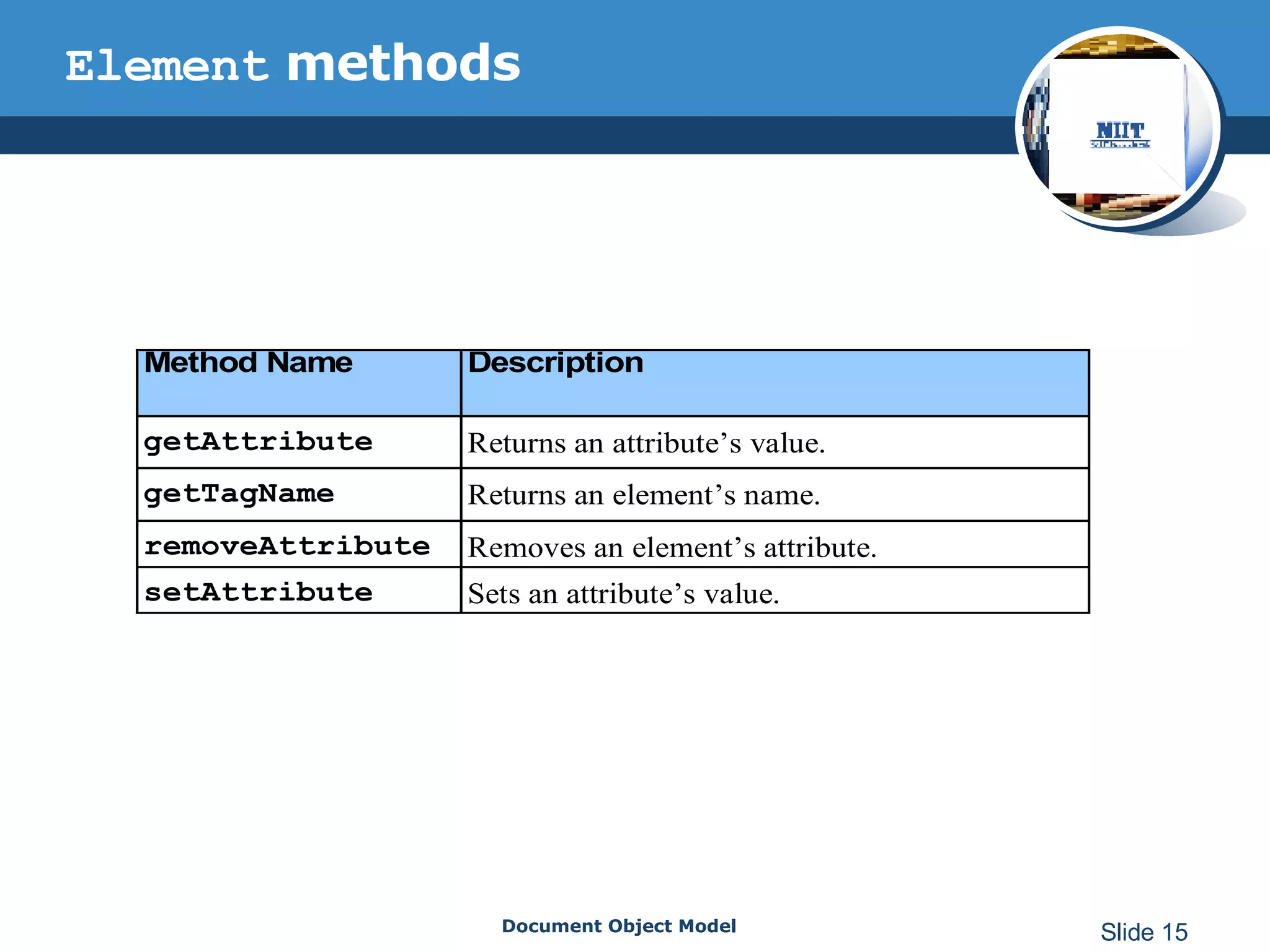
Element  methods
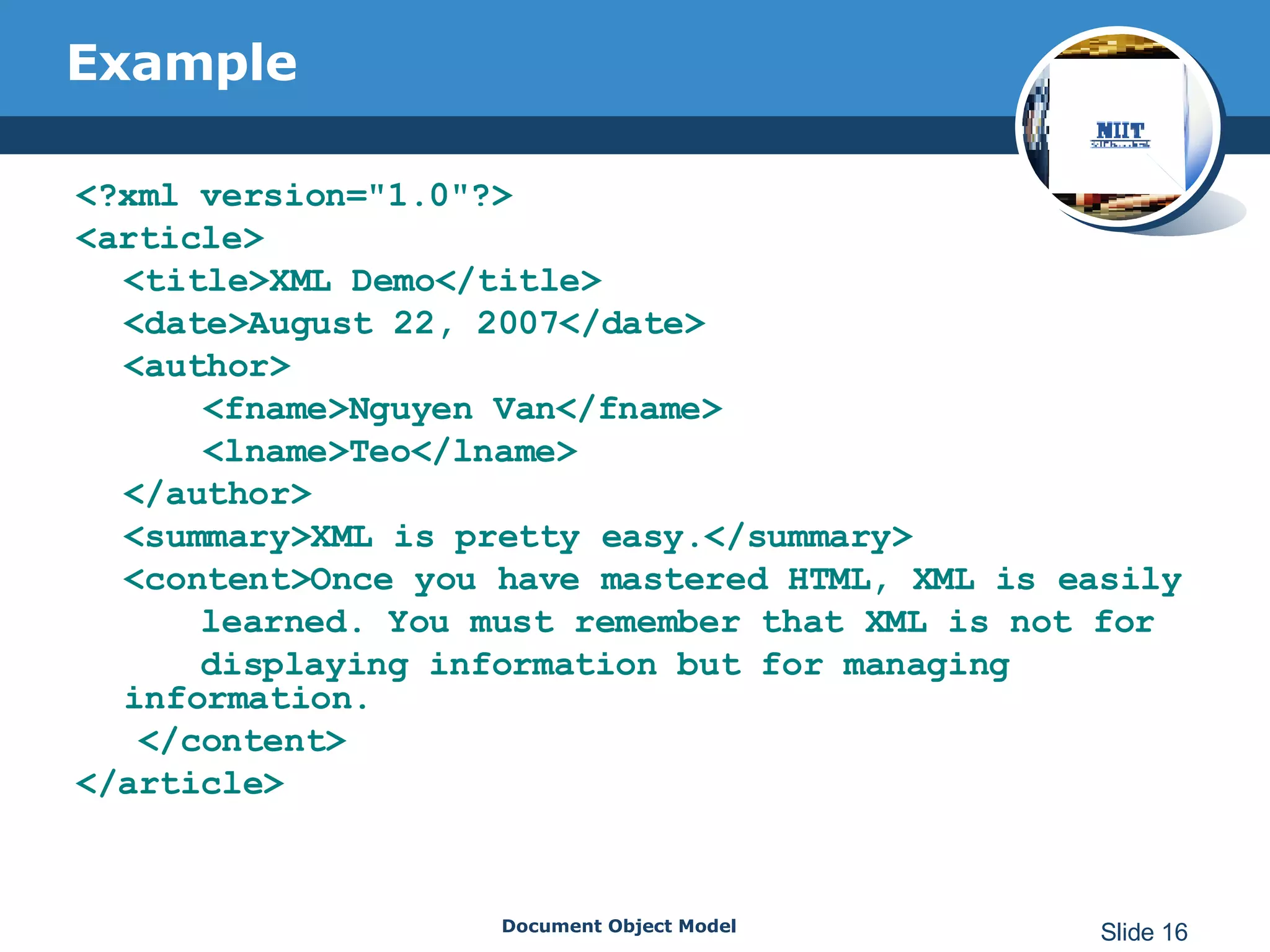
Example <?xml version=&quot;1.0&quot;?> <article> <title>XML Demo</title> <date>August 22, 2007</date> <author> <fname>Nguyen Van</fname> <lname>Teo</lname> </author> <summary>XML is pretty easy.</summary> <content>Once you have mastered HTML, XML is easily learned. You must remember that XML is not for displaying information but for managing information. </content> </article>
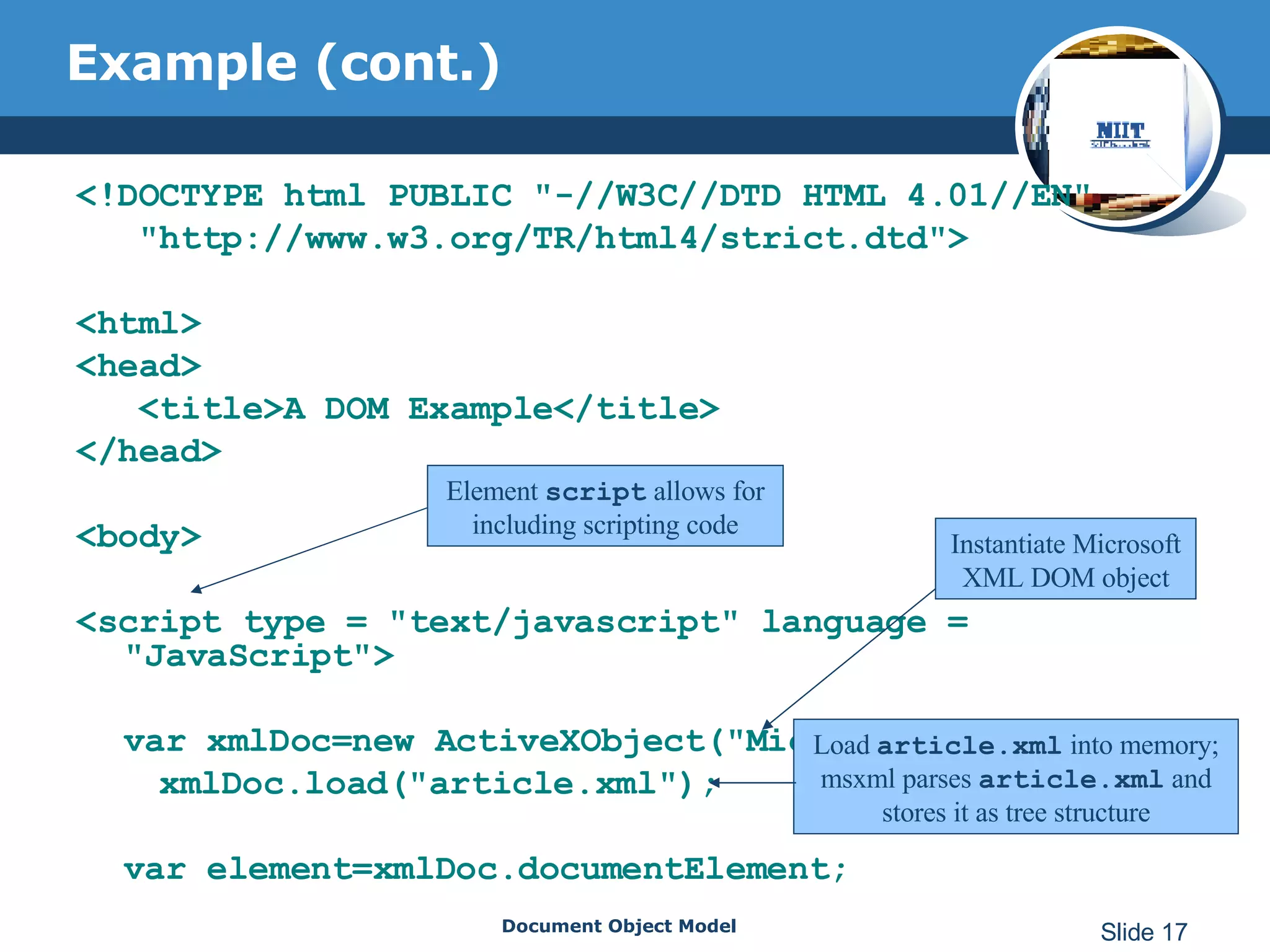
Example (cont.) <!DOCTYPE html PUBLIC &quot;-//W3C//DTD HTML 4.01//EN&quot; &quot;http://www.w3.org/TR/html4/strict.dtd&quot;> <html> <head> <title>A DOM Example</title> </head> <body> <script type = &quot;text/javascript&quot; language = &quot;JavaScript&quot;> var xmlDoc=new ActiveXObject(&quot;Microsoft.XMLDOM&quot;); xmlDoc.load(&quot;article.xml&quot;); var element=xmlDoc.documentElement; Element  script  allows for including scripting code Instantiate Microsoft XML DOM object Load  article.xml  into memory; msxml parses  article.xml  and stores it as tree structure
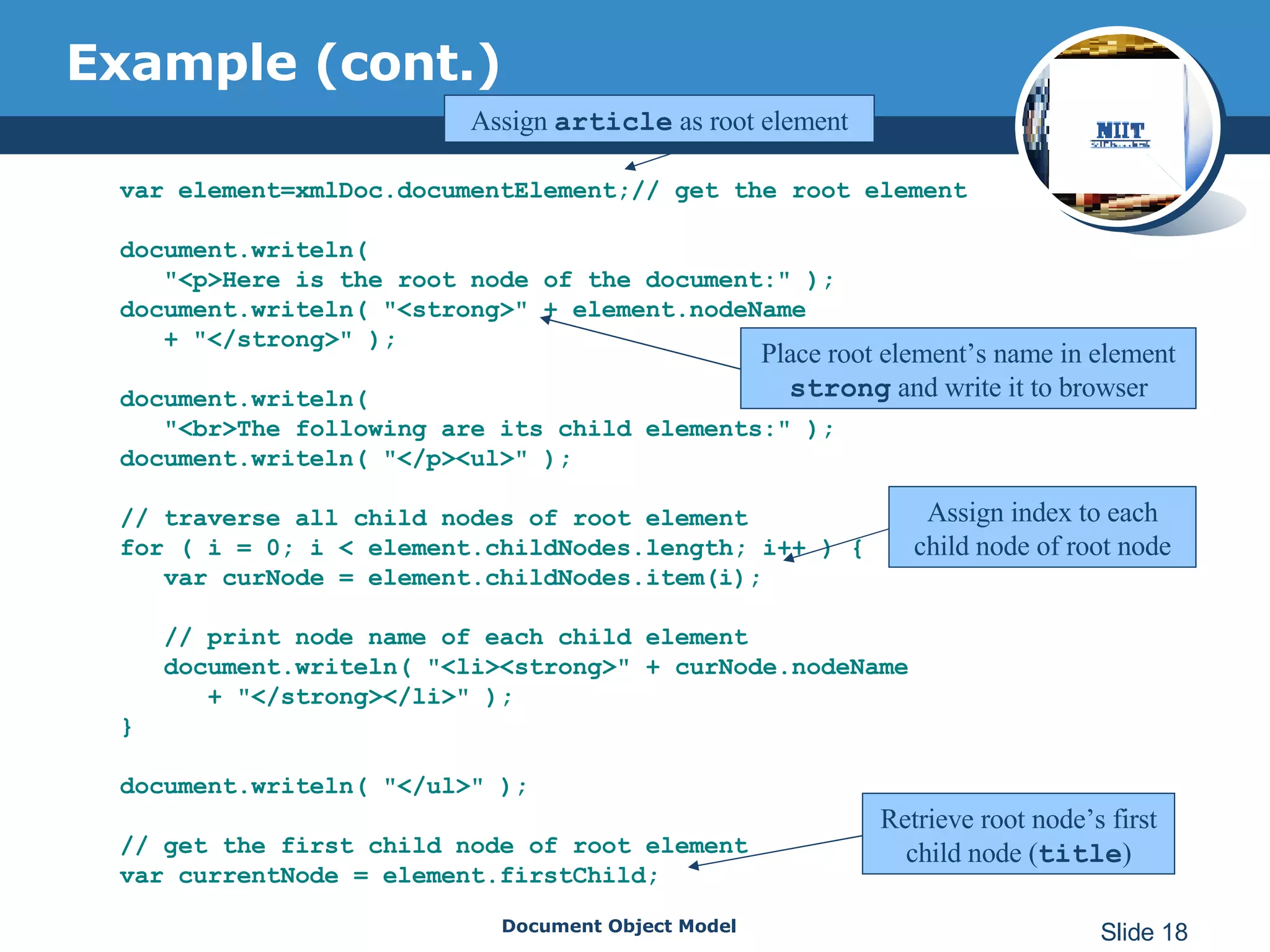
Example (cont.) var element=xmlDoc.documentElement;// get the root element document.writeln(  &quot;<p>Here is the root node of the document:&quot; ); document.writeln( &quot;<strong>&quot; + element.nodeName  + &quot;</strong>&quot; ); document.writeln(  &quot;<br>The following are its child elements:&quot; ); document.writeln( &quot;</p><ul>&quot; ); // traverse all child nodes of root element for ( i = 0; i < element.childNodes.length; i++ ) { var curNode = element.childNodes.item(i); // print node name of each child element document.writeln( &quot;<li><strong>&quot; + curNode.nodeName + &quot;</strong></li>&quot; );  } document.writeln( &quot;</ul>&quot; ); // get the first child node of root element var currentNode = element.firstChild; Assign  article  as root element Place root element’s name in element  strong  and write it to browser Assign index to each child node of root node Retrieve root node’s first child node ( title )
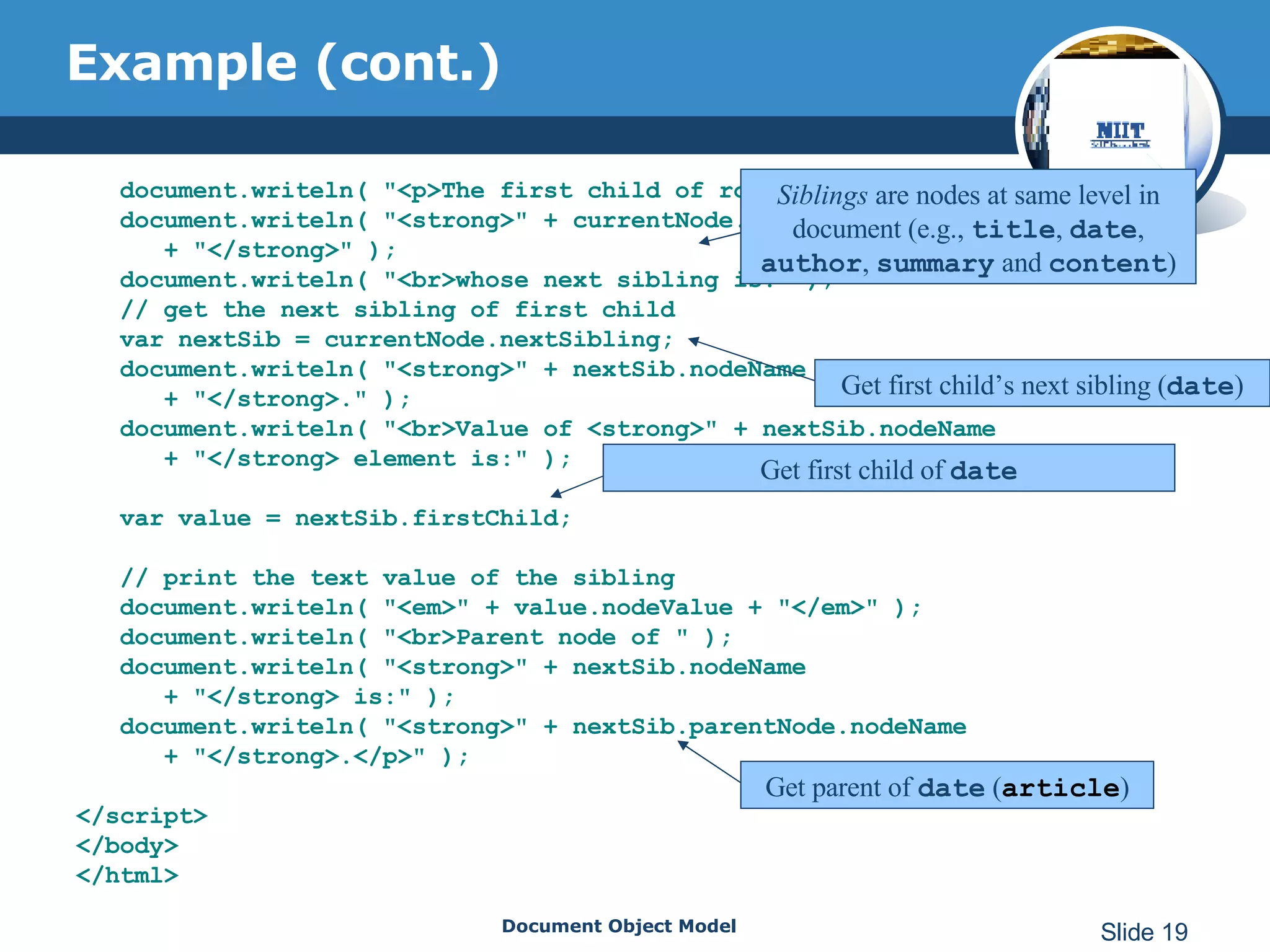
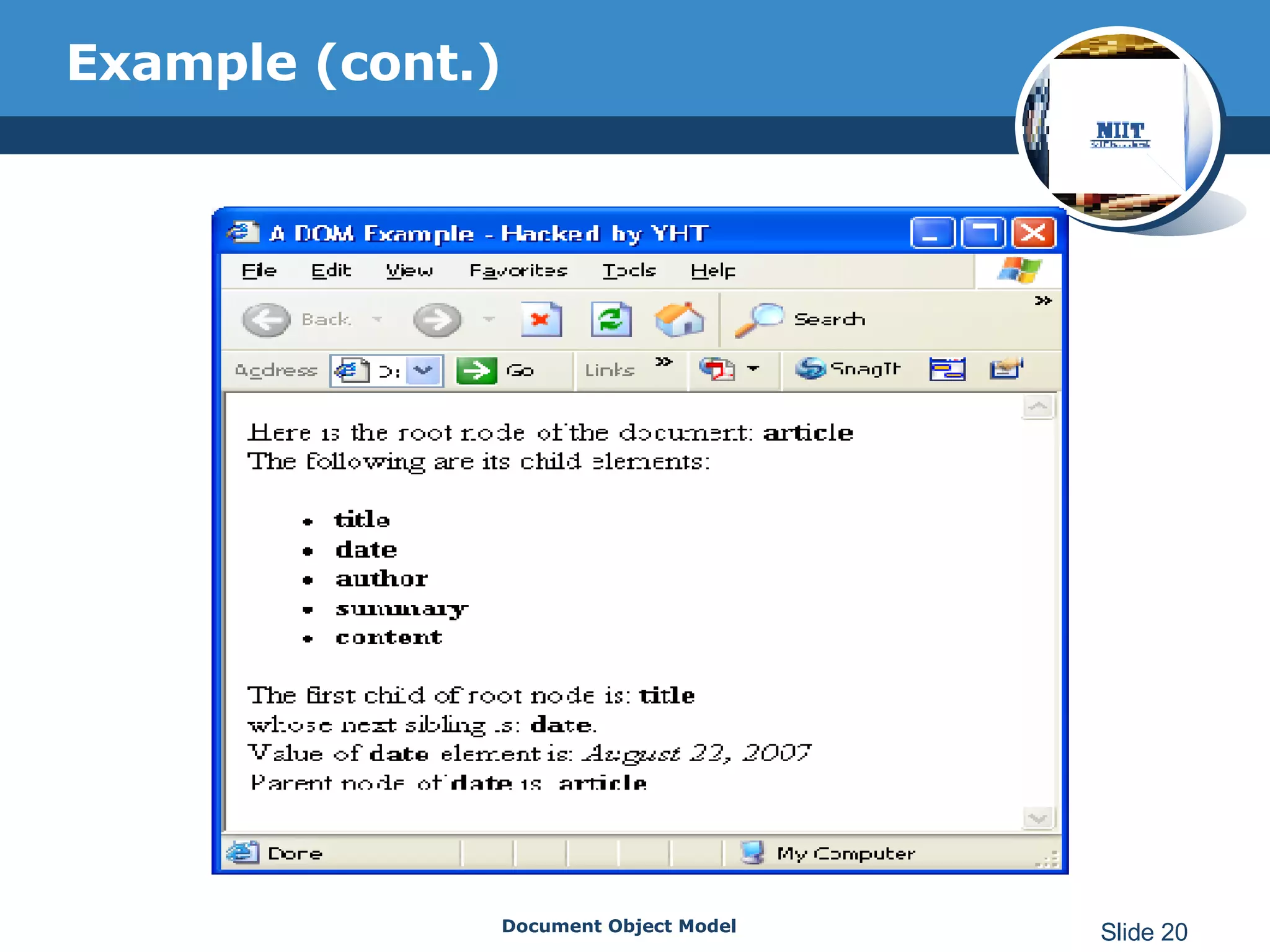
Example (cont.) document.writeln( &quot;<p>The first child of root node is:&quot; ); document.writeln( &quot;<strong>&quot; + currentNode.nodeName + &quot;</strong>&quot; ); document.writeln( &quot;<br>whose next sibling is:&quot; ); // get the next sibling of first child var nextSib = currentNode.nextSibling; document.writeln( &quot;<strong>&quot; + nextSib.nodeName  + &quot;</strong>.&quot; ); document.writeln( &quot;<br>Value of <strong>&quot; + nextSib.nodeName + &quot;</strong> element is:&quot; ); var value = nextSib.firstChild; // print the text value of the sibling document.writeln( &quot;<em>&quot; + value.nodeValue + &quot;</em>&quot; ); document.writeln( &quot;<br>Parent node of &quot; ); document.writeln( &quot;<strong>&quot; + nextSib.nodeName  + &quot;</strong> is:&quot; ); document.writeln( &quot;<strong>&quot; + nextSib.parentNode.nodeName + &quot;</strong>.</p>&quot; ); </script> </body> </html> Siblings  are nodes at same level in document (e.g.,  title ,  date ,  author ,  summary  and  content ) Get first child’s next sibling ( date ) Get first child of  date Get parent of  date  ( article )
Example (cont.)
Examlple (cont.) Validate XML document with DTD Read XML document
To be continued… To be continued…
Reference XML How to program http://www.w3.org XML tutorial http://www.w3schools.com/w3c/
Q&A Feel free to post questions at  http://yht4ever.blogspot.com or email to:  [email_address]  or  [email_address]
http://yht4ever.blogspot.com Thank You !

Document Object Model

  • 1.
    Document Object ModelXML http://yht4ever.blogspot.com [email_address] B070066 - NIIT Quang Trung 08/2007
  • 2.
    Contents Exercises Validateand tranform an XML document Working with the XML DOM Introducing the DOM Objects Introduction
  • 3.
    Introduction Introducing theW3C DOM DOM Implementation
  • 4.
    Introducing the W3CDOM XML Document Object Model (DOM) W3C standard recommendation Build tree structure in memory for XML documents Provides an Application Programming Interface (API) for dynamically accessing and manipulating a document DOM-based parsers parse these structures Exist in several languages (Java, C, C++, Python, Perl, etc.)
  • 5.
    Introducing the W3CDOM (cont.) Tree Structure of a Document: Node is the basic building block of the DOM tree structure. Nodes represent elements, attributes, content, comments, etc.
  • 6.
    Introducing the W3CDOM (cont.) Example <?xml version = &quot;1.0&quot; ?> <message from = &quot;Paul&quot; to = &quot;Tem&quot; > <body> Hi, Tim! </body> </message> Node created for element message Element message has child node for body element Element body has child node for text &quot; Hi, Tim! &quot; Attributes from and to also have nodes in tree
  • 7.
    Introducing the W3CDOM (cont.) The following figure represents how a DOM tree is used by applications to access data:
  • 8.
    DOM Implementation DOM-basedparsers Sun Microsystem’s JAXP Apache Xerces XML4J DOM4J JDOM Microsoft’s msxml 4DOM XML::DOM …
  • 9.
    DOM classes andinterfaces
  • 10.
    Some Document methods.
  • 11.
    Some Document properties Following are the associated properties for the Document object methods: childNodes documentElement firstChild lastChild parseError validateOnParse
  • 12.
  • 13.
    Some Node properties Following are the associated properties for the Node object methods: nodeName nodeType nodeValue childNodes firstChild lastChild text
  • 14.
    Some Node types
  • 15.
  • 16.
    Example <?xml version=&quot;1.0&quot;?><article> <title>XML Demo</title> <date>August 22, 2007</date> <author> <fname>Nguyen Van</fname> <lname>Teo</lname> </author> <summary>XML is pretty easy.</summary> <content>Once you have mastered HTML, XML is easily learned. You must remember that XML is not for displaying information but for managing information. </content> </article>
  • 17.
    Example (cont.) <!DOCTYPEhtml PUBLIC &quot;-//W3C//DTD HTML 4.01//EN&quot; &quot;http://www.w3.org/TR/html4/strict.dtd&quot;> <html> <head> <title>A DOM Example</title> </head> <body> <script type = &quot;text/javascript&quot; language = &quot;JavaScript&quot;> var xmlDoc=new ActiveXObject(&quot;Microsoft.XMLDOM&quot;); xmlDoc.load(&quot;article.xml&quot;); var element=xmlDoc.documentElement; Element script allows for including scripting code Instantiate Microsoft XML DOM object Load article.xml into memory; msxml parses article.xml and stores it as tree structure
  • 18.
    Example (cont.) varelement=xmlDoc.documentElement;// get the root element document.writeln( &quot;<p>Here is the root node of the document:&quot; ); document.writeln( &quot;<strong>&quot; + element.nodeName + &quot;</strong>&quot; ); document.writeln( &quot;<br>The following are its child elements:&quot; ); document.writeln( &quot;</p><ul>&quot; ); // traverse all child nodes of root element for ( i = 0; i < element.childNodes.length; i++ ) { var curNode = element.childNodes.item(i); // print node name of each child element document.writeln( &quot;<li><strong>&quot; + curNode.nodeName + &quot;</strong></li>&quot; ); } document.writeln( &quot;</ul>&quot; ); // get the first child node of root element var currentNode = element.firstChild; Assign article as root element Place root element’s name in element strong and write it to browser Assign index to each child node of root node Retrieve root node’s first child node ( title )
  • 19.
    Example (cont.) document.writeln(&quot;<p>The first child of root node is:&quot; ); document.writeln( &quot;<strong>&quot; + currentNode.nodeName + &quot;</strong>&quot; ); document.writeln( &quot;<br>whose next sibling is:&quot; ); // get the next sibling of first child var nextSib = currentNode.nextSibling; document.writeln( &quot;<strong>&quot; + nextSib.nodeName + &quot;</strong>.&quot; ); document.writeln( &quot;<br>Value of <strong>&quot; + nextSib.nodeName + &quot;</strong> element is:&quot; ); var value = nextSib.firstChild; // print the text value of the sibling document.writeln( &quot;<em>&quot; + value.nodeValue + &quot;</em>&quot; ); document.writeln( &quot;<br>Parent node of &quot; ); document.writeln( &quot;<strong>&quot; + nextSib.nodeName + &quot;</strong> is:&quot; ); document.writeln( &quot;<strong>&quot; + nextSib.parentNode.nodeName + &quot;</strong>.</p>&quot; ); </script> </body> </html> Siblings are nodes at same level in document (e.g., title , date , author , summary and content ) Get first child’s next sibling ( date ) Get first child of date Get parent of date ( article )
  • 20.
  • 21.
    Examlple (cont.) ValidateXML document with DTD Read XML document
  • 22.
    To be continued…To be continued…
  • 23.
    Reference XML Howto program http://www.w3.org XML tutorial http://www.w3schools.com/w3c/
  • 24.
    Q&A Feel freeto post questions at http://yht4ever.blogspot.com or email to: [email_address] or [email_address]
  • 25.