NetFlow Data Analytics with ELK Stack
•  Founded in 2003
•  Over 60 employees
•  Managing over 5000 physical servers
•  Total 250 racks at 5 data centers across
MY, SG and HK
•  Contributing 10% of Malaysia’s
domestic traffic
•  Approximately 6.8 Gbit/s total traffic
sending to the Internet at peak
•  Up to 1.2TB DDoS mitigation capacity
About
IP ServerOne
Why do we need to use
NetFlow?
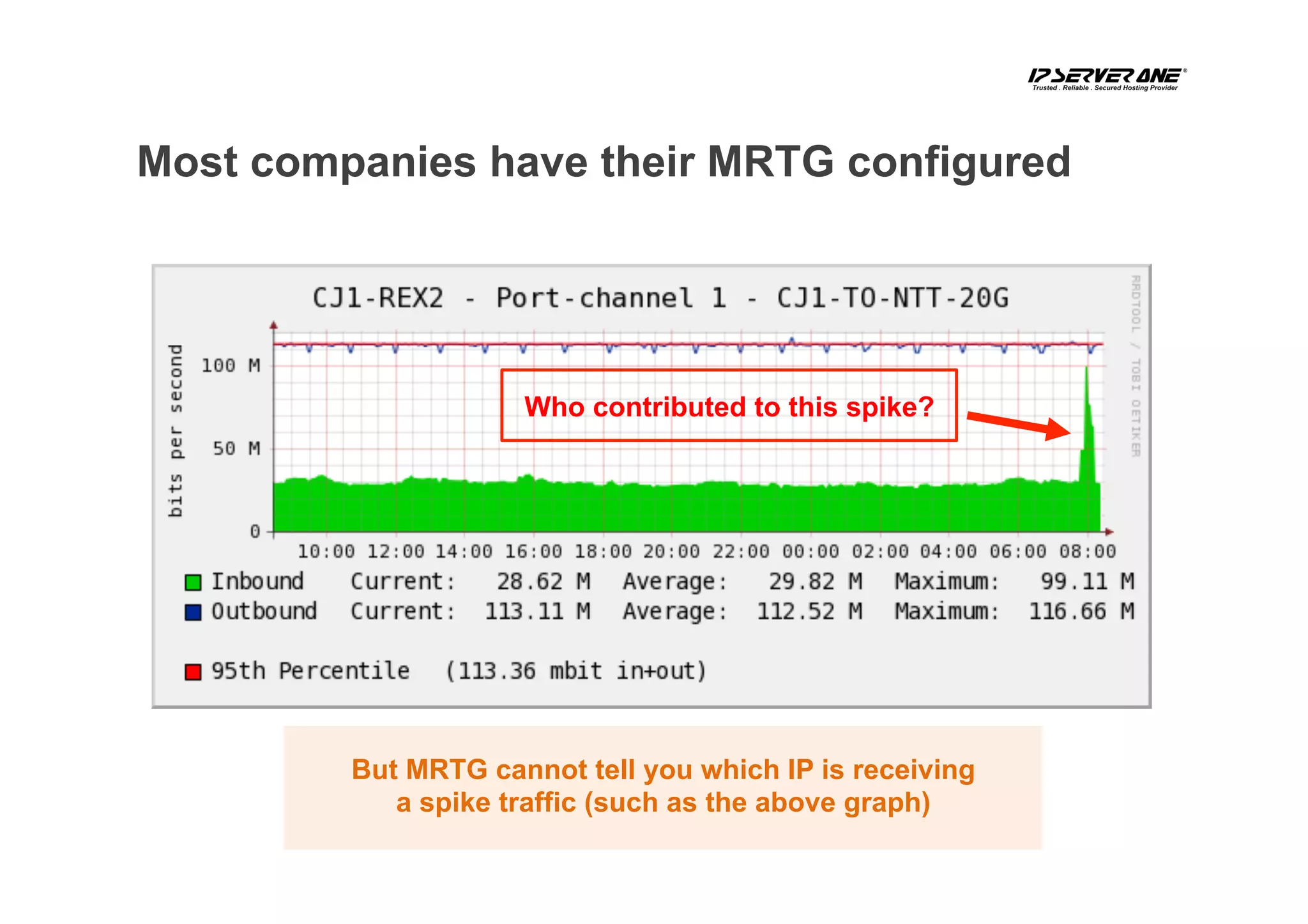
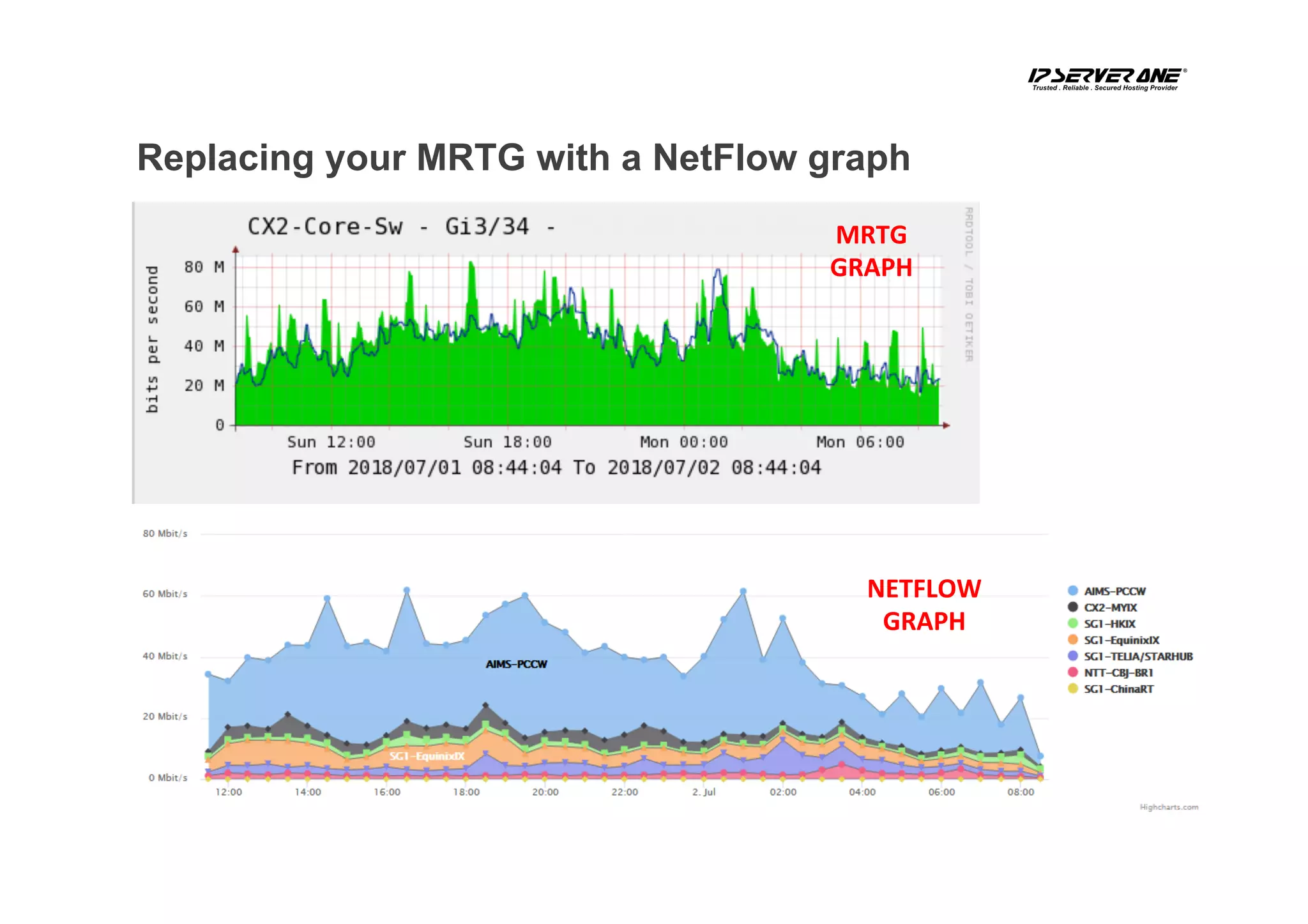
Who contributed to this spike?
Most companies have their MRTG configured
But MRTG cannot tell you which IP is receiving
a spike traffic (such as the above graph)
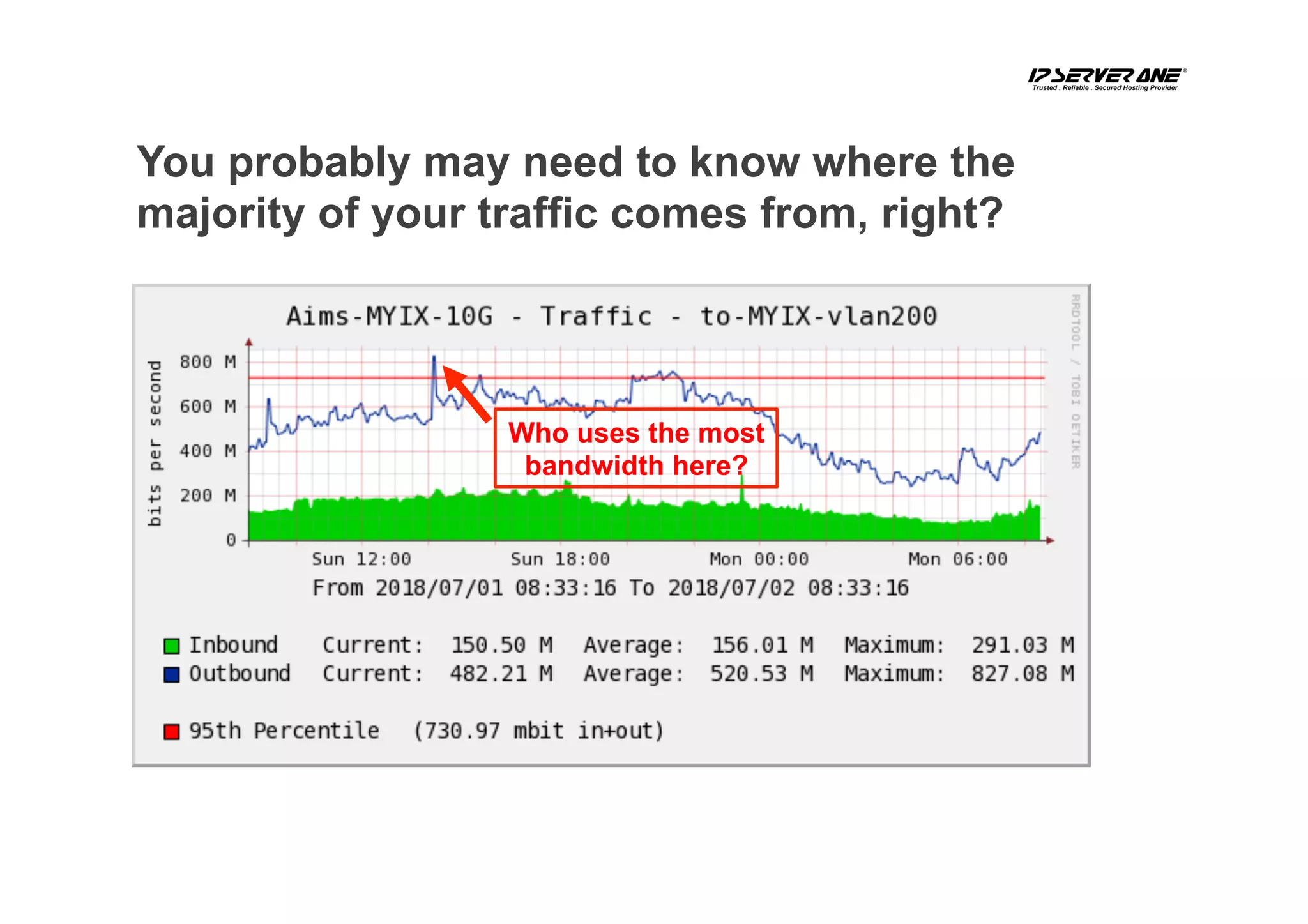
You probably may need to know where the
majority of your traffic comes from, right?
Who uses the most
bandwidth here?
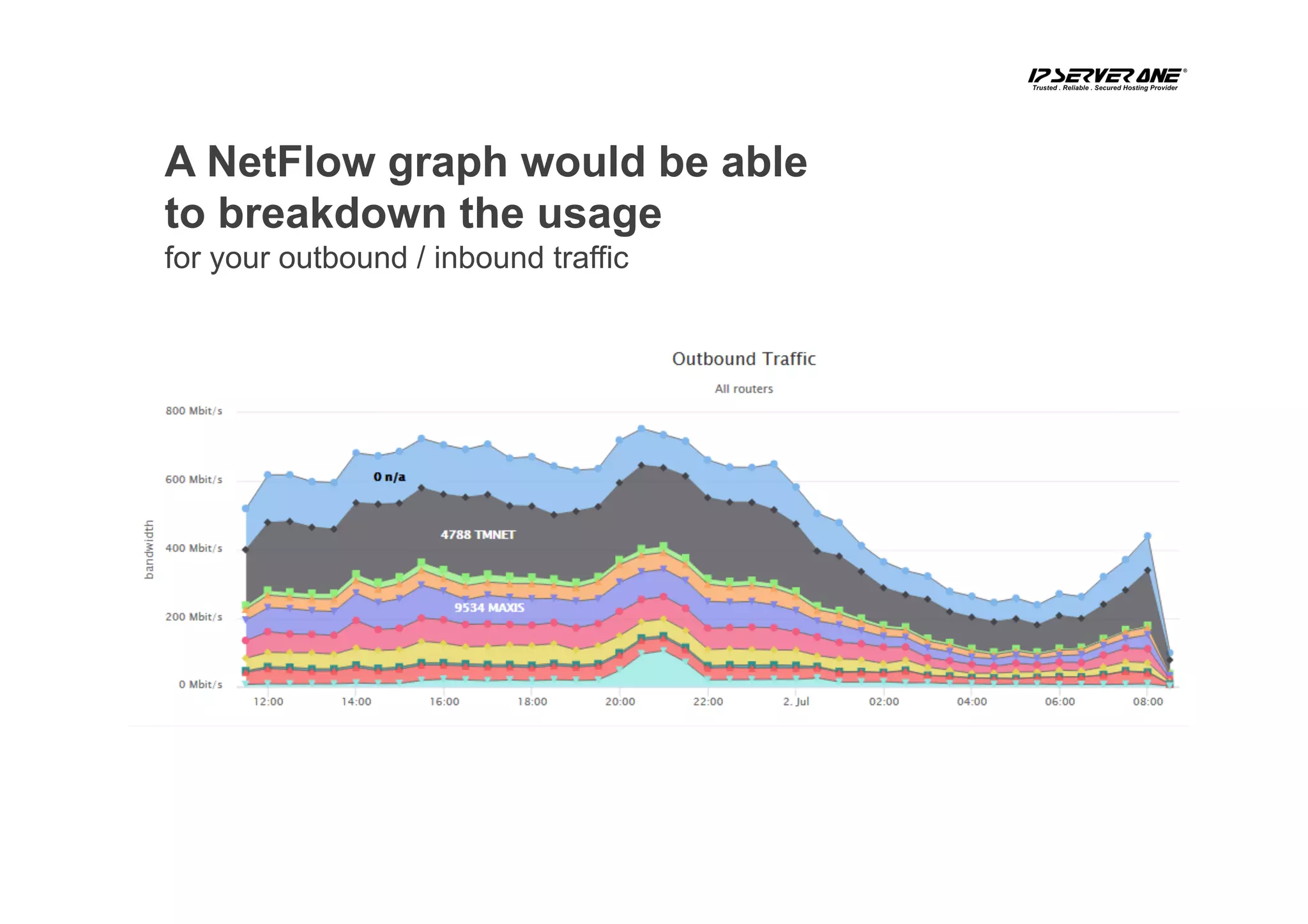
A NetFlow graph would be able
to breakdown the usage
for your outbound / inbound traffic
MRTG	
GRAPH	
NETFLOW	
GRAPH	
Replacing your MRTG with a NetFlow graph
Why do we choose
ElasticSearch, Logstash,
And Kibana (ELK)?
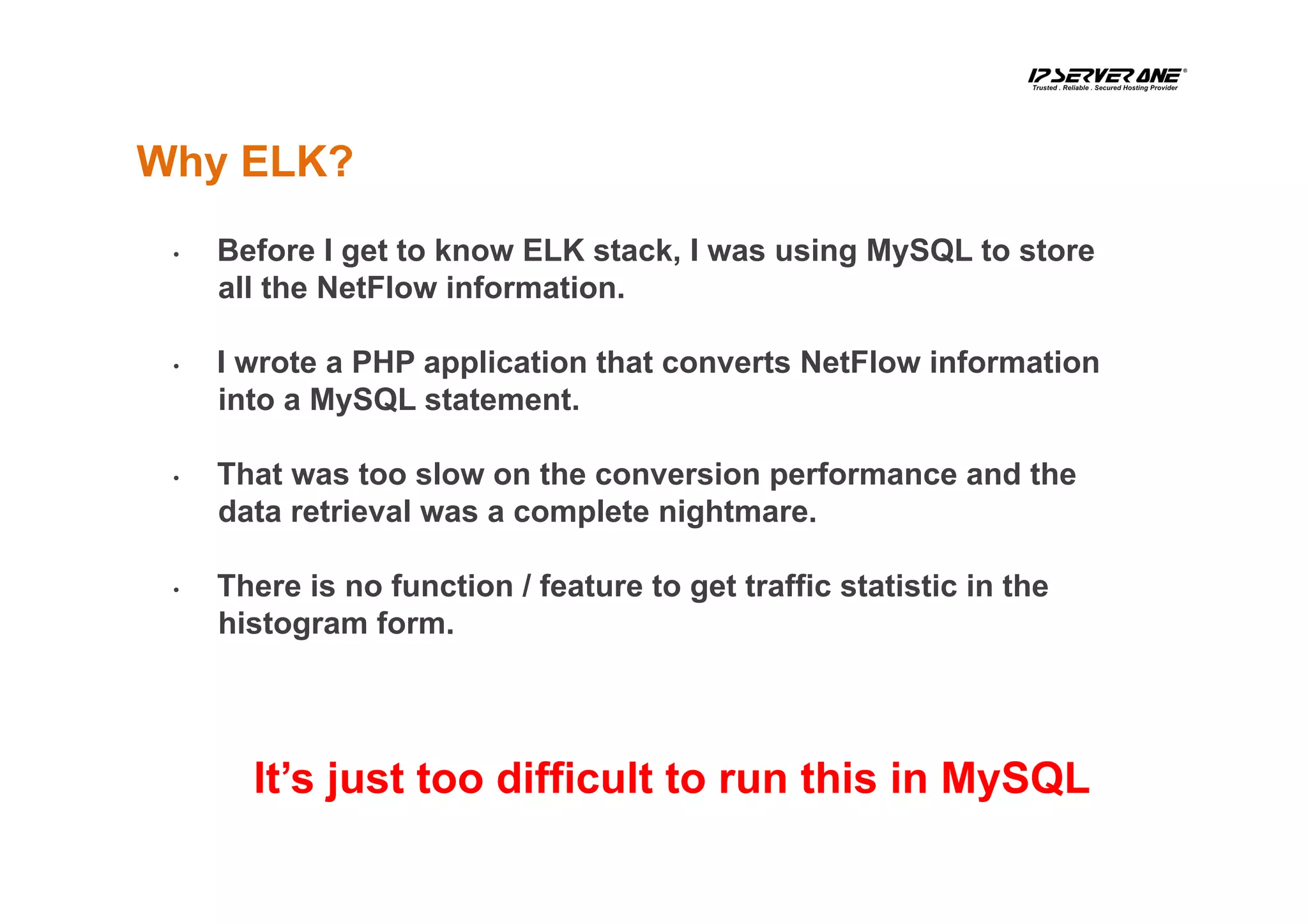
•  Before I get to know ELK stack, I was using MySQL to store
all the NetFlow information.
•  I wrote a PHP application that converts NetFlow information
into a MySQL statement.
•  That was too slow on the conversion performance and the
data retrieval was a complete nightmare.
•  There is no function / feature to get traffic statistic in the
histogram form.
Why ELK?
It’s just too difficult to run this in MySQL
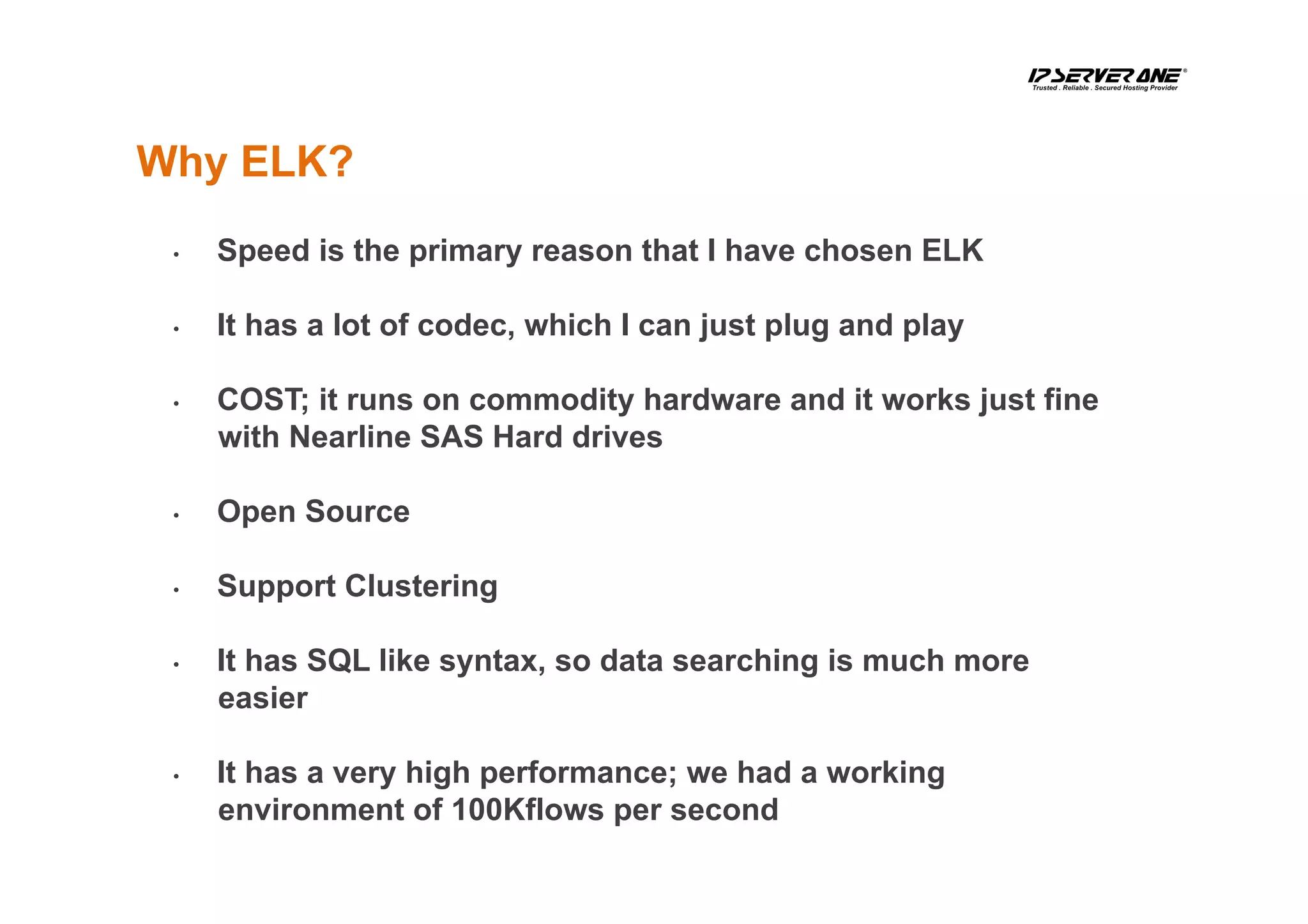
•  Speed is the primary reason that I have chosen ELK
•  It has a lot of codec, which I can just plug and play
•  COST; it runs on commodity hardware and it works just fine
with Nearline SAS Hard drives
•  Open Source
•  Support Clustering
•  It has SQL like syntax, so data searching is much more
easier
•  It has a very high performance; we had a working
environment of 100Kflows per second
Why ELK?
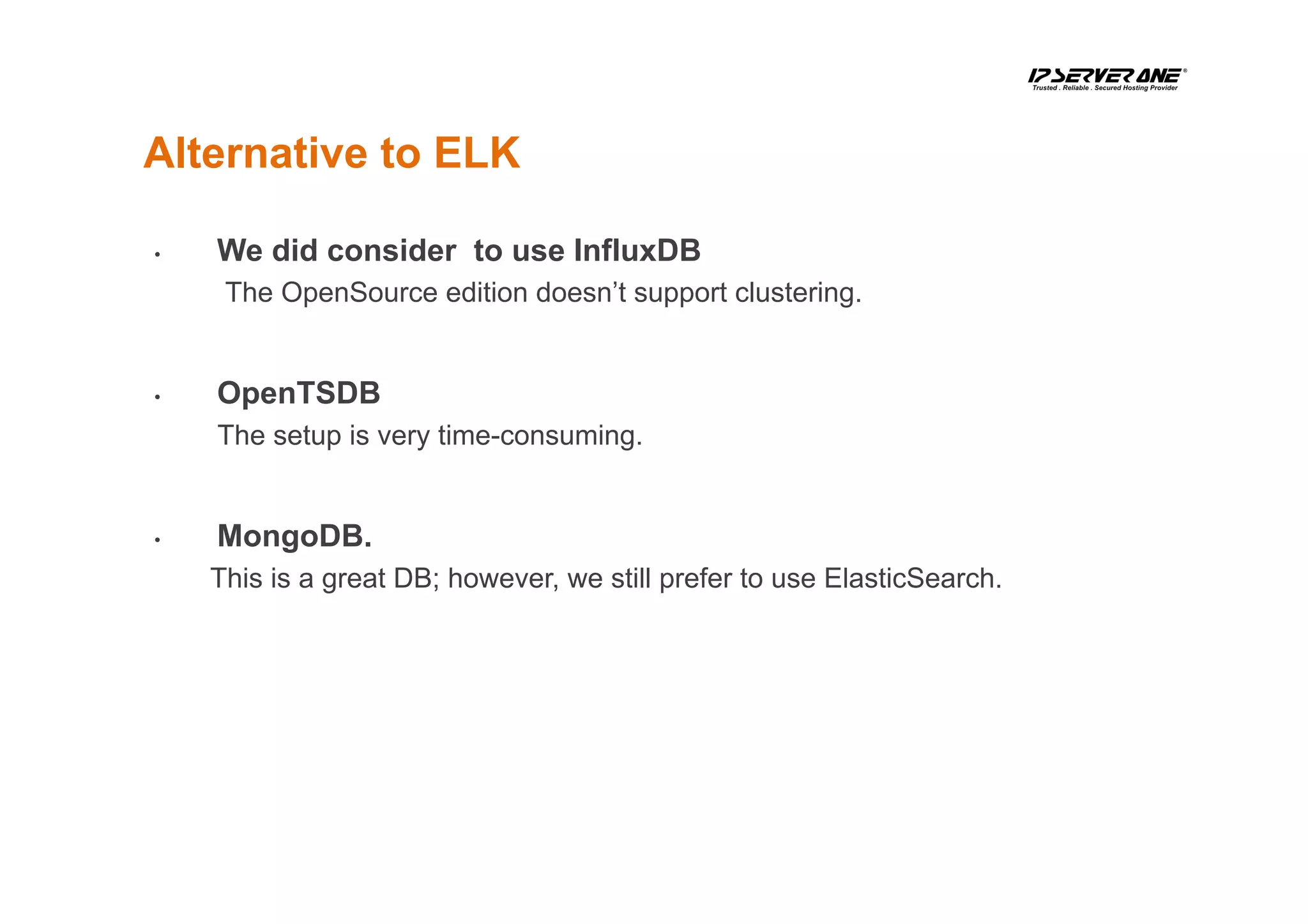
Alternative to ELK
•  We did consider to use InfluxDB
The OpenSource edition doesn’t support clustering.
•  OpenTSDB
The setup is very time-consuming.
•  MongoDB.
This is a great DB; however, we still prefer to use ElasticSearch.
How to record the
NetFlow Data?
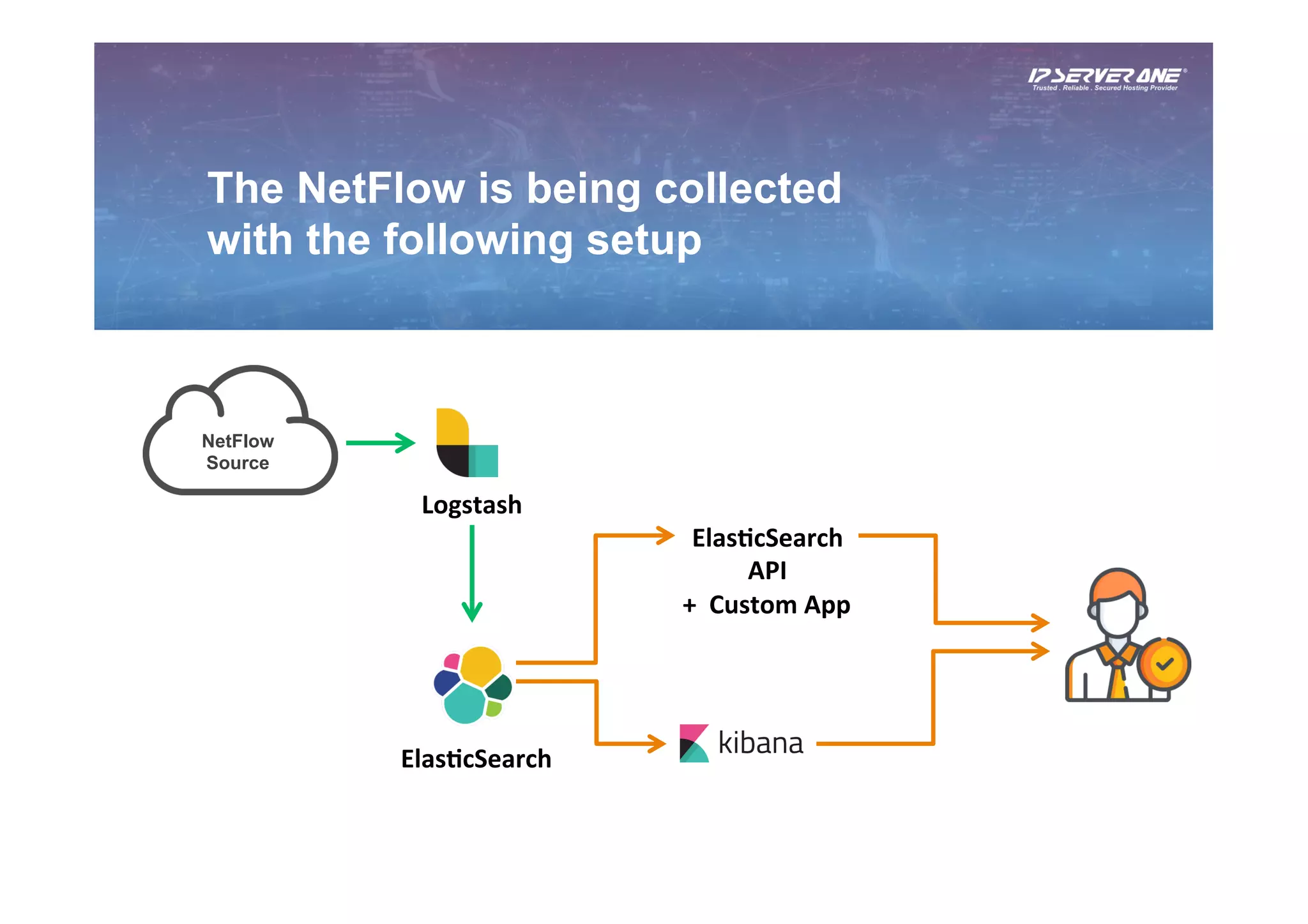
The NetFlow is being collected
with the following setup
NetFlow
Source
Logstash	
Elas6cSearch	
Elas6cSearch	
API	
+		Custom	App
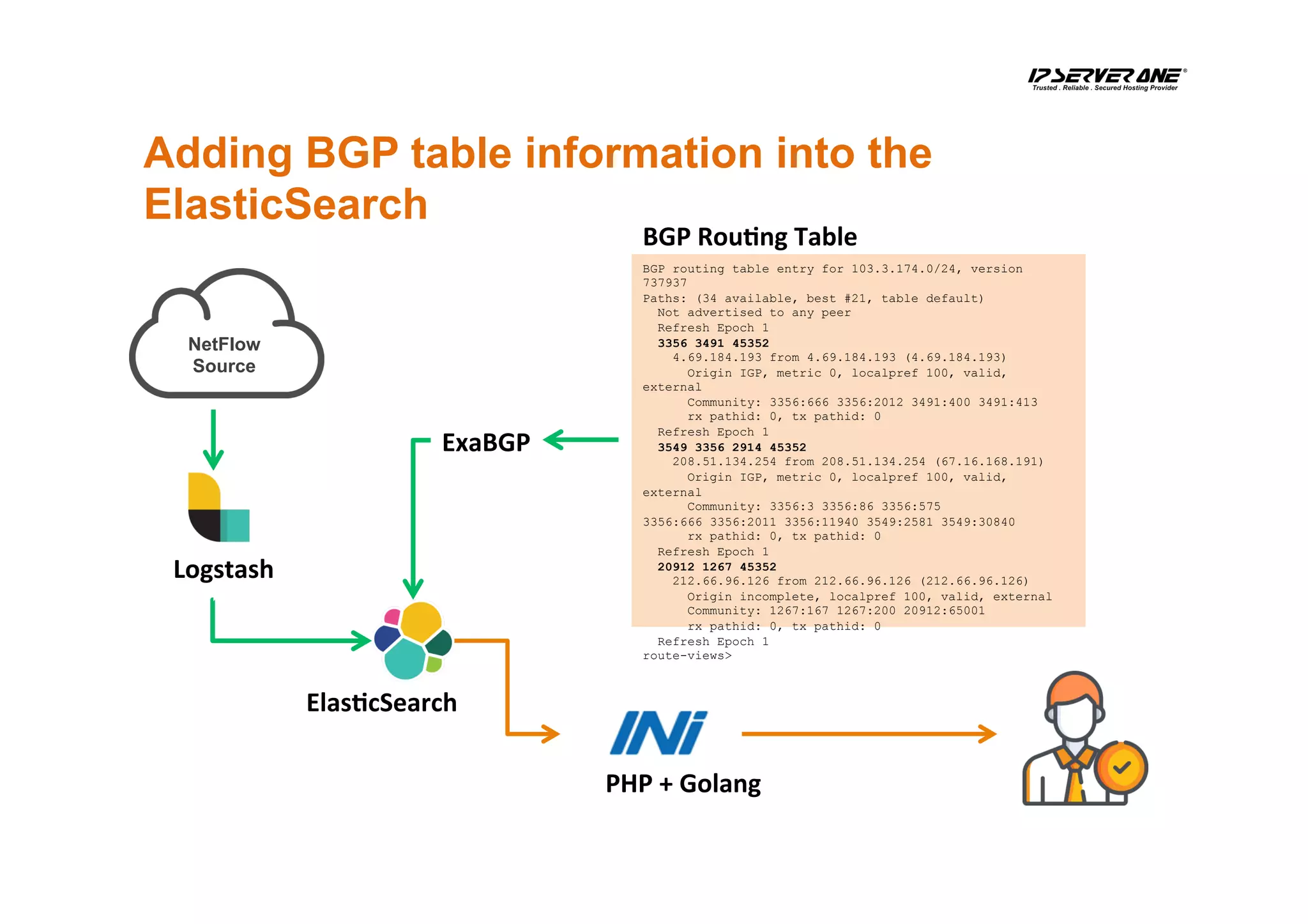
Adding BGP table information into the
ElasticSearch
NetFlow
Source
Elas6cSearch	
BGP routing table entry for 103.3.174.0/24, version
737937
Paths: (34 available, best #21, table default)
Not advertised to any peer
Refresh Epoch 1
3356 3491 45352
4.69.184.193 from 4.69.184.193 (4.69.184.193)
Origin IGP, metric 0, localpref 100, valid,
external
Community: 3356:666 3356:2012 3491:400 3491:413
rx pathid: 0, tx pathid: 0
Refresh Epoch 1
3549 3356 2914 45352
208.51.134.254 from 208.51.134.254 (67.16.168.191)
Origin IGP, metric 0, localpref 100, valid,
external
Community: 3356:3 3356:86 3356:575
3356:666 3356:2011 3356:11940 3549:2581 3549:30840
rx pathid: 0, tx pathid: 0
Refresh Epoch 1
20912 1267 45352
212.66.96.126 from 212.66.96.126 (212.66.96.126)
Origin incomplete, localpref 100, valid, external
Community: 1267:167 1267:200 20912:65001
rx pathid: 0, tx pathid: 0
Refresh Epoch 1
route-views>
BGP	Rou6ng	Table	
PHP	+	Golang	
Logstash	
ExaBGP
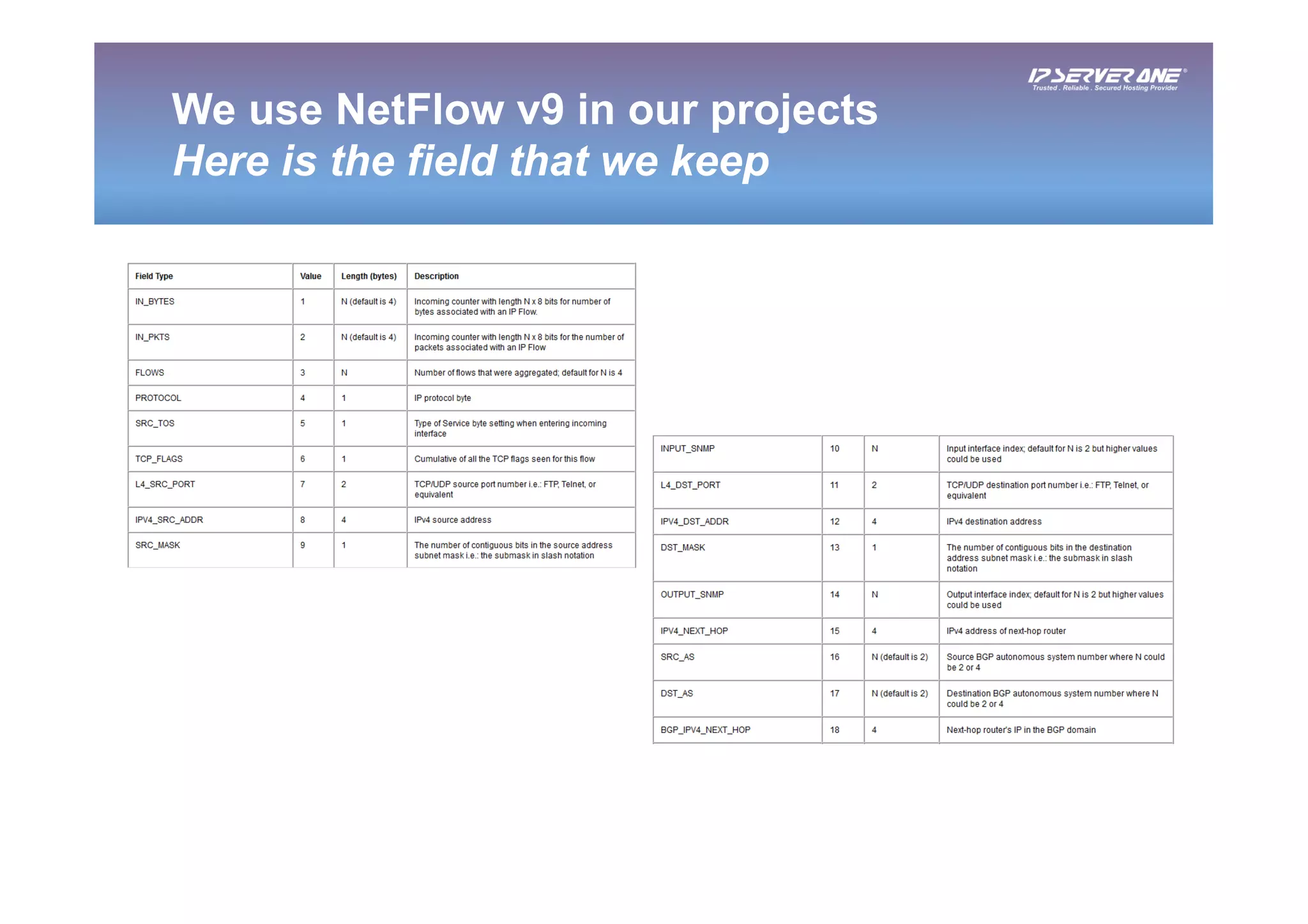
We use NetFlow v9 in our projects
Here is the field that we keep
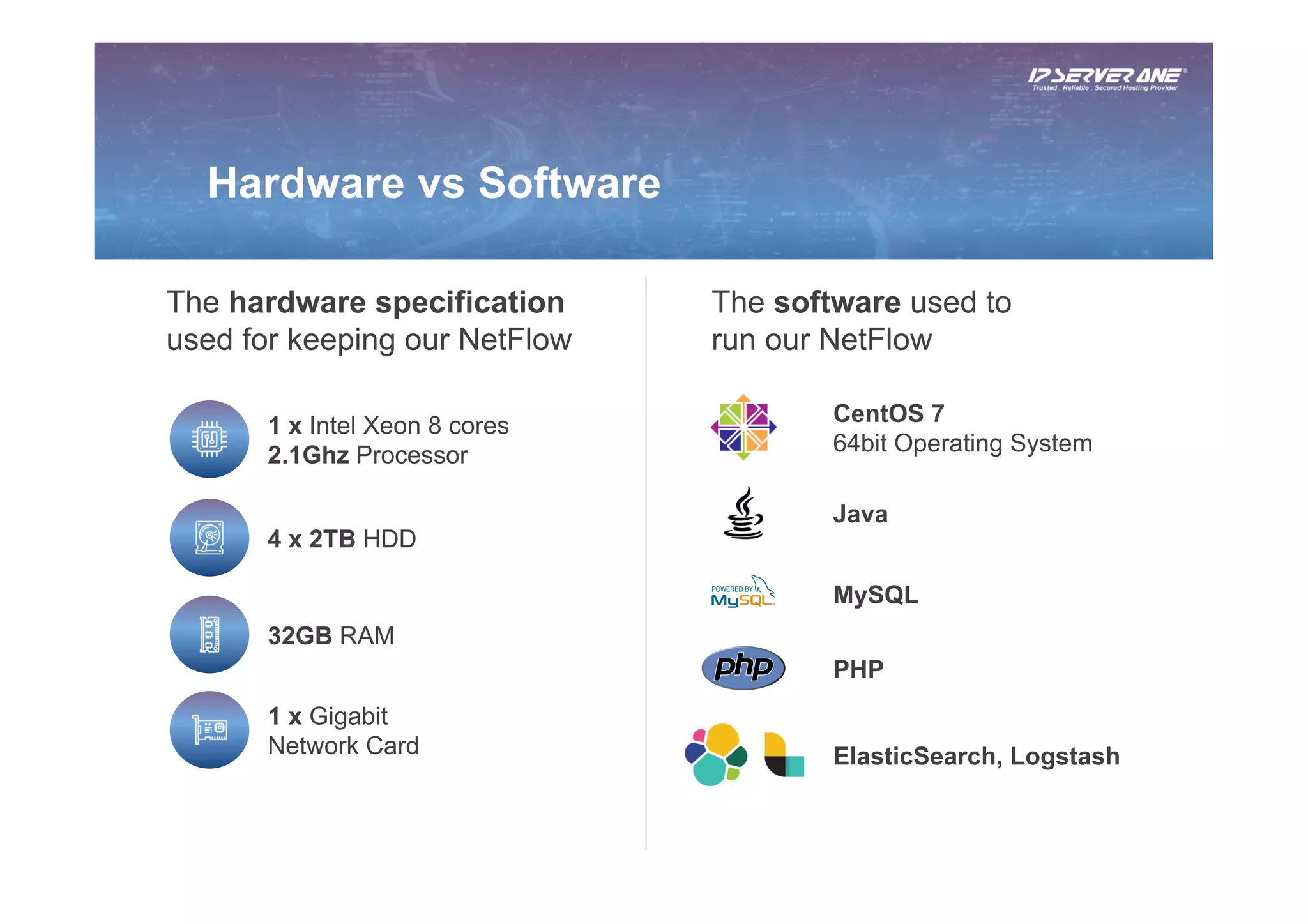
The hardware specification
used for keeping our NetFlow
The software used to
run our NetFlow
CentOS 7
64bit Operating System
Java
Hardware vs Software
1 x Intel Xeon 8 cores
2.1Ghz Processor
32GB RAM
4 x 2TB HDD
1 x Gigabit
Network Card ElasticSearch, Logstash
PHP
MySQL
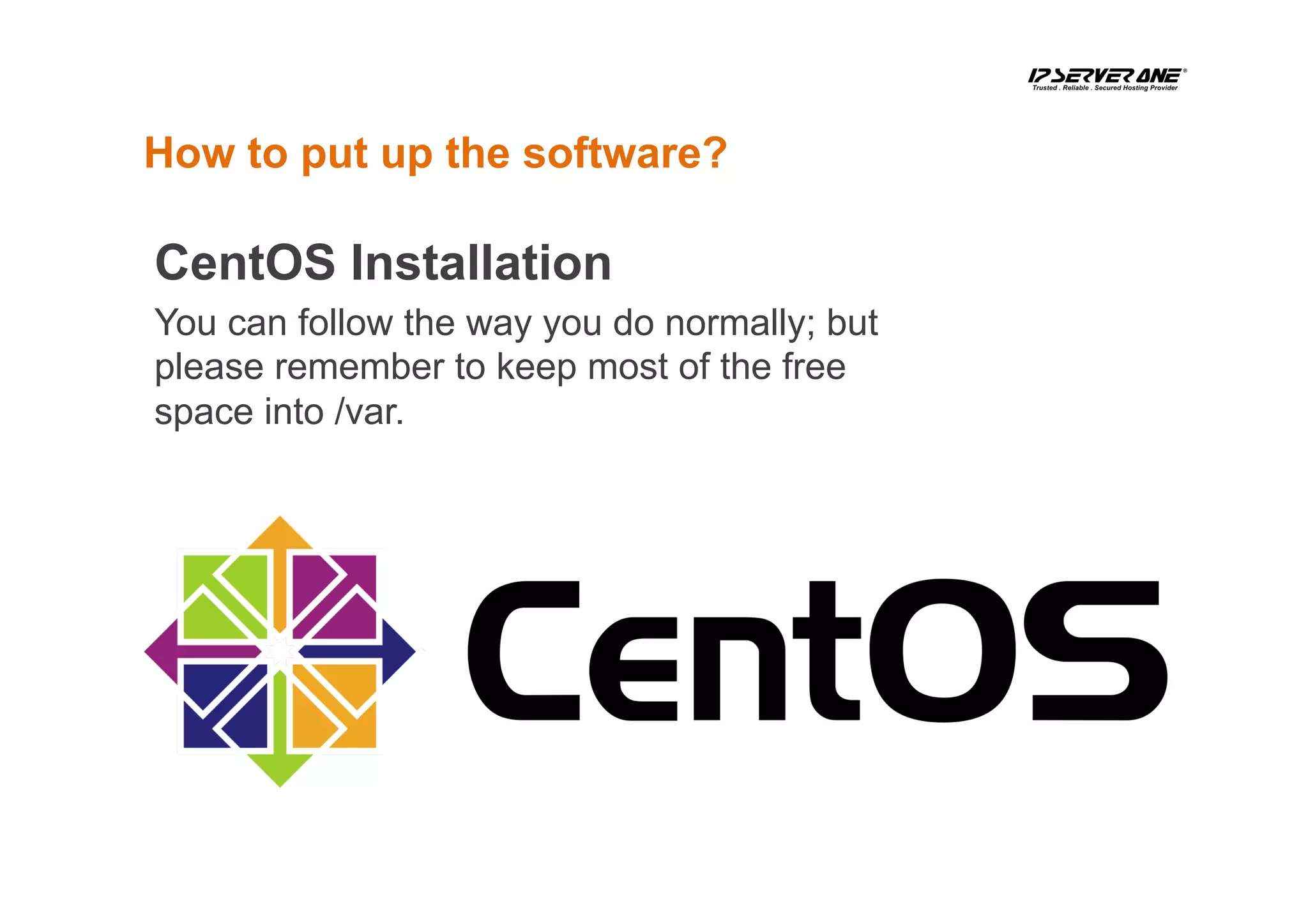
How to put up the software?
CentOS Installation
You can follow the way you do normally; but
please remember to keep most of the free
space into /var.
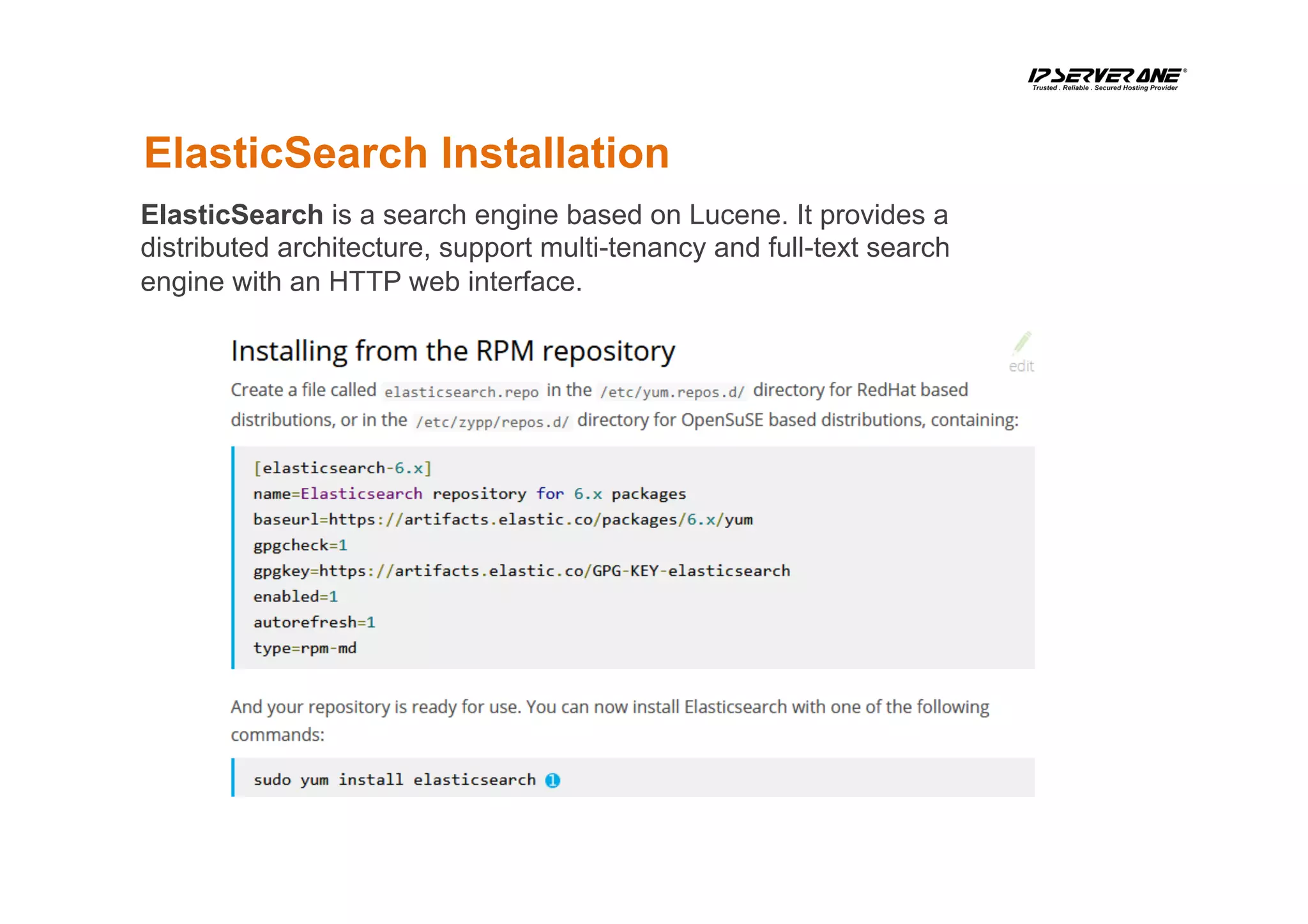
ElasticSearch Installation
ElasticSearch is a search engine based on Lucene. It provides a
distributed architecture, support multi-tenancy and full-text search
engine with an HTTP web interface.
Start ElasticSearch
[root@elk-stack ~]# systemctl daemon-reload
[root@elk-stack ~]# systemctl start elasticsearch
[root@elk-stack ~]# systemctl enable elasticsearch
[root@elk-stack ~]# curl -XGET ‘http://localhost:9200/_cat/indices?v’
health status index uuid pri rep docs.count docs.deleted store.size pri.store.size
yellow open stat-20180603 byH89tWFQSS_R9kS_QPGPw 5 1 54822544 0 6.9gb 6.9gb
yellow open stat-20180616 qZYSua4CQDa18GGMc8uiHQ 5 1 51830338 0 6.6gb 6.6gb
yellow open stat-20180604 PYdGUxX7SZ2aaFRV-ng4NQ 5 1 57828976 0 7.3gb 7.3gb
yellow open stat-20180630 FwrBuf6FQ-6SlyZhknATLQ 5 1 50014372 0 6.4gb 6.4gb
yellow open stat-20180618 _Nloca3jROCQ2vChWmDoGw 5 1 54976264 0 7gb 7gb
yellow open stat-20180526 ObGvcFbfTDuuk_MtZNlCQA 5 1 51836183 0 6.6gb 6.6gb
yellow open stat-20180615 t_CxQoauRUiVRTaJRPz2eQ 5 1 55490519 0 7gb 7gb
To check what are the indexes available in the ElasticSearch:
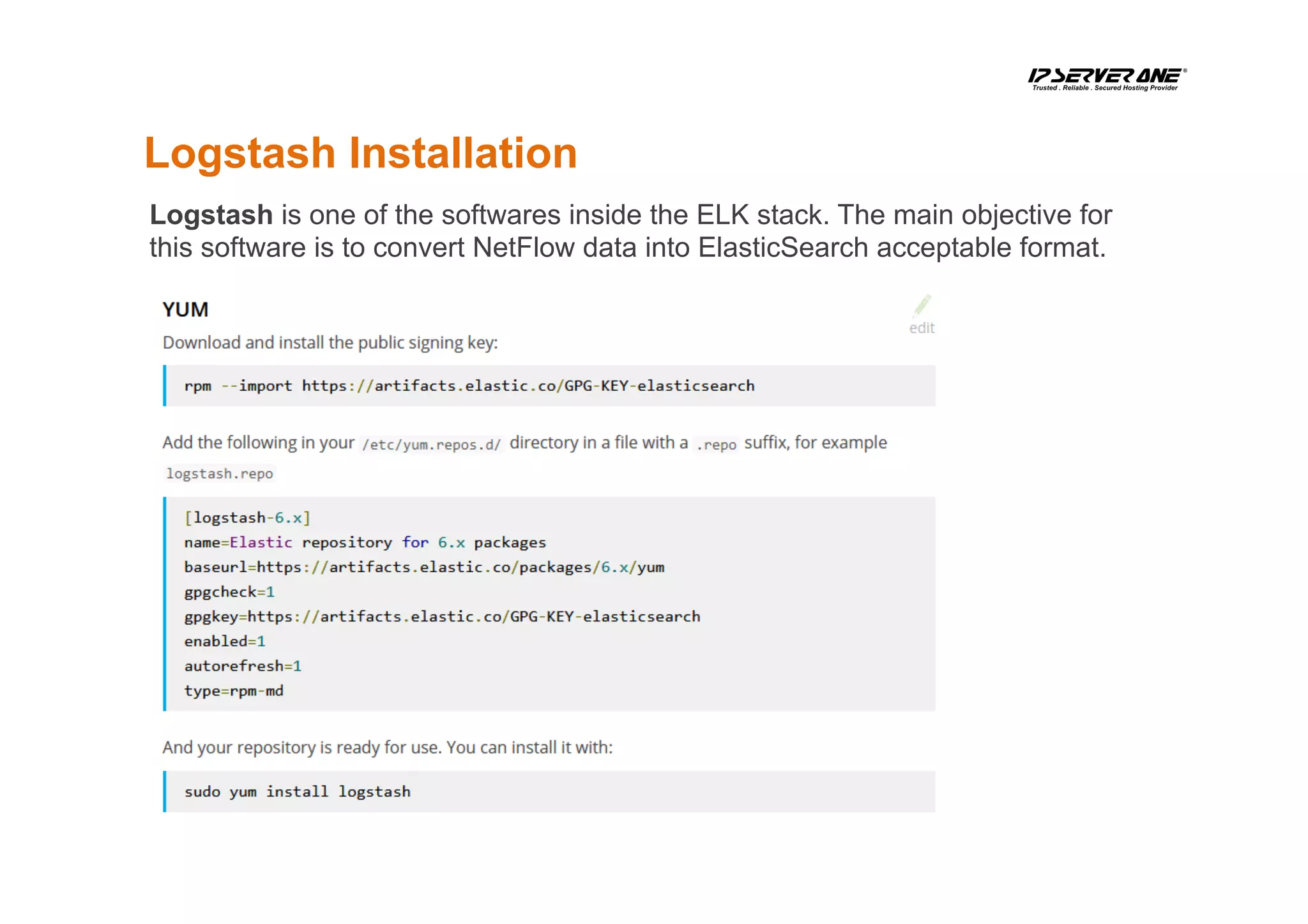
Logstash Installation
Logstash is one of the softwares inside the ELK stack. The main objective for
this software is to convert NetFlow data into ElasticSearch acceptable format.
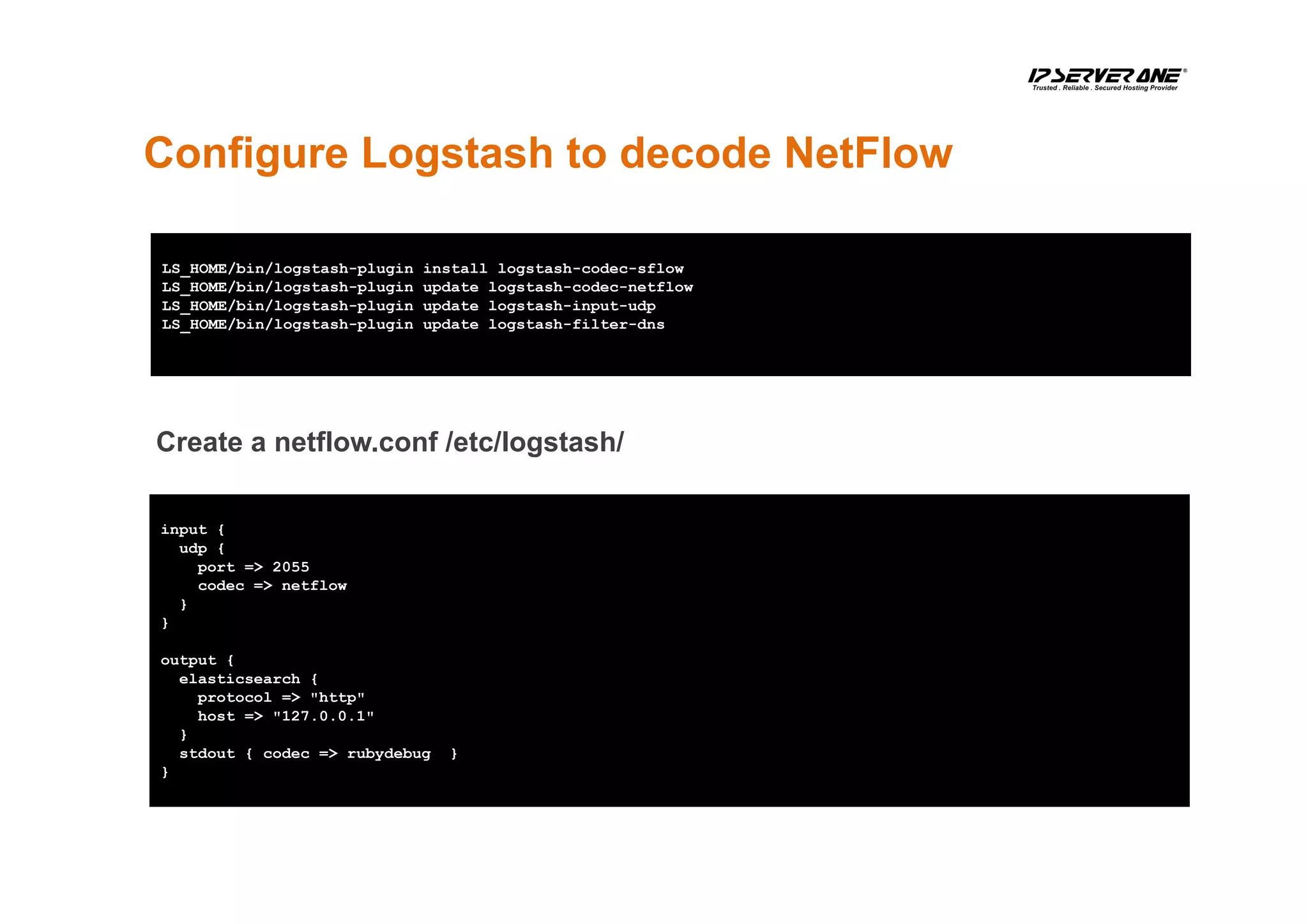
Configure Logstash to decode NetFlow
LS_HOME/bin/logstash-plugin install logstash-codec-sflow
LS_HOME/bin/logstash-plugin update logstash-codec-netflow
LS_HOME/bin/logstash-plugin update logstash-input-udp
LS_HOME/bin/logstash-plugin update logstash-filter-dns
input {
udp {
port => 2055
codec => netflow
}
}
output {
elasticsearch {
protocol => "http"
host => "127.0.0.1"
}
stdout { codec => rubydebug }
}
Create a netflow.conf /etc/logstash/
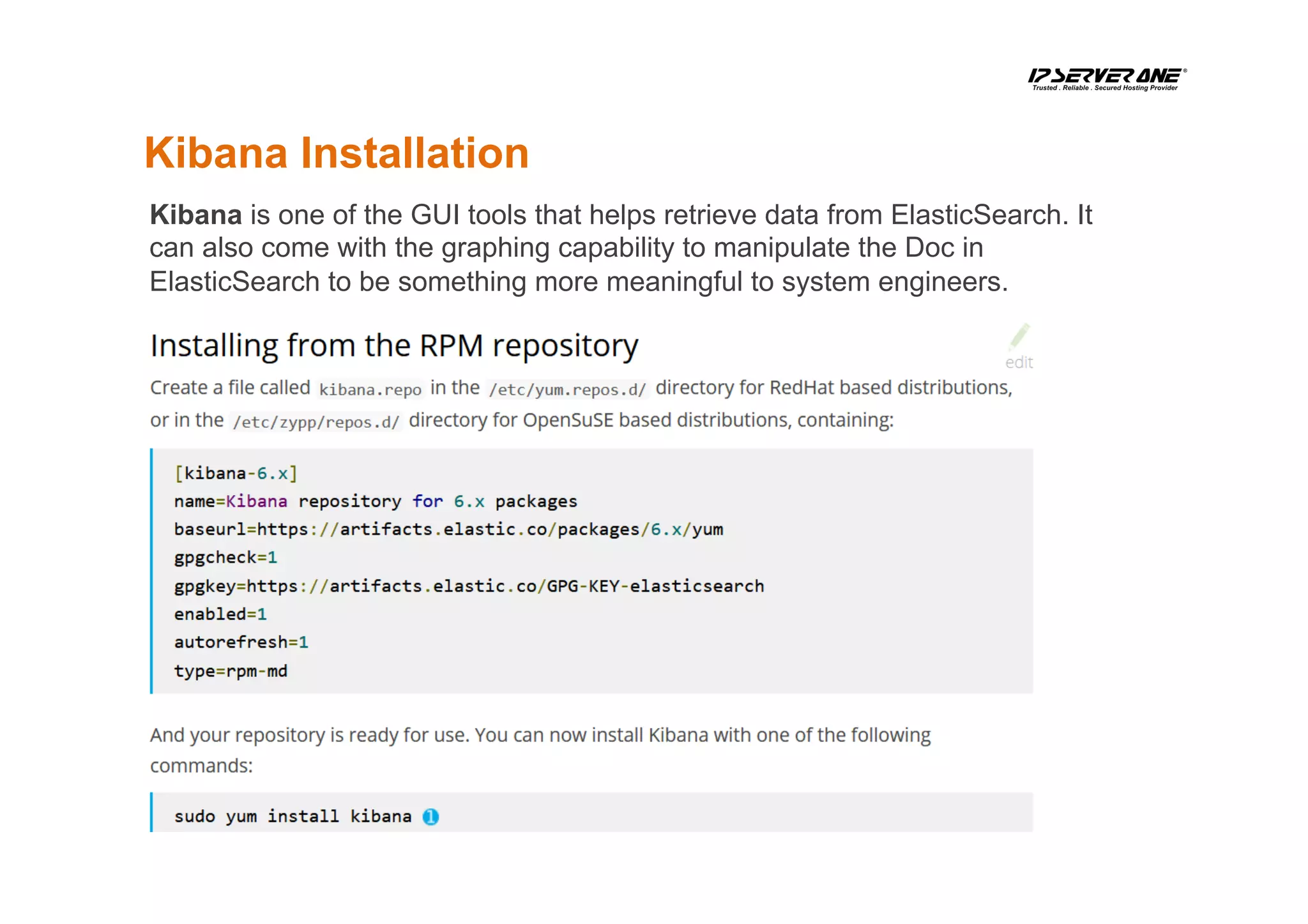
Kibana Installation
Kibana is one of the GUI tools that helps retrieve data from ElasticSearch. It
can also come with the graphing capability to manipulate the Doc in
ElasticSearch to be something more meaningful to system engineers.
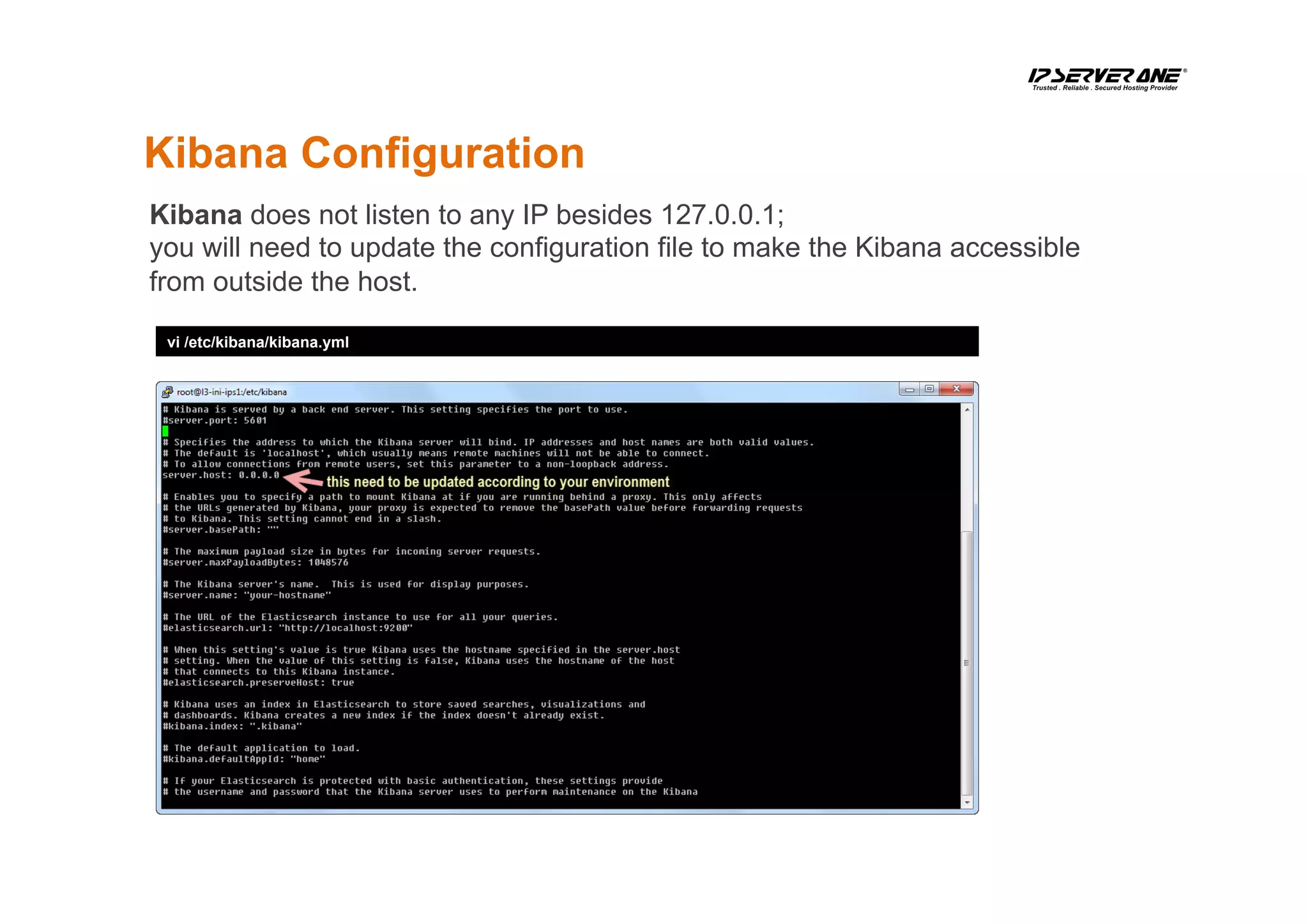
Kibana Configuration
vi /etc/kibana/kibana.yml
Kibana does not listen to any IP besides 127.0.0.1;
you will need to update the configuration file to make the Kibana accessible
from outside the host.
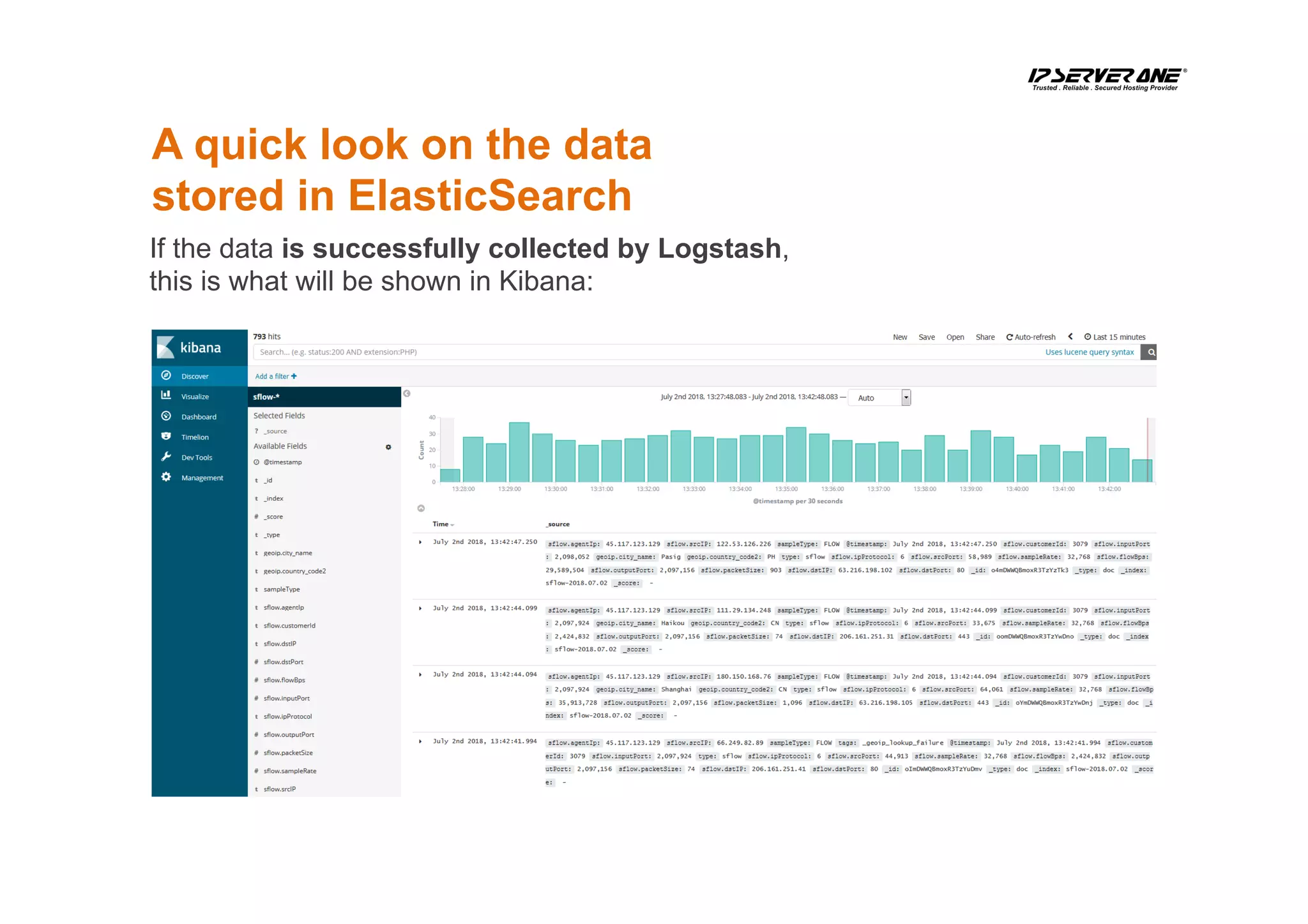
A quick look on the data
stored in ElasticSearch
If the data is successfully collected by Logstash,
this is what will be shown in Kibana:
How to query ElasticSearch
for top 10 IP talkers?
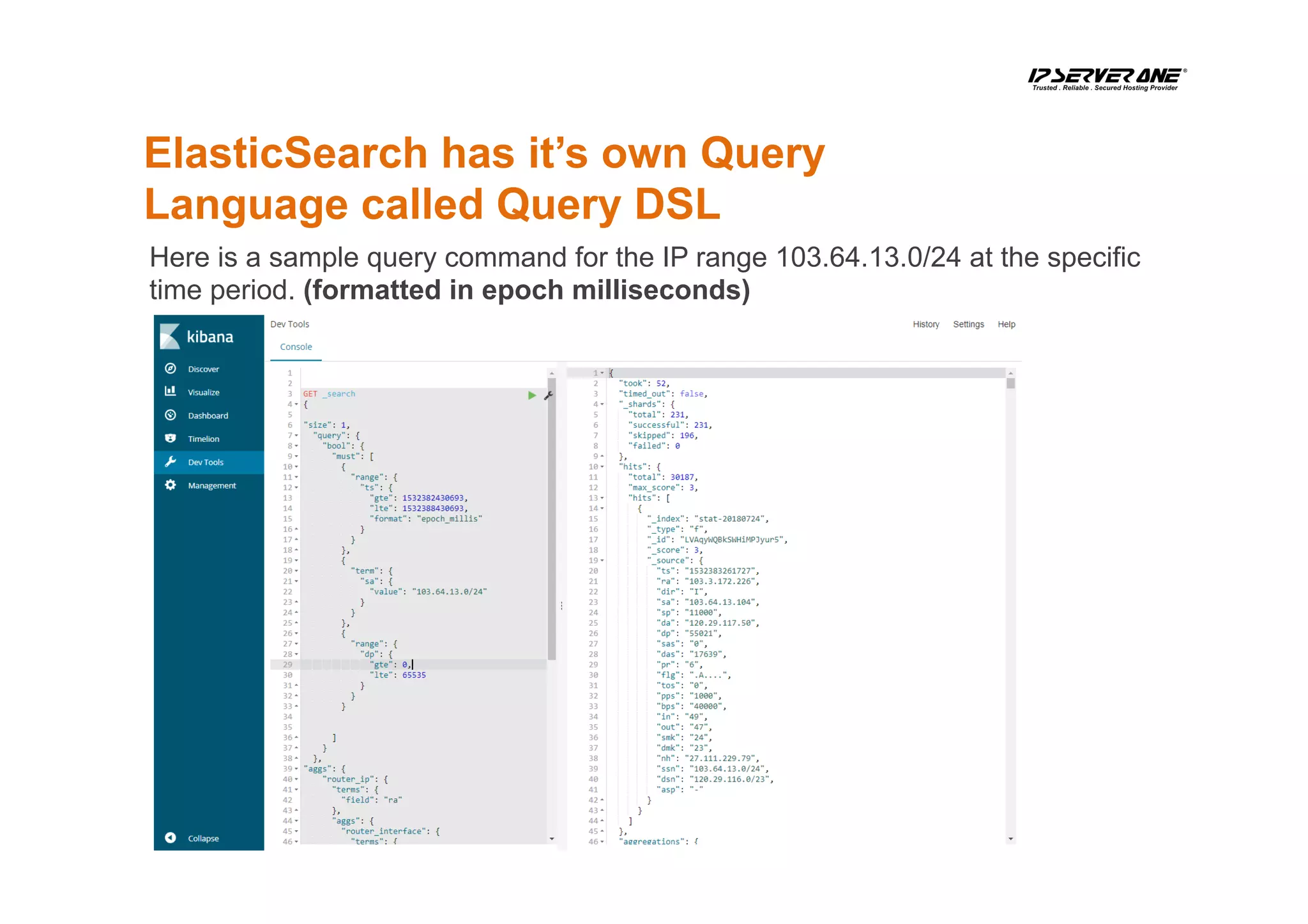
ElasticSearch has it’s own Query
Language called Query DSL
Here is a sample query command for the IP range 103.64.13.0/24 at the specific
time period. (formatted in epoch milliseconds)
Kibana is easy to use…
However, it’s still complicated for
my NOC team
We make use of ElasticSearch Client API for PHP, to make a
query interface so that they can do the job quicker and simplify
the learning curve.
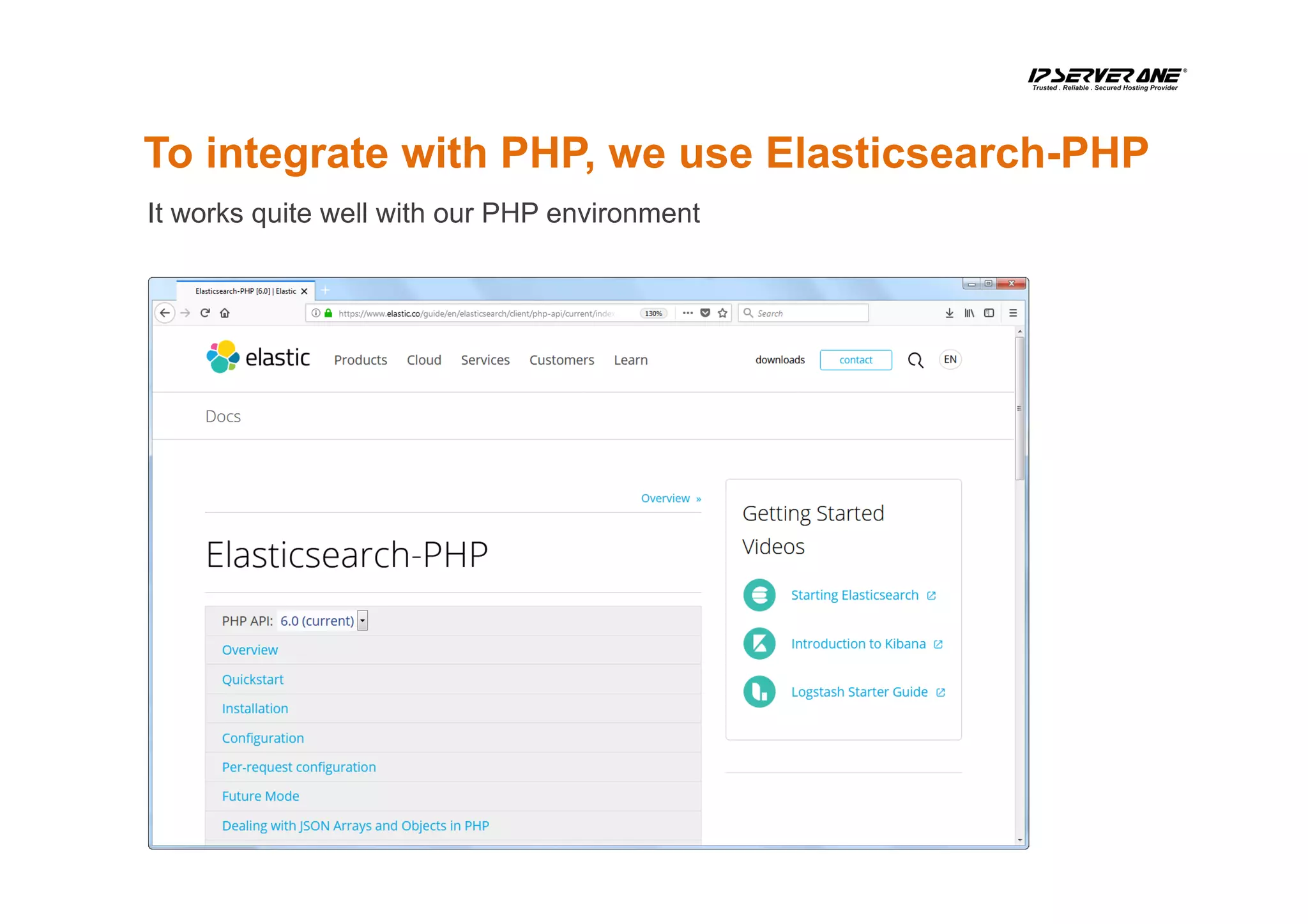
To integrate with PHP, we use Elasticsearch-PHP
It works quite well with our PHP environment
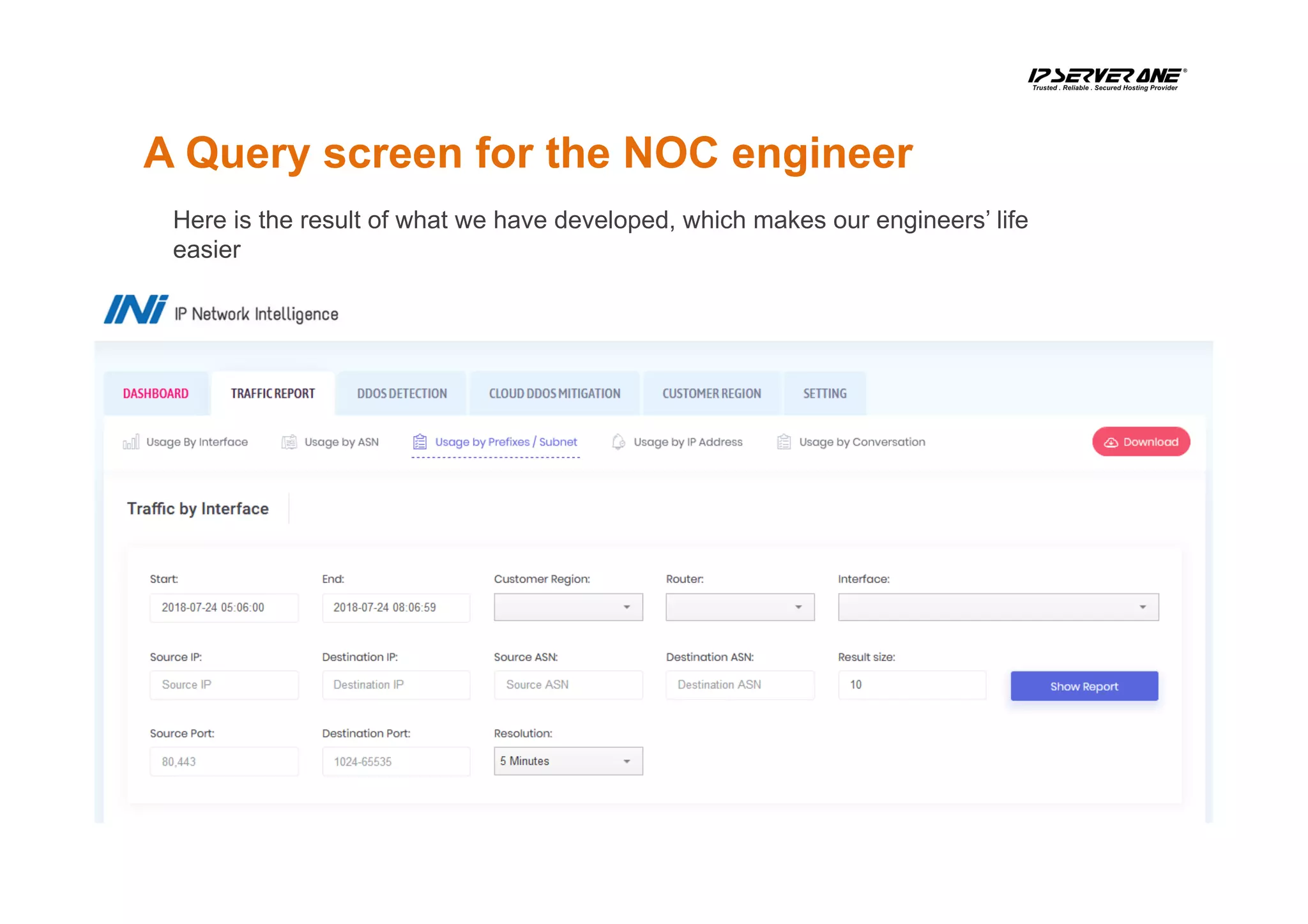
A Query screen for the NOC engineer
Here is the result of what we have developed, which makes our engineers’ life
easier
Samples
on how we use the NetFlow Data
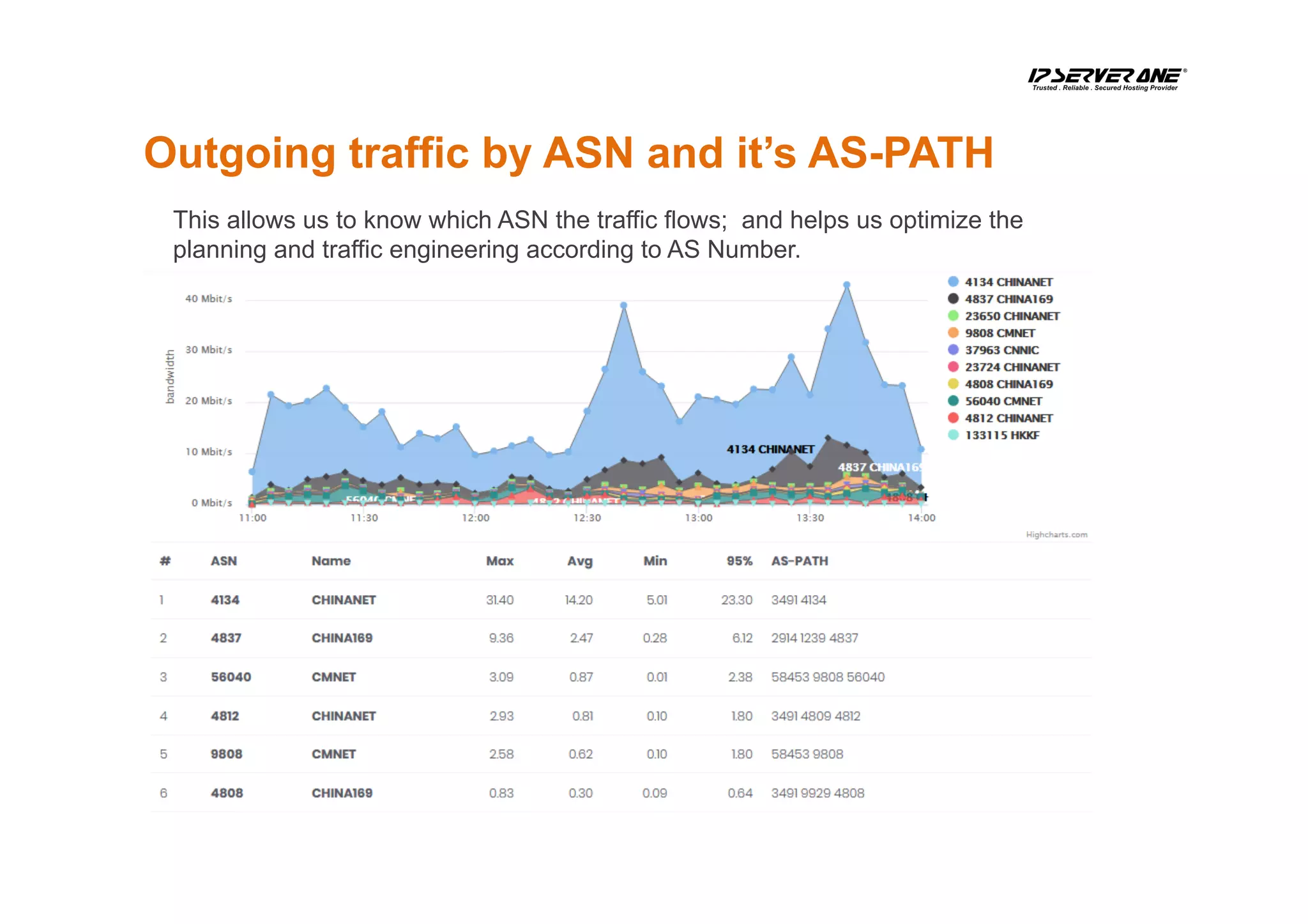
Outgoing traffic by ASN and it’s AS-PATH
This allows us to know which ASN the traffic flows; and helps us optimize the
planning and traffic engineering according to AS Number.
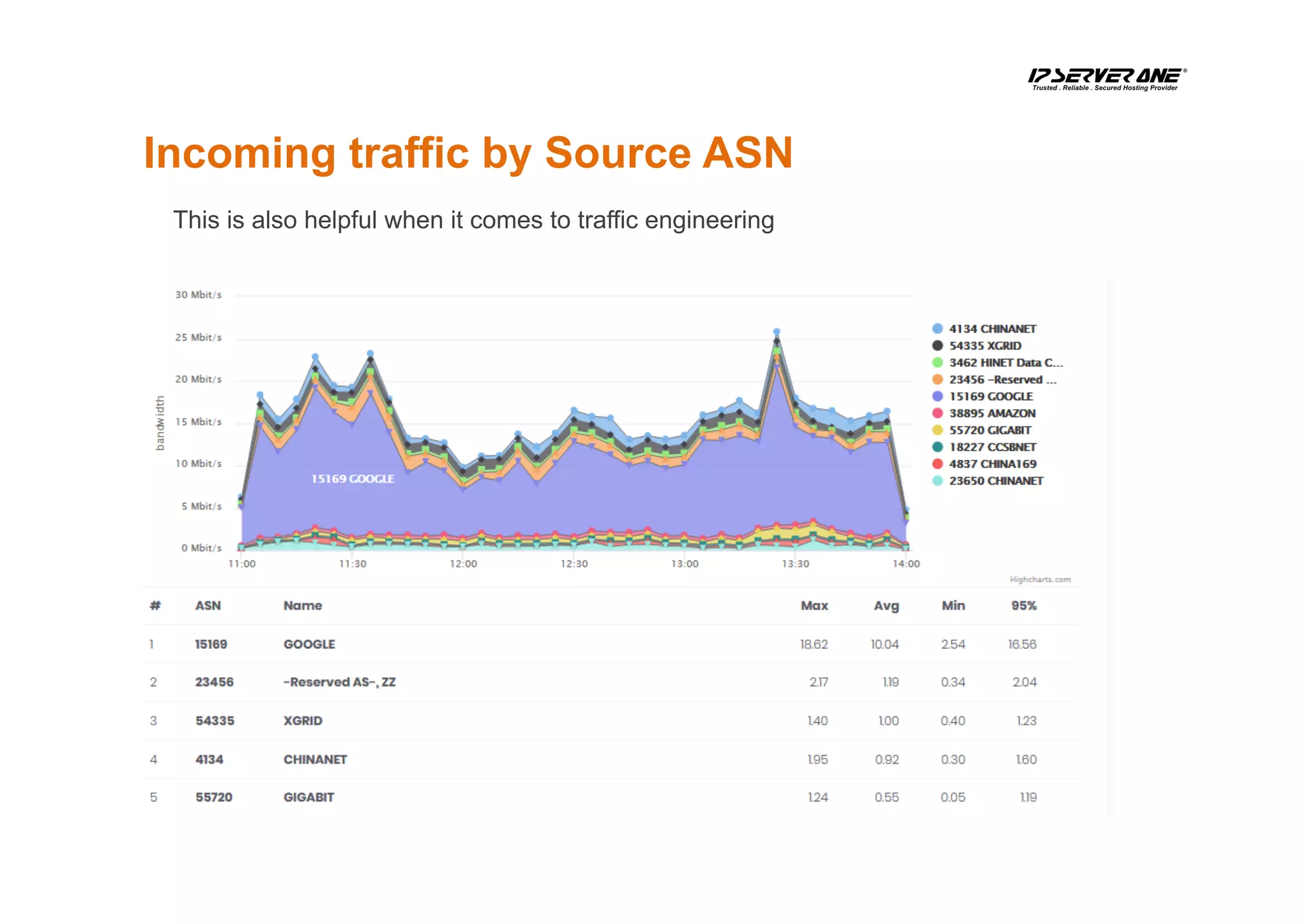
Incoming traffic by Source ASN
This is also helpful when it comes to traffic engineering
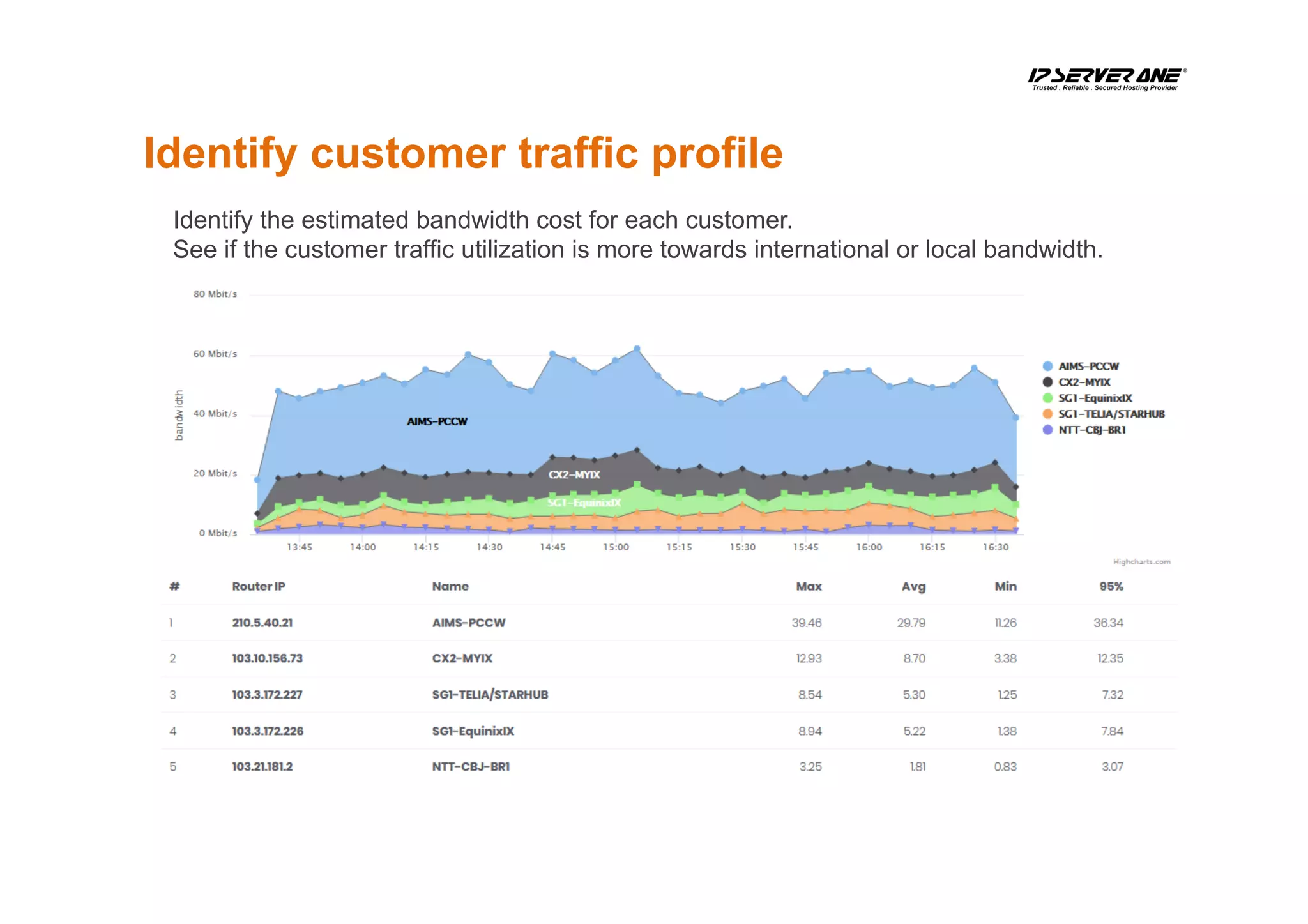
Identify customer traffic profile
Identify the estimated bandwidth cost for each customer.
See if the customer traffic utilization is more towards international or local bandwidth.
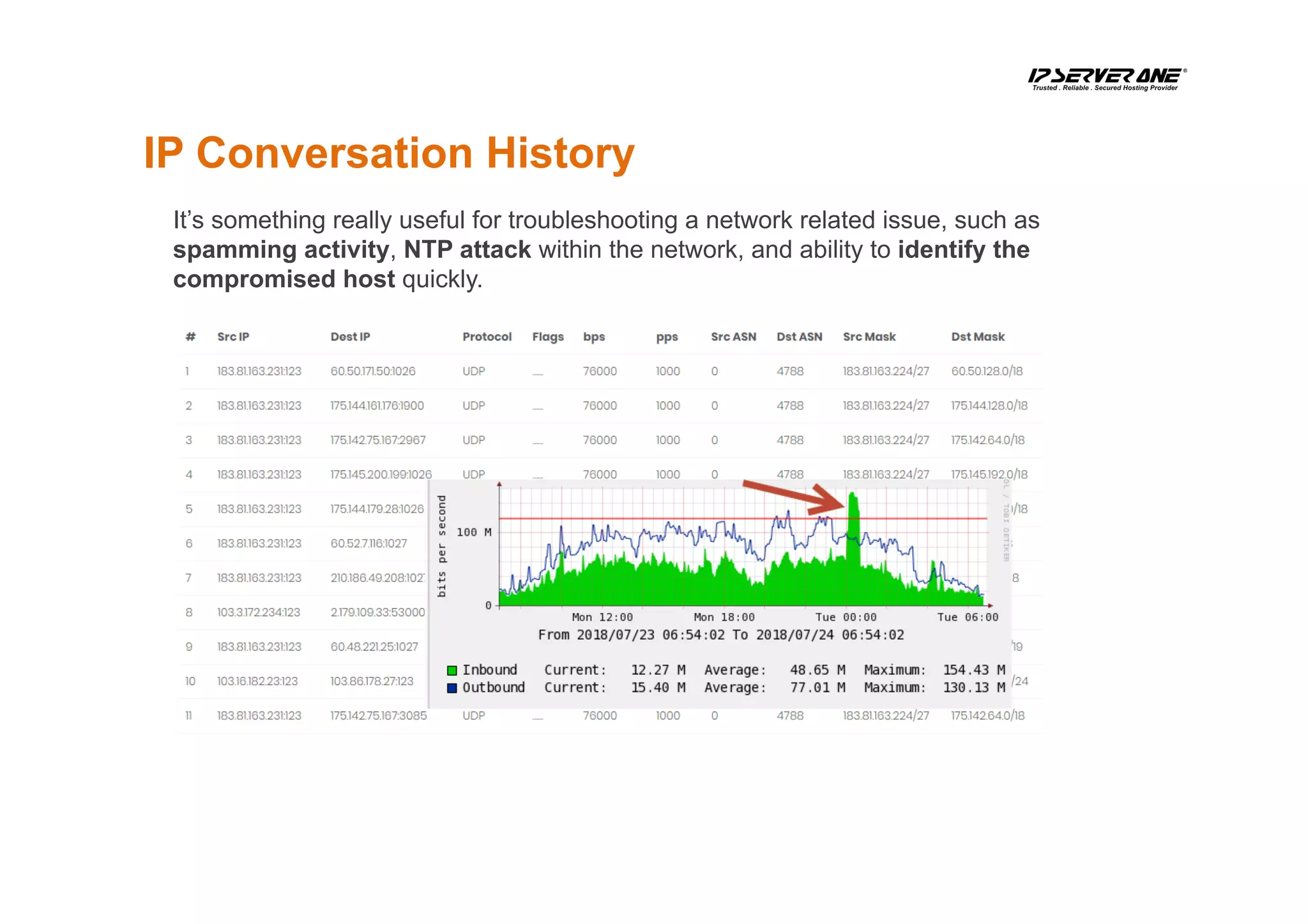
IP Conversation History
It’s something really useful for troubleshooting a network related issue, such as
spamming activity, NTP attack within the network, and ability to identify the
compromised host quickly.
Conclusion
ElasticSearch, Logstash and Kibana is a powerful tool to keep
and analyze the NetFlow traffic.
In addition, it’s not too difficult to deploy and run.
ANY
QUESTIONS?
ThanksOUR INFRASTRUCTURE; YOUR GROWTH
E-mail: cllee@ip.my
Mobile: +6 012-331 9286
03 2026 1688
www.ipserverone.com
ISO Certificate No: IS 651738

DIY Netflow Data Analytic with ELK Stack by CL Lee

  • 1.
    NetFlow Data Analyticswith ELK Stack
  • 2.
    •  Founded in2003 •  Over 60 employees •  Managing over 5000 physical servers •  Total 250 racks at 5 data centers across MY, SG and HK •  Contributing 10% of Malaysia’s domestic traffic •  Approximately 6.8 Gbit/s total traffic sending to the Internet at peak •  Up to 1.2TB DDoS mitigation capacity About IP ServerOne
  • 3.
    Why do weneed to use NetFlow?
  • 4.
    Who contributed tothis spike? Most companies have their MRTG configured But MRTG cannot tell you which IP is receiving a spike traffic (such as the above graph)
  • 5.
    You probably mayneed to know where the majority of your traffic comes from, right? Who uses the most bandwidth here?
  • 6.
    A NetFlow graphwould be able to breakdown the usage for your outbound / inbound traffic
  • 7.
  • 8.
    Why do wechoose ElasticSearch, Logstash, And Kibana (ELK)?
  • 9.
    •  Before Iget to know ELK stack, I was using MySQL to store all the NetFlow information. •  I wrote a PHP application that converts NetFlow information into a MySQL statement. •  That was too slow on the conversion performance and the data retrieval was a complete nightmare. •  There is no function / feature to get traffic statistic in the histogram form. Why ELK? It’s just too difficult to run this in MySQL
  • 10.
    •  Speed isthe primary reason that I have chosen ELK •  It has a lot of codec, which I can just plug and play •  COST; it runs on commodity hardware and it works just fine with Nearline SAS Hard drives •  Open Source •  Support Clustering •  It has SQL like syntax, so data searching is much more easier •  It has a very high performance; we had a working environment of 100Kflows per second Why ELK?
  • 11.
    Alternative to ELK • We did consider to use InfluxDB The OpenSource edition doesn’t support clustering. •  OpenTSDB The setup is very time-consuming. •  MongoDB. This is a great DB; however, we still prefer to use ElasticSearch.
  • 12.
    How to recordthe NetFlow Data?
  • 13.
    The NetFlow isbeing collected with the following setup NetFlow Source Logstash Elas6cSearch Elas6cSearch API + Custom App
  • 14.
    Adding BGP tableinformation into the ElasticSearch NetFlow Source Elas6cSearch BGP routing table entry for 103.3.174.0/24, version 737937 Paths: (34 available, best #21, table default) Not advertised to any peer Refresh Epoch 1 3356 3491 45352 4.69.184.193 from 4.69.184.193 (4.69.184.193) Origin IGP, metric 0, localpref 100, valid, external Community: 3356:666 3356:2012 3491:400 3491:413 rx pathid: 0, tx pathid: 0 Refresh Epoch 1 3549 3356 2914 45352 208.51.134.254 from 208.51.134.254 (67.16.168.191) Origin IGP, metric 0, localpref 100, valid, external Community: 3356:3 3356:86 3356:575 3356:666 3356:2011 3356:11940 3549:2581 3549:30840 rx pathid: 0, tx pathid: 0 Refresh Epoch 1 20912 1267 45352 212.66.96.126 from 212.66.96.126 (212.66.96.126) Origin incomplete, localpref 100, valid, external Community: 1267:167 1267:200 20912:65001 rx pathid: 0, tx pathid: 0 Refresh Epoch 1 route-views> BGP Rou6ng Table PHP + Golang Logstash ExaBGP
  • 15.
    We use NetFlowv9 in our projects Here is the field that we keep
  • 16.
    The hardware specification usedfor keeping our NetFlow The software used to run our NetFlow CentOS 7 64bit Operating System Java Hardware vs Software 1 x Intel Xeon 8 cores 2.1Ghz Processor 32GB RAM 4 x 2TB HDD 1 x Gigabit Network Card ElasticSearch, Logstash PHP MySQL
  • 17.
    How to putup the software? CentOS Installation You can follow the way you do normally; but please remember to keep most of the free space into /var.
  • 18.
    ElasticSearch Installation ElasticSearch isa search engine based on Lucene. It provides a distributed architecture, support multi-tenancy and full-text search engine with an HTTP web interface.
  • 19.
    Start ElasticSearch [root@elk-stack ~]#systemctl daemon-reload [root@elk-stack ~]# systemctl start elasticsearch [root@elk-stack ~]# systemctl enable elasticsearch [root@elk-stack ~]# curl -XGET ‘http://localhost:9200/_cat/indices?v’ health status index uuid pri rep docs.count docs.deleted store.size pri.store.size yellow open stat-20180603 byH89tWFQSS_R9kS_QPGPw 5 1 54822544 0 6.9gb 6.9gb yellow open stat-20180616 qZYSua4CQDa18GGMc8uiHQ 5 1 51830338 0 6.6gb 6.6gb yellow open stat-20180604 PYdGUxX7SZ2aaFRV-ng4NQ 5 1 57828976 0 7.3gb 7.3gb yellow open stat-20180630 FwrBuf6FQ-6SlyZhknATLQ 5 1 50014372 0 6.4gb 6.4gb yellow open stat-20180618 _Nloca3jROCQ2vChWmDoGw 5 1 54976264 0 7gb 7gb yellow open stat-20180526 ObGvcFbfTDuuk_MtZNlCQA 5 1 51836183 0 6.6gb 6.6gb yellow open stat-20180615 t_CxQoauRUiVRTaJRPz2eQ 5 1 55490519 0 7gb 7gb To check what are the indexes available in the ElasticSearch:
  • 20.
    Logstash Installation Logstash isone of the softwares inside the ELK stack. The main objective for this software is to convert NetFlow data into ElasticSearch acceptable format.
  • 21.
    Configure Logstash todecode NetFlow LS_HOME/bin/logstash-plugin install logstash-codec-sflow LS_HOME/bin/logstash-plugin update logstash-codec-netflow LS_HOME/bin/logstash-plugin update logstash-input-udp LS_HOME/bin/logstash-plugin update logstash-filter-dns input { udp { port => 2055 codec => netflow } } output { elasticsearch { protocol => "http" host => "127.0.0.1" } stdout { codec => rubydebug } } Create a netflow.conf /etc/logstash/
  • 22.
    Kibana Installation Kibana isone of the GUI tools that helps retrieve data from ElasticSearch. It can also come with the graphing capability to manipulate the Doc in ElasticSearch to be something more meaningful to system engineers.
  • 23.
    Kibana Configuration vi /etc/kibana/kibana.yml Kibanadoes not listen to any IP besides 127.0.0.1; you will need to update the configuration file to make the Kibana accessible from outside the host.
  • 24.
    A quick lookon the data stored in ElasticSearch If the data is successfully collected by Logstash, this is what will be shown in Kibana:
  • 25.
    How to queryElasticSearch for top 10 IP talkers?
  • 26.
    ElasticSearch has it’sown Query Language called Query DSL Here is a sample query command for the IP range 103.64.13.0/24 at the specific time period. (formatted in epoch milliseconds)
  • 27.
    Kibana is easyto use… However, it’s still complicated for my NOC team We make use of ElasticSearch Client API for PHP, to make a query interface so that they can do the job quicker and simplify the learning curve.
  • 28.
    To integrate withPHP, we use Elasticsearch-PHP It works quite well with our PHP environment
  • 29.
    A Query screenfor the NOC engineer Here is the result of what we have developed, which makes our engineers’ life easier
  • 30.
    Samples on how weuse the NetFlow Data
  • 31.
    Outgoing traffic byASN and it’s AS-PATH This allows us to know which ASN the traffic flows; and helps us optimize the planning and traffic engineering according to AS Number.
  • 32.
    Incoming traffic bySource ASN This is also helpful when it comes to traffic engineering
  • 33.
    Identify customer trafficprofile Identify the estimated bandwidth cost for each customer. See if the customer traffic utilization is more towards international or local bandwidth.
  • 34.
    IP Conversation History It’ssomething really useful for troubleshooting a network related issue, such as spamming activity, NTP attack within the network, and ability to identify the compromised host quickly.
  • 35.
    Conclusion ElasticSearch, Logstash andKibana is a powerful tool to keep and analyze the NetFlow traffic. In addition, it’s not too difficult to deploy and run.
  • 36.
  • 37.
    ThanksOUR INFRASTRUCTURE; YOURGROWTH E-mail: cllee@ip.my Mobile: +6 012-331 9286 03 2026 1688 www.ipserverone.com ISO Certificate No: IS 651738