SDM College ofEngineering and Technology Dharwad, 580002
Dept of Electronics and Communication
Team Members
Shreyas Kulkarni - 2SD22EC090
Subramanya M Hegde – 2SD22EC102
Sukhith .P.A – 2SD22EC106
Vinay G Yaragambalimath- 2SD22EC119
Guided by: Prof. S.S. Ravishankar
DIGITAL NOTICE BOARD USING
WIRELESS COMMUNICATION
2.
Introduction
Project Overview andReal-Life Applications
•Purpose: A digital notice board system using Bluetooth for real-time, wireless message display,
minimizing physical effort and manual updates.
•Real-Life Applications:
• Educational Institutions: Display announcements, schedules, and alerts in classrooms or common areas.
• Corporate Offices: Real-time updates for meetings, events, and general information.
• Public Spaces: Airports, railway stations, and malls for sharing timely information.
• Healthcare: Display critical information in hospitals and clinics for patients and staff.
• Retail: Share promotions and alerts in stores, improving customer engagement
3.
Aim and Objectives
•Aim:To develop a digital notice board that displays messages wirelessly, allowing
seamless updates in real-time.
Objectives:
1.Enable Wireless Communication: Utilize Bluetooth to update the display without
physical connections.
2.Integrate Key Components: Efficiently connect and program Arduino, HC-05
Bluetooth module, and LCD for synchronized operation.
3.User-Friendly Operation: Simplify message updates, ensuring easy handling by
non-technical users.
4.Cost-Effective Solution: Design with affordable, easily available components.
5.Practical Applications: Facilitate dynamic information displays in public places,
schools, and offices.
4.
Components Used
List ofComponents
•Arduino Board: Central controller for the system.
•HC-05 Bluetooth Module: Enables wireless communication.
•LCD Display (20x4): Visual output for messages.
I2C Communication: Often uses I2C for reduced wiring, simplifying connections to Arduino and saving
GPIO pins.
•Power Supply (Optional): Provides necessary power if not using USB
5.
Component Descriptions
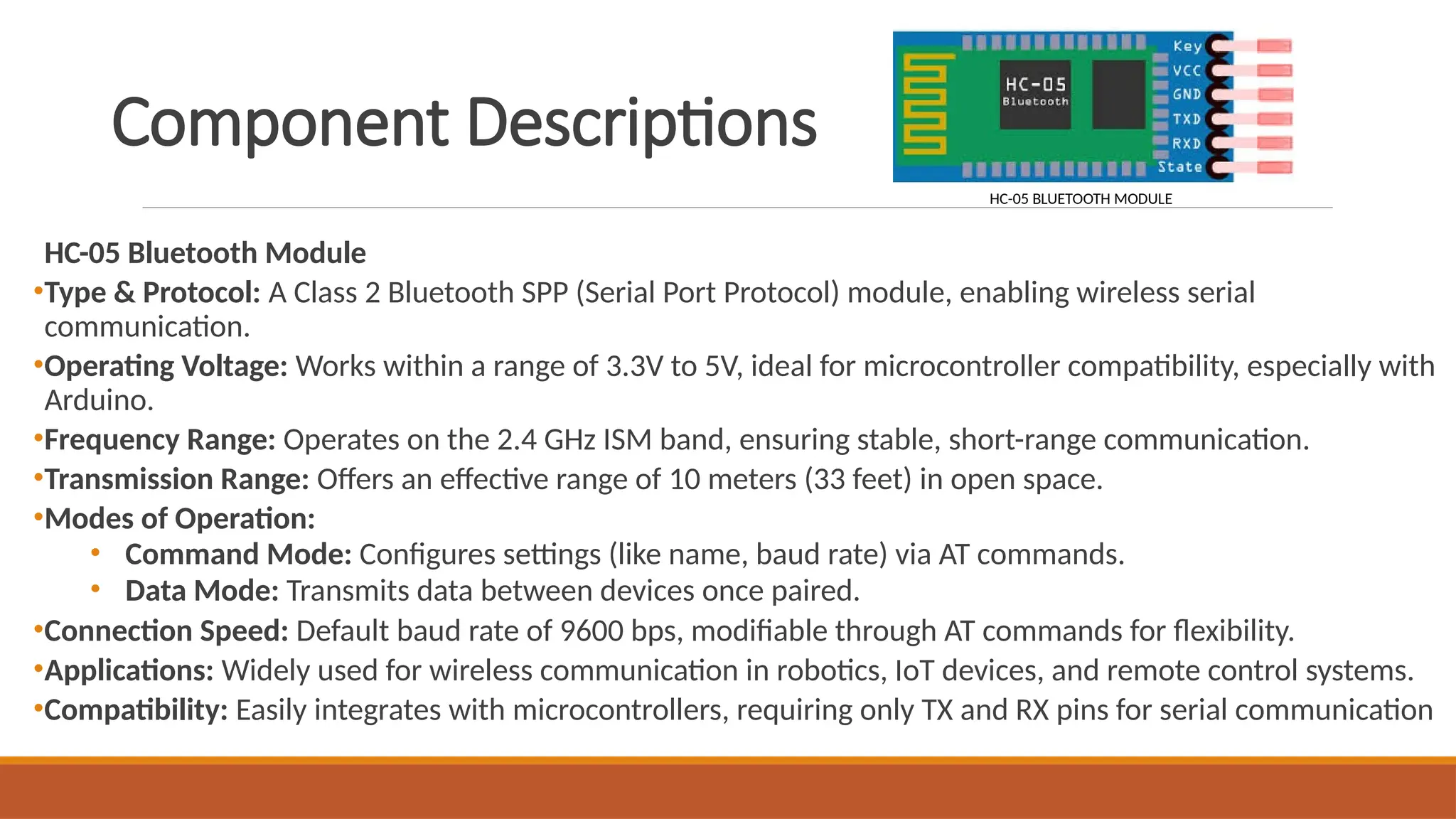
HC-05 BluetoothModule
•Type & Protocol: A Class 2 Bluetooth SPP (Serial Port Protocol) module, enabling wireless serial
communication.
•Operating Voltage: Works within a range of 3.3V to 5V, ideal for microcontroller compatibility, especially with
Arduino.
•Frequency Range: Operates on the 2.4 GHz ISM band, ensuring stable, short-range communication.
•Transmission Range: Offers an effective range of 10 meters (33 feet) in open space.
•Modes of Operation:
• Command Mode: Configures settings (like name, baud rate) via AT commands.
• Data Mode: Transmits data between devices once paired.
•Connection Speed: Default baud rate of 9600 bps, modifiable through AT commands for flexibility.
•Applications: Widely used for wireless communication in robotics, IoT devices, and remote control systems.
•Compatibility: Easily integrates with microcontrollers, requiring only TX and RX pins for serial communication
HC-05 BLUETOOTH MODULE
6.
•Arduino Microcontroller
•Processing Core:Serves as the central processing unit, receiving Bluetooth signals and
translating them to display characters on the LCD.
•Programmable Control: Easily programmable to manage message input, parsing, and
display, making it versatile for handling real-time updates.
•Digital I/O Pins: Essential for managing multiple components, such as Bluetooth and
LCD, through dedicated input-output ports.
•20x4 LCD Display
•20x4 Layout: Provides four rows and twenty columns, ideal for displaying longer
messages in our notice board project.
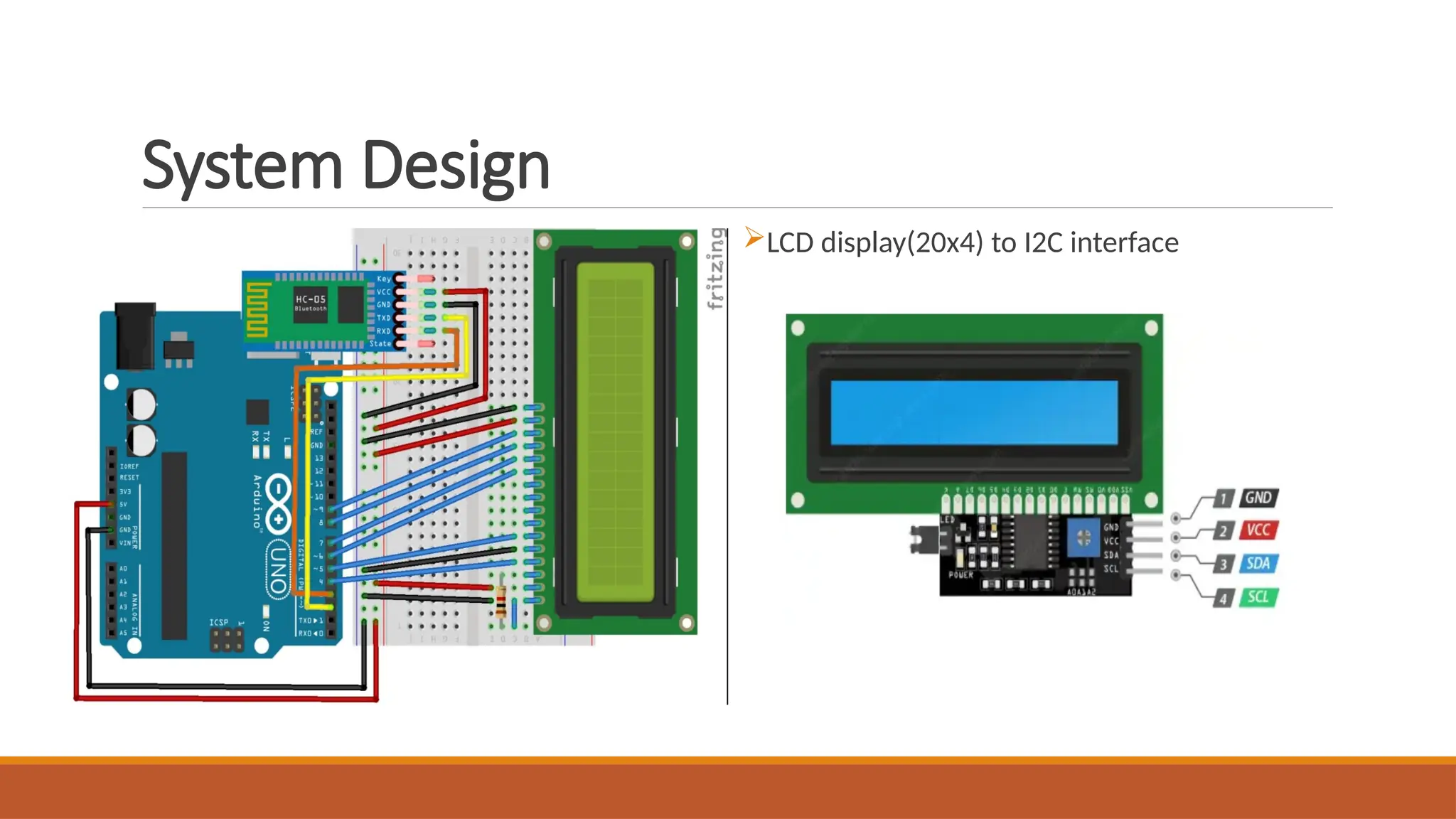
•I2C Interface Compatibility: Simplifies wiring and conserves Arduino’s GPIO pins,
making it a practical choice for compact setups.
•Backlight and Contrast Control: Ensures visibility and readability in various lighting
conditions, essential for public display
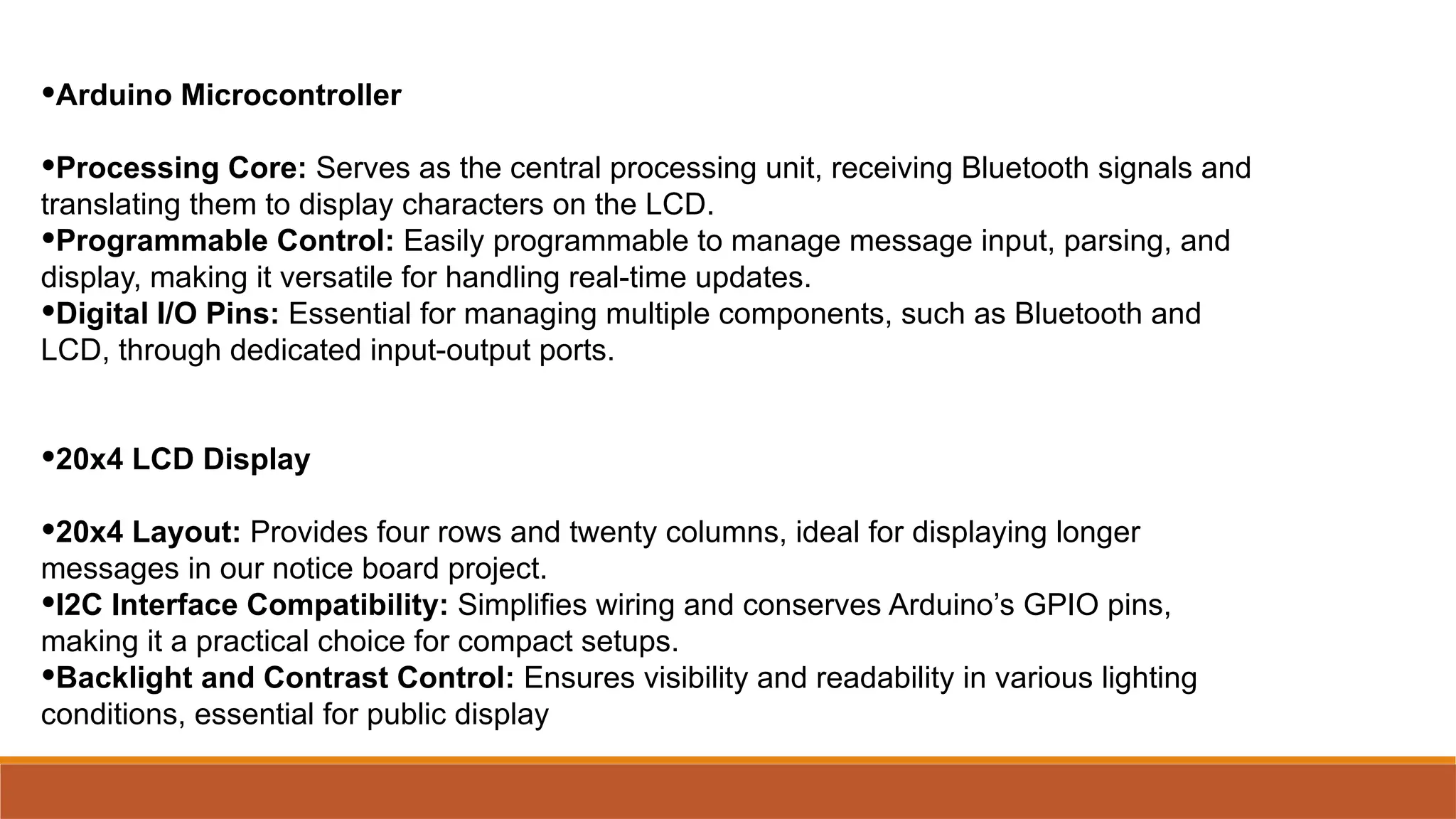
Step-by-StepComponentConnectionsandTheirRoles
1.Arduino Power Supply
1.Connection: Connect the Arduino to a power source (USB or external power).
2. Role: Powers all components and provides a central processing unit for managing inputs and outputs.
2.HC-05 Bluetooth Module
1. Connection:
1.Connect TX (transmit) on the HC-05 to RX (receive) pin on Arduino.
2.Connect RX on HC-05 to TX on Arduino via a voltage divider (to prevent overloading).
2. Role: Receives messages wirelessly from paired devices, forwarding them to Arduino for processing.
3.20x4 LCD Display
1. Connection: Use I2C pins on Arduino – SDA and SCL connected to the display’s SDA and SCL pins.
2. Role: Displays messages received from the Bluetooth module, serving as the visible output for the project.
4.Jumper Wires
1. Connection: Link all components for data and power transmission across the breadboard.
2. Role: Ensures seamless connectivity between components, enabling reliable data flow in the circuit
9.
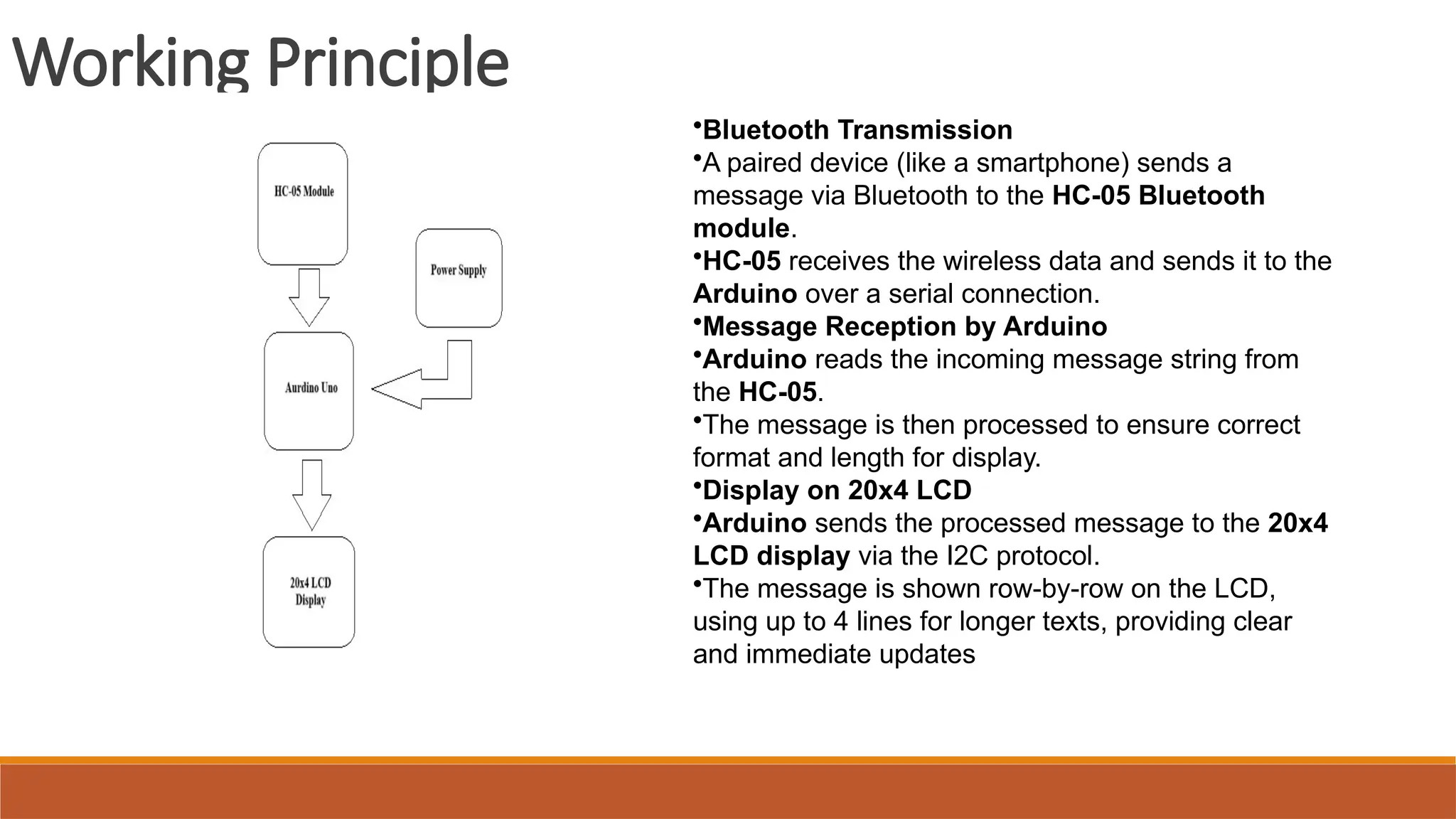
Working Principle
•Bluetooth Transmission
•Apaired device (like a smartphone) sends a
message via Bluetooth to the HC-05 Bluetooth
module.
•HC-05 receives the wireless data and sends it to the
Arduino over a serial connection.
•Message Reception by Arduino
•Arduino reads the incoming message string from
the HC-05.
•The message is then processed to ensure correct
format and length for display.
•Display on 20x4 LCD
•Arduino sends the processed message to the 20x4
LCD display via the I2C protocol.
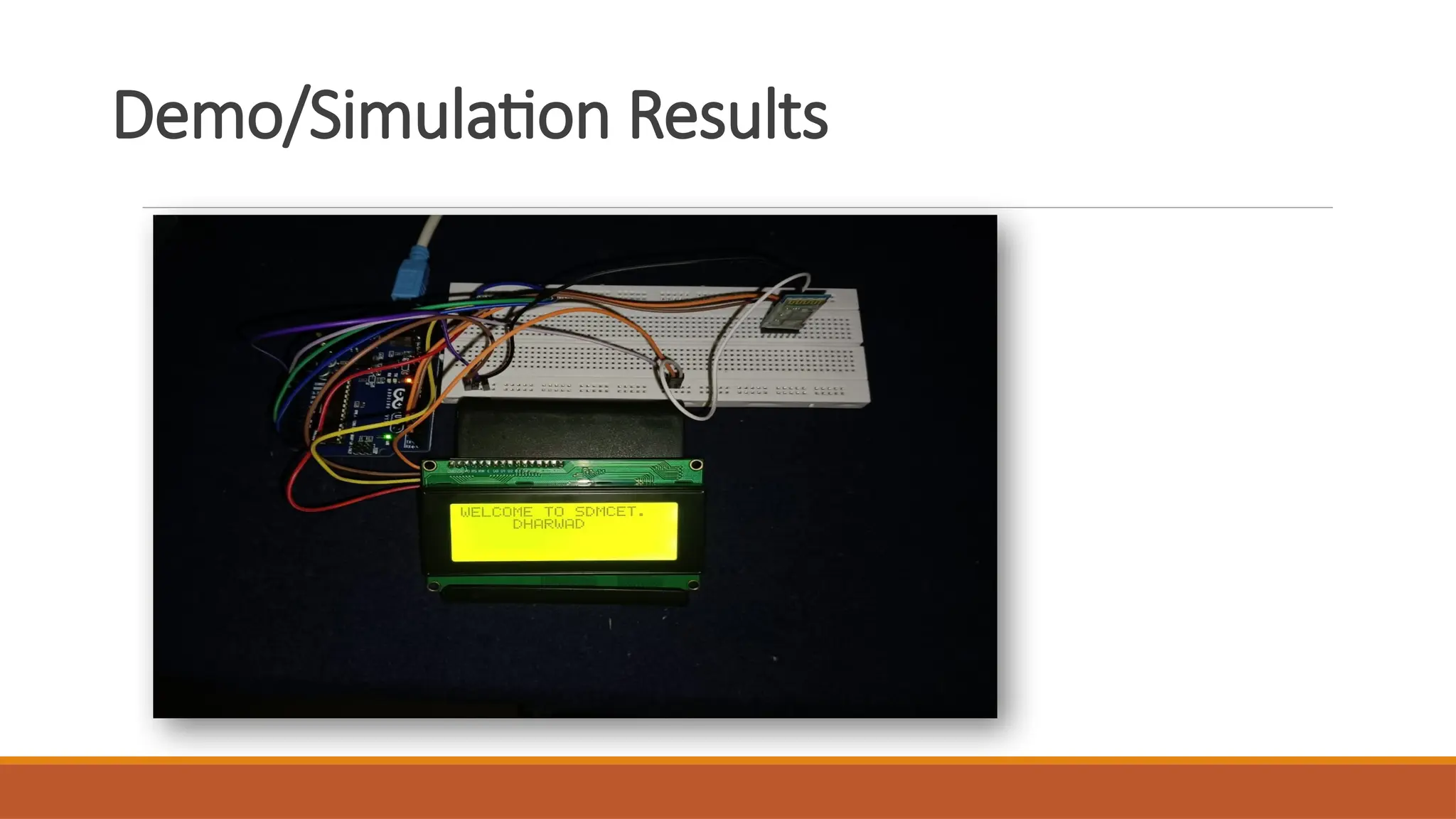
•The message is shown row-by-row on the LCD,
using up to 4 lines for longer texts, providing clear
and immediate updates
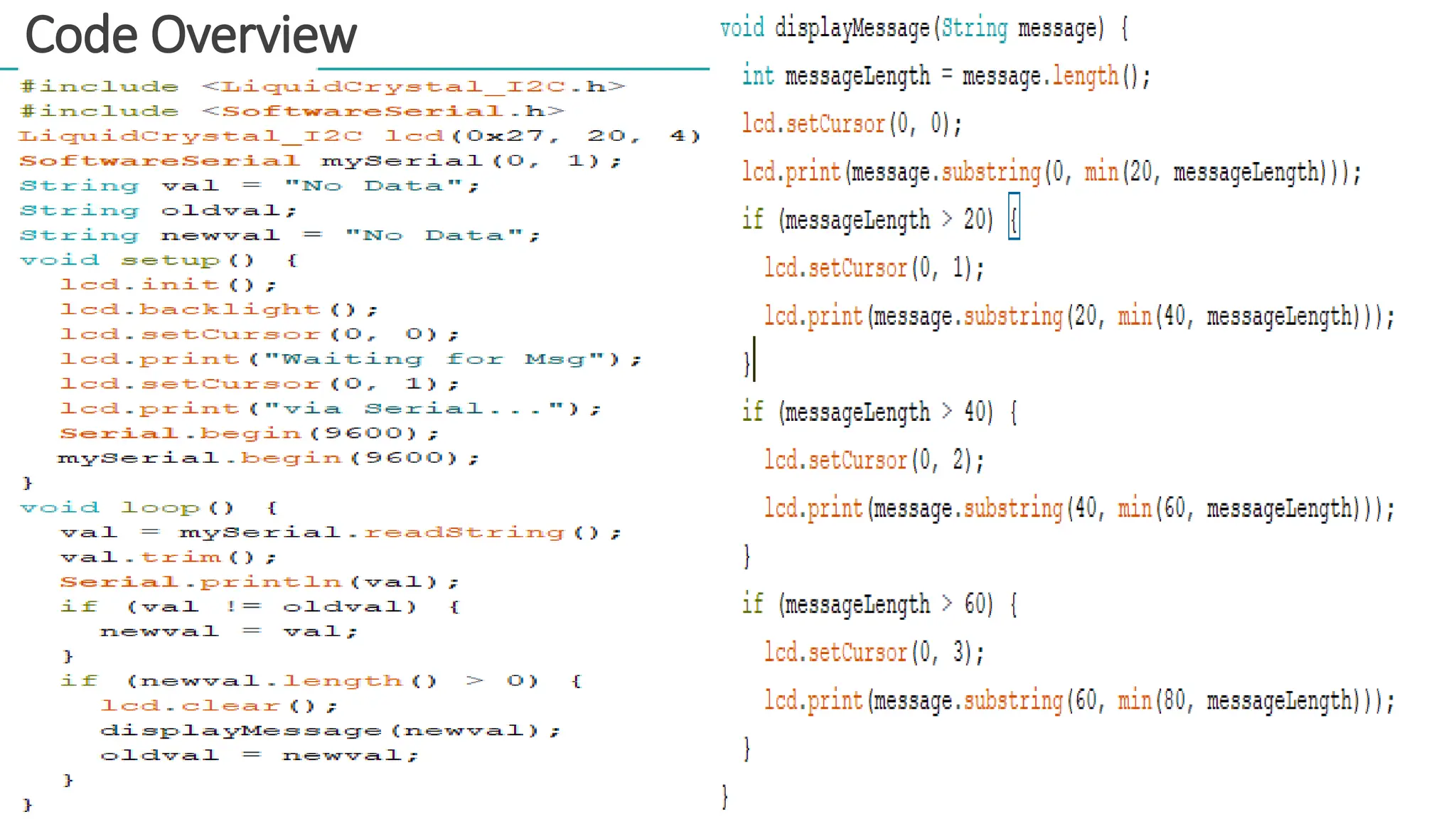
•Libraries Used:
•SoftwareSerial: ForBluetooth communication.
•LiquidCrystal: For controlling the LCD.
•Setup:
•Initialize Bluetooth and LCD in setup().
•Begin serial communication and clear the LCD.
•Loop:
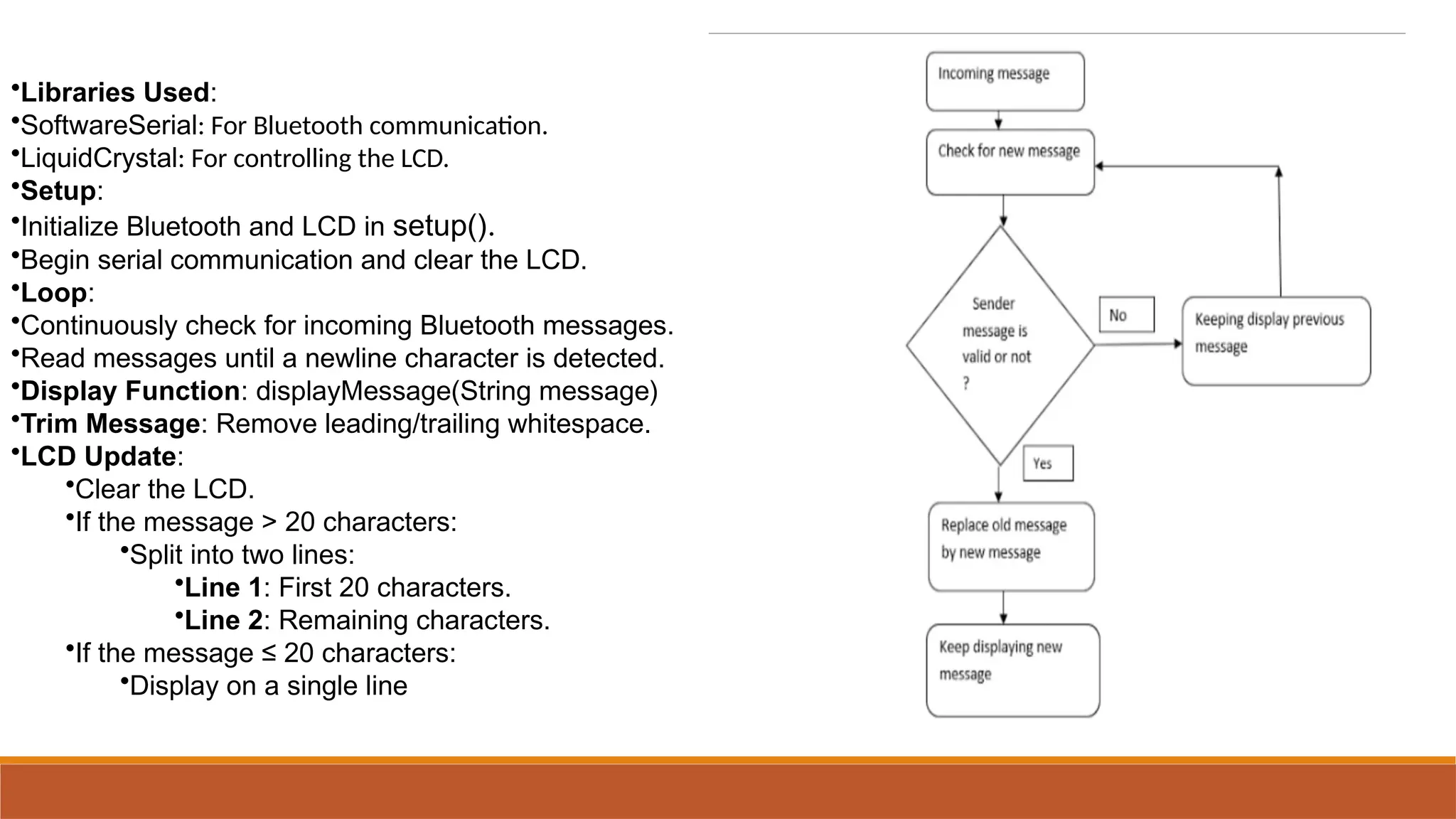
•Continuously check for incoming Bluetooth messages.
•Read messages until a newline character is detected.
•Display Function: displayMessage(String message)
•Trim Message: Remove leading/trailing whitespace.
•LCD Update:
•Clear the LCD.
•If the message > 20 characters:
•Split into two lines:
•Line 1: First 20 characters.
•Line 2: Remaining characters.
•If the message ≤ 20 characters:
•Display on a single line
12.
Challenges and Solutions
•TextRow Alignment:
•Challenge: Misaligned text on the LCD display.
•Solution: Used a row-wise function to ensure proper alignment on each row.
•Bluetooth Connectivity:
•Challenge: Unstable Bluetooth connection.
•Solution: Switched to a reliable mobile app for stable pairing.
•LCD Display Visibility:
•Challenge: LCD was not displaying text.
•Solution: Adjusted the contrast settings to improve visibility
Conclusion
•Outcomes:
•Successful real-time displayof Bluetooth messages on the LCD.
•Improved readability through effective text trimming and alignment.
•Enhanced user experience with a responsive and stable Bluetooth
connection.
•Future Improvements:
•Enhanced Message Handling:
•Implement scrolling for messages longer than 40 characters.
•User Interface:
•Add button controls for manual message refresh and scrolling.
•Connection Stability:
•Explore using alternative Bluetooth modules for improved connectivity.
•Error Handling:
•Integrate error detection and recovery mechanisms for lost messages.
•Data Logging:
•Implement storage of messages for review and analysis.
15.
References
WIRELESS DIGITAL NOTICEBOARD
Mrs. N. Sri Lakshmi1* , P.L.S.S.S. Roshini1, Y. Siva Reshma2, P. Saiteja3, Y. Chakradhar4
https://www.irjet.net/archives/V7/i3/IRJET-V7I365.pdf