
Test Driven Infrastructure
You can download me here:
https://github.com/akranga/devops-hackathon-3
Activity 0
Environment Prep
- Test Kitchen installation
Gemfile
Activity 0
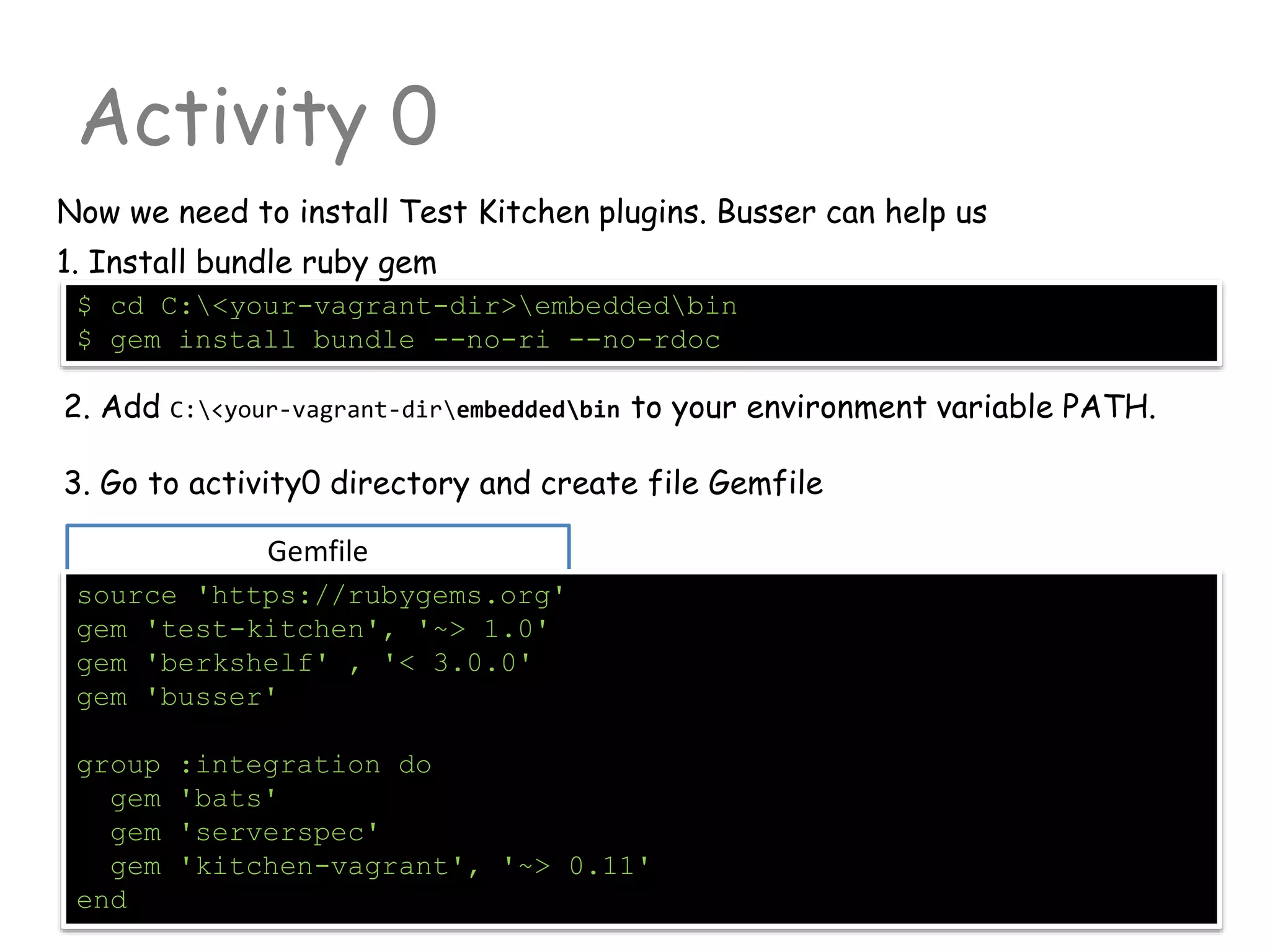
Now we need to install Test Kitchen plugins. Busser can help us
source 'https://rubygems.org'
gem 'test-kitchen', '~> 1.0'
gem 'berkshelf' , '< 3.0.0'
gem 'busser'
group :integration do
gem 'bats'
gem 'serverspec'
gem 'kitchen-vagrant', '~> 0.11'
end
$ cd C:<your-vagrant-dir>embeddedbin
$ gem install bundle --no-ri --no-rdoc
1. Install bundle ruby gem
2. Add C:<your-vagrant-dirembeddedbin to your environment variable PATH.
3. Go to activity0 directory and create file Gemfile
Activity 0
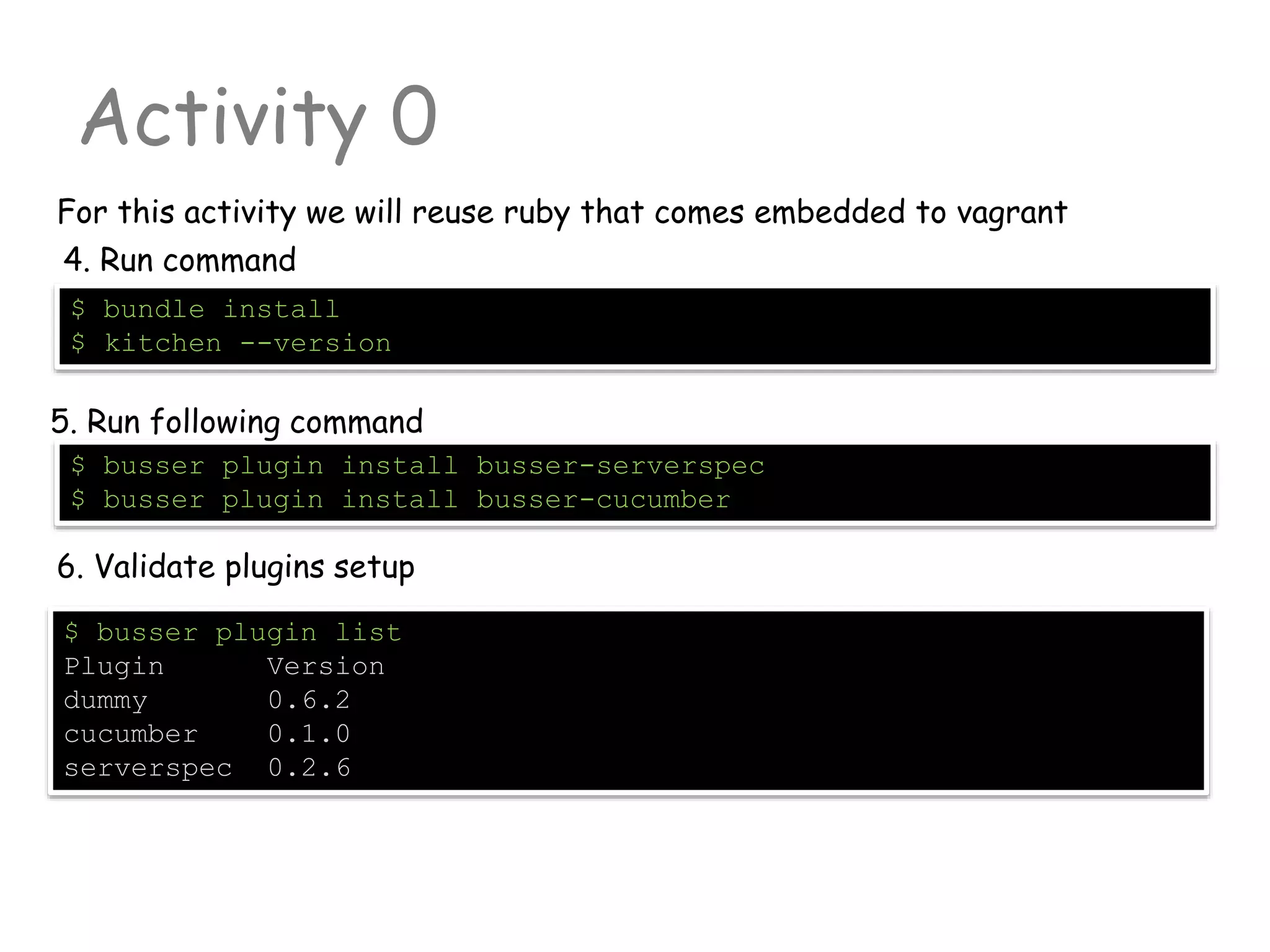
For this activity we will reuse ruby that comes embedded to vagrant
$ busser plugin list
Plugin Version
dummy 0.6.2
cucumber 0.1.0
serverspec 0.2.6
$ busser plugin install busser-serverspec
$ busser plugin install busser-cucumber
5. Run following command
6. Validate plugins setup
4. Run command
$ bundle install
$ kitchen --version
Chef Resources
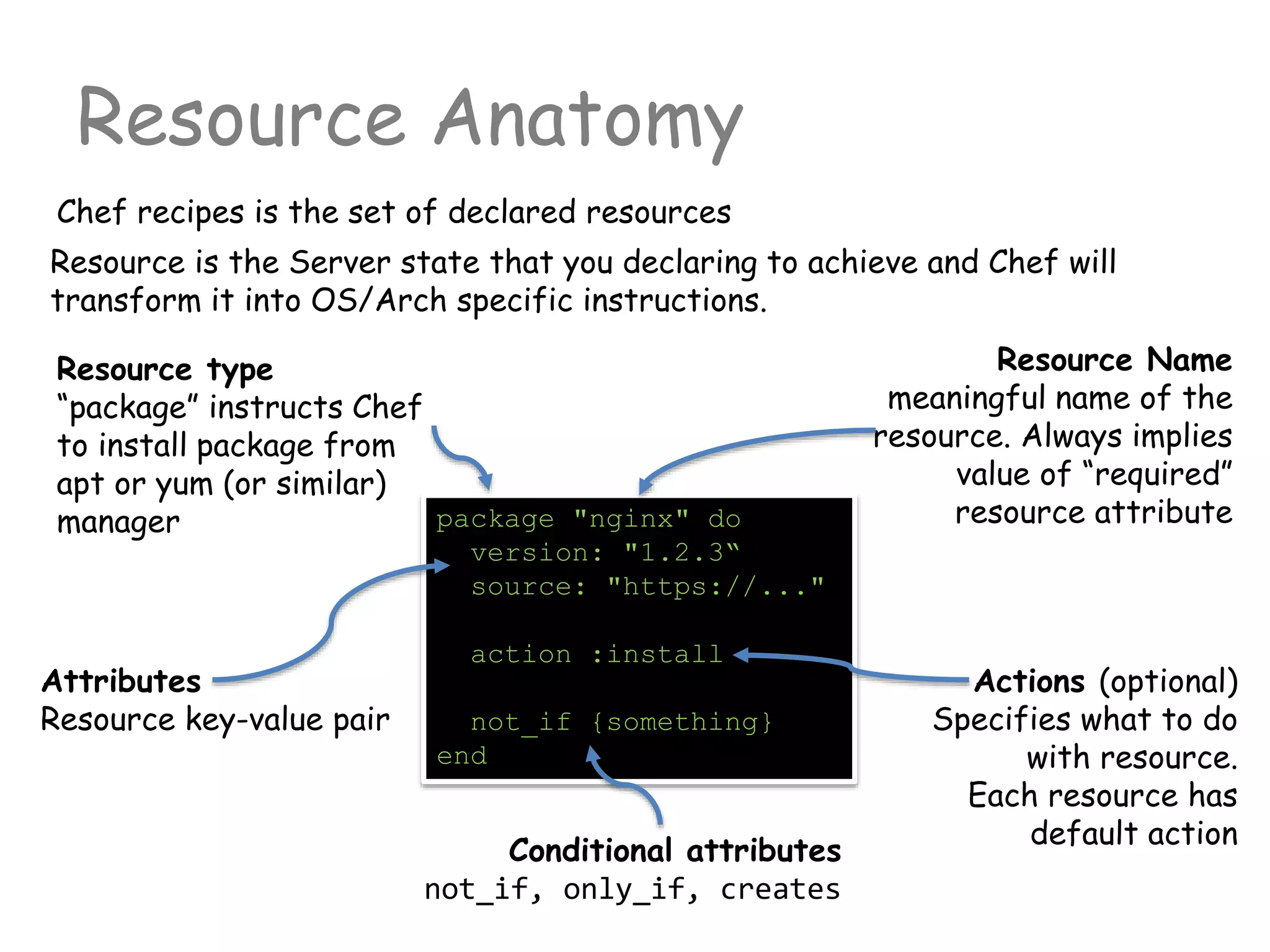
Resource Anatomy
Chef recipes is the set of declared resources
package "nginx" do
version: "1.2.3“
source: "https://..."
action :install
not_if {something}
end
Resource is the Server state that you declaring to achieve and Chef will
transform it into OS/Arch specific instructions.
Resource type
“package” instructs Chef
to install package from
apt or yum (or similar)
manager
Resource Name
meaningful name of the
resource. Always implies
value of “required”
resource attribute
Attributes
Resource key-value pair
Actions (optional)
Specifies what to do
with resource.
Each resource has
default action
Conditional attributes
not_if, only_if, creates
Notifications
Resources can synchronize their actions
remote_file "website.zip" do
source "http://....."
notifies :run, "execute[uzip website.zip]", :immediately
end
execute "uzip website.zip" do
action :nothing
end
After remote ZIP file will be downloaded, resource must notify “execute”
to start action “run”. Untill that “execute” will do nothing
template "/etc/netatalk/netatalk.conf" do
notifies :restart, "service[afpd]", :delayed
notifies :restart, "service[cnid]", :delayed
end
Render config file and then restart related services
Notifications
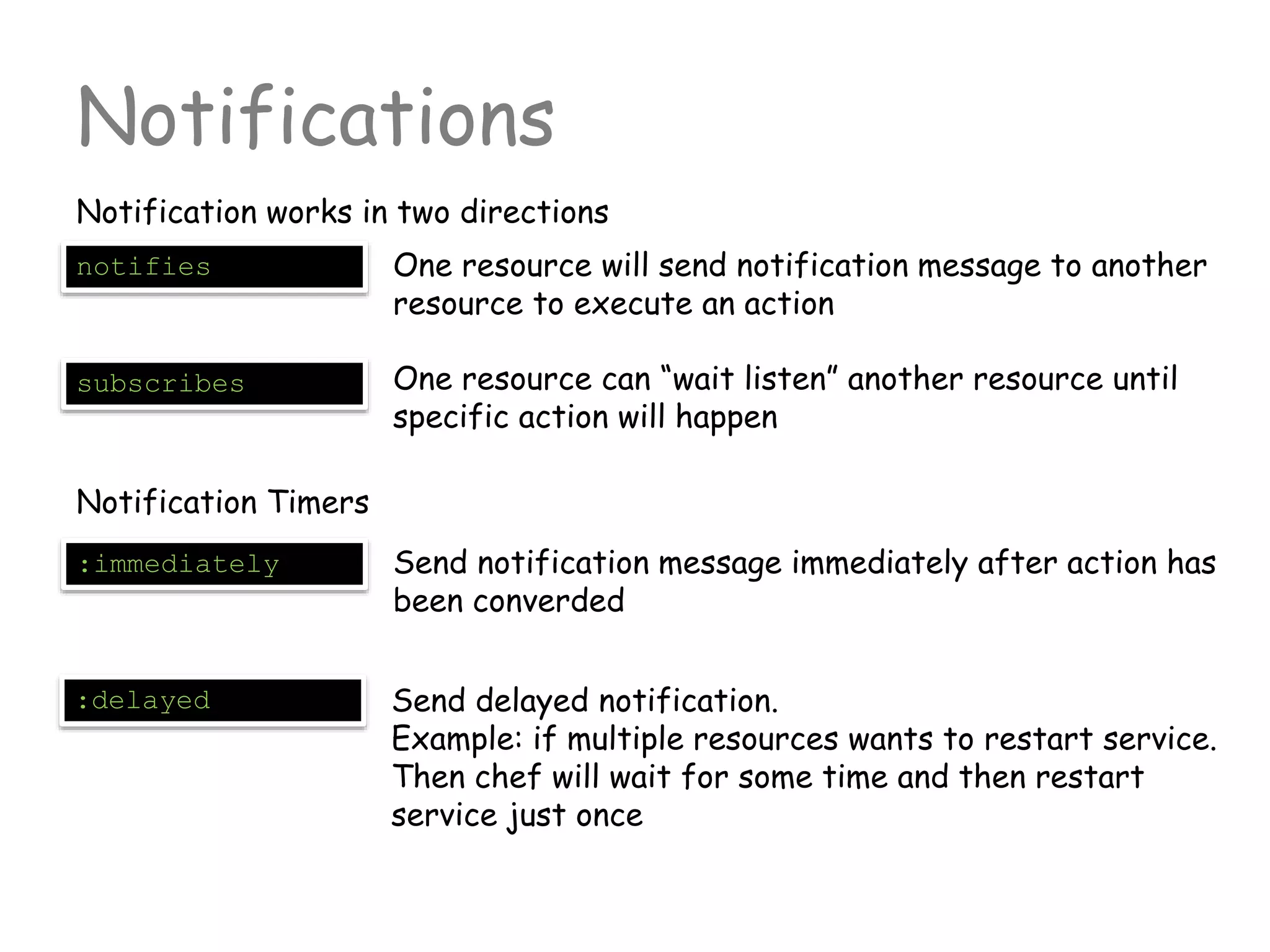
Notification works in two directions
notifies One resource will send notification message to another
resource to execute an action
subscribes One resource can “wait listen” another resource until
specific action will happen
Notification Timers
:immediately Send notification message immediately after action has
been converded
:delayed Send delayed notification.
Example: if multiple resources wants to restart service.
Then chef will wait for some time and then restart
service just once
Basic Resources
Notification works in two directions
package Actions: [:install, :upgrade, :reconfig, :remove, :purge]
Attributes:
package_name (default attribute)
version (specify version constraints)
source (alternative source for package)
arch (x86_64, i686)
template Actions: [:create, :create_if_missing, :touch, :delete]
Attributes:
source (erb file name in /template dir)
backup (number of backups)
owner (user that will rendered file {chown})
group (user group that ill own the file)
righs (0644, 0755 etc. access rights)
Basic Resources
Notification works in two directions
remote_file Actions: [:create, :create_if_missing, :touch, :delete]
Attributes:
path (default attribute)
source (erb file name in /template dir)
backup (number of backups)
owner (user that will rendered file {chown})
group (user group that ill own the file)
rights (0644, 0755 etc. access rights)
execute Actions: [:run, :nothing]
Attributes:
command (default attribute)
cwd (current working directory for command)
user (user that will execute this command)
environment (Map of additional ENV variables)
Other resources can be found here
http://docs.opscode.com/chef/resources.html
Activity 1
Create cookbook that manages DB
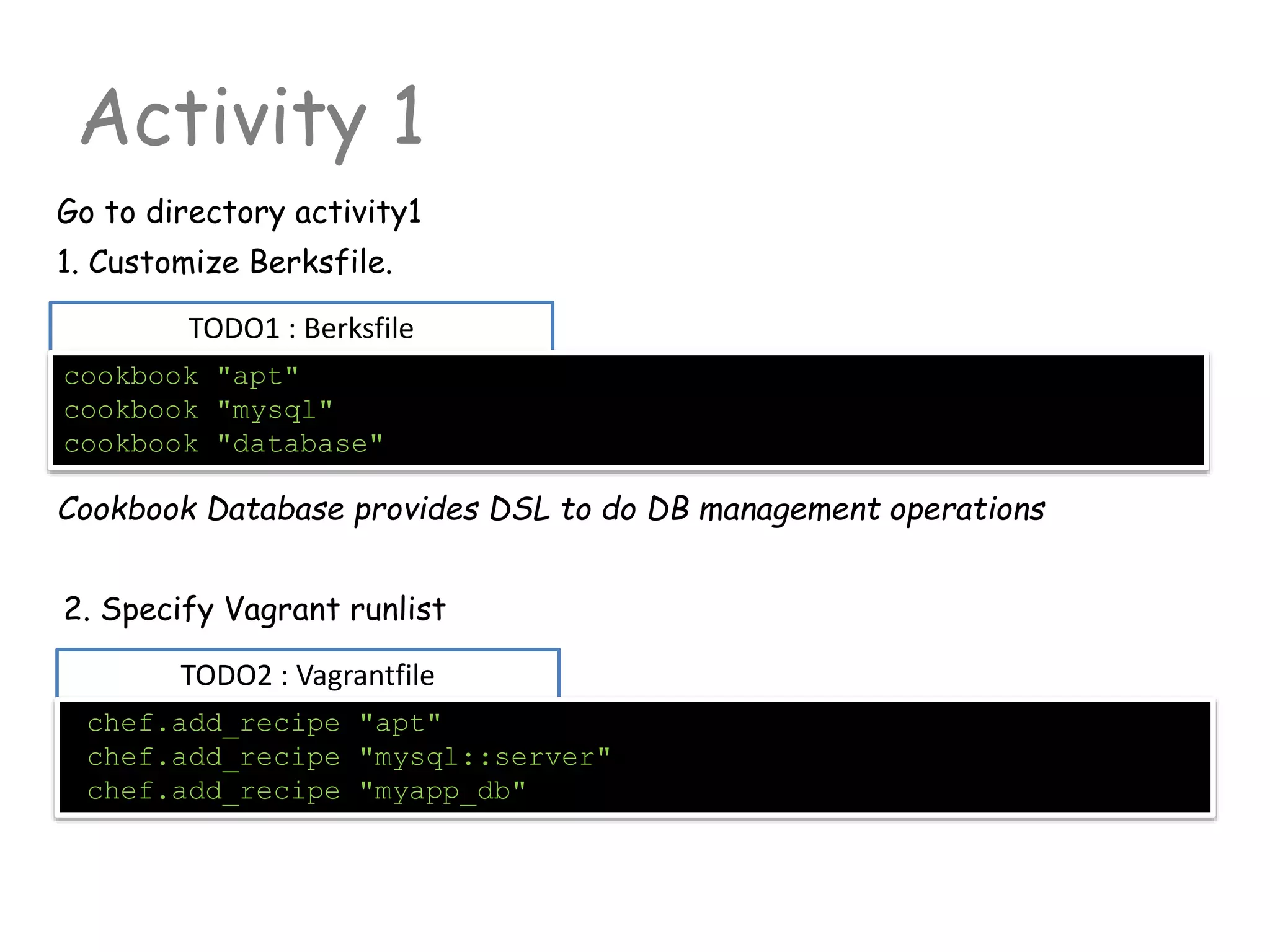
TODO1 : Berksfile
Activity 1
Go to directory activity1
cookbook "apt"
cookbook "mysql"
cookbook "database"
1. Customize Berksfile.
TODO2 : Vagrantfile
chef.add_recipe "apt"
chef.add_recipe "mysql::server"
chef.add_recipe "myapp_db"
2. Specify Vagrant runlist
Cookbook Database provides DSL to do DB management operations
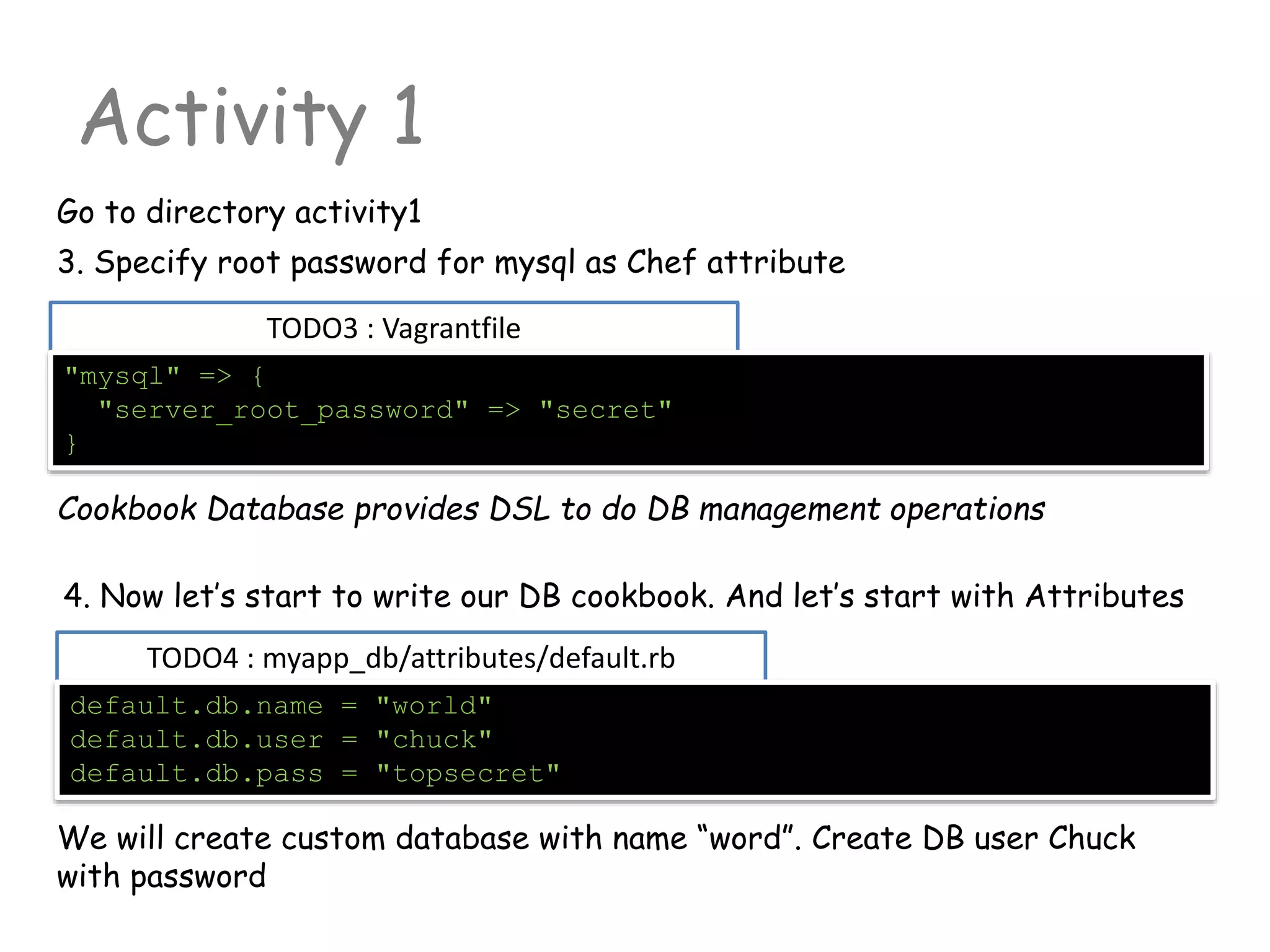
TODO3 : Vagrantfile
Activity 1
Go to directory activity1
"mysql" => {
"server_root_password" => "secret"
}
3. Specify root password for mysql as Chef attribute
TODO4 : myapp_db/attributes/default.rb
default.db.name = "world"
default.db.user = "chuck"
default.db.pass = "topsecret"
4. Now let’s start to write our DB cookbook. And let’s start with Attributes
Cookbook Database provides DSL to do DB management operations
We will create custom database with name “word”. Create DB user Chuck
with password
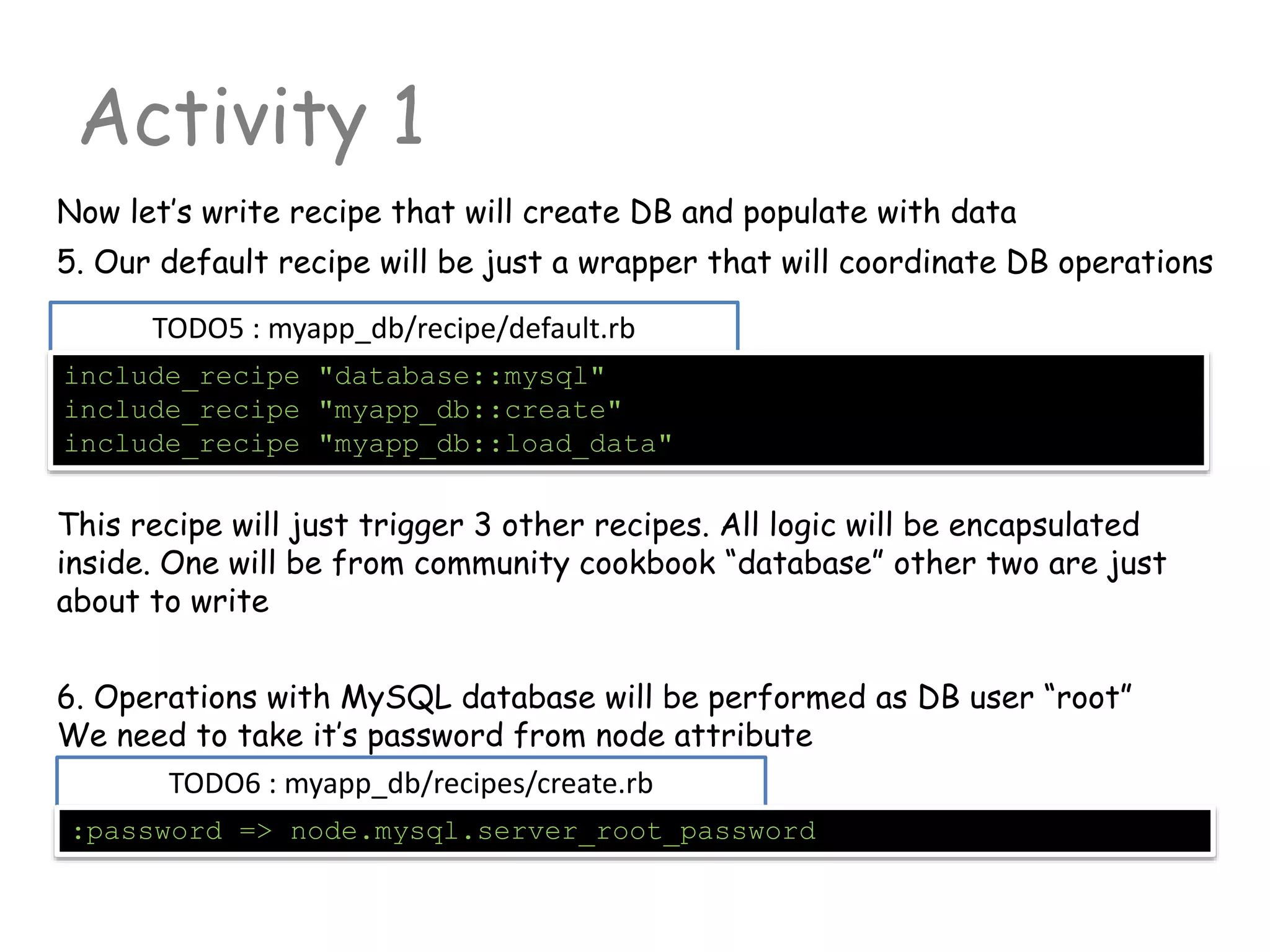
TODO5 : myapp_db/recipe/default.rb
Activity 1
Now let’s write recipe that will create DB and populate with data
include_recipe "database::mysql"
include_recipe "myapp_db::create"
include_recipe "myapp_db::load_data"
5. Our default recipe will be just a wrapper that will coordinate DB operations
TODO6 : myapp_db/recipes/create.rb
:password => node.mysql.server_root_password
This recipe will just trigger 3 other recipes. All logic will be encapsulated
inside. One will be from community cookbook “database” other two are just
about to write
6. Operations with MySQL database will be performed as DB user “root”
We need to take it’s password from node attribute
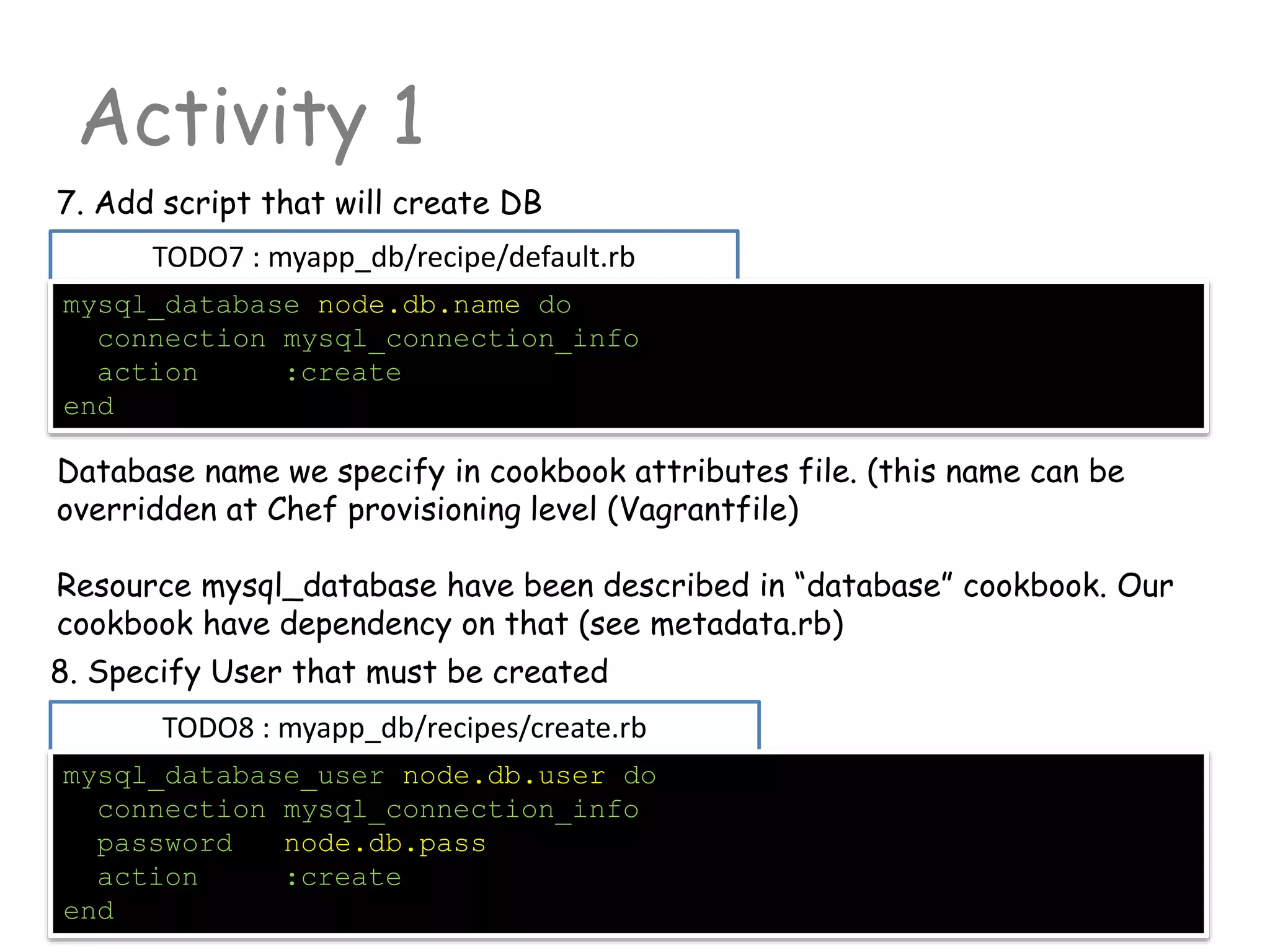
TODO7 : myapp_db/recipe/default.rb
Activity 1
mysql_database node.db.name do
connection mysql_connection_info
action :create
end
7. Add script that will create DB
TODO8 : myapp_db/recipes/create.rb
mysql_database_user node.db.user do
connection mysql_connection_info
password node.db.pass
action :create
end
Database name we specify in cookbook attributes file. (this name can be
overridden at Chef provisioning level (Vagrantfile)
Resource mysql_database have been described in “database” cookbook. Our
cookbook have dependency on that (see metadata.rb)
8. Specify User that must be created
TODO9 : myapp_db/recipe/load_data.rb
Activity 1
package "unzip"
Now lets add some logic that will put our DB with data. We will put it into
different recipe (load_data.rb).
This recipe will download and unzip SQL from internet and upload to the DB
9. We don’t know if unzip is actually installed. So we will put declaration that
we expecting it is.
10. Now let’s download file from internet
TODO10 : myapp_db/recipe/load_data.rb
"#{Chef::Config[:file_cache_path]}/world_innodb.sql.zip"
/tmp is not good directory. See Food Critic FC013
http://acrmp.github.io/foodcritic/#FC013
TODO11 : myapp_db/recipe/load_data.rb
Activity 1
execute "unzip -o
#{Chef::Config[:file_cache_path]}/world_innodb.sql.zip" do
creates "#{Chef::Config[:file_cache_path]}/world_innodb.sql"
end
Now let’s unzip the file. We need to be sure that we will unzip it just once.
Creates attribute will help us
11. We don’t know if unzip is actually installed. So we will put declaration that
we expecting it is.
12. Last but not least. We need to read file that have created and pass it to
the mysq_database resource with action :query
TODO12 : myapp_db/recipe/load_data.rb
sql { ::File.open("#{Chef::Config[:file_cache_path]}/world_innodb.sql").read }
If you know ruby then it will be very familiar string
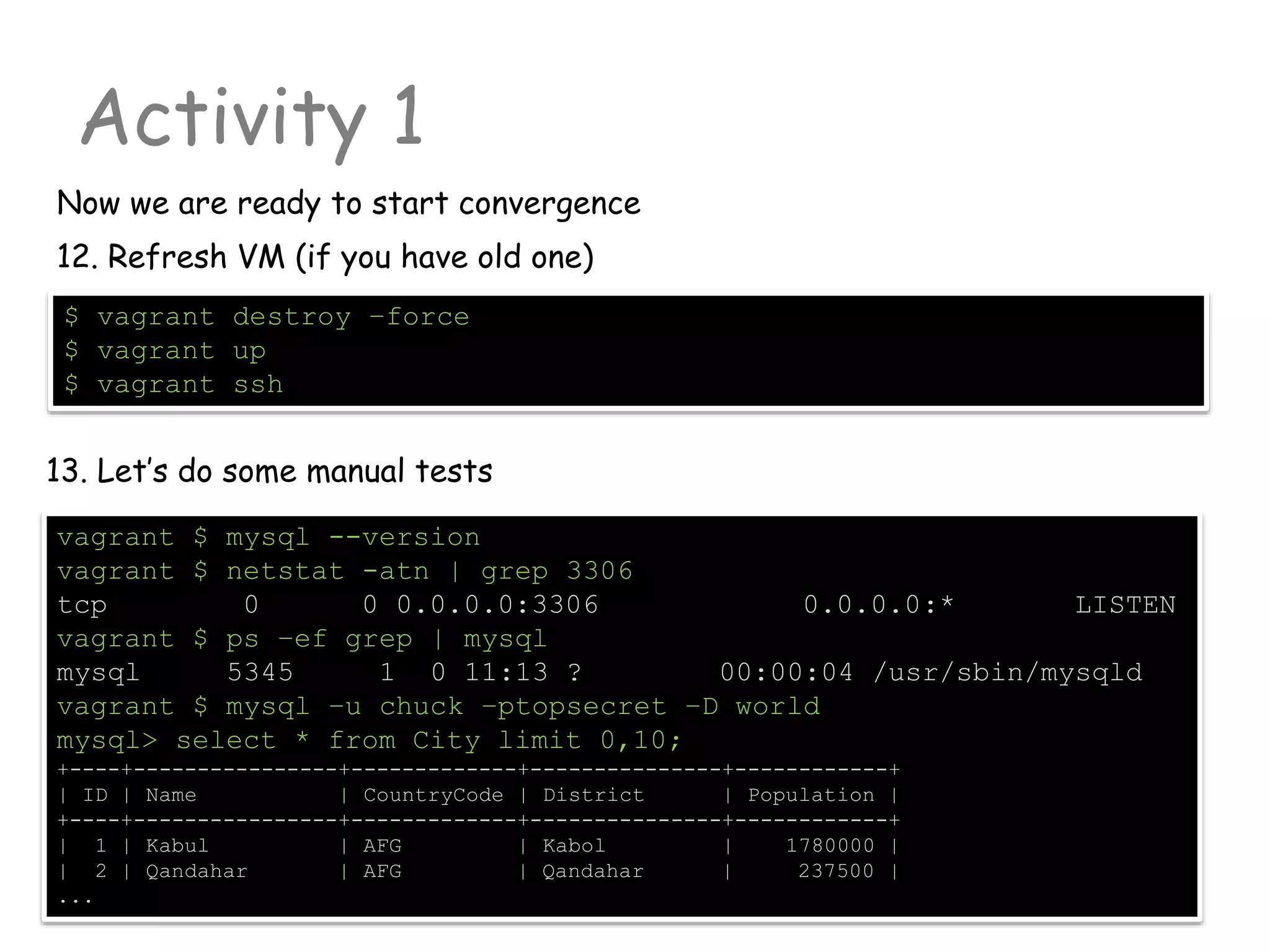
Activity 1
$ vagrant destroy –force
$ vagrant up
$ vagrant ssh
Now we are ready to start convergence
12. Refresh VM (if you have old one)
13. Let’s do some manual tests
vagrant $ mysql --version
vagrant $ netstat -atn | grep 3306
tcp 0 0 0.0.0.0:3306 0.0.0.0:* LISTEN
vagrant $ ps –ef grep | mysql
mysql 5345 1 0 11:13 ? 00:00:04 /usr/sbin/mysqld
vagrant $ mysql –u chuck –ptopsecret –D world
mysql> select * from City limit 0,10;
+----+----------------+-------------+---------------+------------+
| ID | Name | CountryCode | District | Population |
+----+----------------+-------------+---------------+------------+
| 1 | Kabul | AFG | Kabol | 1780000 |
| 2 | Qandahar | AFG | Qandahar | 237500 |
...
Activity 2
Enable Test Kitchen suite
Activity 2
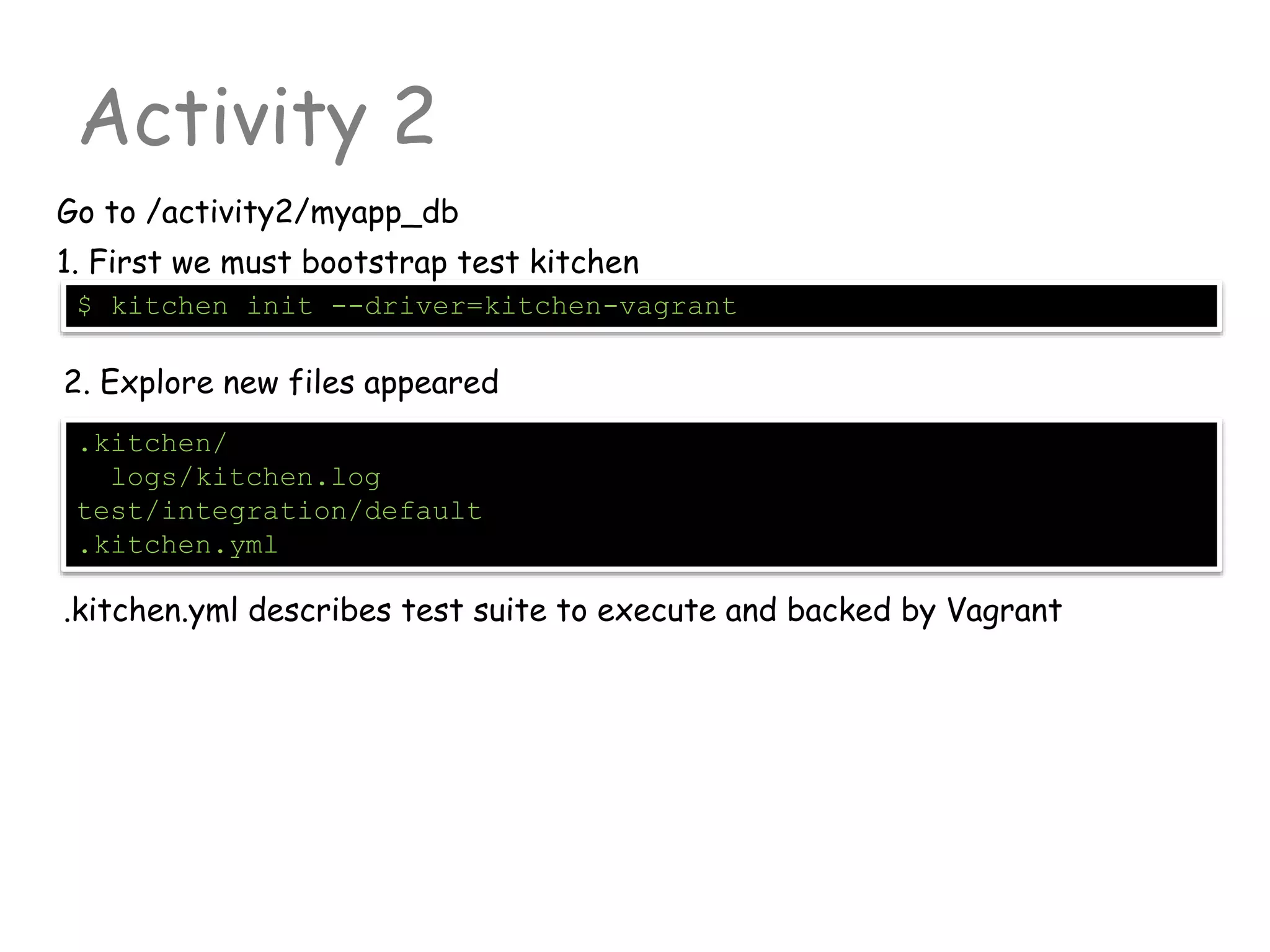
Go to /activity2/myapp_db
.kitchen/
logs/kitchen.log
test/integration/default
.kitchen.yml
$ kitchen init --driver=kitchen-vagrant
1. First we must bootstrap test kitchen
2. Explore new files appeared
.kitchen.yml describes test suite to execute and backed by Vagrant
example
Activity 2: explain .kitchen.yml
driver Default “vagrant”. Test kitchen will be using
Vagrant as container management tool. Shipped
with gem: kitchen-vagrant
provisioner Default “chef_solo” (simpliest). Tells how to run
Chef. Other viable option “chef_zero”
platforms List of operating systems to support. Platforms
may vary (OS version, 32/64bit, cloud env etc)
suites Specifies run lists for test suite.
---
driver:
name: vagrant
provisioner:
name: chef_solo
platforms:
- name: ubuntu-13.04
suites:
- name: default
run_list:
- recipe[mysql::server]
attributes:
.kitchen.yml
Activity 2
3.a. Customize .kitchen.yml. For now leave just one platform
platforms:
- name: ubuntu-14.04
3.b. In the same file customize chef runlist and add attributes for mysql
cookbook
.kitchen.yml
suites:
- name: default
run_list:
- recipe[apt]
- recipe[mysql::server]
- recipe[myapp_db::default]
attributes:
mysql:
server_root_password: "rootpass"
Activity 2
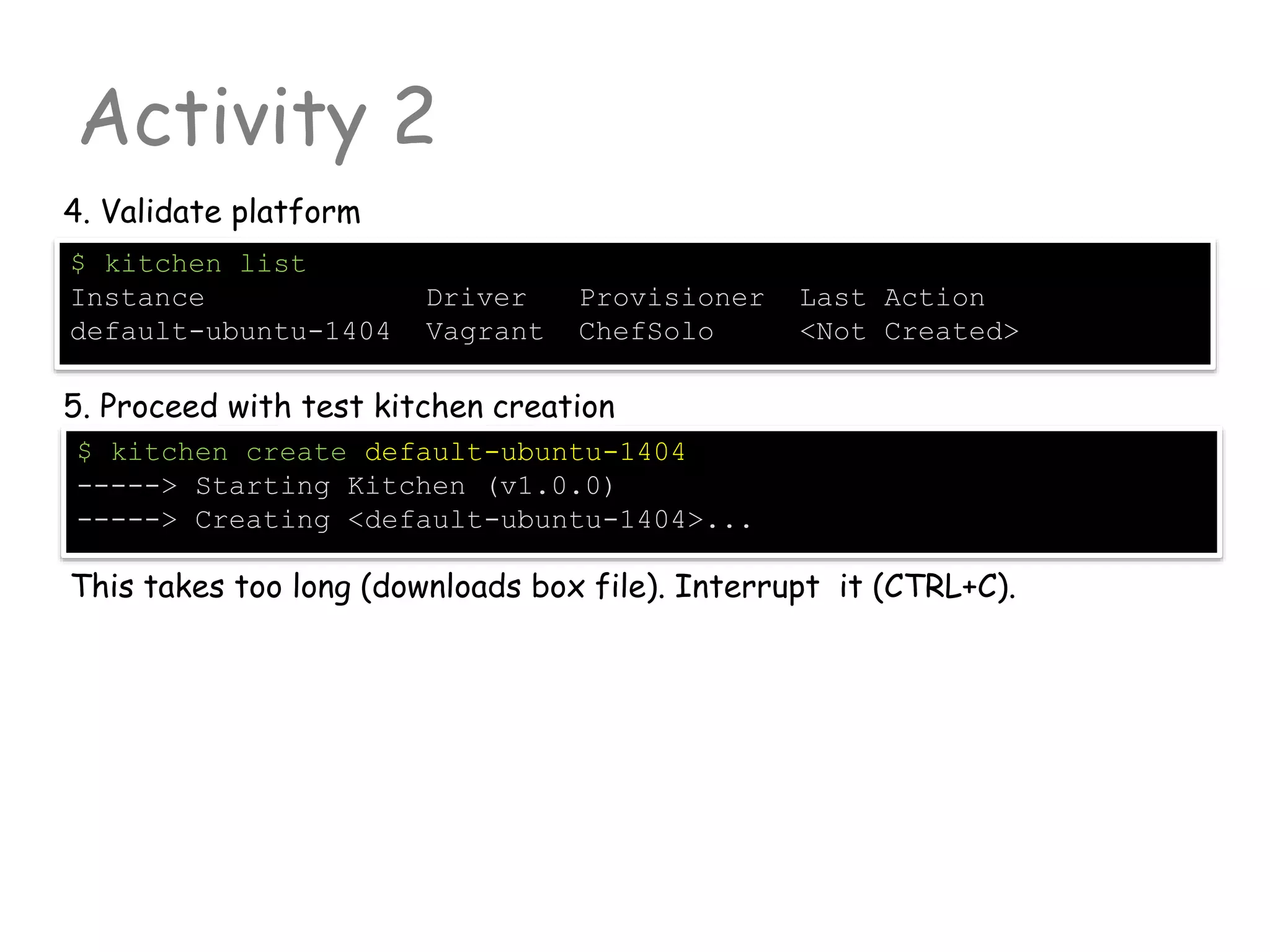
4. Validate platform
$ kitchen list
Instance Driver Provisioner Last Action
default-ubuntu-1404 Vagrant ChefSolo <Not Created>
5. Proceed with test kitchen creation
$ kitchen create default-ubuntu-1404
-----> Starting Kitchen (v1.0.0)
-----> Creating <default-ubuntu-1404>...
This takes too long (downloads box file). Interrupt it (CTRL+C).
Activity 2
6. Add vagrant box from file cached locally
$ vagrant box add opscode-ubuntu-14.04 C:/.../opscode_ubuntu-
14.04_chef-provisionerless.box
$ vagrant box list
opscode-ubuntu-14.04 (virtualbox)
7. Now let’s start the action (be careful with VM naming)
$ kitchen create default-ubuntu-1404
-----> Starting Kitchen (v1.2.1)
-----> Creating <default-ubuntu-1404>...
Bringing machine 'default' up with 'virtualbox' provider...
[default] Importing base box 'opscode-ubuntu-14.04'...
...
Finished creating <default-ubuntu-1404> (0m53.91s).
$ kitchen list
Instance Driver Provisioner Last Action
default-ubuntu-1404 Vagrant ChefSolo Created
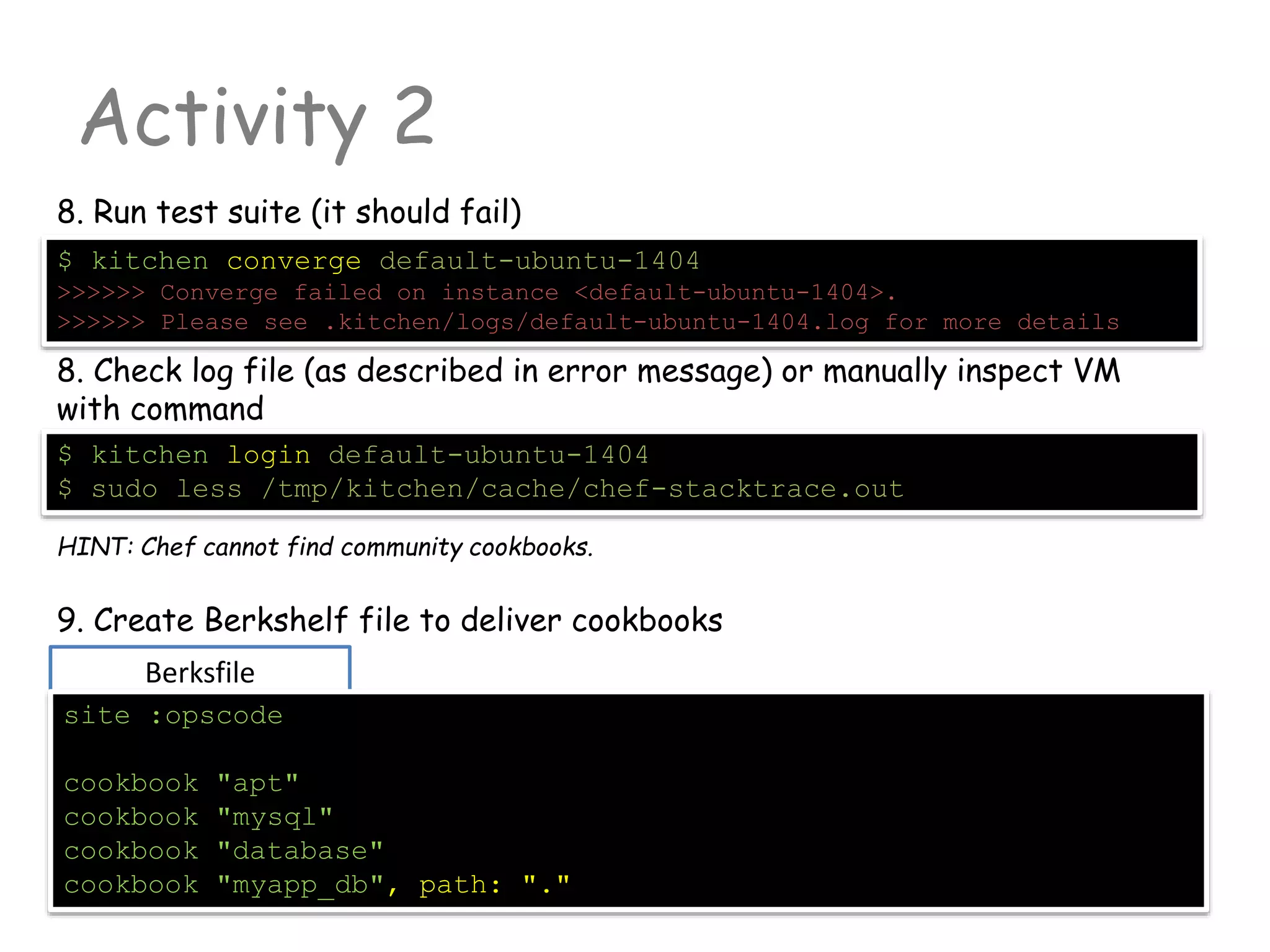
Berksfile
Activity 2
8. Run test suite (it should fail)
$ kitchen converge default-ubuntu-1404
>>>>>> Converge failed on instance <default-ubuntu-1404>.
>>>>>> Please see .kitchen/logs/default-ubuntu-1404.log for more details
8. Check log file (as described in error message) or manually inspect VM
with command
$ kitchen login default-ubuntu-1404
$ sudo less /tmp/kitchen/cache/chef-stacktrace.out
HINT: Chef cannot find community cookbooks.
9. Create Berkshelf file to deliver cookbooks
site :opscode
cookbook "apt"
cookbook "mysql"
cookbook "database"
cookbook "myapp_db", path: "."
Activity 2
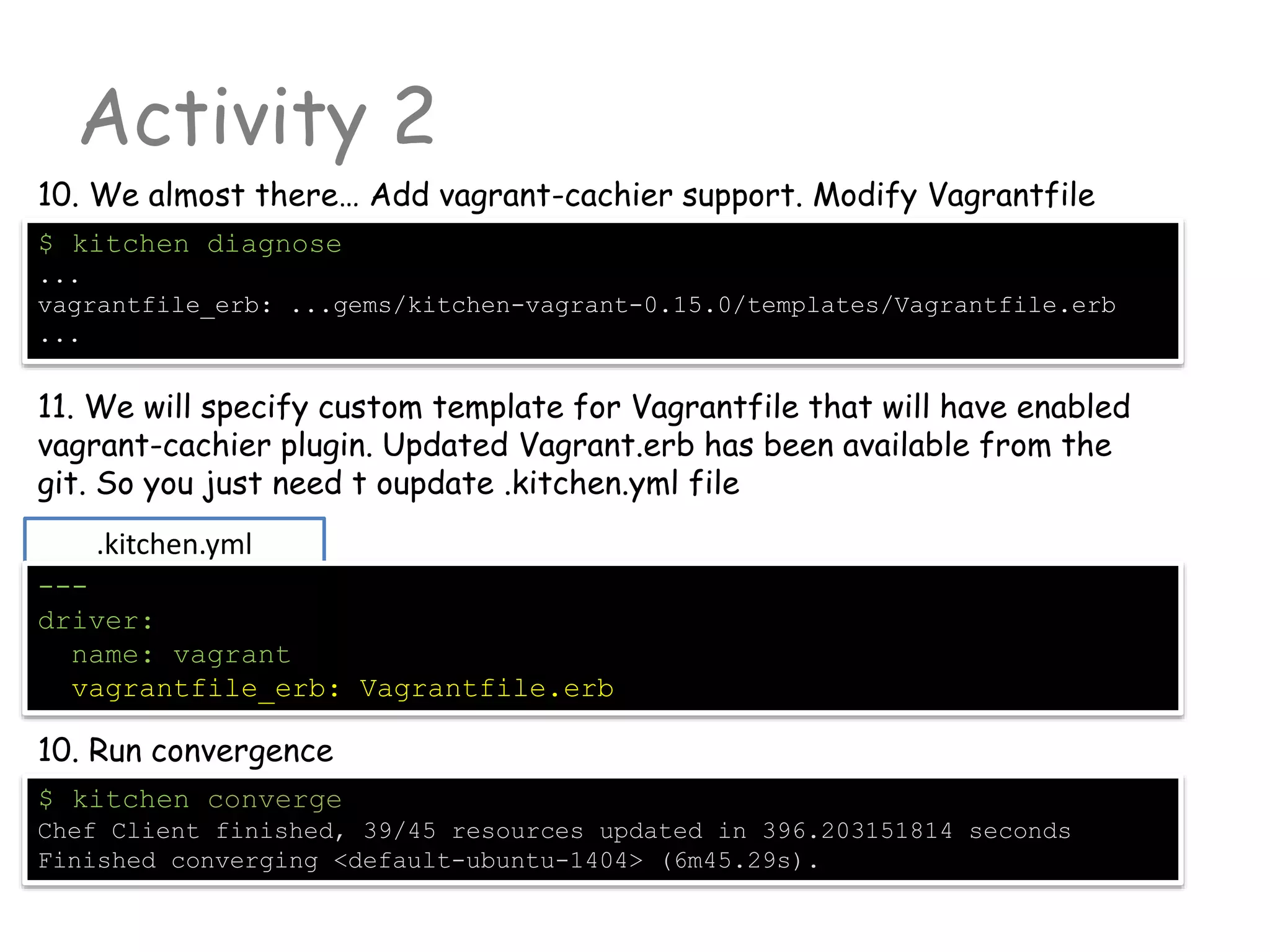
10. Run convergence
$ kitchen converge
Chef Client finished, 39/45 resources updated in 396.203151814 seconds
Finished converging <default-ubuntu-1404> (6m45.29s).
10. We almost there… Add vagrant-cachier support. Modify Vagrantfile
$ kitchen diagnose
...
vagrantfile_erb: ...gems/kitchen-vagrant-0.15.0/templates/Vagrantfile.erb
...
11. We will specify custom template for Vagrantfile that will have enabled
vagrant-cachier plugin. Updated Vagrant.erb has been available from the
git. So you just need t oupdate .kitchen.yml file
.kitchen.yml
---
driver:
name: vagrant
vagrantfile_erb: Vagrantfile.erb
Activity 2
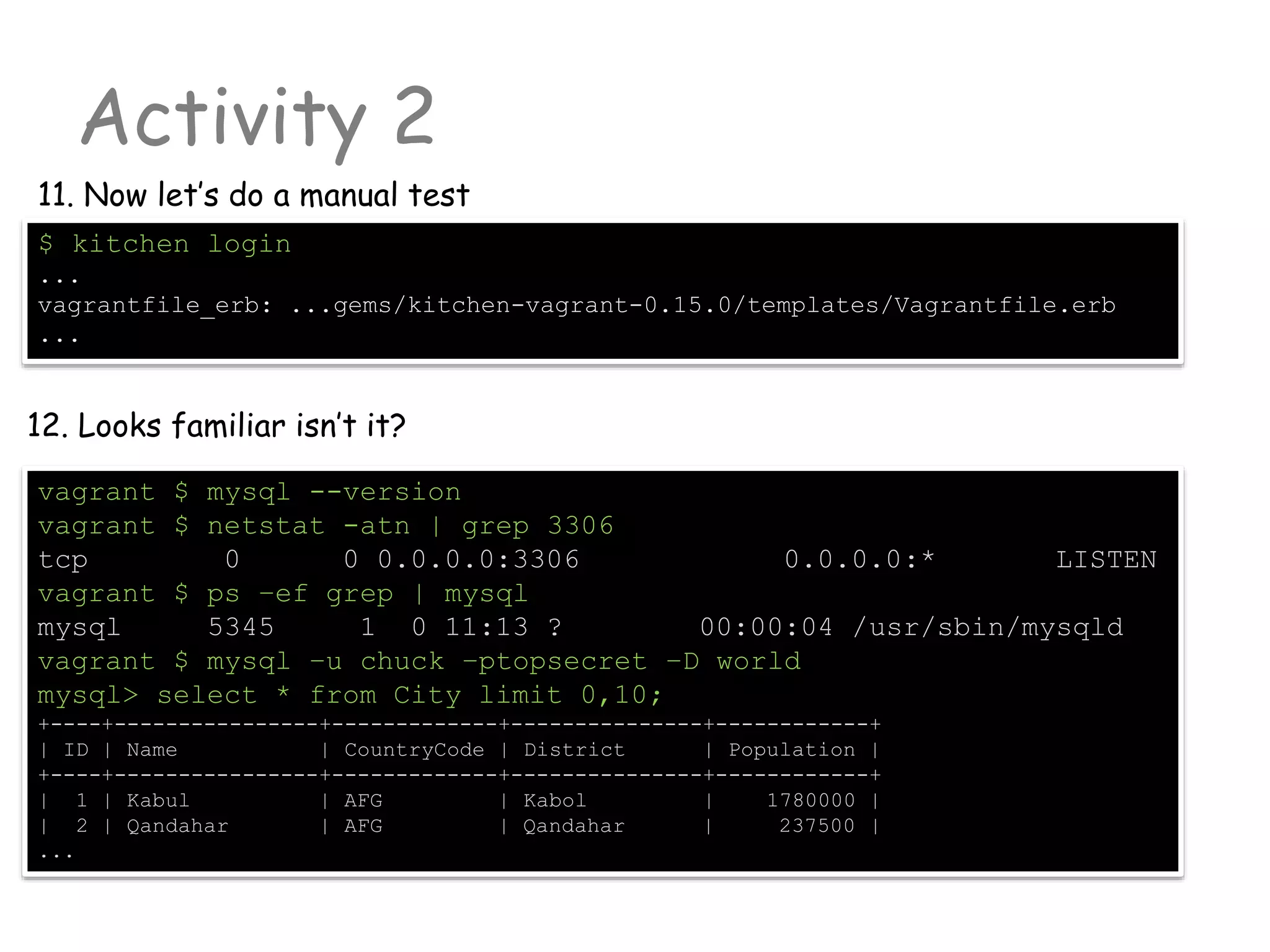
11. Now let’s do a manual test
$ kitchen login
...
vagrantfile_erb: ...gems/kitchen-vagrant-0.15.0/templates/Vagrantfile.erb
...
12. Looks familiar isn’t it?
vagrant $ mysql --version
vagrant $ netstat -atn | grep 3306
tcp 0 0 0.0.0.0:3306 0.0.0.0:* LISTEN
vagrant $ ps –ef grep | mysql
mysql 5345 1 0 11:13 ? 00:00:04 /usr/sbin/mysqld
vagrant $ mysql –u chuck –ptopsecret –D world
mysql> select * from City limit 0,10;
+----+----------------+-------------+---------------+------------+
| ID | Name | CountryCode | District | Population |
+----+----------------+-------------+---------------+------------+
| 1 | Kabul | AFG | Kabol | 1780000 |
| 2 | Qandahar | AFG | Qandahar | 237500 |
...
Activity 3
Write Automated tests
BEFORE START!!!
Read about Ice-Cream anti-pattern:
http://watirmelon.com/2012/01/31/introducing-the-software-testing-ice-cream-cone/
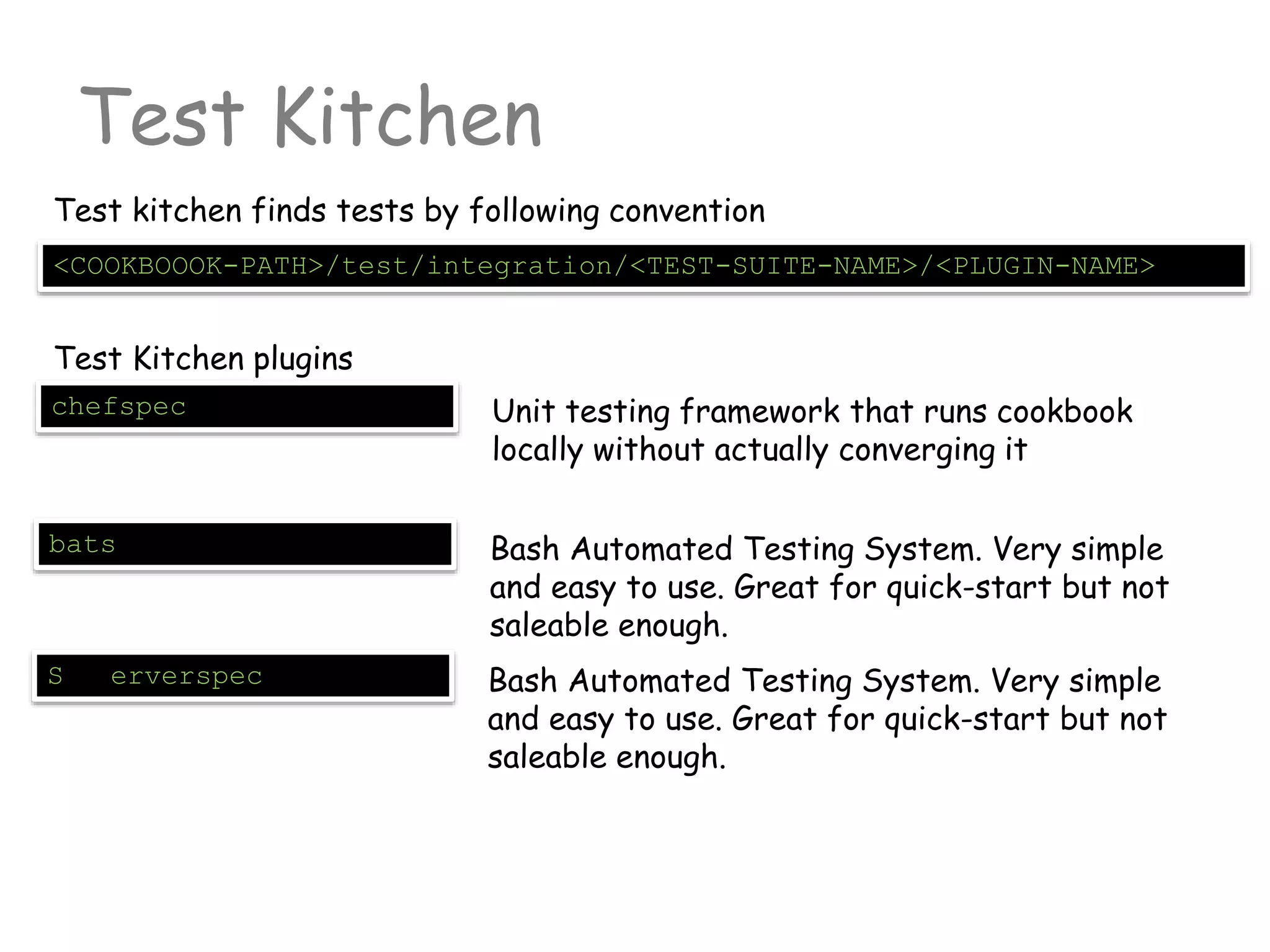
Test Kitchen
<COOKBOOOK-PATH>/test/integration/<TEST-SUITE-NAME>/<PLUGIN-NAME>
Test kitchen finds tests by following convention
Test Kitchen plugins
chefspec Unit testing framework that runs cookbook
locally without actually converging it
bats Bash Automated Testing System. Very simple
and easy to use. Great for quick-start but not
saleable enough.
S erverspec Bash Automated Testing System. Very simple
and easy to use. Great for quick-start but not
saleable enough.
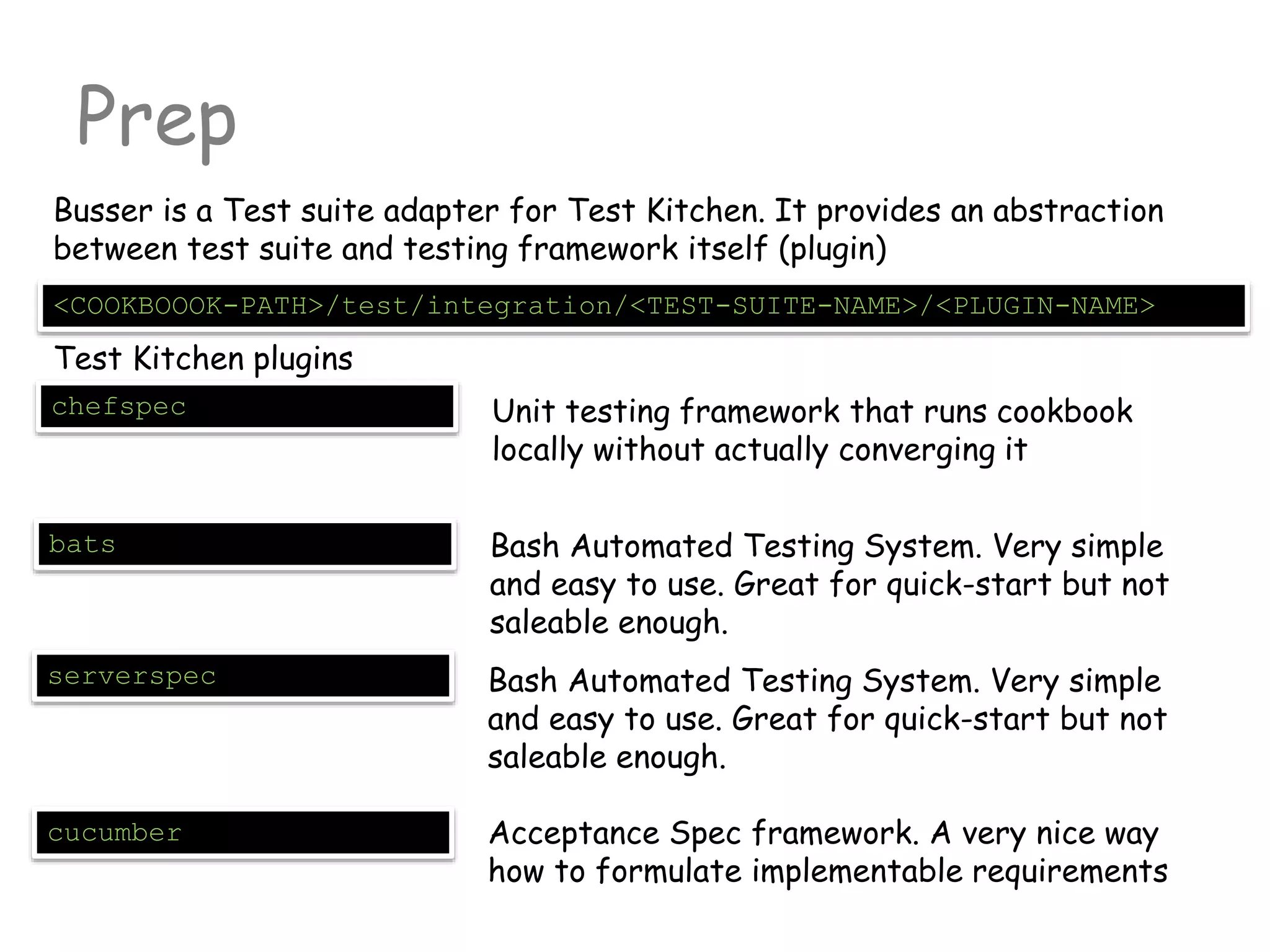
Prep
<COOKBOOOK-PATH>/test/integration/<TEST-SUITE-NAME>/<PLUGIN-NAME>
Busser is a Test suite adapter for Test Kitchen. It provides an abstraction
between test suite and testing framework itself (plugin)
Test Kitchen plugins
chefspec Unit testing framework that runs cookbook
locally without actually converging it
bats Bash Automated Testing System. Very simple
and easy to use. Great for quick-start but not
saleable enough.
serverspec Bash Automated Testing System. Very simple
and easy to use. Great for quick-start but not
saleable enough.
cucumber Acceptance Spec framework. A very nice way
how to formulate implementable requirements
Activity 3
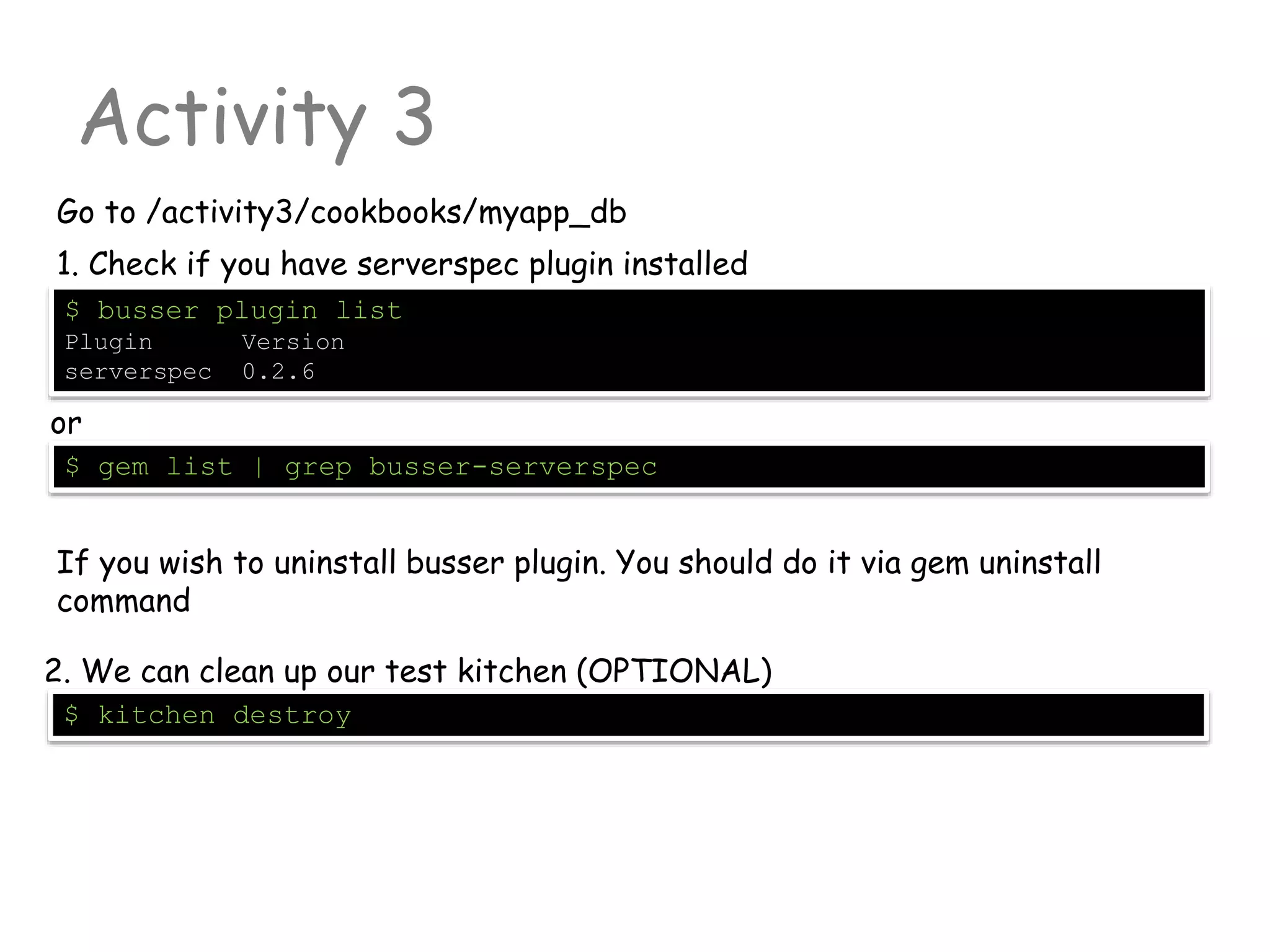
Go to /activity3/cookbooks/myapp_db
$ busser plugin list
Plugin Version
serverspec 0.2.6
1. Check if you have serverspec plugin installed
or
$ gem list | grep busser-serverspec
If you wish to uninstall busser plugin. You should do it via gem uninstall
command
$ kitchen destroy
2. We can clean up our test kitchen (OPTIONAL)
Activity 3
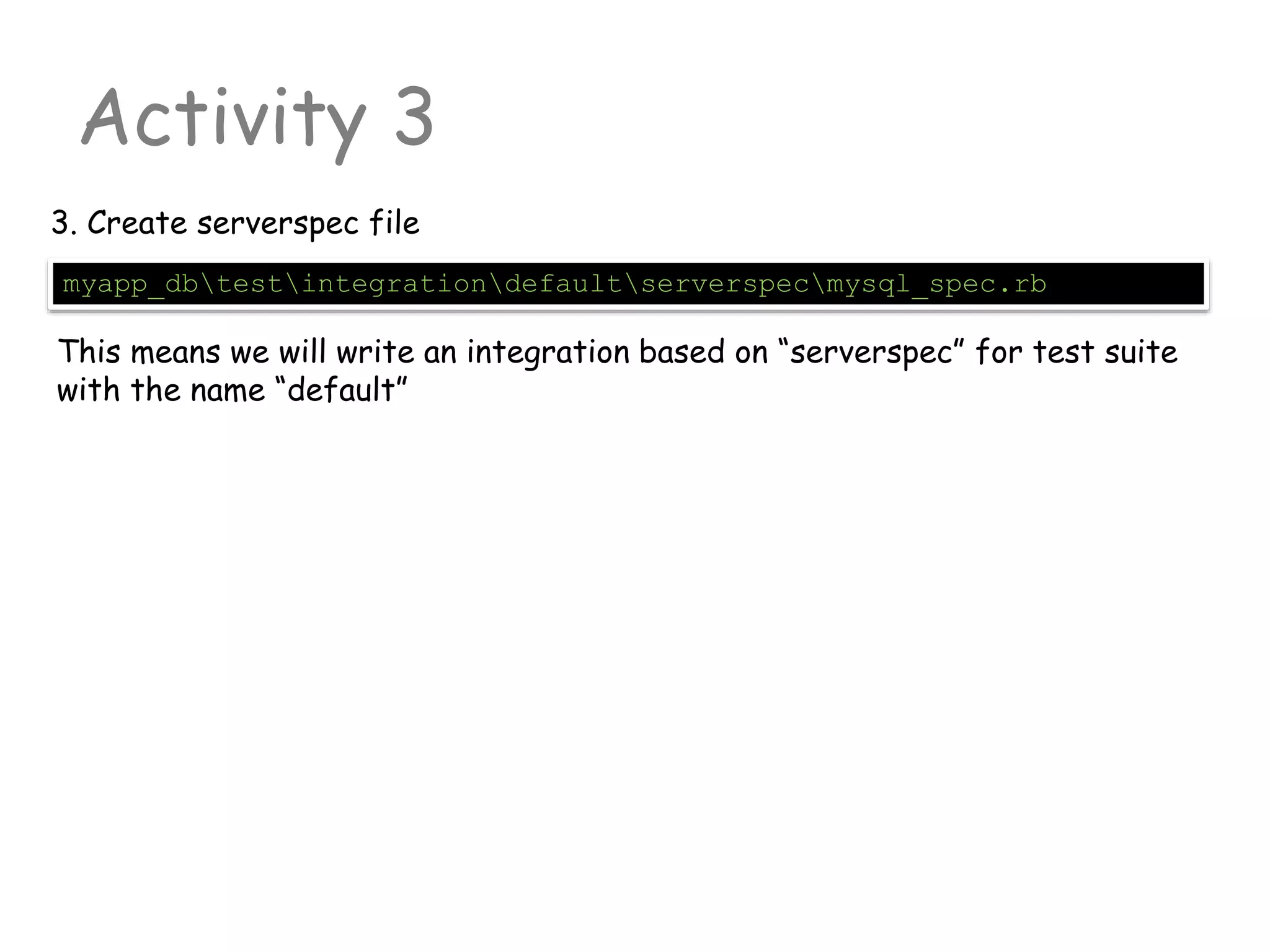
myapp_dbtestintegrationdefaultserverspecmysql_spec.rb
3. Create serverspec file
This means we will write an integration based on “serverspec” for test suite
with the name “default”
Activity 3
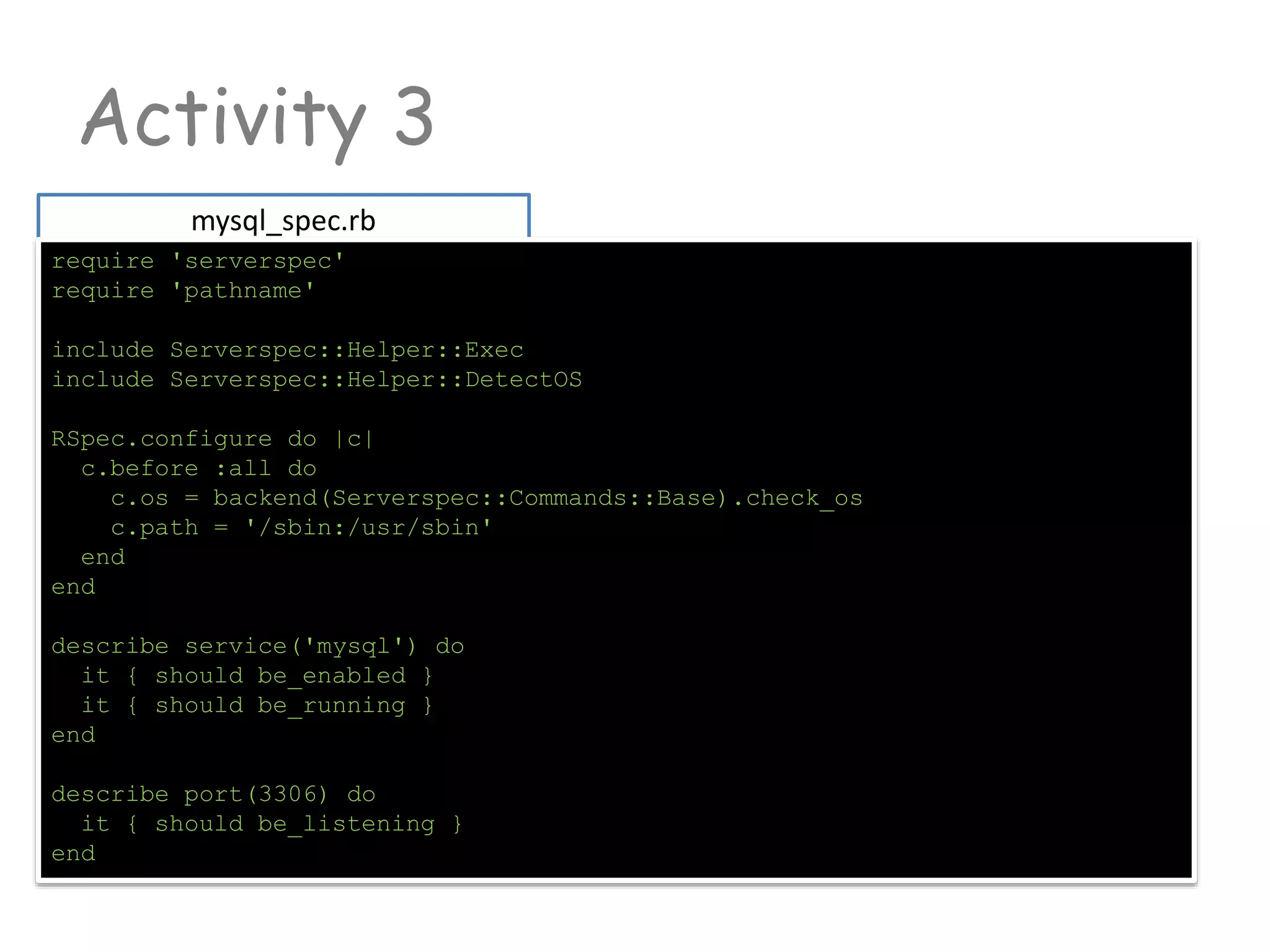
mysql_spec.rb
require 'serverspec'
require 'pathname'
include Serverspec::Helper::Exec
include Serverspec::Helper::DetectOS
RSpec.configure do |c|
c.before :all do
c.os = backend(Serverspec::Commands::Base).check_os
c.path = '/sbin:/usr/sbin'
end
end
describe service('mysql') do
it { should be_enabled }
it { should be_running }
end
describe port(3306) do
it { should be_listening }
end
Activity 3
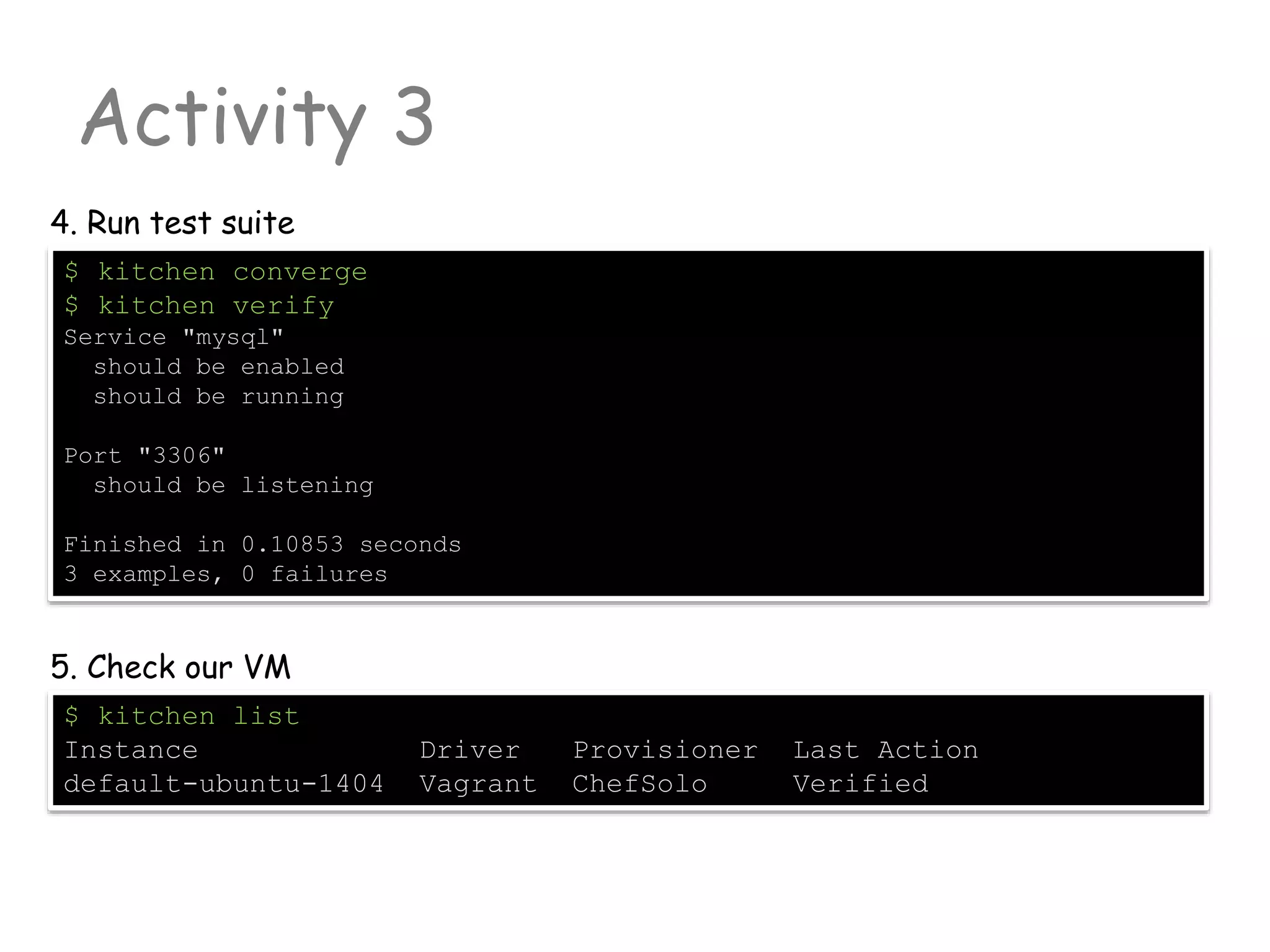
$ kitchen converge
$ kitchen verify
Service "mysql"
should be enabled
should be running
Port "3306"
should be listening
Finished in 0.10853 seconds
3 examples, 0 failures
4. Run test suite
$ kitchen list
Instance Driver Provisioner Last Action
default-ubuntu-1404 Vagrant ChefSolo Verified
5. Check our VM
Retrospective

DevOps Hackathon: Session 3 - Test Driven Infrastructure

  • 1.
    Test Driven Infrastructure Youcan download me here: https://github.com/akranga/devops-hackathon-3
  • 2.
    Activity 0 Environment Prep -Test Kitchen installation
  • 3.
    Gemfile Activity 0 Now weneed to install Test Kitchen plugins. Busser can help us source 'https://rubygems.org' gem 'test-kitchen', '~> 1.0' gem 'berkshelf' , '< 3.0.0' gem 'busser' group :integration do gem 'bats' gem 'serverspec' gem 'kitchen-vagrant', '~> 0.11' end $ cd C:<your-vagrant-dir>embeddedbin $ gem install bundle --no-ri --no-rdoc 1. Install bundle ruby gem 2. Add C:<your-vagrant-dirembeddedbin to your environment variable PATH. 3. Go to activity0 directory and create file Gemfile
  • 4.
    Activity 0 For thisactivity we will reuse ruby that comes embedded to vagrant $ busser plugin list Plugin Version dummy 0.6.2 cucumber 0.1.0 serverspec 0.2.6 $ busser plugin install busser-serverspec $ busser plugin install busser-cucumber 5. Run following command 6. Validate plugins setup 4. Run command $ bundle install $ kitchen --version
  • 5.
  • 6.
    Resource Anatomy Chef recipesis the set of declared resources package "nginx" do version: "1.2.3“ source: "https://..." action :install not_if {something} end Resource is the Server state that you declaring to achieve and Chef will transform it into OS/Arch specific instructions. Resource type “package” instructs Chef to install package from apt or yum (or similar) manager Resource Name meaningful name of the resource. Always implies value of “required” resource attribute Attributes Resource key-value pair Actions (optional) Specifies what to do with resource. Each resource has default action Conditional attributes not_if, only_if, creates
  • 7.
    Notifications Resources can synchronizetheir actions remote_file "website.zip" do source "http://....." notifies :run, "execute[uzip website.zip]", :immediately end execute "uzip website.zip" do action :nothing end After remote ZIP file will be downloaded, resource must notify “execute” to start action “run”. Untill that “execute” will do nothing template "/etc/netatalk/netatalk.conf" do notifies :restart, "service[afpd]", :delayed notifies :restart, "service[cnid]", :delayed end Render config file and then restart related services
  • 8.
    Notifications Notification works intwo directions notifies One resource will send notification message to another resource to execute an action subscribes One resource can “wait listen” another resource until specific action will happen Notification Timers :immediately Send notification message immediately after action has been converded :delayed Send delayed notification. Example: if multiple resources wants to restart service. Then chef will wait for some time and then restart service just once
  • 9.
    Basic Resources Notification worksin two directions package Actions: [:install, :upgrade, :reconfig, :remove, :purge] Attributes: package_name (default attribute) version (specify version constraints) source (alternative source for package) arch (x86_64, i686) template Actions: [:create, :create_if_missing, :touch, :delete] Attributes: source (erb file name in /template dir) backup (number of backups) owner (user that will rendered file {chown}) group (user group that ill own the file) righs (0644, 0755 etc. access rights)
  • 10.
    Basic Resources Notification worksin two directions remote_file Actions: [:create, :create_if_missing, :touch, :delete] Attributes: path (default attribute) source (erb file name in /template dir) backup (number of backups) owner (user that will rendered file {chown}) group (user group that ill own the file) rights (0644, 0755 etc. access rights) execute Actions: [:run, :nothing] Attributes: command (default attribute) cwd (current working directory for command) user (user that will execute this command) environment (Map of additional ENV variables) Other resources can be found here http://docs.opscode.com/chef/resources.html
  • 11.
  • 12.
    TODO1 : Berksfile Activity1 Go to directory activity1 cookbook "apt" cookbook "mysql" cookbook "database" 1. Customize Berksfile. TODO2 : Vagrantfile chef.add_recipe "apt" chef.add_recipe "mysql::server" chef.add_recipe "myapp_db" 2. Specify Vagrant runlist Cookbook Database provides DSL to do DB management operations
  • 13.
    TODO3 : Vagrantfile Activity1 Go to directory activity1 "mysql" => { "server_root_password" => "secret" } 3. Specify root password for mysql as Chef attribute TODO4 : myapp_db/attributes/default.rb default.db.name = "world" default.db.user = "chuck" default.db.pass = "topsecret" 4. Now let’s start to write our DB cookbook. And let’s start with Attributes Cookbook Database provides DSL to do DB management operations We will create custom database with name “word”. Create DB user Chuck with password
  • 14.
    TODO5 : myapp_db/recipe/default.rb Activity1 Now let’s write recipe that will create DB and populate with data include_recipe "database::mysql" include_recipe "myapp_db::create" include_recipe "myapp_db::load_data" 5. Our default recipe will be just a wrapper that will coordinate DB operations TODO6 : myapp_db/recipes/create.rb :password => node.mysql.server_root_password This recipe will just trigger 3 other recipes. All logic will be encapsulated inside. One will be from community cookbook “database” other two are just about to write 6. Operations with MySQL database will be performed as DB user “root” We need to take it’s password from node attribute
  • 15.
    TODO7 : myapp_db/recipe/default.rb Activity1 mysql_database node.db.name do connection mysql_connection_info action :create end 7. Add script that will create DB TODO8 : myapp_db/recipes/create.rb mysql_database_user node.db.user do connection mysql_connection_info password node.db.pass action :create end Database name we specify in cookbook attributes file. (this name can be overridden at Chef provisioning level (Vagrantfile) Resource mysql_database have been described in “database” cookbook. Our cookbook have dependency on that (see metadata.rb) 8. Specify User that must be created
  • 16.
    TODO9 : myapp_db/recipe/load_data.rb Activity1 package "unzip" Now lets add some logic that will put our DB with data. We will put it into different recipe (load_data.rb). This recipe will download and unzip SQL from internet and upload to the DB 9. We don’t know if unzip is actually installed. So we will put declaration that we expecting it is. 10. Now let’s download file from internet TODO10 : myapp_db/recipe/load_data.rb "#{Chef::Config[:file_cache_path]}/world_innodb.sql.zip" /tmp is not good directory. See Food Critic FC013 http://acrmp.github.io/foodcritic/#FC013
  • 17.
    TODO11 : myapp_db/recipe/load_data.rb Activity1 execute "unzip -o #{Chef::Config[:file_cache_path]}/world_innodb.sql.zip" do creates "#{Chef::Config[:file_cache_path]}/world_innodb.sql" end Now let’s unzip the file. We need to be sure that we will unzip it just once. Creates attribute will help us 11. We don’t know if unzip is actually installed. So we will put declaration that we expecting it is. 12. Last but not least. We need to read file that have created and pass it to the mysq_database resource with action :query TODO12 : myapp_db/recipe/load_data.rb sql { ::File.open("#{Chef::Config[:file_cache_path]}/world_innodb.sql").read } If you know ruby then it will be very familiar string
  • 18.
    Activity 1 $ vagrantdestroy –force $ vagrant up $ vagrant ssh Now we are ready to start convergence 12. Refresh VM (if you have old one) 13. Let’s do some manual tests vagrant $ mysql --version vagrant $ netstat -atn | grep 3306 tcp 0 0 0.0.0.0:3306 0.0.0.0:* LISTEN vagrant $ ps –ef grep | mysql mysql 5345 1 0 11:13 ? 00:00:04 /usr/sbin/mysqld vagrant $ mysql –u chuck –ptopsecret –D world mysql> select * from City limit 0,10; +----+----------------+-------------+---------------+------------+ | ID | Name | CountryCode | District | Population | +----+----------------+-------------+---------------+------------+ | 1 | Kabul | AFG | Kabol | 1780000 | | 2 | Qandahar | AFG | Qandahar | 237500 | ...
  • 19.
  • 20.
    Activity 2 Go to/activity2/myapp_db .kitchen/ logs/kitchen.log test/integration/default .kitchen.yml $ kitchen init --driver=kitchen-vagrant 1. First we must bootstrap test kitchen 2. Explore new files appeared .kitchen.yml describes test suite to execute and backed by Vagrant
  • 21.
    example Activity 2: explain.kitchen.yml driver Default “vagrant”. Test kitchen will be using Vagrant as container management tool. Shipped with gem: kitchen-vagrant provisioner Default “chef_solo” (simpliest). Tells how to run Chef. Other viable option “chef_zero” platforms List of operating systems to support. Platforms may vary (OS version, 32/64bit, cloud env etc) suites Specifies run lists for test suite. --- driver: name: vagrant provisioner: name: chef_solo platforms: - name: ubuntu-13.04 suites: - name: default run_list: - recipe[mysql::server] attributes:
  • 22.
    .kitchen.yml Activity 2 3.a. Customize.kitchen.yml. For now leave just one platform platforms: - name: ubuntu-14.04 3.b. In the same file customize chef runlist and add attributes for mysql cookbook .kitchen.yml suites: - name: default run_list: - recipe[apt] - recipe[mysql::server] - recipe[myapp_db::default] attributes: mysql: server_root_password: "rootpass"
  • 23.
    Activity 2 4. Validateplatform $ kitchen list Instance Driver Provisioner Last Action default-ubuntu-1404 Vagrant ChefSolo <Not Created> 5. Proceed with test kitchen creation $ kitchen create default-ubuntu-1404 -----> Starting Kitchen (v1.0.0) -----> Creating <default-ubuntu-1404>... This takes too long (downloads box file). Interrupt it (CTRL+C).
  • 24.
    Activity 2 6. Addvagrant box from file cached locally $ vagrant box add opscode-ubuntu-14.04 C:/.../opscode_ubuntu- 14.04_chef-provisionerless.box $ vagrant box list opscode-ubuntu-14.04 (virtualbox) 7. Now let’s start the action (be careful with VM naming) $ kitchen create default-ubuntu-1404 -----> Starting Kitchen (v1.2.1) -----> Creating <default-ubuntu-1404>... Bringing machine 'default' up with 'virtualbox' provider... [default] Importing base box 'opscode-ubuntu-14.04'... ... Finished creating <default-ubuntu-1404> (0m53.91s). $ kitchen list Instance Driver Provisioner Last Action default-ubuntu-1404 Vagrant ChefSolo Created
  • 25.
    Berksfile Activity 2 8. Runtest suite (it should fail) $ kitchen converge default-ubuntu-1404 >>>>>> Converge failed on instance <default-ubuntu-1404>. >>>>>> Please see .kitchen/logs/default-ubuntu-1404.log for more details 8. Check log file (as described in error message) or manually inspect VM with command $ kitchen login default-ubuntu-1404 $ sudo less /tmp/kitchen/cache/chef-stacktrace.out HINT: Chef cannot find community cookbooks. 9. Create Berkshelf file to deliver cookbooks site :opscode cookbook "apt" cookbook "mysql" cookbook "database" cookbook "myapp_db", path: "."
  • 26.
    Activity 2 10. Runconvergence $ kitchen converge Chef Client finished, 39/45 resources updated in 396.203151814 seconds Finished converging <default-ubuntu-1404> (6m45.29s). 10. We almost there… Add vagrant-cachier support. Modify Vagrantfile $ kitchen diagnose ... vagrantfile_erb: ...gems/kitchen-vagrant-0.15.0/templates/Vagrantfile.erb ... 11. We will specify custom template for Vagrantfile that will have enabled vagrant-cachier plugin. Updated Vagrant.erb has been available from the git. So you just need t oupdate .kitchen.yml file .kitchen.yml --- driver: name: vagrant vagrantfile_erb: Vagrantfile.erb
  • 27.
    Activity 2 11. Nowlet’s do a manual test $ kitchen login ... vagrantfile_erb: ...gems/kitchen-vagrant-0.15.0/templates/Vagrantfile.erb ... 12. Looks familiar isn’t it? vagrant $ mysql --version vagrant $ netstat -atn | grep 3306 tcp 0 0 0.0.0.0:3306 0.0.0.0:* LISTEN vagrant $ ps –ef grep | mysql mysql 5345 1 0 11:13 ? 00:00:04 /usr/sbin/mysqld vagrant $ mysql –u chuck –ptopsecret –D world mysql> select * from City limit 0,10; +----+----------------+-------------+---------------+------------+ | ID | Name | CountryCode | District | Population | +----+----------------+-------------+---------------+------------+ | 1 | Kabul | AFG | Kabol | 1780000 | | 2 | Qandahar | AFG | Qandahar | 237500 | ...
  • 28.
    Activity 3 Write Automatedtests BEFORE START!!! Read about Ice-Cream anti-pattern: http://watirmelon.com/2012/01/31/introducing-the-software-testing-ice-cream-cone/
  • 29.
    Test Kitchen <COOKBOOOK-PATH>/test/integration/<TEST-SUITE-NAME>/<PLUGIN-NAME> Test kitchenfinds tests by following convention Test Kitchen plugins chefspec Unit testing framework that runs cookbook locally without actually converging it bats Bash Automated Testing System. Very simple and easy to use. Great for quick-start but not saleable enough. S erverspec Bash Automated Testing System. Very simple and easy to use. Great for quick-start but not saleable enough.
  • 30.
    Prep <COOKBOOOK-PATH>/test/integration/<TEST-SUITE-NAME>/<PLUGIN-NAME> Busser is aTest suite adapter for Test Kitchen. It provides an abstraction between test suite and testing framework itself (plugin) Test Kitchen plugins chefspec Unit testing framework that runs cookbook locally without actually converging it bats Bash Automated Testing System. Very simple and easy to use. Great for quick-start but not saleable enough. serverspec Bash Automated Testing System. Very simple and easy to use. Great for quick-start but not saleable enough. cucumber Acceptance Spec framework. A very nice way how to formulate implementable requirements
  • 31.
    Activity 3 Go to/activity3/cookbooks/myapp_db $ busser plugin list Plugin Version serverspec 0.2.6 1. Check if you have serverspec plugin installed or $ gem list | grep busser-serverspec If you wish to uninstall busser plugin. You should do it via gem uninstall command $ kitchen destroy 2. We can clean up our test kitchen (OPTIONAL)
  • 32.
    Activity 3 myapp_dbtestintegrationdefaultserverspecmysql_spec.rb 3. Createserverspec file This means we will write an integration based on “serverspec” for test suite with the name “default”
  • 33.
    Activity 3 mysql_spec.rb require 'serverspec' require'pathname' include Serverspec::Helper::Exec include Serverspec::Helper::DetectOS RSpec.configure do |c| c.before :all do c.os = backend(Serverspec::Commands::Base).check_os c.path = '/sbin:/usr/sbin' end end describe service('mysql') do it { should be_enabled } it { should be_running } end describe port(3306) do it { should be_listening } end
  • 34.
    Activity 3 $ kitchenconverge $ kitchen verify Service "mysql" should be enabled should be running Port "3306" should be listening Finished in 0.10853 seconds 3 examples, 0 failures 4. Run test suite $ kitchen list Instance Driver Provisioner Last Action default-ubuntu-1404 Vagrant ChefSolo Verified 5. Check our VM
  • 35.